#Trying to change my region in TMNF
17 messages · Page 1 of 1 (latest)
 hard depot
 clear tiger
hard depot
Hey guys, I am having trouble with changing my region. For some reason, when I c...
clear tiger
hard depot
Hey guys, I am having trouble with changing my region. For some reason, when I c...
You need TMUF to change your region, aka the paid game.
hard depot
How can I get the paid game? I couldn't find any keys
hard depot
will it then put me on a different leaderboard for the tmnf medals? as in would I need more than the 260 to be back where im at
clear tiger
you can simply upgrade your TMNF account
hard depot
so this one?
 clear tiger
TMUF doesn't have more medals for the TMNF campaigns, the campaigns it adds are separate
yes
hard depot
and I then upgrade my tmnf account how? or do I log in on this one with my tmnf account and play on this one instea
instead
clear tiger
correct, you gotta play through TMUF
and then when u first login with your TMNF account it will ask you whether u want to upgrade it
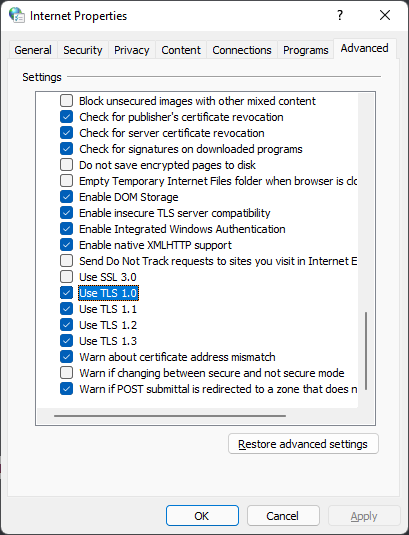
you have to enable TLS1.0 again for the account upgrade to work
?tmnfaccount
 stable capeBOT
If you're seeing this error message while trying to create an account in TM Nations Forever or TM United Forever, then luckily there's a workaround for you.
You need to open up your Internet Properties panel, which you can find via the search bar in Windows or by typing it in the start menu (Internet Options in Windows 11).

Navigate to the Advanced tab and scroll down to the Security section.
Here you need to make sure the option Use TLS 1.0 is enabled. If it isn't, enable it - see the image below for reference.
After that, you should be able to create an account successfully.
Make sure to deactivate that option again after having registered your account, as to not compromise your security.