#Cant Make Account
25 messages · Page 1 of 1 (latest)
 supple horizon
 grave harborBOT
If you're seeing this error message while trying to create an account in TM Nations Forever or TM United Forever, then luckily there's a workaround for you.
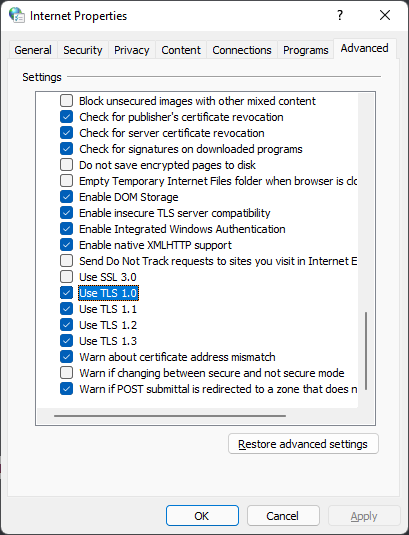
You need to open up your Internet Properties panel, which you can find via the search bar in Windows or by typing it in the start menu (Internet Options in Windows 11).

Navigate to the Advanced tab and scroll down to the Security section.
Here you need to make sure the option Use TLS 1.0 is enabled. If it isn't, enable it - see the image below for reference.
After that, you should be able to create an account successfully.
Make sure to deactivate that option again after having registered your account, as to not compromise your security.
 supple horizon
 what website do you mean?
 remote leaf
lemme pull it up real quick
sorry for the confusion
ugh my grammar
i cant use it
supple horizon
that has nothing to do with TMUF tho, that's TM2020
which just uses a ubisoft account
supple horizon
 what are you trying to accomplish
supple horizon
ah
supple horizon
grave harbor
well I guess the same applies, idek if you can make an account outside of the game tho
 meager nexus
remote leaf
Thank you so much :D
meager nexus
remote leaf
Thank you so much :D
the actual tmf player page can be found here: http://players.trackmaniaforever.com
but accounts need to be registered ingame
remote leaf
oh