#wifi adapter problems
21 messages · Page 1 of 1 (latest)
 slate dune
 ocean grottoBOT
Need Help Or Have a Problem, @slate dune?
You're probably looking for #tech-support or #1006577277313744996!
Once there, please be sure to provide plenty of details, follow the guidelines, ping the <@&787528858806124575> role, and be patient!
Look under the 🔧 Support category for the appropriate channel for your issue. See #server-information for more info.
slate dune
<@&787033266225938472>
 harsh patio
Try this. Choose 2.4 instead of 5
https://www.windowsdigitals.com/how-to-change-5ghz-to-2-4ghz-in-windows-10/
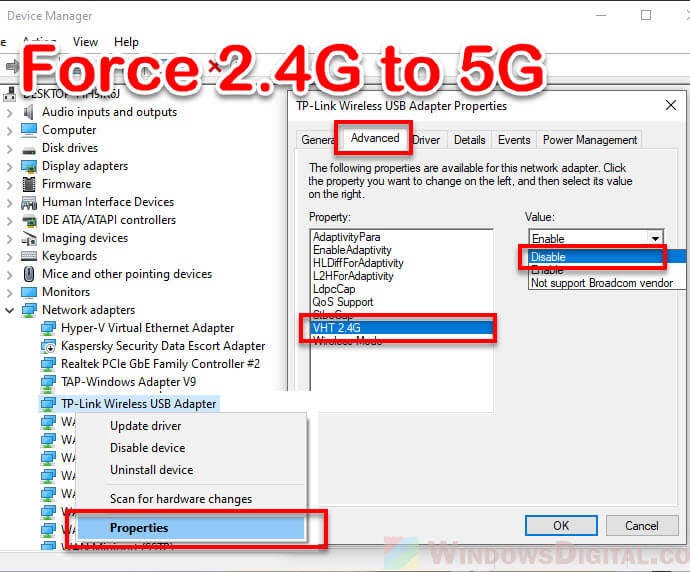
This guide shows how to change the radio frequency of a wireless adapter or a router from 5 GHz to 2.4 GHz or vice versa in Windows 11/10.
slate dune
harsh patio
Try this. Choose 2.4 instead of 5
https://www.windowsdigitals.com/how-to-change-...
what if my wifi adapter says code 10
 glossy sluice
slate dune
what if my wifi adapter says code 10
glossy sluice
slate dune
what if my wifi adapter says code 10
More than often it means the WiFi chip is dead, but it could also mean the driver is missing
I suggest you go to the manufacturer page, find your SN and search for the model and download the driver
slate dune
can u give me a site for i can download it
glossy sluice
slate dune
can u give me a site for i can download it
Which manufacturer?
glossy sluice
Yes, but your laptop is made by HP , Dell, ASUS, Lenovo, etc, etc.
Who is important
slate dune
dell
glossy sluice
Model? Look under your laptop for the specific one
slate dune
no its a pc
glossy sluice
It may be written in very small letters together with the SN
slate dune
hold on
glossy sluice
Okay, a desktop changes things. I suggest you check with SupportAssist if you have an ethernet cable: https://www.dell.com/en-us/lp/dt/supportassist-for-home-pcs

Dell
Visit Dell.com to learn more about SupportAssist, the Dell’s first proactive and predictive support technology that troubleshoots your hardware and software.
slate dune
okay
 zinc tusk