
#building my first computer
1 messages · Page 2 of 1
 lilac tapir
I personally dig the one where you push through the radiator and out of the case
 autumn herald
But it’s covered by glasss
So idk how that would work
The back of the case
Isn’t full metal
lilac tapir
hmm
lilac tapir
look up some videos for that particular case
they may have some special intention with how to mount a 360mm rad
autumn herald
Alright

They set them up like this
So I assume I gotta remove the top
They’d didn’t do setup
lilac tapir
yeah I like that setup too
with the fans blowing up
you can mount the fans on the radiator first
or mount the radiator to the case first
they will be held by separate screws
autumn herald
 autumn herald
?
autumn herald
Ye
lilac tapir
that's nifty
autumn herald
Well it is a 250$ case
lilac tapir
never seen that before
ah cool, so you can just take it off and fully mount both the rad and all the fans without risking dropping anything on the motherboard
autumn herald
Pretty sure yes
Ok it’s off

Ok now I put the fans into the thing
@lilac tapir
How do I do the fans?
 lilac tapir
I mean any way you want to really, but I would put them in the way that picure above with the white case showed
btw they blow out on the grille side
the visible side on the fan in that last pic is the intake side
autumn herald

So like this?
I’m kinda worried
If the rgb cable
Is like facing the glass
And not the back
I would probably have to switch out the fans or some
autumn herald
The motherboard came with
Zip lines
Idk the exact name
But their like bands
Zip bands
Ye those
@lilac tapir question

Idk if you see it but there’s the circle thing
Underneath the screw
Am I supposed to use them for that?
autumn herald
Alright thanks for the help I appreciate it
autumn herald
I’ll try to be quick
lilac tapir
someone else will surely take over :) or I'll be back tomorrow!
autumn herald
Hopefully
Btw
The radiator seems to have thermal paste
Applied to it
So I guess I don’t need my stick of thermal paste anymore
autumn herald
@dry inlet
I just finished setting up the fans
For the cooler
Now ima put it back in
Then we do power supply
@dry inlet you there
I need assistance
 dry inlet
What
autumn herald
Ok so I setup fans
Now I wanna setup the cables
To the psu and the motherboard
And the rgb
The fans came with this

And the case came with these things

Also idk what this thing is but it’s in the case nzxt box
 dry inlet
That blue one is the USB 3 cable
dry inlet
I'd need better pictures of the other ones

 dry inlet
uh so the one in the back with the gold is sata power
dry inlet
You'll need to hold the other 2 closer
autumn herald
 dry inlet
1 is probably f_panel and other is f_audio
dry inlet
autumn herald
Looks like Sata Data
dry inlet
Just hold the connector and take a picture...
autumn herald
I just did video
dry inlet
Again, hold the connector and take a picture
autumn herald
Which
dry inlet
A video is worse than a photo
autumn herald
All?
autumn herald
 autumn herald


 dry inlet
Sata power and f panel
Sata power connects to another cable on your PSU
f panel connects to your f_panel header on your motherboard
autumn herald
 autumn herald
 dry inlet
What case
autumn herald
I couldn’t find anything regarding those things
Nzxt h9 elite
Like it probably should
But I couldn’t find anything
The manual I got isn’t even manual
It’s like a photo step on how to insert things into it
Like motherboard psu
dry inlet
autumn herald
Case manual doesn’t
???
 autumn herald
It doesnt tell you what goes in what
dry inlet
how tf would it connect to the PSU
dry inlet
whats your motherboard again
autumn herald
Asus rog z790-e gaming wifi
dry inlet
Motherboard manual explains it all as well
99% of this stuff is explained in the manual
dry inlet
what
dry inlet
Dyslexia affects reading...
autumn herald
Manual read
I’m joking
Manuals have many pages
And so it’s easier to just write question
And someone can help me
Also step by step guides better
Anyways what do I now
dry inlet
Plug the cables in
autumn herald
dry inlet
Sata power connects to another cable on your PSU
Wait
@dry inlet my psu comes with a bunch of cables
What’s are those used for
It’s like an unholy amount of cables

Do I connect those all into psu?
autumn herald
Idk which ones I need though
That’s the thing
Ok let’s just focus on the small cables
From the case
dry inlet
autumn herald
Idk which ones I need though
⭐ Manual ⭐
autumn herald
dry inlet
⭐ Manual ⭐
Didn’t come with manual bro
And I don’t know what things are what
Idk what the names mean
dry inlet
autumn herald
Didn’t come with manual bro
Yes it did
If it didn't an online one exists
dry inlet
autumn herald
Ok let’s just focus on the small cables
Plug them in
dry inlet
Your motherboard manual says it as well, with diagrams
autumn herald
I’m not using hard drive
I’m using ssd
So that means I don’t use the SATA
Device connection right
dry inlet
Well 2.5" drives still need sata data cables but you're using an M.2, right?
autumn herald
Yes
autumn herald
dry inlet
USB 3.0, usually around the 24 pin
This is a 3.2 right
The blue one
According to manual and picture it says 3.2
dry inlet
autumn herald
Yes
You won't need Sata Data cables then\

 dry inlet
Then it's probably good
autumn herald
I just connected the internet thing to the motherboard
Btw
I need a usb right
For windows
Or does bios have internet searcher
dry inlet
autumn herald
I just connected the internet thing to the motherboard
What internet thing
It has built in internet
dry inlet
To download it, yes
autumn herald
😩
 spring topaz
dry inlet
It doesn't even have access to the internet
spring topaz
dry inlet
It doesn't even have access to the internet
Some do
autumn herald
Alright let’s keep on going
spring topaz
But strictly to update
dry inlet
spring topaz
Some do
Which
dry inlet
autumn herald
Alright let’s keep on going
Nah wait, what internet thing did you connect
autumn herald
dry inlet
Nah wait, what internet thing did you connect
The internet antenna
That comes with the motherboard
dry inlet
Okay
autumn herald
So it has internet
dry inlet
Do f_panel next
spring topaz
dry inlet
Which
Simplest example is PXE capable NICs
Their ROMs are considered a type of BIOS/UEFI OpROM
dry inlet
spring topaz
Simplest example is PXE capable NICs
Okay cool, but we're talking about motherboards
dry inlet
huh
autumn herald
Case cable
autumn herald
Oh found it
My bad
Where connect
Or does it matter
As long as it’s an accepted entrance
spring topaz
dry inlet
Okay cool, but we're talking about motherboards
Intel vPRO with Active Management Technology
spring topaz
autumn herald
Where connect
The power button cable usually goes to PWR
dry inlet
spring topaz
Intel vPRO with Active Management Technology
Okay, but give me a motherboard where the BIOS can search the internet
autumn herald
spring topaz
The power button cable usually goes to PWR
Ooh power button is the if f_panel?
dry inlet
autumn herald
As long as it’s an accepted entrance

Yours were all connected though, correct?
dry inlet
Send a photo of the connector
spring topaz
dry inlet
Okay, but give me a motherboard where the BIOS can search the internet
That doesn’t exist
Point for a BIOS to access the internet is either remote management or to update
dry inlet
spring topaz
That doesn’t exist
Point for a BIOS to access the internet is either remote mana...
Exactly, so what were you yapping about lmao
autumn herald
 spring topaz
dry inlet
Exactly, so what were you yapping about lmao
spring topaz
dry inlet
Exactly, so what were you yapping about lmao
BIOS capable of being remotely managed
autumn herald
 spring topaz
But ok let’s just stop here we’re going offtopic
dry inlet
spring topaz
BIOS capable of being remotely managed
yapper ville
autumn herald
I only connected the blue cable so far
dry inlet
autumn herald
The connector, not the header
autumn herald
dry inlet
The connector, not the header
I only have the blue one connected
dry inlet
Take a photo of the f_panel cable
dry inlet
autumn herald
I only have the blue one connected
I never asked which ones you had connected
autumn herald
 spring topaz
flip it back and see what it says
dry inlet
autumn herald
Show the holes for the pins
It looks like its for the f_panel, I just want to verify before you mush all the pins
autumn herald
 autumn herald
autumn herald
autumn herald
It literally says
F panel
Why do you need to verify if its f panel
spring topaz
autumn herald
Could we take a closer look at the pins at the bottom right corner
spring topaz
spring topaz
Could we take a closer look at the pins at the bottom right corner
Use a flash if possible to illuminate the text
dry inlet
 spring topaz
Covers the HDD LED and RESET it seems
 autumn herald
Ok
 dry inlet
no lmfao
autumn herald
Wait wa
spring topaz
autumn herald
Down at the bottom right corner
dry inlet
Almost as if your motherboard manual says where it is
 dry inlet
autumn herald
Manual this manual that
dry inlet
autumn herald
Manual this manual that
99% of your questions are in the manual
spring topaz
dry inlet
Pin assemblies should be the same, align the bottom 5 pins with the 5 sockets on the F panel plug and gently plug it in
dry inlet
autumn herald
Plug it in, left most side
dry inlet
yes
autumn herald
Alright I’ll be the upmost careful
dry inlet
Unless you know how to solder
autumn herald
autumn herald
Wait left most
Of the cluster right
Like where the bunch of pins are

Is it normal that 3 don’t have pins
Motherboard came like that
I swear I ain’t break any off
dry inlet
Yes
autumn herald
Alr I was gonna have a
Heart attack
So I put it in those right
In left most side
dry inlet
Yes
dry inlet
audio
dry inlet
maybe the one that says audio?
dry inlet
The one that says audio...
dry inlet
onto the audio header...
autumn herald
Where is it
dry inlet
The motherboard comes with a little book that tells you
dry inlet
No
I don't know the exact positioning of each header so I'm going to just check your motherboard manual
Why tf would I check your motherboard manual when you can do it yourself
dry inlet
It's available on your motherboards site
dry inlet
nah
autumn herald
PLSS
😭
I’m learning from this
It’s my first time building computer
I got no idea what is what
I’ll give you my 3 month YouTube premium
Code I got
🙏
dry inlet
you gotta be independent in life
autumn herald
Pls
Help me
😭
Your acting as if I’m not the one building this
I just need the knowledge
Pls
@dry inlet
Please I’m sorry
I checked manual
And it didn’t mention anything
About hd audio
And where it goes
 dry inlet
manual.
autumn herald
BRO
I DONT SEE PICTURE
PLS HELP
@dry inlet
Please
😞
It was all going smoothly
Sorry if I make you mad
Just help please
dry inlet
autumn herald
Sorry if I make you mad
I’m not mad, you just need to learn how to use your manual
I literally gave you the page
autumn herald
dry inlet
I’m not mad, you just need to learn how to use your manual
I can’t find dude the picture
Of how it looks
Pls help me
I wanna finish before the day is over
😞
I’m going to Walmart for usb
BRB
lilac tapir
you don't really need to plug any of them in at all
they're all optional for you, since you have a power button on the motherboard anyway
otherwise you would at least need the power button connected
on asus boards all the front panel stuff is usually connected at the bottom edge of the board
but you do need to read the pages of the manual for this if you wanna have even a chance of getting it right
there is nobody going to be accurate enough to tell you where to plug in each pin, for like 30+ pins and be perfectly accurate via discord
just find the manual pages and read them and plug in everything that seems obvious, ask for help with whatever is missing, or just skip it as you may not need it anyway
autumn herald
@dry inlet back
autumn herald
lilac tapir
just find the manual pages and read them and plug in everything that seems obvio...
I confused
😭
dry inlet
I was cooking
dry inlet
I gotta put spices in
autumn herald
dry inlet
Ramen
Ooh nice
dry inlet
That’s it
autumn herald
👍
When done tell me
I wanna finish this by today
Tomorrow I gotta go
Grandmas
lilac tapir
autumn herald
I confused
you need to read the motherboard manual :p
just take it with you instead of your phone the next time you go take a shit
and don't start wiping until you've read everything
autumn herald
😭
Chill
Bro I deadass
Don’t see anything telling me where to plug the hd audio
Like I need poctures
autumn herald
I can’t find
What’s page
I don’t see

There’s no section called
Front panel collectors
lilac tapir
it's under 2.4.2
or 2.1.9
just read the whole chapter 2
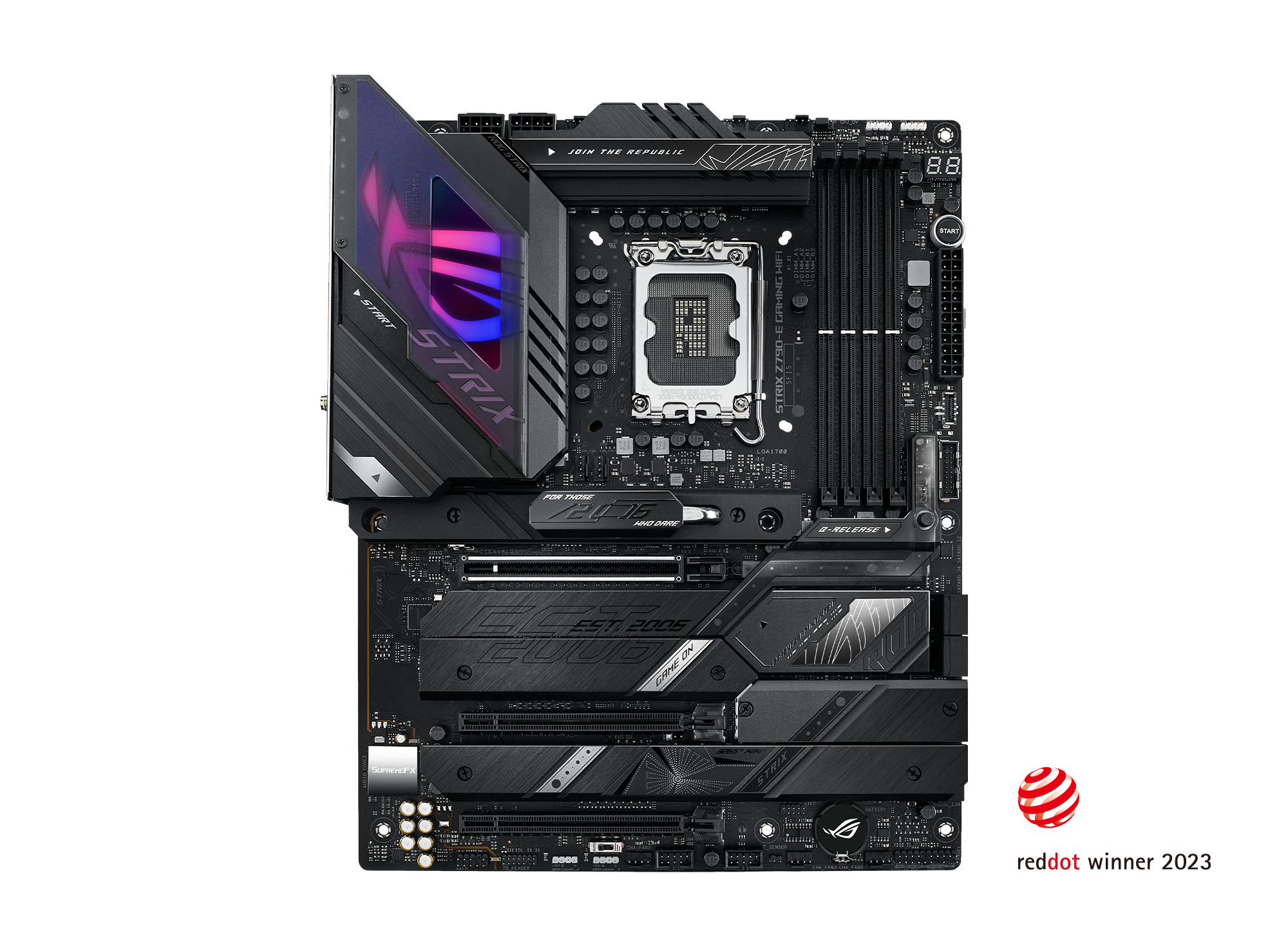
The ROG Strix Z790-E Gaming WiFi supercharges builds with its robust 18-stage power solution, hyperspeed DDR5 memory, and next-gen PCIe 5.0 connectivity. It features five M.2 SSD slots with heatsinks, USB 3.2 Gen 2x2 support, WiFi 6E, AI Overclocking, AI Cooling II, AI Networking, Two-Way AI Noise Cancelation, and Aura Sync RGB lighting.
is this the right board?
dry inlet
lilac tapir
there is pictures!
This is what I’ve been telling him for like 2 hours
autumn herald
lilac tapir
it's under 2.4.2
The manual doesn’t have that
dry inlet
@autumn herald I’m going to help you build the computer, but if it’s in the manual and super easy I’m going to direct you there
autumn herald
You guys are telling me stuff that aren’t in paper manual
And expecting me to see them
😭
autumn herald
dry inlet
<@1114494440967516170> I’m going to help you build the computer, but if it’s in ...
Thank
dry inlet
autumn herald
The manual doesn’t have that
Are you 100% sure you told us the correct motherboard model?
autumn herald
dry inlet
Are you 100% sure you told us the correct motherboard model?
Yes

Look it says on case
lilac tapir
it has everything
dry inlet
autumn herald
Yes
Show is the contents page in the manual
autumn herald

Doesn’t mention anything about hd audio
The audio I/o connects I checked
And those are complete different things
lilac tapir
 autumn herald
Totally would of guessed that
lilac tapir
plus it's the only place where that connector will even physically insert
because one of the holes is plugged
lilac tapir
you can't get it into a usb header
autumn herald
Ok let’s stop the fuss
lilac tapir
:p
autumn herald
So I connect hd audio
In 15
Ok got it
Ok it’s in
Now usb2.0
Which one would that be
@lilac tapir
lilac tapir

literally just read the manual
it's all in there
but you don't really need most of them
autumn herald
Which one is 2
autumn herald
dry inlet
Your manual has a motherboard layout page
Dude I don’t know the names
autumn herald
lilac tapir
Can it be any?
lilac tapir
this is the only important page

you need the power switch
everything else is optional
I usually skip it completely
lilac tapir
no the power button on the front of the case
you need to connect it to the motherboard
autumn herald
Oh
How do
But firstly
Where do I connect usb2
Those don’t say usb 2
It’s just random nimbers
lilac tapir
lilac tapir
here
lilac tapir
yeah
lilac tapir
autumn herald
<@243125463797465088>
this mess

 lilac tapir
I dunno
 dry inlet
lilac tapir
it looks modern so surely it'll only fit in one hole
dry inlet
lilac tapir
it looks modern so surely it'll only fit in one hole
Yeah, it's keyed
autumn herald
dry inlet
USB 2.0
Wait so
dry inlet
Yup, type-c
 autumn herald
I already connected usb 2
dry inlet
autumn herald
Wait so
I made a mistake, it's type-c, not 2.0
 autumn herald
Never
I can’t get it in
Ok I got it in
Now what chat @dry inlet
😞
Help now what do I do
@lilac tapir
lilac tapir
uuuh I dunno even how far we are
:D
did I mention I have a flu and like 40 degree fever atm? I'm literally delirious
autumn herald
lilac tapir
uuuh I dunno even how far we are
Ok so
We connected the case cables to motherboard
Motherboard I added cpu ssd and ram
I also screwed in the fans at the top
I haven’t put the radiator in yet
Power supply also isn’t set up
And neither is graphics card
So what’s next
lilac tapir
PSU I guess!
dry inlet
autumn herald
Power supply also isn’t set up
PSU
Connect your cables to the PSU end, screw it into it's shroud
1: 24 pin
2: CPU ATX12v
3: GPU VGA
1: Sata power
dry inlet
dry inlet
3: GPU VGA
Either 3 of these or 1 12VHPWR
dry inlet
Did you do no research before you spent like 2 grand?
dry inlet
autumn herald
You said to ignore
I said to ignore Sata Data
autumn herald
I did do compatibility
autumn herald
dry inlet
I said to ignore Sata Data
Oh ok
autumn herald
Computer part checker
😎
It’s about the experience
You learn along the way
Am I right chat
dry inlet
Definitely not
autumn herald
My bad
I’ll give you like a 5$ tip
For helping me after we done
😭
For all the troubles
@dry inlet what do I do with the big clump of cables
 autumn herald
Alright
dry inlet
So the 24 pin will be the big one
It has 24 pins, and sometimes will split into a 20+4
The CPU ATX12v will be the 4+4 cables
The GPU VGA cables will be 6+2
im tryna play phantom forces so chop chop
dry inlet
nah i literally only play phantom forces
roblox is fucking cringe except phantom forces
It's actually a hard game
 dry inlet
I'm better at Fortnite and Halo than I am at phantom forces
dry inlet
autumn herald
dino nuggets 💀
autumn herald
dry inlet
dino nuggets 💀
Their best
dry inlet
average american
dry inlet
autumn herald
So that bitch goes into the motherboard 24 pin
It'll be on the right side
autumn herald
Wait it’s double sided
So I put the 20+4 in psu
Or the 24 in psu
Wait actually
Ones 24
And other side is
18
I think
28
One side 24 and other side 28
dry inlet
Solid end goes into the PSU
autumn herald
I’m slow ignore
dry inlet
The 20+4 goes into the motherboard
dry inlet
Take photos of both ends so I can see the pins
autumn herald
 dry inlet
Up close...
autumn herald

 autumn herald
Solid
dry inlet
wtf type of PSU is this
weird asf
What model?
Usually one end is a solid 24, and the other end is 20+4
autumn herald
Super nova gt 13000
dry inlet
No, it's just an abnormal design choice
It's not standard
So anyway, the solid 24 goes into the motherboard
dry inlet
autumn herald
This one
dry inlet
That's normal
autumn herald
Alr
In it goes
Does it make a sound
When it’s in
Cause I put it in and no click sound
dry inlet
autumn herald
Does it make a sound
 autumn herald
 dry inlet
Put your hand behind the motherboard
autumn herald
 dry inlet
Not even close
autumn herald
Wth
dry inlet
There shouldn't be a gap
autumn herald
 autumn herald
😭
dry inlet
Keep going
autumn herald
Why is this the hardest part
😭
I just used max strength
And there’s still gap bro
Wth
dry inlet
Get ur dad
dry inlet
bro 💀
 dry inlet
psuh harder
 dry inlet
nope

 dry inlet
I can't tell from that angle
dry inlet
Wouldn't boot
autumn herald
Ok if that happens then ik the issue
At least
Ima try to push harder again
And if I don’t feel anything we move on
 dry inlet
Can't tell 🤷♂️
dry inlet
literally just stick your phone in there
autumn herald
I am

This metal part blocks the way
what do you think
Ima plug it in the psu
Now
dry inlet
Sure
dry inlet
wdym
 dry inlet
i cant see anything
autumn herald
What you mean
dry inlet
i cannot see anything in the photo
 dry inlet
Yeah
autumn herald
So now we screw in psu?
Or do I gotta connect the nzxt fans to it

This has part of the nzxt box
Do h connect it to motherboard?
autumn herald
dry inlet
Sata power cable
Where connect
dry inlet
autumn herald
Where connect
show your psu cables
autumn herald
dry inlet
show your psu cables

 dry inlet
the cable is labled
autumn herald
What’s it called
Btw do you know nzxt boxes
The 3 fans kraken
It comes with a box
But there’s only 3 connectors
Even though each has 2 cables
dry inlet
Don't you have a fan hub
autumn herald
Yes
It comes with one
But the case comes with one to
But the 3 fans from the case fan hub
Take up all the spaces
So idk what to do I’m confused
@dry inlet
dry inlet
Daisy cahin them
dry inlet
Are you talking about RGB or Power
autumn herald
But the fans come with 2 cables
autumn herald
dry inlet
Are you talking about RGB or Power
Not sure the thing says rgb
But the full ones say fan
I’m so confused
And the one the fans came with also only has 3 connectors
dry inlet
What's your question
autumn herald
So basically
The nzxt case
Comes with the fan controller
There is 3 spare rgb controllers
But
The kraken cooler I bought
Comes with a fan controller too
But it only has 3 connectors
And the fans come with 2 cables
What do I do
dry inlet
autumn herald
But it only has 3 connectors
Show this
 dry inlet
No, show the headers
autumn herald
Ok

These the 2 headers of the fan
Only 1 is compatible with the fan hub
Other one no clue where it goes
dry inlet
The 2nd one plugs into a PWM on your motherboard
autumn herald
Ok so ima just plug all 3
Into the fan hub
Then connect rest to pwn
Where’s pwn
Located @dry inlet
Is this pwn ?

Cha_fan2?
dry inlet
Yes
autumn herald
Ok done
@dry inlet
Setup all 3 fans to those
Now where do I connect sata thing
autumn herald
Alr
There to small
To fit in bro
Wth
Wait I don’t have a hard drive
Why do the devices say sata
I’m so confused
Their to big to fit
My motherboard says sata but has no connector
@dry inlet
Help 😭
dry inlet
What
autumn herald
The sata things are to small
dry inlet
autumn herald
My motherboard says sata but has no connector
The sata power plugs into the sata cable you showed me earlier
dry inlet
I don’t have pictures
 dry inlet
The sata cable from your psu
autumn herald
Where
How does it look
You said I showed you it
Send pic
Wait I found
Cable to put it in
autumn herald
Alright
There’s no more space in my motherboard for
These cables

What do I do
😭
@dry inlet
We continue tomorrow
Ima go to sleep
 chilly vector
What do you have rn?
Everything but the GPU, radiator and cabling?
chilly vector
autumn herald
Also, from what component is this cable coming?
dry inlet
autumn herald
What’s it labeled
autumn herald
chilly vector
Also, from what component is this cable coming?
Cpu cooler
Ok gn
I’m probably gonna take my pc tomorrow to like Best Buy
And pay someone to build it for me
If I can’t figure it out
dry inlet
autumn herald
Cpu cooler
Probably a proprietary cable
autumn herald
No clue
dry inlet
autumn herald
I’m probably gonna take my pc tomorrow to like Best Buy
This is why you don’t buy nzxt
It’s making this significantly harder
autumn herald
😭
True
But gif
🤷
Ok good night
I usually wake up at 7 am or 8 am
For me it’s 10:41 pm
I’m tired gn
chilly vector
Have you looked in the manual for how to install it?
I guess it would say what cable to put where
autumn herald
chilly vector
Have you looked in the manual for how to install it?
I guess it would say what c...
Don’t have manual
I’m so stressed out and confused
I’m probably gonna just ask a guy to make it for me
Good night
chilly vector
Oh.. That's Okay
Have fun once you get it built!
lilac tapir
you did a good job so far! :)
lilac tapir
autumn herald
also this is a legacy USB header, it should fit into one of those USB 2.0 ports on the mobo
but it might be a part of the nzxt controller bit?
check the coolers manual I would say for where it's supposed to go
but I'm guessing it's just USB for some kind of display on the cooler itself?
autumn herald
I found a nzxt usb 2.0 splitter
So I can have 2 extra usb2.0
Such a life saver
Now ima put in the graphics card
And I should be done
Hopefully
autumn herald
@dry inlet
I need help with gpu
I’m tryna put it in the bracket
But it won’t go in
Idk if I’m doing something wrong

I’m tryna put it in the first one
 pallid vault
and you removed the back slots of the case where the GPU's I/O go?
pallid vault
take a pic of the back of your case
autumn herald
Ok

I already setup the radiator
And the psu
I screwed it in

@pallid vault ?
dry inlet
autumn herald
<@669343267589980160>
wsg
autumn herald
pallid vault
and you removed the back slots of the case where the GPU's I/O go?
Oh yes
That you meant ye look
pallid vault
no, that'st he PSU. take a pic of the back of the case.

