#Pc randomly blue screening for memory managment, and google randomly crashing and discord and games.
46 messages · Page 1 of 1 (latest)
 wicked seal
 full sable
this bsod is a memory issue. Resetting it wont work…..
Upload your dump files located at C:\Windows\minidump. Make sure to move them to a new location and zip them up
full sable
@wicked seal
wicked seal
how do i fix memoryi ssue?
full sable
do what i just said above
full sable
well is it happening when u reset ur pc?
also resetting ur pc is unreliable that just reuses the corrupted system files well if they are.. Reinstall from a usb..
wicked seal
i dont have a usb
wicked seal
full sable
well is it happening when u reset ur pc?
idk
full sable
then why u saying it is bsoding?
full sable
u literally deleted mosst of the .dmp files and or logs of the crash... No one knows why it bsods or crashes now..
full sable
we dk how to fix it.. U destroyed the .dmp files and the logs of the crash...
Therefore we dk why it is happening...
wicked seal
well then if it crashes again i will
full sable
cool
wicked seal
cool
full sable
- Go to event viewer -> windows logs -> system -> filter current log -> <all event ids> replace it with 41 press ok -> click on the 2 most latest ones -> show their details tab' event data (Like this pic) https://imgur.com/V5QrFtu, https://imgur.com/lxVDOcC
- Upload the dump files located at C:\Windows\minidump, make sure to move them to a new location and zip them up

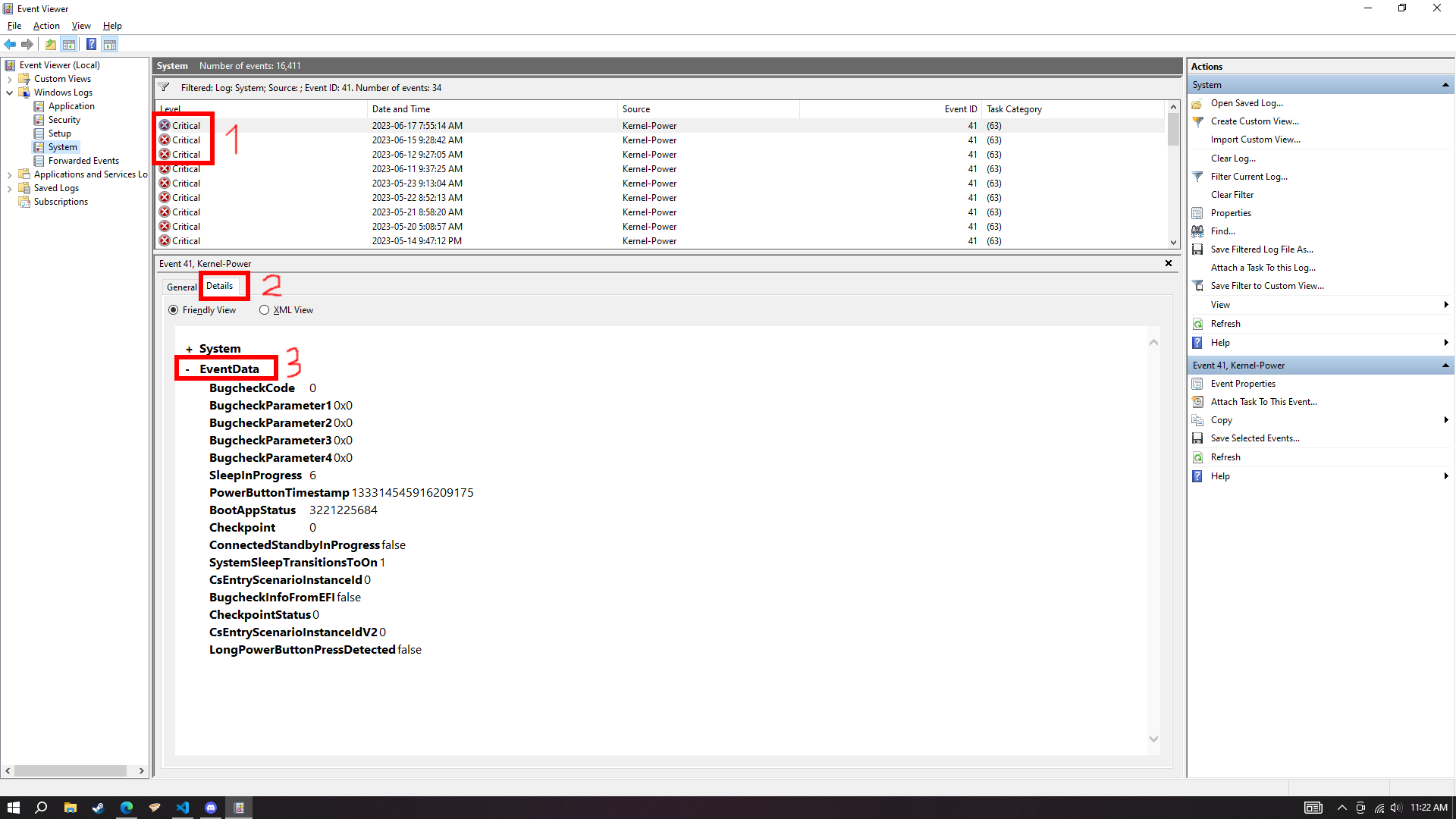
do that if so
wicked seal
im confused on what to do
wicked seal
full sable
- Go to event viewer -> windows logs -> system -> filter current log -> <all eve...
i did everything but idk what you mean by upload dump files
 full sable
how are u confused when there are pictures showing what to do 
that's not even the right parameter, i said event data
there's literally instructions and picture 
this is for the dump files...
full sable
how? there are pictures telling u what to do.
wicked seal
because its still not clear
full sable
how. There are numbers on it..
full sable
THere's no excuses when someone showed u something in pictures and u cannot do it... Pls send this to a repair shop..
wicked seal
maybe i dont have the ablity to understand as you do? why you sounding like a bitch when i clearly just dont understand
kill your self
full sable
What's not clear about these? https://imgur.com/V5QrFtu, https://imgur.com/lxVDOcC
full sable
wicked seal
maybe i dont have the ablity to understand as you do? why you sounding like a bi...
u have eyes... U can follow what i do in the pictures...
there are numbers...