#nms-modding
1 messages · Page 184 of 1
 hushed bronze
 fickle frost
Hmm, maybe the ones I was looking at (the volcanic beaches?) was another mod.
All good, haha, you mentioned it in a modding discord so I didn't know if you'd seen anything offhand.
I'll let you know next time I trawl through Eissentam, tho idk how to tell you if it modifies terrain?
hushed bronze
@fickle frost ID'iing whether it edits terrain would mostly come down to trying with and without in the same places, but if your bases are all planted firmly on the ground, it should be golden
Good thing I missed all that pc parts talk earlier lol I would have had waaay too much to say
And dear god, @hidden shell I threw a Nehalem chip in a garbage can three years ago because it wasn't worth as much as the postage to mail it to a buyer, lol
 long turtle
so far ive not seen anything weird, but thats mainly bc i spent the last hour on a dead planet
fickle frost
Oh shoot I did have some weird base discrepancies
Idk if it was the mod tho or if I just didn't pay attention with the struts
hushed bronze
Missing struts is a vanilla bug
fickle frost
Not missing, but the bottoms were floating 😂
I'll check with and without!
I probs shouldn't have even brought it up ope
hushed bronze
I did find one thing to change so far, but it wasn't a problem-causer
LOL (Color mod error, not ground mod error)
Thats a test color I use to ID things lol
I enabled LUSHHQ biome to use LUSHHQ palette in the Ground Fix. Normally irrelevant, but enables a dual palette in my color mod. (Those palettes are normally both default copies of each other and mostly inactive)
 cinder valley
 halcyon dock
Chocolate
hushed bronze
Well i just had an insane idea that will definitely blow up in my face
long turtle
o w o
 vale iron
Booom!
 lime mesa
Anyone know any mods that give you the prerelease hud?
vale iron
I think there's one named E3 something
Hmm there's a scanner. The hud one is from 2016 so I doubt that works
 echo oxide
lime mesa
echo oxide
lime mesa
Dang
 hidden shell
@hushed bronze, you threw a nehalem chip into bin can, and here, Nehalem CPU plays NMS locked to 60 fps vertical sync no problem. Ha! (Ha! Ha! Ha!)
Also, it strongly depends on the quality of the mobo it is running at. The thing that passed down for my son PC is an actual SATA3, USB 3.0 capable motherboard that was kind of top of the line at its time, allowing very good overclocking potential (which is used to full extent). also, the CPU was one of the stronger ones too, much better than middle-line of next two generations, so...
Anyway, testing the cliff and grass fix on two PCs - one with it, one without
given that we are playing together, will be easy to spot any troubles, I hope 🙂
vale iron
Could get some easy comparison shots too, without having to alter mods and reload
hushed bronze
@hidden shell (Try that with a W3503 lol)
Even with a few things I could wish for I'm gonna post that fix pretty soon if problems dont come up. I've added some minor improvements (minor, wont invalidate your tests 🙂 )
My chip rn is Xeon E5 2697 v3
vale iron
Good, I want to include it in the modpack 🙂
 jade phoenix
Heyo Modder peoples, is there a place in save, maybe a number, or an attribute that reveals what the current status is of a saves base limit? like how much is left? etc
hushed bronze
Can anyone confirm that Beyond Base Building is working or not right now?
jade phoenix
I have it in my list but can not confirm, do you have a specific element that would prove it IS or is NOT working? I can test it
hushed bronze
Anything. Works for me too, but someone asked for update, so Im trying to see if it needs update or not
Dont think it does, everything ive tried works
vale iron
I'm pretty sure as well that everything should work, based on the diffs and list of global variable changes
jade phoenix
I am looking at the list of what the mod does, this stands out "No build-count limits except for certain terminals, beacons and message capsules" , I was building tonight, and I was stopped cold by the base limit. I went about and tore down a few old bases and I could then build again
vale iron
Grabby, do you mean the 20,000 piece global limit? I don't know of a place for that, but it should exist. Isn't there a circle when building that shows that limit in graphical form? That tells me it exists somewhere, but I know not where
That "build-count limits" is X/base or X/planet, not X total build items across the save
jade phoenix
I was building a large Farm on a planet, I should taken a screen shot of the message, but it was the total count error message, I went to other planets in other solar systems and deleted the bases to allow me to continue building
vale iron
That sounds like you hit the 20k limit across the whole save. There is no known way around that right now, unfortunately
vale iron
Yeah, there are way too many different limits!
jade phoenix
that also prompted my question above, is there a place I can see the status of the 20k limit? a number in the save or?
hushed bronze
It used to be but now its probably hardcoded for the purpose of the upload feature
 fast solstice
do mods "break" multiplayer?
vale iron
Not necessarily. It depends what you mean by 'break' and what mods are involved
fast solstice
what happens if another player comes in my base and i have a base building mod on?
and the other player doesnt have it
hushed bronze
he wont be able to place freighter rooms on the ground, then
vale iron
If it's a mod that lets you put down parts that normally aren't in the build menu anywhere, they won't see those parts
fickle frost
@hushed bronze Base building works for me; I can still put teleporters in freighters
vale iron
Ahh, but can you put freighters in teleporters? 🤔
jade phoenix
I keep my Freighter with me by shooting it with a Pokemon Ball Gun, and carry that in my pocket, and release it when I want it
cinder valley

Nexus Mods :: No Man's Sky
This mod changes so many things. Terrain, object spawning, space, and more.
lime mesa
For the Fantasy Synthesis mod I’ve been using the Sci Fi Movies and E3 visual overhaul. Does anyone know how the fantasy movies and fantasy dreams overhauls compare to those?
Thinking of trying out the fantasy movies next
 waxen cedar
I'd really like to disable freighter base distance limits
there is so much unused space around the hull where there could be some really fancy stuff
 ebon turret
how can i mod the game when its from Microsoft store? I cant get access to the subfolders and files in Windows Apps
hidden shell
@fast solstice for maximum compatibility with multiplayer, avoid mods that change terrain generation and add new build parts. Or "force" people you play with to use those, too.
as for things like changed behavior of enemies, it will be kind of strange - sometimes, you will see a sentinel shooting like it should on your version, sometimes being a slowpoke one from your playmate version. Probably depends where he is calculated (which host). Who is "team leader" doesn't matter for that - or was not mattering at least before 2.51, for sure
@hushed bronze can you provide your newest grass/cliff fix in a .lua + textures folder to include version? I just realize with a bit of shame, that the two days of testing failed to show any result, cause it was overwritten by my .lua version of finelod modification 😉
would love to merge it in and do some proper comparison screenshots now
hushed bronze
@hidden shell Hmm, seems you would have overridden grass and biome settings but not the ground texturing...
And I think you know by now I don't even know what the lua app looks like...
hidden shell
In fact quite the opposite, given that you was providing beyond base building as .lua since jesus was a lad, i thought you know it, just... Not using much?
also what lua app, lua is a scripting language 🤔
i eman the amumss-compatible script
Eh, whatever, I will write the .lua for it, but it will take some more time
(as in, definitely not today)
BTw, if I'm going to do it already, can you provide the latest version? I think you mentioned some minor changes?
(as opposed to the version posted earlier, said about so minor than not invalidating the tests, but if I'm going to lua'ify it, might as well do with the latest one)
(btw, in fact I had grass portion working all right after overlap, and not the cliff one 😄 )
hushed bronze
well... that seems backward. oh well
Lemme rollback experimental bullshit real quick like and get you my current
hidden shell
created merged pack + luas version of it for proper testing now, but as said. I want to lua'ify it if possible, I'm, striving to not add any more pack-only mods to my modpack, you know, future-proof. Will gladly do it now for testing, but in the end, lua must prevail.
thank you!
hushed bronze
probably gonna be final, looks like the way I would have to fix would also cause terrain form changes so for grass fix, that's just too bad, so sad
I do have one last, weird idea though
its really stupid and probably wont work lol
hidden shell
hushed bronze
Im thinking make a feature that is over 100% of terrain, is elevation-additive but razor-thin, and has the mountain type
hidden shell
why so, some stupid ideas do work
hushed bronze
No way its gonna work lol
hidden shell
I decided to put every useful debug option that was known to do nothing anymore into my mod, and bah, discovered multiple player's freighters in one system suddenly are working 😉
hushed bronze
@hidden shell That sounds like it may have been dependent on another thing, like one other thing allowed multifreighters override to work
hidden shell
this is one with grass?
hushed bronze
Yes, grass, cliffs, beach
hidden shell
the other thing allowing multifreighter to work was 2.51 😉
and the changes they are cooking in
I bet the point at the end is to have them available in vanilla, including for non-teamed up players, at some point
hushed bronze
sadly cliff part only works on "features" and "true mountains" and not random elevation spikes not otherwise classed as moutnain
hushed bronze
Im really thinking at this point I should call it done and move to the next overdue mod, lol
hidden shell
doesn't matter for lua'ifying, anyway, was just curious
vale iron
How many lines are edited, really rough guess? I might be able to LUAfy it. Just depends on my laziness threshold
I'm guessing a lot
hushed bronze
IDK
It has a few thousand deleted, but thats unecessary to replicate
the 15 grass files are themselves entirely new files
vale iron
Yeah, this already sounds like a big fate NOPE, not touching it
hushed bronze
lel
Boy you should have seen the file structure when it was still part-custom-biomes
I split the biomes into tons of pieces, all of which are "new" files
Grass Fix is updated (Ground Fix now)
https://www.nexusmods.com/nomanssky/mods/1080

Nexus Mods :: No Man's Sky
The Ground Fix (formerly called Grass Fix) mod corrects the craggy, patchy, busted grass with glorious expanses of velvet! It also causes beaches to be all sand and sandstone, and makes many terrain f
vale iron
Do you remember where the price list for backpack expansion is?
hushed bronze
I dont remember the particular file offhand
@vale iron Harder to do, but my plan was to eliminate the buyable backpack slots entirely, so that they could only be acquired via drop pods. Then, you could mess with the repair cost too
@vale iron With any luck you could make it shuffle multiple repair reqs like the damaged machinery does
Basically I wanted to nix the vendor device from space stations and Nexus
vale iron
I'm going to work on LUAfying the no free freighter (I'm renaming it No Free Ride, or maybe 'Cash, Grass, or Ass'), then changing the costs on purchasing. I'm going to make them so high as to encourage drop pod use. Getting rid of the station would be better, but I didn't see how to do it in a quick look
hushed bronze
I had ideas but its tricky
they arent placed as obviously in the scenes as one might guess
vale iron
That's what I was noticing. Nothing in the shop scene seemed named appropriately for that device
hushed bronze
I bet we could get Lo2k to do it 😄
vale iron
I'm all for getting someone else to do something
hushed bronze
I suspect it may be within a referenced or compound scene, like a part of the seated character's scene or something
it would be the most obvious reason for its absence imo
vale iron
People have added it to places, so it can't be that hard to kill it
hushed bronze
Ive seen the ship scrapper moved around, has someone moved the backpack station specifically?
It may require just nixing one piece at a time from the shop scene and seeing what does it. There's only so many parts
A bunch of them are obviously the back wall displays so they can be skipped
Alright, which mod should I kill off next?
Remaining mods in mind are Empyrean (stratos expanse hybrid), General flora and terrain colors mod, and biomes.
hushed bronze
u mean the one i just posted? Thx 🙂
vale iron
That's a tough choice. I want all three of those 😛
The general flora and terrain colors mod will go along with your ground fix pretty well, right? Maybe do that one as a complement?
hidden shell
Hey exo, the ground fix on nexus is same as the one you sent me, lol?
Lua'ifying it is going to be fun. So much fun that I already asked a russian friend of mine to do it, after looking at it for a moment. It is good to have russian friends. 🇷🇺
...we will see if we will remain friends after he takes look at the content.
hushed bronze
TBH lua-fying it might be smarter in a hybrid approach
If recent years are any indicator, biome and object files are basically immune to updates, which really only leaves a few, which are easy lua targets if I understand the process at all
AFAIK files that are edited originals can be turned lua pretty much automatically by Wberto's program, right? @hidden shell
Also, yes, its the same zip i posted here about 15 minutes before the nexus update
In terms of organization, it has a so-called "GENERALIZED" objects folder which may be a bit confusing for a lua job
Its literally vanilla biomes put it one folder, and is used for the weirds in this case, but structurally, its a leftover from previously being a part-biomes mod. It has no functional difference but may be confusing to look at in files
Well, semi-vanilla (vanilla minus grass)
fast solstice
can anyone point me some of the best graphical enhancing mods?
that is compatible with the latest patch
 jade urchin
I dont know any.
hushed bronze
Oh no I made a one-letter mistake in ground fix that has no effect on ground fix but messes up compat with my coming color mod
- dies
 smoky wing
gotta be careful with those tpyos...
hushed bronze
Wasnt a typo, on my part. HG is dum lol
LUSH by default Uses LUSHCOLOURPALETTES
There is an unused LUSHHQCOLOURPALETTE
I stuck an HQ in one to make the duality
but HG was inconsistent in that S at the end and I didnt catch it
smoky wing
O I C
hushed bronze
By slipping that LUSHHQ palette in my ground fix, it auto preps it for the dual palettes my color mod can offer. Its almost all inactive by default, at which point the game defers to BASECOLOUR. In other words, even with that change, it makes no effect on people not using the color mod but enables twin palettes if they do, win win
but now I have to pack six more mods over an "s" lol
vale iron
I'm almost done converting no free freighter, then I have to test it. Just have the language files left
hushed bronze
@vale iron Dual-type lush colors is going just fine 🙂
 round sinew
Grass Fix is updated (Ground Fix now)
https://www.nexusmods.com/nomanssky/mods/1080
@hushed bronze cool, grabbing it
Nexus Mods :: No Man's Sky
The Ground Fix (formerly called Grass Fix) mod corrects the craggy, patchy, busted grass with glorious expanses of velvet! It also causes beaches to be all sand and sandstone, and makes many terrain f
vale iron
I can't wait to see all this in action
hushed bronze
By using two separate palettes within lush (easy with there already being a LUSH and LUSHHQ), I can specifically design two different coordinated themes. I'm thinking "Tropical" (Being E3/prerelease-like in style) and "Alpine" (being more current-gen in style)
The recent pic above was from the tropical
 boreal cave
hey how does modding work would i need to remove the mods before joining multiplayer or a seperate save to mod?
hushed bronze
@boreal cave [nope].
The way Im making it, Alpine will be the one which dominates when the color mod is used without Ground Fix. Ground Fix will conveniently enable the dual-palette allowing the lighter Tropical theme
boreal cave
so i can mod on my main save and my friends join me with mods on my client?
hushed bronze
@boreal cave There are no security checks in place against mods at all
ofc if you have something that makes your planet spawn in a diff place or something, that could be inconvenient
boreal cave
so if i got a friend to join me with my mods in they jsut wont see it?
with no other problems
hushed bronze
yup
boreal cave
surely theres something that happens
hushed bronze
Nope
boreal cave
interesting... thank u
so does that mean u can basically cheat with other players in ur system?
vale iron
The main things that show in multiplayer are if you change terrain generation in some way or if you add custom items. Otherwise, either the other person does see it, or they don't but there's no real problem
Definitely
They will see you moving 10x faster, for example
But it's a non-competitive game, so the phrase 'cheat' is a bit of a misnomer
hushed bronze
Oh hey I just realized we can bring God mode to console fools who can't possibly counter it with their own mods :evil:
vale iron
Yeah, I'm predicting two weeks before the plebes realize what they can do around console players and the backlash against mods starts in forums
hushed bronze
How would you like a plasma cannon with a terrain deletion size as big as a freighter??? MUAHAHAHAHA
Use Sav Sents mod to draw in super sentinels and then log out
vale iron
haahha, badass sentinels
hushed bronze
CatLady proved that this happens
vale iron
though I wonder how they would act on other platforms
hushed bronze
the mod actually writes the specs of a spawned sent, if I summon a chaingunning psycho sentinel its actually a chaingunner for the nonmodder as well
@vale iron This is getting beastly very fast lol
At the rate Im going I can now create and fine tune entire biomes worth of palette in an hour or two
vale iron
I'm not converting that to LUA in a million years
hushed bronze
You wont need to, HG doesnt seem to have plans to mess with color palette structure ever again 😛
vale iron
Yeah, thank god
hushed bronze
But why no lua? It only changes a few hundred thousand lines
vale iron
Hmm, I might be able to work out some sort of looping system like I did with lights
hushed bronze
Also I thought for something like this, Wberto's app could auto generate a lua from a comparison of stock vs. existing modded file
that would make it a snap, wouldn't it?
vale iron
He mentioned that ability, but I don't know how it would work, and I don't think it's a publicly available option
hushed bronze
Hmm I think it is .... you should ask him
boreal cave
wheres the best place to get mods?
vale iron
NexusMods
boreal cave
oh awesome
vale iron
Just sort by Last Updated
boreal cave
doees vortex work with it?
vale iron
They make Vortex I think, so yeah
hushed bronze
@boreal cave NMS mod installation is way too easy to bother with vortex imo
vale iron
Agreed
I tried using it for a while and gave up. The times I had to manually intercede made it less convenient than manually doing it myself
boreal cave
is it just drag and drop into mod folder?
vale iron
Yeah. You have to know a tiny bit about load order and what different mods affect, but you'd end up learning that to fix Vortex issues
hushed bronze
@vale iron Hey feel like trying out the combination of Ground Fix / Color mod?
I should have the colors ready in a few minutes. Combined with Ground Fix, it produces 128 color profiles for Lush planets
vale iron
Sure, I cna take some screenshots around bases
I'm just watching stupid TV shows and avoiding answering emails
hushed bronze
hehe
damned emails
@vale iron
Im interested in any criticisms, too, related to terrain color or biome objects color
vale iron
Do I need to add the ground fix as well, or is that included?
hushed bronze
These two currently only really adress LUSH, so don't go looking for modded colors on a scorched world just yet 😄
No Ground Fix is separate
Ground fix enables the "tropical" style colors
vale iron
Ok, I'll do both
hushed bronze
Without it you will only get the darker alpine set
@vale iron and this, although I suspect it may be responsible for a benign camera glitch or two right now
vale iron
What is that one?
Hey, my windows 3.10 Workgroups OS from 1990 isn't working with crossplay. Why does HG suck so much? most NMS forums right now
hushed bronze
Its a huge pulse speed buf as well as instant startup and no cooldown for it@vale iron
I must get a sandwich before i die. BUT FIRST this screenshot
vale iron
Should there be any terrain generation changes? One of my bases is completely underground now, but the several others I've visited have been as expected
hushed bronze
Does that planet have craters? (there shoud not be changes but if there are, craters is probably the one)
vale iron
Hmmm, I'm not sure on that. I only ever explored a little around the base area, so it might be that the 'craters' in that area blended in well enough to not be so noticeable
I know it has rock arches
vale iron
Unaffected 10 I would say, affected 1
hushed bronze
interesting.... I will have to run a compare against vanilla voxelgen, see if I left a straggler in there
vale iron
I'll check a few more. Do you want coordinates or a screenshot of the affected base?
hushed bronze
How recently have you been to that base?
vale iron
Not since the update
hushed bronze
I ran a check on voxel, no hits for anything that would alter terrain
Does that base return to ground level without my mods installed?
vale iron
Probably an oddity unrelated to your mod
I'll check
Seems to be Ground Fix. I took that out and everything loaded as it did in the past
Ground fix at 80u, if that helps
hushed bronze
interesting... There should be nothing in that file to cause this. You say arches on that world?
like the small 50 or 60u wide sort?
vale iron
Yeah, those
hushed bronze
Good news is that only the HugeArches type has active arches. Ill just vanilla revert that and see if it works out
vale iron
I have no idea what that means, but I'll take your word that it's good news 😛
hushed bronze
I converted lots of the terrain features from Base to Mountain. This should not have altered Ground levels but for That 1 in planet type it seems it did
So I just copied over the vanilla "HugeArches" to revert that one planet type's changes
vale iron
Gotcha. I'll test
That tripped it. I loaded normally at first, then the ground jumped up to above the base and shifted me up. Base is all underground now
hushed bronze
thats weird
the whole hugearches section is default in that, or should be...
definitely used the new file i posted and not the previous copy?
vale iron
Let me make sure there are no duplicates
Nope, that's the only ground fix
I blame my dog. He's acting questionably
vale iron
No Voxel = Base is at normal ground level
Revert Voxel = Ground is higher, base is buried
Mod Voxel = Ground is higher, base is buried
hushed bronze
i thought so, even tho that makes no sense really
gimme a few minutes to try a fourth option and then I must sleeps
vale iron
Ditto, though you're far more progressed in the night than I am!
hushed bronze
Fantastic
I figured some unknown unfindable straggler from experimentation might be involved
So I just made a new one, Switched features to mountain, left everything else alone
vale iron
I love it when there's no rational way something should be happening, but it still is
 steel crypt
Those arches are probably a “substance”. They are probably not in the huge arches biome.
hushed bronze
Maybe. In any case I made a new file with changes limited to what I know and it appears to be without side effects now
waxen cedar
I wish HG would fix terrain textures
 hoary drum
There are a lot of things I wish they would fix
ebon turret
Anyone found a way to mod NMS on Microsoft store? (Cant get access to Windows Apps subfolders/files)
 frozen spoke
Is there any mod to enable warping without using the galactic map?
Like in the portal trailer when the player exits the planetary atmosphere and just jumps instantly
 supple wadi
Like in the portal trailer when the player exits the planetary atmosphere and just jumps instantly
@frozen spoke gives me a weird idea, but I'm not sure how workable it would be...
Idea being to add/alter existing starship quick menu option to attempt to spawn black hole/relic gate on ship position thus triggering a warp...Actually, may not even need to do that if emergency warp tech already skips galactic map...Hmm...
hoary drum
Anyone found a way to mod NMS on Microsoft store? (Cant get access to Windows Apps subfolders/files)
@ebon turret Not currently
 stuck drum
Is there a mod that allows using a keyboard for steering the ship?
 orchid tusk
@hushed bronze I recently updated your base building mod and just now traded to a new capital ship and I no longer seem able to build a portal on board?
hushed bronze
sparky did the update lol
@orchid tusk Also, afaik, the 2.41 vers was without issues, so you could use that one if its a problem for now
orchid tusk
sure
jade phoenix
Path to MODS for a W10 Install > C:\Program Files\WindowsApps\HelloGames.NoMansSky_2.52.60819.0_x64__bs190hzg1sesy\GAMEDATA\PCBANKS\MODS
hushed bronze
For Win store vers, I guess?
jade phoenix
correct
hushed bronze
@jade phoenix I wonder if anyone else can verify, and we can get that wiki'd or pinned
jade phoenix
Verifying is but a small issue, managing the file system ownership is a wholw differnt matter
WindowsApps is owned by "TrusredInstaller" , you have to take that ownership, and the way windoes works, any and all updates would reset the permissions/ownership
so managing MODs there is not for a beginner
also, look at that path, it will likely change with version updates
I am trying very hard, and I am unable to remove DISABLEMODS.TXT or create the MODS directory
 small valve
-sigh-
cinder valley
small valve
 fallow meadow
@jade phoenix If you read into modding support for Game Pass PC, you'll find that they are still working on it and it is likely going to depend on the developers to allow it to happen. So eventually, if HG is ok with it, a modding folder will be added to allow it. Not sure how promising this idea is, with MS likely wanting some sort of control over supported mods (similar to Steam Workshop?).
The file system is pretty well locked down with Game Pass, that's for sure. Taking ownership and all that jazz helps, but will it get you all the way?
hushed bronze
@small valve Whatcha sighing about?
fallow meadow
Must be the great detail in that fluffy carpet that's been spread across the mountains
smoky wing
All lush planets are now teddy bears 🧸
hidden shell
@hushed bronze so the ground fix newvoxels are the one to use for "guaranteed" no edits to terrain?
In any case, i'll grab one for 120 grass when you upload nexus (or post here) 😉
halcyon dock
Maybe Hello Games is slowly removing planetary variety and will continue to do so until a proc. gen update lands this year
hushed bronze
Yep, they have been cutting variation so they can reinstate it and make the original variation look amazing, lol
@vale iron Did you get a chance to check your other bases against newVOXEL or just the one causing issues?
I only have 2 bases myself lol
vale iron
I only checked the one, but I can do the others in a little while. Most of mine are sky bases now, to avoid these kinds of problems
@smoky wing Teddy bear planets are actually limited to only Plush biomes
hoary drum
Let’s hope that’s what they are doing
hushed bronze
@vale iron No PLUSHHQ?
vale iron
PLUSHHQ had some weird problem we couldn't work out, so for that one we're just going to lay all the textures on top of each other and pray.
hushed bronze
That sounds like regular lush RN
vale iron
Just more hair
hushed bronze
indeed
hidden shell
I don't expected any "variation" update anytime soon, and want to puke everytime someone does the "variation" talk on reddit (in fact, it become so much a meme, that people are making... a memes out of the variation mantra). I bet they are sorting things in a "lowest/highest hanging fruit" approach to development - as in, things that give big or small change, at the cost of big or small amount of work involved (so, lowest hanging fruit would be something easy to achieve, still giving huge impact).
given how much of theproc stuff is encoded really deep, I bet dramatical changes to planet generation are somewhere along the "highest hanging fruit" they can imagine.
ship customization will come before that, I bet. Heck, even you leading your frigate expedition - which is a pipe dream - have more chance of appearing short-term. Maybe in few years.
vale iron
Blasphemy! The procgen variety update was just delayed so they could test the minor update of a complete reworking of the networking backend. They plan to release it to coincide with father's day, because that references different generations in a family, hence the Generations update! Also, procgen killed JFK and lack of variety causes autism.
cinder valley
The procgen update is just a rumor you dingdongs
vale iron
No! Because rainforests! Rainforests!
It's all part of a Bildeberg conspiracy, as you can see on my wall here. This string connects lizard people in the center of the earth to Rainforests
steel crypt
@hushed bronze did you ever figure out your mountain?
I’m trying to figure out a feature unique to Grand Canyon section. There are areas that are like craters or ravines. But what’s weird is I can’t seem to find an “object” that would be creating them in “Grand Canyon”. They are like deeper pits that can sometimes be close to each other and form a small canyon. Terrain is a demon.
hushed bronze
Look for offset type zero maybe
From what I saw with craters, when I switched part of the crater from zero to base, it flipped the indent backward to make a single mound instead@steel crypt
Seems to me there are three main types of offsettype - Base, Zero, and All. Each appear to relate to how the feature's new voxels imprint onto the previous layer of terrain
@steel crypt As for "finding the mountain", I am convinced that its an intentional elevation artifact, rather than an imprinted object
frozen spoke
@supple wadi woah awesome idea! I wonder of there is a way to control that warp
Maybe it warps you to your waypoint
Or maybe you cycle through a couple of destinations in your ship.
supple wadi
tbh i was only interested in the random warps, lol
vale iron
@hushed bronze Is this line what you were talking about before?
https://steamcommunity.com/sharedfiles/filedetails/?id=2131034314

Steam Community: No Man's Sky.
hushed bronze
@vale iron ??
vale iron
I thought you were looking at a solid vertical line earlier. I just found this
I'll have to test with and without the mod in a little while. I'm still exploring
hushed bronze
I didnt say anything about looking for vertical lines lol but that is odd
also odd is the color of it
that cliff looks pink, is the sky pink?
vale iron
The sky is pink, too, yes. It's like looking at cotton candy
hushed bronze
lol
vale iron
But it's tropical, no storms so far, and low sentinels
hushed bronze
@hidden shell New one is posted if you wanna try it out
 timid badge
Anybody happen to know what file in metadata that affects the spawnrate of butterflies?
My mod completely stops them spawning, so it's either that or manually going through each file, cause none of them specify creature type
 vivid quail
anyone know a good (and simple) mod that removes the graphical effects on your visor (freezing, toxic, ect)
timid badge
There was one called "Blank visor" or something, but probably not been updated
Anybody know if there is a way to increase the total number of visible creatures on a planet? Or is it an engine limitation?
Seems like 40 is the current limit, counted my surroundings 4 times and always landed at that total
steel crypt
Don’t know. A while back you could burn your pc with creature spawns.
orchid tusk
has anyone had any problems with this mod? https://www.nexusmods.com/nomanssky/mods/1439
Since the crossplay patch, with this mod active, the names of the local system trade goods are broken. They show up as 'UI_TRADE_ITEM_COMMODITY_#_NAME_L' (with the # being a number)
 ashen pawn
probabaly need to wait for it to be updated for newer versions
waxen cedar
these textures been broken since beyond I think
or was it already in next
they aren't supposed to look cropped
remember when freighters left these trails
now they are just lazily stretched from the distance
 weary ruin
@orchid tusk These items usually appear as 'UI_TRADE_ITEM_COMMODITY_1_NAME_L' Notice the missing underscores...
ashen pawn
are they actually missing or was that just discord formatting
weary ruin
could be
ashen pawn
cause _test_ makes test
weary ruin
they are found in METADATA\REALITY\TABLES\NMS_U3REALITY_GCPRODUCTTABLE.MBIN, all 5 of them
ashen pawn
that mod alters that so i guess it just needs to be updated
weary ruin
An AMUMSS lua script would do that in seconds
weary ruin
yep
waxen cedar
Artemis still has pre-NEXT backpack. Is it possible to replace the jetpack model with this?
 serene burrow
Any e3 style reshades?
hidden shell
TBH I would really like to get Artemis binoculars - especially if character would pick those to the eyes when scanning - and the backpack with a flashlight and sacks. Awesome looks.
@hushed bronze anything new in the updated beyond basebuilding, or just a rebuild for latest version? (I was using one rebuild from .lua, and haven't seen any issues)
hushed bronze
Either way, didn't even need a rebuild, 2.41 was still working fine
waxen cedar
I wish this level of planetary detail was possible from space ;-;
look at how far it rendered
sadness time
halcyon dock
ugh i love that
hoary drum
It would be nice if we had that
Tbh if they just made that a next-gen exclusive feature then I would be fine with it
hushed bronze
Its not even heavy, my mod halfway-does this already
hoary drum
Or if they included a toggle to let you pick whether or not you want that kind of rendering. That way if your on a current-gen console you can make the choice to sacrifice some frames to have the ability
 dry hound
halfway?
hushed bronze
It boosts rendering level once atmo is touched but thats pretty close when talking about seeing details from space
long turtle
i keep wanting to try out nms fantasy but i also dont want to stop using any of the mods i use atm f
hoary drum
Which mods are you using?
hushed bronze
This is a picture
hoary drum
This is a pretty picture
fickle frost
@vivid quail I made a mod that removed it but it doesn't work 100%. 😭
....fuck i can't upload shit to this channel
long turtle
what mods am i Not using is the question tbh
hoary drum
If your not using anything that changes planets then you should be fine
fickle frost
long turtle
looks at my hoard of exos mods
fickle frost
It does this. If anyone has any insight as to why....... it would be much appreciated. 😂
but yes Ries if you want it, DM me
IMO seeing double is better than that fuckin overlay.
hoary drum
@long turtle Ahh. I think the worst case scenario is that it overwrites those mods. But I believe you can still use both. I think you have to put _ at the beginning of Exo's mods if you want them to overwrite certain parts of Fantasy
Like colors
long turtle
i just feel like using fantasy and like the stuff i have now will make what i like abt the stuff i have rn overwritten
hoary drum
I mean if your just using Exo's color mods for variation then giving them higher priority will not only give you the variety of Fantasy but also give you the colors of Exo's mods. a win win
long turtle
ive been using like everything exo does, including the biome stuff
parts of parallel universe
other mods that effect ships n stuff
hoary drum
Ahh
long turtle
better than before when i had like 10 conflicting colour mods that battled to the death
hoary drum
Like I said. you would have to pick and choose which ones have higher priority. If you want ship mods to stay the same then give them the higher priority. For the biomes choose which one you would prefer. Same goes for color
long turtle
big hmm
tbh choosing what to use from fantasy would be hard just bc im dumb and trying to work out all the files will hurt my brain
and then id have like. 500 mods.
 waxen cedar
@hushed bronze About your mod. So is there no way to boost rendering level while outside of atmosphere?
vale iron
@lime mesa So you were able to create the MODS folder, delete DISABLEMODS, and load up with mods installed? I know some people were trying yesterday and couldn't get quite everything working.
hushed bronze
Notsure
lime mesa
the main difference is mods might need to be written to the alt folder listed on the thread
I just ended up making it possibke
waxen cedar
and a mod to increase fleet size? The 30 frigate cap is boring
 fringe sail
timid badge
fringe sail
timid badge
Just updated my Fauna mod https://www.nexusmods.com/nomanssky/mods/1573

Nexus Mods :: No Man's Sky
Enhances the planets by allowing larger quantities of Fauna to spawn at any given time, makes everything feel much more alive, and also makes completion of each planet a breeze.
small valve
hidden shell
RIP mining, long live terraforming
 gleaming spire
was rock a thing? ive always just had surface texture when i dug
dry hound
why forever?
halcyon dock
It's gotta be unintended
gleaming spire
Well I didn’t know so it wasn’t bothering me lol
It’s odd coz sometimes I get dirt under grass but I had snow in one of my newer caves so I dunno lol
hushed bronze
Because HG is probably too clueless to notice that they ruined something again
either that or they maintain that the benefit outweighs the cost
 winged igloo
there should be a mod that enables push to talk
hushed bronze
There should be a game that does this anyway because it has been Online for two eyars now
 stoic pasture
Does anyone know the location of the saves in microsoft store version?
 knotty crypt
Does anyone know the location of the saves in microsoft store version?
@stoic pasture
C: > Program Files > WindowsApps
stoic pasture
Thank you! @knotty crypt!
Does anyone has a save with all the vehicles (with things on their inventories, including exocraft) and all the ships that you can have to share? (I am testing a save editor here that I am making)
small valve
@gleaming spire https://blakespot.com/files/nms_05_06_2020_pc_exp_lush2.jpg

@hushed bronze What would be the benefit? Sounds like this is a notable change not just to what texture goes where but how textures are handled from what I feel like I've heard you say -- is that correct?
gleaming spire
Hmm that's odd
Hopefully it's just something that's gonna get fixed soon, it's not a massive problem, it's only terrain texture, it doesnt kill players
 strong moth
are there any mods that make the exocraft a little quicker? Damn things are painful, its almost always faster to fly my ship
 tender widget
^ its literally faster walking
hoary drum
Oh boy when I tried out AR for the first time yesterday I tested the exocraft and oh boy does the base version go much faster
serene burrow
In response to the images of the planet rendering from space during pre release: man that looks great, but also, how did we ever believe that planets were planet sized! Seems so obvious now from old footage with that rendering that they were waaay smaller like we see now.
Also where is that first image from?
hushed bronze
@small valve Yes. In fact, I was hoping you would take a snapshot of that very same orange planet scene with my mod on, Ground Fix
https://www.nexusmods.com/nomanssky/mods/1080
Nexus Mods :: No Man's Sky
The Ground Fix mod (formerly Grass Fix) replaces the patchy grass with fields of velvet! Beaches become fully sand and sandstone, and many terrain features regain cliff-side surfacing.
If that terrain is "feature" based, it will be fixed. Sadly my cliff reversion is not absolute tho and wont work on non-feature based cliffs
 gusty hawk
hi, newish player here, what are the go-to water mods right now? mainly because i can't stand those white blurry lines
 potent zenith
There's any conflict in playing with MODs while online?
hushed bronze
@small valve Not interested?
small valve
I can’t try it - not at this moment
hidden shell
@hushed bronze
I remember than in one of your abandoned biomes mods, you did something making neutral planets with extreme weather episodes have other stuff than "heat sotmr always". Is it still possible to make planets actually respect what they should have (so, like, if a planet have "ice storm episodes", making it really have ice storm, not heat wave), or - at least, if not possible to make it fit description - randomize what planet gets (but keeping always same for same planet), without affecting regular toxic/radiated/heat/cold planets?
It sooooo buggers me (way more than any cliffs or lack of them - using your mod for days, ensured it is not overwritten by anything, still failed to spot anything looking different for screen 😄 ) that desert or lush planets with storms are getting heat only, even if clearly described as extreme cold episodes.
hushed bronze
Hard to understand what you are getting at, but at one point I had planned to just alter a text file so that instead of "Specific" storm incoming, it would just read "storm incoming" so that it wouldn't be misleading about mod-altered storms
Are you trying to make the Extra Biomes mod only offer the standard weather for their biome type?@hidden shell
hidden shell
No, let me explain again:
- There are planets that have neutral - non-risk weather most of the time, but storms from time to time, that are dangerous
- When you scan "sky" - or whatever that isn't object - on such planets, you get info about planet, including the supposed type of hazardous storms, like "fire storms", or "episodes of extreme cold"
- Still, when the actual storm come, it is always only high temperature one, as in, heat storm. Nothing else, ever. which is silly, when the planet is supposed to have cold storms
all of this applied only to planets from point 1, as in, the "neutral" ones - desert, lush, etc.
What I want to do is have the storm type match what should be there, OR, if that is not doable, at least make storm type for said planet random (preferably, same type of hazard storm staying for same planet, as in, one planet having always cold storms, or always hot ones, or else)
 leaden laurel
I'm thinking, if a planet looks like a paradise and gets boiling hot storms, how can it look like a paradise? 😄
@hushed bronze you made a weather mod that addressed this though right?
hushed bronze
@leaden laurel Sorta. The new version I just put up a day or two ago makes rainstorms nondamaging and cold
leaden laurel
Sweet, that sounds awesome, thanks Exo.
round sinew
how's Stratos coming along?
 wet jewel
@hushed bronze I found your mod on nexus mods, didn't grasp what it does
 green urchin
So if you mod, what would happen if someone on console or no mods joins you
small valve
 steel crypt
DUD'S SKY updated to v2.54.1 (Crossplay update)
https://www.nexusmods.com/nomanssky/mods/507/
DUD'S SKY - COLORS updated to v2.54.1 (Crossplay update)
https://www.nexusmods.com/nomanssky/mods/968

Nexus Mods :: No Man's Sky
Several independent mods that can be used together. Compatible with NMS v2.54

Nexus Mods :: No Man's Sky
Grass, plant, sand, water, snow, & more... color mod. Compatible with NMS v2.54
 fleet compass
anyone have a working table for cheat engine ?
im modding for an xbox save file (cross console) so i cant use nexusmods
lime mesa
@timid badge Is your fauna mod compatible with multiplayer? Like will other people see the animals too?
Or will they just not be able to see half the animals you can if you're in the same spot
hoary drum
They wouldn’t see the change
hidden shell
@leaden laurel The thing is, there are paradise planets without bad weather and/or agressive sentinels, and there arve ones that should bet episodes of bad weather, while being neutral other time. I would just like those bad weather to be more varied than "always hot"
especially when the planet's description mentions "ice storms", and those ice storms are 100+ C degrees in "reality".
lime mesa
@hushed bronze Is there a version of Ground Fix that doesn’t alter the colours at all? I found a red and blue grass planet that looked incredible but without the mod it looked like ASS
(Mod is insanely good btw, many thanks)
round sinew
especially when the planet's description mentions "ice storms", and those ice storms are 100+ C degrees in "reality".
@hidden shell ikr. but that particular example should only happen in exotic biomes, and never in a frozen biome. but i agree with your main point for sure.
hidden shell
In exotic, lush, Desert, and some anomalous ones (where they have things like "memories of cold" as extreme weather type)
before you ask "why lush" - who said that alien lush plants and fauna can't be adapted to things like that? even on earth, we have plants that can reproduce only after forest fires...
round sinew
i agree
hidden shell
Alien ones could as well be well adapted to episodes of extreme cold or hot 🙂 Heck, Even to toxic waves or pockets of irradiated stuff.
(ok, less realistic with the radiation, as after the storm it wouldn't just "go away", but meh)
round sinew
so many little things that would make exploration feel much more credible, exciting
hidden shell
yep. Albeit I must say that what made me take a break from NMs n ow is that after certain point, everything is just... Too easy. I'm waiting for the full release mod that makes space battles much more challenging, mixing that with what I already had + one that increases prices of freighters and frigates by 10x, I'll restart my permadeath run
(and of course going to ignore the free freighter)
lime mesa
https://imgur.com/a/0LSg9h4 this is extremely depressing (Grass fix vs No Mods)
hidden shell
@lime mesa what I see is grass growing where it should not on screen 1
round sinew
i'm not into combat much, but i think npc pirates should see another pass
hidden shell
(as in, on lite rock)
it is kind of sad that in starter unupgraded ship you can easily beat 3-skull pirates
round sinew
heh, that does look good
hidden shell
but it is not only about that, the mod actually is going to make them fight in formations more, and stuff.
lime mesa
@hidden shell It's more the colours, why is the default game so washed out/basic? :/
give me hope sean
hidden shell
Yes, the grass from grass fix is much better (if a bit problematic re spotting stuff on ground, like some crates, or basically anything that isn't tall and doesn't emit light)
@round sinew:
https://www.youtube.com/watch?v=4HAo8kkPjWE
Seeing them fly like that in fighter squadrons give me the homeworld vibe
also, the key thing is them being able to shoot as soon as their weapon have range - instead of just randomly nerfed distance, like now - and not doing the useless dodging unless they really need (and more dangerous pirates even willing to sacrifice aprt of squadron to inflict maximum damage on you). I played with the mod, and it was aweosme, but had some bugs (like phase beam shooting at you from half the system, sometimes, and not wanting to stop or overheat, ever)
supposedly, those issues are being worked on
hidden shell
yep
It is:
https://www.nexusmods.com/nomanssky/mods/1537
...btw, so feel free to drop in and pressure creator to work on it 😛
in any case, the break and return to even harsher universe will do me good, it was becoming to be a beautiful, but still routine of log in -> check frigates -> sell excees -> send frigates (optionally, gather/buy stuff for fuel for them if out of) -> maybe do nexus missions, praying that game won't crash before finished -> do something with 0 risk (optionally self-inventing how to make it harder, like, travel through planet in exocrafts only on distances of up to few k units, instead of flying).
I need a break. Started to feel way too much like work 😛
with the changes that I was using already, mixed with space where you don't ignore 3-skull pirates attacking you, cause you want to mine those 10 asteroids more + having to actually work for freighter, and if ever getting it, really cheerish first frigate and very slowly expand fleet, will be really refreshing thing.
(when I first seen freighters, I expected them to have a starting price of around 100-150 millions. and the frigates... Why the should cost like 1/10 of an average spaceship, eh? Glad to fix that, finally)
round sinew
iirc, when i started playing, i remember reading people saying a top end freighter cost like 500 million, and i thought that was a long term goal. got my s class freighter with max slots and all that stuff we expect, for 150million.
on this pc save, i mean. i don't remember how much i payed for my ps4 one.
hushed bronze
@lime mesa Ground fix should not change colors on its own
 humble wasp
are there any mods i can use to change the colour of my frigate
also finding the colour combination of my existing carrier/its home system
fallow meadow
@humble wasp You'll have to change the seed for the freighter to alter looks (Home/Model). You can use Save Editor to do so: https://github.com/goatfungus/NMSSaveEditor
Various websites/communities share seeds of their finds.
humble wasp
@fallow meadow i was just looking at a video about the save editor, if you know a bit about it could you confirm what i think? is the home seed of a freighter the colours it'll have? and if so could i change the model seed to make it bigger and keep the same colours?
since its a medium and i want it to be large but knowing my luck ill never find one, and i havnt found one online to go get
fallow meadow
I believe the Home seed is for the colours, and the Model seed the model/type etc.
Best to copy the current seed values before trying some new ones.
humble wasp
Cheers, iv been looking all over for a copy of my freighter or even a bigger one and i cant find a single one with the same colours as mine
yeah
fallow meadow
Give this link a try:https://www.nmseeds.club/
fallow meadow
Reddit is also a good place
Not sure what exactly you are looking for.
On a side note, I believe home seed also decides the crew it gets
humble wasp
ahh cool, i get to keep my robot bois
basically been looking for a duplicate of this since i lost the save
fallow meadow
Although there are ways to even get a ship with Nadas or some of the other NPCs you see in the Anomaly.
humble wasp
and nothing i found had the right trim colours, only bright yellow or dark orange
Nadas?
i guess iv been out the game a long time
fallow meadow
Nada, Polo, Travellers
https://www.reddit.com/r/NMSCoordinateExchange/comments/f3nk9e/t3_sentinel_freighter_in_whiteorange/
Not sure seeds are mentioned
humble wasp
thats close but just not it, i managed to dig up a preivew and it looks more golden
but i dunno if thats just different lighting making it look like that, i dunno how many different colours there are
fallow meadow
There are loads of variations, so getting the exact same will be tough, unless you have a way to retrieve that old info
humble wasp
would using that save editor give me the home seed?
or does it not work like that anymore?
fallow meadow
Oh and I also believe you can basically use the portal code as a hex string for Home Seed.
If you load a save in the editor, it should show the seed values. However, if an old save, it may not include a home seed, not sure. At some point this was changed with an update, as freighters never had a home seed before and kept changing crew and colours when you moved to diff systems.
humble wasp
when i had it i moved systems with it and it kept its colours so maybe
 steady elk
does someone know how I can mod save games of the xbox game pass version on pc?
fallow meadow
@steady elk Currently not possible
 ruby nest
Hey anyone with pc wanna help me build on my freighter with a base computer
I’m on xbox
 flat cloud
I have accessed the NMS File for gamepass
the encrypted folder, of course
but it's encrypted and I can't even access the files inside PCBANK only
100% impossible, all encrypted haha
no mods for me :(
flat cloud
i tried windows uwp dumping but the game crashed every start
 jade otter
@flat cloud Nah you can dump the game files
I have one set up. I can guarantee it works
flat cloud
Really?
What I did was move each file individually
Was it because I had it on the D drive instead and that’s why it was encrypted?
flat cloud
Just a random reddit thread that copied the Halo MCC tutorial
jade otter
Ok so your looking at the right one then
wanna hop in vc? or just dm instructions on how i did it?
flat cloud
For sure, let me get on.
jade otter
gotcha
flat cloud
Alright, call in DMS?
jade otter
sure
 unborn heath
Save format? How do I extract it to JSON? If I open it up in a Hex Editor it's all gibberish
C:\Users%username%\AppData\Local\Packages\HelloGames.NoMansSky_bs190hzg1sesy\SystemAppData\wgs
hushed bronze
TBH, I think you're taking an incredibly complex approach to a very simple problem....
@unborn heath Is this a normal PC copy or is it the gamepass version?
unborn heath
I was going to try modding the game save but idk if it's encrypted or what
hushed bronze
I hear it is encrypted all the way through, but I wouldn't know that first hand
vale iron
Anyone have guesses what these values might be in building globals?
<Property name="MinElevatedHeight" value="300" />
<Property name="MaxLowHeight" value="100" />
ruby nest
Yo can anyone help me with a question about glitching?
hushed bronze
glitches are bad, m'kay
fallow meadow
@unborn heath Editing the save files for Windows Game Pass is currently not possible due to being encrypted/compressed. Creating backups will work however, but that's basically it for now.
When it comes to modding the game files, it is up to the developers to allow this. As long as that has not been changed, the full game will run fully protected/encrypted in it's own standalone virtual box sort of environment. No directories are available that allow for changes to be made. The only current way to actually mod the game files, is to dump the app package files during a suspended state of the game running, to then re-sign the manifest, to allow altering in a deployment state (Devloper mode > Win 10 SDK). A search for various other popular games doing the same, is easily found. Not sure how MS feels about this .... consequences ... bla bla ...
Your example shows CE settings for direct memory editing. Any memory addresses for NMS you will find online, will likely be based on the Steam/GOG version of the game, where these are bound to differ for the Game Pass version. Most tables are currently outdated and awaiting updates for the latest version. With Win GP being new to the scene, it will likely take a while for cheat tables to become available. You're pretty much on your own for now.
unborn heath
@fallow meadow Thanks for the detailed response. I'm aware that any tables for the Steam version will likely not work for other versions due to different memory addresses/"array of bytes" for the opcodes. I attempted to make a script myself but I don't know exactly how the game checks for the hyperdrive distance and where that "cmp" occurs between the star system distance and hyperdrive range. I was able to change the # of Light Years in the Galactic map but I appears to be a visual value only
fallow meadow
@unborn heath It is not always easy to find the actual underlying value, instead of the UI used visual representation. Depends on the type of value and you'll actually have to get to the entity representing it. I bet it may even be harder on Win GP depending on possible additional security layers implemented/enabled. You'd likely want to find actual pointer addresses (physical memory address > relative offset > offset). If lucky no random/dynamic addresses are used, and you should be able to figure it out. It would likely help unpacking the game source files to get an idea of what you're actually looking for, although not currently possible for Win GP version. You should prolly check the NMS Modding Discord: https://discord.gg/22ZAU9H Plenty others around willing to assist ;-)
No idea ... lol. I have a decent understanding of how it works and am reasonably ok with assembly/disassembly. Just not really into CE or creating custom dll injection, coding something up in VS, although I am sure I could. It's all pretty interesting though and fun to mess around with I bet.
unborn heath
That's how I enjoy playing PC games now...just figuring out what I can mess around with via code injection
fallow meadow
Just be careful not to P off anyone, but yourself ... hehehe
unborn heath
Yeah I avoid anything in multiplayer that will affect other players
fallow meadow
In this case, with Win GP, you do have MS/Xbox to think about as well and even if you personally turn off multiplayer, it is part of the game and shares saves on their cloud.
unborn heath
Yeah I've thought about that, but over the years I've never ran into any problems. Even on Windows 8 there were cloud saves
fallow meadow
Achievement resets or worse are not uncommon, even though most the times you can get away with it. I guess it's sort of condoned to a degree.
unborn heath
I think that really only occurred in the Xbox 360 days when you could directly mod/unlock achievements via tools and hex editing. Those days have changed and I've not heard of any bans or resets from PC
I would imagine you could get banned for doing something stupid like aimbotting on Halo MCC
I don't do anything like that of course...only singleplayer stuff
fallow meadow
Well, but that's the point, it's now all under one big MS hood. MS/Xbox/Anywhere/GP and still plenty ways to manipulate/mod/cheat/hack ... Online is of course a big no-no, but even single player or with a mix like NMS, plenty you can do to ruin someone else's experience. You just never know when they feel like 'enough is enough'. Anyways, I am pretty sure I am not telling you anything new
 regal dirge
@unborn heath if you need cheats, there’s a big community around CE, but this game is too simple with a bit of knowledge even on PermaDeath. For me it don’t worth a while to cheat here even on PD.
unborn heath
@regal dirge Well it's still fun to see what you can do with CE, even if the game is easy
regal dirge
@unborn heath it's better to ask CE community for this. and with a bit of tutorial it's too easy
unborn heath
Yes, I know...I just don't know how the information is stored in this game so I thought to ask here. Maybe now I will target the actual ship hyperdrive range rather than editing the star system distance. Normally I can work out something because I even have no problems with bypassing certain anti-cheat programs for singleplayer games
regal dirge
look into actual files published, and you will know much more
vale iron
@unborn heath The hyperdrive jump distance is based primarily on the ship stats (save file), drive itself (technology table), and the upgrades installed(technology table and procedural technology table). There are small bonuses that get calculated, but you don't need those to get what you are wanting. By editing any of the above three, you can get to insane distances, much farther than you would want to spend the time to scan through the galaxy map.
 gray stirrup
How do mods (also save-editing appearance) interact with multiplayer elements?
 frozen dune
I saw this thread from a while ago and was wondering if something like this has or could be done with mods: https://www.google.com/url?sa=t&source=web&rct=j&url=https://amp.reddit.com/r/NoMansSkyTheGame/comments/7v5bp8/flying_freighters/&ved=2ahUKEwi6w4L50JjqAhVbSBUIHfwVCCYQFjAMegQIChAB&usg=AOvVaw0U0Tj80LeafQAy34PXHYnn&cshid=1592939523022
hushed bronze
MODS & MULTIPLAYER
Mods work with multiplayer without any security issues. No Man's Sky does not check multiplayer participants for mods at all. There is no risk of ban or penalty for using mods in multiplayer. The only major issue is that some mods have the capacity to "misalign" what two players experience. For example, if your mod makes storms permanent or changes aggressiveness of sentinels or changes where the ground is generated, you may see your friend walking on an invisible ground far above you or being shot by sentinels that are not there.
These things are also true of save editor changes.
Pin? ^^ @hoary drum
@humble moat
@gray stirrup
gray stirrup
Thanks. Does that also hold true for the pinned message for modifying character appearance though? That's directly manipulating the ingame data...
hushed bronze
Yup
gray stirrup
Interesting. Begs the question of how a modded person looks on the other end.
hushed bronze
Depends. If your save edit changes the save to the legit alternate head, others can see. If you have a mod swapping the models, others wont see
(Because their game reads data, and that data will still show "Original head" and lack the mod file that has those pointers swapped)
gray stirrup
Aaaaah, that makes sense. Sort of. There's variants of the Korvax head I want that NPCs have but I don't have access to.
hushed bronze
That might be tricky either way but maybe
IDK if the NPC heads are in a format ready for player use
gray stirrup
CharacterCustomizationData stores colors as RGBA
what the hell HG why not let us just have a color picker swatch then???
gray stirrup
Looking at the CharacterCustomizationData, I see some BoneScales... Would it be possible to shrink my head just a little bit with those I wonder?
hushed bronze
@gray stirrup Because they are insane or something
Every factor in this whole game is capable of infinity and capped to eight options, it's absolutely retarded
gray stirrup
I have succeeded in at least making myself very tubby.
hushed bronze
Thats nothin special, people usually use McDonalds for that tho
gray stirrup
Unless my RGB measurements are off though it also looks like most custom colors that aren't from the actual palette just end up "white". 
hushed bronze
dunno what are you entering?
gray stirrup
"Colour":[
0.567000013589859,
0.2800000011920929,
0.4399999976158142,
1.0
]
which to my understanding should be a kind of dull red/pink.
hushed bronze
yea a purple/pink
the game is very amplified though so that would probably come out fairly bright if it were working
gray stirrup
Ohhhhhhh, that might be it then. All those grays I were seeing were actually white then I guess.
hushed bronze
no, other way around probably
gray stirrup
There a guide how these different variables work? From what I'm gathering it seems like the "HeadPose" number is working on some kind of like modulus system, and each number that's within a given general realm sort of correlates to an NPC's scales or races of some sort...
 steep vault
Is it possible to change storage slot size in ships/exostuit etc.. with cheat engine?
 vital tundra
it is, there are multiple videos on the same. You should definitely check youtube out
Do remember that the changes are not permanent
your stack sizes will be maxed out the next time you log in, however it will not retain whatever it is that you had changed it to
sucks the fun out of the game so i would suggest do not try it
round sinew
people hoard way too much stuff
gray stirrup
I downloaded a mod that improves Exomech movement and honestly I'm now just confused as to why HG didn't just make it control like this by default.
steel crypt
Well, a lot of modding from seasoned modders is exactly that. Fixing what's broke.
 left adder
Btw guys, Eucli-ea mod is back
vale iron
@gray stirrup Are you using mine? If so, tell me if it needs to be tweaked any, slower or faster turning on the ground or in the air, slower or faster walking, more or less jetpack power. I don't have much playtesting on it yet.
gray stirrup
I'm using this one? https://www.nexusmods.com/nomanssky/mods/1567
vale iron
Ahh, if you feel like testing a different one, I'd appreciate feedback: https://www.nexusmods.com/nomanssky/mods/1518?tab=files
 gray stirrup
Infodump of bonescales found through JSON save editing:
Headpose corresponds to the different face-shape settings that the Vy'keen and Gek get.
On Anomaly, Traveler, and Korvax it's always set to around 0.3.
This setting appears to have some small effects on Korvax heads. From what little experimentation I did, it seems to have only limited effect on Anomaly heads.
0.0 - Rounded
0.3 - Default (Anomaly/Korvax/Traveler)
0.4 - Even bigger head?
0.6 - Hunched over posture
0.8 - Small/Narrow head
1.0 - Narrow head
Going out of the range of 0-1 appears to just clamp the transform at 0 or 1 depending on which direction you go. Not entirely sure, warrants more experiments.
Gekbody is a modifier that indicates how gek-shaped the character is. It's 0 on all non-gek races, and 1 on gek.
This does mean you can make yourself a gek-shaped race of anything else, or even partially gek-shaped. This also means you can set it to 0 on a Gek to have a creepy lanky Gek.
You cannot set it negative to become anti-gek shaped.
Bodyshape directly correlates with the 5 different body preset proportions you can have, with 0 (default), 0.25 (fat), 0.5 (slender), 0.75 (short), and 1 (buff).
You can use numbers between these to interpolate between the types, though most of these seem pretty subdued. You have to look very closely to see that, for example, 0.33 (fat/slender) has some differences from 0.
These cannot be manipulated outside of these settings, it will otherwise default back to 0.
Scale is literally just how large your whole character is. On every race this is set to 1, except for Vy'keen where it's roughly 1.1
This variable can go out of range of 0-1, unlike the others. Numbers such as 0.01 can make you incredibly tiny, while inversely you can set it to 5.0 and become a giant monster. Because this is manipulating character data, this might also show up for other players as well? Be careful.
It also only affects appearance of size, your actual collision boxes do not change.
gray stirrup
Going out of the range of 0-1 appears to just clamp the transform at 0 or 1 depending on which direction you go. Not entirely sure, warrants more experiments.
I especially mention this because some kind of combination of settings I used with a high head transform somehow gave me a body-shape that resembled Iteration:Cronus on top of the actual BodyShape, which meant I was permanently fat with really long arms, and setting myself to the fat body type just made me double-fat.
Explaining how I got this: https://discordapp.com/channels/146101654981312513/215940434516639745/725119742859280404
gray stirrup
Oh man I wish I could just post images in this discord on this channel. Posting in #nms-photomode-gallery instead.
hushed bronze
This game needs more puppy toys
halcyon dock
More cow bells
hoary drum
More things to milk
 unique roost
More milks to thing
hushed bronze
More milk in general
I want milk bottle creatures like the koolaid man
@vale iron been active lately at all?
vale iron
@hushed bronze Somewhat, just lacking inspiration and need to grade a hundred or so video presentations
I'm checking the Steam forums and Discord regularly, though
 soft acorn
Hey.. So I tried installing a couple of mods but they completely glitched out my base... I was falling through the floor and what not
I downloaded Vortex from nexus to mod the game but now I need to know which mods are good
and which mods won't mess the game up
 versed scarab
I'd say look at the comments
When I used to Mod fallout 4, you'd always look at the comments
I'm trying to use the save editor since the game refuses to go online for me, therefore I cannot get a void egg. How do you load a save into the save editor?
fallow meadow
@versed scarab What platform are you on?
Click the 'File' tab (top left) and browse to your save files:
Steam: %AppData%\HelloGames\NMS\st_<Steam64ID>\
GOG: %AppData%\HelloGames\NMS\DefaultUser\
Xbox/MS Game Pass will not work (encrypted/compressed)
round sinew
i'm using Lo2k's
lime mesa
ok i'll have to check it out
round sinew
makes landing pad green circle landing light a bit dark but it's alright
lime mesa
cuz those lines really ruin potential good screenshots
round sinew
yep
i tried one by someone else (probably outdated), but ships would come in at really weird angles in space stations and trading posts, but Lo2k's works fine and doesn't mess with that
frozen dune
Is there a mod that allows two people to go in a ship? Say one person steers and one can shoot?
 fleet osprey
hey @hushed bronze (hope it's ok to tag sorry if not), i wanted to update/download your stealth wires mod but it's set as private on the mod nexus. why is that?
hushed bronze
old, doesn't work right, the existence of a wire-hiding device doesn't motivate me to patch it
fleet osprey
alright, thanks
hushed bronze
My new update to Quick Scan includes snappy hotspot analysis
https://www.nexusmods.com/nomanssky/mods/1198

Nexus Mods :: No Man's Sky
Enhances Scan speed and range on planet and in space. Faster scan recharge. No movement penalty while looking through visor.
hushed bronze
Also Updated this one, with combos of the two available
https://www.nexusmods.com/nomanssky/mods/1197?tab=files

Nexus Mods :: No Man's Sky
This mod has different versions which can increase or decrease Space Battle frequency. (These are the encounters with freighter attacks that happen sometimes when you warp into a new system)
gray stirrup
The MODS directory only reads pak files right? (i.e. I can disable a mod quickly by changing its extension from .pak to .pakoff?)
smoky wing
Yes, that should work
You could also disable .paks by shoving them in a subfolder. I found that easier for me - made a subfolder called "disabled", then just moved mods in & out to disable/enable them.
hushed bronze
@gray stirrup @smoky wing I just keep the .zips in the same folder
gray stirrup
ok cool
 shadow junco
how safe is modding mid-save-file in nms?
 gleaming lynx
hey i did research before typing here, but cant really find an answer. Can the windows 10 store version of no man's sky be modded? I am in the windows app folder and see the files but I cannot seem to take ownership of them. is there a sneaky way to mod?
seems kinda useless bc the trainers work lol
smoky wing
@shadow junco Depends on what you're modding. Most things are probably fine, but occasionally changes could be made to the saves that cause unexpected issues if the mod is changed or removed. For example: color palette mods shouldn't cause any problems, but saving while using a terrain generation mod might spawn the player inside a mountain if the mod is removed. Best advice is to always keep a pre-mod backup of your saves "just in case".
shadow junco
yeah thought about a terrain gen mod
i should be safe if i last saved in a space station, right? @smoky wing
smoky wing
Generally yes.
 chrome quartz
Anyone on who can help save edit? I have a bugged quest and the editor seems to do nothing.
 hidden sandal
can you play online even with Mods?
vale iron
GBase or Beyond Base Building
hidden sandal
Beyond?
vale iron
It's the name of the mod
vale iron
Yep, either of those mods let you build anything anywhere
vale iron
For Beyond Base Building. Gumsk for GBase
hushed bronze
Finally un-fumbled my 3-phase chromatics group (Sky colour palettes)
hushed bronze
hoary drum
❤️
hushed bronze
Genuinely trying to push forward and get this damn thing done, lol
I mean, I already did all the hard parts
hoary drum
Getting closer
vale iron
Beautiful
round sinew
looks awesome
hushed bronze
I've been teasing people with this thing for months, and it legit should have been done months ago. I feel guilty lol
steel crypt
As you should.
halcyon dock
I wanna roll around in that bubblegrass
lime mesa
I wanna eat it
 stark mountain
Anyone know if it’s possible to use a save game editor on the PC/GamePass version of NMS?
steady elk
can i use mods online with a friend?
hoary drum
Yeah but they wouldn’t really be able to see it. Like if you used a color mod then you would see the modded colors while they see vanilla colors
vale iron
@stark mountain It doesn't work
 torpid lance
Yello
I've unpacked the game audio files in an attempt to find the music that plays when you complete a quest
However the XML doesn't make it easy as to which file(s) it uses for that
hoary drum
@torpid lance Are you just trying to find the name for it?
torpid lance
So
I figured it out
Its a specific combination from the soundbacks
I just need to extract all the files and listen
Soundbanks
As far as I can tell for mission completion it plays a part a and a part b
hoary drum
Ahh
hushed bronze
oooo
hushed bronze
flees
 uneven gulch
hushed bronze
uneven gulch
hushed bronze
Links are for bad people
 obsidian tree
@torpid lance this should still work: https://github.com/monkeyman192/No-Man-s-Audio-Suite

GitHub
Audio Editor, replacer and adder for No Man's Sky. Contribute to monkeyman192/No-Man-s-Audio-Suite development by creating an account on GitHub.
torpid lance
@obsidian tree I found an unpacker and file converter to ogg online, thanks though
obsidian tree
ok no worries. My program has all that built in. It is a bit dated though haha
torpid lance
going back to my question to understand the soundbanks better
There's 2 parts to the audio
I can tell that part 1 is controlled by
SoundBank Id="3683467894" Language="SFX">
<ObjectPath>\SoundBanks\PulseInstruments\PulseInstrument_PL_Piano_Index_11</ObjectPath
How the heck do i find part 2
dry hound
please do not flee
torpid lance
?
dry hound
not you, exosolar
 lusty wind
Is there a place that has up-to-date and working mods for No Man's Sky? The ones I find don't seem to work, I think they're too old. I want a mod that makes starships spawn with maximum stats (and multitools as well, why not)
hoary drum
@lusty wind This website has current version mods https://www.nexusmods.com/nomanssky
lusty wind
Thanks! It works great
 ruby viper
Anybody have a mod that allows living ships to spawn in on space stations? If so I'd love to join to get my hands on some
lime mesa
Can someone help me find my save file on windows?
fallow meadow
@lime mesa If you are on Game Pass, this is the location:
C:\Users\<USERNAME>\AppData\Local\Packages\HelloGames.NoMansSky_bs190hzg1sesy\SystemAppData\wgs
This location contains folders with long random numbered names which all contain save game data. However, it is only useful for backup purposes, as changes can not be made because of protection/encryption
On Steam and GOG this is the location:
%AppData%\HelloGames\...
For Steam/GOG besides backup, changes can be made with a Save Editor or alike.
hoary drum
Hmm. Do you think it would be possible to transfer a save from the windows store version to Steam? Wonder how hard it would be
obsidian tree
well we haven't decrypted the windows store save file format... so current not possible...
lime mesa
@fallow meadow hi there, didn't see your reply until now. I am on win10 now, moved over from Xbox. Those folders don't appear for me?
fallow meadow
@lime mesa No idea, but the locations I listed above should be correct for those platforms
lime mesa
No problem. I'll fiddle with it and see if I can't find where the saves are hiding . I want to add specific particle mods, but want to test them in. Creative save. Can't imagine wrecking my own
fallow meadow
On Game Pass I believe those are cloud based. Are you sure they have been synced yet? As for modding, you'll be in for a treat getting that to work ...
lime mesa
It's from my Xbox save yes. Idk how to turn off syncing
fallow meadow
You likely don't want to turn off syncing if you want them to show up. Not even sure if that is even possible
fallow meadow
You will be way better off getting the game on Steam or GOG if you want to add mods
lime mesa
Probably, considering it syncs my Xbox save, not really losing much by purchasing on a separate platform
fallow meadow
For Game Pass you will have to use 'tools' to hi-jack the app in a suspended state, then re-sign the AppManifest to be able to run it in a deployment state before you even get to try adding mods. Keep in mind that MS apps run in sort of a virtual protected box, heavily encrypted and whatnot. As long as Hello Games does not allow modding on that platform, it is going to be a troublesome way to even get to attempt it.
lime mesa
Yeah that sounds like more work than actually even making the effects
I'll just get it on GoG or steam next week I suppose
fallow meadow
Up to you of course, but I am sure it will save you a lot of trouble
I believe NMS is on Sale on Steam currently (50% off) if that helps.
lime mesa
Yeah using third party systems to try and get past Microsoft is a big no no considering it's the same account I use for Xbox
I'll definitely go with a different platform on payday, thanks for the advice. I didn't realize MS went to such great lengths to protect their store distribution
 blissful jacinth
Are there mods that let me build anywhere in a base/extend the build radius that are multiplayer comaptible?
vale iron
GBase or Beyond Base Building
blissful jacinth
Thx, I'll look into those
 round creek
does anyone know from the color palettes of lush planet that lush moons and planets have same color variations??
I feel like there is difference between lush moons and planets grass? lush moons seem to have different brighter color palletes compared to planets ? I could be wrong though
obsidian tree
it works, people just only see the stuff you have modded if they also have the same mods
or if the mods use vanilla things
 dense ember
So reduced cost launch or faster analysis doesn't change anything?
like achievements or things like that
obsidian tree
nah, your achievements won't be affected by mods
reduced cost and such will affect you but not others
so if you have a mod that makes your ship take off from the ground with no fuel, then that will work for you, but other players won't know or be affected by it
dense ember
Aren't a large amount of mods kind of like cheating
Like increased speed of mining and running
round sinew
lots of mods are quality of life really
and i'm not talking about increased mining speed, running faster etc
 hidden lake
I have a mod that adds decorative plants on the planets, it really makes the whole thing wilder.
smoky wing
@round creek The palettes are the same. It could be random chance that you're seeing more of the brighter colors chosen on those moons.
hoary drum
Nice
hushed bronze
Congrats
round creek
Congratss
 naive sedge
Hi. I noticed my voice mod doesn't work anymore. I tryed to convert same audio files with new version of Wwise, but it didn't affect. I used "Vorbis Quality High" for conversion option like before. Is this changed ?
naive sedge
I solved the problem. Just a renaming issue. 🙂 Latest version of Wwise made it detectable again.
 molten crown
Can some tell me if Eucli-ea messes with multiplayer and the way others see your base?
vale iron
Anyone without the mod won't see the non-standard pieces
dry hound
and would pass right through it, right?
vale iron
They should, yes, but I'm not 100% on that
obsidian tree
yeah they will, if the game doesn't load a scene part it loads nothing to do with (ie. there is know known geometry), so you'll just go through it
 opaque basalt
If anyone have a mod that completly remove clouds from the planet perspective i would appreciate it. Please mention me if you respond. Thanks
steel crypt
@opaque basalt This removes the high 2d clouds.
@opaque basalt This removes the lower 3d clouds. They can both be used together to remove all clouds.
opaque basalt
Thank you @steel crypt
opaque basalt
Also dont delete the message please, im not home, and ill be home in a week so i can downloead it
unique roost
Dumb question, but is there a mod that gets rid of the pre-game warning?
 vivid beacon
@hushed bronze How goes it?
hoary drum
@unique roost This one should work https://www.nexusmods.com/nomanssky/mods/1562

Nexus Mods :: No Man's Sky
Gets rid of the warnings that can appear on startup when using mods, shoo!
unique roost
woo
hushed bronze
there's one for the intro screens too
between them you only save a few seconds but I still love it
gray stirrup
Hey @hushed bronze , with the item placement mod you got, it's possible to plop a base portal on your capital ship, but I remember there's issues with warping TO it. In this case is the portal just a one-way warp OUT of the freighter? Does it cause issues?
gray stirrup
ok seems to work fine, just doesn't show up as a location to warp to from outside
hushed bronze
Someone needs to finish my mod for me
hoary drum
I would try if I had the Steam version
 hoary drum
If you do I’ll give you a gold star and say good job. Just like I said I would
 heady lodge
Is there anyone who is familiar with save wizard? I'm editing my ps4 save in advance mode and had some questions for anyone who is knowledgeable


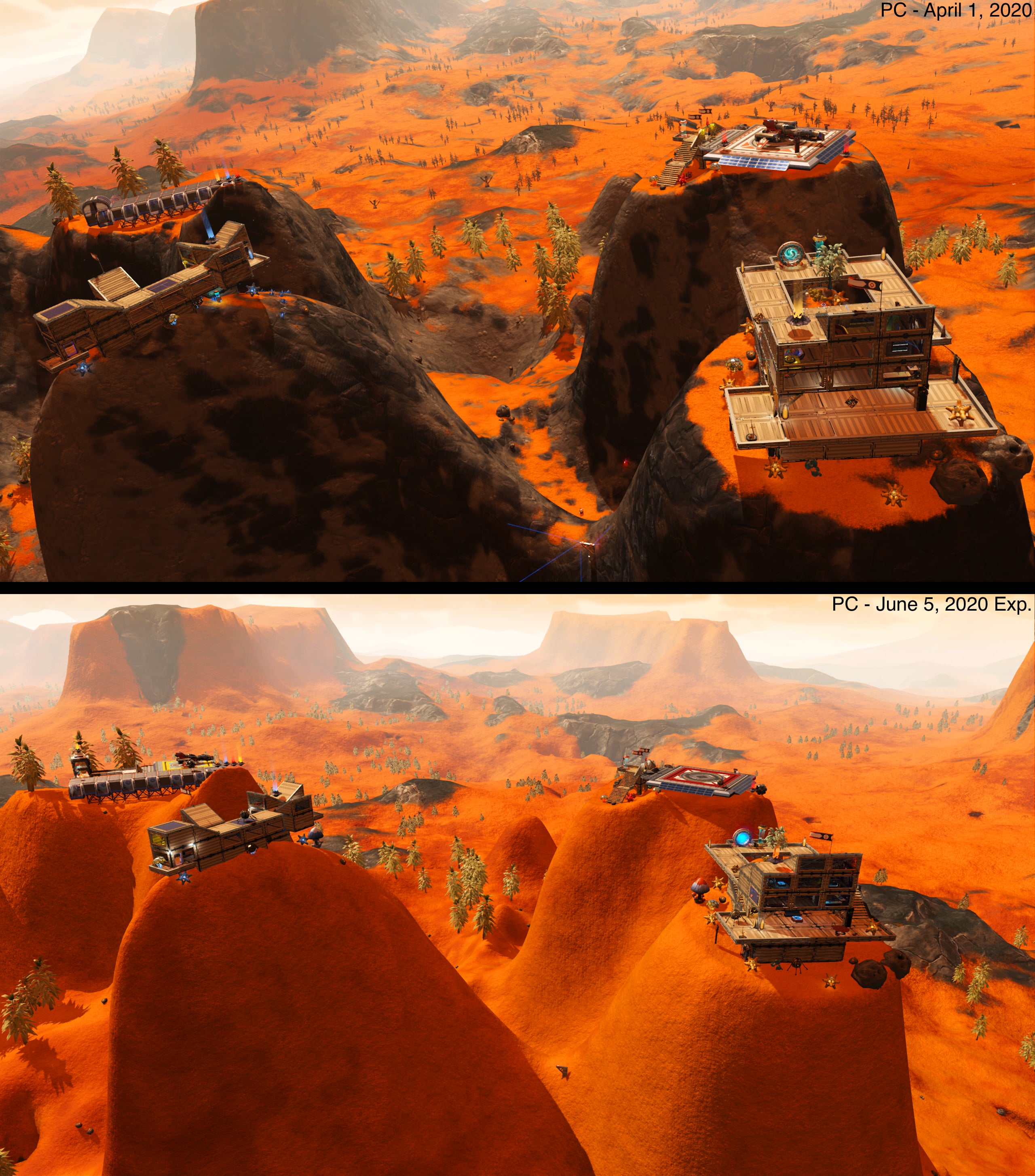

 fallow meadow
@heady lodge Save editing on PS4 is very similar to doing so on PC, with the only difference that you have to do it in a hex editor and have to deal with the obfuscated data, where PC saves from Steam/GOG can be de-obfuscated to readable/understandable format and used in a tool that nicely displays/organises it. So just ask ahead and someone is likely willing/able to help.
obsidian tree
if you can get the file off your ps4 though, could you not just load it with the PC save editor?
it will either be a .json format, or mbin, which you would just use mbincompiler to make exml in that case right?
I haven't actually seen a ps4 save though, so I don't really know what I'm talking about haha
fallow meadow
@obsidian tree Save Wizard has an advanced mode which basically imports the save into HxD (hexeditor). From what I have gathered, the data appears to be more or less identical to our raw save file format. So I am pretty sure it should be possible to decompile/de-obfuscate to get something similar to what we work with. Of course this then requires to be reversed again, to then have the Save Wizard do its thing again to get it back into a working PS4 version of the save.
I know it has been requested to implement in the Save Editor, although I can imagine why this has not been done. It would require adding the same decryption Save Wizard uses, which is a paid tool trying their best to stop any competition. Not to mention any legal implications this may have.
obsidian tree
so does it have only one file, or two like on PC? If it's one then surely we could just get the file off the PS4 and edit on a PC? Or does it not work like that? If it's 2 files like on PC, then surely the encryption would be the same as the PC encryption, and so there would be no issue also?
halcyon dock
Pretty
hushed bronze
heady lodge
Hello and thanks for the response
The files for ps4 are single files. What I do is I upload my file to my usb, then move it to my pc. From there I take the file and upload to save wizard and open it in the advance mode which really "opens" it up. With that file opened up I save it to my desktop and re open it in my hex editor. From there I make my changes and once I'm done I save the file and reopen it back in savewizard, then the savewizard applies the changes to my save on the usb. I take the usb back to my console and apply the changes
A little annoying lol
obsidian tree
can you post the file you get off your PS4 here? I'd be interested in seeing what it looks like...
heady lodge
Yeah it could be interesting. Maybe you can send it back and we can do some experimenting
There isnt much discussion online about this stuff I've tried looking
The whole reason I got into messing with save editing was because I have this survival file that I played through a bunch on and I I've been stuck not having any interaction cause everyone plays on normal. So I want to start a normal file, and save edit all the big stuff that I can like milestone progress and guild progress back to where I was at
So I've been trying to figure out how to change those things through hex editing by trial and error
vale iron
@hushed bronze you mean I'm going to want to leave clouds in the game soon?
hushed bronze
Depends if you like the clouds 😄
vale iron
I like purty colors
vale iron
I found a perfect planet and a location where you can see all 5 other system bodies in syzygy, which is my second favorite word. It's a little too pink, but maybe this would just it up some
 willow isle
Man I would love to see The Origin's Yachts series 600-I and the 890 Jump
round sinew
those look cool, @hushed bronze
fallow meadow
@obsidian tree @heady lodge After looking some more into it, it appears that after decryption by Save Wizard, the file is completely plaintext (JSON), not even obfuscated.
I spoke to someone about PS4 saves before, just don't recall who or when sadly enough. Their result was from direct save editing with HxD, which has less readable format, although keywords can still be recognised. This seems similar to using PS4 Savemounter for example. It is obvious that Save Wizard is key to proper decryption/encryption, but once that is done, editing should be a walk in the park.
I know someone has been eager to look into including PS4 saves. They have a Save Editor project on GitHub which I will link below. There appear to be releases available, but I am not seeing source code though. Maybe get in touch with them?
https://github.com/cengelha/NomNom
obsidian tree
Yeah, I am familiar with NomNom and it's development a little. I am just interested in what the encrypted ps4 save looks like... Like, is it an encryption format that all ps4 saves share? If so then I'd be surprised if there wasn't an open source bit of code with details on the encryption which could be used....
and if it decrypts to plain json, then there should be no issues with editing and throwing it back into the program right?
fallow meadow
I have managed to get a hold of a few encrypted saves (I think). One is a .bin file having the key I gues, the other contains the save data without extension.
obsidian tree
I'd be interested to see them if you could throw them my way 😅
fallow meadow
Sent you a friend request
vale iron
@hushed bronze You think doubling the number of drones would be overkill? I like the idea of swarms
hushed bronze
What file are you using?
I think I recently found an unexpected file with spawn maximums set up in it, dont remember which one
But yeah, I tried to make swarms way back but it wouldn't take because the vars I was trying to use were overridden
vale iron
gameplay globals has some max drones settings, though I haven't tested them yet
I'll give it a test
I think this may be for ambient drones though, not combat drones
Hmm, no effect on the reinforcement numbers, unfortunately
 tribal needle
Anyone know if this save editor commonly breaks the game?
https://nomansskymods.com/mods/no-mans-sky-save-editor/
I used it right after I started a new game to do somethings you probably aren't supposed to be able to do.
I took the seed of a pink ship and changed the starter ship to it. Then I loaded the seed of an exotic ship and forced it to use the previous colors.
I've had a purple and pink squid ship since then with no problems at all.
Now all of a sudden I'm missing construction blueprints that I've used multiple times.
Unless it's something else the only thing I can think is that maybe the mission I just started triggered some sort of anti pink squid ship program 😂
tribal needle
Ghosts in the Machine is the mission I'm working on and it requires me to construct terminals for specialist researchers.
The mission objective is to construct a door for access to my base. I have the door blueprint in my discoveries but not in my build menu.
vale iron
Do you have any mods installed? Sometimes they can screw with the build menu, which seems more likely than a corrupted save. You could also try to verify file integrity to see if that helps
tribal needle
I'll try that thanks for the help. It might be tied to the freighter. The blueprints are back when I'm on a planet.
lime mesa
Since the mods are being uploaded to Nexus mod site, does that mean NMS uses the Vortex app to manage the mods?
tribal needle
@lime mesa I do
heady lodge
Yeah looking at that editor you linked, it looks like it has the stuff I want hehe it comes to editing knowledge and recorded experiences
I can try using save wizard to decrypt it then try using that editor to make my changes
vale iron
What version are we on now, 255?
small valve
Hrmmm
 runic kayak
What’s modded on it
 scarlet locust
Huh
 short garnet
Is this game safe to mod even though it is multiplayer?
(QoL stuff like disabling the Torch, for example)
steady elk
Can you mod xbox game pass?
hoary drum
@short garnet It’s safe to mod. If you were to download something like a color variety mod then only you or others who have the mod downloaded can see the changes
short garnet
Cool, thanks, Starn.
hoary drum
👍
short garnet
Holy crap, you're right.
waxen cedar

short garnet
Shame there isn't a built-in way to fix tesselation 😦
short garnet
Kind of, yeah. It works, just extremely slowly.
waxen cedar
Oh btw. Is there a mod that makes sentinel ships unlockable?
short garnet
It's almost as if the game has a cache that's overflowing, because it didn't do that until today, heh.
waxen cedar
they can land on space stations. This is from today when I was playing 1.0 but I have had one land on my freighter in Beyond
So could anyone @ me if they know/have a mod that allows the player to purchase these ships. Unless there is a way to save edit one into sentinel ship. That information would also be welcome
hoary drum
I didn’t even know they could do that
waxen cedar
They've always been able to do it. It became more rare later on tho
runic kayak
The sentinel ships look like the ED ship
waxen cedar
Maybe some AI rework to prevent it from happening
hoary drum
steady elk
where can I sell exosuit upgrades or stuff like that
waxen cedar
#nms-questions @steady elk
Space station NPC kiosks or anomaly at iteration Ares was it

reddit
21 votes and 10 comments so far on Reddit
this thing has happened to me in beyond as well
sentinel ships must be just like any other ship but without any interactability
hushed bronze
Probably
waxen cedar

Nexus Mods :: No Man's Sky
This mod allows you to use the sentinel police ship as regular player ship.
found this mod but it seems to break multiplayer
 true badger
sentinel... police... ship e.e
 rustic condor
I want to put a base in a portal accessed system. I heard that save editing can change your location allowing it. How do I get started?
round sinew
there's ways of achieving that without save editing
rustic condor
@round sinew Oh?
round sinew
look up "bypass portal interference", it uses the anomaly's ability to warp you anywhere/to the current system of a player in your mp party
rustic condor
Look up where?
round sinew
basically, both players join up in the same session; player a goes through portal to desired destination, player b summons anomaly, lands there, autosaves, and waits for player a to reach the far side of the portal. player b exits anomaly, game prompt, select warp to player a's current system. done, player b will be warped to destination planet without portal interference.
got letters mixed up sorry.
rustic condor
So I need a player 2.
round sinew
yes.
rustic condor
Was hoping for a solo way
round sinew
sorry if that's an incovenience
rustic condor
I guess solo requires editing?
round sinew
you could portal there, and find a wild base computer on the far side, which you will be able to claim.
then simply come back through the portal, and teleport to that base computer, free of portal interference
vale iron
Or save editing, yeah. The program NMS Coordinates has a one-button portal interference clearer if you don't want to mess with the save file yourself.
rustic condor
@vale iron where can I find that?
vale iron
@rustic condor NMScoordinates.com
rustic condor
Thanks @vale iron
lime mesa
Uh hey guys
I wanted to download mods but how do they even work, i mean this game has multiplayer
cinder valley
Mods only show for you