#helpdesk-facebook
1 messages · Page 14 of 1
 inland brook
 pulsar pivot
Is there a widget where I can see the number of current viewers?
inland brook
Facebook doesn't provide an API point for us to get the viewer count during a stream.
inland brook
inland brook
Facebook doesn't provide an API point for us to get the viewer count during a st...
 sudden hornet
How can I get my Overlays to Import over it keeps felling
 winged dagger
Can I ask if I will be copyrighted if I use Media Request on Facebook?
 crystal lichen
I have no activity feed or chat when i am live.
 zealous shuttleBOT
@crystal lichen Streamelements on top of OBS -> Logout -> login
crystal lichen
its asking me to log into twitch in activity feed when i want it on facebook
Fixed. Thank you
 zealous nimbus
Hey guys, Im trying to edit my overlay in OBS Live, which Ive done many times before but now its telling me theres an invalid authorization token or something along those lines
zealous shuttleBOT
@zealous nimbus Streamelements on top of OBS -> Logout -> login
 pseudo quest
Hello all! Easy question. Does Facebook chat integrate with stream elements? When I stream to to FB with SE, it isn’t popping up in the SE chat plugin.
 hollow jetty
Hello all! Easy question. Does Facebook chat integrate with stream elements? When I stream to to FB with SE, it isn’t popping up in the SE chat plugin.
@pseudo quest Yes it does. I use it. Enable it in the top menu - just select "chat"
@pseudo quest Yes it does. I use it. Enable it in the top menu - just select "chat"
@hollow jetty But be careful not to click any of the users' names in the chat box or it gets a little wonky. 🙂
I logged in again and got my chat box back, but it's white instead of black. Anyone know how to get it back to dark mode?
 ripe zenith
Hey everyone, I need some advice, I can stream to twitch no problem at all but when I stream to Facebook my frames drop and its so laggy you can't even see game play? I've tried adjusting res etc
inland brook
@hollow jetty check pinned msg in heldesk-obslive
zealous shuttleBOT
@ripe zenith Please provide a log from your last stream. To do this, in OBS go to Help > Log Files > Upload Last Log File and paste the link to the log file here.
hollow jetty
@hollow jetty check pinned msg in heldesk-obslive
@inland brook You guys have directed me to that pin video twice now, it doesn't seem to address the problem in FB live chat. It looks like it's for Twitch chat only since the settings icon is nowhere on my OBS-Live nor my FB interface. Are you sure the answer is there? Am I just missing it?
inland brook
Oh facebook - im not how to change the fcebook one then
Im not sure*
I dont knoe if facebook even has a default dark mode in the first place
hollow jetty
It was dark when I first loaded the app, but now it's white.
I dont knoe if facebook even has a default dark mode in the first place
@inland brook They must because it was dark the whole time I used OBS LIve through SE. Then I clicked it off by mistake, logged off and logged back in to restart it and it is white now.
 fossil plume
Hello! I'm having this weird issue where my chatbox shows a single message multiple times but I checked on the SE Editor and it was normal. I just added the normal chatbox from SE
not sure if this is an FB issue or waht
inland brook
@hollow jetty Dark mode in a way has been forced from us, but I don't have a Facebook account to login to OBS.Live and check, unfortunately.
There should be an option somewhere in the chat dock to get it in dark mode most likely
@fossil plume The chat widget showing multiple messages is a known bug and reported to the devs.
fossil plume
ohh okay thanks!
 warm path
hi all! ive noticed my activity feed is not updating, or hasn’t updates in the last 24h. tried turning off and on and refreshing it. any thoughts?
 hallow abyss
I have issues with streamelements counting stars given to me twice in some cases does anyone know what causes this?
and ive set my goals to update on a calendar week but how can i make a top list to show on the calendar week as well?
 minor pollen
can someone help me, when im previewing this on streamelements this top bar panel is really at top, but when i use it, its just like this on photo. can someone help
 barren hare
Hi all! I cannot hear my alerts but I CAN hear my gameplay. I use the elgato HD60 S so I think it's some setting with that? Can anyone direct me to some beginner tutorals? or just help? I SO appreciate it!
zealous shuttleBOT
@barren hare New to Stream Elements?
Check out our YouTube channel https://www.youtube.com/c/streamelements/videos
with tutorial videos from setting up the basics, to in depth details on how to use our product.
New to OBS? Here is a 4 step quickstart guide
https://obsproject.com/wiki/OBS-Studio-Quickstart
Want to learn even more? Here is an in-depth overview
https://obsproject.com/wiki/OBS-Studio-Overview
 serene ingot
Hello, I have reseted my session many times before and had no issues whatsoever. This time after I reset my session for the new stars bar, none of the alerts are showing
I have tried copying the URL from the browser source again, nothing, and stream elements does not see my channel online when it is
Can someone help? restarting PC, OBS or the Live won't do me any good
alerts are working when I emulate, but they are not working when any of my users interact with my page
Never had this problem in 4 months
think I found the problem my token has been reseted 😦
 dawn garnet
Ok I have a Twitch account as my main account, but some how my Facebook gaming got set up separately. So I can't access my overlays etc... Is there a way to merge these together, because it says my account was already claimed. And I really don't want to have upload everything twice every time I change my overlays.
 brave moon
 floral hedge
@brave moon > #🇪🇸︱español
 frail yarrow
Is there a quick way to make each overlay source use the same settings for "your name" "recent subs" "gameplay" etc so i don't have to go through every source and change my main, BRB, Stream Start, End, and Chat and play and change all of them the way i already have my main gameplay overlay setup?
 real heart
There is not. Every widget is completely independent.
frail yarrow
Darn, okay i got a lot of work to do then. Was hoping there was a quicker way. That is okay though. I have heard/seen grouping scenes to an all in one once i have them set up. I don't fully understand how that works. Idk if there is a simple answer or a link that explains this well or not.
Thanks btw.
Oof and i just realized im in facebook not obslive channel... sorry
 amber crown
how do i remove facebook as a channel ?
zealous shuttleBOT
@amber crown There is no easy way to unlink 2 owner-type accounts from each other. The only way is to make a closure request from here: https://streamelements.com/dashboard/account/security
WARNING: In submitting a closure request, all linked channels within the account will be deleted and you will lose all associated data. This includes overlays, custom commands, timers and past data (tips, subs, etc). You can still reconnect with the deleted account, but you are essentially starting fresh.

StreamElements
The Ultimate All in One Platform for Streamers
 dreamy pewter
hi im trying to delete my 2nd streamelements account for facebook but it wont push through after i fill out the form can someone help me?
zealous shuttleBOT
@dreamy pewter There is no easy way to unlink 2 owner-type accounts from each other. The only way is to make a closure request from here: https://streamelements.com/dashboard/account/security
WARNING: In submitting a closure request, all linked channels within the account will be deleted and you will lose all associated data. This includes overlays, custom commands, timers and past data (tips, subs, etc). You can still reconnect with the deleted account, but you are essentially starting fresh.
StreamElements
The Ultimate All in One Platform for Streamers
dreamy pewter
yea i tried doing that nothing happens.
 void yoke
Hey buds what is the best thing to use to clip and screenshot my gameplay easily and in good quality
inland brook
@dreamy pewter Please send the same details as the closure form requires to our CTO Reem here: reem@streamelements.com - he will close your account.
 left basin
@void yoke The easiest way is to use OBS Replay Buffer. It will provide same quality as you have in OBS
void yoke
Facebook is crap for clips, though only 720
 south sentinel
somebody plesae help me with my problem.. 😦 i tried everything. i switched off my firewalls. change my IP to IPv4 ,, i also tried restart my pc then copy again the stream key. but still .. this happened
 quiet valve
Hi guys, having trouble displaying the chat using OBS.live
im already live but the comments doesn't show on the right panel
zealous shuttleBOT
@south sentinel For the best OBS support, please join their Official Discord @ discord.gg/obsproject
 upper veldt
what is my overlay token for show secretes?
 ember timber
anyone having issues with Stream elements and FB where you cant see your chat
 old plank
ummmmm anyone??
upper veldt
im having problems with my alerts not working when someone follows
ember timber
idk i think somethings wrong
upper veldt
seems like it since no staff is answering @ember timber
 tropic perch
 dense pond
Anyone knows how to change the starting point of follower goals
zealous shuttleBOT
@dense pond To reset goals:
- from the overlay editor -> session data on top right (monitor symbol) -> goals tab -> reset progress of desired goal
- from the dashboard -> activity feed on the left -> widget data on the right -> goals tab -> reset progress of desired goal
Note: Goal widgets(progress) only counts up and doesn't go down automatically, if you loose followers/subs
upper veldt
So no help with alerts not showing for followers?
 lyric raptor
How come i cant see my shares
zealous shuttleBOT
@lyric raptor If you are not seeing Likes/Shares on your current stream or page, that might be due to how the privacy settings of the person liking/sharing your stream are set.
If they are set to private we won't be able to see the events.
Specifically for shares, if they share in private groups, we won't be able to see the event.
lyric raptor
How do u fix it
Like are working not shares
It takes be creater studio on facebook
 shrewd jewel
My alerts are not having any sound on my live stream. The effect or "alert" is going off but there is no sound
zealous shuttleBOT
@shrewd jewel Right click on the BrowserSource > Properties > Scroll down a bit > Refresh Cache of current page
 amber stag
Ok when i installed stream elements it said to log in. so i logged in and created my scenes. Now i want to log out of twitch and log into Facebook gaming. How do i log out of twitch on SE so i can have the chat from facebook on my software??
please help
what am i going to on the top left of SE
i dont see any way to log out of twitch
without restarting uninstalling it and losing everything
help please
yall are useless i hope no of you get paid for the help you offer cause you shouldnt!!!!!!!!!!!!!!!!!!
inland brook
@opaque anvil Please send the same details as the closure form requires to our CTO Reem here: reem@streamelements.com - he will close your account.
zealous shuttleBOT
@amber stag Streamelements on top of OBS -> Logout -> login
inland brook
Do you want to link accounts or delete them?
shrewd jewel
@zealous shuttle that still doesn't seem to fix the audio issue. I can hear the audio when I test it off of the site but there is still no audio coming from OBS.
zealous shuttleBOT
@shrewd jewel If you are not hearing your Alerts and/or Media request, you are most likely using the "Control Audio via OBS" option in your browser source properties.
To make sure you hear the alerts and the stream also hears them, follow along the screenshot bellow.
https://cdn.discordapp.com/attachments/199460642975907840/685371800456134686/unknown.png
 warm path
hi all! ive noticed my activity feed is not updating, or hasn’t updates in the last 24h. tried turning off and on and refreshing it. any thoughts?
@warm path just bumping this one again if anyone has any thoughts? none of my new likes and follows are coming through to activity feed and i can’t believe they’re all private
 smoky mango
hi just a quick question. Is there why i dont see a chat bot setting or loyalty setting in my dashboard? i am using facebook. any hints?
 red badge
Because Facebook doesn't have loyalty @smoky mango
 serene apex
Hello, Facebook partner looking to get some help with Facebook Star sender list. I use streamlabels right now and would like to switch to streamelements!
This is what i currently have with streamlabels: https://gyazo.com/53b80c6dd1fa4c0d20901862113f24a5
What I want but do not have any idea how to set up, is this:
https://gyazo.com/4df7d4f8de3250025c90e86fbd1077bf
This is on my friends stream, he currently is partnered with you guys and told me to reach out here and get help on how to get this set up. I would like if someone can assist me. Thanks!
hallow abyss
I have issues with streamelements counting stars given to me twice in some cases does anyone know what causes this?
for example i was sent 50,000 stars but it counted twice so as 100,000...
 thorny canyon
Hello I can't connect my facebook activity notification in OBS.
 cedar agate
hey, i have obs live but i lost the alert box dock and i can't figure out how to get it back sorrry
 cobalt elk
If you mean the activity feed
cedar agate
yeah, it wasn't listed in my docks either, think i deleted it somehow lol but i think i found a fix
oooo i see now, thank you thank you
life saver
void yoke
looking to close my account so i can use it under my main twitch already created profile but is asking me for username and show as incorrect
zealous shuttleBOT
@void yoke Account Merging - Please note:
- Merging accounts only allows faster ways to switch between accounts
- Merging accounts does not allow data sharing between accounts - different streaming platforms, different type of events
- Merging accounts allows duplicating/sharing overlays between the accounts
If you understand the limitations of merging and want to proceed, please find the JWT tokens (!jwt) from both accounts you want to merge and you will be directed to DM them to a staff member.
zealous shuttleBOT
You can find your JWT token on your account channels page ("Show Secrets" to reveal the token): https://streamelements.com/dashboard/account/channels
READ ME:
This is a private security token. Do NOT share this token here or other public places, only with a StreamElements staff member in private.
void yoke
no staff is avaliable
void yoke
yes
real heart
Then DM me your JWT tokens, clearly labeling which is which.
void yoke
i did dm
real heart
I have not received a DM from you.
inland brook
What clyde bot?
 green dawn
hello, my alerts and stream activity arent showing up, reinstalled, relogged in, not working.
fixed, wrong account
 undone drum
Hello! My FB shares are not showing up in the activity feed, in turn also not showing up on stream. Can anyone guide me how to fix this?
 untold lotus
@undone drum same problem until i removed age restriction from facebook
undone drum
@untold lotus hmmm... i'm pretty sure i didn't have age restrictions during my stream but will test it out. thank you 🙂
 molten summit
Same issue with facebook alerts/activity feed not pulling into streamelements software. they show on my account when i go to the website, but within the software, the feed only asks me to log in to twitch and no other options. my profile photo for my FB was initially not showing on the website as well (like the connection no longer existed), but after i removed SE and reconnected, that issue fixed. The other issue still remains.
ill look into the age restriction thing, but haven't touched any of those settings and actually push my stream to castr
undone drum
the age restriction thing usually defaults to this:
molten summit
my fb page is also set to public apparently, so i think that is out.
this is what i am seeing within the software for reference
before this, it was connected to FB with no problems. Not sure why it's defaulting to twitch.
zealous shuttleBOT
@molten summit Streamelements on top of OBS -> Logout -> login
 tall elm
floral hedge
tall elm
floral hedge
@tall elm try to select on OBS > overlay source > right mouse click > open properties the item ☑️ “Shutdown source when not visible”
and scroll down the properties window and click on Refresh Cache ... button.
molten summit
@molten summit Streamelements on top of OBS -> Logout -> login
@zealous shuttle thanks - i'll give that a shot 🙂
molten summit
@molten summit Streamelements on top of OBS -> Logout -> login
@zealous shuttle that did it - thanks a lot! was looking for that option before, but guess didn't think to look under that dropdown. much appreciation 🙂
 novel nymph
@zealous shuttle streamelements chat isnt showing
pls help me actividy feed and chat are not showing up
zealous shuttleBOT
@novel nymph Streamelements on top of OBS -> Logout -> login
 viral geyser
Just wondering if it's possible to merge two stream elements accounts? I accidentally signed up for another account with another platform and now I can't add channel because it says it's claimed already
 late river
hey how do i get the fb live chat dock back in obs
#helpdesk-facebook hey how do i get the fb live chat dock back in obs live ? i exited out of it on accident and cant get it back
 humble igloo
StreamElements at the top in OBS.Live.
late river
@humble igloo Thanks alot man
 radiant sun
Hello I’m having an issues where my most recent donations box keeps changing size and the name gets cut off..... thoughts?
 inner jewel
Hey guys I'm having some issues with regards to switching from Facebook live stream to twitch even though I have changed the steam settings on the OBS studio to twitch. also when i try to access my facebook dash board on streamelements website, some how the link to my facebook has been removed.
zealous shuttleBOT
@inner jewel Streamelements on top of OBS -> Logout -> login
 late idol
just confirming, no chatbot for fb gaming?
 gilded mesa
Facebook doesn't support Chat bots.
lyric raptor
I can't get my alerts on stream elements everybody elses alerts work
zealous shuttleBOT
@lyric raptor To add your overlays to OBS, add a new browser source in your scene. Paste your overlay URL in the browser source properties, set the dimensions to 1920x1080 (unless you changed them on the website), and ☑ “Shutdown source when not visible” https://youtu.be/KDvLynUqXI4
@lyric raptor OBS -> settings -> advanced -> scroll down -> enable/disable hardware accel. (This does not apply for OBS on Mac)
https://i.imgur.com/ggMe9ZE.png
 lyric raptor
Enable that
It keeps popping up on my friends then goes away I suppose to see the alerts it not working on my end
It's not working
Hello
 wind sleet
turn off hardware accel and make sure overlays are set to the above resolution
restart obs and emulate again
lyric raptor
Still not working
lyric raptor
Still not working
 woeful imp
Good afternoon - is there an issue with CloudFlare today? Cannot stream, OBS not working.
I stream through FB Gaming. Keep getting the Cloudflare picture verification. Never get to my overlays.
 storm pasture
 tepid quail
how do i unbind my facebook account from stream elements
 queen quest
Setting up obs live for face book streaming I was streaming on twitch ... obs live chat widget still shows my twitch chat not face book how do I fix that
zealous shuttleBOT
@queen quest Streamelements on top of OBS -> Logout -> login
tepid quail
how to close account
 tight monolith
So my obs live is messing up and I have tried doing everything can anyone help? It still says this even when I’m live, like my chat won’t load, or the names off to the side of my latest likes, followers, etc..
All it says is session expired, happened randomly I did a 10hr stream yesterday and woke up to it like this
queen quest
Does Facebook gaming let you use the stream elements chat bot for commands and moding
tight monolith
For like !notify and stuff like that? Yes
queen quest
yeah and stop people from using links bad words that kind of thing
tight monolith
Yes
Like I go to Stream elements and it works on there and everything just not on my OBS live
queen quest
how do I add and manage the bot then
zealous shuttleBOT
@tight monolith Please ask your question in one helpdesk channel only. A support volunteer or StreamElements staff member will assist you as soon as they are available. Asking in multiple places will only result in confusion, not faster answers. Thank you for your patience.
real heart
Facebook Gaming doesn't have bot support at this time.
queen quest
ok
real heart
Commands and spam filters do not work.
queen quest
thought so
zealous shuttleBOT
@tight monolith Streamelements on top of OBS -> Logout -> login
queen quest
Is that something facebook is going to add ?
real heart
You'd have to ask them.
queen quest
ok
real heart
@fossil shale 🖱️ ➡️ #🇪🇸︱español
 fossil shale
ok thanks
woeful imp
So my obs live is messing up and I have tried doing everything can anyone help? It still says this even when I’m live, like my chat won’t load, or the names off to the side of my latest likes, followers, etc..
@tight monolith Same here FB.
So my obs live is messing up and I have tried doing everything can anyone help? It still says this even when I’m live, like my chat won’t load, or the names off to the side of my latest likes, followers, etc..
@tight monolith StreamElements needs to update the token to FB. It appears that may have expired of the weekend.
 woven knot
Is there a problem with my livestreaming, its not working can anywone help me please
zealous shuttleBOT
@woven knot Streamelements on top of OBS -> Logout -> login
woven knot
nice!!! thank you!
 rose axle
I am unable to have chat or activity in my live stream
inland brook
If you are using obs.live, click on streamelements on top -> chat/activity feed
 pliant blaze
Streamelements is reporting the incorrect amount of Facebook followers. Is there a way to correct this?
zealous shuttleBOT
@pliant blaze To reset goals:
- from the overlay editor -> session data on top right (monitor symbol) -> goals tab -> reset progress of desired goal
- from the dashboard -> activity feed on the left -> widget data on the right -> goals tab -> reset progress of desired goal
Note: Goal widgets(progress) only counts up and doesn't go down automatically, if you loose followers/subs
 spare flame
im trying to connect my page to streamelements but its not showing it. im admin of 5 other fb pages but the one that i wanna stream doesnt show on the list. any idea?
 strong gale
Hi there! I'm trying to set different widgets in one overlay on streamelements but everything goes out of sync. Does someone know how to fix this??
 stark beacon
hello! i delete my activity feed from obs live, where can i find them to put back?
 vale whale
i cant signin to the dash with facebook is something down?
 mystic dock
We know about the issue with our services and are working on fixing it.
vale whale
will alerts still work on my stream tonight?
 rough oar
Hi there! I am having trouble logging into the stream elements website to work on alerts! Every time I login, it just loads for a sec and kicks me out! this just started happening today! Any help would be appreciated!
mystic dock
We know about the issue with our services and are working on fixing it.
rough oar
oops I just saw the comments above...nvm sorry to double send
 naive sleet
i can't sign in to my dashboard using facebook. need help
 radiant imp
<@&364840891023622144> maybe push an at everyone message so everyone is informed......
mystic dock
To wake up even more people? No thanks.
 brazen turtle

mystic dock
this
shrewd jewel
keep getting this error " upstream connect error or disconnect/reset before headers. reset reason: connection failure" everytime I try logging in to facebook version of the site
mystic dock
We know about the issue with our services and are working on fixing it.
 kind thorn
@shrewd jewel yes same here
 peak burrow
I'm just glad I'm not the only one... I thought I broke something yet again! lmfao
kind thorn
@peak burrow lol same i thought i got hacked
peak burrow
@kind thorn lmao that was my first thought!
 lusty sluice
I can't login in..not sure why
 hushed wedge
keep getting this error " upstream connect error or disconnect/reset before headers. reset reason: connection failure" everytime I try logging in to facebook version of the site
woven knot
hi anyone can help me, i already didt the log out log in buts its not working again
mystic dock

We are aware of an issue preventing some users from logging in and loading our dashboard. If you are live, do not reload your browser sources as we work to fix this. We will also keep you updated on the status.
 Twitter
 south meteor
hola alguien me puede ayudar a configurar el chat para cuando alguien comente el directo esto se narre en vez de leerlo como tal
es en facebook gaming
zealous shuttleBOT
@south meteor Welcome to the helpdesk! The regular helpdesk channels are in English but we do provide multi-language support in the following channels: #🇩🇪︱deutsch | #🇫🇷︱français | #🇪🇸︱español | #🇵🇹︱português | #🇳🇱︱nederlands | #🇮🇹︱italiano | #🇵🇱︱polski | #🇨🇳︱中文語言服務區-chinese | #🇯🇵︱日本語-japanese | #🇭🇺︱magyar | #🇰🇷︱한국어-korean | #🇹🇭︱ไทย-thai | #🇷🇺︱русский | #🇺🇦︱українська | #🇨🇿︱czech
 lost cedar
hello
Does anyone know how I can see my live viewer count on obs while streaming to facebook gaming? I'm using the stream elements plugin
inland brook
Facebook doesn't provide an API point for us to get the viewer count during a stream.
lost cedar
ohhhhh, okay. I wasn't sure cause I couldn't find any info on it. thank you ^-^
 vagrant karma
alerts not showing up 😦
 undone patrol
Hi guys - trying to set up streamlabs and using customer videos for the alerts in the alertbox widget. however every time I load the video in, when I resize the box, it does not resize the video, just the frame that the video is in (if that makes sense) So currently I only have the option of a full screen alert - am I missing something?
 vivid moth
my streaming is not showing on my streamelements account. followers and shares are not also showed on dashboard
 ebon grove
Can you guys please tell me how to RESET my facebook chat? I clicked on something and now its on Faceboob the webpage not the white chat room. Thank you and Good Morning!
 mental spade
its saying it failed to get auth
#helpdesk-facebook telling me it failed to get auth page but is installed in my facebook
void yoke
can someone tell me how to install those theme in obs or stream lab?
kind thorn
does anyone know why alerts are not working
kind thorn
i use stream elements but get my alerts from stream labs
kind thorn
are you on the v2 beta
mental spade
not sure just started streaming
what ever is on the download link on the web is what i have
i cant get elements to get pages
 grizzled ferry
get this on my facebook gaming page This Page hasn't been designed for the new Facebook.com yet.
any fix that come up please
void yoke
is the streamelements website down?
floral hedge
@void yoke no, it's normal.
void yoke
ok its back. it wasnt loading.
 hazy cove
when someone sends users to you via chaining there are no notifications for that... are there any plans to implement it?
 wild drift
good day everyone i have a whire screen problem on streamlabs is there another way to fix this rather than clearing the cache & cookies?
inland brook
Known issue, we are investigating
 hardy hinge
What happened to this?
 cobalt coyote
Something is wrong today
 quartz river
@wild drift refresh with CTRL+SHIFT+R
 versed dawn
problem 1020 me to 
cobalt coyote
@wild drift refresh with CTRL+SHIFT+R
@quartz river Just a new ray ID every time its refreshed
quartz river
You can all just CTRL+SHIFT+R if the issue is in the browser, or exit and re-enter the dock, or logout and log back in to streamelements completely.
quartz river
In the browser or OBS?
cobalt coyote
In both browser and OBS
changed password, logged out of all devices and then logged back in too
versed dawn
me to the same
quartz river
It's not something on our side that we have a solution for at the moment. Earlier today it was a matter of existing connection vs a refreshed connection.
These were some wide spread issues with one of the external servers and we can still see the effect in some places.
Unfortunately at the moment - FB chat will most likely be affected.
Just to update that we're working on the FB Chat widget in order to remedy the situation.
Thanks for your patience and understanding 🙏
void yoke
Hi! Today when i opened my stream elements i am getting a weird error in my chat. Says Error 1020 access denied. Then says “this website is using a security service to protect itself from online attacks. Is there a fix?
Sorry i just ready your message
zealous shuttleBOT
@scenic terrace Welcome to the helpdesk! The regular helpdesk channels are in English but we do provide multi-language support in the following channels: #🇩🇪︱deutsch | #🇫🇷︱français | #🇪🇸︱español | #🇵🇹︱português | #🇳🇱︱nederlands | #🇮🇹︱italiano | #🇵🇱︱polski | #🇨🇳︱中文語言服務區-chinese | #🇯🇵︱日本語-japanese | #🇭🇺︱magyar | #🇰🇷︱한국어-korean | #🇹🇭︱ไทย-thai | #🇷🇺︱русский | #🇺🇦︱українська | #🇨🇿︱czech
quartz river
np @void yoke , we apologize for the temporary inconvenience
 hushed dust
quartz river
hushed dust
quartz river
Please read up @hushed dust
 wooden glade
I got that error to
 topaz flower
Hi. can someone help me regarding my chatbox
wooden glade
Mines the same
 keen glen
@wooden glade @topaz flower read a bit up, they are on it 😉
 pastel venture
im getting error 1020 Access denied in my OBS live chat streaming to facebook live. It was working 2 days ago nad im not sure what happened or how to fix it
oh sorry im just looking at the previous remarks and others are having the same issues
 kindred herald
Can anyone help with this error that my chat displays when I switched to stream on fb
 civic gorge
hi there, is there anyone can help me to fix this issue? I cannot go live using obs. pls.help me Thanks
mystic dock
Probably. Seems like Facebook is having issues.
 rotund topaz
FB connections have been spotty since 5-8 hours ago
getting all sorts of errors either with OBS.live or with FB pages them selves
so hang in there guys and gals
mystic dock
Thank you for the heads up 
void yoke
Having this issue with facebook is anyone else having it ? >> Error 1020 Ray ID: 5c1bcfb50e9ca6e1 • 2020-08-12 17:10:42 UTC
Access denied
 proud steppe
never seen it before
mystic dock
With "check" I meant read the messages in here
proud steppe

wind sleet
void yoke
Any work around even temp ?
mystic dock
Please read the messages above
@civic gorge Please don't ping random members of this server
 tiny inlet
 signal marten
Im having a issue on Chat Error 1020, plus Before when i click start streaming there's a pop up to Input Title and Description then Start the stream.
But now It ask for my stream key and i must use browser to go live.
void yoke
hi. I need help. My chat box is showing error 1020
oh same error as otherts
I just read the message. Thank you
 covert moon
hi, seems to be i cannot connect to streamlabs , i am using obs.live and streaming on facebook. upon checking my notifications are shown on my dashboard on facebook, while on my obs.live nothing shows, seems im disconnected. hopefully someone can help me
also upon checking on my streamelements dashboard, seems i am offline.
 wise mural
Chatbox is okay now for me
 subtle ingot
My activity has not refreshed for the last 5 days. I stream everyday and this has honestly hurt my engagement quite a bit. I've refreshed cache, I've logged out and back in, uninstalled and reinstalled completely, still not working. Any other suggestions?
 dry forum
My activity has not refreshed for the last 5 days. I stream everyday and this has honestly hurt my engagement quite a bit. I've refreshed cache, I've logged out and back in, uninstalled and reinstalled completely, still not working. Any other suggestions?
@subtle ingot Dude this is happening to me too but only on my last stream! So annoying, I felt like i was letting the viewers down. If anyone has any tips please let us know. (Im getting like notifications but not shares or follows)
zealous shuttleBOT
@dry forum If you are not seeing Likes/Shares on your current stream or page, that might be due to how the privacy settings of the person liking/sharing your stream are set.
If they are set to private we won't be able to see the events.
Specifically for shares, if they share in private groups, we won't be able to see the event.
dry forum
Could be but my girlfriend did it and hers normally show up and now they are not
void yoke
how to fix alert box in facebook , my alert box is not working in my stream like share star is not working at all
subtle ingot
Could be but my girlfriend did it and hers normally show up and now they are not
@dry forum yeah its annoying this has been for my last like 6 or 7 streams. its really starting to hurt my engagement
how to fix alert box in facebook , my alert box is not working in my stream like share star is not working at all
@void yoke is it your alert box for your viewers to see? or your activity feed that you use for shout outs and everything
void yoke
@void yoke is it your alert box for your viewers to see? or your activity feed that you use for shout outs and everything
@subtle ingot in my viewers ,
dry forum
Mine isnt showing in the activity feed or coming up as an alert... Strange
Hi, why is my alert notification not showing? checked my fb live dashboard regards to the activities and it is recorded there, while on my obs.live nothing shows on my live activity feed as well, also seems i am offline to my streamelements dashboard too, my chat shows on obs.live chat widget while my alert widgets is not functioning. help. thanks i am just new to this, i followed instructions to the videos i had watch to setup streamelements.
@covert moon This was happening on my stream last night too. Is there a fix for this yet guys?
void yoke
how to fix it , alert box in facebook live is not working
lusty sluice
why does it keep telling me encoding error overload?
zealous shuttleBOT
@lusty sluice Please provide a log from your last stream. To do this, in OBS go to Help > Log Files > Upload Last Log File and paste the link to the log file here.
lusty sluice
real heart
lusty sluice
dawn garnet
Ok I have a Twitch account as my main account, but some how my Facebook gaming got set up separately. So I can't access my overlays etc... Is there a way to merge these together, because it says my account was already claimed. And I really don't want to have upload everything twice every time I change my overlays.
@dawn garnet
zealous shuttleBOT
@dawn garnet Account Merging - Please note:
- Merging accounts only allows faster ways to switch between accounts
- Merging accounts does not allow data sharing between accounts - different streaming platforms, different type of events
- Merging accounts allows duplicating/sharing overlays between the accounts
If you understand the limitations of merging and want to proceed, please find the JWT tokens (!jwt) from both accounts you want to merge and you will be directed to DM them to a staff member.
real heart
You'll still need to upload everything twice.
dawn garnet
i don't want two accounts
I've tried closing the account, and that does not work either
real heart
Whether they're merged in the same account or not, overlays are independent between channels.
dawn garnet
Thank you for not reading or acknowledging my actual issue, but instead posting a cookie cutter response showing that you did neither. I won't bother asking for help again, since that is clearly the goal of NOT READING THE POST! In addition, you are completely wrong, because my YouTube, and my old Mixer account were connected to my Twitch account and you could COPY THE OVERLAYS BETWEEN THE PLATFORMS...  So NO you don't have to upload it twice...
real heart
However, when attempting to duplicate with an alertbox, things will fail, and you will need to remake the alertbox.
Because alerts between Twitch and Facebook don't like copying.
Your initial message was absolutely read, which is why I triggered the bot response.
If you understand the limitations, I'm happy to merge the accounts for you. But you do need to understand the limitations.
 spiral vault
I have problems with the chat widget
It does not work and within obs I cannot interact with my chat
Messages do not appear within the overlay
inland brook
@spiral vault https://status.streamelements.com/incidents/5g5ts3nc2b80
 pastel venture
is there any kind of text to speech option for the chat box?
inland brook
No
pastel venture
ty
covert moon
Hi, why is my alert notification not showing? checked my fb live dashboard regards to the activities and it is recorded there, while on my obs.live nothing shows on my live activity feed as well, also seems i am offline to my streamelements dashboard too, my chat shows on obs.live chat widget while my alert widgets is not functioning. help. thanks i am just new to this, i followed instructions to the videos i had watch to setup streamelements.
inland brook
@covert moon Is it specific alerts or all?
covert moon
@inland brook all alerts, shares, likes, etc.
covert moon
thanks @inland brook
zealous shuttleBOT
@covert moon Please provide your account ID found at the top of this page: https://streamelements.com/dashboard/account/channels This ID is public info and safe to share here.
covert moon
@zealous shuttle here is my account id: 5f3401a765e2c72cb00956fe
inland brook
ty will provide it to the devs
 untold oak
zealous shuttleBOT
untold oak
zealous shuttleBOT
@untold oak If you are not seeing Likes/Shares on your current stream or page, that might be due to how the privacy settings of the person liking/sharing your stream are set.
If they are set to private we won't be able to see the events.
Specifically for shares, if they share in private groups, we won't be able to see the event.
 cedar juniper
Hey! Any idea how to get my alerts - likes and shares etc popping up on my alert list? My old browser plugin works but not the stream elements one... chat is fine though.
inland brook
Check the above
thorny canyon
If you mean the activity feed
@cobalt elk
I did this. But it shows "log in to twitch"
cedar juniper
It's not privacy settings as my previous browser plugin for alerts works just fine next to it but no alerts at all come through on the stream elements one.
zealous shuttleBOT
@cedar juniper Please provide your account ID found at the top of this page: https://streamelements.com/dashboard/account/channels This ID is public info and safe to share here.
cedar juniper
I use slobs for custom alerts and tests which works fine. Does it have to be set up separately for this?
My ID is - 5d35bdc6a39af51797ee2dcd
inland brook
I'll add your account to a list of accounts reporting the same
 lament dome
my alerts and the realtime stream activity doesnt show everytime i stream please help
 quaint roost
hi my stream elements says failed to get pages, but i already authorized it for facebook
 weak drum
Hi, my alerts doesnt work, I've setup everything but when it goes live, it doesnt appear on my stream. Even my on "Activity Feed" doesnt appear anything, it's empty. I'm streaming on Facebook Gaming btw
zealous shuttleBOT
@weak drum If you are not seeing Likes/Shares on your current stream or page, that might be due to how the privacy settings of the person liking/sharing your stream are set.
If they are set to private we won't be able to see the events.
Specifically for shares, if they share in private groups, we won't be able to see the event.
weak drum
Their settings are on Public
 rancid ravine
I was also having the FB Gaming alert box issue on Tuesday 8/11 between 9 and 11pm CDT. Several video likes/shares/follows but the alert box overlay notifications were not working. Account ID - 5f14aefa14ab03238bcf0486
weak drum
Maybe perhaps the problem is the sequence of our overlay? Like in the resource box, trying putting the alert source on the top list among other sources. Same goes to in our streamelements website in editor section, layout section. Put alertbox on top of the list
maybe that might work?🤷♂️
rancid ravine
@weak drum That is how mine is setup currently. The first (highest in the list) visible layer in my overlay editor online is the alertbox.
i'll be live again tonight so maybe i'll have to keep a close eye on my live feed preview to see if it's still not working and report back to support if that is the case 😕
 lone oyster
Hello, what do i do if im on the wrong page in the chat feed of streamelements obs. I need help pls
Please i need help
 formal minnow
Hi all! I've set my "Follower goal" value in Widget Data manually, but it doesn't seem to update the widget in the overlay. This is while a stream is ongoing (not triggered from within OBS.Live).
rancid ravine
@formal minnow only way i've seen this update is if you use your "Refresh Overlays" button in OBS.Live the value will update mid-stream.
dry forum
Hi @zealous shuttle please add me to that list. My alerts are not working like everyone elses. Account ID - 5f01ebe1a220798cfb6ebf43
weak drum
i'll be live again tonight so maybe i'll have to keep a close eye on my live feed preview to see if it's still not working and report back to support if that is the case 😕
@rancid ravine Nope Mine doesnt work, still the same problem😭 😭😭😭😭😭
This is sooooo frustrating, my alerts doesnt work at all, even my Activity Feed us empty, cant see any updates😭😭😭😭😭😭
formal minnow
@rancid ravine the stream has ended now, so i clicked on "Reload overlays" but nothing changed. It doesn't seem to want to read the manual values from the GOALS tab, but the TOTALS tab instead which I can't change directly. :\
rancid ravine
@formal minnow interesting because I did a test as well on my end while not live and it worked for me. From the Goals tab under Widget Data I changed my Follower Goal Progress and did the refresh after saving changes and it updated for me 🤷♂️
The widget I used to test...
weak drum
Oh ya, what is the function of Ground Control? Do we need to install that in order to solve this alerts and activity feed not working issues?
 fickle ingot
hi guys, can someone help me?
weak drum
lemme guess, issues with your alert box?lol
kind thorn
Does anyone know when alerts will be fixed
fickle ingot
@weak drum yabro, when i am real time live streaming my alerts is not popping up
weak drum
yup, everyone is having that problem here bro
fickle ingot
ohh, is there a solution?
one of my friends is using SE, and her alerts is perfectly fine,
covert moon
@fickle ingot leave your account id and let @zealous shuttle take note of it for them to send to devs
fickle ingot
Hi @zealous shuttle please add me to that list. My alerts are not working like everyone elses. Account ID - 5f354aa9a136de98a1109a9d
zealous shuttleBOT
@fickle ingot Who me? I am just a hard working support bot (maybe planning on taking over the world one day)...
formal minnow
@rancid ravine seems to be an issue with a theme i'm using. will try to get support from that end.
dry forum
Any update on the alert issues?
weak drum
Why cant I add my facebook channel? It says there the "channel is already claimed" but havent add anything yet
rancid ravine
@weak drum are you trying to add another channel other than "JUNK"? It looks like that is already added.
weak drum
how come my dashboard is still empty eventhough i already streamed like 3 or 4 times with it already?
my analytics is empty
 empty hedge
i changed my email on my gaming page and my streamelements is still using the old email thus getting no notifications. i need to unlink old facebook email to new one
zealous shuttleBOT
@empty hedge Please logout of StreamElements at https://streamelements.com/logout and then login again to your account (Twitch/Youtube/Facebook)
StreamElements
The Ultimate All in One Platform for Streamers
zealous shuttleBOT
@remote kettle Welcome to the helpdesk! Please let us know how we can assist you today and a support volunteer or staff member will assist you as soon as they are available. Thank you for your patience.
 remote kettle
my alerts aren't working
real heart
We are aware of issues involving the activity feed and alerts not appearing on Facebook Gaming. We understand how important this functionality is to our FB community so we will keep you updated on the status as we work to remedy the situation.
remote kettle
oh ok thanks, i thought it was just me
just want to clarify, it works in the overlay creator ( emulate activity thing) but not on the actual stream
inner jewel
Hi my facebook activity feed not working on stream elements
proud steppe
We are aware of issues involving the activity feed and alerts not appearing on Facebook Gaming. We understand how important this functionality is to our FB community so we will keep you updated on the status as we work to remedy the situation.
inner jewel
is there a time frame for this?
pliant blaze
How is everyone managing music / media requests via stream elements? Is there a website that viewers can requets tracks through?
cobalt elk
@pliant blaze we don't have media request for facebook
 agile grove
i have problems with my alerts box in facebook
cobalt elk
We are aware of issues involving the activity feed and alerts not appearing on Facebook Gaming. We understand how important this functionality is to our FB community so we will keep you updated on the status as we work to remedy the situation.
empty hedge
after logging out and back in i still cant get my streamelements to detect when i go live and i also dont get new notifications from fb
real heart
Read the message immediately above yours.
pliant blaze
Is it possible to enable TTS for Tiltify donations?
agile grove
how long will it take to fix facebook alerts?
 leaden latch
Hello
anyone can help me? i cant see the viewers count in my livestream (dashboard at streamelement (obs) )
real heart
Not available for Facebook.
leaden latch
is it be available in next update? thanks btw
leaden latch
do they give that data on there creator studio?
real heart
You'd have to check their Creator Studio.
leaden latch
okay thanks a lot
rancid ravine
Creator Studio does give you an active viewer count if that is what you are after
 cursive fjord
Alguien habla español?
 icy crow
Good day guys. When I livestream using SE OBS last week it automatically go to my connected fb page. But suddenly it says that my "Session Expired" and I dont know how to reconnect. I already go to the settings and stream, I already put the key and server but i still cant see that chats and activity feed of my livestream at my SE OBS. I hope someone can help me. Thanks!!
spiral vault
Help! chat widget for Facebook does not work in Streamelements
I can't like the comments
And the comments don't seem in my overlay
 subtle reef
could you guys help me?
Do you know why the alerts are not activated? when placing them inside my custom overlay it does not show my last follower or my last like and when streaming much less
Alguien habla español?
@cursive fjord simon
cursive fjord
@subtle reef gracias jaja tengo un problema o bueno no se si les pasa a los demás
Los datos que tengo en el streamelements parece que ya no se actualizan con los de mi pagina
Se quedaron en una cifra y las actividades igual y no se si solo me pasa a mi o a los demás igual
spiral vault
Help! chat widget for Facebook does not work in Streamelements
I can't like the comments
And the comments don't seem in my overlay
 old drift
stream element alert overlay not working on facebook stream
spiral vault
stream element chat box not working on facebook stream
 quiet lagoon
@old drift there is currently an issue with FB alerts and we're trying to getit fixed.
rancid ravine
yes, chat box widget and alerts widget were not working for me tonight either
old drift
ohhhhh
spiral vault
@old drift there is currently an issue with FB alerts and we're trying to getit fixed.
@quiet lagoon ok you say alerts but ... the chat box? my alerts is ok
yes, chat box widget and alerts widget were not working for me tonight either
@rancid ravine me too
quiet lagoon
1 sec.
spiral vault
1 sec.
@quiet lagoon ok
old drift
when emulating the overlay it works. but when on live it doesnt
rancid ravine
when emulating the overlay it works. but when on live it doesnt
@old drift same here. emulation works just fine, even on the OBS side, but when live it doesn't work
old drift
im just using my own overlay, just alert box. I dont know if it does the problem or nah
spiral vault
my alert box is ok mi chat box is bad
rancid ravine
or in the Overlay?
@inland brook The SE overlay chat box widget does not actually populate with the chat messages that were happening live on my FB stream
spiral vault
in overlay
I see the comments but I can't like them
And in my chat within my overlay, the chat and comments never appear
1 sec.
@quiet lagoon the seconds pass
inland brook
I've reported to the devs that the widget is still not working
spiral vault
here is the chat box error on august 12
but now it is not as if they had ignored him
inland brook
Yes we know about the status being gone
as the devs fixed it
but now we need more information on the issue
@spiral vault I believe i replied to your email
spiral vault
OK
I RESPONSE YOU
Yes we know about the status being gone
@inland brook
the problem left the status page but it still persists my chat box is not shown in my stream
... about liking comments, I really can't in OBS? but in streamlabs it works
spiral vault
Ok 
Thanks for the reply I hope the chat box problem is resolved soon And thanks for clarifying the issue related to the likes in the comments within OBS.live
 ripe escarp
oops, yeah i was about to ask about the fb chat not synching with the stream chat widget. i put the question in the -obslive channel instead 😅
inland brook
@ripe escarp So are all messages not showing up in the overlay chat widget or some?
ripe escarp
@inland brook none at all. and i mean the chat widget in the streamelements window btw, not overlay in game (i didn't even know i can put fb chat overlay in game!)
 tired bridge
Is the stream chat widget not working?
inland brook
So its a known issue and we are looking into it
ripe escarp
alright thanks
 astral crow
later on pls update this chat on with that
quiet lagoon
@astral crow It unfortunately might be a bit as it's basically the start of the weekend for the devs.
astral crow
alright noted bos
 signal jacinth
can the streamelements bot do timers in facebook live chat?
weak drum
any update on the alerts not working issue?
signal jacinth
ok thanks
weak drum
it seems here everyone is having the same issue all over the place:
- Alerts not working
- Chat box not appearing
- Stream label not working
- Activity Feed doesnt live update, empty
inland brook
- yes, reported
- also reported
- first time im reading this
- first time im reading this as well
weak drum
it seems our facebook page are not connected with our SE account
lone oyster
Hello, what do i do if im on the wrong page in the chat feed of streamelements obs. I need help pls
Please i need help
covert moon
@inland brook i have the same problem, activity doesn't live update/empty.
 untold steeple
same here since last night, emulate works, but the real alerts from viewers does not appear,
tried changing accounts from streamelements account from owner to editor, still same thing
rancid ravine
@signal sapphire welcome to the club. Many folks reporting the same issue with alert widget and chat widget in overlays. I haven't seen any official statement from SE on timeline for fix.
 signal sapphire
Hope to release them it soon. these errors stopped me from live streaming and start recording and then post it in facebook.
 median sleet
same here Activity Feed doesnt live update, empty
untold steeple
@rancid ravine @signal sapphire yeah i do hope they will soon realease a fix for this one 😩
 vale palm
Hi! I was streaming a while ago, used the alert overlay I made coz I just started using stream elements, but it wasn't working. What problem might have caused this? thank you 🙂
can someone help me, my activity feed and alerts are not showing.
@signal sapphire same question 😦
signal sapphire
@vale palm Is it working the last time you used alert overlay? i just downloaded the streamelements,
vale palm
@vale palm Is it working the last time you used alert overlay? i just downloaded the streamelements,
@signal sapphire nope, I just started using this too. saw this on a youtube channel and decided to go for it. I wans't able to download the streamelement though but I copied the URL of the overlay I made. Started streaming a while but it didn't work
 white flaxBOT
Hi @crimson totem, Please ask your question(s) or describe the problem you're looking to solve so staff or a support volunteer can assist you as soon as they are available.
 crimson totem
how to us in game over lay to see chat and comments
signal sapphire
@vale palm I have a friend that is currently using streamelements, and activity feed and alerts is working on him
crimson totem
i mean to say cant we see the comments and live chats in game display like Nvidea Shadow play and Streamlabs Obs
vale palm
@vale palm I have a friend that is currently using streamelements, and activity feed and alerts is working on him
@signal sapphire May I ask, is streamelement different from facebook gaming live?
signal sapphire
Yes. streamelements is a third party app to make your live stream more fun. to add widgets and scenes
crimson totem
yaah we know that!! @signal sapphire
But i mean to ask about in game overylay chats
 spark tiger
I've been having the following issues while streaming the past few days.
- Chat box messages not appearing (Started 2 days ago)
- Alerts not working consistently. They seem to come and go. (Started today)
- Stream Boss not being affected by selected actions. (Started today)
empty hedge
streamelements still isnt detecting when i go online
 humble tulip
 bright bolt
heeelp
can anyone here help me?
no data retrieved from my page.
i tried fetching data from overlay and still the same no data
help me pleaseeeeeee :(((
 sullen hare
hello, i have an issue, i linked my twitch account and facebook account with two different emails, i want to merge them into one giving priority to the account that owns the twitch connection, how can i do it? do i have to "close account" on the one with the facebook aceess? Because when i try to add the facebook channel on the twitch account it says that account is already claimed...
zealous shuttleBOT
@sullen hare Account Merging - Please note:
- Merging accounts only allows faster ways to switch between accounts
- Merging accounts does not allow data sharing between accounts - different streaming platforms, different type of events
- Merging accounts allows duplicating/sharing overlays between the accounts
If you understand the limitations of merging and want to proceed, please find the JWT tokens (!jwt) from both accounts you want to merge and you will be directed to DM them to a staff member.
@sullen hare You can find your JWT token on your account channels page ("Show Secrets" to reveal the token): https://streamelements.com/dashboard/account/channels
READ ME:
This is a private security token. Do NOT share this token here or other public places, only with a StreamElements staff member in private.
sullen hare
!jwt
zealous shuttleBOT
You can find your JWT token on your account channels page ("Show Secrets" to reveal the token): https://streamelements.com/dashboard/account/channels
READ ME:
This is a private security token. Do NOT share this token here or other public places, only with a StreamElements staff member in private.
 safe adder
chat still not working for facebook?
 livid bough
I cannot put my stteam key into elements for facebook everytime i click go live it says it couldnt find feed can anyone help
stream sorry
 trim gyro
I've been trying to get help with nothing working on my facebook stream, chat is not displayed on screen with the widget, events are not showing either in the panel or on screen
cobalt elk
We are aware of issues involving the activity feed and alerts not appearing on Facebook Gaming. We understand how important this functionality is to our FB community so we will keep you updated on the status as we work to remedy the situation.
safe adder
I'm sure ya'll are working hard. We appreciate ya'll.
Didn't have a problem with alerts, just chat for me 🙂
vale palm
Didn't have a problem with alerts, just chat for me 🙂
@safe adder Hi, how did you make your alerts work sir?
 blissful hazel
Hi I already integrated StreamElements to my OBS Studio and connected my Facebook Page to it. I was wondering why my SE Dashboard doesn't update or go online even when I'm already live on my Facebook? Thanks!
inland brook
There is an issue we are experiencing and are investigating
no ETA on when its going to be fixed
 slow lily
hello i need help on my stream im live and its not showing the alerts when i like and share but when i emulate it works
how can i fix this
slow lily
F but when my friend use it its fine no issues
and when i stream its showing on streamelements that im offline not online
inland brook
Not everyone is getting this issue
slow lily
is there another way or another program or plugin to use while its still not fixed? to get the alerts?
inland brook
There isn't a workaround currently.
inland brook
You mean chat box correct?
inland brook
Its a known issue that the chat box is not working for some users
we are investigating this
inland brook
We are aware of issues involving the activity feed and alerts not appearing on Facebook Gaming. We understand how important this functionality is to our FB community so we will keep you updated on the status as we work to remedy the situation.
 uncut storm
Hello.. need advise, how to replace my existing fb page with new one..
 sleek coral
The stars goal dont work since Facebook change the terms.
uncut storm
Hopefully someone answer hehe
inland brook
Logout from our dashboard and login again and choose the new page
@sleek coral We are having issues in general with the alerts, so its not only starts
uncut storm
thank you @inland brook.. I already signed out and login again but it still the same page.. I tried to add a page but it said, the channel is already claimed
 heady saffron
so all facebook related widgets are not working at the moment?
inland brook
yes
uncut storm
I literally need to replace my linked fb page with new one.. I linked to wrong fb page.. '(
inland brook
Are you set as an admin to the 2nd page?
uncut storm
yes
 fallow hollow
Hi everyone. I changed my Page's name this morning, and, looks like the chat panel on my overlay is not working anymore. The alerts and label are fine.
 keen cipher
How the stream bot works and how to activate it. Can can anyone explain
old drift
what are the difference between these two?
heady saffron
@old drift first one will take you to the facebook page, 2nd one can start the stream right from obs
old drift
Im not sure but I think the 2nd option I did, didnt give the stream a 60fps and I have a 25mbps upload speed. Idk whys that just 15-30 fps. I am a level up creator as well and I checked all my obs settings seems fine.
 faint shuttle
Hi, I cannot for the life of me find a way to activate chat bot on my obs live streamlabs edition. Neither on the dashboard online nor in the obs app itself
I see the 'bot and tipping setup
but when I go through that process it sets up tipping but never connects to a bot setup part
Nor does my dashboard show any sign of chat bot or it's settings
old drift
SE still not detecting my stream going live on facebook which is why alert box is not working
faint shuttle
Check that you are actually hitting the 'GO LIVE' option over on your facebook streamer dashboard. Hitting 'Start Streaming' on OBS Live doesn't actually register the stream with facebook gaming... only on your facebook page.
The steps you need to do as a FB Gaming streamer are as follows:
- Open Facebook Gaming Streamer Dashboard. Click 'Go Live' and fill out all of the stream info (title, description, game you're playing, thumbnail).
- Hit 'Start Streaming' on OBS Live.
- Once the 'Go Live' button on facebook streamer dashboard goes blue (and becomes clickable) this means your feed is being sent through to FB Gaming.
- Hit 'Go Live' on facebook streamer dashboard.
Now your stream is live from the OBS end AND is recognised by FB.GG as a gaming stream they publish to your gaming page.
I hope that helps @old drift it had me stumped for a week or two, because you'd expect it to work like Twitch in that when you hit 'start streaming' this would automatically be recognised by fb.gg as a gaming live stream. It however, doesnt't.
kind thorn
Has the alerts been fixed for Facebook
 arctic nexus
waaa
 dense crane
Hello,
Im using streamelements on obs for facebook streaming. And Im looking for ways to reduce cpu usage on obs to maintain 60 fps on my game. I have a medium computer and currently once I start streaming my ingame fps drops from 70 - 60 to 48 fps.
I play age of empires 2 Definitive
barren hare
Hey all. The chat has not been working and bright has the emoji widget (kappen-something?). Is there something I can do on my end or is this an overall issue at the moment. Thank you! I miss my emojis lol 😂
neither*
Not bright (stupid auto correct)
dense crane
😂
cobalt elk
We are aware of issues involving some widgets and alerts not appearing on Facebook Gaming. We understand how important this functionality is to our FB community so we will keep you updated on the status as we work to remedy the situation.
dense crane
Renziito that wasn't my question
barren hare
@cobalt elk I assumed it was something like that! Thanks for the update.
dense crane
nvm
zealous shuttleBOT
@dense crane Please provide a log from your last stream. To do this, in OBS go to Help > Log Files > Upload Last Log File and paste the link to the log file here.
 stray wren
I need help
white flaxBOT
Hi @stray wren, Please ask your question(s) or describe the problem you're looking to solve so staff or a support volunteer can assist you as soon as they are available.
stray wren
Chatbox doesn't show when am streaming although i add it on my overlays
 frosty frost
Hey guys I had to change my password on Facebook and now when I stream streamelements doesn’t recognize I’m live. I tried signing out and signing back in but it doesn’t ask me to re-enter password. Any advice?
 sleek herald
need help guys
my fb page is not sync to my streamelements.
all the info and overlays are not working
void yoke
activity feed not updating nor are my overlays for new followers/ tips etc as of 2 days ago just randomly stopped working
sleek herald
activity feed not updating nor are my overlays for new followers/ tips etc as of 2 days ago just randomly stopped working
@void yoke I think im not the only one having a problem . i just download streamelements and all my info on my page is not sync to it.
frosty frost
same
 exotic anvil
Good night! Anyone can help me too, please? I read every tutorial about how the alert box works...but...they doesn't work for me. ;-; ( Sorry about the english... I tried my best... )
void yoke
it was working great then just stopped and cant figure out how to fix it
cobalt elk
We are aware of issues involving some widgets and alerts not appearing on Facebook Gaming. We understand how important this functionality is to our FB community so we will keep you updated on the status as we work to remedy the situation. @frosty frost
frosty frost
Ok thank you sir!
 outer kelp
@frosty frost Me to .
blissful hazel
Hi! Just wondering why my dashboard never goes online even when I'm already live on OBS and FB. Thanks!
 delicate sparrow
Hi
 cedar temple
streamelements doesn't work on obs live or not.
weak drum
For the time being im using streamlab's widget: streamlab widget alert and chatbox, i even use their mini feed to stay update with all the alerts
dense crane
Im using streamelements on obs for facebook streaming. And Im looking for ways to reduce cpu usage on obs to maintain 60 fps on my game. I have a medium computer and currently once I start streaming my ingame fps drops from 70 - 60 to 48 fps.
my last stream logs: https://cdn.discordapp.com/attachments/593481048130584582/744334385259741224/2020-08-15_19-52-09.txt
 serene vigil
For a few days now, the chat is not displayed in my Nerd Or Die overlay and on other free Streamelements overlays. What could be the reason?
humble igloo
old drift
Now your stream is live from the OBS end AND is recognised by FB.GG as a gaming stream they publish to your gaming page.
@faint shuttle unfortunately did all of this but still the alert box is not working also SE still not detecting stream activity
 quick phoenix
I imported all my alerts from StreamLabs over to StreamElements and cannot get the FB alerts to work in OBS
untold steeple
judging by the comments, i think SE still haven't fix the alert box issue for OBS. it's already 4 days since i experienced this
 vivid merlin
lol so it's not only me have that problem
it has been 4 days already
the activity feed doesn't update anymore
no more alert when people like or follow
streamlabs works fine but I still prefer SE
 opaque coyote
Hello I have a problem with the program is that I put flap but while I'm in stream they don't come out and neither in the activity box
 gilded spoke
what is the remedy for out of sync audio in obs studio facebook gaming stream?
zealous shuttleBOT
@gilded spoke For the best OBS support, please join their Official Discord @ discord.gg/obsproject
dense crane
I ask my question twice with no answer... Useless streamelements support
real heart
You need to be patient. I can only be in so many places at once.
zealous shuttleBOT
@dense crane Please provide a log from your last stream. To do this, in OBS go to Help > Log Files > Upload Last Log File and paste the link to the log file here.
real heart
Provide a URL that starts with https://obsproject.com/logs as described above, not a file.
real heart
Your log isn't reporting any issues. If your game's FPS is lowering, then you'll just need to lower your stream quality until it's no longer using more than the game needs.
That said, between your i7-3610QM and your GeForce GT 630M you may need to look into new hardware.
dense crane
@real heart Yes my game fps is lowering. Could you suggest some settings that preserve the stream quality and maintain fps?
real heart
By definition, there's no such thing. Either OBS uses the resources or the game uses the resources.
You need to choose. Your hardware can only do so much.
dense crane
Would be great if you could help me put "Either OBS uses the resources or the game uses the resources." in practice
real heart
It's up to you where you make the change, but you'll need to lower settings in either Settings>Output or Settings>Video.
If your CPU preset in Settings>Output is already ultrafast, then there's little more you'll be able to do there, and you'll probably have to stream at a lower resolution.
Or try changing your encoder.
You need to make changes and test.
I can't tell you any "best setting" to change to make this suddenly work. It's all testing and experimentation to find what's best for your setup.
dense crane
Ok. What if I lower my custom fps from 60 to 40. WOuld have help ?
real heart
You'd want to keep it to a standard framerate, so 30, not 40.
dense crane
also is there any trick to tweak game capture
real heart
"Tweak?"
dense crane
im talking about this: https://prnt.sc/u0nhkx
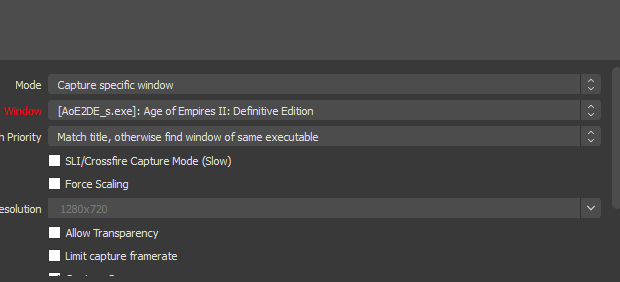
Can i tweak these settings to lower the pressure on the cpu
real heart
Probably not.
 frail ether
i got many pages, but i want to add my newer page not older, but steamelements doesnt showing me that page only some few others?
 brave pivot
Hi, I'm trying to add the auto shout-out but I don't have the bot option on the menus. Can anyone assist please?
real heart
There is no Facebook bot. Facebook doesn't have bot support.
vale palm
is the alert from streamelements working already? been using this for days and it isn't showing up on my live 😦
real heart
There is a known issue being investigated. Unfortunately, we cannot provide an ETA for a fix at this time.
 sick sapphire
Hello I'm having trouble with my alerts for fb it not working and my event is not updating
real heart
Look at the message immediately above yours.
 drowsy pelican
hello im having a trouble in overlay
when someone shares my stream theres no notfication in my stream
real heart
Look at the messages above yours.
void yoke
Alguien españolxd
real heart
@void yoke 🖱️ ➡️ #🇪🇸︱español
void yoke
Does anyone know why alerts are not working in Stream Elements, apart from the Activity Feed, this Bug does not read new reactions or donations or shared?
inland brook
Is it those specific alerts? @void yoke
 silent dune
Hi!! My streamelements says i'm offline in my dashboard while i'm streaming
inland brook
Its a known issue.
silent dune
is there anything i can do to fix it?
inland brook
Then its a known issue with the alerts not playing and we are looking into it.
@silent dune No, unfortunately.
inland brook
We are aware of issues involving some widgets and alerts not appearing on Facebook Gaming. We understand how important this functionality is to our FB community so we will keep you updated on the status as we work to remedy the situation.
inland brook
inland brook
We are aware of issues involving some widgets and alerts not appearing on Facebo...
void yoke
thanks
 summer mango
where i can find some info to make a custom widget for facebook? i have no clue on how to call my recent stars givers or recent sharers, I only have been able to get my hands on some Twitch custom widgets
summer mango
thanks!
 nova falcon
We are aware of issues involving some widgets and alerts not appearing on Facebook Gaming. We understand how important this functionality is to our FB community so we will keep you updated on the status as we work to remedy the situation.
@inland brook we will just wait for this to be fix? right?
 rustic wedge
Hi guys good morning!
I have a problem with OBS streamelements. Can you help me?
The activity feed is not updating when someone likes, shares, donates or something like that.
nova falcon
Hi guys good morning!
I have a problem with OBS streamelements. Can you help me?
The activity feed is not updating when someone likes, shares, donates or something like that.
@rustic wedge same prob dude... even my alert box and labels are not working... even my status on streamelements is OFFLINE while im streaming 😦
rustic wedge
@rustic wedge same prob dude... even my alert box and labels are not working... even my status on streamelements is OFFLINE while im streaming 😦
@nova falcon
This part that gets stuck, has no way to solve? Or are you offline for now?
nova falcon
@nova falcon
This part that gets stuck, has no way to solve? Or are you offline for now?
@rustic wedge well i guess we will just have to wait... as they've said on the pinned messages... pls read it 😦
inland brook
Idk why you both are quoting each other back and forth 
BUt that being said, you are both affected the same issue that I was quoted on and there is no ETA on fix
rustic wedge
😿
 wind swallow
hello! my facebook alerts arent reflecting in my activity feed when i go live do you guys know the reason?
 cobalt pilot
I'm having the same problem!
 teal pasture
We are aware of issues involving some widgets and alerts not appearing on Facebook Gaming. We understand how important this functionality is to our FB community so we will keep you updated on the status as we work to remedy the situation.
Just quoting this so it kinds stays refreshed for people to see
warm path
hi all! ive noticed my activity feed is not updating, or hasn’t updated in the last 24h. tried turning off and on and refreshing it. any thoughts?
oh now i see everyone has the same problem
frail ether
i got many pages, but i want to add my newer page not older, but steamelements doesnt showing me that page only some few others? Any answer for this.
 copper briar
Hello! The activity feed is not updating when someone shares, follows, donates or others. But emulating the alerts works fine. What is the problem? Platform: Facebook
untold steeple
Hello! The activity feed is not updating when someone shares, follows, donates or others. But emulating the alerts works fine. What is the problem? Platform: Facebook
@copper briar i think it's stiill not fixed, many are experiencing this
 valid kettle
HELLO GUYS! I just wanna ask if the comment overlay link is working now?
Only the share/like and follow is working to me atm but the comment is not.
 alpine kettle
Any updates on the issue with the alerts?
dense crane
@real heart Hey! Just would like to say thanks it seems that 30 fps fixed the problem ❤️ Much appreciated
 reef terrace
hi anyone
is this suppose to go online when i start my stream on facebook?
the activity feed is not updating when i try to stream it still shows this
sorry for the question i backread and now i know that theres an ongoing issue
thank you
agile grove
a week and the problem of facebook activity is still not fixed
dense crane
Activity feed is working for me. Just this week i started streaming to facebook and before I did I made a few changes to my facebook app developer section (verification, privacy policy links etc) that is associated with my facebook page which i stream to. Even facebook alerts through streamelements work me.
Alerts working example at 00:02:41 in my last broadcast https://www.facebook.com/aoe2hdmaroc/videos/3231612250258982/
I've heard a tech support here saying they know there are issues with alerts and activity feed and they are working on it but for me everything is working like a charm.
 ebon valley
Hi, I'm trying to setup a new Facebook Gaming Channel with StreamElements but when I go to https://streamelements.com/ and select the channel I want to connect with, it doesn't show up... pages that are not setup for Gaming (Level Up Program) are shown though..
I've had the channel up for a month now... any ideas why is this happening?
StreamElements
StreamElements is the leading platform for live streaming on Twitch and Youtube. StreamElements features include Overlays, Tipping, Chat Bot, Alerts, Loyalty, all fully integrated and cloud-based.
 eager burrow
Hey everyone, I stream on Facebook Live and Twitch. The activity feed is stuck on my facebook account, any way to change it to Twitch's activity feed?
zealous shuttleBOT
@eager burrow Streamelements on top of OBS -> Logout -> login
eager burrow
Terrific. Thanks!
sick sapphire
Has there been updated for the face alerts not showing up
quick phoenix
So, I have my Alerts set up in StreamElements, and I've added it to OBS, but when someone likes my stream nothing shows up. If I test from Facebook, it shows the generic FB alerts instead.
 honest vector
I am having the same problem. Also, streamelements doesn't show any facebook stream stats.
void yoke
why is the activity feed is not updating when someone shares follow and others?
spiral vault
How can I customize the stars for Facebook Gaming So something different comes out when they send 10 or 50 or 100 Tutorial?
real heart
@spiral vault Variations.
spiral vault
I found out a minute ago anyway thanks
sleek herald
Does it work now ? The overlay isssue?
 fierce cliff
Hello
I need help, I recently install OBS.live and set up my stream elements dashboard with FB but for any reason my dashboard does not update and my activity feed does not show recent events. The chat it works.
inland brook
We are aware of issues involving some widgets and alerts not appearing on Facebook Gaming. We understand how important this functionality is to our FB community so we will keep you updated on the status as we work to remedy the situation.
nova falcon
Hoping that it will be fixed soon~
 idle idol
hi can you help me, my alert box is not showing during live stream on fb but chatbox shows
what seems to be the prob?
inland brook
We are aware of issues involving some widgets and alerts not appearing on Facebook Gaming. We understand how important this functionality is to our FB community so we will keep you updated on the status as we work to remedy the situation.
 ripe horizon
hello guys, im new here in streamelements
how ever i'm having problem displaying my activity feed. like no activity feed displaying even im live
inland brook
Check above you :)
 unique needle
waiting for fix ^^
ripe horizon
hopefully it will get fix coz i'm loving streamelements now ^^
 hasty owl
Hi!
Is there any way I can change the color of the name for the chat widget? I don't see it on the text settings. I can only change the color of the chat text.
left basin
There may be way around. Create a custom widget and paste code from following URL into Code Editor: https://github.com/StreamElements/widgets/tree/master/CustomChat (json file goes to FIELDS tab)
@hasty owl ⤴️
hasty owl
@hasty owl ⤴️
@left basin Does this work for Facebook comments too?
left basin
It should work just like regular chat widget, but has more options
hasty owl
Alright, thank you so much! Will try it out~ 🙂
ripe horizon
FB alert box working now and the activity feed
signal sapphire
FB alert box working now and the activity feed
@ripe horizon is this for real? How bout the widgets? Is it working too?
ripe horizon
i think so, it's working on my end now
signal sapphire
Well, activity is not yet appearing on my end
copper briar
NOT FIXED YET 😦
quiet lagoon
Before ya'll start declaring it's fixed please keep it internally. Not all users might have it working yet.
 jovial talon
Looking troubleshooting option on why all my alerts no longer work? I have custom alerts, they worked for a few days and then poof no alerts coming through.
quiet lagoon
@jovial talon ongoing issue for people.
jovial talon
@quiet lagoon really? Ok. I’ll keep an eye on thread
ripe horizon
not sure, mine works fine now ^^
 compact fulcrum
Just checked mine and it is not yet working. Hopefully later today!! Good to see some progress has been made if some are up and running.
signal sapphire
It's working on my end now
compact fulcrum
Yeah, I noticed I had a notification someone liked my page about 40 mins ago, but nothing from my stream yesterday or Saturday.
copper briar
still not working..........
sick sapphire
Has any of the issues been fixed
trim gyro
mine is working now
 dusky dagger
I recently created a follower count widget and I was wondering if anyone knew how to have it start with my current follower count instead of 0?
zealous shuttleBOT
@dusky dagger To reset goals:
- from the overlay editor -> session data on top right (monitor symbol) -> goals tab -> reset progress of desired goal
- from the dashboard -> activity feed on the left -> widget data on the right -> goals tab -> reset progress of desired goal
Note: Goal widgets(progress) only counts up and doesn't go down automatically, if you loose followers/subs
 main heath
Someone who can help me close my account?
I've asked a thousand times to close my account and so far nothing
cobalt elk
@main heath you already filled the closure form?
main heath
Yes
cobalt elk
Please note that the deletion process is not automatic, but instead submits a request to the developers to delete the account on your behalf.
late idol
Is fb chatbot in the works at all? I know you said there’s no api but how is noxbot.gg doing it???
real heart
You'd have to ask them. Facebook's API doesn't have anything to support it.
late idol
They say they are using facebooks api that’s in beta
So I’m asking streamelements why a no name has access and they don’t?
As I love stream elements and can’t wait for it to have the same shut I had on twitch for fb gaming
 quick shale
Can I ask something why when I'm streaming on facebook my output video is lag? Can someone help me with that?
zealous shuttleBOT
@quick shale Please ask your question in one helpdesk channel only. A support volunteer or StreamElements staff member will assist you as soon as they are available. Asking in multiple places will only result in confusion, not faster answers. Thank you for your patience.
@quick shale Please provide a log from your last stream. To do this, in OBS go to Help > Log Files > Upload Last Log File and paste the link to the log file here.
 mild island
I had some issues dropping frames due to a rendering and encoding lag the last couple of days and I seemed to have fixed by disabling the browser source docks that I had created the issue now is getting ended streams dropping frame due to a network issue my upload is approximately 12 to 14 mbps and I have never had this issue before any help or suggestions would be greatly appreciated
alpine kettle
Some features are already working, recent share and recent follower. Alerts is still not working on my end.
inland brook
Logout from our dashboard and login again
and see if that helps with the events showing up on the alert widget
copper briar
not yet 😦
inland brook
Any missed and past events won't show up
copper briar
not working at all in my case........
inland brook
So you logged out and logged back in and started a stream and events are still not coming in?
copper briar
yes
copper briar
now its working THANKS 🙂
warm path
any sense on the ETA for the fix for updates on alerts follows etc?
 urban girder
hi
uhhhh, i kinda have a problem with connecting to facebook from streamelements
i got this, what did i do wrong?
main heath
help me close my account
stray wren
Hey i need help guys
Am streaming and my chatbox doesn't show up although i add it on my overlay
inland brook
@urban girder I would suggest to try using Chrome
@main heath https://streamelements.com/dashboard/account/security - closure account button
@stray wren logout from our dashboard, clear your browser's cache and login again
and see if that helps
 autumn silo
Hi my activity feed and chat box were both working, yesterday i updated my elgato and today updated obs live and now neither are working (I use FB to stream have not had any issues in the past until today) any advice or solutions unable to find anything online
zealous shuttleBOT
@autumn silo Please logout of StreamElements at https://streamelements.com/logout and then login again to your account (Twitch/YouTube/Facebook).
inland brook
And also logout from our dashboard and login again
see if that restores events showing up
autumn silo
kk will try now give me a few
Thank you keizar and support that did the trick, may i ask will this happen again or why would it reset? because of the u[dates?
stray wren
@inland brook i do that and the problem stills exist
autumn silo
log out and in from both Master from the link he posted and from within streamlabs itself and close application, once i reopened the application and logged in with FB everything loaded back up
stray wren
May chatbox doesn't show in a weeks now
I hope someone suggest a solution instead of logging out and clearing caches
Cause i already done that and nothing happens my chatbox still doesn't show
zealous shuttleBOT
@stray wren Please provide your account ID found at the top of this page: https://streamelements.com/dashboard/account/channels This ID is public info and safe to share here.
inland brook
I don't see your page live currently
stray wren
Yeah
Cuz i tested it many times
I ask my sister to comment on the stream
And that chat box doesn't show
Particularly nothing shows
inland brook
The last stream i see was from 15th august
unless you are streaming right now, the chat won't work
it won't show any previous streams new comments
stray wren
@inland brook ok am gonna live after lunch wait for it
And try to comment
You'll see it doesn't show
untold steeple
is the alert box fixed now?
inland brook
it should be - logout from the dashboard and back in
untold steeple
okayyyy thank you
main heath
@inland brook I've done it 6 days ago
inland brook
Please provide me with these details and I will ask the devs to delete your account:
Username:
Email:
Account ID:
JWT Token:
Reason for closure:
Error when using the closure form:
In my DMs please
main heath
Thanks
 velvet marlin
Hi, i dont know if i am doing something wrong but basically, not all of the alerts are popping up on obs, for example i had 24 shares on a video but only around 10 of them alerted and the rest i never knew about until after the stream
Thanks!
 serene heron
Hi! Question: On the streamelements overlay maker, is it possible for the latest video like not to have the whole "Latest Video Like" and just be "Like". Also the font is not showing up properly on OBS. If I choose Nunito, it shows as the default font. Thanks!
cobalt elk
@serene heron Make sure that you have the font installed on your PC
serene heron
Oh thanks! What about the instead of "Latest Video Like" can it be "latest like" @cobalt elk
cobalt elk
i'm not sure about that one.. could you please provide a screenshot?
serene heron
This came from the "add widget" -> Label -> Latest Video Like. I wanted to change it to just "Latest Like" or "Like"
cobalt elk
@serene heron can you show us the "settings" part of the label?
serene heron
Ohhh that answered my question. I apologize. If I used a pre-made overlay, it seems that I couldn't change it earlier. Must be because it was locked. Thank you so much @cobalt elk! Lifesaver!
 covert turtle
hello
can someone help me please
how to fix this
when i try to input my source
it only shows half only
help me pls
zealous shuttleBOT
@covert turtle The default resolution for StreamElements overlays (theme and custom) is 1920x1080. Please add them in OBS at their full resolution and use CTRL+F to fit to screen if necessary. You can then downscale your stream in OBS settings > Video if you'd like https://i.imgur.com/6bWXxjR.png

 solemn surge
Hellos , i might miss something i have an overlay telling me : platform mismatch , change to the appropriate channel if someone could light my lantern ^^;
cobalt elk
@covert turtle delete the overlay and add it again with the correct resolution
covert turtle
@cobalt elk thank u man!
cobalt elk
@solemn surge that could happen with the 1 click installer, you could try to import the overlays on your twitch account and then duplicate it to your facebook account
solemn surge
mind me not if i DM you ? sorry in advance
valid kettle
FACEBOOK issue already fix???
tired bridge
hey there, can someone help me in my total likes and follows widget? I can't seem to update it to my latest likes and follows.
 surreal stirrup
Hello i need my facebook account unlinked, i accidently created a new SE account instead of linking to my other account with everything else, ive tried going through the "close account" typed everything in, it acts like it goes through but it doesnt. please help
valid kettle
Hey guys. overlay chat is fix now or not yet?
tired bridge
it's already fixed. stream chat is working again
void yoke
can someone help me? my streamelements is offline while I stream on facebook what should I do?
my activity feed last alert was july 24
urban girder
@urban girder I would suggest to try using Chrome
@inland brook lemme try
inland brook
@void yoke logout from our dashboard and login again
@valid kettle which issue are you referring to?
valid kettle
@valid kettle which issue are you referring to?
@inland brook the overlay chat
inland brook
You are only specifying the widget
but not the problem with the widget
So I will ask again - which issue are you referring to?
sleek herald
Does the problem already fix?
inland brook
What problem?
 odd lodge


 valid kettle
What problem?
@inland brook i mean. I put already the link of my chat overlay through my OBS browser layer but it's not working. the only work was like/share and follow
 proper eagle
how can fix this, this popup to small, i cant import my alert box
urban girder
@inland brook thanks, it is fixed
 torpid oriole
My activity feed and chat will not popup in obs could anyone help me
 hollow cypress
Hello,.. Alerts doesn't work on live?,.. I'm using OBS Studio
hollow cypress
Hello?
void yoke
hello if is trat my stream to fb its not asking me whats the game and that kinda stuuf. its goiun straithe to liuve screen
zealous shuttleBOT
@void yoke StreamElements on top of OBS > Logout > Login
warm path
@hollow cypress yeah same here, been a problem for a week or so now, think they’re working on a fix but no one mentioned any ETA
inland brook
Can you please logout from our dashboard and login again and see if alerts start showing up again? @warm path @hollow cypress
 midnight urchin
Hi, my followers numbers on my fb page and streamelements dahsboard is not the same, how do i fix this?
inland brook
Facebook doesn't provide Total Followers count via their API. We are unable to grab your total followers and show it properly so we start counting it for you.
midnight urchin
Okey, understand so i can only get the numbers of followers on streamelements based on the people that follows me while I stream?
inland brook
ye
midnight urchin
Okey, thanks
warm path
Can you please logout from our dashboard and login again and see if alerts start showing up again? @warm path @hollow cypress
@inland brook logout in OBS?
inland brook
Does Dashboard mean OBS?
warm path
@inland brook tried now but still no joy. last update was aug 13
inland brook
are you currently live?
warm path
no
inland brook
past events won't show up
warm path
but it’s not even updating my page likes or total stars or anything?
inland brook
The main dashboard page will only show the monthly gain and will not retroactively get any missed events
warm path
ok thanks
 languid walrus
Could anyone help me out
So i bin on facebook streaming and out of no where my overlays go away and nothing there but my display capture any help
fickle ingot
Is fb alerts in SE. Isworking now?
languid walrus
Idk
 zenith jay
Anyone can help me out? I just updated my OBS (after a week without streaming). and right now my overlays are not showing.
languid walrus
same thing with me
 jade comet
My chatbox is not showing up on OBS live streamelements
Even the activity feed is not working
Im using facebook gaming
Chat box and activity feed is only for twitch?
I dont know whats going on
 cursive thorn
is the SE site down? was in the middle of editing some stuff and nothing is loading now
 urban sentinel
Is there anyone around to help at the moment?
cursive thorn
nevermind. its just not working in Edge but it is in Chrome.
urban sentinel
My stream set up, chat and activity feed are all broken. just curious if this is fixable or if its happening to multiple people
urban sentinel
hello
zealous shuttleBOT
@urban sentinel StreamElements on top of OBS > Logout > Login
urban sentinel
ive relogged on the website, reset my computer, opened and closed the appand still nothing. when i click start streaming its not even connected to anything. any ideas? was working fine last night
 strange glen
Anyone live?
zealous shuttleBOT
@strange glen Welcome to the helpdesk! Please let us know how we can assist you today and a support volunteer or staff member will assist you as soon as they are available. Thank you for your patience.
strange glen
I am trying to add my overlay from StreamElements to OBS Live. I copied the overlay URL and pasted it into OBS by clicking + under Source > Broswer, but the overlay doesn't show on OBS
zealous shuttleBOT
@strange glen OBS > Settings > Advanced > Scroll down > Enable or disable Browser Source Hardware Acceleration, depending on its current state. (This does not apply for OBS on Mac)
https://i.imgur.com/ggMe9ZE.png
strange glen
this did not help
I am trying to add my overlay from StreamElements to OBS Live. I copied the overlay URL and pasted it into OBS by clicking + under Source > Broswer, but the overlay doesn't show on OBS
zealous shuttleBOT
@strange glen The default resolution for StreamElements overlays (theme and custom) is 1920x1080. Please add them in OBS at their full resolution and use CTRL+F to fit to screen if necessary. You can then downscale your stream in OBS settings > Video if you'd like https://i.imgur.com/6bWXxjR.png
strange glen
Anyone live? The AI tips aren't helping
zealous shuttleBOT
@strange glen To add your overlays to OBS, add a new browser source in your scene. Paste your overlay URL in the browser source properties, set the dimensions to 1920x1080 (unless you changed them on the website) and check Shutdown source when not visible. https://youtu.be/KDvLynUqXI4
strange glen
😫
languid walrus
no overlays coma up like ehats going on
whats
@strange glen i am having the same issue as you
 lapis hazel
my overlays are not working today... I have refreshed the browser source and logged out and re logged in. I also re setup the url links.... nothing is working still not showing any overlays in OBS
zealous shuttleBOT
@lapis hazel OBS > Settings > Advanced > Scroll down > Enable or disable Browser Source Hardware Acceleration, depending on its current state > Restart OBS (This does not apply for OBS on Mac)
https://i.imgur.com/ggMe9ZE.png
lapis hazel
Worked
 pulsar harness
why can't i see my overlay? i can hear my alart but i can't see any of my animation🥺
languid walrus
^^^^
zealous shuttleBOT
@pulsar harness OBS > Settings > Advanced > Scroll down > Enable or disable Browser Source Hardware Acceleration, depending on its current state > Restart OBS (This does not apply for OBS on Mac)
https://i.imgur.com/ggMe9ZE.png
 forest musk
Hi Support.. my overlay for alerts is not working in OBS though when tried to emulate.. it shows up
zealous shuttleBOT
@forest musk OBS > Settings > Advanced > Scroll down > Enable or disable Browser Source Hardware Acceleration, depending on its current state > Restart OBS (This does not apply for OBS on Mac)
https://i.imgur.com/ggMe9ZE.png
 twin thunder
Hi, my overlays are not working due to the new update that I installed. I did the same as mentioned above about clicking the Enable Browser Source Hardware Acceleration and then restarted my OBS but nothing seems to work. I also did copy and paste the URL but nothing happen. I can only see blank on my preview screen. Please help.
zealous shuttleBOT
@twin thunder OBS > Settings > Advanced > Scroll down > Enable or disable Browser Source Hardware Acceleration, depending on its current state > Restart OBS (This does not apply for OBS on Mac)
https://i.imgur.com/ggMe9ZE.png
twin thunder
this does not help at all
 next heron
Is the loyalty points system avalible for facebook?
humble igloo
No.