#helpdesk-facebook
1 messages · Page 8 of 1
 proud steppe
 solid lava
Thanks man 🙂 sorry saw you were asleep/afk and didn't want to bug you 🙂
proud steppe
no problem 😄
you can DM both tokens to @wanton torrent and say which one is from which channel 😉
solid lava
Awesome 🙂 ty man 🙂 I'll do it in a few 🙂
Thanks @proud steppe and @wanton torrent !!! ❤️
 wanton torrent
No problem 
proud steppe

 wintry ivy
@void yoke where can I find that ??
proud steppe
Settings > Stream
 void yoke
^^
wintry ivy
That is on obs.live or on the website?
 white root
If your activity feed etc still point you at mixer click streamelements in the obs menu >> log out >> log in with Facebook
 balmy sand
hey guys. Do you have any idea if why I cant change my OUTPUT settings? Im just new to streamelements
I want to use NVENC instead of x264 and I cant change it
 inland brook
start OBS as admin or restart PC.
 wild quest
OBS.live never seems to find my "live stream" to connect chat?
But, stream is live and streaming from OBS.live :/
eh fixed, log out and log back in :/
inland brook
I was gonna suggest that, but you found the fix
wild quest
😄
 coral parrot
Hi, I need some help
When I login into my StreamElements account with Facebook and want to add my YT and TTV channels it tells me that they are already claimed, but they don't show up
But if I login with TTV or YT they both show up but FB doesn't show up and tells me it's already claimed
proud steppe
yeah you made 3 seperate StreamElements accounts
a staff member can merge them for you if you want
coral parrot
Okay, so what should I do now?
 zealous shuttleBOT
@coral parrot Account Merging - Please note:
- Merging accounts only allows faster ways to switch between accounts
- Merging accounts does not allow data sharing between accounts - different streaming platforms, different type of events
- Merging accounts allows duplicating/sharing overlays between the accounts
If you understand the limitations of merging and want to proceed, please find the JWT tokens (!jwt) from both accounts you want to merge and you will be directed to DM them to a staff member.
proud steppe
i'll try to get hold of a staff member for you
you need to get the JWT tokens for all accounts and DM them to the staffmember that i will tag here in a few moments. do not post those tokens here
zealous shuttleBOT
@coral parrot You can find your JWT token on your account channels page ("Show Secrets" to reveal the token): https://streamelements.com/dashboard/account/channels
READ ME:
This is a private security token. Do NOT share this token here or other public places, only with a StreamElements staff member in private.
wanton torrent
I can do it
coral parrot
Is it possible to modify the alerts? Like modifying the sound and the gif played on it
white root
@coral parrot in the overlay editor on the StreamElements website you can select the alert widget and change the sounds/gif
 versed bluff
I accidently created a new StreamElements page for Facebook and when I use the Close Account option, nothing seems to happen. Can I still merge it with my actual account?
solid lava
Are their certain widgets that don't work with facebook? or tricks to get them to work? I can't get chat to work for my stream right now.
I accidently created a new StreamElements page for Facebook and when I use the Close Account option, nothing seems to happen. Can I still merge it with my actual account?
@versed bluff Yeah @proud steppe helped me figure that out with mine. You'll need to wait for a SE staff but yeah.
proud steppe
@versed bluff look up the JWT tokens from each account and DM them to @wanton torrent specifying which token is for which account. He can then merge them for you. you can find the tokens like this:
zealous shuttleBOT
@versed bluff You can find your JWT token on your account channels page ("Show Secrets" to reveal the token): https://streamelements.com/dashboard/account/channels
READ ME:
This is a private security token. Do NOT share this token here or other public places, only with a StreamElements staff member in private.
proud steppe
do not share the tokens in this discord
solid lava
@proud steppe do you know if certain widgets that don't work with facebook? or tricks to get them to work? I can't get chat to work for my stream right now.
proud steppe
that's a thing that is not available sadly
it has to do with how FB implemented it
the chat widget is only available for Twitch and Mixer, even YT has limitations on it
solid lava
np
solid lava
@proud steppe do other widgets work like showing likes/follows? or is it mostly just the overlay stuff that works?
zealous shuttleBOT
@knotty depot Welcome to the helpdesk! Please let us know how we can assist you today and a support volunteer or staff member will assist you as soon as they are available. Thank you for your patience.
@knotty depot https://www.take-a-screenshot.org
 knotty depot
🙂
My steam comes out super clear
But
For some reason I still can't get my camera and audio to sync together
😦
 graceful pumice
Question, how can you get the chat window on stream elements? When I click chat the twitch chat pops out but not the facebook one.
zealous shuttleBOT
@graceful pumice Streamelements on top of OBS -> Logout -> login
 zinc void
When relogging log in as Facebook.
 elfin sand
can i ask q
zinc void
This is indeed the helpdesk channel meant for questions, so i would assume yes
elfin sand
i would like to add the chat box on my obs
how can i do that?
and other things i need when im streaming so i can see all the things i needed in obs while im streaming
zinc void

StreamElements
The Ultimate All in One Platform for Streamers
Then click "Edit" on the overlay you want it on.
elfin sand
okay thanks !
zinc void
elfin sand
how about in the obs app , is it possible to see the chats and other alerts in it so that i can no longer use alt tab to my facebook to see who's chatting or who likes my stream?
zinc void
Then as I said, install OBS.Live and then click "View" then Docks"
elfin sand
and then?
zinc void
Click the docks you want to show.
zinc void
Theres a fix for that that is not on my mind currently.
Asking some smarter peeps, pls hold 
zinc void
Try this while we wait for them to respond:
elfin sand
i dont know how to reopen XD
zinc void
Nope not that one 🤔 HOldon
zealous shuttleBOT
@elfin sand Streamelements on top of OBS -> Logout -> login
elfin sand
ohh
that works
oh wait
it appears then now its gone again
okay got it
thanks big help! 👍 👍
zinc void
elfin sand

 frosty delta
is there anybody who can help me merge my FB and Mixer to my Twitch/Youtube account in SE
zealous shuttleBOT
@frosty delta Account Merging - Please note:
- Merging accounts only allows faster ways to switch between accounts
- Merging accounts does not allow data sharing between accounts - different streaming platforms, different type of events
- Merging accounts allows duplicating/sharing overlays between the accounts
If you understand the limitations of merging and want to proceed, please find the JWT tokens (!jwt) from both accounts you want to merge and you will be directed to DM them to a staff member.
@frosty delta You can find your JWT token on your account channels page ("Show Secrets" to reveal the token): https://streamelements.com/dashboard/account/channels
READ ME:
This is a private security token. Do NOT share this token here or other public places, only with a StreamElements staff member in private.
zinc void
DM me the JWT token for both accounts and I will forward them to staff to be done as soon as they are available.
frosty delta
@zinc void are you SE staff?
zinc void
Not staff. Support volunteer. They liked me so much they gave me a rank! First time ever.
frosty delta
lol
zinc void
The someone liking me part. Not the rank. 😢
frosty delta
ok gimme a few to get those
knotty depot
😦
Hi me robot @void yoke how can I fix my audio and webcam problems 😦
Mr robot
@zinc void I need some help 😦
zinc void
Mic audio out of sync with camera?
 void fern
hi how can I fix encoding error? thank you?
need help pls thank you
evry time i do live stream it always cut off
zealous shuttleBOT
@void fern Please provide a log from your last stream. To do this, in OBS go to Help > Log Files > Upload Last Log File and paste the link to the log file here.
 brisk plinth
Hi, I'd like to merge my accounts, I accidentally log on Facebook when I already have a Twitch Account, so I'd like to have them both on Twitch
zealous shuttleBOT
@brisk plinth Account Merging - Please note:
- Merging accounts only allows faster ways to switch between accounts
- Merging accounts does not allow data sharing between accounts - different streaming platforms, different type of events
- Merging accounts allows duplicating/sharing overlays between the accounts
If you understand the limitations of merging and want to proceed, please find the JWT tokens (!jwt) from both accounts you want to merge and you will be directed to DM them to a staff member.
zealous shuttleBOT
You can find your JWT token on your account channels page ("Show Secrets" to reveal the token): https://streamelements.com/dashboard/account/channels
READ ME:
This is a private security token. Do NOT share this token here or other public places, only with a StreamElements staff member in private.
brisk plinth
I have the JWT tokens already, How can I DM them to a staff member
 real heart

zinc void
👀
 sullen hare
hello guys, i have an issue, i can manage to have both of my channels, facebook and twitch on the same account, when i try to connect any of them when im on the facebook acc or twitch it says account is already claimed, i dont know what to do to have both channels in one single account
cant*
zealous shuttleBOT
@sullen hare Account Merging - Please note:
- Merging accounts only allows faster ways to switch between accounts
- Merging accounts does not allow data sharing between accounts - different streaming platforms, different type of events
- Merging accounts allows duplicating/sharing overlays between the accounts
If you understand the limitations of merging and want to proceed, please find the JWT tokens (!jwt) from both accounts you want to merge and you will be directed to DM them to a staff member.
real heart
@brisk plinth Please DM the JWT tokens only and keep all correspondence in the public channels.
brisk plinth
Okay, thank you
real heart
@brisk plinth Your channels have been merged.
brisk plinth
@real heart Thank you very much sir! Have a Nice day
 orchid moat
Hi there! I created a facebook streamelements account by misstake! I wanted to join the facebook account to my previous twitch account on stream elements! Could this be joined after the misstake?
zealous shuttleBOT
@orchid moat Account Merging - Please note:
- Merging accounts only allows faster ways to switch between accounts
- Merging accounts does not allow data sharing between accounts - different streaming platforms, different type of events
- Merging accounts allows duplicating/sharing overlays between the accounts
If you understand the limitations of merging and want to proceed, please find the JWT tokens (!jwt) from both accounts you want to merge and you will be directed to DM them to a staff member.
orchid moat
its ok! I want to merge them!
 humble igloo
Please DM the JWT tokens only to @real heart and keep all correspondence in the public channels.
Nethyr will merge the accounts after he recieved both JWT tokens and will report back here.
zealous shuttleBOT
@orchid moat You can find your JWT token on your account channels page ("Show Secrets" to reveal the token): https://streamelements.com/dashboard/account/channels
READ ME:
This is a private security token. Do NOT share this token here or other public places, only with a StreamElements staff member in private.
real heart
@orchid moat Your channels have been merged.
 tardy niche
Hi, I'm new to streamelements. I used to use a CSS code, in OBS, to show alerts from Facebook's Alert PopUp, which allowed me to display the user's profile picture.
Can I do the same in Streamelements?
I would like to show the profile picture, in addition to his name and the action he did
real heart
CSS is done in the overlay editor itself, with the alertbox widget, not in OBS.
tardy niche
Yes, I have noticed that. But is there any way that, using the Streamelements editor, I can display a user's profile picture?
real heart
Not by default.
tardy niche
i see
zealous shuttleBOT
@knotty depot Please provide a log from your last stream. To do this, in OBS go to Help > Log Files > Upload Last Log File and paste the link to the log file here.
knotty depot
Okay 🙂
I'll have to find a way to send it to myself and inbox it to u
One sec please
zinc void
Invalid link. Try again.
knotty depot
zinc void
CPU and GPU not strong enough to stream, not really fixable.
i5-2450M is a laptop series CPU which is quite underpowered for streaming
same for your HD Graphics 3000
zinc void
18:05:27.058: adding 533 milliseconds of audio buffering, total audio buffering is now 533 milliseconds (source: Audio Input Capture)
knotty depot
😭😭😭😭😭
zinc void
Theoretically you could add a delay to your camera of 533ms and pray your audio buffering stays at 533
knotty depot
Whats the cheapest gaming computer I can get for now
zinc void
I dont normally reccommend this, but use OBS's Auto-Config wizard
knotty depot
I'll try it again
tardy niche
I see that Stream Elements records the activity of users including their profile picture, does anyone know the CSS code needed to show that pic in the alerts?
void yoke
Hello I’m having trouble with stream elements finding my Facebook gaming page
void yoke
Hey just looking for some help trying to link stream elements to my fb gaming page
 marsh hare
What is your problem?
void yoke
Well I made a Facebook gaming page but Everytime I try to link it to either the website or to stream elements obs it says no gaming page found
void yoke
anyone know of a way to stream to multiple platforms at one time for free? I looked into restream but their free account is so limited and their top of the line account is way too expensive for me at this time. I mean I suppose I could download my vids or record them as I'm streaming and upload them later but I'm lazy and really dont want to bog my system down with huge files
void yoke
I’m sure at this point I’m just pestering but just wondering if anyone could give me some help with stream elements not recognizing my fb gaming page
coral parrot
Is there Media Request on Facebook?
 wet needle
my activity feed wont connect to facebook everytime i got live it says no stream activity
zealous shuttleBOT
@wet needle Streamelements on top of OBS -> Logout -> login
 humble parrot
Hi there, what's the downside of having my output scaled resolution at 1080p and streaming at 720p? if I change the rescaled resolution into 720p would that make it less demanding by any chance considering I'm running a low end PC? fyi enoder is NVENC and I'm barely using 20% of my gtx 970 while streaming, but my CPU is old and using 90% of that.
tardy niche
I have a problem, yesterday I tested the alerts for FB, some appeared on time along with the action, others were delayed several minutes, and then I saw that some did not even appear. (I was comparing them with FB's own alerts, to see how much delay they could have).
Is there any configuration so that Stream Elements alerts appear correctly?
real heart
@humble parrot Having your canvas 1080p and your output 720p is pretty typical, actually, and ideal for viewers with less powerful internet connections.
@tardy niche For the events that did not play, did they appear in the activity feed at all?
tardy niche
I didn't see if they appeared in the stream elements panel, but, they did appear in the facebook panel
real heart
Can you check?
tardy niche
At this moment all the events are listed, but I don't know if during the stream they have appeared on time in the list, because as I said, during the stream, the alerts appeared outdated for 15 minutes, I imagine that those that did not appear were going to leave much after
real heart
If they are listed, we did receive them, so it's likely a matter of how fast Facebook itself sent them through their API.
coral parrot
Anyone know if there Media Request for Facebook?
real heart
@coral parrot Yes, media request is available on Facebook, but only via tips.
coral parrot
@coral parrot Yes, media request is available on Facebook, but only via tips.
@real heart 😞 That's dissapointing. Will you include a free mode so others can request without paying?
real heart
@coral parrot As soon as we can get a working bot on Facebook, probably.
coral parrot
Awesome!
humble parrot
@humble parrot Having your canvas 1080p and your output 720p is pretty typical, actually, and ideal for viewers with less powerful internet connections.
@real heart if my internet is decent and my only concern is CPU usage, would I get any benefits switching my output to 720p? And what Bitrate should I use if I keep it at 1080p while my stream is 720p?
humble igloo
Here are guidelines for live streaming on facebook: https://www.facebook.com/help/1534561009906955?helpref=uf_permalink
 lone turret
 zealous shuttleBOT
@lone turret Streamelements on top of OBS -> Logout -> login
inland brook
And make sure the stream key is properly set
 plush bane
Hello
 vapid sedge
Glad I found this Discord! I was having issues with OBS Live not connecting to Facebook Gaming and prompting me to login with Twitch. Simple logout and login fixed it, as suggested above!
 unkempt lion
Hi hi!! New here. I was wondering when facebook will get merch??? I really want to switch from my current provider to here...
zealous shuttleBOT
@unkempt lion SE.Merch is only available on Twitch right now. If you stream on another platform please help us prioritize this integration by filling out this form: https://forms.gle/YQWtXcTN6ufq69318

Google Docs
SE.Merch is now in Open Beta for Twitch channels. If you stream on other platforms please fill out this form and help us prioritize this feature on our roadmap.
 dire mirage
Hello, I am relatively new to streaming. I have been having issues with my alerts and I am not really sure how to fix it. I have the alert widget setup on my gaming screen as well as my intermission screen.. When I use the emulator for a follower/subscriber/stream share, It works perfectly in obs and on StreamElements. When I am streaming, the alert doesn't come up and neither does the sound. If I select the replay option for an alert on obs The video will pop up but the sound won't. Can anyone help me with this? I honestly have no idea why it won't work and I believe I have followed the instructions.
 worthy oak
Can an admit here please delete my Aud Chav Facebook profile in Stream Elements? It for some reason uploaded to a separate account, but I want it under the same account that I have Twitch & Youtube (AudChav - no space)
zealous shuttleBOT
@worthy oak Account Merging - Please note:
- Merging accounts only allows faster ways to switch between accounts
- Merging accounts does not allow data sharing between accounts - different streaming platforms, different type of events
- Merging accounts allows duplicating/sharing overlays between the accounts
If you understand the limitations of merging and want to proceed, please find the JWT tokens (!jwt) from both accounts you want to merge and you will be directed to DM them to a staff member.
zealous shuttleBOT
You can find your JWT token on your account channels page ("Show Secrets" to reveal the token): https://streamelements.com/dashboard/account/channels
READ ME:
This is a private security token. Do NOT share this token here or other public places, only with a StreamElements staff member in private.
worthy oak
I closed the account, but it is not showing it is closed and I still cannot claim my FB account on the other SE acct.
real heart
Closing an account is not automatic, but instead sends a request for a dev to delete it.
Closing is not required to merge. Staff can merge accounts. Submitting a close request will only cause issues in the long run.
Usually by being told you can merge them, having them merged, and then a dev going, "oh look, a close request, let's delete this account and all channels associated with it.
worthy oak
Well, shoot. Can you delete my request to close, please.
dire mirage
I've looked up troubleshooting the alert issues and so far haven't been able to find anything. Is this a common issue and is there something I can due to fix it?
real heart
@worthy oak
dire mirage
@real heart Would you be able to help me with the issue with alerts not showing up in stream or do you know of someone that would be able to help me? Thanks
real heart
@dire mirage They're working fine. Check your settings in OBS. Disable Browser Source Hardware Acceleration in Settings>Advanced.
dire mirage
@real heart this will allow for them to show up in stream? Thank you so much I have been trying to figure out why I couldn't get sound on stream or the alerts to show up without me hitting the replay button for 2 weeks.
real heart
@dire mirage Have you tested it? Looking okay?
dire mirage
@real heart I'm still not getting any sound
real heart
Screenshot your browser source properties?
dire mirage
real heart
Deleting that first one, we wanna hide that link.
dire mirage
@real heart Thank you totally forgot about that
real heart
@dire mirage To be clear, do you not hear the sound yourself, is the sound not on stream, or both? Are you able to test this?
dire mirage
I cannont hear the sound on obs or on stream. I have been testing it in obs today but as of yesterday it didn't work in stream either. I will setup a stream on fb rn to be able to test alerts
real heart
Check your settings in Settings>Audio, make sure you're capturing the desktop audio, as that's what the browser source is going to. Otherwise, enable "Control audio via OBS" and see if that helps instead.
dire mirage
okay I will try that and get back to you thank you
Enabling the control audio fixed it. Thank you so much this has been driving me crazy. @real heart you're the best
 indigo locust
so im on facebook, im trying to set up my whole set up again for obs, i found in streamelement's widgets section the latest/recent, what is the difference between latest and recent, it says no data but i do have ppl donating. i wanna set up where when someone donate stars it says there name on the stream until the next person does it then switchs to them then
worthy oak
Will an admin please PM me re: merging accounts? thank you.
real heart
real heart
@worthy oak Your channels have been merged.
worthy oak
thanks 🙂 @real heart
 dawn gazelle
This happens when I add Facebook !! How can i fix it !?
 subtle flume
yo
the facebook log in for cash donations has been broke since release
i cant recieve donations
this is fucking me hard
real heart
Hey @subtle flume don't forget you have the #dreamteam channel for support. 🙂
 brittle raptor
Is the music not getting flag by facebook when they request?
real heart
Can you elaborate?
brittle raptor
I mean when they request music, my stream will not get muted or shutdown?
Fb is very strict on copyrights
real heart
What shows on your stream is your responsibility. If you have concerns, we recommend enabling manual queue moderation so you can approve each request before it plays.
brittle raptor
Alright thanks
void yoke
Hello, on behalf of PicklesGaming (Facebook & Twitch streamer),
I would like to file a complaint:
Ever since we have enabled SePay on our donation link, our viewers are having issues donating. This has been costing us a lot of revenue.
Please contact us at contact@pickles.army or nordin@pickles.army
Thank you for your time
@real heart I am one of the main admins for @subtle flume can you please allow me to join the #dreamteam channel? Thank you
inland brook
I'm sorry, that won't be possible.
As for the complaint - please provide more details and email us here: support@streamelements.com
void yoke
@inland brookif I have him post that request in that channel perhaps?
inland brook
That is what that channel is for.
void yoke
@inland brook I am kind of his right hand, he is focused on the content creating and contracts, and me and our other admin focuses on all other things required.
inland brook
Then I would suggest to email all details you have or want on the issue at hand to support@streamelements.com
SEPay issues are either handled by the AM of the DT and/or via our support email.
void yoke
@inland brook > Then I would suggest to email all details you have or want on the issue at hand to support@streamelements.com<
Can you tell me how long the response time will be?
This issue is costing us a couple hundred dollars a day
inland brook
Depending on the issue and the need for investigation.
void yoke
I will email support right now with screenshots
@inland brook I will also have @subtle flume post a request in #dreamteam to give add me as a secondary contact
inland brook
I already see that he spoke with my colleague in the channel.
void yoke
@inland brook lol, yeah that's why I requested access, he's in Dallas USA and I'm in The Netherlands ☺️
inland brook
Can I ask that you stop pinging me in every sentence please? You have my all my attention here, so no need to ping me every time.
void yoke
Ok, sorry!
inland brook
Thank you
I'll start compiling what information he has given in the channel as well and poke the devs harder on this as I see the issue.
The information you provide over email, will be added, as long as its helpful to the investigation.
void yoke
Thanks for your time Keizar
coral parrot
Is there any way to look at my chat and my alerts but on my phone while streaming?
 frozen valve
i have a question. if i use Obs.live request media music. and paste some youtube music i will copyright?
inland brook
@frozen valve for facebook - yes so make sure you play copyright free songs only
@coral parrot you can still open our dashboard on your phone to look at the activity feed
coral parrot
@coral parrot you can still open our dashboard on your phone to look at the activity feed
@inland brook from your website right?
inland brook
Yes
 fallen canyon
Hello, I managed to turn the Facebook broadcasting on accidently. How do I turn it off again so it's only on Twitch?
white root
In obs.live?
fallen canyon
Yes.
SteamElements OBS Live
Sorry, I just saw the room for OBSlive. I'll post this there.
 storm hare
Hi is there anyone available to help me out
Ive been having an issue when it comes to streaming to facebook to where ive been capped at 2500 bitrate and cannot stream to the platform
my roommate can use my stream key and my friend from across the US can use my stream key and have no issues but i cannot stream
inland brook
!obshelp @APK#0001
zealous shuttleBOT
For the best OBS support, please join their Official Discord @ discord.gg/obsproject
 idle sail
hello guys is there a chroma key on streamelements?
real heart
For what exactly?
idle sail
i want to add video on my alert its has green background i want to remove it
real heart
No, you need to have transparency in the video.
real heart
Video editing software.
 vast ingot
inland brook
vast ingot
inland brook
Go into its settings and remove the JWT token @vast ingot
 digital blade
Hello, i trying to sign up for tipping but for some reason i have only one option available and its paypal, i do have more than 100 followers and i do have bank account in US, it says if i don't see that option i should contact you guys through discord
zealous shuttleBOT
@digital blade Please provide your account ID found at the top of this page: https://streamelements.com/dashboard/account/channels This ID is public info and safe to share here.
digital blade
5e48e4c847ed06ba41182722
inland brook
Based on what I see and sorry for the delay, you don't have 100 followers in our system. Do note that due to how the Facebook API works, follower number is not given by us by Facebook upon sign up and we never receive an accurate number.
That being said, since we don't receive any amount of followers, we start the count manually.
digital blade
i have 368 followers before i signed up for stream elements
inland brook
DM me your channel
 floral citrus
Good day everyone. I have a problem when adding a follower goal in streamelements. I have 175 followers but when I add the follower goal widget, it shows 0 and the stream elements dashboard also shows 0. Can I have some help please?
 red badge
@floral citrus the widget starts over fresh, so any followers you get from when you have that widget, count up, it doesnt track already gained followers
the Dashboard shows your monthly followers
However in the Data tab of the overlay editor you can edit the labels, goals and more
floral citrus
@red badge lol as I was typing that question you answered it. How creepy lol
floral citrus
I can't change this value as pictured but I can change it in goals tab. Is something wrong here?
inland brook
You cannot change it - its not allowed
also Facebook doesn't provide us with a followers number
due to their API being closed off mostly
floral citrus
Ok thats cool. I should just manually change it in the goals tab then, correct?
inland brook
yes
floral citrus
Awesome! It's a bit of manual labour but it is only once a month then.
@inland brook So for now only Twitch, Mixer and Youtube has follower numbers provided in Streamelements?
inland brook
yes
floral citrus
Understood Thank you so much! @red badge you have Twitch or Mixer right?
since you are able to change that number.
@inland brook your logo is hilarious by the way.
inland brook

floral citrus
lmaoo!!
As Im testing the follower goal alert, the follower goal widget percentage goes lower and lower. Is that a bug and if I get a follower on stream will the same thing happen?
inland brook
its intended
refresh the editor
and it will be back to normal
well not intended, but a side effect of the alerts
floral citrus
Copy that and understood. 👍
Can you possibly tell me exactly which stats are updated regularly and IRL as opposed to the followers which don't update since it isn't allowed?
inland brook
we count followers since the day you sign up with us
most totals should update on their own
after a first stream
but followers we count from 0
floral citrus
Alright I understand. I am now having a problem with a specific font. The name is "press start 2p". It works for some alerts but doesn't work for every thing. Other fonts work just fine just this one giving me an issue and I really love it. Any ideas please?
floral citrus
awww how sad. That actually makes me a feel alot better knowing that. Thanks
Would you possibly know of a font that is close to that one that works well please?
inland brook
not really
floral citrus
Cool. I'm gonna try and search for a nice font. Which do you like?
inland brook
@floral citrus The font was fixed 
floral citrus
@inland brook Was it fixed in the time from when we spoke about it until now? That is a crazy coincidence!
floral citrus
What is the difference between a video like event and a fan event? I don't understand what the difference is. If someone like my stream as I am streaming, then would that be for the fan event?
I was also trying to mix browser sources from Streamlabs and Streamelements but I think that they do not work in unisons. Can I possibly have an explanation of the differences with both of them please?
Should I pick one to use or can I use both and mix and match?
wanton torrent
According to the internet: "A Facebook fan is a user who likes a particular Facebook page." so it would be different to a video like as a video like is liking that particular stream whereas a fan is somebody who likes your Gaming page as a whole
You can use both to mix and match but as you say they typically don't always work well in unison, this is why we offer all-in-one
 grizzled oxide
Hello quick question, Im new here and was wondering why some of my alerts stop working on stream? I have to obviously double check Facebook streamer dashboard to see if someone shared my stream or not. I can manually refresh the new alert and then it appears live, but it doesn't always show the shares in the activity feed. Any tips?
floral citrus
ah I see. This makes things a bit more clear. I guess then I have to play around and see what doesn't and does work together. If it doesn't work well then I will stick with the all in one and I do like how the Streamlabs has everything integrated as one. The thing is that I don't use it because SLOBS takes up too much CPU power on my old PC so I was trying my best to use browser sources. Thank you. @wanton torrent
floral citrus
How do I test the chat widget in streamelements without starting my Stream? I'm not sure how to test it before going live.
floral citrus
never mind. I figured it out.
dire mirage
@grizzled oxide I am having the exact same issue, can anyone help us with this? I have remade my overlays and alerts 3 times and still haven't been able to get it fixed. I stream in 20 minutes so if any of you could hell that would be awesome
help*
floral citrus
I don't think it refreshes in real time if you use streamelements. I used a follow goal widget to track followers and the one seems to be working i real time really good is the one from streamlabs. I could be wrong, just what I experienced so far these past two days. Hopefully a mod has some time to better assist you with the situation.
Facebook is still pretty new to streamelements too so it probably still needs updating I presume.
floral citrus
I'm really struggling to get my alerts to run with streamelements while I am testing my stream. Should I sign out and sign back in from the web browser? I am also logged in to streamlabs with FB. Is this causing interference? Ive been testing this the whole night with no prevail.😩
inland brook
Being logged into SL doesn't mean there will be interference
How are you testing alerts?
or you mean actual events?
floral citrus
First I select these setting and copy and paste in OBS.
Then I hit stream in OBS and this screen appears fine. I click the "Start Test" button.
And then I test the Alert on my phone by liking my stream. I cant share it, so I can't test that and alot of other alerts.
inland brook
Liking your own stream won't help
and unliking and liking the page won't work as well, as we track that behavior to prevent spamming
 mossy abyss
is anyone able to help with streaming on facebook having issues
im having issues streaming when i click to go live it says it goes live but it dont and it also dont allow me to update what game im playing and a discreption and help
 blazing eagle
hey support 🙂 when i want to live-stream on facebook, is there anything different to twitch, regarding SE?
blazing eagle
How to transfer overlays from twitch to fb (in SE)?
marsh hare
@blazing eagle Overlays can only be copied to accounts you have manager access to.
Or
zealous shuttleBOT
@blazing eagle Account Merging - Please note:
- Merging accounts only allows faster ways to switch between accounts
- Merging accounts does not allow data sharing between accounts - different streaming platforms, different type of events
- Merging accounts allows duplicating/sharing overlays between the accounts
If you understand the limitations of merging and want to proceed, please find the JWT tokens (!jwt) from both accounts you want to merge and you will be directed to DM them to a staff member.
blazing eagle
@marsh hare hey 🙂 I'm the owner. it is just about using my existing overlays. so as a owner, I can copy all of the twitch overlays and paste them into my fb-se-account, right?
and, thx for your reply 🙂
marsh hare
You can send invite yourself from twitch and relog yourself with Facebook (without merge)
zealous shuttleBOT
Follow these steps to grant managers/moderators access to your dashboard:
- Click on your Channel Name at the top of the dashboard and select Settings
- Create a new invite at one of three access levels (Bot Supervisor, Editor, Full Control)
- Send this invite to a mod/manager to give them access to your dashboard. The link is one-time-use and expires after 72 hours if not accepted
Video tutorial: https://youtu.be/zl_h-ttZDF0
 stone bane
How long does it take to close/delete an accout? I accidentally made a different login for FB instead of connecting it to my main account that has my Twitch and YT connected.
Oh wait... y'all just talked about it lols! Never mind 🙂
floral citrus
@inland brook Can you please recommend another way that I can test my stream besides spamming myself? Should I just stream and hope someone likes my stream? I need to test the share, follower and likes alerts at the same time.
floral citrus
Should I sign out of Twitch and Mixer from my Streamlabs account too? Will this make it any easier to test my alerts and widgets?
zealous shuttleBOT
@floral citrus You can test Alerts via the bell on the lower right corner of the Overlay Editor. Simply go to your Dashboard -> My Overlays -> Pencil/edit button on the overlay. Make sure the "Show Emulated events on stream" option is on to see the alert in OBS/Xsplit https://streamable.com/h6qgy
 floral citrus
I'm aware of this test but I want to test it when I am live and see if it works when other people engage my video.🤔
 tranquil radish
Can we escalate my issue higher up. I need notifications. My page is set up right to connect with SE! Help dangit!!!
floral citrus
@tranquil radish What is wrong with your page on SE?
tranquil radish
Se won’t find my Facebook gamer page...
Says no gamer page when I try to connect
 mental tinsel
can you stream do Facebook and twitch at the same time through streamelements??
tranquil radish
Crickets....
 wide cedar
ok, so i set up obs live initially for YT broadcasts. now i want to use for FB. when i hit "start Streaming" it asks me if i want to use YT settings, even after adding FB server and key.....
white root
@tranquil radish are you trying to add it in the SE dashboard?
tranquil radish
Yes- I just want se to recognize my streamer page. It stinks not having notifications...
white root
If you sign out of streamelements and sign in using your Facebook does it not recognize it?
tranquil radish
Nope- just says no gamer page found
white root
Did you have a previous SE account by chance for twitch or YouTube?
tranquil radish
white root
So if you sign out and sign in using your Facebook login, what does it say?
That’s signed in with your twitch. I need you to log out and sign in using your Facebook login
tranquil radish
I tried logging out of twitch. It still won’t let me use my fb. Nor will it let me add Facebook channel
This is stream lane which I don’t want to use. But it finds my fb page with ease
white root
So what are you seeing when you log in with Facebook?
zealous shuttleBOT
@tranquil radish Please provide a proper screenshot with the issue visible. If not sure how to take a screenshot, you can check here: https://www.take-a-screenshot.org/
white root
@tranquil radish I asked internally to see if anyone has some insight to what could cause this
inland brook
@tranquil radish Clear your browser cache and/or try in incognito.
tranquil radish
Will try that tomorrow. I have once before but am up for trying anything at this point.
 rain grail
Hello, anyone can help me?
how can I switch between my pages on facebook
I choose one to test things but I can't change it now
anyone knows a solution?
 pale field
Hi guys. Need some help to understand following scenario.
I have a Youtube channel and a Facebook channel added in to streamelements. I use restream.io with OBS to stream both platforms.
But I have overlays configured from streamelement only for Youtube and these overlays configured to use in OBS.
So my question is, Do i get the alerts from Facebook with the above setup to show in my stream ? 🙂
pale field
I see. So what you meant is, at least i need to,
1). create an empty overlay under facebook.
2). add an alertbox
3). add that overlay in to the OBS canvas
inland brook
yes
pale field
@inland brook thanks for the help. I was struggling to solve this problem ❤️
 tiny patrol
Is there any way to add a chain notification? I've been missing a lot of chains lately and most of the fellow streamers think I'm just plain ignoring their support
 small hull
Hey guys,
Is there a way I can duplicate a scene and give it a seperate overlay url?
Cheers
Tom
To clarify, I've already duplicated the scene in Stream Elements but would like 2 versions of the same scene. Any ideas on how to do this?
Thanks
 drifting pelican
I'm seeing error "Failed to get pages" when trying to login to Facebook to activate overlays in OBS Live.
nvm, it doesn't work on new Edge browser but worked in Chrome.
 rough nova
I'm seeing error "Failed to get pages" when trying to login to Facebook to activate overlays in OBS Live. Using firefox...
 mortal frost
what the best settings to stream on facebook
rough nova
Does anyone else's dashboard just display 0 and not show any of the actual data from your existing streaming fb page?
 torn mauve
@rough nova yes , this happen with me i don't get any data from my facebook page on my dashboard
zealous shuttleBOT
@mortal frost There are no "best settings".
Please understand that every setup, will be very different.
Any guides or videos that claim otherwise are misinforming. Your best option is to start with a base and adjust as necessary.
Test, test, and test again. We are happy to offer suggestions for any issues you may be having, but not a list of settings.
 random cipher
 left basin
Hi. We are experiencing some problems at the moment. Our services are down
 edgy wing
SE is currently down, just have a bit patience, they are working on it
left basin
We are back!
 ebon latch
Anyone available to help?
 vivid spruce
can anyone help?
rough nova
Hi
Why doesn't my dashboard automatically gather the correct amount of followers I have?
It seems to only show the ones I have gotten since I started using Stream elements, rather than counting the ones I had before
but even with those 2, Ihave to go into the dashboard, and manually fix the number?
2 being the additional ones since I installed elements last night
white root
Unfortunately due to the way APIs work, we aren’t able to capture data from before you started using the platform. The followers number should reflect the current follower totals correctly. If you set a follower goal, that would need to be manually adjusted within the overlay editor >> click Data at the top >> goals
rough nova
Ya, I set the data as the amount when I satarted, but even tho I got 2 more, it did not increase on the goal bar
Also, where should I post questions in regards to obs crashing on the gaming, not streaming, pc
Failed to recreate D3D11: Failed to create input layout (80070057)
specifically
rough nova
Thanks. Any idea on why my viewer count has not gone up with out manually updating it?
sorry not viewer count, but follower count
Also, is there a viewer count widget?
 grave vapor
Does anyone encounter a problem that there is a big delay for the alert box? Someone gave me stars but the alert box showed about 15 minutes later.
inland brook
@rough nova No there is no viewer count widget - as for the followers number, Facebook doesn't share that number via their API at all - you can find threads on stackoverflow on other people complaining about this. We have decided to just start counting from 0.
rough nova
Ok. But, if I set it to 56 at the start, and I got 2 more after I started, shouldn't that number have moved up to 58?
inland brook
Depends. Did you get alerts for those 2 followers?
rough nova
yes, but the number didn't go up to 58
inland brook
I'll add it to the list for the devs
rough nova
Thanks
mortal frost
does anyone know why alerts not working
real heart
Can you be more specific?
mortal frost
when people liking following my alerts not popping up
real heart
Please provide your account ID from https://streamelements.com/dashboard/account/channels
StreamElements
The Ultimate All in One Platform for Streamers
real heart
Once merged, channels cannot be unmerged.
mortal frost
ok do u know why my alarts not working
real heart
Your activity appears to be coming through just fine.
mortal frost
not pooping up on my screen i mean
 sweet grove
my activity feed is not working. i uninstalled obs live and that did not work PLZ HELP
zealous shuttleBOT
@sweet grove Streamelements on top of OBS -> Logout -> login
 pliant bear
how can I see my viewers count in OBS.Live?
inland brook
That option is not available for Facebook
as viewer count is not given via the API unfortunately.
pliant bear
Oh! I see, thank you so much
void yoke
not really sure how to ask this but...... If I wanted to add a Win Counter using data from a text file on my PC would I setup a custom widget in my overlay online or do I just add this as a source in obs.live on my pc
 slender cave
if the data is on your PC, you want to do it as a source in OBS.live
void yoke
also the video in the top bar of the Apex Legends overlay seems glitched
thanks hectic.... i had one setup before but couldnt remember if i did it as a source or as a widget
i dont know...maybe the animation is supposed to look like that.... just seems like a bunch horizontal lines moving
 royal belfry
i have a problem, i have a SE acc with tiwtch and youtube, but i just signed in with FB, which may have created a separate account, when i want to merge my account it says channel already claimed. what can i do to unclaim it so i can then claim in in my other SE acc that already has twitch and youtube?
void yoke
can you group layers together in the overlay editor?
 round wigeon
void yoke
round wigeon
void yoke
Streamelements on top of OBS -> Logout -> login
it loses connection sometimes so just logout and log back in
@round wigeon
sweet grove
@sweet grove Streamelements on top of OBS -> Logout -> login
@zealous shuttle i did that
 eternal igloo
hello. i stream on FB. the problem is star donation text to speech. the speech start after all the alert animation finish. i don't know what i did wrong here. is there anyone have similar problem like i do? sorry my bad english.
real heart
This is intended behavior. TTS plays after the alert is finished.
eternal igloo
okie. i thought i can set it to play while the alert animation still playing. hmmmm 🤔
 tired merlin
can i copy and paste overlays between 2 facebook acc?
real heart
If you've added both Facebook pages to the same account in StreamElements, yes, you should be able to use the duplicate button to do so.
tired merlin
i tired that did work as it said alrady claimed
zealous shuttleBOT
@tired merlin Account Merging - Please note:
- Merging accounts only allows faster ways to switch between accounts
- Merging accounts does not allow data sharing between accounts - different streaming platforms, different type of events
- Merging accounts allows duplicating/sharing overlays between the accounts
If you understand the limitations of merging and want to proceed, please find the JWT tokens (!jwt) from both accounts you want to merge and you will be directed to DM them to a staff member.
tired merlin
i genrated some link with full control and made that other acc moderator and then i was able to do it
thanks
 hearty swallow
Question around the Kappagen widget:
I set up a custom overlay with a kappagen widget (using the editor on the website, not the OBS plugin), and everything is working swell except for one issue...
I can't seem to select any emotes for the emotesplosion. For some reason, whenever I go to "Select Emotes", the window that pops up is empty. I was hoping I'd be able to pick a 'star' emote or something like that from here. Am I missing a step?
 crystal otter
New to stream elements. Is there a way to multi stream like on facebook and twitch at the same time like streamlabs has
real heart
StreamElements does not support multistreaming.
crystal otter
well damn guess I am out
 outer river
Hi guys, looking to start streaming on facebook. I originally had it setup for mixer. I am planning on testing facebook at this point. But, i made another profile in the client and setup the stream settings for facebook. However, when i go to go live it tries to default the go live to mixer when i have the stream key and service set to facebook live. Any help?
zealous shuttleBOT
@outer river Streamelements on top of OBS -> Logout -> login
outer river
thank you!
 stable echo
I am having difficulty removing an account I accidentally linked by itself. I go through the process and and hit close account and nothing happens. No success or saying that it can't be done.
humble igloo
When you close your account all linked channels will be also deleted. There is no way to only delete one of the linked channel.
The deletion will be reviewed by a staff member within the next time and they will delete your account manually.
stable echo
ok so I have to wait for the deletion
I accidentally just added one by itself, so yeh I am just trying to unlink it and put it all in one account
blazing eagle
hey support-team 🙂 streamed on twitch over the last months, now I switch to facebook gaming. please help me to get my overlays etc. copied to my facebook-se profile.
can't choose "import from other channels"
inland brook
Are the accounts linked?
blazing eagle
how to link them? @inland brook
inland brook
I can link the accounts for you, but I will need the JWT token from both accounts.
Do note:
- Merging accounts only allows faster ways to switch between them
- Merging accounts does not allow data sharing between accounts - different streaming platforms, different type of events
- Merging accounts allows duplicating overlays between the accounts
You can find your JWT token on your account channels page ("Show Secrets" to reveal the token): https://streamelements.com/dashboard/account/channels
StreamElements
The Ultimate All in One Platform for Streamers
blazing eagle
or is it done by just adding a additional account at channel-settings-ad facebook channel?
trying to add my facebook channel, it says "already claimed"
inland brook
Please read the above.
blazing eagle
@inland brook may i send u a whisper with my jwt key?
 rancid pasture
My overlay is not working but the alert sounds are fine :<
zealous shuttleBOT
@rancid pasture OBS -> settings -> advanced -> scroll down -> enable/disable hardware accel.
https://i.imgur.com/ggMe9ZE.png
 rancid pasture
THANK YOU VERYYYY MUCH~~~ ❤️
 teal helm
How to sync your facebook followers into your overlay recent followers widget? It has never been correct so I tried to reset labels and now they are all gone. Is there a way to fix or did I erase them forever?
hearty swallow
Noone acknowledged my question 😪 Did I post in the wrong place?
white root
@hearty swallow what browser are you using?
hearty swallow
@white root I tried in Chrome, IE, and Edge
Oh no. Do I just need to do Firefox? lmao if thats it I'ma feel real dumb. I almost went and downloaded but then i was like "nah it didnt work in the other 3 so I doubt it will work in mozilla"
white root
asking internally as I was able to replicate on my own overlay
 dawn imp
Same issue as HOBO. I've tried in Firefox, Chrome, Edge and have the same issue. Upon creating a new overlay from scratch and adding the widget new, it's even worse since it only picks random default emotes then.
I'm disabling the emote celebrations for now. It was literally spamming my RIP emotes when people subbed 
teal helm
How to sync your facebook followers into your overlay recent followers widget? It has never been correct so I tried to reset labels and now they are all gone. Is there a way to fix or did I erase them forever?
hearty swallow
Thank you @white root and @dawn imp, I appreciate knowing it's not just something I did wrong 😄
Please keep me updated. I am so close to being able to use this the way I want, it's real exciting
white root
It has been posted to staff, so as soon as I get an update, you will get an update
hearty swallow
You are amazing. Thank you
 lavish kite
hello im having some issues as i was streaming and box at bottom vorner turned red and interupted my stream. i restarted obs and my computer and router and now obs wont open porperly. my chat and media request and activity are white and my overlays are gone
 fleet hazel
Hi, I'm new in Streamelements, I'm setting up my account but I can't link my Streaming Page cause the login page only shows three other pages that I manage, Can someone help me?
inland brook
What browser are you using and is the streaming page a gaming one as well?
fleet hazel
I'm using chrome, the three pages that are showing up are not streaming pages
inland brook
but are they gaming ones?
fleet hazel
no
I have only one Video Gaming Creator page
Ok, so I removed my permissions from the three non-gaming page and now streamelements doesn't want me to login because the site can't see my Gaming Page
I logged in using my twitch account and tried to add my Facebook channel but it shows ERR_NO_GAMING_PAGE
inland brook
Then they are not configured to be a gaming page
fleet hazel
Hmm, that's strange, can i send my Gaming Page link here so you can check it?
inland brook
No
Im not sure where to check even, but you can make sure to change it from a gaming page to a non-gaming
fleet hazel
Ok ,btw my page is already Level Up approved so that's really weird
fleet hazel
Ok, problem solved, I manually edited the Facebook permissions and only checked my Gaming Page, and it fixed it
blazing eagle
hey there 🙂 copied yesterday the overlays from twitch to facebook, worked fine so far. regarding alerts: any chance to get the alerts copied? I only have the custom alerts right now, all my personalised alerts are not copied.
please help 🙂
inland brook
what do you mean? if you've edited the alert widget on your twitch account
and then copied that over to your facebook
it should work properly
blazing eagle
i understand. but I only get the standard-se-alert for followers b.e.
yesterday, with your help, i copied my overlays from twitch to facebook. that worked. but, all alerts are custom-SE-alerts on the FB side now.
inland brook
Ok - im not sure i understand the issue right now
they are suppose to convert from Twitch alerts to Facebook alerts
is this the issue?
blazing eagle
as I understood, when copying the overlays, the alerts are copied with them. so the ingame alerts, after copying, are on custom-se-alerts. Yes, they are supposed to convert from twitch to facebook alerts.
inland brook
what do you mean by "custom-se-alerts"?
blazing eagle
when setting up the alert system, i found pre-crafted alerts for every kind of alert. so in my opinion, they are streamelements default alerts with default sounds
sry for the confusion.
inland brook
Sorry for the late update @blazing eagle
It seems that in order for the alert widget to function properly for the Facebook events, the alerts are suppose to change as well.
If you have the graphics you can place them. If they were our graphics from a theme, you can recreate the theme from the themes gallery via your facebook account
blazing eagle
ok, I dont really understand. in my twitch account, i used my own graphics and sounds. after copying that twitch overlays to se-facebook, it didnt copy the graphics and sounds. what can I do now? anything else than replace the default ones with my graphics and sounds again?
inland brook
Upload the same graphics and setup the alert widget in your FB overlays
blazing eagle
understood, thank you and have a great day!
 prime hamlet
Is there a way to use three streamers alerts in one stream we want to do a three person co stream from the same location but have the alerts come through individually on different source windows in obs
NVM Got it
thanks
 old lagoon
Hey! I know it's maybe been asked but I've had good help before on the mixer channel. I tried streaming to Facebook gaming today, 720p at 60fps. Obs tells me 0 frames were lost but when I watch it back it stutters every so often, I also noticed it said encoder overload at the bottom? Specs are ryzen 5 2600x, 1070ti Nvidia, 16gb 3200 ram. What settings should I be looking to try to get a smooth stream?
zealous shuttleBOT
@old lagoon Please provide a log from your last stream. To do this, in OBS go to Help > Log Files > Upload Last Log File and paste the link to the log file here.
 violet storm
Hey, ive been running into a issue regarding the Activity feed in obs live. My activity feed is blank and says "You have no stream activity" it been showing me the same blank activity feed since i updated the recent version of obs live. hope you'll have a answer thanks!
proud steppe
here is the result:
follow the green links inside for more information about those issues and read all the extra tips given
old lagoon
hmm, im not entirely convinced about those tips, ill try them but what i mean is that ive been streaming on mixer, twitch and tried youtube and none of them gave me encoder overload issue. Am i right in saying facebook doesnt support vids above 720p 30fps unless youre in the level up program or above?
proud steppe
i don't have FB so i do not know myself 😛
but i believe there were indeed some limitations
old lagoon
the limits are fine, 720p at 30fps is totally fine for now, i WAS on 60fps so maybe that was the issie, gonna try a test run the now and see what happens
issue* poor spelling 😄
proud steppe
no problem 😄
old lagoon
doesnt matter what settings im choosing, its just doing the same thing
small hull
Having an issue with a Facebook like alert not leaving a space between first and last name. Obviously in stream elements you just have the tag as (name) so is this a Facebook issue? All other alerts with the same overlay work fine. Will post examples pictures.
 magic coyote
Help. Can't connect my facebook.
zealous shuttleBOT
@magic coyote Streamelements on top of OBS -> Logout -> login
marsh hare
This? Or any another problem?
magic coyote
It shows to log in to facebook. and create a page
I already have a page and it wont connect it
@marsh hare
marsh hare
Screenshot?
magic coyote
Solved. Thanks though.
I deleted Streamelements permission in facebook and uninstall obs and obsstreamelements. Then redo all the process.
marsh hare
👍
 balmy meadow
hey guys, im using streamelements to track my supporter goal on stream, but the thing is, It counts every sub, including resubs as a brand new sub. So the actual number being displayed is incorrect, and when someone unsubs, it dosnt track that and I have to manually update it each time
humble igloo
Do not forget you have #dreamteam for support.
 candid rain
Good morning - is there a way to show Facebook current viewers in OBS / OBS.live or even as a browser source please?
inland brook
There is no way to show current viewer count for Facebook, due to limited API.
candid rain
Ok thanks for the response. Any idea how Streamlabs manage to do it?
candid rain
Ok thanks - it's weird as even though they can display it in the application (something I don't enjoy using) they don't support it as a widget that you can overlay. Even a simple browser source in a widget would work but I can't find anything
inland brook
its up to Facebook - we had to ask them real hard to get specific event types as well after the initial integration.
candid rain
No worries - everything else works how I need it to, just need a view on viewers without switching out of OBS
void yoke
weird that they would allow one company access to viewer count but not another
maybe if enough users complain they will allow it
violet storm
Hey, ive been running into a issue regarding the Activity feed in obs live. My activity feed is blank and says "You have no stream activity" it been showing me the same blank activity feed since i updated the recent version of obs live. hope you'll have a answer thanks!
humble igloo
Do you see activity on the activity feed in a browser?
violet storm
As well to add the activity feed wants me to log into twitch but I use facebook and have stream elements sign in as my Facebook
I use the activity feed tool inside Obs live I've been having to use the browser activity feed
zealous shuttleBOT
@violet storm Streamelements on top of OBS -> Logout -> login
violet storm
Alright I'll try that when I get off work thanks for the quick reply. I'll let you know if that resolved the issue
graceful pumice
question, is there a proper way to add a facebook chat box to your overlays? Kinda like the twitch chatbox
marsh hare
@graceful pumice Overlay Editor > Widgets > Your Stream's Chat
graceful pumice
awesome, thanks
 chilly bluff
How do you remove a facebook channel?
white root
From your se dashboard?
chilly bluff
yes
white root
I believe there’s a “delete account” button in the settings but I’m not sure if it deletes all your accounts or only the account you click the button in
chilly bluff
Think it deletes your whole se account lol
white root
You can go here and ask: https://streamelements.com/contact
StreamElements
StreamElements is the leading platform for live streamers on Twitch and Youtube. StreamElements includes Overlay management, ChatBot, Tipping, Alerts & Loyalty
chilly bluff
I have done a ticket thank you very much. Appreciate your replies 🙂
lavish kite
having the red box issue where my broadcast is interrupted on facebook
zealous shuttleBOT
@lavish kite Please provide a log from your last stream. To do this, in OBS go to Help > Log Files > Upload Last Log File and paste the link to the log file here.
 stone current
hello
need your help. it seems to be working yesterday but right now I'm on a red 0/kbps. Contacted my ISP but they told me that my upload speed is ok. thank you.
zealous shuttleBOT
@stone current Please provide a log from your last stream. To do this, in OBS go to Help > Log Files > Upload Last Log File and paste the link to the log file here.
stone current
humble igloo
Binding to a manually chosen IP address is rarely needed. Go to Settings → Advanced → Network and set "Bind to IP" back to "Default".
^try that.
hearty swallow
@white root any news/update on my issue?
white root
Not that I have heard
stone current
Thank beno i’ll set it back to default and see if it works
white root
@hearty swallow I know that issue was brought up to devs and they were looking into it. Didn’t give an eta on a fix
 gray current
Hello, so im trying to add a monthly star goal to my overlay and it only shows my stars as a lifetime received rather than 0-Goal
humble igloo
You can use the Total stars amount widget and add a /XY at the end of the message to make it a goal.
The other way would be to use a normal goal, but that doesn't cound down and you would need to reset it manually every month.
gray current
@humble igloo okay awesome im gonna give that a go right now
hearty swallow
@white root copy that... I'd really like to use it, and now nothing is happening on the same events, so I don't know what is up with it
zealous shuttleBOT
@hearty swallow Please use the Reporting function in OBS.LIVE
To do this, in the top OBS menu, please go to StreamElements > Report an issue
State your issue and your full Discord username along with any other details you think might be relevant.
Thank You
white root
Do that for me so it’s logged. Be as detailed as possible
hearty swallow
Ah, I do not use the OBS plugin. Just a browser source pointed to my overlay that I've made in the SE portal.
hearty swallow
@white root Thank you very much, I submitted the ticket 🙂
white root
Groovy
 green wagon
Anyone knows the commands for media request on Facebook Gaming?
marsh hare
@green wagon Media request is available on Facebook, but only via tips.
 obsidian oak
Hello
obsidian oak
Yes please.
After the latest update, I cant seem to test alerts on OBS.Live
I am using Facebook.
I have tried reinstalling obs.live
but the problem still persists
marsh hare
Option for the display emulate in the OBS not available?
You mean emulate from overlay editor?
marsh hare
Screenshot, please
obsidian oak
OK
Im sorry'
The show emulated events on screen box is unchecked.
Thank you!
My bad.
red badge
im glad it was an easy fix! 
old lagoon
hey everyone, not really sure what thread to post this into but im having trouble uploading a pic into my overlay? ive dragged it into the upload box, its there, but when i click upload it does nothing
ive manually selected it as well
humble igloo
What browser are you using? Try it in chrome please.
 sharp moat
Hello. My activity feed and my chat aren't working anymore
Hello. My activity feed and my chat aren't working anymore
@sharp moat On OBS.LIVE
zealous shuttleBOT
@sharp moat Streamelements on top of OBS -> Logout -> login
sharp moat
Alright my Bot sir
I logged out
And then I tried to log in
It didn't do anything
And it asked to me to log in again
Oh, that fixed it
Thank you mr bot sir
void yoke
is there a way to set a timer to automatically switch from one scene to another?
real heart
Not that I'm aware of.
void yoke
oh ok. i thought i remember seeing a setting for that somewhere. i must be mistaken
 fallow locust
Hello everyone. My alerts are not appearing in obs whenever I'm doing test in streamelements
zealous shuttleBOT
@fallow locust You can test Alerts via the bell on the lower right corner of the Overlay Editor. Simply go to your Dashboard -> My Overlays -> Pencil/edit button on the overlay. Make sure the "Show Emulated events on stream" option is on to see the alert in OBS/Xsplit https://streamable.com/h6qgy
 fallow locust
Oh!! Stupid me. I didnt notice it. Thank you! 😄
Is it possible to copy the same alert animation from a different alerts like for Video Like Alert to Follow Alert?
real heart
No, there is no copy option. You'll need to customize each type of alert one by one.
 distant iron
So not all my alerts are working or showing up....
void yoke
i accidently removed my chat and alerts in my obs how do i get them back ?? please help
void yoke
its fairly easy Mini.... its in the top menu but I'm not at my PC so I don't remember which one.....I can confirm later when I get back to my PC
 naive cedar
hello everyone!!
this is yatin
i need little help regarding challenge tab in streamer element section..
void yoke
@void yoke bet im stil confused at it lol
distant iron
So how do I get help on getting my alerts to work on my stream?
zealous shuttleBOT
@distant iron You can test Alerts via the bell on the lower right corner of the Overlay Editor. Simply go to your Dashboard -> My Overlays -> Pencil/edit button on the overlay. Make sure the "Show Emulated events on stream" option is on to see the alert in OBS/Xsplit https://streamable.com/h6qgy
 distant iron
okay, they work there but they are no showing up on my activities
 haughty scaffold
How do I change the Total Follower amount to match my Facebook channel followers?
I checked on Data but I can't edit it
 cunning spear
Hi. I am trying to use restream.io to multistream using facebook live as one of the platforms,but it requires me to include a stream key that isn not included in the settings. How do get around this?
inland brook
@haughty scaffold Total followers as data is not available via the Facebook API, so we start counting it up from 0 the moment you register with us.
@cunning spear I'm sorry, but we can't help with restream.io - if you are missing a streamkey from them or not sure where to set something up with them, its best to ask their support.
 tulip fiber
Hello EB I Hope you are doing great!. I waned to know if there's a way to activate songrequest at Facebook Gaming? Do you know if StreamElements supports this?
inland brook
I just replied to your tweet
void yoke
Hello, i am trying to import an overlay from FB to Twitch but it is stuck in loading screen
white root
@void yoke which browser are you using?
void yoke
@white root i'm using Chrome.
white root
Hmmm
So when you try to duplicate the overlay it just hangs? Can you try logging out of the site, the log back in and try again?
void yoke
yeah it stays in the loading stage. okay will try as you suggested. thanks
white root
The other test would be to try in incognito mode
void yoke
it still doesn't work
white root
Hmmm
Lemme ask
I have asked and once I have an answer I will report back @void yoke
zealous shuttleBOT
@void yoke Please connect your streaming account (Twitch, YouTube, or Facebook) with Discord by going to ⚙ Settings and then Connections here in Discord. https://streamable.com/eg92w
 white root
Can you perform those steps so a staff member can take a look and see what’s going on?
distant iron
So my alarts work on my theme page, but not on on live elements or show up in my activity feed. Can someone please help!
white root
@distant iron part the bot from your channel and rejoin it
distant iron
@white root what do you mean?
 spice latch
I created my stream overlay now how to import this on obs?
zealous shuttleBOT
@spice latch To add your overlays to OBS, add a new browser source in your scene. Paste your overlay URL in the browser source properties, set the dimensions to 1920x1080 (unless you changed them on the website), and ☑ “Shutdown source when not visible” https://youtu.be/KDvLynUqXI4
distant iron
@white root I've done that multiple times
spice latch
Is there any way to download overlay file?
humble igloo
No.
proud steppe
it even is against StreamElements TOS
spice latch
Ok
 light maple
does Kappagen work with facebook?
 kind talon
Hey, not sure if anyone can help. The desktop app Stream Elements OBS is telling me session expired and I'm wondering how to log back in.
 upbeat plank
question can anyone help ive been streaming on facebook and when you click the start streaming button it always allowed me to ad a title and change what to put on facebook now that box doesnt show up how do i get it back?
zealous shuttleBOT
@upbeat plank Streamelements on top of OBS -> Logout -> login
 vale viper
shares don't appear in notification
my last stream was about 2 share notification although it was 200 share in my page !
upbeat plank
@zealous shuttle Do you log out in the desktop application or do you go to the website and log out?
 upbeat plank
Fixed problem tyvm
lavish kite
is there a way for my cpu to not go so high? seems like with the overlay i have created on streamelements its running a little slow
zealous shuttleBOT
@lavish kite Please provide a log from your last stream. To do this, in OBS go to Help > Log Files > Upload Last Log File and paste the link to the log file here.
real heart
Please follow the instructions carefully and provide a URL, not a file.
lavish kite
ok well then one second as i have to start the stream up again and get the log because ive been meesing with the settings and my last log will contain nothing
@zealous shuttle
zealous shuttleBOT
@lavish kite 1) Restart OBS
2) Start your stream/recording for about 30 seconds. Make sure you replicate any issues as best you can, which means having any games/apps open and captured, etc.
3) Stop your stream/recording.
4) Select Help > Log Files > Upload Current Log File. Copy the URL and paste the link here.
(Note: If you do not see an obsproject.com URL, you will need to update OBS Studio to version 22+)
lavish kite
i did that already. you dont see anything with the link i senty
what about this one
when i do auto confirg this is what i get
real heart
@lavish kite https://obsproject.com/analyzer/?url=https%3A%2F%2Fobsproject.com%2Flogs%2F29P9GmFDmnS77VXZ
Isn't saying a thing about CPU usage but there's some things in there to note.
Oh, well, there is the audio buffering.
lavish kite
lavish kite
inland brook
vale viper
shares don't appear in notification
my last stream was about 2 share notification although it was 200 share in my page !
@vale viper
 hasty vale
Good Morning
I have a problem with my Streamelementes obs
Is it possible to take it off with 2 screens? someone help me ?
one is prior and the other and program
in advance thank you all
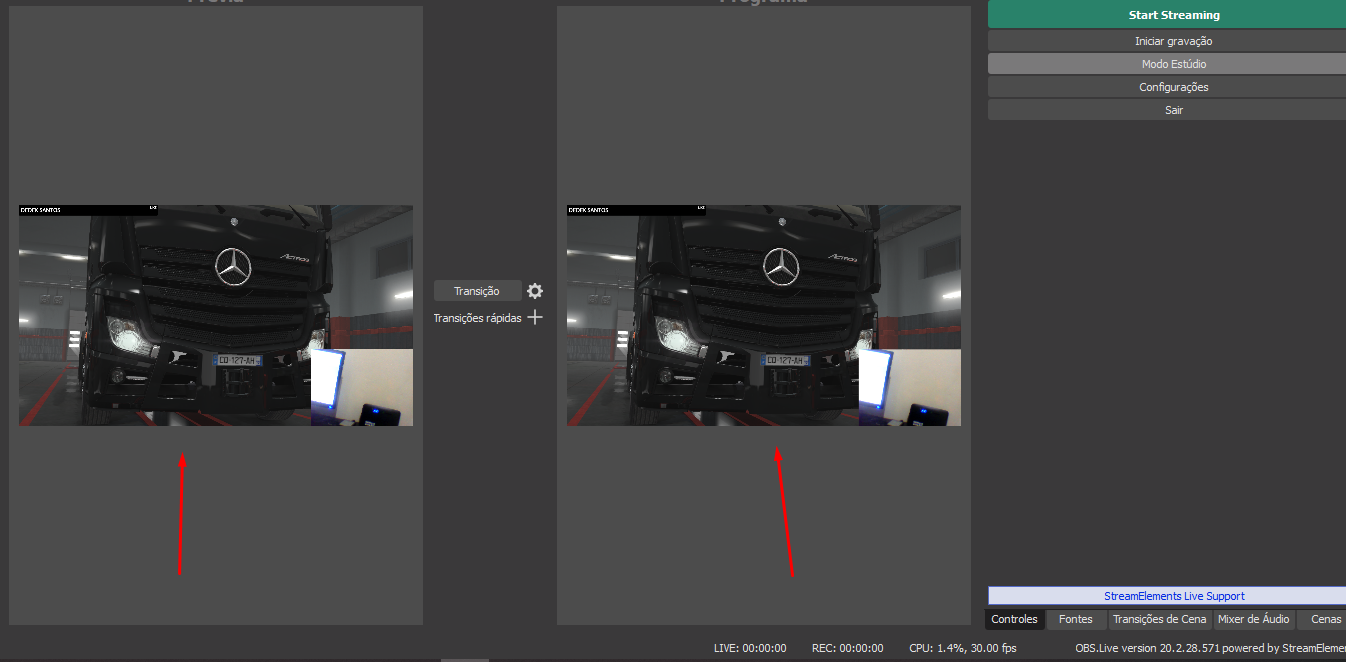 inland brook
How is this related to Facebook?
zealous shuttleBOT
@vale viper If you are not seeing Likes/Shares on your current stream or page, that might be due to how the privacy settings of the person liking/sharing your stream are set.
If they are set to private we won't be able to see the events.
Specifically for shares, if they share in private groups, we won't be able to see the event.
hasty vale
where is it more or less do you know?
where can i take this screen divided into two parts and put it in full screen?
inland brook
- #helpdesk-selive if its related to OBS.Live, which is a plugin for OBS Studio
- I'm not sure what the issue or question is here. You are using Studio mode which gives you a live screen on the right and a preview screen on the left. If you want to disable it, just click Studio mode
hasty vale
That's right, studio mode, thank you very much
you will see that at the time of clicking to record I must have clicked there and without noticing it happened.
more worked and thank you very much xD
 atomic vector
hey there, I was trying to link my facebook page to my existing Twitch
but I logged as facebook and linked and now found out I should have done from inside my twitch acc Streamelements
now I cannot disconnect this single Facebook Streamelements acc
void yoke
@atomic vector you can DM me the JWT tokens of your facebook and twitch accounts and I will link them together
 spark rampart
Hey guys I'm new to streamelements . I'm looking where is the viewer count on the activity feed. I can't seem to find it
humble igloo
There is no viewer count for facebook.
spark rampart
@humble igloo Oh. That sucks thanks anyways
void yoke
Will there ever be any new Facebook overlays added?
 jovial musk
So i need som assistance. I cannot figure out how to get the software to put my facebook as the primary for the stream instead of my twitch.
zealous shuttleBOT
@jovial musk Streamelements on top of OBS -> Logout -> login
 tranquil osprey
Hi i have some problem with streamelements, on my computer it will not let me stream sea of thieves on game capture, but on my laptop everything is fine. what can i do to fix this ?
humble igloo
Have you started OBS as admin?
tranquil osprey
yes but it will not find the game, every other game is working when im trying to stream, it is only sea of thieves that dont want to work on my computer
zealous shuttleBOT
@tranquil osprey For the best OBS support, please join their Official Discord @ discord.gg/obsproject
 idle nova
Hello, in steamelements live on the activity feed portion is just spinning after i just did the update
can anyone help?
zealous shuttleBOT
@idle nova Streamelements on top of OBS -> Logout -> login
marsh hare
Devs are on it. The temporary fix is to play around with the filters
real heart
Actually the fix seems to have just been released. Try clicking on the refresh button in the top left of the activity feed dock.
idle nova
thank you
 royal lagoon
every time i start my stream it doesn't connect, disconnects and reconnects forever. any help?
zealous shuttleBOT
@royal lagoon Streamelements on top of OBS -> Logout -> login
royal lagoon
didnt work
real heart
Check your settings in Settings>Stream.
 bold sundial
One message removed from a suspended account.
One message removed from a suspended account.
zealous shuttleBOT
@bold sundial We're not able to troubleshoot issues with using our overlays in StreamLabs OBS (SLOBS) as we don't have the tools to support their software. We recommend using OBS Studio or OBS Studio with our plugin OBS.Live.
bold sundial
One message removed from a suspended account.
One message removed from a suspended account.
inland brook
well whats the issue?
bold sundial
One message removed from a suspended account.
One message removed from a suspended account.
One message removed from a suspended account.
zealous shuttleBOT
@bold sundial The default resolution for StreamElements overlays (theme and custom) is 1920x1080. Please add them in OBS at their full resolution and use CTRL+F to fit to screen if necessary. You can then downscale your stream in OBS settings > Video if you'd like https://i.imgur.com/6bWXxjR.png



 bold sundial
One message removed from a suspended account.
One message removed from a suspended account.
inland brook

bold sundial
One message removed from a suspended account.
One message removed from a suspended account.
zealous shuttleBOT
@bold sundial Streamelements on top of OBS -> Logout -> login
bold sundial
One message removed from a suspended account.
inland brook
Oh you don't even have obs.live installed
zealous shuttleBOT
@bold sundial For the best OBS support, please join their Official Discord @ discord.gg/obsproject
bold sundial
One message removed from a suspended account.
One message removed from a suspended account.
One message removed from a suspended account.
tranquil osprey
hi does anybody know why my streams are not making any videos that comes up at twicht, it only goes live. my girlfriends stream becomes a video on twitch after stream. can anybody help me with this ?
inland brook
Twitch or facebook?
zealous shuttleBOT
@sudden hornet You can find your JWT token on your account channels page ("Show Secrets" to reveal the token): https://streamelements.com/dashboard/account/channels
READ ME:
This is a private security token. Do NOT share this token here or other public places, only with a StreamElements staff member in private.
 sudden hornet
@everyone do you know how to delete and account?
real heart
@sudden hornet If you are looking to delete because you want to merge them, then deleting is not what you want to do.
sudden hornet
@real heart I need to delete one and then I might need to Merge one
zealous shuttleBOT
@sudden hornet Account Merging - Please note:
- Merging accounts only allows faster ways to switch between accounts
- Merging accounts does not allow data sharing between accounts - different streaming platforms, different type of events
- Merging accounts allows duplicating/sharing overlays between the accounts
If you understand the limitations of merging and want to proceed, please find the JWT tokens (!jwt) from both accounts you want to merge and you will be directed to DM them to a staff member.
real heart
Deleting is not what you want to do here.
sudden hornet
@real heart so do i need to do?
zealous shuttleBOT
@sudden hornet There is no easy way to unlink 2 owner type accounts from each other. The only way is to make a closure request from here: https://streamelements.com/dashboard/account/security
WARNING: In submitting a closure request you will delete both linked accounts and loose all data from both accounts. This includes overlays, custom commands, timers and past data(tips, subs, etc). You can still relogin with the deleted account, but you are essentially starting fresh.
real heart
You can't just delete one channel merged into an account. The whole account gets deleted, and all data for channels associated with it.
sudden hornet
Ok so I might need to do that then rebuild everything
real heart
Okay. Then if you're absolutely sure, use the Close my account button in the link the bot gave you above.
sudden hornet
When I do that nothing happens
sudden hornet
just goes back to the home page
sudden hornet
Ok cool
 bronze olive
I am trying to stream to facebook but it keeps reverting to mixer. Does anyone know why?
zealous shuttleBOT
@bronze olive Streamelements on top of OBS -> Logout -> login
bronze olive
wow thank you
bold sundial
One message removed from a suspended account.
inland brook
@bold sundial We don't have a stream chat widget for the overlays.
zealous shuttleBOT
@topaz cairn If you are not seeing Likes/Shares on your current stream or page, that might be due to how the privacy settings of the person liking/sharing your stream are set.
If they are set to private we won't be able to see the events.
Specifically for shares, if they share in private groups, we won't be able to see the event.
 topaz cairn
No like, NONE of the alerts are going off. Streamelements is saying I'm not live but I am
inland brook
I'm not seeing any issues on our side, so maybe turn off the stream and sdtart it again?
turn it off, logout from our dashboard
login again
and turn on the stream
 lusty mist
Any up that can help with stream
red badge
Depends on what the question is @lusty mist
Is this StreamElements related?
lusty mist
yes sir or ma'am
red badge
whats the question?
Ill try to see if i can provide a fix or pass it along to any of the other support heros 😄
lusty mist
I start stream and everything is good but once I start the facebook live nothing shows up
it says fetching video but nothing else
@red badge
red badge
Is that only for you or also for other people?
lusty mist
Facebook has not received video signal from the video source for some time. Check that the connectivity between the video source and Facebook is sufficient for the source resolution and bitrate. Check your video encoder logs for details. If problems persist, consider improving connection quality or reducing the bitrate of your video source.
that is what it is telling me. I'm doing this for my stream, idk about any one else
@red badge
red badge
alright, I'll ask around for you
zealous shuttleBOT
@lusty mist Please provide a log from your last stream. To do this, in OBS go to Help > Log Files > Upload Last Log File and paste the link to the log file here.
lusty mist
zealous shuttleBOT
@lusty mist 1) Restart OBS
2) Start your stream/recording for about 30 seconds. Make sure you replicate any issues as best you can, which means having any games/apps open and captured, etc.
3) Stop your stream/recording.
4) Select Help > Log Files > Upload Current Log File. Copy the URL and paste the link here.
(Note: If you do not see an obsproject.com URL, you will need to update OBS Studio to version 22+)
inland brook
There is nothing wrong with OBS
Where do you see the above instructions to check your bitrate and what not?
lusty mist
are you talking to me @inland brook
inland brook
No, to our Discord bot @zealous shuttle
lusty mist
oh ok
inland brook
That was a joke
Yes, I'm talking to you
as you are the only one reporting an issue currently here
jovial musk
Update on the issue that facebook alerts not being primary alerts. I tried what was suggested and it did not work. So now what.
lusty mist
@jovial musk try to right click obs and run it as admin. That is what solved my issue.
@inland brook sorry I had did a short stream when you responded back. And there was someone answering me but he was looking for a answer for my problem. But I solved it. As for your issue I truly don't know but can look into if you want.
jovial musk
@lusty mist i will do that when i get a chance. Thank you for the input. ill check up with you after i do so.
 echo knoll
hi guys hope everyone is having an amazing stream, i just need i little help how can i put the chat box to my obs studio ? i have seen several videos how to do it in streamlabs buy i cant find one in streamelements
inland brook
We don't have a chat widget for facebook to show the chat on stream.
 spring jolt
Hi! I cant seem to login into streamelements. It says "Failed to get pages". Any thoughts?
But im already logged in on OBS.Live
red badge
@spring jolt if you are meaning the website, can you try logging in with a incognito browser?
spring jolt
I tried it on a private window on Firefox but it still shows the error
Solved it by using Chrome. Logging into the website using Firefox does not work. Thanks!
red badge
@spring jolt chrome is indeed the browser where StreamElements is build upon
 orchid hill
Can anyone Help me I'm Experiencing Something Really weird with my Alerts in Obs On Facebook
void yoke
screenshot or explain in more detail?
best course of action is to ask a specific question so a mod/staff can reply appropriately 🙂
vale viper
Can any one explain what facebook mean ?
How to add a thumbnail to your stream
To add a thumbnail to your stream:
Go to the Creator Studio.
Go to Latest Stream.
In your streaming window, select the Choose Thumbnail button.
Upload a photo.
Select Go Live.
orchid hill
@void yoke When someone likes my Stream.. They Audio Alert i Set Doesnt Play Through the Stream. but i hear it on Obs.
orchid hill
okay Ill give it a Try Thanks @void yoke
void yoke
No problem
orchid hill
I Cannot Find that Source @void yoke
void yoke
So select your Game Scene and Click the plus sign.... there should be an option that says Capture audio or something like that
(i'm not at home in front of my stream rig, doing this from memory)
you should be able to select your elgato capture card which should be capturing your system sound
I can clarify/confirm in a couple hours when I get home
orchid hill
ok great
orchid hill
Hey @void yoke I Found it bro Thank you
void yoke
oh cool. I just got home and was going to look at it for you
 viscid iron
Hi there! My streamelements leaderboard is not working , no data :/
 limber trail
Hello all! Im having problems updating my software and obs will not show console gameplay
 willow wind
good morning, when opening the obs elements he can login to twitch but i do lives on facebook, how should i proceed?
zealous shuttleBOT
@willow wind Streamelements on top of OBS -> Logout -> login
void yoke
@limber trail just reboot everything. Happened to me too after the latest update.
limber trail
@void yoke Hey Ed, i tried that last night. Still having probelms
void yoke
Really? Try unplugging your hdmi cables and plugging back in.
limber trail
Yeah, tried that as well. Tried different TV's, rebooting everything.
Anything people should be doing before reaching out for help, i have done lol
void yoke
Sorry to hear that. Last resort would be to remove and reinstall
Just my 2 cents though
limber trail
Tried that as well unfortunately
void yoke
Wow
limber trail
Its alright man! thank you for trying!
Im sure its just a stupid setting i pressed on accident
void yoke
Haha@maybe. I do stuff like that too sometimes
Did you try a different hdmi cable? Sometimes they just don’t work
white root
@limber trail one sec
void yoke
here's my xbox settings for game capture. hope it helps
white root
Which card do you have @limber trail ?
limber trail
oof, is it that dated? lol
white root
The HD60 is the second capture card they made. It does 60fps at 1080, but doesn’t do “real-time” capture for streaming.
Xbox or PS4?
white root

Elgato Gaming
Elgato Game Capture HD60 connects to the Xbox One using HDMI. It can passthrough video to a TV set also using HDMI. An HDMI cable is included in the box.
Inputs and Outputs
Elgato Game Ca...
Verify you did that one
white root
Make sure your Xbox is set to hdmi audio out
limber trail
just all of a sudden
white root
The chat link cable....
limber trail
what?!
white root
Had one, never used it
limber trail
oh, its okay
not amazing
but it got the job done
so the xbox was fine, but then when i try it with the switch, it was only audio. After messing around for about an hour, i lost video and that happened yesterday
white root
I know sometimes unplugging the usb cable, plugging it back in and then deleting the source and re-adding it sometimes works, but every situation is different
limber trail
yeah, ive tried like every basic trouble shooting. Im going to just have to dig through all of the settings
limber trail
what the card?
limber trail
oh yeah, i was able to get video in the elgato software, but still no audio
white root
Might have to reach out to their support as the HD60 is end of life but still supported
void yoke
I added my paypal info to my SE account but how do I get people to send Tips?
oh nvm i found it
 lavish tree
I'm having trouble with my alerts would love a little help
 arctic briar
Good morning. Need help please. First time using SE for Facebook to help out my church. Page follower alerts are triggering the alert audio, but the alert image that pops up in the editor is not appearing in the OBS overlay. Any suggestions as to what's goin gon?
lavish tree
I think I might be having a similar problem do you stream to twitch as well
arctic briar
I do @lavish tree but haven't tried twitch let me see
@lavish tree my Twitch alerts are fine
OOOOPS dang I'm an idiot. I had the widget hidden. OK never mind me, carry on, carry on!
 frigid harbor
Hello There , could some one help me to activate the widgets on my Facebook stream page .. ? I've tried almost anything , but still cant figure out what's the problem so I've decided to write here a question
zealous shuttleBOT
@frigid harbor To add your overlays to OBS, add a new browser source in your scene. Paste your overlay URL in the browser source properties, set the dimensions to 1920x1080 (unless you changed them on the website), and ☑ “Shutdown source when not visible” https://youtu.be/KDvLynUqXI4
 queen sequoia
Hello - does Streamelements have the ability to do an alert when we get raided by another channel on FB?
 hot helm
somehow my activity feed for streamelements got disconnected from facebook alerts and it only give me the option to connect twitch to it, it works fine if i open ground control
but would be nice to have it back in obs any suggestions?
zealous shuttleBOT
@hot helm Streamelements on top of OBS -> Logout -> login
hot helm
thanks!
void yoke
How can I get alerts from the same tip link but instead of twitch it is for Facebook is there a way to merge tip links to all platforms
humble igloo
@void yoke Not possible as the accounts are completely separate.
void yoke
Hey! I am trying to close my streamelements account for facebook so i can add it to my twitch account that I already made. It is saying my email is invalid but under my facebook it doesn't even show an email.