#helpdesk-selive
1 messages · Page 197 of 1
 long bobcat
 rugged quail
When i update obs live, it updates and closes itself, when it opens again it wants to update the exact same update again. In addition i HAVE To update because without updating NONE of the streamelements stuff shows up at all.. No chat, no activity feed, no current viewers. None of it
 dreamy tendon
Its after I update and relaunch
rugged quail
It just wont finish the update, it tries and fails
 civic birch
long bobcat
<@!527820711184695306> I do not understand the issue. did you update OBS.Live an...
civic birch
long bobcat
<@!527820711184695306> I do not understand the issue. did you update OBS.Live an...
i updated it and then it basically got rid of all the obs.live things like mediashare and alert box
im reinstalling it now though
rugged quail
@long bobcat If you still dont understand i will call u in DM and show u
Id like to not reinstall.. i dont wanna redo all my settings ^^
long bobcat
@ember lotus can you try installing this and check if the update completes? https://aka.ms/vs/16/release/vc_redist.x64.exe
dreamy tendon
This is not the first time I seen this happen, I just dont remember the fix.
long bobcat
@rugged quail don't be rude, I can read. are you using the 64bit version or 86?
if 64, try installing this https://aka.ms/vs/16/release/vc_redist.x64.exe too and then proceed with the update to see what the behavior is
@dreamy tendon you too, 64 or 86?
try installing this - https://aka.ms/vs/16/release/vc_redist.x64.exe
tell me if you're on 86
rugged quail
It wasnt rude... It was just saying in the case you didnt understand what i said (which happens a lot because im shite at explaining) then i can show you
dreamy tendon
64bit for me
long bobcat
if you guys are using x64 and are having issue with fully updating - install this first https://aka.ms/vs/16/release/vc_redist.x64.exe
then try to update.
rugged quail
 long bobcat
report back here please so we update developers
long bobcat
rugged quail
it tells you exactly what to do
@faint wyvern this isn't the channel for your question
 faint wyvern
what is the channel?
long bobcat
I'm sure you can figure it out by taking a look at the multiple helpdesk channels
rugged quail
mate i have versions of that for every year since 2000
long bobcat
you have an exact version number in that pop up
find it, remove it, try to install again
rugged quail
Same issue
Reinstalled it and also updated OBS live and this pops up when i open obs

 quasi grove
I'm having issues with OBS.LIVE crashing in mid streams
It'll freeze everything and then I have to close out
rugged quail
Whats your PC specs and what game u playin
quasi grove
I'm literally not playing anything intensive. I'm streaming Hades to the community
rugged quail
Hades is intensive tho
quasi grove
CPU: Ryzen 2600x
GPU: NVIDIA 2070
RAM: 32 GB 2666mhz
rugged quail
ah you should be fine then, u try reinstalling OBS?
long bobcat
check if this happens without OBS.Live @quasi grove
quasi grove
Here is the crash report https://obsproject.com/logs/IX20DqW62bp8h-FS
long bobcat
rugged quail
Reinstalled it and also updated OBS live and this pops up when i open obs
what did you re-install? the provided package?
the update?
rugged quail
yes
quasi grove
long bobcat
check if this happens without OBS.Live <@!239244657219993602>
The OBS support Discord is saying the same thing. I really don't want to have to redo all my stuff in OBS if that is the case. I worked hard on my scenes and setup
 full thunderBOT
@quasi grove 1) Uninstall OBS.Live and OBS Studio completely, but leave this unchecked https://i.imgur.com/LBaHgM1.png
2) Download and install OBS Studio from https://obsproject.com/
3) If it doesn't crash, install OBS.Live too.
-
It's fixed? Nice!
-
It crashes again?
- Repeat steps 1 and 2
- Duplicate the current "Scene Collection" at the very top of OBS, call it something like "Backup" and remove all browser sources in that backup
- Install OBS.Live and see if it still crashes
- If yes, repeat steps 1 and 2, leave OBS.Live uninstalled, tell us that it didn't work and use your old default scene collection again.
 quasi grove
I do have it cloud backuped up at least
rugged quail
i reinstalled the package, opened OBS, tried to update, when i opened OBS back up it still wants to update
long bobcat
is everything working in your OBS.Live though @rugged quail ?
except for the update pop up
rugged quail
no
thats the issue, i cant see any of the live stuff. it looks like stock OBS
otherwise id just ignore it
long bobcat
checking
 long bobcat
yeah, we're checking
 tulip cedar
Hey! I'm using Realtek Audio Manager's equalizer to tune the sound I hear in my headphones. My problem is that the audio OBS records is also equalized, and it sounds deeper. Is there a way I can stream unequalized audio to OBS AND have my audio card's equalizer turned on at the same time? Voicemeeter didn't really do the trick.
full thunderBOT
@tulip cedar Obs.live is a plugin for OBS Studio for the best OBS support, please join their Official Discord @ discord.gg/obsproject
long bobcat
@rugged quail go for the stable version
https://cdn.streamelements.com/obs/dist/obs-streamelements-installer-wrapper/windows/latest/obs-streamelements-setup-stable.exe
you will need to ignore the update pop up for a few days
but make sure to mark 'don't ask again' and click 'not now'
this shouldn't persist
this is in order to get your obs.live working again
our data in the backend shows most users are able to update and use OBS.Live normally
rugged quail
Am I not on the stable version?
long bobcat
stable is most tested, and beta is latest features and fixes, which by definition means less tested
rugged quail
so im on beta?
long bobcat
currently based on ur latest screenshot you don't have obs.live installed
so install the stable from that link
and let us know if your obs.live is working

 hollow wasp
Good morning, I'm having issues trying to setup obs live. I keep getting an error message saying failed to authenticate with Twitch: status_error: invalid refresh token (HTTP 400) please help.
I'm using an elgato HD 60S
long bobcat
i'm glad that it did.
what about the pop up @rugged quail ?
full thunderBOT
@hollow wasp StreamElements menu, on top of OBS > Logout > Login
rugged quail
no pop up at all
hollow wasp
Thank you @full thunder
long bobcat
nice. sorry for the trouble @rugged quail
I don't see another report like yours and dev also can't see issues in the back end for the update
thanks for your cooperation
long bobcat
if you believe your issue is exactly the same and you followed mine and seiza's conversation and saw the exact same behavior you can proceed with the same instructions
otherwise feel free to explain what's the behavior you're experiencing
dreamy tendon
Yeah it was the same issue, i got it working, thank you
long bobcat
nice, glad to hear
 craggy field
does anyone know how to add your social media to your stream on streamelements obs?
let me know
hollow wasp
Hi, I'm having issues trying to capture my in gaming on obs live. Could you please help me. 🥺
I'm using an elgato HD 60S. I believe I have everything plugged in but, right now I'm trying to figure out under game sources how come it doesn't have a place to click on capture card
full thunderBOT
@hollow wasp If you are having issues with Elgato hardware or software, we recommend reaching out to their support here: https://e.lga.to/help
hollow wasp
I don't believe that's the issue. Im not sure where to go on obs live and what to click on lol
 silent sundial
Any help with Streamelements regarding alerts echoing in the stream?
hollow wasp
To get things Rollin
silent sundial
I have one sound alert that plays and when it goes off it sounds like its echoing or playing twice
 fast rose
When I run OBS Studio my stream elements commands stop working. I dont know how to fix this... I don’t have a custom bot name or anything either if that helps.
hollow wasp
My apologize @full thunder I'm not computer say. Please help if u can
Savy* @full thunder
 maiden mirage
Ok, everyone, noob question: How do I install a plugin? I want to add StreamFX to obs.live, but I can't get the filters to show up in the program. I have:
downloaded the zip and extracted it
added the folder to the 64bit plugin folder
added the individual files to the 64bit plugin folder
No filters. What am I messing up?
The wiki instructions say to add it to the root dorector for obs-studio, but that doesn't work either.
full thunderBOT
@maiden mirage Obs.live is a plugin for OBS Studio for the best OBS support, please join their Official Discord @ discord.gg/obsproject
 wary dew
silent sundial
I have one sound alert that plays and when it goes off it sounds like its echoin...
wary dew
silent sundial
I have one sound alert that plays and when it goes off it sounds like its echoin...
select the: 'shutdown when not visible' in the browser source properties for the overlay that has the alertbox on it
wary dew
hollow wasp
My apologize <@155149108183695360> I'm not computer say. Please help if u can
add the elgato as a video capture source
maiden mirage
full thunder
<@!275356511860031488> Obs.live is a plugin for OBS Studio for the best OBS supp...
K. I was sent here by the Streamelements help button.
hollow wasp
Thank you @wary dew
maiden mirage
That OBS discord is useless. They just said I need to uninstall obs and obs.live and never use live because it breaks obs. My OBS is fine. I just wand a plug in to work. 🙄
 ember parcel
Anyone have any luck running StreamFX plugin on Mac. I've been trying to get this thing to work for a few hours and I am not sure what I am missing.
I see the discussion above so maybe I am in the wrong spot!
ember parcel
maiden mirage
That OBS discord is useless. They just said I need to uninstall obs and obs.live...
Ya I am with you Mike. Just trying to get this plugin to work properly
 sweet isle
Anyone know why I cant add a stinger transition?
 obsidian sparrow
ok hopefully im on the right one
so when i updated elements my chat box, title boxs and my active feed box went missing
i could get the chat box to show back up
but the other two is missing idk how to make them show again
 ocean rivet
obsidian sparrow
but the other two is missing idk how to make them show again
ocean rivet
obsidian sparrow
but the other two is missing idk how to make them show again
StreamElements menu > OBS.Live docks for the activity feed and chat box
 stable shoal
is there a reason why media request looks like this?
 full thunderBOT
@stable shoal StreamElements menu, on top of OBS > Logout > Login
obsidian sparrow
i dont see stream elements menu
stable shoal
obsidian sparrow
i dont see stream elements menu
 ocean rivet
obsidian sparrow
i dont see stream elements menu
ocean rivet
obsidian sparrow
i dont see stream elements menu
make sure you have OBS.Live installed
stable shoal
☝️ that to
obsidian sparrow
yeah i do
but i dont understand what youre wanting me to look for
thats not there for me
stable shoal
then you dont have it installed
obsidian sparrow
i installed it
like 2 times to make sure
but it just looks the same
yeah i got that part but the box to set up tittle for my stream is not showing
there is no option for it
ocean rivet
obsidian sparrow
yeah i got that part but the box to set up tittle for my stream is not showing
that option is in view > docks > stream information
obsidian sparrow
ok so my docks doesnt have stream information
 scarlet mirage
hey guys can s1 help me about obs?
ocean rivet
obsidian sparrow
ok so my docks doesnt have stream information
make sure you're signed into twitch in obs settings > stream
 ocean rivet
obsidian sparrow
ocean rivet
obsidian sparrow
send me a screenshot of settings > stream
scarlet mirage
like where did my settings and aktiv.protokoll on the left go? i cant find it anymore someones knows? tyy

on the right is the chat , but on the left its gone
obsidian sparrow
 stable shoal
hmm it seems no matter who i switch to im getting 10fps 720p when im post to get 30fps
just did a speed test and this is no near what the speed test said

 ocean rivet
obsidian sparrow
ocean rivet
obsidian sparrow
try reconnecting your twitch account
stable shoal
i have it set to 5mbps
full thunderBOT
@stable shoal Use the Twitch Bandwidth Test to find the best Twitch server to stream to. Set Duration to Medium. You can uncheck any regions you're not near.
After the test completes, click the Share Result button to upload a screenshot, which can then be copied and pasted here.
Get Twitch Test from https://r1ch.net/projects/twitchtest.
 strong willow
evening, i try to install websocket but somehow streamelements refuses, any idea how?
scarlet mirage
can no one help me?
ocean rivet
scarlet mirage
like where did my settings and aktiv.protokoll on the left go? i cant find it an...
stream elements menu > obs.live docks
scarlet mirage
@ocean rivet ok ill check it bro
stable shoal
full thunder
<@!228293953059946497> Use the Twitch Bandwidth Test to find the best Twitch ser...
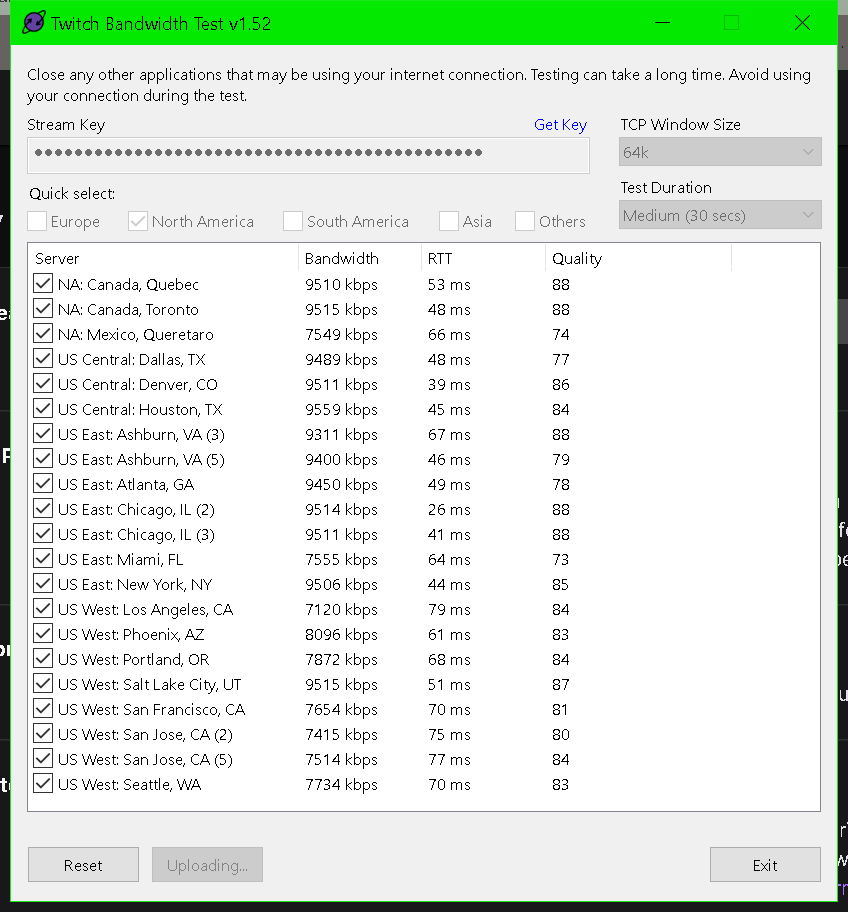
anyone have any clue why steam quality worse than it says here?
 ebon kettle
anyone know how to setup OBS for HD streaming i see the big streamers stream with 8k bits 1080p in 60fps but when i do it i just get some blurry mess no matter what bitrate i use
wary dew
because they have transcoding and you don't
ebon kettle
i should have said i stream on youtube
ebon kettle
i know about the transcoding thingi
i streamed on twitch too tho
any idea?
i use x264
i have a ryzen 2700x and a RX5700
full thunderBOT
@ebon kettle There are no "best settings".
Please understand that every setup will be very different.
Any guides or videos that claim otherwise are misinforming. Your best option is to start with a base and adjust as necessary.
You can run the OBS auto-configuration tool. To use the auto-config, click on the Tools menu in OBS, select Auto-Configuration Wizard, and then just follow the on-screen directions.
You can use this tool to get baseline settings for your hardware and adjust as necessary from there.
Test, test, and test again. We are happy to offer suggestions for any issues you may be having afterward, but not a list of settings.
Thank you
Obs.live is a plugin for OBS Studio for the best OBS support, please join their Official Discord @ discord.gg/obsproject
ebon kettle
oof i thought so i tested alot tho
stable shoal
i guess ill try again tommorow seems no one knows why this is happening ar at keast no one online doesnt have any idea why
 covert vale
Hello who can me Help in German? please
wary dew
check the #🇩🇪︱deutsch channel there <<
 mint pewter
I had layouts made for me and I cant figure out how to upload them to obs
 harsh magnet
hey guys - been having some weirddddddd things happening on stream today with OBS.Live & Stream Elements
Overlays such as alerts, most recent sub boxes and anything actually from the stream elements is not appearing, then appearing, then i will change my scene and then disappear entirely? Only to reappear randomly?
I made sure to uncheck hardware acceleration, but I am still having the issue! Anyone else had this issue?? Feel free to DM me, ask I am coming up short!
Thanks 🙂
stable shoal
i wonder if bad weather is causing my issue or something its hard to tell
 queen crater
Hello. I seem to be stuck on an install/upgrade loop? Everytime i hit upgrade it goes through the entire process but apparently hasnt updated anything and the process starts again (all the while crashing)
 twilit sierra
Hello, when i want to stream over Youtube studio and click on start streaming, obs live ist starting another stream too. so that i have 2 streams. But i want to deactivate obslive autostreaming because of the settings. But when i uninstall obslive the Browser sources dont work anymore. What can i do? Im streamig with yt
full thunderBOT
@covert vale Welcome to the helpdesk! The regular helpdesk channels are in English but we do provide multi-language support in the following channels: #🇩🇪︱deutsch | #🇫🇷︱français | #🇪🇸︱español | #🇵🇹︱português | #🇳🇱︱nederlands | #🇮🇹︱italiano | #🇵🇱︱polski | #🇨🇳︱中文語言服務區-chinese | #🇯🇵︱日本語-japanese | #🇭🇺︱magyar | #🇰🇷︱한국어-korean | #🇹🇭︱ไทย-thai | #🇷🇺︱русский | #🇺🇦︱українська | #🇨🇿︱czech
 grim holly
how do i uninstall this ? i am trying to uninstall but it keeps saying setup aborted
 ember quest
Issue: Reinstalled Streamelements OBS.Live and used to have a window where I could input/set all my stream info. That window is no longer present and there is no dock for it in the settings. Am I missing a plugin or addon? Thanks in advance.
 upper ibex
Having an issue where I can not connect the custom bot. I do the authentication process, but it never lets me send a test message.
it shows that I have authorised the account in the twitch connections page
 broken pebble
hopefully someone can answer this, is there anyway to use the overlays and have all alerts and extras without using browser sources? having a few browser sources is eating my CPU so looking for a new way to get this to work
 wheat lake
whats the easiest way to hook up twitch and facebook on obs? and stream to them at the same time?
broken pebble
wheat lake
whats the easiest way to hook up twitch and facebook on obs? and stream to them ...
 plucky heron
need help, streamelements updated but its still updating like, it finishes the download and installation then launches itself and re downloads and installs the update but now its stuck in a loop and wont update
i do finish then it just... starts over again

ok had to redownload it from the website to get it back on but it still is trying to update even though i just did a fresh install
 graceful kettle
Hello, since the update today my overlays won't show up anymore, except for the one in the scene that's active when I open the OBS Live app. Now whenever I change scenes the browser source (overlay) goes black, and then even the overlay of the scene that was active when I opened the app (that was visible before changing scenes) goes black. I tried deleting the link to the overlay, saving, then re-adding the link, but nothing. I'm on Mac. Thanks for the help!
 fossil aspen
graceful kettle
Hello, since the update today my overlays won't show up anymore, except for the ...
fossil aspen
graceful kettle
Hello, since the update today my overlays won't show up anymore, except for the ...
Ok, good deal, i thought this was just me. Hopefully if we get some more folks reporting this they'll implement a fix
 rough hill
My overlays are also not working
fossil aspen
rough hill
My overlays are also not working
Are you on a Mac? I worry if this issue is only effecting the Mac market share, which is comparatively smaller than the windows install base, that they may lower the priority of the fix...
 spice violet
Hey guys how are you doing
pleae help me I can not hear a sound in my recording when im playing it is that normal?
graceful kettle
fossil aspen
Ok, good deal, i thought this was just me. Hopefully if we get some more folks r...
They should at least give us the option to just revert back to the older version, since it had zero problems. While they're working on a fix, if they are. Next time I'll be sure to stay away from that update button.
 livid mural
Hey guys, coming up with this error when updating OBS today. I uninstalled, reinstalled, ran as administrator, and still getting this same error. Any suggestions?
 upper ibex
is there anyway other than using obs.live to have stream elements have a custom name?
full thunderBOT
@upper ibex Currently renaming the bot fully works with OBS.Live.
You can follow this video guide to set it up: https://discordapp.com/channels/141203863863558144/494513233416421386/561516184718278676
If you don't want to use OBS.Live and want to stick with Ground Control, please let us know your Twitch username.
rugged quail
Hopefully I made it to the right place for help
I've been STRUGGLING with trying to figure out why game capture will NOT WHATSOEVER capture any games.
 shy mountain
Run OBS as admin
rugged quail
I'm open to using teamviewer or screen sharing. But this is killing me, i've tried so many things.
That did nothing
@shy mountain
full thunderBOT
@rugged quail Obs.live is a plugin for OBS Studio for the best OBS support, please join their Official Discord @ discord.gg/obsproject
upper ibex
@full thunder I have followed that video multiple times and never get the choice to send a test message.
full thunderBOT
@upper ibex If your commands recently stopped working and you're using OBS.Live and a custom bot name do the following:
- In OBS.Live, click on the hamburger menu (three stripes) at the top left of your activity feed
- Click on Stream Settings > Custom bot name
- In the Custom bot name field select Set custom bot name, not your already existing username (with capital letters). Note: If you already connected an account that way, the third entry will show as the account name (see image https://i.imgur.com/sO7fWOX.png).
- Scroll a bit down and click on the purple Connect Custom Bot Account button
- Log in as usual and Authorize the custom bot name
- Back in the Activity feed, click on the Send Test Message button and check if your custom bot name starts working again
 upper ibex
@full thunder Gretzy
shy mountain
If you follow the steps you will get the bot working again
upper ibex
@shy mountain I can't send a test message even after authorizing multiple times
full thunderBOT
@upper ibex "1) Right click on your OBS desktop shortcut and open the Properties
2) In the Target field, add the following to the very end: --remote-debugging-port=40404 (don't forget to add a space before the current path)
3) Open OBS (or restart if it was open)
4) Open your web browser and type in: localhost:40404
5) Click on StreamElements - Activity feed
6) Navigate to the Console tab
7) Type the following into the console and hit enter: store.customBot.removeCustomBotIntegration()
8) Try setting the custom bot name
9) Remove the additional flag in step 2 from your shortcut properties."
 obsidian shuttle
I have a question about my alerts
They are all saved...they all emulate in obslive perfectly, but when I'm actually live they don't work when someone triggers one of them
full thunderBOT
@obsidian shuttle Please provide your account ID found at the top of this page: https://streamelements.com/dashboard/account/channels This ID is public info and safe to share here.
obsidian shuttle
6032d4b8bf0a9b54bd0e89fc
shy mountain
I just followed and the event showed up in the activity feed
obsidian shuttle
yes it shows in the feed but the actually on screen alert doesn't work
but they will all emulate from the webpage no problem.....strange

 obsidian shuttle
oh i just saw it on screen but no sound....i'm so confused
full thunderBOT
@obsidian shuttle If you are not hearing your alerts and/or Media Request, you are most likely using the Control Audio via OBS option in your browser source properties.
To make sure you hear the alerts and the stream also hears them, follow along the screenshot bellow.
https://cdn.discordapp.com/attachments/199460642975907840/685371800456134686/unknown.png
 shy mountain
Probably that was the issue - not hearing hte issue, but it showing up on screen 😄
shy mountain
And if you emulate, do you hear the alert?
obsidian shuttle
yes
full thunderBOT
Right click on the BrowserSource > Properties > Scroll down a bit > Refresh cache of current page
shy mountain
Honestly i heard all of the alerts and I don't even have it set it up like the above for monitoring
obsidian shuttle
ok i did the cache refresh
shy mountain
well i don't have any other accounts to "live" test the follow button
obsidian shuttle
hahahah....i appreciate it though
shy mountain
awesome
obsidian shuttle
I feel like a dumb ass lol.....but thank you
Much appreciated
Y'all have a great night
shy mountain
you too
 astral gulch
Im am very confused
why is my browser sources aint workin\
i was makin a chat for my stream
i imported it to obs as a browser source
and nope
in the streamelements editor it looks okay
but in obs.live it shows nothing
i have also disabled gpu acceleration for browser sources
rugged quail
@astral gulch first time using us?
harsh magnet
astral gulch
but in obs.live it shows nothing
I'm having the same issue but with all the stream elements I've created
rugged quail
Are you guys streaming on Twitch?
graceful kettle
graceful kettle
Hello, since the update today my overlays won't show up anymore, except for the ...
Same here
full thunderBOT
@graceful kettle Right click on the BrowserSource > Properties > Scroll down a bit > Refresh cache of current page
graceful kettle
full thunder
<@!805163233286946826> Right click on the BrowserSource > **Properties** > Scrol...
I tried, it does nothing unfortunately. Even clicking on refresh overlays, or on refresh, does not solve the issue.
full thunderBOT
@graceful kettle OBS > Settings > Advanced > Scroll down > Enable or disable Browser Source Hardware Acceleration, depending on its current state > Restart OBS
https://i.imgur.com/ggMe9ZE.png
 graceful kettle
full thunder
<@!805163233286946826> OBS > **Settings** > **Advanced** > Scroll down > Enable ...
graceful kettle
full thunder
<@!805163233286946826> OBS > **Settings** > **Advanced** > Scroll down > Enable ...
Tried disabling, nothing. Re-enabled it, still nothing. Tried reinstalling, nothing. Before the update everything worked fine.
graceful kettle
shy mountain
Have you tried removing the browser source entirely?
Yes. I tried deleting the link, saving, then re-adding the link, then tried deleting the browser source entirely. It shows up, then the moment I change scenes every browser source goes black. Even the ones that appeared after trying these fixes.
For now my only fix is opening OBS on my main scene, and never switch scenes. But it's not a sustainable fix unfortunately
shy mountain
Have you tried only removing oBS.Live?
graceful kettle
shy mountain
Have you tried only removing oBS.Live?
You mean like uninstalling? I tried reinstalling obs.live with streamelements pkg installer so far. Was hoping to avoid complete uninstall in fear of losing settings and stuff. Since it appears I'm not the only one experiencing this issue with browser sources. I will however try to uninstall completely and reinstalling if that's the only way to solve
graceful kettle
Yes, I mentioned it on my first message
 toxic fern
I've not really followed since I'm on mobile but what OBS version is it showing for you on the title bar?
graceful kettle
26.1.2 after yesterday's update
toxic fern
What version of OBS.Live is listed in the bbottom right?
graceful kettle
toxic fern
What version of OBS.Live is listed in the bbottom right?
That I don't recall, I need to check, give me 15 mins. And thanks for helping!
shy mountain
What I meant by uninstalling is, only remove OBS.Live and keep OBS Studio
and see if the issue persists
 clever totem
my version on title bar is 26.1.1 and in bottom right its 21.2.15.719 is this wrong
graceful kettle
toxic fern
What version of OBS.Live is listed in the bbottom right?
21.2.10.111 is the version of obs.live listed in the bottom right. on title again it's 26.1.2 (mac)
toxic fern
OK. You've got both the latest ones so that's out the window.
Could you create a new scene creation from the menu and add an overlay different than the one you tried with?
shy mountain
@clever totem your issue has nothing to do with obs.live and the update
I already told you that I added your account to the devs to fix
you are not getting evetns entirely from twitch
graceful kettle
toxic fern
OK. You've got both the latest ones so that's out the window.
Ok, I set it up and the overlay was showing. Then I switched scenes to an old one, its overlay was black. Switched back to the scene I just set up, black as well.
shy mountain
@graceful kettle do you have this setting in the browser source properties?
 astral gulch
The only "problem" i had is that when i check "revrrsh browser" when i change sences
clever totem
shy mountain
<@!699436385454653501> your issue has nothing to do with obs.live and the update
yeah was just asking do i have the right versions mate
graceful kettle
shy mountain
<@!805163233286946826> do you have this setting in the browser source properties...
tried checking the box right now, even then switching back and forth makes every browser source go black. If I change settings like the resolution for example, the overlay reappears after a few seconds. Changing scenes however makes it go black again.
switching back and forth between scenes*
Tried setting up another new scene with a new overlay as well, to try and switch between them without touching the old ones. Thought maybe the problem was there, but no. Even switching between two brand new scenes with new overlays make every browser source go black.
As I said before, been streaming for a month, never had any issues before yesterday's update
for a month everyday*
harsh magnet
graceful kettle
As I said before, been streaming for a month, never had any issues before yester...
Sorry to jump in, but I am having the exact same issue, identical in every way!
shy mountain
Can you try:
- right click browser source -> copy
- make new scene
- go into new scene
- right click source -> paste as reference
-> restart OBS - switch between scenes and let me know how it looks
graceful kettle
shy mountain
Can you try:
- right click browser source -> copy
- make new scene
- go into new...
Did as you said, and after restarting the overlay loaded up just fine (even faster than before the update, it seems), as it always do with the first scene that's active when opening the app. After switching scenes tho, every browser source still goes black.
 vagrant night
Heyo, Im having this problem that whenever I update it gets stuck in a loop. After I update OBS.live and launch it after the update it pops the update window again
What would be a proper fix?
shy mountain
graceful kettle
Did as you said, and after restarting the overlay loaded up just fine (even fast...
can you try and remove just obs.live and leave obs studio installed?
shy mountain
vagrant night
Heyo, Im having this problem that whenever I update it gets stuck in a loop. Aft...
windows or mac?
shy mountain
Uninstall OBS>Live and OBS Studio
then go here: https://obsproject.com/
OBS (Open Broadcaster Software) is free and open source software for video recording and live streaming. Stream to Twitch, YouTube and many other providers or record your own videos with high quality H264 / AAC encoding.
install the latest version from here
and then install obs.live from here: https://obs.live

OBS.Live | Open Broadcaster Software Streaming Knowledge Base
OBS (open broadcaster software) knowledge base for live streaming. Find articles and videos about streaming with OBS.
 shy mountain
In that case just remove obs studio
and then install 26.1.1
and then install obs.live
graceful kettle
shy mountain
can you try and remove just obs.live and leave obs studio installed?
How can I do that? I only have OBS.Live installed, I downloaded the PKG from the StreamElements website. I don't think I have OBS Studio installed as a standalone app
shy mountain
OBS.Live is a plugin for OBS Studio
we only add a few things to OBS Studio
If you are still nto sure
then just uninstall it
and get the obs studio installer from the OBS website i linked above
not OBSLive
graceful kettle
ok
vagrant night
shy mountain
In that case just remove obs studio
seems like the issue was fixed, thanks a bunch

shy mountain

graceful kettle
shy mountain
OBS.Live is a plugin for OBS Studio
uninstalled obs.live, as I thought no trace of other OBSs on my system xD
I downloaded and installed obs studio from the website you provided, now I'm downloading the obs.live pkg
graceful kettle
ok
shy mountain
and see if the overlays are loading now
graceful kettle
shy mountain
and see if the overlays are loading now
yes, they are working fine now!
does that mean I can't use live anymore tho?
graceful kettle
Nothing... obs.live still doesn't work. Obs studio works just fine
I guess I'll stick to it until a fix comes out... Anyway, thanks a lot for the help! You've been very kind
shy mountain
this is you switching scenes right?
 graceful kettle
yes
 weary summit
If I pay for stream deck mobile, can I and how do I if possible, link it to stream elements?
shy mountain
Not sure if it can work with OBS.Live
as our integration requires OBS.Live to detect Stream Deck is installed on your PC

also this is needed
@graceful kettle devs want you to send in a report card -> Streamelements on top of OBS -> help -> report an issue
Make sure to mention my name and just in case, can you add your IP to the report as well?
and timezone you live in
graceful kettle
ok no problem
shy mountain
lmk when you send it
graceful kettle
shy mountain
lmk when you send it
sent!
shy mountain
notified the dev
weary summit
So I guess the question is more so does that stream deck app connect to the stream deck program on pc. Thank you
full thunderBOT
@weary summit If you are having issues with Elgato hardware or software, we recommend reaching out to their support here: https://e.lga.to/help
 signal sapphire
Hi I used to stream on Twitch but now i switch to Facebook but my Activity Feed and Chat still on twitch? How can we change that?
full thunderBOT
@signal sapphire StreamElements menu, on top of OBS > Logout > Login
signal sapphire
@full thunder I still stuck on my twitch channel activity feed.


As you can see in my OBS studio app, the activity is still on my twitch channel
rugged quail
@signal sapphire have you logged out and logged back in?
signal sapphire
@rugged quail i logged out and logged back in on the stream element site
rugged quail
And on OBS.Live
signal sapphire
@rugged quail can show me where is that?
rugged quail
On the StreamElements tab on the top on OBS Live
signal sapphire
I've found it. setting it up now, hope it works 😄
@rugged quail issue resolved thank you
rugged quail
My pleasure
shy mountain
graceful kettle
sent!
Dev suggests to use the "shutdown when inactive" option in the browser source properties. Without this option he manages to reproduce your issue on a mac
weary summit
@full thunder understood thank you
 zinc zodiac
Good day guys, hope all is well, I need help again I have a few issues but I’ll start on this one, I’m currently using a MacBook OBS 26.1.2 and it’s asking to update live content support for desktop browser authentication, done the update and I came to reopen the application and it’s asking me to do the update again? Any reason why it keeps popping up?
fossil aspen
shy mountain
Dev suggests to use the "shutdown when inactive" option in the browser source pr...
Chiming in here, i tried this suggestion of using 'shutdown when inactive' for my overlays in OBS Live, and while now the overlays backgrounds do now show up, they only do so after a 2-3 second delay after switching scenes.
toxic fern
@fossil aspen that's the "intended" behavior for this transition. Usually you'd have a stinger here to cover up that slow return.
fossil aspen
toxic fern
<@422514196748566538> that's the "intended" behavior for this transition. Usuall...
Ok, i see that, but it still seems like an introduced bug when we used to be able to switch scenes with a cut or swipe transition without the slow return.
toxic fern
Yeah. That's beyond what I can even look t.
rugged quail
as there is a new streaming platform glimesh and the new update that was today I dont see the glimesh on the drop down to choose to put there own platform key and server, will this be updated as they go live in less than 48 hours.
toxic fern
@rugged quail no plans to add them yet.
We have 0 integration for any of their stuff.
 unkempt blaze
Is it possible to do, so my alerts are infront of the text?
zinc zodiac
So I just spoken to someone the online chat function because no one replied to my question earlier and now I got disconnected. Is there anyone who can help me with audio output on obs.live so I can do discord and Spotify?
 nova scaffold
zinc zodiac
So I just spoken to someone the online chat function because no one replied to m...
nova scaffold
zinc zodiac
So I just spoken to someone the online chat function because no one replied to m...
Like i said before we got disconnected there - you need to make sure to have the correct inputs and outputs selected, so you grab the sound source that is used by Discord and Spotify
 vague summit
If i am show my Media requast on stream, its hear dupple its wierd
zinc zodiac
nova scaffold
Like i said before we got disconnected there - you need to make sure to have the...
I couldn’t find them, I was about to say then i got disconnected cause I was looking for the right place to find the settings
nova scaffold
zinc zodiac
I couldn’t find them, I was about to say then i got disconnected cause I was loo...
Like i said, i have no access to the OSX version, but audio settings are in general the same, with the only difference that you use Core Audio instead of WDM etc.
So you need to make sure that your desktop output is set correctly and matches the devices that Spotify and Discord use.
vague summit
My musik from media request is heard twice
zinc zodiac
So on my MacBook I use internal speakers for my output sound, when I into the audio settings on the OBS.Live I can’t find that speaker
nova scaffold
vague summit
My musik from media request is heard twice
Then you have that in mutliple browser sources if you are not using the website at the same time.
Please make sure you have only one overlay with 1 media request widget active
vague summit
So i have just one Browser source open? But it dose not work.
nova scaffold
vague summit
So i have just one Browser source open? But it dose not work.
Are you sure? Is that not open on multiple scenes in the background?
Double sound is not magic, it has to come from somewhere. And usually that somewhere is a second overlay running
 wary bear

hey guys, on my obs, this is what i see (im sending this help request for a friend) ^^
as you can see on the left, someone raided me, and that works fine
however, multiple people have followed me and haven't shown up in the activity feed / on alert
i'm not an affiliate so i don't know if subs and bits come through
im very confused as only hosts / raids do show up
ping if if u can answer
 safe locust
Can anyone help me figure out why GLIMESH wont show up under streaming platforms in obs settings?
full thunderBOT
Obs.live is a plugin for OBS Studio for the best OBS support, please join their Official Discord @ discord.gg/obsproject
safe locust
okay thank you
wary bear
@toxic fern can u help me
 carmine whale
Hey my Loyality System catches the Bots they get to the top 3 now easy xD
Any idea how to stop that
Owne3d and Streamlabs get points ever 10 mins
nova scaffold
carmine whale
Hey my Loyality System catches the Bots they get to the top 3 now easy xD
Usually we just recommend to manually drop the points to 0 for those users in the loyalty leaderboard.
carmine whale
Okay thanks!
 viscid drum
Not sure where to put this but, ive setup a sub credit role which shows the monthly subs, but its not showing up someone who has resubbed? is there something im missing?
 hard kernel
Hello all. Maybe I'm a noob, but where can I import overlays into obs live? Is that even possible?
 random maple
Hello, After a while of streaming the stream tittle keep automatically changing during stream to something i have set weeks ago. It has been happening every time i stream now
Is there some cache? issue or something i dont know. I have even tried to uninstalled obs studio and live and re install
nova scaffold
hard kernel
Hello all. Maybe I'm a noob, but where can I import overlays into obs live? Is t...
StreamElements in the top menu, there is an import button.
But that is designed for other services like Streamlabs.
nova scaffold
random maple
Hello, After a while of streaming the stream tittle keep automatically changing ...
Stream title changing automatically... Do you have a command or timer enabled that can do it?
hard kernel
nova scaffold
But that is designed for other services like Streamlabs.
So there's no option to get the overlays on the SE site into obs live? Or am I missing something obvious?
nova scaffold
hard kernel
So there's no option to get the overlays on the SE site into obs live? Or am I m...
The overlays from the site need to be added as the browser source to OBS.Live
random maple
nova scaffold
Stream title changing automatically... Do you have a command or timer enabled th...
No I mean it keeps changing my tittle and i dont want it too
nova scaffold
random maple
No I mean it keeps changing my tittle and i dont want it too
This is why i asked if you have a timer or command that can do it
random maple
No there is no timer or a command for my stream tittle chane
nova scaffold
random maple
No there is no timer or a command for my stream tittle chane
Twitch Title can be changed from multiple places. Twitch dashboard, OBS.Live and chat via bot commands/timers
You need to give us more information what is going on, who has access to those commands etc.
random maple
Ok So I set my tittle for my stream go live during my stream without me doing anything it changes my tittle to something i had months ago after being live for like 1 hr or randomly
I have not commands for the stream tittle or bots
nova scaffold
random maple
Ok So I set my tittle for my stream go live during my stream without me doing an...
Check the timers for bots
If this is the same title that you had months ago, then this is 99% a timer from months ago that is still active
random maple

my only timers
there is nothing in my timers that has any command to change my stream tittle
nova scaffold
random maple
there is nothing in my timers that has any command to change my stream tittle
Do you use other bots?
random maple
Nope
nova scaffold
Remember that other tools do not have the ability to automatically change the title
It has to be triggered
random maple
Stream elements one thats it
 safe remnant
Can someone help me with my stream dropping frames and having an unstable connection
 sonic tide
Hey there SE Support! For some reason, the most recent update for OBS Live seems to be stopping OBS from running on my PC at the moment. I'm not sure what the issue is, but when I uninstall OBS Live, OBS resumes as normal.. using most recent version of OBS. Any ideas?
carmine whale
anyone knows the typical bots in the Loyality Board?
Like not to be rude but im not sure if "bingcortana" is one 
carmine whale
Im sorry for all those questions atm. I just got a new follower and my Streamelements has now a auto Message "Thank you for following..." Where can I change the message? I cant find it
carmine whale
Thanks!
 marble ore
hey guys - how can i possibly make my follower alert video bigger on my OBS studio? when i try to emulate i can barely see it ( not the font of the text the actual video/ picture)
my obs source settings are correct however the video/picture appears so small
nova scaffold
marble ore
hey guys - how can i possibly make my follower alert video bigger on my OBS stud...
Are you using the correct overlay resolution?
It has to match the source resolution, which is 1920x1080 by default
nova scaffold
If the browser source settings have that, then you can either make the overlay even bigger in OBS or go to the overlay editor and make the widget and text inside bigger
the second solution is the better one
marble ore
i can actually make the widget bigger? that is probably what i need to do
the text is big enough
@nova scaffold thanks will give that one a go
 exotic pebble
Hello. Which would be easier on my systems resources: Having all widgets and alerts on one streamelements web source, using it across multiple scenes and reshaping/sizing accordingly to which visual elements I want shown, sometimes having the same streamelements web source possibly multiple times.
Or should I place each widget and alert into its own streamelements web overlay so that I get more control within OBS.
Pros, cons? Is there another approach I should consider?
wary dew
As much as possible on one source
that way it saves resources for loading the individual sources
exotic pebble
So let's say I want to be able to move things around on the fly within OBS, having multiple instances of the same websource, I would be defeating the object of saving resources?
and am better off, if resources are a consideration, just making as many seperate scenes as necessary within streamelements overlay manager?
 dry cloud
Hi why is it when i press "start stream" it automatically go live in my facebook page. it doest let me change the description, tittle and the game. how can i access it again? thanks
exotic pebble
Start stream means just that, to go live. I'm assuming you have your facebook stream key in your obs. To find the "Stream Information" Dock to change description, game title and go live notifications, click "view" at the top of OBS "Docks" and then you'll see Stream information in there. @dry cloud
dry cloud
I cant see "Stream information" in the docks @exotic pebble
 spiral swift
ive been having issues with OBS for a while now it has a huge stream delay (as long as 5+ Minutes) and it says my frames are 60% dropped but when i look the stream looks fine any tips?
nova scaffold
spiral swift
ive been having issues with OBS for a while now it has a huge stream delay (as l...
dropped frames are an issue with your connection. 60% is a LOT and you need to make sure your connection to the server is stable
that will also fix the delay
spiral swift
my pc is ethernet connected and the game i am streaming runs perfect but my OBS connection is unstable with 5ish minutes in between of stable connection
@nova scaffold
nova scaffold
spiral swift
<@!149255081194160129>
We can't help with unstable connections, you need to check the stability yourself and if needed, talk to your ISP about it.
spiral swift
nova scaffold
We can't help with unstable connections, you need to check the stability yoursel...
okay thank you
carmine whale
any idea to decrease CPU usage?
I know the performance mode did a lot in Streamlabs but in obs.live I can just turn off the preview
or is there a way to turn off a lot ?
 karmic tree
hello, since the latest update, OBS will not open, it is in the task manager but does nothing and then gives me the OBS already open message. I have fully uninstalled and reinstalled
broken pebble
hopefully someone can answer this, is there anyway to use the overlays and have all alerts and extras without using browser sources? having a few browser sources is eating my CPU so looking for a new way to get this to work
nova scaffold
broken pebble
hopefully someone can answer this, is there anyway to use the overlays and have ...
No, pretty much all overlays are browser sources. The only way to get alerts outside of browser sources, is to use the chat alerts - but that's only a chat message from the bot.
Time to upgrade the rig i would say.
broken pebble
nova scaffold
No, pretty much all overlays are browser sources. The only way to get alerts out...
i had a laptop lying around and set it up as a 2nd rig so i could stream from it had it all setup and then obs maxing cpu usage due to browser sources 😂
main rig is fine just wanted it purely for gaming
nova scaffold
broken pebble
i had a laptop lying around and set it up as a 2nd rig so i could stream from it...
Well, laptop from long ago would not have the horsepower to do run streams well enough.
Try to drop the CPU preset to ultrafast/superfast. You lose quality but gain performance that way.
broken pebble
nova scaffold
Well, laptop from long ago would not have the horsepower to do run streams well ...
its a ryzen 3 and i thought it wouldve been ok but apparently not ill just stream from main rig and sort something out for the future lol
 willow minnow
hey there, has anyone had issues lately with OBSlive disconnecting and reconnecting mid stream? my internet seems to be fine and this is the first time its happened all year
nova scaffold
broken pebble
its a ryzen 3 and i thought it wouldve been ok but apparently not ill just strea...
ryzen 3 is the weakest ryzen and this is probably not the latest one. so no, it is not designed for it 🙂
karmic tree
looks like i'm using SLOBS tonight
broken pebble
nova scaffold
ryzen 3 is the weakest ryzen and this is probably not the latest one. so no, it ...
yeah i thought that but oh well live and learn 😂
ocean rivet
willow minnow
hey there, has anyone had issues lately with OBSlive disconnecting and reconnect...
your connection to twitch servers might be having issues, try this:
full thunderBOT
Use the Twitch Bandwidth Test to find the best Twitch server to stream to. Set Duration to Medium. You can uncheck any regions you're not near.
After the test completes, click the Share Result button to upload a screenshot, which can then be copied and pasted here.
Get Twitch Test from https://r1ch.net/projects/twitchtest.
willow minnow
thank you doing that now
 ocean rivet
willow minnow
ocean rivet
willow minnow
is this also happening when you switch to regular OBS?
willow minnow
ocean rivet
is this also happening when you switch to regular OBS?
i can try it now i have not tested it
willow minnow
ocean rivet
is this also happening when you switch to regular OBS?
yes it also disconnects
ocean rivet
willow minnow
yes it also disconnects
then I don't know what could be causing that, try asking in their official discord, they might be able to help you troubleshoot the issue
willow minnow
ocean rivet
then I don't know what could be causing that, try asking in their official disco...
ok thank you
dry cloud
exotic pebble
Start stream means just that, to go live. I'm assuming you have your facebook st...
I cant see the stream information in the docks
ocean rivet
dry cloud
I cant see the stream information in the docks
make sure you're logged with your twitch account first, go to obs settings > stream
 solar karma
alguem que fale portugues?
ocean rivet
solar karma
alguem que fale portugues?
#🇵🇹︱português
solar karma
kkkk que engraçado, algum brasileiro que possa me ajudar com as configurações do obs live
essa é pergunta correta
ocean rivet
solar karma
kkkk que engraçado, algum brasileiro que possa me ajudar com as configurações do...
ask your questions in this channel #🇵🇹︱português, this one is restricted to english
solar karma
ocean rivet
ask your questions in this channel <#485869331574554634>, this one is restricted...
thanks
 hallow cliff
I'm live right now and OBS keeps disconnecting and reconnecting. Help?
nova scaffold
hallow cliff
I'm live right now and OBS keeps disconnecting and reconnecting. Help?
This has nothing to do with OBS. Check your connection to the server you stream and check your internet connection in general.
 thorny pendant
hello
can someone please give me some good obs settings
i usually have 500 up and 250 down
for my internet
my cpu is a i79700k
my gpu is a rtx 2070
full thunderBOT
@thorny pendant There are no "best settings".
Please understand that every setup will be very different.
Any guides or videos that claim otherwise are misinforming. Your best option is to start with a base and adjust as necessary.
You can run the OBS auto-configuration tool. To use the auto-config, click on the Tools menu in OBS, select Auto-Configuration Wizard, and then just follow the on-screen directions.
You can use this tool to get baseline settings for your hardware and adjust as necessary from there.
Test, test, and test again. We are happy to offer suggestions for any issues you may be having afterward, but not a list of settings.
Thank you
thorny pendant
full thunder
<@!426526057009643536> There are no "best settings".
Please understand that ever...
ok thank you
 muted grotto
Hi there, my custom commands don't load into my chat when ! is typed with prompt?? Any fixes
full thunderBOT
@muted grotto If your commands recently stopped working and you're using OBS.Live and a custom bot name do the following:
- In OBS.Live, click on the hamburger menu (three stripes) at the top left of your activity feed
- Click on Stream Settings > Custom bot name
- In the Custom bot name field select Set custom bot name, not your already existing username (with capital letters). Note: If you already connected an account that way, the third entry will show as the account name (see image https://i.imgur.com/sO7fWOX.png).
- Scroll a bit down and click on the purple Connect Custom Bot Account button
- Log in as usual and Authorize the custom bot name
- Back in the Activity feed, click on the Send Test Message button and check if your custom bot name starts working again
muted grotto
@full thunder Amazing! Its all sorted! Thank you!
 arctic river
Hi, I am not sure where to put this but my alert box does not work when streaming. it works when i emulate a follower etc in the overlay editor. But when someone followws me it doesnt work
 idle inlet
Is there a way to restart a counter from the same command as i want a fresh counter but deleting the command doesnt work any tips?
 tame swift
how can ı delete obs extension
 limpid dock
bot still isn't using custom name for me. i've try to reconnect it, "send test message" is greyed out. i've uninstalled and reinstalled both OBS studio and ground control. i've tried to do the error:40404 but my browser won't connect to that page. how do i fix this? if this is such a common issue why isn't it fixed on stream elements end?
 gilded kraken
Is there an older version of Stream Elements that i could download or use? I have a macOS 10.13 and the current version is to new to work with my computer.
 modest vault
i installed streamelement obs on my pc and imported a scenecollection with streamelents overlays, and it wont show up? how to fix it?
 civic surge
Hi all. I have an instant replay scene setup but it seems to move every time i close and re-open obs.

 molten bane
im trying to update obs.live but the stream ements plugin isnt there after update and it keeps telling me to update
 charred pulsar
yo, guys, i docked the media request window to obs... any way for it to not show me the intro and the take a tour button every time i open obs?
 honest echo
@charred pulsar
1) Right click on your OBS desktop shortcut -> properties - in the "Target" field add this -> --remote-debugging-port=40404
2) Open OBS(or restart if it was open)
3) Create new dock | obs>view>docks>custom browser docks | name: MR; url: https://obs.streamelements.com/mediarequest
3) Open your browser and type in "localhost:40404"
4) Click StreamElements - Media request link
5) Point the (in browser) URL to https://streamelements.com
6) Have the streamer login with twitch
7) Restart OBS
8) Close Stream Elements Media Request default window
9) Remove --remote-debugging-port=40404 from shortcut
@modest vault OBS > Settings > Advanced > Scroll down > Enable or disable Browser Source Hardware Acceleration, depending on its current state > Restart OBS
https://i.imgur.com/ggMe9ZE.png
honest echo
@gilded kraken obs.live is only supported from Version 10.15: "Catalina"
@limpid dock do you have obs.live installed?
@molten bane Hey i just did it without issues, make sure to open obs with admin rights
 green agate
Hello all, I have a question in regards to profiles using OBS Live. I'm sure that what i need help with is rather simple but if somone could inbox me I would appreciate it. Thank you
charred pulsar
honest echo
<@!289250276807016448>
```
1) Right click on your OBS desktop shortcut -> prope...
well, that was very straightforward and it did actually work. thanks a lot, my man
 next tangle
Greetings I have two problems with stream elements
I would like to set up tipping for my youtube channel
But i am unable to find the cards to set up my donation link to my youtube channel
...
 west robin
limpid dock
west robin
limpid dock
@honest echo yes, i even removed and reinstalled it today.
 covert egret
Adding a Browser Source in OBS.Live is not showing up when I click the + icon in the Sources panel. Is this a new update? Or is there a way to get around this?
I have restarted my computer and no luck :/
ocean rivet
covert egret
Adding a `Browser Source` in OBS.Live is not showing up when I click the **+** i...
its called "Browser"
 covert egret
Thats exactly what I am looking for but it is not showing up
 versed monolith
how can i change the name of my chatbot? 
toxic fern
@versed monolith pinned messages.
next tangle
I published my merch in the Stream Elements store. I would like to know how display my merch as a mini slide show while i am streaming
 golden depot
is there a reason i have no audio being captured by my elgato in obs since the newest update?
dry cloud
ocean rivet
make sure you're logged with your twitch account first, go to obs settings > str...
what if im using obs for facebook live
full thunderBOT
@rugged quail Obs.live is a plugin for OBS Studio for the best OBS support, please join their Official Discord @ discord.gg/obsproject
 halcyon hamlet
Hello, I was trying to get help with an issue I've been having with OBS in their discord, but they kept telling me my issue was OBS.Live and weren't actually helping me?
I've been using OBS.Live for about 2 years now and never had this issue. It's been happening for 2 weeks now.
When i use my zoom in feature (scenes) it freezes on one of the scenes and crashes. After I restart OBS, it doesn't do it again and I can use my zoom feature.
Is there a way i can fix this?
shy mountain
Right, so I want to explain something here.
halcyon hamlet
ok
shy mountain
OBS.Live is a plugin for OBS Studio and we add 3 docks with some minor modifications to the browser source, which I believe we don't do anymore since latest update to OBS.Live.
We do not touch in any of the capture sources in OBS Studio, including the video captures
If OBS is crashing when you switch to a particular scene
halcyon hamlet
Right, I honestly dont think it's an issue with OBS.Live TBH. That was just what their "volunteers" were telling me and weren't actually helping me, so i came here for the help
shy mountain
that may have a browser source in it, that might crashing OBS in general.
Or we can check the crash log
full thunderBOT
A crash log is required to investigate the cause of your issue. Please upload the last crash log.
- In OBS, click the Help menu
- Select Crash Reports and then Upload Last Crash Report
- Copy the URL and paste it to the chat here.
Note: If you are not able to follow the above steps, open your file explorer and go here: %appdata%\obs-studio\crashes and provide the last listed file.
halcyon hamlet
shy mountain
thats the log file
halcyon hamlet
OP
my bad
LMAO
i have a terrible headache right now so im not focusing at all
shy mountain
libobs version: 26.1.0 (64-bit)```So its my streamdeck causing the issue?
shy mountain
most likely yes
halcyon hamlet
how tf i fix that?
full thunderBOT
If you are having issues with Elgato hardware or software, we recommend reaching out to their support here: https://e.lga.to/help
shy mountain
That being said, you can mention to the OBS guys, that we found out aht streamdeckplugin.dll crashes OBS
halcyon hamlet
if I reinstall it, is it going to effect any of the stuff i have on my streamdeck?
halcyon hamlet
yeah that's a good idea
shy mountain
as I don't know how the uninstaller works for streamdeck
random maple
Hey, So when I stream now mid stream the stream tittle changes to something a month ago. It does this automatically I have reset all my cache for OBS and even re installed obs/obs live. So i go live and after an unknown time it changes it to something I had 1 month ago always the same title. I have checked I have no other bots or anything in the channel.
 ocean minnow
How do I add my scenes in to OBS Studio from streamelements website??????
full thunderBOT
@ocean minnow To add your overlays to OBS, add a new browser source in your scene. Paste your overlay URL in the browser source properties, set the dimensions to 1920x1080 (unless you changed them on the website) and check Shutdown source when not visible. https://youtu.be/KDvLynUqXI4
shy mountain
random maple
Hey, So when I stream now mid stream the stream tittle changes to something a mo...
obs.live doesn't have an automatic stream title change. That being said, the only thing that comes to mind to try and to logout and login again
full thunderBOT
@random maple StreamElements menu, on top of OBS > Logout > Login
ocean minnow
That will work for animated scenes also right??
random maple
shy mountain
obs.live doesn't have an automatic stream title change. That being said, the onl...
I have done that I even said I have completely removed OBS and re installed
shy mountain
You never mentioned you logged out and logged in again.
 vague wolf
has anybody else had a issue where OBS-live has dropped their custom bot and wont re add it ???
full thunderBOT
@vague wolf If your commands recently stopped working and you're using OBS.Live and a custom bot name do the following:
- In OBS.Live, click on the hamburger menu (three stripes) at the top left of your activity feed
- Click on Stream Settings > Custom bot name
- In the Custom bot name field select Set custom bot name, not your already existing username (with capital letters). Note: If you already connected an account that way, the third entry will show as the account name (see image https://i.imgur.com/sO7fWOX.png).
- Scroll a bit down and click on the purple Connect Custom Bot Account button
- Log in as usual and Authorize the custom bot name
- Back in the Activity feed, click on the Send Test Message button and check if your custom bot name starts working again
vague wolf
done that and nothing happens
full thunderBOT
@vague wolf "1) Right click on your OBS desktop shortcut and open the Properties
2) In the Target field, add the following to the very end: --remote-debugging-port=40404 (don't forget to add a space before the current path)
3) Open OBS (or restart if it was open)
4) Open your web browser and type in: localhost:40404
5) Click on StreamElements - Activity feed
6) Navigate to the Console tab
7) Type the following into the console and hit enter: store.customBot.removeCustomBotIntegration()
8) Try setting the custom bot name
9) Remove the additional flag in step 2 from your shortcut properties."
vague wolf
Thanks all sorted !!.
 rustic knot
I’m having issues no over lays will work for me I edit I save u copy url paste into obs and it’s just a empty box
full thunderBOT
The default resolution for StreamElements overlays (theme and custom) is 1920x1080. Please add them in OBS at their full resolution and use CTRL+F to fit to screen if necessary. You can then downscale your stream in OBS settings > Video if you'd like https://i.imgur.com/6bWXxjR.png

 dusk delta
Hello ive been using OBS.Live every now and again and I have found an issue, whenever I try and update obs.live while using OBS portable mode it fails to install and forces itself to close because it thinks it is conflicting with itself, but when saved into a subfolder I can then move it out of it onto the portable OBS and it works fine
shy mountain
Afaik, we don't have proper support for the portable version of OBS Studio
dusk delta
There isnt anything special about the portable version except that it saves the data in the folder OBS is run from, OBS.Live even seems to save all its data there aswell, the only issue is that when trying to update then the setup sees something is running in the OBS folder(itself) and then fails or kills itself to try and continue with the setup
shy mountain
What I'd suggest in that case is to restart your PC, get the installer from here: https://www.obs.live/ and install from there, instead of the update way
OBS.Live | Open Broadcaster Software Streaming Knowledge Base
OBS (open broadcaster software) knowledge base for live streaming. Find articles and videos about streaming with OBS.
dusk delta
I have already updated it by installing to a different folder and then just moving the files back to the OBS I have, but I just wanted to make you guys aware of the issue so that maybe in the future the setup ignores itself or something when checking whats still running so that portable users dont need a work around
 ebon ember
I have all my chat filters off, but when I do my shoutout command of any commands involving links it gets auto modded
full thunderBOT
@ebon ember If links in chat are appearing as ***** either mod the bot or disable block hyperlinks in your twitch channel settings: https://dashboard.twitch.tv/settings/moderation
ebon ember
PERFECT @full thunder i couldn't for the life of me
 unique lodge
Hello. I am trying to figure out how to use replay buffer, but cant seem to get it working just right. I followed the instructions, but maybe I am just dumb and dont understand lol. Can anyone help me out?
 hybrid kestrel
Hello i just installed a update to my obs and many of my overlays are invisable
my obs live is broken complity
full thunderBOT
OBS > Settings > Advanced > Scroll down > Enable or disable Browser Source Hardware Acceleration, depending on its current state > Restart OBS
https://i.imgur.com/ggMe9ZE.png
 twilit lynx
like i want to these to change when someone new follows/subs can someone help thanks 🙂
 hybrid kestrel
The thing is it keep saying i have a update at the stream elements every time i update it just keep saying i have a update
overlays are broken

alredy have on brwser hardware acceleration
toxic fern
Try disabling.
hybrid kestrel
still same issue

i just get this over and over
i keep updating it
and goes back to here
is like my whole stream elements plugin is gone
and removed my browser with it
 keen igloo
Anyone able to help me? one obs studio, I set a brand new collection up last night for my streams, added new scenes, all the sources and everything, they are all appearing in the source list on the bottom left of the screen but the preview screen is blank, none of the sources are appearing in any scene but i can still click on the sources and hide them
toxic fern
@hybrid kestrel redownloaf the installer and use that.
hybrid kestrel
will my setting stay tho?
toxic fern
Yes
nova scaffold
hybrid kestrel
still same issue
Hi. In that case i would recommend installing a stable update via that link:
https://cdn.streamelements.com/obs/dist/obs-streamelements-installer-wrapper/windows/latest/obs-streamelements-setup-stable.exe
Looks like the newest update has some minor issues, we are working on it.
hybrid kestrel
@nova scaffold sudo told me to unistall and reinstall

and now i cant install obs at all
nova scaffold
hybrid kestrel
<@!149255081194160129> sudo told me to unistall and reinstall
So that is the installer failing?
hybrid kestrel
yes
nova scaffold
I would recommend cleaning up all the files that are related to the old installation first
hybrid kestrel
i dont want to losse my settings tho
nova scaffold
Are those exported? Profiles and scene collections?
In that case you do not lose anything
nova scaffold
hybrid kestrel
how do i do that
You need to start OBS, go to the top menu and export them.
If the OBS was already uninstalled, you can't export anymore
Files can be saved in certain places, you can move/rename the folders to make the installation go through
hybrid kestrel
alright thanks i was able to recover my saves threw just changing the name of the file and after deleting the new file and replacing it with old @nova scaffold thanks
nova scaffold
So you are up and running with the stable version now?
hybrid kestrel
yes
 amber kettle
 shadow anchor
i wasn't 100% paying attention but i think my program updated just before start-up and now my cpu hates it. is it possible to roll back to the previous version?
nova scaffold
shadow anchor
i wasn't 100% paying attention but i think my program updated just before start-...
Yes, you would need to use that installer:
https://cdn.streamelements.com/obs/dist/obs-streamelements-installer-wrapper/windows/latest/obs-streamelements-setup-stable.exe
Ideally you export your profiles and scene collections in the top menu in OBS, then uninstall it and install the one from the link^
After that you can import your profiles and scene collections.
shadow anchor
@nova scaffold Thank you! 😄
rugged quail
Hey there 🙂 Is there some where I can find the release notes? I updated to fast, would like to see the changes
 sharp turret
rugged quail
sharp turret
rugged quail
Oh perfect, thanks
sharp turret

 foggy rapids
Hello 🙂 I just installed obs.live and it's giving me this error:
failed to authenticate with twitch
status_error: invalid refresh token (http 400)
Does anyone know how to fix this? I had it working before, but now it keeps giving this error
sharp turret
foggy rapids
Hello 🙂 I just installed obs.live and it's giving me this error:
failed to aut...
Disconnect and reconnect account in OBS Settings > Stream.
foggy rapids
You're a life save 😄 thank you so much
sharp turret
You're welcome
rugged quail
I Wanted to know why once i start using this my fortnite streams are very blurry i have good internet changed my bitrate and res around but its still bad everytime i move ??
full thunderBOT
Obs.live is a plugin for OBS Studio for the best OBS support, please join their Official Discord @ discord.gg/obsproject
fossil aspen
Just curious if there has been any update on a fix for the issue of overlay's disappearing when you change scenes on the newest OBS Live for Mac? I was shown a 'workaround' of sorts where you can check the 'shutdown source when not visible' box for the overlays browser source. This does allow the overlays to show up after a scene change, but there is a good 2-3 second delay before they load in.
toxic fern
@fossil aspen nothing of note to my knowledge.
 ashen jackal
im having a connection issue with obs via glimesh is there a way to fix this?
toxic fern
Ask OBS discord.
full thunderBOT
Obs.live is a plugin for OBS Studio for the best OBS support, please join their Official Discord @ discord.gg/obsproject
 lost bronze
Hi there. Last time KeiZar helped me with my follow alerts not working on OBS studio. It's still not working. I mean, now I hear the sound of the alert, but I don't have any animation on OBS studio. All the rest (raid, subs) work.
account ID: 5ff8ce8d52e7be369f150bbb
full thunderBOT
@lost bronze OBS > Settings > Advanced > Scroll down > Enable or disable Browser Source Hardware Acceleration, depending on its current state > Restart OBS
https://i.imgur.com/ggMe9ZE.png
lost bronze
Thanks !
 timid panther
Hey. Anyone could monitor over my problem? Been Streaming about 3 months now and just got affiliated. When I enable 2FA on Twitch, I had to login back on Streamelements OBS Live. After exiting the application, I went back at the first thing that pop out is the invalid refresh token. I tried login in and out and also resetting the Stream key on Streamelement and twitch but the problem did not resolve. Anyone knows how to fix this authentication problem? It will be greatly appreciated

 karmic grotto
settings > stream > reconnect the token @timid panther
 atomic niche
Trying to stream to Glimesh, but for some reason Glimesh is not showing as a service in OBS. I updated to the latest version as well and it still is not showing up
timid panther
karmic grotto
settings > stream > reconnect the token <@!703109598017486880>
Okey thanks I'll try that method👍🏻
nova scaffold
atomic niche
Trying to stream to Glimesh, but for some reason Glimesh is not showing as a ser...
Glimesh is using FTL for streaming so far i know, they have no RTMP
Let me doublecheck
Yep, Glimesh has no RTMP so you can't stream to that via OBS.Live like that.
You need to wait for either the OBS team to add them to the list directly or for them to create the RTMP servers
timid panther
karmic grotto
settings > stream > reconnect the token <@!703109598017486880>
The method worked Thank you again
karmic grotto
nova scaffold
You need to wait for either the OBS team to add them to the list directly or for...
https://github.com/Glimesh/glimesh-obs-service-patcher @timid panther
 tepid heron
Hey! Is there a way to make a shortcut on my PC to launch just OBS without OBS Live and one with OBS Live?
i swear I remember seeing something about it but i can't seem to remember or sort it out
 novel crater
I have watched so many videos and everytime they are explaining something about streamelements and go to the dash board, they have this

But i dont

it also shows this but mine does not have it

mine does not have the threee lines

I also cannot see this
 graceful kettle
fossil aspen
Just curious if there has been any update on a fix for the issue of overlay's di...
graceful kettle
fossil aspen
Just curious if there has been any update on a fix for the issue of overlay's di...
I resorted to using OBS Studio, for the time being. No issues with it. When they will fix I will go back to OBS.Live
fossil aspen
graceful kettle
I resorted to using OBS Studio, for the time being. No issues with it. When they...
Yeah, i figured i might have to do that, but as i'm a new streamer, can i ask what you do for chat and activity feed if you're not using OBS.Live?
novel crater
fossil aspen
Yeah, i figured i might have to do that, but as i'm a new streamer, can i ask wh...
this is what I found https://www.youtube.com/watch?v=1b1L8UBLA9Q

Just a quick guide for my fellow streamers
Buy Me A Drink: https://streamelements.com/theminion256-2510/tip
Get M!nion Merch!: https://merch.streamelements.com/theminion256-2510
fossil aspen
novel crater
this is what I found https://www.youtube.com/watch?v=1b1L8UBLA9Q
I've already tried that, no dice
graceful kettle
fossil aspen
Yeah, i figured i might have to do that, but as i'm a new streamer, can i ask wh...
I keep the twitch app open on my phone and read chat/activity there
fossil aspen
Ahhh, ok, thanks
 signal warren
Is there a way to add a custom font ?
I don't get how it work.

 stoic fiber
how do I change from obs.live to normal obs
novel crater
stoic fiber
how do I change from obs.live to normal obs
delete OBS live and it will change back to OBS
 vagrant oyster
I can stream to youtube but everytime i switch to twitch in settings and press start streaming it loads up with youtube?
full thunderBOT
@vagrant oyster StreamElements menu, on top of OBS > Logout > Login
signal warren
How do i link an text to an social media ?
full thunderBOT
@signal warren To edit the text of a widget, click on it and select Settings at the bottom left.
 dapper grove
hey i am try upload Scene from steamlab to stream elements and it come up Failed importing Scene Collection
rustic knot
full thunder
The default resolution for StreamElements overlays (theme and custom) is 1920x10...
Ok So my overlays still dont work. I did what you told me and its still acting like its behind everything and not in front of stuff like it is?
 proper cape
upon start up today my obs docks had vanished and ive got them back now but my viewer count no longer shows up, any ideas how to get it back (so i can see it, not my chat)
ocean rivet
proper cape
upon start up today my obs docks had vanished and ive got them back now but my v...
you mean in your activity feed?
proper cape
ocean rivet
you mean in your activity feed?
it used to be there yeah in the docked activity feed
 delicate holly
Need help please! I streamed last night with no problems. I log on today and i have no chat and no activity feed. And it wont let me get it back or log in so i can see it.
full thunderBOT
@proper cape StreamElements menu, on top of OBS > Logout > Login
ocean rivet
@delicate holly also do this ^
rugged quail
Hello i created a tip page and got a generous tip but it told me before i can set up a withdrawal account i needed to receive my first tip so now that i have the tip there is no selection for armed forces Europe as a state under USA so i cant legally link my bank account to stream elements for a withdrawal is there any way you can help me with this
 burnt basin
I'm stuck in a login loop on OBS.Live. I click connect with twitch, I sign in with my credentials, it asks me to prove that I'm not a bot, and then proceeds to take me to the "link your account" screen again. Its a wall I just can't get past.
delicate holly
I did log in and out. Now i cant check the box. I also tried to do the pop up window on streamelements.com and it wont load.
ocean rivet
delicate holly
I did log in and out. Now i cant check the box. I also tried to do the pop up wi...
try logging into a incognito window and see if it loads properly
delicate holly
Ok i will try that now
 marble stirrup
So im re-logging into obs live since it wasnt letting me access stuff but now it wont even login or say its wrong its just looping doing nothing
i see im not the only one
delicate holly
Ok i got it back by deactivating my account anmd then re entereing my stream key. But the activity feed looks like OBS and i cant replay anything.
proper cape
full thunder
<@!394969832090763264> **StreamElements** menu, on top of OBS **> Logout > Login...
perfect thaank you
burnt basin
marble stirrup
So im re-logging into obs live since it wasnt letting me access stuff but now it...
yeah mines doing the same, trying to link and log in with twitch? (or whatever you stream on)
marble stirrup
yes
i was logged in and logged out since it told me to log in and wasnt working for the feed
 winter hinge
yeah me too. just a continuous log-in loop
marble stirrup
then the feed dock dissapeared
burnt basin
yeah. I click connect with twitch, i log in, do the bot verify and then it takes me to the same connect page
marble stirrup
its obviously not on our ends
 willow rampart
I also just lost the feed dock and twitch chat
burnt basin
can't find anything about it on google either it just comes up with streamlabs stuff
willow rampart
like its just gone from OBS
winter hinge
i assume it's to do with the new update
marble stirrup
F in chat for obs live rn
burnt basin
I just installed obs.live onto obs for when i start streaming again and this isnt exactly helping
another thing happening with me is im not getting any dono alerts. A friend dono'd £2 the other day and I didnt even get a notification but I get an alert for literally everthing else
winter hinge
@burnt basin i know it's frustrating but try to take it easy. obs live is normally great, this is a hiccup and i'm sure will be resolved soon. obs is still usable if you continue without logging in, then you can get the info you need via the twitch website for the time being
delicate holly
@burnt basin Make sure you activate your account back if you logged out
willow rampart
I logged out, but now it wont let me log back in to streamelements
😦
restart OBS if yall are still having an issue, its all back now
marble stirrup
obs live is usually fantastic
my obs layout feels weird without the docks
is it back :O
 grand widget
does anyone know how to turn off the !game command? I can't seem to find it :/
marble stirrup
i think its a module
delicate holly
My activity feed looks like this on OBS.live
 grand widget
marble stirrup
i think its a module
grand widget
marble stirrup
i think its a module
it's not under modules
marble stirrup
mines still not logging in]
winter hinge
It's not an issue with OBS really, it's an issue with SE - perhaps auth servers? There's network errors on the website too
 marble stirrup
^^^
 lapis crater
Hi guys, i'm having trouble with Obs live... It doesn't take my twitch account anymore and i can't use the activity feed or the chat. Is this a server problem or?
 winter hinge
^yeah seems widespread issue atm
marble stirrup
^^
delicate holly
Can’t seem to get OBS live feed anymore then. Not a option in docks now
winter hinge
@grand widget think !game is a Moobot command, do you use Moobot?
 wheat wadi
i need help 😦
delicate holly
I can pull it up on the website but if I replay anything it crashes and wants me to log in
 wheat wadi
my obs isnt signing in
winter hinge
it's a widespread issue with SE atm, you can still use OBS
just continue without logging in
grand widget
winter hinge
<@!578178912425869314> think !game is a Moobot command, do you use Moobot?
just elements, nightbot and labs @winter hinge

want to turn it off as i've set other bots to use that command
winter hinge
have you checked your bot chat commands?
grand widget
everywhere hahaha
 paper radish
had this crash today on live
marble stirrup
someone ping me when obslive is back up ;o;
delicate holly
So any recommendations on how to get obs live dock back?
 polar bramble
salut comment on remets activity feed ?
marble stirrup
when obslive is back up and lets us log in it will come back
delicate holly
I got mine logged back in just no place to find the dock
polar bramble
hello how we hand over activity feed on obs ?
marble stirrup
OBS.Live is down ^
 dry stirrup
@marble stirrup agree with you
polar bramble
So I have to wait? to find the tchat and the activity feed ?
marble stirrup
it doesnt clarify in the rules whats better
marble stirrup
polar bramble
So I have to wait? to find the tchat and the activity feed ?
yes
polar bramble
thanks
marble stirrup
we cant login to obslive or use it
 marble stirrup
at least 7 people seemed to have the issue
dry stirrup
overlays is gone from obs and you cant not login with your account to obs live
obs live "streamelements"
marble stirrup

 vivid wyvern
but since im not the only one then I guess its SE servers or smth
dry stirrup
See this
 delicate holly
Good news is its all of us and not one of us 🙂
marble stirrup
^^^
vivid wyvern
^^
marble stirrup
we're in the same boat together
polar bramble
dry stirrup
See this
i have the same
marble stirrup
a bonding experience
 marble stirrup
we're forever bonded now
wary dew
We are looking in to it 😄
marble stirrup
we must create the cult of ruben whom came forth to doth rescue us
vivid wyvern
we should just get a boat and sail together now
 woven cipher
website working, just the StreamElements OBS.Live dont
delicate holly
#BoatBuddies
vivid wyvern
#makeithappen
marble stirrup
#boatbuddies
 red moss
Hello everyone... Are you guys also experiencing the "Session Expired?"
wary dew
Yes, we are looking in to the situation
red moss
Cool! Thank you.
wary dew

 normal granite
I just got an update to obs live and now it will not connect to streamelements using my twitch login which i've always done. the website is logged in, but obs is not, also I've lost the stream element's plug in info that shows who just subbed, followed etc. I downloaded the installer for obs from stream elements so you know where I got it. I am geting the emails from twitch saying that I had a successful login though.
 urban pebble
Hey, I need Help, when I open Obs Studio and go to the StreamElements options the Obs.LiveDocks won't show the options, the chat is gone and the activity log too I've tried updating it, restarting the computer, uninstalling it and re-installing and still nothing.
wary dew
The devs are looking in to it
normal granite
Great.... i stream in 3.5 hours and i won't have my overlay.
wary dew
?
normal granite
it's not letting me get into stream elements via OBS and thus all i have is the background and my sources. it's not logging me into elements at all
normal granite
I hope so. because i have to redo everything since this happened I was thinking it was the install that got corrupted so now i've got a fresh install!
wary dew
Rule #1, check here first if there is an issue before reinstalling
Did you make a cloud backup?
because that should make it like 5 seconds to restore everything
normal granite
no i looked there already. it looked like a corrupt install on my end.
urban pebble
how long do you think will take to fix it?
wary dew

honest echo
We can't provide an exact ETA, i just reported this to our dev team we will update shortly
normal granite
yea so now i have to get things set up that's not hard but damn. shouldn't push an update when there is a known issue.
 tired crescent
So my entire chat and dashboard is gone from my OBS now and idk how to get it back. I've reinstalled streamelements OBS and nothing. Still gone. Is there a way to get it back?
wary dew
normal granite
yea so now i have to get things set up that's not hard but damn. shouldn't push...
there was no known issue 😛
and the update was from 2 days ago
normal granite
wary dew
there was no known issue 😛
you just told me there is a known issue, this only happened in the last 30 minutes.
wary dew
yeah, it is a known issue for around 30 minutes
 clear whale
is there a problem with stream elements my chat is gone and wont come back
urban pebble
honest echo
We can't provide an exact ETA, i just reported this to our dev team we will upda...
Ok, Thank you! Is there another way to get the dashbooard and chat while this is not fixed?
normal granite
wary dew
yeah, it is a known issue for around 30 minutes
I'm not mad at you but it is very irritating that i have to redo all of my ui because the push was not removed when a problem was found.
wary dew
Should be good to go everyone
 empty forum
normal granite
I'm not mad at you but it is very irritating that i have to redo all of my ui be...
empty forum
normal granite
I'm not mad at you but it is very irritating that i have to redo all of my ui be...
To be clear, the issue had nothing to do with the push
 barren robin
i just updated any my OBS.live dock that says subs and follows is gone, does anyone know how i can get it back?
wary dew
StreamElements menu in the top bar > activity feed
clear whale
nothing came back my docks still dont have chat
tired crescent
Don't see activity feed there
 urban pebble
wary dew
Should be good to go everyone
urban pebble
wary dew
Should be good to go everyone
Is it fixed then? Do I just need to update again? Because I just re-lauched obs and still nothing
marble stirrup
its back for me @wary dew ty :D
honest echo
tired crescent
Don't see activity feed there
which version of OBS.live do you have?
tired crescent
stable version it says.
wary dew
urban pebble
Is it fixed then? Do I just need to update again? Because I just re-lauched obs ...
no update needed for this fix, should work when re-opening OBS.Live
honest echo
tired crescent
stable version it says.
mind to share the version?
 marble stirrup
ty for notifying the devs guys
tired crescent
it says 20.12.23.684
honest echo
tired crescent
it says 20.12.23.684
that's a older one, click on "check for updates" (make sure that you are running OBS with admin rights)
barren robin
@tired crescent i have the same version just restarted my whole pc and i had to sign back into twitch and now everythigns back
tired crescent
It says there are no updates.
 normal granite
ok thanks it's now showing as i expected now need to get the overlay in again
honest echo
tired crescent
It says there are no updates.
Unnistall OBS.live and then download the installer again from here: https://streamelements.com/obslive
dry stirrup
Yepp now its working 🙂 👍 🤘 💪 ✌️
 solar pewter
I gues im not the only one having a problem with obs live. The stream element music in obs is gone and i cant figure out how to get it back
tired crescent
Will doing that mess with the profiles I have in OBS or no?
clear whale
@tired crescent on your obs try logging out and back in it worked for me as well
tired crescent
@clear whale logging out fixed it! when I end stream I will download the updated OBS.live in case I have issues again. Thank you ❤️
clear whale
glad to help have a great stream @tired crescent
urban pebble
logging out and back in worked! Thank you for the help!
clear whale
nice now we can all stream everyone have a great day
rugged quail
how come my chat and media request and activity feed just dissapeard
and i cant find it now
delicate holly
Thanks for getting it figured out guys! Mine is back up and working!
normal granite
empty forum
To be clear, the issue had nothing to do with the push
That maybe but when the update is done, and it won't log back in as it should it looks like the program might have been corrupted. I'm back up and running so I'm glad the techs were on it but still
empty forum
Might look like it, but doesn't mean it was
 fast rampart
Can anybody help me with my erroe issue with obslive install issue?
normal granite
empty forum
Might look like it, but doesn't mean it was
still if the push required a re-sign in it should have been stopped till it was fixed.
 long hamlet
so i updated obs.live yesterday and now its at default settings. i lost all my custom widgets and setup
 chilly nova
I am not sure if this is the right channel, but I have an overlay from streamelements I am trying to use, but cannot get it to look right on my OBS (OBS Studio). Its way too wide and I do not know how or if I can correct it?
 rugged cliff
Made some new overlays and for some reason can't get my webcam to register, checked all the settings and they match up to all my old stuff, webcam still registers on the old overlays
 shy skiff
Hey friends!I had the issue with the Activity feed and Chat with OBS.live and logging out -> in fixed it, but now my StreamElements overlays won't render in OBS! Any ideas?
 iron kiln
I have a similar issue but its the fact that I cannot see my stream information editor
 proud phoenix
shy skiff
Hey friends!I had the issue with the Activity feed and Chat with OBS.live and lo...
proud phoenix
shy skiff
Hey friends!I had the issue with the Activity feed and Chat with OBS.live and lo...
I am having a similar issue with my StreamElements overlays. When I launch OBS.live, the overlay is there but if I switch to a different scene, it's gone and no overlays on any of my other scenes render either.
shy skiff
proud phoenix
I am having a similar issue with my StreamElements overlays. When I launch OBS.l...
That's exactly what happened with me! I'm getting the "session expired" issue again on the activity feed as well
proud phoenix
I'm also on a Mac, if that makes any difference. Running macOS Big Sur 11.2.2 and OBS.Live for Mac v21.2.10.111
full thunderBOT
@shy skiff OBS > Settings > Advanced > Scroll down > Enable or disable Browser Source Hardware Acceleration, depending on its current state > Restart OBS
https://i.imgur.com/ggMe9ZE.png
honest echo
@proud phoenix could you provide a small clip showing this behavior?
full thunderBOT
@shy skiff StreamElements menu, on top of OBS > Logout > Login
 opal mesa
Hey
I need help 😦
I downloaded the stream elements plugin for obs
And now my bitrate its in 1500 to 1700
When I disconnect my account, and try with the fake one, the fake one get 4000
honest echo
@proud phoenix let's try refreshing the browser source
@opal mesa that sounds very unlikely 😅 try again with your account
opal mesa
honest echo
<@!523592373381496832> that sounds very unlikely 😅 try again with your account
Alredy did :C

The other account get 4000 bitrate
:C
proud phoenix
@honest echo unfortunately, nothing
honest echo
@opal mesa that's more relate with your internet connection that something with your account
@proud phoenix you are able to see the overlay on your browser?
arctic river
Hi can somebody help please. My alert overlay doesn’t work. I have tried everything. When I press emulate on the streamelements overlay editor it comes up in obs live- but when somebody follows me during stream no alert or sound appears. I don’t know what could be wrong
proud phoenix
honest echo
<@!187318612686667776> you are able to see the overlay on your browser?
Even if I open the properties for the Browser Source, it doesn't show
full thunderBOT
@arctic river Please provide your account ID found at the top of this page: https://streamelements.com/dashboard/account/channels This ID is public info and safe to share here.
 chrome cedar
Hey all, new here, is anyone else having trouble with the 26.1.1 update for OBS?
i've run the OBS live update and it keeps asking me toupdate over and over .I can stream, but all my SE docks are gone, twitch chat, etc.
Help pls.
I went to the OBS discord and they said "uninstall SE"...which is obviously freaking helpful.
proud phoenix
 honest echo
@proud phoenix you can open the overlay on your browser ?
proud phoenix
From StreamElements? Yes
honest echo
@chrome cedar make sure to open OBS with admin rights
chrome cedar
i do
honest echo
@proud phoenix no StreamElements, you can see the overlay on your browser?
chrome cedar
it had been working for like a year, i just did the 26.1.1 update and boom, all gone
proud phoenix
If I put the URL into my browser, the overlay shows up
 ruby latch
 honest echo
chrome cedar
it had been working for like a year, i just did the 26.1.1 update and boom, all ...
honest echo
chrome cedar
it had been working for like a year, i just did the 26.1.1 update and boom, all ...
it could happens when the update didn't go trough completly, try to unnistall obs.live (just obs.live no obs studio) and install it again
@proud phoenix mac always give me headaches  and i don't have a mac to troubleshoot 😓
@ruby latch that could happens when the assets on SLOBS are too bigs or have copyright
proud phoenix
@honest echo I hope to grow up and get a PC one day
honest echo
As i said, prob you have some assets with copyright or big assets that's why the tool can import it
honest echo
proud phoenix
<@!487269278207311873> I hope to grow up and get a PC one day
sorry not being able to help you, the only thing that it comes to my mind is something is breaking the connection, maybe try to add any browser source (even google.com) and let's see if changing the scene break all browser sources or only StreamElements ones
@proud phoenix
proud phoenix
honest echo
sorry not being able to help you, the only thing that it comes to my mind is som...
It seems that it breaks all browser sources
chrome cedar
GAH, i uninstalled, rebooted, reinstalled...still same issue

every time i start obs
honest echo
let's try to download the installer here: https://streamelements.com/obslive
chrome cedar
ok doing it
also didn't work
obs-streamelements-setup-latest.exe was the first one, didn't work, i just downloaded obs-streamelements-setup.exe, it ran fine, finished, started OBS, still no luck
 quaint egret
IS it possible to have different overlays as different scenes in OBS?
chrome cedar
Thanks for trying to help @honest echo
honest echo
@quaint egret Yes, you just need to add them as browser source
quaint egret
In stream elements, each copy url is the same. Can I get different URLs
honest echo
each overlay has a different URL
chrome cedar
HOLY BALLS!! I FIXED IT!!
@honest echo if anyone comes asking with the same issue.
Have them check if Skype is running.
OBS itself didn't update because Skype was using its resources for who knows what reason. I shut off Skype, used the OBS installer from the OBS site, then updated StreamElements, and BOOM, all fixed!
honest echo


 sudden niche
eu fiz a instalação e na hora de abrir está dando esse erro, alguém sabe me ajudar?
 shy skiff
full thunder
<@!118172773788024836> OBS > **Settings** > **Advanced** > Scroll down > Enable ...
shy skiff
full thunder
<@!118172773788024836> OBS > **Settings** > **Advanced** > Scroll down > Enable ...
Thank you! I have tried both of these, but neither solved the issue unfortunately
 plucky pendant
I need some assistance, I was streaming on OBS and i randomly got a message from a chatter that said "donated 100. Im confused where it might have gone?
it didnt show up in my activity feed, and i didnt get any alerts
full thunderBOT
@sudden niche Welcome to the helpdesk! The regular helpdesk channels are in English but we do provide multi-language support in the following channels: #🇩🇪︱deutsch | #🇫🇷︱français | #🇪🇸︱español | #🇵🇹︱português | #🇳🇱︱nederlands | #🇮🇹︱italiano | #🇵🇱︱polski | #🇨🇳︱中文語言服務區-chinese | #🇯🇵︱日本語-japanese | #🇭🇺︱magyar | #🇰🇷︱한국어-korean | #🇹🇭︱ไทย-thai | #🇷🇺︱русский | #🇺🇦︱українська | #🇨🇿︱czech
 timber linden
Hello! I updated OBS.Live yesterday on my Mac, and now my overlays do not load consistently. Is this a bug in the update?
honest echo
@timber linden @proud phoenix there is a potential "fix" for this -> Enable "shutdown source when not visible"
timber linden
honest echo
<@!429463470971551745> <@!187318612686667776> there is a potential "fix" for t...
Ugh. Thats really an annoying fix...and not really a fix at all lol. Do we know if there's any sort of timetable on when this could be patched?
Or is there a way to download the previous version of OBS.Live?
honest echo
That's the only remedy for now, and our dev team is investigating more into this
timber linden
Alrighty. I appreciate the help. I thought I was going crazy!
proud phoenix
honest echo
<@!429463470971551745> <@!187318612686667776> there is a potential "fix" for t...
That worked! Thanks! I’ll just have to make sure I’m in studio mode so I can give the overlay time to load before transitioning to the new scene
 wet cloak
can anyone explain to me why my colors look more desaturated after rendering my youtube video or when I’m streaming?
Looks fine in OBS and Twitch Vods/Editing Softwares but it’s not the same once I’m actually streaming or it’s posted to YouTube
 meager island
Hi team! new streamer here, i keep getting black screens on my "be right back" overlays and "stream starting soon" is there anyway to fix this?
rugged quail
meager island
Hi team! new streamer here, i keep getting black screens on my "be right back" o...
Are you using a Mac by any chance?
meager island
Yes I am!
rugged quail
Try enabling the 'shutdown source when not visible' option on the browser source, that should fix it
meager island
YOUR A GODSEND! thank you so much!!!
 autumn pecan
Hey does anyone use the elgato hd60s and set up the chat link to your headphones/controller by using the all splitters and y-cables?
 distant oracle
Hi, my bot is sending double messages and it's getting quite frustrating
Can anyone suggest some help with it?
rugged quail
Hey, which commands keep doubling over?
distant oracle
All of them
rugged quail
Tested it on your chat, is there a chance you're running both OBS.Live and Ground control at the same time?
rugged quail
But you are using our custom bot name feature, right?
distant oracle
yep! And I'm using OBS live
rugged quail
Understood, one sec, I'll be looking into this
The first fix you can try to apply (if you haven't yet) is to try to part the bot and then add it back
distant oracle
Okay I'll try that in a bit
rugged quail
You can do that from our dashboard
distant oracle
It's still doing it after parting it and readding it
 rare nebula
Hi my mic has started picking up ppl when im in a discord call so it has been coming through both my desktop and mic audio for some reason and it causes an echo on stream and its only since the last update this has been going on.
rugged quail
Best solution I can give you is after the stream, shut down OBS completely and then open it and try again
 pliant jolt
Hello, so i am having issues with my game capture. It will not pick Valorant but when I play minecraft or any other game it works perfectly. I was wondering if there is any solution to this problem I am currently having.
rugged quail
That usually has to do with the game setting which you can mess around with
you can try window capture or display capture
pliant jolt
It works fine with display capture but not with game capture
rugged quail
I'd recommend you reach out to OBS regarding this, OBS.Live should not interfere with capture events
pliant jolt
Okay I will. Thank you
rare nebula
@rugged quail was that for me or @distant oracle
rugged quail
That was not for you
distant oracle
It happened at my earlier stream today as well
And I've had my whole computer shut off since then
rugged quail
Please mess around with your audio settings
@distant oracle please try it and we'll see if it changed, if it didn't, we have other solutions for it
rare nebula
Yep we have tried everything we can think of @rugged quail I've got another 2 people trying to figure it out and we even tried different headphones just to rule that out
rugged quail
Okay, in that case I'm not sure how much help I can offer, I would refer you to the OBS discord so you can get accurate help with this
rare nebula
Awesome thank you
 marble osprey
Hello! I would like to set up my bot but I can't seem to find the settings where I can do so. 😦
 late furnace
custom bot name or just the bot for chat cmds in general?
marble osprey
Just for the chat cmds.
late furnace
if so custom bot name is in pin messages here and you can set up the bot via site here https://streamelements.com/dashboard/bot-modules
you have 5 options on that link
and this is the variables for the bot as well https://streamelements.com/dashboard/bot-commands/variables
marble osprey
The links just redirected me to my dashboard 😦