#helpdesk-selive
1 messages · Page 166 of 1
 uncut pagoda
 barren cedar
I'm having a problem where Streamelements crashes my computer.
I've tried:
-having my PC hardware checked. nothing is overheating and its not a hardware problem.
-uninstalling and reinstalling Streamelements
-wiping drivers and reinstalling
-checking RAM
I dont know what else to do.
 distant estuary
I need a little help here, i streamed yesterday and every things was fine like any other day, but today i can't launch the application. it automatically crash at the same time and nothing has changed on my PC since yesterday. any ideas
distant estuary
well i figured something out and its the add-ons ( being able to see the alerts and the chat feed ) that is making the program crash. i had it running and the moment i added obs.live add-ons it crashed
still need help though
 queen pagoda
streamelements has super themes in 720p?
 shy mountain
@barren cedar have you uninstalled obs.live and ran like that to see if your PC crashes?
 steel bladeBOT
@distant estuary 1) Uninstall OBS.Live and OBS Studio completely, but leave this unchecked https://i.imgur.com/LBaHgM1.png
2) Download and install OBS Studio from https://obsproject.com/
3) If it doesn't crash, install OBS.Live too.
-
It's fixed? Nice!
-
It crashes again?
- Repeat steps 1 and 2
- Duplicate the current "Scene Collection" at the very top of OBS, call it something like "Backup" and remove all browser sources in that backup
- Install OBS.Live and see if it still crashes
- If yes, repeat steps 1 and 2, leave OBS.Live uninstalled, tell us that it didn't work and use your old default scene collection again.
 shy mountain
@queen pagoda you can edit the superthemes to be 720p
 humble kayak
hey, is there any way to go back 1 step? for example at streamlabs you can press STRG+Z to go back 1 step if you mess up something. i cant find a function like that in that program
shy mountain
In the overlay editor, yes.
In OBS in general - no
humble kayak
i do work with some lokal text files. there is no way to do that online on streamelements right?
 rugged quail
i need some help im trying to uninstall obs live and reinstall but it doesn’t let me the bar is juat staying still for like 3 hours?
humble kayak
ok thanks a lot @shy mountain
 pallid parrot
@rugged quail try to kill all OBS processes by task manager before running uninstaller
 terse flower
Hello, i have problem with obslive. When i make game capture its only black screen. I tried so many things to fix it but i couldnt
steel bladeBOT
@terse flower For the best OBS support, please join their Official Discord @ discord.gg/obsproject
 agile fulcrum
Hello,
I have experienced that for a long time, changing the game I am streaming from the OBS.live add-on to OBS Studio does not indeed change the game. I have to manually do it myself. The title is changed, however.
Additionally, once I make some changes to the stream and click the SAVE button at the bottom, I press the back arrow to return to the default screen on OBS.live, it says I have unsaved changes. Clicking SAVE or DON'T doesn't seem to alter the problem above.
Both OBS Studio and OBS.live are updated to latest, I am on Windows 10, also updated.
 glacial pilot
hi someone help
my obs installed obs.live plugin then start streaming button become asking stream to youtube if the setting goes wrong where i can check it ?
but i check the obs software setting > stream
is already in twitch
but i don know y the stream button asking for youtube info
but it run fine if i uninstalled obslive plugin
steel bladeBOT
@glacial pilot StreamElements on top of OBS > Logout > Login
 next pier
Hello eeryone.
I'm having an issue when recording game play with a capture card. The "video capture device" input will flash black at random times in obs.live preview and on recordings.
steel bladeBOT
@next pier If you are having issues with Elgato hardware or software, we recommend reaching out to their support here: https://e.lga.to/help
next pier
Thanks but unfortunately it's not Elgato it's a cheap one shipped from China. Does it sound like an issue with the hardware rather than obs.live? Just looking for some opinions before I replace it
 late furnace
OBS.Live is just a plugin, it does not interfer with captures/audio etc... I'd suggest looking up the products name to see if they have support for it
 frank berry
 steep sphinx
Hi guys. I was wondering is it possible to apply a mask to my webcam on one specific scene and not have it go across multiple scenes?
next pier
OBS.Live is just a plugin, it does not interfer with captures/audio etc... I'd suggest looking up the products name to see if they have support for it
@late furnace
Thank you for your help 😊
late furnace
You're Welcome 
 severe prairie
i cant get my built in mike to work on obs someone please help im using elgato hd60s
rugged quail
when OBS is open and recording, ny mouse moves weirdly and slow?
does anyone know how to fix it
its really hard to play with
and also my screen is just black when i select screencapture
 junior anchor
Hi, I am looking to download an older version of Obs.Live which would be compatable with OBS Studio 24 instead of the latest 25 ( There are issues with OBS studio version 25 for game-capture )
steep sphinx
Is anyone able to help with my question 🥺 👉 👈
 sonic parcel
Hi! I dont see chat , streaming solution and media in my obs.live. Can anyone help?
steel bladeBOT
@sonic parcel StreamElements on top of OBS > Logout > Login
 humble salmon
I have an issue with the .live plugin crashing my OBS. I was able to uninstall the plugin and run OBS just fine. Reinstalled .live and it crashes again so I know what the problem is, is this a fixable issue?
I considered reinstalling OBS but that would mean setting up all my scenes again and I'd like to avoid that if at all possible. I put a lot of work into them.
 ornate skiff
anyone here willing to hrlp setup an overlay?... that page is so confusing
 slate quartz
my display capture only shows a black screen why?
steel bladeBOT
@slate quartz For the best OBS support, please join their Official Discord @ discord.gg/obsproject
 thorny storm
 teal sandal
How do i add overlays to my stream
steel bladeBOT
@teal sandal To add your overlays to OBS, add a new browser source in your scene. Paste your overlay URL in the browser source properties, set the dimensions to 1920x1080 (unless you changed them on the website) and check Shutdown source when not visible. https://youtu.be/KDvLynUqXI4
 warm meteor
If I closed the chat and alerts in OBS.Live, how do I reopen them?
 stiff orbit
If I closed the chat and alerts in OBS.Live, how do I reopen them?
@warm meteor click streamelements at the top and click chat and alerts that will make them reappear on on obs
warm meteor
Thanks
 wheat quiver
hellow guys i just started a new overlay theme and for some reason it will not allow me to edit the text for my twitter pages or anything or i want to change the one box for the cheers
 frosty plume
does anyone know how to activate heists like streamlabs has?
 fathom cobalt
check #widget-share
distant estuary
@steel blade just want to confirm that creating a backup of my scene collection, deleting my browser overlays and then downloading obs.live does not crash my application. but then i have no overlays and when i add the overlays back things dont work.
and if i close the application and reopen it, it crashesà
 dim vessel
I'm using a laptop so I have 2 GPUs. That makes a problem that I cannot switch between game and any other screen (like an internet browser) in an ongoing stream since first I have to switch OBS to run on integrated GPU. Is there any way to fix this? I want to be able to stream game and non-game content in one stream.
 fiery oxide
just saw that obs is part german part english. Does anyone know how to get rid of the german part?
steep sphinx
Hi guys. I was wondering is it possible to apply a mask to my webcam on one specific scene and not have it go across multiple scenes?
 next oxide
Sorry if this is in the wrong chat but I'm having and Issue where only some of my alert shows up on OBS and I'm not sure how to fix it??
hey I managed to fix it with a answer from later in chat to a different question
Dimensions where hella wrong
Thank You!!
 shrewd orchid
how do i make my scenes fit the screen? i can make them fit my screen on obs for the most part but when streaming to twitch for example, only half the screen is taken up
heres an example
rugged quail
Hey guys. I'm getting a random "response message" popping up in chat and have NO idea where its coming from or why. I'm sure this has happened before. Any guidance?
 coral leaf
Anyone know how to fix widget data showing incorrect numbers? i know you can edit the data in labels, goals and session data but the totals, specifically total tips, is showing double the amount than what its supposed to
 tardy night
I have an event list going down with the text being aligned to the left (on the left side of my screen). If I wanted to move it to the right, and make the text align to the right, how would I do that? I tried duplicating the overlay on the StreamElements website, but it just gives it the same link. I think with it having the same link, the second alert box (aligned to the right, on the right side of the screen) doesn't work. Any help? Sorry if I didn't describe it well. Would I straight up have to make a whole new overlay rather than duping it?
 frozen jewel
After installing OBS.live my obs crashes almost instantly and non of the web content loads (chat, stream info etc). I've tried reinstall, uninstalling, disabling firewall and av. only thing in crashlog is the browser -obs-browser.dll!thread_start<unsigned int (__cdecl*)(void *),1>+0x50 Any ideas?
 fiery cape
sorry for the late response.. here is the log file from tonight.. same issue when wired in I got to 0/kbps when wireless strea mstays alive
 fallen fulcrum
Should I be using the browser capture for the alert box?
 kindred fox
@fallen fulcrum yes
steel bladeBOT
@fiery cape Please post a link to your current log file.
In OBS select Help > Log Files > Upload Current Log File. Copy the URL and paste it here.
fallen fulcrum
Alright, any reason it should be only seeing the far left corner of it?
steel bladeBOT
@fallen fulcrum To add your overlays to OBS, add a new browser source in your scene. Paste your overlay URL in the browser source properties, set the dimensions to 1920x1080 (unless you changed them on the website) and check Shutdown source when not visible. https://youtu.be/KDvLynUqXI4
fallen fulcrum
Right, thanks
kindred fox
@fiery oxide that’s pulling your local twitch settings. Whatever region you have set on twitch’s website is why your chat is in German. Change your default language on twitch is my first suggestion.
@tardy night when you duplicate an overlay, it creates a new URL. You need to copy/paste the new URL into a new scene in obs.
fiery cape
This is the log file from when the stream dropped to 0/kbps. Internet was still active and running. This has happened repeatedly over the last couple of weeks. I have tried to fix it a few ways but o no luck. When I go wireless I lose kbps but the stream never just drops to 0 and stays there
kindred fox
 formal star
How do you get this from SLOBS?
This is from obs.live, streamelements. Idk if SLOBS has it.
 long bobcat
We are StreamElements my friend
And your screenshot is our Activity Feed
Not sure I understand your question though, but if you need SLOBS assistance I'd suggest SLOBS support
 reef bobcat
Capture card audio going on and off plus cant hear myself on stream either, any suggestions?
 woeful shoal
So I've just got a 2560x1440 monitor for gaming after running a 1920x1080 and I feel like my stream is more pixelated now. Running a i9 9900k and RTX 2080. Is there any special settings to enhance 1440p downscaling?
steel bladeBOT
@woeful shoal There are no "best settings".
Please understand that every setup will be very different.
Any guides or videos that claim otherwise are misinforming. Your best option is to start with a base and adjust as necessary.
You can run the OBS auto-configuration tool. To use the auto-config, click on the Tools menu in OBS, select Auto-Configuration Wizard and then just follow the on-screen directions.
You can use this tool to get baseline settings for your hardware and adjust as necessary from there.
Test, test, and test again. We are happy to offer suggestions for any issues you may be having afterwards, but not a list of settings.
Thank you 
rugged quail
@woeful shoal Bigger is not always better.
I found that down-sizing my output to 720p I was able to increase the quality of the stream by tweaking the settings. Here's mine for you to try out.
Best of Luck.
 mellow glacier
Quick question guys, just used one of your templates and I was testing out the chat. Is there a way to clear this? And show the time stamp? How could I also restart the timer for the Stream starting scene?
late furnace
@queen pagoda this where it comes a lil sketchy when it comes to the cames
you will not find wwarzone as warzone is Call Of Duty: Modern Warfare in the category
when you add that it will show warzone picture
late furnace
i see what youre doing
youre doing in an overlay widget
it should work as that is the correct way to get call of duty category
for warzone
 steel mural
@queen pagoda If you want it to show the game you're playing/streaming, enter your channel name in there. Then set the game in your dashboard here: https://streamelements.com/dashboard/
steel bladeBOT
@rugged quail Due to the way laptops are designed, your system must be configured to run OBS on a specific GPU, depending on the type of capture you are trying to do.
Click here for instructions on how to configure your system:
https://obsproject.com/wiki/Laptop-GPU-Selection-Windows-10
 fickle vault
I have a lot of echo in my mic any filter I could use to fix it?
steel bladeBOT
@fickle vault For the best OBS support, please join their Official Discord @ discord.gg/obsproject
late furnace
@fickle vault there is a noise suppression you can add to it on the cog wheel on the mic and go to advance properties and add it there?
not noise suppression but they have a lot of filters you can add
but i do believe it is something else making it echo tbh
shrewd orchid
how do i make it so my scenes fit my stream?
pallid parrot
Set the size of your canvas the same as streaming output dimensions
shrewd orchid
how do i do that? lol
pallid parrot
Adjust your sizes and output resolution in OBS
shrewd orchid
that doesnt mean much to me...im a noob at all this
pallid parrot
No worries
Go to File => Settings => Video and make sure that Canvas size is the size of your screen and scaled/output size is the same or lower resolution
pallid parrot
Can you show me the screen of your main OBS window? Is it fullscreen there?
As those above seem correct
pallid parrot
Oh...
Go to preferences of that browser source
And change dimensions there to 1920x1080
shrewd orchid
on stream elements?
shrewd orchid
i see properties but not prefrences
pallid parrot
Also rename it to something like Starting - Browser (so you don't have "Browser" "Browser 2" later)
Right. Properties
And set dimensions there to 1920x1080
And after that when you save changes there, select browser (single click on it) and hit CTRL+F
pallid parrot
Have a good stream ❤️
 celest mulch
Hey everyone! Since I started using an animated overlay from streamelements and the streamelements obs, I noticed HUGE fps drops, shuttering etc, that makes the whole gaming/streaming experience unbearable. Can anyone help? (I will provide settings and stuff)
steel bladeBOT
@celest mulch Please provide a log from your last stream. To do this, in OBS go to Help > Log Files > Upload Last Log File and paste the link to the log file here.
celest mulch
pallid parrot
@celest mulch
The log contains an Auto-Config Wizard run. Results of this analysis are therefore inaccurate. Please post a link to a clean log file.
To make a clean log file, please follow these steps:

1) Restart OBS.
2) Start your stream/recording for about 30 seconds. Make sure you replicate any issues as best you can, which means having any games/apps open and captured, etc.
3) Stop your stream/recording.
4) Select Help > Log Files > Upload Current Log File. Send that link via this troubleshooting tool or whichever support chat you are using.
https://obsproject.com/tools/analyzer?log_url=https%3A%2F%2Fobsproject.com%2Flogs%2FiXX-JI4pQ8qMK1Pt
OBS (Open Broadcaster Software) is free and open source software for video recording and live streaming. Stream to Twitch, YouTube and many other providers or record your own videos with high quality H264 / AAC encoding.
shrewd orchid
i cant seem to get my main scene overlay with my gameplay
steel bladeBOT
@celest mulch OBS > Settings > Advanced > Scroll down > Enable or disable Browser Source Hardware Acceleration, depending on its current state > Restart OBS (This does not apply for OBS on Mac)
https://i.imgur.com/ggMe9ZE.png
 celest mulch
Should I change anything else?
pallid parrot
This should be enough I think
celest mulch
Is it normal to get so many drops and so much shuttering, just because of the browser acceleration?
pallid parrot
This is the second issue that happened today with playing video files via browser source
And previous one got fixed by disabling hardware acceleration
celest mulch
Now that I disabled it, just by leaving it open without streaming or recording, it instantly dropped my in game fps by 50
I'm playing overwatch, and before I disabled hardware acceleration, I had 90fps, and once OBS restarted (I did 1 more restart to run it as admin), it dropped my fps to 40
mellow glacier
How do i add music?
 vernal drum
@mellow glacier add desktop audio but everything other than your music has to be muted
celest mulch
any chance for someone to help me with the hardware acceleration problem, or should I just format my pc? 😄
 random thorn
Hey, so how do I make this show the whole game screen? It worked before but I can’t remember how to do it.
steel mural
Ctrl+F
random thorn
That’s not working
steel mural
You have to highlight the source in your sources box first
Highlight = click it once
random thorn
I figured it out now. I just right clicked and went to resize output and it sorted it. Thanks though 🙂
steel mural
That's not a proper fix. Like not at all. You just changed the settings in "Settings -> Output". This will cause problems with Twitch/YouTube, our overlays etc. @random thorn
random thorn
Ooh 😮
steel mural
Not to be rude but a general rule of thumb: If you don't know what it does, don't touch it.
Please go to "Settings -> Output" and show me a screenshot of that window. And please not a picture from your phone.
steel bladeBOT
Please provide a proper screenshot with the issue visible. If not sure how to take a screenshot, you can check here: https://www.take-a-screenshot.org/
random thorn
Sorry didn’t see not from phone
steel mural
I meant from the "Video" tab, sorry! 
steel mural
Yes
You can also use Windows Key + Shift + S to take a screenshot form a specific area
random thorn
Ahh, I actually didn't know that. I've not got a clue with hotkeys
steel mural
All good 😄
random thorn
This is my first time using this version of OBS, I was using the other one before and no issues
steel mural
It's probably just a small setting that has to be changed
random thorn
Ahh, any ideas what it could be?
steel mural
If you send me the screenshot asked for earlier, maybe 😛
random thorn
I'm sorry 😛
steel mural
There are two things I can think of
random thorn
steel mural
Hmm looks good.
In your "Sources" box, unlock the "Game Capture" and try Ctrl + F again. And make sure it's highlighted like the "Window Capture" in your screenshot
random thorn
Nothing
steel mural
When unlocked, are there stripes like these?
steel mural
I think you hid the source. Unlocking it shouldn't hide it
random thorn
It won't even let me remove anything for me to re add
steel mural
Do you mind if we move this to DMs to have a quick TeamViewer / AnyDesk session? I'd like to take a look at it in person 😄
random thorn
Sure thing
steel mural
Awesome!
 dawn brook
hey i need some assistance
mellow glacier
@vernal drum Thanks man!
 rapid field
Hi !
Sorry for the spelling mistakes... I'm french and I use a translator
OBS crashes my games when I try to record
"** Need some help here ! **"
 plain mason
@rapid field you can use #🇫🇷︱français channel
rapid field
thx
random thorn
Umm, how do I solve this?
 final lagoon
Hey guys I havent started OBS for 4 weeks and now my stream elements overlay is not showing anymore. Sound is working, just the overlay is not there. Any guess how I can fix that?
steel bladeBOT
@final lagoon OBS > Settings > Advanced > Scroll down > Enable or disable Browser Source Hardware Acceleration, depending on its current state > Restart OBS (This does not apply for OBS on Mac)
https://i.imgur.com/ggMe9ZE.png
 sharp turret
Try that :)
@random thorn Go to OBS settings->stream disconnect account and connect again.
final lagoon
thanks now it works 🙂
random thorn
@random thorn Go to OBS settings->stream disconnect account and connect again.
@sharp turret Thank you, it's worked!!
sharp turret
 cerulean sorrel
@random thorn you using obs ?
 chilly gate
Good day! Hope all is well! I have stream game capture on right side monitor. I want to have it on the left monitor. How do I switch this around?
I figured it out. Booyah! Thanks anyway!
random thorn
@random thorn you using obs ?
@cerulean sorrel I am yeah, I got it sorted now 🙂
woeful shoal
media share saying i dont have a widget on the overlay when i do any idea?
cerulean sorrel
@random thorn I asked cause I’m trying to figure out how to use it since your using it figured you can help me
 zinc schooner
Hi there, hopefully I've posted this in the correct channel. I'm wondering if anyone can advise on this.
I few weeks ago, my Twitch channel was spammed by 155 unwanted bot follows. I used the CommanderRoot Twitch Tools to remove all the unwanted follows from my account.
However, I have just went to setup a follower goal overlay in my Stream Elements account and noticed it is reporting an inaccurate current follower count. I presume this is somehow being picking all the deleted followers, but am not sure from where.
My true follower count is 73, but stream elements sees 221.
Appreciate any advice at all. Thank you.
random thorn
@random thorn I asked cause I’m trying to figure out how to use it since your using it figured you can help me
@cerulean sorrel ahh, I’m really new to it and still trying to figure everything out 🙈
plain mason
@zinc schooner try this procedure:
- Logout using - https://streamelements.com/logout
- Log in your account - https://streamelements.com/
- Part bot from your stream chat
- Join bot in your stream chat
- And wait 20~30 minutes
kindred fox
Also make sure you’re using the correct widget. Goals and counts are not the same thing. A goal is always going to increase from zero because you have yet to reach it. A count is a tally of existing things (in this case subscribers)
zinc schooner
@plain mason @kindred fox Thank you both very much for the quick replies. I shall try the part/join chat bot first, as that sounds like a good shout. As although I wasn't fully using stream elements at the time of the bot follows, I did have the chat bot enabled - which likely saw the activity and tallied the follows. And as Orsuma has pointed out, the goals will naturally grow.
Hopefully the part/join chat bot technique will cause it to forget the fake follows. 🙂
 noble urchin
 plain sonnet
no obs.live for mac
 alpine pulsar
HI! hope everyone is doing well! i am having trouble with my game title not updating until a lot later. ill change it in the obs screen, also on the stream elements site to make sure it updates and it all looks well but when i go live it always say i am streaming the game i was playing prior. clips during the current stream are also being placed under the prior game. but when i pull up my twitch manager i fall under the correct gaming category.
fiery cape
Log file from last night with stream dropping to 0kbps while bein wired in. No loss of internet connection. Only happens when connected with an ethernet cable. Wireless works but still drops frames
 last trail
im having trouble adding the tipping button/link on to twitch it keeps telling me something went wrong to try again
 boreal coyote
Is there a known bug with custom bits/cheers alerts not working in StreamElements? I set a custom image/sound for my bits alert but when I emulate it, it stays as the default image/sound.
Are bits/cheers not customizable in StreamElements or a bug?
also is there a work around? Thanks in advance guys
 tulip hamlet
@boreal coyote Edit the variations, not just the main alerts. There are default variations already made for cheers and subs.
boreal coyote
omg it was the variations!!!! I have been racking my brain trying to find why it wasn't working. THANK YOU
 raven crescent
Hi. I had mediarequests working fine the past couple of days. Opened my stream today and getting "NO ACTIVE WIDGETS WERE DETECTED FOR MEDIA REQUEST"
is there something broken on the service end or is there somewthing I should be looking at on my end?
raven crescent
It seems to play a few seconds in the stream then drops out with that error message. I have media requests open in a panel in OBS.Live.
tulip hamlet
@raven crescent Panel is not enough, you need to have a Media request widget in an overlay you are currently using in the active scene in OBS.
 grizzled flame
Hey guys. Any idea why when I use nvec from a 2nd rig to stream, at some point the whole system freezes?
It happens only when I run obslive with NVEC
doesn't happen with x264 tho
steel bladeBOT
@grizzled flame For the best OBS support, please join their Official Discord @ discord.gg/obsproject
 shell oar
how do i import the overlay i have on StreamElements? every time i click on activate overlay in OBS.live it just takes me to the StreamElements home page
steel bladeBOT
@shell oar To add your overlays to OBS, add a new browser source in your scene. Paste your overlay URL in the browser source properties, set the dimensions to 1920x1080 (unless you changed them on the website) and check Shutdown source when not visible. https://youtu.be/KDvLynUqXI4
shell oar
thank you
 bronze cedar
Question about the overlays editor. When I try and add my socials for example under twitter, I change the name and save but it does not change it still says "twiiter" unlike the name I change it to.
steel bladeBOT
@bronze cedar To edit the text of a widget, click on it and select Settings at the bottom left.
bronze cedar
Another question i had was last night while streaming i had my shoutout command and my lurk commands stop working.
i had other commands working fine but those 2 specifically stopped working and i dont know why
 limber canopy
hello i have a problem that i dont know how to fix
 severe drift
hello i have a problem. I want to know how can I reset all my settings of streamelements
thank youy
 sweet spear
Hey guys can some help me so I can get alert notifications
steel bladeBOT
@sweet spear New to StreamElements?
Check out our YouTube channel https://www.youtube.com/c/streamelements/videos
with tutorial videos from setting up the basics, to in depth details on how to use our product.
New to OBS? Here is a 4 step quickstart guide
https://obsproject.com/wiki/OBS-Studio-Quickstart
Want to learn even more? Here is an in-depth overview
https://obsproject.com/wiki/OBS-Studio-Overview
 fast coral
Anybody ever have their donation notifications stop working? Like instead of showing up it just shows a disconnect signal?
steel bladeBOT
@fast coral Please provide a proper screenshot with the issue visible. If not sure how to take a screenshot, you can check here: https://www.take-a-screenshot.org/
rugged quail
How do I get my cam link to show in streamelements? I just got the obs and i'm fairly new.
steel bladeBOT
@rugged quail New to StreamElements?
Check out our YouTube channel https://www.youtube.com/c/streamelements/videos
with tutorial videos from setting up the basics, to in depth details on how to use our product.
New to OBS? Here is a 4 step quickstart guide
https://obsproject.com/wiki/OBS-Studio-Quickstart
Want to learn even more? Here is an in-depth overview
https://obsproject.com/wiki/OBS-Studio-Overview
 bronze cedar
do i need the streamelements plug in to apply layouts in OBS? I only ask because that plugin is causing my OBS to crash
 honest echo
@bronze cedar you dont need obs.live to use our overlays
bronze cedar
Well it appears mine are not working then which i dont know why
steel bladeBOT
@bronze cedar For the best OBS support, please join their Official Discord @ discord.gg/obsproject
rugged quail
. . . .
 native lotus
There's a major issue with the Alerts settings that is causing them to not work.
I need to put a .webm file... you know, a video file, here, and it only accepts image inputs from the dialog.
tulip hamlet
These are custom CSS controls.
native lotus
...so I'm guessing I can put the URL path here.
tulip hamlet
That'd be a question for #dev-chat
Or you may just want to inform Nerd or Die of the issue, since it's their code.
frozen jewel
So turning off Browser Source Hardware Acceleration allowed my obs not to crash and even load my overlays! Man i was about to give up, something so simple! Thank you!
native lotus
yeah, it is... although I have it working in other alerts, and the moment I removed the borked image file from the "Video File" field, it stopped working, so I can try looking at that as an example
But many thanks to you anyway @tulip hamlet for the nudge!!
tulip hamlet
@native lotus Actually this is a rare instance where I figured out the easy fix.
native lotus
Kudos. That looks like it'll work.
I'll try it.
Yep. That's a much better fix. This probably also explains why my Follower alerts weren't working. Good catch. Thanks a lot!
 stoic crypt
Hello, i'm having trouble with Connecting Custom Bot Account, when I connect my bot account, it does nothing. I believe something is wrong with the authentication step or something, but it's not allowing me to connect. I had it working before. I just changed my bot name then tried to re-login now I cannot login.
steel bladeBOT
@stoic crypt 1) Right click on your OBS desktop shortcut and open the Properties
2) In the Target field, add the following to the very end: --remote-debugging-port=40404
3) Open OBS (or restart if it was open)
4) Open your web browser and type in: localhost:40404
5) Click on StreamElements - Activity feed
6) Navigate to the Console tab
7) Type the following into the console and hit enter: store.customBot.removeCustomBotIntegration()
8) Try setting the custom bot name
9) Remove the additional flag in step 2 from your shortcut properties.
steel bladeBOT
@frozen jewel For the best OBS support, please join their Official Discord @ discord.gg/obsproject
frozen jewel
this only happened after enabling obs.live but I'll post to there as well, thank you
 elder mesa
When I Uninstall OBS.Live It Downloaded The 32-Bit Version OF OBS
 lapis night
hello
bronze cedar
is there a way to have a command me only triggered by a specific user? a sub?
shy mountain
Unfortunately, no
bronze cedar
ok, thank you
 sullen roost
So i just built my first PC used to use laptop. I used the Back up cloud option so that i can just restore everything in the new PC.
in the new PC, i have logged in to the Streamelements account and i have seen the backup file that i have created. It says
"OBS.LIVE will restart once restoration is complete. are you sure you wish to proceed with restoration?"
As soon as i click "Ok'', OBS resets and just comes into a blank new page of OBS. (it didn't restore)
 undone lion
Im getting the following error message updating OBSlive https://i.imgur.com/pjtnnWt.png
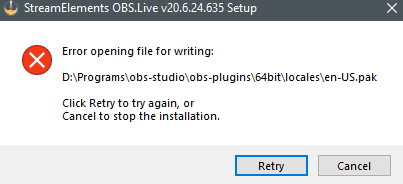
retry doesnt nothing, ive reinstalled OBS but still get the same problem
shy mountain
The file is most likely open during the update process
open task manager and find anything OBS realted that is working and just end the task
and then click "retry"
sullen roost
Why is not body helping me lol.
shy mountain
I don't remember the cloud backup saying that the software will restart after backing up
undone lion
ok ty @shy mountain
sullen roost
I'll provide pictures. in a sec.
undone lion
@shy mountain closing all obs processes doesnt cahnge anything. As soon as it tries to open that files it throws an error
change*
shy mountain
im wondering, what update are you referring to?
there hasn't been a recent update push for a while
If you uninstall OBS.Live and then OBS Studio
download the latest version from here: https://www.obs.live/

OBS.Live | Open Broadcaster Software Streaming Knowledge Base
OBS (open broadcaster software) knowledge base for live streaming. Find articles and videos about streaming with OBS.
and then install it(which will install OBS Studio as well)
it should be fine
undone lion
@shy mountain completely deleting OBS and removing user settings fixed the issue but now I have to set all my scenes back to how they were -.-
shy mountain
idk why you had to delete your user settings
sullen roost
@shy mountain Here sir
shy mountain
I just tested the cloud backup and its restoring everyone for me
from my deleted scene and profile to the position of the activitity feed dock
sullen roost
WHat should i do?
I still have access to my other laptop. where the original files are
Is there a way i can do it manually? By transferring the file through USB or something? If so may you please guide me?
 main kraken
Hi there. I gues this is the best channel to ask about it... Can I customise chat games more than this for example?
I'd like to set the chances to win by points scored, the max amount etc.
main kraken
I mean game rules
steel bladeBOT
@main kraken Check out the StreamElements ideas board: https://strms.net/ideas. You'll be able to add ideas, upvote ideas you agree with and track their progress with email notifications. Adding and upvoting ideas also helps the staff know which ideas should be prioritized so please take some time to upvote.
main kraken
coming from SLOBS, I was able to do stuff like that:
And follow-up question: What does How rigged your system should be? exactly mean? Is it "chance to win" slider basically?
 burnt bloom
Good morning everyone! Question: where can I find the area and setting to adjust the chat bot with it's recurring messages?
sharp turret
@burnt bloom In one channel please.
burnt bloom
Oh thank you! And @sharp turret wasn't sure which one to be honest where to post
sharp turret
Np 😄
burnt bloom
What is the difference, so that I know, between this channel and the twitch one?
fathom cobalt
This one is for OBS.Live support.
burnt bloom
Aren't they both considered "live"
sharp turret
 timber shadow
Hi, any time i press connect with twitch it automatically logs in with a twitch account i do not want it to rather than letting me chose to log in with a different account, anyone know how i can stop this?
steel bladeBOT
@timber shadow StreamElements on top of OBS > Logout > Login
timber shadow
oh yea, thankyou
 median sundial
how do i activate an overlay for my stream?
steel bladeBOT
@median sundial To add your overlays to OBS, add a new browser source in your scene. Paste your overlay URL in the browser source properties, set the dimensions to 1920x1080 (unless you changed them on the website) and check Shutdown source when not visible. https://youtu.be/KDvLynUqXI4
fathom cobalt
For twitch?
median sundial
yes
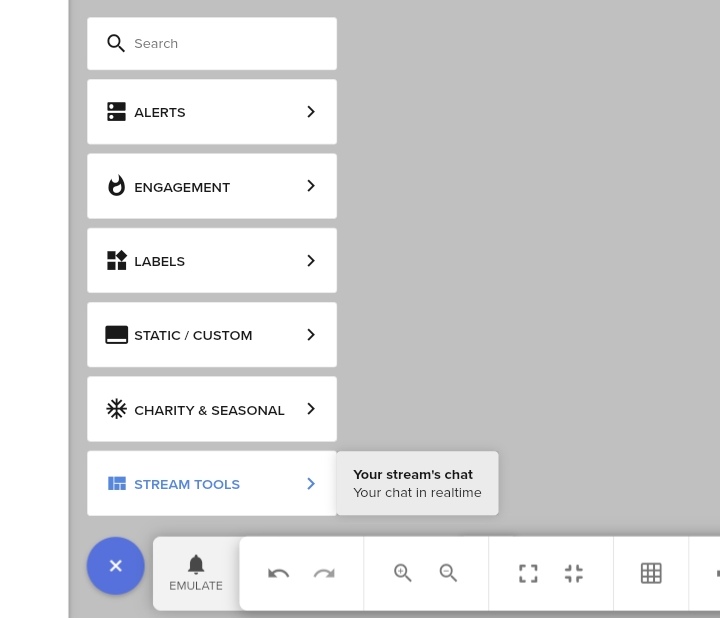
 late token
Hi! I have a problem. By putting an overlay it is cut out!
I would appreciate a solution to this problem.
Thank you!
steel bladeBOT
@late token We're not able to troubleshoot issues with using our overlays in StreamLabs OBS (SLOBS) as we don't have the tools to support their software. We recommend using OBS Studio or OBS Studio with our plugin OBS.Live.
sharp turret
You can try this:
steel bladeBOT
@late token To add your overlays to OBS, add a new browser source in your scene. Paste your overlay URL in the browser source properties, set the dimensions to 1920x1080 (unless you changed them on the website) and check Shutdown source when not visible. https://youtu.be/KDvLynUqXI4
 silk steppe
can everybody help me? I want to have my streams more sharper but i don't know how to do that. I have around 11 mbps upload.
 main pike
instead of conecting to my facebook how do i stream to dlive
plain mason
@main pike StreamElements only supports Facebook, Twitch and YouTube.
 surreal mountain
hi, i have problem with login into twitch and connect twitch account to StreamElements OBS.Live. I already unistalled and instaled again.
 karmic vapor
Hi SE, I don't understand why when setting up an alert "Video Volume" seems to do nothing. I can add the actual audio I want to play OK, but even when I set Video Volume to 0 it still blasts whatever audio is on the video file...
vernal drum
Try turning the alert volume down @karmic vapor like the part on right side of the above image
 quick nova
Hi, I dont know what happens, but always when i execute streamelements obs.live, the streamelements bot stop. No one can call any of the commands on chat. But when im offline and the streamelements obs.live are closed, the streamelements bot work on chat. Why that is happening ?!
surreal mountain
hi, i have problem with login into twitch and connect twitch account to StreamElements OBS.Live. I already unistalled and instaled again.
@surreal mountain
and i cant add account to OBS
quick nova
Hi, I dont know what happens, but always when i execute streamelements obs.live, the streamelements bot stop. No one can call any of the commands on chat. But when im offline and the streamelements obs.live are closed, the streamelements bot work on chat. Why that is happening ?!
@quick nova The @steel blade solved my problem, tnks!! ❤️
 raw blaze
Good afternoon, when using an HDMI in as a source from my elgato 4k cam link video connects flawlessly but the audio is completely blank.
 coral orbit
i need help
 full thunderBOT
Hi @coral orbit, Please ask your question(s) or describe the problem you're looking to solve so staff or a support volunteer can assist you as soon as they are available.
coral orbit
i need help i can't stream
rugged quail
Having an issue with media requests, not working and skipping saying "this video isn't available in your country" (even though it is)
 past elm
When I undock the chat window in streamelements, is there anyway to change the opacity on the windows and have it so I can see it when im ingame? Only got one monitor for the moment and its a big hassle having to tab out all the time
Only for me too see not the stream that is
woeful shoal
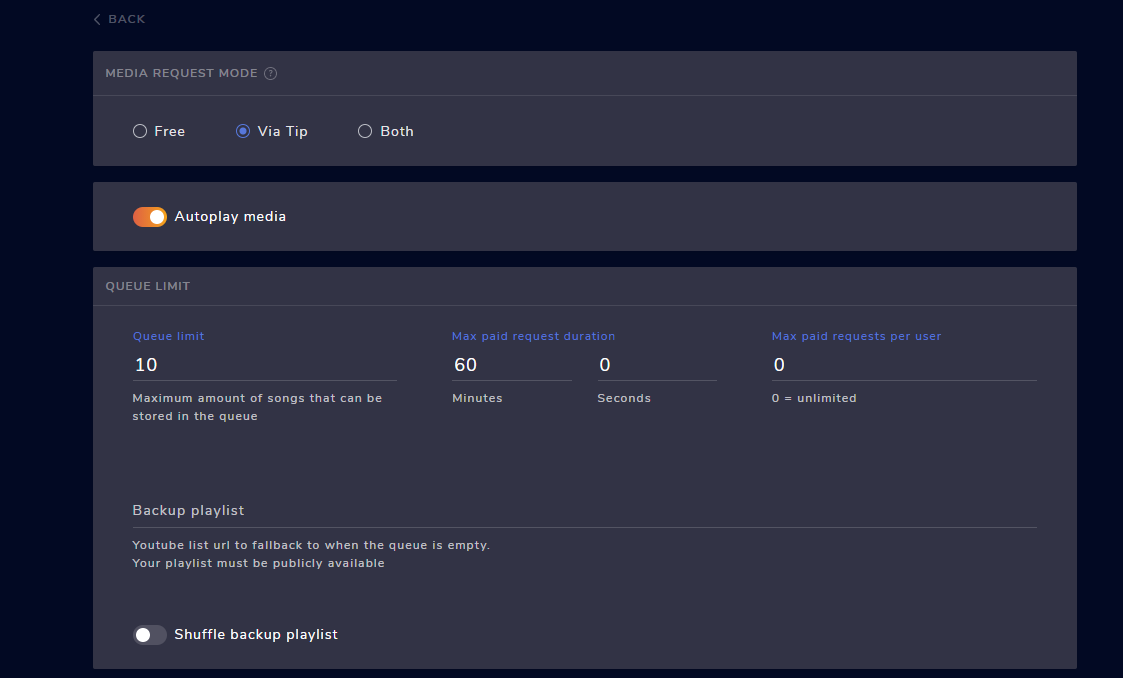
media share isnt auto playing even though i have the correct settings, also how do i turn the volume up of media shares? https://i.imgur.com/LOAv5EL.png https://i.imgur.com/56fJPAU.png
 tulip hamlet
@past elm There is no in game overlay option for chat, no.
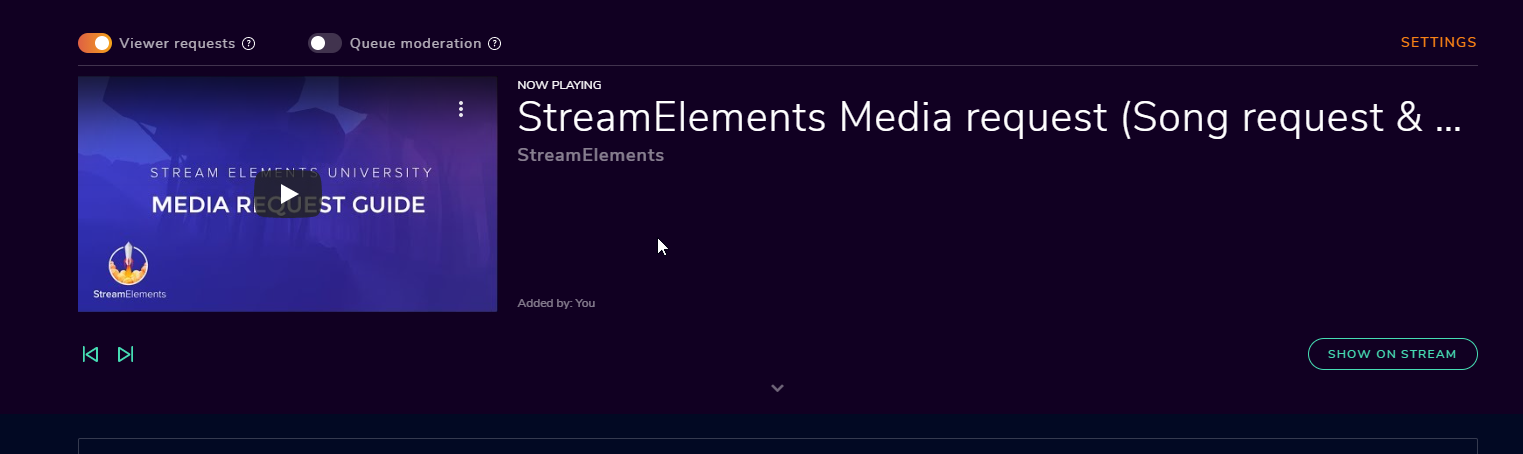
@woeful shoal That's for it to autoplay after you've hit play once, not to automatically start all on its own. Volume depends on where you're controlling media request; are you controlling it via the website or via OBS.Live?
woeful shoal
@woeful shoal That's for it to autoplay after you've hit play once, not to automatically start all on its own. Volume depends on where you're controlling media request; are you controlling it via the website or via OBS.Live?
@tulip hamlet So i still have to approve every media share on the website?
tulip hamlet
No. You have to hit play once for the player to start playing.
And then it'll autoplay through the queue.
woeful shoal
but what if there isnt a que?
basically im using it on dono's so i get a few a stream
and i want them to play auto when someone donates
i also have a stream deck if that helps
And ref the volume how do i control it via obs.live? atm every time im having to go onto the website and click show on stream for it to bring it up on stream
 feral raven
I have been having a problem with the ExtraLife alert notification noise for over a week now. There is a sound bit playing that has been removed from every single ExtraLife overlay element, and I have even removed the sound bit entirely from StreamElements, yet it still plays when I get a donation or I emulate it. Can someone please help me with this?
woeful shoal
@tulip hamlet mine is like this https://i.imgur.com/Zw2OEf0.png completley diff
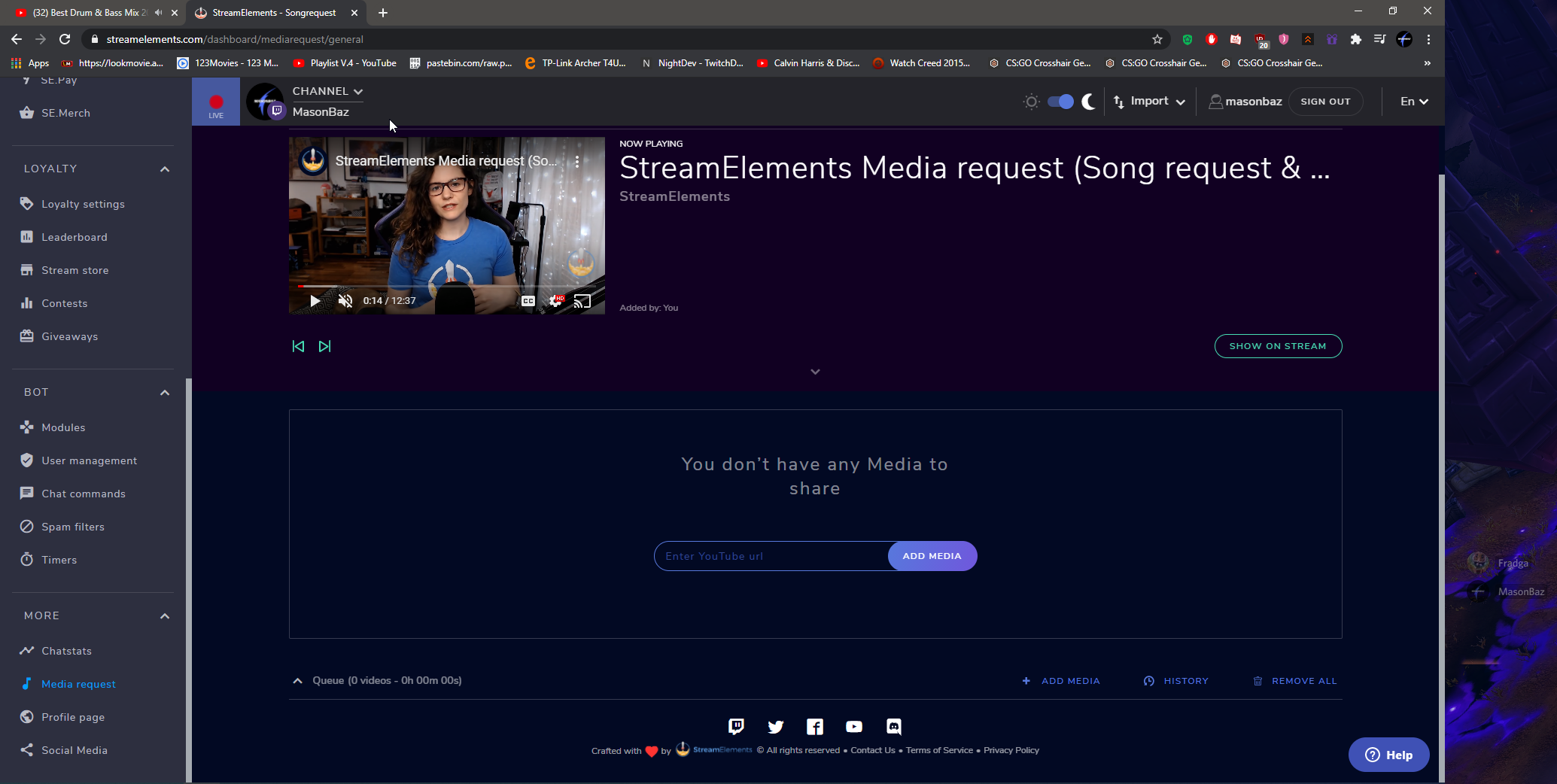 tulip hamlet
My screenshot is from OBS.Live.
woeful shoal
do i have to add that in to obslive somehow?
tulip hamlet
No, it's the media request dock.
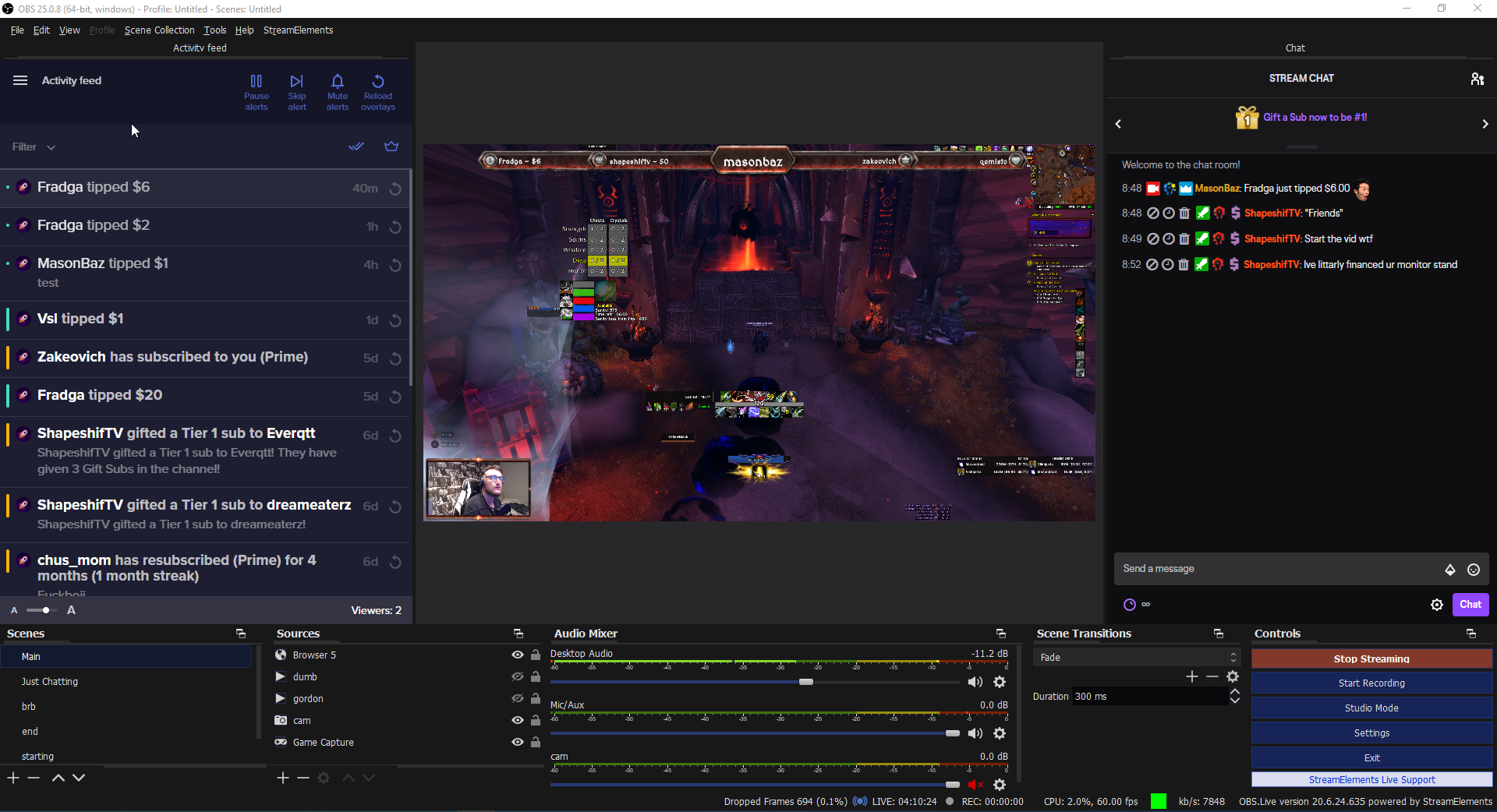 tulip hamlet
So click the StreamElements menu at the top and add it in.
woeful shoal
thanks for the help @tulip hamlet So if i have veiwer requests on, show video and auto play it will auto show on obs after a dono?
tulip hamlet
No. Again, no matter what, you have to click play at least once to start up your queue.
 strong robin
So I accidentally clicked "Reset UI" and everything is now, to regular OBS, how can I go back to OBS.LIVE?
plain sonnet
use the SE menu at the top
 strong surge
Goodevening, does somebody know why OBS not updating a browser source? I have made a custom widget thats loading a txt file from a server (jQuery), this is working on the normal overlay URL. But if i put the overlay in OBS it wont change the text what i am typing in the txt file.....
It will change but it can takes up like to 10min? And after that it will change instand... why is that? Does somebody knows?
karmic vapor
Try turning the alert volume down @karmic vapor like the part on right side of the above image
@vernal drum - I can turn both volume sliders down to 0% and when I go to emulate it, the video original video volume still blasts 🤔
Also, isn't the purpose of the video volume control to affect whatever sound is embedded in the video - as opposed to any alert FX I uploaded on top of it?
vernal drum
I forgot how I got it fixed with someone else. You could maybe extract the audio and upload it seperately?
 golden flint
Hello, I have a problem with my obs overlays. I happen to hear the notifications, but no overlay appears on the screen. I uninstalled obslive and obslive but it didn't work, I don't know what else to do. I already asked for help in obs obs discord, and they said that the problem would be with the streamelements
steel bladeBOT
@golden flint OBS > Settings > Advanced > Scroll down > Enable or disable Browser Source Hardware Acceleration, depending on its current state > Restart OBS (This does not apply for OBS on Mac)
https://i.imgur.com/ggMe9ZE.png
 wary dew
turn that off
golden flint
@steel blade I tried but it didn't work
wary dew
is it enabled or disabled now in your settings?
golden flint
Disabled
wary dew
then delete the browser source in OBS and add it again
steel bladeBOT
@golden flint The default resolution for StreamElements overlays (theme and custom) is 1920x1080. Please add them in OBS at their full resolution and use CTRL+F to fit to screen if necessary. You can then downscale your stream in OBS settings > Video if you'd like https://i.imgur.com/6bWXxjR.png
 golden flint
Look what's happens, I tried everything what do you speaked
steel bladeBOT
@golden flint Please provide your account ID found at the top of this page: https://streamelements.com/dashboard/account/channels This ID is public info and safe to share here.
golden flint
@steel blade 5d80119a57f127cdf1130873
honest echo
@golden flint the name of the overlay, please
golden flint
@honest echo I created a very simple one, only with alerts
I edited, call Duda bem simples apenas alertas
golden flint
@honest echo It works for me also on streamelents, but on obs it is black and live does not capture
You are able to see the alert on the web editor?
@honest echo yes, on the web only
steel bladeBOT
@golden flint Right click on the BrowserSource > Properties > Scroll down a bit > Refresh cache of current page
golden flint
I did, it hasn't worked yet @steel blade @honest echo
honest echo
Make sure to copy and paste the right URL, and try again, i just test it and the alerts are working fine on the web editor and on OBS
golden flint
I also tested it on a friend's computer, the same link worked on his, the problem is mine because not even other overlays appear, everything is black
honest echo
check the hardware acceleration (if is disabled, enabled it.. if is enable, disable it)
golden flint
I've tried too
 nova igloo
how can i copy and paste a source and then edit the copy and not have it edit the original? i am losing my mind and there is zero difference between pasting as a duplicate and as a reference. i dont want to have to make 6 new scenes with like 10+ elements each that i have to custom transform and all that one by one. i am going crazy. i really wnat to switch from streamlabs but i cant figure out how to do this simple task lmao. also why is there no undooooooooooooooooo????????
also when i paste it doesnt show until i click another source and click back 🙃
 errant rose
I've got a question. I am using StreamElements obs live. I am signed into the website and chose a overlay and edited all the texts and scenes on there and saved everyone. Well I can't figure out how to get that to the app now.
nova igloo
copy transform and paste transform also isnt working 🙃
so even if i try and do it manually i cant copy the settings 🙃
plain mason
@nova igloo if you are copying a source and pasting it into other scenes, when editing one of the sources, then all of them will be modified according to the one you edited. If you don't want the source to be changed when editing, then create new sources. However, there are sources that you should copy and paste, as the system will prevent you from creating multiple sources of the same content, such as the webcam capture source.
nova igloo
yea well how do i copy them do they wont be modified when i edit them
i need them to keep the transform and sade position etc
just have a diffeent text or image
copy/pasting transform doesnt work
like if i copy this transform and paste it
it looks like this on the new one im making
?
also looking at the transform its not even correct
the positions shouldnt be 0
streamlabs for comparison
im confused
.... new issue. i tried to center it horizontally and this happened
i feel like im going insane lol
i made another text and its letting me type numbers in for position but the other is locked at zero and i can only drag it around
that makes no sense? idk
nova igloo
why does paste transform never work right what am i doing wrong
im getting the issue where position is stuck on 0 again and it was just working for this source and i didnt change anything
steel bladeBOT
@nova igloo For the best OBS support, please join their Official Discord @ discord.gg/obsproject
 gloomy arrow
yea well how do i copy them do they wont be modified when i edit them
@nova igloo you'd need to add a new source, not copy an existing one
nova igloo
i am adding a new one now
but i cant copy the transform
and i cant edit the position in transform
unless i delete it and start over
multiple times
till it works
idk what its doing
gloomy arrow
huh, idk, I actually joined the server to ask about switching over from SLOBS but I generally manually position things, use transforms basically for centering but never copied transforms sorry
nova igloo
its okay i just have several scenes that have a lot of sources but all have different text depending on the scene so it would be easier to copy paste and i feel like im losing my mind cause streamlabs was just one click and no headache lmao
it just seems buggy? tbh idk
like i understand how that i cant c/p but why does center horizontally move my text all the way right idgi etc
why is position 0 not top left even tho i have it set to "top left"
etc
gloomy arrow
I'll download the client and see if I can poke around
nova igloo
also teh weird thing is sometimes these thinsg work as intended and i have compared settings and i cant find anything thats different
gloomy arrow
I had a hell of a time figuring out how to centre a textbox in SLOBS so it would work as I changed the text for various segments, totally understand how frustrating it is
errant rose
Repeat Question: I've got a question. I am using StreamElements obs live. I am signed into the website and chose a overlay and edited all the texts and scenes on there and saved everyone. Well I can't figure out how to get that to the app now.
nova igloo
i can actually help with that haha
errant rose
Wellll shidd, hook me up
nova igloo
where you edit the scene see the link, its in the top right
copy that link and then create a browser source in OBS and set the width and heigh the same as your overlay you made on the site
errant rose
Okay let me see
 winged prairie
Hey, when I put the text over alert format, the text disapears? Any fixes?
gloomy arrow
why does opening the OBS studio turn off the audio output through my headphones? doesn't matter if I put on monitor, output only, or both
SLOBS doesn't do this... Do I need 2 audio outputs to be able to hear?
idk if there's any staff @here right now, are there on/off hours for staff support?
steel bladeBOT
@gloomy arrow For the best OBS support, please join their Official Discord @ discord.gg/obsproject
nova igloo
is tehre a ui scale
 quiet whale
anyone know how to fix the streamelements overlays coming up blackscreen when inputted to the browser url through obs live?
steel bladeBOT
@quiet whale OBS > Settings > Advanced > Scroll down > Enable or disable Browser Source Hardware Acceleration, depending on its current state > Restart OBS (This does not apply for OBS on Mac)
https://i.imgur.com/ggMe9ZE.png
quiet whale
thanks, odd i tried it before and it didnt work but it did this time
 valid sphinx
Anyone know how I can fix my camera overlay? After I stream I close my OBS normally and every other day or so this happens. I have multiple camera (mirror) sources to give my camera a 3D effect, but I'm not sure why it randomly rearranges itself. Any help is appreciated.
 glad lantern
Is there a widget to show the points leaderboard that I can include as an OBS overlay? There are times I'd like to highlight the leaderboard as an independent scene, rather than as an extension. What's the best way to do this?
honest echo
@glad lantern test this one: https://discordapp.com/channels/141203863863558144/457957557470887947/626365962773463060
glad lantern
Thanks, that may do it!
Doesn't appear to live update; anything closer to the 'event list' style like SLOBS uses?
nova igloo
new problem: cant get push to mute to work, have it set up in hotkeys and enabled in audio
gloomy arrow
push to mute only mutes while you're holding the hotkey down, is that what you're trying for? use the other mute option if you want a toggle
gloomy arrow
huh, idk then
nova igloo
i wnat to hold a button down when i cough or sneeze or w/e
and when i let go have it unmute
gloomy arrow
and is numlock on?
nova igloo
yes
i set it to pause
and it doesnt work
i set it to m it didnt work
i set it to ctrl+m and it didnt work thinking maybe it wnated a combo
gloomy arrow
hm, i don't know then, sorry
gloomy arrow
yeah I'd think those are mutually exclusive
 raw dust
Not sure if this is the right channel, but I am using the streamelements chatbot and every now and then I keep getting a message in the chat that just says "Response Message". Not sure what is causing it. Any ideas?
steel mural
- This problem is not related to OBS.Live. Please use the helpdesk of the platform you're streaming to when having a problem with the bot
- It's probably a misconfigured timer https://streamelements.com/dashboard/bot-timers @raw dust
nova igloo
new problem: cant get push to mute to work, have it set up in hotkeys and enabled in audio (reposting since it got lost under convo)
steel mural
Like the problem you had before, this is not an OBS.Live problem
nova igloo
what would be an obs.live problem then?... im using obs.live
steel mural
OBS.Live is a plugin for OBS Studio, not a separate version. For problems that are not related to the things that the plugin adds like activity feed and chat dock, ask in the OBS Discord
nova igloo
oh i see
well i downloaded the whole thing from the SE site so my bad
ill head over there
thanks
quiet whale
anyone know if setting a .mp3 as a media source for background music during a brb scene works during preview? i can see audio moving but getting no sound
glad lantern
I assume you checked the mixer to allow the monitor?
quiet whale
im an idiot lol, thanks for the tip
quiet whale
yeah that fixed the issue ezpz
 brisk jewel
Hi would anyone be able to help me get game audio in my mix? It only picks up my mic but no game audio. thanks 🙂
steel bladeBOT
@brisk jewel For the best OBS support, please join their Official Discord @ discord.gg/obsproject
 spare geyser
When I'm in a discord call and then i open OBS, I all of a sudden can't hear my discord call, but it still registers in my desktop audio and my stream can hear them when I can't. Anyone also experience this?
 zealous ferry
Ok why can’t I figure out how to set up audio alerts for things like raids and viewers popping up in chat?
steel bladeBOT
@zealous ferry We've released our new Overlay Editor revamp. You can check out the changes and how to work with it here: https://youtu.be/X5VzXjqAsjk
Check out our blog post as well: https://blog.streamelements.com/streamelements-overlay-editor-just-got-even-better-c22cb5b4853e
zealous ferry
Ah so it’s all done through the overlays
 next quarry
Hi my Friends, i have the problem, that my Chatbot didnt triggert after the command !"command". How can i reactivate it?
steel bladeBOT
@spare geyser For the best OBS support, please join their Official Discord @ discord.gg/obsproject
@next quarry Go to the Dashboard > Right side > Part channel > Join channel (https://streamelements.com/dashboard)
 next quarry
yeah... but it worked few days ago
steel bladeBOT
If your commands recently stopped working and you're using OBS.Live and a custom bot name do the following:
- In OBS.Live, click on the hamburger menu (three stripes) at the top left of your activity feed
- Click on Stream Settings > Custom bot name
- In the Custom bot name field select Set custom bot name, not your already existing username (with capital letters). Note: If you already connected an account that way, the third entry will show as the account name (see image https://i.imgur.com/sO7fWOX.png).
- Scroll a bit down and click on the purple Connect Custom Bot Account button
- Log in as usual and Authorize the custom bot name
- Back in the Activity feed, click on the Send Test Message button and check if your custom bot name starts working again
 shy mountain
there we go
next quarry
Yeah... i thnik i know the problem now. After connect the custom bot, i pushed the buttom for remind the computer for 30 days. I reconnect the custom bot and now it works. Thank you Keizar 😗
One last Question... how can i make a person to Super Moderator?
shy mountain

StreamElements
The Ultimate All in One Platform for Streamers
next quarry
Thanks @shy mountain you are amazing
 shadow finch
Hi am I able to make streamloots alerts appear in activity feed?
 toxic fern
@shadow finch Unfortunately not. You'd need to keep their redemptions page open.
shadow finch
Ok thank you.
toxic fern
That you could add as a custom dock in obs.
 blazing trail
Hi can someone tell me how to fix my OBS?
for some reason my screen capture is stuck in a black screen
steel bladeBOT
@blazing trail For the best OBS support, please join their Official Discord @ discord.gg/obsproject
rugged quail
what do i do if i copy paste a overlay URL is it only showing half of the overlay
steel bladeBOT
@rugged quail The default resolution for StreamElements overlays (theme and custom) is 1920x1080. Please add them in OBS at their full resolution and use CTRL+F to fit to screen if necessary. You can then downscale your stream in OBS settings > Video if you'd like https://i.imgur.com/6bWXxjR.png
 flat bridge
Why does my bot chow up in multiples of 4 and not have the name I assigned it?
toxic fern
@flat bridge um.... could you explain again?
 royal terrace
does anyone have the same problem? geforce 2070 KFA2 super..
encouding error while streaming.. not every stream, maybe by every fifth?
flat bridge
@toxic fern My bot sends replies in 4 times instead of only once, and the bot does not have the custom name I gave it any longer.
steel bladeBOT
@royal terrace For the best OBS support, please join their Official Discord @ discord.gg/obsproject
 minor pasture
dont know where to post this but how can I make a variation inside the alertbox for subscribe with prime?
steel bladeBOT
@flat bridge StreamElements on top of OBS > Logout > Login
 fossil gulch
How can I pass someone my personal overlay and have their own information such as followers and their chat?
steel bladeBOT
@fossil gulch Follow these steps to grant managers/moderators access to your dashboard:
- Click on your channel name at the top of the dashboard
- Create a new invite at one of three access levels (Bot Supervisor, Editor, Full Control)
- Send this invite to a mod/manager to give them access to your dashboard. The link is one-time-use and expires after 72 hours if not accepted
Video tutorial: https://youtu.be/zl_h-ttZDF0
wary dew
let the other person do that for you, and you can then copy your overlay to their account
rugged quail
hey can someone help me best setting to OBS.live to my PC. for streaming.
steel bladeBOT
@rugged quail There are no "best settings".
Please understand that every setup will be very different.
Any guides or videos that claim otherwise are misinforming. Your best option is to start with a base and adjust as necessary.
You can run the OBS auto-configuration tool. To use the auto-config, click on the Tools menu in OBS, select Auto-Configuration Wizard and then just follow the on-screen directions.
You can use this tool to get baseline settings for your hardware and adjust as necessary from there.
Test, test, and test again. We are happy to offer suggestions for any issues you may be having afterwards, but not a list of settings.
Thank you
 rotund plaza
Hello,
I think some of the overlays I used - namely ones based on the Blue Metropolis animated super theme from the themes gallery - are causing my stream to buffer more for viewers.
The connection indicator seems to go into the red more often when one of them is active.
I figure it's because it's straining my system, even though running taxing games doesn't do that.
Is there a way to fix that?
 west fox
i need help for follow dono notification
rugged quail
i can help u @west fox i think
west fox
@rugged quail i dont know how to put notification
steel bladeBOT
@west fox New to StreamElements?
Check out our YouTube channel https://www.youtube.com/c/streamelements/videos
with tutorial videos from setting up the basics, to in depth details on how to use our product.
New to OBS? Here is a 4 step quickstart guide
https://obsproject.com/wiki/OBS-Studio-Quickstart
Want to learn even more? Here is an in-depth overview
https://obsproject.com/wiki/OBS-Studio-Overview
 wispy nymph
Hey! Don't know if this is the correct channel. I cannot get my !song command to work with spotify. Anyone can help me link those?
 nimble wagon
I have a MAC book Pro. I downloaded Parallels just to be able to have Windows 10 on my Mac, just to be able to download OBS.LIVE. I was able to download OBS.LIVE but I can't connect to facebook, twitch, or youtube, from OBS.LIVE because the pop up window is to small. Is there anyway to enlarge the pop up window that lets you sign in to your social media!?
 weary pilot
Helo good day to everyone. I am having an issue all day and don't know what to do. The media request pannel doesn't load and show anything.
steel bladeBOT
@weary pilot StreamElements on top of OBS > Logout > Login
weary pilot
thank you 🙂 cheers
 rapid falcon
@wispy nymph I believe Spotify made StreamElements disable any features related to their service a while back
@nimble wagon while I don't know that you'll be happy with that streaming performance in Parallels, you could command click the desktop in parallels and bump up that resolution, at least temporarily so that it could display properly at least long enough to login.
@nimble wagon For Mac, I would free up those resources Parallels is using and instead your OBS Studio for mac. OBS.Live is just a set of addons for OBS Studio. You can still use the rest of streamelements features while getting better performance.
wispy nymph
Any Tips on what music service to use instead which offers the same songs, etc?
rapid falcon
Youtube is what is supported
Just have to be careful because Twitch DMCA and muting vods is a thing with anything copyright
 placid coyote
Hi! I have a question about SE activity feed. I recently have noticed that my recent followers will not show on my activity feed on the SE website or in the OBS live activity feed. The followers will show on my overall twitch feed though. I checked to make sure followers was checked in the filter for the feed and deleted my cache to clear things out but it still seems as though its not working. anyone have that problem?
 crisp ocean
olá, alguem fala PT-BR pra me ajudar numa configuração do OBS? Eu não consigo descobrir como fazer para repetir uma mensagem de bits quando, por alguma eventualidade, eu nao escutei o que apessoa falou.
steel bladeBOT
@crisp ocean Welcome to the helpdesk! The regular helpdesk channels are in English but we do provide multi-language support in the following channels: #🇩🇪︱deutsch | #🇫🇷︱français | #🇪🇸︱español | #🇵🇹︱português | #🇳🇱︱nederlands | #🇮🇹︱italiano | #🇵🇱︱polski | #🇨🇳︱中文語言服務區-chinese | #🇯🇵︱日本語-japanese | #🇭🇺︱magyar | #🇰🇷︱한국어-korean | #🇹🇭︱ไทย-thai | #🇷🇺︱русский | #🇺🇦︱українська | #🇨🇿︱czech
crisp ocean
@steel blade thanks
 solar shale
What source do I use for the overlay that was created for me by streamelements?
steel bladeBOT
@solar shale To add your overlays to OBS, add a new browser source in your scene. Paste your overlay URL in the browser source properties, set the dimensions to 1920x1080 (unless you changed them on the website) and check Shutdown source when not visible. https://youtu.be/KDvLynUqXI4
 prisma nymph
Has anyone else been having problems with the chat function? It usually lets me send a test message to make sure things will show up and now nothing happens when I hit enter
And under settings, it just keeps saying "error loading data"
steel bladeBOT
@prisma nymph StreamElements on top of OBS > Logout > Login
prisma nymph
Thank you so much!
 grave wave
Where do i change when someone becomes a "regular" in my stream? can't seem to find the setting anywhere.
steel bladeBOT
@grave wave
Chat/Bot Levels
100 - Viewer
250 - Subscriber (Twitch subscribers automatically placed at this level)
300 - Regular
400 - VIP (Twitch VIP automatically placed at this level)
500 - Moderator (Twitch chat moderators automatically placed at this level)
1000 - Super Moderator
1500 - Broadcaster
Dashboard Manager Levels
Bot Supervisor
Editor
Full Access
Owner
https://i.imgur.com/s61Liry.png
 grave wave
That dosen't really help me at all? What is level 100? Can i edit it?
honest echo
@grave wave You can use the command !level
grave wave
@honest echo all i get is this respond?
I'm just trying to make it so regulars can post links
honest echo
!level USER 300 replace user with the username
grave wave
So can i edit these levels anywhere? When does someone get a level+
honest echo
https://streamelements.com/dashboard/bot-spam-filters enable the link protection and add the "exclude usergroup Regulars
100 - Viewer
250 - Subscriber (Twitch subscribers automatically placed at this level)
300 - Regular
400 - VIP (Twitch VIP automatically placed at this level)
500 - Moderator (Twitch chat moderators automatically placed at this level)
1000 - Super Moderator
1500 - Broadcaster
grave wave
Right but those numbers mean nothing to me.. When does one reach level 100? Is it per hour?
It dosen't tell anywhere
honest echo
?
The level doesn't accumulate that's their "status"
the loyalty point system will give them point every 10 minutes
https://streamelements.com/dashboard/loyalty
grave wave
I don't understand at all.. When exactly does someone become a regular? @honest echo
would be nice to say "people who have x amount of hour on stream are regulars and can post links"
plain mason
@grave wave these values (100, 250, 300, 400, 500, 1000, 1500) are related to user levels to use the chatbot commands/functions.
honest echo
You have to give them the "regular" level by the !level command
grave wave
Oh okay. Seems kinda counterintuitive tho?
For other chat bots you can usually set an amount of time or points for when someone becomes a regular.
plain mason
would be nice to say "people who have x amount of hour on stream are regulars and can post links"
@grave wave you can use the #💭︱feedback-and-ideas channel to post your idea or check if it already exists and support the existing post.
grave wave
Welp seems like someone posted the idea a year ago so.. Maybe i'll just have to setup another chat bot for that one thing..
 nimble owl
Hey guys, throwing this here... I have decided to download OBS on my mac to use it to stream. I setup my overlay URL into Browser Source but the page is static. Unless I launch a test for an alert. But right after the alert finishes, it goes back to being static. Any OBS+SE users here? Or ideas where I could find help?
kindred fox
Obs for Mac is underdeveloped and isn’t that great for overlays
steel bladeBOT
@nimble owl For the best OBS support, please join their Official Discord @ discord.gg/obsproject
 vivid zodiac
Why are my streamelements alerts not showing up on my stream?
steel bladeBOT
@brazen ravine Welcome to the helpdesk! Please let us know how we can assist you today and a support volunteer or staff member will assist you as soon as they are available. Thank you for your patience.
 glossy onyx
so i got my capture card running and everything but i have no audio on my stream.. Any help?
rugged quail
Hi, I'm hoping this is a quick fix but is there a way to make the alert box sub message more closer to the alert itself? See screenshot:
steel bladeBOT
Text not showing up over your alerts? Go to the Advanced Text Settings and set the top margin to 50, you can work your way to the right position from there.
 waxen barn
does anyone know how to get it to the other activity feed where i can replay stuff, and update stream title
not this basic one
sharp turret
@waxen barn StreamElements top of OBS->Activity feed.
If you not have installed OBS.Live then you need do first that.
waxen barn
got it ty so much
rugged quail
Hi, I'm hoping this is a quick fix but is there a way to make the alert box sub message more closer to the alert itself? See screenshot:
I narrowed down the issue, it's the line height causing this result but I don't understand how to adjust the text location otherwise?
||Thanks bot for the answer  ||
||
steel bladeBOT
@rugged quail Text not showing up over your alerts? Go to the Advanced Text Settings and set the top margin to 50, you can work your way to the right position from there.
 dusty whale
Hi there! I'm new! I'm not sure if this is the right channel to ask this question in, but I'm unable to figure out how to get Streamlabs OBS to pick up audio from discord. Any suggestions and help would be appreciated!
shy mountain
If you have issues with SLOBS, its best to contact their support.
dusty whale
gotcha! Thank you!
 toxic raptor
HI my alerts are currently not working properly as a browser source on OBS. Is there something i can do
steel bladeBOT
@toxic raptor OBS > Settings > Advanced > Scroll down > Enable or disable Browser Source Hardware Acceleration, depending on its current state > Restart OBS (This does not apply for OBS on Mac)
https://i.imgur.com/ggMe9ZE.png
 fiery sky
Hey, new to the discord but I've been using streamelements for a few months now. I've had media request turned on for a good potion of that time but yesterday it stopped working and started giving me "THIS VIDEO IS NOT AVAILABLE IN YOUR COUNTRY" for most (but not all) videos. I can watch these videos on youtube no problem though, so that doesn't seem to be the issue.
 humble lion
good morning, and or evening to all. i need some help with an authentication error in obs.live. every time i try to start up a stream i get an error on obs that says something along the lines of "got kicked from server" so i thought id restart the program and it hits me with an error message of "failed to authenticate with twitch status error invalid refresh token (http 4000)" and i have no idea how to fix it.
steel bladeBOT
@fiery sky StreamElements menu, on top of OBS > Logout > Login
shy mountain
@humble lion Check your stream key
 shell kraken
how do i test my sound alerts im comming across from streamlabs as it keeps acting up ive hit the imort button but i dont know how to test to make sure its all working
 thorn ruin
Good morning everyone. I have a problem setting up voicemeeter banana with obs and so on. I wrote down everything in the channel #🇩🇪︱deutsch (because i am a german guy) but i am not sure if this is the correct way to get support. Can someone confirm, that this was correct?
steel mural
I'll answer you there one sec
toxic raptor
hello. my question was not answered. i have done multiple attempts at trouble shooting this and got a new authentication code
shy mountain
You were provided with a supposed solution
I don't understand what an authentication code has to do with alerts not working.
What exactly are you doing?
 tight yarrow
hey.. I can't seem to get rid of the "preview" the enable thingie is dark gray and clicking it won't disable it
shy mountain
what preview?
shy mountain
Click on "studio mode" button on the righ side menu
 shy mountain

tight yarrow
well, now since I'm here... and don't be mad, I'm normally a SLOBS version but doing art on another channel now so didn't want them mixed up
if there's like a full overlay set on your website.. how do I make all of it appear at once in .obs.. or do I need to do it all one by one?
shy mountain
!add
steel bladeBOT
To add your overlays to OBS, add a new browser source in your scene. Paste your overlay URL in the browser source properties, set the dimensions to 1920x1080 (unless you changed them on the website) and check Shutdown source when not visible. https://youtu.be/KDvLynUqXI4
shy mountain
!res
steel bladeBOT
The default resolution for StreamElements overlays (theme and custom) is 1920x1080. Please add them in OBS at their full resolution and use CTRL+F to fit to screen if necessary. You can then downscale your stream in OBS settings > Video if you'd like https://i.imgur.com/6bWXxjR.png
shy mountain
and we have our own themes if that is what you are asking about: https://streamelements.com/dashboard/themes
StreamElements
The Ultimate All in One Platform for Streamers
steel bladeBOT
@oblique wave Read and follow our server rules:
- We do not tolerate toxicity! Treat the community team, staff and all members with respect.
- No advertisement or channel promotion, anywhere on the server.
- No NSFW/NSFL
- No unsolicited DMs or friend requests to server members
Make sure to read the #welcome in any server you join.
 tranquil spoke
Hi so im trying to use a overlay from stream elements in OBS, and yet when i add the browser source URL, it doesnt come through full size, like its half the overlay cut off.
steel bladeBOT
@tranquil spoke The default resolution for StreamElements overlays (theme and custom) is 1920x1080. Please add them in OBS at their full resolution and use CTRL+F to fit to screen if necessary. You can then downscale your stream in OBS settings > Video if you'd like https://i.imgur.com/6bWXxjR.png
sharp turret
tranquil spoke
one more question, im new to this, but if i am adding more like the BRB screen and such, is it better to do a whole new scene for each one?
or do i just put them all under one scene, different sources?
steel mural
You want create a different scene for every overlay. That's my setup as an example
tranquil spoke
ok good to know
i dont use a webcam at the moment so that will save time since i wont need to set those up
steel mural
Setting up a cam is basically done in like 4 clicks 😄
And all the placeholder scenes you see are used as sources in the scenes above the "--placeholder--"
i.e. my "Facecam" scene has the cam and a camera border in it.
tranquil spoke
oh i know, i just dont have a webcam or a proper setup to show on cam, im getting to it though.
if i use a webcam now, people will see my storage closet looking office xD
steel mural

 plush arch
Good Morning, I have 2 loyalty members who cannot buy tickets for my upcoming give away it says Error, does anyone know a work around?
plush arch
fathom cobalt
are they logged in?
plush arch
yes
fathom cobalt
maybe it is second submit?
plush arch
tried for 2 days now
plush arch
Ill have them try
 knotty remnant
Hey guys im kinda stuck on this but does anyone know how to enable tts? I cant seem to find the option to enable it
rapid falcon
@knotty remnant tts for alerts, etc aren't actually going to be in obslive itself but in the overlay configuration section of the alert, etc object in your streamelements dashboard from the web browser.
knotty remnant
Ah okay makes sense! Thanks alot 😄
 torpid kayak
hey idk how to change it so i can sstream on twich not youtube
steel bladeBOT
@torpid kayak StreamElements menu, on top of OBS > Logout > Login
sharp turret
Then login with twitch
 low crag
Hello, I am moving from SLOBS to OBS.Live but when trying to import my sources they are not showing in OBS, do I have to add them manually?
plain mason
yes @low crag
steel bladeBOT
@low crag To add your overlays to OBS, add a new browser source in your scene. Paste your overlay URL in the browser source properties, set the dimensions to 1920x1080 (unless you changed them on the website) and check Shutdown source when not visible. https://youtu.be/KDvLynUqXI4
@low crag We've released our new Overlay Editor revamp. You can check out the changes and how to work with it here: https://youtu.be/X5VzXjqAsjk
Check out our blog post as well: https://blog.streamelements.com/streamelements-overlay-editor-just-got-even-better-c22cb5b4853e
low crag
thank you
Also is there a way to view how long a subscription is as currently in the Activity Feed it just shows the tier
plain mason
torpid kayak
how do i set up alerts?
low crag
@plain mason oh ok.. sorry I am new to Affiliate. Maybe I am seeing the sub alerts from the wrong perspective. When it shows resubbed for 5months, does that mean they have been subbed already for 4 months?
plain mason
@low crag if you were already using StreamElements and received the Affiliate contract now, then Logout of your account at https://streamelements.com/logout and redo the Login; and still click on PART CHANNEL for the bot to leave your stream chat and then JOIN CHANNEL for the bot to return. Because, with this procedure you will be able to view some features for those who are Affiliates.
torpid kayak
hey how do i setup alerts?
plain mason
@low crag when the user is a subscriber and he shares the subscription information in the chat, the system records this information, so the user must do this sharing. If he follows the stream for "X months", then the system records the time he follows, however, he can also inform in the message when he makes a subscription in consecutive months (subscription streak).
steel bladeBOT
@torpid kayak New to StreamElements?
Check out our YouTube channel https://www.youtube.com/c/streamelements/videos
with tutorial videos from setting up the basics, to in depth details on how to use our product.
New to OBS? Here is a 4 step quickstart guide
https://obsproject.com/wiki/OBS-Studio-Quickstart
Want to learn even more? Here is an in-depth overview
https://obsproject.com/wiki/OBS-Studio-Overview
@torpid kayak We've released our new Overlay Editor revamp. You can check out the changes and how to work with it here: https://youtu.be/X5VzXjqAsjk
Check out our blog post as well: https://blog.streamelements.com/streamelements-overlay-editor-just-got-even-better-c22cb5b4853e
@low crag Prime Gaming (new and resub) and paid subscriptions (resub only) must be shared in chat manually by the person subscribing in order for the subscription information to be sent to StreamElements. For Prime Gaming, the user needs to have sharing enabled on https://www.twitch.tv/settings/prime. For paid subs, if the share box doesn't show up immediately it will when they refresh the page. https://i.imgur.com/VNJN0Uv.gif https://i.imgur.com/2297EA7.png

 low crag
@plain mason Thanks for your help, you've been great.
rugged quail
how do i get my audio to stream and how can i play the game whilst in the program
pls help
 silent wraith
Hey, I just asked my question in the twitch forum but I think it would be better stated here as I'm actually using OBS to do all my streaming.
My issue is that I have been trying to use the pre-fabricated (all the cool overlays y'all have @_@) overlay that I chose and I cannot seem to get it to allow me to edit or save any edits I make to it. What am I doing wrong?
steel bladeBOT
@silent wraith We've released our new Overlay Editor revamp. You can check out the changes and how to work with it here: https://youtu.be/X5VzXjqAsjk
Check out our blog post as well: https://blog.streamelements.com/streamelements-overlay-editor-just-got-even-better-c22cb5b4853e
 valid oasis
For some reason, I've gone from being able to stream League with no issue whatsoever, to suddenly my encoder getting overloaded any time I try to stream it, I haven't changed anything either
valid oasis
Update: It seems to be doing that for anything I stream
 strange iron
can anyone please help? i have no sound on my stream. i use NDI. everything was fine until today. didn't make a change. but my gamesound is not coming through. Mic works.
please help me 🙂
 limber kindle
Question. If I stream to Twitch one day and YouTube another day, is there a way to swap the OBSLive add on so it shows YouTube chat instead of Twitch chat once I change over each day?
sharp turret
You need relog
steel bladeBOT
@limber kindle StreamElements menu, on top of OBS > Logout > Login
limber kindle
On OBS or just the webpage @sharp turret
sharp turret
In OBS
limber kindle
So I just did that
And it still shows Twitch chat and the activity feed is just twitch alerts
My Twitch, YouTube and Facebook are all linked under the same log in btw
sharp turret
Are you logged in with Youtube? You need login with other platform
And also add alerts from youtube account
limber kindle
So, I use the same overlay for each platform which required me to link all three under the same log in so I could "import" them from Twitch to the Youtube side.
@sharp turret Is there not a drop down to swap between the accounts like the website has??
sharp turret
Unfortunately no, you need always relog in OBS with the other platform to show also youtube chat.
limber kindle
How do you import overlays from one platform to the other then?
 turbid knoll
Hey, I'm having trouble with my overlay on OBS. It's been like this for the last week... MY alerts could be heard but never seen. I've already tried removing the browser source and recreating it. (this used to be my solution to this)
steel bladeBOT
@turbid knoll OBS > Settings > Advanced > Scroll down > Enable or disable Browser Source Hardware Acceleration, depending on its current state > Restart OBS (This does not apply for OBS on Mac)
https://i.imgur.com/ggMe9ZE.png
limber kindle
@sharp turret Do you know how to import overlays to different accounts if they are individual log ins?
Doesn't have to be Daniii if anyone else knows...
I figured it out on my own. Thanks 🙂
turbid knoll
@sharp turret That didn't solve the issue, but I found something...
my obs has been crashing a lot.
I reinstalled and it worked great
including with alerts, but
Stream elemnts live crashes it
 sacred mulch
Hello! Been using OBS.Live for months now and loving it! However yesterday I started experiencing "frames missed due to rendering lag," after not having changed any settings (that I am aware of). I had to end my stream and restart. The problem returned after about 20 minutes. What are the steps I need to take in order to provide support with the information you need to troubleshoot? Thank you.
steel bladeBOT
@sacred mulch For the best OBS support, please join their Official Discord @ discord.gg/obsproject
rugged quail
Hello everyone i have a question on something that bothers me.
I changed my twitch name today and since then my chat bots/commands are not working, does anyone knows what to do?😔
steel bladeBOT
@rugged quail If you changed your name on Twitch, please follow these steps:
- Visit https://streamelements.com/logout and then log in again by connecting with Twitch.
- On the right side of the dashboard page that opens, select Join under bot settings. If it says Part select that and then select Join to send the bot to the chat. Don't forget to mod the bot by typing
/mod streamelementsin your channel if you have not already. - Post your old and your new name here so that we can update your channel's chatstats tracking (must be done by staff).
 spiral fox
So when I activate chat or activity feed, they get zoomed in? Also the stream gets behind the chat/activity feed
 fiery sequoia
i set a donation goal just now but it already has 90$ on it right as i was setting up the widget, but i haven't recieved donations or gone live yet. how do i fix this?
late furnace
dammit 
steel bladeBOT
To reset goals:
- from the Overlay Editor > Session data on top right (monitor symbol) > Goals tab > reset progress of desired goal
- from the Dashboard > Activity feed on the left > Widget data on the right > Goals tab -> reset progress of desired goal
Note: Goal widgets (progress) only counts up and doesn't go down automatically, if you lose followers/subs.
 jaunty depot
I am trying to get my OBS to pick up Nvidia broadcast but it won't register it or my camera
steel bladeBOT
@jaunty depot For the best OBS support, please join their Official Discord @ discord.gg/obsproject
jaunty depot
I can't seem to join their discord only preview it
 storm otter
Can someone help me out with this crash on startup, It only happens when the OBS.live plugin is added
 tall crow
Hey guys! new to streaming! As in like 5 days new haha. Having some problems with OBS using the streamelements OBSLive. For some reason every once and awhile itll stop my stream while i am in the middle of it or itll say like towards the bottom where it shows how long youve been live itll say delay: will auto shutdown in 256seconds ect ect? any help?
steel bladeBOT
@tall crow 1) Restart OBS
2) Start your stream/recording for about 30 seconds. Make sure you replicate any issues as best you can, which means having any games/apps open and captured, etc.
3) Stop your stream/recording.
4) Select Help > Log Files > Upload Current Log File. Copy the URL and paste the link here.
Note: If you do not see an obsproject.com URL, you will need to update OBS Studio to version 22+.
tall crow
ty bot but the thing it, it doesnt happen every time. just like every once n awhile. thinking it could be a network problem
 shadow ether
can anyone tell m how to get obs to stop trying to stream to yt. I disconnected it from my google home
steel bladeBOT
@shadow ether StreamElements menu, on top of OBS > Logout > Login
 verbal granite
anyone can tell me why my OBS can't start live streaming?
steel bladeBOT
@verbal granite StreamElements menu, on top of OBS > Logout > Login
verbal granite
THANK YOU
 prisma marten
Hey! How do I get my alerts from Stream Elements into OBS?
steel bladeBOT
@prisma marten To add your overlays to OBS, add a new browser source in your scene. Paste your overlay URL in the browser source properties, set the dimensions to 1920x1080 (unless you changed them on the website) and check Shutdown source when not visible. https://youtu.be/KDvLynUqXI4
@prisma marten We've released our new Overlay Editor revamp. You can check out the changes and how to work with it here: https://youtu.be/X5VzXjqAsjk
Check out our blog post as well: https://blog.streamelements.com/streamelements-overlay-editor-just-got-even-better-c22cb5b4853e
 acoustic minnow
hello ! my chat widget appears on steamelements overlays area, but when i put it on the OBS it doesn't appear (FIXED)
but it doesn't show up on the actual stream
:( i think im bad
steel bladeBOT
@acoustic minnow OBS > Settings > Advanced > Scroll down > Enable or disable Browser Source Hardware Acceleration, depending on its current state > Restart OBS (This does not apply for OBS on Mac)
https://i.imgur.com/ggMe9ZE.png
 mild moat
Hello, can you help me? When I start streaming from twitch I get an error from a valid streaming service, I don't know what to do, please help me.
steel bladeBOT
@mild moat For the best OBS support, please join their Official Discord @ discord.gg/obsproject
 timber sphinx
hola
alguien me puede ayudar a exportar mis overlays de streamlabs a obs?
late furnace
#🇪🇸︱español
 glossy leaf
steel bladeBOT
glossy leaf
steel bladeBOT
@glossy leaf To add your overlays to OBS, add a new browser source in your scene. Paste your overlay URL in the browser source properties, set the dimensions to 1920x1080 (unless you changed them on the website) and check Shutdown source when not visible. https://youtu.be/KDvLynUqXI4
@glossy leaf We've released our new Overlay Editor revamp. You can check out the changes and how to work with it here: https://youtu.be/X5VzXjqAsjk
Check out our blog post as well: https://blog.streamelements.com/streamelements-overlay-editor-just-got-even-better-c22cb5b4853e
timber sphinx
can someone help me export my overlays from streamlabs to obs?
late furnace
im not experienced in that typically streamlabs but from what i saw they said to be both logged in and have bot extension running when exporting from one to another
or are you just trying to add an overlay?
late furnace
could be due to copyright? they intend to do that on some
 stark jacinth
how to hide my mouse cursor. in window capture
late furnace
withthat being said
when using a windows capture it captures everything you do
you cant hide anything afaik
what are you capturing?
 devout sundial
Hello! I am having an issue with my alert box. I have uploaded the video file to use for my alert, and I have selected "text over image" for the layout, but the text does not appear when the alert pops up
steel bladeBOT
@devout sundial Text not showing up over your alerts? Go to the Advanced Text Settings and set the top margin to 50, you can work your way to the right position from there.
devout sundial
Thank you! That worked!
Next question, is there a way to use a custom font that is not listed in the drop down menu?
steel bladeBOT
@devout sundial Google Fonts
More than 900 google fonts are supported at this time. You can preview them here: https://fonts.google.com/
Custom Fonts
Steps:
- Install the font on the streaming PC or choose a pre-installed windows font.
- In the overlay widget settings, select Text Settings
- Click on Enable Custom Font
- Type the name of the font as it appears in the windows font directory (This is usually
C:\Windows\Fonts)
Note: After installing fonts, the browser and OBS must be restarted for the font to appear.
 cunning grotto
HI all! - I am having an issue with my alerts intermittently working?
EX: had a host not trigger, a follow trigger, then a tip not trigger -- any idea on where the problem may lie? Or was there a possible out-tage?
steel bladeBOT
@cunning grotto Due to changes to Twitch API, we have filtered out hosts and will only show these ones on your activity feed:
- All hosts coming from an online channel with at least 1+ viewer
- Auto host events with at least 1 viewer - only from a channel that just went offline
Note: If you see X channel has hosted you with no viewers on the back, that is considered an offline host or a host with 0 viewers, we do not show these.
shy mountain
As for the tips not triggering, check and see if you have tipping moderation on
cunning grotto
Awesome thank you i'll give this a peek, thanks so much!
rugged quail
Hey, i have 1060 3gb and Ryzen 5 2600, 16 Gb ram.
I stream with NVENC (new). But when i play for example csgo, on start of every csgo round my obs is saying something like "Encoding Overloaded" would it be better to use x264? Also after streaming new Mafia remake after few hours of playing OBS does the same without my game to lag, but my stream does.
Hope someone can help.
steel bladeBOT
@rugged quail Please provide a log from your last stream. To do this, in OBS go to Help > Log Files > Upload Last Log File and paste the link to the log file here.
rugged quail
late furnace
hmm only thing i got from that is you have mix match sample rates
rugged quail
What that means?
late furnace
it means your audio bitrate on obs is different from your desktop defualt audios
rugged quail
Well that wont overload my encoder
late furnace
meaning your desktop is 4800 and obs is 4100
indeed
im looking thru the file to see if i noticed something else
rugged quail
oooh, i know why, ir didnt happend last stream i had to reset obs and streamed only league
 tame epoch
my overlays stopped working! help
late furnace
@rugged quail ok lets try this you do not have to stream only record and try to duplicate what you was doing
steel bladeBOT
@tame epoch OBS > Settings > Advanced > Scroll down > Enable or disable Browser Source Hardware Acceleration, depending on its current state > Restart OBS (This does not apply for OBS on Mac)
https://i.imgur.com/ggMe9ZE.png
@rugged quail 1) Restart OBS
2) Start your stream/recording for about 30 seconds. Make sure you replicate any issues as best you can, which means having any games/apps open and captured, etc.
3) Stop your stream/recording.
4) Select Help > Log Files > Upload Current Log File. Copy the URL and paste the link here.
Note: If you do not see an obsproject.com URL, you will need to update OBS Studio to version 22+.
late furnace
we try again after the 30 seconds of recording
rugged quail
@rugged quail ok lets try this you do not have to stream only record and try to duplicate what you was doing
@late furnace will have to do this later, i'm not home, so later.. 😬
late furnace
ok thats fine if not here you can prolly get a way faster response in obs discord
if we cant figure it out here when you get bacc 🙂
tame epoch
thx got it
sharp turret
rugged quail
Okay will try to make it asap when i get home
late furnace
ALl good take your time. we are always here 🙂
rugged quail
late furnace

rugged quail
i have removied my audio mixer how do i get it back?
steel bladeBOT
@rugged quail Please ask your question in one helpdesk channel only. A support volunteer or StreamElements staff member will assist you as soon as they are available. Asking in multiple places will only result in confusion, not faster answers. Thank you for your patience.
wary dew
i already told you in #helpdesk-youtube
rugged quail
Were do i find View?
wary dew
in the top bar in OBS
rugged quail
Okay thank you, sorry
 stray merlin
Got a small issue on my hands here. My Alerts don't play any sounds through OBS.live., neither does media request when I press ''show on stream''.
Media request gives sound, but only if I don't use the widget to show it on stream. If I show it, I get no sound but I do see it on my stream.
 autumn flax
For some reason, my overlays just decided not to work today. I've been using the same overlay for months but since I reset the widgets, none of them works now. Tried uninstalling and reinstalling OBS.live but still the same issue. The alerts display on Stream Elements' overlay editor though, just not on my OBS.
steel bladeBOT
@autumn flax OBS > Settings > Advanced > Scroll down > Enable or disable Browser Source Hardware Acceleration, depending on its current state > Restart OBS (This does not apply for OBS on Mac)
https://i.imgur.com/ggMe9ZE.png
@stray merlin If you are not hearing your alerts and/or Media Request, you are most likely using the Control Audio via OBS option in your browser source properties.
To make sure you hear the alerts and the stream also hears them, follow along the screenshot bellow.
https://cdn.discordapp.com/attachments/199460642975907840/685371800456134686/unknown.png
 surreal mountain
@surreal mountain
@surreal mountain
hi, i have problem with login into twitch and connect twitch account to StreamElements OBS.Live. I already unistalled and instaled again.
@surreal mountain
plain mason
@surreal mountain what is the problem? (details, please)
 fervent vortex
I'm hoping some one can help me out here, I'm trying to make the events appear side by side horizontally like how the 8bitdrummer has his events show. I can't see anything in the options to change it only flip it from top to bottom
 prime meteor
I keep getting this, but I do have a widget and it wont show on stream
fathom cobalt
try this
steel bladeBOT
@prime meteor StreamElements menu, on top of OBS > Logout > Login
 little falcon
My stream won't go live, everytime I try to go live it's just disconnecting and trying to reconnect with nothing happening. Can anyone help? Never had this problem before
 coarse pike
hi. im setting up browser sources for my overlays but when i change scene the browser source takes a couple of seconds to load in
 manic dove
Hey guys and girls, anyone having an issue where the pannel for OBS is just coming up with a blue background and now buttons or control
steel bladeBOT
@manic dove StreamElements menu, on top of OBS > Logout > Login
 upbeat hound
Can I take an external image from my computer and put it on my elements obs to use as a background?
manic dove
Thanks
 marsh robin
How can I switch from Twitch to YouTube on StreamElements?
steel bladeBOT
@marsh robin StreamElements menu, on top of OBS > Logout > Login
marsh robin
Oh.... thank you
rugged quail
@rugged quail 1) Restart OBS
2) Start your stream/recording for about 30 seconds. Make sure you replicate any issues as best you can, which means having any games/apps open and captured, etc.
3) Stop your stream/recording.
4) Select Help > Log Files > Upload Current Log File. Copy the URL and paste the link here.Note: If you do not see an obsproject.com URL, you will need to update OBS Studio to version 22+.
@steel blade https://obsproject.com/logs/-n9qJtHxYbLPOITs Ok so i finally managed to remake this issue
Hey, i have 1060 3gb and Ryzen 5 2600, 16 Gb ram.
I stream with NVENC (new). But when i play for example csgo, on start of every csgo round my obs is saying something like "Encoding Overloaded" would it be better to use x264? Also after streaming new Mafia remake after few hours of playing OBS does the same without my game to lag, but my stream does.Hope someone can help.
If someone is going to help me this is the issue
 rare pebble
Hi! My StreamElements keep crashing almost instantly when opening it. I was creating overlays and updated one to obs and then it started.
 midnight quarry
Hello Guys i have an issue with my "chat and activity" Window i will show you, i have no idea what causes the problem, i change the resolution already it stays the same ! plss !!!
pls help me !
rugged quail
Hello i am currently trying to figure out what to do here
steel bladeBOT
@rugged quail To add your overlays to OBS, add a new browser source in your scene. Paste your overlay URL in the browser source properties, set the dimensions to 1920x1080 (unless you changed them on the website) and check Shutdown source when not visible. https://youtu.be/KDvLynUqXI4
 frank vine
Hi! I'm trying to use an Alertbox, but it is not showing up in my stream. I have the correct browser source link, and I'm even getting the audio playback when emulating an alert, but there is no image on the scene. (Using StreamElements OBS v25.0.8)
For Twitch Alerts
steel bladeBOT
@frank vine The default resolution for StreamElements overlays (theme and custom) is 1920x1080. Please add them in OBS at their full resolution and use CTRL+F to fit to screen if necessary. You can then downscale your stream in OBS settings > Video if you'd like https://i.imgur.com/6bWXxjR.png
frank vine
I have that set. It seems that no browser source shows up at all. Just tested w/ a YouTube video and same issue: No image, but there was audio.
steel bladeBOT
@frank vine OBS > Settings > Advanced > Scroll down > Enable or disable Browser Source Hardware Acceleration, depending on its current state > Restart OBS (This does not apply for OBS on Mac)
https://i.imgur.com/ggMe9ZE.png
frank vine
That did it! Thank you!
rugged quail
Can someone tell me if i can edit my live because when i click on start streaming it alr start the live not letting me edit the game or the title
 dusk solstice
can someone help me i cant seem to add desktop audio to my StreamElements
steel bladeBOT
@rugged quail StreamElements menu, on top of OBS > Logout > Login
honest echo
@dusk solstice check Settings > Audio > devices
 eternal coral
can someone help me? my obs.live keeps giving me an encoder error when i change seens while live and shuts off my stream
steel bladeBOT
@eternal coral For the best OBS support, please join their Official Discord @ discord.gg/obsproject
 vapid dagger
uhm can i get some help
steel bladeBOT
@vapid dagger Welcome to the helpdesk! Please let us know how we can assist you today and a support volunteer or staff member will assist you as soon as they are available. Thank you for your patience.
errant rose
I enabled the chat bot for SE OBS and I was wondering how I edit commands or work it? This is for FB streaming
 waxen wedge
hi there i have a problem and need some help pleas my stinger only plays 50%-75% threw its 2 seconds webm 6.05mb
steel bladeBOT
@waxen wedge For the best OBS support, please join their Official Discord @ discord.gg/obsproject
rugged quail
Hello, i'm a smartphone player, and i have some rescues on my streamelements shopp, but when someone called it did'nt worked. What should i do !?
 blissful shard
can anyone help me. Using one of the free overlays and the i can move the camera border as one and the scrolling text is not going over to OBS live
steel bladeBOT
@blissful shard Please provide a proper screenshot with the issue visible. If not sure how to take a screenshot, you can check here: https://www.take-a-screenshot.org/
blissful shard
text is not scrolling
midnight quarry
Hello Guys i have an issue with my "chat and activity" Window i will show you, i have no idea what causes the problem, i change the resolution already it stays the same ! plss !!!
steel bladeBOT
@blissful shard Right click on the BrowserSource > Properties > Scroll down a bit > Refresh cache of current page
@midnight quarry StreamElements menu, on top of OBS > Logout > Login
midnight quarry
look at this
 grizzled kite
Hmm brought to this channel from StreamElementsLiveSupport on OBS. My video is cut off at bottom. Sending screenshot. How do I fix this.
blissful shard
would like to move this all down all together, and how would can i change the Top D to new follower?
grizzled kite
steel bladeBOT
@grizzled kite The default resolution for StreamElements overlays (theme and custom) is 1920x1080. Please add them in OBS at their full resolution and use CTRL+F to fit to screen if necessary. You can then downscale your stream in OBS settings > Video if you'd like https://i.imgur.com/6bWXxjR.png
midnight quarry
even in the login screen ! idk whats the problem ?
 devout flare
Hello Helpdesk 🙂 Was hoping someone would have an answer to a weird problem I've been having with OBS.Live. A couple months ago I had noticed that my Media Request tab was gone and I thought it was strange but left it alone, however today I have booted up and my chat and activity feed are also both missing. Checked OBS' "docks" and none of them are there anymore, any idea? Sorry I posted this in the wrong section earlier D:
honest echo
@midnight quarry check your video drivers
steel bladeBOT
@devout flare StreamElements menu, on top of OBS > Logout > Login
honest echo
make sure to have everything up to date, video drivers, windows, browser (chrome), OBS, obslive
midnight quarry
@honest echo everything is updated ! for sure !
grave wave
Is there anyway to hide the "Viewers" part of the activity feed?
 tough egret
Is there any way to get obslive working on linux?
honest echo
@tough egret we only have windows support for obs.live
honest echo
no plans atm
tough egret
Alright. Thanks for the answer.
 next kiln
Is there any way to get the native "Controls" OBS Studio widget when using OBS.Live, without this "StreamElements Live Support" button or this green "Start Streaming" button?
midnight quarry
So i reinstalled the obs live update and its still not working !
 arctic estuary
Hey On pc 2 it installs obs-ndi-4.9.0-windows-installer to receive lan signal from pc 1.
NDI does not appear in obs, what should I do?
As I install the usual obs I have NDI in obs-streamelements- it doesn't work for me 😦
 rough wing
my overlay are not showing up when i input the link into OBS
steel bladeBOT
@rough wing OBS > Settings > Advanced > Scroll down > Enable or disable Browser Source Hardware Acceleration, depending on its current state > Restart OBS (This does not apply for OBS on Mac)
https://i.imgur.com/ggMe9ZE.png
rough wing
still nothing, its just blank, i did what you said and nope
 safe bronze
I keep getting this, but I do have a widget and it wont show on stream
@prime meteor you have to go to your overlay editor and add the media request widget (the plus button on the bottom left besides the "EMULATE" > Then go to Engagement > and the you will be able to choose the "Media Request" ... afterwards you'll be able to place where you want and change it's dimensions... don't forget to save your changes before quitting the page. Good luck!
steel bladeBOT
@rough wing The default resolution for StreamElements overlays (theme and custom) is 1920x1080. Please add them in OBS at their full resolution and use CTRL+F to fit to screen if necessary. You can then downscale your stream in OBS settings > Video if you'd like https://i.imgur.com/6bWXxjR.png
arctic estuary
@steel blade Hey On pc 2 it installs obs-ndi-4.9.0-windows-installer to receive lan signal from pc 1.
NDI does not appear in obs, what should I do?
As I install the usual obs I have NDI in obs-streamelements- it doesn't work for me
safe bronze
@prime meteor you have to go to your overlay editor and add the media request widget (the plus button on the bottom left besides the "EMULATE" > Then go to Engagement > and the you will be able to choose the "Media Request" ... afterwards you'll be able to place where you want and change it's dimensions... don't forget to save your changes before quitting the page. Good luck!
@prime meteor here's a screenshot
still nothing, its just blank, i did what you said and nope
@rough wing that happens to me some times but it end up showing up after hiding the browser on and off using the eye icon (BTW, make sure you use the correct height and width something like W: 1920 H: 1080) Good luck!
 sick cosmos
@steel blade I recently added new scenes to my obs live. I have a Just Chatting scene that displays recent sub/follow etc but the info displayed doesnt match my actual recent sub/follow. Any way to fix this?
if i get a new sub/follow it doesnt update it ^
shows the same names over and over
 torpid scaffold
i'm having a problem where Activity Feed won't let me clear out the Game and let me select a new one. It always leaves the first letter in the field, so to change game/category you have to type a letter after the first and then remove the first. on top of that, the save button does not works and it prompts me to save when i leave that page, but doesn't actually save it. Hoping this has an easy solution, it's been frustrating if i do more than one thing during stream
 bold aurora
@steel blade I opened obs.live and my chat and stream info are gone, and I cannot add them through the docks toolbar
 livid forge
hello mic not detecting how should I do
 wind wedge
Hello i have problems with enconder is saying econder overloaded can someone help me with that issue
 teal cairn


 white spade
im having severe framedrop issues. what is the possible fix? i dont think it's my internet. i have less than 1ms ping/76 mbps download/ 15 mbps upload
autumn flax
Hello! I don't understand why my obs.live is taking so long to download
my download and upload speeds are completely fine
 limber mortar
Hi, can someone help me? I'm currently having trouble with the size of my overlay, it gets cut like this, does anyone know what causes this? I have made sure that my overlay resolution is the same as my output, but it stays the same like that
steel bladeBOT
@limber mortar The default resolution for StreamElements overlays (theme and custom) is 1920x1080. Please add them in OBS at their full resolution and use CTRL+F to fit to screen if necessary. You can then downscale your stream in OBS settings > Video if you'd like https://i.imgur.com/6bWXxjR.png
limber mortar
Woah, that's quick, thanks
arctic estuary
Hello OBS can't see DroidCamApp what to do?
DroidCamApp is running but cannot see it by obs
 thorny breach
ive done something with the scaling inside OBS and i am unable to figure out how to revert back to my previous settings.
steel bladeBOT
@arctic estuary For the best OBS support, please join their Official Discord @ discord.gg/obsproject
sharp turret
@thorny breach Right click on source transform->fit to screen?
thorny breach
nope, does nothing
 velvet temple
Hey my chat is broken, I can't see other people speak in the chat and i cant send messages.
fathom cobalt
try this
steel bladeBOT
@velvet temple StreamElements menu, on top of OBS > Logout > Login
@thorny breach The default resolution for StreamElements overlays (theme and custom) is 1920x1080. Please add them in OBS at their full resolution and use CTRL+F to fit to screen if necessary. You can then downscale your stream in OBS settings > Video if you'd like https://i.imgur.com/6bWXxjR.png
velvet temple
the logout an in worked thxs
thorny breach
that is what its set at normally anyway, now its just made it worse!
its the same for every scene >.>
😫
i can not even remember what it was i did for all this to mess up like it has
sharp turret
@thorny breach In OBS settings->video->base (canvas) resolution what you have set?
thorny breach
1920x1080
sharp turret
If you click fit to screen or stretch to screen for source same?
thorny breach
ive never touched those setting before
Ok so my Brb scene is fine now
just the rest
sharp turret
Try this first fit to screen if still not work try stretch to screen
Also make sure dimensions set to 1920x1080 for browser source.
thorny breach
yeah, they're all that
sharp turret
Then try the fit screen or stretch to screen...
thorny breach
This is now fine
Camera is bugged
camera is bugged
ive not done any editing on the website with the URL's
sharp turret
You can move your camera source and set to current
thorny breach
im so sorry about this, im having memory issues, how do i move and resize the camera again?
do i have to do that on the website, or can i do it through SE
i feel so stupid
raven crescent
I have a strange issue that just cropped up. I can't mute the sound from my browser source. I have an overlay that has a media request. That browser source is set to have audio controlled by OBS. When I set mediarequest to show on stream it does so. The mixer channel for this shows activity. All of that is fine but I hear the unfiltered sound from the mediarequest playing. I tried muting all channels in OBS, set all the adio devices in the settings menu to deisabled and STILL hear the sound from the media request. I tried uninstalling and re-installing OBS/Streamelements. I rebooted the system. Nothing I try can stop this stupid thing from playing. Help!
The only way I can mute the sound is if I mute the device that OBS studio outputs to in VOICEMeeter
To add to my frustration it seems to be choosing a different hardware output every time I restart it. This makes no sense.