#helpdesk-selive
1 messages · Page 135 of 1
 sick veldt
ite
thanks catharsis
really appreciated, helped my stream alot!
have a nice evening!
 last flower

sick veldt
🙂
 karmic grotto
how to jump line in text?
just pressing enter in it is not working when it goes to the overlay it becomes one line
@steel blade
;-;
 steel bladeBOT
@karmic grotto Please provide your account ID found at the top of this page: https://streamelements.com/dashboard/account/channels This ID is public info and safe to share here.
karmic grotto
5ecffff5c319b9db5e1eaf3e
 tulip hamlet
?
tulip hamlet
It already is like that.
karmic grotto
WHAT
hm
sorry then? i mean i think i should have reloaded the page before asking for help as this solve 90% of SE issues
thanks anyway @tulip hamlet
 rugged quail
Hi there, i have just made a stream alert is the stream elements website and i copies and pasted the preview link into a browser source in stream elements obs, and whenever i click ok it shows nothing, just a blank layer. Can i get any help with this
last flower
@rugged quail when you emulate an event in the overlay editor does anything appear?
Also did you make sure to save your settings 
karmic grotto
just better ask him a screenshot of the source settings before he pressed ok
just to make sure XD
rugged quail
yes it does what i asked it to
it just wont appear after i paste the link into the browser source
its just a blank box
karmic grotto
right buddy
but can u screenshot the web-source settings
just before you press ok and paste here?
rugged quail
steel bladeBOT
@rugged quail The default resolution for StreamElements overlays (theme and custom) is 1920x1080. Please add them in OBS at their full resolution and use CTRL+F to fit to screen if necessary. You can then downscale your stream in OBS settings > Video if you'd like https://i.imgur.com/6bWXxjR.png
 rugged quail
great worked!
karmic grotto
😉 thx @steel blade
 cold briar
Is this supposed to be happening?
also sorry, i forgot sharex recorded my audio haha
https://dl.dropboxusercontent.com/s/lq17wqgkukwlwik/fLrM6mQWXu.mp4
steel bladeBOT
@cold briar Streamelements on top of OBS -> Logout -> login
 teal shale
Is there a way to seperate mediarequest audio?
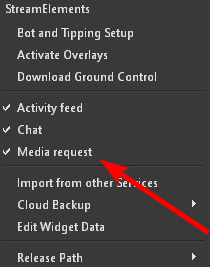
also how do you re add media request dock?
 shy mountain
Streamelements on top -> media request
as for the audio - its playing via the default device that OBS uses to play alerts for you
rugged quail
hey there 🙂 i'm not sure if this is the right helpdesk for it since i didn't saw anything else... my problem is that i can't activate any tipping options exept paypal on my tipping screen... maybe anyone can tell me why?
steel bladeBOT
@rugged quail SE.PAY is available for streamers who are atleast 18 years old, with bank account under their name in one of the following countries and have at least 101 Follower (Twitch) / 101 Subscribers (Youtube):
Austria, Belgium, Czech Republic, Denmark, Finland, France, Germany, Ireland , Italy, Netherlands, Poland, Portugal, Slovakia, Spain, Sweden, Switzerland, United Kingdom, United States.
If you meet these criteria and don’t see SE.Pay, let us know.
For information on SE.Pay payment methods, their fees, and settlement times see https://streamelements.com/dashboard/tipping/fees.
 toxic fern
In your case it's a matter of not enough followers.
rugged quail
do i need both, followers on twitch AND subs on yt?
shy mountain
No
rugged quail
so then i'm confused now 😂 i have 500+ subs on youtube.. where can i add my bank account?
 wintry kiln
Bot timers - what are the recommended settings for these as I currently have 3 to work on
Interval online - 20 mins
Interval offline - 30 mins
Chat lines - 10 lines
 ivory portal
hello , it happen again the overlays it not loading and i did the (enable browser source hardware acceleration) like you told me before
karmic grotto
open your overlay web-source preferences
check if resolution
is set to 1920
and 1080
also try reload cache
karmic grotto
does your overlay preview is working?
ivory portal
am gonna restart every thing and re install it
i cant go to the stream elements web site its not loading
 stiff canopy
yo guys, any1 know why my bitrate is dramaticly dropping to 3-4k while streaming (i have 5k) my upload is 13mb/s
karmic grotto
thats why then @ivory portal you are with routing problems with SE website
probably because of your ISP
ivory portal
thank you for the help guys let me see whats gonna happen and let you know
@karmic grotto thank you man
karmic grotto
yo guys, any1 know why my bitrate is dramaticly dropping to 3-4k while streaming (i have 5k) my upload is 13mb/s
@stiff canopy did u done the auto config of OBS?
stiff canopy
yea
karmic grotto
and u didn't chenged the bitrate?
are u using the default one from auto?
and by "dropping" u are having lagging issues or u are just asking why is it dropping?
stiff canopy
its only dropping and stream is lagging (i have normal piong in games)
steel bladeBOT
@stiff canopy Dropped frames / disconnecting? Follow the troubleshooting steps at: https://obsproject.com/wiki/Dropped-Frames-and-General-Connection-Issues
stiff canopy
after auto config is 6k bitrate but i changed it to 5k
karmic grotto
follow the troubleS steps and if still have issues come back here
stiff canopy
okay ty
 terse skiff
hi can you use streamlabs obs with streamelements or does it have to be obs live
 tender python
if you use SLOBS
and want SE overlays and what not, they're just browser sources
they dont bite each other.
 stiff crater
Anyone had any issues with their media request?
 pulsar oracle
Mine is currently working fine, what appears to be the issue?
stiff crater
My playlist wont show up, when it playing in my obs.live it echos. Not sure if im just using it wrong or its just not working
steel bladeBOT
@stiff crater Make sure to ☑️ “Shutdown source when not visible” for all browser sources (all OBS scenes). If using studio mode, uncheck “Swap Preview/Output scenes After Transitioning.” Also keep in mind that sound can play from any overlay loaded in the browser (editor or launched). https://i.imgur.com/6bWXxjR.png https://i.imgur.com/yY0wcFl.png
 stiff crater
What about the media request queue?
pulsar oracle
Check the Queue moderation settings and the main settings.
maybe you set the queue limit too low
stiff crater
So you can only have 1 playlist going at a time right? which would be your backup list. So i have to put every youtube video in 1 at a time?
stiff crater
Ok thank you
pulsar oracle
yea I am not able to put in entire playlists
stiff crater
ok so 1 at a time
pulsar oracle
Pretty much, unless i find some information that proves otherwise
stiff crater
Ok makes sense I guess
pulsar oracle
Aight so the only way to have a full playlist is through the backup playlist
And to access that full playlist just play a random vid then skip it
stiff crater
Ahhhh so so my backup is the playlist, but everything front of that i drop in 1 at a time
pulsar oracle
Yep that's correct
I guess it makes sense since you don't want viewers to request hour long playlists
stiff crater
Right! However I not able to see the full playlist list, its only showing me 5 songs and i know its more then that
pulsar oracle
Does it show the 5 songs in the playing queue? or is just that if you keep skipping it will cycle through the same 5 songs?
 fervent orbit
Hello, would anyone happen to know why, in my stream, there is no sound for the music that my followers have requested? It pulls up the music in chat and everything...
stiff crater
Shows them in the queue
pulsar oracle
Check if you have a max limit for the amount in the queue
that might be your issue
@fervent orbit It may be the playback device the media share is playing to is not correct. If it is, check if you have muted the videos or if the video volume has been set to low or muted.
fervent orbit
No, at the moment, the music volume is set to max...@pulsar oracle
I'm not sure if its some plug in that I have to add to sources or what
pulsar oracle
Check the media request settings in the overlay, maybe that might reveal your issue
fervent orbit
Yea, that is where I get lost. I had a fellow streamer help me set up overlays & stuff but I have been trying to figure the rest out without having to tie him up anymore than I already have. 🙄
Ok, back to pulling my hair out, while trying to figure this out on my own. Hopefully I don't mess anything else up...🙄
 hazy kestrel
I'm still having an issue with OBS.Live the chat still will not connect to my branded account just logs into my personal one. the activity feed and the when I tell it to go live connects just the chat loads as my personal account. I have tried logging out and back in but with the same results. Does anyone have any other suggestions. Thanks.
 ripe pond
hazy kestrel
ripe pond
hazy kestrel
@mighty gatelOrep Have you gone to https://streamelements.com/ logged into your streaming account and actived the bot?

StreamElements
StreamElements is the leading platform for live streamers on Twitch and Youtube. StreamElements includes Overlay management, ChatBot, Tipping, Alerts & Loyalty
 late furnace
@hazy kestrel we got it fixed for him . Thank you!
hazy kestrel
@late furnace No problem just trying to help do you have any help for me?
late furnace
No No Thank you for helping. That was just incase he replies to ya
what seems to be the problem?
ah i see
i got you
steel bladeBOT
@hazy kestrel Streamelements on top of OBS -> Logout -> login
late furnace
try that
hazy kestrel
@late furnace Yes I've done that same result. Sorry to say.
steel bladeBOT
@hazy kestrel If you are not seeing the OBS Twitch integrations and have OBS.Live installed, please follow these steps:
- Make sure you are on the latest and greatest version of OBS.Live
- exit OBS (make sure OBS is not running)
- delete %appdata%\obs-studio\plugin_config\obs-browser\obs_profile_cookies
- start OBS.Live
- Settings -> Stream -> disconnect -> connect
late furnace
try that
hazy kestrel
@late furnace The file obs_profile_cookies doesn't exist. There is a file called Cookies and Cookies-journal in that directory.
late furnace
hmm weird you should have that folder within the app data
uninstall the obs.live and reinstall it
hazy kestrel
@late furnace thanks I'll try that.
late furnace

 late furnace

hazy kestrel
@late furnace Ok I uninstalled obs.live and rebooted and reinstalled OBS.live. I checked and it does the same thing when I go live the chat is in my personal account. Here is a interesting thing. when I launched OBS again after the reinstall it came back up with my account already logged in. It didn't make me log in again.
 rain estuary
Does someone know how i can fix that? It shows up every time I want to edit my Alerts or my Chatbox directly in OBS.
hazy kestrel
@late furnace No sorry it still doesn't exist. even after the reinstall. I have searched the hard drive for that folder and it doesn't exist anywhere.
steel bladeBOT
@rain estuary Please logout of StreamElements at https://streamelements.com/logout and then login again to your account (Twitch/Youtube/Facebook/Mixer)
late furnace
@hazy kestrel i have forward your problem over to my streamelements ppl and see whats going on they will ping you or dm when available for i have ran out if ideas since we have done all
rain estuary
@steel blade still have the issue
 vague spindle
where can I find the URL of the videos and sounds I upload so I can drop it into the JS of widgets - Thanks in advance
hazy kestrel
@late furnace Thanks for doing that. I look forward to seeing what the solution is. Thanks also for all your help.
late furnace
Welcme just dont know why the cache is gone and the streamelements obs.live is only pulling one profile which you should be able to use any within it
rain estuary
I got it
 gritty fog
My streamelements obs is crashing after I starte my Live stream
And when I mirror my phone for stream
It is lagging between the mirror software and obs
 sand flame
i am confusion
havnt use it in acouple months.Confused why the media stuff isnt there for me :3
steel bladeBOT
@sand flame Streamelements on top of OBS -> Logout -> login
 tribal current
I have a template from own3d and am trying to setup using stream elements but when I try to put the widgets on for latest follower etc and I try to move it near the place designated on the template the item disappears. It is fine until I get down around the 970px mark. How do I get the name over the correct spot on the template?
 ruby jasper
how do i add twitch chat to my obs using stream elements?
toxic fern
Add it how?
last flower
@ruby jasper to your overlay or on your OBS docks itself?
 severe gate
Will OBS live work on a windows 7 with a GeForce GE9800 graphics card?
last flower
Probably 
 wary dew
OBS.Live will work, but will you be able to stream with that pc? that is the real question
tribal current
Does the overlay editing tool not work if using an own3d template?
 light agate
I need some help. My OBS Live wont use my bot account. Its logged into the account but it still uses streamelments bot in my chat. I have the dono panel link in twitch. Is there a way to log out of the bot account in OBS because It wont let me disconnect it to reconnect it
 shrewd hawk
I added the stream ending credit roll and it is not showing my new follwers on the roll. It is checked off in the settings. Not sure if it is a width and height setting. The title and message roll.
karmic grotto
Does the overlay editing tool not work if using an own3d template?
@tribal current probably not?
wary dew
Does the overlay editing tool not work if using an own3d template?
@tribal current if the overlay is in the editor it should work
if it gets cut out like you said there might be an issue with the resolution of the overlay
make sure it's set to 1920x1080
karmic grotto
it may apper in the editor but i think u will not be able to edit it at all
hmm
@wary dew how to change bot name
ok nvm
i just remembered where it is
I need some help. My OBS Live wont use my bot account. Its logged into the account but it still uses streamelments bot in my chat. I have the dono panel link in twitch. Is there a way to log out of the bot account in OBS because It wont let me disconnect it to reconnect it
@light agate hey in activity feed click the three lines button and go into "stream settings"
there is the custom bot name
light agate
@karmic grotto are you talking about in Ground Control or in OBS Live?
karmic grotto
OBSlive
there is a window called activty feed that has a three line button in top left corner
when u click it it will show the stream settings and after clicking it u can see custom bot name
karmic grotto
thats probably because i said the window name is activity feed not twitch activity feed XD, u don't have it?
light agate
hummm, no i dont see that at all
light agate
oh snap,,,,no it wasnt marked. let me check it now
karmic grotto
XD
tribal current
So if I want to use an own3d template I have to use streamlabs?
light agate
hmm, i am connecting my bot, and auth it and click on SAVE but it wont let me send a test message and it doesnt fully connect. I tested it on the streamelments bot and my own account for bot messages and it works but wont let me use my custom named bot account. @karmic grotto
wary dew
So if I want to use an own3d template I have to use streamlabs?
@tribal current no unless they specifically say it's not for StreamElements
best to ask them about your specific package
 proven shoal
Hello, I try to use the the social media rotator made by @bold trench and I would like to add a loop cooldown time of 10 min or so, can someone explain to me how to do it ?
steel bladeBOT
@earnest coral Currently renaming the bot fully works with OBS.Live.
You can follow this video guide to set it up: https://discordapp.com/channels/141203863863558144/494513233416421386/561516184718278676
If you don't want to use OBS.Live and want to stick with Ground Control, please let us know your Twitch username.
 earnest coral
Found it. Thank you Mr. Bot man
rugged quail
Hey, how do i change my sub alert so that instead of saying "[name] just subscribed!" it says something else?
karmic grotto
@rugged quail hey u can do this in streamelements dashboard
look from bot section and go into the Modules
the first option will be chat alerts
light agate
when I choose to set a custom bot name it allows me to save but I can not send a test message and it doesnt actually connect it I think. If I choose my own account as abot or streamelements bot it works perfectly. Please help
karmic grotto
did u clicked in connect custom bot account?
after setting the bot name u have to actualy login with the created bot account
light agate
yes and i choose to auth it as well
karmic grotto
look if the account is now added into the list
dropdown
u can use the send test message to checkout if it worked or not!
karmic grotto
then repeat the steps like auth etc etc use the send test message
check if it worked
then click SAVE
if something goes wrong in these steps come back here and report 🙂
light agate
i click custom bot account, it asks me to log into my custom bot account so i put in the pass word and username, it asks me for the autho code so I put that in as well and click authorize. I come bk to the page where I can save it, but the "send test message" stays greyed out. If I do this using my own account or streamelements account it works. it for some reason wont let me use my own custom bot.
my bot account works, i am logged into twitch with it, it is also modded on my channel
karmic grotto
sure, just wait for a real support tho, that looks like a system bug maybe, u could try logout and login again in OBSlive in streamelements menu
looks like doing this solve a lot of issues
light agate
a few months ago this worked for me but I was using Ground Control and its since been removed from there and now you have to do it in obs live. I have never been able to get it to work since then. Im wondering if its bugged in some way?
 plain sonnet
do you still have ground control?
light agate
yes i still have ground control
plain sonnet
and is Missandeibot the custom bot name you want to use?
light agate
yes it is
plain sonnet
ok, i will see if staff is around to enable GC
light agate
ok ty
plain sonnet
@light agate GC has been enabled for you, restart obs and open ground control, you should be able to set your bot them in there
rugged quail
@rugged quail hey u can do this in streamelements dashboard
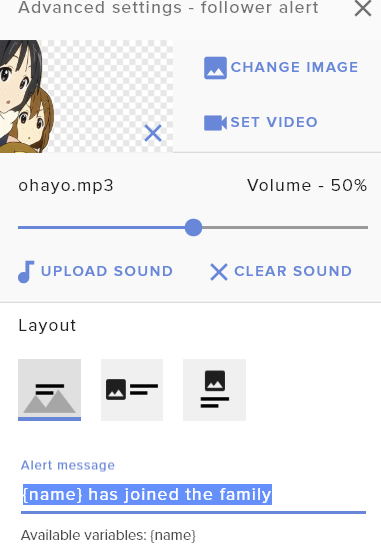
@karmic grotto thats only for chat. I meant the alert when it comes up on stream
last flower
@rugged quail in your overlay editor in the alertbox settings
https://i.imgur.com/wbDNxRn.png
Highlighted mine for example
 rugged quail
ty!
last flower

light agate
@plain sonnet thank you so much for that help. It works perfectly now. much appreciated
plain sonnet
awesome 
 grand bison
steel bladeBOT
grand bison
steel bladeBOT
@grand bison To add your overlays to OBS, add a new browser source in your scene. Paste your overlay URL in the browser source properties, set the dimensions to 1920x1080 (unless you changed them on the website), and ☑ “Shutdown source when not visible” https://youtu.be/KDvLynUqXI4
 olive cypress
Hi there, I am having an issue capturing my laptops display (not a game but just my desktop) it shows up as grey in preview and black on the obs screen
steel bladeBOT
@olive cypress Due to the way laptops are designed, your system must be configured to run OBS on a specific GPU, depending on the type of capture you are trying to do.
For Game Capture and Window Capture (recommended), your system must be configured to run OBS on your laptop’s high performance GPU (default); for Display Capture, your system must be configured to run OBS on your laptop’s power saving GPU (iGPU).
If you are running Windows 10 1903 or newer, use this guide for instructions on how to configure your system: https://github.com/obsproject/obs-studio/wiki/Laptop-GPU-Selection-Windows-10
For instructions on configuring an older version of Windows (you should consider upgrading), use this guide: https://obsproject.com/wiki/Laptop-Troubleshooting
 obtuse horizon
Is there a way i can set my stinger transition to specific transitions? like i have a starting soon scene then after that i have an intro that is played and when it switches to the intro it does the stinger and i would like it not to. the rest of my scenes the stinger transition can be there/
obtuse horizon
thank you
fervent orbit
Can anyone tell any possibilities as to why no one can hear music, not even me, from my playlist or viewer song requests? (in dumb person form,if possible😆)
 desert plover
I'm making Alerts for resubs and it's playing 2 sounds! I've cleared all the sounds, I've deleted the resub variation and tried emulating it and it still played 2 sounds. The second sound isn't on ANYTHING except 1 other Alert. I don't understand why it's not clearing the sound and recognizing there's a new sound. Someone Please Help. UPDATE: I've Redone Every Variation Manually and they work when you play them, but as soon as I try and emulate it, it has 2 sounds. I can't just delete and redo the actual Subscriber Alert and it's a lot of work to need to redo all my Alerts so there has to be a way to force it to realize that it shouldn't be using that sound.
 neat tulip
i accidently closed the media request tab on my stream elements obs live, does anyone know how i can get it back?
neat tulip
sorry can you explain how you got there, this is my first day on stream elements
@honest echo
 honest echo
@neat tulip Menu on the top
neat tulip
i feel stupid, lol thank you! @honest echo
 waxen oriole
Boa noite. Eu configurei todo meu alertbox simples...Eu tento fazer uma emulacao para ele..e so aparece esta mensagem: Emulação enviada, mas alertas são pausados no feed de atividades ou Emulation sent, but alerts are paused in the activity feed
[21:26]
O que eu tenho que fazer?
[21:27]
E qual opcão para colocar o total de pessoas ao vivo no momento?
Good evening. I configured all my simple alertbox ... I try to make an emulation for him ... and only this message appears: Emulation sent, but alerts are paused in the activity feed or Emulation sent, but alerts are paused in the activity feed
What I have to do?
And which option to put the total number of people live at the moment?
fervent orbit
No help? Thats upsetting, especially when I was directed here from the site for help. 🙄
honest echo
@fervent orbit i miss you question, sorry
fervent orbit
Can anyone tell any possibilities as to why no one can hear music, not even me, from my playlist or viewer song requests? (in dumb person form,if possible)
honest echo
@fervent orbit actually what dez said, did you check your output devices?
teal shale
^
honest echo
Obs > Settings
teal shale
Disable all of those and only make specific output and input
fervent orbit
I can, but I am not sure what they should be set to because, knowing my luck, I'll end up messing something else up...
 haughty stream
I am having trouble with StreamElements OBS... Everytime I stream, I'm dropping frames like crazy which makes my stream laggy. I have my video output at 1280x720 at 60 fps and I'm using the NVENC encoder. My video bitrate is at 3000 KBPS and my audio is at 160. The games that mainly causes issues with StreamElements OBS are WarZone, Minecraft, and Minecraft Dungeons
steel bladeBOT
@haughty stream Please provide a log from your last stream. To do this, in OBS go to Help > Log Files > Upload Last Log File and paste the link to the log file here.
teal shale
^
haughty stream
teal shale
@haughty stream redo It again
also you have multiple instances of obs running
I suggest ending all running
and open it again
fervent orbit
@teal shale Ok, thanks. I will attempt this. I'm an idiot when it comes to this stuff. I had a fellow streamer spend hours helping me get this far. I am just trying to figure things out without bothering him anymore.
teal shale
It's ok, this channel is for helping people 😄
honest echo
@haughty stream check this link : https://obsproject.com/analyzer/?url=https://obsproject.com/logs/QljBn363csG8e-U3
teal shale
^
also most of the solutions are there I think
If it's still laggy I suggest disabling preview or lowering bitrate
 dim moss
how do i know if im streaming on twitch
teal shale
@dim moss stream key or connecting your twitch to obs
waxen oriole
Good evening. I configured all my simple alertbox ... I try to make an emulation for him ... and only this message appears: Emulation sent, but alerts are paused in the activity feed or Emulation sent, but alerts are paused in the activity feed
What I have to do?
And which option to put the total number of people live at the moment?
 fiery parrot
none of my alerts are working period
i have the nerdordie synthwave overlay package, everything else is working but my alerts are not popping when i am live
honest echo
@fiery parrot you are the second person with that package with the problem, try to reach out NoD so they can take a look on those alerts please
fiery parrot
alright, i was wondering if it was an issue with y'all or them.
rugged quail
Hello, is there a way to split the media request audio in obs live so i can have differing audio for my headphones vs what stream hears for the music?
shy mountain
The MR dock uses the default OBS output which should be the desktop audio or your default device
rugged quail
So there's no way to separate it from my desktop audio into its own audio source?
last flower
no official way
shy mountain
Oh someone found a way
steel bladeBOT
@rugged quail How to separate media request (MR) audio in OBS:
(Please follow one of the steps for your set up)
MUTE MR FOR YOURSELF, STREAM CAN HEAR
• Make a new overlay in the editor, ONLY add the media request widget,
• Add a new browser source in OBS, add the URL and set the dimensions correctly,
• Tick the box for "Control audio via OBS"
https://cdn.discordapp.com/attachments/712428275049431120/716618713998033047/unknown.png
• Go to Edit > Advanced Audio , set your MR overlay to "Monitor Off"
NOTE: This will play through the Desktop Audio, if you mute your desktop audio, it will mute the MR.
CONTROL AUDIO SEPARATELY FROM YOU AND STREAM
• For this you will need a VAC (use command !vac),
• Run your MR either in Chrome or in Ground Control (use command !gc),
DO NOT CLICK "SHOW ON STREAM"
• Set Chrome or GC in the VAC as an audio input and output,
• Add the audio output from VAC as an audio input in OBS,
NOTE: this will not be able to show the video in OBS
It is currently not possible to separate audio for yourself and stream if you ALSO want to show the video in OBS.
The only way to do this would be to follow the last set of instructions above and then use Window Capture on GC or Chrome.
Thank you 
rugged quail
Thank you so much everyone 😄
 snow cedar
Hey, I am trying to figure out why the countdown timer isn't working on streamelements overlay
shy mountain
On the widget settings -> message field -> add {hours}:{minutes}:{seconds}
 vestal lotus
Hi everyone, do u know id exist an obs live version compatible with mac?
shy mountain
No ETA on Mac support
vestal lotus
Thanks a lot
 sleek belfry
I updated windows yesterday and once i try to started OBS, the computer(windows) show a blue display telling me that therse a proble with this program, charge a 100% count, and force me to restart the computer manually...anyone know something about this?anyone have this kind of problem, do i have to change windows to the last one?
steel bladeBOT
@sleek belfry For the best OBS support, please join their Official Discord @ discord.gg/obsproject
sleek belfry
Thank's!!
 void iron
Hey, so I'm not sure where to ask about this, but I'm just getting setup in OBS with the OBS.Live plugin. When I'm using a select couple browser sources that are hosted through StreamElements, I occasionally seem to get a grey background that changes how the scene looks. I'm not entirely sure what's going on as the only thing that I found to fix the issue is resetting that pages cache, then it goes back to normal. I'd appreciate any help.
shy mountain
Can you show the issue happening?
void iron
The first is how it looks prior to the issue occurring, the bottom has a grey background on 2 different video elements in the overlay
https://media.discordapp.net/attachments/717055546880163850/717192425818423396/unknown.png
https://media.discordapp.net/attachments/717055546880163850/717192895119097916/unknown.png

 shy mountain
I was more looking for a clip or video
void iron
Oh, that I don't. I've never seen it get the grey background, it seems to happen randomly when switching scenes. I have no reliable way of reproduction
I'm not sure if it helps at all, but the two different videos are the entire background, and the "STREAM ENDING" text, and the issue happens to them independently
steel bladeBOT
@void iron Please provide your account ID found at the top of this page: https://streamelements.com/dashboard/account/channels This ID is public info and safe to share here.
void iron
5ed507cc5354ae7739440ede
 crisp marten
Literally in the middle of a stream, this happened.
steel bladeBOT
@crisp marten Streamelements on top of OBS -> Logout -> login
crisp marten
Can't login mate. doesn't do anything.
shy mountain
I'm positive if you do the steps, its going to be fixed.
crisp marten
I cannot log in.
shy mountain
Did you click on "Streamelements" on top?
crisp marten
Yes mate. Believe me. I did.
Because I already logged out and it won't let me log back in.
shy mountain
And then clicked on "login with twitch" and you see the white screen?
steel bladeBOT
@crisp marten If you are not seeing the OBS Twitch integrations and have OBS.Live installed, please follow these steps:
- Make sure you are on the latest and greatest version of OBS.Live
- exit OBS (make sure OBS is not running)
- delete %appdata%\obs-studio\plugin_config\obs-browser\obs_profile_cookies
- start OBS.Live
- Settings -> Stream -> disconnect -> connect
shy mountain
@void iron which overlays?
void iron
GLITCH SCENE - BRB - NOD
GLITCH SCENE - ENDING - NOD
GLITCH SCENE - STARTING - NOD
Just checked these as well and it happens.
GLITCH SCENE - INTERMISSION 1 - NOD
GLITCH SCENE - INTERMISSION 2 - NOD
shy mountain
getting a white window suggest a cookie issue
do the steps again
or reinstall OBS and then clear the cookies again
@void iron so you are seeing the issue directly in OBS right now when switcing with the listed overlays?
crisp marten
Reinstall my entire OBS? I don't have a recent cloud backup of my recent configs. I was in the middle of a stream, this shouldn't be happening.
toxic fern
@crisp marten Scene Collections and Profiles up top. Hit export and save on both.
shy mountain
when uninstalling OBS, there is an option to NOT delete the scenes and sources
@void iron I know what is happening and its a bit of a weird thing.
you are getting basically this right?
crisp marten
There was 100% no option as I am uninstalling now. Only option was a rebooot.
void iron
Yes, exactly that
shy mountain
that is most likely obs.live uninstaller
void iron
crisp marten
I am telling you, I just uninstalled the OBS client.
void iron
And if you reset the cache, it goes back to normal
shy mountain
@void iron This is a weird thing as I don't really know how to fix, but i've seen it with NOD packages. The moving background is basically a transparent moving line - when you are not looking at the overlay or have it active it sorta...bakes it self the more it loops. Like as if you are looking at the sun without protection for like 30 seconds and then look away and you see a bright spot for like a few minutes
The only way i can think of fixing this is right click on teh browser source -> properties -> shutdown when inactive
but in doing so you will have to use studio mode to preload the scene and then switch to it
void iron
Hmm alright, wasn't sure if there'd be a fix that would work better than doing that mid stream because it can take a second to display
Ah yeah. Maybe I can setup some type of bind with the streamdeck for that
Thank you
toxic fern
@crisp marten https://streamable.com/nrnsgc
 stiff crater
Anyone using a stream deck?
crisp marten
My favorite moment is when OBS crashes before I can back anything up.
stiff crater
??
 real otter
hey guys, what is the stream service i use for obs live using streamlabs?
plain sonnet
huh?
real otter
in obs live, it asks for a service above the stream key. What do i select for the streamlabs service?
plain sonnet
if you are using streamlabs you need to ask them
real otter
thats why im here bud
plain sonnet
this is stream elements bud
real otter
im using stream elements my bad
plain sonnet
you need to ask stream labs
real otter
nah, i meant stream elements my bad
plain sonnet
service is whatever platform you stream to
real otter
but i want to stream to multiple services at once. i have restream now but thats not working. Can i stream to multiple services just through stream elements?
stiff crater
You guys use a stream deck?
real otter
no
plain sonnet
restream have their own service you can connect with your account
obs currently doesnt have multiteam built in, but a plugin is available
real otter
ok thx
rugged quail
hey guys, when i try to game capture valorant it doesn't seem to work and just shows a black screen with a red dot on the upper left corner
plain sonnet
if you right click on the capture properties do you see the game?
rugged quail
no, normally i dont for other games but it still works
teal shale
check if you're using your cpu
rugged quail
how?
steel bladeBOT
@rugged quail 1) Restart OBS
2) Start your stream/recording for about 30 seconds. Make sure you replicate any issues as best you can, which means having any games/apps open and captured, etc.
3) Stop your stream/recording.
4) Select Help > Log Files > Upload Current Log File. Copy the URL and paste the link here.
(Note: If you do not see an obsproject.com URL, you will need to update OBS Studio to version 22+)
teal shale
set it to max performance via graphic settings in windows settings
also set it to your graphics card in your nvidia settings
rugged quail
wouldn't that affect my game performance?
plain sonnet
please do the clean log so we can see what obs is doing
rugged quail
oh wait i think i have to run as administrator, i remember having an issue like this last time
rugged quail
yep, just had to run as admin
knew it
sorry for causing you trouble guys
my bad
teal shale
it's ok dude, It's the helpdesk 😄
teal shale
yeah If you're doing game cap then yeah you should
If you're using nvidia then it has it's own encoder so there's not much in the way of performance drops
rugged quail
in my windows settings right?
teal shale
yep
rugged quail
where in my windows settings do i look for the graphic settings
teal shale
bottom part of display settings
rugged quail
i see variable refresh rate and graphics performance preference dez
teal shale
pic?
rugged quail
two options are classic app and universal app
and then an off and on option for optimising games for variable refresh rate
teal shale
@quiet folio what's the message?
 quiet folio
Announcer79 is now live! Streaming Fortnite: Practicing
rugged quail
quiet folio
it says my name then game and title
teal shale
@rugged quail browse and select obs
@quiet folio it's a setting you can turn off in the chatbot settings
it's in the site I think
teal shale
yw
rugged quail
i found a file called "obs64" is that it?
teal shale
yep
teal shale
yep
teal shale
I think but I recommend using your graphics card when encoding
teal shale
oh yeah It's set to it on both ends
rugged quail
that bad?
teal shale
actually I think you can leave it like that since it's the same card on both ends
teal shale
yep
teal shale
yw
quiet folio
how do i make my stream quality better?
wary dew
what bitrate have you set?
steel bladeBOT
@quiet folio Please provide a log from your last stream. To do this, in OBS go to Help > Log Files > Upload Last Log File and paste the link to the log file here.
quiet folio
2500KB
wary dew
and also: run OBS in administrator mode, always
teal shale
^ yep that's the #1 rule when you start out
 lean steppe
is there a way to test the alerts
i want to make sure my alerts from tiltify show up on stream
steel bladeBOT
@lean steppe You can test Alerts via the Emulate bell on the lower left side of the Overlay Editor. Simply go to your Dashboard -> My Overlays -> Pencil/edit button on the overlay. Make sure the "Preview LIVE on stream" option is on to see the alert in OBS/Xsplit https://streamable.com/vtulg9
 lean steppe
how do i link my charity donations to my alerts then
steel bladeBOT
@lean steppe Check out this video guide to learn about the StreamElements overlay editor: https://www.youtube.com/watch?v=LwAfMIR3Cj0&list=PLCDDKlFdScbEwdx5AntcQIS1InkFJwHtv

We recently updated our Overlays, check out new video guide: https://youtu.be/X5VzXjqAsjk
StreamElements Overlays are loaded from a single browser source in your streaming software, making streaming easy. https://streamelements.com/
StreamElements overlay editor enables...
 kindred talon
when i try to capture game footage nothing shows up and when i click on the source its red at the top left as if the windows offscreen?
 lilac ocean
Try dragging it down or check the dimensions
teal shale
run obs as admin by default @kindred talon
kindred talon
is that different than just right clicking it and running as admin?
if not thats not the problem
teal shale
actually no but still do it
teal shale
send your log
Please provide a log from your last stream. To do this, in OBS go to Help > Log Files > Upload Last Log File and paste the link to the log file here.
@kindred talon
kindred talon
teal shale
are you using a laptop?
lilac ocean
here ya go @kindred talon https://obsproject.com/analyzer/?url=https%3A%2F%2Fobsproject.com%2Flogs%2Fxw3rMHuJh8hOdz4u
steel bladeBOT
@kindred talon 1) Restart OBS
2) Start your stream/recording for about 30 seconds. Make sure you replicate any issues as best you can, which means having any games/apps open and captured, etc.
3) Stop your stream/recording.
4) Select Help > Log Files > Upload Current Log File. Copy the URL and paste the link here.
(Note: If you do not see an obsproject.com URL, you will need to update OBS Studio to version 22+)
teal shale
@kindred talon also remove your dsiplay cap
kindred talon
alright
lilac ocean
but you do indeed need to check the interference
kindred talon
there was none because i just used screen capture, but game capture looks better soo
plain sonnet
if you right click on the capture source, do you see the game in the preview?
kindred talon
no
teal shale
also update obs
kindred talon
I'll try updating
i cant update because it says that a game capture is in use?
but i dont have a game capture on
plain sonnet
make sure obs is fully closed down in task manager
teal shale
^
kindred talon
but how do i check for updates then?
plain sonnet
download it from here https://obsproject.com/download
 hexed mason
I don't know if this is the right room, but is the ability to change the bot name still available? I cannot for the life of me figure it out.
steel bladeBOT
@hexed mason Currently renaming the bot fully works with OBS.Live.
You can follow this video guide to set it up: https://discordapp.com/channels/141203863863558144/494513233416421386/561516184718278676
If you don't want to use OBS.Live and want to stick with Ground Control, please let us know your Twitch username.
hexed mason
I don't have the icon in my activity feed on OBSLive to access the settings. Thats where Im lost.
steel bladeBOT
@kindred talon 1) Restart OBS
2) Start your stream/recording for about 30 seconds. Make sure you replicate any issues as best you can, which means having any games/apps open and captured, etc.
3) Stop your stream/recording.
4) Select Help > Log Files > Upload Current Log File. Copy the URL and paste the link here.
(Note: If you do not see an obsproject.com URL, you will need to update OBS Studio to version 22+)
kindred talon
plain sonnet
ahhhh, youre running vulkan
no idea why i didnt see that first time
try window capture and set it for doom
plain sonnet
can you see the game in the capture window properties?
kindred talon
wait i restared obs and now i do?
strange..
alright it works now, thanks for the help!
plain sonnet
awesome
hexed mason
How do I get the icon in the activity feed to appear for the settings? I just uninstalled and reinstalled OBS live and its still not there.
 reef spire
Where is the widget that allows viewers to see media for media request?
 snow wolf
When I run giveaways on my stream normally a little graphic would show in the bottom left and would say how many people have entered and what the prize is.
It won't show up for me anymore. Does anyone know how to fix this?
 eternal orbit
why do the streamelements overlays only give a quarter of the window when activated?
I have to import streamlabs overlays just for use of an overlay and this put them ahead of the curve for overlay function abilities.
last flower
@hexed mason it'll be the sandwich-looking 3 bars in the top left of the dock. If it's not there, try widening the dock or undocking it
@reef spire https://i.imgur.com/d11jooD.png
top of OBS.live
hexed mason
@last flower I have undocked and pretty much fullscreen'd the box and theres still nothing.
last flower
can I see a screenshot?
hexed mason
last flower
Interesting
https://i.imgur.com/V1yWJtC.png
Mine's there 

try hitting that reload arrow in the top left
last flower
Gonna poke @wary dew here too 
hexed mason
Yeah
steel bladeBOT
@hexed mason Streamelements on top of OBS -> Logout -> login
hexed mason
Ok, Logged out and back in and still not there.
Oh, it wouldn't matter that its Mixer does it?
obtuse horizon
So I need some help with the media request functions. It seems bugged for some reason.
karmic grotto
high CPU usage with only one loaded overlay?
steel bladeBOT
@karmic grotto Please provide a log from your last stream. To do this, in OBS go to Help > Log Files > Upload Last Log File and paste the link to the log file here.
steel bladeBOT
@karmic grotto OBS -> settings -> advanced -> scroll down -> enable/disable hardware accel.
https://i.imgur.com/ggMe9ZE.png
 tulip hamlet
Pleas follow the bot instructions above.
karmic grotto
i did lol
tulip hamlet
You did not. Disable Hardware Acceleration.
karmic grotto
last flower
Did you save
plain sonnet
you know logs are session based right?
last flower
Restart OBS 
wary dew
he has a point there 
karmic grotto
i already restarted OBs and that second link i sent is after disabling
disabling it (also restarted after of course)
last flower
Restart your life 
last flower
Lmao ok I'm done
karmic grotto
but lets not talk about how i tried suicide 3 times XD
any clue guys?
so i restarted again
honest echo
karmic grotto
last part? i mean i get the problem without starting live or recording, so i think there will be anything different doing this?
with overlay unhidden
after hidding it
honest echo
did you open your OBs with admin rights?
 spare kernel
Hello, When i log in with my youtube account the chat on OBSLive is logged in as my Youtube account and not as per the Account that i am Streaming (Brand Account) is there any way the Chat to be the Brand account on OBSLive ?
steel bladeBOT
@spare kernel Streamelements on top of OBS -> Logout -> login
spare kernel
so with the logout and relogin i will have permantly the brand account ?
karmic grotto
nope, its just relogging
honest echo
@karmic grotto i will depends on the amounts of things that you have on your overlay, you can also check if OBS is running with your GPU, if you have NVIDIA go to the NVIDIA Control Panel and then "Manage 3d settings" and "programs Settings" look for OBS and make sure that is running with your GPU
spare kernel
@karmic grotto what do you mean ?
karmic grotto
well i have a lot of things in my overlay, but idk what is the measure to compare, could u try my overlay and check if its heavy in yours system too?
 stuck mica
Don't want to interrupt - having issues importing over from SLoBS any suggestions? Tried the import from SE itself and nothing happened then I got the Chrome extension and it just says an error has occured
karmic grotto
@karmic grotto i will depends on the amounts of things that you have on your overlay, you can also check if OBS is running with your GPU, if you have NVIDIA go to the NVIDIA Control Panel and then "Manage 3d settings" and "programs Settings" look for OBS and make sure that is running with your GPU
@honest echo i can't belive nvidia put OBS into integrated graphics
it did relief'ed the cpu a little, but still "heavy" probably due to animated stuff as i read in the forums, can i ask again if u could try my overlay ?
rugged quail
Sooooo, apparently the NVENC encoders are supposed to better but my only options are x264 and H.264/AVC NVidia NVENC. (I run an Intel UHD Graphics 620 graphics card... On a laptop... Perfect for streaming, I know 🤷). Would someone drop into my DMs to explore these options with me, please? Looking to get the best quality stream with what I've got!
steel bladeBOT
@rugged quail There are no "best settings".
Please understand that every setup will be very different.
Any guides or videos that claim otherwise are misinforming. Your best option is to start with a base and adjust as necessary.
You can run the OBS auto-configuration tool. To use the auto-config, click on the Tools menu in OBS, select Auto-Configuration Wizard, and then just follow the on-screen directions.
You can use this tool to get baseline settings for your hardware and adjust as necessary from there.
Test, test, and test again. We are happy to offer suggestions for any issues you may be having afterwards, but not a list of settings.
Thank you
rugged quail
Awesome, thank you!
 novel swift
When I hit edit overlay though obs.live it shows this message:
Invalid authorization token```
It was working fine couple days ago@novel swift Streamelements on top of OBS -> Logout -> login
 empty sentinel
idk if its just me but currently my overlys are not displaying alerts, audio is fine video is not
steel bladeBOT
@empty sentinel To add your overlays to OBS, add a new browser source in your scene. Paste your overlay URL in the browser source properties, set the dimensions to 1920x1080 (unless you changed them on the website), and ☑ “Shutdown source when not visible” https://youtu.be/KDvLynUqXI4
 drifting bridge
I'm trying to figure out how to change the sound of my alerts
steel bladeBOT
@drifting bridge We've released our new Overlay Editor revamp. You can check out the changes and how to work with it here: https://youtu.be/X5VzXjqAsjk
Check out our blog post as well: https://blog.streamelements.com/streamelements-overlay-editor-just-got-even-better-c22cb5b4853e

We are thrilled to announce the launch of the remastered StreamElements Overlay editor!
https://p.strms.net/newoverlayyt
Why StreamElements Overlays are better?
😎 Simple: Load your entier setup using only 1 link
⚡ Fast: Cloud-powered Overlays arrive in real-time, say goodb...
 lime dock
I had posted over the weekend about slowness when on the overlays loading in over the weekend...they are still running about a second to two behind when I switch scenes...using OBS Studio with an iMac....
steel bladeBOT
@lime dock Check out this tutorial for OBS’ studio mode which allows you to preload scenes before transitioning. https://www.youtube.com/watch?v=W8iWsD2Lq3U
lime dock
Thanks!
bot lol.
Next question...which again, not sure if this is where it goes. I've been having issues with sounds attached to store redemptions and alerts to not skip. I actually left Streamlabs because of this issue...any thoughts on why they would be skipping? They don't skip during testing, in the online store or on the actual file.
tulip hamlet
Can you provide an example of this behavior?
lime dock
So I have a user who redeems the sound effect via the online store. They use the command !redeem kick and it's supposed to play a sound clip. The sound clip on the store front and actual file doesn't skip, but when it is played on my stream it does.
tulip hamlet
As in, a clip.
tulip hamlet
No, I mean, please provide a clip example of the behavior.
lime dock
I'm on stream right now....so I can't right now.
let me clip it really quick hang on.
Here @tulip hamlet https://clips.twitch.tv/RudeDeafOpossumUnSane
steel bladeBOT
@lime dock OBS -> settings -> advanced -> scroll down -> enable/disable hardware accel.
https://i.imgur.com/ggMe9ZE.png
lime dock
I don't have disable hardware acceleration as an option.
Not sure if it makes a difference since I'm on an iMac.
Or if it's located somewhere else.
I have Video > Recording > Stream Delay > Auto Reconnect > Network > Hotkeys. @tulip hamlet
tulip hamlet
Ah, yes, that's not an option on Mac.
So, to make sure.
It plays fine if you have the overlay launched in your browser?
lime dock
That is correct. It plays fine when I preview it via the browser and the emulation setting, the original sound files play correctly, and it plays correctly in my loyalty points store for SE.
Just when I am streaming.
steel bladeBOT
@lime dock For the best OBS support, please join their Official Discord @ discord.gg/obsproject
lime dock
Figured they wouldn't help much since it's not their software...but I'll ask.
lime dock
The browser source is streamelements though...
tulip hamlet
Doesn't matter.
lime dock
Okay sounds good. I'll let them know what you said.
tulip hamlet
If it's playing fine in the browser, but not in OBS, then it's an issue with OBS.
lime dock
Sounds good. Thanks for trying to troubleshoot with me.
shrewd hawk
I added the stream ending credit roll and it is not showing my new followers on the roll. It is checked off in the settings. Not sure if it is a width and height setting. The title and message roll only. In OBS under the url I set to 1920 by 1080.
tulip hamlet
@shrewd hawk Community created widgets are provided as is and their upkeep and management is up to you.
 lilac parcel
I'm using OBS.Live to try and change my Cloudbot name but it's not working. I did all of the steps but when I try to login, nothing comes up in the "current bot name" field. I posted this in #helpdesk-twitch but I thought since I'm using OBS.Live it would be better to put it here. The bot in #helpdesk-twitch said that changing bot names wasn't working for Ground Control but it said that it should be working just fine for OBS.Live users. For me it isn't working though and I'm unsure why. Thanks for any help you all can give me!
shrewd hawk
ok. Got it from streamelements website so thought it was from them. Thanks
 tardy marsh
Hello, How do I enable an overlay I donwloaded to show alerts?
steel bladeBOT
@tardy marsh To add your overlays to OBS, add a new browser source in your scene. Paste your overlay URL in the browser source properties, set the dimensions to 1920x1080 (unless you changed them on the website), and ☑ “Shutdown source when not visible” https://youtu.be/KDvLynUqXI4
last flower
@lilac parcel 2nd pinned message in this channel 
if that doesn't clarify, a screenshot might help :V
 chrome stag
i have a overlay that i want to put in obs but i cant find the lauch button i dont see it
steel bladeBOT
@chrome stag We've released our new Overlay Editor revamp. You can check out the changes and how to work with it here: https://youtu.be/X5VzXjqAsjk
Check out our blog post as well: https://blog.streamelements.com/streamelements-overlay-editor-just-got-even-better-c22cb5b4853e
We are thrilled to announce the launch of the remastered StreamElements Overlay editor!
https://p.strms.net/newoverlayyt
Why StreamElements Overlays are better?
😎 Simple: Load your entier setup using only 1 link
⚡ Fast: Cloud-powered Overlays arrive in real-time, say goodb...
 slim dock
any reason why kappagen doesn't show regular emotes ? emotesplosions work for me but when it's just regular emotes in chat it shows up like 1/15 times
 wise drift
when i get a new follower, the name does not show in the section on top of the page where it says "latest follower". how can i resolve this?
top left corner
 tidal frost
My chat isnt working within obs, Like it isnt connecting could someone help me please. thank you
steel bladeBOT
@tidal frost Streamelements on top of OBS -> Logout -> login
tidal frost
Thanks
 glass ore
I'm doing a giveaway through stream elements and for some reason the points that people earn while watching are not always accumulating.
stiff crater
My stream deck wont connect to my obs...any ideas?
steel bladeBOT
@stiff crater If you are having issues with Elgato hardware or software, we recommend reaching out to their support here: https://e.lga.to/help
lilac parcel
@last flower Yeah I know how to do it but when I login and hit Authorize the bot name doesn't show up in the drop down box.
honest echo
@lilac parcel try this :
 1) Right click on your OBS desktop shortcut -> properties - in the "Target" field add before .exe" ->  --remote-debugging-port=40404
2) Open OBS(or restart if it was open)
3) Open your browser and type in "localhost:40404"
4) Click on "StreamElements - Activity feed"
5) navigate to the Console tab
6) type in the console this: store.customBot.removeCustomBotIntegration() and hit enter
7) Try setting the custom bot name
8) remove the added addition of step 1
 red moss
My Follow Alerts and Donation Alerts aren't showing in OBS when I test them.
steel bladeBOT
@red moss OBS -> settings -> advanced -> scroll down -> enable/disable hardware accel.
https://i.imgur.com/ggMe9ZE.png
snow wolf
Does anyone know how to fix the little giveaway graphic that would come up when I would run one.
honest echo
what do you mean?
snow wolf
Let me find an old picture of what it used to look like
red moss
Disabled it. Didn't work. Renabled it. Still didn't work.
glass ore
I'm doing a giveaway through stream elements and for some reason the points that people earn while watching are not always accumulating, why is this happening? I havent had an issue before.
honest echo
@red moss do the alerts works on the web editor?
snow wolf
This little graphic would come up in the bottom right
It doesn't show up for me anymore
red moss
@honest echo Yes.
honest echo
@red moss check the dimension of the overlay
steel bladeBOT
@red moss To add your overlays to OBS, add a new browser source in your scene. Paste your overlay URL in the browser source properties, set the dimensions to 1920x1080 (unless you changed them on the website), and ☑ “Shutdown source when not visible” https://youtu.be/KDvLynUqXI4
lilac parcel
@honest echo it says that the path is invalid.
Correction: it says the name is invalid.
Here's what I get...
rugged quail
Everytime I add my FiveM to my game capture it shows up black and only on FiveM nothing else.
 twin solar
Is it only for PC?
steel bladeBOT
@rugged quail For the best OBS support, please join their Official Discord @ discord.gg/obsproject
shy mountain
@lilac parcel move the remote debug outside the quotes and add a space
@twin solar yes
 tough fog
Hi there, I am having an issue with making a custom dock for twitch quick actions. I used the following web link dashboard.twitch.tv/popout/u/YOUR_CHANNEL_NAME/stream-manager/quick-actions and changed the channel name to my own. It pops up great but after I entered in my information it pops up saying I do not have permission to view this window. I have deleted the dock multiple times and re entered it thinking maybe the two step verification didn't work properly, but now every time I enter in the dock it automatically blocks me out even with deleting it. Can anyone tell me what I am doing wrong?
late furnace
Run your OBS in admin mode
Then re add the custom URL to the docc
If Not Know how, Right clicc on you exe obs on desktop then select Admin
 spring peak
I need help
 full thunderBOT
Hi @spring peak, Please ask your question(s) or describe the problem you're looking to solve so staff or a support volunteer can assist you as soon as they are available.
tough fog
Unfortunately I ran as administrator and still no good 😦
late furnace
how are you signed in on obs? stream key or account?
 plain mason
Hi there, I am having an issue with making a custom dock for twitch quick actions. I used the following web link dashboard.twitch.tv/popout/u/YOUR_CHANNEL_NAME/stream-manager/quick-actions and changed the channel name to my own. It pops up great but after I entered in my information it pops up saying I do not have permission to view this window. I have deleted the dock multiple times and re entered it thinking maybe the two step verification didn't work properly, but now every time I enter in the dock it automatically blocks me out even with deleting it. Can anyone tell me what I am doing wrong?
@tough fog did you type the URLhttps://dashboard.twitch.tv/popout/u/YOUR_CHANNEL_NAME/stream-manager/quick-actionswith https?
tough fog
yeah, just tried the process again with the link text you provided just to make sure, run as admin. Still no.
is there a way to clear cache of that dock information? Because it doesnt even let me re sign in to twitch. It just automatically remembers the one time it denied it and just keeps popping up automatically denied
late furnace
how are you signed into obs? with a steamkey or your twitch account?
plain mason
@tough fog make sure you entered the correct profile at the URL
 plain mason
yes, here too... it's normal 🙂
shy mountain
late furnace
https plays no role when it comes to twitch
late furnace
can and will work on both its why i hence streamkey or twitch account
 late furnace
i was going to add my no https and https to show it does not matter
plain mason
xD
tough fog
Well my twitch wasnt connected as pictures in the settings above so I fixed that. Got the update stream information pop up so thought all was good. Closed that to add the dock with the link text above and same automatic access denied :/
shy mountain
Screenshot the link you've placed
shy mountain
and if you enter that link into your browser?
copy it into your browser and if it loads properly
grab the link from your browser and paste it into the dock link
tough fog
Hmmmmm It did not load prpoerly...
shy mountain
try and place your name as lowercase
late furnace
 Welcome
tough fog
slightly embarrassed it was that simple lol been trying to figure that out for days. even contacted twitch before you guys lol
late furnace
You're Fine We are here to help 
tough fog
whelp while I have ya lol accidentally closed my feed dock during that mess, where can I find that again?
late furnace
View > Docc > Twitch Quicc Action
tough fog
Found it!! Thank you!!!
late furnace
Welcome
 split pelican
Good morning
My speed test is 48 mp and i need to stream for 720p 60 what i chose for bitrate? I have dropped frames
steel bladeBOT
@split pelican Dropped Frames usually means that you have a bad connection with the streaming service(Twitch/Youtube/Mixer/Facebook) and most likely something related to your ISP not handling the connection properly.
Speed tests usually cannot help solve this problem and its best to use this guide: https://obsproject.com/wiki/Dropped-Frames-and-General-Connection-Issues
 barren plaza
Now i want to edit my stream title which tab is that?
Help me Now i want to edit my stream title which tab is that?And i can't set a url in the media request tour
shy mountain
Either skip the tour
barren plaza
ok
shy mountain
or continue with it
 hot bobcat
Is anyone familiar with setting up imported themes from streamlabs? I can import them but dont seem to have much freedom editing them.
 distant yoke
Ok so my Media Request dock/tab on OBS is just loading a blank/blue tab with nothing in it, and I can't get it to load the media requests or anything
It just started doing this out of the blue
I've tried closing and reopening it, restarting OBS, and relogging in on the StreamElements website but none of it seems to have worked, it just won't load..
shy mountain
@hot bobcat can you clarify? Are you not able to edit the overlays after they are imported?
steel bladeBOT
@distant yoke Streamelements on top of OBS -> Logout -> login
distant yoke
No its on the OBS program itself, I have the "Media Request" dock that you load by clicking on "StreamElements" by the file/view menu's
It was working before, but tonight when I loaded up OBS it was no longer loading, it's just blank
but only that is blank
everything else is working
shy mountain
So logout and login as instructed
 oblique crow
Hi there, is it possible to use variables (like them in the commands section) for the Twitter settings in Social Media Tab? Like if I want to tweet the stream title, and game that I'm streaming...
shy mountain
@oblique crow unfortunately no
oblique crow
ok, thanks
tardy marsh
I am trying to add .!time to my streamelements bot commands and I want it to show this format: $(time Europe/Madrid "MMMM Do YYYY, h:mm:ss a z [GMT-1]Z") but when I add it it only shows the time NOT the whole thing in the format I mentioend
lilac ocean
its stated in here how to do it @tardy marsh #helpdesk-twitch message
i dont know if that goes about time, but maybe you should have month/day as a seperate variable and time as a seperate one, if this doesn't help, please ask in #dev-chat
tardy marsh
Thanks
 merry crow
Can i integrate the OBS Live source code Zip to OBS Studio?
hot bobcat
@shy mountain so i guess it's just not very streamlined. For example, on Streamlabs, i can individually move around and edit anything on the screen within that scene. When i imported my scenes to Streamelements, it is all within one section under "Sources" rather than the individual components of the scene.
shy mountain
!slobsimport
steel bladeBOT
In order to import scenes/overlays from SLOBS, you need to have OBS.Live installed.
After you install OBS.Live, click on "Streamelements" on top, then on "Import from other services" and then click on "StreamLabs - Import Now"
Each scene from SLOBS will be imported as a stand alone Overlay here: https://streamelements.com/dashboard/overlays
shy mountain
If you've used the import from OBS.Live ⤴️
hot bobcat
Is there any way for me to import the notification bar? Not sure what its called exactly, but it shows recent subscriber, follower, donation.. ect.
 wide jungle
So, I have the bot’s chat alerts enabled, but I want it to give a random response for subscriptions on twitch. I set all the responses I’d like it to choose from, and set the months all to 1, but it only gave the first response, instead of different ones. Is there a way to have it randomly choose from the statements I set?
shy mountain
For subscribers, the chat alerts can't have multiple of 1 amount
or at least it won't choose a random one
wide jungle
Darn. Okay. Thank you 🙂
 stark field
Has anyone experienced duplicate audio with the media request music?. So I show the vid on screen in a little bar just to make a nice graphic when music is playing. When I "Show on stream" it duplicates the audio. Any solutions available google was not helpful
steel bladeBOT
@stark field Make sure to ☑️ “Shutdown source when not visible” for all browser sources (all OBS scenes). If using studio mode, uncheck “Swap Preview/Output scenes After Transitioning.” Also keep in mind that sound can play from any overlay loaded in the browser (editor or launched). https://i.imgur.com/6bWXxjR.png https://i.imgur.com/yY0wcFl.png
stark field
Ah I see, thanks I'll look into that
That's sorted it, it was playing out of a different scene
tardy marsh
I can't see the alerts for a sound effect on my store, like the sound plays but I don't see animation or text on OBS, it works on the overlay editor, any thougts?
steel bladeBOT
@tardy marsh The default resolution for StreamElements overlays (theme and custom) is 1920x1080. Please add them in OBS at their full resolution and use CTRL+F to fit to screen if necessary. You can then downscale your stream in OBS settings > Video if you'd like https://i.imgur.com/6bWXxjR.png
lilac parcel
That worked! Thanks @shy mountain and @honest echo!
rugged quail
Hi, my OBS not showing HOST alert. Other alerts works fine. Any idas to fix it? 🙂 🙂
steel bladeBOT
@rugged quail Due to changes to Twitch API, we have filtered out hosts and will only show these ones on your activity feed:
- All hosts coming from an online channel with at least 1+ viewer
- Auto host events with at least 1 viewer - only from a channel that just went offline
Note: If you see "X channel has hosted you" with no viewers on the back, that is considered an offline host or a host with 0 viewers, we do not show these.
Note for Mixer streamers: The above 2 filters currently apply for Mixer and we are aware its actually not how Mixer hosts work. We do plan on changing it, but no ETA on when.
rugged quail
thanks 🙂
lilac ocean
@tiny mortar how are you trying to capture the game?
 tiny mortar
Obs>game capture>valorant
lilac ocean
are you running OBS as an admin? @tiny mortar
tiny mortar
yes
lilac ocean
can you try with a window capture?
im not sure if Valorant with game capture works, im gonna ask around for that
steel bladeBOT
@tiny mortar 1) Restart OBS
2) Start your stream/recording for about 30 seconds. Make sure you replicate any issues as best you can, which means having any games/apps open and captured, etc.
3) Stop your stream/recording.
4) Select Help > Log Files > Upload Current Log File. Copy the URL and paste the link here.
(Note: If you do not see an obsproject.com URL, you will need to update OBS Studio to version 22+)
rugged quail
how can i get my chat on my overlay like a starting soon stream please
dont matter got it 😄
 knotty geyser
hey guys n girls was wondering if there was someone i could chat too
teal shale
what
lilac ocean
What do you need help with @knotty geyser
knotty geyser
ive recently changed from obs to stream elements obs and i saw that i had overlays in my overslays but was wondering how does one import them to obs im new to this so please bare with me
steel bladeBOT
@knotty geyser To add your overlays to OBS, add a new browser source in your scene. Paste your overlay URL in the browser source properties, set the dimensions to 1920x1080 (unless you changed them on the website), and ☑ “Shutdown source when not visible” https://youtu.be/KDvLynUqXI4
knotty geyser
ok ill try that thank you
 elfin crest
My alerts only come up with the end bit
 wispy escarp
Still having issues with my alerts either not triggering or skipping in and out.
I tried refreshing cache
glass ore
can someone help me with the giveaways
lilac ocean
What do you need help with exactly? @glass ore
glass ore
I'm doing a giveaway through stream elements and for some reason the points that people earn while watching are not always accumulating, why is this happening? I havent had an issue before.
 narrow wind
Hey! this was posted in the facebook section but also relevant here, "Hey, i'm using a two pc setup. Is there anyway of activating obs live chat when i'm live using my other pc for streaming. Currently when i go live it won't show my chat because i'm not technically streaming from my gaming pc " the chat area just remains on start streaming to activate chat. I can only assume it's because i'm streaming on another PC it's not registering my gaming pc as being live
 lapis dove
I just downloaded OBS.live and I cant access my old custom browser docks and I cant find the area to see the custom docks
 fathom lark
Hi! Streamelements is not loading for me in the program, so when i right click and try to use the editor for the browser source it just never loads the editor
Fixed it by re-logging
tender python
@narrow wind why not just.. log in on both?
unless FB / Twitch chat in OBS.live is completely different
 brittle geyser
Hi I have a question. I remember there was a widget in stream elements that would rotate the names of your social media’s as a pop up. Is that not available anymore?
narrow wind
It is unfortunately @tender python with twitch it’s just there always but because with Facebook you’re “creating a post” it needs to know what post chat it should be showing (if that makes sense?)
tender python
I see! That's a cumbersome thing
 ionic mango
hey anyone can give me a walk through of obs new to it and need help the vids arent helping
tender python

▼▼▼ EXPAND FOR IMPORTANT LINKS & INFO ▼▼▼
Welcome to my OBS Studio MASTER CLASS - The most in-depth and comprehensive OBS Studio tutorial course EVER MADE. This should be a great one-stop shop of a resource for you to learn about the software.
▸ Full Playlist - https://www....
 timid zodiac
rugged quail
timid zodiac
rugged quail
I've got some animated overlays that work fine during preview from StreamElements but when I load as a browser to OBS they do not animate. Surprising didn't find anything on google. Anybody can help with this?
 low swift
Howdy, I've set up the media share thing and set it to 3 free media shares per user but it doesn't seem to work?
steel bladeBOT
@rugged quail OBS -> settings -> advanced -> scroll down -> enable/disable hardware accel.
https://i.imgur.com/ggMe9ZE.png
rugged quail
What if I don't have this option in my OBS? Is there some add on or is it only available in Streamlabs OBS? I'm on OBS 25.0.8 on macOS
 odd kraken
It is your MacOS. It does not have this option. As I do not have a Mac myself, I am sorry, I have no idea on your issue.
rugged quail
I guess it requires a GPU. AFAIK macbooks don't got one. This is crazy bad, I was counting on hosted overlays :/
tender python
@timid zodiac keep hitting retry 🙂
if not, download directly
I guess it requires a GPU. AFAIK macbooks don't got one. This is crazy bad, I was counting on hosted overlays :/
@rugged quail iGPU is still a GPU, but semantics.
if your mac is new enough, can always try dualboot
 tight trench
Hey, I recently moved over from SLOBS to OBS. Last stream I had test alerts work, but they did not appear for followers and subscribers. Today I tried to the import extension and now I have test alerts playing on loop.
tender python
and, fwiw, hardware acceleration only means that "it's accelerated". On cpu (software) it still works..
tight trench
Any issues or lessons learned from migrating from SLOBS would be greatly appreciated.
quiet folio
my mic/aux is broken
how do i fix?
rugged quail
Thanks @tender python . I'm familiar with acceleration, but given that no option is given I'm thinking it could be that OBS only likes NVIDIA and no AMD. The issue remains the same, unfortunately. I can't have server-hosted overlays for some reason. Dual boot aint an option, I run tones of other macOS software, including my DJ suite that I am streaming with.
tender python
OBS does accept VCE, but that might not be in MacOS's edition.
rugged quail
Sorry, VCE?
tender python
AMD's VCE is what nvENC is to Nvidia.
AMD® VCE (Video Coding Engine) is a feature in its graphics cards that performs H. 264/MPEG-4 AVC video encoding, offloading these compute-intensive tasks from the CPU```I got nada then 
tender python
well..
 halcyon pond
hello, i cooperate with streamer, we setup obs.live and people with phones are seeing blackscreen, any fixes?
tender python
best case, check with the OBS discord @rugged quail
 dim wyvern
hey, having a small issue where I can't seem to get my line-in from goxlr to show up in obs, only thing I see under mic/auxiliary is "midi (elgato sound capture)"
rugged quail
Thanks @tender python ! I'm not a poweruser of discord.. keep forgetting sometimes to search for channels. Got a link handy or invite?
Scrap that, found it 👍
steel bladeBOT
@dim wyvern For the best OBS support, please join their Official Discord @ discord.gg/obsproject
 keen yacht
how do you set up the overlays?
steel bladeBOT
@keen yacht New to Stream Elements?
Check out our YouTube channel https://www.youtube.com/c/streamelements/videos
with tutorial videos from setting up the basics, to in depth details on how to use our product.
New to OBS? Here is a 4 step quickstart guide
https://obsproject.com/wiki/OBS-Studio-Quickstart
Want to learn even more? Here is an in-depth overview
https://obsproject.com/wiki/OBS-Studio-Overview
 high wing
hey im having a problem with alerts not showing up? does anyone know possible fixes
tulip hamlet
@high wing Please describe the behavior in as much detail as possible.
high wing
for example one of my subscribers just resubscribed and i can see him have my sub icon on twitch
yet nothing popped up
tulip hamlet
Did he share it in your chat?
high wing
to show the resubscription
steel bladeBOT
@high wing Twitch prime (new and resub) and paid subscriptions (resub only) must be shared in chat manually by the person subscribing in order for the subscription information to be sent to StreamElements. For twitch prime, the user needs to have sharing enabled on https://www.twitch.tv/settings/prime. For paid subs, if the share box doesn't show up immediately it will when they refresh the page. https://i.imgur.com/VNJN0Uv.gif https://i.imgur.com/2297EA7.png

 high wing
aswell as hosts are not popping up for me aswell
steel bladeBOT
@high wing Due to changes to Twitch API, we have filtered out hosts and will only show these ones on your activity feed:
- All hosts coming from an online channel with at least 1+ viewer
- Auto host events with at least 1 viewer - only from a channel that just went offline
Note: If you see "X channel has hosted you" with no viewers on the back, that is considered an offline host or a host with 0 viewers, we do not show these.
Note for Mixer streamers: The above 2 filters currently apply for Mixer and we are aware its actually not how Mixer hosts work. We do plan on changing it, but no ETA on when.
high wing
asking him now
okay that problems fixed with the sub, but I also have a problem of hosts not showing up on my stream, is there a possible fix for this because yesterday i was hosted with about 15 viewers yet no alert popped up and i only knew because i looked at my chat and saw it said that the person was hosting me
tulip hamlet
See above.
high wing
I have a question, what does no viewers on the back mean?
tulip hamlet
With: X channel has hosted you for # viewers
Without: X channel has hosted you
high wing
im guessing the person hosting has this choice?
high wing
okay because yesterday that person im not sure how many they had hosted me with, but i had a spike in viewership so i believe it was about mroe than 12
tulip hamlet
If the chat message doesn't say how many viewers they hosted with, it's a 0 viewer host and will not be shown.
high wing
Okay, thank you for your assistance
 violet axle
Hi I am new to OBS Live. I added a stinger transition but when I transition from one scene to another the scene I am switching to briefly pops up before the transition starts.
steel bladeBOT
@violet axle Check out this tutorial for OBS’ studio mode which allows you to preload scenes before transitioning. https://www.youtube.com/watch?v=W8iWsD2Lq3U
plain sonnet
you can adjust when the scene loads in milliseconds or frames in the stingers properties
violet axle
I have it set to scenes
I mean frames
and after messing around with it its showing scene A briefly before transitioning whether I am going B to C or C to B etc
plain sonnet
you either need to know the exact frame point when the transition covers the whole screen or if its an imported stinger from slobs then this is a known bug and you will need to try and download it again
 peak lantern
Hello everyone, i have a tricky issue...I added an AlertBox on my streamelements dashboard and imported it into OBS Studio as a web source. When I emulate a follower alert, text appears immediately but audio comes after a random delay. Trying it on my friend's PC works fine
violet axle
Am I allowed to post a video of the issue? I feel like that would help
plain sonnet
if you like
violet axle
plain sonnet
was it imported from slobs or nod?
 limber finch
Hey guys Media Requests is not showing up on OBS
violet axle
No i added it straight from my pc
rugged quail
Is it possible to stream in 1080p 60fps without blurry effect using AMD Ryzen 5?
steel bladeBOT
@rugged quail There are no "best settings".
Please understand that every setup will be very different.
Any guides or videos that claim otherwise are misinforming. Your best option is to start with a base and adjust as necessary.
You can run the OBS auto-configuration tool. To use the auto-config, click on the Tools menu in OBS, select Auto-Configuration Wizard, and then just follow the on-screen directions.
You can use this tool to get baseline settings for your hardware and adjust as necessary from there.
Test, test, and test again. We are happy to offer suggestions for any issues you may be having afterwards, but not a list of settings.
Thank you
 orchid zephyr
Good afternoon
is there anyone with Stream elements I can chat with about a big streaming project I am working on.. nothing on twitch.
steel bladeBOT
@orchid zephyr Please ask your question in one helpdesk channel only. A support volunteer or StreamElements staff member will assist you as soon as they are available. Asking in multiple places will only result in confusion, not faster answers. Thank you for your patience.
lilac ocean
please keep your questions in 1 channel only, and see where it fits best
tender python
Is it possible to stream in 1080p 60fps without blurry effect using AMD Ryzen 5?
@rugged quail AND NO. 1080p 60fps BITRATE WISE IS IMPOSSIBLE. Unless you want a blurry stream. Period.
Can we just teach people this, please?
1080p 60 fps = 12000kbps.
And this has nothing to do with "There are no "best settings"."
 wanton blaze
honest echo
wanton blaze
honest echo
@wanton blaze
 rough wagon
Cannot seem to log into OBSlive. Hetting errors from api.streamelements
Similarly can't access my dashboard on the web.
steel bladeBOT
@rough wagon Streamelements on top of OBS -> Logout -> login
rough wagon
I'm trying that. That's where I'm getting the error. I can't log in after logging out.
I click 'connect with twitch', I enter my credentials, it spins for a bit, errors out.
It seems logging in with twitch is nonfunctional.
honest echo
@rough wagon Try again in a few minutes
rough wagon
It just logged me in @honest echo
 fallow flint
Hey there, Anyone free for a moment to talk
Its about resolution i belive
Hello??
steel bladeBOT
@fallow flint Welcome to the helpdesk! Please let us know how we can assist you today and a support volunteer or staff member will assist you as soon as they are available. Thank you for your patience.
fallow flint
Well i did a stream earlier and everything was fine, I finished, turned Obs and twitch off, turned it on a moment ago to find all scenes have only the top left portion of my overlay, game, chat log on all 5 scenes
I dont understnd what happened
 slim herald
Is it just me or custom bot name in OBS .live is not working, and the option doesn't even appear in ground control (even though I've done all the mystical steps listed in every tutorial video/reddit post)?
all steps to unlock the features are also green, ie "This feature can be unlocked by performing the following actions: [ok] Use OBS.live - [ok] connect and mod streamelements bot - [ok] add your streamelements tipping link to your twitch panels" yet it does not work. Send test message is grayed out.
fallow flint
Are there really no staff on board tonight
steel bladeBOT
@fallow flint To add your overlays to OBS, add a new browser source in your scene. Paste your overlay URL in the browser source properties, set the dimensions to 1920x1080 (unless you changed them on the website), and ☑ “Shutdown source when not visible” https://youtu.be/KDvLynUqXI4
fallow flint
No no no, I dont need a bot response, I need to speak to someone about it
tulip hamlet
The bot is triggered by staff. This is your answer. If you're only seeing the top left, then you need to fix the properties.
fallow flint
To what though?
tulip hamlet
Read the bot message.
fallow flint
if i could screenshot it you could see they are at 1920 1080
steel bladeBOT
@fallow flint Please provide a proper screenshot with the issue visible. If not sure how to take a screenshot, you can check here: https://www.take-a-screenshot.org/
fallow flint
tulip hamlet
Ctrl+F.
fallow flint
Oh dear god, what was that
fallow flint
@tulip hamlet You are a bloody legend, Thank you very much for your time
 jaunty onyx
Hey, so this kind of put a wrench into my stream. I tried to go live and when I launched OBS.live I couldn't connect to my Activity feed, and then when I tried to log into my Dashboard on stream elements I had a bit of trouble, eventually i managed to get in, updated a few over lays and then went back to OBS.live and nothing changed, so I checked for updates and downloaded them, and now I don't have visuals of my chat feed Activity feed and song request tabs are all gone. I've tried Disconnecting my account and reconnecting it and re-launching it several times.
Here is a screenshot
Okay so I've made a little progress but if someone could please help I would appreciate it.
I went and double check my stream key info and realized after disconnecting and so on, I needed to reconnect a second time. This brought up to panels called "Chat" and "Stream Info" how ever...
If you look at the screen shot, you can see that the "Chat" panel is bugged out with a weird texture over it, and I'm not familiar with the "Stream Info" panel.
If someone can help me retrieve the "Song Request" panel and the "Activity Feed" panel that would be great!
Alright, looking further into this I'm realizing my problem isn't fixed. Although I've figured out how to summon panels back, I still have a broken chat box (I'm guessing may fix itself when I start a stream) and I still can't get my "Song Request" panel back. If someone could take a moment to point out a more efficient way to summon panels like "Chat" "Activity Feed" and "Stream Info" and how to re-obtain the "Song Request" panel I'd be very grateful.
honest echo
@jaunty onyx we are still looking some issues with twitch streamers in general
jaunty onyx
When you get the chance of course. Here is another screen shot of my current view. The chat box is still going weird, especially when I stack it with another panel.
 zinc atlas
Hey y'all. Some of my sub alerts just aren't going through in my activity feed, and thus up showing up on stream. Any ideas?
 chrome abyss
i am having the same problem^
honest echo
our devs team are looking into this
 narrow moss
for me the follow notification doesnt appear lol
 chrome mortar
none of my alerts are working??
honest echo
@chrome mortar Did you add the alertbox on your overlay?
chrome mortar
yes, lol this is the same overlay ive been using for 2 years lol
none of it is updating or alerting
honest echo
I don't see the overlays on your page
 main thicket
hello i need help or maybe this is a bug report
OBS game capture won't detect emulator (Gameloop) when I switch the emulator from windowed to fullscreen mode, both OBS and Gameloop were running as admin
what can I do to fix this, thank you
rugged quail
Hey oh, so I am having issues with overlays not loading. I have refreshed the cache multiple times, and used a new link but nothing seems to work.
steel bladeBOT
@rugged quail OBS -> settings -> advanced -> scroll down -> enable/disable hardware accel.
https://i.imgur.com/ggMe9ZE.png
rugged quail
Alright, it has seemed to fix it. Thank you.
main thicket
@honest echo thank you so much...look like a solution for me.. going to switch from game capture to window capture
 shadow cove
Hey im having a major issue at the most random times, my bitrate will drop to 0 and not coming off then i cant stop my stream it just says Stopping stream...
teal shale
strreaming at a server with low bitrate maybe?
honest echo
@shadow cove check this settings
shadow cove
@honest echo theyre all checked
Itll be running fine at 2700-3000 and drop to 0 without any warning at all im streaming to facebook live
honest echo
try to uncheck them
 thick ridge
Anyone know how to reduce mouse input lag while streaming? It seems like I've tried everything from uninstalling/reinstalling, disabling preview, changing all my settings, etc. and yet I still have some input lag while streaming
thick ridge
Quite important as I only play FPS games and the mouse input lag messes up my aim
 last rain
I have a boutique shop on Shopify and I use OBS to run our live sales on FB. Is there any way to use a custom widget from StreamElements to pull specific info from my Shopify store and add it to my live as an overlay. I’m looking for info like item numbers, sizes, colors etc. I’m not real savvy at writing code, but I can modify.
 mossy orbit
How do I get the chat and activity feed back in my OBS?
steel bladeBOT
@thick ridge For the best OBS support, please join their Official Discord @ discord.gg/obsproject
last flower
@last rain that'd require basically entirely custom code to pull those details. You can ask in #dev-chat to see if anyone has any base to work off or ideas on how to do it
@mossy orbit the tabs on the top of OBS, the StreamElements one has the option for activity feed, then View > Docks has chat
 proper portal
Is ther any way to delete OBS Sources without opening OBS? Im having an issue where OBS wont open because of a bug where if i leave the Overlay Editor open while closing and reopening the OBS app it will just crash and never open again. I had this issue a week or so ago and it was a source causing the issue as a fresh install of OBS was fine (without user settings saved).
So if there was a way to delete or disconnect sources without opening the app would be great, also Devs, if you're in here, please fix this, remaking all my sources and transitions isnt easy or fun 😦
shy mountain
how is the overlay editor related to opening/closing OBS?
are you referring to the editor in obs.live?
rugged quail
Hello, Im not sure if this is right channel but I'm looking for a way to run a command that allows my viewers to give themselves a set amount of additional loyalty points once a day, Kind of like a daily bonus that people can claim. Anyone have a clue how to do this?
shy mountain
You can set a cooldown on a command up to 24 hours probably, but not in a way that they can add points for them selves.
rugged quail
Yeah thats the part I was having trouble with, thanks anyway. Maybe one day!
shy mountain
So basically, you opened the overlay editor via OBS.Live and tried to close OBS while the editor was up? @rugged quail
rugged quail
I think this was meant for @proper portal ^^


 livid carbon
hi, I've just switched to obslive and i was wondering how to install the overlays into my scene i know what one i want but i don't know how to put it in
steel bladeBOT
@livid carbon To add your overlays to OBS, add a new browser source in your scene. Paste your overlay URL in the browser source properties, set the dimensions to 1920x1080 (unless you changed them on the website), and ☑ “Shutdown source when not visible” https://youtu.be/KDvLynUqXI4
 worn portal
good morning, when i put in obs the dispositve o capture video (webcam) i cant move it to adjust to my overlay
teal shale
check if there's something above it in the sources
 muted cobalt
how do i create a command that goes like this !egg bob and it says you just egged bob
proper portal
@shy mountain i couldnt tell you exactly where the issue transpires, but the 2 times ive had this issue happen ive had the SE editor open with my overlay. I then opened and closed OBS a couple times, then thats when it decided to stop opening
 gray bane
im trying to set up my stream elements for youtube and it is saying that my chaneel is already claimed??
what do i do
shy mountain
@proper portal The way you are describing the issue sounds like you are having the overlay editor open in your browser and then opening obs, which are not related to each other.
Try and uninstall OBS.Live and see if that helps in the long run
steel bladeBOT
@gray bane Account Merging - Please note:
- Merging accounts only allows faster ways to switch between accounts
- Merging accounts does not allow data sharing between accounts - different streaming platforms, different type of events
- Merging accounts allows duplicating/sharing overlays between the accounts
If you understand the limitations of merging and want to proceed, please find the JWT tokens (!jwt) from both accounts you want to merge and you will be directed to DM them to a staff member.
gray bane
ok how do i find the JWT tokens?
steel bladeBOT
@gray bane You can find your JWT token on your account channels page ("Show Secrets" to reveal the token): https://streamelements.com/dashboard/account/channels
READ ME:
This is a private security token. Do NOT share this token here or other public places, only with a StreamElements staff member in private.
 steel mural
DM them to @shy mountain
 errant trail
When I speak into my mic (Blue Yeti X), I get an echo. My voice registers in the Audio Mixer on both my mic & Audio Output. In SETTINGS>AUDIO>DEVICES> I have everything Disabled., SETTINGS>AUDIO>ADVANCED> have that set to Elgato Sound Capture (not desktop). I have my Audio Output(Source) set to Elgato Sound Capture. My computer SOUND OUTPUT>Elgato Sound Capture (not desktop). ADVANCED AUDIO PROPERTIES> Mic>Moniter and Output, and every other Setting is set to Monitor Off.
steel bladeBOT
@errant trail For the best OBS support, please join their Official Discord @ discord.gg/obsproject
muted cobalt
how do i create a command that goes like this !egg bob and it says you just egged bob