#helpdesk-selive
1 messages · Page 130 of 1
 mint nacelle
 lilac ocean
i get that you can get annoyed by it, trying to help you the best we can
mint nacelle
so how i update
 honest echo
@mint nacelle
 lilac ocean
be sure game capture isnt trying to capture anything
lilac ocean
try running the obs.live installer for a second, just be sure to close OBS down
 steel bladeBOT
OBS.Live is a Plugin for OBS created by StreamElements. You can download OBS.Live here: https://streamelements.com/obslive
Please make sure you have the latest version of OBS installed, Current Version: 25.0.4. You can install OBS here: https://obsproject.com/
lilac ocean
you can also update obs studios directly
 rugged quail
does anyone know how to add the media request widget to sources? when setting up the in app media request while following the tutorial she had a button that added it but i guess it didn't work for me?
lilac ocean
@rugged quail you ned to add Media Request into your overlay
and then add the overlay into your browser source
steel bladeBOT
We've released our new Overlay Editor revamp. You can check out the changes and how to work with it here: https://youtu.be/X5VzXjqAsjk
Check out our blog post as well: https://blog.streamelements.com/streamelements-overlay-editor-just-got-even-better-c22cb5b4853e

We are thrilled to announce the launch of the remastered StreamElements Overlay editor!
https://p.strms.net/newoverlayyt
Why StreamElements Overlays are better?
😎 Simple: Load your entier setup using only 1 link
⚡ Fast: Cloud-powered Overlays arrive in real-time, say goodb...
rugged quail
on the website?
lilac ocean
hi what i make to see my dashboard on stream elements?
@pale mango please be sure to refresh your cookies
 pale mango
i made
steel bladeBOT
@pale mango Our Dashboard and Overlay editor are Chromium Optimized. We strongly recommend using Chrome. Opera GX and the new Microsoft Edge Chromium might work closest to Chrome as its also Chromium built. FireFox also works, but some things might look a bit different or not work. We do not recommend using Internet Explorer with our Dashboard as it does not support functions.
If the website doesn’t work on chrome, be sure none of your plugins are blocking our website or clear your cookies. You can try if the website works in a incognito tab.
lilac ocean
@rugged quail correct, over at the Overlay Editor
you can add the Media Request widget
pale mango
i using chrome
lilac ocean
I know, but do check if you can access the dashboard in incognito mode
and otherwise refresh your cookies
rugged quail
gotcha, thx, thought it was something different since it was in app lol
lilac ocean
most of the time when something doesnt show its one of your plugins blocking it
pale mango
LMFAO
lilac ocean
gotcha, thx, thought it was something different since it was in app lol
@rugged quail no worries, you can always check our videos!
pale mango
THANKS GUYS LOLOLOL
mint nacelle
 lilac ocean
No worries 👌
mint nacelle
i did the update
why is this all so complicated and changed?
when it all was fine as it was?
dafuq
lilac ocean
we havent changed a lot if I reckon correctly
mint nacelle
well
why did u make it so i dont seee my chat
but a random someone else stream
in my chat location? 😄
why is it bugged when i try to login
why i now did the update and its even worse since now i have no chat at all
lilac ocean
we didnt make it that way, that is either a bug indeed or something in the settings
im already telling you
you only have obs.studios open now, it doesnt have obs.live, did you firstly download obs.live and then obs.studios?
honest echo
@mint nacelle we are here to help you, did you connect you account into settings? Then go to Views > Docks and click on Chat
mint nacelle
now
again
ineed to use a token
when i already just used my token
and rmeember my pc for 30 days
but for some reason
i need to do it again
feels really odd
lilac ocean
That is really something from Twitch
mint nacelle
no
its not
look
now i got my chat back
after i reconnect
but look now 😄

wtf is this
honest echo
@mint nacelle Now you just need to move the docks
@mint nacelle drag that section and move it around
mint nacelle
now
DUDE
getting really pissed with these fking changes
now when i stream
i have fking blackscreen
but when i see at properties
i do see my game
now why is this shit?
omg
honest echo
Now you are in plain OBS Studio you don't have our add-on (obs.live) installed
 wary dew
If you want to give feedback about OBS you might want to go to the people that made it:
steel bladeBOT
For the best OBS support, please join their Official Discord @ discord.gg/obsproject
mint nacelle

just makes no sense
on preview i have blackscreen
but when i go to properties
i can see it
😄
so now my chat is back
but my stream itself the game is blakcscreen
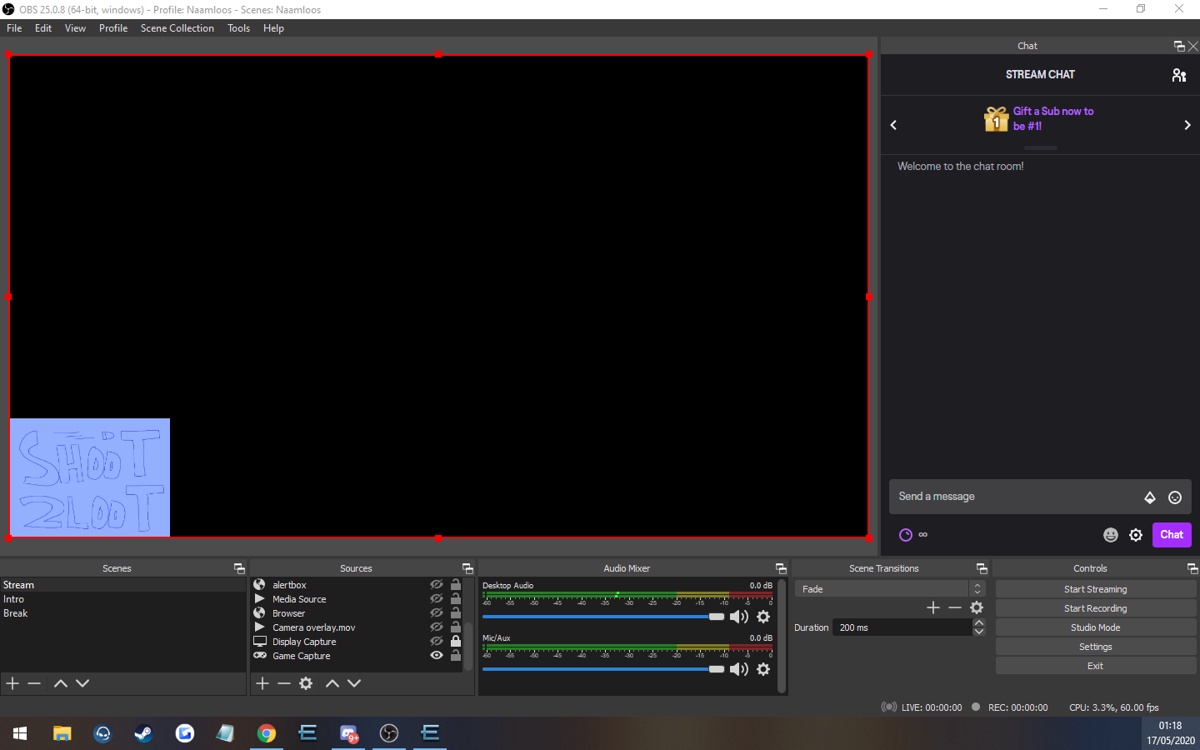
but in properties i see it
when i put a picture on i do can see it
steel bladeBOT
@mint nacelle For the best OBS support, please join their Official Discord @ discord.gg/obsproject
mint nacelle
like u see now
honest echo
We did all that is on our hands to try to help you.
 vital trellis
hey what is this error {"status":401,"message":"invalid csrf token"}
cant log in
honest echo
@vital trellis please folow these steps: https://pastebin.com/raw/MZNayFLB
 rotund blade
Anyone know where the darkmode for chat is at now on streamelement obs cause when i went to the chat setting the option is not there anymore
honest echo
@rotund blade check pinned mesages
rotund blade
omg thank you sooo much @honest echo 
 wintry lion
Hey Im having trouble being able to see my countdown widget on the streamlabs websight
honest echo
@wintry lion twitch?
wintry lion
yea
 vital rapids
Hello
Is there any way of getting last follower to text using Stream Elements?
or something similar
 strange cave
hello, im trying to use my streamelements kappgen in streamlabs but it wont work, is it still possible to do this?
steel bladeBOT
@strange cave We're not able to troubleshoot issues with using our overlays in StreamLabs OBS (SLOBS) as we don't have the tools to support their software. We recommend using OBS Studio or OBS Studio with our plugin OBS.Live.
vital rapids
thanks but how is that to text?
I already have some overlays done and I understand how they work. very well but they don't create or update info to text files
afaik
honest echo
@vital rapids You are right, SE won't create/usage any file on your PC
vital rapids
thanks anyway 🙂
wintry lion
My countdown widget wont appear on the website
honest echo
@wintry lion im testing it rn, little patience 🙂
 rancid granite
Hey @honest echo, my game capture on obs is a black screen. U know why its doing this?
wintry lion
Oh sorry about that @honest echo
honest echo
@rancid granite try windows capture
honest echo
@rancid granite laptop?
rancid granite
pc Windows 10 @honest echo
honest echo
just to check could you share and obs log?
rancid granite
wat dat lol
 sleek crow
I can't seem to turn off community gift for some reason. Is there a way to turn it off using else if (event.amount === 'community gift') {
null
} or something?
steel bladeBOT
@rancid granite Please provide a log from your last stream. To do this, in OBS go to Help > Log Files > Upload Last Log File and paste the link to the log file here.
rancid granite
kk
sleek crow
thank you, sorry about that!
honest echo
honest echo
@wintry lion I reported this to our devs so they can take look into this
@rancid granite right click on the icon and "run as administrator"
rancid granite
kk
What does this basically do cause I want to know what im changing? @honest echo
Actually don't answer that @honest echo
Oh nice it works for Windows Capture
why u think I needed to do that?
honest echo
@rancid granite tbh im not 100% sure 😅 but afaik OBS needs to write and read some file on your PC that without admin rights it won't be able to, and also running as an Admin it will decrease the usage on CPU
 lucid pendant
i'm trying to fit my overlay into obs, but it doesn't seem to fit. I have it set at 1920 and 1080. Shape of obs box isnt the same shape as on twitch though so i'm not sure if thats normal or not
lucid pendant
nvm got it sorted 
 neat phoenix
does anyone know how i can connect my kinect and audio through obs streamelements
 cold spindle
anyone know how to toss in a hyperlink in a theme....like tip here ( insert streamelements tip hyperlink )
honest echo
@cold spindle in a theme?
cold spindle
an overlay
honest echo
@cold spindle you can add a text on the overlay, it wont be clickable
cold spindle
ok, on youtube, where i stream...I can only link in a description
 haughty remnant
Hey, does anybody have any idea why OBS wouldnt capture sound from gameplay, despite the device being the same between OBS and Windows?
steel bladeBOT
@haughty remnant For the best OBS support, please join their Official Discord @ discord.gg/obsproject
 glacial sigil
Hi, I'm trying to import streamlab theme to streamelement, however because the theme was created in 1440p, when importing it becomes misaligned. Is there anyway to fix that?
honest echo
@glacial sigil Edit the overlay and change the position of the widgets
check on properties on the overlay if it is already on 1440p, change it if needed
glacial sigil
sorry but how do you check the properties of the overlay?
honest echo
Click on the 3 dots
glacial sigil
Is that on the overlay editor?
Because I don't see where it is
I must be blind lol
honest echo
rugged quail
hello so am currently trying to change streaming platforms from streamlabs to obs since your overlays are made for obs but am having trouble getting my elgato capture to pop up since i stream a nintendo switch game
steel bladeBOT
@rugged quail For the best OBS support, please join their Official Discord @ discord.gg/obsproject
 verbal glade
hi, when i get a host, the notification doesnt pop or record in the activity feed. but it works on test preview. thoughts?
steel bladeBOT
@verbal glade Due to changes to Twitch API, we have filtered out hosts and will only show these ones on your activity feed:
- All hosts coming from an online channel with at least 1+ viewer
- Auto host events with at least 1 viewer - only from a channel that just went offline
Note: If you see "X channel has hosted you" with no viewers on the back, that is considered an offline host or a host with 0 viewers, we do not show these.
Note for Mixer streamers: The above 2 filters currently apply for Mixer and we are aware its actually not how Mixer hosts work. We do plan on changing it, but no ETA on when.
verbal glade
are there plans to change the API for the new changes?
honest echo
@verbal glade The change was made by twitch, we already updated to the their lastest version.
honest echo
@verbal glade The change on the Twitch API was made by Twitch , they don't like offline host with 0 viewers so probably they wont added that again, if you are talking about Mixer , then no, there is no ETA
verbal glade
i meant with Twitch. so hosts regardless of number will only show in the activity feed? no more notifs/alert box, correct?
ever again?>
honest echo
@verbal glade You will see all the host with at least 1+ viewer
verbal glade
ok cool! TY so long as 1+ the notif on screen + activity feed works
oh
1 more thing
if i click the source then open in SE overlay editor
the popup states UhOh invalid auth token
honest echo
please edit your overlay on Google chrome 😉
verbal glade
thank you
cold spindle
Anyone know where the music request inside your dashboard is, if you want to select music. Here is the thing, I just want to be able to select when the music is played in streamelements, like in the source area?
 mystic folio
I need help if someone could PM me and help me out once they have the chance that would be greatly appreciated!
rancid granite
Yeoooo @honest echo how u create and put donation alerts in ur streams??
w/t Streamlabs @honest echo
Oh ur offline ma fault anybody else pls
 hoary verge
I must be doing something foundamentally wrong..But i just cant get a simple overlay to show data. I added total subscribers and chat for test and in OBS shows 0 and blank chat...Everything seems connected.
See it here: twitch.tv/e4rthdog
 covert rune
Have had an issue with my keyboard freezing when shutting obs.live down. Anybody have a possible reason or solution?
 shut ravine
dont shut it down
rugged quail
hello can someone help me set up my OBS properly? my game isn't showing q.q
 distant breach
are you using window capture or game capture? (my OBS skills are very low) .... if you scroll up you will see a link to the OBS discord that will probably help way more than I can 🙂
rugged quail
im using game capture
distant breach
ya, i have no experience with game capture; try OBS discord or wait for someone with more experience here discord.gg/obsproject
shut ravine
try using the other capture
rugged quail
other capture?
shut ravine
display capture
its whats on your screan
so if your in a game it will show the game
but if your say on crome or discord it will show that insted of the game
shut ravine
yeah
distant breach
you can set the screen capture to only that "window" / .exe though
shut ravine
whell sorry thats all i can think of
rugged quail
im so confused on how to do this
shut ravine
oh yeah you can
rugged quail
i'm a noob at this haha
shut ravine
yeah idk how to do that sorry
 silk moss
Hi so i believe this is the right place to put this, I want to start streaming and the game ive been trying to stream is valorant but for some reason when i stream and play my fps drops a lot and it makes the game feel really choppy and laggy
it makes me not want to stream it which i havent because i dont want to sacrifice game performance just to stream
is there a way to fix this or can someone help me fix some settings to make it not drop my frames when im playing and streaming
distant breach
Did you try the OBS discord @silk moss ?
add a new window capture @rugged quail and set the source to the game.
steel bladeBOT
@silk moss New to Stream Elements?
Check out our YouTube channel https://www.youtube.com/c/streamelements/videos
with tutorial videos from setting up the basics, to in depth details on how to use our product.
New to OBS? Here is a 4 step quickstart guide
https://obsproject.com/wiki/OBS-Studio-Quickstart
Want to learn even more? Here is an in-depth overview
https://obsproject.com/wiki/OBS-Studio-Overview
lilac ocean
^here you can easily find it
cold spindle
Anyone know where the music request inside your dashboard is, if you want to select music. Here is the thing, I just want to be able to select when the music is played in streamelements, like in the source area?
cold spindle
How does one make the white video are widget bigger?
 real bay
hi. can someone help me?? i cant figure out how to make the webcam to put it inside the cam site in the overlay
 grizzled marsh
@real bay You put the cam overlay where you want it on the website. Add your browser source into OBS.Live pointing to that overlay. Add your webcam source and size /move it within OBS.Live to be wherever the cam overlay is. Your webcam source needs to be above your browser source in the source list.
 restive crest
Hi, a little while ago i had a dedicated stream PC, however right now i am on a 1-pc setup. when i was on dedicated setup my media request remembered my set volume between every launch of Obs. how can i make it remember my preferred volume now and not resetting back to 50%?
 rocky plinth
hello wondering if this is the right place for this question, but anyways i lost my chat dock on OBS , i stream on Facebook Live., can anyone help me?
 odd kraken
StreamElements > Chat
rocky plinth
ahhh, Thank you!
cold spindle
anyway to make a camera box bigger in an overlay that was from a theme?
odd kraken
 viral summit
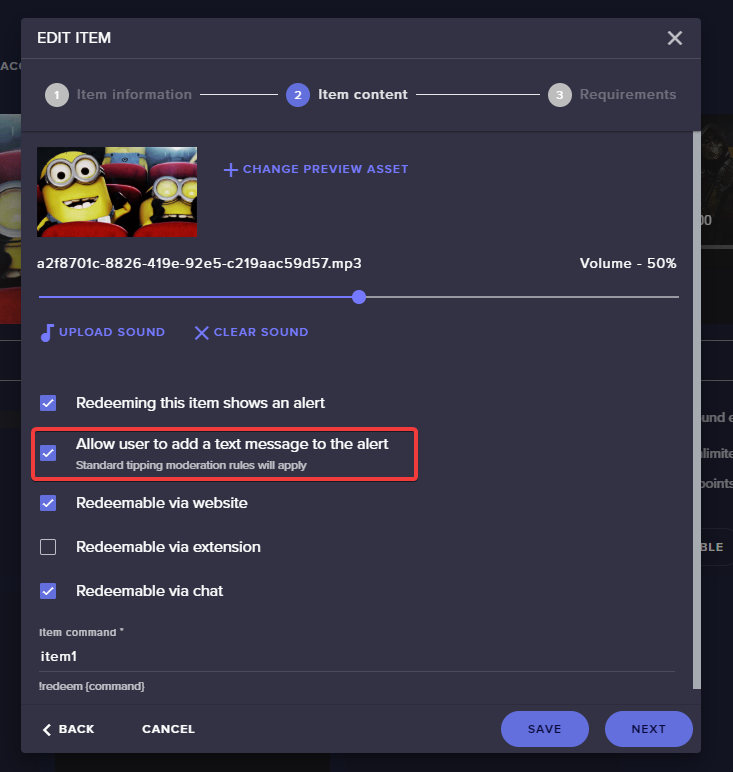
Yo! Does anyone know how do I add messages on my store that pop up on the screen with tts enabled? Cheers.
odd kraken
https://i.imgur.com/b3aJOHV.png Enable that option in the stream store item and add the stor redemptions widget to your overlay.
 fleet abyss
did something change with Media request? Now it says "NO ACTIVE WIDGETS WERE DETECTED FOR MEDIA REQUEST" - nothing has changed. media request has it's own overlay with it's widget being the only thing on it. It displays for a few seconds then disappears with that error.
works now after restarting obs a few times. dunno what was up
viral summit
https://i.imgur.com/b3aJOHV.png Enable that option in the stream store item and add the stor redemptions widget to your overlay.
@odd kraken Yea, just found it. Im using the Valorant overlay but it doesnt show the store purchase. Only subs, follows and etc.
odd kraken
it is a separate widget you need to add.
viral summit
@odd kraken This is the Alert Box settings from this overlay. Is the 'Purchase Alert' the right one?
odd kraken
No, it is a separate widget.
viral summit
Can I use the same theme on this separate widget?
odd kraken
You can add this widget to your overlay as every other widget.
viral summit
Got it, thanks.
 snow bronze
Hey guys, can someone remind me on how to setup custom fonts? 🙂
steel bladeBOT
@snow bronze Google Fonts
More than 900 google fonts are supported at this time. You can preview them here: https://fonts.google.com/
Custom Fonts
Steps:
- Install the font on the streaming PC or choose a pre-installed windows font.
- In the overlay widget settings, select Text Settings
- Enable Custom Font
- Type the name of the font as it appears in the windows font directory (This is usually
C:\Windows\Fonts)
Note: After installing fonts, the browser and OBS must be restarted for the font to appear.
snow bronze
Thanks bot 🙂
 forest coyote
hello, i have an issue with ground control, when i want to open the application it opens as a background process and wont open the actual application... how can i fix this?
rugged quail
Hi! I'm new to the whole world of streaming, I just installed OBS live in my win laptop to do some Facebook streams... But I have a question, anyway I could add my friends cameras (iOS, Android) to my stream? We all be playing COD Mobile but they are on their phones
steel bladeBOT
@rugged quail For the best OBS support, please join their Official Discord @ discord.gg/obsproject
 rose hearth
Hi, i have a problem when trying to stream on YouTube. When I try to stream using: go live with youtube dashboard settings, the stream just gets stuck saying its gone live but never actually goes live because the chat box says: the chat will appear here when your stream goes live. Any help would be appreciated.
 graceful ledge
Hi, i have a problem when i go live
this message appear
We could not create a Live Stream on YouTube.
 jovial void
hi there, do i have to add my PS4 to OBS studio or will it automaticaly start when i start my stream
 floral sapphire
hey guys I have a question in regards to the overlays I copied and pasted my overlay to brower source, but nothing is appearing to my obs preview, how to do I get it to reappear?
steel bladeBOT
@floral sapphire OBS -> settings -> advanced -> scroll down -> enable/disable hardware accel.
https://i.imgur.com/ggMe9ZE.png

@jovial void Consoles do not have native support for overlays. You would need a capture card and a PC with OBS in order to have Overlays over your console gameplay.
We have an blog post about how to setup console streaming with our essential tools: https://blog.streamelements.com/how-to-stream-on-console-7b620b1c46c3
floral sapphire
that has been checked but its still not showing unfortunately
odd kraken
Do you have a screenshot of the browser source settings via DM please.
steel bladeBOT
@floral sapphire To add your overlays to OBS, add a new browser source in your scene. Paste your overlay URL in the browser source properties, set the dimensions to 1920x1080 (unless you changed them on the website), and ☑ “Shutdown source when not visible” https://youtu.be/KDvLynUqXI4
 slate siren
So, in stream elements it says im offline. I want to get ready before I start my stream how can I fix?
 plain sonnet
are you streaming now?
slate siren
No.
But it was working yesterday.
when I wasn't streaming it would say online
and it was working fine
plain sonnet
ok, if youre not live then it wont show as online
jovial void
can i still use the custom chat bot feature for the console stream?
rose hearth
Hi, i have a problem when trying to stream on YouTube. When I try to stream using: go live with youtube dashboard settings, the stream just gets stuck saying its gone live but never actually goes live because the chat box says: the chat will appear here when your stream goes live. Any help would be appreciated.
 true iris
Hello, I add a game capture to my streaming and the game don't show in streaming, what can I do?
steel bladeBOT
@true iris For the best OBS support, please join their Official Discord @ discord.gg/obsproject
 keen smelt
i have he overlays, how can i put em in the obs? and how can i put live chat on screen?
steel bladeBOT
@keen smelt To add your overlays to OBS, add a new browser source in your scene. Paste your overlay URL in the browser source properties, set the dimensions to 1920x1080 (unless you changed them on the website), and ☑ “Shutdown source when not visible” https://youtu.be/KDvLynUqXI4
keen smelt
ok.
 proper sandal
Is there a way to set a hotkey for the "Show On Stream" action?
In the Media Request Widget.
I see the hotkeys, but there doesn't appear to be one for that particular option. I was hoping to add it to my stream deck as a button.
 fathom cobalt
From SLOBS?
proper sandal
@keen smelt I would think that since Stream Elements uses the OBS.Live, which is essentially OBS Studio, you wouldn't need to import them to the stream elements overlay page.
Unless you really want to do that of course and then I don't know how to do that, sorry, just a lowly fellow offering help 🙂
keen smelt
they dont appear on my webpage, and i want to put sub alerts.
proper sandal
I added the Alert box, just by using the URL that the webpage provided and then made a browser source in OBS with it.
steel bladeBOT
In order to import scenes/overlays from SLOBS, you need to have OBS.Live installed.
After you install OBS.Live, click on "Streamelements" on top, then on "Import from other services" and then click on "StreamLabs - Import Now"
Each scene from SLOBS will be imported as a stand alone Overlay here: https://streamelements.com/dashboard/overlays
fathom cobalt
@keen smelt
proper sandal
Or it seems there is another option, that I didn't try before 😉
proper sandal
Is there a handy Exclamation command for the Media Request Widget Question? I'm trying to set a hotkey for the "Show On Stream" button.
keen smelt
here.
fathom cobalt
Yeah
fathom cobalt
Do you have your StreamElements Dashboard & StreamLabs Dashboard open?
 main harness
I'm not really sure if this is where it should go, but I'm trying to change the chat alerts to instead of being PogChamp, to my own emote. It will say saved if I tab, but then when I switch back over it's back to PogChamp
 cedar umbra
How to find the properties of the overlay?
odd kraken
rightclick the browser source > properties
steel bladeBOT
@cedar umbra To add your overlays to OBS, add a new browser source in your scene. Paste your overlay URL in the browser source properties, set the dimensions to 1920x1080 (unless you changed them on the website), and ☑ “Shutdown source when not visible” https://youtu.be/KDvLynUqXI4
 tender python
also
GREAT move
to share your password
ON a post-it
ON a photo
IN a discord
cedar umbra
Oops
main harness
Does anyone run into the same issue with the chat alerts not being able to change the emote after?
NVM apparently you have to click out of the modules tab for it to completely save
cedar umbra
it still looks too big ;-; and i have the right width and height
tender python
rightclick, transform, fit to screen.
cedar umbra
It won’t let me move my face cam to my face cam box ;-;
You can tell I’m new to obs
Lol
Nvm got it
wary dew

Learn how to customize your alerts and setup different alerts variations with StreamElements Alertbox
Overlay Manager guide: https://youtu.be/X7XrDdRE7Fk
Add HypeCup to your Stream: https://www.youtube.com/watch?v=8LVRd2X4HvU
Got any questions, or just want to say "Hey"...
rancid granite
I cant open Streamelements on Internet Explorer, like it doesn't load anything just a white screen. How can I fix it?
steel bladeBOT
@rancid granite Our Dashboard and Overlay editor are Chromium Optimized. We strongly recommend using Chrome. Opera GX and the new Microsoft Edge Chromium might work closest to Chrome as its also Chromium built. FireFox also works, but some things might look a bit different or not work. We do not recommend using Internet Explorer with our Dashboard as it does not support functions.
If the website doesn’t work on chrome, be sure none of your plugins are blocking our website or clear your cookies. You can try if the website works in a incognito tab.
 gray timber
Okay so I started my OBS to stream and at first the activities and chat wouldn't load, after like 8 restarts they just disappeared and it looks like this . Overlays also don't load, not even bitboss :/ I installed the whole thing from scratch and it didn't fix anything, still the same image ("Start Stream" just changes the text to "Starting STream...." I waited 5min but it never actually started it
I never changed any settings or anything so this is just out of the blue
website doesn't seem down and neither is anything on twitch so i dunno what's going on
Activities and all that never loaded, a few times said time out 15.000 ms or something
or asked me to sign in again but also nothing
proper sandal
I'm trying to set a hotkey for the "Show On Stream" button for the Media Request widget, so that I can add it to my stream deck. Is there one already available or a way I can create one?
tender python
proper sandal
Yeah, I've already added that , but there isn't a specific button for the Show on Stream button on the widget. I can turn the video on/off, request on/off, but I can't change the Show on Stream option other than pressing the actual widget button.
And I can't seem to make a hotkey in the widget to allow a custom button to be created.
tender python
you're not looking.
proper sandal
That only turns the widget on or off, it doesn't turn the Show on Stream button on or off.
F*CK ME
@tender python You are right, I'm sorry
tender python

proper sandal
It didn't click because it didn't reference the Show option.
gray timber
 guess i cant stream today cause the SE part of my obs is dead
tender python
it's a toggle state button
gray timber
D: which is it?
tender python
nnot you @gray timber
for you, all i could recommend is logging in and out.
!logout
steel bladeBOT
Please logout of StreamElements at https://streamelements.com/logout and then login again to your account (Twitch/Youtube/Facebook/Mixer)
tender python
and then on OBS
gray timber
Did on the website 3 times already but I'll try on the app nw, thank you! Hope it works D:
Well, it looks like it's back to square 1 now before i touched anything, chat and activity not loading x-x
Logging in and everything loading is also taking 10 years
Yeah tyt bro
rancid granite
I put "new follower" widget link in browser source and when I get a new follower no text pops up just the sound.
gray timber
everything is loading forever yeah after an hour of nothiing working i'm out of ideas lol. it's kicking me now every time i try to login again
 sweet birch
Hi all Im not sure wheee to put this But I just started using OBS live and I had previously used the ground control for the bot. During my stream on Friday though none of my redemptions were working there sound redemptions and less I turned on ground control but of course then I had double alerts for everything I’m not sure how to fix this issue can you help?
gray timber
Still (or again) square 1 this is as far as it's going (and even if this loads, chat doesnt, and 4 sec later the activities also unload again)
idk if it's something with login servers
steel bladeBOT
@rancid granite To add your overlays to OBS, add a new browser source in your scene. Paste your overlay URL in the browser source properties, set the dimensions to 1920x1080 (unless you changed them on the website), and ☑ “Shutdown source when not visible” https://youtu.be/KDvLynUqXI4
sweet birch
Is thus where i should be posting for my issue?
 molten coral
odd kraken
molten coral
odd kraken
Best to contact them.
 feral geode
I accidently moved my media request thing off the obslive and now it is gone and i have no idea how to get it back... i feel dumb af rn
 tulip hamlet
Check the StreamElements menu at the top.
feral geode
there isnt one
tulip hamlet
If you don't have a StreamElements menu at the top of OBS, then you're not using OBS.Live.
feral geode
i had an obs update and it took it away
tulip hamlet
You probably need to reinstall it.
tender python
Logging in and everything loading is also taking 10 years
@gray timber sounds like connection issues to me.
 wispy moat
Can some one help me with Media Request? The songs are playing when I type the command in chat but the widget is not showing on my overlay
tulip hamlet
Commands can't enable the "Show on stream" option. You need to do that from the media request dock in OBS.Live.
Or from the website.
wispy moat
Omg that was so simple. Thank you
 wintry kiln
When I upload my custom sound , Why does it sound so bad ? Yet the orignal before I upload its perfect
It doesn't compress the audio does it ?
 quick hemlock
when i go to your website all i see is white
steel bladeBOT
@quick hemlock Our Dashboard and Overlay editor are Chromium Optimized. We strongly recommend using Chrome. Opera GX and the new Microsoft Edge Chromium might work closest to Chrome as its also Chromium built. FireFox also works, but some things might look a bit different or not work. We do not recommend using Internet Explorer with our Dashboard as it does not support functions.
If the website doesn’t work on chrome, be sure none of your plugins are blocking our website or clear your cookies. You can try if the website works in a incognito tab.
wintry kiln
Any ideas for my issue ?
quick hemlock
thanks its now working on chrome.
 gilded fulcrum
There issues with AT&T currently?
 narrow dagger
how do i edit my name in the overlays so that it is capitalized?
 waxen pier
Is there anyways to add a wheel spinner on stream elements OBS ?
wary dew
like the wheel of fortune widget in #widget-share ?
waxen pier
no more so like one you can customize yourself
 drifting halo
how does one edit the title of their stream on obs?
 dusky wharf
Anybody else having issues right nowgoing live?
 frank tapir
on obs.live has no transition option?
I have to make the switch to the standard OBS in order to change it and if I lose the file it will be saved in the cloud along with the obs.live stuff?
wintry lion
Hey im having trouble getting my text to line up with my alert on streamelements
 digital anvil
i have been streaming for a week now no problems and all of a sudden today when i stream the stream is all grey and it is not watchable
tulip hamlet
@frank tapir OBS.Live is a plugin for OBS Studio. Transition options are still there, it's not suddenly removed.
@wintry lion Text Settings>Advanced, play with the margins.
steel bladeBOT
@digital anvil Please provide a log from your last stream. To do this, in OBS go to Help > Log Files > Upload Last Log File and paste the link to the log file here.
 unique brook
can someone help me game capture work on every game but squad and all i get is the black screen may someone help me been at this for 4 hours
 coarse matrix
can i get help plz streamelements isnt recognizing that i made donation panel so i cannot continue with setup , do you actually use your @gmail associated with your paypal account thx for the help.
frank tapir
@tulip hamlet but when I start with obs.live, it totally changes the obs layout, okay, I can go to obs la and change the transition, but in this custom layout it doesn't show the option to change transition, I have to switch to obs and that's it I have no way to go back to obs.live, just closing and opening again. I'm just reporting a quality of use problem, if I was doing Live I would have to turn it off and on again to be in my layout.
tulip hamlet
@frank tapir
@coarse matrix Click the link the setup provides you. Don't highlight it, just click it.
frank tapir
@tulip hamlet OMG !! Sorry
Maybe I already had it open, but it was attached to another layout and I didn't see it
coarse matrix
i have done tht aswell in obs still doesnt say my donation panel is setup on twitch in stream elements page @tulip hamlet
ty so much for help btw
tulip hamlet
Screenshot please.
coarse matrix
@tulip hamlet
tulip hamlet
Yes. Do you see that link there? Bottom right?
Click it. Just click it. Don't highlight it at all.
rancid granite
How can i test a new sub alert in my obslive? @tulip hamlet
steel bladeBOT
@rancid granite You can test Alerts via the Emulate bell on the lower left side of the Overlay Editor. Simply go to your Dashboard -> My Overlays -> Pencil/edit button on the overlay. Make sure the "Preview LIVE on stream" option is on to see the alert in OBS/Xsplit https://streamable.com/vtulg9
 frank tapir
where do I have access to the chatbot files on the site to edit layout like this?
Is it some widget or css?
rancid granite
ty
digital anvil
https://obsproject.com/logs/xdMaCFyfg_5kOUeW @steel blade
cold spindle
Does anyone know how to make the widget for the video box ( in white ) bigger?
unique brook
still having issues with game capture showing all black screen can anyone help?
 frosty bluff
rancid granite
frosty bluff
rancid granite
How do i see my cpu% on obslive?
cold spindle
people on obs are trying to help me, but it's a streamelements issue
 idle stream
so im having drop issues again and im assuming its my internet providers issue
can an obs live tech look into this for me please
 rain quail
I'm also having drop issues tonight. Is something wrong with the servers?
idle stream
like my goes from green to orange then red drops then back to normal then back to orange then yellow then red drops and then back to normal
and just repeats
and its not even showing a log file for the report
like it shows all my other logs but a log from today
so i cant even show to obslive tech people
cold spindle
ok, so how do you change the color of text in an overlay?
rain quail
Soo @idle stream . Uninstall and reinstall, but don't update. worked for me
remember to run as admin
nvm. didn't work.
When I use my vpn, it works. idk
 shut canopy
I just accidentally removed an overlay but I have the link and is working, how I can get to the editing panel again?
rugged quail
hi guys on my be right back screen i have a highlight video playing - however when i switch to the scene the highlight AND desktop audio is playing giving a echo effect how do i disable the desktop audio for the BRB scene only please?
 elder jewel
Hello guys, how are you doing? I started streaming recently and wanted to improve the quality of interaction with viewers. I've been looking around for a way to use audio files with keyboard hotkeys. Is there a way to do this through OBS itself or would an external plugin or other program be needed? Any help or suggestions are welcome.
cold spindle
Does anyone know how to make the widget for the video box ( in white ) bigger?
rugged quail
im pretty sure spamming is against TOS @cold spindle have to be patient like rest of us
cold spindle
I have asked the question since 3 A.M
With about 4 hours between each post
OBS discord was trying to help, but it's a streamelements overlay
rugged quail
maybe they dont know @cold spindle
shut canopy
I just accidentally removed an overlay but I have the link and is working, how I can get to the editing panel again?
@tulip hamlet can you help me with this?
tulip hamlet
@shut canopy A deleted overlay cannot be recovered.
tulip hamlet
There is.
rugged quail
ive done that before @shut canopy gotta bite the bullet i had to restart mine
shut canopy
omg
rancid granite
How can i see chat while streaming and playing game? One monitor,
tulip hamlet
@rancid granite Could use your phone.
shut canopy
it is very complicated to do a good overlay so I think there should be a more visible and with time confirmation @tulip hamlet
just a little suggestion
 lyric hare
hey i was making a overlay and my followers wont update to how meny i have how can i fix this?
rugged quail
hi @tulip hamlet on my be right back screen i have a highlight video playing - however when i switch to the scene the highlight AND desktop audio is playing giving a echo effect how do i disable the desktop audio for the BRB scene only please?
they will update when you go live @lyric hare
lyric hare
ty
shut canopy
but why the link is working perfectly and I can't edit it?
rancid granite
ik @tulip hamlet but i cant like put a mini chat while game is on can i
rugged quail
no @rancid granite
rancid granite
asking a taff no offense @rugged quail
rugged quail
👍 no worries
tulip hamlet
@rancid granite You heard the man.
lyric hare
how can you test your alerts?
rancid granite
glucks
steel bladeBOT
@lyric hare You can test Alerts via the Emulate bell on the lower left side of the Overlay Editor. Simply go to your Dashboard -> My Overlays -> Pencil/edit button on the overlay. Make sure the "Preview LIVE on stream" option is on to see the alert in OBS/Xsplit https://streamable.com/vtulg9
 lyric hare
oh thanks bot
 sly nimbus
if i try to stream it only lets me connect to facebook. i created another profile for twitch but if i try to go to setting and connect my twitch account as soon as i hit stream it throws up that im trying to go live on face book
steel bladeBOT
@sly nimbus Streamelements on top of OBS -> Logout -> login
sly nimbus
thanks
rugged quail
how do you block out the camera background?
cold spindle
How do you make this entire background a webcam?
 sly jay
Hi friends
I'm trying to import from stream labs to obs live and it keeps failing
Any advice?
tulip hamlet
The import will fail if you are attempting to upload assets that are too large or Streamlabs-owned assets.
 dreamy jasper
I made a custom 2 sec stinger transition but it cuts off the full animation too early. I have tried WebM and MOV formatting. Any help?
digital anvil
i have been streaming for a week now no problems and all of a sudden today when i stream the stream is all grey and it is not watchable
steel bladeBOT
@dreamy jasper For the best OBS support, please join their Official Discord @ discord.gg/obsproject
 onyx goblet
how do I fit a game capture in a small box
 wild rock
anyone know why when i put my overlay link in obs it wont show the overlay??
steel bladeBOT
@onyx goblet New to Stream Elements?
Check out our YouTube channel https://www.youtube.com/c/streamelements/videos
with tutorial videos from setting up the basics, to in depth details on how to use our product.
New to OBS? Here is a 4 step quickstart guide
https://obsproject.com/wiki/OBS-Studio-Quickstart
Want to learn even more? Here is an in-depth overview
https://obsproject.com/wiki/OBS-Studio-Overview
@wild rock OBS -> settings -> advanced -> scroll down -> enable/disable hardware accel.
https://i.imgur.com/ggMe9ZE.png
onyx goblet
Can you test follower alerts in OBS?
steel bladeBOT
@onyx goblet You can test Alerts via the Emulate bell on the lower left side of the Overlay Editor. Simply go to your Dashboard -> My Overlays -> Pencil/edit button on the overlay. Make sure the "Preview LIVE on stream" option is on to see the alert in OBS/Xsplit https://streamable.com/vtulg9
 onyx goblet
In obs not streamelements
 timid spruce
just testing it from the streamelements site works
onyx goblet
ok
timid spruce
yeah, the testing in streamelements is linked with your obs
onyx goblet
can you get a chatbox in OBS
timid spruce
you mean your twitch chat?
onyx goblet
yeah
timid spruce
did you mean like this?
like on the stream where everyone can see or did you mean on your obs
onyx goblet
yes
timid spruce
in the stream elements notifications thing (I forgot what it's called) you can set up your twitch chat from the integrations tab
in your overlays**
timid spruce
you shouldn't have to, but just to make sure
go ahead and do that
because I've had some problems in the past, and just relinking the browser source in OBS always fixed it
onyx goblet
ok
 timber monolith
Hello! I streamed for the first time using streamelements 2 days ago, and my friend donated to see if the notification would work live but it did not work 😦 I also did not receive the donation. Another user said he donated in chat but the notification did not work either and I did not receive anything. What should I do?
 shy mountain
@timber monolith what is your username?
@strong tree what clips? with the replay buffer from OBS?
I said username
not channel link
 strong tree
@shy mountain I already solve the issue, but thx anyways!
timber monolith
SoonDuBae
shy mountain
Everything looks fine on our side. Check in your paypal if you need to accept the transaction from their account @timber monolith
timber monolith
Why doesn't the notification pop on stream when I am live? Also I already checked paypal and there is nothing there
shy mountain
If the transaction is not there, but they have a transaction for outbound on their paypal
timber monolith
When I checked my tipping revenue online nothing is there as well
timber monolith
Okay thank you
 visual sandal
hello! my chat shows in stream elements but how do i show chat in OBS? i've copied the link pasted in a browser source but it doesnt show D:
steel bladeBOT
@visual sandal The default resolution for StreamElements overlays (theme and custom) is 1920x1080. Please add them in OBS at their full resolution and use CTRL+F to fit to screen if necessary. You can then downscale your stream in OBS settings > Video if you'd like https://i.imgur.com/6bWXxjR.png



 visual sandal
thank you so much!!
 light nebula
Hello any question why my stream laging whem i have upload 20 mb if i put bitrate more then 1000 stream laging frizing for 10 sec
steel bladeBOT
@light nebula Please provide a log from your last stream. To do this, in OBS go to Help > Log Files > Upload Last Log File and paste the link to the log file here.
light nebula
If i put bitrate 1000 the video qualited is terible
Okay
Any more quaestion 1 day with same setimgs not lagimg today with same setings laging cant understand why
shy mountain
Right, without the log file to see if its trully dropped frames or not, we can't troubleshoot
Also note that if one day, your internet connection is stable but he next its not, then its an ISP issue.
Or something else
Please provided that log file as requested
light nebula
 potent sequoia
Hi. can i limit some bot command to get activated once per user?
or just put high cooldown per user?
steel bladeBOT
@light nebula 1) Restart OBS
2) Start your stream/recording for about 30 seconds. Make sure you replicate any issues as best you can, which means having any games/apps open and captured, etc.
3) Stop your stream/recording.
4) Select Help > Log Files > Upload Current Log File. Copy the URL and paste the link here.
(Note: If you do not see an obsproject.com URL, you will need to update OBS Studio to version 22+)
shy mountain
@potent sequoia place high user cooldown
odd kraken
wintry kiln
Does anyone know why my audio quality gets ruined when I upload it to stream elements??
 toxic fern
What do you mean upload to streamelements?
 rustic hearth
Good morning!
How is everyone doing? I have an issue with OBS Live, is recognising my Razer Kiyo webcam just as an "USB Device" but this way the camera is always on even when I change scenes.
I have tried all the troubleshooting I could find online and nothing is fixing this.
Can anyone help me, please?
steel bladeBOT
@rustic hearth For the best OBS support, please join their Official Discord @ discord.gg/obsproject
wintry kiln
What do you mean upload to streamelements?
@toxic fern
When you upload your custom sound to the alertbox.
shy mountain
What format is the file?
wintry kiln
MP3
The sound I have when previewed its good, Then I upload it, It's added way more bass etc
shy mountain
We don't change anything on uploaded files, especially audio ones - check if you have software mixer(like voicemeeter) or physical mixer(like goxlr or something) and you are not boosting the bass for the browser
shy mountain
does VLC take the audio output from chrome and then outputs it to your speakers/headphones?
wintry kiln
just click record lol
the error means invalid device.
What other software would be good to record headset audio ?
shy mountain
ugh obs?
shy mountain
but it will record the audio right?
wintry kiln
Yeah suppose, but then how do i get it to mp3
shy mountain
I'm not sure why you want to record in the first place
wintry kiln
Many streams have custom sounds.
 hot harness
Hi, I just downloaded obs streamelements and kinda liking it. Is there overlays that shows up on stream when someone likes o share the stream? Sorry I'm newb :3
or*
steel bladeBOT
@hot harness New to Stream Elements?
Check out our YouTube channel https://www.youtube.com/c/streamelements/videos
with tutorial videos from setting up the basics, to in depth details on how to use our product.
New to OBS? Here is a 4 step quickstart guide
https://obsproject.com/wiki/OBS-Studio-Quickstart
Want to learn even more? Here is an in-depth overview
https://obsproject.com/wiki/OBS-Studio-Overview
hot harness
Okay I'll check em all out thanks!
rugged quail
<@&364840891023622144> I am still unable to sign into my Google (YouTube) account inside Browser or Docks in OBS.Live! (This have been going for a week since the update, it is VERY important that we can sign in!)
steel bladeBOT
@rugged quail Streamelements on top of OBS -> Logout -> login
 spare sierra
Hi! My OBS encoder overloading... thats wierd, i was streaming this morning with no issues... but now it overloads...
rugged quail
@steel blade Are you sure? Last time the <@&364840891023622144>'s warned me from signing out!
shy mountain
Can you please stop tagging the moderator role?
That role needs to be tagged ONLY when there is some emergency.
Idk what others have told you, but you are not exactly clear as to what docks you cannot sign into, you are having issues with.
steel bladeBOT
@spare sierra For the best OBS support, please join their Official Discord @ discord.gg/obsproject
rugged quail
@shy mountain I wouldn't come here and ask at all if it wasn't an emergency! I already lost the coverage of an important launch! I can't lose the one tomorrow! I am paying per hour to make my streaming better, and I have a 1 sec worth of time quick answer ... I can't sign in to Google from Browser source or Docks; should I log out then back in? or would it lock me out?!
shy mountain
Please stop tagging the moderator role!
You are involuntarily tagging people who do not provide support!
rugged quail
OK, my bad ... whom should I tag? what tag do I use?
shy mountain
You are not paying anyone for support here as our tools and completely free - if you are using the custom docks from View -> docks -> custom docks from OBS Studio and cannot sign into them, then I would suggest not to use those custom docks
Do not role tag!
You have my attention currently so you don't need to tag anyone
rugged quail
I am using the custom docks ... and I am an old user of OBS.Live; I love the app. But after each update, Google doesn't allow me to sign in, saying it is unsecure (I guess it is because the OBS chrome browser is older or something)
Thank you so much, and I am sorry for being rude ... I was just having a bad day for a week ... sorry again and thanks for your patience
rugged quail
Yes this and the normal Browser Source, when I am trying to use a YouTube source or chat, I need to sign in; but when I try, Google asks me for Gmail, I write it, then it doesn't allow me to put in the password and says your browser is not secure
shy mountain
Also the chromium version of OBS is up to date to some degree, with at least security patches in it, but for the login process, i would not recommend using the custom docks
rugged quail
This happened before after an update of OBS.Live
How can I log in? I am logged in (from before the update in OBS.Live as a StreamElement account based on YouTube) ... And this log in is saved and stays after update.
the problem is that the log in inside the broswer sources and inside docks are not working at all
shy mountain
OBS is not a browser like Chrome or Firefox
it emulates browser pages via the browser source and the custom docks
meaning that some websites
like Google it self
will NOT allow login to their site if the browser that is being used is not signed properly
rugged quail
Inside OBS.Live is a stripped down browser of Chrome for Browser Sources ... I think Google is not accepting it officially as trusted browser ... My guess would be because it is an older version of chrome that Google don't accept
will NOT allow login to their site if the browser that is being used is not signed properly
@shy mountain Exactly, makes since ... but I used to log in normally before (only twice I had this problem and it was after an update to OBS.Live)
shy mountain
The CEF the browser source in OBS has been updated a few months ago
it might be a change in Google it self that now they do not allow such login
rugged quail
I think Google doesn't allow older versions of chrome to log in, and the OBS.Live is using an older version (or an older signature or something like that) ... I think this is only fixed by StreamElements and Google. Can you please escalate the issue to them?
shy mountain
Not really - nothing we can do and I doubt Google will change something on their side to support an open source software. The software will need to adapt.
rugged quail
But this happened before and StreamElements fixed it ,,, I had to escalate it up to Jim directly
Thank you so much ... please tag me if there is any solution or update ... I don't know how I can work around this
shy mountain
Developers are looking into this.
rugged quail
Thank you ... I will be ready to send any info they might need
shy mountain
@rugged quail Due to these 2 bits of information, we won't be changing it anytime soon
rugged quail
rugged quail
I just managed to create a WHOLE NEW google account using this Browser Source window in OBS.Live; but still can't let me sign in to my existing one?! This is so WRONG! Is this Google's issue? Or is it StreamElements using an old unsigned Chrome version for Browser sources?
shy mountain
Basically its Google changing their stuff
and not allowing non oauth signed apps to login.
 main comet
hello i have logged into my streamelements account on the website and tryig to have my twitch and mixer undr 1 login but when i try and add my mixer channel in settings its saying CHANNEL IS ALREADY CLAIMED
steel bladeBOT
@main comet Account Merging - Please note:
- Merging accounts only allows faster ways to switch between accounts
- Merging accounts does not allow data sharing between accounts - different streaming platforms, different type of events
- Merging accounts allows duplicating/sharing overlays between the accounts
If you understand the limitations of merging and want to proceed, please find the JWT tokens (!jwt) from both accounts you want to merge and you will be directed to DM them to a staff member.
main comet
!jwt
steel bladeBOT
You can find your JWT token on your account channels page ("Show Secrets" to reveal the token): https://streamelements.com/dashboard/account/channels
READ ME:
This is a private security token. Do NOT share this token here or other public places, only with a StreamElements staff member in private.
main comet
is there away to have obs show activity feed for both tiwtch and mixer?
any staff memeber around to help with merging?
odd kraken
You can DM the tokens to me, I will foward them to staff. Please label clearly which token is which account.
There is no joined activity feed, as StreamElements does not support multi streaming.
main comet
no offence but ill wait to dm a staff member as i dont want to give these tokens to sumone thats not under staff
 sinful flint
You can DM them to me
 slender wyvern
So I accidentally closed the chatbot and media control from the OBS live page, how do I get that back?
steel bladeBOT
@slender wyvern Streamelements on top of OBS -> Logout -> login
 ebon nacelle
Anyone know anything about audio? My mic just started doing this weird buzz whenever I talk, it's system wide.
 amber spade
Hello everyone, my OBS is not working like he's lagging, are u in the same way as me ?
 cobalt yoke
no, is functioning
amber spade
Thanks so idk why I can''t have my overlays and why I can't logging in my OBS Live...
steel bladeBOT
@ebon nacelle For the best OBS support, please join their Official Discord @ discord.gg/obsproject
odd kraken
@amber spade Can you elaborate please?
 sweet pier
Help please, i am trying to scale down my overlays on the site without having to redo it all
amber spade
@odd kraken Ofc, when i launch my obsstudio, nothing launch, my overlay, my settings, nothing happens, it look likes broke
(If my english is bad, I apologize)
 blazing nimbus
i can't import overlays from streamlabs into streamelements
"Failed importing Scene Collection"
odd kraken
@amber spade Do you see StreamElements at the top in your OBS?
@sweet pier Not possible.
sweet pier
@odd kraken so i have to scale it all down or up my self XD
odd kraken
correct.
sweet pier
thats going to take ages lol XD
okay other question how you set the follower counter to something else eg, from twitch to Mixer or mixer to Dlive etc
 brittle pond
"Failed importing Scene Collection" how can i fix this?
rugged quail
hi, need help to import a scene from own3d.tv to streamelements, can someone help me?
 peak hornet
Hey i'd appreciate some help a lot. I used to see information stuff about viewers, followers etc. in OBS when I was live on Twitch. Furthermore I could change title in OBS. Then I had a long break from streaming and now I'm not sure if everything is okay. When i click on obs.live on my desktop it opens "OBS 25.0.8" but i think in the top left corner used to be written obs.live... what I said I was used to see and that I could change title and further informations of the stream like game categorie in OBS is no more there.... I can't find it or reactivate it, but I dont see why this should be removed....
 rough jolt
yesterday all of my overlays stopped working and the onlything that has changed is my twitch username. Also on top of that OBS.live plug in now keeps crashing OBS Studio. There arent any available updates and everything was working perfectly before i changed my username. please help. i put a lot of time onto my layouts and overlays
 velvet violet
Hello, I need help with something, Media Request is not working, it's just a blank box, someone DM me if you have the solution, thanks 🙂
steel bladeBOT
@velvet violet Streamelements on top of OBS -> Logout -> login
odd kraken
@sweet pier The account can only use the platform specific widgets in the overlay.
@obsidian fractal Can you elaborate on this?
@brittle pond
The importer can fail due to one (or more) of these:
- Trying to import copyrighted assets from SLOBS
- There are local files bigger then 100mb
steel bladeBOT
@rugged quail To add your overlays to OBS, add a new browser source in your scene. Paste your overlay URL in the browser source properties, set the dimensions to 1920x1080 (unless you changed them on the website), and ☑ “Shutdown source when not visible” https://youtu.be/KDvLynUqXI4
@peak hornet If you are not seeing the OBS Twitch integrations and have OBS.Live installed, please follow these steps:
- Make sure you are on the latest and greatest version of OBS.Live
- exit OBS (make sure OBS is not running)
- delete %appdata%\obs-studio\plugin_config\obs-browser\obs_profile_cookies
- start OBS.Live
- Settings -> Stream -> disconnect -> connect
 winter walrus
it seemed the stream started regularly as per usual.. but then i check my twitch, and at first it was picture of a disconnect emoji "notlikethis", and 2 min later the stream would go offline by itself, while on stream elements it still says to me i'm streaming.. And now on my twitch channel it says "there was error with this broadcast" and i can't get stream going .. no way
and i didn't change any settings or anything 😦
steel bladeBOT
@winter walrus Please provide a log from your last stream. To do this, in OBS go to Help > Log Files > Upload Last Log File and paste the link to the log file here.
blazing nimbus
i can't import overlays from streamlabs into streamelements
"Failed importing Scene Collection"
odd kraken
The importer can fail due to one (or more) of these:
- Trying to import copyrighted assets from SLOBS
- There are local files bigger then 100mb
winter walrus
sweet pier
@odd kraken thanks for the information, can you please note all the sites that are currently compactible with the Follow widget/notices, thanks XD
odd kraken
@sweet pier Follow widget?
Currently we support twitch, mixer, facebook and youtube.
sweet pier
Thank you, You know when your going to expand to other sites like Bitchute and DLive etc XD
odd kraken
@winter walrus You cannot keep the stream going, what happens when you try to start a broadcast now?
 obsidian fractal
when i try to connect with twitch, it open a white window and dont load anything
odd kraken
@obsidian fractal Check your firewall, something might be blocking the connection to StreamElements.
obsidian fractal
i desactived firewall
 vestal arch
Hi there, I had to re-install OBS and OBS.live. When I did this, my custom bot name became unlinked. When I tried these steps below, I still don't have the option in Ground Control.
Support AIBOTToday at 6:49 AM
Custom bot name requirements
- StreamElements bot modded and in chat
- Active overlay with alerts
- StreamElements tipping page in the panels below the stream (!panels)
- OBS.Live or Ground Control open
- Create a twitch account for the name you want to use or run the bot under your own name
- Custom bot name doesn't work on Mac
Did all that. Still no luck.
odd kraken
@vestal arch
try this:
- Right click on your OBS desktop shortcut -> properties - in the "Target" field add this -> --remote-debugging-port=40404
- Open OBS(or restart if it was open)
- Open your browser and type in "localhost:40404"
- Click on "StreamElements - Activity feed"
- navigate to the Console tab
- type in the console this: store.customBot.removeCustomBotIntegration() and hit enter
- Try setting the custom bot name
- remove the added addition of step 1
 buoyant dock
@shy mountain
A follow up of the same issue from this morning ... the unable to sign in into Google from the Browser Sources or Docks
But we can't apply this fix in Browser source ... Would it spark any ideas of how to do it?
https://www.youtube.com/watch?v=zBhsQosKcUc&ab_channel=FewSteps

This video explains how to fix the following error:
Couldn't sign you in
This browser or app may not be secure. Learn more
Try using a different browser. If you’re already using a supported browser, you can refresh your screen and try again to sign in.
Automate gmail l...
winter walrus
to me in obs seems like everything is ok, but stream on my twitch just can't get u
up*
now it says i am offline again
steel bladeBOT
@winter walrus For the best OBS support, please join their Official Discord @ discord.gg/obsproject
vestal arch
@odd kraken Thanks. Do I replace what is already there, or add it to the end?
odd kraken
add it at the end.
vestal arch
@odd kraken "-> --remote-debugging-port=40404" or "--remote-debugging-port=40404"
odd kraken
the second one.
odd kraken
Try this: "C:\Program Files\obs-studio\bin\64bit\obs64.exe" --remote-debugging-port=40404
odd kraken
Try this: "C:\Program Files (x86)\obs-studio\bin\64bit\obs64.exe" --remote-debugging-port=40404
odd kraken
click on the two arrows on the top right > console.
vestal arch
@odd kraken For step 7, where would I enter the bot name? In ground control or in the console?
steel bladeBOT
@vestal arch Currently renaming the bot fully works with OBS.Live.
You can follow this video guide to set it up: https://discordapp.com/channels/141203863863558144/494513233416421386/561516184718278676
If you don't want to use OBS.Live and want to stick with Ground Control, please let us know your Twitch username.
vestal arch
@odd kraken Got it fully functional. Thank you!
gray timber
Day 2 now, still nothing is loading (already logged out and in of the page and like 8 times out of the app) chat lot loading and neither is activities tab (after first try it gives me 15000ms timeout and then this)
I'm logged in and sometimes it loads the alerts but starting stream still doesn't work (or loading chat)
just says that forever
I reinstalled the program already as well
rugged quail
any way to add a in game overlay for twitch chat liek streamlabs?
odd kraken
@rugged quail There is an external tool, which is not handled by StreamElements: https://github.com/baffler/Transparent-Twitch-Chat-Overlay
gray timber
Oof I started stream and it took like 10 mins and chat is still not loading, but at least stream is 
honest echo
@gray timber that looks like something with your conexion or twitch itself
rough jolt
Please Help... yesterday all of my overlays stopped working and the only thing that has changed that i can think of is my twitch username. Also on top of that OBS.live plug in now keeps crashing OBS Studio. There arent any available updates and everything was working perfectly before i changed my username. please help. i put a lot of time onto my layouts and overlays
cedar umbra
how to fit the facecam in ;-; also the live is really laggy and idk why D:
 blissful glen
Hold shift and drag. Or resize your cam source to fit the overlay.
steel bladeBOT
@rough jolt Please logout of StreamElements at https://streamelements.com/logout and then login again to your account (Twitch/Youtube/Facebook/Mixer)
rough jolt
I already did that and it didnt work
cedar umbra
how to give ppl mod on streams?
;-;
and i don't wanna ask too much but
how to setup member
?
plain sonnet
/mod username
rugged quail
umm
is there a place i can just stream?
oh!
this is a tech support server
cya
 thorny sequoia
Ye, then i try to develop this for streamelements, but idk where i can put my quest.
cedar umbra
how to add chat box to a overlay?
steel bladeBOT
@cedar umbra We've released our new Overlay Editor revamp. You can check out the changes and how to work with it here: https://youtu.be/X5VzXjqAsjk
Check out our blog post as well: https://blog.streamelements.com/streamelements-overlay-editor-just-got-even-better-c22cb5b4853e
We are thrilled to announce the launch of the remastered StreamElements Overlay editor!
https://p.strms.net/newoverlayyt
Why StreamElements Overlays are better?
😎 Simple: Load your entier setup using only 1 link
⚡ Fast: Cloud-powered Overlays arrive in real-time, say goodb...
 gray acorn
Does OBS.LIVE update automatically
honest echo
@gray acorn It will prompt when update is available or you can check here:
rugged quail
My OBS only has a black screen and I don't know why. The encoder is not being overloaded, I use the right game capture settings, and I don't have NVIDA
steel bladeBOT
For the best OBS support, please join their Official Discord @ discord.gg/obsproject
 coral hull
when I test my following alerts everything is pushed to the right so I only see the first few letters
steel bladeBOT
@coral hull To add your overlays to OBS, add a new browser source in your scene. Paste your overlay URL in the browser source properties, set the dimensions to 1920x1080 (unless you changed them on the website), and ☑ “Shutdown source when not visible” https://youtu.be/KDvLynUqXI4
 grand maple
Help: When trying to stream using streamelements.obslive my display capture only shows movement when i'm actually moving my mouse. If i'm not moving my mouse obs and viewers only see a non-moving screen even with video game effects.
steel bladeBOT
@grand maple For the best OBS support, please join their Official Discord @ discord.gg/obsproject
rugged quail
my game crashes everytime i open streamelements
 wise wren
Hey having an issue recently where my overlay would disappear part way through stream and not load back up at all, i still here alert sounds, but overlay images and the alert animations are non existent
steel bladeBOT
@wise wren OBS -> settings -> advanced -> scroll down -> enable/disable hardware accel.
https://i.imgur.com/ggMe9ZE.png
wise wren
Thanks I'll give it a try
rugged quail
My game crashes everytime i open streamelements im not able to stream because of this
can someone help me
tulip hamlet
@rugged quail Congratulations on your new Muted role for spamming!
steel bladeBOT
@rugged quail For the best OBS support, please join their Official Discord @ discord.gg/obsproject
 gaunt barn
Good evening - is there any chance of getting stream elements support on Mac?
thorny sequoia
@cedar umbra Yes, to obs
tulip hamlet
@gaunt barn We used to have a version of Ground Control for Mac but it was discontinued due to lack of interest.
At this time there's no other Mac plans.
gaunt barn
@tulip hamlet ok thanks. I’ve partitioned disk on my iMac running Windows so I do have it running doing it that way would just be great to have it running natively through Mac setup!
 proper portal
So I uninstalled and reinstalled OBS and OBS.Live as instructed, the first time it opened fine, but then I closed it and realized my OBS.Live exe was completely gone, and trying to open OBS just caused it to crash again. So I un/reinstalled again, and now it just crashes again as it was intially.
honest echo
@proper portal so it crashed even when you don't have obs.live installed?
steel bladeBOT
@proper portal To find the OBS Studio crash logs, follow these steps:
- Press Win+R to open the Run dialog
- Type in:
%APPDATA%\obs-studio\crashesand press Enter - Upload the desired crash log, usually the latest, directly to this Discord channel by dragging and dropping the file into the chat window
proper portal
@honest echo yes, i believe because when I open OBS the .Live plugin opens with it by default
honest echo
@proper portal Try this. (read carefully)
HOW TO: OBS.Live crashes at startup

1. Uninstall OBS.Live and OBS Studio completely, but leave this UNchecked https://i.imgur.com/LBaHgM1.png
2. Download and install OBS Studio from https://obsproject.com/
3. If it doesn't crash, install OBS.Live too.
- It's fixed? Nice!

- It crashes again?
4. Repeat steps 1 and 2
5. Duplicate the current "Scene Collection" at the very top of OBS, call it something like "Backup" and remove all browser sources in that backup
6. Install OBS.Live and see if it still crashes
- If yes, repeat steps 1 and 2, leave OBS.Live uninstalled, tell us that it didn't work and use your old default scene collection again.
Cant Uninstall OBS.Live, getting this issue.
 static night
can someone please tell me why my obs is doing this at all as if i want to stream at night time , i currently cant due to the white background ( tried un-installing & Re-Installing ) normally it all the same colour ( Dark Grey ) & not sure how to fix this problem or is this a stream elements problem ?? hope someone can help fix this problem as i cant stream till this problem is fixed
 serene wharf
OBS.Live having a lot of issues for me lately
static night
@proper portal i use this to un-install programs --> https://www.revouninstaller.com/ it keeps my machine clean of any loose files also

RevoUninstaller
Clean removal of any program from your PC. Uninstall and remove programs and other unwanted software in Windows with Revo Uninstaller Pro easily!
proper portal
@static night what are the chances of it removing my user settings as well during OBS uninstall?
static night
when you un-install obs without using this program obs will remove your user settings also
this software is very good at keeping your pc clean from having file fragment left behind from sotware that says its uninstall but ... it leaves a lot of junk files behind
toxic fern
@static night @proper portal That's only possible if you specifically choose the option to do it. Otherwise those settings stay.
static night
@toxic fern its never given me that option
proper portal
@static night when uninstalling it always asks me whether or not I want my settings saved
I think i may have to do a settings backup and a fresh install. Going to try a strictly OBS install first and if it still crashes Im going to try that method.
static night
@proper portal they do offer a free trail of there software with no limts on it
proper portal
just noticed I had the 32bit version of OBS.Live installed, is this normal for it? I did have to update both obs and obs.live when it opened the last time (followed by the crash)
@static night even with this uninstalled I cant uninstall OBS.Live
static night
@proper portal RIP .... if you have a 64 bit pc the 32 bit wont work on your pc
@proper portal click cancel on the pop up & then click scan
@proper portal Revo will locate all files & remove tham from your pc
honest echo
@proper portal that usually happens when you uninstall obs studio before obs.live so please install obs studio and then uninstall obs.live
proper portal
@honest echo probably what happened
static night
@honest echo do you know how to fix the problem i'm having ( posted above )
honest echo
@static night have you check pinned messages?
static night
@proper portal trying to install 32 bit software wouldnt have helpped you either
proper portal
I was never given an option, just used the download button from the site
static night
@proper portal what website did you go too ..??
toxic fern
https://OBS.Live/ is one of them.

OBS.Live | Open Broadcaster Software Streaming Knowledge Base
OBS (open broadcaster software) knowledge base for live streaming. Find articles and videos about streaming with OBS.
proper portal
@static night that one
@honest echo I got OBS.Live uninstalled, and opened OBS 25.0.8 with no need to update. Whats the best course of action to get .Live working
 void wind
Hello, I've changed my bot name but it does not seem to work now.
static night
@proper portal i just uninstalled my obs & it took my stream deck with it also ( but i didnt tell it to uninstall my stream deck ) as its different software so not sure whats going on there ...
proper portal
@static night wait, you lost your stream deck software as well? Or just the link?
static night
@proper portal when i un-installed obs & obs live my stream deck software got deleted also
proper portal
@static night thats really odd
was your stream deck software in the same location as .Live?
static night
@proper portal the strange / weird part i didnt tell the pc to un-install my stream deck at all
 topaz horizon
How do I upload my own alerts? / How do I upload the alerts box on obs
proper portal
@topaz horizon
Own Alerts:
Edit overlay on Stream Elements Overlay Editor
-> add alert widget & customize it
Add alert to OBS:
Copy link of overlay from Overlay Editor
-> In OBS, Add Browser source > paste link
@static night if you used revo i noticed it asking if i wanted to uninstall my OBS websocket since it was installed in the same location as my .Live folder (or something along those lines)
static night
@proper portal as of late my pc been some strange things so not sure what's going on there either ...
static night
@solar fulcrum your in the wrong channel for your question
 solar fulcrum
It says obs live helpdesk
proper portal
@solar fulcrum #helpdesk-youtube
honest echo
@void wind use the default one and ill send you some instructions in your DMs
static night
@solar fulcrum you need helpdesk youtube
rugged quail
im using streamelements overlay and i put a follower goal but its wrong ??
proper portal
@rugged quail whats wrong about it? Did you change anything in the settings?
honest echo
@rugged quail here under goals https://streamelements.com/dashboard/session

StreamElements
The Ultimate All in One Platform for Streamers
rugged quail
@proper portal so i set a goal for follower for 2000 by then of year buts its coming as 279/2000 but i have over 300 follower so its wrong it might have to do with my mix it up prob cause stream elements used to pop up in my chat and hasnt been there for awhlie asked my friend about it but he no good atm
cold spindle
Is there anyway to make this text stand out, like a dark background behind the text? Basically all the transparent space will be a wecam, but kinda want text on the screen, but need it to stand out.
proper portal
@rugged quail My follower count is never completely accurate to my twitch follower count (for some reason) but its not really something I care a whole lot about as its more for my viewers to get a sense of how far I am from my goal. And to be honest, the farther I am the more people seem to want to follow me just to help out lol
@cold spindle add a stroke or shadow on the text in black
rugged quail
@cold spindle what you mean
@proper portal i know its not really a big deal i could used a text layer but ya know just wondering
cold spindle
@rugged quail I am trying to make the text stand out on webcam. It doesn't matter what color I use, red, white, etc....Unless I make the text massive, which defeats the point , it woun't stand out, so I need some type of dark background behind the text or something
honest echo
@cold spindle text shadow?
cold spindle
mt text shadow is rgb(0, 0, 0) 1px 1px 1px
my*
@honest echo I was thinking like a grey background box behind the text....idk.
rancid granite
I try to edit twitch panel and where it says "image link to" cant even paste my link. So i type it in and everytime when u click on the donation extension image it goes to my twitch account everytime. How do i fix this broddie?
honest echo
@cold spindle You can add the custom widget (under static) and delete everything on those tabs (JS, Field) and change the css to your need
cold spindle
What does ccs mean? Probably an easy question, but idk
tulip hamlet
CSS is a coding language, short for Cascading Style Sheets, used alongside HTML and Javascript.
proper portal
@cold spindle add text stroke, 1.0 or 2.0 point, make it rgb (0, 0, 0) which is black. Best way to pull text off a background without a background. Or add a rectangle per line of text and make it black, change the opacity to 50% or lower for more transparency.
@honest echo Weird, installed OBS.Live like normal but chose not to add the desktop shortcut or anything and just launched OBS studio and now it seems to be launching with the .Live plugin without issue. Super odd bug lol
cold spindle
@proper portal how do you add a rectangle per line of text? I was so use to obs just click add source and widget lol on your software.
proper portal
@cold spindle sorry that was a little vague, you will need to make a rectangle for each line and fit it to be the size of each line of text.
rancid granite
can someone pls help me
steel bladeBOT
@rancid granite Please provide your account ID found at the top of this page: https://streamelements.com/dashboard/account/channels This ID is public info and safe to share here.
tulip hamlet
@rancid granite That link is the last thing you want to put here.
Read the instructions.
tulip hamlet
Not that link.
That was a manager invite link.
Not your account ID.
You were basically inviting any random person in here to have access to your account.
rancid granite
my fault igh ill just look it up
rancid granite
5ebecfc8cd04549e71055cab
cold spindle
@proper portal how do you make a rectangle for each line of text, to make the text stand out?
 trail mural
for some reason i can not connect my facebook gaming page to my Stream Elements app it goes to a different page and i dont know how to change it
honest echo
@trail mural log out on facebook and try again
honest echo
@trail mural try it one more time, go to facebook.com and log out and then log in on SE
 sweet cradle
my game capture is not working
cold spindle
Manu, I am not a mod, but sometimes there are 2 options for facebook live.
under server
steel bladeBOT
@sweet cradle For the best OBS support, please join their Official Discord @ discord.gg/obsproject
trail mural
@cold spindle how do i get to that option
cold spindle
so not on your dashboard of streamelements, where you eit overlays etc......but on the OBS studio part, first at the top where it says,"Streamelements", you want to click over that, log out, then log back in. If you don't then your stream key etc will be tired to your previous live stream wherever that was..............................2.) When going fb live, when you go through your share to ( which in this case is your gaming page ), you have options. It will give you a stream key and another channel key. Well, back to obs studios, under settings at the top, hit fiel>Settings>Stream> then the second option under, "Server", there are usually two options for facebook live. Maybe you have the wrong option or via your location etc. Also, your problem could be my first sentence.
proper portal
@cold spindle if the text isn't moving or anything, make the text in GIMP (free online image editor like photoshop) and add the boxes under the text there too, save as a png with a transparent background, and upload it to the overlay editor, and youre done! I find unless youre making text that animates in some way or is on a timer its best to make it outside of the editor and bring it in. This way youre not limited to trying to design something using the very limited tools the editor offers.
static night
can someone pleae tell me why my audio mixer is empty for & how do i get my mic to show in there ..??or @proper portal do you know how to fix this now i got obs back online
 proper cargo
@static night right click and unhide all
static night
@proper cargo already tried that nothing comes up
static night
@proper cargo cant record anything if its not listed
 hardy lava
Why does OBS.live only want to stream to Facebook even when I select YouTube or twitch?
steel bladeBOT
@hardy lava Streamelements on top of OBS -> Logout -> login
 potent falcon
@steel blade
Hi.
I'm trying to use some external vst2 plugins inside a sorce's filters.
But Stramlabs OBS is not allowing it.
In the "filters" window, the options for my external plugins installed on the PC do not appear.
What could be wrong?
shy mountain
To start off, this is Streamelements Discord. We do not provide support for SLOBS as we don't have the tools or means to troubleshoot it and its not our software.
If you meant OBS.Live, then if you are having issues with a plugin, its best to ask either the creators of the plugin or in the OBS discord, as OBS.Live is a plugin for OBS Studio.
cold spindle
can you live stream on 2 different platforms on the same stream with strreamelements?
shy mountain
We do not have restreaming support.
potent falcon
i'm sorry, my mistake @shy mountain
let's start again
Hi.
I'm trying to use some external vst2 plugins inside a sorce's filters.
But OBS Live is not allowing it.
In the "filters" window, the options for my external plugins installed on the PC do not appear.
What could be wrong?
shy mountain
if you are having issues with a plugin, its best to ask either the creators of the plugin or in the OBS discord, as OBS.Live is a plugin for OBS Studio.
potent falcon
ok, i use external plugins since i start using OBS live
I never have any problem
But now the OBS live simply stop to recognize me external plugins
there's no problem with my plugins
The OBS Live just stop to find it
There's something i can do to show to the OBS live where my plugins are in the sistem?
@shy mountain
shy mountain
I will repeat this again. OBS.LIVE Is a plugin for OBS Studio.
Unless told by the creator of the plugin you are trying to install and the OBS guys that we are interfering with the installation, I can assure you, this is not the place the ask.
potent falcon
i tried to talk to them, but they sey the same for me. "talk to de guys from OBS live"
shy mountain
who are they?
shy mountain

OBS.Live | Open Broadcaster Software Streaming Knowledge Base
OBS Studio supports a great many plugins and add-ons. This is our list of the top 3 BEST add-ons for OBS Studio to help YOU with your stream!
Its a bit different when you start with the information that the OBS guys have advised you to contact us.
That changes A LOT
because originally your query sounds like you are asking US first.
All that being said, the article shows that the VST plugin can be installed normally
Most likely you will need to uninstall OBS.Live, uninstall OBS Studio, restart PC, Install OBS Studio then OBS.Live and then try a VST
potent falcon
@shy mountain
I understand. I'm sorry for my mistake.
Anyway, the article helped me a lot, although I still can't use my Plugins I'm used to. But I've already managed to use the article's plugins. Thank you for support
 ember terrace
Hello, My OBS application crashed 8 times tonight during stream. Could I send someone my Crash report and get it looked at?
steel bladeBOT
@ember terrace A crash log is required to investigate the cause of your issue. Please upload the last crash log.
- In OBS, click the Help menu
- Select Crash Reports, and then Upload Last Crash Report
- Copy the URL, and paste it to the chat here.
--
If you are not able to follow the above steps, open your file explorer and go here:%appdata%\obs-studio\crashesand provide the last listed file.
ember terrace
shy mountain
I honestly don't know here
steel bladeBOT
@ember terrace For the best OBS support, please join their Official Discord @ discord.gg/obsproject
shy mountain
might be best to ask in the OBS discord
ember terrace
ok, thanks
cold spindle
Ok, so how do you use castr for multi streaming on streamelments....it's an option. However, when you log in to streamelements you have to log into your youtube accout, or twitch, but no castr option. However, for streaming it offers castr?
shy mountain
What is "castr"?
 cloud finch
Im trying to use song request integration. i have the widget, i have the player. but my viewers cant hear anything
steel bladeBOT
@cloud finch If you are not hearing your Alerts and/or Media request, you are most likely using the "Control Audio via OBS" option in your browser source properties.
To make sure you hear the alerts and the stream also hears them, follow along the screenshot bellow.
https://cdn.discordapp.com/attachments/199460642975907840/685371800456134686/unknown.png

 cloud finch
so basically, a media source, then follow the picture and that should work right
cold spindle
@shy mountain Castr allows you to stream to 2 platforms at once. You get a stream key from them. Even under server streamelements has castr. However, since we are suppose to sign innto streamelements through a youtube, twitch, mixer, or whatever account. I don't know if that blocks it
shy mountain
OBS.Live is a plugin for OBS Studio
meaning the server choices you see is from OBS Studio
but OBS.Live does not have restreaming support
meaning we don't have restreaming support
OBS Studio might have, but we don't
so in OBS.Live you can only login to one account
cold spindle
it's simulcast streaming, however, is there a way not to sign into a specific media account? Streamelements offers the multicasting server. You get the stream key from castr and should just pop it in, but to go live on streamelements, you have to use a tied media account kinda..
shy mountain
We do not offer castr server
OBS Studio does and OBS.Live is a plugin for OBS Studio
If you want to restream, then I suggest uninstalling OBS.Live
cold spindle
by restreaming do you mean streaming to 2 platforms at the same time, example youtube and twitch?
proper cargo
Yeah
cold spindle
Ok, so if i uninstall obs live, does it unistall streamelements with it?
proper cargo
Obs live is the streamelements extension, OBS is the normal "non-streamelements" software

StreamElements
In order to revert OBS Studio to its original state:
- Uninstall OBS via the Add/Remove Programs dialog on your Windows Control Panel. While uninstalling, make sure the "user settings" c...
 twin storm
What width and height should my overlays be?
shy mountain
!res
steel bladeBOT
The default resolution for StreamElements overlays (theme and custom) is 1920x1080. Please add them in OBS at their full resolution and use CTRL+F to fit to screen if necessary. You can then downscale your stream in OBS settings > Video if you'd like https://i.imgur.com/6bWXxjR.png
 elder bay
Hi, I haven't been able to activate the custom bot name option in Ground Control. I heard of other people not having access to this option despite following the steps needed. Was the option removed from Ground Control ?
However it works perfectly fine in OBS Live. Do I need to have OBS Live running for the custom bot name to work ? Thanks for any answer
steel bladeBOT
@elder bay Currently renaming the bot fully works with OBS.Live.
You can follow this video guide to set it up: https://discordapp.com/channels/141203863863558144/494513233416421386/561516184718278676
If you don't want to use OBS.Live and want to stick with Ground Control, please let us know your Twitch username.
 safe mauve
Hello support. I have the problem that the loyalty system of Streamelements does not show me. What can I do
steel bladeBOT
@safe mauve 10 minutes of watchtime are given to those in chat when the loyalty points are handed out (every 10 minutes). Therefore, loyalty must be enabled for watchtime to work properly.
There is no direct link between watchtime and all-time points.
It can’t be calculated from the amount of all-time points a user has because subs may earn points at a faster rate and !bonus all command increases all-time points for users in chat at that time.
Giving points to a single user does NOT affect all-time, only when giving to all in chat.
 kindred zealot
Hey i habe obslive and i dont can make my chat dark and i change the bot name but it dosnt work
Thanx for help
shy mountain
check pinned messages
kindred zealot
it doenst work if i go to send message the bot doesnt send a message
Ah i need to restart obslive not it starts
Hä the first time the textmessage work but i do it a 2t time and it doenst work
 vague spoke
hello everybody! i really need your help. When i try to use my custom alerts text over image is not working and its just not displaying the text at all. If anyone could help me it would be greatly appreciated!!
shy mountain
Text settings -> advanced -> adjust top margin
elder bay
Custom bot name option isn't working in OBS Live for me. I think it was working a week ago when i first installed OBS Live but now whenever I click on "Connect custom bot account", I login with my 2nd account, I give permission to Streamelements to use my 2nd account as a bot and then the pop up window closes and nothing changes on the main OBS Live window.
odd kraken
try this:
- Right click on your OBS desktop shortcut -> properties - in the "Target" field add this -> --remote-debugging-port=40404
- Open OBS(or restart if it was open)
- Open your browser and type in "localhost:40404"
- Click on "StreamElements - Activity feed"
- navigate to the Console tab
- type in the console this: store.customBot.removeCustomBotIntegration() and hit enter
- Try setting the custom bot name
- remove the added addition of step 1
@elder bay Please keep all the correspondence in the public channels.
Try this: "C:\Program Files\obs-studio\bin\64bit\obs64.exe" --remote-debugging-port=40404
elder bay
thanks @odd kraken but where is the console ? I don't know where to type what you said. I know how to find the console on a normal website but on this page I don't
cedar umbra
Can you still add chat to your overlays?
odd kraken
@elder bay Choose the two arrows in the top right > Console
elder bay
ok I think I found it, it was black square
odd kraken
@cedar umbra What platform are you referring to?
cedar umbra
Windows?
odd kraken
Twitch, Mixer, Facebook, Youtube?
odd kraken
There is no chat widget available for YouTube.
elder bay
thanks a lot @odd kraken, I would never have found that myself