#helpdesk-selive
1 messages · Page 128 of 1
 honest echo
 hasty river
@honest echo i have 3... main 144hz, two other 60hz, but i play cs so i need that 144hz
is there a work around
honest echo
@hasty river you got me there.. probably best ask on discord server
 steel bladeBOT
@hasty river For the best OBS support, please join their Official Discord @ discord.gg/obsproject
 civic copper
When you're setting up your channels in streamlabs, what does it mean when your Twitch is already claimed but it's not in your list?
How do I find out who it's claimed by?
 grizzled marsh
This is the StreamElements Discord.
civic copper
I meant streamelements.
You all use similar names. Lol!
That doesn't answer my question though.
honest echo
@civic copper That means that you already log in with your twitch directly for the homepage
we can merge your account
steel bladeBOT
@civic copper Account Merging - Please note:
- Merging accounts only allows faster ways to switch between accounts
- Merging accounts does not allow data sharing between accounts - different streaming platforms, different type of events
- Merging accounts allows duplicating/sharing overlays between the accounts
If you understand the limitations of merging and want to proceed, please find the JWT tokens (!jwt) from both accounts you want to merge and you will be directed to DM them to a staff member.
civic copper
Do I just logout of Twitch then?
steel bladeBOT
@civic copper You can find your JWT token on your account channels page ("Show Secrets" to reveal the token): https://streamelements.com/dashboard/account/channels
READ ME:
This is a private security token. Do NOT share this token here or other public places, only with a StreamElements staff member in private.
honest echo
and DM those to me 😉
civic copper
There isn't a Twitch account logged in for me to be able to toggle the Show Secret
honest echo
@civic copper You need to log out of the account that you are now, and log in with your twitch account 😉
 vale token
Hey guys how do I can change the scale size in chat?
@honest echo Hey man 🙂
I think I dialled it down by accident, just by one size, trying to where I find where I can dial it back up
civic copper
Ohhhh
I see. Okay.
I was loggin out of my Main Twitch account.
TO log it into this one.
honest echo
@vale token Hey, in OBS?
civic copper
I get it now though.
honest echo
@vale token when you click con the settings icon (next to the button chat) you need to click on the "Switch to Non-Mod Settings"
you will see the Set Font and Set Font Size option
vale token
I've changed it 3 times from 20 to 30 to 50 and to 60, the font size isn't increasing, not sure why
civic copper
Ugh...So now youtube is claimed on the 1st account.
Looks like I have duplicate accounts.
How do I remove the channel from the 1st one?
honest echo
@vale token is this one right?
steel bladeBOT
@civic copper There is no easy way to unlink 2 owner type accounts from each other. The only way is to make a closure request from here: https://streamelements.com/dashboard/account/security
WARNING: In submitting a closure request you will delete both linked accounts and loose all data from both accounts. This includes overlays, custom commands, timers and past data(tips, subs, etc). You can still relogin with the deleted account, but you are essentially starting fresh.
civic copper
I don't see a remove channel option.
vale token
Yep thats the one Ren
My chat is smaller than the other one
trying to make it bigger
honest echo
its more likely that you have 2 accounts, you need to log with each of them and look the jwt
@civic copper ⤴️
civic copper
I can't remove youtube off the 1st one though/
I logged in with facebook.
Added youtube
honest echo
@vale token i just tried and works fine..
civic copper
Now I can't remoe youtube
vale token
Yea I did that
civic copper
I was going to login with the logged in twitch account
I can't do that because it's claimed on the Facebook account.
vale token
honest echo
@civic copper that is not possible 😉
civic copper
To remove my account?
I can't remove MY YouTube account off of something I just logged into it with?
That's sounds odd...
That*
honest echo
@vale token i just tried 120  maybe restart OBS with admin rights
honest echo
it can take a few days
vale token
I'm stuck with the small chat for tonight then I'll reach out if I can't fix it after an OBS restart
honest echo
but to get this right.. i just need the jwt that you get when you log in with your youtube account and the jwt that you get when you log in with your twitch account
@vale token and what about the default one?
civic copper
Ok, I closed my account but it didn't do anything
I put my username in, email, token and a reason and clicked close account.
Nothing happened
I did it twice
honest echo
@civic copper the deletion process is not automatic, but instead submits a request to the developers to delete the account
civic copper
That's a terrible setup.....The user who adds their channels should be able to delete them if it was by accident.
Why wouldn't the user be able to remove a channel just to recieve an error on the correct login that it's claimed by the incorrect channel?
So, you go back to the incorrect channel to remove it but you can't and now have to wait?
That's pretty inconvenient if you ask me.
honest echo
That its why i offer the option to merge your accounts 😉
civic copper
Yeah but I couldn't do that optoin.
I didn't have the token from twitch
It was there for youtube with the logged in facebook account.
honest echo
when you "add a channel" it will also ask you to login with your twitch account, so you will need your token (for the 2FA)
 tropic badge
i have a question. i had someone create animated scenes for my streaming on twitch and when i add the scene to in obs live it has the media player stuff on the bottom and is not animated but if i just open the file on the computer itself it plays it animated. am i doing something wrong or.....
civic copper
I don't think that was the case. I logged in with Facebook and added youtube.
honest echo
@tropic badge could you share a screenshot?
civic copper
Tried to add Twitch after but it was claimed.
So, I have to login with Twitch which I was able to.
But now I can't add youtube because it's claimed on the other one.
That's the issue .
tropic badge
if i knew how to do that lol
steel bladeBOT
@civic copper Account Merging - Please note:
- Merging accounts only allows faster ways to switch between accounts
- Merging accounts does not allow data sharing between accounts - different streaming platforms, different type of events
- Merging accounts allows duplicating/sharing overlays between the accounts
If you understand the limitations of merging and want to proceed, please find the JWT tokens (!jwt) from both accounts you want to merge and you will be directed to DM them to a staff member.
tropic badge
i just moved to pc
steel bladeBOT
@tropic badge Please provide a proper screenshot with the issue visible. If not sure how to take a screenshot, you can check here: https://www.take-a-screenshot.org/
civic copper
YEah, I can't add Facebook either because I logged in with it.
So, I'm stuck with a duplicate account I can't do anything with.
How long does it take to get sent up
For deletion?
On average
tropic badge
 tulip hamlet
@civic copper Please reread the bot message and note it is specifically telling you how to deal with that without deleting things.
tulip hamlet
Congratulations. That's the beauty of a request.
civic copper
Regardless, it doesn't negate the issue I am having.
steel bladeBOT
@tropic badge Please connect your streaming account (Twitch, YouTube, or Facebook) with Discord by going to ⚙ Settings and then Connections here in Discord. https://streamable.com/eg92w
 civic copper
How long does it take for an account to be deleted?
tulip hamlet
Deleting the accounts is not necessary. They can be merged.
civic copper
You don't understand.
tropic badge
it wont let me
civic copper
I CAN NOT add my Twitch account with the Facebook profile I logged in with. It says it's claimed. @honest echo told me to LOG IN with my Twitch account, so I did. On my Twitch account, I went to add my Facebook and YouYube account and they are both claimed by the account that was logged in with Facebook.
Soooooooo, I logged back in with Facebook to remove YouTube and sign out of Facebook but you CAN NOT remove the accounts that the error gives me from the Twitch account that they are claimed.
tulip hamlet
Go back and read the bot message yet again.
Or here, I'll trigger it for you again.
civic copper
No need
steel bladeBOT
@civic copper Account Merging - Please note:
- Merging accounts only allows faster ways to switch between accounts
- Merging accounts does not allow data sharing between accounts - different streaming platforms, different type of events
- Merging accounts allows duplicating/sharing overlays between the accounts
If you understand the limitations of merging and want to proceed, please find the JWT tokens (!jwt) from both accounts you want to merge and you will be directed to DM them to a staff member.
tulip hamlet
We would not be giving you this information if it did not apply to your situation.
Follow the instructions.
 steady granite
help how do i get the browser source to act normal, its so big
steel bladeBOT
@steady granite To add your overlays to OBS, add a new browser source in your scene. Paste your overlay URL in the browser source properties, set the dimensions to 1920x1080 (unless you changed them on the website), and ☑ “Shutdown source when not visible” https://youtu.be/KDvLynUqXI4
 brittle jay
i need help with the follower goal widget as i have 31 followers but it only pops up saying i have 14
i didnt know which category this would fit in
honest echo
@steady granite check the dimension on the properties of the browser source
honest echo
@brittle jay https://streamelements.com/dashboard/session check the goal tab

StreamElements
The Ultimate All in One Platform for Streamers
brittle jay
done ty
tropic badge
?
honest echo
@tropic badge i wanna see your overlay, how do you add that background?
tropic badge
what do you mean
honest echo
tell me your account id please
steel bladeBOT
@tropic badge Please provide your account ID found at the top of this page: https://streamelements.com/dashboard/account/channels This ID is public info and safe to share here.
 analog hare
hello i have an issue with the streamelement bot not showing in the stream i am using mixer and i see other streamer using streamelement bot and it working for them
honest echo
@analog hare check pinned messages on #651453660810838026
analog hare
thank you
honest echo
@tropic badge i will like to know where did you get this browser source's URL
tropic badge
add source then hit browser and inserted a file where the overlay was. i followed a youtube video. guessing it was wrong?
 fluid pagoda
Hey I'm having an issue where whenever I stream, I end up using 100gb of data an hour through my NDI (I will send my game capture data from my gaming PC through NDI to my Streaming PC). Im not 100% sure that it is the NDI or something on part with my my output. Thanks  (Picture is of the data used during a 6 hour stream)
 robust bane
im sure theres an easy fix to this but have yet to find it, for some reason the stream information dock is no longer showing up on my obs and just need some help to get it back up
honest echo
@tropic badge since the file that you provide is probably a media file and the browser source is expecting a browser link (or file) is probably that we just encounter what the error is ..
tropic badge
so try it as a media file?
honest echo
@tropic badge You got it ..
if you like you could create a new overlay and upload that file to it 😛
@robust bane all the docs are under Views > Docs or under StreamElements > Chat/Activity Feed/Media request
 teal gull
streamelements got disconnected from my obs somehow and i cant reach the download page for streamelements
tropic badge
thank you Renziito it worked i feel dumb smh
honest echo
@teal gull Are you using google chrome?
honest echo
yes 😉
teal gull
it cant seem to update to 25.0.4
honest echo
The last version of obs is 25.0.8
 hoary perch
@honest echo HELLO im having problems syncing up the audio of my blue snowball to my logitech c920
steel bladeBOT
@hoary perch For the best OBS support, please join their Official Discord @ discord.gg/obsproject
honest echo
@hoary perch Play with this on your mic row
hoary perch
ok
 surreal steeple
I cant get my overlay to work with my gameplay. Its just a black background behind my overlay.
steel bladeBOT
@surreal steeple New to Stream Elements?
Check out our YouTube channel https://www.youtube.com/c/streamelements/videos
with tutorial videos from setting up the basics, to in depth details on how to use our product.
New to OBS? Here is a 4 step quickstart guide
https://obsproject.com/wiki/OBS-Studio-Quickstart
Want to learn even more? Here is an in-depth overview
https://obsproject.com/wiki/OBS-Studio-Overview
 rugged quail
Hello I was wondering if there was a way to rotate your text in the My overlays cloud system. To my knowledge you can only rotate text 0, 90, 180, and 270 degrees. If not then I hope there's a feature that will allow you to enter custom numerical values for rotation
Image included to help visually identify my question, apologies if posting images is not allowed in this text channel
honest echo
@rugged quail maybe you check "custom css"
rugged quail
@honest echo sorry, where is that located? I looked around the tabs but couldn't find "custom css"
honest echo
@rugged quail in most widget is on the "settings" tab, but i need to know what widget are you using in order to confirm that
because if you are using the static text, you may want to considerer using a Custom widget (remove all that comes by default) and do the changes that you need
honest echo
@rugged quail in that case you will need you use custom widget for that
rugged quail
okay thank you for the help I appreciate it. Have a good one 💙
rugged quail
Im getting really pissed everytime this happens
and it only happens when im playing really intensive VR games.
Im trying to play Boneworks but every now and then my stream crashes, and gives me this BS and I absolutely hate it, because then everyone who's watching gets an error screen, and they have to refresh, 90% of the time, nobody refreshes.
steel bladeBOT
@rugged quail For the best OBS support, please join their Official Discord @ discord.gg/obsproject
 lavish gate
dumb question, how do i make the chat widget dark theme
honest echo
Check pinned messages @lavish gate

 latent smelt
hey i need help my twitch chat says earror loading data how do i fix it
steel bladeBOT
@latent smelt Streamelements on top of OBS -> Logout -> login
 potent sequoia
Hi. the BETTERTTV all of a sudden stopped working in OBS .. specially (Set Font and Set Font Size) .. any help
steel bladeBOT
@potent sequoia If you are not seeing the OBS Twitch integrations and have OBS.Live installed, please follow these steps:
- Make sure you are on the latest and greatest version of OBS.Live
- exit OBS (make sure OBS is not running)
- delete %appdata%\obs-studio\plugin_config\obs-browser\obs_profile_cookies
- start OBS.Live
- Settings -> Stream -> disconnect -> connect
 shy mountain
Its not really answering the query, but the method is actually legit
potent sequoia
@shy mountain i tried num 1,2,4,5, SE-logout-login, and restarted the computer but nothing changed 😫
shy mountain
Did you switch to non-mod settings? 
shy mountain
potent sequoia
yes i know but nothing changed
if you wanna do more troubleshooting i can live share screen in DM to make it easier
 unkempt bolt
hey
i can't click on anything if i am on obs live
like my taskbar won't show up and i dont get icons of clicking away on the top
shy mountain
@potent sequoia can you show me a screenshot?
@unkempt bolt screenshot of your entire screen please
 shy mountain
basically this right?
potent sequoia
unkempt bolt
yes
unkempt bolt
yes @shy mountain
shy mountain
@unkempt bolt press F11
@potent sequoia Ok one thing is saying the options are not showing up, another is saying the options don't work
unkempt bolt
lol lifesaver!
shy mountain
or at least thats what i was under the impression of that they don't show up
potent sequoia
i didnt get what you mean
shy mountain
I was under the impression that the "set font + size" options don't appear for you
not that they are not working
potent sequoia
oh
no it was there all the time and it was working fine but all of a sudden it went back to default
as you can see it was working
but now its default
shy mountain
apparently its not working in twitch it self as well
this seems to be a BTTV issue rather then ours or OBS'
potent sequoia
something to be noticed .. i think twitch have updated something in there site cuz now if i wanna go to any channel it will show me a new window that haven't been there before
for example i just went to fortnite channel and look how it appear
and when i press its name then i'll be directed to its video player
shy mountain
I'm not sure how this is related to us atm
potent sequoia
what i meant with this is maybe they updated there site, therefor BTTV wont work until they also update ??
shy mountain
probably
potent sequoia
😫 I'll wait until the night and hopefully something gets updated
cuz the chat is toooo small now
 elfin wolf
am i able to turn viewer request on or off using a command in chat??
if so how do i set it up
shy mountain
There isn't a way via chat
elfin wolf
ok
potent sequoia
UPDATE to my issue .. I checked BTTV and as i thought it was an update from twitch .. but anyway ty @shy mountain for the active communication
 supple estuary
Hey all, simple yet hard task, How do i change the font size on chat? Seems to have changed itself overnight
shy mountain
Literally above you
supple estuary
oh....Maybe i should have read through this before posting haha, Thanks...
 boreal bloom
how do i change my OBS live from yt, over too twitch?
shy mountain
@supple estuary nah just the last thing from Moded
steel bladeBOT
@boreal bloom Streamelements on top of OBS -> Logout -> login
 lyric pendant
hi i cant open stream elements on my laptop can anyone help me
 timid flare
How do I manually add a Media Request widget to OBS?
shy mountain
timid flare
I get this. I need the widget URL for the source.
shy mountain
Go to "My Overlays" on our dashboard -> enter the editor -> (+) on the bottom left -> in the search type in "media" and then add the media request widget
save the voeraly
add the overlay to OBS
timid flare
Thank you for your help! @shy mountain ! that worked!
 crimson cypress
Hi, when I add a widget in streamelements for my total followers/subs, it doesnt show my total followers/subs. How can I resolve that?
 merry moth
So you know how there is an event list I want to have it say something like ">//" before every name
how would I do this
shy mountain
@crimson cypress go here: https://streamelements.com/dashboard/session -> totals -> reset
@merry moth you need to use a custom widget for that
There should be one in #widget-share where its a custom event list
merry moth
Aight I will have a look
vale token
Hi I'm just trying to correct a weird issue I've been having since my broadcast tonight, my text font size on OBS live chat has been decreased, and doesn't change regardless of what value I post in font size
shy mountain
BTTV issue - they are working on fixing this
vale token
Ok sounds good, was wondering if it was some type of setting I changed
If I remove BTTV will that solve the issue, or is the issue inside OBS live itself?
crimson cypress
@shy mountain didnt work but thanks anyway!
steel bladeBOT
@crimson cypress Please provide your account ID found at the top of this page: https://streamelements.com/dashboard/account/channels This ID is public info and safe to share here.
crimson cypress
5c8f936513ae7775280a0614
shy mountain
which overlay?
crimson cypress
Alpha rotating feed
shy mountain
I would suggest to ask in the alpha gaming discord about this as its a custom widget
crimson cypress
allright
but the think is it works for everthing else and not te totals, which is weird, because it should
but thanks for the info, will take a peek overthre
overthere*
shy mountain
Like i mentioned, its a custom widget made by them and its best for them to look into this
and fix the issue with the code in the widget and see why its not pulling up the totals
crimson cypress
allright, thx!
 verbal basin
hi is anyone having problem this morning with stream elements obs
shy mountain
can you elaborate?
verbal basin
my game play is lagging and it is doing it when i am not live and it get worse when i am live
steel bladeBOT
@verbal basin For the best OBS support, please join their Official Discord @ discord.gg/obsproject
 coarse kite
Hello, is it possible to embed media request video into stream in some elegant way?
shy mountain
 spare sierra
Hi! My OBS.Live keeps on crasching... trying to fix some overlays, cam and stuff... but its crasching all the time... Worked fine last night and today... but now its something wrong...
i guess its the overlay on streamelements website thats broken... Now, the obs wont even start... GG
coarse kite
@shy mountain ❤️ thank you, that's perfect
spare sierra
okay... No more Streamelements for me....
rugged quail
i need help
 full thunderBOT
Hi @rugged quail, Please ask your question(s) or describe the problem you're looking to solve so staff or a support volunteer can assist you as soon as they are available.
coarse kite
Hello, is it possible to set song request for 10 loyalty points, but make it free for my moderators? I was wondering about commad !srmod <youtube link> only available for mods, which costs 0 loyalty and streamelements bot would repeat !sr <youtube link> .. It worked, but it seems like SE bot doesn't react to his own !sr command.. is there better way to do it?
 odd kraken
@coarse kite You can set the exempted user level to moderator in the media request settings.
coarse kite
@odd kraken thanks mate!
either way .. is it possible to add command that will call !sr $(1) and will work?
odd kraken
No.
coarse kite
Okay, thank you.
rugged quail
anyone know how to fix this?
steel bladeBOT
@rugged quail Streamelements on top of OBS -> Logout -> login
rugged quail
@steel blade it didnt work
odd kraken
Try to log out of OBS studio and OBS.Live and log back in to both.
 shadow raptor
OBS black screen fix? help?
odd kraken
What Source in OBS are you referring to?
shadow raptor
OBS live. i hope thats what you asked my english is not very good 😦
thats what this is like
 slow raft
hello i cant change text font size
after last update
i open the box to change and i change the value the text still stays the same
odd kraken
@slow raft BTTV issue - they are working on fixing this
@shadow raptor Have you added a screen capture or another source to your OBS?
steel bladeBOT
@shadow raptor New to Stream Elements?
Check out our YouTube channel https://www.youtube.com/c/streamelements/videos
with tutorial videos from setting up the basics, to in depth details on how to use our product.
New to OBS? Here is a 4 step quickstart guide
https://obsproject.com/wiki/OBS-Studio-Quickstart
Want to learn even more? Here is an in-depth overview
https://obsproject.com/wiki/OBS-Studio-Overview
slow raft
@odd kraken okay thank you i tought it was my problem only hope it will be fixed soon ❤️
shadow raptor
thanks greatly appreciate it
rugged quail
Hi!
Somehow, i cannot install the OBS.LIVE plugin anymore on my streamdeck.
When i click install, the blue bar is installing, but its not. I can click install as much as i like but nothing is happening.
I just reinstalled my streamdeck, still the same issue.
Any ideas?
steel bladeBOT
@rugged quail - Open %appdata%\Elgato\StreamDeck\Plugins
- Delete the
com.streamelements.obslive.sdplugin folder
 cedar mulch
Hey. I just installed OBS.Live. Tried to dock the media request widget and it has disappeared. Re-enabling and disabling does nothing. I think it's somehow off screen?
FIXED - I finished activity feed steps and it randomly appeared... Strange.
 idle stream
if im dropping frames on stream but the percentage isent going up and my cpu isnt having a problem is that an obs problem then?
 proven helm
How do we use chat while streaming from another software is it possible??
steel bladeBOT
@idle stream Please provide a log from your last stream. To do this, in OBS go to Help > Log Files > Upload Last Log File and paste the link to the log file here.
odd kraken
@proven helm What other software are you referring to?
idle stream
odd kraken
proven helm
@odd kraken Streamlabs
odd kraken
Best to contact StreamLabs then.
idle stream
https://obsproject.com/logs/1Ko4tz_wL-KRkiQh @steel blade
odd kraken
idle stream
https://obsproject.com/logs/1Ko4tz_wL-KRkiQh@ @steel blade
odd kraken
Posting the same log link over and over again won't give you another answer.
idle stream
plese respond to me
odd kraken
In your log file are no dropped frames shown.
steel bladeBOT
Dropped Frames usually means that you have a bad connection with the streaming service(Twitch/Youtube/Mixer/Facebook) and most likely something related to your ISP not handling the connection properly.
Speed tests usually cannot help solve this problem and its best to use this guide: https://obsproject.com/wiki/Dropped-Frames-and-General-Connection-Issues
 lament crag
Where can I find instructions to copy my obs set up from an old computer and put those on a new computer?
Via usb
 plain sonnet
profile > export
scene collection > export
copy the files over to the new pc, then use import in the relevant menus
note: for scene collection, the files (if you use any) will need to be in the same directory
rugged quail
So opened my OBS today and nothing is showing for my alerts, I recopied the link and it won't show under browser source
is this a bug with obs live?
It should show this as per my stream elements overlay editor
but I just got a blank screen
steel bladeBOT
@rugged quail OBS -> settings -> advanced -> scroll down -> enable/disable hardware accel.
https://i.imgur.com/ggMe9ZE.png
 rugged quail
let me try that
ooo that worked, thankyou!
Why would it turn it self off automatically though
lament crag
@plain sonnet thanks
steel bladeBOT
@rugged quail Welcome to the helpdesk! Please let us know how we can assist you today and a support volunteer or staff member will assist you as soon as they are available. Thank you for your patience.
odd kraken
Can you elaborate please?
Have you unlocked your UI?
View > Docks
Do you see the X and the two windows in the top left of the dock?
civic copper
Hey everyone! Was curious about the adding the ability to let users tip into OBS Display. Is that a thing?
Does it work where they click on something and can tip?
I put the link in Twitch already as instructed from directions from initial setup.
Was just wondering if there was a way to show it on stream or something like that?
odd kraken
You can add a text widget to your overlay.
 sleek anchor
Hey, im trying to restore my scenes but the restore button is greyed out, any idea why?
steel bladeBOT
@sleek anchor Please send in an issue report so our team can investigate using the program's logs:
Report an Issue
▫ Select "StreamElements" at the top of OBS
▫ Select "Report an Issue"
▫ Please write a detailed description of the issue you are facing:
What is happening/not happening? What happened that led to this issue appearing? When did you first notice this issue? Descriptions that help us to to reproduce the issue on our end very often result in quick fixes.
▫ Select "Send to StreamElements"
civic copper
You can add a text widget to your overlay.
@odd kraken Can you turn an image into a clickable link?
To add the tip link?
odd kraken
No. You can use a command/timer to put your link in chat.
 tame lava
hello
i am using laptop my problem is display capture not capturing, short cut black screen
help ?
steel bladeBOT
@tame lava Due to the way laptops are designed, your system must be configured to run OBS on a specific GPU, depending on the type of capture you are trying to do.
For Game Capture and Window Capture (recommended), your system must be configured to run OBS on your laptop’s high performance GPU (default); for Display Capture, your system must be configured to run OBS on your laptop’s power saving GPU (iGPU).
If you are running Windows 10 1903 or newer, use this guide for instructions on how to configure your system: https://github.com/obsproject/obs-studio/wiki/Laptop-GPU-Selection-Windows-10
For instructions on configuring an older version of Windows (you should consider upgrading), use this guide: https://obsproject.com/wiki/Laptop-Troubleshooting
 timber thunder
My song request isn't working, it says the my browser doesn't support any video formats available
odd kraken
Do you have a screenshot of that error?
lament crag
Is there anything I need to save to a usb when going to a new computer besides my profile and all my scene collections?
 lilac ocean
StreamElements is fully in the cloud, are you meaning for OBS.Studios?
lament crag
Yeah
timber thunder
odd kraken
@timber thunder Is that for one song, or for all?
timber thunder
All songs that are requested, my backup playlist works
odd kraken
Do you have a screenshot of your full OBS window please and can you try to enter a song to the queue yourself and see if that is working.
idle stream
so my problem erlier with my drop frames of the log i sent erlier said i dident have any drop frames right? but on my obs i was seeing continuing drop frames every few seconds but the percentage wasnt going up on the precentage thing so even tho on my obs that it was showing that i had dropped 259 frames without the precentage thing going up dose that mean im not buffering even tho its just dropping frames every few seconds but my preentage thing not going up after every drop?
odd kraken
It is so little, that the .00% is not enough to show the impact.
timber thunder
259 is a very small amount
steel bladeBOT
@idle stream For the best OBS support, please join their Official Discord @ discord.gg/obsproject
timber thunder
Thats only 4 seconds of dropped frames if youre doing a 60fps stream
idle stream
dose that mean im still buffering for viewers as its dropping every few seconds?
timber thunder
No that means that over the entire stream you have dropped 259 overall
idle stream
without the precentage going up?
timber thunder
Compared to the amount of frames you have sent compared to dropped, 259 must be very small
So yes
idle stream
so if the precentage goes up then that means im buffering but if its not im not buffering?
timber thunder
It goes up if you drop more frames
It's the percentage of dropped frames to sent frames
idle stream
so that means im still buffering for people even tho im not seeing a dropped preentage>?
timber thunder
No, it wouldn't buffer unless it was a large amount of frames at one time.
idle stream
cause the precenage wasnt going up at all it was just dropping frames every few seconds while i was still live
timber thunder
If you were streaming for 1 hour, 36000 seconds, at 60FPS, then thats a total of 216000 frames. If you drop 259 thats 0.0011%
3600 seconds*
idle stream
so what are you telling me?
timber thunder
The percentage only counts up to the hundredth I believe.
The percentage shows the ratio of dropped frames to total frames
so 259 / 216000
timber thunder
Basically yes
lilac ocean
and otherwise, you should check your bitrate, FPS or internet to reduce
idle stream
so if the precentage goes up then thats a problem for my stream and i start buffering is that what your saying>?
lilac ocean
exactly
it you have like 50% dropped frames
that means there is something wrong with your settings or internet connection
idle stream
so if its not going up its an internet problem or is it an obs problem?
timber thunder
If it isn't going up then that's a good thing
lilac ocean
and otherwise, you should check your bitrate, FPS or internet to reduce
@lilac ocean ^
youre good, really no need to ask any further on this
if it keeps in the low numbers, nothing to worry about
idle stream
so i shouldent worry if it continues to drop frames?
timber thunder
As long as the percentage doesn't go up, you're fine.
idle stream
ok thank you for the help
lilac ocean
Do you want to add a StreamElements overlay?
or import a overlay from another Application?
 junior hull
I got one from VBI and I have been using it for a while. Then I got my new pc so I am wanting to use it on this and it's not working
So it's from a file
lilac ocean
ohh im gonna see if its possible to import from VBI aka file, I'll ask around
junior hull
it should be cause I did it before
lilac ocean
Alright I dont have experience with importing files myself, I work with cloud mostly, so asking other support heros for an answer 
junior hull
Okay thank you,
lilac ocean
VBI mostly uses 'one-click-setup' files
should be in the downloaded files @junior hull
 stiff quartz
I’m having an issue with the OBS.live plugin for stream deck. Whenever I try to install it I get the installation bar that’s making progress but it doesn’t actually install. I’ve made a video but can’t seem to share here.
steel bladeBOT
@stiff quartz - Open %appdata%\Elgato\StreamDeck\Plugins
- Delete the
com.streamelements.obslive.sdplugin folder
potent sequoia
i had it before with nightbot but am useing SE bot now
junior hull
@lilac ocean That is for the alerts i have the overlay file but it won't going to OBS live
 wary dew
Add your overlays to the overlay editor on the website
select the image or video widget (depending on animated or not)
lilac ocean
@potent sequoia might be possible with command keyworks tho
potent sequoia
explain?
wary dew
@leaden fog will explain it for you
I’m having an issue with the OBS.live plugin for stream deck. Whenever I try to install it I get the installation bar that’s making progress but it doesn’t actually install. I’ve made a video but can’t seem to share here.
@stiff quartz and congrats on the XL 😉
 leaden fog
@potent sequoia command keywords are alternate ways to trigger a command. they can be anywhere in the message and do not need an exclamation mark (!) 
potent sequoia
here its working both of my commands in nightbot with and without ! mark .. but i want it in SE bot too
stiff quartz
Haha thanks @wary dew 
I managed to get the plugin to install, but now it says it's waiting on the OBS.live to activate... so I'll see and hope that fixes itself too
 karmic spindle
Does anyone know what this means?
potent sequoia
@leaden fog okay but were and how to add it?
leaden fog
potent sequoia
thnx aLot it worked
leaden fog
 neon sable
hey there, can I change teh font size in my chat, I'm using OBS.live
potent sequoia
@neon sable twitch had an update this morning therefor we've to wait for BTTV to update too
neon sable
thanks, need my vary focals to read it at the moment
odd kraken
@timber thunder
Do you have a screenshot of your full OBS window please and can you try to enter a song to the queue yourself and see if that is working.
 zealous violet
so my obs says I have audio but on twitch I don't have any. I have tried restarting obs, removing my audio devices, and restarting my stream. can anybody help me? Im using OBS live
timber thunder

Thats the full window without the error
I've tried requesting it myself and it still gets the error
odd kraken
Do you have a sceenshot of your full OBS window, with the error please.
steel bladeBOT
@zealous violet For the best OBS support, please join their Official Discord @ discord.gg/obsproject
timber thunder
I've already sent the error, but I can't get a full screenshot with the error because it happens too fast.
 odd kraken
I asked internally on your issue.
timber thunder
Thanks
 limber juniper
Has anyone ever experienced ALL sounds cutting out (like half a second) periodically only when live?
 velvet scroll
hey i have 2 issues : 1. my OBS.live widgets such as media request, chat etc. are stuck on my test account and doesnt have any way of disconnecting from it even though OBS is connected to my main channel, so i cannot use the built in widgets in the software
steel bladeBOT
@velvet scroll Streamelements on top of OBS -> Logout -> login
odd kraken
If the overlays are for your testing account, you would need to add the overlays from your main account to your OBS.
@limber juniper What sounds are you referring to exactly?
velvet scroll
thanks and now for the 2th issue: Media request is echoing and i cant seem to stop it
steel bladeBOT
@velvet scroll Make sure to ☑️ “Shutdown source when not visible” for all browser sources (all OBS scenes). If using studio mode, uncheck “Swap Preview/Output scenes After Transitioning.” Also keep in mind that sound can play from any overlay loaded in the browser (editor or launched). https://i.imgur.com/6bWXxjR.png https://i.imgur.com/yY0wcFl.png

 limber juniper
@odd kraken ALL sounds. Mic, Music, Game, everything. But only happens when live. Even had OBS open and recording and didn't seems to catch it doing it. Also, there is no pattern to it. It can happen back to back within 10secs and then go for a long time without doing it.
velvet scroll
DAMN this bot is good xD
limber juniper
SE Bot, Best Bot.
lilac ocean
The bot is triggered by our support team 😉
limber juniper
Support Team, Best Team.
 terse monolith
do you know how I can make the scenes appear and some games or just go with the screenshot?
steel bladeBOT
@limber juniper For the best OBS support, please join their Official Discord @ discord.gg/obsproject
limber juniper
Thanks Benno. Ive been trying for a few days now to get someone to answer me. I'll keep doing so.
 torpid ravine
@limber juniper I have been having audio issues as well, my mic is distorted and the audio is doing this crackling sound but only when OBS Live is open
limber juniper
Open too? Weird. My first assumption is windows is not liking something.
I feel like an update happened and snuck in and caused my issues and might be with you too.
torpid ravine
I was thinking the same thing. when I had it open my voice sounded super deep but the second I closed it, back to normal. Same with the sound. They have so many updates, I'm guessing something went wrong in the last one.
limber juniper
I would start with making sure all the checkboxes are checked/not checked based on common issues. (i.e. disable outside programs from controlling mic, etc)
 silver nebula
i have a quick question regarding settings for obs. I just started using obs live yesterday and its been a great improvement. But now every time I try and test my gameplay before recording or streaming, the game always lags. Would there be a main reason that my obs gameplay is lagging? Is there a way to fix it?
 random halo
I have experienced inconsistent framerates on my encoding PC while not registering dropped frames on my encoding PC when sending smooth framerates from my gaming PC (even just playing videos on YT) through an NDI connection over gigabit network. I have checked both OBS Live applications, and done log file uploads to obs analyzer. Sometimes it's perfectly smooth, othertimes not, I can't seem to figure out how to get the feed to show up properly consistently. I see the stuttering in the preview of the encoding OBS, and I see perfectly smooth frames in the source PC Preview. Is there any reason why the frames show nondropped frames in stats when it clearly is losing frames/freezing?
steel bladeBOT
@random halo 1) Restart OBS
2) Start your stream/recording for about 30 seconds. Make sure you replicate any issues as best you can, which means having any games/apps open and captured, etc.
3) Stop your stream/recording.
4) Select Help > Log Files > Upload Current Log File. Copy the URL and paste the link here.
(Note: If you do not see an obsproject.com URL, you will need to update OBS Studio to version 22+)
@silver nebula Please provide a log from your last stream. To do this, in OBS go to Help > Log Files > Upload Last Log File and paste the link to the log file here.
 placid spindle
Hi! so im super new at steaming im trying to make overlays. i have a png file im trying to upload and i cant get it to work
im using google chrome and drag and drop isnt working
lilac ocean
you need to upload a picture
steel bladeBOT
@placid spindle We've released our new Overlay Editor revamp. You can check out the changes and how to work with it here: https://youtu.be/X5VzXjqAsjk
Check out our blog post as well: https://blog.streamelements.com/streamelements-overlay-editor-just-got-even-better-c22cb5b4853e

We are thrilled to announce the launch of the remastered StreamElements Overlay editor!
https://p.strms.net/newoverlayyt
Why StreamElements Overlays are better?
😎 Simple: Load your entier setup using only 1 link
⚡ Fast: Cloud-powered Overlays arrive in real-time, say goodb...
placid spindle
i cant upload the png file for some reason
honest echo
@placid spindle Did you added a image widget?
placid spindle
yes and when i click image then set image and browse my files i can find the file but once i click i i cant click upload
honest echo
any error?
placid spindle
no i click the upload button but the window dosent close or change it just stays there
honest echo
could you DM me your image?
placid spindle
yes i can
honest echo
@silver nebula check this link: https://obsproject.com/analyzer/?url=https://obsproject.com/logs/ZfPnHwtTBhFOj9ZW
 royal terrace
Hi, I have added media requests to my stream but whenever the song/video is playing there is an echo. Would you know why this might be?
steel bladeBOT
@royal terrace Make sure to ☑️ “Shutdown source when not visible” for all browser sources (all OBS scenes). If using studio mode, uncheck “Swap Preview/Output scenes After Transitioning.” Also keep in mind that sound can play from any overlay loaded in the browser (editor or launched). https://i.imgur.com/6bWXxjR.png https://i.imgur.com/yY0wcFl.png
royal terrace
Thanks for that, how do i get to the transition settings shown in the second screenshot? I have checked teh 'shutdown source when not visible' and it still echos.
tulip hamlet
If you are not using Studio Mode, the second screenshot is not applicable.
Multiple audio is always the result of having the widget active in multiple places. Different scenes, open in the browser, anywhere.
 upbeat sparrow
Hi Guys,
I started streaming a month ago on Mixer,
I have 350Mbps Fiber Connection, A massive gaming rig and I am trying to make sure my stream looks like Shrouds or Ninja at least in terms of video output but it feels as though I am watching a Youtube video with an Auto 480P video settings and with massive frame rate drops on the stream.
I have set the bitrate at 6000Kb, the CPU Usage = Slow, Encoder x264, Keyframe Interval = 0
LogFile: https://obsproject.com/logs/-lfqM2TpwBmo0Q5g
What should I do so that my stream is not an upscaled 1080P stream with choppy framerate
steel bladeBOT
@upbeat sparrow Please provide a log from your last stream. To do this, in OBS go to Help > Log Files > Upload Last Log File and paste the link to the log file here.
@upbeat sparrow Please ask your question in one helpdesk channel only. A support volunteer or StreamElements staff member will assist you as soon as they are available. Asking in multiple places will only result in confusion, not faster answers. Thank you for your patience.
 wispy escarp
Can OBS recording work with no internet connection? Internet is down and I figured it would be a good time to capture some YouTube offline gameplay
plain sonnet
yes, recording is local
wispy escarp
Heck yeah thanks mate!
vale token
Hello, I'm still having problems getting my font size increased on OBS live, it's been frozen on this small font size for 2 days now.
Changing the font size in settings has no effect, I've tried multiple times.
Any fix for this?
honest echo
@vale token BTTV is having issues with "set font" and "set font size" - its affecting both OBS, OBS.Live and Twitch it self.
They are working on fixing it, but no ETA
honest echo
i don't think its possible to change the font size without bbtv installed
 rancid dragon
not sure which channel this should go into but how do i get bttv and frankerfacez emotes to show in my chat widget?
 calm cobalt
media request windows isnt working for me, any ideas?
steel bladeBOT
@calm cobalt Streamelements on top of OBS -> Logout -> login
calm cobalt
AWESOME, thats was super quick and fixed it for me, haha thanks!!!
 wraith bear
I recently put scrolling text on one of my overlays in StreamElements, but in OBS the text doesn't scroll. Is there something I can do to fix this?
steel bladeBOT
@wraith bear Right click on the BrowserSource > Properties > Scroll down a bit > Refresh Cache of current page
wraith bear
Thanks Support Bot! ☺️
 summer pawn
hello! so i just got obs.live, current issue is that in the viewers list it shows streamelements and the bot account i linked it to =\
honest echo
@summer pawn that's an issue for you?
summer pawn
well i prefer not to have a bot name and streamelements show up, just a preference
is this fixable?
tulip hamlet
That's intended.
summer pawn
got it. thanks.
 keen osprey
When i try to capture my first screen i can't its just dark. But i can capture my second screen. What can i do?
 dire nova
since my last update, my media request has been blank like this any idea why?
 quaint reef
the media request widget doesnt exist on the streamelements website under my account
when i try to use it on OBSlive, it prompts me to go to my overlays and then nothing...its not there
steel bladeBOT
@dire nova Streamelements on top of OBS -> Logout -> login
honest echo
@quaint reef Did you selected your twitch account?
honest echo
@quaint reef
quaint reef
under widgets there is nothing like media request
rugged quail
trying to get my twitch account logged into the obslive to be able to get my stream set up and ready but I don't have my old phone that I used authy to link my account too and I'm not able to get an email of the code either any tips on what I'd need to do in order to get it set up?
quaint reef
ohh i had to create a new overlay
honest echo
@rugged quail best to reach twitch support in order to remove the 2fa
rugged quail
ah shucks thanks
quaint reef
@honest echo ty! another question: i installed obslive and transferred my theme from slobs...can i see this theme on the streamelements website now?
honest echo
should be here https://streamelements.com/dashboard/overlays
StreamElements
The Ultimate All in One Platform for Streamers
 tough pelican
hey all! i just downloaded an animation from Harris Heller, but im unsure on how i can add it to my Streamlabs so that it displays whenever i win a game, if anyone can help it will be greatly appreciated
honest echo
@tough pelican Streamlabs?
tough pelican
streamlabs obs?
honest echo
When better ask their support team, we are StreamElements
quaint reef
lol @tough pelican
tough pelican
idek what the software is called, i just downloaded it
it is stream elemts
elements
Stream elements OBS, thats what i have downloaded
tulip hamlet
There is no StreamElements OBS. OBS.Live is a plugin for OBS Studio, not its own software.
 elder tapir
so im using streamelements, im trying to fix my sub alerts to where you could see the sub alert as well as a message any help?
i cant figure out the right size i think is the issue, majority of the time it gets cut off
honest echo
@elder tapir do a test alert and share a screenshot
elder tapir
i think i got it actually the heck
i spent two nights working on this and it now works
im sorry
never mind i broke it
here
It does this with all of them and I can’t figure out why
honest echo
have you check the dimensions? (by default 1920x1080)
elder tapir
Is that where it says wish and height ?
honest echo
elder tapir
Ohh lemme see
Yea now I put it
So in the editor I can change how big I want it or do I have to leave it like that?
honest echo
If you change the dimension on the web editor, make sure that every widget are placed correctly and then change the widgth and height on OBS
elder tapir
Alright thank you!
 thorny sedge
I have been trying to stream with a greenscreen, and a full-screen VJ loop in the background, but my stream output is super blurry, am I missing something?
Im watching the same thing in OBS and it is crystal clear
steel bladeBOT
@thorny sedge For the best OBS support, please join their Official Discord @ discord.gg/obsproject
 buoyant maple
Hey so ive been having a problem with obs live docks going extremely blurry. Ive been wondering if anyone else has had this problem and any possible fixes. (Pic for reference https://gyazo.com/f4f231d495c0eb0963fdeea8eb0a972c)
 boreal holly
Having an issue the last 3 days where Streamchat will not let me set and save font size. Thank you.
 hallow venture
I set the alert box to 1920x1080, same as overlay and stream and everything
It is my logo that swirls in from left, and exits right. I need it to be full screen. HELP!!
Anyone?
 teal shale
my stream keeps going above the bitrate I placed in?
 bleak nebula
Hey guys, I cant seem to get my game capture to work. I keep getting a black screen when I try. Any help would be much appreciated. Thank you
steel bladeBOT
@bleak nebula For the best OBS support, please join their Official Discord @ discord.gg/obsproject
 oak vector
Im having huge lag issues from my elgato to obs can someone help
honest echo
!obshelp @WelcomeHomeMFS#2705
steel bladeBOT
For the best OBS support, please join their Official Discord @ discord.gg/obsproject
 late furnace
@potent sequoia when was those results taken?
potent sequoia
last night
late furnace
ok lets do a cleanlog an see what we get
steel bladeBOT
- Restart OBS
- Start your stream/recording for about 30 seconds. Make sure you replicate any issues as best you can, which means having any games/apps open and captured, etc.
- Stop your stream/recording.
- Select Help > Log Files > Upload Current Log File. Copy the URL and paste the link here.
(Note: If you do not see an obsproject.com URL, you will need to update OBS Studio to version 22+)
late furnace
follow that and let me know when youre done
late furnace
no sir you can be offline and do a recording just replicate what you did that mad you drop major frames
potent sequoia
it wont drop in recording
late furnace
thats ok lets see what your results was it may help for when you go online
** Select Help > Log Files > Upload Current Log File. Copy the URL and paste the link here.**
potent sequoia
late furnace
if not after when you do go live you can always come bacc here i may picc up where we left off or another person will picc up an help you finish 🙂
potent sequoia
its showing 1080p but i have at 720p??
potent sequoia
hmm
late furnace
we can also go live without going live if you prefer to do that as well
potent sequoia
you mean from twitch inspector?
late furnace
but you will have to use your streamkey
an the add ?bandwidthtest=true at the end
you can go live with out letting any of your followers know
 primal laurel
Hey guys. My Rotating metric widget has an instant entry and exit animation. none of these settings seem to have any impact on the animation timing and type. I've tried different browsers as well as the Overlay editor in obs live. I've also tweaked the values in the pic below, any idea what i'm doing wrong?
potent sequoia
yes thats what i do to test in the inspector but it tests the bit rate without fps
odd kraken
@primal laurel This is a custom coded widget. Best to contact the creator on this.
late furnace
ah i forgot about that setting was added to obs 
potent sequoia
idk if this would help you .. am using Marseille
late furnace
well it helps in some ways but we have to replicate what ever you have done when it dropped frames in order to find out what is causing the issues so we can analyze that and if we can fix it for you before you will have to actually ask the official discord boyz
often we can resolve it right here
potent sequoia
idk if its related discord server .. cuz in YouTube i used to stream at 1080p 60fps with 9000kbps and never had a 0.000001% drop
sorry i mean twitch server
steel bladeBOT
@timber thunder Streamelements on top of OBS -> Logout -> login
odd kraken
@timber thunder Can you try this ^ please.
late furnace
yes i know the feeling of that but also at the same time a hotfix could done it or the game it self or a webcam or simply alt tabbing out to a browser we just got to mimic/replicate what happen before it dropped @potent sequoia
potent sequoia
i know what you mean but thats if i had spik drop not constant 2.5% from the start to the end 4.7 hours stream
late furnace
indeed
potent sequoia
😫
late furnace
i know its gets frustrating sometimes
potent sequoia
i tried to use dynamically change bit rate check box .. but in the test i got some spiks to 20k kbps and thats not and never will be acepted from twitch lol
late furnace
i know right hahaha freakin twitch man
all we can do now is just wait till you actually go live and upload that log file when it spikes
potent sequoia
look am running offline test stream on inspector and it seems fine now only 0.2% drops
late furnace
well that test isnt bad at all
potent sequoia
all we can do now is just wait till you actually go live and upload that log file when it spikes
@late furnace ok so when i finish my next stream will the logs be saved for the whole duration?
late furnace
soon as youre done with stream upload that file as soon as you end
also ill give you something if you like to do it if you no wanna wait lol
https://obsproject.com/analyzer/ 🙂 Happy analyzing
late furnace
if you want to be safe than sorry 🙂
potent sequoia
safe?
late furnace
like as in you dont want the log to disappear 🙂 sorry if that figure of speech freaked you out lol
potent sequoia
nah i just didnt get what u mean
late furnace
my apologies 
potent sequoia
cuz English isn't my 1st language
late furnace
we may have your native language in here, what do you speak?
potent sequoia
sadly no its arabic
late furnace
Ah ok, the tool i gave you should help your future streams and it should give you an idea how to resolve the issues that arise 🙂
potent sequoia
ty for the active responses
late furnace
You're Welcome! We are always here to help. Sorry we couldnt attacc the issue right away but its a step towards it 🙂
late furnace
no, that is not needed till your log tells otherwise
primal laurel
So i did some digging. All my widgets dont have working entry and exit animations on my stream pc, but on another pc they work just fine. I've cleared cache, cookies, data, tried different browsers and disabled and enabled hardware acceleration. I have no idea what i'm doing wrong
anybody experience anything like this?
odd kraken
Make sure you are selecting the animations in the setings card and not in the animations card, as it is a custom coded widget and the last ones are not working.
If that does not help, try this: https://discordapp.com/channels/141203863863558144/199460642975907840/590167198891507715
primal laurel
@odd kraken....
I'M GONNA KISS YOU
❤️
its fixed thanks bud
system performance changed to let windows decide
 spice wedge
i lost my chat box in my elements, how do i get it back? not the chat box that i can put in my overlays but the actual box thats usually there when you open OBS
shy mountain
Streamelements on top -> chat


 steel bladeBOT
@narrow wagon In order to import scenes/overlays from SLOBS, you need to have OBS.Live installed.
After you install OBS.Live, click on "Streamelements" on top, then on "Import from other services" and then click on "StreamLabs - Import Now"
Each scene from SLOBS will be imported as a stand alone Overlay here: https://streamelements.com/dashboard/overlays
 narrow wagon
But doesnt import
shy mountain
Are you getting an error?
narrow wagon
No.
narrow wagon
yes but in my SEOBS i dont see it
steel bladeBOT
@narrow wagon To add your overlays to OBS, add a new browser source in your scene. Paste your overlay URL in the browser source properties, set the dimensions to 1920x1080 (unless you changed them on the website), and ☑ “Shutdown source when not visible” https://youtu.be/KDvLynUqXI4
narrow wagon
oof F ok
 wintry kiln
Very strange my overlay has disappeared from stream
It was there now its not showing
steel bladeBOT
@wintry kiln Right click on the BrowserSource > Properties > Scroll down a bit > Refresh Cache of current page
steel bladeBOT
@wintry kiln OBS -> settings -> advanced -> scroll down -> enable/disable hardware accel.
https://i.imgur.com/ggMe9ZE.png
wintry kiln
Already done that.
 left orchid
my media req isnt showing
steel bladeBOT
@left orchid Streamelements on top of OBS -> Logout -> login
left orchid
how do i do Streamelements on top of OBS?
grizzled marsh
Is it either 1) hidden or 2) moved below a different full screen source? Both can be done accidentally with a random click. @wintry kiln
shy mountain
@left orchid
wintry kiln
Is it either 1) hidden or 2) moved below a different full screen source? Both can be done accidentally with a random click. @wintry kiln
@grizzled marsh
Nope, It frozed, then disappeared
It's working on the preview in stream elements itself
but not in the obs ?
grizzled marsh
That's strange, have you tried recreating the browser source?
wintry kiln
Will try that, It was there, but it frozed then kapooooooot
left orchid
@shy mountain thank you so much
grizzled marsh
And only in OBS? Everything is working perfectly fine in the overlay editor? Just wanna confirm that that's what you meant above.
grizzled marsh
Can you check resolution in the properties of the browser source and make sure it matches what you have it set to on the SE website? Typically and recommended 1920x1080.
wintry kiln
yup was set to that anyway
grizzled marsh
Just wanted to make sure it didn't random change, hmm. Let me think.
teal shale
streamelements won't load, help?
 keen fern
how can i activate the overlays in the OBS studio?
wintry kiln
Just wanted to make sure it didn't random change, hmm. Let me think.
@grizzled marsh
Anything ?
grizzled marsh
I thought and I asked and everything we had you do should have fixed it. There might be a missing piece here but if it is working on website then the actual overlay is fine.
wintry kiln
Well I have restarted OBS elements and its now there again
wintry kiln
Yeah think so for now .....
But it shouldnt of happened tho ?
Will i still be able to give you the log ?
from that session
grizzled marsh
You can send it and either me, or another can look through it and see if anything sticks out.
steel bladeBOT
@wintry kiln Please provide a log from your last stream. To do this, in OBS go to Help > Log Files > Upload Last Log File and paste the link to the log file here.
wintry kiln
grizzled marsh
Well two things to check out definitely are here: https://obsproject.com/analyzer/?url=https%3A%2F%2Fobsproject.com%2Flogs%2F4_aYPTEk1aYaoiC8
wintry kiln
Dropped frames ?
I saw 0.0
Well, i changed servers 3 times
as i had dropped frames
grizzled marsh
Well, let's see if it happens again. Hopefully not.
 slim wyvern
on obs if you get rid of the chat or alert box on it how do you get it back
 distant breach
view -> docks
slim wyvern
ty
 mint walrus
So, has anyone tried to use the Zoom Q4n as a webcam to stream with OBS live (Streamelements) ? How does it perform under those cirumstances? how was it to set up?
distant breach
that is a very specific question and thanks for the camera information. ... i'm almost thinking that the OBS discord would have better advice for equipment
mint walrus
ahh so this discord is mainly focused on software related help then.. ofc.
mint walrus
ok, on that note, anyone have idea why my custom alerts for example for donations won't show donation message when I emulate the custom donation?
And how are people dealing with extra long names on alerts if they are to fit within a specific window
 dense lake
Can anyone here help a brther out with this plz?
distant breach
They should show up when you do the emulation 🤔 ? .... these questions (for the overlay stuff) might be better in the #helpdesk-twitch because it's more active. ... and I personally use the "USERHASALNGNAME" to test length (again for Twitch)
mint walrus
Ty @distant breach
 gray hemlock
Hi, don't know where to post this.
Is there an option to have a chat message if someone shares the twitch/mixer stream on Twitter? Tried the search function, but didn't see it anywhere. Sorry if someone asked this already or if I posted it in the wrong channel.
 merry tartan
Would anyone know how to fix this? My chat shows up white everytime i start up obs.live and won't load up unless I keep trying to open and close the program.
distant breach
try to log out & re-log in:
wraith bear
I have the event rotator set up on my overlays, but in OBS it looks like the rotator is dropping FPS. When it goes through its rotation it starts to catch and lag a bit. Does anyone else have this issue/is there something I can do about it? Or is it just in relation to my internet speed?
 fluid hull
hi
I Would like to know something if you can help ? as i am now changing from streamlabs obs to streamelements obs , Streamlabs has a outputfile were u can see the list of subscribers cheers followers tips etc etc i will attach a file please could you let me know if streamelements has something like this ? as i want to read from file in obs.... regards
thanks for your time ❤️
 real current
Hello @full thunder I got a problem with Ghost Recon Wildlands. When I want to capture a full screen application as game capture the software doesn't capture Wildlands even tho I already streamed Rainbow6 Siege, CS Go and other games with it. But on Wildlands there's just a blackscreen for the stream. The only way I can help it is to go for screen capture instead of game capture but then the stream is lagging...
 lone python
is there a way to transfer my scenes and sources from SLOBS to obs live?
fluid hull
Anyone here to help ?
 kindred fox
@fluid hull all of the data is web-based, and there are widgets available in the overlay editor
@lone python click streamelements in obs.live and click import
@real current have you tried specifying ghost recon in the game capture settings of obs?
fluid hull
@kindred fox ok ill go check the widgets out then... thanks for your help
kindred fox
That method of labels has even been deprecated by streamlabs because they realized how bad it was
steel bladeBOT
@wraith bear OBS -> settings -> advanced -> scroll down -> enable/disable hardware accel.
https://i.imgur.com/ggMe9ZE.png
 dark stone
Hey! I'm having an issue with the OBS Live media request plugin. When I have it playing music without showing on my stream it works fine. But when I click the Show On Stream button, it begins to play twice with a slight delay, sound like two seperate instances of the music is being play slight after one another. Like an echo.
I've tried muting it before clicking the show button, I tried muting the URL for my overlay. If I play it from the website instead of the OBSlive plugin it does the same thing.
Any ideas?
kindred fox
@dark stone make sure you don't have a browser open with your overlay being edited, and double-check that you check the box to "Shutdown when inactive" on ALL of your browser sources.
dark stone
Fixed. The latter of the two! Thanks a bunch ❤️
kindred fox

rugged quail
hey guys, i think the emotes in mappagen are broke whenever you select 1 emote and deselect the rest it always fires out the emotes like this
wraith bear
Thank you! @kindred fox
wraith bear
It didn’t fix my issue, the sources tab doesn’t show up. Might be because it’s a Mac not Windows. Thanks for the help though
rugged quail
if i choose a standard yellow emoji it fires the whole set as 1 in the same way
 regal saffron
For some reason I can not go live with streamelements obs to facebook... I have all the correct stuff in the stream key etc... it just keeps connecting then saying disconnected from server... not too sure whays going on it'll say I'm live then disconnect after a few seconds
kindred fox
@wraith bear That's an OBS issue for sure. I know they don't have a solid Mac dev team for the mac version of OBS Studio, which is probably why browser sources suck on the macOS version. I have the same problem on my laptop when using animated overlays/widgets. It is a known issue and has been for 3 versions of OBS. I wish I had a fix for you 😦
wraith bear
@kindred fox Dang, that sucks. It's alright though, really, thanks for your help! Just going to try and minimize everything else the computer is pulling from and cut out as many "middle-men" as possible.
distant breach
@regal saffron try also in the OBS Discord (i know i'm repeating myself) but i hope you find an answer and can report back here once you get it worrking. 🙂
wraith bear
It sucks because I just finished making new custom overlays and if the event rotator ends up not working out I'm going to need to redesign the overlays. But it is what it iss.
regal saffron
@distant breach it's the OBS Live that i'm using is it the same thing just wondering?
distant breach
in short, yes. the Live is just the bundle SE adds onto it
... at least that is how i understand it. but the core connection issue (i assume) is in the OBS part
regal saffron
i think i have a work around so i have regular OBS and OBS live regular OBS works but OBS live has an issue with the server??? 
distant breach
 idle pier
hello , the admins from the twitch channels moves me to here to ask about my problem
i have too many drop frames , i have 7 and 8 upload for 3500 and 4000 bitrate for 720 res , also 3000 bitrate for 480 res and i still get the same problem which is too much drop frames
regal saffron
What kind of set up are you running? (PC SPECS)
steel bladeBOT
@idle pier Dropped frames / disconnecting? Follow the troubleshooting steps at: https://obsproject.com/wiki/Dropped-Frames-and-General-Connection-Issues
grizzled marsh
Try this guide too.
 echo eagle
Hi, I'm trying to use the stream elements site but the whole thins blank with a help button. I've tried hard refreshing about 5 times any way I could manage it and it didn't want to work
distant breach
https://streamelements.com/logout -> log in @echo eagle
echo eagle
That's gonna be a little difficult
steel bladeBOT
@echo eagle Our Dashboard and Overlay editor are Chromium Optimized. We strongly recommend using Chrome. Opera GX and the new Microsoft Edge Chromium might work closest to Chrome as its also Chromium built. FireFox also works, but some things might look a bit different or not work. We do not recommend using Internet Explorer with our Dashboard as it does not support functions.
If the website doesn’t work on chrome, be sure none of your plugins are blocking our website or clear your cookies. You can try if the website works in a incognito tab.
distant breach
^ try chrome
echo eagle
Thanks
 normal token
I'm trying to edit one of the super themes to have my social media handles but it won't let me edit the text bars
distant breach
are you on the SE website? try to ctrl+click the box and edit on the left
normal token
yeah on the SE website and that doesn't seem to be doing anything either
ah never mind! i fixed it
 idle axle
I need help with my game capture its just black
regal saffron
@idle axle going the game capture and select capture source and capture specific window and see if that works
 haughty mulch
Hello! I am having issues with OBS(I assume that is the problem). I have been using my PC for about 7 months with no issues. Brand new graphics card, beautiful ingredients in this puppy. However, sometimes while Im streaming on OBS my entire PC will lock up, audio will cut off, monitors freeze, and I have to manually restart the PC. I have run both big and small games on stream, and both seem to have a chance to freeze my PC. Has this been an issue with anyone else in the past? It wasn’t a problem because it only happened once or twice over a couple months, but it happened twice in the same 2 hours last night and I’d love to try to figure out what the issue is. Thanks homies, I always appreciate the help I get here
steel bladeBOT
@idle axle For the best OBS support, please join their Official Discord @ discord.gg/obsproject
haughty mulch
Also, sorry I’m not working with a lot of info. I wish I knew more about why this is happening
steel bladeBOT
@haughty mulch Please provide a log from your last stream. To do this, in OBS go to Help > Log Files > Upload Last Log File and paste the link to the log file here.
 serene depot
So im trying to put overlays in my OBS studio, but everytime i do, that mcafee banner always shows up. can anyone tell me how to get rid of it?
 ornate rapids
how do i add over lay
steel bladeBOT
@ornate rapids To add your overlays to OBS, add a new browser source in your scene. Paste your overlay URL in the browser source properties, set the dimensions to 1920x1080 (unless you changed them on the website), and ☑ “Shutdown source when not visible” https://youtu.be/KDvLynUqXI4
rugged quail
HI ... I can't sign in to my YouTube (Google account) within the Browser Sources in OBS.LIVE!!! I used to be able to do that before! Help please?
 opaque kettle
Hi can someone help me im trying to import my scenes from SLOBS to OBS and it is failing at the last few assets and then not completing
rugged quail
Anybody could help me out
Streaming from my ps4 with an elgato
with obs
got like a 'shhhh' noise on the background of the stream
steel bladeBOT
@rugged quail For the best OBS support, please join their Official Discord @ discord.gg/obsproject
 long hull
so whats happening
grizzled marsh
It looks like you have preview disabled but usually there is a button in the middle to enable.
long hull
hmm
grizzled marsh
Can you right click in the middle?
long hull
yea but nothing happens
grizzled marsh
You reboot OBS.live?
long hull
yup
grizzled marsh
Give me a second, there is another place you can enable preview.
long hull
ok
grizzled marsh
Lemme remember where, it might he something deeper but wanna make sure it isn't that for starters.
long hull
alr
bc i just got obs stream elements
and my freind kinda helped me
but yea when i go live it looks normal to like twitch perspective but if i change scenes i cant see anything
grizzled marsh
Logging into me server now to check something.
long hull
ok
long hull
grizzled marsh
Try scale to window for a second.
long hull
great thank you
grizzled marsh
Worked?
long hull
yup tysm
grizzled marsh
No problem.
 slate turtle
hey, i know you guys must be busy, but streamlabs and obs are refusing to record or stream any audio of any game i play, whether it be a windows app or emulated title. Audio output capture and desktop audio refuse to show up. I even tried to mess with my speaker, headset, and audio workstation settings to no avail.
grizzled marsh
This is OBS.Live help here.
grizzled marsh
What's the exact error?
opaque kettle
one second ill post the picure
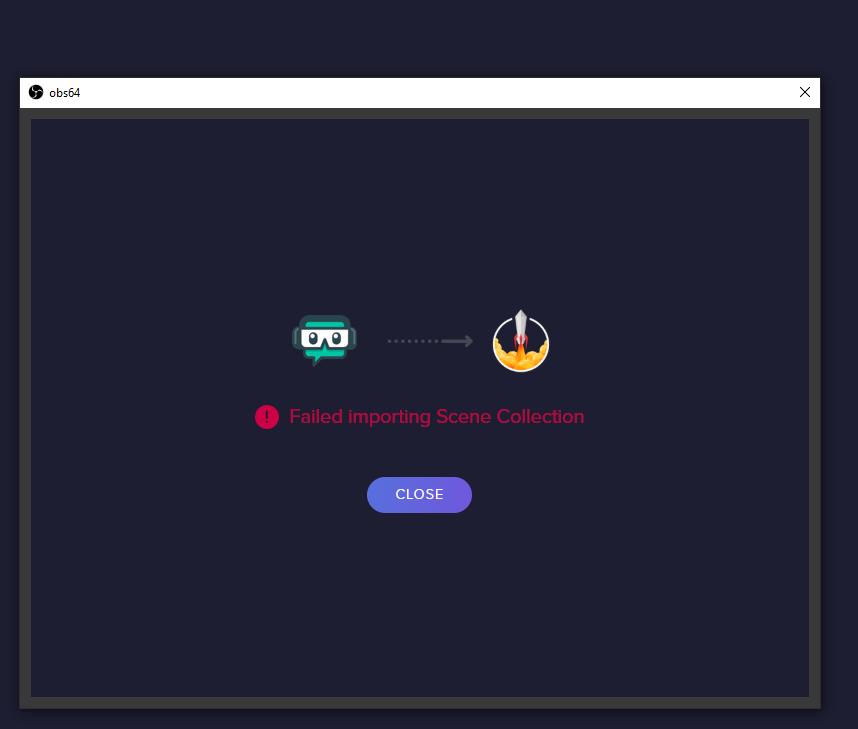
no suggestion why it just gets to the last bit and then fails
 plain mason
@opaque kettle log in on both sites, stay with the sites opened on your browser while importing, and click to import again.
mint walrus
For some reason streamelements dashboard will not work in chrome, I can not access it, only seems to work in Firefox for me, all browsers are up to date
steel bladeBOT
@mint walrus Please logout of StreamElements at https://streamelements.com/logout and then login again to your account (Twitch/Youtube/Facebook/Mixer)
plain mason
@mint walrus did you try to delete all cookies, temp files, scripts from your browser? CTRL+SHIFT+DELETE, select ALL TIME, go to Advanced tab, pick all options and CLEAR DATA. Another thing, try to open the SE website using "incognito window".
opaque kettle
@plain mason I did that but it did the same thing
mint walrus
Tried it all except incognito. i'll give that a go
plain mason
@opaque kettle did you install the chrome extension? https://streamelements.com/dashboard/account/import
opaque kettle
it gets to alerts and then crashes
yeah
but that doesnt have overlays on it
scenes sorry
i used it still
just incase
but it gets to the alerts and then crashes
thats in OBS
tulip hamlet
@opaque kettle The import will fail if your assets are too large or if you're attempting to import Streamlabs-owned assets.
mint walrus
ok logging out and back in seems to work now, although that ofc happened last night when I cleared cashe etc. but didn't work. interesting
opaque kettle
im not there my own
its importing the scenes but not displaying them because it gets to the alerts and fails
but then when you look at it it imported the alerts but not the scenes
 brittle lagoon
I have 2x RX 570s. Is there a way to force OBS to use the second discrete card for encoding?
steel bladeBOT
@brittle lagoon For the best OBS support, please join their Official Discord @ discord.gg/obsproject
 manic verge
my game capture isnt workoing i haave the game selected
steel bladeBOT
@manic verge For the best OBS support, please join their Official Discord @ discord.gg/obsproject
 manic nimbus
Hey guys, I am having an issue with tipping. I had someone in my stream tip £5 earlier but nothing came through in the overlay or my activity feed, even though I got an email alerting me of the tip, any ideas?
distant breach
which platform are you using @manic nimbus ?
manic nimbus
twitch
 sacred seal
so i have full control over a friends streamelements bot i am trying to figure out why nobody is earning points when they gamble the rigged number is at 1 yet no one can win apart from the streamer
anyone able to help
distant breach
if you go to the overlay and emulate the tip event does it work @manic nimbus ?
manic nimbus
yeah that works @distant breach
manic nimbus
yup that also works
distant breach
then it should work when a real event happens. .... was the email by chance from a different service or tip platform?
manic nimbus
the email came from paypal
but there's also nothing in paypal itself saying it went through
distant breach
@sacred seal are you using the roulette command or a custom !gamble command? (also platform)
sacred seal
twitch also its roulette but changed the name of it to gamble
distant breach
i'm not really sure. hopefully someone else can give you a better answer, but if the alerts work on the overlay and in obs it should set up correctly....be careful for spam/phishing emails @manic nimbus just in case.
 mellow snow
I noticed I cant change the font size in the twitch chat anymore. When I select it and change it to bigger nothing happens.
distant breach
@sacred seal jump over to #helpdesk-twitch
manic nimbus
ok thanks for trying anyway @distant breach
distant breach
in OBS or the SE editor @mellow snow ?
distant breach
honest echo
@mellow snow Seems to be a known issue with BTTV (font and font-size), they're working on it
 novel moat
every time i change a setting in obs it crashes please help
steel bladeBOT
@novel moat To find the OBS Studio crash logs, follow these steps:
- Press Win+R to open the Run dialog
- Type in:
%APPDATA%\obs-studio\crashesand press Enter - Upload the desired crash log, usually the latest, directly to this Discord channel by dragging and dropping the file into the chat window
@novel moat Please ask your question in one helpdesk channel only. A support volunteer or StreamElements staff member will assist you as soon as they are available. Asking in multiple places will only result in confusion, not faster answers. Thank you for your patience.
novel moat
thier is no crash log it just whites out then crashes
 wet wing
hey, anyone knows how to fix the scrolling text showing on the editor but not on obs??? thanks
steel bladeBOT
@wet wing Right click on the BrowserSource > Properties > Scroll down a bit > Refresh Cache of current page
wet wing
goddam thanks
 rain kettle
Hello! I am having issues with certain assets in my overlay not showing up in the StreamElements editor or in OBS. Is this a me issue or some other issue?
honest echo
@rain kettle did you try to re-upload those assets?
rain kettle
Re-upload them? No, I hadn't because this overlay I have came with everything on it
I can go ahead and try to do that now
OK, so re-upload seems to work! But why has this issue happened in the first place? I even tried to do the ctrl+shift+r method and nothing was changed.
 rain kettle


rugged quail
hi everyone! I'm trying to get Media Request to work, but I cannot add a widget for it on my stream. Can anyone help?
i tried following the tutrial from streamelements video
but i had already skipped the take a tour stuff
so now it doesnt give me the option to add a widget
honest echo
!@rugged quail check the StreamElements menu on the top on OBS
honest echo
all widgets need to be added in an overlay
rugged quail
honest echo
StreamElements
The Ultimate All in One Platform for Streamers
edit yout overlay (or created a new one) and add the Medi REquest Widget
rugged quail
thanks!
honest echo
there is no such thing as Media Request Source
rugged quail
my b
im dummy
i'm having problems to manage the restore option on my cloud manager how can i fix this issue
honest echo
@rugged quail any error on screen?
rugged quail
it's just locked and not letting me download
there's anyway possible for me to access my backups without the client?
 topaz jewel
Hey guys, im moving to OBS Live from streamlabs obs and i want to move all my scenes to OBS Live, there is a quick way to do it ?
Thank you for the help!
topaz jewel
@honest echo its always stuck on 26%
rugged quail
@honest echo yes, it's already installed
 toxic fern
@topaz jewel try this #helpdesk-facebook message
And use the import option in browser for alertbox/tips.
topaz jewel
@toxic fern love you
 tender python
@toxic fern I still need to do that 😩
rugged quail
i'm truly sorry for bothering, but i'm really having a hard time with the cloud manager i just have to format my pc and i can't restore my scene, and idk why obs.live is not letting restore them
here's my current situation with the cloud manager
honest echo
@rugged quail have you checked here ⤵️
rugged quail
yes, i already checked this
i don't have any scene available on my pc currently
i just reinstalled and the system is brand new
topaz jewel
i cant go in to my dashboard, someone know whyt?
its bring me back to https://streamelements.com/
StreamElements
StreamElements is the leading platform for live streamers on Twitch and Youtube. StreamElements includes Overlay management, ChatBot, Tipping, Alerts & Loyalty
all the time
honest echo
@topaz jewel Visit https://streamelements.com/logout and then log in again
StreamElements
The Ultimate All in One Platform for Streamers
 vale barn
Anyone know why my game isnt smooth when I stream?
honest echo
@rugged quail Did you open OBs.live with admin rights?
honest echo
@rugged quail restart OBS and try again please
rugged quail
i did that 10 times sadly
always the same result
there's no way to manually get my backups ?
honest echo
@rugged quail we already ask to ours devs about this,
 glacial otter
anyone know why obs would crash when changing scene selection?
steel bladeBOT
@glacial otter A crash log is required to investigate the cause of your issue. Please upload the last crash log.
- In OBS, click the Help menu
- Select Crash Reports, and then Upload Last Crash Report
- Copy the URL, and paste it to the chat here.
--
If you are not able to follow the above steps, open your file explorer and go here:%appdata%\obs-studio\crashesand provide the last listed file.
glacial otter
funny thing.... obs doesn't know it crashed


 clear trench
Is it possible to use a singular stinger transition to switch from a specific scene to another without using Studio Mode like in Streamlabs?
steel bladeBOT
@clear trench For the best OBS support, please join their Official Discord @ discord.gg/obsproject
glacial otter
so I duplicate and rename the collection, which it let me do, then tried to switch back to the one I was on...crash but no crash report
@clear trench make sure you have the transition added and then right click your scene and goto transition override
I see me having to uninstall and reinstall to fix my issue
or just switch back to slobs
shy mountain
So 2 options:
A) Remove the scene collection manually from OBS, via %appdata%/obs-studio/...something something folder and try and replicate
B) Uninstall OBS.Live, reinstall OBS Studio, install OBS.Live
glacial otter
yup thats what I was thinking, sucks cause I'll have to redo my settings and scenes etc
shy mountain
well just try and move the file, dot delete it
its a .json file that the scene collection is holding
and if the log file says "switching to null"
maybe it was malformed
if you saw that in the log file, then i assume you understand .json files, so maybe dig into it a bit and see if there is like an empty {} entry
or something
clear trench
@glacial otter Transition override just sets the stinger to run everytime I switch to that scene. I mean something like this.
shy mountain
@glacial otter go to %appdata%\obs-studio\basic\scenes
and DM me the scene collection that you tried to switch to
glacial otter
ok
lol it's any scene so I'll pick one
@clear trench yeah dude, I don't think thats possible in straight obs
they need to add that and they need to add the click through, pop out, translucent, chat window
clear trench
And people told me Studio was better 😩 TY for your help dude.
glacial otter
each has its perks and pitfalls lol