#helpdesk-selive
1 messages · Page 112 of 1
 toxic shard
 rugged quail
Hi everyone, I come for a little information I can not have the return of my game capture on OBS. Live but on the other hand in Screenshot it function. that it wouldn't come from my Division2 games
 odd kraken
Bungie has opted to not allow OBS to hook Destiny 2 using Game Capture. See: https://www.bungie.net/en/Help/Article/46101
You will need to run the game in either windowed fullscreen or borderless windowed and use Window Capture instead.
 granite marsh
Hello. So i have this strange problem. On my activity feed (this is in obs live) my old channel is logged in. i dont know how to get my new channel logged in there. Please help 🙂
 steel bladeBOT
@granite marsh Streamelements on top of OBS -> Logout -> login
 elfin lagoon
hi, dose the emulate feature work on OBS, because the emulate feature works fine on the "my overlays" editor on streamelements.com but doesn't work on OBS
steel bladeBOT
@elfin lagoon You can test Alerts via the bell on the lower right corner of the Overlay Editor. Simply go to your Dashboard -> My Overlays -> Pencil/edit button on the overlay. Make sure the "Show Emulated events on stream" option is on to see the alert in OBS/Xsplit https://streamable.com/h6qgy
 elfin lagoon
it's still not working when i copy the link to OBS
steel bladeBOT
@elfin lagoon OBS -> settings -> advanced -> scroll down -> enable/disable hardware accel.
https://i.imgur.com/ggMe9ZE.png
 elfin lagoon
it was on and still nothing
 wary dew
turn if off please 😉
and make 100% sure you have ticked the red box in the bottom of the test alerts thing
to ''show in OBS''
 deft aurora
Hey all, so I'm having trouble with my stream. Been doing it for a long time and I can't get it to show up clear anymore. I run a GTX 1070, with a i7 6700k CPU. I find my recordings and streams are very pixelly even when running game settings low, and having the right settings for obs. Just need help with this
steel bladeBOT
@deft aurora 1) Restart OBS
2) Start your stream/recording for about 30 seconds. Make sure you replicate any issues as best you can, which means having any games/apps open and captured, etc.
3) Stop your stream/recording.
4) Select Help > Log Files > Upload Current Log File. Copy the URL and paste the link here.
(Note: If you do not see an obsproject.com URL, you will need to update OBS Studio to version 22+)
deft aurora
deft aurora
Is anyone here able to help?
deft aurora
Appreciate it, thank you.
wary dew
you can always run it yourself through here: https://obsproject.com/analyzer/
deft aurora
Thank you, I will use that source from now on. Again, thank you
 half pewter
Anyone else having issues installing on stream deck?
steel bladeBOT
@half pewter - Open %appdata%\Elgato\StreamDeck\Plugins
- Delete the
com.streamelements.obslive.sdplugin folder
odd kraken
%appdata% directs you to AppData\Roaming
half pewter
Thanks. I'll give that a shot.
 atomic hinge
Ok, So. Basically 3 days ago, My stream have been good, But today it seems like the streams are just boosting up due to the CPU. I swear I remember seeing something in the box what is empty, And I was wondering if there is something I can do to be able to get that box filled with all the things it had before.
I've tried updating my drive, And I also have deleted OBS Live and reinstalled it.
I don't know what else I should try.
steel bladeBOT
@atomic hinge For the best OBS support, please join their Official Discord @ discord.gg/obsproject
 slim dock
getting "invalid auth token" in when trying to open streamelements overlay editor in obs. how do i get it back ?
 fathom cobalt
Try reauth account
slim dock
is that in obs or do i have to go to streamelements website
fathom cobalt
Obs restart tried?
slim dock
it's happened for a while
never had to edit anything until now though
so obs has been closed and opened many times
fathom cobalt
You can provide screenshot of error?
slim dock
slim dock
yeah i said overlay editor initially lol
fathom cobalt
I can recommend use overlay editor on the website
slim dock
damn so it's a streamelements bug or something ?
steel bladeBOT
@slim dock Streamelements on top of OBS -> Logout -> login
odd kraken
You can also try this.
 tulip hamlet
@slim dock Edit on the site, not in OBS.Live.
 keen girder
HEY GUYS... i somehow deleted my obslive shortcut.. where do i find it? cant find it anywhere.. only OBS studio
ands its not the same
keen girder
but its not the same icon.. i need the icon with the rocket and the login for my twitch... that doesnt happen when i hit the obs studio program :/
also it wont load my games now when i open obs studio instead of obs live..
tulip hamlet
OBS.Live is a plugin for OBS Studio. If it's installed, it should launch regardless of which shortcut is used.
Icon doesn't matter.
keen girder
it is installed but it does not launchm
i know about the icon thing.. its just - i dont know how to explain
tulip hamlet
Screenshot your OBS please.
keen girder
tulip hamlet
The StreamElements menu at the top and the version in the bottom right are both proof that OBS.Live is running.
 manic condor
So why timers have not been showing up. is there a way I can test it without going live?
tulip hamlet
@manic condor What did you set chat lines to?
manic condor
I like like 50 or something
tulip hamlet
And you have 50 chat messages within 5 minutes to justify that?
manic condor
Sometimes. it off and on about that many lines
wait... so is it 50 lines in 5 min for it to work?
tulip hamlet
Read the note beneath the setting.
keen girder
i see that.. but why doesnt it show my game anymore then same goes for the layout.. its not the same
tulip hamlet
Check your sources.
keen girder
i did many times.. i never change my settings or sources... it just suddenly didnt work
 brisk dove
Dumb question here, can't find a good answer on google, but how do you change your stream title lol. I've look in the app and the dashboard for about 10 mins 🤣
tulip hamlet
@brisk dove Menu in top left of activity feed.
brisk dove
thank you
 split gazelle
Is there a way to get an "Activity Feed" panel for Mixer or YouTube?
steel bladeBOT
@split gazelle Streamelements on top of OBS -> Logout -> login
 clear root
hello,
when i tried to update obs.live just now. I somehow got this: Can't write: C:\Program Files (x86)\obs-studio\obs-plugins\64bit\locales\en-US.pak
(this wasn't my first time updating and other updates went in smoothly)
anyone know a fix?
tulip hamlet
Is there a try again button?
tulip hamlet
Check your task manager and make sure something of OBS isn't still open.
Or try restarting your computer.
 maiden bolt
 placid gorge
my app crashes evertime i try to open it
tulip hamlet
@placid gorge Can you provide your crash log please?
placid gorge
it doesnt give one it just closes
steel bladeBOT
@placid gorge To find the OBS Studio crash logs, follow these steps:
- Press Win+R to open the Run dialog
- Type in:
%APPDATA%\obs-studio\crashesand press Enter - Upload the desired crash log, usually the latest, directly to this Discord channel by dragging and dropping the file into the chat window
placid gorge
tulip hamlet
@placid gorge Follow these steps, in this exact order. If you do anything out of order, you will cause yourself more problems.
Uninstall OBS.Live, leaving only OBS Studio installed.
Open OBS Studio and delete all of your browser sources.
Reinstall OBS.Live and then you should be able to remake your browser sources.
placid gorge
my obs studio crashes when i open to
tulip hamlet
@placid gorge Follow the steps.
 ember raptor
Hello everyone. For about 2 weeks now when I switch from my starting soon scene to my live scene by webcams disappears. This can occur when I'm live and when I'm not with just the program open. Any thoughts on this? Is it a bug from an update?
steel bladeBOT
@ember raptor For the best OBS support, please join their Official Discord @ discord.gg/obsproject
placid gorge
how am i supposed to delete my browser sources when i cant do anything within the app
tulip hamlet
@placid gorge Follow the steps. In order. As said.
placid gorge
ive tried
tulip hamlet
Uninstall OBS.Live, leaving only OBS Studio installed.
Open OBS Studio and delete all of your browser sources.
placid gorge
yes
tulip hamlet
Reinstall OBS.Live and then you should be able to remake your browser sources.
You need to uninstall OBS.Live first.
placid gorge
bro i cant delete my browser sources because my obs studio instantly freezes
placid gorge
i did
tulip hamlet
You need to uninstall OBS.Live first.
placid gorge
I DID UNINSTALL IT im sorry to get mad but i did uninstall it
im listening to everything you are saying
tulip hamlet
Let's verify. Please take a screenshot of the contents of Program Files (x86)/obs-studio
placid gorge
tulip hamlet
Uninstall and reinstall OBS Studio.
 unkempt carbon
Hi everyone, do we have a way to export our overlays ?
steel bladeBOT
@unkempt carbon To add your overlays to OBS, add a new browser source in your scene. Paste your overlay URL in the browser source properties, set the dimensions to 1920x1080 (unless you changed them on the website), and ☑ “Shutdown source when not visible” https://youtu.be/KDvLynUqXI4
unkempt carbon
My 1st twitch channel is lockdown, so I just create a new one....but unfortunately I dont want to recreate everything from a scratch when the other one was perfect for me...
tulip hamlet
If you cannot access your StreamElements account because your Twitch account has been suspended, then you will need to wait for that suspension to be lifted.
If you linked other channels in your account, you can perhaps bypass this by logging into the other channel first, and then using the Channels dropdown on the top left to switch over.
unkempt carbon
In example...all my overlays are in streamelement....but widgets, alerts, etc seem bugguy because that...linked to the wrong one
tulip hamlet
They're not "buggy;" if they're in the channel that was suspended, then they're looking for data from that suspended channel. An overlay doesn't automatically listen to a different channel just because you changed things in OBS.
unkempt carbon
The channel isnt suspended....I just forgot my password because linked to a old phone number...
so I can't receive the sms
tulip hamlet
Then you'll need to contact Twitch.
unkempt carbon
Why not just implementing a way to export "our" overlay?
tulip hamlet
StreamElements is a cloud-based service. There is no export.
unkempt carbon
If I can import them....why not way to export them
tulip hamlet
It's meant to be used in the cloud.
unkempt carbon
ya...but...the reverse process remain the same than uploading our overlay
tulip hamlet
In this case, you link your channels and then duplicate your overlay.
But there is no export.
unkempt carbon
ya I taken my overlay created for my bad twitch channel, and use the navigator link to import them in my software
tulip hamlet
No, you're misunderstanding.
That's just adding it to OBS.
That changes nothing.
Your overlay will still be tracking the channel it was made for.
Within your StreamElements dashboard, you must duplicate the overlay to your other channel.
unkempt carbon
oof...okay...but I cant add a 2nd twitch channel right?
split gazelle
Oh. Can you only be logged in to one platform at a time?
tulip hamlet
Yes.
 ember torrent
having issue with dropped frames. 1000+ with first 45 seconds
steel bladeBOT
@ember torrent Please provide a log from your last stream. To do this, in OBS go to Help > Log Files > Upload Last Log File and paste the link to the log file here.
ember torrent
tulip hamlet
ember torrent
correct
trying to change servers now
change to 3 other servers. same result all red
ember torrent
ok
 hearty briar
So my media request keeps echoing in my stream. Whenever I dont show it on stream on OBS Live, it doesn't echo, but when I do show on stream, it starts to provide an echo sound
steel bladeBOT
@hearty briar Make sure to ☑ “Shutdown source when not visible” for all browser sources (all OBS scenes). If using studio mode, uncheck “Swap Preview/Output scenes After Transitioning.” Also keep in mind that sound can play from any overlay loaded in the browser (editor or launched). https://i.imgur.com/FegZJQS.png https://i.imgur.com/yY0wcFl.png

 hearty briar
This problem is still occuring and I do not have the website open as well. I checked it off and made sure no audio was on a delay
tulip hamlet
@hearty briar You need to check it on every browser source in every scene. Just because you're not on the scene does not mean the browser source is not still active there.
hearty briar
OHHH, thank you so much
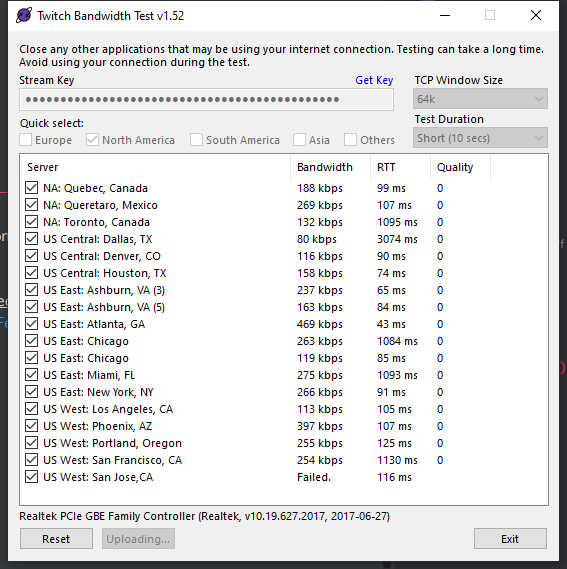 tulip hamlet
Well that's not good.
tulip hamlet
This is outbound traffic, port forwarding is to manage inbound traffic.
 tender python
Check with a network outage
because anything like that, + high RTT, signals dead connection(s)
ember torrent
Everything else in my house runs fine, i even reset my modem
ember torrent
I applied a recent windows update and that fixed it
 drowsy matrix
will there be an update to work with OBS 25 soon?
tulip hamlet
It already does.
drowsy matrix
great to hear, ill go ahead and do the update then. ive been avoiding the OBS STudio 25 update to prevent conflicts with the SE OBS Live
thank you @tulip hamlet
 iron pumice
Was wanting to see if I could get some help with dual pc setup where cloning my screen apparently causes micro stuttering. Been trying to find work arounds.
tulip hamlet
@iron pumice Don't forget you have the #dreamteam channel for support.
 timber skiff
Hey all, I've been having an issue with my OBS.LIVE dropping frames every time I stream. It hasn't always done this, and just recently started dropping more and more frames in the past week. I haven't changed anything in my system, settings, hardware or anything, so I don't know what's going on. I've checked for an update SEVERAL times, and there's none available. Anyone that can help fix this I'd be eternally grateful.
steel bladeBOT
@timber skiff Please provide a log from your last stream. To do this, in OBS go to Help > Log Files > Upload Last Log File and paste the link to the log file here.
rugged quail
hello can someone help me
steel bladeBOT
@rugged quail Welcome to the helpdesk! Please let us know how we can assist you today and a support volunteer or staff member will assist you as soon as they are available. Thank you for your patience.
rugged quail
i want to know if there is someone that can help me first lol
tulip hamlet
The bot doesn't talk on its own.
tulip hamlet
If it's the same issue you wrote about two hours ago, you still need to reach out to OBS Project's support.
tulip hamlet
Unusual brightness behavior in capture sources is not something we can really help with here.
rugged quail
do you not have any idea as to what it could be? I have been trying to fix this for hours now. I have been looking online and found nothing, i watched YouTube videos that didn't help, i went to obs support and they couldn't help me. I am at a dead end right now 😦
timber skiff
https://obsproject.com/logs/T5J-RLSa9Q-RLhGM is the URL for my last stream, but it's not a long stream. I was only live for a few minutes when I started to see the bitrate/frames dropping, and ended it to seek help. There are other streams in the last few days that have significantly more data
tulip hamlet
That log doesn't have an output session at all.
rugged quail
ill take that as a no
timber skiff
How can I upload a log from a stream that wasn't the last one? I can open them in my documents, I just don't know how to upload them other than how the bot just told me to.
tulip hamlet
It won't let you.
steel bladeBOT
@timber skiff 1) Restart OBS
2) Start your stream/recording for about 30 seconds. Make sure you replicate any issues as best you can, which means having any games/apps open and captured, etc.
3) Stop your stream/recording.
4) Select Help > Log Files > Upload Current Log File. Copy the URL and paste the link here.
(Note: If you do not see an obsproject.com URL, you will need to update OBS Studio to version 22+)
timber skiff
Cool will do.
This is the log from the stream that I just completed, citing the Current Log File https://obsproject.com/logs/nuKCxnhUr-uM1ggs
tulip hamlet
@timber skiff https://obsproject.com/analyzer/?url=https%3A%2F%2Fobsproject.com%2Flogs%2FnuKCxnhUr-uM1ggs
It's your connection.
timber skiff
Awesome, thank you. I'll see what I can do about getting that fixed
tulip hamlet
You may not be able to. A lot of it is just the current state of the world.
timber skiff
That's very true, with everyone being home, and all of the bandwidth being taken up when it's usually not. That makes sense as to why it just started happening in the last week. I did a speed test, and it's showing 3mb/s upload when it should be 10.
 rich magnet
Hi
I have a problem with my obsstreamlab
in my activity feed in obs, there is no notification
but in ground control, it show up
how can i make the activity feed in obs show like in ground control?
steel bladeBOT
@rich magnet Streamelements on top of OBS -> Logout -> login
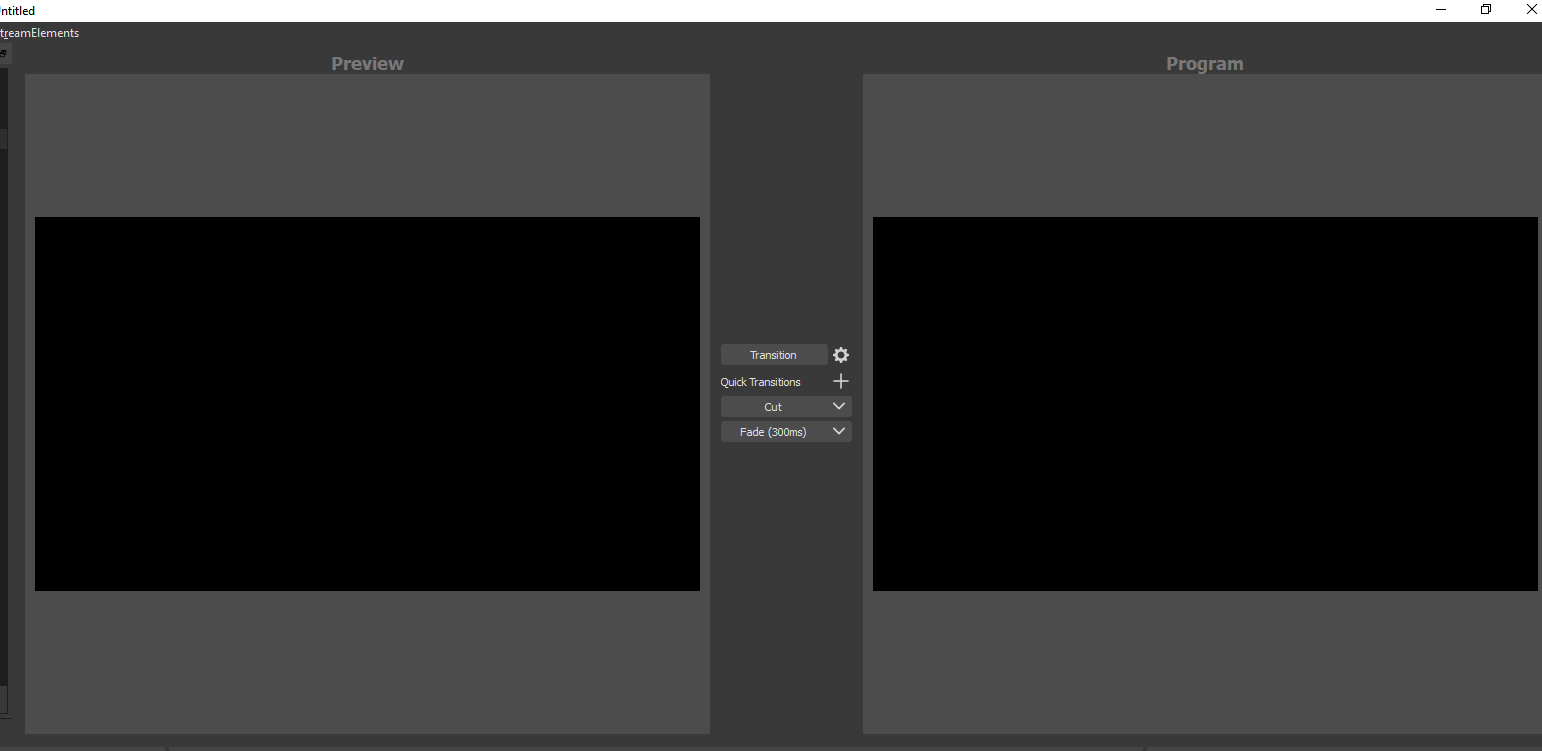 rich magnet
https://i.imgur.com/nIZEiGV.png
@acoustic goblet Below the Start and Stop live streaming, there is Studios Mode button. click on that button.
 acoustic goblet
thank youi
rich magnet
your welcome!
 shy mountain
@rich magnet Click on the burger menu button on both the activity feed and ground control and show a screenshot of the logged accounts
rich magnet
shy mountain
those are 2 different accounts
rich magnet
ok solved
i just login with my facebook on obs live
before this i use twitch
thanks @shy mountain
 sharp pumice
Hi, after update OBS the streamelements plugins are not available. it looks like a originel obs.... how can i bring the plugins back?
shy mountain
Do you see this menu button?
sharp pumice
no, i dont see this
shy mountain
https://obs.live - grab the installer and install the plugin

OBS.Live | Open Broadcaster Software Streaming Knowledge Base
OBS (open broadcaster software) knowledge base for live streaming. Find articles and videos about streaming with OBS.
 ebon swift
how do you make alerts have sound?
sharp pumice
ok, thanks... solved
 turbid arch
I can't get my alerts to show can I get help?
steel bladeBOT
@turbid arch To add your overlays to OBS, add a new browser source in your scene. Paste your overlay URL in the browser source properties, set the dimensions to 1920x1080 (unless you changed them on the website), and ☑ “Shutdown source when not visible” https://youtu.be/KDvLynUqXI4
turbid arch
Not overlays The thing where I can repeat or ski9p alerts from SE
fathom cobalt
In the activity feed
fathom cobalt
shy mountain
OBS -> Streamelements on top -> activity feed
turbid arch
Don't see it weird
turbid arch
I'm in obs check streamelements don't see activity feed
steel bladeBOT
@turbid arch Streamelements on top of OBS -> Logout -> login
 fresh gyro
Hello, I have a black window problem on Obs, can someone help me please?
shy mountain
Are you on a laptop?
fresh gyro
yes
steel bladeBOT
@fresh gyro Due to the way laptops are designed, your system must be configured to run OBS on a specific GPU, depending on the type of capture you are trying to do.
For Game Capture and Window Capture (recommended), your system must be configured to run OBS on your laptop’s high performance GPU (default); for Display Capture, your system must be configured to run OBS on your laptop’s power saving GPU (iGPU).
If you are running Windows 10 1903 or newer, use this guide for instructions on how to configure your system: https://github.com/obsproject/obs-studio/wiki/Laptop-GPU-Selection-Windows-10
For instructions on configuring an older version of Windows (you should consider upgrading), use this guide: https://obsproject.com/wiki/Laptop-Troubleshooting
fresh gyro
ahh, so long, Im sorry I have not good english 😦 it takes so much times and I'm too lazy for that, but I can say, I have gtx1650
shy mountain
I strongly recommend reading the above instructions
 late fiber
Not sure if this is the right spot but I tried to withdraw from the SE to my bank account and I havnt received been 5 days wanted to make sure if it just takes a long time or if there was an error
shy mountain
Is the wrong channel, but no worries. It takes between 3 to 5 days for a withdraw from SE.Pay to hit your bank.
late fiber
Okay what if it doesn’t ?
shy mountain
From what I see it should have already hit your bank. Talk with your bank and see if there is an incoming amount
late fiber
Ok
rugged quail
hey so - i have radeon 5700 ryzen 7 2700x.. I get 240FPS in fortnite at cap. RIGHT WHEN I TURN my stream on.. it lags to like 130
16GB DRR4 2800MHZ
My OBS is really only set to 720p 60FPS
any help? I am playing my game at 155hz
and 2560x1440
I don't want to lower my game res or anything.. cause I know this PC is capable of getting these rates.
I just want like a good 180FPS while streaming.
steel bladeBOT
@rugged quail Please provide a log from your last stream. To do this, in OBS go to Help > Log Files > Upload Last Log File and paste the link to the log file here.
rugged quail
steel bladeBOT
@rugged quail 1) Restart OBS
2) Start your stream/recording for about 30 seconds. Make sure you replicate any issues as best you can, which means having any games/apps open and captured, etc.
3) Stop your stream/recording.
4) Select Help > Log Files > Upload Current Log File. Copy the URL and paste the link here.
(Note: If you do not see an obsproject.com URL, you will need to update OBS Studio to version 22+)
rugged quail
shy mountain
rugged quail
okay, so whatts my issue?
shy mountain
rugged quail
OMG
I JUST FOUND OUT WHY MY INTERNET IS DOG SHIT
I am on the wrong internet.
We have internet for our phones, its slower
and we have internet for my PC and stuff
its fast
but he radius is small
and the phone is radius is huge
shy mountain
well the log analyzer shows that you are using wi-fi
rugged quail
the other one is 5G 1GIG up and down.
wifi mb
its wired
nott wireD*
wireless
whatever
 low crag
Hello guys, not sure if is the right place to get help for this, but I'm experiencing some issues with my lbs and el Gato Capture Card.
As you can see image in the studio is like that when u move it around and still have no idea what it is. I'm a newbie on this and it was working properly before.
steel bladeBOT
@low crag If you are having issues with Streamdeck or Elgato capture cards, its best to ask in their Discord here: https://discord.gg/elgato
low crag
Any ideas what might be the issue?
rugged quail
i'm wanting to install a plugin only i can't find the option to.
 kindred fox
Don’t feel bad. It’s been that kind of month
For everybody
Someday they will build an installer for plug-ins directly into obs and it will be a 1-click install
 prisma oak
EDIT: RESOLVED, see images below
Hi, having some issues with updating. I downloaded StreamElements today and it works fine on OBS 24, but I have been using 25 (since I stream Rainbow 6 Siege and need the Vulkan compaitibility, I definitely don't want torevert to 24.) After the prompt comes up on the latest OBS 25.0.1 to update StreamElements, I get an error message saying 'Failed downloading software update package.' After that there is no remnant of streamelements anywhere in OBS and my only option was to go back to the streamelements website and redownload the same update, which opens only in the prveious version of OBS.
It is a very long route back to reattempting the download package since it involves 2 reinstallations to get the prompt. Why is there not just an updated download package that is compatible with OBS 25 on the StreamElements site, and if there is, how do I find it and avoid the 24 one?
UPDATE: Managed to find the right downloader, had to scroll up in this chat a fair bit, was the end of a long and pointless saga. Could StreamElements please update this link so that it points to the updated download package
correct downloader: https://www.obs.live/
OBS.Live | Open Broadcaster Software Streaming Knowledge Base
OBS (open broadcaster software) knowledge base for live streaming. Find articles and videos about streaming with OBS.
 summer junco
Hi guys, I have a issue, my Song request is dropping me echo when I activate couple scenes with the SR, do you guys know how to fix it?
steel bladeBOT
@summer junco Make sure to ☑ “Shutdown source when not visible” for all browser sources (all OBS scenes). If using studio mode, uncheck “Swap Preview/Output scenes After Transitioning.” Also keep in mind that sound can play from any overlay loaded in the browser (editor or launched). https://i.imgur.com/FegZJQS.png https://i.imgur.com/yY0wcFl.png
summer junco
thanks!
 river epoch
my only audio input to my pc is my microphone and the only enabled output is my headset. when i launched obs it didnt automatically pick up my pc audio but it did pick up my microphone, how do i fix this?
odd kraken
Do you have a screenshot of your OBS window please.
river epoch
odd kraken
When you listen to music, do you see an output on the desktop audio line?
river epoch
no
steel bladeBOT
@river epoch For the best OBS support, please join their Official Discord @ discord.gg/obsproject
 ivory topaz
So How do I set alerts for all my platforms using restream and stream elements
odd kraken
Not possible, every platform is on its own.
ivory topaz
oof
 high storm
Hey there, I'm wondering how to integrate my alerts overlay in OBS
odd kraken
Create an overlay with an alertbox and add this to your OBS.
 full sluice
Having issues connecting to ReStream FTL, each time I do it reverts to Mixer FTL
https://twitter.com/CamronJK/status/1243206432465596420?s=19


@StreamElementsS help please, sorry I'm having an annoying day https://t.co/kW6laQsNh5
 Twitter
Curious if anyone knows what's going on
odd kraken
StreamElements does not support multistreaming and does not have Restream support. If you're signed in with Mixer, you'll be streaming to Mixer.
high storm
I made the overlay in StreamElements, but I am not quite sure how to add it to OBS?
steel bladeBOT
@high storm To add your overlays to OBS, add a new browser source in your scene. Paste your overlay URL in the browser source properties, set the dimensions to 1920x1080 (unless you changed them on the website), and ☑ “Shutdown source when not visible” https://youtu.be/KDvLynUqXI4
high storm
Got it, thanks
full sluice
That's... Really annoying but thank you
 pulsar matrix
hello. New to discord. New to streaming. can someone send me a walkthrough on setting up obs?
steel bladeBOT
@pulsar matrix New to Stream Elements?
Check out our YouTube channel https://www.youtube.com/c/streamelements/videos
with tutorial videos from setting up the basics, to in depth details on how to use our product.
New to OBS? Here is a 4 step quickstart guide
https://obsproject.com/wiki/OBS-Studio-Quickstart
Want to learn even more? Here is an in-depth overview
https://obsproject.com/wiki/OBS-Studio-Overview
 tardy temple
How do I get my alerts to show up
steel bladeBOT
@tardy temple You can test Alerts via the bell on the lower right corner of the Overlay Editor. Simply go to your Dashboard -> My Overlays -> Pencil/edit button on the overlay. Make sure the "Show Emulated events on stream" option is on to see the alert in OBS/Xsplit https://streamable.com/h6qgy

@tardy temple To add your overlays to OBS, add a new browser source in your scene. Paste your overlay URL in the browser source properties, set the dimensions to 1920x1080 (unless you changed them on the website), and ☑ “Shutdown source when not visible” https://youtu.be/KDvLynUqXI4
 silent rock
ive followed the instructions on how to set up instant replays but i still cant seem to test it on my obs.live
tardy temple
why the heck cant i click any buttons
on obslive
i can edit my sources but i cant open settings
its annoying
odd kraken
Can you access your overlays via the website?
odd kraken
@tardy temple Read what the bot posted again, special focus on the resolution.
If the overlay has an alertbox which is set up correctly, then you should have alerts.
steel bladeBOT
@tardy temple You can test Alerts via the bell on the lower right corner of the Overlay Editor. Simply go to your Dashboard -> My Overlays -> Pencil/edit button on the overlay. Make sure the "Show Emulated events on stream" option is on to see the alert in OBS/Xsplit https://streamable.com/h6qgy
tardy temple
ok
 teal sandal
Anyone know why I always have black screen when trying to stream/record The division 2 ? It only happen on this game
odd kraken
@teal sandal
Bungie has opted to not allow OBS to hook Destiny 2 using Game Capture. See: https://www.bungie.net/en/Help/Article/46101
You will need to run the game in either windowed fullscreen or borderless windowed and use Window Capture instead.
teal sandal
Destiny 2 ? i'm talking about Division 2... can you read ?
steel bladeBOT
@teal sandal For the best OBS support, please join their Official Discord @ discord.gg/obsproject
teal sandal
-_-
tardy temple
how do i setup the streamelements bot?
steel bladeBOT
@tardy temple New to Stream Elements?
Check out our YouTube channel https://www.youtube.com/c/streamelements/videos
with tutorial videos from setting up the basics, to in depth details on how to use our product.
New to OBS? Here is a 4 step quickstart guide
https://obsproject.com/wiki/OBS-Studio-Quickstart
Want to learn even more? Here is an in-depth overview
https://obsproject.com/wiki/OBS-Studio-Overview
 dusk rose
Whenever I Try to add the scene the screen shows up little how do I fix that
rugged quail
It was. I'm silly. I'ma delete that lmao.
 placid charm
when i try to stream specific games obs tells me something about encoding preset, anyone know whatr to do?
steel bladeBOT
@placid charm Please provide a log from your last stream. To do this, in OBS go to Help > Log Files > Upload Last Log File and paste the link to the log file here.
placid charm
odd kraken
ember raptor
Hey team, regarding obs.live for 2 weeks now my animated web cam disappears after switching from my starting soon scene to my live scene. (This can happen when I'm not live to) any thoughts on this, is this a update bug?
placid charm
any update guys???
 warm seal
Hi I need help on OBS (not OBS Live) I noticed that the animated things of the overlay are jerky and I lose many frames you know how to solve ?(I use a Mac)
steel bladeBOT
@warm seal For the best OBS support, please join their Official Discord @ discord.gg/obsproject
unkempt carbon
How I can use the normal editor for my overlays and not this limited one ?
 desert oak
I think I found a bug. I don't have obs.live installed while making this video. but the issue also happened when I had it installed.
https://instructure.zoom.us/rec/share/_OVTJIrJ6nhOcq_s6FPtA_QFB4nCaaa8gHVNr_EOyx3M_w5a4TA8kYyDAkOVQgQf?startTime=1585252647000

Zoom Video
Zoom is the leader in modern enterprise video communications, with an easy, reliable cloud platform for video and audio conferencing, chat, and webinars across mobile, desktop, and room systems. Zoom Rooms is the original software-based conference room solution used around the...
split gazelle
How I can use the normal editor for my overlays and not this limited one ?
@unkempt carbon Make it offline, upload it as a static image and use it in your scene.
placid charm
when i try to stream specific games obs tells me something about encoding preset, anyone know whatr to do?
wary dew
How I can use the normal editor for my overlays and not this limited one ?
@unkempt carbon what is the limitation?
This is the new editor that is now in beta
desert oak
I fixed my issue. This guide was a great resource. And helped me better understand why some sources appear black or blank.
https://obsproject.com/wiki/Laptop-Troubleshooting#browser-sources
If you tried everything in this guide and are still having issues, please make a post on the forums or stop by the OBS Discord server. Windows 10: latest Windows 10 builds…
 worthy hollow
I am trying to learn how to setup polls during stream
tulip hamlet
@worthy hollow Please see options in #widget-share
 edgy crater
need some help with my dm me to help me thank you
tulip hamlet
@edgy crater Support is provided in the public channels, not in DMs.
edgy crater
oh well ok i dont know what it mean when i stream and it say lower video settings or use a faster encoder i dont know what to do
tulip hamlet
Do just that. Go into your OBS settings and lower quality. Your computer can't take it.
edgy crater
what kind of setting though
edgy crater
i have a ryzen 5 5500k 32gb of ram and a 1050ti what settings should i use then
steel bladeBOT
@edgy crater There are no "best settings".
Please understand that every setup will be very different.
Any guides or videos that claim otherwise are misinforming. Your best option is to start with a base and adjust as necessary.
You can run the OBS auto-configuration tool. To use the auto-config, click on the Tools menu in OBS, select Auto-Configuration Wizard, and then just follow the on-screen directions.
You can use this tool to get baseline settings for your hardware and adjust as necessary from there.
Test, test, and test again. We are happy to offer suggestions for any issues you may be having afterwards, but not a list of settings.
Thank you 
placid charm
@tulip hamlet when i try to stream specific games obs tells me something about encoding preset, anyone know whatr to do?
steel bladeBOT
@placid charm For the best OBS support, please join their Official Discord @ discord.gg/obsproject
placid charm
i have submitted my logs but no feedback
 strong gust
is there a way to make text fade in when using streamelements with obsliv when you transition to a new scene?
tulip hamlet
Pardon?
strong gust
i want to make an overlay where the text fades in after the scene is activated
tulip hamlet
That would require you to custom code each and every widget to fade in on load.
There is no default option for it.
steel bladeBOT
@strong gust Check out this tutorial for OBS’ studio mode which allows you to preload scenes before transitioning. https://www.youtube.com/watch?v=W8iWsD2Lq3U
 pallid drift
I can't seem to get my activity feed working again on my obs.live. I stream on mixer and for whatever reason it stopped working about a week or so ago and I have not been able to fix it.
steel bladeBOT
@pallid drift Streamelements on top of OBS -> Logout -> login
ember raptor
Hey team, regarding obs.live for 2 weeks now my animated web cam disappears after switching from my starting soon scene to my live scene. (This can happen when I'm not live to) any thoughts on this, is this a update bug?
 random stirrup
how to i test widgets with obslive?
steel bladeBOT
@random stirrup You can test Alerts via the bell on the lower right corner of the Overlay Editor. Simply go to your Dashboard -> My Overlays -> Pencil/edit button on the overlay. Make sure the "Show Emulated events on stream" option is on to see the alert in OBS/Xsplit https://streamable.com/h6qgy
 random stirrup
where is overlay editor though?
tulip hamlet
On the site.
random stirrup
slight problem
im bad at finding things
and i cant even see that on the website
steel bladeBOT
@random stirrup New to Stream Elements?
Check out our YouTube channel https://www.youtube.com/c/streamelements/videos
with tutorial videos from setting up the basics, to in depth details on how to use our product.
New to OBS? Here is a 4 step quickstart guide
https://obsproject.com/wiki/OBS-Studio-Quickstart
Want to learn even more? Here is an in-depth overview
https://obsproject.com/wiki/OBS-Studio-Overview
tulip hamlet
@ember raptor What do you mean by your animated web cam?
 coarse patio
 maiden stream
Hey Guys! Someone in my stream said that they couldn't hear any audio... I was wondering if I could get some help??
steel bladeBOT
@coarse patio Welcome to the helpdesk! Please let us know how we can assist you today and a support volunteer or staff member will assist you as soon as they are available. Thank you for your patience.
tulip hamlet
@maiden stream Only one person or everyone? If it's just one, that's on their end, not yours.
maiden stream
Everyone
tulip hamlet
Check your settings in Settings>Audio.
maiden stream
In streamlabs or on my desktop
tulip hamlet
Streamlabs? We can't really help you troubleshoot Streamlabs OBS.
We're not Streamlabs and don't have the tools to troubleshoot their software for them.
maiden stream
What am I looking for?
tulip hamlet
You'll need to reach out to Streamlabs to troubleshoot their software.
 silent crystal
anyone available to help?
steel bladeBOT
@silent crystal Welcome to the helpdesk! Please let us know how we can assist you today and a support volunteer or staff member will assist you as soon as they are available. Thank you for your patience.
silent crystal
i loaded obs to stream, all of my boarders and overlays went to black screens. the only screen showing up is my main screen gameplay, but with no overlays and my stream is running very poorly
steel bladeBOT
@silent crystal Streamelements on top of OBS -> Logout -> login
silent crystal
still not working, getting the same problem
tulip hamlet
Screenshot please.
silent crystal
im new to pc, im not sure how to screenshot sorry lol
steel bladeBOT
@silent crystal Please provide a proper screenshot with the issue visible. If not sure how to take a screenshot, you can check here: https://www.take-a-screenshot.org/
silent crystal
steel bladeBOT
@silent crystal We're not able to troubleshoot issues with using our overlays in StreamLabs OBS (SLOBS) as we don't have the tools to support their software. We recommend using OBS Studio or OBS Studio with our plugin OBS.Live.
silent crystal
sorry, i had the wrong screen open, both applications are actually doing it. is this a problem on my end?
tulip hamlet
Please take a screenshot of the issue in OBS Studio.
tulip hamlet
Please provide the crash log.
tulip hamlet
That's saying it made a crash log.
So now please actually provide the crash log to us.
silent crystal
sorry, im new to all of this. sending now
i press yes on it, but im not able to find it after that
silent crystal
tulip hamlet
@silent crystal Uninstall OBS.Live, leaving OBS Studio installed alone.
Launch OBS Studio. It shouldn't crash. Delete your browser sources.
Reinstall OBS.Live. After that, you can remake your browser sources.
silent crystal
studio is crashing as well
silent crystal
yes
tulip hamlet
Reinstall OBS Studio, then.
silent crystal
im trying to uninstall and its saying installation aborted. setupd was not completed successfully even though im attempting to delete
do you have any idea why?
here we go, i deleted them. re installing now
Thank you for the help! I got it to work after deleting. Have a nice night
 whole mural
I cant open stream elements anymore it crashes everytime. I did the Uninstall steps, but I dont unserstand the "Delete your browerr sources". Will I have to lose all my settings and set up?
tulip hamlet
@whole mural Browser sources are not your entire setup and have nothing to do with your settings. They're individual sources you create to reference your overlays in your account. It's essentially a browser tab you've pasted a link into. They're very easy to remake.
whole mural
Do i just delete the sources that have the streamelements links . or everything?
whole mural
ok
tulip hamlet
Whether they've got StreamElements links or other links.
If it's a browser source, it needs to go.
 drowsy trench
Im running into a visual issue.
shy mountain
Can you elaborate?
drowsy trench
of course, wanted to make sure i was going to be heard. sorry
im trying to stream division 2. but when i use the game capture for source, i just get a black screen.
shy mountain
OBS 25.0.1?
drowsy trench
ive played other games windowed before, so im not sure why this is not working.
lemme double check, just installed today.
shy mountain
its 25.0.1
shy mountain
the newest version of OBS Studio is being blocked by the anti-cheat of Division 2
thats obs.live
OBS Studio is on top left
drowsy trench
then yes,
shy mountain
afaik, there is nothing we or the OBS guys can do about it and just wait for the the Division 2 devs to update their anti-cheat
drowsy trench
ah, got it. that clears waters.
shy mountain
I believe it would be best to have the game at a window-fullscreen
and do display capture
drowsy trench
that seemed to work, but i cant remove mouse capture.
shy mountain
Im not sure i understand
drowsy trench
ok. well, it is setup, so when it works, it works i guess.
with the display capture, it also shows my mouse moving on the screen.
i can opt to have the mouse hidden on stream with the game capture.
shy mountain
Hm
drowsy trench
by cant, i mean there is no option to.
 drowsy trench
i mean, i havent tried that to confirm.
shy mountain
Ok I thought this option was for the Multiview, but now im not sure what is defined as projector
nvm figured it out
drowsy trench
so i tried that, still captures mouse with the hide cursor checked.
shy mountain
projectors is if you right click the obs preview and you will see 2 options saying "projectors"
so thats not it
drowsy trench
ok, yea, that was odd.
well thanks for the information @shy mountain since div2 is not getting along with obs, i will stream something else.
shy mountain
lets move to #dreamteam 🙂
 sour elm
ok thank you 🙂
 hot fulcrum
hi I am having trouble with obs finding my vst plugins
Does obs have a scanner to help find them
steel bladeBOT
@hot fulcrum For the best OBS support, please join their Official Discord @ discord.gg/obsproject
hot fulcrum
well i went there and no such help
shy mountain
They might be sleeping or not available
we can't help you with your query, because you are asking an OBS Studio specific question
while OBS.Live is a plugin as well
hot fulcrum
Okay thank you! I appreciate it!
 nimble breach
Yo.. My activity feed in OBS live wants to connect to Twitch but I want it to connect to Mixer.. anyone know how to fix this?
steel bladeBOT
@nimble breach Streamelements on top of OBS -> Logout -> login
 gleaming basin
hmm alrighty, need some help, Im trying to setup two profiles for streaming on my base canvas one for 1080P and the other for 1440P
But any changes on either profiles affects both
steel bladeBOT
@gleaming basin For the best OBS support, please join their Official Discord @ discord.gg/obsproject
gleaming basin
oh alrighty, soz didnt realized this was obslive support*
shy mountain
I mean, if i know even remotely how to begin troubleshooting your issue, i would 
gleaming basin
I understand
teal sandal
Is there anyway to run Obs.live if I had to downgrade OBS to be able to stream some games ?
Because it only ask me to update, but I don't have my chat and such anymore in OBS because of the downgrade
steel bladeBOT
@teal sandal If you are not seeing the OBS Twitch integrations and have OBS.Live installed, please follow these steps:
- Make sure you are on the latest and greatest version of OBS.Live
- exit OBS (make sure OBS is not running)
- delete %appdata%\obs-studio\plugin_config\obs-browser\obs_profile_cookies
- start OBS.Live
- Settings -> Stream -> disconnect -> connect
teal sandal
.> I hate this bot
shy mountain
I would like to avoid typing the above for the next 5 minutes
teal sandal
I mean, it's helpful, but in my case, not at all xD
shy mountain
That is more helpful to me, so that we can try something else
rather then saying "i hate this bot"
teal sandal
oh x) sorry
shy mountain
So, which parts are missing and what obs studio version are you on?
teal sandal
I had to revert back to 24.0.3 in order to stream Division 2 as stated in pinned message
missing chat and stream activity (follow etc)
shy mountain
Do you have "Streamelements" on top?
teal sandal
nope
shy mountain
OBS.Live | Open Broadcaster Software Streaming Knowledge Base
OBS (open broadcaster software) knowledge base for live streaming. Find articles and videos about streaming with OBS.
teal sandal
it asked me for update on launch though
sorry it take a while, ISP are F*in with us due to lockdown
they slowed internet in order to everyone to get it >.>
@shy mountain Thank youuuu 
 winter quartz
how do i use my overlays in OBS?
steel bladeBOT
@winter quartz To add your overlays to OBS, add a new browser source in your scene. Paste your overlay URL in the browser source properties, set the dimensions to 1920x1080 (unless you changed them on the website), and ☑ “Shutdown source when not visible” https://youtu.be/KDvLynUqXI4
 ripe hedge
i try to use a overlay that use adobe Ari i cant get it to work. Can someone help out a n00b ?
shy mountain
Can you elaborate? What is "adobe ari"?
ripe hedge
Adobe AIR is a cross-operating-system runtime that lets developers combine HTML, JavaScript, Adobe Flash ect... use on webpage
and i try to make a overlay using it
shy mountain
Are you looking into how to use it within our overlays or manipulate our overlays with it?
ripe hedge
i do and it says you need airplay to use it
ripe hedge
no this is my own i will use on top off yours
shy mountain
Ok, so what exactly is the issue here?
ripe hedge
how to get airplay to works on OBS
steel bladeBOT
@ripe hedge For the best OBS support, please join their Official Discord @ discord.gg/obsproject
 odd thistle
I'm having trouble trying to capture a game
 plain sonnet
 silk perch
Hello!
Could someone help me setup my stream properly. I have got a couple of things that need sorting out i don't know how to do and also get the alerts working.
thank you
odd thistle
The game I'm having trouble with is Division 2
 dusk flame
Is it possible to import an OBS layout into the site to quickly create an overlay?
tender python
@odd thistle a little bit more info would be helpfull
plain sonnet
already answered above
odd thistle
I'm trying to capture Division 2 but all i get is a black screen and it won't capture it
tender python
then see that tadpole posted, @odd thistle
 pallid sparrow
Hey I need held with my Streamelements Obs. When i try to open the Editor of a Browser File the message Invalid authorisation token, how can i fix that ?
steel bladeBOT
@pallid sparrow Streamelements on top of OBS -> Logout -> login
 fallow root
Im having issue with my alert overlays not working, not in demomode not in live mode
And it used to work like a week ago
 north smelt
I uploaded a new Alert video onto Streamelements and all of my sources that use SE browsers are blacked out/not working. Including new ones. I removed the video and it has not remedied the break. Sounds work on Chrome and OBS, but not visuals.
Thank you for your time!
steel bladeBOT
@north smelt OBS -> settings -> advanced -> scroll down -> enable/disable hardware accel.
https://i.imgur.com/ggMe9ZE.png
wary dew
disable that ^
north smelt
I disabled it and I'm able to see the browser sources now, but it's nearly frozen in OBS and still active and full framerate in Chrome.
pallid sparrow
Thanks fixed it for me 🙂
 oak rune
Hello! I have an issue right now
my streamelements panels aren't working on OBS, and the streamelements overlay browser source isn't working either
wary dew
are you logged in to StreamElements in OBS?
oak rune
I tried logging out, and then when trying to login again, I get the magenta cyrcle loading animation followed by a blank picture
I used to have "media request" and "stream activity" panels next to the chat, but they disappeared when I logged out
hence the super wide chat
I checked for updates and both OBS and .live are updated
wary dew
if you click on the StreamElements menu on the top, can you see: Activity Feed and Media Request?
and click those?
wary dew
okay, i'm going to ask around internally since i forgot what the solution was 😛
oak rune
I've been testing stuff, and I can't see anything "streamelenets" related in my browser
streamelement's website's not working
I thought it might be related to the quarantine and government not wanting people to stream, but muxy and streamlabs sites are working well
plain sonnet
seems ok
oak rune
yes, I'm sure it's related to my location or ISP
but it's weird it's just affecting streamelements
all the other services are working fine for me
ground control is blank as well
apparently it's related to my ISP. A friend of mine from the same city and a different ISP is able to access the website just fine
 crimson linden
 lusty bane
hey there any idea wy the chat doesnt work ? it just say conneting to chat nothing happens
 nova lily
 gleaming quiver
my media request on obs live is not loading, its just a the dark blue box
refreshed it tons of times, even got rid of it and brought it back
nvm its cause SE is down
 oak glacier
wait is stream elements down?
plain sonnet
 rich bane
its not only stream elements itself
whole twitch is bugged since days for me
i cant even connect to the chat of a streamer
even on obs its not workin
 mortal fulcrum
Hello!
I am having a problem with streamelements right now, it won't login on the website or in obslive. When I try to login at the website it gives me this message "upstream connect error or disconnect/reset before headers. reset reason: connection termination". Any ideas?
plain sonnet
check pinned messages in #helpdesk-twitch or #general-chat
mortal fulcrum
I see, thanks
rugged quail
is obs live available for MacBook Air yet>?
plain sonnet
no ios yet
 granite vessel
my obs feed is not showing up anyone know how to fix it?
 rare night

We are currently looking into issues impacting our service. We will keep you updated.
Twitter
rugged quail
?
 glacial fog
I literally came just to ask that question @rare night
rugged quail
@plain sonnet How long till Obs will be on mac?
plain sonnet
no eta
 limber juniper
i mean, OBS is on Mac. Just wayyy behind the current OBS version on Windows.
 versed pagoda
rugged quail
versed pagoda
rugged quail
when?
versed pagoda
why do i keep getting this?
plain sonnet
We are currently looking into issues impacting our service. We will keep you updated.
Twitter
rugged quail
what date till it will come oit?
versed pagoda
thank you tad
 short comet
Hi, I'm receiving this advertise when logging in "upstream connect error or disconnect/reset before headers. reset reason: connection failure"
plain sonnet
We are currently looking into issues impacting our service. We will keep you updated.
Twitter
short comet
tks
 pulsar remnant
Streamelements.com logged me out. Now I can't log in. "Upstream connect error or disconnect/reset before headers. Reset reason: connection termination" what does that mean?
 merry glacier
yeah mines the same so no overlays etc
merry glacier
same as that. lol
 fickle canopy
hehe
 plush orchid
@fickle canopy its happened just as im due to start mine too
merry glacier
 pulsar remnant
😫
rugged quail
it wont let me log in to stream elemenst goes to a white page?!
pulsar remnant
First it was just a white screen in Microsoft Edge. Now it doesn't work for Chrome.
 hollow lichen
pulsar remnant
hollow lichen
pulsar remnant
@hollow lichen yeah man no website today so ya have to use what you already have in obs
Uh wow. So my husband and I share a pc. We have to log in and out of ibs with our Twitch accounts to swap. I just tried to log on mine. I got the same error message!
rugged quail
@plain sonnet What the date Obs WILL BE availsble on mac?
plain sonnet
no eta, as already stated
 keen gull
Why is this happening?
merry glacier
because of what is said above
fathom cobalt
We are currently looking into issues impacting our service. We will keep you updated.
Twitter
 coarse girder
ah, I see that everyone is experiencing the same issues. If thats the case then I'm not worried
pulsar remnant
Ummm so overlays and all things like that don't work. I'll let you know if we can even stream from OBS at all.
coarse girder
I just thought I fudged something up again
rugged quail
what is eta? @plain sonnet
coarse girder
he JUST said no eta
plain sonnet
estimated time of arrival
coarse girder
oh
rugged quail
ook thx
coarse girder
I do have a seperate question, as I have been unable to access my streamelements dashboard for several weeks now
the website just wont load no matter how I try to access it
plain sonnet
tbh, i would wait until this issue is fixed, it will be better for us to help you 😁
 waxen fox
I will not ask a question, I already see the answer). Estimated time to resolve the problem?
ps. upstream connect error or disconnect/reset before headers. reset reason: connection termination
plain sonnet
no eta yet,
apparently streamlabs is also having some sort of issues (if that was correct info)
something will be put in #270206314561404928 or #announcements when its resolved
waxen fox
understood thanks.
merry glacier
ITS BACK ON BOYS
 pallid parrot
Some services are already back up. We have reports, that giveaways are still not working.
waxen fox
eee Boy ! thx for work !
ps. now not see problems about i'am asked
plain sonnet
Services are recovering and starting to come back up,
others may take a while.
pulsar remnant
Yay! Ty!
rare night
The external issues that disrupted our service were resolved so things should be returning to normal shortly. Thank you for your patience!
Twitter
 burnt horizon
is there a way to import scenes from slobs to obs.live?
 strong dirge
Hey, i was wondering how to get a nice looking event list, so your stream can look clean?
pallid parrot
@burnt horizon it is possible via "Import" from StreamElements menu
 elder rapids
My Activity feed is just pulling up the Streamelements website instead of the feed. Is there a fix to this?
burnt horizon
it wants a .json file tho, slobs exports in a .overlay @pallid parrot
elder rapids
@burnt horizon you can import directly from the streamelements website in the top right
pallid parrot
@elder rapids try to relogin in OBS.Live
elder rapids
okay
 white valve
When i import things, it imports to streamelements website but not to the obs.live
 wary dew
When i import things, it imports to streamelements website but not to the obs.live
@white valve yes it will upload the overlays to your overlay editor on the website, you can add them to OBS.Live from there
steel bladeBOT
To add your overlays to OBS, add a new browser source in your scene. Paste your overlay URL in the browser source properties, set the dimensions to 1920x1080 (unless you changed them on the website), and ☑ “Shutdown source when not visible” https://youtu.be/KDvLynUqXI4
wary dew
like this ^^
burnt horizon
ok i did that import from slobs and it says it did the overlay but nothing is here
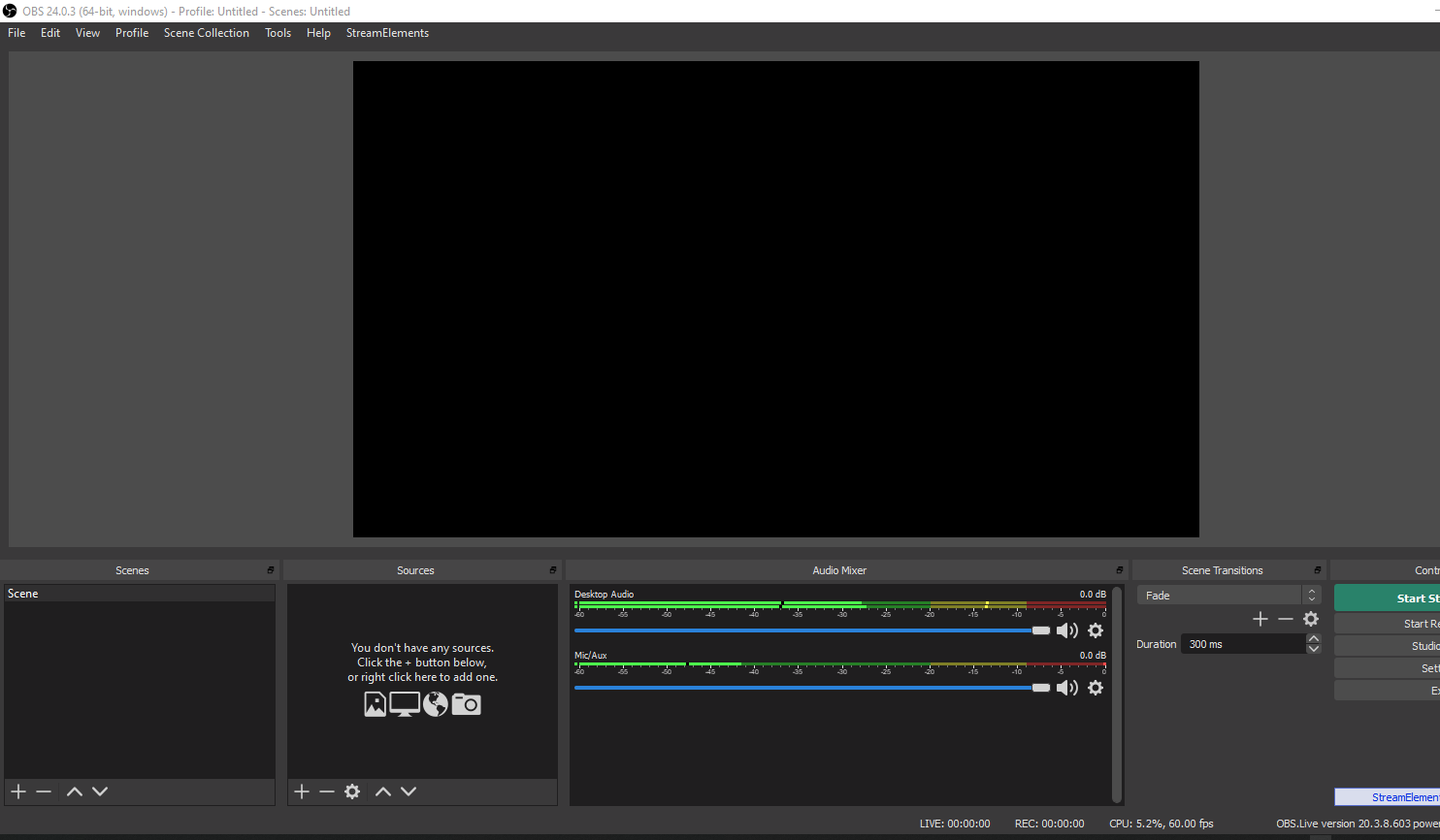
tried it 3 times
white valve
oh my, this looks ugly with importing and doing it with the browser
wary dew
@burnt horizon go here

StreamElements
The Ultimate All in One Platform for Streamers
then do this:
steel bladeBOT
@burnt horizon To add your overlays to OBS, add a new browser source in your scene. Paste your overlay URL in the browser source properties, set the dimensions to 1920x1080 (unless you changed them on the website), and ☑ “Shutdown source when not visible” https://youtu.be/KDvLynUqXI4
burnt horizon
oh thank you
 signal ridge
I need help, I have it setup for twitch but when i try to start streaming a box pops up saying it is ready to stream to a different platform
 jovial lantern
hello, im having problems with the frames on my stream, last time i streamed it was doing fine, but now it keeps losing frames even though my internet is 100% working and my computer is able to handle obslive and a game at the same time. friends told me that the obs servers over here at the south were not working correctly, is that the case?
signal ridge
nvm issue solved
 normal granite
I have a friend who is trying to set up obs studio with stream elements obslive. the settings page does not have the stream key spot to enter. is there something she has to do?
 solemn river
so BTTV and bits show as plain text in my chat window, how do i get them to show as they would normally?
 lost vapor
buenas noches. como hago para anclar la tienda de streamelements al obs?
porque tengo creado los artículos y todo y la gente canjea pero no sale en el directo
no se si me explico?
 vital cliff
Is someone able to help me with getting overlays?
@glad forge Would you by chance now?
*Know
 glad forge
alas, no. i'm also brand new! BUT, i am watching this handy video that might help you too!

StreamElements Overlays are loaded from a single browser source in your streaming software, making streaming easy. https://streamelements.com/
StreamElements overlay editor enables full customization of your overlay, improving stream visibility and an increase of audience int...
lost vapor
thanks you!! ❤️ @glad forge
 autumn bronze
how do i move my overlays from the website over to the actual launcher? i just downloaded elements
 honest echo
@autumn bronze Already anwser on #general-chat
 quick grove
how do i send my overlay to my obs
honest echo
@quick grove just copy the URL and add it as a browser source
steel bladeBOT
@quick grove To add your overlays to OBS, add a new browser source in your scene. Paste your overlay URL in the browser source properties, set the dimensions to 1920x1080 (unless you changed them on the website), and ☑ “Shutdown source when not visible” https://youtu.be/KDvLynUqXI4
vital cliff
How do you edit them? like say i want to add my twitter etc @honest echo
honest echo
@vital cliff on the web editor, you can watch the video about i know its a from 2017 but you can get the overall idea
autumn bronze
so im doing that but its only loading a corner of the overlay
autumn bronze
ohhhh, thank yiu. youre very helpful
 prisma sandal
Hey, I'm having an issue with the new obs.live update. It keeps giving me this error.
 wide hinge
i try to stream right now and a start bandwidth test keeps poping up. how can i fix this?
@honest echo
prisma sandal
I think I fixed my issue, so please disregard.
wide hinge
@honest echo i am just stupid and enabled it my fault
 winged osprey
need help guys
It just took me forever to actually go live and start streaming. kept telling me ecoding error while live streaming. Finaggled with some stuff. Now OBS is taking up 60% of my CPU when it usually uses up 11%...Also the bottom left is saying encoding error overload. WTH is going on
steel bladeBOT
@winged osprey Please provide a log from your last stream. To do this, in OBS go to Help > Log Files > Upload Last Log File and paste the link to the log file here.
 heavy geode
help in obslive the screen is black whenever i try and go live or record and is not capturing the screen please help
no matter what i do
it will not capture the screen
steel bladeBOT
@heavy geode Due to the way laptops are designed, your system must be configured to run OBS on a specific GPU, depending on the type of capture you are trying to do.
For Game Capture and Window Capture (recommended), your system must be configured to run OBS on your laptop’s high performance GPU (default); for Display Capture, your system must be configured to run OBS on your laptop’s power saving GPU (iGPU).
If you are running Windows 10 1903 or newer, use this guide for instructions on how to configure your system: https://github.com/obsproject/obs-studio/wiki/Laptop-GPU-Selection-Windows-10
For instructions on configuring an older version of Windows (you should consider upgrading), use this guide: https://obsproject.com/wiki/Laptop-Troubleshooting
steel bladeBOT
@heavy geode For the best OBS support, please join their Official Discord @ discord.gg/obsproject
 dreamy flicker
Hello,
unfortunately I can't add StreamElements OBS.live to the Stream Deck since a few days now.
When I try to do this, nothing happens.
Does someone have the same problem or maybe even know how to fix it?
GIF for that: http://img.bantor.de/27910/5e7efbf004266.gif
 steel bladeBOT
@dreamy flicker - Open %appdata%\Elgato\StreamDeck\Plugins
- Delete the
com.streamelements.obslive.sdplugin folder
 hazy hollow
I'm really desperate for some OBS assistance if someone has some time please
hazy hollow
Is there a bug in OBS? My mouse cursor is showing even though the button is ticked to not "show mouse"
This has been happening to me in the last 2 days. Was never a problem. Also noticed my saving format changed from .mp4 to .mkv when I didn't select anything
shy mountain
That doesn't look like a ticked on option
shy mountain
ooh it needs to be unticked - my bad
hazy hollow
its unticked
shy mountain
that is more of an OBS specific issue imo
steel bladeBOT
@hazy hollow For the best OBS support, please join their Official Discord @ discord.gg/obsproject
shy mountain
for both the capture mouse and the recording change
hazy hollow
No one is responding there atm. Was in the middle of the video when I played it back and it was showing the mouse
So I have to re-record
Thank you 🙂
shy mountain
Unfortunately I don't even know where to begin troubleshooting both issues
hazy hollow
@shy mountain If anyone inquires you need to change it from Automatic to bitblt
Some window captures will affect display captures, so if you fix these settings it will also correct it across the other capture sources as well 🙂
Very grateful someone replied
shy mountain
bitblt - what is this?
 toxic sequoia
I was having problems last night with the obs streamelments chat. My chat box keep saying connecting to chat for the full stream even after shutdown computer restart.
steel bladeBOT
@toxic sequoia Streamelements on top of OBS -> Logout -> login
toxic sequoia
I will try that today if the problem Keeps up
 clear tiger
How do I get StreamElements overlays on my OBS live
because, I can't download the overlays
steel bladeBOT
@clear tiger To add your overlays to OBS, add a new browser source in your scene. Paste your overlay URL in the browser source properties, set the dimensions to 1920x1080 (unless you changed them on the website), and ☑ “Shutdown source when not visible” https://youtu.be/KDvLynUqXI4
clear tiger
Good, that's fine but my webcam is behind the overlay. How can I make it not behind?
shy mountain
Move the webcam source on top of the browser source
clear tiger
Thank you Keizar
Also another thing I can't edit the ones that says like Discord, Twitter stuff like that
shy mountain
You need to edit them in the overlay
clear tiger
bruh
steel bladeBOT
@clear tiger Please provide your account ID found at the top of this page: https://streamelements.com/dashboard/account/channels This ID is public info and safe to share here.
shy mountain
 knotty compass
Can someone here help me with a small issue?
shy mountain
Please don't post in multiple channels.
State you issue and we will provide you with information
knotty compass
The bot told me to come here...
Okay. So I got obslive and everything is ok. But when I stream and keep my obslive in my second monitor, the game from the first monitor lags. This issue doesnt happen with all games
If I minimize obs the game goes perfectly smooth. Some games are ok with obs opened but most of them are dropping fps (20-30fps drops)
shy mountain
Is one of your monitors a 144hz one?
knotty compass
Yes. The first one. And the second is 60hz.
shy mountain
For reasons I can't go deeper on this, I will provide a more TL'DR' version:
GPUs don't like having to render video on 2 different refresh rates
either try and update your drivers or sync up both monitors on 60hz
if the 2nd one can't go past 60hz
the reasons i can't go deeper as this is a GPU issue :/
knotty compass
But I have friends who use the same monitors and they dont have problems. Ahh I see. So the gpu is like not optimized well or something
shy mountain
afaik, GPUs don't like rendering different refresh rates of the same video source, as in, 144hz graphics in 60hz at the same time
so it tries to balance it out, by either lagging the 144hz monitor source or stuttering the 60hz one
the basic solution to this is to turn off the live preview window in OBS
i just remembered that was a work around
knotty compass
Alright. I will see what I can do. Thank you very much, sir. Have a good day!
rugged quail
How do I reset the icons for the hypecup?
I changed to this bag but changed back to a normal cup, the icons however did not change back
 timid mason
Hello, how to fix facebook getting logout everytime i relaunch obs.live?
shy mountain
@rugged quail You will have to recreat the hypecup unfortunately.
steel bladeBOT
@timid mason If you are not seeing the OBS Twitch integrations and have OBS.Live installed, please follow these steps:
- Make sure you are on the latest and greatest version of OBS.Live
- exit OBS (make sure OBS is not running)
- delete %appdata%\obs-studio\plugin_config\obs-browser\obs_profile_cookies
- start OBS.Live
- Settings -> Stream -> disconnect -> connect
rugged quail
Okay thanks! @shy mountain 
 formal vine
how can i change the bot name? if possible
shy mountain
timid mason
thanks
 ember kelp
Hey guys
Does anyone have a second to help with my obs?
I have my overlays on it but when my stream is live it’s not centered correctly and I can’t get it to look right
steel bladeBOT
@ember kelp To add your overlays to OBS, add a new browser source in your scene. Paste your overlay URL in the browser source properties, set the dimensions to 1920x1080 (unless you changed them on the website), and ☑ “Shutdown source when not visible” https://youtu.be/KDvLynUqXI4
ember kelp
No picture and before that it said no connection but I unplugged my Elgato and plugged it back in and now it’s saying this
kindred fox
Which elgato card do you have?
ember kelp
The hd60s
kindred fox
Did you install 4K capture utility?
ember kelp
I had picture yesterday but idk what happened, I turned my PS4 on and my laptop and it’s not getting the picture
The Elgato software? If that’s what you mean then yeah
kindred fox
Turn on your PS4 second
ember kelp
It’s on now
kindred fox
Obs has to initialize the card as a device. Once it initialized the card, it should be able to pull a signal
HDMI cables connected correctly?
ember kelp
They are the same as yesterday when I was getting picture, I never moved them
kindred fox
Is your PS4 on?
ember kelp
Yea
kindred fox
Reboot it
kindred fox
No
wary dew
i never use the Elgato program at the same time as OBS, it will mess it up
ember kelp
Ok
wary dew
turn on PS4 first, then open OBS, or else it won't work right for some reason (in my case)
kindred fox
No image?
ember kelp
Nope
kindred fox
Restart only obs this time
ember kelp
kindred fox
Is that after restarting obs? And is OBS running as Administrator?
kindred fox
And it’s running as administrator?
kindred fox
Double-click the elgato source >> deactivate video button >> activate video
ember kelp
kindred fox
At this point, gonna send you over to the elgato discord to see what’s up.
steel bladeBOT
@ember kelp If you are having issues with Streamdeck or Elgato capture cards, its best to ask in their Discord here: https://discord.gg/elgato
ember kelp
Ok thanks
Do you think that turning off the enable hdcp option on my PS4 would fix it?
I know they aren’t supposed to be on so I just thought to look and saw it was checked and turned it off. I’m restarting my laptop now to see what happens
ember kelp
Idk why it was on, I turned it off yesterday
And I have picture!!
Now can you guys help me with my original reason for coming here?
kindred fox
Which was?
ember kelp
It was the hdcp on my PS4
Apparently I have to turn it off every time I turn my console on
kindred fox
What was the original reason you came for assistance?
 warm spire
how do i add my overlay url
ember kelp
What am I doing wrong here?
steel bladeBOT
@warm spire To add your overlays to OBS, add a new browser source in your scene. Paste your overlay URL in the browser source properties, set the dimensions to 1920x1080 (unless you changed them on the website), and ☑ “Shutdown source when not visible” https://youtu.be/KDvLynUqXI4
warm spire
thanks
kindred fox
@ember kelp obs settings >> video >> base canvas 1920 x 1080 // output 1280 x 720?
kindred fox
That’s wrong
ember kelp
Lol
kindred fox
Unless you’re just recording
ember kelp
I’m streaming to twitch from obs on my PS4
kindred fox
Recording they can be the same resolution, streaming you want the output 720p because it requires less bandwidth and more people will be able to watch it
ember kelp
Ok I did that
So the black area was covered before I changed it, is it supposed to be like that?
kindred fox
Click elgato source >> push Ctrl+F
Did you change the base canvas or the output resolution?
ember kelp
ember kelp
Ok
 fathom wren
Hi, I need help i keep getting error while start stream with OBS Live to FBGaming
kindred fox
What error?
 tardy abyss
hello everyone, I have just started streaming. I use OBS and designed starting screen by streamelements but ıt doesnt fıt the screen when ı open obs
steel bladeBOT
@tardy abyss To add your overlays to OBS, add a new browser source in your scene. Paste your overlay URL in the browser source properties, set the dimensions to 1920x1080 (unless you changed them on the website), and ☑ “Shutdown source when not visible” https://youtu.be/KDvLynUqXI4
fathom wren
Unable to start hardware encoding with NVENC
kindred fox
You didn’t follow instructions
steel bladeBOT
@tardy abyss To add your overlays to OBS, add a new browser source in your scene. Paste your overlay URL in the browser source properties, set the dimensions to 1920x1080 (unless you changed them on the website), and ☑ “Shutdown source when not visible” https://youtu.be/KDvLynUqXI4
kindred fox
@fathom wren make sure your gpu driver is updated
fathom wren
I did but still the same
tardy abyss
thnx ıt worked ❤️
fathom wren
I have streamed to Twitch this afternoon and no problems
rugged quail
how i can add my youtube livestream chat into obs live?
rugged quail
twitch chat and twitch activity feed
steel bladeBOT
@rugged quail Streamelements on top of OBS -> Logout -> login
rugged quail
thanks
fathom wren
I did too but still the same
kindred fox
Why?
Leave the elgato at 1920x1080
Your canvas is what you see in obs. Everything inside your obs preview should be 1920x1080
What gets sent to twitch is scaled down to 1280x720
steel bladeBOT
@fathom wren For the best OBS support, please join their Official Discord @ discord.gg/obsproject
ember kelp
Ok nice
Thanks man!
Oh yeah Idk if I can stream on twitch or now because I don’t have a stream key listed?
ember kelp
Yea I did that already but I’ve seen that other people in the help videos I’ve watched have a stream key, do I need that for obs to communicate with twitch for streaming
Lol ok forgotten
kindred fox
Stream keys are fun and all, but authenticating directly against twitch is much better
Eventually stream keys will be phased out
ember kelp
So now I just click “start streaming” and I should be good to go or do I have to open twitch too
wary dew
nope
kindred fox
What you mean “nope” @wary dew ?
ember kelp
Ok cool so only obs is the only application I need open then
kindred fox
Yep


 kindred fox
I recommend opening your stream on your phone so you can watch it
ember kelp
Ok will do
kindred fox
Check audio levels, make sure it looks decent
ember kelp
Ok I will then
kindred fox
I check mine on my phone and then while I’m on break I can still chat with viewers 
ember kelp
Do my “stream starting soon” and all that just get controlled through obs as I see fit?
Just click on it whenever the corresponding scene fits my need
kindred fox
Yep
ember kelp
Ok cool thanks a lot you guys
kindred fox
👍
ember kelp
My tv looks like this
But my stream looks like this
It’s off center on my laptop screen
ember kelp
Ok
 devout kite
Orsuna, since you were talking about canvas/output res... if my base resolution is 1440, but I'm using a 1080 overlay (and outputting at 720), do I need to adjust either my base or overlay to match?
ember kelp
Tv....
ember kelp
kindred fox
@devout kite can you post a screenshot of your overlay list really quick?