#helpdesk-selive
1 messages · Page 108 of 1
 naive silo
 steel bladeBOT
@naive silo Please provide a log from your last stream. To do this, in OBS go to Help > Log Files > Upload Last Log File and paste the link to the log file here.
naive silo
can i upload my current log? im streaming now
like i dont get dropped frames but i cant have any app open besides obs and looks like it lags while watching my stream
thats my current but can get last
anything i can disable possibly?
 odd kraken
In your last log is not something very eye catching: https://obsproject.com/analyzer/?url=https%3A%2F%2Fobsproject.com%2Flogs%2FkVwhXsKSzStV9L_k
naive silo
so i only need one game capture?
odd kraken
yes.
naive silo
anything else you think i can change? sorry for all the questions hahah
odd kraken
You could go down to 720p60fps and lower your game settings.
If you are having encoding issues, take a look at this guide: https://obsproject.com/wiki/General-Performance-and-Encoding-Issues
naive silo
kk my outputs at 720/30fps would it be better at 60? or would that hurt performance
odd kraken
At this time you are using 900p60fps, if I am not wrong, you can try to lower it to 720p60fps and if that does not help even lower.
naive silo
oh okay thanks
 little widget
Hey all, so we are running into a weird issue. When we have media share video off audio plays normally, but when we show the video on stream the audio doubles and echoes. Any ideas on how to fix?
steel bladeBOT
@little widget Make sure to ☑ “Shutdown source when not visible” for all browser sources (all OBS scenes). If using studio mode, uncheck “Swap Preview/Output scenes After Transitioning.” Also keep in mind that sound can play from any overlay loaded in the browser (editor or launched). https://i.imgur.com/FegZJQS.png https://i.imgur.com/yY0wcFl.png

 little widget
THANK YOU! ITs fixed!
 tired lantern
Anyone available to help with an audio issue?
 fading anchor
I used to have a stream info window that i could edit what game I was streaming as well as a welcome message and title but it is no longer in docks, did it get moved
 cold hound
Hi, I am trying to put the audio stream from an elgato capture card on its own isolated channel in OBS. I am able to record the sound from the capture card. but I cannot hear it in monitors when I enable in Advanced Audio Properties. I am able to monitor other channels but not the audio feed from the capture card. any thoughts?
tired lantern
I don’t think anyone is actually here , I asked for help over an hour ago and nothing
 kindred fox
You asked for help but didn’t actually provide a question
@☪Paиdояa☪#8046 click View >> Docks >> stream information
@cold hound what are you capturing with the elgato card?
tired lantern
When I start my stream all my stream hears is a distorted garbled screeching mess. Even when I have no audio coming from my end
steel bladeBOT
@tired lantern Please provide a log from your last stream. To do this, in OBS go to Help > Log Files > Upload Last Log File and paste the link to the log file here.
cold hound
I am capturing a second pc feed that i want to be able to isolate and turn on and off (both video and audio)
only thing I can do is send the audio to the desktop channel or not hear the output..
kindred fox
Ok so when you add the elgato as a source it should automatically capture the audio in obs. When you go into advanced audio properties are you selecting monitor & output?
And is it on track one?
Track one is everything going to stream
You can screenshot if needed
cold hound
yup I select monitor and output. nothing comes through my monitors.
i have the elgato sound channel set to capture only and monitors on. but nothing
I confirmed the monitors work with my mic
just cant seem to make them monitor the feed
but when I record everything sounds fine
kindred fox
Which elgato card do you have and can you screenshot the properties?
cold hound
4k60 pro mk1
if i change from capture only it reroutes to desktop audio
i want to keep the track isolated so i can mute independently of other audio
 honest echo
@tired lantern https://obsproject.com/analyzer/?url=https%3A%2F%2Fobsproject.com%2Flogs%2FH9m2TYG-B-hZopsI maybe this info could help
tired lantern
I didnt have these problems until this week, also @honest echo is there some reason i get disconnected from stream elements when my server is set to audo?
kindred fox
I haven’t used my elgato card in a while. I may have to send you to the obs discord to have them assist.
steel bladeBOT
@cold hound For the best OBS support, please join their Official Discord @ discord.gg/obsproject
cold hound
i think I figured it out.. thanks for the help! ❤️
 last tide
so im currently having trouble getting Rimworld as well as my mic and game audio to record at all, rimworld shows in my preview but nothing is there in my recording
tired lantern
@honest echo says a 0.3% Rendering lag and a 0.3% encoder overload?
I have a GTX 166- 6gb GPU i render and encode through, i dont use my cpu
1660
Also, im not even playing any games or having anything else open in my last few tests, I cant hear the sound, its only audible through my stream on mixer
 lethal bear
So I fixed an issue AGES Ago where I was getting Encoder overload and i was told to run OBS in Admin mode & it fixed my issue, now when I am trying to play Warzone I am getting MAJOR encoder overloading
 latent willow
When i try and use game capture with OBS it doesnt even show up it just becomes a black screen then when i tab back into destiny it never changes so like what do i do
 late furnace
i have already answered your question in #helpdesk-twitch and afaik game capture does not and will not work with destiny 2. you will have to use display/window capture to capture the game
latent willow
ok i wasnt sure so heres a next question, When i try and use Display/Window capture it doesnt work and it just stays black or only sticks on OBS and wont change and it also wont show up in window
kindred fox
@lethal bear there’s nothing in your log that would explain encoder overloaded
@latent willow make sure to run obs as administrator
latent willow
ok ill try that
 swift nymph
Hello team. I've noticed my timers don't post anymore in chat. I've disabled them and re-enabled them. I've deleted them and created them again.
Was there an update to them I'm missing?
honest echo
@swift nymph check the Chat lines, or the Online/Offline Intervals
swift nymph
Ok cool.
But as long as they are enabled on my dashboard, they should work right?
honest echo
exactly
swift nymph
Ok. I'll take a look at the time and chat requirements.
Thanks @honest echo
kindred fox
Timers require at least one line of chat within the timer activation window
Because spamming your chat with bot timers when nobody is chatting looks bad 😉
 rugged quail
Hello i need help
 shy mountain
What do you need help with?
rugged quail
Non of my sources are showing up
rugged quail
steel bladeBOT
@rugged quail Due to the way laptops are designed, your system must be configured to run OBS on a specific GPU, depending on the type of capture you are trying to do.
For Game Capture and Window Capture (recommended), your system must be configured to run OBS on your laptop’s high performance GPU (default); for Display Capture, your system must be configured to run OBS on your laptop’s power saving GPU (iGPU).
If you are running Windows 10 1903 or newer, use this guide for instructions on how to configure your system: https://github.com/obsproject/obs-studio/wiki/Laptop-GPU-Selection-Windows-10
For instructions on configuring an older version of Windows (you should consider upgrading), use this guide: https://obsproject.com/wiki/Laptop-Troubleshooting
rugged quail
They all disappeared soon as i updated obs
I did that and it hasn't done anything
Is there a way you can go back an update
steel bladeBOT
OBS.Live is a Plugin for OBS created by StreamElements. You can download OBS.Live here: https://streamelements.com/obslive
Please make sure you have the latest version of OBS installed, Current Version: 24.0.3. You can install OBS here: https://obsproject.com/
shy mountain
Did you uninstall OBS Studio first?
If yes, install OBS Studio, then uninstall OBS.Live
shy mountain
Something is blocking the sources then
steel bladeBOT
@rugged quail Please provide a log from your last stream. To do this, in OBS go to Help > Log Files > Upload Last Log File and paste the link to the log file here.
rugged quail
steel bladeBOT
@rugged quail OBS -> settings -> advanced -> scroll down -> enable/disable hardware accel.
https://i.imgur.com/ggMe9ZE.png
 rugged quail
Yes finally thank you
 ashen parcel
so slight issue, i have 2 seperate accounts on twitch, one for testing my current stream layout and audio and another for actually streaming, the activity feed on the test account is taking priority and i cant seem to log out of it, anyone know how to fix this?
each time i try to log out and log back in it just auto logs in the test account
steel bladeBOT
@ashen parcel Streamelements on top of OBS -> Logout -> login
shy mountain
rugged quail
im only running 43 % cpu lol
shy mountain
Well this is what the log file you linked shows
 hoary path
hi, doesnt stream elements sound effects features work if i use restream?
shy mountain
@hoary path can you elaborate?
hoary path
so i am streaming on youtube and twitch at the same time using restream, on twitch i've set up the stream elements store with sound effects .. when viewer on twitch try to redeem it he cant hear the sfx
shy mountain
did you add the redemption widget to your OBS?
hoary path
it was there before i set up my oooh i think i had to add the streamelements overlay widget too .. 4got about that my bad
steel bladeBOT
@whole herald Welcome to the helpdesk! Please let us know how we can assist you today and a support volunteer or staff member will assist you as soon as they are available. Thank you for your patience.
 whole herald
i used to use the beta chat overlay for single screen streamers to keep in touch with the community but i cant seem to find that option no more in obslive
it was beta did it get set aside from obslive
odd kraken
I only know of this way to get the chat overlay for single screen setups: https://github.com/baffler/Transparent-Twitch-Chat-Overlay
whole herald
so i just have to download that then get it on my stream screen as overlay
presumably on top of all others
odd kraken
Afaik this is nothing you add in OBS.
whole herald
so its always visible in foregroud
odd kraken
And as this is a third party tool, we cannot provide support for it. Best to contact the creator.
whole herald
understoood
thnx anyways
but i think il see if i can get one of my other screens to work
so i got dual screen setup seems way easier
thnx anyways @odd kraken
 proper rain
Hello.
I have an issue with the "Activity Feed" on OBS.Live.
Whenever I go the "Menu" and pressing "Stream Settings", you're supposed to be able to change the bot name to a custom bot name.
I go through verification and login on the account I want to assign as a chat bot, but from after that nothing happens.
The name doesn't show up or anything.
I've tried doing this through Ground Control, but lately Ground Control doesn't even wanna open up on my pc anymore.
Thanks for answer.
odd kraken
try this:
1) Right click on your OBS desktop shortcut -> properties - in the "Target" field add this -> --remote-debugging-port=40404
2) Open OBS(or restart if it was open)
3) Open your browser and type in "localhost:40404"
4) Click on "StreamElements - Activity feed"
5) navigate to the Console tab
6) type in the console this: store.customBot.removeCustomBotIntegration() and hit enter
7) Try setting the custom bot name
8) remove the added addition of step 1
 prisma torrent
Quick question guys. I have an overlay that I use from before I had stream elements. Am I able to edit that, add in new alerts etc..., on stream elements? Is there a way to integrate that into the overlay editor? Haven’t been able to figure it out.
odd kraken
What platform is that overlay you have atm on?
 versed orchid
When running Rainbow Six: Siege(borderless) and I click on another application or tab out, obs registers a black screen for about two seconds. I've tried display, game, and window capture with fullscreen and borderless, but to no avail. Is there a solution to just show the game without showing a black screen even when tabbing out?
steel bladeBOT
@versed orchid For the best OBS support, please join their Official Discord @ discord.gg/obsproject
prisma torrent
@odd kraken what do you mean by platform? I use OBS live and stream elements.
odd kraken
You are talking about an overlay you used from before you had StreamElements.
rugged quail
So i am using the sub counter like stated but it didn't show any data last night. When i got a new sub it didn't show any data.
I was told before to do this as i am trying to do a daily sub goal
odd kraken
Is the sub as event in your activity feed?
rugged quail
how would i check this
odd kraken
Is the sub listed here? https://streamelements.com/dashboard/activity
rugged quail
ok then no it is not
odd kraken
for twitch?
rugged quail
yes i am streaming on twitch yes
steel bladeBOT
@rugged quail Twitch prime (new and resub) and paid subscriptions (resub only) must be shared in chat manually by the person subscribing in order for the subscription information to be sent to StreamElements. For twitch prime, the user needs to have sharing enabled on https://www.twitch.tv/settings/prime. For paid subs, if the share box doesn't show up immediately it will when they refresh the page. https://i.imgur.com/VNJN0Uv.gif https://i.imgur.com/2297EA7.png

 rugged quail
ok so you know how some people have a widget for Sub goals on there overlay? @odd kraken
like Sub goal: 0/5 on there overlay
odd kraken
yes, there is a subscriber goal widget you can use on your overlay or you can use the toal subscribers widget or the subscriber count widget and add /XY at the end of the message, depending on what you prefer. Note there is a difference between the two last named widgets.
rugged quail
how can you set the subscriber goal to a specific goal? Last time i was told to use the subscriber count widget for a daily sub goal display
problem is it didn't show any data last night
odd kraken
If the sub is not shared like described above, none of these three solutions will show data, as the sub has to be shared and so added to your activity feed.
There is no daily sub goal which resets automatically. You can use one of the three above described solutions to create a goal depending on your needs.
rugged quail
ok thanks
 fading scaffold
@versed orchid The properties setting on my game capture has it's mode set to 'capture specific window' and it seems to work for me. See if that works for you
latent willow
how to i run my OBS studios in administrator
 tranquil panther
i seem to be having issues with media request showing up on stream how do I fix this issue
steel bladeBOT
@tranquil panther Welcome to the helpdesk! Please let us know how we can assist you today and a support volunteer or staff member will assist you as soon as they are available. Thank you for your patience.
 queen cedar
so
after i moved to obs live
my audio quality went terrible
and i want to fix that
how do i do it?
how do i set up
odd kraken
can you elaborate to what audio quality you are referring to? desktop audio, game audio, mix audio, mediaRequest audio ... ?
steel bladeBOT
@queen cedar For the best OBS support, please join their Official Discord @ discord.gg/obsproject
 shut lintel
having an issue with my alerts. they wont go off when someone follows, host etc. If I go into streamelements and emulate one than the alert will work but for just that moment. Any suggestions? Just realized I posted this previously in the wrong location
odd kraken
Please only ask your question in one channel. Thank you.
 thorny sparrow
Okay this is stupid but gameplay isxn't synced. Is it cause my elgato is 30 and my webcam is 60
The audio is like ~.25 seconds behind
Example:
steel bladeBOT
@thorny sparrow For the best OBS support, please join their Official Discord @ discord.gg/obsproject
thorny sparrow
odd kraken
 sour shadow
Ty @odd kraken
odd kraken
And yes, as OBS.Live is an plugin for OBS Studio, the basic OBS Studio functionalities are available with the StreamDeck.
 lyric jewel
Hello can i ask a question? I installed streamelements OBS live. My activity feed works properly but my chat can't connect.
I tried to refresh but nothing happens. When i go to chatproperties it says " error loading data" what i'm doing wrong or how can i fixed it??
steel bladeBOT
@lyric jewel Streamelements on top of OBS -> Logout -> login
lyric jewel
Yes Thanks
 stable lichen
Where is media request option ? I cannot see this option when I login to streamelements
odd kraken
scroll down to the bottom. it is in the card MORE.
stable lichen
There is only one option that is profile nothing else
odd kraken
What platform do you stream to?
stable lichen
Obs on windows
odd kraken
twitch, youtube, facebook, mixer?
stable lichen
Youtube
odd kraken
There is no MediaRequest for Youtube.
odd kraken
no, you cannot.
stable lichen
Ok thanks
 covert trail
It wont let me fuckin switch to Twitch and forcing me to stay on facebook stream
steel bladeBOT
@covert trail Streamelements on top of OBS -> Logout -> login
 hardy hound
Hey folks is there a way to install plugins for this version of obs ?
odd kraken
What version of OBS?
hardy hound
Streamelements obs
odd kraken
OBS.Live is also just a plugin to OBS Studio. So you should be able to install the other plugins, too.
hardy hound
I remember that the stock obs had an extra entry for plugins in the settings but there is no entry on Obs.live
So I wonder is it possible
odd kraken
You should be able to install the plugins any way.
 spice swallow
hi can someone help me with the automatic switcher in obs?
im trying to have my obs switch to the games when i open them
but when im done with the game go to desktop
i currently play runescape, league, and final fantasy
naive silo
dropped 118 frames and havent changed any setings, do you know why? https://obsproject.com/logs/DE74yuUd2aHXJ6_9
 modern moth
So I got a new pc, and for some reason I can hear my stream audio thru my capture card.
It worked on the previous pc, and not sure why it isn't working on this new one
Ive checked several videos and done everything I can think of... usb mic is good, webcam good, hd60s audio is a no go.
 remote forge
this may be a dumb question but is there a possible way that I can have my chat overlay in one position of the stream in one scene, then have it in a totally different position in another scene?
 torn lantern
Hello everyone...Just curious if anyone else is getting dropped frames on OBS.live
 mellow coral
whenever i try to start a stream it says that it cant connect to the server
kindred fox
@naive silo most likely it’s an internet issue if you’re dropping frames and obs is running fine. Have you run the twitch test yet?
@modern moth capturing console?
naive silo
im with mixer does that matter
kindred fox
@remote forge to answer your question: yes. You would simply duplicate the overlay and reposition the chat widget on the second copy
@naive silo FTL?
steel bladeBOT
@torn lantern Please provide a log from your last stream. To do this, in OBS go to Help > Log Files > Upload Last Log File and paste the link to the log file here.
naive silo
yeah
do you have a link to the twitch test if it works for mixer
well my thing says custom
kindred fox
Check your bitrate settings most likely. If you’re not having issues with encoding then it’s probably your bitrate
naive silo
steel bladeBOT
@naive silo If your Mixer stream has "Low Latency" greyed out in the player while using OBS.Live, do the following:
- Stop your stream
- Go to your stream settings in OBS and return them to your previous settings, where your service is listed as "Mixer.com - FTL"
- In "live video settings" for OBS.Live on the left-hand side (in the chat window) change the setting on top of the window to "Go Live with Mixer Broadcast Dashboard settings" and press "Go Live!" from there
naive silo
bit rate is at 4200 is that good?
 final wren
Wondering if anyone else's OBS is currently saying it cannot connect to servers?
While trying to go live.
kindred fox
Which platform?
naive silo
yeah i did those steps
final wren
twitch
kindred fox
which resolution are you streaming at @naive silo ?
@final wren I would recommend checking the Twitch test tool https://r1ch.net/projects/twitchtest
Test your upload bandwidth and connection quality to Twitch
naive silo
720/30fps
latent willow
Every time i try to start my stream it keeps saying failed to connect to server and im not sure how to fix that because everything else is working
kindred fox
4200 might be a little high for mixer. https://watchbeam.zendesk.com/hc/en-us/articles/210090606-Stream-Settings-The-Basics

Mixer
In a perfect world, we’d all stream 1080p video at 60fps, and have no delay or glitches. Unfortunately, this is the Internet; it’s unpredictable and imperfect. So how can you get the most out of yo...
@latent willow which platform are you streaming to?
latent willow
twitch
spice swallow
i think we are all having the same problem trying to stream to twitch
kindred fox
same thing as the last person. run the twitch test
 snow tangle
says "failed to connect to server" when i press the "start streaming" button.. anyone know a solution?
spice swallow
mellow coral
whenever i start a stream it says "Failed to connect to server"
final wren
I think their connections broke
naive silo
heres the upload test
kindred fox
seems like Twitch is having issues
naive silo
should i lower my bitrate
spice swallow

kindred fox
that seems like a very erratic connection
check the link I posted regarding mixer bitrates
naive silo
how so? sorry new to all this connection bitrate stuff
it says 2000-6000 used for 720/30
latent willow
ya im thinking its twitch itself
 foggy condor
everyone else having trouble starting up their stream?
kindred fox
@naive silo OBS Settings >> Output >> set your bitrate to about 3500 and see if that helps
naive silo
whats the difference between that speed test and speedtest.net? cause speedtest.net gives me 400 mbps upload and 600 down
kindred fox
Twitch seems to be having an issue
naive silo
okay i will try
kindred fox
speedtests aren't accurate in terms of what you can send to a streaming service
mellow coral
yea its gotta be twitch
kindred fox
it just shows what your available "bandwidth" is
mellow coral
i messed with my bitrate and it still is saying the same thing
kindred fox
twitch is probably fukked
run the twitch test tool and it will tell you, but someone already posted a bunch of failed results which would indicate Twitch is dying
latent willow
damn twitch might put out a tweet on it maybe
spice swallow
latent willow
that sucks
kindred fox
but then again, if they sent everyone home they may not have anyone monitoring servers
naive silo
mixer life
spice swallow
quick question
im using obs and i have my scene selected and it only shows on preview and not program
latent willow
ya that could be the case
spice swallow
in program it only shows display capture
kindred fox
@spice swallow are you using Studio Mode?
spice swallow
yes
kindred fox
until you double-click the source it won't switch, or click the "transition" button inbetween the preview/program
spice swallow
i see
how do i have it where i can switch scenes while streaming
without showing obs
naive silo
what’s the difference between studio mode and non studio mode
spice swallow
i have the hotkeys selected
kindred fox
if you don't have it in studio mode, you can simply click a scene and it will switch
kindred fox
@naive silo studio mode shows you what stream sees and pre-loads a secondary scene for when you want to switch
spice swallow
can i use my obs hotkeys while in game?
kindred fox
you should be able to
spice swallow
okay i havent tried yet
kindred fox
make sure you're running OBS as admin and it should be fine
kindred fox
StreamDecks are legit
You can also use the StreamDeck mobile app as a portable streamdeck
naive silo
sucks it’s monthly subscription
kindred fox
it is, but $2.99 is way better than the $9.99 it was at release
naive silo
true
spice swallow
ima have to get me a stream deck
 dire owl
Hello there.
I was streaming earlier today with no problems but I just tried to start up my stream a few minutes ago and keep getting this error
I've tried a couple recommendations I have found on google with no luck
kindred fox
Twitch is down
spice swallow
^
kindred fox
@dire owl it isn't you, it's Twitch
dire owl
Interesting 🤔
I can see people streaming on Twitch right now though
kindred fox
Yes
Test your upload bandwidth and connection quality to Twitch
run that and it will tell you
most likely established connections aren't being terminated/reset, but new connections are having problems
 spiral elk
Oh. Glad I came here. I was losing my mind.
spice swallow
i tried streaming with amd radeon and twitch is for sure down
we all can gather around and hold hands
 shut crag
having an issue can not connecvt to server
anyone know what that means, ive tried reseting stream key,
shut crag
ok thanks
modern moth
@kindred fox yes. I was able to finally get it to work by checking/unchecking the HDMI audio box several times
 wide hinge
so i have a problem where when i try to stream i get a notification that says failed to connect to server. how do i fix this
spice swallow
is there a way to update stream name and notfication with obs?
kindred fox
View > docks > stream information
spice swallow
ty
im still trying to have my start soon scene start for my stream
but it only does display capture
i have the starting soon at the top of the order list
and ... i have the marco set for it
what am i doing wrong?
on my live stream.. its showing my screen
/display capture
@kindred fox help me buddy
so.. my marcos for switching scenes work
but once i move my mouse, it switches back to display caputre
capture
 thick bane
Hi. I need help on black screen for COD - Warzone
I am using Acer Nitro 5 Ryzen 3600 with GPU RX 560X using external monitor
spice swallow
i all my marcos on numpad 1-4
kindred fox
Also, where is your source list?
spice swallow
numpad 1 for desktop 2 for brb 3 for talk 4 for end
spice swallow
my marcos work fine.. its just it doesnt stay on stream for long
itll switch to my marco, but once i move my mouse, itll go back to display capture
kindred fox
It shouldn’t....unless there’s something bound on your mouse?
spice swallow
i highly doubt it, unless its a default thing
spice swallow
if you go to my stream, you can see me switch to my scene but once i do something on my computer it switches back to desktop view
yes one moment
those are my only hotkeys
kindred fox
What kind of mouse do you have?
thick bane
@thick bane laptop?
@kindred fox yes laptop
steel bladeBOT
@thick bane Due to the way laptops are designed, your system must be configured to run OBS on a specific GPU, depending on the type of capture you are trying to do.
For Game Capture and Window Capture (recommended), your system must be configured to run OBS on your laptop’s high performance GPU (default); for Display Capture, your system must be configured to run OBS on your laptop’s power saving GPU (iGPU).
If you are running Windows 10 1903 or newer, use this guide for instructions on how to configure your system: https://github.com/obsproject/obs-studio/wiki/Laptop-GPU-Selection-Windows-10
For instructions on configuring an older version of Windows (you should consider upgrading), use this guide: https://obsproject.com/wiki/Laptop-Troubleshooting
kindred fox
Make sure you follow the steps above
kindred fox
No prob
spice swallow
i have a logitech g303
kindred fox
Is there something set randomly in the Logitech software?
rugged quail
Hello, i have a problem. OBS just shows a black screen in the video tab and also in the recordings i did. What can i do? This is the logfile. I hope you guys can help me. Thanks!
steel bladeBOT
@rugged quail For the best OBS support, please join their Official Discord @ discord.gg/obsproject
 limpid meteor
Hello! Why would it be that OBS don't record or stream sound at all but indicates that it is recording the sound? (sorry my english is not very good 😅 )
 buoyant dock
Hi
I need urgent help regarding Arabic text getting cut off. The direction is RTL correct but the OBS browser source doesn't link the letters of each word together (unreadable!)
steel bladeBOT
@limpid meteor For the best OBS support, please join their Official Discord @ discord.gg/obsproject
 odd kraken
Do you have a screenshot of that behaviour?
buoyant dock
It should be like this

It was working fine few weeks ago
I can send you the CSS file I wrote
odd kraken
What widget is this?
buoyant dock
but with or without CSS it looks cut off letters in the Browser source
while in chrome (and Firefox) it looks correct with or without CSS
Discord streamkit
I have to go live in 60 mins
I am in urgent need of any help
I am not that experienced but I think I can give good feedback on this bug. I feel that the OBS browser source is forcing its own font or its own text rendering or something. The shocking thing is that the text is actually correctly RTL which is weird! normally this happens when an Arabic text is LTR.
odd kraken
Is this a widget you added to your overlay via the StreamElements overlay editor?
buoyant dock
No I added it directly to OBS.Live
it is a ready URL
You can try it if you want
Can you open the link and send me a screen shot please?
odd kraken
Make sure the dimensions of the browser source are set correctly, but the widget is nothing we support. Best to contact discord on this issue.
buoyant dock
and then maybe add it as a browser source in your OBS.live and send me another screenshot
No no no, it is not a discord issue. The link works PERFECTLY in all browsers I tried (with and without CSS)
I am trying to corner the bug, so it would help me a great deal if you could send me two screens shots. One of this link URL I sent above opened in your chrome browser, and another of the same URL added as a browser source. Would you be able to do that please?
odd kraken
in browser:
buoyant dock
Hmm it didn't load maybe because you didn't have access to my server
I can add you temporarily OK?
buoyant dock
browser
@odd kraken here it is showing correctly
OBS:
@odd kraken Here it is showing all cut off letters
The OBS.Live browser seems to force some settings in text direction or text rendering
Maybe it is importing the El Messiri Google font without the Arabic bundle of it?
https://fonts.google.com/specimen/El+Messiri?selection.family=El+Messiri:400,500,600,700

maybe it is rendering Arabic one letter at a time, instead of one word at a time?
I really don't have experience in programming, but I really think I can help if I am in touch with someone who does
Note: This same URL with the same CSS used to work like 3 weeks ago or so
What is the latest update of OBS.Live?
Mine shows OBS 24.0.3
odd kraken
Try to add in the custom CSS field of the browser source, maybe this helps
* {
font-family: 'El Messiri'
}
This is the CSS file I wrote and use
The issue is there in OBS browser source no matter with or without CSS
and the issue is resolved in any other chrome or firefox browser with or without CSS
I haven't tried different browsers
I am trying reinstalling OBS.Live
odd kraken
I am sorry, but I do not seem to be able to help you with that issue. Maybe another support has any ideas.
buoyant dock
Whom do you think I should contact?
How can I escalate this issue? 400 million speakers of Arabic suffer and are insulted every day by all Social media ignoring us! this should be very easy thing fixed from 50 years! Imagine having to read scrambled letters English
odd kraken
I will see if someone internally has any ideas.
buoyant dock
I really hope you can link me up with someone specialist in the browser source and I am sure I can provide deep helpful insight on what is happening to the letters
 trail ginkgo
Hi i just updated my obs.. and now the activity feed just keeps loading, not showing activity. any1 with this issue ?
steel bladeBOT
@trail ginkgo Streamelements on top of OBS -> Logout -> login
trail ginkgo
dident do anything
i streamed yesterday no issue, i think its the update did something
odd kraken
Do you have a screenshot of your full OBS.Live window please.
trail ginkgo
the activity feed just keeps loading, thats all. rest works.
odd kraken
What platform? Please hand in a screenshot? Please try to relog again.
trail ginkgo
i stream on pc, streamelements obs.
odd kraken
facebook, youtube, twitch, mixer?
trail ginkgo
twitch
odd kraken
Please hand in a screenshot and try to relog again before.
trail ginkgo
cant give u screenshot. and i just tried to relog when the bot told me befor in this chat. lol
odd kraken
Most likely your token is expired and with a relog it should renew and let you log in to your activity feed.
Try to log out of OBS Studio with Settings > Stream > disconnect account and log out of OBS.Live with StreamElemetns > Log out and log back in to both.
trail ginkgo
i have experianced recently my token runs out after couple days... it seems fishy to me.. am i hacked or ?
why obs studio ? when i use streamelements obs only
odd kraken
Cause this also stores your token.
trail ginkgo
ya it was logged out in studio aswell
i just logged back in to streamelements obs and it still not working
odd kraken
I have asked internally on your issue.
@trail ginkgo Do you have any anti virus tool running?
trail ginkgo
no
odd kraken
Try to download OBS.Live from here: https://www.obs.live/ and install it again.
odd kraken
Download that and install it again over the current installation.
 burnt comet
need help
rugged quail
is there a way to remove harassing names like this from the activity feed? don't want to see it while streaming 😦
trail ginkgo
cody blacklist the word cody
rugged quail
thats my name doe
steel bladeBOT
@burnt comet Please follow our community rules:
- No advertisement or stream promotion
- Respect ALL server members
- No NSFW/NSFL
Thank you
burnt comet
just help me get rid of this black screen
odd kraken
@rugged quail Afaik you cannot remove entries from the activity feed.
trail ginkgo
kev can u calm down and wait ur turn
odd kraken
No, thank you.
 plain sonnet
i would be very carful with what you say kev
 wary dew
yeah it is, but if you are not talking normal, do you expect any help?
burnt comet
ok fine
trail ginkgo
hi RubenSaurus
wary dew

steel bladeBOT
@burnt comet For the best OBS support, please join their Official Discord @ discord.gg/obsproject
@trail ginkgo Please send in an issue report so our team can investigate using the program's logs:
Report an Issue
▫ Select "StreamElements" at the top of OBS
▫ Select "Report an Issue"
▫ Please write a detailed description of the issue you are facing:
What is happening/not happening? What happened that led to this issue appearing? When did you first notice this issue? Descriptions that help us to to reproduce the issue on our end very often result in quick fixes.
▫ Select "Send to StreamElements"
wary dew
could you please do that for us?
i am experiencing the same issue so i will do that too
trail ginkgo
i fixed it lol
all i did was click on the filter
and it came back
RubenSaurus
maybe its a small glitch ?
wary dew

trail ginkgo
Benno , thank u for helping me
 weak ginkgo
how do i use overlays?
steel bladeBOT
@weak ginkgo To add your overlays to OBS, add a new browser source in your scene. Paste your overlay URL in the browser source properties, set the dimensions to 1920x1080 (unless you changed them on the website), and ☑ “Shutdown source when not visible” https://youtu.be/KDvLynUqXI4
weak ginkgo
how do i put my chat in the overlay?
odd kraken
What platform? Twitch?
weak ginkgo
yes
odd kraken
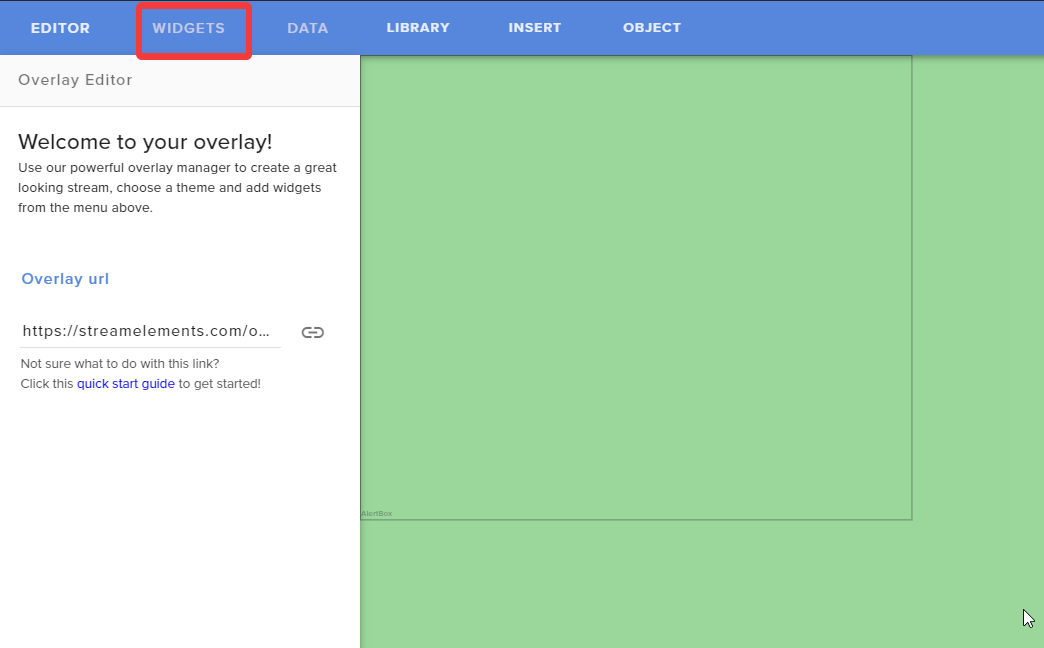
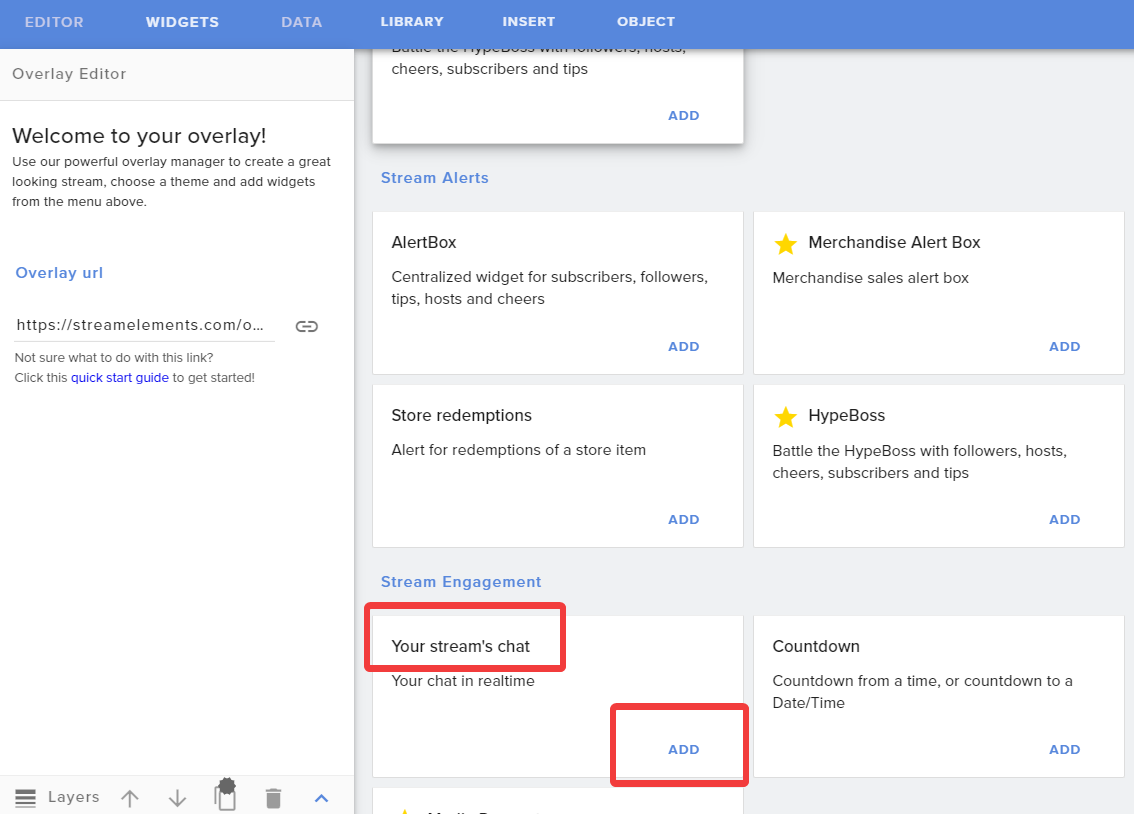
There is a chat widget your channels twitch chat you can add to your overlay via the overlay editor.
odd kraken
In the overlay Editor on the top left WIDGETS and then select the widget your channels twitch chat to be added to your overlay.
 weak ginkgo
yeah i found it i didnt read overlay editor
 neon sable
hey there, just updated my OBS.live and the activity feed isn't loading - everything else is - Have logged out and logged back in again -any ideas?
steel bladeBOT
@neon sable Please send in an issue report so our team can investigate using the program's logs:
Report an Issue
▫ Select "StreamElements" at the top of OBS
▫ Select "Report an Issue"
▫ Please write a detailed description of the issue you are facing:
What is happening/not happening? What happened that led to this issue appearing? When did you first notice this issue? Descriptions that help us to to reproduce the issue on our end very often result in quick fixes.
▫ Select "Send to StreamElements"
wary dew
could you please send in a report
and in the meanwhile, it can be fixed by clicking the filter button on the left side for now.
but the log send with the report can give valuable information as to why it won't work
neon sable
done and thank you
 echo marsh
When someone hosts my channel why are my alerts not going off for the host?
steel bladeBOT
@echo marsh Due to changes to Twitch API, we have filtered out hosts and will only show these ones on your activity feed:
- All hosts coming from an online channel with at least 1+ viewer
- Auto host events with at least 1 viewer - only from a channel that just went offline
Note: If you see "X channel has hosted you" with no viewers on the back, that is considered an offline host or a host with 0 viewers, we do not show these.
Note for Mixer streamers: The above 2 filters currently apply for Mixer and we are aware its actually not how Mixer hosts work. We do plan on changing it, but no ETA on when.
echo marsh
This makes no sense, especially when Steamlabs has it working no problem, but you blame Twitch API, and streamlabs is using the exact same API ....
odd kraken
No, they are using a different API.
echo marsh
Twitch only uses 1 API, and devs have access to that API ... I already contacted Twitch support over this ...
odd kraken
@raw pasture Are you on a laptop?
 raw pasture
no im on desktop
odd kraken
Have you started OBS as admin? What game are you trying to capture?
 light anchor
I also had the "Activity feed not automatically loading after recent update" issue. Already submitted a report. Just an FYI.
raw pasture
idk anything about the admind part and im tryingto windeow capture the hunter call of the wild
im just confused it was letting me before but now it isn't
odd kraken
@light anchor But you fixed it now?
raw pasture
no its not letting me now it just started this
kindred fox
@echo marsh actually twitch uses three different APIs, with one being shut down soon.
odd kraken
@raw pasture Manual on how to start as admin: https://www.itechtics.com/run-programs-administrator/
echo marsh
@kindred fox Then someone at Twitch Support didn't get the memo.
kindred fox
The front-line support people aren’t necessarily informed about back-end API information because it isn’t relevant to supporting users.
So again, the API used by StreamElements is the one that is recommended by Twitch, and does not support 0-viewer host alerts.
If you want alerts about nobody watching your stream, you’re more than welcome to them, but they aren’t supported here
light anchor
@odd kraken
Dunno if that filter drop down refresh method actually fixes the bug, but my activity feed did show up afterwards. Issue is not resolved.
odd kraken
Can you elaborate on the issue not being resolved? Does the issue appear again after you did the fix?
light anchor
Correct
odd kraken
What did you do to make the issue reappear?
light anchor
Closed OBS and launched it again
odd kraken
But you can fix it for now with the way?
light anchor
Issue persists now with "Continue Setup" prompt inside the Activity Feed window
Filter dropdown fix messed it up even more
echo marsh
@odd kraken Can confirm @light anchor 's claims same here. I also submitted feed back through OBS.Live
odd kraken
Can you sahre a screenshot please? @light anchor
light anchor
It's all animated locking the windows until I confirm to continue the setup
So, no.
light anchor
^ditto, save for prompted to continue setup
echo marsh
After restarting OBS
odd kraken
Asking about this issue internally. But as our devs are aware of this, the only thing we can do by now is wait I am afraid.
Thank you for your reports.
light anchor
Thanks for investigating
echo marsh
Sorry for the small looking Shots, my second screen is a 4K .... lol
light anchor
Activity feed fetching data seems to hang until manually prompted to fetch filtered data
odd kraken
Just to make sure you both send in a report correct? So devs can look into it.
 covert ermine
i accidentally closed my twitch activity feed and twitch stats windows and now i cant get them back, please help? ive restarted obs, logged out and in again, and its not there to select in the drop down menu either and im lost
steel bladeBOT
@covert ermine Streamelements on top of OBS -> Logout -> login
covert ermine
i already tried that mr bot ;-;
odd kraken
With relogging you should get your activity feed back.
The twitch stats window should be available in View > Docks in OBS
odd kraken
Do you have your activity feed dock back?
covert ermine
not the twitch one no
odd kraken
Try to relog with StreamElements > log out and log back in again.
covert ermine
the site?
odd kraken
No. In OBS.Live.
covert ermine
i have twice
odd kraken
Can you activate it via StreamElements > activity feed?
covert ermine
the purple one (streamelements one) is fine, its the grey twitch one that seems to have thanos'd out of existence
steel bladeBOT
@covert ermine If you are not seeing the OBS Twitch integrations and have OBS.Live installed, please follow these steps:
- Make sure you are on the latest and greatest version of OBS.Live
- exit OBS (make sure OBS is not running)
- delete %appdata%\obs-studio\plugin_config\obs-browser\obs_profile_cookies
- start OBS.Live
- Settings -> Stream -> disconnect -> connect
 vivid willow
Fellas is it okay if OBS uses 25% of my CPU? Is there a way for me to lower that CPU usage? I'm on NVENC.
CPU - i7 7700k
steel bladeBOT
@vivid willow Please provide a log from your last stream. To do this, in OBS go to Help > Log Files > Upload Last Log File and paste the link to the log file here.
vivid willow
This happens off stream. As soon as i turn on OBS live my in game FPS drops
steel bladeBOT
@vivid willow For the best OBS support, please join their Official Discord @ discord.gg/obsproject
 void plinth
hi. every time i try to start my obs it crashes
it worked great yesterday and today it crashes on startup
 bitter geode
I would try uninstalling and reinstalling @void plinth if you havent already tried
void plinth
yeah i tried that and it didn't do anything
 alpine geyser
can anyone help with my obs live not showing alerts or chat for facebook live?
void plinth
when i post the link for my overlay under browser nothing is showing up. Can anyone help me?
steel bladeBOT
@void plinth To add your overlays to OBS, add a new browser source in your scene. Paste your overlay URL in the browser source properties, set the dimensions to 1920x1080 (unless you changed them on the website), and ☑ “Shutdown source when not visible” https://youtu.be/KDvLynUqXI4
void plinth
yeah i did all that and it's not working
odd kraken
Is the overlay working in a browser?
void plinth
yeah on the stream elements website...i got it from the free themes
steel bladeBOT
@void plinth OBS -> settings -> advanced -> scroll down -> enable/disable hardware accel.
https://i.imgur.com/ggMe9ZE.png
void plinth
you rock
alpine geyser
any help on my question??
 fathom cobalt
@alpine geyser yeah, please explain your problem 😉
You don't see chat and activity feed in OBS.Live?
alpine geyser
while im streaming it says you have no stream activity in the alert section and the chat never shows any comments
fathom cobalt
Try relog
steel bladeBOT
@alpine geyser Streamelements on top of OBS -> Logout -> login
alpine geyser
thats crazy cuz i uninstalled and installed and logged in and it still didnt work now it did. thanks
fathom cobalt

odd kraken
Please download the latest version from our website obs.live and install that onto the current installation.
rugged quail
i just did the update like 10 minutes ago? and i need to already download something else?
odd kraken
This is a workaround till our devs have fixed the issue. If you are having problems after the reinstalltion, please come back here.
odd kraken
yes please: https://www.obs.live/
rugged quail
its trying to make a second obs studio
nvm fixed that
thank you for the help benno
 placid cliff
So your update came through and now my "activity feed" wont load ?
http://thecynicalkitty.com/s/20201510204.png
 vagrant parcel
my cpu load is suddenly much more i had a load of 2-3% now suddenly after the update over 10%
rugged quail
yeah my cpu load went up as well
 gusty heart
Is there a way to add a sub goal or donation goal to OBS live like on stream labs? I just switched over and i don't know what I'm doing.
steel bladeBOT
@placid cliff Please send in an issue report so our team can investigate using the program's logs:
Report an Issue
▫ Select "StreamElements" at the top of OBS
▫ Select "Report an Issue"
▫ Please write a detailed description of the issue you are facing:
What is happening/not happening? What happened that led to this issue appearing? When did you first notice this issue? Descriptions that help us to to reproduce the issue on our end very often result in quick fixes.
▫ Select "Send to StreamElements"
 upper crater
@placid cliff I have that issue as well
 twilit tangle
how can I get my tipping link again after the setup is complete?
 tulip hamlet
It'll always be located in the Tipping settings section of your account.
steel bladeBOT
@gusty heart New to Stream Elements?
Check out our YouTube channel https://www.youtube.com/c/streamelements/videos
with tutorial videos from setting up the basics, to in depth details on how to use our product.
New to OBS? Here is a 4 step quickstart guide
https://obsproject.com/wiki/OBS-Studio-Quickstart
Want to learn even more? Here is an in-depth overview
https://obsproject.com/wiki/OBS-Studio-Overview
tranquil panther
I asked this before and didnt get help with this i seem to be having issues with media request showing up on stream how do I fix this issue
twilit tangle
where can i locate the Tipping settings of my account?
tulip hamlet
 sage meadow
can anyone recommend setting for me? I have googled a few but they are not working out. I have an i7 7700k, 32gb RAM, 1070Ti. I cannot use the veryfast cpu preset without my stream skipping, and if i use ultrafast there is no skipping but very poor quality
steel bladeBOT
There are no "best settings".
Please understand that every setup will be very different.
Any guides or videos that claim otherwise are misinforming. Your best option is to start with a base and adjust as necessary.
You can run the OBS auto-configuration tool. To use the auto-config, click on the Tools menu in OBS, select Auto-Configuration Wizard, and then just follow the on-screen directions.
You can use this tool to get baseline settings for your hardware and adjust as necessary from there.
Test, test, and test again. We are happy to offer suggestions for any issues you may be having afterwards, but not a list of settings.
Thank you
 heavy oak
i need help with the media request widget, specifically with its defined dimensions via the online editor
tulip hamlet
Can you provide a screenshot of the issue?
heavy oak
ok, in short it isn't using the dimensions i setup when it is in obs
i'll take a screenshot
this is how it is on the online editor
for some reason obs doesn't keep it limited up there
and the title of the video just goes beyond that
kindred fox
What resolution is your overlay added to obs at?
tulip hamlet
Why is the widget set to 1px height?
heavy oak
i was testing that actually, but if i save it with 30 height it still doesn't work
Why is the widget set to 1px height?
@tulip hamlet
What resolution is your overlay added to obs at?
@kindred fox 1 sec
1366x768
kindred fox
It should be 1920x1080
 mellow snow
This option might be right in front of my face but can I make the chat window transparent but leave the text untouched?
kindred fox
@mellow snow in the overlay?
kindred fox
Click the chat widget inside the overlay editor and in the settings of the chat widget you should see the option to make it transparent
mellow snow
yeah but that makes all transperent
tulip hamlet
@heavy oak It wants to display the entire song information regardless of the height selected. If you want to keep it in that box, I'd recommend using text scrolling.
kindred fox
I know there’s a background option, one sec
heavy oak
@tulip hamlet how do i do that again?
tulip hamlet
kindred fox
👍
heavy oak
@tulip hamlet @kindred fox yeah that was exactly what i needed, thank you guys
 short bone
any help?
vivid willow
so apparently slightly higher CPU usage isn’t only my issue? i found out that it’s because i’m linking all my scenes and using browser sources. It used to be better before though. I also have SLOBS installed where i use only images on my PC and it uses like 1-5% of CPU
 unkempt goblet
so i'm having an issue with my bitrate i have a upload speed of 10mbps but my bitrate output is only 1.5k ive set my bit rate too 4.5k
steel bladeBOT
@vivid willow Please provide a log from your last stream. To do this, in OBS go to Help > Log Files > Upload Last Log File and paste the link to the log file here.
tulip hamlet
@unkempt goblet Upload speed via speed test is a best case scenario as the test uses multiple simultaneous connections to measure it. It does not give you an idea of how good your connection is to a single server. You can have all the upload in the world but if your connection to the streaming site's ingest server is iffy, then the bitrate will look iffy.
@short bone Restart your computer.
unkempt goblet
So you think i should talk to my isp?
tulip hamlet
Try this first.
https://r1ch.net/projects/twitchtest
Test your upload bandwidth and connection quality to Twitch
vivid willow
Is there a way to somehow maybe download scenes from SE website so that at least part of my overlay isn’t browser source? I was thinking about ways to lower the cpu usage. i7 7700k suddenly started choking in FiveM when OBS.live is just on with the stream off.
tulip hamlet
Please follow the bot instructions and provide your stream log.
StreamElements is a cloud-based service. Downloading is not possible.
vivid willow
oh okay just a moment
sorry for disregarding, i thought this was only relatable if problems happen during stream
vivid willow
tulip hamlet
@vivid willow You're using like five browser sources to do what one can accomplish.
tulip hamlet
A single overlay can have a lot of widgets. Overlays default to 1920x1080, so it's 1:1 placement.
vivid willow
i went the lazy way and decided to copy paste alert box/counters/etc from one scene to another
thank you Nethyr :)
i’ll work on that
 sonic yew
is anyone having fps issues in obs? like no dropped frames but ill go from 60 to 40 to 58 kina constantly and yet playback on the stream is pretty smooth
steel bladeBOT
@sonic yew Please provide a log from your last stream. To do this, in OBS go to Help > Log Files > Upload Last Log File and paste the link to the log file here.
tulip hamlet
@vivid willow Browser sources are like Chrome tabs. One doesn't do much, but when you open up a few, it adds up.
sonic yew
nah i only open one for like clips or if we watch youtube
here is my last log https://obsproject.com/logs/vhhcr-Mphseib6Tf
steel bladeBOT
@sonic yew 1) Restart OBS
2) Start your stream/recording for about 30 seconds. Make sure you replicate any issues as best you can, which means having any games/apps open and captured, etc.
3) Stop your stream/recording.
4) Select Help > Log Files > Upload Current Log File. Copy the URL and paste the link here.
(Note: If you do not see an obsproject.com URL, you will need to update OBS Studio to version 22+)
sonic yew
wait is the log i dropped not suffice ?
tulip hamlet
@sonic yew
vivid willow
Nethyr is there a way to layer the game capture between background and alerts/etc in an overlay settings on the website?
perfectly layers would be:
bcg => game capture => info on top of the game
sonic yew
oh sorry let me get my last stream i forgot
tulip hamlet
@vivid willow Layering is not possible. The browser source is in itself a single flat layer. But you can use transparency in your browser source, so cut a window out of your background?
vivid willow
Okay thank you. Then my concept of how browser sources work is correct. Background is there just in case my games crash or something else happens so that there’s not just a black screen. So no transparency needed i think. I’ll stick to offline backgrounds/visuals to reduce the CPU load.
Appreciate your time

tulip hamlet
sonic yew
thanks ya hunk
twilit tangle
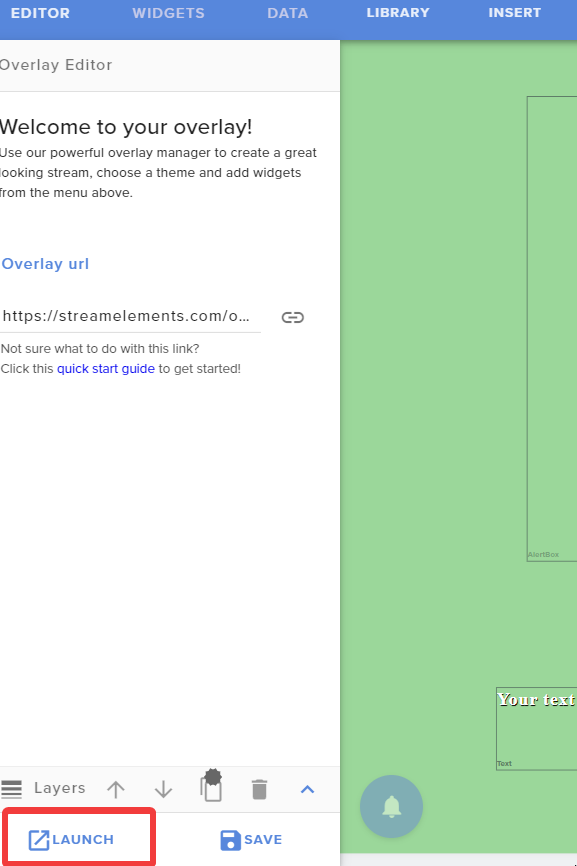
how can i find the url to my overlays on the website?
 safe tendon
hello need help i have some questions
steel bladeBOT
@safe tendon Welcome to the helpdesk! Please let us know how we can assist you today and a support volunteer or staff member will assist you as soon as they are available. Thank you for your patience.
odd kraken
https://i.imgur.com/tMuaKo0.png @twilit tangle
 safe tendon
i have a problem i have amd ruzen 7 3700 x as cpu and rtx 2060 as gpu 16 gb ram and when i stream i have horrible fps in game
and a lot of srops
drops
steel bladeBOT
@safe tendon Please provide a log from your last stream. To do this, in OBS go to Help > Log Files > Upload Last Log File and paste the link to the log file here.
safe tendon
odd kraken
 lofty raft
Im having a problem whenever I try to stream/record I get an error saying "starting output failed Note: If you are using the NVENC or AMD encoders, make sure your video drivers are up to date" All my drivers are up to date and ive tried various trouble shooting methods. It works if i don't use the encoders but Id prefer to use them. here are my logs: https://obsproject.com/logs/7Bc3Gx2oulrqHoKm
 wind sphinx
I'm having a problem getting my capture card (Elgato 4k 60 pro mk 2) to display in OBS. It was working fine last night but it isn't working any more
steel bladeBOT
@wind sphinx For the best OBS support, please join their Official Discord @ discord.gg/obsproject
 stuck dove
Hi I am not sure if this is the best place to post it if not please suggest.
I set to ignore a few of the lurking bots and deleted their point from my leaderboard but now they all seem to be back?
this was on the SE website
tulip hamlet
Ignore stops them from naturally accruing points. They still gain points through any use of !addpoints all
stuck dove
I never gave away point these are all natural
they have watch time listings and everything but I just checked by trying to ignore them again if case they had changed their name but it didn't let me as they were already there
I think all but 1 of the bots seem to have been recorded
You still there @tulip hamlet ?
tulip hamlet
Ignored users will not accrue points just by being present. They likely were obtained from a different source. Please delete the bots' points from your leaderboard. If it happens again, feel free to let us know.
stuck dove
I guess you don't keep records of how each point is achieved?
tulip hamlet
We do not.
 tired smelt
Anyone elses total subscriber count widget not working? After the update mine shows ZERO.
tulip hamlet
Updating OBS has absolutely zero bearing on widget functionality.
tired smelt
hmmm, thanks.
tulip hamlet
Log out of the StreamElements website and log back in.
tired smelt
Just tried that, still the same.
stuck dove
my followers count is showing one more than my tracking widget too
I am guessing in my case someone has followed then unfollowed and the widget does not track unfollows
tulip hamlet
Which widget precisely?
Goal widgets are not tied to your total, they're counters that go up and never down. You can control goal progress at https://streamelements.com/dashboard/session

StreamElements
The Ultimate All in One Platform for Streamers
stuck dove
Follower goal
ah thanks for that link I could not see how to fix it
This looks like a very useful area
tired smelt
I even try to add a new widget showing total subscribers but it shows zero
stuck dove
Interestingly if you look on the page posted above my totals tab shows I have 2 total subscribers but should only have 1 unless it counts yourself as 1?
steel bladeBOT
@stuck dove Due to a recent change from Twitch API, these features are affected by the change:
- Ground Control does not have Custom Bot Name
- Subscriber count will count the Channel and any other permanent sub you may have (+1 or +2 or +3 on top).
We are working on fixing both issues, but there is no ETA.
OBS.Live still has Custom Bot name working fine in it.
 lean topaz
Recordings randomly dropping frames. Nothing seems overworked. Any ideas?
steel bladeBOT
@lean topaz Please provide a log from your last stream. To do this, in OBS go to Help > Log Files > Upload Last Log File and paste the link to the log file here.
lean topaz
tulip hamlet
https://obsproject.com/analyzer/?url=https%3A%2F%2Fobsproject.com%2Flogs%2FvmGf-M32jiZGIqHo
Uh. I can't say I've ever seen it give that message that many times. 
lean topaz
I didn't even realize they were interfering with each other since the only visible item was the display capture HAHAHA
Do you think clearing the scene of everything but the display capture should help?
tulip hamlet
I don't think you have to go that far but you definitely need to take a look at your sources.
prisma torrent
Quick question guys. I have an overlay that I use from before I had stream elements. Am I able to edit that and add in new alerts etc... on stream elements? Is there a way to integrate that into the overlay editor? Haven’t been able to figure it out. I bought this overlay from ow3ned.com and wasn’t using any of the streaming services such as stream elements or stream labs. I input it straight into OBS. Any help would be appreciated.
steel bladeBOT
@prisma torrent New to Stream Elements?
Check out our YouTube channel https://www.youtube.com/c/streamelements/videos
with tutorial videos from setting up the basics, to in depth details on how to use our product.
New to OBS? Here is a 4 step quickstart guide
https://obsproject.com/wiki/OBS-Studio-Quickstart
Want to learn even more? Here is an in-depth overview
https://obsproject.com/wiki/OBS-Studio-Overview
lean topaz
I could remove for this scene since I only need the display. Had others from different recording projects
I'll give it a try. Thanks
 woven nebula
Hello there! Can anyone help me troubleshoot alert sounds not happening on obs? They seem to work fine when tested via the browser editor for streamelements, but OBS does not pick them up.
tulip hamlet
We're not Streamlabs.
woven nebula
oh god sorry, i meant streamelements haha
steel bladeBOT
@woven nebula You can test Alerts via the bell on the lower right corner of the Overlay Editor. Simply go to your Dashboard -> My Overlays -> Pencil/edit button on the overlay. Make sure the "Show Emulated events on stream" option is on to see the alert in OBS/Xsplit https://streamable.com/h6qgy
 lean topaz
@tulip hamlet Still seeing the change in frame rate. https://obsproject.com/logs/N60CVqnCGS4ZF-l-
tulip hamlet
@lean topaz https://obsproject.com/analyzer/?url=https%3A%2F%2Fobsproject.com%2Flogs%2FN60CVqnCGS4ZF-l-
You need to fix everything, not just in one scene.
woven nebula
Right so when I test them via the editor I can hear them just fine. I have streamelements to control audio via obs, then it monitoring and outputting. It handles the media request just fine but none of the alerts can he heard.
tulip hamlet
@woven nebula Read the bold text.
lean topaz
Ohhhh so it needs to be fixed in every scene for better performance?
tulip hamlet
To start with.
lean topaz
Ok. Thanks
woven nebula
Correct. It works that way, and when testing them I can hear it through the editor if not muted. But during stream or on the Streamelements audio channel there is no sound.
I feel like I'm not explaining my issue properly. When using the Streamelements overlay editor and testing the alerts widget I can hear the audio cues coming through my desktop source audio. They do not appear through the streamelements overlay browser audio, nor the actual overlay if opened in a browser. Included is a picture of how my audio is configured, with "SEDesk" being the streamelements overlay.
lean topaz
I went through and removed all game captures and it still gives me the big list of "Capture Interference"
kindred fox
@woven nebula my recommendation would be to uncheck the box for Control Audio via OBS for your overlay, and let it play through your desktop audio device
Are you testing the alerts and not seeing/hearing them inside OBS?
sage meadow
has anyone else had to change their settings depending on the game they are playing? Tarkov stream great with the recommended settings, but then MW looks like garbage and is basically a slide show.
tulip hamlet
This is normal. Every game has different demands and works differently.
sage meadow
gotcha, thanks!
 merry wave
OBS updated now all of my scenes are broken! Widgets, alerts, background, nothing work. Tried updating the link in OBS and still no good
steel bladeBOT
@merry wave Right click on the BrowserSource > Properties > Scroll down a bit > Refresh Cache of current page
merry wave
Did, no good.
steel bladeBOT
@merry wave OBS -> settings -> advanced -> scroll down -> enable/disable hardware accel.
https://i.imgur.com/ggMe9ZE.png
merry wave
Refreshed, updated the SE links incase those changed for some reason
It's all the overlay stuff saved in, browser sources
worked great last night, then obs updated today and now nothing
steel bladeBOT
@merry wave OBS -> settings -> advanced -> scroll down -> enable/disable hardware accel.
https://i.imgur.com/ggMe9ZE.png
 tired harness
help i keep getting this error 😦
shy mountain
Open Task Manager and look for all OBS related tasks and kill them
tired harness
Open Task Manager and look for all OBS related tasks and kill them
@shy mountain just checked task manager and it worked! Thanks!
 hazy hollow
I've been waiting for 3 hours for support with OBS on their server, can anyone help me here please
steel bladeBOT
@hazy hollow Welcome to the helpdesk! Please let us know how we can assist you today and a support volunteer or staff member will assist you as soon as they are available. Thank you for your patience.
hazy hollow
Duplicating a source from a scene to another profile if its possible (copy and pasting doesn't work, can't create a new scene because it doesn't remember some saved files)
odd kraken
What type of source are you trying to copy to the other profiles scene?
hazy hollow
Its a group Benno
I accidentally deleted a source from one of my scene collections, been trying for 3 hours to replicate with not much success by manually redoing it. I also can't seem to copy and paste
Once I swtich from one scene collection to another the copy and paste feature disappears 😦
@odd kraken
odd kraken
Try to copy the individual sources in the group and group them on the scenes collection you copied them to again.
hazy hollow
I have 2 scene collections, the copy and paste feature doesn't work sadly
When I switch the feature disappears
odd kraken
The copy of groups of sources does not seem to work between scenes collections. But you should be able to copy the individual sources from one scene collection to another.
odd kraken
Then the OBS discord is your best way with this.
 vast garnet
Hey, Is anyone having any issues with animations not working on some of their widgets?
 novel prairie
Quick question: How do I turn off hardware acceleration in the OBS Live interface?
steel bladeBOT
@novel prairie OBS -> settings -> advanced -> scroll down -> enable/disable hardware accel.
https://i.imgur.com/ggMe9ZE.png
 lavish geyser
dont no if in right group there but i need help puting overlay over to streamlabs
steel bladeBOT
@lavish geyser We're not able to troubleshoot issues with using our overlays in StreamLabs OBS (SLOBS) as we don't have the tools to support their software. We recommend using OBS Studio or OBS Studio with our plugin OBS.Live.
lavish geyser
ok thanks
 stoic rock
i updated obs, and now whenever i launch it, it just says :obs has crashed," ive uninstalled and reinstalled and still doesnt work
odd kraken
Restart your PC.
stoic rock
ive done it 3 times
odd kraken
Try to download the latest version of OBS.Live on the website and install it on top of you current installtion.
stoic rock
done it
odd kraken
Can you hand in a crash log please.
stoic rock
yeah where do i go for that again
odd kraken
Look at the error message.
prisma torrent
Hey guys, still having troubles with my stream quality. I’ve followed all the tutorials in the videos that were provided but nothing seems to be helping. Not sure what the issue may be. I’m thinking maybe my laptop doesn’t have the strength to support all those things going on at once. Still, any tips would be greatly appreciated.
These are the specs of my laptop 8th Generation Intel Core i7-8750H 6-Core Processor (Up to 4.1GHz) with Windows 10 Home 64 Bit
NVIDIA GeForce GTX 1060 Overclockable Graphics with 6 GB of dedicated GDDR5 VRAM
15.6" Full HD (1920 x 1080) widescreen LED-backlit IPS display (144Hz Refresh Rate, 300nit Brightness & 72% NTSC )
16GB DDR4 2666MHz DRAM Memory & 256GB PCIe NVMe SSD | Extra empty accessible slot for 2.5 inch hard drive or SSD.Maximum Power Supply Wattage:180 W
steel bladeBOT
@prisma torrent Please provide a log from your last stream. To do this, in OBS go to Help > Log Files > Upload Last Log File and paste the link to the log file here.
prisma torrent
No problem 👍
stoic rock
@odd kraken Log Name: Application
Source: BugSplat-obs_live-obs-browser
Date: 3/16/2020 7:15:04 AM
Event ID: 1
Task Category: None
Level: Error
Keywords: Classic
User: N/A
Computer: DESKTOP-1JFNQBB
Description:
A crash report from application obs-browser has been successfully logged to www.BugSplat.com as obs_live-153490.
Event Xml:
<Event xmlns="http://schemas.microsoft.com/win/2004/08/events/event">
<System>
<Provider Name="BugSplat-obs_live-obs-browser" />
<EventID Qualifiers="0">1</EventID>
<Level>2</Level>
<Task>0</Task>
<Keywords>0x80000000000000</Keywords>
<TimeCreated SystemTime="2020-03-16T14:15:04.363452900Z" />
<EventRecordID>24709</EventRecordID>
<Channel>Application</Channel>
<Computer>DESKTOP-1JFNQBB</Computer>
<Security />
</System>
<EventData>
<Data>obs_live</Data>
<Data>obs-browser</Data>
<Data>153490</Data>
</EventData>
</Event>
odd kraken
Please upload the file here.
prisma torrent
odd kraken
stoic rock
@odd kraken
odd kraken
perform a clean driver installation for your GPU by following the instructions at http://obsproject.com/forum/resources/65/
odd kraken
Can you provide a crash log please.
prisma torrent
odd kraken
Try to update your GPU drivers and install a clean install of OBS.Live ontop of your current installtion please.
prisma torrent
ok, i'll try it out. Thank you
well it says I already have the most current drivers for my gpu
@odd kraken im doing the reinstallation of OBS.Live now
stoic rock
@odd kraken did everything it says and still this
 silver merlin
Im having trouble syncing a Streamelements overlay with a custom font to OBS studio. The Font is shown as a default font. not sure what to do...
steel bladeBOT
@silver merlin Google Fonts
More than 900 google fonts are supported at this time. You can preview them here: https://fonts.google.com/
Custom Fonts
Steps:
- Install the font on the streaming PC or choose a pre-installed windows font.
- In the overlay widget settings, select Text Settings
- Enable Custom Font
- Type the name of the font as it appears in the windows font directory (This is usually
C:\Windows\Fonts)
Note: After installing fonts, the browser and OBS must be restarted for the font to appear.
 wheat tundra
Hello how can i transfer everything from streamlabs obs to obs studio like everything everthing ?
silver merlin
The custom font is working in Streamelements just fine - looks perfect, and launches perfectly. I've restarted my computer since installing the font, Its just not working when i make a Browser Source overlay in OBS.
stoic rock
okay @odd kraken i can launch obs, and its working, but as soon as i installed stream elements obs it gives me the "woops obs crashed" message
odd kraken
@stoic rock I have asked internally on your issue.
@wheat tundra There is an import tool you can use to import the data from StreamLabs to StreamElements: StreamElements > Import from other platforms.
@silver merlin Is the font showing when you launch the overlay in a chrome browser?
@rugged quail Best to contact the creator of the ZOOM capture.
silver merlin
@odd kraken yeah it shows up just fine in chrome!
odd kraken
@rugged quail This is an extarnal widget we do not maintain. Please contact the creator for support.
steel bladeBOT
@rugged quail For the best OBS support, please join their Official Discord @ discord.gg/obsproject
odd kraken
If window capture is not working, most likely not.
@silver merlin Have you restarted your OBS? What do you see, can you share a screenshot of your browser and your OBS window please?
silver merlin
screenshot of overlay in browser, looking as it should
screenshot of overlay in OBS with incorrect font
odd kraken
What font is that? Do you have a download link?
silver merlin
its Lyno Stan – i dont have a download link
you can buy it from https://radimpesko.com/fonts/lyno
RP is a small scale digital type-foundry established in 2009 by Radim Peško. The foundry is focused on the development of fonts that are both formally and conceptually distinctive.
odd kraken
Asking internally on this, as I am not sure and cannot test it as it it a font which has to be bought.
silver merlin
No problem dude - thanks a bunch
 left heath
Hello. Where is the option to change the BOT name using OBS LIVE? I don't think so anymore.
odd kraken
Check pinned messages.
silver merlin
@odd kraken - no word back yet on the custom font?
odd kraken
unfortunatley not.
left heath
ty 🙂
heavy oak
need some help with the countdown eidget, very simple issue actually, the font i chose isn't the same on obs, this is how it looks on browser
but this is it on obs
steel bladeBOT
@heavy oak Google Fonts
More than 900 google fonts are supported at this time. You can preview them here: https://fonts.google.com/
Custom Fonts
Steps:
- Install the font on the streaming PC or choose a pre-installed windows font.
- In the overlay widget settings, select Text Settings
- Enable Custom Font
- Type the name of the font as it appears in the windows font directory (This is usually
C:\Windows\Fonts)
Note: After installing fonts, the browser and OBS must be restarted for the font to appear.
 copper bone
Something is broken with a new obs+SE update? Im waiting like an hour
 winter gazelle
Question @everyone does anyone know how to fix my webcam from being pixelated? I know I run a high enough bitrate so I know that can’t be the problem. The webcam can shoot up to 1080P 60FPS
 oak star
My overlays are not showing up on my stream Elements OBS was working yesterday today nothing
 potent flare
Hello, I'm pretty new to streaming but I previously streamed on streamelements with no problem. I came back from a several months break, and forgot which program I used before so I streamed on slobs and it worked fine. Finally remembered that all of my settings were on elements so I switched back over, and the game capture in sources wouldn't capture my client even though slobs would. I've already tried the laptop thing, and I don't think it would matter since slobs didn't have any issue with game capture anyways. Also updated elements/logged out of slobs and still nothing. Any ideas? Sorry for long msg just wanted to give context.

It's accurately streaming my audio from the client that I want apparently, just not video from the game
oak star
Hello
 round nacelle
Hey, im having an issue with my elgato showing up in the Preview (Where you see the visuals). Every time I activate it both my screens pop up black.
 empty scroll
my song request isnt working properly and when someone tries to request something it just @'s the person and says the son currently playing
 tranquil bear
Sup guys, my song request widget is not showing in OBS.live
steel bladeBOT
@tranquil bear Streamelements on top of OBS -> Logout -> login
 thick talon
my OBS with obs.live addition crashes every time when i start it
steel bladeBOT
@oak star OBS -> settings -> advanced -> scroll down -> enable/disable hardware accel.
https://i.imgur.com/ggMe9ZE.png
 lilac ocean
If anything like that happens, be sure to restart your computer and see if the problem continues
 turbid arch
How to get stream info to show again?
oak star
I’ve already checked all that in the process of uninstalling and reinstalling
turbid arch
Also how does cloud backup work?
Will it automatically save my updates made through OBSLive?
thick talon
@lilac ocean I have tried restart also reinstal tried 64bit nothing worked with obs live but now it is okay but my connected links are not working
odd kraken
@oak star Do you see the overlay when you open the url in a chrome browser?
odd kraken
Have you made sure the dimensions are correct?
turbid arch
How to I get stream information again?
steel bladeBOT
@turbid arch If you are not seeing the OBS Twitch integrations and have OBS.Live installed, please follow these steps:
- Make sure you are on the latest and greatest version of OBS.Live
- exit OBS (make sure OBS is not running)
- delete %appdata%\obs-studio\plugin_config\obs-browser\obs_profile_cookies
- start OBS.Live
- Settings -> Stream -> disconnect -> connect
turbid arch
Does cloud backup keep everything I get done nd setup with OBS live saved if so awesome
potent flare
Can someone help me pls
steel bladeBOT
@potent flare Welcome to the helpdesk! Please let us know how we can assist you today and a support volunteer or staff member will assist you as soon as they are available. Thank you for your patience.
 odd kraken
Have you started OBS as admin?
thick talon
Again my obs is not working crashes after opening
potent flare
Yes started it as an admin as well
steel bladeBOT
@potent flare For the best OBS support, please join their Official Discord @ discord.gg/obsproject
odd kraken
@thick talon Can you provide a crash log please.
@turbid arch I am not 100% sure, but you can find more info here: https://blog.streamelements.com/streamelements-new-features-obs-live-68a2fb20caf9
 jagged tiger
is there a fix for the stream deck and the obs.live plug in not installing?
in the stream deck app
steel bladeBOT
@jagged tiger - Open %appdata%\Elgato\StreamDeck\Plugins
- Delete the
com.streamelements.obslive.sdplugin folder
odd kraken
@thick talon To see all of your logs, select Help > Log Files > Show Log Files.
tulip hamlet
@hollow harbor 🖱️ ➡️ #🇫🇷︱français
 hollow harbor
 green vessel
Hello I downloaded latest OBS Live, now OBS keeps crashing, (I click start, nothing appears, then text "crash") once I removed the OBS Live addon and reboot old OBS works perfectly, did clean install OBS Live again = crash again.. Need help please 🙂
tulip hamlet
@green vessel Try deleting your browser sources, then installing OBS.Live, and then remake them.
tulip hamlet
@green vessel Yes, delete your browser sources. You're not being asked to delete your overlays. Putting them back in is just a matter of pasting a link.
 solemn copper
Browser sources not working right now. Even tried launching overlay on website and not loading.
tulip hamlet
We've had no reports of issues and everything appears to be up and running.
solemn copper
Try launching the overlays on website just tried on a different PC
It's not the internet cos I'm streaming and playing games
tulip hamlet
What overlay are you launching? If it's the alertbox, obviously nothing will be visible unless an alert is playing.
solemn copper
tulip hamlet
Yes, that's expected.
solemn copper
Launching the overlay for the Alert box to edit it and see problems
What. This is how you customize the alerts.
tulip hamlet
Again, nothing will be visible unless an alert is actually playing.
solemn copper
Oh thats for launching not editing
But the overlays were working fine till now
I must've messed with some UI in the OBS
Now I can't get it to work
steel bladeBOT
@solemn copper To add your overlays to OBS, add a new browser source in your scene. Paste your overlay URL in the browser source properties, set the dimensions to 1920x1080 (unless you changed them on the website), and ☑ “Shutdown source when not visible” https://youtu.be/KDvLynUqXI4
@solemn copper You can test Alerts via the bell on the lower right corner of the Overlay Editor. Simply go to your Dashboard -> My Overlays -> Pencil/edit button on the overlay. Make sure the "Show Emulated events on stream" option is on to see the alert in OBS/Xsplit https://streamable.com/h6qgy
 solemn copper
Not that. It was working fine for weeks. I reset my UI on OBS yesterday because I accidently minimized the audio mixer. Even if I emulate a follow it wont show up on stream now
jagged tiger
it still tells me to reinstall plug in
 deep burrow
Hello i am having a microphone issue... i am hearing myself through my headphones and it is really messing with me while i am trying to talk...
tulip hamlet
Sounds like you set it to monitor your mic.
deep burrow
it is, if i set it to not monitor will I still be able to record it?
tulip hamlet
Yes, of course.
deep burrow
ok ill try that, thanks a bunch
rugged quail
Hey, I can't seem to find the dock which allowed you to change stream title within it without using activity feed, could someone direct towards it?
 kindred compass
Hey could you help me with my obslive chatbox is some elses stream chat, it happened after i raided someone
@rugged quail You have to use the stream info tab
steel bladeBOT
@kindred compass Streamelements on top of OBS -> Logout -> login
jagged tiger
is there a plug in for the stream deck that needs to be installed on the obs side
late furnace
@rugged quail must have twitch account connected 🙂
rugged quail
@late furnace hm, i cacnt find it there still
i disonnected and reconnected my twitch account
pog nvm
i fixed it
snow tangle
is OBS down? OBS says I went live but i'm not live... 
late furnace
@rugged quail 
steel bladeBOT
@snow tangle Streamelements on top of OBS -> Logout -> login
snow tangle
I did all of that and still no
logged out and back in, re-did stream key, re-did to Twitch, nothing is different from my last stream so idk
switched to studio to see if it would work and no.
late furnace
🤔 try resetting your streamkey and add the new one to obs?
snow tangle
didn't work :/ @late furnace
late furnace
then it could be twitches end possibly
snow tangle
gonna uninstall and re-install...
using OBS.Live and it says I'm streaming but I'm not live... (tried logging out, back in, resetting stream key, uninstalling and reinstalling, resetting computer, switching to studio, back to live... no luck!)
tulip hamlet
@snow tangle If the issue persisted without OBS.Live and just using OBS Studio, then it is not an OBS.Live-related issue.
Try manually selecting an alternate Twitch ingest server.
snow tangle
still nothing. dang. 
solemn copper
Tried re-installing OBS but my alerts or browser sources aren't showing up on stream still
I believe I reset UI and that has messed it up
 split bloom
My overlays are not working after the OBS Live update
solemn copper
Ah we got the same problem then not just me
late furnace
try disabling hardware accelerator and see if they show again File>>setting>>advance scroll down a lil to see the option also run as admin?
solemn copper
Yup disabling hardware accelerator fixed it. Thanks!
late furnace
You're welcome
tulip hamlet
The Total subscribers widget should do that for you.
tulip hamlet
 nimble viper
where is that? i'm looking here https://streamelements.com/dashboard/themes
StreamElements
The Ultimate All in One Platform for Streamers
tulip hamlet
Those are community-created widgets, not default widgets.
Edit your overlay and click the widgets tab at the top left.
nimble viper
ahh okay thanks
 coral sundial
is there a way to import an overlay file
late furnace
well we do have import tools via SE site?
coral sundial
i coulnt find it
late furnace
https://streamelements.com/dashboard/account/import if this is what youre looking for?
coral sundial
not quite, i have an overlay and the file type says overlay, im trying to import it from my document
kindred fox
it's a .overlay file from SLOBS?
coral sundial
sorry nvrmn i think i solved my own issue
 inner patio
Anyone know how to make na Elgato HD60s show video and audio? For me it's only showing a black screen and some weird static noise
 north birch


