#helpdesk-selive
1 messages · Page 91 of 1
 sharp patio
 shy mountain
Check the video at the end of the bot response.
sharp patio
Okay
shy mountain
Run OBS as admin
sharp patio
I did that
shy mountain
and it depends what game you are trying to capture
sharp patio
wattttttttttttt
shy mountain
On a laptop?
sharp patio
no
shy mountain
Then Im not sure.
 steel bladeBOT
@sharp patio For the best OBS support, please join their Official Discord @ discord.gg/obsproject
 mortal aspen
I think I've heard LoL needs a capture for the lobby and for the game separately
@sharp patio
 sudden ingot
Yo o/
How come the StreamElements bot is outputting two Timers at once for me?
shy mountain
Are you using ground control?
sudden ingot
No
 zealous yacht
soo obs live doesnt reconize my hotkeys when i am playing a game
 pseudo wraith
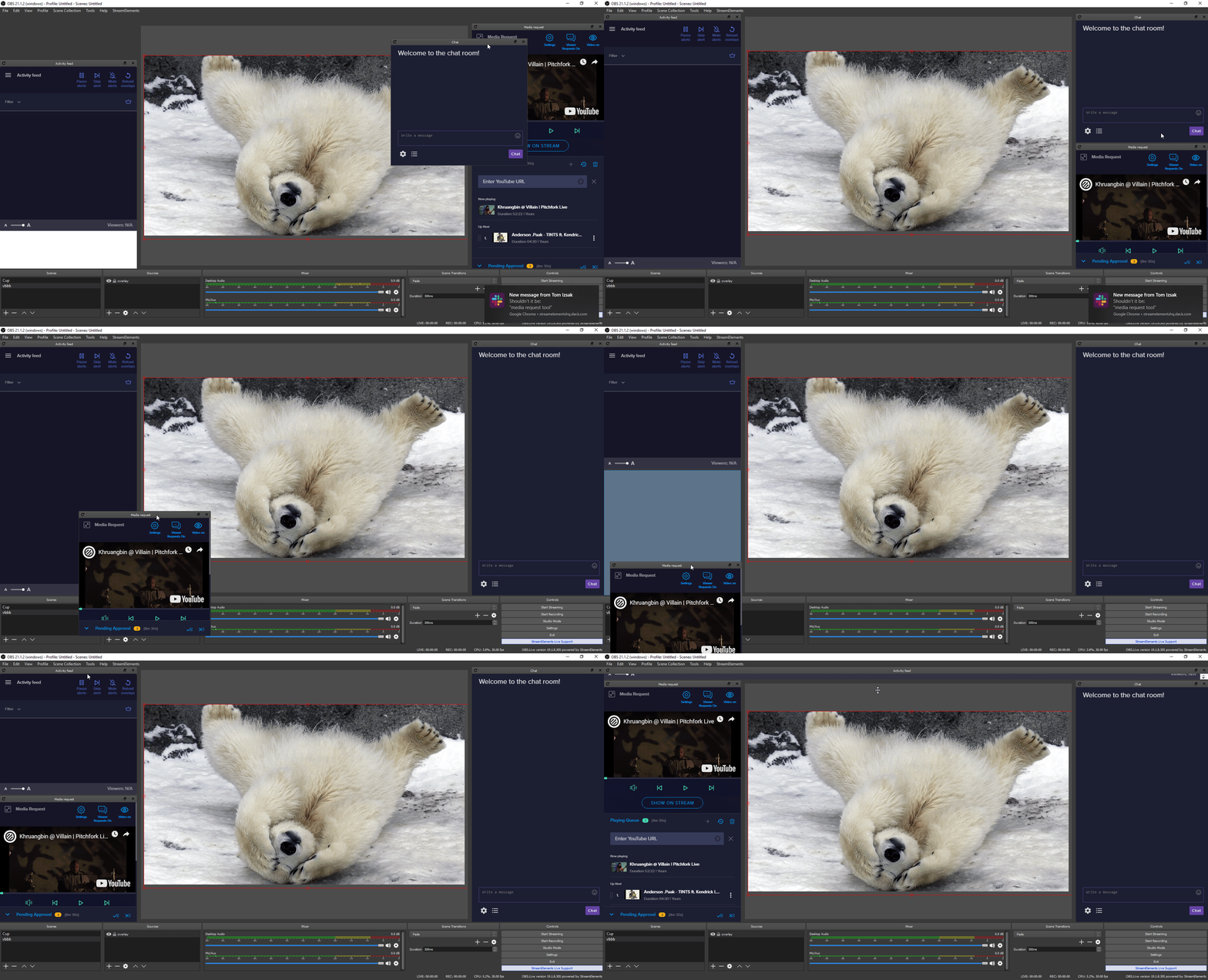
why is it everytime i try to use stuff from stream elements it will load onto obs when i paste link but it is only half of the OL
 plain sonnet
what is the resolution of the source in obs and what is the resolution in the SE editor?
pseudo wraith
it's fine, im gonna continue to use SLOBs until they fix a lot of issues. was trying to show someone how to add overlays and they had the same EXACT problem i had so i guess it is not fixed
plain sonnet
tbf, it cant really be "fixed" if you keep saying "im staying with slobs"
it seems only you are having this issue so it would make sense to get it resolved rather than just leaving when someone is here trying to help
pseudo wraith
let me show you what i am looking at. i wanna make it as simple as it is but i weirdly worded prior message w problem
whatever it just did made my editing window smaller and the quality worse
 unkempt hawk
Everytime I show my media request on stream it "creates" another audio channel somewhere i the background and I get this echo effect. It increments everytime I show/hide from stream.
I have my default audio connecting through VoiceMeeter so that may have something to do with it but just was wondering if anyone has this issue?
sudden ingot
@unkempt hawk you made sure your overlays have "shutdown source when not visible" checked on them?
unkempt hawk
When I "Stop showing on stream" I just get one audio. Then when I "Show ON Stream" again I get the echo with another audio playing
nope! I'll try that now 🙂
pseudo wraith
unkempt hawk
thanks @sudden ingot that did it ;p That's what I get for not watching the tutorial >_<. Is that an option that should always be checked on all overlays?
My guess is yes but just wanted to confirm that is the expected 🙂
sudden ingot
@unkempt hawk Yes, yes it should
Always check that, saves a lot of trouble with audio issues
@pseudo wraith Whats the resolution on the Browser Source and the Overlay?
unkempt hawk
Is there anyway to have a smooth transition where music doesn't stop if i'm changing scenes?
sudden ingot
Music doesnt stop? What ya mean? 🤔
unkempt hawk
When I move to a new scene the music stops until the media request widgit loads on OBS then it starts playing again
sudden ingot
Oh 🤔 I don't know the answer to that 
Only thing I could think of is make a separate overlay that is just the Media request one and it doesn't get unloaded when not visible
pseudo wraith
Overlay is at 1080p
unkempt hawk
yeah that's an idea
sudden ingot
Did you set it to 1920 x 1080p in OBS as well @pseudo wraith
steel bladeBOT
@pseudo wraith To add your overlays to OBS, add a new browser source in your scene. Paste your overlay URL in the browser source properties, set the dimensions to 1920x1080 (unless you changed them on the website), and ☑ “Shutdown source when not visible” https://youtu.be/KDvLynUqXI4
 kindred fox
You added the overlay at the wrong resolution
Follow the instructions above and it will be fine
pseudo wraith
thank you, now how do i resize my editing window on obs
sudden ingot
Which editing window?
pseudo wraith
it resized before and im not sure why
see how it does not fit, i wanna resize main window bc its a literal box
pseudo wraith
i did that but it is still a small box, i tried sclae to window and canvas 800x600
kindred fox
the window and the canvas should be the same resolution as your monitor
unless you're using a CRT from 1998, 800x600 is not a valid resolution for a modern computer
set your canvas as 1920 x 1080
inside your OBS Settings
pseudo wraith
i will mess w settings on monitor but it isn't an old monitor
kindred fox
Don't touch your monitor settings
pseudo wraith
okay
kindred fox
I cannot stress this enough: Your OBS Settings are currently incorrect
sudden ingot
You shouldn't mess with the OBS Preview window at all either imo, should just be left at its default values
pseudo wraith
it was like this and was a MAIN reason i never tried using it bc my stuff never fit
under preview scaling i only have the two options of "scale to window" and 800x600
kindred fox
it isn't just "like this". OBS by default registers the base canvas as 1920x1080 unless your monitor is not 1920 x 1080 then it will detect the default resolution of your monitor
sudden ingot
do scale to window?
pseudo wraith
that worked, weird part is 1920x1080 did not appear until i set it to 1280x720... then that other option is no longer there. thank you guys. obs has better setting then slobs so i liked it more but it never let me add overlays and i think you guys just help me fix it
if i sounded rude at all i apologize, was just a pain in the ass
 floral pulsar
hi guys im new here, trying to setup my streaming since moving from streamlabs, im having difficulty when i opload an image to show above a background, it is not displaying at all no matter what order i put it in, any idea whati could doto fix this? tia
 wary dew
you can see it in the overlay editor but not on OBS?
 tardy vine
media request not working in obs for some reason suddenly
steel bladeBOT
@tardy vine Streamelements on top of OBS -> Logout -> login
floral pulsar
ive added it as a source under my stream start page, i have an animated background of the solar system, trying to place an animated sheep with wings over it, this is in streamelements obs main page @wary dew
wary dew
okay, let's try if this works:
steel bladeBOT
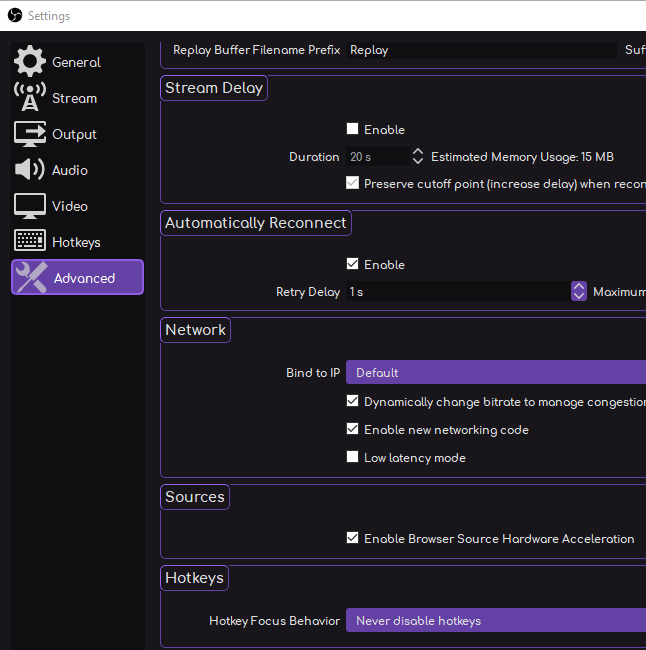
@floral pulsar OBS -> settings -> advanced -> scroll down -> enable/disable hardware accel.
https://i.imgur.com/ggMe9ZE.png
 wary dew
if it's on, turn it off or the other way around
wary dew
can you screenshot obs pls?
floral pulsar
just trying to do that but its automatically saving screenshot to dropbox and i dont know how to change screenshot destination lol
im having one of those days
wary dew

when you say, main page, do you mean the website or OBS?
make sure you hit save on the overlay editor (website) or it won't show up in OBS
floral pulsar
see im really confused by that, what do you mean website? its an internal software, im used to streamlabs where its all in one place 😦 lol
wary dew
so you have never been here:
?
because that is what makes your overlays cloud based
now you are just doing the same things as SLOBS
floral pulsar
ty let me have a look
omg all those themes are free!? holy moly
wow ok so this is another level, ok so i dont even need to apply images really
wary dew
yes, everything on StreamElements is free
wary dew
StreamElements wants streamers to make money, not to take money from them
floral pulsar
ok im gna play around for a bit, do a stream and see how it goes, thanks for your help @wary dew much appreciated
plain sonnet
unless you want the prime subscription, if you do i can give you my, i mean the SE paypal
......
wary dew
floral pulsar
😛 i will donate as soon as i ever get a tip, for sure haha
i can see why ive been recommended it B)
great job
 honest echo
@floral pulsar if you have all configurate already on streamlabs .. afraid not.. use import option and everything will be just fine
i been was using streamlabs for about 4 month and just SE for 1 week and i can say... is a whole new wooorld!!
everything so much cleaner.. and free
and i love it
floral pulsar
@honest echo thanks mate, but seeing the themes makes my old stuff look like its from 2003 xp days hahah
honest echo
i use the import optiones to bring my commands and my alerts but you can do it manually if you like
floral pulsar
yep i think i will start from scratch that way i know where to click and what does what, its nice that they included that for people who prefer to just import though
honest echo
YEEEES!
floral pulsar
@wary dew ive used this overlay, and tried to set the dimensions to 1920/1080 but the screen is oversized on the interface, any idea how i view it as normal?
kindred fox
Right click the image and select scale to window
floral pulsar
ok ty @kindred fox i will give that a go
honest echo
you are using de editor of SE?
floral pulsar
yay its fixed
ty!
@honest echo sorry mate im not sure what you mean
im using OBS
im a real noob on this platform
honest echo
i dont want to overwhel you but u can use the StreamElement web editor to do all your changes over the web and then just put the url on OBS
https://streamelements.com/dashboard/overlays > then the pencil icon on the overlay (there you can customize everything, even the size=

StreamElements
The Ultimate All in One Platform for Streamers
wary dew
i did link him the overlay editor tutorial 😉
honest echo
Great!
floral pulsar
ah yes thanks im on that now, just editing it as we speak, 🙂
 lapis quest
Ok this question might have been asked a while back, However what is up with OBS Live and Media request the tab is there in obs live but showing a blank windows is Media request broken or just buged on the website dashboard its is there ?.. it use to work just fine several Months ago. ?
steel bladeBOT
@lapis quest Streamelements on top of OBS -> Logout -> login
lapis quest
I have logged out and logged back into to Stream elements
this what is showing when using OBS Live
I am sure that Stream Elements is aware if this just wanted to know if there was fix or workaround
wary dew
there are no issues with other users, at least not issues that can't be fixed by restarting or relogging afaik.
but let me ask around if anyone knows the solution for you since it didn't work
lapis quest
Thank you that would great to be honest i have heard other streamers state that Media request and OBS live was not working and they just turned to other means of audio
 elder umbra
good evening, i have a problem with obs's chat..in essence i can't write directly to someone in private because they say that messages are disabled, how can i activate them? among the settings I find nothing 😦
lapis quest
@wary dew Update: OBS Live and Media Request tab showing up tried it again logged out shut down /restart PC and :
Thank you have great one @everyone
wary dew
that tag is disabled in this server
and do not use it on any other server as well
it's incredible rude to tag everyone
floral pulsar
okwell good news @ruban and peeps that have kindly been helping me i really appreicate it! ive started tweaking one overlay source, however im trying to select "latest cheer" to move it slightly, however its not coming up ith the crosshair arrow mouse selection like the others lol
kindred fox
the text?
if you select the layer in the layers list, you can then use the arrow keys on your keyboard to make small adjustments to the widget positioning
floral pulsar
wow thats so helpful thnx, its worked for eveything else except that one item though, its like glitched or something
honest echo
sometimes happen to me too , use the arrows (much accurate)
floral pulsar
it seems to have rectified itself now, was a lag glitch i think, i closed and opened it to refresh @honest echo thanks mate
honest echo
yeah yeah yeah, but arrow is always much accurate the movement in the exact spot that you want to
floral pulsar
@honest echo how do i hoizontally flip an image on the editor? i can rotate but not flip mirror image
honest echo
rotation doesnt work for you?
floral pulsar
rotation does, but i got a pepe gif that id like facing the opposite direction lol
i'll show u what i mean
hes facing towards the right, but id like him facing towards the screen 😛
honest echo
its a gif right?
floral pulsar
yep
i can flip it mirror image in the OBS main software but not on stream elements
should i just do it there?
floral pulsar
ok cool, ye sorry admin for spamming this thread 😛
honest echo

 honest echo
i just putting my little grain of sand
 tranquil cobalt
i got video widget on one of the overlays but how do i trigger it to start playing
steel bladeBOT
@tranquil cobalt To add your overlays to OBS, add a new browser source in your scene. Paste your overlay URL in the browser source properties, set the dimensions to 1920x1080 (unless you changed them on the website), and ☑ “Shutdown source when not visible” https://youtu.be/KDvLynUqXI4
tranquil cobalt
thank you
honest echo
when you say "layout" you mean Overlay right?, if so, just add browser source and paste de URL
steel bladeBOT
@rustic parcel To add your overlays to OBS, add a new browser source in your scene. Paste your overlay URL in the browser source properties, set the dimensions to 1920x1080 (unless you changed them on the website), and ☑ “Shutdown source when not visible” https://youtu.be/KDvLynUqXI4
wary dew
you can't go anywhere if you are not 13
 fathom cobalt
@rustic parcel pls delete link
wary dew
if you do not delete it, everyone can use your overlay 😉
but to be clear, if you are not 13, you cannot stream anywhere
 plucky temple
I can't get media request to pull up as a dock on my obs.live?
wary dew
Twitch, Mixer, Youtube... all minimum of 13
nope
you but it's against TOS
how old are you now?
honest echo
sorry i dont want to get in trouble if you are underage, pls dont DM me
plucky temple
If anyone can help with this, please let me know! Thanks 🙂
 fathom cobalt
@plucky temple streamelements on top >Media request?
plucky temple
@honest echo I don't have media request pop up at all when I start obs. I have the widget in my overlay and have it active, but media request isn't on my home page or my docks in obs.
honest echo
on the top menu > StreamElements > Media Request (i hope u already have obs.live install)
plucky temple
@fathom cobalt There is no option for media request on the streamelements tab 😦
fathom cobalt
@plucky temple screenshot please
honest echo
plucky temple
I only have Activity Feed and Chat as options.... hmm
 odd kraken
You are logged in to the wrong platform.
steel bladeBOT
Streamelements on top of OBS -> Logout -> login
plucky temple
I did that AI bot yes, logged in with mixer
 tulip hamlet
Media request dock doesn't appear for Mixer in OBS.Live just yet. But Soon ™️
plucky temple
Awh, lame! Thank you guys for all the help though! I'm sorry 😦
 exotic owl
I am getting a white screen when I window capture either zoom or skype - any ideas how to fix?
steel bladeBOT
@exotic owl For the best OBS support, please join their Official Discord @ discord.gg/obsproject
honest echo
there is a wizard to use that can give my the best settings for my obs.live ?
plain sonnet
Please run the OBS auto-configuration tool. To use the auto-config, click on the Tools menu in OBS, select Auto-Configuration Wizard, and then just follow the on-screen directions. You can use this tool to get a set baseline settings for your hardware, and adjust as necessary from there.
honest echo
ok
 still bear
Why is it then when I click start stream this pops up and nothing happens
If anyone could help me out that would be amazing
honest echo
i dont use obs.live to stream on youtube but.. have you try logout and log in again?
still bear
lol yes
steel bladeBOT
@still bear https://www.take-a-screenshot.org
 rugged quail
Bit of an issue
tulip hamlet
So check your stuff in Settings>Stream. And then recheck it. And then log out and log in there anyway. Or repaste your stream key.
rugged quail
Ahh I had the wrong streamkey. Thank you
 glad sonnet
Hello i got ride of the chat box. how do i bring it back
tulip hamlet
StreamElements menu at the top.
glad sonnet
im sorry im still confused
tulip hamlet
glad sonnet
ty
 broken mulch
How do you reset the timer widget once it hits 0?
tulip hamlet
Leave the scene and go back to it, assuming you have "shutdown source when not visible."
broken mulch
can you hide the source and then unhide it?
tulip hamlet
That could work too.
glad sonnet
after my first secen how do i get it to jump to the next one . ex i have a streaming starting soon then i would like it to go to my game play once the timer is done
tulip hamlet
It's not automatic. You switch on your own.
 strong fulcrum
just got a elgato. how do i display it in the obs?
tulip hamlet
That'd be a question for Elgato to help you with.
 sharp sable
Hey there, quick question is there a way to export scenes from streamlabs so I can import them to streamelements so I don't have to recreate each scene? tried googling but not seeing anything with definite answers.
tulip hamlet
@sharp sable
sharp sable
@tulip hamlet I love you, thank you, I'm so dumb I missed that like 50 times. You just made my whole night. Thank you thank you thank you!
 wraith berry
i cant figure out how to get my overlays from stream elements to my obs live
steel bladeBOT
@wraith berry To add your overlays to OBS, add a new browser source in your scene. Paste your overlay URL in the browser source properties, set the dimensions to 1920x1080 (unless you changed them on the website), and ☑ “Shutdown source when not visible” https://youtu.be/KDvLynUqXI4
 open glacier
Hey, i got the sound of the Media request tool doubbeld can you tell me how to fix it?
steel bladeBOT
@open glacier Make sure to ☑ “Shutdown source when not visible” for all browser sources (all OBS scenes). If using studio mode, uncheck “Swap Preview/Output scenes After Transitioning.” Also keep in mind that sound can play from any overlay loaded in the browser (editor or launched). https://i.imgur.com/FegZJQS.png https://i.imgur.com/yY0wcFl.png


 terse marsh
Can't figure out how to get my overlay working with my gameplay, what am I doing wrong
tulip hamlet
This.
terse marsh
do I just have to click on it and it will work
terse marsh
ohhh thank you that fixed it
 pallid trench
Is there any way for me to change the currency that I receive tip notifications in? People tend to donate in $ but my notifications always displays it in £.
 shadow zealot
hello anyone on tonight
have a question i am getting a ton of latency
stream has become choppy any reason why that may be
shy mountain
@pallid trench there is a {currency} variable for the alert widget - make sure its present and it will show the tip currency properly
steel bladeBOT
@shadow zealot For the best OBS support, please join their Official Discord @ discord.gg/obsproject
pallid trench
I'm not seeing where I turn that on or anything. Will that also change the currency in my notifications tab of OBS.Live?
shy mountain
Its not in OBS
Its in the overlay edittor -> click on the alert widget -> tip alert cogwheel -> where you palce the message tto be {user} has tipped {currency}{amount}
rugged quail
Hey guys been a long time user of Obs live and the webpage but recently the side tabs to the left with all the important stuff collapse itself before i am even logged into the page and i dont want it like that i can share an image if need be?
shy mountain
Can you show what you mean?
rugged quail
See on the left where there are little arrows all my stuff on the side is always liek that
shy mountain
So the side bar collapse? Thats part of our redesign
I have it as well and I'm not sure how this is linked to OBS.Live
rugged quail
Oh i thought it was me ^^
sudden ingot
Why u gotta make me sad KeiZar?
rugged quail
So im special you say xD
sudden ingot

rugged quail
Is there a way to remove the automatic collapse? or is it permanent?
rugged quail
@shy mountain Thanks for the clarity on the matter.
@shy mountain is it possible to deactivate !play as i play marbles on stream and !play plays songs that are in que when i even have SR turned off?
shy mountain
yes
rugged quail
where would i do that?
rugged quail
Thanks
pallid trench
I think I might have been using the wrong word, I meant the Activity Feed in OBS.Live. A $10 tip shows in the activity feed as £7.65
pallid trench
For example, in my tipping settings I'm not able to change my currency in this drop down which I assume might fix my issue.
 hollow parcel
 quasi snow
https://h4ndy.eu/obslog?url=https://obsproject.com/logs/xGDlIcYT-XP-_3jj follow the instructions
 sharp meadow
my stream wont go live on younow
steel bladeBOT
@sharp meadow Streamelements on top of OBS -> Logout -> login
sharp meadow
failed to connect
 pliant flower
Hey- I try to record like the Xbox Console Companion window but it just shows black scren
sharp meadow
server to younow
shy mountain
what is "younow"?
sharp meadow
i even reset my stream key
younow is a streaming site
which is compatible with obslive
shy mountain
OBS.Live is a plugin for OBS Studio
sharp meadow
yes
shy mountain
OBS.Live which is our thing, does NOT have a login button for Younow.
So most likely you need to uninstall OBS.Live
and just use OBS Studio
shy mountain
No here
sharp meadow
shy mountain
That is the default way for OBS Studio to connect to streaming services
OBS.Live on the other is not compatible with this service.
sharp meadow
sorry realized obs has there discord ill bring it to them
shy mountain
So my recommendation is to uninstall OBS.Live only
sharp meadow
thanks
 last ferry
Heya! (send me to the right channel if needed) Is it possible that my alert animations can be too detailed for the SE overlay editor? A few of them are super framey
shy mountain
If they are super huge in resolution then yes
they can sort of lag when loaded in OBS
but that is dependent on the PC as well
last ferry
theyre not even in obs yet xD
Im just testing them in the editor and they frame out and lag the sound effect too
rugged quail
@last ferry do you mind giving me your twitch username so I can have a look?
rugged quail
yup, taking a look right now
stretching a gif fullscreen could sometimes cause this sort of delay
last ferry
theyre not gifs theyre videos
rugged quail
the follower is a video?
last ferry
all of them are
rugged quail
huh, sure is, hold up
rugged quail
follower was off when I tried it for the first time
second time came out okay
lemme try subs
seems to be in sync on my end, you can try saving the overlay, then exit it, come back in and test again
last ferry
nah its super framey an dthe sound effect skips
rugged quail
I'll test it on obs, sec
last ferry
why does it lag when i test it lol
it looks fine for me when you do it
the gift sub and resub ones do the same
rugged quail
try it on OBS, I just tested it and it looked crisp
last ferry
yeah i have been
the test looks fine on my obs when you test it but when i test it it frames
and when i get actual alerts it frames as well
rugged quail
did it lag now?
rugged quail
well, you got a follower out of it 😛
last ferry
Oh xD thanks!
shy mountain
Now sub and cheer 
rugged quail
no u
last ferry
teat all of the bitties animations >:)
shy mountain

last ferry
yeah those have always worked fine, its just the three sub videos that look poop when i test them
which is weird because my raid alert is just as animated as those three and ive never had issues with
quasi snow
I always had a problem with my tier 3 sub alert too 
last ferry
lol
last ferry
no lol
rugged quail
tell you what, mute the alerts on the editor and test them on your OBS, sounds will play through it
lemme know if it sounds better
last ferry
how do you mute the alerts in the editor only?
oh nvm xD
found it in the open my eyes section
fathom cobalt
wary dew
nice arrow
rugged quail
hand drawn I'm sure
last ferry
nah just as framey and the sound still sucks
wary dew
i made it 😛
last ferry
very symmetrical arrow
fathom cobalt

last ferry
you think it might be the sound file?
rugged quail
seems to be the odd man out, remove it, let's see what happens
last ferry
nope xD
plain sonnet
im on a trash laptop if you need a sample test
rugged quail
it honestly seems like a local issue, since it plays fine when I test it but choppy when he does
last ferry
Surely if i have a pc that can make the animations in the first place and watch them fine, it should be able to play as a webm file at a reduced size just sweet lol
rugged quail
well since you put it THAT way 😂
plain sonnet
do you have hardware accel on in chrome and obs?
rugged quail
I saw you tested it a couple more times, did you try it with hardware accel?
 sinful flint
Interestingly, I just loaded up your overlay editor and put your overlay into my OBS too, gave you a follow and I couldn't see any issue with the video or audio in either the overlay editor or OBS
last ferry
yeah im still struggling. tried reuploading everything again
the follow alert, bits, and raid alert all function fine. Its the three sub ones.
also also deleted the sound alert from every thing but its coming through stil
sinful flint
Did you delete the sound from all the variations too and then save?
sinful flint
Sub alert looks perfect for me too 🤔 hmm
last ferry
im watching you do it and its super framey
ill looks like its supposed to be framey because of the glitch alert but its not
sinful flint
We believe it is happening on your end, but it isn't happening on my end or MrMurdok's end, we can see the glitch effect and we realise that's part of the design, but we can't see any frame rate issues when we test it, so it must be something local
last ferry
It look framey to me when you tested then it but not with Murdoks?
sinful flint
Both me and MrMurdok tested it locally on our own computers and for both of us it looks perfect
last ferry
Also should it be framing when it an actual alert and im nowhere near the editoir?
sinful flint
We both tested it in the editor and in OBS on our separate PCs and it wasn't showing any frame rate issues for either of us in either test
last ferry
So what do i do about it?
plain sonnet
Start recording in obs
In stream elements go to an overlay that is mostly blank (make one if needed) then emulate the alert.
It could be your pc trying to render both alerts at the same time
last ferry
It lags whether obs is open or not
ill try it in a new overlay but my computer can handle animating and rendering the alert in the first place xD so im just assuming it can handle watching the 3second animation lol
zealous yacht
oke so i launch se obslive in admin mode but i cant use my hotkeys
plain sonnet
 cloud oak
Just a quick question.. is there any way to make OBS.live sign into a different twitch account on launch? Like, either tying it to OBS studio profiles, or even through a second install of obs (like a portable install)?
sudden ingot
Set up a different profile
Profiles should be completely independant ones with their own settings iirc
cloud oak
ah, so if I sign in on one profile it should retain the sign in across both? I should've just tried it but for some reason I thought it wouldn't work
sudden ingot
To my knowledge, that is how it should work yes
cloud oak
awesome, thanks
hm.. I just tried it out, the login pertains between profile switches sadly 😦
sudden ingot
kindred fox
I don't believe that OBS.Live sign-in information is stored the same way that an OBS Profile is currently stored. This means that you do need to sign out/into StreamElements when switching profiles.
 cobalt crown
do we know if OBS will add another desktop audio option? since their is only 2 and their is 4 mic options?
plain sonnet
best to ask them, but probably not.
you can always add it to their ideas board
 narrow wadi
Hey Guys i got an "unknown error" if i try to connect my twitch account into OBS. Anyone help me pls ( idk if im right here or in helpdesk twitch so i send both )
narrow wadi
if i want to connect my account on the (connection button in settings -> Stream ) it says there a authentification error with twitch:" Failed to get token from remote: schannel: next InitializeSecurityContext failed. Unkown error ....."
 royal scroll
hi
my docks wont let me resize them no matter what i try
sick love getting an answer tbh
quasi snow
patience is a virtue, when someone knows the answer and can, they will get back to you
 steel mural
Check if this setting is the same on your end: https://i.imgur.com/nQNXCP5.png
 narrow wadi
Its the same :/
 west marsh
The dock that I could change the title and game of my stream has dissapeared and i cant seem to get it back
narrow wadi
@west marsh open obs -> press (v) & go to docks 🙂
wary dew
@west marsh Streamelements in the top bar > Activity feed
there you can also do it
in the menu in the top left
narrow wadi
@wary dew do you think my problem might be changed if i reinstall obs ?
west marsh
@narrow wadi @wary dew It was a purple screen seperate from the activity feed
and what do you mean press v
I have this
Edit: I found it
 granite marsh
Hello. I have this problem that i have two different media shares on my obs. The one im trying to use from streamelements and the one that is in the media request. Anyone knows why it does not use the one i have put in sources
second question: Why can i have several profiles but only an activity feed for one of the profiles?
pallid trench
@quasi snow Hi, sorry to bring up the currency thing again. The issue I have is that the drop down menu to change my currency is greyed out and doesn't let me change it. Should I be able to?
granite marsh
So if i get this right now.. if i want the activity feed from the latest channel i added to profiles, i need to pop out the activity feed from the streamelements page? becouse the activity feed and media request is always locked to the first profile?
 hearty brook
Hi, I have a question: in OBS.Live, is it possible to add custom pages inside OBS like the activity feed for example? I am trying to stream on both Mixer and Twitch and in some cases you need to have different pages open and I dont want to open them through a 2nd source like google chrome or so
plain sonnet
you can add custom browsers in obs
view > docks > custom browser
 tranquil goblet
Hey guys, I've been streaming perfectly fine for the past couple of weeks however recently when I launched OBS.Live I found that my Media Share 'shortcut window' isn't displaying properly and it seems as if Media Share Widget for my Overlay just straight up isn't working. I'm not sure what's going on and nothing I've done or googled has worked.
steel bladeBOT
@tranquil goblet Streamelements on top of OBS -> Logout -> login
steel bladeBOT
@tranquil goblet I'm a bot, only here to send helpful messages because the helpers are lazy.
honest echo
i think this q has been answer before but... how do i keep my chat in dark theme, always go back to light theme i dont like it
hearty brook
@plain sonnet Thank You! 🙂
plain sonnet
np 👍
honest echo
@wary dew i think i love you
steel bladeBOT
 tranquil goblet
Sorry, me again. It fixed the problem with OBS.Live but it still won't display on my overlay. I've tried deleting the Media Share Widget and re-adding it but that didn't fix it either. I'm completely stumped.
tranquil goblet
huh
 lethal rain
cant login even on obs live
tranquil goblet
Strange cause everything on my overlay loads fine except my Media Share
lethal rain
media share and chat was a white page for me
wary dew
is it for twitch, yt of mixer?
tranquil goblet
twitch for me
wary dew
okay
lethal rain
twitch
wary dew
because it doesn't work for YT 😛 so that would have been easy
why do you have to go the hard way
let me ask around
tranquil goblet
Listen, I've had more than enough bad experiences with YT to convince me to use Twitch XD
thanks
wary dew
is it only not showing in OBS (the overlay part) or also in the editor?
tranquil goblet
So in the editor there's the settings/management screen for Media Share right? That works fine
It just doesn't show up on the actual Overlay Browser Source
wary dew
okay
steel bladeBOT
@tranquil goblet OBS -> settings -> advanced -> scroll down -> enable/disable hardware accel.
https://i.imgur.com/ggMe9ZE.png
lethal rain
doesnt work sadly 😦
browser sources doesnt work for me, nothing happen after refreshing cache either
wary dew
@lethal rain you are logged in with SE and Twitch in OBS?
tranquil goblet
Oh hang on. I duplicated and deleted the old overlay. That seems to have fixed it
 tranquil goblet
Thanks for the help Ruben!
 old relic
Anyone having issues with the backup feature of SE? Every time I try to run it my OBS crashes out
 cunning estuary
i don't have a media request widget, but it doesn't let me add any widget, it just says "show on stream"' and i have no clue how to manually add the media request widget
wary dew
go to your overlay in the editor and add it there
wary dew
which platform are you going to use it for?
cunning estuary
twitch
wary dew
and you added the overlay as a browser source right?
cunning estuary
i think i did
cunning estuary
how do i find it?
steel bladeBOT
To add your overlays to OBS, add a new browser source in your scene. Paste your overlay URL in the browser source properties, set the dimensions to 1920x1080 (unless you changed them on the website), and ☑ “Shutdown source when not visible” https://youtu.be/KDvLynUqXI4
cunning estuary
i think that the way that i got to the editor is wrong
because im viewing the editor through my OBS
cunning estuary
i have no clue how i did it tbh
wary dew

cunning estuary
wary dew

cunning estuary
i really tried to do it alone man
wary dew
okay then we are just going to make a new overlay
and add the widget on it, and send that to OBS in the 'regular' way 😉
no worries, we'll get there
cunning estuary
you need to walk me through it because i'm a total beginner here
wary dew
first, click on the make a new overlay button 😛
cunning estuary
source = overlay?
wary dew
i have some cool vids for you
whatever you want, it's your overlay

YouTube
Need help? Check out our video guides, covering every feature in StreamElements.
you can find everything in there too, they will explain how the editor works, how to add it to OBS, setup alerts, media request.. all you want
wary dew
if you watch the vid, you will learn how the system works, so you understand it better and you can do things by yourself 😄
i recommend to watch the vids about: overlay editor + alertbox + media request
cunning estuary
after all of these will i be able to do it by myself?
wary dew
yes
cunning estuary
okay thank you
wary dew
no problem 😄
cunning estuary
i'll be back with an update in like 30 mins
wary dew
if you need any help after that, we're here
but it's always good to understand how thinks work 😉
 terse summit
I’m trying to take my Facebook off obs and stream on mixer anytime I hit start streaming the Facebook comes up tries to load
wary dew
Settings > Stream
change it to Mixer account
and also log out of SE in OBS and log in with mixer account
terse summit
Thank you
 stiff mantle
So, not sure if this is really the right section or not. But if I attempt to link my YouTube along with my Twitch, it just says it's already claimed.
stiff mantle
That would be great
And yeah, I apparently made one for twitch back in 2017. And then the YouTube recently
wary dew
okay you will need to get me the JWT tokens of both accounts, do not post them here! but send them to me in DM and i will try to get hold of a staff member when they are available to do the merger
steel bladeBOT
@stiff mantle You can find your JWT token on your account channels page ("Show Secrets" to reveal the token): https://streamelements.com/dashboard/account/channels
READ ME:
This is a private security token. Do NOT share this token here or other public places, only with a StreamElements staff member in private.
stiff mantle
I would and all, but you seem to have both DM's and friending disabled. Lol
 stiff mantle
You definitely have. xD But I unblocked my friends if you can add me.
wary dew
send
 tired smelt
Old alerts can be refreshed and work fine, animations pop up etc, but new ones do nothing. They show up in activity feed but do not trigger the alert/animation even if I click refresh. Any ideas?
wary dew
do they show up in the editor if you test them?
tired smelt
yes they do, i tried that
wary dew
okay, so only not in OBS
tired smelt
right
wary dew
and you did add the overlay to OBS as a browser source
steel bladeBOT
@tired smelt OBS -> settings -> advanced -> scroll down -> enable/disable hardware accel.
https://i.imgur.com/ggMe9ZE.png
tired smelt
ok just tried, still nothing:(
old ones work fine when i refresh them, but new one from today, nothing
tired smelt
thanks, I really appreciate it
steel bladeBOT
@tired smelt Right click on the BrowserSource > Properties > Scroll down a bit > Refresh Cache of current page
tired smelt
i've only had 1 today so far, a subscribr
so not sure about that yet, but all the old ones work, if i refresh a follower from 2 days ago it works, and a sub from 2 days ago also
wary dew
if you replay the new one, can you see it in the overlay editor?
wary dew
ok
tired smelt
It did update the overlay at the top "latest sub", but just is not playing the animation alert
wary dew
what was the name of the user that was subbing?
it could be that the moderation settings kicked in to prevent the name from showing on screen
or something in the message
tired smelt
treidan has resubscribed (Prime) for 2 months (1 month streak)
any new word on the cutlass red?
1h
could "cutlass" have tripped the sensor? The name of a ship in star citizen fyi
wary dew
maybe, since that is the only alert that didn't play
i guess we'll need another new alert to make sure 😛
well that worked
tired smelt
thank you for doing that'
wary dew
no problem 😄
you can do this: either edit the punishment for found things or disable the profanitiy filter
tired smelt
where is that?
wary dew
tipping settings i believe
StreamElements
The Ultimate All in One Platform for Streamers
under: tip moderation
tired smelt
Thank you very much. You rock!
 low heath
I am having a tech issue with my capture card and my brio
 pale prism
Good Morning everyone... I have a little but important problem with OBS Live...
Today all seems to work... But after about 2 hours my overlay just freezes in OBS... No animation anymore.. Nothing.. I restartet the entire OBS live and it seems to work again... For again about 2 hours... After that the same problem. Freeze of the overlay. So i removed the entire scene but the browser plugin does not load the page after creation.....
Is there any solution for this type of problem? I refreshed the cache allready and checked the overlay.. All worked fine the last days but now...
I can switch the scenes... The game recording works including the livecam. Just the overlay has big problems
After a restart of OBS all works fine again
 quiet marlin
Hello I have a problem with high CPU utilization. I also use Streamlabs and xplit both only use 6-10%. Streamelements is using 20% not just being open.
 neon ore
my chat and media request wont work properly!
 wise silo
Whats wrong with them?
neon ore
not loading properly
wise silo
Mind sending a screenshot?
neon ore
wise silo
Log out > log back in
 tiny pollen
hey all - quick question about backing up an OBS Studio/OBS.Live config ready for a clean Windows install ... does OBS Studio AND OBS.Live get backed up/reinstalled by simply copying the Username -> AppData -> Roaming -> obs-studio directory to an external drive and then overwriting that folder on a clean Win 10 install and subsequent reinstallation of OBS Studio & OBS.Live?
thanks for any info you may be able to provide
wise silo
theoretically that works.
%APPDATA%\obs-studio and copy the entire thing.
Make sure that any and all used images, gifs, videos, audio, etc are at the same location on the new computer, as they are not included in the config.
tiny pollen
no worries - thanking you
 carmine kestrel
hi i am running triple screens for iracing and i am having an issue with streaming it from obs looks all messed up what do i need to do ?
wise silo
What does it look like?
carmine kestrel
looks like your looking at 3 screens on one
wise silo
Mind sending a screenshot?
rugged quail
Is anyone else having issues with their "hosts" not coming up as Alerts?
steel bladeBOT
@rugged quail Due to changes to Twitch API, we have filtered out hosts and will only show these ones on your activity feed:
- All hosts coming from an online channel with at least 1+ viewer
- Auto host events with at least 1 viewer - only from a channel that just went offline
Note: If you see "X channel has hosted you" with no viewers on the back, that is considered an offline host or a host with 0 viewers, we do not show these.
rugged quail
Wow that was a quick responce
steel bladeBOT
@rugged quail I'm a bot, only here to send helpful messages because the helpers are lazy.
 edgy horizon
Does anyone know any good brands of Capture cards for PlayStation
rugged quail
Elgato
wise silo
Elgato @edgy horizon
The Razer Ripsaw isnt bad either and slightly cheaper than the HD60.
edgy horizon
What does it look like
wise silo
Slightly cheaper one than that is the.... Mirabox HSV321? I believe.
steel mural
Avermedia Live Gamer 4k.
steel mural
A friend uses it. I think it's better software and hardware wise compared to Elgato's stuff.
edgy horizon
No I just started my live streaming about 2 months ago and trying to make my live stream progress more
wise silo
The software for the Razer SUUUCKS. But the hardware is really tasty.
 inner patio
Anyone know why scrolling text isn’t actually scrolling when I’m looking at the preview of it in OBS love? It just sits there with the most updated stats but doesn’t actually move
 naive swallow
I cant be able to connect to facebook and I was wondering how to fix this problem.
wise silo
log out of OBSlive and log in to facebook
inner patio
Oh sick that fixed the thing. Thanks! @wise silo
pale prism
Any suggestions to my problem guys because that problem is really bad.
fathom cobalt
@pale prism what is your problem?
steel bladeBOT
@pale prism Please provide a log from your last stream. To do this, in OBS go to Help > Log Files > Upload Last Log File and paste the link to the log file here.
hollow parcel
Hello! This program decided to crash on me multiple times in the last hour. Has anyone else has this happen or am I the unlucky person that it decided to happen to?
shy mountain
By crash - it closes on its own?
hollow parcel
No. My kb/s went from 5500 to 0 and proceeded to reconnect three times before it did
Here is my crash report
shy mountain
that is different from "crash" and "my internet stopped working"
that is a literal crash log
as in - OBS closed on its own
due to something
Quick google search yielded me this: https://obsproject.com/forum/threads/w32-pthreads-dll-crash.38020/
OBS Forums
Yo, I've been having random crashes with all of them blaming w32-pthreads.dll. It usually happens after a lil' while, sometimes it takes longer, sometimes it happens already after 1 min.
Here's the latest crash log:
hollow parcel
Well my internet is working fine. My DL speed is 437.20 mbps and upload is 35.10mbps
shy mountain
This is based on what .dll crashed in the crash log
I just want to point out that having 0kb/s listed in OBS and it actually crashing is 2 different things.
steel bladeBOT
@hollow parcel Please provide a log from your last stream. To do this, in OBS go to Help > Log Files > Upload Last Log File and paste the link to the log file here.
hollow parcel
shy mountain
 floral plover
hi, who could help me in the twitch bot settings?
odd kraken
What do you need help with exactly?
floral plover
my twitch bot, is custom named and the spam filters are not working, only if i give permission to the standard streamelements to mod but then it t.o.-s everybody
odd kraken
You need to make the StreamElements bot and your custom bot name a moderator in your channel.
floral plover
but if i do that streamelements bot t.o.-ing everybody in the chat even if there is no banned phrase in the message
odd kraken
Then you most likely set your spam filters wring.
floral plover
that is why i'm here to get help... -.-'
odd kraken
Do you have an example phrase which was timed out in your channel, but should not?
floral plover
right now i don't have but i know if i use / mod on streamelements my custom named bot does nothing
offline don't even try. custom bot not working offline
odd kraken
to use the custom bot name StreamElements needs to be modded. and the custom bot name also needs to be a mod in your channel.
give me a phrase which you want to be timed out?
and mod StreamElements in your chat please.
floral plover
streamelements is mod of the chat and the custom bot is too
odd kraken
If I try to post fortnite, I get a warning from twitch:
floral plover
i don't see nothing from it
odd kraken
So I assume it is already blocked by twitch, before the StreamElements bot can interact.
floral plover
so i should "kill" twitch bot?
odd kraken
what twitch bot?
odd kraken
the auto mod might interfer with the StreamElements bot.
typed fortnite and got a timeout.
floral plover
now you see my problem.. not the "golgothanblackdemon" is t.o.-ing but the streamelements
odd kraken
I do not see which bot is timeouting me. But there is no problem with getting the timeout from StreamElements.
For your !info command I only see that your custom bot name gave the response.
floral plover
hmm
odd kraken
It is not an error that StreamElements is timing out the people.
floral plover
but i want to that only the custom named to t.o.-ing
odd kraken
afaik you cannot.
and as a viewer I cannot see that anyways who timed me out. only your mods can see the messages for the timeout.
floral plover
and how do i set it up to make the bot respond to a t.o.? like for a command?
odd kraken
Not possible.
floral plover
so this is my problem.. if somebody got t.o.-d he gets two messages.
there. you see one is from streamelements and one is from the custom named.
odd kraken
The two messages are made by the same bot afaik. They are made to make sure that the person gets timed out, cause there was a time where one time out did not get through, so StreamElements sends two, to make sure.
quasi snow
@pallid trench yes you should be able to, are you using chrome?
 coral olive
i need help
 full thunderBOT
Hi @coral olive, Please ask your question(s) or describe the problem you're looking to solve so staff or a support volunteer can assist you as soon as they are available.
coral olive
so im just learning the program
but i accidently deleted my window to change my stream settings
aka title and game and so on
so how do i get that window back
sudden ingot
Check up top on the Streamelements button @coral olive
Should be among those options there
shy mountain
View -> Docks -> Stream Information
 hardy tulip
My StreamDeck StreamElements shortcut key for kappagen and empty cup are not functioning.
shy mountain
Restart the streamdeck software
hardy tulip
I restarted the computer...
What should i do?
This StreamElements Obs.Live action is offline . Please wait for it to become available. Is the message it displays in the streamdeck application when i select it.
pallid trench
@quasi snow I'm using Firefox, just tried it on Chrome and it didn't let me do it either
quasi snow
@pallid trench do you have SE.Pay connected, that might be the reason
wary dew
no
cunning estuary
oh because of copyright and stuff?
wary dew
yup
 wicked yoke
is there anyone has ever played Risk board or mobile game? it is coming to the PC/Steam and i will have an interview them on my Live Stream. i cannot choose discord or skype as a window to be able to do other things without showing my screen as i stream with 1 monitor. even tho i turned of hardware acc. on discord still obs cannot show it to me as an option to choose as a window. I can see skype in the window capture settings but it does not work. and also let me know if you'd like me to ask them a question.
 shy lodge
Is there a way to delete a channel from my obs elements? I cancelled my mixer account but cant remove channel from my account. Also can i add a second twitch account?
wary dew
you can add as many accounts as you want
but you can't delete
or you will have to delete everything tied to it
shy lodge
Strange when i try to add another twich account it doesnt allow me too.
Thanks.
It says. Channel is aready claimed but i am not loging in.
wary dew
maybe you already created a seperate SE account with that twitch account?
because that usually gives that message
pallid trench
@quasi snow so if i disconnect SE.Pay I might be able to change it? Is there any downside to not using SE.Pay? I'll be honest I'm not even sure what it is or does :/
 lilac ocean
SE.Pay is our donation service
SE.Pay lets viewers pay with a lot of different payment methods, including bank and credit card
wary dew
and it offers chargeback protection
quasi snow
disconnect it and see if you can change currency and then connect it again, not sure if you can change SE.Pay currency though @pallid trench
pallid trench
@quasi snow That seems to have fixed it. Thanks 🙂
hardy tulip
Guys, streamdeck shortcut still isn't working ...
wary dew
?
hardy tulip
This StreamElements Obs.Live action is offline . Please wait for it to become available. Is the message it displays in the streamdeck application when i select it.
wary dew
log in in obs
hardy tulip
What do you mean?
wary dew
in the streamelements menu in the top bar
log in to SE
because if you are not logged in, it won't work
hardy tulip
Ok relogging fixed the problem, thanks
 rancid chasm
Hi guys
 plain swan
 humble fjord
How do I fix this chatbot name... I have tried everything... in ground control and obs.live... none of it is working
rugged quail
What seems to be the problem?
wary dew
Renaming the bot doesn't work on Mixer currently @humble fjord
humble fjord
i dont know how or what i gotta do to change it.. am i supposed to sign in using my main twitch or the bot twitch? i did everything that i was supposed to do in the Subreddit maybe im missing something. can you tell me or send me the new way of changing this bot to a custom name
steel bladeBOT
@humble fjord Custom bot name requirements
- StreamElements bot modded and in chat
- Active overlay with alerts
- StreamElements tipping page in the panels below the stream (!panels)
- OBS.Live or Ground Control open
- Create a twitch account for the name you want to use or run the bot under your own name
- Custom bot name doesn't work on Mac
wary dew
those are all the requierements
humble fjord
is there a way of reseting the custom bot in OBS live cuz it only allows me to do my own name. i also tried changing the OAUTH in Ground Control but it wont work it still pops up as my name
rugged quail
Are you going to use it on Twitch or any other platform?
humble fjord
twitch
rugged quail
if you wanna add a custom bot name, you'll need to create a twitch user with the name you want the bot to have
humble fjord
i did that i just cant get the name on OBS.live to work
it just gives me my main name
am i supposed to sign into OBS live using the bot account????
rugged quail
you'll need to sign into obs live or Ground Control (don't have both opened at the same time) to your own twitch account
humble fjord
i uninstalled Ground Control. so im trying to do it on OBS.live
humble fjord
is there anyway to reset the OBS.live cuz the first time around i set up on my main by accident. i need to change the Auth or something
rugged quail
you can try to log out of it and log back in
 thorny mica
Hey guys, i'm trying to set up NDI for two pc's. I cant seem to get it to work, anyone can DM me to help me out?
 dry sphinx
Have you tried signing out of your account on Twitch & signing in with your 2nd Twitch account?
As I believe it should work that way when trying to use the custom bot name in OBS.Live @humble fjord
humble fjord
nope it aint work
so all i need it to do is RESET the obs.live from i tried the custom name thing so i can do it over
 scenic pagoda
Hey there. I can't get a Gamecapture if i play " Call of duty : Modern Warfare
humble fjord
how do you RESET Obs.live i tried the whole uninstall/reinstall thing is there another way??
humble fjord
i fixed it then it broke again... im done trying for today
rugged quail
@humble fjord please follow these steps and lemme know if it works for you
OBS.Live is caching old password for the bot most likely if it was changed recently or if user is going to use a new custom bot name.
Steps to reallow OBS.Live to use new custom bot name:
- Right click on your OBS desktop shortcut -> properties - in the "Target" field add this -> --remote-debugging-port=40404
- Open OBS(or restart if it was open)
- Open your browser and type in "localhost:40404"
- Click on "StreamElements - Activity feed"
- navigate to the Console tab
- type in the console this: store.customBot.removeCustomBotIntegration() and hit enter
- Try setting the custom bot name
 desert pebble
I have a question about the overlays in OBS.
First off, I love that there is a cloud service so my CPU doesn't have to. I love the customization of scenes to tailor what I want shown and where I want it shown so that I can have some creativity.
That being said. I notice a real bad FPS drop once I go into game. For example, my Recent Follows/Donations/Subs/bits are set on a scroll. When I am tabbed out of the game they scroll perfectly, but at soon as I tab back into game, there is a noticeable drop, then fine, then drop, then fine. I tab out and its fine no drop. The game also has FPS drop (in obs, not for me, but in OBS), if I tab out in a cut scene there is no issue. Any idea what this is?
steel bladeBOT
@desert pebble Please provide a log from your last stream. To do this, in OBS go to Help > Log Files > Upload Last Log File and paste the link to the log file here.
honest echo
@desert pebble maybe uncheck de preview window and always admin rights to obs.live .. and finally the frame rates of your monitors (i assuming you have 2)
steel bladeBOT
@desert pebble OBS -> settings -> advanced -> scroll down -> enable/disable hardware accel.
https://i.imgur.com/ggMe9ZE.png
 twilit cloud
How do i get the media request dock in OBS? i have added media request to my overlay but odn't see it
tulip hamlet
Twitch?
twilit cloud
*mixer
tulip hamlet
Won't show up in OBS.Live when logged in with Mixer just yet. Soon ™️
twilit cloud
Alright cap thanks tho!
 dreamy delta
Hi I'm having issues launching the overlay editor, I get the top overlay and the browser stops loading but the editor never loads. Can someone please help?
tulip hamlet
Screenshot please?
tulip hamlet
Press F12, have the console tab open, refresh the page, and screenshot what appears in the console.
tulip hamlet
Make sure you're selecting Console
 steel bladeBOT
@dreamy delta Streamelements on top of OBS -> Logout -> login
tulip hamlet
Oh wait.
Mixed up issues lol.
Log out and lock back in to the site.
@spiral elk Did you look at what's in there when you click manage?
tulip hamlet
Perhaps your backup is too big?

 dreamy delta
same problem is happening
tulip hamlet
@spiral elk 100mb I believe.
@dreamy delta 1. Clear your cache
-
Go to chrome://settings/content/cookies and add streamelements-yoink.netlify.com to your allow list, allow cookies in general
-
Press Ctrl + Shift + R while looking at the white screen
thorny mica
Hey guys, i'm trying to set up NDI for two pc's. I cant seem to get it to work, anyone can DM me to help me out?
 spiral elk
🤔 I dont believe mine is above 100mb but I guess I can try something else for a cloud backup test
dreamy delta
Now it says this
dreamy delta
Where should I go to resolve this then?
tulip hamlet
Reread my last question.
dreamy delta
Flxxrryy sorry
tulip hamlet
This is a local issue specific to your computer. There is something on your computer preventing the page from loading.
Start disabling things that could change the page. Extensions, firewalls, antivirus, etc.
dreamy delta
got it thank you
 oak bronze
Hello I am having trouble adding an overlay to my stream . i ve followed the online tutorials and done exactly as they say but the overlays never show up
steel bladeBOT
@oak bronze To add your overlays to OBS, add a new browser source in your scene. Paste your overlay URL in the browser source properties, set the dimensions to 1920x1080 (unless you changed them on the website), and ☑ “Shutdown source when not visible” https://youtu.be/KDvLynUqXI4
spiral elk
so I have tried about everything and I still cant get the backup to work 🤔
wise silo
so, uh, what have you tried? Any errors?
spiral elk
I tried with just one singular scene collection and it wont take it and I have also tried with ones with almost nothing in them
I get this but yet there is no backups
wise silo
Read the error
👀
A certain staff member deletes my message in 3...2...1 if im wrong... nop ok
tulip hamlet
100*
spiral elk
but shouldnt it work if I am trying to upload a scene collection with almost nothing in it?
tulip hamlet
And it doesn't include overlay editor data.
wise silo
Shit, am wrong.
steel bladeBOT
@spiral elk Please provide a log from your last stream. To do this, in OBS go to Help > Log Files > Upload Last Log File and paste the link to the log file here.
 modest forge
hi , i cant hear my alerts from obslive . and when I trigger the test alert on the editor it doesn't sound. and volues up and enabled . now if i click the alert sound off and back on it does sound on the editor but not in obslive
tulip hamlet
@modest forge
 wild warren
thank you
 simple igloo
Hello, I am having an issue getting my display capture to work.
wise silo
Are you on a laptop?
simple igloo
yes i am
steel bladeBOT
@simple igloo Due to the way laptops are designed, your system must be configured to run OBS on a specific GPU, depending on the type of capture you are trying to do.
For Game Capture and Window Capture (recommended), your system must be configured to run OBS on your laptop’s high performance GPU (default); for Display Capture, your system must be configured to run OBS on your laptop’s power saving GPU (iGPU).
If you are running Windows 10 1903 or newer, use this guide for instructions on how to configure your system: https://github.com/obsproject/obs-studio/wiki/Laptop-GPU-Selection-Windows-10
For instructions on configuring an older version of Windows (you should consider upgrading), use this guide: https://obsproject.com/wiki/Laptop-Troubleshooting
simple igloo
thank you
 storm tapir
Hey all! Been using OBVLive for a smidge and I love the media request, however I've started experiencing an issue. The window that holds media request is now blank. Disabling and reenabling the window did not help and there are no updates available. What do you suggest I do? Thanks 🙂
steel bladeBOT
@storm tapir Streamelements on top of OBS -> Logout -> login
storm tapir
Thank you robot ❤️
steel bladeBOT
@storm tapir I'm a bot, only here to send helpful messages because the helpers are lazy.
 ebon notch
This may be a dumb, but I'm having trouble getting my overlay to fit my screen properly, any clue how I can tell what size it should be
steel bladeBOT
@ebon notch To add your overlays to OBS, add a new browser source in your scene. Paste your overlay URL in the browser source properties, set the dimensions to 1920x1080 (unless you changed them on the website), and ☑ “Shutdown source when not visible” https://youtu.be/KDvLynUqXI4
 prime adder
Any help to bot not responding to commands?
steel bladeBOT
@prime adder If you changed your name on Twitch please follow these steps:
🔹 Visit https://streamelements.com/logout and then log in again with by connecting with Twitch.
🔹 On the right side of the dashboard page that opens, select "Join" under bot settings. If it says "Part" select that and then select "Join" to send the bot to the chat. Don't forget to mod the bot by typing /mod streamelements in your channel if you have not already.
🔹 Post your new name here so that we can update your channel's chatstats tracking (must be done by staff).
tulip hamlet
@prime adder Don't forget you have the #dreamteam for support, as well.
prime adder
@tulip hamlet I figured the bot was less bothersome 😂
tulip hamlet
!lazy
steel bladeBOT
I'm a bot, only here to send helpful messages because the helpers are lazy.
tulip hamlet
It's just me.
 noble island
Hi I'm beginning my Adventure with streaming and I'm seeking for some advice how to properly setup Scene's and change between them by custom shortcut. Because I want to create my custom overlays for WoT and each vechicle I will play during stream.
For now I'm playing on 2 tanks.
I have some free space on top and bottom
fathom cobalt
What is your resolution?
 fallow burrow
i cant get my host alerts to work i dont know what im doing wrong. it works in SE editor fine. ???
steel bladeBOT
@fallow burrow Due to changes to Twitch API, we have filtered out hosts and will only show these ones on your activity feed:
- All hosts coming from an online channel with at least 1+ viewer
- Auto host events with at least 1 viewer - only from a channel that just went offline
Note: If you see "X channel has hosted you" with no viewers on the back, that is considered an offline host or a host with 0 viewers, we do not show these.
fallow burrow
so if its about 4 or 5 viewers then the alert will activate?
shy mountain
If they have been online the moment they hosted you
fallow burrow
ok
desert pebble
@steel blade sorry I was away, and then I got forgetful of this.. Here is the log file. https://obsproject.com/logs/ZV6T0vADcCsAXXXK
shy mountain
desert pebble
@steel blade I will also turn off hardware accelerator in the option you showed and let you know if this works
shy mountain
What exactly is the issue you are encountering?
desert pebble
FPS drop when using streamelements overlay
shy mountain
Right - follow the link i provided
desert pebble
testing now and so far it seems to have stabalized with the suggestion from AI Bot and I will also look at your link as well. Thanks!
shy mountain
This has nothing to do with OBS.Live. If you are on Twitch lets move to #helpdesk-twitch @desert hamlet
 desert hamlet
oke sorry
 languid crystal
oi, i have a really small issue. Two days ago my bot's name was reverted to the default one. Twitch account is still OK, checked it personally. Probably configuring it again would help, but I can't find an option to disconnect the bot's twitch account. When I'm using the 'Bot and tipping setup' i'm jest getting info, that 'You are already using our bot' 😛
shy mountain
Are you using OBS.Live for the custom bot?
languid crystal
yup
shy mountain
To disconnect the bot, same place where you choose the custom bot name and use the login button
it becomes a disconnect button
As reference you can use this video: https://discordapp.com/channels/141203863863558144/494513233416421386/561516184718278676
languid crystal
okay, looks like the bot is disconnected, but when i'm connecting it again everything look in order, except after connecting it's still really not connected 😛 - i'm loging in, giving permission to streamelements and test message option is still grayed and 'connect' button is still present in place of 'disconnect', the one i can see in the video you posted
shy mountain
- Right click on your OBS desktop shortcut -> properties - in the "Target" field add this -> --remote-debugging-port=40404
- Open OBS(or restart if it was open)
- Open your browser and type in "localhost:40404"
- Click on "StreamElements - Activity feed"
- navigate to the Console tab
- type in the console this: store.customBot.removeCustomBotIntegration() and hit enter
- Try setting the custom bot name
desert pebble
Thanks @shy mountain and @steel blade problem seems to be solved!
languid crystal
thanks @shy mountain, works like charm. Btw, this whole debug browser interface is so damn cool!
 main musk
Can I get any help on how to take the overlays I have saved on the stream elements website to my actual obs.live?
sorry, I know its late :c
steel bladeBOT
@main musk To add your overlays to OBS, add a new browser source in your scene. Paste your overlay URL in the browser source properties, set the dimensions to 1920x1080 (unless you changed them on the website), and ☑ “Shutdown source when not visible” https://youtu.be/KDvLynUqXI4
main musk
I have tried that and my stream preview still does not show the overlay. I've tried that and tried it again, still does not show up. Is there something i'm missing?
shy mountain
OBS -> settings -> advanced -> scroll down and make sure you have hardware accel. on
sudden ingot
How the heck would I use SE.Pay when I'm in Sweden? :c
sudden ingot
Viewers from any country can send a tip through SE.Pay. Streamers must be over 18 years old and have a bank account under their name in one of the following countries: Austria, Belgium, Czech Republic, Finland, France, Germany, Ireland , Italy, Netherlands, Poland, Portugal, Spain, Switzerland, United Kingdom, United States.
sudden ingot
Should update the list then on the page cuz yeah .-.
Either way, thanks @shy mountain 

shy mountain
 spiral elk
So I tried the backup and it works without the saving files for the scenes could this be because I’m using a obs keyboard and mouse display in the scenes?
spiral elk
It’s a obs plug-in that allows a overlay of what keys you press on your keyboard and mouse using a image file
shy mountain
if its a plugin, then most likely it won't be saved
spiral elk
OBS Forums
universallp submitted a new resource:
Input Overlay - Show keyboard and mouse inputs on screen
A small plugin for obs studio (currently only supports windows) that shows keyboard and mouse inputs on stream.
The plugin uses a texture and a config file to create the overlay....
So could those image files it’s using be causing the overlimit error? Because I don’t really have any other files in my scenes except for a cam overlay
plain sonnet
Are you adding just the image files?
spiral elk
The images files get added with a specific source the plugin creates, I think it uses a script file also
^ it’s a texture and config file
shy mountain
how big are they?
plain sonnet
Adding the input source and pointing it towards the image and config files will make it work.
It’s best to keep the files in the same folder.
If you have a non standard/special keyboard you may need to update the config file to match your keys
spiral elk
The files are only a few mb nothing close to 100
shy mountain
most likely due to it being a plugin generated one, its not being grabbed and added
spiral elk
Ok, thanks for the help and sorry for being such a pain 😂
 dark urchin