#helpdesk-selive
1 messages · Page 89 of 1
 steel bladeBOT
@undone citrus Laptops need extra setup to use Display Capture.
Due to the way laptops are designed, OBS must run on the Integrated GPU to use Display Capture. This process effectively disables Game Capture and Window Capture. If you would still like to use it, please read this guide and follow the directions for Display Capture: https://obsproject.com/wiki/Laptop-Troubleshooting#configure-your-system-for-display-capture
Please note: we recommend using Game Capture and Window Capture wherever possible. These capture methods get better performance in almost all cases.
 undone citrus
It worked, thanks!!!
 oblique hazel
Whenever I start streaming, a sound slowly rises and when I say something it gets repeated and repeated while slowly getting louder
 kindred fox
Your monitoring audio somewhere you shouldn’t be
 solar sky
Quick Question: When I open OBS.Live my chat opens in light mode and I have to manually switch it to dark mode every time, any fix for this?
 tulip hamlet
Check pinned messages.
solar sky
@tulip hamlet thank you very much!
 shy mountain
@rugged quail 👋 from Twitter - https://h4ndy.eu/obslog?url=https%3A%2F%2Fobsproject.com%2Flogs%2FHa4Mpsvsv_dFF0d1 here is the log analyzed.
I can confirm there are other things, but i was expecting to see Audio buffer - unfortunately that is not what I see.
One thing I would suggest is to maybe switch or move the USBs of your headset/microphone to other ports and see if that helps if it happens often.
 static agate
hi there is anyone available?
shy mountain
Maybe
static agate
hi @shy mountain i just had a real quick question
shy mountain
what is the question
static agate
so i went to overlay editor and made my own overlay and when i try to input it in the browser spot nothing comes up I've tried it a dozen different times but nothing changes
it always shows just black no alerts nothing
steel bladeBOT
@static agate The default resolution for StreamElements overlays (theme and custom) is 1920x1080. Please add them in OBS at their full resolution and use CTRL+F to fit to screen if necessary. You can then downscale your stream in OBS settings > Video if you'd like https://i.imgur.com/6bWXxjR.png
 static agate
yeah didnt change anything
 rugged quail
perfect @shy mountain ill try to do that, im currently on twitch and dont have n issue so im still testing it.
thank you!
shy mountain
Is the overlay showing up now?
 hallow venture
hey guys, quick question. I have customer commands for certain users that play a song and show their picture on screen with a message. is there a way to do this with streamelements or with SE bot? I am currently doing it on MixItUp Bot, but looking to switch everything over to SE
 strange lance
hi I have a question, I want to change the resolution of my themes (my screen is 2560x1080) but all tutorials show a pencil by the theme
and that no longer exists, can someone help me out?
 odd kraken
It is the small pencil next to the name on the StreamElements website.
hallow venture
anyone for my question?
 odd kraken
Select the three dots
strange lance

still... no option to change resolution whatsoever
support is outdated and says the theme page is supposed to look like this: https://gyazo.com/d86932faa0256ebba41787b411ce671b
 odd kraken
Check the rename field in the dropdown menu in the three dots.
strange lance
it's there @odd kraken thanks! Who would even put that on rename? not user-friendly :S
hallow venture
Question, I am not hearing my alert sounds in my headset using OBS.Live. The alerts have sounds in Streamelements, but unable to hear them. and idk if my chat can
 fierce atlas
can you see them working in the preview at least?
hallow venture
yes
and I hear the alert in the SE webpage. but not obs
and i can hear other pc sounds with no prob
 plain sonnet
do you "have control via obs" ticked in the browser properties?
plain sonnet
then either untick it or go to edit > advanced audio and set the source to monitor and output
fierce atlas
thanks DT I was just going to go google that setting cause it's not in front of me 😛
plain sonnet
np 👍
hallow venture
I paid for StreamLabs Prime. Kinda regretting it now. I have been waiting for StreamElements for Mixer for a long time.
this was like 4 months ago
plain sonnet

 elfin estuary
i have problems with my OBS.live. when i downloaded it there was no chat bow or alert box. when i then go to the toolpits i don't have an option to turn them on either
odd kraken
Do you see StreamElements at the top in OBS?
elfin estuary
no, it just says not named
odd kraken
Next to help, does it not say StreamElements?
If not, restart your OBS.
If it is then still not there, download and install OBS.Live again.
elfin estuary
i had to restart. even tho i closed it ands uninstalled it like 3 times
 ebon pond
Hi, can someone help? If I want to capture my screen it stays black.
odd kraken
Have you started OBS as admin?
Are you on a laptop?
odd kraken
Also take a look at this guide: https://github.com/obsproject/obs-studio/wiki/Laptop-GPU-Selection-Windows-10
ebon pond
Oh thanks!
 ocean oriole
It doesn't seem like the !watchtime command works properly as it doesnt seem to update the time anymore. a viewer has been stuck on the same time for 1,5 hours.
 ocean mica
hello. I imported a scene from streamlabs to streamelements successfully but it doesn't show.
odd kraken
They are imported to your overlay section with StreamElements: https://streamelements.com/dashboard/overlays
steel bladeBOT
@ocean oriole 10 minutes of watchtime are given to those in chat when the loyalty points are handed out (every 10 minutes). Therefore, loyalty must be enabled for watchtime to work properly.
There is no direct link between watchtime and all-time points.
It can’t be calculated from the amount of all-time points a user has because subs may earn points at a faster rate and !bonus all command increases all-time points for users in chat at that time.
Giving points to a single user does NOT affect all-time, only when giving to all in chat.
rugged quail
Hello! Notifications/Activity Feed are not updating. Looks like last event that came through was 4 days ago. Any avail to assist?
Tests come through without issue for notifications, just nothing live. Nothing at all for Activity Feed
 fathom cobalt
@thepapamills#0681 you are renamed you?
rugged quail
I do not understand your question
fathom cobalt
Did you rename your channel recently?
rugged quail
Nope! Have been this same page/channel since March 2019
fathom cobalt
Try relogin
rugged quail
I did try that last night during the stream and that had no impact
Relogin to OBSLive through OBS
Anything else I can try in preparation for my stream tonight?
fathom cobalt
I will check it
steel bladeBOT
@rugged quail Follow these steps to grant managers/moderators access to your dashboard:
- Click on your Channel Name at the top of the dashboard and select Settings
- Create a new invite at one of three access levels (Bot Supervisor, Editor, Full Control)
- Send this invite to a mod/manager to give them access to your dashboard. The link is one-time-use and expires after 72 hours if not accepted
Video tutorial: https://youtu.be/zl_h-ttZDF0
fathom cobalt
DM me invite link, please
Editor access
rugged quail
ok one moment
just sent, this is specific to Facebook because that is where most of my activity comes from. I am not sure if same problem exists for other platforms yet or not.
rugged quail
Ruh roh
rugged quail
its cool being able to change the name of the bot but is there a actual way to full change the name instead of naming it after my stream name?
thanks
odd kraken
no, you need the streamname.
rugged quail
ah ok so i can't set it to something else other then the streamers name?
odd kraken
correct.
rugged quail
ah ok i understand thank you
Hello i have a problem in the chat that does not work can anyone help me ?

i cant send there anything
steel bladeBOT
@rugged quail Streamelements on top of OBS -> Logout -> login
rugged quail
ill try
@steel blade It works now thanks for the help❤️
@fathom cobalt any clue what is going on?
 spare sierra
Okay.. so.... had some issues with laggy stream a few days ago... said encoder overload etc and stream fps going down to 12fp.... updated OBS and the problem was gone.. i was able to stream laggfree in 1080@60fps and all gamesettings at highest..
and now, im starting the game and the stream, same issue AGAIN.... laggy, overloded encoder
Running Ryzen 7 2700X, 16Gb TridentZ 3400Mhx and RTX2060
rugged quail
As an update, I used the Reset Session feature through the website since it said "this session was started 4 days ago" and the last event I saw come in was 4 days ago. I will let you know if that resolves for tonight's stream
spare sierra
And now after restarting OBS a few times, it runs just fine... I gues the DEVs have something to look up..
 wary dew
how about you start running OBS in admin mode
spare sierra
@wary dew I have been trying both as admin and regular user, no diference
 full thunderBOT
Hi @fast bobcat, Please ask your question(s) or describe the problem you're looking to solve so staff or a support volunteer can assist you as soon as they are available.
spare sierra
and now OBS dosent respond to changes of the webcam...
 fast bobcat
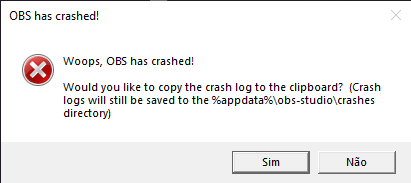
anyone can help me i try to launch stream obs and i get error http://prntscr.com/qkiyli
 rugged quail
Are you recording/streaming at same time?
I have had that error come up when I tried to and the recording encoder was set to same as stream, unless my brain is playing tricks on me
fast bobcat
when i open program i recive that erro
 jade folio
when i upload an image to overlay editor and then click upload nothing happens
rugged quail
Ahh I misread, sorry. Have you tried to uninstall and reinstall? @fast bobcat
steel bladeBOT
@fast bobcat A crash log is required to investigate the cause of your issue. Please upload the last crash log.
- In OBS, click the Help menu
- Select Crash Reports, and then Upload Last Crash Report
- Copy the URL, and paste it to the chat here.
 reef cloak
is it possible to import SLOBS scenes into Streamelements?
fast bobcat
i gonna try
wary dew
@reef cloak yes, but the files can't be larger than 30mb and if they contain SL owned items (copyrighted) they will not upload)
there is a import button on the dashboard
jade folio
any help with my question?
plain sonnet
@fast bobcat or try this if obs crashes on open
To find the OBS Studio crash logs, follow these steps:
- Press Win+R to open the Run dialog
- Type in: %APPDATA%\obs-studio\crashes and press Enter
- Upload the desired crash log, usually the latest, directly to this Discord channel by dragging and dropping the file into the chat window
what browser are you using? @jade folio
reef cloak
@wary dew sweet, thank you very much!
fast bobcat
google crhome
jade folio
eplorer
plain sonnet
please use chrome or firefox
wary dew
try chrome @jade folio
wary dew
in the editor or obs?
jade folio
editor
wary dew
what are you trying to add?
jade folio
my "logo" to my overlay
wary dew
and why would it need to be transparent @jade folio ?
fast bobcat
i use link and appear other image
jade folio
because i dont want a big white background blocking some of my screen
 wary dew
@jade folio are you sure your image is a PNG or other format that supports transparancy?
jade folio
yes saved as png
wary dew
can you send a screenshot?
jade folio
of which part
wary dew
the overlay editor page 😛
jade folio
wary dew
can you see how it looks in obs?
jade folio
it has white background
wary dew
did you try to delete it and re-add it in the editor?
jade folio
yes
wary dew
can you send me the pic so i can try it in my editor?
because my png's just give me a transparent background
jade folio
steel bladeBOT
@rugged quail 10 minutes of watchtime are given to those in chat when the loyalty points are handed out (every 10 minutes). Therefore, loyalty must be enabled for watchtime to work properly.
There is no direct link between watchtime and all-time points.
It can’t be calculated from the amount of all-time points a user has because subs may earn points at a faster rate and !bonus all command increases all-time points for users in chat at that time.
Giving points to a single user does NOT affect all-time, only when giving to all in chat.
wary dew
no
just as it should be with no background
@rugged quail part the bot from your channel, log out of StreamElements, log back in and let the bot join again
type /mod streamelements in your chat after that to mod the bot
jade folio
ahh agot got it thank you
reef cloak
I managed to do the import by having both SLOBS and SEL open in Chrome, however it only imported the Alertbox and I am unable to find my scenes
reef cloak
dumb question, in the browser or the installed OBS.Live software on my pc?
wary dew
in OBS
 steel mural
You cannot import your SLOBS scenes, just it's browser sources like your overlays, alertbox etc
reef cloak
@steel mural Thank you, so Ill have to redo my entire scenes then
jade folio
I keep getting this. My alerts won’t load
steel mural
@jade folio Click the purple button at the bottom
steel bladeBOT
@jade folio Streamelements on top of OBS -> Logout -> login
jade folio
spank you
steel mural
😏
rugged quail
Any solution can not put more quality ??https://prnt.sc/qkjhnu
 odd kraken
Not affiliated or partnered accounts do not have transcoding options.
You would need to change your output settings to broadcast a higher quality.
 sage ibex
When i bring up obs.live. it brings up Mixers chat and activity feed. how do i switch it back to twitch? also how do i remove Mixer completely from my streamelements account from the browser.
steel bladeBOT
@sage ibex Streamelements on top of OBS -> Logout -> login
odd kraken
An account cannot be removed. You can only close your account with all connected channel.
rugged quail
@odd kraken I did change it and it is still only one quality
odd kraken
Not affiliated or partnered accounts do not have transcoding options based on available resources.
 strong imp
Have anybody maybe this problem my ground control is starting up in task manager but not on my screen
if i test it on my twitch the bot is also not working
i deleted already in %appdata% local
en reinstall
but still no progress
it worked yesterday perfect
kindred fox
Task manager >> Details tab >> Close all instances of bot.exe (I think). Otherwise find Ground Control and close it there
strong imp
weird is the screen from ground control is not opening
so it is runing on the background
but the program self is not opening
odd kraken
The window is most likely opened off screen. Best to google how to move it back.
kindred fox

if you unplug the second display from your GPU it will also force all of the windows to appear on the single monitor, giving you access to the window long enough to reposition it
 lean relic
Hey there! I have problems with obs.live in which I can not longer use my stream deck, so I had to twitch back to obs
But i would like to use obs.live in combination with my stream deck, can anyone help?
strong imp
well @kindred fox not working xD
 light heart
Hello, I was wondering if i could ghelp on a matter than i am dealing with right fast?
kindred fox
and you have made sure to kill any processes relating to Ground Control via Task Manager as well?
@light heart depends on your question
strong imp
yes 😄
 wise silo
@lean relic do you have an elgato stream deck??
lean relic
yes
wise silo
light heart
I was wondering about the stream information box that pops up. Mine, I had closed it by accident and cannot for the life of me figure out how to get it back so i can update my stream info. If someone could help it would be much appreciated!
wise silo
Stream Deck & OBS.Live tutorial ^-^
@light heart
View > Docks > select the ones you want to see.
light heart
Awesome, thank you so very much good sir!
So another question that adds on, but the stream information selection is not there for me for some odd reason?
Know why by chance?
lean relic
@wise silo it tells me that ive been missing the "elgato remote controll" and i should reinstall my stream deck
which i already have done more then twice
odd kraken
@light heart Are you logged in to OBS Studio with Twitch, or do you use your StreamKey in OBS: Settings > Stream?
lean relic
does all the scenes / sources not work with obs.live and elgato stream deck? @wise silo
kindred fox
@strong imp click the details tab and close all instances of bot.exe
wise silo
Im sorry @lean relic but I dont know terribly too much on stream decks as I loathe them, only knew of the video 
lean relic
can anyone else help me
wise silo
When someone that knows comes along & has a moment they will reply
strong imp
@kindred fox there is nothing with bot.exe
 hollow harbor
need help please i am buffing all the time
steel bladeBOT
@hollow harbor Please provide a log from your last stream. To do this, in OBS go to Help > Log Files > Upload Last Log File and paste the link to the log file here.
hollow harbor
how do i do that
i am still live and its been buffing since i started
this week
it wont stop
wise silo
To do this, in OBS go to Help > Log Files > Upload Last Log File and paste the link to the log file here.
odd kraken
Just the link please.
hollow harbor
ok which link so sorry just new
odd kraken
Please follow the instructions given above.
odd kraken
Take a look at this analysis of your log, which has tips in it on how to improve: https://h4ndy.eu/obslog?url=https%3A%2F%2Fobsproject.com%2Flogs%2F9SviF_xgrhkL_zMA
kindred fox
@strong imp if you click on the Details tab in Task Manager do you see this after quitting Ground Control?
 meager mango
I'm new to the server and I need help with somehting
steel bladeBOT
@meager mango Welcome to the helpdesk! Please let us know how we can assist you today and a support volunteer or staff member will assist you as soon as they are available. Thank you for your patience.
meager mango
I have two monitors with diffrent refresh rates and when i put obs in fullscreen on my second monitor it instantly limits my primary 144 hz to my secondary 30hz
its basically hardware acceleration but theres no OBS hardware acceleration issues
tulip hamlet
It's a graphics driver bug. Either put OBS on your 144hz monitor or get a new one to replace the 30 monitor.
meager mango
these are 500$ monitors i need to buy another just to match refresh?
wary dew
blame windows
tulip hamlet
Unfortunately, that's how graphics drivers handle it.
meager mango
the same thing happens with other apps but on those I can change hardware acceleration on the app and it works
OBS doesn't have anything?
tulip hamlet
You're welcome to ask them, but they'll likely tell you the same thing. But hey, if they don't, please let us know, we'd be happy to hear some good news.
steel bladeBOT
@meager mango For the best OBS support, please join their Official Discord @ discord.gg/obsproject
 red socket
maybe im a fool, is there a way to have a bot post live notifications into my discord? i use streamlabs chatbot currently cause its better than mee6, but i wanna eliminate streamlabs stuff
tulip hamlet
We don't have a Discord bot at this time.
wise silo
Free, and better, alternative would be https://top.gg/bot/nowlive

Discord Bot List
Live stream announcing bot. Announces Twitch, Mixer, Picarto, Smashcast, YouTube Gaming, and Piczel live streams!
red socket
does that work with a custom bot or is it its own bot i gotta add to the server?
wise silo
It is indeed its own bot that youll have to add and configure.
red socket
dang cause chatbot uses my bots discord page so it looks like the plastic skeleton in my room is actually responding to !commands and letting people know i went live
soundbot only gets 2 things right. discord notifications and !sound options so chat can soundboard me
 faint lintel
does Kappagen only work on obslive or can it work on streamlabs obs or obs 64?
tulip hamlet
In theory it can work anywhere with a browser source functionality.
OBS.Live is a plugin for OBS Studio, so there's little reason for it to not work there.
As for SLOBS, if it doesn't work there, we can't troubleshoot that, as we can't troubleshoot their software.
faint lintel
The browser source is a good idea. I will try to figure that out. I understand SLOBS isnt your guys stuff. Thank you for the help. Hopefully I wont be bothering you again haha.
red socket
have you guys noticed an influx of slobs users switching over and asking for advice? or is it just me
tulip hamlet
I'd say less influx and more steady flow.
 pale rover
Is there a trick to getting two Logitech cameras working simultaneously (but different sources)? They are different models (Brio and C920).
steel bladeBOT
@pale rover Please provide a log from your last stream. To do this, in OBS go to Help > Log Files > Upload Last Log File and paste the link to the log file here.
pale rover
The blue lights flash a couple of times on the camera when I click on the activate button but that's it.
wise silo
Your camera will only turn blue if in use. Try and lower the resolution of the c920 & if that does not work, send your OBS logs.
The c920 is quite the USB - data hog and can cause issues with other webcams plugged in.
wise silo
This is why we have Orsuna around
wise silo
Hes gotta train me to be as good as him
wise silo
Only legendary person I know is Sean 
 safe sandal
hello
when i put my overlay url on obs.live it doesnt appear why ??
steel bladeBOT
@safe sandal To add your overlays to OBS, add a new browser source in your scene. Paste your overlay URL in the browser source properties, set the dimensions to 1920x1080 (unless you changed them on the website), and ☑ “Shutdown source when not visible” https://youtu.be/KDvLynUqXI4
kindred fox
Also check your obs settings >> advanced >> scroll down and disable hardware acceleration
 verbal whale
Not sure where to ask... but when I launched my OBS live to stream, my game capture window is simply black. I cannot get it to capture the game window.
Was working fine when I streamed last (24 hours ago)
tulip hamlet
Are you running OBS as an admin?
verbal whale
yes
steel bladeBOT
@verbal whale For the best OBS support, please join their Official Discord @ discord.gg/obsproject
verbal whale
ok
rugged quail
actively streaming now and still no notifications, any ideas?
how do i open a support ticket or something with you guys i have been trying to get help all day today
tulip hamlet
Can you be more specific about the issue?
verbal whale
Well, thanks for the help guys. I can't get OBS to do anything but black screen, so I am, going to find something that will work for me.
Appreciate the help earlier tho
rugged quail
OBS wont display any Microsoft Office files in Window Capture. Help please! I need to stream Microsoft Office documents. Everything else is working for Window Capture, just not Microsoft Office programs. Is this a known issue? THANK YOU!
shy mountain
MS products might be protected. Have you tried running OBS as admin?
 dark dirge
Hey, wasn't sure if this would be the correct channel for this, but my media request keeps muting itself every few minutes and when it does that it keeps auto-muting anytime i un-mute it. Ive refreshed the page, logged out and back in. Not a huge problem, but if anyone has a fix it'd be appreciated
kindred fox
@rugged quail does it capture via display capture
shy mountain
@dark dirge Media Request on OBS or the dashboard?
rugged quail
yes I figured it out
dark dirge
dashboard
shy mountain
#helpdesk-twitch then
rugged quail
Crop the display capture
To crop sources in OBS Studio, first reset the source to its default size by clicking on it and pressing ctrl+r. Then hold the alt key and drag the red box around the source you wish to crop. The sides will turn green to indicate they are cropped. Note that the preview must be unlocked in order to do this.
Then you can resize it in the stream to be just the window
You can have Word doc open on just half your screen with OBS on the other half
But you expand the Word doc to fill the entire stream
Annd then crop it
reef cloak
Using streamelements media requests, can I somehow add requested songs to a permanent playlist or to the backup-playlist?
 lilac ocean
you can add songs to a back up playlist indeed, let me get a screenshot for ya real quick @reef cloak
go to settings
then paste your back up list link here:
reef cloak
I got that far, but can user requested songs be added to it?
lilac ocean
no
however you could make a youtube public playlist where people can add music to and you can add that playlist link?
reef cloak
yeah I guess that is a way, I am currently using nightbot and there I can add user requests to the permanent playlist, it is a nice feature, no biggie though
still thank you very much for your quick answer, I must say you guys and gals are an awesome support team 🙂 ♥️
lilac ocean
you can always get your idea on the ideasboard if you wish!
steel bladeBOT
@reef cloak Check out the StreamElements ideas board: https://strms.net/ideas. You'll be able to add ideas, upvote ideas you agree with, and track their progress with email notifications. Adding and upvoting ideas also helps the staff know which ideas should be prioritized so please take some time to upvote.
lilac ocean
No worries 👌
 polar needle
Hi can anyone help. I stream on twitch using my xbox. Is there a way a can stream straight to obs from my xbox? Thanks 🤙
lilac ocean
you can stream from the xbox companion application
and capture that application/screen, however it needs a very good internet connection
polar needle
How do i do that @lilac ocean ? I have very good internet.
lilac ocean
What do you consider very good internet? Since its going ot be uploading both the game stream and then your own stream
and search the xbox companion console on your computer
polar needle
@lilac ocean i get 35mbps
lilac ocean
Alright, you could try, here is on how to do it: https://www.theverge.com/2019/8/24/20813677/xbox-one-games-streaming-pc-windows-10-how-to
polar needle
@lilac ocean thank you
lilac ocean
No worries o7
polar needle
@lilac ocean will that then run on obs?
lilac ocean
you will have to capture the screen of the application with obs
I would choose either display or windows capture
 thorn moon
How do i import scenes,overlays and alerts from StreamLabs to StreamElements?
shy mountain
Do you have SLOBS installed?
thorn moon
yeah
fathom cobalt
The Scene importer will fail when:
- Any asset is above 10(or maybe it was 100mb)
- Any asset that is the default assets provided by SLOBS(Copy righted assets)
thorn moon
sorry @shy mountain yeah i do
shy mountain
So what Jaroslavik mentioned applies
Also just in case
check here: https://streamelements.com/dashboard/overlays
if you see imported overlays
then it has succeeded to import something
thorn moon
ahh ok 'll just add them one by one again, If i have too.
 cyan rune
Good morning, has anyone found a way to have the elements bot auto s/o someone in chat, when they talk in chat?
shy mountain
Idk why this is in the obslive helpdesk
but one way you can do it is via keywords
but that will only trigger when some talks in chat
not on an event
cyan rune
@shy mountain I figured since it was the obs.live helpdesk that it would be a better channel to ask the question
shy mountain
Its not related to OBS.Live
since this is a bot thing.
you can also use this
and just add twitch.tv/{user}
but you can't get their game
 raven trail
Do we know when OBS.live will have the redemptions for channel points implemented somewhere? Where it be in chat or activity feed? Many thanks
 pseudo crescent
hello, how do i update my chat stats? its very old and its under my old name
steel bladeBOT
@pseudo crescent Your chatstats are not working? Good chance you changed your name recently, please provide your old and new name so we can link them 😉
 verbal agate
Hey guys I really need help fixing this issue I'm having. As soon as I open streamelements my game becomes unplayable the game goes from being smooth to stuttery and laggy. I had a 144hz/60hz monitor and I was told streaming with 2 different hz monitors is causing the issue. SO I bought a second 144hz and not I have 2 144hz but the issue continues. Anyone know what I can do next?
steel bladeBOT
@verbal agate Please provide a log from your last stream. To do this, in OBS go to Help > Log Files > Upload Last Log File and paste the link to the log file here.
verbal agate
steel bladeBOT
@verbal agate 1) Restart OBS
2) Start your stream/recording for about 30 seconds. Make sure you replicate any issues as best you can, which means having any games/apps open and captured, etc.
3) Stop your stream/recording.
4) Select Help > Log Files > Upload Current Log File. Copy the URL and paste the link here.
(Note: If you do not see an obsproject.com URL, you will need to update OBS Studio to version 22+)
verbal agate
kindred fox
@verbal agate you need to hit the Start Streaming or Record button for 30 seconds per the instructions. You can't gather an informational log if you aren't reproducing the issue within OBS and providing the log for the session. Please follow the instructions.
verbal agate
I streamed for 30 seconds then ended stream. I think I hit upload last log file instead of current
Should be this one
steel bladeBOT
@verbal agate For the best OBS support, please join their Official Discord @ discord.gg/obsproject
pseudo crescent
my old name was JaleesaRawrXD andd my new name is JaleesaXD ,, its got old stats too @steel blade
wary dew
i'll send it to staff
 wintry hull
It's not really an obs problem, but I can't use anymore the custom fonts from my pc in the text widget, esp. "true lies". What can I do?
steel bladeBOT
@wintry hull Google Fonts
More than 900 google fonts are supported at this time. You can preview them here: https://fonts.google.com/
Custom Fonts
Steps:
- Install the font on the streaming PC or choose a pre-installed windows font.
- In the overlay widget settings, select Text Settings
- Enable Custom Font
- Type the name of the font as it appears in the windows font directory (This is usually
C:\Windows\Fonts)
Note: After installing fonts, the browser and OBS must be restarted for the font to appear.
wary dew
in the box where you put the name of the font, put it like this: ''fontname''
with the '' ''
wintry hull
Yeah, I had it. But now, these font isn't longer available in this list. My old text elements have these font, but I can't select it for new ones.
I see, my font is (not longer?) in the google fonts list. That's very bad. 😦
wintry hull
But I used it in the past. Was there an SE update?
wintry hull
Thanks.
steel mural
Is that the font? https://www.dafont.com/true-lies.font
wintry hull
Yes.
steel mural
You may use this version of 'True Lies' for personal use only but if you wish to use it commercially you will need to purchase a license. Please visit http://www.tattoowoo.com for details. Or alternatively contact me at info@tattoowoo.com
Doesn't look like this kind of license fits for Googles fonts so I doubt that it was ever available there. But anyways. You can install the font on your PC and use it by following the "Custom Fonts" steps above.
wintry hull
I'm an idiot... Forgot to enable the "custom fonts" button. Sorry guys, but thanks. 🙂
steel mural
eZ 👏 
 lilac wolf
hey guys, my activity feed isn't working on OBS live. I gave all of the Mixer permissions when I was prompted, but the activity feed is still asking me to sign in through twitch even though I'm not streaming twitch. Any advice?
steel bladeBOT
@lilac wolf Streamelements on top of OBS -> Logout -> login
lilac wolf
ty mr bot sir
steel bladeBOT
@lilac wolf I'm a bot, only here to send helpful messages because the helpers are lazy.
 viral otter
hey this might sound dumb but every time i hit start stream, it tries to steam to youtube but i only have it setup to stream to twitch
steel bladeBOT
@viral otter Streamelements on top of OBS -> Logout -> login
viral otter
lmao ty
 toxic vortex
Is there any reason why I cannot import overlays from another channel?
I have another channel linked to SE with overlays on
Ah so I was wrong my youtube isnt connected
Basically I signed in using twitch and also did so with youtube so I now seem to have 2 seperate accounts, when going into "add channels" and trying to add my youtube channel it says that it's already claimed
How can I make it so both youtube and twitch are linked to the same account?
steel bladeBOT
@toxic vortex Account Merging - Please note:
- Merging accounts only allows faster ways to switch between accounts
- Merging accounts does not allow data sharing between accounts - different streaming platforms, different type of events
- Merging accounts allows duplicating/sharing overlays between the accounts
 merry otter
what is the normal destination folder for obs
toxic vortex
Right so that doesnt really help. I know what merging accounts does
my question is how do I do it?
wise silo
You need the JWT from each account and need to have a staff member do it @toxic vortex
merry otter
in folder c then what
toxic vortex
Sounds like by the time it gets done I could just manually import them
thanks for your help
wise silo
C:\Program Files\obs-studio\bin\64bit @merry otter
Gets dont pretty quickly @toxic vortex - generally 1-2 hours at most
merry otter
ty
toxic vortex
I could setup everything in 30 mins tbh
No point taking time from a staff member for something as trivial as transporting my overlays etc from one account to another
thanks though
wise silo
It helps more-so down the timeline
30 minutes now, 30 minutes later, 30 minutes at a later point, etc.
tulip hamlet
He's greatly exaggerating the time it actually takes. 
toxic vortex
Honestly though, I'm probably exaggerating the time it would take me lol
wise silo
If you DM your JWT from each account to Nethyr he loves dms he can get it done for you
steel bladeBOT
You can find your JWT token on your account channels page ("Show Secrets" to reveal the token): https://streamelements.com/dashboard/account/channels
READ ME:
This is a private security token. Do NOT share this token here or other public places, only with a StreamElements staff member in private.
toxic vortex
I was just being lazy enough hoping for a quick button to transfer it all
 vital folio
hi all could i get some help on how to place a twitter link page on a timer I created ? I have the message but it does not display the link to page. thanks
wise silo
Does it never post the message?
vital folio
it post but it does nott show link i place like https etc..
tulip hamlet
Let me guess. It shows *** instead.
vital folio
yes correct :}
tulip hamlet
Make the bot a moderator.
wise silo
To explain - you have automod enabled to block links. StreamElements isnt a mod so therefore it cannot post a link. Once its moderator it bypasses the automod and can post them.
tulip hamlet
It's on Twitch, not in StreamElements.
wise silo
Welcome back, we missed you.
vital folio
on timers does the name has to be a twitch user name to work?
tulip hamlet
Pardon?
wise silo
^
vital folio
bot timers
plain sonnet
its the has to be a twitch user name to work that is confusing
vital folio
i created 2 and they don't show up on stream chat or that only works when online
vital folio
yes i have it set to 10
wise silo
Mind posting a screenshot of it?
vital folio
this is what am asking
 mint scaffold
is there any way to refresh OBSLive without it having to be closed mid stream?
wise silo
And that is on your twitch account, correct @vital folio ?
What do you mean @mint scaffold
mint scaffold
Have an issue where it froze and locked entirely but is still running
wise silo
That would be an OBS issue, as OBS.Live is only a plugin.
steel bladeBOT
@mint scaffold Please provide a log from your last stream. To do this, in OBS go to Help > Log Files > Upload Last Log File and paste the link to the log file here.
mint scaffold
wise silo
And the entire program freezes, but shows you as still lvie?
vital folio
so on twitch i have to have that bot active corrrect?
mint scaffold
the entire program is frozen right at the frame where it is now
and I am still live and everything
but nothing updates at all
This is what it looks like as of right now (sorry for phone pic)
wise silo
Give me a sec to read the log - aint reading too straight right now 
mint scaffold
👌
vital folio
nice just saw that
wise silo
@mint scaffold it looks like youre maxing out on either CPU or GPU causing OBS to lock up, also causing some dropped frames.
Youre having rendering lag aswell, so I would assume it would be your GPU.
mint scaffold
The dropped frames is from the VPN not my specs
wise silo
Youre not running OBS as admin either, which can greatly reduce OBS's performance with AMD GPu's
vital folio
thanks again will the others act the same way? also when it states lines does that mean it will post after that many lines or how many lines it takes
wise silo
@vital folio The online timer works as such, where every, say, 10 minutes, if the chat lines are met, it will post.
Offline timers work purely on the time. If set to post every 10minutes, it will do so.
vital folio
ok so i will need to meet x amount of chat every so often... gotcha... thanks
wise silo
If online, yes. If offline it bases itself just on the time.
 final lichen
Hello. I’m having problems with the preview not changing to show the scene I’ve switched to. I can hear the background music for the scene I’ve switched to and can even see the outline for sources but the preview shows the scene I was previously on. Any idea what would cause that?
kindred fox
Can you screenshot your OBS?
kindred fox
So if you click the other one what does it look like?
faint lintel
Could you use one encoder for YouTube streaming and then use OBSLive separately for Twitch?
wise silo
You would need to run two OBS clients.
One using X encoder for YT and then OBS.Livce using Y encoder for Twitch
tulip hamlet
Not sure what you're getting at here anyway, OBS.Live doesn't mess with the encoder anyway.
faint lintel
Sorry I am not very tech savy. Forgive the incorrect word choices. Could I use streamlabs OBS for Youtube and OBS Studio 64/OBSLive for Twitch?
wise silo
You would have to ask them for that.
We do not support StreamLabs as we are StreamElements.
faint lintel
I know. Was just curious if running two different programs for two different platforms was something people did.
Thanks anyway. Sorry again.
 oak ivy
Whenever any alert plays I get an encoding error and my stream lags a bit.
steel bladeBOT
@oak ivy Please provide a log from your last stream. To do this, in OBS go to Help > Log Files > Upload Last Log File and paste the link to the log file here.
 red iron
Im hoping i can get an assist here. My stream is running about a 10-15 second delay before anyone sees what im doing. Ive changed some settings but the one setting that never sticks is my injest server. Everytime i try to change it to the best one it switch to either seattle or dallas which are not very good compared to the san jose for me
Using mixer btw.
steel bladeBOT
@red iron If your Mixer stream has "Low Latency" greyed out in the player while using OBS.Live, do the following:
- Stop your stream
- Go to your stream settings in OBS and return them to your previous settings, where your service is listed as "Mixer.com - FTL"
- In "live video settings" for OBS.Live on the left-hand side (in the chat window) change the setting on top of the window to "Go Live with Mixer Broadcast Dashboard settings" and press "Go Live!" from there
red iron
omg it worked thank you so much!!
 grim meteor
Hey guys, I just had a quick question. I recently started using the Media Request function with OBSlive. for some reason, the audio plays when in overlay editor, but it does not play when actually streaming. any help with this issue would be greatly appreciated. Thank you ahead of time friends
tulip hamlet
What is your username?
grim meteor
MasterBroda
tulip hamlet
Seems to be working fine. Did you add your overlay to OBS?
grim meteor
Yes, it's added
tulip hamlet
Added correctly?
grim meteor
just double checked, yes its added just like that
tulip hamlet
Do you have Browser Source Hardware Acceleration disabled in Settings>Advanced?
wise silo
Now thats a good song 😉
grim meteor
i had the source muted and hidden 😅
tulip hamlet
😶
 jaunty rapids
I have a fun audio question... :[ So TL;DR, streaming console through laptop with capture card, also use laptop to listen to the game through headphones (no real other option). So my capture card audio comes through the laptop for me (realtek speakers), and the desktop audio also picks it up, causing an echo for viewers. But my desktop audio is used for alerts, soundboard, etc... which I'd like to hear, too. Is there a work around to avoid the echo?
(Or is that more of general OBS?)
wise silo
voice meterbana
Seperate your audio channels further and mute certains ones from stream.

(version 20.0.1)
Hey fam,
Just made a quick tutorial on how I record my videos and create 3 separate audio channels (GAME AUDIO, YOUR MIC, AND DISCORD) for later editing purposes. Please if you have any questions leave a comment bellow.
Otherwise hopefully you guys like ...
jaunty rapids
Beautiful. Thank you, cuz I was just about to ask for a bit more explanation, but a video is perfect. Thank you!
wise silo
that one would be for recording audio channels differently but the premise is still the same.
 mellow jay
I see there's cloud backup for obs profiles - did I have to back that up manually? D:
mellow jay
damn
thanks for the response haha
I had to wipe my harddrive and reinstall windows - hoped my obs profile would still be there but it wasnt
rugged quail
So I'm trying to stream Hellblade with obs But the stream is lagging and the game doesn't
steel bladeBOT
@rugged quail Please provide a log from your last stream. To do this, in OBS go to Help > Log Files > Upload Last Log File and paste the link to the log file here.
rugged quail
shy mountain
Even though you have some beefy specs, i would still not recommend streaming at 1080p60fps
rugged quail
Rly?
shy mountain
I would use 900p
or 720p
1080p60fps is best used for 2 PC setups
else the quality can be a tad bit shitty
rugged quail
Could it be that I'm not running it on admin mode?
shy mountain
Admin is more required for OBS to grab permissions over the game.
In case of a black screen for example
lag usually comes from rendering overload
or dropped frames
rugged quail
Alright at thanks for the help bro
rugged quail
why is my stream elements overlay not showing up when i add it
shy mountain
Settings -> Advanced -> bottom -> enable hardware accel.
 urban vapor
Is there a nigh mode on OBS Live for youtube or a darkened mode so that the chat aint that light?
shy mountain
- Right click on your OBS desktop shortcut -> properties - in the "Target" field add this -> --remote-debugging-port=40404
- Open OBS(or restart if it was open)
- Have the streamer go live and wait for chat to populate
- Open your browser and type in "localhost:40404"
- Click YouTube Chat
- Point the (in browser) URL to https://youtube.com
- Have streamer sign in (top right)
- Select Dark theme option change to ON
- Stop Stream
- Restart OBS
- Have the streamer go live and wait for chat to populate
- Remove --remote-debugging-port=40404 from shortcut
rugged quail
ok thank you
where do i change the quality for the obs i wanna stream fortnite in good quality but its on default where do i change this
shy mountain
@rugged quail I suggest taking a look at this video: https://www.youtube.com/watch?v=Zt_HVScA3Js to get familiar with OBS in general(including settings)
UPDATED 2018 version of The Ultimate Guide to Streaming to Twitch with OBS Studio. In this video, we go through how to setup OBS Studio's server, bitrate, resolution and framerate settings to get you started and streaming to Twitch 👇🏻Timestamps & Links👇🏻
📕 Ful...
Then use the settings from here: https://stream.twitch.tv/encoding/
i recommend 720p
rugged quail
ok i have an i7 and a 2070 super
@shy mountain what would you recommend with that 900?
rugged quail
like 900p i think it is
shy mountain
I would recommend starting out with 720p
rugged quail
ok
rugged quail
ok thank you
raven trail
@shy mountain Could you help link my old and new chat stats or do i tag/dm the bot?
steel bladeBOT
@raven trail Your chatstats are not working? Good chance you changed your name recently, please provide your old and new name so we can link them 😉
shy mountain
fixed
raven trail
❤️
 hoary venture
Hi I am running a Ryzen 5 3600x with 32gb ram and an Gigabyte Nvidia RTX 2080 Super OC edition. Tonight on myy twitch stream i noticed the frame droppage was around 50% all night and not sure why this would be.... In game my frames were decent... I speed checked my fiber internet connection that was all good. Had no effects in the game at all... only when people were watching on the stream... I use restream.io to stream out to youtube/twitch and mixer and my viewers said it was evident on all platforms. What would this be caused by
Im using OBS Studio v 24.0.3 (64bit)
steel bladeBOT
@hoary venture Please provide a log from your last stream. To do this, in OBS go to Help > Log Files > Upload Last Log File and paste the link to the log file here.
@hoary venture Dropped frames / disconnecting? Follow the troubleshooting steps at: https://obsproject.com/wiki/Dropped-Frames-and-General-Connection-Issues
hoary venture
shy mountain
the log file is clean 
Can you provide a different log? Or read up on the guide linked
 frigid rivet
Im having and issue where my viewers cant hear the music in media request
shy mountain
how are you using the MR?
frigid rivet
the Media request through stream elements
shy mountain
so i assume you mean via OBS.Live
frigid rivet
yes
shy mountain
make sure the the audio settings in OBS is set to capture your desktop audio
shy mountain
the MR dock usually defaults to your default desktop audio source
frigid rivet
then i just have to make some adjustments since im using voice meeter
shy mountain
ah in that case
see which voice meter output is capturing the audio for you
and have OBS capture that output
frigid rivet
i got it now
i was driving myself nuts trying to figure it out where that was going
i appriciate the help
shy mountain
👍
frigid rivet
thank you soo much
its sad im slowley geting my duel pc set up with the voicemeeter and ndi
but i think i have it all done
lol
last questions, what track is recorded for stream? if i dont want my music to be saved on the stream when its uploaded to twitch. how do i allow my viewers to hear music and once the video is uploaded there isnt any music.
frigid rivet
ok so if i do a multi stream with my teams channel, i should set the music on 3?
and my viewers will still hear the music
plain sonnet
it doesnt work like that, whatever is on the stream will be saved on the vod
you can have it so that what is in stream will be there, but not on the recording, or on a different track so that you can remove it from the recording in editing
frigid rivet
so the tracks dont matter when im streaming
plain sonnet
not for what you described above
i dont want my music to be saved on the stream when its uploaded to twitch
what you stream will be saved on the vod
 compact jay
hello
i have a problem with obs and forza horizon 4
i want to capture forza horizon with option capture game
fathom cobalt
@compact jay laptop?
fathom cobalt
Run obs as admin
compact jay
i run as admin
steel bladeBOT
@compact jay Please provide a log from your last stream. To do this, in OBS go to Help > Log Files > Upload Last Log File and paste the link to the log file here.
 dark crest
Necesito ayuda con manejo bien el nuevo programa de AMD y no puedo hacer el el obs use la GPU
lilac ocean
@dark crest #🇪🇸︱español
dark crest
Sorry
compact jay
i need help please
lilac ocean
No worries, we just have places for that
@compact jay have you followed what Support AI asked you?
compact jay
i want to capture forza horizon 4 @lilac ocean
with capture game in obs
but the game is crashed
with this option
steel bladeBOT
@compact jay Please provide a log from your last stream. To do this, in OBS go to Help > Log Files > Upload Last Log File and paste the link to the log file here.
fathom cobalt
Please send here a log file
steel bladeBOT
@compact jay 1) Restart OBS
2) Start your stream/recording for about 30 seconds. Make sure you replicate any issues as best you can, which means having any games/apps open and captured, etc.
3) Stop your stream/recording.
4) Select Help > Log Files > Upload Current Log File. Copy the URL and paste the link here.
(Note: If you do not see an obsproject.com URL, you will need to update OBS Studio to version 22+)
steel mural
You cannot use game capture with Forza Horizon 4. You have to use display capture. It's not an OBS problem
compact jay
yes its a obs problem
steel mural
No
steel mural
The Forza developers blocked any program that wants to inject into the game
compact jay
and nothing
steel mural
steel mural
What blacklist?
compact jay
the black list of microsoft
steel mural
I don't know any blacklist. Whatever...
If you want to record / stream Forza, you have to use Display Capture
plain sonnet
forza isnt blacklisted (whatever that is)
the developers stopped other programs hooking into it
compact jay
any option for me ?
steel mural
Only display capture.
steel mural
Blame Microsoft / Forza 
compact jay
in me stream
any configuration for forza horizon 4
?
i play in ultra and 144 fps
its so good
hello?¿???
steel bladeBOT
@compact jay There are no "best settings".
Please understand that every setup, will be very different.
Any guides or videos that claim otherwise are misinforming. Your best option is to start with a base and adjust as necessary.
Test, test, and test again. We are happy to offer suggestions for any issues you may be having, but not a list of settings.
 wanton cedar
Hi why I am keep getting black screen when I try to capture discord chat
 quasi snow
try running OBS as admin
plain sonnet
If you want to use Window Capture with Discord, you will need to disable the hardware acceleration option, which can be found in User Settings -> Appearance.
 sharp rose
launched obs and have a semi black screen... all animations not playing. some browser sopurces not playing camara not working... what has happened?
 viscid wyvern
Do we have an eta on social announcements for other platforms other than twitch?
 hardy bay
Likely not an obslive issue, but I was curious if anyone had any suggestions for an issue I'm experiencing. Both my webcam and DSLR have lines rolling through them from top to botom, like there's a frame rate discrepancy. It's frustrating to have this high dollar equipment and not have it display right. 😦
 jovial harness
Hello! i am having trouble with my BRIO webcam with the logitech software and OBS Live. It could possibly be my pc, but everything is updated and when i have obs and the logitech software open, the webcam will drop frames at 720p and lag. If anybody could possibly help with that, that would be amazing.
steel bladeBOT
@jovial harness Please provide a log from your last stream. To do this, in OBS go to Help > Log Files > Upload Last Log File and paste the link to the log file here.
jovial harness
could it be the multiple game captures that are interfering? i'm sorry I don't quite understand everything that i'm reading
 thick thistle
Hello - Media Request keeps playing the same song over and over but changes title/author, only when "showing on stream". Without showing on stream, it updates correctly.
Am I somehow glitched?
Already logged out and logged back in.. issue persists 😦 Ideas?
jovial harness
here is my most recent log file
i tried to recreate everything that happens when i go live
i'm thinking it's my pc, but could use advice either way
this is the current one
thank y'all for your time
jovial harness
is it possibly the game i'm playing?
fathom cobalt
@thick thistle try re-add overlay
thick thistle
tried, didn't work. Refreshed, removed, re-added.. same. Thx anyway, gotta go live in 5 I'll do without videos today - weird, it always worked fine..
jovial harness
i figured it out! thank y'all for your help 
 sudden ingot
Q: How easy is it to switch from SLOBS to OBSLive?
tulip hamlet
Not too bad.
 sudden ingot
Aight so I did the import thing from above that Nethyr showed.
Stuff did not end up that great afterwards 🤔 Is there a nice way to quickly set it up? The Webui is a bit messy for me :c
 untold nacelle
does this app work for mac?
tulip hamlet
OBS.Live is a plugin for OBS Studio, not its own program, and currently only supports OBS Studio for Windows.
untold nacelle
ok thank you
 fresh holly
hey, uh, none of my widgets are working properly in obslive. Not like the viewer widgets, Like the song queue, live viewer count, etc. None of them are working properly after several refreshes
steel bladeBOT
@fresh holly Streamelements on top of OBS -> Logout -> login
 odd basalt
Can anyone tell me if the chatbot offered in SE has notification settings for when someone is chatting in your stream?
wise silo
Like, to give you an alert when a new chat message is posted?
wise silo
To my knowledge SE and Obs.Live do not offer anything that provide that.
One option would be to get the program Chatty - https://chatty.github.io/ - which is essntially a IRC for a twitch chat of the channel you choose to join, and you can set it to 'ding' whenever a message is posted.

 wise silo
The program is actually really powerful and has a ton of preferences. I would checkout their Help Guide when you get the chance - https://chatty.github.io/help/help.html
 sleek salmon
Ive been trying to update my countdown in the middle of it going on sometimes and it will work on the overlay editor, but not the actual stream. Also, the hype cup I use is in the middle of the screen and I can move it on the editor but whenever I save it it doesn't move from the screen on obs. When I go back into the editor its back to the middle of the screen
wise silo
@sleek salmon What browser are you using to edit the overlays?
sleek salmon
opera @wise silo
wise silo
Try Google Chrome.
 rough skiff
hello when i start streaming the mixer browser keeps poping up
steel bladeBOT
@rough skiff Streamelements on top of OBS -> Logout -> login
rough skiff
thank you support
steel bladeBOT
@rough skiff I'm a bot, only here to send helpful messages because the helpers are lazy.
 steady sapphire
I'm trying to delete my account but every time I try to it keeps telling me my username is invalid. Where do I go to find the the right username?
 peak vector
hello i have a problem when i start streaming it streams for like 1 minute but i stream 1 hour or more it just make my stream offline from some reason i need help
steel bladeBOT
@peak vector Please provide a log from your last stream. To do this, in OBS go to Help > Log Files > Upload Last Log File and paste the link to the log file here.
wise silo
@steady sapphire Did you name change at some point?
steady sapphire
I don't believe I have. I don't remember being prompted to because I created my account using twitch, but I probably just can't remember
wise silo
Mind me asking your current twitch username?
steady sapphire
ThatRookieTV
wise silo
Try "thatrookiekid" in the username field.
steady sapphire
Still invalid. Is it because I changed my twitch username a couple times?
wise silo
Try "xrookiekid " in the username field.
steady sapphire
i think it worked!
wise silo
steady sapphire
thanks so much!
 elfin cloud
How do I change my alert for when someone gifts a sub, everything is here apart from that setting
wise silo
Overlay Editor.
elfin cloud
yeah
elfin cloud
I already have an alert box though
wise silo
Oh, so you want it to be an alert only for gifted subs?
elfin cloud
well I currently have an alert set for subs etc but when I get gifted a sub, I have no alert
wise silo
Ahh. Then under the Subscriber settings, click "Variations Settings"
elfin cloud
css?
wise silo
Im not at that screen, but you should see a "Subscriber Gift" and a box you can click to enable it. if not youll have to add the new variation.
Lemme pull it up, one momnet
elfin cloud
It says Enable custom CSS
wise silo
elfin cloud
ah yes
wise silo
Once in there, you should see something similar tot his:
Once in there, you should see something similar tot his ^
If not, you will have to add the gift sub variation in.
elfin cloud
yeah done all before
wise silo
Variation name is simply the name, variation paramter will need to be gift, chance is %, everything else is standard.
elfin cloud
okay, everything is sorted, thank you
 quick valve
Hi all!
So, I'm a content creator on Twitch, and a lot of my content relies on using my Nintendo Switch. I'm using the Elgato HD60S capture card. I ran into a problem about two months ago where my video was very stuttery and laggy. Everything I researched about the problem said to get a USB 3.0 switch in order to give the card more power. I did that today, and it seemed to help a good bit! I also changed the audio settings on the capture card to "Capture Audio Only," and the problem completely eliminated itself!
Only now it created a new problem. The game audio from the Switch is double-reporting, through the Capture Card channel in the mixer, as well as my Desktop Audio channel (through my headphones.) If I mute the Capture Card, all goes silent. If I mute the Desktop Audio, game sound comes through clear and continues to broadcast through OBS! But then my alert sounds don't, and they're pretty important to me.
Is there a setting I have wrong somewhere? I'd like to be able to use my headset to hear game audio and broadcast my alerts, without double reporting. Thanks in advance!
shy mountain
That would be more of a question for the Elgato or OBS support
Elgato discord: https://discord.gg/elgato
OBS discord: https://discord.gg/obsproject
quick valve
Ah I see. Thanks so much!
rugged quail
Hi, i am streaming to facebook and i accidentally clicked on someones profile name in my chat box and it opened up facebooks website where my chat box is supposed to be
steel bladeBOT
@rugged quail Streamelements on top of OBS -> Logout -> login
shy mountain
this should help
rugged quail
awesome thanks.
rugged quail
i had my chat in streamelements obs always in dark mode but i restarted streamelements obs and its now white colored chat. How do i change it back to dark mode chat in obs?
shy mountain
 cold flare
I'm trying to do that but it won't show me the full box
shy mountain
What are you trying to do?
cold flare
The dark mode theme you just linked
Don't worry I am being an idiot
Thanks for responding though
shy mountain
did you manage to fix it?
 vestal horizon
can anyone help me i worked alot with elements and obs but my overlays are jsut not showing up anymore how does this happen??
they are all black but when i go to the browser properties the link is there
shy mountain
OBS -> Settings -> Advanced -> bottom -> enable hardware accel.
vestal horizon
its on
steel bladeBOT
@vestal horizon Right click on the BrowserSource > Properties > Scroll down a bit > Refresh Cache of current page
vestal horizon
i also did that not working
but it worked fine 2 monts ago jsut opening obs and no overlays are loading
no update possible
i tried everything
shy mountain
2 months ago and now they are not working?
vestal horizon
yes
shy mountain
i don't understand the timeline here
vestal horizon
i have 4 scenes
all filled in with the links
and now they are black or not showing up
tried to refresh
and remove to start from scratch with a yt vid
just not loading in
shy mountain
What is your username?
vestal horizon
l00tyou
shy mountain
So I see that you have a test overlay
with a webcam borderr on it
are you adding that overlay as 1920x1080 in the browser source?
vestal horizon
yes
shy mountain
show me
vestal horizon
because its moving i have 60 fps aswell
shy mountain
Then its loading just fine.
vestal horizon
sorry this one is better
i also put it on top of course so its not hiding behind the display capture
shy mountain
try this
steel bladeBOT
@vestal horizon If you are not seeing the OBS Twitch integrations and have OBS.Live installed, please follow these steps:
- Make sure you are on the latest and greatest version of OBS.Live
- exit OBS (make sure OBS is not running)
- delete %appdata%\obs-studio\plugin_config\obs-browser\obs_profile_cookies
- start OBS.Live
- Settings -> Stream -> disconnect -> connect
vestal horizon
oke
im sorry did not work is ee
i see i have newer version now but overlay not showing still
steel bladeBOT
@vestal horizon Please provide a log from your last stream. To do this, in OBS go to Help > Log Files > Upload Last Log File and paste the link to the log file here.
plain sonnet
try turning browser accel off and restarting obs
vestal horizon
oke
not working still and the stranger thing is
when i click open overlay editor
it goes to the overlay i want
but in obs normally in the grey square u already see preview but there is also just grey
plain sonnet
i see you dont have the SE plugin in obs, but your log still contains messages and the module from it.
do a backup of your scenes and profile
scene collection > export
profile > export
close obs
go to C:\Program Files\obs-studio or C:\Program Files\obs-studio\obs-plugins and remove the Stream Elements folder
uninstall obs (keeping the scenes/settings) then reinstall it
this might remove the other modules/plugins you have added
plain sonnet
you dont have to, but its worth doing as a constant back up regardless
when uninstalling you will be given a message asking if you want to keep your settings/scenes
vestal horizon
oke im gonna try it thanks for help already did not now this was so difficult
imagne figure this out myself
😩
if i send u the files gain
can u check i did it right?
all overlays where still there when i restarted after reinstalling
plain sonnet
yeh sure, send the log over
plain sonnet

vestal horizon
HAHAHA
thank you very much
im sorry i did not expect this
to be this difficult
plain sonnet
if you dont have the SE plugin and you find that overlays are skipping or lagging, turn browser accel back on
vestal horizon
but thanks for your time guys really
plain sonnet
no worries, glad its working 👍
vestal horizon
LEGEND
 latent harness
What do you recommend, for consumption .... Use Different scenes for each game with their respective overlays loaded as "navigator" or all in the same scene and go hiding some and activating others?
I say this because I have an OBS consumption of more than 1600MB in the task manager.
steel mural
1.6GB RAM isn't too bad
latent harness
But I have 16GB.. when I have opened StreamElements my games run BAD.. when I minimice or close StreamElements, games see good again (I DON'T LOW FPS.. GAME ALLTIMES HAVE GOOD FPS BUT RUN BAD) Anyone have this problem?
steel bladeBOT
@latent harness 1) Restart OBS
2) Start your stream/recording for about 30 seconds. Make sure you replicate any issues as best you can, which means having any games/apps open and captured, etc.
3) Stop your stream/recording.
4) Select Help > Log Files > Upload Current Log File. Copy the URL and paste the link here.
(Note: If you do not see an obsproject.com URL, you will need to update OBS Studio to version 22+)
lilac ocean
can you send us one of these clean logs?
we might be able to see where the problems start
lilac ocean
No worries, it will help us get more insight to what might start the problems!
just tag me or post the log file in here with your problem and someone will help you out 😄
 minor igloo
My OBS keeps crashing today with this message ' an encoder error occurred while streaming'
odd kraken
 wind vector
How do you get the link for stuff i have uploaded to my streamelements?
Example : i upload a mp3 to the streamelements cloud, then i wanna pull it from a link like this
https://cdn.streamelements.com/uploads/f3918cf4-3a29-42c2-8708-e7c1495b4601.gif
^ how do i get that link to my file
 toxic storm
Hi everybody. Im diego from Argentina (streamer). Ive been transmitting comfortably at 1360x768 60 fps at 6000 constant kbps (i have 7 megas upload right now) with a capture card (lgp2plus) and an fx8350 stock
Transmissions are mostly ok altough the image suffers from "very fast" blurry codification. Soon im going to improve my internet to 20 megas upload. Will i see benefits increasing kbps? What value should i use without putting much more stress on the cpu??
steel bladeBOT
@toxic storm There are no "best settings".
Please understand that every setup, will be very different.
Any guides or videos that claim otherwise are misinforming. Your best option is to start with a base and adjust as necessary.
Test, test, and test again. We are happy to offer suggestions for any issues you may be having, but not a list of settings.
odd kraken
@wind vector Are you familiar with the chrome dev console?
odd kraken
Load the page with all the sounds in your cloud.
Open the dev console
navigate to network tab with media being activated as filter
push the play button
grab the entry and on the right you will see the url
wind vector
 i see i see, thank you - i should have thought of that!
 opaque prairie
how do you do a overlay? i cant
steel bladeBOT
@opaque prairie New to Stream Elements?
Check out our YouTube channel https://www.youtube.com/c/streamelements/videos
with tutorial videos from setting up the basics, to in depth details on how to use our product.
opaque prairie
im not new to stream elemants ur obs is trash im using normal obs
plain sonnet
add a browser source and use the url from stream elements overlay
 distant hollow
it doesent work of my Twitch accound
distant hollow
the stream of twitch
plain sonnet
@distant hollow settings > stream
connect your account
distant hollow
ok
plain sonnet
if you have the se plugin
streamelements > log out, then log back in
@opaque prairie in the themes section of the ashboard
distant hollow
ok thanks
wary dew
log out of streamelements and log in with your youtube
also connect youtube in Settings > Stream
 civic viper
thanks for quick help bro
wary dew
no problem
opaque prairie
sup
steel bladeBOT
@opaque prairie Welcome to the helpdesk! Please let us know how we can assist you today and a support volunteer or staff member will assist you as soon as they are available. Thank you for your patience.
plain sonnet
@opaque prairie please stop spamming in every channel, it really isnt needed and also sends the wrong message to helpers
 languid glen
how to enter to obs stream labs editer please ?
lilac ocean
We are StreamElements RG, but you make the overlay over at the wesbite

StreamElements
The Ultimate All in One Platform for Streamers
and after you made it you do the following to add it to the obs.live
steel bladeBOT
To add your overlays to OBS, add a new browser source in your scene. Paste your overlay URL in the browser source properties, set the dimensions to 1920x1080 (unless you changed them on the website), and ☑ “Shutdown source when not visible” https://youtu.be/KDvLynUqXI4
wary dew
he is in #helpdesk-twitch 😛
lilac ocean
hadn't seen that
rugged quail
I'm really new to streaming... I am not new to a PC but I cant get my OBS to screen record something? I've tried googling and tried some things but it didn't work. Ich would really like if someone could help me. (Sorry for broken english)
plain sonnet
what are you trying to record and what capture are you using?
rugged quail
I tried Screen Capture and I tried Game Capture. Both didn't work :/ But I'm trying to stream League of Legends
plain sonnet
try running obs as admin using window capture
To best capture League of Legends, create two scenes.
In the first scene, add a Window Capture of the LoL launcher/lobby (Windows 7 users should make sure Aero is enabled.).
In the second scene, add a Game Capture of the game itself (you may need to be in a game to add this for the first time).
Then configure the Scene Switcher to automatically swap between them.
rugged quail
Window Capture works!! thx but how do I make a Scene Switcher?
plain sonnet
tools > automatic scene switcher
rugged quail
Thank you very much! Have a good day. 🙂
rugged quail
Hey there, im noticing my twitch chat is in light mode and im not seeing an option to change it to dark mode. Am i being blind and missing it or is there not one? thanks