#helpdesk-selive
1 messages · Page 84 of 1
 odd kraken
Have you tried to set it to a single key for a test?
 fringe urchin
i also try J,K,L
 steel bladeBOT
@fringe urchin For the best OBS support, please join their Official Discord @ discord.gg/obsproject
fringe urchin
and always is the same
i must go alt+tab and then fast switch scene
my friend also have that and for him everything is working
but at me that doesnt
odd kraken
^ Please take a look what the bot posted above.
fringe urchin
Okey i will join and ask there for help. Tnx a lot
 obtuse citrus
cheer sound is not working
odd kraken
Check the variations.
obtuse citrus
also when someone hosts my alert doesnt go off, i even have it set to 0 for the min amount
 turbid citrus
how do i test alerts on obs itself?
 tulip hamlet
Alerts can only be tested via the overlay editor on the site.
There is no testing option in OBS.Live.
steel bladeBOT
@turbid citrus Check out the StreamElements ideas board: https://strms.net/ideas. You'll be able to add ideas, upvote ideas you agree with, and track their progress with email notifications. Adding and upvoting ideas also helps the staff know which ideas should be prioritized so please take some time to upvote.
turbid citrus
thanks
 shrewd sphinx
In obs live, whenever I copy and paste my overlay url into the browser source and give it the correct dimesions, the alerts still don't show up when I test it. Both Streamelements and Obs Live are connected to my twitch. Do you know anything I am doing wrong?
 wary dew
is this box ticked?
shrewd sphinx
Now it is, thanks
wary dew


shrewd sphinx
actually, I dont think I see it
I don't think they are showing up even after I checked it
wary dew
screenshot obs
wary dew
turn this off and try a test alert again
shrewd sphinx
I still don't see the alerts popping up
Yeah, I tried to turned that setting off and the alerts still don't show up
wary dew
that sucks 😩
i will ask other support if they know a solution, since i have to go in a few minutes
shrewd sphinx
Ok thanks
tulip hamlet
@shrewd sphinx Take a screenshot of your browser source properties please?
shrewd sphinx
Ok gimme a sec
For this one I crossed out my URL just incase someone tries to steal it
And these are the rest of the propertiues
tulip hamlet
DM me the URL you have in there, please. Just copy it straight from the properties.
shrewd sphinx
Ok
tulip hamlet
@shrewd sphinx You hid the alertbox in your overlay layers.
shrewd sphinx
OMG I did, now it works, thanks so much for the help
 pliant smelt
So
In my obs when I select activity feed it still shows my twitch activity
Even though Im logged into mixer
and want to see mixer activity
tulip hamlet
Log out using the StreamElements menu at the top and log in with your Mixer account there. Settings>Stream does not affect that.
pliant smelt
You the goat @tulip hamlet
 onyx juniper
hi for some reason my obs crashes after a few mins of being open or when i open chrome
tulip hamlet
Please provide the crash log from %appdata%\obs-studio\crashes
onyx juniper
tulip hamlet
That's from August.
tulip hamlet
Now can you share from %appdata%\obs-studio\logs please?
onyx juniper
 kindred fox
AverMedia capture card by chance?
onyx juniper
i dont use that
tulip hamlet
The issue here is a memory leak which in short means it could be anything. You'll need a more technical look into the logs than we can provide here.
steel bladeBOT
@onyx juniper For the best OBS support, please join their Official Discord @ discord.gg/obsproject
onyx juniper
ok thanks nethyr
 errant epoch
Just run your music normally and then capture desktop audio @safe tendon
OBS.Live is just an extension to the base obs right? There weren’t any modifications to OBS itself?
tulip hamlet
It is a plugin for OBS Studio, not its own software.
 safe tendon
oh okay thank you
errant epoch
No problem 🙂
 steady sapphire
hi, so im trying to delete my account but when i click "close my account" after filling out all of the fields nothing happens. is there anything i can do to fix this or do i have to wait?
tulip hamlet
@steady sapphire Any reason you're looking to delete it? You don't need to delete an account to merge it with another.
steady sapphire
I wasn't aware I could merge them. How do I do that?
I was looking to do it btw because the account had my mixer channel claimed on it and I was looking to have one account that has both my twitch and mixer channels connected to it
steel bladeBOT
@steady sapphire Account Merging - Please note:
- Merging accounts only allows faster ways to switch between accounts
- Merging accounts does not allow data sharing between accounts - different streaming platforms, different type of events
- Merging accounts allows duplicating/sharing overlays between the accounts
 fleet kelp
I'm having a problem in OBS.Live where my activity feed dock and my chat dock get this weird zooming effect when I hover over them when I'm live. Once they zoom in, they won't automatically scroll so I have to close out the dock, reopen it and then not touch it so I don't have to keep interrupting my game.
 fleet swallow
Been using OBS studio for awhile. Just moved to SE but I can't figure out how to get the media requests widget in OBS
 shy mountain
Do you have OBS.Live installed?
fleet swallow
Yup
shy mountain
Streamelements on top -> Media Request
fleet swallow
Yea I don't have that option
steel bladeBOT
@fleet swallow Streamelements on top of OBS -> Logout -> login
shy mountain
Unless you are on Facebook or Youtube - the option won't be present
fleet swallow
Mixer
shy mountain
Then the above
fleet swallow
Okay thanks
shy mountain
oh wait i don't see it either
fleet swallow
yea it didn't work
 robust python
When I click "Open in StreamElements Overlay Editor" in OBS the window just keeps loading
steel bladeBOT
@robust python Streamelements on top of OBS -> Logout -> login
 quasi snow
both on store item and also on overlay store redemption widget
make sure you are lowering sound not the video if you have one associated with it
 rugged quail
store is at 23% atm
still LOUD
@quasi snow on the overlay
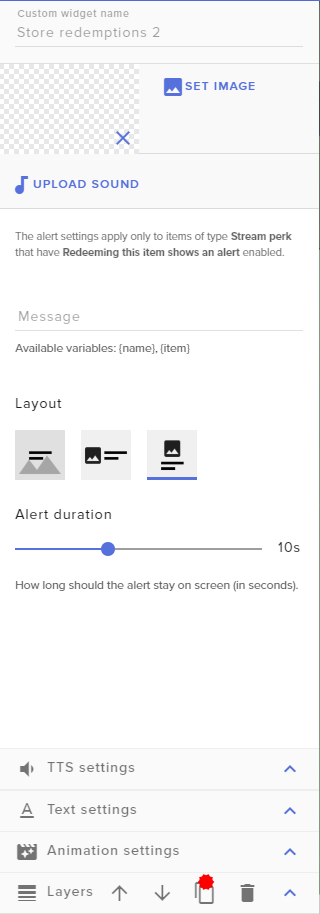
theres no sound
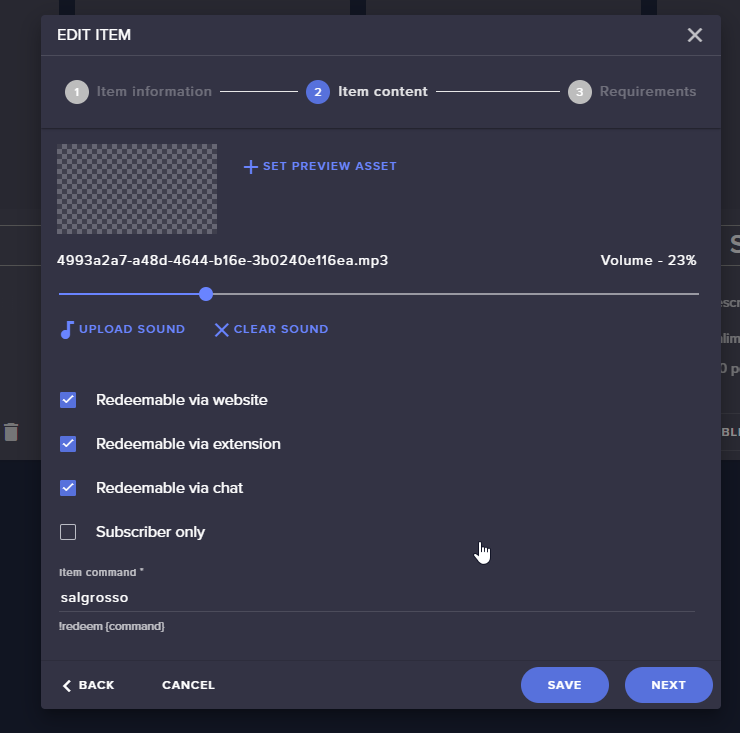
on store is low
shy mountain
Right click the browser source and do this:
quasi snow
I have most of my items at 10% volume hehe
but that's actually a pretty good setup instead of having to keep editing things 
 mental cairn
two questions/issues. 1. I have set up my chat timers on SE but they do not show up in my chat bot for online or offline. 2. I reached affiliate about 24 hours ago and my overlays still say that i need to be an affiliate to allow subscribers on my "Show Recent Subscriber" widget
shy mountain
- https://discordapp.com/channels/141203863863558144/199460642975907840/508911738528333849
- Logout from our dashboard and log back in
- Wrong channel if its not related to OBS.Live
mental cairn
it is OBS live that im using
rugged quail
Hello 🙂 any one have problem with import all scenes from SB to Streamelements? http://prntscr.com/q9s3u8 its look like this when i try have "error" , cheers and thx for answering ❤️
 wary dew
Do you use SL overlays? You can not use them on StreamElements
Or the files are too big
Probably one of those two things
rugged quail
@shy mountain another thing my sub i saying i have 6 subs
i have 2 xD
is it all time subs?
or current?
@wary dew oh i think maybe its too big 🙂
shy mountain
@rugged quail Where are you looking?
rugged quail
widget sub goal
steel bladeBOT
@rugged quail To reset goals:
- from the overlay editor -> data on top -> goal tab -> reset progress of desired goal
- from the dashboard -> activity feed on the left -> widget data on the right -> goals tab -> reset progress of desired goal
Note: Goal widgets(progress) only counts up and doesn't go down automatically, if you loose followers/subs
 shut perch
i'm trying to create a subgoal widget in my overlay for streamelements through the overlay function on the website dashboard
but when I add the widget into my overlay, it always displays that I have 35 subs
this is far from accurate, i currently only have 12 subs
am I missing an option or text input box somewhere that has somehow set it to think I have 35 subs?
shut perch
aaah, i see, thanks
so the data only counts the total number of subs i've ever received, not the amount of subs I currently have active?
shut perch
the sub widget also only counts the number of subs I receive within a certain timeframe, not the number i have active at the moment
its unfortunate that it can't reference my currently active sub count, but its fine
I can handle the data input manually now that I know where it is
thanks
wary dew
i had a sub widget for a while, always updated properly
it should reset itself to the active amount of subs you have
but you can always reset it manually in the DATA tab
shut perch
it doesn't look like it has the exact functionality that I'm looking for
but yeah, its fine, I don't mind doing this manually
 fossil sedge
Okay I am a bit confused with my OBS. For some reason it allowed me to capture windowed games and Streaming avatars before, now it does neither. It only does full screen captures. I have changed no settings so I am not sure why the sudden change on me.
 cedar crow
I have an issue with my alerts. If I use the default settings in the widget they work fine. But if I start customizing (adding in sounds, change text font/color) most of them stop working on OBS Live.
They will show up fine when tested on the Overlay Editor; however, if I try to repeat a notification through OBS, nothing happens.
cedar crow
Made sure those were disabled/enabled respectively and only bits/subs show up on the OBS preview window (all alerts work on the overlay editor dashboard fine). Other than bits/subs nothing displays, nor do I get any sound to play through OBSLive.
 fathom cobalt
@cedar crow try readd overlay
 buoyant socket
How do i put a chat overlay
fathom cobalt
@buoyant socket on twitch?
buoyant socket
yes using obs live?
cedar crow
@fathom cobalt do you mean "launch" overlay? Nothing happens. Reloading them also doesnt work.
fathom cobalt
Widget called Your stream's chat @buoyant socket
buoyant socket
bet @fathom cobalt gg
fathom cobalt
@buoyant socket
In the overlay editor
@cedar crow remove and add overlay again in OBS
buoyant socket
thank you
cedar crow
@fathom cobalt Ive done that before. Hasnt worked. Ive also re-made the alert box from a new alert widget. It'll work with default settings, but as soon as I start editing with my own sounds/pictures they break.
 trail ginkgo
Hi Support, i have been live for over 3 hours, and my bot havent said anything, i do have timers, any1 know why? :S
 plain sonnet
is the bot joined to your channel
and does your timers have chat lines it needs to meet before the messages can be sent?
trail ginkgo
yes to both
wary dew
how many lines?
trail ginkgo
hi ruben 🙂
wary dew
hey 🙂
plain sonnet
if you have chat lines then twitch chat will need those amount of messages to be sent before the timer can start
trail ginkgo
chat lines 15 - 30
wary dew
no problem 🙂
trail ginkgo
Hi another thing, now that i have f1nkbot from streamelements obs, do i need both streamelements bot and f1nkbot?
its fixed 🙂
 rose umbra
Hello! I have been having trouble with streaming from obs.live lately where either OBS disappears or the game does and i think i may have found the issue, i just don't know what to do about it. i was hoping you could clarify if these numbers seem ok. When i open OBS.live my CPU% goes from 4% to (on average) 40% and my memory goes from 25% to about 40% + as well. Is there anything i can do to help reduce the effect it has on my PC? thank you!
steel bladeBOT
@rose umbra Please provide a log from your last stream. To do this, in OBS go to Help > Log Files > Upload Last Log File and paste the link to the log file here.
 gilded cairn
Does streamelements support multistream?
rose umbra
sure thing, let me find it. there are a bunch from yesterday because it kept crashing, should i send em all?
wary dew
@gilded cairn you have to use a service like restream.io for that
rose umbra
oh really? i can see if that reduces it some thx
cpu is down a little bit but mem usage is the same. it's worth doing in conjunction with anything else thx
when i play red dead 2, either this will simply disappear or the game will. it's really odd.
 normal swan
I have a problem my media request used to work and now it doesn't it shows on stream elements and won't even show on stream unless I have stream eements open but the sound doesnt come through the stream
 neon sable
I still can't alter my overlays from obs.live, it just doesn't load the page
 stark maple
Hey guys, so I just set up my stream to use streamlabs for event history, but my alerts are setup through streamelements, for some reason my alerts are not appearing on my obs screen.. I can use both labs and elements, right? and does anyone know how to troubleshoot this
steel bladeBOT
@stark maple We're not able to troubleshoot issues with using our overlays in StreamLabs OBS (SLOBS) as we don't have the tools to support their software. We recommend using OBS Studio or OBS Studio with our plugin OBS.Live.
stark maple
I'm using OBS LIVE/
wary dew
make shure this box is checked
stark maple
It is! That's why i'm so confused 😦
wary dew
try turning off hardware acceleration for browser sources
and test the alert after that
stark maple
Thank you! It's working now!!
wary dew

 unborn thicket
having an issue with frames missed due to rendering lag....i have my recent log file, is this where i paste it to get some help?
 lilac ocean
Yes Riz, feel free to post your log in here!
unborn thicket
unborn thicket
says for my rendering lag that my GPU is maxed out, after monitoring, my gpu doesn't seem to be anywhere NEAR maxxed out.
lilac ocean
What quality are you running your game on?
unborn thicket
resolution or graphics quality?
lilac ocean
graphics of the game itself, are you running on medium, high?
unborn thicket
im on high, with a setting to go one step higher or down to medium and low.
lilac ocean
is Vsync enabled for the game?
unborn thicket
Disabled
lilac ocean
can you enable it and try again?
it states some things you can try in the guide and over at the log itself
unborn thicket
sure how long of a test does it need to be?
lilac ocean
!obslog
steel bladeBOT
Please provide a log from your last stream. To do this, in OBS go to Help > Log Files > Upload Last Log File and paste the link to the log file here.
lilac ocean
let me see how long it was again
steel bladeBOT
- Restart OBS
- Start your stream/recording for about 30 seconds. Make sure you replicate any issues as best you can, which means having any games/apps open and captured, etc.
- Stop your stream/recording.
- Select Help > Log Files > Upload Current Log File. Copy the URL and paste the link here.
(Note: If you do not see an obsproject.com URL, you will need to update OBS Studio to version 22+)
lilac ocean
Ah there you go ^
wary dew
😉
unborn thicket
ok, restarting obs now, give me a couple minutes. thanks @wary dew @lilac ocean
lilac ocean
No worries, be sure to let us know how it went
unborn thicket
lilac ocean
The rendering lag seems to be gone
however, be sure to delete one of your sources in your scene, as stated under Capture Interference
unborn thicket
i believe THAT issue is because im running 2 window captures, one for the game and one for my mouse/keyboard tracking on screen....should i be worried about the Custom FFMPEG Output
unborn thicket
its under recording, in advanced...i did what the suggestion said and changed it back to simple since i didn't really need to have it custom anymore.
 stark urchin
Im getting "failed importing scene collection from streamlabs to obs.live I really wanna give a obs live a spin but dont want to spend hours on my overlay/alerts again
tulip hamlet
The import will fail if you're importing assets that are too large or Streamlabs-owned assets.
stark urchin
perfect thanks
 thorny ridge
Does OBSLive need facebook authentication to run?
tulip hamlet
If you're using it to stream on Facebook, yes, it needs you to log in with your Facebook account to use its features.
Otherwise it's not going to know what chat to look at, what activity list, etc.
thorny ridge
When I click Start Streaming it just sits at Going Live... I cleared all of my facebook logins yesterday but i dont know how to reauthenticate it.
and clue how i can force reauthentication
?
tulip hamlet
There's nothing that needs to be forced.
thorny ridge
I logged everything session out (on facebook itself)..so now the OBSlive isnt logged into facebook anymore @tulip hamlet but i dont know how to get back to a screen where i can log back in.
tulip hamlet
Logging out in the browser doesn't affect your login on OBS.Live.
thorny ridge
@tulip hamlet not the browser..the facebook setting for privacy where you can kill all of your sessions.
tulip hamlet
You can log out and back in using the StreamElements menu at the top of OBS if you'd like?
thorny ridge
im an idiot..totally missed that logout window.
that fixed it..thank you @tulip hamlet
rugged quail
Media requests show up in the overlay but there's no sound. Can anyone help?
 frigid rivet
my problem is my average time to render frames will jump up to 16ish ms
steel bladeBOT
@frigid rivet Please provide a log from your last stream. To do this, in OBS go to Help > Log Files > Upload Last Log File and paste the link to the log file here.
 pearl blade
Any way to add recent donator from mixer?
tulip hamlet
You mean this?
errant epoch
Go to your overlay editor -> widget -> latest tipper
rugged quail
everything is black
errant epoch
dang it nethyr 
tulip hamlet
@rugged quail Using a laptop?
rugged quail
yes
pearl blade
Latest tipper doesnt seem to work for mixer donators
rugged quail
acer nitro 5
steel bladeBOT
@rugged quail Laptops need extra setup to use Display Capture.
Due to the way laptops are designed, OBS must run on the Integrated GPU to use Display Capture. This process effectively disables Game Capture and Window Capture. If you would still like to use it, please read this guide and follow the directions for Display Capture: https://obsproject.com/wiki/Laptop-Troubleshooting#configure-your-system-for-display-capture
Please note: we recommend using Game Capture and Window Capture wherever possible. These capture methods get better performance in almost all cases.
pearl blade
@errant epoch i dont think tipper works for mixer donations.. well technically it was a streamlaba donation. Maybe thats why
tulip hamlet
@pearl blade You don't have any revenue history. Tips either need to be through our system or have been imported.
pearl blade
Okay makes sense @tulip hamlet .. just switched from slobs and thata where they all were. So recent tipper will work once i get donations from se
rugged quail
@tulip hamlet so basically i have to set OBS to use integrated graphics
how do i turn this on
steel bladeBOT
@rugged quail For the best OBS support, please join their Official Discord @ discord.gg/obsproject
rugged quail

 unique vigil
hi, why my obs didnt show NVEC (new) ?
kindred fox
Download the latest version of obs @unique vigil
Odds are you’re on 23.0.1 which had a bugged updater
errant epoch
yes
unique vigil
hmm weird
rugged quail
How can we listen to a browser source if we tick the control sound on OBS
shy mountain
It still automatically plays out of your default device and stream.
rugged quail
but since I have voicemeteer bana
it doesnt
where can i change it ? cant find the output settings for it
shy mountain
Thats a good question, I don't have the answer to 
rugged quail
😄
shy mountain
Maybe the guys over at the OBS Discord can help, unless someone else from here knows the answer: https://discord.gg/obsproject
rugged quail
thx
@shy mountain To use the Audio Monitoring feature, click Edit -> Advanced Audio Properties and set Audio Monitoring to either Monitor Only, or Monitor and Output. Monitor Only will not output that device's audio to your stream/recording. Audio for that device will be played out of your system default device, unless otherwise specified in Settings -> Audio -> Advanced.
is that it?
shy mountain
Maybe
but by default when using that option both the stream and you should hear it
but since you are using voicemeter banana
it can be trickier
 pliant halo
HELP how do I add an URL or an link from an overlay to OBS live?
steel bladeBOT
@pliant halo To add your overlays to OBS, add a new browser source in your scene. Paste your overlay URL in the browser source properties, set the dimensions to 1920x1080 (unless you changed them on the website), and ☑ “Shutdown source when not visible” https://youtu.be/KDvLynUqXI4
 raven abyss
Hi! My overlay editor is not loading at all
I already reset the cache to no avail
It’s been doing this for two days and I really want to change one of my alerts
fathom cobalt
@raven abyss try disableing hardware acceleration for browser sources
rugged quail
Does anyone know the workaround for when the Media Request looses it's original connection to the loaded widget if the new layer or scene doesn't load fast enough?
fathom cobalt
The problem is in the browser or in the OBS?
raven abyss
In obs live stream overlay editor.
It still works fine but I can’t edit them. It keeps loading indefinitely
odd kraken
@rugged quail Make an overlay with only the MR widget and add this once to OBS and then via existing.
raven abyss
I can go around it by doing it in the browser but I’d like to do it in obs directly as I was able to do previously
rugged quail
thanks @odd kraken I'll try that.
 rotund blade
how can i import my overlays from the website to my obslive?
steel bladeBOT
@rotund blade To add your overlays to OBS, add a new browser source in your scene. Paste your overlay URL in the browser source properties, set the dimensions to 1920x1080 (unless you changed them on the website), and ☑ “Shutdown source when not visible” https://youtu.be/KDvLynUqXI4
rotund blade
Well its not really working properly, i imported all from streamlabs and it is all facked xD
 thick whale
bitrate keeps going red and causing dropped frames, any idead why this is?
this is a new problem, didnt happen at all yesterday and i havent touched any settings
 zenith robin
Hey there! Just checking in on the status of the widgets not matching the stats issue, any word on when that will be resolved?
Last I heard from it, it was set to high priority, but that was I think 2 months ago?
xD ok Thanks!
rugged quail
Will OBS Studio's Portable Mode work with OBS.live
 sullen igloo
my live chat is gone
odd kraken
In OBS: StreamElements > Chat
sullen igloo
 steel bladeBOT
@sullen igloo Streamelements on top of OBS -> Logout -> login
odd kraken
@gilded whale Afaik no turkish help.
What can we do for you?
 gilded whale
Is there someone who can help you can't add obs live scenes given on the site
steel bladeBOT
@gilded whale To add your overlays to OBS, add a new browser source in your scene. Paste your overlay URL in the browser source properties, set the dimensions to 1920x1080 (unless you changed them on the website), and ☑ “Shutdown source when not visible” https://youtu.be/KDvLynUqXI4
gilded whale
thanks
odd kraken
@rugged quail Not that I am aware of.
sullen igloo
TY
 scarlet sierra
I dont suppose anyone know if there is away to give "media requests" its own audio channel? I dont want it coming through desktop audio in obs
odd kraken
Make the MR widget its own overlay and add this only one time to OBS and thenn via existing and use the option to control audio in OBS in the browser source properties.
scarlet sierra
ive dont that, but i cant get the music to platy through the browser source now. it either plays through the chrome tab of streamelements or in the media requests dock in obs
odd kraken
Yes and this overlay in the browser source you can set it to an own track in OBS in the browser source properties.
scarlet sierra
yes i have added it as a browser source with its own audio, but when i click play on either streamelements website or in obs ME dock its self the audio doesn't come out of its own channel.
it isnt playing though the widget
odd kraken
In the browser source properties of the browser source with only the MR widget in it, select this browser soruce to be played in a separate line in OBS. So it is controlled by OBS.
Yes, it will play through the widget, but then in its own audio line of the browser source and not the desktop audio.
scarlet sierra
i have done this, but it is coming through both desktop and its own channel
odd kraken
Then on your desktop there is somewhere another widget playing, or in the overlay editor, or any other launched overlay.
scarlet sierra
ill double check, but i dont think so
as you can see i have click the eye on every other source, so they will be muted. the only one unmuted is the ME, but some how it is playing though both. even VM is detecting it
odd kraken
Cannot help with VM. Make sure you only have the MR in the one overlay browser source you made it controlled via OBS.
scarlet sierra
i do have it excluded in the overlay
its the only one
oh its because im monitoring it, but if i dont monitor it i obv cant hear it
so the monitoring is creating a loop. do you know of anyway i can get around this?
odd kraken
No, I am sorry, I am not the expert in audio setups.
scarlet sierra
no problem. well thank you anyway you have got me a lot further than i would have got with out you 🙂
rugged quail
Does anyone know if there is a way to use Media Request on my stream in such a way that the viewers can hear the music playing, but I can not? That way it doesn't interfere with concentration?
 ivory flower
is it possible just to download the add on and use obs.live on mac?
@tepid condor can you help with this?
 wise silo
Post your OBS log
More than likely you just have to not bind to ipv6 (Settings > Advanced > Bind to Adapter)
ivory flower
?
 tepid condor
Sorry mate, I'm not support so I can't assist. D :
wise silo
Go to your Settings then Advanced then Bind to Adapter then theres a checkbox that says Bing to IPv6, uncheck that @ivory flower
ivory flower
but why
im on a mac and i was wondering if i could still get the add-on
thats all
wise silo
your streamer service or your provider only supports ipv4
says in the error code
the addon will work find, simply have to disable ipv6
 fickle violet
very simple and small question
wise silo
fickle violet
why is my chat in bright mode
ivory flower
🤦♂️
fickle violet
i just looked up streamelements obs and clicked like, the first link
ivory flower
im on a mac
i cant install the .exe file
so i was wondering if it was possible to install just the add-on
fickle violet
no idea
wise silo
@fickle violet OBS.Live afaik is not currently on mac
If you were to go as far as to take https://github.com/StreamElements/obs-browser and recompile it to a mac with some tweaking that'd be your own prerogative

GitHub
CEF Based obs-studio browser plugin. Contribute to StreamElements/obs-browser development by creating an account on GitHub.
ivory flower
ok
rugged quail
Does anyone know if there is a way to use Media Request on my stream in such a way that the viewers can hear the music playing, but I can not? That way it doesn't interfere with concentration?
Hi, Does anyone know the workaround for when the Media Request looses it's original connection to the loaded widget if the new layer or scene doesn't load fast enough? Someone suggested putting MR into it's own layer but that didn't work. I get the video, but no audio. (yes I have the browser source set to show audio control in obs)
wise silo
@rugged quail theres a program called voicemeter to create seperate audiochannels
you would have an audiochannel only you can hear and a second one that only streams hears
This video is an in depth tutorial on how to setup VoiceMeeter Banana for Streaming to Twitch, Beam, or Hitbox with OBS or XSplit and having full Discord or Skype functionality using VB Cable (Virtual Audio Cable). You will be able to route audio to your stream and headphone...
rugged quail
I use mvoicemeeter already to seperate my desktop and discord audio, but i didnt realize it would be possible to make it so media request specifically goes to a seperate channel as well
wise silo
youd have to make another channel and send chrome/firefox/ie to that channel
and have your MR on that browser
turbid citrus
can i put the same alert (with all the sounds, etc.) in other overlays?
turbid citrus
nevermind solved
 desert smelt
Howdy all got a question for you. It might be more of a general streamelements question but I stream through restream to multiple platforms. Is is currently possible to have the activity feed and overlay notifications in OBS.live linked to and showing updates from multiple sources? Right now I only get whatever account I'm logged in with only. Ie I'm logged in with twitch, got a mixer follower, didn't get an entry in the activity feed or an alert.
kindred fox
There’s not a way to authenticate to multiple platforms like that simultaneously. You would have to have obs open and a browser on the other platform’s activity feed in your SE dashboard. Unfortunately oauth won’t work on two platforms at once in OBS. Dunno the technical reason, just the lay-man explanation.
That would give you the obs activity feed along with the browser for the other activity feed
 wanton crown
Kind of a weird bug but it seems like the first 30 seconds of a song on media share always seems to be silent not sure why
wanton crown
I am not one personally doing it
But yes it seems to be every song
and no video not showing
it's just in background on the mediashare tab in dashboard
wanton crown
Sleepy
shy mountain
@wanton crown I touched the volume for a moment so that was on me
shy mountain
I think I know what the issue is so maybe its best not to use MR for now
shy mountain
the song was not even started and he started it
it was never 1 minute and 30 seconds in
shy mountain
Lets say that this is not suppose to show 
wanton crown
wait what do you mean
shy mountain
that text on top is a hover text from the (?)
wanton crown
Oh yeah I saw that earlier
but just figured it was a bug lol
I'm confused tho how does that tie into the autoplay
wanton crown
how the fuck
shy mountain
so negative minutes
shy mountain
wait i looked away - its not going via chrome?
wanton crown
no
we tried to originally use the mediashare on OBS.live plugin
I assume since the plugin is still installed
shy mountain
let him know i will take control of MR
wanton crown
it just goes via that
shy mountain
so no music for a bit
shy mountain
also lets move to #helpdesk-twitch
shy mountain
First pinned message in this channel.
 vital rapids
Thanks boss
shy mountain
👍
 primal remnant
i get this, i'm not live rn
shy mountain
What are you doing when getting this?(Note this is first time I've seen this message, so I'm not familiar where it is shown)
primal remnant
alrighty, it helped
errant epoch
cool 🙂
 bronze garden
my obs live is in a weird state
odd kraken
Can you elaborate please?
odd kraken
Try F11 to get it out of fullscreen mode.
steel bladeBOT
@coral talon For the best OBS support, please join their Official Discord @ discord.gg/obsproject
 coral talon
oh
 hidden night
Hello all, I have a bit of an odd problem. I have recently been streaming on mixer using the connect account integration.
I tried to stream on twitch last night but after disconnecting mixer and reconnecting twitch, when I hit start streaming it still hits me with the popup window for Mixer and won't let me start. I've tried multiple disconnect/reconnects of the account. Restarted app and PC and it's still happening. (Note: reconnects are updating my activity feeds and chat boxes so it's definitely connecting)
steel bladeBOT
@hidden night Streamelements on top of OBS -> Logout -> login
steel bladeBOT
@hidden night I'm a bot, only here to send helpful messages because the helpers are lazy.
 tall parcel
Hello all, I've logged in with my mixer account and now I wanna switch to twitch how can I do it ?
wary dew
Streamelements on top of OBS -> Logout -> login
tall parcel
ah thanks 🙂
 unborn pike
Need help with OBS.live
wary dew
why don't you just say your question?
unborn pike
I have a channel added in my streamelements account, twitch (main) then FB page account
how to i switch from one to the other on OBS.live
?
steel bladeBOT
@unborn pike Streamelements on top of OBS -> Logout -> login
unborn pike
so i have to log out and log back in?
unborn pike
log back in using twitch account?
wary dew
yes
wary dew
the one you want to stream on today
unborn pike
okay im going to try it out and see thanks
 violet musk
hey guys quick question
followers and sunscriber widget
not showing correct information
i'm trying to add them to my stream now
or my overlay
 sinful flint
Which widget exactly?
violet musk
follower goal
i have a 165 followers and i'm tyring to go for 200
but its showing 33
sinful flint
There's sometimes a misunderstanding about what this widget is meant to be showing. If you are wanting a widget to show your total followers count you'd be best using the Total Followers widget. The followers goal widget is only designed to count up 1 when you gain 1 and starts from the moment you signed up to us or last reset it
You can manually change it at: https://streamelements.com/dashboard/session -> Goals, but bear in mind that it won't go down if you lose a follower

StreamElements
The Ultimate All in One Platform for Streamers
So for an accurate count of your total followers we're recommend the Total Followers widget instead
sinful flint
You can change it at the same link I gave before, but same goes for if you want an accurate subscriber amount, use the Total Subscribers for that ideally
 whole hill
hello
 subtle flower
Hello! Had a quick question, just a bit of a inconvenience really, every time i boot up obslive the song request panel is seemingly reset? like it gives me the introduction screen and when i click it it pops itself out and i have to drag it back into obslive to place it
 opal tinsel
Is anyone else having issues after the Windows 10 and Zoom updates with Window Capture? Window Captures were working fine until the updates. Now all I see is a white/blank screen. Windows Capture works fine on web browsers but not the Zoom App. Any idea how to fix this?
You can see that the Zoom App is there but not the video portion.
kindred fox
@opal tinsel you might have to do a display capture
 vital violet
Hi! I'm hoping someone can possibly help me with a problem I am running into.
opal tinsel
@kindred fox That is my current workaround but that also takes out the use of a second monitor.
kindred fox

opal tinsel
Right!
vital violet
I'm trying to get OBS.Live set up with Mixer. I have it all set up I think but for some reason I can't see my overlay alert previews on OBS.Live. Makes it hard to see how big the actual alert is if I can not see it as a preview when I hit test alert in the overlay editor and see it in OBS.Live. Any advice would be greatly appreciated.
steel bladeBOT
@vital violet You can test Alerts via the bell on the lower right corner of the Overlay Editor. Simply go to your Dashboard -> My Overlays -> Pencil/edit button on the overlay. Make sure the "Show Emulated events on stream" option is on to see the alert in OBS/Xsplit https://streamable.com/h6qgy

 hallow jungle
i tried using obslive on mixer, but it doesn't allow you to use FTL. if you select FTL and go live itll auto switch to rmpt
steel bladeBOT
@hallow jungle If your Mixer stream has "Low Latency" greyed out in the player while using OBS.Live, do the following:
- Stop your stream
- Go to your stream settings in OBS and return them to your previous settings, where your service is listed as "Mixer.com - FTL"
- In "live video settings" for OBS.Live on the left-hand side (in the chat window) change the setting on top of the window to "Go Live with Mixer Broadcast Dashboard settings" and press "Go Live!" from there
vital violet
Yeah, support AI did not solve my problem at all.
I already had that option selected.
hallow jungle
its a bug.....mixer said theyre reporting it to SE.
vital violet
Where you see this?
hallow jungle
i talked to mixer support today.
vital violet
There has to be a workaround, I was hoping for some assistance from a support person. Kinda why I came into helpdesk channel.
 chilly oracle
Can anyone tell me how to get the window back that showed my streams title, the message I could send out when I start my stream, and that showed my viewers etc?
vital violet
I'd love some assistance at some point. No rush tho.
odd kraken
In OBS: View > Docks > Stream Information @chilly oracle
chilly oracle
@odd kraken mine doesn't show stream information =/
steel bladeBOT
@chilly oracle If you are not seeing the OBS Twitch integrations and have OBS.Live installed, please follow these steps:
- Make sure you are on the latest and greatest version of OBS.Live
- exit OBS (make sure OBS is not running)
- delete %appdata%\obs-studio\plugin_config\obs-browser\obs_profile_cookies
- start OBS.Live
- Settings -> Stream -> disconnect -> connect
 maiden stag
Any easy way to copy scenes from one pc and put them on another? I’d assume they’re stored in a folder or a config file but I’ve never had a reason to dig until now. Or is it easier to start over?
odd kraken
You can export your profiles and your scenes collections inside OBS at the had via profiles and scenes collections.
maiden stag
Yeah I’ve seen it but haven’t messed with it. I’m hoping I can export them and move to a external hard drive from old pc. Then import to new pc.
Is it that simple I’m hoping.
odd kraken
yes, should be. For local files, they need to be at the same location on the new computer.
maiden stag
Eek that may be issue bc I’ve installed obs on secondary on new pc and old this didn’t exist.
Secondary hard drive I meant sry
Thanks I’ll test it and see. Worst case I have to start over from scratch.
 feral hedge
Im having troubles with alerts showing up on OBS. I have the browser source with the correct link but whenever i try to test it, it never shows up
feral hedge
Yeah, the sound comes through but the video doesnt
errant epoch
Make sure you have "show emulated events on stream" ticked
feral hedge
I have that on
feral hedge
Yup, everything on the editor shows up
errant epoch
Make sure the source isnt hidden by other sources. Try dragging it to the top of obs and try again
feral hedge
still not working
errant epoch
make sure the resolution on the source is the same that its set on SE
Does that make sense?
feral hedge
yeah just one second i accidently clicked "Resize Output (source size)" while the alert was selected now my whole thing is messed up
okay I both resolutions are the same size
errant epoch
Did it work?
feral hedge
No the sounds comes through but the video and text doesnt
kindred fox
Check obs settings >> advanced >> scroll down and disable hardware acceleration
 hollow parcel
Mine keeps crashing after turning it on
steel bladeBOT
@hollow parcel Please provide a log from your last stream. To do this, in OBS go to Help > Log Files > Upload Last Log File and paste the link to the log file here.
 vocal bridge
Guys
None of my commands is working in chat
and bot is not responding at all
any ideas?
happened after i changed username on twitch
steel bladeBOT
@vocal bridge If you changed your name on Twitch please follow these steps:
🔹 Visit https://streamelements.com/logout and then log in again with by connecting with Twitch.
🔹 On the right side of the dashboard page that opens, select "Join" under bot settings. If it says "Part" select that and then select "Join" to send the bot to the chat. Don't forget to mod the bot by typing /mod streamelements in your channel if you have not already.
🔹 Post your new name here so that we can update your channel's chatstats tracking (must be done by staff).
vocal bridge
new name is Ryukyuan
hollow parcel
Where would I post the link?
fathom cobalt
Here
hollow parcel
steel bladeBOT
@hollow parcel 1) Restart OBS
2) Start your stream/recording for about 30 seconds. Make sure you replicate any issues as best you can, which means having any games/apps open and captured, etc.
3) Stop your stream/recording.
4) Select Help > Log Files > Upload Current Log File. Copy the URL and paste the link here.
(Note: If you do not see an obsproject.com URL, you will need to update OBS Studio to version 22+)
hollow parcel
It won't let me do that. I've clicked the application a few times to get the link before it randomly closes.
kindred fox
My recommendation is to click Tools >>> auto configuration tool
fathom cobalt
@hollow parcel
kindred fox
@hollow parcel are you using obs studio or slobs?
hollow parcel
Both. I was thinking about switching to this one since I don't have full control over the animations that this one has
kindred fox
And both are crashing?
hollow parcel
Yes. For this one, I can atleast have the window showing the crash report open while working with fixes
slobs I can't have open at all
with slobs*
hollow parcel
I got stream elements to work. I had to completely uninstall it after doing a system restore twice.
 tame dew
how can i make a box wide instead of dragging the whole box?
odd kraken
Sorry, I do not get what you need help with. Could you elaborate please?
tame dew
my capture card scene wont fill up the whole box in obslive it wont fit to size..it will only drag the same size box. I cant drag the left or right side of the box to make it wider
odd kraken
Select the source and hit CRTL + F
tame dew
that will only select my overlay and not the source
seem to have two borders left and right of my capture card
odd kraken
Do you have a screenshot of what you are sseeing in your OBS by chance?
tame dew
wary dew
looks to me like your gamecapture is not set to the right resolution
tame dew
works pefectly without the overlay
wary dew
what is the resolution output of your game capture device?
and what is the resolution of your overlay?
wary dew
can you screenshot your settings from your game capture?
wary dew
i mean from the source in OBS
tame dew
which setting u want me to go into?
wary dew
because they dark grey area from your game capture does not look like 1920x1080
rightclick on you capture device source and go to properties
wary dew
okay that's good, now the settings from the capture card
tame dew
wary dew
why do you have the option ticked for convertion to 640x480?
tame dew
i avnt changed that..thats default settings and worked fine
wary dew
yes, until you added an overlay that is 1920x1080
so the overlay is now bigger than your game capture
and you are not streaming in 1080p60fps
tame dew
strange as i never touched it and its streamed just perfectly last night using obslive and other tools
wary dew
did you have the overlay last night as well?
tame dew
nope
wary dew
you see
if you only stream your game capture than that is the whole screen size, and now you put an overlay on top of it which is bigger
so you create the black bars on the side
wary dew
if you changed the ticked boxes yes
and check the canvas settings in OBS
Base canvas is what you see in OBS, output is the format it gets send to twitch/yt/mixer etc.
wary dew
yes try re-adding the game capture
tame dew
gonna restart again as it be used by something else
wary dew
you don't need to have the elgato software open when streaming through obs
when you have added the game capture to obs you can shut it down
tame dew
it doesnt load up at all when i load w10 just the sound capture does so maybe I should disable that as well at start up
just have problems recapturing my capture card and camera as other devices using it ..it says
wary dew
yes that shouldn't be
i never run the elgato game capture hd app
because it sucks
and it messes up your obs
i set it up once, for all the settings, then never touched it again
wary dew
but can you make it fit now with cntrl + F ?
tame dew
nope still got borders
steel bladeBOT
@primal horizon There are no "best settings".
Please understand that every setup, will be very different.
Any guides or videos that claim otherwise are misinforming. Your best option is to start with a base and adjust as necessary.
Test, test, and test again. We are happy to offer suggestions for any issues you may be having, but not a list of settings.
@primal horizon Please provide a log from your last stream. To do this, in OBS go to Help > Log Files > Upload Last Log File and paste the link to the log file here.
 primal horizon
tame dew
primal horizon
tame dew
heard the best tip is to run obs as admin not sure how true this is
tame dew
does stream deck work with obslive?
odd kraken
tame dew
thx
 gusty robin
Hello, since iam using obs live , obs studio crashes and i must reset my pc, because of freezing! After iam deinstalling OBS Live, all is ok. What iam doing wrong?
steel bladeBOT
@gusty robin Please provide a log from your last stream. To do this, in OBS go to Help > Log Files > Upload Last Log File and paste the link to the log file here.
gusty robin
@steel blade ok next time, but thx for answer 😉
 amber jasper
This is just kind of wishful thinking/a shot in the dark, but there isn't anyway to have obs.live signed in with twitch on one obs profile and then have mixer signed in with a different one is there? do we have to sign out/in everytime we want to switch?
odd kraken
yes, you need to relog every time you want to switch the platform.
amber jasper
I figured as much, was just hoping there was maybe a work around 😂
 fierce raft
hey, im having issues with my alerts.coming from steamlabs seems like an easy fix but i just cant figure it out. my pop ups are getting cut off, im only seeing the very left edge of the alert and cant seem to get it centered in obs.live im on mixer if that even matters in obs i have my base reso set to 1920x1080 with the output reso set to 1280x720
steel bladeBOT
@fierce raft To add your overlays to OBS, add a new browser source in your scene. Paste your overlay URL in the browser source properties, set the dimensions to 1920x1080 (unless you changed them on the website), and ☑ “Shutdown source when not visible” https://youtu.be/KDvLynUqXI4
fierce raft
omg thanks so much
 zenith condor
hello
steel bladeBOT
@zenith condor Welcome to the helpdesk! Please let us know how we can assist you today and a support volunteer or staff member will assist you as soon as they are available. Thank you for your patience.
zenith condor
im having a ecco in my obs stream and have fallowed a guide on utube how to fix if and it said if none of these work it may be the headset and the only way to fix it is to contact youguys
tulip hamlet
What is echoing?
zenith condor
any sound like from discord or me talking
steel bladeBOT
@zenith condor For the best OBS support, please join their Official Discord @ discord.gg/obsproject
zenith condor
that is the guide i folled
 steady current
For some reason when I add the Browser Link as an Overlay in my OBS The Link won't show the graphic
errant epoch
A browser source you mean? Did you set the dimensions correctly when making it?
steady current
Yes
steel bladeBOT
@steady current To add your overlays to OBS, add a new browser source in your scene. Paste your overlay URL in the browser source properties, set the dimensions to 1920x1080 (unless you changed them on the website), and ☑ “Shutdown source when not visible” https://youtu.be/KDvLynUqXI4
errant epoch
I really wish I knew the bot had a command for that
steady current
lol TY
 unkempt blaze
hello
i have a question
is it possible to log the chat in a text file similar to feature from chatty?
Sometimes i had to find something special from early streams and there would it be very helpful
tulip hamlet
No, StreamElements is a cloud-based system and does not interact with local files on your computer at all.
unkempt blaze
hmmm thats bad
do you know if there is a plugin to add this feature?
tulip hamlet
There is not.
unkempt blaze
damn
thx for the quick help 
 simple thunder
hello everyone, super nooby question! How do I see my recordings from my obs?
tulip hamlet
The directory you're recording to can be found in the Recording tab in Settings>Output.
Don't forget you have the #dreamteam channel for support. 🙂
 maiden stag
Any idea why I would be getting a 10-12 second delay when streaming now? I confirmed I’m using mixer-Ftl and turned the bitrate down to 3500 from the 6000 it originally had. Some people were stating the stream was even freezing on them, which is odd because I just built a new pc nd have a faster upload/download speed than the previous old pc.
I’m at a loss. Also people stated they did not have the option in mixer to change their resolution like on other streams they watch.
 toxic vortex
Looking to optimise my streaming/recording pc with some upgrades, is it worth buying a better GPU or CPU these days? currently have an i7-2700k but really not happy with the 1080p 60fps recording quality
tulip hamlet
That is a very old CPU.
maiden stag
I just upgraded my cpu to the Ryzen 7 3800x and having issues more now myself with streaming rofl. So unsure to say do or don’t at this point doh.
toxic vortex
My stream pc has no GPU, so i'm wondering if it's worth upgrading a GPU in the stream pc and using NVENC or upgrading the CPU to continue with x264
maiden stag
I also tried using nvenc with the new graphics card bc I didn’t have that option on the last pc and still seeing worse issues.
steel bladeBOT
@maiden stag For the best OBS support, please join their Official Discord @ discord.gg/obsproject
@toxic vortex For the best OBS support, please join their Official Discord @ discord.gg/obsproject
 shy lodge
i reloaded my obs.live and my overlays are not loading up.
tulip hamlet
@shy lodge Are the browser sources still there?
shy lodge
it shows my media and chat. on the sides. my sources aer still there. just not pulling opverlay from website
tulip hamlet
Check the browser source properties and make sure the URLs are up to date.
tulip hamlet
Disable Browser Source Hardware Acceleration in Settings>Advanced.
tulip hamlet
Delete your browser sources and remake them.
steel bladeBOT
@shy lodge To add your overlays to OBS, add a new browser source in your scene. Paste your overlay URL in the browser source properties, set the dimensions to 1920x1080 (unless you changed them on the website), and ☑ “Shutdown source when not visible” https://youtu.be/KDvLynUqXI4
rugged quail
Donations and Followers do not fall to the panel and do not appear on the screen.
help :9
 sinful fulcrum
Hello StreamElements, I have recently started streaming and have had problems with obs.live. It isn't that it doesnt work but its more of the fact it goes blurry when I move, can somebody please DM me a solution or tag me in here, thanks!
sinful fulcrum
Well yes
Is that a normal thing? Or is it because my settings are set differently
shy mountain
Its because of settings most likely
sinful fulcrum
Is there a way to fix it?
sinful fulcrum
Will it make a different because I stream on YT?
I've just taken a look at it now, I have the exact same settings
shy mountain
Well now it depends on what game you are streaming.
sinful fulcrum
Minecraft
shy mountain
Usually pixelation can happen if for example there is rain happening in the game and motion blur
sinful fulcrum
I asked my friends about that, they said to turn off motionblur and weather which i did
shy mountain
Which settings are you matching from the above link?
sinful fulcrum
1080p60fps
shy mountain
with 6k bitrate?
sinful fulcrum
Yep
shy mountain
What are your PC specs?
sinful fulcrum
What specs do you want?
shy mountain
and GPU?
sinful fulcrum
Nvidia GTX 1060p
shy mountain
I would recommend to lower your settings for 720p and see if that helps
as maybe 1080p streaming is causing the additional blurryness
wary dew
720p60fps or 900p60fps would be more then enough for quality ;) van save a lot of cpu/gpu usage
lilac ocean
Yeah, also sometimes people have issues while trying to watch in 1080p, 720p60 should be great
 rough jasper
is there anyone know why am receiving error while importing settings like overlay etc? it says "Failed importing Scene Collections"
wary dew
could be a couple of things, assets from StreamLabs can't be imported, or the files are too big to import
 blazing jay
hey so i have media request and it WAS showing on my stream but then i deleted the scene i had it in and now i cant add it into my stream anymore
i can still press show on stream but it only plays audio
sinful flint
Have you re-added the scene/overlay which has the Media Request widget in it to your OBS?
blazing jay
yes i have
it wont show up
everything else does though
on my overlays, i can even see the player playing the videos
 terse summit
how do i re put in my facebookmy password changed and it will not load streams because its connected to old pw
 primal plaza
Haio trying to stream assassins creed 3. All cut scenes are streaming flawlessly but gameplay lags a ton. Is there any way to deal with this problem?
steel bladeBOT
@terse summit Streamelements on top of OBS -> Logout -> login
@primal plaza Please provide a log from your last stream. To do this, in OBS go to Help > Log Files > Upload Last Log File and paste the link to the log file here.
blazing jay
Hey is there anyone that can help me with my problem? Someone replied but didn't give me any help really.
I think it would be an easy fix but I dont know where to find the linkl
terse summit
Thank you
steel bladeBOT
@blazing jay Please provide a log from your last stream. To do this, in OBS go to Help > Log Files > Upload Last Log File and paste the link to the log file here.
blazing jay
😮
ill repaste my problem
Today at 11:08 AM
Hey is there anyone that can help me with my problem? Someone replied but didn't give me any help really.
I think it would be an easy fix but I dont know where to find the link
oops
hey so i have media request and it WAS showing on my stream but then i deleted the scene i had it in and now i cant add it into my stream anymore
i can still press show on stream but it only plays audio
plain sonnet
@blazing jay make a new scene collection,
scene collection > new
add a new scene and source
add only your overlay for your media request
once you have done that, test it and send a log
instructions above
 wicked tartan
Hey I have this problem where when I click the refresh overlay button in activity feed the overlay doesn’t refresh. I have tried closing and opening the application, refreshing my pc and re installing obs live. Any help on how to fix this??
fathom cobalt
@wicked tartan Try disable hardware acceleration
wicked tartan
It didnt work.
steel bladeBOT
@wicked tartan Please provide a log from your last stream. To do this, in OBS go to Help > Log Files > Upload Last Log File and paste the link to the log file here.
blazing jay
 shrewd gust
Hey! I need some help .. Obs keeps crashing. Tried uninstalling it and installing it again. Still crashes.
plain sonnet
@blazing jay did that work?
@shrewd gust can you send a crash log here please
- In OBS, click the Help menu
- Select Crash Reports, and then Upload Last Crash Report
- Copy the URL, and paste it to the chat here.
shrewd gust
I can't do that .. it wont let me do it .. It crashes .. i can't do anything .. it crashes
plain sonnet
- Press Win+R to open the Run dialog
- Type in: %APPDATA%\obs-studio\crashes and press Enter
- Upload the desired crash log, usually the latest, directly to this Discord channel by dragging and dropping the file into the chat window
that will get to the files
primal plaza
someone gunna help me? I already linked my log.
plain sonnet
the report was sent within the minute
shrewd gust
primal plaza
it was like an hour ago tho
plain sonnet
you are missing my point.
you was replied to within 1 minute, and you didnt reply at all after
@shrewd gust its a browser source that is causing the issue
just trying to find a way for you to delete it
shrewd gust
which one?
plain sonnet
doesnt say unfortunately
usually its either the last one you added,
or
have you imported from stream labs?
primal plaza
The link didn't say it was for me tho. I'm not gunna go snooping through other peoples links.
shrewd gust
my wheelspin and alerts ...
steel bladeBOT
Please follow our community rules:
- No advertisement or stream promotion
- Respect ALL server members
- No NSFW/NSFL
Thank you
plain sonnet
@shrewd gust just checking if we can remove things without opening obs,
will let you know when i do
shrewd gust
thank you @plain sonnet
plain sonnet
@shrewd gust ok, so...
this might be a pain to do, but without deleting everything, this looks like to be the best way 
go to the location in the pic below
(user will be what ever your name is on your pc)
right click on the .json file and open with notepad
(please make a back up (copy paste in different location) just in case)
when in note pad press ctrl+f and search for streamelements
you are looking for 3 things,
- its a browser source (obviously)
- the name you called it (if you can remember)
- the url
if you know the overlay thats causing it then just delete the full url.
after every url deleted, close and save the note pad and try to open obs. this will take some time for trial and error.
blazing jay
@plain sonnet sorry i had to shovel my driveway, but no it didnt add it in
plain sonnet
hmmm,
unfortunately youre left with 3 options
- Unstable overclock
- Outdated BIOS
- Faulty memory
check to make sure your GPU drivers are up to date,
this shouldnt have any impact on the crash but best to be safe
restart your pc after.
your best bet will to ask in obs discord if it still happens,
they might have some better solutions
shrewd gust
I will try that, thank you @plain sonnet
 upbeat galleon
i am unable to go live to facebook it just gets stuck n the going live page
rose umbra
Unhandled exception: 80000003
Date/Time: 2019-12-16, 15:24:16
Fault address: 7FF9A5230D32 ((null))
libobs version: 24.0.3 (64-bit)
Windows version: 10.0 build 17763 (revision: 914; 64-bit)
CPU: Intel(R) Core(TM) i7-9700K CPU @ 3.60GHz
Loaded modules:
Base Address Module
just had my obs.live crash and got this report
any clue what happened?
steel bladeBOT
@rose umbra Please provide a log from your last stream. To do this, in OBS go to Help > Log Files > Upload Last Log File and paste the link to the log file here.
rose umbra
wary dew
can you give the link too pls, not the file 😉
rose umbra
oh sure sorry one sec
so i was back on the stream, is that going to screw me up for doing the last log file?
now the last one is a stream that didnt crash. i stopped the stream as well
wary dew
send it anyway, could very well be that the problem is still there somewhere
 obsidian yacht
I have such a problem that the data from Streamlabs is not imported into OBSLive, What should I do?
wary dew
you mean the overlays and such on the website?
are you using custom overlays or SL overlays?
because we can't import SL stuff
obsidian yacht
I tried to do this both on the website and in the app itself
wary dew
StreamLabs
obsidian yacht
Sl
rose umbra
@wary dew it says display and game capture interfere with each other, i'm assuming they aren't turned off when i make them invisible right? i need to simply delete one
wary dew
that is prefered yes
rose umbra
ok, i have display there because sometimes the game capture just won't work. i guess i'll add it as needed then
wary dew
you can always ask in the obs discord as well about crashes
rose umbra
oh yea? i'll try that too thx
wary dew
rugged quail
Does anyone know if they fixed the Kappagen gif alerts yet?
lilac ocean
I'll ask for you
rugged quail
thanks
 gritty snow
first time user, trying to connect a gopro camera for live streaming. completely lost on how to connect.
steel bladeBOT
@gritty snow For the best OBS support, please join their Official Discord @ discord.gg/obsproject
 spark gazelle
hi, i am trying to use the streamelements version of OBS to stream to twitch and up until last night it was working perfectly. I updated my NVIDIA graphics drivers last night, and now i notice that while running OBS.live (not even streaming, just with the program open) i lose massive FPS in my game. how can i fix this?
tulip hamlet
It's not its own version of OBS. It's a plugin for OBS Studio.
steel bladeBOT
@spark gazelle Please provide a log from your last stream. To do this, in OBS go to Help > Log Files > Upload Last Log File and paste the link to the log file here.
spark gazelle
it just says this: Your log contains no recording or streaming session. Results of this log analysis are limited. Please post a link to a clean log file.
To make a clean log file, please follow these steps:
- Restart OBS.
- Start your stream/recording for about 30 seconds. Make sure you replicate any issues as best you can, which means having any games/apps open and captured, etc.
- Stop your stream/recording.
- Select Help > Log Files > Upload Current Log File. Send that link via this troubleshooting tool or whichever support chat you are using.
please forgive me im very new to all of this
tulip hamlet
Right. Follow those instructions.
spark gazelle
okay one second
fickle violet
how do i get dark mode for the chat?
it's just bright white on my obs and it used to be dark mode
tulip hamlet
For what streaming platform?
spark gazelle
tulip hamlet
Click the gear icon.
tulip hamlet
@spark gazelle Disable Browser Source Hardware Acceleration in Settings>Advanced.
@fickle violet Switch to non-mod settings.
spark gazelle
@tulip hamlet that didnt help at all 😦
the lag is only happening when i actually click into the game window
tulip hamlet
Your log doesn't show any issues or overloading.
spark gazelle
is it possible this is an issue with my GPU or CPU? i recently updated my graphics drivers and wasnt having this problem before that
tulip hamlet
As mentioned, there's no indication that GPU or CPU are being overloaded.
spark gazelle
it also happens when i try to watch youtube or twitch while playing
tulip hamlet
Then that's an issue with the game itself not playing nicely with browsers.
spark gazelle
okay, i just don't understand why the issue is all of a sudden happening when it wasnt before 😦
will lowering the settings in game help?
fickle violet
thank you
tulip hamlet
Unfortunately if it's happening when you don't have OBS open there's not much we can do to assist you with it here.
spark gazelle
okay, thanks anyway
 frank tapir
Hello, is there any way to save obs.live settings in the cloud so as not to lose the whole organization?
 upper moth
i need help with NDI
 hybrid wyvern
Display capture not working on desktop and cannot change to integrated graphics nothing is working whatsoever please help me
steel bladeBOT
@hybrid wyvern Laptops need extra setup to use Display Capture.
Due to the way laptops are designed, OBS must run on the Integrated GPU to use Display Capture. This process effectively disables Game Capture and Window Capture. If you would still like to use it, please read this guide and follow the directions for Display Capture: https://obsproject.com/wiki/Laptop-Troubleshooting#configure-your-system-for-display-capture
Please note: we recommend using Game Capture and Window Capture wherever possible. These capture methods get better performance in almost all cases.
@upper moth For the best OBS support, please join their Official Discord @ discord.gg/obsproject
hybrid wyvern
I’m on pc
steel bladeBOT
@hybrid wyvern For the best OBS support, please join their Official Discord @ discord.gg/obsproject
 tight pike
my widgets are no longer appearing after i put the super theme on?
steel bladeBOT
@tight pike Please connect your streaming account (Twitch, YouTube, or Facebook) with Discord by going to ⚙ Settings and then Connections here in Discord. https://streamable.com/eg92w
 tight pike
and i have no idea how to change between the sources
tulip hamlet
Your overlays look fine. It sounds like you're adding them to OBS incorrectly. Each one should be on a separate scene. You shouldn't have all five as sources in a single scene.
tight pike
my widgets are no longer appearing after i put the super theme on and idk how to switch between theme layouts
they are all on a separate scene
i followed the how to video in the blog with randomgirlsinging exactly
tulip hamlet
Take a screenshot of your OBS setup please.
tight pike
tulip hamlet
Right, as I suspected. Five sources in a single scene, not five scenes each with a source.
You set it up incorrectly.
tulip hamlet
You should have a separate scene for each screen you'll be using.
tight pike
never used this software before, so how
tulip hamlet
See the box to the left of your sources?
That's for scenes.
Make more scenes. You swap between scenes, not sources.
tight pike
so youre saying i should have 5 scenes each with a different source
5 for 5
separate the sources amongst the scenes equally
and what about my alert box?
also how do i transfer my sources to different scenes?
tulip hamlet
I'd recommend looking up a basic guide to using OBS Studio to get you started.
tight pike
look man these are the only problmes ive got i just spent the last 4 hours watching videos and tutorials. once i get my widgets working and i can bounce between scenes im done needing help
so how do i move my sources from this one scene and split them up to the others? and what do i do about my alert box (does it also need its own scene)
@tulip hamlet or do i just need an alert box in every scene
kindred fox
You can click the duplicate button on a layer (alert box) and duplicate it to any other overlays in your dashboard
@tight pike
tight pike
ok so my original issue is now fixed but my alert widgets arent showing up but i still hear them. do i need to add an alerts box to every scene?
kindred fox
OBS Settings >> advanced >> disable hardware acceleration
tight pike
is that going to make it so no matter what scene im on during my stream my follower alerts still show?
kindred fox
yes
tight pike
THANK YOU GOOD SIR ❤️
kindred fox
it's a known issue with Chrome that has never really been fixed, so it is still present in the open-sourced version used in OBS
tight pike
that was literally all i needed help with ill probably never need to come back again lmao youre a godly man
kindred fox
You'll be back 😉
They always come back
not necessarily for support
but because we meme
tight pike
and good to know, ive been tinkering with the extensions of twitch and chrome back to back, im sure some update or something down the road will jip me lol
kindred fox
grab the OBS Caption extension made by ratwithacompiler
it's on Github
good plug-in for OBS
tight pike
what does that do in short?
tight pike
oh ya know what i just closed a tab i didnt mean to, you have the URL for how to edit the animated super themes so i can put my instagram and such?
kindred fox
streamelements.com >> log in >> My Overlays
tight pike
perfect thank you again ❤️ may you wake up to a no nut deletus december
now i have to move all my widget animations to where those text boxes are unless i can get the text box animations to update themselves?
kindred fox
idk what you mean
you can move around any element in your overlay to wherever you want
You create overlays for each "scene" in OBS
Then just relocate all your assets in your overlay to wherever you want
 elfin herald
Sorry if this has been addressed already, but is there a way to fix the Activity Feed? Seems like its not tracking new followers when its filtered to do so.
tulip hamlet
@elfin herald I've resubscribed your webhooks and tested it, it's correctly registering new followers now.
elfin herald
Awesome! I was like, I'm sure I had other follows ... Thank you for helping
 cold bay
my overlays are not showing in my obs at all
steel bladeBOT
@cold bay To add your overlays to OBS, add a new browser source in your scene. Paste your overlay URL in the browser source properties, set the dimensions to 1920x1080 (unless you changed them on the website), and ☑ “Shutdown source when not visible” https://youtu.be/KDvLynUqXI4
cold bay
@steel blade did it, still nothing
tulip hamlet
Screenshot your browser source properties please.
Thank you. Try disabling Browser Source Hardware Acceleration in Settings>Advanced.
cold bay
That did it. Thanks
rugged quail
Hey all, I'm trying to help afriend troubleshoot after he has moved away from twitch to mixer, and it seems that he no longer has the ability to adjust the volume of his media request.
It seems he has always used Ground Control, which as far as I am aware isnt updated for mixer profiles yet, so I had him look in the Stream Elements options of OBS itself to see if he could do it via the Media Request extention in OBS Studio..however that seems to be missing. The only two options he has is "Activity Feed" and "Chat" but no media request option
I have not streamed yet on Mixer myself, however I do have a Mixer Profile setup in my OBS and I do have the Media Request option, He says he has no updates to do, so I don't know how to enable Media Request so the options appear in his Stream Elements drop-down list.
shy mountain
Ground Control works perfectly fine with Mixer. @rugged quail
Also yes, Media Request is missing from OBS.Live.
rugged quail
Is there any particular reason im able to use media request in mine then?
shy mountain
OBS.Live - while logged in with your Mixer account, won't have options such as:
- Media Request
- Custom Bot name
On twitch those are present
on Youtube those are also not present, etc
rugged quail
Oh..so the only reason I have access to Media request then is because I have a twitch profile linked into moy obs as well as a mixer profile?
shy mountain
no
steel bladeBOT
@rugged quail Account Merging - Please note:
- Merging accounts only allows faster ways to switch between accounts
- Merging accounts does not allow data sharing between accounts - different streaming platforms, different type of events
- Merging accounts allows duplicating/sharing overlays between the accounts
shy mountain
If you login with a MIXER accounts in OBS.Live you won't see all the features
a twitch account has
shy mountain
Sorry for sounding rude, but I think you are confusing what OBS.Live offers when logged in with your twitch account and when logged in with your mixer account.
rugged quail
Im on my mixer profile in both OBS studios and OBS.Livve and still have media request and have been using it
steel bladeBOT
@rugged quail Streamelements on top of OBS -> Logout -> login
rugged quail
Thank you I understand how to help him now
shy mountain
I'm literally logging in with my own mixer account and devs have also confirmed that MR in OBS.Live is not available
unless you want to tell me that !sr has also worked the MR dock has responded
then thats a bug currently
rugged quail
If he logs into OBS live through twitch but then makes a profile in OBS thathe then links to mixer..he will have media request available
 rugged quail
yes
shy mountain
obs.live = twitch
Obs studio = mixer
well yes, but that..won't connect the !sr command to the active MR dock
rugged quail
Oh i see
Do you know if there will be media request support in the future for mixer? Cause I do still see that when i log inon streamelements.com and use my mixer channel there that the option is also available
shy mountain
Most likely yes.
rugged quail
but i do indeed see tthat the sr command doesnt work
shy mountain
Yes MR for Mixer is only available via the Dashboard only.
rugged quail
THank you for the help, i will ask him to check the dashboard again adn see if we can get it working through that.
shy mountain
👍
rugged quail
Hmm, I'm sorry one last question. I'm assuming its because of waht you mentioned earlier that when we go to turn on the !songrequest and !voteskip commands in the bot via streamelements, that they disable themselves?
Which I guess would mean that the Media request through the dashboard would only be manual use?
shy mountain
The toggles of the commands might be off
but as long as the viewer request option and vote skipping is enabled in the settings, the commands will work.
rugged quail
Is there anything special I need to do there? I'm doing it as a test right now, and while I was able to make a widget in the overlay editor that links to my mixer's media request, it seems that the !sr commands dont work still. I do have the viewer requests toggle on and vote skipping enabled but it seems that the commands dont work, and no way to toggle them on without them being off again on the next page refresh in my chat commands
im sorry for all the questions. i just want to see if there is any way to get it working and h ow before i end up sending a hundered messages to my friend that dont seem to do anything lol
Or did I misunderstand what you meant earlier when you said it was possible through the dashboard?
rugged quail
Yes


