#helpdesk-selive
1 messages · Page 76 of 1
 fiery lava
x264 uses the CPU to process every frame GPU is preferred to handle this type of operation provide log from streaming pc
 steel bladeBOT
@dark harness Please provide a log from your last stream. To do this, in OBS go to Help > Log Files > Upload Last Log File and paste the link to the log file here.
 dark harness
where do i upload it to
 plain sonnet
paste the link to the log file here.
dark harness
plain sonnet
your report here with links inside
https://h4ndy.eu/obslog?url=https%3A%2F%2Fobsproject.com%2Flogs%2FJaYGJPXImTWgnocO
dark harness
how do i upload a older log?
this is so annoying some days OBS runs flawlessly other days i have hitches in stream and on my end everything is all good i have gig fiber a nice pc and it still has hitches idk what im doing so wrong all these streams are so fluid like and mine is trash
 elfin wave
Since the newest Version my graphic card ( nvidia 1080 ti ) is not longer supported?
 royal raft
Having an audio problem, im streaming rn, using 15m delay, but theres no sound on my twitch stream
even tho everthing looks fine in the obs live
havent changed anything since the last stream
audio mixer has those audio levels that are working properly
i cant figure out why there's no sound on the stream
 glossy kettle
Is their a way to add audio clips to custom commands with a loyalty points cost (similar to what streamlabs chatbot offers?). I like this feature in chatbot a lot but I'm going to have to rethink how I manage loyalty points between SE and Slabs (just be easier if you guys had a way for me to do this as a part of OBS.Live) - Thinking you don't though :/
fiery lava
change your desktop audio from default to the actual name of the device in obs @royal raft
royal raft
@fiery lava yeah i know, i dont have it at default
fiery lava
@glossy kettle store item (sound effect) not streamer perk | then add the store redemption widget to your overlay | (!redeem mario) in chat will trigger
royal raft

i dont have anything muted, the levels are working properly, but the stream on twitch has no sound
fiery lava
so desktop audio is moving just not on stream
@elfin wave clean install drives from nvidia website
royal raft
yeah, audio levels in the obs live look fine, but the stream is muted
royal raft
mic levels are working fine, plus its works on TS3
its just that the stream is muted for some reason
fiery lava
I would say its on twitch ingest server your connected to | stop stream 1min | obs>settings>stream >pick new server
royal raft
thanks, ill try
fiery lava
one person yesterday said the same thing but when they went live i heard all audio in stream...
 rugged quail
my overlay from stream elements is not loading when i add browser source using url from stream elements
to obs live
 dusky ravine
I made an animated overlay but when I use it my cpu usage increases significantly. I'm using the nvenc encoder. what can I do?
fiery lava
turn down preset @dusky ravine to veryfast/low latency
plain sonnet
rugged quail
fiery lava
@rugged quail check hardware acceleration | obs>settings>advanced>scroll down>use hardware for browser sources
 hidden frigate
Does Stream Elements work on Mac?
rugged quail
@fiery lava thanks alot its showing now
 paper fog
@fading pilot XLT#5918 nope. There are a couple of requests for Mac support up on the community site. If you would like to see Mac support please upvote there.
 kindred fox
Technically streamelements does work on mac since it's a cloud-platform providing overlays via OBS Studio (which runs on macOS). The functionality of OBS.Live however does not currently run on macOS, and neither does Ground Control.
I believe it will happen eventually, but since Apple hardware isn't considered 'great' for streaming it depends on how many mac users upvote to say "we want this to be a thing"
plain sonnet
and considering obs itself isnt fully supporting of the new mac os....
plain sonnet
then leave
paper fog

 strong fulcrum
need some help on making a video settings. everytime i record gameplay it is very pixelated and need sum pointers
steel bladeBOT
@strong fulcrum 1) Restart OBS
2) Start your stream/recording for about 30 seconds. Make sure you replicate any issues as best you can, which means having any games/apps open and captured, etc.
3) Stop your stream/recording.
4) Select Help > Log Files > Upload Current Log File. Copy the URL and paste the link here.
(Note: If you do not see an obsproject.com URL, you will need to update OBS Studio to version 22+)
strong fulcrum
but i also wanna keep my streaming settings as well
steel bladeBOT
@strong fulcrum There are no "best settings".
Please understand that every setup, will be very different.
Any guides or videos that claim otherwise are misinforming. Your best option is to start with a base and adjust as necessary.
Test, test, and test again. We are happy to offer suggestions for any issues you may be having, but not a list of settings.
 fringe marlin
when i try to bring an overlay into obs live i can't get the overlay to scale correctly, for example on the be stream ending overlay when i bring it to obs live the only thing that i can see is stre the rest of that word is cut off
steel bladeBOT
@fringe marlin To add your overlays to OBS, add a new browser source in your scene. Paste your overlay URL in the browser source properties, set the dimensions to 1920x1080 (unless you changed them on the website), and ☑ “Shutdown source when not visible” https://youtu.be/KDvLynUqXI4
fiery lava
1920x1080 when you add it
paper fog
tried using ctrl+f?
plain sonnet
make sure the resolutions are correct and match your obs canvas
then select your overlay source and press ctrl+r then ctrl+f
 north smelt
Is there a way to replace the HypeBoss back from using a test cheer donation? It was changed after the test and it didn't reset back to the real donator.
 static shadow
how do I change the bot name?
 tulip hamlet
Check pinned messages.
static shadow
I created an account and got the bot set up but no new option in GC
steel bladeBOT
@static shadow Custom bot name requirements
- StreamElements bot modded and in chat
- Active overlay with alerts
- StreamElements tipping page in the panels below the stream (!panels)
- OBS.Live or Ground Control open
- Create a twitch account for the name you want to use or run the bot under your own name
- Custom bot name doesn't work on Mac
static shadow
Like I said, did all that
tulip hamlet
So you're renaming in Ground Control instead of OBS.Live?
You haven't modded StreamElements in your chat.
static shadow
I don't know what's happened to it, was there two streams ago
tulip hamlet
Type /mod StreamElements
static shadow
done
tulip hamlet
Restart Ground Control and see if the option is there now.
static shadow
no new stream settings
tulip hamlet
Remove your JWT token from Ground Control and then log back in.
static shadow
still nothing
tulip hamlet
Screenshot what you see.
static shadow
there
tulip hamlet
You're in the wrong section. Rename will not appear there.
kindred fox
which platform are you streaming to
static shadow
twitch
tulip hamlet
There may be an issue with the system within Ground Control. Please rename using OBS.Live instead, following the instructions in the video in the pinned messages.
static shadow
I can't find the live settings lul, just bot setup (done alredy) and download GC
tulip hamlet
OBS.Live is the plugin for OBS Studio. It's got nothing to do with Ground Control.
 jaunty elk
Hey guys, I am running into a 1st time problem. I have had my start stream on for almost 10 minutes and it is not showing that I am live
any ideas what could be happening?
tulip hamlet
Where are you live?
jaunty elk
twitch
tulip hamlet
Doesn't look it.
jaunty elk
Ya that is what it was showing for me and now it just popped up after 9 minutes of being live that I am online
tulip hamlet
That'd be an issue with Twitch's ingest servers, probably. Nothing to do with us.
jaunty elk
Oh ok, I just didnt know cuz I have never had this happen to me
rugged quail
can anyone tell me why i cant get the media request to show up anymore? i ahve the widget installed on overlay but its not showing in obs
tulip hamlet
Is it checked off in the StreamElements menu at the top?
rugged quail
which menu i cant find it anywhere
tulip hamlet
The StreamElements menu at the top of OBS.
 tulip hamlet
What streaming service are you streaming to?
rugged quail
was twitch but am going to try mixer for a bit
tulip hamlet
We don't support Mixer at this time.
rugged quail
im aware i got the chat working but i was not aware that my service would disable features that makes no sense
rugged quail
they use the chat command just like on twitch
rugged quail

i was able to get chat and all the features to come through if i could get media request app to populate in obs i could make it work i was looking for an overide to have it monitor chat
tulip hamlet
It doesn't magically read the docked window in OBS. It's through our bot. Which isn't on Mixer.
rugged quail
hmm i guess ill have to use this other one i found then that appears to work
tulip hamlet
When we release Mixer support, you'll be able to, but until then, media request cannot be used in a Mixer chat.
 sleek nymph
I really look forward to SE supporting Mixer. I love SE services, I was able to combine like 4 other services like 18 months ago and never looked back. 10/10
rugged quail
at this point i refuse to go back to twitch and i loved that about se i had 3 bots running on slobs to do what i do here but twitch has pissed me off for the last time
i dont know if its allowed but if you want to use SE with mixer you should look into "mix it up" it has allowed me to bridge alot of the gap s ive run into
 gleaming quiver
how do i get the chat box back on obs live if i hit the twitch chat options in the chat box? now all i see is this
tulip hamlet
Log out and log back in with the StreamElements menu at the top.
gleaming quiver
@tulip hamlet thank you
 patent peak
How do I get my tokken
sleek nymph
Your JWT token @patent peak ?
if so, https://support.streamelements.com/hc/en-us/articles/360020799312-How-do-I-find-my-JWT-token-

StreamElements
Your JWT token is the internal identification code for your account, as well as the key used to access all of your account's information, either from the dashboard or externally via the API.
The JW...
 frank notch
Not sure about channel.
Looks like overlay editor is bugged, widget - tip goal - text settings - main text size is not working ( changes only in browser after "save", resets to defualt 24 after reloading page, other settings/positioning works fine)
steel bladeBOT
@frank notch Right click on the BrowserSource > Properties > Scroll down a bit > Refresh Cache of current page
 candid dragon
So, I've even uninstalled and reinstalled both OBS and OBS Live and still have no chat, activities, or anything... any ideas?
 shy mountain
No chat or activity feed when you click on Streamelements on top?
Did you login into obs.live?
candid dragon
This is what I've got.
candid dragon
Well... hot dog... I didn't think logging out and in was the play since it showed up like this after I logged back in after the last update... but it worked. I feel dumb for not trying that sooner... Thank you though @shy mountain ! Appreciate the help.
frank notch
Only creating custom css fixes problem - text size variable doesn't save anywhere
shy mountain
Just checked with the devs - the font not saving size is a known issue but not a wide spread one. They are working on fixing it, but no ETA on when @frank notch
 pliant quartz
hi i redownloaded my obs studio and now it doesnt have the "new nvenc" or nvenc encoder and only allows me to use x264
can u help @shy mountain
shy mountain
pliant quartz
ik where it should be. its not there
shy mountain
you are sure you are in Advanced mode?
pliant quartz
positive
shy mountain
Whats your GPU?
pliant quartz
gtx 1070
steel bladeBOT
@pliant quartz For the best OBS support, please join their Official Discord @ discord.gg/obsproject
pliant quartz
did u do that or was it an automated msg? @shy mountain
shy mountain
I did that
I have no idea why the new nvenc is missing
but I'm sure obs.live doesn't touch the encoders
paper fog
@pliant quartz have you updated your Nvidia drivers?
paper fog
laptop or desktop station?
pliant quartz
desktop 6700k 1070
checked my device manager and it shows my gpu working properly, and i dont know how to fix it in obs
nvenc is literally showing up on streamlabs obs, normal obs, but not obs studio/live
paper fog
have you tried running Gforce experience and checking for updated drives there?
pliant quartz
yes
pliant quartz
no
paper fog
and running Obs.live as admin?
pliant quartz
tried, still no nvenc option
paper fog
 pliant quartz
and redownloading, yes.
paper fog
😄 (but seriously: Tried rebooting your PC?)
shy mountain
Lets see if OBS.Live really is affecting the encoder, which I doubt it
uninstall obs.live
and restart PC
and see if the NVENC is there or not
But to point out, this is a more technical issue and this is the first time i've see that error from the analyzer - it doesn't sound like something we can help with.
pliant quartz
yeah i tried asking for help in the other discord u sent but no help
i understand its late though, anyway im trying what u said rn
paper fog
"early" morning here. so 24/7 support baby!
But this is a tough nut to crack
pliant quartz
nope. still not there
shy mountain
Then this issue is not relayted to our plugin/addon for OBS Studio.
My last suggestion would be to use DDU to remove your drivers completely and then fresh install them
 dusk knot
l ve some help how stream to steam to set it up l have token and url
dusk knot
think they want me stream direct to steam so no twitch
its sponsor deal be home page of a atlas @plain sonnet
plain sonnet
in that case check the box to use steam key and select your platform then enter the key
dusk knot
given me a steam key token and stream url
 buoyant fulcrum
hey so for my twitch account i have 2 face enabled but every time i try to connect it to obslive it says i need to enable 2 face
plain sonnet
turn off 2fa then turn back on
elfin wave
@fiery lava I have the newest installed... the old version of obs live works, after the update it does not. I tried literally everything already...
441.20 is the current Version... and after the obs live update it does not work anylonger
fiery lava
two things
either obs has removed support for that card in the latest version or you need to go back to old version
elfin wave
Where can I find older version of OBSLive
I dunno if they remove the support for a 1080ti its not that old...
 digital harbor
hi can i get some help i upgraded my gpu i used ddu to unstall the old card now when i try go live says i dont have up to date video drivers but i do
fiery lava
@elfin wave did you clean install your drivers
elfin wave
Yes
fiery lava
hmm
if you roll back obs to last update
you should be fine to grab the obs.live from here https://streamelements.com/obslive

StreamElements
Download StreamElements OBS.Live to makes live streaming on Twitch/YouTube/Facebook/Mixer easy. Live Stream your broadcast from anywhere, save on CPU with StreamElements Open Broadcast Software (OBS) plugin.
just make sure you skip obs updates
@digital harbor what card do you have
digital harbor
i know i have good drivers cause i can stream off streamlabs but not obs \
rx 5700 oc rog strix
fiery lava
very possible obs has missed something in latest version but if you just updated obs please try reinstalling drivers from asus
fiery lava
if that doesnt work you may need to ask OBS
steel bladeBOT
@digital harbor For the best OBS support, please join their Official Discord @ discord.gg/obsproject
digital harbor
thank you
rugged quail
Stupid question.. When I created my overlay I used the 1080p resolution, but now i am streaming at 720p. Is there a way to change the resolution of my overlay in the editor?
rugged quail
oh ok
kindred fox
@rugged quail you don't have to change the resolution of your overlay. You can change the output resolution inside OBS so that it downscales to 720p. If you change the resolution of your overlay, you would need to set the base canvas in OBS to 720p, and that would cause distortion if you play games at 1080p
rugged quail
Ok, so then its Ok to have my base canvas as 1080p but my output as 720p then? The reason im asking is because I started using NDI and those videos recommend having the canvas and output as the same resolution
Im a poker streamer, so the resolution at 1080p is prob overkill, but I can do it of course.
kindred fox
I believe so?
rugged quail
Ok ill test it out, but glad I dont need to redo any overlays
thanks
Hi all ! How do I edit overlays directly from OBS? I added a theme from the website, does it mean I can edit them; in OBS.Live instead of the website? If so how? 🙂
 leaden fog
@rugged quail there's no way of editing overlays directly in obs new update just redirects you to the website
buoyant fulcrum
@plain sonnet i did that already
rugged quail
Ah, ok thank you @leaden fog !
leaden fog
np
rugged quail
Well the website Editor is very good too. I really love how Stream Elements keeps my CPU usage down that way 😄

 manic thicket
Not sure if this should be here or twitch help desk but, only I can request media for media share and no viewers can. I have viewer request on and not sure what the issue could be at this point
 granite marsh
hello, when i set up a variation tip with a different sound the standard sound plays aswell. How do i go about to only have the variation? thank you
fiery lava
@manic thicket twitch name?
manic thicket
mine? scas
fiery lava
you do have 500+ views set as a filter but it should work now i will try it
manic thicket
thanks. Been messing around with it for an hour but cant find the issue
it's probably something small im overlooking...
fiery lava
@manic thicket
manic thicket
so that was the issue... I assumed that meant only subs were eligible for that. Thank you so much!
fiery lava
@granite marsh should be able to clear the sound of the default one
steel bladeBOT
@granite marsh To add your overlays to OBS, add a new browser source in your scene. Paste your overlay URL in the browser source properties, set the dimensions to 1920x1080 (unless you changed them on the website), and ☑ “Shutdown source when not visible” https://youtu.be/KDvLynUqXI4
fiery lava
make sure your other overlays are "shutdown source when not visible"
granite marsh
@fiery lava were do i find that?
 odd kraken
At the bottom of the browser souce properties in OBS.
granite marsh
i must have messed something up, its still playing both sounds. Thanks for helping though 🙂
dusky ravine
I made an animated overlay but when I use it my cpu usage increases significantly. I'm using the nvenc encoder. what can I do?
plain sonnet
@dusky ravine if you are not going to reply with what we have asked for countless times, please stop asking
dusky ravine
also just having overlay on increases cpu usage a lot
@plain sonnet what did you ask?
plain sonnet
plain sonnet
there isnt much in here about the overlay, but i would say you have 3 options:
-
you can test without hardware acceleration, but with the new obs i think you need it on (settings > advanced)
-
definitely turn off psychovisual tuning (settings > output)
-
if the above doesnt work and the links in the report below arent helpful, you will need to look at how you made the overlay. encoding/bitrate/etc... and try again
https://h4ndy.eu/obslog?url=https%3A%2F%2Fobsproject.com%2Flogs%2F2eSWvV9PmTQvQjN0
 plush dragon
Any other possible fixes for the glitching scrolling text not scrolling all the way across besides reloading overlay when page is activated or hardware acceleration?
dusky ravine
Hi, none of the things helped, im clueless what to do
 icy light
Hi i closed the title and game Pop up and would like it on near my activity feed, how do i reactivate it
odd kraken
in OBS. View > Docks > Stream Information
icy light
❤
dusky ravine
I don't see Stream Information
fiery lava
print screen after you click on view>docks | paste here
 obsidian bronze
my obs is making my sound make like robot noises and ive tried unistalling and reinstalling and it doesn't fix it
steel bladeBOT
@obsidian bronze For the best OBS support, please join their Official Discord @ discord.gg/obsproject
obsidian bronze
really need help with this guys
dusky ravine
@fiery lava i can't because when I try to ss the docks disappear
fiery lava
use print screen on key board @dusky ravine
steel bladeBOT
@dusky ravine If you are not seeing the OBS Twitch integrations and have OBS.Live installed, please follow these steps:
- Make sure you are on the latest and greatest version of OBS.Live
- exit OBS (make sure OBS is not running)
- delete %appdata%\obs-studio\plugin_config\obs-browser\obs_profile_cookies
- start OBS.Live
- Settings -> Stream -> disconnect -> connect
 snow bay
Hello! So I have been streaming on twitch with your wonderful service. I may have messed it up though. nothing is really wrong I can still stream and stuff. Something happened and now the viewer count is gone. I still see the chat and stuff but no viewer count. I'm not sure how to get it back. If you know how to help me I would really appreciate it!
odd kraken
Was it the twitch dashboard with the viewer count or the one below your activity feed?
snow bay
Um.. I believe the one below the activity feed. But I'm not sure.
odd kraken
Select the burger menu in the activity feed > settings and activate the viewer count.
snow bay
Burger menu?
 wary dew
the menu button with the 3 strips
that with a bit of imagination looks like a hamburger
that's why they call it the burger menu 😉
snow bay
AH so im just an idiot XD
wary dew

fiery lava
or not hungry
plain sonnet
 wary dew
-
-
-
 urban cliff
Stupid question but how do i test alerts?
steel bladeBOT
@urban cliff You can test Alerts via the bell on the lower right corner of the Overlay Editor. Simply go to your Dashboard -> My Overlays -> Pencil/edit button on the overlay. Make sure the "Show Emulated events on stream" option is on to see the alert in OBS/Xsplit https://streamable.com/h6qgy
 urban cliff
Cheers!
 dapper dragon
hey, idk if anyone here would know this, but im trying to stream SMITE, and im using display capture (at the moment). whenever i am on (as in, using) obs, the stream doesnt lag at all, and whenever i am on the game, it drops to nearly 2 fps or worse. what am i doing wrong here? i dont think it has anything to do with my settings on obs, because theyre all the lowest as can be
steel bladeBOT
@dapper dragon Please provide a log from your last stream. To do this, in OBS go to Help > Log Files > Upload Last Log File and paste the link to the log file here.
dapper dragon
wary dew

tulip hamlet
You're maxing out your GPU and CPU and your internet's struggling too, likely due to being on wi-fi.
tulip hamlet
Each section has an article with steps you can take to resolve that particular issue.
dusky ravine
I made an animated overlay but when I use it my cpu usage increases significantly. I'm using the nvenc encoder. what can I do?
also just having overlay on without streaming increases cpu usage a lot
tulip hamlet
Check to make sure Browser Source Hardware Acceleration is disabled in Settings>Advanced.
dusky ravine
I've tried that, it doesn't help
 versed pagoda
Hey I need help with my stream
for some reason my stream is very laggy only when i play Modern Warfare
tulip hamlet
Modern Warfare is a brand new game without optimized drivers. You'll need to lower either game settings or stream settings.
versed pagoda
oof my example was deleted
 astral jasper
does the latest obs plugin support obs v24?
tulip hamlet
Yes.
astral jasper
awesome, been using classic until the sound feature was fixed. been missing the plugin so much!
 autumn aspen
Hi all. We’re running into an issue with our windows capture in OBS Live. Our Discord video chat shows two black screens instead of the video from the call. We are using Google Chrome and we never had a problem with it before tonight. Any ideas on what we could try?
steel bladeBOT
@autumn aspen For the best OBS support, please join their Official Discord @ discord.gg/obsproject
autumn aspen
So is this more of an OBS issue instead of a streamelements OBS live issue?
tulip hamlet
OBS.Live doesn't affect the behavior of window capture.
autumn aspen
So the issue is probably more on Chrome’s side of things, probably?
tulip hamlet
Why would Chrome be involved?
autumn aspen
Because we are using Discord through Chrome
tulip hamlet
Oh. Why not the desktop app?
autumn aspen
Windows capture never worked for us when we were using the app. It always worked through the browser until tonight
 molten glen
any way to have two seperate webcam sources in different scenes, mine seems to not pick up on my intermission screen but is fine on the other ones like game and desktop, like it's being used elsewhere but I have "deactivate when not showing turned on"
tulip hamlet
@molten glen Once you create a source, you can "add" that source to other scenes, rather than create another new source that references the same webcam.
molten glen
trying that but when I paste the reference I dont see my cam @tulip hamlet
tulip hamlet
"Paste the reference?"
 proud schooner
ok i am having problems with the fps on obs live its dropping even though that I'm not live any ideas on what to do ?
tulip hamlet
@proud schooner Check to make sure Browser Source Hardware Acceleration is disabled in Settings>Advanced.
proud schooner
@tulip hamlet ok ill check that now thanks
its was enable
ok that helped a little bit
thanks for your help @tulip hamlet still getting a small drop anything else i can check?
 shell wind
why is it after i update my pc and its drivers my streams start to lag realy bad?
steel bladeBOT
@shell wind Please provide a log from your last stream. To do this, in OBS go to Help > Log Files > Upload Last Log File and paste the link to the log file here.
shell wind
usualy i re instal it works agian
 tardy quail
hey my its saying my obs is saying its overloaded, do i lower the bitrate
steel bladeBOT
@tardy quail Please provide a log from your last stream. To do this, in OBS go to Help > Log Files > Upload Last Log File and paste the link to the log file here.
 twilit magnet
hi there long time user of OBS Live and justi n the last day whenever i open obs it is unusuable as it is causes me computer to lock up and be unusable every 10 or so seconds.. is this a know issue and what can i do?
shy mountain
Have you tried removing just obs.live and trying just obs studio?
twilit magnet
yes
shy mountain
Same issue without obs.live?
twilit magnet
correct
shy mountain
Then OBS Studio, which is the main program(obs.live is an addon/plugin for obs studio)
is causing a freeze in your PC
This might fall in the more technical side of OBS, which we are not familiar and the best place to ask is the OBS guys here: https://discord.gg/obsproject
 junior night
Is there a way to remove an instance of an event from the Activity Feed? I want to remove a follower notification.
shy mountain
Just a specific user or you don't want to see follower events in the activity feed?
junior night
Specific user
shy mountain
Not possible from the activity feed
but you can remove them from here: https://streamelements.com/dashboard/session

StreamElements
The Ultimate All in One Platform for Streamers
from the recent follows
junior night
I already removed them from there and they are still listed in my activity feed
shy mountain
As mentioned, not possible from the activity feed.
Removing them from the labels page, doesn't remove them from the activity feed.
And only you can see the activity feed anyway.
 tiny gyro
Hi, didn't know where to put this. But I switched from Slobs to StreamElements and OBS Live yesterday. I was able to transfer all currency from Slobs Chatbot to Streamelements loyalty... The points that is. But the watchtime included in the Slobs chatbot did not translate to !watchtime or the points command with added variables.
Is there a way to get the "watchtime" from Chatbot over to Streamelements?
shy mountain
Unrelated to OBS.live, so lets move to #helpdesk-twitch
 hazy steeple
Anyone able to help with Media Request (OBS.Live w/ Stream Elements) -- I managed to skip tutorial, and want to get vid and aud playing on my stream, but now i cannot access it from my sources / scenes
shy mountain
Can you elaborate on what you mean "cannot access it from my sources/scenes"?
hazy steeple
i saw on a video when you put a clip in for the first time you could click on something and it would appear as a source to then add to your stream...
shy mountain
Ah, so you are referring to the Media Request widget for the overlay.
hazy steeple
yes
shy mountain
In order to get the video on stream, you need to click on "Show on Stream"
but if you don't have an active media request widget in the overlay, the video won't show up.
hazy steeple
so i get no active widgets were detected for media request -- went to overlays, and it says i have no overlays (im ex slobs user)
shy mountain
Then you need to make an overlay 🙂
Here are a bunch of video guides for our tools: https://www.youtube.com/playlist?list=PLCDDKlFdScbEwdx5AntcQIS1InkFJwHtv
I recommend the overlay editor one 🙂
hazy steeple
So i added the widget for Media Request, and I just have a blank black framed box on a green screen
I clicked on Save, then went back to OBS.Live -- clicked on show on stream, it accepted it, when i reload the overlay, its still green with nothing in the box
shy mountain
The overlay needs to be active at all times, in order for MR to establish a connection
just to make sure you have it active all times, add the overlay to your OBS
steel bladeBOT
@hazy steeple To add your overlays to OBS, add a new browser source in your scene. Paste your overlay URL in the browser source properties, set the dimensions to 1920x1080 (unless you changed them on the website), and ☑ “Shutdown source when not visible” https://youtu.be/KDvLynUqXI4
hazy steeple
hmmm something still doesnt seem right, I have the overlay active (afaik) -- have closed and re-opened OBS.live -- and have re-requested a song... looking at the stream preview, or the overlay (from elements dashboard) is blank
shy mountain
did you click the "show on stream"?
hazy steeple
yes
shy mountain
hazy steeple
seems the song had finished so it went back to the demo video
shy mountain
did you make sure the resolution of the browser source is set to 1920x1080?
hazy steeple
lol
looks to be working now -- thanks
needed to queue more songs, or longer songs
shy mountain
🙂
proud schooner
@shy mountain sorry to bug you again do you have any more ideas with my issue? plz
shy mountain
Whats the issue you are facing?
proud schooner
the fps dropping from 30 to 20 without being live
shy mountain
just CPU and GPU
So i7-4790 and RTX 2080 - your PC is bottlenecked my friend @proud schooner
heavily
your CPU is the bottleneck and you are bound to get FPS drops in-game when trying to stream or just in general load more then a couple of programs at a time
game + obs which is trying to even render stuff for you to see, which takes CPU power and the GPU might be offloading stuff to the CPU and its just getting bottlenecked
How to fix this, while not being able to upgrade? play games on the lowest possible settings
and make sure OBS is on the NVENCE (new) encoder
- turn on or off VSYNC in-games if that will help
having hardware accelaration on, will have the overlays rendering be redirected towards your GPU
proud schooner
ok thanks so my cpu needs an upgrade
shy mountain
unfortunately, more or less yes
I've been there my self with an i5-4440 and a 1060GTX card
proud schooner
bugger ok thanks so much
shy mountain
FPS drops in-game was a thing all the time with OBS open
hazy steeple
KeiZar, one last question --- if I gave you a Youtube playlist, can you tell me why it is not letting it be used as a backup once my queue is empty?
shy mountain
yes
 hazy steeple
thats all streaming stuff closed atm
hazy steeple
do i have to manually clear my queue after songs have played to ensure that play list plays?
shy mountain
when the queue clears on its own
shy mountain
the backup playlist will stgart
hazy steeple
Thankyou heaps --- now onto my alerts 😄 kappamon ftw 😄
 slim hornet
Hi all would anyone be available to help me I have tried for days to get my set up streaming with PS4 through R Ripsaw HD got everything but game sound?
wary dew
is your PS4 audio set to go through the hdmi output as well?
leaden fog
hey guys great update  finally I can have different audio sources for all my stuff however I don't know if it's a bug or if I'm doing something wrong but the store item alerts i can't hear them but the audio bar is showing in obs tho
slim hornet
@wary dew Yes I believe so so it's set to Tv/Amplifier a question of the back of that though if I do that how can I have party chat also?
wary dew
yeah party chat audio is going to be a B anyway
i have bought a second mic just to connect to the ps4 for party chat
leaden fog
ok talking from experience 
slim hornet
See I bought a casting mic which I plug into CC and then have an aux from monitor to capture card then analog headset to controller
wary dew
@leaden fog different audio sources for things like Spotify and all that?
slim hornet
I'm at my wit's end with trying to get it to work 😂
leaden fog
ever mind you just answer my question I was going to ask you Daniel
wary dew
@slim hornet i have everything send to OBS and my headset is plugged in to the pc 😛
leaden fog
headset to controller = no audio
slim hornet
Yeah I got no game audio to stream 😂
leaden fog
Yeah that's why
wary dew
because your headset is in your controller
leaden fog
I had the same issue when I starting using obs ^^
wary dew
this issue is a real bitch for a lot of people who stream from their ps4 through obs
slim hornet
Would either of you be available to voice chat and help me through it?
wary dew
not at the moment unfortunatly
leaden fog
only workaround I know is to get your headset Jack and plug it into a Jackport on your TV / monitor
leaden fog
USB headset to console & headset to controller = no audio i'm afraid
leaden fog
wow ruben
leaden fog
ps3 was so much easier for streamers
slim hornet
Would an elgato chat link cable help me?
leaden fog
but answer your question yes ruben because of the new update #announcements
Might be worth a try i guess but can't give a direct answer
wary dew
i don't use the chatlink, because i couldn't get it to work properly
slim hornet
Ahh I'll keep moving wires around I guess 😂
wary dew
yeah this whole ps4 audio thing is a braincrushing thing
took me a while to get everything just right
and even now i'm not happy
i'm just saving up to buy a GoXLR 😛
@leaden fog the audio thing is only for browser sources
😦
leaden fog
already mentioned it on twitter so I guess I will play the waiting game for an answer
but thx for trying ruben
slim hornet
It's just frustrating haha I've watched 100s of how to vids over the last 3 days to no avail, I have casting mic plugged into CC then aux from CC to Monitor, CC/PS4/PC then analog HS in controller, picks up voice and people down the street but no game sound I would literally pay money to anyone that can sort this out for me 😭
wary dew
did you contact razer?
slim hornet
Yes in all honesty I wouldn't reco anyone doing that they are as helpful as a chocolate fireguard
leaden fog
^^^ and this is why I hate console streaming but I will give credit where credit is due xbox has gotten better as with the version 2 controller you can just plug a Jack cable headset into it no problem I think playstation still has a bit to learn tho
leaden fog
the first company to honestly make a console streaming friendly will be the go to console
leaden fog
I was a Playstation guy since ps1 but without starting console war i switch to xbox due to I'm not really liking the direction playstation are going
 wraith mirage
Can anyone point me to the thread on how to get the OBS Media request panel to load? I've tried logging out of my twitch in OBS, refreshing the panel....help! Lol
wary dew
are you logged in to streamelements as well in obs?
wraith mirage
Yes
odd kraken
At the top of OBS.Live select StreamElements > Log out and log back in.
wary dew
ah shit, it was that easy? the one time i didn't ask for the relog
wraith mirage
Roflmao
wary dew
happy that it's fixed now though
wraith mirage
Tyvm @wary dew
 patent current
hello from this morning I have this problem, streamelements does not let me see the new followers anymore either when they are live or in the dashboard of the site, how can I solve?
i stream with Streamelements obs live
kindred fox
Did you change your name recently?
 sharp pike
i can't connect in the chat of the stream, is there a way i can change that ?
odd kraken
You mean the chat window in OBS.Live? Select StreamElements at the top > Log out and log back in.
sharp pike
thanks ♥
 hazy hollow
@wary dew Thank you, finally Elgato and Logitech decided to have another marital argument
This time it was public, so I have evidence 😮
wary dew

hazy hollow
Meaning, I have recorded the issue and you can see it at first hand
I have tried to eliminate issues more so through the cam with changing resolution and then by frames, it doesn't resolve the issue, I need to fix a fix before tomorrow in case I have to buy something or do something, unfortunately no one is responsive over on OBS and I am desperate to get this fixed
wary dew
but what is the issue? is the screen black? is the resolution bad?
fiery lava
cam lagging in obs?
hazy hollow
Camera is hardcore flickering, showing lots of colours in it, my speakres also crackle and my capture card becomes unresponsive
its the webcam that is causing the most issues 😦
I have a 4K60 pro, so the capture card is internal, not external
I also have a C930e camera
 gray wave
@hazy hollow Are the speakers & webcam plugged into a USB hub by chance?
fiery lava
those issue are 100% obs, for the camera are you trying to capture at 60fps or 30fps
hazy hollow
No, completely separate
the speakers are always plugged into the back of the PC with another port, the webcam is always at the front of the pC
My camera never captures at 60fps, its only 30, I have even lowered the frames to 24, its still causing issues
fiery lava
i have no idea what to tell you then because that was gonna be my suggestion
gray wave
If you use either of the devices, webcam or elgato capture, separately in OBS do they behave individually?
hazy hollow
That's a sample
Yeah, OBS doesn't seem to have any issues, actually OBS is refusing to load both at once
I have to close and open OBS multiple times for both of the devices to sync
@gray wave
gray wave
What device/console are you trying to capture with the Elgato card @hazy hollow ?
hazy hollow
Switch
patent current
@kindred fox nope
kindred fox
Try logging out of streamelements and back in by clicking streamelements > log out
hazy hollow
@gray wave
gray wave
Sorry @hazy hollow I'm also at work at the moment
hazy hollow
Not to worry @gray wave I appreciate it, there doesn't seem to be a lot of solution for it sadly, that's okay. Thank you for your time 🙂
gray wave
Going back to some basic tests, have you tried reinstalling the elgato software and/or the logitech driver/software @hazy hollow ? Though I think this is more going to be a bigger conflict than that
Have had issues myself with 2 devices just not wanting to work with each other
hazy hollow
I took it to the PC store just yesterday
No probs with the Elgato, all checked thank goodess
gray wave
This issue is most likely going to be a software/driver issue
 glass knoll
Hello Everyone! 🙂 I just found this and am hoping it will suit my needs. What i want to do is basically dj live from my pc into discord along with people requesting songs etc. The application kinda hints that it can do this. Does it? And, if it does and tricks I should be away of? Can I also audio stream into (mp3 128bit) things like second life?
odd kraken
The platform doesn't have discord support for streaming at this time. Also Media Request is only available with all features on twtich, with using OBS as Broadcasting Software.
odd kraken
No, I am sorry.
 zenith robin
Just here to say high and checking in on the status of the Stream Label issues ❤
fiery lava
@zenith robin devs are tracking last note was 6 days ago but no solution yet @zenith robin
 mortal bone
hi first question why are my alert sounds so low on my stream? I tried to yank up the sound in stream elements but they are still very silent. I also do not see any option in obs to turn it up
odd kraken
The alert volume is mainly controlled in the overaly editor. The music is than added via the standard obs audio line to OBS (desktop audio).
mortal bone
well the desktop audio is ok and tested people say that is not a problem however the alerts are really low. I maxed all alerts in the editor and they still sound very silent
zenith robin
Thanks @fiery lava !
rugged quail
my stream settings dock has disappeared entirely and i dont know how to get it back. it isnt even under the docks list
odd kraken
@mortal bone When you add a default alert box, is the standard sound also that silent? So much lower than the rest of your gameplay?
@rugged quail View > Docks > Stream Information in OBS.
mortal bone
@odd kraken yes i only use the standard sound of the alert i did not change it
rugged quail
it isnt there anymore benno
steel bladeBOT
@rugged quail If you are not seeing the OBS Twitch integrations and have OBS.Live installed, please follow these steps:
- Make sure you are on the latest and greatest version of OBS.Live
- exit OBS (make sure OBS is not running)
- delete %appdata%\obs-studio\plugin_config\obs-browser\obs_profile_cookies
- start OBS.Live
- Settings -> Stream -> disconnect -> connect
odd kraken
@mortal bone Have you moved the OBS slider down in your windows audio settings by chance?
 heady forge
I just switched to StreamElements from Streamlabs and i imported everything from Streamlabs But They ruined my Twitchkittens Overlay why?
mortal bone
@odd kraken what slider do you mean? i have many
@odd kraken do you mean system sound?
odd kraken
As you are using voice meter, you most likely set that up wrong.
@heady forge Can you share a screenshot of the overlay in the overlay editor?
What do you mean with ruined exactly?
mortal bone
my voicemeeter is set up correctly everything is load except the stream elements sound
heady forge
ok
mortal bone
btw i also used it without voicemeeter same result
odd kraken
Sorry, no idea then as I am not an audio expert. Maybe another supporter has an idea on why your alerts volume is this low.
mortal bone
and any id why i get this all of a sudden? first time i got this
rugged quail
is obsproject site down right now?
mortal bone
idk
 fading hare
got same. as above. tried to re-auth. just shows blank white box...
odd kraken

Our website https://t.co/Z9F2dM5HFM will be unavailable in a few minutes for server maintenance. You will be unable to link your Twitch account with OBS during this time.
 Twitter
mortal bone
Twitter
mortal bone
btw the site is down
fading hare
F
mortal bone
yes ok but can we stream?
rugged quail
yes we can
mortal bone
ok
rugged quail
just will make it harder to optimize things from obs
i did a minute test stream already to see if i could fix my settings
odd kraken
@heady forge Try to arrange the elements in the overlay editor back to their position and size.
heady forge
ok, this is gonna take a some time
mortal bone
@odd kraken is it possible that streamelements will use the default browser settings to desktop?
when using alerts
odd kraken
default browser settings to desktop?
mortal bone
yes the default sound listening to sound in ur browser
like i use chrome as default
i use firefox as secondary
the sound of firefox is loader than chrome
odd kraken
Internally the browser source is a chromium based browser afaik.
mortal bone
i did this because i seprated the firefox not to be heard on streeam
ok
i think i know why my alerts are so low then
ok so it is my chrome browser settings 😮
lol
another thing is why can ni not edit anything in stream elements editor?
nvm it seems i need to unlock it
😒
 true herald
Hi! So my OBS said that it Failed to Authenticate with Twitch. SO I disconnected it, reset my stream key, pasted that in obs, told it to reconnect to my stream, & all I get is this...
odd kraken
https://twitter.com/OBSProject/status/1194645703164862465
https://twitter.com/OBSProject/status/1194675096050393088
Our website https://t.co/Z9F2dM5HFM will be unavailable in a few minutes for server maintenance. You will be unable to link your Twitch account with OBS during this time.
Likes
106
Twitter
Unfortunately we've run into an issue preventing the server from coming back online. We're working as fast as we can to fix this. If you're having issues starting your Twitch or Mixer stream, you can unlink your account and use the stream key instead.
Twitter
true herald
Thank you @odd kraken
 fleet mural
yo guys 🙂
i need some quick help
my dock for chaing the streamtitel and stuff is gone where to renable it
steel bladeBOT
@fleet mural If you are not seeing the OBS Twitch integrations and have OBS.Live installed, please follow these steps:
- Make sure you are on the latest and greatest version of OBS.Live
- exit OBS (make sure OBS is not running)
- delete %appdata%\obs-studio\plugin_config\obs-browser\obs_profile_cookies
- start OBS.Live
- Settings -> Stream -> disconnect -> connect
 steel mural
Yeah the OBS Server is having an update. Go to Settings > Stream - then disconnect twitch and use your streamkey oldschool style 😄
steel mural
Those docks are from the twitch integration which isn't working due to the update
fleet mural
ah fuck okay ty 🙂
 runic tusk
thank god they're back
 forest bear
Every time I transition to a different scene all my widgets (through my stream elements browser source) get pushed to the top right corner of my preview on OBS.live? Does anyone else have this problem?
 solemn fiber
Hello, so I have media request all setup in my stream, including the widget in my overlay if I want to display the video. The part where I'm stumped is how to achieve my goal with media request:
I don't want to have a fallback youtube playlist when the queue is empty. I would rather have the game audio going when the queue is empty, and then essentially mute the game audio when a request comes in, and then have the game audio come back after the queue is empty again.
Is there a way to make this happen automatically? I'd rather not have to manually mute my game (a pain to due with my current setup), but I also don't want to have a fallback playlist.
odd kraken
I think there is no way to do this mute and unmute with the MediaRequest at this time. You can try to delete the backup playlist, but then you would still need to adjust the volume manually every time I am afraid.
@forest bear Can you sahre a screenshot of your OBS after transitioning please?
solemn fiber
Okay, I thought I'd ask to see if it was possible
thanks anyway 🙂
Is there a way to have the fallback playlist be a Spotify playlist instead of Youtube?
odd kraken
No.
forest bear
@odd kraken All the widgets are moved to the upper left corner after each transition. If I go onto my overlay editor page (through stream elements) and apply any changes it fixes it temporarily, however I can't do that while live.
odd kraken
Does this happen to all overlays, or just one when you transition to it?
forest bear
@odd kraken it happens to all the transitions
fiery lava
also where did you get the rainbow overlay made
looks like failed css
had to remove pic it had you link to your overlay in picture
forest bear
@fiery lava ohh thanks man
fiery lava
if it loads like that you should be able to right click source (Heavy Game) >properties>scroll down>refresh cache
forest bear
@fiery lava That works but it reverts back every time I make a transition. I don't know what to do
fiery lava
do you have sources set to disable when not visible?
forest bear
@fiery lava Yes I do. Is that what is causing this?
fiery lava
uncheck it lets see what happens when you transition
forest bear
@fiery lava That works!! you are awesome my dude! Thanks for the help
 near glen
how do i remove black bars ?? i tried to change res but it dit not work
odd kraken
Can you share a screenshot of what black bars you are referring to?
odd kraken
This seems to be due to your output resolution being 1200p which is not a standard resolution, if I remember correctly.
near glen
i have that 1920x1200 too
odd kraken
Try to make it 1920x1080.
near glen
both ?
 fierce atlas
you can only output one size at a time
 past terrace
Hello is someone free to answer a question?
steel bladeBOT
@past terrace Welcome to the helpdesk! Please let us know how we can assist you today and a support volunteer or staff member will assist you as soon as they are available. Thank you for your patience.
past terrace
Last night I was testing my host alerts and someone was hosting me with 0-1 viewers and I never had an alert pop up even after several attempts? I've looked into my SE alerts and I have the right settings and I've even deleted the alert and redid it completely for it to still not work. Any ideas?
steel bladeBOT
@past terrace Due to changes to Twitch API, we have filtered out hosts and will only show these ones on your activity feed:
- All hosts coming from an online channel with at least 1+ viewer
- Auto host events with at least 1 viewer - only from a channel that just went offline
Note: If you see "X channel has hosted you" with no viewers on the back, that is considered an offline host or a host with 0 viewers, we do not show these.
 drifting rose
Can you disable the "OBS.Live version 19.10.24.511 powered by StreamElements" label in the bottom of obs? It's forcing me to use a wider obs window than I'd like to
odd kraken
Afaik this is not possible.
drifting rose
And if I make it smaller while I'm not streaming, and then start streaming, it hides the bitrate in favor of your plugin's label...
Would be nice to have a way to hide that label, plus the "streamelements live support" button in controls(or move it to the top menu)
kindred fox
Isn't there a "stream activity" panel or something in the OBS Docks that shows that data along with framerates?
drifting rose
Yes, but I don't require that entire panel, I just want the bitrate visible
At that point it takes up less space to just have the obs window be a bit wider
odd kraken
Can you share a screenshot of your OBS window please?
drifting rose
My point was more that it's maybe a bit inconvenient that your plugin makes the min width bigger
Yeah give me a sec, I'll get a screenshot offline / online
http://leonardvdj.com/sharex/obs64_aMveYoTZfT.png
http://leonardvdj.com/sharex/obs64_UTGrsFVNrt.png
http://leonardvdj.com/sharex/obs64_i4jFK2I3mV.png


 drifting rose
when its at the width I'd like it to be, 793x761
kindred fox
how small of a monitor do you have?
and what else are you trying to display on the screen?
because 793x761 is an odd resolution to keep the OBS window at
drifting rose
It's just the smallest it can be while showing me what I need to see
kindred fox
You could also pop out the Stream information dock and just minimize OBS
drifting rose
There's no reason for me to have it bigger, except for seeing that info because of obs.live label blocking it
kindred fox
Because you're viewing your chat where?
drifting rose
To the left of obs
drifting rose
 drifting rose
I would have the dock tiled in obs, but sadly you cant have them next to the bottom dock as well as next to the preview
drifting rose
That just looks odd to me lol
drifting rose
Anyways it was also more just as a suggestion that it might not be the best idea to have a label down there that's more than half the width of all of the rest of the info down there combined
You could even just truncate it down to "OBS.Live v19.10.24.511", that'd cut the string length in half
kindred fox
We will get it forwarded on to the devs to look at. That is pretty interesting that it overrides the entire OBS UI and persists there.
wary dew
i like my label! don't touch it
drifting rose
Between the "streamelements" top menu addition and the streamelements live support button in the obs controls, I'm guessing people know its made by streamelements :p
kindred fox
the plug-in that runs on top of OBS is made by StreamElements...
think of it like a chrome plug-in
drifting rose
I know
kindred fox
We will make sure someone takes a look. Thanks for bringing it to our attention!
drifting rose
by "It", I meant the plugin
kindred fox
you'd be surprised how many people think that SE writes OBS
 distant hazel
Hi there! i'm trying to fix my internet crashing issues, i looked at the OBS forum guide and it says to change server...actually it was on AUTO...so after my Twitch Bandwidth test...which one would be the best for me ? and what bitrate should i set it to ? https://i.imgur.com/asXF9pU.png
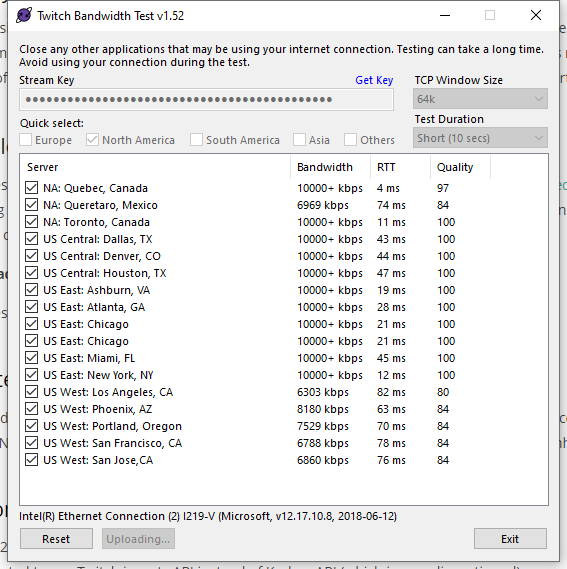 odd kraken
@distant hazel You could try US West Portland. Be aware that normally the best setting is to leave it on Auto.
distant hazel
Auto will automatically choose the BEST SERVER for me ?
wary dew
it should yes
shell wind
why is it when i stream once after installing obs its fine but every other time is horrible
odd kraken
Can you elaboreate what you mean with horrible please? How can we assist you?
shell wind
its drops all my frames
steel bladeBOT
@shell wind Please provide a log from your last stream. To do this, in OBS go to Help > Log Files > Upload Last Log File and paste the link to the log file here.
odd kraken
Take a look at this analysis of your log file with tips on how to improve: https://h4ndy.eu/obslog?url=https%3A%2F%2Fobsproject.com%2Flogs%2Fw2J38BjyKDMBM4Kl
odd kraken
Your log contains streaming sessions with dropped frames. This can only be caused by a failure in your internet connection or your networking hardware. It is not caused by OBS. Follow the troubleshooting steps at: https://obsproject.com/wiki/Dropped-Frames-and-General-Connection-Issues
 barren zinc
Hi hello
steel bladeBOT
@barren zinc Welcome to the helpdesk! Please let us know how we can assist you today and a support volunteer or staff member will assist you as soon as they are available. Thank you for your patience.
barren zinc
Hi have problem last 2 days when I am streaming my obs shuts down my stream and it there is something a code
my stream is laggy also
steel bladeBOT
@barren zinc 1) Restart OBS
2) Start your stream/recording for about 30 seconds. Make sure you replicate any issues as best you can, which means having any games/apps open and captured, etc.
3) Stop your stream/recording.
4) Select Help > Log Files > Upload Current Log File. Copy the URL and paste the link here.
(Note: If you do not see an obsproject.com URL, you will need to update OBS Studio to version 22+)
 stark grove
Good day. I am having issues with my notifications in OBS when I emulate any event form the overlay editor it runs the notification in the browser window but not in OBS. When I repeat the actual event that happened in the Streamelements activity feed (ex. new follow) it plays in the source on OBS and in the browser. The issue i had last night when I was live is that when I was raided and cheered none of the notifications went off in the source on the scene until i clicked the repeat icon on the notification itself. Any idea why this would be happening the last time i was live was last week and it was working fine. Last night was the first time this had happened
steel bladeBOT
@stark grove You can test Alerts via the bell on the lower right corner of the Overlay Editor. Simply go to your Dashboard -> My Overlays -> Pencil/edit button on the overlay. Make sure the "Show Emulated events on stream" option is on to see the alert in OBS/Xsplit https://streamable.com/h6qgy

@stark grove Due to changes to Twitch API, we have filtered out hosts and will only show these ones on your activity feed:
- All hosts coming from an online channel with at least 1+ viewer
- Auto host events with at least 1 viewer - only from a channel that just went offline
Note: If you see "X channel has hosted you" with no viewers on the back, that is considered an offline host or a host with 0 viewers, we do not show these.
stark grove
this was a 20 person raid and none of my notifications went off last night,
what changed in the past 7 days?
odd kraken
You can try to recheck the connection with twitch by parting the bot from your StreamElements dashboard, log out of the dashboard, log back in and make the bot join again.
stark grove
ill give that a try
i have made not changes to anything since my stream last week and i went live last night and all this happened
Fixed. Thank you will see if it works next time we live. Hep greatly appreciated
distant hazel
Anybody available for help ?
steel bladeBOT
@distant hazel Welcome to the helpdesk! Please let us know how we can assist you today and a support volunteer or staff member will assist you as soon as they are available. Thank you for your patience.
distant hazel
I just did a Bitrate Test.. Actually im setted at 3000 in my OBS...is that ok or i should change it.
steel bladeBOT
@distant hazel There are no "best settings".
Please understand that every setup, will be very different.
Any guides or videos that claim otherwise are misinforming. Your best option is to start with a base and adjust as necessary.
Test, test, and test again. We are happy to offer suggestions for any issues you may be having, but not a list of settings.
distant hazel
Okay. then if my bitrate is too high what are the consequences...and the opposite if it's not high enough what may happen
wary dew
too low: stream looks laggy
too high: people have trouble with buffering, but i don't think you need to worry about that because most of us stream above 4000
distant hazel
actually i stream on 3000 and every stream i have internet disconnect. I called my IPS and that says that my connection is perfect...so i looked on OBS forum and it says that it could be my BitRate
 sweet quartz
hey new here and think this is the right thread to ask, just trying streamElements oon obs.ive and trying to launch stream, after clicking "start Stream" it wants me to stream to facebook but i wanna stream to Youtube, any fix?
distant hazel
odd kraken
StreamElements > Log out and log back in with your twtich account. Make sure you are also logged in to OBS Studio with your twitch account.
sweet quartz
awesome @odd kraken thank you it worked
distant hazel
@wary dew are you serious.. You think i could stream at 6000 bit rate ?
wary dew
with those speeds, yes
but i would recommend 4500 at 720p60fps
because that way it's easier for people on mobile devices to watch the stream too
without buffering all the time
 light wigeon
I had to recently reset my OBS/OBS.Live and have a problem where the chat window keeps reverting to light mode after refreshing or restarting OBS. Anyone else run into this before?
odd kraken
Try to set your twtich to light and back to dark mode and log out of OBS.Live (StreamElements at the top in OBS) and log back in.
light wigeon
Not catching it.
distant hazel
@wary dew I just did another test.. and is that normal that my kbps is going from 3582 to 5336 from time to time ?
steel bladeBOT
@distant hazel 1) Restart OBS
2) Start your stream/recording for about 30 seconds. Make sure you replicate any issues as best you can, which means having any games/apps open and captured, etc.
3) Stop your stream/recording.
4) Select Help > Log Files > Upload Current Log File. Copy the URL and paste the link here.
(Note: If you do not see an obsproject.com URL, you will need to update OBS Studio to version 22+)
distant hazel
odd kraken
@light wigeon I am sorry, I have no idea on the issue. Maybe another support has an idea.
 dawn apex
I am trying to make a Store Redemption where someone can Suggest a Store Redemption; however, I dont see a way that they can post an idea / write a comment. Any idea?
distant hazel
@wary dew so if i understand i should Desactivate the game mode on windows 10 ?
light wigeon
@odd kraken thanks for trying.....getting ready to go live so I'll take a closer look at it later.
odd kraken
@dawn apex Can you create a store item (stream perk) with the option Allow user to add a text message to the alert Standard tipping moderation rules will apply?
wary dew
@distant hazel yeah you could do that, i (and a lot of other people) did that too
shell wind
why is it when i stream once after installing obs its fine but every other time is LIKE 10 FPS
steel bladeBOT
@shell wind For the best OBS support, please join their Official Discord @ discord.gg/obsproject
 glacial atlas
I need help my overlay isn't updating with my new followers
 warm raven
can anyone here help me fiugre out how to set up my hd60s to hear my ps4 through obs
rugged quail
Excited to be here! Was wondering if anyone could help me with importing from streamlabs? It gets stuck half way, and I've tried through the browser as well as the program itself.
 trail rampart
if anyone could help me with setting up my stream that would help. as soon as i styart my stream it starts dropping frames and people where saying my voice sounded like a robot.
 edgy sage
SE OBS update is bugging since the overlay editor came out. I keep having to refresh my browser capture or it piles all of my widgets in the top left corner.
shy mountain
@edgy sage We would need more info on the issue and a screenshot before and after if possible
steel bladeBOT
@trail rampart Please provide a log from your last stream. To do this, in OBS go to Help > Log Files > Upload Last Log File and paste the link to the log file here.
shy mountain
@rugged quail Go here: https://streamelements.com/dashboard/overlays and see if there are any imported overlays.
@warm raven You will have to google that. Its not something we are familiar or related to our tools, but afaik, you plug in the cables between the PC, capture card and PS4 and start the elgato capture software and then either video capture it, game capture it, window capture it or display capture it
trail rampart
shy mountain
trail rampart
whut this mean?
shy mountain
Click the link and follow the guides
hazy hollow
Is there a way that I can mute StreamElements from OBS?
shy mountain
!bot mute in chat
 jade marsh
Hey there, can anyone help me with an OBS connection issue?
shy mountain
What is the issue?
jade marsh
Getting a 'Failed to connect to server' message when I try to go live
I can paste log file if its easier
shy mountain
Failed to connect - this means either your Streamkey is wrong or your internet is failing or insufficient to connect to the twitch servers
Try this
jade marsh
I got a new key
shy mountain
and see your connection towards the twitch servers
shy mountain
Well yes - OBS.Live doesn't have Mixer support - in general we don't have mixer support and the tool above works only for Twitch servers.
jade marsh
Huh, weird, I was using it before for Mixer and Mixer has stream setup information for OBS
Is this new?
shy mountain
OBS.Live is an addon/plugin for OBS Studio.
jade marsh
Oh yeah I must be using Studtio
shy mountain
If you've used to connect before, then most likely you've used the actual Mixer integration/connect button for OBS Studio
hazy hollow
I am wondering on OBS, how do I use the scene transitions with stingers, I have no idea how to apply this
Or make it work
shy mountain

▼▼▼ EXPAND FOR IMPORTANT LINKS & INFO ▼▼▼ Welcome to my OBS Studio MASTER CLASS - The most in-depth and comprehensive OBS Studio tutorial course EVER MADE. T...
hazy hollow
Oooooooo,. thank you!
Does this apply to the whole scene?
Like everything I click on from the sources and stuff
shy mountain
Im not familiar with stingers, so I can't tell
wary dew
If you set a stinger it can work for all transisions yes
rugged quail
Hello everyone 🙋♂️ , i have a little problem with my OBS Live and i need your help if possible.
i have 2 Scenes to run on my live stream and in each scene i have added my camera, i expected the camera source to work on both scenes but turned out it works only on one scene at a time. could you tell me what i should do?
shy mountain
Delete the non-working webcam source
go to the other scene
right click the webcam source -> copy -> go to the other scene -> right click in the sources dock -> paste
rugged quail
Thanks a lot what you told me solved my problem😇
hazy hollow
Guys, how do I sync my own hard drive music with a scene please? Any ideas
steel mural
Sync in what way?
hazy hollow
That as soon as my screen starts the music initiates with it @steel mural
steel mural
Not really. OBS is neither a music player, nor a DAW (digital audio workstation). It would be the best to throw your songs into an actual music player like VLC, Winamp or Foobar2000 and start it manually.
hazy hollow
Thank you 🙂
I'm also a bit lost as well, how do I get the stinger transition to work?? There isn't many tutorials out there and I am getting lost, any suggestions please?
steel mural
A stinger transition is a custom transition that you or a designer has to make for you. It's basically a special video see: https://streamable.com/snz6k
 hazy hollow
I have my own custom stinger made
However, I don't know how to intergrate that from one scene to the next, that's where I am uneducated on :/
steel mural
Take a look at my video. There you'll see that I opened the properties of the stinger.
hazy hollow
I want your OBS skin
Its beautiful!
I watched the video, I wil do the best that I can to replicate it 🙂 Thanks Fabi
steel mural
There you go 😛 https://obsproject.com/forum/resources/twitchy.813/
hazy hollow
Fabi, do I need to close down OBS first before applying the skin?
Or loading it I should say
steel mural
After step 4 you want to restart OBS. Totally forgot to add that step  Thanks!
hazy hollow
Welcome, just wanted to ask 🙂
I just don't want to do anyting to the appearance, so I may just wait till tomorrow, cause I am concerned I will wreck something
steel mural
There's not much you can do wrong with installing a theme. Themes are no core components of OBS. If you screw up the copying of the files, you can always use the old (default) grey theme without issues.
hazy hollow
Great, just super nervous, cause I have a 24 hour live stream tomorrow, I just don't want to go breaking things so close!
Let's try this then 😄
@steel mural So these files Twitchy and twitchy.qss are just dumped into the themes folder of OBS is that correct?
steel mural
Not quite. Check the installation steps again.
hazy hollow
@steel mural I'm sorry, I have a slight learning disability
Can you perhaps take a few screenshots and share which folders I exactly need, I am planning to include the font with the skin 🙂 Sorry
steel mural
Open the "FONT" folder and double click the file in it. Install the font by clicking "Install" in the top left corner. After that, close the pop up.
Then drag and drop the "Twitchy" folder and the "Twitch.qss" file into the folder where all the other themes are (your second screenshot)
hazy hollow
Thank you, doing this now 🙂
My eyes love this version so much 😍
Now I feel like I am really am streaming to Twitch 😄
steel mural
Awesome
hazy hollow
Did you make it Fabi? If so, its amazing 😄
steel mural
I think so? 😄
wary dew
he has other ones as well
hazy hollow
I think this one is my fave ❤️
wary dew
Mixery is very nice as well
hazy hollow
Mixery???
wary dew
yeah it has blue colors
hazy hollow
Hey Ruben, you are going to turn me into a theme addict 😂
wary dew
wary dew
just ask @steel mural if you need anything that has to do with themes, he knows everything
hazy hollow
Its not fair that someone can make these many good themes 😦
How's a girl supposed to choose
😂
wary dew
or a man
hazy hollow
yes me gives credit to Ruben too
Okay, I cave in to Mixery, since its the same colour as water, it makes sense
Just wish I could increase the font size just a couple of notches
hazy hollow
I need some help again with OBS, I have my opening video that I want void from the stinger transition
So, how do I remove the stinger transition just for that scene please? Thank you
odd kraken
Override the transition at the scene itself. Rightclick > Override transition or so.
steel mural
steel mural
Works perfectly fine on my end.
hazy hollow
Sadly when doing the multi action from my stream deck, everything is now faded 😦
steel mural
I can't really help you with things regarding the stream deck. I assume that it is directly triggering those functions, skipping your settings. That's why you need an extra OBS plugin for your stream deck.
hazy hollow
Its okay, I made an error 😄
steel mural
👀
hazy hollow
I accidentally override both the opening video and another scene
steel mural
hazy hollow
Because they are both side by side
steel mural
So it's working as intended?
hazy hollow
Yes, silly human making errors as usually 😂
steel mural

hazy hollow
Fabi, I have to give myself a big fat pat on the back!
I have spent in excess of 60 hours getting this stream set up 🙂 in about a week alone 🙂
steel mural
Awesome! I wish you good luck! 🤞
hazy hollow
@steel mural I'm so sorry, I know you are like busy, the people over at Elgato are busy, do you have any knowledge about stream deck. I don't know if I rid the stinger transition on OBS or if I set up the stinger transition manually on Stream Deck, I'm getting really confused sorry
steel mural
Like I said: "I can't really help you with things regarding the stream deck."
I don't own one myself.
hazy hollow
Thank you
manic thicket
hey guys having and issue in obs where I get play back errors on media request videos. It also doesnt work in ground control, but does work in the web browser. Any possible issues?
odd kraken
play back errors? Do you have a screenshot of these by chance?
manic thicket
I know I can play the video as it works on streamelements website. Not sure why Im getting unavailable in my country error
gray wave
@hazy hollow You set the stinger transition in OBS. The stream deck is just used to swap between Scenes and OBS manages the transition
fiery lava
@manic thicket I have fix for you tag me here
fiery lava
@manic thicket can i dm you
manic thicket
yes go ahead
fiery lava
@manic thicket you good?
manic thicket
yep all good. Thank you 👍
odd kraken
@forest bear You should be able to reactivate the shutdown when not visible option in the browser source properties and clear the cache afterwards, to have your overlays set to shutdown and not have then collected in the top left corner again.
slim hornet
Hallelujah 🙌 I got game audio and chat audio from PS4 through ripsaw hd to stream only took me 4 days!!
 pine jacinth
Is there a way to introduce a very small delay in the audio being heard to what is seen on stream? I noticed that in my VOD from last night that what you hear when playing it back is just slightly ahead of what you actually see on stream
 lethal pollen
Hello, has anyone reported problems with connections > SE to OBS
When i start follow event on SE web my overlay in OBS did not show anything but when i refresh old follower event in Activity Feed, OBS and SE overlay editor shows that event.
I already restart connections to Twitch account and I also checked links in overlay browsers.
fiery lava
@pine jacinth
 wooden dragon
Hello guys. I'm looking to do a giveaway for my subscribers on twitch. I would like a wheel to spin to pick a winner of the prize I'm giving away. Does anyone know how to do this? Thanks
wooden dragon
I appreciate it. Thanks @odd kraken
 tulip hamlet
In the overlay editor's Widgets tab.
 rustic blade
Is it in the actual OBS or at the webpage?
D:
OH WAIT
Im stupid LOL
So viewers just type emotes in the chat and they show up? Oo
tulip hamlet
More or less.
rustic blade
Thats. dope.
tulip hamlet
Want some fun? Type !kappagen 1000 in your chat.
tulip hamlet
Yup.
Type !emotes update in your chat to make sure the system knows which you're using.
rustic blade
Thanks dude! 😄
strong fulcrum
POSSIBLE TO USE A PHONE AS A WEBCAM?
 manic cape
Is it possible to setup alerts for when someone hosts you and they weren't streaming? like when someone hosts for attention or w/e? I've never had 0view or 1view hosts go through my alerts but they go in chat like user is now hosting your channel. why doesn't that go through my alerts also?
steel bladeBOT
@manic cape Due to changes to Twitch API, we have filtered out hosts and will only show these ones on your activity feed:
- All hosts coming from an online channel with at least 1+ viewer
- Auto host events with at least 1 viewer - only from a channel that just went offline
Note: If you see "X channel has hosted you" with no viewers on the back, that is considered an offline host or a host with 0 viewers, we do not show these.
manic cape
is it possible to opt out of that and show it?..
tulip hamlet
It's not an "opt out" situation.
tulip hamlet
It's got nothing to do with choice. It's due to Twitch's API.
manic cape
that's fair, like the spotify ordeal I take it then
tulip hamlet
Spotify's a little different.
Spotify is "Hey could you guys not?"
Twitch is "Let's make changes and tell nobody."


 stark elm
Hi, I'm using OBS with SE, but when I wasn't using it, I had an ordinary OBS connected to Twitch and I had a stream / game overlay panel and so on. You cannot add this panel at the time of linking.
And the second question, whether it would go to hide the number of viewers in the live stream.
 next badger
Having a little difficulty with the obs on the pc
steel bladeBOT
@next badger Welcome to the helpdesk! Please let us know how we can assist you today and a support volunteer or staff member will assist you as soon as they are available. Thank you for your patience.
next badger
I havent used it yet on the pc for my streams yet and i dont seem able to have a preview of my video
 glossy vault
I am trying to add a custom scene transition but I cant find the option to add my own file?
I found a video where to add it but its an older version of OBS
tulip hamlet
We don't actually deal with transitions since you can't make them cloud based but they're here:
Clicking the + and choosing Stinger will let you do what you're looking for.
glossy vault
Why tf is it called Stinger lol
mad confusing, woulda never found that lol
Thank you man
 ancient kiln
Is OBS.Live now working with OBS 24?
glossy vault
@tulip hamlet Is it possible to delay it so when I switch scenes that new scene doesnt change instantly?
Do you see how when I switch scene in video, the scene switches instantly
tulip hamlet
glossy vault
one last thing, the scene transition isnt picking up the sound in the file. Any work around for that? @tulip hamlet
steel bladeBOT
@glossy vault For the best OBS support, please join their Official Discord @ discord.gg/obsproject
 wicked yoke
do you have any idea how to add obs stream effects to SLOBS? i really love "source mirror" option comes with it
tulip hamlet
We unfortunately can't provide SLOBS support. That's not our software. Best ask Streamlabs for help with it.
 placid nova
Why does my stream information panel on OBS.live say that I do not have access to the dashboard? I cant change my stream information
tulip hamlet
Can you take a screenshot of the error?
placid nova
steel bladeBOT
@placid nova If you are not seeing the OBS Twitch integrations and have OBS.Live installed, please follow these steps:
- Make sure you are on the latest and greatest version of OBS.Live
- exit OBS (make sure OBS is not running)
- delete %appdata%\obs-studio\plugin_config\obs-browser\obs_profile_cookies
- start OBS.Live
- Settings -> Stream -> disconnect -> connect
placid nova
Okay let me try that
Oh it was because I accidentally opened up OBS instead of OBS.live
Thank you
 shadow remnant
im launching OBS Live but my overlays arent loading; even after restarting my PC
what could i do to fix this? thanks for the help in advance!!
steel bladeBOT
@shadow remnant Right click on the BrowserSource > Properties > Scroll down a bit > Refresh Cache of current page
 ancient hill
Hello! I'm having an issue where I'm going to have to replace my streaming PC. Is there a way I can save all my OBS.Live settings and scenes?
shy mountain
Profile on top -> export
Scene Collection on top -> export
thats for OBS Studio
OBS.Live there isn't much or anyything you need to save
ancient hill
@shy mountain Thank you so much!
steel bladeBOT
@ember terrace Please provide a log from your last stream. To do this, in OBS go to Help > Log Files > Upload Last Log File and paste the link to the log file here.
shy mountain
I would need the log file to see why exactly the import fails
and make sure its the current log file not last stream file
 ember terrace
I haven't streamed on this program yet so it should be, just a sec
kindred fox
Yay! Keizar is here
shy mountain
i've been here for a very long time.
ember terrace
@shy mountain hopefully I do this right: https://obsproject.com/logs/22TsaJJZeor45_uW
shy mountain
Do you have a scene that is called "Untitled"?