#helpdesk-selive
1 messages · Page 71 of 1
 fervent cypress
you are genius and god sent! ❤ opening old OBS then OBS.live totally worked
Thank you
 clever ledge
hey, my obs studio is working fine, but when i try to log into obs live my screen just goes white, i tried logging in as admin and it still wont work
 rugged quail
updated to the new update and it seems all my browser sources are not showing but i can hear the alerts but not see them ... same goes for overlay
any ideas on why this may be happening ?
 full sluice
How do I get the animations to actually work. I have set up animations in OBS Live but when on stream, the animations are not operating
 pallid fable
My streamelements obs live is working at all everytime I open it up it just closes right back down
I just tried to even disconnect my twitch account and reconnect but that’s not working either
 open mortar
Hay all, is anyone having lag issues with latest update?
getting lag issues , everything was fine before update, just wondering is this a known bug or?
pallid fable
I was getting a different problems but try using to link about to download the previous verison of obs
 surreal swan
I'm having trouble importing my scene collection from OBS streamlabs to OBS Live, any suggestions?
 fiery lava
@full sluice can you provide a screen shot of your screen in obs after you have added browser sources at the resolution of 1920x1080
open mortar
i checked and my obs seems to be using near 40% cpu while on a boss....its never n=been that high
fiery lava
@pallid fable have you tried reinstalling obs 24.0.3
open mortar
its higher then the game and its wow...so something is not right
fiery lava
OBS (Open Broadcaster Software) is free and open source software for video recording and live streaming. Stream to Twitch, YouTube and many other providers or record your own videos with high quality H264 / AAC encoding.
@surreal swan the import process encounters errors when files are two big to upload to our cloud and when there is copy written graphics we cant access (streamlabs gifs) try removing those first
pallid fable
I just reinstalled the obs version 23 and it got back to the way it was should I try updating it now or can I leave it alone
fiery lava
i would leave it alone until you start seeing more users that dont have issues
@open mortar if you task manager and expend obs
you should see a bunch of the obs-browsers using up most cpu
to avoid this check to make sure your browser sources are set to disable when not visible
alternatively you can also check hardware acceleration is turned on
obs>settings>advanced>scroll down
surreal swan
@fiery lava would that be like the "alert box" or something...?
@fiery lava because I dont really have much of anything in the scene thats super big
fiery lava
in the alert box on SL if there is a default gif that belongs to SL we cant import it
if there isnt much to the scene you may just want to create one from scratch on our editor
open mortar
in task man it has the number 9 beside it?
fiery lava
yes should be able to expand it
the obs browsers using up 7-12%???
you may need to go into those scenes and right click >properties>disable when not visible
you can also turn on hardware acceleration to use your gpu instead of gpu
alternatively you can also check hardware acceleration is turned on
obs>settings>advanced>scroll down
if neither of those methods work scroll up and download obs 23 and the obslive that goes with it as it worked for @pallid fable
pallid fable
As soon as I downloaded 24.0.3 It started doing the same thing just closing me out everytime I open obs live
open mortar
perfect ty @fiery lava
 broken trellis
@pallid fable Thanks for the info I updated this morning and dropped my frame rates to like 7 fps I was trying to record for my daily upload and I was like whoa whoa whoa what the heck...
pallid fable
No man @broken trellis
I’m still getting issues when updating to the newest update
Can someone drop version 24?
fiery lava
dont update just stay at 23 until hotfix is passed
they are testing hotfix as we speak seems browser sources in latest obs version were still using cpu even when disabled while not visible
broken trellis
I just installed v23.1.0 over my current OBS Studio and it didn't seem to fix the issue, still sends my CPU up to 100%
 royal basin
não adianta o obs live ta do mesmo jeito
fiery lava
this is the obs some have downgraded to with it https://drive.google.com/open?id=1VTjX_vwQe124x2BNCKTsyEValCQFMLbe
broken trellis
Thanks @fiery lava for the info it seems to be working, I'm testing out all of my scenes etc.
 fierce bone
Can we finally update OBS and the Plugin?
fiery lava
stand fast you will see a hotfix announce #270206314561404928
fierce bone
OH WOW
I haven't even seen the #270206314561404928 channel...why is it at the very bottom lol!
 mental jacinth
So got Follow botted today I wanted to know What would the best way to Disable Alerts and Notifications on SE Overlays? And yes I already Put in a Ticket for Twitch to Take care of the bots :L
Ik there is a Disable Alerts button but it didn't work for me
 tulip hamlet
To disable certain alerts, you edit the alertbox in your overlay and uncheck the alerts you want to disable.
Or you can mute all alerts.
mental jacinth
ahh kk
well if the next time hopefully never it happens then I'll just do that
Thanks Tho!
 supple creek
Hi i got an issue where my overlays in obs live aint showing; its showing a loing scren, any ideas to get this fixed?
fiery lava
can you login to that screen?
supple creek
no its actually showing a login screen where my layout should be
so no clue how to click that
tulip hamlet
Screenshot please.
tulip hamlet
Do not post your link.
tulip hamlet
You likely didn't copy the URL correctly.
supple creek
lol ive been streaming for months
i logged out / cleared cache
did the works but aint fixing my overlays
tulip hamlet
Please recopy your overlay URLs.
tulip hamlet
Generally not.
supple creek
cause my genrerated urls all are different it seems
ty for the help btw @tulip hamlet
 daring gazelle
how do i brinf over an overlay from slobs to obs everytime i export it it saves as an .overly type file and it cant open it
tulip hamlet
Do not use the export in SLOBS. Instead, use the "Import from other services" option in OBS.Live.
daring gazelle
but how do i get my overlay into the site
tulip hamlet
Use the "Import from other services" option in the StreamElements menu in OBS.Live.
 atomic pollen
ok so i had a update about 45 min ago now when i use the software my cpu sits at 100% even when sitting at the desktop this is without even streaming very frustraiting as it was fine this morning
rugged quail
I have a problem with a mic. I can't hear it in my headphones but OBS registers the input.
fiery lava
@atomic pollen lets try this
try old obs and obslive then update
old obs 23 https://drive.google.com/open?id=1VTjX_vwQe124x2BNCKTsyEValCQFMLbe
and the obs live that goes with it
https://drive.google.com/open?id=18M6OPzKQEBqiT2ecZlZ8se9VXcQHWZpp
atomic pollen
thanks i will do
fiery lava
mic monitoring is something built in headphone mics have the option for not stand alone mics
and that monitoring sound level is controlled by the software the headphones come with
daring gazelle
i import from slobs it gets stuck at 50% and it only imports alert box not the overlay
rugged quail
I don't know if i have any software installed for the mic? It worked fine when earphones plugged in directly into the mic, but when plugged into the pc theres no sound. Sometime i tweak smth and then i get the sound twice, like it loops somewhere.
Every mic has this issues now. I can't figure out what im doing wrong.
fiery lava
import tool can not import big video files or copy written assets (stream labs gifs) try to remove those first then import
daring gazelle
does that incluse or or die stuff casue i thought i heard obs supports nerd or die]
 merry urchin
is the OBS.Live update against OBS 24.0 or 24.0.3?
tulip hamlet
Nerd or Die should not be imported. Nerd or Die includes instructions for installing with StreamElements.
Importing Nerd or Die from Streamlabs will not work as that version will be coded for their system, not ours.
daring gazelle
where do i install nerd or die for obs
tulip hamlet
Nerd or Die will provide instructions for use with StreamElements.
daring gazelle
where
tulip hamlet
I'd assume on their site.
 fervent sentinel
Hi, I have a problem with the OBS. Live, When I activate Songrequest, I have the option of not showing video, but it still shows me the video. All the other functions are going well for me except that
tulip hamlet
Can you screenshot this behavior?
daring gazelle
so i tried dweleting the nerd or die parts of overlay in slobs but its still stuck on 50% wehn importing alerts
tulip hamlet
@fervent sentinel That is specifically for the show on stream function. It does not hide the video from the dock.
@daring gazelle The import will fail if you are importing assets that are too large or Streamlabs-owned assets.
fervent sentinel
But When i install the OBS live i have the opcion in off and the video dont show me, In a few days, dont work it
daring gazelle
so they have to be fully custom made then
tulip hamlet
The video on/off toggle is to show or hide the video when showing on stream. It hides the video in the widget. Not in the dock in OBS.Live.
@daring gazelle Pardon? I don't understand.
fervent sentinel
Thanks!
daring gazelle
like so they have to be made by yourself to import since it wont be a slobs asset
fervent sentinel
And the songrequest dont have any option to play de video in a specific quality ? OBS put the video in 1080 or 720 and my internet dont support it LUL
 cold escarp
music isn't playing on my stream using obs live media request... I watched the youtube video and followed the instruction on the take a tour. I even went to streamelements and added the media request widet and can see the videos on the stream but no music... what am I doing wrong
in the sources tho, media request is never showing up, like it does automatically in the video when doing the take a tour
tulip hamlet
@daring gazelle A "Streamlabs-owned asset" refers to a graphic, video, sound, etc. that Streamlabs provides for use in their system. These assets are owned by them and are not legally allowed to be used in other systems.
Nerd or Die offerings are not Streamlabs-owned assets.
daring gazelle
i wish stream elements had same overlay maker as slobs rather than this lame page that u have to pay to use it
tulip hamlet
Pardon? StreamElements is free to use. There's nothing to pay for.
daring gazelle
i mean the nerd or die overlay maker on site
but why cant they make an app for obs live that acts the same as the one in slobs
tulip hamlet
OBS.Live is a plugin for OBS Studio. It's not its own version.
 boreal sentinel
hello im copy and pasting the streamelements overlay on obs live into browser and theyr not showing up on stream
 steel bladeBOT
@boreal sentinel To add your overlays to OBS, add a new browser source in your scene. Paste your overlay URL in the browser source properties, set the dimensions to 1920x1080 (unless you changed them on the website), and ☑ “Shutdown source when not visible” https://youtu.be/KDvLynUqXI4
 ashen sparrow
using OBS live with StreamElements: Does anyone know how to separate the Game window sound from StreamElements Music player? Currently i have the Audio Capture as my headset. I have not figured out how to capture sound directly from the game window, is this possible?
i wanted, in a perfect world, to capture all audio on sepatate channels so i could pull into video editor later
daring gazelle
when i try to add overlay to obs from elements page its only showing the corner of it
steel bladeBOT
@daring gazelle To add your overlays to OBS, add a new browser source in your scene. Paste your overlay URL in the browser source properties, set the dimensions to 1920x1080 (unless you changed them on the website), and ☑ “Shutdown source when not visible” https://youtu.be/KDvLynUqXI4
ashen sparrow
mine too...unill i saw update today
steel bladeBOT
@boreal sentinel Please connect your streaming account (Twitch, YouTube, or Facebook) with Discord by going to ⚙ Settings and then Connections here in Discord. https://streamable.com/eg92w
 tulip hamlet
@ashen sparrow Separating audio requires a mixer.
ashen sparrow
Digital software mixer or physical analog mixer
tulip hamlet
I'd recommend the latter. The former can work, but they're hell to work with.
ashen sparrow
I’ve only seen stream elements inside obs do they have a stand alone app that I can go into mixer from another devise?
tulip hamlet
Pardon?
ashen sparrow
The StreamElements widget, I can only see it inside obs. If it was a separate app I could capture the audio on separate channel.
Let me take a picture
 summer void
I'm using OBS Live and have the media share widget working but the timer bar that shows at the bottom with title of video is very small and unreadable. The video looks fine though. Is there anyway to resize the bar?
steel bladeBOT
@summer void Please connect your streaming account (Twitch, YouTube, or Facebook) with Discord by going to ⚙ Settings and then Connections here in Discord. https://streamable.com/eg92w
summer void
It is connected silly bot 😉
tulip hamlet
summer void
I don't have it turned on to show but it is connected
tulip hamlet
We use that to quickly pull up your account so we don't have to ask you every time.
summer void
how about now?
summer void
Seems good now. Thank you
rugged quail
I have an issue when I stream or record CS:GO where the display capture and window capture go black whenever I launch the game. My NVIDIA driver is up to date and I have tried running SE OBS as an administrator as well and it still goes black when I play.
steel bladeBOT
@rugged quail For the best OBS support, please join their Official Discord @ discord.gg/obsproject
 junior stirrup
Hi, am i not able to stream to mixer from streamelements?
tulip hamlet
StreamElements does not support Mixer at this time.
 radiant rock
deleted commands under custom commands in my stream elements dashboard but they keep showing up during stream. How can I fix this?
 radiant rock
I have two custom commands I made to run during stream. One being my headphone affiliate and the other being a follow prompt. I deleted both of these commands and they still show up during my stream in the chat window.
Also that’s an imposter..
tulip hamlet
@radiant rock You might've deleted commands, but not timers.
 shut perch
i just updated my OBS.live today and since then I've had really bad performance in Monster Hunter World while OBS.Live is running
tulip hamlet
We're working on a hotfix to address issues with the recent update.
shut perch
oh? that's good to hear
any ETA on the hotfix? what are the chances that it will arrive within 24 hours?
tulip hamlet
Fairly high.
shut perch
alright, in that case i will leave it for now and hope that there's an update by the time i stream it again
in the unlikely scenario that the hotfix either isn't ready or doesn't fix the performance issue, is there a place where i may find an older version to rollback my install?
tulip hamlet
There is not.
radiant rock
Ah thanks!
 dry tulip
Im having an issue with my StreamElements Overlay not showing on my OBS, Ive tried other Overlays as well and still no luck. Anyhelp?
steel bladeBOT
@dry tulip To add your overlays to OBS, add a new browser source in your scene. Paste your overlay URL in the browser source properties, set the dimensions to 1920x1080 (unless you changed them on the website), and ☑ “Shutdown source when not visible” https://youtu.be/KDvLynUqXI4
dry tulip
Ive done that @steel blade
My overlays arn't uploading to my OBS, ive tried the free theme ones as well and they are not showing on my obs
tulip hamlet
Select the browser source and take a screenshot of your OBS window.
Thank you.
Try disabling Browser Source Hardware Acceleration in Settings>Advanced.
dry tulip
@tulip hamlet thanks brotha !
pallid fable
Does Anyone know if they fixed the issues caused by this recent update
 quaint nimbus
Having a few issues here I have re stream integrated with my obs live, its streaming to youtube even though I don't have it selected and I can't stop it from doing this.
tulip hamlet
We don't work with Restream. Asking here instead of #helpdesk-twitch doesn't change that.
quaint nimbus
Well @tulip hamlet I guess im confused its on my obs live program
tulip hamlet
OBS.Live is a plugin for OBS Studio. It's not its own program.
quaint nimbus
Ok so be that but you don't offer any advice on this issue?
tulip hamlet
We can't really provide support for something we don't work with.
quaint nimbus
Its in the streamelementsOBS.live software when I launch it with options for restream in it. Is that something third party that gets imported?
tulip hamlet
To reiterate: OBS.Live is not its own software. It is a plugin for OBS Studio.
Meaning you're looking at an option that is in OBS Studio that has nothing to do with OBS.Live.
quaint nimbus
Any ideas where I should ask then?
steel bladeBOT
@quaint nimbus For the best OBS support, please join their Official Discord @ discord.gg/obsproject
 white shell
Hello Support, I am having an odd issue of my OBS.live has a couple of docks that have stopped working, my twitch stats and twitch information docks. I am fully updated and I have tried running as admin and non admin
steel bladeBOT
@white shell If you are not seeing the OBS Twitch integrations and have OBS.Live installed, please follow these steps:
- Make sure you are on the latest and greatest version of OBS.Live
- exit OBS (make sure OBS is not running)
- delete %appdata%\obs-studio\plugin_config\obs-browser\obs_profile_cookies
- start OBS.Live
- Settings -> Stream -> disconnect -> connect
white shell
thanks @steel blade !! That worked perfectly!!
tulip hamlet
!lazy
steel bladeBOT
I'm a bot, only here to send helpful messages because the helpers are lazy.
 unique beacon
Hey support. I'm trying to add videos through media request. I found a video and it shows the person clicking "add media widget to overlay" in the OBS Live program but I don't see that as an option. Does anyone have an ideas?
 limber juniper
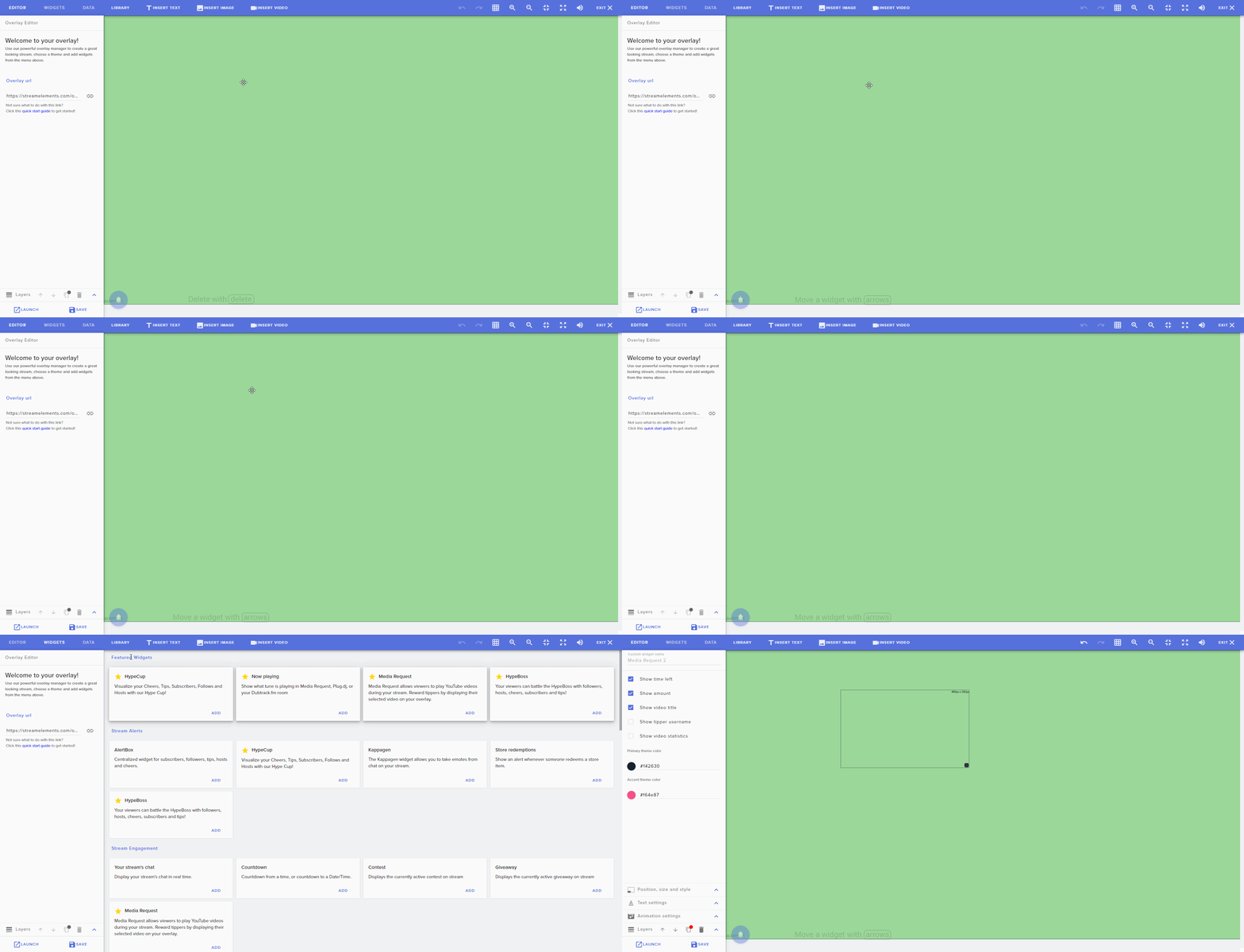
When in the overlay editor, click WIDGETS in the top nav and then find the Media Request Widget and click ADD. https://i.imgur.com/T2ztm0P.gifv
 unique beacon
Oh I see. Thank you!
pallid fable
The Obs activity feed isnt showing up
 shy mountain
Streamelements on top -> activity feed
pallid fable
its still not working for me
shy mountain
Then I'm not sure what you currently see in the OBS window
Show me a screenshot of what you see, so that I can understand what you mean by "isn't showing up" and "its still not working"
@pallid fable
pallid fable
hold on I'm trying to do the previous steps above but its not letting me delete that file
 fickle flame
So due to OBS.Live crashing OBS (hotfix coming), I had to uninstall the plugin. However now I cannot add browser sources or custom browser docks.
shy mountain
did you just remove obs.live?
shy mountain
You will have to resintall obs studio as well
 gleaming quiver
why doesn't the new obs.live version show up as an update when you check for updates on obs?
rugged quail
That is apart, it should show up
Let me check real quick
I actually got the same issue with my outdated obs version, I'll give it through to the staff
gleaming quiver
yeah just realized that, i hadn't updated to the new obs version cause i was told not to until the compatible obs.live version was released
i was able to update after i updated obs
rugged quail
You can however download it via the link in #270206314561404928
gleaming quiver
i got it now, had to update my obs version
it is obs.live version 19.9.8.457 correct?
rugged quail
I think it should be 19.10.?.?
gleaming quiver
installed the update from the SE site and its still obs.live version 19.9.8.457
rugged quail
currently installing myself to see
@gleaming quiver that is the right version! I was mistaken with a other version
gleaming quiver
but i don't have the option to open the overlay editor on my browsers sources for my overlays
see no button
rugged quail
am poking around for you, since i haven't used that option myself yet
gleaming quiver
thank you
rugged quail
@gleaming quiver I've just heard we are currently looking into a hotfix that we are testing, so at the moment with the version you are using the functions aren't available yet
gleaming quiver
ah gotcha, then they should remove that from the update post hahah
shy mountain
19.9.8.457 is the previous OBS.Live that doesn't have 24.0.X obs studio support
Due to issues found yesterday that we were not able to catch during beta phase, we had to stop the .504 deployment
and are currently working on fixing the major ones with .507
gleaming quiver
but that is what i downloaded from the site in the update post
shy mountain
it should be today hopefully
This is what we released yesterday
This is what people should be getting if the update was on.
Currently its not - what you have gotten is probably the working/stable version
gleaming quiver
so the post at 4:30am today was for???
shy mountain
https://discordapp.com/channels/141203863863558144/270206314561404928/636542041962315796 - this update post was for the same version that is NOT available anymore, due to said issues.
gleaming quiver
oh! okay. Iunderstand now. Wouldn't it be best to let people know that, so you don't get people like me asking multiple questions haha?
like an update post thing or something is what i was meaning
 normal kernel
Quick question does it still send emails of your summary for your last stream only because I didn’t get one after my stream yesterday ?
shy mountain
You should - how long was the stream and when exactly was it?
 vagrant lintel
Uhh hey, I just updated OBS Streamelements for a stream i'm plannign on starting in 20 mins.
.... Some of my activity things aren't showing - Uusally I have the chat and Recent Activity on the right, my stream window in the middle and stream Info on the left. My stream info is still there (the one where you can chage the stream name and stuff) but the others are gone? How do I get them back
vagrant lintel
Ohh I updated it like 3 minutes ago.
I just opened the app and it told me there was an update

 shy mountain
you don't have OBS.Live installed
icons and shortcuts on desktop are just there
doesn't matter what they are named
vagrant lintel
Okay.. apparantly need to reinstall then?
shy mountain
the current stable version of OBS.Live doesn't work well with 24.0.X OBS Studio
I would suggest to wait until we fix the latest version we had yesterday
vagrant lintel
okay, so just use the... thing i'm using now until the fix?
shy mountain
Yes
Or, you can download our installer from here: https://obs.live

OBS.Live | Open Broadcaster Software Streaming Knowledge Base
OBS (open broadcaster software) knowledge base for live streaming. Find articles and videos about streaming with OBS.
but you will have to remove the current OBS Studio version you have just in case
vagrant lintel
ok 😄 Thank you
 radiant ore
hey i need some help... i am using an overlay and alerts with obs.live but i can't figure out how to make an alert for when someone buys one of my merch pieces.... can someone help???
 quasi snow
add the store redemption widget to overlay
then configure it and also the store item to display/sound what you want it to
radiant ore
how exactly do i configure it to my store? sorry... i'm new to this
shy mountain
I don't see you having a merch store with us 
We have a beta program currently for our merch program.
which is usually in waves.
radiant ore
i dont have a merch store with streamelements i have one separately that i am trying to connect and get alerts for... until the streamelements one is past beta testing
shy mountain
Then we don't have integration with DbH (for example)
The place you have merch with, needs to provide you with ways to alert you for new sale
quasi snow
oh merch, my bad assumed it was stream store
radiant ore
all good, thanks for letting me know!
 quiet portal
having a bit of lag issues after an update yesterday. i run 2 pc setup using ndi, been running great then got an update yesterday and now its so off it looks like im streaming picture slide show. any ideas?
rugged quail
Are you getting high CPU usage?
quiet portal
8-12% cpu on main gaming pc with game running and nothing else and not streaming. streaming pc around 4-5% without streaming.
but even not streaming when i look at my streaming pc. its a good min or more behind and looks like im streaming a slide show.
rugged quail
could you provide us with a clean log?
steel bladeBOT
- Restart OBS
- Start your stream/recording for about 30 seconds. Make sure you replicate any issues as best you can, which means having any games/apps open and captured, etc.
- Stop your stream/recording.
- Select Help > Log Files > Upload Current Log File. Copy the URL and paste the link here.
(Note: If you do not see an obsproject.com URL, you will need to update OBS Studio to version 22+)
quiet portal
Ok do i do that for the main pc or the pc that is streaming? 1 is gaming only the second is streaming from gaming pc.
rugged quail
the one that is running obs, so the streaming one
quiet portal
they both ar.
are
gaming is running obs and streaming is picking it up and putting it out with obs to twitch.
rugged quail
theyre not both streaming right?
 kindred fox
The gaming PC is pushing a feed via NDI to the streaming PC
rugged quail
I'm kinda not sure about it since i dont know a lot of 2 PC set ups
quiet portal
@kindred fox right
kindred fox
you'll want the log from the streaming PC since it is doing the encoding
quiet portal
ok.
 robust egret
Hey i updated to 19.10.16.502 yesterday and ever since then it seens my 2 logitech c920 webcams are crashing obs.live and obs is sometimes hitting 70+ cpu usage lol
 odd kraken
The issue with the high CPU usage is a known issue and our developers are looking into it.
For the two webcams, are they working in the preview? Do you have the latest drivers installed? Have you made sure they are not used by another tool?
quiet portal
robust egret
Both are fully updated and no other app is using them. They work in preview but then all of a sudden both screen will go black and obs has crashed lol do we no when we will get a fix for the cpu usage lol even running a 3900x with a game open and obs im hitting 100% lol
odd kraken
Unfortunately no ETA on a fix yet.
Is there a crash log you can provide for the webcam issue?
robust egret
This was the lastest one.
quiet portal
its kinda odd that the lag starts up on the streaming pc befor i even go live. but 2 days ago was 100% fine.
kindred fox
disable Windows 10 gaming features in Windows Settings, and make sure you're running OBS as administrator
quiet portal
ill give that a shot.
thanks
will let you know
well its alittle better still getting some lag, about half as much now. https://obsproject.com/logs/Qcxb1K9ar3kR2pha did the test thing again
robust egret
Just pluged in the webcams again and when im on obs its sitting at 18-25% but as soon as i click on my game i goes up to 70/80% lol i no they know about the usage problem but should it be going up that much if i go on my game lol
rugged quail
How do i add a Follower goal with a starting number? For example, I want to hit 100 followers but currently have 50...
 dry sphinx
@rugged quail https://streamelements.com/dashboard/session -> goals tab

StreamElements
The Ultimate All in One Platform for Streamers
Otherwise in the Overlay Editor -> Data -> Goals
rugged quail
@quiet portal im seeing no issues with that log, so I'm a bit clueless about it, ill be sure to poke around for you
quiet portal
@rugged quail thanks for that 🙂
rugged quail
No worries
fiery lava
@quiet portal please screen shot me task manager show obs expanded
quiet portal
fiery lava
okay dont see alot of stress there can you try one thing
reinstall obs 24.0.3
OBS (Open Broadcaster Software) is free and open source software for video recording and live streaming. Stream to Twitch, YouTube and many other providers or record your own videos with high quality H264 / AAC encoding.
on your streaming pc
quiet portal
ok. will give it a shot
kindred fox
@quiet portal can you also screenshot taskmanager on your gaming PC while simulating what you'd be doing while streaming (game open, scenes loaded, etc).
normal kernel
Sry for delay in answering @shy mountain it was roughly a 3 hour stream and it was from 11pm bst yesterday evening
 merry glacier
hi there i am having issues with my stream elements overlays loading up via obs. Any help would be grand
odd kraken
What issues? Can you elaborate please?
merry glacier
my overlays are now showing via obs even though all the links are in and set up as normal.
odd kraken
Have you tried to readd them? What version of OBS Studio and OBS.Live are you on?
merry glacier
24.0.3 and yeah i tried to re-enter the over lay links and still nothing. obs works as normal and can still stream but all my SE overlays are not there
i did a password reset yesterday via twitch but i am logged in as normal on SE, Twitch and obs
fiery lava
what if you add google.com as a browser source
merry glacier
just tried that and doesnt work
fiery lava
so bigger problem not just overlays
lets do this
reinstall obs 24.0.3
OBS (Open Broadcaster Software) is free and open source software for video recording and live streaming. Stream to Twitch, YouTube and many other providers or record your own videos with high quality H264 / AAC encoding.
merry glacier
let me do that and see
 steel mural
If that doesn't work, go to settings > advanced and disable browser hardware acceleration. There was one case where it completely disabled the browser source.
merry glacier
that worked, thank you very much for your quick responses 🙂
steel mural
What exactly worked, just for the record? 😄
fiery lava
^ you already know
 rustic stratus
hey im having an issue with my event lists all showing on the same lines after the update. So its just a bunch of letters over top of itself. Also with my recent subs and recent follows. The names are all showing over eachother
odd kraken
Can you try to log out and log back in using the StreamElements menu at the top please?
rustic stratus
still the same problem
odd kraken
Can you hit the reload button in the top left? Also share a screenshot?
fiery lava
you need to contact nerd or die
rustic stratus
everything was working before the recent update without issue
fiery lava
broken in editor which is why it shows up broken on obs
my guess is they changed something in one of their custom js files they call in https://s3.amazonaws.com/cdn.nerdordie.com/gsap/TweenMax-2-1-3.min.js
something of that nature, in any event you could also try to import that widget again
rustic stratus
ok, ill get in touch with them. thanks
 crude gazelle
Disabling browser acceleration made it better but cap card is still choppy
fiery lava
what about capturing desktop?
crude gazelle
I dont stream any PC games to check with
fiery lava
reinstall obs 24 then reinstall your capture software https://obsproject.com/download
OBS (Open Broadcaster Software) is free and open source software for video recording and live streaming. Stream to Twitch, YouTube and many other providers or record your own videos with high quality H264 / AAC encoding.
rugged quail
hello. I somehow got to twitch.tv in the "chat" section to right (default layout) (downloaded obs.live 5 mins ago...) so I am litterly watching a stream using the chat... How do I get back to the chat?
fiery lava
close the obs and open it will return to chat
 tribal mist
So when i use OBS live my stream info dock is just black. Any ideas how to fix it?
rugged quail
thx friendlyNgeeks
steel bladeBOT
@tribal mist If you are not seeing the OBS Twitch integrations and have OBS.Live installed, please follow these steps:
- Make sure you are on the latest and greatest version of OBS.Live
- exit OBS (make sure OBS is not running)
- delete %appdata%\obs-studio\plugin_config\obs-browser\obs_profile_cookies
- start OBS.Live
- Settings -> Stream -> disconnect -> connect
 raven trail
Could someone tell me like a !death+ command or something? for a counter? I know there's a counter edit command under the mod commands but i don't know hwo to actually set one up
odd kraken
add death +1 or amount X?
raven trail
Yeah add 1 death. So mods can do !death+ to add a death and people can see how many deaths with !death
odd kraken
raven trail
Ah wonderful! Thankyou
rugged quail
when is stream elements gonna work with mixer>
steel bladeBOT
@rugged quail Our goal is to be everywhere our community is so we are regularly in discussions with other platforms. Although we can't comment on our roadmap, your feedback is appreciated.
clever ledge
when i try to use obs.live, theres a white box over everything, i cant use the plugin like at all and i dont get why
 dense python
Hello, I recently changed my twitch username, and I reset my overlays. My alerts work for followers and bits, but not raids and hosts. Raids will show in my twitch alert box, but not in my OBS live alert box, which is why there isn't any alert now. I do not have the filter turned off for raids in my overlay or in the alert box.
there were two, one around 15 and the other at 8 i believe
the problem must be that streamelements isn't catching it, cause it's not in the alert box at all
I tried googling it but came up with nothing
odd kraken
Have you part the bot in the SE dashboard, logged out from the dashboard, logged back in and invited the bot back to your channel?
Also:
steel bladeBOT
Due to changes to Twitch API, we have filtered out hosts and will only show these ones on your activity feed:
- All hosts coming from an online channel with at least 1+ viewer
- Auto host events with at least 1 viewer - only from a channel that just went offline
Note: If you see "X channel has hosted you" with no viewers on the back, that is considered an offline host or a host with 0 viewers, we do not show these.
dense python
okay that makes sense for the host problem, and I will try what you mentioned to help with the no raid alert issue! thank you!
odd kraken
The raids have the same "restrictions" as the hosts.
dense python
the raids were over 8 viewers
odd kraken
If they were an offline raid, they still don't show up.
dense python
it wasn't an offline raid
odd kraken
Have you checked the filters in your alertbox for raids?
dense python
yes I have
odd kraken
Sorry, then a staff has to take a look at your account.
dense python
I've logged in and out, I'll see if that works later on in my stream. When I tested the raid alert yesterday it showed up, it just wouldn't when an actual raid happened
thank you!
 compact hearth
Ok so I made animated alerts (which are transparent) and for some reason they are white as backround and on stream
First time using Streamelements so I'm not used with everything yet
 bitter knot
That would mean that the image has a background. Is it saved as a .PNG and actually a transparent background?
It doesn't seem like it is.
odd kraken
In the advanced text settings there is a margin setting you can use to move the text. @compact hearth
fiery lava
open webm in web browser and screen shot
bitter knot
There's definitely a white background
compact hearth
oh wait im dumb i figured
im so sorry
I did not pay attention lmfao
Thank you
 sharp charm
Hey so, I have what may be a silly question here. I'm having issues with OBS eating all of my CPU when I'm not streaming at all
and continuing to eat it when I am streaming
not sure if I can get help here or not
fiery lava
I can suggest reinstalling obs 24.0.3 https://obsproject.com/download after that last update if the problem is still there I can provide links to obs 23 and the obslive that goes with it
OBS (Open Broadcaster Software) is free and open source software for video recording and live streaming. Stream to Twitch, YouTube and many other providers or record your own videos with high quality H264 / AAC encoding.
sharp charm
uninstall reinstall?
fiery lava
install over top
fiery lava
No Problem
 low horizon
Hey for some reason i can't reload my overlays, one browser source does not show up
rugged quail
Hi guys, have anybody experienced any performance problems after the latest update?
Im currently running OBS 24.0.3 64 bit, OBS Live 19.10.16.502, and since i updated yesterday, i seem to run fewer frames ingame and the games feel like they spike.
It all happened after the update
0 framedrops in OBS
CPU: Intel Core i9-9900k
RAM: 16GB 3000mhz
GPU: Nvidia Geforce 2070 Super
fiery lava
@rugged quail read above as I believe someone just had same issue
low horizon
I can hear the sound from alerts just can't see the other bits from the browser overlay
fiery lava
check your hardware acceleration | obs>settings>advanced>scroll down check/uncheck
make sure your using obs and not SLOBS
low horizon
i'm on obs live
fiery lava
ok
low horizon
all other scenes work just this one scene
fiery lava
name of your overlay
fiery lava
can you screen cap your whole screen for me
fiery lava
okay right click browser > properties
make sure its set to 1920 x 1080 and make sure the link is the link from the launch button
fiery lava
NP
low horizon
While i've got your attention
would muting desktop sound mute any alert sounds to my stream?
fiery lava
on the browser >properties>route audio through obs | then you can mute the desktop audio track
low horizon
I tried that but i can't hear the audio after clicking that
fiery lava
seems to be a limitation of OBS then
low horizon
ok thanks for you help
 cunning aurora
hello 🙂 I just moved over to OBS.Live. I have 2 logitech c920's i used on different scenes, but when i change scene, it's either the cam i was just on or it's just not showing up? anyone know what the issue is?
rugged quail
Found it the other persons problem, seem to be a problem with the issues in 19.10.16.502 so waiting for the hotfix
steel bladeBOT
@cunning aurora For the best OBS support, please join their Official Discord @ discord.gg/obsproject
fiery lava
@cunning aurora Logitechs drivers:
Here’s how to install native UVC drivers for your webcam:
Open Device Manager.
Expand Imaging devices.
Locate the name of your camera in the list and right-click on it.
Select Update Driver Software…
Click Browse my computer for driver software.
Click Let me pick from a list of device drivers on my computer.
Check Show compatible hardware, and then select USB Video Device.
Click Next and follow the on-screen instructions to update the driver.
cunning aurora
@fiery lava thanks for that but the issue persists 🙂
fiery lava
yeah you may need to ask obs or read more here https://obsproject.com/forum/threads/using-2-or-more-logitech-c920s-or-c930es-together-successfully.26707/
OBS Forums
I was having problems setting and retaining my settings while using multiple Logitech webcams with OBS.
I have 2 Logitech c920's and 1 Logitech c930e (so far), and i could never get them all to work properly together at the same time so i combed the nets for a solution on mul...
cunning aurora
Thanks man - I've reached out there too! I'll have alook at this also
cunning aurora
so The OBS community sent me back here cos my OBS.live won't complete the uninstall? i'm just trying to reinstall
it seems frozen
fiery lava
try this install obs 23 and the obs that goes with it then uninstall
obs live that goes with it https://drive.google.com/open?id=18M6OPzKQEBqiT2ecZlZ8se9VXcQHWZpp
quiet portal
@kindred fox Got the screen shot of Taskmanager on gaming pc with things going befor stream and during . also got one on streaming pc while streaming. Fresh install of obs on streaming pc and still same issues.
 lyric oak
Hello,
Was just wondering if its possible to get a custom chat bot name? 🙂
steel bladeBOT
@lyric oak Custom bot name requirements
- StreamElements bot modded and in chat
- Active overlay with alerts
- StreamElements tipping page in the panels below the stream (!panels)
- OBS.Live or Ground Control open
- Create a twitch account for the name you want to use or run the bot under your own name
- Custom bot name doesn't work on Mac
 soft flume
On my Streamelements account, while trying to create a layout for Media Requests, I can't find "Mediashare" widget. Can you please tell me what I am doing wrong?
Thanks
steel bladeBOT
@soft flume Please connect your streaming account (Twitch, YouTube, or Facebook) with Discord by going to ⚙ Settings and then Connections here in Discord. https://streamable.com/eg92w
 soft flume
not related with what I've asked
odd kraken
Please connect your account so that support is able to take a look at your account. Thank you.
 pale mountain
What is the chat command for media request?
odd kraken
!songrequest
pale mountain
So, viewers can do !songrequest www.youtubeetc
soft flume
@odd kraken done
odd kraken
For youtube there is no songrequest. Only paid requests.
pale mountain
So, how can I get some free songrequests?
odd kraken
Not possible with YT afaik.
pale mountain
So do my viewers pay, or me?
odd kraken
Just asked internally to make sure and there seems to be no songrequest for YT at all. I am sorry.
pale mountain
So, mediarequest on Streamelements is for personal playlists to stream to the stream?
tulip hamlet
To clarify: Media request is not available on YouTube streams due to limitations.
pale mountain
I'm terribly sorry. I'm asking for Twitch
Uhm
New here and in streaming, using OBS to stream to Twitch
tulip hamlet
Pardon the misunderstanding. The command is !songrequest or !sr followed by either the YouTube URL or the name of the song. In the case of the latter, it basically does a YouTube search and returns the first video that meets requirements.
pale mountain
You're the best.
 woven pebble
I'm trying to make a static text come in and show my twitter handle in stream, anybody have a guide on how to make that happen? I know theres a static widget but, I messed around with it, cant seem to get it to work properly
kindred fox
You can just add a text widget and then format it
 daring owl
Hi, I need to update my Twitch name, where should I do that?
dry sphinx
https://www.twitch.tv/settings/profile @daring owl
 daring owl
Oh sorry, I mean with OBS.live. I was told I need to inform you guys of my change to track chatstats
kindred fox
Have you already changed it on twitch and need to change it in streamelements?
Old name?
new name?
kindred fox
Someone should have it fixed shortly
daring owl
Thank you so much! @kindred fox
kindred fox
Don’t thank me, I don’t do anything
tulip hamlet
We're not Streamlabs.
 chrome yew
Hey there, I'm having issues with the provided Chrome extension to perform a Streamlabs to StreamElements import. I've followed the instructions and have made sure to be logged into both accounts at the time of running the extension but always run into an error. Any workarounds that are known or will I just need to reaccumulate all the tip/dono/alert data?
Thanks in advance!
tulip hamlet
Not just logged in, but a tab open for each site.
chrome yew
Yes, I have them each open in separate tabs, shared window.
tulip hamlet
Try disabling other extensions, in the event one might be disrupting the import.
chrome yew
Got it. I'll try that
I ensured all extensions except for the relevant one were disabled and tried using the tool, once with each stream service as the primary tab.
Still no dice
tulip hamlet
You're in your account, not just on the front page?
chrome yew
Correct, I'm looking at the dashboard pages for each account
 crude salmon
I am trying to get my display capture on to work and it is only showing me a black screen
 fading anchor
I am also having an issue with my game capture only showing a black screen and it was working fine yesterday
steel bladeBOT
@crude salmon For the best OBS support, please join their Official Discord @ discord.gg/obsproject
tulip hamlet
@fading anchor Run OBS as an admin?
crude salmon
did that too same problem
fading anchor
thanks! is there a way to fix it or do I have to run as admin all the time?
fading anchor
ok thanks!
tulip hamlet
@chrome yew I'm not sure what else to suggest, but if you'd like, you can provide me with an admin link to your Streamlabs account and I can attempt it on your behalf.
chrome yew
I don't think that'll be necessary but I want to thank you for the effort you put forth. This was mainly a way to hopefully keep all my earnings records in a single place but it's not a big deal, albeit a tad messy. :p
 dense ember
Everytime I try to import scenes from SLOBS to OBS it does not import scenes. what should I do?
tulip hamlet
The import will fail if you're attempting to import assets that are too large or Streamlabs-owned assets.
dense ember
alright, thank you so much for your help. 😄
quiet portal
@kindred fox Taken right befor trying to stream.
@kindred fox taken while trying to stream. both taken on gaming pc not streaming pc.
kindred fox
What gpu do you have on your gaming pc?
 rain marten
How does one import an overlay into obs live using the links?
steel bladeBOT
@rain marten To add your overlays to OBS, add a new browser source in your scene. Paste your overlay URL in the browser source properties, set the dimensions to 1920x1080 (unless you changed them on the website), and ☑ “Shutdown source when not visible” https://youtu.be/KDvLynUqXI4
quiet portal
radeon rx 480
 worn igloo
hey guys is it possible to get tipping TTS?
people want to spam me with the helicoptor @@@ and I wanna let them
shy mountain
Yes - go to "My overlays" -> enter the overlay editor -> click on your alert widget -> tip alert cogwheel -> scroll down on the left menu -> TTS Settings

 west swallow
Ok...so, does OBSLive work with Mixer as well?
Also, I seem to be having some trouble with my OBS not picking up mic audio when I speak at a normal speaking voice. Damn near have to shout for it to pick up, though the games I'm playing and Discord have no problem with it.
shy mountain
No we don't have mixer support.
steel bladeBOT
@west swallow For the best OBS support, please join their Official Discord @ discord.gg/obsproject
shy mountain
For the audio issue ⤴
west swallow
Damn. Ok thanks
quiet portal
is there a way to back up the vers to whatever it was befor yesterday and not have that update?
shy mountain
OBS.Live | Open Broadcaster Software Streaming Knowledge Base
OBS (open broadcaster software) knowledge base for live streaming. Find articles and videos about streaming with OBS.
it should be the old version here
quiet portal
ok gotta try this. if not then i have no clue what else to do.
worn igloo
hey, I have TTS enabled now which is all working great except one text has a series of @ symbols i.e @@@@@@@@ but it only calls out a single one even though I have anti-spam disabled?
shy mountain
What is your username? Also please notice where you are asking your question. If you are streaming on twitch, best place to ask is in #helpdesk-twitch , because this channel is used for question about OBS.Live
worn igloo
Sure, I thought this was an OBS live thing, apologies if not. my username is y0g4
shy mountain
Right, so the TTS voice you've chosen has its own settings for spam or doesn't support spam like that
try another voice
worn igloo
Cool, thanks!
rugged quail
Quick question about the twitch chat integration in obs.live. Is there any way to make the dark mode default? It keeps reverting back every time I close and re-open obs.
shy mountain
Are you able to change it to dark mode?
Because the way to change it to dark mode is a bit...techy
rugged quail
Yeah, I know how to change it to dark mode from the cog wheel. Just wont stay in dark mode after closing.
shy mountain
Ok, so follow this:
- Close OBS
- Right click your OBS shortcut
- In the target field add this:
--remote-debugging-port=40404- it should look like this:"C:\Program Files\obs-studio\bin\64bit\obs64.exe" --remote-debugging-port=40404 - Open OBS
- Open Browser/new tab
- type in
localhost:40404 - Click on one of the the options (activity feed/Media Request/Twitch)
- Navigate to "Application"
- Expand "Local Storage"
- Click on the listed item
- Look for
StreamElements.chat.themeand if you find it, set it to "dark" and restart OBS.
rugged quail
Awesome, thanks!
quiet portal
well the reinstall of older obs didnt help.. im streaming now but just me talking and have music playing. the lag issues only start when i start a game.
shy mountain
What lag issues? You only mentioned that you were looking for a downgrade
quiet portal
i figured the downgrade might be better than whatever the update was on wed.
shy mountain
Well sure, but you also need to downgrade OBS Studio to 23.2.1
Then install out latest stable version
quiet portal
if i start up a game it starts dropping framerates bad but if i stop the game it runs fine.
i have 23.2.1 now.
shy mountain
Dropping frames is internet related.
steel bladeBOT
@quiet portal Please provide a log from your last stream. To do this, in OBS go to Help > Log Files > Upload Last Log File and paste the link to the log file here.
quiet portal
from streaming pc or gaming pc? i run 2 pc setup
 shy mountain
thats not the log file.
shy mountain
ignoring the old version warning
thats the only issue it seems there is
But if you say there is frame drop - thats an internet issue
quiet portal
can show what i mean if you want. im on Twitch.
shy mountain
stop the stream and reupload the log file
quiet portal
shy mountain
still the same thing
 severe cipher
I read somewhere above you have to downgrade obs to install obs-live? is it only to be able to install? cuz it works for me on latest obs-studio ?? (might be a fluke though) 😄
shy mountain
well our stable version of obs.live works with obs studio 24.0.X
but due to the nature for the plugin
some obs studio features from v24
will be missing
like example - browser source separate audio channel
severe cipher
@shy mountain ah I see, I don't use that so maybe that's why it seems to work well then 🙂
will Mixer support be added?? you know?
(in case I do a shroud) 😄
 severe cipher
true
quiet portal
 delicate vine
Hey there. I'm pretty sure that my custom bot from SE had a subscription and was able to post my channel emotes automatically. That doesn't work anymore. Is it an issue?
odd kraken
You would need to gift your custom bot account a subscription to your channel.
 obsidian vessel
OBS black screen is not working everything has been tried. What is the problem
OBS black screen gives everything trying was working. What is the problem. MSI GE62VR 7RF laptop. Since it has two shimmers, it gives a black screen. Nvidia driver gets better if I remove it.
odd kraken
@obsidian vessel
Laptops need extra setup to use Display Capture.
Due to the way laptops are designed, OBS must run on the Integrated GPU to use Display Capture. This process effectively disables Game Capture and Window Capture. If you would still like to use it, please read this guide and follow the directions for Display Capture: https://obsproject.com/wiki/Laptop-Troubleshooting#configure-your-system-for-display-capture
Please note: we recommend using Game Capture and Window Capture wherever possible. These capture methods get better performance in almost all cases.
obsidian vessel
I try everyhing. The result is a black screen.
odd kraken
Have you added a source in your sources list?
obsidian vessel
Nvidia driver gets better when you lift it.
odd kraken
Lift it?
obsidian vessel
As if OBS does not work with the integrated graphics card.
steel bladeBOT
@obsidian vessel For the best OBS support, please join their Official Discord @ discord.gg/obsproject
obsidian vessel
I uninstalled the Nvidia driver. What do we do when we play?
odd kraken
If you want to use display capture, refer to the guide above, otherwise best to ask in the linked OBS community discord for assistance.
obsidian vessel
Can't we get help here?
odd kraken
This seems to me as a question better asked over at the OBS Studio community discord.
 finite crystal
Is OBS.Live compatible with 23.0.3?
odd kraken
We are taking a look at an issue with our latest OBS.Live version, which was our update to be compatible with OBS Studio version 24.
finite crystal
anything to do with browser sources?
odd kraken
Yes, the issue seems to be browser source related.
finite crystal
ahhhh, im not crazy. Thanks, going to revert to 23 for now
rugged quail
it seems i am having issue on my obs. spiking up my cpu usage, it was fine before the update..
odd kraken
What OBS Studio (top left) and what OBS.Live version (bottom right) are you on?
rugged quail
obs studio 24.0.3
obs live 19.10.16.502
odd kraken
We are taking a look at an issue with high CPU usage for hidden browser source in our latest OBS.Live version, which was our update to be compatible with OBS Studio version 24. No ETA on a fix yet.
rugged quail
i see.. is there a way to make my studio back to version 23? or anything that is compatible with the current obs live version?
obsidian vessel
OBS black screen. Nvidia driver enable and disable. OBS 24.0.3
I'm using translate not very good english. Sorry if I write late.
odd kraken
@rugged quail Checking internally atm.
rugged quail
thank you
finite crystal
I just reinstalled Studio 23 - can i just install the current obs live from the website over it?
obsidian vessel
@finite crystal I've tried all versions. The result is black screen.
odd kraken
@obsidian vessel The only thing I see is that at the end of the video the screen capture is in the top left very small, like just at one point in the corner. Select the source and hit Crtl + F to maximise it.
fiery lava
@rugged quail obs 23 https://drive.google.com/open?id=1VTjX_vwQe124x2BNCKTsyEValCQFMLbe
obs live that goes with it https://drive.google.com/open?id=18M6OPzKQEBqiT2ecZlZ8se9VXcQHWZpp
rugged quail
thank you very much!
obsidian vessel
@odd kraken I know, but that's not the problem.
@odd kraken How will OBS work when Nvidia driver is active. That's the important thing
odd kraken
I am sorry, I cannot help you with that, I do not have anything more than the sentence I send you above. https://discordapp.com/channels/141203863863558144/494513233416421386/637273080166613002
Maybe someone else has an idea on this, or the best place in my opinion to adress this problem would be the aleardy linked OBS Comminity discord to you.
obsidian vessel
Does anyone understand from the OBS log.
 rose solar
Hey, so Ive got a little issue. I use the media request tool on obs live and when there is a video playing on the player it has audio that echos. It will only echo if i show the video on stream. If i watch it in the media request tool and do not show it on stream there is no echo. Have not been able to find a setting that fixes this issue
steel bladeBOT
@rose solar Make sure to ☑ “Shutdown source when not visible” for all browser sources (all OBS scenes). If using studio mode, uncheck “Swap Preview/Output scenes After Transitioning.” Also keep in mind that sound can play from any overlay loaded in the browser (editor or launched). https://i.imgur.com/FegZJQS.png https://i.imgur.com/yY0wcFl.png


 sinful flint

 safe surge
I have an issue, no overlays are working in my obs live. Sound is working for them, but no actual pop up on screen. I tried re adding, double checking they was correct links, and making sure it was not an individual situation (example, streamlabs). It is doing it for streamlabs, stream elements and any other overlay added to browse source.
sinful flint
Have you checked that you're setting the dimensions of the overlay correctly? I added your main overlay to my OBS.Live as a test with the dimensions 1920 x 1080 and I see and hear the overlay perfectly
safe surge
all set and tested
I have been using this set up for months
it just started happening last night
Just out of no where nothing is showing up.
I am on version 24.0.3
safe surge
I just got the alert sound that you followed btw
 sinful flint
Yeah, really odd because using your overlay in my OBS.Live it's all fine here, wonder what's different on your end
safe surge
yeah, and again its not just obs overlay
My streamlabs bit bar wont show, and my music player which is a custom over that works fine, is not showing up
sinful flint
I can understand it perhaps not working on a competitor's program
safe surge
In what way?
sinful flint
Our overlays have a habit of being blocked on SLOBS on occasion
sinful flint
We don't block any overlays
 plain sonnet
maybe try uploading a log from a test recording, there might be something on there
steel bladeBOT
@safe surge 1) Restart OBS
2) Start your stream/recording for about 30 seconds. Make sure you replicate any issues as best you can, which means having any games/apps open and captured, etc.
3) Stop your stream/recording.
4) Select Help > Log Files > Upload Current Log File. Copy the URL and paste the link here.
(Note: If you do not see an obsproject.com URL, you will need to update OBS Studio to version 22+)
 stark gate
I got an update for OBS Live a few days ago, and since then the OBS takes 70-80% of my CPU with only OBS running.. I have an i5 8400 processor... what is wrong?
plain sonnet
safe surge
Yeah everything is back up on 23.2.1
stark gate
Is it something wrong with 24.0.3? Is there a way for me to roll back to a former version?
plain sonnet
Need an older version of OBS? Go to https://github.com/obsproject/obs-studio/releases for OBS Studio versions back to 0.2.4
stark gate
@plain sonnet Just download the Zip and paste it where obs live is to write over the folders?
Or do i loose all my stuff?
lose*
kindred fox
You can export your scenes to prevent data loss
Click on Scene Collections >> Export
plain sonnet
you shouldnt lose your setting, but you can back up your scenes and profile
scene collection > exoprt
profile > export
kindred fox
stop copying me!
 rugged quail
hi i installed the previous version of obs studios and live fromt he link that you have provided. but my obs keeps on crashing..
fiery lava
did you update or does it still say obs 23 at the top?
rugged quail
can i paste the crash report here?
fiery lava
the log file yes
rugged quail
im not sure if this is correct.. im gonna paste it lol
the verion upper left is 23.1.0
live version is 18.9.15.205
fiery lava
are you trying to log into restream?
rugged quail
i want to but, before i even try to click on the settings, obs crashes
or is the obs itself is trying to login to restream automatically?
causing the problem?
rugged quail
i have done it once but the result was the same
rugged quail
alright
raven trail
for a !tweet command.
How do i make the API grab the link of the tweet? Instead of linking the full text of the last tweet.
 radiant pulsar
I use a retweet command. It's the same every time, but it automatically has the viewer tweet that I'm live.
raven trail
Nah i want an API to grab the link of the latest tweet and link it.
radiant pulsar
Gotcha.
limber juniper
I think there is a SE command that will get your latest tweet
that might be a good starting spot
raven trail
Nope, can't see it.
radiant pulsar
yea i've never seen such a command
rugged quail
@fiery lava i've done what you have told me
should i not reinstall the live yet?
obs studio alone is working fine
limber juniper
${lasttweet.<username>}
radiant pulsar
ahhhhh
rugged quail
no.. i mean it did not crash like it did with obs live
raven trail
@limber juniper Doesn't work dude. That brings up the text, not a link.
fiery lava
@rugged quail make sure you can test stream first before you install obslive
radiant pulsar
oh yea he's right
rugged quail
okay,,
raven trail
@fiery lava Do you know of the command or API link to pull a latest tweet? I know that ${lasttweet.<username>} pulls the whole tweet but it looks super nasty, i just want a link to the tweet.
fiery lava
custom command api no idea as its sent to someones server
raven trail
No worries 🙂
limber juniper
lol @raven trail I just realized that I posted exactly that need on the ideas board 2 years ago. So I feel ya on the want/need. https://streamelements.helprace.com/i379-bot-variable-to-retrieve-a-link-to-the-latest-tweet-of-a-user
raven trail
I know someone who has it set up, i'll find out
limber juniper
if you can, would you share it in #command-share? im sure others would like it as well!
raven trail
I'll let a staff member know as i don't have permission to post.
rugged quail
@fiery lava i was able to stream with obs studio
fiery lava
nice now its up to you to install that obslive i gave you
rugged quail
il try to install it
no good lol
it crashed right away
xDD
cant use live for a while i guess :/
fiery lava
there you go problem is cant use it until for awhile and they are testing obslive for obs24
fiery lava
NP
raven trail
$(customapi https://decapi.me/twitter/latest_url?name=USERNAME) @fiery lava @radiant pulsar @limber juniper
For you 3, this is the API
limber juniper
 thanks duder!
 flat sapphire
I have had same overlays all the time but now they are all lagging. OBS Live says that CPU usage is less than 30% and FPS is always 60.
fiery lava
check your hardware acceleration | obs>settings>advanced>scroll down | check/uncheck
flat sapphire
Oh Thanks it fixed it
stark gate
^So i downloaded the source file... not sure how to make this my current obs tho 😂 i have not uninstalled 24.0.3 yet. Anyone that can explain how to?
i dont understand :/
 dawn dawn
i was just wondering why my chat isnt working for obs.live? any help
kindred fox
Can you screenshot your obs?
sinful flint
Fixed in DMs
kindred fox
Thanks big guy! 
pale mountain
Is there a way to mute the music on my pc while having it play on the Stream?
fiery lava
you have to hear it for obs to hear it to send to twitch
 charred oxide
https://obsproject.com/logs/K6sWLeOqjbuVjITp can someone check pls why i have thousands of dropped frames all of a sudden pls
fiery lava
screen shot your window
dropped frames are usually from internet issues, this log shows you have not ran obs as admin which can be done permanently and it says you're using display and game capture in the same scene
charred oxide
my internet is fine already tested it
fensteraufnahme = window cap
bildschirmaufnahme = screen cap
how to make it permanently start it as admin?
fiery lava
C:\Program Files\obs-studio\bin\64bit
right click >obs64.exe
properties
compatibility
Run this program as an administrator```whats cpu usage at
cpu looks good in screen shot,
i see you have sources not (👁)
are those display captures?
charred oxide
nah a test "brb" and a picture (my avatar)
charred oxide
its set to 6k but my internet can do 12k
charred oxide
ok altho its 1080p60?
fiery lava
its about what twitch ingest servers say you get for transcoding
yep
i have 1gig up and down and cant go higher than 3k without twitch server spitting some out
charred oxide
ah ok good to know
tyvm ❤
 grizzled light
Can you mute a browser source (i'm new to all this)
fiery lava
if you right click>properties and route audio through obs
then you can find it listed in the audio tracks and mute it
fiery lava
screen shot your screen
grizzled light
I can't I'm teamviewering trough my phone to my desktop on a train
I'll try again when I'm homz
fiery lava
when you get home provide screen shot
grizzled light
Yes thank you
 silent flicker
Hey, i just updated my OBS and OBS.live and the old "Active Feed" is gone, now i have this weird one that dosent have any options for me to skip TTS or anything like that.
steel bladeBOT
@silent flicker If you are not seeing the OBS Twitch integrations and have OBS.Live installed, please follow these steps:
- Make sure you are on the latest and greatest version of OBS.Live
- exit OBS (make sure OBS is not running)
- delete %appdata%\obs-studio\plugin_config\obs-browser\obs_profile_cookies
- start OBS.Live
- Settings -> Stream -> disconnect -> connect
silent flicker
Well..... that dident work.
odd kraken
Select StreamElements at the top > Activity feed, as the activity feed shown in your screenshot seems to be the twitch activity feed.
silent flicker
Oh, there we go! Thank you ❤
 lament mantle
Hey guys, i try to stream but when i do, my gaming screen doesn't show up and i downscale from video settings and lanczos (32 samples). I play in 1080 and i want to stream at 720. And using encoder is nvenc new h. 264 i don't know problem sound is coming but not video
fiery lava
try running obs as administrator
lament mantle
is it related to color format nv12? I changed it to 709 color range full
steel bladeBOT
@lament mantle Please provide a log from your last stream. To do this, in OBS go to Help > Log Files > Upload Last Log File and paste the link to the log file here.
lament mantle
 fresh fable
How do I get twitch chat box to come back? I moved it and accidentally closed the app and now I don’t see the box anymore.
odd kraken
StreamElements at the top in OBS > Chat
fresh fable
Ty!!
odd kraken
@lament mantle Here is an analysis of your log file with tips on how to improve: https://h4ndy.eu/obslog?url=https%3A%2F%2Fobsproject.com%2Flogs%2FdnjQXu1eZWe9XIyM
lament mantle
Ok i did that but still got no solution
odd kraken
Have you added a game capture to your sources list? Is the game in the preview of that source visible when you create it?
odd kraken
select the game capture in the sources list and hit crtl + F while the source is unlocked.
lament mantle
Ok i will try
 timber carbon
Hello, anyone here?
kindred fox
@timber carbon maybe
timber carbon
I tried to set a name for the bot, but I can set only my nick name and the default. I cant change it the Ground Control either. No yt videos did help.
steel bladeBOT
@timber carbon Custom bot name requirements
- StreamElements bot modded and in chat
- Active overlay with alerts
- StreamElements tipping page in the panels below the stream (!panels)
- OBS.Live or Ground Control open
- Create a twitch account for the name you want to use or run the bot under your own name
- Custom bot name doesn't work on Mac
kindred fox
You've done all of those steps?
kindred fox
👍
 brazen hazel
Hi I just updated my OBS.Live and the stream info, and preview are just black
odd kraken
If you are referring to OBS Studio with the plugin OBS.Live, try this:
steel bladeBOT
If you are not seeing the OBS Twitch integrations and have OBS.Live installed, please follow these steps:
- Make sure you are on the latest and greatest version of OBS.Live
- exit OBS (make sure OBS is not running)
- delete %appdata%\obs-studio\plugin_config\obs-browser\obs_profile_cookies
- start OBS.Live
- Settings -> Stream -> disconnect -> connect
brazen hazel
Deleting cookies didnt work but I am reconnecting my account now
Account refresh worked
ty
 dawn apex
Is Video setting tab the resolution for stream in OBS? or for recording?
kindred fox
Both
 mellow bronze
Hello! When I try Game AND Window capture for the new Modern Warfare, it just comes up as a black screen but I can still see the in-game cursor which is weird. Any idea on how to get the PC game to show up?
limber juniper
if the hook doesn't work to capture the game, you may have to use display capture. Im not sure if others have been successful in using game capture with MW.
mellow bronze
Ohh and Display capture is sooo laggy unfortunately 😦
limber juniper
yeah, I know its not the best, but if the game doesn't accept the hook, ¯_(ツ)_/¯
rugged quail
how do you add your twitch viewer count in an overlay? i didnt see it as an option in widgets
kindred fox
I don't believe there is a viewer count widget
tbh you don't really want to display your viewer count on your overlay
fresh fable
How do I get my discord audio to be included in my streaming audio?
I’d like to have my viewers hear what I’m hearing when in a discord voice chat.
kindred fox
Add your headset as an audio output device
Or change your discord audio output to match your game
Or use a GoXLR
Or Voicemeeter potato
It depends on how you’re running discord and what hardware you have @fresh fable
fresh fable
@kindred fox what do you mean by hardware? Sorry if that’s a dumb question lol.
fresh fable
Yes and I also have a yeti microphone
kindred fox
Do you use the same headset for discord?
fresh fable
Yes I do
kindred fox
Okay, so in Discord, you want to make sure that you specify your headset for output and your yeti for input
then in OBS, you want to make sure you have your audio input capture as your yeti, and your audio output capture as your headset. That should grab all the audio. If you aren't hearing discord on stream, most likely it's being drowned out by game audio
fresh fable
Ah, okie. Thank you so much! I’ll let you know if it works haha
kindred fox
So you would need to turn down the audio volume in the game so it doesn't drown out discord
if you have your headset added as an audio output capture, the stream should hear everything you hear
as long as you set it inside Discord
kindred fox
👍
dawn apex
Keep getting a stream encoder error, stops stream, any idea?
What do I need to change in my settings to stop encoder error, can send screenshot of error if needed
 golden lodge
hey! so my obs can detect my elgato's sound but my headset wont??
steel bladeBOT
@dawn apex Please provide a log from your last stream. To do this, in OBS go to Help > Log Files > Upload Last Log File and paste the link to the log file here.
golden lodge
and the thing is when i go to the elgato software its works but stops when im in obs?!
kindred fox
which elgato card?
golden lodge
hd 60s
kindred fox
you need to make sure you're grabbing audio off the HDMI inside OBS by using the "monitor and output" option for the HD60 source
I believe it's under "Advanced Audio Properties"
Essentially OBS Studio can't directly capture the audio over HDMI
golden lodge
oh liiiit
thank you ❤
actually one more question
i got my headset plugged into ps4 and computer i can hear ps4 but not pc anymore?
kindred fox
your headset is only going to hear one audio source
Your best bet is to leverage the HD60 S monitoring and only connect your headset to your PC
golden lodge
oh yeah the usb is in comp and optical ps4
dawn apex
https://obsproject.com/logs/ENonDMFi2Pga4PMR This is my log files for Encoder error. Any help greatly appreciated!
kindred fox
👍
lament mantle
Can anyone what is problem here? Why is it not full screen? Base resolution is 1080p and output is 720p with displays captured on.
shy mountain
game resolution is not 1080p
shy mountain
yes
lament mantle
I can't play in 720p? Because I'll get less FPS
shy mountain
You need to change the game capture to specific game i believe
and not window
or to capture full screen window
something like that
if you want to play on "stetched" res
and stream it
lament mantle
I am playing it on stretch resolution sir.... On other display, its full screen and i did as u said trun to gaming capture but same problem is there.
steel bladeBOT
@lament mantle For the best OBS support, please join their Official Discord @ discord.gg/obsproject
lament mantle
Ok sir
 kindred fable
I'm doing a 24 hour and my overlays for alerts isn't working. It's showing up on the tab but doesn't notify me. Is there anyway to fix it without restarting stream? I unaadded and readded it plus clicke dreload overlays


 shy mountain
i see your chat is frozen
 grizzled flame
Hello guys.I am still facing issues with my alerts, despite the fact that I have made streamelements mod in my channel.
shy mountain
what issue are you facing?
grizzled flame
Well the alerts won't come up.
steel bladeBOT
@grizzled flame To add your overlays to OBS, add a new browser source in your scene. Paste your overlay URL in the browser source properties, set the dimensions to 1920x1080 (unless you changed them on the website), and ☑ “Shutdown source when not visible” https://youtu.be/KDvLynUqXI4
shy mountain
You are not giving me much detail to work with 🙃
grizzled flame
I'll give it a try and let you guys know.
shy mountain
generally when someone says "alerts are not showing up" or popping up or w/e
grizzled flame
YeahI understand. Well, like my followers alerts won't show for example nor my subbers.
shy mountain
its the above thing - forgot to add the overlay with the alert widget to OBS
grizzled flame
I have included my alerts url in a browser
shy mountain
do you hear sound?
 wary dew
Are you sure you are in the right Discord? because all your panels on Twitch say you are using StreamLabs
shy mountain
We don't kink shame here 
grizzled flame
I've been using StreamElements aka ObsLive for the last month or so.
To see how it is.
If that is an issue, I guess I won't be asking further assistance.
 scarlet pagoda
having a issue with my followers and subs not updating on my stream panels
fiery lava
screen shot?
fiery lava
whats the name of the overlay in your overlay manager
scarlet pagoda
it was custom done
fiery lava
if the overlay is not here https://streamelements.com/dashboard/overlays you may need to get the person who made it to fix it
StreamElements
The Ultimate All in One Platform for Streamers
 lament wasp
i just got a new computer and i cant mute the screen but still get the audio for streaming. it worked just fine on my last one. what do i do?
odd kraken
Set the same hotkey for mute the audio source and hide the screen/switch the scene in OBS.
 gusty steeple
Hey guys, got a problem
just started obs and none of my streamelements overlays work, yesterday everything worked fine and I changed nothing... I actually want to stream in a few minutes...
I relaunched the overlays already and I also created and connected a new one, doesnt work at all
odd kraken
Change the state of your browser hardware acceleration in your OBS advanced settings. Settings> advanced > sources tab
gusty steeple
thank you 😄 ❤
brazen hazel
Hi when I have obs live open and try to play league (to stream it) the game just doesnt load?
Is there any reason for this? I have a i9900k, RTX 2080, 16GB RAM
fiery lava
run obs as admin?
 dense oriole
Hi I have an issue regarding Media Requests, the sound is waay too loud in my headphones whilst not loud enough on stream. Does anyone have an idea how I can fix this?
fiery lava
screen shot your whole window of obs
dense oriole
 humble river
I need help. I closed my chat and alerts on obs and i dont know how to reopen them? Can someone help
fiery lava
@humble river obs>streamelements>chat | activity feed
@dense oriole so the audio is playing through overlay
dense oriole
Yes desktop audio
humble river
I dont understand? There is no streamelemnts option inside obs?
steel bladeBOT
@humble river If you are not seeing the OBS Twitch integrations and have OBS.Live installed, please follow these steps:
- Make sure you are on the latest and greatest version of OBS.Live
- exit OBS (make sure OBS is not running)
- delete %appdata%\obs-studio\plugin_config\obs-browser\obs_profile_cookies
- start OBS.Live
- Settings -> Stream -> disconnect -> connect
rugged quail
hi i have some trubles to setup obs is there anyone to help me a bit ?
fiery lava
audio sound plenty loud in stream i can hear it just fine, if it is loud on your computer you can turn obs down in sound bar
@rugged quail https://www.youtube.com/playlist?list=PLCDDKlFdScbEwdx5AntcQIS1InkFJwHtv watch this

YouTube
Need help? Check out our video guides, covering every feature in StreamElements.
rugged quail
i done this but noone includes black screen no mater 😦
fiery lava
screen shot your issue?
rugged quail
no mater what i try i have black screen
 edgy forge
Hello, where do I go to change the Chatbot name in OBSLive? I have the requirements just need to know where I make the name change. Thanks in advance!
fiery lava
@edgy forge obs live or ground control which are you using
@rugged quail reinstall obs 24.0.3 https://obsproject.com/download
OBS (Open Broadcaster Software) is free and open source software for video recording and live streaming. Stream to Twitch, YouTube and many other providers or record your own videos with high quality H264 / AAC encoding.
outside of that you can try uninstalling obslive if the problem is still there you will need to ask obs
edgy forge
@fiery lava I'm using obslive
dense oriole
@fiery lava I did try that, but then all sound from the Media Share was too low.. 😦
fiery lava
in obs live under activity feed use the hamburger menu to go to settings there you will find custom bot name @edgy forge
the audio has to be heard by you to be heard by the viewers, if they say its to low then you have to turn it up meaning you will hear it louder
edgy forge
@fiery lava Foundit, Thank you!