#helpdesk-selive
1 messages · Page 62 of 1
 rugged quail
 fiery lava
which game
rugged quail
try using window capture
 paper blaze
destiny 2
fiery lava
sum game engines dont use open gl
rugged quail
 plain sonnet
Bungie has opted to not allow OBS to hook Destiny 2 using Game Capture. See: https://www.bungie.net/en/Help/Article/46101
You will need to run the game in either windowed fullscreen or borderless windowed and use Window Capture instead.
 dry sphinx
Isn't their reason cause Hackers or something?
 unborn cipher
is anyone able to help? every time i switch scene a random scene flashes before my transitions starts. any suggestions?
fiery lava
are you using studio mode?
unborn cipher
no i usually have any kinda of preview off as it fills frames on my PC
fiery lava
can you screen share with me in DM
unborn cipher
it might just be a preview error i just took a recording with preview off and it didn't do it
yeah my bad. it only does it when the preiew is up (not in studio mode) if the preview is disabled it works as it should sorry!
 spare hound
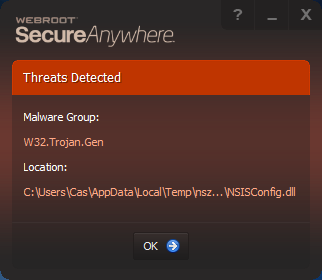
why do I get this whenever I update my obs.live ? https://i.imgur.com/JD39XMn.png
 fiery lava
webroot gives false positive, we've asked to be added to white list but as you can see 👀
 steady crater
I'm wanting to combine some Browser Sources to save on resources. Is there a way to merge overlays?
 stoic summit
Two different questions, 1. How do add tips into your tip history that was provided to you prior to todays date? When I try to add in 2 different ones it just puts it for todays date. 2. How do I reset my tip widget, while testing tips it added it to my widget and now it shows my goals met but they arent
Ok I figured out my answer to number 2 and resetting tip widget, but how do I add in past history tips.
 mint tiger
so i have not been able to set it up to were my subs can play sounds by typeing in chat commands. You can easily do this with streamlabs, i have about had it with elements and am seriously considering switching. Id rather not if there is a way to do it with stream elements other than the extremely buggy stream store section. it doesnt work right and it repeatedly doesnt save what i type in just to not play anyway even though it says redeemed. if there is not a better way i am going to switch.
i am open to trying maybe a extension or something that allows me to do this thats outside stream elements.
i tried blerp and it sucks it wont let me upload my own sounds
 pale shale
Seems to be a common issue after multiple google searches, having an issue with OBS live being opened on my second monitor (60hz - not even streaming - just opened) and fortnite running on 240hz on my other monitor. It feels like there is input lag or my 240hz monitor drops to like 60hz. Minimising OBS on the second monitor instantly resolves the problem. This kind of defeats the purpose of having a second monitor however due to being blind from alerts and chat box. The only other work around is for me to popout alerts and chatbox via http. Is there a work around for having OBS opened and not minimised on second monitor?
 eager barn
So I’m doing an incentive stream for fortnite, is there a way to get a list of the incentives to appear on the screen somehow for stream elements?
 silver gate
Whenever I start stream on OBS my stream will start on Twitch but there's no video and the only audio I can hear is the music I'm able to play. How can I fix this?
 ruby laurel
Hi, i just download obs.live, and after the installation, the funcion "GAME CAPTURE" does not work, any know bug and how to fix this?
rugged quail
My overlay i made on streamlabs overlay editor isnt actually working when i put it in obs.live browser source.
it loads in chrome new tab but when added as browser source it doesnt show up

 little oriole
why do i have a delay from my obs.live to my facebook gaming page is there a way to fix it ???
My live stream even has a delay from my obs.live
 steel mural
There's always some delay. That's how RTMP works.
little oriole
@steel mural okay cool much appreicated .. it was driving me isane ... i just wont look at my phone while i stream lol
 torn talon
Heya! I am using the Song Request media to listen to music and have the chat have some interraction with me. I have the backup songlist from youtube, with over 50+ songs in it. Bust for some reason, there's like, 5-10 songs that are played over and over and that's it. Is that normal?
 clever berry
Any clue why audio plays twice ontop of eachother when I show media request videos on stream?
torn talon
Tick "close browser source when inactive" . Or something like that.
clever berry
In my overlay source?
torn talon
Y
 sterile lily
@clever berry https://media.discordapp.net/attachments/485869372691185685/622192123797569577/unknown.png
 rugged quail
Do you have two sound layers in your mixer?
clever berry
Only Desktop Audio and Mic
The audio plays almost exactly ontop of eachother, but with a minor delay between the two
 steel bladeBOT
@clever berry Make sure to ☑ “Shutdown source when not visible” for all browser sources (all OBS scenes). If using studio mode, uncheck “Swap Preview/Output scenes After Transitioning.” Also keep in mind that sound can play from any overlay loaded in the browser (editor or launched). https://i.imgur.com/FegZJQS.png https://i.imgur.com/yY0wcFl.png


 mortal bone
ok i am a bit confused here so i am using link protection but stream elements is getting timed out ?
how do i exclude stream elements
stream elements is a mod so it shouldnt be included autmaticly no?
 fierce atlas
Are you using a custom bot name?
fierce atlas
You’ll need to mod the custom bot name too
mortal bone
LIQUIDHQ
nvm
it is stream elements who is blocking pretzelrocks
i need to add pretzelrocks as a mod too i guess
fierce atlas
Yes.
mortal bone
now I am here, is it possible to use pretzelrocks with stream elements song request?
fierce atlas
I don’t use the song request feature so I’ll let another support person step in for that question
plain sonnet
same tbh
mortal bone
maybe it is better not to use song request since i want to keep it clean, mute free after the stream
mortal bone
@plain sonnet oh yeah it is true but i also love to download my past streams and re edit them and if it gets muted it is a pain to work with that 😄
so yeah
fierce atlas
I know myself and at least one or two other musicians open for commissions on custom music for stream background songs, that’s always another route to go if you want music that’s licensed for you to use.
mortal bone
but, both of you thanks for the assist 😄 this is why i love stream elements so much always someone who can help e bit
@plain sonnet sadly i am only a very very small streamer just toddle along and trying to find my way a bit to get my stuff improved :d
so i think custom music will not be the best option for me
plain sonnet
ncs is your friend, i never had an issue with that on stream vods
mortal bone
@plain sonnet yeah someone told me last night to use pretzel rocks. a lot of streamers are using it because of what I am struggling with it seems to work great so far 😄
i only had that slight problem which @versed quarry pointed out
plain sonnet
i tried pretzel rock, i really couldnt get used to the gui, its sooooooo small
mortal bone
@plain sonnet well i like small :p less space on my screen and most of the time i manage these things through my streamdeck
works like a charm
and to manage the playlist you can do that on a browser
rugged quail
i just use media request for that
mortal bone
@rugged quail yes but the problem is you need to filter out ur own library to avoid being muted or getting demonitized on yt -> pretzel does that for you
they wont give you any tracks who are black listed
rugged quail
oh this was about youtube, i didnt know that 😄
mortal bone
also twitch they mute ur past streams if it is blacklisted
mortal bone
that is the thing I do since I use those streams to cut out the best moments and reuse them in a highlighted video
 fierce atlas
@drowsy crag you can find Russian support in #🇷🇺︱русский too
 drowsy crag
restarting didn't help
@drowsy crag you can find Russian support in #🇷🇺︱русский too
куда писать???
where to write?
dry sphinx
Try running OBS.Studio as administrator.
mortal bone
I disabled song request in the chat commands of stream elements but it is still listed in the command list when you request the list. is that normal?
dry sphinx
You have to disable Viewer Requests in the Media Request webpage or in OBS.Live.
mortal bone
aah ok
 white crow
Streamelements is consuming a lot of cpu on my pcafter the last update, someone know any trick to solve this problem?
fierce atlas
Have you made any changes to your overlays, like adding animation?
white crow
Nope
But I change my c270 webcam to a c920, so now my capture video is in 1080p
fierce atlas
if you are capturing a higher quality video that is almost certainly going to be taking up more CPU for OBS to process.
 raven trail
How does one set a custom image here? I'd like it to be a little more organized visually
fierce atlas
that is generated based on the game you set for the overlay
 rare scroll
Is there a feature to allow animated emotes in your obslive built in chat or am i missing something?
dry sphinx
You're referring to BTTV.
raven trail
@fierce atlas But it's not for a specific game.
Is there a way to have a custom image?
dry sphinx
I believe all you have to do is click the pencil icon next to "Starting Screen" If I remember.
white crow
@fierce atlas well, that makes sense haha
Thansk
dry sphinx
Gotcha. Looking for it now. Haven't done that in awhile. 
 daring ember
Hi There, is there a way to backup my overlays in stream elements and then import them say for example i want to move my overlays to a new account without having to set them up from scratch again ?
dry sphinx
There is no backup option but if you do create an another account: You can always give your new account full editor access to copy the Overlay in your current account to the new one.
daring ember
ahh i see, thanks, where is the backup option ?
dry sphinx
Whoops. That is suppose to show no backup option.
Sorry. At my day job & typing here 😅
daring ember
lol no worries thanks 🙂
how do i import from a different channel ive made my other channel full access now
oh i found it under duplicate
thanks for the help
torn talon
Any way to figure out why do I have insane latency and fps drops on stream? The game for me runs smoothly
steel bladeBOT
@torn talon Please provide a log from your last stream. To do this, in OBS go to Help > Log Files > Upload Last Log File and paste the link to the log file here.
fierce atlas
an OBS log might help 🙂
torn talon
I actually forgot how to do it. Couldn't find the AI message 😅 . Log file:https://obsproject.com/logs/68Jcc3EzzmzRYQoF
 odd kraken
Here is an analysis of your log file: https://h4ndy.eu/obslog?url=https%3A%2F%2Fobsproject.com%2Flogs%2F68Jcc3EzzmzRYQoF
torn talon
So basicly, Network Issue.
fierce atlas
looks to be!
torn talon
Easy to solve that. Cheers
 neat epoch
I need help with something. So I have Twitch selected and the stream key for my twitch account on obs studio but whenever I press the start streaming button it shows the Youtube streaming panel to make my title, description, and category to stream on youtube. Is there a way to fix since im trying to stream on Twitch??
 brittle mirage
hey so for some reason subs arent showing up? any one know why
odd kraken
@neat epoch Select StreamElemetns > Log out and log in with twtich.
steel bladeBOT
@brittle mirage Twitch prime (new and resub) and paid subscriptions (resub only) must be shared in chat manually by the person subscribing in order for the subscription information to be sent to StreamElements. For twitch prime, the user needs to have sharing enabled on https://www.twitch.tv/settings/prime. For paid subs, if the share box doesn't show up immediately it will when they refresh the page. https://i.imgur.com/VNJN0Uv.gif https://i.imgur.com/2297EA7.png

 neat epoch
@odd kraken how do i log out??
 worldly lagoon
Hey guys, anyone have any suggestions at why my streamelements overlay is shuddering real bad? I've already reinstalled OBS and redid the source with the same thing happening...
odd kraken
At the top in OBS.Live select StreamElemetns > Log out.
neat epoch
oh ok thanks
odd kraken
@worldly lagoon Disable the browser hardware acceleration in the OBS settings and restart OBS after that.
neat epoch
thank you so much
worldly lagoon
@odd kraken ill give it a try
neat epoch
tbh didnt even notice the streamelements button at the top of obs
worldly lagoon
@odd kraken where is that in the settings? I'm not finding it
odd kraken
OBS > Settings > Advanced > Sources Tab
worldly lagoon
@odd kraken thank you that was it, been fighting with this since that last update lol but thank you
 vital scroll
having the same issue again and again with streamelements obs where the program crashes in the middle of stream
steel bladeBOT
@vital scroll Please provide a log from your last stream. To do this, in OBS go to Help > Log Files > Upload Last Log File and paste the link to the log file here.
rugged quail
This is what I get back from the log https://h4ndy.eu/obslog?url=https%3A%2F%2Fobsproject.com%2Flogs%2F-UX16TwoZEfG2xEW
so the crashing does it mean that the whole application stops or does it give you an error?
vital scroll
the whole application with disccont not respond then crash but im still in discord and everything else and playing wow no issue
steel bladeBOT
@vital scroll For the best OBS support, please join their Official Discord @ discord.gg/obsproject
rugged quail
i think the obs support can tell you more about it
 echo tapir
what does this do, i get that it is audio routing, but if I untick it, where does the audio route to? it is not in the pure OBS Studio version, and i only have it in the OBS studio where OBS.Live is installed, and i've just checked a third fresh installed machine. So I'm guessing you add it
btw if this is the step just before you add selectable audio destination to OBS then THANK YOU
 harsh pelican
Hi I was wondering if I could get some help with my encoder on OBS? I cannot change it to my NVidia card and it's not giving me an option to do so. Is there a setting that I may have off that makes Nvidia available to switch to?
steel mural
If you don't have the NVENC encoder as an option and you're sure that you have a Nvidia card installed, check your drivers and reinstall them if necessary.
 frank chasm
i have the same porblem i cant connect
 wind adder
Same. RIP
rugged quail
must be there servers
 hard sage
how do i add a chat window back? accidentally deleted it
 tulip hamlet
@hard sage Click the StreamElements menu at the top and click Chat.
hard sage
buddy is also asking about the connection issue, is there a fix yet? Says he cant connect
thank you so much @tulip hamlet
tulip hamlet
That's a Twitch issue. Nothing to do with us.

🔎 We're investigating issues with impacting thumbnails and with streamers going live. Thank you for the reports!
 Twitter
rugged quail
Twitter
rugged quail
 ty @tulip hamlet
 lilac smelt
@rugged quail did you get a solution for this issue?
tulip hamlet
🔎 We're investigating issues with impacting thumbnails and with streamers going live. Thank you for the reports!
Twitter
 👍
👍
 zenith carbon
so there is a problem with streamers going live?
tulip hamlet
🔎 We're investigating issues with impacting thumbnails and with streamers going live. Thank you for the reports!
Twitter
zenith carbon
Cuz i'm getting that problem
tulip hamlet
🔎 We're investigating issues with impacting thumbnails and with streamers going live. Thank you for the reports!
Twitter
🔎 We're investigating issues with impacting thumbnails and with streamers going live. Thank you for the reports!
Twitter
🔎 We're investigating issues with impacting thumbnails and with streamers going live. Thank you for the reports!
Twitter
🔎 We're investigating issues with impacting thumbnails and with streamers going live. Thank you for the reports!
Twitter
🔎 We're investigating issues with impacting thumbnails and with streamers going live. Thank you for the reports!
Twitter
🔎 We're investigating issues with impacting thumbnails and with streamers going live. Thank you for the reports!
Twitter
rugged quail
@tulip hamlet 
steel mural
🔎 We're investigating issues with impacting thumbnails and with streamers going live. Thank you for the reports!
Twitter
!

tulip hamlet
🔎 We're investigating issues with impacting thumbnails and with streamers going live. Thank you for the reports!
Twitter
rugged quail
steel mural
Tell everyone! Your siblings, parents... hell even your pets!
Tell everyone! Your siblings, parents... hell even your pets!
🇹 🇼 🇮 🇹 🇨 🇭 🇭 🇦 🇸 🇮 🇸 🇸 🇺 🇪 🇸
 lone dirge
anyone know if obs is down??
 glossy axle
guys, cant update obs.live. everytime it says update failed
tulip hamlet
@glossy axle Happens sometimes, you can download from the site and it'll be okay too.
 haughty whale
Hey, I keep getting the error that it cant connect to the server or streamkey is wrong. I've reset my streamkey and restarted OBS as admin, all the bells and whistles. Anyone know what I can do?
steel mural
haughty whale
does this relate to my problem as well?
steel mural
"and streamers going live"
haughty whale
Oh wait, It means everyone trying to stream now can't seem to get it to work, ok ok thanks!
 next relic
yes
glossy axle
@tulip hamlet will my scenes stay the same?
tulip hamlet
@glossy axle Yup, you'll be fine.
haughty whale
wow you guys must be sick of hearing that question I just asked, just scrolled up haha
steel mural
And that in multiple channels 
rugged quail
same is there a fix to it
haughty whale
They're working on it. Can't complain, it's a free service. Keep up the work bois
tulip hamlet
-Twitch is currently experiencing issues with their servers and are working to fix it. Please see the following tweet:
https://twitter.com/TwitchSupport/status/1173392307447455744?s=20
🔎 We're investigating issues with impacting thumbnails and with streamers going live. Thank you for the reports!
Retweets
242
Likes
619
Twitter
 green magnet
I was just wondering something. I have a donation alert on streamlabs and use the link from there. If I use the streamelements tips link instead, will the alerts for donations still work?
tulip hamlet
If you use alerts through our system, yes.
 alpine parcel
is there a way to have the same video source in different scenes to have different filters?
tulip hamlet
@alpine parcel Add the filter to a Group, and add the video source to that group.
🛠 We're recovering from the earlier issues preventing streamers from going live and with thumbnails! Thank you all for your patience.
Twitter
alpine parcel
ohh that makes sense, thank you!
 uneven drift
So I'm using Streamlabs and not Obslive but I see no channel for Streamlabs. I've been using the browser source for my overlays which has been working just fine for a long time and is still working for the rest of my overlays, but one of them (my start screen) is just showing a white screen. I've loaded the overlay in my browser and it shows just fine there. I've tried refreshing the cache, I've tried deleting the browser source and readding it, I've tried deleting the entire scene and readding it but nothing works. Please help.
rugged quail
im having a similar issue, my streamelements overlay shows in chrome but when i add it to obs as a browser source it doesnt show up or load.
raven trail
Did anyone find out if there is a way to set a custom image with this? Would be awesome to know as i'd like stuff to be arranged better visually. It's not going to be a specific game 🙂
tulip hamlet
@raven trail The image only changes when you set a game.
@uneven drift There's no channel for Streamlabs because we're not Streamlabs. We're competitors. We cannot support their software for them as we do not have the tools to. The most we can recommend is making sure your software is up to date. Otherwise, we recommend using OBS Studio with our plugin, OBS.Live.
tulip hamlet
Are you also using Streamlabs OBS?
uneven drift
Well, it's practically exactly the same for OBS so I would assume any suggestion for Raymond would also go for me
rugged quail
im using obs.live
tulip hamlet
It most definitely is not. Streamlabs tore apart OBS Studio's source code for their own purposes.
@rugged quail Screenshot the issue?
raven trail
@uneven drift check your PM's
 tulip hamlet
Can you select the browser source and press Ctrl+F? Make sure it's fit to your canvas.
Works fine on my end.
rugged quail
doesnt work
tulip hamlet
Try deleting and recreating the browser source and recopy the URL.
rugged quail
still wont show up
steel mural
You can always unlock your source to check what size it is. Do you see a red border or a small red dot in the upper right corner?
 steel bladeBOT
@rugged quail Please provide a log from your last stream. To do this, in OBS go to Help > Log Files > Upload Last Log File and paste the link to the log file here.
steel mural
Hol up
Current log, not Last Log
I always forget that the command is asking for the last log >_>
rugged quail
@steel mural https://obsproject.com/logs/q6_XShb0g1_ZxU0A use this one, i had browser source set as 800x600 and it was meant to be 1920x1080
steel mural
You already received and answer in #helpdesk-facebook. Please stay there and state your actual issue. @sacred idol
rugged quail
im using a laptop temporarily because im staying with parents for a few weeks, but this all worked when i had it on my pc at home
steel mural
The res shouldn't matter. I don't see any errors in your logs. You can try to remove the stuff from the "Custom CSS" box but I doubt that it'll change anything 
You can also press the "Refresh Cache" button at the very bottom and wait a few secs
Also, is this the only overlay with that problem ore do you have problems with other ones too?
rugged quail
i made another scene, put ending stream overlay in and it wouldnt load either
steel mural
hmm. I'd suspect your AVG anti virus for blocking OBS but I see your disabled it so... Can you still try to add OBS as an exception on AVG, just in case it's doing funky things?
rugged quail
sure
i opened up task manager https://gyazo.com/8b8090a76b446ac1bfc8afd9cd8da046 what are these for
 steel mural
These are your overlays and docks like Activity Feed, Media Request etc. Everything that has to do with browser
rugged quail
i added obs aas an exception aswell as the whole obs folder and stream elements website
steel mural
Is it working now?
rugged quail
nope
steel mural
Did you restart OBS?
rugged quail
yes
steel mural
Dang. Can you get me another current log?
rugged quail
steel mural
The log is still okay. It's weird because your docks are loading properly. I can only suspect that something else on your laptop is blocking the overlays because OBS itself doesn't block anything. Are other links working, like default OBS one or just simply https://google.com/. Anything that is not from SE
rugged quail
no links working
OBS (Open Broadcaster Software) is free and open source software for video recording and live streaming. Stream to Twitch, YouTube and many other providers or record your own videos with high quality H264 / AAC encoding.
steel mural
Then there's definitely something blocking OBS. I mean, you can try to uninstall AVG. I wouldn't use any 3rd party anti virus when using Windows 10. Who knows Windows better than Microsoft themselves? 😄
steel mural
👀
 steel mural
Really?
rugged quail
Yup
steel mural
I mean we know that there are something problems with it and the latest update but it blocking things... That's a baaad thing. I'll let the important persons know. Thank you for troubleshooting it with us! 
steel mural
You bet! 
rugged quail

uneven drift
Well, I moved over to OBS and my overlays are all working now so 
@rugged quail I think you can reenable it and it should still work now. I saw a post that suggested what worked for you, and they were able to reenable it afterwards
rugged quail
reenable what?
steel mural
It'd be the best to leave it disabled until the new update goes live because we know that hardware acceleration can cause lagging overlays atm
rugged quail
i wants planning on re-enabling it cuz this laptop is bad baha
steel mural
If you don't use our animated overlays, the performance impact should be minimal. The more is going on in the overlay, the higher is the impact. Something like chat and last tipper, follower and so on shouldn't cause any problems
rare scroll
@dry sphinx Yeah i was referring to bttv is there no way to see those emotes in my obs live chat?
 dreamy galleon
I am using an elgato hd60-s and there is no game volume while im streaming. the bar is moving in the mixer but its pulsing at a very low frequency and there isn't actually any sound. Any help would be awesome because I have looked everywhere for answers
steel bladeBOT
@dreamy galleon For the best OBS support, please join their Official Discord @ discord.gg/obsproject
dry sphinx
@rare scroll Just enable Gif Emotes in the BTTV settings in your Twitch Chat & you're good to go when you use Gif Emotes.
rare scroll
I have that enabled but the built in chat in obs live doesnt show them
Normal twitch chat works fine
 daring crypt
@shy mountain hey,
Im just testing something. I think the Scene collection might be bugged so im pretty much making an entirely new scene collection for them
 shy mountain
Does the scene collection or any of the scenes have a Streamlabs widget/overlay/browser source?
daring crypt
No
I was having issues with one of them that legit was just a plain scene no sources
shy mountain
Something in the scene collection might have gotten corrupted then
huh
well, remove all scenes
and start new ones
thats the only issue
i was hoping you would have an SL browser source in one of them
daring crypt
ahah no. I was hoping a restart would help but i just didnt wanna spend that much time lol
shy mountain
I had a similar issue and tbh we couldn't reproduce it
and the only thing that helped is removing the current scenes
and remaking them
daring crypt
yeah thats what staff was saying was they couldnt really find out the issue
 odd palm
hey y'all, I have a couple probably dumb questions
odd palm
how do I set a custom name for my bot in obs.live? I've already fulfilled all of the requirements but my only options listed are streamelements, and my username twice
daring crypt
@shy mountain Just tested it out and i think everything is goof to go!
steel bladeBOT
@little oriole For the best OBS support, please join their Official Discord @ discord.gg/obsproject
odd palm
@shy mountain thank you
 wooden talon
think all that could be cause by game bar/game mode?
fierce atlas
did you click on the instructions for "Warning Windows 10 Gaming Features" and follow them?
wooden talon
yeah,just turned it all off
fierce atlas
did it help? 🙂
wooden talon
fierce atlas
looks like those issues are still persisting which means you might not have successfully disabled them. I'd also recommend running as admin and checking your internet network.
 arctic carbon
hey
sooo
i have a question
i have 2 different twitch channels, and i need different setups, scenes and all that stuff for them
if i log out from a twitch account will i loose the config i have for that account?
fierce atlas
are you talking about OBS?
arctic carbon
question number 2 if i log back does it load back in? also i saw theres profiles, but those dont separate, if i delete something it delets on both sides
yes
stream elements which its the same?? cuz it says obs but has the streamelements symbol
i dk whats the difference really
i just hit live help
fierce atlas
OBS is the core software, OBS.Live is the plugin to connect it with StreamElements services
arctic carbon
ok so that
fiery lava
^ here you can add a second twitch channel and create overlays for both https://streamelements.com/dashboard/account/channels

StreamElements
The Ultimate All in One Platform for Streamers
fierce atlas
You can also have a look into "Scene Collections" in OBS
fierce atlas
no, logging out shouldn't delete anything
 stable parcel
hi, where can I change account in OBSLive? cause I changed broadcast account but the alerts are still the old account ones and I can't find a log out button or anything like that
fierce atlas
you need to add the overlays for the new account and remove the old ones
 kindred fox
@arctic carbon you need a profile and a scene collection for each account
steel bladeBOT
@iron dome New to Stream Elements?
Check out our YouTube channel https://www.youtube.com/c/streamelements/videos
with tutorial videos from setting up the basics, to in depth details on how to use our product.
 iron dome
Is there a way to have streamelements send test alerts?
steel bladeBOT
@iron dome You can test Alerts via the bell on the lower right corner of the Overlay Editor. Simply go to your Dashboard -> My Overlays -> Pencil/edit button on the overlay. Make sure the "Show Emulated events on stream" option is on to see the alert in OBS/Xsplit https://streamable.com/h6qgy

 spice crag
Figure I ask here, I had streamed once to Facebook but want to stream to twitch. I can set my server, stream, stream key, etc and all fine but the streamelements wants to do the facebook only. It asks if I want to go with the FB settings or another. Problem is, it then takes over and attempts to stream to facebook with the twitch server and keys. I cant change it at all .
odd kraken
Select StreamElemetns at the top in OBS > log out and log back in with twitch.
 smoky briar
Okay question, My alert peaks at the read from desktop audio. I tried turning the alert volume down in the editor but that didn't fix it. So if I try to turn obs down in volume mixer. Why is it not registering my mic anymore?
fiery lava
@smoky briar can i DM you
smoky briar
@fiery lava go for it.
 merry harbor
I have quite a large problem with the StreamElements Addon Obs.Live for Obs Studio. i just installed the recent update and the screen where i should see my output is completely white. when i go on the StreamElements tab, i can switch to Obs Studio and everything is back to normal but when i restart Obs Studio the middle part is all white again. I hope this is the right place to report bugs with the addon. I just deinstalled the addon so i can use obs again but i'll reinstall it when there is a new update out and the bug hopefully fixed.
smoky briar
I'm good to go Thank you @fiery lava ❤
fiery lava
@merry harbor my i DM you
merry harbor
yeah you can dm me if you like
 cloud heart
🗣 Dear @StreamElements using frenz,
My sources won't stay! They are all there but they all stop working/black out/don't register/don't refresh. So I remove them and add them again. Sometimes my audios stay put and work but overlay browsers & game capture? Nuuu!
HALP! Please?
fierce atlas
heya @cloud heart it sounds like you might need to contact OBS support 🙂 here's the Discord
steel bladeBOT
@cloud heart For the best OBS support, please join their Official Discord @ discord.gg/obsproject
 eager tartan
Fill colors don't work
fiery lava
^ compact theme fill color bug is a known issue
eager tartan
Ok Thank you
fiery lava
thank you for brining it to our attention
 cobalt pendant
Idk where to put this but i have my YT channels connected with my account i made through twitch. The issue is i made a new account becuz i selected a facebook page i thought was connected so now i cant connect the fb page and i cant close the new account thru fb
 molten wave
Hello Guys... do you know if I can get OBS.Live on linux?
rugged quail
obs.live doesnt support Linux at the moment no
steel bladeBOT
@molten wave Check out the StreamElements ideas board: https://strms.net/ideas. You'll be able to add ideas, upvote ideas you agree with, and track their progress with email notifications. Adding and upvoting ideas also helps the staff know which ideas should be prioritized so please take some time to upvote.
rugged quail
You can always add an idea to our site ^
 merry crater
am I able to ask for help directly related to SE overlays here, or is there a better place for that?
fierce atlas
Depends on the platform you’re using the overlays with @merry crater
merry crater
The issue I'm having is both on the SE overlay editor page and in OBS.Live
or at least it shows up in both places
fierce atlas
Are you streaming on Facebook, YouTube, or Twitch?
merry crater
Twitch
fierce atlas
#helpdesk-twitch then this is the right channel 🙂
merry crater
I don't feel like that's directly relevant though. It's a visual bug, not a data-related bug
fierce atlas
it does tell us which channel is the right one to ask in though! 🙂
merry crater
Fair enough, I'll ask in there then lol
eager barn
can i get some help rq?
Im using obs.live and the stream info/stream stats arent popping up?
fiery lava
have you tried to log out of stream elements in obs and log back in?
alternatively you can try this
If you are not seeing the OBS Twitch integrations and have OBS.Live installed, please follow these steps:
- Make sure you are on the latest and greatest version of OBS.Live
- exit OBS (make sure OBS is not running)
- delete %appdata%\obs-studio\plugin_config\obs-browser\obs_profile_cookies
- start OBS.Live
- Settings -> Stream -> disconnect -> connect
eager barn
@fiery lava I did just do the beta version of the new obs update
idk if that effects it
fiery lava
need to stick with the stable releases when using our OBS.Live plugin
eager barn
@fiery lava Disconnecting and reconnecting worked thanks 😄
fiery lava
seems like that backend server is down > we do not control that site
fiery lava
try disabling hardware acceleration for browser sources
obs>settings>advanced>scroll down
wooden talon
same issue, keeps saying not administrator and dropped frames
1gb up and 10-10 down
10-20*
1gb down 10-20up*
plain sonnet
not admin is up to you, you need to run it as admin
dropped frames is your connection, anywhere from your pc to twitch servers, theres a lot in between
try running the twitch server test
wooden talon
twitch service test showed 0 quality on all service except one in new mexico which had a 39
 primal vortex
So, Ive been watching videos over streamelements...and in all the videos these people have a ton of themes available...while I only have like 15?
tulip hamlet
@primal vortex More or less themes depending on the platform you're streaming on. Twitch will have a lot. YouTube and Facebook, less.
primal vortex
@tulip hamlet well that makes sense. even though it is super disappointing lol
rugged quail
No sound coming through on the music. Tried everything
tulip hamlet
@rugged quail Can you elaborate?
 frank aurora
can anyone help me figure out why Apex Legends is giving me issues with capturing? I always have to re-add it to sources using game capture, and 80% of the time it doesn't capture. running borderless windowed. don't want to display capture since I'm on a one PC setup.
steel bladeBOT
@frank aurora For the best OBS support, please join their Official Discord @ discord.gg/obsproject
frank aurora
the thing is, I don't have this issue if I uninstall the streamelements add-on, which is why I posted here.
tulip hamlet
OBS.Live doesn't change the behavior of game capture.
frank aurora
ok. I'll take your word for it. I also asked in the obs discord. thanks.
 gritty condor
I clicked the resize output and it messed my view up how do i get it back to the correct sizes in OBSLIve
 limber mason
Hello....i would like to multiple stream which is for FB and youtube...but the button "start streaming" only give a facebook option. how do i make it multiple?
tulip hamlet
StreamElements does not support multistreaming to different platforms. All tools are designed to work with a single platform at a time.
limber mason
so in that case, how can i upload my stream to youtube? Is it can stream and record at the same time?
tulip hamlet
Yes. You can stream and record at the same time. Your recording goes to wherever on your computer you designate in the settings, and then you can upload that freely.
 gray gale
how do i get my twitch dashboard back on my obs screen
kindred fox
Make sure all of the docks are enabled by clicking StreamElements in the Menu
then selecting the Docks that are missing
 floral trellis
I'm having trouble uploading my streamlabs overlay to obs. I have tried each one (alert, tip, overlay) separate and then in sequence, but each time it gets to uploading alerts it fails and says to try again later. Any ideas?
shy mountain
@floral trellis if any of the assets in the slobs scenes are SL owned we cant upload those. Also there is a size limit for the assets which is 10mb
Besides those everything shoule be good
floral trellis
ok thank you
gray gale
@kindred fox i don't see it in there but i never removed it myself so i'm confused
steel bladeBOT
@gray gale If you are not seeing the OBS Twitch integrations and have OBS.Live installed, please follow these steps:
- Make sure you are on the latest and greatest version of OBS.Live
- exit OBS (make sure OBS is not running)
- delete %appdata%\obs-studio\plugin_config\obs-browser\obs_profile_cookies
- start OBS.Live
- Settings -> Stream -> disconnect -> connect
rugged quail
@balmy thicket have you tried window capture yet?
Some games don't work with gamecapture
 lime onyx
I take it obs.live does not support mixer yet? Any ideas on when it may?
shy mountain
No it doesn't. No ETA on general Mixer support
 austere ibex
I use a few animated themes and I have noticed them stuttering when I stream what is the cause and how do I fix this so they run smoother thanks. Also new here so hope this is the correct place to post.
shy mountain
Settings -> advanced -> disable hardware accel.
austere ibex
Oh thanks will do this when I get home tonight. 👍🏻
 heady pine
Since yesterday TTS dont work when a alert comes :/
heady pine
after a logout and login again it works again 🤔
but i cant hear it on OBSLive, just on the Stream
heady pine
@shy mountain i fixed it , the problem was my audio device
shy mountain
i mean i was gonna suggest to check those, but it didn't make any sense that you can't hear it from obs.live but can from your stream 
rugged quail
hey guys i am trying to stream my pc screen playing various tunes. however its not showing up in obs studio even after all settings. any help would be appreciated
 foggy depot
Hi @rugged quail, have you set up your OBS properly?
rugged quail
i have watched tutorials on youtube and have followed the steps
shy mountain
What do you mean various tunes?
rugged quail
like now in obs you can play tunes requested by viewers
shy mountain
Are you referring to Media Request?
rugged quail
yes
shy mountain
So you want to show the video on stream?
rugged quail
exactly yes
shy mountain
Go to our dashboard -> my overlays -> big pencil on an overlay -> add the media request widget to the overlay -> save
then use the "show on stream' button
rugged quail
do i need to add sources for this?
rugged quail
i have overlays in the site. can i download that
steel bladeBOT
@rugged quail To add your overlays to OBS, add a new browser source in your scene. Paste your overlay URL in the browser source properties, set the dimensions to 1920x1080 (unless you changed them on the website), and ☑ “Shutdown source when not visible” https://youtu.be/KDvLynUqXI4
shy mountain
This is how you add the overlays
rugged quail
when i press 'show on stream' why is the music video not coming on stream?
also the client does not detect an overlays
foggy depot
@rugged quail does not detect any overlay? Have you paste overlay link to scene/source in your OBS?
rugged quail
its alright now. its working. it was widgets not overlays. cheers guys for the help
foggy depot
@rugged quail great, let us know if you'll need any help!
rugged quail
sure.
 snow agate
can I do a sub giveaway without subs needing to be there?
rugged quail
If they have a ticket, yes
snow agate
so they need to buy a ticket first?
fierce atlas
yes
rugged quail
yeah, so at the giveaway page over at the website, you can set ticket price etc for your giveaway
snow agate
yeah I found that, OK, thanks
rugged quail
no worires, they can buy a ticket over at the public page of the giveaway then
 terse axle
so i used to have the media request dock in obs but now its gone how do i get it back
 daring steeple
Does anyone use an elgato stream deck I keep getting the error msg missing remote plugin?
fierce atlas
@daring steeple make sure to update OBS Studio and you can try reinstalling the StreamDeck software if that's not enough. but keep in mind that's just what I see from Googling. We can't really offer support for Stream Deck, I recommend you contact Elgato support for official help.
daring steeple
Thanks
rugged quail
@terse axle have you clicked on streamelements at the top and checked if the dock is still enabled?
terse axle
I went through all settings and finally found it thank you
rugged quail
No worries 😁
 white iris
The message people write when donating bits shows up in my activity feed so it’s easy to reference and read, but when people donate cash through the streamelements tip page, it does not show the message in the activity feed. Is there a setting@to make this happen?
fiery lava
@white iris make sure you check your tip moderation settings https://streamelements.com/dashboard/tipping-settings
StreamElements
The Ultimate All in One Platform for Streamers
 dark wyvern
Hello I need help getting my alerts to show up in obs
They work in stream elements but they wont in obs
fiery lava
@dark wyvern in obs right click the browser source and go to properties and change resolution to 1920 x 1080
dark wyvern
Already done
They also wont work in slobs
I tried them in both and nothing will play
The background image shows up but not the alert box or store redemtion
fiery lava
can i DM you
dark wyvern
yes
mortal bone
ok why is my custom bot panel greyed out when i want to select either the custom bot or my channel name?
i can not switch anymore
 warm pewter
it tells you why in the list of requirements
 sinful flint
It has always been a requirement of bot renaming
warm pewter
its literally always been this way
sinful flint
That is odd indeed, it has been that way since day 1 😃
mortal bone
but if i click the link nothing happens
obs live reloads and thats it\
and i also do not accept tips
sinful flint
If you mean the StreamElements tipping link part you can find that in Tipping Settings on the website, then use the Tip Panel Setup dropdown
mortal bone
so why do i need to set it up
do i need to add that tipping thing to my channel>
?
sinful flint
Yes, as a panel below your stream if you want to use the bot renaming feature
sinful flint
How come?
mortal bone
Because i do not need it, peaple can donate to safe the children if they want I do not see why I need a tipping page when they can tip with bits
to much hustle for a low time streamer like me
iron dome
Anyone know how to mute or otherwise reduce the audio from a video source?
I have a specific scene that plays a video on loop but need to reduce the volume of the video
mortal bone
@iron dome in obs? or on streamelements page?
iron dome
obs
iron dome
That gauge is global though right?
mortal bone
iron dome
I put the video on audio channel 2 and it got rid of the audio all together which works
Hmm mine doesnt look like that
mortal bone
if you add an audio file through madia it will look like that
it will be most likely horizontal by default
i put it on vertical because i prefer it like that
@sinful flint i solved it apparently i can still add the link to the page without the panel being visible
sinful flint
👍
iron dome
Cheers @mortal bone
mortal bone
another thing, is the clear chat being removed from obs.live?
i cant see it anywhere
sinful flint
If you click on the gear/cog next to the purple 'Chat' button do you not see 'Clear Chat' in red text at the bottom?
dark wyvern
All fixed Thank you!
mortal bone
@sinful flint normally there was a whited out one, not the red one -> the red one gets blocked every time i want to use it
i do not know how to fix it
odd kraken
hit crtl + R while having the chat widget focused.
mortal bone
not working either @odd kraken i do not know where betterTTV comes from i do not see it installed in my plugins either
odd kraken
BTTV is installed by default in OBS.Live.
odd kraken
Afaik the crtl + R is working on OBS chat widget and the reload button at the top right is working to reload the widget for the OBS.Live chat. These two should reload the whole dock and clear the chat.
mortal bone
thing it worked before, at least the whited out one above worked but it disapeared
eh i have two sperate chat docks
one works the other one works not
odd kraken
one dock is from OBS studio and one is most likely from OBS.Live.
mortal bone
and how do i know which one is from obslive?
anyway the other one does work tho
at least the CTRL + R does
odd kraken
the one from OBS.Live has the reload button at the top right of the dock.
mortal bone
@odd kraken that is the one working with CTRL + R
the other one does not
the clear chat function still does not work tho
 rustic blade
Heyyyy!
Quick question. How do i add the Media thing again to my OBS overlay?
I accidently removed it. D:
rugged quail
Streamelements top of obs, then add the dock
rustic blade
OH!
mortal bone
@rustic blade
rugged quail
im guessing you meant the dock right?
or to your own overlay? Might have read the question wrong
rustic blade
Yes thats the one. 😄 @rugged quail @mortal bone
mortal bone
oh yeah if you mean the dock it is the oen what @rugged quail said
rugged quail
haha well now he knows how to add it as well if he wants to show it to the stream haha @mortal bone
rustic blade
Yo this is amazing
odd kraken
@mortal bone The chat clear function is blocked by the BTTV extension. For everynone without the extension the chat will be cleared when you select the red button.
If you just want to clear your own chat window, use the crtl + R solution or if available the reload widget button at the top right.
rugged quail
Glad you' re liking it! @rustic blade
rustic blade
Im loving it. Wish i swapped to this earlier. 😄 Thanks alot for the help my dudes and duetts! 😄
mortal bone
@odd kraken okidoki
rugged quail
@rustic blade if you need any futher help with setting everything up let us know! 
mortal bone
I using this for the past year now @rustic blade and I honestly think it is way lighter than streamlabs or any other platform and it has more functions even if it has some functions I do not need :p
I am*
rugged quail
But we got the ideas page for all the functions you might want us to add!
steel bladeBOT
Check out the StreamElements ideas board: https://strms.net/ideas. You'll be able to add ideas, upvote ideas you agree with, and track their progress with email notifications. Adding and upvoting ideas also helps the staff know which ideas should be prioritized so please take some time to upvote.
mortal bone
@rugged quail i did that just a moment aggo, would love to have some discord integration 😄
fiery lava
shift + refresh the page
 silk steppe
i did - nothing happened
fiery lava
DM me your overlay link
fiery lava
@silk steppe are you good?
silk steppe
i have to update my OBS.Live
because my icon is showing only in the website
not in the obs.live
 floral lantern
Hi there,
I use Ground Control as I prefer to use OBS Studio. I logged into the wrong account when I installed it. I tried finding a way to log out and log into the correct account but couldn't find a way. I tried using the "reset token" option in the app but that just caused Ground Control to hang. I forced closed it, but now I can't load the app. I click to run and it shows 2 instances of Ground Control.exe in task manager but does nothing.
I have tried uninstalling the app and removing all files from the drive, rebooting and then reinstalling, but nothing. Not sure what to do?
sinful flint
@floral lantern Did you remove everything from the Ground Control %appdata% folder?
floral lantern
@sinful flint Yea I did
Think I sorted it
There was bot.exe and se-gc files
that I missed
Seems to be working now
Sorry for bothering you 🙂
Maybe those files should be part of the clean up when uninstalling?
sinful flint
I'll close the ticket from your tweet, if you want to delete the tweet as it was dealt with here 😃
 dapper palm
do i have to reinstall obs to have obs optimize to my pc specs?
uninstall and reinstall*
fiery lava
Tools auto configuration
dapper palm
thank you
 exotic isle
Hey, has anyone changed their password to twitch, and now their stream information tab is gone?
on obs live
steel bladeBOT
@exotic isle If you are not seeing the OBS Twitch integrations and have OBS.Live installed, please follow these steps:
- Make sure you are on the latest and greatest version of OBS.Live
- exit OBS (make sure OBS is not running)
- delete %appdata%\obs-studio\plugin_config\obs-browser\obs_profile_cookies
- start OBS.Live
- Settings -> Stream -> disconnect -> connect
floral lantern
@sinful flint Thanks. I forgot about that. I made the tweet then saw you had a Discord. Should have deleted the tweet myself 🙂 Sorry
THanks though
rugged quail
@tulip hamlet i got it fixed, somehow it wasnt working through the browser and people couldnt hear the sound so i had to get the streamelements OBS
 lament crag
Hello! My stream mic keeps popping / crackling. Any suggestions?
 granite crown
"no active widgets were detected..." when there are active widgets, no settings were changed, and it all worked fine yesterday
fiery lava
@granite crown do you have scenes disabled when not visible? Make sure the overlay with media request is visible first
granite crown
that wasn't the issue, but i did refresh the cache and that worked. I knew there was a step I was forgetting.
lament crag
Hello. Can someone assist me?
fiery lava
@lament crag you can uninstall the obs live plugin see if the mic issue goes away obs>stream elements > uninstall
lament crag
Should I retry to download it? Or just use regular obs?
@fiery lava
@fiery lava they didn’t work
steel bladeBOT
For the best OBS support, please join their Official Discord @ discord.gg/obsproject
lament crag
They weren’t much help eithe took
Lol
Can I go back an update on obs live?
@fiery lava
fiery lava
@lament crag DM me
 split jay
Hey what would cause an encoding error when switching between scenes on obs live
fiery lava
^ this might tell you something https://h4ndy.eu/obslog
 burnt raft
My Media request has no audio
shy mountain
@burnt raft check your audio settings in windoes and make sure the volume is not muted within MR or YouTube
 gritty flume
hey im trying to stream for the first time and I can not get the audio from my headset to go through the stream
any ideas on how I can fix that?
I have the ELGATO 60 hooked up correctly but nothing specifically for audio
steel bladeBOT
@gritty flume For the best OBS support, please join their Official Discord @ discord.gg/obsproject
 ornate finch
Hey guys im having trouble with OBS i dont know why my my transition screens are lagging and also my frames are skipping when i stream any advice?
steel bladeBOT
@ornate finch Please provide a log from your last stream. To do this, in OBS go to Help > Log Files > Upload Last Log File and paste the link to the log file here.
shy mountain
 shy mountain


 forest grove
ty
shy mountain
if you can't get a 100 quality on a server
then your ISP is doing something
turn off the router from the power cord for like 10 minutes
and turn off your PC for that long
then plug the router
and try again
with the tester
if that doesn't help - call your ISP and explain in detail what you are doing and can't connect to the servers
they should be able to trace route the network and see the issue
i hope
 forest grove
brb Then
shy mountain
@forest grove ISP issue - if you can contact their suppot and explain that you stream and your program is unable to connwct to twitch servers
As much detail as possible
raven trail
Is there a way for the song request widget to hide itself when music is paused?
shy mountain
Unfortunately no
forest grove
Apparently the dude from the ISP immediately understood the issue and is now applying some fixes to my IP/Router, I believe
shy mountain
Thats a  from me
forest grove
Thing is this ain't a conventional ISP, they run on Antennas/Radio Frequencies, so everything's a bit different, I was also surprised at how he understood me that quick but I still don't know if the issue's fixed yet so I'll give it some time
 steady cedar
hello!
I have a problem with my stinger transition !
when i am in games stinger is lagging and causing audio buffering How can i fix that anyone can help me...
steel bladeBOT
@steady cedar For the best OBS support, please join their Official Discord @ discord.gg/obsproject
fierce atlas
Stingers are related to the core OBS software, OBS.Live is a plug-in that adds StreamElements functionality. You’ll have best luck getting help with stingers in the OBS Discord 🙂
steady cedar
Thx :),
forest grove
@shy mountain I found the issue
It wasn't my ISP
It was OBS settings themselves
This was set on something else rather than Default
shy mountain
Should have looked at the obslog then
 wicked sable
Eyooo ,
I started trying to stream for the first time this weekend , but can't seem to figure out how to get working on OBS. Got notified that my stream isn't found or stream code isn't valid.
So my question....
How do I get the stream from my xbox playing on OBS.
I have a PC with windows 7 , and a xbox . But tried a few options like screen capture and didn't play on OBS
Any help would be great ..
shy mountain
You need a capture card, to capture the console gameplay
Because I don't think Xbox's share play or w/e its called works on Windows 7
 eager sonnet
Hey!
I have a issue with my stream. It always seems to de-sync from stream to stream. I adjust the issue and it's fine, next stream it's the same issue again. Elgato HD60 is my problem i guess, but i know of other people that uses the same Elgato HD60 with no de-sync. What do i do?
steel bladeBOT
@eager sonnet For the best OBS support, please join their Official Discord @ discord.gg/obsproject
 rugged sparrow
Hey Guys, I am wondering if I can get some help. I have set up a scene for each of my overlays, but when I switch they are black for a moment and all I see is my snips Spotify song. How do I fix this?
steel bladeBOT
@rugged sparrow Check out this tutorial for OBS’ studio mode which allows you to preload scenes before transitioning. https://www.youtube.com/watch?v=W8iWsD2Lq3U
rugged sparrow
And How would I use studio mode with the stream deck?
shy mountain
macro keys
You can set delays in usage of specific fucntion
and chain the changes
rugged sparrow
Thanks
 vivid heart
hello, can I get some help ?
rugged sparrow
I have set a 3sec delay in a multi action on my stream deck
fiery lava
^ whats going on?
vivid heart
do you know why do I have fps drops in game when I stream or how to fix that ?
fiery lava
check to make sure you have hardware acceleration turned off | OBS>settings>advance> scroll down >> disable hardware acceleration for browser sources
if that doesnt help you may need to run a report to see where your having issues | https://h4ndy.eu/obslog
 swift kiln
all my animations in my scenes from my browser sources are really laggy / choppy. anyone know how to fix this?
they look fine in the overlay editor, but inside OBS / on styream they look super choppy
fierce atlas
please don't ask in multiple channels @swift kiln
rugged quail
@swift kiln, these are the findings of your log https://h4ndy.eu/obslog?url=https%3A%2F%2Fobsproject.com%2Flogs%2FrDL6e0_WomlZW2Ao
so there are multiple things due to it, have you recently switched to wifi instead of using ethernet before?
swift kiln
@rugged quail yes i knew you were going to suggest the wifi thing i was on wifi temporarily for 1 day yesterday, it isnt the issue it was doing it over hard line the day berfore also
rugged quail
Dropping frames only is caused by internet or network hardware, so I don't know what your upload is?
swift kiln
1gb/1gb
rugged quail

Speedtest.net
Test your Internet connection bandwidth to locations around the world with this interactive broadband speed test from Ookla
swift kiln
its not internet issue trust me
rugged quail
are that the ones shown on your contract or on a speedtest?
swift kiln
for example i canopen the browser source in a browser and it is cystal perfect, but... in OBS its all choppy
swift kiln
where is that @warm pewter ?
kk thans ill try
sec
ahhhhhh!!!! @warm pewter your the man
wtf was happening lol...
buttery smooth now thanks
warm pewter

 quasi grove
Attempting to launch a test message of my custom bot name. Not receiving a test message back
fiery lava
^ in your Stream Elements dashboard can you PART the bot and JOIN the bot
quasi grove
....what?
 quasi grove
did that just now
fiery lava
lets try one more thing
PART the bot then sign out of streamelements website
sign back in and JOIN
quasi grove
I parted the bot account, signed out, logged in, and rejoined the bot account. no luck
fiery lava
now are you using obs.live
quasi grove
yeah
fiery lava
- StreamElements bot modded and in chat
- Active overlay with alerts
- StreamElements tipping page in the panels below the stream (!panels)
- OBS.Live or Ground Control open
- Create a twitch account for the name you want to use or run the bot under your own name
overlay open
quasi grove
all of that is done
fiery lava
restart obs and lets see what it does
quasi grove
i did that multiple times already
fiery lava
before or after you parted the bot
quasi grove
both
fiery lava
DM me so we can screen share
quasi grove
Good to go! Thank you @fiery lava for the help
 low rivet
I'm having a problem with running streamelements or obs in windows 8.1 any fix
fiery lava
^ what kind of problem
 robust knot
hi! im having a problem when im trying to separate my two tracks to have my music and destop sounds on one track and then have my video game (from console through capture) sounds on a different track so i can toggle mutes on and off between games for switching from game sounds to music.... i have a double of my game sounds on desktop
 dark urchin
Hey guys, I'm having an issue where the "streamelements" box has disappeared from my OBS, I've reset the UI and checked the "View" section but can't seem to find it (The one with donations, follows etc)
Ah! Found it, under the "StreamElements" menu 😛
rugged quail
Great you found it! haha
dark urchin
I guess it makes sense it's there, just didn't really think about it as I assumed it'd with the rest of the UI'y stuff
Have a nice day everyone 🙂
rugged quail
you too!
 stark prism
Hi guys, recently my OBS Live stopped working and didn’t want to open more, after uninstalling and installing several times and updating all my drivers it opened again, BUT...now the enconder only appears x264, no more appearing Nvenc New or similar, I also use the Obs streamlabs that recognize my card and its drivers. How can I get OBS Live to recognize my card and NVENC? I prefer it to Streamlabs.
fiery lava
^ one video card or two
stark prism
2...GTX 1050 and Intel 630
fiery lava
what is your obs version
it is possible support may have been removed from obs and SLOBs has not removed support yet https://www.reddit.com/r/obs/comments/b8ydxm/help_nvenc_not_showing_up_anymore_in_settings/

reddit
Hello, I used nvenc in my settings when I used streamlabs, but for some reason after the update it’s not showing up anymore in the settings. So...
fiery lava
do you use a stream deck?
 astral sorrel
Any reason why I can't read anything anymore? I've made no changes and it just loads this way..
fiery lava
what page are you on or our you in the app?
sinful flint
Try again now please
 hollow atlas


 plain sonnet
make sure your drivers for your gpu is up to date, if that doesnt work then change the encoder in obs
fiery lava
@hollow atlas ^
 steep heart
Ok so when im in overlay editor it seems the condensed view for follow goal widgets and the Like isnt showing the fill section in condensed mode anymore! is there a reason for this? or am i bieng dumb!
fierce atlas
this is a known issue and the devs are looking into it @steep heart
steep heart
ok cheers @fierce atlas
 long bobcat
guys, is there a known issue with NDI and OBS.Live?
i think i installed NDI tools and the plugin properly... and I can see in the settings the option to make it a main output.... but can't add a NDI source :(
i can only legit add a NDI source in streamlabs obs... but i've been using streamelements all this time
frustrated :X
fiery lava
on the streaming computer did you configure NDI OBS>Tools>NDI output>check main output
long bobcat
you mean the gaming pc? the one broadcasting over NDI to the streaming pc?
fiery lava
on gaming computer are you seeing NDI source option when you add sources
fiery lava
are you able to screen share in DM
fiery lava
either, my I DM you
long bobcat
not that comfortable tbh, are there any specific checks you'd go through?
are the NDI tools mandatory to be installed? does NDI work only with specific versions of obs?
fiery lava
as far as I remember and can tell from this link https://www.youtube.com/watch?v=4q1rXLcXRLM NDI needs to be installed on both

OBS NDI is a godsend for anyone who doesn't want to spend money on a capture card from the likes of Elgato, AVio/AV.io, Avermedia, or anybody else. If you wa...
long bobcat
of course, both obs and the ndi plugin are installed on both
fiery lava
Im not sure if NDI is limited to a certain version of OBS as it is a plugin developed by another group
 quaint pebble
question about alert sounds- i have an event list with my overlay, however its loud as crap, is there a way to turn it down without turning down my desktop audio
tulip hamlet
Event lists don't make sound. 🤔
quaint pebble
my alert does...
tulip hamlet
Okay. So, you can adjust volume in the alertbox's settings.
@quaint pebble Please keep all communication in the public channels. Thank you.
quaint pebble
okay np
adjusting the sounds in my " alerts section " does not effect my event list sounds
tulip hamlet
Screenshot what you're looking at, please.
rugged sparrow
Hey guys, I'm using snip to show my Spotify song. Is there a way to auto scroll the text if it only is longer than a certain number of characters?
tulip hamlet
Snip? 🤔
rugged sparrow
@tulip hamlet https://github.com/dlrudie/Snip/blob/master/README.md
It is an awesome application that writes the current song & artist playing from either iTunes or Spotify to a text file that you can read from in OBS
GitHub
Snip will get the artist, track, and album information from Spotify and iTunes, and save the information to a text file. - dlrudie/Snip
tulip hamlet
You should ask the creator for assistance with it, then, as we can't really support third party plugins.
rugged sparrow
Ok, just wanted to know about scrolling text if only more than a certain number of characters. Snip is irrelevant
tulip hamlet
Text sources are basic OBS Studio functionality. We don't touch text sources with our plugin
rugged sparrow
@tulip hamlet thanks anyway
astral sorrel
@fiery lava That's the initial screen where you setup Paypal for tips and the bot
glossy axle
i had a problem with Snip
that's the answer from the creator
thing is, obs isnt reading the text file
astral sorrel
OBS Studio just updated, and there was a OBSLive plugin update following it, seemed to have worked to resolve my issue
tulip hamlet
We have not updated OBS.Live for OBS 24 yet.
astral sorrel
Not sure why I got a prompt to update then :P Because all I did was update Studio
 umbral sequoia
Can anyone help me with the SE's dashboard via the website?
steel bladeBOT
@umbral sequoia Welcome to the helpdesk! Please let us know how we can assist you today and a support volunteer or staff member will assist you as soon as they are available. Thank you for your patience.
umbral sequoia
I'm having an account linking issue on the dashboard, and would like if someone knows how to get some things to work.
 topaz mantle
hi people, this has probably been asked or is so easy and I am dumb .
How do I get all my recent events, follows, subs etc etc to scroll across the screen please ?
I can see stream labels but I can only seem to pick one events and not all.
Hope you can help me out.
 ivory marsh
Can you help me fix my OBS?
steel bladeBOT
@ivory marsh Welcome to the helpdesk! Please let us know how we can assist you today and a support volunteer or staff member will assist you as soon as they are available. Thank you for your patience.
tulip hamlet
@topaz mantle I don't believe we have a scrolling event list.
@topaz mantle No links please.
That's a basic text scroll. It doesn't link to an event list.
topaz mantle
Ok sorry, but it is recent followers , subs etc though.
tulip hamlet
To reiterate, we do not have a scrolling text event list.
This is something you'll need to custom code on your own.
 real wigeon
Any known conflicts between OBS.Live plug-in and OBS 24?
tulip hamlet
Considering it was released about an hour ago maybe, no, we're still keeping an eye out. But we recommend holding off on the update if you're worried.
real wigeon
Is this the place to watch for the early adopters experiences with live & 24?
tulip hamlet
If by "watch for the early adopters experiences with live & 24" you mean "watch as people update without asking and report issues," then yeah, this is a pretty good spot for that. 
lament crag
Hello! I can hear my stream in obs through my monitor. How do I turn it off?
umbral sequoia
Hmm, after having to update my OBS.Live, my studio's chat is not displaying anything while I stream. Is this a bug?
tulip hamlet
OBS.Live hasn't seen an update in over a week. Did you by chance update OBS Studio instead?
Because that'd be less than ideal since it released just a little bit ago. 🙂
umbral sequoia
Probably. I opened up OBS live and therer was an update, so I went ahead to click it.
Now my chat is not loading up at all
tulip hamlet
Try logging out and logging back in with the StreamElements menu at the top, but if that's no good, gonna have to try to revert OBS Studio.

GitHub
OBS Studio - Free and open source software for live streaming and screen recording - obsproject/obs-studio
umbral sequoia
Thanks @tulip hamlet , it worked..
 lusty stream
i currently have dual monitors for streaming one for the actual gameplay and one for OBs/stream elements so i can see whats happening. its really distracting having to look at my other monitor away from my camera every time someone chats or an activity happens. I thought there was a way to get my overlay to also show up during my gameplay where i can see it but im lost trying to figure out how. can anyone help?
tulip hamlet
You may be confused. You can make the chat appear over your game for your viewers, but not for yourself.
lusty stream
darn okay i really thought there was a way that I could see it too, but i might have gotten confused with something else. Thank you for the quick response! @tulip hamlet
 dry niche
I heard that OBS Studio v24.0 is out now but when i load up OBS its 23.2.1 and says no update is available, any ideas?
steel mural
OBS supporter here  Auto update is disabled on purpose for now to roll it out slowly as the OBS team already found two bugs in v24. You can download it manually from https://obsproject.com/download. Updating is safe and you won't loose your scenes / settings.
dry niche
Will it auto update soon than?
steel mural
Yo should get notified about the new; fixed version but no ETA.
Probably tomorrow as the OBS team is already working a fix.
dry niche
Awesome, thank you!
 void rapids
When i open a alert edit thing on stream elements web site its just white
tulip hamlet
Launching the overlay gets you the URL to put into OBS. If all you have is an alertbox in the overlay, then as one might expect, nothing will be visible until an alert is actually playing. The "white" you're seeing isn't the overlay, but the browser's background. The overlay is transparent.
 raw adder
hello
i have my overlays set up and in OBSlive, when i start my game how do i pick and launch an overlay?
steel bladeBOT
@raw adder To add your overlays to OBS, add a new browser source in your scene. Paste your overlay URL in the browser source properties, set the dimensions to 1920x1080 (unless you changed them on the website), and ☑ “Shutdown source when not visible” https://youtu.be/KDvLynUqXI4
fierce atlas
from your StreamElements account where you created the overlay
be sure to watch the video
raw adder
so if i have 6 different sources/overlays in obs, how do i change from one to another when streaming
fierce atlas
are you setting up OBS for the first time right now?
raw adder
yes, when i go live all i see is the overlay no video of the game
steel bladeBOT
For the best OBS support, please join their Official Discord @ discord.gg/obsproject
fierce atlas
@raw adder I recommend you join the OBS Community above, they'll help you get set up 🙂
raw adder
ok thanks
shy mountain
@raw adder in my overlays theres a button on the left side of the overlay that has an arrow going towards the upper right. Click it to open the overlay in your browser and see how it looks
 raven basin
can anyone help me on how to get my chat back on my OBS bashboard
shy mountain
Streamelements on top -> Chat
shy mountain
I mean...you posted in 3 different channels
raven basin
why can i not see people typing in my chat
shy mountain
and I almost answered you in #helpdesk-twitch
and you were answered in #general-chat
rugged quail
Keep it posted to one channel please finS
shy mountain
Either the chat has bugged out a bit, or you you need to logout and login again
uum
raven basin
didnt know it was hat big of a deal just didnt know where to put it
 mental valve
Is there any way to adjust the Media Request stream volume output independently from the OS volume output without Voicemeeter software/drivers?
shy mountain
The volume for viewers?
mental valve
Yes
mental valve
I would like to not hear the music for myself but keep it audible for my viewers without resorting to Voicemeeter if possible.
shy mountain
Voicemeeter
mental valve
Thanks anyway.
low rivet
I use streamelements always in 10 but I decided to use windows 8.1 and it installed ok but I get a error when I try to open it... something about missing dll file. Plz tag me if u have a fix or more questions
 rapid badger
Hello in chat window in obs i click sth and now I see twitch.tv main page instead of my channel chat window.
steel bladeBOT
@rapid badger Streamelements on top of OBS -> Logout -> login
shy mountain
@low rivet Well if its missing a DLL file, what is the name of the DLL file?
We would need to know the file name, in order to know what to tell you to do.
rapid badger
Yeah its working. Thank u so much 🙂
low rivet
I am not sure what it was. Sadly I'm not at home right now I'm at work. When I look it up it was something with c++ if I'm correct
api-ms-win-crt-runtime-l1-1-0-dll
shy mountain
Fixing "api-ms-win-crt-runtime-l1-1-0.dll" Error If, during an install, you receive the error 'api-ms-win-crt-runtime-l1-1-0.dll is missing' this is due to Microsoft® Windows updates not being applied. To fix this you need to: Install Windows updates by: ...
I'm not sure why you would want to go back to windows 8.1
but I don't think MS is providing updates for it any longer
I might be wrong
rugged quail
for 8.1?
8.1 is still supported i think
windows 7 is nearing end of support this year
low rivet
7 is no longer supported but 8 is
Mainly went to 8 cause majority of the programs for my motherboard run better in 8 then 10
I have done that and still same problem
low rivet
Yep
rugged quail
7 is still supported at the moment (EOS Jan.14, 2020)
steel bladeBOT
For the best OBS support, please join their Official Discord @ discord.gg/obsproject
low rivet
Alright if I get the problem fix I'll let u guys know wat I did
rugged sparrow
I was just streaming universe sandbox 2, but had some crashes using obs.live. Can someone please tell me what happened
steel bladeBOT
@rugged sparrow Please provide a log from your last stream. To do this, in OBS go to Help > Log Files > Upload Last Log File and paste the link to the log file here.
shy mountain
You do know that you can actually stress your PC a lot with Universe Sandbox right?
and looking that you have an i5-4440 CPU
you will have to have a pretty big GPU
to be able to sustain stress from the game
even if the GPU helps in the end, your PC might have a lot of trouble to maintain a stream.
But still it depends what exactly you are doing in the game
One of the crashed files in the crash reports was ntdll.dll - this is a kernel level file for Windows.
rugged sparrow
I have an i5-8400
shy mountain
That (i think) handles most software
rugged sparrow
i5-8400 and GTX 970
rugged sparrow
Sorry, that was old
shy mountain
Ok so that confused me
rugged sparrow
Didn't mean to upload that
shy mountain
2 out 3 crash reports show obs-outputs
I'm not sure if that is obs.live related or not, but I don't think so
Checking with out devs on this one
shy mountain
@rugged sparrow That file is not related to OBS.Live. I believe its best for the OBS guys to take a look at this crash log
steel bladeBOT
@rugged sparrow For the best OBS support, please join their Official Discord @ discord.gg/obsproject
real wigeon
Any success stories of people using OBS.Live and OBS 24 ?
foggy depot
@real wigeon OBS.Live is great. Are you using it?
rugged quail
i think he is asking for obs live with obs 24, the new patch/update for obs
which has some bugs because we haven't updated obs.live to the right patch for it
so I'd recommend to stay on obs 23 until we bring an update out
long bobcat
soooo how do we refresh the twitch stat and stream information docks in case of software reinstallations etc? they don't show any information but I'm all logged in 😢
OBS 24 (shouldn't it show OBS.Live if I have it installed O_o?)
steel bladeBOT
If you are not seeing the OBS Twitch integrations and have OBS.Live installed, please follow these steps:
- Make sure you are on the latest and greatest version of OBS.Live
- exit OBS (make sure OBS is not running)
- delete %appdata%\obs-studio\plugin_config\obs-browser\obs_profile_cookies
- start OBS.Live
- Settings -> Stream -> disconnect -> connect
 minor swan
ok I have a weird thing going on, I cant recize my OBS the even the minimize, maximize and the close x are gone ... which made the "normal" moving around imposible 😕
fiery lava
F11
minor swan
nope that doesnt do anything
fiery lava
can you task manager kill it and open