#helpdesk-selive
1 messages · Page 52 of 1
 odd kraken
 gentle dust
both 1920x1080
odd kraken
Select the gameplay source and hit crtl + F.
gentle dust
@odd kraken can u help me agein plz
so now wats happening is
when ever i swicht to my gameplay
the black line comes back
odd kraken
Have you locked the source after you hit crtl + F?
gentle dust
yes
 willow echo
I have a question, I made an overlay in Streamlabs elements webpage, how do I send it to the OBS live?
odd kraken
So it fits and when you make it fit and when you switch to another scene and switch back it doesn't fit any more? @gentle dust
 deep birchBOT
@willow echo To add your overlays to OBS, add a new browser source in your scene. Paste your overlay URL in the browser source properties, set the dimensions to 1920x1080 (unless you changed them on the website), and ☑ “Shutdown source when not visible” https://youtu.be/KDvLynUqXI4
gentle dust
yes
and it fits a little weird
like this
sooooo @odd kraken how do i fix this?
odd kraken
No idea to be honest. Do you have teamviewer?
deep birchBOT
@gentle dust For the best OBS support, please join their Official Discord @ discord.gg/obsproject
deep birchBOT
@south depot Welcome to the helpdesk! Please let us know how we can assist you today and a support volunteer or staff member will assist you as soon as they are available. Thank you for your patience.
 south depot
i previously using
streamlabs
and now i am trying to use obsElements
as i had already import all my overlays from streamlabs to obs
what should i do next?
how do i put all my overlays into my scenes
deep birchBOT
@south depot To add your overlays to OBS, add a new browser source in your scene. Paste your overlay URL in the browser source properties, set the dimensions to 1920x1080 (unless you changed them on the website), and ☑ “Shutdown source when not visible” https://youtu.be/KDvLynUqXI4
south depot
thanks for the infomation
 wind compass
Any info what could cause GPU to jump 99% when playing games, I used to stream APEX everyday, something happened and now my GPU jumping 99% when playing that leaves no space for OBS to encode and causing unwatchable lag in my streams.
I know apex doesn't have optimisation and stuff but before it used to be good now it's unwatchable.
deep birchBOT
@wind compass Please provide a log from your last stream. To do this, in OBS go to Help > Log Files > Upload Last Log File and paste the link to the log file here.
wind compass
 tulip hamlet
wind compass
tulip hamlet
wind compass
it says cpu overloaded even tho I'm using 1-5% of my cpu max.
GPU bottlenecked for some reason that's what I'm trying to figure out, why my GPU goes over the sky
Even though my GPU is RTX 2070 8GB
It is more then enough to stream and play games.
tulip hamlet
That means nothing in a single PC setup. Things can still overload if you're not careful with it.
wind compass
The strange thing is that it used to be ok, and now suddenly started acting like that.
Tried all sort of settings tried 480p and it is still the same.
tulip hamlet
Things change. Driver updates, OS updates, game updates. Anything can mess with your careful setup.
But start with running as admin.
wind compass
OBS seems to be ok when I'm streaming Fortnite for example. Only on apex my GPU usage goes to 99%
tulip hamlet
Then your Apex settings are probably too high.
wind compass
Game runing with no issues on lowest and ultra settings cpu usage doesn't change.
tulip hamlet
Apex and Fortnite are two different games running on two different engines.
You cannot compare them.
wind compass
On both settings I have constant 144fps. Any idea what can cause for the game to use 99% of GPU?
tulip hamlet
Limit your framerate would be a good start.
wind compass
Have that done as well.
tulip hamlet
To be clear, is it the game or is it OBS using your GPU up?
wind compass
Seems to be a game, I had few issues with OBS but now the game acting up.
tulip hamlet
Then that's something outside my area of expertise. Keep lowering the settings; it's one thing to run the game on its own, it's another to run it while streaming as well.
We can't really troubleshoot the game, just OBS.
 hardy minnow
hey, im having some problems with chatbot and the loyalty system, viewers dont seem to be able to use the givepoints command?
^sorry doesnt matter missed something
 acoustic pelican
Hello. I want to ask what is the requirements to activate ads in streamelements?
odd kraken
This is a twitch thing. Afaik this has nothing to do with StreamElements.
 dawn apex
Does saving OBS.Live on a SSD vs HDD affect stream capabilities? Or no difference?
 leaden fog
@dawn apex based off what I know from other people there is really no difference
 formal root
For some reason, I am getting an echo with my Media Request, but it only happens when I am showing it on stream. Is there a reason it would be playing twice (Once from the Media Request part in OBS.Live and once from the Preview)?
deep birchBOT
@formal root Make sure to ☑ “Shutdown source when not visible” for all browser sources (all OBS scenes). If using studio mode, uncheck “Swap Preview/Output scenes After Transitioning.” Also keep in mind that sound can play from any overlay loaded in the browser (editor or launched). https://i.imgur.com/FegZJQS.png https://i.imgur.com/yY0wcFl.png

 formal root
Thank you! I legitimately had it unchecked in one scene that I have only used a handful of times... Thank you so much for your help!
 woven lantern
Hey, I'm having problems with my widgets flickering
 dry sphinx
Flickering? 
woven lantern
Yeah, my hype cup, event list and sub & tip goal are all like flickering
They're like pulsing; that's a better word for it
I just want them to stop; I'd like to have static images XD
dry sphinx
 Most I think you can do is delete the browser Source in your OBS then add the URL again in OBS to see what happens.
 dry sphinx
Been awhile since I read that or maybe it's even the first. Let me know what happens 
 finite vigil
could i get any help w/ trying to go live? first time user from SLOBS and wanted to give it a shot. I keep getting a connection error when trying to go live. I changed the path file for recording to another file but now i cant access that or look at the advanced portion of page. I feel like ive gone full retard. any help please?
tulip hamlet
Screenshot the error?
woven lantern
@dry sphinx I've decided to just run with it; it fits the aesthetic of my stream
 finite vigil
guess no one has any ideas then?
tulip hamlet
@finite vigil Screenshot your stream settings please.
tulip hamlet
2FA error looks different usually.
finite vigil
i got it, im dumb
dry sphinx
What was it? 
finite vigil
thought i connected my twitch account and didnt. im high alot so things dont always happen
 wooden coral
Is anyone able to help with this error i'm getting below?
Have reinstalled streamdeck/obs and installed the streamelements streamdeck plugin but to no avail
 shy mountain
I don't recognize that icon
Im looking at our streamdeck options and I don't see that icon
wooden coral
This is in the streamdeck software sorry
I dragged the "Scene" into the squares and that's what I see
 wooden coral

shy mountain
As for the issue - I don't think we can help. Try running both the software as admin and obs as admin
wooden coral
Yeah fair enough, will give it a go
shy mountain
Other than that - maybe contact Elgato support
if reinstalling for obs(and obs.live) and the software doesn't helpp.
Me personally - this is the first time i've seen this issue.
 Damn that's annoying
 silent ruin
Hello, i have a big problem with my Songrequest on OBSLive, when i click on show on stream the song make a big echo with the widget and on the scene of the stream so it's totally inaudible. ^^
deep birchBOT
@silent ruin Make sure to ☑ “Shutdown source when not visible” for all browser sources (all OBS scenes). If using studio mode, uncheck “Swap Preview/Output scenes After Transitioning.” Also keep in mind that sound can play from any overlay loaded in the browser (editor or launched). https://i.imgur.com/FegZJQS.png https://i.imgur.com/yY0wcFl.png
silent ruin
That's it thanks the bot ! 
shy mountain

 rugged quail
i need help
 full thunderBOT
Hi @rugged quail, Please ask your question(s) or describe the problem you're looking to solve so staff or a support volunteer can assist you as soon as they are available.
odd kraken
Did you see the log in screen to decide with which service you want to log in, or is it like this after you started OBS?
odd kraken
Do you have any anti virus tool running which could block the connection?
rugged quail
nope
odd kraken
Select StreamElements and log out and try to log back in.
 fluid night
Hello!
Im using the exact same settings on obs live as on streamlabs obs, and on streamlabs I get a multitude better performance in game than when using obs live, even though on obs live ive been able to can most of my sources and stick them in one browser source
I dont understand
My cpu usage on obs live is way lower than on streamlabs obs aswell
GTX 1080
i7-6700K 4ghz
16 gb Ram
pls send help
odd kraken
There have been no issues with streaming quality loss or something like that in the log you provided earlier. Also when the CPU usage is lower in OBS.Live, there should be more room for the game to run even smoother.
fluid night
I am referring to performance loss in game, not streaming quality loss.
When I disable the browser source, it solves the issue, but it unfort defeats the purpose of why I would like to use Obs live
odd kraken
What widgets are in this overlay? Some are known to have a high CPU usage.
fluid night
I am using:
Recent tips
Latest follower
Alert box
and "Video" as my animated cam border
odd kraken
Copy the overlay in your overlay section and delete the cam border source in the overlay editor. Then add this overlay to OBS.Live, delete the other one and see if it is better.
Most likely the animated cam border is causing issues.
fluid night
I suppose it seems to be the only possible culprit - unfort this defeats the purpose of why I wanted to use obs live : /
When I add it as a media source it also causes problems sadface
I will try it just in case though, thanks!
Yep, that instantly removes the issue... pepehands
Thank you for your time!
 valid swallow
Ok, so I searched the thread til 2017 but my question wasn't answered. The "Event List" for real time activity lacks two options I think. Now you can only make the activities appeare from Top or Bottom - will there ever be the options Left or Right? ^^ Thx in advance /Eric
odd kraken
You can set the incoming animations in the animations settings of the widget.
valid swallow
Hi @odd kraken Yeah thanks, but that wasn't what I was asking. I mean that the name and the type of event either shows from top or bottom. It stacks only with these two options. What I'm asking is if they will be able to show from left and right. So the widget can be 1280px and full of recent activities but only like 30px heigh. (Sry for bad english ^^)
rugged quail
my chat popout is like locked in place and i can't drag it
odd kraken
That would require custom coding, to code this behaviour. @valid swallow
Can you share a screenshot please @rugged quail
rugged quail
I fixed it, i had to manually close it through task manager, i believe it was bugged
Another thing is where is widgets can i make it pop up whensomeone host me
odd kraken
This is the alertbox widget.
deep birchBOT
@rugged quail Due to changes to Twitch API, we have filtered out hosts and will only show these ones on your activity feed:
- All manual host events (0 hosts included and if filter set to 0)
- All hosts coming from an online channel. If the hosting channel has been offline, we do not show it
- All auto host events with at least 1 viewer
Note: An offline host is when you see "X channel has just hosted you" - with no viewer numbers on the back
valid swallow
Nope, code's not working for me. I don't think I have te nowledge to figure this out.
fluid night
Hey! Quick question - What resource is the browser source most taxing on when the overlay is running video files; cpu, internet connection...?
It doesnt seem to take up almost any cpu when a Webm is looping in the overlay, but Overwatch takes a 50+ fps hit in performance if its on, waduhecc
Update; seems to have no performance hits when using gif files - but gif files are bad with transparency pepehands
Thanks in advance.
 random fable
Hi I am having issue that my chat box doesn't display anything from twitch? Where do I start 😦
 analog oar
hello. is there a way that i can have a overlay blink ?
 flat swift
How do I get the chat window back to chat if its been switched off of it? like if I went to the moderation settings, how would I get back to having chat filling the whole window
 lament garnet
Themes not resizing to fit output / scenes?
deep birchBOT
@lament garnet To add your overlays to OBS, add a new browser source in your scene. Paste your overlay URL in the browser source properties, set the dimensions to 1920x1080 (unless you changed them on the website), and ☑ “Shutdown source when not visible” https://youtu.be/KDvLynUqXI4
tulip hamlet
@flat swift Log out and in with the StreamElements menu at the top of OBS.
 sly tangle
every time I start OBS i have to disconnect and then reconnect my Twitch to get the Stream info, and Twitch stats etc. If i only have OBS its fine but with Obs.live this happens and its soo annoying. Can anyone help in solving this
lament garnet
Theme Sources are showing through other theme sources? Even though "shut down when not visible" is selected?\
tulip hamlet
...pardon?
deep birchBOT
@sly tangle If you are not seeing the OBS Twitch integrations and have OBS.Live installed, please follow these steps:
- Make sure you are on the latest and greatest version of OBS.Live ( 19.7.14.421 )
- exit OBS (make sure OBS is not running)
- delete %appdata%\obs-studio\plugin_config\obs-browser\obs_profile_cookies
- start OBS.Live
- Settings -> Stream -> disconnect -> connect
lament garnet
@tulip hamlet was that directed to me or ST?
tulip hamlet
Sub_Total was already given his answer.
lament garnet
Ok, so I have 1 Scene setup called DBD, within that scene I have 4 Sources. I can clearly see 1 source through another source - even though it should not be seen because its not ontop- in the order.
tulip hamlet
Well, that's how transparency works.
When you're working with a theme, it should be one overlay per scene. You don't want to throw all your sources into a single scene.
You can't switch between them that way.
lament garnet
If they where transparent, that would make sense. But they are not
tulip hamlet
See all the green here? That's transparency.
No different than the black in your OBS canvas.
lament garnet
Yea not the one I am looking at, its not transparent
lament garnet
Of my OBS or inside the sl website?
 cloud dome
I'm having an issue where I just get a white screen, regardless of display or game or window capture
rugged quail
i'm having an issue where browser sources with obs.live are not rendering correctly.
https://cdn.discordapp.com/attachments/221375266373632001/606598497176911902/unknown.png this is intended behaviour as it renders on firefox, chrome, and stock obs
https://cdn.discordapp.com/attachments/221375266373632001/606587804704702673/unknown.png this is how obs.live renders it
https://cdn.discordapp.com/attachments/338494861797752836/606589028640358403/unknown.png here's a cheer event with an image lower and that still renders
it looks to me like after the first line of text, the obs.live browser source is not acknowledging my css. i'm using css in order to have a gradient on my text by clipping the background to the text and setting text to be invisible.


relevant snippet of css
    background: linear-gradient(to bottom, #82B2DE 0%, #258DCF 100%);
    -webkit-background-clip: text;
    -moz-background-clip: text;
    background-clip: text;
    -webkit-text-fill-color: transparent;
    -moz-text-fill-color: transparent;
    text-fill-color: transparent;
@rugged quail We don't have the ability to support custom coded widgets. You can ask for assistance from volunteers in #dev-chat
rugged quail
i asked here because the issue is specific to the browser source plugin used in obs.live, this is just using custom css on the stock alert box widget
sly tangle
Perfect that fixed it thank you
rugged quail
How do I put the streemelement scences to obs?
deep birchBOT
@rugged quail To add your overlays to OBS, add a new browser source in your scene. Paste your overlay URL in the browser source properties, set the dimensions to 1920x1080 (unless you changed them on the website), and ☑ “Shutdown source when not visible” https://youtu.be/KDvLynUqXI4
random fable
Hey all, I was having some issue the other night on my stream and was advised on some changes. I have done them for this stream and I am getting a load more issues with "Frame's missed due to rendering lag" could someone please take a look at my log file https://obsproject.com/logs/NHZEsJ3r_OcXOSHM Thansk
tulip hamlet
@random fable That's an empty log without an output session.
random fable
dam @tulip hamlet how about this one https://obsproject.com/logs/52LHTRcVDckYo9Ju
 cedar tundra
OBS Log Analyzer.. dang.. thats a nice tool
random fable
OK so I have done all this as advised last time. I am running Apex with Vsync on Adaptive, I have an FPS limiter on my machine and turned off all the xbox stuff 😩
cedar tundra
yeah.. Apex is a GPU intensive game, and I cant stream it bc of that
what is your specs
deep birchBOT
@random fable Since Apex Legends doesn't have optimized GPU drivers yet, it tends to take up all your GPU resources, leaving nothing for OBS. If you're having OBS performance issues, you'll likely need to limit the game somehow. The easiest way to do this is to enable Vsync in the game, or use a frame limiter. You can limit the game to 60fps by adding `+fps_max 60` to the game's launch properties in Origin.
https://twitter.com/OBSProject/status/1093974215877951493

If you stream @PlayApex and are having FPS issues with OBS due to a maxed-out GPU, you'll need to reduce GPU usage so that OBS can run as well. The quickest way to do this is to enable Vsync with triple buffering and disable Windows 10 Game Mode. https://t.co/FOPmDyJMNx
Retweets
471
Likes
1343
 Twitter
random fable
Twitter
random fable
I could also run it before no problems but since the latest season 2 I have been having issues
cedar tundra
use that solution the bot just gave you
cedar tundra
ok.. does your computer have enough power to back up 144 fps+?
random fable
Yes I believe so. i7 9700 3.6Ghz 32gb Ram and a Nvidia RTX 2080
cedar tundra
cuz if it dosent.. thats your problem.. if your monitor has freesync, then it can be adaptive with nvidia cards aswell
search up some things about g-sync and freesync working together
random fable
I dont believe my monitor is freesync
cedar tundra
check
random fable
It doesn't have it
random fable
I'm not able to talk at the moment as I am in bed chatting on here, You can Dm me if needed
?
cedar tundra
ok
maybe you can put a limiter anf have your monitors refresh rate match that only while you are streaming Apex
put it at like 100fps or 120 fps and limit the refresh rate
random fable
I have a limiter with Rivertuner setup
 uncut kindle
have there been any talks about mixer integration?
random fable
Wich limiter?
rugged quail
Not sure if this is an obs.live issue or not, but it seems really unoptimized for vertical monitors, I try to set it up, and everything just ends up shifting to the right and going off screen when i tab into games
 misty rampart
How do I name the bot in my channel? Cannot seem to find any info
tulip hamlet
Check pinned messages.
misty rampart
@tulip hamlet thanks that was easy enough!
deep birchBOT
@dusty portal You can test Alerts via the bell on the lower right corner of the Overlay Editor. Simply go to your Dashboard -> My Overlays -> Pencil/edit button on the overlay. Make sure the "Show Emulated events on stream" option is on to see the alert in OBS/Xsplit https://streamable.com/h6qgy

 dusty portal
safe
tulip hamlet
@dusty portal This is not the place for that topic.
dusty portal
where is the place @tulip hamlet ?
tulip hamlet
If you're talking about illegally downloading music, then not in this Discord.
dusty portal
when did i say that?
you see the things in #426825216887619594
i was asking how to download them
without it coming as ''groove music''
tulip hamlet
In that case, there's a download button next to each sound clip.
Groove Music is just a program on your computer.
tulip hamlet
If you want to open the file with a different program, then open it with a different program.
Looks like your computer has associated .mp3 files with Chrome for some reason?
dry sphinx

 eternal gazelle
i honeslty dont what to use streamlabs so please tell me if there is a way
dry sphinx
Not yet. Planned. No ETA. https://streamelements.helprace.com/i532-add-mixer-account
eternal gazelle
well rip guess i can use use Streamlabs until it comes out but probably gonna be the worst time ever
 distant belfry
Im trying to import my scene collection from streamlabs onto streamelements
but it keeps on failing
saying try again later
ive been doing this all day
tulip hamlet
Check for files that might be too big. You also cannot import Streamlabs-owned assets.
 serene musk
@tulip hamlet the video for having a costume chat bot name seems older an ground control looks different?
tulip hamlet
@serene musk That's OBS.Live, not Ground Control.
 ashen jay
is there a way to switch between platforms easily? for example between mixer and twitch?
shy mountain
@ashen jay settings - stream - disconnect - connect
 kindred fox
For switching platforms inside OBS @ashen jay ?
ashen jay
yeah
would have been nice to just have an option to just switch between
i guess its a very niche option so probs uneeded
kindred fox
You’ll have to set up mixer overlays using something else because well....yeah
So you’ll need a mixer profile and a mixer scene collection
Then just switch between the two
ashen jay
yeah but essentially once i have the scene collection set up the same, im good to go?
kindred fox
Yup
You can use that service we don’t talk about here for mixer
Until SE releases mixer integration
ashen jay
oh we dont talk about mixer here?
kindred fox
(Streamlabs)
ashen jay
OHH
kindred fox
😉
ashen jay
nah streamlabs is yuck
shy mountain
use ~~ to strike it 
kindred fox
You can duplicate your twitch scene profile too
shy mountain
cough(streamlabs)cought
ashen jay
oohh nice nice nice
kindred fox
Which allows you to just replace the URL
kindred fox
I’m full of useless knowledge like that
kindred fox
Slobs is just a gimmicky streaming app
ashen jay
^
shy mountain
Orsuna has been on this Discord before I even joined, so I wouldn't call it useless
shy mountain
Yes, I remember you since I joined some 1 year and half ago
I was still a white name
kindred fox
It doesn’t feel that long to be honest
shy mountain
right? 
kindred fox
I think I switched in 2016 because of extra life overlays
ashen jay
one question
ashen jay
how does the SE bot deal with this
like if i switch to mixer
how does it change my activity feed?
 was what I’ve been told
shy mountain
was what I’ve been told
shy mountain
If you are referring to OBS.Live - we don't have mixer
kindred fox
Yet*
shy mountain
so OBS.Live doesn't have mixer
ashen jay
ohh 😦
kindred fox
Yeah
ashen jay
im excited for when we do
shy mountain
and the activity feed will show the Twitch events regardless
kindred fox
You can still use OBS Live to stream to mixer
When you sign in to mixer in the settings for your mixer profile, OBS adds mixer panels by default
You can paste the stream key if you want...but it’s easier to just authenticate directly to mixer
kindred fox
Yup
That's what it looks like signed in to mixer
you can adjust the panels and close them for mixer streams, then open them back up for twitch streams
kindred fox
can't help you there....but Mixer chat should show you when someone follows and highlight it
IIRC
rugged quail
help
deep birchBOT
@rugged quail Welcome to the helpdesk! Please let us know how we can assist you today and a support volunteer or staff member will assist you as soon as they are available. Thank you for your patience.
 native skiff
Hello do you have plans to bring obslive to mac? I'm streaming JavaScript coding from a mac
native skiff
my problem with OBS Studio is that the browser seems old, I mean I have custom css and js in my streamelements cover and is not reproduced in obs studio for mac, but working well in lightstream or obs studio for windows
rugged quail
hello what should i do if the browser does not appear when playing csgo?
shy mountain
Make sure the browser source holding the overlay is placed on top of the game source.
deep birchBOT
@native skiff For the best OBS support, please join their Official Discord @ discord.gg/obsproject
native skiff
thanks
 olive temple
hey hey, i found them before but forgot where, i'm looking for the .webm files from the green goblin super themes that have the star,heart,steam icon and so on.
shy mountain
You mean the little icons in the theme?
olive temple
yea
 weary creek
hello guys i need some help by the obs live
 verbal steppe
hey there, i would like some help with the media request tool, im running into the next problem. i cannot enable this option because its greyed out, it tells me to go to modules but i cant find anything there, i have been googling for a while but i cant find anything about it. anyone that could help me?
 sinful flint
@verbal steppe You go to the Media Request page and tick on Viewer Requests at the top, that is all is needed 😃
verbal steppe
but the command is still not working
 calm lark
My chat has not worked for two days in obs. Activity feeds runs great. Stream great. Just no chat. Not a huge deal cause there are more ways to keep up with chat like my dashboard but it’s still mad annoying.
sinful flint
@verbal steppe The command was set to only work when you are live, and the dashboard currently shows you as offline, so that is why the command wasn't responding currently. I've changed it from Online to Both (online and offline)
Also, I noticed you set a cost for using the !sr command as well as the cost for the songrequest feature in general in Media Request > Settings, this is generally a bad practice because it means people are getting charged twice
verbal steppe
yeah i might messed up some things but thank you i will fix that now
sinful flint
@calm lark Go to StreamElements at the top, Logout, then log back in. See if that helps with the chat issue 😃
calm lark
@sinful flint thank you I’ll try that as soon as I get home.
verbal steppe
@sinful flint thank you so much for helping me, it works entirely fine now, that was the only struggle i was running into so thank you very much
sinful flint
No problem 😃
verbal steppe
@sinful flint i managed to run into 1 more thing, my music is echoing, and i dont know how to fix that
i tried to figure out it i could mute the widget but thats not a thing
sinful flint
This happens if you have the music playing in multiple places at once, say for example you have the music playing through the Media Request widget in your overlay and you've added that widget to multiple overlays but don't tick the 'shutdown source when not visible' box in the properties of those overlays in your OBS
!multi
deep birchBOT
Make sure to ☑ “Shutdown source when not visible” for all browser sources (all OBS scenes). If using studio mode, uncheck “Swap Preview/Output scenes After Transitioning.” Also keep in mind that sound can play from any overlay loaded in the browser (editor or launched). https://i.imgur.com/FegZJQS.png https://i.imgur.com/yY0wcFl.png
 marsh storm
obs live for mixer?
 plain sonnet
no eta
marsh storm
😦
rugged quail
hey i had obs studios and i just downloaded the obs from stream elements but now i keep getting this error
 lilac dome
is there a way to export all my scenes and settings in OBS.Live to a new PC OBS.Live?
kindred fox
Under profile or scene collection select export iirc
You’ll need the assets/sources in the same places on the new machine/setup for it to work flawlessly, otherwise just double-click the source and re-link it to the asset/source
rugged quail
can some one please help me with this problem i wanna stream tonight 😭
 quasi snow
you can run regular obs even with the plugin installed
but I suggest checking if your anti virus or any other program is blocking StreamElements
rugged quail
sorry was eating but i just came back to my pc and obs has been on for 3 hours now and i come back and it works weird but ow well thanks anyways XD
rugged quail
just updated obs.live and its not loading
tried to restart the app
i had to login again
 winged lava
hello all does anyone know what happened to the Spotify "now playing" widget i cant find it anymore. i looked all over the internet and cant find out what happened
rugged quail
i tried logging in on the website and then restarted obs and it worked
my spotify plugin is working
winged lava
how did you get it to work?
rugged quail
Spotify Now Playing tool - Aiden Wallis
Create chat commands and live updating now playing notifications for spotify for your Twitch streams! Simple tool. Can be used without downloading.
i mean id say you should look it up
it promotes something so i wouldnt share it here
winged lava
i had it working perfectly fine at one point then one day it was just gone from the integration screeen.
 spice kernel
is anyone using obs.live with the streamdeck?
sinful flint
Unfortunately, we were no longer able to support Spotify. Since we know how valuable this is for our community we are in discussions with Spotify to remedy this, but expect it to take some time
@spice kernel Not often, but I tested it just a few days ago without any issues
winged lava
ahhh ok. Thank you
spice kernel
Ok, thats weird, because I can't get it to work, updated and reinstalled everything, still insn't working @sinful flint
I installing the Obs.live Stream Deck Module and as it should be finished and ready to got, the button switches back to "Install" and nothing happend
I can provide a video if needed
kindred fox
Did you install the Stream Deck software from Elgato?
I'd reinstall that as a troubleshooting first step
spice kernel
Yep, I did
kindred fox
So are you asking about the OBS.Live integration in the Stream Deck app, or inside "OBS.Live"?
IIRC you have to add the OBS.Live integration into the Stream Deck app using the button at the bottom of the right sidebar, then you can control elements of OBS.Live from your Stream Deck
spice kernel
This one in the Stream Deck Software
kindred fox
Uninstall then reinstall the Stream Deck Software
something doesn't have permission to install the extra stuff if it's reverting to "install" after you click it
spice kernel
I reinstalled it, changed nothing
 echo tapir
is it possible to integrate the Tiltify activity into the OBS.Live activity feed?
kindred fox
the next step would be to reinstall OBS, OBS.Live, and then see if you can install the Stream Deck integration
spice kernel
I also reinstalled OBS and OBS.Live, nothing changed also
I didn't know what to try next, thats why I am asking here
Am I the only one having this problem?
kindred fox
See about using Revo Uninstaller or something to remove all traces of OBS/OBS.Live/Elgato Stream Deck, then reinstall all of them
so far yes you're the only one
 floral chasm
Hi, I'm having an issue using my streamdeck for obs.live. I am able to do things like switch OBS and launch a stream, but all of the streamelements specific buttons (like media request, or reload overlays) give me a yellow "!"
spice kernel
I had the same thing before I couldn't use it anymore @floral chasm
sinful flint
Weird, I just tried it again with the Media Request Play button and it works just fine as long as I have OBS.Live open with the Media Request widget there
kindred fox
Try signing out of StreamElements inside OBS.Live and sign back in
the OBS-specific buttons are local commands, but the SE ones are tied to your authentication with StreamElements. If there is an issue which requires you to sign out and back in, that would be the yellow !
floral chasm
So far I've tried relogging in, re installing obs.live, rebooting the streamdeck
spice kernel
any help with my problem @sinful flint because I dont think removing all traces will help and I just set all my settings again after the first reinstall
floral chasm
Right now I'm trying uninstalling the obs.live streamdeck plugin
kindred fox
which one of them updated recently?
 white shell
Good afternoon team. Are you guys having complaints from anyone about transitions? My stinger transition stops early in obs/obs.live but works just fine in streamlabs obs.......
kindred fox
did you set the stinger duration in OBS?
white shell
@kindred fox yes been trying all the different time seeing I could
floral chasm
Update: It looks like uninstalling/reinstalling the actual obs.live integration plugin on the streamdeck software resolved the issue!
sinful flint
@spice kernel I can't replicate your problem, I'd suggest following the advice that Orsuna is giving
kindred fox
it honestly sounds like a windows permissions issue @spice kernel, so the best bet is to uninstall with Revo Uninstaller, clean everything relating to OBS/OBS.Live/Stream Deck, and re-install
hmmm....what format is your stinger in @white shell
white shell
@kindred fox .webm
spice kernel
Ok, I'll try this Revo Unistaller then, thanks for your help so far
kindred fox
almost sounds like your transition point might be off?
unsure
if it's a really long stinger maybe?
idk, outside my scope of knowledge at that point 😄
white shell
Lol ok, the stinger is 3 sec long
kindred fox
yeah, then I have zero clue.
 verbal berry
Is there a way to reset your follower/sub goals through stream elements client?
white shell
@kindred fox thanks for the help
kindred fox
the goals? you should be able to set a session goal right @sinful flint ? if not, you can manually edit the text in the editor for the goal bar to reset it to zero
sinful flint
You can reset your goals at Activity Feed > Widget Data > Goals
Or from the overlay editor it is Data > Goals
 frigid wave
Hello:) I was wondering something. I'm using my own custom bot name for OBS Live. Though when I send a message on the integrated chat, it sends them as if I was the bot. Is there a way to fix that? Keep the custom bot name, and send messages as my actual main account?
kindred fox
Uhhh I think there’s a macro for this...
If you set up overlays, add the tipping link and do all of the items in the OBS.Live setup it should allow you to use the custom bot name. You will need to create a twitch account for the bot if you are not masquerading as yourself.
frigid wave
I had my custom bot already connected. Though I've found a workaround! Somehow using the OBS Live chat window makes me appear as the bot, but using OBS's default chat window lets me send messages as myself and not my bot
Now I got my customer bot name working and I can send messages as me!:D
 boreal cairn
hello?
does anyone know how to see your imported scenes once they have been imported from another service?
 unreal crystal
How do I move the bot from twitch to mixer?
rugged quail
I need help, i wanna use transitions but when i use a quick one like 3 secs long my sources dont load afterwards. basically i switch sources than my transition shows up but after it ends it just a black blank screen then a few seconds later the source appears. how do i fix this. if i need to i can record what im talking about
deep birchBOT
@cunning nova Please provide a log from your last stream. To do this, in OBS go to Help > Log Files > Upload Last Log File and paste the link to the log file here.
 cunning nova
Can anyone help please? my streams drops after 4 hours of streams, OBS just turn off, and recently my whole laptop turn off...
 robust hound
Hey anyone possibly know what’s going on here, I have a dual pc setup and my mIn scene is completely fine but when I copy and paste my elgato(video capture device) my audio is distorted and supper glitchy. It used to never do this and the audio is perfectly fine on my main screen, I’m using the lastest version of obs live
echo tapir
@robust hound have you tried to restart OBS. i help a channel that uses 2 x HD60s and a cam link and every time it rotates the hardware ID of the cards and then it will only work on some overlays and not others even tho it is the same source on all scenes
other times it help us start the elgato software first, then close it again and then start OBS and normally it will work in the first try
a final solution is to go in and select the generic Elgato Capture device that the elgato software creates, and the either switch it back, OR start the elgato software and tell it route the audio and video from the capturecard into that virtual Elgato device
 tribal grove
So i've encountered a problem
How can i import my scenes from OBS to OBS.Live
When i try to export out of SLOBS it makes a .overlay file
when OBS.Live wants JSON
robust hound
@echo tapir I tried restarting obs and it didn’t work
 calm dome
Having a bit of an issue trying to install OBS.live for the first time. It's popping up with Extract: error writing to file C:\Users...\NSISConfig.dll
Searching this channel seemed to show people trying to remove it from last year, but no one installing it or any solutions that I could see. Any suggestions?
calm dome
It's trying to extract to the temp folder on initial open before install starts
tribal grove
hmm
check the directory
right click properties and check its not read only
possible run installer as admin
calm dome
Done and done, not the first file in the folder that was extracted and it is
tribal grove
hmm
calm dome
wait...wtf now temp is read only 
how in the what....I work in IT never seen a temp folder go read only...but hmm
thinking
calm dome
well while i'm looking at how to fix it, i'm thinking of why it would be read only in the first place
calm dome
and fight me SO DAMN HARD to remove it
tribal grove
select your username on the pc
calm dome
yeah everything if full controll
tribal grove
if its not there add it
ah hmm
how about
just right click on C: drive
change all folders and subfolders
off of read only
will prob take around 20 min
calm dome
ah no I figured it out, Webroot was flagging the file as a virus
tribal grove
Ahhh
i see
i cant figure out how to move my files from SLOBS
to OBS Live
SLOBS only exports .overlay files
OBS Live only allows JSON files
echo tapir
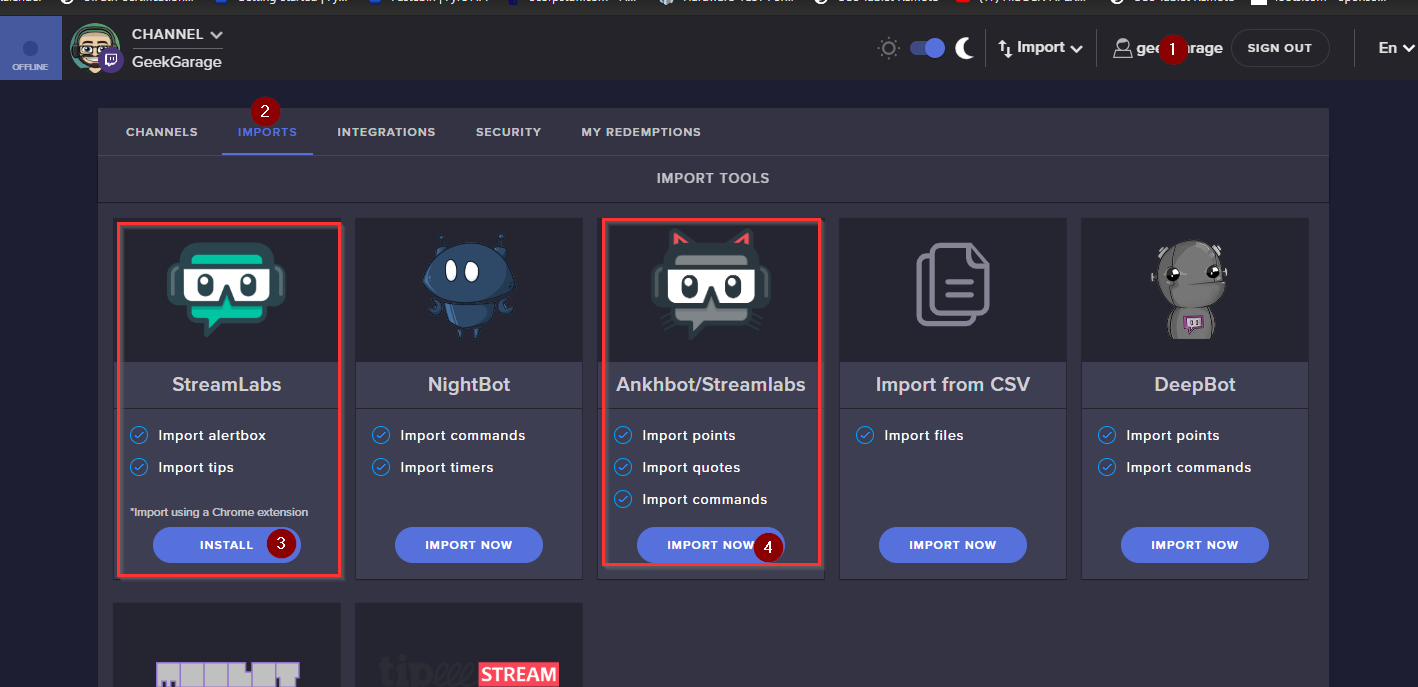
@tribal grove I think it is bad news all around going from SLOBS to OBS Studio. SLOBS is doing their own thing with their fork of OBS Studio and because it is another software due to their features, and not just a lightweight plugin like OBS.Live there is only one way, and that is to rebuild your scenes. Also i cant really see how this would work as SE provide overlays through browser source and SLOBS bake them directly into the scene, so half one scene has to be imported into OBS Studio and the other half into StreamElements MyOverlays.
In SLOBS alerts is a part of the actual scene as a source, here it is a part of the browser source you add to the scene, and one browser source can contain many things like webcam overlay, alerts, countdowns and such and just be one source, where with SLOBS they are all sources in a scene. so for the export and import to work you would have the scene name exported and then imported in OBS Studio, but then OBS studio would have to figure out a way to detect what is SLOBS alerts and such and what can be converted and then add it to a scene through the OBS.Live plugin into My overlays in SE website. It would be a mess and a massive task to code with tons of prerequisite before it would be half way possible and then still you wouldn't be able to fully export and import
@tribal grove https://i.imgur.com/nhAO5Fp.png this is the closest you will get to importing scenes
 tribal grove
wow
yea completely pointless to attempt to transfer then
Streamlabs works perfectly fine
i'd rather be able to modify and edit directly from my Streaming program
rather than edit in the cloud
rugged quail
can you make a overlay to other ppl?
echo tapir
well i'd argue the one time you will have to spend setting up the layouts in the cloud is worth it simply because of the option to use a way more stable OBS Studio over SLOBS, the less resources needed to run the software because alerts and such is web based instead of handled by you PC. The extra resources can then be used on better encoding that will give better viewer experience, i would take that any day over the edit in program. On top, if your PC go down all you need to do is add the browser sources, your audio sources and stingers and you are up and running again. But we are all different and have different priorities so go with what ever works for you and you r viewers 😃
@rugged quail i know Alpha Gaming is doing it but how i don't know as i've never had the need
echo tapir
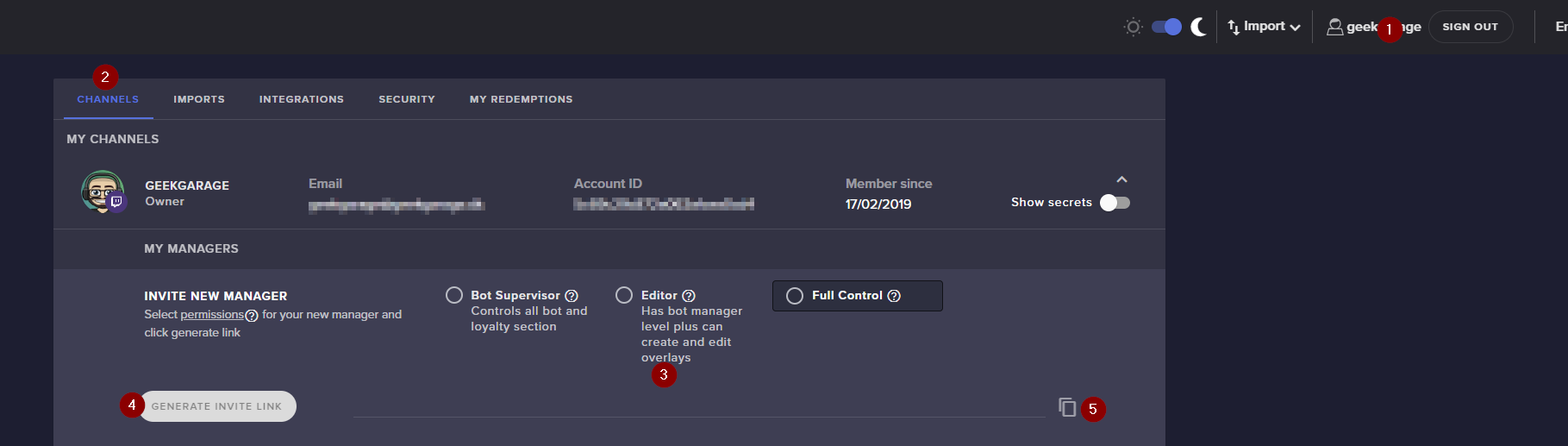
if you want other people to fix you overlays just give them "Editor" Status on your SE control panel @rugged quail https://i.imgur.com/IH9i0rG.png
 rugged quail
ok
echo tapir
I'm off it's 4.30 in the morning here and even tho i have vacation i need sleep 😄
 cerulean copper
Is anyone else having issues with browser sources?
shy mountain
What kind of issues?
cerulean copper
None of them are showing up.
I've tried restarting, relinking, running as admin, checking for updates and they still don't work.
cerulean copper
Yes.
deep birchBOT
@cerulean copper Please provide a log from your last stream. To do this, in OBS go to Help > Log Files > Upload Last Log File and paste the link to the log file here.
cerulean copper
My friend said going back to the previous update worked for him. Is that something I could be walked through?
cerulean copper
No. How do I do that? Sorry.
shy mountain
Go to the default folder of OBS (which is C:\Program Files\obs-studio )
and use the uninstaller there
but our uninstaller
cerulean copper
obs-streamelements-uninstaller?
shy mountain
ye
cerulean copper
That won't remove any sources or anything?
shy mountain
I would reboot
cerulean copper
Got it. Then just run OBS normal? BRB rebooting.
Okay. Rebooted and ran OBS regularly and there are still no browser sources.
shy mountain
I might have to ask the devs. Hopefully someone wakes up soon and actually takes a look
cerulean copper
Would you possibly be able to walk me through going back to a previous update? My friend said it worked for him.
cerulean copper
He said he did the previous update of Streamelements and it fixed his issue.
shy mountain
I don't know how he did it
but once we push a new update
older versions are not available for download.
cerulean copper
Okay thanks.
 spare ocean
How can i link obs activty events to mixer
shy mountain
We don't have Mixer support.
 livid owl
i have a problem with the media request. every time i show on Stream the Audio has an Echo
there live demonstration
deep birchBOT
@livid owl Make sure to ☑ “Shutdown source when not visible” for all browser sources (all OBS scenes). If using studio mode, uncheck “Swap Preview/Output scenes After Transitioning.” Also keep in mind that sound can play from any overlay loaded in the browser (editor or launched). https://i.imgur.com/FegZJQS.png https://i.imgur.com/yY0wcFl.png
livid owl
thanks perfekt you are the Best👌
 untold moon
shy mountain
untold moon
shy mountain
Which text color?
 austere cradle
For some reason the OBS wont let me log into my twitch account at all, ive tried uninstalling it and everything it wot let me log in but if I say continue without logging in it will still go live on twitch just my chat, bot and media sharing is not working.
shy mountain
Click on "Streamelements" on top
does it say "logout" or "login" at the bottom of the menu?
austere cradle
Yes
shy mountain
Clicking on Twitch and then checking the menu again
does it change to logout or stays as login?
austere cradle
Stays at the 3 logins
shy mountain
When you click on "connect with twitch", click on teh above menu again
austere cradle
Even after me loggin
shy mountain
and tell me if the "login" option in the menu
stays as "login" or it changes to "logout"
austere cradle
Says log out now
shy mountain
Do the onboardiang process or skip it
austere cradle
Its stuck on loading screen
shy mountain
Show me what you see
austere cradle
shy mountain
Interesting.
deep birchBOT
@austere cradle Please provide a log from your last stream. To do this, in OBS go to Help > Log Files > Upload Last Log File and paste the link to the log file here.
shy mountain
CONSOLE: Uncaught (in promise) Error: Network Error
i see this in the log
thats after some "error loading main frame url" with the onboarding process link
so this suggests to me that something might be blocking OBS.Live atm
to load its URLs
like a firewall or anti-virus
austere cradle
Worked just fine till last night
austere cradle
Ahh alright.
austere cradle
Thats odd now its working.
shy mountain
 well...i have no explanation
shy mountain
you and me both
but that method I told you for login and then bot and tipping setup
usually helps in this situation
but this is the 2nd report i've seen and 2nd time i've had to use this method
which is odd
since I have your log, I can still ask devs about it
austere cradle
Welp i hope my log helps you guys out.
shy mountain
🤞
austere cradle
Thanks for helping xD
 final reef
How can i rehave the page with chat and others ?
shy mountain
No - you can only be logged in with your twitch or yt account in OBS.Live
final reef
okay
rugged quail
anyone here that can help me with my obslive problem ?
deep birchBOT
@rugged quail Welcome to the helpdesk! Please let us know how we can assist you today and a support volunteer or staff member will assist you as soon as they are available. Thank you for your patience.
 hidden cloak
Can you customize the Sub train icons? These v
dry sphinx
Is that the one from the Alpha Gaming Channel? @hidden cloak
rugged quail
american
dry sphinx
Or was it already in the Overlay Editor.
hidden cloak
Nope, the one thats on stream elements. I guess his one allows for customization right?
rugged quail
can u help me ?
dry sphinx
@rugged quail Waiting
Like the bot said

Can't help you when I have no idea what you need help with 
rugged quail
i can tell u
dry sphinx
Yes it does @hidden cloak !
hidden cloak
Righto! Will use his then, Thanks for the quick help 😊
rugged quail
@deep birch i need help with my chat in obslive i resently change my name on twitch and the OBSlive chat is not responding
dry sphinx
@rugged quail Go to Streamelements.com on your web browser: Part the Bot -> sign out of Streamelements -> Sign back in -> Join the bot back to your channel.
Also on OBS.Studio you may have to as well go click on "Streamelements -> Log out-> sign back in.
rugged quail
@dry sphinx how do i sing out of obs live ?
dry sphinx
dry sphinx
No problem. You too 
 full tide
Hello. Currently stuck setting up new alerts using streamelements. I open up the alert box and go to change the image. Click upload, select files, then select a banner that was made for me. When I press upload to set the image nothing happens. It doesn't upload or set the image
odd kraken
what browser are you using?
full tide
Edge 18
odd kraken
Try it in chrome please.
full tide
it worked. Great. thank you
cunning nova
Hello anyone who can help me? I have 2 questions.
1* Why some of the youtube subscribers not shows in notifications ? I see number growing up, but not notifications showing some of them shows, some of them not shows, thanks
2* When someone give give me subscribe, i hear the sound, but its no sound on stream, how can i fix that? thank you
plain sonnet
-
if the youtube profile is privet then no alert will be given but the count will still go up.
-
can you link a clip of the sound not working. if you can hear it in obs and every other sound is going through then we might have to go deeper in the settings
cunning nova
1* thank you, i thought it will be something with privacy.... do you know where exactly is the privacy for youtube? cause some of my subscribers asked me why it not shows nothing when they subscribe, i will take look but if u know exactly spot, that would be nice 😄
2* i figured out, it was Desktop, i heard that but they didnt, cause u turn of desktop, now its fixed.
speaking of which... of Desktop is there any way how to force it for sounds from obs and streamelemets ? so for example if i will open youtube it will not play anything ? thank you again for help i appreciate that :]
plain sonnet
https://www.youtube.com/account_privacy
untick the subs option
for your second point, do you want to exclude sound from the desktop audio?
eg you play a youtube video but only you hear it, it doesnt go on stream?
 radiant cosmos
IS ObsLive Compatible with Mixer in anyway? hmm..
deep birchBOT
@radiant cosmos no ETA
cunning nova
yes tadpole, thats what im looking for, when i have turn off desktop audio, people cant hear my youtube and also cant hear subscriber sound.... when i turn on dekstop audio, they can hear subscribers sound and also my youtube or something in background, what im looking for is
they will hear only subscriber sound *and others sound, donation etc, but nothing from youtube or my background.... for example music etc. thank you
plain sonnet
so you would need something like voicemeter to exclude audio for programs
deep birchBOT
@cunning nova How to exclude audio sources for a stream or recording: https://obsproject.com/forum/resources/8/
<Voicemeeter Banana guide: https://obsproject.com/forum/resources/397/>
 soft pasture
Does this plugin work with mixer? :)
deep birchBOT
@soft pasture no ETA
soft pasture
Oki :)
 visual galleon
I am trying to set up a scene on OBS from my new gaming laptop and I just get a black screen on the Display Capture. I have tried a few steps in a couple articles but it still does not work. Can you assist
deep birchBOT
@visual galleon For the best OBS support, please join their Official Discord @ discord.gg/obsproject
robust hound
can any obs staff help me?? il live on my test channel trying to fix my audio problem with my video campture device
it only doesnt work on my second scene, it sounds distorted but on my main scene it is perfectly fine
deep birchBOT
@robust hound For the best OBS support, please join their Official Discord @ discord.gg/obsproject
robust hound
ok den
 austere pilot
hi can someone help me?, how do i test widgets on obs.live???
plain sonnet
make a blank overlay if you dont want to edit your main ones, then add widgets in the overlay editor
deep birchBOT
@austere pilot To add your overlays to OBS, add a new browser source in your scene. Paste your overlay URL in the browser source properties, set the dimensions to 1920x1080 (unless you changed them on the website), and ☑ “Shutdown source when not visible” https://youtu.be/KDvLynUqXI4
austere pilot
ive done that but how do i test the widget because it a widget and i wanna test it
plain sonnet
did you add the widget to your overlay and save it?
austere pilot
yes
 brazen plover
I am new to the Streamelements OBS and I am trying to set up Push-to-talk for my mic. I have enabled push-to-talk in Audio settings and defined a key in the Hotkeys. but it doesn't work. Could someone tell me what I may be doing wrong?
plain sonnet
can you screenshot your obs audio settings?
plain sonnet
sorry bud, i meant the hotkey settings : )
brazen plover
 calm spindle
Hello. I'm currently trying to set up OBS elements, and I'm having a bit of an issue. I can emulate a follower on the website, but it's not translating over to the OBS previewer. I've added the proper URL as the browser source in OBS, but when I emulate follower it's just not showing up.
plain sonnet
@brazen plover strange i just set up the same keys as you and mine is fine, as a trouble shooting step, clear the hotkey and ptt, make sure the mic input is set to the correct mic, restart obs and add the hotkey and ptt, make sure both get saved
if this doesnt work you will need o ask in obs discord
deep birchBOT
@brazen plover For the best OBS support, please join their Official Discord @ discord.gg/obsproject
brazen plover
@plain sonnet thank you for the quick response I will try thise steps. Thank you
Its weird it works in the streamlabs OBS but not the Streamelements OBS lol but I wil get it
plain sonnet
@calm spindle in the overlay editor by the bell to test there is a red tick box, make sure its ticked
 shut wagon
hello! can someone help me out with something? how would i go about exporting my obs (settings, alerts, scenes, etc) off one computer and adding it to another. any reply is much appreciated

 coarse violet
Hello everyone. I hope I have a simple question. The only problem I am currently having is that there is a 3 second delay when swapping in between my overlays.
shut wagon
thank you @dry sphinx
dry sphinx
@shut wagon This is what I was told: profile > export
scene collection > export
Will also need to have any local files transferred to their new pc and set the new location of them.
@coarse violet Is that without Studio Mode in use?
coarse violet
I'm not sure what Studio Mode is..
shut wagon
that worked perfectly @dry sphinx thank you for your help
coarse violet
@dry sphinx Yes, it is without Studio Mode in use
dry sphinx
Studio mode is the best. It preloads a preview of the thing you want to transition to so there is no delay.
deep birchBOT
@coarse violet Check out this tutorial for OBS’ studio mode which allows you to preload scenes before transitioning. https://www.youtube.com/watch?v=W8iWsD2Lq3U
coarse violet
Thank you @deep birch
cedar tundra
Ive been having a problem with my games taking too much recourses in my computer not giving any for OBS and streaming.. is there a way I can balance the two?
deep birchBOT
@cedar tundra Please provide a log from your last stream. To do this, in OBS go to Help > Log Files > Upload Last Log File and paste the link to the log file here.
rugged quail
What's wrong with the preview? Why does it say Preview DIsabled?
calm lark
This may be a stretch but I just switched from console to pc with a controller and im having audio issues. The game is playing through my headset and my monitor speakers. How can I just get it in my headset?
 shell echo
Window capture is not working, thinks WoW is OBS. Any tips on how to fix? Thanks
kindred fox
Do you have a display capture enabled that is higher in the source list than wow?
Or are you saying in the specific window drop-down that selecting wow outputs OBS?
shell echo
yes, the specific window drop-down that selects wow.exe is showing obs
kindred fox
Interesting
shell echo
when i use game capture it is lagging
shell echo
no, the only option is full screen windowed or fully windowed
kindred fox
In wow?
shell echo
yes
shell echo
yes
kindred fox
Well shit
Ummm
I have not played wow since.....mid-legion?
Are you using slobs with streamelements or OBS.live?
 woeful iris
i have a control UI the "controls" stuck in top left corner and i cant move or minimize....
and also am i in OBS live when i r"run as admin" OBS studio 64 bit....the "cotrols" UI has linked the stream elements support
kindred fox
Control UI?
woeful iris
uhm docks?
controls scenes sources mixer stats etc
the one labelled "controls (start stream start rec studio mode settings exit stream elements live support)
kindred fox
Oh that thing? Have you tried dragging it?
kindred fox
Umm idk. That’s outside my support level
woeful iris
 merry urchin
is there anyway to bulk add names to be ignored in the loyalty settings?
 tough yew
does obslive got a hardware accelration hotfix yet?
plain sonnet
to turn off?
 merry otter
hey does anybody know who to solve the desktop audio catching on mic
plain sonnet
either your headphones are too loud or your mic is too sensitive, or both.
best to add a noise gate and/or suppressor filter to your mic
 supple isle
hey, i downloaded obs.live and now my obs studio is completely zoomed in on my stream .... cant find any settings that zooms in or out
plain sonnet
@rugged quail in the overlay editor, go to widgets and add twitch chat
@supple isle select the source in obs and press ctrl+f
plain sonnet
did you save it and add the overlay to obs?
 lethal sundial
anyone knows how to fix that? had this problem for few days now
supple isle
so now in obs.live the mini boxes with chat /music... so on are now gone on restart and they wont come back in the overlay
lethal sundial
all i need to know if its fixable 
dry sphinx
Never seen that before
@supple isle You should be able to see these to click on.
Should also show Media Request
 prime narwhal
@lethal sundial I just had the same problem and went to the streamelements tab on the top then went to import from other services and after closing out of that it seemed to fix the chat problem
lethal sundial
@prime narwhal thank u
 royal parcel
Is there a way I can have donations for one stream not go through SE.PAY I am setting up to do a charity stream for the victims of the shooting in Dayton OH my home city.
 neon fern
@royal parcel you can disconnect SEPay on the "Tipping Settings" page on the dashboard
and then after this stream click on connect, on the same page
royal parcel
ty
 whole crane
anybody have any recommendations to optimize game performance while streaming? Using single PC to stream
 strong hemlock
Can someone help me get streamelements bot to join chat ? because for some reason its gone, from one day to the next
 pallid trench
I'm not sure if this is the right channel to ask this in but is it possible for the chatbot to display a command result from a text file? For example if i wanted a deaths command could the bot respond with the results from a text file that i can edit using hotkeys?
hidden cloak
Is mixer supported by Stream elements?
deep birchBOT
@hidden cloak no ETA
hidden cloak
👍
verbal berry
quick OBS question. Is there a way to duplicate a scene but with the ability to change things without it altering the main scene?
I hope that question made sense 😛
plain sonnet
not really, its the same as groups, if you change something it will effect all.
you can use "add exsisting" when adding sources to the new scene
verbal berry
And that won't alter the other existing scene?
Actually wait, nevermind. Silly question
plain sonnet
haha, no worries
verbal berry
😄
 tired falcon
It says I am live on mixer but the screen is blank any I dea how to get my stream to actually show up on mixer?
tulip hamlet
StreamElements does not have Mixer support at this time.
tired falcon
tried using slobs same thing
 soft turret
someone having trouble viewing alerts using OBS.Live?
deep birchBOT
@soft turret You can test Alerts via the bell on the lower right corner of the Overlay Editor. Simply go to your Dashboard -> My Overlays -> Pencil/edit button on the overlay. Make sure the "Show Emulated events on stream" option is on to see the alert in OBS/Xsplit https://streamable.com/h6qgy
 kindred fox
It’s in the editor on the website. That bell icon will open the menu where you can check the box
 cerulean bison
Anyone else use 2 Webcams?
 gloomy raptor
Hey all, been using SLOBs for a while as I stream on mixer so it has the Activity feed built in. Am I missing something on OBS.Live, or is it not implemented yet. I'd love to switch over
kindred fox
Once in a while
Mixer isn’t supported
Yet*
@cerulean bison what’s your question?
cerulean bison
I cant see to get 2 Cams to work at the same time. It wasnt an Issue in SLOBs, but it seems to be a constant issue here.
kindred fox
When you add your webcams, how are you adding them?
Are you just getting blank boxes?
cerulean bison
I was curious if anyone else is able to give me some insite to help be get both to work at the same time.
I get 1 working, and the other blank. I unplug the working one, and I can get the second to work.
kindred fox
Sounds like a USB port issue
Have you tried experimenting with the ports?
I use one in my motherboard and my second is on a usb pci card
cerulean bison
I have one into a HUB connected to a USB-C and the other into a USB 3.2.
Ive tried everything short of Voodoo to get this to work.
kindred fox
Try one in a usb 3.0 port
cerulean bison
I have moved the Cam form multipule ports, tried 2 types of cams, tried an powered Extension HIUB....
kindred fox
It sounds like those ports are on the same bus and are conflicting somehow. That’s about all the insight I have
cerulean bison
Yes. 3.0 and 3.2 ... The issue remains.
 split wyvern
my backup playlist on Media request wont play, have triple checked URL, no luck. Suggestions?
cerulean bison
are you using youtube?
split wyvern
yes
cerulean bison
And are you using the shortend link provided in "Share"?
split wyvern
just newly trying to set it up
cerulean bison
use the FULL long URL
split wyvern
i have
split wyvern
another ?? why cant you copy/paste the url??
cerulean bison
Youtube offers a shortened URL link below the vid for convivence. Copy the full direct link up at the top of the browser and it should work.
tulip hamlet
@split wyvern The link you used isn't a playlist link.
split wyvern
it worked when i first set it up, then I tried to change the playlist and it quit working, it shows it playing, but the video isnt on my stream
tulip hamlet
A playlist link looks like this: https://www.youtube.com/playlist?list=blahblahblahrandomnumbersandlettershere
split wyvern

GET MUSIC NOW AT: SHOP RHEC GEAR at http://www.RHECGEAR.com MUSIC- http://www.ryanupchurchmusic.com FOLLOW UPCHURCH AT: https://www.facebook.com/OfficialRyan...
tulip hamlet
No, like this one: https://www.youtube.com/playlist?list=PLJSY7Qe27IcL1XirFEfTBbE07ceMBVDvf
split wyvern
im not understanding something...the urls look similiar what am i missing
tulip hamlet
They're not.
cerulean bison
https://www.youtube.com/playlist?.... and so on
Enjoy the videos and music you love, upload original content, and share it all with friends, family, and the world on YouTube.
split wyvern
where can i get the playlist URL from then?
tulip hamlet
I literally just gave it to you.
cerulean bison
if you have an account, you can make your own playlist. Go to the video (and any others you like) and add them to the single playlist you made.
and by "an account" i mean a youtube account.
split wyvern
i thought thats what i did
plain sonnet
one is /playlist? the other is /watch
cerulean bison
I think your URL is a direct link to THAT video.
tulip hamlet
Spot the difference:
https://www.youtube.com/watch?v=7JQvGL40LCY&list=PLJSY7Qe27IcL1XirFEfTBbE07ceMBVDvf
https://www.youtube.com/playlist?list=PLJSY7Qe27IcL1XirFEfTBbE07ceMBVDvf
The second one is what you want.
split wyvern
oh, so i have to change it from watch to playlist?
tulip hamlet
Seriously, just take the second link and use it.
tulip hamlet
Copying and pasting works fine.
split wyvern
normally i have no problems with it, but it wont let me do it with the backup playlist. suggestions?
i know its got to be frustrating for you, but when i right click my mouse, like usual, it wont give me the paste option
split wyvern
Got it working! Thank you, for all your help!
verbal berry
I was told that you can reset your follower and sub goals through the widget data in your activity settings. But I can't seem to find it.
tulip hamlet

StreamElements
The Ultimate All in One Platform for Streamers
verbal berry
Ah so you can't do it through the obs client itself, gotcha
 verbal saffron
Hi guys, do you know how I can retrieve in image inside my library in css?
tulip hamlet
{image} will refer to the image you've set in the widget, in the case of alertboxes.
verbal saffron
How should I use it in my css ?
verbal saffron
the image I have is uploaded in my library, and I just want to point to this image through CSS
Ok thanks
 pulsar jasper
Can someone help me with a problem with my OBS? Display capture works fine until I go in game, and then immediately goes to black screen. After that, it will not go off of a black screen, and I have to end the stream and restart everytime. Can anyone help me with this issue?
tulip hamlet
Run OBS as an administrator.
pulsar jasper
I did that already @tulip hamlet Doesn't work
deep birchBOT
@pulsar jasper For the best OBS support, please join their Official Discord @ discord.gg/obsproject
 barren geyser
when i put the media request on my overlay and play songs i can hear it playing twice??
deep birchBOT
@barren geyser Make sure to ☑ “Shutdown source when not visible” for all browser sources (all OBS scenes). If using studio mode, uncheck “Swap Preview/Output scenes After Transitioning.” Also keep in mind that sound can play from any overlay loaded in the browser (editor or launched). https://i.imgur.com/FegZJQS.png https://i.imgur.com/yY0wcFl.png
barren geyser
i think i figured it out its cause my laptop uses too much cpu when acually streaming because when i play music without being live its fine so i think being live is cause it to skip frames when the music is pl;aying
rugged quail
 anyone a master with obs here
rugged quail
need help adding recents in that overlay bar cant seem to find any type of guide
stream elements guides dont really point me in right directoin
tulip hamlet
All information you want to show on stream is added to your overlay in the overlay editor through the widgets menu in the top left.
rugged quail
i see the widgets for latest follower etc i just cant seem to im not sure what the righ twords are get them to fit or even show all the information
tulip hamlet
Not sure what you mean.
tulip hamlet
So adjust the text to the font, color, and size you prefer?
I'm sorry, I'm still not following the issue here.
tulip hamlet
Yes, well, if you arrange it like that, it'll appear like that. Also, you're not adding it at the correct size.
deep birchBOT
@rugged quail To add your overlays to OBS, add a new browser source in your scene. Paste your overlay URL in the browser source properties, set the dimensions to 1920x1080 (unless you changed them on the website), and ☑ “Shutdown source when not visible” https://youtu.be/KDvLynUqXI4
 void yew
Hi, apologies if this has been addressed already, but I am setting up my overlays to start streaming soon and I can no longer access Spotify integration via the Now Playing widget from your site. It was functioning previously but is now not listed as an option. Am I doing something wrong or was this functionality removed?
deep birchBOT
@void yew Spotify has kindly asked us to disable our integration with them, so we complied. This means that the Spotify integration has been removed and the "Now Playing" widget no longer has it as an option.
rugged quail
also how do i get rid of the auto clipping when im trying to move soemthing
tulip hamlet
Auto clipping?
rugged quail
er like when your trying to move one of the overlays on obs it auto fits
or auto goes to the edge when its close to it
tulip hamlet
If you're referring to our overlay editor, there's a grid icon in the top right.
tulip hamlet
You can just press Ctrl+F to fit it to the canvas.
 hallow pumice
Need help with an issue i am having on stream elements obs live. Its not picking any of my ''video capture device" audio. I dont have a mic yet but my headset is connected to my ps4 controller. I had the whole thing working before but now its not picking up my game and chat audio in obs. Help please!
deep birchBOT
@hallow pumice For the best OBS support, please join their Official Discord @ discord.gg/obsproject
 proven pelican
I've connected StreamElements bot to my own bot's Twitch account and all of my commands aren't working. When I disconnect and use the StreamElements account, my commands work again
The reason I'm trying to use my bot's Twitch account is because it has a permanent sub in my channel, and the StreamElements account doesnt
tulip hamlet
Can you screenshot your custom bot settings?
proven pelican
@tulip hamlet
It wasn't working in my stream and started working when I switched back to the StreamElements account. It's working now, but the commands are very delayed
Also, is there a way to link widgets between scenes? For example, I change the tip goal in one scene and have it change in the other scenes that use the tip goal widget?
tulip hamlet
No, widgets are completely independent and won't change the settings of widgets in other overlays. You can, however, copy widgets from one overlay to another with their settings intact.
 mortal swallow
hey I cant get my game to show in OBS
deep birchBOT
@mortal swallow For the best OBS support, please join their Official Discord @ discord.gg/obsproject
barren geyser
how can i turn the music down on the stream?
shy mountain
@barren geyser If you are referring to the MR sound level - there is a level option to lower it.
 onyx quail
@tulip hamlet what will it take for Stream elements to support Mixer? I'd much prefer to use your platform.
barren geyser
there isnt a way to turn it down more than that its still loud
shy mountain
There is a way. Close OBS, go to Youtube, open a video, lower the volume there, close youtube, open OBS.
Other way is to lower the volume of OBS in the windows mixer.
@onyx quail Our goal is to be everywhere our community is so we are regularly in discussions with other platforms. Although we can't comment on our roadmap, your feedback is appreciated.
onyx quail
@shy mountain thanks for the response. Would love to see SE work for mixer.
proven pelican
Does OBS.Live have to be open for StreamElements bot to use my bot's twitch account?
shy mountain
Yes
 eager tartan
Help someone. My problem is that I don't stream or record videos. Just run the obs and in the screen preview I watch the friezes
deep birchBOT
@eager tartan For the best OBS support, please join their Official Discord @ discord.gg/obsproject
eager tartan
They dont help me
 tight sand
how do you add alerts?
shy mountain
@tight sand Do you have an overlay with the alert widget?
tight sand
i want to use my own overlay
shy mountain

StreamElements Overlays are loaded from a single browser source in your streaming software, making streaming easy. https://streamelements.com/ StreamElements...
@eager tartan Either we need more info about what is 'freezing' in the preview, or you need to give me a log file to see your PC specs
tight sand
so i add my overlay as an image?
shy mountain
Did you watch the video guide?
deep birchBOT
@tight sand The default resolution for StreamElements overlays (theme and custom) is 1920x1080. Please add them in OBS at their full resolution and use CTRL+F to fit to screen if necessary. You can then downscale your stream in OBS settings > Video if you'd like https://i.imgur.com/6bWXxjR.png



 tight sand
i'm so confused
shy mountain
Did you make an overlay?
tight sand
you mean in my overlays?
shy mountain
yes
tight sand
ya
shy mountain
Then you want to add the overlay to OBS right?
tight sand
i want to add recent followers and recent donation so i need to put my overlay as it has boxes for them
shy mountain
Did you add those to the overlay after watching the video guide?
tight sand
u put them in the overlay editor
shy mountain
So is that a yes?
deep birchBOT
To add your overlays to OBS, add a new browser source in your scene. Paste your overlay URL in the browser source properties, set the dimensions to 1920x1080 (unless you changed them on the website), and ☑ “Shutdown source when not visible” https://youtu.be/KDvLynUqXI4
tight sand
k then thanks
shy mountain
Lower it
and looking at your PC specs
I don't know why its freezing
also you don't have our plugin installed, so can't really help you much.
I would suggest to ask again later in the OBS discord
eager tartan
KeiZar which plugin needed?
shy mountain
No plugin is needed.
I'm trying to tell you - we can't help you, because we don't know what can cause freezing in the OBS preview
 restive frigate
For some reason I cant get gamecapture to show my gmae that I am playing
shy mountain
What game is it?
restive frigate
Escape From Tarkov
Have tried fullscreen and windowed but for some reason it wont show up
shy mountain
run OBS as admin
restive frigate
n/m I had Studio running still and didnt see it lol sorry
 sullen steeple
Hello my name is chris and i ran into an issue: For some reason, the song request play twice. I have been trying to figure out why its doing that but i have yet to find the reason T_T
deep birchBOT
@sullen steeple Make sure to ☑ “Shutdown source when not visible” for all browser sources (all OBS scenes). If using studio mode, uncheck “Swap Preview/Output scenes After Transitioning.” Also keep in mind that sound can play from any overlay loaded in the browser (editor or launched). https://i.imgur.com/FegZJQS.png https://i.imgur.com/yY0wcFl.png
sullen steeple
I have tried this and it seems to still play the song twice.
shy mountain
In all scenes and browser sources?
sullen steeple
yes sadly
shy mountain
So you hear it double, when ever you click "show on stream"?
sullen steeple
This is correct
shy mountain
Then you have a browser source that doesn't have that option
OR you have the editor open as well
OR you have an overlay open in a tab in your browser
sullen steeple
Ahh ok i see, so i have to check that option for all scenes with that overlay?
shy mountain
Yes, hence why i asked "in all scenes and browser sources" 😃
shy mountain
👍
 vital scroll
Currently having an issue with my obs that when I’m streaming my kbs will drop from 4000 to 0 and disconnect my stream but I’m still in my game and in discord with no issues
deep birchBOT
@vital scroll Please provide a log from your last stream. To do this, in OBS go to Help > Log Files > Upload Last Log File and paste the link to the log file here.
deep birchBOT
@rugged quail no ETA
rugged quail
PLEASE.... NOW!!!!!!!!!!!!!!!!!!!!!!!!!!!!! jeeze, streamlabs is giving me a damn headache, well.. know that there is a lot of people who wants it and with a lot of people moving to Mixer, it's more relevant than ever.. well, here's to hoping
shy mountain
This thing can't happen over night, unfortunately. We appreciate the feedback and the desire to have an integration, but we can't give an ETA on when its going to come out.
Please understand that.
rugged quail
I know, but I see people have been asking this for years.
 amber blaze
hello? someone to help me pls
deep birchBOT
@amber blaze Welcome to the helpdesk! Please let us know how we can assist you today and a support volunteer or staff member will assist you as soon as they are available. Thank you for your patience.
rugged quail
having an issue with trying to capture feed from my elgato HD 60 S to streamelements. I have everything setup correctly, but when I add the Video Capture source the elgato say "wait a moment" and never shows the xbox. I have troubleshooted and when I use another OBS it works flawlessly. I want to you use SE and not other platforms.. someone help please @deep birch
odd kraken
^sent to OBS support discord in #helpdesk-twitch
pallid trench
Hi, I sent this yesterday but never received a response. "I'm not sure if this is the right channel to ask this in but is it possible for the chatbot to display a command result from a text file? For example if i wanted a deaths command could the bot respond with the results from a text file that i can edit using hotkeys?" If this isn't the right channel for this can someone point me in the right direction.
 midnight radish
how do i change the chat and activity feed to show my facebook stats instead of twitch , i no longer stream from twitch
pallid trench
ok great, thank you @sinful flint
 real oyster
@rugged quail Mixer isn't widely used especially on PC which is probably why support for it isn't at the top of the list.
dry sphinx
@midnight radish You should be able to see on top of OBS to click 'Streamelements -> log out-> sign in with Facebook.
real oyster
@pallid trench If you're using the streamelements bot it already has that feature built in without needing a text file 😃
 brazen charm
hey guys i dont know where exactly to ask this but how do i use custom fonts through your web stream editor, i cant quite figure out to use some fonts on my Mac?
kindred fox
Where are you trying to use the fonts?