#helpdesk-selive
1 messages · Page 51 of 1
 deep birchBOT
 real oyster
@shy mountain 5:27 mark of this vod: https://www.twitch.tv/videos/458474246

ill take a screen cap of my obs for reference
 shy mountain
Im here and looking at the channel, no need to ping every time 
real oyster
oh sorry
actually it starts at the 5:10 mark until about 5:27 you can see its not rotating properly
shy mountain
The log file doesn't have anything that would indicate the widget would stop.
but you might have to recheck Coci's widget duration
as in, in the settings for the widget on the left.
real oyster
prior to going live it cycles indefinitely without issue, both only stop functioning properly when i go live
i tried to check everything before asking for help
shy mountain
I notice one thing - at 5:26 you basically turn on another overlay.
This suggests that you switched overlays.
real oyster
yes i have an older overlay that i hide
only two pieces also setup in the overlay thing online, i had the same issue with the widgets last night and wanted to be prepared so i wasnt left with nothing during stream
 crimson basalt
My host and raid notifications arent working but all my others are, has this happened before?
deep birchBOT
@crimson basalt Due to changes to Twitch API, we have filtered out hosts and will only show these ones on your activity feed:
- All manual host events (0 hosts included and if filter set to 0)
- All hosts coming from an online channel. If the hosting channel has been offline, we do not show it
- All auto host events with at least 1 viewer
Note: An offline host is when you see "X channel has just hosted you" - with no viewer numbers on the back
crimson basalt
so the notifications wont show up on the stream?
shy mountain
Ok I looked again at the VOD and I saw what the actual issue with the rotation widget was. @real oyster
It was basically also showing the YT thing bellow the twitter
in stead of cycling through them
real oyster
Yeah i noticed that too\
shy mountain
@crimson basalt They won't show if they don't meet the things mentioned above.
Is the rotator on its own overlay?
deep birchBOT
Right click on the BrowserSource > Properties > Scroll down a bit > Refresh Cache of current page
real oyster
for both?
oops doing now
did for both
no way of knowing if it helped until i go live, been sitting in the preview offline and they rotate fine
crimson basalt
even when they met the requirements they still didnt show though
shy mountain
this is something i've never heard of before but this is the only thing that comes to mind tbh
@crimson basalt How are you sure they do meet the requirements?
crimson basalt
ive been hosted by someone who was just streaming with 10-20 viewers and i still didnt get a notification
or rather raided
shy mountain
Did it show up as "X person just hosted you" in the twitch chat
or did it show up as "X person just hosted you with 10-20 viewers"?
crimson basalt
i get the notification in twitch chat that i get hosted/raided by x person yes
crimson basalt
its been a bit, but the last host i had just had x person just hosted you without viewer numbers.
shy mountain
crimson basalt
but what about when i got raided with 10-20 viewers and it didnt show up ether
shy mountain
If you see a host with viewers in the message in ttwitch chat, and it doesn't show up in our activity feed, screenshot it and show it next time.
crimson basalt
no wokkas
shy mountain
One thing you can try is logging out of our dashboard and logging back in
but its best seeing the twitch system message of the raid/host with numbers and seeing it missing from the activity feed.
crimson basalt
no problem ill give it a go. just out of curiosity why did you make it so it wont show with 0 viewers?
shy mountain
When Twitch changed their API for host events some months ago
people started getting blasted with autohosts and 0 viewer hosts
before you had to have our dashboard open to get the host event.
but we missed most of the 0 viewer hosts
after the change, it as like spam.
so we had to adjust minimums
as for some other points like offline and online hosting - thats still a twitch change.
we literally don't see the offline host event
crimson basalt
is there any plans to make them option at least? for smaller channels like mine i personally would prefer to have the notification for the people who host with not viewers. as a sort of appreciation more or less
shy mountain
if you notice it in your twitch chat, say thank you.
but at the current moment I don't think so.
I will toss it as a suggestion, but can't guarantee anything
crimson basalt
no wokkas, thanks for your time 😃
real oyster
i tried a test stream and all seemed fine but ill stream tomorrow so if it happens again ill post again
shy mountain
👍
 orchid mortar
@shy mountain i've tried turning off and on requests and song request command still doesn;t work
shy mountain
Sure
 runic falcon
hi am not able to login through my FB it is syaing that no gaming page error plz any body help me
 solar crown
Afternoon, quick question. When moving the chat window on obs.live onto my 3rd monitor, is there a way to make that specific window full screen without making the entire app full screen as it only goes full screen on my 2nd monitor and not the chat box
or is there any other suggestions out there for possibly another application to run on a 3rd monitor instead
shy mountain
Im not sure how you're making the chat dock full screen to begic with 
best option is, if you want to have a full screen chat is to use the twitch popout function on the chat.
solar crown
i undocked the chat window on obs.live, dragged it into another window and just edited the size, but would like it true full screen
guess id just need to use a browser popout
and theres also no way to undock the preview window is there
solar crown
okay thanks
 slow kestrel
Is there a way to keep an animation that has ended it cycles like I would be able to in slobs? for ex: my timer ranges from 10 mins to 0, after zero it says "GO!" and sometimes im like 30 seconds late because im making tea, on slobs its fine, here the text disappears. Pardon if im confusing, english isnt my first langauge hehe.
shy mountain
Im not understanding this animation thing. Is it a video that you load via a video source?
slow kestrel
Yeah
deep birchBOT
@slow kestrel For the best OBS support, please join their Official Discord @ discord.gg/obsproject
slow kestrel
:O?
shy mountain
OBS.Live is just a plugin for OBS STudio
and what you are asking about thats more inline with the normal OBS Studio features.
slow kestrel
Im using the streamelements site to build it, I understand though
Still grasping my head around it, ill make it work thanks 😃
shy mountain
There is a difference between using our editor to add the video as an asset there and the video source in OBS Studio
If you want to show something every 10 minutes, we have an asset rotator widget in the overlay editor widget list.
slow kestrel
I gotchu. Thankies.
 pallid shadow
hi have installed streamelements obs today. now i want to know if theres anyway to edit the overlay for 1280x720p resolution. in browser source as per instruction i add 1920x1080 to properly fit the overlay. but i didnt find any option in overlay editor to save it in different resoultion as a result high res overlay looks so tiny in stream and not easy to understand the words.
shy mountain
is your native resolution 720p?
shy mountain
Right, so its best for the overlay and obs canvas to match your native.
in My Overlays click this and then you can set a custom resolution
as I don't think yours is a default resolution
shy mountain
but do note that if you are using a themed overlay - you may need to readjust the widgets insdide
before changing the resolution
shy mountain
ok lets go with elements
pallid shadow
well thats a drag. can select all the widgets together than narrow it by dragging it down like photoshop image resizing?
shy mountain
multi-select is not supported in the editor.
pallid shadow
alright. one more thing. if i stream to facebook page will it show my likes/follows/shares notification as alerts like streamlabs without any extra integration?
shy mountain
We do have some issues with overla alerts from Facebook, as we don't receive all of them
only likes and follows on the page
and some shares
because of privacy settings
pallid shadow
okay i know it will be updated in the future just a suggestion. please do consider to make the resoultion and widget thing responsive like changing the resolution would also adjust the widgets position automatically.
deep birchBOT
@pallid shadow Check out the StreamElements ideas board: https://strms.net/ideas. You'll be able to add ideas, upvote ideas you agree with, and track their progress with email notifications. Adding and upvoting ideas also helps the staff know which ideas should be prioritized so please take some time to upvote.
slow kestrel
Is there anyway to add custom css to the "latest follower" on streamelements? Tryna make it auto size the name yet cant find the css like I would with my chat box
shy mountain
You can make a custom widget and use he reference material from here: https://github.com/StreamElements/widgets/blob/master/CustomCode.md

GitHub
Contribute to StreamElements/widgets development by creating an account on GitHub.
to get the latest follower
and then apply your custom css
slow kestrel
Dankye
is there anyway to manually input my latest donater? Its showing the first donater instead of the latest 😛 for "Latest tipper"
shy mountain
slow kestrel
Thank you again 😃 Sorry for the plebby questions
 proven pelican
I'm having a hard time getting my Stream Deck to recognize OBS.Live.. It keeps saying The Elgato Remote Control plugin is missing. Please reinstall Stream Deck, then try again.
I've reinstalled both Stream Deck, OBS Studio and OBS.Live multiple times, even going as far as deleting all the folders in %AppData%....
Stream Deck WAS working with OBS Studio before the OBS.Live installation
 odd kraken
It is the same as in the native twitch chat at the top right in the chat dock.
 fierce flicker
is anyone able to help me with an audio problem?
deep birchBOT
@fierce flicker Welcome to the helpdesk! Please let us know how we can assist you today and a support volunteer or staff member will assist you as soon as they are available. Thank you for your patience.
fierce flicker
I have just installed stream elements and i when i have the program open i can hear all the audio that my mic picks up through my headset, when i close stream elements it stops
 dry sphinx
@fierce flicker You have Monitor & Output on I believe.
Click the cog for your Mic -> Click Audio Properties
Check if your Mic shows Monitor and Output on & turn it off.
fierce flicker
ahh, ok, the setting on my cam had output desktop audio but when i change it too capture audio only then the problem is fixed, thank you
 heavy flare
When I open my obs, on a 19" monitor it's all fine, but when I open it on a smaller monitor (around 18.5") this happens! Any help?
The widgets within the obs get onto each other
It used to be normal, but after the recent update, this started happening
 scarlet pond
Is there any way to turn off media request in OBSLive but have it running on a browser? I don't want my tracks blending but they are when media requests are playing.
 lavish tide
hi. can i somehow make chat and notifications overlays over game for me?( one monitor)
odd kraken
@lavish tide Not possible with the tools StreamElements provide at this time. But there is a tool you can set up in OBS Studio: https://github.com/baffler/Transparent-Twitch-Chat-Overlay
@scarlet pond For me when I close the MediaRequest dock in OBS.Live there is a message if I want to control the MR from the website. I select USE HERE in the browser and everything is fine, as I can control i tthrought the browser without issues.
@heavy flare Can you try to close the activity feed dock and reopen it and try to set it at the same position it was? Is it still getting over each other? Is the dock doocked in, or popped out?
 west dagger
Hey so I'm trying to add a browser link into obs for my overlay but for some reason when I add the link obs is only showing the top left corner of the overlay whats going on?
deep birchBOT
@west dagger To add your overlays to OBS, add a new browser source in your scene. Paste your overlay URL in the browser source properties, set the dimensions to 1920x1080 (unless you changed them on the website), and ☑ “Shutdown source when not visible” https://youtu.be/KDvLynUqXI4
scarlet pond
@odd kraken It seems despite doing that, it's playing to my desktop rather the drivers I'm telling it to and seems to still be playing through obs. It's quite odd.
 echo tapir
help, i've been trying for a really long time now (a few weeks) to get my custom bot to login BUT without success. I've had it login before many times, but 2, or so, weeks ago it stopped working.
I've tried the following on my encoder PC
-
Login using username, password and 2FA = No Dice, it seems like it is logging in but the dropdown that normally chages to the account name does no change.
-
I then uninstalled OBS Studio and OBS.live and installed latest of both = same as the first
-
Headed over to twitch under account settings cleared all connections to 3. party apps as i could see SE approval multiple time in the list. So i removed every single item on that list = When trying to login it is the same result as the first.
Then i installed OBS.Live on my main PC, same exact issue as on my encoder PC. Logging onto my main account, then I tried to add my bot account and it seems like it is logging in but nothing has change, not after a reboot either.
This sounds like i can't login to my secondary account like twitch has blocked it, except that, i can logon to twitch with main and bot account, I'm even using OAUTH from both on some smaal IRC bots I've build.
Please help as it is driving me insane that i cant use my own bot name
 sinful flint
I'll DM you with a potential workaround
odd kraken
@scarlet pond Do you use any form of tool to route your audio? Cause I can only test it without any audio routing elements and it seems to work when I close the OBS MR widget, confirm that I want to control the MR via the website on the website and then there seems to be no echo or the sound.
heavy flare
@odd kraken Thanks it worked although i need to do it everytime
echo tapir
Legendary/Sean helped me fix it. Thx ❤
 exotic yacht
hello, i have a black screen when im streaming, can you help
odd kraken
Have you added sources to the scene you are broadcasting? If yes, what sources?
deep birchBOT
@exotic yacht Please provide a log from your last stream. To do this, in OBS go to Help > Log Files > Upload Last Log File and paste the link to the log file here.
odd kraken
Try to start OBS as admin and make sure you are tabbed into the fullscreen game.
What game are you trying to capture?
odd kraken
Have you tried to start OBS as admin and made sure you are tabbed into the fullscreen game?
exotic yacht
Benno, you are a legend, working now
lavish tide
Guys, there is a way to go on youtube page of requested video?(from media request control panel?)
odd kraken
On the website there is a YT symbol button where you are directed to the video on YT.
lavish tide
@odd kraken sorry for bad explanation, can i some where in this Media-request window open link to youtube page for song which already playing? (for add it to my playlist for example)
 rugged quail
someone know how can i display frankerfez emote on streamelement chat overlay ?
west dagger
Hey when I transition to different scenes it takes like ten seconds for my browser source to load in is there a reason for that?
 plain sonnet
yes, your pc is loading the assets. either use studio mode to pre load it or have a transition to hide the loading
west dagger
Ok I will see what I can do with the transitions
 noble wedge
so i have been having black borders issues and i changed it to 16 by 9 and it took of the black borders i want to know if this will cause performance issues if i dont have a 16 by 9 monitor
sinful flint
Having it at 16 by 9 won't cause performance issues
 flat frost
Ok so i downloaded the obs software, but how do i put my overlays onto it?
sinful flint
!add
deep birchBOT
To add your overlays to OBS, add a new browser source in your scene. Paste your overlay URL in the browser source properties, set the dimensions to 1920x1080 (unless you changed them on the website), and ☑ “Shutdown source when not visible” https://youtu.be/KDvLynUqXI4
flat frost
ok and while i am here, if i wanted to change latest cheer to latest follower whats the thing for that? is it just {name} - {follower}
 blazing tapir
hey
ummm
im stremaing right now and i moved the media request tab and now its gone but i can still hear it any chance for help?
flat frost
if you can still hear it its still open somewhere i think, try going through the open windows and then if you can find it drag it back into obs?
blazing tapir
its not on the open windows.... and i tried canceling and re adding it through streamelemnts tab on the top left
flat frost
have you tried the streamelements at the top in obs and then unchecking and checking?
flat frost
lol these things happen though 😉
but does anyone know, if i want to change an aspct of the social bars from latest cheer to latest follower, do i just put {name} - {follower} as the thing instead of {name} - {amount} ?
 long flare
Hello I have problems coding OBS LIve
For some games, working around Android shows problems when I'm overclocking live coding errors.
dry sphinx
Send a screenshot here what you're seeing for OBS.Live @ivory raven
 ivory raven
ok i am here
 gaunt citrus
@ivory raven Is this 'chat' item ticked?
ivory raven
thats another thing i dont know about
gaunt citrus
Or are you onto a different issue?
ivory raven
the live is much harder than the reular obs
plain sonnet
it is regular obs 😁
dry sphinx

plain sonnet
.live is just a plugin
ivory raven
ok when i installed the plugin yesterday. I had prblems . I reinstalled today but no chat is on the obd now
plain sonnet
so did you try the 2 options i gave you in general??
ivory raven
yes the was no option for it that i could find
plain sonnet
in stremelements AND in view?
if so then log out of obs settings > stream then log back in
gaunt citrus
@ivory raven Do you have the menu item shown in my screen snip? The StreamElements one after Help.
ivory raven
ok that brought it up
gaunt citrus
Yay!
ivory raven
I will be asking a lot of questions very different from what i use in the past to a slight degree
plain sonnet
then please keep it to 1 channel
ivory raven
in here is ok?
plain sonnet
yes
noble wedge
so i had have borders and i fixed it by putting 16 by 9 i dont have a 16 by 9 monitor i dont know if that will cause issues and when i stream its pixelated
well it looks like bad bitrate but i already raise it
 eternal locust
I've been trying to go live on Twitch through OBS but I can never get the settings right for a smooth broadcast that doesn't lag. This is more than just lag though bc my video won't even play and is just frozen
I've tried different FPS settings and adjusting the encoding settings but still haven't had any luck.
noble wedge
what is ur cpu and gpu
eternal locust
I'm trying to figure that out. I have an HP laptop
noble wedge
what are you trying to play
eternal locust
Fortnite but it's being streamed from my Xbox to my computer with the Xbox app so I can just play it on my Xbox while OBS runs on my laptop
noble wedge
its suppose to be the other way around
 mystic hull
Posted yesterday: I use Voice Meeter for as my audio mixer, is there a way to make it so fun have Media Request player play the audio through that on a separate channel as at the moment I am being deafened by media request just making it so my music is heard in stream?
eternal locust
well I could try just try playing the PC version but that's if my it actually runs good on my computer
I have even tried just streaming my webcam without any games playing
 untold hinge
Question for the more experienced people here: I just installed obs.live and after checking the logs, I consistently have 26 memory leaks at the end of the stream. Removing obs.live I have 0. Is this a known issue or no issue at all?
eternal locust
I can stream perfectly through the Twitch app on my Xbox with a webcam hooked up but I want to be able to use OBS properly to have those cool overlays and borders around my webcam
noble wedge
you would need a capture card which are like 100 bucks and higher
 lilac dome
is there a way i can get media request and my game volume to not play on one audio source (desktop audio)? I am trying to having music play for a startup screen without having the game volume playing over it.
 frozen kestrel
Hi I can't seem to get game capture for UNO to work. All I am getting is a black screen.
 cursive cairn
So I posted this in the wrong channel and I was hoping it would fare a bit better here, I guess I have something set on the BOT where it repeat 15 times hopefully it's something that I can easily fix but I can't see to figure out the cause
 manic cape
Hey! I'm having a big issue and have no idea what's going on or how to fix, basically my stream keeps stuttering??? (not sure what to call it, we just coined it stutter)
Here's a clip of it > https://clips.twitch.tv/AthleticShinyKumquatPRChase
settings are all chill, nothing has changed (that i'm aware of) it just randomly started doing it about a week ago and it hasn't stopped 😫 no idea what causes it either, seems completely random
 bleak plume
hi , i'm switching from SLOBS to SE but i'm facing hard time to import my stuff from slobs to SE i tried to import it within SE import and it's says : Successfully imported from StreamLabs. but nothing shows for me .
is there anybody to help?
odd kraken
The overlays are imported to your overlay section on the StreamElements webpage https://streamelements.com/dashboard/overlays. From there you can add them to your OBS.
deep birchBOT
@manic cape Please provide a log from your last stream. To do this, in OBS go to Help > Log Files > Upload Last Log File and paste the link to the log file here.
@frozen kestrel For the best OBS support, please join their Official Discord @ discord.gg/obsproject
odd kraken
@lavish tide Afaik there is no way to go to youtube from the OBS.Live MediaRequest directly.
 shadow bloom
Hello can any one help me with stream elements on a Mac computer if you can please text me back
bleak plume
@calm bronze are you available ?
 calm bronze
yep, whats up
bleak plume
i need a little help with Overlay Editor if you can
calm bronze
I'm actually not in charge of that. Can you help here @neon fern?
 junior mirage
I had no audio alerts heard on stream but they were heard through my headset (I haven't encountered this before). I saw my OBS log show I dont have certain audio codecs? are there additional ones I need or something in my settings to tweak? also if I need to clear my cache, which folder would it be in? here's my last log - sorry it's long, was messing with settings before the stream started https://obsproject.com/logs/g2dZtRclCD7ns598 - also any tips on CPU reduction would greatly help. thanks
 lofty tinsel
Can someone give me the height and width sizes for media request? I got the HTTP address here ( https://streamelements.com/overlay/5d3d217160f634815836cfb7/BM7MDbT7wvA4ifxYZRM46z3EGU8LvUx0lKV9xyoYF6hxT2MP ) but forgot to note down the sizes. It seems a little buggy for me in that when I try and restart OBS live from scratch by removing all files in my roaming OBS-Studio folder, it still remembered the song I put into the URL so assumed I did not need to add the widget as I have already done so. Be better to actually add the add widget option into settings

StreamElements
The Ultimate All in One Platform for Streamers
plain sonnet
@rugged quail state your issue, dont just spam every channel..
@bleak plume please say what you need help with, and its always best to take a screen shot and not a monitor selfie
@lofty tinsel the widget can be any size you want. the overlay itself should (by default) be 1920x1080 (on the editor and in obs) unless you changed it
@junior mirage from what i can see from your log you might have monitoring only set.
in settings > audio make sure "desktop" and " mic/aux audio" are set to the correct devices you use.
right click in your audio mixer and select "advanced audio properties" and make sure both devices are set to "monitor off"
blazing tapir
hey guys
im trying to activate vote skip but it seems like its unable to be activated for some reason
odd kraken
You need to set up vote skipping here: https://streamelements.com/dashboard/mediarequest/settings
odd kraken
Yes should be activated.
blazing tapir
its not...
deep birchBOT
@blazing tapir Please connect your streaming account (Twitch, YouTube, or Facebook) with Discord by going to ⚙ Settings and then Connections here in Discord. https://streamable.com/eg92w
 odd kraken
What are you trying to do exactly? What are you typing in chat? Any error response?
blazing tapir
its jsut doens do anything
only moods do !skip and it imeediatly skips
so?
any idea
plain sonnet
nani??
odd kraken
Cause you have to set it up in the link I provided earlier and not at the default commands page. So when you enable the vote skipping in the SR settings, it is enabled, when you disable it there, the command is disabled.
blazing tapir
ok thank you
manic cape
Sorry it took me so long to respond, I went to bed, here is log file as requested see previous messages
any help is massively appreiciatted btw, a streamer friend told me to downscale the output res to 810 and see if its still there. haven't streamed since but i'll see how that goes.
odd kraken
manic cape
thank you @odd kraken
dry sphinx
@digital belfry This would be for OBS.Live related questions.
You can try clicking on the top of OBS to click Streamelements -> Log out
As it should give you the option to sign in with Twitch.
 digital belfry
sorry, thank you so much @dry sphinx
dry sphinx
No worries! 
 cloud niche
Hi! I'm having a bit of an issue with the Media Request feature for GroundControl. While using OBS Studio, sometimes the volume will just randomly adjust mid-song. Not sure how to fix it!
odd kraken
Do you use OBS.Live?
cloud niche
Oh oops, no I don't.  Thought this was for OBS in general, sorry!
I just use GroundControl and play the requests through there.
 rancid wren
Hi, I used to use streamlabs obs and wanted to switch to obs live, but I don't want to pass my scenes by hand. Is there any way to get my overlays and scenes easier?
odd kraken
There is an importer for your overlays and alert boxes in OBS.Live.
@cloud niche I recommend using OBS.Live to control the MediaRequest.
cloud niche
I'll give it a try, thank you!
 summer mantle
when i was using just obs it was fine now im using obs.live my game lags soon as i close obs.live game is fantastic and bk being to super responsive but was able to stream just fine before on obs studio?
deep birchBOT
@summer mantle Please provide a log from your last stream. To do this, in OBS go to Help > Log Files > Upload Last Log File and paste the link to the log file here.
summer mantle
 silent geyser
hello i some how like zoomed the view on obs and can not figure out how to get it zoom out and show everything properly
odd kraken
You are referring to the preview?
silent geyser
yes i havnt started my steam to see if it shows the same way
odd kraken
Can you share a screenshot please?
odd kraken
Select the overlay source and hit crtl+F
silent geyser
perfect thank you
this is why i switched to get a simple awnser like this would of took atleast a hour anywhere else
 thin nacelle
How can i reset Donation Goal?
 tulip hamlet
@thin nacelle Don't forget you have the #dreamteam for support. @odd kraken has given you an answer there. 
noble wedge
Right now I’m using a 16 by 9 resolution and I have a 16 by 10 monitor the reason I’m using 16 by 9 as base is because I’m having black borders when I have the base at 16 by 10 even though this was never a issue I stretched it and everything and I don’t know if 16 by 9 will cause issues and when I played fortnite at 16 by 9 I didn’t have borders but it didn’t look good I tested bitrate too
odd kraken
Best to make the game and overlay match your monitor resolution and make the monitor resolution your canvas resolution.
rancid wren
Hello, I would like to know why I would present this error when I try to import streamlabs obs overlays into obs live?
odd kraken
Are the assets in SLOBS yours or pre-defined from SLOBS? Also we can't import assets bigger then 10 MB.
plain sonnet
@noble wedge
noble wedge
I know my aspect ratio is not 16 by 9 I would have taken that advice but this is the first time it’s ever happened it was full before why is it not now
 burnt burrow
should my obs live be running a lot of memory? it is causing frame drops in game can you help someone please?
deep birchBOT
@burnt burrow Please provide a log from your last stream. To do this, in OBS go to Help > Log Files > Upload Last Log File and paste the link to the log file here.
burnt burrow
junior mirage
@plain sonnet ahh good find! That makes sense and right in front of my nose. Thank you! Was there anything else in the logs that looked like CPU usage was high or encoder settings could be 'improved'
plain sonnet
@junior mirage from the log you provided i would say try the following:
turn off browser accel in settings.
you have a window capture (i think you are just using your pc a stream pc? (if not then use a game capture as this is the best performance wise).
turn off psycho_visual tuning in encoder settings
also, here is a report based on the log, have a look through the how-to links inside
https://h4ndy.eu/obslog?url=https%3A%2F%2Fobsproject.com%2Flogs%2Fg2dZtRclCD7ns598
junior mirage
@plain sonnet Thank you! so many different guides about OBS settings say different things I think I need to start from scratch. yes I have GIFBot running as a window capture otherwise I use Elgato HD60 for my Xbox (I'm not a PC gamer) - I just had issues with the new Nvidia drivers update a couple of months ago where it killed my scene changes so everything is jam packed into 1 scene and I just toggle its visibility
plain sonnet
yeh, youtube/internet isnt the best place for settings : )
you can always try these changes out in a stream,
as soon as you have finished upload the log here (before closing obs) and we can have another look
junior mirage
@plain sonnet I really appreciate the help, thank you
plain sonnet
np 👍
 limber mountain
hello. anybody could explain me how to put the follow widget into my scenes? i'm inserting "browser" plus the correct widget url and it's not showing
odd kraken
Add the widget to your overaly and add the overlay to your OBS.
deep birchBOT
To add your overlays to OBS, add a new browser source in your scene. Paste your overlay URL in the browser source properties, set the dimensions to 1920x1080 (unless you changed them on the website), and ☑ “Shutdown source when not visible” https://youtu.be/KDvLynUqXI4
odd kraken
Please don't post your overlay urls in public channels for security reasons.
limber mountain
ok. ty.
i'm clicking on '+'
browse
and pasting this url
however it's not showing on scene
odd kraken
Have you set the dimensions right?
limber mountain
hm
odd kraken
Take a look what the bot posted earlier please.
tulip hamlet
If you didn't properly set the size in the browser source then it's not going to be visible. Box in the corner is 800x600, the default browser source dimensions.
limber mountain
probably a size problem it was 900 x 600
is there any quick way to create these widgets without using the navigator?
i remembered that this obs had easy ways to create it one.
odd kraken
What navigator are you referring to? You create a fresh overlay, add the widget to the overlay and add the overlay to OBS.
limber mountain
per example. to change the widget position, i need to set this one into the obs live website
probably they changed the way to mantain these widgets
in the past, i had an option to resize the widget into the software
now, probably, i need to update through the website
odd kraken
You can just pull it at the lower right corner in the overlay editor, to make the widget bigger.
limber mountain
hmm ok. ty 😄
 devout karma
Hello there is there anyone who dosent mind helping me out
deep birchBOT
@devout karma Welcome to the helpdesk! Please let us know how we can assist you today and a support volunteer or staff member will assist you as soon as they are available. Thank you for your patience.
devout karma
So I am new to stream elements, I set the overlay in my obs but now my who stream has been zoomed into the top left corner. I was curious if i did somethign incorect with the overlay or is it my obs
odd kraken
Can you share a screenshot please?
deep birchBOT
@devout karma To add your overlays to OBS, add a new browser source in your scene. Paste your overlay URL in the browser source properties, set the dimensions to 1920x1080 (unless you changed them on the website), and ☑ “Shutdown source when not visible” https://youtu.be/KDvLynUqXI4
bleak plume
devout karma
I think it may be my OBS i made that change. Overlay is there but im still zoomed in
bleak plume
odd kraken
please say what you need help with, and its always best to take a screen shot and not a monitor selfie
bleak plume
is these drops are normal ?
deep birchBOT
@bleak plume Please provide a log from your last stream. To do this, in OBS go to Help > Log Files > Upload Last Log File and paste the link to the log file here.
bleak plume
odd kraken
In the log file is no output session. Please proivide a log with an output session.
bleak plume
which one ?
odd kraken
The log of your last stream please.
odd kraken
Here is an analysis of your log file with tips on how to improve: https://h4ndy.eu/obslog?url=https://cdn.discordapp.com/attachments/603593664756711424/605178517163868171/2019-07-28_06-40-56.txt
bleak plume
thank you.
 random fable
Hi, is there any reason why I would be loosing so many frame?
deep birchBOT
@random fable Please provide a log from your last stream. To do this, in OBS go to Help > Log Files > Upload Last Log File and paste the link to the log file here.
random fable
odd kraken
In the log file is no output session. Please proivide a log with an output session.
random fable
Ah my apologises is this better? https://obsproject.com/logs/-FzzQRmoUVxc8av9
odd kraken
No. When you had this the last stream and you have not closed OBS since these issues. Please uplaod your current log file.
random fable
Ah ok I thought it was just from the ended stream first log i have done https://obsproject.com/logs/BXuEjzIUcm31Zfo9 hopefully this is it
Thanks
odd kraken
Yes this seems to be right. Here is an analysis with tips on how to improve: https://h4ndy.eu/obslog?url=https%3A%2F%2Fobsproject.com%2Flogs%2FBXuEjzIUcm31Zfo9
random fable
Ok thanks @odd kraken I will take a look and get back to you
 median mica
Not sure if this is the spot, but I can't seem to link my bank account to SE.Pay. It consistently gives me a "Form Submission Failed" message. Any ideas?
odd kraken
Please make sure you do not use an auto form filler to fill any field.
 odd maple
ok i am trying obs live again.. but forgot where i can get the panel that allows me to change game title and such within obs live?
odd kraken
View > Docks > Stream Information
odd maple
thats what i thought but i don't have that
odd kraken
What version of OBS Studio (top left) and what version of OBS.Live (lower right) are you on?
odd kraken
I have to ask internally about this issue. Can you please name me the OBS Studio version?
odd maple
i don't see the version in top left
odd kraken
Go to Help > About please. There is a version number beneth OBS Studio.
odd maple
23.2.1 (64 bit)
odd kraken
Can you please hand in a report via StreamElements > Submit a report and write Missing OBS docks in the description field please.
 woeful comet
my microphone isnt being picked up anymore in obs. i was streaming an hour ago and nothing changed. its still their selected and all of my filters are the same, but it doesnt work anymore. if i take away my noise gate the mic is there but it is quiet
deep birchBOT
@woeful comet For the best OBS support, please join their Official Discord @ discord.gg/obsproject
woeful comet
well its streamelements obs...
odd kraken
There is no streamelements obs. OBS.Live is a plugin for OBS Studio and your issue is most likely OBS Studio related.
woeful comet
ah ok
odd maple
@odd kraken i just submitted the report
deep birchBOT
@odd maple If you are not seeing the OBS Twitch integrations and have OBS.Live installed, please follow these steps:
- Make sure you are on the latest and greatest version of OBS.Live ( 19.7.14.421 )
- exit OBS (make sure OBS is not running)
- delete %appdata%\obs-studio\plugin_config\obs-browser\obs_profile_cookies
- start OBS.Live
- Settings -> Stream -> disconnect -> connect
 astral jasper
I'm having issues with my <user> redeemed <item> alerts, they pop up live, but won't replay. They also won't show up on the event list widget. Any ideas?
 primal igloo
I need help with OBS it’s a black screen but idk how to fix it
shy mountain
@primal igloo Run OBS as admin
@astral jasper Not all the time - if people redeem via the store page, it should show up in the activity feed, but if they redeem via the chat it doesn't show up there.
Items can't be replayed to play their gif/sound
astral jasper
ok I'll give that a try thanks!
These are access-code items
I noticed something else as I was just trying out a widget I found on the widget-share
its only seeing 4 of my followers and no subs, probably an issue I need to ask the developer of the widget about though?
shy mountain
which widget?
astral jasper
credit roll by grot
hmm still not playing anything when i click replay (running as admin)
but she definitely runs the first time just fine
shy mountain
I didn't say for you to run as admin.
Replaying items from the activity feed will not show them on the widget.
and im only referring to the stream store items.
astral jasper
that widget picks up almost everything else in the past, but no store items (at least access-code type)
its a built in widget
has store redeemed items checkbox too
Looks like the JS in that roll credits is looking for session data, not overall data, assuming there is a way to pull all subs and followers from something other than the current session
shy mountain
well the credits roll is meant to look for the session data, to show you the most recent events from the current stream.
unless you want to show all data - thats different
astral jasper
yeah, if it said that I missed it, guess I need to get some sleep lol; but simple change ["follower-total"]["count"], and so on... Thanks for the help, you have a great night!
random fable
Hey is there a way to make the text dynamic so it doesn't go off the end? Thanks
 arctic siren
I just started my transition to streamelements from nightbot+streamlabs. Is there anyone who can assist with a couple of things Im having issues with
sinful flint
Best to state what you're having trouble with and then we can reply with what you need to do 😃
@random fable In regards to setting text area, you can do that in the text settings, the one thing that isn't possible by default tmk is having the font change size depending on the length, but I believe if you ask in #dev-chat there may be a custom way to do it
arctic siren
I have done all the things necessary to enable a custom chatbot name but cannot change it from "snitzky". Is this all I can change it to? I wouldn't like to confuse my viewers into thinking that's me typing in the chat
deep birchBOT
Custom bot name requirements
- StreamElements bot modded and in chat
- Active overlay with alerts
- StreamElements tipping page in the panels below the stream (!panels)
- OBS.Live or Ground Control open
- Create a twitch account for the name you want to use or run the bot under your own name
- Custom bot name doesn't work on Mac
arctic siren
Ah, okay the alt account I wasn't aware of
So if I want to rename the SE bot to my dog's name I would need to make a twitch account with his name?
And I've realised the bot will duplicate messages if I have ground control open as well as obs live. Should I uninstall ground control in that case since the activity feed is already on obs live
sinful flint
Yes, you need to own the account you want to use
arctic siren
New account created :D
https://gyazo.com/b3a96310ba121cd949d3e0f08d9fa694 I'm just a tiny bit lost 😅
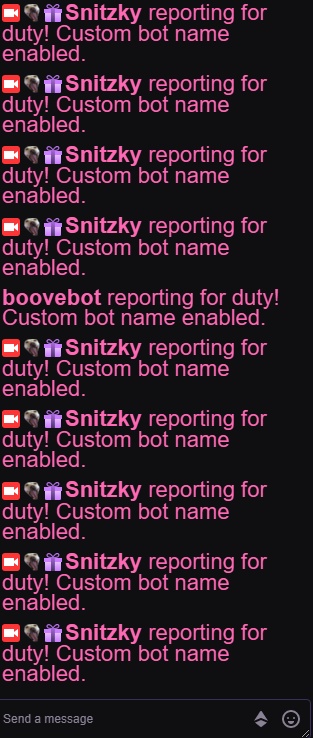
Alright! I connected the alt account and it seems to be working 😀
 proper cargo
@random fable the service they have here is amazing, i come here almost every week to ask something
speaking of which
i just updated windows recently because i had to download the xbox app. I know this isn't good for OBS because it always messes up with my Logitech C920 webcam drivers. I fixed the drivers and i have the webcam working in one scene. But whenever i try to add it in another scene, it doesn't appear in the preview, but clicking on the properties of the webcam allows me to view it, and it looks fine. Do you know how to add it into the other scenes?
sinful flint
@proper cargo This is likely because you can only have a webcam image open in one place at a time on your computer, if you're re-adding the same webcam to another scene I'd suggest to choose existing within OBS instead of adding a new source for the same thing, like seen here:
@random fable Not sure if you missed it but your question was answered -> https://discordapp.com/channels/141203863863558144/494513233416421386/605420249810075659
random fable
Ah I do take it back then! Just in abit of a mood and I did miss that really sorry @sinful flint and @proper cargo 😳
Thanks for the reply @sinful flint I'll ask the API team 👍🏼
proper cargo
@sinful flint tysm
arctic siren
I just started making timers and would like the messages to be posted in chat at random. If I want a new message every 20 minutes or so can I set the all of the interval timers to 20 minutes and not have to worry about them all being posted at the same time 20 minutes after going live?
Just unsure of how it works >.<
https://gyazo.com/ae7aa838f0dbcc569e5e7d4e5c1b6c19 a visual. I've set the intervals to very random times in confusion of how timers work XD

oop this isnt obslive related i realized D:
sinful flint
@arctic siren If you check the pinned messages in #helpdesk-twitch there is a detailed explanation of how timers currently work 😃
arctic siren
Thanks a ton <3
 cold hill
stream elements keep showing 2 different points systems
anyhway to fix this
StreamElements: @Thorsten666, Thorsten666 has 0 Gold and is rank 69/562 on the leaderboard.
StreamElements: @Thorsten666, Thorsten666 has 225 gold and is rank 75/465 on the leaderboard.
 high tinsel
i keep getting the same message "encoding overload tune down video" or something bout a faster preset...it keep keeping me off
how do I fix this ?
arctic siren
I'm not a fan of using the widgets from streamelements so will continue to use the alert box from streamlabs. Does this mean my donation alerts will stop showing up however now that my tip page has been changed to the streamelements one?
 cunning nova
Hello can anyone help me with settings for obs? thank you, tell me what u need to know, that file etc
 glacial prairie
Hello
I Was Having Issues With Delay While Streaming
On Normal Latency On Youtube And Using Obs Studio, My Friend Gets Around A 2 Second Delay, On the other hand, i get around a 20-30 second delay
I Use NVENC (New)
I Think He does too
deep birchBOT
@glacial prairie Please provide a log from your last stream. To do this, in OBS go to Help > Log Files > Upload Last Log File and paste the link to the log file here.
glacial prairie
tulip hamlet
@glacial prairie Keep it in one channel please, thank you.
cunning nova
Guys, whats is the website, when u paste ur link for log, and it opened review for you, about ur cpu, gpu etc etc ? thanks so i can check all before asking something and bother with small things, thanks.
tulip hamlet
@cunning nova https://h4ndy.eu/obslog
plain sonnet
@glacial prairie disable the stream delay
you have it se to 23 seconds
also check you settings on youtube for delays
glacial prairie
OH
thats my recording setting
thats off
wai
1 sec
its set to off
youtube delay is off
cunning nova
OK Hello everyone so can someone check it out please? https://obsproject.com/logs/nYwF3f1Gtes09Ya5
I check that ink as well, i turn off gaming, and mp4 recording etc, now just make it on top. anyone have experience how to set up all settings so it will run as much as my laptop can do?
Btw / ps4 remote play on youtube streaming, with streamelements. ty
anyone here who can help me please?
dry sphinx
@cunning nova https://h4ndy.eu/obslog?url=https%3A%2F%2Fobsproject.com%2Flogs%2FnYwF3f1Gtes09Ya5
Report of your log
cunning nova
That killer i will leave it how is it, its I have Acer Predator Helios 300, i was asking about bitrate and how settup streaming and recording for best options what i can have, bit rate etc, btw have Fibre home 300mb/s down, 80 mb/s up
dry sphinx
If you're using OBS.Studio: You can run the auto config to see what would be the best settings to use with your system for streaming & Recording. As everyone is different & requires messing around with until you find the sweet spot for you 🙂
tulip hamlet
@cunning nova We can't set up your settings for you. It's different for everyone depending on specs, game played, game settings, and more.
cunning nova
I know, im asking for basics, what bitrate etc i should use, i play Warframe on ps4 remote play, youtube stream
tulip hamlet
Even "basics" are per user.
Use the wizard like American recommended and go from there.
 full pine
Hi, I just installed obs.live and since its installed I hear myself speaking in my headset mic when obs is open and its really annoying. I've watched a couple youtube video but nothing works. I have Razer Nari Ultimate headsets, I tried to close synapse or play with the setting and it didn't worked either. The echo doesn't seem to record when I record tho. monitoring is off in the settings too.
dry sphinx
@full pine Have you tried right clicking in your tray on the bottom right the volume button -> Sounds -> Recording -> Properties -> check if "Listen to device" is disabled?
full pine
@dry sphinx its disabled, it only monitor in obs, its stops when i close obs
dry sphinx
Can you show me a screenshot of your audio properties please in OBS?
 nocturne bloom
hey is it possible for me to play media request on stream but mute it on my side (Streamer Side)?
tulip hamlet
Yes, with a complicated audio setup that gives me a headache just thinking about. Best to look up tutorials on that. 
full pine
dry sphinx
Ah. That wouldn't be the area to look.
Just pulled this from google. Click the cog on number 4.
@full pine Click Audio Properties. Find the one that shows Monitoring /Output on & turn them off.
full pine
already off
dry sphinx
Weird. I have no idea then. Best to ask the OBS Pros as that is usually the case.
deep birchBOT
@full pine For the best OBS support, please join their Official Discord @ discord.gg/obsproject
full pine
already been there
 fast swan
I am new to Streamelements OBS and am having troubles with the overlays for subs/alerts/all that showing up. I have set it up on the SE website, pasted the link as a browser source in OBS, but nothing shows up on my stream
dry sphinx
@fast swan Did you add the URL to be 1920x1080?
Is it on the very top of your source list?
You can also try clicking the source overlay & press ctrl+ F to fit to screen.
fast swan
I just now made it 1920x1080, it was previously set to 800x600. I have not streamed since I changed it to 1080p @dry sphinx
but I also never heard the alert when it was on 800x600
dry sphinx
Do you hear the Alert in the Overlay Editor?
dry sphinx
Does it show on stream though in OBS? As it sounds like you need to update your Output audio.
fast swan
no, in SE OBS I have it as a browser source and I see the huge red box but with no overlay image. Desktop audio is set to my headset @dry sphinx
dry sphinx
You may need to change in the Overlay Editor:
Can you check if there is a checkmark on your end? If so: Try removing -> Hit save & test again.
If it's off -> Put a check mark -> Hit save then test again.
fast swan
yes, there was a checkmark. cleared it, saved it, then re-checked. I am so lost
tulip hamlet
@fast swan Looks fine to me. Check your browser source properties.
fast swan
@tulip hamlet , What specifically am I looking for? I pasted the URL into the browser source, I dont really see any other options in there
tulip hamlet
Screenshot the properties please.
Now screenshot your canvas with the browser source selected.
Deleted the other image on purpose.
fast swan
tulip hamlet
Now keep staring there.
fast swan
what do you mean?
fast swan
okay I see that now
tulip hamlet
Then it works.
fast swan
lol
so if I want an area below my cam overlay to show, say, recent subscriber or something like that, where would I get the link or source to paste that info?
tulip hamlet
Just add the widget to the overlay.
You can have as many widgets as you want in one overlay.
fast swan
how I initially did it was create my cam overlay and then made it a source in OBS without uploading it to the SE website editor. Do I need to undo that and do it all with the website editor?
tulip hamlet
Better for your computer's resources if you do it all in your StreamElements account.
fast swan
okay, and then only use OBS to start/stop the stream?
tulip hamlet
Yup.
fast swan
alright. thanks for your help!
 crystal socket
deep birchBOT
crystal socket
deep birchBOT
@crystal socket Please provide a log from your last stream. To do this, in OBS go to Help > Log Files > Upload Last Log File and paste the link to the log file here.
 pure wedge
hello i have a issue while streaming counter strike frames drops in obs but in game still 200 fps
cunning nova
Hello,
1* i have question can i make specific profiles? for example for this game this settings for other games other settings? kind of like switch profiles, cause i dont want to have 40 scenes there, i want to have like 4scenes each profile, any idea how to make profiles?
2* Any good css for YT chat?
3* do i always need to change url for new stream for yt chat frame?
4* Hows works steamelement chat bot ? it worked for me like few days ago, everything, now nothing works, chat bot steamelemenets dont add in chat, even i remove him from managers, and added him back and recheck if he is ON in steamelements and he is, but he dont add automatically in chat.... why?
tulip hamlet
- Not to my knowledge.
- What?
- If it's set up correctly, it will join. It can take a bit of time to recognize your channel is online, sometimes.
cunning nova
- i make browser, i add him url from https://www.youtube.com/live_dashboard?o=U
popout chat and it shows me link for example https://www.youtube.com/live_chat?is_popout=1&v=aaaaaaaaaaaaa and when i write something for test in test, it shows in stream, when i end stream and i open another stream, chat dont works, i need to open that live dashboard again, and it will generate me another link and paste that... cause that first looks like was for that stream before, any idea how to make constant live chat url for new streams, so i dont need to always change them ?
Share your videos with friends, family, and the world.
 hidden cloak
Would it be possible to do something like this in OBS? Like a blur overlay over a game
cunning nova
i fix that bot, i turn off everything and turn on == ment for bot, as manager etc== and it works, but still that chat window,, anyone know ?
 atomic lava
can anyone explain how i can get the streamelements media request to work on the elgato stream deck? as far as playing it and pausing it. I put a song in my requests but it doesnt seem to work
tulip hamlet
@cunning nova I don't understand what you're referring to here.
cunning nova
@tulip hamlet Right down side, on Controls is button Start Streaming 1hour ago when i did some tests, it always asked me some questions, shows me 2options what i can choose from, i felt annoyed so i hit Dont show this window again, How i can put this in default, so it will show me this 2options again?
tulip hamlet
I'm not familiar with what window you're referring to.
cunning nova
it never shows me this window before, i did last stream like 1week ago, now i have new laptop Acer Predator Helios 300, i downloaded obs again and setted up everything again how i had it on last laptop, and always it asked me this, before i put Link from poup live chat, and it always works, now probably update i can choose for this 2 options, second probably was always new id or something like that, because like i said, i put new id from live chat into browser link and for that stream works, when i stop stream and reopen stream again chat window dont work, i need to open that specific video chat box again, and copy and paste that new link again for new stream. idk why.... i can record a video and show u what i mean if u would like to. but i hope u understand what i mean
tulip hamlet
No, I still don't follow.
cunning nova
ok one sec, ill try to make it simple
on this link https://www.youtube.com/live_dashboard?o=U
which is youtube.com - creator studio - Live Streaming - Stream Now in right side is chat column, chat FRAME, there i click on 3DOTS hit popout chat and copy that url link looks like https://www.youtube.com/live_chat?v=AAAAAAAAAA&is_popout=1
and this link i copy paste into OBS browser in URL. after that i press button start streaming and i can do streams, and what ppl writing in youtube video i can see.
After this is very important when i finish stream, i stop streaming, and for example in another day i want to do again streams, so i just hit start streaming but chat browser doesnt works... i need go again to https://www.youtube.com/live_dashboard?o=U do the same process with popout and copy again that link, and replace in browser in OBS, but next thime is another link, for example https://www.youtube.com/live_chat?v=BBBBBBBBBBBBB&is_popout=1
Question is, this is a problem of youtube or some settings in youtube? or obs program? why it always generate new link to replace for chat for new video? is any way how to make shortcut for channel, or it will replace by itself or something like that? i wasnt streaming a week, and before i stop and open and it goes normally, now i wanted to stream after week /new laptop, job, etc etc / and i has to always replace that link... my thoughts was is there something with OBS, like what i hit start streaming it always generate new link for new video and chat frame, cause was there 2 options, old one and probably new one, and new one is ....... do u follow ?
Share your videos with friends, family, and the world.
 static carbon
Hi, Has anyone happened to you that Alerts, Stinger and other overlays cause drop FPS when they run?
tulip hamlet
@cunning nova Pardon the delay. That's YouTube behavior, nothing to do with OBS.
glacial prairie
I Still Have A Lot Of Delay In OBS To YouTube
shy mountain
Elaborate what you mean by delay. @glacial prairie
deep birchBOT
@static carbon Please provide a log from your last stream. To do this, in OBS go to Help > Log Files > Upload Last Log File and paste the link to the log file here.
glacial prairie
i have a 30 second delay on youtube while streaming, i have my youtube settings fixed to no delay and normal latency
shy mountain
Check the OBS settings for delay. If that is also set to barely no delay, then this issue is not something we can help with.
glacial prairie
no delay
shy mountain
Either OBS discord or google might help.
glacial prairie
okay 😃
 clear pilot
actual active support staff in a discord server 
shy mountain
maybe
clear pilot
I'm trying to set up a chat overlay with a semi-transparent background with opaque text. the current settings (I've found so far) affects both at the same time. what am I missing?
shy mountain
whats your username?
clear pilot
baselin3, though I'm not streaming rn
clear pilot
text color isn't the issue. lemme make a paint edit really quick
this is what I'm going for
the transparency setting also affects the text, which I don't want
clear pilot
I meant *opacity
shy mountain
Aah i foegot about that setting. Yea that affects the entire widget
clear pilot
nothing I can do then?
shy mountain
Not in these settings.
Click away fron the widget
Then click on it
And the first settings on the elft side
One is called background color
You can change that to lets say grey
And there should be a slider
shy mountain
For the alpha channel
clear pilot
yeyeye, thanks, got it
shy mountain
Cant screenshot my self bcs i lost internet
clear pilot
I got it, thanks again!
 fallen vessel
Hello. I have a little problem. I am streaming in same time at youtube and twitch with restream, and I want to have the alerts from twitch and youtube. How can I add the alerts from twice the platforms ? Thanks
fallen vessel
I can't add only the alerts separately? Because I don't know that it is ok to use 2 overlays in same scene
shy mountain
Its ok to use multiple overlays in 1 scene
You just need the alert widget added to an overlay to your twitch account
 tame drift
done, with the obs live works
man, all this just for a change of nickname xd, is a bit too much lol
 barren geyser
i switched from streamlabs and i cant figure out how to put my overlays on i already imported it from streamlabs
deep birchBOT
@barren geyser To add your overlays to OBS, add a new browser source in your scene. Paste your overlay URL in the browser source properties, set the dimensions to 1920x1080 (unless you changed them on the website), and ☑ “Shutdown source when not visible” https://youtu.be/KDvLynUqXI4
barren geyser
its just blank.
shy mountain
!add
deep birchBOT
To add your overlays to OBS, add a new browser source in your scene. Paste your overlay URL in the browser source properties, set the dimensions to 1920x1080 (unless you changed them on the website), and ☑ “Shutdown source when not visible” https://youtu.be/KDvLynUqXI4
shy mountain
barren geyser
i finally got it to work but it scrambled all my letters
 rotund comet
Hi I'm having a problem with my overlay not updating. Specifically the latest follower and latest subscriber not showing/updating. Just got a new sub and follower, but they're not showing up on the overlay.
shy mountain
@rotund comet I've resubbed your webhook, so that should fix the subscriber events. As for the follower events, we are working with Twitch on fixing that issue. No ETA on when.
rotund comet
@shy mountain okay thank you! would the overlay eventually just sync up with twitch or do I need to reload the overlay?
shy mountain
any new subs will show up properly
for followers - well if the follower event triggers properly - yes
if it doesn't well, it won't play an alert or show that they've followed
rotund comet
Oh the alerts work fine. I meant the latest follower and latest subscriber scroll widgets not updating properly on overlay.
 wind compass
Hello. I have an issues with my fps dropping while streaming. I use AMD RYZEN 7 2700X with RTX 2070 8Gb GPU tried all different settings but it seems to be dropping frames for some reason. Tried recommended settings and it still drops my fps.
Tested it on 720p with 30fps and bilinear setting and still dropping fps.
deep birchBOT
@wind compass Please provide a log from your last stream. To do this, in OBS go to Help > Log Files > Upload Last Log File and paste the link to the log file here.
wind compass
dry sphinx
Here is the status of that log: https://h4ndy.eu/obslog?url=https%3A%2F%2Fobsproject.com%2Flogs%2Fq1-TIr7vsc3FU_t9
Turn off the Windows Gaming
Prob best to restart OBS, stream/Record at least 30 seconds for a new log.
wind compass
I checked it doesn't show any dropped frames, but streams looking like it is dropping frames doesn't look smooth at all.
wind compass
I tried all different settings and it still looks the same. Why would that be on high end pc?
dry sphinx
What's the game you're playing? As the most you can try is limiting the frame rate in game.
wind compass
Apex
 deep birchBOT
@wind compass Since Apex Legends doesn't have optimized GPU drivers yet, it tends to take up all your GPU resources, leaving nothing for OBS. If you're having OBS performance issues, you'll likely need to limit the game somehow. The easiest way to do this is to enable Vsync in the game, or use a frame limiter. You can limit the game to 60fps by adding `+fps_max 60` to the game's launch properties in Origin.
https://twitter.com/OBSProject/status/1093974215877951493

If you stream @PlayApex and are having FPS issues with OBS due to a maxed-out GPU, you'll need to reduce GPU usage so that OBS can run as well. The quickest way to do this is to enable Vsync with triple buffering and disable Windows 10 Game Mode. https://t.co/FOPmDyJMNx
Retweets
471
Likes
1345
 Twitter
dry sphinx
Twitter
dry sphinx
I use +fps_max 60 cause I also have the 2700x & 1070 and was really laggy until I did +fps_max 60 in the game properties for Apex.
wind compass
Looks like vsync fixed issue
dry sphinx
 Nice!
Nice!
wind compass
thank you for your help.
dry sphinx
No problem 
 keen mango
on my commands list i cant get my sensitivity settings for commands can i get some help please
plain sonnet
what sensitivity?
keen mango
game sensitivity when playing games like dpi settings and mouse ads etc
i cant find this in my commands list !sens
plain sonnet
you will need to look in your game settings to see what you set it to, then type that in a new command box
keen mango
in my control panel on my stream elements it wont let me do custom commands
plain sonnet
can you put a screenshot of what you see
 last ferry
Hulloo, just wondering if youre able to upload an alert video to take up the whole screen without having to stretch it super huge
I have a transparent video with some effects in it for an alert but its not transparent on the alert and it tries to fit around the text thats not there.
plain sonnet
for transparent videos, they would need to be in a .webm format
the alert box would need to be set for the full screen (1920x1080)
and the text should be set for on top of image
last ferry
oooh, does the webm format also reduce the size of videos? because ive been struggling with that too but it unrelated to here.
plain sonnet
yes, .webm is a smaller codec to something like .mp4
the file limit for uploading to SE is 30mb (i think)
last ferry
oh shit yeah. Ill fluff around and see if i can get those things to work. Thanks! 
plain sonnet
np 👍
last ferry
Whelp, none of that worked hahah
plain sonnet
whats wrong?
last ferry
Still not transparent and still isnt fit to the screen. I just have to stretch it super huge to fit i guess
plain sonnet
the original file needs to have transparent aspects to it and it needs to be set at full screen resolution (1920x1080)
is it a premade alert or one you/someone has made?
last ferry
Its an amination that i have made that is transparent. i can drag it into my stream and its transparent.
plain sonnet
can you pm me the file? i will take a look
plain sonnet
haha, is it on one of your overlays? if so you can give me editor access and i can copy it over to mine that way
last ferry
Nah the webm version got rid of the transparent and the OG is too fat.
plain sonnet
hmmm, did you convert the file or re-save it?
last ferry
saved it under a different name?
plain sonnet
try something like this with your original file,
i used this before but im not at home so i cant get the one i use now
https://cloudconvert.com/mp4-to-webm
last ferry
dammit, its too fat
median mica
@odd kraken sorry, first chance to look at your reply regarding se.pay. I'm not using any autofill at all.
 oblique pollen
hey guys i was curious if anyone could help me with streaming from obs. when i hit start streaming it doesnt let let me stream and just shows an error
dry sphinx
What error? Did you connect your Twitch account to OBS.Studio / enabled 2FA?
last ferry
Oooof, i finally got it to work. Turns out there was a wee problem with SE too but i re added the widget and it all fell into place 😃
 trim pier
Might sound like a dumb question but I tried to import all my things from streamlabs to streamelements. I copied over my commands but it said it failed so I tried again and again. Turns out it worked and I now have about 4 copies of every command I have. Is there a quick way to mass delete commands on the site?
sinful flint
No there isn't
trim pier
RIP. Guess I got a lot of clicks to do 😅
 ebon skiff
rugged quail
ebon skiff
rugged quail
Hi, is there a way to change my resolution from my canvas after creation?
 urban kite
Hello. Im setting up OBS live and everything has been going great. Im setting up a stream for online poker. Whenever I try to do a window capture I just get a black screen in OBS. I can do it using monitor cpture, I just dont want everything else showing, just looking for the window of my poker table. Any ideas?
rugged quail
my sources takes a few seconds longer to load how do i fix that?
I want to use a transition but by the time its over its just a black screen waiting for the source to load
plain sonnet
the loading is down to your pc. either use studio mode to preload the scene or a custom transition to hide the loading
rugged quail
how do i preload it
 red topaz
Hi all, I asked this in another server but got no help there. Is there a way to import scenes/profiles from SLOBS into OBS.live? I'd rather not remake all my scenes manually but if I have to I will
urban kite
@red topaz I believe there is a tab on the top right of the site to import
plain sonnet
@rugged quail use studio mode
red topaz
Not on the site, on the program @urban kite
Doing it on the site only ports the alertbox :s
plain sonnet
as the perfectly fine controller said you can use the site, or, in obs live there is an option in the menus
stream elements > import from other services
red topaz
Okay thanks, that's what I was looking for!
rugged quail
so my scenes dont load quick enough and most of my scenes are just jpeg.
plain sonnet
make sure you have studio mode is on the correct scene to load the overlays in advanced to switching scenes
make sure that any duplicate items you use are set to "add existing"
if they dont work then use a custom transition
deep birchBOT
@median mica Please contact us via email for support with SE.Pay. You can use our contact form here: https://streamelements.com/contact Thank you
 coral rain
Hello! I am having a problem with fonts not updating in OBS.LIVE when I update them in streamelements online
 woeful iris
i AM, HAVING TROUBL E WITH THJE FACEBOOK FEATURES COMNSTANTLY REQUIRING DATA WHEN IM STREAMINBG TO TWITCH, OR LIKE LAST NIGHT I was trying to stream a dj set to chew..tv asnd facebook keeps popping in trying to get data to fill out
how do io turn those featrues off
and then i cant seem to fget twitch to liner up...how does obs live integrteate with stream elemenrts
tulip hamlet
Take a moment, breathe, turn off caps lock, and please rewrite your description in clearer language.
woeful iris
yopuo want tme to rewrite everythjing ionn caps
and itys my fat fingereds hittiomng the wrtopng keys
i cant type well
tulip hamlet
You can take your time, we're not going anywhere.
woeful iris
im trying to type clearly but i keep sliding my dfingers along the sides of keys i guess and i have to llook at the keyboard and dont bnotice thee errorstill im doenp[;\
i need a source i can rewad that explains the following:
- when streaming to facebook using stream elements and obs live (i believe its just saying obs studio)
- when streaming to twitch using obs live (it says studio) and stream elements
 slender ledge
I'm trying to get my activity and chat changed to FB from twitch and need help
rugged quail
Does anyone know a live configuration for Pc 3.8 ram not to crash? It would help a lot
GTA san
tulip hamlet
@rugged quail
junior mirage
@plain sonnet https://h4ndy.eu/obslog?url=https%3A%2F%2Fobsproject.com%2Flogs%2Fmj7wnag8tiiEAeHv I feel like this was much better, will try again on Saturday and see what happens - turns out Browser acceleration wasn't on the entire time. I think I tweaked the settings well enough, and from what I've read I can fix the Windows gaming thing in registry - thank you again for your help
 wooden talon
any suggestions for chat plugin not working?
shy mountain
@wooden talon streamelemnts on top - logout then login
 sterile anchor
Hey. So I use restream.io to stream will it work with streamelememts?
shy mountain
@sterile anchor You can still use the OBS integration, rather then our Plugin. We do not have support for restream.io
sterile anchor
alright ok
 lapis karma
so i'm trying to import from slobs, and it gets through the initial upload before it fails as soon as it starts the alert box import. any help would be appreciated 😃
shy mountain
Anything listed here? https://streamelements.com/dashboard/overlays
StreamElements
The Ultimate All in One Platform for Streamers
shy mountain
wdym not overlays?
Each scene from SLOBS gets imported as individual overlay and placed where I linked you.
You say there are 3 instances of alert boxes? is that 3 overlays or?
lapis karma
no, it's just the alerts, it didn'
didn't import the rest of my scene. 3 instances of the same alert box since i tried to do it multiple times
deep birchBOT
Please provide a log from your last stream. To do this, in OBS go to Help > Log Files > Upload Last Log File and paste the link to the log file here.
lapis karma
shy mountain
I may need another log file. this one doesn't have what Im looking for.
this log file doesn't even show our plugin
lapis karma
i haven't streamed from obs studio before or used streamelements yet, i just started moving over from slobs.
shy mountain
Click on Help -> log files -> show all log files
either the last log file or the one before it, if you've restart OBS.Live after the import failed
or the one before if you've done it multiple times
lapis karma
shy mountain
error processing queue item 'Eerie':
Theres a source or scene called "Eerie"
whats in it if its a scene?
lapis karma
my main live scene, my camera, my latest sub/follower/cheer overlays, alerts, yada yada
it's got my brb and starting soon scenes, it's like a scene... group
shy mountain
so a folder?
lapis karma
it's a theme, i think is the word i'm looking for
shy mountain
so an overlay package from NoD or VBI?
lapis karma
yeah
shy mountain
so is it from NoD or VBI?
lapis karma
VBI
shy mountain
have you done any modifications to the package?
lapis karma
other than changing one piece from "recent donation" to "recent cheer", no
wait, that's not true. SO. i downloaded VBI's "kraken" package, and then copy pasted the "latest follower/sub/donation" sources and moved them over to the "eerie" package so that I didn't have to redo my whole thing
shy mountain
lapis karma
this is why i'm moving from slobs. when you download an overlay package, you go to your editor screen. then you choose your overlay package from a dropdown menu, ie the eerie package, or the kraken package. say for instance you pick the eerie package. it has all the eerie pieces in place, and you edit them from there. but after you get that set up, if you select the kraken package from the dropdown, it completely switches to the kraken package BUT without any of the settings/sources you just configured in the eerie package
shy mountain
Im not able to find this Eerie packge in VBI's website
lapis karma
right, eerie isn't VBI's. I just wanted his recent follow/sub/cheer pieces, so i had to download the whole package and then copy past them over to eerie to avoid having to re set up my entire stream
shy mountain
Ok, so there are 2 things I can suggest:
- Contact VBI and see if they have any means of getting their 2 packages in our overlays
- I will try and poke the one who helped make the import tool and see what we can do as well.
Wait, if Eerie is not VBIs, then whom?
lapis karma
uhhhh lemme check
hmm, the author isn't listed.
most of the authors for other packages are listed, but not for eerie
shy mountain
I didn't find Eerie in VBI's site.
lapis karma
yeah i don't think it was done by VBI. other packages say "by VBI" or "atroix" or "nerd or die", but eerie just says eerie
shy mountain
Yeah so the import tool is adjusted to be able to import NoD and VBI packages
but if this one is a whole different package with its own custom code, we might not be able to convert it properly or something.
lapis karma
okay, i'll switch it over to import the VBI package and then just configure from there
i appreciate your time
lapis karma
so, now it's stuck uploading media files. been at 96% for about 15 minutes
lapis karma
it won't let me click on help while it's uploading
shy mountain
%appdata%/obs-studio/logs in the file explorer
lapis karma
shy mountain
Its stuck because it failed to upload a file
which one i don't see
stop the import
and give me the same log file
lapis karma
shy mountain
Hmm it just says that it failed to upload file.
This might mean that the file it tried to upload is either:
A) Too big of a asset file(video that might be over 10mb of size)
B) Copyrighted asset from SLOBS
lapis karma
I'll try trimming it down to see if that eliminates the problem file
shy mountain
Do you know which one it is?
shy mountain
well, you might have an idea based on the steps the importer was
as it should say which scene it was in?
I haven't seen the imported in action much my self, so im not sure how and what it lists
lapis karma
it just said "uploading media files". it was fine up until 76 out of 78
crap
it got through uploading again but failed as soon as it starting importing alerts
the chrome extension made it all the way through, but it doesn't have an option to import the overlay, just the alertbox and tip settings
shy mountain
the extension is for the alert widget and tip information
From what I see on this log file it uploads all media
and its done
lapis karma
k. i'm gonna try just importing the overlay in obs.live, with the other 2 options unchecked
shy mountain
if the alert overlay has been imported before, even if it fails now, it should be fine i guess
lapis karma
sounds good
 distant island
I got a notify on streamelements website about the new custom bot name. How can I do it? I checked for updates on my streamelements obs live and it says that it is up to date... I'm confused. Cant find the customization anywhere
odd kraken
distant island
thank you!
 bright haven
good evening , im trying to stream to Twitch and OBS keeps wanting to stream to YouTube how do I fix this issue?
odd kraken
In your settings > Stream in OBS change the broadcast key from YT to Twitch.
odd kraken
Then when you start a stream it should start streaming to twitch. When you are logged in to StreamElements for chat to OBS select StreamElements > Log out at the top in OBS.Live and log back in with your twitch account.
bright haven
ok ill try this thank you
 final terrace
The "Authy" 2FA app is not sending me my SMS code so I can verify my cellphone number in order to login to OBS Studio/OBS.Live after the recent update. I knew I should have done this later, but here I am. Anyone know what is happening?
shy mountain
Im not sure I understand where the issue is. After logging in, you are prompted to input the 2FA code, but you are not receiving it?
The login flow that is shown via OBS.Live is the same as in the Twitch login - we load up the login from their side in the popup
so i would suggest to see if you can login to your account
final terrace
I downloaded the Authy app and requested the SMS code. It has not arrived.
final terrace
I cannot login to OBS Studio via Twitch without 2FA verification code.
"Authy" was identified in the pop-up after the OBS.Live update installed.
This is what I see.
shy mountain
Ok, and then you need to receive an SMS, not via some app
or as it says a notification in the app
if you are not receiving it
like i said
get a 2nd browser and try to login
and see if that gives you a code
do not logout from twitch from your main browser
as you may lock your self out
final terrace
I'm not logged in to Twitch at the moment, on any browser. I opened OBS Studio and installed the OBS.Live update when prompted.
final terrace
I realize I'm tired, but what account are you referring to, and where would I check for the SMS code?
shy mountain
Open chrome/firefox/opera/internet explore(what ever browser you are using)
go to twitch
final terrace
My Twitch channel comes up fine.
shy mountain
and login to your twitch account
Ok lets start again
Are you logged into Twitcvh here? https://www.twitch.tv/

With your account?
Im not talking about OBS STudio or OBS.Live atm
Im talking about the actual twitch website
yes or no
final terrace
"idmooseman", (me), is at the end of that link. I am looking at my channel right now.
shy mountain
Are you logged into twitch?
Not your channel
Actually logged into your account in twitch
Ok, I will give it to you straight - if you are not receiving a code, either contact twitch or Authy
there is a reset phone number form in Authy as far as I saw
final terrace
Yes, I'm logged in.
shy mountain
Then install a 2nd browser
and try to login to your twitch account in twitch
and see if you get the SMS code
final terrace
Logged in with Chrome and got this message.
shy mountain
@leaden night Settings -> stream -> disconnect -> connect
final terrace
I wonder if that is the reason I am not receiving my SMS code for 2FA?
shy mountain
Well first, wait like an hour before trying to login again.
It says it in the message that you screenshoted
try again later, because of too many SMS requests
The idea behind telling you to login via a browser is to determine if its a issue related to twitch/authy not sending codes to you or if its obs.live login flow
final terrace
Sounds reasonable. So you think it's a Twitch/Authy issue?
I haven't tried to logon since that screenshot.
 leaden night
Tried to do that, didn't work, I ended up just using my stream key, but the problem started out when I activated Authy
final terrace
That's another Authy issue. I'm beginning to think Authy has a problem.
shy mountain
as Im entering my account in a 2nd browser and its bypassing the 2FA
twitter is silent
interesting
ok so i got a code for my 2nd account when i added it as a custom bot name in obs.live
final terrace
Thank you for trying. It's almost 3:30 AM here and I have to wake up at 7:00 AM to take my dog to the vet. Any chance you could pin the resolution post, (if a resolution is found), so I can find it later?
shy mountain
I don't think its something we can do and help with
final terrace
How do I add a custom bot name to OBS.Live?
shy mountain
final terrace
Thank you for that link.
 glossy nimbus
My obslive is stuck in french, I tried changing it to english but it won't accept it.
odd kraken
Afaik you need to restart to apply the language change.
 winged wigeon
Where can i go to find the steps for creation of a unique chatbot?
odd kraken
This is the chat area to support help with the StreamElements chatbot.
winged wigeon
yes i would like to know how to get a custom name for my streamelements chatbot
deep birchBOT
Custom bot name requirements
- StreamElements bot modded and in chat
- Active overlay with alerts
- StreamElements tipping page in the panels below the stream (!panels)
- OBS.Live or Ground Control open
- Create a twitch account for the name you want to use or run the bot under your own name
- Custom bot name doesn't work on Mac
 upbeat tangle
So I new at all of this and have no idea how to do any of it
odd kraken
Best to look at the StreamElements youtube channel for some helpful videos.
upbeat tangle
Okie
 wise silo

YouTube
Official youtube channel for StreamElements tutorials https://StreamElements.com
 eager tartan
When stream and record Rocket League some time fps drop a few second. How can i fix it?
deep birchBOT
@eager tartan Please provide a log from your last stream. To do this, in OBS go to Help > Log Files > Upload Last Log File and paste the link to the log file here.
rugged quail
I don't know where to post this, hopefully this will work. I am having trouble with Ground Control. Just downloaded it and set it up. Sadly there is no data showing and I read several posts on Reddit stating Ground Control isn't working on a Mac. Can that be confirmed and is there a fix coming?!
 weary moat
Hello, I am tying to use media request but the sound will not come through on the stream. What is wrong?
odd kraken
Have you added the Media Request widget to your overlay and hit show on stream?
eager tartan
My Logs yesterday stream
weary moat
Yes, its all showing on the stream, just no sound
odd kraken
Do you have sound in the browser when you launch the overlay?
@eager tartan This is an analysis of your log file: https://h4ndy.eu/obslog?url=https://cdn.discordapp.com/attachments/603593664756711424/606171844483088398/2019-07-31_16-32-29.txt
weary moat
When i log into stream elements and press media request on the let hand panel and I play a song, yes i hear the audio
I just don't hear it on my stream
odd kraken
Do you hear your desktop audio on stream?
eager tartan
@odd kraken thanks
winged wigeon
ok so all those things i have, now what^ in order to customize bot name
odd kraken
@rugged quail Have you logged in to groundcontrol using your SE account? Is the data shown in the activty feed on the website?
winged wigeon
i have obs.live
odd kraken
the link is to a video where it is shown how to use a custom bot name in OBS.Live.
winged wigeon
oh gotcha
weary moat
no, i don't hear desktop audio. But i shouldn't need to should I? because if i turn desktop audio on, it plays all the other stuff thats going on . My other widgets for alert box etc don't need desktop audio on.
When i go into my overlays and click "launch overlay" on the media request overlay, nothing appears on the brower it opens up... where as if i launch any of my other overlays they open in a new browser and I can see them...
odd kraken
When you launch the MR overlay you get a link to the overlay. When you enter this in the browser, the overlay opens in the browser.
The overlay with the media request should also launch in a separate browser window when you hit the launch overlay button in your overlay galery.
weary moat
Yes, when I click this it does open a new browser, but it is blank
shouldnt it show the media request overlay and music playing?
odd kraken
after you launched the overlay, have you hit the show on stream button in the media request section? after this the video should show up in the overlay, when it contains the MR widget.
weary moat
ok, got that all working now. But still no sound on stream
odd kraken
But your desktop audio is enabled in OBS?
weary moat
so that means if I paly anything else on ym desktop its also going to paly that? is there no way of it only palying through the media request?
odd kraken
Not that I am aware of. Afaik the MR widget only plays through the desktop audio. You can also have a chrome tab open and not use the widget to just play the musik, but this will also be captured by your desktop audio in OBS.
weary moat
okay, thankyou for your help. I will paly it through desktop audio.
wind compass
hey guys. anyone having issues where there is no frame drops but fps droping in obs? since I got 144hz monitor my streams laggy while playing apex cant seem to find any solution to fix this.
tried yesterday suggestions on vsync and stuff but it doesnt help it was ok for 10mins and then same thing happes
deep birchBOT
@wind compass Since Apex Legends doesn't have optimized GPU drivers yet, it tends to take up all your GPU resources, leaving nothing for OBS. If you're having OBS performance issues, you'll likely need to limit the game somehow. The easiest way to do this is to enable Vsync in the game, or use a frame limiter. You can limit the game to 60fps by adding `+fps_max 60` to the game's launch properties in Origin.
https://twitter.com/OBSProject/status/1093974215877951493
If you stream @PlayApex and are having FPS issues with OBS due to a maxed-out GPU, you'll need to reduce GPU usage so that OBS can run as well. The quickest way to do this is to enable Vsync with triple buffering and disable Windows 10 Game Mode. https://t.co/FOPmDyJMNx
Retweets
471
Likes
1344
Twitter
wind compass
tried this it doesn't help. i used code to cap fps but in game still shows 144fps
my gpu is rtx 2070 8gb should be more then enough for streams used to be ok but since monitor having issues
deep birchBOT
@wind compass Please provide a log from your last stream. To do this, in OBS go to Help > Log Files > Upload Last Log File and paste the link to the log file here.
wind compass
ill send one shortly.
 mossy loom
So I've been unsuccessful in getting OBS to actually capture my screen. It was working a few days ago, but now it's black and won't show anything, even if I select game capture. I'm trying to stream several different games, and none have worked.
I've tried running OBS as admin, changing compatibility, reinstalling, resetting my PC, updating my drivers, and nada. Any help at all at this point would be great
Also, new to streamelements, but I like what I see so far xD
deep birchBOT
@mossy loom For the best OBS support, please join their Official Discord @ discord.gg/obsproject
mossy loom
Great, thank you
 woven lantern
When someone has a chance; I need help with my commands
dry sphinx
What's up @woven lantern ?
woven lantern
I had imported my old commands from Streamlabs; but I no longer need them. And now when I enter a command; it's triggering both the Streamlabs and StreamElements ones.
How do I get rid of the old ones
dry sphinx
More than likely part Streamlab's bot from your channel if you're not using it at all anymore.
woven lantern
Would I just sign in to do that?
To streamlabs?
I don't have to redownload it, right?
dry sphinx
I believe so in their dashboard. I haven't use SL personally. Also I see nightbot?
woven lantern
Sorry if these are noobish questions
I used to use nightbot
I should probably disconnect that as well
dry sphinx
Probably cause I'm not sure if Nightbot or a Twitch setting is blocking the link.
You should also make the streamelements bot a mod.
 steel mural
Only Twitch can replace links with ***
Click here: https://www.twitch.tv/dashboard/settings/moderation and disable link protection.
mossy loom
so, I'm still waiting on OBS discord support, but if anyone feels like taking a stab..
So I've been unsuccessful in getting OBS to actually capture my screen. It was working a few days ago, but now it's black and won't show anything, even when I select game/window capture. I'm trying to stream several different games, and none have worked.
I've tried running OBS as admin, changing compatibility, reinstalling, resetting my PC, updating my drivers, and nada.
Any help at all at this point would be super fantastic.
I've followed this guide with no luck: https://obsproject.com/wiki/Laptop-Troubleshooting#for-nvidia-based-laptops as well as about 3 or 4 hours of youtube also with no luck.
I think the issue may have something to do with the fact that I installed on a data drive D:\ instead of C:
Edit: I'm using a laptop connected to an external monitor via HDMI.
If you tried everything in this guide and are still having issues, please make a post on the forums or stop by the OBS Discord server. Windows 10: latest Windows 10 builds…
wind compass
 fierce quail
Hello, I just had a menu in obs live were I could put in an URL and then play it. It was for media request. I clickt it away but now I cant find it anymore were do I find it?
woven lantern
I got it! Thanks for all your help @dry sphinx!
dry sphinx
No problem.
@fierce quail On OBS on the top -> Click Streamelements -> Click Media Request & it should have a ✔
fierce quail
Thanks it workt
 proven folio
I am having an issue everytime i try to stream
anyone know how to fix this?
im not too familiar with obs
im still new to this kind of stuff
 blazing idol
I changed all my streams settings as i thought it would help my stream run smoother but it just mad my stream even worse and also ended up making my game almost un playable from the lag. Any idea how to fix this
deep birchBOT
@proven folio For the best OBS support, please join their Official Discord @ discord.gg/obsproject
proven folio
okay
dry sphinx
Same would apply above @blazing idol
proven folio
@dry sphinx
everytime i try to update
this pops up
and the obs server is telling me to uninstall your version of obs
i dont want to lose my stuff
dry sphinx
What version of OBS studio are you using? Top left.
OBS.live is a plugin to OBS.Studio and uninstalling you have the option to keep your stuff or delete everything
 gentle dust