#helpdesk-selive
1 messages · Page 38 of 1
 spring lava
 agile elm
for the custom bot name, do you need to always be running the ground control app every stream or just for set up?
also, will it take on all the custom commands and chat alerts ive already set up for stream elements?
 odd kraken
yes, it will take the command already created and yes, to have the bot name appear in chat groundcontrol needs to be running.
agile elm
so if using obs live, the activity feed doesnt count as using ground control?
just seems strange to need to have 2 activity feeds open at once
odd kraken
You can also rename the bot with OBS.Live and have that running to have the custom bot name enabled.
agile elm
oh! how do i do that?
 tulip hamlet
Check the pinned messages
agile elm
id rather that than having to have ground control open
ive seen the pins, but it says i need to keep ground control open
tulip hamlet
I think you're looking at the wrong pinned messages. I mean the pinned messages in this channel.
agile elm
the video right?
tulip hamlet
agile elm
yea, thats using ground control app
odd kraken
No. This post uses the OBS.Live activity feed window in OBS.Live.
tulip hamlet
That said, looks like there may be an issue with it at the moment. Devs are looking into it.
So use Ground Control for now.
agile elm
lol dang it!
also, thank you, id rather use obs live than have ground control open
seeing as i already have obs live open for every stream
ty
 median sandal
My OBS.Lice today is showing nothing but a while background. If I switch to OBS Studio my panels come back but obviously i have no access to my overlays and other StreamElements items
odd kraken
Disable your AntiVirus tool please. Maybe it is blocking the connection.
median sandal
Disabling AV is fine for a test, but it is not an acceptable solution what exceptions are needed to prevent this from happening again
 cosmic gorge
Can anybody help me with audio quality?
 deep birchBOT
@cosmic gorge For the best OBS support, please join their Official Discord @ discord.gg/obsproject
 hallow dragon
hello, I'm having framerate issues when I turn on groundcontrol/SE overlay(browsersource) when I play MHW...
had no issues once I turned it off, any clues?
deep birchBOT
@hallow dragon Please provide a log from your last stream. To do this, in OBS go to Help > Log Files > Upload Last Log File and paste the link to the log file here.
hallow dragon
hallow dragon
here's some reports if it helps
 quartz forge
I was wondering if someone could tell me why I'm sometimes able to pull up a stream information dock (which lets me edit stream title, live notification, game, and tags), but other times it's nowhere to be found? I've tried resetting the docks, I've selected all available docks from the StreamElememets tab... It's really weird. And for whatever reason, my dock configuration never saves after closing OBS.live. If it did, I wouldn't even be asking how to find it.
deep birchBOT
@quartz forge If you have issues with OBS logging you out of the integration all the time or not showing the Twitch integrations, follow these steps:
- Make sure you are on the latest and greatest version of OBS.Live ( 19.3.24.375)
- exit OBS (make sure OBS is not running)
- delete %appdata%\obs-studio\plugin_config\obs-browser\obs_profile_cookies
- start OBS.Live
- Settings -> Stream -> disconnect -> connect
quartz forge
Tried all of the above, the dock in question isn't there.
 shy mountain
After you connect your twitch account from the last step click on view and the docks and show every dock
I think the default name of the dock was stream information
 arctic pier
any wizards on? replaced my 1080ti with a 2080ti and now my stream runs like absolute shit. i'm using a 9900k cpu. both are hitting 90-100% usage and stuttering my stream to death.
deep birchBOT
@arctic pier For the best OBS support, please join their Official Discord @ discord.gg/obsproject
shy mountain
Wizards are that way  ☝
☝
 frozen kestrel
Hi I can't seem to connect my streamlabs chatbot
shy mountain
Unfortunately, we are not familiar with Streamlabs' features much.
Unless you meant Streamelements.
shy mountain
Go here: https://streamelements.com/dashboard and on the right side -> join channel
frozen kestrel
Weird it says it's connected but when I type in commands nothing goes off....
frozen kestrel
Ohhhh ok Streamelements isn't a mod ooops my bad thanks!
Ok so next trouble I am having is connecting my custom bot name
shy mountain
There is an issue with connecting new custom bot names currently on OBS.Live.
Devs are aware of that issue and should be fixed later today.
frozen kestrel
Ok thank you so much then for all your help
 gleaming fjord
SInce the new update, the Toolbar for writing title and Tags and Twitch-Statistics has gone...
deep birchBOT
@gleaming fjord If you have issues with OBS logging you out of the integration all the time or not showing the Twitch integrations, follow these steps:
- Make sure you are on the latest and greatest version of OBS.Live ( 19.3.24.375)
- exit OBS (make sure OBS is not running)
- delete %appdata%\obs-studio\plugin_config\obs-browser\obs_profile_cookies
- start OBS.Live
- Settings -> Stream -> disconnect -> connect
shy mountain
If you've done the steps then click on "View" -> "Docks" and enable the docks again. @gleaming fjord
 orchid falcon
Hello Hello
I have a problem with my Stream deck its says that it does not work with my obs live i need to upgrade it .. but it is.. since 3 weeks im not able to use my stream deck as ussual .. does anybody have any suggestions how to fix that ?
shy mountain
what OBS studio version are you on?
orchid falcon
it says the newest one .. but im looking
shy mountain
Top left of OBS
shy mountain
OBS 21.1.0 has a broken auto updater
download the most lastest 23.1.0 from the website
Open Broadcaster Software is free and open source software for video recording and live streaming. Stream to Twitch, YouTube and many other providers or record your own videos with high quality H264 / AAC encoding.
orchid falcon
ahh ok great thanks 
shy mountain
Install that and streamdeck should be fine
orchid falcon
i always tried the search for updates in obs itself .. -.- Thanks a lot
shy mountain
yes that is broken
orchid falcon
oh JESUS it worked 
shy mountain
👍
orchid falcon
i know how you look like @shy mountain 😉 hihhi ( creepy me ) saw you on twitchCon 😛

 orchid falcon
hahaha 😄
 fierce atlas
I also know what KeiZar looks like 

 ocean nacelle
Heya guys! Having again the usual problem of "failed to download" when I try to update obs.live. Can someone remind me the link to download it? D: Like, the previous time I was able to update it from a link but I don't remember which one ;w;
odd kraken
 orchid solstice
Why White Screen. OBS Live worked before the installation of StreamElements plugin.
 rugged quail
Hello, when having obs live open my custom butname will no longer show.even when I attempt connect I can't send test messages anymore. It does with ground control. Any ideas?
odd kraken
There is an issue with the custom bot name feature in OBS.Live at the moment.
rugged quail
I see, any ticket or topic I can watch for updates?
If not that's fine too, at least I got it confirmed.
orchid solstice
ok thanks for the help. your shit is not working. bye
rugged quail
@orchid solstice go to settings and enable "dark theme" no need for this behaviour, people provide free software YOU can use for FREE >.<
ocean nacelle
@odd kraken it doesn't change anything xD
There was a different link they gave me! >__<
odd kraken
Was it this message?: https://discordapp.com/channels/141203863863558144/494513233416421386/564553262120828929
 twilit wren
so i updated obs and now it fails to download the software update for streamelements obs live
when i open up streamelements obs live i get this
i click update and i get this
also i came around something online which was the reason why i switched to the obs live add-on.
something about having all browser sources in a single browser source?
so that each notification doesnt hug up so much of my memory. can't figure out how to do it inside of the add-on though.
...when i get it working again.
 twilit venture
@twilit wren you need to use our alert system to have all your labels/alertboxes/widgets in only one url / browser source
The add on is twitch chat, activity feed, MediaRequest, bot rename all in one with the benefits of normal obs Studio
Go to the www.obs.live homepage and re-download everything and reinstall it
 rustic geyser
is there a way to show bttv emotes in the obs.live chatbox?
my ffz ones are showing just fine
shy mountain
@rustic geyser Settings -> stream -> login
rustic geyser
I'm logged in there but nothing changed
oh it just took a while to update
thank you 
odd kraken
You can use our import tool for the alertBox.
twilit wren
@twilit venture thank you for the answer. what i ended up doing was uninstalling obs studio, uninstalling the se add-on, restarting my pc, then reinstalling obs studio and reinstalling the add-on. now it works as it was before. my mistake was checking for updates using the in-app update for obs studio. didn't read about that being broken until after i had updated.
 sleek monolith
Hello, can't import any imagem to do my overlays, Can anyone help me?
odd kraken
What browser are you using?
sleek monolith
Edge
odd kraken
Try chrome please.
sleek monolith
Thanks bro, I'm so stupid
 hardy tulip
Hi ! At the end of the day which is better ? NDI or Capture card?
Currently have the Elgato HD 60 S and would like to know if NDI is a better system or not.
 loud sorrel
@hardy tulip Which do you think would be better, something that is hardware based or something that relies on software/network?
"Better" depends on your situation, resources and knowledgeability. If your streaming source is conveniently located to your streaming PC Capture card all the way. If it's on a different floor or something, then getting the input to your card via network may be better via NDI, if your network can handle it.
 steel mural
^ perfect explanation
 hazy moat
Hello, i had a problem with unstable fps and kbps before and i ran a speed test and talk to my internet provider; but it seems the problem is not on the internet itself, i put everything possible in the OBS problems and how to solve it, but still nothing, could it be the streamelements overlays ? or maybe something in my pc im forgetting about ? pls i would appreciate the help, i dont want to move around another OBS or platform (im currently on twitch) , thanks in advance .
deep birchBOT
@hazy moat Please provide a log from your last stream. To do this, in OBS go to Help > Log Files > Upload Last Log File and paste the link to the log file here.
hazy moat
i tried streaming in youtube
no FPS lost or unstable fps
what does it mean ?
this log is from YoutubeGaming stream
same setup, same specs and configuration
hazy moat
i dont see the dropped frames on the OBSLive app
tulip hamlet
You won't see this issue in OBS's video, only on the stream. It's a network issue.
hazy moat
now i have this after i solved the proper issues
sorry if im spamming i really want to keep streaming on Twitch
and like i said before my internet provider has shown me that my internet connection is not the real issue, how can i tell if it my hardware ?
 plain sonnet
please look at the reports, they have the same issues https://h4ndy.eu/obslog?url=https%3A%2F%2Fobsproject.com%2Flogs%2FzyrlHtIZoxLBg1GO
 strange mason
Hello, just installed StreamElements coming from SLOBS. I've been trying to import my scenes from SLOBS to SE, but I keep coming up with the same error. Any suggestions?
plain sonnet
please use chrome and make sure you have both sites open and are logged into both
strange mason
same error, unfortunately
odd kraken
@small olive Can you share a screenshot of your current OBS please?
 small olive
Can you help me do that?
odd kraken
Do you use windows 10?
small olive
yes
odd kraken
There is a tool called snipping tool on your system. With this tool you can create screenshots and copy them here.
small olive
odd kraken
Select Studio Mode in the controls tab.
tulip hamlet
You added your capture source and didn't resize it. It's currently larger than your canvas. Select it and Ctrl+F.
small olive
Oh nice thank you. Also I was trying to add a apex super theme. Would you help me with that as well?
deep birchBOT
@small olive To add your overlays to OBS, add a new browser source in your scene. Paste your overlay URL in the browser source properties, set the dimensions to 1920x1080 (unless you changed them on the website), and ☑ “Shutdown source when not visible” https://youtu.be/KDvLynUqXI4
small olive
Thank you so much
sleek monolith
Hi guys, How I can put the overlays on the OBS live ?
deep birchBOT
@sleek monolith To add your overlays to OBS, add a new browser source in your scene. Paste your overlay URL in the browser source properties, set the dimensions to 1920x1080 (unless you changed them on the website), and ☑ “Shutdown source when not visible” https://youtu.be/KDvLynUqXI4
sleek monolith
Thanks
 fickle violet
I keep getting update requests for live when I open OBS, but when I accept, I get an error. is there a fix?
tulip hamlet
Can't imagine why it would. You can try downloading manually, perhaps. https://cdn.streamelements.com/obs/dist/obs-streamelements/windows/latest/obs-streamelements-setup.exe
rugged quail
Hello, I was talking to a member of staff earlier about a problem and it still persists so I was wondering if anyone could help me please, the Media Request tab/section of the OBS Live plugin doesn't appear to be functional in my OBS Studio (the queue doesnt update and nothing plays through onto the widget at all which is set into a working overlay)
 torn barn
Hi, I'm trying to set up my custom streamelements twitch bot, I have obs live, went to where it says to put in custom name, used second twitch account, and it still shows my bot as streamelements. Can someone help? TIA
tulip hamlet
Take a screenshot of the OBS.Live settings for the rename please.
torn barn
My husband and I are both having problems, he's uploading screenshot now
 pallid gazelle
this is the bot we are trying to link to the Tedebearz account we get to this step and nothing happens after
tulip hamlet
Finish logging into the bot account and take a screenshot of the rename settings in OBS.Live.
tulip hamlet
Scroll up in the settings.
tulip hamlet
Oh, I remember now. Sorry, bit out of it. There was a bug reported yesterday, you can't connect a new bot in OBS.Live at the moment, only previously set ones are currently working.
Use Ground Control for now.
deep birchBOT
@pallid gazelle Custom bot name requirements
- StreamElements bot modded and in chat
- Active overlay with alerts
- StreamElements tipping page in the panels below the stream (!panels)
- Create a twitch account for the name you want to use
- Ground Control app must be running
Steps to enable custom name
- Sign in to https://twitch.tv with the bot account
- Install and run Ground Control (!gc for download)
- Visit https://twitchapps.com/tmi/ and generate an oAUTH token
- Copy/paste everything in the box to Ground Control oAuth settings and enter the name for the bot account
- Restart Ground Control (custom name may take a few minutes to take effect)
Mac does not currently support renaming the bot.
 thick ridge
Just updated and can no longer see the viewer count in the bottom left of the activity feed. Anyone else have this problem?
shy mountain
@thick ridge On the Activity feed -> burger menu button -> stream settings -> toggle on
thick ridge
Yeah it is toggled on :/
thick ridge
I can't scroll down or anything
shy mountain
can you share a screenshot of your entire OBS window?
thick ridge
Okay, will try when im not live 😉
shy mountain
You can do that while you are live.
 soft pendant
hiya im not getting any alerts in my alertbox source when im testing them in the editor.
deep birchBOT
@soft pendant You can test Alerts via the bell on the lower right corner of the Overlay Editor. Simply go to your Dashboard -> My Overlays -> Pencil/edit button on the overlay. Make sure the "Show Emulated events on stream" option is on to see the alert in OBS/Xsplit https://streamable.com/h6qgy
 soft pendant
have my source properly inputted and visiblity is toggled on and were working a few mins ago, just stopped all the sudden
deep birchBOT
@soft pendant Right click on the BrowserSource > Properties > Scroll down a bit > Refresh Cache of current page
shy mountain
also this
deep birchBOT
@soft pendant The default resolution for StreamElements overlays (theme and custom) is 1920x1080. Please add them in OBS at their full resolution and use CTRL+F to fit to screen if necessary. You can then downscale your stream in OBS settings > Video if you'd like https://i.imgur.com/6bWXxjR.png
 soft pendant
that is all the case
right before it stopped working the alerts were onnly showing the leftmost 1/4 of the whole alert and i couldnt change the position of it no matter where i movied it on the overlay editor
soft pendant
still nothing
shy mountain
soft pendant
theryre showing fine in the editor, same resolution in there as obs
shy mountain
no issue what so ever when I placed your overlay in my OBS at 1920x1080 resolution.
soft pendant
i have mine the same man. ill restart OBS and see if that helps because i assure you my settings are the same
soft pendant
lmao
shy mountain
click on the alertsbox source and let me see the red highlight in the preview
soft pendant
shy mountain
not that
soft pendant
oh
well i promise its there
show events in stream
it was literally working while i was clicking then immediately stopped
soft pendant
ok
yes its fit to screen bro
I misunderstood your questin but i promise you i'm not illiterate to this
shy mountain
Did you try to clear cache?
soft pendant
yes a bunch lol
shy mountain

only 2 things that come to mind at this point is
run obs as admin
delete the source and add it again, if you haven't done that
soft pendant
no
shy mountain
Here is a long shot.
deep birchBOT
@soft pendant Please provide a log from your last stream. To do this, in OBS go to Help > Log Files > Upload Last Log File and paste the link to the log file here.
 blazing kiln
So I have the issue of stream going offline randomly, now it happened 1 hour into the stream. It's not my internet connection for sure. Heres my log: https://obsproject.com/logs/JLRY8NFfDElpmV1p
Thanks in advance for any help.
Also OBS still shows it as live with a green dot down in the right corner.
blazing kiln
Thank you!
rugged quail
Hello I was wondering if anyone could help me please, the Media Request tab/section of the OBS Live plugin doesn't appear to be functional in my OBS Studio (the queue doesnt update and nothing plays through onto the widget at all which is set into a working overlay)
odd kraken
Is there an error message when you select show on stream in the OBS.Live MediaRequest dock?
rugged quail
No there isnt
odd kraken
Do you want to show another video than the standard video of StreamElements?
rugged quail
than a standard video of StreamElements? could you elaborate, I'm sorry
odd kraken
Have you added your own music video to the queue and tryied to show that on stream?
rugged quail
Yes I have
odd kraken
Is the browser source with the overlay the first source in the sources list in OBS? Are other overlay parts visible in the preview?
rugged quail
Its is the highest source in OBS list so its ontop and yes other overlays are visible in preview
It's the Media Request section in OBS Live it appears to not sync itself for me or connect to the media request overlay in general
 rotund field
my obs.live just updated, where can I find the update notes?
twilit venture
@rotund field we don't have those unfortunately. It was just some bug fixes. If there is a bigger update you will hear from it in the #announcements channel
rotund field
k. thanks. I looked under the right rock 🐳
odd kraken
@rugged quail You could try to log out of OBS.Live and log back in.
rugged quail
I've just done that and still doesn't work
odd kraken
What OBS Studio version and what OBS.Live version are you on?
rugged quail
OBS - 23.1.0
OBS LIVE - 19.5.8.388
odd kraken
Have you tried to clear the browser source cache and reaload the overlays?
rugged quail
Yes I have
odd kraken
I am sorry, but I don't have another idea on this. I will ask internally about this issue.
rugged quail
Okay thank you @odd kraken 😄
odd kraken
have you tried to readd the overlay to OBS?
rugged quail
Yes I have, the overlay works as from the Web Browser dashboard for media requests it functions as should, but when I close down my web dashboard and try using the Media request from OBS Live its that which doesnt connect to the overlay or to the media queue
odd kraken
@rugged quail After you start the MediaRequest in the browser opened overlay, do you see this message in OBS.Live MediaRequest dock?
rugged quail
No I don't, that dialog box doesn't appear at all
rugged quail
Any luck with asking internally?
 prime dagger
Hello guys, anyone experiencing extremely slow download speed with the update?
prime dagger
Anyone? Its now stuck on like 10% for about 20-25 minutes
 hexed rapids
Can OBS be use for streaming from Xbox one?
steel mural
No it's only for PC/Mac. If you wanna stream your Xbox through OBS, you need a PC and a capture card.
steel mural
You're welcome 
prime dagger
Pls anyone? I was just about to go live and now I cant
plain sonnet
cancel the download and start again
prime dagger
I already tried that about 3 times
prime dagger
even downloading the installer from the official site is super slow for me - it has actually dropped into kB/s and B/s. Other downloads are just fine.
prime dagger
well thx I guess
prime dagger
yeah, me too, great work, support, really premium services
odd kraken
@prime dagger For me downloading the OS.Live installer has no issues in download speed. I would assume this is a local issue.
prime dagger
Thanks for the answer, I had to ask a friend to actually send me the installer, no problem downloading that, but it was just impossible to get from your site (25+ hours of downloading time), I havent ever had this kind of super slow download speed since 1999. No wonder it was taking ages to update directly from the app.
 vocal geode
Yo guys, can anyone land a hand? game capture option doesn't work, like, at all. Running obs as admin already 😦
deep birchBOT
@vocal geode For the best OBS support, please join their Official Discord @ discord.gg/obsproject
 primal pebble
hello there. I got a problem I have a problem with OBS.Live. It kicks my "Stream information" dock out of the list and all the other Twitch-related docks. Is there away to use both docks, Twitch-related and OBS.Live? When I reconnect zo my Twitch-profile I get all teh docks again, but they won't stay. After closing OBS and open it again, all the Twitch-related docks went away.
deep birchBOT
@primal pebble If you are not seeing the OBS Twitch integrations and have OBS.Live installed, please follow these steps:
- Make sure you are on the latest and greatest version of OBS.Live ( 19.5.8.388 )
- exit OBS (make sure OBS is not running)
- delete
%appdata%\obs-studio\plugin_config\obs-browser\obs_profile_cookies - start OBS.Live
- Settings -> Stream -> disconnect -> connect
primal pebble
Thank you!
 fresh peak
is there a changelog for what has been changed/added in the newest OBS.Live update?
tulip hamlet
We'll let people know if there's significant updates or changes, but usually the updates are bug fixes and groundwork for the next big thing.
fresh peak
Okay, thanks. I don't suppose you'd know if the update had any bug fixes relating to a resource decode error 3000 on Firefox only?
tulip hamlet
Uh. But OBS.Live doesn't have anything to do with Firefox, so you've got me at a bit of a loss with that one.
fresh peak
Yeah, ik, i've done some testing with it and it seems to spontaneously work fine 1 in 20 times. I think it might be NVENC encoding related, but the error doesnt occur when I use plain old OBS with same settings
tulip hamlet
Let me make sure I understand. You're saying someone viewing your stream on Firefox is getting errors?
fresh peak
yes, on multiple PCs with varying hardware specifications, low and high end
 civic sapphire
Hello, I have a problem with my outdoor cams. I pull the live video with rtsp. After a while, the video just freeze. I do have checke "Restart playback when source becomes active" but that never happens from it owns. I always have to go in each source and click ok, after this the video is back on track. I asked aunt google but I couldnt find a solution to this problem. Seems like other have the same issue, but no way to fix that issue. Maybe someone has an idea how to fix that? Thank you 🙂
deep birchBOT
@civic sapphire For the best OBS support, please join their Official Discord @ discord.gg/obsproject
 weak mesa
Mine just updated and the screen is just white no natter what scene or source i click
OBS 23.1.0
tulip hamlet
Please try temporarily disabling your antivirus software and restart OBS.
weak mesa
Ok ty give me a few
 sage meadow
My alert image is not showing when i emulate the alert, any ideas? also let me know if im in the wrong channel
tulip hamlet
This is something to do with custom CSS. If you aren't using a custom coded alert, then you should disable the option.
sage meadow
I am using a custom coded alert, it worked on streamlabs, but now its not when i tried to bring it over. I need to code it to change where the name displayed on the image
tulip hamlet
For custom coding assistance, you can try asking in #dev-chat but custom coding is ultimately your responsibility.
weak mesa
What setting do I need to change so that OBS is not recording automatically when I go live?
 latent snow
I need help
weak mesa
Nevermind, I found it.
tulip hamlet
@weak mesa Well I made a lovely screenshot for you anyway.
deep birchBOT
@latent snow Welcome to the support channel! Please let us know how we can assist you today and a member of the support staff will be with you as soon as possible.
latent snow
How do you import overlays?
deep birchBOT
@latent snow To add your overlays to OBS, add a new browser source in your scene. Paste your overlay URL in the browser source properties, set the dimensions to 1920x1080 (unless you changed them on the website), and ☑ “Shutdown source when not visible” https://youtu.be/KDvLynUqXI4
latent snow
thank you!
 twilit sand
Hey guys! Is there any way to give all my viewers some points (loyalty)
?
I mean, all in 1 time.. 'cause in the panels I can only see the option to give one by one
tulip hamlet
!addpoints all ### will give to everyone currently in your chat.
 spare sable
I'm having an issue with my slobs not picking up the ques to launch the alert widgets. i have it linked through the browser source and they show when i test them but not if someone raids, hosts , or follows
shy mountain
Slobs? Are you trying to use our overlays added to SLOBS?
 uncut cedar
is there a way to control my twitch dashboard from obslive?
shy mountain
Like game and stream title?
uncut cedar
oooh nice. thanks
 deep heart
I am having trouble getting my PS4 stream to link with stream elements
 dry sphinx
@deep heart You're streaming directly from the PS4?
 serene charm
Is Twitch not updating categories or anything via OBS?
I'm unable to login to Twitch to authenticate via the widgets.
deep heart
@dry sphinx its from ps4 to twitch the sound and everything works I just cant get the media request audio to play for my viewers but I can hear it and The overlay doesn't show.
dry sphinx
Streaming directly from console. Overlays do not work & Media request does not work. Will need a PC to assist with that.
serene charm
Ok. Looks like the auth ran out so I just unlinked and linked it back up. Think it's fine now.
 blazing bolt
So I was just streaming about 30 mins ago from OBS and I went to stream elements and downloaded the obs with stream elements connected and now my entire stream is green any help?
dry sphinx
@blazing bolt You can try this: Set the color format in OBS to i420. in OBS: Settings > Advanced > In Video > Color format = i420.
blazing bolt
Thanks gonna try that now 🤔
spare sable
KeiZar, I am trying to use an overlay for alerts in my Streamlabs OBS. The overlay for the giveaway works fantastic but the issue that I am having is when someone does something to que the alert, they don't que up. Obviously my old ones from slobs still work fine but I would like to use the overlay.
 green python
hello, is there anyway to copy my setting on twitch to livestream on youtube?
@spare sable i don´t know if you know this is streamelements, not streamlabs
spare sable
Yeah I know I'm trying get my streamelement alert overlay to work in my streamlabs obs
 orchid blaze
does streamelements have left/right audio panning?
 vast spindle
i added the media request to overlay and added it to obs but i only hear the song on obs not on the test stream
plain sonnet
you would need to do this in obs settings for whatever audio you need
vast spindle
what do i do?
plain sonnet
have you clicked "show on stream"
plain sonnet
whats your stream name?
plain sonnet
theres no widget for your mr on screen, also it said currently playing a post malone song and i couldnt hear that or the game either.
as a test can you remove the widget from your current overlay and make a blank overlay with only the media request widget, add it to obs and try again
vast spindle
what source is it again?
plain sonnet
what source is what?
vast spindle
if i hide the media source overlay will it still work?
 copper bone
Hey guys, your alerts in streamelements OBS works?
sleek monolith
Hi guys. How can I add chat box on on my overlay when I use youtube account ?
odd kraken
Because of the API of Youtube, we can't offer the option to get a chat box on the overlay for youtube.
copper bone
Benno, is there any problems with streamelements site?
odd kraken
Not that I am aware of. What probems with the alerts are you fcing exactly?
copper bone
I cant preview/replay any alert in OBS and also on the site
odd kraken
When you try to emulate an alert with the bell icon at the bottom of the overlay editor, does it come up in OBS?
copper bone
Nope
dry sphinx
Best to part the bot, sign out through Streamelement's website, log back in & join the bot again.
dry sphinx
What region are you from? As I believe be known already but want to be sure.
copper bone
Europe, Poland
dry sphinx
Not to my knowledge for Poland. As I did tests on my phone for my own overlay & it's working fine 
What version of OBS.Studio & OBS.Live are you using?
dry sphinx
Going to ask a dev about this. As that is weird for both not showing the alerts.
copper bone
Yes it is. The arrow is rolling but nothing more :o
 fallow mesa
hello i don't remember how to remove the delay
plain sonnet
what delay?
fallow mesa
stream delay
plain sonnet
there is a default delay you cant get rid of
fallow mesa
i setted 20 sec
i know
i want to remove the delay i setted up
but i don't see that window anywhere
plain sonnet
did you set it in obs or on twitch?
fallow mesa
on obs
plain sonnet
settings > advanced > stream delay
fallow mesa
thank you very much!
plain sonnet
np 👍
sleek monolith
Hello, How can I Trade the color of the letters of the alert box to white ?
odd kraken
It is in the text settings of the alert box in the overlay eiditor.
sleek monolith
Thanks
 brazen sierra
I need help getting my obs to work, every time i try starting stream it says "starting the output failed. Please check the log for details. Note: If you are using the NVENC or AMD encoders, make sure your video drivers are up to date."
I already checked and my amd encoder is up to date
deep birchBOT
@brazen sierra Please provide a log from your last stream. To do this, in OBS go to Help > Log Files > Upload Last Log File and paste the link to the log file here.
brazen sierra
odd kraken
What bitrate did you enter in the settings?
odd kraken
The video bitrate is way to low. Here is a guide for the bitrate on different resolutions: https://stream.twitch.tv/encoding/
brazen sierra
I think its working now, thank you!!
spare sable
I am also having trouble with my alerts. I stream with streamlabs obs and have made an alert overlay. It tests just fine but if someone follows raids or whatever it doesnt que the alert widget.
odd kraken
We're not able to troubleshoot issues with using our overlays in SLOBS as we don't have the tools to support their software. We recommend using OBS Studio or OBS Studio with our plugin OBS.Live.
spare sable
So far everything else is working fine though. Ill just keep messing with it
 finite knot
Is there any widget that show progress bar for tipping ?
odd kraken
It is called: Tip goal See if this fits your needs.
deep birchBOT
@cursive matrix Please connect your Twitch and/or YouTube channel with Discord by going to ⚙ Settings and then Connections here in Discord. https://streamable.com/eg92w
 finite knot
@odd kraken I found it, but I can't see where I set a goal, only how much I have got
odd kraken
Select the widget and there you can edit the goal data.
Also if you want to change the progress: https://streamelements.com/dashboard/session -> goals tab
 remote merlin
Hey, i need help importing old profile from streamlabs obs to streamelements obs, we are trying to move the scenes over
remote merlin
Anyone able to help?
 native sable
 summer geyser
hello, how can I unban a user from putting songrequest please ?
 karmic spindle
How do I add chat box
karmic spindle
No overlays show up on streamelements. I click on them and get a white screen
@elfin shell.CHAMPIONS
 hard zenith
It says Invaild path to URl I need help
 slow thunder
So i'm reseting up my OBS. new computer. doing everything the same as i did prior and this time its not working right
my chatting screen, the camera is behind the overlay like it should be, but when i switch to my gameplay the camera is infront of the overlay even though its lower on the source list
my camera also disappears when i switch screens unless i deactivate and then reactive it
 runic flax
Hello, having an issue with my OBS. Today when I went to start my stream I got a failed to connect message, says "Could not access the specified channel or stream key, please double-check your stream key. If it is correct there may be a problem connecting to the server"
I re-set my stream-key, logged out and back into my twitch on OBS and it is still not working
deep birchBOT
@runic flax For the best OBS support, please join their Official Discord @ discord.gg/obsproject
 old patrol
I can't figure out how to use an overlay, can anyone help?
odd kraken
Have you got overlays in your "my overlays" section?
odd kraken
Your overlays: https://streamelements.com/dashboard/overlays
Themes gallery: https://streamelements.com/dashboard/themes
old patrol
I do have them there yes sorry
deep birchBOT
@old patrol To add your overlays to OBS, add a new browser source in your scene. Paste your overlay URL in the browser source properties, set the dimensions to 1920x1080 (unless you changed them on the website), and ☑ “Shutdown source when not visible” https://youtu.be/KDvLynUqXI4
old patrol
that was t okay thanks bot and thanks @odd kraken for being so quick to help
rugged quail
I have a weird issue where if someone redeems a sound effect in chat, the audio plays twice on-stream. This happens with no StreamElements tab open in my browser and with Studio Mode disabled inside of OBSLive. It seems like the OBS/StreamElements integration is causing it as no other audio duplicates on-stream.
 opal tinsel
My chat and activity feed disappeared after attempting to finish the setup. I pressed the Continue Setup button and OBS Live started spinning where they overlay is. I decided to close it and reopen, and that is when both Chat and Activity disappeared. I see how to readd Chat but do not see an option for Activity. Please help.
After switching scenes, the chat area disappeared again.
opal tinsel
Reinstalling fixed it
brazen sierra
I have a lagging stream and im not sure how to fix it
I stream with obs live but im using a capture card to capture gameplay from my ps4
nut everything is lagging, the gameplay and my facecam
but*
 glass isle
can someone tell me how do i get this back on my side panel? https://i.gyazo.com/92ebd19aeebad4fde5b65db54163549d.png
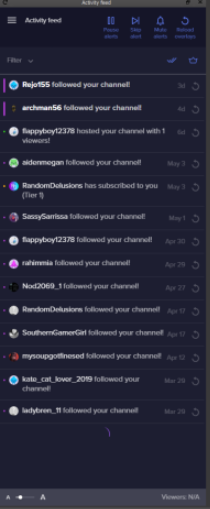
please and ty
this is my current one 😐 https://i.gyazo.com/7c25747b907f611ae9c1fcfab7e667e1.png

i want the other one back
fierce atlas
assuming you still have OBS.live installed, go to the StreamElements menu and choose "Activity Feed"
glass isle
what menu
fierce atlas
in OBS
glass isle
as in View > Docks?
fierce atlas
you might need to reinstall OBS.live
or make sure that you opened it if it's already installed
 fierce atlas
OBS.live is a plugin for OBS
you can re-download and install it here https://www.obs.live/

OBS.Live | Open Broadcaster Software Streaming Knowledge Base
OBS (open broadcaster software) knowledge base for live streaming. Find articles and videos about streaming with OBS.
 fierce atlas
have you closed OBS and restarted it using that shortcut?
fierce atlas
I recommend re-downloading and re-installing then
also, what version of OBS are you running?
glass isle
23.1.0
fierce atlas
yeah okay I would just do the reinstallation then
there was an old version of OBS whose updater broke so a lot of people got stuck on that version thinking it was the latest and it caused some compatibility issues
glass isle
should i download from here

StreamElements
StreamElements is the leading platform for live streaming on Twitch and Youtube. StreamElements features include Overlays, Tipping, Chat Bot, Alerts, Loyalty, all fully integrated and cloud-based.
fierce atlas

StreamElements
StreamElements OBS.Live makes live streaming on Twitch easy. Live Stream and record your broadcast from anywhere, save on system resources with the ultimate streaming software.
fierce atlas
@dawn hornet consoles don't support overlays, you would need a capture card
 dawn hornet
Word
glass isle
is there a way to save all my current scenes/sources and all before re-installing?
fierce atlas
reddit
1 vote and 6 comments so far on Reddit
 wide anvil
I have a new streamelements update available but it keeps saying download failed. Is this a common issue atm?
fierce atlas
but if you are just reinstalling OBS.live it shouldn't be touching your OBS settings. of course backups are always a good idea 
glass isle
ty
fierce atlas
@wide anvil I know a few folks had this issue and I think most people fixed it by disabling their firewalls
wide anvil
Hmm, i will try that and disable antivirus software as well for the download. Thx
For a general fix it would be good to know which ports are used though.
fierce atlas
good to hear, glad that fixed it!! enjoy your Activity Feed being back  @glass isle
glass isle


fierce atlas
@wide anvil you might be able to do some searching through the Discord to see what else got posted about it, but I'm just a volunteer helper so I don't know as much about all the internal tech details
dawn hornet
If i could have someone get in touch with me later on today and kinda run me thru everything that would be awesome im very new to this whole side of streaming id greatly appreciate it
fierce atlas
@dawn hornet can you specify what you mean by "everything"? we're here to support folks getting StreamElements up and running on their stream, and while of course we do what we can to offer general streamer support as well, the best we can do mostly is to point you at some resources, there are tons of awesome tutorials out there on YouTube and blogs if you're really starting from zero. the more specific questions you have, the easier it is to help you out 😃
 odd holly
Hi! I have a problem with my OBS and StreamElements. I just opened my OBS twice but all parts from SteamElements don't load in on OBS. I also tried to login again but it didn't help
It did work 2 days ago
odd kraken
Do you see StreamElements at the top in OBS? If not, please restart OBS. If it is still not there, please reinstall OBS.Live.
odd holly
StreamElements plugin is working only the overlay isn't loading in
I made all my overlays on StreamElements and they usually show, but right now they don't. I did restart OBS and tried to reload my overlays but it didn't work
odd kraken
Please try to restart OBS as admin.
odd holly
Ah that works, thanks! But why does it work now? Because I didn't have to do that before
odd kraken
Depending on other sourced you maybe added to that scene to get the overlay working, OBS needs to run with admin rights.
 unborn totem
Hello, i got issues with alerts.
Before i start stream, i test all alerts and stuff and all works perfect. When i start stream it doesn't show any alert for follow,host or anything. Please somebody help me!
deep birchBOT
@unborn totem Please connect your Twitch and/or YouTube channel with Discord by going to ⚙ Settings and then Connections here in Discord. https://streamable.com/eg92w
 unborn totem
Okay,done. What now?
odd kraken
Are the events in your activity feed?
unborn totem
No, i don't think so
odd kraken
Mod the bot in your twitch channel. Make the bot leave your channel on your dashboard, log out of streamelements, log back in and invite it back to your channel.
unborn totem
Done,is that all or?
odd kraken
yes, if you are expierincing this happening again, that the events do not show up on your activity feed, please come back here.
unborn totem
Okay, i'm gonna test it now. Thank you for help!
 ancient nimbus
hello
deep birchBOT
@ancient nimbus Welcome to the support channel! Please let us know how we can assist you today and a member of the support staff will be with you as soon as possible.
rugged quail
Hello. I am just wondering how to log out my twitch account from the actual OBS Live windows? I wanted to switch to another account but they keep my main account logged in
odd kraken
At the top select StreamElements and then log out.
rugged quail
Ahh thx mate. Totally missed that
ancient nimbus
hi. i started streaming through obs but its not showing up on my twitch channel. i put in the stream key and everything but for some reason its not saying im streaming on twitch
dry sphinx
@ancient nimbus What version of OBS.Studio are you using? Also you can try connecting your Twitch Account through OBS.Studio instead of using the Stream Key.
 barren quarry
hi guys! super new to OBSLive/pc streaming in general
been working on setting up all my scenes and overlays and stuff...But unsure now how to add 'twitch chat' into the boxes that is in the overlay theme for the twitch chat to show
karmic spindle
why is my streameleements overlay all whitescreened? all of them?
i cant add anything
 knotty ermine
Hey StreamElements,
So im trying to work on this overlay webbrowser version. its all fine and dandy.
But is it me or is it impossible to see where the "bottom" is for the overlays?
as you can see. how do i get it to be on the bottom of that box?
or perhaps its my picture that is like this
nope, the picture is perfectly fine
Anybody? it kinda makes it hard to put it perfectly, if there is no line showing on the browser to indicate where the bottom start?
 dense ether
Im trying to get one of the super overlays in and it wont show up on OBS, i did the browers thing and copied the URL . but it isnt showing up. watched 3 videos and doing what they are doing. but nothing is showing up
rugged quail
I tried to ask last night, but my question might have gotten buried. If someone redeems a sound effect in chat, it now plays twice, echoing on the stream. This didn't happen until after I began using OBS Live in place of regular OBS. It happens with no StreamElements tabs open in my browser and with Studio Mode disabled.
deep birchBOT
@rugged quail Make sure to ☑ “Shutdown source when not visible” for all browser sources (all OBS scenes). If using studio mode, uncheck “Swap Preview/Output scenes After Transitioning.” Also keep in mind that sound can play from any overlay loaded in the browser (editor or launched). https://i.imgur.com/FegZJQS.png https://i.imgur.com/yY0wcFl.png

 rugged quail
I unchecked the option for Studio Mode (though I rarely use it and close that mode every time I do a transition). All of my browser sources are already set to shut down when not visible. I'll see if unchecking that option works later.
rugged quail
suddenly the Stats window is showing a Very high increase of Frames missed due to rendering lag . the moment I went live. all the frame counters went stupidly through the roof in counts of 60 per Stat window refresh. no settings have changed since my last stream without this issue.
deep birchBOT
@rugged quail Please provide a log from your last stream. To do this, in OBS go to Help > Log Files > Upload Last Log File and paste the link to the log file here.
rugged quail
I just done a quick stream with no gameplay. just display capture https://obsproject.com/logs/SjgsW_eIYCUNOvfo
odd kraken
There are a few warnings of that kind in the log:
Monitor and Game Capture Sources interfere with each other. Never put them in the same scene
Also start OBS as admin and disable the windows 10 gaming features: https://obsproject.com/wiki/How-to-disable-Windows-10-Gaming-Features
rugged quail
as stated above. these ^ have Never been an issue before ( i will do this anyway, but I know this has never caused a problem for me) ❤
odd kraken
These are the only issues I can see in the log without a stream so far.
rugged quail
@odd kraken it doesn't seem to of made any difference, it's kinda late for me, I will probably attack the issue tomorrow. just hoped someone might have an "easy fix" 😛
 thick fox
Was that a troll.... or
shy mountain
Who? 
 fervent harness
XD
 shy mountain
They left on their own, so doesn't matter.
barren quarry
do they only answer some questions over others man
think i might switch to streamlabs already man. Cant find my answer anywhere. And there's barely any youtube videos or help to use obs.live man :\
Can anyone help?!
hi guys! super new to OBSLive/pc streaming in general
been working on setting up all my scenes and overlays and stuff...But unsure now how to add 'twitch chat' into the boxes that is in the overlay theme for the twitch chat to show
shy mountain
We do answer, can't say why you were skipped though.
So you want to show your chat to stream or for you to view it via OBS.Live?
barren quarry
thanks dude
yeah I want to show my chat on the stream...(I don't use webcam...so when I do BRB / Stream starting soon etc etc I want to show chat on the stream)
shy mountain
In the overlay editor -> widgets -> twitch chat -> add -> save
barren quarry
ive got the actual chat for me to read already on OBS.live on the top right
ah okay beautiful ill check that out after this meeting
is there anywhere I can learn how to use the scenes as well...Any videos?
Like how do I start stream with 1 scene and then change to the next etc etc
shy mountain
UPDATED 2018 version of The Ultimate Guide to Streaming to Twitch with OBS Studio. In this video, we go through how to setup OBS Studio's server, bitrate, re...
Ok he updated his video
barren quarry
@shy mountain thanks for that!
ah yh i watched his old one yday
ill check that new one
barren quarry
@shy mountain that didn't show how to like use the scenes, change between them whilst live 😦
shy mountain
You just click on the scene you want to go.
Click on it and OBS changes the scene to that one.
barren quarry
oh okay so i need to click on one of the scenes...Go live...Then just click on another one when I want to change it and it'll auto-change on the stream
shy mountain
yes
 wooden socket
Hi, I am trying to create a custom bot name in OBS.Live via the Activity Feed - the link to "Learn More" does nothing when I click on it...
fierce atlas
hm, it's not working for me either but I can help you out. you have to fulfill the requirements before you can rename your bot
Custom bot name requirements
- StreamElements bot modded and in chat
- Active overlay with alerts
- StreamElements tipping page in the panels below the stream (!panels)
- Create a twitch account for the name you want to use
- OBS.live or Ground Control app must be running
wooden socket
hi anne, I have fullfilled the requirements 😃
ok I guessed on the create a twitch account so that is done also
wooden socket
in obs.live I select set custom bot name... then do a connect - it connects to my stream account as the bot name not the bot account
so I added the bot as a channel in my profile on the streamelements web settings (thinking that might be required)
fierce atlas
hmm, I was able to click on an option to connect on another account when I set this up but that was a little while back at this point
it was part of the dropdown to select the bot name if I remember correctly
wooden socket
I get three options in the dropdown in OBS.Live one for streamelements as the bot, one for my main account and one just saying custom... I am going to try restarting OBS.Live but figure that is a longshot since I created the connection to the bot account after I started OBS.Live
fierce atlas
are you able to click on "Custom" ?
wooden socket
custom can be selected in the dropdown
and I do get a connect button
but like I said it connects to my main twitch account when I click it
there does not seem to be any clear method to select which account to connect to
fierce atlas
well, I'm definitely stumped. we'll have to wait until another support person can chime in with ideas 
wooden socket
thanks anne 😃 will continue to dig around
fierce atlas
good luck!
 quasi snow
@wooden socket you don't see this option? https://cdn.discordapp.com/attachments/342748377416466442/578902047668305920/unknown.png
 dry sphinx
@wooden socket Yeah or you sign out of your main twitch account on Twitch's website to sign in with your Bot account.
green python
hello, is ther anyway to copy my twitch SE setting to start streaming on youtube?
like, i mean, my followers alerts to my sub alerts on youtube, chatbox, etc
odd kraken
No, as this are two different systems with different APIs you get the info from.
wooden socket
Just catching up Rippz
I figured out how to get it working with Ground Control but that only works if I have GC running and reverts to the settings in OBSLive's Activity Feed when GC is not open - rather just have it working in OBS.Live so I don't have to have GC running also...
green python
@wooden socket whats ground control?
quasi snow
yeah, try logging out and back in spotter, see if it helps
deep birchBOT
@green python You can download our Desktop App Ground Control here: https://streamelements.com/groundcontrol
wooden socket
its an application from streamelements Soto - it is like the activity feed part of OBS.Live
green python
oh i think i have it on obs overlay then
wooden socket
ok Rippz and yes I am logged into my bot account on the web and I have added the bot account as a channel in my StreamElements profile....
yes soto its part of the obs.live plugin for obs
ok I figured out the process...
and yes I did not hit the not you to login with the alt account - the page displayed the lower part not the top when I was doing the authorize part so yes the magic is to say "not you" to your main account and login to the bot account then authorize - thanks for the help Rippz0r and S.Emerican
 gleaming basin
Hello everyone quick question I usually keep separate scenes profiles for my games due to different brb,starting soon images
does having more scenes use more memory or cpu usage?
odd kraken
Having them loaded in the background can cause more ressources to be used. You can create scenes collections in OBS Studio to switch between them.
gleaming basin
Yeah like i have 6 different scenes for my games in the scenes collection
Then 4 scenes inside per game
So their no increase usage keeping that many right?
odd kraken
Afaik only the scenes collection you have choosen are loaded at this time, depending on your browser sources settings.
gleaming basin
oh okay perfect then
hmm should i enable 'shutdown source when not visible' on my browser sources settings?
So it doesnt load up?
odd kraken
Depending on the widgets you have in the overlay, yes. We recommend setting this option for the overlay browser sources.
gleaming basin
Oh i see, my overlays all png files
Brower sources are just alerts
Would it better to shutdown sources when not visible for my alerts and stuff or is it fine to keep it as is
odd kraken
When you have got one browser source with just teh alerts, add it one time to the sources, without setting "shutdown when not visible" and then use the add existing feature to add it to your other sources.
Or add the alert box to the other overlay elements and make this whole browser source shutdown when not visible.
deep birchBOT
@barren quarry Please provide a log from your last stream. To do this, in OBS go to Help > Log Files > Upload Last Log File and paste the link to the log file here.
barren quarry
odd kraken
In this log is no output session. Please provide a log with an output session.
barren quarry
guessing i had to click current log as i literally just stopped stream 10 mins before messaging on here
odd kraken
The encoder is skipping frames because of CPU overload. Read about General Performance And Encoding Issues: https://obsproject.com/wiki/General-Performance-and-Encoding-Issues
 placid garden
Hello, I am needing some help with OBS. I am wondering how to add a face cam to my stream, and I am wondering how to make my overlays show up in stream. Also I am having issues with balancing my audio output.
deep birchBOT
@placid garden To add your overlays to OBS, add a new browser source in your scene. Paste your overlay URL in the browser source properties, set the dimensions to 1920x1080 (unless you changed them on the website), and ☑ “Shutdown source when not visible” https://youtu.be/KDvLynUqXI4
placid garden
oh! I will try that
odd kraken
To add your cam to OBS, create a video capture device source in OBS.
placid garden
got the cam working! thanks
 zinc lark
@barren quarry I would recommend reducing your output ratio, the 1080p is very resource heavy. You can also try reducing the frame-rate, 1080p at 30fps is easier, and 720p you should have no issues running it at 60fps
 limber heart
not really an obs live help but and Alert box issue. I can see that i have up loaded a pic i wanna use but when i save it and test the alert it comes up still as left shark. I have deleted the pic and tested to make sure it was gone - which it was - but when i put it back i still get left shark
odd kraken
Take a look at the variations, or disable the custom CSS option, if enabled.
 waxen zephyr
my obs live is crashing after like 5 seconds of being loaded can anyone help pls?!
odd kraken
Is there a crash log? What version of OBS Studio and OBS.Live are you on?
waxen zephyr
I have copied the past 4ish crash logs and I literally just updated OBS live
23.1.0 (version)
odd kraken
@waxen zephyr So is it still happening after the update of OBS.Live? What OBS Studio version are you on (bottom right)
waxen zephyr
@odd kraken 19.5.8.388
waxen zephyr
like in this channel? they seem kinda big
odd kraken
yes, just drag and drop the files here.
waxen zephyr
do you have a path for the actual file locations? i just pasted it into notepad atm
odd kraken
There is an upload funkction for the latest logs. Please use this in OBS.
deep birchBOT
@waxen zephyr Please provide a log from your last stream. To do this, in OBS go to Help > Log Files > Upload Last Log File and paste the link to the log file here.
waxen zephyr
will try to see if it stays open long enough
odd kraken
If not, the path to the log files is this one: %appdata%\obs-studio\logs
deep birchBOT
@waxen zephyr For the best OBS support, please join their Official Discord @ discord.gg/obsproject
 surreal notch
Hey, having issues trying to update obs live, i click update and it gives me an failed downloading software update package, tried restarting it multiple times
odd kraken
Can you show us a screenshot of the error message?
odd kraken
Please try to redownload OBS.Live and try to install it.
 hexed cliff
Hello, I am having troubles with my animations, they are getting cut off in my obs but not in my editor, I just imported from stream labs
odd kraken
What do you mean with cut off? Can you elaborate please?
odd kraken
Set the resolution of the Browser Source in OBS to 1920x1080 and hit Crtl + F while having the source selected.
hexed cliff
Okay done, but it is still extremely small compared to the editor and off centered even when I do center it
plain sonnet
can you send another screenshot
 eternal mango
Cant set up my stream?? I have linked obs to twitch, and created (scenes and screen capture) but got nothing (black window) what am i doing wrong?
plain sonnet
are you on a laptop?
hexed cliff
I actually fixed the centering and size thank you! an issue I discovered while testing is no text is popping up on my follower notfication
plain sonnet
is there any text on the layers and is it above the image?
hexed cliff
it was an import from streamlabs that was a premade overlay, so it is bunched in one layer
it is the only notification with an issue
plain sonnet
can you check the others to see if they have a text layer
if theres no text layer then theres no text
hexed cliff
the others do not have a text layer but still displaying text?
plain sonnet
does an emulate show the name on the alerts?
hexed cliff
for the follow/subscriber notification , no. The subscriber notification has text but showing with the same pretext from the donations emulations.
plain sonnet
sounds like the import puts the text on the image, which is why theres no user name
try reimporting the alert with no text
hexed cliff
Honestly, it might be easier to just make new alerts. Thank you for the help I appreciate it!
plain sonnet
np 👍
hexed cliff
Hello, I'm back, very quick question. How do views request media for free in my channel? The settings are all set up in order to do so, i'm just not sure how they do it.
odd kraken
!sr YOUTUBELINK
hexed cliff
Ty!
 jaunty elk
Hey everyone, recently moved over my stuff from streamlabs and everything had been working fine, but my alert when I am hosted doesn't show up all the time. It worked for a couple days and not it isn't
Any ideas? Everything else seems to be working fine
deep birchBOT
@jaunty elk Due to changes to Twitch API, we have filtered out hosts and will only show these ones on your activity feed:
- All manual host events (0 hosts included and if filter set to 0)
- All hosts coming from an online channel. If the hosting channel has been offline, we do not show it
- All auto host events with at least 1 viewer
jaunty elk
My friend hosted me for 26 viewers last night when his stream was over. And I got 0 notifications as far as an alert going off for it
 latent adder
Any idea why when my obs is giving me 'Encoding Overloaded' ONLY when playing Apex Legends? I noticed if I turn my monitors resolution down to 60hz in nvidia settings but the game looks terrible. Is there any workaround for this?
deep birchBOT
@latent adder Please provide a log from your last stream. To do this, in OBS go to Help > Log Files > Upload Last Log File and paste the link to the log file here.
latent adder
 leaden lantern
Keeps saying "Invalid path or connect URL. Please check your settings to fix this." how do i get to the settings?
tulip hamlet
The settings button in the bottom right.
leaden lantern
Of twitch or OBS?
tulip hamlet
OBS.
tulip hamlet
That's in your Twitch account.
leaden lantern
Is it my dashboard?
tulip hamlet
Should be.
leaden lantern
Thanks
odd kraken
Access Twitch stream key here: https://www.twitch.tv/broadcast/dashboard/streamkey
latent adder
Where do you set the hotkey to game capture? I have the option selected to use a hotkey.
 turbid arch
How c an I show mouse and Keyboard on Stream like movement and such of just the mouse and keyboard
tulip hamlet
@latent adder OBS Settings.
@turbid arch Not through us.
Though your mouse should just be visible. Might be an OBS setting if I recall correctly.
leaden lantern
Whenever I stream, my screen stays black. How do I fix this?
Also if this is the wrong chat for this question should I go to helpdesk-twitch?
tulip hamlet
Have you added a display/game/window capture source?
leaden lantern
No, how do I do that?
tulip hamlet
Basic OBS tutorials can be found at https://obs.live or through a Google search.
OBS.Live | Open Broadcaster Software Streaming Knowledge Base
OBS (open broadcaster software) knowledge base for live streaming. Find articles and videos about streaming with OBS.
jaunty elk
My friend hosted me for 26 viewers last night when his stream was over. And I got 0 notifications as far as an alert going off for it
deep birchBOT
@jaunty elk Due to changes to Twitch API, we have filtered out hosts and will only show these ones on your activity feed:
- All manual host events (0 hosts included and if filter set to 0)
- All hosts coming from an online channel. If the hosting channel has been offline, we do not show it
- All auto host events with at least 1 viewer
jaunty elk
Can anyone help, I am not understanding this
tulip hamlet
If your friend went offline before hosting then it doesn't register.
 rose folio
Hey is native resolution easier to run on a computer than scaled down?
Like the actual process of encoding it happens either way right?
I'm confused because I want to stream at 1080p and it's not telling me I have dropped frames but it's too laggy to watch
Which must mean it's my CPU right>
shy mountain
@rose folio it dependw on butrate abd pc powee but in general scalling down to 820p is better
 jaunty rivet
h̾o̾l̾q̾
 green rivet
hey i have a question maybe someone can help, ive been helping my buddy moderate his twitch. I have "full control" to his stream elements but for some reason no one is able to use the !sr command weve tried enabling and disabling it but no songs are coming up on the Q are we doing something wrong?
hes currently streaming this is why im asking for him
 gloomy vessel
 rain grail
can any1 help me with a problem
shy mountain
What is the problem?
rain grail
my links are not showing in my chat overlay
shy mountain
screenshot of what you mean
rain grail
i just runned the coomand and it's showing im my normal chat but not in the overlay
shy mountain
The bot is ignored in the overlay chat widget by default
meaning it won't show up.
to prevent spam
rain grail
so how i enable him in the overlay ?
shy mountain
Dashboard -> my overlays -> enter the overlay editor -> click on the chat widget -> on the left side bottom -> ignore list -> remove streamelements -> save overlay.
rain grail
thank you very much now is poping up in my overlay
and another thing how i can enable the stream status update thing on my OBS Live ?
rain grail
yeah that thing bcz i had it and after I updated it is not here anymore
shy mountain
shy mountain
Views -> docks -> Stream Information
rain grail
is not there ?
deep birchBOT
@rain grail If you are not seeing the OBS Twitch integrations and have OBS.Live installed, please follow these steps:
- Make sure you are on the latest and greatest version of OBS.Live ( 19.5.8.388 )
- exit OBS (make sure OBS is not running)
- delete
%appdata%\obs-studio\plugin_config\obs-browser\obs_profile_cookies - start OBS.Live
- Settings -> Stream -> disconnect -> connect
rain grail
thank you for your help
green python
so, when i stream and i have my fps uncapped or not capped to 60, my stream is laggy, but then i see other streamers such as timthetatman, ninja, etc, playing uncapped and perfectly well
quasi snow
they probably have a dedicated stream machine
and another to play the games
encoding comes with a high cost/toll on the pc
green python
u mean like having an external capture?
quasi snow
yeah another pc setup to capture the gaming pc and do the whole encoding and stream
all big streamers have that
 wind sorrel
i woulds like to file a complaint my obs refuse to do an update and therefor not allowing me to use the streamelemt version of obs i refuse to reinstall then have to sit for 6 hours reconfigure everything once again any suggestions ? thanks
fierce atlas
reinstalling does not mean you need to reconfigure everything 😃
wind sorrel
last time i did everything was poff made me cry a bit ..
fierce atlas
while backing up is recommended just in case, but even in that situation you could quickly import your old settings
wind sorrel
okay guess ill do that then fingers crozz
fierce atlas
if you delete everything first you will have that problem, but if you back up and simply download/re-install you should be fine
quasi snow
save your settings before installing, export and also copy the folders
wind sorrel
were can i do that since i cannot enter stream elemt obs .. sstupid question but better safe then crybabie
quasi snow
%appdata%\obs-studio\plugin_config\obs-browser
wind sorrel
also while im here if that dont fix it self on reinstall i still have a welcome to chat bug making it compleltly impossible to see anybody's comments instead of any comments incl. my own and my bots comments a shooting welcome to chat ! appears i recon every 16 or so comment actualy pops up .. i have no idea how to fix this i have reinstalled firefox chrome hell i even moved from 1 place to another if it was my ultracrap internet still welcome to chat appears any ideas there too ? a bit long winded this but i feel i need to explain it in full to get a better respons 😃
ty for folder loc.
fierce atlas
are you talking about the ?bandwidthtest=true variable you added to your Twitch stream key?
 delicate gull
Greetings. I take it that SE cannot be used with Dlive?
is it just twitch and youtube?
rugged quail
Twitch
plain sonnet
yes @delicate gull currently no DLive atm
quasi snow
I'm quite sure that's on the menus Dominik
delicate gull
coolio thanks for the response 😃
fierce atlas
click into Stream, it may be under there.
correction, I checked and it is there
if you are logged into Twitch, which means there's a checkbox, and I think that's the only time this setting is available
rugged quail
Yup i just found it
fierce atlas
rugged quail
Thank you my man♥
fierce atlas
screenshot for anyone else looking
 ionic monolith
quasi snow
yeah I was sure it was there but am at work, don't know settings by heart, well not all of them, ty anne 
fierce atlas
same, had to pop in and double-check where 😄
 dusk ginkgo
is possible to stream at more than 60 fps?
quasi snow
not that I'm aware of
barren quarry
Hi team...my subscriber goal has random added numbers
How do I revert. I set my goal to 5...and it shows I've got 32 already? But I only had 9 all together and I wanted my starting point of the goal to be 0 anyway
dry sphinx
You can go to Activity Feed -> Widget Data -> Goals
That's where you can change 32 to 5 😄
Or reset it to 0

barren quarry
hmmm
so it already is 5 on the target on the right...But just the number I have shows 32 randomly
ohhh okay i see
thanks! fixed it
just another note that may sound completely stupid
if I want to record gameplay. I have to do that using OBS.Live too right? But I guess I should just make a new 'profile' so I can have different overlays (if any) for when I want to record?
dry sphinx
It would be using OBS.Studio for Recording. Not OBS.Live.
barren quarry
It's just the same thing isn't it?
it says both start stream or start recording in bottom right
dry sphinx
It's not. As OBS.Live is Streamelement's plugin so you can manage your Activity Feed, Twitch Chat, Custom Bot Name.
OBS.Studio is what has the start streaming/start recording 😄
barren quarry
Oh okay, it's just in my desktop I click the 'OBS Studio' icon which loads up the OBS that I guess is essentially OBS live. So how would I go to normal OBS Studio
 lilac dome
hello the streamer i mod for is having some crazy frame drops recently when streaming so i am just tyring to cover the basics here- she is getting 300 down 25 up on speed test and is still around 600 frame drops when streaming and only has 12% CPU usage
deep birchBOT
@lilac dome Please provide a log from your last stream. To do this, in OBS go to Help > Log Files > Upload Last Log File and paste the link to the log file here.
lilac dome
im not a streamer. im a moderator for the streamer
fierce atlas
your streamer can do the export for ya 😃
without the log files there's not much help that can be offered
quasi snow
I've been having that sometimes due to twitch server I was streaming to, it happens sometimes
if she can, stop/start stream and change server see if it helps
that is if she normally doesn't get frame drops ofc
lilac dome
@fierce atlas thanks i am seeing if she can get that for me now!
@quasi snow she ended her stream and restarted streamelements. She was at like 12,000 frame drop then she restarted and is now like 600 so its better
quasi snow
did she try another server?
last week I had some problem in 2 diff days and diff servers
quasi snow
hehe
barren quarry
Is it better to use a hardware encoder or software encoder?
lilac dome
here is the log https://obsproject.com/logs/zaGWx8HrLiTxsm_-
quasi snow
with a quick look I can see 2 problems already, not running as admin and browser source hardware acceleration is on
lilac dome
@quasi snow okay i will let he rknow those 2 bullet points!
quasi snow
let me look into it a bit more
lilac dome
no problem @quasi snow thanks for the help!
quasi snow
@lilac dome https://h4ndy.eu/obslog?url=https://cdn.discordapp.com/attachments/504975178791649320/580396245432926237/2019-05-21_09-58-27.txt this ain't the log of the last stream but you can see the problems I mentioned and a couple more
!add
deep birchBOT
To add your overlays to OBS, add a new browser source in your scene. Paste your overlay URL in the browser source properties, set the dimensions to 1920x1080 (unless you changed them on the website), and ☑ “Shutdown source when not visible” https://youtu.be/KDvLynUqXI4
quasi snow
make sure to tick that option on all browser scenes too "Shutdown source when not visible” 😃
lilac dome
ahhh okay i see on the link you provided me
quasi snow
also to disable hardware acceleration, it's hidden on options, advanced
lilac dome
as for the browser source hardware acceleration where would she go to turn this off? I also assume to run as admin she just right clicks OBS.Live and "run as admin"
quasi snow
😄
lilac dome
did you read my mind @quasi snow 😂
quasi snow
seems like it hehe
I suggest, right click the shortcut and set it to run as admin
so no need to recall each time
quasi snow
it's somewhere on the properties
I use auto server selection, whenever I start dropping frames I know its Twitch server so I quickly stop/start stream so it picks another server, perhaps explain her that, if she agrees try that, hope it helps
lilac dome
okay she might be set that way because she didnt know what server she was on so i had to explain but will do this has helped a lot so far!
quasi snow
barren quarry
Is it better to use a hardware encoder or software encoder?
quasi snow
depends on your setup and game
 west eagle
Good morning StreamElements ppl! I have a question -- when I use media request video widgey in my overlay and show the video, the music has a duplicate echo and if I let it go long enough the echo multiplies... if I take the video out the music plays fine with no echo. Any ideas?
I'm on Twitch btw, OBS 23.1.0
quasi snow
have you ticked Shutdown source when not visible on all browser sources?
west eagle
Oooh maybe that's it... I'll try that! Thank you!!
quasi snow
you're welcome, hope that is it 😄
 dreamy tendon
how do i fix my kb/s????????
my stream was fine for a few hours then started acting up
quasi snow
?
dreamy tendon
plain sonnet
kbps is down to network, you can always send us a log
deep birchBOT
@dreamy tendon Please provide a log from your last stream. To do this, in OBS go to Help > Log Files > Upload Last Log File and paste the link to the log file here.
dreamy tendon
plain sonnet
you have a few minor warnings in there (help links in the report)
https://h4ndy.eu/obslog?url=https%3A%2F%2Fobsproject.com%2Flogs%2FLcrAhOvnSecdRbk1
main thing is your bandwidth
dreamy tendon
how do I fixed random bandwidth issue?
plain sonnet
i see you have it set to 2500,
do a speed test to find your upload speed then adjust it to kbps
it will be best to use 75 - 80% of your total upload speed
keep in mind if there are other people using the internet then it will also take a hit on your speed
dreamy tendon
normally my download is around 80.00
I was told here one time to do 6k bit rate but nothing changed
plain sonnet
it wont, live streaming uses upload, yours can even do 5k
you can set yours anywhere between 3435 and 3664
3664 is 80% of your total upload speed
if theres no one else uploading on your internet during your stream you could push it up a little bit more, but then you start to push the bandwidth which could cause problems
dreamy tendon
If it's struggling with 2500 when the stream acts up. Is it a good idea to raise it?
fierce atlas
I think lowering it usually helps more than raising it
plain sonnet
its basically low speed not so much acting up. i had the same issue with low speed until i up'ed it to 4100, no more issues
dreamy tendon
okay, so if i raise it to 3500 and its still buffering or freezing
what else is there to do?
it's weird because it's so random and happens rarely but can last awhile
quasi snow
go to advanced options and disable hardware acceleration, won't hurt
plain sonnet
3500 should be ok, if it keeps happening then twitch inspector and speed tests are your best friends. this will give you stats for your network so you can go to your provider and get them to have a look.
speeds always fluctuate, they are never constant, if you keep an eye on your kbps during your stream you will see it always changing.
the issues come in when it gets too low, then you have the frame drops.
dreamy tendon
i called my provider last time this happened for a couple of days and they gave me the basic modem router reset even though i told them i had alread tried that but they said the reset is different if they do it themselves
didnt work
@quasi snow what would that do
quasi snow
ease the load on your pc
dreamy tendon
I didnt see that option anywhere
plain sonnet
yeh they will 😁
you need proof for them to "see" the issue and do anything, twitch inspector and speed tests will tell you if your speeds are too low for what you should be getting.
if you can prove that your speeds are dropping from 4.5mb to, say, 2.3mb every other day constantly then they will do something about it
dreamy tendon
How do I show it to them as proof?
plain sonnet
when you have a speed test this shows low results then just use the snipping tool to save it as an image and ask them for a email (if they dont have a helpdesk email) and send all of them by email
dreamy tendon
They make me do speed test too and read it to them over the phone. They think everything is fine. i don't know how to make them actually do something other than reset sadly
plain sonnet
@rugged quail youtube is bae, some basic set up guides from SE
https://www.youtube.com/watch?v=X7XrDdRE7Fk
https://www.youtube.com/watch?v=HbG01hU6quU
any issues/questions come back here 😁
@dreamy tendon unfortunatley its a long game with providers.
every time theres an issue call them but save the the speed test results, at the end of the week/month (depending on how many problems you have) send them an email with all of the images.
really put your foot down and make a point of how long its been going on for and how much it keeps happening.
thats what i did before changing providers
dreamy tendon
okay okay, would v-sync help this at all or is it not related?
plain sonnet
v-sync always helps so it should be used
dreamy tendon
idk where to find it in OBS
i see it in games I play as an option tho
but idk if there's in option in obs
plain sonnet
yeh its always in games : )
im not sure if there are options on the software for your gpu, but in game is always best to turn on
dreamy tendon
okay, are these related? I checked task manger and they weren't maxed out for gpu or cpu so im confused
plain sonnet
gpu is graphics, so it wont show in task manager. load mainly contains the actual game, the rendering for streams/recording (obs) and displays
cpu is your motherboard chip, you will see this in obs
the links in the report will help try and reduce the strain on your system
 cursive cairn
Hello! I have a question regarding Giveaways. I'd like to do a giveaway but it's going to span across an entire month 5/21 -6/21 is that something the system will be able to handle or is there a cutoff duration that a Giveaway can be active?
odd kraken
From what I have experienced yes, that is possible. Be aware that you cannot remove or the person cannot remove themselves from the giveaway.
cursive cairn
Ok cool, good to know! Thank you @odd kraken
 robust python
Is there a quick way to test Alert Boxes instead of going to the site?
 sinful flint
The event emulator is in the overlay editor so not currently
That said, if you have the activity feed in Ground Control or OBS.Live you can replay events from your activity feed, but you'll not have as many options as you're replaying a select few events
 noble aurora
odd kraken
noble aurora
odd kraken
answered in #helpdesk-youtube ⤴
 gray oracle
Hey guys! Always had great streams in 720p 60fps while playing fortnite and out of nowhere it started lagging, any reason? My internet is fine, game settings are mostly on medium
 ancient flax
Any ideas how to fix this? My vods always looked choppy and someone randomly told a streamer i was watching about the "View->Stats" page in obs and what do you know? nearly 10% lost frames for me
deep birchBOT
@ancient flax Please provide a log from your last stream. To do this, in OBS go to Help > Log Files > Upload Last Log File and paste the link to the log file here.
ancient flax
tulip hamlet
ancient flax
hmmm, I was playing Dauntless I believe, I doubt my 8700K and gtx1070 were fully loaded by it, I have the setting to low/mid for max fps [v-sync on is out of the question, i'd rather stab my eyes with a rusty fork 🙂 ]
I would also like to add that discord lags incredibly when OBS is open, like - you know the little animation when hovering over servers' icons? that's in slow motion
steel mural
Rendering Lag = GPU overload. Limiting the FPS would be a good start. Doesn't have to be V-Sync
ancient flax
i generally avoid using discord when i'm live because of it
so, rivatuner and set them to what? I'm at 100+ average
steel mural
Set it to something that gives you enough headroom for OBS.
Like 80% average GPU usage
ancient flax
I had the gaming features on, I'll keep an eye to see if the issues continue
but thank you nonetheless, i understand where the issue is now, thank you
I'll monitor the usage and adjust accordingly
 gilded moth
Switching profiles causes my OBS to crash. Also, the twitch signed-in profile doesn't correspond to the profile OBS is showing.
For the first part, if I start OBS with streamelements, switch to my 2nd profile, let everything come up, then switch back to my first profile. OBS just closes.
For the second, whatever Twitch I've signed into is signed in no matter what profile I switch to on OBS.
So if I switch to a different profile, I have to sign in under that profile again
Then, if I switch back to the previous profile, I have to sign back in.
 potent venture
hey guys, has anyone been able to get custom bot names to work with obs.live yet?
tulip hamlet
@potent venture See pinned messages for instructions.
potent venture
Thanks for the reply, i had it working previously, but it stopped working recently and when I checked here apparently it was a bug?
When I do those instructions it never updates to my bot account name, it works in GC, but I don't want multiple apps running
tulip hamlet
Fixed about 5 days ago.
potent venture
So I just tried re-installing and then re-adding the custom bot name, but it still doesn't appear to update, any ideas?
tulip hamlet
Disable the rename, part the bot, enable the rename, join the bot.
potent venture
by 'part the bot' do you mean to remove streamelements from the twitch connections?
potent venture
Thanks, I've done that, but doesn't seem to connect the bot when i enable the rename, it keeps showing as follows when I authenticate the twitch account
tulip hamlet
Showing as what?
potent venture
the custom bot name text doesn't change to my twitch bot account and I can't send a test message
is there a way to reset obs.live settings besides uninstalling?
tulip hamlet
When you click "connect custom bot account" what happens?
tulip hamlet
Go ahead and click it and take a screenshot of what you see next.
potent venture
When I click authorize the window disappears and the obslive settings stays the same
tulip hamlet
Is the name appearing where you blurred out the name of your bot?
potent venture
the text for custom bot name, doesn't update to the bot's name (the one i blurred) like it normally did before when it was working. So I think it's not detecting anything I am authenticating? I tried using another account but no difference
tulip hamlet
Click "not you?" and log in with the bot's account.
potent venture
Clciked on 'not you', have logged in to bot account and clicked authorize, doesn't appear to have updated as it still shows 'custom bot name' rather than my bot account's name
tulip hamlet
What OBS.Live version are you on? Check the bottom right.
potent venture
west eagle
Hello there! I chimed in earlier today with a problem with my stream elements Media request/Media Share and a severe duplication/echo of the music when I have the "show on Stream" turned on. It was suggested to go through and make sure all of my browser sources had "shutdown source when not visible" checked. Still a crazy echo. I have all of my mics and audio sources muted. Any other ideas?
I only have Media Share video/overlay on one of my sources.
tulip hamlet
You need to make sure every browser source in every scene has the check mark.
west eagle
I did
tulip hamlet
The only way for it to play multiple times when using "show on stream" is when you have multiple active widgets, whether it's in one overlay, multiple overlays, or even open in the browser.
west eagle
Hmm... maybe I'll just delete all my scenes except my main and my brb and see if that fixes it. thank you!
Nope. Gradually after first song its echo gets longer and longer and starts to hurt one's brain. Maybe I just can't use that feature, will leave it without showing video and just songs. Frustrating, it doesnt make any sense whatsoever. Song 3 and its so echoey I cant stand hearing it lol
deep birchBOT
@west eagle Please connect your Twitch and/or YouTube channel with Discord by going to ⚙ Settings and then Connections here in Discord. https://streamable.com/eg92w


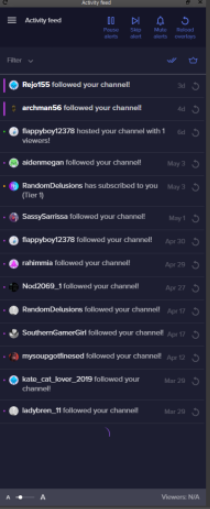
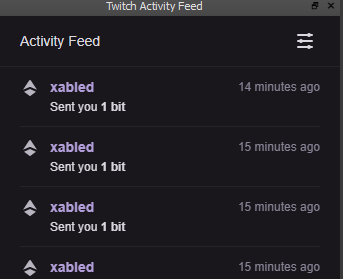



 west eagle
Ok its connected
tulip hamlet
@west eagle Well there's your problem.
west eagle
Gasp! Where is that at?
west eagle
holy smokes I just friggin checked ... omg
Yep. Fixed it. You sir or maam, are an angel.
Thank you thank you thank you
And while I have the opportunity, I'm a SLOBS convert, I've switched everything over to Stream elements and other than this echo (which was my dumb fault) it has been AWESOME. So easy to use and so many features. So, thanks!! 😃 ❤
tulip hamlet
😃
potent venture
is obs.live version 19.5.8.388 the latest version?
tulip hamlet
Yes.
potent venture
bleargh, I have no idea what else to try to fix this, is there a way to clear all the settings from obs.live so i can start over without uninstalling?
tulip hamlet
There is no reset to default, no.
When you click "Connect Custom Bot Account" it displays your bot's name at the top like so, correct?
potent venture
yeah, it shows my bot's name
tulip hamlet
Would it be possible for you to record a video of the process? I'm not able to replicate the behavior; once I click "Authorize," it appears to be connected:
potent venture
i've dm'd you a video
tulip hamlet
Log out and log back in using the StreamElements menu at the top, and try again.
potent venture
I've logged out of streamelements and then logged in using my twitch account
I used connect custom bot account and selected 'not you' to login as my bot account, I click authorize and nothing happened, it still shows 'custom bot name'
tulip hamlet
The only thing left I can think of is to reinstall OBS.Live.
rugged quail
I'm have a quite terrible performance issue with my OBS live! Whenever I starts my stream using that then the my gameplay gets a slight frame drops. And whenever I don't use OBS live, my gameplay runs buttery smooth.
deep birchBOT
@rugged quail Please provide a log from your last stream. To do this, in OBS go to Help > Log Files > Upload Last Log File and paste the link to the log file here.
 sturdy hemlock
Having an issue where one day OBS works and I can stream and then another day it does not, telling me to make sure my updates are current on my AMD drivers, which they are...
deep birchBOT
@sturdy hemlock For the best OBS support, please join their Official Discord @ discord.gg/obsproject
rugged quail
tulip hamlet
https://h4ndy.eu/obslog?url=https%3A%2F%2Fobsproject.com%2Flogs%2FgZV6ppWpbMqmbl0g
Please provide a log from a stream.
tulip hamlet
Read it. It's an analyzer that tells you what's wrong.
rugged quail
It tells, my "Display Capture" and "Game Capture" are interfering with each other...
Okay! Thanks for your help...
rugged quail
Good morning, i would know if is possible to have 2 or more channel twitch connected on my OBS.live
It is possible?
shy mountain
No.