#helpdesk-selive
1 messages · Page 37 of 1
 sudden carbon
 odd kraken
Have you created an overlay in the my overlays section?
sudden carbon
i used a superoverlay, it's in the my overlays section on the webpage
 deep birchBOT
@sudden carbon To add your overlays to OBS, add a new browser source in your scene. Paste your overlay URL in the browser source properties, set the dimensions to 1920x1080 (unless you changed them on the website), and ☑ “Shutdown source when not visible” https://youtu.be/KDvLynUqXI4
sudden carbon
coolio, thanks, following the link and instructions, will check back in a few.
seems to be a success, now do i have to manually line everything up or is there a way to get my camera to just auto-fill the appropriate frame?
odd kraken
Line the asets up correctly in the overlay editor, then add the overlay to OBS and add the camera source to it.
sudden carbon
erm, i've got the camera manually lined up in obs, but its not quite as precise as i'd like, is there a way to snap it or am i just missing something and too new to all this to realise it?
odd kraken
You can move the cam freely and the overlay cam border. So you can line it up as you like.
Maybe a tip: Set the cam layer under the overlay source layer, so the overlay border will definetly be over the cam.
sudden carbon
yep just figured that part out Benno, now just to finalize some adjustments in the overlay editor, thanks for your help!
 lament torrent
Is there anyway that I can transfer my overlays from SLOBS to OBS Live?
 shy mountain
At the current moment, no. We are working on an import tool, but no ETA on when its coming out. Keep your eyes open though 😃
lament torrent
alright, ty
 drowsy goblet
Hey Anyone here to chat I have a question
shy mountain
Well what is the question?
drowsy goblet
Ok So I just fired up my Streamelements and OBS live and the gamecapture is spot on but my video feed drops me from the frame
so in otherwords I can see my game not me
shy mountain
"drops me from the frame"?
From the preview of OBS?
Make sure your camera source is on top of the other sources in the sources list.
click drag and drop it to the top
drowsy goblet
Ok Im using the green goblin overlays the picture for ingame should have the game capture and a small pic of me it has the frame where I should be but no pic though the cam is active
ok
that fixed it .. thanks again Im a dolt
shy mountain
👍
 dreamy tendon
Someone willing to help me get my stream to stop buffering and dropping frames? Idk what to do. looked at some videos for help but im stuck.
deep birchBOT
@dreamy tendon Please provide a log from your last stream. To do this, in OBS go to Help > Log Files > Upload Last Log File and paste the link to the log file here.
shy mountain
Ok, from the get go, update to OBS Studio 23.1.0 😃
Manually from their website
OBS Studio 21.1.0 has a broken auto updater
dreamy tendon
okay yeah I did have an update issue
i will do that now
on streamelements do I go to OBS LIVE and just redownload?
shy mountain
I would not recommend that as our plugin will not update your OBS Studio
but install it self on top of your current version
Open Broadcaster Software is free and open source software for video recording and live streaming. Stream to Twitch, YouTube and many other providers or record your own videos with high quality H264 / AAC encoding.
Download from here, then if you want to download our plugin
dreamy tendon
oooohhh, i understand. okay i will do that now
Okay I downloaded OBS Studio and also updated stream elements OBS
shy mountain
No stream session detected 
shy mountain

dreamy tendon
okay i'll try again
shy mountain
do like 20-30 minutes and see how it feels only by updating OBS
but one of the things the log file says is this:
So update your AMD drivers as well
 midnight canyon
what i do if its show fps low
deep birchBOT
@midnight canyon Please provide a log from your last stream. To do this, in OBS go to Help > Log Files > Upload Last Log File and paste the link to the log file here.
shy mountain
Without actually seeing that log file to see what is making you drop FPS or frames in general
midnight canyon
done
shy mountain
and seeing your PC spec, we can't really tell you good settings for you.
What do you mean "done"? wheres the log file?
midnight canyon
shy mountain
I would strongly recommend to check the results and follow all instructions listed there.
dreamy tendon
it said AMF what is that? also i have a nividia graphics card
dreamy tendon
yes
dreamy tendon
is that a program?
shy mountain
yes
midnight canyon
what i do? tell me something
shy mountain
@midnight canyon Open the previous link I gave you, and follow the instructions from the analyzer(scroll down)
midnight canyon
i dont find Game DVR
dreamy tendon
okay so what boxes in AMD should be checked? I unchecked everything for Nvidia since that is my newer graphics card
shy mountain
everything
 dreamy tendon
lmao
shy mountain
@midnight canyon Follow the instructions
I can't do this for you, as I don't have access to your PC.
dreamy tendon
Just incase, heres what I see
shy mountain
yea looks fine
dreamy tendon
before I do this, I will send you my 20min stream log
shy mountain
sure
shy mountain
woah ok
internet issue 
Ok, instead of looking at everything there, do 1 simple thing while PC restarts
turn off your router for like 5-10 minutes
up your bitrate a bit(by 1000) and use the new NVENC encoder
run a stream for 20 minutes again and lets see that log again
dreamy tendon
ok ok. I did restart my pc and reset the router but I only did it for a minute before i looked here for help. I'll do it all now.
dreamy tendon
okay
shy mountain
yoink that power cord 
dreamy tendon
Still got it plugged out
Does this have anything to do with upload and download speed? Cause my download i know is like over 70.00, im hard wired
shy mountain
Well it could be your connection to the twitch server or network issue.
In any case, restarting the router if a good thing to do once in a red moon
dreamy tendon
Yeah. I know little about this stuff. Learning as I go is fun for me. What is this (new) setting that you told me to switch to in obs. Why is this one better if they are named the samething?
shy mountain
So I have an i5-4440 CPU, you have an i7-4790K
the difference is there between the CPUs but they are both old ones.
but you have a 1080 GPU
the new NVENC encoder that is part of OBS 23.X update
is way better in your case(and mine) to stream with
as it fully uses the GPU to encode the stream
(I have a 1060 and this new encoder does WONDERS for me)
 steel mural
GTX 980 user here. NVENC is a lifesaver! 
dreamy tendon
What did it use to encode the stream before if not the GPU? Was it CPU?
shy mountain
I think so
yes
but the new one is better
the old NVENC still used CPU
so its was like a 80/20 splits between GPU and CPU
afaik
 arctic solstice
Is there a way to import overlays directly from slobs to stream elements?
arctic solstice
That would be amazing
❤
Only thing keeping me from switching lmao
Is there any time table?
shy mountain
Non at the moment
arctic solstice
All good
I look forward to the switch
I was experiencing shutters with slobs
Streaming new nvec with 2070 and i7770k
Hope this will fix
What encoder would allow me to stream apex ?
deep birchBOT
@arctic solstice Since Apex Legends doesn't have optimized GPU drivers yet, it tends to take up all your GPU resources, leaving nothing for OBS. If you're having OBS performance issues, you'll likely need to limit the game somehow. The easiest way to do this is to enable Vsync in the game, or use a frame limiter. You can limit the game to 60fps by adding `+fps_max 60` to the game's launch properties in Origin.
https://twitter.com/OBSProject/status/1093974215877951493

If you stream @PlayApex and are having FPS issues with OBS due to a maxed-out GPU, you'll need to reduce GPU usage so that OBS can run as well. The quickest way to do this is to enable Vsync with triple buffering and disable Windows 10 Game Mode. https://t.co/FOPmDyJMNx
Retweets
472
Likes
1358
 Twitter
shy mountain
Twitter
shy mountain
But note that we can't really help you if you are using SLOBS
arctic solstice
I mean in general for when I switch
arctic solstice
Thank you so much
dreamy tendon
Im up to the streaming step
 rustic geyser
Is there a way I can disable the OBS plugin opening links in its own browser?
rustic geyser
Hmm, alright
Is there a way to make files downloadable through that browser then?
I tried last night but it didn't seem to go through
shy mountain
No idea. Best to do is, copy the link from the chat
dreamy tendon
My steam restarted itself
shy mountain
Use this to test your connection to the stream servers: https://discordapp.com/channels/141203863863558144/494513233416421386/514429269380825109
If there is no 100 quality server, then contact your ISP if there is a network issue
or follow the previous log file connection issue guide link
dreamy tendon
okay, here's this. i dont know if this is the right stream since it restart a new session https://obsproject.com/logs/2k0BDwWtVgEgovIk
shy mountain
new session is good, but still, follow along with this: https://obsproject.com/wiki/Dropped-Frames-and-General-Connection-Issues
This guide contains every piece of dropped frames / disconnect / network related advice we can give. If you really truly honestly super duper actually 100% tried everything in…
dreamy tendon
What did you mean new session is good
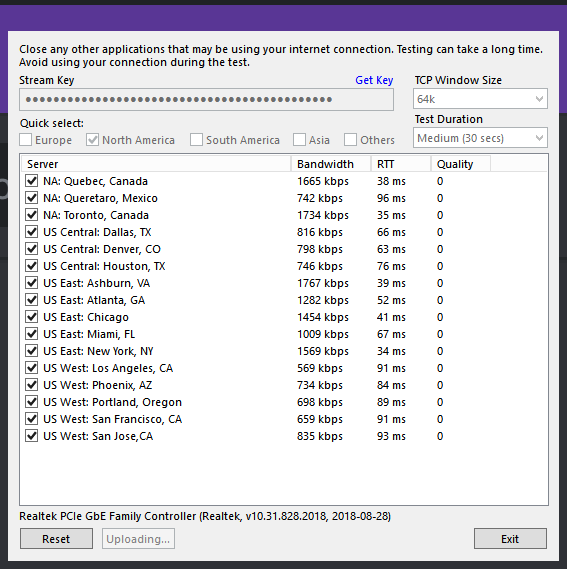 shy mountain
yeah thats not really stable. I'd suggest to talk to your ISP
dreamy tendon
what does stable look like?
shy mountain
maybe there is a network issue or follow the OBS guide link for connection issue troubleshooting
Quality is 100
anything different then 100, its bad
dreamy tendon
omg all of them are 0 lol
so what do I exactly tell my IPS?
so they understand and can help me
I read through the guide also
midnight canyon
@shy mountain do for me na use my laptop plaese do na i really dont know how do?
shy mountain
How do you expect me to use your laptop?
midnight canyon
teamviewer
shy mountain
I can't right now.
Follow these instructions listed here: https://obsproject.com/wiki/Laptop-Troubleshooting
If you tried everything in this guide and are still having issues, please make a post on the forums or stop by the OBS Discord server. When using OBS on a laptop or multi-GPU…
Then follow these instructions: https://obsproject.com/wiki/GPU-overload-issues
Causes and Solutions Guide This guide contains an explanation for the common issues that will cause OBS, or a game you may be playing, to suffer performance issues while trying to…
The various Windows 10 gaming features can cause rendering and encoding issues when using OBS. It is recommended you disable all gaming related features in Windows 10 to ensure…
And then do this:
midnight canyon
NV12?
shy mountain
midnight canyon
before its nv 12 but on live show green screen than i message here thay say do 144 maybe somethin
shy mountain
Yes if you read the anaylyzer you will understand why
Ok, then leave it at what it is set now.
Follow the other things
midnight canyon
send sreenshot ma i do
shy mountain
The only way to fix the frame drop is for you to follow the instructions in the link I provided you.
I cannot give you screenshots on what exactly to do.
midnight canyon
😥so can use my laptop please
 manic ravine
Hi there. Does the streamelements chat window support facebook?
shy mountain
Hey. Facebook integration is planned, but no ETA on when.
As to if OBS.Live will support Facebook - that I cannot say, as I don't know
manic ravine
Ahh i see. Thank you.
shy mountain
If you change that settings to NV12 you will get a green screen on your stream.
shy mountain
have you updated your nvidia drivers recently?
shy mountain
midnight canyon
😭help anyone
midnight canyon
No one online?
odd kraken
Have you udated your drivers?
odd kraken
So the green screen issue is still there I guess, after the update?
odd kraken
It is recommended to disablew teh windows 10 gaming features when you are streaming.
midnight canyon
I’m 50% done or do later more than after complete what happened??
After do that what happened??
odd kraken
Where is this from?
midnight canyon
I’m from india😅 or I buy laptop on Australia
odd kraken
I don't really get what you want to tell me with the 50% message.
midnight canyon
What happened after disable window 10 gaming features??
odd kraken
Your CPU has a better balance for handling streaming I think.
midnight canyon
I mean I completed off 50% setting few thing left to off I do later
 rugged quail
Is there any other way other than hardwire to stop it?
odd kraken
You could try to get closer to your router, but I can't guarantee it will be better by just doing that.
rugged quail
I mean like any Xbox setting twitch setting,bitrate and stuff
odd kraken
As we don't maintain the twtich app you are using to stream, we can't really help with this. Best to ask the twitch support.
rugged quail
Ok where do I find that
odd kraken
Sorry, but this has nothing to do with the products we develop and maintan. I can't help you with this.
 analog oar
anybody on ? my bot is missing, hand has been for some time
odd kraken
What do you mean with your bot is missing?
analog oar
it is enabled and set up, but it doesent react to commands, and alerts or anythiing
odd kraken
Have you muted it by any chance in the dasboard?
analog oar
i thought of that, muted and unmuted, still no sign of life
odd kraken
Is it in the viewer list in your channel?
analog oar
it is ? how do i turn that off ? yes they are in the viewers list
 dry sphinx
@analog oar /emoteonlyoff in your chat
analog oar
that was it. thank you very much @dry sphinx !
dry sphinx

 cyan mantle
Quick question: Do you guys make new scenes on Streamelements for all games you're streaming, or do you duplicate in for example OBS Studio? I seem to have some notification-issues when it comes to the duplicated scenes. Not in the scenes made with streamelements.
rugged quail
My media request window in OBS.live seems to have broken down, and restarting obs doesn't fix it, any ideas? https://i.imgur.com/tJp6OY0.png
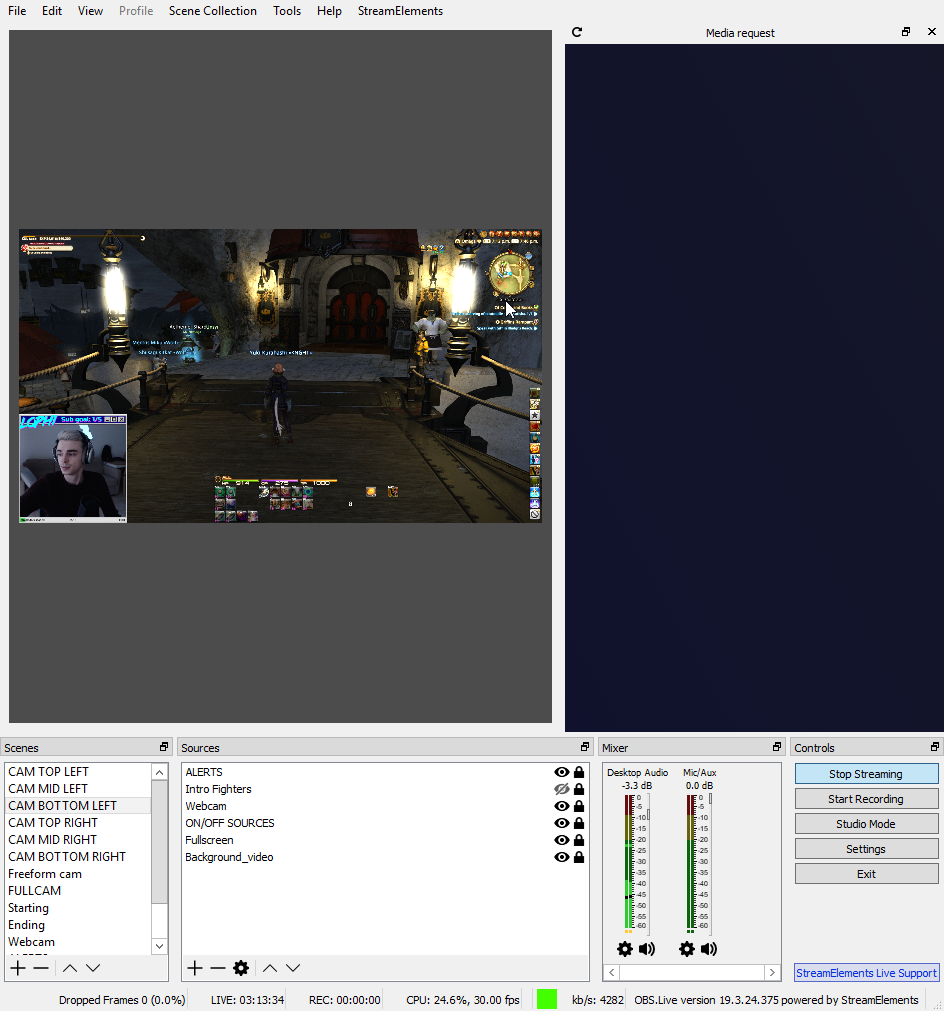 dry sphinx
@rugged quail You can try clicking Streamelements on the top of OBS.Studio -> Log off -> Sign back in
 plain sonnet
the scene overlays are labelled on the SE themes. its up to you what theme for what game you want. you need to make sure the correct label for the overlay is in the correct scene in obs
 swift nymph
Good evening team.
I'm having some issues with NDI and my commands.
Some of my sfx "redeeem" commands work if viewers type them but they take like 5 secs for the sound fx to play. The same commands will not work if I type them in my chat on the gaming pc that is sending the NDI output to my receiving "streaming" pc.
Other commands, if typed by me in my "gaming" pc OBS chat, don't work at all. Lastly, my "shoutout" command results with the exact text of the command, like the "${user}" etc verbage if I type it, in the OBS chat from the "gaming" pc with the NDI output.
Should I be typing on the "streaming" pc chat for the commands to work properly?
Can I shorten the time delay on the sfx "redeem" commands?
Should I disable and enable the commands on my dashboard to try to fix it?
 green python
hello, i am NOT self promoting, just wondering if someone can enter my stream and see if it has good quality
swift nymph
I can @green python . what's the channel?
green python
my name, heres the link; twitch.tv/mtz_soto
not rly useful now bc im just downloading an update
swift nymph
ok cool. I'll be in, in like 2 mins
swift nymph
you're welcome
green python
ok game on
swift nymph
you playing OW?
plain sonnet
how much is a lot? there is a default delay that you cant get rid of
swift nymph
I'm in his stream. It's about 10 to 15 secs
The delay is in the "chatbox" overlay @plain sonnet
it's more like 25 to 30 secs actually
plain sonnet
yeh, you really shouldnt be streaming on wifi, its not as stable as a fixed connection
green python
im on ethernet...
plain sonnet
you just said you dont know if its your wifi?
dreamy tendon
i'm having streaming issues myself still. My internet provider, all they did was reset my modem which I know how to do myself. Which didn't change the issues im having with frame drops and buffering for my viewers. I can watch Youtube videos fine but all the sudden my streams buffer.
green python
and that thing goes throw the cables and takes ethernet onto my room
plain sonnet
the best thing to do is use twitch inspector, it will look at your connection to twitch and also give you your ping
@dreamy tendon they are 2 different things. please send a log file
deep birchBOT
@dreamy tendon Please provide a log from your last stream. To do this, in OBS go to Help > Log Files > Upload Last Log File and paste the link to the log file here.
green python
so where do i lower my delay?ç
dreamy tendon
https://obsproject.com/logs/c6Yuj-18pjg3lvNj
my log file. @shy mountain tried to help me with this last night but he told me to call my internet provider eventually but idk what to tell them to get them to fix it
plain sonnet
its your bandwidth, either your speed is too low in general or its too low in obs.
i see its 3500, best thing to do is a speed test and set your bitrate to 75-80% of your upload
also here is the report from your log, please see help links inside
https://h4ndy.eu/obslog?url=https%3A%2F%2Fobsproject.com%2Flogs%2Fc6Yuj-18pjg3lvNj
dreamy tendon
My upload speed is around 12.76, so what should I set the bitrate to? Also my bitrate was at 2500 but got an error it was too low so keizer had me up it 1000
plain sonnet
try 6000
swift nymph
Is there a bug with "media request" and using NDI?
I've solved my commands issues EXCEPT the "song request" command and media request with NDI.
It worked just fine before I started using NDI.
The reply from the command is correct. It now posts a YT link to the "song requested" but I do not hear the song being played but I do see inside the que of the media request "plug in" or dock in OBS.live
dreamy tendon
I don't think I saw a difference bumping it up to 6000 I also read that other link about frame drops last night and now more today and I have no idea. i guess i can mess with my antivirus and see if they are causing it
plain sonnet
it also depends on the usage, also look at the help links in the log, there are issues in there you would need to solve
green python
hey how can i see that img u sent @plain sonnet, the one u get the bitrate/upload
plain sonnet
use google, megabyte to kbps then 75% of x
swift nymph
I solved the 'song request/media request' issues I was having. The command works but still replies in chat with a YT link but I do not have "show on stream" enabled.
I'm ok with the link showing up. I can explain that to my chat if it's something that can't be helped with the feature. I am just happy the song can be heard by me and viewers.
Sorry to have bothered you all with this.
Good luck @green python and @dreamy tendon
green python
@swift nymph thank you, but why?
dreamy tendon
@swift nymph Thank you, glad you got yours sorted out
swift nymph
Just wishing you luck with your streaming amigo @green python
green python
hahahaha ok, thank you again, but as i am spanish im not getting as much viewers as english
plain sonnet
no, twitch has a max of 6000
dreamy tendon
im trying to use DDU to remove my AMD drivers but idk how. I have Nvidia graphics card now
swift nymph
What is DDU?
dreamy tendon
I'm not sure how to explain it Keizer told me to use it last night when I showed him my stream log
"Display Driver Uninstaller"
swift nymph
Oh ok. Man I wouldn't know where to begin with removing drivers other than using windows remove applications from settings feature
Especially if you are trying to find AMD drivers
green python
yooo @plain sonnet and @swift nymph , the problem in fortnite was that recently i had installed obs again because my version was 21. something and i needed 23.0.0 so i did that and my bitrate got down again to 2500, maybe thats the thing?
plain sonnet
bitrate is your upload speed, twitch has a max of 6000, if your bandwidth can handle it then use it
green python
i have a speed of 20 mbps in upload and download, but on sunday i receive one of 50 of upload, is 6000 ok? (for 20mbps)
plain sonnet
theres a difference between Mbps (megabits) and MBps (megabytes). do a speed test and see what they say in the report. then use google to work it out as above. as long as you arent using your whole upload then you should be fine, although it depends if there are others using the internet
green python
so this is it, what do i do now?
plain sonnet
use google to convert upload to kbps
dreamy tendon
how would i get the ip of the twitch server i am connected to
 quiet hawk
How do i add the Overlays i created into OBS software when i stream?
deep birchBOT
@quiet hawk To add your overlays to OBS, add a new browser source in your scene. Paste your overlay URL in the browser source properties, set the dimensions to 1920x1080 (unless you changed them on the website), and ☑ “Shutdown source when not visible” https://youtu.be/KDvLynUqXI4
rugged quail
How do I stream chaturbate on obs?
On android phone
I don't have a computeri
I also would like to stream twitch on OBS as well
I need much help. I have a good following but need more professional help.
I just started
My twitch is raynarichards
Please don't send YouTube vids. I need instructions
Thank you
 mossy tiger
how do i add follow notifications for my stream?
 lean maple
my CBR is set to 6k but it keeps spiking up to like 8 for some reason... I can't figure out why.
deep birchBOT
@lean maple For the best OBS support, please join their Official Discord @ discord.gg/obsproject
shy mountain
@mossy tiger you need an alert box to your overlay and then add the overlay to obs.
@rugged quail obs is meant to be used on a pc not a phone. You need a mobile streaming app. I would suggest ours (its named the same as our company name) but im not about that chaturbate part.
shy mountain
@dreamy tendon You can't really. Does the ISP need it?
 craggy kayak
I was wondering if anyone knew what the stuff in settings under Advanced>Video>Color format has different about the others. NV12 is out putting a full blank green screen and changing it to I420 fixes it but doubles my cpu usage and I didnt have this issue a few days ago. Is that really the problem or is there something else going on causing my stream to get this?
shy mountain
What GPU do you have?
craggy kayak
GTX 980
shy mountain
try updating your drivers to the latest.
craggy kayak
Ah geez I just did that last week, one moment let me go do that
shy mountain
if you did last week, most likely there aint new ones this week
So did you install OBS.Live on top of your current OBS?
Or used our installer, then updated OBS?
craggy kayak
Yea but it wouldnt be the first time nvidia snuck one in on me
craggy kayak
Okay did the reinstall on the gpu driver and no change. To answer your other question I got OBS live from your installer recently since it was giving me recording errors earlier today
shy mountain
Hmm ok. So mind clicking on "Streamelements" on top and then report an issue
and mention the instalation process you did and why + what you did just now with the drivers?
I will poke our QA on this and see if they have any other ideas about it
so far we are unable to replicate this as it seems the green screen only happens with OBS.Live
as it was fixed with OBS Studio 23.1.0
but still present with us somehow.
craggy kayak
That sounds like rip stream tonight lol
Should I leave the check box checked at the bottom
 craggy kayak
Include OBS config and logs for diagnostic purposes
shy mountain
yes
craggy kayak
Sent
shy mountain
Ok, so I don't know if QA will answer today, but I did tag them in the report card.
craggy kayak
Well the game I was planning on isnt very cpu intensive but also not my normal game, Sunday however will be a different story so hopefully good by then xD
shy mountain
shy mountain
If you can't find Game DVR then in you are in a different windows version that has the Game bar
which is turned off.
Move on to the other issues listed in the log analyzer.
midnight canyon
I completed off game bar or game mode or capture
Now I’m doing disable game mode golbally using the registry
I do or no??
shy mountain
Game mode is the same as the game bar
its turned off
move on to the next issue in the log analyzer.
midnight canyon
Ok
shy mountain
Click this link and follow the instructions
midnight canyon
So I start old settings again
shy mountain
Have you done everything in the link i provided?
midnight canyon
I don’t know what I do confused now😥
All done maybe
Only window 10 gaming features not complete
I have do windows 10 gaming features??? Or no
shy mountain
Is game bar turned off?
midnight canyon
Yeah it’s off
shy mountain
then you've completed the windows 10 gaming features step
shy mountain
Different Windows 10 versions have different gaming features
you had the Game bar version
that is enough
game dvr is another version.
midnight canyon
Ok
What I do now?? Here
Now complete??
Now I restart laptop
Where I disable?? This
Like this?? But it’s epic for open for games?? How disable for game because no game icon outside 😅
Now I try do ?? Stream?
I do on nv12
On NV12 show green screen now or no?? Please tell me
What I do tell me??
Still show green screen
Showing green still now
midnight canyon
But use cpu so much or FPS low again if I do
shy mountain
Then I would recommend to not stream from a laptop that is not meant for gaming.
midnight canyon
I don’t have options 1442
I have options i420 or i444 or rgb
What options I use??
shy mountain
i420
midnight canyon
I don’t see green screen on normal obs🤔but show green screen on obs.live
Show warning
Nothing change on obs.live still cpu high or FPS again go low😥
shy mountain
Your GPU is not meant for streaming or even gaming.
changing that settings will have higher CPU usage, most likely because your GPU is always on 100%
midnight canyon
Now FPS go very low😖when play Fortnite or cpu ok 25 or30under
Now start game go highly cpu little
What I do for FPS??
I think I cannot use obs.live😥
Thanks for help me
 wintry wagon
Does OBS.live save all my scenes and sources if I reset my computer?
shy mountain
No. You will have to save your scenes and sources manually.
You can export them easily via here
I recommend exporting both profile and scene collection
but the profile will hold the same information including your settings, as far as I know
shy mountain
👍
shy mountain
I'd save both
wintry wagon
Ok
shy mountain
scene collection is the just the scenes and sources
profile may save your obs settings as well
not only scenes and sources
wintry wagon
n\
mossy tiger
why are my overlays not working? i set them up on streamelements and have the browser url on my obs but nothing is showing up. why is this happening?
odd kraken
Have you started OBS as aedmin?
odd kraken
Is the overlay source above the game capture source? Have you added the browser source in 1080p?
mossy tiger
yeah the overlay is above the game capture and its at 1920x1080
odd kraken
Got to your activity feed on the webiste and hit the samll reload button on top of the activity feed.
mossy tiger
on streamelements?
odd kraken
mossy tiger
omg thank you so much for the help man
 static solar
can you help me.?
deep birchBOT
@static solar Welcome to the support channel! Please let us know how we can assist you today and a member of the support staff will be with you as soon as possible.
static solar
I cannot upload an image in the editor can someone help me to fix this please
plain sonnet
what browser are you using?
static solar
internet explorer
dry sphinx
Chrome it up
plain sonnet
please use a chromium browser, like chrome
dry sphinx
static solar
microsoft edge
dry sphinx
I think even Microsoft Edge with the Chronium beta test still doesn't work.
static solar
do I have to use google chrome?
dry sphinx
Google Chrome is best to use. I think Firefox works but can't guarantee since I haven't used it in a LONG time.
static solar
how its works?
how can i make an overlay with start screen / live screen / so back screen.
 outer niche
Failed to connect to server Any ideas?
 azure owl
Does someone know why media requests are not working on obs.live (and ground app too)? I click "show on stream" button and nothing happens. Also queue is not updating.
rugged quail
How to adjust your camera in Obs?
deep birchBOT
@rugged quail For the best OBS support, please join their Official Discord @ discord.gg/obsproject
dreamy tendon
@shy mountain I has a question
 fierce atlas
feel free to ask your question already and that way if KeiZar isn't around at the moment, someone else might be able to help 🤗 @dreamy tendon
dreamy tendon
okay sure, what does it mean if a few hours my stream connection is clean and working fine and then randomly will start buffering and dropping frames for a few hours. What could cause it to work when it wants?
fierce atlas
Could be a number of things, from changing to a more intensive game (or otherwise eating up more CPU/GPU) to your internet provider throttling your connection. 🤔
 pliant obsidian
hi guys i have made a custom follower alert and i am trying to get the useer name in the center of the alert i have tried using a margin but when i try and emulate a follower event the text is back at the bottom
odd kraken
@pliant obsidian Do you use the custom CSS option?
 robust python
My recent donator doesn't show up when I restart OBS.
But if i refresh the donation then it pops up
how do i set it to always show?
rugged quail
HI! Trying to get music to play through media request on stream right now but there is no sound? 
odd kraken
Have you added the media request widget to your overlay?
 pliant obsidian
@odd kraken no i was using the text advanced section
odd kraken
So when you change the text margins and save the overlay, they don't apply?
 river wave
What’s the lowest setting you can possibly set it to?
odd kraken
What setting are you referring to?
 vital rapids
Hello can anyone tell me where is the option to change stream title from obs live?
I had it before but can't find it now uh
odd kraken
In the activity feed, select the burger menu > streamsettings
vital rapids
AH!
Thank you so much. I know it was a dumb question. That should be in the View tab as a window 😃
green python
hello, i have a doubt. recently i bought a wifi antenna that gives me 218.8 mbpbs of download, but twitch maximum bitrate is 6000, so what would happen if i put, for example, 10000?
odd kraken
@green python Best to ask this twitch. But I think you can't just use more than 6000 bitrate.
green python
and is there any platform that spports more than 6000
odd kraken
I have no idea, sorry.
green python
@odd kraken you mean to ask twitch or to ask in the #helpdesk-twitch server
odd kraken
@green python Ask twitch. I am not even sure with the limit of 6000 for twitch.
 karmic parcel
hey quick question, is there any way to import a profile from Streamlabs OBS into obs.live?
 tulip hamlet
No, SLOBS uses its own filetype for its exports and they're not compatible with OBS Studio.
pliant obsidian
@odd kraken when i save the alert with the text set with a margin in the advance section it still shows up at the bottom of the alert
i will delete the links after you have seen them
 orchid ice
How can I permanently turn off dark mode for chat and activity feed window in OBS? I can only turn it off in chat window but once I restart OBS, dark mode is on again.
odd kraken
@pliant obsidian What are you trying to achieve exactly? Have you tried to set the top margin instead of the bottom one?
pliant obsidian
i would like to get the name text in the center of the snake image will give the top margin a try
odd kraken
you can also use negative margins.
pliant obsidian
that fixed it cheers for the help
 chrome nebula
why cant i see animated emotes in my obs live chat?
odd kraken
Do you see the BTTV smiley next to the viewer list icon in the OBS chat? Does the Chat dock have a small little reload icon in the top left?
 barren turret
ok, using stream elements in OBS uses less cpu resources.... but does it use less bandwidth? could it cause a stream to lag since it is drawing in the cloud signal into obs to stream?
tulip hamlet
It's basically like having a few tabs open in Chrome.
dreamy tendon
So my internet is working right now and no mater what I changed the bit rate to from 2500 to 6000 its fine. so if my internet decides to act up and frop frames and buffer, its not cause of the bitrate then. right?
 drowsy ingot
For SE OBS, for the music requests, can i put a spotify playlist as the backup? Or does it have to be youtube only?
tulip hamlet
Spotify's Terms of Service state it is for personal use only and disallows its use on streaming platforms. Their API likewise has been closed off to deny that kind of usage.
 dapper wolf
@dreamy tendon Depends on what warnings obs is spitting. Viewing the stats screen while you stream usually helps determine what the issue is
 ornate path
Hi so when i first streamed on twitch, on obs i got a notification to change the stream name while streaming but i closed it because i didn't think it was important but now i need it how do i put it back?
shy mountain
Activity feed -> Burger menu button -> stream settings -> change tittle -> save
ornate path
Is that on obs?
 wooden talon
hi, i keep experiencing a lot of lag wen i stream. i can list my setup if anyone is available
deep birchBOT
@wooden talon Please provide a log from your last stream. To do this, in OBS go to Help > Log Files > Upload Last Log File and paste the link to the log file here.
wooden talon
wooden talon
@shy mountain my CPU is always lower than 40% and encoding error does not come up, can you help me translate some of this?
wooden talon
yes
shy mountain
If the laptop is from 2012, its def. not meant to be used for streaming, when its this old.
wooden talon
its literally just has to run obs, it is not running a game as well
shy mountain
streaming is still encoding, w/e video input you give it to encode and send to the twitch servers.
If the log says the CPU is overloaded and you are getting encoder overload
then there is an issue
either follow the instructions from here:
or just try and get a better specced PC that can handle just streaming.
Also check the other things in the analyzer.
It can help sorting them out as well.
For the time being if you can't afford a mid range rig for streaming only.
shy mountain
Yes in the log file
wooden talon
i have all of the above settings enabled except admin OBS
is it the CPU causing issues or GPU? both?
wooden talon
yes.
shy mountain
Then what does the red error say?
CPU overloaded, right?
Then the 2nd block says that there is render lag
wooden talon
encoder overload and gpu maxxed out
shy mountain
Than that means there is an issue with both.
wooden talon
so even though obs says my cpu usage is 40% or lower, its not actually>
fierce atlas
if I understand it correctly: CPU usage from OBS is just how much OBS is taking, not how much of your CPU is being used overall. so your CPU is still probably overloaded/maxed out.
wooden talon
thanks for the diagnosis.
 edgy pond
Hi. Where can I find a detailed explanation on how to set up my first stream? I joined today. Using OBS Live for the first time
shy mountain
We have plenty of video guides for our tools and features here: https://www.youtube.com/playlist?list=PLCDDKlFdScbEwdx5AntcQIS1InkFJwHtv
midnight canyon
shy mountain
Check the link above.
midnight canyon
yesterday work well wham curlz&ballz tell me fix green screen reinstall obs.live work well
 stiff quartz
Is it possible with OBS.live to have an extra screen when going live where you can change the stream title, game and tags? Basically just like with Streamlabs OBS when going live?
shy mountain
Yes
shy mountain
@stiff quartz
@midnight canyon You are the one that needs to check those and follow the instructions.
edgy pond
which url do I enter in OBS when creating my first stream? I didnt find youtube video for this?
deep birchBOT
@edgy pond To add your overlays to OBS, add a new browser source in your scene. Paste your overlay URL in the browser source properties, set the dimensions to 1920x1080 (unless you changed them on the website), and ☑ “Shutdown source when not visible” https://youtu.be/KDvLynUqXI4
shy mountain
Thats for the overlays
edgy pond
thanks
stiff quartz
@shy mountain Thanks I did find that section, but was just wondering if there was a way to set those when clicking "start streaming" as an added step. But I guess the way you showed is the only one for now 😃
shy mountain
I'm not sure I follow what you mean 
 twilit sand
Hi guys! I'm changing from StreamLabs to StreamElements, and there's actually one thing that I didn't see in SE and I kinda miss that... Does anyone know if there's something like the SL Twitch Extension that lets you spend points to redeem messages in alerts? (redeem points to send message like ''donate tips'') Thank you!
shy mountain
We do have an extension for Twitch
deep birchBOT
@twilit sand Our Panel extension can be added to your channel here: https://www.twitch.tv/ext/uaw3vx1k0ttq74u9b2zfvt768eebh1
shy mountain
and if you need steps on how to make stream store items play sound on stream, let me know
stiff quartz
@shy mountain In SLOBS you get this screen when you press "start streaming". In it you can set all stream info, like title, tags and game. That's what I meant, it would be super helpfull to have something like this for OBS.live as well, so that basically you can never forget to set the game/title/tags when going live 😄
twilit sand
Sure. I'm gonna read about it a little and try it. But are there the option that I asked? I mean, sending messages that appears as alerts on the screen? @shy mountain
shy mountain
Well, since OBS.Live is a plugin/addon for OBS Studio, that would mean we will most likely have to change a core function of OBS Studio in order to make that work. @stiff quartz
@twilit sand Specifically custom messages - no.
twilit sand
Sure. Thanks!
stiff quartz
Yeah I guess that might be right. I'll see if I can share it with the OBS studio team as something to implement on their end.
fierce atlas
That panel already exists in the latest OBS @stiff quartz it doesn’t “pop up” when you click start streaming but it’s available at all times to update from when you connect your Twitch account.
stiff quartz
I didn't know that @fierce atlas. Where can I find it? Or is it the same one as in the video posted by Keizar?
fierce atlas
First you need to connect your Twitch account here.
Then you can get the Stream Information dock here
rugged quail
Question my obs live says there is an update, and he tries to do it but than it failed with the following message:
odd kraken
What version are you on at the moment?
rugged quail
how do i find that out?
odd kraken
it is in the top left of your OBS window.
rugged quail
23.1.0
odd kraken
What OBS.Live version are you on (top right)?
odd kraken
yes, my bad. it is bottom right.
rugged quail
oh hold on bottom right 😄 19.3.24.375
odd kraken
Have you tried to start the update again?
twilit sand
One more question, guys... I saw an option yesterday where I could ''change'' the bot to make myself as a bot, but I can't fight this right now.. can someone tell me te path to ther? 😛
fierce atlas
sometimes just restarting my computer helps clean up whatever weird processes prevent normal updates from occurring successfully
odd kraken
@twilit sand In the activity feed, on the burger menu > stream settings
fierce atlas
@twilit sand Check the most recent pinned post, too 😃
twilit sand
@fierce atlas oh well, I'm kinda new to Discord, didn't know about the pinned posts! I found that, thanks.
odd kraken
@rugged quail Can you disable your firewall and try to update again please?
fierce atlas
no worries, glad to help!
rugged quail
i do not have any firewall on xD
twilit sand
Oops, last question I think! It seems like the SE chatbot is duplicating answers..
Tried !followage as a test, got 2 answers, almost the same text both
odd kraken
almost? can you share a screenshot?
@rugged quail Can you try to restart your router please?
twilit sand
@odd kraken
shy mountain
restart OBS>Live
twilit sand
Restarted, still duplicating answers
shy mountain
close OBS.Live and let me know when you have
twilit sand
Closed
shy mountain
Ok, turn it on -> Activity feed -> stream settings -> custom bot name -> make sure its set to Streamelements
twilit sand
Yes, current bot name is StreamElements
twilit sand
oh
rugged quail
sure wil do @odd kraken
twilit sand
❤
odd kraken
That would be the next step I would suggest. Please make sure to save your profles and scenes cllections in advance.
 long haven
what happened? did an update, and the canvas is gone, along with the activities and chatbox..... help plz
Anyone know what happened with the update???
dry sphinx
You may just have to log out to refresh. On OBS.Studio click Streamelements -> Log out -> Log back in.
long haven
let me see if I can figure that out
that did nothing to help...still everything above the docks across the bottom (scenes, Sources, etc) is white....no canvas, no activities and no chat box
dry sphinx
Was the update from OBS.Studio or OBS.Live?
long haven
to be honest, I don't know which one. I launch OBS.LIVE and it popped up an UPDATE window, so I updated. Now this, can't see anything to work with
guess I have no choice but o uninstall what has turned into a useless pieced of software has I can't do anything with this
odd kraken
@long haven Can you share a screenshot of your OBS right now please?
long haven
sry, in progress of uninstalling, thus it's no longer available
going to try a reinstall and see what happens
@odd kraken here you go
when re-installing, I believe the update was OBS
odd kraken
When you select StreamElements do you see log out or log in at the bottom of the list?
long haven
log in
odd kraken
Please log in with your twitch account.
odd kraken
Please restart OBS, try to log in again. Then send us the current log file please.
long haven
do you want to restart OBS, or the entire computer?
odd kraken
To be sure it would be good to restart the whole computer.
odd kraken
Can you send us the current log-link please? Help > Log files > upload current log file.
long haven
this I hope https://obsproject.com/logs/8mLy4J2Gdu6tbuR8
odd kraken
Ok, so lets do this:
- close OBS
- right click your OBS shortcut -> Properties
- In the "Target" field at the end after the path and quotes add this: --remote-debugging-port=40404
- Start OBS
- Open browser and a new tab and type this: localhost:40404
Provide a screenshot of what you see pleae.
long haven
I'm assuming you mean OBS-LIVE prorperties
and that goes outside the " marks at the end?
odd kraken
yes.
long haven
would there be a SPACE between the " and what you typed?
I run a 3 monitor setup
I didn't connect to twitch as I don't want to get ahead of you
odd kraken
Click on the one that says just "Streamelemenets" and then on the console tab please. Provide a screenshot of the console please.
odd kraken
Please switch to the console tab.
odd kraken
yes, could be. Please close OBS, remove the debug info from the shortcut, disable your AV and restart OBS.
long haven
are you saying to remove, what I added before?
odd kraken
yes.
long haven
hmmm, maybe lost now....
so restarted OBS, and same screen to connect with twitch
or should I be looking at something else?
I did a continue without signing in and got this
still missing the side bars of Acitivity and chat tho
odd kraken
When you hit StreamElemetns at the top now, are you logged in? If not, try to log in please.
odd kraken
You need to be logged in, to see these docks. Please try to log in again. Have you disabled your AV?
long haven
yes AV off for an hour
when I click the SIGN IN below the StreamElements at the top....it is having me sign into TWITCH
odd kraken
Yes, please log in with your twitch account.
long haven
lets try the right pic
that seems close to normal now
thanks, now to ensure the AV won't mess with it
going to reboot again, and see if everything works
@odd kraken seems to be fine...thxs for you help and patience
 ebon coral
odd kraken
ebon coral
odd kraken
@long haven Could you let me know what AntiVirus Tool you are using?
odd kraken
Repair/reinstall the SD software please.
odd kraken
@ebon coral Please uninstall OBS.Live and install it again downlaoding from here: https://www.obs.live/
long haven
@odd kraken doing a SD repair worked, thxs again
deep birchBOT
@proud hazel Please provide a log from your last stream. To do this, in OBS go to Help > Log Files > Upload Last Log File and paste the link to the log file here.
 proud hazel
plain sonnet
proud hazel
proud hazel
plain sonnet
proud hazel
Thank you @plain sonnet
 old moss
helo I can't get loopback audio into obs working...i'm on win10 pro with rme 9632 audio interface which has loopback built in
 pastel pagoda
i connected the scene for the elgato but nothing comes up
deep birchBOT
@old moss For the best OBS support, please join their Official Discord @ discord.gg/obsproject
odd kraken
@pastel pagoda Try to repair or reinstall the SD software.
old moss
@deep birch thx ya but no one answered lol
odd kraken
OBS.Live and Elgato Stream Deck Tutorial https://www.youtube.com/watch?v=PiGrHXTk9zw
plain sonnet
@old moss i saw your message in obs and here,
is the issue setting up a loop back or getting audio in to obs?
old moss
@plain sonnet hmm it's geetting loopback audio into obs
plain sonnet
what are you trying to loop? desktop or your mic?
old moss
@plain sonnet getting Ableton audio into OBS by using the Loopback button on the Totalmix software (sound card)
live audio from DAW
odd kraken
@pastel pagoda Where did you connect what scene from elgato?
plain sonnet
all audio (apart from mic) is picked up from the desktop audio meter
old moss
basically the stereo stream from Ableton master output 1&2 or 3&4
pastel pagoda
video capture device @odd kraken
odd kraken
Please also join the OBS discord for support: @ discord.gg/obsproject
old moss
@plain sonnet ya but i'm not getting anythingon the meters in obs
plain sonnet
set the meter to your default output
old moss
i did
plain sonnet
check the settings in the control panel should be set to the output you are using, check obs desktop audio is on the same output, check the software is outputting to the correct ouput. if all of that is done and still not working you need to ask in obs and with the software helpdesk
odd kraken
!obslog FuserXTR#4513
deep birchBOT
Please provide a log from your last stream. To do this, in OBS go to Help > Log Files > Upload Last Log File and paste the link to the log file here.
odd kraken
Could you please update the current log file? Using the upload current log file function in Help > Log Files.
odd kraken
Your log contains streaming sessions with dropped frames. This can only be caused by a failure in your internet connection or your networking hardware. It is not caused by OBS. Follow the troubleshooting steps at https://obsproject.com/wiki/Dropped-Frames-and-General-Connection-Issues
Also:
Binding to a manually chosen IP address is rarely needed. Go to Settings → Advanced → Network and set "Bind to IP" back to "Default".
 hazy moat
ty, i dont know how to outbound TCP port number could you guide me in the process pls ?
odd kraken
I am not familiar woth your network hardware. Best to ask your internet provider or google for your router firm, on how to do this.
 iron token
Is there a way to add a requested song to your backup playlist without leaving OBS?
odd kraken
No, there is not.
plain sonnet
@quasi kraken this is a pre warning, your trolling (like you did in obs discord and got banned for) will not be tolerated here. please answer any questions and be as clear as possible.
what do you mean link obs.live chat?
do you want to download obs.live, get the chat window back?
oh, nice one
 fiery escarp
Need Help!
My SE-OBS Crashes once in like 20 minutes or so...
It Freezes, any game i play collapses. The Graphikscard has a peak and after that it cant reconnet to twitch till i reboot my computer...
Any ideas? Yesterday everything was fine. After the update, the horror began...
And yes i tried to reinstall it even with complete deinstall, then reboot and then fresh install ...
I have already tried to update/reinstall my graphics driver...
I got a full AMD-Build with Ryzen 7 2700X and AMD VEGA 64.
There is no overheating, underpowering or such things....
P.s. No difference if using x264 or H264/AVC
Change in Bitrate doesnt changes anything too
 vernal pulsar
Hi guys ... I'm,having a little problem. I'm setting up my stream pc and under OBS Live, I can't mute the audio of the capture device while I'm streaming an Intro screen (same for pause screen and ending screen)... how may I do that ?
deep birchBOT
@vernal pulsar For the best OBS support, please join their Official Discord @ discord.gg/obsproject
 summer sierra
Anyone not having their ALERTS not show up on their stream
and the box on the Stream Elements setup is not checked to "block" it from showing on stream
weird thing is the emulated events don't even show on stream elements unless I tell it to NOT broadcast them to stream
 static sparrow
vernal pulsar
static sparrow
vernal pulsar
Is there any delay/waiting time before the "bot" is sending messages on the Live Stream Chat or not ?
shy mountain
@vernal pulsar therw should be any delay. If there is oart it and join it again.
deep birchBOT
@static sparrow For the best OBS support, please join their Official Discord @ discord.gg/obsproject
shy mountain
@summer sierra so many negatives used in so many places in your query it confused me so much im not sure what you mean 
vernal pulsar
Ok @shy mountain thanks for the reply
shy mountain
wow i just noticed how scuffed i wrote that.
i shoudn't* be any delays @vernal pulsar

vernal pulsar
No prob 😉😉
I just tried to launch a stream, and the StreamElements user appears as a standard user (when I look at the users currently on the live chat) ... I checked the channel settings and the StreamElements is set as Moderator... any idea ?
shy mountain
Whats your channel name?(not link)
vernal pulsar
LePoussonYT but I stopped the stream (it is 7am here and I need to sleep a little bit) 😋😋
shy mountain
The bot is not moded at all, so you need to mod it.
vernal pulsar
Ok but why do I see the StreamElements user as a standard user and it as a moderator ??
shy mountain
It is not modded in your channel.
That is why you are seeing it as a regular user
do this in your chat: /mod streamelements
Or show me what you see where it says its modded
vernal pulsar
I'll do that a bit later as I'm nearly off to bed 🛌
And will report here in case of I still get problems
fiery escarp
Ok.. I guess there is no Hotfix or so for my Problem
shy mountain
If you provide a link to your crashlog
 wide cairn
I dont know if this is the right spot to ask but i am having issues with OBS not picking up my game capture sound at all
shy mountain
We might determine whats making OBS crash. @fiery escarp
deep birchBOT
@wide cairn For the best OBS support, please join their Official Discord @ discord.gg/obsproject
wide cairn
thanks
fiery escarp
@shy mountain As i wrote above.. There is no real Crash at all, therefore there is no Crashreport... I work as a Sys-Admin myself... This was the first thing i checked...
Long story short: It freezes, my monitors black out, then the game crashes with an rendering exception, then my screens go back to life and then i have a Bitrate of 0 in SE-OBS. (Grey Box, not Red).
Maybe it is a Hardwarefault but i doubt that..
The Computer is 2 Month old... And it worked fine till the Update...
Could i get the release before the last update, i would be able to confirm IF it is SE-OBS fault or if it is another thing...
shy mountain
Have you tried without OBS.Live?
fiery escarp
No, but i will do that next.
I only Use SE-Obs because i really love the additional Stuff ^^
shy mountain
Whats the OBS Studio version? (top left)
shy mountain
Well, 23.1.0 has chat integration as well 
but i'm not sure if they have activity feed
even if it has, it won't show tips and such
fiery escarp
Whaaat? Did they finally do that? xD
fiery escarp
I don't remember when i changed from obs to obs.live
shy mountain
but like I said, even if they have the activity feed integration, it won't show tips from the tipping link you use
fiery escarp
true
shy mountain
but still worth a shot to see if OBS is Ok without our plugin
Also I think you can use the windows event checker/history to see what might have caused all these issues?
fiery escarp
Yeah.. i will try
shy mountain
I also found this if it helps: https://www.techradar.com/news/software/applications/find-out-why-a-program-keeps-locking-up-958987/2
fiery escarp
the event checker, just shows me, that the GPU has a Peak in 3d and rendering (100% for like 3 Seconds)
WiH is a neat feature ^^ why didn´t i come up with this idea by myself... I use it sometimes at work xD
shy mountain
Google? 
I see WiH basically shows what a crash log would look like from OBS
and you are sure no crashlog or even a log file is generated from OBS?
just trying to cover the bases here
as a sys-admin you should understand my process
fiery escarp
There are just 3 old Crashlogs ^^
I really know why and what you are doing 😄
shy mountain

fiery escarp
NP at all ^^
But i will write back later... need to go right now. See you! and thanks!
shy mountain

 rain grail
hello
shy mountain
Hey
shy mountain
What do you mean you can't see links in your chat overlay?
rain grail
i cant see the link i see only the command
and in my twitch chat i see the link aswell but not on the overlay
shy mountain
Can you show me a screenshot of what you mean?
fierce atlas
that's the Streamlabs bot. if you're using any kind of link prevention with StreamElements that may be causing the problem.
rain grail
so i have to disable the link protection?
shy mountain
The stars you see is the hyperlink block from Twitch settings.
fierce atlas
or that ^ KeiZar knows many more things than I do so I'd listen to him over me 😉
shy mountain
https://www.twitch.tv/dashboard/settings/moderation - turn off "Block hyperlinks"
 analog cypress
Hello! I stream on streamlabs obs, Can I set-up my donation alert to work with streamelements?
shy mountain
Answered in #helpdesk-twitch ⤴
 warped stirrup
after i launch a game, my screen capture is black and not showing the screen. i need to restart obs to make it work again but as soon as i launch a game again it goes back to black
odd kraken
Have you tried to start OBS as admin?
warped stirrup
i allways start it as admin
odd kraken
Is it also black when your mouse is focused in the game?
warped stirrup
yes. Possible to upload pictures here?
odd kraken
yes.
warped stirrup
game capture works as it should, its only the screen capture after i launch a game

and this is when i restart obs

then it works again
odd kraken
You should not have screen capture and game capture in one scene. Make it two scenes and switch between them.
What is the window capture for?
warped stirrup
window capture 3?
odd kraken
yes.
warped stirrup
used it to show from discord once
odd kraken
Also create one more scene for it. You should not have multiple capture interfaces in one scene.
warped stirrup
will do, thanks for the help
odd kraken
If this doesn't work, best to join the OBS discord for support: @ discord.gg/obsproject
 austere phoenix
i need help
im tring to set up my stream bot and its not letting me click on the bot act or tipping setup
odd kraken
What browser are you using?
odd kraken
No, internet browser where you are trying to set up your tipping.
odd kraken
According what you are trying to achieve exactly, a lot of things can be done in the google chrome browser, too.
austere phoenix
ok do you have the link by chance
odd kraken
austere phoenix
thank you sir
 fallow mesa
hello I've imported my scenes from streamlabs (specifically one scene with alert box, chat box and a banner basically), but I still can't add them on the obs.live scene, neither the scene from Streamlabs figures on the scenes list. Also, Live doesn't allow me to add the alert box or chat in the scenes, I find it pretty weird. I've even clicked on "Switch to OBS Studio", but only disables few windows such as activity feed.
What must I do then to place the Alert box and chat box in the scene?
fierce atlas
You'll need to create your overlay using the StreamElements website editor, then use the browser source URL provided to add it to your OBS scenes 😃
fallow mesa
I've tried that, but I don't find where to put the link
fierce atlas
as a Browser Source
fallow mesa
Wait, i'll try to force english language
Where can I change the language of the program?
Nevermind, got it, just a sec
Wow, what a mess
But got it, I'll try to make the scene from zero in the browser, thank you
fierce atlas
It's a bit of a learning curve but is actually easier and cleaner to organize once you get into it. You're basically consolidating OBS management by reducing to one or two browser sources. This way you manage all of your widgets and alerts in one place 😃
keep in mind that OBS.live is simply a plugin for OBS to offer extended StreamElements functionality while you're live (such as the activity feed). Everything else is just regular OBS core features. 
fallow mesa
What I liked of Streamelements is that seems that doesn't impact to my fps. The issue I was having with StreamLabs forcing me to use another computer, is that just by placing Streamlabs to another monitor of 60hz, makes my 240hz monitor run the game at 60fps, but when I move the window to the 240hz monitor, the game runs again at 240fps but doing "small jumps" in the performance
I still haven't streamed with obs.live but I guess that I won't get such performance issues
How can I test the TTS?
deep birchBOT
@fallow mesa You can test Alerts via the bell on the lower right corner of the Overlay Editor. Simply go to your Dashboard -> My Overlays -> Pencil/edit button on the overlay. Make sure the "Show Emulated events on stream" option is on to see the alert in OBS/Xsplit https://streamable.com/h6qgy
 odd kraken
If you emulate a custom event you can define the message send with the test event.
fallow mesa
Thank you! Got it! TTS voices are really funny!
odd kraken
@round nymph Have you set the camera source above your gameplay source?
 round nymph
Set above?
I have the displace capture in source
and the video capture in source
but i cant figure out how to show both at the same time (that is my camera capture in the bottom corner
odd kraken
Can you share a screenshot of your sources list please.
round nymph
odd kraken
Set the sources up this order:
video capture device
display capture
audio input
audio output
round nymph
ok done
odd kraken
Is the cam coming up now?
 true plover
Hey all, the "connect custom bot account" doesn't seem to work, I authorize and then nothing happens
summer sierra
@shy mountain in regards to my previous message. My emulated alerts are not showing up on stream. The box that prevents emulated alerts from showing on stream is unchecked.
If I replay an old alert, they show up fine. Only new alerts are not showing up.
Sorry for all the negatives. hope this clarifies
odd kraken
Please check the box if the emulated alerts should come through.
@true plover Have you met all the requirements?
true plover
As far as I know, yes, it's a mod, I have a panel with my tipping and I am using obs.live
odd kraken
Please set the name back to StreamElements, restart OBS and try to set the custom name again.
odd kraken
Please make the tip not a link in a panel, but a real panel on twitch.
true plover
Okay! Will do, I was just testing things, no problem
Still nothing, parted the bot & rejoined, then retried
odd kraken
Have you logged in in OBS.Live with the custom bot account?
true plover
https://i.imgur.com/lkSppLS.png only tried via this here, able to login on web, confirmed email was active etc
 odd kraken
What happens when you select connect custom bot name and log in there with the bot account?
true plover
I get asked to authorize and I do, https://i.imgur.com/rA8HPRs.png it shows up in my connections (I have disconnected and reconnected) but cannot send a test message
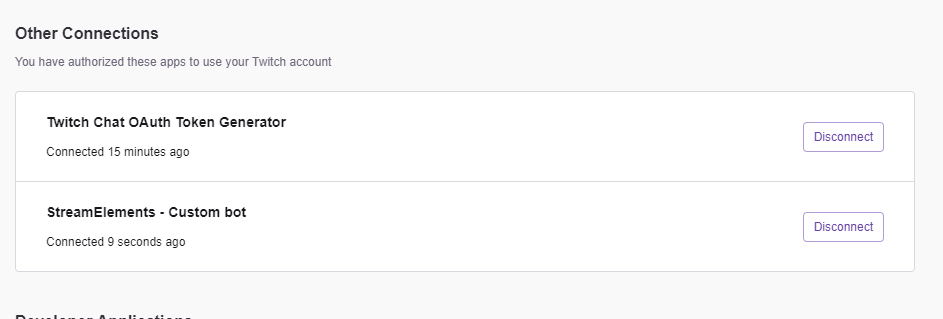 odd kraken
I have asked inernally about this issue and awaiting response.
 desert light
can anyone help on how to add overlays
odd kraken
What is the issue you are facing?
deep birchBOT
To add your overlays to OBS, add a new browser source in your scene. Paste your overlay URL in the browser source properties, set the dimensions to 1920x1080 (unless you changed them on the website), and ☑ “Shutdown source when not visible” https://youtu.be/KDvLynUqXI4
deep birchBOT
@white crow If you have issues with OBS logging you out of the integration all the time or not showing the Twitch integrations, follow these steps:
- Make sure you are on the latest and greatest version of OBS.Live ( 19.3.24.375)
- exit OBS (make sure OBS is not running)
- delete %appdata%\obs-studio\plugin_config\obs-browser\obs_profile_cookies
- start OBS.Live
- Settings -> Stream -> disconnect -> connect
odd kraken
You can get such a panel to change these tags when going in OBS: View > Docks > Stream Information. If the dock is missing, follow the steps liked above.
 white crow
Worked. Thanks
 frozen kestrel
I seem to be struggling get my scenes from streamlabs obs to transfer over to SE
twilit sand
The site is struggling here
I can't open my Store at all, seems like its offline
=S
odd kraken
@frozen kestrel What is the issue you are facing exactly? What steps are you doing to import the scenes?
frozen kestrel
Never mind I realized I asked in the wrong discord. But on that same note I seem to be struggling to get my notifications and such from Streamlabs and chatbot to transfer over as well
odd kraken
Have you used the import tool in OBS.Live or on the website?
frozen kestrel
I think I've done both actually
odd kraken
So you have the widgets and alert box in your overlays section and can add them to OBS as Browser source now?
frozen kestrel
Uhm I don't think so
odd kraken
What import tool did you try to use to import the scenes from StreamLabs to StreamElements?
frozen kestrel
The chrome extension is the one that looked like it worked
fiery escarp
Hey Guys, i think i found the solution to my problem... It was the Amd media framework... it needed an update too, because of the driver version and the obs version... FML xD
@shy mountain Thank you for ur Kindness ^^ See ya
 steady lily


 spring lava
So, im pretty new to streamelements and was setting up all the alerts - and wanted to test them just to see if they match my scene in OBS. but when i emulate any happenings - nothing showes in OBS. Anyone knows what could be wrong?
odd kraken
Check the checkbox next to the emulate bell.
odd kraken
Is the alert coming up with animation in the editor?
spring lava
Yes
odd kraken
Have you set the browser source with the alert above all the other souces in OBS?
odd kraken
Clear the browser source cache please.
spring lava
And boom, pasted in again - works like a charm
is that a normal problem, should i test my alerts everytime before i go live?
odd kraken
No. You should be good. If you are experiencing issues, come back here.