#helpdesk-selive
1 messages · Page 23 of 1
 shy mountain
 proud schooner
proud schooner
proud schooner
thankyou for your help i really appreciate it
shy mountain
Procedure:
- Manually update your OBS from OBS Studio's website.
- Disable the gaming features
- up the bitrate from 1500 to lets say 3000.
actually try something in between of 2000 and 3000
switch between the x264 encoder and NVENC and see which one feels better.
This is based on your setup.
proud schooner
ok thanks
 warm pewter
A 4790, and a gt 730, i would not expect much from that, and would make sense that you are getting extreme render lag and encoder overload
shy mountain
Isn't it being 1500 bitrate actually making it overload? Not enough to work with?
warm pewter
730 does not support nvenc
shy mountain

Well then, I suggest taking a good look here after step 1) and 2), forget about the step 3) @proud schooner https://obsproject.com/wiki/General-Performance-and-Encoding-Issues
and this for the GPU overload: https://obsproject.com/wiki/GPU-overload-issues
nothing more we can specifically help if nothing from the links has helped you
proud schooner
@shy mountain ok thanks ill try them
 river forge
my stream keeps cutting off if i change my scene !!! what might be the reason?
shy mountain
What do you mean the stream cuts off after you switch scene?
river forge
i start with " Stream starting soon " scene and then switch to gaming scene and the speed drops to 0
but if i close OBS and start back stream while in gaming scene it works perfect
shy mountain
That sounds like internet issue really.
Nothing we can help besides giving a tip of restarting your router for like 5-10 minutes and running a couple of speedtests
and using the pinned twitch server tester to see your connection to the twitch servers
and lastly call your ISP to run diagnostic check or something
river forge
signal is never red
hmmp allright
just curious cus it never goes down if i dont switch scenes
 forest steppe
hi there, im in need of some assistance, i recently started streaming some apex legends, i got a decent setup (i7-7700k 16gb RAM , 1080TI ) but i seem to not reach 100 constant fps while streaming, maybe settings are off ?
shy mountain
Since Apex Legends doesn't have optimized GPU drivers yet, it tends to take up all your GPU resources, leaving nothing for OBS. If you're having OBS performance issues, you'll likely need to limit the game somehow. The easiest way to do this is to enable Vsync in the game, or use a frame limiter. You can limit the game to 60fps by adding +fps_max 60 to the game's launch properties in Origin.
forest steppe
the stream itself is fine, but game isnt reaching 100fps, now when i switch to streamlabs obs it works way better , but i obviously prefer obs live so i really think it might be some setting that isnt properly setup
shy mountain
The game is the issue, not the software for streaming you are using.
Also make sure win 10 gaming features are turned off
or game bar...w/e it was called
forest steppe
Thank you for the help then
 hardy tulip
Morning SE, MR won't accept new song requests, what do i do to fix this?
shy mountain
@hardy tulip restart the MR widget (top left of the window)
most likely you've enabled teh queue moderation and that broke the bot
its a known thing.
 deep birchBOT
@hardy tulip Since Apex Legends doesn't have optimized GPU drivers yet, it tends to take up all your GPU resources, leaving nothing for OBS. If you're having OBS performance issues, you'll likely need to limit the game somehow. The easiest way to do this is to enable Vsync in the game, or use a frame limiter. You can limit the game to 60fps by adding +fps_max 60 to the game's launch properties in Origin.
https://twitter.com/OBSProject/status/1093974215877951493

If you stream @PlayApex and are having FPS issues with OBS due to a maxed-out GPU, you'll need to reduce GPU usage so that OBS can run as well. The quickest way to do this is to enable Vsync with triple buffering and disable Windows 10 Game Mode. https://t.co/FOPmDyJMNx
Retweets
430
Likes
1237
 Twitter
 rugged quail
Are custom transitions possible with OBS Live or do I need to be in OBS Studio?
shy mountain
We just add chat and activity feed on top of OBS Studio
So what you can do in normal obs studio you can still do with our plugin
rugged quail
Excellent! I love using OBS live and don't wanna lose that functionality. Thank oyu!
you*
shy mountain
oyu are most welcome 

sorry, i'm a bit too cheerful today and trying to meme here, i'll see my self out 
rugged quail
LUL
 true moon
hi everyone! thanks in advance for your time! I was prompted to update my OBS live and now Im having horrendous data loss. any correlation? or did something possibly get reset I need to readjust?
I've gone to no loss, to 95% loss
from. to
 strong silo
Hey guys, i have been having an issue the past couple of streams. The Audio/video is off. When i delay the Mic and have the Stream synced then my VOD’s are off even more. Any thoughts?
deep birchBOT
@strong silo For the best OBS support, please join their Official Discord @ discord.gg/obsproject
strong silo
Yea i tried asking in their chat but got no response.
 vivid crag
I can't get this program to uninstall, no longer use it
 odd kraken
@vivid crag If you want to uninstall OBS Live, you can select StreamElements at the top in OBS Live and select "unsintall OBS.Live".
 river wolf
can i import my slobs scenes into obs live?
 dry sphinx
@river wolf Afraid not possible for importing scenes from SLOBS to OBS.Studio.
SLOBS scenes/overlays use their own special overlay type file that normal OBS Studio doesn't support and our overlay system also doesn't support.
 tulip hamlet
@river wolf https://www.youtube.com/watch?v=LwAfMIR3Cj0

StreamElements Overlays are loaded from a single browser source in your streaming software, making streaming easy. https://streamelements.com/ StreamElements...
odd kraken
just post your question here and we'll try to asist you
rugged quail
I want to connect my youtube account to my twitch account
on StreamElements
I'm not able to, so should I close the YouTube account to then connect it to the Twitch account on StreamElements?
 ancient zodiac
Certain staff can combine twitch and yt with provided JWT tokens from both accounts.
rugged quail
I can't?
rugged quail
so should I close the StreamElements YouTube account or not?
ancient zodiac
@tulip hamlet can merge your accounts if you give him your 2 JWT tokens from both accounts when he is available
ancient zodiac
just dm him and he might do it
 rugged quail
Will you? @tulip hamlet
ancient zodiac
The more you ping him the angrier he gets
tulip hamlet
Are you prepared to sacrifice? 


dry sphinx

tulip hamlet
I think he's failed to realize how goofy I am.
 tulip hamlet
To be fair, a bit of both. Still waiting for your JWT tokens.
rugged quail
There's the green light
dry sphinx
🚥
rugged quail
tnes nekot
dry sphinx

tulip hamlet
@rugged quail Merged. Note that they still won't share information. The only benefits are quickly swapping and copying overlay designs over.
rugged quail
Wanted the quick swaps and that. Thanks!!
tulip hamlet
Gotta make sure sometimes. 😃
rugged quail
If I'd use two different overlays at the same time, would that increase cpu usage very much?
tulip hamlet
About as much as having two Chrome tabs open, give or take.
rugged quail
Thx
 viscid river
I noticed the media request is back on OBS.Live, its still showing the same error though.
any word on this?
odd kraken
Have you added the widget to the scene in the overlay Editor?
tulip hamlet
Log out and back in in OBS and don't try to play the tutorial video.
 indigo rivet
How do I downgrade to a previous version? I tried the new OBS 23.0 and it prompted me to upgrade OBS.Live because there was a new version. I updated and now my OBS will not launch without crashing.
tulip hamlet
You cannot downgrade to a previous version of OBS.Live.
indigo rivet
... Thanks
Great software
Then when i try to uninstall OBSLive it tries redownloading/Installing OBS 23.0???
tulip hamlet
It shouldn't. But in general it's good practice to check ahead of time whether the plugins and software you use can support the update you're looking to try out. What OBS Project has put out is a release candidate, not the official release, so it should be expected that we're waiting until the official release of 23 to ensure OBS.Live fits seamlessly into it.
 elfin eagle
I'm not sure if this is related to obs.live or not. But obs.live just updated itself and I did not have this issue before. My webcam was laggy. Was not before. Then OBS locked up the whole computer forcing a restart. Decided to uninstall OBS.Live like it says here https://www.obs.live/. Now when I start OBS it locks up the computer immediately.

OBS.Live | Open Broadcaster Software Streaming Knowledge Base
OBS (open broadcaster software) knowledge base for live streaming. Find articles and videos about streaming with OBS.
(I could not find the files it said to delete as well)
tulip hamlet
OBS.Live doesn't change the behavior of video device capture. You'll be better off asking OBS support about it.
deep birchBOT
@elfin eagle For the best OBS support, please join their Official Discord @ discord.gg/obsproject
elfin eagle
Are those uninstall directions up to date? I could not find the files mentioned.
tulip hamlet
What files?
elfin eagle
Linked wrong page https://support.streamelements.com/hc/en-us/articles/360004969851-How-do-I-uninstall-the-OBS-Live-plugin-

StreamElements
In order to revert OBS Studio to its original state:
- Uninstall OBS via the Add/Remove Programs dialog on your Windows Control Panel. While uninstalling, make sure the "user settings" c...
obs-streamelements.dll
tulip hamlet
Yeah, should still be relevant.
Though I think the uninstall function in the StreamElements menu might take care of it for you, too.
Basically, if those files aren't there, you're good.
 spring scarab
anyone else having hella problems with apex
21:35:57.269: Output 'adv_stream': Total frames output: 427748 (429902 attempted)
21:35:57.269: Output 'adv_stream': Total drawn frames: 383069 (430643 attempted)
21:35:57.269: Output 'adv_stream': Number of lagged frames due to rendering lag/stalls: 47574 (11.0%)
21:35:57.269: Output 'adv_stream': Number of dropped frames due to insufficient bandwidth/connection stalls: 2154 (0.5%)
21:35:57.269: Video stopped, number of skipped frames due to encoding lag: 142/430617 (0.0%)
ive got game bar off and the vsync suggestion they said above in twitter from OBS, plus all the settings down on the game. I have an 8700k and a NVDA rtx 2070
 muted ore
Does OBSLive support BTTV and FFZ emotes?
tulip hamlet
Yes 😄
muted ore
Is there a way for me to share my OBSLive Layout? After moving around the menus I found a format that works for me that I'd like to share with someone who already has OBS, but not OBSLive
tulip hamlet
OBS.Live is just a plugin for OBS. Exporting scene collections still works.
 fierce atlas
I'd like to report that OBS.Live is not compatible with the newest OBS beta features. I'd like to run both (manage activities + bot from SE, have native Twitch integration from the new OBS beta features) but currently Stream Elements simply crashes the entire program. I was going to just use Ground Control but the feature for managing the bot won't show up for me (had it running successfully on another PC before).
shy mountain
We are well aware that OBS.Live is not compatible with a beta version(or release candidate) and are waiting for a full release, in order to adjust and make sure the plugin works with it and there are no conflicts.
fierce atlas
Hm, okay! As long as it's on the roadmap, just wanted to make sure it's a known bug and not something that is supposed to already be functional.
shy mountain
What is the issue you are facing if you want to do the above?
 cunning lynx
i'm not facing an error i just want to re install all of my streaming programs so i can freshly/manually set up it again.
shy mountain
Hmm, ok.
So go to "C:/program files/" or where ever OBS is installed
and you should see the uninstaller from us.
cunning lynx
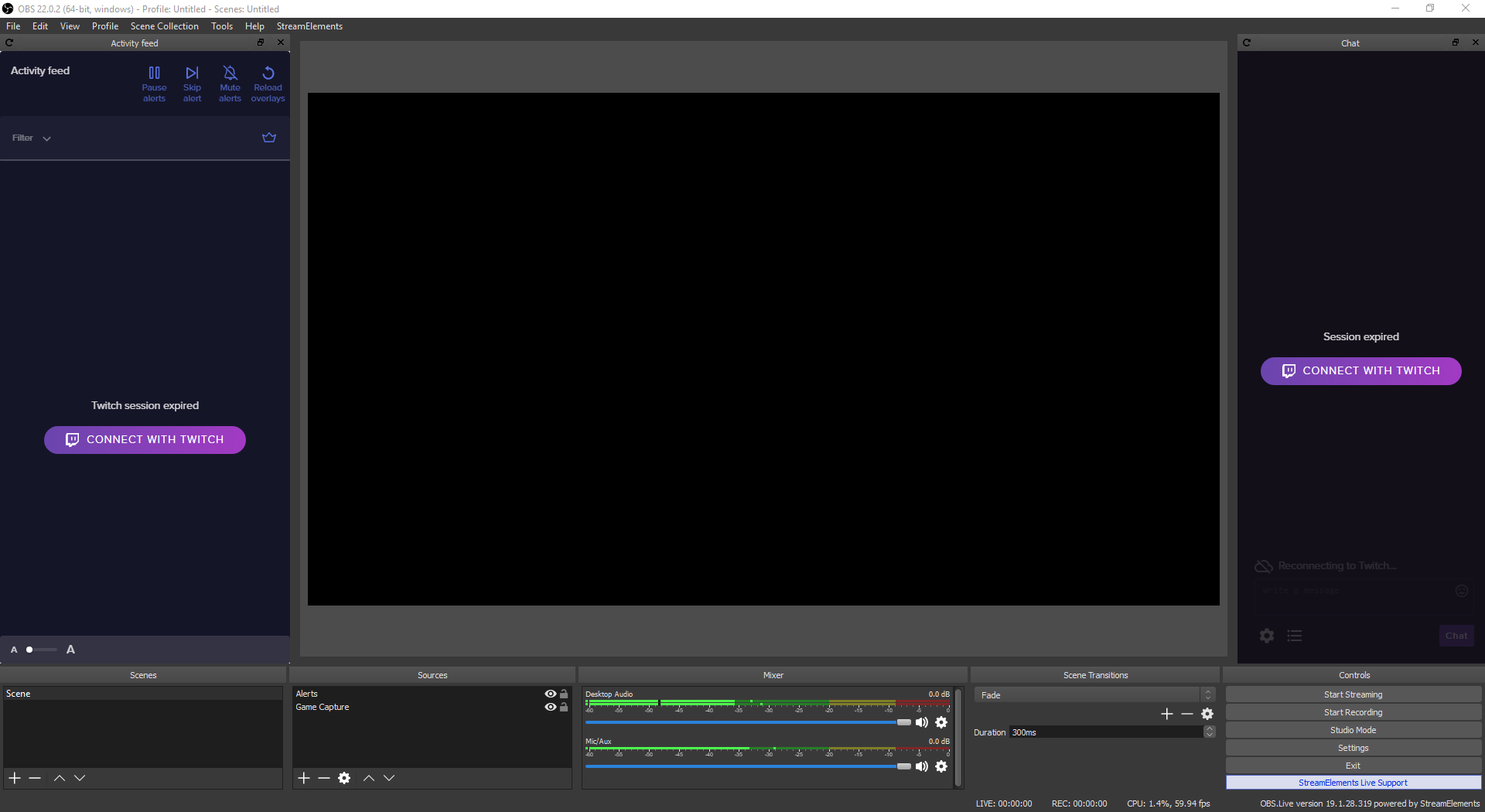
yes i see that, when i click the obs-streamelements-uninstaller it goes to this
do i need to wait for it so it will be uninstalled?
cunning lynx
nope
shy mountain
Ok, then this should work - just wait it out a bit
cunning lynx
okay i'll let u know what will happen after this. 😄
okay it reboots my system i guess this is it right?
odd kraken
yeah. just follow the instructions to uninstall.
cunning lynx
yep i did 😄 thank you!
 regal pawn
can I hide viewer count with obs.live but keep the activity feed?
odd kraken
Yes, when you select the burger menu at the top on the activity feed in OBS Live > Stream Settings > Toggle Show viewers count, it hides the viewer count, but you can still see the activity feed.
regal pawn
thanks
shy mountain
@austere yarrow So, what are you settings for maximum song duration?
 austere yarrow
Personally i didn't set anything like this tbh
shy mountain
Ok, is this reproduceable every thing?
austere yarrow
yes, every song that comes via !sr for example pops up very short and gets skipped
that happens also with song I try to queue up
shy mountain
So you have only obs.live open right?
austere yarrow
obs.live and the current streamed game for example, yes
shy mountain
Ok, so I think there is a solution for this, but it might hinder us in discovering the cause of this issue.
Mind we go into DMs?
austere yarrow
mds?
shy mountain
Direct messages
 small nebula
Hello @shy mountain , you told me to ping you when I get a chance. So hello here

 small nebula
The media request bugging out
shy mountain
Aah right the issue report from 13 hours ago
Yea, I would strongly suggest to click on "Streamelements" on top and logout and then log back in
make sure you don't have GC or the website open.
small nebula
Okay, I will try that
It seemed to have helped so far. I will keep you updated on anything that might happen. Thanks for the support! 
shy mountain

 wicked drift
What format should I be setting my streamlab overlay to? It is not loading up when I add it as a media source.
odd kraken
Try Browser Source.
 supple lion
I had to switch computers, and I am using OBS live but it is connected to my friends twitch in OBS how do I get it connected to my twitch account?
odd kraken
@wicked drift Where did you get the Overlay from? NerdOrDie?
@supple lion You can log out of OBS Live selecting StreamElements on the top bar in OBS andselect Log out.
supple lion
@odd kraken thanks! ❤
wicked drift
Browser source worked. I feel derpy now. haha. Thank you for the support. I got it from streamelements. I will check out NerdOrDie though.
odd kraken
Nerd or Die is just a store where you can get overlays from, but they are most likely designed to not work with StreamElements. So some fancy guys at SE have to rearrange them to get them work in SE. That was the reason I was asking.
But if you use Overlays from StreamElements, you are good to go.
 rugged garden
Can you do a different transition for each scene/source and not just one for all of them?
odd kraken
I am not 100% sure, but I think you can just make one for all.
 plain sonnet
no, its not possible to have 1 for each scene
warm pewter
You can pick a different transition when using Studio Mode
rugged quail
Ok, soooooo.... why does my stream crash every single time I change scenes? I have a starting soon, live, be right back, and stream ending scene. Just this past week it began ending my stream in restream every time I switch scenes. It still shows the stream live in streamlabs obs, but it ends the stream IRL.
odd kraken
We don't support restream and StreamLabs.
rugged quail
Also, trying to integrate my Facebook goals and notifications I can not get the login screen to come up.
Oh, this is streamelements obs...my bad 🤦🏻♂️ I get it all confused in here..to many dang channels on discord 😂 my fault
small nebula
I don't know where this question belongs so I'll just ask in here, How often are the Super Themes updated on the website?
tulip hamlet
There is no schedule for new Super Themes.
small nebula
Oh okay. I just saw the Christmas ones and they're cool. Just can't use them right now lol. But thanks for the help
small nebula
I guess I'm the only one that needs help lol. So I just rescaled my overlays and all it did was stretch out everything. Is there a way a can rescale it without messing everything up?
odd kraken
You have to add the overlay in the same scale to OBS as you choose the resolution of the overlay in SE.
small nebula
I did, but the overlay is stretched in the overlay editor too
odd kraken
I am not 100% sure, but I think you have to redo it then.
plain sonnet
is it a pre made overlay or did you make it from scratch?
plain sonnet
the thing i would suggest is do a downscale in obs, its not the best but it would keep everything scaled
small nebula
I would, but I'm trying to lower cpu usage. I'm streaming on a laptop so it struggles sometimes lol
But I'll try to find something that works lol, thanks for trying to help
 verbal briar
so i installed obs.live and everytime i start obs it crashes now.
odd kraken
Is there any error message?
warm pewter
That will typically only happen when you install on top of an older version of OBS Studio that is not supported by OBS.Live
verbal briar
i am on obs studio version 23.0 trying the new nvenc, is obs.live not supported on that version yet?
odd kraken
no it is not, as it is just a release candidate.
 fair sparrow
i have elgato game capture hd60s for streaming my ps4 game through obslive however i cannot get my party chat audio to come through when im talking. it comes with a mic switch cable yet no saound...?
 chilly pelican
i need help my OBS is saying "Encoding Overloaded" i have a i7-9700k and have it set on faster for preset, the problem only occurs when I am playing apex legends from what i can tell
deep birchBOT
@chilly pelican Since Apex Legends doesn't have optimized GPU drivers yet, it tends to take up all your GPU resources, leaving nothing for OBS. If you're having OBS performance issues, you'll likely need to limit the game somehow. The easiest way to do this is to enable Vsync in the game, or use a frame limiter. You can limit the game to 60fps by adding +fps_max 60 to the game's launch properties in Origin.
https://twitter.com/OBSProject/status/1093974215877951493
If you stream @PlayApex and are having FPS issues with OBS due to a maxed-out GPU, you'll need to reduce GPU usage so that OBS can run as well. The quickest way to do this is to enable Vsync with triple buffering and disable Windows 10 Game Mode. https://t.co/FOPmDyJMNx
Retweets
447
Likes
1288
Twitter
@fair sparrow For the best OBS support, please join their Official Discord @ discord.gg/obsproject
fair sparrow
thanks
 keen citrus
Why doesn't the ground control keybinds work? Like I set them up for skip song and play/pause
but nope
tulip hamlet
There's been issues with it. Better to control it with OBS.Live instead.
chilly pelican
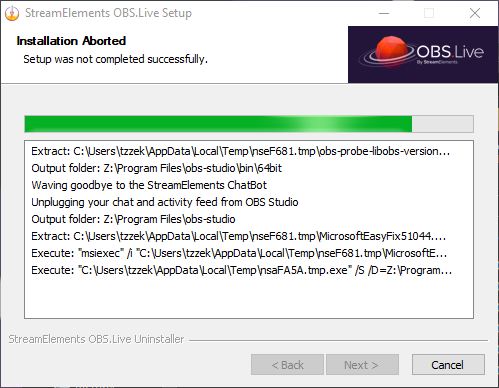
i need help i am trying to uninstall the obs.live plug in and it is just not uninstalling, i am uninstalling it through the control panel and it comes up with the "StreamElements OBS.Live Setup and the box says "Installation Aborted Setup was not completed" and the details box says "Waving goodbye to the StreamElements ChatBot
Unplugging your chat and activity feed from OBS Studio" and the progress bar is not moving
<@&382267076632379392> pls
 zinc lark
I have not tried doing the uninstall from the control panel. Try doing it from the program itself. There is a built in uninstaller that makes sure certain tasks are completed and certain items retained (like your scene collection)
 jovial abyss
 sleek sierra
Should twitch prime subs be showing up on my activity feed? cause it doesnt
deep birchBOT
@sleek sierra Twitch prime (new and resub) and paid subscriptions (resub only) must be shared in chat manually by the person subscribing in order for the subscription information to be sent to StreamElements. For twitch prime, the user needs to have sharing enabled on https://www.twitch.tv/settings/prime. For paid subs, if the share box doesn't show up immediately it will when they refresh the page. https://i.imgur.com/VNJN0Uv.gif https://i.imgur.com/2297EA7.png

 sleek sierra
thanks
small nebula
Is there a way to change the quality on media request videos? So it doesn't use as much bandwidth
 quasi snow
yes
go to youtube, watch any video, change res to what you want, that will be used on the media request
 signal maple
I am having frames drop but my bitrate is staying the same
1700x with 1080 I can stream everything but as soon as i stream apex legends my frames drop from 30 to 1.6
deep birchBOT
@signal maple Since Apex Legends doesn't have optimized GPU drivers yet, it tends to take up all your GPU resources, leaving nothing for OBS. If you're having OBS performance issues, you'll likely need to limit the game somehow. The easiest way to do this is to enable Vsync in the game, or use a frame limiter. You can limit the game to 60fps by adding +fps_max 60 to the game's launch properties in Origin.
https://twitter.com/OBSProject/status/1093974215877951493
If you stream @PlayApex and are having FPS issues with OBS due to a maxed-out GPU, you'll need to reduce GPU usage so that OBS can run as well. The quickest way to do this is to enable Vsync with triple buffering and disable Windows 10 Game Mode. https://t.co/FOPmDyJMNx
Retweets
447
Likes
1295
Twitter
 civic yacht
for some reason my media request claims it is not active in my overlay even thought it is
any ideas?
odd kraken
Try to log out and log back in OBS Live please.
small nebula
My song request isn't working. Like people are typing !sr (youtube link) but it's not receiving it. I've disabled viewer request and enable them, tried groud control too but it just doesn't want to play their music lol
small nebula
Update - it works with the song name. Like "!sr sorry not sorry" works, but "!sr (youtube link)" doesn't
 white rover
Can anyone help me with this? My tip goal is not showing up in obs with my overlay
 quick kiln
so im having a issue it seems where my everywhere else im solid 60fps but once in a game its choppy but my game is smooth like butter any suggestions?
 sullen goblet
ive got a weird problem where when i or one of my viewers request a song it will just reshuffle my premade playlist instead of playing the intended song any ideas myi dudes?
odd kraken
@quick kiln You can try to limit your fps or enable VSync. Maybe this helps.
@sullen goblet Maybe the song is added to the moderation queue, so you have to approve it first to be played.
After one song of your backup playlist has ended and there is a requested song in the queue it isn't played, but it starts another song from your backup playlist?
 dawn lava
I have a problem where I was working on my overlays and OBS live logged me out and keeps saying Session expired Connect with twitch
tulip hamlet
Log out from the top menu and log back in.
dawn lava
I feel like a dumb, thanks
quick kiln
@odd kraken doesnt enabling v-sync only for your game cause its only dropping fps in the OBS
deep birchBOT
@quick kiln Can you please provide a log from your last stream. In OBS go to Help > Log Files > Upload Last Log File. Once this is complete, please provide the link to the log file.
quick kiln
odd kraken
The log shows that your Gaming features in Wondows 10 are still set to on. Please disable it as a first step.
Second you have Rendering lag. Your GPU is maxed out when streaming. To encounter this issue, you can set the fps limit or VSync up, to prevent the overload of your GPU.
quick kiln
i have no idea how my GPU is getting maxed when im using a 1080 ti
deep birchBOT
@quick kiln Can you please provide a log from your last stream. In OBS go to Help > Log Files > Upload Last Log File. Once this is complete, please provide the link to the log file.
small nebula
How do you unban someone from media request
quick kiln
warm pewter
Any GPU can be maxed out by streaming, having a 1080ti does not make you immune to this
You are also using multiple game capture sources when you should only use one
plain sonnet
same issues as Benno pointed out above @quick kiln
https://glorp.ninja/obslog?url=https%3A%2F%2Fobsproject.com%2Flogs%2FXVM3jMANY5Fihl5s
@small nebula are they banned in your actual chat?
small nebula
No, they played something weird and I banned them as a joke but now I don't see an unban
warm pewter
So, you did ban them in your chat
small nebula
Yes, Ive been looking but it seems like there's not a list of banned people, just videos
warm pewter
Lets take a step back, how exactly did you ban this person
small nebula
Okay, so whenever someone request something, there's three dots beside it. Then the options are ban track, ban user, bantrack and user. And something else. So I banned the track and him
odd kraken
Please mod StreamElements in your chat.
small nebula
It is
plain sonnet
do you have queue moderation on?
small nebula
No, it gets annoying when there's alot of requests
warm pewter
Can you send a screenshot of this option where you banned the user, this is not something I am familiar with, or seen in any of our systems
small nebula
Sure. Can one of you request it? It doesnt have it if I do it
plain sonnet
the twitch link in your profile doesnt work, whats your twitch?
small nebula
Dm it to you? Or here? I don't want to self promote here lol
plain sonnet
dont worry, post it here and i will delete it : )
warm pewter
Just put the name here or fix your discord profile
small nebula
I just fixed it. But here, realSinpul
I've found it easier to do !sr (song name) rather than !sr (url)
Thanks for the follow tadpole  (srry for spam)
hardy tulip
Guys, MR is still skipping from a playlist. Even though my limit is 1000 songs. Why is that?
plain sonnet
if you ban me what happens? do you get other options?
plain sonnet
yep
small nebula
Can you request it again lol
Then after I ban you can you try again and see if it actually banned you
I'll change your points
plain sonnet
now its asking for points hmmmm.
if you type /uban ssj_tadpole
in chat
and set my points back to what they were
small nebula
I didn't ban you. It's just set where you use 5 loyalty points so there's no spam
plain sonnet
oh really? cool
small nebula
You have alot of points. 1,000,000 to be exact
 placid cliff
🤔 Explain, you got me intrigued.
small nebula
Umm, idk. I just play around with settings alot lol
I could explain but I need permission to potentially spam lol
Unless you wanna dm
I just banned you @plain sonnet
plain sonnet
k
that just says video is banned, let me try another
there we go
is anything coming up on your mr?
small nebula
No
plain sonnet
 small nebula
I think someone added features that aren't fully supported lol
It's a smart idea. Just need a list of banned users and it's perfect
plain sonnet
if you go to the se dashboard, go to media request and go scroll down to advanced, does it give you a user list?
small nebula
I will look
Where's advanced? I see settings but even in that there's no advanced
Should I be using ground control or chrome
small nebula
Okay, that's what I did it on lol
odd kraken
go to this website https://streamelements.com/dashboard/mediarequest/settings and scroll to the advanced tab.
is there a sction with "banned users"?
small nebula
No, just banned songs and tags
I guess no one uses Media Request like me. I love it personally
plain sonnet
try typing in twitch chat
/unban ssj_tadpole
i know you haven't banned me from there but im hoping it might refresh something
plain sonnet
hmmm
 plain sonnet
just asking internally if theres something that can be done
small nebula
I doubt. Unless they add a banned users section by the banned tags and songs
But thanks for doing all this
 low horizon
Hey any way of getting Tips shown via my stream elements link to show on my overlay?
warm pewter
use an overlay with an alert widget
low horizon
i've got alert widgets just tips that doesn't work 😦
warm pewter
Do they show as pending in your activity feed? If you emulate a donation does ot show?
 timber ibex
So I’m using streamelements obs to stream. When I click start streaming it tells me something about 2 different kind of graphics that may need drivers because it can’t initiate the stream. Anyone have ideas of what could be causing this
deep birchBOT
Can you please provide a log from your last stream. In OBS go to Help > Log Files > Upload Last Log File. Once this is complete, please provide the link to the log file.
 slim granite
I just got a sub but my alert didn't show and activity feed doesn't show it either
 vagrant trench
media request still skipping constantly any word on when this will be fixed?
deep birchBOT
@slim granite Twitch prime (new and resub) and paid subscriptions (resub only) must be shared in chat manually by the person subscribing in order for the subscription information to be sent to StreamElements. For twitch prime, the user needs to have sharing enabled on https://www.twitch.tv/settings/prime. For paid subs, if the share box doesn't show up immediately it will when they refresh the page. https://i.imgur.com/VNJN0Uv.gif https://i.imgur.com/2297EA7.png
shy mountain
@vagrant trench do you have the website media request open as well or ground control?
vagrant trench
@shy mountain i'm only using ground control atm. for some reason when using chrome along with obs live my games crash so i cant keep chrome open
shy mountain
Wait, so you are using OBS.Live + Ground control + website media request?
vagrant trench
no no, i'm using ground control for media request
obs live and using media request through ground control because if i use the 'docked tool' for media request, it skips worse than with ground control
shy mountain
Ok, so do this: Just because you are in the #helpdesk-selive channel, click on "Streamelements" on top and click logout.
Turn off Ground control and shutdown any browser tabs with our dashboard.
now login agian in Obs.live
and see hows the skipping.
because skipping happens when you other places that uses MR
vagrant trench
but i have no other places that use mr besides ground control active, trying what you said atm
shy mountain
I'm 80% sure you are using an old version of MR from OBS.Live that stays active regardless of it being closed at the moment.
vagrant trench
i update every day... how is that possible?
shy mountain
Some updates require just a simple logout and login
to refresh some backend connections
vagrant trench
i'm pretty sure it's a newer version, when i have it open in ground control and obs live, it gives me the option of 'where' i want to use it
am checking now, if it skips more i'll let you know 😃
thanks btw
 tranquil forum
hey guys I'm hoping someone can help me here and that im posting in the right area.
When switching scenes in OBS, my overlays from stream elements are delayed and dont show up for a few seconds after switching scenes, looks sloppy when streaming or during playback, anyone know what it could be?
deep birchBOT
@tranquil forum Check out this tutorial for OBS’ studio mode which allows you to preload scenes before transitioning. https://www.youtube.com/watch?v=W8iWsD2Lq3U
vagrant trench
@shy mountain it has skipped 3 out of the last 20 songs, each one started playing for 10 secons to 20 seconds and then skipped to the next song
shy mountain
Is this OBS.Live or GC?
shy mountain
Are you streaming atm?
vagrant trench
yes
shy mountain
Right. I was gonna suggest we do a team viewer session but then I would have had to restart your obs to enable something on it.
vagrant trench
will do it after this match
 reef lodge
shy mountain
reef lodge
shy mountain
Sorted ⤴
low horizon
Hi quick one are the main benefits of turning on twitch login for donations to help reduce chargebacks?
quasi snow
and to easier identify donator
low horizon
Cool best to the full login I guess even if it puts some off
quasi snow
yep
also if you want to be anonymous to them, change your paypal to business and you can change what name they see instead of your email/name
low horizon
Yea I have at least done that....but will double check!
quasi snow
😃
low horizon
Is it the business information i have to set as what I want them to see?
quasi snow
yep, business name or something, it's the only thing they will see
instead of your email and name
low horizon
Ok, thanks for your help 👍👍👍
quasi snow
you're welcome 😃
 half ferry
hello guys! i have a problem. my obs have a lot of steady framedrops and i cant fix it. can u guys help me?
half ferry
ok
odd kraken
@half ferry Can you please provide a log from your last stream. In OBS go to Help > Log Files > Upload Last Log File. Once this is complete, please provide the link to the log file.
What game are you playing?
 scenic fog
Does obs.live work with the 23.0 rc2 or nah
shy mountain
Not for now.
half ferry
lately i try to play apex
shy mountain
We are waiting for a full release then we are going to push OBS.Live to it @scenic fog
half ferry
but the stream goes down to 5-20 fps when im playin
scenic fog
Will 23.0 remove the obs live's version of chat?
half ferry
the game plays smooth tho
shy mountain
@half ferry Since Apex Legends doesn't have optimized GPU drivers yet, it tends to take up all your GPU resources, leaving nothing for OBS. If you're having OBS performance issues, you'll likely need to limit the game somehow. The easiest way to do this is to enable Vsync in the game, or use a frame limiter. You can limit the game to 60fps by adding +fps_max 60 to the game's launch properties in Origin.
https://twitter.com/OBSProject/status/1093974215877951493
If you stream @PlayApex and are having FPS issues with OBS due to a maxed-out GPU, you'll need to reduce GPU usage so that OBS can run as well. The quickest way to do this is to enable Vsync with triple buffering and disable Windows 10 Game Mode. https://t.co/FOPmDyJMNx
Retweets
452
Likes
1304
Twitter
odd kraken
In the log file is no output session. But the message KeiZar send about apex will most likely fix our problem.
deep birchBOT
@half ferry To add your overlays to OBS, add a new browser source in your scene. Paste your overlay URL in the browser source properties, set the dimensions to 1920x1080 (unless you changed them on the website), and :ballot_box_with_check: “Shutdown source when not visible” https://youtu.be/KDvLynUqXI4
half ferry
i mean i cant find the url of these overlays. they are already in my overlays library in the site but i cant find their urls
odd kraken
quasi snow
https://streamelements.com/dashboard/overlays click launch and copy that url
half ferry
thanks m8 ❤
 queen aspen
just downloaded and am using obs live. for some reason my activity feed is showing up as blank?is it supposed to show previous activity or only activity since using the software?
would really appreciate some help 😃
shy mountain
Streamelements on top -> logout
make sure you login to the dashboard first
then login to obs.live
queen aspen
ok ill try that. thanks
hi, it still doesnt seem to work. Do i have to import my previous activity feed from streamlabs somehow?
odd kraken
You can't import your activities from SL. StreamElements will monitor your events from now on.
queen aspen
ok thanks.
odd kraken
The feed will fill as you go from now on.
queen aspen
ok great thanks for the help Benno.
scenic fog
Trying to Uninstall obs live since it doesn't work with rc2 and stuck in an endless crash, or can't complete uninstall
odd kraken
There is an uninstall program for OBS.Live in the installation directory like here: C:\Program Files\obs-studio
Please go through the whole uninstall wizard.
scenic fog
@odd kraken , trust me i've tried lol https://i.imgur.com/YWXWHbi.png
 odd kraken
Try to be patient as the uninstall seems to be still in process.
scenic fog
It's on m.2 , and i've tried multiple times even walking away for an hour it ends there trust me.
 odd kraken
Try to start OBS as admin and select StreamElements at the top and then "Uninstall OBS.Live"
queen aspen
does anyone have any experience with 21:9 ultrawide streaming on obs?
scenic fog
@odd kraken , nah can't even launch w/ that going to try to reinstall and checking the box to install obs studio (should install non rc2) than uninstall and reinstall rc2 , (edit) tried this method i listed and it works so were good
timber ibex
So I’m trying to stream on the stream elements obs and I’m getting a failed to start stream message how do I fix this issue??
odd kraken
Can you provide a screenshot of the error message please?
odd kraken
you will most likely need to head over to the OBS discord to get help with this issue. discord.gg/obsproject
timber ibex
So even though it’s using the stream elements it’s still with obs?
odd kraken
yes, as OBS Live is just a plugin for OBS to display the Chat and activity feed and MR. The plugin does not change core features of OBS.
queen aspen
hi guys can someone help me with my obs live video settings please. my canvas is 3440x1440 21:9 ultrawide, the setup wizard has set my output scaled resolution to 2224x931 however when i check the stream; black lines are showing at the top and bottom. any idea how to fix this?
 steel mural
That's normal because the twitch player defaults in a 16:9 resolution.
queen aspen
is there a way to scale from 3440x1440 to a 16:9 ratio on obs live?
to avoid black bars?
steel mural
You can enter a resolution manually. Just type 1920x1080 in the field. But you'll have to change some stuff to fit everything.
queen aspen
when i change the output it automatically changes my canvas settings which then does not fit on the canvas because my game is running at 3440x1440. its such a nightmare lol
 pallid parrot
You can set canvas to 1920x1080 and add something to fill empty space as well to have your game not stretched. Social media bar on top and recent sub/tipper/cheerer on bottom
quick kiln
so this whole time is seems that google chrome was a big problem
hardy tulip
Hi, why is music not synced when in studio mode? i.e. 2 scenes with mr waiting for transition.
civic yacht
i have tried logging in and out of streamelements on obs to get my media request working but it still claims there is no active media request widget???
odd kraken
Try to start OBS Live as admin and make sure the widget is added to your overlay.
civic yacht
widget is on
starting as admin
nope
still doesnt work
still claims there is no active media request widget
hardy tulip
Hi, why is music not synced when in studio mode? i.e. 2 scenes with mr waiting for transition.
and music from playlist skips even though song limit is at 1000
odd kraken
@hardy tulip I am sorry, I really don't know how to fix this. A champion or staff has to take a look. I am sure your thing will be looked into by someone soon, but I am sorry, I can't help you with that.
@civic yacht Please try to delete the MR widget in the Overlay, add it back in the overlay on the SE website and delete the scene in OBS and create a new one please.
Log out of OBS Live and log back in please. then try again.
civic yacht
still having the same issues
tulip hamlet
@civic yacht Don't play the tutorial video, it isn't accepted by the widget. Skip it and play something else if that's what's going on.
 tulip hamlet
If things need to be synced between scenes, don't put them into separate overlays, have a single dedicated overlay that you put in all scenes with "use existing"
Alerts, hypecup, media request, just some examples of things that deserve their own overlays.
keen citrus
Any ideas why ground control keybinds don't work?
odd kraken
Do you have OBS Live, too?
keen citrus
yes
odd kraken
Just try to use one at a time to use the keybindings.
 quick anvil
is it normal when using NDI it sends around 70 Mbps from the gaming pc to the streaming PC with no source at all?
tulip hamlet
@quick anvil There's only a few of us who are familiar with NDI setups so you may have to wait some time for an answer.
odd kraken
A quick google search brought up this sheet: https://softron.zendesk.com/hc/en-us/articles/360000849753-NDI-Bandwidth-Requirements Maybe it helps.
quick anvil
yeah i already read that but i cant seem to find an answer to my question. and the weird thing is that its happening now. was there an update or something that can cause this? cause i didnt have like a month ago (starting to stream again now)
before i get around 100-200 Mbps while streaming with game capture source and a browser source.
but now i see that it sends 400-500 Mbps to the stream pc using the same sources which is double the normal. and it also affect the stream qualtiy too.
odd kraken
I am sorry, I am not familiar with NDI either. As Nethyr said above, you have to wait soem time to get on someone who is familiar with NDI. Sorry.
quick anvil
no problem 😃
tulip hamlet
@quick anvil Completely normal. It's uncompressed data.
 stiff marten
where do i find the audio after i get done recording it?
odd kraken
Normally it is saved in your default video folder.
But you can look the location up in your settings in OBS. Settings > Output > Recording > Recording Path
stiff marten
ok thanks the files are saved as flv and they are all scambled
what is the best format to make sound clips with?
odd kraken
I think the less compressed audio format is WAV.
stiff marten
ok thanks
odd kraken
Try to log out and log back in of OBS Live please.
odd kraken
@neat ferry what OBS Version are you on? and what OBS Live version do you have?
 neat ferry
obs version 23, latest version of obs live
 wise ledge
final qs, just got back after 7 weeks and the new obs rc2 client is out (with twitch login and nvenc improvements). I can't find the twitch login option (instead of stream key) so before i ask in OBS Support I wanted to check if OBS.Live changes anything there since some of the features are the same aka chat widget
odd kraken
SE is not compatible with the 23 Version yet I think at it is just a release candidate.
wise ledge
got it
wise ledge
what is the reason @neat ferry ? I tried scrolling up, curious what you're missing and want
odd kraken
A fix for a user was the following: try to reinstall and checking the box to install obs studio (should install non rc2) than uninstall and reinstall rc2
Maybe this helps in your case, too.
neat ferry
what a frustrating mess
quasi snow
betas are subject to even more problems, it's a risk you should be aware of hehe
neat ferry
maybe the installer/website would be better off with version compatibilities....
I blame the software
quasi snow
were you able to do it like Benno suggested?
neat ferry
no that didn't work, At this point I am removing files and removing it from registry
quasi snow
can't install lastest non beta OBS Studio and/or OBS.Live?
neat ferry
I don't have time for that
shy mountain
Current version of OBS.Live is not meant for the OBS 23.0rc1/rc2 - we are prepping OBS.Live internally with those versions, but we are expecting to have it stable and working for the full proper and public release of OBS Studio V23.0.0. @neat ferry
neat ferry
Thanks for the info. The best way to remove stream elements is through registry by fully removing the data for stream elements from the registry. I found it under Computer\HKEY_LOCAL_MACHINE\SOFTWARE\WOW6432Node\Microsoft\Windows\CurrentVersion\Uninstall\
shy mountain
Doing a normal uninstall of our plugin and then uninstalling the rc1/rc2 version of OBS will sort out everything to install either normal public version of OBS Studio or just the rc1/rc2 versions.
neat ferry
I believe I did a normal uninstall and that was my problem
shy mountain
So far people who have reported trying the same thing (obs.live on top of the rc1 version) have not come back saying they have issues uninstalling both the plugin and the main version to fix their problem 
neat ferry
Well i included a screenshot above. Also I have rc2.
steel mural
RC1 and RC2 are pretty much the same. There are only minor changes between them.
odd kraken
what OBS Version are you on?
 modest pagoda
19.1.28.319
odd kraken
that is the OBS Live Version number. There is a number of OBS in the top left.
modest pagoda
22.0.2
odd kraken
Close the chat windows in OBS Live with the X and log out of OBS Live and log back in please.
odd kraken
you can log out of OBS Live and log back in whle you are Live.
Select StreamElements on top of OBS Live and select Log out. Log back in afterwards.
Note, your chat will be cleared maybe.
 delicate light
guys
can someone please help me fix my obs.live streamelements
the issue i have as of last night is that , anytime i stream no matter who is on the internet , it skips frames automatically and just up to 30% + and going , and just keeps going up and up , and the bottom right where it shows the green/amber/red square with your kbp/s it shows 6000 roughly but its showing red ? Can someone please help me here
odd kraken
what game are you streaming?
delicate light
even when im just loading up my stream and not playing anything it instantly just goes up
odd kraken
@delicate light Can you please provide a log from your last stream. In OBS go to Help > Log Files > Upload Last Log File. Once this is complete, please provide the link to the log file.
delicate light
do u want the url of it here or DM ?
odd kraken
you can post it here.
delicate light
odd kraken
Your log contains streaming sessions with dropped frames. This can only be caused by a failure in your internet connection or your networking hardware. It is not caused by OBS. Follow the troubleshooting steps at: https://obsproject.com/wiki/Dropped-Frames-and-General-Connection-Issues
You are streaming via Wi-Fi... that could be the issue.
dry sphinx
More than likely depending on your upload speed 
delicate light
i have a 2x2 wifi card in my gaming laptop that costed £1400
so i shouldnt see much of an issue i had been doing it since november and most of the time it was fine and was just the few odd occasions where i lost connection and stuff i have reset wifi and everything like that and it just doesnt seem to be fixing at all
im with virgin media on the highest package
odd kraken
As this does not seem to be a StreamElements related issue, I would recommend you asking in the OBS Discord for help: https://discord.gg/obsproject
hardy tulip
Hi, Songs that are geo blocked is still causing MR to play the next song and the skip message appears and causes it to skip the song that's playing. Is this a normal function?
vagrant trench
i'm still having problems with media request skipping songs randomly and sometimes during the song, @shy mountain had walked me through the process of forcing an update and said that there was one more way of fixing the issue if logging off and back on did not work. is there a fix to this issue?
hardy tulip
Same with Carrot Soup, i have the same issues too.
vagrant trench
also the media request widget still causes an echo when you start showing the video on the stream
odd kraken
@vagrant trench The echo is most lilkely caused by scenes not being set to shut down when not visible.
vagrant trench
@odd kraken will check
 maiden ridge
does the media request widget reset for anyone else everytime you open the obs.live program?
odd kraken
what do you mean with reset in detail?
maiden ridge
everytime i close out and open obs.live it asks me to take a tour of the media request app and then won't show on my stream until I got to the website to "show on stream"
hardy tulip
Now that i have closed off the widget in obs.live MR that is and using ground control, songrequests have stopped working
Okay, song requests seem to be working with ground control, it said
"use it here" and for the second time it seems to work.
 valid turtle
got an issue with webm's not playing through obs. they run just fine in MPC-HC and VLC, but when I import them into OBS they're just completely transparent. Same if I upload onto StreamElements. Any ideas?
I've never tried using webm before so it's entirely possible i've overlooked something obvious, but i've tried searching and haven't found a solution
odd kraken
I think when you add the webm, it is normal that the background turns transparent.
 surreal lodge
Anyone have tips on getting alert audio to play on a capture PC? Alert sounds don't play on the OBS being used on my capture PC.
odd kraken
But they appear in the browser when you emulate an event?
odd kraken
But not on your Streaming PC in OBS at the same time? I am not familiar with dual PC streaming setups, so maybe a champion or staff should take a look at your question.
surreal lodge
Thanks Benno!
 half nebula
is there any reason the SR Command is not being detected by my media request module? it works when i paste a youtube link into the module but not with the command and i have it set to be for free and viewer submitted
odd kraken
DId you make sure the command "!songrequest" is enabled in the commands section?
odd kraken
The command should be in the default commands on the website of the SE Bot.
half nebula
i dont have that as an option, only a !sr command with a switch
that is "controlled by the module"
but my !song is working and !pause and such, just only not !sr
warm pewter
half nebula
that is enabled hence my problem 😦
shy mountain
!res @haughty rose
ugh i forget that our bot is not working 
@haughty rose Please make sure the resolution you selected when creating the overlay (default 1080p) is also set in your Browser source in OBS (1920x1080).
 haughty rose
it is 1920x1080
Was working fine before this, I just restarted my obs and now nothing is loading
haughty rose
not that one specifically
shy mountain
Which one then?
shy mountain
If they were working for me, I was gonna suggest to clear the browser source cache 
 loud kettle
my cpu usage jumped up a ton and i haven't changed any settings
modest pagoda
Hey guys! 😃 I added the media request widget to my OBS.Live - moved it to top and moved it to bottom - but it's still not showing up on stream - any ideas?
 potent beacon
i'm having this same issue
 dim stratus
hi i need help to set obs live
 icy pebble
I just switched to SE a few days ago. How do i switch form stream starting to live scene. using super themes? when i copy the url and put it in obs live. it changes all the scenes.
warm pewter
Each overlay needs its own browser source, from your description, you are only using one browser source
modest pagoda
"Each overlay needs its own browser source, from your description, you are only using one browser source" - was this in response to the 3 questions about media request or Heartstopper's question?
rugged garden
Is there a way to add a new variable for !commands?
odd kraken
@modest pagoda You have to add th MediaRequest widget in the Overlay Editor in OBS and reload the Overlay. After that log out of OBS Live and log back in please.
@rugged garden What do you mean with new variabel to the !commands command exactly? Can you elaborate please?
rugged garden
I think I figured it out... So I wanted to add a sound clip when someone uses a command, so I found if you use the stream store you can, but I don't want the person to have to use !redeem so I was going to add $(redeem pink) for example.
@odd kraken
IS there another way to add a sound on a !command?
odd kraken
You can do it the way you figured it out already: create a store item and create a custom command with the variable ${redeem <itemname>} as answer. The command-name can be chosen freely when creating a custom command.
rugged garden
Okay cool thanks!
modest pagoda
@odd kraken Okay I added it / refreshed / and logged out and back in
still not showing on stream
odd kraken
You added the widget via the OverlayEditor on the SE website to your Overlay right?
odd kraken
You can add the widget in your existing overlay which is active at the moment over the SE Overlay Editor and select "Widgets" in the blue bar on the top and select the MediaRequest widget.
modest pagoda
if I add the widget to my existing overlay, then I can't move the widget in OBS right?
I can't move the position of the media request
odd kraken
you have to move the widget in your overlay on the SE website.
modest pagoda
yeah I can't do that
All of the other overlays I can move in OBS
I have a browser source for alerts / a bunch of other things
so one browser source for the alerts
odd kraken
you can also make an own overlay just for the MediaRequest and move that one around.
modest pagoda
one browser source for the bit cup
yes that was my question here: "so
I have to make a new overlay
and add the media request widget to that one?"
odd kraken
yes.
modest pagoda
ok perfect!
ty so much!
@odd kraken OK - so I never created an overlay, I simply pressed the button on the media request section in OBS.Live and that created the overlay for me (did all this before I msged you)
so the overlay and widget was already created
so OBS.Live did all this in my stream elements overlay with just the push of a button -
odd kraken
Then try to add the overlay to your OBS as Browser source please.
modest pagoda
OBS.Live already added it with me just pushing 1 button -
I did none of this
OBS.Live automated it all
odd kraken
Ok. This has to be some sort of new feature, as I never heard of that. Sorry.
But as it is added now, can you show the video on stream?
odd kraken
Is there any error message, when you hit the button "show on stream" in OBS Live?
modest pagoda
where is the button "show on stream" ?
odd kraken
Maybe you have to make the Media Request window bigger in OBS Live, or pop it out to get all options to appear.
odd kraken
But you are somehow still in the demo tour. Please try to select "Leave tour"
odd kraken
Do you have the Overlay Editor still open, as it is maybe playing via the Browser, too?
odd kraken
Try to make sure, all your Browser Sources with the SE Overlays are set to "Shutdown when not visible".
modest pagoda
I muted then unmuted and that fixed for now
let me try to skip tracks
also, a lot of times the media request will empty the queue randomly and not accept any new requests #bug-report
 hasty wraith
im sure this has been asked a lot so i apologize in advance... OBS 23 Support soon?
also your uninstalled locks up
it seems that it just doesnt want to uninstall from my PC....
this is kind of a HUGE issue
ummmmmmmm guess there is nobody online to help??????
 leaden wigeon
Media share works fine when Im not live and test when a friend uses it but when I go live it doesn't work
plain sonnet
@Rinehar7#4092 we are waiting for full release of the new obs. It is currently in beta
That message means you have it open somewhere else. For example, If you have it open in obs dont use it in the website or on ground control @leaden wigeon
rugged quail
@plain sonnet but most people use the beta already too cause of the new NVENC Codec, so would be awesome if u have a "OBS Studio 23.0 Release Candidate 2" Support too
rugged quail
Hello, I have a problem with my Apex streams.
I have an Intel i5 7600k, a MSI GTX 1050 2GB OC and 8GB of ram and as I am playing a few fps and I can not stream.
I have the stream at 720p60fps and sometimes the fps in obs fall will someone help me?
deep birchBOT
@rugged quail For the best OBS support, please join their Official Discord @ discord.gg/obsproject
hardy tulip
Hi, which channel should i ask in about SE packaged layouts?
 flat stirrup
um
so i restarted my pc and i opened up obslive and none of my scences are anything is appearing
everything got deleted somehow? any way that i can revert this
dry sphinx
I have no idea about the Apex Themes cause I haven't looked into them yet.
@flat stirrup Can you check if it's in a different profile on the top left of OBS.Studio?
flat stirrup
i did
dry sphinx
I think that's what it's called for Profiles
dry sphinx
Might want to ask OBS's Discord as OBS.Live is our plugin that doesn't alter scenes / sources.
deep birchBOT
@flat stirrup For the best OBS support, please join their Official Discord @ discord.gg/obsproject
 mellow bronze
Hello! How do I change my OBS Live video settings if it says, "Video output is currently active. Please turn off any outputs to change vid settings
rugged garden
I am trying to add an alert box. It shows up but it is not lined up the way it looks in the overlay editor. Looking for a recommendation
deep birchBOT
@rugged garden To add your overlays to OBS, add a new browser source in your scene. Paste your overlay URL in the browser source properties, set the dimensions to 1920x1080 (unless you changed them on the website), and :ballot_box_with_check: “Shutdown source when not visible” https://youtu.be/KDvLynUqXI4
 lament crag
hi! in obs live, when i plug my headset into my pc to p[lay a game, my stream does not pick up the game audio when streaming. any suggestions?
warm pewter
headset is most likely treated as a different audio source
rugged garden
That’s what I did @deep birch the alert is off center and is cut off.
ancient zodiac
You didn't add the source dimensions correctly.
If you changed the source of the overlay on the site, match it in obs.
Otherwise, its 1920x1080
rugged garden
I did it both ways. And it was still cut off. @ancient zodiac
ancient zodiac
Screenshots?
hardy tulip
Hi, some songs after being geo blocked still continues to play and offers to skip but yet continues to play. This only happens randomly. When I skip it it also skips the song that continues to play. Is this abnormal?
hardy tulip
Love YOUR silent updates 😄
 gentle flint
i want to be part of beta testing of obs.live can you guys have a direct channel to that ?
lament crag
Hi! When playing and streaming csgo, my obs is picking up game audio, but my monitor speaker doesn’t play game audio
Help?
deep birchBOT
@lament crag For the best OBS support, please join their Official Discord @ discord.gg/obsproject
hardy tulip
I would think that's a pc configuration error. Probably your sound setup would be the first place i'd look @lament crag
lament crag
Thanks
@hardy tulip when I change it so I can hear my audio, my stream can’t hear the audio. So I’m in a pickle
2 pc set up
hardy tulip
Then you better go to OBS discord. They have specific help for your case.
lament crag
Will do
lament crag
What’s that
hardy tulip
Go to obs discord
 tacit meteor
Any idea why my cpu usage is at around 20%+ when I'm using nvenc? Running i7 7700k with GTX 1070(8gb)
Or you guys reckon that's on OBS territory
shy mountain
Uumm..because a game needs CPU to run?
shy mountain
Most likely because you have a lot of browser sources, perhaps.
tacit meteor
No just one stream elements one
And that too just a static image with the usual donors and subs scroller with an alert box. But all just one source
shy mountain
I see my OBS jump to 20% when switching to a scene and the browser source loads up the overlay
but the jumps back down when its loaded the overlay and the overlay is with 1 text widget
and i'm a i5-4440
tacit meteor
Yeah mine is constantly around 20-25 @shy mountain
shy mountain
expand obs like I did and see if a browser page is loading a lot
tacit meteor
hmmm it happens only when i stream
shy mountain

tacit meteor
ohhh nvm
i see 8 browser-page.exe
wth, i only have like 1 browser source
2 actually but one is just a chat widget, the other the usual overlay stuff
shy mountain
my obs has activity feed, chat and MR active and an overlay
tacit meteor
i only have 2 sources now
overlay source and a brb source with chat in the widget
shy mountain
Do you have them "shutdown when inactive"?
shy mountain
still 20%?
tacit meteor
Just restarting my pc brb
 vivid granite
Hello there, I've been using obs.live to stream AND record for the last couple months, only in the last month though, the recorded videos has not gone towards the file I have designated it to and I just don't get any of the footage. It USED to go to the specified file but then stopped doing so, I have 2TB of space so that shouldn't be the issue, any ideas?
deep birchBOT
@vivid granite For the best OBS support, please join their Official Discord @ discord.gg/obsproject
vivid granite
I tried there as well, multiple people flutter the chat so the question gets skipped over, wanted to see if this place also knows what the issue could be
shy mountain
Not realted to our plugin unfortunately, so I doubt anyone can help.
Its best to try again there
tacit meteor
Just a sec, a guest popped in so just chatting, sorry for the delay @shy mountain
vivid granite
Sure thing, will keep trying there, thanks for letting me know!
tacit meteor
dropped it to around 10% now @shy mountain
shy mountain

tacit meteor
is that a normal level btw? or should i be aiming lower?
shy mountain
Do you feel comfortable with that low usage? 
tacit meteor
would love to lower it more
shy mountain
Well at this point I don't know
deep birchBOT
@tacit meteor For the best OBS support, please join their Official Discord @ discord.gg/obsproject
hardy tulip
Hi, will the plugin work with the latest OBS release candidate?
shy mountain
No.
tacit meteor
if i change how many things load from stream elements side will it theoretically lower cpu usage?
 nova scaffold
@tacit meteor unless you run heavy animated stuff in our overlays - 1-2%, not noticeable.
tacit meteor
Yeah that's what's got me concerned a bit, the browser source from the ticker (and its just a ticker, overlay is machine loaded image) is at around 7% cpu
wonder if its the ticker thats causing so much, or you guys reckon that its just one of those things lol
nova scaffold
Just one of the things. You can experiment a bit, but that is not much
tacit meteor
so 10% cpu usage is normal then right? (Sorry but i am not a streaming expert)
nova scaffold
Yeah nothing to worry about
tacit meteor
Thanks @nova scaffold and @shy mountain. Help is much appreciated
got it down to 3.5%, removed a lot of the 'hidden' layers in the overlay, apparently it was still causing load
tacit meteor
i have one more issue though (sorry to be a bother!)
I have alert box widget set up, when someone raids me it does raid alert and host alert, but when someone hosts me it doesn't do the host alert. Any idea why?
tacit meteor
ignore me, the bar was for 1 so i guess it wouldn't have done the alert if someone was hosting for 0 viewers.
 buoyant cloud
I guys, I have updated obs live right now and it seems now, to load the twitch chat instead off the "old" style chat. I found it better than now because I could resize the font. any ideas?
odd kraken
The release candidate of OBS is not supported with OBS Live yet.
odd kraken
you can try to.
buoyant cloud
on the website it show only the last version... is there any place where I can download a specific version?
odd kraken
Ok. I think there is no way to get the old version back.
buoyant cloud
damn, why going back with the features 😦
odd kraken
I don't think it is going back. I think it is movig forward, to implement the native twitch chat, instead the own implementation. I like it better.
^You can try to use the Addon BTTV to make the chat font bigger.
buoyant cloud
it was like u said. month ago. Than there was an update with a new chat box and the resize button. Now there is anymore. I will try what u say 😉
shy mountain
Did you try this to set the font?
shy mountain

hardy tulip
Good Morning Guys, did the update fix MR? As it is still skipping songs from an existing playlist off youtube.
shy mountain
No - this update is for other things.
hardy tulip
Oh darn it.
rugged quail
Hi! Why i don't see chat etc on the sides?
shy mountain
Streamelements on top -> login
rugged quail
Do i have to login every time i use it?
shy mountain
No.
rugged quail
Then i might found a bug :/ My obs crashed i saw chat etc, i was logged in and as u can see on the image above, after the crash i saw like i was using obs original :/
shy mountain
What actual OBS version are you using?
rugged quail
21.1.2
shy mountain
I would suggest to try and update to 22.0.2
rugged quail
okay, relogging fixed it 😃 Thanks
rugged quail
Hi there
 high void
hello Sorry, where would i look for the new patch notes for OBS_live?
ancient zodiac
Twitch chat integration. and some stuff to support the next obs release when it is out.
high void
k
 atomic lava
Im having trouble installing this new update, i keep getting this along with my firewall saying there is a red flag on the file itself
ancient zodiac
Disable your firewall and then install the update.
 rotund echo
I am trying to update StreamElements and webroot is detecting a virus in this update!
I would not disable firewall to install update!
 neon fern
@rotund echo I assure you there is no viruses in it, we test our versions against virustotal.com
Can you show me a screenshot of what you're seeing?
is there a specific file it detected?
 hidden temple
I cant fint where to turn on chat and those things. Where is it?
plain sonnet
@hidden temple on the se dashboard under modules https://streamelements.com/dashboard/bot/modules
if thats what youre talking about
 topaz granite
nah in the obs.live app there is usually a dockable chat window, the recent update got rid of it
hidden temple
yea after the update we got loged out so you need to log in again.
plain sonnet
click streamelements on the menu bar at the top, then click on chat
topaz granite
it wasnt showing up for me at all so i reinstalled it and now its fine, thanks for the help though
hidden temple
Does any one know how to get the same notification setup from streamlabs to streamerelements. I bought a pack and i want to use it for streamerelements but it isnt the same notification that comes up.
 bright perch
Updated the software today and all of my side panels (chat window, status, etc) are missing. I can't seem to figure out how to get them back. Help please?
 dense jasper
even after the last few updates, if i choose to log in i get stuck on this rotating circle and have to force close. can anyone please tell me what the solution is? thanks
 wicked mortar
Is there a way to setup custom Scene transitions in OBS live? Cant seem to figure it out. Like I want to setup a picture as the scene transition?
sorry posted this in the wrong channel
 quasi lava
Hey guys and girls i have the problem when im streamin that when i move in game the streams just go pixels and blury wasnt like that before what is that ?
tulip hamlet
That's your bitrate.
quasi lava
okey shuld i moce it up or down ?
tulip hamlet
Depends on your upload speed.
plain sonnet
bit rate is internet dependent. best thing is to do a speed test
quasi lava
i get from 2-4 mb up
plain sonnet
there you go, max quality would be around 360p
best to do a few tests to get an idea then set it
also if theres other people at home using the internet that will also affect your stream
 lofty gorge
where do i check the things that were updated
 frosty jolt
Does anyone experience bogging down of OBS when using Kappagen? My friend was using it and his OBS was using like 57% of his CPU at min. Help.
warm pewter
Kappagen is a very resource intensive widget
frosty jolt
But normally that heavy?
warm pewter
Depends on the system and the settings of the widget, along with everything else in their scenes that are running
frosty jolt
Alright
frosty jolt
is there any plans or ways to optimize it? he said he reduced just about everything he could be still running super high
warm pewter
dont use it full screen, use less emotes, set them to not stay on screen long, set the browser source to 30 fps.
and again, it will also depend on the system itself, and everything else, including the encoder settings. If it is using that much resources, it would be an indication to me that it is a weaker system
frosty jolt
ill pass this on
 sick cove
Is the media request function broken in the latest update?
I cant get this window to load.
tulip hamlet
Log out and log back in.
sick cove
Ah that worked. Thanks @tulip hamlet
lament crag
What does this mean?
tulip hamlet
@lament crag Try copying in your stream key again.
lament crag
worked thanks!
 mint hound
hello
deep birchBOT
@mint hound Welcome to the support channel! Please let us know how we can assist you today and a member of the support staff will be with you as soon as possible.
mint hound
I recently switched twitch account and now my chat and activity feed on obslive isn't up to date with my new twitch acc
tulip hamlet
@mint hound What do you mean by switched account?
mint hound
I made a new twotch account
*twitch
And tried to connect the stream key to stream elements but non of my chats nor alerts pop up in the boxes
tulip hamlet
You need to log out of OBS.Live and log in with your new account.
mint hound
Ok thanks
 lean widget
Is it a known bug that media request volume triples by itself without the volume slider moving?
tulip hamlet
It's still highly dependent on YouTube, which can vary between videos to begin with.
lean widget
It actually triples the volume randomly during the middle of songs, then when i click the volume slider without movingg it, it lowers back to where it was
tulip hamlet
I noticed you've given someone bot supervisor access. Any chance they're on that page and changing the volume? It affects it for you too.
lean widget
Nope. 100% certain of this.
I dont have binds set either and the volume slider never moves
tulip hamlet
Did you yourself open media request in multiple places, i.e. in browser while it's running in OBS.Live?
lean widget
Nope, it is only running through obslive
tulip hamlet
Yours is the only report I've ever heard of this issue. Generally when volume changes it's due to someone changing it, either with the !volume command in chat or through accessing your account themselves and adjusting it in the media request page.
lean widget
its been ongoing since the media request got taken down for a few days and when it came back i started having this
tulip hamlet
You can try logging out and logging back in to OBS.Live but that aside, I've never heard of this issue from anyone else.
 upper glacier
Is there any way to check the actual OBS version while using OBS.live?
tulip hamlet
Top left.
upper glacier
Oh nice! I've been looking for that for days
lol
Will OBS update itself or do I have to do that manually? Looks like I'm still on 21.1.0 instead of 22.0.3
tulip hamlet
Should do it on its own usually, but Help>Check for Updates
upper glacier
Ya. I tried that a couple of times and it just doesn't do anything (no "you are up to date" popup or anything)
tulip hamlet
That sounds ominous.
upper glacier
ya. weird.
Ok. I uninstalled OBS.live and when I reopened OBS, it found the update right away.
Also, oddly, when I uninstalled OBS.live, I saw a "Downloading OBS 21.0.1" during the uninstaller as well (and it told me to reboot when I was done)
I don't think I've reinstalled OBS.live since the beta so maybe it was just a leftover weirdness from then? Now that I reinstalled the newest version Help -> Check for update is reporting that I'm up to date now
tulip hamlet
¯_(ツ)_/¯
upper glacier
Agreed. I guess I'll report back if it acts up again. Thanks for your help
warm pewter
OBS auto update was broken in that branch, you need to get 22 from their site and install it. They have since fixed the updater
 shy python
BTTV emotes not working for anyone else since the recent update? Specifically gif emotes
 bright osprey
Will this ever work with YouTube
shy mountain
@bright osprey planned but no eta
@shy python yes - the chat is same as the obs rc1 version. We are waiting on them first....i think
shy python
Makes sense, thanks for the fast reply
 ancient lagoon
hello, i just started using obs live and i dont know how, but i hear donation sound double etc 😦 anyone know what i can do to fix that? did open studio mode and selected two different scenes but i checked off '' shutdown source when not visible''
deep birchBOT
@ancient lagoon Make sure to :ballot_box_with_check: “Shutdown source when not visible” for all browser sources (all OBS scenes). If using studio mode, uncheck “Swap Preview/Output scenes After Transitioning.” Also keep in mind that sound can play from any overlay loaded in the browser (editor or launched). https://i.imgur.com/FegZJQS.png https://i.imgur.com/yY0wcFl.png




 sharp imp
which acc do i have to be on to make the bot i assume the account i want to become the bot
shy mountain
Log out of your current twitch account and register a new account basically.
Then use that username + password to login to the custom bot name login in OBS.Live.
shy mountain
Logout from Twitch it self, not from OBS.Live
sharp imp
ok im already on my bot acc on twitch
shy mountain
Then follow the pinned video here on how to log the bot account for the rename.
sharp imp
but obs live is showing my main page and my details for my main page because if it was my bot twitch it wouldnt show follower feed etc right
shy mountain
The custom name you want to place for the bot, is used like a mask over our bot.
Follow the video, test the message and you will fully understand what the 2nd account is needed for.
sharp imp
I made a second acc
Im trying to log that one into obs live
but idk how to thats what im asking
shy mountain
I will say this again. look at the pinned video.
sharp imp
k
shy mountain
shy mountain
👍
sharp imp
wait when streaming do i have to keep up obs live to have it not go to streamelements
shy mountain
Well you stream with OBS.Live regardless
sharp imp
no i stream with streamlabs obs
its fine i figured it out if you just keep it up it works i just minimize it then im fine
shy mountain
I would suggest to move away from SLOBS as its known to take more CPU then OBS Studio or our plugin.
sharp imp
i have over a 2000$ pc it takes at most 7% of my cpu while running the game streamlabs and discord and now with obs live it wont really affect it
plus theres to much going on in obs live theres to much to soak in at once and i already understand streamabs obs
shy mountain
Right. Well its your choice then.
 tough mirage
Hi, I’m using streamelements for my tipping page, but the donations only pop up on the stream for the viewers to see, but not in my OBS live alerts, so my donations often go unthanked...how can I fix this? Thanks
shy mountain
You mean you don't see this tip in teh activity feed of OBS.Live?
@sick cove Hey, can I ask you to send in a report via our issue report option? I would like to ask to place your name and my name in the report tool and approximate time of when this occurred for you. (the media request widget not loading in)
tough mirage
@shy mountain my apologies, I’m using streamlabs obs, is that the problem? Maybe it doesn’t integrate, and with that being said should I switch to obs live?
shy mountain
No - SLOBS has nothing to do with us - its a fork of OBS Studio and supported/developed by Streamlabs
tough mirage
I see, sorry to ask one more question, I just want to clarify that the stream elements tipping page is supported / intended for OBS Live and won’t work with SLOBS?
shy mountain
Yes
Its for OBS.Live and/or Ground Control - more precisely our activity feed as the tipping page is coming from us.
tough mirage
Got it, thank you so much for the help, I’ll do some research into switching over
 thorny sage
I am having issues with my obs; the entire obs window is white (can only see the scenes, sources, mixer, controls etc.) Happened after I updated my streamelements addon
shy mountain
I see that you've used the report issue button. So does a restart of OBS work? @thorny sage
thorny sage
Restarting OBS does not work sadly
shy mountain
Restarting as admin? @thorny sage
thorny sage
I tried that hoping it would work, but got the same result 😕 every time I would press on ‘exit’ I would see everything near the top of the window for a split second before it closes
I don’t know if that has any relevance but that was a thing
shy mountain
Ok, hold on. Asking devs. I don't want to suggest something that might help fix it.
You didn't login at all right? You don't even see that?
thorny sage
Every time I open OBS it is an automatic login if I recall correctly
Shall I send a screenshot of everything I see when I first open it?
shy mountain
Ok, so on top, click on "Streamelements" and if it says "logout" click it and see if you can login again or if you get the white screen.
thorny sage
Logging out caused me to be unable to log back in; still a white screen though sadly
shy mountain
@thorny sage I would like to ask, if we can do a quick Teamviewer session?
What I will do is, add a debug option to OBS and will need a blank page in your browser.
thorny sage
That sounds ok to me
shy mountain
DM me your TW details when ready
thorny sage
I think I should inform you that I have never done anything to do with Teamviewer so I have no idea what to do
thorny sage
Thank you 😅
 native token
Since the latest update, switching scenes with different stingers is buggy.
shy mountain
Can you elaborate?
plain sonnet
obs update or obs.live update?
river wolf
Hey guys, i tried to make the switch to OBS Live a week ago from Streamlabs OBS, because Streamlabs OBS uses so much CPU, and i know OBS Live can help cut down on cpu usage, but when i went to stream, my stream was extremely choppy and laggy, i really would love to use OBS Live because you guys have followers,bits,subscribers tickers. And streamlabs OBS is too oblivious to the fact that so many people want that for their streaming service. Is there like an auto optimizer for OBS Live?
odd kraken
Are you using OBS Studio with the plugin OBS Live?
river wolf
I believe that’s what i was using, it’s been so long since I’ve used OBS studio, i downloaded OBS live and OBS studio, because i believe i needed both. But correct me if I’m wrong
odd kraken
Yeah that is true.
deep birchBOT
@river wolf Can you please provide a log from your last stream. In OBS go to Help > Log Files > Upload Last Log File. Once this is complete, please provide the link to the log file.
river wolf
Yess @deep birch will do when i get home from work👍🏻
odd kraken
As OBS Live is a plugin for OBS Studio, it will not change the core features from OBS. I think OBS has a auto configurator on board you could try to use.
river wolf
I’ll definitely have to look into that, because to my knowledge it shouldn’t be choppy, I’m hardwired and also have the hardware that is more than capable of streaming
native token
At work. I'll provide more info once I test more later today/early tomorrow
 turbid arch
Can I use the new Nvenc Encoder with obs live?
odd kraken
the new Nvenc Encode is just in release candidate 2 of OBS in version 23. atm OBS Live is just supported with OBS version 22.0.2.
turbid arch
So no then dang
 bronze flicker
hellow
what ar the best settings for geforce gtx 970 and proccesor i7-4770k cpu 3.50 ghz
can some1 help me for that?
for streaming
turbid arch
How do I setup the custom Muxer setting for the video to mux from pkv to mp4?
quick kiln
so its not happening as bad now but im still having issue where fps drops on stream but not game https://obsproject.com/logs/__nC92I5YAG7Yxab
warm pewter
need a log from the session where that happened, this log shows no output session
 neon sable
Hi there, I used to be able to adjust the font size in my chat, but I cant seem to do it now, has this been removed?
quick kiln
oh sorry let me see
odd kraken
With the latest OBS.Live update we integrated the native twitch chat. So you can change the font size for example with the tool BetterTwitchTV.
odd kraken
@quick kiln Sorry, but this one has no output session, too.
quick kiln
thats strange i mean im streaming now if thats any help
maiden ridge
Any idea why my music player resets everytime I open obs.live?
 ivory egret
Hey guys. trying to switch over to obs live . I have been using the SE shop to use as a sound board for viewers and it works great on SLobs. trying to use it on OBS live and it sounds double
very frustrating
deep birchBOT
@ivory egret Make sure to :ballot_box_with_check: “Shutdown source when not visible” for all browser sources (all OBS scenes). If using studio mode, uncheck “Swap Preview/Output scenes After Transitioning.” Also keep in mind that sound can play from any overlay loaded in the browser (editor or launched). https://i.imgur.com/FegZJQS.png https://i.imgur.com/yY0wcFl.png
ivory egret
Its not a source. There is no source that corresponds to that.
It is like there are 2 of the same thing playing with like a 5 sec delay on one so it sounds awful. jumbled
its on the stream elements store and people can redeem it as a stream perk
when I use it on slobs it is flawless.
dry sphinx
It is in a source. As the Store Redemption Widget is in the Overlay Editor which you copy paste your overlay URL into the Browser Source or if you have 2 store redemption widgets in your overlay
ivory egret
hahaha
I like the little froggy
ok I tried it and it didnt work
does the same. a bunch of echoing
dry sphinx
Are you capturing your audio multiple times in OBS?