#helpdesk-selive
1 messages · Page 22 of 1
 forest widget
sorry i am real new , i am just trying to right now get away with as cheap and less stressful for my computer
 plain sonnet
as long as you apply the chroma key filter (and have an ok light source on the screen) then it will remove the green
forest widget
so you have the filter work there has to be a green screen behind ..
plain sonnet
yes, thats why its a green screen filter
forest widget
ok thank u'
 eager island
hey, so i just tried creating a separate twitch account to use in order to have a custom bot name and linked that one inside obs live, but it doesn't seem to respond. any way to fix that?
or do i have to install ground control to properly set that up or something
 dry sphinx
@eager island Check the video in the pinned messages how to use your Custom Bot name using another Twitch Account from Keizar
eager island
got it working, forgot something, thx nonetheless ^^
 wintry stag
i was using stream elements obs and all i was doing was lagging any suggests i put the bit rate down and told any scene browser to shutdown source when it wasn't being used
 deep birchBOT
@wintry stag Can you please provide a log from your last stream. In OBS go to Help > Log Files > Upload Last Log File. Once this is complete, please provide the link to the log file.
plain sonnet
send us a log and we will take a look
wintry stag
should i upload it here?
thought i would try it out as been using streamlabs but much preferred the overlays and every think stream elements had to offer
wintry stag
not at the same time
plain sonnet
this log is from sl. do you have one from using se?
at a quick look, the first thing to do is turn off game DVR by pressing windows+G
 warm pewter
12:17:46.901: Output 'simple_stream': Number of dropped frames due to insufficient bandwidth/connection stalls: 129 (0.2%)
12:17:46.901: Video stopped, number of skipped frames due to encoding lag: 18550/71304 (26.0%)```Everything is overloaded
your system simply cant handle the encoding you are trying to do
plain sonnet
the other thing is with a i5 at 2500 bit rate maybe look to see if you can up the bit rate, also change your encoder to NVENC
wintry stag
ill have a look at changing it then as when i use stream labs i dont lag but when i use stream elements i do
 placid cliff
Whats the official OBS discord... since there max delay is 500ms and elgatos needs about 650ms to be in sync with mic and camera
https://cruxedkat.live/s/201919432823.png
 deep birchBOT
@placid cliff For the best OBS support, please join their Official Discord @ discord.gg/obsproject
placid cliff

 dusty marsh
Uhh hey everyone. I need to remove the latest tip from my overlay, but even though I removed it from my tips list it doesn't get completely removed
What do I do? Pretty important.
 odd kraken
You have to input the last donator at the same page you deleted the tips from the tips list. Also make sure to disable and enable the broswer source in OBS, to get it realoaded.
dusty marsh
Yes, only the last one.
No it was the last and my highest
So it covers two spaces
And I refunded it due to circumstances on my end
Nothing about a chargeback
Anyways I need it gone and it is stuck there
odd kraken
Make sure you delete these two places where teh donation should be listed and replace the first one with the then latest donation
After this, try to reload the Overlay please and deactivate the Browser Source with the Overlay in OBS and activiate it back up.
odd kraken
On the SE website Activity Feed > Widget Data
dusty marsh
Okay it disappeared from latest tip but... Highest single tip still is there
odd kraken
Try to go to "Session data" in the same menu where you have been and try to reset the data.
After that try again to reaload the Overlay and deactivate the Browser Source with the Overlay in OBS and activiate it back up please.
dusty marsh
Okay, that reset did the trick, thanks!
odd kraken
nice. 😄 👍 
 long peak
trying to make new overlays and trying to pick game but wont show up on screen
game is running an deverything, chose through game menu and window capture. nothing showing up. only blackness
game is not hidden
odd kraken
@native token I don't think this is possible.
long peak
@odd kraken any help on my situation?
odd kraken
Can you send me a screenshot of your OBS screen please? @long peak
dry sphinx
@native token OBS.Live is only for Twitch at the moment.
YouTube is planned. No ETA though.
long peak
@odd kraken sure, whats a good image hsoting site. like quick and easy
not imgur
takes too long
odd kraken
you are on windows? just use the snipping tool.
long peak
kk
dry sphinx
✂ 🛠 
 native token
Thanks @dry sphinx for your reply
 dull siren
i did suggestion
to take out playlist
put it back in
still randomly skips songs
song will start 3sec in skips
odd kraken
@dull siren This is a known bug. We are working on a fix. But no ETA.
Does it happen when you add the same song to the playlist again?
placid cliff
Quick question can scenes be imported from SLOBS to OBS.live im helping a friend.
odd kraken
@placid cliff
dull siren
no
usually happen
after the whole playlist finsihes
after that itll randomly skip starts that are just starting
odd kraken
So, when your queue has played the last song and is empty and the MR switches to your backup playlist, the first song is just played for 3 seconds and is skipped? Did I get you right on this?
dull siren
no
when my backup playlist finsihes
after first time
it starst randomly skipping songs
fropm the playlist
odd kraken
Ok. I am sorry, but there is no fix for this atm. We are working on a solution.
 eager ether
Does anyone know why the Media Request has no control suddenly?
 shut socket
idk how to get the overlay from online to obs
deep birchBOT
@shut socket To add your overlays to OBS, add a new browser source in your scene. Paste your overlay URL in the browser source properties, set the dimensions to 1920x1080 (unless you changed them on the website), and :ballot_box_with_check: “Shutdown source when not visible” https://youtu.be/KDvLynUqXI4
 rough oxide
I can also confirm that the media request widget in OBS Live is completely blank, even after reloading the application. I have been testing the media request tool for the last three days, and we have experienced issues with song requests not being accepted by the bot. I have also noticed that the !skip feature is causing issues if used while your backup playlist is playing. During the first initial stream with Media Request, the entire widget froze in OBS live, and I was forced to used the browser option in the dashboard, but song requests would not play from viewers.
 leaden wigeon
Is anyone else finding that media share is broken????
 nova geode
There are issues the devs are aware of, I wouldn't say it is outright broken tho. Is it not working for you at all?
leaden wigeon
Yeah it says the widget dose not work and ask me to dismiss
I have the overlay set and everything Im really triggered
Please help
Another admin said to have all other browser sources to shutdown source when not viable is that right?
Well I hope Streamelements fixes this media share asap
?
 rugged quail
Is there anyway to disable Media request all together with OBSLive so I can go back to using the browser till an actual tested/working release comes out
odd kraken
@rugged quail You can go back to OBS Studio. Afaik the features of OBS Live are gone then.
rugged quail
Not trying to lose the chat/activity feed @odd kraken
Is there deadass no way to revert to an older version
or any archived updates on the site??
odd kraken
that is not possible atm. But devs are informed about the problem. But no ETA on a fix.
rugged quail
Not to bust balls, but shouldn't be pushing updates that aren't fully tested. Too many bugs, real feelsbadman
 rain laurel
hey
odd kraken
@rain laurel have you added the widge to your overlay editor.
rain laurel
i have yeah
odd kraken
try to log out of OBS live and log back in please
rain laurel
how do i log out o.o
odd kraken
at the top bar of OBS Live it says "StreamElements" > Logout
 gentle flint
Somebody can help me import scenes from streamlabs obs to obs.live ?
dry sphinx
@gentle flint Afraid not possible for importing scenes from SLOBS to OBS.Studio.
SLOBS scenes/overlays use their own special overlay type file that normal OBS Studio doesn't support and our overlay system also doesn't support.
gentle flint
@dry sphinx thanks bro, i will try something ... if not i will remake everything
 strong wraith
Hey should I post here on twitch helpdesk? OBS keeps crashing my interent after about 5 min of streaming
 hardy tulip
Hi, trying to change the stream Category for game titles but the plugin won't update the twitch site, any fixes?
Actually i changed the title in the plugin, logged out and logged back in and the Category still remains as the previous save.
 thorn moat
Hello, Its says my chat is suspended in my OBS. any clue how to fix it?
plain sonnet
refreshing the chat, if not, try logging out the back in to obs.live
thorn moat
Tried relogging on streamlabs, Streamelements and restart obs but nothing works
thorn moat
Yes
 south hound
please forgive my ignorance... First time on discord. How do I go about getting assistance with streaming via obs.live? I had the "failed to connect" window pop up after attempting to go live. What next?
odd kraken
@south hound Just posting your question here is alright. Can you send me a screenshot of the error window via PN please?
dry sphinx
Sounds like he needs to update his Stream Key
south hound
Is there any way speaking to one of y'all? Computer illiterate... Don't even know what PN stands for. lol
dry sphinx
I'm at work at the moment & about to leave soon (Cause SuperBowl 🏈 )
odd kraken
PN = PM = Personal Message. But as S.Emerican already said, try to update your Stream Key please. Copy it again from Twitch and put it into OBS.
south hound
holy sheet!!!! It was that simple... Thanks, muchas gracias
I don't want to be rude... So what is the proper etiquette once problem is solved?
odd kraken
Every supporter sees this differently. But I think everyone is happy, if he could solve your problem.
The first supporter answers you back, like "You are welcome". The second just reacts to your post with a 👍 And the third will just walk away, because he thinks he provides the service and is just happy to helped you solve your problem. 😃
So your reaction was more than correct. Don't worry. We are always happy to help you and solve your problem.
south hound
Nice... Enjoy y'alls day/night.
odd kraken
you too. 😄 thank you.
hardy tulip
When will media request plugin be fixed? This skipping and misfunctioning is getting rather annoying.
odd kraken
@hardy tulip There is a plan on a meeting with QA on monday. But we can't provide any ETA on a fix yet. We are sorry.
hardy tulip
Cool, thanks @odd kraken
 limber heart
is anyone around to answer a question?
odd kraken
just post your question and we'll try to assist you.
limber heart
Trying to stream DBD like we have daily for the past 6 months and now game capture won't capture the game anymore. Display capture does but the issue with that is that it captures every thing on the display.
Anyway to fix this
deep birchBOT
@limber heart For the best OBS support, please join their Official Discord @ discord.gg/obsproject
limber heart
they told me to come here because its streamelements
 tulip hamlet
OBS.Live is a plugin and does not change the core functionality. It doesn't touch game capture at all.
tulip hamlet
While someone here might be able to assist you, that's an OBS Studio issue. The most I can suggest is trying a display or window capture instead.
limber heart
ya the issue with that is the fact its capturing every pixel and it is a bit of a load on the computer. Thanks for the idea though i do appreciate the help
 vocal osprey
using OBS.LIVE and having an issue with the media request panel. When i click "show on stream" my youtube video will play for about 5 seconds on stream then closes and says "No active widgets were detected for media request"
tulip hamlet
We're aware of this issue and are looking into it.
vocal osprey
ok no worries, ill avoid using it for now. Thanks!
leaden wigeon
Why does this keep happening please help
 shy mountain
Then try restarting OBS.Live as admin.
leaden wigeon
is there a easy why to explain how to do so please
shy mountain
Close OBS
leaden wigeon
ok
shy mountain
Right click the icon of OBS -> run as administator.
shy mountain
Maybe - its a possible work around.
leaden wigeon
When do you think it should be fixed
shy mountain
No ETA on when.
shy mountain
I work for Streamelements and we do not know when the fix for that will come out.
shy mountain
Me.
leaden wigeon
Its crazy how a popular feature like this is out on the back burner
shy mountain
The Media Request feature has been pushed to OBS.Live recently. We've discovered server other bugs as well, that our Beta testers could not find while they were testing.
Also OBS.Live is version v0.5 at the moment, this means that bugs are bound to happen.
leaden wigeon
Fair enough cheers for the update 
I hope we getting it fixed soon thanks again for your help
shy mountain
👍
rough oxide
Is there anyone available that can test their media request tool, and attempt to !skip tracks from your backup playlist? At this moment the entire widget is now working for the first time in several days, and the media requests are finally be granted by the bot. Please confirm if you can.
shy mountain
Its a known issue that the commands are not working with the MR widget on OBS.Live.
 jaunty elk
Anyone available for voice support?
shy mountain
I'm not, but what is the issue you are facing?
jaunty elk
I am going full-time tomorrow for streaming and currently made the decision to move over from SLOBS. When I open stream elements, I was trying to move around chat and notifications and it just kept messing up. So I closed it. Now when I open it, it says preview is currently disabled. Is that something to do with needing to reinstall it?
 steel mural
Right click the text were it says preview disabled > Enable it.
jaunty elk
@shy mountain nvm I found the preview issue, but the last thing I am going to bug you with is when I tried moving the chat it like minimized itself and then I could not put it back.
@steel mural thank you, I just fixed it, but that is good to know
shy mountain
What do you mean it minimuzed?
Did you close it via the X?
If yes, Streamelements on top -> chat
jaunty elk
No I went to move it and it made itself into a long small white bar at the top and wouldn't come back. I will try that tho
shy mountain
Screenshot?
shy mountain
Aah, you just moved it to the top, thats all
click drag it to the side, but place the bar of the window in the middle.
jaunty elk
Jesus, I thought I messed the whole thing up. I am so bad with new stuff lol. Thank you, I am excited to move over, heard a lot of good stuff saying Stream Elements is way better the SLOBS
shy mountain
👍
 bright schooner
Hi when I install the software it puts me his sa so if you can help me thank you!
shy mountain
You can try 2 things:
- Run the installer as admin
- download manually the C++ package
shy mountain
download the 2017 redistribution and install it
restart PC afterwards and run the installer
bright schooner
?
shy mountain
yes
shy mountain
huh?
shy mountain

bright schooner
uh so last little question how do I put my overlay?
@shy mountain
deep birchBOT
@bright schooner To add your overlays to OBS, add a new browser source in your scene. Paste your overlay URL in the browser source properties, set the dimensions to 1920x1080 (unless you changed them on the website), and :ballot_box_with_check: “Shutdown source when not visible” https://youtu.be/KDvLynUqXI4
bright schooner
@shy mountain just why is my stream billions of years behind by scenes?
?
shy mountain
No idea what that is suppose to mean 
bright schooner
why my streaming is late in bringing to the scene
deep birchBOT
@bright schooner Check out this tutorial for OBS’ studio mode which allows you to preload scenes before transitioning. https://www.youtube.com/watch?v=W8iWsD2Lq3U
 hazy nebula
I love the integration of SR into OBS live but its so touchy and breaks/stops taking requests and wont display on my overlay and only way to fix it is to stop streaming and reload OBS, any ideas?
nova geode
the devs are aware of the bug reports and are hard at work to fix them. for the time we need to ask for your patience!
hazy nebula
No problem of course glad its being worked on is all 😃 TY
nova geode

hazy nebula
 wide scaffold
When I used PhantomBot before, I was able to trigger a GIF on screen with certain commands. Is there a way to do that using StreamElements? It would be even better if I could trigger .webm animations, but I'd settle for GIFs (beggars can't be choosers). 😃
 viscid compass
I need help. I'm trying to stream and I have no game sound. My equalizer bar shows my capture card is working but no sound. Been trying to figure this out for weeks now
odd kraken
@wide scaffold You can use Store items, to trigger a Gif on stream via a command.
deep birchBOT
@viscid compass For the best OBS support, please join their Official Discord @ discord.gg/obsproject
wide scaffold
Oh! I thought you could only trigger sounds! Thanks @odd kraken
odd kraken
You can also trigger Gifs afaik. But make sure to add the Store redemption Widget to the scene.
wide scaffold
I just double checked. So, it looks like I can add a single alert GIF for "Redemptions", but I can't (for example) make a "wave" store item that triggers a GIF of some character waving and then a "kamehameha" store item that shows a GIF of Goku firing said attack. Has anyone found some other way to accomplish this that I'm missing?
odd kraken
Afaik you can make two store items for that. Maybe take a look at this brand new video: https://www.youtube.com/watch?v=BXGMjHqwVFE
 keen fiber
hello, i downloaded obs.live on friday and the chat and activity panel were there. When i open obs now they are not visible?
tulip hamlet
Do you see the StreamElements menu at the top?
keen fiber
yes
tulip hamlet
Click it. Do you see Activity feed and Chat options in it?
keen fiber
tulip hamlet
Log out and log back in.
 radiant cosmos
is it me, or OBS live is giving Frame drops? at the moment i start my stream.. its dropping so bad.
deep birchBOT
@radiant cosmos Can you please provide a log from your last stream. In OBS go to Help > Log Files > Upload Last Log File. Once this is complete, please provide the link to the log file.
radiant cosmos
who should i send the link?
odd kraken
just post it in here please.
radiant cosmos
odd kraken
Please update your OBS, you are running an old version.
dry sphinx
21.1.0 is your current. 22.0.2 is the latest OBS.Studio offers
radiant cosmos
hmnm let me see.
odd kraken
Please update by downloading the latest installer from the downloads page and running it.
radiant cosmos
im trying to click on the, Check for updates option but is not doing anything.
let me see
odd kraken
The auto update is broken in the version you are running.
odd kraken
no, you should not.
plain sonnet
@radiant cosmos is it only when you start your stream or does it also happen when you go to a certain scene?
plain sonnet
koolz
 plain sonnet
an issue that came up was this in both log files.
it might be worth running a speed test when not streaming
plain sonnet
no worries
radiant cosmos
its wierd 😦
 unkempt bone
hello! just downloaded the plugin and had a quick question, is it possible to "pin" the plugin related windows inside obs? they seem to reset their positions every time I reload the program
odd kraken
Just tested it, for me they keep their position within OBS. Or do you make the widget pop out of OBS and move it all around your screen?
unkempt bone
I move the chat and activity feeds from their original positions, yes
odd kraken
But they still clip into OBS? So when you move them, the section in OBS turns blue and you just let them down there?
unkempt bone
yeah, I'm "docking" them back into place and not just letting them "float" (sorry for not knowing any better terms to describe this lol)
actually upon further testing it seems to be working now, it may have something to do with me completing the setup rather than just skipping thru? not sure, either way! that's how these things go, they're broke until you ask for help then they work perfectly lol
thanks for the help tho!
 soft pendant
How do I change the bot name?
odd kraken
Look at the pinned messages in this channel please.
soft pendant
I chose Set Custom Bot Name
but what do I do from there.?
nvm i see
Seems like clicking the emote button on CHat in OBS LIVE crashes the chat tab
are BTTV and FFZ emotes available in the OBS.Live chat?
odd kraken
It is working for me. Yes, they are available and may take some time to load the emote menu.
soft pendant
Ok. i just get a white box when i click the emote button. the whole chat module turns into blank white space
odd kraken
can you make me a screenshot and DM it to me please?
 uncut ibex
Hi, i seem to be having a problem with obs.live and streamelements. I just recently tried to stream the new apex legends game and the game runs smooth as heck but on obs its dropping down below 30 frames. So i went through the game settings and did some tweaking in the graohics settings and it doesnt seem to be on the games end. But when I turned off my streamelements overlay the lag went away and was perfect! Wondering how i can fix this? seems to be happening with alot of origin games.
deep birchBOT
@uncut ibex Can you please provide a log from your last stream. In OBS go to Help > Log Files > Upload Last Log File. Once this is complete, please provide the link to the log file.
uncut ibex
odd kraken
Please take a look at the analysis and try to eliminate the problems. https://glorp.ninja/obslog?url=https%3A%2F%2Fobsproject.com%2Flogs%2FOWNi_8PnNvDpOEfk
 twilit gazelle
Sorry for taking so long to get back to here. I got it working, thanks for the advice. Although, I have another question. How do I add in a chat box for my in-game stream so that viewers who are just tuning in can see the chat?
odd kraken
You can add the chatbox as a widget to your Overlay in the SE Overlay editor on the website.
uncut ibex
Okay so it seems that the problem is still happening, i went and did the analysis
twilit gazelle
Found it, thanks again!
odd kraken
@uncut ibex Do you use elements like HypeCup or Kappagen?
uncut ibex
no i dont
odd kraken
Then I am really sorry, I don't know how to solve your problem. But an SE Staff member will be here soon, to assist you.
uncut ibex
ok sounds good
uncut ibex
ok so can anyone help me?
 ancient zodiac
Are your overlays set to shutdown when not active?
uncut ibex
no i dont believe they are
warm pewter
You are on Windows 1809, you need to make sure game mode is disabled. Its in the game settings found in the Windows settings. It would also be reccomended to use bicubic for down sample filter. The log you provided also does not have a session from a stream or recording, so we cant see if there are problems like render lag
uncut ibex
okay let me make a recording and provide a new log if thats ok?
every time i disable my webcam and stream elements overlay the lag goes away
ancient zodiac
Overlays add more stress on your system.
If you dont have the sources set to shutdown when not active, you're loading them all in the background.
uncut ibex
yes but its just with this game im having issues
ancient zodiac
You have windows DVR on, should be disabled.
You need to change your down sample filter to bilinear/bicubic
uncut ibex
how do i turn that off
ancient zodiac
Google it
warm pewter
Dont set your webcam to 1080p, especially for an in game scene, use 720p
uncut ibex
what about my streamelements overlay? should that be at 720?
 shadow gate
"Google it" is seriously what programmers and IT pros do.
warm pewter
resolution needs to match what it was created as. You can set it to 30 fps in OBS to cut down on cpu usage
 cerulean thistle
downloaded latest nvidia drivers now obs wont let me use nvidia encoder
deep birchBOT
@cerulean thistle For the best OBS support, please join their Official Discord @ discord.gg/obsproject
uncut ibex
Streamelements overlay is making my obs preview lag and only with one particular game
shy mountain
Right click the preview and hide it.
uncut ibex
well i want to be able to preview though?
shy mountain
Are you sure its our overlay that is lagging the preview?
jaunty elk
Hey everyone, so I am still working on moving my stuff over to Stream elements from SLOBS and when I go to set up my stream deck to move scenes in Elements it tells me to open up OBS, but I downloaded the streamelements plugin. Anyone else deal with that?
jaunty elk
Ok
 keen lance
Can't uninstall StreamElements plugin
shy mountain
Have you uninstalled OBS Studio before the plugin?
keen lance
Yeap
shy mountain
Well thats the problem.
shy mountain
Unfortunately, yes.
keen lance
Why does it say downloading obs for then when uninstalling ??
shy mountain
Because the uninstaller is also the installer and its getting confused at the emoment.
keen lance
oh ok
shy mountain
Its trying to uninstall, but its missing files so its also trying to install, but can't. The install process for the installer(for the plugin)is to download OBS Studio first.
But its not doing it.
uncut ibex
Okay so im trying to stream apex legends but in obs live i get major lag in the preview and dropped frames when capturing the game, iv'e also tried it on SLOBS with all the same settings and it seems to be working perfectly with no lag dropped frames whats so ever. obviously id rather use obslive but it seems that obs just doesnt like this game. What can i do?
deep birchBOT
@uncut ibex Can you please provide a log from your last stream. In OBS go to Help > Log Files > Upload Last Log File. Once this is complete, please provide the link to the log file.
uncut ibex
uncut ibex
iv'e already done the 2 warnings and i dont even have those retro wave files installed on my computer
shy mountain
But OBS is trying to load them.
because you still have the sources for them.
SLOBS on the other I'm 100% sure it doesn't have the sources
uncut ibex
but i dont have those sources set up in my scenes, how can they be trying to load it in when all my overlay stuff is coming through via browser source?
i just checked i dont even have those files on my computer
shy mountain
restart OBS as admin
run a test recording if you want and then give the log file again.
uncut ibex
ok
the critical render lag isnt correct as i am able to stream every other game except this one.
shy mountain
What is your bitrate setting?
for streaming
Besides the 40% render lag which I think is due to trying to record at 40k bitrate, I still see the other warnings: https://glorp.ninja/obslog?url=https%3A%2F%2Fobsproject.com%2Flogs%2FvwpqGRhuJSkSWerv
uncut ibex
it was originally 3500 and i was at 720p 60fps but that didnt work either so i switched it over to 1080 just to see
shy mountain
Ok, so I suggest to check the linked guide in the render lag wwarning.
uncut ibex
ive gone through all the settings and done what its told me, the only solution is to turn off my streamelements overlay
i get my frames back when the overlay is turned off and i dont know why, im not using hyper cup or kappagen
shy mountain
any animated parts to the overlay?
uncut ibex
yah i have text moving from right to left but thats it
shy mountain
From what I can see you are using display capture on all scenes and you are capturing your mic for some reason.
that is overloading the GPU and CPU as well
uncut ibex
what do you mean by capturing my mic?
steel mural
You added some sort of audio capture device to every scene. Audio devices normally get set under settings > audio
- source: 'Audio Output Capture' (wasapi_output_capture)
That is in every scene.
You also added your display capture to every scene. Normally, you create a separate scene e.g. "Display Capture". This scene then gets added to every other scene. That way, you only have one display capture that gets mirrored.
uncut ibex
it turns out it was the text scrolling feature that was making the game lag
steel mural
But you should check out the display capture thing anyways.
Here is a little video. Easy to do and saves a heck ton of system usage in general: https://streamable.com/9ux2k
 high void
i hate to ask, but any news on the OBS.Live Media Request feature getting fixed. I am not able to allow my viewers to request music via the request feature due to not being able to see the video in the widget, was told it was a known bug.
shy mountain
The widget went into extended maintenance and should not be visible for use at the moment.
I'd suggest to use Ground Control or the website.
high void
ok so the obs.live widget is being worked on.. thank you very much. not sure how the website or GC would work then being the widget is not able to be seen on the overlays.
shy mountain
What do you mean widget can't be seen on the overlay?
high void
the media requests (able to see the video on/in the stream) is not working. or am i misunderstanding "into extended maintenance"\
shy mountain
the MR widget for OBS.Live has been disabled until we fix the reported bugs we have on it.
I suggest using Ground Control that has Media Request and its more stable then OBS.Live's MR widget.
or the website it self.
high void
oh.. ok.. so the sub widget in live is out.. ok.. my mistake
 delicate monolith
Hi. I am having trouble with Sea of Thieves not showing in game capture. Everything is up to date.
deep birchBOT
@delicate monolith For the best OBS support, please join their Official Discord @ discord.gg/obsproject
 buoyant girder
hi im display capturing but when i come to select my screen its there but with no picture just black screen any help please 😩
 outer willow
do we know when the media request for obs will be back up
dry sphinx
No ETA at the moment
outer willow
ok
rugged quail
More of a suggestion for OBS Live, but I would like to see it possible to enlarge the maximum chat font size to even a little bit bigger than the current maximum. I stream with a visual disability and already have to hold a magnifying glass up to my monitor to read it. The font enlargement slider helps with this quite a bit, but it can still be a little hard for me to get the right angle holding up the magnifier to read it. A few pixels bigger would probably make it perfect.
plain sonnet
jaunty elk
Any available for voice support?
tulip hamlet
We don't make or support SLOBS. This channel is for questions about the OBS.Live plugin for OBS Studio.
 dusty cedar
ok
 north edge
can i ask a quesiton why obs.live is causing my stream to go under 60 fps when i stream
or is that a obs problem itself
tulip hamlet
Could be any number of reasons.
deep birchBOT
@north edge Can you please provide a log from your last stream. In OBS go to Help > Log Files > Upload Last Log File. Once this is complete, please provide the link to the log file.
north edge
uh i'm currently streaming right now so should i wait till i'm done?
oh also i missed a detail. But this happens when i play apex legends, the new br. sorry @tulip hamlet
tulip hamlet
Chances are you're having encoding issues and your computer can't handle both the game and encoding.
warm pewter
bitrate is simply the rate at which you are uploading to the ingest server. you are most likely experiencing encoder and/or render lag. a log after the stream will show, or when you are live in OBS go into view > stats and that should give details on what is happening with your frames
delicate monolith
will you guys be covering facebook gaming in the future for alerts?
shy mountain
For OBS.Live? Not sure when. Facebook gaming in general? We are in the talks about it.
But nothing planned at the moment.
north edge
@tulip hamlet here's my logs
i streamed apex legends somewhere in the middle and the end of the stream
shy mountain
So what is the issue? Nethyr is not on shift anymore for today.
north edge
ah okay
well
i tried streaming apex legends
and obs.live says its running on about 30-45 fps
when i'm getting 100+ fps
shy mountain
this?
north edge
mhm
shy mountain
thats the output to your stream.
or to word it differently - FPS going towards your stream.
Yes I see from the log you are trying to output at 720p 60fps
shy mountain
but what the log tells me as well is, you are on an OBS version that can't auto-update to the latest -21.1.0
the latest version of OBS is 22.0.2
That might help a bit.
Update OBS manually from their site and then run a test recording for like 5-10 minutes
north edge
oh okay
shy mountain
then give me the log
north edge
should i switch to obs studio in the "Streamelements" option
shy mountain
How ever you like really.
shy mountain
Update OBS manually from their site
north edge
north edge
just want to make sure but do you mean record or stream
shy mountain
either of the two - your choice
steel mural
They one you have problems with preferably
shy mountain
That..seems like teh same log file, as there is no stream/recording session.
north edge
hmm
shy mountain
north edge
i swear i did lol
shy mountain
shy mountain
No
steel mural
Try uploading your current log, not last log
north edge
steel mural
there we go
shy mountain
 lost comet
having a slight issue and since i use SE for my scenes and am broadcasting with OBS.Live i hope yall can help
lost comet
my scenes arnt fully loaded by the time my stinger animation is done.... how can i fix that?
 quasi snow
!load
deep birchBOT
Loading time for overlays will vary based on your internet speed, ping to servers, and the amount of data to load in the overlay. Using studio mode, you can preload your next scene before transitioning so that no loading appears on stream. You can also use a longer transition time. https://youtu.be/W8iWsD2Lq3U?list=PL_9rga23xIlJDyaOnO2avbss-PHm28oNs
quasi snow
check that and use studio mode to preload scenes before switching 😃
lost comet
true its just im not used to that using LOL
quasi snow
it is the best way, I and pretty much everyone else is using it to prevent that problem
just don't forget to exit studio mode after scenes are changed so you don't get 2x alerts
lost comet
hmmm so there isnt any other setting to fix that without using studio mode
quasi snow
take a look at this https://www.youtube.com/watch?v=SfOLKJADE00 might help
set delay to 3 seconds or so at least
 smoky jewel
 how do I make overlays that do not rip my CPU usage? Cpu usage goes up 10% by just showing an overlay is that normal?
I tried to reduce the FPS from 30 to 20 but that's only like a 1 % change in cpu usage
smoky jewel
I do. Only got a follower goal and my alerts
quasi snow
also disable mouse capture and anything that is selected if anything on the game capture
also have a look at this
!add
deep birchBOT
To add your overlays to OBS, add a new browser source in your scene. Paste your overlay URL in the browser source properties, set the dimensions to 1920x1080 (unless you changed them on the website), and :ballot_box_with_check: “Shutdown source when not visible” https://youtu.be/KDvLynUqXI4
smoky jewel
kk i will try
quasi snow
make sure to tick shutdown source on all scenes
also just read u changed fps to 20, don't hehe
rugged quail
Anyone here know if they do transition screens when switching between scenes in OBS?
odd kraken
@rugged quail Are you asking how to do that, or if there are any premade SE transitions? Because SE doesn't offer premade transition effects.
rugged quail
@odd kraken I was wondering if they did do the transition effects. but i now know they dont, nvm. thanks!
hardy tulip
Is MR being re-released as an update or will it be silently updated?
shy mountain
It is currently in a maintenance mode to fix the reported so far bugs
It will be back Soon, hopefully.
hardy tulip
Its blank now, before it had the notice about it but it's blank now.
shy mountain
yes, we are aware its not showing the message
I'm working with the devs to figure that bug out now.
 twilit venture
@hazy nebula we took it out temporarly and it will return once some bugs are fixed!
hazy nebula
@twilit venture Cant wait love the integration all on one, hope it goes smoothly this time!
they given any ETA? or is it pushed to back burner?
twilit venture
it was just taken out 1-2 days ago so no ETA yet
but we want to give you all the best working product since you all deserve only the best
 ivory egret
Hey guys! Last night and today when I started my obs live the twitch chat and the stream elements windows that are usually there are gone. I didnt change anything. Need help. getting ready to stream
tulip hamlet
Check StreamElements menu at the top. Do you see the options of Activity Feed and Chat there?
ivory egret
No I dont
tulip hamlet
Log out and log back in.
ivory egret
where do I do that. I just see exit
tulip hamlet
Screenshot what you see please.
 severe sand
Have a question. Is OBS Studio the same as streamlabs obs?
tulip hamlet
No. OBS Studio is the original build, open source. Streamlabs took that source code and made a fork of it.
severe sand
Is OBS studio better performance wise than streamlabs obs?
tulip hamlet
Depends on who you ask, but in general OBS Studio has more control options and does not have the extras Streamlabs added into their fork.
tulip hamlet
We have a plugin for OBS Studio to have an activity feed there for you, among many other tools

OBS.Live | Open Broadcaster Software Streaming Knowledge Base
OBS (open broadcaster software) knowledge base for live streaming. Find articles and videos about streaming with OBS.
severe sand
Let me rephrase the question. Is there options to add short video and sound clips for notifications like steamlabs obs has.
 shadow sequoia
Hi! I'm having some issues with obs.live having some frame rate drops. Can anyone help?
My processor is an 8700k and I'm running at x264 Ultrafast, my cpu isn't maxed out when I see these frame rate drops
deep birchBOT
@shadow sequoia Can you please provide a log from your last stream. In OBS go to Help > Log Files > Upload Last Log File. Once this is complete, please provide the link to the log file.
warm pewter
Neither log shows session data, needs to be from a stream to see what the issue was
shadow sequoia
I'm streaming literally right now
shouldn't current logs help?
I could have copy and pasted the wrong one
They look to be identical urls from the look of it
warm pewter
nope. only writes the useful data when the session ends, you need to go into view > stats to see what is happening while live
 untold gate
Hi
warm pewter
if you did not close OBS, it would be the current log
warm pewter
thats the same as before, not the updated log from the closed session
shadow sequoia
untold gate
Having some issues with audio if anybody can help
shadow sequoia
there we go. I must not have cp'ed. Thank you for being patient
warm pewter
only frame loss is from GPU overload 22:56:25.951: Output 'adv_stream': Number of lagged frames due to rendering lag/stalls: 7139 (8.0%)
if you are having problems with audio in OBS, it would be best to ask in the OBS Discord
deep birchBOT
@untold gate For the best OBS support, please join their Official Discord @ discord.gg/obsproject
untold gate
Thank you
shadow sequoia
@warm pewter thank you for the information! Super helpful!
warm pewter
deep birchBOT
@gray harness Can you please provide a log from your last stream. In OBS go to Help > Log Files > Upload Last Log File. Once this is complete, please provide the link to the log file.
 gray harness
gray harness
gray harness
Thank you
 hasty fox
Hi, guys. Is there a way to transfer all my scenes from slobs to obs.live? Thank you.
odd kraken
No, I think there is not.
shy mountain
Unfortunately, no. SLOBS uses its own overlay format that can't be imported in OBS Studio
while we just provide an addon/plugin for OBS Studio
hasty fox
Thank you so much for the brief response. 😃
 misty cradle
hi, i just updated my obslive and all the panels have disappeared and theres no options to activate them in the streamelements dropdown menu either
odd kraken
@misty cradle If you see StreamElements at the top bar in OBS, try to log out of OBS Live and log back in please.
misty cradle
thanks @odd kraken it worked
although i uninstalled obslive 3 times and even rebooted my pc and the issue wasnt solved
shouldnt a reinstall log me out automatically?
twilit venture
@misty cradle no since the data is saved also if you reinstall it so if you decide to reinstall it again everthing is just as you left it! 
and since, when you left it, your login was faulty because of some sort of wierd internet shenanigans it stayed that way
misty cradle
cool, thanks for the quick support as always. you guys are awesome
twilit venture
👐
 bright oyster
Can some one explain me why i'm dropping k/bs like crazy ? I just update the version of obs en this happend?
is it his a bug?
twilit venture
probably not
deep birchBOT
@bright oyster Can you please provide a log from your last stream. In OBS go to Help > Log Files > Upload Last Log File. Once this is complete, please provide the link to the log file.
nova geode
dropping connection always has something to do with the ISP/your connection. or did you change the bitrate and your setup?
bright oyster
@deep birch https://obsproject.com/logs/lYPgLGpKgvOcTamT
nova geode
17:27:55.968: Output 'adv_stream': Number of dropped frames due to insufficient bandwidth/connection stalls: 393 (18.3%)
bright oyster
I streamed like 2 hours no problems at all :p
I just restarted because I had to eat
and did the update
nova geode
and you have the hardware acceleration for browser sources activated. please deactivate that, as it can lead to problems with the SE overlays
what is your bitrate in OBS?
nova geode
settings - advanced settings - then under browser sources: hardware acceleration
bright oyster
turned that off 😃
bright oyster
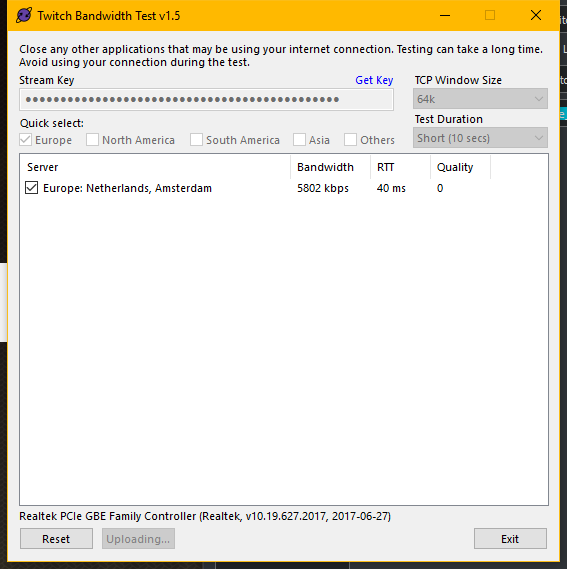
just did a twitch test
https://i.imgur.com/LPPt99i.png
 warm pewter
And your quality is 0, so I would not expect it to work streaming to that server
This is not a problem with our plugin, but either with your networking hardware and/or your ISP
bright oyster
But its really strange because before I did the update everything works perfeclty
Maybe its just the isp who has some issues
right now
but its weird
warm pewter
Seems purely coincidental. The update was just back end stuff, our plugin in no way touches the part of OBS that handles the connection to the ingest server
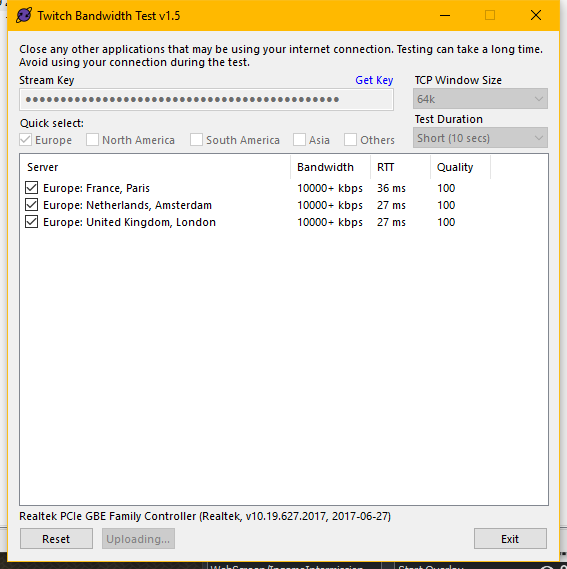 quasi snow
I suggest leaving the server in OBS set to auto, it will use best at the moment you are streaming
has been working wonders for me
bright oyster
I did but the problem was that he isp was broken 😉
quasi snow
yeah noticed
bright oyster
But thanks anyway for the fast help !
It was just unlucky moment when the isp was broken and I did the update
 fickle hearth
custom commands dosent seem to work from the obs.live chat. Am i the only with this issue? they seem to only be working through the browser chat
dry sphinx
I think it would be to the follow only mode? Try turning that off & see if it works.
 timber badge
Hello! I have a few questions and wondered if the help desk would prefer questions independently or DM the few I have? I looked through tutorial videos and either missed or could find the answers. Please let me know, thank you!
dry sphinx
Here is fine 🙂
timber badge
Ok. I will message when I have my computer and questions compiled. Thank you @dry sphinx
dry sphinx
We'll be waiting 
 bitter ether
Would it be possible to get a link on the "OBS LIVE has an update" that links to the patch notes
?
AND where do i find these patch notes even? 😛
warm pewter
We dont have patch notes, if there is something worth mentioning, its usually posted in #270206314561404928
timber badge
Hello again! So my first question is regarding scene changing in OBSLive. Every time I transition a scene there is about 3 seconds of no Overlay before it shows up or it will transition fine then disappear for a few seconds then show again. My CPU doesnt ever go up over 40% so what can I do to fix this or change?
plain sonnet
you can turn on studio mode (bottom right), this will pre load your scene as obs needs to download it everytime
timber badge
That is what I am doing
it still does the delay
sorry if I didnt mention that
I have a clip from my stream so you can see what I mean if needed
timber badge
kk
 half nebula
Is anyone having an issue where Overlays saved online unload when switching scenes? meaning i have to relod overlays just to mak emy webcam borders and such re appear
rugged quail
when will media request in the obs studio be active again?
odd kraken
@rugged quail No ETA, sorry. But hopefully soon.
twilit venture
@half nebula use studio mode
twilit venture
It's due to the "shutdown of not visable" wich is necessary for you not to have doubled audio @half nebula
That way you preload the overlay befor switching scenes
 twilit venture
@rugged quail there where some qierks where people expirianced long losing times and other unusual stuff
half nebula
@twilit venture i keep them from shutingdown tho, i have my alerts on one single overlay
twilit venture
Maybe your cache is full @half nebula
rugged quail
ah alright thx once again!
half nebula
how can i fix that? @twilit venture
deep birchBOT
@half nebula Right click on the BrowserSource > Properties > Scroll down a bit > Refresh Cache of current page
half nebula
how often will i have to do this? is that a good solution? (appreciate the fast answers tho)
twilit venture
@half nebula this really can't be said it could be a diffrent issue also, it also depends on your machine and overlay and your hardware
half nebula
8 core ryzen 7, gtx 1070, 8gb ram, 2 rig streaming set up, encoding on the gpu,
twilit venture
Well I still can't tell you anything about how often your obs filles your cache 
It just depends on many factors Wich I am not tech savy
It would help if your could confirm if my solution worked or not
Bevause if not its safe to say that something else is the issue
Wich would negate the cache discussion 
half nebula
very true, i suppose ill try this and see how long
thanks again, ill come back to you with results of how long just for your own curiousity i guess lol thanks
twilit venture
Haha thank you 🙏
 lime rapids
Stream elements is not updating my alerts from twitch for some reason. It shows the correct amount of followers, but it doesnt show the recent follower under the dashboard
odd kraken
@lime rapids Try to log out of the SE website and log back in please. If possible close OBS and/or Ground Control before.
lime rapids
Still doesnt work. I even disconnected my twitch and SE account and logged back in
twilit venture
Okay probably your webhooks need to be rehooked
Only staff can do that let. Me try to reach some one!
What's your twitch name? (just the name is enough)
@lime rapids
lime rapids
GiveMeTehZucc
 lime rapids
Alright thats fine
twilit venture
 graceful ivy
Nevermind, I think I managed to capture where I fiddled with the settings!
 hard wedge
whats this?
after update on obs live. this happened. cant get reach stream elements seriver
trying login in out reinstalling
tried*
twilit venture
if you say you logged in and out and it still appears
then there is a software bloking it like a anti virus or something like that
hard wedge
just turn off all virus / firewall for windows and same problem
restarted obs
ERR_CONTENT_DECODING_FAILED
gray harness
So I am starting to stream and I have a single PC setup. I'm running a i9 9900k and a 2070 RTX that is Over Clocked. Every time I open Stream Elements OBS live my frames drop to anywhere from 20 to 50. Which is insane. I have been playing Battlefield V at over 140+ frames! I'm looking for some help trying to figure this out. If anyone has any ideas I'd greatly appreciate the help! Please keep in mind this is my first PC so please forgive my lack of knowledge.
deep birchBOT
@gray harness Can you please provide a log from your last stream. In OBS go to Help > Log Files > Upload Last Log File. Once this is complete, please provide the link to the log file.
hard wedge
????
gray harness
hard wedge
plain sonnet
@gray harness theres not really much here that i can see. you have DVR on, it is recommended to turn it off (directions in link). there is a bunch of API calls, i will check with some smart people to see if its anything that would cause frame drops
https://glorp.ninja/obslog?url=https%3A%2F%2Fobsproject.com%2Flogs%2FM7K3R625S_4kvMD4
hard wedge
is there anybody looking at my problem?
plain sonnet
yes, please be patient
hard wedge
ok thanks
plain sonnet
@hard wedge not really much else here apart from game DVR (turn off help in link). plus your "in game" scene has a ton of game captures, you really only need 1
https://glorp.ninja/obslog?url=https%3A%2F%2Fobsproject.com%2Flogs%2FTh1Ye2AnHpZsO3jf
 pale kettle
can I download it for a Mac?
dry sphinx
OBS.Studio? Currently it's available for Windows 10 only. MAC is planned.
 vagrant trench
are you guys aware that the delay timer that used to show green/yellow etc is not showing in obs now?
it also does not show when your delay timer starts or finishes
shy mountain
@vagrant trench Can you elaborate on that? Are you referring to the green/yellow/red box that shows up next to the uptime counter when you go live?
vagrant trench
@shy mountain yes, i'm referring to that box as well as the timer notice at the bottom next to it that is now missing
shy mountain
Can you post a screenshot? Me personally I was not aware that there is a timer that shows the delay
And I do mean both from us and how it should look.
hard wedge
hey was talking to you earlier @shy mountain
Oops! We were unable to reach StreamElements servers
ERR_CONTENT_DECODING_FAILED
Please try again later
my obs is not reaching stream elements
anyway i can start from the beginning
shy mountain
Have you tried reinstalling OBS.Live?
hard wedge
yes
shy mountain
Can you screenshot where you see that in OBS?
shy mountain
What OBS.Live version are you on? It shows on the bottom right
shy mountain
Ok I'm asking the devs. Hopefully they answer.
hard wedge
kk thanks
 opaque orbit
is there a way to stop the overlay resetting every update
 tame star
What is the best settings to put for OBS for twitch Streaming?
shy mountain
@tame star Not the place to ask. Google it
@tame star https://stream.twitch.tv/encoding/
@wide anvil What do you mean issue with custom bot since last update?
 wide anvil
sry only getting here now
i had a custom bot name setup
that worked flaelessly until the updtae
now Streamelements was the default bot name
and trying to choose "Chage to <name> " does not work ... i can save the settings but the test message does not arrive in chat and commands are not working
twilit venture
@wide anvil try reloging on the top tab where it sayes "StreamElements"
See if that works 🙏
wide anvil
no it does not
the current bot name appears as "Change to <name>" as if it was already active
but it does not respond and test message does not get there
as soon as i change it to StreamElements it is working
also <name> is not shown as a modertor in obs.live chat window
i made him mod obv by /mod <name>
shy mountain
@wide anvil Is this with a custom bot name or your streamer name when you change?
wide anvil
with the custom bot name
shy mountain
shy mountain
i guarantee you i'm on the latest version
maybe try logging out the custom bot name
token might have expired
wide anvil
how would i do that?
shy mountain
shy mountain
wide anvil
😄
hardy tulip
Hi, has MR been relaunched?
nova geode
it has been removed for some fixes and will return once its working at 100%
 hollow nacelle
Hi can you use obslive with youtube or only twith?
nova geode
only with twitch
hollow nacelle
hmm gutted
nova geode
a youtube integration will be added once the program is out of beta
no ETA for that tho
hollow nacelle
Oh nice ok thanks
nova geode
 fringe carbon
deep birchBOT
fringe carbon
deep birchBOT
@fringe carbon For the best OBS support, please join their Official Discord @ discord.gg/obsproject
hard wedge
Hi did i get an answer back? @shy mountain
shy mountain
No
hard wedge
@shy mountain I got it reload, then logged out and now cant log back in
same message
now it work i just cicked reload 100 times
shy mountain
@hard wedge Can you add --remote-debugging-port=40404 to your OBS shortcut in target field, restart OBS via the shortcut, then let it load like that, open a browser and type "localhost:40404" in the browser
You'll see something like this:
click on any of them and then make sure you click on "Console" and then type in this: window.location.href like so
is will give you what link its trying to load
paste a screenshot in my DM
 inner urchin
I need help!! I installed ths obs studio app on my laptop but the screen to sstream shows black? How do i fix this?
plain sonnet
have you added window/game captures? any overlays?
inner urchin
Yes i have my overlays setup but it wont show the game i want to stream
 queen palm
Heyas. How do i recover the chat and activity side bars? I just installed an update to OBS and they're gone
odd kraken
Do you have the StreamElements Tab on top in OBS?
queen palm
yup
odd kraken
If you click that, are the elements like Activity feed and Chat showing up in the Dropdown?
odd kraken
nice. 👍
 lime walrus
Hello, I am having issues with OBS, anyone able to help?
odd kraken
what exactly?
lime walrus
I stopped streaming one game, went to another game to stream and set the game capture to the game and the screen is black and nothing is showing up, but the sound is going.
deep birchBOT
@lime walrus For the best OBS support, please join their Official Discord @ discord.gg/obsproject
odd kraken
These guys know better how to fix this.
lime walrus
Thank you.
 spice bramble
i want to update obslive and the msg wont show up
odd kraken
What message do you mean? Can you elaborate please.
spice bramble
the message when youu get an update doesnt show up
odd kraken
So you select StreamElements at the Top of OBS Live > Check for Updates and the message that there is or is not a update does not show up?
What Version fo OBS Live are you using (Bottom right corner in OBS Live)?
spice bramble
thank you!!!
odd kraken
What was the matter? How did you fix it?
 steady horizon
So I am having major FPS drop on both stream elements and slobs i was running max graphics apex max fps and had 60 fps smooth on streamelements but now im dropping to 20fps and 10 and 1 and on Path of Exile it does it when shadows r on. PC Specs
NZXT Kraken x72
Asus Rog Maximus XI Hero (Motherboard)
NAZT Aer RGB 2 140MM Fan
GPU ZOTAC Gaming Geforce RTX 2080 AMP
CPU I9-9900k 8-Core 3.6 GHz
Ram G. Skill TridentZ 16 2x8GB 3600 MHz
SSD Samsung 970 EVO 1TB (2)
and i do not understand why this is happening i can run Fortnite on Slow and Placebo using only 40% cpu no frame drops when shadows are on or some other graphic stuff like Anti Aliasing it just crashes so hard
deep birchBOT
@steady horizon For the best OBS support, please join their Official Discord @ discord.gg/obsproject
steady horizon
this is a streamelement issue too... smh bot ..
steady horizon
games r un streamable right now
it is on
and i know other ppl arent having this issue so i dont understand
ancient zodiac
ok show us your obs log.
steady horizon
how would i grab this ?
deep birchBOT
@steady horizon Can you please provide a log from your last stream. In OBS go to Help > Log Files > Upload Last Log File. Once this is complete, please provide the link to the log file.
steady horizon
if that only sends the most recent stream it only lasted like 5mins if that lol
13 i guess
ancient zodiac
20:17:22.550: Output 'adv_stream': Number of lagged frames due to rendering lag/stalls: 8437 (16.6%)
Which means you are overloading your cpu
Also, disable windows game DVR
and make sure all your browser sources are set to shutdown when not active.
steady horizon
so this is to understand my 3.4k computer is having too much of an issue with this? (i had a 2.4k comp b4 this 1 that ran all of this fine got an upgraded one) so idk why that is happening?
and how do i disable DVR? idk what that is sorry im a noob
b/c how was i running this all fine at 60fps yesterday with no lag drops
and now after an update lag drops
and how is shadows the only thing dropping frames on Path of Exile a significantly less graphically intense game
sorry for so many questions
steady horizon
stream elements had an update yesterday so i updated
i also dont have game dvr it says
steady horizon
how do i lower gpu output ? i have VSynch on always b/c screen tearing sucks so i dont understand that 1
ancient zodiac
Make sure scenes are set to shutdown when not active. Reduce number of captures.
these are best directed to obs
discord.
 tepid zealot
Hi I need help with a question
 river wave
How do I download SE?
steady horizon
The issue with this is even when im not live just running the game non live so obs takes up no CPU usage its dropping frames on my crap computer with only a little bit lower graphics im not dropping any
obs still shows major drops make no sense and i did all you suggested and i c no improvement
deep birchBOT
@river wave OBS.Live is a Plugin for OBS created by StreamElements. You can download OBS.Live here: https://streamelements.com/obslive
Please make sure you have the latest version of OBS installed, Current Version: 22.0.2. You can install OBS here: https://obsproject.com/
ancient zodiac
@steady horizon did you try discussing this issue in obs' discord.
gray harness
Has anyone else had a window's update affect there frames in game? I've trouble shot OBS Live and it's not that because the drop in frames happens even without OBS open.
shy mountain
Yes - Windows updates are known to heck stuff up. Only thing I can suggest is, see if you have the Windows Gaming features off as one thing or maybe see if you can update your other drivers to be up-to-date.
If this doesn't help much, then maybe google "Windows Update XXXX made my X game drop frames" or revert to the previous update.
gray harness
I have turned vertical sync on and game mode off and still have the same issue. How does one turn automatic updates off and revert back to a previous version
shy mountain
First link from google "How to revert windows update": https://www.dummies.com/computers/pcs/undo-windows-update/
gray harness
Thank you @shy mountain
 lapis fractal
I am uploading a gif to stream elements and i have the audio file synced to the gif. but stream elements makes it go out of sync
like for an alert
shy mountain
If this is a general alert widget issue, then we can move to #helpdesk-twitch
 real iron
I've been having crazy problems with my stream looking laggy and acting laggy. Talked to about 30 other streamers and they are having same problem. Only started happening after OBS updated today.
deep birchBOT
@real iron Can you please provide a log from your last stream. In OBS go to Help > Log Files > Upload Last Log File. Once this is complete, please provide the link to the log file.
rugged quail
the obs update made my streaming and recording suuuuuper laggy for apex legends do we have any idea why?
shy mountain
Yes - the game is the problem
Most of the reports that happened this past week - the common thing is Apex legends
 slim jetty
good afternoon, i have a major issue, when im streaming my games feel like 10fps, but ingame shows it is at eg. 300fps, but watching over the streams it looks fine, just when im actually playing, i have gsync enabled, and i have a fairly decent pc using a ryzen 2600 oc'd to 4ghz, 16gb 3000mhz ram, rtx 2080 and my main monitor is a acer predator 27" 1440p 165hz gsync
steel mural
It feels like 10fps, you get 300fps and have GSync enabled for 165fps?
slim jetty
yupp
steel mural
Getting 300fps and having GSync enabled doesn't work. GSync forced the fps to stay at 165 in your case
slim jetty
i have tried disabling gsync and still feels the same when im streaming, it is awesome when im not streaming
 pine raptor
Hey royal bank again lol but my host alert is not popping up when I go live . A friend gave me a host while he was in the chat it did not go off only raid or more than two viewers on a host goes off and I didn't touch any settings to make it do that
I been forced to use streamlabs host alert🤔 🤔 🤔 🤔
deep birchBOT
@pine raptor Due to recent changes to Twitch API, we have filtered out hosts and will only show these ones on your activity feed:
- All manual host events (0 hosts included and if filter set to 0)
- All auto host events with at least 1 viewer
 hasty summit
I need help, when I try to stream fortnite i get dropped frames, like when im normally in the pre game lobby, i get 340 fps and then when i turn on OBS my frames in the lobby drop to 143
I noticed that if i clicked out of the application (like on my second monitor), my frames went back up to 300+ but then when i clicked back on fortnite my frames then dropped back to 143
 brave sky
not enough dedicated ram or cpu usage
 white geyser
Why do I have to do the setup every single time?
dry sphinx
Known issue with that!
white geyser
Oh I just restarted my PC to test
It's not every single time
Maybe if I launch OBS on another windows account
(I do that sometimes for work)
Been happening since day 1 btw
 verbal briar
hi, i am trying to come over to streamelements from streamlabs. I am trying to see if there is a way to export my scene collection from SLOBS to OBS.live? without having to go through and reset everything back up
twilit venture
Are the scenes in slobs like our overlay editors on the site? (widget placements and stuff)
@verbal briar
If not you can try our import tool on the site but you would still need to place the position to your likings in the overlay Editor and use the Overlay URL to use as a browsersource in obs
Obs.live isn't like slobs it's a extension not a new obs version of from us. So it operates diffrent :)
verbal briar
@twilit venture if you are familiar with nerd or die's work, it is basically that
twilit venture
Oh well sadly you still would need to upload the panel graphics to out overlay Editor and place them to your liking
verbal briar
i have all the alerts and such already uploaded to my overlay on SE website
now its just sources
and i was just seeing if there was a quicker way of doing it was all 😃
twilit venture
Nah sadly no sorry :/
But once you have done it all your overlays will be in the cloud
Meaning you are always save and can take them anywhere you want with out having local files on your pc
verbal briar
haha yes, so i can upload all the animated sources (Webcam Frames, starting screen, etc) onto the cloud?
verbal briar
ty kiwa 😄
 fresh frost
Hello, I am using the OBS.live StreamElements plugin and I was wanting to switch streaming platforms from Twitch to Youtube inside of OBS. However, I cannot find a way to do this.
odd kraken
There currently is no support for OBS Live on Youtube.
fresh frost
Oh ok. Sorry if that sounded stupid.
odd kraken
It is planned, but no ETA.
fresh frost
Alrighty, thank you for your time.
 inner hatch
Hey so is OBS Live compatible with the new OBS release candidate? I don't really know how all that works.
plain sonnet
no, the obs candidate is a beta test
inner hatch
Alrighty, thanks :P
plain sonnet
np 👍
rugged quail
is the chatbot down ?
^ ignore that... I Parted channel and rejoined working np now ❤
hard wedge
hey is there any reason why your commands wouldnt be working?
twilit gazelle
I'm a moderator in someone's chat, currently the streamelements chat bot isn't working. Any fix I can do during the stream?
ancient zodiac
You can try parting the bot and rejoining it
twilit gazelle
Would I be able to do that on Twitch, because the streamelements bot is also a mod
ancient zodiac
nope. that is only functional through the dashboard
twilit gazelle
Figured, would have to see if I can get that from him. Luckily we are in the same building lol
 lofty gorge
my bot is not working how can i restart that
ancient zodiac
read above
lofty gorge
does this count even if its a custom bot name
 proud schooner
hi there just need some help please when i am streaming with stream elements i get encoder overloaded how would i fix this please ?
ancient zodiac
Means you're stressing your pc too hard to be able to record.
proud schooner
@ancient zodiac cpu was at 9.9% while streaming
ancient zodiac
Then you're likely using your gpu to encode, which was overloaded.
proud schooner
@ancient zodiac is there a way to change it?
 rain pilot
hey Im having an issue where when Im streaming the fps drops to an extremely low rate
what are the ideal settings for streaming that would help prevent stream alag?
warm pewter
Its not that simple. It depends on the system, and what you are trying to stream
rain pilot
Im trying to stream Rainbow Six Siege on an Asus with Intel I7 and gtx960m
warm pewter
Yeah, thats not really going to work at all. That game is incredibly demanding, and a laptop of that spec will not work very well for streaming
rain pilot
okay cool thank you!
queen palm
Hey guys since the last update the other day im having encoder overload problems and i cant figure out why. I've not changed any settings at all. and prior to the update it all worked fine
is there a place to download thepreviouse version?
 stray dirge
I Need Help Setting Up My OBS Live To My PS4 And Setting The Webcam Up Can Anyone Help??
placid cliff
@stray dirge Do you have a Capture card ?
 calm bloom
Okay so the lastest update on OBS.live seems to have solved the song request issue I had because I use OBS.live as well as Ground Control Good stuff SE! 
 rare lagoon
Hi all. is there a way i can change my font size on obs.live
plain sonnet
right click on the properties then go to select font, then on the right is the size
rare lagoon
i need it for the chat
plain sonnet
for the in built chat?
rare lagoon
yeah the one on the side
plain sonnet
open up activity feed and on the bottom left there is a slider for the text size
you can close it after you set it
rare lagoon
ur a star. thanks
plain sonnet
np 👍
hardy tulip
Media Request is back, well done Stream Elements. Question : When i transition scenes and both scenes contain the MR widget, why won't the scene transitioned to continue to play what's on the playlist? Instead it pauses and i had to restart MR to get it to work again in the new scene.
Ok in studio mode it works fine transitioning the scenes but the music doubles up
plain sonnet
if the music is doubled you need to make sure your sources are set to shutdown when not active
hardy tulip
But they are set that way to shut down sources, but studio mode will play the music twice in both scenes as MR widget is in both hence the music doubles up.
hardy tulip
Skipping one song seems to skip multilple songs from a playlist too.
 neon fern
are you skipping with the button in obs.live or with the bot?
hardy tulip
within obs and the plugin still has an issue after reloading it still says no widgets wt.
neon fern
@weary sequoia
 weary sequoia
@hardy tulip are you viewing a backup playlist? If so, maybe the video that got skipped are no longer available in the playlist or in your country.
hardy tulip
yes from a playlist but when a song is not available in my country it gives me the option to skip it not automatically but its happening to some songs now
weary sequoia
Can you share the playlist my friend?
weary sequoia
could you send the playlist with a space between the . and the "com". I think it will allow it this way
hardy tulip
https://www.youtube. com/watch?v=EPhWR4d3FJQ&list=PLI_TwOrHUsI8MQNW0BvBAwwHYKgyiiiDB
weary sequoia
thanks man!
hardy tulip
Thanks i got ripped hard hehe
Btw i have a few songs in that list that don't play due to them being geo blocked but even then MR plugin is still a little flakey here and there i had to restart it nearly 5 times then just to play a song that i have now on queue moderation and by the way when you flip the plugni out to full screen it pauses the song, this used to play on in the past would be neat if the music doesn't get interupted while moderating MR settings.
weary sequoia
could you maybe provide a short video?
regarding the behavior that forces you to restart MR
hardy tulip
It seems to be ok right now, but i'll let you know if it happens again and try Camtasia to capture a video when it happens but not right now. It's behaving.
 wanton brook
You guys that see extremly good at this obs stuff and you probably good at w10 stuff aswell. I have been Google alot about apex streaming trouble. And from what i understand there is a Windows 10 issue only? The problem ppl get is that GPU gets to overloaded and leave nothing left for obs to work with. I mean i can max out my GPU in any other game and obs Will still run 60fps 720p. Bit there is only in apex i get this fps drops (not encoding drops) its just fps go down and up between 30-60fps. I encode x264. My text feel jidderish in my eyes now, i realise. But i would like to know IF anyone have heard anything about a fix from Microsoft, nvidia, apex, obs, anyone... PS. Game mode in w10 i have already disabled, and i know about vsync exist etc etc. sorry IF you feel this is the wrong forum to post at. But is there anyway i can give obs.live prio to use its small % of my GPU that it needs?
And my fucking phone tried to change every english Word to swedish aswell. Goddamn
dry sphinx
Have you tried to enable Vsync in the game, or use a frame limiter? You can limit the game to 60fps by adding +fps_max 60 to the game's launch properties in Origin.
neon fern
@wanton brook take a look at https://twitter.com/OBSProject/status/1093974215877951493


If you stream @PlayApex and are having FPS issues with OBS due to a maxed-out GPU, you'll need to reduce GPU usage so that OBS can run as well. The quickest way to do this is to enable Vsync with triple buffering and disable Windows 10 Game Mode. https://t.co/FOPmDyJMNx
Retweets
384
Likes
1040
 Twitter
wanton brook
Twitter
wanton brook
Yeah i have noticed that aswell. I just wanted to hear IF anyone have found a hotfix of some kind. It just feel so strange when i can max out my GPU usage in any other game and obs still have no problem delivering 60fps. Its like only apex have some prio 1 bullshit over everything xD
But anyway guys, thank you so much ❤
hardy tulip
That playlist i sent earlier, well alot of songs are being skipped from it now. Besides the ones being geo blocked.
 half shell
hope this is the right channel to ask in; I'm looking for some advice from others who stream console games (through a capture card ofc). I'm wondering what the best way is to set up audio for my end. I'd like to hear everything through the same set of headphones (game audio, stream alerts, discord voice chat etc), but audio monitoring the elgato doesn't work for this since whats being captured by the card and showing in OBS is a split second behind what I see on the TV output. Is this something wrong with my setup, or is it normal for the capture card video+audio to lag behind slightly? The video and audio in OBS are synced with each other so that's fine, I just can't play any sort of rhythm-based game or similar.
I've resorted to just plugging my headphones directly to the TV but then I can't hear stream alerts or use discord voice chat :(
half shell
you can see the delay here. i assume it's normal based on the googling i've done. so i'm wondering what the best audio solution is. do i just forgo being able to hear stream alerts / voice chat and listen to the game directly? or is there something in OBS i can do to fix this..?
I tested in elgato's own software; the standard 'game capture HD' and it works flawlessly, so I'm inclined to think this is an obs issue
deep birchBOT
@half shell For the best OBS support, please join their Official Discord @ discord.gg/obsproject
 polar cave
hey guys, hope You can assist me in one matter. I'm having issues with SE, using OBS Live. Every time i get an alert (raid/host/sub/follow etc.) i experience drops in rendering. Streaming 900p with faster preset, 5k bitrate. Using x264 and as of hardware it's an i7 8700k. Thanks in front
 granite crown
ok, so i figured out how to get the media requests to show up on my OBS, but now I have dual audio playing, with a half second difference.
granite crown
im getting "no active widget" after it stops showing on obs 10 seconds in.
ancient zodiac
@polar cave Cpu usage is increase during an alert, which causes the issue you are describing.
granite crown
ok, so no help then....
ancient zodiac
I dont have enough experience with the widget myself, which is why I didn't answer.
You can try logging out and back in of StreamElements inside obs. and make sure you only have obs.live media request open, no other form.
granite crown
ive tried everything, and nothing has fixed it
 echo crown
my stream has echo i've tried many alternatives but causing me other issues...no game audio...audio n mic out of sync etc can anyone help?
deep birchBOT
@echo crown For the best OBS support, please join their Official Discord @ discord.gg/obsproject
 wild shadow
does anyone know why i cant select and/ or move anything on obs?. like my face cam, alerts, etc?. only happened the day i installed StreamElements
shy mountain
Are you referring to the border about your facecam?
Alerts are part of the overlay
you need to go into the overlay editor(on the website) and move them there.
wild shadow
dont worry, i found it. apparently my preview screen was locked💀
shy mountain
Ok
proud schooner
@twilit venture it is on x264 there is no other option to pick
twilit venture
@proud schooner well that's not true on obs you always have the nvce and x264 encoding for your cpu and your gpu to encode the stream
Maybe this option only doesn't apeer when you use a PC without a gpu? But... Then again... I am not sure about that 
deep birchBOT
@proud schooner Can you please provide a log from your last stream. In OBS go to Help > Log Files > Upload Last Log File. Once this is complete, please provide the link to the log file.