#helpdesk-selive
1 messages · Page 18 of 1
 lime zinc
anyway thanks for your reply about my question on SLOBS
 shy mountain
That does essentially what SLOBS does - place activity feed and chat window
without actually taking more CPU power
And our overlays are cloud based.
lime zinc
OBS.live I think is the version I have installed
shy mountain
Instead of being a file on your PC
shy mountain
Ok so you are on the right track.
lime zinc
oh thanks. I thought that SLOBS was the correct abbreviation 😃
shy mountain
SLOBS = Streamlabs OBS
lime zinc
is the same of OBS.live? correct?
shy mountain
No
lime zinc
hahah
lime zinc
true...I'm getting confused because the name is so similar
shy mountain
we on the other hand, just made an addon/plugin for OBS STudio
lime zinc
you'r right sorry,
lime zinc
☺ my mind is still on Xmas vacation...
sorry again 😄
anyway...obs.live shouldn't use more PC resource vs normal OBS?
shy mountain
No.
I recommend watching this video (not sponsered) https://www.youtube.com/watch?v=Ck_AUuDUflA

Want more FPS while streaming? This video compares in-game performance while streaming Fortnite, CSGO or PUBG with OBS Studio to SLOBS and OBS.live. SLOBS is...
lime zinc
ok. then maybe my lag problem is more related to something from game side
 deep birchBOT
@lime zinc Can you please provide a log from your last stream. You can find this log in " %appdata%/obs-studio/logs " OR Help > Log Files > Show Log Files. You can simply drag and drop the log file into Discord.
lime zinc
now I'm in office and my log is at home PC. I will check this late and I will post it here
shy mountain
👍
lime zinc
thx for your great support here and sorry again but I'm a noob with these things...
I will follow later
shy mountain
No problem 😃
lime zinc
in the meantime I post the link to the video where you can see the issue
ah...I can't post the link
maybe with a direct PM to you @shy mountain ?
can I?
lime zinc
ok. wanted just to let you see what's the result
anyway ok, I will come soon with the log, no problem
 quasi snow
you should disable disable Game bar, Game DVR and Game DVR Background Recording
2- Click Settings.
3- Click Gaming.
4- Click Game Bar.
5- Click the switch below Record game clips. Screenshots, and broadcast using Game Bar so that it turns Off.```

Also make sure you run OBS as adminlimit fps in game because seems like you are overloading your gpu
quasi snow
also I recommend for better results to set base resolution to 1280x720 and don't downscale, this takes off some cpu/gpu encoding
it is confusing and most ppl think you need to enter there your game resolution but you don't
lime zinc
I usually play with 1920x1080
quasi snow
I know, me too
lime zinc
you mean to play directly with 1280x720?
quasi snow
also make sure you have this on
lime zinc
would be better
quasi snow
!multi
deep birchBOT
Make sure to :ballot_box_with_check: “Shutdown source when not visible” for all browser sources (all OBS scenes). If using studio mode, uncheck “Swap Preview/Output scenes After Transitioning.” Also keep in mind that sound can play from any overlay loaded in the browser (editor or launched). https://i.imgur.com/FegZJQS.png https://i.imgur.com/yY0wcFl.png

 quasi snow
no @lime zinc just set capture base to be 1280x720, you can play your game normally at 1920x1080
you are just setting resolution of capture, since you are downscaling to 720p, why not just capture it at 720p and remove the extra encoding needed to downscale 😉
quasi snow
yep, perfect
lime zinc
great
quasi snow
I know there's an option do downscale, just turn that off
I'm not home can't check it 😦
aha found it, it's on output > uncheck "rescale output"
let us know when you test this if it helped, I'm sure it will
lime zinc
I'm using the simple options
lime zinc
but when I switch to advanced then I see the rescale is disabled already
quasi snow
those are my settings
cool 
if game has no option to limit frame rate just try enabling v-sync
lime zinc
ok. I will try with v-sync
I found a problem @quasi snow . After I changed the res to 1280x780 now my overlays are cutted in the bottom area
shy mountain
select the browser source and press ctrl+f
lime zinc
nothing hapens when I click ctrl+F
shy mountain
this should fit the browser source to the base resolution
quasi snow
yeah select the source (make sure it's unlocked) and press Ctrl+f while having it selected
if that doesn't work, with it selected, right click and search for scale to fit or fit canvas or something similar
lime zinc
quasi snow
yes, I forgot you would have that problem, but you can resize it like I said
quasi snow
no, there, set it to 1920x1080
lime zinc
it was 1920x1080
quasi snow
then try hitting ctrl+f again after you hit ok
lime zinc
when I change it back to 1920x1080 it's centered correctly
quasi snow
quasi snow
I do hope it helps mate and you're welcome 
 oak falcon
can i dot somthing in my obslive to stream better gameplay on twitch with battlegprund
 twilit venture
OBS.Live will not make you get chicken dinners in PUBG 
but I assume you mean the frames?
oak falcon
no im mean when i streaming is the cpu on 10% op and my fps on obslive bad
what can i do in the output settings whit ratecontrol and my best gpu i want to streaming whit
twilit venture
well what do you use to encode? nvenc or x264?
twilit venture
theres the issue
use x264
if you use vcnc thaz means your card has to render the game AND your stream
thats a bt much
let the CPU render the stream and let the game be handled by the card
oak falcon
but i have a bad cpu!
@twilit venture and what bitrate if i have 1000/1000 on my internet?
twilit venture
okay whats your CPU? and what are you trying to strea in resolution and FPS wise?
bitrate is not really something thats imortant on your speed look at twitch encoding advise:
https://stream.twitch.tv/encoding/
oak falcon
im try to streaming pubg, adn my Cpu i have a i5-6500
from intel
resolution i have it on 720p
twilit venture
hmm I still would try the x246
oak falcon
i dont have fps overcluck my cpu and also not my gpu
twilit venture
and maybe lower graphics on your game?
I ment what resolution and FPS to strea
720 60fps?
or 30fps?
oak falcon
60
twilit venture
thats important for your bitrate
look at the link I send you
theres a chart wich bitrate is best to use in this resolution
oak falcon
yaer?
twilit venture
yeah
oak falcon
what so is the best for me?
720p 30fps
HD Standard Framerate
@twilit venture thanks for you want to help me 😃
twilit venture
@oak falcon just try the x246 encoding and the 720 60FPs
and see how it goes
if its bad come back here and provide a log of your stream
 junior sundial
Im having a problem with a youtube playlist of mine. Every time I open Ground Control to play music it always starts at the beginning of the playlist, so Im really only playing the frist 100 songs over and over. Is there a fix? The same thing happens when I play music through the browser
 nova geode
the backup playlist will always begin at the first song, as its only meant as backup. you could skip to a song in the middle to remedy that @junior sundial
junior sundial
If i try and play a song from the middle of the list it will move the song to the beginning of the queue and continue as normal, is there a way to quicly skip to a certain part in a playlist without having to press skip 100 times?
twilit venture
sadly no
 radiant pulsar
Question: When I use OBS.LIVE hyperlinks are enabled for my stream, but I can't click them to open them up. I have to drag the cursor, cut & paste into a browser. Is that a setting that can be changed? Or is that going to be a future update?
Viewers can click them in Twitch chat, but I can't click them in OBS.LIVE
shy mountain
Links from the Activity feed should not be clickable, as a security measurement. I assume that also means for chat window links, as well, due to the nature of how a link can be altered to look like a legit link, but under the hood it can be linking to something else.
 oak kite
Hello! How do i add stream overlay links into obs.live
quasi snow
!add
deep birchBOT
To add your overlays to OBS, add a new browser source in your scene. Paste your overlay URL in the browser source properties, set the dimensions to 1920x1080 (unless you changed them on the website), and :ballot_box_with_check: “Shutdown source when not visible” https://youtu.be/KDvLynUqXI4
quasi snow
just like that 😃
oak kite
Thanks
 distant hemlock
😫
twilit venture
But it's planed
 hard gorge
nova geode
hard gorge
nova geode
you can add widgets to your overlays in your overlay editor on the SE site and add them via browser source into OBS.live @hard gorge
also your profile pic might be considered nsfw, so id have to ask you to change that
nova geode
if i sit in an office and theres an ass on the screen, then yes, that might be considered nsfw
as much as id love to work on the beach and watch said body parts walk by
 leaden fog
I'm guessing this would go here as its obs related Since yesterday having high cpu
shy mountain
@leaden fog Can you post the previous log?
leaden fog
@shy mountain You mean like from before yesterday?
 warm pewter
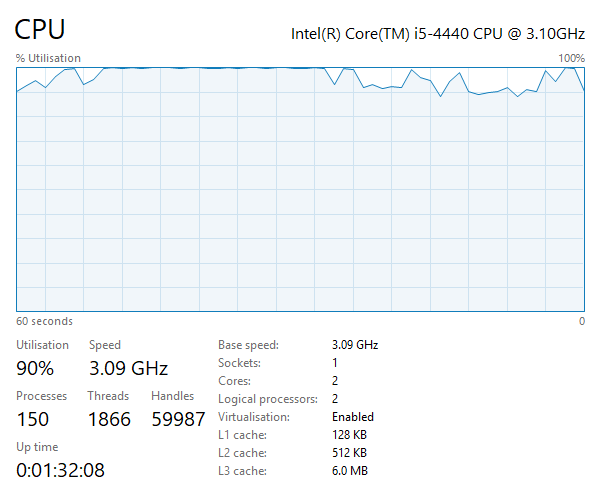
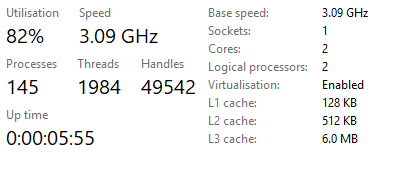
Its showing 2 cores for a quadcore processor 
leaden fog
oh well that's a problem then https://i.gyazo.com/eb61235bdda3db61b5bdc5a6e8a3dcd0.png 
@warm pewter I'm just going to pretend I understand that 
warm pewter
⤴
 steel mural
leaden fog
steel mural
leaden fog
mmm ok 
warm pewter
You can check the processor affinity in task manager
leaden fog
 leaden fog
leaden fog
My what now
shy mountain
@steel mural wait a god damn moment thats my CPU 
steel mural
- Cores disabled
- CPU ded
- Mainboard ded
leaden fog
How do I check whatever bios are
shy mountain
@leaden fog how the hell do you have the same CPU as me and 2 less cores?
steel mural
BIOS is the operating system for your mainboard (kinda). You'd have to check the manufactures manual
leaden fog
well rip twitch 
steel mural
Easy fix if they're just disabled in the BIOS but this would be weird
 ancient zodiac
yeah but i mean by default they wouldnt be disabled
steel mural
yep
ancient zodiac
and it doesnt sound like james knows how to navigate the bios
so
ill sell you my old 4770k :)
steel mural
I'll get my 4790k next week 
 radiant pulsar
@shy mountain it must have been changed. I watched a VOD where I i clicked a twitch clip link that a viewer posted and took me right to it. Honestly, you should let the streamer choose to enable/disable that function. The purpose of using OBS.LIVE is for the streamer's convenience of not having multiple windows open. You are forcing me, as the streamer, to have an alternative.
shy mountain
@radiant pulsar was this about why links are not clickable? I'll toss that into the feedback pool right now.
radiant pulsar
yea sorry for the late reply
leaden fog
@steel mural
steel mural
That isn't the mainboard. You should get some options to boot into the bios when starting the PC. That's were the manufacturers logo pops up. Even before the windows loading circle shows up.
nova geode
Normally keys like F12 are used to enter the bios
leaden fog
ok brb then 
nova geode
When you boot up it tells you "press F whatever to enter BIOS
steel mural
I think the options are F2, F10, F12 and Delete depending on the mainboard
steel mural
yup. And it's reporting 4 cores so it's weird
warm pewter
There is a chance that there is a problem, and its causing Windows to park the cores
leaden fog
So it’s not my fault then 
warm pewter
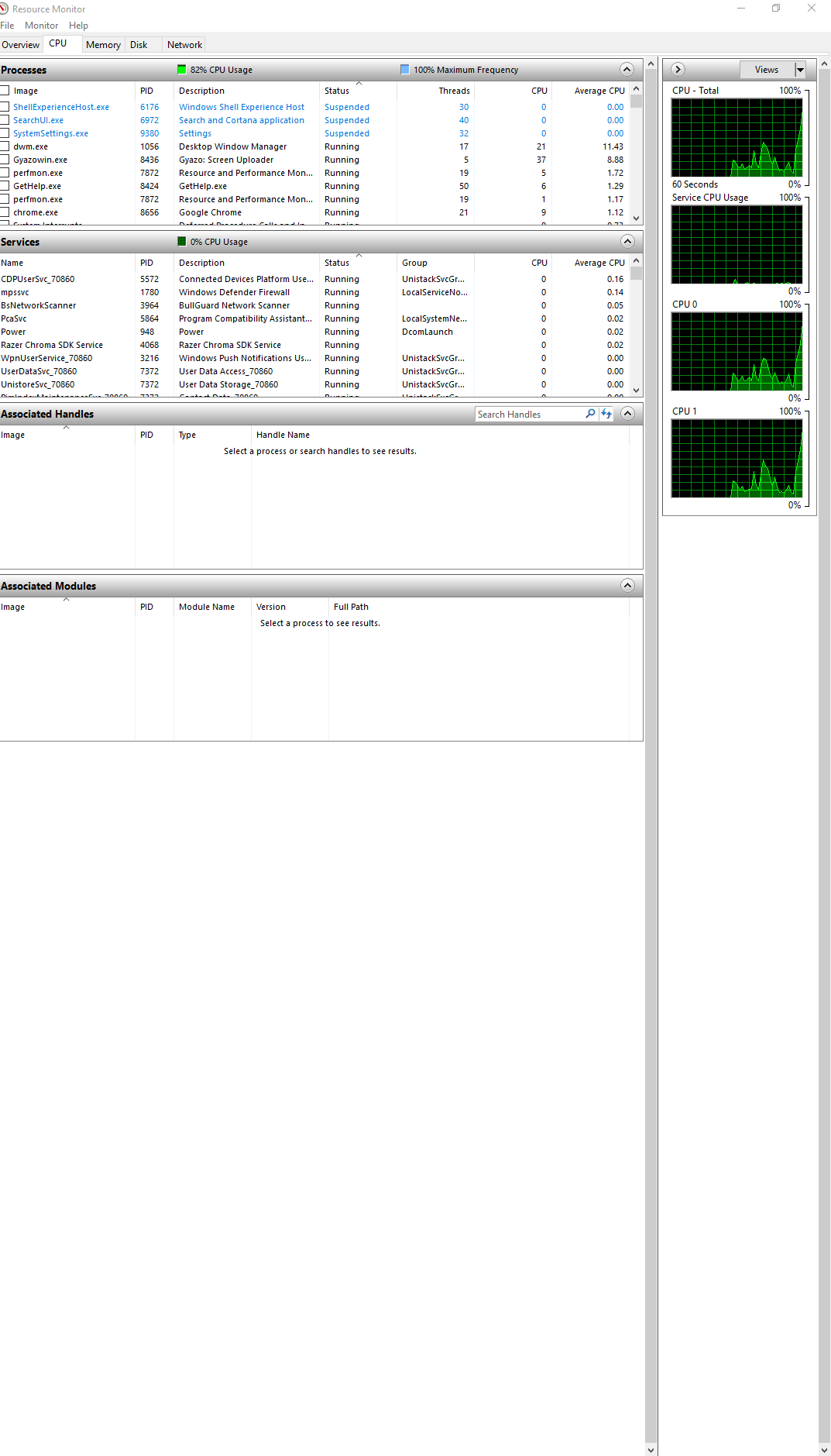
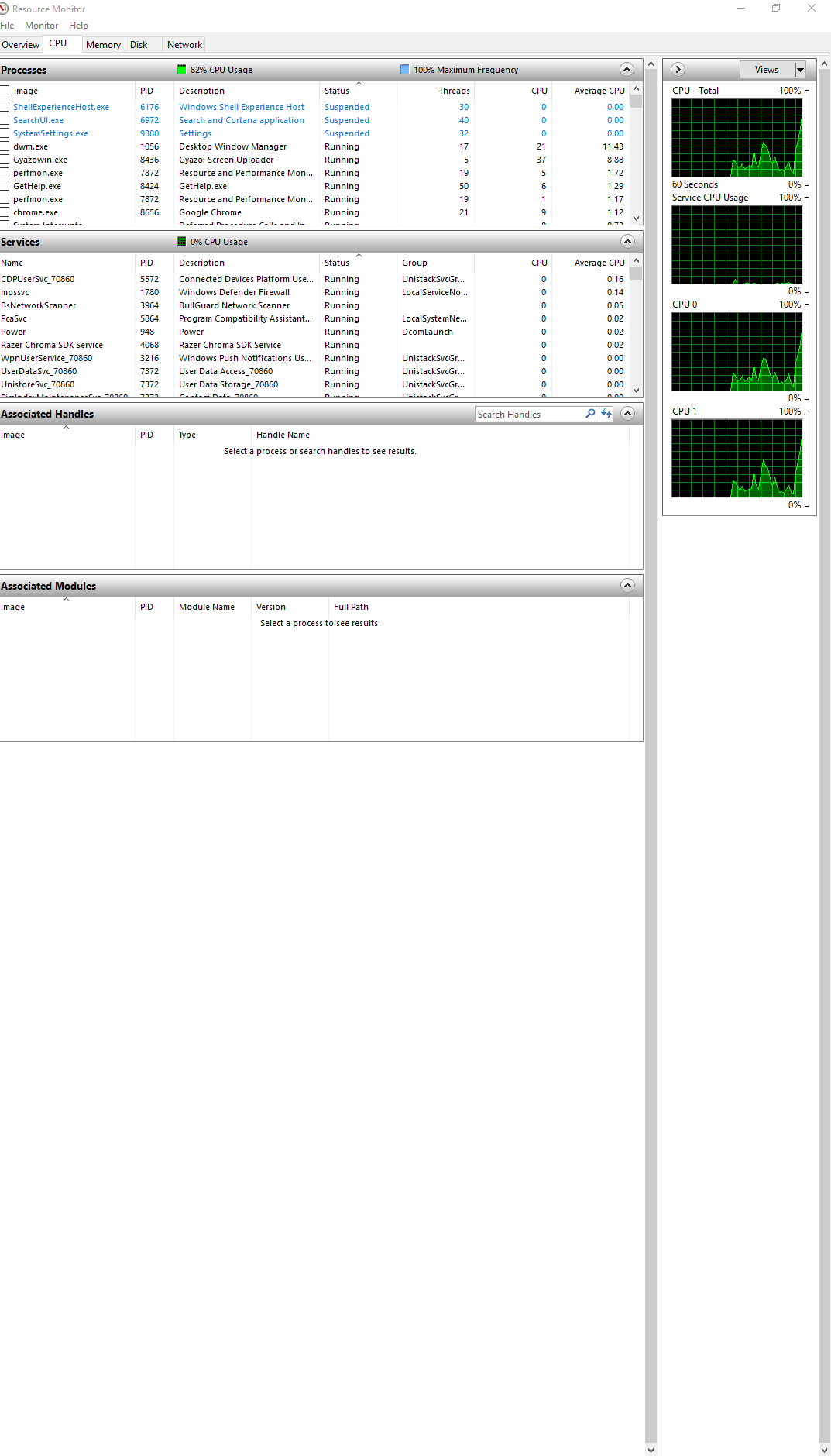
In Windows, open Resource Monitor > CPU, if there are parked cores, it will show in there
If it still only shows 2 in there, not sure where it went fucky, maybe resetting bios to optimized defaults will help
leaden fog
so now boots up as normal
Ok I try reset
Well whatever happens thanks for the help guys 
@warm pewter Nope still the same https://i.gyazo.com/2e88b4ecfdad948c193ade88828ed00e.png
 shy mountain
Time to kill that PC 

and get your jailed cores
Did you update windows recently?  @leaden fog
 frail bolt
Hey I just downloaded the OBS live and I really like the features I am only having one problem if I press the replay button for the alerts they dont pop up. My alerts are from streamlabs and I already imported streamlabs any help?
leaden fog
@shy mountain Please tell me It's a Windows update fuck up?
shy mountain
Can't say really 
leaden fog
oh
shy mountain
But I don't know if you should even risk it with this: https://forums.geforce.com/default/topic/906957/un-park-your-cpu-cores-improve-your-game-performance-/?offset=15
because its not telling you you have parked cores
@frail bolt Did you add the overlay from our side to OBS?
leaden fog
Yeah I'm not going to risk it
frail bolt
@shy mountain what do you mean?
warm pewter
What does Resource Monitor show? @leaden fog
if you have parked cores, they will show in Resource Monitor
leaden fog
https://i.gyazo.com/e99934a5968ebf2d6c4a688a25d2a033.png I don't know but this is what I'm seeing
 steel mural
@leaden fog You could try one of those "CPU unpark" tools but I'm not sure if this will help.
warm pewter
yeah, something seems to be scuffed pretty hard, cant say I have ever seen anything quite like this
if Windows does not show cores being parked, there is a good chance an unparking tool wont help, but would still be worth a shot
 frail bolt
does anyone know how to solve my problem? :/
deep birchBOT
To add your overlays to OBS, add a new browser source in your scene. Paste your overlay URL in the browser source properties, set the dimensions to 1920x1080 (unless you changed them on the website), and :ballot_box_with_check: “Shutdown source when not visible” https://youtu.be/KDvLynUqXI4
 flat atlas
is there a way to refresh the chat on obs streamelements when you are live?
sometimes it glitches and wont show chat
warm pewter
click the refresh button, or if you want to go ham on it, StreamElements > Logout, then log back in. Doing this will not interrupt a stream
flat atlas
where's the refresh button? o.o
warm pewter
flat atlas
thank you! @warm pewter
warm pewter

 dry sphinx
Going on about @leaden fog thing: What about the Windows update about Game DVR?
I see the Game DVR is enabled on the Log 
warm pewter
That should not have anything to do with Windows only seeing 2 cores and 2 threads on a quadcore processor
also, the game mode flag does not show in the log, the game DVR is separate from game mode
dry sphinx
🤔 Worth a shot.
leaden fog
Oh
 leaden fog
Me how was it my fault 
dry sphinx
 Best reread
leaden fog
Oh it’s been a long day bro
warm pewter
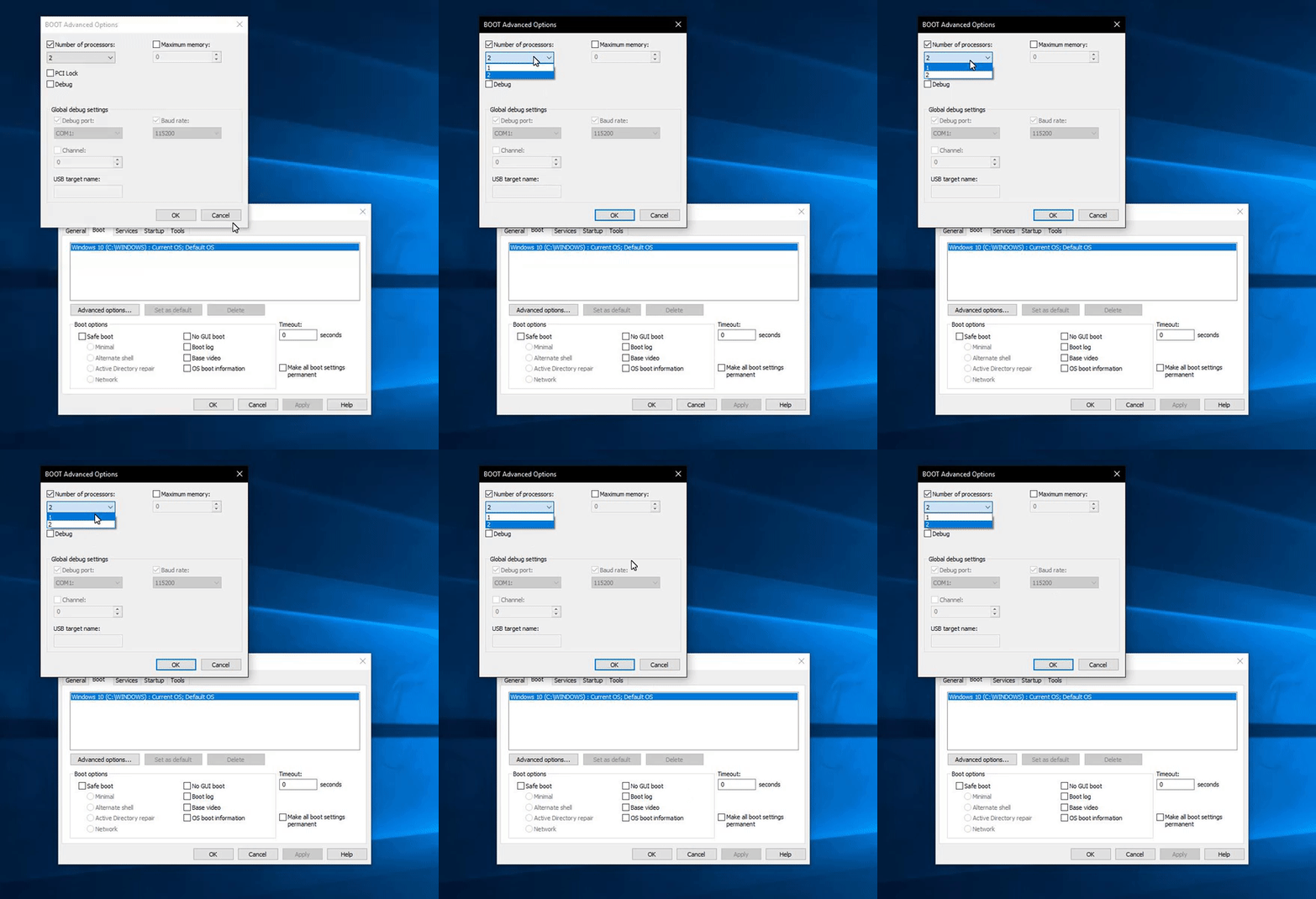
Ok, lets check this. hit start, type msconfig open this. Go to the boot tab, advanced options, what does "Number of processors" show
leaden fog
I’m probably not going to get any bed tonight 
Ok I try
@warm pewter ok apparently it’s dual core whatever that means
steel mural
What dual core?
leaden fog
My i5
steel mural
Show a screenshot of the window please
Your i5 isn't a dual core
You have the same as KeiZar and nearly the same as I currently have
4 cores / 4 threads
And your BIOS sees it
leaden fog
Well that’s what I’ve been told
steel mural
what...
leaden fog
Ik
leaden fog
This is Microsoft for you
steel mural
Please show us the screen what Kite was asking for. The advanced window
leaden fog
I will do as soon as Microsoft fucking off 
steel mural
So you really asked microsoft for help?
warm pewter
They have no clue what they are talking about
steel mural
⤴
leaden fog
I thought it was to do with update 
 spark parrot
Hey everyone, I accidentally removed the chat part in my obs live and I don’t know how to get it back 😢
leaden fog
Ok let me try this
warm pewter
@spark parrot StreamElements menu, if you dont see chat as an option, log out and back in
spark parrot
Thanks @warm pewter 💕
warm pewter


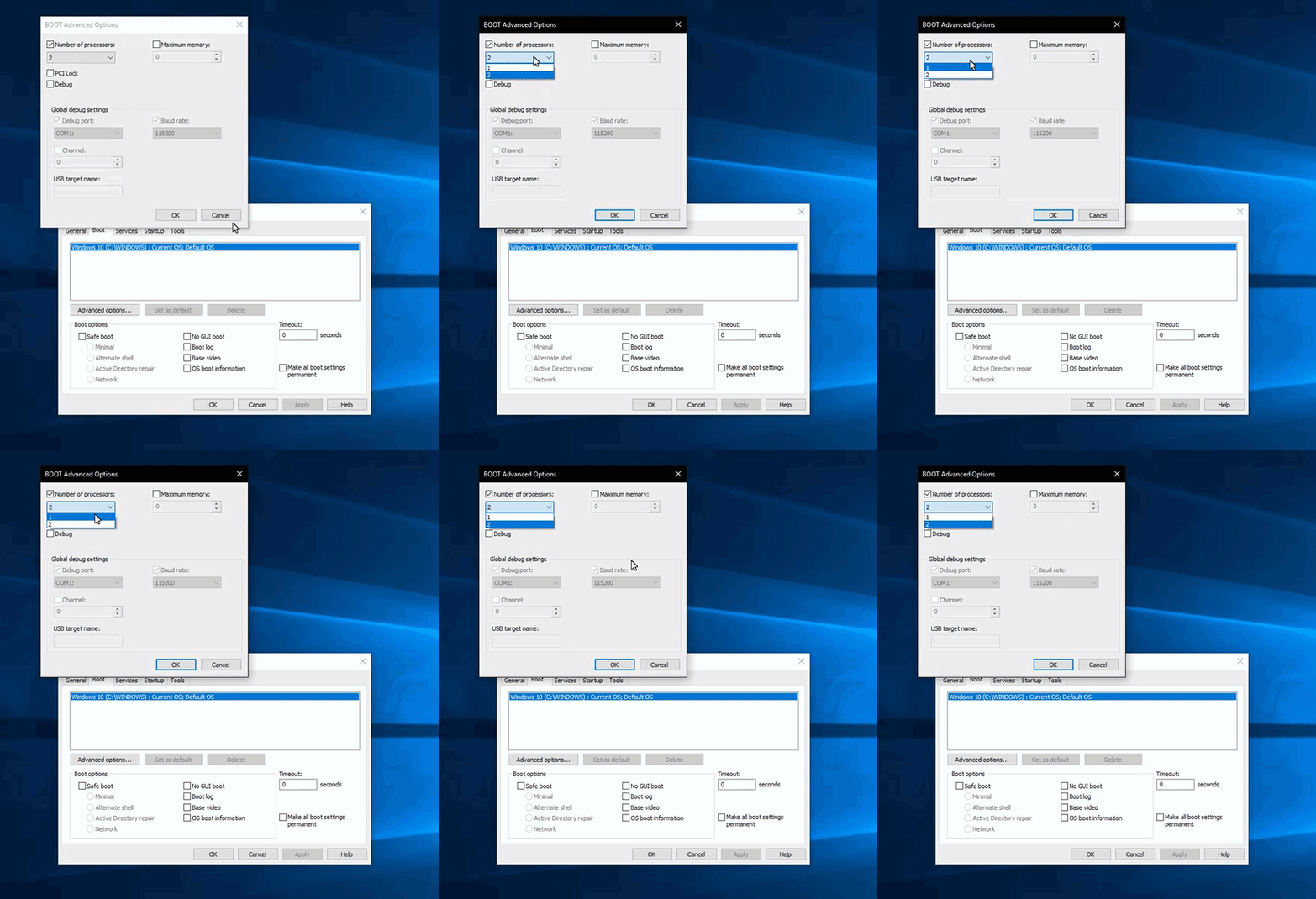 warm pewter
Uncheck that box, restart
well, uncheck the number of processors box, apply, then restart
leaden fog
ok brb
warm pewter
Thats really the only other thing I can think of 
steel mural
same
I'd try to check the core count with something like a live ubuntu install but I think this is too advanced for this case
warm pewter
Did I win?
 leaden fog
Thank you So much https://i.gyazo.com/f94d0226b634744d640ace988090de11.png 
 warm pewter

steel mural
But now there's the question why this was enabled
warm pewter
yeah, wondering that myself
steel mural
Because that isn't normal at all
leaden fog
Ok guys
warm pewter
unless there was like a 3rd party app that did it
steel mural
$10 for Kite and me? 
leaden fog
It's official SE Is the best Especially when a staff member can do What three employees from Microsoft can't

We see what payday can bring Fabi
 tulip hamlet
...you mean prevent a Windows update for 24 hours?
steel mural

leaden fog
haha
junior sundial
I'm having a problem where my store redemption sound effects are being played twice. Is this a problem for others?
deep birchBOT
@junior sundial Make sure to :ballot_box_with_check: “Shutdown source when not visible” for all browser sources (all OBS scenes). If using studio mode, uncheck “Swap Preview/Output scenes After Transitioning.” Also keep in mind that sound can play from any overlay loaded in the browser (editor or launched). https://i.imgur.com/FegZJQS.png https://i.imgur.com/yY0wcFl.png
junior sundial
Ok, that worked! 😄
 sweet arrow
My window capture doesnt work when I try to capture google chrome
warm pewter
Hardware acceleration in Chrome prevents this. If you want to use window capture for Chrome, you need to disable hardware acceleration. The alternative is to use display capture
sweet arrow
ok thx
 hollow sluice
Hello, I'm experiencing some weird issues. I have been streaming for months now with no problems and then today I tried and suddenly started dropping frames every 10 seconds. kb/s would go down really low and then kick back up. I tried restarting all devices even my internet and nothing is fixing the problem
 nova scaffold
@hollow sluice most likely an internet issue. if your FPS is stable and your bitrate goes down - ask your provider what the heck is going on.
hollow sluice
Ok thank you
 olive pilot
I need some help
Im trying to use overlays from the theme store area and they aren't scaling correctly when imported
deep birchBOT
@olive pilot To add your overlays to OBS, add a new browser source in your scene. Paste your overlay URL in the browser source properties, set the dimensions to 1920x1080 (unless you changed them on the website), and :ballot_box_with_check: “Shutdown source when not visible” https://youtu.be/KDvLynUqXI4
olive pilot
thank you
 dark wasp
I'm currently in voice chat and can not figure out how to get the new chat and activity feeds on my obs layout
tulip hamlet
Download the plugin at https://obs.live
dark wasp
I have it downloaded. When I walked away, either my kid or wife did something and now they are both gone
tulip hamlet
Do you see the StreamElements menu at the top of OBS?
tulip hamlet
Click it.
dark wasp
Yup
tulip hamlet
See where it says "chat" and "activity feed?"
dark wasp
warm pewter
logout and log back in
dark wasp
One moment plz
Working on relog
Beautiful. Thank you
I uninstalled this thing 6 or 7 times. It would come back but once I closed app...they would be gone next time opening
Thank you so much! I just closed app and reopened, everything is still there. Thanks
 outer willow
 uncut tide
Hello! Loving Stream Elements. I’m having a weird issue where whenever my alert sounds trigger, it kills my OBS sound to my stream and I have to restart OBS. I think it’s a routing issue, but not sure. I’m on a Mac Pro, using an MBox as my sound in and out. Using their mixer software to route.
deep birchBOT
@uncut tide Can you please provide a log from your last stream. You can find this log in " %appdata%/obs-studio/logs " OR Help > Log Files > Show Log Files. You can simply drag and drop the log file into Discord.
shy mountain
Wait a moment Mac? This means you are not even using OBS.Live.
I think its best if you visit the OBS Discord on this.
uncut tide
Ohhh yes, wrong channel! Sorry
deep birchBOT
@uncut tide For the best OBS support, please join their Official Discord @ discord.gg/obsproject
uncut tide
🙏 I appreciate it
nova geode
@outer willow can you specify what would stop at 5 and is now getting bigger? The countdown?
nova geode
Ok, so you mean the countdown doesn't count to zero. First it stopped at 5 and now it stops earlier? How long have you waited?
Also I would say try refreshing the cache of your browser source!
deep birchBOT
@outer willow Right click on the BrowserSource > Properties > Scroll down a bit > Refresh Cache of current page
 serene charm
Easier than googling for ages to find an accurate post in a random forum on the net somewhere but is there a performance benefit to a streamer of not recording the footage at the same time?
Just streaming it I mean. Not recording it simultaneously.
 sinful flint
@serene charm I'd suggest the next time you stream to start recording too and see if you use a significant amount of extra resources, there doesn't seem to be a whole lot of information about it online so i'd suggest trial and error
serene charm
I suppose something to try and report back then.
 winged gulch
Is there a way to set who is the current HypeBoss? I tried everything to change the profile image when a new user was crowned HypeBoss, but it just wouldn't. So I reset the boss but now it's me again and I don't want that.
nova geode
damage your boss to 1 hp with a custom donation test in your overlay editor, then replay the event from the user you want as hypeboss @winged gulch
winged gulch
@nova geode Could you explain to me how to do this? Thanks !
nova geode
go into your overlay where your hypeboss is located. click the little bell button on the lower left corner and emulate a custom tip event. choose a number that will leave your boss with a small amount of HP.
it depends on how many hp you set 1usd to take away from the bosses HP.
winged gulch
@nova geode Okay got it. And how do I replicate it for the user I want to be the HypeBoss?
nova geode
go here https://streamelements.com/dashboard/activity and replay the alert of the user you want as hype boss
winged gulch
@nova geode Awesome it worked and the profile image changed too! Thanks!
nova geode
np, glad everything is working again!
 limber elk
Question. I'm trying to use a supertheme, when I import it into streamlabs, no matter what I do, I can not get the supertheme to match the resolution I need it to. I need it to be 2560x1440
warm pewter
Themes are 1920x1080, you will add it at that resolution, and fit it to your canvas
 warm pewter
the browser source needs to be set to 1920x1080, then fit the source to your canvas, in OBS its ctrl+f, hope its the same in SLOBS
nova scaffold
It will be stretched no matter what.
You have a 16:9 source and 21:9 canvas, does not work without being scuffed at some level
warm pewter
if you changed the resolution to the overlay itself, on the SE site, the widgets do not scale with the canvas
2560x1440 is 16:9
nova scaffold
ah, damn, my bad, wrong number
then yeah, just fit to screen, it will be scaled
need more coffee ☕
limber elk
https://gyazo.com/8721ea8f30b605ad56d33b5803eac84e
So should I keep it like that in SE then?
 nova scaffold
keep it 1920x1080 in the overlay editor
you do not want to resize the whole supertheme for a different resolution, it does not scale
Just make sure the browser source is the right resolution (1920x1080) and then fit it to your canvas
 nova scaffold

warm pewter
 void field
hi! my stream deck obs live reload alerts and skip alerts seem like they arent working right. Theyre onmy stream deck but are basically an empty macro. Like i press it and nothing happens haha
 nocturne meadow
is it possible to download a theme to edit it?
warm pewter
no, its against our terms of service to download elements from themes
deep birchBOT
@rigid mural Welcome to the support channel! Please let us know how we can assist you today and a member of the support staff will be with you as soon as possible.
 rigid mural
So I downloaded OBS live
and I imported my alert box from streamlabs
How do I know if it works
deep birchBOT
@rigid mural To add your overlays to OBS, add a new browser source in your scene. Paste your overlay URL in the browser source properties, set the dimensions to 1920x1080 (unless you changed them on the website), and :ballot_box_with_check: “Shutdown source when not visible” https://youtu.be/KDvLynUqXI4
 unique merlin
Good Morning, i have a queston, when i switch my Overlay there is for like 10 sec black screen and then u can see the Overlay. Can i fix it ? Or is it norma ?
deep birchBOT
@unique merlin Check out this tutorial for OBS’ studio mode which allows you to preload scenes before transitioning. https://www.youtube.com/watch?v=W8iWsD2Lq3U
 turbid arch
Hi may I ask why my host and raids are not working also can I switch the timestamps to 12 hour and not military time?
shy mountain
For the timestamps - unfortunately, no. I think it was suggested before and is in the ideas board.
deep birchBOT
@turbid arch Due to recent changes to Twitch API, we have filtered out hosts and will only show these ones on your activity feed:
- All manual host events (0 hosts included and if filter set to 0)
- All auto host events with at least 1 viewer
shy mountain
What do you mean fix hosts?
turbid arch
to work show
shy mountain
I've resubbed your webhooks just in case, but what the bot said above is how it is at the moment.
turbid arch
Ok thanks ❤ @shy mountain
 rugged quail
Is there something like a minimum microphone volume before OBS starts sending voice? Because if my friend is quiet enough, his voice is like stop and go, if you get what I mean.
 plain sonnet
there is a minimum level before apps (discord/obs) would pick it up. there is also something called a noise gate, this can be raised or lowered, so more or less sound would be needed to be picked up before being sent through
rugged quail
Where can I change this?
plain sonnet
if you hear your friend cutting out then they would need to change it on their pc. they need to go into discord settings and adjust the input sensitivity, probably drag the bar down to the left (if you go all the way down then that might cause some issues of unwanted sound coming through)
rugged quail
no I mean on Twitch
we were testing out StreamElements as an alternative and now his voice keeps disappearing in the middle of the sentence
WHILE others can hear him in Discord and TS
plain sonnet
so his voice is fine in the call your end, but on stream it cuts off?
plain sonnet
right click on your desktop audio and click filters then add noise gate. however this will adjust everything your sound card picks up, so be carful : )
plain sonnet
awesome, np 👍
 crisp charm
Good Evening ... first, my English ist very poor but i have a Question. I hope someone can help me ... I have a Ryzen 2600x, 16GB 3200 RAM and a XFX RX480 8GB, i use OBS.Live ... with Windows 10 v1803 i can Stream with 1080p/60 but after the Update to v1809 (GameMode is off) i have Framedrops as Hell, i can stream with 720p/30 withouit Droips, is there a Probplem with OBS.Live or generell with OBS and the v1809? a Workaround existing?
rugged quail
I downloaded Ground Control. and used the oath system to change my bots name. it has reverted back to original chatbot name. and now the option is no longer there. Is this normal? ❤
warm pewter
I dont see a tipping link on your page, so that would not meet the requirements for the rename, and would disable the option. Also, this channel is for support with OBS.Live, Ground Control issues would be more #helpdesk-twitch
rugged quail
So i need a donation/tip panel activated with a link? (cause i just removed mine so it was command based only)
ancient zodiac
For the rename option to appear, yes
rugged quail
sweet, appreciate the help also sorry for having this posted in wrong section. i added my donation panel/link back onto my channel and instantly bot changed back without new oath needed ❤ much love thanks for the for the help
warm pewter
 summer dew
i keep having one of my audio's of my store redemption go off twice any idas why >? 😕 cant seem to fix it
deep birchBOT
@summer dew Make sure to :ballot_box_with_check: “Shutdown source when not visible” for all browser sources (all OBS scenes). If using studio mode, uncheck “Swap Preview/Output scenes After Transitioning.” Also keep in mind that sound can play from any overlay loaded in the browser (editor or launched). https://i.imgur.com/FegZJQS.png https://i.imgur.com/yY0wcFl.png
 quiet vale
Hey guys i just switched from StreamLabs to StreamElements & I absolutely love it so far, BUT for some reason all of my recent events didn’t carry over, So my Recent Follower, Recent Sub & Recent Donation aren’t showing up on my “Labels” on stream, Any suggestions?
Nvm i did something wrong on my end, Apparently i hit the “Reset Labels” button 😅
 hoary gust
hello. I'm using phantomjs to grab overlay and send it to ffmpeg, but it is working in less than 1 case of 10. Only other option is render it in web browser and grab it with OBS or ffmpeg, but I think that phantomjs is better, because it is hidden in background. I there something special about generated link which causes that phantomjs is not getting data?
it did not helped
btw I downloaded obslive, but compilation is really hard as it needs CEF 😦
I forgot, this is about Linux
rugged quail
I posted this in general chat but think I should have posted it here. I have a quick question. When using the SE points leaderboard on my channel, is there a way to limit the number of names that come up? Can I have just the top 10 show up on the leaderboard or will it always list the top 100? Just curious
Thanks in advance
ancient zodiac
@rugged quail cant be limited
rugged quail
Ok thanks @ancient zodiac thought I’d ask.
 strange lynx
Can i have help? When i click on emotes button the screen goes white and i need to reload the chat
nova geode
if someone could look at my log, i get some render stalls and OBS sometimes tells me that the CPU might be overloaded. no dropped frames so far, but still a bit... annoying.
steel mural
1.) Dropped frames have a special meaning in the case of OBS > internet problems
You have a bit of encoder overload. Change your x264 preset to "faster" instead of "fast" or use NVENC. If you wanna keep the "fast" preset, try lowering your resolution from 1920x1080 to 1600x900 or even 1280x720. And change the Downscale filter to "Bilinear". Lanczos is OP and can make the stream look washed out.
2.) You have multiple game captures in the scene "Gaming". This shouldn't be needed unless this is something like "StreamAvatars" were you need game capture.
3.) You have a lot of audio buffering. This could be an indicator for high CPU usage so consider the things in 1.).
4.) The windows game mode is enabled. 20:46:48.772: Windows 10 Gaming Features: 20:46:48.772: Game Bar: On 20:46:48.772: Game DVR: On
Deactivating them should help with the performance too. See: https://obsproject.com/wiki/How-to-disable-Windows-10-Game-Mode
Other than that everything looks good to me.
nova geode
That's so cool! Thanks so much! 
rugged quail
Hi any one here to help me
nova scaffold
yep. just write how we can help you
nova scaffold
make sure you add the overlay to the OBS.Live
rugged quail
Should I download obs live
nova scaffold
well you write in the obslive helpdesk, so i hope you have it. otherwise normal OBS would do it too
deep birchBOT
@rugged quail To add your overlays to OBS, add a new browser source in your scene. Paste your overlay URL in the browser source properties, set the dimensions to 1920x1080 (unless you changed them on the website), and :ballot_box_with_check: “Shutdown source when not visible” https://youtu.be/KDvLynUqXI4
nova scaffold
if you add the overlay with an alertbox, you will have alerts in the obs
rugged quail
Ooo I will see
 small hull
could someone help me?....I need to know where in the overlay editor that I need to go to adjust the size of the overlay as I am using 4k screens so it needs to be 3840x2160
nova scaffold
@small hull do not do 4k. it is a) not supported and b) too big be to useful anyway. use 1080p and make them fit to screen.
small hull
okay where do I find where to change to 1080p?
nova scaffold
it is 1080p by default. when you add a browser source. just type in the resolution: 1920x1080
small hull
okay and does my screen need to be that same resolution?
nova scaffold
No. OBS is perfectly fine scaling everything down. You will not stream in 4k anyway
small hull
okay....do you very often have anyone that can use the TeamViewer to help me get this working...have been working on it for 4 days and I just dont understand it
I am an older man and some of this is hard for me to understand
nova scaffold
We have video guides for this, that will help
It is 5AM in the office and 4AM here on a weekend, so not many people are awake
Give me a second
small hull
okay....where is the office?
nova scaffold
Israel
small hull
oh okay I am in the States
nova scaffold
https://www.youtube.com/watch?v=HbG01hU6quU
This is the short version. We have a lot of video guides on that channel

Having a beautiful looking and tidy overlay is a must for every streamer - big or small. StreamElements takes an innovative approach to overlays, and stores ...
So feel free to use them all 😃
small hull
okay and is there ever anyone there that can help me with teamviewer?
or is that more during the week?
nova scaffold
When you use the video guides, you will be good to go in 1h with everything you need 😃
Those explain and show everything
small hull
okay I hope so or I will have to find another way to do this or just give up completely
thanks
nova scaffold
 upper glacier
Can anyone explain how the OBS.Live Streamdeck kappagen buttons work? I added them to my Streamdeck but there's a red circle slash through them. Do they only work if you're live?
 sage wedge
Hi, I need some help with creating a emote response when I put !hype or something similar so my chat can use this command in chat
For example if I use !hello the response would be a bunch of emotes waving hello
is there anyone to help w this?
twilit venture
@upper glacier no if you have that symbol please log out of your StreamElements in obs and relog in
@sage wedge your bot must be subbed to you to use your emotes
Make a command with the keyword "Hello" so the bot responds with a emote you set the bot responds to
upper glacier
Ah. Ok. I'll give that a shot. Thanks @twilit venture
small hull
is it best to get voice or teamviewer help during the week?
nova geode
absolutely, as there will be more staff members available. the non-red-names are volunteers and often do support work while doing other work irl, so they might not have time/the option to do voice or teamviewer.
small hull
okay thank you....will try that before I give up
nova geode
what are you struggling with?
small hull
I have watched all the videos and I just can not get my overlays to be the size to fit the screen
I have been at it for almost a week
I am an older man and I just dont understand it
nova geode
when adding the overlays to your OBS, have you made sure to change the browser source size to 1920x1080?
nova geode
ok, so, just so i know where we stand. you have made an overlay on the SE site and are ready to use it, correct?
or are you still trying to get the sizing in the overlay editor right?
small hull
yes I used one of the sets that are ready to use
small hull
yes but I dont know how
small hull
I got it from the Themes gallery
nova geode
in your OBS, click on the little "+" symbol in sources
click on "browser" in that menu
small hull
okay
nova geode
now a window should open where you can name the browser source to something like "overlay"
click "ok" when you have done that
after that a new window will open that looks like this http://voidsmind.com/s/obs64_2019-01-13_14-29-03.png

tell me when you are there
small hull
I am there
nova geode
alright. you see the first field, named "URL"? paste the URL from your overlay in there. to get the URL for your browser source click on "launch" in the overlay editor, or while in the "my overlays" section on the SE site
before you click enter, make sure to change the "width" to 1920 and the "height" to 1080.
also make sure to click on the checkmark for "shutdown source when not visible".
when you did that, click ok.
small hull
okay I did that but it may be the problem is that I am using 4k screens that are set to 3840x2160
nova geode
you can not stream in higher than 1080p, so your desktop resolution wouldnt matter.
small hull
okay
nova geode
is your overlay working now? you might need to maximize the window, but clicking on the browser source in OBS and then hit the shortcut CTRL + F
small hull
no it is not working is why I need someone that can look at my screen to see what is happening
nova geode
what exactly is happening after you did all the steps i told you?
specify "not working"
small hull
yes and the overlay is still too big
nova geode
when creating the overlay on the SE site, did you specify any other resolution than 1080p?
small hull
no...it was 1080
small hull
dont know how to post a screen shot
nova geode
small hull
I have three screens...two that are 50in and a 27 so not sure how to get the right screen
I am sure this is going to be much easier for someone using teamviewer
small hull
you too....sorry I am so dumb about this stuff
nova geode
you dont have to be sorry! things like this can get quite confusing!
small hull
yes indeed they are for a guy that is 64 yr old
 solemn narwhal
Where can I get a code to use the streamelements app on my Android?
steel mural
The app goes to public beta soon. Once it updated for you, you don't have to enter the code anymore. This process can take up to 24h. @solemn narwhal
solemn narwhal
Okay thanks
 cyan crag
Guys when I open my obs my whole computer starts lagging does anyone know how to fix it or do I just upgrade my pc I am using a gtx 1050 and AMD Ryzen 3 1300X
 jovial jungle
Hello. I'm having an issue where when I switch scenes too fast, it will show up the 1st scene and sometimes skip the transition. Is there any fix for this?
steel mural
@jovial jungle It's a known issue with OBS. Nothing that we can do about. There's another issue related to this and it already got reported to the OBS devs. Now we have to wait.
jovial jungle
Ah okay
 latent grotto
Hi everyone. I'm having a problem with the way the Stream Deck is doing transitions on OBS Studio w/ obs.live. Is there something extra I should be looking out for? The Stream Deck does the transitions without loading them into the preview window, which causes the browser sources to be loading in the live window, which obviously looks like garbage.
tulip hamlet
@latent grotto This is because you're not giving it time to load the browser source. Another user provided a solution:
latent grotto
I'm not sure I completely understand how that is setup in the button. Should all buttons be MultiAction when working with scenes?
tulip hamlet
If you're using them with "Shutdown source when not visible" then yes.
latent grotto
Do you recommend using shutdown source when not visible? I thought that's what was recommended.
tulip hamlet
No. The purpose of using it is if each of your separate overlays has its own alertbox included in it. I'd recommend removing the alertbox from separate overlays and giving it its own overlay, which you then use in all of your scenes by "use existing" when setting up each scene.
latent grotto
Is there a tutorial on setting up that alertbox as an overlay, or should I just copy it from an existing overlay and removing everything else?
tulip hamlet
The latter would be the easier way. Copy an existing overlay, remove everything else, size it as you'd like, add it to OBS as its own source.
latent grotto
I would actually prefer having the alert box be a seperate source.
Okay. I'll give that a try now. Then I can uncheck the shutdown source on all the other overlays, right?
tulip hamlet
Yep. The point was to prevent multiple overlays with their own alertboxes from playing simultaneously. If you have the alertbox on a separate overlay, and shared across all sources, then you don't have that problem.
 light iris
I really like the streamelements OBS.live plugin. However, when using it my stream's FPS only gets to 20-30. If I use a clean install of OBS without the plugin I get a solid 60 FPS with no issues. What else is this plugin doing that it that badly effects OBS performance?
tulip hamlet
@light iris OBS.Live does not affect the core functionality of OBS Studio. It's a plugin. And we haven't received other reports of this. What else are you doing differently between the installations? And are other plugins not installed in the clean install? Have seen Elgato capture card plugin cause significant CPU use increase, for example.
light iris
Same settings. Install OBS.live FPS drops to 30 or below and stream lags. Remove OBS plugin and back to normal. No other changes.
ancient zodiac
Its a lightweight addon, shouldn't affect your stream - but if its affecting you negatively im not sure what to say, theres no real troubleshooting involved here unfortunately..
If no settings are changed from regular obs to installing the obslive addon, then the small increase in gpu/cpu usage from the addon is taxing your pc
you're welcome to show us your obslog if you'd like
and maybe we can pinpoints something
light iris
Which is weird, because I can have OBS, Ground Control, and Chatty all open and it works flawless. Yet, with the plugin the stream lags bad. I'll reinstall the plugin tomorrow and see if it happens again.
 mental inlet
Hey, any one that could help would really appreciate it. I am having a issue with a stream elements overlay and sizing
deep birchBOT
@mental inlet The default resolution for StreamElements overlays (theme and custom) is 1920x1080. Please add them in OBS at their full resolution and use CTRL+F to fit to screen if necessary. You can then downscale your stream in OBS settings > Video if you'd like https://i.imgur.com/6bWXxjR.png
 mental inlet
I have it set in OBS to 1920x1080 - The issue is with my starting stream overly it is cut off within the 1920x1080 if I can post a screen shot here I will
shy mountain
Sure. Post a screenshot.
mental inlet
Here is screenshot - overlay is for some reason cut within the dimensions ( can see the red outline )
thank you so much in advance for that quick response!
too*
shy mountain
So what is the resolution of the overlay in the "My Overlay" page?
Also no using OBS.Live and this is a normal issue with adding overlay to OBS, which could have been asked in #helpdesk-twitch, but oh well, continue here 
mental inlet
is 1280x720 .... I may have changed that earlier ! I will see if that is problem. Will switch back to 1920
shy mountain
That is the problem.
If you've changed the resolution of the overlay
then everything gets cut of and you will have to fix the position and sizes of elements within.
mental inlet
Sorry for that, and thank you - I previously did use obs.live but my laptop ran to hard on it ( low end acer)
Thank you very much for the help this is quick support ! 😃
shy mountain
Our plugin doesn't affect the PC/CPU - most likely something else that had to be checked.
If your base resolution in OBS is 1920x1080
change the overlay back to 1080p so that it doesn't get cut of.
mental inlet
Could have been as I have had issues with plain old obs as well
beautiful absolutely perfect!! Thank you again and again!!
shy mountain
 👍
👍
mental inlet
cheers
 heady lynx
Hi, I was wondering if anyone might know why I've been getting sudden frame drop when using both slobs and regular obs. I've done some internet speed tests and everything seems normal and never had issues before.
twilit venture
@heady lynx first things first : we are not Streamlabs so no clue about the SLOBS thing
But regular obs Studio with our StreamElements integration OBS.LIVE we Can troubleshoot if you provide a log file of your last straem where the frame drops happen
cyan crag
Guys when I open my obs my whole computer starts lagging does anyone know how to fix it or do I just upgrade my pc I am using a gtx 1050 and AMD Ryzen 3 1300X
shy mountain
When you start OBS, what does Task manager say?
Is something specific sucking up CPU and RAM?
cyan crag
Yea my game starts sucking up a lot and obs like 15 to 20% and google like 10 to 15
shy mountain
I'm not really familiar with AMD CPUs but what game are you running?
small hull
is there someone that can help me in voice and TeamViewer as I have been trying to get my overlays to be the correct size for almost a week and they still are not and also through trying to fix my overlays I have messed up my display windo and also my chat window in my OBSlive
deep birchBOT
@small hull The default resolution for StreamElements overlays (theme and custom) is 1920x1080. Please add them in OBS at their full resolution and use CTRL+F to fit to screen if necessary. You can then downscale your stream in OBS settings > Video if you'd like https://i.imgur.com/6bWXxjR.png
small hull
yes I have tried that and watched all the videos and still can not get it to be right...we tried that yesterday and the person that helped me told me to wait till today to use voice and teamviewer to get it fixed
shy mountain
So what is the resolution of the overlay it self set to?
small hull
1080
shy mountain
what is the base resolution in OBS?
small hull
I am not sure as the screens that I use are all 4k UltraHD
but I believe in OBS it is 1920x1080
shy mountain
small hull
where is that window?
shy mountain
small hull
it is 3840x2160
shy mountain
So Twitch doesn't really support and forces streamers to a max of 1080p resolution regardless if you are on a 4k.
So its best to set the base resolution of OBS to 1080p
and then the overlays will fit nicely.
Hopefully.
small hull
so set that to 1920x1080?
shy mountain
yes
small hull
okay let m try that
okay so I set it that way now how do I get my overlays to show in my obs
and that still does not fix my display screen or chat window in my obs....is why I needed someone to look at it in Teamv
teamviewer
deep birchBOT
@small hull To add your overlays to OBS, add a new browser source in your scene. Paste your overlay URL in the browser source properties, set the dimensions to 1920x1080 (unless you changed them on the website), and :ballot_box_with_check: “Shutdown source when not visible” https://youtu.be/KDvLynUqXI4
shy mountain
@small hull Make sure that the browser source is also placed on top of any other sources in the sources list.
example:
small hull
okay I really dont understand all the OBS stuff so I cant get things to work.....you dont have someone that can help me in TeamViewer?
because my OBS needs fixed also
I really want to use your stuff but if I cant get help I am going to have to give up on it
I am a 64 yr old man that is about in tears because I cant get this stuff to work due to my not understanding
hello?
shy mountain
I'm sorry, but I am not available for a team viewer session.
small hull
is anyone else?
shy mountain
All the instructions that I provided you so far to get the overlay to display are clear and simple.
As long as the base resolution of OBS is set to 1080p and the overlay is also 1080p, when you add it as a browser source with dimensions 1920x1080 then it should show up.
If it doesn't then something is blocking the overlay going on top.
Unless you are using Streamlabs OBS which is known to block some parts of our overlays.
small hull
no I am using your OBS Live
shy mountain
Then you should not be having any issues if you followed my instructions so far.
IF there are still any problems, delete all scenes and start from the beggining.
small hull
so I should just give up?
shy mountain
No. Deleting all scenes and starting fresh is better then trying to cram something else on top.
Instructions are given, as simple as they can get, with video guides as well.
If this method doesn't work, its something else that is hindering OBS from displaying our overlays.
small hull
so you have the Voice Support and TeamViewer Support on the Discord for nothing?
shy mountain
Unfortunately, we are not always 100% available for voice support.
As I'm currently in a meeting and trying to help you.
small hull
when is someone most likely to be available?
I got up early today, like I was told yesterday, due to the time difference so someone could help me in voice and/or TeamViewer
I understand you are trying to help me but I can not get it to work
I dont understand the OBS stuff you are wanting me to do
shy mountain
Like I said, delete all scenes and sources from OBS and start adding a new scene with just the overlay you want to add.
click on a scene and clikc tihs.
Then add a scene and try adding the overlay as provided with instructions above.
small hull
okay thanks for your attempt to help....I will just have to go on my stream and let everyone know I cant get it to work and see if I can get some help from the people t here
cyan crag
Guys when I open my obs my whole computer starts lagging does anyone know how to fix it or do I just upgrade my pc I am using a gtx 1050 and AMD Ryzen 3 1300X
deep birchBOT
@cyan crag For the best OBS support, please join their Official Discord @ discord.gg/obsproject
shy mountain
@steel mural can you take a look? Are the images that fail to load causing OBS on start up to not load the scene properly? After switching scenes, overlays load properly. @grizzled forum can give more details.
 grizzled forum
thanks 😃
so i've removed some missing stuff, i'll get a new log now
oh this is very weird... i'm always running as admin
sometimes a scene works, sometimes its another that doesn't
steel mural
I only see that the game capture tries to capture something that isn't a game, some GIFs/pictures are missing and there could be a problem with your webcam (Logitech BRIO). If the cam works, then never mind. 😄
grizzled forum
it's the bar thing?
i think it's normal, it's the ingame scene
and the game is not launched
steel mural
The Game Bar is something from windows 10. We always recommend to deactivate Game Bar, Game Mode etc.
warm pewter
18:11:47.975: gs_image_file_init: Failed to load file 'C:/Users/Streamer/Downloads/baolo.jpg'
18:11:47.975: [image_source: 'Immagine 5'] failed to load texture 'C:/Users/Streamer/Downloads/baolo.jpg'```18:26:01.479: User switched to scene '[IN] 2CAM moba' this scene has the issue
shy mountain
@warm pewter I already pointed that out in #helpdesk-twitch
warm pewter
grizzled forum
it's all fixed now
shy mountain
@grizzled forum mind actually uploading the log here? 
warm pewter
grizzled forum
ty
shy mountain
i'm blind 
steel mural
And what exactly is the problem here?
grizzled forum
this is what i get when i select the scene
the overlay is not loading
when i go in another scene and come back, this is what i get (INSTANTLY)
so it's like it's loaded but not shown until i go back to it
while in other cases it takes 1-2 seconds to load and then it stays there
i think that the browser source config its correct
(and it's the same for every overlay: load and never refresh)
warm pewter
can you show the browser source properties, minus the link URL
grizzled forum
sure
it's as i want it: no refresh no stop
also, sometimes i launch OBS and this scene gives the issue, other times its another
steel mural
Shutdown source... isn't checked but the sources takes some time to load? 
warm pewter
So, if you dont set the browser source to be shutdown, the OBS cache can get really funky sometimes
I used to have this all the time, had to refresh the cache on the overlay each time I loaded OBS for it to load properly. I gave up on that and just set all my browser sources to be shutdown when not visible
steel mural
I can only say that I've never seen a behavior like that before. :/
grizzled forum
all i can say is that i indeed use A LOT of browser sources
so kite may be on the issue here
shy mountain
Me as well :X
grizzled forum
wweelllll the shutdown when not visible is really not great since the scene transition will produce a 1-2 seconds load
which kinda sucks
i'm being picky i know
also i never have to refresh the cash: it's just go some scene else, come back, and it works
warm pewter
Yeah, it would be like 1 out of 4 browser sources in a scene for me, had my browser sources that did not have any sound set so they were not shutdown, and this happened too much, so I just shut them all down, and just use Studio Mode to transition. I still need to just setup a multi key in my Stream Deck to just have a single button press do it all
steel mural
I see your alerts are in a different browser source. Since your overlay is just a picture, you could add it as such.
grizzled forum
that is an option, that would basically destroy the streamelements paradigm tho
i like to have it all on SE and manage it remotely, if needed
(you can hate me, LUL)
weird thing is, this issue started out of nowhere..
warm pewter
Yeah, that is how it was for me, and it happened with an older release of OBS Studio, was one of the 21 versions. I have not tried since to see if its any different
grizzled forum
what about a script that changes all scenes? from one to the other?
warm pewter
I think for a while I even just deleted the OBS Browser cache each time before launching OBS Studio
grizzled forum
the best solution, imho, it's to just launch obs -> click the first scene -> arrow down until the end
go live.
the script would be a real dirty solution... but..
 sly pelican
Hello
steel mural
@sly pelican Do you need help with anything?
sly pelican
I New Here but for now nope, if i need anything ill ask u thx do much
grizzled forum
i'll just try to delete the whole cache
let's see what happens
is it safe to delete the whole
C:\Users\YOURNAMEHERE\AppData\Roaming\obs-studio\plugin_config\obs-browser
warm pewter
ye, you can delete the obs-browser folder, it will recreate it, but it will require you to log back in with OBS.Live if you delete that entire folder
otherwise just the Cache sub-folder should suffice
steel mural
Is he even using OBS.Live? The log didn't look like that's the case
grizzled forum
i'm installin' it now, i'm using stream elements a lot.
at the start i was convinced that the issue was realated to a certain overlay, from SE
but apparently is far more general (even tho it's always on SE browser sources)
 pulsar quarry
Hey everyone My streamelements OBS isn't outputting audio to the stream, however, the mixer looks like OBS is recognizing the audio. Anyone know how to fix so the stream can hear my game
plain sonnet
is there no audio at all or is it just extremely quiet?
plain sonnet
as a quick check, right click on desktop audio in the mixer and select advanced and make sure its either "monitor off" or "monitor and output"
plain sonnet
oh its elgato? have you confirmed that obs is picking up audio from elgato and not something on your desktop?
pulsar quarry
I keep checking the properties of the elgato and everything seems normal. It just happened randomly during my last stream
When I look at the properties it says the audio output is on capture audio only
plain sonnet
only if you aim your phone camera at your screen
plain sonnet
its an irl stream app, not sure if theres anything planned for screen sharing
dry sphinx
Screen recording is planned but no ETA. .
plain sonnet
twitch chat is back up now
 dense herald
Ok, I have a question for a friend
Their stream is lagging and I dont know what settings they should use
deep birchBOT
@dense herald For the best OBS support, please join their Official Discord @ discord.gg/obsproject
dense herald
Thank you for that
 north edge
Hello I tried to give my bot a custom name and i followed the steps, make a new account and paste the OAuth code but now its just spamming my chat
dry sphinx
Are you using both OBS.Live & Ground Control?
dry sphinx
Close Ground Control or sign out of OBS.Live & try again. I believe having both on is the cause for it being spammed twice.
north edge
oh so i'm supposed to just have one or the other?
dry sphinx
OBS.Live & Ground Control provide the option for the Custom Bot Name. You can try to disable the Custom Bot Name in OBS.Live settings.
north edge
i relogged onto obs.live and closed out of GC
GC is sitll not open
should i test a command?
dry sphinx
Give it a try.
north edge
okay
so
it works but its bakc to streamelments
the bots name i mean
thank yooou
oh one last thing where are the obs.live settings
dry sphinx
You can apply the Custom Bot Name to OBS.Live as well by clicking the Burger menu on the top left of the Activity Feed.
dry sphinx
No problem 
north edge
hell yeah now its working appreciate the fast reply
👍
oh one final thing, my media share doesn't seem to be working i followed the tutorial you have but when i test it, it doesn't say i have the wdget on my overlay when i do
dry sphinx
Are you trying to show on the stream the video? As that would be the only reason to have the Media Share Overlay.
north edge
Well it would be through a tip or song request
dry sphinx
I believe youdon't need the Media Share Overlay for that. That's only if you want to show the video.  Let me ask just to be sure as I haven't used Media Request via Tip personally.
north edge
i mean i can only assume this is the only one
dry sphinx
Ah. Yeah that's only if you want to show the video on Stream.
 crisp grove
Can i choose an overlay to be my offline screen?
dry sphinx
For the Offline banner I don't think so. As the Premade Overlays Have Starting Soon & Stream ended.
crisp grove
darn, another question, so how do i set up a webcam to capture video during ym stream? im usually streaming on the xbox and it automatically uses my webcam i have hooked up to the xbox and the audio comes thorugh my headset but i would like to do a just chatting stream and cant figure out how to get the video to come through
on my laptop
like it i cant see video and cant find a setting option to choose the webcam ?? not sure if im explaining this right
 limber juniper
Video Capture
dry sphinx
Should be on OBS. Source: Video Capture Device.
crisp grove
where is that located? ive tried to find it and am lost
steel mural
 crisp grove
wtf lol ok thank you im not super tech savvy and figured most everything else through google but got stuck on what seemed the most basic thing
 bitter sentinel
Hey everyone, I’m new here. Just started using OBS and I can’t seem to get my game audio on stream, and my mic audio seems to be choppy.. what’s going on here?
deep birchBOT
@bitter sentinel For the best OBS support, please join their Official Discord @ discord.gg/obsproject
 twin plinth
anyone know why my browser capture isn't working? The obs discord is being as helpful as a pile of bricks
deep birchBOT
@twin plinth Can you please provide a log from your last stream. You can find this log in " %appdata%/obs-studio/logs " OR Help > Log Files > Show Log Files. You can simply drag and drop the log file into Discord.
twin plinth
I'm sorry where do I go to get the log?
warm pewter
The bot response gives 2 different options. Either directly from File Explorer, or from the Help menu in OBS
 inner hatch
Where does one report bugs about obslive?
tulip hamlet
What's the bug?
inner hatch
Well, previously I have mentioned in this channel that I was having troubles with changing the game title and I've only just now worked out how to reproduce it.
It's to do with changing the "Game" from within OBSLive but not clicking any suggested name and instead clicking outside the text box. Even though the game name is correct, clicking 'save' will not update it.
it may not necessarily be a 'bug' - but it definitely confused me when I streamed for hours on the wrong game even when I changed it.
I have a GIF of it happening if needed
warm pewter
StreamElements > Report an issue
inner hatch
Thanks!
tulip hamlet
I think that's technically intended, as it needs the autofill option to conform with Twitch's categories. Twitch won't accept games outside of established categories.
inner hatch
Yeah... I did wonder. But it still won't update the game title even when it is literally the same text as what the autofill suggested.
 next umbra
steel mural
next umbra
steel mural
What do you mean with "element"?
 orchid bane
hello is this the place to ask for help related to obs.live performance isues related to a browser link from stream elements?
warm pewter
yes
deep birchBOT
@orchid bane Can you please provide a log from your last stream. You can find this log in " %appdata%/obs-studio/logs " OR Help > Log Files > Show Log Files. You can simply drag and drop the log file into Discord.
 boreal sundial
hello, i was just wondering if obs live is going to suck up a lot of ram and cpu usage? anyone have any stats on this?
warm pewter
in general, it really should not use much more than core OBS, but some people, mainly on older systems, have seen some higher usage
orchid bane
stream elements cpu usage is very high compared to whenever i dont use obs.live
i can provide pictures
this is my obs without .live installed
with obs live ^
orchid bane
my obs.live with the web browser that consumes a lot of cpu off
warm pewter
Your CPU falls under the older systems category, you can use StreamElements > Report an issue to report to the devs
also, that log was not from a stream, so cant really tell you much based on that
orchid bane
oh ok im sorry.
boreal sundial
well if anyone has any real stream stats on this id like to see them. i have a 19 9900k, im sure it wont be a problem but id like to see for sure
i9*
orchid bane
the plugin is amazing but it dont run well with me i guess.
warm pewter
@boreal sundial Someone did a video on it where OBS.Live was the best, but you really just need to try it for yourself, there are so many variables that come into play
boreal sundial
do you mind linking?
warm pewter
OBS.Live barely adds any usage for me, but I have have a 2700x, and those 16 threads go a long way
If I manage to find it
boreal sundial
thank you very much
warm pewter
You can delete your own messages
warm pewter
Want more FPS while streaming? This video compares in-game performance while streaming Fortnite, CSGO or PUBG with OBS Studio to SLOBS and OBS.live. SLOBS is...
deep birchBOT
@warped crater Can you please provide a log from your last stream. You can find this log in " %appdata%/obs-studio/logs " OR Help > Log Files > Show Log Files. You can simply drag and drop the log file into Discord.
shy mountain
@warped crater Provide me the previous log in the folder
 warped crater
shy mountain
warped crater
shy mountain
Actually looking at this log, you are trying to encode with your CPU
You don't have a really good CPU To encode with, so I'd suggest to switch to NVENC and try that way
and make sure WoW is not set to high graphics.
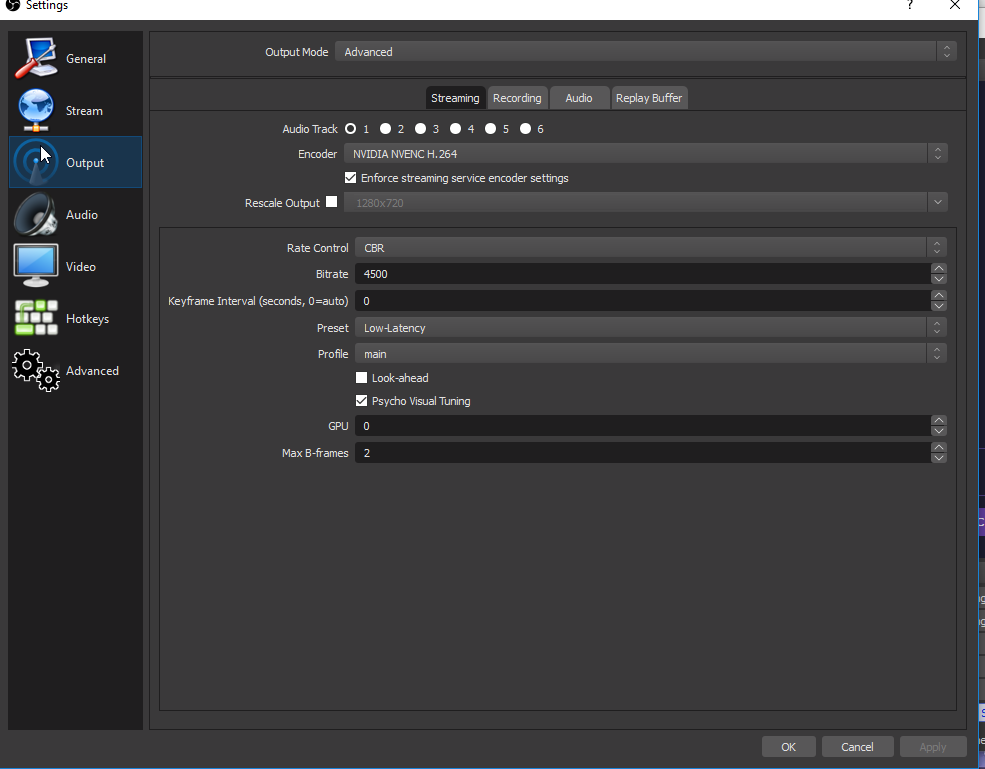


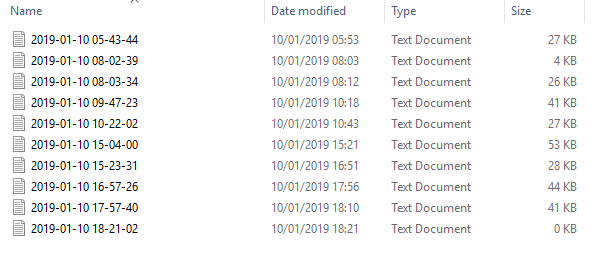

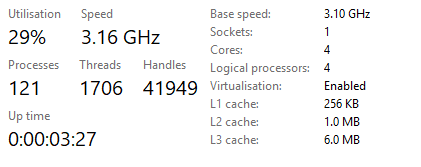


 shy mountain
Aah right
i didn't see in the log that it said in front "NVENC encoder" and only read "streaming_h264"
warped crater
oh right
shy mountain
only thing i see that is due to overload of the GPU.
So make sure the game is not set to highest graphics since you are encoding with it.
warped crater
aight
 modest pagoda
I have four hotkeys in OBS to switch to four different scenes, is it possible in OBS for it to auto switch back to my game scene after playing a media source scene?
I'll explain more what I'm doing
shy mountain

How to use OBS Studio's Automatic Scene Switcher feature to swap scenes in OBS when a game or application launches automatically! 👇🏻Timestamps & Links👇🏻 ⭐ He...
modest pagoda
lul you're so good
shy mountain
Not sure if this will help actually, since you mention media source scene
modest pagoda
well we'll see
shy mountain
i'm understanding it that you are referring to the media request widget?
modest pagoda
I just made 4 sub train videos
that increase hype per video
so I'd like to press a hotkey to play sub train 1 media source (scene)
then have it auto switch back to my game when the sub train 1 video is done playing
then press another hot key to play sub train 2 media source (scene)
shy mountain
aaah, i don't think the above video will help
modest pagoda
and have it switch back to my game after the video is done playing
shy mountain
The above video is meant for example, when you play League of legends with their 2 client thingy
where OBS detects what you have focus on.
@
@modest pagoda Here is an idea. Do you have the video locally stored?
modest pagoda
yes
right now I have 4 scenes set up with the 4 separate videos
and I don't know how to do it a more efficient way
modest pagoda
I only know how to hotkey switching scenes in OBS
so the idea is, if I get a sub, I let the sub notification play out, then I play the start of the sub train with the hot key
if I get another right away
shy mountain
Let me make a video to show you my idea 😉
modest pagoda
then I hotkey and play the 2nd sub train scene
shy mountain
So if you don't loop the video it goes away on its own and you just need to hide/show it again to start it from beggining
why switch scenes
modest pagoda
ok
so if I have the media sources store in my main game scene
stored
then I can hotkey to "show" that media source and it should disappear after it runs it's course?
shy mountain
Yes.
Try it.
I just tried it my self and then recorded the video above to show you that it goes away 😉
as long as you don't use the loop option
modest pagoda
ok cool I will try it!
shy mountain
Now its time for you to help me @modest pagoda
How is the New Zealand Meme Goddess liking your tweets?
quasi snow
😄
modest pagoda
who is the new zealand meme goddess?
shy mountain
Bex
shy mountain
free supporter pack for me? 
modest pagoda
before I streamed, I worked in Hollywood as a Talent Agent and manager and such
so I studied networking
memorization of names
and I looked up and respected Ari Emanuel
and I use a quote from his A LOT
"Don’t be afraid to call people you don’t know, start a conversation, and ask for things you need. At the very least, you’ll be more interesting. At the most, you’ll take your business in new and bigger directions."
Go Into The Story
Ari Emanuel is the co-CEO of William Morris Endeavor. Here is his list of lessons on his Linkedin site: All six resonate, the last one for writers especially. The quality of your story concepts, the…
shy mountain
yoinking that idea, to get some big bois and grils from big companies to like my tweets 
shy mountain
free supporter pack? And i'll help you any day at any time 
modest pagoda
hahaha
I don't think she gives free supporter packs
but
I did a giveaway of a supporter pack on christmas
where were you hmmmmmm?
I do MTX coin giveaways every month
I think at end of month or on the 1st
haven't decided yet
shy mountain
I'm most likely working or grinding red maps
modest pagoda
how crazy is the universe that you play PoE
I didn't even know she was liking my tweets tbh
so thanks for that info
lul
SO now that the hotkey is show / hide - is it possible for OBS to auto-hide the media source after playing?
shy mountain
Auto-hide? No, but at least it stops and hides the video it self from playing it on its last frame.
So in the end you just need to double use that show/hide hotkey
shy mountain
In the video i also showed you that you can have the same hotkey for both show and hide
modest pagoda
yeah did that
shy mountain
 don't link
modest pagoda
thank you
oh ok
I just can't upload a video here
too big
so I had to put it on youtube to show you
modest pagoda
yes true
shy mountain
because it screws the preload as far as I see
rugged quail
hello all ... I am having some trouble with micro freezes / stutters in my stream. the game runs perfectly fine though.
are these micro freezes coming from a too low bitrate, too high preset for the encoder or profile? My settings currently are: 810p 30fps 3500 bitrate NVENC x264 encoder with preset high quality and high profile
deep birchBOT
@rugged quail For the best OBS support, please join their Official Discord @ discord.gg/obsproject
shy mountain
warped crater
Wait what