#helpdesk-selive
1 messages · Page 11 of 1
 echo apex
 boreal lotus
Am I the only one who has gotten this? It's saying that obs-streamelements-uninstaller is a trojan, with some sketch names
Ofc this is Windows Defender, the world's worst antivirus
 nova geode
What version of OBS.live are you using? And is your windows defender up to date? There was a false positive in the uninstaller, but it should be fixed.
boreal lotus
Probably a version or two behind
But that it is a known thing is enough for me, thanks!
nova geode

boreal lotus

 west sundial
hello, i mentioned it in helpdesk-twitch and was informed to drop this here: when someone subs to me with a twitch prime sub it shows up as an undefined sub in chat. i still get the sub but thats what it says in the chat. However, it only says this in the new obs.live extensions chatbox; not regular twitch chat; there its still normal
i have an image for reference if need be
 nova scaffold
post the image too, i tag one of the people from the office, they look into that
west sundial
nova scaffold
@neon fern ⤴ OBS.live showing undefined sub instead of prime in the chat.
 rugged quail
Help
Why am i getting frames drops restarted my internet and did the most thing and idk what is wrong
 deep birchBOT
@rugged quail Can you please provide a log from your last stream. You can find this log in " %appdata%/obs-studio/logs " OR Help > Log Files > Show Log Files. You can simply drag and drop the log file into Discord.
rugged quail
there
 dim drum
can i use obs live to stream to mixer?
 tulip hamlet
No. We don't currently support Mixer.
dim drum
ok that answers my question thanks
 hallow spade
ok help a noob here im set up if log in to my browser but how do i get my overlay into my desktop app
deep birchBOT
@hallow spade To add your overlays to OBS, add a new browser source in your scene. Paste your overlay URL in the browser source properties, set the dimensions to 1920x1080 (unless you changed them on the website), and :ballot_box_with_check: “Shutdown source when not visible” https://youtu.be/KDvLynUqXI4
 scenic oyster
{[As long I don't get an Auto-Bot-Reply then I will know this is actually been read & Heard of in my posting)
Hopefully~This is the proper place for this, Okay so I am running the OBS StreamElements Studio (OBS-Studio with the StreamElements upgraded into it)
I am On an old Alienware 18 laptop but the minute I open the app on to my laptop the app makes all 3 of my laptops fans instantly speed up highly fast + louder and fars I know that's meaning it's heating up the laptop since I was doing both game + stream on this laptop getting affiliated that way but now too Leary to stream with this happening, If I open a game & the app the fans only ever slightly speed up a bit more but once I hit the go to stream on/live button on the app it makes the fans go rediculasly crazy increadibly fast & increadibly loud almost seemingly cover over the top of my voice with the webcam up into the stream display, Other times bringing the stream app OBS-Studio\OBS StreamElements app up with it speeding up the fans without going live yet still then Bringing up the game the game doesn't speed the fans up anymore the they already are but once I close the app of OBS StreamElements in studio mode the fans return to normal speeds~calming down again the problem I am having with this mostly is it will make my laptop Instant Power Out + Instant shutdown crash in this way of the app heating up the laptop feeling the heat coming through the built-in Keyboard's as those keys can be felt with my fingers of the keys heating up and even more so when doing a live to twitch stream & game running on the same laptop at the same time, again, while streaming to twitch. Any idea's? Any coding changes to the app that could improve this from happening-?-since I am not a coder but read something like this somewhere was a part of the problem on a streaming PC app before. ??
 ancient zodiac
Fans speed up based on the amount of heat your pc is producing. You said your laptop is old which means it could have dust inside of the computer that isnt helping the heat. If you're streaming from a laptop(which most laptops arent designed to be streamed from unless they have an i7 in them) you're probably going to want an external laptop cooler.
This sounds more of a general OBS question not related to our extension as our extension wont add much additional power.
Auto bot replies are generally because these questions dont pertain to our extension.
 solemn kindle
So apparently during my stream im not getting any in game sounds. Can someone help me out there
 zinc lark
@scenic oyster cuda is probably right on this one. If its an old laptop, I would recommend cleaning it out the best you can, and seeing if that helps. I have a 7 year old asus that never ramps up anymore (after I pulled a piece of plastic out of the fan stopping it from spinning). Another thing you can look at is to see what your CPU is doing. Open task manager, and watch it as you open the game, the app, and when you start streaming. Something that could reduce CPU usage would be to increase the speed of the CPU preset (an advanced setting of the encoder when using x264)
nova geode
@solemn kindle you have to set the correct audio source in OBS. Make sure the audio source for your "desktop Audio" in OBS is Set to the same source as your windows audio output
solemn kindle
@nova geode So you mean that top one needs to be enabled? Or where exactly am i going for it
nova geode
@solemn kindle the top one should be what windows is putting out, so all your game sounds, alert sounds, song request etc. So yes, enable it, then your viewers should hear everything.
You can test this by making a local recording and watch it back to see if game audio Was captured.
solemn kindle
Yeah, audio got captured, thanks
nova geode
scenic oyster
@zinc lark I know this is going a bit off topic of OBS now in a follow up reply but I probably should mention I do keep the fans cleaned and as Alienware has a plate or device devider plated rack blocking easy access to the graphics card where it may have fans on the graphics card that needs to be cleaned possibly as well and can't get to the GPU and Alienwares did run i-7 processors but I think they were at the beginning of they're being released. I was looking into external fans to put under but haven't been able to afford much or anything like that even with Twitch Streaming being my only Career/job and you don't get much with SSI pay either anyway's going way of topic of the channel rooms tittle but Yeah, I just find it very odd I get that happening on 5-year old 2013 shipped date Alienware 18 only when I Opening OBS-Studio's upgraded to StreamElements, Opening the OBS app then back to normal upon closing the OBS again. Well I'm not sure what else I can do and do wish I could be having the proper tools to unattach the hard drive cords attachment piece & etcetera to get to look over the top half of the laptop in order to see if it needs cleaning as well. Sorry for going a little bit off topic here but hopefully that helps a little in my direction with OBS but nothing else really does it like it does with the OBS-Studio/OBS-StreamElements App, maybe Laptop, I guess will figure it out one way or another. Cuda, Yeah might be on it already whoever he or she is but anyways.
zinc lark
@scenic oyster if you want to test it, here are a couple of things to do (don't skip things).
- Open OBS.live, and screenshot CPU usage amount in task manager (for OBS.live and total).
- Close app, screenshot total usage.
- Uninstall, reinstall plain OBS Studio.
- Open Studio, screenshot usage details.
Also, even at 5 years old, the CPU is not at the same level as current or last couple gen cores. Even though it says i7, it can be less efficient at cooling and processing power. I personally struggled to stream with an i7-6700k that was overclocked.
As for heat, are you using a desk? Anything less than a flat surface could block necessary air vents
scenic oyster
Yup A desk that has plain flat top surface nothing around built on to the top flat surface but it's desk thats top of waist height when standing and up to chest almost neck hieght when sitting down. Someone suggested that the glue that they use in laptops could be wearing out which could be the culprit too but that was a Mediacom worker bringing an replacement rental modem too but honestly, I don't think this laptop has glue in it, lol. I know someone suggested that Spectre or whatever else it was called of meltdown could be a part of it too to which companies we're trying to send out patches for it not to occur and Intel had been one of them but then some companies we're sending out patches to thier apps/software for preventive measures of it as well.
Anyways, Really leery of uninstalling with all setups I have put into OBS-Studio's/OBS~S-E's since I would have to figure out a way to backup all of those coming from more then one source of webs even the webs for overlays and all the Transform settings, plus, all of the filters/Filter settings out to somewhere maybe Google Docs since very low storage space on laptop before I uninstall + re-installing it, also making back up copy+paste of the scenes I have and sources then names I've labeled them as to each of them as well. Honestly, I really love the studio mode OBS to see what I am transferring over to in-case I have to make changes to that scenes set up before hitting transfer out of the other and I like to keep an watchful eye on that other one while I am doing to that to the transfer to scene even seeing the two scenes in camparison to each other side by side each other but yeah probably do a uninstalled then reinstall to figure it out and Screenshot it all and might need to capture its usage when you gone into live streaming mode with it as well. So might take next month to get around to this maybe even -,- January before it gets done with way things been going for me or going with me so I won't skip things but just need to figure out how I am going to do this all to get it completed.
zinc lark
@scenic oyster if you uninstall properly, there is an option to preserve all your settings (including sceens and sources). It should be checked by default.
im running the uninstall right now
@scenic oyster I can verify right now that uninstalling preserves your scenes and sources. it doesn't even give you the option to delete them all xD
scenic oyster
Hmm ... 🤔 👀 and what about the number settings I wonder to them, each of them too but I am hopefull since it does sound very appealing that it should go over very well as you said it too. 👍
zinc lark
everything is saved, its stored in a different directory than the program itself
scenic oyster
Although, I was probably thinking about a clean install though.. Awe, I see. Thanks @zinc lark
rugged quail
Is there any way to download my files from the obs reservoir?
 shy mountain
I'm not sure what you mean by "obs reservoir". You usually can have an OBS Profile, which holds all the source's locations(game location, overlay links and other things).
 frigid terrace
my stream starts to lag when i launch the overlay on my display cpture screen
deep birchBOT
@frigid terrace Can you please provide a log from your last stream. You can find this log in " %appdata%/obs-studio/logs " OR Help > Log Files > Show Log Files. You can simply drag and drop the log file into Discord.
shy mountain
Just one log is enough
Update OBS, turn off the Win 10 gaming features and adjust your aspect ratio
frigid terrace
what sould be my aspect ratio?
shy mountain
standard one are 4:3 (box) 16:9 for wide screen and 16:10 for even wider screen
frigid terrace
i use a 34 inch curved
frigid terrace
where do i change it in obs?
 uncut frost
OOf, this is a new channel 
tulip hamlet
I suppose a month old is kinda new. 🤔
 shut torrent
hi is there a way to import my overlays directly int obs.live without copying all the urls?
 warm pewter
Nothing like that at this time
shut torrent
woul be amazingly useful if there was
 rare night
you might just get your wish 😏
shut torrent
has imported his 15 Overlays now ... i know, I know i can nest but meh
shy mountain
ooh sorry I didn't see your question from yesterday.
Usually you should output your stream at a 16:9 resolution as Twitch forces it. Since you are on an ultra wide Monitor, it is still best to downscale it in OBS.
When you change it, do a test recording to see if it helps when you downscale to a 16:9 aspect ratio resolution
(720p is the recommended one for low bitrate)
frigid terrace
what swhould be my bitrate?
 halcyon crow
I noticed this when someone subs with a Twitch Prime
 dapper blade
@halcyon crow Thanks for letting us know!
shy mountain
@frigid terrace Its highly dependent on your internet speed but you should follow the settings from here on the 720p box: https://stream.twitch.tv/encoding/
halcyon crow
All good @dapper blade finally got alerts working properly and had to download OBS.Live which is awesome and saw this
dapper blade
I informed the devs
 fleet tulip
can i have some help i'm losing frames like crazy?
deep birchBOT
@fleet tulip Can you please provide a log from your last stream. You can find this log in " %appdata%/obs-studio/logs " OR Help > Log Files > Show Log Files. You can simply drag and drop the log file into Discord.
fleet tulip
that was the last one
this is the current one
not sure which you needed, probs the current one....
deep birchBOT
@frigid terrace For the best OBS support, please join their discord where OBS devs and support volunteers are available all the time discord.gg/obsproject
shy mountain
@frigid terrace You are better of asking in OBS' discord. Do note that they will tell you to remove OBS.Live(our plugin) or send you back to us.
@fleet tulip
Most likely of these causes you are dropping frames
Since I can't open the OBS links at work, I can't see your settings
So in conclusion - disable those gaming features of Win 10 and tell me your PC specs and internet speed
fleet tulip
Gaming features? thats a pretty broad statement . I'll try my darndest.
shy mountain
I have no idea what they are and have only seen them on in @frigid terrace 's report as well.
@frigid terrace Your latest log file you gave to OBS Support, has added things to it. WiFi connection - thats a bad idea.
Don't stream with WiFi - that is an unstable connection for streaming and you need a constant 100% uptime
@frigid terrace Like I said previously, update your OBS as well.
fleet tulip
Pc. i7 7700k , 1070 asus turbo , 16 gb ram , asus tuf z270 mk. 2 . internet 1gig download , 50 mB upload
shy mountain
how does one get 1 gig download and 50mb upload 
fleet tulip
2080 nice.
shy mountain
@frigid terrace I've seen your PC spec from your log file.
frigid terrace
yeah
shy mountain
But if the last log file you just sent to OBS Support, still says "old obs version" then you haven't updated OBS.
shy mountain
What version does it show on the upper left corner?
frigid terrace
22.0.2
fleet tulip
22.0.2 (64)
shy mountain
Then the log file you sent is not your latest. @frigid terrace
@fleet tulip I'd suggest to look for the twitch server tester and see your connection towards it.
frigid terrace
shy mountain
It still doesn't make sense to have a 1gbps download and 50mbps upload
fleet tulip
how would you find out what bitrate to use for my specific location/setup ?
shy mountain
THe bandwidth in the tool shows aprox. bitrate you can use towards said server
@frigid terrace Ok this log looks way better 😃 I hope OBS Support can help you now, as at this point I'm not sure.
shy mountain
As much as i can I always try and resolve this, especially since OBS Support usually says that our plugin lags PCs, but in fact it doesn't 99.99% of the time. If it lags its due to low PC specs most likely and animated overlays.
But this aspect ratio error the report says, I'm not familiar really.
@fleet tulip Usually its best to output at 720p at 2500-4500 bitrate
fleet tulip
Yeah thanks for the help/time ! 👌
shy mountain
You are most welcome. If this doesn't help, you can always come back 😃
 clear wave
Hey, can someone help me real quick?
is there any reason for my obs to be suddenly using over 40% of my cpu? either the streamelements obs or the regular obs. even at veryfast settings with a friggin i7 7700k
I already deleted any duplicated game captures, window captures, stuff like that. but the moment I launch and play overwatch it gets full, my cpu goes to 100% and I just can't find out what it is 😦
dapper blade
@clear wave Does it uses over 40% with the addon and without it?
clear wave
which addon? the streamelements?
from what i've tried last night, both
I even reinstalled a clean obs
deep birchBOT
@clear wave Can you please provide a log from your last stream. You can find this log in " %appdata%/obs-studio/logs " OR Help > Log Files > Show Log Files. You can simply drag and drop the log file into Discord.
clear wave
I'm at work so I don't have my logs at hand, but I wanted some different insight from what i've tried last night
i'll get them and get back here
silly me to try and get help without the logs 
I was just curious, maybe it was an update or something
th weird thing is, it never happened before. I was wondering if it was the overwatch update, but never know
 royal perch
 || but what i would say is that maby there are some settings that would need some adjusting
and OW would be CPU & GPU intensive due to it being a FPS, but we will def take a closer look into it when you got the logs @clear wave 
clear wave
thanks guys, i'll get the logs and get back here cause it's been bogging me
rugged quail
Hi folks. For some weird reason in my Activity feed using OBSLive it only shows redemptions. I have everything checked (redemptions, followers, hosts etc etc). Does anyone have an idea of what I'm doing wrong.
rare night
When did you first sign in to StreamElements? Have you received follows, subs, hosts, etc in the last week?
@rugged quail
I found the answer to the first question
rugged quail
@rare night Oh jeeez I didn't think about that. I'm in a testing phase of things. And perhaps follows, hosts, etc won't show up unless I actually have "real" activity going on in the chat?
rare night
The feed in OBS.live only shows real events from within tthe last 30 days
so that could be the reason
I'll give you a follow and you should see it show up
rugged quail
Ah right on. SO.....knowing that I'm guessing Streamelement redemptions, even though I'm testing redeeming items from my own store, it actually thinks it's a real deal going on then. nice
nice thanks yeah that works
rare night
if you redeem from the store or in chat those are considered real redemptions
if you use the event emulator in the overlay editor it will just be a test event
rugged quail
Thank you very much for the direction. Very Cool.
I'm writing in TerraBuck in the November Elections 😉
 cloud fractal
Greetings to all
does anyone know how to reset the activity feed in obslive? trying to reset it but not getting it
shy mountain
@clear wave Just toss it here
@cloud fractal Why do you want to reset your activity feed? Afaik you can't do it
cloud fractal
@clear wave No big deal really. Just my OCD working 😉
@shy mountain No big deal really. Just my OCD working 😉
clear wave
will do wait up
halcyon crow
@clear wave I have an 8700k overclocked to 4.7ghz. I used both slobs and OBS and had the same problem. Any game I played whether on x264 or nvenc my CPU usage would be 100% and OBS would be at 45-55%. I tried a lot of stuff to fix this issue from reinstalling to configuration
What fixed it for me was a fresh installation of windows. Legit.
Either something in one of the latest update or a program on my PC was a reward. I have no clue. I now am able to stream/play black ops 4 on medium settings at 720p60fps at fast setting.
I can push 900p60fps but it's a little extra work on the couch and black ops esp blackout had a lot to render on screen
nova scaffold
Let me guess, Win10?
 fair tundra
Is it a known problem that the chat is sometimes really slow or not scrolling down automatically?
nova scaffold
@fair tundra yes, this is related to windows scaling, try to set the monitor where OBS is to 100%
fair tundra
@nova scaffold its already on 100% all the time 
 exotic atlas
hey, is there a way to make the chat in obs.live look like the actual twitch chat? I don't really like the blueish background
tulip hamlet
Gotta ask, do you mean light theme or dark theme on Twitch?
exotic atlas
yea kinda. I would like to have the dark background how it is in twitch darkmode. unfortunately when I put it on dark mode in obs.live it's only this blueish background
tulip hamlet
Yeah, no way to change that.
exotic atlas
I saw this gif and wondered why my chat looks different
tulip hamlet
That looks like a proof of concept to me.
exotic atlas
what exactly does that mean? 
 tulip hamlet

 wicked bay
so i have my stream key in obs and it wont let me go live, any ideas?
deep birchBOT
@wicked bay For the best OBS support, please join their discord where OBS devs and support volunteers are available all the time discord.gg/obsproject
shy mountain
@nova pewter This has nothing to do with OBS.Live. Please stay in 1 channel.
 nova pewter
Sorry
 kind swallow
Hi! I'm helping a friend with his streaming and he is getting tons of problems with his overlays. The first overlay he made was the Joyride animated and the text disappeared behind the panels instead of being on top even though in the actual overlay edit they were on top. Now he has a problem with Joyride Static that the text disappears when he goes in game.
dapper blade
@kind swallow Does the issue fixed? I think I helped you in Zendesk already
shy mountain
We sorted it out in #helpdesk-twitch
dapper blade

kind swallow
@dapper blade Sorry, the window closed on me and so I couldn't tell you I got help 😦
dapper blade
It's ok I am glad we were able to help! 
 rose kiln
Ok so I guess i found the correct channel to post this in but I keep getting an error of invalid path or url whenever I click start stream
shy mountain
@rose kiln check your strean key and selectes server. Also maybe check the folder recording go - maybe its missing its path
rose kiln
I made a new folder for my streaming and named it OBSvids and I am working on getting my stream key now thank you
That seems to have fixed it thank you!
shy mountain

 sinful mural
Hi there is there any1 who can sort my obs an twitch account out as I don't have a laptop of pc
clear wave
woah @halcyon crow I was thinking of trying everything and then try to format the whole system and get a fresh start. that may be it. I play Overwatch with low settings so I might be able to run it at fast without issues. thanks for the input <2
halcyon crow
I used to have your CPU i7 6700k and was able to just push 720p60fps but struggled so you should on low settings
Trust me when I say I tried everything too overclocking, installating new programs, Gpu fixes etc nothing was fixing it. So yeah dude exhaust everything you can before formatting since you'll need to set everything up again
clear wave
yep. at least it won't be a hassle to set up overlays or anything, so that's better. but thanks
 rustic stratus
I am wondering about alerts and the easiest way to set them up
I imported them from slobs but its in a separate overlay than my overlay I already made for the display
is there any quick way to get them into my overlay all at once or should I just remake my display overall in the alerts-imported one
also for some reason im not able to upload a png in my overlay
 languid rover
StreamElements has an overlay system (you can add the alerts into your overlay from the website). I wouldn't use StreamLabs OBS.... just use OBS Studio.
rustic stratus
yeah I was using streamlabs before and imported my alerts to elements
languid rover
you should be able to add the "alerts" and even customize them directly from streamelements. I would try making a new overlay and see if that helps
some come with the alerts already put in!
rustic stratus
Ok, I will just add them all in manually
for some reason I cant upload an image into my overlay , is this a common problem
 wicked bronze
Oh asked in 2 different chats not realising this chat, how much is one because I am just starting out of gaming and I would really like to know
 west sundial
hello, I was wondering if the undefined text when someone subs to me with a twitch prime on the OBS.live extension has been resolved?
still have picture for reference
shy mountain
@west sundial we are aware of that bug and working on fixing it as well as working on other bug fixes at the current moment.
west sundial
@shy mountain you're amazing, thank you
 summer nest
is StreamDeck support being added?
 sullen linden
hey guys, just a quick question, is there a way to controll mediarequest in obslive the way it was in ground controll? Or will i need ground controll in the background for this feature still? ^^
basically, i wonder wether the songrequests can be put into the stream directly via obslive, so i dont have to open either the browser or groundcontroll to have sr running, bonus points if i can controll medias in obslive
 quasi snow
@sullen linden ground control is outdated atm, we suggest using media request web page instead, ground control will be reworked afaik, just don't know how soon
sullen linden
the media request webpage doesnt really work for me
which is why i use GC for that feature
quasi snow
@summer nest we have been pressuring them to do so, think they finally are going to do something about it
sullen linden
for some unknown reason the webpage mediarequest doesnt lead the next song after the last one is finnished
but question still stands, is there gonna be support for mediarequest in obslive?
summer nest
I absolutly love this new OBS though, its great! but until they add Streamdeck support i cant switch, the decks functionality trumps it
quasi snow
I think it's planned but I don't have an ETA
sullen linden
having chat in my obs really gets rid of so much clutter
well, thanks rippzor, that enlightened me a bunch ^^
guess i will just have to have GC running in the background in the meantime
quasi snow
I wish for instance when u detach chat, it wouldn't be minized along with obs when u minize it hehe
and I've been facing that problem too Puru, strangely
sometimes it stalls on a music
sullen linden
jeah, it does that frequently on me
which is why i use GC for that feature only Xd
shy mountain
Media Share is planned and I think its next thing to be added to OBS.Live @sullen linden
Also website is optimized for Chrome(or chromium based overlays)
@quasi snow So you know as well, we expect it on the next version 😉
and its going to be AWESOME

quasi snow
yeah assumed so, we just don't have an eta hehe
shy mountain
@summer nest We are waiting on the supposed StreamDeck SDK release, so that we can build proper functions with it, but at the moment you can still use StreamDeck with OBS.Live to control scene switching and I think you can hook the skip alert function from the plugin as well.
summer nest
@shy mountain When I had the stream keys software open today it wouldnt recognise OBS was open when I tried to add new keys. My existing keys didnt work either
summer nest
Ok will do! Thanks for the help! Currently away from computer but will report back :)
 slow basin
I need access codes please
nova scaffold
@slow basin saying that in 1 channel is enough.
deep birchBOT
@slow basin The StreamElements Mobile IRL streaming app is currently in closed beta.
If you'd like to assist with testing when public beta testing becomes available, please fill out this form: https://goo.gl/forms/3DaiLckKDjeMAeVt2
slow basin
@nova scaffold yes I need early access codes please
nova scaffold
@slow basin read that above ⬆
slow basin
I also fill form before one month but their is no response so please help me
nova scaffold
@slow basin this is a CLOSED BETA. this means we select testers and nobody is guaranteed to get a code, only a limited amount of people.
slow basin
When it is launch for all peoples ?
nova scaffold
@slow basin no ETA available at this point. Be patient.
rugged quail
how to delete the obs.live from your obs
 eternal gazelle
hello what do i do if my game capture screen is black but i have on the game
@everyone
deep birchBOT
Please refrain from using [at]everyone or [at]here
eternal gazelle
well rip
nova scaffold
@eternal gazelle make sure you run OBSlive as admin and check the game capture again
eternal gazelle
okay thanks
to make it admin i have to right click got to file location then properties right
nova scaffold
@eternal gazelle you can just rightclick on the launcher and start it as admin
eternal gazelle
kk
what do i do if game capture still isnt working
nvm its working now
it took some time to load
nova scaffold
which game was it?
eternal gazelle
fortnite
nova scaffold
mh, strange, but admin rights on OBS should solve that
eternal gazelle
it has happened before already on regular obs
nova scaffold
this is a general thing for all the capture software, not just OBS live
 harsh herald
Hey guys, why can I hear my discord locally but StreamElements OBS doesn't pick it up on stream?
I just set my default communications device to the same as my default device, would that have been the issue?
nova scaffold
@harsh herald do not just rely on defaults, make sure your desktop audio device and discord output device are the same.
nova scaffold
@harsh herald just select the devices instead of default
harsh herald
Alright, another random question
nova scaffold

nova scaffold
Test both, since i have no idea which one is right.
harsh herald
aight i shall
nova scaffold
Do not own any Steelseries products myself. the last QCK mousepad is gone since few months 😄
harsh herald
lmao
 prisma loom
hey anyone here alive? 😃
I need help 😃
When i'm loading up obs.live i do not see the follower nore do i see the chat on my obs.live any more
 dry sphinx
Best to restart OBS.Live to start. Click on StreamElements -> Logout
prisma loom
then redownload?
dry sphinx
You don't have to redownload it.
prisma loom
Ok will try the thing you said give me a moment
dry sphinx
No biggie. Just in case for logging out.
prisma loom
what does that say that drop down menu - it's to small to see
dry sphinx
You can click on it & click 'Open Original'. It's yuge 
That'll be the way to logout of OBS.Live to sign in again.
prisma loom
Ok it worked, thanks so much
dry sphinx
No problem 🤘🏻
prisma loom
I was hoping i wouldn't have to verify my token with twitch lol phew! if i did that lol
Aright! thanks once again and gn
 mortal terrace
My alerts for new followers is not working, only if I manually click on replay from my dashboard. So, do I always have to have my dashboard up and running via browser and/or Ground Control for the alerts to appear real time?
mortal terrace
I have my alerts showing up but now I'm having trouble with my timers showing double. Any reason why they are doubled up?
ancient zodiac
You don't need your dashboard or gc open. Alerts play automatically.
You can try clearing your obs source cache to resolve things showing double
!cache
deep birchBOT
Right click on the BrowserSource > Properties > Scroll down a bit > Refresh Cache of current page
 remote sail
Hi, my "Reload Overlay" button is not working, basically, when I click on the "Reload Overlay" it doesn't do anything. It was working fine till the recent update.
shy mountain
@remote sail It seems that the reload overlay button in the dashboard is not working as well. I'll report this internally for investigation.
remote sail
thanks @shy mountain !
mortal terrace
@ancient zodiac I have cleared the cache and ty. I'll see what happens next.
 gleaming quiver
so quick question I just got my stream report for today and saw this gif at the bottom of the email.
Well how come the chat on that obs.live has the bit leader board like a normal twitch chat but mine still has nothing? Is this something coming in the future for the chat part?
shy mountain
afaik, that used to open the actual chat from twitch that was twitch.tv/yournamehere/popout/chat
and it was part of the first version of OBS.Live before Beta. Now the chat you see in OBS.Live is built entirely from us.
gleaming quiver
may I suggest they create a different gif that shows the current state of obs.live haha so people don't get confused like myself
 tardy sage
Hola
No entiendo el porque teniendo 2 escenas diferentes, sólo me funciona la webcam en 1 (y debo reiniciar el programa) y cuando me funciona en una en la otra no. En cambio en StreamLabs esto no me pasa
 oak knoll
Hi all, just updated to OBS Live. Does it not have stream deck support?
ancient zodiac
@oak knoll You have to reinstall the streamdeck software after installing obslive
oak knoll
Works perfect, thank you @ancient zodiac !!!
 limber heart
hey hey so i have having a problem of my desktop audio no longer being picked up. I streamed about an hour ago and didn't have any issues come back to start again and now not matter what setting i pick i can't get any desktop audio
 tulip cipher
Hi guys, I have an issue with obs.live when switching between scenes my overlay loads in later than what the scene appears. Is there any fix to this ?
limber heart
That will happen if you have it set up to close item when not use - if you go in to the "source" and scroll down you can disable that (its like something when not in use) but it will use more CPU if you do change it @tulip cipher
tulip cipher
Okay I'll give that a go thanks @limber heart
limber heart
you are welcome
tulip cipher
Worked a treat thanks!
 jade plover
hello is there a way to put an overlay streaming ps4 on twitch?
dapper blade
Already answered you on #helpdesk-twitch 😛
 marsh void
How come that the "Auto optimizer" is choosing NVENC over x264 when I have a 980 TI EVGA and a i7 8700k CPU? On top of that, I've all of a sudden started to drop in frames.
nova scaffold
@marsh void The "Auto optimizer" is not really helpful for max stream quality. It is designed to make a stream work for someone who has no idea at all. 8700k will do 1080p 60FPS veryfast without any issues with any game.
Also check the selected twitch server, changing that should solve dropped frames if you have those and not FPS drops.
marsh void
@nova scaffold Thanks for the quick reply, I had a look at a video setting it all up, regarding selected twitch server I have it on Auto which it says too be recommended. Currently streaming at 720p.
nova scaffold
@marsh void those are basic OBS settings, we do not provide much support for that. But you can set 1080p 60FPS 6000kbps and veryfast preset on x264
marsh void
Thank you @nova scaffold ❤ I love this discord for such help, very fast support and such.. Love it 😃
 sharp terrace
Hey guys, Ive been having trouble with using some animated text. I want to animate my text in my overlay where it should move from left to right scrolling.
 dry sphinx
@sharp terrace There is a image rotate widget in the Overlay editor.
sharp terrace
This is helpful, but I want to display my top donaters and have it scroll, not imagesm just text,
oh my
i just found out
dry sphinx
Check #widget-share near the top of the channel.
sharp terrace
im so stupid
dry sphinx
As I believe that would be around what you may be referring to? As I see for the events rotator supporting text.
dry sphinx
Ah right. I don't use Text scrolling myself so I forgot that is a thing  Need caffeine to wake up.
 graceful lynx
Hiho @everyone I got a Problem i Couldnt verifiy my Tipping Setup anyone have a fix? :E
deep birchBOT
Please refrain from using [at]everyone or [at]here
graceful lynx
k:x
shut torrent
hi folks, got a really odd one for you, I have a Logitech c920, and when adding it to OBS.Live as a video capture device is renders as a 4:3 screen - deleting the source, and optining the Logitech software it renders as the 16:9 device it is in the preview box on the settings panel. there are no crops or anything set in the source - any ideas how i can fix this?
 lime bloom
Hi! I'd like to ask something about streaming and chroma key
I dnt know if this even exists xD but anyway.
I have a chroma key, I simply set an image in obs, set my cam with key color and im inside that image
Just a normal use
But, what if people could control the image that sets behind me?
Like a place where they can put image links from google or something and it automatically sets in my obs
so that they can "teleport" me where they want to
I dnt know if this already exists at this moment. I've looking for it on internet and found nothing
Btw, sorry for my english xd
nova scaffold
@shut torrent open the webcam settings in OBS and put in the correct resolution that will set the webcam to 16:9
lime bloom
I think this should be here. Srry, im new on this discord channel xd
shut torrent
@nova scaffold i id set it to 1920x1080
nova scaffold
@lime bloom this is possbie, even with our tools, you just need to figure out what you expect to see there. You can have everything in the background since chroma key is transparent, just change the order in OBS. Examples would be Stream Store graphics or Media Request videos.
@shut torrent then it is 16:9 already, there are no settings for the format.
shut torrent
@nova scaffold thats what i thopugh but a 4:3 square uimage makes me think theres something borked
lime bloom
@nova scaffold can they set images instead of videos? I already know how chroma key works there in OBS. What im asking for is some source of web or something where people can set an image and automatically goes to my obs.
Something like Media Request Videos, but with images that i can moderate (there will be some trolls seting porn images and we all know that)
nova scaffold
@shut torrent you know you can resize the frame of each source in OBS? try that 😃
@lime bloom not directly. We have a stream store where you can set images as items and the widget to display those on the overlay, but there is no way for the end users to upload custom images or use links, this works only with items from the store.
lime bloom
Hm.. looks like we will have to do it manually xD
 eager island
So I just installed StreamElements OBS, and noticed that the version of OBS Studio it installed isn't the most recent one (21.1.2 instead of 22.0.2).
Is this intended, because the latest version is incompatible? Or can I just update via the popup that comes up whenever I run StreamElements OBS?
Don't want to update it just to be forced to reinstall again, would be nice to know, pls mention/ping me and thanks in advance!
eager island
K k00l thx!
 marble ibex
ok I have a theme already with overlays that I want to use in my stream but they are the wrong size on the preview and I already made it smaller on the website but I need it to be in the preview window
deep birchBOT
@marble ibex To add your overlays to OBS, add a new browser source in your scene. Paste your overlay URL in the browser source properties, set the dimensions to 1920x1080 (unless you changed them on the website), and :ballot_box_with_check: “Shutdown source when not visible” https://youtu.be/KDvLynUqXI4
 frail crystal
my subscriber alert sound before the tts is not working
tulip hamlet
You were being answered in #helpdesk-twitch
rugged quail
Ever since I updated to OBS Live I get the error message "An unspecified error occurred while recording" as soon as I press the start recording button. Any idea on how to fix?
rugged quail
@nova scaffold Ever since I updated to OBS Live I get the error message "An unspecified error occurred while recording" as soon as I press the start recording button. Any idea on how to fix?
nova scaffold
Not really. This has something to do with your recording settings, most likely the path. Also 
rugged quail
@nova scaffold path hasnt changed only thing chaged was the update to OBS Live
nova scaffold
It is currently 2AM here and we have no developers around that can look deeper into that recording error.
rugged quail
@nova scaffold thank you anyway
rugged quail
no prob. i wont bother you again
nova scaffold
if you come back in like 8+ hours and show us the logs, we can fix that
the developers are in the european timezone
nova scaffold
We good, there is no way to see the location on discord.
Nethyr is our nightshift currently, you can bother him a bit 😃
He is bored in the office
tulip hamlet
I can't do anything about a recording error, shush you lol.
nova scaffold
rugged quail
Thank you but i just found several .dll files were missing somehow????? and reinstalled and FIXED! YAYYYYYY!!!!!
lol
nova scaffold
Ugh probably a scuffed update
rugged quail
its all good just glad its working again
tulip cipher
Can you test alerts in OBS Live ?
tulip hamlet
Alert emulation is still done in the overlay editor on the site.
tulip cipher
How do i test it ?
tulip hamlet
In the bottom left of the overlay editor, you'll find a blue circle with a bell icon in it. Mouse over that.
tulip cipher
Awesome thanks heaps!
 fluid urchin
ancient zodiac
fluid urchin
ancient zodiac

StreamElements
The Ultimate All in One Platform for Streamers
 clever dew
Heya, I have a huge problem with OBS streaming. Usually I get around 100-120 fps in Blackout, but when I start OBS it drops down to 45-60 and it laggs me out bad, even the stream is messing up. Any ideas? I guess it has to do with setting thigns up, no clue how to
deep birchBOT
@clever dew For the best OBS support, please join their discord where OBS devs and support volunteers are available all the time discord.gg/obsproject
clever dew
cheers
tulip cipher
Does streamdeck work with streamelements?
shy mountain
No, but it works with the normal controls of OBS. If Streamdeck is not recognizing OBS, reinstall the software(streamdeck software).
tulip cipher
Easy cheers ty
 shadow basin
Howdy. Clicking "reload overlays" doesn't seem to be working 😦 The overlay doesn't reload. Any ideas? I've tried from both the OBS.Live activity feed and also by going to https://streamelements.com/dashboard/activity and clicking the reload button
shy mountain
Thank you for informing us. I've reported this internally.
shadow basin
oh it's a bug? righto, cheers
shy mountain
It was reported Saturday, where I tried it by self and it didn't work, so I reported it then, but did now as well, because..its monday
 versed ore
Hello everyone, when I first started streaming on obs it used to have a timer at the bottom but since downloading obslive it’s disappeared can anyone help?
versed ore
Sounds like it @shadow basin
shadow basin
👍
versed ore
@shadow basin Thankyou it worked 😊 still learning ahah
shadow basin
no prob
 gloomy gulch
Good morning!
I'm having trouble changing the bot's name ... I can not do it! Can somebody help me? Thanks ^^
gloomy gulch
Well I'm doing it from the application of obs, following the steps indicated in the gif of the website, but I'm not able to change the name of the bot, I try from the ground control and I can not, just give me the name of my channel and I can not customize it with the name that I want
gloomy gulch
These are the steps I follow, do I have to put the name of the desired bot in the login part?
shy mountain
yes and login with it in the given form
gloomy gulch
And what password should I put?
shy mountain
The password you placed for the 2nd account.
You might have skipped a step or two. You need to create a 2nd account on Twitch.
And place those details in OBS.
gloomy gulch
Aaahh ok,
I did not create the second account, so I'll do it 😃
 snow plaza
Hello folks! So i just started to getting in to streaming. And have a question, i know maybe a really newbie question. But how do i get my Themes on streamlabs page to the program? If you know what i mean:)
nova geode
This is StreamElements, not StreamLabs. So getting SL themes would not be a thing we can help you with.
 heady elbow
trying to change chatbot name in ground control, still says my regular name as chatbot. is there a follower limit on this?
deep birchBOT
@heady elbow Custom bot name requirements
- StreamElements bot modded and in chat
- Active overlay with alerts
- StreamElements tipping page in the panels below the stream (!panels)
- Create a twitch account for the name you want to use
- Ground Control app must be running
Steps to enable custom name
- Sign in to https://twitch.tv with the bot account
- Install and run Ground Control (!gc for download)
- Visit https://twitchapps.com/tmi/ and generate an oAUTH token
- Copy/paste everything in the box to Ground Control oAuth settings and enter the name for the bot account
- Restart Ground Control (custom name may take a few minutes to take effect)
Mac does not currently support renaming the bot.
heady elbow
thanks. will try
ahhh i see. i have to create a twitch channel just for the bot. thanks!
nova geode
heady elbow
video quality ok, but audio across game and music app is skipping. ideas?
tulip hamlet
@heady elbow Even during troubleshooting, do not post your Twitch link.
tulip hamlet
That's more of an OBS Studio question rather than an OBS.Live question.
deep birchBOT
@heady elbow For the best OBS support, please join their discord where OBS devs and support volunteers are available all the time discord.gg/obsproject
 graceful raft
Heyas, I just saw the new Custom Bot name feature for Obs.live the little gif shows how to change it, but it's just defaulting to the same name as my stream, I thought, from the info in the announcement, you could pick any name, am I missing something?
btw the "learn more" link doesn't do anything at all
quasi snow
you can but you need to create an account with the name you want
graceful raft
Ahhhhhh, that makes the sense 😃
graceful raft
Thanks 😃
Btw, for the SE staf,f am loving all the features being added, the HypeBoss is kewl, and yeah, custom bottage is awesomes
quasi snow
don't mention it, it's what we are here for, any issues just let us know
graceful raft
Good thing I own my own mail server, am gonna need to make another email account to register the bot name lols
quasi snow
yeah 😃
graceful raft
Okay hit another snag, because I originally set it up for Wycked_games, Obs.live doesn't offer me a chance to change it to the new name now 😦
all it offers is StreamElements or wycked_games and wycked_games 😦
quasi snow
`Steps to enable custom name
- Sign in to https://twitch.tv/ with the bot account
- Install and run Ground Control (!gc for download)
- Visit https://twitchapps.com/tmi/ and generate an oAUTH token
- Copy/paste everything in the box to Ground Control oAuth settings and enter the name for the bot account
- Restart Ground Control (custom name may take a few minutes to take effect)`
graceful raft
really, the only way to do it is through ground control? I don't use GC, and don't want to... guess I'm sticking to the generic name
quasi snow
nah, you should be able to do it from OBS.Live I think, I haven't tried it myself
but logging in to the new twitch (bot account) should let u do it
graceful raft
I managed it once, but that set it to my stream account name, now the option to pick another name is locked out, I restarted Obs and Obs.live and it made no difference
graceful raft
I don't use the twitch app, it's terrible, I do everything through Chrome browser, as half tyhe streamer features require a web browser anyways
quasi snow
you just need to go to this site to generate it https://twitchapps.com/tmi/
graceful raft
Okay got the oAuth code, how do I give that to the bot settings to change it?
if it's easier for you, I can hop into the voice support room
quasi snow
sadly I can't, am at work https://cdn.discordapp.com/attachments/494513233416421386/506420983981408256/2018-10-29_09-41-04.mp4 do these steps
graceful raft
That's the issue, is it okay to post or DM a screen shot?
quasi snow
yep as long as it doesn't contain info you shouldn't be sharing
graceful raft
No option to disconenct on my screen, and I just checked for updates in case I missed one
Just "Send test message" and "Save"
quasi snow
are you running it as admin?
graceful raft
yup
quasi snow
probably some cookie issues then, but like I said I never used that feature before, perhaps someone else can help
 obsidian heron
im sad
graceful raft
No worries, and thanks for trying, I'll stick with the generic bot name for now, and hope whatever it is gets patched soon 😃
if any team members need to chat with me for debugging info, just DM or @ me
 neon fern
@graceful raft select the third entry on the dropdown, and then the "remove custom bot name" button should appear at the bottom
 steep lichen
I'm here for suport as you reply on twitter 😄
dry sphinx
What's going on, @steep lichen ? 🤔
steep lichen
Hey!
I try the new obs live this morning
now I can't sinc with obs
(sorry if my english is not to good, I'm from Spain 😅 )
warm pewter
What do you mean you cant sync with OBS?
steep lichen
Sorry, I mean, I can't sync with my stream deck
warm pewter
Reinstall the stream deck software
quasi snow
select the game capture and press ctrl+f @lunar steppe
it will adjust to your OBS canvas
 lunar steppe
Now there is black bits
quasi snow
unless you are using a capture that ain't 16:9
oh u are hehe
that has to do with the settings you put on obs, capture etc
obs canvas
lunar steppe
Might be my monitor
quasi snow
also nice to see another WF streamer 😃
lunar steppe
I have a 3440x1440
quasi snow
yeah, on obs you'll have to try and deal with that since that res ain't supported on twitch
lunar steppe
Well I plan to be a Warframe streamer if it goes well
Well it needs to be supported 😫
quasi snow
you can see how it looks on obs
but people won't be able to see how u see it, 3440x1440
quasi snow
yep, that works 😃
lunar steppe
Back
graceful raft
@neon fern that works great, thank you 😃
rugged quail
Hello, I need help setting up a overlay for my stream, I have set one up but it seems I cannot crop it or upload it to obslive
deep birchBOT
@rugged quail To add your overlays to OBS, add a new browser source in your scene. Paste your overlay URL in the browser source properties, set the dimensions to 1920x1080 (unless you changed them on the website), and :ballot_box_with_check: “Shutdown source when not visible” https://youtu.be/KDvLynUqXI4
dry sphinx
After that's done you can press Ctrl+F that'll make it fit to your OBS Screen.
rugged quail
Thank you guys so much!
and I was also wondering how to make an alert box, I see all these streamers like ninja and timthetatman make their own but I’m confused on how
dry sphinx
That'll have to be done in the Overlay Editor. You can create an overlay & add the Alert Widget to customize how you want it for Follows/subs/cheers/tips/hosts/raids
rugged quail
is it possible to have a moving overlay like a hawk scream or something like that
or does it have to be stationary like a picture
dry sphinx
Images/Gifs are supported.
can scratch the image rotator thing as you were referring to Gifs. 😆
rugged quail
thanks, I was having so much trouble with SLOBS and I heard about stremelements, I’m glad to make the switch
Where would I find the overlay editor?
Never mind I found it.
 quartz pumice
I've just looked into the custom bot. Since we have to create a second account, can the bot name truly be whatever we'd like, or only an available name on twitch upon creating the bot's account?]
tulip hamlet
Available names only. You can't name your bot Ninja. 😛
quartz pumice
Ahh I see, thank you.
rugged quail
so i am streaming right now (no self promotion intended) and my screen is completely black yet i have a display capture and an overlay, what could be the problem?
nevermind i had studio mode on, OOPS
 turbid rivet
over the last couple days my obs has been disconnecting then reconnects about 7 to 10 times every time I stream. Anyone know why this just started happening? I wouldnt have a problem with it if obs didnt increase my stream delay by 10 seconds every time it happens
tulip hamlet
This is a question better asked to OBS support.
deep birchBOT
@turbid rivet For the best OBS support, please join their discord where OBS devs and support volunteers are available all the time discord.gg/obsproject
tulip hamlet
60 seconds.
tulip hamlet
When editing your overlay, you can go to the widgets tab at the top and add an AlertBox widget.
rugged quail
and how would i add a video from my files
tulip hamlet
When using the button to set a video, it brings up a new panel with everything in your account, with an upload option in the top right.
rustic stratus
Hey I am having trouble uploading my logo into my scene for some reason. its really the only thing holding me back from using stream elements
its very frustrating
tulip hamlet
What file type and size is the logo?
tulip hamlet
What browser are you using when trying to upload?
rustic stratus
edge, would you recommend i try chrome....honestly cant believe i didnt already try that
tulip hamlet
Chrome, yes. We've designed the site around Chromium since that's what's used by OBS browser sources.
rustic stratus
thank you, yeah I really should have thought of that but its all settled now which is awesome
tulip hamlet

rustic stratus
Thanks a bunch
rugged quail
i cannot upload the file i want to my alert box, any tips?
tulip hamlet
Read up a bit and confirm you're not having the same problem as REDD3R up there.
rugged quail
im not
tulip hamlet
File type and size?
rugged quail
img 2506
tulip hamlet
.img? I don't think I've heard of that extension before.
tulip hamlet
Right click on it and choose properties.
It should tell you the type of file there.
ancient zodiac
We only spport webm for videos
rugged quail
how do i change to webm
ancient zodiac
Convertio - Easy tool to convert files online. More than 284 different document, image, spreadsheet, ebook, archive, presentation, audio and video formats supported.
 silk skiff
How do i add the chat
ancient zodiac
To overlays, add the "Your chat widget" - on obslive, theres an option under Streamelements called chat.
 proud spindle
On OBS.LIVE, did i can change the twitch chat, to youtube chat or can get both on the same time?
neon fern
we don't have YouTube support on OBS.Live yet
proud spindle
Okey, good to know, but anyway one of the best twitch support app/program 😃
versed ore
Hello everyone I accidentally deleted the chat tab on obs live and can’t work out how to get it back any ideas?
quasi snow
yes, check on menus for chat, should bring it back
versed ore
Got it Thankyou!!
quasi snow
👍
 signal snow
some virus warning poped up 😐
tulip hamlet
That's an issue we found in an older version of OBS.Live. Updating should resolve it.
signal snow
hum....ok
rugged quail
How can I uninstalling the plugin from OBS
 sinful flint
 ocean haven
Hello All, when is OBSlive coming to Mac?
shy mountain
I know of Linux version gonna be worked on after full release, not sure about Mac.
 empty parrot
Probably not for a while, as it's still in early beta even on Windows.
And as we are all aware, getting things to function on Mac is tricky. Give it time though. It'll happen eventually. At least as far as I know.
sinful flint
It will happen eventually, yeah
rugged quail
where can i find my jwt token?
sinful flint
You can find your JWT token on your account channels page: https://streamelements.com/dashboard/account/channels (Don't forget to click on "Show Secrets")
StreamElements
The Ultimate All in One Platform for Streamers
limber heart
I had asked this before but didn't get an answer. When I am using StreamElements OBS my desktop audio isn't being captured no matter if i have it on default or on the actual device. It works find in normal OBS and SLOBS but just not StreamElements OBS - i have restarted the computer, uninstalled/installed SEOBS and still no change.
Anyone have any ideas?
tulip hamlet
OBS.Live is just a plugin for OBS Studio, not its own version. It doesn't affect the regular software's ability to capture desktop audio.
zinc lark
@limber heart This is a tough one, because it is working fine on other systems (mine included. I stream fine with it). It will take some extra digging, along with possibly a TeamViewer session to see if we can find the root of the problem. If you are willing, ping me later today (give me at least 3 hours), and I can try a TV session
limber heart
I am just going to switch back to the normal OBS - All my setting are the same and I have a stream team meeting myself at at the time you would be available. @zinc lark. Thank you I was just trying to get everything ready for Game day this weekend with Extra Life and noticed it wasn't working again. Next week I will reach back out and see if we can figure it out.
I was wishing it was a known issue and had a quick fix
zinc lark
No problem 😃 Let me know when you have some free time, and we will figure it out. It sure is a weird one, lol
 hasty dove
Hi, Can I restore my sources setup ? i 've been formatting my computer
rustic stratus
hey im using voicemeeter to send my audio to my second PC, I can head it through my speakers but when I record I am not getting any audio whatsoever
 fiery scarab
Hey all, is there a way for me to transfer streamlabs obs scenes over to obs.live? I'm trying to switch from streamlabs to streamelements but I don't want to lose all of my scenes. Thanks!
(sorry if this is a repeat question from somewhere)
tulip hamlet
Unfortunately not. They made their own extension for their exports. Besides, we work cloud-based via browser sources, so you'll need to upload your graphic assets anyway.
fiery scarab
Ah alright i'll be in for a long night haha seems worth it though. Thanks for the help
tulip hamlet
Feel free to come back with questions.
fiery scarab
Thanks :D
tulip hamlet
That's a question better suited for OBS support.
deep birchBOT
@rugged quail For the best OBS support, please join their discord where OBS devs and support volunteers are available all the time discord.gg/obsproject
 fringe chasm
Hey, is there anyone that could help me?
fringe chasm
Is there anyway to stop the "window freeze" when i minimize my lol game?
rustic stratus
Hey, Ive fixed my audio issue which is good. I just have a quick question, Im using media share for some streams is there any way I can auto hide the video while the music plays without having to click it every song?
 warm crescent
Anyone know why when i click connect with twitch in OBS it instantly disconnects?
tulip hamlet
This would be a question better suited for OBS support.
deep birchBOT
@warm crescent For the best OBS support, please join their discord where OBS devs and support volunteers are available all the time discord.gg/obsproject
warm crescent
Okay, thank you.
warm crescent
I believe it is an issue with OBS live. when i press "Connect With Twitch" It just doesnt connect and disconnects straight after
tulip hamlet
Oh THAT. My bad, thought you meant when trying to go live.
 steel mural
I knew it! 😃
warm crescent
No sorry i should have been more specific hahaha
tulip hamlet
Please try closing OBS, going to %appdata%\obs-studio\plugin_config\obs-browser and deleting the cache folder, and then restarting OBS.
warm crescent
Alright ill give that a crack
Took a little longer to think about it but still didnt connect
it was working earlier. must be something im doing wrong haaaha
warm crescent
Did a fresh instal land set everything up again and its worked fine. thanks for the help though
 spiral sluice
hey guys quick question! I am curretnly running obs 21.1.2 on two computers one does the encoding while I game on the main one , my question is if I were to update to the streamelements obs would I still be able to do the same setup ?? I use the NDI plugin . thank you
ancient zodiac
Shouldnt cause an issue no
 limber juniper
tonight I was noticing some major lag in the chat for OBS.Live when chatters were using lots of animated BTTV emotes.
and sometimes it stops scrolling with chat
spiral sluice
@ancient zodiac so you are sure the ndi plugin should work fine ? I just dont wanna upgrade and mess my setup
steel mural
@spiral sluice https://obsproject.com/forum/resources/obs-ndi-newtek-ndi™-integration-into-obs-studio.528/
Open Broadcaster Software
This plugin adds simple audio/video input and output over IP using NewTek's NDI™ technology.
Three integrations are currently available:
- NDI Source: add NDI Sources into OBS like any traditional source
- NDI Output: transmit the main program...
Should answer the question
rugged quail
Hi there @deep birch ! One question : Do you guys have Screen Transistions for OBS?
sinful flint
@rugged quail Hey, if you mean do we make them as part of our themes then no we don't but i'm confident people do in the #art-marketplace channel
 atomic lava
my sub alert isnt showing up on the screen. all my other alerts are working just not my sub alert. i have it placed right within the correct dimensions of my stream settings but the sub alert just appears with the message on the top left of my screen
its working fine through the website when i go to edit it. also editing it did nothing. any ideas?
versed ore
Hello everyone when I opened obs live to start streaming today my webcam alerts and widgets were all gone I got the webcam to work eventually but alerts and widgets didn’t? does it need a while to start up or am I doing something wrong? Any suggestions would be great 😊
 harsh zinc
Hi there, how do I update my Twitch Streaming Title with OBS Live?
 shadow lark
@harsh zinc Activity feed - Stream Setting ( cog wheel)
harsh zinc
Thanks very much 😃 @shadow lark
shadow lark
@harsh zinc np =]
@versed ore do you have your overlays in Streamelements? did you copy the browser source ?
harsh zinc
I have no idea how to do that lol
srry, just read that message isn't for me, nevermind lol
harsh zinc
Ok I have another question, hwo the hell do you import themes on OBS? I see where u can create themes, but quite frankly, its getting complicated. Any good sites or anything where I can just download a theme somehow? Many thanks
limber juniper
I recommend the site, StreamElements.com. They have LOTS of BEAUTIFUL overlay packages.
zinc lark
xD
atomic lava
my sub alert isnt showing up on the screen. all my other alerts are working just not my sub alert. i have it placed right within the correct dimensions of my stream settings but the sub alert just appears with the message on the top left of my screen
I reposted this. Any suggestions would be great
ancient zodiac
is the check mark next to the Sub Alert in the alert box ticked?
versed ore
@shadow lark I downloaded an overlays I didn’t use it though streamelements its an image on the scene?
 unkempt hazel
shadow lark
unkempt hazel
shadow lark
@versed ore in the overlay editor you can adjust what you see on you stream.. in the layers menu on the bottom right you can turn on and off the widgets..when you are done, click launch then copy the link in a browser source in OBS. if you want to change something..you have tot do it in the overlay editor..not obs
overlay editor and layers are all found in the SE site
versed ore
@shadow lark so should I put the downloaded overlays into the overlays editor rather than though obs to make it run smoother?
shadow lark
@versed ore yes m8..make the overlay in the editor then copy the link in a browser source. Make sure to checkmark the box.. not visiable when not active ( dunno if this is correct engligh, im dutch and my obs says it in dutch.) I noticed because of this method...its way easier for your cpu
versed ore
@shadow lark okay Thankyou!
 brazen dust
Why do i get a error: Failed while uploading when i try to upload a .mov file ?
EDIT nevermind i see the .mov file is not supported....
So i guess i'm not able to upload my own animated overlay huh ?
sinful flint
If you can convert or save it into .webm that'll be fine
 summer tangle
Him hopeling y'all can help running obs live and it's eating my CPU usage so much that my games are barely running. Everything else is turned off but game and obslive. Help? Hard to do a charity stream like this...
Wow that spelling was awful. Sorry. I'm on my phone for discord.
deep birchBOT
@summer tangle Can you please provide a log from your last stream. You can find this log in " %appdata%/obs-studio/logs " OR Help > Log Files > Show Log Files. You can simply drag and drop the log file into Discord.
summer tangle
Sure. Thanks :) I'll grab it when I'm done with this stream. At least this doesn't crash every time like SLOBS
atomic lava
@ancient zodiac the alert still shows up on the scene but its not in the normal spot like all my other alerts. And it's just the text that shows up not the picture itself that I have with the alert. I was just at Twitchcon maybe 2nd stream back so I never changed anything. Was working fine before i left though
On the streamelements page it was fine with all the alerts but on obs its just that 1 particular alert. I noticed my image for the hype cup changed too for when people subbed but haven't gotten around to trying to,fix that
 delicate monolith
Hello, I was wondering what the preferred movie file was for animated overlays?
My friend made me animated overlays in .mov but can not upload them to the site for me.
 stray folio
@delicate monolith he can convert to webm (it supports transparent background)
stray folio
What did he use to convert mov to webm
Also he should check when he is exporting mov from After Effects it needs to be export with RGB+Alpha channel
or it will have black background
@delicate monolith ask him does he save like this
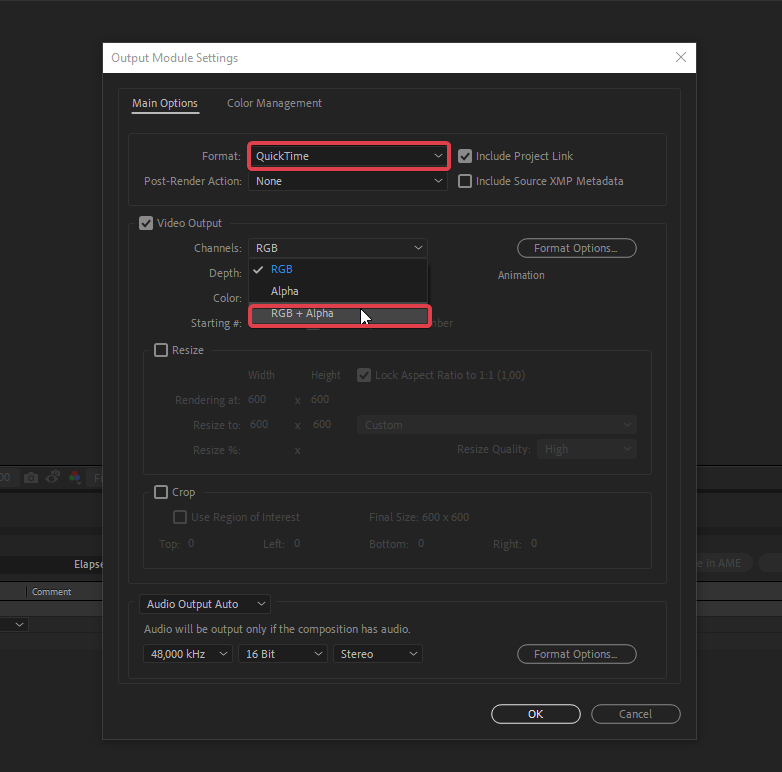 delicate monolith
yes he does have it like like. he just needs to convert it from .mov to .webm file
stray folio
Yeah, so he can use this site if file is not 50mb max
Convertio - Easy tool to convert files online. More than 284 different document, image, spreadsheet, ebook, archive, presentation, audio and video formats supported.
delicate monolith
it's over 50mb
stray folio
There are other options like this plugin
myFFmpeg is a graphical front-end for FFmpeg, a command-line tool used to convert multimedia files between formats. The command line instructions can be very hard to masterunderstand, so myFFmpeg does all the hard work for you. This allows you to use FFmpeg without detailed c...
But if you don't have any other way upload files to some storage like google drive/dropbox and send me link in DM and i will convert it for you
delicate monolith
ok, I think we got it.
@stray folio I think we got it, is there anything else we need to know while converting/uploading?
compression and all?
stray folio
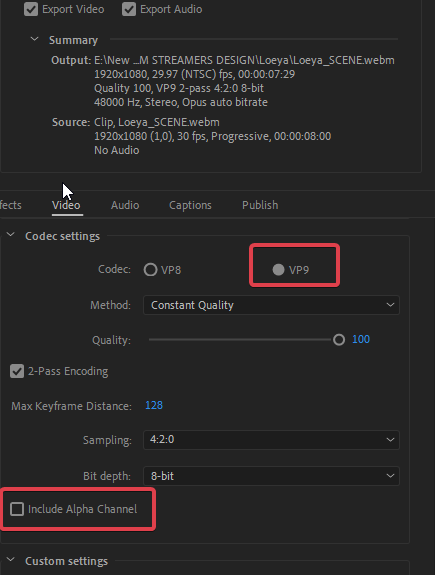
Choose VP9 instead of VP8 if possible and just be sure to check when you converting that webm includes transparency
@delicate monolith he can also use Media encoder and this plugin
WebM plug-in for Adobe Premiere Pro and Adobe Media Encoder
and just use this settings
 median scroll
Just wondering if it's possible (unless it's already done) to have a randomizer in the media request section when playing my backup YouTube playlist. Currently I have to go into YouTube itself and randomize my songs before streaming. Just thought it would be possible or easier to have a randomizer in the media request.
 surreal hedge
when i start streaming it just makes me lag alot i was wondering if there is any fix to this
deep birchBOT
@surreal hedge For the best OBS support, please join their discord where OBS devs and support volunteers are available all the time discord.gg/obsproject
 severe summit
Hey everyone im using OBS live for the first time and my starting soon screen from an overlay that i got from streamelements has a timer how do i restart the timer without having to reload and size the overlay browser screen?
 heavy axle
My activity feed doesnt work properly as it doesnt show all of the events?!? Any help would be great
 lapis slate
hey guys, im in need of help. I have some viewers who are saying they are donating to me but im not getting donation and they arent getting charged for it
Im not getting an alert for it as well
heavy axle
@lapis slate I’m legit having the kinda issue
lapis slate
it must be a streamelements things
i dont want to have to switch to steramlabs for donos
ancient zodiac
@heavy axle What events are not showing?
 restive loom
hello, how do I reset the donation tracker on my overlay?
dapper blade
Hello @restive loom https://streamelements.com/dashboard/session
Here you can reset it
restive loom
awesome thanks a lot 😃
heavy axle
@ancient zodiac Like follows and stuff like that
 tiny briar
Hello, i am trying to integrate noise gate into obslive. Where can I find the settings?
ancient zodiac
Obslive doesnt alter settings of obs. If you're trying to integrate noise gate, thats a general obs setting.
deep birchBOT
@tiny briar For the best OBS support, please join their discord where OBS devs and support volunteers are available all the time discord.gg/obsproject
 quiet portal
is there a way to go back and change resolution? when i put address into obs only a portion of the overlay is shown.
deep birchBOT
@quiet portal To add your overlays to OBS, add a new browser source in your scene. Paste your overlay URL in the browser source properties, set the dimensions to 1920x1080 (unless you changed them on the website), and :ballot_box_with_check: “Shutdown source when not visible” https://youtu.be/KDvLynUqXI4
quiet portal
that fixed it.. thanks.
 rustic yarrow
Question 1: With these settings when I’m playing Heroes of the Strom mostly twitch display freezes for 5 seconds. I’m checking dropped frames its mostly %7 or %10 I believe my upload speed is not stable. When I’m checking twitch dashboard it says Excellent quality at connection information, but it freezes.
With same settings sometimes, I can stream very smooth and good quality can anyone check my settings. I need help about this issue. I will be going to double my internet soon with a load balancer router but first I should figure it out this.
deep birchBOT
@rustic yarrow For the best OBS support, please join their discord where OBS devs and support volunteers are available all the time discord.gg/obsproject
rustic yarrow
@deep birch im going to try that channel too. Thank you
 runic egret
Question: I require a layout for a tournament, were id like to display a current point count and name display on the screen, could you guys assist eith something like this. Its an obs recording for youtube, thank you
shy mountain
This sounds like a graphics thing to "track" points - I don't think its something we can really help with - if you are referring to points from your channel, then just search for people in your points leaderboard.
shy mountain
What is the issue?
You can post screenshots
Click on "Studio Mode"
Something else i puting your GPU to 99% not OBS
What GPU do you have?
Also for the love of god, don't use Synapse 3 
nevermind - its a buggy software from Razer that supports macros and lighting effects for chroma hardware
nevermind about that
Do you have both your monitors plugged into the GPU?
if you expand the task manager you can see what program to what GPU core is asigned
Plus, like I said, if it was OBS, then instead of 6% it should show a lot more
That shouldn't be an issue really. Its a preview screen that can only affect low end PC specs afaik (like mine)
so I turn it off during stream and it only helps usage up to 2-3%
or this http://www.tomshardware.co.uk/answers/id-2620538/dwm-exe-taking-gpu.html - Windows 7 related
@rugged quail Looked at a bit more threads from Google and it seems for random people it triggers on random programs after an X update to windows.
Most people suggest fully updating windows or doing some stuff me personally I would not do.
rugged quail
any advice
shy mountain
Update windows, or make sure its updated
update nvidia drivers
Also I've noticed you are on obs 21.1.2
That comes pre-packed in our installer. I'd suggest to make sure SLOBS is uninstalled just in case
run OBS as admin as well
and maybe for the sake of reading other stuff toss your last OBS log here
deep birchBOT
@rugged quail Can you please provide a log from your last stream. You can find this log in " %appdata%/obs-studio/logs " OR Help > Log Files > Show Log Files. You can simply drag and drop the log file into Discord.
rugged quail
shy mountain
I'd suggest to see how to disable those windows 10 gaming features, not sure what "non-stadnard framerate" should be
old version is because you are on 21.1.2
I'd suggest to google "desktop windows manager high GPU" and see what you can see as a potential fix
if not you can ask in OBS discord for help, but they will blame our plugin that is causing this issue
runic egret
@shy mountain thank you
 meager scroll
Is there a good tutorial on how to use OBS Studio + live? I was using Streamlabs before where I just pick an overlay and it’s all there but I can’t figure out how to put the overlays from streamelements into OBS studio let alone any of the other stuff
rugged quail
When you click on an overlay in streamelements website, it will show you a link to copy/paste, paste this url in a browser source in your OBS scene and put 1920x1080 in the settings
 misty wagon
Hey peeps,
So i got a little bit sick n tired of SLOBS not working and looking for a new platform to work for my community and needs in streaming. Yet i have alot of scenes and overlays setup on SLOBS now and want to import them directly without any hassle into OBS Studio, how some SLOBS only outputs an .overlay file and i can;t seem to find a way to easy transfer all my scenes ?
Is there another way to import these scenes ? Or do i have to do everyting again by hand ? part by part
ancient zodiac
Pretty sure theres no way to import their .overlay files.
You can thank them for their efforts in making everything impossible to import
misty wagon
Pffffff...... Alright well i have to make this do next weekend than i guess... dang these guys are harsh
ancient zodiac
They dont like people leaving
 dawn schooner
I have alerts that aren't showing up when I test them
 lean ivy
hi all, can somebody help me with OBS and chat-bot?
What i want to do: somedoby writes command in chat (as example !playGreatSound), and that sound plays on the stream.
I found some helpful links in google, but now i lost them
I can't found full documentation about bot commands api, is it exists?
shy mountain
@lean ivy Steps to make a command trigger sound on stream:
- Go to Stream Store page here: https://streamelements.com/dashboard/store/items
- Add an item that has these settings on it:
- Stream Perk
- Loyalty settings to your desire
- (Next step) Add contents (image and sound you want to play)
- "Redeeming this item shows an alert
- Redemable via chat
- Skip Requirements
- Get the item name/command from the 2nd creation page
- Go to commands page here: https://streamelements.com/dashboard/bot/commands/custom
- Add command with desired name and have response for command as:
${redeem item_name_here - Go to your overlays and edit the overlay you use.
- Click on "widgets" and add "Store redemptions" widget. Click save and you should be golden.
- Test your own command in chat and have OBS or editor open to hear sound
- ???
- Profit in viewer interaction and that dosh

lean ivy
@shy mountain you are amazing!
shy mountain
I'm legit gonna save these steps somewhere, because its been asked a couple of times anyway 
median scroll
@deep birch Just wondering if it's possible (unless it's already done) to have a randomizer in the media request section when playing my backup YouTube playlist. Currently I have to go into YouTube itself and randomize my songs before streaming. Just thought it would be possible or easier to have a randomizer in the media request.
shy mountain
Its a suggested thing in our Ideas board. @median scroll
Not sure if its marked as planned
deep birchBOT
@median scroll Here is the StreamElements Ideas Board: https://strms.net/ideas
 tribal mantle
Hmmm so my Elgato is showing up as a black screen all of a sudden - streamed Fortnite fine and then went to stream some Fallout about 4 hours later and it was just not there have deleted and re added it a heap with no luck and I can see Elgato in the elgato app there's no reason for it to have stopped working?
deep birchBOT
@tribal mantle Can you please provide a log from your last stream. You can find this log in " %appdata%/obs-studio/logs " OR Help > Log Files > Show Log Files. You can simply drag and drop the log file into Discord.
shy mountain
I don't think the log will show anything in particular, but its worth a shot. This also doesn't sound too much OBS related, as to more Elgato related
 hidden dock
Can anyone point me to where the cache is for streamelements obs?
tribal mantle
deep birchBOT
@hidden dock Right click on the BrowserSource > Properties > Scroll down a bit > Refresh Cache of current page
hidden dock
@deep birch this is the issue i'm getting
https://i.imgur.com/gDCXaKo.png
can't seem to reset it, that's the activity feed in the main obs window
shy mountain
This is something else
Click on "Streamelements" on top and then click on "logout" and then same menu "Login" if you continue to see this, make sure you log into the dashboard, if you haven't done so
then do the first step again
@tribal mantle
Have you tried unplugging and plugging the cable?
tribal mantle
Will give that a shot thanks!
hidden dock
all fixed
shy mountain
 pine raptor
Hey i'm still having problems with my alerts and my bot won't alert me for a host
shy mountain
@pine raptor Your webhooks have been refreshed, so you should start seeing the hosts again. Do note that we filter by default 0 hosts.
pine raptor
@shy mountain so don't put it at 1
shy mountain
What I mean is, we filter out 0 viewer hosts.
So sometimes they might not show up.
Host events we should show:
- All manual host events
- All auto host events with at least 1 viewer
Thank you i'mma try it out and let you know
It's been like that for a month
Will any other bot mess it up
shy mountain
It should not.
pine raptor
Ok thanks
 keen adder
OBSlive copied my streamlabs alertbox (very nice) butI want to put it into my existing SE overlay, can it be done?
If I can bring back my stream to as few layers as possible 😃
rugged quail
Hello, any one using stream deck and else can't get your obs scenes to It?
lean ivy
@shy mountain hello 😃 i did all your instructions, but how to off bot response?
shy mountain
For the redeem? You can't.
@rugged quail You will need to reinstall the streamdeck software to have it being able to pickup OBS.
rugged quail
Thanks
shy mountain
@keen adder You can. You can click on the alert box and duplicate it.
lean ivy
@shy mountain okay 😦
shy mountain
@keen adder When you click on the widget, there is a 2 white papers with red dot on it next to "Layers" on the left side.
keen adder
awesome
dawn schooner
I have alerts that aren't showing up when I test them. It says message template during the animation.
dawn schooner
@deep birch
lean ivy
@shy mountain really no another way?
shy mountain
Its been suggested before
dry sphinx
@dawn schooner Not sure if someone has helped you yet but I'm trying to understand your question. Are none of your alerts showing when trying to test in the Overlay Editor?
dawn schooner
That is correct @dry sphinx
dry sphinx
Is the Alert Widget in your Overlay? Sounds like it's missing.
dawn schooner
Yes it is @dry sphinx
dry sphinx
Trying to go through all the options. Are you using Chrome as the web browser?
dawn schooner
Yes @dry sphinx
dry sphinx
This is puzzling to me for that occurring: 🤔 Can you send me a screenshot of your Alert Box in the Overlay Editor?
zinc lark
@dawn schooner can you re-connect your twitch to discord? the name that is currently there is not found in our system
pine raptor
I'm still not getting my alerts now i'm not getting any since the did a restart on my page
zinc lark
@pine raptor Not sure what you went through before, so bear with me.
- What version OBS are you using (top left, in the white bar)
dawn schooner
Done @zinc lark
zinc lark
@dawn schooner cool. thanks. couple quick questions:
- Is the issue happening in the browser
- What version OBS are you on (top left)
dawn schooner
Its happening in browser and obs. I couldnt tell you the version at the moment but it should be the latest unless an update is live today
pine raptor
Obs 22.0.2
 mellow goblet
Is there somewhere in obslive where i can change my stream titel before starting stream and then doing it from the twitch webpage??
 serene coral
Hi Guys, not sure if it's only but my stream keeps randomly ending? This never used to happen when I didn't have the obslive entension. Can any one offer any advice as to why this may happen?
ancient zodiac
You might have accidentally set a keybind to stop streaming, which is in the obs settings.
Or you're losing connection to the twitch server you are streaming to.
Our addon doesnt interefere with connections.
 dire cypress
For my activity feed on obs live, it's just a copy of the chat. Is there a way to fix this or is it set to be this way?
dire cypress
Also when i insert a link for an over lay the picture is zoomed in and not being shown in full
deep birchBOT
@dire cypress To add your overlays to OBS, add a new browser source in your scene. Paste your overlay URL in the browser source properties, set the dimensions to 1920x1080 (unless you changed them on the website), and :ballot_box_with_check: “Shutdown source when not visible” https://youtu.be/KDvLynUqXI4
ancient zodiac
In obs go to StreamElements and enable Chat and activity feed.
 cursive hedge
Can some one help me????
tulip hamlet
Just ask your question.
cursive hedge
My OBS LIve keeps telling me I can't go live cause it can not find the server
Stream key is correct but can't find a server for some reason
tulip hamlet
What server did you set in the OBS settings?
tulip hamlet
Try leaving it on Auto and trying again.
 tulip hamlet
There may be an issue with your stream key. I'd suggest copying and pasting it again, making sure you didn't accidentally get an extra space at the end or something.
 latent wagon
How do I make sure I have all the audios in my stream
I'm using Astros A50 gen 2 with Elgato connected to my PS4
shy mountain
Usually OBS should pick up the audio coming from the Elgato video stream
Not sure how the capture software works, but you need to capture that and as long as the elgato software provides audio, OBS will pick it up
latent wagon
It captures my game audio and my party chat
Just not my voice
And it has this buzzing sound on stream that I can hear through my headset
shy mountain
Thats not something we can help really. Most likely you will have to see Elgato support for that or OBS discord.
But in most cases
a buzzing sound means a faulty audio cable
rugged quail
Can't see my donation, bits, subs in obs lives activity feed. Is there a reason so I can do it?
shy mountain
What exactly do you see?
Is the activity feed blank/white or there is no activity feed?
rugged quail
I have my activity feed but i only see follows


 rugged quail
I think I have all those checked
shy mountain
Are you sure you have received tips and hosts for example?
I see that you are bellow 50 followers and not affiliate, so you won't be able to see subs and cheers in the filter regardless.
rugged quail
I have gotten donations but maybe i effed up a little
shy mountain
Well one other thing you did wrong is, you have Streamlabs tipping page bellow your channel.
We are streamelements and we can't track tipping that go pass the SL tipping page.
rugged quail
Okay, forgott to change it
pine raptor
So i'm live now and still no host alert
pine raptor
So my streamlabs eventlist is fine when I get hosted but streamelements nothing is happening I know I keep coming back with the same issues but it's weird soon as I download obs live nothing is working right
pine raptor
pine raptor
Everybody off today I see
 true wharf
Any idea why one of my scenes on obs is not working...more specifically, my display capture, seems to just black screen..anybody else have/had this issue... no matter how many times I close the program or even restart my computer..my 1st scene is just black screened.. audio works still just no picture...
meager scroll
Do you have multiple display devices?
 frosty musk
heyy have you anyone troubles with obs with the streamelements overlays¿?¿?¿?
i have a really high amount of cpu usage
dry sphinx
@frosty musk it depends on what overlay you are using from us. Animated ones are a bit beefy than normal and if you have hypecup and/or kappagen then the usage will increase.
frosty musk
ye im investigating that and it seems that the animated overlays with simple animations takes of my cpu like 10-16% lol
and i have an I7
can it be improved at any way?
dry sphinx
Have you tried using a Static overlay? Also you try to put the Animated overlay to 30FPS instead of 60 to see if there is a difference.
frosty musk
i will try thankyou and i not tried the static ones, coz animated ones are really nice xD
dry sphinx
Agreed. I haven't tried animated overlays yet on my computer using a Ryzen 2700x. Let us know if it still occurs.
zinc lark
@frosty musk was it just a single animated image, or something like scrolling text?
also, what version of OBS are you on?
pine raptor
Me again lol sorry my host dont pop up in my activity feed and don't pop up a alert
I know I look crazy on here but it just won't work
dry sphinx
Was it 0 host? As the system automatically filters hosts with 0 viewers.
dry sphinx
Hm. The bot is in the channel & functioning properly. Check the Dashboard. Did my follow show up?
pine raptor
Let me check
No offense but it's only yells that a works
I see you on there but it doesn't do that when I stream
dry sphinx
🤔 That's weird. I can ask internally to see what's up as that's a first time for me.
pine raptor
I had friends and fake account to me today and nothing but stream labs eventlist picked it up
@tulip hamlet how can you host me when i'm not on
dry sphinx
That was 19 hours ago with a manual host. Sounds about right as I see your past broadcast yesterday.
 vagrant cliff
Hi, new here
need help with TTS
cant get it to work 😦
got my first donations today, and tts was afk 😄
dry sphinx
Would be recommended for #helpdesk-twitch @vagrant cliff As this is for OBS.Live help.
vagrant cliff
ok, sry. have a nice day 😗
 last nexus
Hey! Why are my followers getting banned from my chat? They aren't saying anything offensive or using words of the like, but they can be chatting in the stream to me then boom, messages deleted and user timed out
tulip hamlet
Looks like you have link protection on. Are they entering links in chat?
last nexus
I know one user did but not the others
tulip hamlet
It'd be helpful if we knew what messages got them hit.
last nexus
is there any way I can find out?
tulip hamlet
You can try asking the people who got hit.
But timed out messages won't show in your VODs or anything.
last nexus
is there anyway of setting it up so I can choose if links are allowed? rather than just flat out banning people
tulip hamlet
It's not banning, it's timing them out.
If you go to https://streamelements.com/dashboard/bot/filters you can set how long it times them out for.
StreamElements
The Ultimate All in One Platform for Streamers
You can also set custom messages so you can see in the chat why they're getting timed out.
That'll help you narrow it down.
last nexus
ok i'll look into it. thanks
 lime crescent
Quick question: I've been using the chat function in OBS Studio/live, but I seem to have trouble scrolling the chat up (if I did miss anything from before). It's super laggy to scroll up and at times, it just spazzes out and scrolls back to the bottom.
 toxic otter
Hi guys, noob streamer here chasing some help setting up overlays in OBS. Is this help you guys can give?
deep birchBOT
@toxic otter To add your overlays to OBS, add a new browser source in your scene. Paste your overlay URL in the browser source properties, set the dimensions to 1920x1080 (unless you changed them on the website), and :ballot_box_with_check: “Shutdown source when not visible” https://youtu.be/KDvLynUqXI4
 manic spruce
hi, encounterd a problem with obs live and ground control: i use both at the same time. obs live for chat and activity feed and ground control for the music playlist. but this causes the bot to be double in the chat. so every timer and every message is doubled in chat.
also it would be nice to have the full twitch chat in obs live. it's a bit useless at the moment because i don't see restrained messages, bits and have no mod tools in there, it's only good for reading...
shy mountain
@manic spruce If you are not on the latest version of OBS.Live, I'd suggest to update it, as we have improved some aspects of the chat, but do note that its not v1.0, its v0.4 at the moment. As for the double chat bot, I assume you are referring to the default named bot, which is "streamelements" and not a renamed bot right?
manic spruce
@shy mountain thanks for your reply. yes i have my custom named bot (which is th se bot) and a streamelements named bot in it. i also have the latest version of obs live, and i really like it but as i said, at the moment i need a second chat window to notice everything what happens. but yeah i know its in development.
shy mountain
Ok if you are using GC to have the renamed bot work, I'd suggest going into its settings and disabling it, because OBS.Live now supports custom bot name and I think that makes the bot answer twice
For some reason even the normal SE bot is not responding in your chat right now
 hallow salmon
good morning, the last couple of times i've started my stream up it works for a couple of minutes and then twitch shows me as offline, same problem with mixer. stream health is fine in obs, bit rate is always over what i have in settings, internet is working fine but stream doesn't stay live for more than ~5 mins
shy mountain
This doesn't sound related to us or our plugin really.
deep birchBOT
@hallow salmon For the best OBS support, please join their discord where OBS devs and support volunteers are available all the time discord.gg/obsproject
shy mountain
I'd suggest to go ask in OBS Discord.
hallow salmon
no worries, thought i'd check here first while its the live version
shy mountain
Most likely your internet is not stable enough, if Mixer and Twitch are turning your stream off.
You are dropping the connection to their servers.
quasi snow
you can check stability of your stream here https://inspector.twitch.tv/
 short prism
I use an elgato streamdeck and I just switched from SLOBS to OBS LIVE after changing over to stream elements. the StreamDeck software keeps telling me to open OBS wven though it's open....Thoughts?
shy mountain
Reinstall the streamdeck software
shy mountain
Run it as admin?
Usually reinstalling the stream deck software after installing OBS.Live works
short prism
Figured it out. OBS live kept trying to run 32bit. not the 64 it should have
shy mountain
Check and see your macros are pointing towards the proper OBS.exe file
 radiant thicket
Is there anyone that could help me? I’m having issues running obs and getting it to work with my Xbox
shy mountain
What exact issues are you having?
We usually suggest people use a capture card to capture console gameplay and then add it to OBS sources and then stream.
@radiant thicket
 late pelican
All game sound lost and chat sound lost when Elgato chat link is plugged in and of course I need that lol.. Any ideas?!
deep birchBOT
@late pelican For the best OBS support, please join their discord where OBS devs and support volunteers are available all the time discord.gg/obsproject
 rustic zealot
Hey, I tried the new activity feed on my OBS from Streamelements, but whenever I get a donation, the alerts won't get up. :/
zinc lark
@rustic zealot when was the last donation you got that was "missed"? I am seeing one in your feed from yesterday. If an alert didn't pop, it was because either you were missing the alert box, or the browser source is frozen because of other (pc) reasons
lime crescent
Quick question: I've been using the chat function in OBS Studio/live, but I seem to have trouble scrolling the chat up (if I did miss anything from before). How come it's super laggy to scroll up and at times, it just spazzes out and scrolls back to the bottom? Because this happens, I end up just opening chrome to go to my twitch dashboard. Any fix for this?
zinc lark
@lime crescent Not yet, but it is something they are looking into
lime crescent
👍 thank you