#helpdesk-youtube
1 messages · Page 46 of 1
 versed tangle
 sterile narwhal
Can someone help me I have a youtube channel and twitch channel i was trying to connect to stream elements accidentally made a new account with each one and Im trying to transfer over my overlays from twitch to youtube. Would like them all to be on the same account but wont let me add my youtube now because I made another account with it
 mild dagger
Login into the account with the YT and remove it. Then add it with your twitch one
 humble obsidian
How to download Stream Elements to YouTube?
 idle saffronBOT
@humble obsidian New to StreamElements?
Check out our YouTube channel https://www.youtube.com/c/streamelements/videos
with tutorial videos from setting up the basics, to in depth details on how to use our product.
New to OBS? Here is a 4 step quickstart guide
https://obsproject.com/wiki/OBS-Studio-Quickstart
Want to learn even more? Here is an in-depth overview
https://obsproject.com/wiki/OBS-Studio-Overview
 cloud garnet
hello! Just started using SE. How do I enable SE.Pay in my dashboard? Im in the US with my own bank account, but I only see an option for paypal under tipping settings. I've been told I have to contact support if I don't see it
Oh, is it called micropayments now?
idle saffronBOT
@cloud garnet SE.PAY is available for streamers who are at least 18 years old, with bank account under their name in one of the following countries and have at least 101 follower (Twitch) / 101 subscribers (YouTube):
Austria, Belgium, Czech Republic, Denmark, Finland, France, Germany, Ireland , Italy, Netherlands, Poland, Portugal, Slovakia, Spain, Sweden, Switzerland, United Kingdom, United States.
If you meet these criteria and don’t see SE.Pay, let us know.
For information on SE.Pay payment methods, their fees and settlement times see https://streamelements.com/dashboard/tipping/fees.
 winged mulch
Hi,
I'm setting up my stream for YouTube after having used Streamelements for over a year for my Twitch stream. I have a problem with the Hypecup.
When I emulate an event in the editor, it shows in OBS, both the alertbox and the hypecup. When a alert happens in real, the alertbox shows, but the hypecup doesn't do anything.
Any help would be greatly appreciated!
winged mulch
Okay, I narrowed it down further. Member alerts do fill up the cup, subscriber events don't, yes I got the check box on 😛
idle saffronBOT
@winged mulch Users can choose to make the channels that they subscribe to public or private. By default, all settings are set to private.
Private: When a users subscriptions are set to private, no other user can see what channels they subscribe to. A user's account does not show in a channel's Subscribers List, even if they are subscribed.
Public: When users subscriptions are set to public, another user can see what channels they subscribe to. User subscriptions are listed on their channel page and their account is listed in the Subscribers List for any channel they subscribe to.
If a user has it set to Private they will not show up in the activity feed. More info: https://support.google.com/youtube/answer/7280190
winged mulch
Yes I'm aware, I'm talking subscriptions that do show in my activity feed. I see them pop-up, the alert pops up in the alertbox, but the hypecup is not filled. Even when I click to replay these events, the hypecup doesn't do anything
 latent kite
Is there a way I can decrease my stream delay on YouTube ? Although I went to the settings and switched it to 1s delay there’s still about a 10s delay on stream
cloud garnet
Is there a way to make OBS.Live's youtube chat dark mode instead of light mode? Would be greatly appreciated
 fickle pagoda
Unfortunately not.
cloud garnet
Thats fine, thank you!
 visual talon
Hi , can someone tell me why Stream Latency goes to Normal Latency when i go live on youtube?
I mean i set it to ultra before the stream starts but when it goes live it is greyed out and shows preview of the live stream but no control over latency
 steel steeple
I need help
 eager lilyBOT
Hi @steel steeple, Please ask your question(s) or describe the problem you're looking to solve so staff or a support volunteer can assist you as soon as they are available.
steel steeple
I have over 1000 subscribers and I’m trying to set up s.e pay on streamelements
And it said it’s not available and contact support to activate it
idle saffronBOT
@steel steeple SE.PAY is available for streamers who are at least 18 years old, with bank account under their name in one of the following countries and have at least 101 follower (Twitch) / 101 subscribers (YouTube):
Austria, Belgium, Czech Republic, Denmark, Finland, France, Germany, Ireland , Italy, Netherlands, Poland, Portugal, Slovakia, Spain, Sweden, Switzerland, United Kingdom, United States.
If you meet these criteria and don’t see SE.Pay, let us know.
For information on SE.Pay payment methods, their fees and settlement times see https://streamelements.com/dashboard/tipping/fees.
 vague cedar
Hello. I've been unable to add my YouTube to my StreamElements account for over a week now. Every time I try to add it, it just says "Something went wrong. Please try again later". Is there any kind of fix to this? I have not linked this to any other StreamElements account so I'm unsure why this error continues to happen.
 mossy cobalt
hey where do i get custom alerts to add in stream elements?
 sage lantern
Custom alerts? You will need to have them made by an artist probably :P
 pine cypress
Hallo. Warum läst sich mein StreamElement unter Win 10 nicht mehr komplet deinstallieren
Wäe nett wenn mir jemand helfen könnte !
 main vector
@pine cypress #🇩🇪︱deutsch 😉
pine cypress
okay Danke. Hab ich eben gefunden.
 late hamlet
Who knows how I can use the subscribe alerts on ps4
idle saffronBOT
@late hamlet Consoles do not have native support for overlays. You would need a capture card, PS4 remote play or Xbox companion app and a PC with OBS in order to have overlays over your console gameplay.
We have an blog post about how to setup console streaming with our essential tools: https://blog.streamelements.com/how-to-stream-on-console-7b620b1c46c3
 fresh zenith

idle saffronBOT
@late hamlet New to StreamElements?
Check out our YouTube channel https://www.youtube.com/c/streamelements/videos
with tutorial videos from setting up the basics, to in depth details on how to use our product.
New to OBS? Here is a 4 step quickstart guide
https://obsproject.com/wiki/OBS-Studio-Quickstart
Want to learn even more? Here is an in-depth overview
https://obsproject.com/wiki/OBS-Studio-Overview
@late hamlet We've released our new Overlay Editor revamp. You can check out the changes and how to work with it here: https://youtu.be/X5VzXjqAsjk
Check out our blog post as well: https://blog.streamelements.com/streamelements-overlay-editor-just-got-even-better-c22cb5b4853e
late hamlet
Thx.
 hollow kiln
Hey all
Has anyone managed to add a YouTube activity feed into OBS?
When I copy the popout URL, and add it as a OBS Dock, it asks me to login with Twitch
idle saffronBOT
@hollow kiln OBS.Live is a Plugin for OBS created by StreamElements. You can download OBS.Live here: https://streamelements.com/obslive
Please make sure you have the latest version of OBS installed, Current Version: 25.0.8. You can install OBS here: https://obsproject.com/
hollow kiln
Actually, I do have OBS.live installed - but I have logged into Twitch with that.
I am trying to add the YouTube activity feed as well
fickle pagoda
There's no "as well." StreamElements does not have multistreaming support. It's one or the other.
hollow kiln
I am trying to add the YouTube Activity Feed popup, but it asking me for my Twitch login (as according to my screenshot)
idle saffronBOT
@hollow kiln StreamElements menu, on top of OBS > Logout > Login
hollow kiln
I am wondering, if its possible to add the YouTube Feed Activity, as an OBS Dock :)
(Without installing OBS.Live)
versed tangle
Hello, does stream elements requires monetization on youtube for doing a giveaway? Coz im not able to find giveaway or loyalty settings on streamelements
anyone for help?
fickle pagoda
Giveaways and Loyalty are not available for YouTube streams.
idle saffronBOT
@versed tangle Read and follow our server rules:
- We do not tolerate toxicity! Treat the community team, staff and all members with respect.
- No advertisement or channel promotion, anywhere on the server.
- No NSFW/NSFL
- No unsolicited DMs or friend requests to server members
Make sure to read the #welcome in any server you join.
sterile narwhal
Anyone know how to unclaim a channel to move it to another account? Accidentally Made two accounts
idle saffronBOT
@sterile narwhal There is no easy way to unlink 2 owner-type accounts from each other. The only way is to make a closure request from here: https://streamelements.com/dashboard/account/security
WARNING: In submitting a closure request, all linked channels within the account will be deleted and you will lose all associated data. This includes overlays, custom commands, timers and past data (tips, subs, etc). You can still reconnect with the deleted account, but you are essentially starting fresh.
sterile narwhal
Already have done this earlier today didnt know how long it takes
 dim inlet
I accidentally made a new account for my youtube anyway of having my youtube linked with my SE twitch account? 
late hamlet
How do i get the bot in my live stream chat to say the timers
idle saffronBOT
@late hamlet To set up the bot for your YouTube stream, please follow these steps:
- Make sure your stream is public. The bot cannot join a private/unlisted stream.
- Your stream must be live for the bot to join the chat.
- Go to https://studio.youtube.com/, click on Settings > Community and add https://youtube.com/c/streamelements as a Moderator.
- When live, be sure to look at Live chat instead of Top chat, as Top chat will hide the bot messages.
late hamlet
Is loyalty points a buy setting bc i dont see it
fickle pagoda
Loyalty is not available for YouTube.
late hamlet
Oh
So i have to use streamlabs
Sad i don't like stream labs u guys r way easier
Rip
vague cedar
I've been unable to add my YouTube to my StreamElements account for over a week now. Every time I try to add it, it just says "Something went wrong. Please try again later". Is there any kind of fix to this? I have not linked this to any other StreamElements account so I'm unsure why this error continues to happen.
 fast grove
Any way we can get loyalty points in youtube streams?
fickle pagoda
Loyalty is not available for YouTube streams.
fast grove
Any way i can create a loyalty system with variables?
fickle pagoda
That I can't help you with. You can try discussing in #dev-chat with community volunteers.
But just existing variables won't be enough.
You'll need some serious coding and your own database.
fast grove
Alright
idle saffronBOT
@slender pike For the best OBS support, please join their Official Discord @ discord.gg/obsproject
 slender pike
cant join
 snow wave
help me set up live stream please
im a youtuber with 34 subscribers i want my stream to be nice
my screen size is
width : 1370
height : 770
dm me please
 peak sage
@snow wave we can't really assist with creating streams from scratch.
do you have specific questions? we'll be glad to help
also please don't ask server members to DM you
snow wave
okay sorry
dim inlet
I'm still having issues 😦
idle saffronBOT
@dim inlet Account Merging - Please note:
- Merging accounts only allows faster ways to switch between accounts
- Merging accounts does not allow data sharing between accounts - different streaming platforms, different type of events
- Merging accounts allows duplicating/sharing overlays between the accounts
If you understand the limitations of merging and want to proceed, please find the JWT tokens (!jwt) from both accounts you want to merge and you will be directed to DM them to a staff member.
 lime walrus
👋
winged mulch
New subscriber events on my youtube are activating the alertbox, but not the hypecup. When I emulate the subscribe event it works, but in real it doesn't. How to fix? Thx!
vague cedar
I've been unable to add my YouTube to my StreamElements account for over a week now. Every time I try to add it, it just says "Something went wrong. Please try again later". Is there any kind of fix to this? I have not linked this to any other StreamElements account so I'm unsure why this error continues to happen. Hopefully it doesn't look like I'm spamming this question, but this will be my 3rd time asking now with no reply. Some kind of answer would be greatly appreciated.
 modern wave
Good morning guys, how are you? I have a problem related to streamelements and youtube the notifications of new members is not reaching the streamelements a week ago everything was normal now only new members do not arrive. Can someone help me?
snow wave
i cant put my whole overlays cuz if i put it in obs studio its only half so how can i fix it?
idle saffronBOT
@snow wave To add your overlays to OBS, add a new browser source in your scene. Paste your overlay URL in the browser source properties, set the dimensions to 1920x1080 (unless you changed them on the website) and check Shutdown source when not visible. https://youtu.be/KDvLynUqXI4
 tacit quiver
!jwt
eager lilyBOT
You can find your JWT token on your account channels page (Show Secrets to reveal the token): https://streamelements.com/dashboard/account/channels
READ ME: This is a private security token. Do NOT share this token here or other public places, only with a StreamElements staff member in private.
tacit quiver
I have got an issue, where I can't delete my Youtube channel from StreamElements without an e-mail.
Screenshot:
It doesn't show an e-mail because this channel doesn't have an e-mail.
What should I do?
 I need help
Please
Someone
tacit quiver
 tacit quiver
My main account on StreamElements is Twitch
And I am trying to remove my Youtube channel, but I can't because there is no e-mail
fickle pagoda
Are they already merged?
tacit quiver
What do you mean merged?
fickle pagoda
Yeah, they are.
eager lilyBOT
@tacit quiver There is no easy way to unlink 2 owner-type accounts from each other. The only way is to make a closure request from here: https://streamelements.com/dashboard/account/security
WARNING: In submitting a closure request, all linked channels within the account will be deleted and you will lose all associated data. This includes overlays, custom commands, timers and past data (tips, subs, etc). You can still reconnect with the deleted account, but you are essentially starting fresh.
tacit quiver
Oh ok, thank you!
Does that mean if I delete my Twitch account, my youtube account will be removed as well?
fickle pagoda
Yes.
tacit quiver
Ok! Thanks for the information.
idle saffronBOT
@wheat hazel Welcome to the helpdesk! Please let us know how we can assist you today and a support volunteer or staff member will assist you as soon as they are available. Thank you for your patience.
 wheat hazel
its regarding the strea elements and youtube tos
on term number 22 it mentions youtube. does that mean you must follow the rules of youtube to stay on stream eleemnts ?
 spiral moth
how do i put my overlay into use
eager lilyBOT
@spiral moth To add your overlays to OBS, add a new browser source in your scene. Paste your overlay URL in the browser source properties, set the dimensions to 1920x1080 (unless you changed them on the website) and check Shutdown source when not visible. https://youtu.be/KDvLynUqXI4
dim inlet
don't know why but SE doesn't seem to be tracking any of my subs any reason for this?
eager lilyBOT
@dim inlet Users can choose to make the channels that they subscribe to public or private. By default, all settings are set to private.
Private: When a user's subscriptions are set to private, no other user can see what channels they subscribe to. A user's account does not show in a channel's Subscribers List, even if they are subscribed.
Public: When users subscriptions are set to public, another user can see what channels they subscribe to. User subscriptions are listed on their channel page and their account is listed in the Subscribers List for any channel they subscribe to.
If a user has it set to Private they will not show up in the activity feed. More info: https://support.google.com/youtube/answer/7280190
dim inlet
oh what so really there's no point in having sub alerts then because well let's be honest who really have there subs set to public honestly bit disappointed with that 😦
oh well thx whoever did the command 
vague cedar
I've been unable to add my YouTube to my StreamElements account for over a week now. Every time I try to add it, it just says "Something went wrong. Please try again later". Is there any kind of fix to this? I have not linked this to any other StreamElements account so I'm unsure why this error continues to happen. 4th time asking now, can I get any kind of insight to why this is happening?
lime walrus
Where are you trying to link the account? Dashboarb? OBS.Live? Via the "Add Channel" button?
@vague cedar ⤴️
 tender lance
I just want to copy my overlay from my twitch SE page to the yotuube SE page
earlier I logged into my youtube account seperatly cause I didn't know that you can link the two together
so when I try to link my youtube one to the twitch account it says "already in use"
and when I try to close my youtube account (just that I can link it afterwards) isn't possible cause it requires an email adress
the SE account itself doesn't have one (can't find a way to add one either)
I tried the email of my youtube account and the donation settings
both of them didn't work
eager lilyBOT
@tender lance Account Merging - Please note:
- Merging accounts only allows faster ways to switch between accounts
- Merging accounts does not allow data sharing between accounts - different streaming platforms, different type of events
- Merging accounts allows duplicating/sharing overlays between the accounts
If you understand the limitations of merging and want to proceed, please find the JWT tokens (!jwt) from both accounts you want to merge and you will be directed to DM them to a staff member
@tender lance You can find your JWT token on your account channels page (Show Secrets to reveal the token): https://streamelements.com/dashboard/account/channels
READ ME: This is a private security token. Do NOT share this token here or other public places, only with a StreamElements staff member in private.
sage lantern
You can DM both tokens to @lime walrus specifying which token is for which account
tender lance
thanks will do that
 shut ingot
its not letting me livestream to YouTube?
 proven wasp
how can i change my display name on streamelements? it still show my old youtube channel name ?
lime walrus
Which exact display name? The one shown in the dashboard? You can't.
eager lilyBOT
@shut ingot StreamElements menu, on top of OBS > Logout > Login
proven wasp
the one when i go to tip setting it shows my old name in the link and also it shows it on youtube channel owener @lime walrus
lime walrus
email us here: support@streamelements.com with your account id and desired name
eager lilyBOT
Please provide your account ID found at the top of this page: https://streamelements.com/dashboard/account/channels This ID is public info and safe to share here.
lime walrus
accountid can be found from here ⤴️
the reason for email is for us to track the name change progress with the devs and update you when done
proven wasp
you want me to create invite link and send it here ?
lime walrus
no
Email us here: support@streamelements.com
with your account id
and your desired name
and we will let you know
when the devs change your link
 raw ermine
eager lilyBOT
raw ermine
eager lilyBOT
@raw ermine To add your overlays to OBS, add a new browser source in your scene. Paste your overlay URL in the browser source properties, set the dimensions to 1920x1080 (unless you changed them on the website) and check Shutdown source when not visible. https://youtu.be/KDvLynUqXI4
@raw ermine We're not able to troubleshoot issues with using our overlays in StreamLabs OBS (SLOBS) as we don't have the tools to support their software. We recommend using OBS Studio or OBS Studio with our plugin OBS.Live.
proven wasp
@lime walrus this is your email ' I've set a task with the devs to change your name ' so what am i suppose to do now ?
lime walrus
wait
 gray wagon
hi
eager lilyBOT
@gray wagon Please ask your question in one helpdesk channel only. A support volunteer or StreamElements staff member will assist you as soon as they are available. Asking in multiple places will only result in confusion, not faster answers. Thank you for your patience.
vague cedar
Where are you trying to link the account? Dashboarb? OBS.Live? Via the "Add Channel" button?
@lime walrus I've tried all of the above and get the same error message via Add Channel. Whenever I try to do it via the other two options, it doesn't do anything at all. I've got the e-mail that says StreamElements was granted access to your Google account, but it doesn't actually link my YouTube to my StreamElements dashboard.
eager lilyBOT
@vague cedar Account Merging - Please note:
- Merging accounts only allows faster ways to switch between accounts
- Merging accounts does not allow data sharing between accounts - different streaming platforms, different type of events
- Merging accounts allows duplicating/sharing overlays between the accounts
If you understand the limitations of merging and want to proceed, please find the JWT tokens (!jwt) from both accounts you want to merge and you will be directed to DM them to a staff member
vague cedar
I know that is probably just an automated bot that must be replying to a keyword I typed, but I'm not looking to merge accounts at this time. This is a separate issue. Just want to clear that up. Haha.
lime walrus
In that case
provide a screenshot of the error you are seeing
because that you described initially soundsl ike you are trying to link your accounts
vague cedar
Sure, where do I provide it?
lime walrus
here
vague cedar
lime walrus
and that is when you click on "add X channel" right?
What exact channel are you trying to add?
vague cedar
That is correct. Been happening for well over a week now.
I'm trying to add my YouTube.
lime walrus
The only reason it would give you that error is
if you've logged in with your YT account in our system before
as that "add X channel" button is essentially trying to add a channel which should not be created in the system
but in this case, its most likely created and we need to merge/link it for you manually
hence
eager lilyBOT
Account Merging - Please note:
- Merging accounts only allows faster ways to switch between accounts
- Merging accounts does not allow data sharing between accounts - different streaming platforms, different type of events
- Merging accounts allows duplicating/sharing overlays between the accounts
If you understand the limitations of merging and want to proceed, please find the JWT tokens (!jwt) from both accounts you want to merge and you will be directed to DM them to a staff member
lime walrus
the bot response
vague cedar
As far as I'm aware, I've never linked my YouTube to StreamElements. I have linked my primary Twitch account to it that I do need to merge to this one at some point, but I have no recollection of linking my YouTube.
Is there a way to find out if it has been? Because if it has been linked, I honestly do not remember ever doing it.
lime walrus
logout from the current account and click "connect with youtube"
on the main page of our site
vague cedar
I've tried that before but gave it another shot now. Whenever I do that it takes me through the same process as trying to add the account but whenever I finish that process, it just takes me right back to the StreamElements landing page.
The only difference now is that the URL is this: https://streamelements.com/?error=Something went wrong.. please try again later

StreamElements
StreamElements is the leading platform for live streaming on Twitch,Youtube and Facebook gaming. StreamElements features include Overlays, Tipping, Chat Bot, Alerts, merchandise, stream integrated and cloud-based.
lime walrus
whats the name of the YT channel?
vague cedar
The name of the channel is NeinBlue
lime walrus
i'm only finding the facebook and twitch account
Can you open the website in a new tab, then open the dev console with F12, then click on "connect with youtube" and then screenshot me the list of things that are in red from the network tab?
lime walrus
click on it and then click on "preview"
lime walrus
ok can you click on "headers" and expand the dev console a bit
and screenshot me that?
vague cedar
lime walrus
ofc is not gonna show the account id here 
what was I expecting
Your YT account does have a connection with our system, but I was not able to find it when i searched your name
have you renamed the YT channel?
If yes, do you remember its original name?
vague cedar
Not that I recall. I created all of my channel names around the same time period and have not edited them at all.
lime walrus
can you DM me a link to your channel?
vague cedar
Sure thing. DM incoming.
 gilded pasture
 sacred sapphire
Hello if anyone is online I could use some help\
its about restream.io and dual alerts
does anyone know how I can get my stream elements overlay to set off alerts for both twitch and youtube?
fickle pagoda
Not possible. StreamElements does not have multistreaming support.
 vagrant flame
I can’t put my streamelements in my stream
 hearty needle
Greetings, I am currently preparing to began streaming heavily or late 2020 (as early) or by 2021 and I am interested on multistreaming which is not the problem actually, the thing is that I feel that the service is making me chose Twitch as a main winner rather than YouTube (I know that full YT support is still on development).
My main worry is that I am interested that the OBS Overlay see metrics for BOTH Twitch and YouTube on my streaming but I fail to see that OBS Live only let's me a single sign-in and obviously the overlay URL is attached to the account.
So, when YT support kickoff, StreamElements will have dual and real time support?
Thanks in advanced.
 tardy cloud
@hearty needle streamelements doesnt support multistreaming
 lethal hatch
why the website is now loading ?
eager lilyBOT
@lethal hatch Our Dashboard and Overlay Editor are Chromium Optimized. We strongly recommend using Chrome. Opera GX and the new Microsoft Edge Chromium might work closest to Chrome as its also Chromium built. Firefox also works, but some things might look a bit different or not work. We do not recommend using Internet Explorer with our Dashboard as it does not support functions.
If the website doesn’t work on chrome, be sure none of your plugins is blocking our website or clear your cookies. You can try if the website works in an incognito tab.
lethal hatch
👌
hearty needle
@hearty needle streamelements doesnt support multistreaming
@tardy cloud yeah, I am using another service about that, but my main concern is particularly as a platform to engage with user simultaneously like to have both Twitch a Youtube in a sinlge overlay for example.
I know that probably I am asking too much with a service that is being offered as free but I am new at this.
fickle pagoda
@hearty needle StreamElements does not have multistreaming support. As a result, there is no way to have both Twitch and YouTube data and events in a single overlay.
hearty needle
Ohh ok, so merging data needs to be taken as a multistreaming environment?
fickle pagoda
Merging channels in StreamElements does not consolidate any data. StreamElements does not have any way whatsoever to "merge data" or combine Twitch and YouTube activities.
 crimson owl
SO stream elements disconnected from my restream. I have no idea how i connected it before how do i fix this and then how do I set it to never disconnect from restream. I had it all set up and now its reset. so annoying
Its also wont let me use gogole to log in any more. not my day
 onyx sphinx
I accidentally created a new account for my YT channel when I already had one for my Twitch. Is there a way to merge both accounts so that I could port my overlays over or do I have to just start over?
eager lilyBOT
@crimson owl StreamElements menu, on top of OBS > Logout > Login
lime walrus
@crimson owl also we do not have restream support - OBS.Live only allows login with 1 account rather then multiple
eager lilyBOT
@onyx sphinx Account Merging - Please note:
- Merging accounts only allows faster ways to switch between accounts
- Merging accounts does not allow data sharing between accounts - different streaming platforms, different type of events
- Merging accounts allows duplicating/sharing overlays between the accounts
If you understand the limitations of merging and want to proceed, please find the JWT tokens (!jwt) from both accounts you want to merge and you will be directed to DM them to a staff member
You can find your JWT token on your account channels page (Show Secrets to reveal the token): https://streamelements.com/dashboard/account/channels
READ ME: This is a private security token. Do NOT share this token here or other public places, only with a StreamElements staff member in private.
onyx sphinx
any staff members want to hit me up to get this done?
lime walrus
👋
 full tangle
Tried a YouTube stream yesterday, and your site tells me my channel is already claimed. Must have a stray account I remember making. Any way to get the channel removed from all SE accounts so I can add it correctly?
Will those steps left above address my issue too?
I do NOT know the account that has that channel currently, but can 100% prove I own it
 slim lance
A question if I want to join the Dream Team but I do it with my YouTube channel, would I also have my live shows on my twitch channel?
 calm siren
one help i tried to login with all of my youtube account but it shows subscribers 0 and all others 0 its not showing the right information anyone can help me?
 amber wagon
how do i put de !epic
 cobalt jewel
I accidentally deleted streamelemts from my moderators list what do I do
 minor obsidian
My Bank Details is still being verified for well over 14 work days
eager lilyBOT
@minor obsidian Please contact us via email for support with SE.Pay. You can use our contact form here: https://streamelements.com/contact Thank you.
 magic geyser
hello everytime i press save when updating info it says "there was an error saving"
 open pasture
is it possible to use this in my web browser?
tardy cloud
@open pasture what do you mean?
 tired narwhal
So I am currently getting set up for my YouTube stream, and have the bot connected to my account. I want to have media requests however, but I do not seem to have the songrequest module on my modules page for the bot itself. I have tried to activate it by activating the skip command, but to no success. Any help?
Here is my modules page
lime walrus
Media Request is not available for Youtube
tired narwhal
Ah okay thank you!
 pastel cove
Hey so I don´t know where to write this and if this is the right chat. I have problems withe StreamElements website
It´s just a white screen
with only the "Help" button showing up
 shy quail
Check your firwal settings and adBlocker etc, to not have anything block StreamElements.
pastel cove
ok thank you
pastel cove
It didn´t help😅 I can´t find the reason why it´s not working
shy quail
Something is blocking the connection, this is 99% a local issue. Check the security settings, VPN and these things.
 limpid holly
Hey so I have this, I'm calling it an issue cause I feel like it should show up. In my activity feed in obs.live new members aren't showing in the activity feed. Why is that? Am I missing something or...
shy quail
limpid holly
I'm not talking about subscribers @shy quail I'm talking about youtube memberships
superchats and subscriptions work just fine but memberships aren't in there and I know for a fact I have 2 members
even the website dashboard shows 0 members
shy quail
Then I am sorry, as I do not have that expertise in youtube. Maybe another support has.
limpid holly
ok thanks for trying 😄
 merry harness
is StreamElements Leaderboards support Youtube ?
 winged urchin
ive set up my youtube account with stream elements and ive chaned my obs stream key from facebook to youtube but when i click start streaming it always says start streaming to facebook...
eager lilyBOT
@winged urchin StreamElements menu, on top of OBS > Logout > Login
 remote yacht
Can't get the comments on YouTube?
 trim prairie
Hey all how do merge my youtube and twitch to same tip page and bot
eager lilyBOT
@trim prairie Account Merging - Please note:
- Merging accounts only allows faster ways to switch between accounts
- Merging accounts does not allow data sharing between accounts - different streaming platforms, different type of events
- Merging accounts allows duplicating/sharing overlays between the accounts
If you understand the limitations of merging and want to proceed, please find the JWT tokens (!jwt) from both accounts you want to merge and you will be directed to DM them to a staff member
trim prairie
hey there on the same account but i have to switch to each one via the drop down anyway to make it just 1 bot for all 1 tip website for all
 frigid dagger
Hello I need to merge my youtube and twitch to the same page on stream elements please
eager lilyBOT
Account Merging - Please note:
- Merging accounts only allows faster ways to switch between accounts
- Merging accounts does not allow data sharing between accounts - different streaming platforms, different type of events
- Merging accounts allows duplicating/sharing overlays between the accounts
If you understand the limitations of merging and want to proceed, please find the JWT tokens (!jwt) from both accounts you want to merge and you will be directed to DM them to a staff member
@frigid dagger You can find your JWT token on your account channels page (Show Secrets to reveal the token): https://streamelements.com/dashboard/account/channels
READ ME: This is a private security token. Do NOT share this token here or other public places, only with a StreamElements staff member in private.
tardy cloud
DM me once you have those
 lethal apex
hey guys is it possible to set a DAILY youtube member goal rather than a total goal?
tardy cloud
no, but you can add a label (Labels > members >total > count) and select session
lethal apex
thanks ren
is this a planned feature for the future or is it technically impractical
@tardy cloud
tardy cloud
isn't planned but you check our ideas board
eager lilyBOT
@lethal apex Check out the StreamElements ideas board: https://strms.net/ideas. You'll be able to add ideas, upvote ideas you agree with and track their progress with email notifications. Adding and upvoting ideas also helps the staff know which ideas should be prioritized so please take some time to upvote.
lethal apex
gotcha, on another note my total member goal is different from when i have a member goal up
is that a bug?
for example my total member goal shows 634
but my member goal total shoes 1500
where do i put that
tardy cloud
wait what...
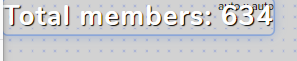
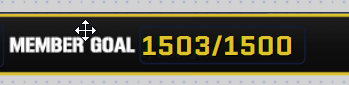 eager lilyBOT
@lethal apex To reset goals:
- from the Overlay Editor > Session data on top right (monitor symbol) > Goals tab > reset progress of desired goal
- from the Dashboard > Activity feed on the left > Widget data on the right > Goals tab -> reset progress of desired goal
Note: Goal widgets (progress) only counts up and doesn't go down automatically, if you lose followers/subs.
 jolly grail
how do I get the elements linked into OBS studio
 mild skiff
hi. i will be using to do some multi-streaming. will the alerts i had set up be for both plataforms (youtube and twitch)?
jolly grail
@eager lily how do I link my elements linked into OBS studio
jolly grail
@jolly grail what do you mean?
@tardy cloud like I downloaded one of your fortnite overlays and it told me to link them into my obs and I use obs studio but have no idea how to do that
eager lilyBOT
@jolly grail To add your overlays to OBS, add a new browser source in your scene. Paste your overlay URL in the browser source properties, set the dimensions to 1920x1080 (unless you changed them on the website) and check Shutdown source when not visible. https://youtu.be/KDvLynUqXI4
 wraith dove
Hello, I Just clicked on add bot to channel and lost the link to add in my youtube can someone help with the bot moderator link?? 
 small nova
Moderating your live chat makes your community more welcoming and healthy. YouTube gives you tools to help prevent harassment and make everyone feel safe.
How to Moderate Live Cha
@wraith dove just follow youtube page instruction to add admin
eager lilyBOT
@wraith dove To set up the bot for your YouTube stream, please follow these steps:
- Make sure your stream is public. The bot cannot join a private/unlisted stream.
- Your stream must be live for the bot to join the chat.
- Go to https://studio.youtube.com/, click on Settings > Community and add https://youtube.com/c/streamelements as a Moderator.
- When live, be sure to look at Live chat instead of Top chat, as Top chat will hide the bot messages.
versed tangle
So, my english is very bad but i want to know how does !points work in youtube?
sage lantern
It doesn't, you need the loyalty system for that to work and that is not available due to YT API restrictions
versed tangle
Oh only in twitch?
sage lantern
yes
versed tangle
Thanks, for the fast respond
 analog adder
Howdy so i have a stremelements page for both twitch and facebook but wont allow me to add youtube? says its already claimed... so i then log in as youtube and its there but not the others? how do i get them all together? id rather not log out and in everytime...
eager lilyBOT
@analog adder Account Merging - Please note:
- Merging accounts only allows faster ways to switch between accounts
- Merging accounts does not allow data sharing between accounts - different streaming platforms, different type of events
- Merging accounts allows duplicating/sharing overlays between the accounts
If you understand the limitations of merging and want to proceed, please find the JWT tokens (!jwt) from both accounts you want to merge and you will be directed to DM them to a staff member
@analog adder You can find your JWT token on your account channels page (Show Secrets to reveal the token): https://streamelements.com/dashboard/account/channels
READ ME: This is a private security token. Do NOT share this token here or other public places, only with a StreamElements staff member in private.
sage lantern
This is the way to combine them ^
If you want that then i will look for a staff member where you can DM those tokens to
sage lantern
okay 😄 one moment please
@analog adder you can DM those tokens to @peak sage and he will merge those accounts for you
 azure condor
hey there 🙂 how are you guys? I'm trying to set up a new overlay for YT and cant find the option to add the chat box - the "streaming tools" option at the bottom doesn't work. thank you in advance 🙂 and have a great day!
shy quail
@azure condor Let's hop in #dreamteam . 🙂
 neat tiger
Hi there, I checked forums but didn't see a specific page for this issue and I'm hoping I just missed it. I'm signed up for both the youtube and twitch creator platforms, but there's some weird glitch that doesnt show me as signed up for them both at the same time. I'm also still a "Mixer creator" which Im obviously not, and have no interest in being part of anything Facebook. Is there any way to reconcile all of my accounts?
(it even says successfully parted your channel, but doesnt actually do it.)
 delicate stream
hi there. is there anyone who can help me with my stream element account setting? I already have one for my Twitch channel, but recently I'm thinking about switching to Youtuibe, so I linked my youtube channel to stream element, but then I found out I could just add an account to my existing account, and now I want to deactivate my youtube-se account, but it doesn't allow me to close the account! it says that it's either my username or email address incorrect when there's nothing wrong with them 😦 please help me. thanks
 agile basin
I am currently struggling to set up streaming with Warframe. The video is very blocky and no matter the bitrate set it remains so. I havent been able to reduce that effect either and wonder if any other users have found a workable resolution to that issue?
 random prairie
hello can anyone help me
i am trying to put my merch link in my YT video description but when i do and it is clicked on it says that the site can not be found
 glacial holly
can anyone tell me why the app stream elements dont work?
 dense seal
I having issues subscribers count it’s not showing up here’s the screenshot.
sage lantern
that is not the total subscribers, but the amount joined this month or since you joined StreamElements if it was within this month
dense seal
Oh I mean I look all days I don’t see any new subscribers and I got 2 new subscribers today I don’t see Subscribers on my Activity Feed.
eager lilyBOT
@dense seal Users can choose to make the channels that they subscribe to public or private. By default, all settings are set to private.
Private: When a user's subscriptions are set to private, no other user can see what channels they subscribe to. A user's account does not show in a channel's Subscribers List, even if they are subscribed.
Public: When users subscriptions are set to public, another user can see what channels they subscribe to. User subscriptions are listed on their channel page and their account is listed in the Subscribers List for any channel they subscribe to.
If a user has it set to Private they will not show up in the activity feed. More info: https://support.google.com/youtube/answer/7280190
 pure zealot
My alerts dont show up on screen when someone subs, i had a mod test is with a alt and still nothing.
versed tangle
Hi, how do I copy my AlertBox settings from my YouTube account and add them to my Twitch account?
dense seal
Thank you bot!
 glossy elk
Any staff able to help me out? I'm trying to close my account and for whatever reason when it asks me for the 4 pieces of information for the account, my account doesn't have an email attached so I'm trying to get it fully closed. Can someone help me please?
tardy cloud
DM me the same information of the form
 eager lilyBOT
@naive sparrow Read and follow our server rules:
- We do not tolerate toxicity! Treat the community team, staff and all members with respect.
- No advertisement or channel promotion, anywhere on the server.
- No NSFW/NSFL
- No unsolicited DMs or friend requests to server members
Make sure to read the #rules in any server you join.
limpid holly
I haven't gotten any reply to my issue:
It would seem that when my viewers become a channel member, that streamelements doesn't detect it in the activity feed
am I missing something or is this a bug?
eager lilyBOT
@modern bloom Read and follow our server rules:
- We do not tolerate toxicity! Treat the community team, staff and all members with respect.
- No advertisement or channel promotion, anywhere on the server.
- No NSFW/NSFL
- No unsolicited DMs or friend requests to server members
Make sure to read the #rules in any server you join.
 tulip slate
Hi! I uploaded the code for the Chat Poll option abd tried a public stream to see if the code !addpoll would work on my YouTube live chat. Nothing happened. I tried another default command and it worked right away. I only inputed the code un my overlay widget. Did I need to create a custom command for it to be linked to my overlay or is it just youtube that does not take into account custom widgets that work with the live chat?
glossy elk
Are these new tools coming for YouTube for video creators or streamers or a bit of both? I primarily stream on YouTube and this sounds exciting and would love to learn more and help test. I filled out the survey to help as well!
lime walrus
@tulip slate The custom widget might not work properly with the actual chat, due to limitations from YT.
@glossy elk what survey are you referring to?
tulip slate
Ok! Thanks for the response. I was afraid it would be it, I might try to double stream on Twitch and Youtube just to have the functionality integrated. I'll see about it.
Otherwise, is there a way to know/see the YT limitations, as to work around them?
 median hamlet
streamelements isn’t coming on my stream?
glossy elk
@lime walrus The one on the front page to sign up for testing.
 obsidian vale
how do i add donations
 steel obsidian
I support a charity that does not offer Stream Elements integration for their alerts. According to the lady I spoke with, the donation alerts will only work through the StreamLabs website. I do not want to move away from OBS Studio or Stream Elements for my Youtube streams.
Can someone smarter than me tell me if there is an easy work around?
Thank you.
main vector
@steel obsidian which charity?
steel obsidian
@main vector - StackUp.
 sharp bear
How can I switch accounts in OBS Live youtube chat? I'm logged in with the right one but it shows the main one in chat (I have multiple on that email)
eager lilyBOT
StreamElements menu, on top of OBS > Logout > Login
 brave solstice
@sharp bear this can help ⤴️
glossy elk
Anyone?
sage lantern
Video creators
glossy elk
@sage lantern Thanks!
sharp bear
@brave solstice I'm on the right account, but chat is treated differently. I have 3 profiles on my email, i logged in with my Stream Channel but the chat remains on the default profile
tardy cloud
I'm not sure about after going live but Youtube doesn't allow us to change title and/or game before or during the stream. You will have to edit those from their dashboard prior to going live and during.
glossy elk
Is there a chatbox widget for YouTube on StreamElements?
tardy cloud
not at the moment
glacial holly
@eager lily Will be ever fixed the issue with connection on youtube inside of the app?
 warped gulch
Is this where I come to if I'm having issues with Streamlabs OBS while attempting to record gameplay????
eager lilyBOT
@warped gulch We're not able to troubleshoot issues with using our overlays in StreamLabs OBS (SLOBS) as we don't have the tools to support their software. We recommend using OBS Studio or OBS Studio with our plugin OBS.Live.
warped gulch
I appreciate the response!
eager lilyBOT
@radiant oasis To set up the bot for your YouTube stream, please follow these steps:
- Make sure your stream is public. The bot cannot join a private/unlisted stream.
- Your stream must be live for the bot to join the chat.
- Go to https://studio.youtube.com/, click on Settings > Community and add https://youtube.com/c/streamelements as a Moderator.
- When live, be sure to look at Live chat instead of Top chat, as Top chat will hide the bot messages.
 radiant oasis
it said not found in commuity
 lilac scroll
Hey, I posted an issue with my sub count before, and I'm still encountering issues
Haven't heard back in weeks
 lethal knoll
the sub counter did not work it went too 55 when i unsubed then resubed instead of 54
 candid falcon
When mid stream streamelements isn't catching new subs at all. What can I do to fix that?
eager lilyBOT
@soft laurel Read and follow our server rules:
- We do not tolerate toxicity! Treat the community team, staff and all members with respect.
- No advertisement or channel promotion, anywhere on the server.
- No NSFW/NSFL
- No unsolicited DMs or friend requests to server members
Make sure to read the #rules in any server you join.
 bright bay
Hi! Why the activity feed on the youtube account may stop updating? New subscribers appear - but they do not get into the activity feed 😦
pure zealot
Hello, my alerts dont show up on my stream, can i get a little help?
 dense kelp
If I accidentally created a new SE account instead of linking it to an existing one, how do I go about deleting it? It requires an email but there isn't one
eager lilyBOT
@dense kelp Account Merging - Please note:
- Merging accounts only allows faster ways to switch between accounts
- Merging accounts does not allow data sharing between accounts - different streaming platforms, different type of events
- Merging accounts allows duplicating/sharing overlays between the accounts
If you understand the limitations of merging and want to proceed, please find the JWT tokens (!jwt) from both accounts you want to merge and you will be directed to DM them to a staff member
@dense kelp You can find your JWT token on your account channels page (Show Secrets to reveal the token): https://streamelements.com/dashboard/account/channels
READ ME: This is a private security token. Do NOT share this token here or other public places, only with a StreamElements staff member in private.
 nocturne marsh
Is it possible to use the stream elements chat bot to post links but not post the tip jar?
fickle pagoda
Sure. Disable the !tip command.
nocturne marsh
That’s what I thought. Thanks @fickle pagoda
wheat hazel
are multiple streamelement accounts allowed ?
fickle pagoda
You can connect multiple channels to StreamElements, but they will not share any data.
wheat hazel
so they are allowed then ?
i dont think you understand the question
is a ban evaded account allowed to still use the streamelements to receive donations ?
fickle pagoda
We don't endorse ban evading accounts, so the short answer is no.
wheat hazel
thank you
and as for my other question, is a person allowed to have multiple streamelement account under different aliases ?
glossy elk
I didn't know if there was a place to get help for general questions based of the website itself but I'm looking for help with something that I would assume is quite easy. Basically the name in the bottom middle is not centered and when I do center it and a name is subscribed that is shorter or longer in characters it becomes off centered again. I've tried playing with the text properties and can't figure out how to always keep it center inside a bounding box of some sort. Ideas?
 compact lava
im having issues with the page as well
glossy elk
Same issue as mine @compact lava ?
compact lava
no but i cant place more gifs in alerts, i already put like 3 but then it wont let me upload anymore
glossy elk
Hmmm file size limitations? I'm not sure I'd leave that one to the pros.
 weak girder
Between both streams I did between Monday and today, I haven't gotten any alerts on stream, even though I did receive a donation and a new subscriber. Any idea why the alerts might not be working?
eager lilyBOT
@weak girder Please provide your account ID found at the top of this page: https://streamelements.com/dashboard/account/channels This ID is public info and safe to share here.
@weak girder Users can choose to make the channels that they subscribe to public or private. By default, all settings are set to private.
Private: When a user's subscriptions are set to private, no other user can see what channels they subscribe to. A user's account does not show in a channel's Subscribers List, even if they are subscribed.
Public: When users subscriptions are set to public, another user can see what channels they subscribe to. User subscriptions are listed on their channel page and their account is listed in the Subscribers List for any channel they subscribe to.
If a user has it set to Private they will not show up in the activity feed. More info: https://support.google.com/youtube/answer/7280190
 paper fable
so how do i grow my youtube?
radiant oasis
my nightbots wont work and i dont have chorme
radiant oasis
k
 naive smelt
Not sure if this is the right channel, but how do I change my name?
 narrow sky
is there a way to merge Youtube and Twitch stream element accounts?
eager lilyBOT
@narrow sky Account Merging - Please note:
- Merging accounts only allows faster ways to switch between accounts
- Merging accounts does not allow data sharing between accounts - different streaming platforms, different type of events
- Merging accounts allows duplicating/sharing overlays between the accounts
If you understand the limitations of merging and want to proceed, please find the JWT tokens (!jwt) from both accounts you want to merge and you will be directed to DM them to a staff member
You can find your JWT token on your account channels page (Show Secrets to reveal the token): https://streamelements.com/dashboard/account/channels
READ ME: This is a private security token. Do NOT share this token here or other public places, only with a StreamElements staff member in private.
 tawdry knoll
when i stream to youtube the chat box doesnt show up
eager lilyBOT
@tawdry knoll StreamElements menu, on top of OBS > Logout > Login
tawdry knoll
so i logout then log back in?
 foggy dagger
why doesnt streamelements update my subscribers
eager lilyBOT
@foggy dagger Users can choose to make the channels that they subscribe to public or private. By default, all settings are set to private.
Private: When a user's subscriptions are set to private, no other user can see what channels they subscribe to. A user's account does not show in a channel's Subscribers List, even if they are subscribed.
Public: When users subscriptions are set to public, another user can see what channels they subscribe to. User subscriptions are listed on their channel page and their account is listed in the Subscribers List for any channel they subscribe to.
If a user has it set to Private they will not show up in the activity feed. More info: https://support.google.com/youtube/answer/7280190
 agile cedar
Why don't you guys provide loyalty system for youtube? 🙄
lime walrus
Due to restrictions from Youtube
agile cedar
Is there any free alternatives? I can't switch to twitch now
lime walrus
i'm not aware of any other alternatives
 tawny briar
I can’t get my overlay on my streams for YouTube I need help doing it on my phone
eager lilyBOT
@tawny briar To add your overlays to OBS, add a new browser source in your scene. Paste your overlay URL in the browser source properties, set the dimensions to 1920x1080 (unless you changed them on the website) and check Shutdown source when not visible. https://youtu.be/KDvLynUqXI4
 molten flint
hey guys I'm trying to change the streamelemnts bot name i can't find a way anyone else encounter this?
tardy cloud
For youtube is no custom bot name
molten flint
🥲
eager lilyBOT
@versed tangle To set up the bot for your YouTube stream, please follow these steps:
- Make sure your stream is public. The bot cannot join a private/unlisted stream.
- Your stream must be live for the bot to join the chat.
- Go to https://studio.youtube.com/, click on Settings > Community and add https://youtube.com/c/streamelements as a Moderator.
- When live, be sure to look at Live chat instead of Top chat, as Top chat will hide the bot messages.
 onyx inlet
how do i go live on yt on stream elements
eager lilyBOT
@onyx inlet New to StreamElements?
Check out our YouTube channel https://www.youtube.com/c/streamelements/videos
with tutorial videos from setting up the basics, to in-depth details on how to use our product.
New to OBS? Here is a 4 step quick start guide
https://obsproject.com/wiki/OBS-Studio-Quickstart
Want to learn even more? Here is an in-depth overview
https://obsproject.com/wiki/OBS-Studio-Overview
onyx inlet
@fickle pagoda it keep saying is could not access the specified channel or stream key, please double-check your streamkey.if it is correct there may be a problem connecting to the server
fickle pagoda
Check everything in Settings>Stream, then redo it anyway.
naive smelt
Ive updated my youtube name but it streamelements still shows my old one, is there any way to change this?
small nova
https://www.youtube.com/live_dashboard this dashboard link on your OBS pluggin does not work anymore
 fringe egret
anybody free to help answer a few noob questions?
eager lilyBOT
@fringe egret Welcome to the helpdesk! Please let us know how we can assist you today and a support volunteer or staff member will assist you as soon as they are available. Thank you for your patience.
 shrewd latch
hi could a member of staff contact me ASAP
eager lilyBOT
@shrewd latch Welcome to the helpdesk! Please let us know how we can assist you today and a support volunteer or staff member will assist you as soon as they are available. Thank you for your patience.
shrewd latch
i do not wish to discuss the problem in public chat as its a sensitive issue so please message me
versed tangle
Hello! I need help with the sub goal overlay thingy. I created a new sub goal with the goal 100, but it starts off at 0 and not with the current amount of subs I have. How can I fix this?
eager lilyBOT
@versed tangle To reset goals:
- from the Overlay Editor > Session data on top right (monitor symbol) > Goals tab > reset progress of desired goal
- from the Dashboard > Activity feed on the left > Widget data on the right > Goals tab -> reset progress of desired goal
Note: Goal widgets (progress) only counts up and doesn't go down automatically, if you lose followers/subs.
fickle pagoda
@shrewd latch You can email us at support@streamelements.com
 odd gorge
I want to enable media request but when I press "show on stream" it says this:
https://cdn.discordapp.com/attachments/653934223228403742/771667392895647744/unknown.png

How do i activate the widget?
lime walrus
@odd gorge idk how you are getting the dock, but the Media request should not be active for you if you are logged in with your Youtube
@glad tartan those commands do not work for Youtube due to restrictions from Youtube
 glad tartan
Thank you very much. Now i don't have to search like a dumbass for it.
 rough ice
 cold flame
How do I get my stream notifications to work on obs?
eager lilyBOT
@cold flame To add your overlays to OBS, add a new browser source in your scene. Paste your overlay URL in the browser source properties, set the dimensions to 1920x1080 (unless you changed them on the website) and check Shutdown source when not visible. https://youtu.be/KDvLynUqXI4
 heavy karma
Video editing software, Can I use stream elements to edit videos, or are there better/ more preferred software out there.
 vapid python
So how do I set up loyalty on yt
vapid python
For stream elements or any software?
fresh zenith
Only for twitch at this time. Due to limitations from YT there is no loyalty.
versed tangle
hello im getting white blank page when trying to access a channel im bot supervisor
tried cleaning my cache and different browsers
getting white blank page
is it a known bug or
 dull verge
Not gana lie this is getting pretty annoying :/ Everytime i try and stream theres another weird issue i have... Can anyone help me please?
I stream on youtube, chat doesnt load and no stream activity.. but no option to sign in with youtube
fresh zenith
StreamElements menu, on top of OBS > Login
dull verge
@fresh zenith thanks for the reply, i uninstalled and reinstalled seems to be good now
 cunning rapids
hi
versed tangle
hello im getting white blank page when trying to access a channel im bot supervisor
tried cleaning my cache and different browsers
getting white blank page
is it a known bug or

tardy cloud
@versed tangle The streamer needs to logout and log back in on the site
 tepid marlin
I'm not sure exactly what channel to put this in, but I normally stream on twitch, but decided I wanted to try streaming on youtube, so I signed into streamelements with youtube. That apparently created an account for that one as well and I didn't know I could put them both on the same one. Is there a way to merge both of my accounts while keeping the settings from the twitch one.
eager lilyBOT
@tepid marlin Account Merging - Please note:
- Merging accounts only allows faster ways to switch between accounts
- Merging accounts does not allow data sharing between accounts - different streaming platforms, different type of events
- Merging accounts allows duplicating/sharing overlays between the accounts
If you understand the limitations of merging and want to proceed, please find the JWT tokens (!jwt) from both accounts you want to merge and you will be directed to DM them to a staff member
You can find your JWT token on your account channels page (Show Secrets to reveal the token): https://streamelements.com/dashboard/account/channels
READ ME: This is a private security token. Do NOT share this token here or other public places, only with a StreamElements staff member in private.
tepid marlin
Alright I have them, who do I dm them to?
tardy cloud
DM me
versed tangle
@tardy cloud he did it, didnt work. im still getting white blank page
eager lilyBOT
@mellow comet Account Merging - Please note:
- Merging accounts only allows faster ways to switch between accounts
- Merging accounts does not allow data sharing between accounts - different streaming platforms, different type of events
- Merging accounts allows duplicating/sharing overlays between the accounts
If you understand the limitations of merging and want to proceed, please find the JWT tokens (!jwt) from both accounts you want to merge and you will be directed to DM them to a staff member
 mellow comet
where is the jwt token found?
 lyric roost
"You have no stream activity" all the time, i have started my livestream tested with secondary account nothings shows up, its not problems in alerts its in activity feed. Tried everything in 48 hours nothing works 😄
and on dashboard nothing shows up 0 subs 0 tips, and also "you have no stream activity"
 compact frost
Please help me my alert box aint working i've tried everything.
eager lilyBOT
@compact frost Users can choose to make the channels that they subscribe to public or private. By default, all settings are set to private.
Private: When a user's subscriptions are set to private, no other user can see what channels they subscribe to. A user's account does not show in a channel's Subscribers List, even if they are subscribed.
Public: When users subscriptions are set to public, another user can see what channels they subscribe to. User subscriptions are listed on their channel page and their account is listed in the Subscribers List for any channel they subscribe to.
If a user has it set to Private they will not show up in the activity feed. More info: https://support.google.com/youtube/answer/7280190
sage lantern
it's not only you, the user that subs has to be public too, and that is where the issue is mostly
compact frost
it's working now idk what i did, maybe it is the private shit
 patent badge
Do I report the beta issues in here?
lyric roost
do you have same problem with live dashboard?
 past terrace
hey, how can i test the alerts?
eager lilyBOT
@past terrace You can test alerts via the Emulate bell on the lower left side of the Overlay Editor. Simply go to your Dashboard > My Overlays > pencil/edit button on the overlay. Make sure the Preview LIVE on stream option is on to see the alert in OBS/XSplit** https://streamable.com/vtulg9

 south narwhal
How do I make stream elements come to my chat
eager lilyBOT
@south narwhal To set up the bot for your YouTube stream, please follow these steps:
- Make sure your stream is public. The bot cannot join a private/unlisted stream.
- Your stream must be live for the bot to join the chat.
- Go to https://studio.youtube.com/, click on Settings > Community and add https://youtube.com/c/streamelements as a Moderator.
- When live, be sure to look at Live chat instead of Top chat, as Top chat will hide the bot messages.
versed tangle
hello im getting white blank page when trying to access a channel im bot supervisor
tried cleaning my cache and different browsers
getting white blank page
is it a known bug or
still having problem with this
told the streamer to clear cache and relogin as well
nothing
weak girder
So a couple days ago, I mentioned how I wasn't getting any live notifications for things like subscribers and donations and such and the same issue is persisting. I just realized something...when I first signed up for StreamElements years ago, I had a different URL for my YouTube channel (RobRegalTV). It was changed to RobRegalGxC a few months back for SEO purposes with the rest of my online branding. Could the URL change possibly have caused the notifications to break so StreamElements isn't picking up actions, and if so, is there any way to fix it?
glossy elk
I need some help staff, the animations and a couple other features are not working correctly on the overlay editors.
 snow mango
When trying to connect to my Youtube channel on the streamelements website, it tells me the Youtube channel is already claimed. How do I fix this?
eager lilyBOT
@snow mango Account Merging - Please note:
- Merging accounts only allows faster ways to switch between accounts
- Merging accounts does not allow data sharing between accounts - different streaming platforms, different type of events
- Merging accounts allows duplicating/sharing overlays between the accounts
If you understand the limitations of merging and want to proceed, please find the JWT tokens (!jwt) from both accounts you want to merge and you will be directed to DM them to a staff member
You can find your JWT token on your account channels page (Show Secrets to reveal the token): https://streamelements.com/dashboard/account/channels
READ ME: This is a private security token. Do NOT share this token here or other public places, only with a StreamElements staff member in private.
snow mango
How do I get a JWT token if the website won't even allow me to add the Youtube channel?
tardy cloud
That message appears only when yo ualready login with your youtube account directly via the homepage, so you just need to go to the homepage and log again with your youtube account
snow mango
Ah that worked, I was logged into Twitch and I guess I thought it would just keep all of my channels on the same login. Alrighty then.
Gotta figure out how to get all of my overlays and all other settings to this page then I guess
 frail scaffold
Hi, does anyone know how to change the YouTube live chat to dark mode during live stream In OBS?
tardy cloud
@frail scaffold check pinned messages
frail scaffold
@tardy cloud 🙏
 cursive tendon
The sub counter is not working efficiently
 winter peak
Hey guys, is there a chatbox option for youtube in stream elements or is it only for twitch?
sage lantern
Twitch only due to restrictions in the YT API
winter peak
ohk thank you
 coral maple
Hello, is there anyway to fix my activity feed for streamelement? My subs dont always pop up and im not sure why
 wraith bolt
Hello. my stream elements alert box is not working while I am live on YouTube. Can someone please help me?
Can someone please help me with a workaround?
So, this is it.. No help for our queries.. Is this what we have to expect when we try to reach SE support??
 normal tulip
@wraith bolt If your stream is set to private one alerts are not being shown. The same applies if a viewer who performed an action set their privacy levels high.
 tawdry canopy
hello,i am having difficulty to set up mini games
 nimble quarry
 idle dune
not possible for youtube
 rare wigeon
idle dune
rare wigeon
idle dune
youtube how to use your editor.
this isnt the place for asking
versed tangle
so i am trying to set up my alerts for youtube obviously using stream elements. only a small portion of the alert shows up. anyone know what i am doing wrong?
driving me insane
eager lilyBOT
@versed tangle The default resolution for StreamElements overlays (theme and custom) is 1920x1080. Please add them in OBS at their full resolution and use CTRL+F to fit to screen if necessary. You can then downscale your stream in OBS settings > Video if you'd like https://i.imgur.com/6bWXxjR.png
 versed tangle
im using it in stream labs obs.. should i move to OBS?
eager lilyBOT
@versed tangle We're not able to troubleshoot issues with using our overlays in StreamLabs OBS (SLOBS) as we don't have the tools to support their software. We recommend using OBS Studio or OBS Studio with our plugin OBS.Live.
 hushed valley
good day when i get a subscriber for example the notification doesn't come through in my chat and live stream, what could i do pls?
eager lilyBOT
@hushed valley Users can choose to make the channels that they subscribe to public or private. By default, all settings are set to private.
Private: When a user's subscriptions are set to private, no other user can see what channels they subscribe to. A user's account does not show in a channel's Subscribers List, even if they are subscribed.
Public: When users subscriptions are set to public, another user can see what channels they subscribe to. User subscriptions are listed on their channel page and their account is listed in the Subscribers List for any channel they subscribe to.
If a user has it set to Private they will not show up in the activity feed. More info: https://support.google.com/youtube/answer/7280190
hushed valley
mine is public and another thing is itb only shows up nopw and then like 1/4 of the time the rest of the time nothing comes through
sage lantern
It's not only your setting, all the users that sub have to have it set to public to 😉
versed tangle
i am really struggling to add sounds to my alerts. it lets me upload the file but does not let me select the file
versed tangle
Hello, I got a question, I am wanting to add Neatclip's Functionality to StreamElements' Chatbot, would Neatclips' API work when i want to clip something?
 lavish iris
hey, so im rtrying to make my first stream elements overlay but there seems to be a lot of features missing that people use stream elements for like mediashare and a chatbox? why cant i find them or am i just being stupid?
sage lantern
those are not available for YT due to limitations in their API
lavish iris
well... frick
small nova
@lavish iris you can mix the competitor's tools in your stream if you really need something SE don't have. That's what I did for chat overlay with Youtube.
 rancid ermine
How do I make stream elements a mod in youtube ?
eager lilyBOT
@rancid ermine To set up the bot for your YouTube stream, please follow these steps:
- Make sure your stream is public. The bot cannot join a private/unlisted stream.
- Your stream must be live for the bot to join the chat.
- Go to https://studio.youtube.com/, click on Settings > Community and add https://youtube.com/c/streamelements as a Moderator.
- When live, be sure to look at Live chat instead of Top chat, as Top chat will hide the bot messages.
rancid ermine
Does that make stream element the one I use ? Or just general
lavish iris
@lavish iris you can mix the competitor's tools in your stream if you really need something SE don't have. That's what I did for chat overlay with Youtube.
@small nova i made an overlay with all the stuff i want for when i start streaming on twitch but for now im just gonna stick with slobs untill then
small nova
I offered you a solution. Do whatever you want with it.
 rigid loom
Greetings, I would like to know how to make the chat display in the overlay both YT and TW, please, if you answer, do it via @. I’m bad with English and I simply don’t understand that this answer was to me
lime walrus
We don't have a chat widget for YT, due to limitations from YT
sharp bear
Hi so I'm trying to make a Chat Workaround by using some CSS and the YouTube Chat Link.
It already works in OBS but I'd like to integrate in into Streamelements so I don't need seperate Browser Sources.
My question is how I need to import the YouTube Pop-Out Chat into Streamelements to achive a similar result?
 steel wagon
hi, so I've started streaming recently and I created my alertbox and everything was working fine for the first two subs on my channel. The bot thanked them for subscribing and the alert showed up with the new sub and my most recent sub showed aswell. Then I wanted to show my friend how it works and I tested it and showed him with the bit option. I've gained about 15 subscribers since and none of the alerts are working. Neither the alertbox, most recent sub or the chat bot saying thankyou. Can anyone please help me?
 visual igloo
Good afternoon everybody I've been streaming with streamelements for a long time and I know how to use it to a certain extent but I'd like to start doing a few of videos on a YouTube channel trying to scratch my head and work my round what settings I need for my videos now my internet is is around about 10 Meg upload and 55 mega download I'm not quite sure what to set the bitrate at for the video and what other settings I might need to change I'm running a 1050 ti graphics card so I'm a bit lost on how to set the video section up of streamelements I hope this makes sense thanks for your help
eager lilyBOT
@steel wagon Users can choose to make the channels that they subscribe to public or private. By default, all settings are set to private.
Private: When a user's subscriptions are set to private, no other user can see what channels they subscribe to. A user's account does not show in a channel's Subscribers List, even if they are subscribed.
Public: When users subscriptions are set to public, another user can see what channels they subscribe to. User subscriptions are listed on their channel page and their account is listed in the Subscribers List for any channel they subscribe to.
If a user has it set to Private they will not show up in the activity feed. More info: https://support.google.com/youtube/answer/7280190
 shrewd kelp
Hey everyone im new here and im looking for someone who can help me redo my stream overlays along with getting some new merch looks
sage lantern
you were told to look in #art-marketplace 😉
shrewd kelp
dang lol im bad at this sorry
 ruby lion
Hey everyone, I need some help. I wanna use StreamElements to display a subscriber goal on my stream, but I want it to be global, not weekly or daily. Can this be done?
 next gyro
hello is it possible to use the overlays that i use on twitch to use them on youtube?
steel wagon
@eager lily but surely it should still show up in my stream elements analytics that i gained subscribers. Which it hasn't. Its seems as if stream elements is frozen on my account
 fleet sun
Hey SE Support Team:
My donation page url has some weird numbers in it. Is it possible to customize the url to let it be without those or what can i do on my side?
tardy cloud
@fleet sun the streamelements URL is created with your username, if it has some numbers on it, its because the username is already taken
fleet sun
Well i have a twitch channel one too. Can't i just say my twitch one gets the numbers and my youtube one gets the one without? @tardy cloud
tardy cloud
please send us an email to support@streamelments.com with your JWT of each account and the request
 austere lantern
i need help cuz of youtube
eager lilyBOT
@austere lantern Welcome to the helpdesk! Please let us know how we can assist you today and a support volunteer or staff member will assist you as soon as they are available. Thank you for your patience.
eager lilyBOT
@versed tangle Welcome to the helpdesk! Please let us know how we can assist you today and a support volunteer or staff member will assist you as soon as they are available. Thank you for your patience.
@versed tangle Welcome to the helpdesk! Please let us know how we can assist you today and a support volunteer or staff member will assist you as soon as they are available. Thank you for your patience.
fleet sun
@tardy cloud Thanks. i will try that
versed tangle
non riesco a trovare il link da inseire su youtube per fare mod streamelements
aiutatemi per favore
eager lilyBOT
@versed tangle To set up the bot for your YouTube stream, please follow these steps:
- Make sure your stream is public. The bot cannot join a private/unlisted stream.
- Your stream must be live for the bot to join the chat.
- Go to https://studio.youtube.com/, click on Settings > Community and add https://youtube.com/c/streamelements as a Moderator.
- When live, be sure to look at Live chat instead of Top chat, as Top chat will hide the bot messages.
 finite steeple
I am not able to see Loyalty Points section
main vector
@finite steeple not available for YouTube.
finite steeple
Ok
 ruby estuary
hi... how do i delete facebook and website from the profile page... i do not have either.
fleet sun
There is a bug when you activate the chat alerts bot module the messages never get saved (but it says so) and the module always gets deactivated, when i change something.
 tame flint
Hi
I am trying to build an overlay
ive built it
when i try to import link to streamlabs it doesnt put it into the right frame
For anyone having this problem - its cos the frames are 1920x1080 figured it out. Merci @restive ore
 restive ore
Yes, when you add your overlay to OBS, be aware of the resolution of your browser source.
tame flint
🙂
ruby lion
Hey everyone, throwing this back out, does anyone know how to make a subscriber count with all-time subscibers rather than just daily/weeklyÉ
 outer pewter
Were can i found my video created with streamelements (not a stream)
sage lantern
@outer pewter how about you just look at the answer i gave you?
and this is exactly my point i made in that answer too
cross posting in multiple channels doesn't help and is only confusing
outer pewter
i dont see any answer?
sage lantern
not this channel
 glad oriole
Hey there, how can one change it's streamelements username? I searched within the Dashboard and account settings but nothing so far. Thank you
 vital surge
Quick question can I stream to my YouTube channel without 1000 subscribers
I keep getting error can not connect to YouTube why is this please x
versed tangle
Hello everyone, when i want to edit my videos in primier 2020 i have this "File fomat doesnt support" error. So let me know how to i can edit my videos.
lime walrus
@versed tangle this is not something we can help with. Its not related to us and our tools
@vital surge where exactly are you getting that error?
can you screenshot?
vital surge
When I press the red button to go live
versed tangle
@lime walrus sorry i type it wrong discord server yea ?
 rancid topaz
hiya, im trying to unlink my twitch too my youtube on streamelements but its not allowing me as when ever i press close my account this comes up
!close
!closeaccount
 tall sun
There is no way to separate channels from your account
tall sun
If you want to delete your entire account, yes
 tall sun
I'm not sure what you're showing me in the screenshot.
rancid topaz
it says invalid username @tall sun
tall sun
can you please show the entire screen? I need context.
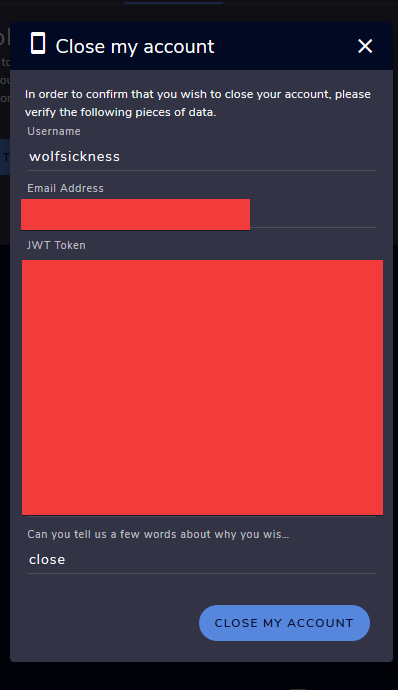 versed tangle
Is their a way to create a promotion video that says like Join by twitch (enter twitch name here) and Join my discord! (enter discord here) if so what would i use to create that
@rancid topaz Please send us a support ticket regarding this, we'll close it for you manually
versed tangle
send an email to support@streamelements.com
versed tangle
Once we actually get the email, we'll reply
the process itself may take a few days
rancid topaz
ahh okay awesome thanks
 idle valve
Hi i'm new here wanna ask is this always offline ?
ruby lion
@vital surge you can stream from pc to youtube with less than 1000 subs, for mobile you need the 1000
Also, just gonna throw this back out again, could really use an answer on this one, thanks!
Hey everyone, throwing this back out, does anyone know how to make a subscriber count with all-time subscibers rather than just daily/weekly?
@ruby lion
 vernal parrot
can obs.live on a macbook?
shy quail
No.
vernal parrot
why not?
 tropic finch
Hello. I just now got banned on Twitch for "hate-related things" just moments after launching CSGO. I don't know what is wrong with that platform and i'd like to try streaming on YouTube. Is it hard to "transfer/adjust" my overlay for YouTube? Like subs, cheers and stuff?
I mean it's a7 day ban but my brain just exploded so i'd like to try something else.
tropic finch
thx
 terse thistle
Hi new here, when I'm logged in using Facebook, I can see Media Share. But If I use my YT account, I can't see the media share widget at all when I'm editing my overlays. Is there any other way to make it work?
fickle pagoda
Media request is not available for YouTube.
terse thistle
Thanks @fickle pagoda
 next canopy
how do i add my stream bot into my stream mive already linked my yt
eager lilyBOT
@next canopy To set up the bot for your YouTube stream, please follow these steps:
- Make sure your stream is public. The bot cannot join a private/unlisted stream.
- Your stream must be live for the bot to join the chat.
- Go to https://studio.youtube.com/, click on Settings > Community and add https://youtube.com/c/streamelements as a Moderator.
- When live, be sure to look at Live chat instead of Top chat, as Top chat will hide the bot messages.
 signal pendant
Hi guys, I just made the switch from streamlabs to OBS and stream elements. I typically stream to facebook but am getting ready to launch on YT. I've successfully added YT stream key but when i hit go live on OBS with YT stream key the pop up still says "Start streaming to Facebook". Its like OBS is defaulted to facebook. Is there something I need to change in settings? OBS said that streamelements plugin replaces service integration modules in OBS said you guys could help? Thanks
eager lilyBOT
@signal pendant StreamElements menu, on top of OBS > Logout > Login
signal pendant
face palm. smh. now i feel dumb... LOL. Thanks! I knew it was something easy.
idle valve
does anyone know why alerts are not appearing in youtube livestream ? It appeared in obs studio when i emulate it
candid falcon
Hello, how do I get Chat to work for youtube in obs.live? I've tried the log out/login thing, but all that I see in the chat window is it flickering between the offline screen and another screen I can't make out.
eager lilyBOT
@candid falcon Please provide a proper screenshot with the issue visible. If not sure how to take a screenshot, you can check here: https://www.take-a-screenshot.org
 opaque zealot
ok
im trying t remve my YT account to link it with my main twitch account..
unforunately its saying i have an invalid email....
rancid topaz
I want to get rid of streamelements from being part of my stream completely but when I try to close my account it say my username is invalid yet I tried my twitch username and every name possible, where can I find my stream elements username.
 dreamy loom
I can't see new subscribers on my YouTube channel anymore. New subs used to have an alert on screen and be shown. Now there are no alerts on screen and the same sub is always shown. Please help
dreamy loom
???
 hardy ember
and
 brisk remnant
can i get help changing my streamelements profile name?
 devout saffron
hi, my subscribers are not recognized on my stream elements dashboard
also don't shows nothing on my activity feed when i am in live
eager lilyBOT
@devout saffron Users can choose to make the channels that they subscribe to public or private. By default, all settings are set to private.
Private: When a user's subscriptions are set to private, no other user can see what channels they subscribe to. A user's account does not show in a channel's Subscribers List, even if they are subscribed.
Public: When users subscriptions are set to public, another user can see what channels they subscribe to. User subscriptions are listed on their channel page and their account is listed in the Subscribers List for any channel they subscribe to.
If a user has it set to Private they will not show up in the activity feed. More info: https://support.google.com/youtube/answer/7280190
devout saffron
it's not that
my profile on stream elements dont shows how many subscribers i have
and dont shows when i am at live
 devout saffron
is it applied to subscribers alert on lives too?
devout saffron
ok thanks
hardy ember
why are loyalty settings not available?
dreamy loom
My YT subscription alerts worked last week and now they don't appear at all. Please help
eager lilyBOT
@dreamy loom To add your overlays to OBS, add a new browser source in your scene. Paste your overlay URL in the browser source properties, set the dimensions to 1920x1080 (unless you changed them on the website) and check Shutdown source when not visible. https://youtu.be/KDvLynUqXI4
dreamy loom
I know bot. Alerts worked and now they don't.
 polar kestrel
Can I use twitch widgets on a youtube stream?
tardy cloud
@polar kestrel you have a list of widget available for youtube on the web editor
polar kestrel
I was mostly asking cuz the among us chat box is only for twitch
tardy cloud
that one probably won't work on youtube accounts
polar kestrel
oof ok
 tender bay
good evening, I somehow cant add lifechat to my overlay... is there some setting I need to enable first?
tardy cloud
Youtube doesn't have a chat widget atm
tender bay
alright, thanks!
 tiny seal
Hello guys. Stream elements is stuck right now in here. I'm not sure what else I need to do to proceed
tardy cloud
@tiny seal Restart OBS and try again
 sharp owl
i'm having the same problem, loging in with twitch is no problem but with youtube it doesn't work at all
okay, after logging with twitch, i logged out again and back to youtube which fixed the whole issue
 scarlet nova
i got it thanks man
 unborn valley
I'm trying to record my game just to see how I play and I want to put the fps cap at 30-40 ,but whenever I go to video settings it says a video output is currently active when I don't have any on. I am not sure what to do. Anyone know what to do?
 upper rose
@eager lily My total sub count is curently stuck at 37 since 1 month ago and i have tried fixing it.
eager lilyBOT
@upper rose Please provide your account ID found at the top of this page: https://streamelements.com/dashboard/account/channels This ID is public info and safe to share here.
upper rose
User ID or Channel ID?
versed tangle
This one @upper rose
upper rose
This one @upper rose
@versed tangle Thank Buddy!
versed tangle
No problem
upper rose
oh also where is the top of the page? sorry im new to discord.
lime walrus
Open the link and its right on top of the actual page
upper rose
Open the link and its right on top of the actual page
@lime walrus i got the id already im asking where to put it.
versed tangle
Here
lime walrus
lime walrus
There is now showing 39 total subs
upper rose
There is now showing 39 total subs
@lime walrus wow thanks did not ecpect it to be this quick.
 civic vine
eager lilyBOT
civic vine
eager lilyBOT
@civic vine Please ask your question in one helpdesk channel only. A support volunteer or StreamElements staff member will assist you as soon as they are available. Asking in multiple places will only result in confusion, not faster answers. Thank you for your patience.
 next shell
i connected my stream elements bot to my channel but i still can't see it the bot on chat what could be the reason? do i need to mod i to see it?
 sterile thistle
How do I make stream elements a mod on my channel any help ??
versed tangle
Paste StreamElements' Youtube channel link in this box right here @sterile thistle
eager lilyBOT
@sterile thistle To set up the bot for your YouTube stream, please follow these steps:
- Make sure your stream is public. The bot cannot join a private/unlisted stream.
- Your stream must be live for the bot to join the chat.
- Go to https://studio.youtube.com/, click on Settings > Community and add https://youtube.com/c/streamelements as a Moderator.
- When live, be sure to look at Live chat instead of Top chat, as Top chat will hide the bot messages.
versed tangle
I need help
 torn basalt
How can i get the chat to work when im streaming with a dual PC setup?
like i have it on my main PC but the chat wont activate
versed tangle
Due to the limitations of Youtube's API, there is no chatbox for Youtube
torn basalt
but streamlabs can implement both twitch chat and yht chat in an widget for in the stream
versed tangle
Their system works differently then StreamElements'
versed tangle
There is indeed a activity feed for youtube
torn basalt
okay thankj you
versed tangle
Make sure that when people sub to you to have their Subscriptions set to public or It will not pick up the new subs
versed tangle
No problem
 uneven bluff
my bot isnt working (if i type a command in the chat it doesnt say anything)
 dire lynx
Okay so i have an issue with OBS in the advance properties i have each "Track" selected to a specific audio channel. Testing everything out i can see my mic working, desktop audio AND discord audio as well each on it's on track working....however! when i record i ONLY get audio on "track 1" and NOTHING on the other audio layers/tracks. Tried 3 other Editing software including VLC AND Handbrake to see if its on my end....NOTHING but 1 audio layer/track which was BOTH my audio from my game(Arma 3 AND discord) but NO mic audio from me... How to fix?
Track 1 being audio from desktop aka my game audio Track 2 being discord and track 3 being my mic..
 pseudo vapor
How can you enable sepay? I don't see it in my dashboard
dire lynx
sepay? You mean separate audio tracks?
Also clikc the cog wheel and click "Advance audio properties"
The "Tracks" represent a "layer" for audio.
When ALL are selected it means every "audio" is on 1 track
eager lilyBOT
@pseudo vapor SE.PAY is available for streamers who are at least 18 years old, with bank account under their name in one of the following countries and have at least 101 follower (Twitch) / 101 subscribers (YouTube):
Austria, Belgium, Czech Republic, Denmark, Finland, France, Germany, Ireland , Italy, Netherlands, Poland, Portugal, Slovakia, Spain, Sweden, Switzerland, United Kingdom, United States.
If you meet these criteria and don’t see SE.Pay, let us know.
For information on SE.Pay payment methods, their fees and settlement times see https://streamelements.com/dashboard/tipping/fees.
 waxen raft
@dire lynx You have to use .MKV as your recording format.
You can remux (convert) it later to .MP4 if needed.
dire lynx
OMFG TY! ❤️ Seriously saved me from literally pulling my hair out!
waxen raft


uneven bluff
my bot isnt working (if i type a command in the chat it doesnt say anything) is it possible to fix this?
 lost steeple
Does anybody know how to change the start streaming button to YouTube from Facebook
eager lilyBOT
@lost steeple StreamElements menu, on top of OBS > Logout > Login
 warped trail
How do I share my link with for my merch with my subscribers?
 warm rune
hey guys i have a wuestion, is there no option in overlay to show youtube lvie chat on stream?
shy quail
No, there is not.
warm rune
ah okay thx
 shell wyvern
How to add streamelements to you tube channel
eager lilyBOT
@shell wyvern To set up the bot for your YouTube stream, please follow these steps:
- Make sure your stream is public. The bot cannot join a private/unlisted stream.
- Your stream must be live for the bot to join the chat.
- Go to https://studio.youtube.com/, click on Settings > Community and add https://youtube.com/c/streamelements as a Moderator.
- When live, be sure to look at Live chat instead of Top chat, as Top chat will hide the bot messages.
 kindred bloom
hi im have trouble setting my overlay to obs studio......................when i set it only half of it appears.........pls help:(
eager lilyBOT
@kindred bloom The default resolution for StreamElements overlays (theme and custom) is 1920x1080. Please add them in OBS at their full resolution and use CTRL+F to fit to screen if necessary. You can then downscale your stream in OBS settings > Video if you'd like https://i.imgur.com/6bWXxjR.png
kindred bloom
ok thanks a lot it works now
versed tangle
good morning at all i have a "problem". How a i can make moderator stream elements on youtube??
eager lilyBOT
@versed tangle To set up the bot for your YouTube stream, please follow these steps:
- Make sure your stream is public. The bot cannot join a private/unlisted stream.
- Your stream must be live for the bot to join the chat.
- Go to https://studio.youtube.com/, click on Settings > Community and add https://youtube.com/c/streamelements as a Moderator.
- When live, be sure to look at Live chat instead of Top chat, as Top chat will hide the bot messages.
versed tangle
thanks it works
 ancient fog
I am not able to link stream element as mod.
eager lilyBOT
@ancient fog To set up the bot for your YouTube stream, please follow these steps:
- Make sure your stream is public. The bot cannot join a private/unlisted stream.
- Your stream must be live for the bot to join the chat.
- Go to https://studio.youtube.com/, click on Settings > Community and add https://youtube.com/c/streamelements as a Moderator.
- When live, be sure to look at Live chat instead of Top chat, as Top chat will hide the bot messages.
ancient fog
It is working Thakyou.
 zealous bronze
Good afternoon! It is impossible to add YouTube to the overlay, there is no available widget at all, although there is a chat when setting up the twitch overlay. What to do with it?
youtube overlay settings
twitch overlay settings
zealous bronze
And what are the ways to display the YouTube chat in this platform?
lime walrus
There isn't a way to display the chat on stream via our tools
lime walrus
Are you using Chrome?
 pure hull
yes
lime walrus
No need to DM me - i was not on my PC for a brief moment
Check your emails if you have to approve a login connection to your Youtube account
lime walrus
Can you try this:
eager lilyBOT
Please logout of StreamElements at https://streamelements.com/logout and then login again to your account (Twitch/YouTube/Facebook).
 normal pike
Hello
eager lilyBOT
@normal pike Welcome to the helpdesk! Please let us know how we can assist you today and a support volunteer or staff member will assist you as soon as they are available. Thank you for your patience.
normal pike
I need command for nightbot
 proven hill
alerts are not showing up as of subs and others. Im using obs 26.0.2 I reloaded the urls and still nothing
versed tangle
I have a youtube channel and heard abou't this So checked it out.
Can Someone Pls explain to me How to use it?
Thx.
eager lilyBOT
@versed tangle New to StreamElements?
Check out our YouTube channel https://www.youtube.com/c/streamelements/videos
with tutorial videos from setting up the basics, to in-depth details on how to use our product.
New to OBS? Here is a 4 step quick start guide
https://obsproject.com/wiki/OBS-Studio-Quickstart
Want to learn even more? Here is an in-depth overview
https://obsproject.com/wiki/OBS-Studio-Overview
 hoary ocean
how do i download this
eager lilyBOT
@hoary ocean New to StreamElements?
Check out our YouTube channel https://www.youtube.com/c/streamelements/videos
with tutorial videos from setting up the basics, to in-depth details on how to use our product.
New to OBS? Here is a 4 step quick start guide
https://obsproject.com/wiki/OBS-Studio-Quickstart
Want to learn even more? Here is an in-depth overview
https://obsproject.com/wiki/OBS-Studio-Overview
 halcyon bridge
hey guys i want disconnect my youtube accounts from streamelements. Can you do that?
eager lilyBOT
@halcyon bridge There is no easy way to unlink 2 owner-type accounts from each other. The only way is to make a closure request from here: https://streamelements.com/dashboard/account/security
WARNING: In submitting a closure request, all linked channels within the account will be deleted and you will lose all associated data. This includes overlays, custom commands, timers and past data (tips, subs, etc). You can still reconnect with the deleted account, but you are essentially starting fresh.
halcyon bridge
ehmm... I don't have any email connected to my streamelements account...
tardy cloud
If you are 100% sure that you want to delete all acounts linked send us an email to support@streamelements.com with the same information of that form and we will create the task for our dev team
halcyon bridge
perfect, thank you
 reef drift
i just switched to youtube and i made all my commands and i added streamelements as a mod on my youtube and i cant do any commands
eager lilyBOT
@reef drift To set up the bot for your YouTube stream, please follow these steps:
- Make sure your stream is public. The bot cannot join a private/unlisted stream.
- Your stream must be live for the bot to join the chat.
- Go to https://studio.youtube.com/, click on Settings > Community and add https://youtube.com/c/streamelements as a Moderator.
- When live, be sure to look at Live chat instead of Top chat, as Top chat will hide the bot messages.
 celest juniper
SE.PAY is available for streamers who are at least 18 years old, with bank account under their name in one of the following countries and have at least 101 follower (Twitch) / 101 subscribers (YouTube):
Austria, Belgium, Czech Republic, Denmark, Finland, France, Germany, Ireland , Italy, Netherlands, Poland, Portugal, Slovakia, Spain, Sweden, Switzerland, United Kingdom, United States.If you meet these criteria and don’t see SE.Pay, let us know.
For information on SE.Pay payment methods, their fees and settlement times see https://streamelements.com/dashboard/tipping/fees.
@eager lily Are you guys planning to include Brazil in this list of countries?
 placid flame
I am having issues with my audio input it is not picking up me talking when im streaming or recording
eager lilyBOT
@versed tangle Welcome to the helpdesk! Please let us know how we can assist you today and a support volunteer or staff member will assist you as soon as they are available. Thank you for your patience.
versed tangle
Nvm sorted out
 untold shell
eager lilyBOT
untold shell
eager lilyBOT
@untold shell Please ask your question in one helpdesk channel only. A support volunteer or StreamElements staff member will assist you as soon as they are available. Asking in multiple places will only result in confusion, not faster answers. Thank you for your patience.
eager lilyBOT
@small hemlock Read and follow our server rules:
- We do not tolerate toxicity! Treat the community team, staff and all members with respect.
- No advertisement or channel promotion, anywhere on the server.
- No NSFW/NSFL
- No unsolicited DMs or friend requests to server members
Make sure to read the #rules in any server you join.
versed tangle
Hi, how do I set up giveaways for YT streams please?
 serene hearth
hey guys
i need a help
when i click on start streaming it's saying waiting for your stream to go live
i have tried logging out and logging in
odd gorge
Hey, why does the Streamelements Dashboard not working? is there a fix for it?
cloud garnet
For some reason I can't get to the StreamElements overlay through OBS. When I click it, it says "Invalid Authorization token."
Any idea how I can fix that?
eager lilyBOT
@cloud garnet StreamElements menu, on top of OBS > Logout > Login
cloud garnet
For some reason when I try to connect with youtube and click "Trust" through my gmail, it goes right back to the streamelements home page
Nevermind 3rd time's a charm
thank you
 primal cedar
upper rose
primal cedar
upper rose
my total subscriber count not updating live
eager lilyBOT
@upper rose Users can choose to make the channels that they subscribe to public or private. By default, all settings are set to private.
Private: When a user's subscriptions are set to private, no other user can see what channels they subscribe to. A user's account does not show in a channel's Subscribers List, even if they are subscribed.
Public: When users subscriptions are set to public, another user can see what channels they subscribe to. User subscriptions are listed on their channel page and their account is listed in the Subscribers List for any channel they subscribe to.
If a user has it set to Private they will not show up in the activity feed. More info: https://support.google.com/youtube/answer/7280190
 steep nest
hi
i don't have loyalty in my streamelements website?
how to get that
????
anybody?
please help
lime walrus
@steep nest please refrain from spamming. Someone will get to you and answer your question.
That being said, there is no loyalty system for Youtube due to restrictions
steep nest
so only twitch users have loyalty points?
lime walrus
yes
lime walrus
That I cannot say
steep nest
ok
 stray night
yes they do lol
im trying to find out now how to get my mods an !addpoints command now
lime walrus
What are you talking about?
 crystal hare
Здравствуйте, я не могу удалить учётную запись. Выдаёт ошибку сервера. Как в этом случае удалить аккаунт?
eager lilyBOT
@crystal hare Welcome to the helpdesk! The regular helpdesk channels are in English but we do provide multi-language support in the following channels: #🇩🇪︱deutsch | #🇫🇷︱français | #🇪🇸︱español | #🇵🇹︱português | #🇳🇱︱nederlands | #🇮🇹︱italiano | #🇵🇱︱polski | #🇨🇳︱中文語言服務區-chinese | #🇯🇵︱日本語-japanese | #🇭🇺︱magyar | #🇰🇷︱한국어-korean | #🇹🇭︱ไทย-thai | #🇷🇺︱русский | #🇺🇦︱українська | #🇨🇿︱czech
versed tangle
I AM NEW TO THIS
i just started streaming.... with normal obs...and now installed obs live.
if someone could help me set it up would be helpful
eager lilyBOT
@versed tangle New to StreamElements?
Check out our YouTube channel https://www.youtube.com/c/streamelements/videos
with tutorial videos from setting up the basics, to in-depth details on how to use our product.
New to OBS? Here is a 4 step quick start guide
https://obsproject.com/wiki/OBS-Studio-Quickstart
Want to learn even more? Here is an in-depth overview
https://obsproject.com/wiki/OBS-Studio-Overview
 charred sonnet
hello
where is the loyalty settings tab ?
versed tangle
There is no Loyalty for Youtube due to their limited API @charred sonnet
 upbeat stirrup
 prisma prawn
hi there - trying to add YT channel to my portal that is registered for Twitch, but all i get is a "something went wrong" message. What have i broke?
 young pulsar
When I switch scenes in OBS Studio, it jumps back up to the first scene. Anyone to make it go to the next or just not change till I click on the next?
eager lilyBOT
Welcome to the helpdesk! Please let us know how we can assist you today and a support volunteer or staff member will assist you as soon as they are available. Thank you for your patience.
 bronze spruce
how can i change the donation link
 brazen stag
Hello, excuse me for disturbing you but I have a problem with OBS studio and streamelements. I'm just explaining, my connection has no bug, it's even perfect but on OBS I'm at 0 kb / s, I don't know why, someone could help me please that would be really nice !
 wind harness
hello, i am looking for a way to display the viewer count of each platform i am streaming on in my stream
i have yet to see a widget or anything that allows me to do this. i noticed that streamlabs has it so what gives?
sage lantern
We don't have support for multistreaming
wind harness
ok but that still didnt answer the question
display the viewer count
how to do this on streamelements?
there isnt one for twitch or youtube
sage lantern
yeah sure, it's possible for Twitch for sure, don't know about the others. Might be something that we can't fetch from the API with our system
might want to ask in #dev-chat
wind harness
but i took the servey so long ago and still nothing.
sage lantern
survey?
wind harness
yea when u go to streamelements
the website
and u try to connect with youtube
its just a survey
 plain river
is it possible to do the live showing the cell phone screen?
tardy cloud
Our mobile app is made to be use as a camera for IRL streaming, so no, no sharing screen
plain river
@tardy cloud Ok thanks for answering my question
 final hearth
G'day all, been streaming my Son's sport for a couple of seasons with a single camera, overlays, replay, scores etc. I've been asked if I can 'improve my production quality' because I'm apparently the only way a lot of people and governing body representatives can see the games and standard of competition (amateur Gridiron in Australia) so I've upgraded my camera, bought another Elgato HD60, a Stream Deck and a Zhiyun transmit/receive pair.
I have the second source setup and can switch between cameras but I'm having a hard time working out how to set the replay to only use 'camera a' instead of the active source. I'm using Jim and Exeldro's Instant Replay.
Do I need to create a separate scene with camera a, another Replay 'source' and switch to that on replay?
I've only been using a single scene with the replay just showing 90% over live...
Ideally I'd like to just hit a replay button on my Stream Deck that will do the playback full screen with an animated REPLAY flashing in the corner then revert back to live. Any help would be greatly appreciated, first game of the season is this weekend 😄
fickle pagoda
@final hearth Kindly remove the URL.
final hearth
Apologies!
fickle pagoda
We're not able to assist with a third party plugin. You'll need to reach out to Jim and Exeldro for assistance.
final hearth
Oookay... 😐
 hazy wharf
So I imported my commands from night bot to try stream elements as the commands were not working
If you type the commands in chat it doesn't reply
It says I saved it and put replies
 gilded fern
Hey
sage lantern
If you just want to talk then please go to #general-chat and stop posting random things in the helpdesk channels
 odd rampart
how i change bot nickname?
fresh zenith
@Nex_Yarin YT#2424 That only for twitch
eager lilyBOT
@wild bramble Welcome to the helpdesk! Please let us know how we can assist you today and a support volunteer or staff member will assist you as soon as they are available. Thank you for your patience.
 silk harness
Hi, saw on reddit that you can merge channels or whatever somehow. I registered a wrong account and can't seem to close it to register again with the correct one.
eager lilyBOT
@wild bramble Welcome to the helpdesk! Please let us know how we can assist you today and a support volunteer or staff member will assist you as soon as they are available. Thank you for your patience.
@wild bramble Welcome to the helpdesk! Please let us know how we can assist you today and a support volunteer or staff member will assist you as soon as they are available. Thank you for your patience.
versed tangle
What is the issue
idle dune
they cant read
versed tangle
Dude. Calm down
idle dune
they are also on their last warning before getting banned
eager lilyBOT
@wild bramble Welcome to the helpdesk! Please let us know how we can assist you today and a support volunteer or staff member will assist you as soon as they are available. Thank you for your patience.
versed tangle
Amd tell me what the issue is?
idle dune
turn off caps
idle dune
all the spamming for that?
versed tangle
And he ignored his warning
idle dune
im going to say this once as you cant seem to read what the bot sent you 500 times...
state your issue, otherwise no one can help.. big brain move i know
LOOOOL
no
versed tangle
If I can translate it to perfect english, he wants to know how to make a thumbnail containing faces
Better Tadpole?
idle dune
if they need to make a thumbnail this isnt the place, use google or youtube
versed tangle
Agreed
versed tangle
I can make a thumbnail in Paint easily
sage lantern
You are not helping :P
idle dune
same, big red circle and standard text


 fresh zenith
versed tangle
im getting white blank page when im trying to moderate a channel i got bot privileges. any ideas?
 keen anvil
I wish to close my account but it says invalid email and when i go to check what my email is there is nothing there
 hazy bobcat
How To I Start Live?
 reef idol
Hi there,
I have a stream setup with streamlab in OBS studio. When I go live it connects just fine to the youtube studio, but the chat that appears in the chat window to the right is for a different livestream using a different stream key on my channel.
i wonder if the chat from the already active stream is taking precedent over the chat for the stream I'm starting.
fickle pagoda
@reef idol Our system is not made to accommodate multiple simultaneous streams in a single YouTube channel.
reef idol
AH beans, that's what was dawning on me.
That's okay though, it was mostly to have a live chat running in the streaming window. But since I can't kill the running stream, it'll have to go. Thanks for the help!!
 acoustic hollow
how do i unllink a youtube account from streamelements ?
i put it on the wrong account and i want to switch my youtube to an other account
fickle pagoda
There is no easy way to unlink 2 owner-type accounts from each other. The only way is to make a closure request from here: https://streamelements.com/dashboard/account/security
WARNING: In submitting a closure request, all linked channels within the account will be deleted and you will lose all associated data. This includes overlays, custom commands, timers and past data (tips, subs, etc). You can still reconnect with the deleted account, but you are essentially starting fresh.
acoustic hollow
despite entering the right email it says invalid email
is there a way to get some help with this ?
fickle pagoda
Your YouTube channel isn't merged with any other channel. Closing the account is not needed after all.
Account Merging - Please note:
- Merging accounts only allows faster ways to switch between accounts
- Merging accounts does not allow data sharing between accounts - different streaming platforms, different type of events
- Merging accounts allows duplicating overlay designs between the accounts
If you understand the limitations of merging and want to proceed, please find the JWT tokens from both accounts you want to merge and you will be directed to DM them to a staff member
You can find your JWT token on your account channels page (Show Secrets to reveal the token): https://streamelements.com/dashboard/account/channels
**READ ME: **This is a private security token. Do NOT share this token here or other public places, only with a StreamElements staff member in private.
Do you understand the limitations?
acoustic hollow
yes
fickle pagoda
Please send me your JWT tokens, clearly labeling which is which.
acoustic hollow
done ^^
 obsidian estuary
Does the youtube chat overlay work when you're not live?
fickle pagoda
No, YouTube chat is only while you are live.
obsidian estuary
Hm. Any chance of simulating/whathaveyou?
fickle pagoda
Not at this time.
obsidian estuary
Ooo, or could I just do a private stream?
fickle pagoda
Must be public.
obsidian estuary
welp i tried. Alrighty, tyty
 winged quiver
anyone able to help me fix my stream quality? I dont get frame drops or anything and I have good internet and a good computer so idk why
obsidian estuary
Can you add a negative-delay to TTS activation? Or have it play over the alert sound effect?
fickle pagoda
@obsidian estuary Not possible, no.
@winged quiver Please provide a log from your last stream. To do this, in OBS go to Help > Log Files > Upload Last Log File and paste the link to the log file here.
obsidian estuary
My member alert text is looking pretty janky but I'm not seeing any options to change font, text color, etc.
Also, my member emulations aren't appearing with any messages after I messed with the secondary text of the single variation, hoping to solve my first question
it doesn't look like the option is "setting" correctly, and saving/reopening the variation wipes the changed settings