#helpdesk-youtube
1 messages · Page 31 of 1
 quiet pond
 fallen dune
it says seller restriction when some1 tries to tip
quiet pond
I have passed it on to the staff and other support members, we'll get back to you 😄
fallen dune
ok..and when i add stream subcriber widget in overlay .make text scrolll...
.it scrolls in browser but not in obs
 versed tangle
Is there a way to change the account on the chat in OBS.live because mine has the main channel instead of the one I use to stream.
 opaque linden
Is this the right place to ask about creator program applications at https://streamelements.com/dashboard/partnerships/programs ?

StreamElements
The Ultimate All in One Platform for Streamers
 fluid egret
I need help! Im streaming right now on youtube and im not seeing the subscriber showing up in the activity feed
 idle saffronBOT
@fluid egret Users can choose to make the channels that they subscribe to public or private. By default, all settings are set to private.
Private: When a users subscriptions are set to private, no other user can see what channels they subscribe to. A user's account does not show in a channel's Subscribers List, even if they are subscribed.
Public: When users subscriptions are set to public, another user can see what channels they subscribe to. User subscriptions are listed on their channel page, and their account is listed in the Subscribers List for any channel they subscribe to.
If a user has it set to Private they will not show up in the activity feed. More info: https://support.google.com/youtube/answer/7280190
 weak trellis
When i type !command it brings me to a page with my old YouTube name even though the link for the command has my new name. Is there any way to update this?
 earnest stone
yes, part bot, logout and do the reverse
weak trellis
how do i part the bot?
weak trellis
Thank you
earnest stone
https://streamelements.com/dashboard/profile change it here
StreamElements
The Ultimate All in One Platform for Streamers
weak trellis
I updated it but the command link still takes me to a page where it has my old name
Do i just part the bot logout then log back in?
earnest stone
yes please
but it's probably just cache on your side, care to send me that link in a private msg?
yep, need to part bot probably
and logoff
but you should be able to set name and links on the link I sent above
 main vector
Youtube does not have points.
earnest stone
loyalty is not available for youtube
 subtle pivot
The last seen command doesn’t work either which commands work for YouTube
earnest stone
time and point use the same system so, none of those will work
think pretty much everything else will 🙂
subtle pivot
None of the commands are working in my stream
earnest stone
which ones, just noticed u using one and it worked
subtle pivot
It’s fine I just wanted the points for my subscribers is there anything else I can get them on
earnest stone
not that I'm aware of, just give them what they are there for, your stream 🙂
subtle pivot
Ok thanks
earnest stone
have fun and let's hope Youtube allows loyalty soon™️
 high saddle
.
 exotic cypress
how do u make a theme for streamlabs on here
idle saffronBOT
@exotic cypress We're not able to troubleshoot issues with using our overlays in StreamLabs OBS (SLOBS) as we don't have the tools to support their software. We recommend using OBS Studio or OBS Studio with our plugin OBS.Live.
 placid shadow
I mistakingly created a new stream elements for my youtube and the youtube one got accepted into the mtg program thing...I would like to add my twitch to that one but it keeps telling me my twitch has already been claimed...any way to merge them both?
idle saffronBOT
@placid shadow Account Merging - Please note:
- Merging accounts only allows faster ways to switch between accounts
- Merging accounts does not allow data sharing between accounts - different streaming platforms, different type of events
- Merging accounts allows duplicating/sharing overlays between the accounts
If you understand the limitations of merging and want to proceed, please find the JWT tokens (!jwt) from both accounts you want to merge and you will be directed to DM them to a staff member.
 sage lantern
you will need to get the JWT tokens for both accounts like this:
idle saffronBOT
@placid shadow You can find your JWT token on your account channels page ("Show Secrets" to reveal the token): https://streamelements.com/dashboard/account/channels
READ ME:
This is a private security token. Do NOT share this token here or other public places, only with a StreamElements staff member in private.
sage lantern
and then DM them to @robust mango
placid shadow
ok ty will do 🙂
 kind zenith
hi
idle saffronBOT
@kind zenith Welcome to the helpdesk! Please let us know how we can assist you today and a support volunteer or staff member will assist you as soon as they are available. Thank you for your patience.
kind zenith
I don't like the bot on YouTube
fluid egret
Is there any way ti get individual links for the alert box and other widgets or no?
versed tangle
Does someone know why my bot is not reacting at all?
I added SE to my moderators and all the stuff and the SE.com dashboard also says that my bot is active...but it is not somehow.
I redid the entire setup process for 3 times already and have no idea what´s wrong.
 lime walrus
@versed tangle Make sure its not a private stream and part it and join it again
@fluid egret Yes - make separate overlays and just add the widgets you want in those overlays.
 novel jacinth
Salve, vorrei mettere streamelements come moderatore ma non riesco a farlo, potete aiutarmi?
fluid egret
@lime walrus I didn’t think of that thx!
earnest stone
yes @versed tangle
@novel jacinth #🇮🇹︱italiano per favori
but I can tell you that it is safe to make StreamElements moderator, in fact its needed
idle saffronBOT
@versed tangle Streamelements on top of OBS -> Logout -> login
sage lantern
and please keep your question in one channel next time 😉
 tight ermine
When i live stream how do i put my intro up so the whole screen can see it on samsung phone?
 ebon shuttle
Do I need to mod my bot to see when someone subs?
 dull shuttle
@ebon shuttle yes
You want to have the bot as a moderator in your channel so you can take advantage of all functionality of streamelements
@tight ermine can you explain a little more what you’re trying to do?
 steady parrot
Hey there! Im trying to setup the mobile app, is there a way for donation alerts with media and tts to play?
dull shuttle
#helpdesk-mobile @steady parrot
 errant mulch
hello, not sure if this is the right area but, i just recently started up Media requests in obs and i can't get it to work right. when i test it in obs in chat it works fine, but when any of my viewers submits a song request, nothing happens, nothing gets queued. ant help ?
lime walrus
@errant mulch wrong channel - this is for people streamung to youtube
errant mulch
ok, sorry
tight ermine
@dull shuttle nvm
lime walrus
What is the issue you are facing?
versed tangle
that I do not have the url of the bot
lime walrus
Im still not sure what you are referring to here
What URL of the bot? What are you trying to achieve?
versed tangle
I configured the bot on the streamelements site and cannot add it to the moderator list because I don't have the url of the bot
lime walrus
In order for the Bot to function, it needs moderator access. To add StreamElements as a moderator, visit youtube.com/comment_management and paste "https://www.youtube.com/streamelements" into the Moderators list.
versed tangle
thanks<3
steady parrot
Hey there... i cant seem to link my paypal to streamlabs.
I put the email in and it wont work
lime walrus
streamlabs or streamelements?
steady parrot
Elements sry
Im trying to stream from.my phone
Like if i was using streamlabs mobile
I need help with the alerts
idle saffronBOT
@steady parrot New to Stream Elements?
Check out our YouTube channel https://www.youtube.com/c/streamelements/videos
with tutorial videos from setting up the basics, to in depth details on how to use our product.
New to OBS? Here is a 4 step quickstart guide
https://obsproject.com/wiki/OBS-Studio-Quickstart
Want to learn even more? Here is an in-depth overview
https://obsproject.com/wiki/OBS-Studio-Overview
steady parrot
Is there any overlays for mobile streaming?
lime walrus
@steady parrot Not really
steady parrot
God damn it
 summer nebula
k have a question can anyone help me with se.pay with streamelements I would like to receive donations via ideal but it does not work
 robust mango
Hey, do you have at least 100 subs on YouTube?
If so, and you don't have SE.Pay activated yet I can activate it for you
summer nebula
@robust mango yes i do have 100 subs i do got 800+ subs and no i havent got it activated yet bro
robust mango
@summer nebula If you go here: https://streamelements.com/dashboard/account/channels copy your Account ID and DM it to me I'll activate it for your account
StreamElements
The Ultimate All in One Platform for Streamers
 flint geyser
sage lantern
flint geyser
sage lantern
not to SEpay, that is not supported in Romania at this time
sage lantern
i'm affraid so yes
 steel dirge
How do I close an account if there's no Email Address associated to the account?
 crystal coyote
When I click on this link it tells me platform mismatch, but it should would and has worked for others. I am signed in on youtube and everything. https://streamelements.com/dashboard/overlays/share/5d4deb2aea30da93a8704b40
 fierce solar
?
earnest stone
it works for twitch, link worked for me, probably not youtube @crystal coyote
idle saffronBOT
@charred crown Please follow our community rules:
- No advertisement or stream promotion
- Respect ALL server members
- No NSFW/NSFL
Thank you
 tidal sable
Привет
versed tangle
@tidal sable , #🇷🇺︱русский is the Russian Channel for Support.
 celest saddle
Hi, I have two problems with streamelements
. I have my profile with my twitch and facebook when I try to add my YouTube channel I have the error CHANNEL IS ALREADY CLAIMED
I had to create a new profile
second problem in my youtube profile the bot doesn't recognize me the command $ {user} in the chat
idle saffronBOT
@versed tangle Streamelements on top of OBS -> Logout -> login
 halcyon jolt
my obs live overlay isnt showing subscribers when they come in.
I don't really know what the problem is
 heavy marsh
can i record with obs
idle saffronBOT
@halcyon jolt Users can choose to make the channels that they subscribe to public or private. By default, all settings are set to private.
Private: When a users subscriptions are set to private, no other user can see what channels they subscribe to. A user's account does not show in a channel's Subscribers List, even if they are subscribed.
Public: When users subscriptions are set to public, another user can see what channels they subscribe to. User subscriptions are listed on their channel page, and their account is listed in the Subscribers List for any channel they subscribe to.
If a user has it set to Private they will not show up in the activity feed. More info: https://support.google.com/youtube/answer/7280190
lime walrus
@heavy marsh yes
heavy marsh
ok
 tall sinew
can anyone help me
i have downloaded stream elements it has the source tab but no scenes tab so i cant add any scenes
lime walrus
View -> docks -> reset ui
tall sinew
omg dude i love you ive been struggling for hours thanks you sooo much man
 hot summit
SE has stopped working on my live stream. I removed and added back to moderators, parted and rejoined channel, signed out and signed back in. None of the default commands are showing up in the Dashboard. It last made an announcement at 6:02am today.
sage lantern
there was a server outage earlier and things are needing some time to be working properly again
hot summit
Thanks. Any ETA?
dull shuttle
They're working on it as fast as they can, but there is currently no ETA for a full restoration of service
placid shadow
Ok, so I am part of the mtg creator program thing, and my main connected account is on youtube, but I also have a twitch. I have merged both accounts on streamelements, so does that mean that I can do the challenges on twitch as well, or does youtube only count and I will need to sign up again on twitch's side of things?
 fresh herald
How can you put a command dono link
dull shuttle
@fresh herald you should be able to set a timer or a command that points to your tip page
dull shuttle
It’s a default command
steel dirge
Is it normal for my Activity Feed when streaming on Youtube to not update in real time? I've received a few new subscribers as I've been streaming but nothing new in the Activity Feed.
versed tangle
Hi. I want to ask if I could get help changing the Vanity URL for my StreamElements page.
dull shuttle
The tipping page?
versed tangle
That, or the Profile Page its called. I'm new to this so I'm not sure if they are the same (haven't completely set up tips yet).
dull shuttle
Is it currently your YouTube channel name with a -xxxx set of numbers behind it?
like streamelements.com\orsuna\tip kind of thing or is it streamelements.com\orsuna-1234\tip ?
versed tangle
It's like "streamelements.com/se-xxxx". The xxxx is a random set of numbers.
dull shuttle
ah, yes. I will pass your request along to staff and someone will pop by in a bit to take care of you 😄
versed tangle
Thanks, @dull shuttle. I'll stand by.
dull shuttle
I'm not sure when they'll be around, but they will be by in a bit
versed tangle
Okay.
versed tangle
I'm starting to get tired. I'll have to come back later.
versed tangle
i believe vanity urls are auto set and not able to be changed. (just like se.merch) Waiting for staff to confirm this
main vector
@versed tangle the instance from above is when 2+ accounts are linked to the same person. Same applies with merch.
main vector
And share the same name. Forgot that.
 robust light
bot commands not working in youtube
idle saffronBOT
@robust light Go to the dashboard -> right side -> part channel -> join channel (https://streamelements.com/dashboard)
 robust light
Still not working
dull shuttle
@robust light is the bot currently a moderator in your YT channel?
 wooden lion
Hello 👋 I did a quick search but didn't see if someone had already asked this, so I'd love if someone could please lend a hand. I'm trying to set up the Android app and sign in with my YouTube account. However, it takes me to the Google sign in page, but when I try to log in, it says my browser isn't secure - but there's no way I can see to sign in using Chrome or anything else 🤔
versed tangle
alguem br pode ma ajudar?
main vector
@versed tangle #🇵🇹︱português
versed tangle
yes you can @eternal coral
StreamElements
The Ultimate All in One Platform for Streamers
weak trellis
I am switching to Twitch streaming from YouTube streaming and I was wondering If I can still use the same donation link? I think I would have to change my youtube donation link or delete it and then log onto stream elements with my twitch account?
 cunning glacier
@weak trellis whats your current link ?
https://streamelements.com/yourusername/tip
If its like that for youtube then yes its same link cross the board.
weak trellis
cunning glacier
yah it same then @weak trellis
weak trellis
what? Sorry you lost me @cunning glacier
cunning glacier
The links idential cross twitch / youtube / mixer
heavy marsh
i just recorded for 24 minutes but obs only got 7 minutes when i went to upload to youtube. does anyone kknows why?
idle saffronBOT
@heavy marsh For the best OBS support, please join their Official Discord @ discord.gg/obsproject
 hallow hornet
So after this morning's update my YouTube Chat and activity logs are no longer showing and your software is now thinking I want to connect to Twich by default... How to get rid of twitch completely and go back to YouTube please?
idle saffronBOT
@hallow hornet Streamelements on top of OBS -> Logout -> login
sage lantern
The bot doesn't work on unlisted streams
versed tangle
Me and my friends are streaming on youtube and from today me and 5 of them when we start stream bitrate goes to red for all of us. We have amazing internet but we got this problem from today, we asked one streamer if he know the problem he says he is having same issue. Is youtube server down or?
lime walrus
Interesting. Maybe.
idle saffronBOT
@versed tangle Please provide a log from your last stream. To do this, in OBS go to Help > Log Files > Upload Last Log File and paste the link to the log file here.
lime walrus
Do note that OBS is super sensitive to internet connection fluctuation
So it might be something with your internet
Having 1gbps doesn't mean 100% uptime
versed tangle
My friend is now streaming, he will send me his log file and I will put it here, he has same problem, even his obs is making automatic bitrate, he puts it for 720p stream and obs goes to run soo high
gonna send his logfile when he is finished
Our channels name, ROBG_Serberus,Robg_Karlitos and Antisa
the 2 one is streaming right now
lime walrus
It might be YT servers, but its best to start with troubleshooting from your side
The analyzer shows the dropped frames and provides this guide: https://obsproject.com/wiki/Dropped-Frames-and-General-Connection-Issues
This guide contains every piece of dropped frames / disconnect / network related advice we can give. If you really truly honestly super duper actually 100% tried everything in…
versed tangle
ok thx
wooden lion
Can anyone help me with the question I posted above about a sign-in problem using the Android app please? 🙂
lime walrus
Is your YT channel verified?
wooden lion
No, not yet
lime walrus
That would be the reason you can't use the app, unfortunately.
 jagged ibex
How do I know if stream elements is on my chennel
jagged ibex
I just did rn
quiet pond
in the top right you'd need to let the bot join your channel if you havent already
jagged ibex
Look
quiet pond
quiet pond
try using chrome on your phone, I think it has a better view
 brave solstice
Part - > join
jagged ibex
When I press join this came up
quiet pond
dont do the parting thing haha, thats for getting it out of your chat again
robust mango
@jagged ibex Modules -> Chat Alerts
jagged ibex
@robust mango not working
robust mango
It's possible the bot isn't in your channel then or that the person has privacy restrictions enabled on their account that you're expecting to see there
 tiny agate
I have a issue were, when I stream I will be live for like 30 seconds, and then it will just end without me ending it. How do I fix this? (PS I have good internet so that isn't the problem.)
 eternal coral
Why my bot doesn't response to every subscribers??
idle saffronBOT
@eternal coral Users can choose to make the channels that they subscribe to public or private. By default, all settings are set to private.
Private: When a users subscriptions are set to private, no other user can see what channels they subscribe to. A user's account does not show in a channel's Subscribers List, even if they are subscribed.
Public: When users subscriptions are set to public, another user can see what channels they subscribe to. User subscriptions are listed on their channel page, and their account is listed in the Subscribers List for any channel they subscribe to.
If a user has it set to Private they will not show up in the activity feed. More info: https://support.google.com/youtube/answer/7280190
@tiny agate Please provide a log from your last stream. To do this, in OBS go to Help > Log Files > Upload Last Log File and paste the link to the log file here.
 fickle pagoda
@tiny agate Please read and follow the instructions completely and exactly and provide a proper log link.
tiny agate
Is this it https://obsproject.com/logs/YfS1y-fLRj9iJUw3
fickle pagoda
@tiny agate 20:33:03.479: Stopping stream due to OutputTimer timeout 20:33:03.785: [rtmp stream: 'adv_stream'] User stopped the stream 20:33:03.785: Output 'adv_stream': stopping
tiny agate
Thank you!
brave solstice
@jagged ibex yes
jagged ibex
Yeh
eternal coral
My bot doesn't reply on command like Device hello etc why? I'm using in mobile
Can we use bot in mobile devices
 safe epoch
hi, i cant upload images can someone please help
brave solstice
@safe epoch images? Where?
brave solstice
They need to check their settings: Youtube subscription privacy settings: https://support.google.com/youtube/answer/7280190?hl=
 tulip musk
The total number of subscribers on YouTube is not displayed correctly, only if you click on the "reset session" button in the "Activity feed" tab, then the number of subscribers is displayed correctly. How to solve this problem?
versed tangle
wat bitrate should i do for 720p 30fps?
@lime walrus @dull shuttle Hey. I was that person who requested for the URL change. I logged on earlier to see that the link has been updated with no problems. Thanks for the help!
versed tangle
why not do the obs auto calibration?
i get 800-900 download and 40 upload and i do 720p 60fps
 daring iris
Hey gang working on a just chatting overlay and trying to come up with a method to cycle through images using a streamdeck with some pre-selected images as buttons. ANyone have any suggestions?
For example, if I wanted to show an image of a particular talking point, and then change that image when moving on to the next topic.
lime walrus
I think there are 2 ways to do this:
one is via this button
but idk if it show/hides the source
another is, setup the images as sources and assign hotkeys via obs studio hotkeys to show/hide those
then either just use that hotkey or assign the special key combo on the streamdeck
exacmple CTRL + SHIFT + ALT + NUMPAD 5
on top of my head
so that you don't accidentally tap it if its just numpad 5
daring iris
No I'd be hitting these on the streamdeck most likely. I guess it's just a matter of having each image tied to a source. Good thing I got the XL. The ballache seems to be setting/sizing each individual source, or just setting one the right size and then copy/paste the source 27x.
Makes me wanna do some slide show overlay [of sorts] with a button that would cycle to the "next" file in the folder that you point the slideshow at.
lime walrus
We do have an asset rotator widget
and you can just add that 1 overlay
and have it as "shutdown when inactive"
daring iris
That's promising
lime walrus
so that it doesn't rotate in the background
but, the asset rotator widget is on a timer
daring iris
no way to set that timer to "off?"
lime walrus
so you can't just switch back and forth between the images
daring iris
Yea that doesn't look like it'll work. I'm trying to replicate a sort of anchor desk setup, with a cam frame border, and as I move through topics I hit a button on the streamdeck. Those can be an organized folder, or just a pre-programmed Media Source, I suppose. Just curious about sizing all the sources to be the same.
lime walrus
I don't have any tips on the sizing, unfortunately :/
daring iris
No worries, just wanted to check in with the SE experts. I'll figure something out 🙂
Thanks @lime walrus
 vapid acorn
anyone know how to move scenes from SE to OBS?
 hearty tiger
Hello,
I transferred my old donations from Tipeeestream to Streamelements. The problem is that the Tipeeestream donations have tripled ... can it be reset in any way? Please help
idle saffronBOT
@vapid acorn To add your overlays to OBS, add a new browser source in your scene. Paste your overlay URL in the browser source properties, set the dimensions to 1920x1080 (unless you changed them on the website), and ☑ “Shutdown source when not visible” https://youtu.be/KDvLynUqXI4
hearty tiger
I transferred my old donations from Tipeeestream to Streamelements. The problem is that the Tipeeestream donations have tripled ... can it be reset in any way? Please help
robust mango
@hearty tiger Yes, this can be done
hearty tiger
@robust mango how?
robust mango
Dm'd you about it just now
 dim tree
Hello how can I activate SE pay
robust mango
If you're streaming to YouTube then when you have at least 100 subscribers we can activate it for your account
dim tree
Yes I have
robust mango
Couldn't see your subscriber count when I looked at your channel
dim tree
Wait I turn it on
vapid acorn
is there a way to switch scenes from your phone like streamlabs?
main vector
@vapid acorn there are 3rd party apps/website that can do that along with the obswebsocket plugin.
vapid acorn
@main vector how do you add the plugin?
main vector
Do you have OBS installed to the default location or elsewhere?
vapid acorn
In my sad I'm sure
main vector
Open OBS and click File > Open Settings folder. I want to know what it says for the file path.
main vector
1 sec. Gotta look at couple things.
vapid acorn
Np
main vector
Download the installer exe from here. https://github.com/Palakis/obs-websocket/releases/tag/4.7.0
GitHub
WebSockets API for OBS Studio. Contribute to Palakis/obs-websocket development by creating an account on GitHub.
Then open a command prompt and type ipconfig. The line for IPv4 Address is what you will put here. Should be able to switch easily. http://t2t2.github.io/obs-tablet-remote/
vapid acorn
Which command prompt
main vector
Press the windows key and R then type cmd
vapid acorn
its saying server not reachable
main vector
You need OBS open with the plugin installed.
vapid acorn
i have OBS open and ive installed the plugin
main vector
Click tools > websocket server settings in OBS. Make sure Enable websocket server is enabled.
vapid acorn
there is no websocket server setting there
main vector
Then you didn't install the plugin. Select Help > Log Files > Upload Current Log File and DM me the link.
Yep. Log doesn't mention you installing it. Restart OBS and do that again.
vapid acorn
it wont let me put the full ip in
main vector
192.168.0.blah?
vapid acorn
it only lets me put 192168
main vector
on the website or in the settings? That should just be left alone as is after enabling it.
vapid acorn
its saying server not reachable
main vector
Click tools > websocket server settings in OBS. Screenshot that window.
vapid acorn
main vector
Now go to the website and screenshot what you put in there.
sage lantern
laptop?
 zinc inlet
pc
sage lantern
are you trying to capture a game, window or screen?
zinc inlet
window/game
 dusk vortex
can anyone help
dull shuttle
What’s up @dusk vortex
versed tangle
What game are you trying to capture? @canadian_jake#4476
 tawny wedge
Hi
 celest scaffold
how do i toggle my music player in obs streamlabs?
dull shuttle
In streamlabs? No idea. Media request isn’t available for YouTube via StreamElements
 hearty rose
So signing up with a Brand Account still broken 😦
sage lantern
Stop randomly tagging support members
There currently is no way to implement the loyalty system because of how the API of YouTube works. So we have to wait for them to change it.
versed tangle
Does anyone know if it's possible to remove channels you no longer have access to from the StreamElements Dashboard? If so, how?
 shy quail
You cannot remove specific accounts, you can only delete the whole account with all connected accounts.
versed tangle
So say that I did delete my StreamElements account for the purpose of getting rid of those dead accounts I can't access anymore. However, there is still an account associated with my StreamElements account that I still wish to use. Can I retrieve that account again, and if so, will the Vanity URL for it be different from what was set for it before?
 serene flume
shy quail
serene flume
shy quail
In order for the Bot to function, it needs moderator access. To add StreamElements as a moderator, visit youtube.com/comment_management and paste "https://www.youtube.com/streamelements" into the Moderators list.
placid shadow
Im streaming MTG Arena on my youtube account for the Challenges and it isnt being tracked like it says its suppose to.
 lost moon
Any way I can link my YouTube StreamElements account with my Twitch and FB one? I accidentally signed in with YouTube and now I can't grand my main StreamElements account with my YouTube channel.
I tried revoking access via YouTube, but that didn't work.
I find it stupid that there is no way to delete an account.
Seems like a basic requirement.
shy quail
Please DM me the JWT token of both accounts and I will forward them to staff to merge them.
idle saffronBOT
You can find your JWT token on your account channels page ("Show Secrets" to reveal the token): https://streamelements.com/dashboard/account/channels
READ ME:
This is a private security token. Do NOT share this token here or other public places, only with a StreamElements staff member in private.
lost moon
@shy quail Done
shy quail
Thank you. I will forward them to staff.
lost moon
Thanks
The ui is a bit confusing to me, so maybe there is just an option that I missed.
placid shadow
Im streaming MTG Arena on my youtube account for the Challenges and it isnt being tracked like it says its suppose to...MTG support says that they dont handle SE Partner program stuff, and i dont even know if SE tracks youtube streams like that...
Any help with this would be awesome 🙂
versed tangle
can someone help with like lag issues and all cause it really annoying me rn
idle saffronBOT
@versed tangle Welcome to the helpdesk! Please let us know how we can assist you today and a support volunteer or staff member will assist you as soon as they are available. Thank you for your patience.
shy quail
@placid shadow Please contact Wizards: https://company.wizards.com/content/contact-us
placid shadow
@shy quail MTG support says that they dont handle SE Partner program stuff, and i dont even know if SE tracks youtube streams like that...
 sly terrace
I'm still new to this. I just downloaded one of your overlays. On top is twitter, youtube, discord text. Is there anyway to make those links? Right now it is just text.
placid shadow
@shy quail ok ty 🙂
sly terrace
ok thanks. I was also trying to set up the tipping page on youtube. There was a video on your site, but it was about twitch and not too useful for youtube. Am I just supposed to paste the link in the description? There's no icon that a viewer can click on?
shy quail
No, there is no way to make links in an overlay. You need to add a link to your tipping page to your description
sly terrace
@shy quail I noticed when I downloaded the overlays it showed a chat box in the picture, but there was none when I went to edit the overlay. I didn't even see a spot for it on the different layers. Any idea of why that is.
shy quail
There is no chat widget for youtube.
lime walrus
@placid shadow can you provide a bit more details on the issue please?
 manic pollen
I hope that someone can help me 🙂 I have been streamin to youtube. I had someone to test the alerts by subscriping, but the alerts don't show. Am I missing something, or is it because I'm streaming to YouTube? Thanks in advance 😄
idle saffronBOT
@manic pollen Users can choose to make the channels that they subscribe to public or private. By default, all settings are set to private.
Private: When a users subscriptions are set to private, no other user can see what channels they subscribe to. A user's account does not show in a channel's Subscribers List, even if they are subscribed.
Public: When users subscriptions are set to public, another user can see what channels they subscribe to. User subscriptions are listed on their channel page, and their account is listed in the Subscribers List for any channel they subscribe to.
If a user has it set to Private they will not show up in the activity feed. More info: https://support.google.com/youtube/answer/7280190
manic pollen
Thank you so much for your help 😄 It was set to private
placid shadow
@lime walrus Sure, I stream on youtube and while it does show that I am online when I do, eventhough I am streaming in the mtg Arena category I never get any progross towards my challenges that say they track progress.
idle saffronBOT
@placid shadow Please provide your account ID found at the top of this page: https://streamelements.com/dashboard/account/channels This ID is public info and safe to share here.
lime walrus
I need that as well and I'll ask the devs to take a look
placid shadow
@lime walrus Account ID: 5e2a219ace0757742c02907f
 silent gyro
okay ppl im having problem when someone donates me alerts dont show subsrcibe alerts work just fine
shy quail
Is the donation in your activity feed?
lime walrus
@placid shadow It seems for now that we are not suppose to even count play time on YT and you weren't suppose to see those challenges. In any regard, no ETA on when we will start counting the hours properly.
placid shadow
@lime walrus oh ok...ty for checking on that for me 🙂
shy quail
@pseudo vale Did you recieve a donation? Are the donation events in your activity feed?
 pseudo vale
no .. few people tryed it
placid shadow
@lime walrus Also, while you are here, will that account be able to detect when I stream on twitch by chance?
shy quail
@pseudo vale If it's not in your activity feed or revenue history, then PayPal is not sending us a confirmation. Which means it is being held for some reason. Usually because someone didn't finish completely setting up their PayPal account, or some other reason.
pseudo vale
@shy quail what do i need to do on my paypal acc , ive setup my CC , adress , its fully funcional paypal , i use it to pay online
shy quail
Have they made the donation through your SE tipping link?
placid shadow
@lime walrus What I mean to ask is will it detect if I stream on my twitch? The primary account is youtube but my twitch account was merged so will it detect my chance and if not is there a way to properly connect my twitch account so it will?
lime walrus
no
each account is a separate entity
so you need to stream on twitch in order to get the twitch challenges down
placid shadow
@lime walrus but my twitch account isnt in the program...so I was hoping to be able to add my twitch account to the account that is in the program
lime walrus
You will need to be accepted in the program with your Twitch as well
placid shadow
Well, thats a bummer, but thank you for responding so fast 🙂
versed tangle
Hi, Why doesn't "chat" work inside my OBS.LIVE app. I use youtube btw.
dull shuttle
Can you elaborate a little more @versed tangle ?
versed tangle
@dull shuttle Its just blue.
dull shuttle
Click streamelements at the top of obs >> log out >> log in
versed tangle
@dull shuttle Hey man, do you know how to the workaround with youtube chat as browser source. I use that and crop it, but cant figure out how to remove the color to make it transparent
@dull shuttle Its fixed now.
 torpid socket
How can I add the bot to youtube as a moderator? When I click the link it just gives me an error
shy quail
In order for the Bot to function, it needs moderator access. To add StreamElements as a moderator, visit youtube.com/comment_management and paste "https://www.youtube.com/streamelements" into the Moderators list.
torpid socket
I've tried that, but it just gives me an error
shy quail
Do you have a screenshot of that error?
torpid socket
this is what it says: "ERR_TOO_MANY_REDIRECTS"
shy quail
Is that on the Youtube website?
torpid socket
Just a blank page that says "This page isn't working"
shy quail
Do you have a screenshot of the whole website please.
torpid socket
shy quail
This seems to be a local issue. Try to delete your browsers cache and cookies.
torpid socket
it worked! Thank you!
 coral blade
hello
i have problem i can't see the message has subscribed to your channel!
that problem on streamelements site ???
idle saffronBOT
@versed tangle Due to the way laptops are designed, your system must be configured to run OBS on a specific GPU, depending on the type of capture you are trying to do.
For Game Capture and Window Capture (recommended), your system must be configured to run OBS on your laptop’s high performance GPU (default); for Display Capture, your system must be configured to run OBS on your laptop’s power saving GPU (iGPU).
If you are running Windows 10 1903 or newer, use this guide for instructions on how to configure your system: https://github.com/obsproject/obs-studio/wiki/Laptop-GPU-Selection-Windows-10
For instructions on configuring an older version of Windows (you should consider upgrading), use this guide: https://obsproject.com/wiki/Laptop-Troubleshooting
lime walrus
What is the issue you are facing?
So instead of repeating what the bot said or triggering the text again, i will suggest you read that its saying
idle saffronBOT
@versed tangle For the best OBS support, please join their Official Discord @ discord.gg/obsproject
@versed tangle Please follow our community rules:
- No advertisement or stream promotion
- Respect ALL server members
- No NSFW/NSFL
Thank you
lime walrus
Instead of sounding like a broken record we use most commonly used commands, mind you @versed tangle
It saves time but if you are having issues still then you are not doing it right
coral blade
hello why no one answer me
idle saffronBOT
@coral blade Users can choose to make the channels that they subscribe to public or private. By default, all settings are set to private.
Private: When a users subscriptions are set to private, no other user can see what channels they subscribe to. A user's account does not show in a channel's Subscribers List, even if they are subscribed.
Public: When users subscriptions are set to public, another user can see what channels they subscribe to. User subscriptions are listed on their channel page, and their account is listed in the Subscribers List for any channel they subscribe to.
If a user has it set to Private they will not show up in the activity feed. More info: https://support.google.com/youtube/answer/7280190
coral blade
no
lime walrus
@versed tangle if there is still a black screenor video then you have not done it right!
lime walrus
Describe your issue in more detail pls
lime walrus
Im still not sure what the issue is here.
coral blade
@lime walrus On other sites, it is not functional
lime walrus
What is not working?
coral blade
youtube subscribed
lime walrus
Ok it seems i will be abroken record then
So you dont see when someone subs to you
Correct?
coral blade
yes
coral blade
no
lime walrus
Are you 100% possitive?
coral blade
yes
lime walrus
Show me how you are sure
Just to point out
Last event with us is 2 days ago
But thr other screenshot does not have any indication of the same last event we see
lime walrus
Ok it seems you are not understand the issue it self here
That circled person? where is he in the other screenshot?!
lime walrus
Logout from our dashboard and log back in
if this doesn't help
then its 100% the thing from the bot
!privacy
idle saffronBOT
Users can choose to make the channels that they subscribe to public or private. By default, all settings are set to private.
Private: When a users subscriptions are set to private, no other user can see what channels they subscribe to. A user's account does not show in a channel's Subscribers List, even if they are subscribed.
Public: When users subscriptions are set to public, another user can see what channels they subscribe to. User subscriptions are listed on their channel page, and their account is listed in the Subscribers List for any channel they subscribe to.
If a user has it set to Private they will not show up in the activity feed. More info: https://support.google.com/youtube/answer/7280190
lime walrus
The viewer who is subscribing to you, needs to have their activity feed set to public
not you
 merry sedge
streaming settings
i want to stream anything someone can see directly from the laptop including game play from a game called dead by daylight
anyone help me or is everyone sleeping now
idle saffronBOT
@merry sedge New to Stream Elements?
Check out our YouTube channel https://www.youtube.com/c/streamelements/videos
with tutorial videos from setting up the basics, to in depth details on how to use our product.
New to OBS? Here is a 4 step quickstart guide
https://obsproject.com/wiki/OBS-Studio-Quickstart
Want to learn even more? Here is an in-depth overview
https://obsproject.com/wiki/OBS-Studio-Overview
 vital minnow
hello?
idle saffronBOT
@vital minnow Welcome to the helpdesk! Please let us know how we can assist you today and a support volunteer or staff member will assist you as soon as they are available. Thank you for your patience.
vital minnow
How do I add youtube chat into my overlay?
shy quail
There is no chat widget for youtube.
shy quail
Not that I am aware of.
vital minnow
ok
 dusky lance
i wanna setup stream elements for my channel
and streamelents isnt picking up any data from youtube
its saying i have 0 subs
cant go live with those data on my stream
please help
idle saffronBOT
@jagged ibex Welcome to the helpdesk! Please let us know how we can assist you today and a support volunteer or staff member will assist you as soon as they are available. Thank you for your patience.
shy quail
You are referring to there is no alert when someone tips you through the streamelements tipping link?
jagged ibex
Yes !tip then tip but never come though
shy quail
Is the tip event in your activity feed or revenue history?
jagged ibex
Nope nothing there
shy quail
How do you know you had a tip?
shy quail
Can you dm me your tipping link please.
jagged ibex
versed tangle
hi i am having issue with media source the sound is not playing
shy quail
@jagged ibex It is very unlikely that someone tipped you via your streamelements tipping link, as you have the minimum donation set to £2000.00. I recommend to lower that.
Also there is only PayPal available to tip with and to tip to. No other option, like snapchat on there where you could have been tipped to.
versed tangle
is there only paypal or can i add skrill or paysafe card
shy quail
To add SE.Pay you need at least 101 Subscribers.
versed tangle
?
lime walrus
@versed tangle You need to be a bit more specific on the issue.
versed tangle
I managed to get all the settings right and the game and screen showing up but I dont understand why its a full screen and those cursors are there
lime walrus
that looks like an after image stuck - open your game and see if it goes away
versed tangle
it doesnt , still the same size not full size and the cursors are still there
idle saffronBOT
@versed tangle Please provide a log from your last stream. To do this, in OBS go to Help > Log Files > Upload Last Log File and paste the link to the log file here.
versed tangle
lime walrus
https://obsproject.com/analyzer/?url=https%3A%2F%2Fobsproject.com%2Flogs%2FIjwn6uYvbsVvof7q
Doesn't give much information, but a restart of OBS might help.
versed tangle
i got rid of the cursors just still not sure how to make the video full
idle saffronBOT
@versed tangle For the best OBS support, please join their Official Discord @ discord.gg/obsproject
 swift tiger
how can you get overlays on to the app?
idle saffronBOT
@swift tiger To add your overlays to OBS, add a new browser source in your scene. Paste your overlay URL in the browser source properties, set the dimensions to 1920x1080 (unless you changed them on the website), and ☑ “Shutdown source when not visible” https://youtu.be/KDvLynUqXI4
shy quail
@lament charm What should I look for?
 idle dune
@shy quail @lament charm has spammed ever channel
idle saffronBOT
@lament charm Please follow our community rules:
- No advertisement or stream promotion
- Respect ALL server members
- No NSFW/NSFL
Thank you
 tropic flare
on the obs i didnt set uo the paypal, how do i find it again?
sage lantern
it's not on OBS but on your dashboard here:
StreamElements
The Ultimate All in One Platform for Streamers
tropic flare
my bad i thought i saw it on the stream elements obs
sage lantern
no problem 😄
 round valve
Folks how do i close my account if there is no email?
i accidently linked my YT to a new account instead of my exisitng account
is anyone from staff still around?
dull shuttle
!mergeaccounts @KB#8471
idle saffronBOT
Account Merging - Please note:
- Merging accounts only allows faster ways to switch between accounts
- Merging accounts does not allow data sharing between accounts - different streaming platforms, different type of events
- Merging accounts allows duplicating/sharing overlays between the accounts
If you understand the limitations of merging and want to proceed, please find the JWT tokens (!jwt) from both accounts you want to merge and you will be directed to DM them to a staff member.
dull shuttle
DM the tokens to @versed tangle who should be on duty tonight
 glass fog
how to enable streamelements t your live stream
lime walrus
Can you elaborate? @glass fog
 warm moss
I’ve been trying to do this on my laptop but it pops up this blank screen I need the link please
idle saffronBOT
@warm moss Due to the way laptops are designed, your system must be configured to run OBS on a specific GPU, depending on the type of capture you are trying to do.
For Game Capture and Window Capture (recommended), your system must be configured to run OBS on your laptop’s high performance GPU (default); for Display Capture, your system must be configured to run OBS on your laptop’s power saving GPU (iGPU).
If you are running Windows 10 1903 or newer, use this guide for instructions on how to configure your system: https://github.com/obsproject/obs-studio/wiki/Laptop-GPU-Selection-Windows-10
For instructions on configuring an older version of Windows (you should consider upgrading), use this guide: https://obsproject.com/wiki/Laptop-Troubleshooting
warm moss
How do I use my overlay is there a link for that? #helpdesk-youtube
idle saffronBOT
@warm moss To add your overlays to OBS, add a new browser source in your scene. Paste your overlay URL in the browser source properties, set the dimensions to 1920x1080 (unless you changed them on the website), and ☑ “Shutdown source when not visible” https://youtu.be/KDvLynUqXI4
warm moss
It’s still this blank screen 😢
 fathom iron
I am on playstation. How do i do to add overlays to my live ? (I haven’t any computer on wich i can moderate my stream, i only have my ipad)
quiet pond
@fathom iron you can't add an overlay without a streaming application
you would need to have a capture card and a computer to add overlays to your console streams
lime walrus
@warm moss If you only have an alert widget on the overlay, then nothing will show up.
idle saffronBOT
@fathom iron Here is a guide on how to setup the most essential tools for streaming from your console, while using StreamElements tools without involving a Capture Card! It's easy to do, take 4 minutes to read and 10 to 15 minutes to setup!
Read all about it here: https://blog.streamelements.com/how-to-stream-on-console-7b620b1c46c3
 pale wave
hey. I was trying to link my YouTube account to my already existing SE account but accidentally logged into google first and now I can't link the accounts.
Do I just close the account, then log into my existing SE and link that way or does it have to be done manually?
lime walrus
I can link the accounts for you, but I will need the JWT token from both accounts.
Do note:
- Merging accounts only allows faster ways to switch between them
- Merging accounts does not allow data sharing between accounts - different streaming platforms, different type of events
- Merging accounts allows duplicating overlays between the accounts
You can find your JWT token on your account channels page ("Show Secrets" to reveal the token): https://streamelements.com/dashboard/account/channels
StreamElements
The Ultimate All in One Platform for Streamers
DM that token
pale wave
thanks. just sent ya the tokens
 sullen sedge
Hello, would anyone be so kind to help me adding a YouTube chat box to an overlay? Thx.
shy quail
There is no YT chatbox widget available.
sullen sedge
I see. Thanks, Benno.
 eager anchor
im trying to stream on yt, and i press go live and the little window thing is blank'
somonee help
@idle saffron
idle saffronBOT
@eager anchor Streamelements on top of OBS -> Logout -> login
 sage fern
hello, anybody there
idle saffronBOT
@sage fern Welcome to the helpdesk! Please let us know how we can assist you today and a support volunteer or staff member will assist you as soon as they are available. Thank you for your patience.
sage fern
hey! thanks, i want to stream to youtube but using events instead of livedashboard
a couple of weeks ago when i started streaming, a dialog appeared and ask me which way to use
dull shuttle
@sage fern can you explain a little more what you’re trying to do?
 boreal flare
hey i have problem with my SEPAY Bank Details: "Bank Details Invalid. Contact Support"
idle saffronBOT
@boreal flare Please contact us via email for support with SE.Pay. You can use our contact form here: https://streamelements.com/contact Thank you
boreal flare
Thank you
idle saffronBOT
@civic bobcat To add your overlays to OBS, add a new browser source in your scene. Paste your overlay URL in the browser source properties, set the dimensions to 1920x1080 (unless you changed them on the website), and ☑ “Shutdown source when not visible” https://youtu.be/KDvLynUqXI4
 civic bobcat
thanks
 native stream
Is there a way i can copy my stream elements bots over from twitch to YouTube
lime walrus
Bot settings? No
native stream
Like all my timers n stuff
 runic raven
hello i need help, if anyone try to donte me per Paysafecard they have to log in youtube account and that not work
dull shuttle
@runic raven let me see if someone can assist you
dull shuttle
@runic raven the information I have is that they have to authenticate in order to tip
 wheat plank
Hello i want delete my youtube account and keep my twitch account where it is ?
brave solstice
Yes, you can.
versed tangle
Someone pls
robust mango
@versed tangle Hey, I was the one who you spoke to on Twitter, could we talk in DMs? I want to see if I can help here with your store
versed tangle
okok
 primal imp
hey. the text for my alert box disappears before the exit animation. is there a way to fix it?
 little ivy
Not sure if this is the right place, but any idea how long it takes to get approved for a creator program? My application for the MTG Creator Program has been pending review for 23 days. Just wanted to amke sure I wasn't missing out on anything! 😄
idle saffronBOT
@primal imp OBS -> settings -> advanced -> scroll down -> enable/disable hardware accel.
https://i.imgur.com/ggMe9ZE.png
 dull shuttle
@little ivy ```
Application related questions can go to creators@wizards.com.
Everything else through their support page https://company.wizards.com/content/contact-us
 hushed meteor
comment enlever streamlabs de ses live
sage lantern
#🇫🇷︱français
 glad hemlock
Hello
little ivy
Thank you @dull shuttle
 native barn
Hallo ich hätte eine Frage ich hab die Funktion Loyalty nicht!! Was kann ich machen ? thx
shy quail
#🇩🇪︱deutsch
native barn
@shy quail thx
versed tangle
Hi there
you can have the bot join your channel and then mod it according to the instructions on the dashboard, that should do the trick
 cunning sonnet
thx
versed tangle
There's no need to ping, what error message are you getting?
versed tangle
How do u make a points system @versed tangle @cunning sonnet @versed tangle @native barn on an android
shy quail
Please do not ping random people in this discord. There is no points system / loyalty system for youtube with StreamElements.
versed tangle
@shy quail it's not there
shy quail
There is no points system / loyalty system for youtube with StreamElements.
versed tangle
@shy quail nothings there
shy quail
Cause it is not available on Youtube.
shy quail
not available for YT.
versed tangle
@shy quail so how can you do points for yt
shy quail
Not possible with StreamElements.
versed tangle
What can I use
shy quail
I am sorry, I do not have any alternative.
shy quail
Sorry, I do not know any.
versed tangle
Streamlabs @shy quail??
shy quail
Last time, I am sorry, but I do not know.
 smoky mortar
how do i find out my username to be able to delete my youtube account from steamelements so i can connected to my twitch account on steamelements
lime walrus
I can connect them for you
I can link the accounts for you, but I will need the JWT token from both accounts.
Do note:
- Merging accounts only allows faster ways to switch between them
- Merging accounts does not allow data sharing between accounts - different streaming platforms, different type of events
- Merging accounts allows duplicating overlays between the accounts
You can find your JWT token on your account channels page ("Show Secrets" to reveal the token): https://streamelements.com/dashboard/account/channels
StreamElements
The Ultimate All in One Platform for Streamers
Just make sure you DM me those JWT tokens
smoky mortar
ok il dm u right now
versed tangle
I cannot log into my YouTube account from the app
lime walrus
Is your YT channel verified?
lime walrus
You are getting that error because your channel is not verified.
versed tangle
How to verify
lime walrus
When you see a or  
lime walrus
Clear the app's cache and data and try and login again
versed tangle
Still not working
lime walrus
What is your phone model?
versed tangle
Redmi 8A
lime walrus
I'll ask QA and the devs on this
versed tangle
Ookk
lime walrus
@versed tangle Can you try and update the webview component?
 elder jetty
My channel is already claimed. Can i fix that ?
idle saffronBOT
@elder jetty Account Merging - Please note:
- Merging accounts only allows faster ways to switch between accounts
- Merging accounts does not allow data sharing between accounts - different streaming platforms, different type of events
- Merging accounts allows duplicating/sharing overlays between the accounts
If you understand the limitations of merging and want to proceed, please find the JWT tokens (!jwt) from both accounts you want to merge and you will be directed to DM them to a staff member.
elder jetty
!jwt
idle saffronBOT
You can find your JWT token on your account channels page ("Show Secrets" to reveal the token): https://streamelements.com/dashboard/account/channels
READ ME:
This is a private security token. Do NOT share this token here or other public places, only with a StreamElements staff member in private.
elder jetty
OK then let's do it
elder jetty
Anyone here ?
versed tangle
@elder jetty yes, let's do it
elder jetty
My name on YT is old . how I update it ?
elder jetty
anyone here ?
 quasi nova
How do I switch from Twitch to Youtube in Obs.live?
idle saffronBOT
@quasi nova Streamelements on top of OBS -> Logout -> login
quasi nova
Thanks
lime walrus
@versed tangle Did you update the app? Its needed for our app
versed tangle
i cant get my overlays in my stream anybody help?
idle saffronBOT
@versed tangle To add your overlays to OBS, add a new browser source in your scene. Paste your overlay URL in the browser source properties, set the dimensions to 1920x1080 (unless you changed them on the website), and ☑ “Shutdown source when not visible” https://youtu.be/KDvLynUqXI4
 magic skiff
@lime walrus I got the same problem with @versed tangle, but on my PC.. any idea how to resolve it?
fickle pagoda
Please do not ping staff members. We're not on shift 24/7.
Have you already verified with the instructions in https://support.google.com/youtube/answer/3046484?hl=en
When you see a or  
 timber sandal
 eager lilyBOT
Hi @keen totem, Please ask your question(s) or describe the problem you're looking to solve so staff or a support volunteer can assist you as soon as they are available.
idle dune
....
imagine
clear your browser cookies
go to the se dashboard, log in with you yt account then click part bot
 opal drift
hey it says my session expired how do i fix that?
fickle pagoda
Screenshot the message?
opal drift
my chat isnt working
idle saffronBOT
@opal drift Streamelements on top of OBS -> Logout -> login
 reef jungle
Heya peeps - does the "Follower" alert also cover normal YT subs? As a ReStream user, it'd be a shame if it could only alert for Twitch or YouTube by itself.
lime walrus
Each account tracks its own stats. Meaning that the follower alert for Twitch only works for Twitch
reef jungle
Aye, figured as much - probably the only reason why I don't use Selements alerts as I stream to both 😦 Ah well, thanks for confirming!
 jovial dew
What's a donation panel?
 tawdry shuttle
A donation panel allows your viewers to be able to donate to you money in order to meet a certain goal such as mic a new keyboard etc etc, every time a viewer donates the bar will far @jovial dew It becomes a live time tracker for you and your viewers
jovial dew
How do I set up a donation panel?
 mild holly
good day, the bot commands dont seem to be working on my live stream :/
idle saffronBOT
@mild holly Please follow our community rules:
- No advertisement or stream promotion
- Respect ALL server members
- No NSFW/NSFL
Thank you
lime walrus
Please do not post your stream or channel, unless asked to @mild holly
Next time you are live, please go to our Dashboard -> right side -> part channel -> join channel and make sure the bot is modded.
In order for the Bot to function, it needs moderator access. To add StreamElements as a moderator, visit youtube.com/comment_management and paste "https://www.youtube.com/streamelements" into the Moderators list.
 hollow crow
Hi, I am not able to add my youtube channel on stream elements could someone help me?
lime walrus
Are you getting an error?
hollow crow
i stream on twitch .. but when i try to add youtube channel it says its alrdy been claimed or something
lime walrus
I can link the accounts for you, but I will need the JWT token from both accounts.
Do note:
- Merging accounts only allows faster ways to switch between them
- Merging accounts does not allow data sharing between accounts - different streaming platforms, different type of events
- Merging accounts allows duplicating overlays between the accounts
You can find your JWT token on your account channels page ("Show Secrets" to reveal the token): https://streamelements.com/dashboard/account/channels
StreamElements
The Ultimate All in One Platform for Streamers
Make sure you DM me those tokens
hollow crow
hollow crow
I DM the token
 sharp surge
How can I disable the emote button on the tip page?
(just because this is for YouTube and I don't want people sending twitch emotes cause there's no point)
lime walrus
Thats an interesting thing 
Thats a bug and should not be there. Will report it to QA
sharp surge
Are you talking to me, or to suechi.
shy quail
He is talking to you.
sharp surge
Ah, alright. Sounds good! Just wanted to make sure you were talking to me. Thanks for your help KeiZar!
This is my very first time using StreamElements, I used to use Streamlabs.. so just trying to get it all set up.
is there a way to skip/mute alerts with a stream deck without having to use OBS.live?
lime walrus
No - you need OBS.Live
sharp surge
Alright, thanks.
 fallow totem
I want to add my YouRube channel, but i go errer. And it looko like someone else have linked my channel .... wth
YouTube*
lime walrus
I can link the accounts for you, but I will need the JWT token from both accounts.
Do note:
- Merging accounts only allows faster ways to switch between them
- Merging accounts does not allow data sharing between accounts - different streaming platforms, different type of events
- Merging accounts allows duplicating overlays between the accounts
You can find your JWT token on your account channels page ("Show Secrets" to reveal the token): https://streamelements.com/dashboard/account/channels
StreamElements
The Ultimate All in One Platform for Streamers
DM me the tokens from both accounts
fallow totem
How to show secrets, when i cant add channel ...
shy quail
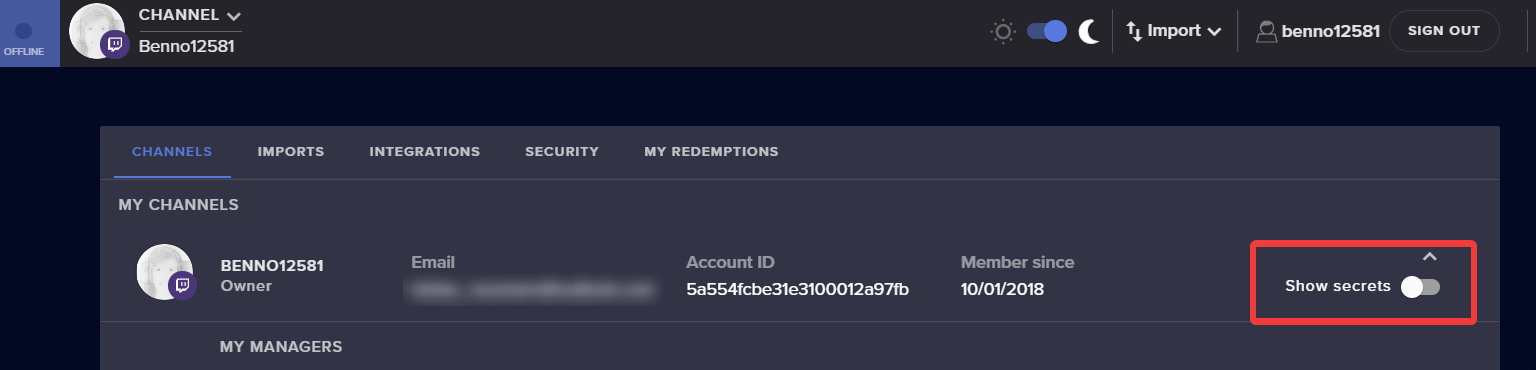
You will need to log into both channels individually and get the JWT tokens and dm these to KeiZar.
 stone socket
idle saffronBOT
stone socket
idle saffronBOT
@stone socket Welcome to the helpdesk! Please let us know how we can assist you today and a support volunteer or staff member will assist you as soon as they are available. Thank you for your patience.
idle saffronBOT
@stone socket Streamelements on top of OBS -> Logout -> login
fallow totem
Be aware of using Media request system of Streamelemens. Even if you have set rules on the system. My last stream now I was bannet from Twitch for 30 days because request system was showing porn from YouTube. So be aware people 😉 ( I am not blaming streamelements here!)
idle saffronBOT
@hard grove Please follow our community rules:
- No advertisement or stream promotion
- Respect ALL server members
- No NSFW/NSFL
Thank you
 silk sinew
Hi
I have a problem with the bot
I can’t activate the banned words
When I click it doesn’t do anything
Che devo fa?
AAAAAAAA
shy quail
#🇮🇹︱italiano
 autumn dawn
Hello i just streamed, and when i hoverd over chat box or events box it started pixelating very bad
anyone an idea what i can do?
idle saffronBOT
@autumn dawn Please follow these steps:
close OBS,
open the Nvidia Control Panel,
in the left menu select "manage 3D settings" and then under the list of options (right panel) press "restore default settings",
Start OBS again.
autumn dawn
ah thanks
 tawdry pasture
I can't seem to locate the mediarequest area in my dashboard, is this due to being primarily a youtube streamer?
shy quail
There is no MediaRequest widget for Youtube.
 thin tinsel
For some reason my Youtube streams look horrible. Even with the same settings I use on difference settings like mixer/twitch. What is this issue?
idle dune
youtube re-encodes EVERYTHING
idle dune
pretty much, from what ive seen is you need higher (than other platforms) settings for the same quality.
if you can afford to up your quality then do some tests
versed tangle
i need help starting streams
idle saffronBOT
@versed tangle New to Stream Elements?
Check out our YouTube channel https://www.youtube.com/c/streamelements/videos
with tutorial videos from setting up the basics, to in depth details on how to use our product.
New to OBS? Here is a 4 step quickstart guide
https://obsproject.com/wiki/OBS-Studio-Quickstart
Want to learn even more? Here is an in-depth overview
https://obsproject.com/wiki/OBS-Studio-Overview
thin tinsel
Thats pretty stupid than @idle dune
idle dune
yep, join the queue to take it up with youtube like the rest of us 😂
thin tinsel
I have a GTX 1060 6gb/intel core i7700 and 16 gbs of ram. 100up/down speed is that should be good enough?
idle dune
bitrate will help you out the most, what are you set to currently?
thin tinsel
Tried everything
2000 bitrate to 6000
Still nothing
Its whenever i start moving in any game too
Whenever I start moving it goes super pixelated
idle dune
if you have 100 upload then you can up it from 6k
yt's cap is much higher than twitch
thin tinsel
What do most people stream on?
What bitrate for it to look decent?
It looks hella good when im not moving...
Thats about it
idle dune
no idea for most people
if you have a solid 100 up, then try half of your upload @ 50,000
thin tinsel
Ill give it a try thanks for your help (:
versed tangle
Hi So I was streaming today and I noticed that my stream alerts on YouTube were not showing and my actived feed said I only have one youtube sub even though missed 10 subs notifications. I works when I emulate the alerts on obs so it’s not obs that’s the problem. Can you please help I legit tried everything and I really want to use my alerts.
 astral stirrup
I need Help How come it dose not always Alert My subs?
versed tangle
if they set there subscriptions list private then your new subscriber wont show up @astral stirrup
astral stirrup
ok
sharp surge
I need help.. why is everything displaying like I am a twitch streamer? I am using StreamElements for my YouTube streams but my chat alerts are showing twitch stuff, and same for my tip page (it's showing twitch emotes).
shy quail
The twitch emotes on the tip page is a known thing. The picture is from your youtube account, this is correct like this.
@versed tangle Check the pinned messages for the subscription privacy settings your viewers have to enable to see shared subs.
 worn gazelle
hello i have a problem with obs once i click start stream it starts a stream w/o asking for a title on yt but when i check my channel nothing is running
plez?
 7
7
versed tangle
Why is this screen white? and I cant remove it
shy quail
@versed tangle Make sure nothing is blocking the connection, like a firewall for example.
idle saffronBOT
@worn gazelle Streamelements on top of OBS -> Logout -> login
sharp surge
Ah okay @shy quail just strange that it shows a twitch chat. Got a little confused. Thanks for the help! 🙏🏻
shy quail
If you are seeing the twitch chat in OBS.Live relog with StreamElements > Logout and log back in.
 wanton coral
Hi everyone, new here. I'd like to ask why Stream Elements is asking me this while I connect my youtube account to OBS.live "See, edit, and permanently delete your YouTube videos, ratings, comments and captions"
is this necessary?
shy quail
To get your chat working in OBS.Live for example.
wanton coral
Thank you for the reply Benno. I see. It looked daunting. So all in all this is safe?
shy quail
yes.
silk sinew
I can’t activate Banned Words
shy quail
What browser are you using?
 scenic epoch
my youtube alters and chat box not working
 wild oak
looking for help with alerts. My audio is lagging behind the video, can't figure out how to resolve this.
idle saffronBOT
@wild oak Please provide a log from your last stream. To do this, in OBS go to Help > Log Files > Upload Last Log File and paste the link to the log file here.
wild oak
lol cmon support AI that's not about my stream
crystal coyote
my activity feed keeps loading with the spinning wheel but never comes up. I have tried logging out, setting everything, waiting 4 hours, and switch platforms.
idle saffronBOT
@crystal coyote Please send in an issue report so our team can investigate using the program's logs:
Report an Issue
▫ Select "StreamElements" at the top of OBS
▫ Select "Report an Issue"
▫ Please write a detailed description of the issue you are facing:
What is happening/not happening? What happened that led to this issue appearing? When did you first notice this issue? Descriptions that help us to to reproduce the issue on our end very often result in quick fixes.
▫ Select "Send to StreamElements"
brave solstice
@crystal coyote Hey, Devs are on it. The temporary fix is to play around with the filters
crystal coyote
thanks! what do you mean by play around with the filters
brave solstice
For example: choose only subs, redeems and click on "filter"
Try selecting more options multiple times
sharp surge
I can't get my chat alert to change the text. I am trying to change it from sponsor to member, but it wont save. It says it "saved" but then you refresh and its right back.
brave solstice
Chrome?
brave solstice
Relog tried?
brave solstice
Yes
brave solstice
Try incognito mode now
sharp surge
Still didn't.. but here's the thing too. I am livestreaming on YouTube we don't have months so why does it show that?
brave solstice
Hmm
fickle pagoda
This is a known issue we are looking into.
sharp surge
Okay, thank you. @fickle pagoda!
silk sinew
@shy quail Safari, but I tried with Chrome too
shy quail
Try it in google chrome please.
silk sinew
I already did it
shy quail
So in google chrome you still cannot enable the banned words filter?
silk sinew
Exactly
idle saffronBOT
@silk sinew Please connect your streaming account (Twitch, YouTube, or Facebook) with Discord by going to ⚙ Settings and then Connections here in Discord. https://streamable.com/eg92w


 silk sinew
Why?
shy quail
So we can take a look at your account.
fickle pagoda
Seems to work fine.
silk sinew
Please
 dark oasis
Hmmmmm
 tardy pilot
lmfaoo
idle saffronBOT
@silk sinew Please provide your account ID found at the top of this page: https://streamelements.com/dashboard/account/channels This ID is public info and safe to share here.
silk sinew
5da0a9955dd600387fc61546
lime walrus
The toggle is currently enabled
 heavy ivy
Hi Guys, I have a problem with my tip alert :(
I made a tip variation at 10 dollars - so people would get a different alert when they donate at least 10. It all worked fine, I had my own sound effect and a little video that played. Today I decided to also add TTS to that - suddenly my alert broke. Now everytime someone donates I see that "dancing shark" instead of my own image (the sound plays fine though).
I tried deleting my image and submitting it again, but the shark is still dancing...
Can someone help me with that please 😦
lime walrus
Make sure you are using Chrome and visit this page: https://streamelements.com/dashboard/bot-spam-filters to edit the filters
idle saffronBOT
@heavy ivy Please provide your account ID found at the top of this page: https://streamelements.com/dashboard/account/channels This ID is public info and safe to share here.
heavy ivy
5c867adc66719317663fe117
silk sinew
Ok thanks
lime walrus
You've activated the custom CSS toggle in the variation @heavy ivy
And thats a nice overlay name
 lament moon
Can somebody help me?
When my live-stream is live on yt, why does the streamelements not show, that I am live
it just shows: "you have no stream activity"
lime walrus
When did you first login to our dashboard?
lime walrus
We do not pull old data that might have happened prior to you signing up with us
especially since how YT's new policy works
lament moon
So what do I need to do?
lime walrus
Stream
lime walrus
What is not showing?
Was there anyone subscribing you to you while being live and after signing up with us?
lament moon
Can we get in a call, then I can show you better
and yes, there was someone subcribing
lime walrus
As I mentioned
lament moon
it was a bit difficult
lament moon
Yeah, but did I need to wait, or what did u say?
quiet pond
you need to get activities first
shy quail
New data will show up when they come in from now on.
lament moon
Okay, I am sry for aksing so much, but how do I get "activities", can you come with an example
shy quail
If someone subscribes to your YT channel (if they have set their subscription settings correctly), or when you get a donation via your StreamElements tipping link, then for example these events will show up in your activity feed.
shy quail
Depends on when you get your first event after you signed up with StreamElements.
lament moon
Hmm, well I'll wait, since I signed up yesterday
Because, I just subcribed with my other acc, to test it tho
shy quail
Check the privacy settings of this account (https://support.google.com/youtube/answer/7280190?hl=) and note if it was subbed to your channel before already, we do not show this.
wild oak
Am I missing something or do we not have a chat widget for youtube?
shy quail
There is no chat widget for your overlay for youtube.
wild oak
how come the youtube side of things gets no love? no chat, no loyalty system, no credits ):
shy quail
All dependant on youtubes API.
wild oak
does youtube pick and choose what companies get access to those features involving the API?
and they're just not giving it to streamelements?
shy quail
I am not a dev, but afaik they do not have these endpoints we would like to use.
wild oak
just trying to figure this out because I loathe using streamlabs but they have all of those on the youtube side.
chat widget I can get around, but the loyalty system and credits etc I won't be able to make on my own.
silk sinew
The banned words filter doesn’t work
I set 0 seconds of timeout and it timeouts for 300 seconds
Why?
brave solstice
YT allow only message delete, 300s timeout or ban, afaik
idle saffronBOT
@silk sinew To set up the bot for your YouTube stream, please follow these steps:
- Make sure your stream is public. The bot cannot join a private/unlisted stream.
- Your stream must be live for the bot to join the chat.
- Add https://youtube.com/c/streamelements as a Comment Moderator at https://www.youtube.com/comment_management
- When live, be sure to look at Live chat instead of Top chat, as Top chat will hide the bot messages.
silk sinew
How can I set only message delete?
@brave solstice
The chat alerts of subs don’t appear
brave solstice
 prisma ruin
Hey folks,
I have a problem. I can't seem to find the MediaRequest feature in OBS and StreamElements website... Any1 care to help?
Much appreciated,
Jan
shy quail
Not available with youtube.
prisma ruin
F
okay, thanks
@shy quail switched to Twitch.. Where in OBS.live can I find the "widget", such as "chat" and "preview window and such"
where is the media request and how do I enable it besides adding a widget in the theme/overlay
Where in here can I find and enable media request?
 rancid turtle
All overlays stopped working since yesterday, sound alerts still come through but no visuals, you guys having a problem or me?
idle saffronBOT
@rancid turtle OBS -> settings -> advanced -> scroll down -> enable/disable hardware accel.
https://i.imgur.com/ggMe9ZE.png
 supple marlin
can anyone explain the !rename command?
brave solstice
@supple marlin on twitch?
supple marlin
Another question @brave solstice
Can I somehow create a custom !uptime command?
How can I see all the possible variables?
Found, nvm 😛
 regal locust
how do i get the bot to count how long my viewers have been watching and give them points
shy quail
Not possible with StreamElements and youtube.
regal locust
what my other friend is
 meager basin
how can i disconnect streamelements from YT ... i will one stream elements for twitch and yt
regal locust
are u sure my friend is litterally doing it now
shy quail
yes I am
regal locust
he dont jknow how he did it tho
shy quail
@meager basin Once merged accounts cannot be disconnected.
regal locust
well then what bot can do that
meager basin
they are not merged
shy quail
No idea, soory @regal locust
regal locust
tifa i inow how to diconnect
meager basin
i can not close my account there is no mail in YT
meager basin
i can only add channel ...
there is nothing ... and close account also not possible because there is no E-Mail Adress
can anybody delete my account pls DM me
meager basin
or merge it with my Twitch Account
versed tangle
@meager basin dm me with the JWT tokes from both accounts
supple marlin
@shy quail Are you sure you can't give points for time viewed on YouTube?
 civic sage
how do i set up stream elements to comment certain things during my live stream for example my donation link and like and subscribe
fickle pagoda
@civic sage Timers.
civic sage
how do i do that please i am such a noob lol
fickle pagoda
The Timers section of your account.
civic sage
ah ok thank you, will it do it auto once filled it in?
fickle pagoda
Yes, that's what a timer does. It sends a message on a timer.
sharp surge
@fickle pagoda How long does chat commands take to update? I like putting the link to my game in a command like (!link) however on today's stream (first stream using SE) the link wouldn't update.
fickle pagoda
There was an issue with the bot system earlier that has since been resolved.
sharp surge
Alright! So it should update instantly right?
fickle pagoda
Usually.
sharp surge
Okay good.. just wanted to make sure I wasn't doing something wrong.
 quasi delta
anyone know how to add streamelemnts as a mod?
idle saffronBOT
@quasi delta To set up the bot for your YouTube stream, please follow these steps:
- Make sure your stream is public. The bot cannot join a private/unlisted stream.
- Your stream must be live for the bot to join the chat.
- Add https://youtube.com/c/streamelements as a Comment Moderator at https://www.youtube.com/comment_management
- When live, be sure to look at Live chat instead of Top chat, as Top chat will hide the bot messages.
 rich cape
Hello. I'm a very small youtuber who streams for fun. How can i grow my stream
 night bay
how do u get rid of where it says streamelements running elementals okay
sharp surge
↑ @night bay same.. it pops up in chat saying that. kind of annoying
fickle pagoda
That message is to inform you the bot has joined your chat and is running. It cannot be disabled.
 lethal quail
i cant find the tab to delete a channel