#helpdesk-youtube
1 messages · Page 7 of 1
 nocturne blade
 stable kernel
oh yh dont mind Nightbot 😃
nocturne blade

stable kernel
The bot works but the alerts doesnt
nocturne blade
which ones?
stable kernel
yh...
nocturne blade
what is your youtube username?
nocturne blade
yeah its a test
stable kernel
yeah only test works
nocturne blade
ok there seems to be a bug with the alerts, im checking it
sorry for that
and thanks for help
stable kernel
holy
nocturne blade
the subs only kicked in now
nocturne blade
sure
 finite oriole
Well, first sorry about my english, I am Spanish and I dont have a very high english level
My hypecup only works when I test it on the overlay editor, then when i am on stream it dosent work
what I am doing wrong?
stable kernel
wait so is it fixed?
nocturne blade
@stable kernel should be ok in a few hours
@finite oriole what doesnt work on stream?
and its on youtube?
finite oriole
yep the hypecup
stable kernel
ok thanks for the help appreciate it!
finite oriole
I can understand it onlyworks with people that has the subscription privacity on public but it dosent work neither
soooo isk what to do at this moment
idk*
nocturne blade
whats your youtube channel?
finite oriole

Support the stream: https://streamlabs.com/raimaoficial PASARLO BIEN ES MI PRIORIDAD! SI TE GUSTA EL CONTENIDO ÚNETE A NOSOTROS CRUCK! SORTEO: https://www.yo...
the first stream with it
Only tokens appear when i test it with emulate subscriptions etc
finite oriole
you can if i am not online too?
nocturne blade
its ok, ill test it on my end and update you
finite oriole
ok ty
 simple flint
I've got a quick question. Is it even Ok if I'm from a Youtube Channel's team who already got over 20k subscriber? So like I want to stream and I'm searching for some help because I don't know anything about these settings and stuff which has to get managed right.
 near stag
@simple flint what exactly are you looking for, stream setup for multiple streamers on a single channel or did i got it wrong?
simple flint
Maybe you got it wrong because my english is very bad. 1st I want to ask for the DreamTeam because I'm an Admin from a Youtube Channel which got already over 100k subscriber or even just for normal streaming. So What I meant is that I need help with all the setup to manage it right because I want to start stream right and not just for some months.
near stag
@simple flint well, what language do you speak besides english, might be easier to explain it.
in that case you will have 2 different things - if you represent a channel that is big enough for DreamTeam, it can try to join etc. This is mostly for streamers who already use parts of our service. And if you want to stream yourself on a separate channel, this will be different. If you want to start streaming, i can give you a couple of guides how to stream on youtube and how to set up StreamElements.
simple flint
Alright, my emphasis and pronunciation and grammar is not so good but I can understand you very well. I will ask him if I should represent our Channel. You can check it out really quick if you want. LEAGUE OF MUSIC is the name and we are making gamic music mixes and we want to go more to the area of gaming.
But at the first I would say that I represent it
nocturne blade
whats your main language?
simple flint
My main language is german.
nocturne blade
@near stag 😉
near stag
Na sag das doch gleich, das ist einfacher 😃
near stag
@simple flint Frag den Kanalbetreiber erstmal ob er das will. Das DreamTeam steht für Kanäle bereit die unsere Spendenlinks, unseren Bot und Overlays benutzen. Das muss sitzen bevor man sich da bewirbt. Und für den eigenen Stream - das ist was anderes ^^
simple flint
Bin gerade dabei
Aber würde man auch wenn man nicht zu dem DreamTeam gehört Hilfe für die Einstellungen bekommen?
near stag
@simple flint hilfe - ja, gerne, rund um StreamElements (einrichten etc.) und etwas mehr, je nach dem was es ist.
Habe mir den Kanal angesehen, aktuell hängt da Nightbot bei euch rum etc. Also erstmal nicht für das DreamTeam bewerben.
simple flint
Alles klar, ich kläre das eben fertig mit ihm und dann geb ich nochmals bescheid.
near stag
@simple flint keine Eile, sprich in Ruhe mit dem, er kann sich auch selbst bei uns melden, deutschen Support haben wir ja 😃
simple flint
Also, ich habe mit ihm ein bisschen geredet und natürlich es ist eine große Sache deshalb haben wir besprochen das wir im TeamSpeak von uns darüber gründlich unterhalten und es besprechen. Nachdem wir das getan habe werde ich nochmal wiederkommen Ok? Einen schönen Tag noch und man sieht sich bald! 😉
 steel gull
alert box??
stable kernel
@nocturne blade My Alerts are working thank you!
nocturne blade

simple flint
@near stag Hätten Sie Zeit für ein Gespräch? Wir haben das abgeklärt und wäre jetzt bereit. Aber was ist mit obs? Bekomme ich da auch Hilfe?
@near stag Oder generell bei solchen Dingen, weil sonst müsste ich mit Geforce streamen und ich denke nicht das dies passen würde.
near stag
@simple flint ja, wenn dann aber hier im Discord, sollte gehen. Teamspeak hab ich nicht mal installiert 😃 Also hierher und ab in den channel oder konferenzschaltung im anruf
simple flint
@near stag Am besten da wo wir ungestört sind und sie genug Zeit mitbringen, weil das komplett Neuland für mich ist und es wird seine Zeit dauern bis ich das verstanden habe.
near stag
@simple flint privater anruf ist ungestört, die kanäle hier unten sind offen, aber da geht eigentlich keiner rein der deutsch versteht. Zeit - naja, 15-30min sollte da alles abdecken
@simple flint lade den erstmal auf diesen Server hier ein, wird er sowieso früher oder später machen müssen wenns was werden soll^^
simple flint
Aber ich bräuchte ein Stream Programm was kostenfrei wäre
near stag
Das erkläre ich alles dann, ist nicht schwer
brauche hier noch n paar minuten, wir können uns unten im "Chit chat" Kanal treffen, keine Angst da rennt keiner rein
 lapis shard
Tja @near stag Was machst du wenn ich jetzt dann den VoiceChat joine? 😛
Nur spaß, bin sowieso auf Arbeit ❤
simple flint
Dann kann man sich unterhalten. 😄
lapis shard
Aber Accurity sollte Cryonic mal nicht da sein (was echt selten ist) kannst du auch mich kontaktieren bin neben ihm auch ein Deutscher Support Hero
near stag
@lapis shard ich würde in dem fall russisch quatschen xD
simple flint
Haha Okey, gut zu wissen
lapis shard

lapis shard
for?
I just read up, Your Hypecup isn't working right
so your problem is nothing falls into it if you get Donations/superChat/subscribers right?
@finite oriole
finite oriole
ok i am on live now if you want to see
nocturne blade
cool
checking
@finite oriole it indeed looks like a bug
ill update you, thanks for reporting
finite oriole
OK ;D
 sturdy kelp
hey guys do y'all have any updates on when live chat widget will be up?
 versed tangle
frick wrong chat
stable kernel
@nocturne blade It stopped working again...
stable kernel
nvm
 fierce tartan
yo im having problems, anyone here to help?
 earnest stone
hey Jake, yeah, just let us know the problems and we'll do our best to help
fierce tartan
I cant figure out my Loyalty System.. I updated my settings and enabled Loyalty, but the section to view this does not show on the left side of my screen where my dashboard, commands, and activity feed show. Also, when I tested a command in my chat to display point count for a user, it did not show a numerical value for # of points, instead the command.
earnest stone
you logged in via youtube on StreamElements or going with Twitch?
earnest stone
strange https://streamelements.com/JakeLeBadass/leaderboard links me to twitch unless this ain't yours
fierce tartan
hmm that is weird, is my channel but i am linked with YT.
earnest stone
also StreamElements bot is only in the channel while you are live
earnest stone
I'll talk to u there then
 upbeat furnace
There is no loyalty for YouTube at this time
earnest stone
ahhh, ty Terra
fierce tartan
dang thankyou Terra
 terse sandal
I'm trying to use stream elements with youtube but am having a couple issues. When users go to my tipping page then hit to go "Back to HnyBear Page" it put them at my twitch channel not youtube. How can I fix that? Also I saw in the video about setting up the themes that you can set the size you want for the theme but can't seem to find it. I stream at 4k and it's forcing me to use the theme at 1920x1080 and scale it up to fit the screen which I feel makes it looks a little off. How do I fix that?
 glossy mirage
do you know how to get that sponser thing on youtuber>?
 cyan lake
@glossy mirage you should look up the requirements on YouTube.
 visual swallow
premium what?
 dreamy bloom
hi can someone help? whenever someone subs to my yt the alert doesnt pop up
idk why
cyan lake
I'm not as familiar with youtube, but it is newer. Let me tag someone to look: @rigid schooner or @upbeat furnace
terse sandal
thank you
upbeat furnace
@terse sandal We are aware of the the public profile page being set up for Twitch even though the account is a YouTube account. It will be fixed. We don't have themes at 4k resolution because up until recently we were only available to Twitch streamers who don't have 4k option. Even on YouTube, 4k is a rare stream resolution so I don't anticipate we'll be releasing 4k options until it becomes a more common streaming resolution.
If you're willing to pay for a custom overlay, we have the #art-marketplace channel where artists who are open for commission work have advertised. And there are probably other places on the net that offer 4k stream overlays.
 bleak plaza
Say I created an overlay how would I get it on my stream
 polar caveBOT
@bleak plaza To add your overlays to OBS, add a new browser source in your scene. Paste your overlay URL in the browser source properties, set the dimensions to 1920x1080 (unless you changed them on the website), and :ballot_box_with_check: “Shutdown source when not visible” https://youtu.be/KDvLynUqXI4
bleak plaza
I use the PS4 to stream like you can stream of the PS4 so would that be the same or different
visual swallow
you cant add overlays directly to consoles, they dont support adding a browser source. You would need to have a setup where you are using a streaming PC, and have a capture card to capture the gameplay
bleak plaza
Ahh ok thanks
terse sandal
Ok ty again TerraBuck. Any idea on when the fix for the page showing twitch will be?
upbeat furnace
As soon as the devs can get to it. They're a very busy group.
 obsidian adder
Of course! You have to create an overlay and then go to widgets and add alertbox 😄
 foggy pilot
Ah okay, thank you!! :) @obsidian adder
glossy mirage
can you add overlays in bandicam because every time i make a video in obc i have to convert it😐
earnest stone
which format do you need for bandicam?
you can setup OBS to save in diff formats
I'm guessing you are using OBS's recording option
@glossy mirage
earnest stone
so what format do you need OBS to save your videos?
anyway, on OBS > settings > output > recording > recording format
if the format u want isn't there, change on type (top option) to custom and then you'll have more formats to choose from
under container option
foggy pilot
So what exactly does ground control do?
lapis shard
You can manage everything you would manage from the dashboard there!
Replay an Alert, manage song requests
I am not sure but I think also moderate tips?
and you can use costume bot names when you are using Ground Controls / Stream Elements Tipping/ Bot
foggy pilot
How do I get that to work?
For me, the only thing I can do in Ground Control is look at my list of recent subscribers
lapis shard
Oh you cant rename the bot on youtube unfortunatly 😦
foggy pilot
Which I can do on Youtube too so, what's the point of Ground Control?
lapis shard
just realised we are in #helpdesk-youtube
lapis shard
Song requests must be enabled in the settings of ground controll
klick on the cog on the top right
foggy pilot
Oh that's it?
lapis shard
and click on the slider to enable Song request managment
yeah "thats it"
Like I said you can replay alerts there also
foggy pilot
I'm trying to learn how to use SE first haha
Only idea I have is a better help guide :[
lapis shard
you don't like our help videos? 😦
foggy pilot
It didn't help me that much. One of the videos was out of date
lapis shard
Se is wonderful for Overlays and alerts. also bot programming is pretty easy 😃
foggy pilot
The dashboard shown in the help video isn't the dashboard available in April 2018
I'm missing some buttons
lapis shard
many cool features from twitch aren't really available yet but we are working to make the service better every time 😃
foggy pilot
So the help videos are mainly for twitch?
lapis shard
yes but there will be new ones the Site got updated very recently
foggy pilot
Okay
lapis shard
and also youtube just launched couple of months ago if I remember correctly 😃
foggy pilot
I've been streaming from youtube for almost a year
so I'm confused... haha
What launched a couple months ago?
Good talk. lol
lapis shard
I have to work too you know? no means of beaing rude 
StreamElements Youtube support launched a couple of Months ago
So we are adding new features and optimisations into StreamElements over time
if you don't want to use Ground controlls its fine you don't have to
finite oriole
hello? can i ask something?
lapis shard
sure shoot
finite oriole
I ask 2 days ago about hypecup
but yesterday they say they were looking but i didnt get any solution
lapis shard
I scrolled up and just saw it
unfortunatly I cant look into this... @nocturne blade pls help?
foggy pilot
That was definitely me just responding and you taking it as rude for some odd reason....
finite oriole
I send private message to him xD
foggy pilot
But thank you for the help anyway
lapis shard
@finite oriole I hope your issue can get resolved soon sadly my hands are tied with issues like yours :<
But we are so thankful for your reports, you help us optimise our Youtube Support
 dim drift
@finite oriole Life sometimes moves slow and even slower when you are waiting for something. We understand how frustrating that can be but one must be patient as Devs are magicians without wands. They can only perform one small miracle per week.
It's on the list and is being worked on, hopefully fixed soon.
glossy mirage
first of all i changed my youtube name but it doesnt work on the website
and it doesnt fit
it
i tryd so many thigns
upbeat furnace
The old name will remain on the site. There's no way for us to refresh the username at this time with youtube.
upbeat furnace
The supertheme resolution is 1920x1080
upbeat furnace
Use CTRL+F to stretch it to the canvas. If you're not using a 16:9 aspect ratio like 1920x1080 or 1280x720 it will be awkwardly stretched but there's nothing that we can do about that.
 robust mango
Is that really your base monitor resolution?
visual swallow
are you actually using a 1280x1024 monitor?
glossy mirage
to what should i change it
upbeat furnace
The problem here is your monitor is square and doesn't support widescreen which is what the supertheme is and the twitch player
visual swallow
well, ideally you would be using a 16:9 aspect ratio monitor, like 1920x1080
visual swallow
but what is the resolution of your monitor? if your base canvas is different that what you are actually using, it will not look right still
upbeat furnace
Try changing your base canvas resolution to 1920x1080
glossy mirage
upbeat furnace
and change your output resolution to 1280x720. This is going to fit the supertheme but anything you play on that computer is going to be in a square format and you'll need to stretch it out with CTRL+F to fit it in the canvas.
glossy mirage
one sec let me try out
upbeat furnace
Either way it's going to look bad because you've got two different aspect ratios in play here
glossy mirage
yh
upbeat furnace
I suggest either looking for an overlay that will fit your monitor's aspect ratio or get a new monitor that is today's standard 16:9
glossy mirage
ugh this still doesnt work
visual swallow
well, you are never going to get something that will look very good when you are using a 4:3 aspect ratio monitor (1280x1024). Ideally, you would have a 16:9 (1920x1080) which has been the standard for a while, and is the standard output for video
terse sandal
Is there a way to improve the load times of the overlays. They usually only take 2-3 seconds to load but when switching scenes and the overlay doesn't load for a few seconds it just looks bad.
obsidian adder
using studio mode in obs is the easiest solution but there’s also a roundabout way to do it but it may cause more cpu usage
visual swallow
!studiomode
polar caveBOT
Check out this tutorial for OBS’ studio mode which allows you to preload scenes before transitioning. https://www.youtube.com/watch?v=W8iWsD2Lq3U
terse sandal
ok
and thank you
That was a great video but I found just using Scene Transitions / Fade to Color / 3000ms is perfect for what I need. It fades out and in then back in to the next scene with the overlay loaded fully. Thank you again for the help.
visual swallow
 I was going to mention something like that too. I use 3000ms transition, since I am lazy and use a Stream Deck to change scenes
 candid kite
Hello i wanted to know theire is no streamstore working with youtube ? With loyalty points.
cyan lake
@Ramaros mainly because youtube doesn't offer some of the things twitch does that we use for loyalty (like a viewer list)
so having loyalty isnt an option yet, though we are working with them
 brittle berry
how to change supertheme overlay to 1366x768 easily without moving anything?
 scarlet frigate
STREAMING ON YOUTUBE ? HERE IS A NICE TIP:
Instead of streaming at 1280x720 stream at 1376x774
why ?
Assuming most people at least have 1080P monitors, they normally click on Theater Mode button on YouTube which makes the viewport of 1376x774 size. Your 720p video will look pixelated on viewport of 1376x774.
near stag
Since youtube has no bitrate limit, you can stream at 1080p 60FPS with a really low hardware usage (if you have the bitrate) or even 1440p/4K if you have that horsepower. This is the biggest advantage of youtube compared to Twitch 
 sly birch
i have tested streaming to youtube 1080p 60FPS with nvenc at 50k its awesome
terse sandal
Yeah I do the same I play at 3840x2160 but my 1080 using nvenc drops a ton of packets so I just do 1440p at 60fps uploading at 30000Kbps and it looks amazing. 50k at 1080p is a little overkill and I think you'll find a lot of people will have buffering issues.
earnest stone
what, youtube now allows that much bitrate? 😮
near stag
They "recommend" 50k for 4K streaming. You can go higher, their ingest servers have no limits
earnest stone
wow, that's cool and what do you mean with low hardware usage?
near stag
you can use a lower CPU preset or NVenc/AMD VCE with high bitrate
effectively dropping your CPU usage, so you have more power for gaming on that PC
does not matter with a dual PC setup, but this is still rare
earnest stone
hmm makes sense, I'm using 1280x720 at 60fps with 6000 bitrate
perhaps not the best setting
 wide pond
hi can someone help me
earnest stone
Hi @wide pond let us know the problem and we'll do our best to assist
wide pond
im on stream elements right now and ive just linked my youtube to it however it only says i have 25 subscribers when i put the subcount widget onto an overlay
when the channel actually has 32k
is there any way to fix?
earnest stone
on the widget, did u change to total instead of week/month?
wide pond
let me check
even if it was on week/month it should be way over that
when I add the total subscribers widget it says 23
earnest stone
damn, was suggesting to use that one 😄
wide pond
not the subscriber count for weekly or smth yeah
thats what i tried initially but
is there any way to sort of update it?
as in the total amount of subscribers
cyan lake
Let me have a look at it, give me a minute
wide pond
okay ty
cyan lake
what is your youtube name? The one linked in your profile didn't come up when I was looking in the system
earnest stone
if you press Data right next to widgets then go to totals, try reset session
cyan lake
lol, this is very weird. I am still not able to find your name in the ssytem
wide pond
oh
earnest stone
great! 😄
wide pond
dw anyway its fixed now thanks for your time
earnest stone
you're welcome
 cyan lake

wide pond
you wouldnt happen to know much about optimal bitrates for streaming would you?/
earnest stone
on youtube you can go nuts with bitrate it seems
wide pond
yeah its just I dont have great internet so
cyan lake
basically take your upload speed, and adjust it a bit lower than that
wide pond
if my upload is 4.5mbps what would be a good bitrate for streaming 720p 60fps
cyan lake
you could get away with 3k
earnest stone
yeah wouldn't suggest higher than that
wide pond
was trying 6k and lagging
cyan lake
yup. That will give you a bit of room for any other things you ahve going on in the background
wide pond
ah ok thanks
earnest stone
6k is above your upload hehe
cyan lake
lol, yeah
wide pond
yeah lol ive never done it b4 so
earnest stone
I know this is for twitch but gives u an idea on bitrates https://stream.twitch.tv/encoding/
earnest stone
np
 pseudo trellis
I need help to setup streamelemnts. from the start to the end . im switching form stream labs to stream elements, i understand hebrew. mention me please.
 sly dew
Yes I can if you wish DM me @pseudo trellis
pseudo trellis
Sent
 worthy plover
questions...does or will stream elements pick up followers from youtube?
near stag
@worthy plover yes, those are called subscribers. and paid subs called sponsors.
worthy plover
ok will it be able to pick up old subs or just new ones
old subs meaning peeps we already have following. We wnat to use the analytics with stream elemensts as well
near stag
@worthy plover the earliest data i have in my dashboard for subscribers on youtube is from Feb. 2018
worthy plover
ok
near stag
so this is where i see the number of people who followed that month
worthy plover
so are they able to aquire loyalty points via youtube yet
near stag
loyalty does not work on youtube yet. we work on this, but no estimated date.
near stag
if you have any questions around SE or youtube streaming, feel free to message me anytime
versed tangle
can i pm u @near stag ?
near stag
sure
 coral steppe
hello, how do i unlink my channels and remove streamelements account?
cyan lake
@ericks17#0218 unsubscribe from the emails, and go into your twitch connections settings and unlink Streamelements
 pastel bough
I am impatient for the royalty system to arrive on YouTube
 exotic lagoon
@pastel bough its something youtube isnt really allowing for now, we're pushing hard :D
finite oriole
hello I need something
 tropic atlas
@finite oriole sup
finite oriole
all the alerts of 3 days ago have repeated so my subscriber count its nor real atm
seems like duplicated
 signal quail
I need quick help please! My download and upload speed is 130/45. Is that enough to stream 1080 60 Fps ? And what bitrate
 dull shuttle
Yes, you should stream at 720p. It’s less taxing on your machine, just as good quality, and won’t eat all your bandwidth
signal quail
Should I keep it at 720P?
dull shuttle
1080p requires 6MBps up, which translates to you being short by 1MB on your upload. 720p requires about 2.5MB
You can capture at 1080p60 and scale down to 720P
It works just fine 😃
You get the quality, but don’t need the bandwidth
dull shuttle
Sneaky sneaky!
signal quail
I am currently on 2500 bitrate
dull shuttle
That’s about the sweet spot for most people
If you’re wired
Wireless you want to drop it to about 1750-2000
signal quail
I am using Cable
 errant scaffold
Using a Wireless connection for streaming in 2018 
dull shuttle
I’ve done it
errant scaffold
Sounds painful.
dull shuttle
I had enterprise wireless though 
signal quail
 rotund umbra
Guys is there a way that I can copy a certain part of one of my overlays and then paste it onto another? (the social media names and stuff) because i want it to be in the same place as all the other scenes
near stag
@rotund umbra you can duplicate everything (every layer) to a different overlay. Try this. I do not remember if it saves the position tho, so you might want to adjust the positions pixel by pixel (so it is in the same spot).
rotund umbra
ill try, they should implent something like in photoshop where you can select only certain layers and keep them in your clipboard
near stag
@rotund umbra the editor will get an overhaul sooner or later, no ETA on that tho. We know it is limited in many ways.
rotund umbra
@dull shuttle can you get in a oice call with me so i can set up the best settings for me?
@near stag ok cool, thanks
dull shuttle
I cannot. I am currently in an Extra Life planning meeting
rotund umbra
@near stag how do i duplicate every layer to a different overlay?
@dull shuttle ok, thanks anyways
dull shuttle
There are much better support people than me in here 😃
near stag
@rotund umbra if you need help with OBS setup, ask me.
duplicate - there is a small button right on the "layers" tab on the left, when you select a layer, it becomes highlighted. Just use it and it will ask you where you want to copy it to.
rotund umbra
ok, lol i scrolled up and you seem to know what youre talking about lol
ok @near stag can we get into a voice chat?
rotund umbra
channel is fine
versed tangle
@near stag pm
 proud pecan
Can someone help me set up music for stream
cyan lake
you could, just sign into twitch account part of StreamElements, and use that page. I am not sure on song requests itself (not a youtube streamer)
I have just been told that indeed the song request feature works
@desniper12#8999 @xlnc#3910
finite oriole
WELL, I NEED SERIOUS HELP NOW
earnest stone
if it's to not write in caps, just press caps lock on the left side of keyboard
😄
let us know the problem as we'll do our best to help
finite oriole
All stop working, first the jar, then duplicated alerts, now 8ball dont work neither, and the only response i get is that they are working on thejar ;/
idk what to do at this moment
earnest stone
!multi
polar caveBOT
Make sure to :ballot_box_with_check: “Shutdown source when not visible” for all browser sources (all OBS scenes). If using studio mode, uncheck “Swap Preview/Output scenes After Transitioning.” Also keep in mind that sound can play from any overlay loaded in the browser (editor or launched). https://i.imgur.com/FegZJQS.png https://i.imgur.com/yY0wcFl.png

 earnest stone
that will take care of duplicate alerts
regarding 8ball, have you enabled the module on the chat bot? also on youtube bot only is on channel when stream is live
and indeed the jar (assuming it's the hypecup) is being worked on
finite oriole
mmm
 obsidian ruin
Hello, i have one question. Is the points system working on youtube channels or is just for twitch ?
earnest stone
hey @obsidian ruin only on twitch, sorry
at least for now, not sure if/when it will happen
finite oriole
yep it works, I did it before and dosent work but now it works THANKS!
sly dew
I"m here for you in like 1 min 😄
 old onyx
@sly dew You are the best of them all !
sly dew
No problem champ 😄
 elder tangle
Hello, I read you are able to use the loyalty system but I do not see the button in the tabmenu. Do you have to do something to enable it? Thanks in advance.
lapis shard
@Thobov#7347 for youtube its not possible to provide Loyalty ATM because Youtube isn't handing out Viewerlists. But we are working on it!
nocturne blade
it might be available sooner than later
cyan lake
@tame coyote It is a rule on this discord that advertising isn't allowed. Please make sure to follow it.
elder tangle
Okay, thank you for answering @lapis shard and @nocturne blade
 oblique ledge
when a real sub subscribes nothing pops up in the alert box, but when i do a test 1 it works @near stag
near stag
@oblique ledge ok. is this on your youtube or twitch? since i see only a twitch account linked, but you are in the youtube support channel
oblique ledge
my youtube
near stag
can you give me a link to that channel? generally if a test works and if you see the subscriber in the activity feed, it should pop up
oblique ledge
ok should i dm or just here?
near stag
here
near stag
you can also add that to your discord
for the sub - not needed, just for the youtube bot you have to be live, otherwise the bot will not join
oblique ledge

YouTube
near stag
are you logged in into your StreamElements dashboard with the youtube channel selected?
near stag
Log in, check if you got any subs on your activity feed, then you can repeat alerts to show them up in the alertbox. I will also sub to the channel for the sake of testing
So you should see me subbing to you right now in the activity feed
near stag
this is just the activity feed, check the alertbox 😃
near stag
good. any other questions?
oblique ledge
i might have 1 hold on
near stag
no rush
near stag
i do now
oblique ledge
ok look att the bottom left bar, when i do a test tip, it dosent pop op down there why?
look on stream first tho
near stag
i see a few things - you have Streamlabs linked in the description
are you trying to do a test tip there?
oblique ledge
no its in my streeamelements overlay editor
near stag
ok. so if you open the overlay in the editor and try the test tip, you get no text in the top tipper list?
oblique ledge
no i dont
near stag
well this is the TOP tipper list, if you want recent, you have to change the widget to "recent tips"
as long as the tip is showing up on the alertbox, it will work and be counted everywhere
oblique ledge
ye but since its my "first" and only tip, it should show up in that box sbhouldnt it?
near stag
top tip works slightly different
oblique ledge
how does it work?
near stag
you can select session (which you can reset) or weekly/monthly/alltime
i suggest adding recent or latest if you want to show off recent tips
oblique ledge
ye i will 😃
 jovial gust
Why is my subscriber count not updating?
near stag
@jovial gust where exactly? Do you get alerts with new subscribers and is your sub counter on youtube updating?
jovial gust
That's the problem. No tips or sub alerts are popping up.
near stag
@jovial gust did you test the overlay with the alertbox in the editor? Do you get test alerts there? And is your youtube sub count updating?
jovial gust
@near stag How can I test an alert?
near stag
@jovial gust get an overlay (create one or select a theme when none exist so far), open them in the editor and use the little bell to trigger test alerts.
@jovial gust i have no idea what you have done so far, so we start at the beginning 😃
jovial gust
It's working! Thanks! But, one more question, is there a way I can make it so that donations can be read to me? Like, it says what the donation message is?
near stag
it is called text-to-speech or TTS, it is enabled by default so far i know. If not, check the layer "Alertbox" in the overlay editor and change the settings there for Tips.
jovial gust
@near stag I activated it. Now currently getting a dancing shark when getting donations.
...
How do I turn that off xD
near stag
@jovial gust well you have to go to the alertbox settings and change everything to custom files (sounds and video/pictures) OR you can select a theme where you will get everything set up already for multiple scenes
@jovial gust i suggest using a theme or a supertheme (those are animated and require a powerful PC) for the beginning so you can work your way into the editor and all the functions while having a working and good looking overlay
cyan lake
@dull adder ask your question. until we know what to help with, there is nothing we can do
 dull adder
Okay well, in the overllay thing is there an option in which i can do this
i was wondering so that i can have minumal lag
dull adder
ye it is an event list
where is the widgets if i can ask?
like can you help guide me
dim drift
https://streamelements.com/dashboard/overlays Edit the overlay you want and on top you see 'widgets'
Please be a little more patient, thank you.
dim drift
Read carefully pls, on top you widgets, pick the widget from the list. Perhaps it's best to watch this https://youtu.be/X7XrDdRE7Fk again. It will all be explained 😉

Create an amazing overlay with StreamElements, watch our video guide to learn how. ----- Tipping page setup: https://youtu.be/eLzxRkq7tJo Add KappaGen to you...
 vivid widget
So on my profile it shows a twitch live stream window. I use youtube. If i click on the link to link my youtube it says account link to different streamelements account but its not
Do i just need to delete everything and start over?
polar caveBOT
Please refrain from using [at]everyone or [at]here
dull adder
Um, well can somenoe guide me into doing it i can't since the app updates and im not siure wjere iy is
sure* where* it*
cyan lake
Right now, there is no loyalty for the youtube version as youtube doesn't provide the system we need for loyalty (viewer lists)
vivid widget
Thanks
dull adder
I have a problem. How do you take out the tax wen you donate?
cyan lake
@dull adder do you mean cover the cost of paypal fees, or actual tax for the country of the streamer?
dull adder
paypal fees
cyan lake
You can calculate what the fees are that paypal will take here: http://thefeecalculator.com/
Calculate what PayPal and Stripe will take out of your transaction for your merchant account fee, or how much to ask for to make sure you get a certain amount.
and then just donate that amount
dull adder
everytime someone donates i says Sorry, we cant complete your purchacce at this time
for youtube
and its frustarting
cyan lake
Can you DM me a link to the stream?
dull adder
no i ended it
cause i wouldnt ask in the middle
want me to start up a private stream?
??
cyan lake
what is your youtube username? I can check settings real fast
cyan lake
you can link your channels to your discord profile, makes it easier to find you (for others that want to visit too)
cyan lake
lol
cyan lake
lol, takes more than a few seconds for testing and checking
Just had zero issues tipping
there are no issues with the tipping page at this time
@dull adder
cyan lake
Yeah, you can see the tip in your tipping list

StreamElements
The Ultimate All in One Platform for Streamers
actually, its not on your list. check your paypal account
if you havne't completed certain verifications, it can be delaying/stopping tipping
dull adder
its not letting him donate
cyan lake
again, it might be a limitation on Paypals end, not ours
I just sent you a DM with the information for my successful transaction
signal quail
I think this is the right place to ask:
Can somebody help me with Setting up the Stream Label notfication correctly?
If you can. I will call you here on discord and screenshare
Also please either Ping me or write a PM
That would be Really appreciated!
upbeat furnace
@signal quail This is StreamElements, not streamlabs.
signal quail
The problem is I can't find a Streamlabs discord server =[
I am having trouble setting up the notifications
upbeat furnace
Well we provide support for StreamElements here so if you'd like to use our tools to stream on YouTube we can help out here.
signal quail
Sadly have never tried it out =[
signal quail
I will!
nocturne blade
we are always here to help 😃
signal quail
=]
signal quail
Quick question: I am using Streamlabs OBS. Does SuperChat count as donation? And are they seperate? What I mean is Donations money donated by subscribers through Streamlabs link, and superchat is what they donate using superchat
upbeat furnace
We recommend OBS Studio. Superchats are tips made through youtube. Tips are made through StreamElements through PayPal.
signal quail
aha
One more question
This is my overlay
And I don't have the PSD file
Should I ONLY allow people to use Superchat?
Never mind found the answer 😅
 solar grail
where can is setup the Media Request at?
obsidian adder
StreamElements
The Ultimate All in One Platform for Streamers
solar grail
thanks! 😃
obsidian adder
Although media request is not currently live with youtube @solar grail
solar grail
Will I still get copyright strikes through the media requests?
obsidian adder
Yes, but media request does not work currently with youtube, you can access it but as you can see it is not on the left side, therefore not fully functional
solar grail
ok thankyou.
visual swallow
What do you need help with?
 vestal torrent
nvm im getting help in twitch
nvm
how do i set up the alerts and overlays @visual swallow
visual swallow
Well, if you want to use a prebuilt theme, you can browse the theme galary, and generate your overlays
If you plan on making your own you can start by making a blank overlay
visual swallow
!add
polar caveBOT
To add your overlays to OBS, add a new browser source in your scene. Paste your overlay URL in the browser source properties, set the dimensions to 1920x1080 (unless you changed them on the website), and :ballot_box_with_check: “Shutdown source when not visible” https://youtu.be/KDvLynUqXI4
vestal torrent
thanks have a nice day
visual swallow
signal quail
Wait was I pinged here?
 vapid osprey
Check your mentions, we may have provided support and you might've missed it
elder tangle
How often do new superthemes get added to SE? Perhaps new Clash Royale supertheme with live animations? I am just curious 🙃
lapis shard
@Thobov#7347 depends on Demand/time resources 😃
cyan lake
ask away 😃
finite oriole
Well, imagine someone "1" in a session donate 1 eur, then someone "2" donate 1,5 EUR, and then the "1" doantes again another eur. My question is how can I display in the third donation that the "1" has donated 2eur in total, like the total and the recent in the same place?
near stag
@finite oriole not directly like that, but you can have a top tipper for that session, this comes close to your idea, it will show the highest amount.
finite oriole
ok ty ;D
cyan lake
Try dragging the corner of the box down, without widening it
 jaunty solar
Perfect! That seemed to work
cyan lake
finite oriole
HELLO
I have a problem with the bot
Nothing of teh bot works is like he is not in the chat , idk
near stag
@finite oriole did you start a public livestream? And did you join the bot? Sometimes it takes a couple of minutes for the bot to arrive.
finite oriole
3 hours and the bot didnt arrive
near stag
@finite oriole go to the dashboard and join the bot from there. if it is already joined, press "part" and join again.
finite oriole
ok ty
near stag
should arrive in the channel withhin a few minutes. make sure you are live, the bot will not join a private or unlisted stream or when you are not streaming on youtube.
robust mango
I think OBS Studio is the best
obsidian adder
yup
versed tangle
Alright ty
robust mango

versed tangle
and that momment then someone just subs to you without a reason
O_O
now
again
i dont know how to use these kinda of programs
@robust mango
robust mango
There's many guides online with recommended settings, plus OBS have a Discord for support: discord.gg/obsproject
When you have questions related to our service we'll be here to help 😃
lapis shard
whats up @short basalt ?
 short basalt
i want to change my name in the site
for another name
i changed it on youtube but in the site i isnt changed
upbeat furnace
@short basalt You can change it for the public profile page here https://streamelements.com/dashboard/profile but the account name cannot be changed for YouTube accounts at this time
versed tangle
how do i get my donation link from stream elements?
upbeat furnace
Click on Tipping and then Open My Page at the bottom
versed tangle
ok thx
when i write a memo for when somebody donates and i wanna say how much somebody has donated do I write {amount}?
upbeat furnace
In the alertbox?
If you're talking about this memo on the tipping page {user} is the only variable
versed tangle
how do i say how much they donated or does it do it automatically
cyan lake
if you set up the alert box, it comes with a default set of alerts (same for chat alerts)
versed tangle
what do u mean?
cyan lake
StreamElements
The Ultimate All in One Platform for Streamers
StreamElements
The Ultimate All in One Platform for Streamers
 thorn herald
Hello, quick question i use Twitch streamelements alot and decided to test out youtube streaming so choose you guys of course. Is there no chat thing and does Testing alerts not work while editing overlays?
visual swallow
I have not tried the youtube side of things, but I would expect you can test alerts from the overlay editor. As for the chat thing, what exactly are you referring to?
thorn herald
Sorry badly worded that
 heady parrot
@thorn herald there is no chat widget for YouTube if you mean on that, and if you test alerts for do you have widget on overlay
thorn herald
Yes i do. Do i need to delete it and readd as i imported my twitch overlay
So i assume when importing it would switch the alertbox to youtube but clicking "emulate event" does nothing
heady parrot
Can put please make a print screen of your alert widget settings
thorn herald
Uh yeah what parts?
heady parrot
When you cope from twitch it should copy 4 alerts
thorn herald
Yep it did
heady parrot
Ok so when you go down on the bottom left where is bell
thorn herald
One sec
heady parrot
Does it emulate any.
thorn herald
There best way!
I imported from twitch to youtube all my alert sounds and images are on it aswell
thorn herald
No problem take your time
Twitch - GOTY
Youtube - Machiko
Those are the accounts so you can check the Overlays are Osu! and Osu! BRB
heady parrot
Awesome tnx for info will check it right away
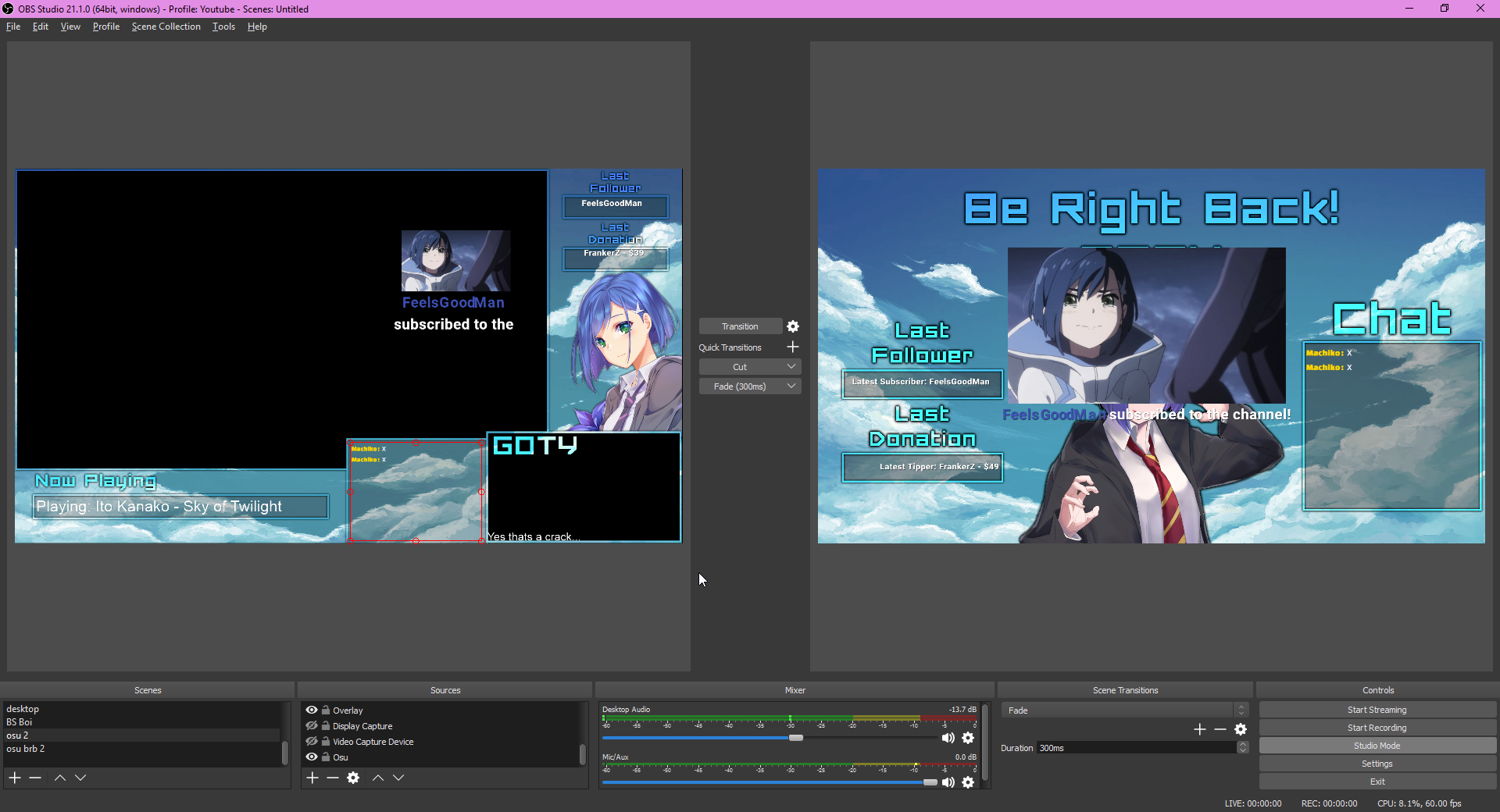 heady parrot
to be honest I don't know 😄
thorn herald
Haha thanks
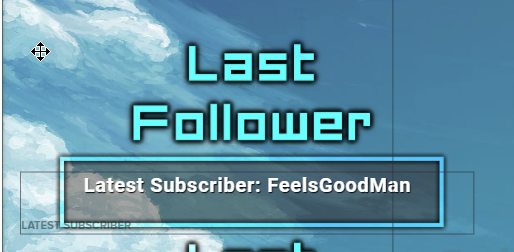 thorn herald
I would but the guy who made it has the .psd and well
He has no internet in peurto rico
heady parrot
oh :/
thorn herald
He made it for me because my old one still had my old twitch name
heady parrot
i can change it for you but just remove text but can't type same font or style
thorn herald
Hm it should be fine
thorn herald
Ill probably remove the "Latest Subscriber" part so it doesnt confuse people and just do name
heady parrot
yeah
that would be good
also superchat alert have default shark
you can change it for somethign else if you like
thorn herald
Yeah i will
heady parrot
well I'm glad problem fixed by itself 😄
thorn herald
Thanks ❤
heady parrot
if you will need any help we are here to help you
Have a nice day and enjoy streaming
thorn herald
Yeah would i need to be live
heady parrot
Yes so we can get the data
thorn herald
Oh well rip
heady parrot
Sorry it just how it works 😄 you need to be online/live to see notification
if you want you can go live for 5 min so we can test it
i can sub and we can check if all is good and ready for your streaming
thorn herald
Yeah ill pop live for a few seconds
There ya go free to test!
Need me to link you or you got the link?
heady parrot
sorry was on other chat
you are live
just share link here ill remove it when i click
thorn herald
Also how do i change the name of my link XD that old ass bambi name bothers me
heady parrot
ok let's check
just a quick question do you have youtube overlay link in OBS browser
or twitch one
thorn herald
Youtube
thorn herald
Look at stream rq
heady parrot
yeah looking
heady parrot
is it youtube now
heady parrot
don't show link on stream 😄
thorn herald
Ik ik
Its just us moved it to unlisted
So basically when you do it from wherever you're doing it it'll go through
But for actual humans following and myself attempting emulating it wont work
heady parrot
yeah
thorn herald
Hm could i be dumb?
 thorn herald
I've done it before
XD ask perry a few months back he had to spend a solid 30 mins fixing my alerts for me
heady parrot
I've asked and hope will have answer for you soon. Im sorry about the issue
Maybe it's something simple and I'm missing it 😄
thorn herald
No problem you guys always come through and fix it!
Im gonna shut the stream off that okay?
heady parrot
yes thank you for testing it
thorn herald
No problem rather us be on the same page then be completely confused
thorn herald
Streamelements staff and helpers are waifu material JS
heady parrot
☺
thorn herald
You guys are just support but you make me smile for some werid reason you're nicer then any other support XD
heady parrot
i blame memes 
thorn herald
Make sure to @ me btw when you get a reply im ingame so itll notify me on my phone (It's sitting on my numpad)
thorn herald
@heady parrot
heady parrot
yes
 heady parrot
yeah it didn't even registered my sub
well i hope ill have more info later also will tag @upbeat furnace maybe he will know more about this /Terra please scroll up for the issue Goty have when you see this
 craggy knoll
i logged in through youtube but the streamelements user page is showing a twitch channel and the link links to twitch. Is there a way to fix it or is this a bug from streamelements?
http://fa97.gq/p/8fm86.png

 rigid schooner
That's an issue we are aware about.
craggy knoll
ok. thanks
thorn herald
Any updates? ;-;
heady parrot
@rigid schooner bb can you check this issue @thorn herald have
rigid schooner
I don't know much about YT, but ill poke someone for him 
heady parrot
tnx ♥
thorn herald
<3
lapis shard
what exactly do you mean? the tipping link in you description? or tipping page as a whole?
pseudo trellis
the tipping massage show up on the screen
lapis shard
the Alert box? 😃
pseudo trellis
yep
heady parrot
@thorn herald do you use Chrome or some other browser
thorn herald
Firefox
lapis shard
@pseudo trellis do you have a Alert box implemented in your Overlay?
heady parrot
@thorn herald can you please log in via Chrome and try to emulate alerts
pseudo trellis
i just Setup my overlys
lapis shard
Ah I see then go to the Ovleray Manager on your StreamElements Dashboard
thorn herald
Yep one sec
lapis shard
and choose the Overlay you want to use or make your own if you havent
lapis shard
StreamElements
The Ultimate All in One Platform for Streamers
lapis shard
and here you should click on the pencil for the overlay you want to edit
either you have a Alertbox wich was imprted from StreamLabs allready in the Overlay
pseudo trellis
ohh
lapis shard
or you have to implement your own
pseudo trellis
i can test it?
lapis shard
sure
pseudo trellis
how?
lapis shard
do you have the URL implemented as Browser source in your OBS Scene?
while in the Editor click the launch button on the bottom left and copy the link to OBS
lapis shard
press CRTL+F to full size it
lapis shard
if you test the alert doese something appear in the editor?
pseudo trellis
no
lapis shard
then you dont have a alert box in your overlay ❤
click on widgets
and add "alertbox"
thorn herald
Was trying to reset my pass and accidentally entered the correct pass resetting it sooo one sec XD
Guessed my own pass so well gmail auto logged me in
lapis shard
with diffrent fonts, sounds, gifs/webM and what it should say
pseudo trellis
i want to change this shark
lapis shard

on layers on the bottom left
klick on alert box
and on the left you can edit Donations/follow alerts and so forth
pseudo trellis
i can only lock and visible this layer
lapis shard
I know
click the layer
not the buttons on the right
just the alertbox bar
and then on the upper left you can edit everything
thorn herald
I'm not 100% sure if you could hear me i had the wrong mic on but emulating via chrome 100% works real humans tho nadda
heady parrot
yeah for you it was firefox issue
but for activity feed devs will take a look at it
pseudo trellis
how i get disconect from stream labs?
lapis shard
that you would need to ask StreamLabs xD
pseudo trellis
ok
lapis shard
But if you take away the overlay from them in OBS
and the tipping page/bot you should be fine
pseudo trellis
ok
 late mirage
Hey, I'm thinking about chaning my donation platform you SE I have few questsions
lapis shard
sure ask away 😄
pseudo trellis
SE have goal bar?
thorn herald
Having another friend test rq
lapis shard
no problem @pseudo trellis
late mirage
The main thing is polish currency. There is no option to change USD to PLN right?
and the second is there a possibility to import data base of top tips to SE?
lapis shard
let me check
thorn herald
Yeah nada on activity awkward
pseudo trellis
if im using overly with build in recent donation/tip i don't need to need recent tip widget?
and how im reset the countdown? and how to reset the recent donation/sub
lapis shard
@pseudo trellis no if you are using a Theme that has that allready in you dont need to add it
countdown reset when you switch scenes
lapis shard
and donation subs are cleared in the Overlay Editor (doesent matter wich one) and click on Data
and then on goals
!multi
polar caveBOT
Make sure to :ballot_box_with_check: “Shutdown source when not visible” for all browser sources (all OBS scenes). If using studio mode, uncheck “Swap Preview/Output scenes After Transitioning.” Also keep in mind that sound can play from any overlay loaded in the browser (editor or launched). https://i.imgur.com/FegZJQS.png https://i.imgur.com/yY0wcFl.png
lapis shard
make sure "Shutdown sources when not visable! is checked on ALL overlays in every Scene
so you dont have the sounds doubled and it doesnt render in the background
pseudo trellis
works
lapis shard
nice
heady parrot
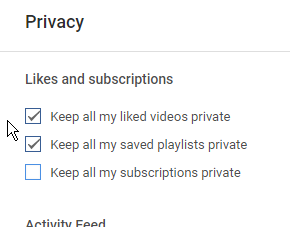
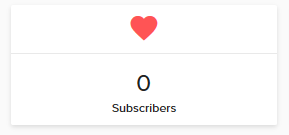
@thorn herald here is the issue if person does not share in privacy settting subscription
it wont be shown
thorn herald
Ohhhhh
heady parrot



 thorn herald
Ohhh
thorn herald
Ah
heady parrot
sorry for the trouble
thorn herald
Makes sense now thanks 
heady parrot
Sorry for waiting so long :/
thorn herald
Np
pseudo trellis
SE have transition?
lapis shard
for OBS?
pseudo trellis
yes
lapis shard
no 😦
pseudo trellis
😕
pseudo trellis
how i add streamlabs bot to my stream?
lapis shard
I hope you mean StreamElements 😃
lapis shard
Go to the moderaters tab in Youtube
pseudo trellis
ok
lapis shard
and type in "streamelements"
and select this channel as Mod
after you done that the bot will automatically join your chat after you went live
pseudo trellis
i need the url
lapis shard
will take about 5-10 minutes till the bot arrives

YouTube
Official youtube channel for StreamElements tutorials https://StreamElements.com
should be this
pseudo trellis
my commands not working
lapis shard
are you live right now?
pseudo trellis
no
lapis shard
then the bot isnt in chat
pseudo trellis
oh
lapis shard
it can only join when you are live
pseudo trellis
ok lets see
lapis shard
and it will take 5-10 minutes to join
pseudo trellis
ok
 glad meteor
hello
lapis shard
hello 
glad meteor
cm you help me?
lapis shard
sure whats up?
lapis shard
 you mean how you add the bot to your chat?
lapis shard
ah so you made a overlay yourself in the Overlay Editor or you want to use a pre made theme from the theme Gallery?
lapis shard
@glad meteor ?
finite oriole
Hey
My 8ball stoped working again, I try to turn off and on but didnt work, any solution?
upbeat furnace
@finite oriole I will take a look. Please link your youtube channel with discord by going to ⚙ Discord settings > Connections
finite oriole
done
short basalt
hey there
near stag
@short basalt 
upbeat furnace
cough this is youtube
short basalt
i cant on youtube?
upbeat furnace
Afraid not, only for Twitch at this time
short basalt
and how can i do it on twitch?
upbeat furnace
There is a widget in the overlay editor
short basalt
thanks
upbeat furnace
no problem