#helpdesk-youtube
1 messages · Page 6 of 1
 ionic oracle


 mystic dirge
when setting up a stream in Manage Broadcast is there a way to set the game you are playing?
 icy willow
I still haven't received a reply for my problem for more than a month now. My Activity Feed is NOT updating, it is stuck on showing 2 years old alerts.
Can anyone help please?

 trim chasm
mystic dirge
when setting up a stream in Manage Broadcast is there a way to set the game you ...
trim chasm
mystic dirge
when setting up a stream in Manage Broadcast is there a way to set the game you ...
You can set that within YT studio via setting up a scheduled stream. Then once you've set all the settings on YT side, when you click "Manage Broadcast" in OBS, you will see it as an option under the "Select Existing Broadcast" tab . Choose the scheduled stream you made on YT studio's side and start streaming.
trim chasm
icy willow
I still haven't received a reply for my problem for more than a month now. My Ac...
Can you share with me the YT channel you are having issues with? I can send it to the team and see if we can get you some answers quicker.
mystic dirge
trim chasm
You can set that within YT studio via setting up a scheduled stream. Then once y...
thank you
 bleak delta
?
trim chasm
DOH! You may have to DM it to me 🤔
bleak delta
who?
trim chasm
Think someone just sent a link in here and it got removed.
trim chasm
bleak delta
?
Hey Owl. What command are you having issues with specifically?
bleak delta
trim chasm
Hey Owl. What command are you having issues with specifically?
i have the problem becose i whant in yt comend like !game, !time, !viwerse !title but problem is the only showing me time but time showing not my like time UK but Time -1houre left
I want to make !time on the youtube stream to show the time I currently have UK, so that there is also a timer and streamelements bot would display itself, but the problem is that it shows me an hour back, so that there is a title so that people do not ask what game it is, e.g. !game does the bot say every 5/10 minutes what game is it, what is the title of the stream and how many viewers are there
But the problem is that when I gave Playing is now: $[game] it still showed me instead of the name of the game, it showed me $[game] on the stream
And when I give !viwerse, it shows me only Viwerse is now as text on the stream, but there is no number if I have 2 viewers, e.g.
and not only with yes with the !game command but also with time I was messing around and it didn't work out and with the title that instead of typing !title myself what is the title of the strem, I have to add it manually and it's the same with !uptime after it is standard it shows that the stream is from but does not show the digits from how many
And what commands I want to do is !game !title !time and !viwerse and that's it 🙂
trim chasm
bleak delta
i have the problem becose i whant in yt comend like !game, !time, !viwerse !titl...
So, the "what time it is where you are" will most likely need to be a custom made command that will require some kind of logic to return the time of your timezone. As for the custom variables (${game}, ${title}, etc) I am checking with the team.
bleak delta
trim chasm
So, the "what time it is where you are" will most likely need to be a custom mad...
okey thanku Even when I give a new command from the template, it still does not work for me, and if I mean my time, I tried everything, e.g. $[time.TIMEZONE] and it works but it is 1 hour behind, or it writes $[time.TIMEZONE GMT+1 ] the same shows me the wrong hour when I give ${time.until <utc time>} and enter UTC +1 inside it tells me that it can't be UTC or 2006 some strange numbers give me different things with time I combined and gave up
And if I do as in the picture, it shows me $[game] at the end of the sentence, not the name of the game, and in the title I have so that if I choose from this template, it shows me 's Title is: $[title] only 's Title is this not title
 trim chasm
${game} is not currently supported for YT
${title} should work
On your Timezone command can you share a screenshot of how you have that one setup?
bleak delta
trim chasm
`${game}` is not currently supported for YT
`${title}` should work
On your Timez...
aha it's strange that in the yt profile picture you can make a !game version


 trim chasm
bleak delta
trim chasm
bleak delta
Ok, you need to actually put timezone you are in when using the variable...like ${time.CST} but whatever your abbreviation is for YOUR location.
bleak delta
trim chasm
Ok, you need to actually put timezone you are in when using the variable...like ...
My is now BST british summer time, a if is winnter is GMT

im put before like this but not working and bot not showing or oder komend showing time
And what about the resty photos that I sent how to make it work because even!uptime on yt does not work after I think the bot crashed on the face?
okey im change
 trim chasm
icy willow
I still haven't received a reply for my problem for more than a month now. My Ac...
trim chasm
icy willow
I still haven't received a reply for my problem for more than a month now. My Ac...
Hey Rami, what events are you expecting to see here that you are not?
bleak delta
What about other commands like Viwerse or others? 😄
trim chasm
bleak delta
What about other commands like Viwerse or others? 😄
I'm currently getting a better answer for you on the command variables not working for ya.
bleak delta
trim chasm
I'm currently getting a better answer for you on the command variables not worki...
Which don't work except time? how they don't work why are they, plus !uptime is on twitch and YT and sometimes it works sometimes not like !uptime
trim chasm
bleak delta
Which don't work except time? how they don't work why are they, plus !uptime is ...
Yup. The team is now aware of the issues you are experiencing. If I have another option to try, a member of our team will be sure to reach out.
bleak delta
trim chasm
Yup. The team is now aware of the issues you are experiencing. If I have another...
okey thanku
trim chasm
YW! Happy Streaming! 
icy willow
trim chasm
Hey Rami, what events are you expecting to see here that you are not?
All kinds of events ... I mean Subscribers, Superchats, everything ... it used to show them ... then suddenly stopped and I have been searching for a solution for months.
It still shows events older than a certain date 2 years ago. but not anything since.
 daring sealBOT
@icy willow ⤵️
Please provide your account ID found at the top of this page: https://streamelements.com/dashboard/account/channels This ID is public info and safe to share here.
trim chasm
Also, @icy willow, while you are doing the above ☝️, I have another question for ya. Is your channel a branded account by chance?
 shut summit
is there sponsorships for youtube streamers? ive been streaming for a few weeks now and i feel like it aint a thing for youtube.
bleak delta
At the moment there is no sponsorship on streamelements and I don't know when it will be but there was some time for all platforms, you have to wait I guess
 viscid rampart
Hey team, was hoping for some help with Alerts on YouTube. I'm trying to get Community gifts alert working, and it seems to work in the Alerts editor, but when I try replay a community gifted event from OBS, it just plays them individually


and this is using the simulated Member event -> Community gift

 willow obsidian
Bit of an odd one, all of a sudden my activity feed in SE.Live is saying session timed out, but will not allow me to reconnect it to my YT channel it's just telling me to log in to twitch?
 fresh zenith
willow obsidian
Bit of an odd one, all of a sudden my activity feed in SE.Live is saying session...
fresh zenith
willow obsidian
Bit of an odd one, all of a sudden my activity feed in SE.Live is saying session...
Click on the streamelements menu tab and then Logout > Login
willow obsidian
fresh zenith
Click on the streamelements menu tab and then Logout > Login
As if it was that simple, I’d tried logging in and out other ways but not that 🙃 thank you!
 pliant flower
Hey friends. Am I the only one who the loyalty option is not showing up for on the SE Sidebar?

 candid wolf
pliant flower
Hey friends. Am I the only one who the loyalty option is not showing up for on t...
candid wolf
pliant flower
Hey friends. Am I the only one who the loyalty option is not showing up for on t...
Loyalty is not available on YouTube.
pliant flower
candid wolf
Loyalty is not available on YouTube.
oooh that would be why. Thank you so much 🙂
 chrome jackal
Hello,i would like to help with this problem,my alerts are in obs delayed.Yesterday someone gave me sub on youtube live stream and it showed to me like 20 min after that.Both alert on stream and message in activity feed in obs.Any idea what can i do?Thanks
 tall portal
if i switch from my Main Twitch on YT + alerts doesnt triggers

 dim inlet
chrome jackal
Hello,i would like to help with this problem,my alerts are in obs delayed.Yester...
dim inlet
chrome jackal
Hello,i would like to help with this problem,my alerts are in obs delayed.Yester...
Due to changes by Youtube there can be a delay up to 4 hours with subscriber notifications. This is the new intended way for receiving events from Youtube by their design. 
 versed tangle
Seguinte
estou apagando timers, ele apaga porém continua aparecendo na live. mesmo depois de live fechando e abrindo
No yt
alguém sabe como arrumar?
 uneven thorn
hi, so i had a question. i believe loyalty is not available on youtube but i still wanna have something similar where viewers can earn points while watching and spend it on stuff such as tts. is there a work around ?
uneven thorn
i belive coins still exist, but people cant earn it
a way to give everyone 1 coin per 5 minutes maybe
or if anyone knows any other chat bot
not going to use streamlabs that shit is filled with adds
 main vector
@uneven thorn unfortunately we don't have anything you could use and I'm not aware of any 3rd party things able to do it with youtube.
uneven thorn
😭
 fiery imp
Hello, i opened my OBS and my YouTube activity dock crashed and disappeared. When i click StreamElements > S.E.LiveDocks > Activity Feed it opens a login screen to Twitch, yet I'm streaming and logged into my YT account!? How do i bring my YouTube activity feed back?
mystic dirge
when I schedule a stream in my YouTube dashboard and open SE/OBS I can see the schedule stream and can start the stream but it breaks the chat window. so live chat doesn't work in OBS. Is there a fix to this or am I doing something wrong?
 dark lynx
I've been streaming on Twitch for YEARS, and I'm just starting out on YT- but I'm getting this error code when I try to link my YT to S.E.
Trace ID: b4070c67cf5bbdf9b411652025a53d60 The email account I use for YT is different than i the one I use for Twitch- could that be part of the problem?
mystic dirge
mystic dirge
when I schedule a stream in my YouTube dashboard and open SE/OBS I can see the s...
maybe someone will see this and answer....
 plucky lake
Hi!
I have been using stream elements for my live stream alerts but they are not always working, how ever I got that one manually fixed, but the chat bot is not mentioning the viewers in the chat, mentioning them as a thank you for subscribing, another thing I would like to add is a new name to my chat bot, how can I do that?
 tepid sandal
fiery imp
Hello, i opened my OBS and my YouTube activity dock crashed and disappeared. Whe...
tepid sandal
fiery imp
Hello, i opened my OBS and my YouTube activity dock crashed and disappeared. Whe...
i had this issue before, seems like the streamelements team is a bit overwhelmed or they dont care about the fraction that uses their software to stream to youtube xD But if i remember correctly you have to open up streamelements obs -> then go to the "streamelements" tab --> then click on logout and then log back into your youtube account. Pretty sure that fixed it for me.
tepid sandal
mystic dirge
when I schedule a stream in my YouTube dashboard and open SE/OBS I can see the s...
ive been having troubles with the livechat a loooot , pretty sure ive encountered most of the issues. Do you not see the chat at all ? Or do you see it and cant type ? Something i noticed is when you schedule a stream, for some reason it has a different stream key, than if you just go straight up live on youtube. So go to your scheduled livestreaming dashboard, get the stream key and insert it to obs. Chat should work after that, i had the same issue, where i could see people type in my dashboard but not on obs, its because my obs had the "wrong" stream key. Its unnecessarily complicated idk why youtube cant use the same stream key for scheduled and non scheduled streams.
mystic dirge
tepid sandal
ive been having troubles with the livechat a loooot , pretty sure ive encountere...
oh thats interesting. why would they change the stream key? seems odd to me but i will try it. I like scheduling it on YT so I can choose which game I'm playing, thats really the only difference. Maybe just maybe SE/OBS could add a Game field to the Broadcast settings..... be a lot cooler if they did lol
tepid sandal
mystic dirge
oh thats interesting. why would they change the stream key? seems odd to me but ...
i really dont know, but it seems like its not the only part where youtube is just worse than other platforms, from what ive heard google makes it also pretty hard to create widgets and plugins for youtube livestreams cause they have to communicate through youtubes api or something like that. Still enjoy streaming on youtube, but i wish it would be a bit smoother sometimes.
mystic dirge
tepid sandal
i really dont know, but it seems like its not the only part where youtube is jus...
yea for sure. hopefully it gets better. i really think its better than other platforms for stream quality. just wish the 'extras' you get from Twitch were more available
dim inlet
plucky lake
Hi!
I have been using stream elements for my live stream alerts but they are not...
Due to changes by Youtube there can be a delay up to 4 hours with subscriber notifications. This is the new intended way for receiving events from Youtube by their design. - also note Users can choose to make the channels that they subscribe to public or private. By default, all settings are set to private. If a user has it set to Private they will not show up in the activity feed. as for custom name not possible on YouTube at this time 
dim inlet
tepid sandal
i had this issue before, seems like the streamelements team is a bit overwhelmed...
i can tell you right now StreamElements does care there's just not a lot they can do about it when YouTube's API is so restricted
tepid sandal
dim inlet
i can tell you right now StreamElements does care there's just not a lot they ca...
yeah i figured, my comment was more leaning towards the replies being a bit slow in here sometimes. Its a shame it feels like youtube has shifted their focus to shorts right now. I know it takes a lot of time for a gigantic company like google to make changes,but to me it feels like they are happy where they are right now in terms of the streaming space. I think its a bit sad that it takes someone like ludwig for example to create a browser extension that implements basic twitch features like channel points. Hope we get more features soon, or at least some sort of roadmap.
dim inlet
tepid sandal
yeah i figured, my comment was more leaning towards the replies being a bit slow...
a lot of the support helpers are just volunteers so i can get why things can be slow sometimes as someone who streams on YouTube myself believe me i know the frustrations of how YouTube is right now 
icy willow
daring seal
<@490506133543321600> ⤵️
@trim chasm @daring seal This is my Account ID (I have sent it before, few months ago and got no solution)
5c4eb227e8346b5bf82a130d
And yes, it is a Brand YouTube Channel
(I made sure to sign in using the Brand not the old Google account, but maybe there is something messed up in the sign in or authentication with StreamElements)
I got many just two weeks ago ... I mean I should see names of new subscribers and superchats almost every stream ... every week basically or so.
icy willow
trim chasm
Hey Rami, what events are you expecting to see here that you are not?
Subscribers, superchats ... I mean you can see the events from 2 years and older, but not a single event since ... while my Channel is active still.
tepid sandal
I usually schedule some of my shorts during the times i am live to catch some potential short viewers. When they subscribe to the channel after watching a short of mine, the subscriber alert gets triggered in my stream, is there a way to change it so the subscriber alert only gets triggered if people subscribe through your livestream? Its confusing cause i always assume they are in the livestream when the alert triggers xD
trim chasm
tepid sandal
I usually schedule some of my shorts during the times i am live to catch some po...
There isn't a way to determine that, unfortunately.
tepid sandal
trim chasm
There isn't a way to determine that, unfortunately.
ah damn, thanks for the fast reply!
trim chasm
tepid sandal
ah damn, thanks for the fast reply!
YW! Happy streaming! BTW, great tactic to publish shorts while being live 👍 👍
 pastel dove
Hi does Loyalty System worn on youtube? because i dont see it on my dashboard..
fresh zenith
pastel dove
Hi does Loyalty System worn on youtube? because i dont see it on my dashboard..
No, only on Twitch.
pastel dove
Shame. Thanks for answer 😉
 drowsy thicket
can support unlock SE.Pay?
daring sealBOT
@drowsy thicket ⤵️
SE.PAY is available for streamers who are at least 18 years old, with bank account under their name in one of the following countries, and have at least 101 followers (Twitch/Trovo/Facebook) / 101 subscribers (YouTube):
Austria, Belgium, Czech Republic, Denmark, Finland, France, Germany, Ireland, Italy, Netherlands, Poland, Portugal, Slovakia, Spain, Sweden, Switzerland, United Kingdom, United States.
If you meet these criteria and don’t see SE.Pay, let us know.
For information on SE.Pay payment methods, their fees, and settlement times see https://streamelements.com/dashboard/tipping/fees
drowsy thicket
i have 224 subsribers on youtube and have bank account in poland and still i see on SteamElements 0 subsribers and i don t see SE.Pay
main vector
 frank coral
hi all, I currently have several overlays on a 1080p canvas on Streamelements but i am in the process over upscalling everything to 1440p. I have changed all settings in OBS and in the properties part of the overlay on streamelements but everything still seems shrunken on OBS?
main vector
You have to change the overlay res to 1440p along with adjusting the Widgets as they don not rescale on changes.
frank coral
well this was my thought also but, everything in the overlay editing section is how i want it, centered the widgets etc. but on the OBS preview screen its shrunken and in the top left of the preview screen?
I have even made a new overlay starting as 1440 and mimicked my other overlay and it still does it?
main vector
Did you change the browser source size to match the res?
frank coral
on obs? if so then yes
daring sealBOT
The default resolution for StreamElements overlays (theme and custom) is 1920x1080. Please add them in OBS at their full resolution and use CTRL+F to fit to screen if necessary. You can then downscale your stream in OBS settings > Video if you'd like https://i.imgur.com/6bWXxjR.png
main vector
That is set to 1440p?
frank coral
so do you mean the bit where, if i right click on the source and press properties. You can then edit the source with a different URL, width, height etc.?
if so then yes, i have changed this to 1440
main vector
Do ctrl+f then
main vector
Screenshot the main OBS window with the source selected.
frank coral
so on the first image, you can see the background which is the overlay i am editing and the smaller green writing is in the top left
the edited overlay on the first shows the widgets and writing are in the centre
main vector
Do Ctrl+R then ctrl+f
frank coral
when looking at the preview screen?
main vector
In OBS
frank coral
didn't do anything
is there a voice channel we can join to talk through it and i can screen my screen to you?
main vector
Nope. #submit-support-ticket
tepid sandal
can i get rid of those hype emojis in the chat widget ? They are sometimes blocking words and i have troubles reading the chat xD

 next ginkgo
Good morning. I just set up an overlay. How do I my /Youtube name and have it show on stream? I thought I did it right in editing, but I guess not?

 abstract monolith
о.о
 lapis shard
Fucking... Scalper I was thinking about doing this... But I wanted to be professional 
 errant scaffold

 obsidian adder
Youtube, you're going to be okay, and you can do anything you want in life.
There I supported youtube
lapis shard
I believe in you Youtube! I will Fill you with determination! I know the Add-pocalyps hurt you but with more Awesome Streamer's on your Platform you will grow back to old glory!
 LETS
LETS  GO
GO  YOUTUBE
 cursive tartan
so wheres vimeo? 
lapis shard

 obsidian edge
You mean Dailymotion? 
cursive tartan
and FB live?
obsidian adder
Periscope
lapis shard
The right question would be Mixer you idiots...
 rigid schooner
Guys, please keep this channel to actual support for youtube
you have #welcome and #general-chat
lapis shard
Oki :x
 cyan lake

cursive tartan

 dim drift
In Dutch we have a saying; you give them a finger, they'll take your hand. 
 sly dew
In israel i got a saying for you , you give me finger I take ur wallet.
dim drift
THIS ^ 
versed tangle
New channel hype
 vapid osprey
27th poggers
versed tangle
need some help was wondering if there is way to delete your account as i have accidently set up 2 accounts one for my twitch but my YouTube is on a different account which i setup accidently
is there a way to delete the one with the YouTube so i can link it to the same account that my twitch is on
 robust mango
Deleting an account is very difficult, but we are aware of this issue, I brought it up yesterday
versed tangle
ok is there way to unlink the YouTube account so i can have it in the same account as the one for my Twitch
robust mango
No, the only way to avoid this problem is to link it from the Channels page in the first place opposed to the Home page
cyan lake
I think you can give yourself full editor permissions for now
robust mango
That's a nice workaround actually 😮
cyan lake
That gets the access to just about everything
Only thing missing is the JWT token if you use Ground Control
And maybe setting up your tip page, but there are workarounds for that as well
versed tangle
well i will being using the same paypal account for tips if it will let me do that
robust mango
Yes it will
versed tangle
so just link myself a full control manager then
cyan lake
Can use the same tipping page, you just have to have the correct alert box.
versed tangle
ok cool will keep that in mind
versed tangle
Hello guys
someone here ?
I using StreamElements on my YT channel I add my Variations at subscribes and pick radom alert , and alert still is defoult
robust mango
@versed tangle I'll bring this up, thanks for bringing it to our attention, I just tested it about 10 times and had the same result
 summer maple
Hello i have a question, how can i unlink my youtube channel from the streamelements page? like deleting the account?
obsidian edge
It's actually very complicated deleting an account from StreamElements at the moment, we're working on it
sly dew
@versed tangle
versed tangle
@sly dew
 steep river
Hey guys, Recent tips dont seep to appear on widgets in my overlay. I have 2 tips one received today one added manually neither of which show in the recent tip widget or the Event List Widget?
seem*
They do show on my Activity feed though, just not in my overlay.
obsidian edge
Hi @steep river is the rest of your overlay animating fine ?
steep river
Superchat is fine, subs are fine, twitch followers are fine. Just Recent tips not showing
The tip i got today showed during the stream, but not showing now.
But all the other stuff is still showing now.
Screen shot of my current stream with Recent tips not show at centre top.
obsidian edge
Give me a sec, sorry I can't answer you right away, i'll be with you in a moment !
Have you tried reimporting the said overlay into the editor ?
steep river
Yep, even when i import a different widge like the recent activity widget, they dont show tips
The Event List Widget
obsidian edge
Are you using chrome to edit the overlay ?
steep river
yes
obsidian edge
Hmm, I'll ask the rest of the staff and get back to you ASAP !
steep river
LIke i said superchat still shows after stream has ended but tips just disappear
obsidian edge
Noted !
obsidian edge
@steep river Do you have your widget set to session in your widget setting ? That would be the most probable cause, as your widget stops working when you turn your stream off 🤔
steep river
Widget settings of the individual widget or global widget settings.
obsidian edge
Individual, as this is only one widget that's being affected !
obsidian edge
On the left side of your browser
steep river
In my overlay, in my dashboard?
obsidian edge
In your overlay editor
 visual swallow
I cant remember exactly, and I am at work so I cant look to cheat, but I think the session setting might be under the Data section 
I believe it is set by default that the session data will be removed at some point when the stream ends. like 10 min after or so
steep river
yeah but its one sesion data and superchat is working as it should. Its just recent tips that are not working.
So something somewhere is telling recent tips to clear at end of stream but not superchats or followers or subs.
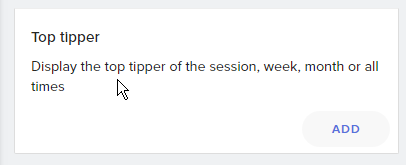
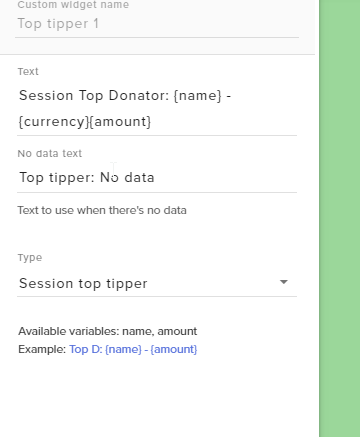 visual swallow
^ I was just going to ask what widget it was exactly was being used for the tips
steep river
I dont want a top tipper I want a display of all tips received
 heady parrot
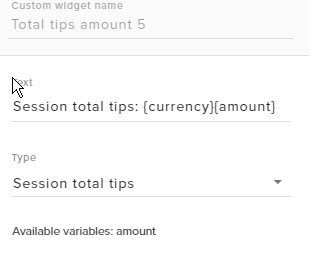 steep river
Recent Tips widget, I use recent super chat widget and it works fine
heady parrot
ok if you want it to work same as cuper chats
then you need top ick Recent tips widget
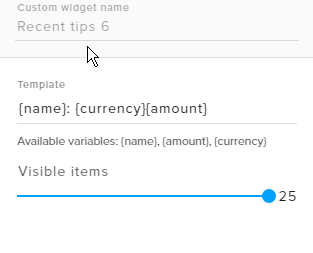
and it will show picked amount of tippers 25 is max
steep river
Yes which is what I am using, but it removes the tips when the stream ends. superchat did not do that.
heady parrot
@upbeat furnace can you check about this issue
recent tips are removed after stream end
steep river
Just to be clear. I am using Recent tip, Recent subscribers, Recent Followers and Recent Superchat Widgets. All retain any information after stream ends except recent Tips. It is not acting the same as the others.
Recent tips should behave the same as the others. I don't want it to clear when the stream ends.
It makes me look sad and pathetic to have that field empty. Look at the poor streamer nobody likes him enough to give him a tip. lol
Not to mention how the Tipper must feel next time they come to my stream and see the tip they so generously given to be wiped clean.
 uneven carbon
Is it possible if someone could send me the StreamElements vedeo opening
 somber star
@heady parrot Unlisted live bots are displayed on the bot or just public?
 upbeat furnace
HI, I'm reading back through the messages. Give me a moment please
@steep river what is your youtube channel name?
@somber star Sorry, I'm not sure what it is you're asking. Can you elaborate?
somber star
@upbeat furnace We have a test stream and the bot not joining to the stream
upbeat furnace
please link the stream
somber star
●----------------------------------------------------------------------------------● ▶▹【Támogatási lehetőség: Feliratkozás, és 1 like!:D 】 ▶▹【Twitch: https:/...
@upbeat furnace
upbeat furnace
Go here please https://streamelements.com/dashboard
On the right side
Do you see this?
upbeat furnace
Have you added the bot as a moderator?
somber star
yes. this link: https://www.youtube.com/channel/UCjerlCIbLPQwSnYlClkjDXg

YouTube
Official youtube channel for StreamElements tutorials https://StreamElements.com
upbeat furnace
Ok, one moment
somber star
okay. we waiting
upbeat furnace
@uneven carbon Which video intro?
uneven carbon
The one with the rocket
The opening
The one that other youtubers use on on the start of their vedeos

StreamElements is the ultimate tools platform for streamers, 100% Free. https://strms.net/livefails Overlay Manager, ChatBot, Tipping, Loyalty, HypeCup, Stre...
The one that is on the start of that vedeo
upbeat furnace
Please contact @slim mauve about accessing these materials.
uneven carbon
Do i just PM him or...?
somber star
@upbeat furnace not sign when he online
upbeat furnace
The bot can only join a channel when youtube tells us that the stream is live. They haven't done that yet. (see the live button next to the channel at the top) It normally occurs within 5 minutes after going live but it hasn't happened yet for some reason. When they do eventually alert us that the stream is live the bot will join.
@uneven carbon Sure
somber star
@upbeat furnace his streaming 26 min
upbeat furnace
Bot is now in the channel. We're looking into the delays with the YouTube API.
steep river
Any Update on this,
ETV: Just to be clear. I am using Recent tip, Recent subscribers, Recent Followers and Recent Superchat Widgets. All retain any information after stream ends except recent Tips. It is not acting the same as the others.
Sorry Terra I missed your message my Youtube channel is called Exploringthevirtual
upbeat furnace
@steep river I see two tips showing in your "recent tips" widget. These are also found on the Tips List page https://streamelements.com/dashboard/tipping/list and in the activity feed
steep river
Where are you seeing this
upbeat furnace
steep river
Thats not the recent tips widget, thats top tips widget i put in place because it was the only way I could get the last two tips to show
You can see the recent tips widget under it
The recent Tip Widget is empty
upbeat furnace
Ok, I see now and am looking into it.
steep river
Thx, i will be streaming shortly so I may not be able to answer you straight away.
 static pagoda
is there a loyalty bot for youtube users?
upbeat furnace
Youtube doesn't provide viewer/chatter lists to 3rd parties so loyalty is not possible right now
static pagoda
Gotcha
 exotic lagoon
We are trying to convince them though ^
steep river
I use Fuss Bot as loyalty bot for Youtube
versed tangle
trying to set up the bot for my channel but can't find the url to mod it 😦 send help pls
pls
 near stag
@versed tangle this is our official Streamelements youtube channel that is the bot. Click in the channel next to the name and you will see the option to open it in a separate tab, then just copy the URL
 tropic atlas
@versed tangle if you set up the bot to join, when you are live it will join, then have it say something by typing !commands , and then click the three dots next to it and then you can mod it
versed tangle
ty ty
so, this should be the url correct? https://www.youtube.com/channel/UCjerlCIbLPQwSnYlClkjDXg
YouTube
Official youtube channel for StreamElements tutorials https://StreamElements.com
can't get it to work 😦
versed tangle
i need help with setting up stream labs with and stream elements when i try to add total subscribers it says 0 but i have 1000 something
obsidian adder
@versed tangle go here https://streamelements.com/dashboard/session and refresh totals and aggregates
versed tangle
thank you for helping
obsidian adder
no problem 😄
 calm hazel
ahhhhhh i just deleted a part of my overlay is there anyway to undo???
rigid schooner
Unfortunately not
calm hazel
God damn it
rigid schooner
if you dont save, just leave the editor
rigid schooner

calm hazel

versed tangle
Yea 😄
versed tangle
gg
 spare owl
Does StreamElements support showing up alerts when someone subscribes to my YouTube channel ?
obsidian adder
yup @spare owl just add the alertbox to your overlay
 left wharf
@compact eagle
versed tangle
hi. can i get alerts from yt and twitch same time? i'm streaming both platforms but i cant see both options to play alerts.
 sacred shale
I am streaming and its says offline in the Streamelements Dashboard and the chat commands are not working
cyan lake
@versed tangle Yes, just for right now, you will need an overlay that is linked to your twitch account with an alert box along with a youtube overlay with an alert box. But the alerts will both come in
versed tangle
@cyan lake thanks. that's meaning i need two browser source - 1 from yt, 1 from twitch, y?
cyan lake
Yes. Basically we don't have the accounts merged in a way that will allow you to get the alerts from both in one overlay yet. It is something that I think is planned, just not possible yet
 silent basin
I'm stream on YouTube when I check my streamelements website it says that there's no stream on twitch is this a bug or something cuz I use StreamElements on twitch and YouTube
near stag
@silent basin if you stream to both, you need to set up both, tell me more about your stream setup (restream.io or own server etc) and how everything is connected etc, we figure out what do you mean.
silent basin
I dont use restream.io
Im streaming on twitch or youtube like last time I streamed to youtube
and this site : https://streamelements.com/sestain-7881

StreamElements
The Ultimate All in One Platform for Streamers
should be youtube live stream page
but it says twitch in chat and video
so how I change this
?
near stag
@silent basin this site has your twitch, there is no such thing for youtube right now and even if there would be - you would have a different URL. Youtube and Twitch are 2 different things here and we do not replace something with something else because there are multistreamers who use both services at the same time.
tropic atlas
@unreal gale sup
 unreal gale
hi can you help me i made my overlay but my game is showing over it and i dont know how to change that
i cant see the overlay on my obs only the game
near stag
@unreal gale move the game down in the source list, it is sorted from top to bottom.
unreal gale
the browser is the top on the list
near stag
How did you add the overlay? If it is on the top and added properly, it will show up withhin seconds.
unreal gale
i see it but my game shows over it when i start
near stag
Then your game is above the browser source, there is no other way that will happen in OBS or Xsplit
unreal gale
do you think maybe i can show you my screen in a call?
sly dew
@livid jungle How are you feeling ( Nir from StreamElements )
 ember hedge
Kite im here
visual swallow
ok, are you going to be streaming to youtube then?
still need to also know what cpu and gpu you have, and your video settings in OBS to know what you are trying to output to
ember hedge
i will be streaming on youtube yes lol
and let me find my CPU and GPU
i am on my settings
system
about
and i don't see no CPU nor GPU
visual swallow
if you use the windows key to search for run, and then in the run app type msinfo32
ember hedge
ok now what
visual swallow

 obsidian adder

visual swallow
unfortunately, that is not going to work out for streaming
ember hedge
T-T
shiet
like not even a bit?
can we not like work on some OBS settings and make it work?
cyan lake
We can make it work, but be prepared for minimal everything
visual swallow
The problem is with streaming you are encoding your broadcast, and streaming it to the service all in real time. To do encoding that fast, and at a decent quality, you will either need a higher end cpu, gpu, or both. You can either use software encoding (x264) that will require a better cpu, or hardware encoding (like nvenc) that will require a better gpu
cyan lake
Basically because you have integrated graphics, your GPU is your CPU
cyan lake
You can always try, you will need to look very deep into the settings
ember hedge
oof
cyan lake
Play around, see what works. Dont expect to have a buttery smooth stream
 foggy pilot
Hey can anyone walk me through these set-up steps? I just downloaded Ground Control and it's asking for a JWT token but there isn't one under My Account
obsidian adder
@ember hedge streaming is one of the most intensive things you can do with a computer nowadays unless you are running servers/ 3d modelling
obsidian adder
@foggy pilot https://streamelements.com/dashboard/account/channels and click show secrets in the top right
foggy pilot
Okay cool, thanks @obsidian adder !
obsidian adder
No problem
visual swallow
@ember hedge what are your current video settings in OBS
ember hedge
for streaming?
visual swallow
ember hedge
 visual swallow
your machine is not going to be able to stream at that
ember hedge
ah
visual swallow
you can try the output resolution of 1280x720, 30fps, and bilinear for the filter
and if your internet can support it, you can try a bitrate of like 3k for your output
near stag
Youtube has no bitrate limits, go as high as you want and drop the encoder to a hardware encoder (NVenc / AMD VCE / Quicksync). This will allow you to stream from pretty much every potato with enough internet bandwith behind it 😄
cyan lake
can't do hardware, no hardware in this instance @near stag. Only CPu
near stag
@cyan lake intel HD means Quicksync enabled, the HD 4000 should support that 😄
It is a potato, but it is possible to make this potato stream at least 720p 25fps
near stag
Believe me it will be just as nice as a stream from a phone at night + with a loud fan on the laptop etc. But possible 😄
visual swallow

visual swallow
and change it from x264 to quicksync
 visual swallow
see how it works
near stag
Keyframe Interval to 0 for Youtube
ember hedge
Ok!
near stag
Bitrate - as high as you can, you can feed 100mbit/s into Youtube if you got that much
near stag
ok, fine. not critical
ember hedge
of course
near stag
@ember hedge ok got time to check it
near stag
@ember hedge well, would love a link to the channel since it is not in your profile here 😄
near stag
just post here
ember hedge
Ok!

YouTube
Yo random person on the internet! i am Mod Leon, a teenager who creates video content on Youtube in my small corner of the internet! I most like will be maki...
near stag
Not streaming now, you can start the stream and i take a look
ember hedge
Ok
i'll make it unlisted
meaning only those who have a link can watch

YouTube Gaming
Support the stream: https://streamlabs.com/modsquad Hope you guys enjoy this stream! Subscribe for more! ►https://www.youtube.com/channel/UC_FYJsNCHG_eDfOS...
near stag
ok, let me see what you got here
720p 60, it is laggy tho, not the stream, the encoder
drop to 720p 30, restart
slightly better. minecraft will look OK but do not expect to get anything anywhere with that quality. look at that as a training field 😄
if you want a cheap rig for streaming - ryzen 5 2400G with the cheapest B350 board, 8GB ram, done
visual swallow
are you using bilinear for the filter on the video?
near stag
believe me the filter would not matter 😄
the encoder right now is trying to jump out the window, sadly it is the iGPU on the intel CPU and cant run 😄
Did not expect him to try stream games with that, webcam only would work with those settings.
visual swallow
yeah, i mean, integrated graphics on an i3 are not really made to stream
near stag
We have some amazing hardware these days for streaming, just some parts are overpriced, but you can get a smooth 1080p 60 stream below 1000$
near stag
Output. Base is your monitor resolution
ember hedge
and im using bilnear
near stag
But honestly, go check out the videos that (hopefully) are saved on youtube
near stag
With that quality you will not get many viewers, it is impossible to get anything done with that hardware while playing games
ember hedge
;-;
YouTube Gaming
Support the stream: https://streamlabs.com/modsquad Hope you guys enjoy this stream! Subscribe for more! ►https://www.youtube.com/channel/UC_FYJsNCHG_eDfOS...
rejoin
lets see
rip
frames fucking me up
imma prob go buy me a graphics card
visual swallow
not really that simple when you are on a laptop
they make external gpu adapters, but it would not be worth it with the i3
you would be better saving that money, and putting it towards a streaming pc
near stag
Graphics cards today are kinda expensive, your best bet is a Ryzen APU right now (to save money) and you will have an upgrade path later.
visual swallow
near stag

ember hedge
 narrow marlin
can someone help me??
i need to add a discord url of mine onto my stream elements account
how can i know my discord url?
versed tangle
go on your discord server, and click on invite people and copy that link
narrow marlin
Thanks a lot @versed tangle
versed tangle
No problem
visual swallow
sounds like something to do with how your sources are setup, what sources are you using for your scene?
 radiant zinc
let me check
i tried windows capture and screen capture i believe and they both stay black
visual swallow
can you give me a screenshot like this?
visual swallow
depending on what you are trying to capture, you might need to try display capture as a source
radiant zinc
chrome
visual swallow
some stuff does not play nice with game, or window capture
if you use display capture as your source, it should just capture the entire monitor for the display you choose
visual swallow
Help > Log files > view current log files
we will want to look for any failures for the sources
radiant zinc
okay let me see
Failed to load 'en-US' text for module: 'obs-browser.dll'
want the whole document?
visual swallow
you can dm it to me so we dont clog up this chat
radiant zinc
yeah gotcha
 white mortar
You could also try running OBS as admin. That's worked for me in the past sometimes. Depends on the problem though
obsidian adder
^
visual swallow
that was the first thing we tried, as the log indicated OBS was not running as admin
running as admin did not change anything. No failure in the logs, settings were all legit, encoding type, software, or hardware made no difference. Advised them to update OBS as it was not on last nights version, and if that did not work to hit up the OBS discord
 old yarrow
Is there a video on creating live streams on YouTube?
old yarrow
Or at least how to get my obs to my YouTube
 obsidian briar
Pretty sure there is a vid on that somewhere, otherwise if you need support with obs
You can always go on their discord
!obshelp
 polar caveBOT
For the best OBS support, please join their discord where OBS devs and support volunteers are available all the time discord.gg/obsproject
 oak pier
why is the sub alert in delay
and sometimes not working
robust mango
You mean you're getting a delay before it shows on the overlay?
oak pier
yep
robust mango
How long of a delay?
robust mango
30 seconds wouldn't be unusual while live, longer if you're offline
oak pier
someone subbed like 10 mintues ago and didn't showed up
and not updated to last sub
something is worng
i'm using the fortnite animated theme
robust mango
Apparently there was something last week where there were delays with the YouTube API and it was being looked into, i'll ask if there's any update on that
robust mango
Do you know what an API is?
robust mango
Okay, so basically we pull data from YouTube, there was a noticeable delay in that data reaching us late last week, it was mentioned that it was being looked into
robust mango
I'm asking in our internal support member channel now if we've received any updates on how that's going
robust mango
Couldn't say until i've got a reply
 short quest
how do I get a lot of subs
short quest
wdym
short quest
i do stream I'm stuck at 30
 steep nymph
yea i dont know anything about yt, sorry
cyan lake
It goes along the same lines. Be entertaining. Talk with yourself or your chat. Network with other streamers. Make friends in communities, don't push your stream on people, and just enjoy what you are doing
It takes time, but if you do all these things, it will come to you
 coral stag
upbeat furnace
coral stag
upbeat furnace
Welcome to the support channel! Please let us know how we can assist you today and a member of the support team will be with you as soon as possible.
obsidian edge
Hi @coral stag ! Free to help, on anything you need ! Just ask away !
 vagrant snow
hola, me dijeron que escribiera aqui
sly dew
@compact eagle Hey bro , I need your help with @vagrant snow He speak Spanish and need assistance
left wharf
@compact eagle
 compact eagle
👍
 lyric frost
Yo! How do I set streamelements up to work with my existing overlay? I just wanna be notified when I get a sub on youtube
I like the one I have
robust mango
Make an overlay on our website (can be blank to begin with), add an alert box
Add the overlay to your OBS via browser source
lyric frost
except I made an overlay using Photoshop
I just wanna set up subscriber notifications and such
cyan lake
An overlay in our sence is something that overlays your game. So you can have 100 overlays, each doing soemthing different
You can upload your photoshopped overlay for cloud storage and use everywhere
lyric frost
alright
that's good to know
can I get a walkthrough in Voice Support? just lemme get my headset
cyan lake
kk, im there
lapis shard
Do other commands work? @xlnc#3910
And did !commands work before? When the command is disabled it wont work
 scarlet frigate
!commands is not working..rest is fine
 bold robinBOT
@scarlet frigate -> The bot commands for this channel are available at https://beta.nightbot.tv/t/hecticsc/commands
scarlet frigate
can you help me please?
obsidian adder
what's wrong? the !command command isnt working?
obsidian adder
no what is your youtube account?
scarlet frigate
here is my channel https://www.youtube.com/channel/UCFvcWt22oVjfg5SB5ZRTA1Q?view_as=subscriber

YouTube
I am xlnc and i love to stream games for fun. I play variety of games. I do not accept any form of donations unlike other channels. Just enjoy the stream and...
!command or !commands never works for me
even the sub notification is too late
Do you use Nightbot for commands ?
FYI: my custom commands like !config works
near stag
The initial command when the bot has not joined will take a while. When the bot joins, it will respond slow, but this is usually a few seconds, not longer.
At least it should, the bot is in the channel right now, but i can't get him to respond
@scarlet frigate when you are not streaming,. the bot will not respond, we need to test that live.
near stag
I see, already in the channel
scarlet frigate
this is what i see https://imgur.com/a/5FMV7

from here https://www.youtube.com/comment_management ?
Share your videos with friends, family, and the world.
scarlet frigate
oh ok 1 min
yeah 1 min
from where would i get the link to paste it in youtube page ?
near stag
from the streamelements channel. it is our official channel link:
https://www.youtube.com/channel/UCjerlCIbLPQwSnYlClkjDXg
YouTube
Official youtube channel for StreamElements tutorials https://StreamElements.com
you can get the link from the chat if you click next to the StreamElements bot name and select "go to channel"
just like any regular viewer
scarlet frigate
Done..
i have added the link https://www.youtube.com/channel/UCjerlCIbLPQwSnYlClkjDXg in there
YouTube
Official youtube channel for StreamElements tutorials https://StreamElements.com
lets test now
Thank you so much guys
you are awsomne
I will make sure to help people on this if they need help in this area now 😃
good job
near stag
Np. If you need anything around livestreaming (anything!) - message us
scarlet frigate
sure
All we need is more themes for YouTube... It feels neglected in terms of themes 😃
near stag
Well it is new, give it time 😃
near stag
Enjoy the bot and everything else. If something breaks - poke us
scarlet frigate
One small thing...i have a sub goal stuff setup which shows 12/100 but actually i got 42. So it should show 42/100. How do i fix it ?
near stag
@scarlet frigate Activity feed > Widget data > Goals > edit it there.
scarlet frigate
Awesome and done 😃
 earnest stone
we've got nothing to so with streamlabs obs, I think you are posting on the wrong discord @wet mason
 wet blaze
Is there a guide on how to use the media share widget while streaming on youtube? i have a hard time to get it working
obsidian adder
Checkout this https://www.youtube.com/watch?v=Wj-hGfqbeC0&index=14&list=PLCDDKlFdScbEwdx5AntcQIS1InkFJwHtv @wet blaze
wet blaze
I was checking that one but there is no songrequest option or media share widget when im logged in with my youtube in streamelements.
 pseudo trellis
Can someone help me to setup streamelements? (Hebrew)
versed tangle
It's pretty simple :) what you need doing? @pseudo trellis
earnest stone
we don't have a discord bot 😃
lapis shard
when you log in into StreamElements via the Dashboard
and log in with your Youtube Account
you can tell the bot from there to join your channel
earnest stone
on youtube go here https://www.youtube.com/comment_management add the bot there
 hollow nacelle
oh thanks guys
 hallow meteor
Where can i find the overlay options on OBS to add the youtube overlay
cyan lake
you shoul dhave a scene, and you can add a source to the scene. Make sure to add a browser source
if you don't see that option, you might need to re-install obs
hallow meteor
ah ok
im new to obs so if you don't mind can i screen share you so you can explain it to me
cyan lake
I actually can't, I am not home. but there are plenty of tutorials on OBS in the youtube verse
hallow meteor
oh ok
polar caveBOT
To add your overlays to OBS, add a new browser source in your scene. Paste your overlay URL in the browser source properties, set the dimensions to 1920x1080 (unless you changed them on the website), and :ballot_box_with_check: “Shutdown source when not visible” https://youtu.be/KDvLynUqXI4
lapis shard
that Support though!
cyan lake
haha, I don't have OBS on this laptop, otherwise I would have done that
visual swallow
I got you 
visual swallow
seemed appropriate 
 cyan lake
lol, you have 200 years of xsplit 😛
lapis shard
true 
vapid osprey
I have access to OBS right now but I would've done that too
 graceful gust
sly dew
graceful gust
sly dew
@compact eagle @graceful gust that our Spanish guy 😄
scarlet frigate
why is that banned words not working? I have added few words in banned list and yet the list is also empty...see this screenshot
- Also in Banned words settings..i dont want anyone to exclude...how to do that ?
cyan lake
- Make sure you hit enter after typing the word, then click submit. 2. That is not an option right now, though its on the ideas board to be rectified
@scarlet frigate
upbeat furnace
Moderators cannot be timed out by anyone except the channel owner. The bot is a moderator and cannot time out other moderators.
upbeat furnace
Welcome to the StreamElements support channel! How can we help you?
 sturdy kelp
hi there terra
ok so bascailly
i was setting up the hyper alert stuff for my stream
and i made a custom sound
as well as using a text to speech
i want them to synch tho like played at the same times
i don't know how to do that
because the tts always come right after the sound is done where as i want it to come with the alert as well
upbeat furnace
If you use webm video for the alert and add the sound to that video the TTS will play on top of the sound
But when using a separate sound, the TTS will wait for that to finish
sturdy kelp
so there's no way i can sync them both?
sturdy kelp
yes
upbeat furnace
sturdy kelp
add the sound to the gif?
sturdy kelp
alright
hold on let me reconstruct the sound again
5 mins
ho do i send u the sound?
right here?
and the gif as well?
upbeat furnace
the webm
sturdy kelp
oh i downloaded the gif
put it into my own sony vegas
and made an 8 second vid out of that
withthe song in it
would that work like that
?
upbeat furnace
I linked you to a site that will convert the gif to webm video
then you can send me that
upbeat furnace
yes
sturdy kelp
ok so what do i do now
upbeat furnace
In the alertbox set the video volume to 100%. I've lowered it in the actual video.
sturdy kelp
alright
so will the tts come on whilst this is running as well?
or will it water until it's done?
upbeat furnace
Go ahead and test it 😃
sturdy kelp
OH WOW
IT GOT DONE BEAUTIFULLY
THANKS BUDDY!!!!
you guys are seriously the best
helpful as fuggg!
upbeat furnace
 nocturne blade
@sturdy kelp
tropic atlas
 next eagle
how do i start a new stream with the youtube version of this
i found all the settings but dont know how to start a stream
<@&382267076632379392>
upbeat furnace
What are your options?
next eagle
i dont know what an encoder is and i dont know what to use
upbeat furnace
Then you have quite a bit to learn before going live. Are you using OBS to stream?
upbeat furnace
You need a broadcasting software. OBS studio is the best option in my opinion but there are others.
There are many many beginner streaming tutorials on youtube and through google
next eagle
ok so i use obs for the streaming and use youtube as a place to stream to and an acess point for ground control
so all i need is the obs to start streaming?
upbeat furnace
The first step is to download OBS but just doing that isn't going to get you up and running. Use youtube and google to your advantage so you learn how to set things up properly. You can also ask general streaming questions in #welcome but this channel is dedicated for StreamElements questions.
OBS also has a discord server where you can ask OBS related questions
!obshelp
polar caveBOT
For the best OBS support, please join their discord where OBS devs and support volunteers are available all the time discord.gg/obsproject
near stag
@versed tangle a) you could, but the overlay is a cloud-based service, there is no need to.
b) Nope, Geforce Expirience does not support overlays. Use OBS Studio if you want a good, free and flexible streaming software.
@versed tangle nope, Geforce Expirience does NOT support overlays at all. Use OBS or Xsplit or Wirecast etc, there are multiple options for streamers
near stag
@versed tangle ALL proper overlays (not just ours) are links. Why no OBS?
dim drift
Tell Geoforce to come to this century and go cloud-based
near stag
Then you have wrong settings in OBS.
Well give me some data (internet speed, CPU, GPU blah) and i can tell you what settings to use
uuuugh can you ask your Provider for a bit more upload?
You dont have the CPU power to compress the video hard to compensate for the low upload. If you go with NVenc in OBS, you will have pixels the size of a house 😛
Well this is pretty much what i would recommend, but this is only half of the story. What is your FPS and resolution in OBS?
@versed tangle not much more to do here. You need more upload for a better quality stream. Your hardware is fine for 720p 60FPS streaming, your upload is low. Ask your ISP for more upload.
@versed tangle you want at least 5mbit/s, so you can use 3500 for the stream and still have some left for voice, game (good ping) and everything else that wants a piece of the connection^^
it depends on your settings ingame and in windows etc. "laggy" is too generic, what is the actual problem? if the FPS in OBS drop low, this is mostly a GPU overload. if you get an "encoder" warning, this is a CPU overload, if you have dropped frames - not enough bandwith
Geforce expirience is limited in a lot of ways. 99% of Streamers on PC use OBS or Xsplit for a good reason
narrow marlin
I'm having some trouble with my streams
Followed each and every step
and i'm using OBS
but the main prob is that after when i clicked start streaming and opened up my game it wasnt showing the main gameplay
except only my sound in the back ground was going on
visual swallow
Did you add a source for your game to be captured?
visual swallow
That is just for the overlay
narrow marlin
then?
visual swallow
You need a source, like game capture, or display capture
visual swallow
It will be a similar process, but you need to add sources for whatever you want displayed on the stream, like game, overlay, camera, etc
narrow marlin
??
Look I mostly use my geforce experiance to record my gameplay and streaming
but
how would i let the obs add my gameplay
the actual stream/ game??
visual swallow
You need to add a source, like Game Capture, or Display Capture to capture your game play
Game Capture will let you pick the application you want to capture, but does not always work, Display Capture will capture whatever display you set it to capture
narrow marlin
like on display capture... everything I do on screen will be shown in my stream?
and game capture sometimes work and is not recommended for most people?
visual swallow
display capture would show everything that is on that display, if game capture works for the game you are playing, I would say to use that
cyan lake
Some games will block game capture, as it can be used for cheating, lol
visual swallow
narrow marlin
🤗
versed tangle

 gilded oar
Where is loyalty store for YOUTUBE?
Are there other missing features that TWITCH has that YT doesn't?
@prisma steppe
cyan lake
@gilded oar at the moment, loyalty is in progress as YouTube does not give viewer lists like twitch does, so having a loyalty store is difficult to fund ;)
 young python
When attempting to link my YouTube channel with my current account that uses Twitch, I receive this error. Any suggestions?
cyan lake
@young python if you already logged in separate from your twitch account, you can't link them that way. But you could give yourself editor permissions
young python
Wait what? Then why give the option to add channels then @cyan lake
cyan lake
@young python if you didn't previously log in on the separate channel, that works. But since there is already an account created, it pops that error. I think it will change later, but for now, this is how it works
young python
Ah ok thanks for clearing this up. I am used to Streamlabs where I can just add accounts, and combine alerts for both my YouTube and Twitch. If this becomes a possibility with StreamElements then that will be good since I use ReStream to stream to both Twitch and YouTube at the same time
cyan lake
That is the goal
 nimble venture
Hey how old do you have to be to use stream elements
@cyan lake
@cyan lake Is there an age requirement for stream elements
cyan lake
@nimble venture you have to meet the terms of service for the platform that you will be streaming on
nimble venture
Thanks. @cyan lake
scarlet frigate
How do i add music bot to my stream ?
so that ppl can just do !play musiclinkhere
cyan lake
@xlnc#3910 that would be this page: https://streamelements.com/dashboard/mediarequest/general
scarlet frigate
it works for youtube as well ? cauz if i login to streamlabs using youtube, there is no direct link to this page
but there is direct link from twitch login
 floral axle
hey i can get help
visual swallow
What do you need help with?
visual swallow
I am sorry, but I am not sure what you are asking exaclty
cyan lake
@floral axle any edits can be made from the tip settings page, which should be the first page you see when looking at Tipping
scarlet frigate
can anyone check why streamelements botisnot up for my channel ? i am streaming now
 near stag
gonna look into it. sometimes it takes 1-2min to arrive
scarlet frigate
near stag
it was enabled or did you just told the bot to join?
scarlet frigate
I asked bot tojoin again..so i clicked part channel
and join again
btw song request is not working
can u help ?
near stag
@scarlet frigate add the bot as moderator please, otherwise most commands will not work (youtube blocks links by default)
near stag
StreamElements. It is in your channel, do not part it, let it join and then make sure the bot has admin rights
then it will be able to respond to all commands
and check commands, which ones are enabled or disabled.
scarlet frigate
near stag
Ok i see, it is modded. Can you check the command list for the youtube part?
near stag
well most commands (default) are disabled
no wonder i get no response, tip and uptime are off
and please tell the bot to join, it is not the in channel right now
near stag
it does not auto disconnect, check the settings in the dashboard please
near stag
well i do not see the bot in the chat. part it and let it join again
and then wait for a minute
near stag
do you see !sr in the command list?
scarlet frigate
but i dont see !sr in commends list
near stag
because we do not have the songrequest/media share enabled for youtube right now. twitch and youtube have different features
scarlet frigate
oh
so does nightbot have this feature for youtube ?
I will switch to nightbot insteaed if it works
any idea ?
near stag
No idea, the last time i saw nightbot on youtube was over a year ago.
scarlet frigate
oh ok
near stag
did you disable other commands in the bot settings, since i can't get a response now at all?
scarlet frigate
i dont think so..do u want screenshot?
near stag
just enable all the default commands, specially tip and uptime
i can't get the bot to respond to default or custom commands right now
and try !bot unmute
it might be muted
scarlet frigate
ok
near stag
gimme a minute or two, i get somebody who can look into that
near stag
Not needed, i just have to get somebody first, not so easy on a sunday 
scarlet frigate
ok sure thanks
i have manully removed and added bot again
lets see
bot is back
near stag
yeah, but so far it does not respond to commands, we need to look into that. sorry for the confusion, we fix it 
scarlet frigate
thanks..while you are at it...can you guys reset my commands area too ?
to default settings
?
near stag
once fixed - yes. but you can reset everything yourself too
scarlet frigate
how ?
I dont see reset button
or reset to default
something like that
let me check again
near stag
There is no button for that. But default commands can only be edited and disabled, not deleted, so no reason to worry here
near stag
it will not fix itself, once our dev wakes up, we get it fixed. can take some time.
scarlet frigate
alright no problem
nimble venture
@near stag My bot won’t respond to The commands
near stag
@nimble venture our devs are looking into that right now
nimble venture
@near stag Any idea when it will get fixed
near stag
@nimble venture soon. give us a couple of hours.
nimble venture
@near stag Thank you
upbeat furnace
@nimble venture can you link to your livestream please?
nimble venture
@upbeat furnace I don’t have one yet
upbeat furnace
Were you live earlier when you reported that your commands weren't working?
nimble venture
No I was in my Discord because I have my Discord server connected
@upbeat furnace
upbeat furnace
We don't have a discord bot at this time.
nimble venture
Hang on one sec
My bad I messed up @upbeat furnace it was Streamlabs that was not working
 sick wigeon
upbeat furnace

nimble venture
@upbeat furnace @sick wigeon What was that for
upbeat furnace
Just memes. Let us know if we can help with anything StreamElements related.
scarlet frigate
is the bot fixed ?
scarlet frigate
any updates on the bot ? its not working as expected.
lapis shard
Sorry to bother you but what is now working with the bot? So I can ask properly
scarlet frigate
Since yesterday, the bot always joins my channel and leaves after a minute or so...i was told that there is a problem with bot.
even today its not working for me
Look at reply from @near stag .just scroll up a little
lapis shard
Okay I ask the Deves
scarlet frigate
Thanks
upbeat furnace
Hi, are you live on youtube now?
scarlet frigate
i can start if u guys wanna debug something
upbeat furnace
let me see if the bot dev is available
scarlet frigate
sure
ok the bot has joined the channel now
i hope it does not leaves in between
upbeat furnace
@scarlet frigate Ok, let me know please when the LIVE light turns on on your StreamElements dashboard
upbeat furnace
ok
scarlet frigate
now the bot has joined in..but then leaves randomly
upbeat furnace
we will see if it does
scarlet frigate
sure
@upbeat furnace is it mandatory that i have to keep the stremelements page open ?
obsidian adder
Promotion is not allowed here
upbeat furnace
yes, when the stream is live
 bright orbit
k thanks for the support 😃
when was it added for youtube cause a few weeks ago (i think 5 weeks or something) the bot didn't work
upbeat furnace
Within the last few weeks
nimble venture
@upbeat furnace You guys have a YouTube bot
visual swallow
best TerraBuck impression - Yes
 muted shale
So several of my donation aren't coming through the alert system and I can't figure out why

 muted shale
Ohh okay I was looking in Ground Control and didn't see any pending messages, thanks!
 stable kernel
I need help with my alerts. So everything is set up and ready, when I test it the alert goes through but when someone actually subscribes the alert doesn't come up...
lapis shard
Whats your Youtube Channel name since you didn't link it in you Discord Profil?
Pls just the Name no links
stable kernel
Zeddrik
lapis shard
you are not live right now correct?
stable kernel
yup
lapis shard
Did you had a livestream just now where it didn't work?
lapis shard
Sadly with youtube we only can Troubleshoot when you are live :/
stable kernel
i can go live now
lapis shard
to see if the Bot is in your chat and replys
stable kernel
ok ill go live
lapis shard
okay
stable kernel
lul
lapis shard
tell me when you are online 😃
stable kernel
ok im live
stable kernel
yh
lapis shard
Could you double check pretty please? 
stable kernel
sure


 stable kernel
ok
lapis shard
if not type StreamElements in and press enter
then SE Bot is moderated and will join your chat
if he is moderated and doesn't join your chat I have to ask the devs
lapis shard
Right now, email invites for new comment moderators aren't being sent. However, anyone that you add as a comment moderator can still review and flag comments on your videos. Learn more on our Known
Oh okay
So is Se moderated?
nocturne blade
link the channel please?
lapis shard
Delete it when you clicked it
lapis shard
Oh I see