#dev-chat
1 messages · Page 31 of 1
 mild cipher
 trail sequoia
ty 😄
works a treat thanks @mild cipher
one last question @mild cipher....My next widget needs layers of a few different images...Would I need to encode them to base64 to include them or is there a way to import images as png
mild cipher
You can upload them to your SE asset library and get the link from there, either by right clicking on the preview and copying the link directly, or using a custom field with a type of image-input that lets you select the image through the library and returns the link
 viral patrol
@trail sequoia and about custom font you asked before. If this font is installed on streaming machine, you can just use font-family:"Font Name"
trail sequoia
Makes sense...I was hoping, but wasnt 100...Thank you sir
 next remnant
document.styleSheets[0].insertRule(".test {}") I put that in JS alert widget and it gave me that :( which doesn't happen on uh... jsfiddle
Uncaught DOMException: Failed to execute 'insertRule' on 'CSSStyleSheet': Failed to insert the rule.
fixed by putting document.styleSheets[0].rules.length as second parameter, not really sure why.
next remnant
Alright but now I have a issue that happens randomly but never on the editor. The video freezes and doesn't play on the actual overlay link, but not always.
 ashen harness
Hey! Is there any list of the possible variables for the widget content? I want to make a subscriber and cheer list with the badges before the names. Is this possible?
viral patrol
If you are talking about custom widget - you can put image based on event.amount for both of them (and exclude community gifts for subs, as amount there is a number of subs given).
So
(if event.amount >=18 ) badge=`<img src=https://domain.tld/sub1.jpg`/>`
Hi all having a bit of a nightmare so for some reason the fields are not updating in my custom widget...For example I type a different font name and it doesn't update in the editor?
 rugged rapids
FIELDS:
"fontName":{
      "type":"googleFont",
      "value":"Roboto",
      "label":"Font name"
    }
HTML:
<link href="https://fonts.googleapis.com/css?family={{fontName}}" rel="stylesheet">
CSS:
font-family: '{{fontName}}'
Hi @rugged rapids yeah I have done this...its fine reading a google font however the font is a local font...@viral patrol informed that as long as the font is on the machine it should display...however it is not, its falling back....
ahhh wait do I need to remove the link?
nope lol
rugged rapids
Just tested it. Just entered in the CSS the full name of the font installed on my pc (after installing the font you need to restart your browser and OBS) and it is working as lx described above.
trail sequoia
okay give me two seconds Benno
I refreshed the browser lemme restart it
hmm no and my field data is still filled with Montserrat instead of the enter Dodopop
rugged rapids
Do you have a download link for that?
trail sequoia
yeah two seconds

Dodopop-RegularPersonalUse WebFont
its here on my system but and I spelled correct in streamelements its just not reading it
gonna try a different on quick
Ahh its working with another custom font
just not this one
okay at least its not the code
rugged rapids
No, cannot get this font to work either. Sorry. Seems to be something with the font maybe.
trail sequoia
yeah shame
nevemind at least I now know its working...the reset was needed 😄
thanks for your help
You about still @rugged rapids
Say i want to store some values to the store with SE_API.store.set('keyName', obj); If I want to get values out, how do you check for existence of the key....Does get return null? Basically I want to check for existence of the key and if it exists grab the value else I want to set a value.
Also do all overlays share this database...meaning can other overlays use the key?
rugged rapids
Afaik this store is always accessable as it is a global store. Not sure what it is giving back when you ask for a key not contained in the store.
Just tested, it is giving null back, if there is no such a key stored.
trail sequoia
thanks Benno
trail sequoia
okay this is odd...so I think im storing a value and then trying to access the value by resolving the promise...but im getting null...what am i doing wrong here?
SE_API.store.set('keyName', 1);
SE_API.store.get('keyName').then(obj => {
let testing = document.createTextNode(obj);
document.getElementById('main-container').appendChild(testing);
// expected result 1
});
viral patrol
Maybe something like that:
SE_API.store.set('keyName', {"value":1});
SE_API.store.get('keyName').then((obj) => {
      let testing =  document.createTextNode(obj.value);
    document.getElementById('main-container').appendChild(testing);
    // expected result 1
});
lol I have no brain thanks
 mild surge
Hey quick question:
Is it possible to take the value of one of the bot counters and plug the value into a custom widget, to represent an x out of 50 progress bar?
viral patrol
It is possible, take a look at those paragraphs: https://github.com/StreamElements/widgets/blob/master/CustomCode.md#bot-counter and https://github.com/StreamElements/widgets/blob/master/CustomCode.md#se-api

GitHub
Contribute to StreamElements/widgets development by creating an account on GitHub.
GitHub
Contribute to StreamElements/widgets development by creating an account on GitHub.
 rugged heath
Hi! I would like to know how can I have a chat widget which can be broken or sliced like this?
https://i.imgur.com/DUhwK4M.jpg
Because the space below the video is small and it's impossible to fit the chat widget so I want to slice like this so that chat comes this way.
Thanks. 🙂
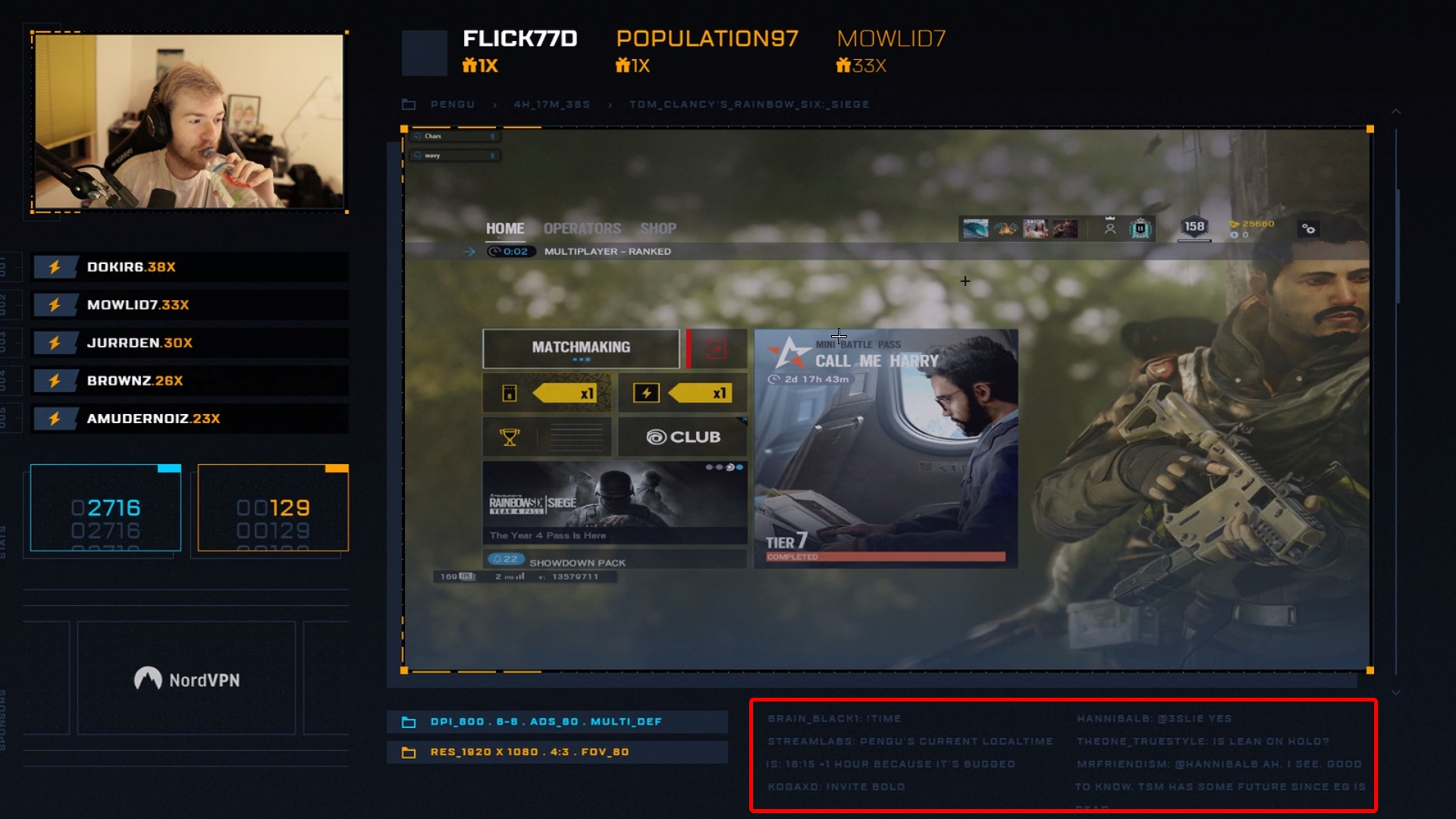 mild surge
That'll help I'm sure, thank ya lx
viral patrol
@rugged heath I think that column-count:20 and column-gap:30px applied to the container rules should do the trick
rugged heath
@viral patrol Okay. Let me test it. Are you available here meanwhile I'm doing it?
P.S.: He seems to use StreamLabs Bot (but I'm unsure if he uses StreamElements / Local / StreamLabs for the Overlays)
viral patrol
You can use our custom chat widget and apply this rule to CSS
GitHub
Contribute to StreamElements/widgets development by creating an account on GitHub.
rugged heath
You don't want me to use this?

 pulsar willow
That is the normal chat widget
rugged heath
Hmm, then I am unsure how to achieve this? Can anyone help me a bit with the process steps?
Will really appreciate it @viral patrol @pulsar willow
viral patrol
Create a custom widget
Paste contents of each file from provided above link into editor, html to html and so on. JSON goes to fields tab
rugged heath
Okay. I did that @viral patrol
viral patrol
Yay!
rugged heath
Now, comes the main part. How can I achieve it or test it?
The thing we were discussing. I did add the stuff you told me to add. Let me ss ou.
viral patrol
OK. Did you paste those files into editor?
rugged heath
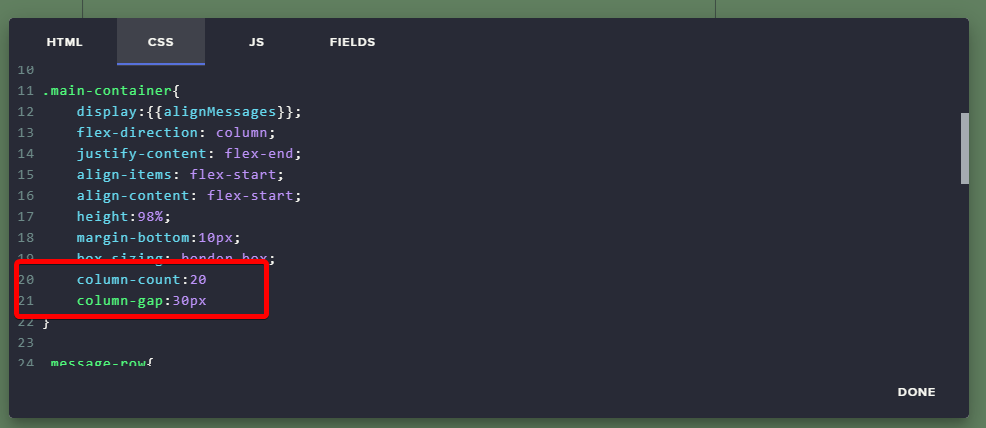 viral patrol
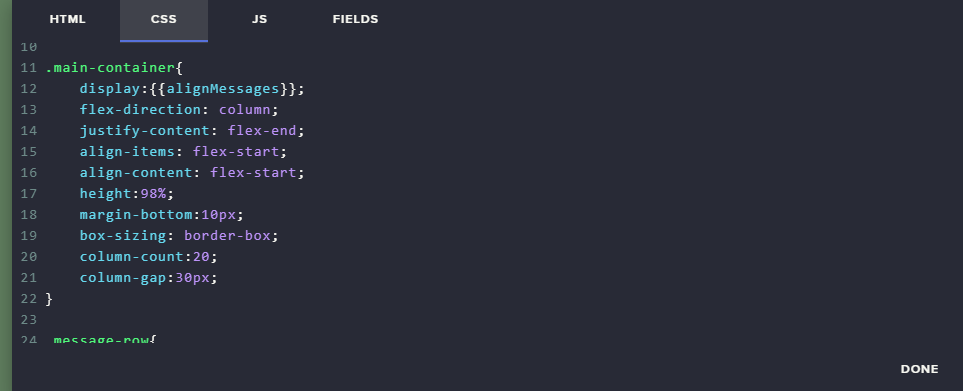
It is that! Great. Just add ; after each line
And I keep my fingers crossed that it works properly
rugged heath
I mass spammed like 30-40 messages and this is how it's coming: https://i.imgur.com/i9X9ewq.png
 pulsar willow
did you do the ; after all the lines?
 viral patrol
Hmmm. I think this is a bit more to do there
I will do that on my account
I will come back here in few minutes
Hopefuly with a solution 😉
rugged heath
The thing is...
Since the area below the video is very short. So originally what he did is.
LEFT and RIGHT (I don't know if it's a same single widget or two different).
But once more messages are sent the messages goes to the LEFT side from the RIGHT side.
New messages first comes to the RIGHT side.

Video for your reference.
viral patrol
OK. Do you want to really easy solution?
Use two chat boxes and cover them with something else. Let me draw that for you
rugged heath
Actually my CPU is potato and can't handle a lot. That's why I am going with the dedicated route if that could be done with the coding skills of your's @viral patrol ❤
I don't want to be pushy but I use a very potato CPU for the Streaming.
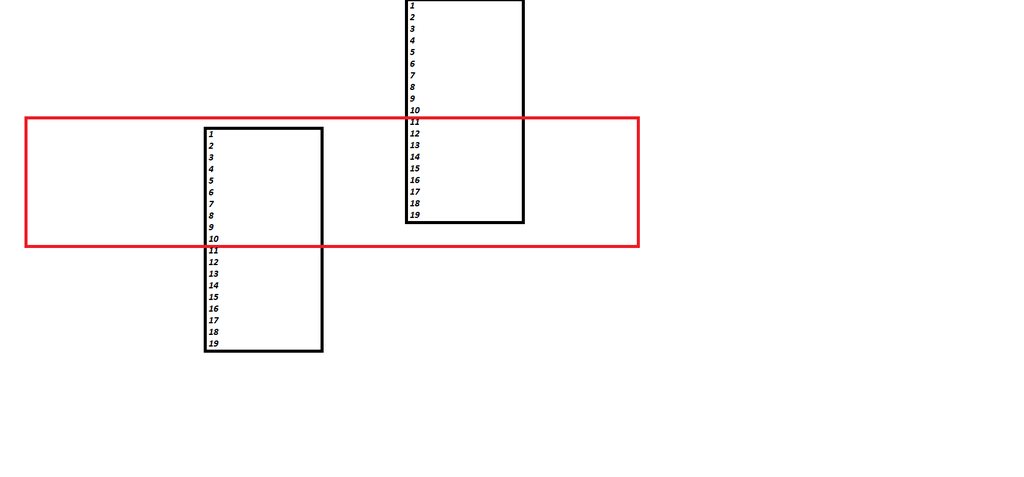 rugged heath
❤
viral patrol
OK. Change that one above, remove those two lines and add just one:
flex-wrap:wrap;
And below, in .message-row change width:100% to width:50%
trail sequoia
I think my chatbox is done, I will pop a demo up on widget-share later....Just one quick question for future ref....whats the difference between "color": "#641FEF" and "displayColor": "#641FEF" in the message json string?
I created random hsla() values and stored them in streamelements database...Was this not necessary could I have used one of these for the chat colour...I thought the where set to white if the user hadnt selected a colour?
 broken coyote
you cant post in widget-share
viral patrol
@rugged heath I thought this is the proper alignment (columned text flow always look like that as it is natural to read it in that order)
trail sequoia
ahh okay just wanted to show it...never mind
broken coyote
@trail sequoia normally if you are wanting to show something off it gets posted in the #creative-chat channel. the #widget-share channel is for submitted widgets. If you wanted to submit the widget then you could do that be going here https://strms.net/codeshare
broken coyote
@rugged heath i dont think the chat works like you think it does on his stream.
it deff doesnt go in order. i point that out in the video
there is a big gap between the 2
then if u watch, things that are on the right, dont show up on the left
if that was the case. when the left finished it would show on the right. it does on his stream
unprofessional? i would thats just a opinion. it looks cool regardless. i think its more of a looks thing, then it is a functional thing
ironic that you say it looks "unprofessional", yet want to copy it?
its possible.
 knotty thorn
big day for shroud, guessing those mixer alerts are coming in soon?


 main rune
Hey, I'm not sure where to put it, but the documentation linked on the website isn't the newer one 🙂 I only managed to find here, as I was so desperately hunting for some docs that made sense 😄
(StreamElements API - StreamElements
https://developers.streamelements.com I previously went to here) 😄
 main rune
Hey guys, so I'm trying to understand from looking through the API docs - how would I add loyalty points to a specific user within my channel ?
I don't see any endpoint, but it's completely possible I'm just not looking in the right place :-)
Any help would be ❤
 indigo flume
The updated API docs are in this channel.
main rune
yes I found now 🙂
I just meant I was looking on the site for the docs, and got linked to the old ones
main rune
everything working as i hoped now, thanks again 🙂
 shrewd hearth
Hi... im trying to set my viewers point by api, but its returning: No channel authorization found
viral patrol
Seems like JWT token you are using doesn't have privileges to specified channel.
viral patrol
You can go to the loyalty page and edit some user's points while looking in developer tools and network tab for XHR calls, so you get proper payload
 valid cedar
hey guys, not sure if this has been raised but the HypeBoss avatar seems to revert to the channel owner's avatar.
Boss name and avatar are initially changed after the boss is defeated but it seems when the overlay is reloaded(?), the avatar reverts to the channel owner but the boss name is changed only.
apologies if this is in the wrong chat, i wasn't sure where to mention it.
 north lynx
On the alerts widget, is there any way to put line break on the text field?
mild surge
Hey guys, I'm trying to create my own widget, but am definitely a beginner in terms of coding. Does anybody have a custom widget that I could look at to compare to what I think I understand so far? I think I understand the HTML & CSS as much as I currently need to, but the JS is where I'm struggling.
Basically, I'm just trying to create a widget that takes the value from a bot counter, and will keep filling in a visual progress bar accordingly, all the way until 50.
Even if someone has a widget in the simplest form of that, I would really appreciate being able to look at the coding behind it!
viral patrol
@mild surge We have widget close to one you are looking for - https://github.com/StreamElements/widgets/blob/master/GoalsOverPeriod/ - but this one uses bot counter called goal as target amount. Change should be not so hoard (just instead assigning that value to goal, it should assign that value to count)
GitHub
Contribute to StreamElements/widgets development by creating an account on GitHub.
Huh. And from what I see this one is overengineered (that function to get cunter value is a native one within SE_API)
mild surge
Awesome! I'll look this one over, and hopefully studying it a bit will lead me to what I'm trying to achieve
Thanks lx!
viral patrol
In case of any questions - do not hesitate to ask here.
north lynx
@viral patrol About the question i've asked, any idea how to do it? Is it possible?
rugged rapids
Just hit enter in the alert message field.
north lynx
@rugged rapids to me it's not working 😦
Tried it on streamelements and also made a test on OBS itself
rugged rapids
what was the issue?
north lynx
I used Line Height to position the text instead of Margin... so the line break was out of the space xD
😅
 fossil idol
hello! i have a streamelements bot related question. I created the following command:
!command add !advice ${customapi.http://DOMAIN_EXAMPLE.net/?i=${1}}
and it works great if I do:
!advice ANY_VALUE_AFTER
but it doesnt work (it wont output any message) if i simply type:
!advice
I can only guess it has something to do with nesting ${1} inside ${customapi}. and for some reason it breaks when I dont use an argument.
For the record, it also doesnt work in Streamlabs cloudbot, but it DOES work for Nightbot.
Does ${customapi} not work with optional arguments?
Thank you for your time ❤
indigo flume
Well there is no argument to pass, so ${1} is not receiving anything.
You can test is by simply making a command with just ${1} and using the command
and you will see that the bot is not doing anything
fossil idol
correct, but my script/url can work without a value. wouldnt it simply create the url without any value after=
indigo flume
or add random text around the ${1} and see that nothing is passed in the argument
Maybe the ${customapi} is not called if ${1} is empty 
fossil idol
hmm ill try text after, not a bad idea
indigo flume
but if you want to make it redundancy shielded(or proved?)
${1|"nothing"}
this should work I believe
fossil idol
oh i didnt know that was possible in the bot
if so i like it
thank you for your help. now i have some hope. i ran out of all ideas until now. will give it a shot.
indigo flume
you get the idea behind the line inside right?
i'm just not sure if it needs the quotes for the OR to work properly here
indigo flume
just make your script/page expect that redundancy argument
fossil idol
im following 🙂 thanks again! ill get back here on the results either way
it works with and without quotes in my test command
that did the trick, thank you so much. i did {1|" "} it has to have a least one character. not the most elegant and kills my ocd, but it works. thank you very much. you might have solved my problem with streamlabs bot if it has a similar solution 😄
indigo flume
can't say anything for there 
fossil idol
hehe
have a great day sir/mam
you gave me a smile and saved a considerable amount of my time
 half oar
Having issues with finding a timer for recent donations and cheers... I want them to cycle between one another based on time so I can sync it with the overlay I am building
half oar
any ideas?
viral patrol
It is hard to keep every separate widget in sync as timing in JS can be tricky.
half oar
Alrighty alternative plans initiated
 minor acorn
I've had a look through the #art-marketplace channel and I can't seem to find anyone who does widgets - is anyone able to help me make a custom sub/follower train?
 charred tundra
normally, I'd hop on to help but I'm currently more than booked up! 😮 I'm sure another Code Guru may be able to help out though
 strange pendant
is any way to share overlay?
indigo flume
No way to share overlays currently.
strange pendant
any ETA? for iOS app we need custom resolution overlays. Any we want users to install them easily
indigo flume
iOS app?
strange pendant
yep
indigo flume
There is 1 way to share overlays between accounts.
Be invited as an editor to their accounts
and use this button to share the overlay
strange pendant
demo I showed you - is stream directly from iOS app
indigo flume
 high swallowBOT
@strange pendant Follow these steps to grant managers/moderators access to your dashboard:
- Click on your Channel Name at the top of the dashboard and select Settings
- Create a new invite at one of three access levels (Bot Supervisor, Editor, Full Control)
- Send this invite to a mod/manager to give them access to your dashboard. The link is one-time-use and expires after 72 hours if not accepted
Video tutorial: https://youtu.be/zl_h-ttZDF0
indigo flume
This is how you can get invited as an editor to someone's account and share your overlay with them
Just note that removing any assets from your account that are used by the shared overlay, will remove the assets from their widgets as well.
strange pendant
uff, too hard for users 😦
indigo flume
Too hard to send you an invite link?
strange pendant
I don't want to be the person to set overlays to users 🙂 I just want to share a link, and they choose or not to choose to install it
we are just app. Imagine I will install custom themes for everyone
crazy 🙂
is there any way to get our custom sized themes into themes catalog?
indigo flume
No.
 karmic elbow
Good Day is there a way to use stream elements on Mixer or if not is there maybe a future plan?
high swallowBOT
@karmic elbow Soon! Not Blizzard Soon or Valve Soon, sooner then that. 
 lost rapids
Is there a mobile version of stream elements coming soon?
rugged rapids
There is a mobile app for IRL streams.
lost rapids
Ah ok, i will look on the android side of things
Does the mobile app work with fb?
 real dune
#helpdesk-mobile and not yet
 wheat jackal
is there a way to show the custom widget code in console way (don't know exact wording) like this
shows up like this
maybe there is console command to show what object has inside it or something
mild cipher
Inspecting a custom widget with devtools works fine for me, though the JS doesn't have any syntax highlighting so would probably need to copy and paste it out. Elements seems to show up as normal though. I opened the overlay as a browser tab and inspected from there
wheat jackal
oh my silly me
pulsar willow
Was told to suggest this here: I love the ability to customize the 8ball Module. You guys have the best 8ball. However, I would like to have other modules that pull from a customizable list like the 8ball.
For example: !8ball pulls from the 8ball list, but !9ball pulls from a different list of possibilities, and something like !Activity pulls from a list of preselected activities.
Another example would be !ChooseGame which would then tell a game to play from a list of preselected possibilities.
rugged rapids
Take a look at that API, which can pick a random line from a pastebin file: https://thefyrewire.com/docs/api/twitch/pastebin/
 rich pine
How do I change the black background shape/size? custom widget
broken coyote
you'll need to edit the css
rich pine
yeah but which part? i have been trying to find change it but without luck. got the name box extended, and my logo in/bigger, kinda stuck.
broken coyote
.event-container
rich pine
ah! that did it and got it to be a box too, thank you! missed it 😦
broken coyote
no problem
rich pine
hmm, got everything working but for some reason it isn't taking my changes for other events. only follows, the others are keeping their icons even though I changed the links.
rich pine
nvm it took it now, not sure what happened ; ;
 hot stump
did something change? none of my customapi commands gives an output anymore, they still do what they are supposed to (like writing data to the database)
rugged rapids
Can you send me one of the commands?
hot stump
yes I'll DM you
high swallowBOT
@hot stump Please connect your streaming account (Twitch, YouTube, or Facebook) with Discord by going to ⚙ Settings and then Connections here in Discord. https://streamable.com/eg92w
 hot stump
it's a channel I have full control over 😄
rugged rapids
Please name the channel here without making it a link.
hot stump
stealthuwu
he recently changes his name, not sure if that is important
not sure if it ever worked after the name change
rugged rapids
Yes, make them part the bot on the StreamElements dashboard https://streamelements.com/dashboard, let them log out of the dashboard, then make them log back in and finally invite the bot back to your channel.
hot stump
thank you I'll do that, I'll let you guys know
@rugged rapids thank you so much, that worked
 lunar wraith
Every few weeks I have to come in here because my events list is on the fritz. Usually someone says they will take a look and resets some hook in the backend. Can someone help me today?
NoD imported
Subs only appear if i select "display sponsors" and "display subscribers" shows my followers - is this normal? ----when i get it to work
rugged rapids
You can also try to contact NoD on that issue.
lunar wraith
dude, i cannot believe you hopscotched channels after telling me to come here just to tell me to find help elsewhere....this happens every few weeks
you guys announced official partnership with NoD and now you acting like Comcast
So, as a good customer Im going to self help by deleting all my stuff and reimporting it using NoDs official instructions. Information Tech is my trade, so if that doesnt work i have no reason to keep using your service
charred tundra
NoD officially supports SE overlays now, yes, but they're also the ones earning $$ and the onus is on them to provide support for their paid product if it breaks. SE is a free service and there's a lot of great support both from staff and volunteers, but particularly volunteer support is the wrong tree to bark up if you're feeling frustrated.
that being said: if you're looking for custom code help it helps if you add it to a JSfiddle or similar so we can actually have a peek at your code to see what might be broken
lunar wraith
Ok anne, but as a customer listen to me. I use STREAMELEMENTS site for months after importing this profile without issue. Then, every few weeks the event list randomly stops working, so you would rather tell each customer that comes in here with a NoD problem to go to them rather than reach out to your business partner and let them know you may have concerns with one of their packages
charred tundra
I think you're missing the part where I'm a volunteer support member, you're not my customer. I'm just here because I'm passionate about the product enough to volunteer my time helping the community.
lunar wraith
why is it that on your site it shows me blank canvas on the events list, but then I switch an option off/on and it miraculously appears?
you dove into this one, anne
volunteer yourself into an escalation, please
im really frustrated that I have to come in this chat every few weeks and convince you guys that something is up
Ooooof
Thanks
 native trellis
if you know it breaks down every few weeks then why wouldn't you contact NoD anyways?
lunar wraith
Because all i have to do to sorta fix it when you guys dont answer is to switch and option on/off on the StreamElements site
but i try to bring an overaching potential issue to someone's attention and you treat me like some child asking for a handout
rugged rapids
@lunar wraith I can understand your frustration and I am sorry for that. I will try to reach a staff on your issue to assist you with this. Please be patient, they will get back to you as soon as possible.
lunar wraith
Thanks Benno, thats all i could really come here to ask
because when I go to click on support anywhere on the site or in my OBS, guess what? it directs me to DISCORD
broken coyote
What event list?
rugged rapids
Uplink eventlist twitch I think.
broken coyote
If you want/can @lunar wraith. Can you give me editor access so I can take a peek at what’s going on with it?
or not
lunar wraith
one moment
 thick mantle
Any way to get this working with SE??
(Free Christmas Widget from Nerd or Die)
<div id="goalWidgetHolder">
<div id="progressHolder">
<div id="cane"></div>
</div>
<img id="star" src="https://uploads.twitchalerts.com/000/070/135/721/GoalWidget_Star.png">
<img id="bell" src="https://uploads.twitchalerts.com/000/070/135/721/GoalWidget_Bell.png">
<img id="frame" src="https://uploads.twitchalerts.com/000/070/135/721/GoalWidget_Frame.png">
<div id="goalText"><span id='title'></span></div>
<div id="goalAmount"><span id="beforeGoal">{beforeGoal}</span><span id='goal-total'>0</span><span id="afterGoal">{afterGoal}</span></div>
</div>
Works fine with Streamlabs, doesn't work to great with SE.
broken coyote
the JS would need to be converted to SE
thick mantle
Christmas Dono Widget - Java Script
If anyone could help with converting this JS to be SE compatible; it would be MUCH appreciated! ❤
wheat jackal
I'm curious is there a way to trigger emulated triggers threw console?
 tranquil schooner
Is there a guide somewhere on building custom widgets? How the js/Css/fields all interact
rugged rapids
Take a look at the channel header.
 pseudo siren
@static wigeon Hi, is it posable to get access to OAuth2Beta? Thank you
broken coyote
@thick mantle
 lusty portal
Someone mentioned before that you can use StreamElements to trigger turning on an OBS source. Does anyone know how this could be possible?
thick mantle
How!!? 
@broken coyote
 static wigeon
@pseudo siren https://docs.google.com/forms/d/e/1FAIpQLSf0QppxXBTG1Qbuh2ylZyLtsZK-1b3-kEz1ofwipSNcjwOlOA/viewform
Create a new survey on your own or with others at the same time. Choose from a variety of survey types and analyze results in Google Forms. Free from Google.
broken coyote
@thick mantle I’ll send u the files once i get to work
thick mantle
What a hero!!
@broken coyote
thick mantle
Alrighty everyone, as promised.
Nerd or Die's free Christmas Themed Widget, now compatible with SE thanks to @broken coyote !! ❤
 simple cove
Im busy in the middle of a redesign and I want have my alerts triggered but from the top of the webcam, whilst being slightly robust represent they level of sub/length of sub. I am kinda new to Javascript and seen that it may be possible - there was code written by @TheCynicalKitty on 01/27/2019 that looks like it touched on it, but I have no idea where to actually start
rugged rapids
In the alertbox you can enable custom CSS for the resub and see how that is coded. From there start to modify the alert.
simple cove
@rugged rapids Im just about to head to lay down for the night - I will come back tomorrow with something - that you may be able to tell me is possible
trail sequoia
Hi you lovely people, once again I am back with two somewhat quick questions.
1). I have made a chatbox that sets the users colour and that colour persists. I wanted to know if there is an api call to check if a user has set there own colour?
2). do cheer emote gifs get animated when collected?
rugged rapids
For the chat: take a look at this widget: https://github.com/StreamElements/widgets/tree/master/CustomChat
trail sequoia
Thanks Benno
ahhh okay so data.displayColor? and by the look of it it sends an empty string if not set?
rugged rapids
It gets checked, if the variable is empty, then the color will be set in there, or the color is already set, then the set color will be put in there.
A conditional ternary operator is used here to set the color if it is not set.
https://www.w3schools.com/js/js_comparisons.asp > section: Conditional (Ternary) Operator
https://developer.mozilla.org/en-US/docs/Web/JavaScript/Reference/Operators/Conditional_Operator
 turbid river
@twin ore Kasey from DonorDrive here. I sent a friend request to get some details from you about your API usage. Thanks!
trail sequoia
@rugged rapids or anyone else...is there a way to grab the /me command...I made a custom command that deals with the functionality as required but was just wondering if I can grab it...Pretty sure I cant but thought I would ask anyway. Ty in advanced
rugged rapids
Do you want to make a command have /me in front of it?
trail sequoia
no I want to know if someone in chat uses I think its being parsed before I receive it...Ohhhh wait a minute lemme come back to on this one
rugged rapids
I think yes, this is parsed, before you can catch it via chat listener.
trail sequoia
yeah thought so...I just changed it to !me to perform the same functionality just wanted to know if I could...hmmmm how about the message font colour is it possible to grab that?
rugged rapids
Not sure about that one.
trail sequoia
I looked through the json example and tried color but it is returning black.
mild cipher
isAction will be true for /me messages
trail sequoia
okay thanks fyrewire I guess for my purposes Boolean logic will work, just hope i'm not asked to use add more of these commands...if that is the case I will have to change it up....Thanks for this fyre
@mild cipher that works thanks sir
@rugged rapids and @mild cipher you guys are legends and always helpful much appreciated...thats enough for me today...I love streamelements mainly for the support you guys provide on here!!! thanks again
pseudo siren
Hi
Please help me with a simply custom widget that displays {{user}} is banned when you delete a message.
rugged rapids
Have a look at that widget how to catch deleted messages: https://github.com/StreamElements/widgets/tree/master/CustomChat
 vernal quartz
Hello there,
is it possible to prevent links from showing in the chat box widget?
rugged rapids
You should be able to use the link protection of StreamElements and the deleted messages also should not show in the chatbox on stream.
vernal quartz
I usually allow everyone to post links but I dont want the link to appear on screen. just in twitch's chat.
using the chat box widget
rugged rapids
ok. Maybe another code guru has an idea on this.
vernal quartz
whoever can help me on this, please mention/tag me so I know I've got a reply :3
viral patrol
Using widget above:
https://github.com/StreamElements/widgets/blob/master/CustomChat/widget.js#L60
if (data.text.indexOf("http")!==-1) return;
should do the trick
GitHub
Contribute to StreamElements/widgets development by creating an account on GitHub.
@vernal quartz ⤴
rugged rapids
only against http is enough?
viral patrol
I thought that twitch adds http(s) automatically
But if not, it can be
if (data.text.match(/(?:http(s)?:\/\/)?[\w.-]+(?:\.[\w\.-]+)+[\w\-\._~:/?#[\]@!\$&'\(\)\*\+,;=.]+/)!==null) return;
But this will return false positive for strings like x.yyyyyy where there's more than 1 y
vernal quartz
where should I add this exactly
if (data.text.match(/(?:http(s)?:\/\/)?[\w.-]+(?:\.[\w\.-]+)+[\w\-\._~:/?#[\]@!\$&'\(\)\*\+,;=.]+/)!==null) return;
@viral patrol
viral patrol
I am in my phone. I think it should be around line 60 as in my link
vernal quartz
and is there a way to remove the semi-transparent line background
@viral patrol I will try and let you know :3
viral patrol
And background can be removed boss changing background colour to something with 0 opacity
vernal quartz
not sure where exactly to post the code >.< I'm a nub sorry
uh, this widget has no delay messages ( in case a mod deletes from chat before it appears on screen) v.v
pulsar willow
Anybody know if its possible to make an command to reload overlays through chat
rugged rapids
Should be possible, as there is an endpoint for it: https://docs.streamelements.com/reference/overlays#overlaysreloadbychannelput
 tribal bay
hello, novice streamelements coder here :D
so i have a command called !pasta, which returns ${1:} a bunch of times. however, some people in the chat abuse this, so i want to put a cap on how many args can be input, that way they cant spam chat with walls of text, just with a contained amount (something like 7-10 args). i know you can set an end parameter, but then i cant do anything smaller than that set end parameter, or it will return nothing at all. how can i code it to return everything in between 1 to 10 args, regardless of how many args are input?
 outer vessel
@rugged rapids just wondering, does your text overlay use markdown?
rugged rapids
I think markdown cannot be transported via the twitch chat, as the widget only catches the messge itself.
Do you have an example message or case you want to use?
outer vessel
Aaah, I see.
I was thinking of just setting it through the overlay and not through chat commands
rugged rapids
You can always edit the text via CSS upfront, but I think not Live, as the text is taken from the chat command.
mild cipher
@tribal bay I think possibly a better approach is regex, since someone could still abuse it if they made one argument an entire paragraph with no spaces. With regex you could limit by the number of characters instead
The downside is that commands don't have a regex 'check' option (i.e. you use a command and it checks against a regex), there's only a regex option for triggering the command in the first place, so as a workaround you'd need to make the actual command an obscure name (and probably hide it from the public listing so people don't know what it is), then make the regex pattern the command itself
tribal bay
i have no idea what a regex is lol can you explain what you mean in simple people speak?
mild cipher
Regular expressions are a way to define a search pattern with specific rules basically, so you can set certain conditions the text needs to pass
It seem a bit buggy in my tests though, so I'm not sure even this is ideal  the best way would be a customapi script probably
tribal bay
i have no idea how those things work, only a basic understanding of how variables return things. im assuming that this cant be done without some sort of add on right? like just using the normal streamelements variables, i cant really do this.
mild cipher
I'm trying to put together an example but it seems to stop working on a certain keyword, though I think it's failing because it's conflicting with some of my other commands that are using regex lol, give me a sec
tribal bay
no worries haha
mild cipher
So I made an obscure command name (the reason is, if someone knows the actual command name then it can be used no matter what message they put in)
For now the response is ${1:} so it'll just echo back if successful, but I guess you can wrap this with your ${repeat} variable afterwards
Then I gave it a regex with this: ^!pasta .{1,11}$ - which basically looks for messages that start with !pasta (i.e. your intended command), and the following message (i.e. the args) must be between 1 and 11 characters (inclusive)
So any message that's over 11 characters doesn't work, but 11 and below do (spaces count as a character)
tribal bay
this is beautiful, and exactly what i needed
also i just realized regex is under advanced settings
mild cipher
Don't forget that you should probably hide the command from public listing otherwise they can just go to your commands page and find the name 
tribal bay
yep. thank you so much!
now i have to look into regex and see what else im capable of XD
rugged rapids
fyre is just 
mild cipher
https://regex101.com/ is a great resource for testing out patterns
Regex101 allows you to create, debug, test and have your expressions explained for PHP, PCRE, Python, Golang and JavaScript. The website also features a community where you can share useful expressions.
Here, I put this together so you can see it at work
Regex101 allows you to create, debug, test and have your expressions explained for PHP, PCRE, Python, Golang and JavaScript. The website also features a community where you can share useful expressions.
Click on the 'switch to unit tests' bit just under the regex bar, then click run tests at the bottom
You can use that to test your messages and make more of them, there's a handy guide on the side
tribal bay
last question: do i need to make the name of the base command super obscure or can i just hide it from public spaces and make it like 5 random numbers so no one would accidentally type it?
mild cipher
That works just as well, basically as long as it isn't just guessable
tribal bay
gotcha. thank you so much again! this is super helpful.
pulsar willow
Is anyone here good at HTML/CSS/JS?
I'm trying to make animated stream labels (Sub count, recent follower, recent sub), but really struggling.
I made an animated alert using this (https://dev.to/kapantzak/the-rgb-split-effect-with-css-and-a-bit-of-javascript-4j4i) method but can't find a way to do it for stream labels. Any help would be greatly appreciated
pulsar willow
I’ve got it animated within SE, but now i’m struggling to make the HTML be linked to the stats, such as latest follower, sub count, etc.
viral patrol
@vernal quartz I am so sorry. It should be in line #19, just before let message = attachEmotes(data);
@pulsar willow If you want to play with CSS for labels, use this widget instead of normal labels: https://github.com/StreamElements/widgets/tree/master/CustomLabels
GitHub
Contribute to StreamElements/widgets development by creating an account on GitHub.
pulsar willow
lx I'm trying to use that but I'm a complete noob to this and struggling. Was wondering if you would be able to give me any help if you have a moment!
mild cipher
Anything in particular tripping you up?
pulsar willow
Hmmm, it feels like everything at this point ahaha. I'm going through this (https://github.com/StreamElements/widgets/blob/master/CustomLabels/widget.js) but I've never worked with JS before, so I'm struggling to figure out how to pull the latest follower, and then link it back to the HTML portion so it can automatically change the animated text.
mild cipher
Is this for one label or do you plan to rotate through different types of events?
pulsar willow
No rotation, just one label, and then would copy the process for sub count and recent sub name.
So 3 labels total, but no rotation, no.
mild cipher
Ah okay, then it looks to me that widget would fit your needs? All you'd need to do is change the styling. Did you copy and paste each portion to the appropriate tab? You'll need all four parts before you start tweaking it
pulsar willow
So just copy all those parts in, and then add the styling that I'm using from this site? https://dev.to/kapantzak/the-rgb-split-effect-with-css-and-a-bit-of-javascript-4j4i

The DEV Community
mild cipher
You'll need to be aware of any difference in classnames and such, but yep
simple cove
Is there anyone here that has a very good grasp on Java Script/masks and possible CSS? I'm busy trying to figure something that is all apparently possible using this. @mild cipher
mild cipher
Yep
pulsar willow
Okay! Giving it a shot now.

 mild cipher
If you DM me editor access for your account I'll copy it over. I didn't have to change much, just some tweaks to what it was targeting and some minor CSS adjustments.
You can generate an editor invite link from here: https://streamelements.com/dashboard/account/channels

StreamElements
The Ultimate All in One Platform for Streamers
pulsar willow
DMed!
You're a hero good god
I literally spent so many hours yesterday trying to learn and figure this shit out
You get it in there? If so I can't see anything yet
no worries if not, just not sure how this works
FYRE IS A HERO LET IT BE HEARD HERE
rugged rapids

 mild cipher

 worldly mauve

mild cipher
@simple cove what type of masks are you referring to?
simple cove
@mild cipher may I DM you?
mild cipher

 steady iron
@pulsar willow @mild cipher is the hero we need, not the hero we deserve, and one of many at that
or was it the other way around? I'm trying to say he's frickin cool.
broken coyote
!dong
simple cove
@steady iron either way round, your not wrong. Legends
 foggy ravine
Hi guys, I'm new to SE widgets and I'm trying to improve a Spotify "Now Playing" widget. Is there anyway for a custom overlay to refresh an OAuth2 acces token?
From what I see you always need to give the server providing the access token with a redirect URI.
Sooo, is it even possible for a custom widget (in the sandbox) to succesfully execute an OAuth2 flow to get an access token?
mild cipher
If you have a refresh token, you would need access to the client secret used during the flow that generated it in the first place, which is (hopefully) kept secure on the server, so unless there's a public refresh endpoint then you're probably out of luck
foggy ravine
Spotify has the implicit flow which doesn’t need the client secret
That’s what I’m using right now
I can generate the access token outside of SE, and put it in my widget and it works until it expires
mild cipher
Implicit flow doesn't return refresh tokens as far as I'm aware, only access tokens. You can't refresh those tokens, that would be too insecure
foggy ravine
Only access tokens yeah
So for now, it’s not something you can do in SE custom widget
mild cipher
As far as implementing an oauth2 flow? No unfortunately, the widgets are not servers and can't act as callbacks or anything. That said, you could possibly set up a localhost server to generate your refresh token and use that in the widget to generate tokens, but this would involve putting your client ID and secret inside the widget, so that's a decision I'll leave to you to make (just remember that overlays are not 100% secure, link leaks/editors, etc)
foggy ravine
If I follow, the local server would handle your callback. So it would receive the access token. How would that token get to the widget?
I need to do more reading on the refresh tokens, I never used them maybe that’s how 🙂
mild cipher
With oauth2 you get a refresh token, in the custom widget you'd POST that to Spotify to generate an access token which you can then use. This request requires your client ID and secret, so those details would need to be in the widget. If this is personal use that might be okay, but this wouldn't scale for other people, that's when you need a server
foggy ravine
Got it, no ideal solution. But if I ever share the widget, users could create their own client id/secret to plug in the widget
Thanks, I’ll try playing with that
Maybe that’s something to add to #💭︱feedback-and-ideas. A way for SE to act as callback and make refresh tokens available to you while storing client secrets securely
At least for popular APIs
mild cipher
That would be pretty insecure so I couldn't suggest that (keeping any credentials in the open where others could have to their overlay), plus they'd need to setup the localhost server for making the refresh token in the first place, at this point it'd be easier to have a server handle it
foggy ravine
Noted, it’s a pretty bad idea
 pure summit
So I've been looking into making my own "stream deck" with an externa numpad. I got it to work while running LuaMacros, however I am worried about cheat detection (I have/will not be using for any macros in games).
When I try to run in OBS it fails when calling the functions. Is there a way to call the DLLs and plugin files from LuaMacros and include them in script runtime from within OBSLua?
Alternatively, are there any samples for keypress LUA scripts using the OBSLUA library? I haven't been able to find any in my searches.
trail sequoia
Morning streamelements, quick question when accessing audio and images to use in a custom widget what is the directory I need to reference.... for example <img src="path/to/image" />
and <audio><source src="path/to/audio" type="audio/mpeg" /></audio>
steady iron
hey @pure summit this sounds like something that would be on OBS side, not on StreamElements
or how does StreamElements play a role on that flow?
@trail sequoia widgets can't access your file system, they need to be on the internet, and you need to indicate the complete URL
trail sequoia
yes I understand that I know when I upload the image to streamelements overlay editor there is a way to access them though isnt there?
steady iron
yeah, using the full URL, usually
trail sequoia
okay Rene thanks
steady iron
maybe there is a way to access them with a shortcut, but I just inspect > get the URL from the Media selector
trail sequoia
So instead of accessing the audio from streamelements should I encode into base64 data URI? works on local prototype
indigo flume
You can get the sound file link, by opening the dev console -> network tab -> open the media library -> sound -> play sound
the link will popup in the network tab as loaded file.
pulsar willow
Good morning! @mild cipher sorry for the ping, but I had a question - the method used for animating those text labels, is it possible to use similar HTML/CSS/JS to animate a PNG? I’d like to have animated symbols for sub/follow/count instead of the words and it would be cool if they had the same animation :-) i’m gonna look into it more just wanted to ask the pro first!
foggy ravine
Hi @pulsar willow , yeah you can animate any HTML element the exact same way, including an <img> element (displaying your PNG)
foggy ravine
Slight modification of the CSS allows you to add any white png to it (works on chrome)
pulsar willow
Monty thank you so much!
foggy ravine
Happy I can help. You might want to change mix-blend-mode: difference; to mix-blend-mode: screen; if your background is not 100% black
mild cipher
@trail sequoia on a side note, if you need to switch images frequently, or want a nicer way for selection, there are custom fields for selecting assets:
"someImage": {
  "type": "image-input",
  "label": "Some image"
},
"someVideo": {
  "type": "video-input",
  "label": "Some video"
},
"someSound": {
  "type": "sound-input",
  "label": "Some audio"
}
Oh hi thefyrewire, any recommendation on a host for my backend, ideally something that allows CORS so I can pull stuff from AJAX
trail sequoia
ahhh useful!!!...I decided to encode into base64 because I don't want the person its going to, to have to use dev tools etc...I will def remember this for the future thanks sir!!!
mild cipher
@foggy ravine CORS is set by you, so really any exposed HTTP server should work as long as it's publicly accessible
You mentioned editing an existing widget, is it by any chance Aiden Wallis'? I think @broken coyote has a lot of experience with providing customised designs of that widget, afaik he hasn't run into any access token errors? Unless you're using a different client ID?
foggy ravine
Sweet, I thought some hosts might prevent you from setting the CORS header for some reason
I made my own widget, but I was inspired the the one from Aiden Wallis yeah.
broken coyote
i have been summoned
foggy ravine
I had no idea Aiden Wallis' widget could be customized 😮
So I was using my own client ID
broken coyote
foggy ravine
Hello hello, that looks great
broken coyote
there was some bugs when i made this video. it updates alot faster now
pulsar willow
Monty stupid question, how do I use this code as a source in OBS? The RGB split images.
foggy ravine
This is what I made MrBoost
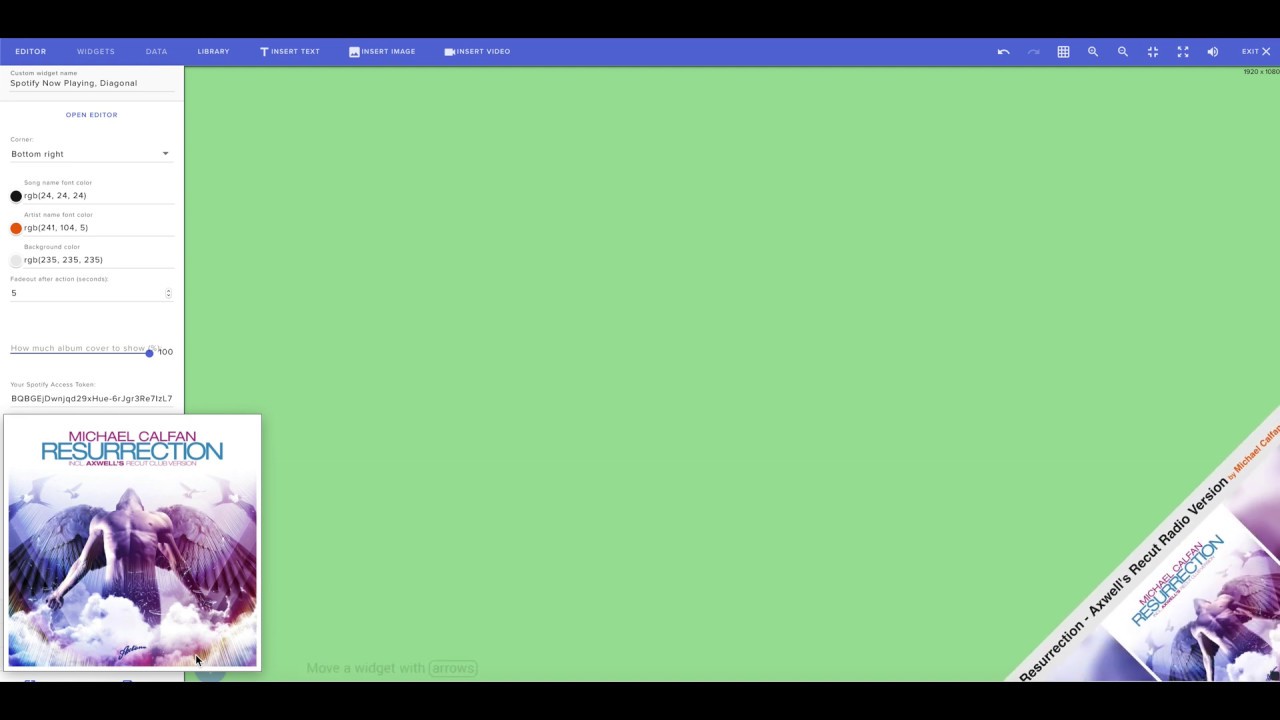
A widget that fetches your currently playing track on Spotify and displays it on screen when a new track starts (song name, artists and album cover). Can be ...
Are you guys saying I can use Aiden's backend for my widget???
foggy ravine
@pulsar willow You'll have to modify the custom widget thefyrewire made for you
trail sequoia
@foggy ravine awesome 😄
broken coyote
that is slick looking though. i like that
pulsar willow
ah so I have to use a widget, I can't just use an HTML file/browser source.. Okay!
foggy ravine
If you're willing to share I'd love to get at least some pointers !
@pulsar willow it's an SE widget, you can import it as browser source in OBS
pulsar willow
I got it now, thanks Monty :-) appreciate ya
foggy ravine
Go to your overlay editor, click the widget, click editor on the top left corner.
Then for the HTML tab, copy the HTML code from my link.
Do the same for the CSS tab
Hit Done and Save
mild cipher
I used my own backend but it's lonely...  one day I'd like to scale up more, the only problem right now is getting rate limited for concurrent users. spotify is pretty stingy with their api access... a socket api would solve all our problems
broken coyote

GitHub
Streamelements & Streamlabs. Contribute to mrboost/Spotify development by creating an account on GitHub.
foggy ravine
Yeah same.. I'm making widgets for learning right now so I'd love to share them. But if it's a mess for users to set it up it's not cool
broken coyote
if there isnt a one click solution. they will mess it up. i promise
foggy ravine
Thanks a lot for the code ❤ !
broken coyote
np
mild cipher

broken coyote
!dong
mild cipher
That's never going away is it 
pulsar willow
Trying to use a PNG image so there's no background, but every time I use a direct img link with your code Monty I'm getting a black background?? And chroma keying in source hasn't been working, been removing the white as well as the black background.
I just fixed it
I'm an idiot
it was in the CSS
steady iron
you're not an idiot, you're learning
pure summit
@steady iron Thanks! I'll swing by their community and ask. Was hoping maybe someone here went through something similar and my search skills were just lacking 🙂
trail sequoia
Just a quick one guys...the event listener for subscription will it trigger for each sub for example if someone gifts say 10 subs or something like that...I need to make sure all subs are counted regardless of what type they are
I know that I have said that wrong I mean onEventReceived and checking if sub has occurred
indigo flume
Community gifts are passed through to custom widgets. Like this:
subscriber-latest:
{
    amount: 40, /* number of gifts */
    bulkGifted: true, /* tells you this is a bulk gift */
    count: 40,
    displayName: undefined,
    gifted: true,
    message: "",
    name: "Veriee",
    originalEventName: "subscriber-latest",
    sender: "Veriee", /* person sending the gift */
    tier: "prime",
    type: "subscriber",
}
thanks KeiZar
@indigo flume and if someone where just to sub with no gift I take it amount would be 1?
what is the difference between amount and count?
is count over time and amount on this event?
indigo flume
Not really sure - it might just be the same thing
trail sequoia
okay thanks
` let test = "";
const event = obj.detail.event;
if (obj.detail.listener === 'subscriber-latest') {
if(event.amount === "gift"){
subCount++;
}
else{
subCount += event.amount;
}
test = document.createTextNode(subCount);
document.getElementById("testing").append(test);
}
else{
return;
}
});`javascript
I cannot figure that out lol
will this code correctly grab the amount of subs if 10 gifted subs are done and say 3 regular subs
 indigo flume
"If an integer/number equals a string/text - do something"
trail sequoia
if amount === "gift then the event is a gifted sub else its an integer to increment
trail sequoia
it is passing
indigo flume
10 === "gift" i passing?
trail sequoia
no lol
indigo flume
so again, integer === string?
indigo flume
trail sequoia
yeah I understand what you are talking about...hold on
trail sequoia
here is the code that streamelements used, I altered this for my use lol
indigo flume
subCount += event.amount;}
I would prefer an integer amount but that is not the case...amount is returning gift sometimes
indigo flume
subscriber-latest:
{
    amount: 40, /* number of gifts */
    bulkGifted: true, /* tells you this is a bulk gift */
    count: 40,
    displayName: undefined,
    gifted: true,
    message: "",
    name: "Veriee",
    originalEventName: "subscriber-latest",
    sender: "Veriee", /* person sending the gift */
    tier: "prime",
    type: "subscriber",
}
Lets get back to this
subscriber-latest.bulkGifted = true
trail sequoia
Yeah I used this and I got gifted returned in the amount
indigo flume
this means that a community gift of X amount has came
BUT if the bulkGifted = false
this is a normal resub event
so you are mainly checking the amount
you will be adding every resub to the count
native trellis
but the real question is, how do you make your words go in to such a dark background box? (asking for a friend ofcourse)
indigo flume

Discord
Want to inject some flavor into your everyday text chat? You're in luck! Discord uses Markdown, a simple plain text formatting system that'll help you make your sentences stand out. Here's how to d...
damn
trail sequoia
@indigo flume so if bulkGifted is true amount will be integer if it is false its normal or single gifted sub?
indigo flume
if you are looking specifically for the community gift
i believe if its a resub or normal sub
trail sequoia
no im looking for all subs
indigo flume
the event package comes differently
trail sequoia
okay
indigo flume
just do this:
console.log(obj.detail.event)
and check the event how it comes in
via the emulation
its pretty close
GitHub
Contribute to StreamElements/widgets development by creating an account on GitHub.
trail sequoia
cant use console.log
ahh shit yes I can cause im not making my chatbox anymore lol...hold on lemme get this thing set up
indigo flume
check the link above - it will give you all the needed things to track all types of events
trail sequoia
mate I have read and re-read that...that isnt the problem lol...not my first rodeo...just my first rodeo riding streamelements subscription event lol
indigo flume
data["subscriber-latest"]["name"] - Name of latest sub
data["subscriber-latest"]["amount"] - Duration in months
data["subscriber-latest"]["tier"] - Tier of sub (1-3)
data["subscriber-latest"]["message"] - Message attached to sub action
data["subscriber-latest"]["sender"] - If it was a gift, here’s a gifter
data["subscriber-latest"]["gifted"] - If it was a gift, here’s a gifted```lol should of read the docs by the look of it 😄
indigo flume
GitHub
Contribute to StreamElements/widgets development by creating an account on GitHub.
trail sequoia
:p
indigo flume
All possible event types are listed 🙂
trail sequoia
ty 😄
there is a local version of streamelements editor can you send me the link?
cant remember who made it
indigo flume
i was pinged by @native trellis and he distracted me from writing a question that is along the lines of "but then these should be easier to use to check what type of subscriber-latest event you are getting, right?"
trail sequoia
yeah I think so
native trellis

trail sequoia
any idea about the local version of the editor?
indigo flume
In regards to the editor - @viral patrol is the guy that made it, i don't think i have the latest version if he keeps it updated to match the actual editor
viral patrol
indigo flume
trail sequoia
@viral patrol and @indigo flume thanks 😄
viral patrol
np
trail sequoia
okay back again, soooooo data["subscriber-resub-session"]["count"], data["subscriber-new-session"]["count"], data["subscriber-gifted-session"]["count"] Will adding these together give me all of the subs that have taken place for the session...Also what is counting as a session, the moment the overlay link is launched till it is closed? Thanks again
trail sequoia
@indigo flume so I think I have it....Soooo.... if listener = subscriber-latest then we have a sub event...so check if obj.detail.event.gifted = true...if it does increment by one it was a single gifted sub...if obj.detail.event.bulkGifted is true then increment by obj.detail.event.amount as someone has gifted that many subs....otherwise it is either a sub or resub so increment by 1?
indigo flume
yes
trail sequoia
thank you for your help and patience
if I pop my code up here inna sec could you have a look?
viral patrol
And about session start - it starts automatically 15 minutes after previous stream ended AFAIK
trail sequoia
okay thanks lx
 wheat portal
Hey, I just started to read about your api, but I don't know, is there no auto oauth system? do I have to ask the user for their JWT token?
ah okay I already read about the beta access for the clientid and secret
trail sequoia
@mild cipher Sorry to shout you...just wanted your advice. So the following code is giving me the results I am expecting when emulating in SE's widget editor and I think I have covered every subscription type. I mainly want to know if I have missed any. I think subs only come in the form sub,resub,single gift, bulk gift?...The reason I have done it this way instead of grabbing subscription-latest and incrementing, I need to know the number if someone bulk gifts subs or it will loop my animation n times (n the number of gifted subs) when I only want 1 iteration for n gifted subs...Thanks in advance. If there is a better way to do this please enlighten 😄 ```javascript
let subCount = 0;
let bulkGifter = "";
window.addEventListener('onEventReceived', function(obj){
let listener = obj.detail.listener;
let event = obj.detail.event;
if (!obj.detail.event) { return; }
if(listener === "subscriber-latest"){
    if(event.bulkGifted){
        bulkGifter = event.sender;
        subCount += event.amount;
        return;
    }else if(event.sender !== bulkGifter){

        if(event.amount === "gift" || !isNaN(event.amount)){
            subCount++;
            return;
        }
    }
}
return;
});```
 echo oyster
questions,
- can you create a countdown with 1 second intervals?
3
wait 1 second
2
wait...
- the bot must read all msgs in chat, is there a way to make the bot send each msg to a discord server and post them there?
mild cipher
@trail sequoia off the top of my head I think my previous widgets have something similar so looks about right, but obviously the only way to know for sure is to test test test 
trail sequoia
yeah I found a problem any idea how to access if its a tier 1,2 or 3?
mild cipher
there's a tier key
trail sequoia
yeah tried it and its coming back undefined
mild cipher
For regular subs?
mild cipher
Are you sure you're hitting the right property? Have you console logged to check?
trail sequoia
nope lol just doing that now lmao
mild cipher
@echo oyster for anything overlay related, you can use a custom widget, so you can make the number appear on screen and countdown. If you want it to post to chat, either add SE calls to the bot /say endpoint to the widget (but don't share it with other people - security issues), or make a very simple bot to do that. The basic bot is probably the best bet though, since you can wrangle the discord functionality into it at the same time. There is no discord browser api (afaik), so something server-based is the way to go
trail sequoia
ahhh im hitting them wrong....
brb
okay so I was looking in the completely wrong spot lol...so its at obj.detail.event.tier I think I got this now
@mild cipher thankyou
foggy ravine
My Spotify API calls are so rate limited, that not a single one is getting through -_-'
FeelsBadMan
broken coyote
i feel ur pain
 violet creek
@mild cipher Hi, how do I get access to Triggerfyre? 🙌🏼
mild cipher
@violet creek haha it's in a closed beta atm, but will be opening up super soon!
violet creek
@mild cipher can I help with the testing?
mild cipher
When it goes into open beta sure right now I'm keeping the group small so any changes/updates are easier to rollout. pretty close to the next stage though 
foggy ravine
Going to try the Free Tier from GCP and use my own client id. Not one request went through since my earlier message
 sharp island
Real nice work on the cup tool @mild cipher . It was exactly the kind of tool I was envisioning when I made the box to expose the wireframe. I literally have a task sitting in my inbox for months to make one. 🙂
 kind rune
Hello any1 here? I need some help with costomized eventlist (want something with own icons for each event)
trail sequoia
guys just want quick script to delete all KVP from SE_API.store
or just a link to the docs that show what can be done with it?
there is a bit here https://github.com/StreamElements/widgets/blob/master/CustomCode.md but I feel there maybe a large chunk missing
GitHub
Contribute to StreamElements/widgets development by creating an account on GitHub.
mild cipher
@sharp island thanks! I had a suspicion that was the case haha. I'm sure you'll have a much better implementation when you get around to it 😄
sharp island
Maybe. Maybe not. Probably best to do what we did with lx's BitBoss: you pass us the code and we can refactor and integrate it directly into the system.
trail sequoia
anychance guys?
 sly void
Hi guys, big fan of the StreamElements!
Trying to code my own custom widget, nothing big since I'm fairly new to JavaScript and all that. I hope I'm texting in the right channel and that I'm allowed to. But all I'm trying to is connect to the chat, and if a specific word is said in a sentence then it the script does something:
    const listener = obj.detail.listener;
    const data = obj["detail"]["event"];
     var messagetext = data["text"];
      var testdiv = $('#testdiv');
      if (messagetext == "test"){
          testdiv.text(messagetext);
    }
});```Take a look at this widget: https://discordapp.com/channels/141203863863558144/457957557470887947/641612552102477825
trail sequoia
@sharp island any chance when i'm done testing the widget i'm developing streamelmenets will be able to empty it manually?
wheat jackal
i'm curious is there a way to make limit of 30mb for a file, to be bigger? just curious
limitation is probably for loading, but I'm still curious
indigo flume
@wheat jackal no
sharp island
@trail sequoia Sure
steady iron
@sly void something like this should do:
        if (obj.detail.listener !== "message") return;

        let data = obj.detail.event.data;

        //If this is message comes from StreamElements, end the function
        if (data["displayName"] == "StreamElements"    ) return;

        //This is the text that comes in the message
        let message = data["text"];
        var compare = 'CompareWord';

        if (message.includes(compare)) ) {
          AFunction(arguments);
        }
});```Hi,
I got my alerts sucked on mobile safari 😦
[QUEUE]: NOT Broadcasting event (follower-latest) due to shouldAnimate=false, eventQueue.playing.length=1, digest time=256994, waiting since 1573455510587 app-d02a00346a.js:44:29649
[QUEUE]: Wait Period Exceeded
I replaced default.ogg (witch is not playing at all) with custom mp3
first time alter is showing with a sound
but second time - nothing
ok, it got stuck without sound too 😦
sly void
@steady iron Looks like it's working, thank you!
sly void
and @rugged rapids I tried looking into it yesterday before going to bed, thank you for helping too!
knotty thorn
where do i find out the channel id? (for api)
viral patrol
You can call /channels/me endpoint with valid Authorization header or /channels/channelName with no need of authorization
knotty thorn
cool thanks
steady iron
You're welcome @sly void !
mild cipher
This is pretty minor, but includes will return true if compare is anywhere in the message at all, like: alkjsdkasdcompareaklsjdkl. If this not your intended behaviour, you can split the text up into words and filter, or use regex.
viral patrol
@mild cipher is right, you might want to use one of:
message.split(" ").includes(compare);
new RegExp("\\b" + compare + "\\b").test(message);
@sly void ⤴
mild cipher
(I'd also throw in a map to lowercase too, just to be sure  )
)
sly void
Hmm I see, that's useful to know, thanks!
viral patrol
message could be changed to lowercase without map before those checks are called.
(I love discussions, I can learn a lot from them
 spice harness
Hi, i need support to: Transfer Loyalty points of 1 channel to another channel. How is it possible?
I'm owner of both Channels on Twitch.
I saw a stremmer that uses StreamElements and he's channel has this feature, the people tipe !1000 and the bot transfer COINS from a channel (Rerun) to another (LIVE) and give the balance after transfer...
The channel i'm talking about is SkipnhoLive (Rerun) and the viewers transfer to Skipnho (Live).
Thanks in advance.
 loud cargo
Hello! So i am figuring out the loyalty points system along with the commands, but i was wondering if there is a way for one command to do two different things. What i have right now is a custom command set up as !pokemon that spits out a random pokemon that you catch. With it i'd like it to redeem a sound clip of the catching sound so they don't have a type an extra command. Is it possible for one command to have two separate response work at the same time? thank you!
mild cipher
@spice harness you can use this endpoint to add and remove loyalty: https://docs.streamelements.com/reference/single-user#pointsamountbychannelanduserput
To give the appearance of 'transferring' balance, you would deduct the amount from the user's points in one channel and add it to the same user in the other channel
@loud cargo I don't believe a command can have two actions. @rugged rapids has a widget that produces a video with a command though, you could possibly have a blank video with the sound effect that plays when the command is used. (I could've sworn there was a sound effect option, but not sure if it's updated yet)
https://discordapp.com/channels/141203863863558144/457957557470887947/619140761971195915
loud cargo
thanks! i will check that out
foggy ravine
Hey guys can I use localStorage or access cookies in js from an SE custom widget?
viral patrol
Unfortunately not, but you can use something better - you can use StreamElements KeyValue service which can store simple objects (so no functions inside)
Details about that can be found here: https://github.com/StreamElements/widgets/blob/master/CustomCode.md#se-api
GitHub
Contribute to StreamElements/widgets development by creating an account on GitHub.
foggy ravine
Ah I was getting SecurityError with localStorage. Thanks for the link @viral patrol
viral patrol
Yup. This is described here: https://github.com/StreamElements/widgets/blob/master/CustomCode.md#js
GitHub
Contribute to StreamElements/widgets development by creating an account on GitHub.
trail sequoia
hi all, is there away to check if an unsub has happened on a channel?
viral patrol
You can track "onSessionUpdate" and check subscriber-total or subscriber points. However I am not sure if they are updated real time.
trail sequoia
thanks lx
trail sequoia
@viral patrol sorry to @ you...One quick question is their a fieldData option like a tick box or something
or radial
rugged rapids
"name":{
        "type":"checkbox",
        "label":"label",
        "value":true
    }
button?
outer vessel
The checkbox looks weird lol
trail sequoia
yeah I would like my widget to reset if the user clicks a button...the checkbox does look weird lol
outer vessel
Well, not weird but not inline with the rest of the pages design
trail sequoia
if not no problem
outer vessel
Yeah I don’t think so
 slender anchor
Unsub isn't really an event tracked. You can grab a list of your subscribers via the Twitch API (Get Channel Subscribers) store and compare on a schedule to see unsubs. @trail sequoia
trail sequoia
thanks crimson
yeah thought as much tbh I was sidelined as its 1 day till deadline and it wasnt in the specification.
 gloomy stump
Hey I got a question!! So I do tarot streams and I use the stream store for viewers to redeem questions for tarot readings. Is there a way I can have the queue displayed on stream? I know I can try doing a window capture thing with the browser but I'd rather not.
Also I know this is a bit of a stretch, but it would be really awesome to be able to bump up questions into the queue if they tip/cheer over a specific amount, or give them priority for being a subscriber.
I have no programming knowledge so I wouldn't know how to do this myself >_<
steady iron
That sounds like a cool idea... that would require custom made stuff. If you have a cool idea but need someone to make it happen, you can check the Streamers Market by StreamElements & Fiverr
https://blog.streamelements.com/streamers-market-f132e9015ded?gi=53e476681af3
@gloomy stump
 foggy ravine
Hi coding gurus, so I've been thinking about making some hardware (like lights or more) that reacts to alerts. I know how to make the hardware but I can't settle on the best way to get SE alerts to trigger it. Do you have recommendations?
Here's what I have on paper so far:
SE widget that pings a backend when an alert is received
The backend sends MQTT messages to the streamer's hardware to trigger an animation
I want some security in there so that only the owner of the lights can control them
viral patrol
@foggy ravine We have a widget that controls Nanoleaf lighting. You might want to take a look at that (as there are few workarounds, so widget can connect insecure (not SSL) service
And this is for local network, so no external connections will be accepted
foggy ravine
Thanks friends, going through local network is muuuuch simpler already
viral patrol
OMG. I forgot to paste link here.
rugged rapids
Always got your back bud! Just continue being awesome. 😄
foggy ravine
It's all good, you're a team 😄
 blissful isle
Not sure if this is the right place to ask, and I'm also terribly sorry if this has been done before:
I'm in need for a widget that prints an integer value which consists of the sum of goal data of followers, tips (rounded) and subscribers (multiplied by 3).
Are there any pointers on how one would achieve this? I don't even need a progress bar or any specific text. Just that plain integer value.
Thanks so much for reading through this and sharing your thoughts. 
mild cipher
@blissful isle can you elaborate what you mean by this?
which consists of the sum of goal data
gloomy stump
@steady iron @broken coyote hey thanks a lot! I think the Fyre API just might work 😄
My issue is making the command different because it will get mixed up with my other commands.
blissful isle
@mild cipher basically add up the current goal values mathematically. For example: "follower + tips + (subscriber * 3)"..
Would be like: 10 + 19.50 + (5*3) = 45 (because the tip would need to get rounded)
mild cipher
@blissful isle I understood the formula, but I was a bit confused by the 'goal data' part - are you referring to the counter goal amounts that you see in the official goal widgets? (i.e. the data from here: https://streamelements.com/dashboard/session )
StreamElements
The Ultimate All in One Platform for Streamers
blissful isle
@thefyrewire ah I see. Yes exactly, adding up the counter goal amounts and displaying the sum as an integer value.
broken coyote
just because i gotta know at this point. why?
blissful isle
I basically want to spend 1 tree per follower as well as all earnings in tips, bits and subscriptions (= subscriber * 3) to teamtrees.org, and want to give people an indication as to how many trees we're currently at. I hope this makes sense.
worldly mauve
doing it for the trees 
i assume $1 = 1 tree yeah?
@blissful isle tips rounded down or up
mild cipher

viral patrol
@blissful isle I think that "Cumulative Goal" widget from Github could be a solution for you: https://github.com/StreamElements/widgets/tree/master/CumulativeGoal
GitHub
Contribute to StreamElements/widgets development by creating an account on GitHub.
blissful isle
@worldly mauve rounded up. And yes 1 USD (or in my case eur) = 1 tree
@viral patrol ah interesting. Thanks so much, I'll have a look. Got no coding experience at all so I didn't even know where to start. 
 red pine
Hi, I was wondering if it was possible to create a command variable called ${time.since}. It'd work the in a similar way to ${time.until} but it'd just work as a timer, like using it to track someone's age
mild cipher
 final cypress
Hello guys. I'm looking to do a giveaway for my subscribers on twitch. I would like a wheel to spin to pick a winner of the prize I'm giving away. Does anyone know how to do this? Thanks
mild cipher
@final cypress there's a Wheel of Fortune widget in #widget-share - https://discordapp.com/channels/141203863863558144/457957557470887947/463072521177006080
If you want to customise it further: https://github.com/StreamElements/widgets/tree/master/WheelOfFortune
GitHub
Contribute to StreamElements/widgets development by creating an account on GitHub.
final cypress
Thank you so much! I'll check it out now! @mild cipher
mild cipher
Also as a heads-up, depending on your country's laws, sub-only giveaways can constitute a type of gambling and can be illegal/against TOS, so refer to any applicable laws in that regard.
@blissful isle here's my attempt 
First make a custom widget in the overlay editor, then remove all the pieces of code from each of the tab and insert:
HTML
<h1 class="result"></h1>
JS
window.addEventListener('onWidgetLoad', (obj) => {
  const data = obj.detail.session.data;
  const quantify = {
    followers: data['follower-goal'].amount,
    subs: data['subscriber-goal'].amount * 3,
    tips: data['tip-goal'].amount,
    // cheers: data['cheer-goal'].amount / 100,
  }
  const result = Object.values(quantify).reduce((a, b) => Math.ceil(a + b));
  document.querySelector('.result').textContent = result;
});
I threw in cheers as well in case you want to include that, but I left it commented out. If you want to use it, remove the two slashes.
Optional styling (CSS):
h1 {
  font-family: sans-serif;
  font-size: 50px;
  color: #fff;
}
@mild cipher wow you're amazing. Thank you sooo much. I'm currently on the road and back in front of my streaming setup tomorrow morning to check this out. Including cheers is perfect as I'd indeed want to throw this in on teamtrees as well.
Thank you so much for this amazing help and thanks everyone who looked into this. Thank you a thousand times 
Ps: code looks super logical to me. Thanks for even including the css section for font and such. This is incredible. 
viral patrol
Too keep that snippet @mild cipher autoupdating use that JS:
let update=(data)=>{
    const quantify = {
        followers: data['follower-goal'].amount,
        subs: data['subscriber-goal'].amount * 3,
        tips: data['tip-goal'].amount,
        // cheers: data['cheer-goal'].amount / 100,
      }
      const result = Object.values(quantify).reduce((a, b) => Math.ceil(a + b));
      document.querySelector('.result').textContent = result;
}

window.addEventListener('onWidgetLoad', (obj) => {
  update(obj.detail.session.data);
});

window.addEventListener('onSessionUpdate', (obj) => {
  update(obj.detail.session);
});
Also @mild cipher thank you for really nice (plain, simple, effective) snippet
mild cipher
Ooh I completely forgot about updating it  thanks!
blissful isle
Oh. Very nice. Thanks for adding the auto update @viral patrol . Awesome. You guys rock 
foggy ravine
data in onSessionUpdate is just obj.detail.session? Not obj.detail.session.data like in onWidgetLoad? 😮
mild cipher
blissful isle
quick update: works like a charm. thanks so much @mild cipher and @viral patrol 🙂
 elfin viper
Hi! Is there any way to include an image to display in the tipping API? (https://api.streamelements.com/kappa/v2/tips)
viral patrol
If you have custom alert for tips you might want to create message that starts with image, then extract it from it. Default alert would play URL you provided, but custom alert can alter message.
 pure lintel
Hello
can you upload your own script to your bot?
because I upload one own script to the chat
 blazing cedar
Hello, I'm back, I'm looking for another odd thing again, basically I've got a counter made, so it essentially does a +1 or a -1 count on command, I'm trying to get it to take the number from a ${random 1-10} command and add that rather than just the standard +1, anyone got any ideas?
pure lintel
someone will help me because i upload my own script and i don't know how?
 glacial forge
The coder whom I currently work with is away. Is there someone available whom may be able to make me a simple white rectangular box with my logo as an image for the countdown slider/button. This doesn't require any numbers, I also need to customise the countdown time in streamelements preferably. Thanks.
rugged rapids
Can't you use the default countdown widget and just upload the box with the logo as image to the overlay editor?
glacial forge
I don't have any previous experience with CSS or Javascript sadly
If it was simple and easy, I would definitely do that 🙂
rugged rapids
From what I see you do not need CSS or JS for that, just an image editing tool. The countdown widget is already there as a default widget.
mild cipher
@blazing cedar are they two separate commands (+ and -) or one command?
glacial forge
I'll give it a try, thanks Benno
There is only an option for numbers to countdown, no image @rugged rapids
rugged rapids
Add the image as own widget to your overlay.
glacial forge
The image needs to actually move like it would while counting down
Not just a static image you see
I don't have anything visual like that
rugged rapids
ok, I see now, yes that would require coding. maybe one of the code gurus can assist you here.
glacial forge
Thanks Benno
 solid moat
is there an open source code for progress bar ?
viral patrol
Actually we have two of them for sure - Goals over Period on our github and Goals widget on #widget-share channel
pulsar willow
any way to get rid of black screen in obs
wheat jackal
@pulsar willow that's something that you have to ask OBS's discord. But this might help you
"If you are trying to stream or record with OBS and are getting a black screen, make sure you have added the appropriate source to capture what you are trying to show. Window, Game, and Display capture are the three most common capture sources. If you have already added a capture source, and OBS is still black, please grab your current log and link it here.
that is directly from OBS's discord
wheat jackal
@pulsar willow you should probably ask in the #helpdesk-selive
pulsar willow
i did no ones responding i even put it in intergrated didn't work
 crisp needle
Hi! I am coding my custom widget/alert. Can I reference the custom field value in the JS code in any way? It looks like neither {{field_name}} nor {field_name} work properly...
crisp needle
Yeah, just found it 🙂
Thanks nonetheless!
Well...
Still issue with a colorpicker
I try assigning a color for the text like this:
document.getElementById("name-container").style.color = fieldData.followerColor;
with const fieldData = obj.detail.fieldData;
and "followerColor": { "type": "colorpicker", "label": "Follower color", "value": "#815fc0" }
is there anything I'm missing?
rugged rapids
... = fieldData["followerColor"];
mild cipher
Dot notation should be fine since there are no dashes in the key name. Have you tried actually picking a colour?
The default value could be bugged out
crisp needle
nah, the code seems to break down at this point. when changed ... = fieldData.followerColor; to ... = '#444444'; it starts to work correctly.
it seems to fail every time I try to access fieldData
mild cipher
My replication seems to work fine
<div id="name-container">Testing</div>
window.addEventListener('onWidgetLoad', (obj) => {
  const fieldData = obj.detail.fieldData;
  document.getElementById("name-container").style.color = fieldData.followerColor;
});
{
  "followerColor": {
    "type": "colorpicker",
    "label": "Follower color",
    "value": "#815fc0"
  }
}
It's possible that if you previously assigned the followerColor as a different field type, it's stuck on that old value, so I'd try either creating a fresh widget and ensuring followerColor is initialised as a colorpicker type, or change the key name to followerColor2 or something else
crisp needle
It's always been the colorpicker :/
crisp needle
Redone the whole widget but still not working
mild cipher
Are you able to replicate the problem if you make a fresh widget with the snippets above?
crisp needle
<link href="https://fonts.googleapis.com/css?family=Oswald&display=swap" rel="stylesheet">
<link href="https://fonts.googleapis.com/css?family=Boogaloo&display=swap" rel="stylesheet">
<div class="main-container invisible">
  <div id="name-container">JOHN</div>
  <div id="top-container">top-text</div>
  <div id="bottom-container">bottom-text</div>
</div>```any clues in the console? if you're able to replicate the problem with the smallest amount of code from your widget, then put that into a fiddle that would be useful
 viral palm
Hello, would you have an idea how to track a viewers activity from the specific day ? like time spent watching the stream that day
wheat jackal
Is it normal that data["subscriber-latest"]["amount"] is shown as "gift" when I emulate sub gift
mild cipher
@viral palm you could make a custom widget that sits and listens to IRC (twitch.js), tracking users joining and leaving and updating their watch time at regular intervals. SE_API could work for storage, but I think preferably save this info to a backend database. You'd essentially be recreating !watchtime but with control over the information, so you can track whatever activity you want. Messages sent, emotes used, minutes watched, etc.
@wheat jackal as far as I'm aware, yes
wheat jackal
@mild cipher will that happen when real gifted sub happens?
mild cipher
I think so. I usually just have a ternary that checks if it's 'gift' and converts that to 1. I think it only happens with 'new' gifts, i.e. the recipient has never been subbed to the channel before
wheat jackal
i see
mild cipher
otherwise amount will be the number of months resubbed. so if the recipient has previously been subbed before for a month and they are gifted, it'd be 2
wheat jackal
also when I test custom sub with "gifted sub" enabled and months set to 10(or any other) it adds 9 to data["subscriber-latest"]["amount"]
and if i put moths to 8 it puts 7 to data["subscriber-latest"]["amount"]
is that normal?
viral patrol
I think I kinda know the issue there. @crisp needle
const fieldData = obj.detail.fieldData;
document.getElementById("name-container").style.color = fieldData.followerColor;
This cannot be in the main scope as obj is not defined there. It is forwarded with event onWidgetLoad you should listen to for getting that value.
viral patrol
But you can use it anywhere, with something I don't like:
document.getElementById("name-container").style.color = '{followerColor}'; // remember about quotes as templating variables return plain string
@viral patrol it is called in the Event Listener
@mild cipher https://jsfiddle.net/tenszop/jabc9tyo/
Test your JavaScript, CSS, HTML or CoffeeScript online with JSFiddle code editor.
still won't change on follower event
mild cipher
fieldData isn't available in onEventReceived
Only onWidgetLoad
You'd need to extract the value when the widget is loaded, and then you can use that wherever afterwards
high swallowBOT
@light basin Please follow our community rules:
- No advertisement or stream promotion
- Respect ALL server members
- No NSFW/NSFL
Thank you
 charred solstice
Is there a community out there that is actively making widgets and custom commands for StreamElements? Im looking for a "Restock" option for the Store, and a filter for Active Chatters ONLY (or a Follower only) for loyalty points.
wheat jackal
is this normal? @mild cipher
mild cipher
For emulating events? Yes. Selecting Community gift will send Amount number of gifts instead. If you don't select community gift, amount will be months instead
wheat jackal
even that it sends 4 instead of 3?
mild cipher
The extra event is a meta-event that gives information about the community gifts, where amount is the total number of gifted subs. bulkGifted should be true for that, and all the individual gifts should have isCommunityGift
@charred solstice you can probably use this endpoint to update redemption item details: https://docs.streamelements.com/reference/redemptions#storeredemptionsbychannelandredemptionidput - something like a script that you can call from chat with ${customapi...} and !restock. As for widgets, check out the Streamer's Market for SE community members who are actively taking commissions for custom widgets -> https://blog.streamelements.com/streamers-market-f132e9015ded

Medium
Looking for new alert animations, sound effects, custom widgets, emotes, overlays (and much more)? Enter the Streamers’ Market
wheat jackal
thanks for clarifying
mild cipher

tribal bay
@mild cipher so i was the person who asked about the pasta command a while back (the one that uses the regex ^!pasta .{1,25}$). we're having a problem with the command, is it possible that if the streamer turns off notifications like alerts, that the regex would stop working? what else would make it stop working?
pure summit
Is it possible to delay the display of a widget when an overlay is loaded? I have been working with the code in the custom widget and tried applying the fadeinclass in multiple places, but the text shows before my animated image is completed
steady iron
@tribal bay if a widget is shutdown while not visible on OBS, it will not execute anything, just make sure to check that option on the properties of the source
viral patrol
@tribal bay AFAIK this command was not in overlay/widget but directly in bot. In that case I think that there were few options to disable that:
- Mute/Part bot from channel - StreamElements bot is no longer responding to anything happening on your channel
- Command disabled/removed
- Command settings changed - Cooldown might be huge, regex might be changed
steady iron
@pure summit the way I've seen it done is by either adding timeouts and having precise timing for that, or to add flags for "widget ready" and recursivity to verify it, but it depends on what you're doing
mild cipher
@tribal bay unfortunately since the command uses a pretty hacky way of triggering, it's possible there's no reason at all (at least, that's visible to us). I'd recommend remaking the command and seeing if that helps
pure summit
@steady iron Thanks for the reply. I continued messing with it and came across the setTimeout function. Still working on the placement of this though within/around the onwidgetload code block. I'm going to get back at it after work tonight.
 tall ocean
Hey. i try to make a command with !back after a !lurk. so with the ${user.lastactive} but the counter is 0 if it's the user who type in the command, who els would know when the person is back.
is there some variables that can cancel out the last commands with active. or can i ask you guys to put it in so when users type !lurk, with custom message, and !back with custom message and last active setting on it. ??
best regards
Danni
 trail basin
I'm curious - is it possible to parse JSON data using the ${customapi} command? Looking to link it to something like the Dad Jokes API, and that returns a JSON object as a response. Alternatively, is there a way to send a custom text/plain header so that the return is structured differently?
rugged rapids
Afaik the response from the API will be displayed in chat 1:1.
trail basin
Sure that's happening right now - I'm looking for a way to parse it. I don't need the JSON object in chat, just the information at a specific key of that object
Like, the return is structured like
{
"key": "value"
}
Afaik that is not possible. You would need to pase it yourself first.
and just give back the value.
trail basin
that's what I was afraid of - thanks for your help anyway Benno 😄
mild cipher
The dad jokes API has an endpoint that only returns a plain text response: ${customapi.https://icanhazdadjoke.com/nightbot}
trail basin
@mild cipher thank you - that's not documented on their site, just the one for slack
high swallowBOT
@polar quiver It's in active development and for now, not available to everyone. To get notified when our bot will be useable for all users on Mixer, keep an eye on #announcements and #270206314561404928
 polar quiver
rip 
 wintry merlin
when does mixer come to stream elements
high swallowBOT
@wintry merlin It's in active development and for now, not available to everyone. To get notified when our bot will be useable for all users on Mixer, keep an eye on #announcements and #270206314561404928
sly void
Has anyone made a Thanos snap kind of action? 
I took a script someone made that did the effect, and modified so it'll get activated on a specific word in chat. But then when it was all done, I get the error:
"Uncaught (in promise) DOMException: Blocked a frame with origin "null" from accessing a cross-origin frame."
Which I've read is because Chrome doesn't allow frames from other websites to access each other's websites or something like that: I used 2 libraries that I tried to include: html2canvas and chance. So have anyone made a working Thanos snap effect in SE?
broken coyote
what is getting "snaped" lol. text or image
pure summit
@steady iron I was able to figure out the setTimeout for the addevent within the onwidgetload. 🙂
steady iron
awesome!
crisp needle
Hi! is there a way to receive an event for item redemptions in custom alerts? Currently these are received as follower-latest which is confusing.
 vestal marlin
i can't create donations via API. did anybody ever managed to do it? there are not docs for that tho
posting https://api.streamelements.com/kappa/v2/tips/5d29bb4406f75d15ac92a9c3 with my JWT as a bearer will say it requires an amount.
if i post an amount it throws a 400. i tried various ways, raw/json. no luck.
no docs out there and just a guessing game
indigo flume
You can only GET tips via the API endpoints and JWT
as in you can only get info on tips, but can't POST tips towards your account.
As for documentation - https://docs.streamelements.com/reference/tips
It doesn't contain proper code examples, but its a start.
vestal marlin
how do other people do it?
indigo flume
What other people?
vestal marlin
1upcoin.com can somehow push an event into my account
i just gave them my JWT and they can push events over
that's interesting. couldn't find it via google. just ended up on the github docs which are nonexistent 😄
indigo flume
ooh so you can - need to update that to not say "TODO"
static wigeon
@vestal marlin can you show me the payload you are sending?
vestal marlin
well i'm trying right now based on those docs i just found
static wigeon
Please try with the following payload:
{
    “currency”: “USD”,
    “user”: {
        “username”: “styler”,
        “email”: “styler@streamelements.com”
    },
    “amount”: 12,
    “message”: “12312313",
    “provider”: “<provider-name>“,
    “transactionId”: “<ID>“,
}
Also if you are trying to make an integration i would apply for OAuth credentials here https://docs.google.com/forms/u/1/d/e/1FAIpQLSf0QppxXBTG1Qbuh2ylZyLtsZK-1b3-kEz1ofwipSNcjwOlOA/viewform
Create a new survey on your own or with others at the same time. Choose from a variety of survey types and analyze results in Google Forms. Free from Google.
indigo flume
Just note that providing your JWT token to 1upcoin might jeopardize your account like that.
static wigeon
Using the JWT is not the recommended way.
vestal marlin
yeah, i wondered about that tho 😄
i also wonder, how can they figure out the account_id if only JWT provided?
lemme apply for oauth quick
@static wigeon i've applied. ty
static wigeon
👍
vestal marlin
it would be better for sure if we just handle oauth tokens rather than the whole JWT. streamlabs does the same tho.
static wigeon
oauth is much preferred from our end as well
knotty thorn
does the oauth access token expire? if so, what's the default time for it
viral patrol
@vestal marlin You can obtain channel ID by calling /channels/me with valid authorization header
crisp needle
Asking again - is there a way to receive an event for item redemptions in custom alerts? Currently these are received as follower-latest.
 warm quail
Hello, I was directed to come here from Streamelements helpdesk! I started using the video on command widget, and was wondering if there was anyway to have it so anyone can use this function, and not just mods + Streamer + written names? Thank you!
rugged rapids
The widget is designed for mods in the first place.
I recommend to use the store items with a custom command with the redemptions variable to make video redemptions availabe for everyone.
It is possible to make the video on command also available for everyone, but there is no implementation of global or user cooldown at this time. So users could spam items.
viral patrol
@crisp needle :
if (typeof obj.detail.event.itemId !== "undefined") {
        obj.detail.listener = "redemption-latest"
    }
This is what I've been using
@warm quail https://github.com/StreamElements/widgets/tree/master/EmoteComboSounds this widget should allow you to have that. It has queue for commands. If you want it to work as a command, just set a amount
GitHub
Contribute to StreamElements/widgets development by creating an account on GitHub.
 grave cipher
was redirected here off twitter, looking to add a chatbox that only displays messages from my bot and was wondering if something as simple as
if (${user.name} == <bot_name>) text = ${content}
would work
grave cipher
if someone could ping me if someone responds i'd appreciate that ^-^
rugged rapids
@grave cipher Take a look at this custom chat widget, it also ignores users. Maybe just turn it the other way, to only display this users messages.
https://github.com/StreamElements/widgets/tree/master/CustomChat
wheat jackal
is there a way to remove json field, if something is X is selected. So there is no useless fields
 warm echo
does anyone know of a way we could use the LEVEL-UP GOAL widget by ANNEDORKO, for followers and subs instead
 languid escarp
OK so i was wondering if there was ANYONE in here that could help me w/ a bit of an issue im having w/ timing on a CSS coded widget : )
vestal marlin
anybody got oauth issues?
in chrome it's not working. in firefox it's only working if the user was already logged in
vestal marlin
it's working in chrome now
 molten moat
Is it possible to return the maximum 500 characters in Twitch chat using the Fyre API? It seems to cut-off anything above 400 characters and I wasn't able to find anything saying that it should. Thanks!
mild cipher
@molten moat can you explain a bit about what you're trying to do? 
molten moat
Sure. I'm trying to use the API to pull a random message from a pastebin. The command works fine and on the Fyre API page for it displays the messages in full but when SE posts the message in Twitch chat it cuts off after 400 characters
For example - https://api.thefyrewire.com/twitch/pastebin/DXY0DhPG - this shows the complete message from the Pastebin but if I use the command it's incomplete when posted in chat.
mild cipher
Hm after some testing it would appear that the ${customapi} variable's response is limited to 400 characters only for some reason. Not sure if it's intentional or if it's a bug, maybe if a staff member sees they can ask or pass it on
molten moat
Interesting. I found this post - https://streamelements.helprace.com/i1508-command-response-character-limit-increase-limit-is-400-bettere-were-1000 - when I was looking for an answer so it seems like it might actually supposed to be 500. We'll see. Thanks for looking into it, though!
vestal marlin
My overlay says:
{name} gone wild and donated {currency}{amount}!
my POST to the donation API is
{ "currency": "EUR", "user": { "username": "reditgermany", "email": "timer@cryptodonate.me" }, "amount": 100.00, "message": "NewJWT BRAH!", "provider": "Bitcoin", "transactionId": "f64ae25bc2220a9af89c8ac10bdf31c5b320e64995f3a81d3d3a517ce3159331" }
the donation is stored with EUR as the currency but it gets displayed with USD $ on stream
mild cipher
@vestal marlin check tipping settings? - https://streamelements.com/dashboard/tipping-settings
StreamElements
The Ultimate All in One Platform for Streamers
vestal marlin
@mild cipher no idea how that helps. there is no setting for me to display donations in the currency they came in. at least i can't find it.
mild cipher
No idea, just throwing out ideas. I haven't really set up tips or work with them. I think they get displayed with whatever this currency is set at (I could be wrong)
vestal marlin
no
vestal marlin
@mild cipher actually yes. if i change my currency settings in the page that you said, then on stream it's getting displayed in that currency.
that's incredible bad.
if i donate 100,000,000 VND which is 0.5 USD then it shows i donated a hundred million usd. lol
10000 UHF (33$) shows as 10,000$ on stream.
steady iron
I remember seeing the currency being set manually in the Event Rotator, maybe there is something that needs to be done manually
steady iron
pulsar willow
Hi lvely people, is there a total active host counter available?
I would love to add that with a target on it
So I can stimulate hosts
viral patrol
@pulsar willow Hi! I think you might read your data every X minutes via calling: https://decapi.me/twitch/hostscount/:channel. To make it a widget, you can just replace viewercount by hostscount in this widget: https://github.com/StreamElements/widgets/blob/master/ViewerCount/widget.js
GitHub
Contribute to StreamElements/widgets development by creating an account on GitHub.
mild cipher
@steady iron the currency being set in the widget is parsing the amount to the locale string, but unfortunately still doesn't convert the value. I think this is just the way SE is at the moment  - https://discordapp.com/channels/141203863863558144/199460642975907840/630721544909488148
vestal marlin
is here anybody on who could change my redirect URL for my oauth app?
 lofty wigeon
Hi there... was directed here from Twitter. Have a question about external scripts.
Basically I want to set up a command the user can call with the rest of the text as an argument. Like so:
!mycommand sometexthere
I would like the bot to pick up the argument and execute an external script that I've written and use that argument like so:
https: //myserver. com/spotify.php mytexthere
Is this possible?
*edited to remove link to nowhere 🙂
pulsar willow
Thanks @viral patrol
viral patrol
@lofty wigeon Create bot response like ${customapi.https://myserver.com/spotify.php?text=${queryencode ${1:}}}
lofty wigeon
Thank you very much @viral patrol 🙂
lofty wigeon
Am I able to pass the username of the person that executed that command to the customapi query?
viral patrol
You can add &sender=${user}
All possible variables are listed in commands page => variables tab
lofty wigeon
basically I'm about this close to getting spotify song queuing back up and running.
ah dang; thank you again ❤️
viral patrol
@lofty wigeon check pinned message, scroll to very first one there and I think this might help you a bit as well
lofty wigeon
will do.
I've got it working... my struggle now is the limitation of twitch chat...
The user's text goes through, no problem; I can update my playlist through chat.... my problem is formatting of search results when there are multiple results...
Twitch chat is .... not great .... when it comes to that. :/
mild cipher
I had my Spotify thing just add the first matching result, and if it was wrong then the user could do !remove to delete it and try again. That might be easier than trying to list multiple results 
lofty wigeon
So when you do the search to Spotify, did you make one call with both artist and track as the types?
For example: Intergalactic is Beastie Boys, yeah... but some folks want the "other" Intergalactic... was trying to figure out ways to give them options.
Was thinking of letting them pass the song id and then play that directly as well.
mild cipher
Not sure if I remember, I think I just searched with track type  one of the other ways I let people request was just through the spotify uri. I suppose if don't have it open they wouldn't know it off-hand, but it's similar to people using direct youtube links in that regard. experiment and see how it goes!
(actually I think that's what you meant by song id lol)
lofty wigeon
so I'm looking at trying to set something up where they user will only get charged loyalty points if the song gets successfully queued....
so I assume I can go one of two ways:
1 - don't charge on command run but get the bot to charge them on successful song queue.
2 - charge on command run everytime, but refund if the song doesn't get queued.
in both cases, I guess I'm not sure if it's possible to have the bot recognize the response and then update that user's points for my stream.
mild cipher
Since you likely have a backend that you're running from, and can keep secrets, you can use this endpoint to remove points from users - https://docs.streamelements.com/reference/single-user#pointsamountbychannelanduserput - it requires your JWT token, which you should ensure is kept secure/hidden
lofty wigeon
Thank you, again. Everyone's help is very much appreciated. ❤️
 rare glade
SE has a widget for displaying the session's subscribers in the subscribers credit roll widget, is there a way to replicate this for followers?
lofty wigeon
does anyone happen to have examples of the api being used with PHP?
mild cipher
lofty wigeon
Muchos Gracias!
rare glade
any help on my previous message? 😄
mild cipher
Have you tried this widget? https://discordapp.com/channels/141203863863558144/457957557470887947/471391075257286657
lofty wigeon
so when I'm setting the CURLOPT_URL, I'm using this yeah?
https://api.streamelements.com/kappa/v2/points/$channelname/$User/-$SongCost
Where $channelname is my twitch username.
$User is the user that I want to modify their points
I'm curious if I can pass the JWT with the url?
mild cipher
You want the streamelements channel ID, not the name
And the JWT should be passed as an authorization header: Authorization: Bearer <JWT>
lofty wigeon
is that the same as the Account ID?
mild cipher
Yup!
lofty wigeon
ah fantastic!
Thanks again; as you can tell... I'm one of those guys that... knows just enough to get some stuff done and can really screw things up too. I appreciate everyone's patience. 🙂
mild cipher

lofty wigeon
In theory this should work, yeah?
mild cipher
You don't need the < > around the token 😅
lofty wigeon
hmm... Have been getting 404's / Not Found on the curl response. I've added two more headers; but still no luck here.
Printouts are just for me debugging
mild cipher
I don't think you've defined the request as being a PUT
CURLOPT_CUSTOMREQUEST => 'PUT'
mild cipher
Np! Not sure if you are already, but if the user doesn't have sufficient points then I don't think it returns an error, so it's best to GET the user's points before updating them (caching is unreliable since their amount could have changed via minigames/watch loyalty)
lofty wigeon
When they execute the custom command, I pass the user and their current points.
The script will check the points and how much they need (I set the points in my script, not in SE), and if they have enough check whether the track is valid.
If it's valid, add the track and deduct the points.
mild cipher
Cool cool!
lofty wigeon
so... as an aside... I'm curious... previously there were bots around that offered access to the Spotify API... then that all stopped. As far as I know SE only supports YouTube but I mean, if I can get this to work (with a LOT of help)... the people there should be able to do it no problem, right?
mild cipher
Yes, but it's technically against Spotify's TOS, so there's nothing official anymore. SE previously had one or two integrations but Spotify asked them to remove it. There's always third-party stuff floating around, but that's up to them
lofty wigeon
hmm... okay. gotcha.
rare glade
@mild cipher i did try that but i couldn't get the names to scroll next to each other (i can get it to go horizontal instead of vertical) but the names still come in columns instead of side by side 😦
thick mantle
Can anyone help me with making a batch file, please??
I've got it working for the 'most part' but, It still won't open the game I need it to.....
Here is what I have so far (saved as .bat file)
@echo off
setlocal enabledelayedexpansion
start " " "E:\Steam\steamapps\common\SteamVR\bin\win64\vrmonitor.exe"
start " " "E:\Steam\steamapps\common\LIV\LIV.App.exe"
start " " "E:\Steam\steamapps\common\Beat Saber\Beat Saber.exe"
The only thing it doesn't open is Beat Saber....
knotty thorn
hello, the total followers data for my fb page shows only 13 when on my page its 375 - is there anything i can do to fix this?
native trellis
knotty thorn
ok thanks
 simple olive
Actually @lofty wigeon I have all of the music I play in stream downloaded to my pc. The last count of mp3 files was over 1200. I find it uses less cpu to do it that way so I have no need for spotify or youtube.
Also I have a question for the code gurus in here. Is there a way to get my shoutouts to pop up on my actual stream instead of just in stream chat? I tried the awesome shoutout widget on SE and can't get it to work right.
 tacit musk
@steady iron help the peep out
rare glade
^ please
rare glade
any <@&457957170013536297> online?
broken coyote
whats up
rare glade
@broken coyote trying to get a credits like widget for my end screen to display the sessions followers & subs. i know SE has a sub one but no follower one. and there is a credit widget in #widget-share but that only goes up and down, i cant get the names to be next to each other and scroll horizontally instead of vertically
broken coyote
@rare glade change the scrollit in css to this
@keyframes scrollIt {
  0% {
    transform: translate(100%, 0);
  }
  100% {
    transform: translate(-100%, 0);
  }
}
@broken coyote ok that makes it horizontal but the names will still be in columns. i need followers to be on one line and subs to be on another
 limber shard


