#dev-chat
1 messages · Page 26 of 1
 lavish dagger
i had that set up first. i'll try it again. thanks
so... uhh... i feel like an idiot. apparently i missed the last character when i first tried the channelId... thank for getting me to double check that.
lavish dagger
So using my code, I'm able to play/pause a song, so the structure of my POST is working, but when I try to add a song with the /songrequest/<channel>/queue endpoint, I can't seem to figure out how to format the POST body data. constantly getting a 500 error. I've tried wrapping it as a simple JSON object {'video':'youtubeurl'} or {'video':'videoID'} as well as sending just the videoID as a string, and the full youtube url as a string (with and without https://. Anyone know how exactly this might have to be formatted?
 viral patrol
@lavish dagger I think this will help you a bit: https://stackoverflow.com/questions/9145667/how-to-post-json-to-a-server-using-c

Stack Overflow
Here's the code I'm using:
// create a request
HttpWebRequest request = (HttpWebRequest)
WebRequest.Create(url); request.KeepAlive = false;
request.ProtocolVersion = HttpVersion.Version10;
request.
lavish dagger
Hmm. I'll definitely double check that... but it seems the problem may be more what is being sent rather than how its being sent. say I have a given youtube video ID... how do i format that before sending it to the server. Is it just a single key "video" with the value of the video ID?
Oh, i see where my post might've lead you to that. Edited it slightly.
 mild cipher
Been working on an experimental cheermote parsing endpoint. POST the cheer message to https://api.thefyrewire.com/twitch/cheermotes and you should get a JSON back containing a parsed_message key with the cheermotes replaced with html <img> tags you can display.
Test your JavaScript, CSS, HTML or CoffeeScript online with JSFiddle code editor.
Might be a smol hotfix for now, for people wanting to show cheermotes in their custom widgets. If anyone uses it let me know how it goes 
 vapid iron
If only I knew what I was reading 
lavish dagger
okay, for some reason, even though i had the stream writer inside of a using block that even close()'d it, it still needed me to explicitly flush() it.
Welp, it's working now and I'm happy. Thanks for the help @viral patrol
 patent whale
👋 Does anyone know why this doesn't work?
$(customapi.https://decapi.me/misc/currency?from=THB&to=USD&value=$(queryencode.$(1:)))
The result is: StreamElements: 1 THB = 0.03 USD
When I type: "!baht 400" in chat
When it should be: StreamElements: 400 THB = 12.75 USD
🤔
Thanks in advance ❤
lavish dagger
eh. ive made bigger mistakes.
patent whale
LUL as soon you give me the answer the api seems to be down.. go figure
@lavish dagger Thanks for the help!
lavish dagger
np.
 wintry lava
    <img src={{image}}>
</div>```The image is offset by about 10x10 pixels compared to nocustom CSS. But I can't see why in the editor.
I set margin, padding, border to be 0.
 pure trellis
on the container or on the image?
wintry lava
I want the image to be aligned with the rectangle. Right now it's offset.
pure trellis
try adding style="display: block; border: 0" to the image
wintry lava
Nope, although it was set to table before instead of block.
pure trellis
so is your concern that it's not going to be aligned on your screen when it shows? Can't you just move the alert container over to compensate?
wintry lava
Yeah, but there's 2 issues. My ocd, and everything on my overlay is aligned nicely by pixels.
It works when no custom css is used. But then I can't edit both text colors.
pure trellis
hmm you sure? I think I remember the ability to change the colors of that
without needing a custom widget
pure trellis
👍
wintry lava
I remember now why I need a custom widget.
If I wanted custom margins for the text, it has no settings for text color.
pure trellis
@wintry lava this area doesn't solve it for you? https://puu.sh/CFlMv/8ec465f7df.png
 wintry lava
It does, but it won't let me have 2 font colors. Whenever any margin field has an entry, then that color is simply white.
pure trellis
hm, I have not experienced that. I still can do the highlighted words one color and the rest another. even with custom margins
wintry lava
Strange it works now. I have a talent for invoking edge cases.
 sharp island
As for the custom css, @wintry lava , you might need to add:
body { margin: 0; padding: 0; }
Because browsers do stuff with the body and we don't supply a reset.css
wintry lava
@sharp island That appears to do the trick.
Thanks for letting me know what to aim the attributes at. Would never have figured that out.
sharp island
np
viral patrol
If you like working within your IDE, there's something that will help you a bit with your "Custom Widget" development. It is basically local version of StreamElements overlay Editor (with some parts missing, but for most cases it will provide you a nicer interaction than copy-paste to overlay editor itself:
 knotty sundial
hey, i was wondering if there is a way to make a command that users can use to time ther people out and costing points, and it posts a message that said person got timed out, thank you in advance.
 rugged rapids
I think you could create a command which costs your currency when it is used. The command answer would be something lke this: /timeout ${user} 1 RIP
Usable like !<commandname> <username>
But I don't think there is a way to send a message that the person got timeoutet. The person just gets timeoutet.
knotty sundial
okay so the way i was hoping is (!orbitalcannon and then (sendername) orbital striked (random.chatter) timing them out for 5 minutes) thats the command that i wanted.
rugged rapids
I think this is not possible, because the bot can just send the timeout command and not an additional message to tell the user who and why he got the timeout.
You can only create a command that just times the specified person in the command out.
knotty sundial
okay awesome, thank you ^.^
rugged rapids
@knotty sundial
you could try to create a random chatter timeout command like this:
/timeout ${random.chatter} 1
knotty sundial
yeah no i get that, would be nice if it had a message with it saying who wrecked who
rugged rapids
I don't think that is possible. Because the timed out user can not see the reason you can add to the timeout command.
viral patrol
Hmmm. So you could use something in the middle to achieve that, but it would require way more work. Basically create command with response /timeout ${customapi.http://url.tld/script/?person=${random.chatter}&sender=${sender}}. The script should do two things:
- return GET
personparameter - send POST request to SE API
/bot/channelId/saywith{message: "@THERE-IS-GET-SENDER smashed @THERE-IS-GET-PERSON with an orbitalcannon
 pastel belfry
Hey all not exactly an API question more of need help with the custom css for alerts. Essentially the custom css alert isn't playing the end of my webm I tried specifying time with src="webm#t=0,10"
But to no avail
this is all under the html section
    <div class="image-container">
      <video autoplay src="https://cdn.streamelements.com/uploads/97edae68-aeae-42a4-8393-062c51093041.webm#t=0,10" type ="video/webm"></video>
          <div class="awsome-text-container">
        <span id="username-container"></span>
        <br>
      </div>
    </div>
</div>
also the video does not play at all in the viewer on streamelements site but when testing it does play in OBS.
viral patrol
@acoustic mesa Unfortunately you cannot get a single user's stats, only whole toplist
@pastel belfry if you want to test it within overlay editor add attribute "muted" as you have "autoplay" as custom alerts are iframes that are different "sites" you need to interact w/ before playing. This is autoplay policy in chrome, which is disabled in OBS
pastel belfry
doh thanks! @viral patrol
 quiet geyser
hey guys idk if anybody can help me about this if i upload a webm file as an alert can i edit its hue / saturation and brightness do you know any code?
viral patrol
@quiet geyser I think that filter or -webkit-filter should do the trick: https://developer.mozilla.org/en-US/docs/Web/CSS/filter

MDN Web Docs
The filter CSS property applies graphical effects like blur or color shift to an element. Filters are commonly used to adjust the rendering of images, backgrounds, and borders.
quiet geyser
i have no idea where i should put it tho
@import url('https://cdnjs.cloudflare.com/ajax/libs/animate.css/3.5.2/animate.min.css');
@import url('https://fonts.googleapis.com/css?family=Roboto');
- {
font-family: 'Roboto', sans-serif;
}
.awsome-text-container {
font-size: 42px;
font-weight: bold;
}
.animated-letter {
animation-duration: 2s;
animation-iteration-count: infinite;
display: inline-block;
animation-fill-mode: both;
color: #3F51B5
}
.animated-letter:nth-child(1) {
animation-delay: 0s;
}
.animated-letter:nth-child(2) {
animation-delay: 0.1s;
}
.animated-letter:nth-child(3) {
animation-delay: 0.2s;
}
.animated-letter:nth-child(4) {
animation-delay: 0.3s;
}
.animated-letter:nth-child(5) {
animation-delay: 0.4s;
}
.image-container {
margin: auto;
display: table;
}
.text-container {
font-size: 16px;
color: rgb(255, 255, 255);
text-align: center;
margin: auto;
text-shadow: rgba(0, 0, 0, 0.8) 1px 1px 1px;
}
oops
that is what i have for css
viral patrol
Can you paste html code you have? Wrap it within:
quiet geyser
'''
viral patrol
Those are characters on left to 1
quiet geyser
<div class="text-container">
    <div class="image-container">
        <img src="https://cdn.streamelements.com/static/alertbox/default.gif">
    </div>
    <div>
        <div class="awsome-text-container">
            <span id="username-container"></span>
            is now following!
            <br>
        </div>
    </div>
</div>
OK, so let's pick your video first instead of default image:
HTML:
<div class="text-container">
    <div class="image-container">
        <video id="video" playsinline autoplay muted style="width:100%; height:100%"><source id="webm" src="{{video}}" type="video/webm"></video>
    </div>
    <div>
        <div class="awsome-text-container">
            <span id="username-container"></span>
            is now following!
            <br>
        </div>
    </div>
</div>
Then let's add saturation to video:
CSS:
#video{
    filter: hue-rotate(90deg);
}
Oh... change width and height of video, at this moment it is set to 100% and covers whole alert area
 acoustic mesa
@viral patrol I think it's may be helpful to get a single user's stats. can this appear in the future? 
 echo walrus
Anybody do stuff with this API in rust yet?
viral patrol
@acoustic mesa Unfortunately I don't know. I was doing one request/10 minutes to get cumulative data and stored it locally
sharp island
Custom Field documentation has been added here: https://github.com/StreamElements/widgets/blob/master/CustomCode.md

GitHub
Contribute to StreamElements/widgets development by creating an account on GitHub.
Furthermore, we've deployed some new stuff for it, so take a look at:
- widgetName and widgetAuthor special custom fields
- SE_API object
- apikey sent inside the channel object in initial data
 cyan fulcrum
Could it be that the deployment causes problems with the custom widgets? Everytime an event is triggered there is a Javascript Errormessage like: Uncaught TypeError: Cannot read property 'postMessage' of null
viral patrol
Hi. This is caused chat reader where every change to custom widget breaks that connection until overlay/editor reload, it occurs only in that scenario.
But once you deploy your widget, that won't be an issue.
As you won't make changes live on stream (but if you do, just reload overlay and it should work without that notice)
cyan fulcrum
Well darn, I thought I found the problem why the onSessionUpdate doesn't seem to get triggered..! I made a widget for a friend displaying different Goals in one Bar but on Subs, Follows and Bits it seems it doesn't get triggered anymore.., it was working two days ago so I try to figure out why it stopped working..
viral patrol
You can check that one for hints https://github.com/StreamElements/widgets/tree/master/CustomLabels
GitHub
Contribute to StreamElements/widgets development by creating an account on GitHub.
Also if you change data in data tab it should trigger onSessionUpdate
The blue top menu, right next to widgets
cyan fulcrum
Yeah, but also on Subs, Follows and Bits, I mean did anything change? It was working before
cyan fulcrum
So even updating the session in the Data Tab doesn't seem to be working! My onSessionUpdate function is really simple just setting a few data-attributes on html tags, so I really have no idea why it isn't working anymore..
 kindred nexus
Can someone help me I’m trying to set up a queue where people redeem points to get a spot in queue
sharp island
I'll check it, @cyan fulcrum . It's possible that the onSessionUpdate isn't triggering on everything.
 desert rose
I'm trying to setup a redemption that resets the current leaderboard for X points. I created an external API endpoint that I call through the customapi variable, which is working, but I'm also trying to piggy back a store item redemption so that a gif/audio display. I can make them work independently, but they won't work together in the same command. Any suggestions?
I would run the item redemption through the SE api as well, but there isn't a way (as far as I can tell) to redeem the item as a viewer using that method
 worldly mauve
I keep getting when trying to edit someones points (I do not error when I get a users points total)
"error": "Unauthorized",
"message": "Format is Authorization: Bearer [token]"``` empty scaffold
Excuse me, would it be alright if I use the undocumented speech API for TTS for my custom overlay system? I'm looking to create notification sounds when my automation recognizes (or doesn't) a voice command. I've already got voice automation setup, but sometimes commands are misinterpreted or it would be nice to get a notification that the right command went through.
desert rose
@worldly mauve You need to make sure you're sending the proper authorization header in your request. Should look something like:
"Authorization: Bearer qwerty"
It's not needed for requests that just read information, which is why you're able to see a users total points but not add
 desert rose
😃
sharp island
@cyan fulcrum @viral patrol The session update events should be working again
 astral gazelle
It's a bit odd question but how to edit HTML and CSS of alerts?
 indigo flume
Custom CSS option -> open editor -> build your html/css
but its best to use an external IDE and then copy/paste the html/css
if you want basic ways to edit text position and so on, just use the options on the left menu
empty scaffold
Now that people are starting to come into the office, is it alright if I use the undocumented text to speech API for my own custom alerts (stream offline, internet offline, switching scenes, etc.)?
 finite heath
I'm not sure what you mean by the undocumented text to speech API , but I think it wouldn't be safe to rely on anything undocumented. What if it disappears tomorrow?
empty scaffold
If it disappears tomorrow, then it just happens to stop working tomorrow and I'm left with where I'm at today. And as far the API goes, https://api.streamelements.com/kappa/v2/speech does not appear in any documentation that I could find, but it is called by the overlays. Honestly, I'd build one myself if it was easier, but I'm finding it rather difficult to find a free open source alternative that I can just drop into my application and have it work.
Because of the fact that the API call is undocumented, I expect that it can change out from under my feet. I'm asking for permission to use it because it seems more like an internal API due to the lack of documentation.
Speaking of which, I find it rather odd that I can hit the API without providing an auth token or being logged in. I would think that for generating an mp3 that the API would be protected a little bit more from DDOS attacks and whatnot.
desert rose
Just wanted to follow up on this, see if anyone had suggestions:
I'm trying to setup a redemption that resets the current leaderboard for X points. I created an external API endpoint that I call through the customapi variable, which is working, but I'm also trying to piggy back a store item redemption so that a gif/audio display. I can make them work independently, but they won't work together in the same command.
I would run the item redemption through the SE api as well, but there isn't a way (as far as I can tell) to redeem the item as a viewer using that method
I won't post it again so it doesn't seem like spamming 🙂
 static wigeon
@empty scaffold
You are allowed to use the endpoint for any sort of custom widget. But we do not have any sort of deprecation/change notice for undocumented endpoints. That means if it changes you'll have to adapt or even find a replacement.
empty scaffold
Thank you Styler 😃
static wigeon
Regarding authentication it's something that will change in the very near future when we bring out OAuth2.
But rest assured we have rate limiting in place for all API calls. https://i.imgur.com/qkEMT3C.png
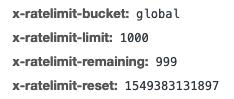
And if we spot abuse we can adjust these values for each endpoint 
empty scaffold
Sounds good 😃 I didn't notice those headers. I'll lookout for the OAuth2 changes and hopefully it won't be too difficult to adapt my code to. Again, thank you very much 😄

 dusty pagoda
OK sorry, I have no idea what an API is or to use it :(... is there a way to basically export all my viewers points to a spreadsheet?
ive googled the hell out of it and getting nowhere
indigo flume
@dusty pagoda https://github.com/Slikrick/streamelements-csv
dusty pagoda
@indigo flume i tried this... i wasnt sure how to paste my code or at what point in the notepad...
indigo flume
its not a widget to paste code

GitHub
Exports streamelements points to csv. Contribute to Slikrick/streamelements-csv development by creating an account on GitHub.
aah you are not sure how to use it?
There are steps o nthe bttom
dusty pagoda
im sorry i have no idea... i downloaded it, pasted my code in the notepad and ran it... nothing happened... but I literally have no idea
indigo flume
did you save the notepad?
dusty pagoda
yep... do i delete all the text in notepad and just put my UUID in?
indigo flume
UUID?
dusty pagoda
heres the txt in the notepad:
[info]
Streamelements uuid of the channel to look up
this can be found at https://streamelements.com/dashboard/account/information
streamelements_id = ""
Doesn't include users at or below the cutoff threshold in the csv
used to ignore inactive users
remove the "#" to set a cutoff
cutoff = 100

StreamElements
The Ultimate All in One Platform for Streamers
indigo flume
Yes, and you go to the site pointed inthe text file
copy your ID and place it in btween the quote marks.
save
run the .bat file.
dusty pagoda
ok... i didnt know where to paste the UUID
indigo flume
streamelements_id = "ID goes here"
dusty pagoda
YAY!!!! thankyou! it worked 😃
indigo flume

 gritty aurora
Hey, where can I find the documentation for the SE_API global var in the custom widget? Currently I'm only seeing the store and counter property on the readme
viral patrol
At this moment this function is under developments, but if you want to access our API directly from JS I am on my way to prepare something for you.
 viral patrol
OK. Let me paste you that code. Basically it gives you your top tippers (just like top tipper widget) by making call to SE API and grabbing that data
gritty aurora
Ohh you mean just manually calling with the given auth code?
viral patrol
If you create custom widget, just paste that to JS tab: https://pastebin.com/NV4MWXqY
 viral patrol
And for that there is whole documentation (API documentation)
gritty aurora
I'll use this! Thanks
viral patrol
Glad I could help.
I think I will do that one widget for future reference of API calls from overlay.
gritty aurora
Awesome
One more question, does the data["subscriber-latest"]["gifted"] array include every gifted viewer if it was a community sub?
viral patrol
Every -latest provides most recent 25 events
gritty aurora
oh so >25 subgifts wouldn't get picked up?
viral patrol
I wonder what is a walkaround for that
gritty aurora
Well does the event trigger for every sub?
viral patrol
I think that direct call to API should do the trick
gritty aurora
If so you just collect every sub in a 5 sec period and thats the one
But I wondered if the array included every viewer
But I might look into calling API
viral patrol
You can iterate over response from that:
https://api.streamelements.com/kappa/v2/activities/'+channelId+'?after='+startTimestamp+'&before='+endTimestamp+'&limit=100&mincheer=0&minhost=0&minsub=0&mintip=0&origin=overlay&types=subscriber
And check: "gifted":true
I am not aware of aggregates for that
gritty aurora
Might be farfetched but this won't work if two people decide to gift 100 at the same time 
but ill try this thanks
viral patrol
You can grab whole history from that, so it is able to do that, but it will be resource heavy to request that data every single time new event is coming.
gritty aurora
Yeah that's what I thought
Does the custom widget render on SE servers? or client-sided on CLR
viral patrol
It is mixed - data wrappers are SE side (like those which prepare date for addEventListener - onSessionUpdate, onWidgetLoad and onEventReceived), then part of displaying it and grabbing additional data is client side
gritty aurora
Got it
viral patrol
@gritty aurora - There it is https://github.com/StreamElements/widgets/tree/master/CustomTopList
GitHub
Contribute to StreamElements/widgets development by creating an account on GitHub.
 winged mesa
What's planned for the update redemption PUT endpoint? Will you be able to set the redemption as accepted or maybe change the user input values?
winged mesa
In addition, there are a couple, hopefully easy, feature additions that would be nice, but would require an addition to the UI and to the API. Where's the proper place to make requests for that?
viral patrol
Unfortunately I don't know what is/will be PUT method doing over redemptions/:redemptionId
And about posting an idea, I really encourage you to drop it on our ideas board, so it won't get burried under wall of text
You can find that here: https://strms.net/ideas
 twin kiln
hey, i'm trying to make a queue command so the user can join the queue when using !joinqueue. In the url link you will get the name of the user ?user=${user}, and it will be input it into an array into a custom api. The issue is that the array restarts every time is called. Does someone know a way so the array does not restart?
here is the code. It is very simple since i'm new to all this, soo please dumb down the answer as much as possible 
indigo flume
Why not just use this widget? https://github.com/StreamElements/widgets/tree/master/UserQueue

I'm not a PHP person, but it looks to me that you are checking if the user is set, if true, then make the array? 
shouldn't you define the queue outside the if(){}? @twin kiln
twin kiln
the order doesnt matter, i've checked. How do you implement the link u've sent me to my stream?
indigo flume
You replace the html/css/js/json in a custom widget in the overlay
overlay editor -> widgets -> custom widget -> click on event list looking widget that shows up -> open css editor -> replace code respectively
twin kiln
that's it? i just copy the 11 lines of code and it will do it?
viral patrol
@twin kiln can you paste it as text?
Basically in line
// line 4:
$file='array.json';
if (!file_exists($file)){
    file_put_contents($file,json_encode(array()));
}
//line 9:
$array=json_decode_string(file_get_contents($file),1);
//line 13:
file_put_contents($file,json_encode($array);
// line 4:
$usr = $_GET['user'];
// line 6:
if (isset($usr) == true)
{
$array = array();
array_push($array,$usr);
}
// line 12:
$result = print_r(array_values($array));
// line 14:
echo $usr, 'You have been added to the queue';
twin kiln
@viral patrol
viral patrol
I've just wrote you above some snippets to save/read that array and about what KeiZar pasted - This might be the easiest way to do that
twin kiln
ouuuuuu okay! thanks @viral patrol
winged mesa
Alrighty, Ix. I dropped the suggestion over in the dev section of the community board. Here's hoping.
With a couple of grammatical errors for good measure 😉
 stone hinge
Hey guys, is it possible to get points updates to users via websocket?
so like if they redeem a store item, or use a points command, win a raffle, etc.
viral patrol
Unfortunately I am not aware of any method to get user points updated live especially they got updated pretty often (same as watchtime)
 woven field
Hi, iframes are not allowed or working on custom widgets please ?
viral patrol
That is correct. iframes, cookies, innoDB, window.* are not available in custom CSS due to security reasons.
 undone dove
@uneven stream 
woven field
ok @viral patrol
 tight comet
Is it possible to update a text widget in my overlay from a bot command?
 low sierra
Yes, @viral patrol should have a custom widget that can do this
viral patrol
window.addEventListener('onEventReceived', function (obj) {
    if (obj.detail.listener !== "message") return;
    let data = obj.detail.event.data;
    let message = data.text;
if (message==="!test"){
    $("#yourbox").html("some text");
}
});
Something like that
tight comet
ok thanks I can try this
 lethal swift
Hello all!
is this custom widget "working"? https://github.com/StreamElements/widgets/tree/master/BotCounter
GitHub
Contribute to StreamElements/widgets development by creating an account on GitHub.
rugged rapids
What is the issue you are experiencing, when using it?
lethal swift
@rugged rapids the counter doesnt update, it stay at 00
@rugged rapids the one within the widget list does update but not this one...
What do you put inside the JS inside the editor?
rugged rapids
This one from the widget: https://raw.githubusercontent.com/StreamElements/widgets/master/BotCounter/widget.js
lethal swift
yeah
So I have done everything right
do I need to update that : fetch(`//api.streamelements.com/kappa/v2/channels/${channel} ?
rugged rapids
I didn't change anything on the code, just copie pasted it and it is working.
lethal swift
you put https://github.com/StreamElements/widgets/blob/master/BotCounter/widget.json in fields correct?
GitHub
Contribute to StreamElements/widgets development by creating an account on GitHub.
rugged rapids
yes.
After you added all this to your Overlay Editor and saved, Go to your OBS and edit the counter via chat. Then reload the OverlaySource (by disabling it and reenabling it) and the counter should update on screen.
lethal swift
@rugged rapids Restarted everthing from scratch
@wispy blade working now
@rugged rapids I dont know what happened here, might made a mistake while copy and pasting
rugged rapids
Glad it is working now. 
 split sandal
Hey guys, we created an alternative to Stream Deck called "Touch Portal", works already with Stream Elements but we want to implement more features into, do you guys have an api/socket to connect to?
indigo flume
split sandal
exactly what i was looking for
Thanks KeiZar
Wait a sec, this is for ground control right?
indigo flume
No?
split sandal
Obs.live?
indigo flume
The obs.live end point is not currently open to the public afaik.
split sandal
Ah ok, is there a way we can implement it?
indigo flume
I think in the documentation above, there should be some of the functions GC and OBS.Live provide
like skipping alert or reloading the overlays.
but not all
split sandal
we want to implement the following:
- Toggle mute alerts
- Toggle pause alerts
- Skip active alert
- Reload overlays
- KappaGen / Charged KappaGen
indigo flume
Heres the reload overlays api endpoint: https://docs.streamelements.com/v2.0/reference#overlaysreloadbychannelput
split sandal
ok, will look into it, thanks
indigo flume
Just look over the api documentation
if any of the above you don't find, then its not a public api end point.
 buoyant gulch
I might be a terrible person, hopefully what I'm about to ask is not against good morals or anything. Some time ago I bought NoD overlay made for StreamLabs. I really want to move to SE as a whole package. I managed to recreate the screens, switched the stinger, even managed to fix the alerts. One thing I'm missing is his Event List, which obviously is full on custom CSS. And to be fair my html/css skills are definitely not up to par to transfer it and fix it. If anyone had experience with such a think I would be much obliged for help.
indigo flume
@viral patrol ⤴
buoyant gulch
@viral patrol Hi, that would be the Apex pack
viral patrol
Unfortunately I haven't laid my hands on that package yet.
buoyant gulch
I could probably PM you the event list code if that's not breaking any copyright issues etc.
viral patrol
I think it does not as I will just fix the code for you, I am not using it by myself.
But I have one task ongoing and I will be able to look at that bit later
buoyant gulch
that is absolutely no problem, I have no expectations as a man pleading to gods 😃
 solar hatch
I've got the custom glitch event list for streamlabs but can't see anyway of transferring it into a stream elements event list. Does anyone know if this is possible somehow?
 toxic zealot
hey there. I ve been told to get here for following problem/question: I wanted to edit the eventlist so there are no sqaure-form as background.. i would love to upload an image as 'form/background' . greets!
if there is anyone that can help i would be glad! 
 brisk stream
Hey, guys!
A few months ago I asked a question about regular expressions. It became clear to me that Streamelements uses Golang. As far as I know do not let do "negative lookahead" expressions.
Is there any "trick" to do it?
I put you the link to the example below. What I want, is that when they mention lauren (with or without @) respond. And also, when a chat user is mentioned with the same phrase, lauren is directed to the user who is mentioned.
Regex101 allows you to create, debug, test and have your expressions explained for PHP, PCRE, Python, Golang and JavaScript. The website also features a community where you can share useful expressions.
viral patrol
@toxic zealot you might like this one: https://github.com/StreamElements/widgets/tree/master/CustomEventList in line 121 of css there is background image
GitHub
Contribute to StreamElements/widgets development by creating an account on GitHub.
toxic zealot
yeah i saw that there is a custom html /css wigdet.. i just dont get it.. like how to change it - how do i get the link of my image to edit it into the css
and thank you @viral patrol !
viral patrol
Oh, just replace url in that line and I think it should work 😉
toxic zealot
' how do i get the link of my image to edit it into the css '
like how do i get the url of my img for editing it into the document ._.
viral patrol
One sec
Do you have it uploaded to SE?
Or imgur/somewhere else?
Extracting url from stream elements editor is not easy unfortunately. The easiest way is to upload it to imgur then RMB click on image and click copy url
toxic zealot
i got the url from pressing F12 during th eoverlay editor and the image i uploaded.. i also edited it into the custom widget but its only changing the small icons on the left. So what would be the next step?
viral patrol
Ohh. Sorry I was wrong. 121 is indeed for images
But block above is for row background
You can change background-color line there with background: url(YourImageUrl);
toxic zealot
So top left is what happened ._. i am away rfom home now, i ll try it later again! thanks again!
viral patrol
Oh. This is because you made this icon as rob background and it is tiled there 😉
solar hatch
Can anyone help get the glitch event list for streamlabs to work as a stream elements one please?
viral patrol
Can I have StreamLabs installation link for that package please as I have no eventlist for that one?
viral patrol
If so. DM me it
buoyant gulch
@viral patrol should have his own rank here - "Official Nerd or Die importer" 😄
indigo flume
@buoyant gulch thats why his in the code gurus group/role 
cyan fulcrum
Hey there, just a quick question, is it possible to detect whether the a widget is currently in the overlay editor or on a launched overlay?
twin kiln
is there a way to time out a user through an custom api?
viral patrol
@cyan fulcrum you can have ajax calls or websocket connection within your widget and if it is displayed, you will have requests/connection on serverside
@twin kiln I am not sure about that, but maybe bot/say endpoint with {message: "/timeout USERNAME 60"} could do the trick. But this is just a guess
twin kiln
a streamer asked me if i could make a russian roulette command that would make two viewers "fight" echother
and the looser gets timed out for 30 sec <-- example
while the winner gets a reward
rugged rapids
take a look in the #command-share there is already an example of a russian roulette. Maybe this helps as a start.
cyan fulcrum
@viral patrol yeah, but I was wondering if I can detect whether the widget is running inside of the overlay editor, so I don't do things twice just because the widget in the overlay editor aswell as the widget running in obs send the same ajax call
viral patrol
This is the only way I think about. Keep checker server side and if amount of connected endpoints is higher than one, display a notification
solar hatch
Sent you a DM @viral patrol thank you for taking the time to help everyone!
 strong root
Question. I'm having a hard adding items to the FIELDS section. According to the documentation, "You can create custom variables, so enduser doesn’t have to interact with code, those fields will be displayed under “OPEN EDITOR” in left panel." I see the "OPEN CSS EDITOR" on the left, however, there's no place to edit the FIELDS. When I go to it, it's just a white screen with no way to add code. Can someone point me in the right direction?
Also, whom do I speak to about the awesome SL importer?
BRB
strong root
I'm trying to port over our packages from NerdOrDie, so our customer's have an easy way import to SE, not just SL. I just learned of these custom fields which was the only thing holding us back
 twin ore
After enabling custom CSS and opening the editor you should see four sections.
HTML, CSS, JS, and Fields
twin ore
Are you editing a custom widget or something else?
strong root
Custom alerts
The fields section shows white and not editable
I click to HTML or another field and go back, and the window doubles in size, and still not editable
I appreciate your help on this @twin ore
 wise copper
Does anyone know if there is a chat command (or something similar) to dynamically show/hide specific widgets in your overlay?
twin ore
Right, fields are specifically for custom widgets. Using custom css in an alertbox, it's still bound by the core alertbox coding for styling and everything, so the fields section isn't used.
strong root
😦
Okie dokie
Also, is there a way to have the importer, when it sees {{userMessage}} during the import, to convert that to just {{message}} ? whom ever developed that
twin ore
Would be nice wouldn't it? 
strong root
HAHAHHA
Yes yes it would.
@wise copper I'm no rep for SE, however, I don't believe it's possible with some pretty advanced hooks in place. Otherwise you can use a downloadable bot (kind of sucks) that can hook into OBS and complete what you're looking for by hiding and showing specific sources
Pretty sure Staff will correct me if I'm wrong.
twin ore
I think it's theoretically possible with some coding.
strong root
Again @twin ore thanks for the help. I hope the custom fields will be editable for alerts in the future.
wise copper
Thanks @strong root I'm just going to make the widgets I am interested in hiding their own overlays and then hide them individually like you said (thank God for Streamdeck) I just wanted to make sure I wasn't missing something easy
strong root
@wise copper On the small chance you stream to mixer also, MixItUp bot has that feature built in. It's amazing
 static rapids
let timerVar = setInterval(countTimer, 1000);
let totalSeconds = 0;

$.get( "https://decapi.me/twitch/uptime/"+channelName, function( data ) {
  let pattern=/(?:(?:([01]?\d|2[0-3]) hours?, )?([0-5]?\d) minutes?, )?([0-5]?\d) seconds?/;
  totalSeconds=data.replace(pattern,"$1")*3600+data.replace(pattern,"$2")*60+data.replace(pattern,"$3")*1;
  if (isNaN(totalSeconds)) totalSeconds=0;
 });


function countTimer() {
    ++totalSeconds;
    var hours = Math.floor(totalSeconds / 3600);
    var minutes = pad(Math.floor((totalSeconds - hours * 3600) / 60));
    var seconds = pad(totalSeconds - (hours * 3600 + minutes * 60));
    document.getElementById("timer").innerHTML = hours + ":" + minutes + ":" + seconds + "";
}

function pad(val) {
    var valString = val + "";
    if (valString.length < 2) {
        return "0" + valString;
    } else {
        return valString;
    }
}```looking to make hours displayed in two-digit integers rather than one
indigo flume
let me find a piece of code
indigo flume
let channelName="bobross";
let timerVar = setInterval(countTimer, 1000);
let totalSeconds = 0;

$.get( "https://decapi.me/twitch/uptime/"+channelName, function( data ) {
  let pattern=/(?:(?:([01]?\d|2[0-3]) hours?, )?([0-5]?\d) minutes?, )?([0-5]?\d) seconds?/;
  totalSeconds=data.replace(pattern,"$1")*3600+data.replace(pattern,"$2")*60+data.replace(pattern,"$3")*1;
  if (isNaN(totalSeconds)) totalSeconds=0;
 });


function countTimer() {
    ++totalSeconds;
    var hours = pad(Math.floor(totalSeconds / 3600));
    var minutes = pad(Math.floor((totalSeconds - hours * 3600) / 60));
    var seconds = pad(totalSeconds - (hours * 3600 + minutes * 60));
    document.getElementById("timer").innerHTML = hours + "h " + minutes + "m " + seconds + "s";
}

function pad(val) {
    var valString = val + "";
    if (valString.length < 2) {
        return "0" + valString;
    } else {
        return valString;
    }
}```yessir
indigo flume
aah ok
static rapids
thank you
your help has saved me hours worth of headache
i very much appreciate it
indigo flume
👍
 pliant osprey
Hey quick question have you changed the redemption api because my overlays have broke all of a sudden. and is displaying information that I havent put a check in place for
 errant trout
Hey guys, anyone active?
rugged rapids
just post your question and wel'll try to assist you.
errant trout
got it, no smalltalk. I was forwarded here through Zendesk support. My frontend on streamelements looks extremely dodgy
rugged rapids
what browser are you using?
rugged rapids
also tried to clear cache and use it in incognito mode?
I have never seen something like this and am not sure what is causing this and how to fix it.
errant trout
yeah tried incognito ^^
Is this possible if the DNS blocks a domain?
Have a list of domains to whitelist?
rugged rapids
I am sorry, I have no idea if it can be realated to DNS or something else. Also I am not sure we have a list of domains you could whitelist.
I would suggest to wait for another supporter to look at your problem.
rugged rapids
How?
errant trout
Connected through Tor, It is a DNS problem
so for the next guy to come, prepaaaare da whitelist ❤
Whitelist --> s3.amazonaws.com
 wispy sun
hello, I have a simple chatbot running in a twitch channel using node.js. I am trying to get the chatbot to update a viewer's points directly through the Streamelements API. I found the location but am unable to successfully create a PUT command. How can I do this?
viral patrol
PUT to that endpoint https://api.streamelements.com/kappa/v2/points/CHANNEL_ID/USERNAME/AMOUNT
wispy sun
That's what I need the help with. I can't find a solid example of how to do that. I'm pretty good with c/c++, but not so much so with js. With a solid example or something close., i'm sure i could figure it out.
viral patrol
@wispy sun
let xhr = new XMLHttpRequest();
let channelId="123123123";
let username="Duff";
let amount=20"
xhr.open('PUT', `https://api.streamelements.com/kappa/v2/points/${channelId}/${username}/${amount}`);
xhr.onload = function() {
    if (xhr.status === 200) {
        console.log('added points');
    }
    else {
        alert('Request failed: ' + xhr.status);
    }
};
xhr.send();
 hollow plover
Hi. Why is updating the event list very slow? I waited half a day until the event list was updated to the last follower
viral patrol
Can you explain? Event list is updated right after alert is played
 honest bone
https://www.onslaught.ca/s/teddzd6A.mp4 @hollow plover
You have 10 events showing, when you're only displaying 6 with that custom res.
Hopefully this video explains it. 😃
you waiting "half a day" would be other people following/cheering/etc, and it moving up on the list.
 trim gate
has the solution to the Grot credit roll refreshing for subs and followers but not for cheers been figured out yet?
hollow plover
@honest bone 😂 😂 😂 ty for help. I didn't notice this
 timid dagger
Hi, i am quite new for streaming and using StreamElements, was curious maybe anyone can share some knowledge how to use " Regular Expression" for commands creation, it looks like very powerful possibility, but no documentation 😃
rugged rapids
The Regular expression allows the user to use Regular Expression with this command (only recommended if you know how to use Regular Expressions) [Source: https://support.streamelements.com/hc/en-us/articles/115000373852-Chat-Commands-]
When I get this right, it is an adwanced way to create some sort of keyword for the command.
timid dagger
Yeah i know what regular expressions is from my programming job, but how can i use it here and what syntax no documentation at all 😃 Support suggested to ask here 😄
rugged rapids
I am not 100% sure, but at another place when you try to use RegEx, it gave me the hint that it is google RE 2 syntax : https://github.com/google/re2/wiki/Syntax
Would try to use this here, too.
timid dagger
Thanks Benno will look at that 👌
winged mesa
How often do community board ideas get reviewed? I'm trying to figure out a schedule and my approach depends on whether or not the idea I posted gets accepted.
 neon venture
Can anyone help me with a custom wideget and i want to change this image can soome one help
viral patrol
@neon venture You can change those images in CSS tab of Custom code editor
neon venture
I figured it out thank you!
 charred tundra
I recently set up a custom widget. It has four fields: Top Monthly Cheer, Top Monthly Tip, Latest Subscriber, Latest Follower.
Desired behavior: When cheers or tips come in those areas flash the latest cheer or tip, then is supposed to re-calculate for highest monthly cheer or highest monthly tip and return to that as the value until another event happens. I can see that this evaluation happens correctly between streams and when I test the overlay while building the widget.
Actual Behavior: I've had big cheers/tips that should have updated the widget values during stream and the original Top Monthly X stayed as it was at the beginning of stream instead of updating to the new clearly highest donator or cheerer.
Can anyone help me figure out where I've gone wrong?
Here's my current JavaScript to calculate and monitor those values: https://codepad.co/snippet/x4zut1sI

I think I've been looking at it too long myself to see whatever it is
viral patrol
window.addEventListener('onSessionUpdate', function (obj) {
  const session = obj["detail"]["session"];
  if ( data["tip-monthly-top-donator"] != null ) {
    topTip = session["tip-monthly-top-donator"]["name"];
    if ( topTip.length == 0 ) {
      topTip = session["tip-top"]["name"];
    }
  }
  topCheer = session["cheer-monthly-top-donator"]["name"];
});
This part
You are assigning value to variable
But you are not replacing text in your element

 snow skiff
Greetings awesome people, is it possible to make a counter for bits, without using SE dashboard? purely chat command counter
twin kiln
@snow skiff check out the commad-share section. There you will find the command you are looking for
 covert stratus
Is there a way to be able to have a top supporter label, say someone donates 10 dollars, and they are shown as the top supporter, but then someone cheers 1100, and then they become it. As well a recent support. To keep it more streamline
I assume it is possible with custom API, but I am not too sure how to go about writing it, as I have not coded in quite a while
 latent yarrow
Hello! trying to set up a !watchtime command for total hours+mins spent watching in my channel
cant find it anywhere tho :/ any idea?
 zenith folioBOT
@latent yarrow 10 minutes of watchtime are given to those in chat when the loyalty points are handed out (every 10 minutes). Therefore, loyalty must be enabled for watchtime to work properly. There is no direct link between watchtime and all-time points. It can’t be calculated from the amount of all-time points a user has because subs may earn points at a faster rate and !bonus all command increases all-time points for users in chat at that time. Giving points to a single user does NOT affect all-time, only when giving to all in chat.
viral patrol
@covert stratus it can be done only with custom CSS, but I think it can be against bits acceptance policy
 grizzled carbon
Hello everyone! I recently had someone make an overlay and alert boxes for me, but they used Newsflash BB font, which isn’t one of the options on SE. How can I go about adding that font so the font of the follower or host is the same as the rest? The font is installed on my PC
viral patrol
Hi @grizzled carbon - if you want to use custom font that is not enlisted on SE you need to use custom code (either for alerts or to display other data). If you want to use labels/goals/eventlist - there are widgets that allow setting custom font within CSS (or by left panel on left), you can find them here:
https://github.com/StreamElements/widgets/tree/master/CustomLabels
https://github.com/StreamElements/widgets/tree/master/CumulativeGoal
https://github.com/StreamElements/widgets/tree/master/CustomEventList
GitHub
Contribute to StreamElements/widgets development by creating an account on GitHub.
GitHub
Contribute to StreamElements/widgets development by creating an account on GitHub.
GitHub
Contribute to StreamElements/widgets development by creating an account on GitHub.
grizzled carbon
Oh ok, gotcha. Now do I just copy and paste what you posted into the CSS with the name of my font?
viral patrol
If there is font-family:{{fontName}} or something different between {{}} - type font name in left panel, it will be put automatically into CSS, otherwise use font-name:'Your font name'
grizzled carbon
Im not enitrely sure what you mean or how to do that
viral patrol
Oh. If you install font from links above, you will see left panel to customize widget
If there is no "Font name" you will have to open editor and do it in CSS tab
And from links above - paste code from each file to corresponding tab of custom widget
JSON file goest to Fields tab
kindred nexus
Can anyone help me here?
grizzled carbon
@viral patrol I must be doing something wrong but I cant get it to work
 devout loom
Ok, when I set up my sub things on my dashboard I have a different picture for each tier and prime. Which I got set up all fine. But what doesn't work is the resub one. When someone resubs for (x) amount of time with lets say a tier 3 it just says they subscribbed with a tier 3 and doesn't say they resubscribed for (x) amount of time. I was told I could do this in the CSS editor but I have no idea how to.
viral patrol
I think you can change Tier 3 variation to display for example:
WOW {user} subbed with Tier 3 for {amount} month(s)!
devout loom
How would I do that?
devout loom
Ok. now another question, is there any way to seperate first time subscribers doing the same thing? So it says {Name} just Subscribed! for like the first time or not?
 pulsar willow
Hello I need help making a command Exactly like the Quote command but for Facts and I have no idea how to do that 😄
rugged rapids
@pulsar willow You could use this customApi: https://twitch.center/customapi/quote/generate
But you have to convert the urlfetch to a customapi variable of SE: ${customapi.link-to-api.com}
And $(querystring) has to be replaced with a ${1}.
 meager crest
Hello, Is there a way to translate a !command to a local trigger?
(Ex: OSC / Midi data)
Thanks
viral patrol
@devout loom Unfortunately there are no multiple conditions, so you are not able to make "Tier 3 & amount>4" In that case you have to create something common for both of options
 smoky fjord
Hi I had a question regarding the bot feature. I was wondering its possible to make the bot call in a command and make an PNG or MOV show up on stream. I currently use streamlabs atm but need this feature since I run a win counter atm
viral patrol
Hi, there are some methods to check chat from overlays. If you think about counters, there is a sample code for that
GitHub
Contribute to StreamElements/widgets development by creating an account on GitHub.
You can also check messages sent via bot, for example match if user == streamelements and parse message - chat reader is shown here https://github.com/StreamElements/widgets/tree/master/CustomChat
GitHub
Contribute to StreamElements/widgets development by creating an account on GitHub.
@smoky fjord ⤴
smoky fjord
@viral patrol How do I make it display a image or .mov with a chat command? basically what am looking for is something that would allow me to type in !win1 and display an image and be static till I input !win2 or allow me to use a .mov file to display on a chat command.
viral patrol
Huh. Then you can have a counter so !win will change wins counter to 1 (show image/video #1) another !win would display image/video #2 and hide #1
But mov are heavy, convert them to webm via convertio.co or ffmpeg
And you have function setText which changes class when value is met, there you can change element visibility or attributes.
 polar storm
Hello guys, people from NerdOrDie have just sent me their new alert that they've been working on: https://streamelements.com/dashboard/overlays/share/5c7089350eba53fa5149b147
Visually it works perfectly, but the only issue that I've encountered is that there is no way to enable TTS, so I had to create second alert widget on the same scene just for TTS.
Not saying it is possible, but is there a way to enable TTS for that custom alert, or I will have to rely on second TTS-only alerts in the nearest future?
Thanks!
StreamElements
The Ultimate All in One Platform for Streamers
twin ore
TTS is independent of the custom CSS.
polar storm
@twin ore Sorry, I think I wasn't clear. There is no "Alert Message" tool in the custom alert. And, as I understand, TTS is reading Alert Message text. So, without Alert Message, there is no TTS.
Yep, Custom CSS disables Alert Message option.
My best guess will be to somehow make TTS to read text from custom CSS, but I don't think StreamElements has this feature implemented yet.
twin ore
@polar storm I'm going to run a test in your account.
polar storm
@twin ore For sure, thanks for your help!
twin ore
@polar storm Plays fine.
polar storm
@twin ore If you ran it on one of my normal scenes, I have second alert enabled that is specifically made for TTS. If you will leave just that custom alert, it will not do TTS. I will remove the second alert so that it will not confuse you.
polar storm
@twin ore Ohhh, I see it now. Did you just do some changes in the CSS? So that I can do the rest of the work myself.
polar storm
@twin ore Ah, I guess it's my bad  . Thanks very much for your help! I will let you know if I will run into any trouble
polar storm
@twin ore I played around with the alert, and apparently it does not announce the action, just reads out the message that the person has entered. Is there any way to make the voice announce the action as well? Apologies if the question sounds dumb, I am relatively new to StreamElements.
The action as "TimesAndPlaces has Subscribed/Followed/Raided etc."
 empty karma
When I try to get Top Points on my friend's channel with superagent (nodejs), it still returns with "{ _total: 0, users: [] }". Is that a bug, or just a error on my side?
viral patrol
It should give you normal response.
One sec to check proper query
https://api.streamelements.com/kappa/v2/points/ChannelId/top/?limit=999&offset=
empty karma
Well, it still returns that.. If it will help, here is the code behide it
viral patrol
This should be channelId instead of channelname
You can find this by at https://api.streamelements.com/kappa/v2/channels/channelName
@empty karma ⤴
empty karma
I used his Twitch ID generated in this url under 'providerId'. Do I need to use the id from streamelements?
viral patrol
Yes. You should use StreamElements guid for that
You can also GET /channels/me with JWT Token, to get channelId
But it is useful if you want to make stuff not bound to a streamer
empty karma
I'm making a bot for one streamer, who is a friend of mine and this is also my first time using this API, so this is like a prove of concept.. But thank you, I will try that and see if it finally works 
@viral patrol Ok, it finally works.. Thank you for your time and patience with me
viral patrol
No problem, we're here to help
 mighty plover
Someone msg me if you know how to make ur bot use say stuff like “my insta is...” without viewers using commands
twin ore
That's called a timer.
 reef granite
I want to use a single "custom widget" as my event "box" as well as my alerts. Is there a template for getting this started? I'm mostly wondering the best recommended practice for caching alerts when more than one come in at a time and such.
queuing alerts, i should have said.
viral patrol
If you have alertbox with custom widget in same overlay alerts are queued automatically - Alertbox blocks them before they go to custom widget
But if you want to use it solely, you can use jquery queue
reef granite
Cool. I'll look at that. I mainly want my alerts to interact with the event list and would also rather not copy and paste my html/css/js into every single alert box variant. Thanks!
viral patrol
About variation: if you create default alert, save and refresh editor. This will put that as "predefined" so every created variation will have that one. Also - you can make just default alert and handle variations by JS
 azure chasm
I'm trying to use the random.pick variable to randomly choose from a list of sentences, but the variable doesn't seem to be reading the apostrophes as the start and stop of the random.pick sentence, but rather each space between the words. I would use it in a paste bin, but I have additional variables in the random.pick variable that I would like to use. Any help would be appreciated.
viral patrol
@azure chasm I think this might be helpful for you https://discordapp.com/channels/141203863863558144/259680142459142144/538082096875438090
azure chasm
Ok.... it appears it requires some coding skill. I would like to write the command myself, but I don't know what goes on in the api end unfortunately, nor do I know how to actually create an api source.
viral patrol
It does not require coding skills
There is command response for bot ${customapi.https://api.thefyrewire.com/twitch/pastebin?key=PASTE_KEY&user=${user}&channel=${channel}&randuser=${random.chatter}&randnum=${random.#}}
replace PASTE_KEY with an id from pastebin
For example you have https://pastebin.com/ABCDEFG then PASTE_KEY should be replaced with ABCDEFG
azure chasm
Oh. Thanks!
 bright crypt
Curious (just spitballing): Is it possible to tap into the API/something to build custom modules for the bot?
indigo flume
@bright crypt You can try and make an external one, but do note that some API end points for the bot require JWT auth - https://docs.streamelements.com/v2.0/reference#bot & https://docs.streamelements.com/v2.0/reference#single-user for the loyalty.
bright crypt
Hmm. Alright. Thanks!
 low kestrel
Hi, i have a question about an exsiting bot i have, if im able to make it give certain benefits to subscribers and super subs
and regulara viewers
if you can create a bot that has the same functions as streamelements' bot and also will give subscribers more points for being a tier 2 or 3 subscriber. i was given this task, i want to know if its possibly or not
indigo flume
If you want to give more points to people via the API, there is an end point for it
but not sure how you will know who is a tier 2 or tier 3, as we don't provide that info via our API
You most likely have to build a tracking system to know who subbed and with what tier and so on.
indigo flume
https://docs.streamelements.com/v2.0/reference#pointsamountbychannelanduserput if you take a look at the example auths on the right side you can see multiple choices
JS, Ruby.
low kestrel
oh i dont know ruby ugggg
indigo flume
You can choose between w/e you want really, as long as you can process json responses back and forth.
pulsar willow
Did something change to break the addEventListener?
my rotation module stopped working
it stopped working in the middle of my stream last night
rugged rapids
just imported the widget Last Events Rotator from #widget-share. everything working fine.
pulsar willow
That's what I'm using
it just stopped working mid stream
just a blank spot where it was
welp, now it's working
lol
ok, this is interesting, it's blank, but if I do the test alerts, it will populate and function
it's like it's not pulling in the data from the stream info
but it'll read the fake data from the tests
is it because session data clears itself? this is the first time I've had this happen
nope, that can't be the case because it doesn't have the same data as the labels section
I don't get this, why would test data work, but not the existing data?
pulsar willow
this happens any time it refreshes
it looses all data
I just had someone resub
switched overlays
and the data is blank again
 modest ruin
I have a question about the bot posting commands himself. I wanted to create a command called !highlight for my chat so they can use it and the Bot will post "/marker" in the chat to highlight that specific time in the VOD. But it seems like the Bot doesn't use write the /marker command, instead it will post it with a space before and people see the actual command. Is there a way to disable that and make him just use the command like /me ? I already added the StreamElements bot as my Channel editor. - Please tag me.
 midnight orbit
Resolved ⤴
 thick frost
I'm trying to use a custom font that I have installed on my computer, but it doesn't seem to load. I can use it with other programs on my PC, just not in the SE editor
 kind dock
api documentation on tipping? In Denmark we have a mobile payment system called MobilePay and with Android and IFTTT i would look into POST the data directly to my stream elements account from the android notification, but the tip and tipping API page is just blank. Does this mean it's not ready yet or is it just located some where else?
rugged rapids
So we have this API-page: https://docs.streamelements.com/v2.0/reference#tips Is it this page white for you?
@thick frost After installing fonts, the browser and OBS must be restarted for the font to appear.
kind dock
nope that is perfect @rugged rapids Thank you i was looking at this https://developers.streamelements.com/
 reef granite
Anyone else get a TypeError: can't assign to property "type" on "SE T-shirt": not an object" a lot of times when you save a custom widget?
viral patrol
This is a know issue, when you do test events, and they are cached. After that widget should work just fine
reef granite
Gotcha. Doesn't seem to be hurting anything I just noticed it keep popping up when I edited something.
viral patrol
This is because there's test redemption in "test historical data"
kind dock
i hope it's okay that i ask this here as I'm just trying to get any result so i have a starting point that i can learn from. The Documentation on how to get, let say user rank, says the following
but the example is this . i dont see the authorization in the example
do i have to do this seperate
if it is too much beginner let me know and i'll drop it
viral patrol
Hi
Authorization should be:
Header: Authorization: Bearer [JWT-TOKEN]
You will get more details from sending a request than from examples
kind dock
@viral patrol lets say i would like to get bot info using cURL. I sent a GET request looking like this: curl --request GET --url https://api.streamelements.com/kappa/v2/bot/geekgarage --header 'accept: application/json' --header 'content-type: Content-type' --header 'Authorization: Bearer MyTokenHere'
The response was
{"statusCode":401,"error":"Unauthorized","message":"No authorization token was found"}curl: (6) Could not resolve host: application
curl: (6) Could not resolve host: Content-type'
curl: (6) Could not resolve host: Bearer
curl: (6) Could not resolve host: MyTokenHere
kind dock
i know i'm doing some thing wrong i just don't know what
viral patrol
What curl are you using?
viral patrol
And your api wrapper - will it use curl or something else?
kind dock
looking into webhook from IFTTT
viral patrol
So you want to send request from IFTTT to SE or other way around? From SE to something else?
kind dock
trigger is android app, using webhook to send info to SE as per my idea posted on the community board https://streamelements.helprace.com/i1424-ifttt-integration
viral patrol
So, you want to automatically add tip you received from external resource. Or just display a chat notification?
kind dock
i would like to add it to the tip, so lets say if i had a donation goal, it would count towards that
viral patrol
But this tip would be displayed as PayPal or G2A (even if it was not through that)
So for testin purposes - take a look at this:
Advanced REST Client official website. Download and install advanced REST test tool.
Then you need your channelId to do stuff, you can get it from here: https://api.streamelements.com/kappa/v2/channels/geekgarage
And your ID is: 5b0c81ebb3b874c09d8cffec
reef granite
Found a bug with using field names that are the same as the variable names you declare in your javascript. If you're using a template string and use ${variableName} the {variableName} gets replaced with the field data instead of the javascript variable.
viral patrol
@reef granite unfortunately this is a cost of being reverse compatible with external services using let a='{customField}' and so on
kind dock
thx @viral patrol now i have a good starting point, I'm sure i'll firgure out the rest 😃
viral patrol
@kind dock give me 2 more minutes
reef granite
@viral patrol ya. makes sense. Just took me a few minutes scratching my head to see what was happening.
If i add like a JS to my javascript variables, the field data shouldnt' step in there, right?
kind dock
@viral patrol alright, just don't want to waste too much of your time with this beginner stuff
reef granite
ahhh. awesome. that did the trick.
viral patrol
@kind dock Take a look at this
Body JSON is:
{
  "user": {
    "username": "YourUser",
    "email": "imported@fakeaddress.com"
  },
  "message": "Test message",
  "amount": 123,
  "currency": "USD",
  "imported": true,
  "payFees": true
}
this tab, I should set this to oauth2 ?
kind dock
ah okay, i'll do the same then and ignor the auth tab
viral patrol
But remember: those tips will be in SE system as PayPal tips, so if you gonna use it for tax report, you should do it carefuly and remove every imported tips as they were not paypal
viral patrol
That is really strange
@kind dock do you use data from here? https://streamelements.com/dashboard/account/channels
StreamElements
The Ultimate All in One Platform for Streamers
Your account ID and JWT Token
kind dock
never checked the ID as your early message said "And your ID is: 5b0c81ebb3b874c09d8cffec" that is my bad that i did not double check it
viral patrol
Ohhh.
kind dock
changed ID and i get reply 200
viral patrol
I thought it was this one
So reply 200 - tip added
You should have it in your activity feed now
And alert should play
StreamElements
The Ultimate All in One Platform for Streamers
kind dock
no alert... i will try again
there we go 😃
omg you are so awesome @viral patrol , now I just have to figure out how to do it from IFTTT and i'm golden 😄
viral patrol
In IFTT create HTTP request and copy data from Advanced rest client there
I think it should be lookalike
kind dock
i looks alot like it yes. but on another note, i think i just found a bug in the alert system. I've changed my currency to DKK (Danish Kroner) but the alert keeps saying Dollar and show the $ sign.
kind dock
ah i thought they were tied together
viral patrol
Currency in system is "default currency"
But it is possible to tip with another currency
kind dock
so if i run it with this code it should say DKK instead of TTS saying dollar
because it does not
still show dollar sign and saying dollar
viral patrol
Huh. You are right. Other currencies are converted by paypal on the fly
I think that it should populate pretty soon
You can also change message to fit your needs by replacing {currency} by your currency symbol
kind dock
i will wait and see if it changes
reef granite
Is there a way to tell a subscription is from a community gift? I just played a test and the initial gifter object has a bulkGifted property but the subsequent however many gifts don't seem to have any indication that they were bulk gifted.
this is in the custom widget
viral patrol
It should be bulkGifted. Add console.log(obj.detai) in onEventReceived to check it
reef granite
ya. that's what i did. The giftER object has the bulkGifted property, but then it fires 10 or however many gifts were given and those objects seem to come across as normal gifted subs.
At least the test came out like that. Also, all of the giftee's had that same name. Not sure if this is just how the community gift test just works or not.
kind dock
@viral patrol I'm leanding more and more toward there is a bug with alerts. after i changed to DKK the latest and top donator have both change automatically but alerts haven't
never mind, i went into alerts a second time saved and then refreshed everything and it changed
 lethal matrix
will there be customizable glasses soon?
reef granite
@lethal matrix I'd love to see fully customizable hype cups (with editable mesh) as well but for the time being, if you can find a glass that's close to the shape you want, you can make the glass completely transparent and overlay your own image on top. The tokens stay visible.
lethal matrix
i am using this one via streamlabs, but i would love to go to streamelements, but not without my little baby 😃
@reef granite guess the shape doesn't really fit with ANY cup though ^^
reef granite
hah. That is a trickier one to just find a good replacement
depending on how "realistic" it looks on streamlabs, I think you could stick the pumpkin cup over the right side near the bottom. It would probably fill that side of the case pretty well until it got pretty full.
actually, a lot of the cups would probably work pretty well just in the fat bottom section of the case.
the pumpkin would just have the best curve.
lethal matrix
problem is: I can't use this png, so there will be the pumpkin and not the case, right?
viral patrol
You can split this png into two pieces: front border and background to make it more 3D-ish
Then put any glass between with 100% opacity
Cut it here
reef granite
ya. And then the pumpkin you can just make completely transparent so all you'll see is the tokens hitting your case. You won't really notice the top curve on the pumpkin until it gets pretty full (pretty good problem to have)
 strong orchid
With the stream store not able to use webm as preview image, is it possible to play a webm via a command?
twin ore
Technically possible through custom coding, I believe.
 oblique trellis
anybody know how i can get a leader board of top watchtime through the watchtime api?
reef granite
There isn't a way currently to access/choose uploaded files in custom widgets, is there? Is this in the plans? Would be nice if we had a field type that let us choose from our uploaded stuff.
mild cipher
@reef granite if you upload your stuff in the overlay editor then select one and right click on the preview in the pane, you'll get the direct URL to the upload like https://cdn.streamelements.com/uploads/blah.png which you can use
(also hi  )
)
reef granite
Ya. That's what I've been doing. Just wondering if it's on the roadmap. How's it going?!
mild cipher
Not bad thanks, been sick the last few days though  should probably be asleep how about you?
reef granite
currently bashing my head against this custom widget. Anyone ever experience a widget that fires the onEventReceived event a bunch of times in a row? I just widdled my code down to ONLY the onEventReceived listener with a console.log statement and it fires 7 times every time i play a test sub
Ok. I just switched it to onSessionUpdate instead and that's correctly only firing once..
Except I can't get the "what event was that?" out of the session data, I guess. :/
I'm thinking something is wrong here. I just created a completely blank overlay. Added the default "Custom Widget" and added a log statement to the onEventReceived ... still firing 7 or 8 times whenever I send a test event
mild cipher
@reef granite that's default behaviour for the custom widgets, you only need to listen for events where obj.detail.listener ends in -latest - if you make a fresh overlay and check the default code you'll probably notice the onEventReceived looking at follower-latest, subscriber-latest, etc
(I'm not sure why it's specifically that way)
reef granite
ya.. i just started to notice that.
my old typer overlay has been busted and I now understand why. heh
pretty sure I was refreshing data for all of those pings

 reef granite
take it easy
kind dock
Would it be possible in the future if you add payments through the API to use a custom name for the payment service? I currently add donations from a national service called MobilePay as paypal with the fake email from@mobilepay.dk as it would be easy to sort out for tax purposes later. Or is this some thing i should drop on the community board under idea?
kind dock
question, i see when using the normal donation page we can do decimal like 13,37. why is that not supported by api or am i missing something? (i'll note that i see a lot of donations like that on a streamer i moderate for)
as the documentation says, it's an int32 so no decimal pointer
vapid iron
That's a comma 
Not sure if you're looking for 13.37 or 1337.00
Boy I need a drink 
twin ore
Denmark uses a comma instead of a period for a decimal point.
It's 13.37 to you Mr. American.
 kind dock
@vapid iron I'll ignore 😉 and yes we use , instead of . for decimal but okay lets just use . for this case if that will give me an answer if i'm overlooking something or the documentation is incorrect 😄
or I've understood i correct that we can't send decimal points, because then i'll have to write up yet another request/idea on the community board 😃
My logic behind it is that the SQL behind it all supports it, or we wouldn't be able to do it on the official tipping page, so it has to be the API that is setup wrong if it is true that it only support int32
meager crest
Hello, is there a way using ${queryescape} variable to send an masked html trigger without leaving chat? The goal is to send a local static IP signal to my PC and trigger Ableon Live via OSC protocol
viral patrol
Hi. If you want to send something within your local network you need to have port forwarded (as bot doesn't have access to LAN) then create command like: $(customapi.http://URL:PORT/?param=${pathescape ${1:}})
kind dock
any dev who can answer me regarding my last post about decimal ? 😃
meager crest
@viral patrol Yes, I've already pot forwarded my ISP Static IP to my local machine IP. So basically $(customapi.http://My Staric IP:8080/?param=${pathescape ${1:}})?
How would I complete the string after the :8080/ if I'm triggering to an html page on my Xampp local server?
Thanks
viral patrol
@meager crest if you want something happen dynamically you would need something other than HTML - node, php, python. So it will look like http://123.123.123.123:8080/script.php?parameter=${pathescape ${1:}}
@kind dock Maybe IFTT service can replace commas with dots, so value is going to be proper then
kind dock
@viral patrol but in32 does not support . int32 only support from -2147483648 to 2147483647
if amount actually does then the documentation is wrong
if i can actually send 13.37 and it supports it then the documentation should be updated to say decimal instead of int32. I'll change my code between you api and IFTTT and see if it supports it
viral patrol
Oh. I think this is because "automated" documentation. It was created based on example values and example value there was 5
Definitely you can pass decimal to that endpoint
kind dock
perfect 😃 thx @viral patrol I'll go chage my code to support it
kind dock
@viral patrol thx for the help, everything is working really nice. Now we just need to be able to use custom names for payment service when adding through API and we would be golden tax wise as we could sort donation based on where we got them 😃
viral patrol
With "fake mail" you already save a lot of work in future (if you build tax report from SE dashboard and not PayPal/G2A reports)
But I am glad I could help you with that stuff
kind dock
currently i just use From@mobilepay.dk as mail so i can sort them from the rest 😄
meager crest
@viral patrol thanks! yes actually using node...
charred tundra
quick question about testing custom donation/goal bars: test donations reset the overall value for "tip-goal" so I can't tell if the bar will appropriately increase when live with real donations. Am I doing it wrong or is this expected testing behavior?
window.addEventListener('onSessionUpdate', function (obj) {
  const session = obj["detail"]["session"];
  donation = session["tip-goal"]["amount"];
  setTimeout(function(){
    $('#widgets .donation').addClass("alert");
    reloadGoal( donation, goal );
  },3000);
  setTimeout(function(){
    $('#widgets .donation').removeClass("alert");
  },6000);
});
Jsut refresh the overlay editor(click save) and the progress bar should return to its original spot.
charred tundra
yes, that's no problem, I just want to see it increase when a test donation comes through
indigo flume
If it doesn't the progress can always be manually manipulated from the "Data" tab -> goals tab
charred tundra
instead of reset
current donations under the Data are 9.99, but like when a 10 test dono comes through it doesn't update to 19.99, it changes to 10
indigo flume
Aah you are doing a session based tip goal.
charred tundra
how can I do a not session based tip goal haha
but still have a listener for new tips
indigo flume
Ooh you have your const named session
ok so data["tip-goal"]["amount"] gets the data in the "Data" -> goals tab - actual goal progress.
indigo flume
Let me check something.
charred tundra
thanks 🤗
indigo flume
let userCurrency;
let currentTipProgress = 0;
let tipGoal = 500; // Adjust goal here!

window.addEventListener('onEventReceived', function(obj) {
    const listener = obj.detail.listener;
    const data = obj.detail.event;
    if (listener === 'tip-latest') {
      currentTipProgress += data.amount;
      progress();
    }
});

window.addEventListener('onWidgetLoad', function(obj){
    let data=obj["detail"]["session"]["data"];
    let recents=obj["recents"];
        userCurrency=obj["currency"];
        currentTipProgress = data["tip-goal"]["amount"];
        progress();
     });

function progress() {
  var getElementHeight = document.getElementById("bar").getBoundingClientRect().height;
  var getParentHeight = document.getElementById("progressBar").getBoundingClientRect().height;
  var progress = Math.ceil(currentTipProgress / tipGoal * 100);
  document.getElementById("bar").style.height = progress + "%";
};
Ok removed what was not needed, but basically this is a custom built tip goal widget that was made before data["tip-goal"]["amount"] was added to the documentation here https://github.com/StreamElements/widgets/blob/master/CustomCode.md
charred tundra
cool, will have a play around with it! thank you so much 😄
charred tundra
BTW got it working by referencing this!! amazing, thanks again 😃
indigo flume
indigo flume
@charred tundra  congrats on completing the custom widget. If you have any cool ideas and you've built any cool widgets and want to share with the community, you can always toss one of them here: https://strms.net/codeshare
charred tundra
@indigo flume awesome, thanks! I will keep client widgets private since they're meant to be unique products but happy to share my foundation templates and personal work 😄
 cursive holly
I’m not a developer at all,but my cousin is, and he’s worked with Twitch extensions and chat bots before. He’s never worked with SE before though. Before I bring an idea I have to him, I’m curious on how easy it is to integrate certain information with SE. specifically, if I wanted my bot to be able to see and manipulate (add and remove) points/currency from accounts in the loyalty system. How difficult would that be to do? I’m planning to implement a chat game with my community, but would like to maintain and keep the same loyalty system SE provides.
Would it be something that could be integrated or communicated in some way so that the bot could do it, or tell SE to do it without clogging chat (clean) or would we just have to program the same add and remove commands moderators already do into chat (messy). Thank you for your time.
indigo flume
I think this API endpoint will help your friend develop the points gain/loose for the game.
 woeful yarrow
Hey
 cinder lintel
Yes, the API allows for interaction with the loyalty system and chat. When using the API, you can make it do quite a bit without posting anything in chat, then only post a message as needed :) the docs in the header of the channel are a life saver. Send the guy here, there are smart people that have experience using it
worldly mauve
so edited the custom event list so i can use my own images/icons and it seems imgur doesn't like the obs browser? they aren't showing up in it but when I view it in chrome/overlay editor it works fine. Any ideas or point me to a different image hosting service? (this is fixed I had to go through and input the image links in a browser source before they showed...which is weird)
cursive holly
Thank you
viral patrol
@worldly mauve imgur prevents other services from usage of their CDN, to you can have 403 error while requesting nested images from them. You can upload those images to StreamElements and use them from there. I usually upload images there, insert image widget, set an image and then rmb click to copy image addresse.
It works like a charm
worldly mauve
@viral patrol ah thanks! and yeah i know it only allows you so much bandwidth so was just worried
winged mesa
I don't mean to be pushy, but can I get some information about the review process for development ideas on the community board? It's been nearly a month and my approach does depend on the dev team's acceptance or rejection of the idea.
 jolly trout
Hi all 😃 I am in search of an api to track most the active chatters in a stream or on a specified date range. Any guidance would be appreciated!
 teal terrace
So I'm looking for any application that can help me with alerts for facebook. Is there any plans on making alerts for Facebook gaming such as new likes, followers, shares and more? Thanks
indigo flume
We have plans for Facebook integration, but no ETA on when it will be available.
teal terrace
Awesome! Thanks @indigo flume
strong orchid
is there a way to make the command to show last tweet just show the link? theres the ones in command share but they show the tweet aswell and it ends up being to long.
indigo flume
Are you using this? ${customapi.https://4head.xyz/tweets/?name=USERNAME}
strong orchid
ye
indigo flume
I think the API endpoint that is used just returns everything - the tweet and link
strong orchid
ah right np, im not to good at api, thanks for the info.
indigo flume
That API point is not something under our control - its an external one.
strong orchid
is there a way to do it with the tweet variables already within SE?
indigo flume
The variable I think just returns the text.
strong orchid
ye np thank you for your help mate, much appreciated
indigo flume
Yes - just the tweet text.
 tough sierra
Hey all! I am just using StreamElements for the first time and I imported my StreamLabs alerts over to StreamElements, and it appears that everything is there, including the custom HTML/CSS, but when I test the alert nothing happens. I'm new to StreamElements, and I'm not quite sure how to troubleshoot this. I hope this is the right area to post this.
 muted dagger
@indigo flume was you that I asked a really long time ago if could make the Apex Overlay to SE and you said that you would do?
rugged rapids
@tough sierra Do you have a new overlay with just an alertBox after the import in your overlay section?
tough sierra
Yes I do
@rugged rapids
THe import seems to have worked, but the alerts do not work at all. I feel like I'm just missing something lol, I just havent used this before
rugged rapids
So when you are in this overlay and you emulate an event, is here any alert?
tough sierra
No
The .webm video is there, the custom code is there, it all looked OK from what I could tell
rugged rapids
So when you select the bell at the buttom of the overlay editor of the imported overlay and emulate a follow, is there anything coming up?
tough sierra
Nope nothing happens
rugged rapids
I can't acces your overlays. This can only be done by Staff members. So I am sorry, as I can't really help you with this issue.
If you are fine with this you could give me editor acces via PN and I can take a look. But I can't promise you to fix the issue.
@muted dagger
New Supertheme Alert! Introducing "Spitfire" for Apex Legends.
"Spitfire" includes five epic scenes, animated alerts, glowing social media buttons, and there are banners that show off your channel’s biggest tippers, latest subs and more.
Launch it from Themes gallery: https://strms.net/apexspitfire
Watch Preview: https://youtu.be/vMxNXM1pHlA
tough sierra
@rugged rapids Yeah sure, I don't mind. How should I go about giving you access?
rugged rapids
Please send me an editor acces via Discord PN.
rugged rapids
^ I could not solve the problem of @tough sierra ^ Maybe another supporter has any idea with the custom css of the alert box.
tough sierra
@rugged rapids Thanks for your help!
muted dagger
@rugged rapids Isn't that Apex that i mean haha, but thank you for the help <3
rugged rapids
oh. ok I am sorry then.
muted dagger
Is about a package named Apex that NerdorDie is selling, i have the package, but they don't give support to install on SE =/
viral patrol
@tough sierra Hi. The most common issue with video/images in custom code imported is that there's {{img}} tag you would like to replace with:
<video width="400" height="400" autoplay muted>
  <source src="{{video}}" type="video/webm">
</video>
This is in HTML tab of custom code editor
muted dagger
Hey @indigo flume I'm the guy who asked to you for a help on Apex package in October/2018 don't know if you remember me but did you made that favor that I asked to you?
indigo flume
@viral patrol is the guy who can convert it, if he doesn't already have it.
tough sierra
@muted dagger I'll take a look at that this afternoon. Thanks!
 unique aspen
Hey I write code am I able to help out
muted dagger
Guys i really appreciate all the kindness, but lx already had the code already, thank you so much <3
 pulsar kayak
Hey jrvencill#5675 "You can ask in #dev-chat if your overlay has already been transformed to StreamElements." can I get help with this?
rugged rapids
I have no idea what overlays are already transformed, but to process your request faster, I think it would help us to know the full name of the overlay and where you purchased it.
rugged rapids
Then I am not 100% sure, if we are able to transform this overlay. But another supporter can give you better information on this I hope.
pulsar kayak
Okay, thank you!
pulsar willow
hello I would like to have the euro and the amount in a different color, there is a script
this is the Recent tips widget
pulsar willow
?
pulsar willow
euro a
indigo flume
This is exactly what I'm showing you above.
pulsar willow
but how do i do it exactly to my color
indigo flume
Look at this screenshot again:
In the field on the left when you click on the widget
add <font color=red> {currency}{amount}</font>
replace red with your color number.
pulsar willow
is the possibility that you can do that to me unfortunately do not know me out with .Teamviewer?
indigo flume
It seems you are not sure what you want to do your self.
If you want the recent tip widget to show different colors for, watch this video:
pulsar willow
This is my costum witged lol http://prntscr.com/mw790d
 indigo flume
Why are you adding a custom widget? What do you want to achieve or make with it?
pulsar willow
works thanks
muted dagger
guys i'm trying to use custom chatbox but i'm missing something, or i don't know, because when i write something in my chat, shows up on my editor, but not in my OBS and i saved everything
viral patrol
When you save your overlay - chat connection can be broken. Try to reload overlay within OBS then to reinitialize that connection
muted dagger
You deserve a kiss lx holy.
I don't have other words than thank you, again haha
You guys are so kindness <3
viral patrol
We're here to help and chew bubble gum, and we're all out of bubble gum 😉
 cedar idol
Is there any way I can let a subscriber alert run for more than 60 seconds?
viral patrol
Unfortunately not without creating alertbox as custom widget (creating single variation there can cause overlap of alerts)
cedar idol
I basically want to intergrate a "sub train" using a webm vid that resets when a new sub hits, changes depending on how many months subscribed, would have been easy to do if I could let a alert last for 5 minutes.
muted dagger
Guys i just tried to use the custom chatbox for couple of hours, but didn't find anything that fits on the chatbox that i bought, anyone with some time (because i don't wanna bother) could help me to convert the code? Because I bought on NoD and just work on SL
 static kite
any devs around with familiarity of the regex usage within the streamelements hosted chatbot? i posted a question in #helpdesk-twitch but not sure if that was the right place to ask..
static kite
disregard.
 dawn violet
is there a website that returns regex result so i could use urlfetch/customapi? need to change ${user.lastmessage} when bot is responding
@edit nvm, ${1:} was enough instead of ${user.lastmessage}
 errant cape
is there any way I can display my streamelements profile page with the video on my website?
charred tundra
do I understand correctly that SE_API doesn't support the full API yet?
wanted to make a custom credits page featuring follows, subs, cheers, tips, raids, hosts
twin ore
@charred tundra Would the credit roll in #widget-share serve your purposes?
charred tundra
😮 oh it just might, at least for now! it said subs in the description so I'd just assumed it was subs only 😛
wait
ignore me, my brain caught up
but yes that looks awesome!
 round ravine
Does anyone know how to queue a video through the songrequest API that limits the duration that plays? Similar to donated media shares
rugged rapids
You can set the exempt user level. These persons with the role will be exempted from loyalty point costs and other limitations.
 gray hazel
I love this service but here's an opportunity for improvement for an annoying issue. I like being able to see the thumbnail of my theme, but when you edit the name it takes it away making it less easy to identify. There should be some type of option to check don't change image or something
rugged rapids
The image is defined by the game you set in the overlay options.
zenith folioBOT
@gray hazel Here is the StreamElements Ideas Board: https://strms.net/ideas
round ravine
Related to my previous question, is there anyway to input test tips to trigger media sharing? I would like to limit the duration of media sharing without having to tip the actual USD
I know songrequests work, but I'd like to alter the length of the requested media
muted dagger
Guys, I'm trying to do a community gift variation, but i don't know what parameters should i put on 'NEW SUB' to get the numbers of subs the guy gave to the community
viral patrol
It can be something like that{{sender}} gifted {{amount}} subs to community!
 wispy pagoda
Does anyone have a pre-working example of a Recent Tips widget that animates by running a cycling animation of a single entry instead of scrolling multiple entries?
I feel like I could theoretically do this myself, but if this has already been done, I could just use that
 wind spear
Is it possible to trigger an argument or variable with plain text in chat? Example : if someone in chat types F (just the character F not !F) that a counter can be triggered?
rugged rapids
You can try to do this using a command keyword on your upcount variable-command. [edit: changed from wrong word "alias" to "keyword"]
 wispy pagoda
@indigo flume cool, noted, guess it's time to practice my CSS+JS
indigo flume
with soem basic knowledge, you can make it. Check the github link in the description of this channel @wispy pagoda
wispy pagoda
Aha
wispy pagoda
@indigo flume hey man thanks for the help, after looking over the documentation I'm fairly confident I can build what I want, though it may take some time
I won't have time to do that tonight
indigo flume

wispy pagoda
Actually I do have a couple questions, and as embarassing as it may be it might just be that I'm blind and am not finding the right documentation
For the custom fields object, I'm not finding an example that works if I want to have a Multiple Selection (Like Checkbox) type field
And it does look like animate.min.css is being included already in the overlay, but I don't see an option for grabbing the field of which Enter and Exit Animationthe user has selected in the "Animation Settings" menu
muted dagger
The background color on Custom Chat Box should be the background of chatbox right?
viral patrol
@wispy pagoda animate.min.css is for whole overlay and it is for appearing/disappearing widgets (alerts) not for content inside. If you want to see usage of a widget that has animate.css built in, you can take a look at https://github.com/StreamElements/widgets/tree/master/CustomChat - those animations can be applied for incoming messages
GitHub
Contribute to StreamElements/widgets development by creating an account on GitHub.
@muted dagger background color is set not for whole widget but for message rows there
muted dagger
I don't know if i'm doing the right thing here
This rgb should be a 'dark gray', i tried all the things
indigo flume
The fields is for the left side, when you click on the custom widget.
muted dagger
yeah, i tried to alternate from there, but it keeps transparent
Like here you mean, right?
 viral patrol
Go to CSS and find {{rowBG}} and replace it with {{backgroundColor}}
indigo flume
DId you buy him a beer? 

viral patrol
No worries mate 😉 Glad I can help
round ravine
Does anyone know if the API can limit the duration of a song request without donating money?
viral patrol
Limits for media requests are common for free/tipped.
round ravine
Common? How do you mean? I'm using the songrequest/<channel>/queue endpoint, and the only parameter that seems to matter is "video". The standard donation media sharing calculates the duration to play on the media share, but I can't find anywhere that exposes that logic to songrequests, only donations
My current workaround polls the /playing endpoint once per second and calculates how long a video has been playing and then calls the /skip endpoint. It's not the best design haha
 feral shoal
Is there a way to add watchtime leaderboards?
rugged rapids
@feral shoal If you want to show it in chat you could use the default command !top online.
feral shoal
Is there a way to edit the time watched and also it’s in minutes which I want to change @rugged rapids
viral patrol
@round ravine A lot of non-dev related questions are here, so I assumed that you were asking about default settings. The check in panel i before video is submitted to media request queue. I think that the best way is to query youtube before adding video. Call to https://www.googleapis.com/youtube/v3/videos?id=9bZkp7q19f0&part=contentDetails&key=API_KEY will give you a json object with items[0].contentDetails.duration
round ravine
Does that give the duration of the video?
My goal, sorry if it's not clear, is to submit a media share that is limited to a portion of the video. Similar to how the donation will only play the amount of seconds of the video based on the amount donated
viral patrol
Oh. Unfortunately I am not aware of any methods of adding videos that will play for provided duration. Maybe @sharp island - one of the magicians - knows anything about that.
sharp island
I’ll check when I get home, but either it exists or it’s going to exist soon because I was literally asked to help a dev with it recently.
round ravine
What tech/backend is StreamElements' API built on?
sharp island
nodejs and go
winged mesa
@sharp island, speaking of the API itself. I've been hoping to get some information about the review process for an idea on the community board (https://streamelements.helprace.com/i1376-improved-data-options-for-the-requirements-section-of-store-items). If it would help I'd be willing to do the development for it myself. The idea would help me and I think it would be helpful to a lot of other people as well.
sharp island
This stuff all generally gets prioritized by the account managers like shadowboxer or mindjames or hectic, and then get passed on to one of the devs to implement. The dev has commitment to handling a certain number of these requests a week, so it’s mostly just a matter of importance and love from the account managers.
Merchandising and store stuff is on our short list right now, so suggestions are definitely appreciated.
 pallid compass
Hi. I am trying to do an AJAX call to me website in a custom widget. Has anyone done this/know if it is possible?
twin ore
Looking at the channel history, it should be possible.
You can try searching through the channel history yourself or wait for one of our coding gurus to get back to you, but it's pretty late, so it might be a wait of at least a day.
pallid compass
I did. It does seem people have posted about this. Reached the same issue, but solved it. I can't seem to find the solution. Looks like it might be a header issue on my website so I am reaching out to them. Is there somewhere specific I should post the solution? So others could find it easily?
Sorry. As soon as I posted that I think I found the solution. Lol, this is so embarassing...
For future people to find if you are hitting a PHP page simply add
header("Access-Control-Allow-Origin: *");
pulsar willow
Trying @mild cipher's clip command and it says "Can't clip for an offline channel." even though the channel has been live for 20 mins and the command has a valid key, any ideas?
rugged rapids
Is the channel online in your streamelements dashboard?
pulsar willow
Yes
mild cipher
@pulsar willow did you authorise as the channel currently live or as a bot?
pulsar willow
As a bot (I moderate for the channel and have dashboard access but I don't have their login info)
mild cipher
Ah, my bad, I'm currently updating the documentation and realise I haven't added it anywhere yet except in private channels. You need to add ?channel=$(channel) to the end of the URL in the customapi
I'm adding it to the page now 
pulsar willow
Does the Instant Replay widget need that added somehow also?
mild cipher
The widget automatically selects the streamer's own channel. If you're using the replay widget you don't need to add the customapi command though, unless you're adding them for different reasons
twin ore
@past plaza the developer of the widget @mild cipher can give you a hand ❤
But it may be related to the issue described above already. 😃
pulsar willow
Okay so now it's not asking for the channel to be online but it says "The remote server returned status code 408 Request Timeout" @mild cipher
mild cipher
Which bot are you using?
pulsar willow
StreamElements
mild cipher
Can you try again?
I only ask because I think I saw that as a Nightbot error before, so I'm inclined to believe that's just a SE customapi glitch
I don't remember returning an error like that.
pulsar willow
It worked this time
 past plaza
Ohhhhh now would we authorize it as Streamelements? 
Hmmm I'm not sure what it could be from the above - maybe i'm just dumb or missing somethign
mild cipher
Ah, are you trying to add the command so it'll be clipped by SE and not under your account?
I'm not 100% sure if that's possible 

vapid iron

pulsar willow
Okay so now the clip command works but Replay isn't working at all. I have the key set and for it to trigger instantly but nothing ever appears (nothing on overlay, no reply in chat, etc) @mild cipher
mild cipher
Known bug with permission modes in that current version  the widget'll be updated tomorrow when @indigo flume gets back online. Copy pasta the entire JS box in this fiddle and replace everything in the JS tab in the widget https://jsfiddle.net/thefyrewire/dq9xjhko/
Test your JavaScript, CSS, HTML or CoffeeScript online with JSFiddle code editor.
past plaza
OHHHH ty that makes sense
yeah the !cliip stuff works fine but replay didn't, so the permissions thing makes sense
pulsar willow
@mild cipher just replaced the JS, still doesn't work
mild cipher
Are you saving and refreshing the overlay in OBS?
past plaza
I'll wait for Kei the god ❤
pulsar willow
I saved it in the dashboard but the streamer didn't refresh the overlay cache in OBS, trying that now
That didn't work @mild cipher
past plaza
oh the clip stopped working because tokens ;_;
mild cipher
The last call you made was about 20 minutes ago in chat, I can't see any requests from the widget since then
pulsar willow
I did !replay once at 6:23pm CST, once at 6:20, once at 6:19, once at 6:14, once at 6:12, and once at 6:11. The successful !clip command (not replay) was at 6:08 @mild cipher
mild cipher
I can see the request from !clip, but none of the others went through
pulsar willow
Just to make sure I'm not screwing anything on my end, you don't need to make the command right? It's automatically done via merely having the widget installed?
mild cipher
Right, the command for the widget is set on the side in the widget options
pulsar willow
Yeah it's set to !replay
IDK if this is releated but when I have dev console open on the Editor, this shows up (and the widget JS mentions TwitchJS but IDK if nothing else uses it also)
mild cipher
Oh. You're using the version from earlier today, it got updated several hours after... so you need to add <script src="https://unpkg.com/twitch-js@latest/dist/twitch-js.js"></script> in the HTML tab.
pulsar willow
It finally worked but is the replay supposed to have no audio?
mild cipher
It's supposed to be muted yeah. A toggle option might be coming in a future update, along with custom borders.
pulsar willow
Anyway we can also get the clip made by the replay posted into chat also (in case someone wants to share?)
And yeah, thanks for the help
mild cipher
Unfortunately there's no way to do that since it would require the user's JWT token which is a big security problem, so it's not possible until SE adds oauth, or a native way to speak from widgets (which is more likely, so we'll see)
@past plaza hey did you manage to get it sorted? ~~ If you auth-ed once then followed the link again, it'll regenerate your token, so you would need to replace it ~~ token is always the same now, unless you explicitly regenerate it
mild cipher
@near current Hey, in case you haven't found a customapi yet, I made one for you :)
This functions as both a countup (if that's a word) and a countdown, so specifying a date in the future = countdown, and date in the past = countup.
URL: https://api.thefyrewire.com/twitch/datediff/:YYYY/:MM/:DD
e.g.
https://api.thefyrewire.com/twitch/datediff/2018/12/25

2 months 21 days 16 hours
You can specify a time as well (default: midnight)
https://api.thefyrewire.com/twitch/datediff/2018/12/25?time=15:00:00

2 months 21 days 1 hour
You can specify a timezone (any valid timezone string) (default: GMT)
https://api.thefyrewire.com/twitch/datediff/2018/12/25?timezone=EST

2 months 21 days 11 hours
You can specify the precision (up to 6) (default: 3)
https://api.thefyrewire.com/twitch/datediff/2018/12/25?precision=6

2 months 21 days 16 hours 36 minutes 57 seconds
Lastly, if you're reading a datetime from somewhere else, you can use date as a fallback (can put time in there as well).
https://api.thefyrewire.com/twitch/datediff?date=2018/12/25 15:00:00

2 months 21 days 1 hour
Hope that helps!
 near current

 past plaza
@mild cipher I’ll give it all a go tomorrow 💕
 umbral smelt
Hello, hope everyone is having a great day. I am looking for help on making a costume widget to making a top tipper list scroll right to left. Any help would be greatly appreciated. Thanks
viral patrol
Hi @umbral smelt ! I think that the best start for your widget is this one: https://github.com/StreamElements/widgets/tree/master/CustomTopList
GitHub
Contribute to StreamElements/widgets development by creating an account on GitHub.
You can adjust it to fit your needs
umbral smelt
okie dokie thank you very much @viral patrol
 foggy mason
Hello! is there a way I can customize the entire alert similar to after effect style or no?
past plaza
@mild cipher it works!
 mortal folio
Can anyone help me with MySQL?
I wan't my User to be an exact copy of the root user, but I don't know, how I can set the "GRANT" to Yes
viral patrol
GRANT ALL PRIVILEGES ON *.* TO 'user'@'%' IDENTIFIED BY 'password' WITH GRANT OPTION;
pliant osprey
Hey, do you have a websocket event for followers
pliant osprey
or any websocket documentation
rugged rapids
Take a look at the header of this channel, maybe these manuals will help you.
pliant osprey
Thats what im looking at, on the old documentation there was a section just for the webhook and with the new one there doesnt seem to be any
viral patrol
@pliant osprey I hope that will help you ⤴
pliant osprey
Thanks lad will look through this
 weak sentinel
Hi! I would like to get the points generated by the bot named "loyalty" on the dashboard but I can not find anything about it in the documentation except to recover the "loyaltys settings" if someone can help me, it will be cool , thank you in advance!
rugged rapids
What do you mean by generated by a bot named Loyalty? You can rename the bot with an existing Twitch account.
weak sentinel
no just the points @rugged rapids
on the dashboard its named loyalty
and i want to get the points of a user on a channel with the StreamElements API
get points, remove points ect..
rugged rapids
The API documentation is linked in this channel description. Maybe you find a way there.
weak sentinel
that is the problem, i dont found
rugged rapids
weak sentinel
I have this error @rugged rapids : {"statusCode":403,"error":"Forbidden","message":"No channel authorization found"}
rugged rapids
Note that some API end points for the bot require JWT auth - https://docs.streamelements.com/v2.0/reference#bot
weak sentinel
yeah i know, its already in @rugged rapids
rugged rapids
Maybe an other supporter has an idea for your case. I am sorry, as I can't help you with that.
weak sentinel
it's good I found! I confused "channel" and "channel id" thanks anyway for your help @rugged rapids 😃
 wise basalt
@viral patrol i have a bug for you
i appreciate the feature to be able to copy a developed widget from my account into anothers but there is a problem with how that is handled
 burnt gazelle
hi guys is it possible to set a chat command so it would read something from an API for example i have this Random Dog Fact! $readapi(http://api.scorpstuff.com/dogfacts.php)
wise basalt
@viral patrol dm me if you want me to give you more info
rugged rapids
@burnt gazelle ${customapi.link-to-api.com} -> ${customapi.http://api.scorpstuff.com/dogfacts.php}
burnt gazelle
@rugged rapids Thank you 😄
 gilded elm
I'm looking for an api link I can plug in to ${customapi} that points to a specified user's wins/kills in PUBG and outputs the number. I know PUBG is pretty open with their APIs, but I can't seem to find what I'm looking for. Any ideas?
Aside from that, does anyone have a list of convenient APIs? I like this one, which outputs how many hours of a Steam game you've played. (https://decapi.me/steam/hours/STEAM_ID/APP_ID)
viral patrol
@gilded elm
Command: pubg
Response: ${customapi.https://2g.be/twitch/PUBG/command/query=${pathescape ${1:}}&default_playlist=squad&channel=${channel}}`
Example of usage:
!pubg kd username
Details: https://2g.be/twitch/PUBG/
gilded elm
@viral patrol Hey, thanks a lot! How did you find this?
gilded elm
@viral patrol I fiddled with it a bit and got it working after adding a closing bracket for pathescape. That's a handy variable, I'm still very new to this and didn't know you could do that. As for the command, it's just the kind of thing I'm looking for. The only problem is that the website it refers to for data (pubgtracker.com) doesn't appear to have been updated for the new season, and likely won't be updated anytime soon. The site's developers run a bunch of different tracking websites, and they seem to have shifted their focus to other games. In other words, the command works perfectly but the stats are outdated.
viral patrol
Ohh. My bad, sorry for that typo, and about outdated source - Unfortunately there's nothing I can do about that
gilded elm
You're totally fine, I learned a few things about API in the process and I appreciate the help
I'm still trying to figure out how/where people find these paths, though. I wonder if there's a place I can find a whole bunch of them for adding to chatbots.
viral patrol
I was lazy and I tried "pubg phantombot" then "pubg nightbot"
And then adapted one of commands to fit StreamElements
gilded elm
Right, I saw how you did that, it was pretty slick
I learned that if I can find anything people use for nightbot I can probably make it work with SE
but that ${pathescape (entry)} surprised me. Are there any other tricks I should know about when writing responses?
Anything not listed on the variables page in my dashboard that works with SE would be good to know, I think
viral patrol
I think that most of them are on variables
If not all of them
You can nest those variables
as {1:} is user input and you want to pathescape it to add it to URL
gilded elm
right, I know that. I don't think there's an escape sequence though
viral patrol
There are two of them
gilded elm
If I want my bot to have random answers, I can't use apostrophes
viral patrol
Ohh. those escapes
gilded elm
right
viral patrol
I thought about pathescape and queryencode(?)
gilded elm
pathescape doesn't work, I tried it