#dev-chat
1 messages · Page 24 of 1
 viral patrol
 trail mist
well, looks like it was just an order of evaluation thing. channel=obj["detail"]["channel"]["username"]; was executed after channel was used
 pliant osprey
Is there an easy way to addpoints to all with stream elements api
with the chat command you can do !addpoints all x but the api must be searching for a user called all
 vapid merlin
@pliant osprey not at the moment
pliant osprey
in that case, is there a method similar to this in the new api to get the viewer list? https://cdn.discordapp.com/attachments/259680142459142144/515898574643658752/unknown.png

@vapid merlin
vapid merlin
this is not viewers list
its the people who has any sort of control on the channel (editors/bot moderators/administrators etc)
pliant osprey
Oh, got ya. Does SE have a viewer list api? Last time I used twitch's it was really inconsistent
vapid merlin
its heavily cached by twitch' side that might be the reason you got inconsistent results
did you use the kraken api?
 , sorry
pliant osprey
, sorry
pliant osprey
Then yea, its really slow at updating
Bout a 30 sec delay
How does SE do its !addpoints all x
vapid merlin
got no other alternative
pliant osprey
Does that use the tmi viewer list?
RIP, looks like we'll have to use that then. Thanks for your help
 drifting light
@viral patrol I figured it out! All I needed to do was remove "col2" from that last line there!
Thanks so much for your help, I really appreciate it!!
viral patrol
@drifting light Great you managed to do that mate. I guess that I'm a css idiot. is no longer true 😉
drifting light
LOL Now I'm just a css dummy 


 ashen relic
How to get watchtime database?
 indigo flume
Unfortunately, watchtime is not accesable via API or database.
 zenith folioBOT
@ashen relic 10 minutes of watchtime are given to those in chat when the loyalty points are handed out (every 10 minutes). Therefore, loyalty must be enabled for watchtime to work properly. There is no direct link between watchtime and all-time points. It can’t be calculated from the amount of all-time points a user has because subs may earn points at a faster rate and !bonus all command increases all-time points for users in chat at that time. Giving points to a single user does NOT affect all-time, only when giving to all in chat.
 gritty aurora
hey i saw the new custom widgets fields thingy in the overlay editor. How do I integrate this into my code?
indigo flume
Check the pinned message about the documentation
viral patrol
@gritty aurora there are also few examples using that, to show how does it work. One of them is the custom event list: https://github.com/StreamElements/widgets/tree/master/CustomEventList

GitHub
Contribute to StreamElements/widgets development by creating an account on GitHub.
gritty aurora
oh got it
gritty aurora
so i tried it out, and its working for me locally, but when I update the code for the custom widget, then it doesn't update on stream (I'm editor so I can check out his stream when I click save)
I am making a reverse subcount where it counts up to a number. That goalnumber should be pulled from the fieldData, but it isn't updating the html
Essentially my code is just: ```js
subGoal = fieldData["count"];
subsLeft = subGoal-currentSubs
${'container'}.html(<p>${subsLeft}</p>)
just container code ^ not my actual code
it works on my end, but when I save it, then it makes the widget blank
viral patrol
I think that the issue is being worked on now as it parses {subsLeft} as internal value, for the time I suggest using:
${'container'}.html('<p>'+subsLeft+'</p>');
Still doesn't work
and subsLeft isn't what my fieldData field is called
so it should just grab my variable
Okay so it's fixed. I asked the streamer to refresh his scene and it worked. The save button doesn't trigger the onWidgetLoad event for obs I think.
pliant osprey
Hey, would someone be able to help me? Im trying to bulk update users points by gathering names from the twitch api and then using them in the SE bulk points api. However im getting an error 400 saying that im not formating it properly. Would someone be able to give me an example of how this works?
vapid merlin
@pliant osprey you missed the Bearer maybe?
And content-type: application/json
If it doesn't add it automatically
pliant osprey
Ive not missed bearer, its in the variable but Ill try the content type
vapid merlin
Okie
Also look at the body of the 400 response error, it usually gives tips on formatting
pliant osprey
responseText: "{"statusCode":400,"error":"Bad Request","message":"child \"users\" fails because [\"users\" is required]","details":[{"path":["users"],"message":"\"users\" is required"}]}"
It says users is required but users has a value
gritty aurora
set the content-type to application/json @pliant osprey
vapid merlin
I'll be online soon and check
gritty aurora
ajax sets it to application/x-www-form-urlencoded by default
pliant osprey
Now im getting SCRIPT1003: SCRIPT1003: Expected ':' Im guessing its the way my data is layed out?
vapid merlin
@pliant osprey can you show the code?
pliant osprey
vapid merlin
content type needs to be in the headers
gritty aurora
^
pliant osprey
Ah, brain fart
Internal?
responseText: "{"statusCode":500,"error":"Internal Server Error","message":"An internal server error occurred"}"
vapid merlin
the payload is not correct
pliant osprey
How do I structure it? Ive put it in an array, unless im doing it completely wrong
wait
lemme try something
viral patrol
data: JSON.stringify() ?
vapid merlin
the array needs to be like
vapid merlin
[ { username: 'xxxx', current:10} , { username: 'yyy', current:10} ... ]
pliant osprey
Nvm
vapid merlin
each item is an object
pliant osprey
For each user?
vapid merlin
yes
viral patrol
So array of objects
vapid merlin
i hope you are testing with a channel you are not afraid to mess up the data of
vapid merlin
let me try it on my account.
it works, can you send me in dm the payload itself?
or try to just send first fixed structure
 vestal coyote
Bite
 pure trellis
Fresh to SE widget development, so excuse the noob question here, but, does session['follower-session'] only show in the data object when a current session is actually live?
indigo flume
Session is between streams. Meaning, when you stop streaming, your session resets and starts a new, until you start a stream and end it and it refreshes
pure trellis
so that should ALWAYS be available, if I am understanding you correctly.
indigo flume
A session resets 5 to 15 minutes after you end a stream.
And a new one starts right away.
pure trellis
Ok. What if session['subscriber-session'] or session['follower-session'] are not present in the data object now? Im trying to figure out if this is a data issue or a widget code issue.
indigo flume
These are used onWidgetLoad event
pure trellis
Correct and they are undefined currently. So, if the new session started right away, these should still be present, right?
indigo flume
So basically when the widget loads, it can go into the data[session] you placed to check for w/e you want it to check.
they are defined. Let me grab a code snipet
this is how oyu "define" it, more or less
then you place what you need in the data[subscriber-session][name] for example
pure trellis
Ok. Great. It looks as those this widget does this. And when I log the data returned for that, I get this https://cl.ly/030c6c144e34/Image 2018-11-26 at 1.44.15 PM.public.png

There is no "session" attributes in the object.
So, session['subscriber-session'] or session['follower-session'] or even the tip/cheer ones do not exist.
indigo flume
@viral patrol is the one that documented it
pure trellis
My original thought was those are only added when a active session is being streamed. But from what you stated earlier, the session starts 5-10min after a stream ends. So these should be there, if I am understanding correctly.
indigo flume
like i said - a session starts when its reset, regardless if you are streaming right now. It only resets when you end a stream.
viral patrol
AFAIK it resets 15 minutes after stream end to prevent situations when you have to reset your pc and so on
indigo flume
When ever it resets, thats when it starts. The main issue it seems is, that maybe subscriber-session is missing from the obj initially.
viral patrol
Also @pure trellis - you can manually update session data within "DATA" tab on top of overlay editor
indigo flume
since i never used subscriber-session i can't confirm or deny
viral patrol
OK. I will check it on my end
I know this might be tricky, but if there is no subscriber it can be undefined instead of count:0
pure trellis
ok, thanks @viral patrol. That makes sense, since no new events have come in since lastnight's stream, there is no session data, so it's undefined. Thanks for the help all!
viral patrol
@pure trellis you can play with this data by clicking DATA => Session data in overlay manager
pure trellis
Cool! I will see if I can make some progress now. Thanks @viral patrol !
viral patrol
You're very welcome. Glad I could help
Also - check our repo with some examples ready to go
GitHub
Contribute to StreamElements/widgets development by creating an account on GitHub.
 ebon needle
hello
 woven field
Hi guys, to use the API to get activities my twitch client-id seems to not work, i guess i need a SE token right ? if yes where can i get it please ? 😃
 night coral
In your StreamElements settings, click your icon which then takes you to your account settings.
zenith folioBOT
@woven field You can find your JWT token on your account channels page: https://streamelements.com/dashboard/account/channels
(Don't forget to click on "Show Secrets")
viral patrol
And to get your account ID, just call GET /channels/me with JWT Token
pure trellis
Tonight I had one cheer event, but the data object reported cheer-session amount of 100.
data["cheer-session"]["amount"] - Cheers since session start
viral patrol
This is total amount of bits in cheers during session
pure trellis
ahhh, I read that as "cheer (events) since session start"
viral patrol
if something is count you have number of events, if there's amount you get sum of bits/tips amounts
pure trellis
ok, thats good to know! Trying to see why the credits widget im editing is still doing ALOT of cheer events, even though only one happened tonight
@viral patrol whats the timeline on this item: data["cheer-count"]["count"] is that month? week? session?
viral patrol
I think it is alltime
Also your latest events are stored in two places:
cheer-latest and recents first one stores up to 25 events (but one type) and second one stores up to 100 events (mixed). We don't provide full data within JS (As it would make payload huge for big streamers getting followed by "100" viewers per second
pure trellis
im just trying to store the session cheerers and display them. Every other event type works except for cheers
its doing all 25. So trying to wrap my head around it
viral patrol
You can access this data, but for that situation I would recommend to use your own man in the middle script, to retrieve it from our API (man in the middle just for security reasons - to not put your JWT Token as plain text within widget)
There's something wrong with cheers and it is being investigated.
pure trellis
ah ha! cool. I guess I could just loop through the latest and make sure they are "today" as a bandaid
viral patrol
For small channel it will work for sure, but imagine a scenario:
You got 1 cheer today and 100 other actions, in that case this cheer won't be present in recents
pure trellis
could I loop through cheer-recent? that data looks to be accurate
viral patrol
Of course, but it stores not session only
pure trellis
right. Id have to do a comparison on the createdAt value
nvm, fixed! Thanks for your help @viral patrol
viral patrol
GJ. Glad I could help 😉
gritty aurora
Account ID isn't secured by jwt is it?
vapid merlin
what do you mean @gritty aurora
gritty aurora
noo i just read back and someone said it was secured by jwt
the channels/me
but i thought it wasnt
viral patrol
You can access channels/USERNAME without Authorization, but if you GET channels/me with JWT token it will reply channel ID matching provided JWT Token. And access to that endpoint is granted after checking JWT Token
So you cannot access it without providing one

 sinful nest
Can i get please an invite code for the app i want to grow my youtube channel im streaming with a ps4 but dont have a pc and i want a overlay
gritty aurora

zenith folioBOT
@sinful nest The StreamElements Mobile IRL streaming app is currently in closed beta.
If you'd like to assist with testing when public beta testing becomes available, please fill out this form: https://goo.gl/forms/3DaiLckKDjeMAeVt2
This does not guarantee you to receive a Code.
sinful nest
Okay thankyou when is the public beta ? And when are you launch te app?
 midnight orbit
wrong board, also no ETA on both those things.
 craggy ermine
Hello , I'm using this line and I'm getting .... gifted gift chickens ..
viral patrol
{{sender}} gifted {{name}} a chicken
As gift events make every new subscriber a new event
craggy ermine
Oh Thank you @viral patrol
woven field
Hi, is "authToken" the wrong header to call an api ?
midnight orbit
@cedar tartan self promotion is not allowed in this discord.
 junior citrus
Hi I just switched from Streamlabs and have been looking for a way to add live viewer counts to my overlay for a couple of weeks. Is this possible?
indigo flume
@junior citrus you use this api point in your custom widget: https://docs.decapi.me/twitch?endpoint=viewercount%2F%3Achannel
viral patrol
@junior citrus We have a custom widget to serve that - https://github.com/StreamElements/widgets/tree/master/ViewerCount
GitHub
Contribute to StreamElements/widgets development by creating an account on GitHub.
 mint silo
If i return some data in json can i get the bot to display that in chat? and is there already a web scraper or api for the streamelements bot?
indigo flume
the json it self? it will respond with it as raw text (unformatted and unreadable for most people)
mint silo
ok thanks, what would be the best way to translate that raw text? i was looking at possibly making a web scraper to display a rainbow6siege rank in chat
on command of course
indigo flume
You can have your script/api just respond with what ever you want, not the actual JSON
if the json has {"name":"keizar", "rank":"GOLD"} just format that into a normal text response
and get your API/script point in the custom api variable ${customapi}
mint silo
ok so translate the JSON in the script itself? and i can call that using a variable or how would i get the bot to recognise that script?
oh ok cheers mate
indigo flume
wait a moment. You want to use a command to show your RB6:S rank right?
mint silo
yea there was a preexisting one however it refered to an outdated database
indigo flume
so I use a fortnite API to display my wins and the response to a command is like this:
Command name: !wins
command response: ${customapi.https://2g.be/twitch/Fortnite/command/query=lifetimewins%20keizar%20pc&bot=streamelements&user=$(queryencode ${user})&channel=$(queryencode ${channel})}
So the link the ${customapi} variable uses responds with a raw response in the format above.
So the link takes arguments, process what it does to get the rank and all and just returns a normal text response
so if you have a JSON, you mingle it in our processing script/algorithm/w-e you are writing there and have at the end a response like the above "X user is rank X in X game"
mint silo
ok, when you say mingle you mean?
indigo flume
process your JSON, as I assume it contains your info
and you don't want it to be public or part of the link you provide?
You do understand that you will need to host said JSON file and script/code that processes the request, right?
 fleet hill
Am I correct in saying that if I add a Regex pattern the SE bot will respond with a command when a match is made, this will constantly scan for matches? I can't find any documentation on its limitations or scope etc.. Just wondering
viral patrol
It scans each message so you can't make a multilinear pattern
fleet hill
ah ok that was one of the things I wondered, thank you that's very helpful!
 strange wind
Hi! I'm trying to get this to work, but it doesn't for some reason. If I enter the same manually in the browser it works just perfect:
${customapi.xxx/index.php?arg=${args.word}&user=${user}}
👆 obviously that is not my correct URL 😃 👆
viral patrol
@strange wind ${customapi.http://url.co/?arg=${pathescape ${1:}}&user=${user}} should do the trick
strange wind
Thank's @viral patrol, but it doesn't work 😦
viral patrol
Let me check that
I checked with that command: ${customapi.http://api.mathjs.org/v4/?expr=${pathescape ${1:}}}
And it works for me when i do !domath 2*2
strange wind
@viral patrol I'm gonna give it another try soon! I'm sure it will work just fine 😃
Another question @viral patrol, is it possible to show a widget with the latest user who executed that command?
viral patrol
@strange wind If you have access to logs, just take a look what request is incoming
And about widget - of course it is possible if you have some kind of script on your server that returns that data
In that case you should create widget with AJAX call to your service and grab that data, it should do that each x seconds
strange wind
Thank you @viral patrol, great idea!
viral patrol
Also, if you create AJAX call - don't forget about CORS (Access-Control-Allow-Origin header)
strange wind
Guess I have to google that 😃
viral patrol
@strange wind if you are using php - remember that before site sends any content, you can set up headers. So in that case you can make:
<?php
header("Access-Control-Allow-Origin: *");
To allow cross origin requests.
viral patrol
Of course, then you can display its content on your webpage
strange wind
Would it be possible to make a widget in Stream Elements that reads the content of a .txt file on another server?
viral patrol
HTML:
Latest command call was by <span id="myText"></span>
JS:
setInterval(function () {
        getData();
},5000);
function getData() {
    $.get("https://your.api/url/latestviewer.php", function(data) {
        $("#myText").html(data);
    });
}
Not from a txt file, as txt cannot set headers I mentioned above, but you can have PHP file which will do that
<?php
header("Access-Control-Allow-Origin: *");
echo file_get_contents("http://url.to/file.txt");
So @viral patrol, i managed to get it working outside of OBS on two different servers, but it doesn't seem to work inside a "custom widget" for some reason
strange wind
Oh it has to be a HTTPS request 😕 I changed to a different server (HTTPS) still same thing
strange wind
"This request has been blocked; the content must be served over HTTPS."
viral patrol
Let me check something
OK, so try to use some kind of website in the middle to get your data
strange wind
yeah i'm requesting data from a PHP file that displays the last row of a text file
viral patrol
@strange wind no, I was talking about something like that
https://cors-anywhere.herokuapp.com/[Your-url] For example https://cors-anywhere.herokuapp.com/http://cors-anywhere.herokuapp.com/http://domain.com/script.php
This should give you opportunity to access HTTP resources over https
Also this sets Access-Control-Allow-Origin header
junior citrus
Thanks @viral patrol Non coder here. What do I set these variables to (channelName = obj["detail"]["channel"]["username"]) and are those the only variables I change in the 3 files? Streaming tonight and would love to have this up and running. Thanks for the help and the link to your stuff!
viral patrol
@junior citrus hello! What widget are you talking about?
The piece of code you pasted will work automatically 😉
junior citrus
ahhh, I was using a custom widget in Stream Elements and thought I would need to copy and paste the .css, .html, and .js into the custom widget
junior citrus
@viral patrol thanks, oh, to capture the live Twitch viewer count into my overlay
viral patrol
This one should work straight out of the box
junior citrus
perfect thanks!!!!
viral patrol
After it is loaded if it spins from 123 to 0 it means it is working.
junior citrus
NICE!!!! it was at "123" because I changed the channel name to mine in the JS. Just changed it back and it went to "0". Thanks for the help! Greatly appreciate it 😃
viral patrol
What time are you going to stream, so I could be there just to check if everything is OK?
(It is already evening in EU so i wonder if I can assist you a bit further)
junior citrus
@viral patrol Thanks. It won't be for 5.5 more hours 😃 6pm Mountain Tim in the US - Colorado. Might be a tad late 😃 Really appreciate it!
 left lagoon
is there a way to make a command that calcualtes the KDR from the kill and death count? IE
!kdr
Furtherstill's current KDR is "${getcount kills} / ${getcount deaths}"
gritty aurora
if you have an API that updates your ratio then yes FurtherStill. Or you'd have to manually update the counter everytime
 lusty cosmos
left lagoon
lusty cosmos
left lagoon
These commands are created
!addkill (adds to kill count)
!adddeath (adds to death count)
!kills (returns kill count)
!deaths (returns death count)
I need this created
!kdr (returns kdr kills / deaths)
Needs to divide !kills by !deaths and return the value
 wispy pike
So, the "current" documentation in the topic is just forwarding to the "new" documentation, and that is kinda...empty. I'm trying to evaluate the viability of adding streamelements to some of my streaming-related programs, and I cannot find any usable documentation at all. Is there some secret cache of knowledge hiding somewhere other than the topic or pins for this channel?
 timid jasper
I am trying to get @hushed hazel 's credit roll show the listed events for the calendar week rather than the session. I see the "subscriber-session" and "follower-session" fields in JS, would I just need to change all these to a weekly parameter? And if show, what is that line?
indigo flume
@wispy pike The documentation for the new API site is in the works, but no ETA as to when its going to be completed unfortunately. Are you looking for a specific end point or general info on the API endpoints?
@timid jasper There are variables available in the variable documentation provided by LX. Check the pinned messages for the list. Here is a teaser 😉
But these variables may not act as a calendar option, because you will need to change something. I think we've pushed an option to change from relative(last 7/30 days) to a calendar format.
Check the following thing:
- Overlay editor -> DATA -> settings tab -> change to calendar timer
- Activity feed on the left -> Widget data on the right -> Settings tab -> Change to calendar timer
(Both instructions lead to the same location/option)
@left lagoon Our bot doesn't provide math handling like that on the spot. You will have to have your own API/Script hosted somewhere where it takes the counter variables and does the math for you.
 mild cipher
@left lagoon
!command add !kdr ${customapi.api.mathjs.org/v4/?expr=round%28${getcount kill}/${getcount death},2%29}
Handling auth tokens would be a good start. Tips are something I can't just pull from twitch chat, so I would need access to those. It would be nice to know if there is a subscription-based service like websocket where I can just respond to events as they happen rather than polling constantly. Its hard to get a feel for what I can do with the info available since it looks like all the older info scattered about is based on HTTP GET/POST
indigo flume
From what I understand, you can access this api endpoint for the latest activity on your channel: https://api.streamelements.com/kappa/v2/sessions/<CHANNEL-ID-HERE> and this will give you a big json format. The response has these basically, which you can also sort of compare to the pinned document for all different variables:
but if you need a websocket connection in the new api doc page, there is an example on how to connect via websocket to us.
Hope this helps.
wispy pike
thanks...I'll poke again if I have more specific queries
 elder wolf
Is there any "event:replay" for the websocket so we do not need to do a post for this? (activities)
And is there anyway to make the websockets actually terminate the old connection so we're not getting the events "twice" because of a restart of the application? (Otherwise we must wait a few minutes for the SE system to clear the old connection, PS: I have tried adding in a "socket.disconnect()" on application termination, but made no difference)
^(To reproduce this issue, just use a clean node project of the example given in the docs, start it and then terminate it and start it directly again, and once an "event" is fired the event will be given twice to the socket)
elder wolf
Is there any undocumented endpoint for "mute/unmute" "pause/unpausing" alerts too?
elder wolf
Whilst on it.. is it possible to do "skip" for X amount of alerts that is in the queue, or is it only possible to skip one at a time? ^^
indigo flume
I think the skip button only skips 1 alert
also i'm not finding the endpoint for mute/unmute/pause/unpause
elder wolf
Okey.. erm what about "replay" through websocket instead of the HTTP post?
Shadow found the "event:skip" but never got the chance to check up the replay ^^
viral patrol
Hi. I am not sure if you can replay an event, the best thing I think about is to emit this event again
So if you have all data of that event you can do something like:
streamelements.emit('event:test', {
    listener: 'follower-latest',
    event: {
        amount: 5,
        count: 35,
        isTest: true,
        name: 'test mcgee',
        tier: 'prime',
        type: 'follower'
    }
});
Well.. then I feel its easier to just replay the event through the "post" function https://developers.streamelements.com/endpoints/activities#replay-an-activity

but it would of course be a lot easier if there was an existing "replay" event for the websocket instead of having to mix both POST and WS
And in general I feel the documentation for websockets is really.. erm left behind so to say?
indigo flume
The entire developers.se.com site is a new site and the documentation will be filled on all end points. Just no ETA on it
elder wolf
Yeah I get it ^^ Not a big issue since its only a few details, and I feel it is not a big of deal to ask you guys directly about it 😃
indigo flume
No its not, unfortunately, I'm not that familiar with websockets on how they work in general...how to even connect via a websocket, to be able to help, so I asked for help above.
viral patrol
Most of us are REST API guys 😉
elder wolf
WS doe 😉
But anyways I guess I'll just resolve it with a POST solution for replay then 😃
viral patrol
But i think you have this event somewhere in memory
elder wolf
Well yes, but I dump the data I need then I just let the old data get GC'ed
viral patrol
so instead of calling REST API with just id you can do
se.emit(events[id]['type'],events[id]['event']);
Oh. OK.
viral patrol
This is just an idea. I am also a REST API guy 😉
elder wolf
Figured ;)
left lagoon
@mild cipher it worked perfectly! thanks so much!
indigo flume
I don't think you understand what kind of a server this discord is.
 pulsar willow
Why no't. ther is so many language chats but no dutch!
indigo flume
First of all, this channel is not to request a specific language support to be added. Second, if we see a need for a dutch support channel, we will add it. For now we don't have that many requests.
indigo flume
If you want to discuss how many people from Netherlands use us and want dutch support channel, I'd suggest to go in #general-chat not here.
pulsar willow
O ok bye!
woven field
Hello, can i ask questions here about "login with twitch" button integration by any chance ?
 sturdy yarrow
Are the old API docs still somewhere out there?
I actually liked those a lot, even if you can consider the layout "unique"
midnight orbit
do you mean https://developers.streamelements.com?
sturdy yarrow
no, I meant the dev.se, but I now know that it just redirects to the new one. Other question though
vapid merlin
@woven field ?
sturdy yarrow
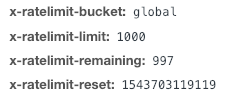
what does global, upload and invitation in the ratelimit section mean? can I get a tl;dr?
or ELI5, whatever you want to call it
 static wigeon
@sturdy yarrow On each request you'll get response headers that specify what bucket the request is in.
So for example: All requests go under the global bucket.
 sturdy yarrow
ah, thanks
 timber swift
dunno if this si correct chanel but i have a question, is it possible to grab the leaderboards from SE and somehow make a discord bot that would assign ranks based of that?
indigo flume
You would need a serious setup for that, to have a discord bot track your leaderboard. This means that you will have to provide not only the end endpoint API for the points leaderboard, but also your channel ID, which might not be a good idea.
Unless you are building your own discord bot that will securely use your channel ID
But this is the end point you are looking for https://api.streamelements.com/kappa/v2/points/CHANNEL-ID-HERE, to which you can add /top and /alltime to the end for the 2 different point leaderboard
and some parameter like ?offset=0&page=1
zenith folioBOT
@timber swift You can find your JWT token on your account channels page: https://streamelements.com/dashboard/account/channels
(Don't forget to click on "Show Secrets")
indigo flume
you don't need to show secrets, its next to your name in this page.
 obsidian lance
How do I add the url parameter to the !tweet command?
$(customapi.https://api.crunchprank.net/twitter/latest/USERNAME)
indigo flume
Just place your own twitter name in place of username
and place the entire ${customapi} in the response in the custom command.
obsidian lance
I did and it just returns the text from the tweet
viral patrol
$(customapi.https://api.crunchprank.net/twitter/latest/${pathescape ${1:}})
!twitter USERNAME will go to the url you provided
What do you want to achieve?
viral patrol
Oh, so you should use other API for that
$(customapi.https://decapi.me/twitter/latest_url/USERNAME)
Try that one
obsidian lance
that worked great thank you!
if i want the response to be highlighted in the chat with a color do i ad /me before the response?
actually looks like that works, disregard thanks
obsidian lance
for timer commands, how do i insert multiple command variables in the message section?
 floral fable
what do you mean? you just add whatever variables you want to use in the response
obsidian lance
well i want to add multiple commands
so would i just do like !donate !social
etc
floral fable
timers cant triggers commands
obsidian lance
oh i see
so i would have to copy the responses out of commands and input them one by one
midnight orbit
correct
 untold estuary
why are half of the pages on the developer site empty and/or filled with memes?
floral fable
Documentation is wip
untold estuary
o_0
timber swift
@indigo flume any idea how to make the GET all the pages with results? (if i have like 140k users on leaderboards)
indigo flume
Let me check
indigo flume
From what I tried only offset and page params
timber swift
righty, and what does the page param do exactly here, tried chanign it but nothing happened ;/
indigo flume
it should get the next amount
but i don't have a big alltime at the moment to check it out
timber swift
next amount? as in incrementing page should show more pages?
indigo flume
I am looking at the end point via the dashboard as well
so in order to see how it reacts to it self to show the leaderboard and all, its shows this.
this is how it looks like at the last page
timber swift
interesting
indigo flume
But also, when the offset starts to get to the end, you get this:
so if you can do an algorithm to check if the current number is 0, then you are at the end most likely when you hit a high offset
timber swift
so basically do a script to increment the offset by 25
and check if the amount of results is bigger than 0
if yes then grab data and increment by 25
if it's 0 stop incrementing?
indigo flume
if(result > 0){
GrabData();
IncrementOffset();
}
as simple as it can get with an if statement
indigo flume
Sorry, can't do that for 2 reasons:
- Don't want to code a discord bot
- Not interested
timber swift
hence the Kappa
indigo flume
for now 
pulsar willow
Hi! How can i have an invite code for early access in app?
zenith folioBOT
@pulsar willow The StreamElements Mobile IRL streaming app is currently in closed beta.
If you'd like to assist with testing when public beta testing becomes available, please fill out this form: https://goo.gl/forms/3DaiLckKDjeMAeVt2
This does not guarantee you to receive a Code.
 small jungle
Is there a way for me to pull user's avatar (kind of like hype boss does) in my alerts? What code would I need to use inside SE platform for that? Would be neat to pull subscribers avatars into my alerts etc, since I already do pretty much all custom code for my alerts. I know twitch has JSON get_users, but I assume there's an alias for that action within SE platform? Pls halp.
viral patrol
Hi @small jungle! I think the best way to get user avatar is to query decapi: https://decapi.me/twitch/avatar/:username for example https://decapi.me/twitch/avatar/Kappa
small jungle
oh, that's an awesome idea @viral patrol thank You very much
viral patrol
But remember - streamer is always responsible for what is on stream, so if somebody has avatar against ToS you will be punished as well if you display it on stream.
 spring cypress
Is there any way that I can send message through elements api, like, build my own mini-game
I would like to use custom.api with post.. but it seems not possible
viral patrol
Unfortunately it is impossible to do other requests than GET
@spring cypress but you can pathescape your query, so you can have other things in parameters: $(customapi.https://URL/?param=${pathescape ${1:}})
spring cypress
But can I send message to my chat using streamelements user, if I build my own mini-game
?
viral patrol
Of course you can do it!
Endpoint: https://api.streamelements.com/kappa/v2/bot/{{channelId}}/say
Method: POST
Body: {"message":"Test message"} (RAW json, not formdata)
Headers:
Authorization: Bearer JWTTOKEN
Content-Type: application/json
Thanks @viral patrol
gritty aurora
Is there a list with all request endpoints that classifies under the loyalty system? I can see all of them aren't listed on the docs yet
And maybe some info about the rate limits for loyalty
viral patrol
AFAIK you receive X-Rate-Limit header in response and about documentation - it is in progress (like it really is, not "ETA 2 days +/- 3 years")
spring cypress
channelid = room-id from irc @viral patrol ?
viral patrol
You can get channelId by requesting /channels/me with your JWT Token
Or if you want it hardcoded just head /channels/twitchUsername
And grab ID from there
 trim granite
Hello, I have a question regarding StreamElements' chat stats. How do you gather the information? Is it fairly accurate to say that the top emotes on twitch are the ones presented on the site.
spring cypress
Thanks @viral patrol
 toxic glade
I know this is the wrong forum to ask this. But i know you are skilled guys and stuff. I was checkkonto out a motherboard. And for the ram memory it says
”memory speed (standard) 2666mhz”
”Memory speed (OC) 4000mhz”
Does that mean the motherboard only can handle 2666 memory (that van be clocked to 4000? Or could i put in ram with a speed of 3200?
Best regards
I probably should have asked in general chat
:p
viral patrol
Ohhh. My abilities about hardware are not that good. It is almost like asking building architect which powertools are the best.
toxic glade
Oooh i see lx!
viral patrol
And right - you should ask about it in #general-chat as this channel is mostly ignored by "regular" people 😉
toxic glade
Im sorry mate 😃
viral patrol
No worries 😉
 sharp hare
wondering if anyone knows a way to import a custom alert box that came with my theme purchase from nerd or die. it was a click fo a button to import to slobs but they make it for that lol
 low sierra
It's possible to import it from streamlabs @viral patrol can help
In the future we plan to have one-click setup for our service with Nerd or Die
indigo flume
I think the normal import of SL alert box impors even NoD custom alerts already.
sharp hare
it imported the custom html and css but then i test the widget the sound is wrong and doesnt show the alert box at all .. hmmm
viral patrol
What alertbox is that?
sharp hare
im using the animated Uplink theme on SL
but i remade everything in OBS studios but cant get the alert box to come over
sharp hare
sure can, dm me
left lagoon
Is there a way to see the coding behind the default commands like !editcounter? So they can be referenced for custom commands?
viral patrol
In custom commands you can access or replicate a lot of default commands using variables,
spring cypress
Any way that I can use activity feed embed?
Because I tried with popout link and it gives me refused connection
viral patrol
That is strange. It works like a charm for me
But maybe you would like to try our plugins for OBS https://streamelements.com/obslive

StreamElements
StreamElements OBS.Live makes live streaming on Twitch easy. Live Stream and record your broadcast from anywhere, save on system resources with the ultimate streaming software.
spring cypress
Its using like
<iframe src="https://streamelements.com/dashboard/username/activity/popout" frameborder="0" style="width: 100%; height: 100%;"></iframe>
Because I dont stream in front of my pc, so I was creating a page with things I need
twitch chat I can do /embed instead of /popout and it will work
viral patrol
Oh, you cannot use streamelements as iframe as it is secured by "SAMEORIGIN" - due security reasons (to prevent clickjacking for example)
 gusty wing
is there an API to get the amount of time (in minutes and/or seconds) a subscriber has been subbed?
or a way to do that?
floral fable
You need to authorize your account for the endpoint ```$(customapi.https://decapi.me/twitch/subage/$(channel)/$(1|$(sender))?precision=4)
I only have to change the # after the precision right?
even if i change the number it only shows mins and secs from the last resub, not the total time
floral fable
Then I cant help you, that is the only sub age api endpoint I am aware of
gusty wing
oh okay... thank you! @floral fable
spring cypress
Thanks @viral patrol
spring cypress
How do I add my own widget on elements?
Trying to find that option on editor
Or this https://github.com/StreamElements/widgets its something that I add directly to obs?
GitHub
Contribute to StreamElements/widgets development by creating an account on GitHub.
viral patrol
You need to add "custom widget"
This widget will have custom HTML/CSS/JS/Fields
Copy-paste contents of corresponding files there and you are ready to go.
spring cypress
Found it.. thanks again @viral patrol
Another question, where would you suggest to have server to be closer to elements servers? less api latency
viral patrol
I am not sure about that, we are behind cloudflare, but you can check traceroute
spring cypress
Thanks
Uncaught ReferenceError: TwitchJS is not defined
Am I doing something wrong?
trim granite
Hi I'll try to ask this question again.
viral patrol
Which widget are you trying to use @spring cypress ?
spring cypress
YEs... found in HTML now
I did not know I had to add the client
Anyone @viral patrol trying to learn and create my own
trim granite
I am currently writing a text where I try to use StreamElements as a source so my question is : . How do you gather the information for the global chat stats? Is it fairly accurate to say that the top emotes on twitch are the ones presented on the site.
viral patrol
@trim granite We have our bot on a lot of channels that read chat 24/7
viral patrol
No problem mate
 glossy ferry
Hello. Where i can gen JWT?
indigo flume
You can find your JWT token on your account channels page: https://streamelements.com/dashboard/account/channels
(Don't forget to click on "Show Secrets")
glossy ferry
Okay, thanks 😃
 whole torrent
can someone lead me to a tutorial on making my bot convert currencies on command.
!convert 100
converts 100 X dollars > to Y dollars.
floral fable
you would need to find some type of API endpoint you could use, or write and host something yourself
woven field
Hi i'm trying to GET the https://api.streamelements.com/kappa/v2/activities/jwt.channel but i have "jwt malformed" error, what did i missed pls ? is It a "Authorization : Bearer jwt.authToken" headers ?
viral patrol
Hi
Yes. JWT is provided as Bearer token
So your endpoint should look like https://api.streamelements.com/kappa/v2/activities/:channelId Where channelId is /^[0-9a-fA-F]{24}$/ (24 character hexadecimal string) identifing your channel
woven field
that's what i did then but still not working for me
viral patrol
Ohh, you need to add params as well to that
viral patrol
GET /kappa/v2/activities/CHANNELID?types=["follow", "tip", "sponsor", "superchat", "host", "raid", "subscriber", "cheer", "redemption", "merch"] HTTP/1.1
Host: api.streamelements.com
Authorization: Bearer JWT.TOKEN
Thanks a lot man
viral patrol
No problem
This is the "zero config" request, you can add params like after=timestamp*1000 (miliseconds), before=timestamp*1000, limit=5, mintip=10, mincheer=20, minhost=123, minsub=2
woven field
Ok thanks, i'm gonna try that 😃
spring cypress
@viral patrol any postman with all endpoints to share?
pulsar willow
Hey does anyone know how to get a invite code for fire stream
 vapid iron
Answered in #general-chat ⤴
viral patrol
@spring cypress we are working (like really working) on API docs and it will be released "Soon"
spring cypress
Okay @viral patrol thanks.. I found something, (https://github.com/ryanbarr/node-streamelements) Dunno if it has all endpoints but has enough to what I want to do
viral patrol
Oh. Seems pretty nice, but you need to be aware, that some of endpoints are fragile, and there are no examples of payload
spring cypress
Okay, thanks
 mortal wagon
ok what did yall do to my stuffs :/
Should be empty if theres nothing there...
http://chrisis.live/s/1544299113_5.png

Was fine yesterday
obsidian lance
How do I make followage command whisper the user?
 fallen basin
im trying to bring this command
$(user) has shotgunned $(urlfetch http://2g.be/twitch/randomviewer.php?channel=$(channel)) for $(eval Math.ceil(Math.random()*10)==10?((Math.ceil(Math.random()*199)+5)%200)+1:9)
over to streamelements. It seems i cant use the math script on elements. Is there a work around?
 devout forge
Is there a way to have a (Make it rain) in the stream store as a command? Or is that something you have to do manually? i don't know where ells to ask this... sorry if this is the wrong place.
viral patrol
@fallen basin I think that might be a response to your command: {$user} has shotgunned ${random.chatter} for ${random.1-10}
@devout forge are you asking about !kappagen command?
@obsidian lance unfortunately only custom commands can have whisper responses, so you can make workaround to that. Command response: ${user} has been following ${channel} for ${customapi.https://decapi.me/twitch/followage/${channel}/${user}?precision=4)
@mortal wagon have you tried changing it in Session data?
fallen basin
@viral patrol The command i posted only rolls an 8. and has a 10% chance of hitting any other random number between 1 - 200.
fallen basin
Is there any future plans to include it?
viral patrol
Just a second
{$user} has shotgunned ${random.chatter} for ${customapi.http://api.mathjs.org/v4/?expr=${pathescape (ceil(random(10))==10?ceil(random(0,200)):9)}}
Something like that I think
fallen basin
Ill give it a try
{$user} has shotgunned streamelements for api.mathjs.org returned status code 400 Bad Request==10?ceil(random(0,200)):9)}}
thats the response i get @viral patrol
fallen basin
okay
viral patrol
${user} has shotgunned ${random.chatter} for ${customapi.http://api.mathjs.org/v4/?expr=%28ceil%28random%2810%29%29%3D%3D10%3Fceil%28random%280%2C200%29%29%3A9%29}
@fallen basin ⤴
devout forge
@viral patrol not sure that’s what I was asking about. Was wondering more of a command that lets the user spend X amount of points to “make it rain” X amount of points on all viewers in stream.
Didn’t know if this was something that can be possible to redeem through the store? Or if it is even possible to make it a command at all? Or is it something the broadcaster would have to do manually by using “!bonus all” then put a random number in there selfs?
devout forge
Yah. But is there a way to make a command that viewers can use like !rain and it gives everyone a random number of points?
fallen basin
Thanks @viral patrol
viral patrol
@devout forge I'm afraid it is not possible
devout forge
ok thank you @viral patrol appreciate your help 😃
spring cypress
wss://realtime.streamelements.com
Doesn't work?
Unexpected server response: 503
The websocket just works with socket-io?
viral patrol
From what I know it is socket.io: wss://realtime.streamelements.com/socket.io/?EIO=3&transport=websocket
spring cypress
Yeah, I'm using that and keep getting 503 Service Unavailable
protocol: wss
servername: realtime.streamelements.com
header: GET /socket.io/?EIO=3&transport=websocket HTTP/1.1\r\nSec-WebSocket-Version: 13\r\nSec-WebSocket-Key: fVoxcHXmgKIg7jISTPaL6w==\r\nConnection: Upgrade\r\nUpgrade: websocket\r\nSec-WebSocket-Extensions: permessage-deflate; client_max_window_bits\r\nHost: realtime.streamelements.com:443\r\n\r\n
Huh. Unfortunately IDK how to help you... I am not into websockets (yet).
spring cypress
I see, thanks anyway @viral patrol
viral patrol
I think due to demand I have to learn about that stuff.
spring cypress
Since I'm creating my own loyalty system, I need to listen some events to add/remove points
spring cypress
Any way to add/remove regular using API?
 finite heath
spring cypress
finite heath
spring cypress
Okay, thanks @finite heath
 versed mulch
is there an oauth endpoint to make a "sign in with streamelements" button?
versed mulch
Yeah I want to make request on behalf of the user, so a sign in with would of been best
Rather than instruction them to get their JWT token.
indigo flume
oAUTH is something we don't plan on at the moment and haven't talked about.
 gusty vigil
I dowloaded the app and it's asking me for an invite code. How can I get one?
vapid iron
Answered in #general-chat ⤴
 thin acorn
Hey there guys, Im having trouble with using my own uploaded videos along side Custom CSS any tips?
viral patrol
If you have autoplay enabled it might not work in Chrome, but it gonna work in OBS
If you want to test it in chrome add "muted"
Then you can remove that one
thin acorn
Ok I’ll give it a try! What I was thinking is, when you click the custom css it already had the default gif in the html so I was trying to find a link to my uploaded content but can’t find it anywhere
thin acorn
didnt seem to work.. :/
viral patrol
The easiest way to find url is to insert that image/video and then rmb click it and select "copy address":
Then you can either use <img> or <video>
thin acorn
Okay thank you!! @viral patrol
pulsar willow
Hi all. I am looking at building an API for some of the commands I use. I just wanted to confirm, the bot needs plain text, correct? I can't process JSON in the command itself?
indigo flume
Have you looked at our variables? https://streamelements.com/dashboard/bot/commands/variables
If you can elaborate a bit more as to what you want to do, maybe I can point you to the right variable and/or tell you the solution. But the bot can respond with plain text coming from a ${customapi} end point you've placed in the command
So you need to process the JSON
pulsar willow
OK. no problem. I can write some quick javascript for that.
I play elite dangerous, and people constantly want to know my ship and ship build. I am going to build a backend that will let me input ship name, role, and link to a site that contains my ship build. Then I can use the backend to select which ship is active, then have the javascript pull the info, process it into plain text for the bot to output.
indigo flume
yeah so you will need the ${customapi} variable for the bot
let me give you an example
pulsar willow
the other is a command that picks a random weapon, random verb, and they shoot eachother for random amounts of damage.
indigo flume
/me ${customapi.https://2g.be/twitch/Fortnite/command/query=lifetimewins%20keizar%20pc&bot=streamelements&user=$(queryencode ${user})&channel=$(queryencode ${channel})}
so where you see my name you can place the ${args} variable which is this variable:
For random you can use ${random.pick 'item1 shoots item2' 'thingy2 does thingy4'}
for example on random pick check our #command-share
pulsar willow
ahhh ok
well, the reason I was going to do the backend to API was so I could quickly add or remove stuff to the list without having to go into the command. The list is about 80 weapons and near 200 verbs.
I figured it was probably easier to use a database or JSON file for processing that data than scanning through the list manually 😃
indigo flume
JSON might be easier to list 80 weapons and 200 verbs
and have your JS process that JSON based on what input was placed in the command or custom.api variable
pulsar willow
cool.
I'm looking forward to this. I'm rusty with my JS so this will be a great project to shake the rust off.
Thank you for the help!
viral patrol
Remember that your tool has to be serverside as our bot doesn't evaluate JS on website
So nodejs if you are talking about js
pulsar willow
yup, sorry. I should have been more specific
viral patrol
Basically - you can use any language that allows you to create REST API
pulsar willow
I've got a micro AWS instance running nodeJS for this 😃
 timber talon
I have a question for who created the marathon widget, is it possible to tier the subs on time?
like tier 1 vs 2 vs 3?
timber talon
@indigo flume is that directed at me?
indigo flume
Yes
timber talon
THANK U!
indigo flume

timber talon

indigo flume


timber talon
@indigo flume hey there anyway to get rid of the grey bar? It makes it hard for people to read the numbers
indigo flume
@viral patrol i think had some css code to remove the grey bar
timber talon
I will wait and see what lx says
@plucky narwhalzer I figured it out I removed the {border:1px solid #ccc;background-color:#eee} and saved my own css and hosted that for query instead
@indigo flume
indigo flume
Aah ok will check it out my self and have a version withoit the border
Last time i tried removing it, it wws not working properly
viral patrol
@timber talon current version of stream marathon doesn't have a bar. You can find it on our github
GitHub
Contribute to StreamElements/widgets development by creating an account on GitHub.
indigo flume
But does it have sub tier support? 
 viral patrol
if (listener === 'subscriber-latest') {
            if (data.tier === 2000) {
                countdown(sub2Seconds);
            } else if (data.tier === 3000) {
                countdown(sub3Seconds);
            } else {
                countdown(sub1Seconds);
            }
This is the part for subs
indigo flume
Yep looks cleaner then mine 
whole torrent
the credit roll by Grot overlay isn't working on my side. Is there something i must do to enable it?
indigo flume
What exactly is not working with it?
indigo flume
Whats the size of the widget you've made? Check on the left side menu when you click on the widget
whole torrent
chrome
indigo flume
You may need to have past events in order for it to work, though
whole torrent
let me disable adblock
i mean, even the static words "the stream has ended" isnt showing
indigo flume
you can also open the dev console with F12 be on the console tab and refresh the overlay editor and see if an error pops up
whole torrent
VM3384 about:srcdoc:212 Uncaught TypeError: Cannot read property 'count' of undefined
at VM3384 about:srcdoc:212
at VM3383 about:srcdoc:38
indigo flume
can you screenshot it?
whole torrent
indigo flume
Ok, one thing I'm thinking of and as long as you haven't done it, is to log our of the dashboard clear your cache and log back in
whole torrent
nope didnt work
thats strange though
works on your side.
and the other rolling credits widget by LX works on my side
indigo flume
this issue should have been fixed as well
some time ago for the widget
but i'm not sure if its the same error
@sharp island can you take a quick peek?
 sharp island
Uh, which widget is he talking about?
indigo flume
the credits roll from Grot
sharp island
I haven’t seen that code.
indigo flume
well before there was an issue that caused the bits/cheers to not reset properly for the widget and it was from the beckend
I can toss you the code in a fiddle if you want
But i have no actual issue with the widget it self and it works and i dont see that error in my console
sharp island
I just need to see which ‘.count’ it is trying to use
Odds are, the problem is that it doesn’t have data
indigo flume
sharp island
Yeah, the problem is that session data is missing.
indigo flume
@whole torrent I looked into your account - your session data is completely empty.
That explains why its not actually loading
@sharp island Thanks for the confirm and sorry to waste your time, i knew it might be this, but I didn't take the extra minute to look into the person's session data if it was empty or not 
sharp island
😃
whole torrent
thank you whats session data?
indigo flume
https://streamelements.com/dashboard/session - session tab
Its basically the time between the end of your last stream and the end of your next stream
whole torrent
oh ok is there any way to display all followers? cos if there arent any follower end of last and dnext stream it'll be empty right? how about recognizing all current followers, subs, donators
indigo flume
You will have to modify the code for that
whole torrent
Can you provide me with a lead on which line I should edit?
viral patrol
Change every section, example below:
if (event.type === 'follower' && enableFollowers == 1) {
          if( fSum < session['follower-session']['count'] ) {
            addEvent('follower', event.name);
              fSum += 1;
        }
}
To something like
if (event.type === 'follower' && enableFollowers == 1) {

            addEvent('follower', event.name);

}
(i left whitespaces, to make it more readable)
whole torrent
Thank you @viral patrol
Yours worked great btw @viral patrol good stuff
I meant your scrolling credit widget
viral patrol
This widget is done by Grot, all credits for credits widget should go to him 😉
whole torrent
thanks @hushed hazel @viral patrol and SE staff 😃
 stoic flint
Hello, I'm trying to use the custom widget wins counter, but I'm having some trouble
floral fable
Does the count have an existing value?
If so, try setting it to 0, and then setting it to another value
stoic flint
doesnt appear to have done anything. i'll get you a screen grab of what I'm working with here.
here's what the settings of it look like after adding the HTML, CSS, JS and adding my channel name and JWT
floral fable
Did you specify the correct counter name? In my testing I just did, there would be no value shown until I had reset the counter, after that, it displayed in the widget without issue
stoic flint
i feel as though I'm missing a step. is there something I need to have done in the bot?
Like add the counter functionality?
floral fable
well, yes, you do need to have a counter setup for this to display a counter
There is a good example of using a counter towards the top of #command-share
stoic flint
i see the chat you're referring to. how do I add this command? just copy paste it in my chat?
or do I add the commands as a custom one, like normal
floral fable
You can add it from the custom commands view, or from the chat. The example in #command-share shows how to add it via the chat
stoic flint
okay I'll give that a shot
so i
so i've gotten it to show, its properly displaying the current wins count as "01" is there any way to edit the font? and edit the size?
@floral fable for visibility
floral fable
The font would be changed in the html and css tabs. You import the font in the html tab, and style it and set the size in the css tab
viral patrol
Upcoming stream in 2 minutes: https://www.twitch.tv/twitchdev

 nova hedge
Has there been a change to the websockets events
Subscribers and Donations are not being caught.
I'm checking for:
Subscriber
data.provider = "twitch";
data.type="subscriber";
Donation
data.type="tip";
 languid escarp
Hi! Wnated to ask a question on how to align my text of my rotator widget in the center the obligated space?
 twin ore
Select the widget, go to the Position menu, and click the Center Widget button.
languid escarp
sorry thats not what i meant. I mean the space that i obligate to the actual widget. I want it centered inside of the box i size out for the widget
indigo flume
Text options
Alerts widget has this as well:
but these are the basics
If what you want to do with coding can easily be achieved with these options.
languid escarp
yeah so none of these are in the CSS options. All i have is the animation settings that says center widget which isnt what i want cuz it just puts the ENTIRE widget to the center of the screen. I want the text insode the widget to be centered above my Cam Box. so that the text isnt to either side, but constantly centered.
indigo flume
What widget are you using?
languid escarp
the rotaor widget
rotator
all CSS
i just dont know where to put Center Text in the code lol
indigo flume
Ok you actually want to move the widget around and place it on top of your cam box? Click drag it.
Unless you want to change the actual text, then use "Open Editor" option on the left when you click on the widget.
languid escarp
yeah i got that. so basically it stays to the left and if a name is too long for whatever reason, the text will creep over the right side of the cam box and just looks uneven and awkward. Im trying to get the TEXT to not start on the left but stay in the center of the "text" box as if i press center on Microsoft word to center my document. That make any sense?
indigo flume
Screenshot what you you want to achieve as it seems I'm still not sure what you want to achieve.
indigo flume
So if a name is too long, it goes beyond the cambox?
or it goes on the next line?
onto the cambox?
languid escarp
My goal is to have where is says subscriber to have ALL of that text be centered in the smaller region that i made just over the cam box so that it jjust centers itself over the cam box rather than the left side of it to right...
Yes basically. So i want it Centered so that i dont have to worry about it being uneven
Im imagining it has to be a code thing considering theres no other way to center it lol i just dont know how or where haha
indigo flume
is this intended?
i guess not as you should have figured your query if you knew coding 
languid escarp
nah ots just a glitch that happens off the loading of the overlay. It goes to normal after one rotation
indigo flume
maybe i'm blind but I don't see this region you are speaking of
languid escarp
the black outlined box around the text code. Square Black thin lined box
indigo flume
Can you mark it with the snipping tool because I'm absolutely lost
and I'm still not sure what you want to do besides just centering the text
languid escarp
is there a way to voice chat this? it would maybe take 30 seconds tp explain im so bad at trying to type this lol
indigo flume
I can do this, buti'm still not sure if this is what you wanted
Well as much as I don't mind doing voice, I can't at the moment.
languid escarp
okay what exactly did you do to the text? Cuz thats kind of what im trying to do but i want the text to always stay center of the top of the ovelay no matter how long the text is when it rotates.
indigo flume
.main-container{
  text-align: center;
}```I added this to the CSS
and fixed the #span
as it was missing its selector
languid escarp
ahhh okay where should i add this in the css
languid escarp
i believe so!
languid escarp
well actually no. Cuz if it starts at any point and just goes left to right itll go too far right?
indigo flume
you want it centered, but the "Sub/follower/cheer" text to start from the same point, correct?
Lets say from the line i marked?
here is where i added it
languid escarp
im not sire if thatd be possible consdering how peoples name lenghts change so if they all started at the same pont then it wouldnt be centered
indigo flume
it is possible to have and absolute starting position of text
just the widget needs a bit of rework to do so
rework i'm not sure i'll be able to do right now.
languid escarp
okay i gotchya. But does what im saying make sense though?
indigo flume
But let me recap.
In this red box you want the Donate/follower/subscriber text to always apear from the left side regardless
languid escarp
Like how when yo go to a microsoft wor Document and start your test by pressing the center tool. and it just stays in the center
indigo flume
and then have the name of the person regardless of lenght to start from the right side of the box?
wait...ok just add the line i showed you above in the editor of the widget
and see the result
and watch it rotate for a bit
indigo flume
Well i knew its that what you needed from thr start but it wasnt very clear to me 
Sorry for beating around the bush so much...must get coffeee this early in the morning before looking at this channel
languid escarp
Hahaha ots all good I appreciate the help!
viral patrol
@nova hedge I am not much into websockets, but you can also check listener value (which is follower-latest, subscriber-latest and so on).
pure trellis
does onEventReceived only fire when a channel is live?
viral patrol
No.
pure trellis
I'm having trouble implementing an overlay counter. I used the one from the widgets repo but it isn't responding to chat messages. That listener doesn't even fire on any chat message.
viral patrol
OK. Gonna check it
Maybe when I updated it something went wrong
Gonna be back to you in 5 minutes
pure trellis
thanks @viral patrol
when a message is typed in chat, it does return Uncaught TypeError: Cannot read property 'postMessage' of null in console of the SE editor
viral patrol
So it is not widget itself. Editor couldn't handle chat message
Save that overlay and reload
Or check in OBS
As Editor is loaded with a lot of stuff and sometimes it needs a refresh
pure trellis
genius. save and reload fixed it!
viral patrol
"Have you tried turning it off and on again" -This method works with everything. Literally everything. Even if you have keyless car, sometimes you cannot start your engine until you get out and back in again 😉
pure trellis
 noted!
 modern tusk
@viral patrol hey lx! is there a way to see if my modified sub goal works?
i tried with browser console but looks like it isn't working
viral patrol
Try data tab in overlay editor
 pine yew
hey is it possible to execute custom code based on a chat command?
so for example: "!command x" and then execute code with the x input?
indigo flume
If you have your own JS for example hosted somewhere you can use this example:
command name: !domath 2 3
command response(in dashboard): ${customapi.http://your.link.here/${1}+${2}
as ${1} and ${2} represent arguments passed from the command
pine yew
Nah problem is that I dont have a own server or smth... I tried using google scripts to do it but they reroute through a middle html page and I just get the html body as response from the api call
since the redirection fails
(or atleast I assume so)
indigo flume
I think someone made it possible via google sheets to do a proper ${customapi} send and receive
pine yew
I think google sheets might offer an api maybe I can use that yea, good call
indigo flume
I didn't knew google scripts was a thing
pine yew
Me neither I just stumbled upon it on my way to figure out this issue 
Its pretty cool tho
indigo flume
ugh..yeah i'll use visual studio code, tyvm
pine yew
oof why not an actually good editor tho? 
indigo flume
Like what? VIM? 
pine yew
I like sublime
But visutal studio code is actually pretty good aswell, i dont really know why I said that I only slept like 5hours
indigo flume
Can Sublime have folders? 
I'm also coming from a C# dev side, so having something close to actual Visual Studio and the option to look at some C# code is pretty good
anyway back to topic
So yeah, Google Sheets afaik can give you a proper response, I just don't know how it was made and who made it, else I'd search it up in the discord real quick
@pine yew Found it
I think 2 or 3 hours later the person came back and said it was working perfectly
I should have asked him how he did it back then
pine yew
Ill give you a how-to when I figured out how to do it, googlesheets def has some api, I mean I actually used that in the googlescripts thingy, but maybe I was overengineering my problem.
and yea sublime can have folders and pretty much everything you need, its a bit shitty to get what you want sometimes but its heavily customizeable
for example
indigo flume
MY EYES! 
pine yew
haha
indigo flume
why are you using white things
pine yew
Well
indigo flume
that was not a question


 indigo flume
nah I get it - i had a colleague who used notepad++ bcs he didn't like VS Code or Sublime and he did wonders with it
pine yew
I tutored some students in comp science for electrical eng and I had a group of two that only used vim and coded in that when they could've used IDEs
some people 
indigo flume
btw, what do you want to do with said custom code/command?
pine yew
Ehh basically a music streamer I know asked me if I could help him with two commands that write to the same "file". He has two kinds of songrequests with two different point values as in a) song from his songlist b) song he never played before - but both should go in the same queue and that queue should be displayable on stream and also with a command - I thought using googlesheets for the list is the most appropiate
seems to be a bigger issue in the music community aswell, he told me about many of his peers struggling with that
indigo flume
uumm i don't understand half of the request 
pine yew
well ok:
usera: !sr songfromsonglist (this costs 200 loyalty points)
userb: !rsr randomsongnotfromsonglist (this costs 400 loyalty points)
Sheet:
- UserA - Song A
- User B - Son B
userc: !queue
bot: display sheet content
that easier?
indigo flume
aaaaaaaah, yes - dev talk
pine yew

indigo flume
Yeah, google sheet should be able to help you with this
pine yew
Ye I think so too
pine yew
@indigo flume interestingly enough the googlesheet api wasnt really working for me and then I tried my original approach with the google script thingy again and all of a sudden it worked so Just wanted to update you tho
pine yew
I dont get it either
 tidal lodge
i have a request why dont you work with sony and make a good streaming app so that ps4 streamers can have a easier life without having to set up a pc and other stuff??? what do you think
viral patrol
Hi. We provide "helping stuff" for stream, not streaming software itself (beside firestream for mobile) I think that making separate app for streaming for consoles would take a lot of effort (devs, Sony SDK consoles, testers and so on) that could easily fail.
tidal lodge
yea but i have alot of problems with streaming on my ps4 and i dont have a pc but i have a phone but i cant screen share with my ps4
 ripe pike
is there a restpoint api to get the moderators of your channel? I'm making my own module and everything works, but i need to check that a certain command can only be used by the moderators. ATM i have it working for only the streamer themself but not for any moderator
 real dune
hey guys, so i have a custom widget set up and was wondering if a video (stored on SE (like follower gif/video)) could be played when the ! command is used to update the widget.... eg, if i do !win my win counter would update then a video/gif would pop up and play
i also need help resetting my variable counter, see in #helpdesk-twitch
viral patrol
@ripe pike I think it is GET /users, but I am not 100% sure
ripe pike
i'll try
viral patrol
Or GET users/access
ripe pike
it's not GET users
i'll try the access
okay, GET users/access got me my moderator roles, so it showed me where i was moderator but it didn't show who where moderators to my channel
but that also might be because i don't have any moderators
i'll add a moderator acc and check back in if it works/ doesn't work
thank you
viral patrol
You're welcome
ripe pike
added a moderator, they don't show up. access gives me where I have access to but not my specific moderators
viral patrol
OK. Let me take a look
ripe pike
ty
viral patrol
I know it is in /channels/me, but there are ids of users
ripe pike
When i do channels/me i get a list with me in it and a bunch of information about my channel, but it doesn't show my moderator? does it only show the current watchers?
viral patrol
OK. Found it
users/current
It will provide you complex data
For every channel you have permissions and every user assigned to bot on your channel
blah, not bot, every user with a role on your account
ripe pike
okay, i see the place where moderators should show up, but it doesn't show the moderator i have added in the list, it only shows an empty list
viral patrol
(bot admin/editor/full privileges)
The scope above basicaly gives you data you can see here: https://streamelements.com/dashboard/account/channels

StreamElements
The Ultimate All in One Platform for Streamers
You might also want to take a look here: https://api.streamelements.com/kappa/v2/bot/channel_id/levels
ripe pike
hmm weird, when i go to my streamelements page and then to user management it shows the moderator i have added. namely lonewulfx6. but when i look at the page you have given me there is nothing there about that channel
viral patrol
Oh. Ok
He will be in the endpoint I pasted above
As there are two types
- dashboard users - they can manage functions on dashboard
- bot users - bot likes them 😉
ripe pike
The last one wirjs!
works!*
thanks!
yep i needed the bot users and not the dashboard users, good to know!
viral patrol
Have a nice day! Cheers,
ripe pike
you too
thin acorn
Can i add libraries to my JavaScript custom code i.e JQuery or P5js?
indigo flume
@thin acorn Yes, you import them in the html part like so:
thin acorn
@indigo flume I tried that and it still wasn't workin but ill give it another go! Thanks for the help!
indigo flume
Any external library that is hosted somewhere for example even math.js can be called that way and used normally in the JS. Maybe you are not adding the proper link to the library?
viral patrol
Also remember about noon mixed content policy, so every resource has to be served over https
real dune
does anyone know when to find the trigger for alerts in the custom css editor??
viral patrol
Are you talking about alert box custom editor or Custom Widget?
real dune
basically i have a custom widget and when i update it with a ! command im looking for a video to play
viral patrol
Take a look at pinned messages. There is onEventReceived
real dune
im still struggling to get the video to play when updating the custom widget
 tight jacinth
@viral patrol Hi there, I was suggested to come here for advice. I am importing Glitch alerts from Nerd Or Die to streamlabs and for some reason my alerts are not triggering sounds. Could you suggest on how to overcome it?
viral patrol
@real dune It wont play in overlay editor if it is not muted but will play in OBS.
@tight jacinth the best way is to add this sound as alert sound
Or check in OBS as in example above
Browsers have no autoplay policy for every sound
Which is turned off in OBS by default
real dune
nah ive given up, im just scrapping it
tight jacinth
@viral patrol Cannot add this alert as sound alert or I am not getting it.
Thats what I get when in sound tab
viral patrol
Click upload and upload files from glitch package
You should get zip file with all assets
tight jacinth
Ok, I have all files. But it wont allow me to change sounds as it sounds comes with a video in webm format.
Thing is sounds plays when I disable custom CSS.
I just wonder what overrides it?
Is it somewhere in here?
Wait I think I get it. SOrry for spam
Thats should be set to mute and it will play in OBS, thank you so much!
 cobalt walrus
@indigo flume Again, thanks for your help with API yesterday, I'm Crowns7, at the end, I figured out the script on my own but I really appreciate your help 😛
indigo flume

 quartz gull
do the custom chat always display the same color on the name of the chatter? all are pink on mine.
 vivid glade
having an issue with alot right now alerts on different scenes, and most recent followers popping on screen , anyone know how to layer them for multiple scenes cant seem to get it right
midnight orbit
if you need the widgets in different places for different scenes, you would have to make new overlays for the different scenes. also this is a question for #helpdesk-twitch
@vivid glade
real dune
is it possible for custom widgets to send to twitch? basically the reverse of listening for a $ variable
indigo flume
No. @real dune
real dune
😢
indigo flume
Are you actually referring to the widget saying stuff in the twitch chat?
real dune
Yeh. So I have it set up to listen for a $ variable which works but wondered if theres a way that it could send a ! command to twitch chat
 worldly fossil
Looking at API docs on thesite, is there a request I can make to get the users points balance? I see updating and deleting points. (Maybe I'm looking in the wrong place)
 drowsy barn
So I was directed here as maybe finding a solution to have a gifted sub total on screen?
worldly fossil
@indigo flume not sure who maintains the API doc, but I made a PR request on github for updated authentication information
may need some formatting to fit the request/response formating you have on the other pages.
indigo flume
We are in the process of documenting the API to the new site.
@drowsy barn I don't think that is possible to do. I will have to check, but I can't at the moment. Not on my PC.
worldly fossil
Okay thanks, @indigo flume in the mean time. Is there a request to getting points balance? I notice it's blank at the bottom of the points doc
 opal blaze
Is there anyone here who can help me. I know this isn't the place but still
indigo flume
@worldly fossil That site is a new location. Like I said we are in the process of documenting the API and placing all info there - from how to authenticate and what info is needed.
@opal blaze What is the question?
But like I said, I'm not on my PC, so I can't really get you the end point at the moment.
worldly fossil
Okay thanks. I must've been confused and thought you were only talking to Dyeoxyde in that message. Sounds good, I'll hold off til then.
indigo flume
Poke me tomorrow during the day and I will get you the end point, unless someone else beats me to the punch.
worldly fossil
Will do, thanks again!
spring cypress
Good night, a simple question, what are all websocket events? Is there any event for "stream went online/offline"?
worldly fossil
@indigo flume no rush if busy, i dont want to forget. Thanks
indigo flume
@worldly fossil can you dm me so that i dont forgrt later today when i get home?
worldly fossil
absolutely
viral patrol
@worldly fossil Hello! Your PR is kinda around, but I would like to provide you help with that
Sorry that I am reaching you late, but in my country Christmas Eve is a huge family gathering, so I am free now 😉
So, from linked channel you get JWT Token only, you don't need to get channel ID as it is something you can get via your API Wrapper class:
- Request
channels/mewithAuthorization: Bearer JWT-TOKENheader and you will get channelId for owner of that JWT Token - Request
channels/:channelNamewhere:channelNameis your channel name. Likechannels/LIRIK- you will get ID for channel w/ provided name. But your scope can be limited to open/"client JWT" endpoints (like contests, giveaways) - Request
users/accesswithAuthorization: Bearer JWT-TOKENheader and you will get list of channels that have permissions with provided JWT Token.
@worldly fossil and about user points you can check GET methods on points/:channelId/alltime?limit=50&offset=0and points/:channelId/top?limit=50&offset=0. To get single user points balanceit is points/:channelId/:userWhere :user is username
worldly fossil
Awesome. I appreciate it. @viral patrol
viral patrol
Edited second endpoint (changed alltime to top as it was copy-paste of previous one)
 crude narwhal
Hello everyone, im creating custom widgets for my overlay. Created for latest follower - sub - donate, but I don't know how to acces the 30 days top tipper variable in javascript. Any help would be appreciated!
viral patrol
@crude narwhal Hello! You can check data["tip-monthly-top-donator"] or data["tip-monthly-top-donation"]
Take a look at pinned message, there's full list of variables, you can use in your project.
crude narwhal
thanks @viral patrol , will check the pinned section!
is the data["tip-monthly-top-donation"] updated on every donation? I was wondering, because then I will need to also check for it in the onEventReceived, and not only on the onWidgetLoad
viral patrol
If you want to use -donation and not -donator - just compare amounts, but if you want to use -donator you should replace onEventReceived to onSessionUpdate
I think there is example on the bottom of that manual in pinned message.
crude narwhal
will check it, thanks!
worldly fossil
Anything similar to https://www.tebex.io/ but for points shop before I go and make it myself? I've got a streamer wanting to create a shop that also compares IPs, and accounts they send to frequently (for people who bot farm). Obviously the difference would be twitch instead of games.
Tebex
Fund your Gaming Server costs with Tebex. Formerly known as Buycraft, Tebex is the leading Donation Plugin for Minecraft, Rust, Unturned, CS:GO and Garry's Mod Servers.
pure trellis
Hey there, looking at the CommandCounter and noticing that the service to store the variable and its value seems to be failing. Does anyone have a good alternative? https://github.com/StreamElements/widgets/tree/master/CommandCounters
GitHub
Contribute to StreamElements/widgets development by creating an account on GitHub.
indigo flume
In what way is it failing?
@worldly fossil I don't think we have or can do something similar to that - at least the compare IPs and the acount thing.
pure trellis
400 and 500 errors when accessing data
so the counter works, but the storage of it isn't. So every stream, gotta go through and redo the commands to get it back to what it was
worldly fossil
Okay thanks. In my head the user would link account to twitch where they would manage all their points, so I could log IP and transactions through there. Good to know though.
pure trellis
@indigo flume right when I was about to post a github issue on the api's documentation, it seems to be working atm. Sorry for the time.
indigo flume
If the widget shows a 400 or 500 error, most likely its the connection or something towards keyvalue.xyz, which is not us.
Even if you place a github issue, it maybe a temporary hiccup from that location.
pure trellis
yeah I knew it wasn't on you guys. Was going to gut that api with maybe a suggestion someone here had as an alternative. But since it seems to be working, I'll roll with it again until another hiccup.
languid escarp
Hi. Im have ing another problem witht the rotator widget if some1 wouldnt mind helping out?
languid escarp
for whatever reason, when i try to change my text in my roatator widget CSS, it wont load in my outline colors i have in my other css. Not sure if im doing something wrong..
viral patrol
You should use your CSS within CSS field without using OBS walkaround (for later editing it is way easier)
Also - it should work just fine if you add text-shadow property
 manic bay
Not sure if this this the correct place to ask this. What I would like to do for my stream is have a sort of "pool" or "pot" of loyalty points that my viewers can either try and claim or add loyalty points to. If a viewer tried to "grab the pot" and failed, a default amount of points will be added to the "pot". I'm looking for a way for this all to be chat based with the flexibility of being able to change various variables (Amount of points deducted by default, win chance, chat messages sent by the bot after commands are typed in etc.)
viral patrol
For that you have to write your own script:
Command with proper cost and call to your website collecting current pot responding with reward number response of that command should look like:
You put ${1} points to pot and got ${customapi.https://url/points/addpoints/?points=${pathescape ${1}}}
your addpoints endpoint should collect points and has logic:
- make random pick by your formula
- add/substract user points using PUT method on
https://api.streamelements.com/kappa/v2/points/:channel/:user/:amountwhere:channelis your channel ID,:useris username and:amountis either pot or points put to pot by user (negative number for substract)
manic bay
Thanks man, really appreciated!
viral patrol
Oh. Also check if user has declared amount of points
manic bay
Alright 😃
viral patrol
Using GET on https://api.streamelements.com/kappa/v2/points/:channel/:user
languid escarp
I actually just copied the previous code I had that DID have the outlines I wanted, but just changed the font URL, and Fobt Family. The previous font had 2 Font Fmailies and the one I have now only has one. Would that make a difference? @viral patrol
viral patrol
I don't think so
languid escarp
That's weird cuz my font wont have an outline color even with basically the same code besides the font family lol
Would you be able to see the code and maybe see what I doing wrong. If I am lol
viral patrol
Of course, you can paste this here
languid escarp
so this is the code for this rotator.
@import url('https://fonts.googleapis.com/css?family=Bowlby+One+SC|Notable');
#span{
vertical-align: top;
}
.label {
color: white;
font-weight:bold;
vertical-align: top ;
-webkit-text-stroke-width: .5px;
-webkit-text-stroke-color: blackfont-weight:bold;
vertical-align: top;
}
.type{
font-size: 35px;
font-family: 'Bowlby One SC', cursive;
color: purple;
font-weight:bold;
vertical-align: top ;
  -webkit-text-stroke-width: .5px;
   -webkit-text-stroke-color: yellow;
}
.user{
font-size: 35px;
font-family: 'Notable', sans-serif;
font-family: 'Bowlby One SC', cursive;
color: white;
font-weight:bold;
vertical-align: top ;
-webkit-text-stroke-width: .5px;
-webkit-text-stroke-color: black;;
}
.amount{
font-size: 35px;
font-family: 'Notable', sans-serif;
font-family: 'Bowlby One SC', cursive;
color: purple;
font-weight:bold;
vertical-align: top ;
-webkit-text-stroke-width: .5px;
-webkit-text-stroke-color: yellow;;
Thats the one im using currently and HAS the outline
viral patrol
OK
languid escarp
@import url('https://fonts.googleapis.com/css?family=Akronim');
#span{
vertical-align: top;
}
.label {
color: white;
font-weight:bold;
vertical-align: top ;
-webkit-text-stroke-width: .5px;
-webkit-text-stroke-color: blackfont-weight:bold;
vertical-align: top;
}
.type{
font-size: 35px;
font-family: 'Akronim', cursive;
color: purple;
font-weight:bold;
vertical-align: top ;
-webkit-text-stroke-width: .5px;
-webkit-text-stroke-color: yellow;
}
.user{
font-size: 35px;
font-family: 'Akronim', cursive;
color: white;
font-weight:bold;
vertical-align: top ;
-webkit-text-stroke-width: .9px;
-webkit-text-stroke-color: black;;
}
.amount{
font-size: 35px;
font-family: 'Akronim', cursive;
color: purple;
font-weight:bold;
vertical-align: top ;
-webkit-text-stroke-width: .5px;
-webkit-text-stroke-color: yellow;;
viral patrol
Everything else is the same? JS/HTML?
languid escarp
this is the one i want to have the exact same color scheme, but seems to only have the outline colors as the main colors
yeah the only thing i changed was the Field to do the same thing as i did with the font family and URL as the CSS
viral patrol
That is really strange
If you did not any changes in other boxes and font family name is the only one updated
languid escarp
here i can DM you the rest if youd like to take a peak. Im about 99.9 percent sure its naot any different thogh haha
viral patrol
You can dm me with editor link so I could take a look directly on it 😉
languid escarp
for sure on second
viral patrol
Yup. This is because of that font, but we can cheat it a bit
@languid escarp
You can replace:
-webkit-text-stroke-width: .5px;
-webkit-text-stroke-color: yellow;
With:
  text-shadow:
   -1px -1px 0 yellow,
    1px -1px 0 yellow,
    -1px 1px 0 yellow,
     1px 1px 0 yellow;
and then just do that for all of them that require the webkit?
do i change that in field as well?
languid escarp
Actually while i have you here, is there a way to italicize the font?
viral patrol
font-style: italic;
 serene turtle
I've got 2 issues / requests I'd like to go over.
- Would it be possible to add a header to the customapi fetch requests?
I see a header sent: x-streamelements-channel which equates to the StreamElements AccountID (channel)
I'm interested in a header that gives info about the user running the command.
Similar to the Nightbot-User header described here: https://docs.nightbot.tv/commands/variables/urlfetch
Just passing the Twitch ID of the user that ran the command would be helpful.
My use case is handling a command that is set to a Subscriber level, where certain arguments can be ran, but only when ran by a moderator. Having the ID of the user that ran the command accessible in the header would open doors for lots of other ideas / scenarios.
Maybe x-streamelements-user
- Don't show the url of a failed command's endpoint response.
This is a security concern.
When I browse the commands of a streamer I do not moderate, or when not logged into StreamElements at all, the customapi urls are not shown, instead it only shows that indeed a customapi was used. $(customapi).
When an endpoint fails to respond with a 2xx status the bot posts the url in chat. dbkynd.com:3000 returned status code 408 Request Timeout
There is no need to shout out the url to chat. All this does is announce where a streamer's resources are located on the web. Sure it could help with diagnosing the issue, knowing which endpoint failed. But I think it would be better to have to login to Streamelements and see what url the command was using instead.
I would just show the status code and message
 tepid fern
Is there anyways i can get the loyalty points that your website creates for my users and send them to another website? or even create a system where i spend your points on a event that created a random key to use on my own website?
viral patrol
@tepid fern in stream store you can add key items people can redeem, you can also access live to points data via /points endpoints
And about API services I think it is best to call one of our superheroes @vapid merlin
viral patrol
 warm cobalt
Hey so pretty new to the whole streaming thing was wondering, i purchased some animated alerts from nerd or die and was wondering how to add these to my stream using stream elements as the file they gave me was a hyperlink that puts the alerts straight into slobs