#helpdesk-twitch
1 messages · Page 853 of 1
 wary halo
 tropic hornet
ok thanks! 🙂
 teal abyss
Hi, I'm having issues with the chatbox in SE OBS
the box no longer loads or shows up as a possible dock on my SE OBS desktop app
the Activity feed is also gone
 prisma relic
?

 polar otter
i cant get my money from streamelements to paypal (it said in hold )
prisma relic
is it in the SE menu?
 ionic kelp
What OBS and OBS.Live version you on?
prisma relic
^^ need OBS.Live for the SE menu
prisma relic
@polar otter give it a few days; but those questions normal end with 'you'll need to contact paypal'
polar otter
prisma relic
<@!584482471584989185> give it a few days; but those questions normal end with '...
it take 21 days
@prisma relic
prisma relic
it's been 21 days?
polar otter
yes
prisma relic
where do you see "on hold" the SE website or paypal ?
polar otter
paypal
wary halo
Contact paypal, they are the only ones who know why it is on hold. StreamElements only does the alerts integration for it but never actually handles the money from paypal donations.
teal abyss
Got it, somehow the files were corrupted on the last update, it was in a constant update cycle, and must have somehow disconnected from my OBS, I reinstalled both
seems to be working now
 vernal oak
Hi I need help, I received a tip the other day but it's on hold on paypal? I never had a paypal before so this is quite alien to me
prisma relic
teal abyss
Got it, somehow the files were corrupted on the last update, it was in a constan...
did you have to uninstall -> reinstall? and thank you for posting the answer 🙂
prisma relic
vernal oak
Hi I need help, I received a tip the other day but it's on hold on paypal? I nev...
Log into your paypal; and you will see it's on hold because you are a "new seller"
but it will process after 7 days or so
vernal oak
So not 21 days?
 lusty fossil
@prisma relic is there a way we can use that jwt key once merged to import data into streamlans
vernal oak
Because says on the forums I saw said 21 days they release payment
wary halo
@lusty fossil you can't use the JWT key for anything and you shouldn't share it with anyone but StreamElements staff
lusty fossil
theres an import feature in streamlans for JWT
wary halo
vernal oak
Because says on the forums I saw said 21 days they release payment
you can wait it out and see if it works, or just contact them and get it tomorrow
prisma relic
vernal oak
So not 21 days?
Depends on region maybe; i think my hold was 7 days for first. But i've had a paypal account for a few years
lusty fossil
Cos the strange thing is when you use stream elements for youtube the loyalty system is not available however the loyalty system in streamlabs is available for youtube.
wary halo
because their system is completely different
vernal oak
Oh ok, thanks for the help, I just made my own paypal account last week and I've never used it before.
lusty fossil
the loyalty system is coded in teh chat bot and I understand its not coded to work with youtube
wary halo
vernal oak
Oh ok, thanks for the help, I just made my own paypal account last week and I've...
make sure to verify it, or else you will get this every time
prisma relic
lusty fossil
<@!229122038294380545> is there a way we can use that jwt key once merged to imp...
negative. NEVER share your JWT with anyone unless it is a RED user in this chatroom
lusty fossil
ok would be good if StreamElements made teh loyalty work with Youtube
anyway thanks fo ryour help
vernal oak
wary halo
make sure to verify it, or else you will get this every time
Verify my account you mean?
wary halo
vernal oak
Verify my account you mean?
on Paypal yes
vernal oak
oh ok ok
 hardy hawk
yes they're enables, still not working
 meager wren
I'm having an issue with alerts and follower counts not working. I tried logging out of my Twitch account on the stream elements websiteand logging back in to resync it but still nothing. When I use the test option they pop up but no real life alerts pop.
 viscid pebbleBOT
@meager wren Please provide your account ID found at the top of this page: https://streamelements.com/dashboard/account/channels This ID is public info and safe to share here.
wary halo
And what do you think the issue is @lusty fossil since you seem so sure about it
 lament blade
I'd like to know who contacted by reports to the SE sponsor ? (Vikings)
wary halo
lusty fossil
<@!156048565058142208> I pasted resolve which you deleted
You did not, this is an issue that needs fixing on the back end by a staff member, but thanks
viscid pebbleBOT
@lament blade Please contact us via email for support with SE.Pay. You can use our contact form here: https://streamelements.com/contact Thank you.
wary halo
use that form ^^
 outer bobcat
I'm currently having an issue with the bot not adding points. Its all set properly but it just comes back in chat and says
 wary halo
what if you type in 2000 and not 2k ?

because normal numbers should work fine
the command also looks to be good
wary halo
it's not the all part
wary halo
he gone
meager wren
viscid pebble
<@!231585877178974209> Please provide your account ID found at the top of this p...
It's is restlessn8tv
wary halo
meager wren
It's is restlessn8tv
account ID is a long series of numbers and letters
outer bobcat
any idea why all isnt working? @wary halo
wary halo
Nope, as it works fine on my channel
viscid pebbleBOT
@outer bobcat Please provide your account ID found at the top of this page: https://streamelements.com/dashboard/account/channels This ID is public info and safe to share here.
outer bobcat
5983b6ed544e194b28e9f9d7
wary halo
thanks, i'll send it to staff so they can take a look at the back side
outer bobcat
Thank you! @wary halo
meager wren
meager wren
It's is restlessn8tv
ID: 5ff77f4adc4aef26bf7d2f94
meager wren
wary halo
account ID is a long series of numbers and letters
Thanks for that. Using my phone and didn't think to scroll left. Appreciate the help.
wary halo
outer bobcat
Thank you! <@!156048565058142208>
It's because you renamed the !setpoints command to !addpoints and thus created a duplicate of a default command.
Doing that will (as you see now) screw it up 😛
but Staff has changed it back so it should work again now
outer bobcat
cool thank you! @wary halo
 sage bloom
Hello What 2 Buttons do i need to press in Streamelements overlay maker to make my Image to fit automatically to 1920x1080 ? I'm sorry if this doesn't make sense.
wary halo
ctrl + f
viscid pebbleBOT
@sage bloom The default resolution for StreamElements overlays (theme and custom) is 1920x1080. Please add them in OBS at their full resolution and use CTRL+F to fit to screen if necessary. You can then downscale your stream in OBS settings > Video if you'd like https://i.imgur.com/6bWXxjR.png
 sage bloom
Alright Thanks you! I'll try
lament blade
hello my stream lagging and ı have 100 upload
lament blade
lament blade
hello my stream lagging and ı have 100 upload
PC specs?
 stray veldt
How do i set up SE payment portal account if i didn't receive any email?
wary halo
it can take up to 7 days for you to get the email
lament blade
lament blade
PC specs?
i7 10700k 3060ti
 orchid musk
how do I put the character limit in the alertbox?
orchid musk
lament blade
hello my stream lagging and ı have 100 upload
Bitrate?
 trim wedge
Hey guys, I've been looking for an extensive SE Chatbot commands documentation but haven't been able to find one... Does one exist? I really want to get better with on the go commands editing and adding through the chat itself rather than opening up the chatbot page again and again
lament blade
orchid musk
Bitrate?
5k
lament blade
ok thx
lament blade
orchid musk
Your stream is 1080p60?
yea ı thınk
 sage cipher
stream elements bot is down for all commands on the channel
trim wedge
sage cipher
stream elements bot is down for all commands on the channel
as in?
sage cipher
no commands, no response to loyalty. Nothing
wary halo
might want to mod the bot
by typing /mod streamelements in your chat
and then do this
viscid pebbleBOT
If your commands recently stopped working and you're using OBS.Live and a custom bot name do the following:
- In OBS.Live, click on the hamburger menu (three stripes) at the top left of your activity feed
- Click on Stream Settings > Custom bot name
- In the Custom bot name field select Set custom bot name, not your already existing username (with capital letters). Note: If you already connected an account that way, the third entry will show as the account name (see image https://i.imgur.com/sO7fWOX.png).
- Scroll a bit down and click on the purple Connect Custom Bot Account button
- Log in as usual and Authorize the custom bot name
- Back in the Activity feed, click on the Send Test Message button and check if your custom bot name starts working again
 sage cipher
streamelements is already a moderator of this channel.
 trim wedge
wary halo
might want to mod the bot
trim wedge
wary halo
might want to mod the bot
Do you by any chance know of detailed documentation regarding SEBot?
 surreal olive
i need help my bowser thing isnt on the thing anymore so i cant get Alerts or goals or anything else
sage cipher
ok it's back but was down for around 3-5mins
wary halo
the bot was never down
 dry isle
I wanted to ask how I can do overlay from Tippi on Streamlabs, if you can help me there.
 hard maple
hey why doesn’t think link to streamelement not work when i try to add it as a moderator ?
wary halo
dry isle
I wanted to ask how I can do overlay from Tippi on Streamlabs, if you can help m...
we can't help with tippi or streamlabs here
wary halo
trim wedge
Do you by any chance know of detailed documentation regarding SEBot?
i do not
viscid pebbleBOT
@surreal olive To add your overlays to OBS, add a new browser source in your scene. Paste your overlay URL in the browser source properties, set the dimensions to 1920x1080 (unless you changed them on the website) and check Shutdown source when not visible. https://youtu.be/KDvLynUqXI4
wary halo
hard maple
hey why doesn’t think link to streamelement not work when i try to add it as a m...
link? what kind of link?
dry isle
wary halo
we can't help with tippi or streamlabs here
I mean elements
wary halo
you can import tippi, but alerts from them won't show in our system
hard maple
when you want streamelements to work on your stream you have to copy the link and paste it to the settings on your YouTube page don't you?
dry isle
So can't I put overlays over there?
wary halo
ah, well you are in the Twitch helpdesk so that caused a bit of confusion @hard maple
wary halo
dry isle
So can't I put overlays over there?
I have no idea how tippi works, might want to ask their support about it
trim wedge
wary halo
ah, well you are in the Twitch helpdesk so that caused a bit of confusion <@!754...
Am I correct in guessing that there isn't official detailed documentation for the StreamElements Chat Bot?
dry isle
oke thx
wary halo
trim wedge
Am I correct in guessing that there isn't official detailed documentation for th...
I'm pretty sure there is a list somewhere, but can't remember where it was
might want to ask in #dev-chat
trim wedge
wary halo
I'm pretty sure there is a list somewhere, but can't remember where it was
Gotcha! Thanks!
 molten sand
i have a problem if i go live the viewers sees a black screen
surreal olive
it wont let me use browsers or add them i cant use overlays or anything else

 normal gull
Heelloo looking for someone who will repair my streamelements alerts in OBS .. 😉 i will pay cause am desperate ! 😉 thank you
dry isle
I would have to ask what are tip alert
wary halo
dry isle
I would have to ask what are tip alert
donation alerts
dry isle
ahh thx
wary halo
normal gull
Heelloo looking for someone who will repair my streamelements alerts in OBS .. �...
what is wrong with your alerts?
normal gull
.. i d love to know .. i got my url links put on browser source
wary halo
surreal olive
it wont let me use browsers or add them i cant use overlays or anything else
can you screenshot the whole of OBS?
normal gull
1920/1080 .. still nothing
viscid pebbleBOT
@normal gull OBS > Settings > Advanced > Scroll down > Enable or disable Browser Source Hardware Acceleration, depending on its current state > Restart OBS
https://i.imgur.com/ggMe9ZE.png
 wary halo
disable that
surreal olive
wary halo
can you screenshot the whole of OBS?
idk whats wrong with it
 normal gull
.. whole thing
 wary halo
and make sure the 'preview live on stream' box is checked in the overlay editor @normal gull
 normal gull
Yes i have preview .. i tried disable chrome acceleration
a restard whole thing .. nothing for like 4 days 3 hours a day am spending on this .. thing
wary halo
delete the browser source and add it again by grabbing the link from the site again
viscid pebbleBOT
@surreal olive Obs.live is a plugin for OBS Studio for the best OBS support, please join their Official Discord @ discord.gg/obsproject
surreal olive
my browser sources are the file things there broke and i cant use them or add any
 wary halo
browser sources usually have a globe symbol
normal gull
wary halo
delete the browser source and add it again by grabbing the link from the site ag...
Still nothing .. put it in and nothing .. streamelements boxes ticked
 wary halo
click on the + button under sources @surreal olive and add a browser source, then copy the link from StreamElements
normal gull
And yeah this profile am using when am streaming .. i can hear only sound i forgot to mention but everoyne says then dont see anything
streambot is working etc .. just this so idk if i should try to buy some professional help 😉
wary halo
normal gull
And yeah this profile am using when am streaming .. i can hear only sound i forg...
that usually means the resolution isn't set right or the browser accel thing
surreal olive
wary halo
browser sources usually have a globe symbol
i know but they turned into the file things for some reason and they dont come up anymore
wary halo
make a new one and delete the old ones @surreal olive
normal gull
the resolution must be 1920x1080 .. or the same like on preview on edit page of stream elements
of my theme ?
wary halo
yes, but it shows correct in the screenshot
 charred quartz
normal gull
of my theme ?
charred quartz
normal gull
of my theme ?
didn't get it, but by default use 1080p and use control F to resize it to your viewport
unless u are using something higher, then u should set the overlay internal res above and resize everything
i would still use 1080p and superres in OBS tbh i thing it does the same result
surreal olive
is there a way i can screenshot my screen
viscid pebbleBOT
@surreal olive Please provide a proper screenshot with the issue visible. If not sure how to take a screenshot, you can check here: https://www.take-a-screenshot.org
normal gull
charred quartz
unless u are using something higher, then u should set the overlay internal res ...
Am not it should be 1920x1080
 solemn patio
Hi. I want to have my bot welcome new follower how do i set that up ?
surreal olive
i cant see or use browsers

 safe kettle
Hi, my bot commands are not working in the twitch channel for some reason. I tried parting the bot from the channel and having it rejoin but the commands are still not working. They are selected in the commands list also
normal gull
Is there a place on the internet to pay someone .. join me and do it ? could do it for a fee
wary halo
surreal olive
i cant see or use browsers
reinstall OBS
surreal olive
wary halo
reinstall OBS
i have
viscid pebbleBOT
@surreal olive Obs.live is a plugin for OBS Studio for the best OBS support, please join their Official Discord @ discord.gg/obsproject
safe kettle
Anybody know why the chat commands might not be working?
viscid pebbleBOT
@safe kettle If your commands recently stopped working and you're using OBS.Live and a custom bot name do the following:
- In OBS.Live, click on the hamburger menu (three stripes) at the top left of your activity feed
- Click on Stream Settings > Custom bot name
- In the Custom bot name field select Set custom bot name, not your already existing username (with capital letters). Note: If you already connected an account that way, the third entry will show as the account name (see image https://i.imgur.com/sO7fWOX.png).
- Scroll a bit down and click on the purple Connect Custom Bot Account button
- Log in as usual and Authorize the custom bot name
- Back in the Activity feed, click on the Send Test Message button and check if your custom bot name starts working again
safe kettle
Thank you
 wary spindle
cant get watchtime or points to work it says 0 all the time on both
viscid pebbleBOT
@wary spindle The !watchtime command is directly tied to the Loyalty system. The Loyalty system must be enabled for viewers' watchtime to count up.
To enable Loyalty, please go to the Loyalty section of your account: https://streamelements.com/dashboard/loyalty
Watchtime counts up every 10 minutes alongside Loyalty points, and only while the stream is live. Reruns will not be counted.
Please note that watchtime is not tracked by Twitch and there is no way to retroactively apply past watchtime to viewers.

StreamElements
The Ultimate All in One Platform for Streamers
wary spindle
it still dont work
teal abyss
prisma relic
did you have to uninstall -> reinstall? and thank you for posting the answer 🙂
Correct. I had to uninstall obs. And SE OBS Live. And reinstall both - starting with OBS. Before that, the error occurred when when latest SE LIVE update would download. And then not apply, and keep prompting for a redownload on startup. Shortly after, the chat disappeared which started the the issue (as somehow my SE OBS LIVE disconnected from OBS during update error). But it’s fixed now after uninstall and clean install of both. Back to normal now
wary spindle
can a irl person help me with that ma watctime and points say 0 no mater what i do
wary halo
turn on the loyalty system
wary spindle
its on
wary spindle
two days
wary halo
and have you streamed since then?
wary spindle
yes
wary halo
because it only counts when live
wary spindle
im litrally live with brb scrren on and mutet the stream
wary halo
screenshot the loyalty settings please 😄
 wary halo
Let's see what my watchtime will be in 10 minutes
 upper dawn
idk if issue on my hosts end or not, but streamelements is giving error RequestError: connect ECONNREFUSED for my api requests, nightbot using the same commands isnt giving me the error from the apis
viscid pebbleBOT
@upper dawn Go to the Dashboard > Right side > Part channel > Join channel(https://streamelements.com/dashboard)
 upper dawn
i mean, it is happening for my channel and another channel too...
so its not specific to one channel
viscid pebbleBOT
@cerulean arch If your commands recently stopped working and you're using OBS.Live and a custom bot name do the following:
- In OBS.Live, click on the hamburger menu (three stripes) at the top left of your activity feed
- Click on Stream Settings > Custom bot name
- In the Custom bot name field select Set custom bot name, not your already existing username (with capital letters). Note: If you already connected an account that way, the third entry will show as the account name (see image https://i.imgur.com/sO7fWOX.png).
- Scroll a bit down and click on the purple Connect Custom Bot Account button
- Log in as usual and Authorize the custom bot name
- Back in the Activity feed, click on the Send Test Message button and check if your custom bot name starts working again
 agile river
Can I either use the streamelements store with bits, or add a custom browser source to use something like sound alerts?
wary halo
That would be against the Bits Fair Use Policy from Twitch
But there is a sound panel extension where people can play sounds for bits
forgot the name though
agile river
SoundAlerts is against the fair use policy...? But it's in their own extension store?
Here.. this one I mean. I basically want what this extension can do. But to enable it in stream you need to import a custom browser source, which is not possible afaik?
 wary halo
Yeah So is a Spotify extension but Spotify doesn't actually allow to be used live on stream
it's a weird world

agile river
wow okay, I had no idea
wary halo
But yeah, that is the only way to use bits for sounds, there is no widgets or something for it
agile river
So there is no way to import a URL like this? Aside from the fact that this extension is against the guidelines lol.

 feral zephyr
Im attempting to create a widget with custom Minecraft text. Anyone know how you can use custom text?
viscid pebbleBOT
@feral zephyr Google Fonts
More than 900 google fonts are supported at this time. You can preview them here: https://fonts.google.com/
Custom Fonts
Steps:
- Install the font on the streaming PC or choose a pre-installed windows font.
- In the overlay widget settings, select Text Settings
- Click on Enable Custom Font
- Type the name of the font as it appears in the windows font directory (This is usually
C:\Windows\Fonts)
Note: After installing fonts, the browser and OBS must be restarted for the font to appear.
feral zephyr
tysm
 hasty ice
hey u have problem, when i click on store link it redirect me to streamelements front page not to the store, how to fix it?
viscid pebbleBOT
@hasty ice Please logout of StreamElements at https://streamelements.com/logout and then login again to your account (Twitch/YouTube/Facebook).
hasty ice
thanks
 weary mason
Had a stream that was supposed to last 1 hour- lasted 17 min- the headset unplugged - plugged it back in right away and no one could hear the other people on discord- what happened?
 signal anchor
I've just begun setting things up with streamelements, and I believe I've activated the loyalty points, and removed my own account from being ignored. But I still dont see the point counter on twitch below the chat stream. What else do I need to setup?
wary halo
Channel points (under the chat) is not the same as loyalty points
Twitch channel points will be available when hitting affiliate
signal anchor
So these are differnt things you are saying?
If so ,then what is the point of streamelements loyalty?
signal anchor
ok thanks. I was hoping that it allowed me to setup those point counters in twitch, but I guess i need to wait
meager wren
wary halo
account ID is a long series of numbers and letters
5ff77f4adc4aef26bf7d2f94
wary halo
meager wren
5ff77f4adc4aef26bf7d2f94
that was fixed hours ago 😉
meager wren
wary halo
that was fixed hours ago 😉
Lol. Thanks!! I wasn't sure if I replied to the correct person!bot. I appreciate your help!
 midnight gate
I keep trying to update my obs.live but everytime I do it tells me an upate is avaliable

this one
 hollow birch
Hello, I just completed a sponsorship campaign and I don't really understand how the payment works, could maybe get a better explanation on what I need to do? Please and thank you!
 abstract hemlock
I'll Dm you in a bit @hollow birch
hollow birch
abstract hemlock
I'll Dm you in a bit <@!187628695895146496>
okay, thanks!
lament blade
Does anyone know how to set up keyword commands? For example I want the word first to trigger something in my chat, but only once, and if it gets used again to have another sentence since ppl like to come in and say they are first in my chat. first- "thank you for being on time" then turns to first- "tsk tsk it is never good to be tardy" It was a feature on chatbot but not sure if elements had something I could utilize. Thanks
 foggy heart
lament blade
Does anyone know how to set up keyword commands? For example I want the word fir...
foggy heart
lament blade
Does anyone know how to set up keyword commands? For example I want the word fir...
I don't believe there is a native setup for that. You may be able to create a custom command with that syntax.
lament blade
foggy heart
I don't believe there is a native setup for that. You may be able to create a cu...
thank you for getting back to me, I tried just setting a command and using the key word but it doesn't trigger the second sentence, not sure if I'm doing it wrong
like if I do it again
foggy heart
lament blade
thank you for getting back to me, I tried just setting a command and using the k...
You can try asking in the developers api channel for ideas on how to use that the way you want it. they may have a suggestion
lament blade
will do thank you again!! @foggy heart
dry isle
Can you also add other payment methods such as PSC who you stream on Twitch?
 weak nebula
 viscid pebbleBOT
@dry isle SE.PAY is available for streamers who are at least 18 years old, with bank account under their name in one of the following countries and have at least 101 follower (Twitch) / 101 subscribers (YouTube):
Austria, Belgium, Czech Republic, Denmark, Finland, France, Germany, Ireland , Italy, Netherlands, Poland, Portugal, Slovakia, Spain, Sweden, Switzerland, United Kingdom, United States.
If you meet these criteria and don’t see SE.Pay, let us know.
For information on SE.Pay payment methods, their fees and settlement times see https://streamelements.com/dashboard/tipping/fees
 flat jasper
when will i get invited to SE Pay?
dry isle
viscid pebble
<@!525590425801719808> SE.PAY is available for streamers who are at least 18 yea...
thx
wary halo
flat jasper
when will i get invited to SE Pay?
it clearly gives the requirements in that bot message
flat jasper
lol dont need to be rude about it i didnt see it.
wary halo
I am not rude, but it's literally the post above yours 😛
 shy crest
hi
viscid pebbleBOT
Welcome to the helpdesk! Please let us know how we can assist you today and a support volunteer or staff member will assist you as soon as they are available. Thank you for your patience.
 pearl rain
Does anybody know why when I try to go live to Twitch, OBSE 26.1.1 tries to make me go live on Facebookz.
viscid pebbleBOT
@pearl rain StreamElements menu, on top of OBS > Logout > Login
 dry scaffold
Does anybody know why I can't see any "Media Share Widget" in the Widget section? I tried to add one but couldn't since it doesn't show up.
foggy heart
dry scaffold
Does anybody know why I can't see any "Media Share Widget" in the Widget section...
Are you unable to see it here?
 foggy heart
 shadow wren
when i try to stream fortnite it just shows half of the screen
shadow wren
when i try to stream fortnite it just shows half of the screen
Is your capture set properly in OBS?
dry scaffold
foggy heart
Are you unable to see it here?
So it's called media request. I'll try
 daring spindle
anyone know how to fix kappagen cheer emotesplosion from playing random emotes? the rest of the alerts play the correct emotes
 slim stream
I am unable to change the cheer video and defaults to streamelements cheer notification....any suggestions? I have put the custom video in, but it wont recognize it
dry scaffold
foggy heart
Are you unable to see it here?
ok worked. Kinda confusing when everything on the internet states "add media share widget" but the actual widget is called "media request"
foggy heart
daring spindle
anyone know how to fix kappagen cheer emotesplosion from playing random emotes? ...
You can change the settings to control which emotes show up.
foggy heart
slim stream
I am unable to change the cheer video and defaults to streamelements cheer notif...
You may need to check the variations, sometimes these can override what you set.
slim stream
foggy heart
You may need to check the variations, sometimes these can override what you set.
Ok I will check that now
foggy heart
dry scaffold
ok worked. Kinda confusing when everything on the internet states "add media sha...
Glad you were able to find it, and valid point
slim stream
foggy heart
You may need to check the variations, sometimes these can override what you set.
That was it thank you!
 tropic flicker
Hello. i am currently setting up an alert box and imported the audio files and deleted the default picture and when i test it, i can hear the alert but i cant see the alert. i found that when delete the picture it has pushed the text to outside of the alert window which is why i cant see it. how do i center the text to the middle of the alert box without a picture?
foggy heart
tropic flicker
Hello. i am currently setting up an alert box and imported the audio files and d...
You may need to check the advanced text settings to make sure the margins are set properly.
tropic flicker
foggy heart
You may need to check the advanced text settings to make sure the margins are se...
That seemed to work thanks
 finite flume
I need help with SE.Pay, I can't submit my withdrawal information, it always says "Form Submission Failed"
 rocky sierra
Is there a way to change the name of the stream elements bot?
surreal olive
how do i completely reset streamlabs it wont let me use browswes so i am going to completely reset it
 unborn thicket
Is There a way to keep the Streamelements Media share database open without the website up?
 cosmic owl
Does anyone know why my new alerts work on emulate but not on my actual streamelements twitch stream? I copy and pasted the new URL as a browser source
 cosmic owl
Yes
 quiet yew
How do I make a custom name for my stream elements bot
cosmic owl
It’s like my overlays are disconnected
foggy heart
cosmic owl
It’s like my overlays are disconnected
Do you see the overlays in OBS when you emulate them, or just the editor?
foggy heart
quiet yew
How do I make a custom name for my stream elements bot
- In OBS.Live, click on the hamburger menu (three stripes) at the top left of your activity feed
- Click on Stream Settings > Custom bot name
- In the Custom bot name field select Set custom bot name
- Scroll a bit down and click on the purple Connect Custom Bot Account button
- Log in as usual and Authorize the custom bot name
- Back in the Activity feed, click on the Send Test Message button and check if your custom bot name starts working again
cosmic owl
foggy heart
Do you see the overlays in OBS when you emulate them, or just the editor?
Just in the editor, not in my stream
quiet yew
foggy heart
1) In OBS.Live, click on the hamburger menu (three stripes) at the top left of y...
Thx
foggy heart
cosmic owl
Just in the editor, not in my stream
Not necessarily during the stream, but just when offline. You should be able to see it in both the editor and in OBS separately without going live
cosmic owl
foggy heart
Not necessarily during the stream, but just when offline. You should be able to ...
Yeah it only plays on my editor
 unkempt lynx
I have SE overlays set up through the twitch then SE site. I have recently downloaded the OBS and I cannot fathom it, is there a way i can just move what I've used previously to the OBS? I'm not the most tech savvy and would appreciate any help. Sorry if this is the wrong place
foggy heart
cosmic owl
Yeah it only plays on my editor
Would you be able to post a video/screenshot of your obs settings?
foggy heart
unkempt lynx
I have SE overlays set up through the twitch then SE site. I have recently downl...
I'm not entirely sure how you have it set up, but you should be able to add the URL to OBS and use the alerts that way.
unkempt lynx
Do I have to add each thing individually again then?
foggy heart
unkempt lynx
Do I have to add each thing individually again then?
You would have to add each overlay as a browser source, yes
unkempt lynx
I tried to add a saved overlay as a browser source and it only bought up a small chunk of it? Sorry I'm no good with these things
foggy heart
unkempt lynx
I tried to add a saved overlay as a browser source and it only bought up a small...
When you add that source, make sure you make the resolution 1920x1080.
 dawn tangle
Are there any plans to support Open Dyslexic fonts for chat overlays? OpenDyslexic.org
viscid pebbleBOT
@dawn tangle Check out the StreamElements ideas board: https://strms.net/ideas. You'll be able to add ideas, upvote ideas you agree with and track their progress with email notifications. Adding and upvoting ideas also helps the staff know which ideas should be prioritized so please take some time to upvote.
 eternal isle
how can i disable the streamelements store for a few hours?
foggy heart
eternal isle
how can i disable the streamelements store for a few hours?
Is there something specific you want to disable?
eternal isle
foggy heart
Is there something specific you want to disable?
the store, i have multiples sounds and i want disable
foggy heart
eternal isle
the store, i have multiples sounds and i want disable
You can disable the sounds you want through the dashboard, I don't believe there is an easy way to do the entire store.
eternal isle
hmm ok ok thank you @foggy heart
 dusk rapids
It is checked yes, it still doest go through
 cinder basin
hey im having an issue with the bot blacklist where its saying its working on the word test page but not in stream itself. any debugging tips?
foggy heart
cinder basin
hey im having an issue with the bot blacklist where its saying its working on th...
Are you testing with your account? Sometimes being a mod/streamer can override those settings
cinder basin
yeah i just had my friend without perms test it and it didnt work either
foggy heart
cinder basin
yeah i just had my friend without perms test it and it didnt work either
Can you share a screenshot of those settings?
cinder basin
like in a voicecall?
foggy heart
cinder basin
like in a voicecall?
You can send it here, or dm me if you'd like
cinder basin
here ya go
 foggy heart
cinder basin
here ya go
foggy heart
cinder basin
here ya go
Thanks! so when someone types that out, it still comes through?
 sage flicker
Can anyone help out my friend with voicemeeter?
cinder basin
yeah
sage flicker
At this point i'm lost
viscid pebbleBOT
@cinder basin Please provide your account ID found at the top of this page: https://streamelements.com/dashboard/account/channels This ID is public info and safe to share here.
cinder basin
5d965ae9ff31bb6024ef48c0
sage flicker
For some reason I can hear myself through my friends mic.
ionic kelp
You'd wanna ask in the obs discord. https://discord.gg/obsproject
sage flicker
Na i mean on discord
foggy heart
cinder basin
5d965ae9ff31bb6024ef48c0
I think the reason that the block is not working is because the /me part does not actually show up in chat. I'm looking to see if there is another way to do it.
cinder basin
aww thats so sweet thank you!
foggy heart
cinder basin
aww thats so sweet thank you!
I see more people having luck banning the command through twitch directly, that may be worth a try.
 indigo barn
Hi, just wondering how do i automate recent donations on the overlays.
Everythingelse works but not for recent donations / tips
cinder basin
thats a good idea. you wouldnbt happen to have the link to that would you? if not totaly understand
youve done so much traffy i appreciate it
foggy heart
indigo barn
Hi, just wondering how do i automate recent donations on the overlays.
You should be able to set how you want the donations to act in the overlay editor, is there something specific you're trying to do?
foggy heart
cinder basin
thats a good idea. you wouldnbt happen to have the link to that would you? if no...
I don't have a direct link no, but I think it's through the creator dashboard settings. Hope that helps!
cinder basin
understood thank you!
indigo barn
@foggy heart As in, the person who recently donated is not appearing.
It just says No Data on it.
ionic kelp
How do you know they donated?
indigo barn
ionic kelp
How do you know they donated?
I received their notifcations on stream and in my paypal there is the amount
ionic kelp
An actual overlay alert?
indigo barn
ionic kelp
An actual overlay alert?
Yeah, like there is a gif that appears to say thanks for the donation and all that.
 lilac flame
Can I copy chat commands from one channel to another?
lament blade
so like how can i stream twitch on my ps4 with the stream hearing the ingame sounds plus discord vcs?
ionic kelp
You'd have to stream from PC.
lament blade
dang ty
 flint trench
Hello guys, I have a question about my.pay
lament blade
Go ahead
flint trench
I see in my Dashboard tip, but I can’t see that in my.pay 💁♀️.
lament blade
The donation should be on your PayPal account according to what I can see
flint trench
Oh, thanks. 😍
 plucky ivy
how to activate tts
 tidal hare
I am trying to do a test stream on my twitch, and i normally stream on youtube, it keeps pulling up a box that says it can't connnect because i have the settings on twitch but the start stream box says it's trying to go to youtube
frustrated
what am i doing wrong
lament blade
@tidal hare please logout and login back to OBS.Live
 ivory kettle
help!
i use to have my intro song playing and already set this to Monitor and output. It used to play where I could hear it and now it doesnt.

 floral gate
everytime i try to udate my game in my chat, this always happens. do anyone know how to solve this problem?

 copper cairn
Hello, why does the Bot says Response Message, without having a Timer to say it?
ionic kelp
@copper cairn that is a timer doing it. You simply didn't enter text when you clicked the option to add another response.
floral gate
can someone help me?
copper cairn
hmm Okay, because in my Timers is no Timer without text haha
ivory kettle
For me, @floral gate i change my stuff on stream information and then update it
lament blade
floral gate
everytime i try to udate my game in my chat, this always happens. do anyone know...
A different bot is already updating your game, hence our bot cannot do it
 ancient warren
floral gate
ancient warren
floral gate
@lament blade i took that other bot out and it still says the same thing.
lament blade
I can see you've got three bots modded on your channel, our bot, StreamLabs and Nightbot, are you sure there are no conflicts at the moment?
viscid pebbleBOT
New to StreamElements?
Check out our YouTube channel https://www.youtube.com/c/streamelements/videos
with tutorial videos from setting up the basics, to in-depth details on how to use our product.
New to OBS? Here is a 4 step quick start guide
https://obsproject.com/wiki/OBS-Studio-Quickstart
Want to learn even more? Here is an in-depth overview
https://obsproject.com/wiki/OBS-Studio-Overview
floral gate
no the only bot that I put to change my game is streamelements. It was working before but now it doesnt work for some reason..
copper cairn
@ionic kelp So, i checked the Timers again, and there are no Timers without any Text. so all Timers i set up having a text included.
ionic kelp
It's not missing text. It simple says response message.
lament blade
floral gate
no the only bot that I put to change my game is streamelements. It was working b...
can you try to use !setgame instead of game?
floral gate
I just did @lament blade and it did the same thing.
copper cairn
Yes, i understand, but i have no timers, that are able to say it. yk
ionic kelp
Click the triangle at the end of all timers. You will see it.
copper cairn
got it 🙂 my timer was doubled up lol
lament blade
floral gate
I just did <@456226577798135808> and it did the same thing.
Try totally parting the bot and then adding it back, let me know if that helps
 nova ether
Good morning, i have some problems getting the credit roll widget to work properly. Basically it is working but some data is missing. For example some subs didn't show up in the credits but are enabled. Also some followers, cheers and tips were missing in the credits. Any idea what could cause that? Also it could be very usefull if the widget could have an option to use old session data as an example to get an idea of how the widget works and looks while setting it up.
 worldly escarp
What widget are you using exactly?
nova ether
@worldly escarp Credit Roll - created by GROT
floral gate
@lament blade it worked. thank you
dusk rapids
It is checked yes, but my hosts are going through my chat, can someone help me with this please
 lament blade
nova ether
<@!689904735917965342> Credit Roll - created by GROT
lament blade
nova ether
<@!689904735917965342> Credit Roll - created by GROT
May I please have your username?
ivory kettle
:/
lament blade
ivory kettle
:/
can your stream hear it?
nova ether
lament blade
May I please have your username?
As here in Discord - Porky_Jones
lament blade
And what overlay is the widget on?
nova ether
lament blade
And what overlay is the widget on?
ENDSCREEN CHAT & KAPAGEN
 plain bronze
gents, i need help , i setup my overlays but my alerts not activated ( not shown on screen while streaming )
 keen wigeon
Hi @plain bronze , can you hear the alert sounds?
lament blade
nova ether
ENDSCREEN CHAT & KAPAGEN
Try reloading your overlays from our activity feed before your next stream, if the issue persists, please reach out to us again
plain bronze
@keen wigeon alerts are not shown neither sounds
tidal hare
Same
plain bronze
when i emulate in stream elements its working but on stream none
tidal hare
Same
nova ether
lament blade
Try reloading your overlays from our activity feed before your next stream, if t...
Ok - will try that tonight. Thanks for support! 😉
keen wigeon
plain bronze
when i emulate in stream elements its working but on stream none
Does this happen in only one kind of alert, or all of them?
plain bronze
@keen wigeon in all type of alerts
lament blade
We'll need your usernames, please
For clarification's sake - when you emulate, you can see the alerts on OBS, right?
lament blade
tidal hare
For me I only know how to check them on the streamelements page
Please make sure the alert overlay is properly added to your OBS, when you emulate, the alert should pop up on OBS as well
plain bronze
i dont use obs , i have ps4 and i setup already stream elements directly
so basically i dont have obs
lament blade
As far as I know our overlays can only be added to OBS or similar streaming software solutions
plain bronze
based on this link info i can use streamelements alerts and bot while streaming https://blog.streamelements.com/how-to-stream-on-console-7b620b1c46c3

 oblique steeple
Only the bot portion. Consoles don't support overlays, so there's no way around a PC (preferred) or laptop.
Quote from linked article:
Since we’re just streaming straight from the console, you won’t be able to have any fancy alerts or overlays while you’re streaming. But that’s okay, by using StreamElements, you can manage your stream and you won’t miss a thing!
lament blade
If you run it through your PC (to OBS) you can add our overlays and alerts to OBS and they will show on stream
 desert sentinel
is super mods a thing? if so how do i eable it?
tidal hare
Well now there’s the issue it’s telling me to grab my overlay and put on obs
No idea what I’m doing there
desert sentinel
tidal hare
Well now there’s the issue it’s telling me to grab my overlay and put on obs
o ye u have to download obs
viscid pebbleBOT
@tidal hare To add your overlays to OBS, add a new browser source in your scene. Paste your overlay URL in the browser source properties, set the dimensions to 1920x1080 (unless you changed them on the website) and check Shutdown source when not visible. https://youtu.be/KDvLynUqXI4
@tidal hare New to StreamElements?
Check out our YouTube channel https://www.youtube.com/c/streamelements/videos
with tutorial videos from setting up the basics, to in-depth details on how to use our product.
New to OBS? Here is a 4 step quick start guide
https://obsproject.com/wiki/OBS-Studio-Quickstart
Want to learn even more? Here is an in-depth overview
https://obsproject.com/wiki/OBS-Studio-Overview
desert sentinel
is super mod a thing if so how do i enable it?
oblique steeple
desert sentinel
is super mod a thing if so how do i enable it?
 desert sentinel
oblique steeple
<https://streamelements.com/dashboard/bot-commands/user-management>
desert sentinel
oblique steeple
<https://streamelements.com/dashboard/bot-commands/user-management>
ok ty
tidal hare
Got it done! Thank you!
 slim relic
Hello not sure if this is the right place for this problem but when using StreamElements chat stats I see 404 - Page Not Found x
worldly escarp
Have you changed your name lately?
slim relic
No it's always been the same x
worldly escarp
Can you give us your account id?
slim relic
It's mabon_hearthfire
viscid pebbleBOT
@slim relic Please provide your account ID found at the top of this page: https://streamelements.com/dashboard/account/channels This ID is public info and safe to share here.
lament blade
Try again, should be fixed
slim relic
It is! Thank you very much for your help xx
Hope you both have a lovely rest of your day!
lament blade
i dont understand something with the bot commands
wary halo
What do you want to know fellow Dinosaur? 😄
lament blade
wary halo
What do you want to know fellow Dinosaur? 😄
well i made some custom commands and only the first 2 work and the others dont
desert sentinel
so i have a overlay on obs but its not on my stream anyone know y?
wary halo
lament blade
well i made some custom commands and only the first 2 work and the others dont
yeah I can only see these:

can you screenshot the custom commands page for me?
 worldly escarp
@desert sentinel have you added the overlay to the obs?
lament blade
i typed it
wary halo
and it works now 😄
desert sentinel
worldly escarp
<@!730356262457311324> have you added the overlay to the obs?
yeah
viscid pebbleBOT
@desert sentinel The default resolution for StreamElements overlays (theme and custom) is 1920x1080. Please add them in OBS at their full resolution and use CTRL+F to fit to screen if necessary. You can then downscale your stream in OBS settings > Video if you'd like https://i.imgur.com/6bWXxjR.png
lament blade
wary halo
and it works now 😄
thx for helping im gonna make 2 more and then i will see if that works i will say it if something doesnt work
wary halo

desert sentinel
viscid pebble
<@!730356262457311324> The default resolution for StreamElements overlays (theme...
i have done that
viscid pebbleBOT
@desert sentinel OBS > Settings > Advanced > Scroll down > Enable or disable Browser Source Hardware Acceleration, depending on its current state > Restart OBS
https://i.imgur.com/ggMe9ZE.png
wary halo
disable that
desert sentinel
idk im not streaming
desert sentinel
wary halo
Did you restart OBS?
i have now
desert sentinel
i can see it in obs
wary halo
Then it's good to go
desert sentinel
wary halo
Then it's good to go
yay tysm
wary halo
 wispy jay
is there a way to resize an overlays canvas after creating it?
wary halo
3 dots, then properties
 worldly escarp
note that if you resize the overlay canvas the change will not apply to the rest of the overlay's widgets which will remain the same size
 dull pewter
Hey, I was wondering if I could have some help regarding plugins. I cannot for the life of me get them working!
lament blade
Hey, what plugins are we talking about?
dull pewter
Shaderfilter - OBS Shaderfilter Version 1.21
lament blade
That's a bit out of our ballpark, I'd try the OBS Discord in this case
dull pewter
Ok, thanks for the quick reply!
 near gyro
I currently have a Twitch channel connected to SE, but I wanted to switch to YouTube so I signed out and then signed into YouTube. I didn't know that I could just add my YouTube channel instead so I could keep the same layouts. Now when I try to link them it says the channel is already claimed. Is there a way to fix this?
worldly escarp
@near gyro Please DM me the JWT of the Twitch and YT channels
surreal olive
im confused it says a update is available but it wont let me update i cant find where i update it
lament blade
Uninstall and reinstall OBS.Live
surreal olive
i have
 pastel echo
Does anyone know if I have to have the chat bot in my channel in order for alerts (like new follower) to trigger? I see the alerts in Obs when I test them manually but it didn't trigger when someone followed when I streamed yesterday
lament blade
may I please have your account ID?
lament blade
you can DM me
unborn thicket
Looking for some advanced media share knowledge! Thinking outside the box!
 glossy ibex
I just added a follower goal but it seems like it hasn't updated to my actual amount of followers. It says I have 15 but it should be reading 36. Any ideas?
viscid pebbleBOT
@glossy ibex To reset goals:
- from the Overlay Editor > Session data on top right (monitor symbol) > Goals tab > reset progress of desired goal
- from the Dashboard > Activity feed on the left > Widget data on the right > Goals tab -> reset progress of desired goal
Note: Goal widgets (progress) only counts up and doesn't go down automatically, if you lose followers/subs.
finite flume
Can someone tell me where I can get support for problems with se.pay?
Couldn't find any solution to my problem in the faq or due to online research.
viscid pebbleBOT
Please contact us via email for support with SE.Pay. You can use our contact form here: https://streamelements.com/contact Thank you.
 dry locust
lament blade
dry locust
lament blade
is there a way to make the !top command actually list the users and their points?
 brittle goblet
my chat stats is 404, how to fix?
lament blade
Hello I have a problem with the Activity-Feed: I am new and have setup all things in streamelements. But the Activity-Feed don't get informations from twitch. And If a user follow mew, or raid or ... I don't get a notice in the Chat. Whats wrong.
viscid pebbleBOT
@lament blade "Due to changes to Twitch API, we have filtered out hosts and will only show these ones on your activity feed:
- All hosts coming from an online channel with at least 1+ viewer
- Auto host events with at least 1 viewer - only from a channel that just went offline
Note: If you see X channel has hosted you with no viewers on the back, that is considered an offline host or a host with 0 viewers, we do not show these."
@lament blade Please provide your account ID found at the top of this page: https://streamelements.com/dashboard/account/channels This ID is public info and safe to share here.
wary halo
brittle goblet
my chat stats is 404, how to fix?
channel name? (no links)
wary halo
I'll report it so they can take a look at it
brittle goblet
thank you very much
lament blade
Hi. My id is: 5ffecf685a2de6b062ffac3a
wary halo
reported it, will ping when fixed
lament blade
I hope i get help here
wary halo
I just said I reported it 😛
lament blade
Ah ok. I don't know if your answer is for me.
 tepid lagoon
brain meltdown or looking unlikely? 😅
ionic kelp
I actually forgot and they weren't really reachable and not really on shift since then. I'll try again when they are available next time.
tepid lagoon
ionic kelp
I actually forgot and they weren't really reachable and not really on shift sinc...
ok np, I was just wondering since I didn't hear anything back. Thanks for looking into it.
 copper siren
my alerts work when testing but not when actually streaming, and the labels don't update either when streaming
lament blade
copper siren
my alerts work when testing but not when actually streaming, and the labels don'...
me too
Jo hey, here is Lukas.
I don´t want to get e mails from Streamelements how can i do it?
 gaunt sluice
Hey! Can anyone help me with alerts? I have a gif as alert but i want it to replay since it's only like 3 seconds long and the alert itself is 8 seconds. So when the gif ends its just stuck there and doesn't replay 😦
 rapid wren
been waiting for a sponsorship payment for like 2 weeks now?
wary halo
it can take up to 30 days
rapid wren
Oh ok, thankyou! It's just i opened a live chat last week and they said it would be this week. Thanks 😄
If it gets past 30 days should i open another live chat?
wary halo
yes
viscid pebbleBOT
@vagrant flicker Welcome to the helpdesk! Please let us know how we can assist you today and a support volunteer or staff member will assist you as soon as they are available. Thank you for your patience.
 vagrant flicker
I need help
It has to do with the span filter things cause it has messed up my chat
Once somebody messages something about a few times the y get timed out
vagrant flicker
Anyone?
ionic kelp
@tawny dock 1 sec
vagrant flicker
Hello?
 tawny dock
ionic kelp
<@589778963367460874> 1 sec
tawny dock
ionic kelp
<@589778963367460874> 1 sec
oky plz
ionic kelp
@tawny dock DM your accountID from here along with the persons email (that you banned) to @placid raptor.
viscid pebbleBOT
Please provide your account ID found at the top of this page: https://streamelements.com/dashboard/account/channels This ID is public info and safe to share here.
vagrant flicker
Hey I need help please
I'm literally trying to be patient but no one is picking up and I understand it's a sunday today
Why?
😥😥
 coarse saddle
viscid pebbleBOT
coarse saddle
viscid pebbleBOT
@coarse saddle Obs.live is a plugin for OBS Studio for the best OBS support, please join their Official Discord @ discord.gg/obsproject
tawny dock
ionic kelp
<@589778963367460874> DM your accountID from here along with the persons email (...
hi
plz help me
 placid raptor
patience young grasshopper
gonna need a few before I can attend to your issue, I saw the DM, I'll reply soon
 👍
👍
tawny dock
ok 
lament blade
Wie kann ich spenden von Zuschauern empfangen
ionic kelp
@lament blade sprechen inglisch bitte or #🇩🇪︱deutsch
lament blade
I speak German
ionic kelp
#🇩🇪︱deutsch
lament blade
Deutsch ja
 untold rain
Quick question. So when my SE custom command posts the link to my discord, it's not hyperlinked. It doesn't get moderated or deleted, it's just not clickable. Is this a SE setting or twitch setting?
ionic kelp
What do you mean?
untold rain
So I have a custom command set up through stream elements that posts the link to my discord with a message every so often. It shows you the url but it's not hyperlinked, meaning you can't click on it to go to that link, you have to copy and paste.
i.e. http://google.com vs http://google.com
untold rain
I was watching a streamer yesterday using stream elements and his was clickable/hyperlinked
ionic kelp
You did that goofy so I saw iit wrong.
It wont display text.
It'll just do the link.
untold rain
I want the link, it currently does not do it.
ionic kelp
Is it a discord gg link?
untold rain
No, it's a subdomain with redirect to discord.gg link.
I'm not posting the actual link so it doesn't look like I'm trying to spam here.
ionic kelp
Are you including https:// at the beginning?
untold rain
yes
This is the message with domain edited so I'm not spamming here:
Join the OllieBeanz Discord to continue the fun and get free streaming and gaming resources: http://discord.google.com
 ionic kelp
Screenshot the timer then.
untold rain
Doing that now, thank you for your time and help, I appreciate it.
Here is the front end, will post backend settings in a bit.


dammit I didn't strike out the link in the images, I hope that's OK.
ionic kelp
It's fine.
Honestly not sure why it won't linkify.
Other than suggesting adding an S at the begging that's beyond what I could think of.
untold rain
And for more info the bot is a mod and the link is whitelisted as well.
I don't have a wildcard SSL so the subdomain doesn't have https and may throw error in some browsers.
ionic kelp
Why not add it? Plenty of free (and safe) methods.
untold rain
ionic kelp
Why not add it? Plenty of free (and safe) methods.
I will, but I doubt that could be why it's not hyperlinking.
The command one isn't https and works
ionic kelp
Yeah. Imma pass it along as this goes beyond my ssmol brain.
untold rain
Thank You I appreciate you trying.
I've gone an added SSL to the subdomain and changed the timer bot to https. Will test next time I'm streaming as well.
For more info it's also not hyperlinking my streamelements store link which is https.
i.e.
 lament blade
how can ı add the chat to obs
wary halo
untold rain
For more info it's also not hyperlinking my streamelements store link which is h...
check the hyperlink settings in Twitch settings
 untold rain
lament blade
how can ı add the chat to obs
untold rain
lament blade
how can ı add the chat to obs
Set up your overlay at streamelements.com and make sure to add "Your Stream's Chat" from the "Stream Tools" option. Then add the overlay's URL into OBS as a browser source.
 fickle hedge
Hi there! I'm having trouble with my activity feed where nothing is showing besides raids. It has been like this since day 1 and I haven't gotten any follower alerts. Also the follower count is not in sync. Can anyone help? Thanks very much!
viscid pebbleBOT
@fickle hedge Please provide your account ID found at the top of this page: https://streamelements.com/dashboard/account/channels This ID is public info and safe to share here.
fickle hedge
viscid pebble
<@!725975726964342844> Please provide your account ID found at the top of this p...
My account ID is 5ff6b40fefb1c0a9279afa41. Would appreciate the help!
glossy ibex
having some audio issues on OBS. My stream can only hear my discord audio or my in game audio. I can't get it to play both audios. Any idea?
wary halo
fickle hedge
My account ID is 5ff6b40fefb1c0a9279afa41. Would appreciate the help!
fixed
viscid pebbleBOT
@glossy ibex Obs.live is a plugin for OBS Studio for the best OBS support, please join their Official Discord @ discord.gg/obsproject
 sinful quiver
So i opened up stream elements and it said failed to authenticate to twitch and i got my stream key from twitch but i don't know where to put it. Please Help
 wise moat
Hey I'm playing with some commands trying to get a counter. I have the counting going at a command. But how do I reset the counter back to 0?
 dense knoll
Hello!! Can someone active the chatstats on my Twitch channel? Thanks!!
fickle hedge
wary halo
fixed
oh wow it's working. Thank you so much!!! ❤️
 odd tartan
any free to help with overlay setting?
on labels i see we can add host but not raid how do i add raids ?
 dense sage
Hi! Hope I'm asking at the right place, but is there a way where I can make my alerts louder than the music currently being played? I listen to Spotify very quietly on stream but then it seems that the alerts are also very quiet. Thank you in advance!
 drowsy egret
dense sage
Hi! Hope I'm asking at the right place, but is there a way where I can make my a...
drowsy egret
dense sage
Hi! Hope I'm asking at the right place, but is there a way where I can make my a...
is your global volume slider low or just the music?
dense sage
drowsy egret
is your global volume slider low or just the music?
Just the music 😦
drowsy egret
dense sage
Just the music 😦
alerts have volume settings as well, make sure they are at a 100%
 dense sage
drowsy egret
alerts have volume settings as well, make sure they are at a 100%
dense sage
drowsy egret
alerts have volume settings as well, make sure they are at a 100%
For both the sound and the video volume control, right?
drowsy egret
dense sage
For both the sound and the video volume control, right?
yeah, just to make sure
 sly heart
Hello, I need help because i want to create a command using a conditional, can someone helpme?
 gaunt spade
how do I edit the style of this text?
 drowsy egret
gaunt spade
how do I edit the style of this text?
drowsy egret
gaunt spade
how do I edit the style of this text?
disable custom css and edit with the integrated settings or keep it activated and mess with the css
gaunt spade
drowsy egret
disable custom css and edit with the integrated settings or keep it activated an...
looks like i'll have to mess with the CSS as disabling custom means i lose all of the alerts styles. thanks - any tip on what the text might be referenced as in the CSS?
dense sage
drowsy egret
yeah, just to make sure
Alright, I think it should work now! Thank you so much! 🙂
drowsy egret
gaunt spade
looks like i'll have to mess with the CSS as disabling custom means i lose all o...
I'm pretty ignorant in regards to that, might be worth asking in #dev-chat
gaunt spade
drowsy egret
I'm pretty ignorant in regards to that, might be worth asking in <#2596801424591...
I found it, but thanks!
lament blade
i was trying to get my alerts to show up on my obs, however it keeps on not showing! ive tried restarting obs and readding the alerts and im not sure what to do, id like some help
 median scaffold
My stream elements wont let me add my youtube channel to the same one my twitch is on, same email and everything
drowsy egret
median scaffold
My stream elements wont let me add my youtube channel to the same one my twitch ...
you probably have a different account under that channel, I can merge your accounts if you want
median scaffold
yes, i would like that
viscid pebbleBOT
@median scaffold Account Merging - Please note:
- Merging accounts only allows faster ways to switch between accounts
- Merging accounts does not allow data sharing between accounts - different streaming platforms, different type of events
- Merging accounts allows duplicating/sharing overlays between the accounts
If you understand the limitations of merging and want to proceed, please find the JWT tokens (!jwt) from both accounts you want to merge and you will be directed to DM them to a staff member
drowsy egret
you can dm your tokens to me
 normal lynx
Heya, I just had an email to say I received a tip through se-pay, but I don't have an se-pay account and I'm too small to set one up, so is there a way to return the money to whoever donated it?
viscid pebbleBOT
@normal lynx Please provide your account ID found at the top of this page: https://streamelements.com/dashboard/account/channels This ID is public info and safe to share here.
drowsy egret
@normal lynx when was this donation made?
normal lynx
Today 🙂
drowsy egret
normal lynx
Today 🙂
I dm'd you
 stable magnet
Hi there, I set up the default "SUB+TIP ALERT - PINELYN ALERTS" from themes gallery in streamelements. I set up my donation, cheer and sub settings with TTS. I always get the notification, sound and image effects perfectly. No troubles there. TTS for my donation and cheer settings are working perfectly but the TTS for subs arent working for some reason. I get the notification and image etc on screen but the TTS doesnt activate even though it's set up properly and has same settings with donation and cheers. Any ideas why? Anything blocking the TTS for subs or do i need another setting for it? Thanks.
 lime nacelle
Goodnight! I'm having trouble with TTS too! The voices work perfectly in the test of the website itself, however in OBS or outside, it is not working. Does anyone know what to do?
 leaden hamlet
Quick question, How would I time out people for certain emotes? say i wanted to ban Kappa and any Kappa emotes that started with Kappa. Could i use a "wildcard"? So like Kappa* and also how to have it as a purge more then a time out?
 thorn thorn
Hello 👋, can someone help me? I want to have a !host command on my stream so poeple can use it to host my channel, thankyou in advance🙏🌹❤
drowsy egret
thorn thorn
Hello 👋, can someone help me? I want to have a !host command on my stream so po...
what do you mean, whats an example response?
leaden hamlet
leaden hamlet
Quick question, How would I time out people for certain emotes? say i wanted to ...
is there any tutorial or walk through online?
thorn thorn
drowsy egret
what do you mean, whats an example response?
Ive seen people do "!host" in someones stream and they will start hosting the streamer, but cant seem to find anything online on google or youtube how to make that command myself in streamelements
And the bot responds with " user is now hosting you"
 digital furnace
question for StreamElements, is there a widget for Subathon? one that can be edited and stuff. ty
drowsy egret
thorn thorn
And the bot responds with " user is now hosting you"
I don't know how this would be possible since the command needs to be triggered from the channel owner account
thorn thorn
Maybe its just not possible wit streamelements?
drowsy egret
thorn thorn
Maybe its just not possible wit streamelements?
as far as I understand, no
drowsy egret
thorn thorn
Ive seen people do "!host" in someones stream and they will start hosting the st...
you can use the banned words module in the spam filters menu, you would have to add Kappa* as a banned phrase
leaden hamlet
but how would i do it for like a purge
drowsy egret
leaden hamlet
but how would i do it for like a purge
you could do a 1 sec timeout
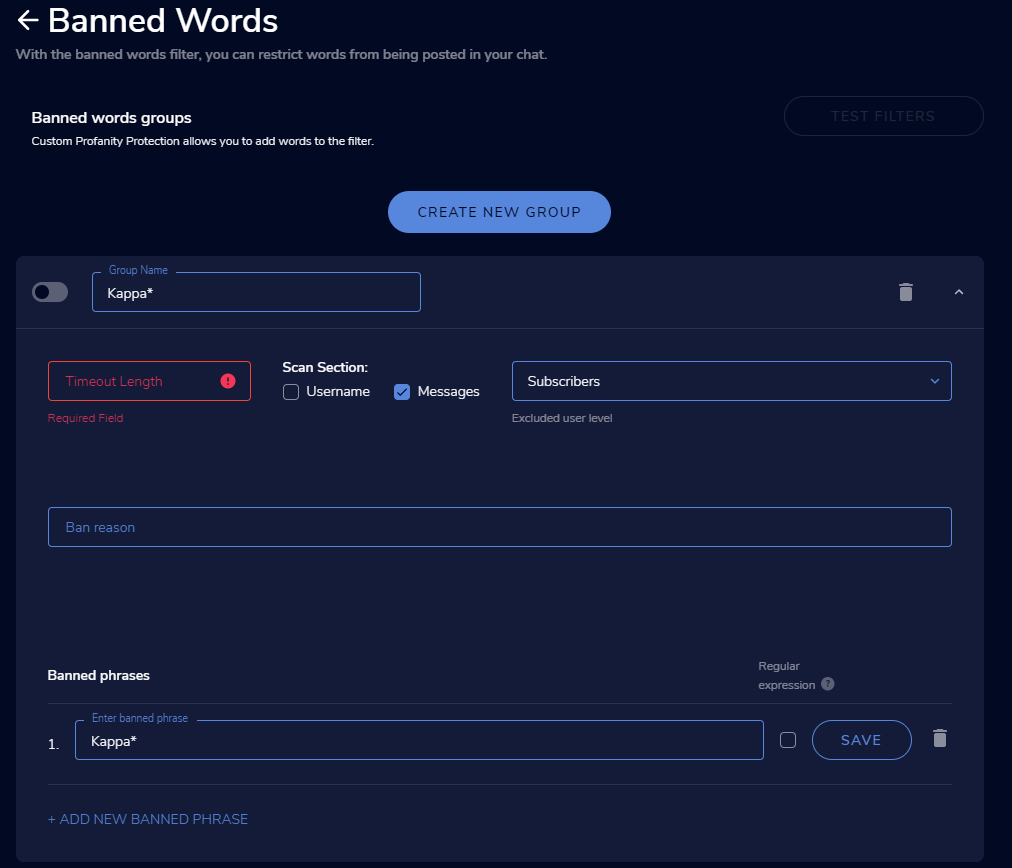 drowsy egret
yup
leaden hamlet
it doesn't really say
ohh ok
and "Regular expression" the ? doesn't display anything
thorn thorn
drowsy egret
you can use the banned words module in the spam filters menu, you would have to ...
??
drowsy egret
thorn thorn
??
sorry, tagged the wrong user 😄
thorn thorn
Lol np😅👍🏿
digital furnace
@drowsy egret do u know maybe, for my question? if there is a Widget for a Marathon Stream (Subathon) where ppl sub and it adds up time or tip and it adds up time.
sry , for tag, i can see a lot of people ask questions 😄
drowsy egret
digital furnace
<@!131420870244564992> do u know maybe, for my question? if there is a Widget fo...
#widget-share message check that one out
lime nacelle
lime nacelle
Goodnight! I'm having trouble with TTS too! The voices work perfectly in the tes...
???
viscid pebbleBOT
If you are not hearing your alerts and/or Media Request, you are most likely using the Control Audio via OBS option in your browser source properties.
To make sure you hear the alerts and the stream also hears them, follow along the screenshot bellow.
https://cdn.discordapp.com/attachments/199460642975907840/685371800456134686/unknown.png
 digital furnace
Ty Sk1ll ❤️
vagrant flicker
I'm still needing help
 scarlet tiger
With what? 🙂
 brisk iron
im trying to put music behind my overlays i purchased how dose one do this
scarlet tiger
Purchased where? What music?
brisk iron
the overlays came from own3d
but i found out after the the sounds and music werent inside the packet and now i have animations with no sound
wary halo
Do they advertise with the sounds? if so, ask them where the files are
Maybe something went wrong with the download or something like that.
 amber meadow
Hi there, hope I'm asking in the right place but my Chatstats page (https://stats.streamelements.com/c/matthewocook) results in a 404 error, is that something that can be fixed please? I have never changed my name on Twitch, and my account ID is 601965b739fff450d707ba04.
scarlet tiger
Okay
drowsy egret
amber meadow
Hi there, hope I'm asking in the right place but my Chatstats page (https://stat...
fixed
amber meadow
drowsy egret
fixed
Amazing, thank you so much!
brisk iron
is there anywhere one can get music or alert sounds?
 broken fractal
Hello, I pick out my friend' stream key on twitch, but I don't now where I put the key in order to stream there.
 hardy crypt
Hello, I changed my twitch name today and im not getting alerts or anything from stream elements anymore . and my widgets are not working . how can i fix it ? thank you
viscid pebbleBOT
@hardy crypt If you changed your name on Twitch, please follow these steps:
- Visit https://streamelements.com/logout and then log in again by connecting with Twitch.
- On the right side of the dashboard page that opens, select Join under bot settings. If it says Part select that and then select Join to send the bot to the chat. Don't forget to mod the bot by typing /mod streamelements in your channel if you have not already.
- Post your old and your new name here so that we can update your channel's chatstats tracking (must be done by staff).
hardy crypt
my old name : qozmyox / new name : qmariox
 supple thunder
Hey I was wondering if i messed up or the bot has decided to revolt against me but I cant get any of the Streamelement bot commands to work. the bot is linked to my twitch account and is not muted.
drowsy egret
hardy crypt
my old name : qozmyox / new name : qmariox
check if the issue was fixed, also re-mod the streamelements bot on your channel
hardy crypt
drowsy egret
check if the issue was fixed, also re-mod the streamelements bot on your channel
how can i make sure that its fixed ? someone has to sub to find out ? is there any way to re-sync sub goal ? because i have 134 subs but my sub goal is still showing 129, thats the number i had before name change
drowsy egret
hardy crypt
how can i make sure that its fixed ? someone has to sub to find out ? is there a...
you can go here: https://streamelements.com/dashboard/session and edit that in the goals tab, I already fixed it for subs so you can do followers if you want
hardy crypt
thank you very much
 bleak gale
Question! I am using the Fyrewire API with pastebin. How can I make the command return lines in order, say ascending? I know that it is normally randomized, and I am trying to set up an !event command to be shared between different channels.
sage cipher
I've got the minimum bits set to 200 for TTS in settings but it still does it below that number. Any idea how to fix this, there is no individual variations settings that can be changed.
bleak gale
so far I am getting random returns where I want an ordered return, of all lines
drowsy egret
bleak gale
Question! I am using the Fyrewire API with pastebin. How can I make the command ...
try asking in #dev-chat and tag fyrewire if needed
 dark flint
hey yet again stream elements not registering my followers
viscid pebbleBOT
@dark flint Please provide your account ID found at the top of this page: https://streamelements.com/dashboard/account/channels This ID is public info and safe to share here.
dark flint
5ff83be8aca67ec39fbadf9f
hardy crypt
drowsy egret
you can go here: <https://streamelements.com/dashboard/session> and edit that in...
my sub and bit alert are still not working . anything i should do?
i still think my streamelement is not synced with my new name
drowsy egret
hardy crypt
my sub and bit alert are still not working . anything i should do?
let me check
drowsy egret
hardy crypt
my sub and bit alert are still not working . anything i should do?
you might want to re-add your overlays, I enabled follower alerts, followed and the alert was triggered
hardy crypt
yes i saw that , thank you. i will try now
sage cipher
sage cipher
I've got the minimum bits set to 200 for TTS in settings but it still does it be...
If someone can reply with any steps or checks that will be great. Thanks
hardy crypt
drowsy egret
you might want to re-add your overlays, I enabled follower alerts, followed and ...
so i made a new overlay for my sub alert on streamelement , added the link to OBS and still OBS is not showing anything when im emulating .
viscid pebbleBOT
@hardy crypt OBS > Settings > Advanced > Scroll down > Enable or disable Browser Source Hardware Acceleration, depending on its current state > Restart OBS
https://i.imgur.com/ggMe9ZE.png
 cunning rover
Hi, does anybody know why my bots doesn´t work? Im login with my twitch acount, and give StreamElements a moderator rol, but it doesn't work.
hardy crypt
drowsy egret
you might want to re-add your overlays, I enabled follower alerts, followed and ...
didnt help , still i cant see or hear the alert on OBS. i made sure that the sub alert browser is on top aswell.
 fresh bison
hello! having issues with being able to update title/game as a mod in chat. cleared cache, role is set in dashboard, etc.

message I get every time
drowsy egret
hardy crypt
didnt help , still i cant see or hear the alert on OBS. i made sure that the sub...
try deleting your cache folder, its located in %appdata%\obs-studio\plugin_config\obs-browser
viscid pebbleBOT
@fresh bison Go to the Dashboard > Right side > Part channel > Join channel(https://streamelements.com/dashboard)
fresh bison
 Thank you! did the trick!
hardy crypt
drowsy egret
try deleting your cache folder, its located in %appdata%\obs-studio\plugin_confi...
didnt work, im emulating the sub alert and still i cant hear or see anything from obs
somehow i saw your follower alert tho
 burnt swift
I'm having a little trouble setting up my alert box. I want the text to be over the animation but when i click it the text disappears completely and i can't figure out why ? not sure if this is the right place for it
drowsy egret
hardy crypt
didnt work, im emulating the sub alert and still i cant hear or see anything fro...
is the "Preview LIVE on stream" setting turned on in your overlay editor?
hardy crypt
drowsy egret
is the "Preview LIVE on stream" setting turned on in your overlay editor?
im sorry for being an idiot , i turned that on and i can see it now . 1 more question . my activity feed is not showing those subs that i got after "name change" , is this normal and it will be good from next stream?
drowsy egret
hardy crypt
im sorry for being an idiot , i turned that on and i can see it now . 1 more que...
should be good for the next stream, if follows work then subs should also work
 peak parrot
I wanna make a widget that shows an image when typing a command in chat, i have no expereince with js or php, anyone who can help?
hardy crypt
drowsy egret
should be good for the next stream, if follows work then subs should also work
thank you very much , i appreciate u alot
drowsy egret
peak parrot
I wanna make a widget that shows an image when typing a command in chat, i have ...
check this widget, it might be what you're looking for 🙂 #widget-share message
peak parrot
thats insane! thank you!!!
 wanton mango
supple thunder
wanton mango
supple thunder
Ive now tried Parting, joining, muting, unmuting, unmodding and remodding the bot it still refuses to respond to my commands in twitch chat
peak parrot
@peak sinew Hi there! I need some help with your ONSCREEN COMMANDS BY ZANZER, images seems to dissapear instantly, even with the lenght command enabled
 hexed linden
hello! I completed an SE. Sponship/Campaign and never received an invitations to the streamelements payment portal so i have not been able to be paid out
 pastel charm
Hello how can I get my bot to shout out my followers im not tech savy at all
 fervent wren
Hii
drowsy egret
pastel charm
Hello how can I get my bot to shout out my followers im not tech savy at all
go to this page: https://streamelements.com/dashboard/bot-modules and enable chat alerts
 wicked zephyr
Hi, I'm trying to get my custom widget working, however there is a problem. I have a gif built into the widget, I see the gif in overlay editor but not on obs. Is there anything I should be doing different?
 sharp raptor
I have a question about SE features. what are user submissions and how do you submit them to streamelements?
charred quartz
sharp raptor
I have a question about SE features. what are user submissions and how do you su...
user submissions?
wicked zephyr
Thank you, I wasnt sure
sharp raptor
charred quartz
user submissions?
Yes in terms of service section 9 talks about them. Maybe a new feature or something?
 slate chasm
Does anyone have knowlege of a way to connect spotify to a specifical cmd?
 silver crane
When I switched from Streamlabs for some reason my alerts don't work anymore, does anyone know how to either create a new alert system or how to fix the current one?
slate chasm
smt like:
!song
-the current song is: (song from spotify)
 open drum
i want to add a merch product rotator to my overlay but it is not rotating between my products does any one know how to fix it
lament blade
is there a way to block users who follow me on twitch as bots account?
 safe widget
Hey there I changed my name on Twitch and my chat is nolonger pulling up on my OBS. (i have tried logging in and logging out and reverifying my stream key!)
 orchid jay
hai
viscid pebbleBOT
@orchid jay Welcome to the helpdesk! Please let us know how we can assist you today and a support volunteer or staff member will assist you as soon as they are available. Thank you for your patience.
daring spindle
how do you fix alerts only working sometimes. and labels not updating
 drifting agate
Ok @charred quartz , thanks. I'm not very techy so wasn't sure what is/isn't api.
charred quartz
np
 ripe scarab
@foggy heart I completely forgot to re-encode this until now...
 lean dirge
How do I get my PayPal email to receive tips and bits
 lean dirge
Yes sir I have went there
charred quartz
bits are from twitch u need to set them up in twitch platform'
tips are in that link i sent u
just place your email there and u will be fine
lean dirge
And then tried to put it in there and it wont let me connect
charred quartz
any error msgs or something?
ripe scarab
do you have a paypal account?
lean dirge
No sir yes I do
lean dirge
Ok
charred quartz
tbh send it directly to in my dm
ripe scarab
I was gonna say, might that have sensitive info?
charred quartz
only email, but yet we don't want it in public xd
ripe scarab
end up getting spammed with a bunch of requests for payment... LUL
lament blade
How do I use the overlays for Mobile??
 light nymph
having trouble fixing !watchtime and !points . neither are working. watchtime is stuck on 0 along with points
lean dirge
@proud pumice is there any way I can talk to u
 zenith widget
@lean dirge What is this about? Maybe we can help you
Perry is a very busy man, so he won't be able to help
viscid pebbleBOT
@light nymph The !watchtime command is directly tied to the Loyalty system. The Loyalty system must be enabled for viewers' watchtime to count up.
To enable Loyalty, please go to the Loyalty section of your account: https://streamelements.com/dashboard/loyalty
Watchtime counts up every 10 minutes alongside Loyalty points, and only while the stream is live. Reruns will not be counted.
Please note that watchtime is not tracked by Twitch and there is no way to retroactively apply past watchtime to viewers.
StreamElements
The Ultimate All in One Platform for Streamers
zenith widget
@lean dirge Ok, looking back to what you talked to with Mateus, if you've placed your paypal in the tipping settings, then you are able to receive tips.
For bits thats from twitch
light nymph
viscid pebble
<@!209204630146646017> The !watchtime command is directly tied to the Loyalty sy...
Loyalty is on as of about 5 mins ago when points start popping up should watch time pop up as well?
lean dirge
@zenith widget ok thank u
lament blade
hello im new to the sofware and i just need help setting up tips and the game capture
lean dirge
@zenith widget its in a mobile version
zenith widget
Use a PC
charred quartz
lament blade
hello im new to the sofware and i just need help setting up tips and the game ca...
lean dirge
@zenith widget ok thank u
 warped rock
Hey my alerts aren't working properly, i hear the audio but don't see the gif pop out. can anyone assist?
viscid pebbleBOT
OBS > Settings > Advanced > Scroll down > Enable or disable Browser Source Hardware Acceleration, depending on its current state > Restart OBS
https://i.imgur.com/ggMe9ZE.png
 dense shadow
OBS live telling me I cannot stream because I locked my IP to Ipv6 but run on Ipv4 and um, the box literally doesn't have that checked off? It worked last night, have changed nothing, and now it wont work?
I got it sorry, waste of your time.
warped rock
wow restart worked sweet thanks my friend
ionic kelp
@tepid lagoon Good News! Magic was done and they should be wiped.
lament blade
Hey guys ... what is the status with my problem... my id is 5ffecf685a2de6b062ffac3a
ionic kelp
Should be fixed already.
lament blade
Ok i will test it
lament blade
Are you kidding me? Nothing is fixed. I didn‘t get Feedback from Support. And now i‘ve testet it and the activity Feed is empty. And now alert in my chat. I‘ve testet it with a Follower. ... But i‘ve testet this situation with the PhantomBot and Streamlabs, too. And there is all Things ok. Whats wrong with your Service?
ionic kelp
What do you mean test? Did you have someone follow you?
lament blade
Yes
zenith widget
added your account to a list for the developers to take a look at
lament blade
How can i do That?
zenith widget
No ETA
lament blade
Not Good. In 3 days i have the next srream
ionic kelp
Should be.
flat jasper
@ionic kelp could you confirm for me?
zenith widget
Have you tried tipping?
flat jasper
no a Viewer asked.
zenith widget
Have they tried tipping?
flat jasper
no
zenith widget
Then they should try and it should work normally
 austere stag
is there a reason why the chat bot's commands only work sometimes instead of all the time? i've closed and reopened my streamelements, as well as disconnecting/reconnecting my twitch account to streamelements itself
viscid pebbleBOT
@austere stag If your commands recently stopped working and you're using OBS.Live and a custom bot name do the following:
- In OBS.Live, click on the hamburger menu (three stripes) at the top left of your activity feed
- Click on Stream Settings > Custom bot name
- In the Custom bot name field select Set custom bot name, not your already existing username (with capital letters). Note: If you already connected an account that way, the third entry will show as the account name (see image https://i.imgur.com/sO7fWOX.png).
- Scroll a bit down and click on the purple Connect Custom Bot Account button
- Log in as usual and Authorize the custom bot name
- Back in the Activity feed, click on the Send Test Message button and check if your custom bot name starts working again
 late raft
Hi.
I am configuring my customs alertes on StreamElements by creating dedicated overlay for that.
My alerts are ".webm" files.
When i configuring them, i don't manage to put the message over the video by using "Text Over Image" layout alignment.
Is there someone who can help me?
viscid pebbleBOT
Text not showing up over your alerts? Go to the Advanced Text Settings and set the top margin to 50, you can work your way to the right position from there.
flat jasper
my viewer tried tipping using discover and he was told "[ayment refused"
zenith widget
I would need the last 4 digits of the card used, to check why it was refused.
flat jasper
idk i can try ask
zenith widget
I can't share much information, but all I can see is, his 2 attemps to tip you have been marked as fraud
flat jasper
yeah... i dont want him oto tip me then lol
is there a way to override that @zenith widget
zenith widget
No
flat jasper
how can he make it so its not "Fraud"
zenith widget
I can't say
prisma relic
^ you gotta call Discover and have them approve the transaction
Discover as a lender is pretty picky; I've dealt with them many times from dealing with services like PokerStars and what whatnot... they flag a lot of things as 'risky' and straight deny the process.
flat jasper
He said he called and discover said that everything is ok on there end
prisma relic
If it is ok on there end then it would process
flat jasper
he contacted them again he was told nothing is even showing with you guys... cards open and agents thinks you guys dont accept discover
@prisma relic
lament blade
hiiiii
prisma relic
flat jasper
<@!229122038294380545>
Discover is picky from my experience .... and they will email/text/call you when it's flagged as fraud. So i am not sure where your tipper is seeing that message.
If it is flagged as fraud; then it will be reviewed and processed as required.
flat jasper
prisma relic
Discover is picky from my experience .... and they will email/text/call you when...
he called them himself
prisma relic
lament blade
hiiiii
hey; did you have a Twitch related question?
lament blade
no
flat jasper
he tried again with his visa card and it was also refused
prisma relic
I'm not sure. and i don't access to the SE.pay system.
my only suggestion would be to try paypal? but i'm not sure how it works to be honest. I'd hate for your viewer to get caught in the log then all payments process tomorrow
i.e. $1800 from Discover then $1800 from Visa
prisma relic
Is is looking into i believe.
zenith widget
Like I mentioned before, I can't say how to prevent one being marked as fraud
You also contradicted your self, when you said "i don't want them to tip me then" and then started asking about more information.
Initially I also mentioned I can't share much information
flat jasper
initially didnt trust him but realised hes been following me since youtube 2019
zenith widget
If the system has marked him as fraud, there is a reason for it
I can't say why and how to prevent this
flat jasper
so he cant donate with sepay only paypal
zenith widget
I'm sorry
flat jasper
@zenith widget seems to be like no viewers can donate... Had a family member try to do $5 and he was told payment refused.
flat jasper
no my brother tried to from his phone for $5
 lofty orchid
hey guys I need some help
my friends resubbed to me using twitch prime but its not showing up in stream elements
or in my twitch stream manager
zenith widget
flat jasper
no my brother tried to from his phone for $5
there was no $5 tip
oblique steeple
lofty orchid
my friends resubbed to me using twitch prime but its not showing up in stream el...
Did they share their sub? After subbing, they get a little window at the top of their chat, asking them to share the sub. If you don't see it in Twitch's own stream manager, it't not related to SE.
lofty orchid
not sure if the option popped up for them or not
prisma relic
i believe it shows up every time they join chat and it wasn't shared.
 glossy quiver
Hello im using streamelements obs.live trying to stream call of duty but i cant seem to capture the screeni qent to game capture like other games mode capture specific window then i click on blackopscoldwar.exe then i click match title, otherwise find window of same executable and nothing pops up i dont see the game anyone can help me?
 lament blade
When in stream with streamelements on teitch many games have this grrem flackern kn the stream why
viscid pebbleBOT
@glossy quiver Obs.live is a plugin for OBS Studio for the best OBS support, please join their Official Discord @ discord.gg/obsproject
zenith widget
@lament blade I'm not sure what you are showing or how you are streaming and stuff.
lament blade
i have stream roblox and than was ist green and than the game than green but in obs was ist not green
 viscid pebbleBOT
@lament blade Obs.live is a plugin for OBS Studio for the best OBS support, please join their Official Discord @ discord.gg/obsproject
tepid lagoon
ionic kelp
<@!135973702918602752> Good News! Magic was done and they should be wiped.
Yes they are 👍 👍 👍 👍 👍 ❤️
 cunning ermine
Hi,
I am going to be using restream to stream to YT and Twitch. I am going to be using the Twitch tipping page as its a more convenient URL. Is there away to make the bot announce the alerts in both YT and Twitch chats?
prisma relic
Negative. it is one or the other.
And that goes for all SE stuff... commands/moderation/alerts etc.
Only 1 platform at a time
prisma relic
i do not. I am new to YT... i just set mine up 2 days ago 🙂
and i needed help doing it
 cunning ermine
Yeah ik just thought whilst I was here I would ask lol
prisma relic
yup yup. no worries; SE is platform locked per say; so it's one service at a time
cunning ermine
Apparently restream has a relay option so I'm gonna have a look at that
anyway thanks for clarifying
prisma relic
i can only help some times with SE questions and Twitch 😉 ... i know nothing about restream
 worthy void
Is it possible to combine overlays, or copy layers from one overlay to another? i started to have a ton of different overlays where i imported 1-1 widget share things, for some specific functionality, and its getting kinda unwieldy on obs having 4-5 brower sources from stream elements
prisma relic
 lament blade
Duplicating widgets and parts of your overlays is certainly possible
 vital latch
Hi I just started using your service and I was trying to find out how to open up my chat box widget I am unable to find it
 viscid pebbleBOT
@indigo vale If you changed your name on Twitch, please follow these steps:
- Visit https://streamelements.com/logout and then log in again by connecting with Twitch.
- On the right side of the dashboard page that opens, select Join under bot settings. If it says Part select that and then select Join to send the bot to the chat. Don't forget to mod the bot by typing /mod streamelements in your channel if you have not already.
- Post your old and your new name here so that we can update your channel's chatstats tracking (must be done by staff).
 indigo vale
My name was: Frullani and now is: paijogah
zenith widget
done
lament blade
too fast for me
indigo vale
Maybe I turned something off...it is still not working...
zenith widget
StreamElements
Description Chat Stats tracks emote usage on Twitch in real time. See which emotes are the most popular on every Twitch channel
its right here
and its working
 kind sonnet
hello, my bot isnt adding commands with the !command add command
viscid pebbleBOT
@kind sonnet You can add, remove and make changes to custom commands in chat with !command/!cmd flags:
!command add (commandname) (commandresponse) - allows you **to add **a new custom command
!command remove (commandname) - allows you to delete a custom command
!command edit (commandname) (commandresponse) - allows you to edit an existing custom command
!command show (commandname) - allows you to see the raw response of a command before variables are used
!command options (commandname) -(flag) - allows you to change settings for an existing custom command
!command alias basecommand - Shows the alias commands for !basecommand
!command alias add basecommand aliascommand1 aliascommand2 - Adds alias commands !aliascommand1 and !aliascommand2 for command !basecommand
!command alias remove basecommand aliascommand1 - Removes alias command !aliascommand1 from command !basecommand
Valid flags for !cmd options include: -enable -disable -cd (number in seconds) -usercd (number in seconds) -cost (number) -level (number) -type (say, whisper or reply) -count (number)
Syntax example: !cmd options twitter -usercd 60 -type reply -level 250
kind sonnet
i know these, but it isnt adding
i dont get a reply from the bot and the command didnt get added
zenith widget
The bot is not added to your account
kind sonnet
ive been using the bot for almost a year
zenith widget
 kind sonnet
i did that to check if it would fix
 nimble dune
click join channel
kind sonnet
its added
i just removed it and rejoined it to check if that would fix
but it didnt
all command are working
except the command to add commands
indigo vale
zenith widget
and its working
Its working, but is not replying my commands
viscid pebbleBOT
@indigo vale Go to the Dashboard > Right side > Part channel > Join channel(https://streamelements.com/dashboard)
nimble dune

lament blade
streamelements still alert if some on refolllow
zenith widget
How often do you get the refollow?
lament blade
by dumb bots or same people
everyday like 2 times
also a banned user still get alerted on stream


 zenith widget
 lament blade
my account was 3 times resetted because some error
so its cleaned up thats why
is there no way to blacklist some people
zenith widget
If your account got deleted in our system, that means all data gets deleted.
So there is noway to prevent spam in this case
lament blade
not even specifik name?
zenith widget
If your account got deleted, all past data that was stored on our side
got deleted as well
lament blade
in past like 20 people named luna spammed my twitch
zenith widget
i looked back as far as Feb 22 - there are a total of 2 luna names in the activity feed
We have a system in place that prevents follow->unfollow->follow again for the alert
I cannot tell you how long it prevents that from happening, but its a very long time
lament blade
so if some new follow me rn wont be alerted
zenith widget
if i follow you, you will be alerts
if i unfollow you
and then follow again within 5 minutes
lament blade
i mean a old follower
zenith widget
you won't alerted
lament blade
how could zeki get alerted he was on that list
zenith widget
If he followed you a very long time ago
and unfollowed you recently and followed you again, then sure it can happen
but you said he was a mod
and got banned
meaning that he followed you a long time ago to begin with
lament blade
also banned users dont count as spam?