#helpdesk-twitch
1 messages · Page 750 of 1
 weary solar
 round brambleBOT
@weary solar New to StreamElements?
Check out our YouTube channel https://www.youtube.com/c/streamelements/videos
with tutorial videos from setting up the basics, to in depth details on how to use our product.
New to OBS? Here is a 4 step quickstart guide
https://obsproject.com/wiki/OBS-Studio-Quickstart
Want to learn even more? Here is an in-depth overview
https://obsproject.com/wiki/OBS-Studio-Overview
 lament blade
I need help about my SE.Pay
SE.Pay, for transfer my donation, is requesting to me the SSN but i live in ITALY!
 ionic kelp
@lament blade You'd want to use your TIN
lament blade
What's the TIN?
round brambleBOT
@lament blade Please contact us via email for support with SE.Pay. You can use our contact form here: https://streamelements.com/contact Thank you.
 wraith dune
Hello is there a way to test the alert box
round brambleBOT
@wraith dune You can test alerts via the Emulate bell on the lower left side of the Overlay Editor. Simply go to your Dashboard > My Overlays > pencil/edit button on the overlay. Make sure the Preview LIVE on stream option is on to see the alert in OBS/XSplit** https://streamable.com/vtulg9
 wraith dune
actually cannot test live is that possible
ionic kelp
What do you mean?
 untold crest
If you want to test it in OBS - just check "preview LIVE on stream" box above list of events
 mighty grove
so i made a bar overlay today. is there any way i can download all my edits as a video file. i mean i want to use it offline sometimes. is there anyway i could combine all my video layers and download it as 1 video file?
 twin sentinel
No.
lament blade
Hi everyone. I have a problem when I want to pass a theme overlay to my lightstream to stream on twitch. When I pass the link to lightstream, I have the problem that the streamelements overlay looks small on my stream. I have tried to change the result of 1080 to 720 and it keeps giving me wrong. any ideas?
mighty grove
is there anyway to record (lets say a 640x640 video source) in streamelemnts obs? i mean only that 640x640 video source no other black bars etc?
round brambleBOT
@mighty grove For the best OBS support, please join their Official Discord @ discord.gg/obsproject
 vale vine
Seems an odd question, but am I missing something? Viewers can not seem to use the !quote add command - but I can not also see anywhere where I can easily check or remove quotes from the list
lament blade
please can anyone help me 🙂
ionic kelp
@lament blade That's something you'd need to speak with lightstream about. If it appears normally in the preview mod for the link then it's something outside of us.
@vale vine There is no way to remove/view quotes outside of chat. This is being worked on though.
lament blade
okey i will ask them , thanks
 south comet
Hi! This might be a dumb question, but I'm very new to OBS-- For using overlays from Stream Elements, what do you with the links they provide for each scene? The links pop up but I have no idea where to paste them to integrate the overlays.
round brambleBOT
@south comet To add your overlays to OBS, add a new browser source in your scene. Paste your overlay URL in the browser source properties, set the dimensions to 1920x1080 (unless you changed them on the website) and check Shutdown source when not visible. https://youtu.be/KDvLynUqXI4
ionic kelp
@vale vine And to my knowledge quote adding is mods/streamer only.
south comet
@round bramble Perfect, thank you!
 wild jetty
I'm struggling to figure out where the option for the amazon prime variation is or how I go about setting it up. Would really appreciate some help
 oblique steeple
wild jetty
oblique steeple
wild jetty
I'll love you forever Fabi, thank you!
 opaque mesa
How do I add custom fonts on streamelements for my overlay?
round brambleBOT
@opaque mesa Google Fonts
More than 900 google fonts are supported at this time. You can preview them here: https://fonts.google.com/
Custom Fonts
Steps:
- Install the font on the streaming PC or choose a pre-installed windows font.
- In the overlay widget settings, select Text Settings
- Click on Enable Custom Font
- Type the name of the font as it appears in the windows font directory (This is usually
C:\Windows\Fonts)
Note: After installing fonts, the browser and OBS must be restarted for the font to appear.
opaque mesa
ok thanks
 signal jackal
Hi, is there any way to create a kind of "Chain" of commands, what I want is quite complex... I want the bot to, fist, send a command to turn on the onlysubs on the chat, then spam a link I gave him in the command X times and then turn off the onlysubs... Off course all of this migth happend in a custom amount of time
Is that possible¿
 willow mantle
Small issue here.
I recently purchased an overlay pack from NerdorDie and I can't seem to get my donation goal to reset on that particular widget.
On my other older scene that only has a donation goal built in from streamelements it works though.
 weak marten
Question, is there a link to a webpage that shows all the redeems you can do on someones streamelements?
Or do I have to setup one myself?
 marble kraken
could someone help. out of nowhere, anytime i try to access my dashboard it just redirects me back to the main index page. tried logging out and back in. cleared cache and cookies and logged back in. but when i try to get the dashboard it just takes me back to the main landing page.
even just now tried on a different browser that i keep fresh at all times. doing the same thing
ionic kelp
@weak marten If they're set for website redemption yes https://streamelements.com/dashboardname/store
round brambleBOT
@marble kraken Please logout of StreamElements at https://streamelements.com/logout and then login again to your account (Twitch/YouTube/Facebook).
@willow mantle To reset goals:
- from the Overlay Editor > Session data on top right (monitor symbol) > Goals tab > reset progress of desired goal
- from the Dashboard > Activity feed on the left > Widget data on the right > Goals tab -> reset progress of desired goal
Note: Goal widgets (progress) only counts up and doesn't go down automatically, if you loose followers/subs.
marble kraken
mkay so it seems i can navigate my own dashboard no problem. but when i attempt to switch to one of the channels that I have full access to, it is whats causing it to redirect to the main landing page
 meager vessel
Hi all is there any reason not to appear g2a or cc options in donate setup tab? I can not setup the channel donation only option for paypal.. How can i solve that ?
ionic kelp
@marble kraken other person has to do that as well.
@meager vessel G2A is not longer available.
marble kraken
okay Sudo, thank you I will tell him to do so. will keep you aprised. also, nice name btw, it made me chuckle
meager vessel
no option instead paypal?
ionic kelp
You live in a country that is not supported for CC.
round brambleBOT
To integrate, open https://bynogame.com/ben/bngpay and click on the StreamElements Kurulumu button (if you can't see it, open the link again).
You will be asked to authorize the connection on our site. Once authorized, all the tips you receive through ByNoGame will generate alerts on StreamElements and show up in your activity feed, revenue history, labels, dashboard, etc.
meager vessel
I already set up Bng , so alert box will work?
ionic kelp
With this yes.
meager vessel
thank you very much @ionic kelp for fast response. Appreciate.
marble kraken
awesome sauce. so yes the streamer logged out and back in, then i did the same. Now i have access to his dashboard once again. Thank you for the help!
 ocean vine
Morning. I have a question about chat commands with sound effects. Is there a way to have certain sound effects initiate without using !redeem before the command?
 calm reef
Hello, can someone please tell me what settings I need to get sound into my streams as for some reason StreamElements isn't recording my sound. But OBS does. So I must be missing something but I am unsure what it is :/.
opaque mesa
I have put in the font into my windows folder but its not showing up
ionic kelp
Double click the file and choose install from there.
 meager needle
Good afternoon, how do I put my link in League of legends on my live as a command?
round brambleBOT
@meager needle New to StreamElements?
Check out our YouTube channel https://www.youtube.com/c/streamelements/videos
with tutorial videos from setting up the basics, to in depth details on how to use our product.
New to OBS? Here is a 4 step quickstart guide
https://obsproject.com/wiki/OBS-Studio-Quickstart
Want to learn even more? Here is an in-depth overview
https://obsproject.com/wiki/OBS-Studio-Overview
 tidal venture
right click on game layer and you have to find fit to screen
Hello, why variable ${channel.subpoints} doesn't work properly, it displays subs couter even if in dashborad it's different?
ionic kelp
Ctrl + R then Ctrl +F
@tidal venture Unfortunately twitch nuked that for us. Only can get subcount.
tidal venture
ok thanks then
 topaz shoal
thank man
 celest trout
I'm having a hard time with args in a custom command to keep track of multiple counters at one time. Anyone have some insight?
ionic kelp
Sounds like fun that's for sure....
 stark furnace
Hi folks - I have a problem with Alert Box TTS. Specifially with Gift Subs. I recently changed the voice on ALL my TTS alerts but Gift Subs has NOT changed. It appears to be impossible to change it. Also Gift Subs reads 2 lots of messages instad of just one, so the alerts take ages and also does these alerts in the WRONG TTS voice. I have nowhere I can find to change the voice of that one type of alert. Please see the 2 clips to see the difference..............
https://clips.twitch.tv/IgnorantAmazonianMageHumbleLife
https://clips.twitch.tv/PlacidCloudyMeatloafBlargNaut
celest trout
This is what I have right now and I've tried changing things around several times
${count ToshiELO -${1:}} ${count ToshiELO +${2:}} ${count ToshiWIN +${3:}} ${count ToshiLOSS +${4:}}
Basically I want to be able to type !gain+ 0 2300 3 2
For a 2300 ELO Gain and 3 wins 2 losses
I can do this easily with Streamlabs, but I want to make this work with Streamelements - Please tag me if you have insight or can help
ionic kelp
Actually disregard.
I'm reading and brain hurts.
Try adding the same number for each spot following the :
ionic kelp

 light bough
Is something going on with Twitch? Follow alerts aren't showing up in our OBS activity feed or Stream Elements, but they're showing in Twitch stream manager.
Everything else seems to be working fine
ionic kelp
And you're sure they're fresh follows?
light bough
Yeah, we had 4 new ones last night that didn't go through
ionic kelp
Because refollows aren't/aren't supposed to be detected.
 cloud solstice
Hi guys , is it possible to upload custom fonts to stream elements ? thanks.
round brambleBOT
@cloud solstice Google Fonts
More than 900 google fonts are supported at this time. You can preview them here: https://fonts.google.com/
Custom Fonts
Steps:
- Install the font on the streaming PC or choose a pre-installed windows font.
- In the overlay widget settings, select Text Settings
- Click on Enable Custom Font
- Type the name of the font as it appears in the windows font directory (This is usually
C:\Windows\Fonts)
Note: After installing fonts, the browser and OBS must be restarted for the font to appear.
light bough
@ionic kelp And I made sure we didn't somehow filter out Follow alerts. We didn't change anything about our alerts lately which is weird
ionic kelp
Got the feed open?
 uneven hazel
for some reason streamelements wont type in my twitch chat
and nether will nightbot
light bough
I do, Sudo
uneven hazel
they were both working before and now there not
light bough
Hmm, that one came through Basshunter :p
uneven hazel
what?
light bough
Might have just been a hiccup then I hope
ionic kelp
Yup
light bough
Sorry @uneven hazel, working through my issue atm
uneven hazel
oh okay
light bough
Thanks for being there to help @ionic kelp !!
uneven hazel
when will someone be able to help me with my problem
celest trout
I'm having a hard time with args in a custom command to keep track of multiple counters at one time. Anyone have some insight?
This is what I have right now and I've tried changing things around several times
${count ToshiELO -${1:}} ${count ToshiELO +${2:}} ${count ToshiWIN +${3:}} ${count ToshiLOSS +${4:}}
Basically I want to be able to type !gain+ 0 2300 3 2 - For a 2300 ELO Gain and 3 wins 2 losses
I can do this easily with Streamlabs, but I want to make this work with Streamelements - Please tag me if you have insight or can help
stark furnace
@uneven hazel Silly question - you haven't got sub only chat or anything like that turned on have you ?
@uneven hazel I ask cos if the problem affects nightbot as well as streamelements then it sounds more like a twitch issue than an SE problem
ionic kelp
It's something else.
uneven hazel
@ionic kelp thanks again for helping me 
stark furnace
Has anyone any ideas about my issue please ?
ionic kelp
did you check variations?
 white umbra
Hello i need help
round brambleBOT
@white umbra Welcome to the helpdesk! Please let us know how we can assist you today and a support volunteer or staff member will assist you as soon as they are available. Thank you for your patience.
celest trout
@ionic kelp I've checked about every variation of bracket placement, numbers, etc. No luck
ionic kelp
That wasn't for you.
celest trout
Oh 😓
ionic kelp
I've asked for someone who might know as that's a bit over my head.
stark furnace
@ionic kelp I have no variations at all
 fresh dome
hello so i made a alert box on stream elements the website got the link put it in the obs and if i test it it will work but when someone actually does something like host. use bits. follow etc it will not pop up any help?
ionic kelp
@white umbra Make sure it's enabled here then click settings to customize https://streamelements.com/dashboard/mediarequest/general
stark furnace
@ionic kelp There simply does not appear to be a way to change "Gift subs" at all on alertbox
ionic kelp
The viewer request switch from that link.
Unfortunately it's not something I can help with atm Zoe as I'm heading to bed before work but will see if someone else can help figure out what isn't working.
stark furnace
Ok thanks 🙂
white umbra
hello
i have all good in settings but why i dont have this?
admins help
Twitch name BAZiNHO
haloo?
 chrome folio
@white umbra https://streamelements.com/dashboard/mediarequest/settings you can set up it here... Media Request Mode > Via Tip or Both.
 carmine cosmos
Hey guys, since a couple days my Overlay wont show in Streamlements
but in Stream Labs its visible
but I dont like Slobs thats why I would stick to Streamelements
white umbra
@chrome folio go check i have all good but i dont have this idk why? wtf is happening?
 dense jackal
where do i input stream key
round brambleBOT
@dense jackal New to StreamElements?
Check out our YouTube channel https://www.youtube.com/c/streamelements/videos
with tutorial videos from setting up the basics, to in depth details on how to use our product.
New to OBS? Here is a 4 step quickstart guide
https://obsproject.com/wiki/OBS-Studio-Quickstart
Want to learn even more? Here is an in-depth overview
https://obsproject.com/wiki/OBS-Studio-Overview
lament blade
hi guys, i changed my twitch name about 3 days ago and from this moment i dont have the streamelents bot in the stream, and of course the commands dosnt work, help me please 🙂
chrome folio
@white umbra did you set the "Minimum tip to request media" value?
round brambleBOT
@lament blade If you changed your name on Twitch, please follow these steps:
- Visit https://streamelements.com/logout and then log in again by connecting with Twitch.
- On the right side of the dashboard page that opens, select Join under bot settings. If it says Part select that and then select Join to send the bot to the chat. Don't forget to mod the bot by typing
/mod streamelementsin your channel if you have not already. - Post your old and your new name here so that we can update your channel's chatstats tracking (must be done by staff).
chrome folio
@white umbra and are you using Google Chrome with StreamElements?
chrome folio
@white umbra please, show us the screenshot of the page - https://streamelements.com/dashboard/mediarequest/settings
white umbra
okay
stark furnace
Anyone here who might be able to help perhaps ? With #helpdesk-twitch message
 sharp kite
i need to find how much money ive made all together on twitch
this doesnt exactly have to do with streamlabs, but it has to do with twitch..
i can see in my channel analytics that i made money, but its only what ive made in the past 30 days.
i was wondering where i could see how much money ive made in total on twitch, not in the past 30 days. does anybody know where i could find that? ive tried researching it but i couldnt find ANYTHING. 
 wary halo
just don't make the window 30 days
sharp kite
how can i do that?
wary halo
but make it from the day you started
sharp kite
ill see what i can do, but ill ping you if im not sure
 full turtle
Hello, so i am having an issue...im trying to add my facebook account to streamelemets....i have my twitch account and youtube account currently attached to my streamelements.....is there anyway to delete the youtube account? And also, when i go to add my facebook account, it says its already been claimed
white umbra
hallo
 inland viper
Hey! So i'm having an issue with the hype cup. I'm trying to add in just single, static images for my custom ones, so no sprite sheet. But they just keep glitching out & only taking 1/4th of the circular image as a square. You can see it glitching in this clip from today around 5-7 seconds in & again around 10-13 seconds in https://www.twitch.tv/mousewastaken/clip/AmazingFuriousWalrusRickroll
I'm not sure what i'm doing wrong for this to happen. Ive tried removing & re-adding, i've made sure sprite sheet is unticked. it just cutes the circular image into 1/4 of the image and as squares (circle is checked too)
dense jackal
hey my new scene doesnt have audio for desktop just mic
 midnight egret
Hi guys, I need help.
I use Streamlabs OBS to stream on my channel, and I wanted to add the new animation o SE Merch.
How can I do it? Where I have to paste the link that I copy on the website?
lament blade
Hi. Do SE have a widget to allow viewers to vote on something please?
 sick tundra
Can any help me out please! I’m just wondering If when u get a stream-elements donation, does it appear In the chat?
round brambleBOT
@sick tundra New to StreamElements?
Check out our YouTube channel https://www.youtube.com/c/streamelements/videos
with tutorial videos from setting up the basics, to in depth details on how to use our product.
New to OBS? Here is a 4 step quickstart guide
https://obsproject.com/wiki/OBS-Studio-Quickstart
Want to learn even more? Here is an in-depth overview
https://obsproject.com/wiki/OBS-Studio-Overview
stark furnace
@lament blade - I am not support at all but I use this.... https://poll.ma.pe/
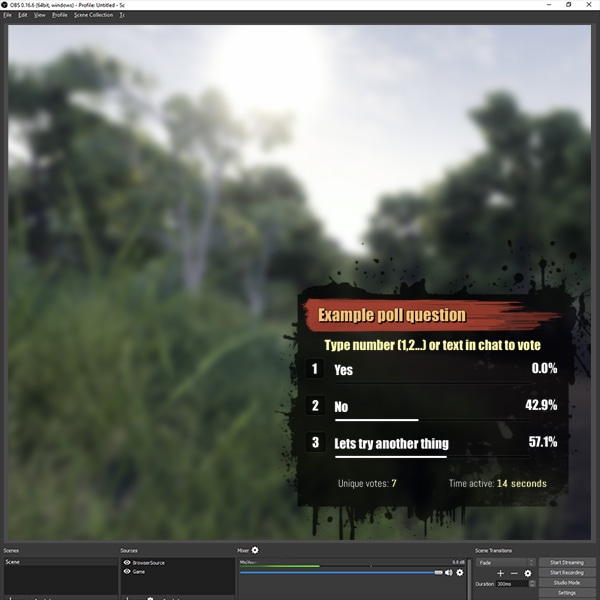
Quickly and easily integrate a real time poll into your Twitch.tv stream
wary halo
or take a look in #widget-share
 wary halo
And twitch has a poll function build in to the chat 😛
lament blade
Yeah Ruben, I'm aware of that. I just want it to go on for longer really. Thanks nonetheless
dense jackal
hey my new scene doesnt have audio for desktop just mic any1 help
round brambleBOT
@dense jackal For the best OBS support, please join their Official Discord @ discord.gg/obsproject
 limpid sigil
is anyone having issues with their host alert not working but all other alerts still work???
round brambleBOT
@limpid sigil Due to changes to Twitch API, we have filtered out hosts and will only show these ones on your activity feed:
- All hosts coming from an online channel with at least 1+ viewer
- Auto host events with at least 1 viewer - only from a channel that just went offline
Note: If you see X channel has hosted you with no viewers on the back, that is considered an offline host or a host with 0 viewers, we do not show these.
 misty reef
I just donated 1 euro to a streamer and it didn't work but money was deducted from my acc
How
wary halo
paypal?
lament blade
I changed my twitch username and now im having problems with stream elements it says the bot is activated but its not in my chat anymore
Can anyone help?
round brambleBOT
@lament blade If you changed your name on Twitch, please follow these steps:
- Visit https://streamelements.com/logout and then log in again by connecting with Twitch.
- On the right side of the dashboard page that opens, select Join under bot settings. If it says Part select that and then select Join to send the bot to the chat. Don't forget to mod the bot by typing
/mod streamelementsin your channel if you have not already. - Post your old and your new name here so that we can update your channel's chatstats tracking (must be done by staff).
wary halo
yup
wary halo
i'll pass it on to staff 😄
lament blade
@wary halo appreciate it
@wary halo mind if i post a screen shot of what im dealing with?
 slim spear
Having strange audio issues lately like 15-20 minutes into stream when streaming ti twitch and using stream elements OBS live, don't know exactly where to post for the quickest solution so if anyone can advise that would be great
wary halo
@wary halo mind if i post a screen shot of what im dealing with?
@lament blade if you did all the steps it should work 😛
lament blade
Im doing everything from my phone so it might be abit different
wary halo

lament blade
I logged out then back in again after that i tryed looking for the thing that pops out of the dashboard and all i saw was log out and languages, my account
So im having some trouble here
Hi how do i use the overlays on my stream they are created and saved but when streaming r not there I do this on mobile as I have no pc
Btw for xbox streaming
Im pretty sure that you can only use overlays with a pc
Bruh
Yup
I swear nah
round brambleBOT
@lament blade Consoles do not have native support for overlays. You would need a capture card, PS4 remote play or Xbox companion app and a PC with OBS in order to have overlays over your console gameplay.
We have an blog post about how to setup console streaming with our essential tools: https://blog.streamelements.com/how-to-stream-on-console-7b620b1c46c3
lament blade
And there it is
You can
I'll do it on my pc im just lazy as its so slow
If it's possible without a pc i would like to know
Youtube vid
 sterile merlin
I need help,I have clicked on the alerts and overlays button on the welcome dashboard page but refreshed and I can’t click it again, what do I do?
sterile merlin
I’ll reset
round brambleBOT
@sterile merlin New to StreamElements?
Check out our YouTube channel https://www.youtube.com/c/streamelements/videos
with tutorial videos from setting up the basics, to in depth details on how to use our product.
New to OBS? Here is a 4 step quickstart guide
https://obsproject.com/wiki/OBS-Studio-Quickstart
Want to learn even more? Here is an in-depth overview
https://obsproject.com/wiki/OBS-Studio-Overview
twin sentinel
@lament blade Have you taken a look at what the bot said earlier?
lament blade
Yes
twin sentinel
Then this is your answer.
twin sentinel
Consoles do not have native support for overlays. You would need a capture card, PS4 remote play or Xbox companion app and a PC with OBS in order to have overlays over your console gameplay.
We have an blog post about how to setup console streaming with our essential tools: https://blog.streamelements.com/how-to-stream-on-console-7b620b1c46c3
lament blade
I have a capture card its just twitch has an asthma attack with it
twin sentinel
Then best to contact the capture card manufacturer.
 quartz onyx
Hello, i would like to create a chat command that plays a sound and cost points, i have been searching but i cant seemt to find anything up to date?
Found something 👍
sterile merlin
Reseting the browser didn’t work...
stark furnace
Sorry for posting this again - Can anyone help please ? #helpdesk-twitch message
chrome folio
@stark furnace see the Variations Settings of the alert
stark furnace
There are no variations @chrome folio
Gift Sub alerts do not appear to be adjustable at all
OH WAIT - Maybe I found it something
Ohhhh - Ok I misread something and found the variation - Ok I have got the voice changed to the right voice. Now the only issue is that it reads 2 messages instead of just one - Is there a way to stop it ? @chrome folio
 uneven lodge
Good afternoon! Anyone knows if theres a way to set up a chatbot random response with a different (maybe random) line after certain time? Like every 40 minutes pick a line out of a list or something like that. Is it possible?
 weak delta
Hmm.
There is the random variable for commands.
It should work in a timer as well.
Let me double check.
Yes, click on command variables on your command page and search for "random" and that should work out for you @uneven lodge
uneven lodge
Oh... niceee TY! Will play with it! ty!
weak delta
She goes ${random.pick 'for the chicken wings.' 'for the burgers.' 'for the fries.' 'for the pickles.' 'for the Pina Colada.' 'to get Instagrams.'}
Something like that within the text limit. ^ @uneven lodge
quartz onyx
Would there be a way to create a command that allows viewers to buy the 'regular' user level with points?
 cursive sable
Does anyone here can tell me how i get the seperate layers of an .avi file, without me owning photoshop or AI?
quartz onyx
or would it be possible that if a viewer gets to a x amounts of point that he gets regular as user level automaticly ?
 strong kernel
@quartz onyx Not at this time. Regular can only be assigned manually.
quartz onyx
Could this be done in chat by a command?
quartz onyx
😄
strong kernel
The !level command
round brambleBOT
@quartz onyx
Chat/Bot Levels
100 - Viewer
250 - Subscriber (Twitch subscribers automatically placed at this level)
300 - Regular
400 - VIP (Twitch VIP automatically placed at this level)
500 - Moderator (Twitch chat moderators automatically placed at this level)
1000 - Super Moderator
1500 - Broadcaster
Dashboard Manager Levels
Bot Supervisor
Editor
Full Access
Owner
https://i.imgur.com/s61Liry.png
 quartz onyx
holy ..
strong kernel
!level name 300
quartz onyx
is there a way for us to changes these points needed or the roles?
wary halo
no
quartz onyx
these levels are not the same points as the loyalty 'points' correct?
quartz onyx
aa oke, im sorry then as might have been more clear on that part
strong kernel
They're just numerical values to show priority, with higher numbers being higher priority.
quartz onyx
im looking for a way to setup a command that allows viewers to use there loyalty points to 'buy' there regular level.
strong kernel
Within the system, if you allow "subscribers" to do something, for instance, any role with a number at or higher than 250 can do it, too.
There is no way for a viewer to automatically apply the Regular level to themselves.
quartz onyx
yea so the level are also a ranking system
 lone flax
What's the easiest way to call the goals, latest sub, etc. from stream elements into python / an obs element?
lament blade
i just downloaded the program and added my youtube channel , can i go back and put my twitch rather than my youtube channel?
calm reef
@lament blade
Yes go to settings from there you can setup other channels.
 distant cliff
i've been tyring my best to figure out the overlay stuff but whenever i try to preview it in my software, either nothing shows up no the dimensions of the overlay are comepletley off
is every wiget only on the same layer and not seperated per item?
calm reef
@distant cliff sorry what do yo mean preview it in your software? What software are you using?
 dense talon
hi. i have a problem with the alertbox: it doesn't work with the hosting while i am live (it works fine when emulate) . I hear the sound of the event but the animation doesn't appear, neither the notification in the chat. The follower event work without problems instead (the other events i don't know because i'm new XD)
 thin lintel
Anyone know why my emotes come out in a written format and not the actual emote when adding them to a specific chat command?
 median basalt
Can't check my chat stats for some reason 🙁
round brambleBOT
@lament blade StreamElements on top of OBS > Logout > Login
median basalt
@thin lintel it's because Streamelements isn't subbed
round brambleBOT
@distant cliff To add your overlays to OBS, add a new browser source in your scene. Paste your overlay URL in the browser source properties, set the dimensions to 1920x1080 (unless you changed them on the website) and check Shutdown source when not visible. https://youtu.be/KDvLynUqXI4
@dense talon Due to changes to Twitch API, we have filtered out hosts and will only show these ones on your activity feed:
- All hosts coming from an online channel with at least 1+ viewer
- Auto host events with at least 1 viewer - only from a channel that just went offline
Note: If you see X channel has hosted you with no viewers on the back, that is considered an offline host or a host with 0 viewers, we do not show these.
distant cliff
@calm reef I'm using OBSlive with the SE attachments and stuff. After resizing things in the broadcaster i figured out what my issue was for the chat widget
 delicate onyx
How do i add scenes
round brambleBOT
@delicate onyx To add your overlays to OBS, add a new browser source in your scene. Paste your overlay URL in the browser source properties, set the dimensions to 1920x1080 (unless you changed them on the website) and check Shutdown source when not visible. https://youtu.be/KDvLynUqXI4
 wintry spear
heyy, where can i find my JWT token?
round brambleBOT
@wintry spear You can find your JWT token on your account channels page (Show Secrets to reveal the token): https://streamelements.com/dashboard/account/channels
READ ME: This is a private security token. Do NOT share this token here or other public places, only with a StreamElements staff member in private.
median basalt
I guess I'm not getting help with my problem 😂 😂
round brambleBOT
@median basalt If you changed your name on Twitch, please follow these steps:
- Visit https://streamelements.com/logout and then log in again by connecting with Twitch.
- On the right side of the dashboard page that opens, select Join under bot settings. If it says Part select that and then select Join to send the bot to the chat. Don't forget to mod the bot by typing
/mod streamelementsin your channel if you have not already. - Post your old and your new name here so that we can update your channel's chatstats tracking (must be done by staff).
median basalt
Old name: Call_Me_Content
New name: ThatMichelGuy
 terse sierra
can someone help me ? because I'm giving the command here on the twitch to test the boot but it's not working. and already put / mod streamelemets and it still doesn't work
round brambleBOT
@terse sierra Go to the Dashboard > Right side > Part channel > Join channel (https://streamelements.com/dashboard)
 terse sierra
@terse sierra Go to the Dashboard > Right side > Part channel > Join channel (https://streamelements.com/dashboard)
https://i.imgur.com/uYVb8OK.png
@round bramble I've done it twice
chrome folio
@terse sierra you gave mod to "streamelemets" ... please, type: /mod StreamElements
 opaque anchor
how do i skip the tipping setup
 fallen hill
how do you add an overlay to your stream setup
round brambleBOT
@fallen hill To add your overlays to OBS, add a new browser source in your scene. Paste your overlay URL in the browser source properties, set the dimensions to 1920x1080 (unless you changed them on the website) and check Shutdown source when not visible. https://youtu.be/KDvLynUqXI4
chrome folio
@opaque anchor show us a screenshot, pls
 frank crypt
Some reason using Mix it up bot and want to login to stream elements and always gives error and wont connect
 ocean pond
Not sure where I ask for help on this as it's about Twitter. Every time I go live on Twitch, SE sends one of those automated notifications to Twitter to say I've gone live, the problem is it's sending a link to my old username on Twitch rather than my new one. I've updated everything as far as I can tell so I'm not sure what else to do. Is there a way to disable to automatic notifications or change the settings of them?
never mind! just found it now. I was searching via the website and now just tried through OBS and it worked
 tender helm
Anyone know how to disable /me on twitch chat?
 sage dome
anyone know how to switch accounts on stream el?
round brambleBOT
@sage dome StreamElements on top of OBS > Logout > Login
sage dome
then i click twitch and it auto logs me into the same account
 limpid leaf
Im only dropping frames on COD Warzone...any thoughts? Ive tried lowering my video and output settings to 720 - 30/60 FPS and my bitrate but nothing! I play other FPS shooters on 1080p 60 fps and 6k bitrate and flawless? Any thoughts???
 slender pawn
How many days does it take for an SE PAY withdraw normally?
 vivid bramble
i cant get my stream to run and it is my first time
 abstract hemlock
@slender pawn usually 3 business days
round brambleBOT
@vivid bramble New to StreamElements?
Check out our YouTube channel https://www.youtube.com/c/streamelements/videos
with tutorial videos from setting up the basics, to in depth details on how to use our product.
New to OBS? Here is a 4 step quickstart guide
https://obsproject.com/wiki/OBS-Studio-Quickstart
Want to learn even more? Here is an in-depth overview
https://obsproject.com/wiki/OBS-Studio-Overview
slender pawn
@slender pawn usually 3 business days
@abstract hemlock thanks!
calm reef
@limpid leaf
Have you tried lowering your in game settings?
 random field
the default watchtime keeps saying for everyone 0 seconds for some reason
 regal rampart
I went to the website to get an overlay for my stream and I dont understand where I am supposed to copy the link for my overlay in OBS
regal rampart
never mind i figured it out.
 kindred lotus
Hi, is it possible to have the twitch data labels, for follower, sub, donation, cheer, in the same place on the screen, but rotate between them? (Maybe fade each one in and out?)
 languid jetty
it is
abstract hemlock
@kindred lotus yes you can add the rotator events widget
check the #widget-share channel :)
 winter fern
The " add tips" help video does not make sense...I'm Not sure what UI I'm looking at. Could someone clarify?
regal rampart
my chat text shows up black so its hard to see with the overlay that I am using is there anyway to fix that?
 supple magnet
does anyone know how to help me with youtube streaming in helpdesk youtube
abstract hemlock
@winter fern some videos are outdated
round brambleBOT
@winter fern We've released our new Overlay Editor revamp. You can check out the changes and how to work with it here: https://youtu.be/X5VzXjqAsjk
Check out our blog post as well: https://blog.streamelements.com/streamelements-overlay-editor-just-got-even-better-c22cb5b4853e
@supple magnet Please provide a proper screenshot with the issue visible. If not sure how to take a screenshot, you can check here: https://www.take-a-screenshot.org/
 verbal bridge
okay so i fixed my audi problems
can you only add varaitons to subs?
cause I want a different image and sound when i get raided to play randomly
random field
how do i fix the default watchtime it keeps saying 0 seconds watched for everyone
round brambleBOT
@random field 10 minutes of watchtime are given to those in chat when the loyalty points are handed out (every 10 minutes). Therefore, loyalty must be enabled for watchtime to work properly.
There is no direct link between watchtime and all-time points.
It can’t be calculated from the amount of all-time points a user has because subs may earn points at a faster rate and !bonus all command increases all-time points for users in chat at that time.
Giving points to a single user does not affect all-time, only when giving to all in chat.
abstract hemlock
@verbal bridge You can add variations to any event on the alertbox
verbal bridge
i know that
but it's only showing the original one i made
and i pressed the "play randomly"
right now im trying host then raid
 azure shale
Merch store taking long time to update. Need help
abstract hemlock
it wil play randomly if the exact same event is trigger (same amount of viewers on raid) @verbal bridge
round brambleBOT
@azure shale Please provide your account ID found at the top of this page: https://streamelements.com/dashboard/account/channels This ID is public info and safe to share here.
verbal bridge
so i just change it to 2 then? @abstract hemlock
yeah it's still playing the original
eventough i made the secondo ne 2 viewers
one*
round brambleBOT
@verbal bridge Please provide your account ID found at the top of this page: https://streamelements.com/dashboard/account/channels This ID is public info and safe to share here.
random field
what does everyone have the loyalty numbers settings set to?
verbal bridge
5bfb1644800bc7db001f773a
if you say so
wait
i had both the origianal and varriant at one viewer
it still aint working
abstract hemlock
save the overlays and i'll take a look
verbal bridge
i did
abstract hemlock
i don't see any varations on raid
verbal bridge
i mean thost sorry
abstract hemlock
save it again so i can take a look
abstract hemlock
save it again
verbal bridge
done
verbal bridge
okay
random field
can anyone help me with what they have? not good at math
verbal bridge
yeah renziito it just shows the original when i press emulate
verbal bridge
well when i press the play button on the varition it works
but for emulate then host alert it just shows the original jake the dog one
not the mabel one
abstract hemlock
i'm using the emulate
verbal bridge
maybe im just unlucky
can you save it?
oh its working now
appreciate it dude!!!
abstract hemlock

verbal bridge
well wait now it's just playing the variant
all i wan tto make sure is that when someone follows it picks between the two
want*
abstract hemlock
duplicate the variant and and change the video just to be 100% that those have the same settings
and then emulate until you are happy with the results
(follow or hosts or raid)
verbal bridge
shouldnt i made the variant 50%?
so it's a 50 50 chance of getting one alert or the other
okay i think i got it
now how do I add this to obs studio?
do i just copy link and paste it in the alerts section i make on obs?
round brambleBOT
@verbal bridge To add your overlays to OBS, add a new browser source in your scene. Paste your overlay URL in the browser source properties, set the dimensions to 1920x1080 (unless you changed them on the website) and check Shutdown source when not visible. https://youtu.be/KDvLynUqXI4
 eternal smelt
I am unable to withdraw funds from SE.Pay It never asked me for my bank info and I can't seem to find where to input it. Any ideas on how to fix?
random field
noone ok
ionic kelp
You most likely don't have a large enough balance to make the withdrawal.
eternal smelt
$428.36
 round brambleBOT
Please contact us via email for support with SE.Pay. You can use our contact form here: https://streamelements.com/contact Thank you.
eternal smelt
On it! Thank you
ionic kelp
That's about as far as we can help here.
abstract hemlock
@azure shale i just pass it to our dev team so they can take a look
lament blade
Hi I'm having problems with the bot, is anyone else?
ionic kelp
Problems in what way?
random field
can i have help with this? im bad at math and need to see what others have
azure shale
Ok @abstract hemlock thx
lament blade
Problems in what way?
@ionic kelp stopped responding to commands after I started using a custom name for my bot.
ionic kelp
I bet I know the solution 
round brambleBOT
If your commands recently stopped working and you're using OBS.Live and a custom bot name do the following:
- In OBS.Live, click on the hamburger menu (three stripes) at the top left of your activity feed
- Click on Stream Settings > Custom bot name
- In the Custom bot name field select Set custom bot name, not your already existing username (with capital letters). Note: If you already connected an account that way, the third entry will show as the account name (see image https://i.imgur.com/sO7fWOX.png).
- Scroll a bit down and click on the purple Connect Custom Bot Account button
- Log in as usual and Authorize the custom bot name
- Back in the Activity feed, click on the Send Test Message button and check if your custom bot name starts working again
 lament blade
I already did this procedure, then he stopped again.
1 command works, then stops.
ionic kelp
Did you choose the 3rd option?
lament blade
yes
random field
can someone put what they have for loyalty points on each thing?
lament blade
ionic kelp
Expand the dropdown and screenshot that.
round brambleBOT
@narrow basin
Read and follow our server rules:
- We do not tolerate toxicity! Treat the community team, staff and all members with respect.
- No advertisement or channel promotion, anywhere on the server.
- No NSFW/NSFL
- No unsolicited DMs to server members
Make sure to read #welcome in any server you join.
round brambleBOT
@torn nymph Please provide a proper screenshot with the issue visible. If not sure how to take a screenshot, you can check here: https://www.take-a-screenshot.org/
 keen pecan
how do I reset the sub goal on SE? I want it to start from 0 but it is starting at 64 (even though i don't have that many subs to begin with)
round brambleBOT
@keen pecan To reset goals:
- from the Overlay Editor > Session data on top right (monitor symbol) > Goals tab > reset progress of desired goal
- from the Dashboard > Activity feed on the left > Widget data on the right > Goals tab -> reset progress of desired goal
Note: Goal widgets (progress) only counts up and doesn't go down automatically, if you loose followers/subs.
keen pecan
thanks!
 torn nymph
the text don't changed
lament blade
@ionic kelp my problem seems to be very strange.
ionic kelp
Yea. Probably a simple fix but can't help further as getting ready for work.
 ashen ice
can someone help me with my alert box? I can't get it to work properly on stream
lament blade
Yea. Probably a simple fix but can't help further as getting ready for work.
@ionic kelp OK, tks
round brambleBOT
@lament blade 1) Right click on your OBS desktop shortcut and open the Properties
2) In the Target field, add the following to the very end: --remote-debugging-port=40404
3) Open OBS (or restart if it was open)
4) Open your web browser and type in: localhost:40404
5) Click on StreamElements - Activity feed
6) Navigate to the Console tab
7) Type the following into the console and hit enter: store.customBot.removeCustomBotIntegration()
8) Try setting the custom bot name
9) Remove the additional flag in step 2 from your shortcut properties.
uneven hazel
how do i make twitch clip links whitelisted with streamelements
verbal bridge
yeah i hear the sound but cant get it to show up on obs
round brambleBOT
@verbal bridge The default resolution for StreamElements overlays (theme and custom) is 1920x1080. Please add them in OBS at their full resolution and use CTRL+F to fit to screen if necessary. You can then downscale your stream in OBS settings > Video if you'd like https://i.imgur.com/6bWXxjR.png
 lament blade
@abstract hemlock Tkss man!
I'm looking at moving all my alerts to SE and I think it would be really fun to have the HypeCup but for some reason my overlay is running slow in OBS? It works at full speed in Chrome but when I have it as a browser source in OBS everything happens slower than it should. Is there an easy fix for this that I'm missing?
 midnight bridge
@viscid pebble I am moderating for twitch.tv/mynxqueen and for the past few streams we have not been able to use any of our bot commands. The bot doesn't appear to be working at all. Please help.
lament blade
Got it now. Setting a custom framerate that matches my standard output framerate works for some reason.
 sick solstice
If your commands recently stopped working and you're using OBS.Live and a custom bot name do the following:
- In OBS.Live, click on the hamburger menu (three stripes) at the top left of your activity feed
- Click on Stream Settings > Custom bot name
- In the Custom bot name field select Set custom bot name, not your already existing username (with capital letters). Note: If you already connected an account that way, the third entry will show as the account name (see image https://i.imgur.com/sO7fWOX.png).
- Scroll a bit down and click on the purple Connect Custom Bot Account button
- Log in as usual and Authorize the custom bot name
- Back in the Activity feed, click on the Send Test Message button and check if your custom bot name starts working again
@round bramble @midnight bridge
lament blade
Actually no, doubling it to 60 runs at full speed and my regular 30 is still slow?
round brambleBOT
@lament blade OBS > Settings > Advanced > Scroll down > Enable or disable Browser Source Hardware Acceleration, depending on its current state > Restart OBS (This does not apply for OBS on Mac)
https://i.imgur.com/ggMe9ZE.png
 lament blade
Didn't work, sticking with my duct tape fix
verbal bridge
okay I had my alerts working for a few seocnd son obs now it doesnt show up when i turned down stream elements audio to test it
seconds on*
lament blade
I have a question how can I check the streamstore, will the loyalty points be twitched on my channel under links and that you can then buy with the points
verbal bridge
nvm figured it out
 small scroll
Hey, I changed my name a while back and never knew that changing my name broke chatstats, this name was from 2 years ago and i changed my name once more
First name (with chatstats): KraftiumL
Second name: Luksembourg
The name I use now: luksLIVE
lament blade
hey what should i do to make the fps on my stream better i've looked around but can't quite get a straight answer
 queen wasp
hi, hopefully in the correct spot. I have a .webm vid file, 10s long, that i'm trying to use for my alerts. It looks and work nicely on my computer but when uploaded to my SE overlays, it's blank. Any help would be appreciated. I created a couple of layers. Exported one layer as a single vid and it works fine but this layer doesn't want to appear in my overlay.
abstract hemlock
@small scroll done
small scroll
thanks
round brambleBOT
@lament blade Please provide a log from your last stream. To do this, in OBS go to Help > Log Files > Upload Last Log File and paste the link to the log file here.
lament blade
lament blade
damn i just got called poor in so many different languages by that analyzer haha
thanks though i know what's wrong now
basically cpu overload
if there's anything i can do to make it better please lmk
small scroll
if you have nvenc use that
 glacial monolith
is it possible for a command to pick a random user in the chat that has entered a song into the media request? I don't want just a random chat user since some dont enter songs.
abstract hemlock
@glacial monolith That's not possible
glacial monolith
what about picking a random song in the queue via a command?
I have tried looking at the variables but could not find anything
abstract hemlock
cause that is not possible, you may need some custom code and use our API to get the media request information and "play" with it
abstract hemlock

queen wasp
any ideas on my request above?
 summer orbit
whass this?
 lime scarab
hey guys. The last few days my alerts havent been playing noise on stream. When I test them through the editor, they work fine, but in stream and during recording, theres no sound from them. Any ideas?
round brambleBOT
@narrow basin
Read and follow our server rules:
- We do not tolerate toxicity! Treat the community team, staff and all members with respect.
- No advertisement or channel promotion, anywhere on the server.
- No NSFW/NSFL
- No unsolicited DMs to server members
Make sure to read #welcome in any server you join.
round brambleBOT
@lime scarab OBS > Settings > Advanced > Scroll down > Enable or disable Browser Source Hardware Acceleration, depending on its current state > Restart OBS (This does not apply for OBS on Mac)
https://i.imgur.com/ggMe9ZE.png
lime scarab
Thanks. Ill try it tomorrow !
 remote vale
Heya, just a question. I'm trying to setup an AlertBox for my stream, although when I try to put in a custom video is doesn't work and just uses the default.
 zenith widget
Check the variations
lament blade
Im trying to im[prt an overlay file but its just white?
 trim river
How do I put a follower goal widget?
round brambleBOT
@ionic kelp mass deleted 3 messages.
lament blade
sorry
ionic kelp
Please don't post those.
lament blade
my bad :/
ionic kelp
Try this though
round brambleBOT
OBS > Settings > Advanced > Scroll down > Enable or disable Browser Source Hardware Acceleration, depending on its current state > Restart OBS (This does not apply for OBS on Mac)
https://i.imgur.com/ggMe9ZE.png
lament blade
nah its the overlay
ionic kelp
....
lament blade
it is?
 spiral jetty
Is it possible to import timers to SE?
ionic kelp
@spiral jetty not from what you want to unfortunately.
spiral jetty
Alright
 zinc junco
Does anyone know how to fix the watchtime command it keeps saying 0 for everyone?
round brambleBOT
@zinc junco 10 minutes of watchtime are given to those in chat when the loyalty points are handed out (every 10 minutes). Therefore, loyalty must be enabled for watchtime to work properly.
There is no direct link between watchtime and all-time points.
It can’t be calculated from the amount of all-time points a user has because subs may earn points at a faster rate and !bonus all command increases all-time points for users in chat at that time.
Giving points to a single user does not affect all-time, only when giving to all in chat.
 timber jasper
Hi - on OBS - where can i edit the stream key for inspector
 toxic tulip
Hey! I have a few questions about using the media request with twitch.
 scarlet tiger
Can you specify your question, please? 🙂
wary halo
Hi - on OBS - where can i edit the stream key for inspector
@timber jasper Settings > Stream
timber jasper
yeah it just has server and service
No option for editing or inputting stream key
which is odd
 twin sentinel
you are already logged in to your account.
timber jasper
so i shouldnt be logged in? i just wanted to test my new overlays without sending out alerts
round brambleBOT
@timber jasper You can test alerts via the Emulate bell on the lower left side of the Overlay Editor. Simply go to your Dashboard > My Overlays > pencil/edit button on the overlay. Make sure the Preview LIVE on stream option is on to see the alert in OBS/XSplit** https://streamable.com/vtulg9
 timber jasper
ok ill try that helpful Bot 😄
ionic kelp
Also click the box below if you wanna see how you connection is without going live.
 peak jungle
every time i stream on twitch for modern warfare the fps drops looow what do i do
round brambleBOT
@peak jungle Please provide a log from your last stream. To do this, in OBS go to Help > Log Files > Upload Last Log File and paste the link to the log file here.
 tiny dew
How do I remove manager on streamelement?
zenith widget
From here: https://streamelements.com/dashboard/account/channels -> there is an X on the far right
 candid grove
Is there an option to turn off follow notification if someone unfollows and then follows again?
untold crest
There is no as Twitch doesn't ping us on unfollow and we don't store list of all of your followers.
untold crest
Unfortunately this is not possible. Only some of recent events are stored. It would be hard to keep followers list and check against that for streamers with thousands of them.
candid grove
ok. Is there option to download alert to my pc and then use them in streamlabs obs?
wary halo
No
untold crest
You can add SE overlay URL to SLOBS, but we cannot support it if it doesn't work in that environment. Downloading and using our assets on other services is prohibited because of copyrights you don't want to break 😉
 neon saffron
hi there, in the email summary after my streams, the number of unique chatters is completely wrong
as an example, that stream had zero chat messages
the stream before had one unique chatter, but the email said three or four
is this a known issue?
zenith widget
7 unique chatters means 7 different unique visitors to your stream
 honest chasm
How do I change my follower alert? I look in alerts and overlays but dont see anything about my alearts
neon saffron
thanks @zenith widget that still seems rather high and the wording is really odd, why does it say chatters and not “unique viewers” then? those terms seem bery clearly defined to me
neon saffron
but they didn’t, they were just viewers
round brambleBOT
@honest chasm New to StreamElements?
Check out our YouTube channel https://www.youtube.com/c/streamelements/videos
with tutorial videos from setting up the basics, to in depth details on how to use our product.
New to OBS? Here is a 4 step quickstart guide
https://obsproject.com/wiki/OBS-Studio-Quickstart
Want to learn even more? Here is an in-depth overview
https://obsproject.com/wiki/OBS-Studio-Overview
zenith widget
But they can chat
honest chasm
So many videos that link isnt helpful cause I just wanna change my follower announcment
neon saffron
it says viewers on line one, and “unique chatters” on line two. why do you think that “unique chatters” is better than “unique viewers” to describe what actually happened? makes no sense to me
honest chasm
Btw I'm not even useing obs
I'm streaming via ps4
So i change all on the streamelements website
zenith widget
@honest chasm Go here: https://streamelements.com/dashboard -> my overlays o nthe left -> edit on the overlay -> click on the alert widget -> settings tab -> cog wheel for the followers alert
but if you are on a ps4
you can't have overlays.
so i assume you want to change the chat alert module
so click on "modules" instead of "my overlays" -> chat alerts
honest chasm
I guess... idk much tbh
I wanna change the message that shows in chat
If that helps clear it up
zenith widget
@neon saffron the "veiwers" part is actual avg. viewers of the stream we have seen, which can be +/-
neon saffron
I’m welll aware of that
zenith widget
the unique chatters is actual new viewers to your channel
the views
those people
neon saffron
but they didn’t chat. not a single message. yet your email tells me “your chat is blowing up”. which is not true, my viewership is “blowing up”
I just find it very irritating to use the word “chatter” for someone who didn’t send a single chat message. that is the very definition of a viewer, someone who just views and does not chat
 drowsy spruce
Hello the Points and Watchtime doesn't works in my Stream
round brambleBOT
@drowsy spruce 10 minutes of watchtime are given to those in chat when the loyalty points are handed out (every 10 minutes). Therefore, loyalty must be enabled for watchtime to work properly.
There is no direct link between watchtime and all-time points.
It can’t be calculated from the amount of all-time points a user has because subs may earn points at a faster rate and !bonus all command increases all-time points for users in chat at that time.
Giving points to a single user does not affect all-time, only when giving to all in chat.
lament blade
i need help
 viscid pebbleBOT
Hi @lament blade, Please ask your question(s) or describe the problem you're looking to solve so staff or a support volunteer can assist you as soon as they are available.
lament blade
i cant stream twich
scarlet tiger
Can you provide more info, please?
lament blade
One of my editors can not set stream title, he's also a mod on stream elements and twitch.
lament blade
Doesn't work
Only for me
I want to make him super mod to try this, how do I do that?
zenith widget

StreamElements
The Ultimate All in One Platform for Streamers
lament blade
We fixed it with super mod, thanks
 proper thunder
Hey guys whenever I put an exclamation mark in chat "!" it goes off and says ModeratörDoğrulandıStreamElements: @proper thunder, parça istek listesini görmek için bkz. https://StreamElements.com/ozge/songrequest something about songrequest how can I turn this off
StreamElements
The Ultimate All in One Platform for Streamers
lament blade
hey guys
ionic kelp
#🇩🇪︱deutsch
lament blade
i need some help too get se.pay for streamelements its not on my bord on the side
 frigid marsh
Hey, can anyone help me? I wanna use an overlay design. But I don't know how I'm gonna do it. How can I add into the streamlabs?
 outer sluice
All overlays have URL's just add it as a browser source
ionic kelp
@frigid marsh 2 things:
Add it as a browser source.
If it doesn't work we can't help you for the following reason.
round brambleBOT
We're not able to troubleshoot issues with using our overlays in StreamLabs OBS (SLOBS) as we don't have the tools to support their software. We recommend using OBS Studio or OBS Studio with our plugin OBS.Live.
frigid marsh
Oh, it makes sense, I’m gonna try it. Thankss.
lament blade
how can i get se.pay guys?
ionic kelp
Don't ask in multiple channels.
1 second while I look at something.
Is your twitch username the same as here?
lament blade
me?
ionic kelp
Yes
lament blade
rpft_racepace is my name there
ionic kelp
You don't meet the requirements
round brambleBOT
SE.PAY is available for streamers who are at least 18 years old, with bank account under their name in one of the following countries and have at least 101 follower (Twitch) / 101 subscribers (YouTube):
Austria, Belgium, Czech Republic, Denmark, Finland, France, Germany, Ireland , Italy, Netherlands, Poland, Portugal, Slovakia, Spain, Sweden, Switzerland, United Kingdom, United States.
If you meet these criteria and don’t see SE.Pay, let us know.
For information on SE.Pay payment methods, their fees and settlement times see https://streamelements.com/dashboard/tipping/fees.
lament blade
so i must have 101 follower?
ionic kelp
Yea
proper thunder
@ionic kelp could you take a look at what i asked above
lament blade
ohh now i now why i can se it just 38 follower😂
ionic kelp
I'm not in a position to answer thatand unfortunately don't speak Turkish either.
lament blade
thx sudo rm for helf me fast
im trying to link my youtube to my twitch and it says channel has already been claimed
how do i fix it
 dense sigil
Hey there!
I was trying to import some widgets found in #widget-share , but it always creates a new overlay. Is it suggested to keep these as different overlays, or is there some way to import them into an already existing one?
 chrome garden
What's the best way to stop timers from being so spammy, if I set them up separately then I find that I end up with moments where they all go off close to one another?
I can't find a good solution for this
Also does chat lines mean activate the timer from the beginning, or activate the next jump of the timer?
untold crest
The best way is to make socials within one timer as separate messages
So only one of them will appear at the time
@dense sigil Just select a widget on that new overlay and in "Layers" tab click "Copy widget". You will be able to copy it to other overlay.
dense sigil
Sweet thanks
dense sigil
Yeah got it nonetheless!
lament blade
i need help
viscid pebbleBOT
Hi @lament blade, Please ask your question(s) or describe the problem you're looking to solve so staff or a support volunteer can assist you as soon as they are available.
lament blade
i cant strem in twich
pls help
I recently changed my name on twitch, and now i can't see my stats, help
round brambleBOT
@lament blade If you changed your name on Twitch, please follow these steps:
- Visit https://streamelements.com/logout and then log in again by connecting with Twitch.
- On the right side of the dashboard page that opens, select Join under bot settings. If it says Part select that and then select Join to send the bot to the chat. Don't forget to mod the bot by typing
/mod streamelementsin your channel if you have not already. - Post your old and your new name here so that we can update your channel's chatstats tracking (must be done by staff).
lament blade
hi my stream screen is judderie if that makes sence
@lament blade If you changed your name on Twitch, please follow these steps:
- Visit https://streamelements.com/logout and then log in again by connecting with Twitch.
- On the right side of the dashboard page that opens, select Join under bot settings. If it says Part select that and then select Join to send the bot to the chat. Don't forget to mod the bot by typing
/mod streamelementsin your channel if you have not already.- Post your old and your new name here so that we can update your channel's chatstats tracking (must be done by staff).
@round bramble old name Tking4263, new name xAzsher
 daring gazelle
Hello guys i have currently problems with the StreamElements Commands. Yesterday they worked fine for the first time, but today they dont work. Are there some global problems at the moment? The bot is connected to my stream and is not muted.
sick solstice
If your commands recently stopped working and you're using OBS.Live and a custom bot name do the following:
- In OBS.Live, click on the hamburger menu (three stripes) at the top left of your activity feed
- Click on Stream Settings > Custom bot name
- In the Custom bot name field select Set custom bot name, not your already existing username (with capital letters). Note: If you already connected an account that way, the third entry will show as the account name (see image https://i.imgur.com/sO7fWOX.png).
- Scroll a bit down and click on the purple Connect Custom Bot Account button
- Log in as usual and Authorize the custom bot name
- Back in the Activity feed, click on the Send Test Message button and check if your custom bot name starts working again
@round bramble
@daring gazelle
daring gazelle
@round bramble
@daring gazelle
@sick solstice Thanks guys. Worked fine. 🙂
sick solstice
@daring gazelle haha dont thank me.. i just copied the support that the staff already made
daring gazelle
@daring gazelle haha dont thank me.. i just copied the support that the staff already made
@sick solstice Haha thought u r working for SE 😄
sick solstice
@daring gazelle nah im not skilled enough for that... i just like helping people
 humble ether
Hey! I have a question.. I wanna do a contest with multiple options, and then choose a single winner from the winning group... So i wanna have a giveaway where you need to answer a question correctly first, and then you can be the lucky winner..
Any idea of how that could work? 🙂
 stone cairn
how can i get MediaShare as widget overlay?
 forest shale
Medium
Media share is a recently added feature to StreamElements, and it’s part of the song request system.
 analog swan
Question about variations of alerts. I have about 12 alerts per category (bits, subs, follows, hosts, etc) Is there a way to make sure each alert is playing equally? Basically I've noticed lately that the same alert seems to be playing for followers. Ideas? Thoughts?
 grave flicker
In themes gallery how am i supposed to create the super theme, the create button does not address me anywhere?
hello?
does anyone answer?/
analog swan
I think patience is probably a wise thing to practice here @grave flicker
grave flicker
sorry im new
analog swan
It happens
grave flicker
problem solved!
 magic ermine
Yo! Not sure where to ask but I have a quick question - Is there any way of adding 'Pause Alerts' to my Stream Deck? I see the Stream Deck supports Streamlabs but not StreamElements
ionic kelp
@magic ermine With our OBS.Live integration/plugin you can.
 round brambleBOT
Go to the Dashboard > Right side > Part channel > Join channel (https://streamelements.com/dashboard)
magic ermine
Oh, but I don't see OBS Live in the default Stream Deck controls. Do I need to use OBS Live instead of regular OBS to do it, then?
ionic kelp
It's not. You have to install OBS.Live and then add the bit in SD.
ionic kelp
 lament blade
thanks for help 
ionic kelp

magic ermine
Oh, but can I continue to use OBS Studio, the regular OBS, and still get that functionality by just having OBS Live installed on the side?
ionic kelp
OBS.Live is our extension that you install onto OBS.

OBS.Live | Open Broadcaster Software Streaming Knowledge Base
OBS (open broadcaster software) knowledge base for live streaming. Find articles and videos about streaming with OBS.
magic ermine
Okay lemme have a look
Ah, yeah, so I see have to use OBS.Live for it as it doesn't' work with regular OBS. Well, thanks anyway I guess
magic ermine
I honestly just prefer regular OBS to any of the all-in-one packages
 magic ermine
I see I can use a hotkey for it so I can probably figure a way out
ionic kelp
You need both for the feature to work.
lament blade
The new Clippy Widget, does anyone know how to make the actual animations bigger
lament blade
Thanks
Would anyone know why StreamElements announces on my Twitch chat an old game I played, even though I changed the game in the Game Title section?
round brambleBOT
@lament blade Go to the Dashboard > Right side > Part channel > Join channel (https://streamelements.com/dashboard)
 mortal dove
hey guys got some issues with the stream
got bitrate set at 2k. my upload shows 20mb. birate occasionally drops to 400 bitrate causing the stream to disconnect. when i run it on test stream it never has this issue. anyone got a idea what the issue is>
round brambleBOT
@mortal dove Please provide a log from your last stream. To do this, in OBS go to Help > Log Files > Upload Last Log File and paste the link to the log file here.
 pearl vapor
how do i share widgets with others so they can us them too
mortal dove
wary halo
they need to make you an editor on their account and then you can copy it from your channel to theirs @pearl vapor
2000 bitrate is too low for 720p streaming
i recommend going up to 4500
And check all the tips in the link
mortal dove
but it drops to like 400? could that be why
wary halo
4000-5000 so 4000 should work
wary halo
yup
mortal dove
ok
wary halo
Make sure to also select the Nvidia GPU and not the one from the CPU
as explained in the link i send
wary halo
that is encoding
If you tried everything in this guide and are still having issues, please make a post on the forums or stop by the OBS Discord server. Windows 10: latest Windows 10 builds…
mortal dove
@wary halo obs is set to integrated. slobs live aint on list though
i have to use that as i use display capture
ok well im gonna retry the stream at 4k bitrate ill update if it crashes @wary halo appreciate the help
current log
dm if anything you notice @wary halo
 modest imp
Is anyone else's Stream Elements activity feed (For changing Games) not working? 🤔
round brambleBOT
@modest imp There is a bug with setting the stream title in OBS and the dev team is investigating.
In the meantime you can set the title using the !settitle command in chat (if enabled in your bot command settings) or with the Twitch dashboard: https://dashboard.twitch.tv/stream-manager
 nimble dune
!setgame for category
modest imp
ty
round brambleBOT
@narrow basin
Read and follow our server rules:
- We do not tolerate toxicity! Treat the community team, staff and all members with respect.
- No advertisement or channel promotion, anywhere on the server.
- No NSFW/NSFL
- No unsolicited DMs to server members
Make sure to read #welcome in any server you join.
lament blade
Hope everyone is safe, just wanted to ask about my Followers alert completely stopped working. 4 new followers, not showing on the label or in activity feed. I didn't even know they followed me during the streams. Any help from a developer is appreciated or anyone with the same issues, cause honestly I don't want to mess up anything. Thank you in advance ❤️
round brambleBOT
@lament blade Please provide your account ID found at the top of this page: https://streamelements.com/dashboard/account/channels This ID is public info and safe to share here.
lament blade
5eff3e6afa70cdf0062f258f
twin sentinel
Forwarded to staff.
New follower should show up from now on.
lament blade
@twin sentinel Thank you 🙂
 viscid cedar
hi guys
 storm walrus
i keep getting this error when trying to link things such as instruct bot can someone help? {"error":"server_error","error_description":"The authorization server encountered an unexpected condition that prevented it from fulfilling the request.","state":"Gx3c2AXw96Dde8K5Sp1e99c560026d4363a3d039b7184ed122"}
round brambleBOT
@storm walrus Please provide a proper screenshot with the issue visible. If not sure how to take a screenshot, you can check here: https://www.take-a-screenshot.org/
 prime roost
hola
 signal bay
Greetings!
So I was wondering about audio.
I want to capture the audio from a game, and perhaps my voice through a mic, but not 'desktop sounds' like if I'd open youtube on the side I don't want it to interfere.
How does one do that?
strong kernel
An audio mixer, the setup for such being a bit more than what we can assist with here.
signal bay
audio mixer, is it a part I need to buy to my computer (physical) or something one can download? xD
I'm really green
strong kernel
There are virtual audio mixers available, yes, but whichever way you go, it's going to be a complicated setup.
signal bay
Alright, thank you!
strong kernel
What exactly were the steps you took to receive this error?
 polar cloud
when i log in i get stuck in a loop to the dashboard button and cant get on to the profile i mod and help with ive logged out and back in tried on other browsers but i cant log in still
round brambleBOT
@polar cloud Please logout of StreamElements at https://streamelements.com/logout and then login again to your account (Twitch/YouTube/Facebook).
storm walrus
@strong kernel i tried linking through instruct bot by logging into my twitch profile and recieved this error when it tries to link my stream elements i have contacted the dev of instruct bot and he said he has been putting in support about it and keeps getting disregarded and told me to come here for help
strong kernel
What is "instruct bot?"
storm walrus
instruct bot is same thing as bit bot allows users to interact through steam by cheering bits triggers actions on p.c
have had it for a while never had an issue until recently
strong kernel
We don't have an integration set up for instruct bot, so it's likely he's building something on his own using our API. Unfortunately, that'll be him who has to sort that out.
storm walrus
okay i will reach out to him again if this is the issue is there someone i can have him contact to get it straightened out?
 vagrant badge
where can i get overlays
twin sentinel
 cinder notch
Hello boys , i recently got a donate but in the announcement it says anonymous instead of the username and no message also (the guy sent a message)
how i can fix it
 dense oak
Hi, I set up my tip page, and my paypal account, I recived 2 tips trought streamelements tip page, but it didnt show in the stream, in my dashboard says that I have 0tips, but I did recived in my paypal account the money, a lot off viwers got upset for not showing their menssage, but its all set normal, when I emulate a tip it shows normal but when accutuali happen it dont show
cinder notch
I have another question - is there any written guide here how to mute discord in OBS ?
 sand dew
Hey y’all, I’ve already modded Streamelements in my chat and neither the default or custom commands work
Can someone help?
round brambleBOT
@sand dew Go to the Dashboard > Right side > Part channel > Join channel (https://streamelements.com/dashboard)
sand dew
Thank you! I just fixed it!
mortal dove
?
sand dew
1 more question! Does anyone know how to get the bot to not say the persons name at the beginning of the response? I know to use ${user} to put the persons name, but I don’t want it to be said at the beginning of the response
dense oak
@cinder notch Most likely the user set to not show their name.
@twin sentinel but why in the dashbord says I have 0 tips?
twin sentinel
In the advacned commands settings set the How should the bot send the message to say.
mortal dove
any staff here people
twin sentinel
@dense oak Cause PayPal did not send us the data.
dense oak
hnm
sand dew
Idk why but my dashboard and everything looks different than everything I’ve seen. @twin sentinel I don’t see a “how should the boy send the message”
twin sentinel
Is it a custom command?
sand dew
Yes
twin sentinel
Then switch to the advanced settings.
sand dew
But with all commands, even the default ones say the persons name first
twin sentinel
The default ones are not editeable from what I know. Only the custom command can be set to "say".
sand dew
Oh gotcha, thank you! That fixed it!
mortal dove
any staff here to help?
round brambleBOT
@mortal dove Not all staff are able to assist with support issues. Please refrain from pinging them or sending them DMs unless asked to.
 prime vessel
There are a bunch of commands that have to do with how long you have been following a streamer. Can you list them for me please?
round brambleBOT
10 minutes of watchtime are given to those in chat when the loyalty points are handed out (every 10 minutes). Therefore, loyalty must be enabled for watchtime to work properly.
There is no direct link between watchtime and all-time points.
It can’t be calculated from the amount of all-time points a user has because subs may earn points at a faster rate and !bonus all command increases all-time points for users in chat at that time.
Giving points to a single user does not affect all-time, only when giving to all in chat.
mortal dove
ect
lament blade
Is there an SE discord bot?
twin sentinel
No.
lament blade
Is Support AI for discord and Twitch?
mortal dove
is auto configuration any good for streaming
twin sentinel
The Support AI is only for this discord server.
There is the standard Twitch bot StreamElements.
mortal dove
compared to advanced
 lean quiver
I'm a bit stumped with this. I unchecked the option to show subscriber messages, but TTS is still reading the message. I'm trying to have TTS read the action only, not the action and TTS. Any thoughts on how to accomplish that?
twin sentinel
Check the TTS Settings in the alerts and if needed in the variation settings.
lean quiver
I have two variables, but they are both disabled.
twin sentinel
There are separate TTS settings for each variation and the default alert.
lean quiver
Ok. For troubleshooting purposes, I deleted all of my variations for Subscription alerts. I'm still seeing the same issue with the default Subscription alert.
 celest raft
Hello guys, I don't have SEPay on my account. I'm not affiliate, is this by design or an error?
round brambleBOT
@celest raft SE.PAY is available for streamers who are at least 18 years old, with bank account under their name in one of the following countries and have at least 101 follower (Twitch) / 101 subscribers (YouTube):
Austria, Belgium, Czech Republic, Denmark, Finland, France, Germany, Ireland , Italy, Netherlands, Poland, Portugal, Slovakia, Spain, Sweden, Switzerland, United Kingdom, United States.
If you meet these criteria and don’t see SE.Pay, let us know.
For information on SE.Pay payment methods, their fees and settlement times see https://streamelements.com/dashboard/tipping/fees.
twin sentinel
@lean quiver
https://i.imgur.com/PSNgicO.png
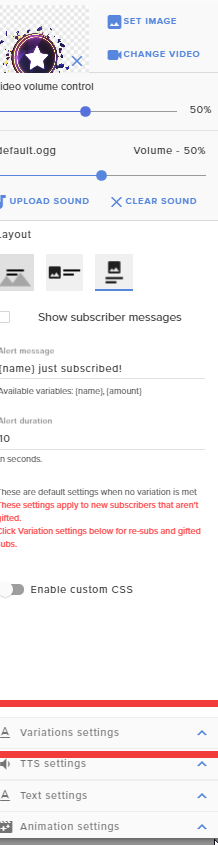 celest raft
at 88 followers, makes sense. ty!
 arctic bolt
twin sentinel
arctic bolt
twin sentinel
Below are the TTS settings for the default alert @lean quiver
arctic bolt
No se correo de paipal
lean quiver
@twin sentinel Yes. We are on the same page. I went to Variation Settings and just now removed the two variation settings I had there. The issue I am still seeing is that the alert is still announcing both the Action and the Message
twin sentinel
Have you disabled the TTS and announce action in the TTS settings?
lean quiver
I have not
If I do, then it doesn't announce anything.
Is it possible to have TTS for only the Action?
twin sentinel
Afaik, no.
lean quiver
Bummer.
I appreciate your quick help. I'll kep playing around to see if I can make it work for me.
 hasty briar
it been so long since i have had to do this but how do you change the msg the bot says qwhen someone follows
twin sentinel
https://streamelements.com/dashboard/bot-modules > chat alerts
hasty briar
thx
 fallow oak
hey does anyone know what it means if my overlay is cut off in both preview and in the obs screen?
round brambleBOT
@fallow oak To add your overlays to OBS, add a new browser source in your scene. Paste your overlay URL in the browser source properties, set the dimensions to 1920x1080 (unless you changed them on the website) and check Shutdown source when not visible. https://youtu.be/KDvLynUqXI4
 keen canopy
hey guys, i bought a random cs go skin in gaules store, but i did not receive nothing. Can anyone help me ?
 jade remnant
you will need to speak to the streamer
keen canopy
Someone had the same problem e he said to write !pedido (it's portuguese) in the chat. When I wrote this, a bot sent a message to me and I came up here
jade remnant
whether you used channel point or loyalty points, neither system has any connection to your steam account (or whatever platform you have csgo on).
the items themselves are not stored on the SE site, you redeemed points so the streamer needs to transfer then item to you.
speak to the streamer so they can send it
 signal musk
Hey guys one question
Widget /command/ sfx all stuff in those channels can be used or they are there for people to show ? And can be copyrighted?
New here so confirming cause some of them did interest me haha
twin sentinel
They can be used, but they are not guaranteed to be copyright free, especially the sfx.
 unreal tree
Hey guys, got a question, is there any possibility to vote for subgames ?
So the bot can count votes for games so on ?
signal musk
They can be used, but they are not guaranteed to be copyright free, especially the sfx.
@twin sentinel
I am planning on some widgets and commands i would be fine right?
twin sentinel
From what I know, yes.
signal musk
Thank you benno !
 pulsar gulch
Hello, can I somehow export my mic settings and send them to someone ?
mortal dove
Yo is auto configuration any good for setting to stream. It set everything to max. 1080p. 6k bitrate ect
round brambleBOT
@mortal dove There are no "best settings".
Please understand that every setup will be very different.
Any guides or videos that claim otherwise are misinforming. Your best option is to start with a base and adjust as necessary.
You can run the OBS auto-configuration tool. To use the auto-config, click on the Tools menu in OBS, select Auto-Configuration Wizard and then just follow the on-screen directions.
You can use this tool to get baseline settings for your hardware and adjust as necessary from there.
Test, test, and test again. We are happy to offer suggestions for any issues you may be having afterwards, but not a list of settings.
Thank you 
round brambleBOT
@mortal dove Please provide a log from your last stream. To do this, in OBS go to Help > Log Files > Upload Last Log File and paste the link to the log file here.
 timber jungle
Hi there’s some kind of loading issue with the se merch tab
It halfway loads and then stops
I can’t do anything
round brambleBOT
@timber jungle Please provide your account ID found at the top of this page: https://streamelements.com/dashboard/account/channels This ID is public info and safe to share here.
 ripe zephyr
my stream gets up and running and crashes and i don't know why
round brambleBOT
@ripe zephyr Please provide a log from your last stream. To do this, in OBS go to Help > Log Files > Upload Last Log File and paste the link to the log file here.
 midnight plaza
Is there a way to select multiple layers and move them together?
midnight plaza
yes
strong kernel
Shift.
mortal dove
@strong kernel based on that what is causing bitrate to cause disconnects
 regal sapphire
When I select "text over image" the text is gone from the editor... ideas?
round brambleBOT
@regal sapphire Text not showing up over your alerts? Go to the Advanced Text Settings and set the top margin to 50, you can work your way to the right position from there.
 frosty cobalt
I need a donation box
round brambleBOT
@frosty cobalt New to StreamElements?
Check out our YouTube channel https://www.youtube.com/c/streamelements/videos
with tutorial videos from setting up the basics, to in depth details on how to use our product.
New to OBS? Here is a 4 step quickstart guide
https://obsproject.com/wiki/OBS-Studio-Quickstart
Want to learn even more? Here is an in-depth overview
https://obsproject.com/wiki/OBS-Studio-Overview
frosty cobalt
Im not new
 worldly condor
hey so im trying to stop the Media thing that you guys provide how do i turn that off
lament blade
I recently changed my name on twitch, and now i can't see my stats, help
regal sapphire
when i add a custom image does the image not show in the edit? just a blank box tight now
round brambleBOT
@lament blade If you changed your name on Twitch, please follow these steps:
- Visit https://streamelements.com/logout and then log in again by connecting with Twitch.
- On the right side of the dashboard page that opens, select Join under bot settings. If it says Part select that and then select Join to send the bot to the chat. Don't forget to mod the bot by typing
/mod streamelementsin your channel if you have not already. - Post your old and your new name here so that we can update your channel's chatstats tracking (must be done by staff).
 wanton lantern
how can i give my viewers points? and i cant find anything about that in the api either
lament blade
@lament blade If you changed your name on Twitch, please follow these steps:
- Visit https://streamelements.com/logout and then log in again by connecting with Twitch.
- On the right side of the dashboard page that opens, select Join under bot settings. If it says Part select that and then select Join to send the bot to the chat. Don't forget to mod the bot by typing
/mod streamelementsin your channel if you have not already.- Post your old and your new name here so that we can update your channel's chatstats tracking (must be done by staff).
@round bramble old name Tking4263, new name xAzsher
 wispy dirge
Hi, I need help with SE.Pay withdrawal.
round brambleBOT
@wispy dirge Please contact us via email for support with SE.Pay. You can use our contact form here: https://streamelements.com/contact Thank you.
 uneven steppe
hello i'm having a problem in the streamelements chat on my OBS. It just gets a white screen and I can't text him
round brambleBOT
@uneven steppe StreamElements on top of OBS > Logout > Login
wanton lantern
how can i give my viewers points? and i cant find anything about that in the api either
@wanton lantern
 silk ice
Hello, i am having an issue with the alerts when someone follows my channel on twitch it comes up for 1 sec and then it disappears
 random stag
Is there a way to edit a command using another command?
 shadow flax
I created my store and the timer is not working in my chat
 pine hamlet
Is there a way to have the streamelements bot call other commands?
I'm wanting to provide a few phone numbers for mental health support but would like it formatted nicer than the twitch. I'm hoping to have 1 command call multiple other commands, so I have the support lines for each country on their own line
strong kernel
The bot cannot trigger itself.
round brambleBOT
@random stag You can add, remove and make changes to custom commands in chat with !command/!cmd flags:
!command add (commandname) (commandresponse) - allows you **to add **a new custom command
!command remove (commandname) - allows you to delete a custom command
!command edit (commandname) (commandresponse) - allows you to edit an existing custom command
!command show (commandname) - allows you to see the raw response of a command before variables are used
!command options (commandname) -(flag) - allows you to change settings for an existing custom command
Valid flags for !cmd options include: -enable -disable -cd (number in seconds) -usercd (number in seconds) -cost (number) -level (number) -type (say, whisper or reply) -count (number)
Syntax example: !cmd options twitter -usercd 60 -type reply -level 250
@shadow flax Please ask your question in one helpdesk channel only. A support volunteer or StreamElements staff member will assist you as soon as they are available. Asking in multiple places will only result in confusion, not faster answers. Thank you for your patience.
shadow flax
Sorry
strong kernel
Let's see what happens when I drop the offline interval to 1 minute.
Looks like it's working fine.
 peak cove
the alert is duplicated, what can it be?
round brambleBOT
@peak cove Make sure to ☑️ “Shutdown source when not visible” for all browser sources (all OBS scenes). If using studio mode, uncheck “Swap Preview/Output Scenes After Transitioning.” Also keep in mind that sound can play from any overlay loaded in the browser (editor or launched). https://i.imgur.com/6bWXxjR.png https://i.imgur.com/yY0wcFl.png

 sage spruce
Hello
shadow flax
@strong kernel did you do that for me or did mine just start working on it's own
strong kernel
@shadow flax It's working, I only changed the offline interval to see it work faster.
shadow flax
hahaha I was like how the..... thanks I am going to change the offline back now if you think that is ok
strong kernel
I already put it back to 120.
shadow flax
you're AWESOME
sage spruce
Anyone know a possible solution for black overlays? 😛
round brambleBOT
@sage spruce To add your overlays to OBS, add a new browser source in your scene. Paste your overlay URL in the browser source properties, set the dimensions to 1920x1080 (unless you changed them on the website) and check Shutdown source when not visible. https://youtu.be/KDvLynUqXI4
@sage spruce The default resolution for StreamElements overlays (theme and custom) is 1920x1080. Please add them in OBS at their full resolution and use CTRL+F to fit to screen if necessary. You can then downscale your stream in OBS settings > Video if you'd like https://i.imgur.com/6bWXxjR.png
 potent sage
how do i get a key so i can stream?
round brambleBOT
@potent sage New to StreamElements?
Check out our YouTube channel https://www.youtube.com/c/streamelements/videos
with tutorial videos from setting up the basics, to in depth details on how to use our product.
New to OBS? Here is a 4 step quickstart guide
https://obsproject.com/wiki/OBS-Studio-Quickstart
Want to learn even more? Here is an in-depth overview
https://obsproject.com/wiki/OBS-Studio-Overview
round brambleBOT
@sage spruce OBS > Settings > Advanced > Scroll down > Enable or disable Browser Source Hardware Acceleration, depending on its current state > Restart OBS (This does not apply for OBS on Mac)
https://i.imgur.com/ggMe9ZE.png
 frosty totem
Need some help, no matter what I do I drop frames.. i7 7700k, GTX 1080, 16gb ram, 2tb SSD.. Streaming only in 720P 60FPS and I ran a log and it has no errors. I have no clue what to do.
sage spruce
eeeeeeeeey!
frosty totem
4500 bitrate, I've tried all the different servers, ran twitchtest, the works.
round brambleBOT
@frosty totem Please provide a log from your last stream. To do this, in OBS go to Help > Log Files > Upload Last Log File and paste the link to the log file here.
strong kernel
strong kernel
Follow the link in that section.
frosty totem
ive done all that.
my GF streams from the same network on her PC and she doesn't drop frames at all
both wired.
round brambleBOT
@frosty totem For the best OBS support, please join their Official Discord @ discord.gg/obsproject
 frank compass
round brambleBOT
frank compass
round brambleBOT
@frank compass To add your overlays to OBS, add a new browser source in your scene. Paste your overlay URL in the browser source properties, set the dimensions to 1920x1080 (unless you changed them on the website) and check Shutdown source when not visible. https://youtu.be/KDvLynUqXI4
lament blade
watchtime isnt working
round brambleBOT
@lament blade 10 minutes of watchtime are given to those in chat when the loyalty points are handed out (every 10 minutes). Therefore, loyalty must be enabled for watchtime to work properly.
There is no direct link between watchtime and all-time points.
It can’t be calculated from the amount of all-time points a user has because subs may earn points at a faster rate and !bonus all command increases all-time points for users in chat at that time.
Giving points to a single user does not affect all-time, only when giving to all in chat.
 split forge
why twitch followers not showing on chat when the follow
strong kernel
Chat alerts module in the Module section of your account.
 oblique marsh
So I am having issues with my alerts, They are working fine in the editor, but they arent actually showing up at ALL in the overlay itself (making them also not show up at all on my stream) I dont even know how to go about fixing this, is there someone that can look at it for me?
round brambleBOT
@oblique marsh You can test alerts via the Emulate bell on the lower left side of the Overlay Editor. Simply go to your Dashboard > My Overlays > pencil/edit button on the overlay. Make sure the Preview LIVE on stream option is on to see the alert in OBS/XSplit** https://streamable.com/vtulg9


 oblique marsh
Yea i have tested the alerts just fine
they work in the editor
they dont work in the actual overlay
like i said
Im live right now if you wanna come look ill be happy to show you
strong kernel
Please note the last sentence regarding seeing it in OBS.
oblique marsh
I have the actual overlay itself open in a window
and its not showing up there either
Cant blame that on obs 🙂
strong kernel
Not blaming OBS.
Please note the last sentence in the bot response regarding how to make the test appear outside of just the editor.
oblique marsh
Is there somewhere with more blond instructions on how to do that, since I obviously dont understand?
Although.. It shouldnt just be an editor issue, actual alerts arent showing up in stream either
Nevermind, the gif finally loaded
that box was already checked
And it still isnt working
strong kernel
Your alerts appear to be working fine. It seems like it's not properly added in OBS.
round brambleBOT
@oblique marsh To add your overlays to OBS, add a new browser source in your scene. Paste your overlay URL in the browser source properties, set the dimensions to 1920x1080 (unless you changed them on the website) and check Shutdown source when not visible. https://youtu.be/KDvLynUqXI4
oblique marsh
Ok, well i have the actual window open and they arent.
The alert you just went, with the overlay open made no sound
My Kappagen is working fine
strong kernel
Which overlay do you have open?
oblique marsh
but the actual alerts are not
oblique marsh
"streamlabs imported alertbox"
That is the one that has my tips/foillows/subs/raids/ etc etc
strong kernel
Yes, I just tested that alertbox myself and it went off and made sound as expected.
oblique marsh
Then why didnt i hear it? If i actually have the physical overlay itself open?>
strong kernel
What browser?
oblique marsh
Chrome
But i also re added it to my obs, and it was working fine yesterday.
Even after re adding it into my obs it still isnt working
That one worked
That is the first though
strong kernel
I can confirm your alerts are working:
oblique marsh
Yes, like i just said, "that" one worked. The others didnt.
I swear im not stupid. I dont know what wasnt working but they weren't
strong kernel
Nothing is preventing your alerts from playing. Nothing has been changed. I simply took your overlay and put it into my own OBS, then ran the test.
oblique marsh
Ok thanks, ill just get help from someone else later.
 solid lotus
hi i need help
 sand whale
wuold anyone in here be able to help me setup in obs to be able to get completely set up for streaming with only one mintor?
 peak storm
Hi, can SE trigger commercial breaks? 🤔
round brambleBOT
@solid lotus Welcome to the helpdesk! Please let us know how we can assist you today and a support volunteer or staff member will assist you as soon as they are available. Thank you for your patience.
solid lotus
yes i need help with my !watchtime command not working
round brambleBOT
@solid lotus 10 minutes of watchtime are given to those in chat when the loyalty points are handed out (every 10 minutes). Therefore, loyalty must be enabled for watchtime to work properly.
There is no direct link between watchtime and all-time points.
It can’t be calculated from the amount of all-time points a user has because subs may earn points at a faster rate and !bonus all command increases all-time points for users in chat at that time.
Giving points to a single user does not affect all-time, only when giving to all in chat.
random field
@solid lotus yeah watchtime is bugged atm happened to me as well
And a few others I know
round brambleBOT
@grizzled steeple
Read and follow our server rules:
- We do not tolerate toxicity! Treat the community team, staff and all members with respect.
- No advertisement or channel promotion, anywhere on the server.
- No NSFW/NSFL
- No unsolicited DMs to server members
Make sure to read #welcome in any server you join.
 safe ginkgo
I cant remove my account, say incorrect username but the username is correct
scarlet tiger
Did you renamed your account?
safe ginkgo
thnx I can already delete it
scarlet tiger
safe ginkgo
it did not recognize the username
 dense heath
Hey idk if this is the correct channel, I am trying to set up a custom bot command but I am out of ideas.
I am trying to make a command that would allow a user to "eat" X amount of loyalty points, so the command would be like
"!eat X"
and the response is
"${user} just ate ${1} ${pointsname}! YUMMY! ${user} has ${user.points} ${pointsname} left to eat"
I can't find a way to remove the X amount of points from the user... There is no way to set up the cost of the command to ${1} argument sadly
dense heath
Alright well there goes that idea :c
 green ocean
guys how many payment partner options are there available ? I only see paypal
round brambleBOT
@green ocean SE.PAY is available for streamers who are at least 18 years old, with bank account under their name in one of the following countries and have at least 101 follower (Twitch) / 101 subscribers (YouTube):
Austria, Belgium, Czech Republic, Denmark, Finland, France, Germany, Ireland , Italy, Netherlands, Poland, Portugal, Slovakia, Spain, Sweden, Switzerland, United Kingdom, United States.
If you meet these criteria and don’t see SE.Pay, let us know.
For information on SE.Pay payment methods, their fees and settlement times see https://streamelements.com/dashboard/tipping/fees.
green ocean
ah well i dont live in either of those countries so SE.PAY is not an option........
I wish there were more methods like G2A pay or local payment facilitators(Indian) or google pay
 solar berry
i need help linking my twitch to obs. im streaming from console