#helpdesk-twitch
1 messages · Page 749 of 1
 shy obsidian
 round brambleBOT
@shy obsidian Currently renaming the bot fully works with OBS.Live.
You can follow this video guide to set it up: https://discordapp.com/channels/141203863863558144/494513233416421386/561516184718278676
If you don't want to use OBS.Live and want to stick with Ground Control, please let us know your Twitch username.
 warped radish
hey guys, i have a custom font that i cant use on here that i could do before. how do i do it?
round brambleBOT
@warped radish Google Fonts
More than 900 google fonts are supported at this time. You can preview them here: https://fonts.google.com/
Custom Fonts
Steps:
- Install the font on the streaming PC or choose a pre-installed windows font.
- In the overlay widget settings, select Text Settings
- Click on Enable Custom Font
- Type the name of the font as it appears in the windows font directory (This is usually
C:\Windows\Fonts)
Note: After installing fonts, the browser and OBS must be restarted for the font to appear.
 hexed thistle
Why do I see a different number of followers in streamelements and on twitch? Can I this syncsomehow? Which information applies to the SE.pay permit? Thank you
warped radish
it didnt work for me because this is a unique widget
 strong kernel
Then you'll need to manually change the coding.
strong kernel
You'd have to ask the creator.
 steep fog
i cant close my account still 😦
hexed thistle
@strong kernel last question in email please 🙂
 wraith gazelle
Hello gorgeous and handsome peoples! I would love to request a name change for ma stats if you don't mind. All steps followed up to admin name change part. I'm uncertain if it is a special kind of fan dance and honestly, I prefer the mystery of just my own imagination.
Previous name: OldAngryGrump
New name: OldAngryGray
 modern cave
hello i have an issues where people are getting timed out and messages deleted for no reason
the only mod i have is streamelements
warped radish
worked it out, thanks
 novel marten
Hey im trying to download a theme and cant figure it out
 smoky rampart
anyone else having problems with the bot? had this issue for like 1 week now, commands or timer messages nothing.
 quick sable
same issue as well a friend of mine his streamelements isnt working
smoky rampart
I moded the bot a month ago, and unmoded it and re moded it, part channel and join chanel mute and unmute, anything you can think of, still not working
quick sable
did all that and still not working i have tried everything that i can think of
smoky rampart
someone must know how to fix this
modern cave
streamelements is muting people whenever they do a !command in my chat anyone know why
quick sable
thats what we are trying to figure out
modern cave
my command works but its just muteing them for 10 mins
quick sable
so maybe thats what is causing his to not work
novel marten
mine wont either
smoky rampart
he muted himself maybe?
novel marten
like i have a discord and i did the comand several times wont work deleted it and remade it etc.
quick sable
he checked that its all u muted
novel marten
this is my first time making it so i dont know if i did something wrong when making it or what
smoky rampart
mine worked for a brief time
like 5 messages
then it stoped
but that was like "21/08/2020"
some people said it can be slow, but can't be this slow
novel marten
how long does it take to start working?
smoky rampart
chat commands should work in offline mode too shouldn't it? just making sure
novel marten
yes pretty sure
 random field
how do i get streamelements in my twitch chat? its been a bit since i used the bot and its all changed
smoky rampart
I don't know, thought I knew, but I must be doing something wrong since I've been live for 12 mins and bot still ain't said anything
random field
F
im trying to help someone else with adding streamelements i forgot how to do it lol
round brambleBOT
@random field New to StreamElements?
Check out our YouTube channel https://www.youtube.com/c/streamelements/videos
with tutorial videos from setting up the basics, to in depth details on how to use our product.
New to OBS? Here is a 4 step quickstart guide
https://obsproject.com/wiki/OBS-Studio-Quickstart
Want to learn even more? Here is an in-depth overview
https://obsproject.com/wiki/OBS-Studio-Overview
random field
Thanks ill watch it
smoky rampart
That was a bot xD
novel marten
lol
 ionic wedge
Hello there, I want to change my streamelements bot name, how I do that? Can't find the option in ground control 😦
 modest rune
Accidentally created multiple accounts for my Twitch and Youtube channel separately and I would like to put them together if possible under my Youtube channel.
smoky rampart
we all got questions, none is having any answers xD
random field
they asleep lol
novel marten
true
modest rune
It's just a first come, first serve whenever they're available. I'm in no rush 🙂
random field
haha yeah i just woke up just wanna figure out streamelements getting into twitch chat
novel marten
yeah it wont even show up for me
round brambleBOT
@modern cave Please provide a proper screenshot with the issue visible. If not sure how to take a screenshot, you can check here: https://www.take-a-screenshot.org/
@novel marten To add your overlays to OBS, add a new browser source in your scene. Paste your overlay URL in the browser source properties, set the dimensions to 1920x1080 (unless you changed them on the website) and check Shutdown source when not visible. https://youtu.be/KDvLynUqXI4
smoky rampart
is this a good enough photo mr bot
how can one take a screenshot of something that doesn't happen
xD
novel marten
hey thats my problem
random field
yeah a few of us are having the same problem
smoky rampart
take a screenshot yet the bot removed my screenshot
what was the point in telling me to that then xD
random field
the bot is useless
novel marten
lol
strong kernel
@smoky rampart You weren't the one being told.
random field
oh someones here 🙂
smoky rampart
lol
novel marten
mr bot man didn't like my joke
 hazy marsh
hi
smoky rampart
just give us a heads up Nethyr, what should we do in our situation?
strong kernel
Please be patient. Thank you.
smoky rampart
ok, been patient for like 2 weeks, will continue then
hazy marsh
hello, I have a 404 error on my chatstats following a change of nickname on twitch
round brambleBOT
@smoky rampart If your commands recently stopped working and you're using OBS.Live and a custom bot name do the following:
- In OBS.Live, click on the hamburger menu (three stripes) at the top left of your activity feed
- Click on Stream Settings > Custom bot name
- In the Custom bot name field select Set custom bot name, not your already existing username (with capital letters). Note: If you already connected an account that way, the third entry will show as the account name (see image https://i.imgur.com/sO7fWOX.png).
- Scroll a bit down and click on the purple Connect Custom Bot Account button
- Log in as usual and Authorize the custom bot name
- Back in the Activity feed, click on the Send Test Message button and check if your custom bot name starts working again

@hazy marsh If you changed your name on Twitch, please follow these steps:
- Visit https://streamelements.com/logout and then log in again by connecting with Twitch.
- On the right side of the dashboard page that opens, select Join under bot settings. If it says Part select that and then select Join to send the bot to the chat. Don't forget to mod the bot by typing
/mod streamelementsin your channel if you have not already. - Post your old and your new name here so that we can update your channel's chatstats tracking (must be done by staff).
smoky rampart
none of these apply, not using custom name for the bot, and I didn't change my name recently, and he is present on stream he is just shy
🙂
strong kernel
@novel marten
strong kernel
@smoky rampart I didn't trigger the response for no reason.
And please pay attention to who is being @ with each response. Not every response is for you.
smoky rampart
I didn't setup a custom name tho don't even know how to
round brambleBOT
@smoky rampart Currently renaming the bot fully works with OBS.Live.
You can follow this video guide to set it up: https://discordapp.com/channels/141203863863558144/494513233416421386/561516184718278676
If you don't want to use OBS.Live and want to stick with Ground Control, please let us know your Twitch username.
random field
where is the bot settings?
hazy marsh
Genetictic and now Genetic_live
random field
for join channel
smoky rampart
how do I disable custom name? since I don't even know how i possibly did that sorry
strong kernel
Follow the bot response to see where it's set up, and disable the option.
 tepid onyx
How do i find my user name. I am trying to shut down one of my stream element accounts and it keeps saying invalid username
strong kernel
@tepid onyx If you're trying to merge channels together, deleting isn't what you want to do. Is that what you're trying to do?
smoky rampart
oh my goodness he is alive, after 2 weeks he is alive
tepid onyx
Yeah some how my twitch and youtube both got an account I've set up the one for my twitch but havnt done anything for the youtube one but cant merge them
smoky rampart
thanks @strong kernel
round brambleBOT
@tepid onyx Account Merging - Please note:
- Merging accounts only allows faster ways to switch between accounts
- Merging accounts does not allow data sharing between accounts - different streaming platforms, different type of events
- Merging accounts allows duplicating/sharing overlays between the accounts
If you understand the limitations of merging and want to proceed, please find the JWT tokens (!jwt) from both accounts you want to merge and you will be directed to DM them to a staff member.
novel marten
Where is the bot settings for join chanle
strong kernel
@novel marten https://streamelements.com/dashboard

StreamElements
The Ultimate All in One Platform for Streamers
random field
@novel marten i found it its in dashboard on the right middle
novel marten
ok thx
smoky rampart
@strong kernel thanks for the help, problem solved
tepid onyx
Im just wanting to have 1 account manage both my youtube and Twitch according to that merging them wont do that
strong kernel
@tepid onyx Nothing in StreamElements will do that. StreamElements does not have multistreaming support.
smoky rampart
I didn't know of that debug command
novel marten
Thank you for all the help
random field
@tepid onyx 2 separate bots for that
tepid onyx
So i have to remake all my overlays and commands two times on stream elements then copy two links into my obs that doesn't make since
strong kernel
Copying two links won't provide the result you're looking for. StreamElements does not have multistreaming support. It will not queue up alerts for multiple platforms. If you add URLs for both Twitch and YouTube alerts, they will play over each other.
tepid onyx
Thats what im sayimg i have to may my over lays on both accounts and run two different URLs though my obs?
modern cave
already fixxed it had to turn off a spam fliter
strong kernel
Even if you do, they will not play nice with each other. You cannot achieve what you're looking to do with StreamElements.
tepid onyx
Okay then how do i shut my account down then it still shows invalid username when i type it in
strong kernel
Type in the username you had when you connected with StreamElements, in all lowercase.
 hybrid pike
is it possible to use a url based scene on stream elements?
strong kernel
That's the entire backbone of our service.
round brambleBOT
@hybrid pike New to StreamElements?
Check out our YouTube channel https://www.youtube.com/c/streamelements/videos
with tutorial videos from setting up the basics, to in depth details on how to use our product.
New to OBS? Here is a 4 step quickstart guide
https://obsproject.com/wiki/OBS-Studio-Quickstart
Want to learn even more? Here is an in-depth overview
https://obsproject.com/wiki/OBS-Studio-Overview
hybrid pike
well, shoot, thanks i guess
 twilit tusk
My bot keeps sending duplicate messages, any idea on how to fix it?
 lament blade
are you able to connect two accounts (YT and Twitch) to one stream elements acc
strong kernel
@lament blade Yes, but the only benefits of doing so are swapping between dashboards quickly and copying overlay designs between them. They do not share any data or configuration and all alerts, etc. remain separate.
round brambleBOT
@twilit tusk Please provide a proper screenshot with the issue visible. If not sure how to take a screenshot, you can check here: https://www.take-a-screenshot.org/
 shadow mural
@lament blade asked the question I was about to ask dangit
 autumn cargo
Is there a way to generate a discount code or give gift cards?
for streamelements merch**
strong kernel
shadow mural
guess I should start with youtube first before like switching to twitch cause if you get a huge following on youtube then you can make twitch videos sort of like what markiplier does
 shrewd anvil
Hello, I’m having. An issue re activitijng my chatbot after changing my screen name and being unable to connect to my chat via streamlabs obs
round brambleBOT
@shrewd anvil If you changed your name on Twitch, please follow these steps:
- Visit https://streamelements.com/logout and then log in again by connecting with Twitch.
- On the right side of the dashboard page that opens, select Join under bot settings. If it says Part select that and then select Join to send the bot to the chat. Don't forget to mod the bot by typing
/mod streamelementsin your channel if you have not already. - Post your old and your new name here so that we can update your channel's chatstats tracking (must be done by staff).
shrewd anvil
Any idea how to resolve?
round brambleBOT
@shrewd anvil We're not able to troubleshoot issues with using our overlays in StreamLabs OBS (SLOBS) as we don't have the tools to support their software. We recommend using OBS Studio or OBS Studio with our plugin OBS.Live.
shrewd anvil
My old name is kingjuss605 and my new name is kingjusss
The bot is already a mod on my account
strong kernel
@feral sedge 🖱️ ➡️ #🇵🇹︱português
lament blade
Hello i am trying to delete my streamelements account and it keeps saying invalid username?
when i put my twitch username?
strong kernel
@lament blade If you're trying to do it to merge channels together, you don't want to delete, it'll just make things take longer.
lament blade
uhm i don't wanna use streamelements tho?
strong kernel
Just making sure. You should type the username you had when you first connected, in all lowercase.
strong kernel
What was your Twitch username back in September 2018?
lament blade
I don't think so is there anyway i could see what my username was when i created the account?
shrewd anvil
Issue is resolved @round bramble thanks so much!
lament blade
So can anyone help or am i stuck with having the account
strong kernel
There's no way for us to look up your old username.
lament blade
can you delete my account then?
strong kernel
I do not have the ability, no.
lament blade
Who does?
strong kernel
The devs.
lament blade
Do i have to email them my problem?
strong kernel
What have you tried to enter?
lament blade
All of my past usernames
strong kernel
I'm not sure which of these were used, but have you tried "typicaltea" or "typicalteatv?"
strong kernel
Dumb luck.
lament blade
yeah still doesnt work
strong kernel
@lament blade Please provide the following info to me in a DM:
Email:
Account ID:
JWT Token:
Reason for closure:
Error when using the closure form:```Ok
strong kernel
@lament blade Did you not receive any error when attempting to use the closure form? "Invalid username" sounds like what you saw?
lament blade
Oh yeah mb lemme edit it sorry
 regal flame
is there still a bug?
with the se-pay?
it has been stuck on pending for 4 weeks now
legit cant get my moneyt
 ionic kelp
@regal flame it's not a bug and pinned messages.
regal flame
where is the pinned msg
ionic kelp
📌 in top right.
 tepid quartz
Hey there! I know how to set keywords for a streamelements bot command using the dashboard interface, but if I only have mod access in chat (streamer is busy and doesn't know how to/care to send invite to access dashboard) is there a way using commands to set keywords/alias such that words not containing ! prefix will still trigger the bot command?
strong kernel
There's no way to set keywords or aliases from chat, no.
round brambleBOT
@tepid quartz You can add, remove and make changes to custom commands in chat with !command/!cmd flags:
!command add (commandname) (commandresponse) - allows you **to add **a new custom command
!command remove (commandname) - allows you to delete a custom command
!command edit (commandname) (commandresponse) - allows you to edit an existing custom command
!command show (commandname) - allows you to see the raw response of a command before variables are used
!command options (commandname) -(flag) - allows you to change settings for an existing custom command
Valid flags for !cmd options include: -enable -disable -cd (number in seconds) -usercd (number in seconds) -cost (number) -level (number) -type (say, whisper or reply) -count (number)
Syntax example: !cmd options twitter -usercd 60 -type reply -level 250
 tight wedge
this has probably been asked a thousand times. is there a library that streamelements has of gifs/sounds to use for alerts?
strong kernel
There is not.
Only what's provided in the Themes gallery.
However, for sound effects, there's the #426825216887619594 channel here.
tight wedge
thanks Neth
steep fog
I cant close my account. it say invalid user name can anyone help?
strong kernel
Please type the username you had in use when you first connected with StreamElements, in all lowercase.
steep fog
well i logged in with twitch so it didnt give me a choice on username
strong kernel
As in, the Twitch username you had at the time.
 fathom zodiac
Hey! curious to know, I used to get StreamElements to email me my stats after a stream was completed for that day. Would anyone happen to know how I can enable that again?
 dull flicker
Hello I copy my overlay into the obs but the whole thing doesn't come up.
only one part
round brambleBOT
@dull flicker The default resolution for StreamElements overlays (theme and custom) is 1920x1080. Please add them in OBS at their full resolution and use CTRL+F to fit to screen if necessary. You can then downscale your stream in OBS settings > Video if you'd like https://i.imgur.com/6bWXxjR.png

 viscid estuary
Quick question, when creating an alert - what is the difference between community gift - vs regular gif.
Would community gift just be from an anonymous sender?
strong kernel
Community gift is the randomly distributed gift option. Regular gifts typically have a specific target in mind.
viscid estuary
Ah, okay
dull flicker
wow thank you so much yall are amazing
viscid estuary
So there is then only one alert style for gifting, vs to where you can have multiple layers/tiers for gifting
strong kernel
Right. A regular gift is always to a single person. Community gifts can be packs of however many they want to pay for. So, you can make more epic alerts for larger purchases.
 zinc ridge
Hey can I have some help
round brambleBOT
@zinc ridge Welcome to the helpdesk! Please let us know how we can assist you today and a support volunteer or staff member will assist you as soon as they are available. Thank you for your patience.
viscid estuary
I get it now
zinc ridge
I need help with the !que command
strong kernel
There is no default !queue command.
zinc ridge
O
 grand stream
Please remove my account.
zinc ridge
But I’m trying to get a que for Fortnite but subs get priority is there a chance I could do that?
strong kernel
You'll need to find a community created/third party solution for that. We don't have a queue system.
 verbal apex
Hi, my chat stats are not loading - how should I go about having it resolved?
round brambleBOT
@verbal apex If you changed your name on Twitch, please follow these steps:
- Visit https://streamelements.com/logout and then log in again by connecting with Twitch.
- On the right side of the dashboard page that opens, select Join under bot settings. If it says Part select that and then select Join to send the bot to the chat. Don't forget to mod the bot by typing
/mod streamelementsin your channel if you have not already. - Post your old and your new name here so that we can update your channel's chatstats tracking (must be done by staff).
 quasi hull
hello I have an issue with the game capture sometimes not working
grand stream
Im attempting to delete my account, and you will not accept my request(Invalid username) which was submitted correctly with the JWT input properly. I want all API connections linked with my twitch removed immediately. This is my last request, and the 3rd attempt on all social platforms. Remove everything related.
verbal apex
@verbal apex If you changed your name on Twitch, please follow these steps:
- Visit https://streamelements.com/logout and then log in again by connecting with Twitch.
- On the right side of the dashboard page that opens, select Join under bot settings. If it says Part select that and then select Join to send the bot to the chat. Don't forget to mod the bot by typing
/mod streamelementsin your channel if you have not already.- Post your old and your new name here so that we can update your channel's chatstats tracking (must be done by staff).
@round bramble done!
old name: thisischristina_
new name: gameswithchris_
zinc ridge
@strong kernel ?
strong kernel
@grand stream I don't see any prior contact from you on any platform. Please try entering the username you had when you first connected with StreamElements, in all lowercase letters.
@zinc ridge I'm sorry, but we do not have a queue system.
strong kernel
That you'll need to figure out on your own.
 uncut mauve
How am I able to see who joins a stream
strong kernel
@uncut mauve The chatters list? It's not a service we provide, at least.
grand stream
@strong kernel How about just delete my account entirely and problem solved. Im done.
strong kernel
Only developers have the ability to do so. If you're still having difficulty with the form, please DM me with the following information and I will open a ticket for you:
Email:
Account ID:
JWT Token:
Reason for closure:
Error when using the closure form:```
That being said, I did find a tweet you sent and I would like to point out that StreamElements does not have any control over or ability to affect a PS4 controller.Listen bud, obs.live messed up a lot of things, I asked for support received none. This is my 4th attempt pushing to remove my account entirely from the API. This is my final attempt. Remove it.
Bye
strong kernel
I cannot delete your account.
I need to open a ticket, which can only be done with the requested information above. You need to provide that information, or it cannot be done.
 bold venture
Hello, i want to make a command that returns a mp3 sound when inputed on the chat of my stream, can you guys help me with that ?
strong kernel
@bold venture https://www.youtube.com/watch?v=BXGMjHqwVFE

The StreamElements Stream store lets your viewers redeem Loyalty points (collected by watching your stream) to get special perks, fun sounds, and even game keys and discount codes!
The StreamElements Stream store is part of the Loyalty system, helping you to engage with your ...
bold venture
@strong kernel thanks
 gritty folio
hi i am trying to get the stream summary to my email its not sending to me anymore how can i fix that
 gleaming loom
Does anyone know how to Edit social media in superthemes on streamelements? What do i have to edit? Want to add my YouTube/FB/Instagram and Discord names to my overlay.
verbal apex
chat stats page loaded but the data did not load, is there anything else that i should be doing?
wraith gazelle
Bit of an odd one with Kappagen. It shows up the emotes outside of FFZ/BTTV options for me. When I choose to select emotes for explosion it is just a blank arse box. I DID change my name recently but have logged out / in everything about 35 times. So regular emotes work fine but now FFZ/BTTV emote do not show up. Any ideas?
strong kernel
@wraith gazelle Assuming the command is enabled, !emotes update
 peak storm
Hi. Is there a way through chat to display the list of aliases for a given command? 🤔
lament blade
guys can you explain to me how the channel points are activated because it says to me update your loyalty settings

 marsh geode
Is there a way to connect my youtube overlay on twitch? I have a youtube account and didn't know you can add a channel. So today I created a twitch account. So now I can't add the twitch channel to my youtube because it will say ,"Channel Claimed." I just want to import an overlay into the twitch from my youtube or simply connect both together.
or should I delete the twitch channel to add to the youtube?
 flint vine
round brambleBOT
flint vine
round brambleBOT
@marsh geode Account Merging - Please note:
- Merging accounts only allows faster ways to switch between accounts
- Merging accounts does not allow data sharing between accounts - different streaming platforms, different type of events
- Merging accounts allows duplicating/sharing overlays between the accounts
If you understand the limitations of merging and want to proceed, please find the JWT tokens (!jwt) from both accounts you want to merge and you will be directed to DM them to a staff member.
marsh geode
If you merge accounts, but can't share data....does that mean in an overlay you can't add say twitch follow alerts on an overlay done on a youtube account?
I want to add the overlay I have on my youtube, just add follower alerts, instead of subscribers( youtube )
wraith gazelle
@strong kernel it worked! I hope you get a raise. Thank you for helping me ❤️
ionic kelp
@marsh geode not possible. Everything is stored separately so any data from one platform won't work on another.
marsh geode
@ionic kelp can't you copy an overlay from another channel though?
ionic kelp
You can but if it includes platform specific widgets then that won't work.
ionic kelp
@lament blade pinned messages.
lament blade
How do I set up stream elements?
round brambleBOT
@lament blade New to StreamElements?
Check out our YouTube channel https://www.youtube.com/c/streamelements/videos
with tutorial videos from setting up the basics, to in depth details on how to use our product.
New to OBS? Here is a 4 step quickstart guide
https://obsproject.com/wiki/OBS-Studio-Quickstart
Want to learn even more? Here is an in-depth overview
https://obsproject.com/wiki/OBS-Studio-Overview
 ripe bane
download ground elements on a mac
ionic kelp
Not possible.

 umbral fog
Hello
ionic kelp
Um..... 1 sec
ripe bane
😮
ionic kelp
Nor sure what you mean by that.
umbral fog
Like how do i add transmission for when i switch the overlays like from starting to be right back for example
wait what
how did i write transmission
Bruh i swore i wrote transittion
transition*
Oh ok
but can i add my own transition
Oh ok
what do i press to change it
like custom
Wdym
yea i did that
but how do i add it in
 meager sentinel
Any known fix for a broken "Donate" button? When it's pressed it goes to a 404'd page
 past pike
hello i am trying to set up a custom chatbot name and cant quite figure it out
i am thinking my issue might stem from the overlay/ alert requirement
round brambleBOT
@past pike Currently renaming the bot fully works with OBS.Live.
You can follow this video guide to set it up: https://discordapp.com/channels/141203863863558144/494513233416421386/561516184718278676
If you don't want to use OBS.Live and want to stick with Ground Control, please let us know your Twitch username.
 vernal sierra
Why does StreamElements show me this when I know that no-one wrote in chat in my last stream? Where does this figure come from?
Even the stats about how many viewers I had doesn't match with what Twitch's stream report says.
 twin sentinel
12 unique chatters means 12 different unique visitors to your stream
 viscid oriole
Hello I think I have problem with Se.Pay my first donation was at 23. August my bank account was already approved a week ago and since then I still can't withdraw my funds. Thanks
 zenith widget
Check pinned messages here
viscid oriole
@zenith widget thanks
vernal sierra
@twin sentinel thanks.
round brambleBOT
@quick trench
Read and follow our server rules:
- We do not tolerate toxicity! Treat the community team, staff and all members with respect.
- No advertisement or channel promotion, anywhere on the server.
- No NSFW/NSFL
- No unsolicited DMs to server members
Make sure to read #welcome in any server you join.
gleaming loom
Does anyone know where i can edit social Media names for the overlays? What Layout ist it?
twin sentinel
Select the layer and edit the message in the settings.
gleaming loom
Is it the layer called "Type social Media Name Here"? Ive edit it but it doesnt saved that
ionic kelp
Pinned messages in here.
round brambleBOT
@prime haven To reset goals:
- from the Overlay Editor > Session data on top right (monitor symbol) > Goals tab > reset progress of desired goal
- from the Dashboard > Activity feed on the left > Widget data on the right > Goals tab -> reset progress of desired goal
Note: Goal widgets (progress) only counts up and doesn't go down automatically, if you loose followers/subs.
 glass lynx
I didn't join stream elements why did I receive a welcome email?
 untold crest
@glass lynx You probably wanted to tip an user who has chargeback protection enabled and for that all users have to be logged in with their account.
glass lynx
Ah, ok that makes sense I tipped someone today that was having issues with chargeback. Thank you!
 willow tinsel
hey so im still having problems getting StreamElements to work on my chat can anyone help please
untold crest
I just went to your channel and I see that your bot seems to be working
It replied to my !commands and !tip
 desert rock
untold crest
desert rock
untold crest
@desert rock If you are referring to have chat for you - I recommend OBS.Live. And about alerts: https://www.youtube.com/watch?v=8LVRd2X4HvU
 sonic crater
There was a Streaminfo on the buttom, were i always update my title and game etc. now it disappeard and i cant find it anymore
round brambleBOT
If you are not seeing the OBS Twitch integrations and have OBS.Live installed, please follow these steps:
- Make sure you are on the latest and greatest version of OBS.Live
- Exit OBS (make sure OBS is not running)
- Delete
%appdata%\obs-studio\plugin_config\obs-browser\obs_profile_cookies - Start OBS.Live
- Settings > Stream > Disconnect > Connect
sonic crater
@zenith widget not there+
 jade remnant
settings > stream
disconnect then reconnect your account
sonic crater
@jade remnant there is no "disconnect" under setting > stream
just stwitch platttform?
jade remnant
are you using stream key?
 sick solstice
Hello there.. Im having a problem with the Chat Bot
For a few days now the chat bot has not responded to any commands or done any live notifications
and no timers are working
i have already tried Parting/rejoining and muting/unmuting
 prime haven
ok so apperently its not just the overlay...
it says i only have 4 followers
and yet
i have 22
ionic kelp
It doesn't track before joining.
prime haven
well
thats kina dumb, is there a way i can just add 18 more followers so that my overlys can be accurate?
and just so ye know that i aint bluffing
untold crest
@prime haven https://streamelements.com/dashboard/session
If you are referring to goals
But your aggregates should populate automatically
lament blade
really needing some help with the alertbox if anyone is up and has a second
untold crest
Can you elaborate please @lament blade ?
sick solstice
Got any clue why the bot would be completely not working Ix?
untold crest
I just went to your channel @sick solstice and send !commands message
Bot replied to me
untold crest
You can also mod the bot so if you have links removal, it will be able to send them
Please state channel name, please.
round brambleBOT
@sick solstice If your commands recently stopped working and you're using OBS.Live and a custom bot name do the following:
- In OBS.Live, click on the hamburger menu (three stripes) at the top left of your activity feed
- Click on Stream Settings > Custom bot name
- In the Custom bot name field select Set custom bot name, not your already existing username (with capital letters). Note: If you already connected an account that way, the third entry will show as the account name (see image https://i.imgur.com/sO7fWOX.png).
- Scroll a bit down and click on the purple Connect Custom Bot Account button
- Log in as usual and Authorize the custom bot name
- Back in the Activity feed, click on the Send Test Message button and check if your custom bot name starts working again
lament blade
@untold crest im coming from slabs so i get the general idea. i put in the URL, centered it in the editor but on my end its cut off quite a bit. i centered it and moved it around, and tried a few sizes. nothing. i get the left edge of each alert.
untold crest
@sick solstice and bot is not modded
 supple token
Hi everyone. The alerts for new followers works on stream but the only notification I get is in chat. Is there any way to get the alert to come up while I'm playing a game?
untold crest
@lament blade OBS has default browser source set to 800x600, please use actual overlay size (in most cases it is like 1920x1080)
lament blade
tried that
supple token
You need to add a browser source to your OBS scene
@lament blade Thanks
untold crest
@sick solstice so in that case it is in GroundControl. I would recommend changing it there
Same process
@lament blade So if your browser source is 1920x1080 click on it in sources list and hit CTRL+F
sick solstice
Where do i find GroundControl?
untold crest
F to pay respects
@sick solstice on streamer's PC as custom bot name is served by desktop app
@sick solstice I hear that, but Streamer either has OBS.Live or Ground Control as this is the soft that only can trigger custom bot name to true
lament blade
@untold crest k it worked now that you told me, you must be magic cause i tried that earlier lol thx boo
untold crest
Glad I could help and use some voodoo-mental stuff 😉
 obsidian maple
My custom bot doesn't work anymore. If I switch it in OBS Live and use Streamelements BotName, all commands work fine. If I switch it to the Broadcasters name to use emotes and so on, it doesn't work with any commands. Someone knows whats going on?
round brambleBOT
@obsidian maple If your commands recently stopped working and you're using OBS.Live and a custom bot name do the following:
- In OBS.Live, click on the hamburger menu (three stripes) at the top left of your activity feed
- Click on Stream Settings > Custom bot name
- In the Custom bot name field select Set custom bot name, not your already existing username (with capital letters). Note: If you already connected an account that way, the third entry will show as the account name (see image https://i.imgur.com/sO7fWOX.png).
- Scroll a bit down and click on the purple Connect Custom Bot Account button
- Log in as usual and Authorize the custom bot name
- Back in the Activity feed, click on the Send Test Message button and check if your custom bot name starts working again
obsidian maple
Awesome! That works fine. Thanks for help
 timid sun
morning all
sick solstice
Okay Different Streamer
Different Problem
Set title and Set Game now return @sick solsticeChef, something went wrong while trying to update the title.
(setgame replaces title with game)
Bot is modded.. OBS.live is not being used.. and Part/mute and unparting/mute has been tested
timid sun
how can i execute a chat command with a timer?
sick solstice
@timid sun You want to make a timer? Thats just in Timers section under "Bot" on the dashboard
untold crest
@sick solstice I would suggest relogin to StreamElements as credentials may be not synced with Twitch.
timid sun
i made the timer, its displaying the chat command but not executing the command
untold crest
Oh. You need to write actual command response This is a test, not their name !test
timid sun
well i want to display quotes, automatically every quarter hour, i put 100 quotes into my chat
the !quote command randomizes the quote to display
untold crest
So in response of timer you can type ${quote}
And it will print a random quote to chat
timid sun
thanks! thats what i was looking for
sick solstice
Streamer relogged into SE and the bot still returns same response Ix
 crisp narwhal
What is the command cooldown for mods? It seems to run 10 times faster than global/user. I'm writing commands that are 'randomly' triggered by regex to give annoying replies ever half hour but of course the mod cooldown ruins it. Thanks.
 normal igloo
If I remember rightly I don't believe mods get accepted by command cooldowns 
crisp narwhal
@normal igloo I've run tests and a 900 cooldown seems to work for 90 seconds, etc, so during testing I thought cooldowns were in 10ths of seconds, and somebody I've made a mod was getting the same thing. It wasn't until I logged in with a non-mod and they never seemed to trigger that I suspected the 10x thing.
 spice panther
I have.done all my affiliate requirements but havent got my sunscription or bits set up when i streamed. I thought they were applied automatically?
untold crest
@spice panther Twitch can enable that with delay for your account.
 lunar ginkgo
Hi! My chatstats are bugged is there a way to fix this? My usernames went from frnkreynolds to sunlihytt to sunlihyt
 weak delta
Yeah, give me a little bit and I'll ping you when sqaured away @lunar ginkgo Those are all of the names?
 rich tiger
have it and yet?
weak delta
Make sure the commands you're trying to run are enabled in the default section.
And any custom commands you've created.
How are you doing your custom bot name?
rich tiger
my bot name are Matez1 i think
rich tiger
yes
You're using OBS.Live?
@weak delta
weak delta
Go into the bot settings where you set up the name and set it to StreamElements for a moment.
round brambleBOT
@rich tiger Currently renaming the bot fully works with OBS.Live.
You can follow this video guide to set it up: https://discordapp.com/channels/141203863863558144/494513233416421386/561516184718278676
If you don't want to use OBS.Live and want to stick with Ground Control, please let us know your Twitch username.
weak delta
Make sure you do all of that, how it says to do it. ^
rich tiger
okay
 jade tusk
Hey. Hope you can help. I am brand new to streamelements and am trying to set my chat bot up. I am looking at the chat alerts and i see i can set up a chat message for subs, but i cant see anything for gifted subs. Am i missing something? Thanks.
rich tiger
Make sure you do all of that, how it says to do it. ^
@weak delta i do it
 digital goblet
hello, can someone help me?
weak delta
That was very quick @rich tiger
Ask your question @digital goblet so somebody can assist.
rich tiger
@weak delta ant yet?
digital goblet
when i redeem an item, how can i get it? i redeemed but not happened
weak delta
I need you to watch that video the bot linked in it's entirety then follows it's instructions exactly.
rich tiger
That was very quick @rich tiger
@weak delta and than
i clicked send Test Massage it dosent work
weak delta
Set it to StreamElements and let me see a screenshot of it set to that.

 dense summit
Just bought a capture card to stream did all the things I need to do but the stream only shows black can anyone help ?
weak delta
You want the bot to be your broadcaster account, yes?
rich tiger
yes
round brambleBOT
@rich tiger StreamElements on top of OBS > Logout > Login
weak delta
Do that, then go back into the menu and choose the second option on the dropdown list which should be your broadcastor account and click save.
rich tiger
okay ant than
weak delta
And then it should be fixed, let me know when you're done.
rich tiger
done vut its dosent fixed
weak delta
Did you log out and log back in, like I said?
Your bot is now working.
With custom name.
weak delta
The default commands are working, let me see this custom command in your dashboard.

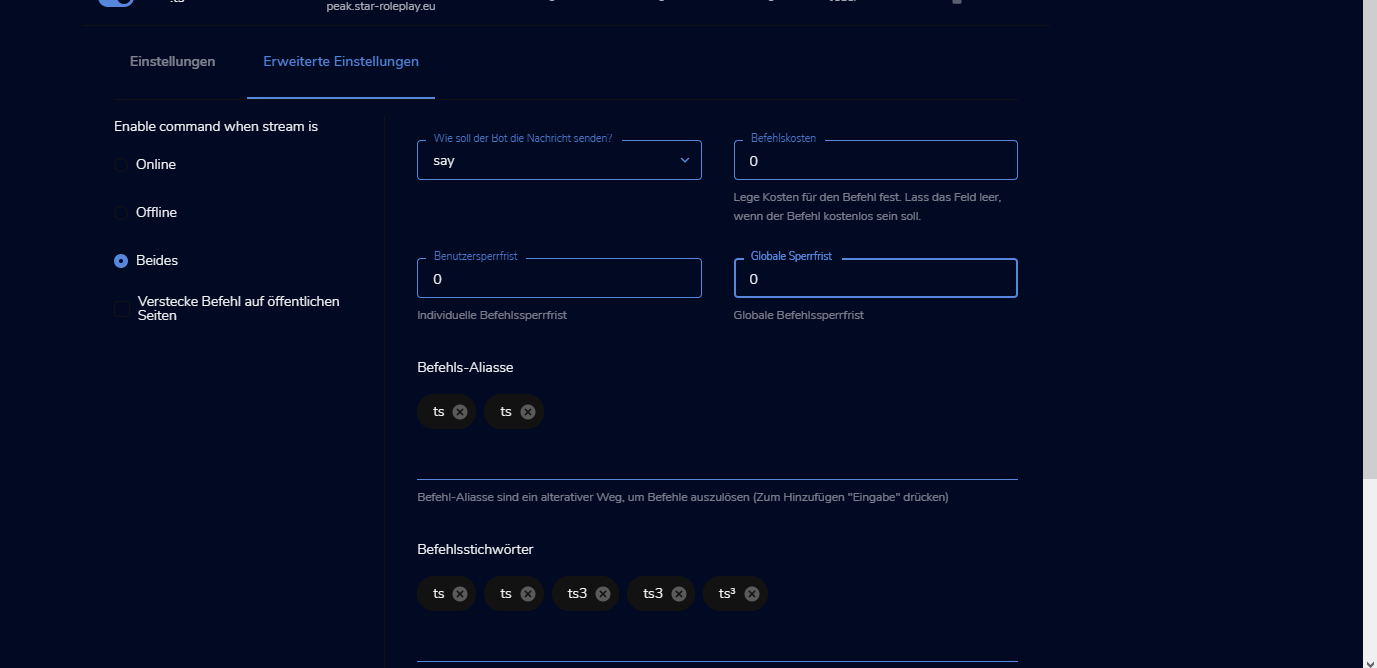 rich tiger
okay where are the cooldown
rich tiger
0 oder 5
weak delta
It is now working.
rich tiger
why the links dupplikated?
rich tiger
Live obs
ionic kelp
Kill OBS entirely and restart.
weak delta
^
rich tiger
and than it´s post 1 Massage?
rich tiger
@weak delta why send it 2 massages
weak delta
Did you kill OBS entirely and restart it?
weak delta
Get rid of those alias for me for a second.
It's only your !ts command that is repeating.
rich tiger
all custem commands is repeating
rich tiger
i have clear it
weak delta
It was one of those.
Don't put alias that are identical to the actual command.
!ts is the command name, don't put !ts as an alias too.
Do the same thing to your Discord command.
rich tiger
okay thank
weak delta
One of your alias or keywords are causing it to repeat.
rich tiger
thank
 grand flare
hello i need help im trying to stream but when some 1 follows me or somthing i cant hear the alert
i need help
 viscid pebbleBOT
Hi @grand flare, Please ask your question(s) or describe the problem you're looking to solve so staff or a support volunteer can assist you as soon as they are available.
grand flare
yea
round brambleBOT
@river radish
Read and follow our server rules:
- We do not tolerate toxicity! Treat the community team, staff and all members with respect.
- No advertisement or channel promotion, anywhere on the server.
- No NSFW/NSFL
- No unsolicited DMs to server members
Make sure to read #welcome in any server you join.
rich tiger
@weak delta my overlays dosend load
round brambleBOT
@rich tiger OBS > Settings > Advanced > Scroll down > Enable or disable Browser Source Hardware Acceleration, depending on its current state > Restart OBS (This does not apply for OBS on Mac)
https://i.imgur.com/ggMe9ZE.png
 grand flare
no
 stone quarry
How do I change my time before people talk in chat
rich tiger
its dosend work
 minor monolith
Hello, StreamElements bot just randomly isn't in my chat anymore. How do I go about adding it back?
round brambleBOT
@rich tiger To add your overlays to OBS, add a new browser source in your scene. Paste your overlay URL in the browser source properties, set the dimensions to 1920x1080 (unless you changed them on the website) and check Shutdown source when not visible. https://youtu.be/KDvLynUqXI4
@minor monolith Go to the Dashboard > Right side > Part channel > Join channel (https://streamelements.com/dashboard)
 rich tiger
thanks
 zinc furnace
hi how do i add media request widgets again?
weak delta
Then enable and moderate from here: https://streamelements.com/dashboard/mediarequest/general
You can also enable and moderate with OBS if you have OBS.Live installed.
 thin terrace
Can someone tell me how to do a Quote counter thingy command bot
or do it for me xD
 radiant walrus
Hi does anyone know how to get overlays up while streaming on a xbox
thin terrace
use Lightstream or a capture card @radiant walrus
radiant walrus
Cheers mate ill have a look into it
round brambleBOT
@radiant walrus Consoles do not have native support for overlays. You would need a capture card, PS4 remote play or Xbox companion app and a PC with OBS in order to have overlays over your console gameplay.
We have an blog post about how to setup console streaming with our essential tools: https://blog.streamelements.com/how-to-stream-on-console-7b620b1c46c3
thin terrace
I use Lightstream for Xbox stream
lament blade
how do i get !watchtime\
 placid raptor
you need Loyalty enabled @lament blade
round brambleBOT
@lament blade 10 minutes of watchtime are given to those in chat when the loyalty points are handed out (every 10 minutes). Therefore, loyalty must be enabled for watchtime to work properly.
There is no direct link between watchtime and all-time points.
It can’t be calculated from the amount of all-time points a user has because subs may earn points at a faster rate and !bonus all command increases all-time points for users in chat at that time.
Giving points to a single user does not affect all-time, only when giving to all in chat.
lament blade
@lament blade when people do it it says 0 seconds
 wary halo
you need to wait at least 10 minutes after you turned it on
because it only gives points every 10 minutes
 median haven
I had a problem today : no commands and no timers have a function or are not active anymore. Anyone the same ?
No chat commands working
 deft briar
hi there, I have an issue I would like to bring up. I have set up my Extra life notification event with my standard event overlay. However when anyone donates for my cause It didn't seem to activate and there is no line item in place on the activity feed to showcase the donation. The ID is correct and when I test the alert it shows up. Is there another option I may have missed? This is my first year doing this through StreamElements, so me missing an option somewhere may be possible. Any help is appreciated. Thank you
jade tusk
Hey. Hope you can help. I am brand new to streamelements and am trying to set my chat bot up. I am looking at the chat alerts and i see i can set up a chat message for subs, but i cant see anything for gifted subs. Am i missing something? Thanks.
Sorry for asking again, just want to make sure i'm not missed. Thanks
zinc furnace
You can also enable and moderate with OBS if you have OBS.Live installed.
@weak delta thanks i uesd the OBS.live but i cant add media request widgets again
 weak delta
You need to add it to your overlay.
Those are your scenes.
And in that media request dock to the right, usually there is an error at the top if it doesn't detect the widget in your overlay.
lament blade
Hi, how do i transfer loyalty points to another twitch streamelements account?
zinc furnace
yap the system auto add media request on source but i delete it by mistake . i draw the wrong red block.
now it ask me to add widget again
 whole reef
their site dopesnt work
i cant click download or dashboard on anythign
it rerutes me to the home page
round brambleBOT
@whole reef Please logout of StreamElements at https://streamelements.com/logout and then login again to your account (Twitch/YouTube/Facebook).
@whole reef Our Dashboard and Overlay Editor are Chromium Optimized. We strongly recommend using Chrome. Opera GX and the new Microsoft Edge Chromium might work closest to Chrome as its also Chromium built. Firefox also works, but some things might look a bit different or not work. We do not recommend using Internet Explorer with our Dashboard as it does not support functions.
If the website doesn’t work on chrome, be sure none of your plugins are blocking our website or clear your cookies. You can try if the website works in a incognito tab.
whole reef
AI = pog
round brambleBOT
@whole reef I am just a simple bot, doing what the amazing support team tells me to do! They are the real MVP's here!
 brave fractal
Hi, I'm trying to make contests with loyalty points so that people can bet 0 points and earn 1 point if they are correct, is there a way to do that?
 karmic harness
Repost as this got zero responses in the obslive thread. For the past few weeks my chat has been telling me that my stream audio has abruptly gotten bad during a stream. I've changed my stream PC out thinking it could have been a hardware issue there. Still happened. Then discovered my GOXLR was basically resetting every 30 seconds which their support team suggested I try a different USB port which has fixed that issue.
Last night when this issue happened, I pulled the power on the GoXLR while streaming and also closed all of the GoXLR apps which did not improve upon relaunching them. I stopped the stream an exited the app. Relaunched the app, started the stream and the audio was magically good again.
Using StreamElements OBS Live 25.0.8 64bit. No updates available. I also have noticed that I can't edit the stream information in the app nor view the stream stats showing number of subscribers, viewers, broadcast time, etc. as they are not there. They were on my old stream rig.
 robust kayak
my stream commands arent working
 gusty bramble
How would you make a set counter command i.e.
!setcounter 100
and it sets the counter to 100?
With the ability to set it to anything like !setcounter 2 !setcounter 5?
robust kayak
?
is there a reason my chat commands arent working?
theyve been working no problem for the past few months
wary halo
are you using a custom bot name?
robust kayak
its just my name
wary halo
exactly, that is a custom name 😉
round brambleBOT
@robust kayak If your commands recently stopped working and you're using OBS.Live and a custom bot name do the following:
- In OBS.Live, click on the hamburger menu (three stripes) at the top left of your activity feed
- Click on Stream Settings > Custom bot name
- In the Custom bot name field select Set custom bot name, not your already existing username (with capital letters). Note: If you already connected an account that way, the third entry will show as the account name (see image https://i.imgur.com/sO7fWOX.png).
- Scroll a bit down and click on the purple Connect Custom Bot Account button
- Log in as usual and Authorize the custom bot name
- Back in the Activity feed, click on the Send Test Message button and check if your custom bot name starts working again
weak delta
yap the system auto add media request on source but i delete it by mistake . i draw the wrong red block.
now it ask me to add widget again
@zinc furnace
Login to the website, edit your overlay where you want the widget and add it there.
zinc furnace
okay i will try it thanks a lot
 strange cradle
my stream is bad
 wild jetty
I'm looking to make my alert text all uppercase, just the sub name. Is that possible and how do I go about it?
figured it! np
 white herald
Hello Guys, Glad to join the Discord server!
My streamelements widget data is not displaying the proper amount of followers I have and won´t let me rewrite it, is there any workaround for this?
 late latch
Hello everyone
I stream from console PS4 just got myself a elgato capture card and I use OBS- my game sound is not working anyone know how to fix this?
white herald
You cant hear it or chat can´t hear it?
round brambleBOT
@late latch If you are having issues with Elgato hardware or software, we recommend reaching out to their support here: https://e.lga.to/help
late latch
@white herald when I go live and stream I can hear the game audio and I can chat with my friends but once I’m done recording and review my live stream there’s no game audio only me speaking..
white herald
Are you monitoring this game audio to the device which "desktop audio" picks up?
late latch
 young scroll
Hello i dont know if i put a bot on my stream because on setup options it says 0% but when i click on setup options it says that i have ticked of bots
lament blade
Has my overlay issue been fixed?
 hardy vault
How do I add the shout out chat command?
 native flame
need help i cant seem to find start on a latitude dell laptop
untold crest
@young scroll You can setup your bot or overlays via our website's dashboard, then it should autopopulate to OBS.Live
wary halo
Has my overlay issue been fixed?
@lament blade the 4:3 cam? not that i know off
lament blade
Awww man
native flame
Obs.live laged my computer
 still quiver
Hi, I just performed my first test live stream on twitch. But I cannot find it anywhere in my twitch account. When I go to Content > Video Producer, there's no any videos there. Did it not save the stream?
 flat fable
Can anyone help me i was using my labtop to stream the xbox companion app to OBS i had it up n runing then the picture started freezing up n now i dont have anything showing from my xbox to my obs screen can anyone please help
If you can please DM me thankyou
 pastel zodiac
Hi guys!, im wondering, im using a custom font in my overlay but it only offers CAPITAL letters, is there a way i can use the {name} but capitalize it?
untold crest
@still quiver You have to enable storing your past streams in Twitch settings
@pastel zodiac You need to check this box:
still quiver
@untold crest Thank you.
untold crest
No problem!
pastel zodiac
@pastel zodiac You need to check this box:
@untold crest Thanks!
 median topaz
Question, I'm using Streamelements Leaderboard and points only show up in All- time and current but no Chat or emote points, what am i doing wrong?
 full jackal
Hi, I have a problem that the bot does not speak in chat when an alert / command happens, any solution?
 abstract hemlock
@median topaz twitch username?
round brambleBOT
@full jackal If your commands recently stopped working and you're using OBS.Live and a custom bot name do the following:
- In OBS.Live, click on the hamburger menu (three stripes) at the top left of your activity feed
- Click on Stream Settings > Custom bot name
- In the Custom bot name field select Set custom bot name, not your already existing username (with capital letters). Note: If you already connected an account that way, the third entry will show as the account name (see image https://i.imgur.com/sO7fWOX.png).
- Scroll a bit down and click on the purple Connect Custom Bot Account button
- Log in as usual and Authorize the custom bot name
- Back in the Activity feed, click on the Send Test Message button and check if your custom bot name starts working again
 twilit basin
Hi, i changed the password to my twitch recently and it disconnected my streaming key. I have it copied im just not sure where to paste it to reconnect SE and twitch
round brambleBOT
@twilit basin StreamElements on top of OBS > Logout > Login
full jackal
Thanks @round bramble
median topaz
@abstract hemlock JustADM_
abstract hemlock
@median topaz did you change your twitch username ?
 warped badger
Hey guys can i send my streamelements overlay sound to a seperate audio device on my pc (trying to seperate it from my desktop sounds which i dont want to stream)
i have an alert that is a video with sound
twilit basin
I logged out and back in on the top of obs but the stream key still did not connect.
round brambleBOT
@warped badger How to exclude audio sources for a stream or recording: https://obsproject.com/forum/resources/8/
VoiceMeeter Banana guide: https://obsproject.com/forum/resources/397/
 grave torrent
Question ; is there a code so I can make a twitch !clip command in chat?! with streamelements
that automatically clips last 30 sec.
abstract hemlock
@grave torrent no need to use bold, we don't have that command built-in
but maybe you can check this https://discordapp.com/channels/141203863863558144/457957557470887947/555734806034382888
median topaz
@abstract hemlock yes a while ago
abstract hemlock
can you post here your old username too
median topaz
mraddehh
 spice folio
Whats the command to add commands to SE bot?
round brambleBOT
@spice folio You can add, remove and make changes to custom commands in chat with !command/!cmd flags:
!command add (commandname) (commandresponse) - allows you **to add **a new custom command
!command remove (commandname) - allows you to delete a custom command
!command edit (commandname) (commandresponse) - allows you to edit an existing custom command
!command show (commandname) - allows you to see the raw response of a command before variables are used
!command options (commandname) -(flag) - allows you to change settings for an existing custom command
Valid flags for !cmd options include: -enable -disable -cd (number in seconds) -usercd (number in seconds) -cost (number) -level (number) -type (say, whisper or reply) -count (number)
Syntax example: !cmd options twitter -usercd 60 -type reply -level 250
spice folio
Thank you
abstract hemlock
@median topaz everything should be good now
median topaz
@abstract hemlock wow thanks!
grave torrent
@abstract hemlock okey sorry okey thanks
 celest crest
i need help adding an overlay please
round brambleBOT
@celest crest To add your overlays to OBS, add a new browser source in your scene. Paste your overlay URL in the browser source properties, set the dimensions to 1920x1080 (unless you changed them on the website) and check Shutdown source when not visible. https://youtu.be/KDvLynUqXI4
 pure oasis
Hello! StreamElements chat bot is unresponsive when OBS is open, even if the streamer am off stream. It works just fine when OBS is closed. What can I do to solve this? Thanks!
weak delta
@pure oasis you using custom bot name with OBS.Live?
pure oasis
Not to my knowledge. The streamer I am modding for is using StreamElements OBS, I can ask for more detailed information if it helps.
weak delta
What it sounds like is they're using custom bot name and it is having a hiccup.
If the bot is normally either their broadcastor account or a different name and not StreamElements then they're using a custom bot name.
What is the channel? No links just name.
lament blade
This guys chatstats I mod for doesnt seem to be working and when I load it up it just says error
weak delta
Did they recently change their name @lament blade
lament blade
they changed their name like a year ago
weak delta
What are the two names?
pure oasis
@weak delta It is StreamElements when it is offline, the channel name is ENewey and we are streaming live now
lament blade
Iangaibor was his first and ianlol is his current
weak delta
@pure oasis Have them set the bot back to StreamElements by default, the top option on the bot name section and save it then
round brambleBOT
@pure oasis StreamElements on top of OBS > Logout > Login
lament blade
How long will it take you to fix the problem?
weak delta
Those are the only names?
lament blade
Im pretty sure
weak delta
@pure oasis turn off followers only mode for me for a moment.
pure oasis
ok
lament blade
well just lmk when youve fixed it if you can if your fine with doing that
pure oasis
@weak delta Thank you so so much for your help! 
weak delta
I'll tag you when I have news @lament blade and no problem @pure oasis 
lament blade
alright thankyou
weak delta
@lament blade With the data found from the names you sent, a chat stat page has been created under that account.
lament blade
ok thankyou
were you not able to bring the chatstats data from his old account over
weak delta
There are no data to be found from those two accounts provided.
 patent lark
How do you make someone a super mod
weak delta
User Management on the SE page.
patent lark
Ok thank you ^u^
 flint zinc
how do i export overlays to bos
viscid pebbleBOT
Hi @white umbra, Please ask your question(s) or describe the problem you're looking to solve so staff or a support volunteer can assist you as soon as they are available.
round brambleBOT
@flint zinc To add your overlays to OBS, add a new browser source in your scene. Paste your overlay URL in the browser source properties, set the dimensions to 1920x1080 (unless you changed them on the website) and check Shutdown source when not visible. https://youtu.be/KDvLynUqXI4
abstract hemlock
If you want to allow ppl request song via tips you need to enable the media request and on media request mode select "via tip" or "both"
lament blade
I have a problem with logging into my streamelements account. When I hit login with twitch, it does an infinite login loop! I hit login and it goes right back to the same page after loading. I cant find my resolution. Im trying to run a merch store, but i cant because i cant login. i also need to use streamelements to improve my strteam
 white umbra
@abstract hemlock idk why its not working?
abstract hemlock
@white umbra the link isn't working for you?
round brambleBOT
@lament blade Please logout of StreamElements at https://streamelements.com/logout and then login again to your account (Twitch/YouTube/Facebook).
abstract hemlock
@white umbra twitch username plase
lament blade
@round bramble it just does the login loop when i try to log out with that link
white umbra
@abstract hemlock Can you fix it or add me this, i put it to via tips and not working idk why....
abstract hemlock
? i see everything enable correctly
white umbra
aa its now working
round brambleBOT
@lament blade Our Dashboard and Overlay Editor are Chromium Optimized. We strongly recommend using Chrome. Opera GX and the new Microsoft Edge Chromium might work closest to Chrome as its also Chromium built. Firefox also works, but some things might look a bit different or not work. We do not recommend using Internet Explorer with our Dashboard as it does not support functions.
If the website doesn’t work on chrome, be sure none of your plugins are blocking our website or clear your cookies. You can try if the website works in a incognito tab.
white umbra
thanks @abstract hemlock
 static salmon
My alerts are not working on OBS/Twitch channel (ohjoewalker). The emulated alerts work fine but the real ones do not. I'm not sure what to do! I've tried everything.
 blazing locust
My alerts are not working on OBS/Twitch channel (ohjoewalker). The emulated alerts work fine but the real ones do not. I'm not sure what to do! I've tried everything.
@static salmon Hi, I have the same problem. I looks like, that the "Activity Feed" in SE isn´t updating.
lament blade
@round bramble i tried all the things anyone has ever told me and it doesnt work!
round brambleBOT
@static salmon Please provide your account ID found at the top of this page: https://streamelements.com/dashboard/account/channels This ID is public info and safe to share here.
lament blade
i dont know what to do
round brambleBOT
@lament blade Please logout of StreamElements at https://streamelements.com/logout and then login again to your account (Twitch/YouTube/Facebook).
@blazing locust Please provide your account ID found at the top of this page: https://streamelements.com/dashboard/account/channels This ID is public info and safe to share here.
lament blade
i already did thjat
blazing locust
5e3842330b7458323a39b1ad
strong kernel
@lament blade Log out, don't try to log in yet, and clear your browser's cache and cookies. Then try again.
lament blade
ok
abstract hemlock
@blazing locust i just resubbed the webhook on your account, everything should be good now
jade tusk
Is there an actual support portal for stremelements I can go to?
lament blade
still didnt work. its been like this for weeks, maybe even months. it is an infinite loop. I have no clue
strong kernel
@jade tusk This is the official StreamElements support Discord.
lament blade
i reset cookies and cache after i logged out with the link and then i just tried to login and it didnt work
blazing locust
@abstract hemlock Thanks! And yes, I can see it. Question: There is still an activity missing from todays stream. This will be lost? Or is SE updating/ taking the datas from twitch later? Thank you so much for your help! ❤️
@abstract hemlock and thanks again.
strong kernel
@lament blade Okay, turns out there appears to be a legitimate issue with your account. I'll be opening a ticket with the devs for them to investigate, but unfortunately there's no immediate fix.
 willow tree
Don't mean to interrupt the person above's convo but I just switched to stream elements from streamlabs to upload a bigger file sized follow alert and upon testing it it makes my frame drops immensely (from 60 -8) anyone know why this would be?
lament blade
i appreciate your effort. Thak you. How long do you think this could take???
strong kernel
I have absolutely no idea. I've never seen this happen before.
lament blade
ok well thats unlucky! We'll see i guess. Will they email me when they figure out?
I can wait as long as it takes. I will be waiting. again, thanks for the help. Have a good day!
jade tusk
Thanks @strong kernel. Do they have email support do you know? Or some other way to contact to get answers. Unfortunately this method isn't great. Thanks again.
strong kernel
@jade tusk What is the issue you're experiencing?
 grave plank
is there a problem with Total Sub count in SE right now?
strong kernel
@grave plank Not to my knowledge. What are you seeing?
grave plank
it keeps defaulting to 0 for some reason
even though this is current session count
this is for someone I'm an editor for - and only noticed when I checked his overlay and it showed 0, even though it started on like 24k+ or something
strong kernel
Who?
grave plank
Chap
strong kernel
No links.
grave plank
oh k sorry
 heavy hamlet
Hey, I recently changed my Twitch username, I logged out of streamelements and back in, the updates are working but the stream chat alerts arent working...anything else I need to do to fix this ?
strong kernel
@grave plank Need him to log out and back in to the website.
round brambleBOT
@heavy hamlet If you changed your name on Twitch, please follow these steps:
- Visit https://streamelements.com/logout and then log in again by connecting with Twitch.
- On the right side of the dashboard page that opens, select Join under bot settings. If it says Part select that and then select Join to send the bot to the chat. Don't forget to mod the bot by typing
/mod streamelementsin your channel if you have not already. - Post your old and your new name here so that we can update your channel's chatstats tracking (must be done by staff).
white umbra
@abstract hemlock my brother just donated me 5€ but music not working...
grave plank
He's live right now. :/
hmm maybe its because Im logged in @strong kernel - ive logged out of it for now if that helps
willow tree
@strong kernel any help on my fps dropping? If its really do to the animation just being that stressfull that it tanks my fps thats crazy
strong kernel
@grave plank That won't affect it. Him relogging refreshes our connection to his account.
round brambleBOT
@willow tree Please provide a log from your last stream. To do this, in OBS go to Help > Log Files > Upload Last Log File and paste the link to the log file here.
grave plank
ahh ok ok, will you need to do anything after he relogs or?
strong kernel
@grave plank I'll need to know when it's done so I can look again.
@white umbra Looks like it worked just fine.
grave plank
will do, I've mentioned it so will get back to you when he does
willow tree
https://obsproject.com/logs/3NDjsRjSoDuQ8yMu @strong kernel I havent streamed with this notif yet would you like me to then paste again?
round brambleBOT
@willow tree OBS > Settings > Advanced > Scroll down > Enable or disable Browser Source Hardware Acceleration, depending on its current state > Restart OBS (This does not apply for OBS on Mac)
https://i.imgur.com/ggMe9ZE.png
round brambleBOT
@willow tree 1) Restart OBS
2) Start your stream/recording for about 30 seconds. Make sure you replicate any issues as best you can, which means having any games/apps open and captured, etc.
3) Stop your stream/recording.
4) Select Help > Log Files > Upload Current Log File. Copy the URL and paste the link here.
Note: If you do not see an obsproject.com URL, you will need to update OBS Studio to version 22+.
white umbra
@strong kernel hes donated but i dont hear the music.....
strong kernel
@white umbra It doesn't start on its own. You need to hit play.
white umbra
where i can hit to play this?
 eager bloom
Help
strong kernel
@white umbra https://www.youtube.com/watch?v=17eUkoZ6eIs

StreamElements Media request enables playing songs and videos in your stream. It's an upgrade of StreamElements Song request and Media share features.
Join our discord for live support: discord.gg/SE
Ground Control: https://strms.net/groundcontrolyt
Channel Management ...
round brambleBOT
@eager bloom Welcome to the helpdesk! Please let us know how we can assist you today and a support volunteer or staff member will assist you as soon as they are available. Thank you for your patience.
eager bloom
How do I use overlay
round brambleBOT
@eager bloom To add your overlays to OBS, add a new browser source in your scene. Paste your overlay URL in the browser source properties, set the dimensions to 1920x1080 (unless you changed them on the website) and check Shutdown source when not visible. https://youtu.be/KDvLynUqXI4
eager bloom
On mobile
willow tree
@strong kernel After a second restart it stopped dropping frames I am both irate and pleased at the same time thx for the help https://obsproject.com/logs/MQJtmRtYEcpWuhYj if you still wanted it
jade tusk
Hi @strong kernel - I am trying to set up my chat alerts, and i can see how to set an alert for normal subs, but i can't find a way of doing it for gift subs. Is it possible? Thanks.
strong kernel
@jade tusk There is no chat alert specifically for gifted subs.
@eager bloom If you are using our mobile IRL streaming app, you should ask your question in #helpdesk-mobile
eager bloom
Ok
 tidal hemlock
how do i live stream my ps4 on obs?
round brambleBOT
@tidal hemlock Consoles do not have native support for overlays. You would need a capture card, PS4 remote play or Xbox companion app and a PC with OBS in order to have overlays over your console gameplay.
We have an blog post about how to setup console streaming with our essential tools: https://blog.streamelements.com/how-to-stream-on-console-7b620b1c46c3
strong kernel
@eager bloom To be clear: Are you using the StreamElements mobile IRL streaming app?
strong kernel
Pardon?
eager bloom
?
strong kernel
What do you mean by "on Google?"
strong kernel
Our website? Yes, probably.
eager bloom
It’s working
strong kernel
But are you using our app?
eager bloom
No
jade tusk
Thanks @strong kernel Appreciate your help. One last question if thats ok.... Can you use commands to set up a queue?
eager bloom
I can’t get the app
strong kernel
@jade tusk There's no default queue system within StreamElements.
@eager bloom We can't guarantee our overlays to work in any given mobile app as most don't have the functionality to support them. Only our own.
jade tusk
Thanks @strong kernel
strong kernel
@eager bloom It doesn't matter what the website says. If the overlay is not loading in the app after being properly added, then the overlay will not work in the app you're using.
eager bloom
Ok thanks for the help
heavy hamlet
@heavy hamlet If you changed your name on Twitch, please follow these steps:
- Visit https://streamelements.com/logout and then log in again by connecting with Twitch.
- On the right side of the dashboard page that opens, select Join under bot settings. If it says Part select that and then select Join to send the bot to the chat. Don't forget to mod the bot by typing
/mod streamelementsin your channel if you have not already.- Post your old and your new name here so that we can update your channel's chatstats tracking (must be done by staff).
@round bramble Old username was SuperCrazyGamng
New is SuperCrazyGamingTv
white umbra
@strong kernel idk i do like that video but why dont work?
round brambleBOT
@white umbra Please provide a proper screenshot with the issue visible. If not sure how to take a screenshot, you can check here: https://www.take-a-screenshot.org/
strong kernel
It's telling you right there.
strong kernel
There's nothing you can do about that video.
It's not your setting.
It's the uploader's.
white umbra
cant play this music?
strong kernel
No, you cannot.
strong kernel
Again, read the message it gave you.
 ocean pond
Is there a way to remove the Facebook link from Streamelements? I'll be deleting my Facebook page soon and don't want the link to go to a dead end
I've already changed it to just the facebook website as it will only let me change it, not delete it
tidal hemlock
where do i get remote play if i want to stream my ps4 from obs
strong kernel
@ocean pond From the profile page? Not completely. It's a known issue, but low priority. Best you can do is link it to the Facebook homepage.
@tidal hemlock Rabbi Dr. Google can assist with that.
ocean pond
ok thanks @strong kernel
white umbra
@strong kernel idk why its dosent work i didnt hear in my stream music....
tidal hemlock
where is rabbi dr.google?
white umbra
@strong kernel ?
strong kernel
@white umbra Please follow the video tutorial on how to set up Media request and add the widget to your overlay if needed.
white umbra
give me the video
strong kernel
@white umbra You were given it about 30 minutes ago.
white umbra
i do like that but idk i didnt hear in stream music
white umbra
in streamlabs?
strong kernel
We're not Streamlabs.
strong kernel
Please rewatch the video. It shows you absolutely everything you need to know about using media request.
 sharp torrent
Could i get some help with the activity feed not updating nor the alert box popping up on stream?
grave plank
@strong kernel thats him logged out and in again
sharp torrent
whoops shoulda put in obslive channel my bad
 visual lotus
Hello, i have been using stremeelements oBS for a while now, its amazing. now the chat is not loading, anyone else having this issue?
grave plank
just seen the reset thanks a lot @strong kernel !!!
 sick flame
hi, im trying to connect my bynogame account to streamelements for donation alerts, but it gives me this error {"error":"server_error","error_deion":"The authorization server encountered an unexpected condition that prevented it from fulfilling the request."}, everytime. can i not use SE for bynogame donations? bng support seem to have no idea why this is happening.
visual lotus
Never mind. i Fixed it 😄
 tough holly
hi?
strong kernel
@tough holly This is not OSU support.
strong kernel
This helpdesk is for assistance with StreamElements tools.
tough holly
its a mouse tracker that looks like the bongo cat...
 untold kindle
Boa noite
verbal apex
Hi my chatstats is still not working, I have signed out + part channel + join channel + mod streamelements.
old twitch name: thisischristina_
new twitch name: gameswithchris_
abstract hemlock
@verbal apex 1 sec
verbal apex
thanks!
 plain violet
what would make it return an error when trying to add a bank account to SE.pay (sorry if this is not a good spot to ask this )
round brambleBOT
@plain violet Please contact us via email for support with SE.Pay. You can use our contact form here: https://streamelements.com/contact Thank you.
plain violet
ty ty
 shut swift
hello, my alerts would not work so i disconnected streamelements from my twitch then reconnected and now about half of my chat commands wont work
abstract hemlock
@shut swift i see the bot working just fine on your twitch chat
abstract hemlock
you're testing on your twitch chat?
shut swift
Ya i was a few minutes ago
I can try again in a second
I'll b testing in about 30 seconds
It worked
Can u see any reason why the sub alert would not go off? I got 2 subs and it didn't work for either
round brambleBOT
@shut swift Prime Gaming (new and resub) and paid subscriptions (resub only) must be shared in chat manually by the person subscribing in order for the subscription information to be sent to StreamElements. For Prime Gaming, the user needs to have sharing enabled on https://www.twitch.tv/settings/prime. For paid subs, if the share box doesn't show up immediately it will when they refresh the page. https://i.imgur.com/VNJN0Uv.gif https://i.imgur.com/2297EA7.png


 minor karma
every time someone tips to my page, nothing shows up in my chat. I only get my on screen custom alert i have. This has been going on for MONTHS. and i have tried EVERYTHING. please help!
 light shell
I'm having an issue with my hosts not coming through on either my alerts or activity feed. Any reason why this might be happening? I only recently started having a problem this past week with this.
round brambleBOT
@light shell Due to changes to Twitch API, we have filtered out hosts and will only show these ones on your activity feed:
- All hosts coming from an online channel with at least 1+ viewer
- Auto host events with at least 1 viewer - only from a channel that just went offline
Note: If you see X channel has hosted you with no viewers on the back, that is considered an offline host or a host with 0 viewers, we do not show these.
minor karma
every time someone tips to my page, nothing shows up in my chat. I only get my on screen custom alert i have. This has been going on for MONTHS. and i have tried EVERYTHING. please help!
light shell
that seems a little silly and I definitely prefer it the old way when all hosts came thru regardless
strong kernel
@minor karma Make the bot a moderator.
 pure remnant
I'm having issues connecting my live stream from twitch to my streamelements
lament blade
I try to add loyalty points using the addpoints/bonus command and it says username not found, I thought it was because I was using streamlabs so I got the obs Studio and still having the same issue
round brambleBOT
@tranquil aurora Welcome to the helpdesk! Please let us know how we can assist you today and a support volunteer or staff member will assist you as soon as they are available. Thank you for your patience.
strong kernel
@lament blade Don't put an @ in front of the name.
round brambleBOT
@pure remnant Please provide a proper screenshot with the issue visible. If not sure how to take a screenshot, you can check here: https://www.take-a-screenshot.org/
 tranquil aurora
Hey somedays i watch a streamer with a button below your chat that reedem some loyality points.. how i can use that button?
strong kernel
That's Twitch channel points, not loyalty points.
pure remnant
Why my streamelements won't start streaming
round brambleBOT
@pure remnant Please provide a proper screenshot with the issue visible. If not sure how to take a screenshot, you can check here: https://www.take-a-screenshot.org/
strong kernel
@pure remnant Please provide proper screenshots, not phone pictures.
pure remnant
I don't got any other way for you
strong kernel
Please use the link above to learn how to take a screenshot.
tranquil aurora
i know there is a streamelements helpdesk... But why the channel points option cant show up to me?
 sterile elk
round brambleBOT
sterile elk
round brambleBOT
@sterile elk Consoles do not have native support for overlays. You would need a capture card, PS4 remote play or Xbox companion app and a PC with OBS in order to have overlays over your console gameplay.
We have an blog post about how to setup console streaming with our essential tools: https://blog.streamelements.com/how-to-stream-on-console-7b620b1c46c3
ionic kelp
If this is in response to the previous question it depends on several things.
Directly from console: Bot interaction and anything that it uses only.
From console with capture card or remote capture: Everything.
lament blade
thanks @strong kernel that worked
 rocky moat
how do i get help with my chatbot?
sick solstice
Anyone know why Changing title and Changing game are not working through the chat bot on Twitch?
ionic kelp
@sick solstice This is because of an issue on twitch's end that needs to be fixed. Doing it from the twitch dashboard is the fix for the time being.
rocky moat
my chatbot isnt working
ionic kelp
What's your channel name? No links.
rocky moat
DrippzyDiego
round brambleBOT
Go to the Dashboard > Right side > Part channel > Join channel (https://streamelements.com/dashboard)
rocky moat
okay i clicked it
ionic kelp
Click again and rejoin it.
 brittle walrus
hi how do i add the: alerts, and the recent follower etc
 gilded stirrup
hello, im having issues with seeing comments while im live, nothing is being pushed through on my end and cant see comments. i restarted everything and still no comments being shown and its not allowing me to see the users in my chat
round brambleBOT
@brittle walrus New to StreamElements?
Check out our YouTube channel https://www.youtube.com/c/streamelements/videos
with tutorial videos from setting up the basics, to in depth details on how to use our product.
New to OBS? Here is a 4 step quickstart guide
https://obsproject.com/wiki/OBS-Studio-Quickstart
Want to learn even more? Here is an in-depth overview
https://obsproject.com/wiki/OBS-Studio-Overview
@gilded stirrup StreamElements on top of OBS > Logout > Login
 forest geyser
hi im having trouble with an over not showing alerts
Wen I try to edit it this is wat comes up
 astral quartz
Hello, I'm Czech and I don't speak English, so excuse the translation via Google Translate. I'm wondering if anyone would advise me how to remove the stream elements boot on Twitch where I turned on the stream elements boot via streamlabs obd and now I want to turn it off or remove it when I use the boot from the night bot
 spiral jetty
Hi. I hope this is the right place to ask. I can't seem to find the quotes section in StreamElements.
ionic kelp
@astral quartz #🇨🇿︱czech
@spiral jetty unfortunately there is no visible place to handle quotes. It's all via chat.
spiral jetty
I'm in the process of importing everything over from another service.
Oh! I see.
What are the commands to add quotes, to see them, etc.?
 teal patio
how do I add a countdown timer
spiral jetty
I have a lot of quotes. Up to 17 I believe.
astral quartz
@ionic kelp thank you very much
ionic kelp
@spiral jetty Assuming you have the time/patience would you be willing to use another method that is more customizable with quotes and can actually view them?
ionic kelp
You go here: https://twitch.center/customapi/quote/generate
You have 3 links which have a string of letters/numbers for the tokens. Short one is the "Display Token" while the longer one is the "Edit Token"
To display your quote list you do https://twitch.center/customapi/quote/list?token=DISPLAYTOKEN
To return a random quote (!quotes or whatever command): ${customapi.http://twitch.center/customapi/quote?token=DISPLAYTOKEN&no_id=1} --- (You can remove &no_id=1 to display the quote number)
To return a specific quote (!quotes 21 or whatever command): ${customapi.http://twitch.center/customapi/quote?token=DISPLAYTOKEN&data=${1}&no_id=1} ----- You can use either numbers or words to search for something.
To add a quote (!addquotes or whatever command): ${customapi.http://twitch.center/customapi/addquote?token=EDITTOKEN&data=${1:}} --------- Long quotes can get cut off when added via chat.
To delete a quote (!delquotes 1 or whatever command): ${customapi.http://twitch.center/customapi/delquote?token=EDITTOKEN&data=${1:}}
teal patio
how do I add a countdown timer ??
ionic kelp
Till then this is your best bet.
spiral jetty
Got it
Is it safe to use two bots (I.E the StreamElements bot + another bot)?
To complement each other's strengths and weaknesses?
ionic kelp
Of course. You might need to adjust things so they don't conflict but majority of it is just enabling/disabling conflicting commands.
spiral jetty
Thank you so much @ionic kelp 🙂
untold crest
@teal patio
 orchid mountain
hellu, I have a problem, on streamelements I used to see my bits and tips on revenue history, but now I only see the tips and not the bits history nor top bits, I don't know if I did something to take it, if someone could answer me I would appreciate it :)) thanks
untold crest
On the top left of activity feed you have "filters", check if conditions there are matching your needs (enabled types, minimum amount)
 devout hearth
I changed my name on twitch and it broke my chat stats. Was wondering how I can fix it?
spiral jetty
How do I import the Streamlabs Leaderboards to StreamElements?
ionic kelp
@spiral jetty Unfortunately there is no way to do that.
spiral jetty
O______________O
round brambleBOT
@devout hearth If you changed your name on Twitch, please follow these steps:
- Visit https://streamelements.com/logout and then log in again by connecting with Twitch.
- On the right side of the dashboard page that opens, select Join under bot settings. If it says Part select that and then select Join to send the bot to the chat. Don't forget to mod the bot by typing
/mod streamelementsin your channel if you have not already. - Post your old and your new name here so that we can update your channel's chatstats tracking (must be done by staff).
spiral jetty
sweats intensely
I just...
I just pressed the big reset button because... I thought I could import...

ionic kelp
We only support importing from the standalone chatbot and their local points.
orchid mountain
On the top left of activity feed you have "filters", check if conditions there are matching your needs (enabled types, minimum amount)
@untold crest ye but i wanted on the revenue history
spiral jetty
@ionic kelp You mean Streamlabs Chatbot?
ionic kelp
yup
ionic kelp
Now just to be sure I'm still following correctly you're using the one you run on your computer and not the one with the streamlabs account right?
untold crest
@orchid mountain Revenue history never had cheers there. It was always for tips only as those are only events we have confirmation from payment provider of your choice.
untold crest
Huh. That is odd. I am asking internally, but if that option disappeared it may be because Twitch could change their API or just policy about that, to present this information on their website only.
ionic kelp
Now just to be sure I'm still following correctly you're using the one you run on your computer and not the one with the streamlabs account right?
@spiral jetty Since I didn't ping you but wanted to be certain.
devout hearth
For stats tracking:
old name: " "
"
new name: "cjya"
ionic kelp

devout hearth
my old name is the emote name 
ionic kelp
And that is why you're careful about using your name in an emote
spiral jetty
Now just to be sure I'm still following correctly you're using the one you run on your computer and not the one with the streamlabs account right?
@ionic kelp
ionic kelp
Yes
As long as you have it set to local currency and not extension then you've got nothing to worry about.
 spare peak
How do I set up stream labs to let me know when someone follows or subscribes to me?
ionic kelp
@spare peak You'd have to ask them
spare peak
I tried and it sent me here
untold crest
We can help you with StreamElements, do you wanna take a ride into the space of possibilities?
🙂
 orchid mountain
Huh. That is odd. I am asking internally, but if that option disappeared it may be because Twitch could change their API or just policy about that, to present this information on their website only.
@untold crest thank you 🙂
spiral jetty
As long as you have it set to local currency and not extension then you've got nothing to worry about.
@ionic kelp I can't seem to convert the xlsx file properly into csv with excel. There are a few options and the ones I have tried so far (CSV UTF8 and comma delimited) doesn't work.
ionic kelp
Are you importing just currency or commands as well?
untold crest
@spiral jetty can you dm me your xlsx file so I can convert that to csv for you?
spiral jetty
Are you importing just currency or commands as well?
@ionic kelp points
ionic kelp
Mind DM'ing me the file?


 spiral jetty
😆
untold crest
Whoever 🙂 We are both amazing
spiral jetty

untold crest
Oh. And one thing. It is not XLSX, it is csv, but SL CSV sometimes are broken
 median yarrow
Hi there I want to create a command like !fortnite that just sets the game instead of doing !setgame is that possible?
^ also if its possible how would I achieve it?
 mighty grove
IS THERE ANY WAY I CAN SELECT ALL THE LAYERS AND MOVE TOGETHER?
sick solstice
@median yarrow Yes.. you can use the ${setgame} variable in your new fortnite command
${setgame "<game>"}
median yarrow
@sick solstice thanks
twin sentinel
@mighty grove Create a group with the elements via the options at the top of the layer tab in the overlay editor and move the group.
 runic dune
Hello. I have a problem with commands in connection with the Stream Shop. For my viewers, I have added sounds to the Stream Shop and linked them to commands so that they can be played in the stream. It works so far, only with one of my moderators it doesn't work. At the beginning he could execute the commands and it was also in the chat that he had purchased the item from the Stream Shop, but no sound was played. Now it is always in the chat that he does not have enough points (we checked, he has more than enough). The problem only occurs with him, what could be the reason? I have also removed and added it once from the user list without improvement. So what's the problem and how can I fix it?
 wary pollen
I have an issue updating my game, it always shows as stardew even when I successfully update it. I have tried on the streamelements page, as well as via command in chat.
ionic kelp
@wary pollen You'd have to do it from the twitch dashboard as it's a bug on twitch's end causing this.
lament blade
On my StreamElements public profile, I can't update my social media links and I keep getting errors. I have old social medias linked I no longer use/have access to so I want to change them. Any way to fix this problem?
mighty grove
@mighty grove Create a group with the elements via the options at the top of the layer tab in the overlay editor and move the group.
@twin sentinel already figured that out. but layer selection color should be change to gray or black otherwise its difficult to understand if its selected or not after clicking the layer.
 inland stirrup
Hello! I'm not able to add the streamelements commands to the streamlabs obs ... the commands don't come out what do I do?
ionic kelp
Not sure what you mean by that.
 frank badger
how can i add a command?
ionic kelp
If you've got bot manager access for someone you can do it on the dashboard. Otherwise this.
round brambleBOT
You can add, remove and make changes to custom commands in chat with !command/!cmd flags:
!command add (commandname) (commandresponse) - allows you **to add **a new custom command
!command remove (commandname) - allows you to delete a custom command
!command edit (commandname) (commandresponse) - allows you to edit an existing custom command
!command show (commandname) - allows you to see the raw response of a command before variables are used
!command options (commandname) -(flag) - allows you to change settings for an existing custom command
Valid flags for !cmd options include: -enable -disable -cd (number in seconds) -usercd (number in seconds) -cost (number) -level (number) -type (say, whisper or reply) -count (number)
Syntax example: !cmd options twitter -usercd 60 -type reply -level 250