#helpdesk-twitch
1 messages · Page 729 of 1
 sterile ingot
 zenith widget
Only 1
sterile ingot
ok thanks.
 lament blade
Anyone good setting up alerts?
I recently bought some from ow3dtv and im not sure on how to set them up
zenith widget
If you bought alerts/themed overlay from an external site, they should provide you with installation instructions
lament blade
they didnt.......
im legit on their site asking for help and they wont even respond
i feel like im getting scammed at this point
zenith widget
Then contact them and ask them how to install the package you bought.
from own3dtv? no you are not
lament blade
wym?
zenith widget
you are not getting scammed
just be a bit more patient, as not every comapny has a 24/7 support line :/
and we can't really help with custom overlays
lament blade
Alright seems fair tho.
zenith widget
unless its ours
lament blade
thanks
 tacit dawn
Hiya,I wanted to use the follower goal label in my overlay but its not accurate,is there a way to fix that?
 round brambleBOT
@tacit dawn To reset goals:
- from the overlay editor -> session data on top right (monitor symbol) -> goals tab -> reset progress of desired goal
- from the dashboard -> activity feed on the left -> widget data on the right -> goals tab -> reset progress of desired goal
Note: Goal widgets(progress) only counts up and doesn't go down automatically, if you loose followers/subs
tacit dawn
thanks!i got it
 thorn sandal
Hi guys, I have two questions: is there any streamelements command to show the local time? And the !watchtime command never worked for me. Always gives a response of 0
zenith widget
!watchtime
round brambleBOT
10 minutes of watchtime are given to those in chat when the loyalty points are handed out (every 10 minutes). Therefore, loyalty must be enabled for watchtime to work properly.
There is no direct link between watchtime and all-time points.
It can’t be calculated from the amount of all-time points a user has because subs may earn points at a faster rate and !bonus all command increases all-time points for users in chat at that time.
Giving points to a single user does NOT affect all-time, only when giving to all in chat.
zenith widget
As for !time (that uses ${time} variable) you can check this: https://discordapp.com/channels/141203863863558144/199460642975907840/328081534479499266
 magic scroll
Hi just wondered is there a minimum you need to withdraw in the merch shop as i have a balance vut the withdraw button is greyyed out?
zenith widget
Yes - $20
thorn sandal
ok thank you @zenith widget I will look up into that info
magic scroll
@zenith widget thank you
 hollow wasp
so i just added a Follower Goal to my overlay but it's not accurate, it says i have 46 follows now but i only have 39
and on the Dashboard it shows that i've gained 3 followers this year but i've gained like 27
round brambleBOT
@hollow wasp To reset goals:
- from the overlay editor -> session data on top right (monitor symbol) -> goals tab -> reset progress of desired goal
- from the dashboard -> activity feed on the left -> widget data on the right -> goals tab -> reset progress of desired goal
Note: Goal widgets(progress) only counts up and doesn't go down automatically, if you loose followers/subs
hollow wasp
thanks
hollow wasp
what about the part with the dashboard showing the wrong follower count
zenith widget
Which part?
 noble swan
are host alerts broken right now for anyone else?
lament blade
Hello. Wondering how I can get alerts to work on stream. It said I don't need streamlabs OBS but I can't seem to find it anywhere
round brambleBOT
@lament blade New to Stream Elements?
Check out our YouTube channel https://www.youtube.com/c/streamelements/videos
with tutorial videos from setting up the basics, to in depth details on how to use our product.
New to OBS? Here is a 4 step quickstart guide
https://obsproject.com/wiki/OBS-Studio-Quickstart
Want to learn even more? Here is an in-depth overview
https://obsproject.com/wiki/OBS-Studio-Overview
@lament blade You can test Alerts via the Emulate bell on the lower left side of the Overlay Editor. Simply go to your Dashboard -> My Overlays -> Pencil/edit button on the overlay. Make sure the "Preview LIVE on stream" option is on to see the alert in OBS/Xsplit https://streamable.com/vtulg9

@lament blade To add your overlays to OBS, add a new browser source in your scene. Paste your overlay URL in the browser source properties, set the dimensions to 1920x1080 (unless you changed them on the website), and ☑ “Shutdown source when not visible” https://youtu.be/KDvLynUqXI4
 ionic kelp
And that requires an overlay.
lament blade
ewwww
ionic kelp
Now you can have chat notifications for alert events but anything visual needs an overlay.
lament blade
I guess I'm using streamlabs next stream
 jade remnant
👍
 hollow blade
Why is there no way of setting S/E's default goal widgets to show sub points... not subs themselves
Surely you would've done that by now
 main warren
Hello, i have again "no data" in my streamelements leaderboard. can someone fix that?
hollow blade
@lament blade Streamlabs's overlays work in the same way... you can't just have alerts somehow. Everything is a form of overlay.
ionic kelp
@hollow blade we did. However twitch broke that for us. Just not fixed "yet" (assuming we can).
 Ah
ionic kelp
Ah
ionic kelp
It broke for them as well.
 hollow cedar
Hi, please is it way to put donation message to chat? from some read api or something like that? Thanks for advice
 twin sentinel
https://streamelements.com/dashboard/bot-modules > chat alerts
hollow cedar
Thanks but there is no way to read donation message from user is there some commnad for it?
twin sentinel
Read, you mean that a TTS reads that message?
hollow cedar
no TTS is ok but i need to put message from donate to chat
twin sentinel
Use the variables described in the modules settings.
hollow cedar
dont see any variable to this
twin sentinel
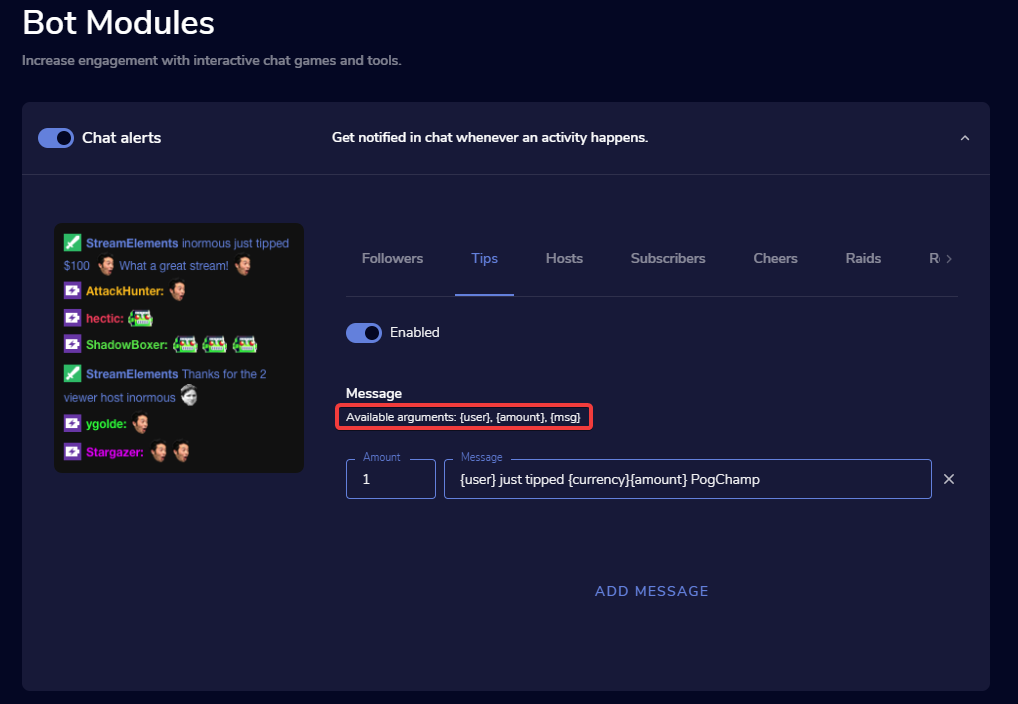 twin sentinel
For follows there is no message.
 summer vault
Is there any way I can make the hypeboss look like the stream labs stream boss?
https://kitchengun.rocks/y9XV7fa.png
 zenith widget
Currently no - the hypeboss has a default look of that.
 wooden tulip
having some issues getting the tipping panel to work on my twitch page. twitch says something went wrong when i try to submit the panel. 2nd problem is there doesn't to be a way to go back to the default image for background and header.
can anyone help?
zenith widget
Are you on your phone currently?
wooden tulip
no i'm on pc but i can be if needed
zenith widget
Yes - I would need more info
@wooden tulip For the panel I'm not sure what the issue might be - try in incognito mode maybe
zenith widget
I'm not available for a voice and I don't believe you can share screen in teh voice channel
summer vault
Currently no - the hypeboss has a default look of that.
Shoot, thanks for the info
 tawny zealot
okay so the media request thing is taking requests
but the actual drop down menu in obs is not working
 ripe oyster
So i stream on twitch on my ps4 is there a way to connect streamelements to it so i can get notifications when someone follows or sub kinda thing
zenith widget
Screenshot please @tawny zealot
round brambleBOT
@ripe oyster Consoles do not have native support for overlays. You would need a capture card, PS4 remote play or Xbox companion app and a PC with OBS in order to have Overlays over your console gameplay.
We have an blog post about how to setup console streaming with our essential tools: https://blog.streamelements.com/how-to-stream-on-console-7b620b1c46c3
 tawny zealot
there
se
see chat will take the request and reply
but the tab isnt working properly
 hollow lichen
Hello i made an application with foxngame and how do i use alerts when someone tipped me money
round brambleBOT
@tawny zealot Streamelements on top of OBS -> Logout -> login
wooden tulip
@zenith widget incognito mode didn't work.. hmmm \
zenith widget
Not sure how to help on the panel issue :/
Can you let me know your username though
so that I can check on that default background question?
wooden tulip
@zenith widget dm'd it to you if that's okay
lament blade
Hey mates, i'm looking at tracking the session sub-count but for it to track both new subs + resubs, rather than just one or the other. Is there an option for this or is it done as custom css?
zenith widget
@wooden tulip I saw what you mean - there isn't a way to return them to the deafult ones
@lament blade Check channel description of #dev-chat
lament blade
Will do, cheers.
wooden tulip
@zenith widget well that seems to be a design flaw. what's the best place to get stream elements aware of it?
 proud ingot
How can i fix this?
round brambleBOT
@proud ingot 10 minutes of watchtime are given to those in chat when the loyalty points are handed out (every 10 minutes). Therefore, loyalty must be enabled for watchtime to work properly.
There is no direct link between watchtime and all-time points.
It can’t be calculated from the amount of all-time points a user has because subs may earn points at a faster rate and !bonus all command increases all-time points for users in chat at that time.
Giving points to a single user does NOT affect all-time, only when giving to all in chat.
proud ingot
Oke. Well i dont use loyalty points. But now i know what the problem is thanks!
zenith widget
@wooden tulip Design flaw? In having to go back to the default background? I don't think its a design flaw.
round brambleBOT
@wooden tulip Check out the StreamElements ideas board: https://strms.net/ideas. You'll be able to add ideas, upvote ideas you agree with, and track their progress with email notifications. Adding and upvoting ideas also helps the staff know which ideas should be prioritized so please take some time to upvote.
wooden tulip
@zenith widget i just mean it seems like they forgot the option, considering they have a return to default option for profile background.
but i obviously don’t know for sure
i’ll check out the ideas thing though
zenith widget
Considering I work for Streamelements, we have not forgotten it, as it was never part of the design structure of the page options.
If you want to suggest an improvement you can do so via the Ideas board.
wooden tulip
i apologize, i didn’t mean to be offensive about it. “design flaw” came across much worse than i meant it too
zenith widget
No worries 👍
 fallow tapir
Hi! For some reason, when I stream from OBS to Twitch, nothing shows up on my stream. Just a loading screen forever. This has been happening for the past 2 days with the same internet speeds I always have. I've updated my softwares too. Anything I'm missing?
 prisma relic
jump over to #helpdesk-selive @fallow tapir
fallow tapir
thanks
 timber vector
Hi everyone! I would like to see my "scrolling donation box" overlay with commas and decimals but seems I cannot set it in the right way to have it on my "scrolling box", somebody may help me to set it correctly please??
these are my settings about the "scrolling box"
prisma relic
which widget are you using? i can take a look
 brittle quest
Hello. Hi can i receive partnerships programm for mtg arena streams?
timber vector
which widget are you using? i can take a look
@prisma relic I'm using the label for the tippers list on streamelements overlay editing... it's called "Top Tippers List"
prisma relic
thank you. i'll take a look and see if i can find an answer
timber vector
thank you. i'll take a look and see if i can find an answer
@prisma relic thanks a lot
 short osprey
hi im wondering why my 1 or no viewer hosts dont show up in my activity feed or do an alert but like higher viewer ones do?
round brambleBOT
@short osprey Due to changes to Twitch API, we have filtered out hosts and will only show these ones on your activity feed:
- All hosts coming from an online channel with at least 1+ viewer
- Auto host events with at least 1 viewer - only from a channel that just went offline
Note: If you see "X channel has hosted you" with no viewers on the back, that is considered an offline host or a host with 0 viewers, we do not show these.
prisma relic
ya @timber vector .... i am seeing the same thing; the 'number format' can't be changed 🤔
short osprey
how do people get it to show them?
ive seen other people have them?
like 1 viewer hosts shit
timber vector
ya @timber vector .... i am seeing the same thing; the 'number format' can't be changed 🤔
@prisma relic trying immediately
prisma relic
It doesn't work for me 😦
ionic kelp
@short osprey they use competitor services.
short osprey
:(
timber vector
It doesn't work for me 😦
@prisma relic it doesn't work for me either 😦
 coral rover
hello! I wonder if there is a way to create rps command which gotta affect custom points at the channel.. as duel but rps where a user can enter rock\paper\scissors and my side gotta do random
 worn mango
Does anyone know if there is an ETA on the fix for hosts not showing up on activity feed?
prisma relic
i sent in a message for staff to check @timber vector; will let you know when i hear back
round brambleBOT
@worn mango Due to changes to Twitch API, we have filtered out hosts and will only show these ones on your activity feed:
- All hosts coming from an online channel with at least 1+ viewer
- Auto host events with at least 1 viewer - only from a channel that just went offline
Note: If you see "X channel has hosted you" with no viewers on the back, that is considered an offline host or a host with 0 viewers, we do not show these.
timber vector
i sent in a message for staff to check @timber vector; will let you know when i hear back
@prisma relic thank you so much!
another thing pls... somebody can tell me how to change the "anonymous" in the event list? I already changed it in the tippers (the anonymous were Streitjo87) but it dosn't change in the event list >.<
ionic kelp
@timber vector tipping moderation
prisma relic
with the built in command system; no. i don't believe so @coral rover. It could be possible with a 'widget' but it get's chat spammy really fast.
ionic kelp
https://streamelements.com/dashboard/tipping-settings tipping settings then moderation at bottom.
timber vector
@timber vector tipping moderation
@ionic kelp I dont want it will disappear but I would like just transform the "anonymous" in the name of the tipper...
prisma relic
i was wrong @coral rover; there is a #command-share for RPS ... https://discordapp.com/channels/141203863863558144/424943321794871296/589583682826666025
ionic kelp
You can't if the name triggers that. You'd have to manually manage that.
timber vector
You can't if the name triggers that. You'd have to manually manage that.
@ionic kelp I already changed it everywhere in settings but it is still there >.<
coral rover
@prisma relic ty, i saw that one, it doesn't affect custom points 😉
 sudden anvil
can the bot run ad breaks?
timber vector
@ionic kelp it changed on the last tipper name of the "starting soon" page indeed, but on the event list the "anonymous" is still there >.<
prisma relic
if the name is "anonymous" it could be because the sender didn't want to give their name... or it is a 'bad name' and filtered out. For the latter, what Sudo said will replace the bad name with what you chose
round brambleBOT
@sudden anvil To have StreamElements run ads for you, do the following:
- The bot StreamElements is added as an Editor to your Twitch channel here: https://dashboard.twitch.tv/community/roles
2.a) To create a Timer, go here: https://streamelements.com/dashboard/bot-timers - add a timer with a response/commercial <30|60|90|120|150|180>to indicate the ad duration and also select the time interval that the response will be sent while you are online. - Example:/commercial 30and timer every 10 minutes (online interval).
2.b) To create a Custom command, go here: https://streamelements.com/dashboard/bot-commands/custom-commands and add a command with the response/commercial <30|60|90|120|150|180>to indicate the ad duration. - Example:!adscommand with response/commercial 30
prisma relic
oh ya... the points part..... ya custom widget would be the way to go then @coral rover ... but again it gets super spammy
coral rover
@prisma relic thats the only way to get something to my chat hahaha
timber vector
if the name is "anonymous" it could be because the sender didn't want to give their name... or it is a 'bad name' and filtered out. For the latter, what Sudo said will replace the bad name with what you chose
@prisma relic I asked him if he wanted be really anonymous and he said no.. and there are no bad words on his name... "streitjo87"
prisma relic
there is a 'bank heist' game in #widget-share @coral rover ....
i made a 'cut the wire' game and .... i then nixed it at soon as i saw it first beta tested
timber vector
if I go to try to change this list in the settings, seems it wont work.. >.< https://gyazo.com/60635e390b7d5e89973b4d13a50f339d
 coral rover
@prisma relic gotta try it, ty 😉
prisma relic
If they tip with the 'anonymous' checked, there is no way to override it.
timber vector
If they tip with the 'anonymous' checked, there is no way to override it.
@prisma relic oh... ok >.< thank you anyway ♥
 lavish stratus
The StreamElemnts Bot is not on my chat, I gave him mod role but he is not on my chanell. What to do now?
round brambleBOT
@lavish stratus Go to the dashboard -> right side -> part channel -> join channel (https://streamelements.com/dashboard)
 prisma relic
if they are your Top tipper and they made a mistake with the 'anonymous' thing; you can try to override the 'session data' .... but i would suggest against that. because it won't ever add on in the future
timber vector
if they are your Top tipper and they made a mistake with the 'anonymous' thing; you can try to override the 'session data' .... but i would suggest against that. because it won't ever add on in the future
@prisma relic thanks a lot for all your help! ♥
prisma relic

 errant roost
Hi everytime im trying to go live lately i get insta 49% Dropped Frames And idk why
my Internet Connection is good with 500/10 on 3600 bitrate 30 fps 720p any help ?
my Graphic card is powerful as well ...
round brambleBOT
@errant roost Dropped Frames means that you have a bad connection between your device and the streaming platform and most likely something related to your ISP not handling the connection properly.
Speed tests usually cannot help solve this problem and its best to use this guide: https://obsproject.com/wiki/Dropped-Frames-and-General-Connection-Issues
If you stream to twitch, use the !twitchtest command and do a connection test to your regional servers.
errant roost
!twitchtest
round brambleBOT
Use the Twitch Bandwidth Test to find the best Twitch server to stream to. Set Duration to Medium. You can uncheck any regions you're not near.
After the test completes, click the Share Result button to upload a screenshot, which can then be copied and pasted here.
Get Twitch Test from https://r1ch.net/projects/twitchtest
coral rover
@prisma relic got 1 more question for now.. i've checked #widget-share and now got interested in "remind to save game" widget, how i can find & change chat command for it? didnt find it there... wanna do some rework of it, to make it works like that.. !hello triggers video+audio once per 24 hours for user and also let it count how many times user used it, so i could trigger more "gratz" when users gotta get 50/100/500 uses of it
maybe there is already a widget for such things..
prisma relic
was that widget in the #widget-share channel? .... and both the 'per user' and making a 'user database' are more complex.
the widgets can be made that way; but are mostly made as 'instant based' .... so they work once per a stream; or until the source is closed
but this would be a better convo for #dev-chat .... cause maybe one of the smarter people know of a better answer
coral rover
@prisma relic #widget-share message
but ty anyway, i'll try it out at developers, would be cool to get such one
 queen wasp
streamelements bot not replying to any commands. Had this when i changed my twitch name. Finally got it back and now it's gone again
round brambleBOT
@queen wasp Go to the dashboard -> right side -> part channel -> join channel (https://streamelements.com/dashboard)
queen wasp
done. no good.
should i be connected to my twitch channel here becausde if i try, it says my channel is already claimed, possibly by my streamelements account connected to my old twitch name
round brambleBOT
Please logout of StreamElements at https://streamelements.com/logout and then login again to your account (Twitch/Youtube/Facebook)
queen wasp
hmm still no luck 😦
round brambleBOT
@queen wasp If your commands recently stopped working and you're using OBS.Live and a custom bot name do the following:
1.) In OBS.Live, click on the hamburger menu (three stripes) at the top left of your activity feed
2.) Click on Stream Settings -> Custom bot name
3.) In the "Custom bot name" field select "Set custom bot name", not your already existing username (with capital letters)
Note: If you already connected an account that way, the third entry will show as the account name (see image https://i.imgur.com/sO7fWOX.png)
4.) Scroll a bit down and click on the purple "CONNECT CUSTOM BOT ACCOUNT" button
5.) Log in as usual and "Authorize" the custom bot name
6.) Back in the Activity feed, click on the "SEND TEST MESSAGE" button and check if your custom bot name starts working again
 queen wasp
yay i love you @round bramble . Thats fixed it
 storm gate
yoo so im starting streamer and u
im not sure on how to set up alot of things could i have some help?
round brambleBOT
@storm gate New to Stream Elements?
Check out our YouTube channel https://www.youtube.com/c/streamelements/videos
with tutorial videos from setting up the basics, to in depth details on how to use our product.
New to OBS? Here is a 4 step quickstart guide
https://obsproject.com/wiki/OBS-Studio-Quickstart
Want to learn even more? Here is an in-depth overview
https://obsproject.com/wiki/OBS-Studio-Overview
storm gate
can i have some help with overlays
 versed mist
hi, im having a few issues trying to set up my top tip widget, doesnt seem to show up and also doesnt let me customise the label test? although my recent tip widget works fine
 formal river
Hi there! So I was wondering if there was a way for the StreamElements Points Store to automatically restock stream items at the start of every stream, because a streamer I mod for, he has a reward that is limited to only one item, and when he streams again the next day and someone wants to redeem that item, the item is still out of stock, and I have to go to the dashboard and manually reset it myself.
 zealous vessel
so how does one contact support?
 toxic bear
hello, im starting to stream very soon and absolutely new at it, i purchased an overlay from own3d website i found in a link from a youtuber tutorial and i cant figure out how to apply such. Something about moving the files of the overlay to steamelements and what not. can someone help me understand?
round brambleBOT
@zealous vessel Please contact us via email for support with SE.Pay. You can use our contact form here: https://streamelements.com/contact Thank you
zealous vessel
thanks, I'd suggest making this link you provided me show up on the page that says contact support.
lament blade
Hallo My profile is offline on StreamElements and i cant enable it and when i open my chat stats it says 404 - page not found.
 worthy pollen
How can i import currency by streamlabs to streamelements? its possible using cloud? Because at the site saying "local files" and i dont find on my PC
ionic kelp
@worthy pollen If you're using the standalonw bot you can. Not the cloudbot.
 raw torrent
How can i add "thanks for following user" in stream elements
ionic kelp
@raw torrent chat alerts https://streamelements.com/dashboard/bot-modules

StreamElements
The Ultimate All in One Platform for Streamers
formal river
Could I get some help with my question? 😛
twin sentinel
You have to do it manually.
 stone shell
can i do a tts item on my stream store like twitch bits
 scenic beacon
Hello, how does it come that my sub count does not refresh after a twitch nickname change? how can I fix that
 knotty spade
anyone from elements able to help a twitch partner who changed user names swap to new channel ? Djtechlive---Techniq
 frosty steppe
Hello! I have the same "bot not working for commands" problem in OBS.Live as someone above, except I don't use the custom bot, I've always just left it as Streamelements. How would I go about fixing it?
 bright arch
UGH yet again my chat commands are not working WTF
 little oak
@knotty spade We are taking care of it 
ionic kelp
@frosty steppe looks fine to me
 midnight plaza
Is there a place to see all of the custom widgets on the website?
nevermind i found it
 devout saddle
can i get on a call with someone from support to explain my problem please
round brambleBOT
@devout saddle Please ask your question in one helpdesk channel only. A support volunteer or StreamElements staff member will assist you as soon as they are available. Asking in multiple places will only result in confusion, not faster answers. Thank you for your patience.
devout saddle
@round bramble i didnt
 mint brook
Hello hello, I started streaming irl with streamelements and media share from it. I managed to get the audio to work on stream while I stream from my phone and the notifications work as well but I cannot seem to make the video to show on it. Can someone please try to help with this?
 hazy gorge
Is there a way to set up my chatbot to block all racist, ethnic slurs without having to add them one by one?
 magic jungle
Heyy, I already have an overlay and want to make widgets fit into my overlay. How do I import my overlay into streamlabs
Dont seem to find an option
ionic kelp
@hazy gorge Nope. Manually is it.
hazy gorge
oh my
ionic kelp
@magic jungle We can't help with that.
magic jungle
Nvm I found the option
 spare elk
How do I import an overlay with a url that i found on streamelements
round brambleBOT
@spare elk To add your overlays to OBS, add a new browser source in your scene. Paste your overlay URL in the browser source properties, set the dimensions to 1920x1080 (unless you changed them on the website), and ☑ “Shutdown source when not visible” https://youtu.be/KDvLynUqXI4
 night lichen
https://stats.streamelements.com/c/dbarisayan : 404 - Page Not Found | Please help me
StreamElements
Description Chat Stats tracks emote usage on Twitch in real time. See which emotes are the most popular on every Twitch channel
hazy gorge
To use the slots or duel commands in chat, where do the viewers get those points? Are they the streamelements loyalty or the twitch channel points?
round brambleBOT
@night lichen If you changed your name on Twitch please follow these steps:
🔹 Visit https://streamelements.com/logout and then log in again with by connecting with Twitch.
🔹 On the right side of the dashboard page that opens, select "Join" under bot settings. If it says "Part" select that and then select "Join" to send the bot to the chat. Don't forget to mod the bot by typing /mod streamelements in your channel if you have not already.
🔹 Post your old and your new name here so that we can update your channel's chatstats tracking (must be done by staff).
ionic kelp
@hazy gorge streamelements. Make sure it's enabled on our website.
 lofty needle
Hi my strea elements for a while now will be making my alerts double in sound so its like I hear an echo of the alert dont know why this is but is it possible to fix it
night lichen
@round bramble dbaris / dbarisayan
round brambleBOT
@lofty needle Make sure to ☑️ “Shutdown source when not visible” for all browser sources (all OBS scenes). If using studio mode, uncheck “Swap Preview/Output scenes After Transitioning.” Also keep in mind that sound can play from any overlay loaded in the browser (editor or launched). https://i.imgur.com/6bWXxjR.png https://i.imgur.com/yY0wcFl.png

 mint brook
@round bramble anything for me? 😢
 elder sorrel
If StreamElements is in your Twitch channel & a moderator.
magic jungle
or type !commands
hazy gorge
can I see my chat channel offline?
 golden hamlet
is streamelements down ?
hazy gorge
I can see streamelements as a mod in my chat, does that mean thats just the chat filter or also like the !slots command
 umbral wasp
yo im having a sproblem with obslive, i have put the exact same settings from streamlabs to obslive and the twitch stream is laggy for some reason
my streamlabs settings was 1080p 60fps at 6000 bitrate with no dropped frames, but when i used the same settings or even used settings for 720p 50PAL its still laggy
 oblique steeple
@umbral wasp
oblique steeple
@golden hamlet No. If that'd be the case, way more people on this Discord would complain. It's always the best to just say what the problem is
golden hamlet
Nvm I got it up I just had to open it up on chrome
 red cargo
so when ppl announce their two month subs.. it adds a sub to my sub goal?
thats ... not right
hazy gorge
Bots are a bit confusing. I want to make sure a bot is setup so my !commands work and also a bot set up to say a message every 15 minutes or so like "follow me"
How do I set it up that way, I have the commands set up I think
jade remnant
chat commands and timers
hazy gorge
what are user management in chat commands
jade remnant
the level at which a user is referenced for the bot
round brambleBOT
@hazy gorge
Chat/Bot Levels
100 - Viewer
250 - Subscriber (Twitch subscribers automatically placed at this level)
300 - Regular
400 - VIP (Twitch VIP automatically placed at this level)
500 - Moderator (Twitch chat moderators automatically placed at this level)
1000 - Super Moderator
1500 - Broadcaster
Dashboard Manager Levels
Bot Supervisor
Editor
Full Access
Owner
https://i.imgur.com/s61Liry.png

 dreamy yew
My followers have 0 on the watchtime how i fix that
round brambleBOT
@dreamy yew 10 minutes of watchtime are given to those in chat when the loyalty points are handed out (every 10 minutes). Therefore, loyalty must be enabled for watchtime to work properly.
There is no direct link between watchtime and all-time points.
It can’t be calculated from the amount of all-time points a user has because subs may earn points at a faster rate and !bonus all command increases all-time points for users in chat at that time.
Giving points to a single user does NOT affect all-time, only when giving to all in chat.
lament blade
what is the width and height of scenes?
round brambleBOT
@lament blade To add your overlays to OBS, add a new browser source in your scene. Paste your overlay URL in the browser source properties, set the dimensions to 1920x1080 (unless you changed them on the website), and ☑ “Shutdown source when not visible” https://youtu.be/KDvLynUqXI4
lament blade
Thanks!
 spare glacier
hey all, I'm having a problem getting my SE bot to by my Twitch username... is this no longer possible?? I've tried using SE Ground Control, as well as the Part Channel option on the Dashboard, but no luck at all... any advice??
 coarse veldt
Is there any way, someone from another pc is able to change my overlays live on SE?
spare glacier
yes, make them an Editor @coarse veldt
coarse veldt
Through the website?
round brambleBOT
@coarse veldt Follow these steps to grant managers/moderators access to your dashboard:
- Click on your Channel Name at the top of the dashboard and select Settings
- Create a new invite at one of three access levels (Bot Supervisor, Editor, Full Control)
- Send this invite to a mod/manager to give them access to your dashboard. The link is one-time-use and expires after 72 hours if not accepted
Video tutorial: https://youtu.be/zl_h-ttZDF0
coarse veldt
thnak you
 vapid hatch
Hi there. I am new to StreamElements. I just reconstructed all my overlays in the editor and added them as sources in OBS.live but when I switch between scenes, the overlays load very slowly. Sometimes, the overlays load around 5 seconds after everything else has loaded. Is there a way to fix this?
round brambleBOT
@vapid hatch The delay of your overlays showing is due to your pc re-downloading the overlay when changing scenes.
The best option is to use a stinger transition to hide the loading.
Your other option would be to stop your overlay from closing,
In OBS, right click on the overlay > properties > UNTICK "shutdown source"
https://cdn.discordapp.com/attachments/712428275049431120/738361175280189489/unknown.png
*NOTE: This may cause issues so it would also be advised to separate your overlays into things that are safe to keep open (overlay images) and things to be shut down (alert boxes).
 vapid hatch
Ahhh. I will give this a try. Thanks Support AI bot!
hazy gorge
is there a way to build pretzel rocks into streamelements
ionic kelp
Outside of having a "now playing" command no.
elder sorrel
Are you using Chrome?
 whole ginkgo
No microsoft edge
elder sorrel
Try Google Chrome. Should work flawlessly
whole ginkgo
I'll try thank you very much

 stray forum
Is the Stream Elements Extention Down?
 misty horizon
How do you add someone as a supermod
 analog shell
Does anyone know how to get music in the background of a stream on xbox one?
 gaunt mural
So I'm trying to make a command for a streamer I mod for that will display a DODO code for Animal Crossing have a way to update it with the command. like !dodo would display the code and !dodo update (code) would update that code but I can't figure out how.
spare glacier
trying to set my SE bot name to my Twitch username... is this not possible??
I've tried using SE Ground Control to do, also tried the Part Channel option on the Dashboard, no luck in either case...
any help?? thx in advance 👏
elder sorrel
@spare glacier Use OBS.Live for that. Easiest way to get the custom bot name to use your Twitch username
spare glacier
right… problem is that I also use vMix to stream @elder sorrel
elder sorrel
Never heard of vMix. Something different of OBS.Studio I assume?
spare glacier
yes, it’s just another streaming software… widely used for broadcast TV (remote guests, multiple green screens, etc…)
surely there must be a way to make the Bot name change uniformly… no? @elder sorrel
elder sorrel
I believe with Ground Control it would have to be manually applied by Staff
Double checking on that
spare glacier
I’m open to doing whatever is needed for it to work, whether Ground Control is needed or not… whatever works…
fingers crossed… thank you @elder sorrel
elder sorrel
Yeah it has to be done manually. Is the Twitch Channel the same as your Discord Profile?
spare glacier
it is… link is in my profile, if needed
 spare glacier
will I need to do something on my end?
elder sorrel
After when it's done. You'll just need to restart Ground Control & go to the Custom bot name settings
round brambleBOT
@strange linden Please follow our community rules:
- No advertisement or stream promotion
- Respect ALL server members
- No NSFW/NSFL
Thank you
 spare glacier
thank you so much 👏 @elder sorrel
elder sorrel
No problem. I'll ping you when it's done
@spare glacier Should be all good now to restart Ground Control to set it up.
spare glacier
OK… what do I need to do inside Ground Control? @elder sorrel
elder sorrel
In Ground Control you should see the option in Settings to Enable Custom Bot name
elder sorrel
It is not letting you select your name?
spare glacier

@elder sorrel
OK... it took a moment... looks to be working now!
thank you so much @elder sorrel
 drowsy egret
I've been trying to edit a command with a mod account but it doesn't work, I'm using nvm, I had all moderator commands disabled!command edit !xxx Updated text
elder sorrel
Glad it's working @spare glacier Was worried cause I see your name listed 
@drowsy egret Have you tried using !editcom?
drowsy egret
@elder sorrel fixed it 😅
spare glacier
will I always need to have the Ground Control app running? @elder sorrel
or will this changed Bot Name also work without Ground Control open?
elder sorrel
App needs to be running
spare glacier
understood... so on a mobile phone stream, the Bot name will revert back to the StreamElements name?
 zenith coyote
Hi! I would like to set up donations with PayPal, but I don’t want my full name to be seen. When someone donates, will my name be displayed to them? In either their bank statement, email, stream elements page, etc?
elder sorrel
Set up a business Paypal account @zenith coyote
@spare glacier I believe so. Haven't looked at the Mobile app in awhile

Let me see if I can get quick confirmation.
zenith coyote
@hallow forgeican I’ve looked into it but it seems like I have to have an actual registered business. Is that the case or can I just put a business name without any repercussions?
spare glacier
you don't need a Tax ID or anything @zenith coyote
I set my own up as a business, no issues at all for me
I had the same privacy concerns that you do, this resolved that for me
zenith coyote
Oh weird, I had read that you had to register your business with your state and get a special ID and everything. So you just set it up in the same way as a personal account and then put your streamer name as the business name? @spare glacier
spare glacier
I originally had a traditional, personal PP acct... changed it to be a biz acct without special documentation.
PP says that because they report revenue to the IRS... so yeah, you'll want to handle money accordingly within your taxes
but that would be the same with a Personal or Biz acct
 barren python
is there any reason why my BOT isnt working on twitch ?
i have disabled/reenabled the bot on the website and nothing. i have disconnected stream elements on obslive and still nothing.
when it eventually works, it wont work for the next stream ?
zenith coyote
Okay, thank you. I’ll go ahead and do that then. Just get really anxious when it comes to money/taxes! I appreciate your advice! @spare glacier
 naive python
Dunno if its the right place, but i cant get into my dashboard, it just reloads?
spare glacier
I feel you @zenith coyote ... happy to help
 viral agate
Hey, I was wondering if you receive notifications from the streamelements app for follows, donations, etc? Bcs I stream on console and I want to get notifications on my phone!
I have the bot added to my stream
elder sorrel
@naive python Are you using Google Chrome?
@viral agate With the S.E App is for IRL Live Streaming. Don't think it can be used for Alerts only but double checking
@spare glacier Also wanted to update: That is correct the Mobile App doesn't support custom bot name at this time.
viral agate
Ah ok thank you 🙏
Appreciate that
Wdym double checking? @elder sorrel
Sorry for bothering :(
spare glacier
thx @elder sorrel
elder sorrel
I never used the Mobile app before
viral agate
Hm ok
 naive python
@elder sorrel i tried chrome and brave
elder sorrel
Are you using Ad block?
@viral agate I am correct. The SE App only works when using the Phone for IRL streaming.
You can still get chat notifications with the StreamElements bot connected in your Twitch channel or have the Streamelements.com dashboard open on your phone to see notifications
naive python
@elder sorrel i just tried without adblock, i can open my open dashboard now, but when i try the one a manage, it just reload to startpage
 storm delta
Hello , why my alerts are only working in the editor ? 
frosty steppe
@frosty steppe looks fine to me
@ionic kelp maybe it's just custom commands then? I have a !brb that doesn't work and a !charity that, as of Wednesday night worked once and then stopped
ionic kelp
@frosty steppe this one?
frosty steppe
@ionic kelp yeah! When I used it Wednesday night there was no bot response
elder sorrel
@storm delta Are you referring when testing alerts?
 elder sorrel

 wary halo

 steel pollen
Hello, I have been using the stream elements leader board for about 1 month with no issues but as of yesterday, a couple of my viewers are unable to view the leaderboard, it just stays offline for them
But Myself an other viewers can use it fine
 tacit hamlet
Hey, I'm having trouble getting the bot to post a timer I added (to post a link to my discord).
Luckily I have a command to share the link manually, but I'd like to get the timer working
elder sorrel
Are the chat lines set to zero @tacit hamlet ?
@steel pollen Did they change their name recently?
steel pollen
No, no name changes
tacit hamlet
@elder sorrel no, should they be?
steel pollen
the problem started last night, the leaderboard just doesnt load for them
elder sorrel
@tacit hamlet Having the Chat line at 0 would be the best if you wish to have to post automatically
steel pollen
elder sorrel
Because if there is a chat line requirement: That means people in chat have to post in a certain timeframe for it to be triggered
I'll have to ask about that. Never seen that before, Capt 
steel pollen
Yeah it seems very odd. Only 2 people are unable to view it
 cinder olive
@steel pollen happen to know what browser they are using?
wary halo
elder sorrel
Weird
elder sorrel
I'm using Opera GX and get no issue
 sand tartan
Is it normal for a followers follow age to randomly reset?
steel pollen
yet they can view and interact with everything else
sand tartan
A follower had a followage of 4 years, but it was reset. Is there a way to revert this?
wary halo
did the follower change their name?
 fresh vault
Hey guys i am having problems with my points. When a person stops following and then follows again, they are earning bonus points
 ruby shell
hey guys, created a sweet overlay in streamelements but it is laggy when loaded on OBS, Any tips to reduce lagg?
 chrome folio
@steel pollen please, test it changing the DNS server to preferred 1.1.1.1 and alternate 1.0.0.1 ...
but, tell us if you don't know where to edit it in your Network Adapter Settings.
steel pollen
@chrome folio It isnt me that can;t view it, it is one of the viewers
chrome folio
@steel pollen hmm... okay
steel pollen
they could view it yesterday thats the strange part 😦
 uneven lodge
Hi everyone! Im trying to add the "media request" widget to my OBS. The tutorial said "go to SE.com, and in your dashboar just click "add widget"... well turns out I dont see that option (might have accidentally removed it idk)... so... how do I add it that is not the auto addwidget button?
Do I have to make the overlay? Is it a browser link in OBS? All help is appreciated!
PS. All the sounds and keybinds and everything is fine. I just need the widget to show it on screen! Ty!
 fallow flower
Hi Guys So Pretty Much I Have An Issue And My Recent Followers Arent Updating How do I Fix this Issue?
 tough dawn
So I'm having issue with getting sound redemptions to play. Think everything is set right, and when people redeem them, it actually says they've been redeemed. Just don't hear anything, even though volume is at 100.
 twilit grove
u8mm everytime i open up stream elments all my overlays arte gone
 forest shale
@uneven lodge From the SE Dashboard, go to 'My Overlays'. Create a new overlay (or add the widget to an existing overlay). While editing the overlay, click the +, then engagement, then media request.
You can then add the overlay browser source to OBS.
@tough dawn Did you create an overlay and add the 'Store redemptions' widget to it? If you have done that, check if the sound is coming through on OBS. If you can't see the audio bar on OBS, you can check the 'Control audio via OBS option'.
tough dawn
@forest shale - I have the overlay, but not sure if I added the store redemptions. Thanks a bunch
uneven lodge
@uneven lodge From the SE Dashboard, go to 'My Overlays'. Create a new overlay (or add the widget to an existing overlay). While editing the overlay, click the +, then engagement, then media request.
You can then add the overlay browser source to OBS.
@forest shale It worked perfectly! TYVM
fresh vault
Hey guys i am having problems with my points. When a person stops following and then follows again, they are earning bonus points
tough dawn
@forest shale - I see the part to add an alert for store redemptions, and that it'll alert something was bought - but won't that make a different specific sound? Do I set that to 0 volume, and that will allow the redemptions to actually play?
forest shale
@tough dawn One sec let me test it.
@tough dawnWhile editing a Store Redemption item, check the following settings:
Page 1) Select 'Sound Effects', name the item and add a description.
Page 2) Upload the sound and set the volume (you will also be able to control the volume of the browser source on OBS a second time).
If everything is setup correctly and the browser source is added to OBS it should work.
tough dawn
@forest shale - so do I not need the alert box on the overlay? I'm pretty sure I have all that done and not getting the actual sound playing. The only thing that might be missing is connecting the sound effect to that actual overlay.
forest shale
@tough dawn You still need the Store Redemption widget added to your overlay. Even though it won't show anything, you still need it for the sound.
tough dawn
@forest shale - Ok, almost with you. Adding that store redemption widget is as easy as the plus sign ---> alerts ----> store redemption? Or do you do that elsewhere?
forest shale
Yes, correct. That is how you add the widget to your overlay.
The last step is to add the browser source to OBS.
tough dawn
Thank you! Hopefully that will be what I needed. 🙂
That much I already have, so hopefully we'll be all good.
forest shale
No worries! 
fallow flower
Hi Guys So Pretty Much I Have An Issue And My Recent Followers Arent Updating How do I Fix this Issue?
 molten flower
Hello, I'm having a bug where I cannot use custom fonts in either OBS Studio or in StreamElements Overlay designer. When I use either, the text disappears and does not display. This only happens when I try using fonts installed on my PC.
forest shale
@fallow flower Do the recent followers not show while you're editing the overlay? Or does this only happen on OBS?
fallow flower
On both
And they just arent coming up i dont know if i have to link something but i cant find anything on it
 shadow pecan
im having the same issue, my alert box makes the noise but doesnt show up any text or pictures
forest shale
@fallow flower As far as I'm concerned, the only things you need to do apart from creating the overlay is to link your twitch account and add the bot to your channel via the Dashboard.
forest shale
I'm not 100% sure if adding the bot is required for the Recent Follower list to be updated.
fallow flower
oh ok and where do i find this bot?
forest shale
I'll give you call, might be easier. 😛
shadow pecan
is anyone free to help please? 🙂
round brambleBOT
@shadow pecan OBS -> settings -> advanced -> scroll down -> enable/disable hardware accel. (This does not apply for OBS on Mac)
https://i.imgur.com/ggMe9ZE.png
 shadow pecan
i tried that and it didnt work
round brambleBOT
@hazy drift Please follow our community rules:
- No advertisement or stream promotion
- Respect ALL server members
- No NSFW/NSFL
Thank you
 near lily
Dont know if i am in the correct channel, but is there a way to "shoot" emotes from a specific spot to another specific spot, preferably in an angle?
round brambleBOT
@hazy drift Please follow our community rules:
- No advertisement or stream promotion
- Respect ALL server members
- No NSFW/NSFL
Thank you
shadow pecan
still not fixed
spare elk
how to add alert for new follower without a whole overlay
 dry locust
i dont know where i should put this so sorry but my chat stats just disappeared lmao
spare elk
?
lament blade
@dry locust What's your old and new name? 
dry locust
its just imaoddcow havent changed it in about a year
i had this issue before with my name change
but like i said i havent change it in a while
spare elk
How do i add an alert for a new follower that shows on screen without a new overlay???
lament blade
@dry locust whats your older name?
dry locust
ultraboss466
 timber swift
sooo got a question, can I reset the countdown clock I put on my overlay, or does it just go until 0 with no way to set it back?
lament blade
@dry locust fixed
dry locust
ah ok thank you
lament blade
@spare elk add a Alert Box in the Overlay
spare elk
i just did some research and did it on my own
lament blade
@timber swift Yup, goes to 0
timber swift
dang, wish I had a hotkey to reset it so it would start when I start my stream
 distant onyx
timber swift
distant onyx
timber swift
@distant onyx 5 messages up
 signal locust
anyone know how to insert shadows on widgets?
 haughty coral
hello!
im having trouble with awesome shoutout overlay
its not showing the username on the bottom text
does anyone know how i can fix this?
lament blade
https://youtu.be/X5VzXjqAsjk @distant onyx
 velvet wharf
Hello! Changed my twitch name and now StreamElements seem to only be tracking follows
nothing else appearing in activity feed
lament blade
@velvet wharf log in again on the Website and in your OBS.LIVE 
What's your older and new name?
velvet wharf
I have done both, and then tested with an alternate account, still no activity feed or alerts
old user is charles2532
new is EinarLyall
 sick heron
hey how do you add the bot to your chat? 😄
lament blade
https://streamelements.com/dashboard , on the Right side in Bot Settings.
Click on Join Channel @sick heron
sick heron
thanks 😄
 marble hawk
Hi is it here i ask about sponsorship problems
Or is it in annother talk room
Hello?
lament blade
@velvet wharf mh, wait a little bit
 abstract hemlock
@marble hawk i'll DM you in a bit
velvet wharf
@lament blade so it should settle itself with time? atleast thats the theory?
marble hawk
Oh wait its you we talked on gmail im pretty sure
abstract hemlock

marble hawk

 vague anchor
Does anyone know how a command can respond to a channel point reward?
molten flower
I would appreciate help regarding using custom fonts, as I cannot get them to work even using the methods recommended and provided.
 ruby topaz
Does anyone have a key light air and have had issues with it not connecting?
 vital snow
My friend can't be heard on the stream pls help
 winter eagle
Anyone know why chat stats arent working on the streamelements panel below stream? everything else works but chat stats is blank
round brambleBOT
@digital musk Please follow our community rules:
- No advertisement or stream promotion
- Respect ALL server members
- No NSFW/NSFL
Thank you
fresh vault
Hey guys i am having problems with my points. When a person stops following and then follows again, they are earning bonus points
 tranquil cliff
Anyone help me with renaming streamelements bot?
round brambleBOT
@tranquil cliff Currently renaming the bot fully works with OBS.Live.
You can follow this video guide to set it up: https://discordapp.com/channels/141203863863558144/494513233416421386/561516184718278676
If you don't want to use OBS.Live and want to stick with Ground Control, please let us know your Twitch username.
tranquil cliff
Trying to use Ground Control, twitch username: DarkNovaHD
abstract hemlock
@tranquil cliff Restart GC
tranquil cliff
@abstract hemlock Thank you!
 iron fog
how do i add streamelements to chat
round brambleBOT
@iron fog Go to the dashboard -> right side -> part channel -> join channel (https://streamelements.com/dashboard)
 cinder sinew
Hey team, im after a simple request; How do I reset everyones LOYALTY POINTS to 0?
WElp
I just used my brain and found it xD
Thanks anyway legends!
 near frost
Hello. I have a viewer who's trying to donate, but everytime they try to finalize the donation, they get this message: "Your donation cannot be processed at this moment. Try again later." What's going on?
hazy gorge
does closer to 100 or closer to 0 increase chances of winning in slots
pls help im live
vital snow
My discord friend cannot he heard on stream what’s goin on
 silent karma
Hey can anyone help me set up my stream elements I've been trying for over 2 weeks now and i just can't get my head around it. I've watched a ton of videos on YouTube but it's just too complicated for me to get my head around it
 barren garnet
hi, need help with changing my email associated with my stream elements acct. i have another more official one instead of my personal. must have read the signup sheet wrong. no options anywhere in dashboard i can find. thx.
round brambleBOT
@barren garnet Please logout of StreamElements at https://streamelements.com/logout and then login again to your account (Twitch/Youtube/Facebook)
barren garnet
ok i did. still the same
maybe i just delete my associations with stream element then reup them after with proper info?
im ok to leave it long as nobody can see the stream element email i provided. is that in my secret info ?
abstract hemlock
@barren garnet yes, the email is part of the confidential information
 fast zinc
hey nice people, hope you are doing fine! anyone an idea how to make create a botcommand that is a "guessing game"? my idea: I have a big glass bottle full of cents (sparemoney etc.). My viewers should estimate/guess how much is in there. they can buy a ticket with their channelpoints BUT also have to insert an amount of what they guessed. the one who is closest would win. ==> any advise how to formulate that? it is, from my untrained point of view not possible via contest nor giveaway. Thanks in advance!
 uneven trellis
How do I do that my StreamElements does not repeat the name of the viewer when they use the !points command?
Thanks in advance.
fast zinc
also; is there a command that I can give points to viewers manually? it says that I don't have any
 scenic sentinel
hi i have a queston
 wet lynx
i also have a question and need help
 paper swan
I accidentally disabled the streamelements mailing list in the mail. Now I don't get stream report emails. How do I enable my newsletter?
abstract hemlock
@paper swan DM your accountID and your email
round brambleBOT
@devout trellis To reset goals:
- from the overlay editor -> session data on top right (monitor symbol) -> goals tab -> reset progress of desired goal
- from the dashboard -> activity feed on the left -> widget data on the right -> goals tab -> reset progress of desired goal
Note: Goal widgets(progress) only counts up and doesn't go down automatically, if you loose followers/subs
 devout trellis
ok
abstract hemlock
@uneven trellis the bot doesn't repeat the name, try !points but tag anyone else
@fast zinc !addpoints
paper swan
to write here?
abstract hemlock
DM, unless you want to share your email with the entire community
uneven trellis
@abstract hemlock I have tried that too and it seemed it did not work.
abstract hemlock
@uneven trellis the bot @ to the one that trigger the command and then @ to the person that retrieve the points
so if you try !points @someotheruser the bot will reply @Renziito, @someotheruser have XXX points
uneven trellis
Alright. Thanks. 👌🏼
paper swan
did I get my mailing list restored?)
abstract hemlock
Did you DM me your email with your accountID?
 tidal stratus
How can I add a donation goal?
paper swan
what is DM?
tidal stratus
direct message @paper swan
abstract hemlock
@tidal stratus
tidal stratus
thank you
abstract hemlock
As a streamer you don't receive "donations" 🙂 you get tips
tidal stratus
im use to streamlabs still haha, im not fully adjusted to the switch
abstract hemlock

 gloomy matrix
if i make a an overlay in stream elements that i want to share with some people im working with via a link that they can click and it uploads into their overlay dashboard how would i go about doing that?
 clever kernel
i have unban streamelements bot he is type commode in chat
abstract hemlock
@gloomy matrix ask your friend to add you as an editor an duplicate your overlay into their account
gloomy matrix
ok
clever kernel
@abstract hemlock i ban stream bot but unban him now he nit type in chat
round brambleBOT
@clever kernel Go to the dashboard -> right side -> part channel -> join channel (https://streamelements.com/dashboard)
spare elk
How do i add a follower goal?
clever kernel
I did that still not doing anythink
he back now streamlabs bot time him out
so i ban stremlabs bot
cinder olive
Thats the winner's mindset
spare elk
so umm follower goal? how does one
nvm i find it
nvm i didnt i thought i did tho
I need help
 viscid pebbleBOT
Hi @spare elk, Please ask your question(s) or describe the problem you're looking to solve so staff or a support volunteer can assist you as soon as they are available.
spare elk
I want to make a follower goal how do i?
cinder olive
Add it to your overlay in the overlay editor @spare elk
 shut pollen
yo how can i setup my channel points?
cinder olive
By going to https://streamelements.com/dashboard/loyalty and setting things up here @shut pollen
StreamElements
The Ultimate All in One Platform for Streamers
shut pollen
tyyy
spare elk
@cinder olive how do i add it?
cinder olive
Edit your overlay, click the blue plus sign in the bottom left, add this:
and this
Now just edit the two to say what you want
i.e. this
spare elk
im the the "My overlays" section where do i press edit?
cinder olive
spare elk
thank you
 opaque wharf
How do you add a quote to the !quote command? We have 52 right now, and want to add 53.
cinder olive
!quote add <text>
 frosty falcon
Can i get some help getting my web cam on to my stream
i need just the video and i dont even know how to include it
cinder olive
@frosty falcon https://www.youtube.com/watch?v=503uIjB8Es8
shut pollen
yo how can i add the layout to ppl see their twitch points in my channel
like they are earning their loyalty points but they cant see them
 long glacier
Hello! Is there anyone that can help me with my stream? I am having problems with the stream buffering a lot and stuttering, it wasn't like this before when I streamed a month or so a go
 full sluice
Hello, need help. Whenever I go live, my stream doesn't load. It says network error: 2000. My viewers only see black screen, and it just keeps loading. My stream on obs is okay though, any solutions for this?
 oblique spindle
Trying to edit an overlay with custom CSS and I cannot find where to get the 'Sender' and 'Amount' containers with animation adding in to Variations.
zenith widget
Check the #dev-chat 's channel description for the custom code for widgets. @oblique spindle
round brambleBOT
@full sluice For the best OBS support, please join their Official Discord @ discord.gg/obsproject
zenith widget
@long glacier ⤴️
long glacier
Thank you
zenith widget
@shut pollen Twitch channel points or loyalty points?
molten flower
is it possible to have commands trigger on a keyword instead of "!word"?
zenith widget
yes - custom commands support keywords
molten flower
thank you, also is it possible to have randomized outputs for a command, for example, the command "test" can output "test 2" or "test 3", but not both.
zenith widget
${random.pick 'text 1' 'text 2' 'text 3'}
but you are limited in characters, so do be careful
molten flower
What is the character max?
zenith widget
fallow tapir
Hello. I've tested streaming from my mobile, my PC, my brother's mobile, and my brother's laptop. All the same result: It shows up on Facebook. It doesn't stream to Twitch. Both different accounts. Anyone with an idea as to why this might be happening?
near lily
Hey, i would like to "shoot" emotes from 1 spot to another, and other emotes back to the first spot. i figured i could use the hypecup but it only works for 1 direction, not for the "backfire" is there any way to put thisto work?
zenith widget
There is no such function or widget that does that in general
 sage plinth
what are overlays and how do you use them??
round brambleBOT
@sage plinth New to Stream Elements?
Check out our YouTube channel https://www.youtube.com/c/streamelements/videos
with tutorial videos from setting up the basics, to in depth details on how to use our product.
New to OBS? Here is a 4 step quickstart guide
https://obsproject.com/wiki/OBS-Studio-Quickstart
Want to learn even more? Here is an in-depth overview
https://obsproject.com/wiki/OBS-Studio-Overview
near lily
i see keizar, is it possible to see the code from the HypeCup ?
zenith widget
No
near lily
okay thanks
mint brook
So no answer to my problem
 plush dust
Hey guys, good night. How do I unlink my Stream Elements account from my Twitch account?
zenith widget
@mint brook So I looked at your query.
- #helpdesk-mobile
- Show on stream button will only trigger the audio via the overlay widget and will not show the video if you are using our mobile app
round brambleBOT
@plush dust There is no easy way to unlink 2 owner-type accounts from each other. The only way is to make a closure request from here: https://streamelements.com/dashboard/account/security
WARNING: In submitting a closure request, all linked channels within the account will be deleted and you will lose all associated data. This includes overlays, custom commands, timers and past data (tips, subs, etc). You can still reconnect with the deleted account, but you are essentially starting fresh.
StreamElements
The Ultimate All in One Platform for Streamers
mint brook
Hello hello, I started streaming irl with streamelements and media share from it. I managed to get the audio to work on stream while I stream from my phone and the notifications work as well but I cannot seem to make the video to show on it. Can someone please try to help with this?
@mint brook this
zenith widget
mint brook
@mint brook So I looked at your query.
- #helpdesk-mobile
- Show on stream button will only trigger the audio via the overlay widget and will not show the video if you are using our mobile app
@zenith widget yes oh thank you for answering
Is there an option to do that?
mint brook
Really? Why?
zenith widget
because of technical issues
mint brook
Oh
zenith widget
i can't elaborate more then that
plush dust
When I try to close my account, it asks for a JWT token. Where do I find that?
round brambleBOT
@plush dust You can find your JWT token on your account channels page ("Show Secrets" to reveal the token): https://streamelements.com/dashboard/account/channels
READ ME:
This is a private security token. Do NOT share this token here or other public places, only with a StreamElements staff member in private.
mint brook
Yeah the app has very limited amount of options for irl streaming unfortunately
Also the bar that should be updated with amount of people watching you is staying on 0
Oh well
 rose goblet
So I just got my first tip through my Twitch account. I have my stuff linked through Paypal, but it is holding my money until I can "provide proof that my product was delivered" or something. How do I get around this and how do I fix this so it doesn't happen again in the future?
zenith widget
Check your paypal account and make sure its marked for entertainment and not physical goods
 tired gust
Hi, Really dumb question, But how do i copy a event to the other overlays i have? Or do i just manually need to do the same thing for each overlay?
zenith widget
Click on the widget -> next to layers -> 2 white papers -> thats the duplicate button to duplicate to another overlay.
tired gust
and that'll change all the alert i just added to the other ones?
zenith widget
No - each overlay is its own enviroment
and widgets are not connected to each other across overlays
tired gust
Ahhh okay.
zenith widget
meaning what ever change you do to the alert widget in one overlay, it will need to be duplicated again to the other overlay
tired gust
Oh, okay! Beautiful. Thank you Keizar, I appreciate it 😄
 topaz sedge
One person was going to send bits, but I must have set it ti a minimum of 5, where can U change that again?
zenith widget
In the alert widget -> cheers alert
rose goblet
How do I change my paypal to entertainment?
zenith widget
Somewhere in the settings
 pine sandal
my !watchtime wont work on my stream?
round brambleBOT
@pine sandal 10 minutes of watchtime are given to those in chat when the loyalty points are handed out (every 10 minutes). Therefore, loyalty must be enabled for watchtime to work properly.
There is no direct link between watchtime and all-time points.
It can’t be calculated from the amount of all-time points a user has because subs may earn points at a faster rate and !bonus all command increases all-time points for users in chat at that time.
Giving points to a single user does NOT affect all-time, only when giving to all in chat.
topaz sedge
I thought that was in the streamelements website not the widget
pine sandal
my loyalty is turned on but my viewers cant access the watchtime
wary halo
I thought that was in the streamelements website not the widget
@topaz sedge it's on Twitch, in the affiliate settings
topaz sedge
Thats what I thought, thanks
Ok, something wasn't working then. Someone was going to cheer me 20 yet my bit minimum is 10! So it should have worked
just the other day or so I streamed and someone gave me bits and it worked for them
 autumn heart
Hello I have a question about the Tipping page. I transitioned to Twitch from Mixer, I have merged the accounts but the tipping URL now contains numbers and I have not set it up. Can I still use the URL I had set up with the Mixer log in? (without the numbers)
ionic kelp
@autumn heart You got the accounts merged by chance?
autumn heart
@ionic kelp Yes I did, I was able to import overlays from the Mixer one .
ionic kelp
Gimme a sec to get a paragraph of stuff. Gonna DM you it.
And to be explicitly sure: You had/have both the twitch/mixer options when you clicked on your profile picture on the top left of the dashboard?
autumn heart
Thank you! @ionic kelp And yes, I can switch back and forth between them
ionic kelp
And sent.
oblique spindle
Anyway to clear imported tip list from showing in overlays? eg. Top Tipper Of All Time Clearing
sudden anvil
is there a way to set up video requests vis bits / donations?
ionic kelp
@sudden anvil Donations yes. Cheers not automatically.
sudden anvil
how can i set that up?
ionic kelp
@oblique spindle Only possible with ALL imported tips. Not just certain ones.
sudden anvil
oh
oblique spindle
I have deleted all tips but it is still showing an all time top tipper
sudden anvil
where do they submit the videos for the media request?
ionic kelp
After you enable the option from the link I posted above there's a spot on the dono page for the youtube link.
sudden anvil
oh ok i must've missed it thanks
or it's just not showing up .-. because it's still not there
sudden anvil
oooh thank you!
ionic kelp
@tawdry shore Which page?
 blissful verge
Hey guys, I can't access my dashboard. It just goes to a blank page when I try to open the streamelements site.
ionic kelp
@blissful verge What browser you using?
blissful verge
microsoft edge
ionic kelp
If it's the IE edge that's why.
round brambleBOT
Our Dashboard and Overlay editor are Chromium Optimized. We strongly recommend using Chrome. Opera GX and the new Microsoft Edge Chromium might work closest to Chrome as its also Chromium built. FireFox also works, but some things might look a bit different or not work. We do not recommend using Internet Explorer with our Dashboard as it does not support functions.
If the website doesn’t work on chrome, be sure none of your plugins are blocking our website or clear your cookies. You can try if the website works in a incognito tab.
blissful verge
It's the new edge. I've been using it for months without problem. The problem started when I tried to enter bot admin for another streamer I'm modding.
ionic kelp
Does it simply not load or does it kick you back to main part of the website?
blissful verge
i just doesn't load. So I can't even get back to my own dashboard.
ionic kelp
Could you try using a private window and see if it behaves the same way?
ionic kelp
You've either got an extension/addon bugging out or a cookie went 💩
blissful verge
Could it be the mixer accounts ?
blissful verge
Yeah, apparently. Just noticed my friend havent given me access to his twitch side. So i tried to enter the former mixer bot admin.
Just revoked the access. Seems to work now.
Is it possible to remove my own mixer account from the list?
ionic kelp
If you have both twitch mixer linked you nuke everything with both accounts as there's no partial deletion.
blissful verge
They're linke 😦
blissful verge
We'll leave it as is. I don't have the energy to set everything up again from scratch.
Will it be possible at some point to separate linked accounts? Or at least be possible to remove the mixer part now that it's dead?
ionic kelp
Same response above applies.
blissful verge
fair enough 😉
ionic kelp
I had actually started typing something and got distracted elsewhere.
You can actually use another account to duplicate all the overlays and hold in storage. You then nuke your accounts, relog with twitch and copy them back the same way you initially copied them.
 brave quail
So my chatstats are not working, when I go to the site it pops up a 404 error
ionic kelp
Have you changed your name somewhat recently?
brave quail
Yes
ionic kelp
Previous name?
brave quail
I’ve had a few, Dumpyster, zNeverSavg, SavgAF, Davttv
 smoky echo
Hi I made I custom overlay but how do I use it on my stream when I stream from ps4
brave quail
My name now is OkSavg
ionic kelp
@smoky echo Directly? You can't.
round brambleBOT
Consoles do not have native support for overlays. You would need a capture card, PS4 remote play or Xbox companion app and a PC with OBS in order to have Overlays over your console gameplay.
We have an blog post about how to setup console streaming with our essential tools: https://blog.streamelements.com/how-to-stream-on-console-7b620b1c46c3
smoky echo
I made the overly in the create blank overlay but I can only see preview or edit
ionic kelp
@brave quail Gimme a sec to look for something
 inland nest
How do I disable the Stream elements bot and other stuff from my channel. I currently parted from the bot but it still shows up
brave quail
ok thanks sudo
ionic kelp
@brave quail Appears that Davttv was the last one. You should be good to go now though.
@inland nest username? No links.
inland nest
RealKudos
brave quail
Ok thank you so much, have a great day sudo
round brambleBOT
Go to the dashboard -> right side -> part channel -> join channel (https://streamelements.com/dashboard)
ionic kelp
@inland nest You sure you did that and it doesn't say join channel?
round brambleBOT
Please logout of StreamElements at https://streamelements.com/logout and then login again to your account (Twitch/Youtube/Facebook)
StreamElements
The Ultimate All in One Platform for Streamers
ionic kelp
And try again with that.
 tawdry shore
@tawdry shore Which page?
@ionic kelp in the statistics chat part, when i try to open, it just gives me a 404 error :c
ionic kelp
What's your username? No links.
tawdry shore
its o0oreoman
ionic kelp
@tawdry shore Should be fixed now.
tawdry shore
its fixed 😄 thank you 😊
 clear heron
Im trying to figure out how to add my subs scrolling on my starting page?
can anyone help me?
zenith widget
@clear heron
lament blade
Hey there, I recently changed my twitch name from MFizz and the SE bot is not working for me since this change, can i get some help on chaning my twitch SE name to FizzIsTaken please 🙂
round brambleBOT
@lament blade Go to the dashboard -> right side -> part channel -> join channel (https://streamelements.com/dashboard)
lament blade
ty
 steel talon
 drifting nova
Hi, I'm a new PS4 Twitch streamer that started two weeks ago. At 51, gamers never get old we just level up. Question: All of a sudden I have about a 20min delay in nightbot and stream elements before viewers chat begins to appear? It's very frustrating! I have a great cable service in Phoenix,AZ and use Ethernet cable. I never had this problem for my first two weeks. I noticed that stream labs is a option to DL as icon appears as option.
Anyone else have a similar problem? Thank you so much!
prisma relic
Do you mean there is delay between when a message is sent to chat and it is shown on your overlay or in OBS?
you should see all messages live; but there will be a delay between live chat and the overlay (no where close to 20 minutes) unless you enabled that.
drifting nova
Sorry, it takes about 20min before viewer chat "begins" to work. Once it appears, it works in real time. I don't have stream labs DL which I assume is OBS. There is an icon to DL
First 20min I can see viewers sending messages but I can't read them
prisma relic
This is StreamElements; are you using capture card to a PC or straight from the PS4 ?
drifting nova
Straight from PS4. I have nightbot and stream elements installed to my twitch account
I use the PS4 option to share broadcast to twitch
Btw, love stream elements♥️
Almost like it takes 20min for the car to warm up lol
prisma relic
haha. ya. that shouldn't happen. is it all of Twitch chat or just StreamElements bot that hits the snooze button for 20 minutes?
drifting nova
Both
prisma relic
...i don't have any experience with PS4 or console streaming.
that might be a Twitch or PS4 setting; i am not sure. hopefully someone else can help 🙂
 weak delta
What's your channel name? No links.
drifting nova
Raising_Arizona
weak delta
StreamElements and Nightbot bot are both independent of anything you're doing on PS4.
drifting nova
On twitch
A friend told me to install both so I did
Should I uninstall nightbot and just use stream elements?
weak delta
I mean you can use both. I'm still a bit confused as to what you mean.
 crystal bluff
Hi, I was wondering how to get the bots name changed for my stream? I've seen it done and read that you can, but I can't see it anywhere. Can anyone point me in the right direction?
round brambleBOT
@crystal bluff Currently renaming the bot fully works with OBS.Live.
You can follow this video guide to set it up: https://discordapp.com/channels/141203863863558144/494513233416421386/561516184718278676
If you don't want to use OBS.Live and want to stick with Ground Control, please let us know your Twitch username.
drifting nova
@weak delta Basically I can't read my viewers comments at all during the first 20min. Then future comments now appear in real time
crystal bluff
Ohhh I see, I've been using Ground control, but would prefer not to use OBS.Live. Can I remain using Ground control please? My twitch name is: wiggydave10
drifting nova
They can read my comments but I can't read their comments. After 20min the problem seems to go away
weak delta
How are you viewing Twitch chat when you're streaming?
drifting nova
On mobile android
weak delta
And yeah @crystal bluff give me a little bit and I'll tag you with a fix.
Using which app @drifting nova
crystal bluff
@weak delta no worries, certainly no rush. Appreciate the help
weak delta
Then the problem lies in either the app, your phone, or your internet connection.
There are many apps in which you can view Twitch chat.
For example, try StreamElements in companion mode.
You'll be able to see both chat and your events.
@crystal bluff reboot ground control.
The bots neither StreamElements or Nightbot are going to cause a delay in your chat that you're explaining.
crystal bluff
@weak delta awesome! Thank you for you help 🙂
drifting nova
Snooze delay occurs in stream elements in companion mode. I'm running 5 full bars in 4g on my phone. Maybe I'll try lap top next time to see if it fixes problem. Thx gentleman
weak delta
@drifting nova open the app you normally use for chat and let me know when you're watching your chat.
drifting nova
Ok I'll open twitch app on mobile and stream elements app on mobile as well one sec
Ok both are open now
Ticket closed lol♥️
 faint jasper
I noticed that viewers can get loyalty points by donating but is there a way for them to get them by cheering?
sudden anvil
bot sends all timer commands basically at once now?
ionic kelp
@sudden anvil It doesn't technically but depending on your arrangement of timers some could overlap.
sudden anvil
i haven't change them from last time i streamed a few months ago
ionic kelp
screenshot your list.
Plus they might meet the requirements at the same time firing them together unexpectedly.
sudden anvil
where i had my timers go off every 30 mins and with at least 5 lines but now they'll go off with maybe 1 line in between each other and not spaced not after 30 mins of each other
ionic kelp
Let me see the list of them.
sudden anvil
ionic kelp
Yeah. Those will always trigger at the same time due to how they're setup.
lament blade
How do you set up an alert system
 loud sedge
everytime i have a giveaway running with streamelements bot all my viewers are unable to buy tickets with the !ticket x command. they are only able to buy tickets via the link. any way to fix that?
prisma relic
make sure the !enter command is enabled @loud sedge
 slender prism
Stream Chat widget issue. The font doesn't change on screen when I change it in the text settings. I tried refreshing the overlay and I am saving it each time I change the font. Suggestions?
The font changes on the overlay on the streamelements web site, but not on the actual overlay. That is what is confusing.
I have refreshed the cache also
round brambleBOT
@slender prism Google Fonts
More than 900 google fonts are supported at this time. You can preview them here: https://fonts.google.com/
Custom Fonts
Steps:
- Install the font on the streaming PC or choose a pre-installed windows font.
- In the overlay widget settings, select Text Settings
- Enable Custom Font
- Type the name of the font as it appears in the windows font directory (This is usually
C:\Windows\Fonts)
Note: After installing fonts, the browser and OBS must be restarted for the font to appear.
slender prism
Thank you!
lament blade
can someone pls tell me how too get the best stream settings for twitch bc im streaming from obs studio and my stream is so laggy but my pc is good
round brambleBOT
@lament blade There are no "best settings".
Please understand that every setup will be very different.
Any guides or videos that claim otherwise are misinforming. Your best option is to start with a base and adjust as necessary.
You can run the OBS auto-configuration tool. To use the auto-config, click on the Tools menu in OBS, select Auto-Configuration Wizard, and then just follow the on-screen directions.
You can use this tool to get baseline settings for your hardware and adjust as necessary from there.
Test, test, and test again. We are happy to offer suggestions for any issues you may be having afterwards, but not a list of settings.
Thank you
 carmine elk
im currently trying to add a hype command into the streamelements bot. but the emotes arent showing up, only the emote code. anyone know how to do this?
ionic kelp
@carmine elk If they're sub or "special" emotes then the bot has to meet the requirements.
carmine elk
so i have to gift the bot a sub to my channel?
ionic kelp
Someone but yes.
carmine elk
thanks!
ruby shell
Some overlays in stream elements seem really lagging when added to OBS, is there a way to make them more efficient?
Or breakdown them so I can download the video background and add it locally?
jade remnant
turn off hardware accel in obs settings.
and no, you cant download them as its against SE TOS
round brambleBOT
@ruby shell OBS -> settings -> advanced -> scroll down -> enable/disable hardware accel. (This does not apply for OBS on Mac)
https://i.imgur.com/ggMe9ZE.png
ruby shell
I’ll try that, thank you! The weird thing is only 1 of my 3 overlays is laggy
Thanks @jade remnant
What if its disable but 1 overlay is still very laggy?
jade remnant
refresh the browser cache of the source
 scenic sentinel
Hey guys, my chat stats does not want to show up, its says 404. I changed my name once a while ago, if its matters. What should i do?
ruby shell
I will try that @jade remnant thats on obs or stream elements?
 tough star
My follower alert don't work who can help
lament blade
Whenever I try to preview my follower alert in OBS the audio will play but the picture will not show up
 warm epoch
Hi, ive already set up my merch store with the items and published them as the instructions have suggested, but when i click onto the stream store, it says i do not have any items even though i got the message " you are now open for business" is this bugged?
ionic kelp
@warm epoch Could you open your merch dashboard and screenshot that?
round brambleBOT
@lament blade You can test Alerts via the Emulate bell on the lower left side of the Overlay Editor. Simply go to your Dashboard -> My Overlays -> Pencil/edit button on the overlay. Make sure the "Preview LIVE on stream" option is on to see the alert in OBS/Xsplit https://streamable.com/vtulg9
 ionic kelp
You got that enabled?
tough star
Whenever I try to preview my follower alert in OBS the audio will play but the picture will not show up
@lament blade i haven't sound or image)
ionic kelp
@tough star Does it work if you do the above thing?
tough star
 ionic kelp
Does it work if you do the thing from the bot?
warm epoch
@ionic kelp
ionic kelp
Ah
warm epoch
ionic kelp
Stream store =/= Merch
Those are 2 different things.
This is what you want https://streamelements.com/dashboard/store/items
tough star
@ionic kelp when i do test they work, but when do real people no
ionic kelp
Are they showing in the activity feed?
warm epoch
oh? thought they were the same thing . thanks. i was wondering why nothing was showing up even though i had uploaded my designs
🙂
tough star
Are they showing in the activity feed?
@ionic kelp yes
round brambleBOT
Please provide your account ID found at the top of this page: https://streamelements.com/dashboard/account/channels This ID is public info and safe to share here.
ionic kelp
Grab that for me.
tough star
5ef387e5e4f3aeba23f805eb
ionic kelp
@tough star Does it happen in any overlay or is it in a specific one?
If so which one?
tough star
I have no idea
just i have first overlay i have now i do him copy and do easy overlay and haven't
bot test work, real people nope
ionic kelp
@tough star And you can see the actual alert for follower in easy overlay?
tough star
only bot
 weak vault
Hey good morning. Has anyone experienced an issue where the text from the !song command in the chat bot is stuck on one song regardless of how many different ones have played? I have parted the bot from twitch chat and rejoined it and still didn't fix it. Wasn't sure what else to try. Appreciate any tips to help with that. Thanks!
tough star
okay +- work. Like do quality from 340-1080p?
fast zinc
@tough star that's by twitch i guess? they grant the choice of different qualities to not all streamers afaik. someone said to restart as often as needed to enable the option for you but i don't know if it is true. maybe someone here can verify/falsify?
ionic kelp
@tough star That's on twitch to give it to you. Partners get it automatically, followed by lucky affiliates, then everyone else. Not guaranteed.
fast zinc
@ionic kelp what i heard too, yes
tough star
oh okay thanks. Have a nice day💖
 candid sinew
Hello, i have withdrawn my donations on StreamElements but i never recieved an mail to setup my bank acccount, where wil the money go? wil it be withdrawn to my paypal or wil i recieve this mail later?
round brambleBOT
@candid sinew Please contact us via email for support with SE.Pay. You can use our contact form here: https://streamelements.com/contact Thank you
oblique spindle
What's the difference between 'Gift' and 'Community Gift'
prisma relic
"gift" is user to user. 'community gift' is like 'user gifts X subs to the channel'
oblique spindle
thanks
 knotty siren
Morning all. This is odd. I parked and rejoined the bot to my stream and made sure it was moded. I never still recieved my stream elelments summary. so what now? I can see the titles I put on my twitch last night htough. so the bot is working, I think. I have not seen the email in my junk folder as of late, unless it got remarked as sspam? Come to think of it, I didn't see the bot chat when I did my rerun yesterday. If I don't see it today, what should I do to troubleshoot?
prisma relic
not sure about the email stuff @knotty siren, but i see the bot in your channel and it is working
loud sedge
make sure the
!entercommand is enabled @loud sedge
@prisma relic Thanks buddy
fast zinc
@prisma relic do you know how to make a raffle but the viewers have to enter an amount? like a guessing game. the one with the nearest answer wins
 kindred flicker
I am trying to create a giveaway and when clicking the button it will not create the giveaway... any advice here?
prisma relic
i'm not sure that is possible with the existing giveaway system or any of the custom widgets @fast zinc .... but if you know some JS it would be possible 😉
fast zinc
hm. i think by not even knowing what a JS is, the chances that i know one is pretty small right?^^
prisma relic
try to give the giveaway an image/video @kindred flicker ... if i remember correctly that is a required field
haha; ya. it would require some custom code... 🤣
fast zinc
😄 welp. gg ^^
prisma relic
....but your idea for the raffle is interesting to me; i'ma write that down and might take a stab at making something like it
fast zinc
but i guess i could wing it if there is a bot/currency command that requires a) the usage of X points and b) the entry of text
@prisma relic i show you a screenshot of what i mean in dm
prisma relic
can you send a screen shot?
prisma relic
are you using Chrome browser?
kindred flicker
yes
prisma relic
do you see anything in the lower right when you click the 'start' button?
next question would be to open the Chrome inspector by pressing F12; then seeing all the red code in the console that happens
kindred flicker
actuall, jsut refreshing a few times seemed to work - after going into the inspector.
lol, aight
thanks
prisma relic
hahah. niiice 🙂
 crude estuary
Is it possible to add a custom bot-user for the Chatbot?
prisma relic
Ya. you can with OBS.Live
crude estuary
Is that only possible with it or also on the website? I have editor rights to another account and wanted to add this bot to that account. Can I do it like that or does he have to do it himself?
ionic kelp
Requires the streamer to do it.
crude estuary
I see. Thanks for the help 
 deft shale
How to change the message shown on tipping button in SE tipping page? Like, it said "Tip AAA", but i want it to say "Tip AAA and show on livestream!"
ionic kelp
Not possible.
deft shale
oh ok
 hybrid eagle
How do I activate an overlay from the website from my phone?
 lime belfry
how long does a shadowban last
ionic kelp
@hybrid eagle What do you mean?
@lime belfry If you mean the issue of not appearing in twitch searches/showing elsewhere outside of going to your channel you'd have to contact twitch about that. Nothing we can help with.
hybrid eagle
I’ve made an overlay on my phone and can’t find how to activate it
lime belfry
okay sorry
round brambleBOT
@hybrid eagle To add your overlays to OBS, add a new browser source in your scene. Paste your overlay URL in the browser source properties, set the dimensions to 1920x1080 (unless you changed them on the website), and ☑ “Shutdown source when not visible” https://youtu.be/KDvLynUqXI4
 crisp dawn
Hey! Im trying to use the Bingo chat module in my stream, but while I test it, even if I type the correct twitch emote, it never counts it as a win. Is there a max amount of emotes in a message that the bot will count or whoever chats it first, because right now its unwinnable
ionic kelp
@crisp dawn You don't type the emotes. You type !bingo followed by any of the emote types.
crisp dawn
Yeah I start with the command !bingo twitch 4000, and the bot confirms that it starts
ionic kelp
Ah
crisp dawn
then i type every single emote, nothing happens, then I end it and it reveals it was one of the emotes I typed
ionic kelp
You dont include the emotes.
crisp dawn
(aka I end it with /bingo cancel
no I mean I type the command. it starts, then type each emote in seperate messages
ionic kelp

crisp dawn
(I type the emotes in big groups tho for times sake
ionic kelp
1 sec
ionic kelp
I think you have to do singular guesses.
crisp dawn
rly? cuz in the example Stream Elements gives on the module, they show someone giving 3 in one message and getting it right. Is there a cap?
Ill test again but in groups of 3
ionic kelp
It actually doesn't
It's the first one that does it. Not that one.
@hybrid eagle You need some sort of streaming software that can accept a browser source.
crisp dawn
so is there a lag?
ionic kelp
0.o
crisp dawn
but Ill try one at a time
lament blade
I need help fixing a problem with the bit cup on my overlay please. The cup iself is fine but the bits that fall into the cup are tiny, so small you can barely see them, how do I make the bits bigger inside the cup?
 open linden


 round brambleBOT
@open linden Streamelements on top of OBS -> Logout -> login
knotty siren
I looked at my stream stats and unless I missed it, it does not show that I did the rerun yesterday. i don't mind that, but I hope it works today when I am actually live.
crisp dawn
Okay thanks for the help I think I figured out that you can put in a max of 3 for it to count? but not sure. If you find any definitive answers please let me know
ionic kelp
I'll be heading off to bed shortly so I won't have a response until later most likely.
lament blade
am in obs and i cant see my own screen
 dim sparrow
hi guy, regarding emotes creation which size are you working on? I mean the size on twitch are really small . Thank you for you advices
dim sparrow
@jade remnant thanks for the size I know them but my question is do you on Photoshop create and work on big size then you reduce the image? How creator are doing it
 drowsy forum
Hey everyone, does someone know if there is a way to create a rule for subscribers in the song request module? I wanted to have unlimited free song requests for subs but still have the queue have a certain limit. Is there any way to do that? Or is there a way to apply the "max paid request" setting to subs? Thanks in advance!
 prime hound
i need a help. but i speak spanish and english
chrome folio
@prime hound > #🇪🇸︱español or here ^^
 primal lodge
Hello, I got contacted long time ago by streamelements stuff regarding having donations available in both rubles and dollars. Question is, is it possible to have 2 different TTS for alerts because Brian doesnt say anything to russian text.
lament blade
Can somebody send me a list of all the command variables?
chrome folio
 proud marsh
Anyone know if there's a way to remove the chat message that appears upon loyalty redemption for sound commands?
wary halo
Not possible
lament blade
@chrome folio thx
chrome folio
@primal lodge for the same alert with the same donation amount, it's only possible to indicate a type of voice for TTS. But you can choose different voices depending on the donation amount (Variations).
proud marsh
https://streamelements.com/dashboard/bot-modules
@wary halo it looks like that's what would work but it doesn't seem like it does. I clicked Disabled on the Redemption option
StreamElements
The Ultimate All in One Platform for Streamers
but it does still put it in chat.
I'm assuming this may just be a bug or something.
Heck, it even still happens when I disable the entire Chat alert module itself