#helpdesk-twitch
1 messages · Page 720 of 1
 naive vessel
 heavy lichen
Hi i changed my name on twitch and now my stream elements isn't working how do i fix it to get the bot back into the channel
 round brambleBOT
@heavy lichen If you changed your name on Twitch please follow these steps:
🔹 Visit https://streamelements.com/logout and then log in again with by connecting with Twitch.
🔹 On the right side of the dashboard page that opens, select "Join" under bot settings. If it says "Part" select that and then select "Join" to send the bot to the chat. Don't forget to mod the bot by typing /mod streamelements in your channel if you have not already.
🔹 Post your old and your new name here so that we can update your channel's chatstats tracking (must be done by staff).
@naive vessel Follow these steps to grant managers/moderators access to your dashboard:
- Click on your Channel Name at the top of the dashboard and select Settings
- Create a new invite at one of three access levels (Bot Supervisor, Editor, Full Control)
- Send this invite to a mod/manager to give them access to your dashboard. The link is one-time-use and expires after 72 hours if not accepted
Video tutorial: https://youtu.be/zl_h-ttZDF0
 twin sentinel
@naive vessel Can you DM me an editor access link to your account please, so I can take a look.
@dense hare Are the layers unlocked in OBS? Do you see the red boarder of the overlay around it, when the source is selected? Can you move that red box?
naive vessel
did so @twin sentinel
 dense hare
no I dont have the red boarder around it that allows me to move it around and stuff
heavy lichen
Old name is MastrG82 new name is Mastr_G @round bramble
dense hare
not sure how to unlock the layers
round brambleBOT
@dense hare For the best OBS support, please join their Official Discord @ discord.gg/obsproject
 tropic blade
Hi there. I am trying to set a custom cheer alert, and can't figure out how to resize the image. Any clue how to accomplish this?
heavy lichen
Old name is MastrG82 new name is Mastr_G @round bramble
@heavy lichen @rapid tapir is this ok for you to rename for chatstats tracking
 pliant hare
Hey, someone has maybe a answer for this : I added a Follower Goal, but its says 116 (Currently 98) , how can i fix it
 nimble dune
@pliant hare You need edit in overlay editor
pliant hare
@nimble dune just found it thanks 😄
dense hare
in every example when someone adds a new image or display capture or something there is a red box around it that allows it to be moved and resized but its not there for me
basically my question is does anyone know how to get that red box in obs if its not appearing automatically?
round brambleBOT
@dense hare For the best OBS support, please join their Official Discord @ discord.gg/obsproject
tropic blade
that's an OBS issue, not a streamelements issue, @dense hare. I would first try updating OBS
also, go to your sources, right click the one you want, move to order, and click move to top
twin sentinel
@naive vessel Take a look at your margins in the advanced text settings please.
tropic blade
@twin sentinel is there a way to resize the image on an alert? It always wants to appear much bigger than the image actually is
dense hare
I have updated OBS already and moving the sources to the top still doesnt give me the red border that will allow me to move my overlay and stuff. As of right now I can move the sources around freely but theres no way for me to adjust the size and location of my overlay or webcam
round brambleBOT
@dense hare For the best OBS support, please join their Official Discord @ discord.gg/obsproject
naive vessel
@twin sentinel thank u for ur support
 glossy agate
how to set a negative value to a count? when I set ${count name -3} the value is subtract 3 instead of set to -3.
 wise grail
Hey, this is my 3rd time asking my question in the last 3 days, how come its not being responded to?
When creating a new command, I have noticed that I can not use a sound clip. I just want random people to not worry about using redemptions for such, is there a way around this. Thank you
twin sentinel
You can use the redeem variable in a custom command to redeem an item by name.
wise grail
@twin sentinel The only thing is that if I have no people in my chat the reedeem function is not something e veryone knows, so I was just hoping fir a straight up !--- etc
twin sentinel
Yes, create a custom command and use the redeem variable with the items name to not need to use the !redeem command.
 hushed radish
Hello, can you help me get the Now Playing widget to work, I specifically want it to display which song is playing from my OBS.live
 crystal girder
Is there a way to remove StreamLabs bot from your chat?
 zealous dove
How can make the itens/ messages of items bougth on my store to pop up on the screen when im live?
twin sentinel
@crystal girder Best to contact StreamLabs on this.
crystal girder
Okay.
 vestal briar
hi, is there anybody who can change my nickname in streamelements? i cant enable chatstats because i changed my nickname on twitch and now i cant do anything
 worldly basalt
Hi, I've got a question regarding chat alerts for tips. It might be a silly question but I can't find any solid info online. What does the "Amount" box actually do? Does it mean that its attached message will be shown for any donation between the set amount and the next highest option? So If I have one message for amount = 1 and another for amount = 5, message one will be shown for any tip up to 4.99 and message two will show for any tip that's 5+?
round brambleBOT
@vestal briar If you changed your name on Twitch please follow these steps:
🔹 Visit https://streamelements.com/logout and then log in again with by connecting with Twitch.
🔹 On the right side of the dashboard page that opens, select "Join" under bot settings. If it says "Part" select that and then select "Join" to send the bot to the chat. Don't forget to mod the bot by typing /mod streamelements in your channel if you have not already.
🔹 Post your old and your new name here so that we can update your channel's chatstats tracking (must be done by staff).
 alpine crescent
Hey i have a problem , so i start to stream on obs , i stream league of legends , and after like half a hour of playing league , im getting disconnected from league and my stream is ending
Every single time happens this when i stream , can u help me?
round brambleBOT
@alpine crescent Please provide a log from your last stream. To do this, in OBS go to Help > Log Files > Upload Last Log File and paste the link to the log file here.
 strong kernel
@worldly basalt That is correct.
worldly basalt
@strong kernel Thanks! Is there any way to get it to pick a random message out of the list like it does for follow alerts?
strong kernel
There is not.
worldly basalt
Gotcha. Thanks for your help 🙂
alpine crescent
round brambleBOT
@alpine crescent 1) Restart OBS
2) Start your stream/recording for about 30 seconds. Make sure you replicate any issues as best you can, which means having any games/apps open and captured, etc.
3) Stop your stream/recording.
4) Select Help > Log Files > Upload Current Log File. Copy the URL and paste the link here.
(Note: If you do not see an obsproject.com URL, you will need to update OBS Studio to version 22+)
strong kernel
vestal briar
@round bramble What if I don't remember my previous nickname, because i had couple of them? I don't know which one is correct
alpine crescent
strong kernel
round brambleBOT
@honest raptor Welcome to the helpdesk! Please let us know how we can assist you today and a support volunteer or staff member will assist you as soon as they are available. Thank you for your patience.
 echo finch
you should probably specify what you're trying to do since mind reading is a bit of an issue at a distance.
 balmy crow
Hi there, ive recently started streaming on twitch using the xbox app to broadcast, my friend introduced me to stream elements to improve my stream with a theme and dropdowns etc, ive made a theme im happy with but am curious to know where i put this URL so it is visible on my stream, thanks
I was also wondering how you can do the chat inputs to give answers, for example if someone put !followage it would say how long theyve followed me
echo finch
I don't think overlays are a thing on the xbox app? not 100% on that, but fairly sure
balmy crow
I did say that to a friend and he seemed to think it still could be
 honest raptor
I want a coommand where I can say do !addTournement xyz and then have a variable which tracks my tournements (i.e !today ==> ${tournements})
echo finch
as for command just make sure to invite the bot to your chat in the streamelements dashboard
balmy crow
okay thank you
echo finch
@honest raptor lists of words are not possible with SE alone to my knowledge, you'd have to use a third-party API
 mighty abyss
I have a question can u set up a face cam on your phone from stream elements on ps4 without a ps4 face cam
echo finch
@balmy crow all the tutorials I find online only do that via third-party services, so unless it changed at some point I don't think it's possible
mighty abyss
Cause in streaming on twitch right now and I wanted to know
balmy crow
Okay thanks for your help Tarulia
echo finch
The PS4 can't grab your phone's camera so no, unfortunately. You'd have to use a capture card and OBS to overlay your camera ontop of the PS4 gameplay @mighty abyss
honest raptor
Theres no way to get\set a custom var....
strong kernel
You would need to build a custom API for our bot to reference in order to accomplish something like that.
What you're looking to do isn't possible out of the box.
echo finch
well I guess you could technically misuse the !quote for that but.. uh.. yea
 robust dust
When you transfer sub alerts from streamlabs do resub alerts also carry over?
strong kernel
@robust dust You can check what came over by editing your overlay, selecting the alertbox, and going through the individual alert types and their variations.
honest raptor
I found a kind of hack where I can use both NightBot + Streamelements
I just disable literally everything from Nightbot except that one command so theres no overlap[
 rare shoal
hey none of my command will work, any ideas?
round brambleBOT
@rare shoal If your commands recently stopped working and you're using OBS.Live and a custom bot name do the following:
1.) In OBS.Live, click on the hamburger menu (three stripes) at the top left of your activity feed
2.) Click on Stream Settings -> Custom bot name
3.) In the "Custom bot name" field select "Set custom bot name", not your already existing username (with capital letters)
Note: If you already connected an account that way, the third entry will show as the account name (see image https://i.imgur.com/sO7fWOX.png)
4.) Scroll a bit down and click on the purple "CONNECT CUSTOM BOT ACCOUNT" button
5.) Log in as usual and "Authorize" the custom bot name
6.) Back in the Activity feed, click on the "SEND TEST MESSAGE" button and check if your custom bot name starts working again
 rare shoal
perfect
 rare trench
Any idea why media request gives me the message "This video is not available in your country" when I can view the video fine in my browser?
strong kernel
@rare trench 1) Right click on your OBS desktop shortcut -> properties - in the "Target" field add this -> --remote-debugging-port=40404 2) Open OBS(or restart if it was open) 3) Open your browser and type in "localhost:40404" 4) Click StreamElements - Media request link 5) Point the (in browser) URL to https://youtube.com 6) Use the OBS dock to search for a song and play it after ads 7) Restart OBS and preform media request via chat 8) Remove --remote-debugging-port=40404 from shortcut
 merry bear
hello! when i added loyalty points and an item to my store it wont show on my stream(the audio and pic) that i selected when redeeming. please help
 exotic trellis
Hi i got issues stream elements subcriber goal is showing very off number jumping from +6 - +100 and back to real number which is kinda trolling the goal it self for viewres any idea what could cause that?
strong kernel
@merry bear Did you add a store redemption widget to your overlay?
round brambleBOT
@exotic trellis To reset goals:
- from the overlay editor -> session data on top right (monitor symbol) -> goals tab -> reset progress of desired goal
- from the dashboard -> activity feed on the left -> widget data on the right -> goals tab -> reset progress of desired goal
Note: Goal widgets(progress) only counts up and doesn't go down automatically, if you loose followers/subs
merry bear
@strong kernel nope where is that located??
 viscid turtle
can i get someone to help me to get my desktop audio to work on the obs system
exotic trellis
thx fixed xD
merry bear
I dont seem to see a store redemption widget with in stream elements. any help appreciated
 wind bough
i have some problems, im editing my overlays, and while fixing a new font on my Label, it is on a weird classy font which i didnt choose, and i have it on scroll, but it doesnt even scroll when i have added it and updated the overlay with the browser link, any help? (OBS.live)
 little grotto
My OBS.Live crashes on startup, it works without the StreamElements extension enabled but I need that to stream. I'm at a loss here.
 paper dove
Hello I keep getting a encoder problem and ends my streams says "Encoder error" my bitrate is at 3750 kbps with encoder preset at quality.
round brambleBOT
@paper dove For the best OBS support, please join their Official Discord @ discord.gg/obsproject
@wind bough Google Fonts
More than 900 google fonts are supported at this time. You can preview them here: https://fonts.google.com/
Custom Fonts
Steps:
- Install the font on the streaming PC or choose a pre-installed windows font.
- In the overlay widget settings, select Text Settings
- Enable Custom Font
- Type the name of the font as it appears in the windows font directory (This is usually
C:\Windows\Fonts)
Note: After installing fonts, the browser and OBS must be restarted for the font to appear.
@tranquil carbon Please provide a proper screenshot with the issue visible. If not sure how to take a screenshot, you can check here: https://www.take-a-screenshot.org/
 tranquil carbon
Someone can help me with a problem
tranquil carbon
I get the name of the host found but there is no data of the requested type
echo finch
uh where and when do you get that?
tranquil carbon
Every time I want to start streaming
strong kernel
@tranquil carbon If you prefer Spanish, you can ask in #🇪🇸︱español
 lament blade
Hello. Can someone tell me how to refund a tip?
strong kernel
@lament blade If the tip was via PayPal, then it's refunded from within your PayPal account. If it was an SE.Pay tip:
round brambleBOT
@lament blade Please contact us via email for support with SE.Pay. You can use our contact form here: https://streamelements.com/contact Thank you
lament blade
Thank you.
Too bad that simple info isn't on the streaming elements page itself. Thanks again, will do!
tranquil carbon
Well thank you for the help
 polar cloud
I’m having some trouble logging in to the site when I click go to dashboard the welcome page loops me back to the login and shows me the dashboard button and I’m unable to manage my extra streamer profiles
round brambleBOT
@polar cloud Please logout of StreamElements at https://streamelements.com/logout and then login again to your account (Twitch/Youtube/Facebook/Mixer)
 slender prism
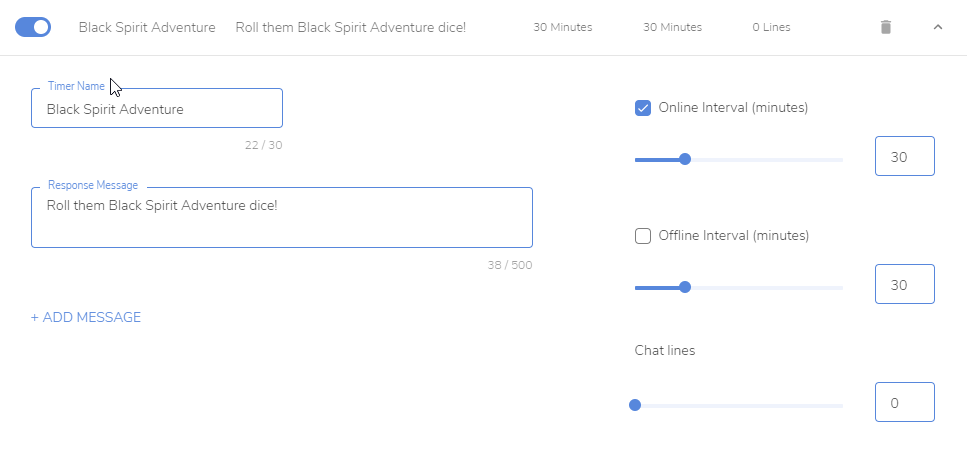
Question about timers. Mine seems to have stopped working. It is enabled and set to send a message every 30 minutes. It worked fine for weeks, now it no longer sends a chat message. Suggestions on what I am missing?
wind bough
Label wont scroll in obs via browser link
 chrome folio
@slender prism add your bot (EQs_bot) as moderator /mod EQs_bot
slender prism
It is
chrome folio
@slender prism send here a screenshot of one timer message (details) https://streamelements.com/dashboard/bot-timers
 chrome folio
@slender prism configure it to 5 minutes to test
slender prism
I did it to 2 minutes, lol.
Would there be a reason it would kick out the custom bot as a moderator?
Woot there it went!
Thanks for the help. I wonder how it became unmodded. Strange. I must have screwed something up.
chrome folio
you are using a bot with custom bot name and the StreamElements was your moderator, and now you have your custom bot name as moderator and answering normally 🙂 sometimes you need to give moderator role for you bot to works normally all functions.
slender prism
You got time for one more question I had earlier, but no one was able to answer. Can you scroll the text on the Media Request widget?
Some of the song and names are longer than the window.
chrome folio
@slender prism for now there is no option to enable text to scroll horizontally on this widget.
Maybe you can ask some help on #dev-chat with custom widget.
slender prism
ok, thanks again. I appreciate it. Keep being awesome!
 wary lark
Is there a list of the available placeholders for text? IE: {streamer}, which is replaced with my twitch user name
strong kernel
Bot variables can be viewed at https://streamelements.com/dashboard/bot-commands/variables

StreamElements
The Ultimate All in One Platform for Streamers
wary lark
Not what I'm asking about. I mean for the text fields in my overlays
strong kernel
Every widget displays its available variables underneath its text field in the settings.
rare trench
@strong kernel thank you for the response earlier; just tried your instructions but it unfortunately still gives me the same message
 brittle night
Hello! can anyone help me? im trying close my account in stram labs but the site is not make it easyer
wary lark
Nothing listed there? Or am I lookin in the wrong spot?
strong kernel
@brittle night You'll need to ask Streamlabs.
@wary lark Which widget are you editing?
brittle night
sorry, stream elements *
wary lark
a text widget labeled "your twitch name"
strong kernel
@wary lark That is a static text widget. There are no variables for it.
wary lark
then why does "{streamer}" get replaced by "lupusnoctu" in the overlay?
strong kernel
Because apparently nobody told me there's variables for a static text widget. There is no list anywhere.
 final venture
Hey guys! I just started using SE & OBS live today. I seem to have an issue where when I upload one of my browser sources for an overlay as an example, it only shows 1/4 of the full picture
round brambleBOT
@final venture The default resolution for StreamElements overlays (theme and custom) is 1920x1080. Please add them in OBS at their full resolution and use CTRL+F to fit to screen if necessary. You can then downscale your stream in OBS settings > Video if you'd like https://i.imgur.com/6bWXxjR.png
 final venture
Awesome, thanks @wary lark !
wary lark
Glad I could help?
final venture
Oh my bad, I thought you typed something that generated the above response lol
Like a shortcut/code for an answer to a F.A.Q.
 long cliff
Is it possible to have a Streamelements donation alert pop up on streamlabs?
wary lark
Nope. LOL
strong kernel
I wonder who could've possibly done that?
@long cliff No. We're competitors.
A StreamElements tip will not trigger a Streamlabs alert or vice versa.
final venture
Lol, thanks nethyr!
long cliff
Ohhh okay thankyou
final venture
One weird thing I've noticed is that while editing a text in stream elements, the new text will not show in the preview. For example, if I want to edit the default "@/twitter" next to the twitter logo, my edited text won't appear. Instead it'll continue to say "twitter" or whatever placeholders are there
strong kernel
Are you editing the actual text, and not just the layer name? The text field is in the settings menu.
final venture
Ahhh I gotcha
 astral axle
I'm trying to do custom code for alerts. Is there any documentation on elements and such to use? How to code for it?
 fathom gull
I’m not sure if this is the place where I should ask, but there are some widgets in #widget-share that require authentication from jebaited.net. I go to the website, login and authenticate with StreamElelments, and it loops me back to “sign in with StreamElements”. What am I doing wrong here?
astral axle
thanks nethyr!
 velvet prawn
How can I fix the watchtime command? I cant seem to get it to work no matter what I do.
wind bough
no other fonts than the Nunito Font on labels work when i switch them in Edit Overlay on streamelements, and they show to be a another font when obs.live updates.
any fixes?
also, scroll doesnt work on other fonts
 slender nacelle
I changed my name on Twitch recently and saw on reddit I need to message devs for them to reset something?
 gleaming pagoda
Does anyone know how to fix that?
wind bough
UPDATE: i needed to just reset OBS :)
gleaming pagoda
LOOOOOOOOOOOOOOL ok than
slender nacelle
The Chatstats don't work and was just told to contact staff for them to reset it manually, and I still see my old username in Loyalty settings on ignore list and can't remove it/add new one.
 unreal yew
quick question. I have a store redemption which is set up to play a sound and gif when redeemed. It's working fine, however, the trigger for it is an emote [PepeJam] and that works too, but only if I do !redeem pepejam. if I wanted to make the same output (gif+song) but trigger with ONLY the pepejam and not the redemption, is that possible? is there an alternate way to be setting this up?
 echo root
Hi just a question, I want to import my current overlay from Obs Studio or from Streamlabs into streamelements so I can edit it in there. I tried to streamlabs import and it wont work. Any suggestions?
 slim depot
Hello like this, well I wanted to see if you could help me with a problem I have with alerts, when I test the alert it sounds 2 times in the test and in my OBS but they are not shown on my screen, how can I solve the problem? 😦
slender nacelle
@slim depot Double click on the browser source in OBS scroll down and check "Shutdown source when not visible"
I think it might fix it
slim depot
Hmm ok i try bro
 vivid willow
why can i not change the title and game
 mild shuttle
I am having severe frame dropping when I stream Overwatch, but not with Hearthstone. All my settings on OBS live seem to be what they should be. I don't know what to do. Can somebody maybe send a screenshot of what settings should be with an rtx 2060 super?
 whole ocean
Hello are mobile notifications down at the moment? I tested them before going live but now that I am live, they are not playing. How can I fix this?
Ty
long cliff
hey ive enabled tts for donations but the voice isnt activating until after the donation alerts finished and disappeared. there is no tts speech activation delay either :/
slim depot
Still not working :/
slender nacelle
@slim depot Sorry it didn't help qwq, maybe try asking in #helpdesk-selive
slim depot
Not long ago my streams were working fine, but it started since I renamed it on Twitch, will it have something to do with it? ;-;
I tried changing the transmission key logearme de streamelements deleting the browse but nothing, everything remains the same they are heard but do not appear on the screen
slender nacelle
Maybe? I changed my name too and have few issues like Chatstats not working and some random oddities. I saw on a reddit thread that staff needs to reset something manually but haven't managed to get in touch with them here yet
round brambleBOT
@vivid willow There is a bug with setting the stream title in OBS and the Dev team is investigating.
In the meantime you can set the title using the !settitle command in chat (if enabled in your bot command settings)
Or with the Twitch dashboard: https://dashboard.twitch.tv/stream-manager
@mild shuttle For the best OBS support, please join their Official Discord @ discord.gg/obsproject
slim depot
And it is that everything stopped working, the donations bar, the chat overlay everything stopped linking rarely, what is super strange for me is that they sound but they do not come out u.u
strong kernel
@long cliff That's correct. TTS plays after the alert is done, and you cannot modify that timing.
round brambleBOT
@slim depot Make sure to ☑️ “Shutdown source when not visible” for all browser sources (all OBS scenes). If using studio mode, uncheck “Swap Preview/Output scenes After Transitioning.” Also keep in mind that sound can play from any overlay loaded in the browser (editor or launched). https://i.imgur.com/6bWXxjR.png https://i.imgur.com/yY0wcFl.png

 violet pike
Hey, how can I reset the chat stats?
strong kernel
@violet pike You want to completely clear and reset them for your channel?
tropic blade
@strong kernel is there a way to resize the image on an alert? It always wants to appear much bigger than the image actually is
strong kernel
It's dependent on the selected layout and the size of the widget itself.
tropic blade
I'm trying to use one of the pre-made overlays, but with exceptions for specific bits
the layout itself isnt big at all, but it always blows the image up huge for the exception, and there doesnt seem to be a way to change canvas size on custom alert
strong kernel
I think you're misunderstanding what I mean by layout.
tropic blade
I likely am
strong kernel
The selected layout and the actual width and height of the widget itself are the only things that affect the alert size.
tropic blade
oh. I have text over image selected.
I will play around with changing the layout. thanks for the help
slender nacelle
Can anyone help me with chatstats too? It said the staff needs to reset it manually since I changed my name on Twitch
That and Loyalty settings ignore list has my old name and can't add my new name.
 meager jolt
Is something happening with streamelements website, I can't get anywhere in the website, it just keeps diverting me to the homepage??
 spiral marlin
can someone help me? like how i need to put the variables to do a command like this, im getting brain dead in this moment
round brambleBOT
@coral python Please follow our community rules:
- No advertisement or stream promotion
- Respect ALL server members
- No NSFW/NSFL
Thank you
spiral marlin
like you get timeout and the message pop out
round brambleBOT
@meager jolt Please logout of StreamElements at https://streamelements.com/logout and then login again to your account (Twitch/Youtube/Facebook)
StreamElements
The Ultimate All in One Platform for Streamers
strong kernel
@spiral marlin The timeout on its own won't provide a bot response, but you can create a custom command with the offending word as a keyword, so it uses that command in response as well. Then it's just set up like any other command.
strong kernel
Well, a command is a command, but to trigger it on an offending word, you go into the command's advanced settings and enter the keyword in the keywords field.
spiral marlin
i need it like
when i type let's see !twitch
to get timeout
and in the same thing a message
strong kernel
Again: The timeout is one section of your account, and the bot actually replying is another. It's not all set up in one place.
What you're essentially doing is creating a command with the keyword being what's getting them timed out.
 haughty hinge
Hi everyone, first time trying to stream. I am using OBS.live with Streamelements and everyting I hit start streaming, it keeps loading Facebook...can anyone help me out?
round brambleBOT
@haughty hinge Streamelements on top of OBS -> Logout -> login
haughty hinge
I am so glad I found you guys!
logging in and out still only brings up the facebook login automatically
so frustrating
round brambleBOT
@haughty hinge Please provide a proper screenshot with the issue visible. If not sure how to take a screenshot, you can check here: https://www.take-a-screenshot.org/
haughty hinge
I connected my Twitch account via the settings - stream tab, but every time I press start streaming it automatically brings up the facebook stream
round brambleBOT
@haughty hinge Streamelements on top of OBS -> Logout -> login
strong kernel
@haughty hinge You were asked to log out via StreamElements > Logout, not via Settings > Stream. They're entirely different logins.
 mellow pike
anyone know how to download the videos from stream end to put it on twitch as offline panel
strong kernel
@mellow pike Downloading assets from StreamElements is against our ToS.
mellow pike
I did not understand you could repeat please but otherwise thank you
strong kernel
@mellow pike It's not allowed.
mellow pike
ahhh ok and how can I do then I leave
strong kernel
You cannot.
mellow pike
ok
haughty hinge
I have signed out of everything and tried to log back into everything and it still automatically pops up facebook when I hit start streaming in obs.live
so strange
strong kernel
@haughty hinge Take a screenshot of where you logged out.
haughty hinge
strong kernel
Again:
You need to log out in the StreamElements menu at the top of OBS
Not on the site.
haughty hinge
oh my goodness. thank you lol
I was looking everywhere for that
+10000 points for you friend
 lusty hawk
host and raid alerts is not coming up way? any idea
round brambleBOT
@lusty hawk Due to changes to Twitch API, we have filtered out hosts and will only show these ones on your activity feed:
- All hosts coming from an online channel with at least 1+ viewer
- Auto host events with at least 1 viewer - only from a channel that just went offline
Note: If you see "X channel has hosted you" with no viewers on the back, that is considered an offline host or a host with 0 viewers, we do not show these.
 dense kite
Hello, was wondering if there was a way to generate a duplicate contest without the 'Copy of' Contest popping up as I have very little time between rounds to edit and reuse contests?
 ionic kelp
Unfortunately no.
dense kite
ok thank you!
ionic kelp
However if you have someone you trust you can make them a bot manager and they can handle that.
dense kite
I mean i have mods, I guess I would have to give them access to streamelemnts?
round brambleBOT
Follow these steps to grant managers/moderators access to your dashboard:
- Click on your Channel Name at the top of the dashboard and select Settings
- Create a new invite at one of three access levels (Bot Supervisor, Editor, Full Control)
- Send this invite to a mod/manager to give them access to your dashboard. The link is one-time-use and expires after 72 hours if not accepted
Video tutorial: https://youtu.be/zl_h-ttZDF0
dense kite
ok thank you
ionic kelp
Bot Supervisor is the one you'd want.
dense kite
perfect much appreciated
 golden cape
Any help with the tipping aspect of stream elements, I had someone tried to tip me via twitch and it told them restricted. Everything seems find on my end with the settings. Any ideas. It read " ERROR Seller Restriction" when trying to tip
ionic kelp
@golden cape That's an issue with your PayPal account. Login and take a look at what might be causing it.
golden cape
Thanks
long cliff
is it possible to adjust text size without manually doing it with numbers? like dragging with my mouse
 fading echo
anyone know when i try to replace the text for like youtube for example to my youtube channel it wont change?
or my twitter and insta?
ionic kelp
@fading echo you're clicking the wrong layer.
 dry hare
@fading echo https://streamable.com/fw0top
 lament blade
can somone please help me im trying to figure out how i change the text on the !raffle thingy but i just cant find it been trying for days
 lyric latch
Hello guys, I have a small question regarding stream elements, is it possible for me to configure the bot to automatically pass ads? For example, running a 180s ad every 1 hour?
round brambleBOT
@lyric latch To have Streamelements run ads for you, make sure:
- Streamelements is added as an Editor to your Twitch Channel here: https://dashboard.twitch.tv/community/roles
2.A) To make a timer, go here: https://streamelements.com/dashboard/bot-timers - add a timer with a response "/commercial" and 5/10/30/60 for the duration of the ad - example:/commercial 30
2.B) To make a command trigger an add go here: https://streamelements.com/dashboard/bot-commands/custom-commands and add a command with response "/commercial" and 5/10/30/60 for the duration of the ad - example:/commercial 30
dry hare
@lament blade what text do you mean?
lament blade
the text when you do a !raffle 1500 90 the bot will say a raffle for 1500 coins has started blablalba type !join to enter i wanted to custimize it so its more appropriate for my channel
dry hare
@lament blade
fading echo
@dry hare i actually dont have that option like you have
lament blade
ah thank you
fading echo
a theme
lyric latch
Just one last question, it is a very basic question ... I know that the largest amount of minutes that I can spend an ad is 3 minutes, but is this number represented by 180s or 60s?
fading echo
spooky boo!
dry hare
@fading echo https://streamable.com/qlt7xq
fading echo
thank you sooo much!
dry hare
👍
 zenith steeple
Hi, I just wanted to ask why I'm not getting my stream summaries emailed to me anymore?
Have they been stopped? Cuz I kind of liked them
round brambleBOT
@zenith steeple Please provide your account ID found at the top of this page: https://streamelements.com/dashboard/account/channels This ID is public info and safe to share here.
 waxen rock
Wont let me change my title in the activty feed in obs live. Just doesnt let me type when I click on change title
round brambleBOT
@waxen rock There is a bug with setting the stream title in OBS and the Dev team is investigating.
In the meantime you can set the title using the !settitle command in chat (if enabled in your bot command settings)
Or with the Twitch dashboard: https://dashboard.twitch.tv/stream-manager
zenith steeple
@round bramble 5b32c3f12f285779e47df2a1
strong kernel
@zenith steeple Forwarded your information to have it looked into.
zenith steeple
tyty
 slim brook
Can i add commands for chat to trigger sound effects
Besides channel points or an add thingy like blerp
strong kernel
Sound effects are done only through store redemptions.
slim brook
Does 0 points work?
strong kernel
Yes, it should.
slim brook
Thx
lament blade
Hi I am a Noob Twitch Streamer and I have a question, I use a theme from the website but it doesent actually show my followers or anything - and I saw that in every field where it shows my twitch name there is a {streamer} and I wonder is there something like that for the followers, last donation and so on?
round brambleBOT
@lament blade We've released our new Overlay Editor revamp. You can check out the changes and how to work with it here: https://youtu.be/X5VzXjqAsjk
Check out our blog post as well: https://blog.streamelements.com/streamelements-overlay-editor-just-got-even-better-c22cb5b4853e

We are thrilled to announce the launch of the remastered StreamElements Overlay editor!
https://p.strms.net/newoverlayyt
Why StreamElements Overlays are better?
😎 Simple: Load your entier setup using only 1 link
⚡ Fast: Cloud-powered Overlays arrive in real-time, say goodb...
 agile plaza
is there a way to do a variation for multiple gifted subs as i dont want an alert spam while streaming
strong kernel
Yes, that's called a "Community gift" variation.
agile plaza
thank you @strong kernel i got it working :3
 umbral phoenix
so i just changed my name on twitch and i currently get a 404 error on stream elements when i attempt to view my chat stats. help please and thanks
ionic kelp
@umbral phoenix old and new name?
umbral phoenix
old:redpillowgaming new:red_pillow
 lavish anvil
How do I grown on Twitch? I’ve streamed for 7 days and 10 hours and no one is seeing my streams
ionic kelp
umbral phoenix
@ionic kelp anything else you need?
ionic kelp
Nope. Just waiting for someone to flip the switch.
umbral phoenix
cool. thanks!
 fading pecan
I have a stupid question... I forgot the code used to make a shortcut chat command for redeem. turning !redeem dog into simply !dog. my mind is drawing a blank
ionic kelp
${redeem name}
fading pecan
thanks, my brain was just frozen....
 vital moat
why is the host alerts not working 😦
round brambleBOT
@vital moat Due to changes to Twitch API, we have filtered out hosts and will only show these ones on your activity feed:
- All hosts coming from an online channel with at least 1+ viewer
- Auto host events with at least 1 viewer - only from a channel that just went offline
Note: If you see "X channel has hosted you" with no viewers on the back, that is considered an offline host or a host with 0 viewers, we do not show these.
vital moat
that sucks...
 marsh sluice
anyone available to help me install OBS LIVE for a MA?
round brambleBOT
@toxic hatch Please follow our community rules:
- No advertisement or stream promotion
- Respect ALL server members
- No NSFW/NSFL
Thank you
ionic kelp
@marsh sluice If you meant Mac then you can't. Only available windows.
marsh sluice
Don't need it. Got TRIGGERFYRE to work for MY OBS
ionic kelp
@umbral phoenix when did you change your name?
 tawdry kettle
@ionic kelp ${subcount} didnt work for me - https://media.discordapp.net/attachments/711443337542107188/737185051435073566/JPEG_20200727_155006.jpg?width=342&height=609

 scarlet tiger
${channel.subs}
ionic kelp
That too.
 echo hawk
how to take donation ? so that i get less transaction fee and exchange fee
help.. i am new in streaming
round brambleBOT
@echo hawk New to Stream Elements?
Check out our YouTube channel https://www.youtube.com/c/streamelements/videos
with tutorial videos from setting up the basics, to in depth details on how to use our product.
New to OBS? Here is a 4 step quickstart guide
https://obsproject.com/wiki/OBS-Studio-Quickstart
Want to learn even more? Here is an in-depth overview
https://obsproject.com/wiki/OBS-Studio-Overview
echo hawk
as paypal that 5% and exchange at are at non updated price
 halcyon inlet
my stream elements bot wansnt working in my twitch stream today
nimble dune
@halcyon inlet Go to the dashboard -> right side -> part channel -> join channel (https://streamelements.com/dashboard)
StreamElements
The Ultimate All in One Platform for Streamers
 halcyon inlet
i don’t see that
nimble dune
Make sure you are in PC.
halcyon inlet
i’m on a laptop
nimble dune
You should see that here -> https://streamelements.com/dashboard
halcyon inlet
this is what i see on my dash
ionic kelp
Or scroll down.
nimble dune
Type in your chat /mod streamelements
halcyon inlet
ok it is a mod
nimble dune
Okay, so have you tried what before i said part channel and join?
ionic kelp
Scroll down.
halcyon inlet
there’s nothing down there
ionic kelp
Click do later in thd bbottom right corner.
halcyon inlet
 rare knoll
Hello! I have a question it says my picture for my item on my store is no working. Not sure why.. thanks for your help!
halcyon inlet
ohhhh ok
scarlet tiger
@rare knoll what resolution?
rare knoll
@scarlet tiger hmm not sure how do I check?
halcyon inlet
thanks a lot
rare knoll
@scarlet tiger alright I will check it
@scarlet tiger alright I got it to work thank you for your help have a goodnight 🙂
scarlet tiger

 clear arrow
I have a problem with my alerts. Whenever my channel is hosted it doesn't show an alert and I don't know why. It works with the emulation thing on my overlay but when someone actually hosts my channel it doesn't show up.
round brambleBOT
@clear arrow Due to changes to Twitch API, we have filtered out hosts and will only show these ones on your activity feed:
- All hosts coming from an online channel with at least 1+ viewer
- Auto host events with at least 1 viewer - only from a channel that just went offline
Note: If you see "X channel has hosted you" with no viewers on the back, that is considered an offline host or a host with 0 viewers, we do not show these.
clear arrow
okay wait, so if it shows in chat as "[user] is hosting you" with no viewer count it's not supposed to show an alert then?
sorry it's late. I just finished so I'm tired.
 fresh rapids
Hi, question, Is it possible to use loyalty points to use TTS?
twin sentinel
Create a store item and allow users to add a msg. @fresh rapids
twin sentinel
Correct.
fresh rapids
But, I have to manually accept those "purchases" 😦
I want that viewers can have some more interaction with me by using there points to directly use TTS while I'm playing
twin sentinel
Asking internally on this.
 elfin yew
For some reason my followers aren't showed in activity feed and they didn't get a alert. Could someone help me?
I don't know what to do.
 zenith widget
Whats your username?
elfin yew
shil0u_
Every other alert wotks fine. I can't even see followers in activity feed.
Now it works
How?
zenith widget
I resubbed your webhooks so follower events should start showing up again
elfin yew
Thanks.
 viral belfry
Hi i am new to streamelements switching over from streamlabs. I was wondering if it was possible to import my activity feed from streamlabs into streamelements. Also do I have to unlink/disconnect my streamlabs account in order to use streamelements?
rare knoll
Hey again! I need some help I have my stream store items all set up now how do I make a command for my stream?? THANKS!
zenith widget
@viral belfry No, you don't need to unlink it, but we can't import any events from Twitch or SL to the activity feed. We are not that retroactive.
So you will have to let our aggregates fill over time.
@rare knoll Steps to make a command trigger sound on stream:
- Go to Stream Store page here: https://streamelements.com/dashboard/store/items
- Add an item that has these settings on it:
- Stream Perk
- Loyalty settings to your desire
- (Next step) Add contents (image and/or sound you want to play)
- "Redeeming this item shows an alert
- Redemable via chat
- Skip Requirements
- Get the item name/command from the 2nd creation page
- Go to commands page here: https://streamelements.com/dashboard/bot/commands/custom
- Add command with desired name and have response for command as:
${redeem item_name_here} - Go to your overlays and edit the overlay you use.
- Click on "widgets" and add "Store redemptions" widget. Click save and you should be golden.
- Test your own command in chat and have OBS or editor open to hear sound
rare knoll
Thank you!
 tacit stirrup
Create new page please, my first nickname : bigbro123123 , my previous nickname : Onad1teFN
zenith widget
And whats your current name?
tacit stirrup
Onadite
zenith widget
There are no chatstats on bigbro123123 or Onad1teFN
tacit stirrup
but on Onadite also no
zenith widget
Chatstats page doesn't rename automatically with your channel.
And if those 2 names don't have a chatstats page, then its a much older name
or never created in the first place, which happens
zenith widget
Then I can make you a fresh page
tacit stirrup
yea, please
rare knoll
Hello once again... how do my viewers get to my stream store they are wanting to use their points but I’m not sure how to direct them there.. thanks
zenith widget
there is a default command called "!store"
tacit stirrup
@zenith widget how to find it ?
zenith widget
that will link them to the store
rare knoll
Alright
rare knoll
It is saying no items found when you put !store in chat
tacit stirrup
i dont have this
zenith widget
@tacit stirrup You are looking into the dashboard. Click on "Profile page" on the left side menu on the bottom -> open profile page button
@rare knoll Make sure the store items are set to be redeemed via chat
rare knoll
Ok
rare knoll
What is the command I put for the redeem via chat?
zenith widget
the default command is "!redeem itemname", as item name is the name of the item you've placed for redemption purposes @rare knoll
rare knoll
Alright
zenith widget
its going to be updated automatically
 fallen dove
I change my nick AcogConstax and its showed in channel acogconstax
what too do
?
I fixt dont need help
slender nacelle
Can someone help me out with my chatstats page not working, I changed my name on Twitch recently and chatstats don't work, and Loyalty settings ignore list has my old name and can't add my new name. Saw on reddit staff needs to reset something manually
vestal briar
hi, i changed my nickname on twitch and can't use chatsats on twitch, my previous nickname was "marcia___", my current nickname is "marcia_ with only one underscore, could you please update my nickname on streamelements? thanks
slender nacelle
Yeah same here, my old name was "SlyTheFox_" new name is "SlyTheFlopis"
Would really like an update as well, been trying to get help since yesterday.
Thanks in advance
 nova tartan
Custom bot name requirements
- StreamElements bot modded and in chat
- Active overlay with alerts
- StreamElements tipping page in the panels below the stream (!panels)
- Create a twitch account for the name you want to use
- Ground Control app must be running
Steps to enable custom name
- Sign in to https://twitch.tv with the bot account
- Install and run Ground Control (!gc for download)
- Visit https://twitchapps.com/tmi/ and generate an oAUTH token
- Copy/paste everything in the box to Ground Control oAuth settings and enter the name for the bot account
- Restart Ground Control (custom name may take a few minutes to take effect)
@nocturne pelican Not working for me
round brambleBOT
@nova tartan Currently renaming the bot fully works with OBS.Live.
You can follow this video guide to set it up: https://discordapp.com/channels/141203863863558144/494513233416421386/561516184718278676
If you don't want to use OBS.Live and want to stick with Ground Control, please let us know your Twitch username.
zenith widget
@slender nacelle done
@vestal briar There is no chatstats page on the double underscore name
@fallen dove Logout from our dashboard and login again
slender nacelle
@zenith widget Thank you so much!
vestal briar
@vestal briar There is no chatstats page on the double underscore name
@zenith widget it's triple underscore, when i type the underscore, the first one disappears
zenith widget
so from 3 to 1?
vestal briar
yeah
nova tartan
I don't have "Rename bot" option here but i done every requirements for unlock (Twitch name: Coffister)
nova tartan
@zenith widget Thank you 🙂
fresh rapids
@twin sentinel did you find some more information about the TTS by loyalty points?
 solid vapor
Hey hi friendos, I was told to come here for help with my bot not working?
zenith widget
👋
solid vapor

zenith widget
Can you turn off the follower mode on?
Also I assume you are using OBS.Live as well, right?
solid vapor
It is now off, and yes OBS.Live
solid vapor
It is; I just tried doing it again and it said "is already a mod" but I'll do it again 🙂
zenith widget
or rather first try /unban streamelements?
solid vapor
Not currently banned, and already modded
 round brambleBOT
Streamelements on top of OBS -> Logout -> login
round brambleBOT
If your commands recently stopped working and you're using OBS.Live and a custom bot name do the following:
1.) In OBS.Live, click on the hamburger menu (three stripes) at the top left of your activity feed
2.) Click on Stream Settings -> Custom bot name
3.) In the "Custom bot name" field select "Set custom bot name", not your already existing username (with capital letters)
Note: If you already connected an account that way, the third entry will show as the account name (see image https://i.imgur.com/sO7fWOX.png)
4.) Scroll a bit down and click on the purple "CONNECT CUSTOM BOT ACCOUNT" button
5.) Log in as usual and "Authorize" the custom bot name
6.) Back in the Activity feed, click on the "SEND TEST MESSAGE" button and check if your custom bot name starts working again
solid vapor
Done done annnnnd no test message went through
zenith widget
!botdebug
round brambleBOT
2) In the "Target" field, add the following to the very end: --remote-debugging-port=40404
3) Open OBS (or restart if it was open)
4) Open your web browser and type in: localhost:40404
5) Click on "StreamElements - Activity feed"
6) Navigate to the Console tab
7) Type the following into the console and hit enter: store.customBot.removeCustomBotIntegration()
8) Try setting the custom bot name
9) Remove the additional flag in step 2 from your shortcut properties.```then do this
solid vapor
Do I not hit apply? When I hit apply on the target field it tells me yada yada isn't valid
zenith widget
show me
solid vapor
Sent
Ok real talk I've never done anything with a console tab before so sorry in advance, but does it matter where I type that in or
zenith widget
yes - in the console tab in the bottom
solid vapor
PepeHands I did all of that and still nothing
solid vapor
....ChatBotBeLike
It should be noted; even if I change it to just being StreamElements as the bot instead of a custom bot it still doesn't work
zenith widget
check DMs
 small wedge
Hi, I want to add merch to StreamElements but it says Beta and it isn't loading to the next page
 proper shuttle
hi, someone knows if a mod can edit the cooldown of a command from the chat?
zenith widget
!cmd
round brambleBOT
You can make changes to custom commands in chat with !command add/remove/edit/options/show Valid flags for !cmd options are: -enable -disable -cd (number) -usercd (number) -cost (number) -level (number) -type (say, whisper or reply) -count (number). --- Example: !cmd options twitter -usercd 60 -type reply -level 250
proper shuttle
thank u so much 
 livid condor
create my new page pls, my first nickname was sh1nyboy
zenith widget
And what is your current one?
livid condor
nooqee
 main spindle
Hi, im getting no audio in obs for fortnite. For other games for e.g the audio works just fine. Any idea?
the mic works but the audio from fortnite doesn't
round brambleBOT
@main spindle For the best OBS support, please join their Official Discord @ discord.gg/obsproject
main spindle
@main spindle For the best OBS support, please join their Official Discord @ discord.gg/obsproject
@round bramble thnx
umbral phoenix
@ionic kelp name changed around Sun, Jul 26, 2:22 PM CST
livid condor
@zenith widget mb 4lqa ?
 primal knot
Buenas, alguien me podria ayudar con unos problemas que tengo al pasar la informacion del streamelements al streamlabs?
round brambleBOT
@primal knot Welcome to the helpdesk! The regular helpdesk channels are in English but we do provide multi-language support in the following channels: #🇩🇪︱deutsch | #🇫🇷︱français | #🇪🇸︱español | #🇵🇹︱português | #🇳🇱︱nederlands | #🇮🇹︱italiano | #🇵🇱︱polski | #🇨🇳︱中文語言服務區-chinese | #🇯🇵︱日本語-japanese | #🇭🇺︱magyar | #🇰🇷︱한국어-korean | #🇹🇭︱ไทย-thai | #🇷🇺︱русский | #🇺🇦︱українська | #🇨🇿︱czech
 fickle lion
I have a repeating issue while using OBS LIVE and Twitch.
Many mornings, usually (but not always) weekday mornings at 7:30AM EST my bitrate takes a dive. I've got 600+mb down and 15+mb up, and even during these bitrate drops I can run a test and get those numbers.
During these periods I used to drop massive numbers of frames, but selecting the "Dynamically change bitrate to manage congestion" option took care of that problem, although the stream is pretty pixelated when the bit rate drops.
Restarting the PC, the stream, my modem/router, changing my stream key and changing ingest servers/regions haven't helped anything when this problem hits.
Twitch inspector shows the issue but no real resolution advice. Twitch support has not responded to many requests about this.
Twitch issue, ISP issue (Xfinity) or something else?
 glass otter
se tiver um br aqui pra me ajudar, aí humilde
 untold crest
@fickle lion I would blame your ISP if you are using wired (not Wi-Fi 2.4GHz) connection and if there are no other devices that may be draining your upload in your network
ionic kelp
#🇵🇹︱português @glass otter
 bright arch
Not sure why but my chat commands are not working, I type them in and nothing happens. Streamelements is mod
 weak delta
Channel name, no links @bright arch
 alpine basalt
If my obs and stream settings are at 60fps is there a negative impact for my alerts to be at 30fps?
bright arch
TriumphantBlunder
fickle lion
@untold crest I am hard wired and not on WiFi. Seems to point to ISP. Nothing else on the network but me and a few Alexa devices.
untold crest
Yup. They may be throttling you. It is not that uncommon that they do that when people are using their upload
fickle lion
Sure feels like it - but at the same time, for only a period of time, every morning? Something is flaky for sure.
weak delta
@bright arch Turn off followers only mode for me, please and join me in chat.
 main warren
Hello, my chat stats are again with " no data" - How can i fix it on myself?
bright arch
I did @weak delta
weak delta
Type /followersoff in chat
round brambleBOT
@bright arch If your commands recently stopped working and you're using OBS.Live and a custom bot name do the following:
1.) In OBS.Live, click on the hamburger menu (three stripes) at the top left of your activity feed
2.) Click on Stream Settings -> Custom bot name
3.) In the "Custom bot name" field select "Set custom bot name", not your already existing username (with capital letters)
Note: If you already connected an account that way, the third entry will show as the account name (see image https://i.imgur.com/sO7fWOX.png)
4.) Scroll a bit down and click on the purple "CONNECT CUSTOM BOT ACCOUNT" button
5.) Log in as usual and "Authorize" the custom bot name
6.) Back in the Activity feed, click on the "SEND TEST MESSAGE" button and check if your custom bot name starts working again
weak delta
If you're meaning to use your broadcaster account as the custom bot name, just use the second option.
bright arch
is obs.live a website like streamelements or just OBS application on pc?
weak delta
It's a plugin for OBS Studio.
bright arch
AHH I see it, says StreamElements in the tool bar on OBS
 solid skiff
hi
i have 2 viewers who changed their usernames and used the !rename command, everything got transfered, point, watchtime and so on, but they cant redeem anything anymore, it always say "not enough points" regardless of how many point they have or i give them
can someone help me with that?
bright arch
@weak delta thats all setup and got all the checks, but test doesnt work
 hazy canopy
I want to resize an overlay I imported/edited from nerd or die from native 1080p to 720p. Is there a way to do it all at once instead of having to go back and manually move each component of the overlay. I use lightstream since I stream on concole not OBS, so I need to resize it on stream elements itself
ionic kelp
You might be able to grouping the layers but beyond that not really.
hazy canopy
😦 ok thanks @ionic kelp
solid vapor
Hey again friendos! Hope we're all doing well still 🙂 Just wondering, since I changed my name on the Twitch ... is there a way to change my store link to reflect this? Or is it stuck as the old name?
round brambleBOT
@bright arch Streamelements on top of OBS -> Logout -> login
weak delta
Then go back to the custom bot menu, set custom bot and choose the SECOND option which is your broadcaster account and save it.
If that doesn't work, we've got a bigger gun to pull but hopefully this clears you up.
 dusty void
Hi i have** 156 subs** on Twitch, but i cant connect DonatePay
Help please❤️
bright arch
@weak delta do I have to keep the bot as StreamElements
weak delta
Did you log out and log back in at the top?
bright arch
Yeah, so I have two step authentication on twitch. Can that mess with the bot?
weak delta
You're fine.
bright arch
Its working now, but curious if that mattered
bright arch
done
weak delta
When setting the custom bot as your name, you should not be asked to log in again
You're fixed.
bright arch
ok ty @weak delta
 green ocean
hey guys, how do i get the activity feed to show me the stats of my Facebook gaming stats?
round brambleBOT
@green ocean Streamelements on top of OBS -> Logout -> login
 tawny valve
Hi guys, my streamelements chat stats are not working at all, there is only a 404 error message, what to do?
 wary halo
Did you change your name recently?
tawny valve
no, I did not, I changed it once months ago, but this was before I started to stream
wary halo
Can you give me your old and new name Just to make sure?
tawny valve
yes ofc: New --> CuthiePanda | Old --> Panda_D_Thi
wary halo
Thanks, i'll ask around internally
tawny valve
Okay, thank you!
green ocean
@round bramble i am lost
wary halo
Yes, because you are in the Twitch helpdesk asking for Facebook
green ocean
i am multi streamer @wary halo
wary halo
Log out of the account and log back in to the FB account
You can't get multiple Activity feeds at the same time
green ocean
i need my stats in the same space, like the other alternative offers
ionic kelp
Not possible.
 toxic basin
can i turn off the "example text" when trying out alerts in the overlay editor?  takes a while for the TTS to finish
and also if I want sub alert variations, do I need to create a duplicate of every alert if I want gifted subs to have a chance to trigger a variation too?

now my test alerts wont stop running, how do I cancel them?  i clicked community gift and it must have tested 100 sub gifts I guess
 formal lintel
Hello, does anybody know how to fix my alerts? I already refreshed caches, i already done them by hand all over again, they keep on getting played, then get stuck and the sounds goes on and on repating itself until i reload my overlays @echo finch
fresh rapids
Asking internally on this.
@twin sentinel just checking if you didn't forget me 😛
slender prism
Anyone else having problems with the Media Request widget? Streamelements OBS Live is saying no active widget all of a sudden. It has been playing all morning and just quit. It doesn't show on the stream window, but it is on and active in my overlay.
Ok, it's fixed. Had to shut down and restart the obs client
 undone salmon
Hi, i have a problem with mi bot , i don't no why , but , they aren´t in my chat.
How can I make the bot go to my stream ?
 lapis aspen
I need help with alerts in raid I have (user) thanks for your raid (amount) viwers and that appears in exchanges pliss help me
fresh rapids
When replaying this I still get no TTS 😦
echo finch
@lapis aspen what do you mean with exchanges?
 vocal tusk
hi
 mental idol
Hey guys, does anyone know if it's possible to make a gulag counter, where one command will increase the wins/loses without having to copy pasta?
vocal tusk
how can i put a leaderboard of my channel points??
echo finch
you can't, Twitch does not provide an API to access the channel points
lapis aspen
@echo finch Redemptions
echo finch
ooh, OK. Mh, is that your alerts on stream (i.e. overlay) or the bot? either way have you checked their configuration? might just be a messed up config somewhere
lapis aspen
are the alerts
formal lintel
Hello, does anybody know how to fix my alerts? I already refreshed caches, i already done them by hand all over again, they keep on getting played, then get stuck and the sounds goes on and on repeating itself until i reload my overlays... anyone?
echo finch
@lapis aspen open your overlay editor and check the Settings page of the Store redemptions widget. Check the Message text there
nova tartan
@torn wind go to https://www.streamelements.com , login, Go to your dashboard, Click BOT on left panel and then go to Chat commands 🙂 There you can enable/disable all commands 🙂
lapis aspen
@echo finch ok
Thank you
nova tartan
@torn wind then click Arrow down and adjust everything
 torn wind
the description doesnt have a box to edit
and i want to edit these exclamaitions in this message
add less or more time to accept
 calm leaf
Hi, my friend and i have had some difficulty with the watchtime command. it just says 0 seconds instead of having the real watchtime, any help?
 fiery yacht
hi can any one help me i am trying to get it so that my song names from ground control go to test bar on obs live? with out the music been played from some where else because if the music play from any where else it will be heared by the recording and i just got the recording separated from the streaming music.. thanks
 worthy steppe
Hi! Can someone help me?
I was wondering if the subscriber multiplier on loyalty setting apply to bits and donates (For example: 100 bits = 1000 points; but if the person is a sub = 2000 points)
Or the multiplier apply only to the watching points?
 neon nexus
Is there a way to have two different contests active at the same time?
slender prism
Can anyone explain how the !kappagen command works. When I enter it in chat nothing happens on my stream.
dry hare
@slender prism you need to make sure that the Kappagen widget is active on your overlay
slender prism
ah, thanks. forgot all about that!
 zinc ice
Stream elements is still saying the wrong game despite updating it
 raven fiber
hey! I'm trying out streamelements but I'm having trouble resizing images. Is it possible to drag-crop an image and resize it freely?
round brambleBOT
@zinc ice There is a bug with setting the stream title in OBS and the Dev team is investigating.
In the meantime you can set the title using the !settitle command in chat (if enabled in your bot command settings)
Or with the Twitch dashboard: https://dashboard.twitch.tv/stream-manager
dry hare
@raven fiber what do you mean?
raven fiber
it's hard to explain. For example, is it possible to fir an image (streched) exatly to fit a frame?
*fit
for example, let's say a full body picture but I just want to crop the face and fit it to a certain frame
zinc ice
Any idea on a fix time for this? Announcement in chat and discord is wrong which is annoying. Thanks
 sharp parrot
Hi I need help with this message
Emulation sent, but alerts are paused in the activity feed
scarlet tiger
@sharp parrot Emulations are not listed in activity feed.
@zinc ice What you exactly mean?
sharp parrot
That's what it does when I am testing my notification
@music4004 I'm trying to fix my notifications but that's the message you keeps on coming up and I don't know how to fix it it I'm a new twitch streamer and I am new to it all
nimble dune
@echo hawk I see you use custom bot name?
echo hawk
yes, as my name
nimble dune
@echo hawk If your commands recently stopped working and you're using OBS.Live and a custom bot name do the following:
1.) In OBS.Live, click on the hamburger menu (three stripes) at the top left of your activity feed
2.) Click on Stream Settings -> Custom bot name
3.) In the "Custom bot name" field select "Set custom bot name", not your already existing username (with capital letters)
Note: If you already connected an account that way, the third entry will show as the account name (see image https://i.imgur.com/sO7fWOX.png)
4.) Scroll a bit down and click on the purple "CONNECT CUSTOM BOT ACCOUNT" button
5.) Log in as usual and "Authorize" the custom bot name
6.) Back in the Activity feed, click on the "SEND TEST MESSAGE" button and check if your custom bot name starts working again
echo hawk
its working from last lik 5days
well! i tried connecting again..its working..i think
rip, not working
nimble dune
Go to the dashboard -> right side -> part channel -> join channel (https://streamelements.com/dashboard)
StreamElements
The Ultimate All in One Platform for Streamers
slender prism
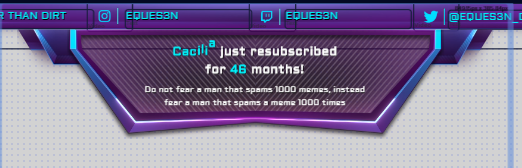
So how do I modify the secondary text (the quote at the bottom) in this alert? I can't find it anywhere.
https://i.imgur.com/zRavp3Z.png
 ionic kelp
@slender prism Coincidentally that's the secondary text in text settings.
nimble dune
@echo hawk Join channel
echo hawk
ok
slender prism
@ionic kelp I am looking at the secondary text in the settings, I just can't find it. I gotta be blind.
 near owl
Hi
nimble dune
@echo hawk Click part channel and then join.
echo hawk
i did
nimble dune
And working? If not can you again do what i before said for custom bot name?
lament blade
hello, my chatstats page does not works... 404 - Page Not Found ... What i can do? thank you.
ionic kelp
@slender prism
round brambleBOT
@near owl Welcome to the helpdesk! Please let us know how we can assist you today and a support volunteer or staff member will assist you as soon as they are available. Thank you for your patience.
echo hawk
i will fix this after my stream,,, 🙁
slender prism
@ionic kelp I found that, but where are the specific words so I can change them?
ionic kelp
That's the resub message. Otherwise it simply uses a pregenerated list.
nimble dune
@lament blade Have you changed your twitch username?
lament blade
yes some days ago
slender prism
I know, that's why I want to change the words. Sometimes it says, "Hi, my name is Bill." Not what I want it to say.
ionic kelp
That's only for emulation.
nimble dune
@lament blade Okay, can you write here your old name and new?
lament blade
@nimble dune old mrramirez_14 new mrramirez_
slender prism
Ok, but how do I know what it is going to say when people subscribe, follow, etc...
echo hawk
ionic kelp
@slender prism the bottom half is whatever the user puts if it's a resub or cheer. Otherwise it doesn't do anything.
slender prism
Ah, ok. Now I understand. Thank you!
zinc ice
@scarlet tiger so i have the correct title and in stream elements dash board it’s correct but when stream elements announces I’m playing in my discord and in the stream chat it says the wrong game
fresh rapids
@scarlet tiger so i have the correct title and in stream elements dash board it’s correct but when stream elements announces I’m playing in my discord and in the stream chat it says the wrong game
@zinc ice Did you press update information button? 🙂
 fathom estuary
hello.. I'd like to know why the stats of my stream not appearing on streamelements? I went on hiatus for a year, and I started streaming again but stats aren't showing anything
i have semi-active chat for the past week
ionic kelp
@fathom estuary probably need to wwait until after.
 cinder vigil
hey y'all besides using a ps4 cam how can i use OBS.live with twitch?
nimble dune
@echo hawk Can you try remove custom bot name and add again?
fathom estuary
I definitely have it connected. should I reconnect it? But I received follower notif on my stream
echo hawk
just did, but it spaming again
nimble dune
@echo hawk Have you added as moderator StreamElements? Type in your chat /mod streamelements
fathom estuary
sorry. should've posted this one. even last year's stream info is gone. I used to have it filled. FYI, I changed my username a few weeks ago
chrome folio
@echo hawk are you using Ground Control and OBS.live at the same time?
chrome folio
Right. Then check your task manager, on Windows, and close all OBS.live opened.
chrome folio
First, see if you have more than one OBS.live opened on task manager.
echo hawk
chrome folio
For now, to avoid that repetition in your stream chat, you can part bot from your channel and when you have some time to fix it, then you back the bot to your chat.
round brambleBOT
@echo hawk Go to the dashboard -> right side -> part channel -> join channel (https://streamelements.com/dashboard)
echo hawk
ok
lament blade
how i can edit this name?
ionic kelp
Click on the name there and it should give the option to the left.
zinc ice
@fresh rapids @scarlet tiger yup multiple times and multiple streams
lament blade
Just pondering is there a way to add a pastebin file, and or txt document with a list of; in this case ,random facts and stuff as a custom command? (as of the variable limit otherwise)
final venture
Hey guys! When I uploaded my own sound clip to my Overlay for a follower alert, a default bell chime still plays along with my own sound clip. The issue is I can't seem to locate where that chime sound notification would be
Is it just some kind of placeholder sound that will go away?
final venture
LOL got it that helped, thanks a lot
 scarlet pumice
Hi there folks, trying to find solutions to my Counter problem. Keep trying to use "!editcounter <name> <value>" and says it confirmed the change, but when I type the regular command (!<name>) it doesn't update. any ideas on how to fix this?
 neat otter
Hello I'm trying to set up the hypecup (I only have followers atm). I added my own static image (yes switched off the sprite sheet option) but no image pops ups even tho the cup moves as if the token hit the side. When I clicked the sprite sheet option on it shows bits of the image as expect so I know its not the image showing as invisible. I also set up the subscriber one and emulated it in the overlay editor and that one works fine so I'm not sure what I'm doing wrong.
 languid sinew
Hello guys! So I was trying to do a sound effect in the shop.. I disabled all the redeem alerts in chat but it allways apear this one.. can someone help me with it?
lament blade
Question, I've had multiple donators on stream, the alert shows up on stream but the donation itself doesn't show on the twitch activity feed, Anyone kno why or how to fix that?
wary halo
Twitch activity feed will never show donations
only the StreamElements activity feed
Hello guys! So I was trying to do a sound effect in the shop.. I disabled all the redeem alerts in chat but it allways apear this one.. can someone help me with it?
@languid sinew not possible to turn those off
chrome folio
@languid sinew the option "redeemable via chat" when enabled will display this message on chat when the item is redeemed.
languid sinew
Oh ok.. It's weird because there is the option to not give chat feedback about the redemptions and than it doesnt work..
chrome folio
You cannot disable this default message.
languid sinew
@chrome folio Ok, now i understand, ty
alpine basalt
If I have two alerts setup as alternative tips for $1 each, how do I ensure both have an equal chance of showing up if someone tips $1?
 viscid pebbleBOT
Hi @torn wind, Please ask your question(s) or describe the problem you're looking to solve so staff or a support volunteer can assist you as soon as they are available.
torn wind
how can i edit these automatic messages
@torn wind here
round brambleBOT
@ripe birch Please follow our community rules:
- No advertisement or stream promotion
- Respect ALL server members
- No NSFW/NSFL
Thank you
lament blade
Click on the name there and it should give the option to the left.
@ionic kelp i change the name on the left, but the name on the top it's always streamelement
ionic kelp
You clicked the wrong one.
You click the name in the editor. Not the list.
@lament blade Should be working now.
 inner warren
can anyone help, the links I have whitelisted, are sometimes showing at astericks and have whitelisted the links
round brambleBOT
@inner warren If links in chat are appearing as ***** either mod the bot or disable block hyperlinks in your twitch channel settings https://dashboard.twitch.tv/settings/moderation
lament blade
how can i add the chat in the box?
lament blade
ok thx
 dusk talon
Having issues with a buddies SE bot in his chat. He’s currently live and we’ve verified bot has mod permissions
Not getting any communication back
round brambleBOT
@dusk talon Go to the dashboard -> right side -> part channel -> join channel (https://streamelements.com/dashboard)
 fleet geyser
my commands wont work for some reason please help
dusk talon
@round bramble have tried with no luck
round brambleBOT
@fleet geyser If you changed your name on Twitch please follow these steps:
🔹 Visit https://streamelements.com/logout and then log in again with by connecting with Twitch.
🔹 On the right side of the dashboard page that opens, select "Join" under bot settings. If it says "Part" select that and then select "Join" to send the bot to the chat. Don't forget to mod the bot by typing /mod streamelements in your channel if you have not already.
🔹 Post your old and your new name here so that we can update your channel's chatstats tracking (must be done by staff).
chrome folio
@fleet geyser wait a moment, please.
fleet geyser
k thank you
inner warren
The other thing is I have issues with the viewers not refreshing in the chat window ?
fleet geyser
what do i do when u fix it @chrome folio
chrome folio
@fleet geyser as soon as we update we will let you know.
fleet geyser
ty
alpine basalt
I have some alerts who audio is in sync for the webm, but when it's played back through the streamelements web link in obs it's not in sync. How can I fix this?
scarlet pumice
anything regarding my counter inquiry folks?
 opaque cosmos
Hi
scarlet tiger
No
round brambleBOT
@opaque cosmos Please follow our community rules:
- No advertisement or stream promotion
- Respect ALL server members
- No NSFW/NSFL
Thank you
scarlet tiger
@scarlet pumice maybe try part/join bot
opaque cosmos
@round bramble OK 💝💝
round brambleBOT
@opaque cosmos New to Stream Elements?
Check out our YouTube channel https://www.youtube.com/c/streamelements/videos
with tutorial videos from setting up the basics, to in depth details on how to use our product.
New to OBS? Here is a 4 step quickstart guide
https://obsproject.com/wiki/OBS-Studio-Quickstart
Want to learn even more? Here is an in-depth overview
https://obsproject.com/wiki/OBS-Studio-Overview
scarlet pumice
@scarlet tiger sorry I'm not too familiar with that,, is that a separate bot, or something integrate with SE bot?
round brambleBOT
@scarlet pumice Go to the dashboard -> right side -> part channel -> join channel (https://streamelements.com/dashboard)
worthy steppe
Hi! Can someone help me?
I was wondering if the subscriber multiplier on loyalty setting apply to bits and donates (For example: 100 bits = 1000 points; but if the person is a sub = 2000 points)
Or the multiplier apply only to the watching points?
twin sentinel
Only on points for watching.
lament blade
hi does anyone know why when i try to edit the youtube name in my overlay it does not change?
twin sentinel
Edit the message, not the layer name.
 open linden
Hi im running a strong streaming pc setup but for somereason its causing me frame drop in game and makes them unplayable does any one know a fix
 pine hound
Hi i need help im on a laptop and wondering how to put the overlays on it is not working
round brambleBOT
@pine hound To add your overlays to OBS, add a new browser source in your scene. Paste your overlay URL in the browser source properties, set the dimensions to 1920x1080 (unless you changed them on the website), and ☑ “Shutdown source when not visible” https://youtu.be/KDvLynUqXI4
@open linden Please provide a log from your last stream. To do this, in OBS go to Help > Log Files > Upload Last Log File and paste the link to the log file here.
open linden
twin sentinel
 upper jay
hey im running on remote play at the moment temporarily but i had my stream set up and i was hearing double voices from people in my party and couldn't hear my own on stream
 median cipher
Hello, is this the best place fr stream store questions?
twin sentinel
yes @open linden
round brambleBOT
@median cipher Welcome to the helpdesk! Please let us know how we can assist you today and a support volunteer or staff member will assist you as soon as they are available. Thank you for your patience.
median cipher
I’ve been working on art for the stream store pictures, but it cut off the sides when I put it in the website, what are the correct dimensions for no cutoffs?
twin sentinel
Afaik it is 235x186
open linden
thanks @twin sentinel
 bright spear
Not sure where is the best place to put this question, but, is there any way I can refresh, or reset, widgets in the overlay editor? For example, I have a "Follower Goal" widget on my stream. A few weeks ago, I noticed that the number was no longer accurate, showing I had 230 followers, when I really just have 224. Is there any way that I can fix this?
fleet geyser
@chrome folio did u ever get it changed?
 sullen pumice
@twin sentinel Hi again, so I have messaged the developer's team screenshots and details on the missing commas and syntax with currencies. I just thought I'd message you here to let you know. However, just curious about my previous messages here. Were they deleted? I'm not upset or anything, as I understand they might have been redundant since you re-directed me to the developer's discord page. I'm just wondering if they were, because I can't tell if I'm on the right page or not.
round brambleBOT
@bright spear To reset goals:
- from the overlay editor -> session data on top right (monitor symbol) -> goals tab -> reset progress of desired goal
- from the dashboard -> activity feed on the left -> widget data on the right -> goals tab -> reset progress of desired goal
Note: Goal widgets(progress) only counts up and doesn't go down automatically, if you loose followers/subs
twin sentinel
@sullen pumice You asked in #helpdesk-selive
fleet geyser
help me please
viscid pebbleBOT
Hi @fleet geyser, Please ask your question(s) or describe the problem you're looking to solve so staff or a support volunteer can assist you as soon as they are available.
sullen pumice
@twin sentinel oh okay! Thank you! Yeah, I couldn't see my messages here, so I wasn't sure if I was on the wrong page or not. Well, I won't leave a message there about this update, as now you know, I did send all those message to the developer's team. phew It was a lot of work, and I still need to message back NerdorDie on my findings.
chrome folio
@fleet geyser done.
lament blade
hey guys how do you change the stream elements bot name?
strong kernel
See pinned messages in #helpdesk-selive
lament blade
Thanks a lottttt!
 mild quiver
hey there, can anyone tell me how i can fix my alertbox audio? everytime i get a alert it first stutters before playing the rest of the sound :/
hushed radish
Does Stream Element have a way to display and fade in and out the last few donations I have gotten?
 grand wing
Hey I'm looking to find a way to have an alert variation like Mizkif's?
 halcyon falcon
Can I have a command counter reset automatically every session?
 civic sandal
Hey Im having problems with my chat command not working
neat otter
Hello I'm trying to set up the hypecup (I only have followers atm). I added my own static image (yes switched off the sprite sheet option) but no image pops ups even tho the cup moves as if the token hit the side. When I clicked the sprite sheet option on it shows bits of the image as expect so I know its not the image showing as invisible. I also set up the subscriber one and emulated it in the overlay editor and that one works fine so I'm not sure what I'm doing wrong.
@neat otter
 keen shale
would i report a bug here or no ?
 zinc silo
I am trying to insert alerts, but whenever i copy the link and put it in as a browser source, just the outline of like a webcam comes up and you only hear the noise of the alerts, but you cant actually SEE them
round brambleBOT
@zinc silo OBS -> settings -> advanced -> scroll down -> enable/disable hardware accel. (This does not apply for OBS on Mac)
https://i.imgur.com/ggMe9ZE.png



@keen shale Welcome to the helpdesk! Please let us know how we can assist you today and a support volunteer or staff member will assist you as soon as they are available. Thank you for your patience.
@zinc silo The default resolution for StreamElements overlays (theme and custom) is 1920x1080. Please add them in OBS at their full resolution and use CTRL+F to fit to screen if necessary. You can then downscale your stream in OBS settings > Video if you'd like https://i.imgur.com/6bWXxjR.png
long cliff
Hey I've setup latest tip and top tip labels but when I test them latest tip changes but top tip doesn't. Is that normal and it won't change until I receive a real tip or have I done something wrong?
 rustic oasis
Hello everyone. Does anyone know how to make a command that has a count. Like wins and Losses. Also I wasn't the count how many matches I have when a Wrath leaves cause they are down
twin sentinel
@long cliff That is normal for test events.
long cliff
Thankyou
 simple ruin
hi, trying to stream in obs, but my game wont come up in obs, when i use Game capture.. what should i do?
its just black in obs
round brambleBOT
@simple ruin For the best OBS support, please join their Official Discord @ discord.gg/obsproject
 tacit cape
the chat bot is sending your messages normally but in some commands it senses the link for example a youtube link
can someone help me solve this?
weak delta
Hello everyone. Does anyone know how to make a command that has a count. Like wins and Losses. Also I wasn't the count how many matches I have when a Wrath leaves cause they are down
@rustic oasis
${count <wins>}
${count <losses>}
${count <wrath>}
Put those in three seperate commands and every time command is ran, it'll increase by 1.
round brambleBOT
@tacit cape If links in chat are appearing as ***** either mod the bot or disable block hyperlinks in your twitch channel settings https://dashboard.twitch.tv/settings/moderation
tacit cape
wow thx
strong kernel
No.
long cliff
which would i choose for top all time tip?
strong kernel
Top tip.
long cliff
ty
 lapis orbit
Hello i need help with my alerts
round brambleBOT
@lapis orbit Welcome to the helpdesk! Please let us know how we can assist you today and a support volunteer or staff member will assist you as soon as they are available. Thank you for your patience.
lapis orbit
my alerts noise doesnt go off any more
 little gust
Hi i changed my name and the bot is not working how can i fix
round brambleBOT
@little gust If you changed your name on Twitch please follow these steps:
🔹 Visit https://streamelements.com/logout and then log in again with by connecting with Twitch.
🔹 On the right side of the dashboard page that opens, select "Join" under bot settings. If it says "Part" select that and then select "Join" to send the bot to the chat. Don't forget to mod the bot by typing /mod streamelements in your channel if you have not already.
🔹 Post your old and your new name here so that we can update your channel's chatstats tracking (must be done by staff).
 woven jay
Struggling to stream Warzone.
i3 9100f
16gb 2400
1060 Plus
SSD
I ran the auto set up, bandwidth test... game is okay if i place high priority but actual stream suffers.
Help please!
round brambleBOT
@woven jay For the best OBS support, please join their Official Discord @ discord.gg/obsproject
strong kernel
@lapis orbit Which type of alert? Which overlay is your alertbox in? Please be as specific as possible when describing the issue.
lapis orbit
the alert when people follow or subscribe or anything, just alerts i don't know what much more to say lol and its in the live scence it was working before but now no sound
strong kernel
@lapis orbit Again: Be as specific as possible. Provide the exact name of the overlay your alertbox is on.
 radiant walrus
Hey i want a Custom URl , now is mine dalim-7320 and i want only dalim pls help me
round brambleBOT
@lapis orbit Please follow our community rules:
- No advertisement or stream promotion
- Respect ALL server members
- No NSFW/NSFL
Thank you
 signal oracle
Hi, I have a question regarding payment providers for tipping and such in Stream Elements. It seems like I only have the option to choose paypal. What do I need to do other options like iDeal as well?
round brambleBOT
@signal oracle SE.PAY is available for streamers who are atleast 18 years old, with bank account under their name in one of the following countries and have at least 101 Follower (Twitch) / 101 Subscribers (Youtube):
Austria, Belgium, Czech Republic, Denmark, Finland, France, Germany, Ireland , Italy, Netherlands, Poland, Portugal, Slovakia, Spain, Sweden, Switzerland, United Kingdom, United States.
If you meet these criteria and don’t see SE.Pay, let us know.
For information on SE.Pay payment methods, their fees, and settlement times see https://streamelements.com/dashboard/tipping/fees.
strong kernel
@dawn bone Did you add a store redemption widget to your overlay?
 dawn bone
ah that's it... thanks!
radiant walrus
Hey i want a Custom URl , now is mine dalim-7320 and i want only dalim pls help me
 true jackal
Greeting does anyone know of a chrome extension that can a) detect changes in a streamelements browsers source overlay (eg follow, subscribe, etc) and b) send let’s say an OSC packet, perhaps containing a few choice bits of data from said change, over the LAN? I’m sure “write a custom browser extension” will be a popular answer, but on the off-chance somebody knows a better (or existing extension) way...? Thanks.
signal oracle
I am over 18
A Bank account onder my name
I am from the Netherlands
and have over 101 subs on youtube but I still don't see the option for SE.PAY
dawn bone
@strong kernel I added it but it still does not do anything when I try to redeem the sound effect
 grim zenith
hey im working on my stream for song requests... anyone know how to use that?
strong kernel
@grim zenith https://www.youtube.com/watch?v=17eUkoZ6eIs

StreamElements Media request enables playing songs and videos in your stream. It's an upgrade of StreamElements Song request and Media share features.
Join our discord for live support: discord.gg/SE
Ground Control: https://strms.net/groundcontrolyt
Channel Management ...
 jaunty onyx
is anyone else having an issue simply getting to their dashboard? i'm on the website, but everytime i click "my dashboard" it just reroutes me back to the same page
round brambleBOT
@jaunty onyx Please logout of StreamElements at https://streamelements.com/logout and then login again to your account (Twitch/Youtube/Facebook)
StreamElements
The Ultimate All in One Platform for Streamers
 ebon trench
Quick question are mod supposed to be able to make themselves (or others) super mods?
strong kernel
@ebon trench They cannot, no.
open linden
Earlier i was here about a frame drop issue and i thought i fixed it but it happens when i play a real game of valorant
round brambleBOT
@open linden Please provide a log from your last stream. To do this, in OBS go to Help > Log Files > Upload Last Log File and paste the link to the log file here.
strong kernel
round brambleBOT
@open linden 1) Restart OBS
2) Start your stream/recording for about 30 seconds. Make sure you replicate any issues as best you can, which means having any games/apps open and captured, etc.
3) Stop your stream/recording.
4) Select Help > Log Files > Upload Current Log File. Copy the URL and paste the link here.
(Note: If you do not see an obsproject.com URL, you will need to update OBS Studio to version 22+)
open linden
ok
 undone geode
does anyone know how to pin a message to your chat so people joining see chat rules immediately? I know I can create a command, but I just wanted to double check
dawn bone
Redemptions don't seem to be working at all...
strong kernel
Redeem the item, please.
Okay, I'm hearing it in your overlay.
Did you add your overlay to OBS?
open linden
strong kernel
strong kernel
Pinging is not necessary.
 paper iron
anyone able to help with this please? How can i edit the response in chat when someone requests a song? i just want it to not include the waiting time at the end
strong kernel
It will reference recording settings regardless of whether or not you're recording.
@paper iron Not possible at this time.
paper iron
@strong kernel thank you
strong kernel
Follow all of the instructions in the analysis. Once you've cleared all of those and ruled them out, we can look for less likely causes.
dawn bone
the redemption worked when I enabled redeem on website but not when I attempt to redeem from chat
strong kernel
@dawn bone The command needs to be enabled.
dawn bone
yeah, I'm a dumbass... Thanks loads
 grim radish
Hey guys! I made an overlay with all of my metrics on StreamElements but I can’t get my actual Twitch stats to show up, they show up in my data but not live on the overlay any help would be appreciated!! 👏🏼👏🏼 Also I imported the overlay from a browser source into Streamlabs and it works fine just without the updated
ie: {amount} {name}
round brambleBOT
@grim radish Please provide a proper screenshot with the issue visible. If not sure how to take a screenshot, you can check here: https://www.take-a-screenshot.org/
grim radish
round brambleBOT
@grim radish To reset goals:
- from the overlay editor -> session data on top right (monitor symbol) -> goals tab -> reset progress of desired goal
- from the dashboard -> activity feed on the left -> widget data on the right -> goals tab -> reset progress of desired goal
Note: Goal widgets(progress) only counts up and doesn't go down automatically, if you loose followers/subs
 last cave
Did the summary emails stop working again?
strong kernel
The analyzer is most definitely not bugged.
Now we're starting to see you overtax your GPU and CPU.
grim radish
As far as the "Newest Follower"/Follower Count and those types of numbers is there anyway for them to automatically update or do I have to manually change them?
open linden
its only when obs is open
grim radish
Ah gotcha and is there crossover support to Streamlabs or only OBS
Sorry I'm very new to all this
open linden
yerba that wasent for u sry
grim radish
Ah my bad
strong kernel
@grim radish Goals are not tied to your totals. They're standalone counters that will react to events, but are not tied to any specific data.
grim radish
So for total follower count is there a way to have the overlay autofill the information?
open linden
@strong kernel this issue i being cause by stream element cause u havent actually helped me other the refer me to the log analyzer
strong kernel
@grim radish Oh, hold on, looking at your screenshot again, you're using a community created widget. Those are provided as is.
It's up to you to install and maintain them in your overlays.
grim radish
Ahhh gotcha so if I build one from scratch it should fix that issue?
long cliff
could i stream 720 60fps?.. MSI B450m Pro-VDH Plus Motherboard. AMD Ryzen 5 2400g with Radeon RX Vega. XPG DDR4 Spectrix D41 8GB x 2. capturing ps4 gameplay with elgato hd60pro
open linden
you have the internet
round brambleBOT
@long cliff There are no "best settings".
Please understand that every setup will be very different.
Any guides or videos that claim otherwise are misinforming. Your best option is to start with a base and adjust as necessary.
You can run the OBS auto-configuration tool. To use the auto-config, click on the Tools menu in OBS, select Auto-Configuration Wizard, and then just follow the on-screen directions.
You can use this tool to get baseline settings for your hardware and adjust as necessary from there.
Test, test, and test again. We are happy to offer suggestions for any issues you may be having afterwards, but not a list of settings.
Thank you
open linden
Can i get a mod to actually help mne
round brambleBOT
@open linden Please follow our community rules:
- No advertisement or stream promotion
- Respect ALL server members
- No NSFW/NSFL
Thank you
grim radish
@strong kernel Thanks Nethyr
open linden
whos deleting chats
strong kernel
@open linden The analyzer is used because it reads a log far faster than a human can and catches typical issues. Until you can clear those out completely, it's highly likely the problems the analyzer refers to are the source of your issues.
open linden
explain the memory capture issue i only have 1 gpu
strong kernel
That's a setting you enabled in the properties of your game capture.
long cliff
does refreshing labels delete them? latest follower for example
strong kernel
@long cliff What do you mean by "refreshing" them?
long cliff
sorry reset i meant
strong kernel
What, exactly, are you resetting and where?
long cliff
open linden
@strong kernel still giving me frame issues
strong kernel
@open linden Finish going through the steps the analyzer is telling you to.
open linden
i did everything..
round brambleBOT
@open linden 1) Restart OBS
2) Start your stream/recording for about 30 seconds. Make sure you replicate any issues as best you can, which means having any games/apps open and captured, etc.
3) Stop your stream/recording.
4) Select Help > Log Files > Upload Current Log File. Copy the URL and paste the link here.
(Note: If you do not see an obsproject.com URL, you will need to update OBS Studio to version 22+)
strong kernel
Then provide a clean log.
strong kernel
Did you disable it in every single game and window capture in every single scene?
Because it's still in your log.
open linden
i only have game capture
strong kernel
https://obsproject.com/analyzer/?url=https%3A%2F%2Fobsproject.com%2Flogs%2FOUmNHOG4fBKGNeTH
Your log is still returning the same issues as the last one.
open linden
van u let clex talk cause he is also helping me with issue
can*
and there is nothing with sli
enabled
strong kernel
19:28:28.318: [game-capture: 'Game Capture'] init_hook_info: user is forcing shared memory (multi-adapter compatibility mode)
 fallen portal
Hello! Is there a way to reset all StreamElements settings? I want to start fresh
open linden
deleter
strong kernel
@fallen portal Short of deleting your account, no.
fallen portal
@fallen portal Short of deleting your account, no.
@strong kernel Can I delete it and then make a new one? If so, that's fine
strong kernel
Yes, once it's deleted, you can reconnect with the same channel.
round brambleBOT
@ripe birch Please follow our community rules:
- No advertisement or stream promotion
- Respect ALL server members
- No NSFW/NSFL
Thank you
fallen portal
Yes, once it's deleted, you can reconnect with the same channel.
@strong kernel Thanks!
strong kernel
StreamElements has nothing to do with transitions.
open linden
switching scenes
its like someone is cycling threw to check my stuff
no awnser
who is deleting my chats im having frame issues and someone is controlling my scenes
strong kernel
You were already given a list of issues taken directly from your OBS log, and nobody is controlling your scenes.
strong kernel
What "proof" are you looking for?
round brambleBOT
@open linden Not all staff are able to assist with support issues. Please refrain from pinging them or sending them DMs unless asked to.
open linden
im having memorie issues according to analyzer any oneknow how to fix
my main issue is fps drop
strong kernel
The analyzer has a link specifically with a list of instructions for you to follow.
open linden
i did follow
strong kernel
For your GPU: https://obsproject.com/wiki/GPU-overload-issues
Causes and Solutions Guide This guide contains an explanation for the common issues that will cause OBS, or a game you may be playing, to suffer performance issues while trying to…
open linden
and im still having an issue
strong kernel
Encoding video is a very CPU-intensive operation, and OBS is no exception. OBS uses the best open source video encoding library available, x264, to encode video. However, some…
open linden
im not overloading i can see on my cam software
strong kernel
Your log is telling you you're overworking both your CPU and GPU.
strong kernel
This is your log, put into the analyzer.
Note 0.6% Rendering Lag and 0.2% Encoder Overload
This is evidence of both your CPU and GPU being overtaxed.
open linden
ive done what uve said to do and no fix
strong kernel
You're also not running OBS as an administrator, which you should always do.
open linden
oh im happy you recommended a fix let me try
open linden
its only when i open obs
even when running it as admin
and its only streamelements
strong kernel
OBS takes resources, like any other software running on your computer.
And it takes a good amount.
Follow the instructions given to you in the links provided.
open linden
its weird how regular obs and streamlabs dont give me issues
nethyr is there anyother mod that could help me other then u
hushed radish
Help, my KappaGen will not cover my entire OBS
round brambleBOT
@hushed radish The default resolution for StreamElements overlays (theme and custom) is 1920x1080. Please add them in OBS at their full resolution and use CTRL+F to fit to screen if necessary. You can then downscale your stream in OBS settings > Video if you'd like https://i.imgur.com/6bWXxjR.png
hushed radish
❤️
 viscid idol
hey, if i have a custom overlay made for me by someone on fiverr, how do i import this into my overlay's on streamelements website?
<@&382267076632379392>
open linden
is there a a way to report someone in this server
 orchid nova
is there a way to give access to alerts to someone else ?
I'm looking to pause the alerts if possible, let a mod read them and click play essentially.
ionic kelp
@orchid nova You can but it has slightly more access to your account then you'd probably want.
 errant cloud
So I'm trying to set up OBS to stream my games on twitch for my friends, and I keep running into the black screen problem people find on laptops. I've adjusted my graphics settings and OBS is able to pick up on one of my games with game capture, but I can't get it to work with any of my other games
round brambleBOT
@errant cloud Due to the way laptops are designed, your system must be configured to run OBS on a specific GPU, depending on the type of capture you are trying to do.
For Game Capture and Window Capture (recommended), your system must be configured to run OBS on your laptop’s high performance GPU (default); for Display Capture, your system must be configured to run OBS on your laptop’s power saving GPU (iGPU).
If you are running Windows 10 1903 or newer, use this guide for instructions on how to configure your system: https://github.com/obsproject/obs-studio/wiki/Laptop-GPU-Selection-Windows-10
For instructions on configuring an older version of Windows (you should consider upgrading), use this guide: https://obsproject.com/wiki/Laptop-Troubleshooting
errant cloud
I did do all of that already, and OBS is only picking up one of my games.
round brambleBOT
@errant cloud For the best OBS support, please join their Official Discord @ discord.gg/obsproject