#helpdesk-twitch
1 messages · Page 712 of 1
 lament blade
 charred quartz
check if the alert u are trying to simulate has variants
u should edit variants too because they are high priority over default settings of the alert
 spice topaz
Hey just wondering, is there anyway I can get only 1 or 2 scenes from a super theme or do i have to download the entire thing and delete the extras?
 abstract hemlock
@lament blade You have the variations enabled for the cheers (bits)
charred quartz
u have to download the entire pack and delete the extras overlays, pretty fast job tbh @spice topaz
spice topaz
@charred quartz Ok thanks!
Actualy I have 2 more questions.
- Is there anyway to disable the "Take a tour" part of the media request widget because it asks me every time I open obs.live?
- What does the "Show on stream" button do?
charred quartz
finished the tour last time? try finishing it it should stop showing
spice topaz
ok ill try that
charred quartz
show on stream is meant to place the video in the stream when u have the media request widget in your overlay
don't use if u are only going to stream audio, it should be used for streaming the whole video
but it could be useful with the right intention
spice topaz
Ok thanks for the info. Im going to try doing the "tour" then reloading obs
 clever crypt
When i switch scenes, the overlay for said scene takes a sec to show up
charred quartz
When i switch scenes, the overlay for said scene takes a sec to show up
@clever crypt internet loading the overlay, use a transition with ~3s, it helps
spice topaz
@clever crypt I had this problem as well, to solve it I went into properties and made sure the browser source stayed loaded. It takes up more cpu but if you only have a few scenes its worth it.
charred quartz
uh sorry but its not a internet speed issue @clever crypt
clever crypt
oh
charred quartz
its really the internet loading overlay delay time, i mean, it can't make a request "instantly"
clever crypt
so i should keep the browser source active?
charred quartz
nope, if u do u will hear that browser source alerts etc when u are in other scenes
cause they will stay loaded in the background
clever crypt
Okie
charred quartz
resuming
spice topaz
@charred quartz I tried taking the tour but when I click the button it just launches the media request like the "launch media request" button and continues to show every time
charred quartz
only fix is either ignoring it or using a longer transition until u don't notice anymore @clever crypt
ok try logout and login again in streamelements menu on top @spice topaz
spice topaz
@charred quartz Ok!
clever crypt
maybe my pc is just crap lol
charred quartz
@clever crypt ;-; unfortunatetly that also didn't has a connection with the issue XD
clever crypt
oh, then im dumb then lol
charred quartz
nooooo u are not
clever crypt
ik im not
charred quartz
wait
u could try using google DNS
its just a shot in the dark
but it could help
clever crypt
i have no idea what dns is but ill try
spice topaz
@charred quartz I tried logging out and back in to obs.live but that did not change anything. Its not to big of a deal. Ill stop waisting your time and ill just live with it.
charred quartz
i will ask our staff about it, they probably has a fix for @spice topaz
spice topaz
Ill ask arround in #helpdesk-selive and see if anyone knows
charred quartz
@spice topaz don't, stay in only one channel, that will only mess with the support tbh
spice topaz
Ok will do @charred quartz
charred quartz
- Right click on your OBS desktop shortcut -> properties - in the "Target" field add this -> --remote-debugging-port=40404
- Open OBS(or restart if it was open)
- Create new dock | obs>view>docks>custom browser docks | name: MR; url: https://obs.streamelements.com/mediarequest
- Open your browser and type in "localhost:40404"
- Click StreamElements - Media request link
- Point the (in browser) URL to https://streamelements.com
- Have the streamer login with twitch
- Restart OBS
- Close Stream Elements Media Request default window
- Remove --remote-debugging-port=40404 from shortcut
@spice topaz
clever crypt
@charred quartz one more problem.... this follower goal doesnt show my actual follower amount
charred quartz
in editor, in the topm there is 3 buttons, click the middle one called session data
from there u can edit the goals values 😉
 elfin jewel
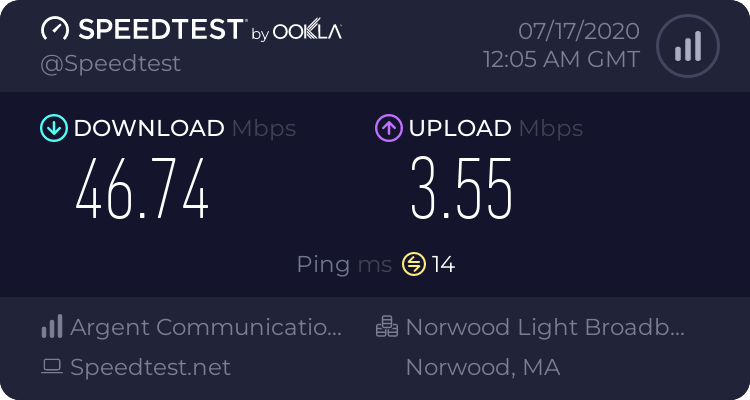
hi all, new to streaming just testing out, can't seem to get a solid looking stream while not making my self lag. my upload speed isnt fantastic but I think it should be good enough to stream with. upload speed: https://www.speedtest.net/result/9769359967.png
I have a 5700 xt red devil and and amd 3600x 32g of ram
but i have to stream at about 600 bitrate and "ultra fast or super fast" x264 encoding to not lag while playing League Of Legends
any advice?
also trying to stream at 648p resolution
1080p60 – 4500kbps to 6000kbps
1080p30 – 3000kbps to 3500kbps
720p60 – 3000kbps to 3500kbps
720p30 – 1800kbps to 2500kbps
480p30 – 900kbps to 1200kbps according to what i pulled off of google here I should be able to stream at 720p 30fps just fine. But I cannot do that at all. So kind of confused as to what I should do?
 clever crypt
@charred quartz this?
abstract hemlock
@elfin jewel for personal experience, below of 10mb (upload) i wasn't able to stream
clever crypt
so make this my current followers
 brave summit
@charred quartz it seems to have reset it, if it happens again i'll reach out, thank you!
charred quartz
yeah i think the internet it lying to me
@elfin jewel problem is u need stability, and thats why its recommended having 10mb+ so it could have space for fluctiations
@charred quartz it seems to have reset it, if it happens again i'll reach out, thank you!
@brave summit 😉 np
 hazy lily
Hey I have a question - When I speak into my mic I can only hear it on my left ear on my twitch stream, is there anyway to fix that?
hazy lily
Oop I fixed it, had to check mono
elfin jewel
Ok I see, hm. well. do you have any other advice I can do other that give up on streaming? I would get better internet if I could in my area but thats not possible sadly @charred quartz @abstract hemlock
 hard parcel
stream elements is not showing up in my twitch, and it was during my last stream
charred quartz
sadly there isn't much we can do, its pure computer math tbh @elfin jewel
stream elements is not showing up in my twitch, and it was during my last stream
@hard parcel can u be more specific with the description of the issue?
lament blade
when i do !watchtime it just say the viewer has been watching for 0 seconds. how do i fix this?
clever crypt
well.....
 high escarp
Do you have Loyalty setup/turned on in StreamElements dashboard?
lament blade
how do i set that up?
 round brambleBOT
@lament blade 10 minutes of watchtime are given to those in chat when the loyalty points are handed out (every 10 minutes). Therefore, loyalty must be enabled for watchtime to work properly.
There is no direct link between watchtime and all-time points.
It can’t be calculated from the amount of all-time points a user has because subs may earn points at a faster rate and !bonus all command increases all-time points for users in chat at that time.
Giving points to a single user does NOT affect all-time, only when giving to all in chat.
elfin jewel
@clever crypt how on earth do ustream with those speeds?
clever crypt
IDK @elfin jewel
elfin jewel
@charred quartz so basically i just have to move then haha
clever crypt
I WANNA KNOW ABOUT THE 640 PING
charred quartz
@charred quartz so basically i just have to move then haha
@elfin jewel yea
 boreal raven
Hey how do i reset the overlay url ? i accidentally shared it :/
 heavy yoke
Today i set up my custom bot name. It was working as intended and had No issues what so ever, at least up untill i closed OBS.
Then my custom bot dissapers and suddenly Im back with The original streamelements bot...
Is it supossed to work this Way?
charred quartz
I WANNA KNOW ABOUT THE 640 PING
@clever crypt u are probably using a VPN or with some redirect virus? getting that ping means u are a long way from the server
clever crypt
so either move the server in obs or move the server in the vpn
abstract hemlock
@boreal raven you have 2 options duplicate the one that you have and then delete it (the one that was shared), or try to RESET your access token https://streamelements.com/dashboard/account/security > Security
boreal raven
@abstract hemlock did both of them. overlay url stays the same :/
charred quartz
so either move the server in obs or move the server in the vpn
@clever crypt i mean't about the test u posted
u got 640 ping in speedtest
something is wrong with that test
abstract hemlock
@boreal raven each overlay have a unique URL, so if you duplicate one it will generate a new URL
boreal raven
i duplicate and deleted the old. without changing the url in my obs. and it still works :S
@abstract hemlock
round brambleBOT
@boreal raven Right click on the BrowserSource > Properties > Scroll down a bit > Refresh Cache of current page
clever crypt
ill take it again @charred quartz
boreal raven
ok fixed it thanks :0
clever crypt
my internet sucks
charred quartz
speedtest for some reason are not getting a optimal server ..
 teal pawn
Is there a way to change the Twitter alert when we go live?
ah nvm found it on https://streamelements.com/dashboard/social-media

StreamElements
The Ultimate All in One Platform for Streamers
 native cape
Is there a way to modify !quote add to include game played at the time of the quote and a timestamp?
 coral cloak
How can I add commands for that bot when I’m streaming
 peak storm
Hi. Is there a way of seeing the total number of SE points of all users in a channel? Perhaps a way of exporting a CSV of the leaderboard data to run a sum function? 🤔
 dense marten
Hi! Looking for the volume control for Media Request. In the tutorial there is volume control and transport controls on the media request page. But I don't see either on mine.. Any help is much appreciates
 covert sage
is there a way to programme my answer? like: if (${game} == "VALORANT") { answer1 } else { answer 2 }
please
 ionic kelp
No.
covert sage

abstract hemlock
@covert sage but maybe this could help you https://thefyrewire.com/docs/api/twitch/pastebin/#return-line-by-index
 thorn iris
is there some sort of set up video?
 frigid abyss
what height and width does the overlay need to be on OBS
round brambleBOT
@frigid abyss To add your overlays to OBS, add a new browser source in your scene. Paste your overlay URL in the browser source properties, set the dimensions to 1920x1080 (unless you changed them on the website), and ☑ “Shutdown source when not visible” https://youtu.be/KDvLynUqXI4
@thorn iris New to Stream Elements?
Check out our YouTube channel https://www.youtube.com/c/streamelements/videos
with tutorial videos from setting up the basics, to in depth details on how to use our product.
New to OBS? Here is a 4 step quickstart guide
https://obsproject.com/wiki/OBS-Studio-Quickstart
Want to learn even more? Here is an in-depth overview
https://obsproject.com/wiki/OBS-Studio-Overview
 copper linden
have question about the leaderboard extention panel on twitch. it isnt showing my top subs/cheers. Do i have to be online?
abstract hemlock
@copper linden this is the first time that you install the extension?
copper linden
no,ive tred uninstall & installing again. it is showing chat stats, but no subs or cheers. just says no data
but when i go to streamelements dashboard, it shows the correct up to date info
ionic kelp
Has there been any activity since you added the extension?
 lament blade
can someone help me with the streamelements tipping page
round brambleBOT
@lament blade Welcome to the helpdesk! Please let us know how we can assist you today and a support volunteer or staff member will assist you as soon as they are available. Thank you for your patience.
lament blade
How do I turn of the streamelemts tipping page the Video adding
abstract hemlock
 old valve
hey guys i can't seem to change the title and game from the activity feed...
abstract hemlock
@lament blade Both means that viewers can ask for media via the command (Free) and on the tipping page, if you don't want that just select "Free"
round brambleBOT
@old valve There is a bug with setting the stream title in OBS and the Dev team is investigating.
In the meantime you can set the title using the !settitle command in chat (if enabled in your bot command settings)
Or with the Twitch dashboard: https://dashboard.twitch.tv/stream-manager
old valve
thanks
peak storm
@abstract hemlock Wasn't in response to my question, but just wanna say thanks for linking that pastebin website for the other user. That should come in handy 🙂
plz. no monka 
 lone scaffold
how do i get the bot to say what i want
abstract hemlock
@lone scaffold you can add a custom command : https://streamelements.com/dashboard/bot-commands/custom-commands
 idle cypress
Hi there, having a problem with SFX and redeeming them via the website - anyone around that knows a bit about it ?
We have SFX redeemable via the store, and when people !redeem them in chat, it displays a message showing who redeemed what. When people do SFX via the website though, it doesn't show a chat message - any way to enable this ?
peak storm
So no way of getting leaderboard data in CSV form? 😦
 last flame
hello can anyone help me with my chat stats like i change my twitch name a while ago and i still dont know how to fix it so i can have like my new name and record the chat stats
idle cypress
Cont from above - this tickbox is missing from SFX alerts.
 proper tree
Hello, Why do my live host alerts and follow alerts not come out?
round brambleBOT
@proper tree Due to changes to Twitch API, we have filtered out hosts and will only show these ones on your activity feed:
- All hosts coming from an online channel with at least 1+ viewer
- Auto host events with at least 1 viewer - only from a channel that just went offline
Note: If you see "X channel has hosted you" with no viewers on the back, that is considered an offline host or a host with 0 viewers, we do not show these.
 dim marten
Is there a widget I can use like a "Tips & Bits Goal" where it'd convert bits to the correct dollar amount? I know there's one that displays either latest tip or latest bit, but is there a goal version?
 indigo shale
Are there any plans to add Australia to SE.Pay?
 summer flare
I’m having a really hard time trying to set this up because I’m running it on phone and Xbox
ionic kelp
@dim marten Nope. Due to Twitch ToS that is not possible.
You can have them separate but nothing remotely combined.
idle cypress
@ionic kelp any insight on my question above ?
ionic kelp
Does it still work though?
summer flare
So how do I exactly set this up???
I have done everything to do with website but... I think I’m confusing myself
dim marten
Oh, they don't allow it, but how is there the 'latest tip or bits' widget?
where it shows one or the other
ionic kelp
Because they are separate. Not 1 thing.
dim marten
hmm, that's a rip
 static olive
hello im having an issue i cant seem to edit the stream title in the activity feed
 unborn pasture
anyone having issues pulling up the online dashboard?
 weak cargo
i have a problem with the streamelements channel points sound effects
 clever kernel
get black screen in obs how do i fix this
round brambleBOT
@static olive There is a bug with setting the stream title in OBS and the Dev team is investigating.
In the meantime you can set the title using the !settitle command in chat (if enabled in your bot command settings)
Or with the Twitch dashboard: https://dashboard.twitch.tv/stream-manager
@clever kernel Streamelements on top of OBS -> Logout -> login
abstract hemlock
@unborn pasture wdym?
unborn pasture
I am trying to open streamelements and show a friend my dashboard (as an example of how easy it is to use) and it keep rerouting me to the page that says "go to dash"
round brambleBOT
@unborn pasture Please logout of StreamElements at https://streamelements.com/logout and then login again to your account (Twitch/Youtube/Facebook/Mixer)
round brambleBOT
@clever kernel For the best OBS support, please join their Official Discord @ discord.gg/obsproject
clever kernel
there not help in there saying there don't no what up with it
 lofty topaz
@clever kernel Have you tried using Window Capture or another source to capture the video?
clever kernel
window will work but then my game gos off screen and view can see it
and when i do fit to screen it gos under chat and feed and view can not see it
lofty topaz
What do you mean it go's off screen? Do make sure it is capturing the correct game aswell, otherwise this is definitely seeming to be an OBS issue it would appear if it itself is not properly working.
 distant reef
Not sure where to ask this question (more hardware related - feel free to redirect me) - thoughts on a capture card with or without a loop? Simply looking for something basic on Amazon.
lofty topaz
@clever kernel The only thing I can say it try to resize it to the proper resolution, I'd also recommend the tutorials just in case aswell in case some of them explain it in depth perhaps?
@distant reef What are you trying to stream?
distant reef
@lofty topaz Probably just a Switch.
clever kernel
how do i do that please
lofty topaz
@distant reef I'd recommend visiting this website by Elgato and it will allow you to select specific specs you are working with, what you want to stream, and it will give youi options of capture cards that will be best suited for you. https://www.elgato.com/en/gaming/capture-card-selector
 distant reef
@lofty topaz Thanks! I'll check that out.
lofty topaz
@clever kernel I'd recommend checking out this video: https://www.youtube.com/watch?v=Nsv-kOtjDoc Hopefully it helps!

Thank you StreamElement for letting me do this video.
As a live streamer, Streamelements are the best.
How to contact them
Twitter: https://twitter.com/StreamElements
Discord: https://discord.gg/5zWfUZT
clever kernel
thanks look now
lofty topaz
Hmm it seems like it is an older video - but there channel is extremely helpful!
 fluid hound
Hi, Im very new to stream elements and twitch streaming. How does stream elements work?
round brambleBOT
@fluid hound New to Stream Elements?
Check out our YouTube channel https://www.youtube.com/c/streamelements/videos
with tutorial videos from setting up the basics, to in depth details on how to use our product.
New to OBS? Here is a 4 step quickstart guide
https://obsproject.com/wiki/OBS-Studio-Quickstart
Want to learn even more? Here is an in-depth overview
https://obsproject.com/wiki/OBS-Studio-Overview
 pulsar swallow
i need some help trying to launch my stream from obs... it pops up a window that says "failed to open NVENC codec: function not implemented" any thoughts or help?
round brambleBOT
@pulsar swallow For the best OBS support, please join their Official Discord @ discord.gg/obsproject
 untold spoke
How can I change my bot's name?
round brambleBOT
@untold spoke Currently renaming the bot fully works with OBS.Live.
You can follow this video guide to set it up: https://discordapp.com/channels/141203863863558144/494513233416421386/561516184718278676
If you don't want to use OBS.Live and want to stick with Ground Control, please let us know your Twitch username.
@static haven Please follow our community rules:
- No advertisement or stream promotion
- Respect ALL server members
- No NSFW/NSFL
Thank you
hazy lily
Is there any way to enable a sort of "Push to Talk" feature with your mic?
ionic kelp
That would be in obs settings.
 cosmic nest
Hello. I'm new here, I just downloaded OBS.Live from StreamElements and My game capture is all black. However on StreamLabs and Twitch Stream, I see my game. Where did I go wrong with StreamElements
?
round brambleBOT
@cosmic nest For the best OBS support, please join their Official Discord @ discord.gg/obsproject
 frank fox
Hi, this happened 2-3x already where other streamers would raid me while I'm streaming and there's no raid notification (I have them on and has worked for other raids in the past). I'd only find out via raiders saying raid in the chat. This tends to happen randomly. Anyway to fix or prevent?
 ripe python
Hey when I start streaming, it opens a window trying to start a stream to youtube even though I have my streaming service in obs.live as twitch and I even entered a stream key from my twitch. I also went to my streamelements dashboard on chrome and pressed the top left and switched to a twitch account but nothing works. Can anyone help me?
 chrome folio
@ripe python did you try to relogin on your Twitch account using the menu StreamElements (on top), logout and login?
ripe python
yeah, but that still doesnt work
 mighty shuttle
When I try to install the Obs.live plugin to my Elgato stream deck it loads but it tells me to install again and this happens over and over again. I tried opening %appdata%\Elgato\StreamDeck\Plugins
and deleting the folder but it doesn't even show up in the plugins folder. I've had this problem for awhile so I'd be very appreciative if you could help me.
chrome folio
@ripe python try to relogin on your Twitch account going to Settings > Stream on OBS.live ..
 twilit veldt
hello i wanted to know how can i make the follower alert and the sub alert go off at the same time?
ripe python
@chrome folio I just tried this and when I pressed start streaming, it opened a new window saying start streaming to youtube with options to edit my title, category, and description
chrome folio
@twilit veldt with OBS.live you can use Hotkeys to skip an alert...
twilit veldt
@chrome folio i mean like if i get like 30 followers in 10sec and a sub i will have to wait for the followers to go first then the sub
chrome folio
@lament blade command chat /mods or dashboard https://dashboard.twitch.tv/community/roles
twilit veldt
is there a way to make it both go at the same time?
ionic kelp
Outside of using separate alertboxs no.
chrome folio
@ripe python a moment
ripe python
@chrome folio yeah, i can wait 🙂
ionic kelp
@twilit veldt Add a second alertbox widget and uncheck all alert types except follow. Do the opposite on the other.
round brambleBOT
@frank fox Due to changes to Twitch API, we have filtered out hosts and will only show these ones on your activity feed:
- All hosts coming from an online channel with at least 1+ viewer
- Auto host events with at least 1 viewer - only from a channel that just went offline
Note: If you see "X channel has hosted you" with no viewers on the back, that is considered an offline host or a host with 0 viewers, we do not show these.
lament blade
Hey their..Could someone answer me a question? I've made a Sound File for my Stream Shop with an preview picture. Is it possible to show this picture with the sound if someone buys it? I just hear the sound in Streamlabs
twilit veldt
@ionic kelp i did it and its still going 1 by 1
round brambleBOT
@mighty shuttle If you are having issues with Elgato hardware or software, we recommend reaching out to their support here: https://e.lga.to/help
@eternal abyss Please follow our community rules:
- No advertisement or stream promotion
- Respect ALL server members
- No NSFW/NSFL
Thank you
frank fox
I wasn’t talking about hosts though, I was talking about raids earlier. Raid notifications with over 2+ viewers not showing up as a notification via streamelements.
twilit veldt
@ionic kelp is there sometime els im suppose to turn off?
ionic kelp
You've got everything but followers on one and the opposite on the other?
twilit veldt
yes
ionic kelp
In that case I don't think it'll work due to how the events are "queued".
chrome folio
@twilit veldt what sudo is trying to show you is a new way of having alerts being shown on live without following an order (a queue of alerts).
 upper juniper
Hey guys
https://github.com/StreamElements/widgets/tree/master/CommandCounters
I trying to make this exemple work, but when i put commands on chat nothing happens

GitHub
Contribute to StreamElements/widgets development by creating an account on GitHub.
chrome folio
however, by placing two alertbox, if two alerts occur at the same time, one alert may be overlaid on the other alert on the live screen (depending on where you place the alerts, if in the same position on the overlay) and if both have sound it can also be played at the same time... so sometimes it can get confusing @twilit veldt
twilit veldt
@chrome folio so what do i have to do lol srry im confused
 undone cargo
I need help how do I make it so I get thing In my chat when someone followed me on my twitch
Like I know it’s a module thing but I csnt remember how to do it
chrome folio
@undone cargo https://streamelements.com/dashboard/bot-modules > Chat alerts
round brambleBOT
We're not able to troubleshoot issues with using our overlays in StreamLabs OBS (SLOBS) as we don't have the tools to support their software. We recommend using OBS Studio or OBS Studio with our plugin OBS.Live.
 tough burrow
but I am still online on both console and PC
round brambleBOT
@tough burrow For the best OBS support, please join their Official Discord @ discord.gg/obsproject
tough burrow
It's ok it's back up now, twitch must've had a snaffu
 strange bobcat
anyone know how to do the audio command thing through the redemption store? I can get the command to play at all
 zenith widget
Steps to make a command trigger sound on stream:
- Go to Stream Store page here: https://streamelements.com/dashboard/store/items
- Add an item that has these settings on it:
- Stream Perk
- Loyalty settings to your desire
- (Next step) Add contents (image and/or sound you want to play)
- "Redeeming this item shows an alert
- Redemable via chat
- Skip Requirements
- Get the item name/command from the 2nd creation page
- Go to commands page here: https://streamelements.com/dashboard/bot/commands/custom
- Add command with desired name and have response for command as:
${redeem item_name_here} - Go to your overlays and edit the overlay you use.
- Click on "widgets" and add "Store redemptions" widget. Click save and you should be golden.
- Test your own command in chat and have OBS or editor open to hear sound
- ???
- Profit in viewer interaction and that dosh

strange bobcat
thank you
 prisma seal
why wont my emote show for my bot? its subbed
zenith widget
Twitch issue - it might take a while
strange bobcat
is it possible to get rid of the "(name) reddemed (audio command) for x points" message?
zenith widget
no thats a default response to the command and variable
 quartz gulch
hello, does anyone know why when the bot responds to custom commands, instead of writing a link it writes "***"?
zenith widget
You need to mod the bot
quartz gulch
You need to mod the bot
@zenith widget I?
 muted raven
i have my alert box but it doesnt show when someone follows
quartz gulch
thank you so much @zenith widget, now it works ❤️
round brambleBOT
@muted raven The default resolution for StreamElements overlays (theme and custom) is 1920x1080. Please add them in OBS at their full resolution and use CTRL+F to fit to screen if necessary. You can then downscale your stream in OBS settings > Video if you'd like https://i.imgur.com/6bWXxjR.png
 prisma seal
quick questions, idk if youd know. when you hit 15 subs and unlock new emote. do you lose that emote if you dont get that 15 subs the next month?
zenith widget
No - its permanent unlock afaik
prisma seal
oh cool 🙂
muted raven
thank you so much it finally works
 unkempt flume
So what's the difference between OBS Studio and OBS.Live?
zenith widget
!obslive
round brambleBOT
OBS.Live is a Plugin for OBS created by StreamElements. You can download OBS.Live here: https://streamelements.com/obslive
Please make sure you have the latest version of OBS installed, Current Version: 25.0.4. You can install OBS here: https://obsproject.com/
 nimble dune
What browser are you use? Could try clear your browser cache,cookies. @tiny umbra
 frail zodiac
Hello! i have a question dunno if this section is the correct one.
there is any way to remove the "shop redeemed item" from bot? I checked and they are all disabled. but when i redeem a "sound effect" streamelements auto write in twitch chat "user succesful redeemed item". i hate it , can i remove it?
nimble dune
@frail zodiac If you create a item like sound effect, you can disable to can't redeem via chat
 untold crest
@frail zodiac users can redeem items via extension or website too. Bot has to confirm that command succeed.
frail zodiac
i create the item o nthe shop (for free) , and i create a command with the !commandname $(redeem commandname).
so the bot has to confirm ?
nimble dune
But if you disable the redeemable via chat it not show in chat
frail zodiac
oh ok thanks. that's not the what i like , but thank you very much for supports ❤️
unkempt flume
Okay this is taking a hot minute to import my stuff.
 regal fiber
Hi everyone, I am having a problem. My Alertbox is always getting triggered TWICE. I do not understand why. When I test it with the preview mode it just works correctly and it get triggered once, but when I am live streaming I always get triggered twice. I double checked the scene, and I have NO duplication in Alert Box, it is only once Source. I checked if I have things opens in the background and cannot be, because I always MUTE the twitch channel via BROWSER so it doesn't get a feedback. I do not know what to check anymore, any suggestion?
All the alerts get triggered twice.
nimble dune
@regal fiber Have you added on other scene the alert box?
regal fiber
@nimble dune yes I have multiple scenes with the same alert box
copied and pasted as reference in OBS
regal fiber
done, thx I will test it
regal fiber
so you are saying that other scene are "available" and passive
while streaming, and that what could cause the problem
nimble dune
In other scene where you have added alert box enable that.
regal fiber
ah yeah I already checked that, because it is a duplication of a same source I just checked is being applied to everything
nimble dune
Then should be good.
regal fiber
but it is interesting to discover that scenes are always there in the background
i hope that is this the problem
nimble dune
Yes but it when you haved that disable for that the alert triggered twice because it is working in background in other scenes where you have added.
You have now enabled that so you will hear 1 time.
regal fiber
thx very much
 astral glade
Help! The watchtime command does not work for me, since I changed my nickname on twitch it stopped working
round brambleBOT
@astral glade 10 minutes of watchtime are given to those in chat when the loyalty points are handed out (every 10 minutes). Therefore, loyalty must be enabled for watchtime to work properly.
There is no direct link between watchtime and all-time points.
It can’t be calculated from the amount of all-time points a user has because subs may earn points at a faster rate and !bonus all command increases all-time points for users in chat at that time.
Giving points to a single user does NOT affect all-time, only when giving to all in chat.
 tiny wraith
so i have had people donate through paypal and its not coming through on stream or showing on my dashboard please help
nimble dune
Donation should show up in the Activity Feed on your dashboard and the money should be in your PayPal account. If not: contact PayPal. StreamElements doesn't touch the money
Also in paypal not showing?
tiny wraith
its doesnt show on my activity feed either
nimble dune
And in paypal is have the money?
tiny wraith
no its not showing there either
nimble dune
And the viewer 100% to donated?
tiny wraith
yes they donated
nimble dune
Okay you need to contact PayPal then.
tiny wraith
but its not showing my dashboard either
nimble dune
Okay but you said also you not recieved the money.
tiny wraith
right
tiny wraith
ok
 floral spindle
hello guys, i'm using streamelements for a while, but since a week ago i'm not able to change title or game with command in tchat, error : "something went wrong while trying to update the title."
test message ok, other command ok, mod ok, editor ok..
does anyone have an idea ? thank you
nimble dune
There is a bug with setting the stream title in OBS and the Dev team is investigating.
In the meantime you can set the title using the !settitle command in chat (if enabled in your bot command settings)
Or with the Twitch dashboard: https://dashboard.twitch.tv/stream-manager @floral spindle
floral spindle
i'm using command !game and !title but doesn't work
 mighty orbit
hey, my streamelements is playing up in my OBS as of last night... it wont let me change the chat from white to dark mode, it also isnt showing ALL of my subs and gifted subs... its really weird... i got a lot of subs and its only showing 2?? can you please help. Ive relogged in OBS to see if that fixes it, and it doesnt fix it. I want to be able to go back and thank everyone that subbed however theres no history showing in the activity feed? Please help. Thanks
nimble dune
!settitle @floral spindle
floral spindle
yes sorry, with !settitle, but same message
nimble dune
and !setgame
round brambleBOT
@floral spindle Go to the dashboard -> right side -> part channel -> join channel (https://streamelements.com/dashboard)
 zenith widget
@mighty orbit check pinned message in #helpdesk-selive
floral spindle
still same issue :
dreaaa47: !setgame valorant
StreamElements: @dreaaa47, something went wrong while trying to update the game.
nimble dune
If you Valorant?
zenith widget
part the bot, logout from our dashboard, login agian and join the bot
round brambleBOT
@rancid torrent Please follow our community rules:
- No advertisement or stream promotion
- Respect ALL server members
- No NSFW/NSFL
Thank you
 calm sleet
Hello. Where can I change the response of default command like the response of roulette command when the user don't have enough points to use the it?
zenith widget
The default commands responses cannot be changed
calm sleet
Ok. Thanks. Can I create custom command with the ability to change points?
zenith widget
Not at the current moment
floral spindle
thank you keizar, it's working now (thanks to logout, and login again)
 heavy shell
is there a way i can switch to another account? it keeps logging me into the wrong one automatically
zenith widget
If you are referring to twitch accounts
you need to be logged into that twitch account in Twitch first
before logging into our dashboard
heavy shell
ohh ty ty
 errant coyote
I don't understand. I click start streaming. And it pops out start streaming on youtube... I want to stream on twitch not youtube
round brambleBOT
@errant coyote Streamelements on top of OBS -> Logout -> login
nimble dune
I just wanted type 😄
lament blade
hey im trying to create some new over lays and all the custom alerts have dollar signs! i can not see a single one with a £ sign ?
untold crest
If videos/images have $ sign it is not possible to update it. But if you have it displayed in text you need to change your currency in tipping settings and/or in alert settings
heavy yoke
!Repost
So Yesterday I added a custom BOT from elements, but as soon as i quit OBS, it goes back to The original BOT. (I’ve Got BOT timers sending messages even when Im offline, thats how i know it switches back)
Is it supossed to work this Way?
Feel free to reach out to me privatly as Well.
heavy yoke
Okay thanks mate
 gusty crag
Dumb question but do you have to be a twitch partner to receive gifted subs and bits ?
ionic kelp
Affiliate.
gusty crag
Okay cheers
lament blade
how do you add playwithviewer bot on twitch @ me if you have a answer
zenith widget
We don't have such a function, other then a custom widget in #widget-share
 sour crystal
Hi, im using Obs.live. but Im unable to change stream title and game. i know where to do it . but it won`t let me type anything.
nimble dune
@sour crystal There is a bug with setting the stream title in OBS and the Dev team is investigating.
In the meantime you can set the title using the !settitle command in chat (if enabled in your bot command settings)
Or with the Twitch dashboard: https://dashboard.twitch.tv/stream-manager
sour crystal
@nimble dune okay, thanks bud
 verbal cliff
I know there is a way of tracking Subs using Streamelements, but could there be an option to track sub points? That would be farm more helpful for emote slot unlock goals. Or if there is a way to do this could you point me in the right direction please?
nimble dune
You mean by goal or command?
 twin sentinel
The API to get subpoints has been closed by twitch, so there is no way to get these data for us.
 quiet ermine
Hello everyone. Atm, i'm migrating my bot from streamlabs to streamelements. Unfortunatly, there are some problems:
-
I exported the currency.csv and the data.xlsx and tried to import them. Dashboard tells me everything was successful, but when i look at the commands, nothing was imported. Also the imported Currency isn't imported correctly. The points are right, but the viewed time is competly messed up.
-
My quotes also don't have been imported. Since i didn't got a lot of them i wanted to add them manually. But theres the other big problem.. i can't find the option on the dashboard (webpage). I can activate the quote command or disable it, but theres no list of the quotes do manage them. Am i just blind?
twin sentinel
Make sure there are no empty lines in the comammands document, and you would need to convert the time to minutes, as we import them as this.
To add a quote use !add quote QUOTEHERE
 covert pike
not too sure where to post this but i went on streamelements and i applied for the creator program 2 months ago and ive not been given a reply or any info about anything and i was looking for support and it bought me back to this discord so can someone help me with it is there a way i can cancel and re apply or something?
quiet ermine
@twin sentinel thanks! i will look at the times 😄 Quotes: Yeah but if i add them now manually, the date and played game will be wrong. any way to modify a quote? Is there no list?
covert pike
nimble dune
@covert pike You can send them an email at creators@wizards.com
covert pike
ok thanks a lot
twin sentinel
@quiet ermine There is no automatic mode to add the game and time from what I know. And there is no list, neither a way to edit the quotes from what I know.
quiet ermine
@twin sentinel Oh... 😦 thats kinda sad, but thank you 🙂 then i will add them my hand 🙂
!quote delete #QUOTENUMBER to delete one?
twin sentinel
yes, but you cannot add another one to that position. You can only at the end, form what I know.
quiet ermine
Ok. Thank you very much!
sour crystal
My media request plays double when i press show on stream, any idea what i need to change?
untold crest
@sour crystal you probably have it on several overlays so it plays from background too
 random axle
Why is one of my Scenes white even at came capture source's preview it's showing up like should ? (At properties) At Ob's big screen showing white screen with the overlay's art. Why now all of sudden it's not displaying the feed ? It worked yesterday and haven't done any changes since then. Obs's Big screen showing that white screen even when offline. The one that's in overlay editor.
round brambleBOT
@random axle For the best OBS support, please join their Official Discord @ discord.gg/obsproject
random axle
Ok Botty & someone who made it to post that ^^ 😛 Wrote here cause thought this would be the place to do it cause of SE Overlay Editor being used. Hope they provide help, but knowing how they Prioritize replies i won't hold my breath for it.
twin sentinel
@random axle Can you DM me your overlay URL you are using please.
random axle
@twin sentinel Will do ty 👍
 sacred kindle
Anyone got any tips on getting commands working? They were working before I went live, I went live, now they're not working at all
twin sentinel
@sacred kindle Do you use a custom bot name?
 potent mica
okay i give up im going to uninstall the extension since its been blank for months and my question is always ignored lol
 long rover
in the streamelements ground control isn't there suposed to be a change the bot name or something?
round brambleBOT
@long rover Currently renaming the bot fully works with OBS.Live.
You can follow this video guide to set it up: https://discordapp.com/channels/141203863863558144/494513233416421386/561516184718278676
If you don't want to use OBS.Live and want to stick with Ground Control, please let us know your Twitch username.
sacred kindle
How do I check what the bot name is via browser?
I do have a custom bot account, but the commands weren't going through that
twin sentinel
@random axle The overlay is working with transparency in my OBS.
@long rover
If you don't want to use OBS.Live and want to stick with Ground Control, please let us know your Twitch username.
long rover
@twin sentinel I'm trying to help a friend do it
can you help me help him by me saying his twitch username?
twin sentinel
yes.
long rover
Favorce is his twitch username
random axle
@twin sentinel Got it, ty for check up  I haven't changed transparency at all & it should be set like supposed to. I'll take a look soon. If is set like should & doesn't work i guess have to roll the dice with OBS's Support. Often there ppl who ask things like: "How i watch video that i recorded ?" Get answered & then some more tricky ones don't.
twin sentinel
Asked internally to activiate the feature @long rover
long rover
@twin sentinel Thanks
twin sentinel
The option should be there after a restart of GroundControl @long rover
@random axle When you only add a browser source with this overlay url to your OBS, do you see the white background?
random axle
@twin sentinel Ground Control reminds me of question. Does it bring any beneficial use to keep Ground Control active after installed Obs Live plugin to Obs Studio ? To Overlay alone w browser source: No i don't think i did b when it worked. For GC question: Thanks good to know 🙂
twin sentinel
No. If you are using OBS.Live there is no need for GroundControl.
So you are seeing the white background in OBS in your browser source?
random axle
I'll check it now by disabling all other sources
Any chance for that custom css being changed on it's own & would it affect to white bacground being there all the time ?
twin sentinel
What have you entered in the custom CSS of the browser source settings?
random axle
@twin sentinel I haven't added anything there, it's always default. Now did the test by adding new browser source w that code. Tt was working fine yesterday & for month or so after installed. Now background is black like it should be... 🙂 So what could be causing the background being broken when nothing changed after yesterday.
sacred kindle
So I don't think I have a custom bot name
should just be StreamElements
But I don't see any activity on my stream from StreamElements at all... no timers, no commands. It is a mod on my Channel and is currently in here
twin sentinel
@random axle No idea why the background broke.
round brambleBOT
@sacred kindle Go to the dashboard -> right side -> part channel -> join channel (https://streamelements.com/dashboard)
twin sentinel
@sacred kindle Do you have OBS.Live or GroundControl running?
sacred kindle
I have OBS running currently
random axle
@twin sentinel Ty for your time 🙂 So i keep that prev. one disabled & use this new one. I'll send the log data to OBS some day as 7zip file.
twin sentinel
@sacred kindle Then you have most likely set a custom bot name in OBS.Live
 main warren
Hello, is here also german support or only english?
twin sentinel
#🇩🇪︱deutsch
random axle
@twin sentinel Now the game cap feed also works outside it's properties preview as in at big window 🙂 Just as used to. These kinda glitches are always mind boggling when something breaks without changes being made. Gonna send that log file to Obs later assuming dice roll favors with reply priority there 😄
 fleet gulch
probably someplace to find this besides bothering you guys but heres my ? Can I link the word facebook in my overlay editor without actually writing the acyual page address
sacred kindle
@twin sentinel Thanks for your help, all sorted
long rover
Do we need to make a bot account if we want to change the streamelements bot name (using ground controls)
ionic kelp
@long rover For anything beyond your/their main account yes. Otherwise no.
long rover
@long rover For anything beyond your/their main account yes. Otherwise no.
@ionic kelp what do u mean
ionic kelp
He can use his account (favorce). Otherwise yes he would need to make a new one.
long rover
thanks!
round brambleBOT
@keen fjord Please follow our community rules:
- No advertisement or stream promotion
- Respect ALL server members
- No NSFW/NSFL
Thank you
 keen fjord
oh sorry XD
 eager cosmos
So Ground Control is just not working when trying to change the Stream Title. When you type in the Stream Title input it does nothing yet changing the category works. I have to actually go to the stream elements website to 'update'.
I also have this constantly at the top of the app (Pic attached). When I click on it, nothing happens or registers.
Any help would be greatly appreciated.
 warm venture
Hey I need help with trying to go live I have the obs connected to my twitch and stream key connected to my twitch but when I try to start streaming it says streaming to YouTube
nimble dune
@warm venture Streamelements on top of OBS -> Logout -> login
@eager cosmos There is a bug with setting the stream title.
In the meantime you can set the title using the !settitle command in chat (if enabled in your bot command settings)
Or with the Twitch dashboard: https://dashboard.twitch.tv/stream-manager
 cerulean otter
anyone know how i can monitor the stinger transition audio
warm venture
@nimble dune thanks
 placid parcel
Hi... I would like to know if there is any way to connect the chat of several accounts to OBS.Live, to perform a multistream and be able to see the 2 chats.
nimble dune
Think is not can be do you need use restream
untold crest
@placid parcel The only method to do that is to use restream and dock additional chats as OBS docks
nimble dune
@placid parcel https://restream.io/chat
placid parcel
Sorry, It is not multistream, it is a multitwitch. Like "https://multitwitch.tv/"
@placid parcel The only method to do that is to use restream and dock additional chats as OBS docks
@untold crest And can I connect the other dock to another chat? How do I do that?
placid parcel
@placid parcel
@untold crest Thank you so much, that's exactly what I needed.
 manic narwhal
Hello, I am editing one of the preset overlays on StreamElements website and I tried to change the words such as /YouTube and /Twitter to my accounts and clicked enter after typing them but it still shows /YouTube and /Twitter. How do I make it change?
untold crest
@manic narwhal You need to adjust them in every single overlay you are using.
And don't forget to click "Save" when you're done 🙂
They should be automatically reloaded in OBS after clicking Save
 jade remnant
@cerulean otter in the properties of the stinger, select the audio monitoring
cerulean otter
cheers is there anyway to adjust the volume independently @jade remnant
jade remnant
not in obs, you will have to edit it in an editor
cerulean otter
premier or AE
jade remnant
whatever you prefer
 turbid pulsar
nimble dune
turbid pulsar
nimble dune
Please send the same details as the closure form requires to our CTO Reem here: reem@streamelements.com - he will close your account. @turbid pulsar
 coarse burrow
Hi guys, something changed and i don't know when exactly it occurred, but my command links are being censored. What options should i look at to fix it? i'm trying to use !merch and i get this...The new merch is here PogChamp Check it out: ***
 tropic vale
Hi, I am trying to close my account via the link to do so, I fill everything out, JWT, email, etc, then click "close my account" but nothing happens. The pop up just closes. No redirect, no message saying it will be closed. ?
 coarse valley
Hola, una pregunta. Como activo el overlays que cree?
ionic kelp
#🇪🇸︱español @coarse valley
coarse valley
speak spanish?
ionic kelp
escribe en #🇪🇸︱español
round brambleBOT
@coarse valley Welcome to the helpdesk! The regular helpdesk channels are in English but we do provide multi-language support in the following channels: #🇩🇪︱deutsch | #🇫🇷︱français | #🇪🇸︱español | #🇵🇹︱português | #🇳🇱︱nederlands | #🇮🇹︱italiano | #🇵🇱︱polski | #🇨🇳︱中文語言服務區-chinese | #🇯🇵︱日本語-japanese | #🇭🇺︱magyar | #🇰🇷︱한국어-korean | #🇹🇭︱ไทย-thai | #🇷🇺︱русский | #🇺🇦︱українська | #🇨🇿︱czech
round brambleBOT
@keen fjord For the best OBS support, please join their Official Discord @ discord.gg/obsproject
keen fjord
...
 lofty moth
Hey guys, did you block API for text-to-speech?
ionic kelp
1 sec
coarse burrow
@nimble dune thanks for the help, how do you think that became unmoded?
nimble dune
Maybe someone removed or you.
 tawny pivot
@lofty moth What's the context?
 ember salmon
HELP! i use streamelements for my gf and myself on the same pc but i am currently logged in through twitch on my streamelements obs but it is streaming to her channel
round brambleBOT
@ember salmon Streamelements on top of OBS -> Logout -> login
ember salmon
already tried that
 wary halo
then remove her stream key and add yours in Settings > Stream
lofty moth
@lofty moth What's the context?
@tawny pivot I have a text-to-speech command connected to your API and it does not work anymore
ember salmon
then remove her stream key and add yours in Settings > Stream
@wary halo even though i used the login function through the streamelements obs? i have to change it to custom correct in order to do that.
wary halo
if the relog didn't help, the only way is to change the stream key as that is unique to each channel
tawny pivot
@lofty moth Is the command hooked up to a 3rd party service? i.e: via ${customapi} ?
lofty moth
@lofty moth Is the command hooked up to a 3rd party service? i.e: via ${customapi} ?
@tawny pivot we're using https://api.streamelements.com/kappa/v2/speech
ember salmon
if the relog didn't help, the only way is to change the stream key as that is unique to each channel
@wary halo could i just uninstall and reinstall? i keep my scene's backed up on my pc
tawny pivot
@lofty moth Right, but are you using it from a custom widget or how are you calling it?
lofty moth
@tawny pivot yes it is a custom widget
wary halo
@wary halo could i just uninstall and reinstall? i keep my scene's backed up on my pc
@ember salmon why? just change the stream key to yours
ionic kelp
Or create a new profile 
tawny pivot
@lofty moth Alright we'll look into it 
ember salmon
@wary halo bc the stream info and stuff isn't working for me either it is just changing hers. none of the web based client stuff in obs that is from streamelements is working on my stream
brb rebooting pc
errant coyote
I tried to stream and I link OBS to my twitch account. After finish stream, I found out that the video that I stream is not uploaded in my twitch channel.
help
errant coyote
thanks
lofty moth
is everything fine with your bot right now? On stream I manage it does not work
ionic kelp
channel name? no link.
lofty moth
Aloonity
ionic kelp
@lofty moth Tell her to mod the bot and ask if she's using OBS.Live.
 marble galleon
How do I reset Tip goals? I can't seem to find it!
round brambleBOT
@marble galleon To reset goals:
- from the overlay editor -> session data on top right (monitor symbol) -> goals tab -> reset progress of desired goal
- from the dashboard -> activity feed on the left -> widget data on the right -> goals tab -> reset progress of desired goal
Note: Goal widgets(progress) only counts up and doesn't go down automatically, if you loose followers/subs
ripe python
Hey, so after someone helped me stream to twitch, my game started getting mouse lag. Before, I was streaming to youtube, but ever since i switched to twitch, the problem happened. All of my settings are the same, and i even lowered some of them in obs.live. Can anyone help me?
round brambleBOT
@ripe python For the best OBS support, please join their Official Discord @ discord.gg/obsproject
 mortal spear
Does StreamElements support including the number of gifted months in the gift sub alert?
If so what's the parameter for the # of months gifted?
twin sentinel
months? There is a varibale for the amount.
mortal spear
Isn't months the amount of months the person has been subbed for? I'm talking about the new feature of one person being able to gift multiple months of sub to another person
twin sentinel
Also all the available variables are listed below the message box.
Afaik we do not support this feature by now.
mortal spear
That's not true, for Subscriber alerts you can use {tier} to include which sub tier it is, but that's not listed under the message box
I don't think that's fully up to date, there are probably more variables missing
twin sentinel
Then I am sorry, as I do not know the answer then.
mortal spear
Thanks for your help
ripe python
Hey, so after someone helped me stream to twitch, my game started getting mouse lag. Before, I was streaming to youtube, but ever since i switched to twitch, the problem happened. All of my settings are the same, and i even lowered some of them in obs.live. Can anyone help me?
twin sentinel
You have already been answered.
ripe python
they didnt answer my question in that server so i came back here
twin sentinel
The issues does not seem to be having to do with StreamElements. Best to contact the OBS support.
ripe python
alright thanks man
hazy lily
For some reason when I switch scenes (Ex: from a brb to gameplay scene) my minecraft crashes - anyone else getting that? Or is it just me?
round brambleBOT
@hazy lily For the best OBS support, please join their Official Discord @ discord.gg/obsproject
 dusty plume
i need help from someone i can just pay
round brambleBOT
@dusty plume Welcome to the helpdesk! Please let us know how we can assist you today and a support volunteer or staff member will assist you as soon as they are available. Thank you for your patience.
 sharp quarry
Hey i'm having issues in the overlay editor. Turning on the custom font option and typing in my font 'Bebas' works in the overlay editor. However in OBS (and the preview) it shows a completely different font
round brambleBOT
@sharp quarry Google Fonts
More than 900 google fonts are supported at this time. You can preview them here: https://fonts.google.com/
Custom Fonts
Steps:
- Install the font on the streaming PC or choose a pre-installed windows font.
- In the overlay widget settings, select Text Settings
- Enable Custom Font
- Type the name of the font as it appears in the windows font directory (This is usually
C:\Windows\Fonts)
Note: After installing fonts, the browser and OBS must be restarted for the font to appear.
sharp quarry
Restarted my obs, forgot about that one. Work now :D
 mint ruin
I'm not sure I understand the Tipping fees associated with PayPal micro-payments.
Your info says that all transactions below $12 will be sent to the micropayments account and fees will be reduced automatically.
Regular Paypal fees are 2.9% + $0.30 per transaction.
Micropayments are 5% + $0.05.
How is a micropayment fee less if it's 5%?
twin sentinel
Note: This is not an official source: http://pressbin.com/tools/paypal_micropayments/
mint ruin
Yeah... I was never good at math. Like... at all.
Thanks for the table. Makes perfect cents now.
😉
 winged pewter
is there a way to make contests semi-automated so that i can tie it into my streamdeck and start the contest with a button press vs keeping the se website open?
 warped portal
apparently vips tank the slow-mode no matter what
 mint reef
is someone here, that is able to talk to me about the magic creator program?
chrome folio
 tired flume
Hi I am trying to help my sister who has received 2 donations but nothing is showing in stream elements and it all looks set up correctly been through the video twice as well.
She is streaming at the moment and is heart broken that the people who donated didnt get a shoutout
is anyone able to help me? 🙂
please
its not shown up on the dashboard at all but is in her paypal
through the streamelements link
i have full control of her set up also
thank you for your time also 🙂
winged pewter
@tired flume did it go through the se tipping or twitch? did she set up the alertbox on her overlay?
nimble dune
Sorry i can't help. An SE.Champion or SE.Staff @tired flume
ionic kelp
If a viewer tipped through PayPal but no information appears in your StreamElements account, this generally means PayPal has held the tip for verification. Until PayPal clears the tip and sends back a confirmation to your StreamElements account, no information will appear there and no alert will play, as that confirmation is the only way for us to be aware of a successful transaction. If you believe there may be an issue with the transaction, you'll need to contact PayPal support as StreamElements is only a passthrough service and never actually gets involved with the transaction or touches the money.
tired flume
yep all set up and went through the tipping link
@ionic kelp you legend
thank you
I will tell her that
thank you all
🙂 I will update you to the success that is more than likely the issue 🙂
makes most sense 🙂
Appreciated
warped portal
@chrome folio
there's no way to make VIP's to be affected by slow-mo
It's possible to deactivate for sub's, not for vips :/ 
nimble dune
If you deactivate also for sub's?
 twin sentinel
@winged pewter Afaik there is no way to start a contest via streamdeck.
 wet verge
Hi, I'm trying to swtich from Moobot to Streamelements but unable to do so as the link to the extension is broken? Any other way to do this, I'd love to keep everything in the same place if possible
chrome folio
@warped portal i didn't understand why you emphasized the message... can you be more specific in your question?
 olive dust
Hey guys! New question when someone has time:
For some reason, the HypeCup widget is not displaying subscriber events.
I've tried removing our custom sub icons, and I've also tried replacing the widget with a defaults-only version to see if that helped. I have seen other streamers with working sub icons in the hype cup, so I know it's possible. Can anyone shed any light? Thank you in advance!
 rare basin
any one willing to help me set up my obs i had to reformat and deleted everything
round brambleBOT
@rare basin Welcome to the helpdesk! Please let us know how we can assist you today and a support volunteer or staff member will assist you as soon as they are available. Thank you for your patience.
 pure crystal
Can't change the title of the stream, it seems that the input is locked :/
round brambleBOT
@pure crystal There is a bug with setting the stream title in OBS and the Dev team is investigating.
In the meantime you can set the title using the !settitle command in chat (if enabled in your bot command settings)
Or with the Twitch dashboard: https://dashboard.twitch.tv/stream-manager
 robust gyro
Can I see what timers are available in a channel I'm a mod for?
robust gyro
Right ok thanks @nimble dune
round brambleBOT
@robust gyro
Chat/Bot Levels
100 - Viewer
250 - Subscriber (Twitch subscribers automatically placed at this level)
300 - Regular
400 - VIP (Twitch VIP automatically placed at this level)
500 - Moderator (Twitch chat moderators automatically placed at this level)
1000 - Super Moderator
1500 - Broadcaster
Dashboard Manager Levels
Bot Supervisor
Editor
Full Access
Owner
https://i.imgur.com/s61Liry.png

Follow these steps to grant managers/moderators access to your dashboard:
- Click on your Channel Name at the top of the dashboard and select Settings
- Create a new invite at one of three access levels (Bot Supervisor, Editor, Full Control)
- Send this invite to a mod/manager to give them access to your dashboard. The link is one-time-use and expires after 72 hours if not accepted
Video tutorial: https://youtu.be/zl_h-ttZDF0

 crisp sun
Is it possible to move the loyalty stats (watchtime) to a custom bot?
warped portal
@chrome folio I was just wondering if there was an option to make so VIP's would also be affected by the chat slo-mo, sorry if it god confused 
 spark linden
how i vinculate a streamelemnts points with a streamlabs?
 worn citrus
(I originally posted this in wrong helpdesk channel (mixer)) Hi, started using chat filters and it's catching messages during live steam giving me the option of allowing it to pass through or deny it from appearing. This is a cool feature. It just wasn't what I expected. Is there a way to have the filtered words to just be replaced this asterisks instead? So the whole message still appears, and with only some words appearing as ** ?
 queen trout
when i am offline it show my notifications, and commands; but once i am live it doesn't seem to react in stream anymore i don't know why this is happening. i stream on twitch
round brambleBOT
@queen trout If your commands recently stopped working and you're using OBS.Live and a custom bot name do the following:
1.) In OBS.Live, click on the hamburger menu (three stripes) at the top left of your activity feed
2.) Click on Stream Settings -> Custom bot name
3.) In the "Custom bot name" field select "Set custom bot name", not your already existing username (with capital letters)
Note: If you already connected an account that way, the third entry will show as the account name (see image https://i.imgur.com/sO7fWOX.png)
4.) Scroll a bit down and click on the purple "CONNECT CUSTOM BOT ACCOUNT" button
5.) Log in as usual and "Authorize" the custom bot name
6.) Back in the Activity feed, click on the "SEND TEST MESSAGE" button and check if your custom bot name starts working again
 nimble dune
@spark linden You mean inport from streamlabs?
chrome folio
@warped portal no, it doesn't. Only Twitch can help you with this feature.
 lilac whale
first time seeing this....
nimble dune
@spark linden If yes only from Streamlabs Chatbot/Ankhbot the points.
round brambleBOT
@lilac whale For the best OBS support, please join their Official Discord @ discord.gg/obsproject
 drowsy forum
Hi there, does anyone know where does streamelements get the bits information from? I'm switching from streamlabs to streamelements but the bit amount that has been given to me does not match up...
 hexed junco
Does anyone know how to get donationsand set one up
 brave thorn
how do i have stream elments to help out with my stream on twitch
round brambleBOT
@hexed junco New to Stream Elements?
Check out our YouTube channel https://www.youtube.com/c/streamelements/videos
with tutorial videos from setting up the basics, to in depth details on how to use our product.
New to OBS? Here is a 4 step quickstart guide
https://obsproject.com/wiki/OBS-Studio-Quickstart
Want to learn even more? Here is an in-depth overview
https://obsproject.com/wiki/OBS-Studio-Overview
brave thorn
like because i use stream labs but can i have stream elments still in
wary halo
you can have our overlays in SLOBS yes
brave thorn
i ma sooo confuessed
wary halo
but we can't troubleshoot it if you have issues. they sometimes block our stuff
the links send by the bot has all the tutorials in it to set everything up step by step
brave thorn
which one would i click on
wary halo
the first one

YouTube
Official youtube channel for StreamElements tutorials https://StreamElements.com
brave thorn
ok
rare basin
any way i can access my old settings
ionic kelp
What do you mean?
rare basin
i reformateed
wary halo
only if you made a cloud backup in OBS.Live
 spice lotus
i have a black screen when i play csgo with faceit anti cheat does someone now how i can fix that?
round brambleBOT
@spice lotus Valve has implemented a Trusted Mode which does not allow OBS to hook CS:GO using Game Capture. See: https://blog.counter-strike.net/index.php/2020/07/30736/
You will need to run the game in either windowed or borderless windowed and use Window Capture instead. Alternately, you can launch the game with -untrusted but this will lower your trust score with VAC and may affect the quality of your matches.
 frail wharf
Hey, can I somehow add this as a command to show the Elo of a Faceit profile?
$(eval try{a=JSON.parse(`$(urlfetch json http://api.satont.ru/faceit?nick=0ZARU)`);`Lvl: ${a[`lvl`]} Elo: ${a[`elo`]}`;}catch(e){`Invalid player nickname!`;})
ionic kelp
Unfortunately we don't have eval so it won't work properly
frail wharf
is there some other way to use apis on commands?
ionic kelp
Any eval commands would need to be used with another bot.
frail wharf
can i still make it somehow possible?
without eval or whatever
i just want to have a command which shows the "elo" from http://api.satont.ru/faceit?nick=0ZARU this site
ionic kelp
Unless you have an api/method to parse the info not to my knowledge.
lament blade
on my media request most popular songs are coming up as "VIDEO NOT AVAILABLE IN YOUR COUNTRY" and I don't know why as the media player was perfectly fine yesterday but today it's all messed up. can anyone help?
round brambleBOT
@lament blade Please ask your question in one helpdesk channel only. A support volunteer or StreamElements staff member will assist you as soon as they are available. Asking in multiple places will only result in confusion, not faster answers. Thank you for your patience.
spice lotus
-untrusted is not working for some reason do i still have to change my grapik settings into windowed?
round brambleBOT
For the best OBS support, please join their Official Discord @ discord.gg/obsproject
lament blade
i changed my nick and connection has lost between my stream and streamelements
help
round brambleBOT
@lament blade If you changed your name on Twitch please follow these steps:
🔹 Visit https://streamelements.com/logout and then log in again with by connecting with Twitch.
🔹 On the right side of the dashboard page that opens, select "Join" under bot settings. If it says "Part" select that and then select "Join" to send the bot to the chat. Don't forget to mod the bot by typing /mod streamelements in your channel if you have not already.
🔹 Post your old and your new name here so that we can update your channel's chatstats tracking (must be done by staff).
lament blade
I'm trying to set custom alerts for my twitch, but its not showing! I uploaded the custom file and set the video for it. still nothing.
round brambleBOT
@lament blade You can test Alerts via the Emulate bell on the lower left side of the Overlay Editor. Simply go to your Dashboard -> My Overlays -> Pencil/edit button on the overlay. Make sure the "Preview LIVE on stream" option is on to see the alert in OBS/Xsplit https://streamable.com/vtulg9
 lament blade
yes, I did that. I did the testing. it only shows the default alerts. not my custom one.
wary halo
check all the alert variations
lament blade
can I post screenshots in here?
wary halo
yes you can, but please hide your overlay URL for safety reasons
lament blade
am I doing something wrong?
then when I press Emulate, it shows the default alerts.
ionic kelp
Click variations.
lament blade
"add new variation" ??
 burnt yoke
Hi - I am trying to import my deepbot commands and points into streamlabs but it is just stuck on saying "Loading 113 users..." Not sure what needs to be done.
Thanks,
streamelements* not streamlabs
lament blade
I hit save. still nothing. same old default alerts
ionic kelp
Can you scroll down the stuff on the left and screenshot what's under the duration setting?
lament blade
round brambleBOT
Please provide your account ID found at the top of this page: https://streamelements.com/dashboard/account/channels This ID is public info and safe to share here.
burnt yoke
ID: 5ea062c56ef0b9b3c3686200
lament blade
ID: 5ee15221203c3c32ee404704
 carmine knot
is there a way to force GroundControl media share to stop lowering the quality of a video? This started happening during the COVID-19 pandemic because tons of people are using Youtube.
ionic kelp
@burnt yoke You have VIP for deepbot?
burnt yoke
I do. I should anyways, I paid for it. I'll double check all that. Could that be the main issue here?
 neat kernel
cant access my controlpanel any more, somthing down?
neat kernel
when i go to "my dashboard" it just redirects me to main page of streamelements.com
burnt yoke
Double checked, I am indeed VIP
round brambleBOT
@neat kernel Please logout of StreamElements at https://streamelements.com/logout and then login again to your account (Twitch/Youtube/Facebook/Mixer)
neat kernel
tried that, didnt change anything
ionic kelp
Are you trying to visit your page or someone else's?
neat kernel
both
ionic kelp
If you're trying to visit someone you're an editor/manager for they need to do as well.
neat kernel
I cant get to mine even
ionic kelp
What browser you doing it in?
neat kernel
chrome
ionic kelp
Could you please try in incognito?
@lament blade https://cdn.discordapp.com/attachments/342748377416466442/733781612449497128/unknown.png

You have variations set. You need to modify those as well.
neat kernel
incog works
ionic kelp
Either a cookie or extension is borking it up.
neat kernel
aight
lament blade
ok that helped. it works now. thank you!!
ionic kelp
@burnt yoke Is deepbot open while you were trying this?
burnt yoke
yes
ionic kelp
Take a look at your commands/loyalty and see if there's any of the data from DB in there already. If not just try starting it over again. When you have the popup open to do the import press f12 and switch to console. Look for chunks of red text after you hit import now.
lament blade
hey idk if my alerts are working any way i can check?
round brambleBOT
@lament blade You can test Alerts via the Emulate bell on the lower left side of the Overlay Editor. Simply go to your Dashboard -> My Overlays -> Pencil/edit button on the overlay. Make sure the "Preview LIVE on stream" option is on to see the alert in OBS/Xsplit https://streamable.com/vtulg9
burnt yoke
Failed to load resource: the server responded with a status of 409 ()
vendor.js:25299 deepbot command import error: Object
this is what pops up when i click the 'import now'
ionic kelp
Could you get a screenshot of the full section of the error?
ionic kelp
Expand the import error one and screenshot that.
burnt yoke
ionic kelp
Last one. Click the ▶️ by data and screenshot again.
burnt yoke
ionic kelp

That would be an issue apparently.
Time to disable commands that might conflict.
points being one of them.
actually.
Navigate for the other import error ones and see if they're different commands.
 viscid pebbleBOT
Hi @ancient oracle, Please ask your question(s) or describe the problem you're looking to solve so staff or a support volunteer can assist you as soon as they are available.
 mild plinth
Is there a way to count automatically when someone redeems channel points?
 ancient oracle
i want to reset everything
 mint plover
How do I put a minute delay on my stream?
ancient oracle
we need help
ancient oracle
my start stream button is gone
jade remnant
view > docks > controls
ancient oracle
thx
upper juniper
Hey guys, trying again
https://github.com/StreamElements/widgets/tree/master/CommandCounters
i trying to make this exemple work
on the visual, everything works, but i not able to change the values using the chat, its need any more steep to make it work?
 stable moon
So the new issue that I was also having with streamlabs is that someone followed me and the alert did not pop up my alerts are not muted and I redid everything what do I do?
lament blade
im prob really dumb for asking this but
but is your stream ment to be delayed
@abstract hemlock
 azure kite
Hi. I changed my twitch username, logged out of SE then back in but the merch store still has my old link. how do i fix that? 
lament blade
how do i remove stream elements from my twitch
can anyone help me i cant find out how to do it anywhere
 hardy spindle
Can I import my scenes and alerts from SLOBS to obs.live?
ionic kelp
Assuming nothing is from their library yes.
hardy spindle
Oh I found the import from other services option in obs.live thanks!
 left scarab
I need some helpo
hardy spindle
It's been stuck at 10 of 9 for some time now, I really don't know if i should keep waiting or if something happened
ionic kelp
@hardy spindle Cancel and retry. Our services had a hiccup a bit ago.
hardy spindle
Ok
 bright knoll
Hi!
How do I share from "my overlays" to for example my friend that I just spent 1 hour making alerts for? (not sure what chat to ask this question)
jade remnant
you need access to their channel to copy the overlay(s) over
1) Click on your Channel Name at the top of the dashboard and select Settings
2) Create a new invite at one of three access levels (Bot Supervisor, Editor, Full Control)
3) Send this invite to a mod/manager to give them access to your dashboard. The link is one-time-use and expires after 72 hours if not accepted
Video tutorial: https://youtu.be/zl_h-ttZDF0```Thank you kind sir
 elfin flame
Hi, my Stream elements OBS is kinda bugged. I can't edit the stream title :/
ionic kelp
 golden folio
does anybody know how to put loyal points on?
hardy spindle
I'm still stuck on this
 umbral depot
Hello! Looking for some help on the Raffle bot module. For some reason the amount given out will not change from 5000. I've tried setting it to 6000 or 10000, but nothing works. I've parted the bot from the channel multiple times but that hasn't done the trick either. Any help is greatly appreciated.
 robust fog
need sumone who can make me a twitch banner dm i will pay depending on work and how much u want
 pseudo jacinth
StreamElements Leaderboards extension is not working, need some help please!
When i try to configure extension it shows a purple screen and nothing else
lament blade
streamelements sub count is showing one more than there actually is on the dashboard
is there a way to fix this?
viscid pebbleBOT
Hi @summer spear, Please ask your question(s) or describe the problem you're looking to solve so staff or a support volunteer can assist you as soon as they are available.
 shell mural
how do i get the bot to join my channel?
abstract hemlock
@summer spear try this: go to your dashaboard then the right section ( bot settings)
then part the bot and join again
@shell mural the same (just the join part)
@lament blade please logout of streamelements and log back in it could take a while to sync
lament blade
kk
 mortal mirage
Is there a way for StreamElements to pull most recent donations and most recent follower, etc. like Streamlabs' StreamLabels program using .txt files?
I really don't want more browser sources for these things if I don't need them
shell mural
@abstract hemlock thank you
 tulip ingot
How do I get stream elements to leave my chat/stream?
abstract hemlock
@tulip ingot try this: go to your dashaboard then the right section ( bot settings) then Part Channel
 sour palm
hey guys I am having this issue where my overlay isn't skhrected to in my OBS. how do I fix it? when I try to edit it in SE it shows it's fine.
abstract hemlock
@sour palm check the dimension on the browser source
by default it should be 1920x1080
 frozen rose
how to I update my channel name in streamelements?
abstract hemlock
press the "do it later" option
tulip ingot
Thank you
pseudo jacinth
nobody is having trouble with the streamelements extension?
 dry hare
@frozen rose log out of the streamelements website and back in
@pseudo jacinth screenshot?
pseudo jacinth
ok
frozen rose
@dry hare Oh wow, its was that simple hahaha thank you so much
dry hare
Np
 outer remnant
Hi am I able to do giveaways if I am not yet affiliate and don't have channel points?
dry hare
You can use the StreamElements loyalty points to do a giveaway
outer remnant
ok thank you 🙂
 hearty widget
@dry hare i need help
dry hare
@hearty widget that’s a blanket statement and doesn’t permit me to understand what your issue is. Also please do not tag random people in the support channels. As you can see from previous user posts, simply posting the issue you need assistance with is sufficient and will result in someone assisting you as soon as possible.
dry hare
Can you be a little more specific? And no, support is provided here via chat as the majority of problems are easily solved
 zenith sand
Hello, I have set up my stream store on StreamElements and my viewers are saying that my store items are not showing up. I have tested this myself by clicking on the "Open Store" button and I can confirm that my store items are not showing up.
dry hare
Loyalty store or merch store?
zenith sand
Loyalty store
zenith sand
Nevermind I figured it out!
abstract hemlock
@pseudo jacinth try with the latest version of google chrome, even on incognito mode (maybe some browser extension is causing troubles)
pseudo jacinth
ok i'll try it on incognito mode
 ancient iron
How do I add stream messages while I’m streaming and add the !uptime command, I need the advice as I’m using my phone to do it all
pseudo jacinth
Not working on incognito mode either
dry hare
Disable your ad blockers and try or whitelist streamelements.com
 dry violet
Hey im having problems where I will click start streaming but ill sit there and wait for it to pop up on my other pc but the stream never starts
dry hare
Does your obs show it’s streaming?
dry violet
Yeah it will say stream started
I use obs live just incase theres any differences that would change the porblem
dry hare
This may sound silly, but disconnect your twitch in OBS Settings > Stream and reconnect it
dry violet
I already tried that one a few times
dry hare
Hmm
dry violet
I just logged out waited a minute then logged back in
dry hare
Twitch test?
dry violet
Wdym?
dry violet
okay ill try that
dry hare
Tests your connection specifically for streaming
I’m betting it will be fine
But just in case
dry violet
okay
dry hare
If the twitch test comes back good, would you mind sharing a screenshot of your encoder settings and video output?
dry violet
Yeah np
Would the results from the test have to do with those, like i would change them based on what the test says
Ive streamed 10+ times in the past just havent in a while so not sure why it wont let me stream
dry violet
Okay
cerulean otter
hi guys where do i change the canvas size for an overlay on the SE site
dry hare
Umm overlay list....click 3 dots...something in there
Click the “...” on the overlay you want to change the resolution of
I think it’s first menu item
I think
On phone so can’t confirm
cerulean otter
ok cool im not sure if thats what i need i have a latest follower overlay but i want it to clip off so it doesnt go past my BG image if the follower name is longer
do i just reduce the canvas size?
dry violet
Im guessing that youre talking about if the size inside of obs is smaller than the window?
Bad way of explaining what I mean by that
cerulean otter
oh true i could just resize the box in obs
dry hare
You actually want the overlay to match your screen resolution
dry violet
Everything in my Twitch test came out good lowest one was 83 but most were 100
dry hare
And then you can adjust the size of the widget in the overlay editor @cerulean otter
@dry violet lemme see dem screenshots now
dry violet
dry hare
Change that to nvenc new if you can
dry hare
It doesn’t show NVENC (New)
dry violet
Nope
I just updated it too when I opened it
Just hit check for updates and it said I have the newest version
pseudo jacinth
still didn't work
dry violet
I have a pretty old PC so lemme check dont remember off the top of my head
dry hare
ah
Depending on your GPU, you might have to lower the quality and bitrate to match
in the event they changed the back-end of OBS and it doesn't like your hardware for some reason
what resolution are you trying to stream at now?
@pseudo jacinth Do me a flavor and log out of Twitch.tv and back in
pseudo jacinth
ok
dry hare
then delete the extension and re-add it
I know I've had to do that once or twice when it's not working.
dry violet
Just says Nividia Geforce GPU
dry hare
it's not normally an issue but you never know
ok
what is your output resolution when you click on the Video Settings for OBS?
dry violet
Never have had a problem till today which is weird
 atomic belfry
who knows how to play music over stream?
dry hare
I would recommend checking out Pretzel.rocks or StreamBeats by Harris Heller
because if you play anything that is normally on the radio you'll enjoy a wonderful DMCA ban
dry violet
Or Nightbot thats what I use
atomic belfry
ok
dry hare
Can you screenshot the video settings of your OBS for me @dry violet ?
atomic belfry
idk how to use nightbot i only know stream elements and imma try out pretzel.rocks
dry violet
Yeah np
dry hare
Pretzel Rocks isn't bad, I haven't checked out Stream Beats by HH yet
dry violet
cerulean otter
anyone know if NDI cam is still free for iOS
dry violet
Under controls I click the green "Start Streaming" and it switches to stop streaming or whatever it says and I get the counter at the bottom for the time I have been Streaming
dry hare
NDI Cam i believe is $10 or $20 if you get the NewTek app. You can use Elgato Screen Link as long as you install Elgato's 4K Capture Utility
are you live now?
dry violet
No but i can start it
dry hare
start it and capture a silly window or something
dry violet
Okay
dry hare
something that isn't necessarily a game, but doesn't show your open browser tabs 😉
have you used the Elgato Screen Link app before @cerulean otter ? It's fairly simple to use and gives really good quality options depending on your home network gear
cerulean otter
i havent tried is it a free NDI alternative?
dry hare
it's technically NDI but just using an elgato app
cerulean otter
ty i will try it
dry violet
It just keeps saying "Failed to connect to server" @dry hare
ancient iron
My bot isn’t working on my stream even though I have it activated
dry hare
it lets you add your Elgato Screen Link source to OBS and then as long as the source is active, you can broadcast from your phone direct to OBS
pseudo jacinth
Nothing is working i give up
pseudo jacinth
google chrome
dry hare
Try Firefox if you can
pseudo jacinth
ok
dry hare
@ancient iron also can you update your Twitch Channel in your discord profile?
cerulean otter
anyone know if theres a way to zoom in on the OBS preview to align stuff up easier
ancient iron
It used to work I had the bot and stream elements modded, it still says they are but when Im streaming the names don’t come up like they used to
dry hare
you can move the side docks down to the bottom or close them temporarily to give you more preview space while you line things up.
the bot's name?
when did it stop working @ancient iron ?
ancient iron
when did it stop working @ancient iron ?
@dry hare two days ago
dry violet
@dry hare
ancient iron
I'll ask the support guys about that one. They'll have to dig into it
@dry hare thanks
dry violet
go to OBS Settings >> Advanced >> set that Bind to IP thing to "Default"
@dry hare Okay
dry hare
now try streaming Liquid
dry violet
lets see if it will actually stream now
dry violet
Now it is, before when I first started typing in here it didnt say that tho, not sure what was going on but glad its fixed Thanks for the hjelp
dry hare
np
dry violet
help*
dry hare
@ancient iron I've reported your issue to the support persons. They will take a look and get back to you as soon as they can.
ancient iron
Thank you
dry violet
Im sure ill be back here if I need help but for now have a good night/day everyone
dry hare
np! Sorry it isn't working at the moment, but we'll get it fixed for you!
have fun @dry violet
abstract hemlock
@ancient iron did you change the bot's name?
pseudo jacinth
still didn't work on firefox
atomic belfry
@dry violet
dry hare
You have to add the audio source that it’s playing out of to your obs scene @atomic belfry
@pseudo jacinth I’ll report it
ancient iron
@ancient iron did you change the bot's name?
@abstract hemlock no I didn’t I changed my twitch name which broke everything I fixed most of it but I can’t fix this
abstract hemlock
What's your twitch username?
ancient iron
Same as my discord
pseudo jacinth
thanks @dry hare
chrome folio
@ancient iron are you using the bot custom name (streamer name)?
abstract hemlock
@ancient iron Sure that isn't working?
ancient iron
@ancient iron are you using the bot custom name (streamer name)?
@chrome folio I don’t get what you mean
chrome folio
right... so your bot is normal 😄
atomic belfry
You have to add the audio source that it’s playing out of to your obs scene @atomic belfry
@dry hare whats a obs scene
ancient iron
It wasn’t working at all when I was streaming I’ve been messing around with it for two hours I deactivated the bot and reactivated it how did you check that?
chrome folio
we did nothing... we just typed on your chat stream some default commands to test if the bot was there...
ancient iron
Yeah none of my videos are even loading atm, I might of fixed it 🤣
dry hare
@atomic belfry are you streaming? Because obs is how 90% of twitch streamers stream. If you don’t know what obs is, I suggest visiting obsproject.com and walking through some of the guides and then searching some YouTube videos that walk you through using it
ancient iron
Omg I think I fixed it, thank you so much for the help.
 full rose
i need help setting up stream elements
chrome folio
@full rose what exactly do you want to configure?
cerulean otter
hey guys is the scrolling text the only animation you can do via the SE overlay page or do i need to learn python
 ancient void
Is there a stream marathon widget?
full rose
when i was enable the web cam and the mic i press do allow and now im stuck on enable mic it doesnt give me that option
chrome folio
Is there a stream marathon widget?
@ancient void > #widget-share - https://discordapp.com/channels/141203863863558144/457957557470887947/463071039765610506
 pliant ravine
Ok 😣
full rose
can i get some help not trying to rush
cerulean otter
anyone know about my question earlier thanks in advance 🙂
 mental patrol
I keep getting errors on my twitch page,it’s failing to load my profile contents. Anyone know how to fix this?
 thorny stirrup
Yo where can I paste that manager link on Stremelements ?
thorny stirrup
Yes but I did a copy and where can I put that link
 placid dagger
anyone else having issue as editor of another channel? The page isn't currently loading for me but I can access my own.
abstract hemlock
@placid dagger the streamer needs to logout and log back in
placid dagger
thanks
abstract hemlock
@thorny stirrup That link will add a manager to your account, share that link with the person that you want to give access to
thorny stirrup
👍 💯
 distant stirrup
if someone could help me out my media request isnt recognizing the widget in my overlay to show on stream. if anyone has a solution i could try thatd be great
abstract hemlock
Do you have the widget on your active overlay?
 mild imp
Hi?
 dense flower
 upbeat karma
Hello! my obs live has been working fine then a few days ago it stopped letting me adjust or change the stream title though the activity feed widget, it'll reset my title and game to what I set it to when it stopped working. Tried uninstalling obs and reinstalling but sadly the issue is still there.
nimble dune
@upbeat karma There is a bug with setting the stream title in OBS and the Dev team is investigating.
In the meantime you can set the title using the !settitle command in chat (if enabled in your bot command settings)
Or with the Twitch dashboard: https://dashboard.twitch.tv/stream-manager
 upbeat karma
tyty
 serene torrent
can anyone help me with my streamelements its glitched
 crystal hatch
does anyone know how like when u get a follow it shows up in chat
mild imp
Excuse me can some one tell me why I can't connect my count twitch at streamelements?
zenith widget
@crystal hatch https://streamelements.com/dashboard/bot-modules -> chat alerts
@mild imp Can you elaborate? Is there and error you are getting?
@serene torrent Can you elaborate what glitched?
 odd quartz
round brambleBOT
odd quartz
round brambleBOT
@odd quartz Consoles do not have native support for overlays. You would need a capture card and a PC with OBS in order to have Overlays over your console gameplay.
We have an blog post about how to setup console streaming with our essential tools: https://blog.streamelements.com/how-to-stream-on-console-7b620b1c46c3
 stray thunder
Alguem pode me ajudar? o bot nao diz quando alguem da sub ou follow
Can someone help me? the bot does not say when someone from the sub or follow,
nimble dune
Could you click part channel then log out and login and join channel.
Also you have enabled Chat Alerts?
 sharp grove
My SE no longer recognizes the followers on Twitch. Any Ideas? 
 latent crater
Hello! Is it possible to give a moderator access to media request to remove songs without turning on queue moderation?
round brambleBOT
@latent crater Follow these steps to grant managers/moderators access to your dashboard:
- Click on your Channel Name at the top of the dashboard and select Settings
- Create a new invite at one of three access levels (Bot Supervisor, Editor, Full Control)
- Send this invite to a mod/manager to give them access to your dashboard. The link is one-time-use and expires after 72 hours if not accepted
Video tutorial: https://youtu.be/zl_h-ttZDF0
@latent crater
Chat/Bot Levels
100 - Viewer
250 - Subscriber (Twitch subscribers automatically placed at this level)
300 - Regular
400 - VIP (Twitch VIP automatically placed at this level)
500 - Moderator (Twitch chat moderators automatically placed at this level)
1000 - Super Moderator
1500 - Broadcaster
Dashboard Manager Levels
Bot Supervisor
Editor
Full Access
Owner
https://i.imgur.com/s61Liry.png
latent crater
Okay thank you. Is Media Share the same as "songrequest"?
zenith widget
ye
latent crater
Okay thank you!!
 torpid nebula
Hello, I'm looking to fully migrate from streamlabs to stream elements. In streamlabs chatbot I have sound commands that play random sound from list like "hello" without !.
Is it possible to do with stream elements? Also I don't want chat notification for redemption of this
 tawdry geyser
Is there a built in command to run ads on channel through streamelements timers?
round brambleBOT
@tawdry geyser To have Streamelements run ads for you, make sure:
- Streamelements is added as an Editor to your Twitch Channel here: https://dashboard.twitch.tv/community/roles
2.A) To make a timer, go here: https://streamelements.com/dashboard/bot-timers - add a timer with a response "/commercial" and 5/10/30/60 for the duration of the ad - example:/commercial 30
2.B) To make a command trigger an add go here: https://streamelements.com/dashboard/bot-commands/custom-commands and add a command with response "/commercial" and 5/10/30/60 for the duration of the ad - example:/commercial 30
 swift seal
For the overlays do we have to do anything special on stream to have a right to use them or can we just use them for free
zenith widget
You can just add them
nimble dune
@swift seal The default resolution for StreamElements overlays (theme and custom) is 1920x1080. Please add them in OBS at their full resolution and use CTRL+F to fit to screen if necessary.
You can then downscale your stream in OBS settings > Video if you'd like https://i.imgur.com/6bWXxjR.png
tawdry geyser
Thannk you!
 stable lance
Hi!!!!, i am using an overlay from the streamelemnts page, the problem is the alerts, all the alerts work except the donations alert, when someone donates it is not shown on screen 😦
swift seal
Does any one have a link of how to use overlays
round brambleBOT
@swift seal To add your overlays to OBS, add a new browser source in your scene. Paste your overlay URL in the browser source properties, set the dimensions to 1920x1080 (unless you changed them on the website), and ☑ “Shutdown source when not visible” https://youtu.be/KDvLynUqXI4
wary halo

StreamElements Media request enables playing songs and videos in your stream. It's an upgrade of StreamElements Song request and Media share features.
Join our discord for live support: discord.gg/SE
Ground Control: https://strms.net/groundcontrolyt
Channel Management ...
lament blade
What if I'm console? And I need an overlay I made
round brambleBOT
@lament blade Consoles do not have native support for overlays. You would need a capture card and a PC with OBS in order to have Overlays over your console gameplay.
We have an blog post about how to setup console streaming with our essential tools: https://blog.streamelements.com/how-to-stream-on-console-7b620b1c46c3
 keen vault


