#helpdesk-twitch
1 messages · Page 684 of 1
 neat widget
 wary halo
your avatar on the website is pulled from the linked account
can take a while to update after a change
neat widget
The linked account does have an avatar, of course
 prisma relic
https://www.twitch.tv/settings/profile if your account is linked to Twitch
neat widget
But since none is displayed I tried to change it (there is an option to choose one when you click on the missing avatar icon)
Do you see an avatar here?
https://streamelements.com/valpcgaming

StreamElements
The Ultimate All in One Platform for Streamers
I don't....now if you go to my Twitch channel, you will definitely see it
 lament blade
can the staff fix my chatstats my twitch name is TheRealQuistyy thamks in advance
 inland knoll
hey there - is there Patron integration for the alerts?
wary halo
can the staff fix my chatstats my twitch name is TheRealQuistyy thamks in advance
@lament blade and what is the old name?
neat widget
*ah yes, stats pages lead to nothing 404 error all of them
lament blade
@wary halo i never changed it it glitches sometimes
prisma relic
🤣 i see 'rolie avat..' .... should be linked.... it's almost instant when i change my avatar to test
neat widget
@prisma relic it doesn't work for me...
It's nothing there, uploading a new one won't change it either...what is wrong with SE?
prisma relic
it's pulled from your Twitch connection ... or whatever connection you have
neat widget
It won't pull anything...
prisma relic
i'm try to change mine and see if it is still working
neat widget
And what is more, this page is not found (error 404)
https://stats.streamelements.com/c/valpcgaming
StreamElements
Description Chat Stats tracks emote usage on Twitch in real time. See which emotes are the most popular on every Twitch channel
But what is important to me now is the avatar thing...I expect this to be working, but it's not...Can someone from SE assist?
prisma relic
ok; so first issue. I just updated my profile pic on Twtich; logged out of SE and logged back in. It should be an instant update when logging back in.
neat widget
The profile pic is displayed under the dashboard on SE, but not on the public profile page as well as the tipping page
prisma relic
the https://stats.streamelements.com/c/ .... page seems to be down.
neat widget
This page was always down for me...for real
So, I hope I'll get some support...is there some ticketing system for SE or just wait here on Discord?
prisma relic
if you go to https://www.twitch.tv/settings/profile and change your profile picture to something new; then log out of SE and log back in does it update?
then you can change it back.
you should have a little Twitch icon in your logo for your connection;
neat widget
That didn't do anything...still the same problem
prisma relic
sent a message @neat widget for the second isssue on the the chat stats
...and they fixed your* website.
neat widget
If you click on the avatar icon -which is empty- you can submit a new pic. That doesn't do anything
This is what I need...I expect support for this simple little thing, to change the empty avatar pic
prisma relic
it should be linked to the account you log into.... like mine is fixed to Twitch (because i log in with Twitch) 🤔
neat widget
It doesn't work---really
*I use Twitch to log in too, of course...
The thing is, on the dashboard page it does show the avatar
So it must be something on SE side...and I expect it to be fixed
prisma relic
ya. i'd guess there is something missing between your Twitch and SE link. your chat stats https://stats.streamelements.com/c/valpcgaming should be working now.
neat widget
The stats are working now, thx
But to me, the most important thing now is the avatar
prisma relic
yup; normally the log out / log in thing works 🤣 .... but i passed it along
 ionic kelp
Look in dev console and then console tab. See if you're getting a 404 or other error.
neat widget
I don't have a dev console or a console tab
ionic kelp
F12
neat widget
I use Firefox btw
It seems the issue lies somewhere here....even if choose an image manually from the uploaded file list, it disappears after reloading the page
prisma relic
when i see the console screen shot you posted; the first thing that sticks out to me is the 'valpcgaming' .... do you have a custom extension or something?
that really should affect any of the connection between Twitch and SE .... because the Avatar is pulled from the Twitch data.
neat widget
Currenty this is the name of the Twitch channel
prisma relic
Yes. I understand that is your Twitch channel... and your Avatar ....
wary halo
stop posting the channel link
 round brambleBOT
@neat widget Please follow our community rules:
- No advertisement or stream promotion
- Respect ALL server members
- No NSFW/NSFL
Thank you
wary halo
you've done that multiple times now today
neat widget
You can delete them if you want...this was not advertisement, thank you
wary halo
you shouldn't post them in the first place
neat widget
Is this not the support channel?
wary halo
you can delete it yourself
neat widget
I can pm someone from the support, ok?
wary halo
yes, but we don't need the link
wary halo
posting you channel link is never relevant
neat widget
so...if I can get support in DM, that's fine
round brambleBOT
@neat widget Please connect your streaming account (Twitch, YouTube, or Facebook) with Discord by going to ⚙ Settings and then Connections here in Discord. https://streamable.com/eg92w
 neat widget
I can DM, PM whatever
look I'm not gonna argue with you for that...
I need support
How to get it?
Is there a ticketing system?
I could gladly use it
_If not, how??!
prisma relic
You are getting support bud. You can continue this convo or send an email
ionic kelp
Ignoring the other part of it follow this link.
round brambleBOT
Please contact us via email with issues regarding merch print quality or delivery. You can use our contact form here: https://support.streamelements.com/hc/en-us/requests/new Thank you.
ionic kelp
They go to the same place.
neat widget
Thanks for that
prisma relic
when i see the console screen shot you posted; the first thing that sticks out to me is the 'valpcgaming' .... do you have a custom extension or something?
please include that console screen capture that you have posted above in the message.
neat widget
@prisma relic I will,thanks
prisma relic
no problem 🙂 just trying to help you get past the 1st email exchange. I'm sure they can get you fixed up soon!
 cobalt plover
Anybody know how I can make gif go behind the text for my twitch alerts? I’ve tried moving it using css but it doesn’t go lower from a certain point
prisma relic
Are you using the default AlertBox or something custom?
cobalt plover
The default one
neat widget
@prisma relic problem fixed, before I submit the ticket
without me doing anything, unless someone from SE did something
prisma relic
I didn't get any response from staff about it being fixed .... so it must be some weird delay thing?
glad it is fixed for ya though 🙂
prisma relic
i'll take a look at it @cobalt plover .... i'm not good with the AlertBox, but give me a couple minutes
cobalt plover
Alright, thank you so much @prisma relic
prisma relic
@cobalt plover if you set the layout to "column" then do the text with a negative margin?
 boreal smelt
Hello I was wondering if someone knew how to make alerts display capital letters??
I'm also looking at sharing my overlay via the URL and want to know when I do this if the person I sent it to makes amendments on their dashboard will that affect mine?
cobalt plover
Oh, no you see I am using the alert box but since the gif is very static I enabled custom css to use it via a url
And then the gif comes up smoothly however the text is under it
boreal smelt
Text Settings > Advanced > Margin - can you use that or has CSS overwritten text position???
@cobalt plover
cobalt plover
I can’t
boreal smelt
I'm using streamelements now because I couldn't get CSS to work with streamlabs haha
prisma relic
what is your custom CSS override 🙂
cobalt plover
.text-container {
padding-bottom: 250px;
font-size: 16px;
color: rgb(255, 255, 255);
text-align: center;
margin: auto;
text-shadow: rgba(0, 0, 0, 0.8) 1px 1px 1px;
}
prisma relic
what's the HTML tab?
cobalt plover
<div class="text-container">
<div class="image-container">
<img src="https://media.giphy.com/media/Ihg4Kl0ztqlyoAT3rm/giphy..gif">
</div>
<div>
<div class="awsome-text-container">
<span id="username-container"></span>
is now following!
<br>
</div>
</div>
</div>
 cobalt plover
alright thank you
boreal smelt
@prisma relic Is another member of staff free to just quickly answer my questions if possible please?
 twin sentinel
@boreal smelt In the text settings you can make everything capital letter.
Sharing overlays requires that you have at least editor access to the StreamElements account you want to send the overlay to.
boreal smelt
@twin sentinel So if the person using my overlay URL makes a change it won't affect mine?
And I can't see this capital letter option could you provide me with an image please if possible?
I can see the Small Caps option that's it
twin sentinel
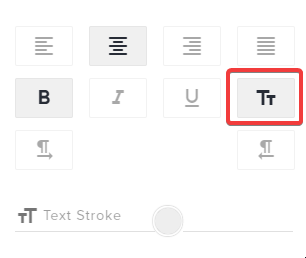 boreal smelt
Oh I thought that was a small caps option okay thank you
twin sentinel
The overlay is tied to the account it is on and will only display these events for this account.
boreal smelt
Oh right okay. So how do I share the overlay with multiple people? I've created custom Alerts that I need to give out access to.
twin sentinel
They would need to give you access to their StreamElemetns account and you can copy overlays between your and their accounts.
round brambleBOT
Follow these steps to grant managers/moderators access to your dashboard:
- Click on your Channel Name at the top of the dashboard and select Settings
- Create a new invite at one of three access levels (Bot Supervisor, Editor, Full Control)
- Send this invite to a mod/manager to give them access to your dashboard. The link is one-time-use and expires after 72 hours if not accepted
Video tutorial: https://youtu.be/zl_h-ttZDF0
twin sentinel
This is a feature not available to everyone.
boreal smelt
Damn. I'm looking at selling a stream pack so I'm not sure the best way my customers could use the custom alerts that I've set up in streamelements.
twin sentinel
Take a look at this guide: https://blog.streamelements.com/streamers-market-f132e9015ded
 amber path
Hello, I am trying to add a countdown widget to a new overlay and for some reason I cant see the text
twin sentinel
Edit the message with the variables.
amber path
brilliant thanks!
boreal smelt
@twin sentinel So this is in partnership with Fiver. I was looking at using a website called Gumroad.
Is this for SE to approve the services I'm selling and I have to upload it to Fiverr prior before review??
twin sentinel
Asking internally on this.
boreal smelt
I might possibly need a member of SE to review my advertisement video and confirm whether or not it will be possibly for me to sell everything in the pack or whether I will have to take things out.
 narrow ibex
Hey Guys, how i can Add Quotes?
prisma relic
@cobalt plover HTML ```html
<div class="text-container">
<div class="image-container">
<img src="https://i.giphy.com/Ihg4Kl0ztqlyoAT3rm.gif">
</div>
<div id='text'>
<div class="awsome-text-container">
<span id="username-container"></span>
is now following!
<br>
</div>
</div>
</div>
CSS: ```css
.text-container {
   padding-bottom: 250px;
    font-size: 16px;
    color: rgb(255, 255, 255);
    text-align: center;
    margin: auto;
    text-shadow: rgba(0, 0, 0, 0.8) 1px 1px 1px;
}
#text{
  position: relative;
  margin-top: -100px;
}
@narrow ibex the !quote add command
 warped jungle
Hello im trying to put donations on my twitch but i dont have paypay and dont want it. Is there any other way i can get donations?
round brambleBOT
@warped jungle SE.PAY is available for streamers who are atleast 18 years old, with bank account under their name in one of the following countries and have at least 101 Follower (Twitch) / 101 Subscribers (Youtube):
Austria, Belgium, Czech Republic, Denmark, Finland, France, Germany, Ireland , Italy, Netherlands, Poland, Portugal, Slovakia, Spain, Sweden, Switzerland, United Kingdom, United States.
If you meet these criteria and don’t see SE.Pay, let us know.
For information on SE.Pay payment methods, their fees, and settlement times see https://streamelements.com/dashboard/tipping/fees.
narrow ibex
Thanks you ❤️
amber path
One more query - setting up a follower goal amount widget and its displaying an innacurate follower count, how do i set it to the correct current follower amount?
round brambleBOT
@amber path To reset goals:
- from the overlay editor -> data on top -> goal tab -> reset progress of desired goal
- from the dashboard -> activity feed on the left -> widget data on the right -> goals tab -> reset progress of desired goal
Note: Goal widgets(progress) only counts up and doesn't go down automatically, if you loose followers/subs
narrow ibex
Who can do !quote add? Everyuser? Only Mods?
twin sentinel
Mods and Broadcaster
cobalt plover
@prisma relic Thank You so much for the assistance, honestly big thanks
ionic kelp
Unfortunately no.
twin sentinel
@boreal smelt Send an DM to @winter cradle with your request please. They will assist you.
narrow ibex
All Right thx
boreal smelt
@twin sentinel I've sent the DM thank you for your help. 🙂
narrow ibex
Can the Bot do Math Task? So Donation x 2? or something like that
twin sentinel
Only via custom API with https://api.mathjs.org/ for example
 wide elm
Hi guys, can someone help me with giveaway widget?
narrow ibex
And can i "fake" a Donation for test
round brambleBOT
@narrow ibex You can test Alerts via the Emulate bell on the lower left side of the Overlay Editor. Simply go to your Dashboard -> My Overlays -> Pencil/edit button on the overlay. Make sure the "Preview LIVE on stream" option is on to see the alert in OBS/Xsplit https://streamable.com/vtulg9

 brisk hound
hi guys have the problem that the widget in the overlay editor doesnt fit e.g. the kappagen widget. if i post like 10 emotes in chat i see like random numbers like 5-7 emotes in the editor and in obs even less. How can i fix this?
 lapis fiber
Hi guys. I would like to remove my Youtube account to link it with Twitch under the same username. I can't remove it because it doesn't have an Email. What should I do?
round brambleBOT
@lapis fiber Account Merging - Please note:
- Merging accounts only allows faster ways to switch between accounts
- Merging accounts does not allow data sharing between accounts - different streaming platforms, different type of events
- Merging accounts allows duplicating/sharing overlays between the accounts
If you understand the limitations of merging and want to proceed, please find the JWT tokens (!jwt) from both accounts you want to merge and you will be directed to DM them to a staff member.
 open merlin
Can anyone help me get chat bot working in mixer? I've joined to my channel but nothings working
 jade remnant
open merlin
jade remnant
open merlin
Oh my bad didn't realise I clicked in wrong one
 fast notch
Hi everyone,
is someone hosting a giveaway atm and has encountered any problems? I'm moderating a channel which has a giveaway and when I wanted to enter new tickets, I saw my counter started with 0 again (I had maybe 700 or 800 so far). I asked other viewers to check their ticket counter as well, with the same result.
I asked another moderator who already reached the max amount to try and buy a new ticket, to see if the previous tickets still count and are just not shown (so StreamElements would put out a warning that the limit is reached) or if she could buy new tickets (which likely would mean, the bought tickets are gone for good). And she was able to buy a new one, counter started with 1 again.
The giveaway still shows the number of twitch viewers who are participating and the total amount of bought tickets.
I try to figure out if we would have to start the giveaway again or if this probably could be solved.
Thanks in advance for any help! 🙂
ionic kelp
@fast notch Having someone poke it with a stick.
open merlin
I'm trying to close my old account but its saying my username is wrong can someone help me ?
 tawny pivot
@fast notch When did the giveaway start?
fast notch
@ionic kelp I'm not a native speaker so I don't understand your reply, I'm sorry. If you mean it might be too old, it was started on monday
tawny pivot
Can you link the giveaway public page?
fast notch
Should I post it in this channel or send you privately, @tawny pivot ?
fast notch
-solved-
tawny pivot
Thanks 👍
fast notch
No, thank YOU for looking on it on a sunday afternoon 😉
 grand osprey
Whenever I copy the URL and add new browser source I just get a blank slate. It doesn't show my chat or anything. Anyone have any ideas?
round brambleBOT
@grand osprey OBS -> settings -> advanced -> scroll down -> enable/disable hardware accel.
https://i.imgur.com/ggMe9ZE.png
 wide elm
Hi guys, why the giveaway widget doesn't show on the screen when i start it?
happens to someone else?
fast notch
Hi, if you mean as a streamer you cannot check how many tickets which user has bought for the giveaway, this was the case in our giveaway as well. If not, I'm sorry for the misunderstanding.
tawny pivot
@wide elm We'll take a look 👍
 sharp orchid
i need help adding custom font to my labels for my overlays any help would be appericated
round brambleBOT
@sharp orchid Google Fonts
More than 900 google fonts are supported at this time. You can preview them here: https://fonts.google.com/
Custom Fonts
Steps:
- Install the font on the streaming PC or choose a pre-installed windows font.
- In the overlay widget settings, select Text Settings
- Enable Custom Font
- Type the name of the font as it appears in the windows font directory (This is usually
C:\Windows\Fonts)
Note: After installing fonts, the browser and OBS must be restarted for the font to appear.
sharp orchid
Thanks
 abstract island
tawny pivot
abstract island
tawny pivot
@fast notch Could you check the giveaway again?
ionic kelp
@wide elm he had it as well. Wasn't ignoring you.
fast notch
@tawny pivot I reloaded the page and there were no tickets shown, so I entered with another ticket and the counter is now 1 again.
wary halo
@wide elm refer to the helpdesk channels
@charred quartz ? this is a helpdesk channel? 😛
maybe some extra coffee for you?
wary halo
🤔
 charred quartz
i will relog sorry
wary halo

wide elm
😂
charred quartz
okay fixed XD
tawny pivot
@fast notch Alright i see it 👍
wide elm
is there a way to edit the texts like "entrants: " and "in progress"?
i think i'll have to use css(?)
charred quartz
is there a way to edit the texts like "entrants: " and "in progress"?
@wide elm if it is a custom widget and you can't find the thing u want to edit in the fields in settings you can dig into the the code
but if it is a widget that came with the editor added from the plus button, then u need to find what u want, some of the alerts have variants so have a look on those too
wide elm
thanks 😄
fast notch
@tawny pivot if this is of any help for you, I think the counter for participants raised by 1 when I entered the new ticket. Maybe StreamElements is counting me as 3 different persons?
 hollow flame
Hello!
What size should I use for uploading HypeCup emotes/icons? I want to replace the default ones with my sub badges.
 elfin flame
Can you change the starting message from the !duel command?
 wispy chasm
So i'm currently live on Twitch but my stream elements page says I'm offline?
fast notch
Yes, I got 736 tickets now. Is the problem solved now for every participant of the giveaway? Thank you for taking care of it, and this even on a sunday, @tawny pivot
tawny pivot
Yes it should be solved for everyone 
fast notch
@tawny pivot the other moderator informed me that her ticket count wasn't set to 1000 (the limit for the giveaway) again and she can still buy new tickets. She tried to log out and log in again but still the same.
tawny pivot
What's the name?
fast notch
v3md3etta, but the problem with missing tickets appeared by all members who replied my question so far, so I suppose all participants were affected.
Edit:
Another moderator replied that she had 1000 tickets and ad least using the command in the chat she can't buy more, but she's at work and can't currently log in to StreamElements
 cyan moon
does anybody know how i can remove the thing where a donator can put in a YouTube link? I dont want to have videos in my stream
fast notch
@tawny pivot is it possible that it didn't work for her as with the one extra ticket she would have more tickets than the set limit?
Feedback from other members is fine, seems that they have their tickets back, so the extra ticket might be the source of error here?
tawny pivot
@fast notch I've gone through everything now to make sure there's no duplicate entries or missing people.
lament blade
Can someone please fix my chatstats! I have not changed my name or anything
cobalt plover
does anyone know how to add text delay using custom CSS
 azure pumice
my streamelements bot is not working, does anyone know why?
my streamelements bot is not working, does anyone know why?
round brambleBOT
@azure pumice If you changed your name on Twitch please follow these steps:
🔹 Visit https://streamelements.com/logout and then log in again with by connecting with Twitch.
🔹 On the right side of the dashboard page that opens, select "Join" under bot settings. If it says "Part" select that and then select "Join" to send the bot to the chat. Don't forget to mod the bot by typing /mod streamelements in your channel if you have not already.
🔹 Post your old and your new name here so that we can update your channel's chatstats tracking (must be done by staff).
lament blade
how do I activate the currencies of my channel I want to put a command like the person types (! xings) Hence, how many xings does the person have but I don't know how to do it Anyone teach me?
wary halo
StreamElements
The Ultimate All in One Platform for Streamers
lament blade
because I'm still creating a store to have the items
wary halo
check the link
fast notch
@tawny pivot thanks again for the support. Streamer will be online tonight, if there's something still not working I'll show up tomorrow. Are there informations needed from the users that might still have troubles, that can make it easier for you to work it out, beside their user names?
tawny pivot
Ping me if you see issues, and we'll get it resolved 👍
lament blade
check the link
@wary halo ok I put everything in this link, but when I go to twich, put the code nothing appears
wary halo
lament blade
Oh ok
 severe python
hi, there's a way to show my received donations on streamelemenets extension leaderboard?
wary halo
Oh ok
@lament blade https://streamelements.com/dashboard/bot-commands/default-commands
StreamElements
The Ultimate All in One Platform for Streamers
change the name of the command there
to Xings
lament blade
@lament blade https://streamelements.com/dashboard/bot-commands/default-commands
@wary halo thanks for support
StreamElements
The Ultimate All in One Platform for Streamers
 cobalt pelican
If i get hosted with 1 viewer i dont see it in the activity feed and dont see a alert pop up.... Way to fix this?
round brambleBOT
@cobalt pelican Due to changes to Twitch API, we have filtered out hosts and will only show these ones on your activity feed:
- All hosts coming from an online channel with at least 1+ viewer
- Auto host events with at least 1 viewer - only from a channel that just went offline
Note: If you see "X channel has hosted you" with no viewers on the back, that is considered an offline host or a host with 0 viewers, we do not show these.
Note for Mixer streamers: The above 2 filters currently apply for Mixer and we are aware its actually not how Mixer hosts work. We do plan on changing it, but no ETA on when.
severe python
hi, there's a way to show my received donations on streamelemenets extension leaderboard?
@severe python ?
ionic kelp
@severe python From what I understand no.
lament blade
how do i export the stream overlays from stream elements to my streamlabs?
round brambleBOT
@lament blade To add your overlays to OBS, add a new browser source in your scene. Paste your overlay URL in the browser source properties, set the dimensions to 1920x1080 (unless you changed them on the website), and ☑ “Shutdown source when not visible” https://youtu.be/KDvLynUqXI4
 novel yew
My alerts in OBS are off center can someone please help
 daring orchid
Does anyone know what the default size is for the HypeCup icons
 flat acorn
Question: is it possible to add commands to the bot that play a sound file?
 chrome folio
@flat acorn yes. You can add sound effects to your store. See this tutorial: https://www.youtube.com/watch?v=FMy8XekSq60 ... and on #widget-share you can check this option #widget-share message

This tutorial has been made for a few friends that have asked to explain in detail how to set up sound commands properly.
daring orchid
ph any info on custom images for the hype cup? I have my image set to not be a sprite sheet but it just comes up off. I feel like I just need to know the right resolution for the hype cup icons
flat acorn
@chrome folio nice, that's a cool workaround 😉 Thank you
 azure pine
can i get some help when i choose cs it doesnt pick it up and is just a black screen
 brittle rampart
I have TTS working via tips, but, how do I enable TTS via Bits?
 vast peak
I need help fixing the white screen on the website I already wiped the cache and cookies and it still white screens idk what to do
 dull spoke
i kinda banned streamelements from my chat, can i unban him?
brittle rampart
./unban StreamElements
dull spoke
dont work
brittle rampart
./user StreamElements
round brambleBOT
@vast peak Our Dashboard and Overlay editor are Chromium Optimized. We strongly recommend using Chrome. Opera GX and the new Microsoft Edge Chromium might work closest to Chrome as its also Chromium built. FireFox also works, but some things might look a bit different or not work. We do not recommend using Internet Explorer with our Dashboard as it does not support functions.
If the website doesn’t work on chrome, be sure none of your plugins are blocking our website or clear your cookies. You can try if the website works in a incognito tab.
@dull spoke Go to the dashboard -> right side -> part channel -> join channel (https://streamelements.com/dashboard)
 chrome folio
@brittle rampart the same thing. Did you check Variations?
 white gust
I am trying to setup my own overlay and i am getting stuck
round brambleBOT
@white gust New to Stream Elements?
Check out our YouTube channel https://www.youtube.com/c/streamelements/videos
with tutorial videos from setting up the basics, to in depth details on how to use our product.
New to OBS? Here is a 4 step quickstart guide
https://obsproject.com/wiki/OBS-Studio-Quickstart
Want to learn even more? Here is an in-depth overview
https://obsproject.com/wiki/OBS-Studio-Overview
@white gust We've released our new Overlay Editor revamp. You can check out the changes and how to work with it here: https://youtu.be/X5VzXjqAsjk
Check out our blog post as well: https://blog.streamelements.com/streamelements-overlay-editor-just-got-even-better-c22cb5b4853e

We are thrilled to announce the launch of the remastered StreamElements Overlay editor!
https://p.strms.net/newoverlayyt
Why StreamElements Overlays are better?
😎 Simple: Load your entier setup using only 1 link
⚡ Fast: Cloud-powered Overlays arrive in real-time, say goodb...
 thick zealot
real quick question, when getting followed on twitch, obs blurs the name on the followed notification
but not in the actual ediot in stream elements
wary halo
for every follow?
thick zealot
yes
wary halo
🤔
round brambleBOT
@thick zealot Please provide a proper screenshot with the issue visible. If not sure how to take a screenshot, you can check here: https://www.take-a-screenshot.org/
wary halo
that is preferred yes
thick zealot
but in the actual editor it displays their names fully
also it doesnt blur it with subs or raid or donations
daring orchid
Is there anyone using custom images in their hypecup for followers/subs/etc that could chat for a min?
 finite bolt
Anyone know why whenever I go to the streamelements dashboard its just white? And how do I fix it?
 exotic estuary
hi, i've done some alerts, and when i test them in the stream elements page they look well, but in obs only the sound is reproduced, anyone could help? u.u
round brambleBOT
@finite bolt Please ask your question in one helpdesk channel only. A support volunteer or StreamElements staff member will assist you as soon as they are available. Asking in multiple places will only result in confusion, not faster answers. Thank you for your patience.
@exotic estuary OBS -> settings -> advanced -> scroll down -> enable/disable hardware accel.
https://i.imgur.com/ggMe9ZE.png
wary halo
disable that ^
exotic estuary
okay, thank you!
thick zealot
im guessing my issue is a little more deep than the average question on here? hahah
thick zealot
for some reason some names do not come out blurry
wary halo
maybe a filter then
wary halo
no, bad words filter that filters all words and names
at least that is my first thought
thick zealot
where would i check that?
wary halo
but i will send it around internally
wary halo
StreamElements
The Ultimate All in One Platform for Streamers
StreamElements
The Ultimate All in One Platform for Streamers
top moderation
thick zealot
but remember it only does it for follows, every sub donation, bit and raid name comes through without fault
wary halo
just wait a bit until someone has taken a good look at it
wary halo
yeah the bot does not work of itself 😉
daring orchid
I think I figured it out for the Hype Cup custom image issue I was having. It looks like you have to create your own variation and then upload your image, making sure sprite sheet is unchecked. If you just try to edit the default variations and uncheck sprite sheet it doesnt seem to take that change. Creating the variation yourself seems to work incase anyone else runs into that issue
white gust
Can i still get a setup everything if i do not have a mic and a camera
white gust
Ok thanks Ruben
wary halo
although they make the quality of the content instantly better ofcourse
white gust
Is there any other way to get a overlay to add to my twitch account and i am really not good doing overlay
 hardy notch
if someone could when they get a chance help me with my overlays and scenes for my stream.. im sorry for the inconvenience. i just need help :/
round brambleBOT
@hardy notch New to Stream Elements?
Check out our YouTube channel https://www.youtube.com/c/streamelements/videos
with tutorial videos from setting up the basics, to in depth details on how to use our product.
New to OBS? Here is a 4 step quickstart guide
https://obsproject.com/wiki/OBS-Studio-Quickstart
Want to learn even more? Here is an in-depth overview
https://obsproject.com/wiki/OBS-Studio-Overview
@hardy notch We've released our new Overlay Editor revamp. You can check out the changes and how to work with it here: https://youtu.be/X5VzXjqAsjk
Check out our blog post as well: https://blog.streamelements.com/streamelements-overlay-editor-just-got-even-better-c22cb5b4853e
We are thrilled to announce the launch of the remastered StreamElements Overlay editor!
https://p.strms.net/newoverlayyt
Why StreamElements Overlays are better?
😎 Simple: Load your entier setup using only 1 link
⚡ Fast: Cloud-powered Overlays arrive in real-time, say goodb...
@white gust To add your overlays to OBS, add a new browser source in your scene. Paste your overlay URL in the browser source properties, set the dimensions to 1920x1080 (unless you changed them on the website), and ☑ “Shutdown source when not visible” https://youtu.be/KDvLynUqXI4
hardy notch
thank you
 strong kernel
@thick zealot I'm not able to replicate the issue. Is there any pattern with the kind of name being blurred? Can you also screenshot the browser source properties?
thick zealot
sure! and no i dont seem to see a pattern, i tried changing all of the texts around and changing the fonts/sizes/bolds but its literally hit or miss
sometimes the names are long and come out find and other times they come out blurry, visa versa with short names too
strong kernel
Screenshot removed to hide your URL.
strong kernel
Can you clear out the custom CSS and refresh the browser source cache? Then refresh the editor and try testing again.
thick zealot
should i link the proper one?
strong kernel
It's fine, just follow those instructions.
thick zealot
okay i did that with the other source and it is still blurry
strong kernel
Delete and remake your browser source.
strong kernel
Nope.
Delete and remake it.
Note I am not telling you to delete the overlay on the site.
Just the browser source in OBS.
thick zealot
oh thank god
 lavish ore
good afternoon, i'm having a problem with the twitch, every time i open the live, no notification arrives for any of my followers or the tab of who they follow on the left, when i search my channel i don't find it either. Can you help me?
thick zealot
@strong kernel still blurry
wary halo
good afternoon, i'm having a problem with the twitch, every time i open the live, no notification arrives for any of my followers or the tab of who they follow on the left, when i search my channel i don't find it either. Can you help me?
@lavish ore we can not, this is a Twitch issue unfortunately. best to contact them about it
lavish ore
@wary halo Ok, ty
white gust
Is there a guide where so i can check if i am doing it right please
round brambleBOT
@white gust New to Stream Elements?
Check out our YouTube channel https://www.youtube.com/c/streamelements/videos
with tutorial videos from setting up the basics, to in depth details on how to use our product.
New to OBS? Here is a 4 step quickstart guide
https://obsproject.com/wiki/OBS-Studio-Quickstart
Want to learn even more? Here is an in-depth overview
https://obsproject.com/wiki/OBS-Studio-Overview
thick zealot
yeah still blurry, only certain names arent blurry
okay i got 7 non blurry in a row
and heres how i did it
"text apperance delay"
i set it to 1 second, and every single name after i did that showed up clear as day
strong kernel
Text appearance delay has absolutely no bearing on how the text actually displays.
strong kernel
This is a local issue, as not a single test you performed appeared blurry on our end when displayed in OBS.
exotic estuary
hi, i'm back, so i disabled the hardware accel. and still only playing the music :c
round brambleBOT
@exotic estuary Right click on the BrowserSource > Properties > Scroll down a bit > Refresh Cache of current page
thick zealot
i dont doubt it , it just started happening to me today
round brambleBOT
@exotic estuary To add your overlays to OBS, add a new browser source in your scene. Paste your overlay URL in the browser source properties, set the dimensions to 1920x1080 (unless you changed them on the website), and ☑ “Shutdown source when not visible” https://youtu.be/KDvLynUqXI4
thick zealot
i can screen record if you guys want me to
strong kernel
Not necessary.
thick zealot
ight well ty guys hopefully this can help someone in the future if they have issues
round brambleBOT
@lament blade Please follow our community rules:
- No advertisement or stream promotion
- Respect ALL server members
- No NSFW/NSFL
Thank you
 haughty belfry
Hey, do anyone know why my streamlabs leaderboards "chat stats" says "no data"?
strong kernel
You'll need to ask Streamlabs.
haughty belfry
streamelements* sorry, im an idiot
round brambleBOT
@haughty belfry If your chat stats aren't working it's most likely because you changed your username! If you can give us your old and new username, we will get a chat stat fix for you.
haughty belfry
My old one was Noah_bystrup and the new one is NoahBystrup
 rustic kernel
Hey guys i got the problem i changed my twitch name and my chat commands are not working anymore do you guys know why?
round brambleBOT
@rustic kernel If your chat stats aren't working it's most likely because you changed your username! If you can give us your old and new username, we will get a chat stat fix for you.
rustic kernel
My old name was El_Capo_Kable and my new one is Ronny_1996
how long does that takes?
haughty belfry
thank you very much!!!
strong kernel
@rustic kernel Earlier username than that please.
rustic kernel
that is my first username that i had
strong kernel
Neither of those usernames are in our chatstats system. Did you have any other?
flat acorn
Question: This "elementsOkay" keeps apearing at the end of the !redeem command response. Can I remove/change it?
rustic kernel
nope
strong kernel
@flat acorn Try typing !pepes disable in your chat.
rustic kernel
im on my account on streamelements right now it says ronny_1996
strong kernel
That's completely unrelated.
I've added your username to the system. It'll start tracking from this moment on.
rustic kernel
so the commands work now?
strong kernel
Commands?
rustic kernel
yeah like !points
strong kernel
Chatstats and commands have nothing to do with each other.
flat acorn
@strong kernel what's that !pepes disable command supposed to do?
rustic kernel
but why are they now working after changing my twitch name
strong kernel
Remove pepes, of course.
round brambleBOT
@rustic kernel If you changed your name on Twitch please follow these steps:
🔹 Visit https://streamelements.com/logout and then log in again with by connecting with Twitch.
🔹 On the right side of the dashboard page that opens, select "Join" under bot settings. If it says "Part" select that and then select "Join" to send the bot to the chat. Don't forget to mod the bot by typing /mod streamelements in your channel if you have not already.
🔹 Post your old and your new name here so that we can update your channel's chatstats tracking (must be done by staff).
flat acorn
@strong kernel I'm sorry, I don't understand what that has to do with my question.
strong kernel
"elementsOkay" is an emote with a pepe.
rustic kernel
@strong kernel that was the bot said i did already i can only leave the bot and the bot is already mod
but the commands still not working
flat acorn
Ok, got it. I don't know why would that be in a standard response for a !redeem command. What I really would like to know is: Is there any way I can change the response itself?
strong kernel
@flat acorn There is not.
rustic kernel
well i fixed the problem.. i mute the bot and unmute him again then the commands work again
but still thanks for trying to help me ❤️
flat acorn
sucks for me then, I don't wanna disable pepes... :\
 steep locust
Are the changes in the Twitch API preventing accurate sub / sub point numbers from showing up? Been trying to figure that out for a couple weeks now.
wary halo
yup
steep locust
Well poop.
round brambleBOT
@steep locust Due to a recent change from Twitch API, these features are affected by the change:
- Ground Control does not have Custom Bot Name
- Subscriber count will count the Channel and any other permanent sub you may have (+1 or +2 or +3 on top).
We are working on fixing both issues, but there is no ETA.
OBS.Live still has Custom Bot name working fine in it.
steep locust
Sweet, thank you bot that actually answered my next question.
wary halo
yes the bot works fully autonomous 
strong kernel
^ Sarcasm.
steep locust
Hahaha
 untold umbra
hey, how do I make someone super-moderator in streamelements?
strong kernel
StreamElements
The Ultimate All in One Platform for Streamers
 oak stone
Hey! How come I hear my cheer TTF twice on stream?
round brambleBOT
@oak stone Make sure to ☑️ “Shutdown source when not visible” for all browser sources (all OBS scenes). If using studio mode, uncheck “Swap Preview/Output scenes After Transitioning.” Also keep in mind that sound can play from any overlay loaded in the browser (editor or launched). https://i.imgur.com/6bWXxjR.png https://i.imgur.com/yY0wcFl.png
white gust
I am doing it right
 steel epoch
Hey. I was streaming on Twitch and my stream crashed (bitrate hit 0). I ended the stream and it was saying "stopping stream" forever so I closed out of OBS restarted my computer. Whenever i press to stream it pops up the confirmation window "Start streaming to YouTube" and doesn't let me go live
round brambleBOT
@steel epoch Streamelements on top of OBS -> Logout -> login
 peak briar
Hello, can I use the streamelemts app to be shown on my streamelemts obs app as camera?
strong kernel
You cannot, no. The app is only for mobile IRL streaming.
peak briar
Oh okay. Is there any other way to do that?
e.g. with some third party applications for that?
 cobalt glen
Hey guys. How can I add my lol rank command?
I mean whats the command ? I searched in the command room but couldn't find it.
strong kernel
@cobalt glen There is a command in #command-share
 obtuse yoke
hello guys my twitch chat where the leader board is hasent updated for months can i get help with that?
round brambleBOT
@obtuse yoke Please provide a proper screenshot with the issue visible. If not sure how to take a screenshot, you can check here: https://www.take-a-screenshot.org/
obtuse yoke
strong kernel
That's taken from Twitch. You need to reach out to Twitch.
obtuse yoke
i see thank you very much than
round brambleBOT
@deep burrow If your chat stats aren't working it's most likely because you changed your username! If you can give us your old and new username, we will get a chat stat fix for you.
 winter moss
yo i cant load past this for the streamelements dashboard
strong kernel
Use Chrome.
winter moss
ok
round brambleBOT
@winter moss Please ask your question in one helpdesk channel only. A support volunteer or StreamElements staff member will assist you as soon as they are available. Asking in multiple places will only result in confusion, not faster answers. Thank you for your patience.
 narrow fern
hello, is there a way to make an alert without background?
like if it had a chroma key
strong kernel
The image or video you upload needs to have transparency in it.
narrow fern
do you know how to make a video with transparency in sony vegas?, srry for asking that here
strong kernel
Not something we can help with here.
narrow fern
thanks anyway!
 high dust
When i stream, people can't see me in their ''following channel'' so nobody can see my channel.. Is it normal ? If somebody can help you are bless
strong kernel
You'll need to contact Twitch regarding that.
high dust
Sounds good thanks !
narrow fern
When i stream, people can't see me in their ''following channel'' so nobody can see my channel.. Is it normal ? If somebody can help you are bless
@high dust you can click in your profile and change to connected mode
and "share my activity"
that should do it
high dust
it's already on @narrow fern
narrow fern
i dont't really know then 😦
high dust
it's fine thank you
 frigid comet
I'm stuck in the transitions part and can't seem to get out.
I want to go back to where there is only the one scene instead of two smaller scenes in the transition, but can't get back
strong kernel
That's Studio Mode.
frigid comet
Ah ok, thanks.
I think I did everything but hit that button. Sorry. I'm also trying to figure out how to get the chatbox to display.
strong kernel
Check the StreamElements menu at the top.
frigid comet
What am I looking for? If I click chat in there will it auto display?
strong kernel
Click it.
frigid comet
I see it at the top, but will it display so that viewers can see the chat while stream?
 copper steppe
Would anyone have any knowledge or experience in making two alerts go off for the same alert. Like a follower alert in the center of screen and then an alert on my webcam to match it. I'm struggling with finding out a way to do it.
strong kernel
Two alertboxes.
copper steppe
The main issue I'm actually having is the CSS not transferring from stream ;labs to stream elements. I don't know ho to adjust the code
the alert is like off the screen pretty much, but on stream labs it perfect
strong kernel
Custom CSS is up to you to get going. If you're attempting to import a purchased third party overlay package, check with the third party seller for StreamElements installation instructions instead.
frigid comet
Where is the chat widget for the overlay?
round brambleBOT
@frigid comet We've released our new Overlay Editor revamp. You can check out the changes and how to work with it here: https://youtu.be/X5VzXjqAsjk
Check out our blog post as well: https://blog.streamelements.com/streamelements-overlay-editor-just-got-even-better-c22cb5b4853e
We are thrilled to announce the launch of the remastered StreamElements Overlay editor!
https://p.strms.net/newoverlayyt
Why StreamElements Overlays are better?
😎 Simple: Load your entier setup using only 1 link
⚡ Fast: Cloud-powered Overlays arrive in real-time, say goodb...
 wicked quest
hi, can some one tell me why my new followers and last tip dont scroll on stream?
round brambleBOT
@wicked quest OBS -> settings -> advanced -> scroll down -> enable/disable hardware accel.
https://i.imgur.com/ggMe9ZE.png
 left vine
is it possible to have variable text on a widget?
wicked quest
thanks @round bramble xD
strong kernel
@left vine What kind of variable text?
left vine
in my case i am trying to get the person's name on the awesome shoutout widget
strong kernel
Community created widgets are provided as is. It's up to you to get them going as you need.
left vine
fair response lol
 prime canopy
i cant sign up to SE. Pay to withdraw money.... help?
round brambleBOT
@prime canopy SE.PAY is available for streamers who are atleast 18 years old, with bank account under their name in one of the following countries and have at least 101 Follower (Twitch) / 101 Subscribers (Youtube):
Austria, Belgium, Czech Republic, Denmark, Finland, France, Germany, Ireland , Italy, Netherlands, Poland, Portugal, Slovakia, Spain, Sweden, Switzerland, United Kingdom, United States.
If you meet these criteria and don’t see SE.Pay, let us know.
For information on SE.Pay payment methods, their fees, and settlement times see https://streamelements.com/dashboard/tipping/fees.
prime canopy
i cannot setup my account it fails every time
round brambleBOT
@prime canopy Please contact us via email for support with SE.Pay. You can use our contact form here: https://streamelements.com/contact Thank you
 wild acorn
i've been face the white page/overlay wiuth a Help button on the bottom right corner, i've tried to use the CTRL+SHIFT+R but it didn't work
round brambleBOT
@wild acorn Our Dashboard and Overlay editor are Chromium Optimized. We strongly recommend using Chrome. Opera GX and the new Microsoft Edge Chromium might work closest to Chrome as its also Chromium built. FireFox also works, but some things might look a bit different or not work. We do not recommend using Internet Explorer with our Dashboard as it does not support functions.
If the website doesn’t work on chrome, be sure none of your plugins are blocking our website or clear your cookies. You can try if the website works in a incognito tab.
 silent yacht
If i setup a timer with the command "commercial" and add streamelements as an editor on my channel will it run ads from x time to x time?
thank you!
wispy chasm
So I posted a question earlier on that didn't get answered :/
I went onto my SE dashboard and noticed that it stated I was offline even though my stream was live. This meant the automated tweet didn't fire off because SE thought I was offline when in fact I was not.
winter moss
how do i use the overlay i made?
i go to activate overlay and it just takes me back to streamelements website to create one
round brambleBOT
@winter moss To add your overlays to OBS, add a new browser source in your scene. Paste your overlay URL in the browser source properties, set the dimensions to 1920x1080 (unless you changed them on the website), and ☑ “Shutdown source when not visible” https://youtu.be/KDvLynUqXI4
 prime vault
Twitch says 154 subs, but my sub count says 155. Any idea how to make it accurate? idk why its giving me an extra one
round brambleBOT
@prime vault Due to a recent change from Twitch API, these features are affected by the change:
- Ground Control does not have Custom Bot Name
- Subscriber count will count the Channel and any other permanent sub you may have (+1 or +2 or +3 on top).
We are working on fixing both issues, but there is no ETA.
OBS.Live still has Custom Bot name working fine in it.
prime vault
ahh okay. It's counting me.
 blissful sinew
Hey, can i see who betted and how much in my ended contest?
 lost minnow
I am creating my overlay and when I preview it, only shows half of the screen. Can someone help me fix this.
 candid onyx
Anyone know why every time i open obs i have to login to the streamelements plugin to chat in the streamer and see the activity feed
round brambleBOT
@lost minnow To add your overlays to OBS, add a new browser source in your scene. Paste your overlay URL in the browser source properties, set the dimensions to 1920x1080 (unless you changed them on the website), and ☑ “Shutdown source when not visible” https://youtu.be/KDvLynUqXI4
@candid onyx If you are not seeing the OBS Twitch integrations and have OBS.Live installed, please follow these steps:
- Make sure you are on the latest and greatest version of OBS.Live
- exit OBS (make sure OBS is not running)
- delete %appdata%\obs-studio\plugin_config\obs-browser\obs_profile_cookies
- start OBS.Live
- Settings -> Stream -> disconnect -> connect
candid onyx
Thanks
 oak nova
hello
i dont know how to remove streamelements from my twitch channel can someone help me pls
round brambleBOT
@oak nova Go to the dashboard -> right side -> part channel -> join channel (https://streamelements.com/dashboard)
 orchid pagoda
ayuda D:
chrome folio
@orchid pagoda > #🇪🇸︱español
 karmic roost
Hi everyone, I'm having an issue with my alert box! I am seting my image, and sound to play, and it is playing that sounds, but also looping another sound along with it, even though i've only submitted one sound that I want. I don't understand how to correct this send help
However, it is seemingly only doing this for the Raid alert, the others like follower alert are working just fine
round brambleBOT
@karmic roost Make sure to ☑️ “Shutdown source when not visible” for all browser sources (all OBS scenes). If using studio mode, uncheck “Swap Preview/Output scenes After Transitioning.” Also keep in mind that sound can play from any overlay loaded in the browser (editor or launched). https://i.imgur.com/6bWXxjR.png https://i.imgur.com/yY0wcFl.png

 karmic roost
This is happening within the Stream elements overlays editor. when I click emulate raid event, it plays multiple sounds
strong kernel
Then you either have multiple alertboxes in your scene, or you left OBS open while you were editing.
karmic roost
oh yes i have obs open while i am editinh
strong kernel
Then you're probably hearing what's currently "live" since you probably haven't saved yet.
karmic roost
i see, i will check on that, thank you
silent yacht
If i setup a timer with the command "commercial" and add streamelements as an editor on my channel will it run ads from x time to x time?
thank you!
strong kernel
See #command-share for full instructions on how to set up an ad timer.
chrome folio
@silent yacht do you have a bot with custom name?
@silent yacht see this message #helpdesk-twitch message
 boreal kelp
Hey guys! Can I not use SE.pay with paypal?
strong kernel
You cannot. SE.Pay is its own payment processing system, powered by Adyen. They're essentially competitors.
You can offer both as options in your tipping page, but the two do not interact whatsoever.
boreal kelp
It's just cause I don't really want to put my info there
strong kernel
Besides your name and email address, none of your personal information is stored on StreamElements servers. The information submitted on these forms is sent directly to our payment processor, Adyen, for verification purposes. Adyen is a world-wide company that processes payments for companies such as Netflix, Uber, Steam and Spotify. You can read Adyen’s privacy policy here.
silent yacht
@chrome folio That´s exactly what i did and i don´t have a custom name on my bot , thank you! 🙂
white gust
Right i have got my overlay sorted and it will not let me add text
round brambleBOT
@white gust We've released our new Overlay Editor revamp. You can check out the changes and how to work with it here: https://youtu.be/X5VzXjqAsjk
Check out our blog post as well: https://blog.streamelements.com/streamelements-overlay-editor-just-got-even-better-c22cb5b4853e
We are thrilled to announce the launch of the remastered StreamElements Overlay editor!
https://p.strms.net/newoverlayyt
Why StreamElements Overlays are better?
😎 Simple: Load your entier setup using only 1 link
⚡ Fast: Cloud-powered Overlays arrive in real-time, say goodb...
 coral rain
Hi
round brambleBOT
@coral rain Welcome to the helpdesk! Please let us know how we can assist you today and a support volunteer or staff member will assist you as soon as they are available. Thank you for your patience.
 fleet gyro
anyone else trying to sign in only to get logged out of the website
strong kernel
Log out using the menu in the top right, then log in.
fleet gyro
i did that and it just did the same thing again
strong kernel
Did you try to switch to someone else's channel?
fleet gyro
yes
strong kernel
Ask that streamer to log out and log back in to StreamElements.
fleet gyro
oh ok will do thanks 👍
 trail pewter
Hey guys! Can somebody answer me the question since when SE is tracking and counting all the chat messages? Thanks!
white gust
It will not let me add my social media to the overlay
strong kernel
You edit it in the settings, on the left.
white gust
Got it thanks Nethyr
 pearl hornet
is there a youtube video for streamelements that helps with overlays
round brambleBOT
@pearl hornet We've released our new Overlay Editor revamp. You can check out the changes and how to work with it here: https://youtu.be/X5VzXjqAsjk
Check out our blog post as well: https://blog.streamelements.com/streamelements-overlay-editor-just-got-even-better-c22cb5b4853e
We are thrilled to announce the launch of the remastered StreamElements Overlay editor!
https://p.strms.net/newoverlayyt
Why StreamElements Overlays are better?
😎 Simple: Load your entier setup using only 1 link
⚡ Fast: Cloud-powered Overlays arrive in real-time, say goodb...
round brambleBOT
@pearl hornet To add your overlays to OBS, add a new browser source in your scene. Paste your overlay URL in the browser source properties, set the dimensions to 1920x1080 (unless you changed them on the website), and ☑ “Shutdown source when not visible” https://youtu.be/KDvLynUqXI4
 sudden gull
when i try to add an alert box in browser, then I paste the url and hit ok, the box doesn't pop up for where I can arrange it, and it doesn't work when I stream
round brambleBOT
@sudden gull To add your overlays to OBS, add a new browser source in your scene. Paste your overlay URL in the browser source properties, set the dimensions to 1920x1080 (unless you changed them on the website), and ☑ “Shutdown source when not visible” https://youtu.be/KDvLynUqXI4
strong kernel
We do not have a mobile game streaming app.
 reef mirage
So I can only do camera @strong kernel
strong kernel
Correct.
reef mirage
Okay thx
 shrewd maple
is there something wrong with audio in overlays?
I don't know what happened, but my streaming got "muted" notifications, and the notifications aren't muted. Even the editor works, but the preview in a new tab doesn't
strong kernel
Did you mute the site in the browser?
shrewd maple
nope, it is all enabled
on the same tab if I change to youtube or something the audio works

strong kernel
Just tested it on my end, sound's coming through just fine.
shrewd maple
somehow it doesn't work anywhere but on editor
and it's not a new overlay, I have it since march or something
strong kernel
Check your audio settings where applicable, make sure what you're listening through is what the alerts are made to play through.
shrewd maple
it should work going from the "preview" button on the editor and then "open in new tab", right?
the animation works, just the audio somehow doesn't
(the editor is the only "source" that works flawlessly as expected)
charred quartz
when u open it as preview and close the editor u can't hear audio return?
charred quartz
did u tried using microsoft edge browser for the preview?
charred quartz
XD
shrewd maple
I have OBS opened
and it wasn't working there
but now somehow it is
and I haven't changed a thing
charred quartz
no problem man, glad everything is running fine now 😉 if u have new issues, we are here
shrewd maple
I think Windows is messing up volume somehow
charred quartz
is a point to check out for sure
shrewd maple
yeah because I tried again and the volume is low lmao
anyway I'm going to test again and again, maybe it's a bug and I just need to restar the computer
thanks for helping ;P
charred quartz
np
shrewd maple
update: it was Windows, just needed to restart the computer and now everything is back to normal (kinda, because somehow the voice is low even at 100%, but notification in 50% is fine lmao)
charred quartz
ok! cool its solved
shrewd maple
;P
 bleak brook
how do I connect my slobs to stream elments
round brambleBOT
@bleak brook We're not able to troubleshoot issues with using our overlays in StreamLabs OBS (SLOBS) as we don't have the tools to support their software. We recommend using OBS Studio or OBS Studio with our plugin OBS.Live.
white gust
I have a question to ask
 twin shuttle
With stream elements if I do the setting and stuff through my laptop and stteam on my ps4 will the stuff from my laptop transfer over to the stream on ps4
round brambleBOT
@twin shuttle Consoles do not have native support for overlays. You would need a capture card and a PC with OBS in order to have Overlays over your console gameplay.
We have an blog post about how to setup console streaming with our essential tools: https://blog.streamelements.com/how-to-stream-on-console-7b620b1c46c3
twin shuttle
Thanks
charred quartz
I have a question to ask
@white gust sure, what is your issue?
white gust
I am just finishing my overlay how do i add the over to my twitch account please
charred quartz
you need to use OBS, first open obslive and add a new websource with the link you copied from that overlay
https://www.youtube.com/watch?v=UuweQah3v00 here is a video about that

We have an updated initial setup guide: https://www.youtube.com/watch?list=PLCDDKlFdScbH7j6W7OXQQScfFunxed1tP&v=EpA4eDLMW_I
Setting up StreamElements is easy, learn how to in this video, hosted by Twitch Partner GIRLvsDUMB
Got any questions, or just want to say "Hey"? Joi...
white gust
I got obs
 radiant marsh
I was just streaming and my stream lags to the point it looks like I'm watching a power point
round brambleBOT
@radiant marsh Please provide a log from your last stream. To do this, in OBS go to Help > Log Files > Upload Last Log File and paste the link to the log file here.
radiant marsh
round brambleBOT
@radiant marsh 1) Restart OBS
2) Start your stream/recording for about 30 seconds. Make sure you replicate any issues as best you can, which means having any games/apps open and captured, etc.
3) Stop your stream/recording.
4) Select Help > Log Files > Upload Current Log File. Copy the URL and paste the link here.
(Note: If you do not see an obsproject.com URL, you will need to update OBS Studio to version 22+)
strong kernel
radiant marsh
bleak brook
how do I active my overlays in obs live
strong kernel
round brambleBOT
@bleak brook To add your overlays to OBS, add a new browser source in your scene. Paste your overlay URL in the browser source properties, set the dimensions to 1920x1080 (unless you changed them on the website), and ☑ “Shutdown source when not visible” https://youtu.be/KDvLynUqXI4
 wary jetty
How do you make merch
radiant marsh
It still does not work after doing what it said
 obsidian trellis
Hello. im transitioning over from streamlabs. I have a problem with my alerts where the audio happens but the icon/annimation does not appear. is there something I'm doing wrong? i watched the tutorial video on YouTube but still no fix
round brambleBOT
@obsidian trellis To add your overlays to OBS, add a new browser source in your scene. Paste your overlay URL in the browser source properties, set the dimensions to 1920x1080 (unless you changed them on the website), and ☑ “Shutdown source when not visible” https://youtu.be/KDvLynUqXI4
@obsidian trellis OBS -> settings -> advanced -> scroll down -> enable/disable hardware accel.
https://i.imgur.com/ggMe9ZE.png
radiant marsh
this realy does not work for me
strong kernel
Read the page linked in the section mentioning your 98.3% encoder overload.
You're overworking your system.
radiant marsh
yeah i know i found the problem
obsidian trellis
im still having some trouble with mine. (for my alerts, the sound happens but the animation does not )
wicked quest
why my game capture cant find the game?
obsidian trellis
are you on full screen?
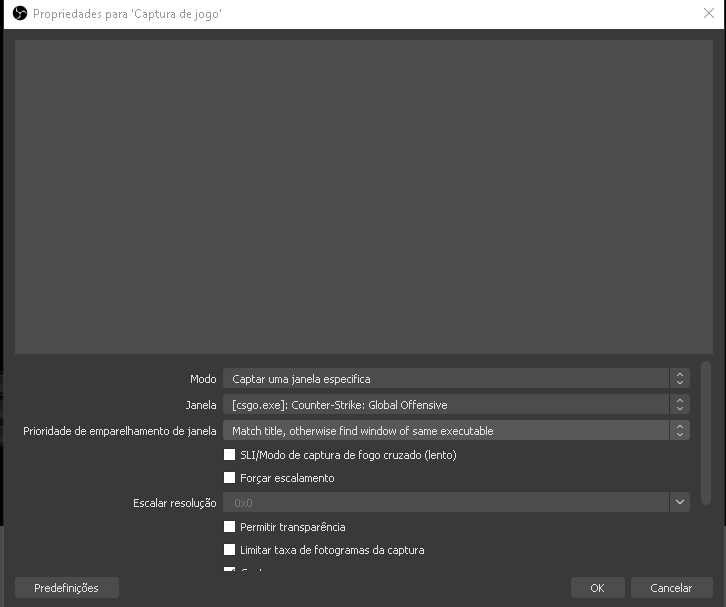 charred quartz
if the game is running as Admin your OBS needs to be too as Admin mode encapsulate the process @wicked quest
obsidian trellis
im still having the no animation issue. ive tried different things for the browser input but nothing shows up in the stream/preview. any ideas of what im doing wrong?
charred quartz
may i help you @obsidian trellis, can you rexplain the issue?
obsidian trellis
yea.
im trying to set up my alerts. ive followed the online guides where i use the dashboard template. when i do the test allert, the sound happens in stream however the icon/animation does not appear
charred quartz
can u try deleting the alertbox and creating a new one from the blue button in bottom? then simulate again
obsidian trellis
i just did that. same issue. the sound is triggered but no animation
round brambleBOT
@obsidian trellis The default resolution for StreamElements overlays (theme and custom) is 1920x1080. Please add them in OBS at their full resolution and use CTRL+F to fit to screen if necessary. You can then downscale your stream in OBS settings > Video if you'd like https://i.imgur.com/6bWXxjR.png
 tacit oxide
If I run a subscriber only contest that runs for several months, do they have to subscribe each month to be qualified or can they sub just one time to be qualified for the giveaway? So for example, they subscribe the first month and I hold the drawing 2 months later are they still eligible if they don't renew?
 zenith widget
If they are added to the list - yes, they are counted and don't need to sub for more time
tacit oxide
Awesome, thank you.
 haughty shuttle
Hello here, I have a small issue and I want to know if it's me or the dashboard.
So I have custom alerts make by myself, but some of them are laggy when they come on my live. But not laggy on the dashboard,
I have the sound, the the image with some lags.
Is this because of that I have the sound integrated with the animation? Is it best to separate the sound and the animation? Or it's because of somthing else?
charred quartz
what format are these animations? @haughty shuttle
are u using a processor that has iGPU, if yes try to set in your offboard GPU to use it in OBS as obs may be using the integrated
round brambleBOT
@haughty shuttle OBS -> settings -> advanced -> scroll down -> enable/disable hardware accel.
https://i.imgur.com/ggMe9ZE.png
 tulip wyvern
so my subcount and every other streamelements overlay is completely down right now?
very confused
round brambleBOT
@tulip wyvern Right click on the BrowserSource > Properties > Scroll down a bit > Refresh Cache of current page
tulip wyvern
Tried that, didn't work
zenith widget
@tulip wyvern What if you remove the browser sources and add them again?
 torn stratus
Hi guys! Hopefully someone can help me with this. So I set up my overlays with the alerts and I have no issues (except for the raid altert that for some reason doesn’t show). But whenever I try to make a separate overlay just with the alerts and nothing else, so I can add it to obs and move it around, the alerts do not work at all. Does anyone know why this is?
Whenever I test them they seem to be working just fine.
round brambleBOT
@torn stratus Due to changes to Twitch API, we have filtered out hosts and will only show these ones on your activity feed:
- All hosts coming from an online channel with at least 1+ viewer
- Auto host events with at least 1 viewer - only from a channel that just went offline
Note: If you see "X channel has hosted you" with no viewers on the back, that is considered an offline host or a host with 0 viewers, we do not show these.
Note for Mixer streamers: The above 2 filters currently apply for Mixer and we are aware its actually not how Mixer hosts work. We do plan on changing it, but no ETA on when.
torn stratus
But not while I stream with real notifications going on
Ooh ok that’s great! But what about followers? I didn’t get that notification and I tested it just fine.
zenith widget
I justed followed and the alert showed in the alert widget.
torn stratus
I don’t get it then. Because I had a few followers today that didn’t show up.
haughty shuttle
@charred quartz the formats are webm, but coming from AE exported into. Mov and convert into webm
@charred quartz also. I add them directly into the dashboard from the webside, into (my overlay) and one stream elements i just add the browser link for my whole overly so I don't use my processor or memery to animated them, that's why I use streamelements.
round brambleBOT
@haughty shuttle OBS -> settings -> advanced -> scroll down -> enable/disable hardware accel.
https://i.imgur.com/ggMe9ZE.png
haughty shuttle
Yes I saw that, it's only to give you more info. I will try this when home.
Thanks alot
If it's enabled I disabled, and if it's disabled I enabled it. And I will see
Hope it works
 fathom zodiac
whats the command to check follow count?
zenith widget
There isn't a default command, but there is a variable for it: ${channel.followers}
fathom zodiac
thank you!
white gust
I am lost with everything and it is doing my head in with it all
round brambleBOT
@white gust New to Stream Elements?
Check out our YouTube channel https://www.youtube.com/c/streamelements/videos
with tutorial videos from setting up the basics, to in depth details on how to use our product.
New to OBS? Here is a 4 step quickstart guide
https://obsproject.com/wiki/OBS-Studio-Quickstart
Want to learn even more? Here is an in-depth overview
https://obsproject.com/wiki/OBS-Studio-Overview
white gust
I been looking though stream elements and still not doing anything
lament blade
Is it an option to remove certain names out of top lists? Like an exclude function?
@torn stratus when they instantly unfollow you it doesnt trigger the alert. That is a twitch thing. Might want to check that? Just a tip
zenith widget
@lament blade which top lists?
white gust
Is there a guide how to setup or someone tell what i am doing wrong please i am sick of this and doin my head in and i am keep on getting lost with everything and i am not really good at setting up stream elements
round brambleBOT
@white gust New to Stream Elements?
Check out our YouTube channel https://www.youtube.com/c/streamelements/videos
with tutorial videos from setting up the basics, to in depth details on how to use our product.
New to OBS? Here is a 4 step quickstart guide
https://obsproject.com/wiki/OBS-Studio-Quickstart
Want to learn even more? Here is an in-depth overview
https://obsproject.com/wiki/OBS-Studio-Overview
white gust
Keizer i just sent you a friend request on here
lament blade
go to the website,
login with your twitch,
On the right side it says "bot settings"
Click and connect it -> done
white gust
@lament blade right i have my overlay and my OBS sorted and i am trying to add it to my twitch account
lament blade
Did you connect streamelements?
white gust
Yes
lament blade
follow my steps:
Https://www.streamelements.com login with Twitch
Look at the right side -> connect
Ok, go to your own chat and type !commands
do you see streamelements give you a response
lament blade
what is your twitch name?
 sweet socket
what are youtrying to do @white gust
lament blade
add layers in obs
round brambleBOT
To add your overlays to OBS, add a new browser source in your scene. Paste your overlay URL in the browser source properties, set the dimensions to 1920x1080 (unless you changed them on the website), and ☑ “Shutdown source when not visible” https://youtu.be/KDvLynUqXI4
lament blade
but I was looking if he even cnnected the bot yet 😉
sweet socket
he can put them in without bot
then have the bot join your channel via the dashboard
lament blade
that is true, but not something you want 🙂
sweet socket
and do /mod streamelements in your bot chat
lament blade
I explained that 🙂
sweet socket
that is true, but not something you want 🙂
@lament blade it doesnt really matter if youre offline and put the layers in firstly
white gust
My name is johnunclegig2018grehory
sweet socket
cant find it
white gust
Sorry johnunclegig2018gregory
lament blade
It works 🙂
zenith widget
@lament blade For your thing - you want to remove someone from the revenue page top tippers and cheerers?
lament blade
You have the bot connected, now mod him :). Then follow the steps @sweet socket just gave you
Yes @zenith widget
sweet socket
👌
zenith widget
@lament blade Can't remove anyone from there unfortunately :/
white gust
@sweet socket how do i mod
sweet socket
type /mod streamelements in your twitchchat
white gust
@sweet socket can i search it in the picture
white gust
sweet socket
Channel -> chat
white gust
@sweet socket thanks
white gust
Sorry m8
sweet socket
for the rest please follow our guides
round brambleBOT
@white gust New to Stream Elements?
Check out our YouTube channel https://www.youtube.com/c/streamelements/videos
with tutorial videos from setting up the basics, to in depth details on how to use our product.
New to OBS? Here is a 4 step quickstart guide
https://obsproject.com/wiki/OBS-Studio-Quickstart
Want to learn even more? Here is an in-depth overview
https://obsproject.com/wiki/OBS-Studio-Overview
trail pewter
Hey guys! Can somebody answer me the question since when SE is tracking and counting all the chat messages? Thanks!
sweet socket
since the moment its modded in your channel
lament blade
alright, I am new to the whole streaming thing with overlays, when I go to edit the super themes on streamelements, it won't allow me to edit, can you guys help me out?
white gust
@sweet socket done
trail pewter
ah okay, thanks. I thought it did that globally for partners or sth by some point
lament blade
alright, I am new to the whole streaming thing with overlays, when I go to edit the super themes on streamelements, it won't allow me to edit, can you guys help me out?
i watched youtube videos but they are very unclear
trail pewter
@sweet socket just to be clear, I meant tracking for the stats.streamelements.com page, not for my functions in my dashboard. I am pretty sure I didn't enabled SE since my first stream, but it tracked everything. (Only did like 5 streams by now)
 noble flame
Hi guys, Does anyone know why the home screen is white?
zenith widget
Something is blocking OBS.Live @noble flame
noble flame
@zenith widget It was Firewall , thanks a lot
 river crypt
Hi everyone ! I have a problem with SE overlay with timer. Yesterday, I did "Start stream in: {minutes}:{seconds}" and work perectly fine. But today only timer shows up in "00:00:00:00" form and I can't edit it.
twin sentinel
Put Start stream in: {minutes}:{seconds} inside the message field.
river crypt
it auto deletes it and goes back to 00:00:00:00
 manic elm
i have the same problem... can i just show the minutes and seconds? i dont want to show days and hours
and i have no config to do that
river crypt
Again it worked fine yesterday with "Start stream in: {minutes}:{seconds}"
Just today when i connected to SE only the timer is up and in 00:00:00:00 form
and when I want to modify it, it just auto delete what I write in message field
and goes back to 00:00:00:00
 quiet storm
Hi i was just wondering how to run stream elements on twitch?
round brambleBOT
@quiet storm New to Stream Elements?
Check out our YouTube channel https://www.youtube.com/c/streamelements/videos
with tutorial videos from setting up the basics, to in depth details on how to use our product.
New to OBS? Here is a 4 step quickstart guide
https://obsproject.com/wiki/OBS-Studio-Quickstart
Want to learn even more? Here is an in-depth overview
https://obsproject.com/wiki/OBS-Studio-Overview
zenith widget
@river crypt Ok it should be better now. We rolled back a fix that was deployed some minutes ago
river crypt
great ty !
 sonic arch
Hmm is it just me or is the count down broken, just tryed it in obs 0 dropped frames or what so ever, but the time freezes and it jumps 2-4 sec
It's actually an issue in the designer mode to, it was not a issue the other day, so something broke hehe.
round brambleBOT
@sonic arch Right click on the BrowserSource > Properties > Scroll down a bit > Refresh Cache of current page
sonic arch
Did not help
zenith widget
If its skipping a second or two in OBS but not in the editor, then probably restart OBS
sonic arch
it's both places
Restart of obs did nothing, tested in administrator mode, and none administration mode - same outcome sadly timer is skipping/freezin when testing in the designer it shows same issue
round brambleBOT
@sonic arch Please provide your account ID found at the top of this page: https://streamelements.com/dashboard/account/channels This ID is public info and safe to share here.
zenith widget
Iw ant to take a look at your overlay, because Im not seeing the same issue on 3 overlays I'm looking in my own account
sonic arch
It's very very wird the issue where just gone for a sec, then i tryed to close down the overlay for a bit just to check, and then it startet messing up again, so im abit hmm confused about whats up with it currently tested a different count down and that worked fine not sure why this one got a mind of it's own haha
zenith widget
How many assets do you have with that countdown that is doing the issue?
If its an overlay from our overlay packages, it might be possible your PC is not able to handle both the animated aspects and the countdown is just skipping a few seconds.
sonic arch
2 thats it 🙂
zenith widget
I've seen it happen on my i5-4400 CPU
zenith widget
Im not able to find an account with bzndkss
sonic arch
it's because it's under benzons
sonic arch
But ye it makes no sence one count down runs flawless and the other freeze's
Could it be that the countdown needs to be a sep source, not combined with a video background, might that be the issue
sonic arch
ye and then down scaled ye
zenith widget
I just saw the timer skip in my OBS
doesn't matter I think if its downscaled or not
its still 1080p
what i'd suggest is this:
!accel
round brambleBOT
OBS -> settings -> advanced -> scroll down -> enable/disable hardware accel.
https://i.imgur.com/ggMe9ZE.png
zenith widget
see if this help
If it doesn't help, revert the setting, but render out the video background as 1080p OR
just render the triangle
sonic arch
No change there
zenith widget
assuming you are actually doing those graphics your self
sonic arch
This is odd so i disabled hardware acceleration did not help toggled it on again
now the timer runs normal what the
KeiZar the easy fix seems to be creating a overlay with only the timer then the issue looks like it's fixed
nope spoke to soon but deffently better tho, but no i did not do the overlay my self had a thirdparty to do that might need to ask him if he can split it up
zenith widget
is the solo timer also skipping?
sonic arch
i tiny bit not as mutch tho seen it skip once or twice
if i got 2 sources for it it's way more stable only a skip now and again compared to before just gonna try with out the background to see how it works out there
Hmm it's still doing it fully standalone with nothing else running, the rest of the browser sources are hidden, and set to close if not visible to avoid draging down performance so something wird is up
Hmm might actually be discord causing it let me confirm
Ye KeiZar having Discord open on sec monitor looks to cause the issue - gotta retract that again this is getting wirder and wirder, sometimes when restarting the source, it happens, other times it dos not - and if i test with a different countdown there is no issue, might end up having to do my own countdown i guess.
zenith widget
I had a really beafy overlay opne that used to make the countdown skip
but your overlay was the only one that made it skip
after i upgraded my PC
sonic arch
The thing here is that i even tryed to inline a website witha countdown in the same view now, tryed 2 different countdowns, they dont do it
Makes no sence the others run flawless and the other skips/freezes
charred quartz
just for the case of information i had that problem earlier with my stream too, end up being "whole screen animations", i had a webcam animated borders i made myself but i did rendered it in the wholescreen instead only the place the webcam would be
not only countdown skipping but 100% CPU usage too
charred quartz
you could try increasing the OBS process priority in its settings to see if that changes anything
also if u are in nvidia is a good shoot checking if the OBS is using the GPU or the iGPU (in case u are using a processor that parks one)
if u are in AMD i can't recommend such a thing cause i don't know how they manage that stuff
 wheat kettle
what can cause that twitch doesnt show being live?
sonic arch
Did not change anything - LegendKG can i send you a PM ?
charred quartz
@wheat kettle u mean you start live but it does not in your twitch?
Did not change anything - LegendKG can i send you a PM ?
@sonic arch its better we keep all support here 😉 as other supporters could pin point something i missed etc
sonic arch
Ye i just dont wanna post a link to the test stream in here 🙂 that's i, just wanna show how wird the issue is 🙂
charred quartz
oh sure u can PM that kind of thing if u feel its necessary
wheat kettle
live is up but you cant see it neither in games page nor in the followed streams tab, tho stream is normally working, also you cant search channel in browser
sonic arch
Just so you can see
got 3 different timers running right now only one act's up
so it's with out doubt a issue in the JavaScript somewhere
charred quartz
@wheat kettle then it is a Twitch Platform issue related, i advise you contact their support for better assist 😉
wheat kettle
i already did, thx anyways 😄
sonic arch
It just skipped now the one from streamelements tho hehe
charred quartz
not here, all clocks are running normal
sonic arch
just noticed it skipped a couple of sec's thats the issue here it's running fine sometimes, and flaky the next time, and the ther two flawless
charred quartz
ok now i saw
charred quartz
that could be server overload and the clock is just compensating the delay
sonic arch
hmm it should not since when loaded up it should not refresh in any way
is JavaScript it just runs
javascript uses system clock
charred quartz
well the premisse stills, the script is somehow overloading and compensating the delay when get back the control
but it only happens in the first few seconds don't?
sonic arch
Hmm like i have never seen in the +20 years i have been coding an issue like that tho
Sometimes in the first few sec's other times all the way through
charred quartz
are u running obs in admin mode?
sonic arch
Ye
it would make sence to me if all timers had an issue and it was CPU bound or hardware bound issue, but that 3 different timers produce 2 different results makes no sence.
charred quartz
is for sure the clock runs in the user data and not in the server side?
sonic arch
im almost positive it's running 100% client side via JS
Ye it's JS
if you look thrue the source code of the site when in preview mode, you can see it updates a span with a new number thats JS
charred quartz
yeay ea
sonic arch
but i think i know what might be the issue
it's running Angular
and that add's a lot of overhead for something like a timer
 faint horizon
When i gt hosted by someone, the alert doesnt show up. when i emulate, it works. What do i do?
charred quartz
hey so when u are hosted by someone with less then 1 viewer the notifiation is disabled
round brambleBOT
@faint horizon Due to changes to Twitch API, we have filtered out hosts and will only show these ones on your activity feed:
- All hosts coming from an online channel with at least 1+ viewer
- Auto host events with at least 1 viewer - only from a channel that just went offline
Note: If you see "X channel has hosted you" with no viewers on the back, that is considered an offline host or a host with 0 viewers, we do not show these.
Note for Mixer streamers: The above 2 filters currently apply for Mixer and we are aware its actually not how Mixer hosts work. We do plan on changing it, but no ETA on when.
faint horizon
ok thx
 robust herald
Look at the names, they were normal earlier, now they are some kind of cryptic porn.
And they are bots that I didn't invite.
sonic arch
Prop highlight bots
lament blade
I'm currently adding an overlay for the recent sub, When I do it, it's only showing new subs not the most recent sub. I'd like it to show both resubs and new sub. Is there a way to do that?
charred quartz
 magic ermine
Hey dudes, having some trouble with .webm files in a Asset Rotator / Slideshow on StreamElements. When I add a transparent .webm file to the rotator it pops up but the video is just frozen in OBS, it plays fine on the website while editing the layout though.
charred quartz
@magic ermine please reload the websource cache in its preferences
lament blade
@charred quartz So the one for "Latest sub" will show both new subs, prime subs and resubs?
magic ermine
This here? I've done that already. It seems like it plays about a second of the video then just freezes
charred quartz
try it out and feedback here, never had that issue tbh. You can troubleshoot it for me 🙂
yes is the last button in that window @magic ermine
magic ermine
Yeah I have done that but it doesn't seem to change anything
When I add the webm file as a media source in OBS it works fine, no problems
It just seems to have issues with being in the rotator / slideshow
Problem is I can't add a timer to the Media Source in OBS, I can only do that through StreamElements
lament blade
@charred quartz Its not showing the most recent resub for prime, only the last sub
charred quartz
place all the three widgets and check if one of them do that, i bet resub prime has a issue about that but i would need to wait a staff check this out for us @lament blade
Problem is I can't add a timer to the Media Source in OBS, I can only do that through StreamElements
@magic ermine u still can put the timer above the media source as an overlay, but going back to origin, did u tried reopening OBS ?
magic ermine
Yeah what I meant was that I wanted this video to play every 30 minutes or something. I can't seem to automate that via OBS, only streamelements
And yeah I did try re-open obs
 simple shoal
Hello i have problem. I add custom tip to my tip history. Now when i deleted it tip still shows in "tippers top list" in overlay. Reset Sesion didnt work. Any ideas how i can earse it?
lament blade
@charred quartz doesnt work. Only shows recent sub not prime sub. How come thats happening?
charred quartz
may i ask you the link in PM, i will try that in my OBS @magic ermine
magic ermine
Absolutely
round brambleBOT
@lament blade Twitch prime (new and resub) and paid subscriptions (resub only) must be shared in chat manually by the person subscribing in order for the subscription information to be sent to StreamElements. For twitch prime, the user needs to have sharing enabled on https://www.twitch.tv/settings/prime. For paid subs, if the share box doesn't show up immediately it will when they refresh the page. https://i.imgur.com/VNJN0Uv.gif https://i.imgur.com/2297EA7.png







 magic ermine
I sent it, hopefully that works nad you can try it
charred quartz
@charred quartz doesnt work. Only shows recent sub not prime sub. How come thats happening?
@lament blade probably because prime resub don't announce to the system i guess, as this problem is above my knowledge, i ask if you can wait for another supporter that can explain that more in depth to you
lament blade
@charred quartz NO problem!
simple shoal
Guys i have some problem with tip history. can somebody help me here?
magic ermine
Okay @charred quartz helped me out, thanks dudes and have a good one ❤️
(It was Browser Source Acceleration, needed to be on it seems!)
charred quartz
Guys i have some problem with tip history. can somebody help me here?
@simple shoal may i help you, i just need more details about your issue 😉
simple shoal
Hello @charred quartz I add custom tip to my tip history. Now when i deleted it tip still shows in "tippers top list" in overlay. Reset Sesion didnt work. Any ideas how i can earse it?
lament blade
Hi again, when I'm setting a sub goal, it's saying I have 17 subs but I only have 6... why is this?
charred quartz
tried reloading the editor?
round brambleBOT
@lament blade To reset goals:
- from the overlay editor -> data on top -> goal tab -> reset progress of desired goal
- from the dashboard -> activity feed on the left -> widget data on the right -> goals tab -> reset progress of desired goal
Note: Goal widgets(progress) only counts up and doesn't go down automatically, if you loose followers/subs
zenith widget
@simple shoal You might have to do a negative tip to remove them.
lament blade
Thanks!
 livid stirrup
Hi There. I would like to change my bot name but the option is not appearing in ground control. Please advise how to change? Note I am using OBS Studio not Live
round brambleBOT
@livid stirrup Currently renaming the bot fully works with OBS.Live.
You can follow this video guide to set it up: https://discordapp.com/channels/141203863863558144/494513233416421386/561516184718278676
If you don't want to use OBS.Live and want to stick with Ground Control, please let us know your Twitch username.
simple shoal
@zenith widget Can you tell me how?
zenith widget
The same way you added a manual address
livid stirrup
My Twitch name is @livid stirrup
livid stirrup
Awesome Thanks for the amazing support as always!
charred quartz
@lament blade probably because prime resub don't announce to the system i guess, as this problem is above my knowledge, i ask if you can wait for another supporter that can explain that more in depth to you
@charred quartz @zenith widget
 peak depot
Hi there, I would like to connect multiple accounts (twitch, mixer, youtube) to in order to create just one overlay and duplicate it over but Streamelements is saying: "Channel is already claimed", I already tried unlinking, but how can I get them all in one
round brambleBOT
@peak depot Account Merging - Please note:
- Merging accounts only allows faster ways to switch between accounts
- Merging accounts does not allow data sharing between accounts - different streaming platforms, different type of events
- Merging accounts allows duplicating/sharing overlays between the accounts
If you understand the limitations of merging and want to proceed, please find the JWT tokens (!jwt) from both accounts you want to merge and you will be directed to DM them to a staff member.
 normal igloo
mmm @charred quartz you realise his problem was already resolved right? 🤔
charred quartz
about the prime resubs?
normal igloo
yep > #helpdesk-twitch message
peak depot
So what's the point of the option, "Import from other channels"?
charred quartz
okay may i need a coffee
simple shoal
@zenith widget Ok working but now at tipping page top list shows -2pln and in overlay shows 32 pln
charred quartz
srry guys ❤️
round brambleBOT
@simple shoal Please provide your account ID found at the top of this page: https://streamelements.com/dashboard/account/channels This ID is public info and safe to share here.
lament blade
When doing a sub goal, where can I go to, to be able to edit the text. At the monent it's just "Sub goal" but I'd like to editing it to something like "Sub goal for new emote" sort of thing
zenith widget
Settings -> text
normal igloo
its ok man @charred quartz we're all done it at least once 
zenith widget
simple shoal
5e98421cbf6e0952e54fedaa
lament blade
@zenith widget Thanks!
zenith widget
@simple shoal whos the person i should look for?
simple shoal
Ok thanks for help, i dont know how but working done
zenith widget
👍
lament blade
WHy is it saying 0 at the beggining but a 6 in the middle? SHouldn't the 0 be the 6?
And how do ig et tid of the end date?
zenith widget
thats the start and middle shows the progress towards the end
lament blade
How do I get rid of the ends in a day part at the bottom?
zenith widget
remove the date from the settings
lament blade
So I've just seen a twitch extension called "Sound Alerts" I can add it to my OBS just fine. But I can't hear it as OBS is on my streaming PC. Do i need to add it into Stream elements as a brower source then add it back on my OBS?
sonic arch
KeiZar after trying to troubleshoos with LegendKG
We actually ended up with a conclusion it's something with the code, he experienced the problem with no background or what so ever, and only the countdown it self, with out any other browser sources.
twin sentinel
@lament blade Best to contact the creator of that extension.
sonic arch
What i think might be the issue is Angular's way of doing things, vs more simplistic JavaScript, and it creates some sort of an overhead, that causes the issue.
The other countdown timers i tryed out, uses a simplistic way in JavaScript to produce the CountDown.
is there a place to drop a bug report on the issue so it can be looked in to ?
 native linden
Hh
sweet socket
@native linden hey need any help?
lament blade
I need help.
does not allow me to access the dashboard. Each time I see the correct url on the address bar, then a redirect takes me back to the main home. Three days this happens to me. I have also tried logging out and logging in many times.
This on the streamelements site, when I want to access the bot management that I have on different channels.
round brambleBOT
@lament blade Please logout of StreamElements at https://streamelements.com/logout and then login again to your account (Twitch/Youtube/Facebook/Mixer)
sweet socket
please try this
lament blade
@lament blade Please logout of StreamElements at https://streamelements.com/logout and then login again to your account (Twitch/Youtube/Facebook/Mixer)
@round bramble You have read? I've already done it dozens of times.
ionic kelp
@lament blade The other users you're editor for need to do so as well.
lament blade
@lament blade The other users you're editor for need to do so as well.
@ionic kelp I am creator, I have to access my channels ...
ionic kelp
Then you need to do so with the other accounts as well.
lament blade
Then you need to do so with the other accounts as well.
@ionic kelp Are you reading me? I need to access MY channels.
It does not allow me to access my home while logged in, it sends me back to home.
no twitch, no youtube. just home.
no dashboard off nothing
some redirect in backend are active
i just see my profile page
can someone fix my watchtime. Name: TheRealQuistyy, i did not change the name ever, its just a glitch plz fix!!
*chatstats
i meant chatstats
sweet socket
can someone fix my watchtime. Name: TheRealQuistyy, i did not change the name ever, its just a glitch plz fix!!
@lament blade ill check with staff
lament blade
@sweet socket thanks
I can only access the dashboard in this way:
I write the url by hand https://streamelements.com/jostathc and only from my profile menu it takes me to my dashboard.
From the main page of the site no.
chrome folio
@lament blade try to relogin, enter this link https://streamelements.com/logout and relogin, please.
lament blade
Look this and help...
@lament blade try to relogin, enter this link https://streamelements.com/logout and relogin, please.
@chrome folio already done dozens of times !!!
chrome folio
@lament blade the browser is Chrome?
lament blade
I always use this.
I signed up 2 months ago and managed the channels smoothly until three days ago.
chrome folio
@lament blade and what is this browser?
lament blade
@lament blade and what is this browser?
@chrome folio ... Chrome obvious.
chrome folio
@lament blade here it works normally. When we have an "access problem" we proceed with logout and relogin or clearing the browser's cache files to reload all the files of the page, including cookies etc.
lament blade
we don't understand each other ... from the home I don't access the dashboard, a redirect always brings me back to the home.
if I write the url of my profile by hand, it opens the profile, then from the menu I choose 'dashboard' and finally opens the dashboard.
I would like to understand why there is this redirect from the home that always reports to the home.
lament blade
I really nead help with this, I have an xbox and I want to see my chat on screen so I youtubed how to do it and some person suggested stream elements, I watched his video and I didn't pick up anything about a chatbox on xbox and PS4, I think i'm doing something wrong but can someone enlighten me on how I can see my twitch chat-box on screen when i'm streaming on e.g. bottom right hand corner, Thank you
sweet socket
you want to see the chatbox yourself or on your stream @lament blade
also, do you own a capture card?
lament blade
I want to see it on my TV screen
of my xbox when I stream
Does that sound better?
sweet socket
i dont think that is a possibility at all
i know when you stream to mixer from xbox, there is a chatbox
but this is not for twitch (i stream from xbox as well)
 worthy magnet
Can you download vods onto mobile from twitch?
sweet socket
I dont think so, i see you can only share them in the Twitch app @worthy magnet
oh you can on iPhone if you click the share function, then Save to Files
worthy magnet
What about Android?
sweet socket
That you should check yourself, I dont have an android
just follow the same road as i did
worthy magnet
Ok
 safe verge
i know this might be a noob question
but how do i make streamelementsbot a sub in my chat without actually gifting it a sub?
sweet socket
you cant if youre not a Twitch partner @safe verge