#helpdesk-twitch
1 messages · Page 681 of 1
 tranquil hull
 reef dove
is there somewhere i can go to change my donation link from streamlabs to streamelements in my alert box? i can't find this setting anywhere and i have no idea which link my alert box is linked to
 chrome folio
it stopped counting on the dashboard
@pure ledge done. 🙂
 strong kernel
Streamlabs donation links trigger Streamlabs alertboxes.
StreamElements tipping page links trigger StreamElements alertboxes.
It is not possible to mix and match these.
reef dove
i imported my streamlabs alert box to streamelements, is it still connected to my streamlabs link?
reef dove
ok that's the explanation i needed, ty
 solar veldt
I used the timer for play the ads with this setting" /commercial 180" run all the timer but the ad dont run, can help me guys?
strong kernel
Please read the entirety of this message and follow all instructions: https://discordapp.com/channels/141203863863558144/424943321794871296/427682001525669888
 patent sleet
Hello support, I am trying to click on 5 different challenge awards. The page pops up the Twitter window, then that goes away. The blue box bounces on the screen and then nothing happens
 ionic kelp
@patent sleet What browser are you trying it in?
patent sleet
chrome
ionic kelp
Could you try in incognito?
patent sleet
@ionic kelp problem persists
Twitter opens, goes back to Stream Elements and just sits there
ionic kelp
Got a second to hop in chit chat?
patent sleet
sure
 dawn hornet
@patent sleet hi man, i got the same problem with twitter and awards, don't know what's problem 😦
patent sleet
Stream elements error after attempting to run the redeem function
when clicking second error
 neon hill
Oi
chrome folio
@neon hill hello
neon hill
Hello
 round brambleBOT
@neon hill Welcome to the helpdesk! Please let us know how we can assist you today and a support volunteer or staff member will assist you as soon as they are available. Thank you for your patience.
 modest pasture
We keep getting internal server error the last few weeks, sometimes commands works sometimes not. Need help
round brambleBOT
@modest pasture Go to the dashboard -> right side -> part channel -> join channel (https://streamelements.com/dashboard)
 modest pasture
Tried that a week ago but I'll try again
strong kernel
@patent sleet Check again.
dawn hornet
@strong kernel ty too
 iron pebble
Hello! i just got the media share widget on but i dont know how my viewers can request videos for free
do i have to put the link manually or is there someway of making it automatic
strong kernel
The default !songrequest or !sr command.
iron pebble
Oh ok thanks!
 desert temple
Hello there im having an issue with my alerts!
Im having this problem, i have two different alerts from subs and followers in different streamelements overlays, the first one is an animation of my logo in my webcam, and the second one an animation of a pokemon that gets on my webcam, but i dont know why only one is working properly, the only one who works without delay is the animation of my logo, and then the other alert has a lot of delay or it didnt even plays
I have two animations for each thing, two animations trigger when someone sub or follows
This is what im talking about
The first time everything is okay, but the second time it haves a little bit of delay if im lucky xD sometimes it didnt even played the beedrill animation
strong kernel
@desert temple Different durations, probably.
 sonic hearth
hey there, I am moderating my friends stream and the watchtime command is not working. it says that all viewers have watched for 0 seconds
@strong kernel I see you're the last active person so sorry if I @ you when I shouldn't have
round brambleBOT
@sonic hearth 10 minutes of watchtime are given to those in chat when the loyalty points are handed out (every 10 minutes). Therefore, loyalty must be enabled for watchtime to work properly.
There is no direct link between watchtime and all-time points.
It can’t be calculated from the amount of all-time points a user has because subs may earn points at a faster rate and !bonus all command increases all-time points for users in chat at that time.
Giving points to a single user does NOT affect all-time, only when giving to all in chat.
 peak storm
Hi. What is the most common reason behind Host SE Chat Alerts not appearing in chat? I have the Viewers entry set to "1" in the Chat Alerts Module for Hosts. Is there another setting that controls the minimum viewers required for the notification to appear? Thanks.
strong kernel
@sonic hearth It is not retroactive. Once enabled, it counts up from zero, for everyone.
And only while you're live.
round brambleBOT
@peak storm Due to changes to Twitch API, we have filtered out hosts and will only show these ones on your activity feed:
- All hosts coming from an online channel with at least 1+ viewer
- Auto host events with at least 1 viewer - only from a channel that just went offline
Note: If you see "X channel has hosted you" with no viewers on the back, that is considered an offline host or a host with 0 viewers, we do not show these.
Note for Mixer streamers: The above 2 filters currently apply for Mixer and we are aware its actually not how Mixer hosts work. We do plan on changing it, but no ETA on when.
peak storm
OK. To clarify... does "at least 1+" mean >1 or >=1?... and if someone goes offline with 1000 people watching and then manually hosts someone, within 30s say, it wont show up?
 rocky torrent
Hey there. I was wondering if there was a way for users in chat to list the stream store '!redeem' list or do they have to view it from the stream elements site itself. i can't find anything about it anywhere
 abstract hemlock
@swift swan what do you mean?
rocky torrent
like with channel reward points.. someone could type !redeem blahblah and it plays a gif / sound
and use their royalty points to "buy" it
*loyalty
 lament blade
can someone explane me how to set up tipping
abstract hemlock
@rocky torrent if you have enable the command they can use !items, or use your StreamElements page and check your store
rocky torrent
thanks homie
strong kernel
@lament blade https://www.youtube.com/watch?v=JdRLzlOat6M

StreamElements tipping presets feature is guaranteed to increase your overall tips. Receive tips via Paypal, credit cards or multiple local payment methods.
Design and customize your tipping page with ease, and with direct integration with the StreamElements cloud-based Over...
abstract hemlock
@rocky torrent just a quick note, twich channel points isn't the same as loyalty points system
rocky torrent
yes
peak storm
Do i need to @ anyone if @round bramble is the one to respond to my initial query? 🤔
rocky torrent
i figured there was a way for people to type a command and see what's available
without visiting a new site
lament blade
ok i dont think that video helped me i ment i have the link for the tipping but where should i put it in
abstract hemlock
@peak storm twitch counts as "real" hosts the ones with at least 1 viewers
 swift swan
Tags for the stream like the game Fortnite @abstract hemlock
strong kernel
@lament blade In your Twitch panels.
lament blade
where are my twitch pannels
strong kernel
On your Twitch page.
swift swan
It gets stuck updating via ths stream information panel
even the site?
Ty had to do one by one like ya said @abstract hemlock ❤️
abstract hemlock

lament blade
una domanda non mi funziona piu il bot di streamelements cosa posso fare?
round brambleBOT
@proper coral Please follow our community rules:
- No advertisement or stream promotion
- Respect ALL server members
- No NSFW/NSFL
Thank you
lament blade
i have that overlay how can i put my names there??
 cunning rain
I have a question, how do you join the giveaway as a viewer
round brambleBOT
@lament blade Please ask your question in one helpdesk channel only. A support volunteer or StreamElements staff member will assist you as soon as they are available. Asking in multiple places will only result in confusion, not faster answers. Thank you for your patience.
strong kernel
@cunning rain Ask the streamer or their moderators.
strong kernel
It's the !enter or !ticket command.
cunning rain
It doesn’t work
strong kernel
Is the command enabled in the Chat commands section of your account?
Are you actually running a giveaway?
cunning rain
Yes
strong kernel
Doesn't look like it.
cunning rain
I am a super mod
Check KayzerMC_
I’m hosting it on my friend’s account because he doesnt know how
 potent galleon
hye guys i have the audio visualiser but i was wondering how i make it start from the middle so it giues up and down, i have no idea if im making any sence but can someone pleaseeeeee help
lament blade
I cant capture rust in game capture
 shell sierra
so im having trouble with my !watchtime command where it says that (insert name here) has spent 0 seconds watching the channel. and the bot is modded and i didn't touch the command, and idk how to fix it
round brambleBOT
@shell sierra 10 minutes of watchtime are given to those in chat when the loyalty points are handed out (every 10 minutes). Therefore, loyalty must be enabled for watchtime to work properly.
There is no direct link between watchtime and all-time points.
It can’t be calculated from the amount of all-time points a user has because subs may earn points at a faster rate and !bonus all command increases all-time points for users in chat at that time.
Giving points to a single user does NOT affect all-time, only when giving to all in chat.
shell sierra
ok thanks
chrome folio
@lament blade did you see my message? https://discordapp.com/channels/141203863863558144/199460642975907840/719943211669520486
 royal quarry
Hello I have a user in my channel named "Monzo007" that has gifted over 60 subs today, for some reason when he gifts a single sub the alert does not work, but anyone else doing it does. He can gift 10 and it makes an alert, any ideas?
We have tested this a few times, works for everyone else but him
Stream Elements is missing multiple sub alerts on my cahnnel now from multiple users
round brambleBOT
@royal quarry Twitch prime (new and resub) and paid subscriptions (resub only) must be shared in chat manually by the person subscribing in order for the subscription information to be sent to StreamElements. For twitch prime, the user needs to have sharing enabled on https://www.twitch.tv/settings/prime. For paid subs, if the share box doesn't show up immediately it will when they refresh the page. https://i.imgur.com/VNJN0Uv.gif https://i.imgur.com/2297EA7.png


 placid flame
Hello support. Is it possible to send chat messages from a custom StreamElements overlay? Say, an overlay with a simple poll that posts the winning entry in chat after the poll is over?
strong kernel
@placid flame There's a lot that's possible with custom coding. But coding it is, of course, up to you.
placid flame
@strong kernel Um, thanks. I guess I should clarify further - does StreamElements include support for sending chat messages, for example through Send Extension Chat Message, that can be used in Overlays, or is it necessary to separately register an extension/app and/or use an outside service to generate the JWT?
royal quarry
Any fix for these missed alerts, over 20 gifted subs have received no alerts now, never had this happen before
I've been using stream elements for over 2 years and have no modified anything recently
Monzo007 and SgtBird are the affected users
strong kernel
@royal quarry Are they in your activity feed?
placid flame
@strong kernel thanks - any chance you could point me to somewhere specific? i've spent several hours searching the channel, i've looked through the github repo, and done Google searches with multiple phrases - maybe i'm not wording correctly?
strong kernel
Look at the channel topic.
 prisma relic
@placid flame .... check the most recent #widget-share 😉
if you have questions, jump over to #dev-chat like mentioned
round brambleBOT
@dreamy bison Go to the dashboard -> right side -> part channel -> join channel (https://streamelements.com/dashboard)
strong kernel
Did you give it a custom name?
 dreamy bison
yes
placid flame
@prisma relic Thank you!
abstract hemlock
@dreamy bison try with the default bot name
 earnest frost
I want to use the points system. What bot should I use?
abstract hemlock
you can enable the loyalty points system here: https://streamelements.com/dashboard/loyalty
but i don't see the bot on your chat
Go to the dashboard -> right side -> join channel
royal quarry
@strong kernel Yes, all the subs are showing up on my activity feed but are not playing alerts, only for single gifted subs, and only for 2 viewers total, out of many
strong kernel
Then this will be due to how you set up your variations.
If the events appear in your activity feed, then we have received them, and the system will process them and play alerts according to your settings.
royal quarry
FOrtunately my 100 gifted sub alert worked
earnest frost
My sound wont work. I put a sound file in and it will not play when I redeem it.
earnest frost
It just wont work for me
abstract hemlock
try this @dreamy bison
1) Right click on your OBS desktop shortcut -> properties - in the "Target" field add this -> --remote-debugging-port=40404
2) Open OBS(or restart if it was open)
3) Open your browser and type in "localhost:40404"
4) Click on "StreamElements - Activity feed"
5) navigate to the Console tab
6) type in the console this: store.customBot.removeCustomBotIntegration() and hit enter
7) Try setting the custom bot name
8) remove the added addition of step 1
@earnest frost do you have the redemption widget on your overlay?
earnest frost
What is that?
dreamy bison
i think i'll just let the default name stay
i'm streaming right now
😦
hopefully it works next time
abstract hemlock
@dreamy bison yes, use the default name for now and try the procedure once you finish
earnest frost
How do I add it
abstract hemlock
@earnest frost you mean the bot?
Go to the dashboard -> right side -> join channe
chrome folio
@earnest frost enter the link https://streamelements.com/dashboard/overlays and edit one overlay or create one blank overlay to add the Store Redemptions widget
earnest frost
There is a bug I think
I have a video notification but it only shows like 1/4th of it
 vocal cosmos
I am trying to withdraw money through SEPay and it is saying that it is failing
chrome folio
@earnest frost you can configure your widget duration, selecting the widget and click on Settings.
lament blade
so i want to run ads to disable pre rolls, and unfortunate the only way to do that is a TIMED ad..
and its tedious to run ads manually, but if i make SE a channel editor, can it use the /commercial 30 command?
and then i would add a timer so it does that every 15 minutes or whatever the timing is
would that work?
vocal cosmos
Can someone please help me I am trying to withdraw my tip that I got on stream but it is saying withdraw failed
oh wait I need more than 5 dollars shoot
nevermind
lament blade
lmao
vocal cosmos
LOL
 glacial aspen
hi guys, someone know how to disable media share on the tips page?
 left hare
sometimes my alert didn't work when streaming, what happened with that?
chrome folio
so i want to run ads to disable pre rolls, and unfortunate the only way to do that is a TIMED ad..
and its tedious to run ads manually, but if i make SE a channel editor, can it use the /commercial 30 command?
@lament blade yes, you can add a timer with response message/commercial 30or othervalue( https://help.twitch.tv/s/article/chat-commands?language=en_US ). Your bot cannot has a custom name as streamer name. Example:
hi guys, someone know how to disable media share on the tips page?
@glacial aspen please, try to ask only in one channel.
@left hare when do you test (Emulate) your alerts on the Overlay Editor it is normal (playing)?
lament blade
@chrome folio im sorry im confused, so it will work, but the bot CANNOT have a custom name? It has to be stream elements?
 silk zealot
chrome folio
silk zealot
chrome folio
im sorry im confused, so it will work, but the bot CANNOT have a custom name? It has to be stream elements?
@lament blade you cannot use a custom name. If you use the default name, then that's fine.
round brambleBOT
@silk zealot Welcome to the helpdesk! Please let us know how we can assist you today and a support volunteer or staff member will assist you as soon as they are available. Thank you for your patience.
lament blade
Ahh... thats... inconvinient... ok thank you!
left hare
@left hare when do you test (Emulate) your alerts on the Overlay Editor it is normal (playing)?
@chrome folio yes when i try to emulate on streamelements website its work, but when on stream doesnt work
yesterday totally not working, but today the alert its work even i test it on obs while offline stream and i didnt change any setting on there
round brambleBOT
@left hare OBS -> settings -> advanced -> scroll down -> enable/disable hardware accel.
https://i.imgur.com/ggMe9ZE.png
 chrome folio
Try that @left hare. ⤴️
left hare
disable it? @chrome folio
chrome folio
disable it?
@left hare if it is enabled, then disable it.
 bright aurora
💯
 analog sun
good morning!
can someone help me with this error?
 opaque plank
i have question , where i can add my tip link at twitch ?
round brambleBOT
@analog sun Please contact us via email for support with SE.Pay. You can use our contact form here: https://streamelements.com/contact Thank you
vocal cosmos
@lament blade what
 wanton mirage
Greetings, I have a small issue with the browser bot modules, I'm trying to set up my chat alerts for Followers, Tips and so on. And when I change the text a "saved" little alert appears in the right-top corner but it doesn't save the setting actually and the old previous text remains
 dire mason
no commands work in chat and when i check commands on the website they don't save
round brambleBOT
@dire mason Go to the dashboard -> right side -> part channel -> join channel (https://streamelements.com/dashboard)
 zenith widget
@wanton mirage Im able to change the text and upon refresh i see the changes.
I would recommend to refresh after every change you do just in case
wanton mirage
Thank you very much
lament blade
Please help me
I am trying get one of my mods as a supermod but i don't want mods doing the Add points command is there away i can give super mod to people
is it not /supermod (name)
round brambleBOT
Chat/Bot Levels
100 - Viewer
250 - Subscriber (Twitch subscribers automatically placed at this level)
300 - Regular
400 - VIP (Twitch VIP automatically placed at this level)
500 - Moderator (Twitch chat moderators automatically placed at this level)
1000 - Super Moderator
1500 - Broadcaster
Dashboard Manager Levels
Bot Supervisor
Editor
Full Access
Owner
https://i.imgur.com/s61Liry.png
 zenith widget

StreamElements
The Ultimate All in One Platform for Streamers
 obsidian stratus
Hello! I'm trying to set up alerts with StreamElements and I'm only getting half of my alert in the alertbox.
round brambleBOT
@obsidian stratus The default resolution for StreamElements overlays (theme and custom) is 1920x1080. Please add them in OBS at their full resolution and use CTRL+F to fit to screen if necessary. You can then downscale your stream in OBS settings > Video if you'd like https://i.imgur.com/6bWXxjR.png
 lament blade
do you just type that in chat?
zenith widget
type what in chat?
wanton mirage
Is there any way to get the default alert sound for follows and so on? I deleted the sound I used for my follow and I want to use the StreamElements default one for a while, if you can help I'd be forever thankful
lament blade
!level username 1000 ??
zenith widget
Yes
lament blade
in twitch chat
zenith widget
@wanton mirage there is a pinned message with a package with our old default alerts but the sound is the same
lament blade
does super mod give them to edit my commands? and that in the stream elements site so they can help me set up my channel?
and sort out perms? that
round brambleBOT
You can make changes to custom commands in chat with !command add/remove/edit/options/show Valid flags for !cmd options are: -enable -disable -cd (number) -usercd (number) -cost (number) -level (number) -type (say, whisper or reply) -count (number). --- Example: !cmd options twitter -usercd 60 -type reply -level 250
 limber fern
I need help trying to add donation and chat bots to my YouTube channel
wanton mirage
Thank you very much again Keizar, I'm thankful forever
zenith widget
But they need to know this in order to edit commands via chat
round brambleBOT
@limber fern New to Stream Elements?
Check out our YouTube channel https://www.youtube.com/c/streamelements/videos
with tutorial videos from setting up the basics, to in depth details on how to use our product.
New to OBS? Here is a 4 step quickstart guide
https://obsproject.com/wiki/OBS-Studio-Quickstart
Want to learn even more? Here is an in-depth overview
https://obsproject.com/wiki/OBS-Studio-Overview
limber fern
I followed all the instructions I was told to do on the website and stuff but didn’t work
lament blade
how do i get someone to go on my streamelemnts and they can edit stuff sorry i am not use to streamelements anymore its been awhile
zenith widget
!invite
round brambleBOT
Follow these steps to grant managers/moderators access to your dashboard:
- Click on your Channel Name at the top of the dashboard and select Settings
- Create a new invite at one of three access levels (Bot Supervisor, Editor, Full Control)
- Send this invite to a mod/manager to give them access to your dashboard. The link is one-time-use and expires after 72 hours if not accepted
Video tutorial: https://youtu.be/zl_h-ttZDF0
lament blade
how do i do this?
this is for streamelements right and not twitch
oooh sorry didn't see your messege
someone i know is having alerts problems WHEN someone hosting/following/cheering/donating or whatever you guys give points for their channel When someone follows example the 500 points is not giving them the points?
but mainly its just the hosting one
zenith widget
!hosts
round brambleBOT
Due to changes to Twitch API, we have filtered out hosts and will only show these ones on your activity feed:
- All hosts coming from an online channel with at least 1+ viewer
- Auto host events with at least 1 viewer - only from a channel that just went offline
Note: If you see "X channel has hosted you" with no viewers on the back, that is considered an offline host or a host with 0 viewers, we do not show these.
Note for Mixer streamers: The above 2 filters currently apply for Mixer and we are aware its actually not how Mixer hosts work. We do plan on changing it, but no ETA on when.
lament blade
ooo yeah I remever this
BUT how do they get the points where do i go ?
since the viewers not getting streamelements points when people host
zenith widget
Is the loyalty system turned on?
zenith widget
Check the hosts response above
lament blade
?
zenith widget
In order for the streamer who is hosting to gain any points, they need to host with viewers and they need to be ONLINE when hosting and not OFFLINE
lament blade
right so you're saying they can't get the points for hosting the channel?
zenith widget
- Auto host events with at least 1 viewer - only from a channel that just went offline
Note: If you see "X channel has hosted you" with no viewers on the back, that is considered an offline host or a host with 0 viewers, we do not show these.```Since we don't show them as events
they won't get points
lament blade
so if someone host me and they're in their own channel at the time they host me they will get thier points?
zenith widget
In order for the streamer who is hosting to gain any points, they need to host with viewers and they need to be ONLINE when hosting and not OFFLINE
lament blade
sorry for not understanding
zenith widget
online = live streaming
offline = not streaming
lament blade
ok
 gentle finch
Not sure what is going on, the bot isn't working on a channel I moderate. I've tried muting, as well as having the bot part and rejoin the channel, but it still fails. Is there anything else I should be checking to make sure it's not on issue on our end?
zenith widget
username please
gentle finch
For the channel? ekameblackmoon
gentle finch
Okay, so where do I fix that?
zenith widget
He needs to check his custom bot settings in obs.live
 smoky summit
hey for the contests where you give away points per x amount of time watching, is there a way to weed out the point farmers who are just afking. Or is there a way to get a good idea if people are doing this? Any suggestions would be super appreciated
gentle finch
thank you @zenith widget
zenith widget
@lament blade there is a widget for that yes
@smoky summit If you believe there are some lurkers who are just point farming you can add them to the ignore list in the loyalty settings
 swift rapids
anyone mind telling me how to setup watchtime it says 0 seconds anyways its been over 0 seconds
round brambleBOT
@swift rapids 10 minutes of watchtime are given to those in chat when the loyalty points are handed out (every 10 minutes). Therefore, loyalty must be enabled for watchtime to work properly.
There is no direct link between watchtime and all-time points.
It can’t be calculated from the amount of all-time points a user has because subs may earn points at a faster rate and !bonus all command increases all-time points for users in chat at that time.
Giving points to a single user does NOT affect all-time, only when giving to all in chat.
swift rapids
thhanks 🙂
smoky summit
@zenith widget ty sir, do you know of any setting within it to make it so only the actvie people watching get rewarded, without making people type once every x mins and creating a bunch of spam
zenith widget
@smoky summit the only setting is the ignore list if you want specific people to not get points.
lament blade
evening folks, just needed some quick help with streamelements if possible.
i'm currently setting up media share donations or video donations and i have enabled a "price per second" in the tab and in this case i';m doing $0.05 per second, now how come it doesnt show up on my tipping page? is there a setting i'm missing? thanks :)
zenith widget
Because you don't have viewer requests turned on
lament blade
where do i turn that on?
oh
right there
haha yup, that did it. thank you, your guys' service is great and easy to use. i appreciate you all
thank you :)
zenith widget
Unfortunately, no
 austere star
is there anything i need to do as i got my first tip today and paypal says it's on hold is there anything i need to do or will that clear eventually
zenith widget
Contact paypal support and see why its on hold
austere star
i see why its on hold now business account over a personal one
 quartz girder
i need help
 viscid pebbleBOT
Hi @quartz girder, Please ask your question(s) or describe the problem you're looking to solve so staff or a support volunteer can assist you as soon as they are available.
quartz girder
how do i set up a page so people can donate thank you for your time
 ocean sandal
You can find tipping settings here: https://streamelements.com/dashboard/tipping-settings
StreamElements
The Ultimate All in One Platform for Streamers
 bright cove
i need help in everything
round brambleBOT
@bright cove New to Stream Elements?
Check out our YouTube channel https://www.youtube.com/c/streamelements/videos
with tutorial videos from setting up the basics, to in depth details on how to use our product.
New to OBS? Here is a 4 step quickstart guide
https://obsproject.com/wiki/OBS-Studio-Quickstart
Want to learn even more? Here is an in-depth overview
https://obsproject.com/wiki/OBS-Studio-Overview
 craggy sundial
I just earned my first Challenge rewards - thanks! They are a list of codes that were sent by email; I assume those are to give out on stream, and what do they redeem (presumably on MtG Arena) as?
 random axle
Have you got any idea, why my alert shows up like that?
 untold crest
Change overlay resolution in OBS to 1920x1080
round brambleBOT
@random axle The default resolution for StreamElements overlays (theme and custom) is 1920x1080. Please add them in OBS at their full resolution and use CTRL+F to fit to screen if necessary. You can then downscale your stream in OBS settings > Video if you'd like https://i.imgur.com/6bWXxjR.png
 peak briar
Hello, my stream is lagging all 10 seconds or so - only the video, sounds are normal. I made test:
random axle
thanks!
round brambleBOT
@peak briar Please provide a log from your last stream. To do this, in OBS go to Help > Log Files > Upload Last Log File and paste the link to the log file here.
peak briar
zenith widget
peak briar
ok, I'll look into it, thank you!
 olive mural
I have a problem with streamelements giveaway. i don't see who entered the contest. the command !ticket or !enter doesn't work
zenith widget
The command is not enabled on your account
olive mural
oh 😄 thank you
 cobalt pelican
Does streamelements have any stock alert sounds that i could use???
zenith widget
Yes - check the pinned messages
peak briar
I made the test for the server and on your guide stood that you should look at the quality but everywhere stands a 0 :o https://i.imgur.com/Lrdkl6N.png
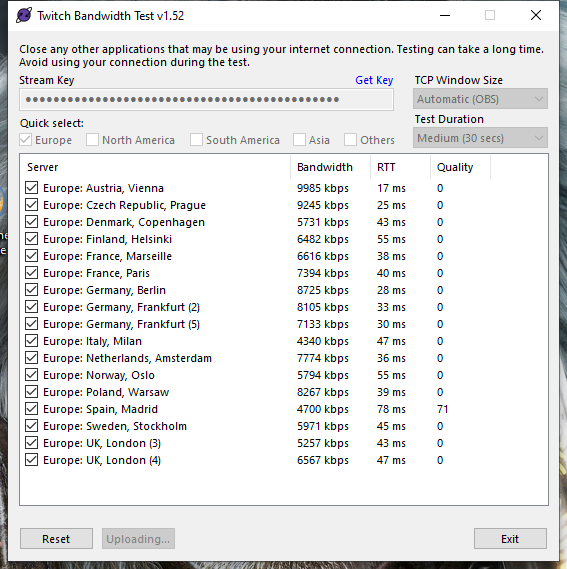
except for spain :o
peak briar
What is that?
zenith widget
Internet Service Provider
Your internet cannot connect to other twitch servers and is having a low quality connection to the spain server
peak briar
But why can I look twitch then? I stream over the Cezch Server everytime but there is a quality of 0, too? :(
round brambleBOT
@peak briar Dropped Frames usually means that you have a bad connection with the streaming service(Twitch/Youtube/Mixer/Facebook) and most likely something related to your ISP not handling the connection properly.
Speed tests usually cannot help solve this problem and its best to use this guide: https://obsproject.com/wiki/Dropped-Frames-and-General-Connection-Issues
austere star
is se.pay easy enough to use as paypal is being a pain or if i only receive odd one off tips is it just better to stick with paypal
austere star
optional tips
 digital vine
Hey 🙂 i have an issue with the my dashbord. I have recently been made a super admin to a friends stream. When accsess streamelements.com I am only direct3ed to my freinds dashboard. I dont even know who to navigate from their to my own dahsbord / account
ionic kelp
@digital vine Click stop in top right.
digital vine
ok... and that does not "stop" my freinds stream? 😉 she is live right now... haha^^
I hope you understand my concenr pressing a STOP button with capital letters ...lol
 jade remnant
you are role playing/moderating their SE account
has nothing to do with their live stream
it just stops the access to their account
you can always go back to it later
 normal igloo
@austere star If you're looking for something what will give you the tips / donation straight away then that's not se.pay but " in my opinion " se.pay has better pros then cons then paypal does 
austere star
i mean what im trying to say is at the moment i dont count it as i job so tips/donations aren't necessary but if i cant actually accept them due to paypal behaving strange
zenith widget
tips being not a necessary thing is all up to you
you either have a tipping link or you don't
if its connected to paypal or se.pay that doesn't matter
austere star
also going to assume said tips are meant to show as purchases
normal igloo
tips show as tips like what are you purchasing free content? 
austere star
well i dont understand what paypal is doing and its not anything streamelements side so idk
 sweet socket
best thing would be to ask PayPal
 blissful heron
Hello everybody! I'm Crlx, nice to meet you all. I have a question about the StreamElements chatbot. I know that Timers can activate chat commands, but I was wondering if chat commands could somehow activate a timer. For example, I would like to have a chat command that allows the chatbot to activate emote only chat, and 5 minutes later deactivate it by itself, crazy stuff, I know. Well, have a nice day and thanks in advance for the one who know how to do this! 
 icy remnant
how do i set streamelements up to show the img when someone redeems an item?
using streamlabs obs
i have the items set up, i have the img set on the items, i just need the alert
round brambleBOT
We're not able to troubleshoot issues with using our overlays in StreamLabs OBS (SLOBS) as we don't have the tools to support their software. We recommend using OBS Studio or OBS Studio with our plugin OBS.Live.
icy remnant
redemption alert widget isnt listed under the widgets
ionic kelp
It's store redemptions.
 frail night
this might be a dumb question, but i tried searching for it with the search bar and couldnt find a proper answer, can people donate on streamelements using a credit card? i dont see the option.
ionic kelp
@frail night If they have the option to do so yes. Otherwise they'd have to do it with paypal.
icy remnant
ionic kelp
That's streamlabs widgets. Not ours.
We can't help you with that.
You'd have to speak to streamlabs about that.
frail night
i do believe that is streamlabs
hmmmmm i dont see an option on streamelements for credit card, however i thought they did have one because some people really only trust using their cards
 versed socket
Does anyone know how I can stop blurred out words on twitch? I have disabled chat filter on twitch and stream elements. The words come through fine on OBS but blur out in the actual twitch chat
ionic kelp
The streamer has to meet these requirements to have the option for users to do so
round brambleBOT
SE.PAY is available for streamers who are atleast 18 years old, with bank account under their name in one of the following countries and have at least 101 Follower (Twitch) / 101 Subscribers (Youtube):
Austria, Belgium, Czech Republic, Denmark, Finland, France, Germany, Ireland , Italy, Netherlands, Poland, Portugal, Slovakia, Spain, Sweden, Switzerland, United Kingdom, United States.
If you meet these criteria and don’t see SE.Pay, let us know.
For information on SE.Pay payment methods, their fees, and settlement times see https://streamelements.com/dashboard/tipping/fees.
ionic kelp
@versed socket Screenshot?
versed socket
 versed socket
That's what I thought.
 tranquil salmon
How do I get my stream up on stream elements
Like where do I go to find my stream
ionic kelp
@tranquil salmon Is that a chromebook?
ionic kelp
Yeah. Because of the coloring it looks eerily like one 
tranquil salmon
Ok but can u help
ionic kelp
But you'd need something like OBS, Xsplit, or Twitch studio to do so.
round brambleBOT
New to Stream Elements?
Check out our YouTube channel https://www.youtube.com/c/streamelements/videos
with tutorial videos from setting up the basics, to in depth details on how to use our product.
New to OBS? Here is a 4 step quickstart guide
https://obsproject.com/wiki/OBS-Studio-Quickstart
Want to learn even more? Here is an in-depth overview
https://obsproject.com/wiki/OBS-Studio-Overview
icy remnant
how do i get the alert url when someone redeems an item?
ionic kelp
You don't. It's handled via the alertboxes.
And unless you're using our overlay you need to speak with Streamlabs about their services.
icy remnant
im using your services the store, the bot and redemption commands why is it so difficult to find the simple url for the alerts so i can add it
surely other users have found a workaround?
ionic kelp
Because the only link you needs is for the overlay with the redemption widget added.
The only thing I've seen so far is for streamlabs.
icy remnant
so i can get an url for an overlay with widget added?
round brambleBOT
@icy remnant We're not able to troubleshoot issues with using our overlays in StreamLabs OBS (SLOBS) as we don't have the tools to support their software. We recommend using OBS Studio or OBS Studio with our plugin OBS.Live.
icy remnant
thx for the help
 hallow flare
hey all
- can i move my streamlabs UI over to stream elements
- where can I buy an animated theme
- do regular obs themes work
sweet socket
@hallow flare hey, we dont have any charged animated themes, our services are 100% free.
You can import overlays, alerts and tips as long as their are no StreamLabs assets in there and what do you mean with regular obs themes?
round brambleBOT
OBS.Live is a Plugin for OBS created by StreamElements. You can download OBS.Live here: https://streamelements.com/obslive
Please make sure you have the latest version of OBS installed, Current Version: 25.0.4. You can install OBS here: https://obsproject.com/
hallow flare
@sweet socket i have a theme i have in streamlabs i want to bring with me
ionic kelp
@hallow flare Is it a custom one or one from their library?
sweet socket
if its a StreamLabs theme you can't, thats streamlabs copyrighted and we do not import that
hallow flare
from their library
ionic kelp
Can't copy then.
hallow flare
damn i want to move over so I can do give aways
sweet socket
you can do giveaways with our chatbot
 daring carbon
Can we make a Norwegians test Channel?😀❤️
 lethal tide
In the message that the BOT sends in the chat when someone follows, sub ... Can I use some variable, for example, ${random} to generate a random number?
 clever oxide
hi i need help
Hi, if i stream through Streamelements OBS but my alerts are setup through streamlabs do i still get an alert for raids ? its been the 2nd time someone raids me but no alerts pops up on my side. The person who raided me uses streamelements btw.
round brambleBOT
@clever oxide We're not able to troubleshoot issues with using our overlays in StreamLabs OBS (SLOBS) as we don't have the tools to support their software. We recommend using OBS Studio or OBS Studio with our plugin OBS.Live.
clever oxide
im using streamelements.obs.live
 jolly hornet
Alguno habla español?
lament blade
Hello,
I need help, I took a bonus from the store of a streamer. I should have received the bonus by email within 5 days and I still have nothing to date can you help me?
 rustic mica
heya how do I get the streamelements bot to "thank you for following" and such in the twitch chat? I'm trying to emulate someone following but the message doesn't pop up. I checked in modules and it is turned on.
it's also a mod for my chat too
round brambleBOT
Go to the dashboard -> right side -> part channel -> join channel (https://streamelements.com/dashboard)
lament blade
Hello,
I need help, I took a bonus from the store of a streamer. I should have received the bonus by email within 5 days and I still have nothing to date can you help me?
jade remnant
what bonus?
lament blade
100% Deposit cbet
jade remnant
can you screen shot what you clicked on, as there is nothing that SE offers that would sent an email from a users stream
lament blade
lament blade
yes , roshtein
ionic kelp
Thought I recognized a reward. Will return with an answer.
lament blade
i don't understand
ionic kelp
I'll ping you when I have something to answer.
lament blade
thank you so much
ionic kelp
@lament blade You'd have to speak with Roshtein or one of his mods about this as this isn't something we can help with unfortunately.
lament blade
it's ok thank you
 azure shale
Is there a way to bring custom widgets into one screen so I can add them all to my overlay
So it’s no like 6 different browser links
lament blade
How do you reset widget?
i have a badge metric and i emulated some and want to reset
pls help
azure shale
Is there a way to make my follower/sub train work like this.
When one is on the left it’s moves the second one to the right next to it. Then when the left one is complete or finished it moves the right one where the left was?
 summer fable
Hi, I create and test my alerts and overlays (in preview and OBS), but when it's time to actually stream no overlay is there or alerts pop up, I hear the notification is all. It seems like I have to constantly delete the source and re-add the overlay/alert. Any help would be appreciated !
azure shale
@jade remnant how do I make my widget smaller. All they are doing is making the box around them smaller but cutting them off
jade remnant
click on the widget and drag the edges
azure shale
It makes the box smaller but the widget inside stay the same
 mental ledge
I am having trouble connecting my streamelements to my twitch panel to take in video requests... I do not know where to go to get the link. I already have it feeding through to my channel.. but where do listeners go to make the requests (link)
jade remnant
what widget?
 hidden kiln
Could I ask for the chat stats fix as well? Old username: Ankis_ new: AnkisTV
azure shale
I drag in from the top and it just cuts it’s off
jade remnant
in the left panel, try selecting a different "image size"
there will be a minimum size it can be scaled to due to the size of the image
azure shale
It’s an imported custom widget
hidden kiln
Thank you, it works!
 glacial hearth
how do you set up the "shout out" chat bot? Is this what I'd use if I wanted to encourage my viewers to follow a fellow streamer?
jade remnant
!so
is a basic command already on the bot
glacial hearth
lol, oh so I just type !so and the users name?
jade remnant
!so @username
will activate the command
glacial hearth
cool, thanks!
azure shale
In my stream elements overlay manager the animation is working fine but when I put it in I’ve it doesn’t want to work it just snaps between the text
round brambleBOT
Right click on the BrowserSource > Properties > Scroll down a bit > Refresh Cache of current page
azure shale
Still does it?
 dull sable
how can i make my game show up on the livestream because on my obs it shows the screen of the game and the audio that its getting picked up but on stream it isnt showing up
 hazy shale
I'm trying to use a browser source in obs and link stream elements alert box through it however every time i test it the alerts don't show up does anyone know how to fix that
 pastel ingot
when i try to change the alert sound, the previous default sound also plays along with it, what can i do to solve this problem ?
 ivory ether
Hello. How i can allow to my chat links from twitch clips. I use the streamelements bot
 wary halo
you better remove that
round brambleBOT
@tacit sonnet Please follow our community rules:
- No advertisement or stream promotion
- Respect ALL server members
- No NSFW/NSFL
Thank you
ivory ether
can someone help me for my problem ?
hazy shale
I'm trying to use a browser source in obs and link stream elements alert box through it however every time i test it the alerts don't show up does anyone know how to fix this
ivory ether
i have already have it @wary halo
 tawny sinew
@pastel ingot try resetting the sound for the alerts then replace the default sound with the one you have
 hazy zodiac
Hallo , Ich habe eine probleme... Ich habe meinen Namen in meinem Twitch-Konto geändert und Bots funktionieren nicht mehr.. weisst jemand warum ?
I changed my name in my Twitch account and bots don't work
round brambleBOT
@hazy zodiac If you changed your name on Twitch please follow these steps:
🔹 Visit https://streamelements.com/logout and then log in again with by connecting with Twitch.
🔹 On the right side of the dashboard page that opens, select "Join" under bot settings. If it says "Part" select that and then select "Join" to send the bot to the chat. Don't forget to mod the bot by typing /mod streamelements in your channel if you have not already.
🔹 Post your old and your new name here so that we can update your channel's chatstats tracking (must be done by staff).
hazy zodiac
can somebody help turkish? google translate did not help 😄
BurliJooo ----- new name -- JooDAYI ..... My old nick burlijooo new one JooDAYI
hazy zodiac
yes please
 weak delta
I'll tag you when fixed.
hazy zodiac
thansk ❤️
hazy shale
I'm trying to use a browser source in obs and link stream elements alert box through it however every time i test it the alerts don't show up does anyone know how to fix this
weak delta
@hazy zodiac All good.
hazy zodiac
@weak delta Unfortunately not 😦
hazy zodiac
ok
 haughty shuttle
Hello here,
I need some help,
So somthime when I switch frome scene to scene, my Webcam disappeared behind my overlay.. I need to go everytime on the web page move it a bit save and my overlay become transparent again.
Do you have any solution?
hazy zodiac
@weak delta Thanks Bro , you are the best !
 tired sable
can someone help me? I changed my name on twitch and now streamelements is not active in chat, but on the site it is active
round brambleBOT
@tired sable If you changed your name on Twitch please follow these steps:
🔹 Visit https://streamelements.com/logout and then log in again with by connecting with Twitch.
🔹 On the right side of the dashboard page that opens, select "Join" under bot settings. If it says "Part" select that and then select "Join" to send the bot to the chat. Don't forget to mod the bot by typing /mod streamelements in your channel if you have not already.
🔹 Post your old and your new name here so that we can update your channel's chatstats tracking (must be done by staff).
lament blade
Gg
earnest frost
I have a problem
I think my overlay is broken
Because all it says is lem Instead of Lemmy redeemed.
 prisma seal
best way to see follows, donations, etc through obs? the twitch activity feed doesnt show donations and tts
tawny sinew
have you got obs.live downloaded if you do look at the activity feed
ionic kelp
!slobs
round brambleBOT
We're not able to troubleshoot issues with using our overlays in StreamLabs OBS (SLOBS) as we don't have the tools to support their software. We recommend using OBS Studio or OBS Studio with our plugin OBS.Live.
lament blade
How do I set a announcement to say what I want and as frequently as I want ?
can’t figure it out and wizebot is not doing it properly so wizebot is about to get the boot for SE
earnest frost
Ok thanks!
 placid shuttle
Is there a way to display Kappagen on the desktop/ingame overlay? like I want to be able to see it in game blocking my screen to for fun cx
 rugged pewter
hello. I don't know if this is possible, but here it goes: I just created two custom comands for my mods to trigger some sounds, using the stream store to creat those sounds. I turned off the chat alerts so that it wouldn't show up that one user redeemed some thing. But it keeps showing up. What do I need to turn off so that the message does not show up?
tawny sinew
@prisma seal can you send me an image of what it looks like on ground control
 blazing tendon
does anyone know how to get back song request back?
tawny sinew
???
prisma seal
round brambleBOT
@blazing tendon Streamelements on top of OBS -> Logout -> login
earnest frost
Is there away to edit text in an overlay?
tawny sinew
@prisma seal it is like that for me but it displays my twitch stuff and events
prisma seal
yeah i just switched to twitch and no way to log out and log in with twitch even have a reinstall
tawny sinew
have you tried un linking your mixer account from stream elements
prisma seal
ill try
blazing tendon
the logout login thing didn't work
prisma seal
wait how do i unlink it?
wary halo
StreamElements menu > Media Request @blazing tendon in OBS
prisma seal
part channel or is that just for thebot
tawny sinew
that is for the bot
prisma seal
so how do i unlink then
lament blade
Is it not possible to do a frequent announcement?
wary halo
i think it's somewhere in the pinned messages, how to log out of Ground Control
oh
it's literally the first one
prisma seal
i checked everywhere in ground control theres no option
prisma seal
can you link idk where to chewck for the pinned message
wary halo
Is it not possible to do a frequent announcement?
@lament blade like a timed message?
StreamElements
The Ultimate All in One Platform for Streamers
hazy shale
I'm trying to use a browser source in obs and link stream elements alert box through it however every time i test it the alerts don't show up does anyone know how to fix that
round brambleBOT
@hazy shale OBS -> settings -> advanced -> scroll down -> enable/disable hardware accel.
https://i.imgur.com/ggMe9ZE.png
lament blade
Yes @wary halo I have a message typed out that I would like to pop up every so often
prisma seal
all it did was log me back into mixer
wary halo
did you add a new token from a twitch account?
prisma seal
as soon as i backspaced the token it logged out, then logining in just says authenticate and brings back to mixer
earnest frost
I tried using the browser sourse
blazing tendon
on OBS how do you get the media thing
lament blade
Perfect thank you!
prisma seal
no option to add the token
earnest frost
But nothing comes up whan I use it
hazy shale
I'm trying to use a browser source in obs and link stream elements alert box through it however every time i test it the alerts don't show up does anyone know how to fix that(ive tried enabling and disabling acceleration relogging my account letting it through the firewall anything else)
wary halo
as soon as i backspaced the token it logged out, then logining in just says authenticate and brings back to mixer
@prisma seal i'll ask around internally
round brambleBOT
@hazy shale Right click on the BrowserSource > Properties > Scroll down a bit > Refresh Cache of current page
wary halo
on OBS how do you get the media thing
@blazing tendon OBS.Live > StreamElements menu in the top bar > Media Request
i already told that 5 minutes ago 😛
hazy shale
I'm trying to use a browser source in obs and link stream elements alert box through it however every time i test it the alerts don't show up does anyone know how to fix that.(just tried what the bot said it didn't work
 clever isle
I try and open streamlabs on my browser and its all white except for the help button
prisma seal
can i delete obs live without deleting obs?
 flat laurel
my strera won't stop buffering. i have good Internet and my bitrate is only at 4750..help??
hazy shale
I'm trying to use a browser source in obs and link stream elements alert box through it however every time i test it the alerts don't show up does anyone know how to fix that(i've tried just about everything i can find including the bots auto reply)
flat laurel
stream*
rugged pewter
how can I stop an alert message from a variable used on a costum comand?
earnest frost
I mean the overlays don't even work. This is awful.
hazy shale
I'm trying to use a browser source in obs and link stream elements alert box through it however every time i test it the alerts don't show up does anyone know how to fix that(i've tried just about everything i can find including the bots auto reply)
clever isle
I try and open streamlabs on my browser and its all white except for the help button
round brambleBOT
@clever isle Our Dashboard and Overlay editor are Chromium Optimized. We strongly recommend using Chrome. Opera GX and the new Microsoft Edge Chromium might work closest to Chrome as its also Chromium built. FireFox also works, but some things might look a bit different or not work. We do not recommend using Internet Explorer with our Dashboard as it does not support functions.
If the website doesn’t work on chrome, be sure none of your plugins are blocking our website or clear your cookies. You can try if the website works in a incognito tab.
hazy shale
I'm trying to use a browser source in obs and link stream elements alert box through it however every time i test it the alerts don't show up does anyone know how to fix that(nothing ive tried has worked)
earnest frost
I'm trying to use a browser source in obs and link stream elements alert box through it however every time i test it the alerts don't show up does anyone know how to fix that(nothing ive tried has worked)
It happens to me too.
hazy shale
anyone have a fix?
earnest frost
I cant even stream!
hazy shale
thats weird
earnest frost
I can stream now.
Yeah
The overlays don't work at all.
I can't see them when I put them in my obs.
I am not using slobs
round brambleBOT
@earnest frost OBS -> settings -> advanced -> scroll down -> enable/disable hardware accel.
https://i.imgur.com/ggMe9ZE.png
@earnest frost To add your overlays to OBS, add a new browser source in your scene. Paste your overlay URL in the browser source properties, set the dimensions to 1920x1080 (unless you changed them on the website), and ☑ “Shutdown source when not visible” https://youtu.be/KDvLynUqXI4
 dry hare
@hazy shale are you adding the overlay at 1920x1080?
hazy shale
no im adding it at the size on the overlays @dry hare
round brambleBOT
@hazy shale To add your overlays to OBS, add a new browser source in your scene. Paste your overlay URL in the browser source properties, set the dimensions to 1920x1080 (unless you changed them on the website), and ☑ “Shutdown source when not visible” https://youtu.be/KDvLynUqXI4
dry hare
If you add your overlay at the size of the alert box you’ll never see it because you are only displaying a fraction of the entire overlay
earnest frost
But how do I change it?
dry hare
@earnest frost right-click your browser source and change the resolution in the properties window
earnest frost
Ok. I will try it.
hazy shale
yeah so the sizing didn't work
 hybrid spoke
My old name was Yaboistealth_ and now its stealththebishop and shat stats arnt working can you fix it please
earnest frost
Width and height? @dry hare
round brambleBOT
@earnest frost To add your overlays to OBS, add a new browser source in your scene. Paste your overlay URL in the browser source properties, set the dimensions to 1920x1080 (unless you changed them on the website), and ☑ “Shutdown source when not visible” https://youtu.be/KDvLynUqXI4
@hazy shale OBS -> settings -> advanced -> scroll down -> enable/disable hardware accel.
https://i.imgur.com/ggMe9ZE.png
 rain geode
how do i change the command for my points system???
dry hare
Like the name of your points?
rain geode
no the command i have to use in the chat
dry hare
To what?
rain geode
my loyalty system
dry hare
Go to the points command in the chat commands section of your dashboard and add the alias
wary halo
just to make sure..
Channel points is not the same as loyalty points
the first one is from Twitch, the second one from StreamElements
rain geode
i meant loyalty
rain geode
same
earnest frost
Can I screen share?
I tried everything I could
I am even using stream elements streaming softwere
 muted tusk
Question even i not sure if this correct.
if i set my paypal to new primary email and remove old 1. do i need update email to new 1 or can it still use old 1 if not removed?
this part im not sure at all
just that moving emails on my stuff and idk about paypal side
wary halo


 earnest frost
I need overlay help badly
 light hamlet
thanks 
and a other question how long does it normally take that a new emote gets aproved 
wary halo
ask Twitch 😛
earnest frost
Me neither
wary halo
it can be 24h it can be 4 weeks @light hamlet 😛
light hamlet
@wary halo oh wait i messed something up
i mean on ffz but this is streamelements 
my brain 
hazy shale
@wary halo Do you have any fixes for the alert box not going through into browser source?
hazy shale
ok thank you for the help
round brambleBOT
@earnest frost To add your overlays to OBS, add a new browser source in your scene. Paste your overlay URL in the browser source properties, set the dimensions to 1920x1080 (unless you changed them on the website), and ☑ “Shutdown source when not visible” https://youtu.be/KDvLynUqXI4
daring carbon
anyone have any idea what i can do to make my obs live stop lagging my games?
earnest frost
Where do I get the browser link I need
strong kernel
The video will show you.
azure shale
Is there any way with the follower and sub train widgets that...
If the follower train is on row 1 and then I get a sub and that train is on row 2. How do I make it that so if the follower train ends the sub train moves up to row one automatically. And if while the sub train is still going I get a new follower, it starts on row 2 and moves up if the sub train ends on row 1
earnest frost
I watched it and dont see what he sees.
strong kernel
It's changed slightly to be inside the menu rather than its own button, but it's in the same place.
earnest frost
WHat menu?
strong kernel
The three dot menu on the overlay.
earnest frost
Copy url?
When I press that and put it in, nothing happens even when I size it.
I dont see anything.
@strong kernel
strong kernel
Reread the bot instructions and make sure you did everything.
earnest frost
I pasted the link and nothing, I mean nothing shows up.
earnest frost
Where?
round brambleBOT
@earnest frost To add your overlays to OBS, add a new browser source in your scene. Paste your overlay URL in the browser source properties, set the dimensions to 1920x1080 (unless you changed them on the website), and ☑ “Shutdown source when not visible” https://youtu.be/KDvLynUqXI4
lament blade
u need to set the dimensions
strong kernel
Read the rest now.
earnest frost
I did all of that
strong kernel
Screenshot your browser source properties, hiding the URL.
 north yarrow
Hey i was trying to stream but it isnt showing up on my twitch channel. On OBS it says that it is streaming.
strong kernel
@north yarrow Screenshot Settings>Stream
 mossy breach
Hi, I have a question about the giveaway, I was wondering when people do get a ticket will they be spending real money or not?
strong kernel
Giveaway tickets are bought with loyalty points.
mossy breach
right ok
earnest frost
@strong kernel
abstract hemlock
@light hamlet post here your old username please
round brambleBOT
@earnest frost OBS -> settings -> advanced -> scroll down -> enable/disable hardware accel.
https://i.imgur.com/ggMe9ZE.png
earnest frost
Did that, nothing.
strong kernel
Disable it if it's enabled.
light hamlet
@abstract hemlock it was finish_yt
earnest frost
Oh ok.
north yarrow
@strong kernel
strong kernel
@north yarrow You're in bandwidth test mode.
light hamlet

 worthy vault
does someone know how to change my account in streamelements?
strong kernel
What do you mean by "change your account?"
abstract hemlock
@light hamlet any older username?
light hamlet
@abstract hemlock N
worthy vault
to log out with my old account and to log in with a new one
strong kernel
On the site?
worthy vault
yes
strong kernel
There's a logout button in the top right.
light hamlet
worthy vault
yes i did that but when i log in again it logs in with my old account
strong kernel
It's OAuth. Log out of Twitch.
north yarrow
@strong kernel I'm really sorry i really suck at this xD This is the stream settings when its streaming.
earnest frost
One more question?
strong kernel
@north yarrow Did you disable the bandwidth test mode?
earnest frost
How can I edit text in an overlay
strong kernel
@earnest frost Select it, open its settings, change the text.
light hamlet
i see my chatstats now but it doesnt track my messages as a user
worthy vault
It's OAuth. Log out of Twitch.
@strong kernel i didn't understand? do i have to log out my accounts in twitch?
strong kernel
@worthy vault Yes.
north yarrow
oops i turned it off now and its working xD
i turned bandwidth test on a week back.
thanks a lot @strong kernel
 stiff rune
how do i add !watchtime
 clever lily
 native cedar
Hi, could someone explain to me how I can get rid of the streamelements bot from my twitch chat? I tried disconnect streamelements but the bot still showed up in my user list. I don't use it anymore
round brambleBOT
@stiff rune 10 minutes of watchtime are given to those in chat when the loyalty points are handed out (every 10 minutes). Therefore, loyalty must be enabled for watchtime to work properly.
There is no direct link between watchtime and all-time points.
It can’t be calculated from the amount of all-time points a user has because subs may earn points at a faster rate and !bonus all command increases all-time points for users in chat at that time.
Giving points to a single user does NOT affect all-time, only when giving to all in chat.
@native cedar Go to the dashboard -> right side -> part channel -> join channel (https://streamelements.com/dashboard)
native cedar
👍
 misty remnant
#🖐️
 chilly frigate
hi! so... ugh.. Stupid question, i guess, but pertaining to SE.pay
it asks for Bank Branch City
is it asking which city I personally bank in or... where the HQ is for that bank?
It might seem amateur, sorry, lol . Just don't want to get the detail wrong and have issues
strong kernel
Which city has the bank teller you secretly have a crush on every time you go in? 😛
chilly frigate
rofl ty @open glacier xD
tbh, a few cities/towns nearby, but... I suppose, in this case, anyone will do
one more question, unrelated
....
Is there a place to see one screen with ALL of your past cheers/donations/subs/etc revenue on Twitch? Like... over a few years?
without having to scroll month by month/
 sacred jacinth
I'm trying to help my friend with his !quote settings, but I'm having a little trouble. I thought you could set it to anyone being able to do "!quote" but have to set a level to do "!quote add" but I'm not seeing it
strong kernel
@sacred jacinth !quote add is always Moderator or higher. This cannot be changed.
sacred jacinth
Okay, thank you!
chilly frigate
@strong kernel ❤️
I've been looking forever for a way to do this with Twitch
and Twitch's dashboard isn't nearly as helpful or organized ;-;
ty~
 crisp wind
Hey all, new here but have used streamelements for a while now. Recently (as of yesterday) my alert noises will not change from the default noise. I am also experiencing infrequent but LOUD piercing beep now that was not there before. I am currently running OBS on a MacBook Pro and use Chrome to navigate most of my editing/streaming..any help would be much appreciated
 fossil spoke
I use firefox to do all of my editing
 wary stream
How do I part the bot from my channel
round brambleBOT
@wary stream Go to the dashboard -> right side -> part channel -> join channel (https://streamelements.com/dashboard)
@fossil spoke Our Dashboard and Overlay editor are Chromium Optimized. We strongly recommend using Chrome. Opera GX and the new Microsoft Edge Chromium might work closest to Chrome as its also Chromium built. FireFox also works, but some things might look a bit different or not work. We do not recommend using Internet Explorer with our Dashboard as it does not support functions.
If the website doesn’t work on chrome, be sure none of your plugins are blocking our website or clear your cookies. You can try if the website works in a incognito tab.
 fallen adder
hey is possible to see all quotes that i added with !quote add
earnest frost
How do I change text on a pre made overlay?
round brambleBOT
@earnest frost We've released our new Overlay Editor revamp. You can check out the changes and how to work with it here: https://youtu.be/X5VzXjqAsjk
Check out our blog post as well: https://blog.streamelements.com/streamelements-overlay-editor-just-got-even-better-c22cb5b4853e

We are thrilled to announce the launch of the remastered StreamElements Overlay editor!
https://p.strms.net/newoverlayyt
Why StreamElements Overlays are better?
😎 Simple: Load your entier setup using only 1 link
⚡ Fast: Cloud-powered Overlays arrive in real-time, say goodb...
earnest frost
How do I use the timer?
round brambleBOT
@earnest frost New to Stream Elements?
Check out our YouTube channel https://www.youtube.com/c/streamelements/videos
with tutorial videos from setting up the basics, to in depth details on how to use our product.
New to OBS? Here is a 4 step quickstart guide
https://obsproject.com/wiki/OBS-Studio-Quickstart
Want to learn even more? Here is an in-depth overview
https://obsproject.com/wiki/OBS-Studio-Overview
 untold sage
I'm setting up spam filters and enabling link protection, but I want my mods to be exempt. VIP is an option, but not mods? or are they automatically exempt?
 solar prism
anybody know what the default command for the store is?
i cannot add alias for either store shop or items
23:38 noparg: !cmd alias add items store 23:38 StreamElements: @solar prism, no command with trigger items found :/ 23:39 noparg: !cmd alias add dictionary dict 23:39 StreamElements: @solar prism, alias dict is already a trigger for command dictionary 23:39 noparg: !cmd alias add store shop 23:39 StreamElements: @solar prism, no command with trigger store found :/ 23:39 noparg: !cmd alias add shop store 23:39 StreamElements: @solar prism, no command with trigger shop found :/
 oblique steeple
Mods can't timeout other mods. StreamElements Bot = Mod @untold sage
untold sage
@oblique steeple OOOOOOHHHHH, that makes sense lol. I'm used to nightbot which lists mods as an exemption.
 buoyant crane
How to add watchtime as mod
round brambleBOT
@buoyant crane 10 minutes of watchtime are given to those in chat when the loyalty points are handed out (every 10 minutes). Therefore, loyalty must be enabled for watchtime to work properly.
There is no direct link between watchtime and all-time points.
It can’t be calculated from the amount of all-time points a user has because subs may earn points at a faster rate and !bonus all command increases all-time points for users in chat at that time.
Giving points to a single user does NOT affect all-time, only when giving to all in chat.
 digital thorn
Just started using StreamElements, and I'm trying to set up my alerts but I can't get the text over image to work.
strong kernel
@digital thorn Text settings>Advanced, play with the margins.
digital thorn
@strong kernel Thanks a million
 wide oxide
Hello! I stream to both YT and Twitch. Could i merge accounts? When i tried to "Add channel", it sent me "already claimed"
round brambleBOT
@wide oxide Account Merging - Please note:
- Merging accounts only allows faster ways to switch between accounts
- Merging accounts does not allow data sharing between accounts - different streaming platforms, different type of events
- Merging accounts allows duplicating/sharing overlays between the accounts
If you understand the limitations of merging and want to proceed, please find the JWT tokens (!jwt) from both accounts you want to merge and you will be directed to DM them to a staff member.
 smoky wasp
Guys, today I received a donate of R$ 10 by stream elements, the message did not appear on the live. Does anyone know what can it be?
wary halo

Learn how to customize your alerts and setup different alerts variations with StreamElements Alertbox
Overlay Manager guide: https://youtu.be/X7XrDdRE7Fk
Add HypeCup to your Stream: https://www.youtube.com/watch?v=8LVRd2X4HvU
Got any questions, or just want to say "Hey"...
wide oxide
Well, are you planning to merge events? SL already did it
strong kernel
@smoky wasp You need to actually have an alertbox.
 vast coral
@strong kernel Rajj patel changed his name again from "Rajj" to "austinshow" earlier could it possible to fix his stats page? 
jade remnant
if you use streamlabs to stream then that could be a reason, as streamlabs doesnt always allow the stream elements overlays to work.
the other option would be your alert box isnt overlapping in the variations (if you have any)
smoky wasp
not at streamlabs?
strong kernel
@smoky wasp Not with us. Some other system's alertbox is meaningless.
vast coral
sorry for the ping 
smoky wasp
i know whats the problem
i have to config at streamelements
not at streamlabs
its this?
like in the video
https://www.youtube.com/watch?v=8LVRd2X4HvU&list=PLCDDKlFdScbEwdx5AntcQIS1InkFJwHtv&index=5&t=9s
@wary halo
Learn how to customize your alerts and setup different alerts variations with StreamElements Alertbox
Overlay Manager guide: https://youtu.be/X7XrDdRE7Fk
Add HypeCup to your Stream: https://www.youtube.com/watch?v=8LVRd2X4HvU
Got any questions, or just want to say "Hey"...
lethal tide
Can I get any option to put a "sign" with the latest subs that were given on Live that just ended? The only option I saw, it only shows a counter, but it does not show the names of the people who gave a sub during Live.
wary halo
its this?
@smoky wasp yes that is it
smoky wasp
thx
round brambleBOT
We've released our new Overlay Editor revamp. You can check out the changes and how to work with it here: https://youtu.be/X5VzXjqAsjk
Check out our blog post as well: https://blog.streamelements.com/streamelements-overlay-editor-just-got-even-better-c22cb5b4853e
We are thrilled to announce the launch of the remastered StreamElements Overlay editor!
https://p.strms.net/newoverlayyt
Why StreamElements Overlays are better?
😎 Simple: Load your entier setup using only 1 link
⚡ Fast: Cloud-powered Overlays arrive in real-time, say goodb...
 steady remnant
gust
 trim tapir
how do i reset a timer in OBS Studio when the scene was imported from StreamElements
steady remnant
how do i set up a win loss counter for streaming
prisma seal
is there a script for streamelements to add !clip command like streamlabs?
steady remnant
if you know call me
strong kernel
@steady remnant You create custom commands using the ${count} variable. https://streamelements.com/dashboard/bot-commands/variables
StreamElements
The Ultimate All in One Platform for Streamers
@prisma seal See #widget-share and #command-share
prisma seal
theres nothing there
strong kernel
buoyant crane
Why does watchtime not work
round brambleBOT
@buoyant crane 10 minutes of watchtime are given to those in chat when the loyalty points are handed out (every 10 minutes). Therefore, loyalty must be enabled for watchtime to work properly.
There is no direct link between watchtime and all-time points.
It can’t be calculated from the amount of all-time points a user has because subs may earn points at a faster rate and !bonus all command increases all-time points for users in chat at that time.
Giving points to a single user does NOT affect all-time, only when giving to all in chat.
 chrome panther
hi guy, I was wondering if any of y'all could help me with something I havent been able to figure out on my own
I am trying to to get like 40px of space on the bottom of my stream below my game footage that I can put some data on
without scuffing the game capture left and right
is something like that possible?
round brambleBOT
@chrome panther Please ask your question in one helpdesk channel only. A support volunteer or StreamElements staff member will assist you as soon as they are available. Asking in multiple places will only result in confusion, not faster answers. Thank you for your patience.
chrome panther
I figured this'd be better here than in general, that's why
strong kernel
@steady remnant Please keep all communication in the public channels. We do not provide 1 on 1 voice support.
 ebon shore
I have a blocklist separated by commas, is there a way you can allow that to be added in your moderation system in SE?
steady remnant
which one should i goin if i need help
strong kernel
@ebon shore There is no import option, no.
ebon shore
Will you allow copy and paste in the near future?
steady remnant
@strong kernel can i talk with you in chit chat quickly
strong kernel
@steady remnant We do not provide 1 on 1 voice support.
ebon shore
makes things so much easier, youtube has that feature, twitch doesn't...
lament blade
I need help. How do you edit text on a overlay
strong kernel
@lament blade Select it, open the settings, change the text.
lament blade
Thank you
buoyant crane
Why does watchtime not work
chrome panther
Would it be possible to somehow resize the game footage shown here so that I get like 40px on the bottom for some text overlays like latest sub etc.? I could get rid of that fat block on the top that I don't like. I don't want to have black columns on the left and right tho
buoyant crane
And can I enable commands as a mod
round brambleBOT
@ebon shore Check out the StreamElements ideas board: https://strms.net/ideas. You'll be able to add ideas, upvote ideas you agree with, and track their progress with email notifications. Adding and upvoting ideas also helps the staff know which ideas should be prioritized so please take some time to upvote.
untold sage
How do I temporarily deactivate chatbot? I'm in the process of setting up the chatbot but it's going to take a while before I'm officially ready to stop using nightbot as I migrate everything over that I want. I just had to ban streamelements from my twitch chat before going live so that it wouldn't double what nightbot was doing. There should really be an easy to find toggle for enabling and disabling the chatbot.
strong kernel
Do not randomly @ staff.
round brambleBOT
@untold sage Go to the dashboard -> right side -> part channel -> join channel (https://streamelements.com/dashboard)
chrome panther
Tough to manage this crowd, haha. 😄
Hope I can find some useful answer here
Been trying everything I can imagine with my experience
ebon shore
k thx
 stone burrow
Hi, if my Viewers write !watchtime or !points, there is erverytime a 0.
round brambleBOT
@stone burrow 10 minutes of watchtime are given to those in chat when the loyalty points are handed out (every 10 minutes). Therefore, loyalty must be enabled for watchtime to work properly.
There is no direct link between watchtime and all-time points.
It can’t be calculated from the amount of all-time points a user has because subs may earn points at a faster rate and !bonus all command increases all-time points for users in chat at that time.
Giving points to a single user does NOT affect all-time, only when giving to all in chat.
untold sage
Oh I didn't have everything setup yet. I was forced to create a random overlay before it allowed me to do this. Strange lol.
chrome panther
no one have any idea? or a suggestion where I could ask?
rustic mica
heya my timers aren't going off on the stream even though everything is activated?
 stoic brook
Hello where can I ask a questions about overlays?
lament blade
I just downloaded Streamlabs obs and I want to get the overlay. What do I do?
 agile ruin
I’m trying to start a test stream and I can’t even do that! Every time I hit start streaming I get this error:
jade remnant
@lament blade ask streamlabs
jade remnant
@agile ruin You need to update your NVIDIA drivers. You have 2 ways you can do it:
- Open GeForce Experience if it's installed on your PC. Login, click on DRIVERS, then select Download. Install it fully, then reboot.
OR - Manually download your drivers using this link: https://www.geforce.com/drivers
Make sure to reboot your PC once the drivers are installed.
do a clean install of the most recent (up to date) drivers
@lament blade if you have the overlays here, then add them to obs browser source
https://streamelements.com/dashboard/overlays
round brambleBOT
@lament blade To add your overlays to OBS, add a new browser source in your scene. Paste your overlay URL in the browser source properties, set the dimensions to 1920x1080 (unless you changed them on the website), and ☑ “Shutdown source when not visible” https://youtu.be/KDvLynUqXI4
jade remnant
pick one you like https://streamelements.com/dashboard/themes
round brambleBOT
@lament blade New to Stream Elements?
Check out our YouTube channel https://www.youtube.com/c/streamelements/videos
with tutorial videos from setting up the basics, to in depth details on how to use our product.
New to OBS? Here is a 4 step quickstart guide
https://obsproject.com/wiki/OBS-Studio-Quickstart
Want to learn even more? Here is an in-depth overview
https://obsproject.com/wiki/OBS-Studio-Overview
jade remnant
if its not in your overlays then you dont
lament blade
Ok
jade remnant
or you are logged into the wrong account on the SE site
azure shale
I’m using this rotating widget and it’s fade in and out but when I put it in one it just snaps between each event
In streamelements overlay it works fine
Just in one
lament blade
Where do you put a link in obs
round brambleBOT
@lament blade To add your overlays to OBS, add a new browser source in your scene. Paste your overlay URL in the browser source properties, set the dimensions to 1920x1080 (unless you changed them on the website), and ☑ “Shutdown source when not visible” https://youtu.be/KDvLynUqXI4
azure shale
The browser
 dawn fern
Hi guys, is there like a list of variables that i can see for the Editor ? i'm using a Widget from Alpha Gaming. but {amount} doesn't show anything surprisingly.
https://i.imgur.com/2xBLHzt.png
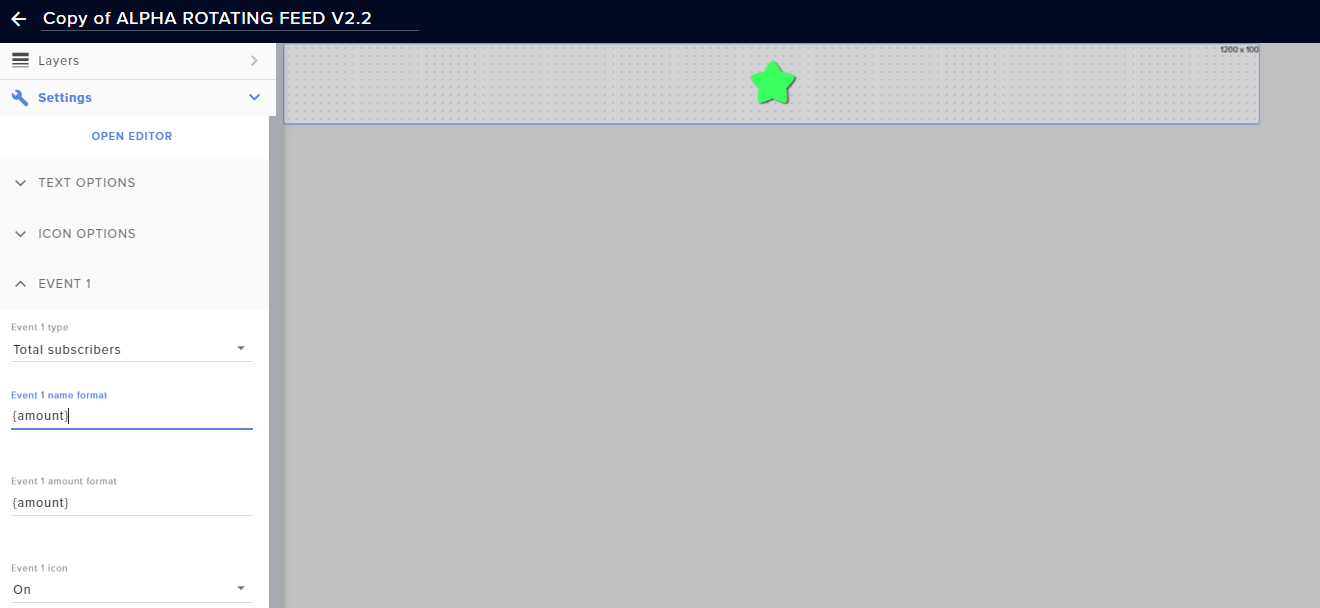 fossil spoke
tried getting alerts working with chrome, but it didn't solve the issue
they don't pop up at all
round brambleBOT
@fossil spoke To add your overlays to OBS, add a new browser source in your scene. Paste your overlay URL in the browser source properties, set the dimensions to 1920x1080 (unless you changed them on the website), and ☑ “Shutdown source when not visible” https://youtu.be/KDvLynUqXI4
azure shale
On my streaming pc in streamelements overlays it snaps between events but on my gaming pc it fades between then even tho they are the same
dawn fern
@strong kernel was that to me ?
fossil spoke
fixed it! thanks
stoic brook
When I try to connect my facebook page to stream elements my page is not showing up in the list. I recently changed it to a gaming page as facebook just changed their policy when it comes to streaming games. Could this be the issue? When I was using streamlabs this was not an issue. I was able to add it with no problems and it worked fine with multi casting. I noticed that obs live does not have a multi casting feature is this planned as well?
strong kernel
@stoic brook It specifically needs to be a Gaming Video Creator page.
Also, please ask Facebook questions in #helpdesk-facebook
lament blade
@strong kernel thank you for all the help. I’m going to recommend stream elements to all my friends
stoic brook
@strong kernelYeah just checked it. That is what it is.
azure shale
What do I need to make sure I have turned on to make the fade in and out on my browser work?
It works on one pc and not on my other
agile ruin
I’ve updated my drivers to the most up to date ones and this still pops up when I click start streaming.
stoic brook
@strong kernel But when I try to connect to my page to streamlabs it is not showing up on the list to choose from.
round brambleBOT
@agile ruin For the best OBS support, please join their Official Discord @ discord.gg/obsproject
stoic brook
@strong kernel Could it be because I have it connected via streamlabs obs?
 halcyon haven
Hey how do i enable the streamelements bot
strong kernel
No, other connections are irrelevant.
halcyon haven
chat bot*
round brambleBOT
@halcyon haven New to Stream Elements?
Check out our YouTube channel https://www.youtube.com/c/streamelements/videos
with tutorial videos from setting up the basics, to in depth details on how to use our product.
New to OBS? Here is a 4 step quickstart guide
https://obsproject.com/wiki/OBS-Studio-Quickstart
Want to learn even more? Here is an in-depth overview
https://obsproject.com/wiki/OBS-Studio-Overview
stoic brook
@strong kernel Very strange. All my other page show in the list but not the one I want to connect to.
lament blade
@strong kernel , you said go to settings then edit the text. How do I do that?
 lofty moth
how can I share an overlay with somebody?
round brambleBOT
@lament blade We've released our new Overlay Editor revamp. You can check out the changes and how to work with it here: https://youtu.be/X5VzXjqAsjk
Check out our blog post as well: https://blog.streamelements.com/streamelements-overlay-editor-just-got-even-better-c22cb5b4853e
We are thrilled to announce the launch of the remastered StreamElements Overlay editor!
https://p.strms.net/newoverlayyt
Why StreamElements Overlays are better?
😎 Simple: Load your entier setup using only 1 link
⚡ Fast: Cloud-powered Overlays arrive in real-time, say goodb...
strong kernel
@lofty moth If you do not have direct access to their StreamElements account as a manager, and the permissions to see and edit overlays, you cannot.
lofty moth
@halcyon haven streamelements ???
strong kernel
⤴️
halcyon haven
Yes im trying to setup the chat bot
strong kernel
Which is called StreamElements.
halcyon haven
i need to make it a mod in twitch right?
strong kernel
Yes.
strong kernel
lofty moth
the name of the bot is "streamelements" my dude
lament blade
Hi, sorry but i need help. How i can use SE.Pay? Is it free for all or it need a quest?
round brambleBOT
@lament blade SE.PAY is available for streamers who are atleast 18 years old, with bank account under their name in one of the following countries and have at least 101 Follower (Twitch) / 101 Subscribers (Youtube):
Austria, Belgium, Czech Republic, Denmark, Finland, France, Germany, Ireland , Italy, Netherlands, Poland, Portugal, Slovakia, Spain, Sweden, Switzerland, United Kingdom, United States.
If you meet these criteria and don’t see SE.Pay, let us know.
For information on SE.Pay payment methods, their fees, and settlement times see https://streamelements.com/dashboard/tipping/fees.
vast coral
Rajjpatel changed his name again from "Rajj" to "austinshow" earlier could it possible to fix his stats page?
strong kernel
Already done.
strong kernel
Probably just a hiccup then.
vast coral
lament blade
@strong kernel when I put the text for the socials in the layout it doesn’t make changes. Is that supposed to happen
strong kernel
You're probably changing the layer name and not the actual text in the widget's settings.
Select the widget, open the settings.
 rocky vine
hello why my streamelements dont sned the link when people say "!store"
rocky vine
no bro 😦
i dont know what happened
i already turned off and on the command !items
did u fix it?
strong kernel
I went ahead and added a custom command for you.
That command doesn't work as intended when you change the language.
rocky vine
okok thanks a lot
 shadow cradle
heya 😄 i just started streaming and changed my name
had everything setup and streamelements stopped working for some reason dont know if the name change is what broke it
would appreciate for the help
round brambleBOT
@shadow cradle If you changed your name on Twitch please follow these steps:
🔹 Visit https://streamelements.com/logout and then log in again with by connecting with Twitch.
🔹 On the right side of the dashboard page that opens, select "Join" under bot settings. If it says "Part" select that and then select "Join" to send the bot to the chat. Don't forget to mod the bot by typing /mod streamelements in your channel if you have not already.
🔹 Post your old and your new name here so that we can update your channel's chatstats tracking (must be done by staff).
 visual quartz
Anybody else having a problem with streamelements activity feed not updating? It's not updating in my overlays either
shadow cradle
my old name was hilbert101 and new one is hilberto__ (with two underscores)
abstract hemlock
@shadow cradle done 😉
shadow cradle
thanks ❤️
round brambleBOT
@visual quartz Please provide your account ID found at the top of this page: https://streamelements.com/dashboard/account/channels This ID is public info and safe to share here.
visual quartz
@round bramble 5ebe2f02d239ae5743e8729f
abstract hemlock
done 
visual quartz
@abstract hemlock Thanks bro looks like it's working!!
 lost bluff
how do I stream to my laptop for twitch from my ps4 without remote play. I want to use the streamelements obs but idk how to
round brambleBOT
@lost bluff Consoles do not have native support for overlays. You would need a capture card and a PC with OBS in order to have Overlays over your console gameplay.
We have an blog post about how to setup console streaming with our essential tools: https://blog.streamelements.com/how-to-stream-on-console-7b620b1c46c3
 wicked canyon
Hi
round brambleBOT
@wicked canyon Welcome to the helpdesk! Please let us know how we can assist you today and a support volunteer or staff member will assist you as soon as they are available. Thank you for your patience.
@wicked canyon Please follow our community rules:
- No advertisement or stream promotion
- Respect ALL server members
- No NSFW/NSFL
Thank you
wicked canyon
SORRY
lost bluff
if i dont have a capture card can I just plug my laptop into my playstation
strong kernel
No.
lost bluff
okay
 ebon heart
Does Stream Elements work with mac?
strong kernel
The core functionality does. There is no OBS.Live version for Mac.
ionic kelp
Though there will be issues with animated overlays.
ebon heart
ok I'm having overload issues and hoping this helps
 hidden stream
very new. .how to test notifications on OBS?
round brambleBOT
@hidden stream You can test Alerts via the Emulate bell on the lower left side of the Overlay Editor. Simply go to your Dashboard -> My Overlays -> Pencil/edit button on the overlay. Make sure the "Preview LIVE on stream" option is on to see the alert in OBS/Xsplit https://streamable.com/vtulg9


 lone charm
Hello everyone! I noticed that in the overlay manager when you go to add Labels > Followers > Latest > Recent Followers...that you can only show up to the last 25 most recent followers...but is there a way to show up to 50? I would like to add a new scene in OBS that has a credit roll style of all 50 of my first followers as a special thank you to them. Is there anyway to do this? Please and thank you!
strong kernel
Of your first followers or your most recent?
ionic kelp
@lament blade You can't. It's the first 6 letters of your username if it's long enough and with numbers at the end if the prefix is taken already.
lament blade
i guess only partners can?
ionic kelp
Yup
lone charm
My first 50 followers.
strong kernel
That will require a custom coded solution.
abstract hemlock
SE.Merch withdrawals are handled manually by our staff and can take several days depending on workload.
 hushed cedar
Gotcha damnit. So if I request two in short period because of order amounts does that mean they will be consolidated etc?
Sorry I’m trying to understand this so I can work around it.
abstract hemlock
It will be handled each payout individually
hushed cedar
Damn. If I did a support ticket would it consolidate it etc.