#helpdesk-twitch
1 messages · Page 669 of 1
 errant zephyr
 ionic kelp
Could you do me a favor and grab this?
 round brambleBOT
Please provide your account ID found at the top of this page: https://streamelements.com/dashboard/account/channels This ID is public info and safe to share here.
errant zephyr
5ecfe74574d56ebef9bc151b
ionic kelp
Ok. Had a chat with staff so part of it makes sense.
Because you created this login today anything prior to this won't show. Anything imported from SL would be there but you should have about another 21 donations there in addition to those.
 winter solar
what is cloudbot's website ping me if you answer please ^-^
ionic kelp
Cloudbot?
errant zephyr
its another bot like nightbot
but if i imported from SL why wouldnt the other donos and subs etc be there?
or is it because i just didnt have an account that it will not show
ionic kelp
That's the part that's confusing me and I can't explain.
errant zephyr
thats alright
ionic kelp
If you imported with our chrome extension anything in your history dono wise should've been imported. Why only 3 no clue.
errant zephyr
maybe ill try importing again and see if it works
 tropic wasp
hiii does anyone know why or if the custom bot is working?
cuz its still not working for me
round brambleBOT
@tropic wasp Currently renaming the bot fully works with OBS.Live.
You can follow this video guide to set it up: https://discordapp.com/channels/141203863863558144/494513233416421386/561516184718278676
If you don't want to use OBS.Live and want to stick with Ground Control, please let us know your Twitch username.
 magic bobcat
hello there, i have a problem, i cant use Tip with all paying methods, only Paypal. Can somebody explane why my Viewers only can use Paypal and not the rest? Because i dont even have the settings to use the resat. ONLY Paypal
round brambleBOT
@magic bobcat SE.PAY is available for streamers who are atleast 18 years old, with bank account under their name in one of the following countries and have at least 101 Follower (Twitch) / 101 Subscribers (Youtube):
Austria, Belgium, Czech Republic, Denmark, Finland, France, Germany, Ireland , Italy, Netherlands, Poland, Portugal, Slovakia, Spain, Sweden, Switzerland, United Kingdom, United States.
If you meet these criteria and don’t see SE.Pay, let us know.
For information on SE.Pay payment methods, their fees, and settlement times see https://streamelements.com/dashboard/tipping/fees.
 azure swift
good morning! I'm sure 100 people have asked this but, I cannot, for the life of me, figure out how to change the bot name for the Streamelementsbot
round brambleBOT
@azure swift Currently renaming the bot fully works with OBS.Live.
You can follow this video guide to set it up: https://discordapp.com/channels/141203863863558144/494513233416421386/561516184718278676
If you don't want to use OBS.Live and want to stick with Ground Control, please let us know your Twitch username.
azure swift
I've set up tipping, plenty of overlays....all of it
magic bobcat
ahhh ok, thank u very much 4 the Info
 cosmic lagoon
I can't get onto my ChatStats page (I read it was because I changed my username on twitch), can I get some help please 🙂
ionic kelp
kyracarries old or new?
cosmic lagoon
kyracarries is the new username, kyraaaaaaaaaa is the old one
ionic kelp
Anything before that?
 covert ember
Thank you!
cosmic lagoon
yes, one more previous username, ikyraxx
ionic kelp
Passed it along for staff to take a looksie at.
 red fractal
i have a Elgato Game Capture HD, just got it out from a few years ago, what cable do i need to be able to link it to my mac?
round brambleBOT
@red fractal For the best OBS support, please join their Official Discord @ discord.gg/obsproject
red fractal
cheers
 cloud terrace
any1 know how to get your themes from stream elements into streamlabs obs? Stuck here :/
ionic kelp
@cloud terrace You can add them as a browser source but note this warning.
round brambleBOT
We're not able to troubleshoot issues with using our overlays in StreamLabs OBS (SLOBS) as we don't have the tools to support their software. We recommend using OBS Studio or OBS Studio with our plugin OBS.Live.
cloud terrace
when i add it as a browsing source it doesnt fit the screen?
and i dont think it animates either
ionic kelp
You'd have to ask them. Can't help if you're using Streamlabs.
 bitter rapids
within the streamelements overlay editor, is there a way to add a line break to the alert/variation text?
ionic kelp
Perhaps with the Custom CSS option.
bitter rapids
ok I was thinking that might be the only option, I'll look into it thanks!
 lament blade
I can't unlink my twitch channel from my streamelements account can someone help me
round brambleBOT
@lament blade There is no easy way to unlink 2 owner type accounts from each other. The only way is to make a closure request from here: https://streamelements.com/dashboard/account/security
WARNING: In submitting a closure request you will delete both linked accounts and loose all data from both accounts. This includes overlays, custom commands, timers and past data(tips, subs, etc). You can still relogin with the deleted account, but you are essentially starting fresh.
ionic kelp
@cosmic lagoon You should have it working on the current one now.
cosmic lagoon
Thank you!!
 wary matrix
round brambleBOT
wary matrix
round brambleBOT
@wary matrix Account Merging - Please note:
- Merging accounts only allows faster ways to switch between accounts
- Merging accounts does not allow data sharing between accounts - different streaming platforms, different type of events
- Merging accounts allows duplicating/sharing overlays between the accounts
If you understand the limitations of merging and want to proceed, please find the JWT tokens (!jwt) from both accounts you want to merge and you will be directed to DM them to a staff member.
ionic kelp
Do note that it's a 1 way street and removing one requires everything from both accounts deleted.
Do you still wish to proceed?
 south geode
i changed my name on twitch is it possible to have my chatstats updated?
ionic kelp
old and new name?
south geode
old djfloyd5 new dj_floyd
 uneven ibex
Trying to connect to my Twitch Channel and this keeps popping up and wont let me stream. Any ideas?
round brambleBOT
Streamelements on top of OBS -> Logout -> login
uneven ibex
Stream settings are for Twitch I connected through my actual account so its connected properly
ionic kelp
Read what the bot said.
lament blade
Hey and good evening from the Netherlands, I'm not visible on twitch and no notivication if I go online?
ionic kelp
@lament blade That's a twitch issue that happens frequently. You'd have to contact them about it.
lament blade
Alright I just wait for a solution, thank you!
uneven ibex
Support Ai cheers for that
 surreal sonnet
Hi is there anyone online that could help me. I love your platform and software. I will not go back to using streamlabs. But streamlabs had the ability for donations to be done with options other than paypal. I finally got my first donations a few streams ago and paypal says its on hold because I have to ship the donor something or the donor has to manually accept it in paypal. is there an alternative to paypal because they just dont care about their customers.
ionic kelp
@surreal sonnet You unfortunately don't meet the full requirements for CC donations.
round brambleBOT
SE.PAY is available for streamers who are atleast 18 years old, with bank account under their name in one of the following countries and have at least 101 Follower (Twitch) / 101 Subscribers (Youtube):
Austria, Belgium, Czech Republic, Denmark, Finland, France, Germany, Ireland , Italy, Netherlands, Poland, Portugal, Slovakia, Spain, Sweden, Switzerland, United Kingdom, United States.
If you meet these criteria and don’t see SE.Pay, let us know.
For information on SE.Pay payment methods, their fees, and settlement times see https://streamelements.com/dashboard/tipping/fees.
surreal sonnet
So all I have to do is have 101 followers to get cc payments? or is se.pay different. Because I meet the other requirements.
ionic kelp
That's our CC option but beyond that you need to fit the other requirements as well. That's just the immediate issue.
surreal sonnet
What are the full requirements for cc donations?
ionic kelp
The first bit of the message.
surreal sonnet
Im 21, in the usa and im almost at 100 followers on twitch. so after the followers reach that then I will be?
ionic kelp
Assuming that's all true yes.
 pine coyote
Galera, comecei a fazer live essa semana na twitch. Existe alguma coisa que voçes me recomendam fazer ou que deva fazer? E eu to tendo problemas com as notificações na minha live. Não aparece quem seguiu ou se inscreveu no meu canal para quem está assistindo as lives. Alguem consegue me ajudar com isso, pfv.
surreal sonnet
My youtube account has 4300 subs though
I just use twitch for live streaming
how do i go about applying after the 101 followers?
ionic kelp
You'd need to connect it in settings to qualify.
But as far as twitch it SHOULD automatically appear in tipping settings.
round brambleBOT
@ionic kelp mass deleted 3 messages.
 opaque flax
Is it possible to limit commands for each user? To avoid spam? For example 5 commands for each user per day?
surreal sonnet
Okay thank you! im just tired of paypal
ionic kelp
@opaque flax Unfortunately not possible.
opaque flax
Aight
ionic kelp
@pine coyote 2 coisas.
#🇵🇹︱português
Essa é uma questão Twitch. Você teria que entrar em contato com eles.
pine coyote
@ionic kelp
ionic kelp
Inglês aqui se você quiser falar neste canal.
 native kraken
Hi, how may I edit the message a command response?
To edit !sr response, for example
 nocturne idol
Hey guys 🙂 My alerts in streamelements are lagging. Do youve got any ideas? Thanks
 white stirrup
Idk if im asking this is the right place, so please help if im not. im new in here.
Question: is there a CustomBot that determines when a correct word is typed in chat for a guessing game? I host things like this on my stream from time to time and its hard to make sure i dont miss chat if someone types the correct guess?
 obtuse sorrel
tried to edit my overlay and getting 'Invalid authorization token'. removed it and put new overlay url but still cannot edit.
what can i do to fix it?
 twin sentinel
@shell bobcat what browser are you using?
twin sentinel
Try to log out and back in please.
 shell bobcat
Just did, number started back to 1 and starts growing
I did a test bulk gift and it worked
The other one somehow got bugged
twin sentinel
Can you DM me a clip/video of that please.
shell bobcat
yes sir
 regal current
On a super theme, is there a way for different alerts to be in different places? Like can I have my follow alerts pop up in a different spot that bits, subs, etc.
 whole ocean
hello, trying to download streamelements app on my phone and am having issues?
I had an invite to the beta and was updating
lament blade
Can i put a overlay on my stream with my phone?
twin sentinel
@lament blade You would need a desktop with OBS, to run overlays.
lament blade
Ok
 zealous gorge
Thank you, I'll direct it there!
 sly ore
Hey... I can't get my OBS to recognize the League of LEgends Champion Select Screen. It only will stream once the game actually starts. Any help?
round brambleBOT
@sly ore For the best OBS support, please join their Official Discord @ discord.gg/obsproject
 sonic sorrel
Hello, I stream very frequently and people often ask how they can donate. I always say paypal but I want to have more options. I saw SE.Pay as the perfect solution. I tried to fill in everything that I needed to fill in but I can't submit it does anyone have a solution for this problem?
round brambleBOT
@sonic sorrel SE.PAY is available for streamers who are atleast 18 years old, with bank account under their name in one of the following countries and have at least 101 Follower (Twitch) / 101 Subscribers (Youtube):
Austria, Belgium, Czech Republic, Denmark, Finland, France, Germany, Ireland , Italy, Netherlands, Poland, Portugal, Slovakia, Spain, Sweden, Switzerland, United Kingdom, United States.
If you meet these criteria and don’t see SE.Pay, let us know.
For information on SE.Pay payment methods, their fees, and settlement times see https://streamelements.com/dashboard/tipping/fees.
 cunning trail
Hi, I am having a hard time streaming Warzone on a single PC with a 9700k gtx1080ti. How can I get someone to help me with this? 🙂
twin sentinel
@shell bobcat Forwarded the data to staff, to take a look.
regal current
On a super theme, is there a way for different alerts to be in different places? Like can I have my follow alerts pop up in a different spot that bits, subs, etc.
ionic kelp
Not without multiple alertboxes.
 shrewd rune
Hello so for some reason when someone hosts the alert does not show on Stream but if I do a test from my Dashboard it shows up on Stream is there something that I have setup wrong
round brambleBOT
@shrewd rune Due to changes to Twitch API, we have filtered out hosts and will only show these ones on your activity feed:
- All hosts coming from an online channel with at least 1+ viewer
- Auto host events with at least 1 viewer - only from a channel that just went offline
Note: If you see "X channel has hosted you" with no viewers on the back, that is considered an offline host or a host with 0 viewers, we do not show these.
Note for Mixer streamers: The above 2 filters currently apply for Mixer and we are aware its actually not how Mixer hosts work. We do plan on changing it, but no ETA on when.
shell bobcat
@twin sentinel Thanks so much. You've been extremely helpful with everything.
 gusty basalt
Hi so my problem is that when I start my stream the overlay and even the game capture is not fit to the screen, instead it's got about 2 inches of black space between my overlay/gamecapture and the edge of the screen. Almost like it's zoomed out
 abstract hemlock
@gusty basalt try to delete the source and add a new one, its more likely something related to your base aspect ratio
gusty basalt
I've tried that and it hasn't worked sadly
 vagrant temple
Hey is anyone able to help me with setting up alerts on my streamelements? I've tried to set it up a few different ways but it's giving me a hard time
 jolly shuttle
Hello! I am not being able to export my scenes from Streamlabs OBS to streamelements. Is there any way to do this?
ionic kelp
@jolly shuttle 1 sec
@jolly shuttle Try this https://twitter.com/tehbasshunter/status/1247188444310274048


 jolly shuttle
Thanks, but my question was more geared torwards taking the overlays and scenes from StreamlabsOBS to Streamelements
ionic kelp
Exactly. Use that to move it over and then install our OBS.Live addon to move it to ourside.
Because there's a chance it might be to much to do with our backup stuff and left hanging.
vagrant temple
is there any support member i can stream for to show them the issue im having with the alerts ? the green screen wont pop up after i set my alerts
 fast helm
Hey all idk if this is an OBSLIVE thing or bot thing, but I am not getting alerts (follower) notifications to show up in chat. How do I change that?
vagrant temple
same issue im having @fast helm
jolly shuttle
@ionic kelp I tried it, I selected the set of scenes and hit import, but it didn't do anything
fast helm
yeah my alerts are showing up on stream but not in the chat, which isnt helpful lol
 wary halo

StreamElements
The Ultimate All in One Platform for Streamers
is that turned on?
@vagrant temple do the alerts work if you test them in the overlay editor?
vagrant temple
yeah its turned on, for some reason i still cant see when people follow. let me check other setting quickly, refresh and retry
thank you
wary halo
do the alerts show in the activity feed? https://streamelements.com/dashboard/activity
StreamElements
The Ultimate All in One Platform for Streamers
vagrant temple
yes i see them on the feed
wary halo
good 🙂
round brambleBOT
@vagrant temple OBS -> settings -> advanced -> scroll down -> enable/disable hardware accel.
https://i.imgur.com/ggMe9ZE.png
 wary halo
disable that ^
vagrant temple
ok will do
lament blade
How can I set it up where people can song request a song and the video show on my screen. can anyone help
Twitch
wary halo
StreamElements
The Ultimate All in One Platform for Streamers
fast helm
Thanks for the clarification @wary halo
lament blade
So far I have the music set up...and the playlist, and even the song request....it play but i want it to show on my stream through a media source
wary halo
you need to add the media request widget to your overlay
lament blade
right how to add that widget can find it
wary halo
lament blade
I open up a media share source but it won show
wary halo
you don't do that in OBS
you have to make an overlay on the website, then add that overlay to OBS as a browser source
round brambleBOT
@lament blade We've released our new Overlay Editor revamp. You can check out the changes and how to work with it here: https://youtu.be/X5VzXjqAsjk
Check out our blog post as well: https://blog.streamelements.com/streamelements-overlay-editor-just-got-even-better-c22cb5b4853e

We are thrilled to announce the launch of the remastered StreamElements Overlay editor!
https://p.strms.net/newoverlayyt
Why StreamElements Overlays are better?
😎 Simple: Load your entier setup using only 1 link
⚡ Fast: Cloud-powered Overlays arrive in real-time, say goodb...
lament blade
ohhhh

Hello, I am trying to have it so that all my alerts pop up in one spot. Any help with this? Streamers have it so it pops up each of the last alerts (follows, subs) on one spot. Thank you!
 cobalt lily
Hey guys! how do i test a wiget, like new follower in OBS.Live?
round brambleBOT
@cobalt lily You can test Alerts via the Emulate bell on the lower left side of the Overlay Editor. Simply go to your Dashboard -> My Overlays -> Pencil/edit button on the overlay. Make sure the "Preview LIVE on stream" option is on to see the alert in OBS/Xsplit https://streamable.com/vtulg9

@lament blade New to Stream Elements?
Check out our YouTube channel https://www.youtube.com/c/streamelements/videos
with tutorial videos from setting up the basics, to in depth details on how to use our product.
New to OBS? Here is a 4 step quickstart guide
https://obsproject.com/wiki/OBS-Studio-Quickstart
Want to learn even more? Here is an in-depth overview
https://obsproject.com/wiki/OBS-Studio-Overview
@lament blade We've released our new Overlay Editor revamp. You can check out the changes and how to work with it here: https://youtu.be/X5VzXjqAsjk
Check out our blog post as well: https://blog.streamelements.com/streamelements-overlay-editor-just-got-even-better-c22cb5b4853e
We are thrilled to announce the launch of the remastered StreamElements Overlay editor!
https://p.strms.net/newoverlayyt
Why StreamElements Overlays are better?
😎 Simple: Load your entier setup using only 1 link
⚡ Fast: Cloud-powered Overlays arrive in real-time, say goodb...
 raven jackal
asked in german-chat already but just in case someone here knows it too :D
i dont have a company registration number, as i am just a "kleinunternehmen" but i count as business. I have a tax id, but i assume that is not the number meant?
 burnt pike
Is StreamElements free?
abstract hemlock
@burnt pike free for streamers and viewers 
 misty aspen
Hola, some of my BTTV and FFZ emotes aren't interpreted as emotes by streamelements so they don't show up in my chat stats, how can I fix this ?
cobalt lily
is there a way to select multiple items from the layers (camera, alertbox, camera frame) all as one, to move them as one unit? trying to get them all from the left to the right but with the position with regard to each other
 thin jay
How do I add a design that I have made onto the my themes page?
cobalt lily
sorry guys this is the wrong chat for that question..
opaque flax
to change stuff on streamelements is it needed to be the owner of the channel or can a supermod do that as well?
or normal mod whatever
 quartz girder
if i use obs how do i make it so its game play
 normal igloo
don't know if it's a me problem se or sepay but donations / tips seems to be super delayed prepared to normal any known issues se or ? 🤔
abstract hemlock
@opaque flax it depends what that "stuff" is, commands can be chaned via commands so mods can do it, if you need that some of your mod make some changes you can invite them as a "manager"
round brambleBOT
@opaque flax Follow these steps to grant managers/moderators access to your dashboard:
- Click on your Channel Name at the top of the dashboard and select Settings
- Create a new invite at one of three access levels (Bot Supervisor, Editor, Full Control)
- Send this invite to a mod/manager to give them access to your dashboard. The link is one-time-use and expires after 72 hours if not accepted
Video tutorial: https://youtu.be/zl_h-ttZDF0
Chat/Bot Levels
100 - Viewer
250 - Subscriber (Twitch subscribers automatically placed at this level)
300 - Regular
400 - VIP (Twitch VIP automatically placed at this level)
500 - Moderator (Twitch chat moderators automatically placed at this level)
1000 - Super Moderator
1500 - Broadcaster
Dashboard Manager Levels
Bot Supervisor
Editor
Full Access
Owner
https://i.imgur.com/s61Liry.png
 opaque flax
@abstract hemlock change the points and other stuff
But mainly points hard tobexplain my english is trashy Lol
 indigo pollen
help
opaque flax
I need to have access to the dashboard
abstract hemlock
Oh, yes the streamer need to give you access to the SE dashboard, or enable the commands for points (givepoints, addpoints)
opaque flax
Aight so just follow the support ais steps
quartz girder
i need help
 viscid pebbleBOT
Hi @quartz girder, Please ask your question(s) or describe the problem you're looking to solve so staff or a support volunteer can assist you as soon as they are available.
quartz girder
if i use obs how do i make it so its game play
 rustic ice
hey i had a question on how to change the goals for downloaded overlays
abstract hemlock
@rustic ice You can change your goals here: https://streamelements.com/dashboard/session but im not sure what you mean by "downloaded overlays"
rustic ice
i downloaded a theme and im using the editor to change some of my preferences atm
 bright pilot
my chatstats does not work
 lusty dragon
I wonder...
lament blade
What is your old and new name? @bright pilot
bright pilot
old name justcorey_ new name bxrne
lusty dragon
we no-color lads can't use commands, right?
abstract hemlock
@bright pilot so .. the_c0reyyy isn't what of your old usernames?
rustic ice
its hard to make sense but I have a text layer that is using tips when I want it to use subs, how can i do that?
bright pilot
thanks man
abstract hemlock
^@finite wyvern
 finite wyvern
perfect
lament blade
change your bitrate from your Stream Settings @indigo pollen
Anyone available? Trying to put all of my Stream Labels onto one line and cannot for the life of me figure it out.
 thorn walrus
I'm an affiliate on Twitch.. why does the Audience tab say "You do not meet the minimum requirements to use this feature." ?
lament blade
you mean, you want to display your game in OBS? @quartz girder
@thorn walrus which feature? 
thorn walrus
Audience. Restricting it to just subs.
lament blade
click on the + in the sources, and after on Game capture.
Choose under Mode the best mode and then on your game @quartz girder
Anyone? About to give up.
 sick knot
Hello my chat stats are not functioning and i thin its because of my name on twitch was changed.
my old user name is k3l3vyn_n
my new user name is kelevyn
if anyone could help that would be great.
abstract hemlock
@thorn walrus could you share a screenshot of the Audience tab please
@lament blade StreamLabels in 1 line? line all the labels on the same overlay?
lament blade
Yes. I want it to flash from my recent follower, to my recent sub, to my recent cheer and so on
All in one spot.
abstract hemlock
@sick knot done 😉
sick knot
@abstract hemlock my man thanks i appreciate it
abstract hemlock
@lament blade something like this? https://discordapp.com/channels/141203863863558144/457957557470887947/618446259828686858
thorn walrus
lament blade
@abstract hemlock I think so. Tbh I JUST changed to you all and one huge reason was being able to have the rotating events all on one line. Kpehri is the one who intrigued me
Kephri*
abstract hemlock
@thorn walrus Disconnect your account and connect it again
lament blade
can someone help me with my obs connection issues i have my log file ready
@abstract hemlock
abstract hemlock
@lament blade what was your obs connection issue again?
lament blade
i have a problem with the stream cutting out i feel like ive tried everything and the only thing that works is reinstalling windows which temporarily works
Ight. Nvm
How do I get Stream Elements off my OBS?
 wide ocean
Hi everyone, I got my first two subs tonight but streamelements only shows one sub in the dashboard. Does anyone has an idea what I can do to fix it? I am not asking for my ego but I would like to show my appreciation to the sub with his mentioning in the StreamElements Leaderboard App
abstract hemlock
@lament blade You can uninstall obs.live from windows or use the menu on top
round brambleBOT
@wide ocean Twitch prime (new and resub) and paid subscriptions (resub only) must be shared in chat manually by the person subscribing in order for the subscription information to be sent to StreamElements. For twitch prime, the user needs to have sharing enabled on https://www.twitch.tv/settings/prime. For paid subs, if the share box doesn't show up immediately it will when they refresh the page. https://i.imgur.com/VNJN0Uv.gif https://i.imgur.com/2297EA7.png

 wide ocean
thanks Bot 🙂
lament blade
hi everyone! I have a custom webcam overlay and i have a sub train that i downloaded (html File) and im trying to get it on my new custom overlay through streamelements can any1 help
i did help using the media request to play the music on stream
 solid jungle
hey there, if theres any SE staff around I could REALLY use some help regarding a kid from stream pulling a few chargebacks, and now I AM getting charged a $20 fee on top of it! any help would be greatly appreciated
 vast pollen
i cant launch my new overlay -_- How do i do it? I havent been in elements for a while and it seems i have forgotten everything... Somebody help pls! 😫
abstract hemlock
@lament blade you can add a custom widget and copy and paste parts of your subtrain
@lament blade the easy way to do that is adding the Media Request dock on Obs (you need obs.live)
@solid jungle This chargeback was made via paypal, right?
round brambleBOT
@vast pollen To add your overlays to OBS, add a new browser source in your scene. Paste your overlay URL in the browser source properties, set the dimensions to 1920x1080 (unless you changed them on the website), and ☑ “Shutdown source when not visible” https://youtu.be/KDvLynUqXI4
vast pollen
Thx 4 help! My stupid actions again... sry 4 bothering! 😄
lament blade
@abstract hemlock i got the link for the sub train on another discord server. so would i just have 2 tabs open and copying everything on the sub train on my webcam overlay???
abstract hemlock
If you mean that you have the sub train in another overlay, you can add that overlay on your OBS, or you can duplicate the widget on you main overlay
just select the widget and press the duplicate button
solid jungle
@abstract hemlock Yes there were 3 seperate paypal cases from the same person within the same hour live stream and i wont the first case which was the least amount of money but hadnt heard anything in almost a month and i believe he reopened the case for the larger amount of donations and im getting a $20US fee from SE on top of it? I dont understand the $20 because this person donated to me multiple times, sent bits, subbed, gifted subs, used sound alerts etc all live on stream
abstract hemlock
You'll need to contact PayPal support as StreamElements is only a passthrough service and never actually gets involved with the transaction or touches the money.
And by the way, StreamElements don't take any cut from your tips/donations
solid jungle
great thank you very much for your help i appreciate it! 🙂
lament blade
i installed obs.live and still not working with media request
abstract hemlock
@lament blade did you enable viewers request? https://streamelements.com/dashboard/mediarequest/general
StreamElements
The Ultimate All in One Platform for Streamers
lament blade
like its not playing at all
lament blade
how do i do that
round brambleBOT
@lament blade Please provide a proper screenshot with the issue visible. If not sure how to take a screenshot, you can check here: https://www.take-a-screenshot.org/
 wooden palm
do you have to be a streamer to use the merch store or can you just upload YouTube videos
 honest kayak
round brambleBOT
honest kayak
round brambleBOT
@honest kayak Go to the dashboard -> right side -> part channel -> join channel (https://streamelements.com/dashboard)
 abstract hemlock
@wooden palm You need to be the streamer to use the SE.Merch, yes
wooden palm
ok
 peak storm
Hi, is there any way to change customize the response messages for media requests such as when a viewer fails to meet the requirements for loyalty points?
abstract hemlock
@peak storm default commands can't be customize
peak storm
ah ok. wasn't sure since the roulette and other default commands had modules to customize and didn't know if i had to look in a different place. thanks
 main spear

 quaint mica
hey, i was wondering how i can remove the streamelements bot from my twitch channel? i just got this new bot called Moobot and pretty much the only thing I've seen the streamelements bot do differently was send a message saying "username is currently livestreaming title. how do i remove the streamelements bot?
round brambleBOT
@quaint mica Go to the dashboard -> right side -> part channel -> join channel (https://streamelements.com/dashboard)
thorn walrus
@abstract hemlock , I disconnected and reconnected my account, still can't change the audience.
abstract hemlock
@thorn walrus how long ago since you became affiliate?
abstract hemlock
@thorn walrus try to relog on the streamelements menu on the top
thorn walrus
Still the same.
abstract hemlock
Since thats a default dock, better to ask on the discord official server
round brambleBOT
@thorn walrus For the best OBS support, please join their Official Discord @ discord.gg/obsproject
quaint mica
i dont even see a part channel button
lament blade
@abstract hemlock im struggling to explain my issues can we call real quick
sry for the inconvenience
lament blade
@abstract hemlock can we call real quick
abstract hemlock
@quaint mica Yes
quaint mica
ok thx for the help 🙂
peak storm
Hi there. Seeking some help with some a custom command not displaying $(user) properly. I have a Regex entry for my custom command. My command response message is "/me @$(user), Fan has refused to show his feet $(count) times.  " and my current Regex code is "(.*show.feet.)|(.*show.toe.)". The command has the correct output value of the user's name (works properly) for all user inputs except for the exact input of "show feet", with which the response message sends "@feet" in place of the user's name. all other iterations input such as "show feet!" or "show toe" correctly display the username. Please help 🙂
OK well the text entry in discord removed my asterisks from the Regex code and turned the text into italics, but hopefully you get the idea
lament blade
@abstract hemlock i did what you said and it still does not work
i followed the steps you said and nothing happend
abstract hemlock
@lament blade twitch username?
lament blade
The_Exal
abstract hemlock
@peak storm try to add show feet as a keyword
lament blade
or in stream elements its the_exal
abstract hemlock
ok, first you don't need to add the sub train on any other overlay
you can add it directly on your OBS
lament blade
ok thanks
peak storm
@abstract hemlock same result ("@feet") 😦
it's like it's acting like $(touser) instead 🤔
abstract hemlock
i will take a quick look on it
peak storm
ok great, thanks
 hollow sorrel
This is almost as much of hot garbage as Streamlabs. I go to save an overlay, which I can only save as a webpage from your site, and I cannot add it to a scene as a webpage.
round brambleBOT
@hollow sorrel To add your overlays to OBS, add a new browser source in your scene. Paste your overlay URL in the browser source properties, set the dimensions to 1920x1080 (unless you changed them on the website), and ☑ “Shutdown source when not visible” https://youtu.be/KDvLynUqXI4
hollow sorrel
And that's not working. Don't bother responding, all I wanted to do was share my passion with others, but I'm sick of spending 50% on my shop time trying to get this junk to work.
 molten dock
Hey guys , yall probably get asked this a lot so apologies in advance if I'm breaking balls, but having trouble adding a donation panel to my twitch channel. The 'edit panels' tab just is not there. Watched quite a few videos and read quite a few forums where some people are having the same issue however could not find a resolve so thought I'd ask here. Any ideas?
 digital elm
is there any way to get sub goals to update live such as when peoples subs expire? I see the total subs is one value but the goal is doubled in progress, just curious if theres a way to have that up to date
 ashen pike
Hi is there a way to make the "follower thanking bot" to thank a large number of people? like instead of spamming the chat with each individual follower but only when i get a massive amount of follows
 viscid bough
How do I add my overlay to my stream??
hollow sorrel
@ashen pike Holy shit, what a terrible, fake response. Get you bosses to get you a better generic response in English
round brambleBOT
@viscid bough To add your overlays to OBS, add a new browser source in your scene. Paste your overlay URL in the browser source properties, set the dimensions to 1920x1080 (unless you changed them on the website), and ☑ “Shutdown source when not visible” https://youtu.be/KDvLynUqXI4
 sudden swan
hello, I created some chat commands and when I'm going to test them I can use them once and after several minutes I can repeat them
I also created a chat command that has a Link, however when I type the command it appears like this ***
 little oak
try modding our bot
sudden swan
omg, tk u so much
 stray ermine
Does anyone know why the Host Alerts are not triggering in chat?
round brambleBOT
@stray ermine Due to changes to Twitch API, we have filtered out hosts and will only show these ones on your activity feed:
- All hosts coming from an online channel with at least 1+ viewer
- Auto host events with at least 1 viewer - only from a channel that just went offline
Note: If you see "X channel has hosted you" with no viewers on the back, that is considered an offline host or a host with 0 viewers, we do not show these.
Note for Mixer streamers: The above 2 filters currently apply for Mixer and we are aware its actually not how Mixer hosts work. We do plan on changing it, but no ETA on when.
stray ermine
Thank you !
lusty dragon
@ashen pike Not to my knowlege, but you could make a custom command to do so if you want, and can just disable the default individual responses. Something like "!thanks" that responds "Thank you to everyone for following!"
You would have to have a moderator or yourself type in this command whenever you want it to trigger, or make it a timed command that responds automatically every few minutes. This won't keep track of when people actually follow, but there are some options you could take 
 hushed bluff
Quick question for anyone who has a moment. Is there a chat command to turn off specific bot timers? I feel like there is, but I seem to be missing it entirely.
I need the mods to turn specific ones on/off without affecting others.
ashen pike
thanks @lusty dragon
 prisma relic
@hushed bluff Not with the chat commands from my knowledge. But you can give mods dashboard access to toggle them for you
 fathom zodiac
hey! is there a way to see which user has donated total amount of subs/cheers/tips on the site?
nvm found it thanks!
 placid violet
prisma relic
placid violet
prisma relic
try in #helpdesk-selive or the OBS discord server for best answers
stray ermine
when someone redeems a store item I notice the Bot mentions this in chat. Can this be turned off?
little oak
not for the moment no
 zenith widget
That is a default response and cannot be turned off
 tiny fable
Hi
stray ermine
Was hoping to set up some scare sounds for a spooky stream and was hopiung the chat didnt warn the streamer 😛
thats fine 🙂 Thx guys !
lament blade
Hey guys, looking for a Spotify "Now Playing" Browser Source - someone has one?
Think something called "Nowplaying by Aiden Wallis" was around here back in the days
lament blade
Does'nt look like the link is working anymore, unlucky
lusty dragon
hopefully that'll at least get you there
zenith widget
Its the same thing I link 
zenith widget
Ah he must have taken it down completely
lusty dragon
does spotify even work on SE anymore? wasn't there an issue with that a while ago API-wise?
 fierce saddle
hello all! so i added some overlays on stream elements but how do I actually incorporate them into my stream?
round brambleBOT
@fierce saddle To add your overlays to OBS, add a new browser source in your scene. Paste your overlay URL in the browser source properties, set the dimensions to 1920x1080 (unless you changed them on the website), and ☑ “Shutdown source when not visible” https://youtu.be/KDvLynUqXI4
zenith widget
@lime scarab what is the issue?
 lime scarab
@zenith widget okay so, When ever someone adds a song to the Playlist it won't play the Song
Even tho it's part of the playlist
Idk why it won't play
peak storm
Hi, is there any way of getting the Regex feature of custom commands to function with the default commands? Perhaps somehow using a custom command to act as an alias for the default command?
zenith widget
@lime scarab I'll take a look in like 5-10 minutes
@peak storm some default commands have their variables available so you can use that to build a custom command that acts likethe default command
prisma relic
@lime scarab do you have an overlay with Media Request?
peak storm
@zenith widget oh, i was trying to call !song when a viewers asks something like "what is the name of this song?". atm i have it so it just instructs them to use "!song". The only variables i see relating to songs are for PlugDJ and Dubtrack.
 royal sable
round brambleBOT
royal sable
round brambleBOT
@royal sable For the best OBS support, please join their Official Discord @ discord.gg/obsproject
 drifting crater
Hi all. I don't seem to have the ability to add a custom bot name in Ground Control. Any ideas?
little oak
account name for twitch please?
drifting crater
BONEHEADSHOT
little oak
Thank you! will ping when fixed
zenith widget
restart GC now
 valid nacelle
How do i fix my watchtime saying 0 secs watched
round brambleBOT
@valid nacelle 10 minutes of watchtime are given to those in chat when the loyalty points are handed out (every 10 minutes). Therefore, loyalty must be enabled for watchtime to work properly.
There is no direct link between watchtime and all-time points.
It can’t be calculated from the amount of all-time points a user has because subs may earn points at a faster rate and !bonus all command increases all-time points for users in chat at that time.
Giving points to a single user does NOT affect all-time, only when giving to all in chat.
drifting crater
Thank you @little oak !
little oak
Welcome 
 astral shadow
!command options so -level (500)
Why doesnt this command work in chat? Im a mod and I need to make this command mod & above. Also I dont have access to the dashboard because the streamer is a bit of a boomer
lime scarab
@prisma relic an overlay?
prisma relic
yes. for the Media Request
lime scarab
I'm streaming right now so if you guys want I could make you mods and you could look into it
And also, what is an overlay
prisma relic
@peak storm can you hit the https://docs.streamelements.com/reference/songrequests#get-playing-song endpoint with a an API call?? not sure if the token from chat commands sends the Auth token 🤔
lime scarab
Do you guys know what the problem is maybe, becuase I have it set up to Autoplay
And I have it to were it will wait 5 secs to play the next song as well
prisma relic
wait a little for Keizer. She/He is red role and will have the best answer for ya
lime scarab
Okay
zenith widget
It. I'm a hybrid human android from Jupiter 
lime scarab
@zenith widget do you think you could help me
astral shadow
thats pretty epic gamer
zenith widget
I will, but give me a few minutes. Dealing with something here.
peak storm
Hi @prisma relic tnx for the response, but I'm not quite sure what all those words mean. I think I get what you want me to try, my I'm not sure how to go about it. I'm still learning this stuff.
astral shadow
if you guys arent busy can someone give me a hand?
im trying to make a command available only for mods, but i dont have access to the dashboard, and
!command options so -level (500)
that command doesnt work
round brambleBOT
@astral shadow You can make changes to custom commands in chat with !command add/remove/edit/options/show Valid flags for !cmd options are: -enable -disable -cd (number) -usercd (number) -cost (number) -level (number) -type (say, whisper or reply) -count (number). --- Example: !cmd options twitter -usercd 60 -type reply -level 250
zenith widget
!levels
round brambleBOT
Chat/Bot Levels
100 - Viewer
250 - Subscriber (Twitch subscribers automatically placed at this level)
300 - Regular
400 - VIP (Twitch VIP automatically placed at this level)
500 - Moderator (Twitch chat moderators automatically placed at this level)
1000 - Super Moderator
1500 - Broadcaster
Dashboard Manager Levels
Bot Supervisor
Editor
Full Access
Owner
https://i.imgur.com/s61Liry.png
zenith widget
so instead of -level (500) try -level 500
@lime scarab whats your username? Don't link your channel, just the username
prisma relic
looking at it more... i don't think it will work the way i was thinking @peak storm ... the customAPI variable in a custom chat command wants a text
peak storm
ok 
zenith widget
Are you streaming from your console directly?
lime scarab
Yes
zenith widget
Right, you won't be able to use Media Request
lime scarab
Dame
zenith widget
because consoles can only support what on the console
and can't have overlays and play MR from the dashboard
prisma relic
@peak storm ... you should just use regEx 🤣 .... still looking for a work around
peak storm
@prisma relic i would but there's no regex option for default commands
prisma relic
haha i know; i was joking 🙂
astral shadow
thank yoouuuuu @zenith widget
lime scarab
@zenith widget okay
peak storm
@prisma relic I kind of have a related question, but should I wait until we are done with this issue before initiating a new one so as not to clutter this channel? 🙂
prisma relic
shoot with the next one.
@zenith widget or another Red/Blue name will know the answer about an API endpoint for grabbing the current !song
peak storm
@prisma relic ok. so someone in chat was asking if i could add a "!voteunskip" command, which I told them no... but if you figure out how to get our first issue to work, we could potentially manipulate the "skip.count" variable (i made that name up)
 uneven grotto
good night, so my streamelemenst is not notifying followers
peak storm
@zenith widget yeh @prisma relic linked me that before. unfortunately my knowledge of how to implement that information into making a custom command is limited/non-existent.
zenith widget
Well the API is not meant to be used for chat commands
the API linked is meant for websites
prisma relic
^ ya that is where i went to... but the API gives a object (as expected) instead of a text response.
and it also requires the token; so I wasn't sure if that would pass along
i'm looking at the `https://streamelements.com/username/mediarequest/history ... and not seeing anyway to target it
peak storm
ah yeh so there is "song.vokeskips". but still idk if we can manipulate that number
 twin dagger
Hello, can someone help me with a certain font in media request overlay, not appearing like it's on the editing preview ; ;
round brambleBOT
@twin dagger Google Fonts
More than 900 google fonts are supported at this time. You can preview them here: https://fonts.google.com/
Custom Fonts
Steps:
- Install the font on the streaming PC or choose a pre-installed windows font.
- In the overlay widget settings, select Text Settings
- Enable Custom Font
- Type the name of the font as it appears in the windows font directory (This is usually
C:\Windows\Fonts)
Note: After installing fonts, the browser and OBS must be restarted for the font to appear.
 oak creek
i've added the countdown widget onto my overlays, and no matter how frequent i saved my overlays AND refreshing the browser source on my OBS, it doesn't show the countdown timer at all
zenith widget
There is a "message" field in the settings where you need to add {hours}-{minutes}
viscid pebbleBOT
Hi @clever crypt, Please ask your question(s) or describe the problem you're looking to solve so staff or a support volunteer can assist you as soon as they are available.
oak creek
OH it's { not [ , it's hard to look at with the font size. Thanks as always Kei!
 clever crypt
How do I setup a donation page
round brambleBOT
@clever crypt New to Stream Elements?
Check out our YouTube channel https://www.youtube.com/c/streamelements/videos
with tutorial videos from setting up the basics, to in depth details on how to use our product.
New to OBS? Here is a 4 step quickstart guide
https://obsproject.com/wiki/OBS-Studio-Quickstart
Want to learn even more? Here is an in-depth overview
https://obsproject.com/wiki/OBS-Studio-Overview
clever crypt
How do I setup a donation page?
prisma relic
 vernal reef
Was wondering if its possible to apply a custom css to the chatbox or if it would be possible in the future? I can probably figure out a work around if not
peak storm
@prisma relic do u think the "${customapi.link-to-api.com}" from the Variables page can be used to do what we were attempting to do earlier with !song?
prisma relic
that is what i was looking at with the API/get-playing-song and i don't think so. that is looking for a text response.
 boreal summit
Hey, I was wondering why my video overlay which consisted of an animated webcam and info box. It's under the 30MB and it says 'Failed while uploading file'
peak storm
oooh ic
ionic kelp
Right click the file and choose properties. Screenshot that window.
boreal summit
 boreal summit
Yep, have been trying to export via quicktime with RGB + Alpha in AE
ionic kelp
1 sec
You have premier pro by chance?
Either way try this if you can http://www.fnordware.com/WebM/
WebM plug-in for Adobe Premiere Pro and Adobe Media Encoder
ionic kelp

peak storm
@prisma relic I just thought of a REALLY janky solution to my problem. I use the Regex feature of an SE custom command, have that output a message which triggers Nightbot to send the message "!song" which SE then responds to 
prisma relic
🤔 🤣 💯
 hot gorge
how does one get the media request widget working on obs
or how does one get the widget in the first place
 untold crest
hot gorge
untold crest
hot gorge
thanks
untold crest
Then to make current mediarequest appear there you should click "show on stream" button
 regal jackal
cant access the site. I keep getting a white screen
ionic kelp
@regal jackal Are you using chrome?
lament blade
Hello! Where can I find the JWT Token that is necessary to close my account?
prisma relic
https://streamelements.com/dashboard/account/channels -> show secrets toggle
lament blade
I want to close it because i made the mistake of making a new SE account linked to my Facebook Channel, instead of just adding it to my already created SE Twitch channel.
round brambleBOT
Account Merging - Please note:
- Merging accounts only allows faster ways to switch between accounts
- Merging accounts does not allow data sharing between accounts - different streaming platforms, different type of events
- Merging accounts allows duplicating/sharing overlays between the accounts
If you understand the limitations of merging and want to proceed, please find the JWT tokens (!jwt) from both accounts you want to merge and you will be directed to DM them to a staff member.
ionic kelp
Do note that once you merge and want to remove an account you have to delete everything as indicated here.
!unlink
round brambleBOT
There is no easy way to unlink 2 owner type accounts from each other. The only way is to make a closure request from here: https://streamelements.com/dashboard/account/security
WARNING: In submitting a closure request you will delete both linked accounts and loose all data from both accounts. This includes overlays, custom commands, timers and past data(tips, subs, etc). You can still relogin with the deleted account, but you are essentially starting fresh.
lament blade
Thank you! I'll take a look
ionic kelp
But if you do want to merge the 2 accounts we can still do that for you.
lament blade
Yeah I want to merge them
They are both mine
The Support AI says... I have to give to a staff member my JWT tokens??
I want to proceed with the merge.
zenith widget
Dm me the tokens
lament blade
Ok
oak creek
is there no way to fetch sub points anymore?
 undone pulsar
I am looking to run OBS on my laptop while gaming and streaming to my lapop from my PC to off load some of the burden. Can someone point me to a good guide/walkthrough for configuring on both machines? Thank you.
round brambleBOT
@undone pulsar New to Stream Elements?
Check out our YouTube channel https://www.youtube.com/c/streamelements/videos
with tutorial videos from setting up the basics, to in depth details on how to use our product.
New to OBS? Here is a 4 step quickstart guide
https://obsproject.com/wiki/OBS-Studio-Quickstart
Want to learn even more? Here is an in-depth overview
https://obsproject.com/wiki/OBS-Studio-Overview
oak creek
@zenith widget so it only works for commands and not a widget anymore?
zenith widget
Well you can make it work with a custom widget
I don't remember which custom widget it was, maybe @untold crest can chime in that uses the decapi.me stuff
 wet stag
@zenith widget how can ı add chat on obs ?
zenith widget
Streamelements on top of obs-> chat
untold crest
And if you want to have on screen chat for your viewers, you can use default widget or custom one https://discordapp.com/channels/141203863863558144/457957557470887947/656092139817664523
oak creek
gasp THANK YOU @untold crest bless your soul 
untold crest

oak creek
I can't seem to see the stroke size working for the widget @untold crest , i tried bumping the size all the way to 30 but nothing's showing
 silent coral
hi, im new to this song request with media showing in the stream and i was wondering how or if i could use this tool with streamlabs obs
round brambleBOT
@silent coral We're not able to troubleshoot issues with using our overlays in StreamLabs OBS (SLOBS) as we don't have the tools to support their software. We recommend using OBS Studio or OBS Studio with our plugin OBS.Live.
untold crest
@oak creek one moment. Fixing it now
ionic kelp
@silent coral But to add onto that bot response simply create an overlay with the widget and add as a browser source. Anything after that is outside our control.
untold crest
@oak creek please reinstall that widget from link above, it has outline fixed
 oblique steeple
The problem is that we cannot help you with streamlabs in any way as they're our competitors.
silent coral
ow sorry just trying to work it all out as i want the media player haha 😊
do i just download obs live and go that way for it
ionic kelp
Download OBS first and install that before OBS.Live.
silent coral
ok i got live now ill download obs
oak creek
@untold crest thanks a lot! it is now fixed indeed !
 sullen marsh
Hello.
My Twitch sub counts says I've 29 subscribers, but Stream Elements recognises it as 30 subscribers. Whenever I gain or lose a sub, there's always a 1 sub difference. This made me think that Stream Elements is counting me as a sub compared to Twitch.
Any way of changing this? I saw that I can change through Stream Elements BOT API but I have no idea how to access it
ionic kelp
@sullen marsh You are correct with you being counted. Because of changes they made to their API it counts everyone that has a sub to the channel including you and bots.
 eternal mountain
alguem do brasil preciso de ajuda
ionic kelp
#🇵🇹︱português
wooden palm
do you have to be a streamer to use the merch store or can you just be a YouTuber
eternal mountain
@ionic kelp pode me ajudar ?
sullen marsh
Thank you for the help @ionic kelp
ionic kelp
Pergunte lá dentro e alguém vai responder lá dentro. Talvez não seja necessariamente eu, pois meu português é limitado, mas você será ajudado.
eternal mountain
ok obrigado
 final monolith
If i'm live-streaming a pre-recorded set on obs, is it possible to skip the video to a certain point in time?
 austere star
how would my stream mods access the media request queue, do i add them as a manager or
ionic kelp
@austere star Bot manager from here
round brambleBOT
Follow these steps to grant managers/moderators access to your dashboard:
- Click on your Channel Name at the top of the dashboard and select Settings
- Create a new invite at one of three access levels (Bot Supervisor, Editor, Full Control)
- Send this invite to a mod/manager to give them access to your dashboard. The link is one-time-use and expires after 72 hours if not accepted
Video tutorial: https://youtu.be/zl_h-ttZDF0
austere star
okay makes sense
 glossy peak
How till your Application for a program gets declined or accepted?
 jade remnant
thats down to the company/organiser
you need to speak with them
ionic kelp
@glossy peak You'd need to email them here creators@wizards.com
 cursive otter
Hello, I am having an issue with the alerts. Sometimes the background doesn't render. Could someone help me?
What happens: https://i.imgur.com/ahgZo3D.jpg
What should happen: https://i.imgur.com/PDeT9nt.jpg
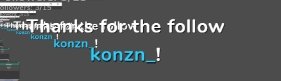
 glossy peak
@ionic kelp @jade remnant ok thanks 👍
 obtuse ibex
hey all I just prepared a custom animation for my twitch alerts but since I had to convert my .mov to a webm file it does not seem to be converting the alpha.. I am assuming that is due to the heavy compression. Is there a way I can remove this huge black box please ?
ionic kelp
@obtuse ibex How are you converting it?
obtuse ibex
Both handbreak the downloadable software and the web page cloudconvert
this animation was made in davinci and exported as dnxhr as dnxhr 444 12-bit
the davinci export has retained it's alpha but when converting to webm it doesn't and streamelements doesn't seem to like normal video files especially huge formats like dnxhr haha
lusty dragon
use ffmpeg to convert it to webm with alpha. That always worked for me
obtuse ibex
this a download or a weblink ?
I downloaded the folder and it is filled with a huge amount of files
lusty dragon
It's a command line converter. Admittedly not the best thing for people who don't already know how that process works. The last step on this video should get you there. If you downloaded ffmpeg to your downloads folder the process should basically all be the same
https://youtu.be/K_3BLXourZ0

How to create custom animated graphics for overlays/stream elements and convert these to low size webm format for streaming applications using Free or Paid software!
Suggestions for Mixer specific or general streaming tutorials are always welcome.
Please contact me via twitt...
@obtuse ibex hopefully this works for you. If not feel free to let me know. It's a tad convoluted I know, but it's a reliable method once you understand it
 hard spruce
Hmm any reason why a tiltify alert would work on emulation but not when actual dono is sent?
obtuse ibex
okay will give it a shot ! thank you very much ^^
hard spruce
emulation appears in OBS but not a real dono
hard spruce
boom 1st try  thanks
for some reason I couldn't see it
10th time hunting I spotted it there

 exotic trellis
Hi my twitch chat stats are not working it is saying not found 404 when want to access it need help viewers request chat stats so we adjust BTTV emotes acording to stats usage and so on
 normal canopy
Got a weird problem. When I go live on Twitch, my streamelements bot doesnt give a chat notification saying "ImNutty is NOW LIVE", and because of this it also doesnt send discord notifications OR show that I am live to my followers until they go directly to my profile. Also YES the "Send Announcement" setting or whatever it is called in streamelements is turned on
lusty dragon
@exotic trellis post your old and new usernames here and someone will get it fixed as soon as they can
exotic trellis
old was Silhan new one is SilhanG
lusty dragon
OBS Studio is more flexible. SLOBS has integration but is more buggy
 desert wren
ok
jade remnant
a bit biased for an obs based helpdesk 😁
lusty dragon
Also casually tagging my dad @abstract hemlock just in case nobody else sees or gets to Silhan's request above 
not my actual dad lmao
desert wren
👀
ionic kelp
 Are you sure about that Cath?
exotic trellis
Just in case ill put it all together i have issue with chat stats i can find only for old username very long ago which was Silhan new and actual username is SilhanG . Please fix it so i can start getting chat stats again for SilhanG thx in advance let me know when fixed
 austere hinge
Hey there, I'm trying to sort out some custom alerts and whenever I set it up to get names with the existing JS it comes out like this. Any ideas?
austere hinge
they're for someone else but on my account at the moment.
I'll go to #dev-chat now 👌
lament blade
hey guys! Okay so I've got my overlay all set up in OBS etc. and for whatever reason, my alerts are showing up cut off on the right hand side of the overlay in OBS. How do I fix this? I have no idea what setting is causing it.
round brambleBOT
@lament blade The default resolution for StreamElements overlays (theme and custom) is 1920x1080. Please add them in OBS at their full resolution and use CTRL+F to fit to screen if necessary. You can then downscale your stream in OBS settings > Video if you'd like https://i.imgur.com/6bWXxjR.png
 ionic kelp
Also make sure the resolution of the overlay matches what the browser source is set to. Click the 3 dots here and then properties. https://streamlabs-is-a.totallysuspicious.website/85B1UgK.jpg

 stoic pike
I get a white screen when loading the bot website, and I have tried the hard refresh, how do I fix this?
lament blade
@ionic kelp how do I know what the resolution should be set to?
also, it's now showing up properly but how do I get it show in the top left instead of the center? I also had a stream bot that I deleted in the layers and it's still showing up in the overlay?
ionic kelp
@ocean owl Not the place for that.
 ocean owl
oh ok where is
stoic pike
Edge
ionic kelp
Chromium edge or IE Edge?
 viscid ember
Hey hey! I'm curious, I just made affiliate and I can't seem to get the !slots or roulette working on my channel
stoic pike
IE Edge
ionic kelp
Update to Chromium.
viscid ember
when I do the !points it says I have 0 points and my viewers have 0 points but they are redeeming highlight messages and all that good stuff
ionic kelp
That's for channels points which we don't interact with.
round brambleBOT
10 minutes of watchtime are given to those in chat when the loyalty points are handed out (every 10 minutes). Therefore, loyalty must be enabled for watchtime to work properly.
There is no direct link between watchtime and all-time points.
It can’t be calculated from the amount of all-time points a user has because subs may earn points at a faster rate and !bonus all command increases all-time points for users in chat at that time.
Giving points to a single user does NOT affect all-time, only when giving to all in chat.
ionic kelp
@lament blade It should match what your base resolution in video settings of OBS is.
lament blade
@ionic kelp how do I find that lol
also, do you have to leave streamelements open for everything to operate, or will it operate with it closed?
ionic kelp
Ignoring my custom theme click the settings button here https://streamlabs-is-a.totallysuspicious.website/A8XnFtR.jpg

And then the video tab on the left.
lament blade
and it should be the Base resolution correct?
ionic kelp
Whatever you have as the base is what the overlay should be set to from my other pictures.
lament blade
okay cool. they match now. i wonder if i need to do the same with my mix it up bot overlay as well.
ionic kelp
Any browser sources you use in OBS should match that base.
lament blade
oh lord. I made it match and now my alert in mix it up is SUPER TINY lmfao
ionic kelp
Click the browser source in the source list and do Ctrl+R
lament blade
I'm guessing that reverses it? It's fine. I'm fixing all of my alerts now lol
ionic kelp
That resets it to default size.
lament blade
I really just wish there was a such thing as a bot that recognizes both platforms at the same time and would allow for alerts from both channels through one bot.
at the same time.
 lusty rune
Hi, so my viewers get keep on getting problems with donations for my channel (TRANSACTION REFUSED BECAUSE OF AN INVALID ARGUMENT. SEE ADDITIONAL ERROR MESSAGES FOR DETAILS.). How can i fix this? Or where can i see the see additional error massages?
ionic kelp
@lusty rune CC donations or Paypal?
lusty rune
paypal
jade remnant
no, the left is a preview for the scene you are going TO, right right is the scene that is active and showing on stream
if you dont want that then click studio mode in the controls dock
 errant tulip
so but I wanted my live image to have that entry image
 charred quartz
how to setup switch of scenes with a chat command like /replay goes to the replay scene ?
errant tulip
i don't understand
did you have one video?
i dont understand so much becouse i am brasilian
 spare lantern
yo,
I would like to remove STREAMELEMENTS from my twitch but the button which allows me to deactivate stream elements I cannot press it for 2 weeks
wary halo
i dont understand so much becouse i am brasilian
@errant tulip you can click here >> #🇵🇹︱português 😉
lusty rune
@spare lantern you go to twitch -> settings -> connections (2. one form the right) then scroll down to connections and remove streamelements
wary halo
paypal
@lusty rune contact paypal
lusty rune
@wary halo how can i do that?
lusty rune
thanks
austere hinge
How would one troubleshoot alerts appearing in the editor but not in preview? 🤔
randomly started working 
 violet cargo
I added streamelements for
!watchtime but it constantly says 0 seconds
round brambleBOT
10 minutes of watchtime are given to those in chat when the loyalty points are handed out (every 10 minutes). Therefore, loyalty must be enabled for watchtime to work properly.
There is no direct link between watchtime and all-time points.
It can’t be calculated from the amount of all-time points a user has because subs may earn points at a faster rate and !bonus all command increases all-time points for users in chat at that time.
Giving points to a single user does NOT affect all-time, only when giving to all in chat.
violet cargo
What if your not affiliated yet
lusty dragon
 dense geyser
Here trying to figure out why streamelements wont let me go to my profile so I can change my profile pic, just reloads the main page everytime
round brambleBOT
@dense geyser Please logout of StreamElements at https://streamelements.com/logout and then login again to your account (Twitch/Youtube/Facebook/Mixer)
dense geyser
wow im dumb, THANK YOU
 tranquil abyss
Hey im currently setting up a new theme and i want to have my last followers in the scronnling function. But if i activate it it only put one last follower there. Is it possible that there can be more names? (hope you understood it if not just let me know)
 languid pumice
Hi, I'm using a custom alert box from NerdOrDie (the Apex E-Sports package) and the alerts themselves are very small and I have no options to change the size of the text, anyway to fix this?
tranquil abyss
like last followers: Akida - Frank - Jonny etc
twin sentinel
@tranquil abyss Use the recent followers widget.
tranquil abyss
alright let me try i let you know if it works or not
twin sentinel
@languid pumice Contact NerdOrDie.
languid pumice
alright, will do
 queen lily
I am having trouble getting the media requests to work. From what I'v read !sr and then the youtube link (like nightbot) should be working right?
tranquil abyss
@twin sentinel im already using it but if i activate it there only is one latest follower but i want like 3-4 yk. I can send a pic if you want
queen lily
the widget is up
 mild rivet
hi i need help how i can close my twitch account on the site and connect it to my facebook account cuz when i try to connect it says CHANNEL IS ALREADY CLAIMED
lament blade
Just wanted to check if all SE elements such as tips alerts metrics work just as browser sources in slobs
Wasn’t sure where to post sorry
dense geyser
Also now, on the dono page, its not changing the 2 pics in the corners, I've changed it on streamelemts itself and it still showed my old pictures on the dono page
lament blade
Can I use both game capture and screen capture at the same time
dense geyser
Like changed it in the editor too, still shows my old profile pic with my old name
 dry hare
@lament blade SE elements are all placed into a single overlay via the web editor, and then the overlay is added to OBS as a single source. This reduces overall resources used by your PC when streaming.
 light kernel
How do i add commands?
tranquil abyss
where can i see a list of the commands in the overlay like {name}, {currency} etc
lusty dragon
@light kernel
On the SE dashboard sidebar > chat commands > custom commands
 mossy panther
hi guys,
since the last OBS/Stream element update, my sound is not sent to the stream (no PC sound nor microphone sound). When I monitor the sound with the software it's OK but on the twitch end no sound is going out
have you ever encounter this kind of issue?
 lean trail
hi, im moderating a channel on streamelements , configurating the overlays and other stuff,when i simulate events it shows, my issue is the follow notifications show up but everthing else doesnt while live
lusty dragon
Nope, but the OBS discord might be a better place to ask for that @mossy panther
@tranquil abyss are you looking to customize or edit those parameters?
tranquil abyss
well good question i think both but at first edit
lusty dragon
If you're looking specifically the code to edit the JavaScript or CSS, you can open up the settings for the alert you want to edit in the overlay editor, scroll to the bottom and enable custom css
If you're just looking for the commands themselves, not the code, you can find the list of variables to make custom commands in the SE website sidebar > bots > chat commands
tranquil abyss
alright thank youuuu
lusty dragon
Sorry if that was a bit much. Everyone's got different ways of asking for the same stuff. Trying to cover all the bases 
@lean trail is the streamer you're modding for using OBS.live? If so, have them re-log in to it. That usually fixes similar problems. If not, I'll wait for a color name to help you further
lusty dragon
Let me know if it works when he does so I can validate or invalidate my ego
lusty dragon
On twitch or in OBS.live? If it's the latter then the re-log should still fix it
ionic kelp
@lean trail When you click the emulate button there should be an option at the top to let it get triggered in OBS. Make sure that's enabled.
lean trail
@ionic kelp the emulations work
lean trail
the real hosts dont appear
round brambleBOT
Due to changes to Twitch API, we have filtered out hosts and will only show these ones on your activity feed:
- All hosts coming from an online channel with at least 1+ viewer
- Auto host events with at least 1 viewer - only from a channel that just went offline
Note: If you see "X channel has hosted you" with no viewers on the back, that is considered an offline host or a host with 0 viewers, we do not show these.
Note for Mixer streamers: The above 2 filters currently apply for Mixer and we are aware its actually not how Mixer hosts work. We do plan on changing it, but no ETA on when.
lean trail
ahhh
ionic kelp
That also applies with raids as well.
lean trail
ah ok
lusty dragon
When you said everything else I didn't expect it to be only host/raids
 smoky imp
Yop
lean trail
@lusty dragon you helped i just wasnt clear abut my issue
thanks to everyone who gave the time to help
lusty dragon
I'm glad sudo deduced that though. The point is to help accurately. Consider my ego lightly damanged but not broken 
 unborn rampart
I have a question about Kappagen: I want to enable Subscriber Only use of on-screen chat emotes (via Kappagen). This appears to work fine for Tier 1 subs, but it does not work with my Tier 3. If I uncheck "Subscribers only", all emotes show up (including those selected by my T3), but I don't want everyone's emotes to show. I just want subs to have access to this feature, but I want all subs to access it not just T1. Does Kappagen not recognize T2-T3 subs? Or am I missing something? Help would be much appreciated. Thanks for your time! (I don't mean to spam this, but I can't find if anyone has responded to me and I don't think anyone has @ me yet - I hope this is okay to repost.)
This is my 4th or 5th time asking this question. I would really love some assistance. My T3 sub(s) are feeling left out of the experience and since they are paying the most for their membership, I really do not want them to be excluded. Thanks for your time.
ionic kelp
@unborn rampart I'll pass it along to those that I know should be able to investigate this.
 fervent kiln
Hello guys, I need help, week ago I wrote a week ago I wrote to one of the streamelements staff and I wrote him that I had the old statistics of my twitch channels streamelements. At the moment my statistics have nothing when I write nake messages and I have open statistics and I give F5 statistics are reset.
ionic kelp
@fervent kiln Fine for me https://streamlabs-is-a.totallysuspicious.website/5jVLUN6.jpg
 fervent kiln
Ahaaaa
unborn rampart
@ionic kelp thank you SO MUCH. I really, really appreciate it. Kappagen is very popular on my stream / for my company and I would love to have it fully functional for all subscribers. Thank you, thank you. Have a great day!!
ionic kelp
I'm not sure when I'll get a response but I promise I'll try to see if someone can ping you when there's an answer.
fervent kiln
@ionic kelp Now working, maybe bug
unborn rampart
@ionic kelp Thank you, I really appreciate it. I'll check back in a week or two if I don't hear anything before then.
ionic kelp
It has some bad hiccups sometimes.
fervent kiln
@ionic kelp And one little problem, I cant see the new emote residentCD in FFZ emotes added 5 hours ago. Its bug or it need a little time?
ionic kelp
It's showing for me both in the emote menu and for your friends in chat.
Though I'd tell helgorek to slow down on the  before getting
fervent kiln
He is little bit autistic but he is okay, I told him
lament blade
hi i was setting up tipping. i thought i had copied it and saved and clicked it was done. something didnt work and now i cant find a way to copy the page link again. can you help with this?
ionic kelp
@lament blade Change the link you have in the panel right now to just /tip/ at the end.
lament blade
so it will look like streamelements.com/clareg/tip ?
ionic kelp
yup
 lethal tide
If I click on the "CLOSE MY ACCOUNT" button, can I log in to the site again? I am going to do a "video lesson" today and I want to reset everything in my test account, as if I were entering the site for the first time.
lament blade
thank you 🙂
ionic kelp
@lethal tide What's the account name that you used?
exotic trellis
i still have issue with chat stats i can find only for old username very long ago which was Silhan new and actual username is SilhanG . Please fix it so i can start getting chat stats again for SilhanG thx in advance let me know when fixed
can someone help me with it<
ionic kelp
It got lost in our other channel this morning. Gonna have someone poke it to see.
lethal tide
@ionic kelp "bibieiti"
ionic kelp
@lethal tide I misread that message.
 supple summit
Hi have a nice night. I need to learn when we click to record where it recording how can i reach that record.
ionic kelp
Generally it should be automatic once you do it but given it's not always playing nice when deleting the account you'd have to email the person who handles that stuff and they'd be out until Sunday.
round brambleBOT
@supple summit For the best OBS support, please join their Official Discord @ discord.gg/obsproject
ionic kelp
@exotic trellis It's updated now. Might take a bit for stuff to catch up.
 mortal pewter
Im trying to access my dashboard on the website right now, and when I click dashboard it doesn't go anywhere : /
ionic kelp
@mortal pewter Are you on your account or an editor for someone else?
mortal pewter
Im logged in on my own twitch account
round brambleBOT
Please logout of StreamElements at https://streamelements.com/logout and then login again to your account (Twitch/Youtube/Facebook/Mixer)
ionic kelp
Try that.
 quick roost
Hi StreamElements, when i try to change the title or the game with the Commands !Setgame/!settitle i get the following error message: @quick roost, something went wrong while trying to update the game.
mortal pewter
thank you! it worked 💞
 neat silo
Good night, I'm having problems with my alertbox, when I do the tests on streamelements it works but then on stream when they follow or something like that doesn't appear, does anyone know how to help me?
lament blade
Ciao
 unreal yew
what causes the error when you try to adjust volume via the !volume command that 'an error occurred, please try again later' it seems to be happening a lot lately.
ionic kelp
It's a known unfortunate issue that randomly happens.
unreal yew
has it been happening a lot more often the past couple of weeks?
 sharp osprey
Can someone help me i am from belgium
ionic kelp
@unreal yew We are aware of it but to my knowledge it's a bit hard to track down the exact issue.
@sharp osprey Ask away and we'll try to help you.
sharp osprey
Yess
 tired tulip
Is there a tutorial video for stupid people like me who have no idea what it is that they're doing and just learning because I tried watching some videos and I was watching them with my hands on my head and thinking to myself "WTF is this" and "How am I supposed to know or do that" and "What's that acronym mean" so anyone that can link me to very and by very I mean VERY basic tutorials to start out for a beginner.
round brambleBOT
@tired tulip New to Stream Elements?
Check out our YouTube channel https://www.youtube.com/c/streamelements/videos
with tutorial videos from setting up the basics, to in depth details on how to use our product.
New to OBS? Here is a 4 step quickstart guide
https://obsproject.com/wiki/OBS-Studio-Quickstart
Want to learn even more? Here is an in-depth overview
https://obsproject.com/wiki/OBS-Studio-Overview
tired tulip
Uh . . . ok
ionic kelp
Where exactly are you lost?
light kernel
How do i get the SE to say thank you for following once a person follows?
tired tulip
@ionic kelp everywhere I'm literally new as in today is the first day - I'm researching webcams and microphones and learning - it sucks being my age and having to learn something new - trust me I like simple and their website for the videos is NOT simple.
light kernel
Thx for the help @jade remnant
 worthy sparrow
is chat stats broken right now?
abstract hemlock
Maybe just a hiccup, please try again in a few minutes
 acoustic edge
Is there a way to automatically give a regular role to someone who has watched X amount of hours on stream?
!gc
round brambleBOT
You can download our Desktop App Ground Control here: https://streamelements.com/groundcontrol
 gentle hinge
Is there a way to set a universal font/size/colour on the website or do we have to do it all manually?
ionic kelp
@gentle hinge What do you mean?
gentle hinge
So I've imported all my stuff from another service but all my fonts are too big ( I guess the scaling doesn't match ) is there a way to set the font for all my alerts to be the same size/font & colour without individually doing them all?
ionic kelp
I assume you came from using SLOBS?
gentle hinge
Well - Streamlabs yes, but not using SLOBS. I've imported everything using the chrome extension but all the fonts are a little too big and I'm just wondering if there is a way to change them all at the same time without having to individually change my 40 something alert variations.
ionic kelp
Not really unfortunately.
gentle hinge
Pfft, I really don't understand why not a single service would think people would want to have the exact same font and style for everything but think everyone wants to do it manually, ohwell - guess I better get started lol.
 upbeat glade
Which downscale filter is generally the best for image quality in faster paced games?
Or do they make any difference?
thorn walrus
Anyone got any advice on what dB to set my noise gate to? I keep picking up my keyboard clicks.
upbeat glade
@thorn walrus try rtx voice
thorn walrus
whassat?
round brambleBOT
For the best OBS support, please join their Official Discord @ discord.gg/obsproject
ionic kelp
That's for both of you.
thorn walrus
I don't have a RTX GPU.
upbeat glade
u don't need one
ionic kelp
thorn walrus
According to their site you do.
upbeat glade
there's guides on google that show u how to make it work on anything
even amd gpus
it's a simple txt edit
jade remnant
or just use a noise suppression filter and adjust the strength,
if the clicks are super loud then add a noise gate.
depending on your mic, check out the polar pattern of it and aim it correctly (at you and away from the keyboard)
thorn walrus
Yeah, I'm trying to find ways to get it close to my face without the boom blocking the monitors. That's my biggest gripe.
And I have a mechanical keyboard, so there's that.
Seems like no matter what I do the damned boom gets in my way.
acoustic edge
Is there a way to promote somebodies User Level based on the amount of hours they spend in stream?
thorn walrus
What do you mean user level?
acoustic edge
I want to make it to where if someone spends 30+ hours in my stream they become a regular
I know I can do it through commands but I want it to be automatic, is there a setting/option for this?
 whole dune
Hello, can I somewhere set that people that posts link through twitch loyalty points will not get timed out? Or where should I ask? Thank you ♥️
 coarse sundial
lusty dragon
coarse sundial
lusty dragon
@thorn walrus do you have at least a 1000 series Nvidia card? If so, rtx voice is very easy to install it and will work well with minor adjustments. It's fantastic at rejecting mechanical keyboard noise as well
thorn walrus
I'm running a GTX 980 Ti.
lusty dragon
Aw heck. I don't know if anyone ever got it to work on a 900 series
acoustic edge
So no answers?
thorn walrus
I don't know, Psync.
lusty dragon
@thorn walrus
https://forums.guru3d.com/threads/nvidia-rtx-voice-works-without-rtx-gpu-heres-how.431781/
Apparently mixed results for 900 series, but find the rtx voice installer, attempt to install it, and follow this guide. Hopefully you'll be in luck with a higher end 900

guru3D Forums
The new nVIDIA RTX Voice works just fine without an RTX GPU and on windows 7 too but you still need an nVIDIA GPU it won't work with AMD, tested and...
If it does work, you'll wonder how you ever went without it haha
abstract hemlock
@acoustic edge you will have give the "regular" role on the user management section
 oak merlin
algum br ai q possa me ajudar ?
acoustic edge
@abstract hemlock So I have to administer the role manually every single time?
round brambleBOT
@acoustic edge
Chat/Bot Levels
100 - Viewer
250 - Subscriber (Twitch subscribers automatically placed at this level)
300 - Regular
400 - VIP (Twitch VIP automatically placed at this level)
500 - Moderator (Twitch chat moderators automatically placed at this level)
1000 - Super Moderator
1500 - Broadcaster
Dashboard Manager Levels
Bot Supervisor
Editor
Full Access
Owner
https://i.imgur.com/s61Liry.png
lament blade
#🇵🇹︱português @oak merlin
thorn walrus
@abstract hemlock Thanks, I think I've got it working. 🙂
@abstract hemlock @lusty dragon Should I take off my noise suppression & gate completely with this things running?
lusty dragon
I did. If I left my old one running, it would give me issues with proper volume control
It basically replaces any noise gate and suppression, but if you have compression you could leave that on
lusty dragon
I use it to remove the noise from my electronic drum kit's heads/cymbals. My audio has never been cleaner
whole dune
@rapid tapir or anyone else Hello, can I somewhere set that people that posts link through twitch loyalty points will not get timed out? Or where should I ask? Thank you ♥️Do you know op.gg reviews for lol players? I cant figure it out how to timeout all links including the ones from op.gg which are not purchased by twitch loyalty points. I'd like to timeout people posting to chat their links on their profiles but not the ones that redeems it. MUCH LOVE
 karmic mulch
My paypal email wont connext to my youtube tipping section can anyone help?
 tiny sphinx
Hi, I'm Bertoli(Vraum), I'm a SSKotZ streamer. I have a problem with StreamElements/OBS Studio app. I can't see anything o my "worktable" there is a blank square in all part. That's my third day using your system and I love it, please help me. I don't know how to solve it, and there is no video or forum on internet that can help me. Every single "window" inside my OBS Studio is WHITE. I REALLY NEED SOME HELP, PLEASE.
abstract hemlock
@tiny sphinx share a screenshot
tiny sphinx
round brambleBOT
@tiny sphinx Streamelements on top of OBS -> Logout -> login
 tired marten
Can someone help me? my obs when i'm going to use the media request, and click on the show on stream, it opens the media request in 2 browser, i'm using one in scene 1 and the other in 2 and is playing double sound, does anyone know how to solve this?
 lucid pawn
I dont see a section for labels, I am having trouble getting Top donation to display. Well any that has a text field and the no data text below it. The latest donation, follow, sub all those work just the top donation will not display. Any suggestions on what to check i looked into the tip mods and its not on. I have looked on the internet for a couple days with no luck
charred quartz
ok so nick i can help you with that
but its a little complicated to understand so i recommend you to read two or three times
the test system for tips
lucid pawn
long as I get some direction I can work though it
charred quartz
don't register tips in system i mean, its just simulated that MEANS its only tipping in THIS session
by that, the default top donator configs by default in ALL TIME TOP DONATOR
thats why u don't get anything from the simulation
because its only tipping for this session
lusty dragon
@tired marten use one browser source between both scenes. If they need different setups, make your media request exist on its own overlay separate from other alerts/functionality. That's what I do at least
lucid pawn
ok give me a sec
charred quartz
ok i will wait u to test it and will continue the explanation of the second part
brb
lucid pawn
ok so the session top tip will show the amount but not the name, the all time just says no data
charred quartz
yes
ok lets go to the second part
get back the settings to the all time
top tip
lucid pawn
ok
charred quartz
click here
goto session data in tabs
and there u can trick the system's data to think what u want
lucid pawn
ok well i can trick it and get it to work but in stream whats going to happen will it work correct?
charred quartz
yes that tab is part of the simulation, but as u can see even if u set the values all time top tip will still show
NO DATA
thats because >
the tab aggregates
sets TIME based
values
thats all, from there u can set values that will change the default statment
lucid pawn
well long as it will work in stream I am good thats all I was worried about. I guess it just needs a real donation to work
opaque flax
how do i edit an automatic message SE sends in a specific rhythm?? is it on the creator dashboard?
lucid pawn
Thank you legend for helping
charred quartz
glad i could be helpful
opaque flax
thanks
charred quartz

 merry cloak
hey! i have my alert notifications showing but i have no sound coming from them. not even the browser preview is playing sounds, any ideas?
merry cloak
it has the default sound files, do they not work anymore?
merry cloak
it doesnt
charred quartz
u can hear the sounds in the preview?
ok, check the mixer from windows if the audio of your browser is not muted, try going to youtube
or something
merry cloak
sound works from other sites as well
volume mixer has chrome at full
same with obs
charred quartz
go into the subs options and check that volume control
merry cloak
same as you showed
 lunar sleet
Anyone know how I can change my bank account for se pay
charred quartz
hm i'd probably try a fresh overlay and setup sounds yourself, if u are using default sounds from some template, try reimporting it
lusty dragon
I've seen that resolved by just making your browser source again with a new link. I've also seen full reinstalls do it in other cases
round brambleBOT
@lunar sleet Please contact us via email for support with SE.Pay. You can use our contact form here: https://streamelements.com/contact Thank you
round brambleBOT
@merry cloak Twitch prime (new and resub) and paid subscriptions (resub only) must be shared in chat manually by the person subscribing in order for the subscription information to be sent to StreamElements. For twitch prime, the user needs to have sharing enabled on https://www.twitch.tv/settings/prime. For paid subs, if the share box doesn't show up immediately it will when they refresh the page. https://i.imgur.com/VNJN0Uv.gif https://i.imgur.com/2297EA7.png
lusty dragon
"turn it off and on again" is the most common IT meme for a reason
 livid brook
how do i get stuff from obs to obs studios like when i get new follower and stuff
merry cloak
yep! the only one i cant test rn is the prime one lol
but it all started playing again! thanks for your help @charred quartz & @lusty dragon
lusty dragon

charred quartz

lusty dragon
@livid brook a little lost on the question- are you trying to move from a different version of obs to a new one, or are you wondering how to set up follower/tip/subscription alerts for StreamElements?
livid brook
@lusty dragon new one ive just stared btw'
lusty dragon
@livid brook https://youtu.be/X5VzXjqAsjk
We are thrilled to announce the launch of the remastered StreamElements Overlay editor!
https://p.strms.net/newoverlayyt
Why StreamElements Overlays are better?
😎 Simple: Load your entier setup using only 1 link
⚡ Fast: Cloud-powered Overlays arrive in real-time, say goodb...
Best place to start
 balmy spear
Rolinx
 hallow solstice
Hey just wondering for the media request is there a way to have it use spotify?
abstract hemlock
@hallow solstice we don't have spotify integration anymore
hallow solstice
OK thank you!
charred quartz
depending on what u want, if the case is just for displaying
then u should look here > https://obsproject.com/forum/resources/obscurrentsong-spotify.658/
OBS Forums
Displaying the current song playing on Spotify!
Usage.
- Create a folder and extract the zip file in the folder.
- Open OBSCurrentlyPlaying.exe
- Go to OBS create a text source then press tick "Read from file" then select the text file where...
abstract hemlock
¯_(ツ)_/¯
lusty dragon
People jump ship so fast haha
charred quartz
for a more UI UX friendly version i recommend that one https://obsproject.com/forum/resources/spotify-stream-widget.664/
OBS Forums
A small Tool for Streamers to show the current Track of Spotify to your Viewers! Completly customizable to fit your style.
Screenshots
Download v1.3.0.0
How to use it?
Download the tool
Please make sure that Spotify is running on the...
@hallow solstice
 silk vapor
Not sure if this is the appropriate channel for this question, but maybe someone can help
I've been streaming to Mixer with Stream Elements for awhile.
I am now interested in streaming to Twitch and want to continue using Stream Elements
I didn't know you could add channels to your account, so now I have an account on Stream Elements for Mixer and an account for Twitch
I can't add one to the other as it says that account is already claimed. Any way I can delete one of the accounts or force them to link on Stream Elements?
ionic kelp
@silk vapor Gimme a sec to type this out
lusty dragon
charred quartz
just click in your name in the TOP panel it should open-up a tabs settings, go into security and u should now see a button called "delete my account" (careful with what u doin)


 ionic kelp
You have 2 options.
Delete your twitch account with us along with anything you might have created with it.
You can merge them but deleting either 1 in the future requires everything being deleted for both. 1 way street.


round brambleBOT
@silk vapor You can find your JWT token on your account channels page ("Show Secrets" to reveal the token): https://streamelements.com/dashboard/account/channels
READ ME:
This is a private security token. Do NOT share this token here or other public places, only with a StreamElements staff member in private.
charred quartz
HAHAHAHA
lament blade
Hola, como activo las alertas para que salgan en la pantalla del directo
es decir la animación de follower, suscripcion etc?
ionic kelp
#🇪🇸︱español
lament blade
porque la he configurado pero no sale en el directo
si alguuien puede ayudar
seria de ayuda
charred quartz
Este canal solo está en inglés amigo, si quieres ayuda en tu idioma ve a tu canal.
but i can help you with that if u could explain it in english please
#🇪🇸︱español @lament blade
silk vapor
Thanks all!
 lapis cove
Hello, how addicted should the system be? how does this percentage work? the bigger the harder to win?
abstract hemlock
wdym?
lament blade
how do i customize the name of the chatbot?
i figured i would have to make another account... but i cant find it anywhere in obs.live or ground control
lusty dragon
In OBS.live you can find it in the activity feed's settings.
abstract hemlock
check pinned messages on #helpdesk-selive
lusty dragon
|| I'm gonna let Ren just do his job  ||
||
charred quartz

 lunar sorrel
Is there a way to format only certain text in the output for a custom command (in specific a shoutout that shows the game name as a different color?)
 tranquil silo
I need help
viscid pebbleBOT
Hi @tranquil silo, Please ask your question(s) or describe the problem you're looking to solve so staff or a support volunteer can assist you as soon as they are available.
tranquil silo
My watch time command says 0 seconds for everyone is there a fix?
round brambleBOT
@tranquil silo 10 minutes of watchtime are given to those in chat when the loyalty points are handed out (every 10 minutes). Therefore, loyalty must be enabled for watchtime to work properly.
There is no direct link between watchtime and all-time points.
It can’t be calculated from the amount of all-time points a user has because subs may earn points at a faster rate and !bonus all command increases all-time points for users in chat at that time.
Giving points to a single user does NOT affect all-time, only when giving to all in chat.
abstract hemlock
@balmy spear this is the second time that i have to delete some random image, please stop
tranquil silo
I enabled it at its still not working what do I do?
abstract hemlock
@tranquil silo remember that you should have to wait 10 minutes, then the watchtime of your viewers will be refreshed
tranquil silo
ok thanks
final monolith
How do I set up the streamelements donation widget on my live-stream?
I'm not sure where to get the browser link that i can input into obs
round brambleBOT
@final monolith We've released our new Overlay Editor revamp. You can check out the changes and how to work with it here: https://youtu.be/X5VzXjqAsjk
Check out our blog post as well: https://blog.streamelements.com/streamelements-overlay-editor-just-got-even-better-c22cb5b4853e
We are thrilled to announce the launch of the remastered StreamElements Overlay editor!
https://p.strms.net/newoverlayyt
Why StreamElements Overlays are better?
😎 Simple: Load your entier setup using only 1 link
⚡ Fast: Cloud-powered Overlays arrive in real-time, say goodb...
 hallow agate
For some reason my stream elements command(!watchtime) is displaying the message on the chat but always says 0 seconds. Please help.
lunar sorrel
Does Streamelements have a color formatting syntax for custom commands?
ionic kelp
No.
lusty dragon
@hallow agate you need to enable loyalty on StreamElements
lunar sorrel
@ionic kelp was that to me?
ionic kelp
yes
lunar sorrel
@ionic kelp thanks, the @ helps clarify that - thank you and take care.
charred quartz
res problem
u should put the web-source
in 1920
and 1080
they are probably in 800 600
i guess
i'm right?
charred quartz
yep its wrong
abstract hemlock
@final monolith check the dimension on the browsersource
charred quartz
res problem
final monolith
It says
abstract hemlock
tranquil silo
Thanks
 next venture
Hi I followed all the instructions to change the bot name in the pinned messages but I still cant find the option in my ground control!
Im not sure what im missing
final monolith
Also I was wondering, why my stream isn't allowing for any other type of quality other than 720
When I did a test run earlier it allowed for 480 p and all the way to 160p but now it only shows 720 p as the only option
round brambleBOT
@next venture Currently renaming the bot fully works with OBS.Live.
You can follow this video guide to set it up: https://discordapp.com/channels/141203863863558144/494513233416421386/561516184718278676
If you don't want to use OBS.Live and want to stick with Ground Control, please let us know your Twitch username.
next venture
my twitch username is Lucrity
abstract hemlock
@final monolith those are random, someday you will get it... some don't (partners always have those)