#helpdesk-twitch
1 messages · Page 653 of 1
 zenith widget
 idle sleet
i need help im new to obs switching from stream labs
 round brambleBOT
@idle sleet New to Stream Elements?
Check out our YouTube channel https://www.youtube.com/c/streamelements/videos
with tutorial videos from setting up the basics, to in depth details on how to use our product.
New to OBS? Here is a 4 step quickstart guide
https://obsproject.com/wiki/OBS-Studio-Quickstart
Want to learn even more? Here is an in-depth overview
https://obsproject.com/wiki/OBS-Studio-Overview
idle sleet
i downloaded and overlay pack and need help
 raw horizon
So I was wondering. Is it possible to have host alerts for viewers that host with 0 viewers? Because I have one set up and it only goes off when its around 1 viewer, not zero.
round brambleBOT
@raw horizon Due to changes to Twitch API, we have filtered out hosts and will only show these ones on your activity feed:
- All hosts coming from an online channel with at least 1+ viewer
- Auto host events with at least 1 viewer - only from a channel that just went offline
Note: If you see "X channel has hosted you" with no viewers on the back, that is considered an offline host or a host with 0 viewers, we do not show these.
Note for Mixer streamers: The above 2 filters currently apply for Mixer and we are aware its actually not how Mixer hosts work. We do plan on changing it, but no ETA on when.
idle sleet
anyone there?
zenith widget
What overlay pack?
usually if you get an overlay pack from VBI or NoD they have instructions
on how to install them
idle sleet
i dont know how to edit it, webcam, desktop audio, game audio.. all that
round brambleBOT
@idle sleet New to Stream Elements?
Check out our YouTube channel https://www.youtube.com/c/streamelements/videos
with tutorial videos from setting up the basics, to in depth details on how to use our product.
New to OBS? Here is a 4 step quickstart guide
https://obsproject.com/wiki/OBS-Studio-Quickstart
Want to learn even more? Here is an in-depth overview
https://obsproject.com/wiki/OBS-Studio-Overview
@idle sleet We've released our new Overlay Editor revamp. You can check out the changes and how to work with it here: https://youtu.be/X5VzXjqAsjk
Check out our blog post as well: https://blog.streamelements.com/streamelements-overlay-editor-just-got-even-better-c22cb5b4853e

We are thrilled to announce the launch of the remastered StreamElements Overlay editor!
https://p.strms.net/newoverlayyt
Why StreamElements Overlays are better?
😎 Simple: Load your entier setup using only 1 link
⚡ Fast: Cloud-powered Overlays arrive in real-time, say goodb...
 grave quail
Hello. I'm from Germany and my English isn't good. But I will hope that you answer my questions
My question: How can I connect 2 Commands with each other
Example: Some People want to play with me and they enter.!join
Now I want that these for example 7 people are in a group where 3 to be selected randomly
Is this possible?
Those who have entered !join should be transferred directly into a group by selecting some people at random
 grave quail
Is that for streamelements?
grave quail
I hope it helps
 untold crest
As you can see - it allows to pick random users from queue
grave quail
Ok thx
 sturdy vapor
text scrolling in overlay editor doesn't seem to be working
zenith widget
save the overlay and refresh
 celest sleet
Hello there,
Since more than ten days ago my alerts for follows have stopped working, even in the list of recent events not appear who follows me, in other platforms like Moobot or StreamLabs appear in recent events but not in StreamElements. This happened overnight. 
zenith widget
I resubbed your webhooks - follower alerts will start showing
celest sleet
Thank you @zenith widget 
 lost coral
Can anyone tell me how I add mini games and commands to the SE chatbot?
 lament blade
Okay so every other alert displays my custom sound and gif, except for the cheer alert. How come?
lament blade
Got it! Thanks!
zenith widget
@lost coral there is a modules page in our dashboard
 ebon drum
If i select 'text over image' in my alert box it doesn't show the text, is there a solve for this?
untold crest
Check text position if it is not out of the screen (like top -50)
ebon drum
that helped. Thanks!
 red lantern
Hello, there is possible to help me someone with video how to fix media request? it's started to say "this video it's not avaible in your country"
round brambleBOT
@red lantern Streamelements on top of OBS -> Logout -> login
red lantern
@round bramble thanks a lot , u save my day
 austere star
Hi, my alerts haven't been showing for 2 days since i made my overlay ive checked they aren't off the screen, just not sure why they don't show?.
zenith widget
I reloaded your webhooks so now they should start appearing
 narrow mantle
is there any way to make a goal with background gradient?
austere star
Okay thanks
untold crest
@narrow mantle You can create a custom widget and paste code to code editor from here: https://github.com/StreamElements/widgets/tree/master/GoalsOverPeriod - this one has gradient as default

GitHub
Contribute to StreamElements/widgets development by creating an account on GitHub.
narrow mantle
Thanks @untold crest, i was already looking this code, but do you know if there is any difference between "background" and "background-color" in the goal widget? Because when i paste this code "linear-gradient(90deg, rgba(248,132,182,1) 0%, rgba(138,52,223,1) 100%);", it shows on preview the right color, but in the goal background, doesn't show the gradient. Sorry if my English is difficult to understand xD
untold crest
There are two backgrounds there - one is for empty bar and one for the fill
 steel veldt
Anyway to reset all donation history and stuff?
 prime pulsar
i just joined streamelement and it cup me off the donations starter page hoe do i go back on cause it wont let me
 wispy forge
ok
wispy forge
Why my alerts are lagging?!
 wanton pendant
hey support 🙂
i would like to change my se-bot's follow, sub, cheer and tip message-emote (using my own twitch emote)
please tell me, how to do this, can't find the messages 8)
 coarse fjord
Does anyone know how to turn on points?
zenith widget
@coarse fjord Loyalty settings on the left side menu in the dashboard.
round brambleBOT
@wispy forge OBS -> settings -> advanced -> scroll down -> enable/disable hardware accel.
https://i.imgur.com/ggMe9ZE.png
 zenith widget
@wanton pendant Left side menu on dashboard -> modules -> chat alerts
wanton pendant
@zenith widget thx, sorry man, can't find modules and chat alerts. left hand side, modules
zenith widget
@coarse fjord You need to have our bot in your channel and the loyalty system enabled and every 10 minutes when live, people will gain points
wispy forge
thanks ... i made this logo for one of twitch streamer and i am having issue with is... the subscriber text not stays inside the box...
zenith widget
Text settings -> advanced -> adjust margin
coarse fjord
Idk why its not helping
zenith widget
Well i don't know what you are doing and what is not "helping" here.
wispy forge
please help me
zenith widget
Text settings -> advanced -> adjust margin
wispy forge
ok thanks
austere star
Having the alert box in a combined overlay or in it's own overlay shouldn't make any difference right, i get the generic twitch chat message just nothing from my alert box for hosts
prime pulsar
ive got a rubbish computer with a rubbish amd cpu whar are the best setting ?
zenith widget
@austere star what generic twitch msg?
round brambleBOT
@prime pulsar There are no "best settings".
Please understand that every setup will be very different.
Any guides or videos that claim otherwise are misinforming. Your best option is to start with a base and adjust as necessary.
You can run the OBS auto-configuration tool. To use the auto-config, click on the Tools menu in OBS, select Auto-Configuration Wizard, and then just follow the on-screen directions.
You can use this tool to get baseline settings for your hardware and adjust as necessary from there.
Test, test, and test again. We are happy to offer suggestions for any issues you may be having afterwards, but not a list of settings.
Thank you 
austere star
@zenith widget example is now hosting you. but my alert box doesn't register anything
prime pulsar
wheres menu
round brambleBOT
@austere star Due to changes to Twitch API, we have filtered out hosts and will only show these ones on your activity feed:
- All hosts coming from an online channel with at least 1+ viewer
- Auto host events with at least 1 viewer - only from a channel that just went offline
Note: If you see "X channel has hosted you" with no viewers on the back, that is considered an offline host or a host with 0 viewers, we do not show these.
Note for Mixer streamers: The above 2 filters currently apply for Mixer and we are aware its actually not how Mixer hosts work. We do plan on changing it, but no ETA on when.
 rustic coyote
Hi guys. I got a question about my chat commands. Every time somebody use the command !subs, my streamelements put 1 more subs in than I have in the chat on twitch. But it works perfectly on my overlay. Hope it make sense. I have tried everything by now and though you guys about had an answer for my problem 🙂
round brambleBOT
@rustic coyote Due to a recent change from Twitch API, these features are affected by the change:
- Ground Control does not have Custom Bot Name
- Subscriber count will count the Channel and any other permanent sub you may have (+1 or +2 or +3 on top).
We are working on fixing both issues, but there is no ETA.
OBS.Live still has Custom Bot name working fine in it.
rustic coyote
Thank you 🌸
Have a nice day all
lament blade
All my alerts stopped working today
zenith widget
Can you elaborate?
 tender yoke
@tough raft thank you
lament blade
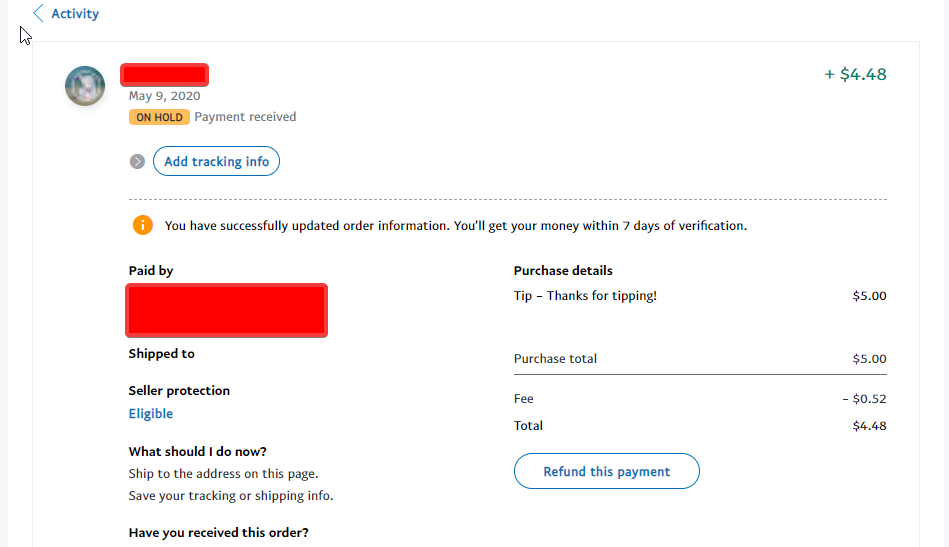
Hey, so one of my viewers tipped me but In paypal it thinks its a shipment/order and its on hold right now.
 strange geyser
All the alerts seemed to have stopped working
zenith widget
Can you elaborate?
@lament blade We have not changed anything on our side as we are a passthrough gateway for paypal. Check how you've setup your paypal account and if its not an entertainment type account, that might be why you received a goods type tip
 rapid solar
Hello guys
Can i have some help ? I need to close streamelements bot m how do i do that 😦 ?
zenith widget
https://streamelements.com/dashboard -> left side -> part channel
 lavish compass
hi guys, is it possibal to set alert when I score a goal in FIFA??
something to pop out on screen?
zenith widget
That would be something that you manually trigger via a command
 fiery stream
hey there! Dont know if this was before, but i changed name on twitch and the extension at chat stats says no data.
round brambleBOT
@fiery stream If your chat stats aren't working it's most likely because you changed your username! If you can give us your old and new username, we will get a chat stat fix for you.
fiery stream
Old name was novakeandtheguys
zenith widget
and new name?
 unique tusk
Hey folks
I got an overlay pack from Owned and it all works well in OBS but the follower, cheer, subs don't seem to show up. The donation test i did does but when i go to the source properties it looks as though the text file reads data from slobs-client, when i previously used streamlabs. Any help in the right direction would be great, thanks
zenith widget
what is your username
unique tusk
mvdurance
zenith widget
I resubbed your webhooks so now events should show up
 brittle parcel
hello i need help, i cant find broadcast information in OBS,can somebody help me ?
round brambleBOT
@brittle parcel If you are not seeing the OBS Twitch integrations and have OBS.Live installed, please follow these steps:
- Make sure you are on the latest and greatest version of OBS.Live
- exit OBS (make sure OBS is not running)
- delete %appdata%\obs-studio\plugin_config\obs-browser\obs_profile_cookies
- start OBS.Live
- Settings -> Stream -> disconnect -> connect
unique tusk
thank you KeiZar
fiery stream
@zenith widget MrNovake is the new one
 tired widget
I don't know what section to post this in but I can't get ground control to load, just get's stuck on the updating screen
 inner garden
zenith widget
inner garden
zenith widget
@fiery stream done
@tired widget open a cmd and run this
del %homepath%.se-gc\config.json
@inner garden In the overlay editor, there is a chat widget you can add
 tacit trout
Hey, I was wondering how to activate TTS for donations over 5€, and how to change the voice line
zenith widget
@tacit trout My overlays -> overlay editor -> click on the alert widget -> tts settings
 strange summit
In SE's overlay variations, it has options to set text appearenance delay and TTS delay... is there a way to delay the sound as well?
tacit trout
Ty 🙂
strange summit
@zenith widget I mean the sound file above, not the TTS sound.
fiery stream
@zenith widget Thank you so much ❤️
tired widget
@zenith widget I've tried the cmd, it just comes up with - The system cannot find the path specified
 tribal crater
hello 🙂 is there a way to sync your blacklisted words from automod (twitch) / streamelements chatbot with the TTS anti spam function? or do you have to add all the words and phrases manually there?
 subtle summit
Ok
I don't know where to change "top tip label" to "latest raid label" or "latest host label"
 weak delta
@subtle summit
All the labels you could ever want are right there. Labels > Category > Latest
weak delta
That blue circle in the screenshot is on the bottom left of your overlay in the overlay editor on the StreamElements website.
 sharp harness
Applied for a Magic: the Gathering Creator's Program for the EU. Somehow apparently my country of residence was North America and I've been told to reapply but it's not giving me an option to reapply or edit my application through StreamElements' website. Any ideas?
grave quail
Is there anyone here who has been using Streamelements for a long time?
weak delta
Most people here, yes. I've got 5 months full-time, give or take. Need assistance?
grave quail
Yes
I've created a random generator with words. Every word got another price. Is there any way to highlight the results in the chat for the streamer
I did it with ${random.pick '.....'}
weak delta
Depending on how the streamer is viewing chat, there could be a couple of different solutions. If they're using a program with the ability to set up custom tags, they could configure the tags to the words they want highlighted. If they're using the default Twitch chat window, they could have their name included in the command response with whatever word they wanted to be highlighted for.
 finite zephyr
Anyone else having an issue getting to their dashboard? I keep clicking the link on the StreamElements website and it's just stuck in a loop
 modest dagger
Need help my followers goal count is off by 6 is there any way to fix it. Thank you for your time
prime pulsar
how do i add widgets
lament blade
@finite zephyr force a logout by going to streamelements/logout and log back in, should work just fine afterwards
 twilit perch
Hello!
i was just wondering how i fix the audio on the media requests playing double
when i have enable preview off
it still plays the audio twice
lament blade
@prime pulsar you add widgets through the overlay editor, by pressing the plus sign
finite zephyr
Worked perfectly. Thanks @lament blade
lament blade
@twilit perch do you have the overlay open by any chance?
lament blade
to me that signs that the overlay is opened elsewhere, maybe you have media request on multiple scenes with 'disable when hidden' not enabled?
round brambleBOT
The default resolution for StreamElements overlays (theme and custom) is 1920x1080. Please add them in OBS at their full resolution and use CTRL+F to fit to screen if necessary. You can then downscale your stream in OBS settings > Video if you'd like https://i.imgur.com/6bWXxjR.png

 ionic kelp
@twilit perch you got the bottom thing enabled?
twilit perch
i'll give that a go
 last lintel
Hello! I would like to ask if there is a normal daily goal bar about subs or donations to add as a widget?
weak delta
@last lintel For subs, just choose subscribers.
round brambleBOT
@last lintel To reset goals:
- from the overlay editor -> data on top -> goal tab -> reset progress of desired goal
- from the dashboard -> activity feed on the left -> widget data on the right -> goals tab -> reset progress of desired goal
Note: Goal widgets(progress) only counts up and doesn't go down automatically, if you loose followers/subs
 thorny knoll
Hello, just wondering if !permit is the proper command to allow a viewer to post a link in the chat ?
prime pulsar
can someone call so i can get help through screen share
last lintel
Thank you
weak delta
Yes @thorny knoll if link protection set up through SE bot, !permit will allow users to post non-whitelisted links.
thorny knoll
Thank you @weak delta
 zenith vapor
Good evening
I need help with SE.pay, I can't withdraw because it says my personal information are invalid
thorny knoll
will it still go through the other filters, spam etc. ?
weak delta
Links will be caught by Twitch before anything so if you have Block Hyperlinks in chat enabled in your Twitch creator Dashboard but want to rely on SE bot to block links then be sure to disable this option.
With it disabled in your Twitch creator dashboard, and link protection spam filter enabled and the default command !permit enabled then all links posted in chat will be deleted except from those in the whitelist unless permitted by a mod.
thorny knoll
yes, i used it to permit a link and it worked but i was wondering what else it will let through
round brambleBOT
@zenith vapor Please contact us via email for support with SE.Pay. You can use our contact form here: https://streamelements.com/contact Thank you
weak delta
@thorny knoll It will only let things through in your whitelist. If you have nothing in your whitelist then all URLs will be deleted unless a mod has used !permit for that user.
thorny knoll
will the !permit command allow obscenities ?
 split cypress
is streamelements alerts compatible with restream? for example showing alerts from twitch and facebook at the same time?
and show chat from the 2 platform also?
prime pulsar
@split cypress i dont really know
weak delta
@thorny knoll Just performed a quick test to confirm and yes, !permit will also allow the allowed user to say things you've set up in the "Banned Words" bot spam filter for however long !permit is configured to protect them.
StreamElements does not support multistreaming & does not have restream support. @split cypress
split cypress
StreamElements does not support multistreaming & does not have restream support. @split cypress
@weak delta thank you
thorny knoll
ok, thank you @weak delta , you were a great help
 versed scarab
Hi, last time i changed my twitch username from "fafafirafa" to "B33rcik" and on this new one i don't have chat stats but on old name this page still exists. Can i get some help with it?
 lunar vessel
How long does it take to receive tips
weak delta
I've pushed it above, it will be fixed soon. @versed scarab We'll let you know.
versed scarab
Okay, thanks 😄
lunar vessel
How long does it take to receive tips
weak delta
Only need to ask once. As soon as the tip is processed by PayPal, it'll show up in your activity feed. If there is any delay, you'd have to check with PayPal. @lunar vessel
 winter basalt
Hello! I have been getting a 404 error when looking at my chatstats page for the longest time. Never thought much of it. But upon searching, looks like it's because (a long time ago) I changed my channel name.
Old: Xero_State
New: XeroStateLIVE
Perhaps SE's helpdesk could be of assistance? Thank you for your time. 🙂
weak delta
@versed scarab You should be good to go!
@winter basalt Has been sent up, will let you know when fixed.
winter basalt
thank you!
weak delta
@winter basalt Fixed
 unkempt holly
hello guys, i recently changed my twitch name and the chat stats widget stop working, any help?
weak delta
Please provide your old and new name @unkempt holly
unkempt holly
old: jabiracoco
new: JabiraPlay
split cypress
how do i unlink my twitch account from my streamelements? im switching accounts and when i link my twitch it is saying that it is already claimed. I've already disconnected streamelements on connections on twitch.
weak delta
Shouldn't be too long now @unkempt holly - will tag you when is fixed.
unkempt holly
thanks @weak delta
weak delta
@unkempt holly You're good.
last lintel
Ok I ended my setup with the sub goal bar! But I have two problems: if I ended the count tomorrow for example, when I close streamelements, the countbar change the goal automatically and I don't know why
Second problem: If I simulate a sub gift the goal bar change in Nan/Nan%
 long latch
Hi! I have been googling and getting no where. I want to add custom commands but I don't know what variables to put. I want the !hug and !lurk command.
 stark lagoon
weak delta
stark lagoon
weak delta
You can go ahead and ask here so we can assist, @stark lagoon
@long latch https://streamelements.com/dashboard/bot-commands/variables
For example:
Chat Variables/Response configuration in Dashboard: ${user} gave ${touser} a big old hug.
Viewer, in chat: !hug AbroadKew
Chat response: Viewer gave AbroadKew a big old hug.
Thank you!!!!
 quiet fossil
All links are being banned in my chat (with ***), but I have Link protection completely turned off. Any ideas?
ionic kelp
Disable block hyperlinks here https://dashboard.twitch.tv/settings/moderation

If it's the bot having issues posting mod it.
last lintel
Anyone could help me about my goal bar? Thank you and sorry for the disturb
 lethal tide
I need the BOT to send an automatic message every time a specific user says something in the chat. Is it possible to do that?
quiet fossil
@ionic kelp Thank you so much.
weak delta
There isn't an option for user specific commands, @lethal tide
last lintel
@weak delta sorry do you know something about the goal bar?
weak delta
@last lintel Let's work this out. For your second point, don't worry too much about what simulated events do to your goal bar. It doesn't save, once you back out or refresh the editor, it should resort back to normal per your widget data > goals settings.
For your first, what do you mean changes automatically? What is changing exactly?
last lintel
Can I share my screen with you or is that a problem?
weak delta
You can send some screenshots!
 outer flicker
Can I add my saved overlays to my Xbox stream on mobile streamelements
round brambleBOT
@outer flicker Consoles do not have native support for overlays. You would need a capture card and a PC with OBS in order to have Overlays over your console gameplay.
We have an blog post about how to setup console streaming with our essential tools: https://blog.streamelements.com/how-to-stream-on-console-7b620b1c46c3
round brambleBOT
@last lintel To reset goals:
- from the overlay editor -> data on top -> goal tab -> reset progress of desired goal
- from the dashboard -> activity feed on the left -> widget data on the right -> goals tab -> reset progress of desired goal
Note: Goal widgets(progress) only counts up and doesn't go down automatically, if you loose followers/subs
last lintel
And this is my second problem, If someone gift a sub to a person, this is what is happens on the bar
 violet arrow
I am getting a chat stats 404 and I have not changed my twitch name
weak delta
Take a screenshot of the goals section where you just reset the goals @last lintel I would like to see something.
Click this again, choose goals and screenshot the subscriber section.
ionic kelp
@violet arrow lev1athanz?
violet arrow
yes
ionic kelp
1 sec
violet arrow
thank you
weak delta
So the 496 is gone, right? Just wanna make sure we're still on same page.
weak delta
One moment.
last lintel
Yes for sure! Thank you for the help!
winter basalt
@weak delta - sorry to bring ya back.
Took a look at the updated chatstats page. It shows stats! But they are completely wrong and appear to be...very, very out of date.
Is that normal? 🙂
OLD: Xero_State
NEW: XeroStateLIVE
(I changed the name like 1.5 years ago, if that helps)
ionic kelp
Was there any others in between?
winter basalt
Not that I am aware of. (it's been awhile)
violet arrow
@ionic kelp It looks like my chat stats are still not showing up. I haven't changed my name. Not sure whats going on
 echo shell
Can someone tell me if it is still possible to change the bot name? All I found was overlay has to be active, payment method and the donation panel. Everything is available to me anyway. Nevertheless, the setting in Ground Control does not come. (Google Translate, my english is not the best... German Guy..)
round brambleBOT
@echo shell Due to a recent change from Twitch API, these features are affected by the change:
- Ground Control does not have Custom Bot Name
- Subscriber count will count the Channel and any other permanent sub you may have (+1 or +2 or +3 on top).
We are working on fixing both issues, but there is no ETA.
OBS.Live still has Custom Bot name working fine in it.
weak delta
But there is another option, if you're using OBS.Live and if you are, we can move to #helpdesk-selive and I can show you how.
ionic kelp
#🇩🇪︱deutsch is also available for you.
 night stratus
I need some assistance. My cheer alert won’t change from default. I pop in my video and it still won’t change
violet arrow
@ionic kelp thank you! its all good now
night stratus
All other alerts work
winter basalt
Well @ionic kelp - I will see if it starts tracking properly now...but the current stats page shows people who haven't been on my stream in a long time, and nowhere near the chat that I've gotten recently.
winter basalt
Then why is it tracking someone who hasn't chatted on my stream in months...? Several people, actually.
"messages per second: 0"
"total messages: 1,116"
Perhaps just "weirdness" 🙂 I play star citizen so...bugginess is life. lol
ionic kelp
If they were the last people seen before the name change then they'll be there.
winter basalt
ohhh gotcha. and that could be. been a long time.
ionic kelp
Anyone after the change and before our update aren't counted.
winter basalt
Well, good news is that I haven't used chatstats ....ever. Just happened across it today. 🙂 Thank you!
ionic kelp
The minute you invite the bot they're tracked.
echo shell
@weak delta Thanks. I'm using OBS Studio. Perhaps i switch to OBS.Live. But not now.
weak delta
Sounds good, OBS.Live is pretty convenient plugin for OBS studio. If you make the move, custom bot name will be there for you. 
 south surge
Hello, I wanted to know if it is possible to change the name of the bot in the chat, I would like to change the name Streamelements to another (But I do not use obs)
round brambleBOT
Currently renaming the bot fully works with OBS.Live.
You can follow this video guide to set it up: https://discordapp.com/channels/141203863863558144/494513233416421386/561516184718278676
If you don't want to use OBS.Live and want to stick with Ground Control, please let us know your Twitch username.
 deep haven
Hello. I am trying to access streamelements.com/store/sylessae but the site keeps throwing me back to the launch page and demanding I accept Cookies, which I do, but every refresh demands I accept Cookies again. My adblocker is presently off.
 rose summit
hello everyone, i use linux mint, and i would ask you if you have a tutorial for install obs live on linux mint, i mean from source code
ionic kelp
@deep haven Switch the 2 on the end 
@rose summit It is not available for it unfortunately.
wait
But no there isn't.
deep haven
@ionic kelp I've tried it both ways. In either case, bounces me back to the launch page and asks to accept Cookies
ionic kelp

deep haven
ionic kelp
Try incognito
deep haven
then I accept, then try to navigate to the store, then it comes back to this page
Hmm. I shall. Please stand by. 🙂
Hm. I can get to the page at least through incognito. Guess Imma have to clear my cookies and remember all my passwords all over again T_T
night stratus
I didn’t know about variations.. if I only have one cheer alert should these be off?
weak delta
If you only want a single alert for all cheer donations then yes make sure variations are turned off that would conflict. @night stratus
ionic kelp
@deep haven Should be able to nuke cookies for just SE domains.
 final storm
hii, im trying to withdraw my money but i got notice Withdrawal Failed
ionic kelp
Sepay?
final storm
yes
round brambleBOT
Please contact us via email for support with SE.Pay. You can use our contact form here: https://streamelements.com/contact Thank you
ionic kelp
Not something we help with here.
final storm
okay
rose summit
@rose summit It is not available for it unfortunately.
@ionic kelp but there is download from source code
rose summit
wait i will send a photo
 jade remnant
k
 oblique steeple
@jade remnant 
jade remnant
right, but obs.live isnt for linux tho right?
ionic kelp
Correct and they're on their own compiling/adding it to obs.
 wary halo
problem solved
oblique steeple
It has to be open source or it wouldn't be allowed because of OBS' license ☝️
And no there's no linux souce code, but one could make it probably work on Linux/Mac
jade remnant
yep
 nimble owl
Hi. I don tknow why but my hosting allert is not working anymore
rose summit
problem solved
@wary halo lol
round brambleBOT
@nimble owl Due to changes to Twitch API, we have filtered out hosts and will only show these ones on your activity feed:
- All hosts coming from an online channel with at least 1+ viewer
- Auto host events with at least 1 viewer - only from a channel that just went offline
Note: If you see "X channel has hosted you" with no viewers on the back, that is considered an offline host or a host with 0 viewers, we do not show these.
Note for Mixer streamers: The above 2 filters currently apply for Mixer and we are aware its actually not how Mixer hosts work. We do plan on changing it, but no ETA on when.
nimble owl
thanks m8
rose summit
thanks guys ❤️
jade remnant
true, theres no argument about not being made for linux, they asked how they can install it on linux, which they cant because it doesnt exist
 nimble sierra
Hey guys
several things on my dashboard disappeared and I don't know how to get them back
namely the feature to update the stream title/info
wary halo
View > Docks > Stream info
lament blade
I've got some brief .mov animations with alpha (transparency) that I seem to need to convert to .webm (with transparency intact) so that I can upload 'em to SE as alerts.
I'm having a hard time finding a service to convert these, with transparency intact, at a decent quality. If anyone has found a good solution, could they let me know either here or in DM?
wary halo
Twitch Dashboard or StreamElements Dashboard? @nimble sierra
 wanton finch
I don't see an option to change my bot's name in ground control. Did it get removed or am I bad at looking? ❤️
round brambleBOT
@wanton finch Currently renaming the bot fully works with OBS.Live.
You can follow this video guide to set it up: https://discordapp.com/channels/141203863863558144/494513233416421386/561516184718278676
If you don't want to use OBS.Live and want to stick with Ground Control, please let us know your Twitch username.
wanton finch
@lament blade I didn't know you could do transparent with .webm 😮
echo shell
To find in OBS.Live -> Actifity Feed -> config
wanton finch
Support AI I'd kiss you if I didn't already know you cannot process love
Big thanks guys 🙂
lament blade
webm does appear to support transparency, yeah.
echo shell
my english is bad sry
lament blade
I suppose instead I can turn them into GIFs with separate mp3 audio and then re-connect those in the alert settings.
wanton finch
Are you having an issue with alerts ?
lament blade
I'm working on setting up new alerts, yes. I've purchased a bunch of great animations that are currently in .mov with transparency, and SE does not allow .mov uploads
.gif conversion is starting to look like the best option, I guess.
wary halo
Met onze 100% gratis MOV naar WEBM converter kun je het bestandsformaat van je videobestand wijzigen zonder dat je het programma hoeft te downloaden. Snel en makkelijk!
wanton finch
He needs webm to have transparency so I think we can't go that option 😦
lament blade
I'll try that one out, thanks! Main thing is whether it supports transparency
I'd rather not have a big black box around the animation
The .mov with transparency is only 2.7MB but I can't upload that format 😛
does anyone know how to disable streamelements chatbot?
ive been trying for an hour nothings working
Your SE dashboard has two buttons on the right side for part channel and muting the bot
ohhh ok tysm
Hmmm yeah unfortunately convertico.co is another one that does not produce webm with transparency
produces a black background
ionic kelp
Do you use any of the adobe programs by chance?
lament blade
I've got AE CS6, doesn't do webm 😦 I think if I bought some amalgamation of the new CC applications there's some sort of plugin that adds webm to media encoder
wary halo
did you buy them from a designer? if so, let him adjust it
lament blade
I didn't purchase them directly from someone who can do that for me, nope. Bought an asset pack from videohive.
I don't think a GIF will be super huge when it's such a brief animation, I'll give that a shot and see where that gets me.
 plucky coral
Hello, does anyone have a problem with the follower goal widget? It keeps showing the wrong number of actual followers. 😦
weak delta
Expand them all. One might have two response messages configured.
 jolly agate
how do i stream twitch on stream elements ... i am logged in and my son is on twitch, but, it does not show on obs.live ... PLEEASE HELP
round brambleBOT
@jolly agate New to Stream Elements?
Check out our YouTube channel https://www.youtube.com/c/streamelements/videos
with tutorial videos from setting up the basics, to in depth details on how to use our product.
New to OBS? Here is a 4 step quickstart guide
https://obsproject.com/wiki/OBS-Studio-Quickstart
Want to learn even more? Here is an in-depth overview
https://obsproject.com/wiki/OBS-Studio-Overview
 regal current
to change the name of my streamelements bot do I need to have obs live or will ground control work? I have ground control but I don't see an option in the settings to change the bot nma
to change the name of my streamelements bot do I need to have obs live or will ground control work? I have ground control but I don't see an option in the settings to change the bot name.
round brambleBOT
@regal current Currently renaming the bot fully works with OBS.Live.
You can follow this video guide to set it up: https://discordapp.com/channels/141203863863558144/494513233416421386/561516184718278676
If you don't want to use OBS.Live and want to stick with Ground Control, please let us know your Twitch username.
regal current
Twitch Username is Christian5oh
 junior cliff
i cant get my !discord to work
regal current
@junior cliff go to https://streamelements.com/dashboard/bot-commands/custom-commands - add a command called !discord with the link to your discord in the description

StreamElements
The Ultimate All in One Platform for Streamers
weak delta
Restart Ground Control @regal current
 radiant birch
What's the best place to ask questions about overlays
junior cliff
i did and does not work
junior cliff
i do !discord in my chat and it does not come up with the link
ionic kelp
Does it return multiple ********?
radiant birch
I feel like there should be an overlay-only channel but I guess I can ask here since I stream to twitch
regal current
make sure the command is enabled, make sure streamelements is in your channel and is a moderator
ionic kelp
Go to the custom commands and screenshot what it has.
junior cliff
ionic kelp
Don't see anything that would be wrong with it.
 arctic granite
Can anyone help me out, I am having a hard time trying to import the overlays from stream elements to streamlabs obs
arctic granite
how
ionic kelp
We can't help you with Streamlabs OBS. You'd have to join their server.
arctic granite
and where would that be
subtle summit
Hi, I need help with OBS Studio
Could anyone help me?
My problem is connected to streamelements
In streamelements I can hear the alerts, but in obs studio i can't
Any fix?
weak delta
Is this during testing or when live?
arctic granite
I am going to use obs.live then
subtle summit
@weak delta both sadly
in streamlabs i can hear it during testing and live as well
but in obs studio, which i prefer more, i can't hear them
any thoughts?
weak delta
Check and double check audio mixer settings, top to bottom.
If you can hear them in the overlay editor and in the other broadcasting software but not OBS Studio then I would venture a guess that there's a setting that's correct in the other but not correct in OBS studio.
weak delta
Yes, that is correct so you might be missing the correct audio output source in your audio mixer.
subtle summit
everything is the same in both apps
weak delta
Verify that you have the correct audio source (the speakers you would normally hear the alerts from when you're live on stream) set up in the audio mixer then possibly check the audio settings in the main settings area by clicking the "Settings" button on the right side of OBS Studio. Anything deeper then that, you might have better luck in the OBS Discord for more extensive troubleshooting.
round brambleBOT
@subtle summit For the best OBS support, please join their Official Discord @ discord.gg/obsproject
subtle summit
already did that like 1 day ago, no reply still...
 worn aurora
where do i find my selling tools in twitch?
jade remnant
can you see anything from your overlay in obs? like an image or test alert?
subtle summit
obs studio dont have test widgets menu sadly
worn aurora
also how do i add a donation panel?
jade remnant
no, but you can test the alerts in SE editor, when you test them does anything show in obs?
 lost solstice
mediashare overlay isnt showing with browser link in obs, any fixes? both show on stream and view video are on
lament blade
If anyone else is looking for a good method to convert video files with transparency to webm for upload to SE for alerts..
Had to install a command-line program called ffmpeg and run the following command to get decent results.
ffmpeg -i "input.mov" -f webm -c:v libvpx -b:v 2M -acodec libvorbis -auto-alt-ref 0 output.webm -hide_banner
but it works.
arctic granite
Alright so how do I edit the overlays on Stream elements
lost solstice
are you on the website?
round brambleBOT
@arctic granite New to Stream Elements?
Check out our YouTube channel https://www.youtube.com/c/streamelements/videos
with tutorial videos from setting up the basics, to in depth details on how to use our product.
New to OBS? Here is a 4 step quickstart guide
https://obsproject.com/wiki/OBS-Studio-Quickstart
Want to learn even more? Here is an in-depth overview
https://obsproject.com/wiki/OBS-Studio-Overview
subtle summit
@jade remnant only the video of the alerts, but no sound at all,
jade remnant
check to make sure your desktop audio is turned up and not muted
also all obs sounds will be played through whatever device is set in settings > audio
lost solstice
any help with media share not showing video in obs?
jade remnant
go to help > log files > upload current
paste the log here
subtle summit
lost solstice
ok my browser source wasnt big enough so the mediashare wasnt displayed im really dumb
jade remnant
if you go to edit > advanced audio
can you see the alert sources?
jade remnant
in the audio monitoring tab, what is the overlay set to?
 crude phoenix
my commands wont work how do i fix it?
crude phoenix
oh i think it reset bc i changed my name
wanton pendant
@zenith widget thx, found it, fixed it 🙂
 tepid arrow
hi guys, im still having issues viewing my streams from a mobile device
 heavy panther
Hey everyone @abstract hemlock fixed my chatstats for my streamelements yesterday but today it's busted again. I recently did a twitch username change. Who can help me?
weak delta
@crude phoenix What was your old name?
tepid arrow
i have several people tell me hey can see im live but all they see is black screen and no audio, but again if you go on pc or any tv twitch app i am live and all good. whats the issue?
im having the same issue managing my live dashboard from my phone but on my pc its fine
i traced it back to starting exactly one week ago
 strange sentinel
Hi! I'm having some trouble with chat alert Bot Modules. Every time I edit a message (and the "saved" dialog pops up on the side), if I tab to another alert type and go back, my changes are deleted. Even the "Chat Alerts" on/off toggle keeps switching to "off" automatically as I'm trying to edit these. Anyone else having this issue?
weak delta
@strange sentinel I noticed that as well. Try this:
- Make your changes, you'll see the "Saving... Saved" in the top-right.
- Refresh the browser.
For some reason when you tab left and right through alerts, it'll show your old version when you go back but it did save, just refresh the page and you should see your changes. I've asked up above to see what it's aboot.
strange sentinel
Thanks, that seemed to work for now! @weak delta
 dim harbor
hi! is there a way to filter the watch time numbers by date? say if i wanted to see who has watched the most the last week, is that possible?
 balmy mural
Hi, well i need a bit of help,i have problem with host notification not showing on stream,but when i test it in streamelements overlay editor it works fine. I even went and create new alert box etc and copied overlay as a browser source in obs,but when someone is hosting me it still not showing up. Than i went to edit host alert and set it to 0 but still nothing. I only get notification in twitch chat, and it doesent even show in activity feed. Anyone have any idea what could it be?
 shy solar
it wont let me import stuff from other streamers
 oblique elm
How do get the link for media player (for lightstream)
 fallen compass
In the S.E. Pay withdrawl setup. I see I text field labeled Number Is this supposed to be a phone number?
Or a house number?
wary halo
house number i guess, since phone number is below it 😛
 sharp carbon
is there a way to get the SElements bot to react to a shoutout command and just pull the last raider instead of having to target them. so !so instead of !so @somename
 candid ember
Hey recently i got a tip from a viewer and now i want to withdraw that money to my paypal i really can not find how
round brambleBOT
@balmy mural Due to changes to Twitch API, we have filtered out hosts and will only show these ones on your activity feed:
- All hosts coming from an online channel with at least 1+ viewer
- Auto host events with at least 1 viewer - only from a channel that just went offline
Note: If you see "X channel has hosted you" with no viewers on the back, that is considered an offline host or a host with 0 viewers, we do not show these.
Note for Mixer streamers: The above 2 filters currently apply for Mixer and we are aware its actually not how Mixer hosts work. We do plan on changing it, but no ETA on when.
wary halo
Hey recently i got a tip from a viewer and now i want to withdraw that money to my paypal i realy can not find how
@candid ember i can only see the paypal option on your tipping page, so it should automatically go to your paypal when someone tips
candid ember
@wary halo Hey thanks for the answer, if the money isnt there after a week what should i do?
wary halo
did the donation show up in the activity feed?
candid ember
yes it did
 merry laurel
hey for some reason the chat stats just stop working
candid ember
@wary halo okay thank you ^-^
merry laurel
stats restarted?
 hasty viper
Having trouble setting a sub goal that tracks current total # of subs toward the goal. Is the only way to manually input your current subs in the goals tab at the start of your stream or is there a way to have it pull current subs?
balmy mural
Ok,so if someone host me with no viewers notification doesent show up, i get that,but when someone host you with example 5+ viewers it should show,well it didnt yesterday,and i dont have it in activity feed also
weak delta
!resetgoal @hasty viper
Well that's embarrassing.
Yes, you have to manually update them.
hasty viper
Okay; so say I start a stream with 200 subs, I manually input 200, if subs drop off (expire) during stream, that won't be reflected in the goal?
weak delta
That is correct. It won't count down, only up.
hasty viper
Okay, thanks! Just wanted to make sure I understood how it works.
Would be dope if there was a way to use ${channel.subs} as the start for the count
 grand cedar
every time I go on stream elements, the screen goes blank and I try the hard refresh and its still blank!
wary halo
which browser are you using?
grand cedar
wary halo
can you try it in incognito mode?
grand cedar
nah still blank
wary halo
it might be a browser extension or your anti virus blocking the page
grand cedar
k thanks
oblique elm
How do get the link for media player (for lightstream)
wary halo
no idea but i will ask around within the support team if someone does know 😉
oblique elm
And how do I put music in my stream?
fallen compass
Do I have to withdraw money within a certain time frame? or can I keep it in there for say like a year until I'm ready to withdraw?
weak delta
SE.Pay or PayPal?
nimble owl
yes it does
weak delta
Do you have the media request widget on your overlay @nocturne crow
 nocturne crow
Yes
It says that the song cant be played in this browser
Or something close to that
unkempt holly
@weak delta it seens like didnt worked the chat fix man :/ it still doesnt work
old nick jabiracoco
new nick jabiraplay
weak delta
Was there a long gap between your name changes @unkempt holly and @nocturne crow one moment.
How do you mean doesn't work? Isn't tracking since it was fixed earlier, or the stats seem a bit off from what you remember?
unkempt holly
the stats arent showing
when u fixed it early on it worked, but i went live now and back to not working 😦
weak delta
I passed it up the stairs @unkempt holly to be looked at, we'll let you know soon as we do!
unkempt holly
ok man, thx
 abstract hemlock
@nocturne crow if that happens with everysong please, try this ⤵️
1) Right click on your OBS desktop shortcut -> properties - in the "Target" field add this -> --remote-debugging-port=40404
2) Open OBS(or restart if it was open)
3) Open your browser and type in "localhost:40404"
4) Click StreamElements - Media request link
5) Point the (in browser) URL to https://youtube.com/
6) Use the OBS dock to search for a song and play it after ads
7) Restart OBS and preform media request via chat
8) Remove --remote-debugging-port=40404 from shortcut
@unkempt holly Its all good now 😉
 opal cliff
I'm trying to stream 7DTD and the window for twitch and obs are both black
I'm on the main menu
...hello?
round brambleBOT
@opal cliff Please ask your question in one helpdesk channel only. A support volunteer or StreamElements staff member will assist you as soon as they are available. Asking in multiple places will only result in confusion, not faster answers. Thank you for your patience.
 verbal gulch
How is this possible ? What is the minimum amount for withdraw ?
 strong kernel
Please click the ? icon next to "Pending Balance"
 sour tiger
how can I download a photo from my files, I have it in stream elements files but I lost the original one ?
round brambleBOT
@opal cliff For the best OBS support, please join their Official Discord @ discord.gg/obsproject
strong kernel
@sour tiger There is no download option. Downloading assets is against our Terms of Service.
sour tiger
but I have full rights for it, it's a custom made alert
 shell stone
Hi all
what is the nearest twitch server to Middle East Saudi Arabia
 prisma bolt
round brambleBOT
prisma bolt
round brambleBOT
@prisma bolt New to Stream Elements?
Check out our YouTube channel https://www.youtube.com/c/streamelements/videos
with tutorial videos from setting up the basics, to in depth details on how to use our product.
New to OBS? Here is a 4 step quickstart guide
https://obsproject.com/wiki/OBS-Studio-Quickstart
Want to learn even more? Here is an in-depth overview
https://obsproject.com/wiki/OBS-Studio-Overview
 leaden pollen
On Chrome ~ The design overlay page Freezes on me not allowing me to design my overlay??
 sacred walrus
Does someone know how to make my donation goal back to $0? Because it shows all I made this month instead of $0
round brambleBOT
@sacred walrus Please ask your question in one helpdesk channel only. A support volunteer or StreamElements staff member will assist you as soon as they are available. Asking in multiple places will only result in confusion, not faster answers. Thank you for your patience.
@sacred walrus To reset goals:
- from the overlay editor -> data on top -> goal tab -> reset progress of desired goal
- from the dashboard -> activity feed on the left -> widget data on the right -> goals tab -> reset progress of desired goal
Note: Goal widgets(progress) only counts up and doesn't go down automatically, if you loose followers/subs
 polar solstice
Am I able to stream on twitch from my ps4 but using overlays from stream elements without a capture card? I'm so confused
fallen compass
So my subscriber count is always off by one. Twitch considers me a subscriber of my own channel (I understand why). However, is there a way for me as a small streamer to remove 1 from the total? That way as I am trying to reach certain goals to unlock emotes like (25 subs) I can say that the goal is 25... As of right now if I say it's 25 it's technically 24 because twitch removes 1 from the count when calculating progress on missions.
round brambleBOT
@fallen compass Due to a recent change from Twitch API, these features are affected by the change:
- Ground Control does not have Custom Bot Name
- Subscriber count will count the Channel and any other permanent sub you may have (+1 or +2 or +3 on top).
We are working on fixing both issues, but there is no ETA.
OBS.Live still has Custom Bot name working fine in it.
fallen compass
So is there a reason that the devs aren't just taking the Total Subs then subtracting one before it get's displayed? I feel like with something this small and it not being implemented there must be some other crap that is keeping it from happening as easily as what I said or is it just low on the list?
 prisma elk
Hi, why when i use game capture (warzone) i see like a flashes? But if i capture the screen go good
weak delta
!consoles @polar solstice
Not again, messed up command  ... iceburg, consoles do not have native support for overlays unfortunately.
Check out this blog post to maximize: https://blog.streamelements.com/how-to-stream-on-console-7b620b1c46c3
 drowsy moat
hi i changed the fps to 200 and when i try to change it to any thing else it crashes
 carmine knot
lol. you want to stream at... 200 fps?
round brambleBOT
@drowsy moat For the best OBS support, please join their Official Discord @ discord.gg/obsproject
 unborn wedge
https://clips.twitch.tv/StylishBadHareCoolStoryBro so. here is the clip of me having 2 follower sounds 1. is the Bka from the gril 2. is the music. i paused my currently running music so you will hear the second follower sound music. i dont know whats going on. i only have 1 alert box browser source linked in my scenes. 1 desktop audio. please help idk what to do . also Streamelemnts is the only bot connected to my twitch chat.
 hollow blade
Hello, anyone had similar issues where Hosts don't show in any alerts? Only had it since I tested streamelements - and yes, they're all ticked/turned on in the overlay, all is on as it should be - but only hosts don't show
round brambleBOT
@hollow blade Due to changes to Twitch API, we have filtered out hosts and will only show these ones on your activity feed:
- All hosts coming from an online channel with at least 1+ viewer
- Auto host events with at least 1 viewer - only from a channel that just went offline
Note: If you see "X channel has hosted you" with no viewers on the back, that is considered an offline host or a host with 0 viewers, we do not show these.
Note for Mixer streamers: The above 2 filters currently apply for Mixer and we are aware its actually not how Mixer hosts work. We do plan on changing it, but no ETA on when.
polar solstice
@weak delta thank you
sacred walrus
Does someone know if I am able to add stuff to my chat box like streamlabs?
hollow blade
Autohosts I'm aware of, so say a friend hosting with only 1... no longer shows? Christ why do that?
Whats the point in that
 fringe plaza
How to I set up my channel points? I want to name them Batwings
sacred walrus
Is it possible to flip my chat box?
weak delta
That is on the Twitch creator dashboard @fringe plaza in the community section under "Channel Points"
Unless you're talking about the SE Loyalty system which you can modify from your SE Dashboard under the Loyalty Tab and then "Loyalty Settings"
@sacred walrus You can modify the rotation in the widget under position, size and style:
strong kernel
@unborn wedge There is no music in your follower alert in our system. It's coming from somewhere else.
carmine knot
I want to use my TOTAL CHEERS # amount in an overlay, but I've been streaming for many years before StreamElements became a thing, so the total cheers # is lower than how many bits have ever been dropped in my channel
(The actual number is 398051 . The StreamElements number is 359243)
Is there any way a staff or someone can fix it? I can't adjust or change it myself
 limpid halo
hey, im still having problems connecting to any of the servers on Twitch for streaming, tadpole was helping me yesterday but he had to go sleep
fringe plaza
Thank you for the quick responce. Another question, how can I choose a name for my bot? on Mixer it's Alfred Pennyworth. I want it to be the same on twitch using SE.
 lyric notch
quick question, my youtube playlist is not playing on the streamelements media request, it keeps saying "Video unavailable" ive tried using different browsers to logging out to different playlist links and nothing is working.
 meager flume
What is the best way to share the overlay I made with the streamer I made it for
 lyric laurel
How do i size a overlay on obs.live
round brambleBOT
@lyric laurel To add your overlays to OBS, add a new browser source in your scene. Paste your overlay URL in the browser source properties, set the dimensions to 1920x1080 (unless you changed them on the website), and ☑ “Shutdown source when not visible” https://youtu.be/KDvLynUqXI4
weak delta
Both in OBS and on the website, they need to match. 1920x1080
 nimble cosmos
I was streaming on mixer prior to switching to twitch but I have alot of folks who have 100's of hours of recorded watchtime on my stream how can I move that over to stream elements watchtime ?
 steel yacht
Is there a reason that my watchtime is not moving from 0? I have loyalty turned on.
 raw venture
@steel yacht Did you just turn loyalty on?
abstract hemlock
@nimble cosmos you need to add this manually since SE does not allow data sharing between accounts
raw venture
Once it was turned on, it will update every 10 minutes. @steel yacht
nimble cosmos
@abstract hemlock where would I add this in? I'm completely new to using stream elements
 edgy pawn
Hey, when I click on chat stats there is a 404 error page 😦
raw venture
Grexi, Chatstats is working on my end.
abstract hemlock
@edgy pawn did you change your twitch username recently?
edgy pawn
@edgy pawn did you change your twitch username recently?
@abstract hemlock nope!
raw venture
I am now getting a 404 error also.
 unborn star
Hi, I recently switched to Stream elements. I have my alerts etc. moved over but one thing doesn't want to work properly.
I was trying to use the follower goal widget. It doesn't have a setting anywhere that I can see to put in a starting number but it pulls in a random number that is about 1/3 of my actual current followers. Is there something I need to sync somewhere?
fringe plaza
Is there a way to rename my bot in SE?
unborn star
@fringe plaza Yes that's in the left panel under settings if you are using OBSLive
abstract hemlock
@edgy pawn @raw venture check again
limpid halo
hey, im still having problems connecting to any of the servers on Twitch for streaming, tadpole was helping me yesterday but he had to go sleep
 jade breach
Nothing is working right now, just went down, anyone else having issues?
fringe plaza
@unborn star can you tell me more?
abstract hemlock
@unborn star check this link https://streamelements.com/dashboard/session on the goal tab
@jade breach wdym?
unborn star
@fringe plaza If you are using OBSLive then it's under "activity feed" in the default layout. Click the burger menu (3 lines icon) and there is "stream settings". At the bottom of that is "custom bot name"
 keen bolt
I'm having some issues with my alerts. They don't always automatically activate on stream.
fringe plaza
Thank you
 cunning arch
hello, i had a quick question im sure has been asked before. im a mod on my buddies twitch stream and we use streamelements, he has granted me perms for streamelements but we are having trouble adjusting the volume in chat via chat commnads. is there any tips you guys could give to get this to work correctly?
unborn star
@abstract hemlock Thank you. That was where it was coming from. 😛
 glacial scroll
i can't seem to find media request anywhere on streamelements website, i'd like to switch over from nightbot as the integration seems better but i can't seem to figure out how to get it to even show up
weak delta
@glacial scroll Looking for this? https://streamelements.com/dashboard/mediarequest/general
cunning arch
@glacial scroll on streamelements youll see the menu on the left hand side you see alerts & overlays - My partnerships and all that... just scroll all the way down and its in the "MORE" section
glacial scroll
@weak delta YES! thank you so much! how do i get !SR to work like nightbot? i've imported my nightbot commands to stream elements
weak delta
There is a little bubble at the top, make sure it is enabled. Modify the settings on this page as you see fit then go to your Chat commands section under the Bot Menu and verify that the default commands for song request are enabled. @glacial scroll
Then like Nightbot, keep that page I linked open to view/listen to the requests.
limpid halo
hey, im still having problems connecting to any of the servers on Twitch for streaming, tadpole was helping me yesterday but he had to go sleep
abstract hemlock
@limpid halo hey 😉 what did you already tried?
 mint atlas
hi im trying to share an overlay but i dont know how to
limpid halo
adding and remove firewall permissions, turning off firewall, changing servers from auto to various different ones near me
uninstalling steamelements, then obs, then reinstalling obs
relogging out of streamelements from obs
 whole phoenix
hello, i have a question about the loyality settings is there a option that viewers can write in chat for example (!money) and see their money (loyality points)
abstract hemlock
@limpid halo Are you already try disconnecting your account and connecting it again?
limpid halo
yup
abstract hemlock
@limpid halo Could you share a scrennshot of the error please?
@whole phoenix !points by default
abstract hemlock
@mint atlas you could ask the other streamer to invite you as a editor soyou can duplicate the overlay to his channel
whole phoenix
i found it by myself 🙂
abstract hemlock
@limpid halo No antivirus on your PC that may cause this?
mint atlas
okay
limpid halo
nope renziito, i disabled them prior to streaming, no change
never had this problem before, was streaming fine 4 days ago
abstract hemlock
@limpid halo so weird you literally did everything, better now ask in the obs discord server
round brambleBOT
@limpid halo For the best OBS support, please join their Official Discord @ discord.gg/obsproject
glacial scroll
So i got media request functional, and its showing up in OBS - but there is a HUGE audio / video delay - video is basically in slow motion, does this seem normal?
limpid halo
sigh, okay, thanks renziito
 brave imp
Hello, I'm trying to test my merch alert, but when I press the test button, nothing happens. I did create the specific "merch alert" component, so I'm unsure as to what I'm missing. The rest of the alerts have been working just fine
glacial scroll
its almost like the video is in slow motion, but the audio is normal speed. I don't think thats supposed to be happening.
round brambleBOT
@glacial scroll OBS -> settings -> advanced -> scroll down -> enable/disable hardware accel.
https://i.imgur.com/ggMe9ZE.png
weak delta
Maybe try that, let me know.
glacial scroll
I don't have a sources tab under advanced in OBS
weak delta
You scrolled down @glacial scroll? It should definitely be there.
The scrolling bar is kind of hard to see but it's there.
glacial scroll
yup
weak delta
Oh, a Mac.
 terse shadow
Hi, my overlay is not on my stream. In the browser a can see it. What can be the problem?
round brambleBOT
@terse shadow To add your overlays to OBS, add a new browser source in your scene. Paste your overlay URL in the browser source properties, set the dimensions to 1920x1080 (unless you changed them on the website), and ☑ “Shutdown source when not visible” https://youtu.be/KDvLynUqXI4
 analog lintel
Can someone please help me set up VARIATIONS for SUB alerts.
This is the most confuseing thing ever and would greatly appreciate some assistance
weak delta
Let's do it, what's up?
analog lintel
im trying to set diffrent Variations 5 sub, 10 sub, 50 sub, I set the alert to meet the requirement but when I test it out on Stream Elements it play's both alerts at the same time
I can't get it to play the alerts for the individual requirement like when I test it to do custom 5 gifted subs, it will play the animation for both 5 gifted and the 10 gifted
weak delta
Just to be sure, it does this while on the StreamElements website in the Overlay editor?
analog lintel
I tried it making two seperate overlays and tried it on the same overlay
weak delta
And can you take a screenshot of just the grey section of your overlay editor?
analog lintel
yes it happens on stream elements
and let me get that screenshot for you now
That?
weak delta
Click the edit button then of that page.
weak delta
OK, it's what I thought.
round brambleBOT
@analog lintel Please provide a proper screenshot with the issue visible. If not sure how to take a screenshot, you can check here: https://www.take-a-screenshot.org/
weak delta
There are two alert box widgets there. Something is either enabled in one of them that's making them both pop up when you emulate an event.
Any reason you have two?
analog lintel
I have one alert that is supposed to trigger on 5 gifted subs, and one that supposed to trigger for 10 gifted subs. I set the two alert setting accordingly so that they play when the requirement is met.
Did I set this up wrong?
weak delta
Yeah, you would do that all within a SINGLE alert box.
The alert box encompasses all your events + variations.
analog lintel
Ohhhh
weak delta
So unless you're trying for a double effect on single events, delete one of those alert boxes.
Then go to your Subscriber settings within the alert box you keep, look toward the bottom and choose "Variation Settings"
This is where you'll make special alerts for 5, 10, etc...
 oak furnace
Does stream element exist anymore the page doesn’t load I have tried everything and nothing
weak delta
These are pretty standard subscriber alert variations but you're able to do whatever you'd like to make it yours just as long as you're working in the right place:
analog lintel
wowow
weak delta
It does @oak furnace Browser?
weak delta
No problem!
oak furnace
Google also all my overlays were deleted
analog lintel
I was scratching my head for hrs
 heady quest
Is there anyone who can help me figure out why my Donation Alert was showing up as a Host Alert? Not sure why but the whole alert box setting are confusing now
weak delta
@oak furnace Have you tried incognito?
oak furnace
I just typed It on my phone and it actually loaded but why won’t it load on my pc
 wild shuttle
Hello! I added a custom gif to my cheer alert, saved the overlay but it keeps showing the default imagery. Any ideas why?
strong kernel
@wild shuttle Edit your variations, not just the main cheer alert.
 olive iron
Nethyr
wild shuttle
thank you!! arigatou
olive iron
is no one gonna answer my question?
heady quest
ive noticed with the main settings you can't set personal tones to each one unless you do a variation, why is that
 hard pulsar
question, how to you download your overlays?
round brambleBOT
@hard pulsar To add your overlays to OBS, add a new browser source in your scene. Paste your overlay URL in the browser source properties, set the dimensions to 1920x1080 (unless you changed them on the website), and ☑ “Shutdown source when not visible” https://youtu.be/KDvLynUqXI4
weak delta
@heady quest Expand upon "personal tones to each one" Each alert has a default gif/sound then you can use variations for specific use case such as sub gifts, specific bit or dollar amounts, etc...
glacial scroll
Any other ideas for the audio / visual delay I’m getting in Media Request?
heady quest
@weak delta So without doing variation each category should have its own image/tone correct? so when I change my follower Image/tone and Save I switch to Subs and do the same thing but for some reason the Tone for my follower alert changes to my sub alert when I change it on subs. I also tried messing with the variation settings and for some reason my Donation alert showed up as my Host Alert. Not sure why but it seems like SE alerts have become more complicated compared to before
weak delta
Ah. Save the overlay, refresh the browser and try then.
That should clear up that issue.
heady quest
ill give that a try then and let you know if it works
 empty ether
Can stream elements register the channel points rewards? or is there a setting i need to activate
terse shadow
@terse shadow To add your overlays to OBS, add a new browser source in your scene. Paste your overlay URL in the browser source properties, set the dimensions to 1920x1080 (unless you changed them on the website), and ☑ “Shutdown source when not visible” https://youtu.be/KDvLynUqXI4
@round bramble I use ElGato Game Capture. No OBS.
heady quest
@weak delta okay that seems to fix the issue on StreamElements. Thanks for the help 🙂
hard pulsar
it doesnt want to fit the small screen. its too wide
weak delta
Make sure that the resolution in your browser source matches the resolution of the overlay on the StreamElements website. Typically 1920x1080.
round brambleBOT
@hard pulsar The default resolution for StreamElements overlays (theme and custom) is 1920x1080. Please add them in OBS at their full resolution and use CTRL+F to fit to screen if necessary. You can then downscale your stream in OBS settings > Video if you'd like https://i.imgur.com/6bWXxjR.png
 iron hornet
i need help with the follower goal widget as i have 31 followers but it only pops up saying i have 14
i didnt know which category this would fit in
round brambleBOT
@iron hornet To reset goals:
- from the overlay editor -> data on top -> goal tab -> reset progress of desired goal
- from the dashboard -> activity feed on the left -> widget data on the right -> goals tab -> reset progress of desired goal
Note: Goal widgets(progress) only counts up and doesn't go down automatically, if you loose followers/subs
weak delta
Change it to 31 and it will count up from there. It won't count down though.
iron hornet
done ty
 lusty kindle
What’s the easiest way of doing the 3 average viewer requirement.
oak furnace
I restarted my pc and still won’t load the page of stream element I can access anything it’s says it’s a cache issue and hard restarting should work but I’d it didn’t
 glacial igloo
Is there any way to do arithmetic in the overlay? For example, we're trying to get the sum of our SE tips and direct donations to a charity:
Session total tips: {currency}({amount}+123)
@lusty kindle tell all your family and friends when you're live
weak delta
You'd have to clear the cache in Chrome, there is something hung up in there. You can delete the specific site data for StreamElements and see if that works @oak furnace
oak furnace
So just delete my internet data? Is that what u mean?
weak delta
It's a big step to some as you can lose saved passwords/history but yes, it should clear up that issue. I'd start with just deleting all StreamElements site data/cookies in your Chrome settings and seeing if that does it.
oak furnace
Ok but what I’d I don’t use chrome just the same for google
weak delta
But and I didn't see if you confirmed it but you being able to load it on your phone more or less confirms it, you tried incognito?
oak furnace
Nope I’ll try it now
Thanks for helping btw it’s like 2 am here lol so tired can’t Even think
lament blade
Hey guys, how do you set up a game queue? is that a thing?
weak delta
Like a queue for your viewers to join so that they can play with you?
lament blade
@weak delta it's just taking me to the overlay page and I have no idea what I'm doing in there. I don't use stream elements. I'm trying to help someone lol
weak delta
It's taking you there because it's a custom overlay that whoever you're helping could add to their overlay for stream.
Send them that link and they'll be able to configure it. If you have the requisite privileges in their channel, you could set it up as well on their overlay.
lament blade
I do but I have no idea what I'm doing with this right now lol I have no idea how to use stream elements hahaha
carmine knot
--
If I have multiple scenes with StreamElements overlays + alerts, and someone subscribes, will the alert in the non-active not-showing scene trigger a duplicate sound while the active scene is also doing the same alert?
weak delta
No but also be sure to check "Shutdown when not visible"
carmine knot
If they are shutdown when visible, don't they take around 1 second to reload themselves when I switch to a scene?
weak delta
You might notice it, yes during the switch.
hard pulsar
does anyone know how to do the overlay of your game capture with your stream overlay?
weak delta
What? Do you mean have an overlay over your game, or... ?
strong kernel
@hard pulsar Never share your overlay URLs with others.
hard pulsar
i apologise
i was wondering how do you do the game overlay with the display capture\
 snow trail
I wanna change my email for se. How do i do that? Or am i even able to?
ionic kelp
@snow trail It's based on what your email for twitch is.
snow trail
@ionic kelp The thing is: I changed that url some days ago
terse shadow
@round bramble I use ElGato Game Capture. No OBS.
@terse shadow Look, the link is in but i see nothing
snow trail
But SE still has the old one
terse shadow
Here another Screenshot from the scenes
round brambleBOT
@terse shadow If you are having issues with Elgato hardware or software, we recommend reaching out to their support here: https://e.lga.to/help
 zealous kelp
As a moderator with full control in a streamers Streamelements why can I not view their tiltify integrated alertbox?
snow trail
@ionic kelp Nvm. Fixed it by myself
ionic kelp
@zealous kelp what do you mean exactly?
zealous kelp
Another streamer gave me full control of their Streamelements through the moderation feature. Shes trying to run a charity stream right now and is having issues with her alert box but when I go into it it still says that it needs to be connected. She showed me on her end it is connected though. I cant see the alertbox settings still.
ionic kelp
If you go to their overlay and add a tiltify alertbox is there a campaign to choose from in the drop down on the left?
empty ether
So i guess there isn't a way to see the people who are using the channel points? using stream elements
zealous kelp
This is all I have when I click on the alert box in the overlay editor.
Ive deleted and replaced the alert box several times, as well.
ionic kelp
Ah. They need to connect it themselves in integrations.
Have them connect it there and then you should be able to manage it.
 fervent steeple
hi everyone
ionic kelp
@empty ether what do you mean?
empty ether
@ionic kelp you know twitchs channel points. The ones that allow for AMA and unlocking sub emotes. Is there a way to see if people redeem the channel points for AMA so i see it
ionic kelp
We have no integration for that atm.
empty ether
okay, thank you for the answer
fervent steeple
how can i get some help with obs live keeps dropping frames
round brambleBOT
Dropped Frames usually means that you have a bad connection with the streaming service(Twitch/Youtube/Mixer/Facebook) and most likely something related to your ISP not handling the connection properly.
Speed tests usually cannot help solve this problem and its best to use this guide: https://obsproject.com/wiki/Dropped-Frames-and-General-Connection-Issues
terse shadow
@terse shadow If you are having issues with Elgato hardware or software, we recommend reaching out to their support here: https://e.lga.to/help
@round bramble no the Problem is Not the ElGato. The Problem is the Oberlay. Ist dont her losgefahren.
zealous kelp
@ionic kelp They already have. They shared their desktop with me in a call and showed me.
ionic kelp
@terse shadow Can you open the overlay in browser and see it perfectly along with alerts working if triggering in the editor?
 potent mica
hey so i have a question on my overlays. i inserted my animated overlays into obs as a browser for subs, followers, etc. When i get followed or anything i can hear my audio source for it but it doesnt pop up on screen and i have it at the top of my sources
terse shadow
@terse shadow Can you open the overlay in browser and see it perfectly along with alerts working if triggering in the editor?
@ionic kelp yes in the Browser ist works Fine.
ionic kelp
In that case it's an issue with their software and you need to speak with elgato.
@potent mica you sure you have the alertbox set to display those alert types?
 nocturne anchor
Hey how do we get the overlays to work on a different platform? ( if I find the overlays I want to use on iOS how do use them on Xbox )
round brambleBOT
@nocturne anchor Consoles do not have native support for overlays. You would need a capture card and a PC with OBS in order to have Overlays over your console gameplay.
We have an blog post about how to setup console streaming with our essential tools: https://blog.streamelements.com/how-to-stream-on-console-7b620b1c46c3
nocturne anchor
Okay and is their a way to stream games on mobile with using only the app
potent mica
@ionic kelp yes they are all checked on. when i emulated everything is fine. then i inserted into obs and i had someone unfollow then follow to see if it works and the audio was fine but i couldnt see my animted videos for them
ionic kelp
If someone refollowed you wouldn't get anything as we don't handle those period.
potent mica
why could i hear the audio for my overlay then?
i also got bits earlier and i heard the audio for it but no video
ionic kelp
@zealous kelp any chance I could get their username? No links.
@nocturne anchor Our mobile app only supports phone camera. No screen capture.
@potent mica Does anything outside of the audio work in the overlay editor?
potent mica
everything works in the overlay editor. everytime i emulate it works perfectly
when i hit preview on my overlay it just shows a blank white screen in that url. do u think that could have anything to do with it
ionic kelp
Do you have anything outside of the alertbox added to it?
zealous kelp
Briannakane @ionic kelp
 tired acorn
um how do u put a theme
round brambleBOT
@tired acorn To add your overlays to OBS, add a new browser source in your scene. Paste your overlay URL in the browser source properties, set the dimensions to 1920x1080 (unless you changed them on the website), and ☑ “Shutdown source when not visible” https://youtu.be/KDvLynUqXI4
potent mica
no the alertbox was the only thing i put in i believe
zealous kelp
@potent mica Might be dumb but does the resolution of your browser source match the resolution of the overlay in the editor?
round brambleBOT
The default resolution for StreamElements overlays (theme and custom) is 1920x1080. Please add them in OBS at their full resolution and use CTRL+F to fit to screen if necessary. You can then downscale your stream in OBS settings > Video if you'd like https://i.imgur.com/6bWXxjR.png
potent mica
yes i made sure
ionic kelp
And it's at the top of source list?
potent mica
yes
ionic kelp
Are you on a Mac by chance?
potent mica
nope
ok where it says 1920 and then 1080
i put 853 and 627 because when i go into my overlays and look at sizing thats what it says
so did i do that right
ionic kelp
No. Anything smaller than 1080 will not show properly.
zealous kelp
This is all you Sudo. 😛
potent mica
so i have to make it bigger in the editor?
ionic kelp
I'm gonna hop in their stream in a few to try and troubleshoot there but on the train/bus to work.
What do you mean in the editor? It's by default 1080. You simply need to make sure it matches in OBS source properties.
zealous kelp
-> Properties and make sure it says 1080p, if you maybe changed it. And then the highlighted numbers you were referring to in OBS that Sudo posted need to be 1920x1080.
@potent mica
abstract hemlock
@zealous kelp Hey Briannakane is having troubles with tiltify?
zealous kelp
@abstract hemlock Only with the alertbox. She has $16 in donations so far but the alertbox isnt working. And I cannot see the settings even with full control of her SE.
abstract hemlock
@zealous kelp i see the overlay and the campaign isn't selected
 formal monolith
Hey so I am streaming and my chat font is set to the normal setting and it is only showing up very small. I have reset, and closed out of it, it is still small
abstract hemlock
@formal monolith StreamElements > Chat or View > Docks> Chats ?
fervent steeple
if my seed test if fine and im still dropping frames what should i do call my isp?
i tried they said everything working
 wise pivot
How do I apply an extension on my stream to show the name and creator of songs?
ionic kelp
What do you mean?
formal monolith
So I have the dock up and can see chat, but it will not let me change the font size
ionic kelp
@fervent steeple you can also ask on the OBS server but they'll probably tell you to call your ISP as well.
round brambleBOT
For the best OBS support, please join their Official Discord @ discord.gg/obsproject
wise pivot
I want to have music playing in the background of my stream, but unsure how
formal monolith
@abstract hemlock the dock is up, it wont let me change the font size
fervent steeple
@ionic kelp ty
ionic kelp
@wise pivot You can either use our media request feature or have a media player playing something in the background getting caught from your desktop audio into OBS.
abstract hemlock
@formal monolith which one?
 wraith fog
Hello, is there any way in which I can put a countdown and every time someone donates or subscribes, add time?
formal monolith
@abstract hemlock which one what?
zealous kelp
@abstract hemlock Is there a reason that I cannot select the campaign for her?
abstract hemlock
@zealous kelp i just did it, just be fine now
@wraith fog https://discordapp.com/channels/141203863863558144/457957557470887947/463071039765610506 maybe something like this
@formal monolith you tell me which one do you have?
strong kernel
@unborn wedge Please keep all correspondence in the public channels. Thank you.
 plucky galleon
Hello, my friend was watching my stream today and sent the emote LUL 2 times in the same message, which resulted in him getting 2x30min timeout. I don't even have emote protection turned on, wtf is going on?
unborn wedge
Doesn’t make sense. I have all my sound files online on stream elements
As far as I’m aware they work even when testing it in the browser
And again, I have no other bots or sound application setup for my alerts, also I’m only using stream elements as bot for my channel
 ember tree
Hey, I'm using StreamElements OBS and last time I was streaming it was to YouTube, but now I'm trying to stream to Twitch. I changed my key and I told OBS which server on Twitch to sent it to and I keep getting a pop-up that says something about Start Streaming to YouTube.
strong kernel
@unborn wedge Bot has absolutely nothing to do with your alerts. You're free to check your account again and look at your follower alert, but it's set for the sound effect, not the music. You likely have alerts from a different service still up playing it.
@plucky galleon Please screenshot the issue.
round brambleBOT
@ember tree Streamelements on top of OBS -> Logout -> login
unborn wedge
@strong kernel the only other bot playing sound effects was Streamlabs. As far as I’m aware I disconnected it from my channel, removed moderation rights and turned off alerts aswell...
wraith fog
@abstract hemlock yess thax
formal monolith
@abstract hemlock which one as in what?
ember tree
Thank you @round bramble you rock!
plucky galleon
Hello guys, streamelements bot bans when my chatters put a lot of LUL emote, bcz it triggers the caps limit
How do you solve that?
strong kernel
Change the caps limit?
unborn wedge
Also I am not using the browser link in my sources from Streamlabs only the stream elements one
plucky galleon
@strong kernel yeah but I also want to avoid people SPEAKING LIKE THAT
formal monolith
@abstract hemlock I cannot make my text any bigger
abstract hemlock
@plucky galleon for the bot all caps are equals so you could change the maximun or minimun amount of characters needed to trigger the cap protection
@formal monolith You don't see this option?
plucky galleon
@abstract hemlock okay. Also, my friend got a 1 hour ban (2x30) though he should only have had a 30 sec ban.
formal monolith
@abstract hemlock I have that option. it shows that it is at 30 which is what I usually have it on and now changing it does nothing to it
abstract hemlock
@formal monolith you already restart OBS? and have the lastest version? of OBS and OBS.live?
@plucky galleon the timeout is set in seconds
formal monolith
@abstract hemlock Yes I have done all of that
plucky galleon
@abstract hemlock I know, I have it set to 30 sec. He got banned for 2x30min, but then refreshed and was unbanned
abstract hemlock
Which dock do you have on screen? the one under StreamElements or the one on View > docks
glacial igloo
Is there any way to do arithmetic in the overlay? For example, we're trying to get the sum of our SE tips and direct donations to a charity:
Session total tips: {currency}({amount}+123)
@plucky galleon that shouldn't be possible could you try to replicate again ?
@glacial igloo its not possible on variables
plucky galleon
@abstract hemlock idk, we'll see
formal monolith
@abstract hemlock this is what mine says
formal monolith
Yes
abstract hemlock
@formal monolith which one? 1 or 2?
abstract hemlock
@formal monolith i will DM you some workaround
formal monolith
Thanks fam
 potent snow
i would love the work around too
I use a custom font and size and obviously not working right now
nocturne anchor
What’s the best way to Gain viewers? I’m kinda new to twitch and I would need some help with it
potent snow
not sure this is the best channel for that question bud @nocturne anchor
nocturne anchor
Well which one then ?
potent snow
general as this is for tech help mainly
nocturne anchor
Ok thanks have a nice day
potent snow
cheers
 autumn palm
trying to add an alert box to my stream using a StreamElements overlay, but absolutely nothing shows up unless i emulate a Cheer or a Host
and those aren't working correctly either; the Cheer alert shows a video even though settings would suggest i removed it, and the Host alert is almost entirely offscreen
round brambleBOT
@autumn palm The default resolution for StreamElements overlays (theme and custom) is 1920x1080. Please add them in OBS at their full resolution and use CTRL+F to fit to screen if necessary. You can then downscale your stream in OBS settings > Video if you'd like https://i.imgur.com/6bWXxjR.png
autumn palm
no dice with this ^
 lethal current
Hey, can someone help me? I just wanted to look at my chatstats and there wasnt a problem. Then I went to commans, I just clicked on !chatstats to look if everything is right and then I tried to go on my chatstats again and it didnt work anymore. 404-Page not found. I just changed my username 1 month ago, but I mean It worked 10 min ago.
ionic kelp
@lethal current is bannedadrianplayin your current username?
lethal current
Yes @ionic kelp
It worked the last days and I could see everything. And it just stopped working.
ionic kelp
Gimme a sec and I'll have a staff poke the server with a soft stick.
lethal current
Thank you
ionic kelp
@lethal current Try refreshing. If that doesn't work look in incognito. If that works it's a cookie probably messing with it.
lethal current
@ionic kelp Its working. Thank you very much and have a nice day/night
 iron bison
Hi! I can't change the botname on ground control 😦 Using OBS studio
round brambleBOT
@iron bison Currently renaming the bot fully works with OBS.Live.
You can follow this video guide to set it up: https://discordapp.com/channels/141203863863558144/494513233416421386/561516184718278676
If you don't want to use OBS.Live and want to stick with Ground Control, please let us know your Twitch username.
iron bison
@iron bison Currently renaming the bot fully works with OBS.Live.
You can follow this video guide to set it up: https://discordapp.com/channels/141203863863558144/494513233416421386/561516184718278676
If you don't want to use OBS.Live and want to stick with Ground Control, please let us know your Twitch username.
@round bramble AyoAz
 smoky dagger
my command !elo only works sometimes
iron bison
Does OBS-Live use more RAM than Obs Studio?
abstract hemlock
@iron bison in fact could you experience less CPU usage, but its up to you, maybe you could try it? 😉
@smoky dagger what does that !elo meant to do?
iron bison
Live use less CPU? Nice, would try it them... The rival use more CPU and RAM than OBS studio
smoky dagger
@abstract hemlock $(leagueoflegends ILauriI br)
In fact all the commands I'm creating only work sometimes
wise pivot
I have stream elements open right now, but im not sure how to get an active widget for media request
how do i fix this?
 queen crest
does anyone know how i can set up alerts
 fossil tangle


 paper wasp
overlays not loading? restarted OBS Studio multiple times? hardware acceleration for browsers is on already
 lofty python
Hola me ayudan, si es que pueden
ionic kelp
#🇪🇸︱español
lofty python
Es que es de twich
ionic kelp
#🇪🇸︱español eres para espanol. Ingles aqui solomente.
lofty python
Ok
round brambleBOT
@paper wasp Right click on the BrowserSource > Properties > Scroll down a bit > Refresh Cache of current page
@queen crest New to Stream Elements?
Check out our YouTube channel https://www.youtube.com/c/streamelements/videos
with tutorial videos from setting up the basics, to in depth details on how to use our product.
New to OBS? Here is a 4 step quickstart guide
https://obsproject.com/wiki/OBS-Studio-Quickstart
Want to learn even more? Here is an in-depth overview
https://obsproject.com/wiki/OBS-Studio-Overview
paper wasp
already refreshed cache and tried to have it refresh on scene switch and shutdown source when not visisble
i tried obs log analyzer as well. no issues there
ionic kelp
Does the overlay show in browser properly?
paper wasp
firefox yes
leads me to believe its an obs issue which is why i moved to their discord server
ionic kelp
Do you have obs.live installed by chance?
paper wasp
rn no. it was causing my obs to crash
so i just made my own chat/stream activity docks kek
ionic kelp
Did you just plainly uninstall it or do both that and obs?
paper wasp
uh
ionic kelp
Because uninstalling by itself won't work.
paper wasp
i think just obs live? idk i reinstalled obs somewhere along the troubleshooting trail but i cant remember where cuz i did it so frequently
let me try uninstalling both.
ionic kelp
Make sure not to check the delete everything box.
 delicate frigate
hi, im trying to add a time command but i cant get the time.TIMEZONE variable to work with UCT+3 what can i do?
sorry if im interrupting
paper wasp
would it be better that i delete all user profiles n stuff or nah?
idrk about it, i can just remake it
ionic kelp
If you don't care about nuking it all go ahead.
paper wasp
might aswell start clean ¯_(ツ)_/¯
ionic kelp
@delicate frigate I can actually get it a little better. Get me a choice from here https://decapi.me/misc/timezones
delicate frigate
Europe Istanbul
so i should type Europe/Istanbul after time. ?
that worked, thanks a lot!
 neon heron
Can you use stream elements to up your stream entertainment on PS4? Or no?
round brambleBOT
@neon heron Consoles do not have native support for overlays. You would need a capture card and a PC with OBS in order to have Overlays over your console gameplay.
We have an blog post about how to setup console streaming with our essential tools: https://blog.streamelements.com/how-to-stream-on-console-7b620b1c46c3
lament blade
can you make a command that shows what rank i am in overwatch and is updated automatically?
paper wasp
alright got obs.live workin again. but i feel blind cuz i cant darkmode the chat popout 👀 couldnt seem to find it in "Non-mod settings" under the ⚙️
zenith widget
@delicate frigate @ionic kelp for our ${time} variable follow this: https://discordapp.com/channels/141203863863558144/199460642975907840/328081534479499266
@lament blade Is there an API that provides said rank?
@paper wasp #helpdesk-selive -> pinned message
lament blade
@paper wasp i tried this but it doesent provide comp rank
@zenith widget im not sure what api means, could you explain please?
zenith widget
What Sam provided is called an API endpoint
shell stone
quick questions about custom bot name:
is it must to type the same name of the fake account in ground control?
if not is it possible to use Arabic language in the bot name in ground control?
Thank You
shell stone
yes its required to create twitch account (as fake account) just to use the custom bot name
but is what asked for up possible?
ionic kelp
No. You can't have non-English letters for your twitch username so it wouldn't work.
 devout moat
Yo
ionic kelp
You can have it for your display name.
lament blade
@zenith widget but what is an api?
zenith widget
shell stone
@ionic kelp ok ty
 sharp verge
how do i go about making my chat able to play games in the chat?
i see people doing !gamble and would like to start doing it as well.
zenith widget
Modules on the left side menu of our dashboard -> roulette is the !gamble one
devout moat
How do you make steam Elise type in the chat
zenith widget
steam elise?
lament blade
@zenith widget can i fetch stats from overwatchtracker into a command as they have all the info about overwatch accounts
zenith widget
afaik they don't have a simple API endpoint for providing stats
And I honestly don't know cuz I haven't looked into it my self
this is something you will have to research
lament blade
@zenith widget ok thanks for the help ill look into it
 gleaming creek
Okay so I have always been able to add commands while I was streaming and then today for some reason I can’t add commands in chat.
shell stone
okay i finished the custom bot name but when i tested it it showed up without the (bot, moderate, and verified) icons .. is it fine? or i have to mod my other account (the one for the custom bot name)??
zenith widget
You have to mod it
round brambleBOT
@gleaming creek You can make changes to custom commands in chat with !command add/remove/edit/options/show Valid flags for !cmd options are: -enable -disable -cd (number) -usercd (number) -cost (number) -level (number) -type (say, whisper or reply) -count (number). --- Example: !cmd options twitter -usercd 60 -type reply -level 250
shell stone
You have to mod it
@zenith widget so the other icons does not have to show up ?
 minor sleet
@everyone I stream on my xbox and I want to have overlays from stream elements on my twitch stream. However, I cant do it as I have put the overlays on elements but when i look to twitch it is black
round brambleBOT
@minor sleet Consoles do not have native support for overlays. You would need a capture card and a PC with OBS in order to have Overlays over your console gameplay.
We have an blog post about how to setup console streaming with our essential tools: https://blog.streamelements.com/how-to-stream-on-console-7b620b1c46c3
zenith widget
@shell stone not all 3 of them, no
shell stone
oh okay i though i did something wrong .. Thanks
 serene nimbus
Can I delete one of my accounts that are linked with other platfor so I could link them to a single account?
round brambleBOT
@serene nimbus There is no easy way to unlink 2 owner type accounts from each other. The only way is to make a closure request from here: https://streamelements.com/dashboard/account/security
WARNING: In submitting a closure request you will delete both linked accounts and loose all data from both accounts. This includes overlays, custom commands, timers and past data(tips, subs, etc). You can still relogin with the deleted account, but you are essentially starting fresh.
 lucid iron
I am having trouble getting the custom bot name to work
round brambleBOT
@lucid iron Currently renaming the bot fully works with OBS.Live.
You can follow this video guide to set it up: https://discordapp.com/channels/141203863863558144/494513233416421386/561516184718278676
If you don't want to use OBS.Live and want to stick with Ground Control, please let us know your Twitch username.
serene nimbus
Where to find JWT Token?
round brambleBOT
@serene nimbus You can find your JWT token on your account channels page ("Show Secrets" to reveal the token): https://streamelements.com/dashboard/account/channels
READ ME:
This is a private security token. Do NOT share this token here or other public places, only with a StreamElements staff member in private.
lucid iron
While looking on obs.live I do not have the option for custom bot name anywhere
zenith widget
serene nimbus
And how long till my account will be closed?
 torn stratus
Hi guys, could someone please help me with something. I configured my alerts in a separate Overlay just with that (so I can move them around easily in OBS). When I test them everything seemed to be correct but when I started streaming the alert wouldn’t show up, they were just emitting the sounds (I have them placed as the top source). If this has happened to someone I would very much appreciate your help.
zenith widget
@serene nimbus its a manual closure by the devs, if the accounts are linked.
round brambleBOT
@torn stratus OBS -> settings -> advanced -> scroll down -> enable/disable hardware accel.
https://i.imgur.com/ggMe9ZE.png
torn stratus
Thank you, I’ll try that!
minor sleet
I still need help. I can broadcast on my xbox thats not a problem. I cant do the overlays