#helpdesk-twitch
1 messages · Page 639 of 1
 odd temple
 simple vale
@abstract hemlock it wont completely uninstall keeps saying aborted the with the same message.
 fossil minnow
How does the merch withdrawal work
fossil minnow
I have money to withdraw how long it take ?
simple vale
@abstract hemlock ok I just uninstalled and reinstalled obs studio again. Overlays finally came back up. should I try and install obs live now?
 abstract hemlock
@simple vale Yes,
abstract hemlock
type !curse again
 safe pecan
hey hey anyone here who can give me some info about the donations, normally i use streamlabs for donations but today i tried to use streamElements but with this it doesn't show or doesn't change my latest and top donator anymore only those when from streamlabs how can i change or fix that?
 wary pumice
hi, why is blocked to media request loading screen?
abstract hemlock
@safe pecan Did you see the donations on your streamelements's activity feed ?
@wary pumice You are using Google Chrome?
wary pumice
@abstract hemlock yes
odd temple
safe pecan
@abstract hemlock yes it does but nothing changes on streamlabs also the alerts that has been installed on streamlabs also don't work unless i use streamlabs link again for donations
abstract hemlock
@safe pecan Donations are handle indenpently if your viewers use your StreamElements tipping page, that will appear on StreamElements Activity Feed and will trigger the Tipping alert on alertbox widget
safe pecan
so for donations i need to reinstall it all there ?.
 gentle crescent
I'm trying to add the watchtime command to my channel, can someone explain it to me please?
wary pumice
@abstract hemlock I also tried firefox, but nothing changed. Thanks
abstract hemlock
@odd temple create a custom command !resetCounter ${count <name> <value>} where <name> have to be the same name that the !curse one and value, in your case, should it be 0
@wary pumice try incognito mode on Chrome, maybe an extesion is causing troubles
odd temple
So there are no auto reset commands. I ahve to manually reset it after every stream right?
abstract hemlock
@odd temple and the end, on in the very start 😉
wary pumice
@abstract hemlock sorry, but why i can't send my media? thanks
abstract hemlock
@wary pumice
 round brambleBOT
@wary pumice Please connect your streaming account (Twitch, YouTube, or Facebook) with Discord by going to ⚙ Settings and then Connections here in Discord. https://streamable.com/eg92w
 abstract hemlock
Your twitch account please 🙂
 shell basalt
Hello Together, Someone here who can speak German? ^^ my english is not the Best.. have some problems with Streamlabs
streamelements*
 ionic kelp
#🇩🇪︱deutsch
wary pumice
@abstract hemlock Done the channel is DarioMocciaTwitch, i am the administrator (Full Control)
abstract hemlock
@wary pumice enable the autoplay on settings
wary pumice
@abstract hemlock is already on
shell basalt
i hope you can understand my english. I switch from Streamlabs to Streamelements, I Exporting the stuff from Streamlabs to Streamelements. So... all the Overlays and alerts is to Streamelements. Only the Donation alert and Overlay dont go in my Stream... When some one Spend me a Dollar i dont get a Alert.. Only in the chat is comeing Thanks for your Donate"Name"
Can here help me anyone 😦
abstract hemlock
is the streamer enabled the MediaRequest dock open? @wary pumice
wary pumice
@abstract hemlock ? What is it?
abstract hemlock
wary pumice
i need to use with alert overlays
abstract hemlock
@shell basalt your viewers use your StreamElements Donation page?
 patent panther
using game capture and it only shows black screen when streaming
round brambleBOT
@patent panther For the best OBS support, please join their Official Discord @ discord.gg/obsproject
abstract hemlock
@wary pumice you will need to add the "Media Request" widget on the overlay and press the "Show on Stream" button
shell basalt
@abstract hemlock Yes. i Streaming with Streamlabs but i work with Streamelements. bits,Host,Raid,Follow i get the Alerts only the Donation not. :/
abstract hemlock
@shell basalt Do you see the donations on your activity feed?
shell basalt
Yes, i see that, and in the chat Streamelement bot write: Thanks for your Donate with 1$
but the Alert dont work
abstract hemlock
ok, maybe its something with your alertbox widget or some variation
shell basalt
hm... i test all.. I remove the Alert and install again the Alert but dont working... Little bit sad 😛
abstract hemlock
@shell basalt what is the name of your overlay?
shell basalt
"Grand Park Drive"
abstract hemlock
i see 10 overlays that contains "Gran Park Drive" on the name
shell basalt
um...that overlay come from Streamlabs not from SE
abstract hemlock
uhm.. You are usings the alerts of Streamlabs?
shell basalt
yeah
abstract hemlock
ok, You receive the donation via StreamElements, but since you don't use the donation alert for StreamElements it wont trigger on your screen
shell basalt
can you Call me on Discord then i will show you?
 austere seal
Anyone know how to add command in twitch chat that your mod in?
abstract hemlock
@shell basalt i think i can't be more clear.. You receive the donations via StreamElements, but you don't have the alertbox of StreamElements, that's why you don't see alerts on screen
@austere seal wdym?
shell basalt
@abstract hemlock Aha, I unterstand but how to use the Donation alert from SE?
round brambleBOT
@shell basalt We've released our new Overlay Editor revamp. You can check out the changes and how to work with it here: https://youtu.be/X5VzXjqAsjk
Check out our blog post as well: https://blog.streamelements.com/streamelements-overlay-editor-just-got-even-better-c22cb5b4853e

We are thrilled to announce the launch of the remastered StreamElements Overlay editor!
https://p.strms.net/newoverlayyt
Why StreamElements Overlays are better?
😎 Simple: Load your entier setup using only 1 link
⚡ Fast: Cloud-powered Overlays arrive in real-time, say goodb...
 noble hare
i need help, when i start music, this sounds twice. i have obs studio, sorry for my English
abstract hemlock
@noble hare check all the browser sources and enable the "shutdown when not visible" option
noble hare
@abstract hemlock it worked ty ❤️
safe pecan
i'm working on the latest and top donator but streamelements keep giving me the wrong person??
abstract hemlock
@safe pecan Check here https://streamelements.com/dashboard/session

StreamElements
The Ultimate All in One Platform for Streamers
safe pecan
thx
do i need to change it always in there or this is just to put it right and the rest will go auto
abstract hemlock
@safe pecan when the bot is on your channel (as mod) wil get every event and keep the data up-to-date
safe pecan
aight sweet thanks! ❤️
 lament blade
Can anyone help me with putting my overlay
new to streaming overlays and donation/tips/and sub
will pay
round brambleBOT
@lament blade To add your overlays to OBS, add a new browser source in your scene. Paste your overlay URL in the browser source properties, set the dimensions to 1920x1080 (unless you changed them on the website), and ☑ “Shutdown source when not visible” https://youtu.be/KDvLynUqXI4
 full obsidian
im trying to set up merch but i dont know how to get the dpi right for image quality
lament blade
is it under media
austere seal
@abstract hemlock I figured it out I’m a mod and I wanted to know how to add new command but it’s all good now 👍
abstract hemlock
@lament blade To add your overlays to OBS, add a new browser source in your scene. Paste your overlay URL in the browser source properties, set the dimensions to 1920x1080 (unless you changed them on the website), and ☑️ “Shutdown source when not visible” https://youtu.be/KDvLynUqXI4
 vocal sierra
Hey, Stream Elements,
Is it possible to set up custom twitch alerts for custom purchases that happens outside of twitch? Let's say I want the alert to trigger after someone buys a product or service from my website. Would I somehow be able to make that appear on my stream?
For example, X-viewer purchases a shoe on my website, and then it triggers a sound + emote on my twitch while streaming saying: "Thank You X for buying my custom made shoe".
abstract hemlock
@vocal sierra If you already have your alert done you can add it on your OBS as a brower source
 onyx stirrup
When my viewers go into my streamelements store it says they have 0 points even though they have a lot
 tawny ledge
sorry reposting;
I’m having issues with my chat overlay not showing BTTV emotes on screen?
I have a nerd or die chat widget and I’ve talked to them and they’ve told me it’s not on their end and it’s streamelements side. Is there a setting I need to reset or is it down or what can I do? 
 wraith perch
Hi guys. Thx for your awesome software.
I have an issue where my YT acct and Twitch acct need to be logged in separately in Streamelements. when I try to Merge into one it says "already claimed"
Can they be synced back of house in some way?
Thx for help in advance 👋
 burnt thistle
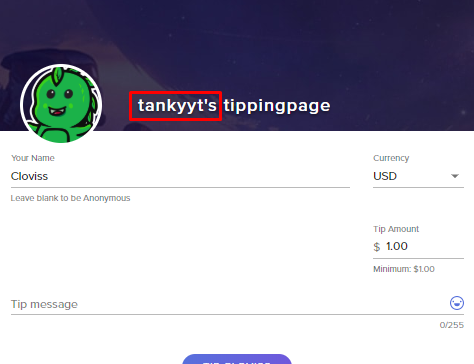
I am having some problems with my tipping page. It has my old username on the tipping page instead of my current one, anyway I can change it?
 ionic urchin
So I noticed in a video I watched, the Twitch dashboard was included in OBS. I'm unable to find a Dock for this and wondering if it was removed?
 zenith widget
@onyx stirrup They might need to login to see their points.
round brambleBOT
@wraith perch Account Merging - Please note:
- Merging accounts only allows faster ways to switch between accounts
- Merging accounts does not allow data sharing between accounts - different streaming platforms, different type of events
- Merging accounts allows duplicating/sharing overlays between the accounts
If you understand the limitations of merging and want to proceed, please find the JWT tokens (!jwt) from both accounts you want to merge and you will be directed to DM them to a staff member.
zenith widget
@burnt thistle can you elaborate and show a screenshot?
@ionic urchin Which video?
ionic urchin
I'll bring it up and grab a link shortly It's possibly an older one.
burnt thistle
 ionic urchin
@zenith widget https://youtu.be/X9BNyM0YEj8?t=354

So today we are going to continue our streaming tips and guides series and work on setting up alerts. I will show you how to set up alerts with both streamlabs and streamelements. After today's video, you'll have the basics down to have pop ups show on your live stream when s...
zenith widget
@burnt thistle
round brambleBOT
@ionic urchin If you are not seeing the OBS Twitch integrations and have OBS.Live installed, please follow these steps:
- Make sure you are on the latest and greatest version of OBS.Live
- exit OBS (make sure OBS is not running)
- delete %appdata%\obs-studio\plugin_config\obs-browser\obs_profile_cookies
- start OBS.Live
- Settings -> Stream -> disconnect -> connect
zenith widget
try this
ionic urchin
Alright I'll give it a go. I do have most of it there, just can't seem to find the dashboard (as it may of been something I closed early on)
(Example)
zenith widget
Check in View -> docks
ionic urchin
onyx stirrup
@zenith widget how do they log in? they say they don’t see any option
zenith widget
@ionic urchin I really don't know then. Check in with the OBS guys here: discord.gg/obsproject
ionic urchin
Ok will do, thanks
wraith perch
Ok I have my JWT tokens for both accts to Merge. Where do I DM them to? Thx
zenith widget
me
 analog marsh
hey yall...i have a giveaway set up on SE and about 30% of the people are getting the error message " an error occured and we couldnt process the request" any ideas?
zenith widget
That doesn't tell us much besides them getting an error.
Where are they getting the error?
analog marsh
when they go to purchase a ticket with channel points
zenith widget
Then I am assuming you are referring to the profile page?
 hot oriole
I'm not sure if this is a 'me' problem, but i'm trying to go to my dashboard on https://streamelements.com/, says i'm logged in already, but keeps redirecting me to the main page no matter what I do. Tried 'Profile' and 'My Leaderboards' but I keep getting redirected. I just want to edit/create some bot commands before I start stream.
StreamElements
The Ultimate All in One Platform for Streamers
I'd appreciate any help lol
zenith widget
visit: https://streamelements.com/logout and then login again
hot oriole
that did the trick thanks
 near lily
hey @zenith widget yesterday you mentioned ${count name +${1}} would increase the counter by the amount given by the commanduser, unfortunately when i try it, the bot just returns "${count name +${1}}" instead of counting up
zenith widget
are you doing !test 123?
near lily
yea
analog marsh
this is the message they are getting
zenith widget
the screenshot is small
 grave smelt
How do I find a tracking number for the sweatshirt I ordered?
near lily
works perfectly now keizar, thanks alot
zenith widget
@grave smelt email us here: merch-stores@streamelements.com with your full name and i will track down your order
grave smelt
Awesome thank you
 drifting talon
does anyone one know how to convert an overlay into 4k?
none of the stuff lines up correctly and i cant get the base layer to be large enough to get things in the right places
 nova gust
Hey! Is there a way to rotate text for alerts?
I have a follower / subscriber / bits alert that has a slightly rotated box to hold names, but can't find a rotation tool anywhere.
Please @ me if you have an answer, thanks!
zenith widget
@drifting talon and then change the resolution to match 4K
Also note that in order to have the assets inside look crisp, you might need to provide some high res images/assets
@nova gust We don't have a text rotation option.
lament blade
i have had multiple problems wit hstream elements i have to constantly reset my stream due to an echo happening at random once and hour then i have a problem of all of a sudden of my discord not being picked up in voice can someone please help me out like actually help and not post a link to something and say go here?
drifting talon
@zenith widget thank you
round brambleBOT
@lament blade Make sure to ☑ “Shutdown source when not visible” for all browser sources (all OBS scenes). If using studio mode, uncheck “Swap Preview/Output scenes After Transitioning.” Also keep in mind that sound can play from any overlay loaded in the browser (editor or launched). https://i.imgur.com/FegZJQS.png https://i.imgur.com/yY0wcFl.png
 lament blade
hey the first imgur is removed
round brambleBOT
The default resolution for StreamElements overlays (theme and custom) is 1920x1080. Please add them in OBS at their full resolution and use CTRL+F to fit to screen if necessary. You can then downscale your stream in OBS settings > Video if you'd like https://i.imgur.com/6bWXxjR.png
 ionic kelp
That is what it was
round brambleBOT
Make sure to ☑️ “Shutdown source when not visible” for all browser sources (all OBS scenes). If using studio mode, uncheck “Swap Preview/Output scenes After Transitioning.” Also keep in mind that sound can play from any overlay loaded in the browser (editor or launched). https://i.imgur.com/6bWXxjR.png https://i.imgur.com/yY0wcFl.png
zenith widget
fixed
lament blade
nice thought i would let ya know lol sorry for all the questions just it legit i get so many viewers and then my stream acts up and its gah i appreciate the whole stream elements crew who help 24/7
nova gust
@zenith widget Do you know if text rotation will be added anytime soon? I've been messing around with CSS for the last 30 minutes, and while I've gotten rotation working, turning on CSS has removed ALL my other settings and now I need to figure out how to set everything up through code, which I have no experience with. If you could @ me again, it'd be much appreciated. Also, thank you for getting back to me earlier.
 scarlet patrol
Hi all! I'm using OBS and I've got my StreamElements overlay set up as a Browser Source. It looks fine except that none of the animation or the movie's are playing. They're not loading at all. Is there a setting I'm missing on the StreamElements side? Everything looks fine when I preview in StreamElements. I'm on MacOS. Thanks!
zenith widget
@nova gust You will have to build your own CSS structure, but the JS part is being handled by the backend by default for the alert widget and variations. Meaning that each variation can have its own style and the conditions for those variations is handled by us by default. You can still manipulate stuff via the JS if you have to
as for the option to be a default one - afaik no plans for such an option
round brambleBOT
@scarlet patrol OBS -> settings -> advanced -> scroll down -> enable/disable hardware accel.
https://i.imgur.com/ggMe9ZE.png
 scarlet patrol
Thanks Support AI, but I don't have that as an option. Is this maybe a Mac limitation?
ionic kelp
It is unfortunately.
scarlet patrol
Ah shoot.
ionic kelp
Well the obs build for Mac that is.
scarlet patrol
So essentially browser source in Mac OBS won't show animated overlays
ionic kelp
It's hit and miss.
scarlet patrol
Okay, got it, thanks!
 upper steeple
are you able to ban someone from doing song requests without banning them from your stream if they have requested stuff in the past but not currently?
zenith widget
yes - via obs.live
 timid wind
Can i have help setting up chat box
upper steeple
@zenith widget i'm on obs live on the sr history but it doesn't give me the option to ban the user. Just says i can delete it from the history or add it back to the queue
zenith widget
add it back and then 
upper steeple
even when it says 'yours' on who it was requested by?
upper steeple
when i add it back to the queue it says i requested it lol
zenith widget
who do you want banned?
upper steeple
artemicdragon
 keen scroll
Changed my username and url on twitch, now nothing's working! Please help!
round brambleBOT
@keen scroll If you changed your name on Twitch please follow these steps:
🔹 Visit https://streamelements.com/logout and then log in again with by connecting with Twitch.
🔹 On the right side of the dashboard page that opens, select "Join" under bot settings. If it says "Part" select that and then select "Join" to send the bot to the chat. Don't forget to mod the bot by typing /mod streamelements in your channel if you have not already.
🔹 Post your new name here so that we can update your channel's chatstats tracking (must be done by staff).
keen scroll
All done, my old twitch name was BenJanesTV, new one is Intenxe
 twin sentinel
Your chat stats have been fixed.
 proper marlin
Morning,
Weeks ago I asked about a problem with !setgame command and getting the following response in chat (usage: !setgame Creative), was told to set StreamElements as a mod in Twitch but I still getting the same message
Any idea how to fix it?
Thanks.
 candid bough
What does it mean when I add a new bot? Does that mean I’m adding a viewer?
zenith widget
logout from our dashboard and login again and part the bot and joined it @proper marlin
@candid bough No, our bot doesn't act as a viewer
lament blade
Hi, how can i remove my account in StreamElements? I donts have a Token (key)
round brambleBOT
You can find your JWT token on your account channels page ("Show Secrets" to reveal the token): https://streamelements.com/dashboard/account/channels
READ ME:
This is a private security token. Do NOT share this token here or other public places, only with a StreamElements staff member in private.
lament blade
Nice, perfect, thanks so much!
proper marlin
@zenith widget Sorry, what do you mean by "part the bot and joined it"?
zenith widget
!part
round brambleBOT
Go to the dashboard -> right side -> part channel -> join channel (https://streamelements.com/dashboard)
 proper marlin
OK thanks!
 keen pagoda
i need help
 viscid pebbleBOT
Hi @keen pagoda, Please ask your question(s) or describe the problem you're looking to solve so staff or a support volunteer can assist you as soon as they are available.
keen pagoda
i am trying to donate to myself using the tipping page i made with streamelements and it keeps saying ERROR! SELLER RESTRICTION
zenith widget
that means your paypal account is restricted
and you need to contact paypal support
keen pagoda
ok
lament blade
How can i know my username if a link my account of Twitch with StreamElements? @here
 lyric canopy
Hi there , the last 2 days my stream is tripping , had to restart my stream at least 15 to 20 times . Does anyone else had this problem??
zenith widget
Besides twitch shitting it self a few hours ago, we might need more info
round brambleBOT
@lyric canopy 1) Restart OBS
2) Start your stream/recording for about 30 seconds. Make sure you replicate any issues as best you can, which means having any games/apps open and captured, etc.
3) Stop your stream/recording.
4) Select Help > Log Files > Upload Current Log File. Copy the URL and paste the link here.
(Note: If you do not see an obsproject.com URL, you will need to update OBS Studio to version 22+)
keen pagoda
Someone donated and it didnt come in but i have a oaypal connected is it because i havent linked a credit card??
ionic kelp
Does it show in your activity feed?
 scarlet tiger
@keen pagoda what's your username on twitch?
scarlet tiger
@keen pagoda you received message about donate?
keen pagoda
no
scarlet tiger
How did you hear about that?
scarlet tiger
Via StreamElements tip page?
scarlet tiger

keen pagoda
how do i make a overlay to when ppl donate
not with obs
and a donation goal
im streaming on xbox
round brambleBOT
@keen pagoda Here is a guide on how to setup the most essential tools for streaming from your console, while using StreamElements tools without involving a Capture Card! It's easy to do, take 4 minutes to read and 10 to 15 minutes to setup!
Read all about it here: https://blog.streamelements.com/how-to-stream-on-console-7b620b1c46c3
keen pagoda
but i dont use obs
twin sentinel
Consoles on its own cannot use overalys.
keen pagoda
😦 nooo bc i want it to show when ppl donate so they know bc someone donated earlier
twin sentinel
You can set up chat alerts to get a notification in chat.
keen pagoda
how??
twin sentinel
Check the guide linked by the bot.
keen pagoda
Ok
 undone pulsar
im a mod for a streamer on twitch and for some reason when we try to change the game or title we are unable to do so. it just keeps saying that something went wrong while trying to update
i dont know how to fix it
twin sentinel
Let the streamer log out and back in of the StreamElements dasboard, and also do that yourself.
round brambleBOT
@potent ibex Currently renaming the bot fully works with OBS.Live.
You can follow this video guide to set it up: https://discordapp.com/channels/141203863863558144/494513233416421386/561516184718278676
If you don't want to use OBS.Live and want to stick with Ground Control, please let us know your Twitch username.
 potent ibex
tks
mine isn't working for some reason 
And I should definitely be meeting the requirements
twin sentinel
Set it to StreamElements in OBS and set it back to your custom name. Does it work then?
potent ibex
thats the thing, my custom bot name isnt showing in the list after I login
twin sentinel
Do you have a screenshot of what you see after you logged in with your custom name.
potent ibex
So there's this: https://i.imgur.com/9ig2XD3.png
Then I click authorize, it closes and comes back to this: https://i.imgur.com/I76WnqU.png
 jaunty lagoon
Hi there. Can someone help me with chat stats? I change my nickname some time ago and chat stats just doesn't work for me. Screenshot below
twin sentinel
What is your old and your new nickname please?
@potent ibex try this:
1) Right click on your OBS desktop shortcut -> properties - in the "Target" field add this -> --remote-debugging-port=40404
2) Open OBS(or restart if it was open)
3) Open your browser and type in "localhost:40404"
4) Click on "StreamElements - Activity feed"
5) navigate to the Console tab
6) type in the console this: store.customBot.removeCustomBotIntegration() and hit enter
7) Try setting the custom bot name
8) remove the added addition of step 1
 sweet socket
@jaunty lagoon what is your old and new nickname?
 devout glacier
is there anyway I can add a browser source to a streamelements overlay?
sweet socket
no, this would have to be done in OBS.Studios
devout glacier
I see, thanks.
is there any way to have the same alerts on the different overlays?
sweet socket
You can copy the Alertbox widget to other overlays yes
devout glacier
how?
sweet socket
let me grab you a screenshot
if you click on your widget and then the duplicate button above it, you will get this pop up, where you can duplicate it to other overlays
sweet socket
No worries!
If you want to check out how to use the New overlay editor, check this vid out!
round brambleBOT
We've released our new Overlay Editor revamp. You can check out the changes and how to work with it here: https://youtu.be/X5VzXjqAsjk
Check out our blog post as well: https://blog.streamelements.com/streamelements-overlay-editor-just-got-even-better-c22cb5b4853e
We are thrilled to announce the launch of the remastered StreamElements Overlay editor!
https://p.strms.net/newoverlayyt
Why StreamElements Overlays are better?
😎 Simple: Load your entier setup using only 1 link
⚡ Fast: Cloud-powered Overlays arrive in real-time, say goodb...
jaunty lagoon
@sweet socket old was: Serimori new one is secreeee
jaunty lagoon
thanks! 
lyric canopy
Everytime i open my obs i keep getting a update . Can anyonebody tell me if this is the latest version .ty
zenith widget
yes
lyric canopy
Ok so why i keep getting a update every time i start my obs lol
round brambleBOT
@lyric canopy Please provide a proper screenshot with the issue visible. If not sure how to take a screenshot, you can check here: https://www.take-a-screenshot.org/
lyric canopy
Im sorry dont use discord on my streampc so i will take it from my phone and makenit as clear as possible
zenith widget
Are you on OBS 25.0.X?
lyric canopy
Im sorry i m not a comp wiz , where can i find what version im using ?
ionic kelp
Top left of obs.
lyric canopy
Ty im using 25.0.0
devout glacier
would it be possible to disable a layer on my overlay as soon as something like an alert pops up etc?
zenith widget
@lyric canopy I would suggset to try and update OBS to the latest version which is 25.0.8
@devout glacier Not if its its a custom widget built to do that.
devout glacier
I see, thanks
zenith widget
Mod the bot
 chilly grove
ty
lyric canopy
@zenith widget im trying to update it but just doesnt seem to work . It remains the same version after the update
zenith widget
OBS (Open Broadcaster Software) is free and open source software for video recording and live streaming. Stream to Twitch, YouTube and many other providers or record your own videos with high quality H264 / AAC encoding.
zenith widget
Ok, so did you update?
i mean
after getting 25.0.8
did you let obs.live update on top?
lyric canopy
Yes it did i tried it again it says 25.0.8 now just need to restart the app again to see if i dont get the update message again
Ok it seems to work now
Ty very much for the help @zenith widget
zenith widget
👍
lyric canopy
❤️❤️
I hope i dont get disconnected while streaming tho . I will post a update here tommorow after the stream . Once more ty for the help ❤️
 primal sand
i use streamlabs obs cause im on mac even though i like obs.live better i was wondering what reasons i should go to all the effort of swapping when i get a pc
i used to use streamlabs and am just trying streamelements out
plz ping me why i should swap
sweet socket
@primal sand the reasons why I swapped were: SE services are 100% free, we don't have a paywall for services, Uses less resources than SLOBS, which will make it less heavy to use on your computer and the support is better in my opinion, since we provide community support, so we don't have to close the Discord on holidays or events for example! 
primal sand
thank you i find it annoying that sometimes the simple features that se offers cost so much on streamlabs
i heard about a thing with refunds
thats why i moved but i dont undertand it
sweet socket
Refunds as in chargebacks?
primal sand
yes
ionic kelp
With PayPal you'll always have that risk unfortunately.
However if you qualify for SE.Pay you don't have to worry about it.
round brambleBOT
SE.PAY is available for streamers who are atleast 18 years old, with bank account under their name in one of the following countries and have at least 101 Follower (Twitch) / 101 Subscribers (Youtube):
Austria, Belgium, Czech Republic, Denmark, Finland, France, Germany, Ireland , Italy, Netherlands, Poland, Portugal, Slovakia, Spain, Sweden, Switzerland, United Kingdom, United States.
If you meet these criteria and don’t see SE.Pay, let us know.
For information on SE.Pay payment methods, their fees, and settlement times see https://streamelements.com/dashboard/tipping/fees.
ionic kelp
If you don't meet the age requirement you can have it done under your parents info.
 south surge
Hello, I wanted to know if there is no longer the ability to change the name of the bot in the streamelements ground application?
twin sentinel
Do you use OBS.Live?
south surge
No
round brambleBOT
@south surge Please connect your streaming account (Twitch, YouTube, or Facebook) with Discord by going to ⚙ Settings and then Connections here in Discord. https://streamable.com/eg92w

 harsh cave
Hi, yesterday i received a donation and got a new subscriber but It didnt show up in the activity feed and the allert didnt pop up. I checked today but the activity feed didnt update. How can i fix this?
ionic kelp
Is it for 96djbeat?
harsh cave
Yes It is
round brambleBOT
Twitch prime (new and resub) and paid subscriptions (resub only) must be shared in chat manually by the person subscribing in order for the subscription information to be sent to StreamElements. For twitch prime, the user needs to have sharing enabled on https://www.twitch.tv/settings/prime. For paid subs, if the share box doesn't show up immediately it will when they refresh the page. https://i.imgur.com/VNJN0Uv.gif https://i.imgur.com/2297EA7.png

 ionic kelp
That might be part of the reason the sub didn't show.
And you're explicitly sure there was a donation?
harsh cave
Yes i'm sure, i checked PayPal after receiving a message about the donation
ionic kelp
You sure it wasn't directly sent via PP?
harsh cave
Yes i'm sure, It was made by my girlfriend with a silly text to make It pop up during the live stream
 timber rock
Hey, yesterday about 14H ago while I was streaming a viewer tipped me. However the tip never showed, not in the stream as an alert and not in the activity feed. Just now I see it has been added in my activity feed. Does anybody know why this happened?
twin sentinel
Was the tip made through PayPal?
timber rock
Yes
twin sentinel
If a viewer tipped through PayPal but no information appears in your StreamElements account, this generally means PayPal has held the tip for verification. Until PayPal clears the tip and sends back a confirmation to your StreamElements account, no information will appear there and no alert will play, as that confirmation is the only way for us to be aware of a successful transaction. If you believe there may be an issue with the transaction, you'll need to contact PayPal support as StreamElements is only a passthrough service and never actually gets involved with the transaction or touches the money.
@harsh cave ⤴️
timber rock
Aahh okay so if PayPal hasn't verified the money the tip won't show in stream
Thank you for clearing that up for me!
 weak delta
Longest I saw was 7 days waiting on PayPal, it was very confusing.
timber rock
Yeah I was confused aswell and it was a bummer for my viewer because he added a message to the tip and it didn't show up
harsh cave
Oh i see, so It's a PayPal issue. Thanks fot the supporto guys 😀
lament blade
is the alert box viewer count for SE delayed because I tested it I watched my stream and it didn't show up until a minute later
twin sentinel
What alertbox viewer count are you referring to?
lament blade
the ground control one
twin sentinel
It may take some time to gather teh info from twitch.
 versed flax
Yo, what do i have to do to join that creator program do i need some requestments? 🙂
lament blade
is there any other alert boxes with viewer count on?
twin sentinel
@lament blade You can see your viewer count in OBS.Live, too.
lament blade
where?
round brambleBOT
@lament blade OBS.Live is a Plugin for OBS created by StreamElements. You can download OBS.Live here: https://streamelements.com/obslive
Please make sure you have the latest version of OBS installed, Current Version: 25.0.4. You can install OBS here: https://obsproject.com/
lament blade
thats the one that i use i think
twin sentinel
lament blade
versed flax
Ty 🙂
lament blade
is this the one?
versed flax
Do i have to play just what game? 🙂
twin sentinel
Yes, this it the activity feed in OBS.Live. @lament blade
@versed flax Afaik you will be contacted by Magic that you can join the program.
versed flax
ok
lament blade
yeah this is the one that is delayed with viewer count I guess all of them are delayed but I didn't see any viewers until at least 1 minute after them viewing and I can't tell if anyone is watching the stream, Is there any other activity feeds that I can use?
twin sentinel
You can use the OBS Studio dock: View > Twitch stats
lament blade
that doesn't show view count?
twin sentinel
The first icon in that menu is viewer count, like on your twtich dashboard.
lament blade
is it only for obs studio?
twin sentinel
For OBS Studio and OBS Studio with OBS.Live.
If you do not see the dock, log out of your account in OBS Studio (Settings > Stream) and log back in there.
lament blade
where do I logout?
lament blade
I see stats is this it?
versed flax
How do you activate bots?
round brambleBOT
@versed flax New to Stream Elements?
Check out our YouTube channel https://www.youtube.com/c/streamelements/videos
with tutorial videos from setting up the basics, to in depth details on how to use our product.
New to OBS? Here is a 4 step quickstart guide
https://obsproject.com/wiki/OBS-Studio-Quickstart
Want to learn even more? Here is an in-depth overview
https://obsproject.com/wiki/OBS-Studio-Overview
lament blade
oh thank you i found it
 plucky summit
im sure this is a simple question but please answer...how do i change my currency to nok?
twin sentinel
https://streamelements.com/dashboard/loyalty Change the points name here.
plucky summit
@twin sentinel was that for me?
twin sentinel
You can chang that in the tipping settings https://streamelements.com/dashboard/tipping-settings > tipping settings > Page settigns card
plucky summit
ty '
 supple summit
okay, so ive been trying to get rid of an extension but aparantly, the extension still works even if, i uninstalled it and unmolded it. how do i get rid of it?
 polar rapids
Hi, can anyone help me with changing name of the bot? I tried it with tutorials at the internet but it does not still work it. Ground control do not shows me the option for change name and for use OAuth token
round brambleBOT
@polar rapids Currently renaming the bot fully works with OBS.Live.
You can follow this video guide to set it up: https://discordapp.com/channels/141203863863558144/494513233416421386/561516184718278676
If you don't want to use OBS.Live and want to stick with Ground Control, please let us know your Twitch username.
twin sentinel
@supple summit What extension are you referring to?
 vestal gale
hey i was wondering how to set up overlays?
round brambleBOT
@vestal gale New to Stream Elements?
Check out our YouTube channel https://www.youtube.com/c/streamelements/videos
with tutorial videos from setting up the basics, to in depth details on how to use our product.
New to OBS? Here is a 4 step quickstart guide
https://obsproject.com/wiki/OBS-Studio-Quickstart
Want to learn even more? Here is an in-depth overview
https://obsproject.com/wiki/OBS-Studio-Overview
twin sentinel
Is that a twitch extension?
supple summit
yup
twin sentinel
supple summit
thx
vestal gale
guys i have a overlay pack installed onto my PC is it possible to add that to stream elements? so i can use it on my stream or no
twin sentinel
@vestal gale What overlay package? Have you bought it from a company?
vestal gale
i installed it from a website
twin sentinel
What website?
vestal gale
is it ok if i link it here?
 modest blaze
Hello I got an overlay package but I don't somethings. Can I have a discord screen share with someone to help me
twin sentinel
Please only name it here @vestal gale
vestal gale
gumroad
twin sentinel
@vestal gale What files have they provided?
@modest blaze You can add that with OBS Studio via the screenshare source.
vestal gale
basically these files
twin sentinel
You should be able to add these pictures in your StreamElements accunt as image widgets.
vestal gale
then i just copy the url and add it to the obs.live?
round brambleBOT
@vestal gale To add your overlays to OBS, add a new browser source in your scene. Paste your overlay URL in the browser source properties, set the dimensions to 1920x1080 (unless you changed them on the website), and ☑ “Shutdown source when not visible” https://youtu.be/KDvLynUqXI4
vestal gale
ok another quick question
with the offline page how would i get that constantly showing?
modest blaze
@twin sentinel i tried that and i seem to mess up a few things . is it possible to screenshare what i see with someone to help
cz im new to all of this
twin sentinel
Constantly? An offline page is only shown when you are offline and you do not host another channel @vestal gale
twin sentinel
@modest blaze You can post a screenshot here.
modest blaze
alright
the steps on the left are not clear/working for the obs overlay completely (right pic)
i cant find any of what is mention in obs
twin sentinel
modest blaze
and i have obs streamlabs and obs studio . which one should i use?
twin sentinel
@modest blaze We recommend to use OBS Studio and normally there is an isntallation guide for StreamElements in there, too.
Best to contact NerdOrDie on how to install the assets with StreamElements.
 latent turret
Hi, is it possible to change ${Time.TIMEZONE} from 24-hour clock to 12-hour AM/PM?
nvm, google helped me, it's a no:(
 jolly flame
Hey guys, a while ago some changes were made and 0 view hosts didn't show up on alerts anymore even with "0" set as the minimum amount to show all alerts. So when a viewer decides to host while watching without going to their own channel, it wouldn't show up (I've had to use SL for hosts because of this). I've just been messing around with my alerts and noticed this might be working now, can anyone confirm? 0 view hosts appear when I do a test alert but I dunno if that's just because it's a test. I just want all manual hosts to give an alert regardless of the number (so not autohosts)
round brambleBOT
@jolly flame Due to changes to Twitch API, we have filtered out hosts and will only show these ones on your activity feed:
- All hosts coming from an online channel with at least 1+ viewer
- Auto host events with at least 1 viewer - only from a channel that just went offline
Note: If you see "X channel has hosted you" with no viewers on the back, that is considered an offline host or a host with 0 viewers, we do not show these.
Note for Mixer streamers: The above 2 filters currently apply for Mixer and we are aware its actually not how Mixer hosts work. We do plan on changing it, but no ETA on when.
jolly flame
Ah it's still the same then, thanks
 vital cedar
when i added game capture and audio input and all that, in studio mode it still shows a black screen even though its set to stream any fullscreen application, how come its not showing the game?
and also, i imported a widget from streamlabs and idk how to add it to my stream
 unkempt tundra
Hi, I have a problem, although I added a few bots on twitch everything worked fine, now I changed my name to twitch on the same acc, on the streamelements page you can see my new name, only all the bots don't work anymore, I already logged out and logged in again, I also disabled and enabled the bots, everything doesn't work, no bot works anymore
 tawny hedge
Hello, i'm experiencing a problem with the tipping everytime i try to change anything on the tipping page i get an error saying 'something went wrong'
lament blade
Hey, what music am i allowed to play on stream?
round brambleBOT
@tawny hedge Our Dashboard and Overlay editor are Chromium Optimized. We strongly recommend using Chrome. Opera GX and the new Microsoft Edge Chromium might work closest to Chrome as its also Chromium built. FireFox also works, but some things might look a bit different or not work. We do not recommend using Internet Explorer with our Dashboard as it does not support functions.
If the website doesn’t work on chrome, be sure none of your plugins are blocking our website or clear your cookies. You can try if the website works in a incognito tab.
sweet socket
@lament blade non-copyrighted music
tawny hedge
Ahh okay i'm using firefox
 sonic pike
Hi - not sure I’m in the right place but is there any way to increase the upload size of overlays for browser source hosting? Cant really do anything interesting less than 100mb
tawny hedge
That might be the problem
sweet socket
@tawny hedge let me know if that fixes it for you
tawny hedge
Okay
sweet socket
Hi - not sure I’m in the right place but is there any way to increase the upload size of overlays for browser source hosting? Cant really do anything interesting less than 100mb
@sonic pike no, the limit is 30MB
sonic pike
I mean that allows for essentially zero animation...
Any tips to get around?
There’s no paid service with more?
lament blade
@sweet socket yea, i think there is some music you can play without rights like Monstercat or someting, i heard about it, is there any list of those artists?
sweet socket
You can't get around that limit @sonic pike
sonic pike
🤦🏻🤦🏻🤦🏻
unkempt tundra
Hi, I have a problem, although I added a few bots on twitch everything worked fine, now I changed my name to twitch on the same acc, on the streamelements page you can see my new name, only all the bots don't work anymore, I already logged out and logged in again, I also disabled and enabled the bots, everything doesn't work, no bot works anymore
sonic pike
Ok
sweet socket
@sweet socket yea, i think there is some music you can play without rights like Monstercat or someting, i heard about it, is there any list of those artists?
@lament blade you would have to google that
round brambleBOT
@unkempt tundra If your chat stats aren't working it's most likely because you changed your username! If you can give us your old and new username, we will get a chat stat fix for you.
 wary halo
Zero animation? Then why are there so many animated overlays? 🤔
unkempt tundra
@round bramble Old Name iDKalle , New Name RajeM8
sweet socket
We have loads of animated overlays as well 🤷
 misty ingot
hi, my encoder is overloaded
round brambleBOT
@unkempt tundra Streamelements on top of OBS -> Logout -> login
sweet socket
be sure to relog as well in OBS and the website
and ill get the chat stats fixed for you
misty ingot
hi, my encoder is overloaded, but i have 50% max gpu load and 10-20% cpu load in games. RX 580, R5 1600
round brambleBOT
@misty ingot 1) Restart OBS
2) Start your stream/recording for about 30 seconds. Make sure you replicate any issues as best you can, which means having any games/apps open and captured, etc.
3) Stop your stream/recording.
4) Select Help > Log Files > Upload Current Log File. Copy the URL and paste the link here.
(Note: If you do not see an obsproject.com URL, you will need to update OBS Studio to version 22+)
tawny hedge
@sweet socket I'm still experiencing the same problem
unkempt tundra
@round bramble I have made
misty ingot
twin sentinel
@unkempt tundra Please do not ping random persons in this server. Thank you.
tawny hedge
Just wait like everyone else
unkempt tundra
I've been waiting half the day.
tawny hedge
You're probably gonna get kicked at this rate
twin sentinel
@unkempt tundra Again, please do not ping random pesons in this server. Thank you.
sweet socket
i need human help
@unkempt tundra I literally helped you, follow the Support AI steps, they are given by humans and I have already told to you ill get your chat stats fixed
@tawny hedge alright, I will ask around for you
tawny hedge
Okay, thank you
unkempt tundra
yes, the ai told me to log on and off at streamleabs, I did, then there was no answer
unkempt tundra
yes, i did, i should bwi streamleabs off and log in again or?, i did!
twin sentinel
sweet socket
@unkempt tundra you are not using StreamLabs right?
We are StreamElements, I can only support you for StreamElements services
unkempt tundra
yea i am streamelements
i mean*
okay i logget off and i log in by obs and by stream elemnts
right?!
sweet socket
okay, now can you check if the bot is in your channel?
otherwise let it join your channel via the website dashboard
unkempt tundra
no
sweet socket
https://streamelements.com/dashboard under bot settings on the right
StreamElements
The Ultimate All in One Platform for Streamers
unkempt tundra
and than
unkempt tundra
nobody in my chat
no bot
it is possible to get german support, i understand it probably better, i am no english pr
sweet socket
#🇩🇪︱deutsch
misty ingot
@twin sentinel and what?
twin sentinel
@misty ingot Check the log for tips on how to improve.
misty ingot
@twin sentinel i saw this
unkempt tundra
yes, they tell me to come in here
tawny hedge
Any fix to my problem yet>
misty ingot
@twin sentinel nothing help
round brambleBOT
@tawny hedge On the page that gives an error, press F12 to open Developer Tools. Navigate to “Network” at the top and then Select “XHR” in the filter section. Try the action again that gave the error and note in the network tab any red text. Please copy and paste the error information that is given when clicking on this red text.
 jade remnant
i believe you was getting german support, but you refused to give information, i suggest to listen and follow instructions
tawny hedge
Okay
misty ingot
Who can help me? I have gpu overloaded on RX 580
 oblique steeple
That's not related to Twitch. Please ask in the right support channel
misty ingot
In games 50% gpu load and 20% max cpu load
round brambleBOT
@misty ingot For the best OBS support, please join their Official Discord @ discord.gg/obsproject
sweet socket
if the log didnt help fix it with the links, than its best to ask in OBS
unkempt tundra
benno, can you show in #🇩🇪︱deutsch channel
 mellow venture
So is there a way where you can play music through stream elements for you stream but you yourself do not hear it ?
round brambleBOT
@mellow venture How to exclude audio sources for a stream or recording: https://obsproject.com/forum/resources/8/
Voicemeeter Banana guide: https://obsproject.com/forum/resources/397/
 north torrent
Is there the functionality to have audio files played when specific people chat for the first time in a stream?
Steamlabs Chatbot (stand alone program) has it but I'm trying to reduce the amount of programs I'm using at one time
tawny hedge
@round bramble {"statusCode":400,"error":"Bad Request","message":"child "presets" fails because [child "amounts" fails because ["amounts" at position 4 fails because ["4" must be less than or equal to 99999]]]","details":[{"path":["presets","amounts",4],"message":""4" must be less than or equal to 99999"}]}
ionic kelp
Unfortunately there isn't.
 alpine depot
Hi, is there a way to make sure my alerts are working? When i was supposed to get an allert I didn't
round brambleBOT
@alpine depot You can test Alerts via the bell on the lower right corner of the Overlay Editor. Simply go to your Dashboard -> My Overlays -> Pencil/edit button on the overlay. Make sure the "Show Emulated events on stream" option is on to see the alert in OBS/Xsplit https://streamable.com/h6qgy

 upbeat glade
Anyone having issues streaming Control the game? I just can't get OBS to detect it, either by full screen or window selection. And streaming the whole screen is not an option, as it game looks really choppy on the stream
Google doesn't get along with the name of the game, so i couldn't find anything
ionic kelp
Laptop?
upbeat glade
PC
ionic kelp
Actual PC or AIO?
tawny hedge
Where do i find my JWT token?
round brambleBOT
You can find your JWT token on your account channels page ("Show Secrets" to reveal the token): https://streamelements.com/dashboard/account/channels
READ ME:
This is a private security token. Do NOT share this token here or other public places, only with a StreamElements staff member in private.
potent ibex
@twin sentinel Apologies for the late response - that solution worked. Many thanks
 spice jay
So ever since i updated the obs (on windows) i can not got 30 mins with out it going connection error (for viewers) but on my end i gave good connection...
and when i look at the dashboard its frozen... again idk what i did but other than update the app
tawny hedge
Hello, i'm unable to close my account i want to try and fix something but it keeps telling me the username is invalid.
ionic kelp
@tawny hedge Grab the data that goes in the form and email it to reem@streamelements.com
tawny hedge
Okay
 tribal fractal
Hey there, so I've been noticing that 0 viewer hosts don't pop up on the alerts is there a way to fix it?
round brambleBOT
@tribal fractal Due to changes to Twitch API, we have filtered out hosts and will only show these ones on your activity feed:
- All hosts coming from an online channel with at least 1+ viewer
- Auto host events with at least 1 viewer - only from a channel that just went offline
Note: If you see "X channel has hosted you" with no viewers on the back, that is considered an offline host or a host with 0 viewers, we do not show these.
Note for Mixer streamers: The above 2 filters currently apply for Mixer and we are aware its actually not how Mixer hosts work. We do plan on changing it, but no ETA on when.
 civic jolt
Is there a way I can see or hear my alerts in game if playing on a single monitor?
ionic kelp
You using display capture or window/game?
upbeat glade
u could also use your phone to watch your stream
ionic kelp
But in short visually no. You'd need OBS opened up.
civic jolt
I usually use game capture, except for a few rare games. My phone is kept on silent while I play so notifications don't buzz into my mic.
I try to watch the stream on a second computer, but the window is so small, the notifications don't catch my attention and, again, it's muted.
polar rapids
Hello there. Can anyone help us? We are trying to rename our SE bot. We have a second Twitch account. We have a tipping button below the stream but we still not have a enabled option in Ground Control for rename the bot 😦
round brambleBOT
@polar rapids Currently renaming the bot fully works with OBS.Live.
You can follow this video guide to set it up: https://discordapp.com/channels/141203863863558144/494513233416421386/561516184718278676
If you don't want to use OBS.Live and want to stick with Ground Control, please let us know your Twitch username.
lament blade
okay
polar rapids
@twin sentinel we are not using OBS live. You want Twitch username of account for streaming or for a bot?
 sand vapor
Hello i need help cause my chatstats are not working due to a name change. Also my sub command and watchtime command (both are the normal preset commands) are not working. can someone help me how i can fix that?
ionic kelp
@sand vapor Is yuiey old or new name?
 stoic dust
hello, my tipping page shows my old twitch name but the link to the page is has my new name. How can I fix this
^nvm
ionic kelp
Also go here and log back in afterwards to make sure you're properly connected https://streamelements.com/logout
twin sentinel
@polar rapids The streaming account please.
 mighty siren
How do I edit what he can say or do like !epic !paypal !code etc
polar rapids
@twin sentinel esportsrdy_gg
mighty siren
Can anyone help me?
civic jolt
Oh, yeah, someone tried checking their watchtime on my stream and the bot said 0 seconds. What's up with that?
round brambleBOT
@civic jolt 10 minutes of watchtime are given to those in chat when the loyalty points are handed out (every 10 minutes). Therefore, loyalty must be enabled for watchtime to work properly.
There is no direct link between watchtime and all-time points.
It can’t be calculated from the amount of all-time points a user has because subs may earn points at a faster rate and !bonus all command increases all-time points for users in chat at that time.
Giving points to a single user does NOT affect all-time, only when giving to all in chat.
@mighty siren New to Stream Elements?
Check out our YouTube channel https://www.youtube.com/c/streamelements/videos
with tutorial videos from setting up the basics, to in depth details on how to use our product.
New to OBS? Here is a 4 step quickstart guide
https://obsproject.com/wiki/OBS-Studio-Quickstart
Want to learn even more? Here is an in-depth overview
https://obsproject.com/wiki/OBS-Studio-Overview
twin sentinel
@polar rapids The rename feature in GroundControl has been enabled.
polar rapids
@twin sentinel thank you a lot ❤️
 dawn geyser
I’m having an issue where none of my alerts play on StreamElements Theme editor, in OBS or in Overlay Preview tabs. Lists and KappaGen works though. Overlays use both standard StreamElements themes and my own custom ones. Any tips? Did I miss something in the transition to the new editor?
safe pecan
anyone who has a good understanding on how the text scrolling works in elements ?
 loud aurora
Hello i am running into some issues regarding streaming plz help
round brambleBOT
@loud aurora Welcome to the helpdesk! Please let us know how we can assist you today and a support volunteer or staff member will assist you as soon as they are available. Thank you for your patience.
 vale coral
Hallo, gibt es hier deutschen Support ?
wary halo
#🇩🇪︱deutsch << @vale coral
round brambleBOT
@mighty tinsel Please follow our community rules:
- No advertisement or stream promotion
- Respect ALL server members
- No NSFW/NSFL
Thank you
vale coral
thank u @wary halo
 pure ledge
Hello, not getting any alerts or sub totals on stream - it's like streamelements isn't working
put in new link into obs, nothing coming up
wary halo
do they work in the editor when you test them?
pure ledge
yes
round brambleBOT
@pure ledge OBS -> settings -> advanced -> scroll down -> enable/disable hardware accel.
https://i.imgur.com/ggMe9ZE.png
wary halo
disable that
 outer flicker
I don’t know how to get and edit and even activate my overlays on mobile
pure ledge
@wary halo k, trying
wary halo
I don’t know how to get and edit and even activate my overlays on mobile
@outer flicker for a mobile stream through the StreamElements app on android?
or for a normal stream through OBS.Live?
wary halo
do you normally stream through OBS on the pc?
outer flicker
No I stream through Xbox twitch
round brambleBOT
@outer flicker Here is a guide on how to setup the most essential tools for streaming from your console, while using StreamElements tools without involving a Capture Card! It's easy to do, take 4 minutes to read and 10 to 15 minutes to setup!
Read all about it here: https://blog.streamelements.com/how-to-stream-on-console-7b620b1c46c3
outer flicker
I have obs on my pc.m but I don’t use it
pure ledge
@wary halo can't change that in the middle of a stream
wary halo
ah, didn't knew you were live
 hidden kettle
hello, i am admin of my friend stream streamelements dashboard 🙂 i found out that our chat stats page is not working, probably reason is that she few times changed her nickname on twitch, we tried part streamelements from stream and connect it again but problem is not solved still, so i want to try support there 🙂
Stream is profesorka_i
But chat stats page for channel profesorka_i shows 404 not found 🙂
outer flicker
The thing is I need to know how to get widgets on mobile
twin sentinel
@hidden kettle Please remove the links and only name the channel name.
hidden kettle
k
twin sentinel
@hidden kettle Do you have her old and new name by chance?
hidden kettle
@twin sentinel she had nicknames, nakashiarmy, stenatko_andy, stenatko_ondrej and now is profesorka_I
pure ledge
@wary halo Stopped and restarted stream - changed the acceleration setting - it worked - how could that have changed overnight?
hidden kettle
@twin sentinel thank you 🙂
wary halo
@wary halo Stopped and restarted stream - changed the acceleration setting - it worked - how could that have changed overnight?
@pure ledge no idea, it sometimes does that 😛
glad it worked!
pure ledge
thanks ❤️
 quartz girder
I need help
 ripe inlet
Is it possible to make a
viscid pebbleBOT
Hi @quartz girder, Please ask your question(s) or describe the problem you're looking to solve so staff or a support volunteer can assist you as soon as they are available.
jade remnant
if you have the assets/files you can upload them to the SE editor
ripe inlet
Do you have the streamelements app on your phone?
outer flicker
No but is it on the Apple store
jade remnant
SE doesnt have an ios app
ripe inlet
Only for android phone right now I think
jade remnant
if youre streaming from your phone then it wouldnt matter about the website.
but you can go to your overlays and and add the widgets for latest follower
outer flicker
I stream on Xbox but my twitch is connected up to my Xbox so I can do it on mobile I just don’t know how to
jade remnant
if you stream from console then you cant have overlays
jade remnant
yes you can have the SE bot in your twitch
outer flicker
Yh I do
 harsh widget
Hey, I've got a problem with my overlays in StreamElements. I can't save any new variations, it says "saving..." for ever, but I'm able to save the overlay if I change something without the variation. It wouldn't be so nice, to do all this stuff again in a new one :/
 smoky tide
Anyone know how to iterate through the ${queryencode) parameters?
like does it $(queryencode $(1:)) $(queryencode $(2:)) and $(queryencode $(3:)) ?
for a command that is !cmd first second third
 timber stone
How do I set up bot for my twitch ?
round brambleBOT
@timber stone New to Stream Elements?
Check out our YouTube channel https://www.youtube.com/c/streamelements/videos
with tutorial videos from setting up the basics, to in depth details on how to use our product.
New to OBS? Here is a 4 step quickstart guide
https://obsproject.com/wiki/OBS-Studio-Quickstart
Want to learn even more? Here is an in-depth overview
https://obsproject.com/wiki/OBS-Studio-Overview
lament blade
My audio alerts for my alert box do not work again. Any idea?
The audio file is attached, and when I emulate it, there is no sound
 blazing forge
I cannot go to my dashboard in my browser im logged in but it always goes back to the main side. Pls help me
 slender anvil
i heard there was obs.live plugins? anyway to find more info on that
round brambleBOT
@slender anvil OBS.Live is a Plugin for OBS created by StreamElements. You can download OBS.Live here: https://streamelements.com/obslive
Please make sure you have the latest version of OBS installed, Current Version: 25.0.4. You can install OBS here: https://obsproject.com/
 gentle saddle
Is there an option for the overlay editor to import a specific widget from another overlay I have done? In my case I want to import my Alerts from a different overlay.
wary halo
select the widget, then duplicate. the option to send it to another overlay will pop-up
gentle saddle
thank you very much
lament blade
are there any common mistakes made when trying to use an overlay? i have triple checked all the steps, but ther overlay will not show on obs.
ionic kelp
@lament blade are you on a Mac by chance?
lament blade
im on win10
it does seem to open the overlay when i click "open in editor", so the url seems ok?
 edgy geyser
I do t see anything to start a stream
ionic kelp
@edgy geyser View > docks
round brambleBOT
@edgy geyser Please provide a proper screenshot with the issue visible. If not sure how to take a screenshot, you can check here: https://www.take-a-screenshot.org/
edgy geyser
I did nothing works
edgy geyser
K
lament blade
is there a way to start obs/streamelements on default settings?
or is a reinstll required if it crashes upon startup?
disabled the overlay window in obs (whilst it "crashed"), now its running fine
 spark yarrow
Hay peeps, since the twitch crash last night my stream element bot does not want to join the channel, i have removed and added, in the roles section in twitch the bot is there but when i go to assign mod right twitch tells me it wont happen... any ideas?
 gentle shell
Not directly related to twitch but when I try to access my dashboard on streamelements, it just refreshes the page back to the main page. I tried clearing the cache and restarting my computer but have had no success
round brambleBOT
@gentle shell Our Dashboard and Overlay editor are Chromium Optimized. We strongly recommend using Chrome. Opera GX and the new Microsoft Edge Chromium might work closest to Chrome as its also Chromium built. FireFox also works, but some things might look a bit different or not work. We do not recommend using Internet Explorer with our Dashboard as it does not support functions.
If the website doesn’t work on chrome, be sure none of your plugins are blocking our website or clear your cookies. You can try if the website works in a incognito tab.
wary halo
StreamElements
The Ultimate All in One Platform for Streamers
sweet socket
@spark yarrow try /unblock streamelements in chat first maybe
wary halo
then log back in
gentle shell
I'll try that
gentle shell
@wary halo worked like a charm, thanks
sweet socket
its pretty weird that it wont let you add the roles, otherwise try /mod streamelements in chat instead of manually giving it the role
spark yarrow
or just through the settings
 void drift
i need help with obs.live
sweet socket
@void drift #helpdesk-selive
spark yarrow
Thanks @sweet socket its up and running again! u the kitty 
sweet socket
No worries!
 leaden latch
Any one else have a lag issue with the Stream Elements Overlay editor
 short hound
Heylo can someone help me with my timers I keep having them go off too close to one another? I’ve tried increasing the intervals too.
 candid whale
Hi, my BTTV emotes don't seem to render in my overlay, any clue why that would be?
Must be missing a setting or something
scarlet tiger
!emotes update in chat
candid whale
perfect ty!
 half basin
How do I know if a sound effect played on stream for the viewer to hear when it was redeemed?
polar rapids
Hello i have a problem with my renamed bot. It wrotes every message four times instead of once. Can you help me please?
plucky summit
'how do i reset my donation goal when its done`?
round brambleBOT
@plucky summit To reset goals:
- from the overlay editor -> data on top -> goal tab -> reset progress of desired goal
- from the dashboard -> activity feed on the left -> widget data on the right -> goals tab -> reset progress of desired goal
Note: Goal widgets(progress) only counts up and doesn't go down automatically, if you loose followers/subs
polar rapids
@twin sentinel Hello again. Can you help us please? Our renamed bot wrotes every message four times instead of once. Thank sou for reply
twin sentinel
Kill Ground Control in task manager and kill all bot.exe. Then start GroundControl again.
round brambleBOT
@cunning gorge Welcome to the helpdesk! Please let us know how we can assist you today and a support volunteer or staff member will assist you as soon as they are available. Thank you for your patience.
scarlet tiger
What is your problem?
 cunning gorge
i tried run the stream elements media request. and those song is running same time, which means its playing 2times and listening kinda bad
how can i fix it
when show on the stream, 1 music is playing 2 times idk why
why does the 2 songs making at the same time
xd
round brambleBOT
@cunning gorge Make sure to ☑️ “Shutdown source when not visible” for all browser sources (all OBS scenes). If using studio mode, uncheck “Swap Preview/Output scenes After Transitioning.” Also keep in mind that sound can play from any overlay loaded in the browser (editor or launched). https://i.imgur.com/6bWXxjR.png https://i.imgur.com/yY0wcFl.png
 lilac geode
Are cutsom bot names not a thing anymore?
round brambleBOT
@lilac geode Currently renaming the bot fully works with OBS.Live.
You can follow this video guide to set it up: https://discordapp.com/channels/141203863863558144/494513233416421386/561516184718278676
If you don't want to use OBS.Live and want to stick with Ground Control, please let us know your Twitch username.
 strong kernel
@cunning gorge Multiple audio from media request is always because you have it active in multiple places, whether that's in multiple scenes, or in OBS and in a launched browser tab, etc.
cunning gorge
okay lemme check sir!
 worldly python
Hi I've set up my commands for twitch I want
but when I go to my stream it doesn't work
cunning gorge
still 1 overlay, not in multiple places but still mutiple audio is going
jade remnant
the bot isnt in your channel @worldly python
worldly python
how do I put it in my channel ?
strong kernel
@cunning gorge I can guarantee you have it active in multiple places. You need to check more carefully, and check all of your scenes, not just your active one.
cunning gorge
ye i've just used it like 30mins ago, i put only 2 scenes and deleted one of them
still going same way man 😦
strong kernel
Keep looking. You have it active in multiple places. This is the only cause for this issue.
cunning gorge
right top side
wary halo
cunning gorge
@worldly python
jade remnant
on the right side of the dashboard
worldly python
one sec
this is all my dashboard shows
nvm
got it
sorry for being stupid lol
thx for the help !
leaden latch
Does the overlay editor work better in a certain browser, I'm having a hard time dragging around the different labels etc in chrome without it lagging and getting messed up.
round brambleBOT
@leaden latch Our Dashboard and Overlay editor are Chromium Optimized. We strongly recommend using Chrome. Opera GX and the new Microsoft Edge Chromium might work closest to Chrome as its also Chromium built. FireFox also works, but some things might look a bit different or not work. We do not recommend using Internet Explorer with our Dashboard as it does not support functions.
If the website doesn’t work on chrome, be sure none of your plugins are blocking our website or clear your cookies. You can try if the website works in a incognito tab.
 real canyon
Hello! Quick question - I tried getting the Media Request to work today in a stream, but all the links got eaten by the bot. I set the spam filter to allow links through, but that didn't work. Probably needs a stream restart? Didn't test that bit. It let me request a song just fine, but I have the perms to post links. My question is, can I have links disabled, but allow youtube through? Can I whitelist the whole domain?
abstract hemlock
@real canyon check the mod settings on twitch itself
or add *.youtube.com on the whitelist of the spamfilter
real canyon
I enabled hyperlinks in the filter automod settings. If I keep the stream elements link protection on, will it let youtube through as part of the !sr command? Or do I need to also whitelist?
 cursive orbit
You need to whitelist it through Automod
real canyon
So the twitch automod filter has priority over the stream elements one? Atm I have: Twitch automod hyperlinks enabled, *.youtube.com added in the permitted terms, Stream elements link protection enabled, and *.youtube.com added in the whitelist. Will that allow youtube links through, but block other links?
cursive orbit
Twitch will filter before it even appears on the chat
Whereas the StreamElements bot will see, analyze the message, and delete it
I suggest you to add http:// https:// www. as blocked terms
And youtube.com as Permitted Term
real canyon
all of that twitch-side. And then on the stream-elements side? Though at that point a lot of links won't reach chat
And I'm guessing a permitted term has priority over blocked? Or will http://www.youtube.com be blocked?
cursive orbit
Let's say that Twitch automod is a bit more powerful than streamelements
Permitted term will always skip the queue and go to the chat directly
But if you use "Block Hyperlinks" from Twitch, the message will be displayed. Only the link will be redacted
real canyon
so at this point the link protection filter in streamelements is irrelevant?
So block hyperlinks on, with the filters to decide on blocking. Going to have to test this next time! Thank you for the help
 haughty lance
May i ask for some help? I am trying to do a donation goal but instead of starting from 0 the widget takes all the donations I've received so far. Its quite weird. :/
round brambleBOT
@haughty lance To reset goals:
- from the overlay editor -> data on top -> goal tab -> reset progress of desired goal
- from the dashboard -> activity feed on the left -> widget data on the right -> goals tab -> reset progress of desired goal
Note: Goal widgets(progress) only counts up and doesn't go down automatically, if you loose followers/subs
 wraith kayak
How do I get streamelements to display one of my emotes from a command? For example I want to do !sh and then have the hype emote displayed custom designed for my channel. So it doesn't just display the prefix.
I'd imagine it would need to be subscribed to my channel. If that is the case then how can the streamelements bot do this?|
Thanks in advance
wary halo
gift the bot a sub every month, or use the custom bot name option to use your own name for it
 gaunt night
Hello. Can anyone help me create a !beg command? I want it to work only when one of my viewers has 0 channel points and I want to give it a sarcastic message, and for it to gift them with 100 channel currency.
cursive orbit
Or if you're partner, you can ask the Twitch support to give the bot a lifetime Tier 1 Sub
 copper orbit
If i aktivate song reguest.. Do i have to do something other than activate it?
cursive orbit
You have to play it
 wise lance
Sorry if this has been covered, but any reason why the session data for subscribers is off compared to my twitch dashboard?
wary halo
and have to have the widget in your overlay
cursive orbit
Yeah that too Haha
round brambleBOT
@wise lance Due to a recent change from Twitch API, these features are affected by the change:
- Ground Control does not have Custom Bot Name
- Subscriber count will count the Channel and any other permanent sub you may have (+1 or +2 or +3 on top).
We are working on fixing both issues, but there is no ETA.
OBS.Live still has Custom Bot name working fine in it.
cursive orbit
@wary halo Would be great to have Media Request auto playing btw
wise lance
answers my question haha
round brambleBOT
@cursive orbit Check out the StreamElements ideas board: https://strms.net/ideas. You'll be able to add ideas, upvote ideas you agree with, and track their progress with email notifications. Adding and upvoting ideas also helps the staff know which ideas should be prioritized so please take some time to upvote.
cursive orbit
So cool, thanks!
 native cove
Anyone around to help?
round brambleBOT
@native cove Welcome to the helpdesk! Please let us know how we can assist you today and a support volunteer or staff member will assist you as soon as they are available. Thank you for your patience.
native cove
I am wondering how to apply the overlays or custom alerts into streamlabs obs. I tried to do it as normal as a browser source but nothing shows up when i test alert.
round brambleBOT
@native cove We're not able to troubleshoot issues with using our overlays in StreamLabs OBS (SLOBS) as we don't have the tools to support their software. We recommend using OBS Studio or OBS Studio with our plugin OBS.Live.
native cove
Sounds good!
 ebon trench
Is there a way to add a counter command via chat?
I know that theres !editcounter but when I replaced that edit part with add it wouldnt work
gaunt night
@ebon trench They have a counter guide in pinned messages.
ebon trench
Thank you
gaunt night
You're welcome.
 lunar frigate
I need help for the watchtime command
round brambleBOT
@lunar frigate 10 minutes of watchtime are given to those in chat when the loyalty points are handed out (every 10 minutes). Therefore, loyalty must be enabled for watchtime to work properly.
There is no direct link between watchtime and all-time points.
It can’t be calculated from the amount of all-time points a user has because subs may earn points at a faster rate and !bonus all command increases all-time points for users in chat at that time.
Giving points to a single user does NOT affect all-time, only when giving to all in chat.
 left tartan
using the streamelements bot on twitch - I whitelisted my YouTube link but still isn't populating ... "StreamElements: For more technical and security related content check out my YouTube: ***" do i need to configure the bot timer / link different?
 unkempt holly
hi guys, can i remove clips from donation?
 dry hare
Twitch is removing your URLs @left tartan
left tartan
@dry hare is there away for me to put them back?
dry hare
@unkempt holly check your tip settings
left tartan
is it a setting in Twitch
dry hare
@left tartan twitch channel settings
left tartan
thanks @dry hare do you by chance know which setting .. I've been using twitch for about a week so still learning its workings
dry hare
Automod
left tartan
I'll see if i can find that - thanks
unkempt holly
@dry hare i tried looking at settings but i didnt find anything
left tartan
should I set streamelements as a moderator?
wary halo
yes
left tartan
ok now to figure out where to do that 😛
abstract hemlock
@left tartan type on your chat /mod StreamElements
left tartan
thanks
 harsh cairn
Hello! im trying to set up my cam, all good so far.. but i cannot get rid of the glare from my glasses.. am i being stupid or is there anyway around this?>
lunar frigate
@scarlet tiger so if loyalty is disabled, the bot will show 0 seconds?
scarlet tiger
Yes
lunar frigate
thanks
strong kernel
@hushed ferry Please do not ping people if you're not talking with them in the moment.
KeiZar is likely asleep.
 hushed ferry
Any update on Tiltify alert and integration issues re "saw something in the back side while trying to switch campaigns" that was previously noticed by KeiZar?
strong kernel
No.
hushed ferry
This has been an issue all of April, any ETA?
strong kernel
We never provide ETAs for fixes.
hushed ferry
My Community and I are getting really bummed about lack of Tiltify alerts from StreamElements as St. Jude is our biggest campaign and the alerts are intended to get people excited to donate. No alerts, not nearly as much excitement
Given that it is a systemwide issue affecting a major event like St. Jude PlayLIVE, I would highly recommend providing an ETA for at least this fix @strong kernel It would be very much appreciated.
strong kernel
Except we have other people using the Tiltify alerts without issue. I highly recommend you double check your setup to make sure you did it correctly.
hushed ferry
The St Jude discord is full of folks that it does not work for so I am shocked it actually works for anyone right now
It works in the editor when I test, but not in an actual stream when real money activates the alert
ebon trench
Hello, sorry to bother you guys but I asked help about counters earlier and I meant to say that I needed help for timers. I know that it could be edited through the site but I wanna know if theres an option to do it through the chat box
strong kernel
Timers can only be edited on the site.
ebon trench
Thank you!
 pale pecan
Is there a way to test the stream before going live?
 somber oar
Does anyone know of a way in streamelements overlay editor, to make an image appear during certain events (follow, sub, cheer, etc) that takes up the entire screen and isn't constricted to the Alert Box size?
I know how to get an image in there, im just trying to make it take up the entire screen rather than just the alert box
abstract hemlock
@pale pecan You could use the "Record button" to look have everyone will see you /hear you or just create a dummy account and log in with that account and Stream as you would normally do
lament blade
hello I can't close some commands, how can I disable them?
somber oar
@pale pecan You can also go to settings > stream and check the checkbox that says "Enable Bandwidth Test Mode"
Then click apply, okay, and hit start streaming. If that box is checked you will get an alert popup that lets you know you are entering test mode
You have to go back into settings > stream and uncheck that box before going live
 tiny carbon
Hi there, I have one viewer that has not once triggered an alert. Whether it is a follow, sub, or gift sub. He is in my discord channel too and I can see he has twitch and discord linked. All my alerts work for everyone else. The only difference is he is often on mobile. But I have other viewers that are and this does not seem to matter. I can't work out a solution for this, it's been going on for months, any suggestions 🤔. Also in other streams alerts work for him too - so go figure...
pale pecan
@somber oar thats the answer I was looking for. Thank you!
somber oar
No problemo
 midnight musk
Hello, I have a problem with '!volume' command. When I try to use this command, I see only 'an error occurred, please try again' . Could anyone help me?
 limber axle
Hi there! I have an alert setup for tips but how do i disable that alert I setup if chooses a media song request?
 dire thistle
hi im having a weird issue where all the other alerts play sounds but the sub one doesent
ive tried clearing the sound trying different sounds the same sound but different file format but it still wont work
pale pecan
@somber oar Should I be able to hear myself when testing?
Video all looks good. Overlay sorted. But I hear nuttin.
limber axle
@pale pecan yes you should be able to hear yourself
make sure you're not muted on your audio program and make sure you have your mic setup correctly within OBS
pale pecan
Volume mixer checked. Mic bar moving and all set up as normal for recording. Also checked all the standard start up settings.. bitrate etc
limber axle
so when you're not recording you see the Mic bar moving but when you start recording the mic bar isn't moving?
pale pecan
mic bar is always moving. i just dont hear myself on the stream test.
 vapid pumice
Hello Staff, I have a problem with my watchtime on Twitch. Can you support me please. Thank You.
limber axle
Are you using any external audio program outside of the standard windows audio? Like voicmeeter or anything?
pale pecan
No. Just obs with the stream elements add on. Nothing extra.
It works for recording. Maybe I will just have to go live and see what happens? Was trying to avoid it going wrong whilst live.
limber axle
that's very odd
 zealous gorge
Hi. Just tried Obs.Live for the first time and when hitting "Start Streaming" it does not appear to actually stream to twitch
I gave it about 1 minute and my stream failed to appear
pale pecan
Thanks for your help @limber axle I'll keep trying 🙂
@zealous gorge trying sticking it in test mode first. Will usually pop up with an error box to help resolve issues.
Settings>Stream>Tick the enable test mode box>Apply>Start stream>will warn you its a test and then see what happens
zealous gorge
Actively trying now. No warning box popped up
Sorry. I should clarify
Warning about it being test mode popped up. I confirmed and no other warnings showed
fixed... randomly lol
pale pecan
🥳
limber axle
@pale pecan for sure, best of luck to ya
 hoary pier


 jade remnant
view > docks > chat
strong kernel
Read the red text.
strong kernel
Read it again.
 slow apex
"Apply" is not active
strong kernel
Read it again.
strong kernel
Read it again.
slow apex
Are U ok?
I'm here because I can't get some things, so I come for help
not for copypaste
strong kernel
 gaunt matrix
Hows it going guys, I enabled the chatbot in my stream, and it appears to not be responding to any commands. Any ideas?
(im switching to stream elements bare with me)
abstract hemlock
@gaunt matrix seems to be working on your channel
gaunt matrix
tf
ok hold on let me come back with a better description of the issue I am having
thanks haha
working mint now, looks like I just had to wait
thanks Renziito!
abstract hemlock
np
 forest laurel
Ik this is probably a frequently asked question but does anybody know how to fix chat stats 404 - Page Not Found
I did change my name btw
abstract hemlock
post here your old name and your new name please
forest laurel
Old: VitruvianFluke New: oFluuke
abstract hemlock
Done @forest laurel
forest laurel
Tyy
 glacial ocean
same issue as fluke, old name demelkbroer__ new name thajbross_
demelkbroer__ * and
thajbross_
abstract hemlock
@glacial ocean any other oldusername?
glacial ocean
no its demelkbroer with doublee _
 vital bluff
can anyone help?
glacial ocean
@abstract hemlock its only in OBS that it doesnt work correctly, my whole streamchat in OBS doesnt work anymore after changing my name
round brambleBOT
@vital bluff Welcome to the helpdesk! Please let us know how we can assist you today and a support volunteer or staff member will assist you as soon as they are available. Thank you for your patience.
@glacial ocean Please logout of StreamElements at https://streamelements.com/logout and then login again to your account (Twitch/Youtube/Facebook/Mixer)
@glacial ocean Streamelements on top of OBS -> Logout -> login
lament blade
my display capture is not working
round brambleBOT
@lament blade For the best OBS support, please join their Official Discord @ discord.gg/obsproject
vital bluff
When i go live i click start live it does seem to go live on twitch for some reason i waited like 5 mins and it still said offline but my StreamElements says im live
 silent blaze
Are Stream Labels data stored on a local file by chance?
round brambleBOT
@vital bluff Streamelements on top of OBS -> Logout -> login
strong kernel
@silent blaze StreamElements is a cloud-based system. Nothing is stored locally.
 proper comet
When I add an overlay through the browser source part of the overlay is not there but it all looks fine when I preview.
round brambleBOT
@proper comet To add your overlays to OBS, add a new browser source in your scene. Paste your overlay URL in the browser source properties, set the dimensions to 1920x1080 (unless you changed them on the website), and ☑ “Shutdown source when not visible” https://youtu.be/KDvLynUqXI4
silent blaze
@strong kernel Dang ok, thanks
 inland shoal
Is there a wiki on the list of possible command variables?
Ah I just found it! https://streamelements.com/dashboard/bot-commands/variables
StreamElements
The Ultimate All in One Platform for Streamers
My bad
Another question, I see there's a time.until to countdown to a specific time, is there a variable to countdown to a specific date/time?
 twin solar
How do i make the pop up for the stream store into my stream?
simple vale
Chat will not load into OBS live. Had issues with it yesterday. Everything works but but chat will not load. I get an Error Loading Data with a ghost symbol next to it. Please help
proper comet
So I have been streaming for a while and just switched to streamelements all of my donations when looking at revenue history show up twice.
strong kernel
Did you import them twice?
proper comet
I am an idiot. Thanks for your help!
simple vale
I cannot not see or type anything in my chat on my OBS
strong kernel
@simple vale Please provide a screenshot of the issue.
tiny carbon
Hi there, I have one viewer that has not once triggered an alert. Whether it is a follow, sub, or gift sub. He is in my discord channel too and I can see he has twitch and discord linked. All my alerts work for everyone else. The only difference is he is often on mobile. But I have other viewers that are and this does not seem to matter. I can't work out a solution for this, it's been going on for months, any suggestions thinking. Also in other streams alerts work for him too - so go figure...
 lime wing
howdy 🙂
round brambleBOT
@tiny carbon Twitch prime (new and resub) and paid subscriptions (resub only) must be shared in chat manually by the person subscribing in order for the subscription information to be sent to StreamElements. For twitch prime, the user needs to have sharing enabled on https://www.twitch.tv/settings/prime. For paid subs, if the share box doesn't show up immediately it will when they refresh the page. https://i.imgur.com/VNJN0Uv.gif https://i.imgur.com/2297EA7.png
simple vale
error message and chat wont load
round brambleBOT
@simple vale Streamelements on top of OBS -> Logout -> login
lime wing
so my stream elements is not letting me finish setting up my tipping setup. I already put the tipping bar that they gave me and link into my panels and it won't work. How could I fix that?
strong kernel
Click the link. Don't highlight it, just click it.
lime wing
well there we go XD thank you so much!
gaunt matrix
Hows it going guys, I just used a quick link to install my overlay, and it seems to not allow me to edit the text? (yes the layer is unlocked). Either, i literally cant figure out how or I just cant
abstract hemlock
@gaunt matrix could you share a screenshot ?
abstract hemlock
@gaunt matrix click on the "Settings" options
gaunt matrix
@abstract hemlock Okay, in there
abstract hemlock
You should see a "Message" text input
 gentle oasis
How would i import a theme to streamlabs OBS
abstract hemlock
not under TextSettings just Settings
round brambleBOT
@gentle oasis To add your overlays to OBS, add a new browser source in your scene. Paste your overlay URL in the browser source properties, set the dimensions to 1920x1080 (unless you changed them on the website), and ☑ “Shutdown source when not visible” https://youtu.be/KDvLynUqXI4
gaunt matrix
thats a little misleading lmao
 iron hound
What does online interval and offline interval in timer bot mean ?
tiny carbon
@round bramble it does come up in chat. That's how I know what they are doing. It just never seems to trigger my alerts that are set up with stream elements. Is that the same problem/solution situation 🤔
abstract hemlock
@iron hound the time that it have to past before the timer triggers when you are online and offline
@tiny carbon Do you see the events on your activy feeds?
iron hound
@abstract hemlock so it means it works when you r not streaming ?
tiny carbon
@abstract hemlock yes I do
abstract hemlock
@frail moss Visit https://streamelements.com/logout and then log in again
tiny carbon
@renzito refresh my mind what and where Web editor is?
 frail moss
@abstract hemlock Thank you! 🙂
tiny carbon
@abstract hemlock ^^^
abstract hemlock
@tiny carbon Visit https://streamelements.com/dashboard/overlays and Edit the overlay with your Alertbox widget
StreamElements
The Ultimate All in One Platform for Streamers
tiny carbon
I'm unsure what you are asking me to do here, his gift subs show up on activity feed, and my alerts are working for everyone else so obviously set up correctly. It's just with this one viewer @abstract hemlock
Also if I go to force the alert to happen again by reloading it. It still will not work for only him. I can reload other alerts till the cow comes home... lol
strong kernel
@tiny carbon What is the viewer's username?
gaunt matrix
Sup guys, Sorry for all the support needed, i appreciate your time. But what do I do if a label is pulling incorrect information?
tiny carbon
That's part of the joke its SilentAssassin23
Name change required to VeryloudAssasin maybe lol
tiny carbon
Can you explain what that has to do with just his username?
strong kernel
It's a very highly sensitive standard filter.
tiny carbon
Okay, sweet; so where abouts do I find that and should it be set to the image?
strong kernel
In your Tipping settings, and you likely either want to change the filter action, implement your own custom protection, or just disable it entirely.
tiny carbon
But hold up this is just for sub alerts its not a tipping issue, at least its never come up. So why does that affect the alerts for a follow, gift or normal sub?
Sorry, just trying to get my head around it
strong kernel
The tip moderation applies to subs as well.
And all alerts.
It's... not ideally named, I'll give you that.
tiny carbon
lol you're telling me, okay I'll look at that. Thank you!!
@strong kernel Hey thanks so much, I just reloaded them through obs and its working now. Honestly this is so strange though, as his name is tame compared to a few others I have in my channel yet its never bothered about them lol. Thanks a mill mate.
gaunt matrix
Sup guys, Sorry for all the support needed, i appreciate your time. But what do I do if a label is pulling incorrect information?
sonic pike
Hi question - are mov files not supported when uploading overlays?
If not what file type would be best supporting transparency
gaunt matrix
Specifically, @strong kernel - My recent tip label is showing incorrect data. It's showing my first ever tip in fact. How can this be corrected?
 royal mauve
Someone subscribed to me and the alert didnt come through, it doesnt show in the activity feed either
gaunt matrix
i giggled at ur profile picture @royal mauve
round brambleBOT
@royal mauve Twitch prime (new and resub) and paid subscriptions (resub only) must be shared in chat manually by the person subscribing in order for the subscription information to be sent to StreamElements. For twitch prime, the user needs to have sharing enabled on https://www.twitch.tv/settings/prime. For paid subs, if the share box doesn't show up immediately it will when they refresh the page. https://i.imgur.com/VNJN0Uv.gif https://i.imgur.com/2297EA7.png