#helpdesk-twitch
1 messages · Page 634 of 1
 vivid flax
 ionic kelp
 rain saddle
How do I use the overlays from the website?
 round brambleBOT
@rain saddle To add your overlays to OBS, add a new browser source in your scene. Paste your overlay URL in the browser source properties, set the dimensions to 1920x1080 (unless you changed them on the website), and ☑ “Shutdown source when not visible” https://youtu.be/KDvLynUqXI4
 thin creek
Hi there! Just started to create Kappagen Overlay. When I write an emote in chat, it appears on screen, also when using !kappagen. But when using a custom command like !party and "StreamElements" writes some emotes into the chat, they wont appear in it.
 vernal depot
Hi i changed my twitch name and the commands stopped working what i do?
round brambleBOT
@vernal depot If you changed your name on Twitch please follow these steps:
🔹 Visit https://streamelements.com/logout and then log in again with by connecting with Twitch.
🔹 On the right side of the dashboard page that opens, select "Join" under bot settings. If it says "Part" select that and then select "Join" to send the bot to the chat. Don't forget to mod the bot by typing /mod streamelements in your channel if you have not already.
🔹 Post your new name here so that we can update your channel's chatstats tracking (must be done by staff).
thin creek
Part channel and rejoin has fixed it. Fyi
 cinder compass
how do i use the stream overlay on twitch studio
vernal depot
hey what is the code for !drop command to see if u got valorant drop?
cinder compass
there isnt one you just have to wait for an email sent to the one associated with your riot account
 zenith widget
@vernal depot There is no such default command.
 brave tiger
Hi, have a question, i want to use !watchtime command on my channel, i already have streamlabs bot active and it shows only 0sec to everyone watching
streamelemnts bot*
ionic kelp
Is loyalty enabled?
brave tiger
Yes it is
 fickle ocean
Hi How I can test donation on off stream? And how i can add own alerts
brave tiger
Do i need to give it couple of minutes to refreash or smth?
i enabled loyality like 5-10minutes ago
 livid plover
hi, is there a way i can de-activate the chat bot service?
 wary halo
Do i need to give it couple of minutes to refreash or smth?
@brave tiger at least 10 minutes since it will only give points once per 10 minutes
hi, is there a way i can de-activate the chat bot service?
@livid plover
Hi How I can test donation on off stream? And how i can add own alerts
@fickle ocean
brave tiger
@brave tiger at least 10 minutes since it will only give points once per 10 minutes
@wary halo So the watching count is working every 10 minutes aswell?
wary halo
i think you can do that whenever you want after the initial setup
 crystal maple
Hi, does anyone know how i can set my channel do a shoutout so when other streamers pop in it will then post there channel automatically
brave tiger
i think you can do that whenever you want after the initial setup
@wary halo Could you please test it in my channel? Seems like it is not working for my viewers
wary halo
Hi, does anyone know how i can set my channel do a shoutout so when other streamers pop in it will then post there channel automatically
@crystal maple
https://streamelements.com/dashboard/themes > widgets tab

StreamElements
The Ultimate All in One Platform for Streamers
livid plover
@wary halo is this in my dashboard section? it is still asking me to set up donations to get to the 100% mark when i go to that section. Thanks.
crystal maple
thank you @wary halo
wary halo
@wary halo is this in my dashboard section? it is still asking me to set up donations to get to the 100% mark when i go to that section. Thanks.
@livid plover yes that is in the dashboard section
livid plover
@wary halo ok thanks so im guessing i need to set up tipping/dontations before i can get into my dashboard?
wary halo
@wary halo Could you please test it in my channel? Seems like it is not working for my viewers
@brave tiger go here: https://streamelements.com/dashboard click on the PART CHANNEL button for the bot > log out of the website > log back in to the website > click on JOIN CHANNEL again
StreamElements
The Ultimate All in One Platform for Streamers
@wary halo ok thanks so im guessing i need to set up tipping/dontations before i can get into my dashboard?
@livid plover yes you would have to finish the initial setup
crystal maple
sorry im thick! so is this an add on or can it just be an automatic thing whilst im streaming?
i can see lots of different commands but not the shout out 😦
wary halo
none of the shoutout widgets is automatic
shoutout is not a default command
i have this: /me ${1} is awesome and deserves a follow. Check them out at https://twitch.tv/${1}
the command then is: !so @ username
 kind seal
Hello , why it isn't let me add other payments methods than paypal ?
wary halo
how many followers do you have on Twitch?
kind seal
well i just started on twitch is fresh new channel but on yt i ve around 650
how many followers i need to get that option ?
kind seal
it doesn't work neither for yt..
wary halo
because you won't get it automatically for YT 😉
what is your youtube channel name (no links)
kind seal
Serpicu
wary halo
and from which country are you?
kind seal
Romania
kind seal
?
wary halo
because SEpay doesn't work in Romania
SEpay will allow CreditCard options and more, but it's not available there
brave tiger
@wary halo Seems like watchtime is fixed now, thanks. But now they still cant see how many points they have from watching. It should give them every 10 mins. Sorry to trouble u so much with this one.
wary halo
did they use the !points command?
wary halo

brave tiger
Thank you
wary halo
no problem 😄
 pulsar dawn
Just a quick question. I currently have 24 followers on twitch and when i go to use the follower goal on the overlay section, it says i have 12077, why is this?
round brambleBOT
@pulsar dawn To reset goals:
- from the overlay editor -> data on top -> goal tab -> reset progress of desired goal
- from the dashboard -> activity feed on the left -> widget data on the right -> goals tab -> reset progress of desired goal
Note: Goal widgets(progress) only counts up and doesn't go down automatically, if you loose followers/subs
pulsar dawn
Great Thanks Support AI xD
 shut valley
I know this is technically a discord question but how do I get StreamElements to announce I’ve gone live in my discord server.
ionic kelp
You'd need a 3rd party bot to do that. Dime a dozen.
 half lintel
Hello im new to streamelemets and was wandering if i could get the bit icons for streamelemetns because i dont like the basic ones that streamelements give
cinder compass
does anyone know how to add overlay onto twitch studio
round brambleBOT
@cinder compass To add your overlays to OBS, add a new browser source in your scene. Paste your overlay URL in the browser source properties, set the dimensions to 1920x1080 (unless you changed them on the website), and ☑ “Shutdown source when not visible” https://youtu.be/KDvLynUqXI4
cinder compass
that works for studios?
half lintel
@cinder compass I really dont know i havent even gotten my question answered
half lintel
@wary halo i mean like the animation
i cant seem to find them any were
@wary halo would you know anyone that has them or any were i can find them
 lean cliff
hey, I am trying to set up my store for my twitch, and it is stuck on "the store is being created"
 tulip oyster
Hey does SEpay still work?
 scarlet tiger
Sure
tulip oyster
but i cant see it
scarlet tiger
@tulip oyster you have 101+ followers?
scarlet tiger
After you got 101+ followers
tulip oyster
oooh alright thanks for the help
half lintel
@scarlet tiger could you help me?
 velvet spoke
you want what now?
half lintel
@velvet spoke i was trying to get the twitch bits animations but idk were to find them
like the cheeremotes
 weak delta
What are you even looking for? You want the bit icons for StreamElements because you don't like the ones StreamElement's has by default?
velvet spoke
then go google them
wary halo
but he doesn't want to be friends so i can't send him stuff
velvet spoke
everything is on the web
 pallid osprey
@wary halo I HAVE A USER THAT IS ON MAC, USING BROWSER SOURCE. BUT DOES NOT ANIMATE. WORKS FINE IN CHROME, BUT NOT OBS. ANY IDEA?
velvet spoke
@pallid osprey 😂
round brambleBOT
OBS -> settings -> advanced -> scroll down -> enable/disable hardware accel.
https://i.imgur.com/ggMe9ZE.png
 velvet spoke

pallid osprey
😐
weak delta
I want to be your friend @wary halo - Can you get me the wheel image from this widget? https://discordapp.com/channels/141203863863558144/457957557470887947/659336746051567627 Since I can't download images uploaded into SE.
wary halo
half lintel
lmao
there
im sorry ive been getting spammed with friends requests
or either dm's
 spice wolf
any widgets for goals ?
spice wolf
thanks !
pallid osprey
@wary halo I HAVE A USER THAT IS ON MAC, USING BROWSER SOURCE. BUT DOES NOT ANIMATE. WORKS FINE IN CHROME, BUT NOT OBS. ANY IDEA?
lean cliff
like it is literally stuck on this screen, I can't preview or anything
wary halo
@wary halo I HAVE A USER THAT IS ON MAC, USING BROWSER SOURCE. BUT DOES NOT ANIMATE. WORKS FINE IN CHROME, BUT NOT OBS. ANY IDEA?
@pallid osprey no
 celest birch
hi, i have a nice video with green chroma key that I would like to use as follower alert. This video is a .mp4, what is the best way to import that on streamelements after making the green chroma key transparent?
velvet spoke
you add a chroma key in obs
problem solved.
Or, find a (free) tool to key it to alpha, render it again, and then import. But that's way more hassle.
celest birch
ah so i could import it on streamelements as it is as a follow alert, and then set chroma key to transparent in obs?
ionic kelp
Why not just rerender as webm with transparency?
celest birch
how could i do it starting from a mp4 video that has a green chroma key? i saw adobe premiere doesn't support webm, i tried exporting it to animation with transparency but it's over 200 MB of file, so i would need another program to convert it...
 twin sentinel
celest birch
twin sentinel
celest birch
Oh nice! I actually did, but found results from 2015 only, i hope this works! Than you very much
half lintel
Question can i transfer commands from cloudbot to streamelements
 raven hawk
hmm i found a weird bug
i have a streamcrux account
why does it say i dont have one XD
wary halo
yep
wary halo
no problem 😄
raven hawk

half lintel
Question can i transfer commands from cloudbot to streamelements
scarlet tiger
isn't posible from the cloudbot
half lintel
Aweeee man ok thx you
 wicked arrow
Hello can I have someone who can help me with my giveaway issue message me please
wary halo
How can you do text to speech for donations
@tulip oyster check the TTS settings in the alertbox widget
 misty pike
hey is it possible for anyone to help me setup my twitch Stream?
please DM if you can
 lament blade
is there any way I can resize my camera in OBS to be the same size in all scenes without having them in the same spot or copy and pasting?
 visual turtle
so do any of you have this problem where you try to search up streamelements but all you see is a white screen. Do any of you know how to fix that.
wicked arrow
Guys what link do I need to send to people to bring them to my main give away page. Because the main url just sends them to streamelements home page
wary halo
so do any of you have this problem where you try to search up streamelements but all you see is a white screen. Do any of you know how to fix that.
@visual turtle which browser are you using?
wicked arrow
@visual turtle I had same issue. I started using chrome instead. Issue solved
 cinder garnet
anyone know if its possible to trigger an overlay/video from a bot command from StreamElements? Thanks in advance...
 stone citrus
hi, if anyone can help me please, when i press start streaming this window pop out but i don't want to stream to facebook, i want to stream to twitch .my setting in obs are set to twitch
round brambleBOT
@stone citrus Streamelements on top of OBS -> Logout -> login
wary halo
anyone know if its possible to trigger an overlay/video from a bot command from StreamElements? Thanks in advance...
@cinder garnet https://discordapp.com/channels/141203863863558144/457957557470887947/690518619607531580
cinder garnet
Thanks @wary halo - I had done a quick search here before posting but came up empty - will take a look 👍
 terse fog
Hi, im not sure if its just me being stupid but when i load my overlays into OBS, its only copying over like the top left 1/4 of the overlay and i cant get the entire thing loaded in
stone citrus
thank you mr.support Ai bot
wary halo
Hi, im not sure if its just me being stupid but when i load my overlays into OBS, its only copying over like the top left 1/4 of the overlay and i cant get the entire thing loaded in
@terse fog make sure the dimensions are set to 1920x1080 in the browser source properties
terse fog
Thank you
 gentle prairie
Is anyone else having issues accessing a streamer's dashboard as an approved editor? Neither myself nor any of the mods in a channel are able to access the editor dashboard for a broadcaster. We're not able to monitor the media share queue because of it. It just kicks us to our personal dashboards. When I change the user from myself to the broadcaster it again kicks me out to the main homepage.
round brambleBOT
@gentle prairie Please logout of StreamElements at https://streamelements.com/logout and then login again to your account (Twitch/Youtube/Facebook/Mixer)
twin sentinel
^ tell the channel you mod for, to do the same.
gentle prairie
We all did. It didn't fix it.
Streamer refreshed cache, too, for what that's worth and it's still not working.
twin sentinel
Tell them to try again please.
 spare knoll
hey anyone knows how to remove twitch support form tweet alert
twin sentinel
Edit the twitter module here: https://streamelements.com/dashboard/bot-modules
spare knoll
ty
 paper summit
Good day my beautiful lovelies! Quick question. I transfered over all my alerts from streamlabs and when I tested them they all worked but last night live I missed a host and donos because the alerts didn't work! (I look like such a boob now!) how do I fix this for the future? Eep!
round brambleBOT
@paper summit Due to changes to Twitch API, we have filtered out hosts and will only show these ones on your activity feed:
- All hosts coming from an online channel with at least 1+ viewer
- Auto host events with at least 1 viewer - only from a channel that just went offline
Note: If you see "X channel has hosted you" with no viewers on the back, that is considered an offline host or a host with 0 viewers, we do not show these.
Note for Mixer streamers: The above 2 filters currently apply for Mixer and we are aware its actually not how Mixer hosts work. We do plan on changing it, but no ETA on when.
twin sentinel
Also make sure you are using our tipping link.
paper summit
Always only used y'all for tips... I will have to check....
wary halo
your tip panel on Twitch is still from SL @paper summit
lament blade
Hey, i need help with tipping, i set up everything i had to, set SE PAY, set PAYPAL, made everything but when someone wants to donate, it says error, payment failed. What should i do?
scarlet tiger
@lament blade you can provide screenshot of that error?
wary halo
dude
 modern kestrel
what
wary halo
remove the clip
modern kestrel
why how is anyone apost to help me
velvet spoke
inb4 ban
wary halo
just post the question without a clip, then we can see what we can do for you
lament blade
round brambleBOT
@lament blade Please contact us via email for support with SE.Pay. You can use our contact form here: https://streamelements.com/contact Thank you
 wooden swift
Hi everyone, I'm having some trouble seeting up my alerts, not sur eif this would be the right place for the question
So when I add a video file for the alert, and then try to put the text on top of the alert, the text just doesnt show up, anyone can help?
round brambleBOT
@wooden swift OBS -> settings -> advanced -> scroll down -> enable/disable hardware accel.
https://i.imgur.com/ggMe9ZE.png
wooden swift
thanks!
lament blade
Hey! everytime i want to add a subgoal, it shows my overall total subs i ever had
i will give an example
round brambleBOT
@lament blade To reset goals:
- from the overlay editor -> data on top -> goal tab -> reset progress of desired goal
- from the dashboard -> activity feed on the left -> widget data on the right -> goals tab -> reset progress of desired goal
Note: Goal widgets(progress) only counts up and doesn't go down automatically, if you loose followers/subs
 somber oar
Has anyone been having issues dropping frames lately? Last Thursday and Friday I dropped around 30% of my frames. Last night, I started dropping frames and on two occasions my stream went offline and then came back online when it reconnected
lament blade
Hey when streamelements types in the chat is doesnt show up is there any way to fix that!?
 mortal reef
how do i add overlays to my stream?
round brambleBOT
@mortal reef To add your overlays to OBS, add a new browser source in your scene. Paste your overlay URL in the browser source properties, set the dimensions to 1920x1080 (unless you changed them on the website), and ☑ “Shutdown source when not visible” https://youtu.be/KDvLynUqXI4
 mossy rivet
Hype Cup problem: icons from Global are bugged and instead of the icon, it shows a black square with a line. What did I do wrong?
 blazing crow
Is there a command like night bots !game that shows current game, and if you write !game (specific game) it changes game?
 lime nexus
All you have to do is setup NightBot to twitch and do !game @blazing crow
blazing crow
But you can add a custom command,
by using ${game} and ${setgame "<game>"}
wonder how you do it tho
lime nexus
it should be in default commands but idk
 empty trout
Hey , why the link protection doesn't works ?
 zealous rivet
so watchtime cant have seconds on there?
 modern forge
hello guys maybe i can get some help, i want to stream on a different platform but i cant logout of twitch picture:https://cdn.discordapp.com/attachments/593481048130584582/702904536687181934/zcx.JPG
 zealous rivet
its just stuck at minutes
scarlet tiger
Watchtime is per 10 minutes
round brambleBOT
@zealous rivet 10 minutes of watchtime are given to those in chat when the loyalty points are handed out (every 10 minutes). Therefore, loyalty must be enabled for watchtime to work properly.
There is no direct link between watchtime and all-time points.
It can’t be calculated from the amount of all-time points a user has because subs may earn points at a faster rate and !bonus all command increases all-time points for users in chat at that time.
Giving points to a single user does NOT affect all-time, only when giving to all in chat.
@modern forge Streamelements on top of OBS -> Logout -> login
zealous rivet
okay
 craggy lotus
Hi everyone, I just created my alertbox on StreamElements, but idk how to put in on Streamlabs
modern forge
thank you somuch
craggy lotus
Somebody can help me?
round brambleBOT
@craggy lotus To add your overlays to OBS, add a new browser source in your scene. Paste your overlay URL in the browser source properties, set the dimensions to 1920x1080 (unless you changed them on the website), and ☑ “Shutdown source when not visible” https://youtu.be/KDvLynUqXI4
zealous rivet
Why cant the watchtime command be like the uptime command
 dusty peak
no matter what I change, I can't get it to fit the screen..please someone help before I murder someone 😫
scarlet tiger
Its under default commands @zealous rivet
wary halo
Why cant the watchtime command be like the uptime command
@zealous rivet because it's linked to loyalty point which are only given per 10 minutes and the uptime is just timed from when you are live
zealous rivet
oh ok
blazing crow
Is there a command like night bots !game that shows current game, and if you write !game (specific game) it changes game? (custom command in streamelements)
zealous rivet
Any command to see how much points you have?
blazing crow
!points
 hasty briar
Can someone tell me where the "money goal bar is now under?
hasty briar
got it ty
empty trout
@scarlet tiger what is this
scarlet tiger
Only link for test your filters
 gilded pier
Hey guys for some reason my gifted sub icon is gray when you click on my channel and it wont work anyone know why
 mighty fox
hey guys my screen catcher is not working dose anyone know why
 tidal bone
mighty fox
tidal bone
mighty fox
no
round brambleBOT
@tidal bone New to Stream Elements?
Check out our YouTube channel https://www.youtube.com/c/streamelements/videos
with tutorial videos from setting up the basics, to in depth details on how to use our product.
New to OBS? Here is a 4 step quickstart guide
https://obsproject.com/wiki/OBS-Studio-Quickstart
Want to learn even more? Here is an in-depth overview
https://obsproject.com/wiki/OBS-Studio-Overview
weak delta
@blazing crow Why make custom when is default?
 junior shoal
hey all, is there away to make a giveaway follower only?
I see an option for SUB only, but not follower only
wary halo
not an option
junior shoal
Is there a suggestion vote or anything that it might be listed on to upvote it?
round brambleBOT
@junior shoal Check out the StreamElements ideas board: https://strms.net/ideas. You'll be able to add ideas, upvote ideas you agree with, and track their progress with email notifications. Adding and upvoting ideas also helps the staff know which ideas should be prioritized so please take some time to upvote.
wary halo
you can check there
junior shoal
thanks 🙂
wary halo
i'm not sure if it's on there already
 half burrow
hello, I put some skins in the loyalty store, but to buy the skin the person needs to give their trade url, however I don't know where I can see the answers with the trade link, does anyone know how I can view?
twin sentinel
 topaz sedge
it seems like stream elements is lagging on the commands, they will submit then will say "for subscribers" and I am subscribed
 uncut river
using a new overlay and the Latest Subscriber Widget is not showing any names although I can see them in streamlabs feed.
 midnight osprey
round brambleBOT
midnight osprey
round brambleBOT
@midnight osprey New to Stream Elements?
Check out our YouTube channel https://www.youtube.com/c/streamelements/videos
with tutorial videos from setting up the basics, to in depth details on how to use our product.
New to OBS? Here is a 4 step quickstart guide
https://obsproject.com/wiki/OBS-Studio-Quickstart
Want to learn even more? Here is an in-depth overview
https://obsproject.com/wiki/OBS-Studio-Overview
twin sentinel
@uncut river You would need to take a look at your StreamElements activity feed, not your StreamLabs one.
round brambleBOT
@empty sapphire Please follow our community rules:
- No advertisement or stream promotion
- Respect ALL server members
- No NSFW/NSFL
Thank you
twin sentinel
@topaz sedge Can you elaborate please.
 manic barn
I have gifs for all my alerts yet sometime they show up and sometimes they don't. The host alert hasn't been at all... Know would could be causing this?
round brambleBOT
@manic barn Due to changes to Twitch API, we have filtered out hosts and will only show these ones on your activity feed:
- All hosts coming from an online channel with at least 1+ viewer
- Auto host events with at least 1 viewer - only from a channel that just went offline
Note: If you see "X channel has hosted you" with no viewers on the back, that is considered an offline host or a host with 0 viewers, we do not show these.
Note for Mixer streamers: The above 2 filters currently apply for Mixer and we are aware its actually not how Mixer hosts work. We do plan on changing it, but no ETA on when.
 sterile veldt
Id like to set up a custom command so that whenever someone types !highlight, stream elements whispers me the !uptime of the stream. Is there anyway to do that?
twin sentinel
Use this variable ${uptime}
 mossy roost
hi
 main spoke
Hello everyone! Can we customize the auto tweets? Like with what game are we going live etc
sterile veldt
I see I see
twin sentinel
No. @main spoke
main spoke
What a pity 😦
sterile veldt
Is there a command to get stream elements to whisper me?
mossy roost
whenever i start streaming on obs it doesnt start streaming over on twitch and i have likned my account can anyone help?
twin sentinel
Every custom command can be set to whisper.
sterile veldt
Oh right thanks
round brambleBOT
@mossy roost Streamelements on top of OBS -> Logout -> login
main spoke
whenever i start streaming on obs it doesnt start streaming over on twitch and i have likned my account can anyone help?
@mossy roost Check if you don't have the "test" feature on
lament blade
@dusty peak resolution size of the overlay and scene has to be the same size
sterile veldt
@twin sentinel I can only manage to get the bot to whisper the response to whoever used the command, is there a way to get bot to specifically whisper me regardless who uses the command?
twin sentinel
No, that is not an option.
 vestal inlet
I currently have a command "!death", the response to this command is " streamer has ${count deaths} deaths today! ${redeem death}" Upon using the command, the counter is updated, as well as death being redeemed with its sound effect. My only issue is i would like for streamelements to reply with "Streamer has ${count deaths} deaths today!" instead of "user has successfully redeemed death for 0 points!" Anyone can help?
twin sentinel
@vestal inlet Not possible to edit the answer to a store redemption via chat.
 young hearth
Hello, I have a question regarding streamlabs, I just set up my store and I really have no idea how for rescues to appear on the screen, can you help me?
twin sentinel
@young hearth rescues?
lament blade
is there any way I can resize my camera in OBS to be the same size in all scenes without having them in the same spot or copy and pasting?
round brambleBOT
@lament blade For the best OBS support, please join their Official Discord @ discord.gg/obsproject
young hearth
@twin sentinel I put in google translator because i dont speak english man
twin sentinel
@young hearth Can you elaborate, also this is StreamElemetns.
young hearth
@twin sentinel I dont know how to put the redeens of the stream elements store in my screen, you understand?
twin sentinel
Add the store redemptions widget to your overlay.
young hearth
Do you know where I can find this? I'm a peanut with technology
wary halo
sterile veldt
Is there anyway to get the bot to output to like a google doc or something? 😄
 smoky tide
yes, but requires scripting on the google doc side
 grave oyster
hi folks
sterile veldt
@smoky tide Do you know where I might find info on how to set that up?
 fluid warren
Hi, i have a problem with mdia stare
grave oyster
hopefully this is an easy question to answer.. how can I add loyalty point options
smoky tide
@sterile veldt trying to find the exact thing I used, but there is a stack overflow link that was posted awhile back about it
 abstract hemlock
@grave oyster https://streamelements.com/dashboard/loyalty Here
fluid warren
Media Share widget have any problem? Today not show in my live
sterile veldt
Thanks Ill see what I can do @smoky tide ❤️
abstract hemlock
@fluid warren you'll need add the media share widget on your overlays
fluid warren
Yesterday all work, today not.
smoky tide
@sterile veldt this might be a starting point for you https://stackoverflow.com/questions/43375231/adding-a-row-to-google-sheet-javascript

Stack Overflow
I have a script that is used for a previous spreadsheet that adds a row to the table and keeps the formatting. I am trying to use this script on another sheet to do the same thing. The problem is t...
fluid warren
In my widget is present the overlay but is blank
grave oyster
@abstract hemlock i'm on that page but I don't see where I can add different levels
watching the tutorial video
abstract hemlock
We don't have loyalty levels, are you sure that you are watching a StreamElements Tutorial?
grave oyster
yes.. looks like i'm looking at the wrong thing..
my bad.. Channel points
i'll head over to twitch support now 🙂
 polar geyser
Hi guys, I have a question. What should I write in my !time command in order to get my timezone in AM/PM? (I'm from Italy)
topaz sedge
@twin sentinel here is what it will say in chat... while in a friends stream
misterbluray96: !redeem whip
StreamElements: @topaz sedge, Item is subscribers only then it will say I redeemed it correctly then I would do it again, then will do the same thing... it would do it in others streams too
and I am a 3 month subscriber
round brambleBOT
@topaz sedge Please logout of StreamElements at https://streamelements.com/logout and then login again to your account (Twitch/Youtube/Facebook/Mixer)
 mellow pier
I had someone subscribe to my twitch channel, it's not showing up in the streamelements dashboard or on my overlays, but it is showing up on twitch. How can this be fixed
abstract hemlock
@polar geyser You could use something like this https://decapi.me/misc/time?format=h:i:s%20A&timezone=Europe/Rome
polar geyser
thx
 atomic vector
Hello i need help with my earnings please
polar geyser
@abstract hemlock I'll try
round brambleBOT
@atomic vector Welcome to the helpdesk! Please let us know how we can assist you today and a support volunteer or staff member will assist you as soon as they are available. Thank you for your patience.
atomic vector
@round bramble need assistance with earnings please
polar geyser
@polar geyser You could use something like this
https://decapi.me/misc/time?format=h:i:s%20A&timezone=Europe/Rome
@abstract hemlock which part of your message should I copy into ${..........}?
abstract hemlock
Here ${customapi.XXX} replace the XXX with the url
polar geyser
oh ok
abstract hemlock
@atomic vector SE.Pay related?
 wheat laurel
u kidding me
noone responded
Help, when I try to cature Chrome it is black. On Linux, Ubuntu 18.04. What I've done :
Gone to chrome > settings > advanced > and disabled hardware acceleration, AND ALSO tried checking the "use alpha-less texture format, neither worked. What else do I do?? Please help!
I really want to try
I'm capturing specific window
How to fix??
Everyone I find just says to disable hardware acceleration
which i did
polar geyser
@abstract hemlock thank you so much, it worked 👍
abstract hemlock
@wheat laurel Hardware acceleration on Chrome didn't work?
wheat laurel
no it didn't, it is now disabled
atomic vector
@abstract hemlock donation related and bites
wheat laurel
and i reloaded chrome
wary halo
@atomic vector please just state your question, or else we just have to keep guessing
abstract hemlock
Ok, I'm on windows right now, and that look like that is OBS related. But try to change the Capture Method
atomic vector
Im trying to receive the earnings from donations and bits from the stream
i got an email showing the amont i made want to know how i can aquire that
wheat laurel
@abstract hemlock what do i change, where in the meu is caoture method???
wary halo
you get the bits from Twitch, you have to reach a minimum of $100 before Twitch will payout the money
if you got donations from paypal, they should be in your paypal account
if they went through SEpay, they should be in your SEpay section on the website
@atomic vector ^
abstract hemlock
@wheat laurel On the properties of the windows capture, like i said im on windows right now, i dont know if OBS for ubuntu have the same options
atomic vector
it reached over the $100 on bits but dont see anything on how to recieve it, its my first time so i dont know how that works
@wary halo
lament blade
Ciao sono Blaster Fire
atomic vector
okay so its payed out every two weeks?
wary halo
no, once per month
atomic vector
@wary halo thank you i appreciate that
round brambleBOT
@wheat laurel For the best OBS support, please join their Official Discord @ discord.gg/obsproject
wheat laurel
@round bramble NOBODY EVER RESPONDS THERE
abstract hemlock
By any chance do you have the hardware acceleration option on ubuntu obs?
wheat laurel
where?
round brambleBOT
@wheat laurel OBS -> settings -> advanced -> scroll down -> enable/disable hardware accel.
https://i.imgur.com/ggMe9ZE.png
wheat laurel
i don't see a "sources" section
 agile hazel
Hi! Can someone please tell me how to make the Simplified Levels Bar smaller? I can't seen to find a spot where its size can be reduced.
This is how big it is on my overlay and I feel like it is imposing.
abstract hemlock
@wheat laurel The only info that i could find for you on OBS ubuntu is this :
Having trouble window capturing Google Chrome? You will need to disable hardware acceleration for window capture to work properly. Follow these steps to disable it:

1. Open Chrome Settings.
2. In the Search settings box, type in hardware.
3. Ensure that the slider next to the Use hardware acceleration when available option is turned off.
4. Click Relaunch to restart Chrome.

Note: Disabling hardware acceleration can cause performance loss on certain web pages.
 sacred walrus
Does someone know a discount code for merchandise?
abstract hemlock
@wheat laurel unfortunately that all that i can gather for you, like i said try OBS discord server
abstract hemlock
@sacred walrus Soon 😉
wheat laurel
@sacred walrus use honey
round brambleBOT
@sudden gull Welcome to the helpdesk! Please let us know how we can assist you today and a support volunteer or staff member will assist you as soon as they are available. Thank you for your patience.
young hearth
my widgets are cut off on my screen, you know how I solve this? For example, each follow appears only half
wary halo
@young hearth make sure the overlay resolution is set to 1920x1080 in the browser source properties
young hearth
Thanks bro
abstract hemlock
@sudden gull se.pay related?
round brambleBOT
@sudden gull Please contact us via email for support with SE.Pay. You can use our contact form here: https://streamelements.com/contact Thank you
smoky tide
Anyone heard of a widget or an api that you can do !alarm 60 and in 60 minutes the bot will announce the timer is done?
half burrow
hello, I put some skins in the loyalty store, but to buy the skin the person needs to give their trade url, however I don't know where I can see the answers with the trade link, does anyone know how I can view?
 hazy snow
I need some help on streamelements.
I started using streamelements, but as I used streamlabs, I imported from streamlabs into streamelements, but sometimes it made some mistakes, and I ended up importing it many times, and it made me accumulate several donations and cheers. I have already erased the repeated donations, but even so the total of donations was as if it had not been erased. can you help me?
abstract hemlock
half burrow
love you
 junior pine
Is there a way to show subscriber points for current session and not total (overlays)
 drifting lagoon
Hi. I’m getting an error when giving chat currency out. It’s a string error, and after looking up what that was it said it’s a coding error. I haven’t tampered with anything and it just started happening within the past couple weeks.
 strong kernel
@junior pine Technically speaking, it's not possible to show subscriber points at all, as Twitch removed that endpoint. It's showing sub count until we figure out a solution.
@drifting lagoon Screenshot please.
drifting lagoon
junior pine
Thanks @strong kernel - is it possible to show a different sub count per sub type ie X Tier 1 subs X Tier 3 Subs etc?
strong kernel
Unfortunately not.
junior pine
Alrighty, thanks for the quick reply 
strong kernel
@drifting lagoon You renamed both !givepoints and !addpoints to !give. You need to differentiate them, and then use !addpoints for what you're trying to do.
lament blade
Hey,
could anyone help? How do I get "streamelements" bot viewing time to work? It’s how the viewer sees how long he’s been watching the stream in the twitch.
I think the settings are correct. But time always shows only 0
 twin thorn
Hey sorry to bother you,i havent streamed i a couple of week and its saying failing to start due to the stream key,i cant find it anywhere,on the older twitch i could but not now,sorry for the trouble
 fringe edge
Hello! We have a !song command in a stream that I mod for. It should have only one response, but it currently has a second response that cannot be edited or deleted. Has anyone seen this previously?
 unreal yew
is there a way to make an "entrance" sound when someone enters chat for the first time during a stream? I don't see an option but was curious if there's a way to rig it with a store redemption?
 mental matrix
strong kernel
mental matrix
strong kernel
@lament blade Loyalty must be enabled for watchtime to start counting up.
unreal yew
Go to twitch into your settings. Go to "channel and videos" and it's the first option to "primary stream key"
strong kernel
@unreal yew There is no default entrance sound option. Check for a community-made option in #widget-share
 granite hinge
Hey just had a quick question. I used to receive revenue emails after ending stream and haven't gotten them in a while. Did that feature stop or do I need to fix something?
lament blade
Quick question, setup obs with youtube initially but now I've selected twitch. When I select go live it goes to youtube instead. Would there be an option to select which platform to go live from besides settings>stream?
 candid obsidian
i can’t get my stream to output any sound
granite hinge
in the audio tab in obs, did you make sure you have the right devices selected @candid obsidian
candid obsidian
how do i add a source
i removed it and now i can’t figure out how to add it back
@granite hinge
round brambleBOT
@candid obsidian To add your overlays to OBS, add a new browser source in your scene. Paste your overlay URL in the browser source properties, set the dimensions to 1920x1080 (unless you changed them on the website), and ☑ “Shutdown source when not visible” https://youtu.be/KDvLynUqXI4
 keen cloak
hmm. it seems that my kappagen at some point became broken and doesn't have access to my own channel's emotes anymore. Is this just me? What have I done haha
strong kernel
Assuming the default command is enabled, type !emotes update in your chat.
round brambleBOT
@spiral compass Please follow our community rules:
- No advertisement or stream promotion
- Respect ALL server members
- No NSFW/NSFL
Thank you
candid obsidian
my stream isn’t capturing my desktop (game) audio, only my mic audio, what do i do?
round brambleBOT
@candid obsidian For the best OBS support, please join their Official Discord @ discord.gg/obsproject
keen cloak
@strong kernel that worked, thank you so much!
 copper delta
Got charged twice for a donation tip
 bleak geode
How do I add a custom Chat Bot Name? I followed a few tutorials but still dont see the option. I’m using the desktop app for stream elements. I’ve added a payment method, activated chat bot, modded it on my channel but still not seeing it under the setting as an options. Any help? Thanks
 rugged lynx
None of my alerts are working or my overlays the sound will go off when a alert is received but not the proper sound file i put in
 tacit zenith
Hello there, anyone able to help me out with Text GDI+ / Read from file - Latest sub / follower / donation etc??
abstract hemlock
Hi @tacit zenith We have those labels on the web editor. Anything that you need in particular? And remember that you could use the #dreamteam 😉
@rugged lynx Check the variation
bleak geode
Thanks @abstract hemlock that worked
copper delta
@abstract hemlock thanks for emailing back
 hearty swallow
Hello, guys. I currently only have one monitor and I was wondering if I can somehow see chat while playing a game. I know you can do that with "game overlay" on another platform and I want to know how to do it with obslive. Thanks
copper delta
@hearty swallow do u have alaptop and windows 10?
hearty swallow
Nope. I currently only have the desktop I'm using rn (with windows 10). :/
copper delta
Thats my suggestion out. Sorry buddy
 jade remnant
not currently a feature in obs. only slobs has the chat hook feature
hearty swallow
I see :c that kinda sucks lol I'll try to find another solution since I don't want to switch to slobs. 🤷♂️ Ty 😄
 brave inlet
Hey, when I use the command !setgame it answers with the message saying that the game was changed but it really doesn't change it
hearty swallow
Have you tried refreshing your page? Sometimes it does change but you gotta refresh to see it.
abstract hemlock
@brave inlet i see that you just change it "valorant"
brave inlet
Yeah, I do refresh. It just worked now, but sometimes it actually doesn't work
Could be because when I'm live my custom bot is doing it?
 gentle sand
Hi there, how can i change my bankdetails in SE.pay? I want to switch bankaccount for a better overview
 dapper abyss
How do I add a downloaded scene to my obs? What source do I need to use to paste the link in? I copied the link from a scene from streamelements.com, just dont know in what source I have to paste it.
round brambleBOT
@gentle sand Please contact us via email for support with SE.Pay. You can use our contact form here: https://streamelements.com/contact Thank you
@dapper abyss To add your overlays to OBS, add a new browser source in your scene. Paste your overlay URL in the browser source properties, set the dimensions to 1920x1080 (unless you changed them on the website), and ☑ “Shutdown source when not visible” https://youtu.be/KDvLynUqXI4
candid obsidian
my in game audio isn’t bad, but stream audio is full of echos & it’s loud /sounds robotic. any fixes?
dapper abyss
Will try right now! Will let you know if its fixed
gentle sand
Tnx Done!
round brambleBOT
@candid obsidian For the best OBS support, please join their Official Discord @ discord.gg/obsproject
 pseudo fable
hello
 glacial widget
a few days ago i posted about song requests lagging while using ground control. i just want to post an update. after switching to using obs.live for everything, there's no more lag! i have pitch shifts in the audio occasionally, but that's just due to my internet's instability.
 quartz basalt
Hi support, thanks for having a Discord channel like this, very cool. My question is, is it possible to have just the Title / metadata info of a Media Request show up in the Overlay, and have the audio still pipe through the Media Request page? I have trouble with volume/playback control when I click "show on stream", so I'd really just like to have the song's information show up, without the video, on my Overlay, if possible. Thank you!
abstract hemlock
@glacial widget Thank you for your update 😄
strong kernel
@quartz basalt You can use the Now playing widget instead of the Media request widget.
quartz basalt
Oh, awesome. That sounds simple. Thank you, this might be the best support system I"ve ever seen!
One more question--is it possible to 'show on stream' the video, but keep the audio from coming out of the overlay?
strong kernel
Using the Now playing widget, you wouldn't be using the show on stream option at all.
If you use "Show on stream," the widget is playing the audio, not the dock.
glacial widget
like nethyr said, setup the now playing widget and in the settings for media request you can uncheck what you don't want to show up
if you have it shown on stream you won't hear it by default, but you can go into obs and advanced audio settings and change it to "monitor + output" so it is coming out of both. just be sure it's not being picked up by desktop audio (don't want double audio)
 lunar shoal
OKay sooooooooo i cant see my dashboard in my internet explorer... still even after the control shift r and i have restarted my computer like 15 times my adobe flash is up to date and i have clear the cache in both obs and my settings in internet explorer. wtf...
strong kernel
Don't use Internet Explorer. Use Chrome.
lament blade
https://imgur.com/ArusB6E https://imgur.com/WdlEx10 So when I try to start emote bingo for 5k , it would say no emote found. It started doing this the last 3 week now and unfortunately haven't seem to fix itself, any known fix with this issue? The viewers are disappointed, myself included that they can't play bingo with twitch global emotes. Appreciated any help with this. Never had this issue in the past half years, wondering if it have to do with twitch side.
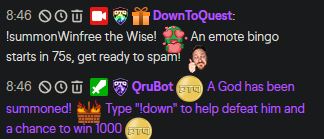
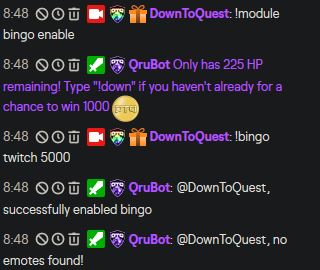 strong kernel
@lament blade This is known. We cannot provide an ETA for a fix.
lament blade
Appreciated the assist.
lunar shoal
i'll download chrome and try it
lament blade
I dont know how to switch to twitch from mixer
round brambleBOT
@lament blade Streamelements on top of OBS -> Logout -> login
lament blade
Ty
 pulsar dove
abstract hemlock
pulsar dove
abstract hemlock
@pulsar dove type this /emoteonlyoff on your chat
 thorn wadi
hi ineed help i stream on ps4 and i recieved a big donation early this morning from a viewer and i cant seem to find the donation on the leader board or anywhere
abstract hemlock
@thorn wadi Do you see it on your activity feed?
thorn wadi
@abstract hemlock let me check on twitch or stream elements should i look
abstract hemlock
Right here : https://streamelements.com/dashboard/activity
lament blade
https://prnt.sc/s4zjfi what? stream is running, i also deleted the extension and re added it

please hurry i dont wannta get copy rightttt
thorn wadi
@abstract hemlock i dont see it
abstract hemlock
If a viewer tipped through PayPal but no information appears in your StreamElements account, this generally means PayPal has held the tip for verification. Until PayPal clears the tip and sends back a confirmation to your StreamElements account, no information will appear there and no alert will play, as that confirmation is the only way for us to be aware of a successful transaction. If you believe there may be an issue with the transaction, you'll need to contact PayPal support as StreamElements is only a passthrough service and never actually gets involved with the transaction or touches the money.
thorn wadi
@abstract hemlock how long should it take
abstract hemlock
That depends on paypal
thorn wadi
@abstract hemlock ok well thanks do you know what other services besides paypal i can use or you recommend
for future donations what do other streamers use
fringe edge
Hello, I am a streamers moderator trying to help him figure out a problem hes having with his !song command. When mods go to change the !song command it says there is not one, but on his commands page there clearly is. It seems to be pulling from requested media from quite a long time ago. Is there a way for a supermoderator to fix this? Or does he have to disable the command somehow on his end? He wants the !song command to be whatever he programs it as, and not pulling from where it is now.
It seems to be a problem of the current media showing a song as now playing regardless of being cleared or paused. !removesong is not affecting it, not sure where to go from there
abstract hemlock
@fringe edge What is the name of the streamer?
abstract hemlock
Let me check, give me a sec
fringe edge
For sure, just forgot to include tag originally
@abstract hemlock It finally just let me skip the song, so it says there is no song in queue now. I guess my question becomes now can we edit !song or is it uneditable since it is built into streamelements? If thats the case I can probably just make a !music or something instead, !song is just the most commonly used in twitch chat
abstract hemlock
@fringe edge exactly default command are not editables
fringe edge
okay that solves the problem then. Thanks for your time, sorry if I had you on a wild goose chase
abstract hemlock
😅 np
ionic kelp
Use business for any that require privacy. Basic should be for only those that you trust.
 sour brook
I have a problem where my overlay doesn't fully show on my stream only parts of it and i tried to see if it was the resolution that i have it have but its the same as my stream resolution. Any ideas on why that is?
ionic kelp
@sour brook click the overlay source and do Ctrl+R and Ctrl+F.
sour brook
When you say click the sure do you mean click into it or just click it once? @ionic kelp
 half badge
Hi, could I get my chat stats fixed? Old username - d_steves, Current username - dsteves
ionic kelp
@sour brook the source list and once.
sour brook
alright i did that and nothing happend when i did both?
ionic kelp
1 at a time.
sour brook
Yep thats what im doing
Nothing happen though when i did that?
The overlay is one of the preset overlays that i just edited the social medias
abstract hemlock
@half badge Done
half badge
Thank you!
abstract hemlock
@sour brook you overlays is 1080p (on SE site)?
abstract hemlock
@sour brook Better, check the resolution and when you add the overlay to OBS use the same, cause if you change the resolution you will need to move all your widgets to fit the new resolution
 grim lark
my streamelememts bot wont go live with me on twitch anymore! I changed my name on twitch and since than it has been silent from my bot. I tried reconnecting and loging out all that stuff nothing worked. Not sure whats going on it was never a problem he was working fine up untill i changed my twitch handle.
lament blade
@strong kernel it's on, But still not working
strong kernel
@lament blade Turning it on enables the system to start counting up. It will not retroactively apply watchtime to people. From the moment it's turned on, it starts counting from 0 for everyone, every 10 minutes.
 molten lily
hey how do i setup a bot and get it in chat?
 drifting drum
Hello, I just had a host and they don't show up in my dashboard, hence the alert isn't going off either. Help?
 hybrid flint
trying to stream in just twitch but when i click start stream a window pops up for facebook can any one help me
round brambleBOT
@drifting drum Due to changes to Twitch API, we have filtered out hosts and will only show these ones on your activity feed:
- All hosts coming from an online channel with at least 1+ viewer
- Auto host events with at least 1 viewer - only from a channel that just went offline
Note: If you see "X channel has hosted you" with no viewers on the back, that is considered an offline host or a host with 0 viewers, we do not show these.
Note for Mixer streamers: The above 2 filters currently apply for Mixer and we are aware its actually not how Mixer hosts work. We do plan on changing it, but no ETA on when.
ionic kelp
@molten lily https://streamelements.com/dashboard and hit join on the right side.
StreamElements
The Ultimate All in One Platform for Streamers
round brambleBOT
@hybrid flint Streamelements on top of OBS -> Logout -> login
molten lily
i have one in but im trying to add another one which responds to commands
and idk how to set another one up
ionic kelp
Can't help you with other bots. We only provide support for ours.
drifting drum
thanks!
molten lily
no a bot from your system, idk how to get it to respond to stuff like !commands
ionic kelp
StreamElements
The Ultimate All in One Platform for Streamers
zenith widget
@molten lily what is your account name?
molten lily
my twitch is blobfish_xd
 onyx oar
I read something like; in 10 min this always update, that's true? because im trying to see why this don't work xd
round brambleBOT
@onyx oar 10 minutes of watchtime are given to those in chat when the loyalty points are handed out (every 10 minutes). Therefore, loyalty must be enabled for watchtime to work properly.
There is no direct link between watchtime and all-time points.
It can’t be calculated from the amount of all-time points a user has because subs may earn points at a faster rate and !bonus all command increases all-time points for users in chat at that time.
Giving points to a single user does NOT affect all-time, only when giving to all in chat.
zenith widget
@molten lily now its going to respond
molten lily
thank you
onyx oar
Thanks you bot
 feral parcel
Hey, I was about to go live (it's not my first time), and I got an error about missing Stream URL? I tried disconnecting my Twitch account, and putting in my stream key manually. However that didn't seem to work, even reconnecting my twitch to Stream Elements doesn't work... I still get this error
And as a test, I'm able to stream on YouTube... Not sure why I'm having an issue with Twitch 
And it just randomly started working now... I'm very confused.
zenith widget
Twitch hiccup maybe
 thorny meadow
hello guys, my twitch chat command !watchtime is not working
how can i solve this
always keep show 0 secs
round brambleBOT
@thorny meadow 10 minutes of watchtime are given to those in chat when the loyalty points are handed out (every 10 minutes). Therefore, loyalty must be enabled for watchtime to work properly.
There is no direct link between watchtime and all-time points.
It can’t be calculated from the amount of all-time points a user has because subs may earn points at a faster rate and !bonus all command increases all-time points for users in chat at that time.
Giving points to a single user does NOT affect all-time, only when giving to all in chat.
lament blade
@strong kernel The settings are correct. And I was there in the chat for 30min, and yet the viewing hours don’t move anywhere
 gilded marten
is there a way to record a stream with streamelements and not record your overlays during that time?
zenith widget
As far as I know, this is a feature that is planned by the OBS guys.
as OBS.Live is just a plugin for OBS
 umbral nebula
It seems that anonymous donations show up with my own name instead of 'Anonymous'. It's rather confusing, could it be changed somehow? 🙂
zenith widget
Can you show a screenshot of what you mean? 
umbral nebula
umbral nebula
Huh. I can't be sure, but this has happened multiple times and thought it was unlikely
zenith widget
i literally just tipped you, removed my name and it went through as anon
¯_(ツ)_/¯
and yes im taking this seriously hence why i sent a tip just to make sure i can reproduce
umbral nebula
Sorry, and thank you 😄 can I refund it somehow? I really did think it was acting up, as I've received multiple with my own name and never with Anonymous
zenith widget
keep it
so I went to your revenue history page
clicked on your name
and lo and behold its the same person 
at least same email
his doing it for shits and giggles
umbral nebula
I just have a feeling I know who it is and they're not the memey kind of type
But I guess you never know!!
I really appreciate you confirming this!
zenith widget
go to the revenue history and click on the name - it will auto filter by that email or hover over the name to see the email
zenith widget
Hey no worries 🙂
 short hound
can i have game capture audio and media requests on different audio devices? I can't work it out ://
round brambleBOT
@short hound How to exclude audio sources for a stream or recording: https://obsproject.com/forum/resources/8/
Voicemeeter Banana guide: https://obsproject.com/forum/resources/397/
 indigo shale
There's no channel for dashboard support that I can find so I'll post here.
When I try to adjust the Bot Module settings for channel hosts to only post an alert in chat for 5+ viewer hosts instead of a minimum of 1 viewer, it doesn't save that setting.
ionic kelp
@indigo shale What browser you trying it in?
indigo shale
Firefox @ionic kelp
ionic kelp
Could you try in chrome please?
 frosty copper
Is there anyone around who can help with overlay editing on the elements website. i have done it before but cant seem to do it now
All good panic over. just me being daft!
indigo shale
@ionic kelp I just tried chrome and I've finally managed to save it be set as 5 viewers instead if 1 for hosts. I just fiddled around and it seems to only show your saved changes after you refresh the browser
Same goes for Firefox. It would be handy to have a clickable 'Save' button that refreshes your browser after saving. Currently it auto saves without refreshing the browser and it leads to confusion like in my case.
 night scarab
does streamelements by any chance have an overlay widget that can show chat on screan?
ionic kelp
Standalone from the overlay no. Otherwise yes.
night scarab
i have no idea what that means Sudo
you see, im a bit of a small brain when it comes to technology
im sure what you said was super useful tho! its rather that i have no idea what it means
umbral nebula
Related to recent convo - what is the point of having the setting on that requires a user to login with twitch before tipping, if you can't track the tipper's username anyway?
zenith widget
@umbral nebula email
we can connect different tips to the email it came from
or is connected
@night scarab If you are referring to having a projection of the chat widget on top of your gameplay(since I saw the thing you asked about in #general-chat ) - no we don't have anything like that.
umbral nebula
Ah, I see, so it's not the paypal email, but the email from their twitch account? Any reason why their username isn't displayed on the dashboard?
zenith widget
Yes - you don't have the force username option from the tipping settings -> page settings
umbral nebula
I would force it if it also allowed anonymous donations
night scarab
ahh i see, thanks for the response
oh no not github
dont get me wrong, github is awesome, but i always get lost and confused there
umbral nebula
Some people don't want their name on the alert, but for mods it would be useful info who it is 🙂
zenith widget
@umbral nebula not possible to force the username and anonymous
 formal lintel
hey guys, anyone got a fix for the streamelements alertbox? whenever an alert goes off, it ends and just keeps on going indefinitely until i reload my overlays :/
zenith widget
@night scarab Scroll down - there are install instructions
umbral nebula
I get that, but would appreciate the info on the revenue history page, as you get access to it when they log in
night scarab
but isnt this stuff just placing it on top of my current screen? or am i just confused
 oblique marsh
Is this where iw ould post for help with my stream elements leaderboard? Mine is insanely inaccurate
zenith widget
It places the chat above your gameplay @night scarab
@oblique marsh in what way inaccurate?
night scarab
in the recording software or on the pc itself
zenith widget
@formal lintel I'm not sure I fully understand the issue. Can you record a short video showing the issue?
ionic kelp
PC
night scarab
yeah exactly, thats not gonna work
night scarab
im using a capture card and everything so it either wont capture it or stuff
thats what im explaining
oblique marsh
@zenith widget on the page of gifted subs, one user is listed 3 times, and on the bits all time, The nubmers and leader board is just wrong, People arent listed that should be and the numbers arent right.
(sorry live atm, so its hard to tab out)
night scarab
like if its on top of everything on my normal pc, that isnt gonna do anything since im not capturing any window on my screen
formal lintel
@zenith widget actually not really, cause it only happens while live. when i do test alerts it goes of properly
off*
night scarab
like it has to be a separate overlay i could add to my recording stuff, instead of part of an display capture
zenith widget
@oblique marsh if this is the person you are referring to - i assume he changed names 3 time and the most updated name is the top one right?
If yes, then that can't be removed unless you add the old names to the ignore list in the extension settings.
For bits, i would need names to check this
But usually the cheer leaderboard on the extension is updated directly from the Chat and when they cheer
oblique marsh
Correct, the one with the yellow guy is correct,
For the chears, I will get you a screen shot of my all time cheers directly from twitch and show it to you for comparrison once im out of this game
zenith widget
👍
@formal lintel well a VOD link would be nice then, but DM me the VOD link
with a timestamp
@night scarab Ok maybe we are talking about different things here. Do you want to show chat for viewers only or for your self and chat while in-game(console or not)
formal lintel
@zenith widget all right gimme a sec
night scarab
basically viewers only, since ill be watching my own footage
zenith widget
If you are using our overlays, we have a chat widget for the viewers to see via the overlay you place on the streaming software you use
night scarab
so that if you have the output, the chat shows for the people watching, and hopefully in the preview in the recording software too
aaah nice! thats exactly what i was looking for
thanks for the help!
oblique marsh
@zenith widget So i refreshed and most of the cheers seem to have fixed themselves (i dont know if changing my own leaderboard in twitch to all time triggered something), Although I am noticiing that i am missing a person completely from the list, who should be in first place, who has donated over 300k bits, But they dont seem to be showing anymore on the all time twitch either, How would i go about fixing this and who would i talk to? You dont just forget someone that has a crazy 300k bit badge next to their name.
zenith widget
(i dont know if changing my own leaderboard in twitch to all time triggered something) - as mentioned the extension grabs its data directly from chat 🙂
As for the missing person, check and see if he is added to the ignore list in the extension settings
oblique marsh
Well i normally keep my own leaderboard at weekly, so will this continue to screw up SE's all time when all 4 are suppose to be visable?
zenith widget
if not, maybe he needs to cheer 1 more bit to show up
oblique marsh
Hes actually not even showing up in twitch chats leaderboard
Which is blowing my mind
zenith widget
if all people update properly and you change to weekly it should even it self out
interesting a phantom 👻
wait i see the top person
lament blade
hey, so.. I'm trying to make it so we can listen to music in the stream, i'm a moderator for the streamer, and she gave me access to her panel to fix it and its not working..
velvet spoke
player still needs to run locally for streamer.
lament blade
I figured it out.
oblique marsh
This isn’t the place to ask that
zenith widget
@lament blade Elaborate please. Via the website or via your chat directly?
oblique marsh
@zenith widget So, for future reference. If you have others with the issue I had when you came by, Shizzzaam fixed it. He went into chat, and changed his active badge from gifted subs to his cheer badge and the leader board fixed itself on twitch. So I assume the panel did too (I’m in bed so I can’t check)
 foggy geyser
Do I have to pay for the website overlays?
 unique atlas
Hey guys, my streamelements keeps closing every time I alt tab
 unique atlas
Nearly every time*
oblique marsh
Now you have a work around if you ever see that again 
zenith widget
@foggy geyser That button is used to import overlays from another channel that is linked to your current account
@oblique marsh i mean, i knew the leaderboard gets it from the chat data, but if twitch is being  about their own data, thats up to them
 slate kernel
So can anyone help me with why OBS.Live does not let me change the stream title and information from inside of it anymore :? Like I can do it in launch control but the function dissappeared from my OBS 😦
oblique marsh
Ya once I saw he was missing from twitch too I knew it wasn’t you guys, but then I was freaked lol
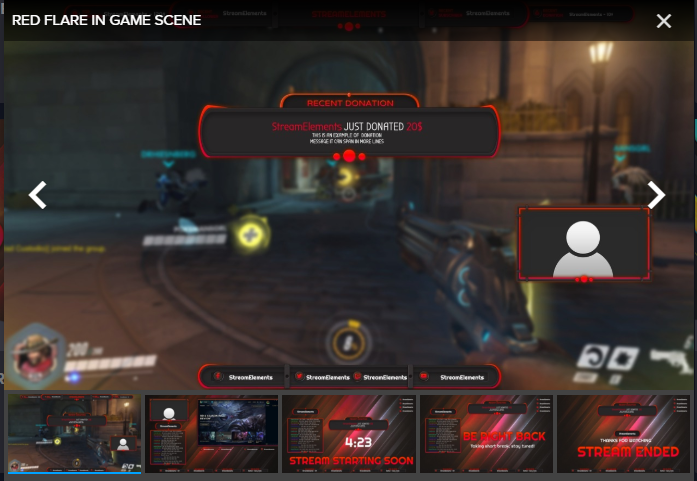
foggy geyser
How can I put this overlay on my stream? - https://prnt.sc/s55ddo
 round brambleBOT
@foggy geyser To add your overlays to OBS, add a new browser source in your scene. Paste your overlay URL in the browser source properties, set the dimensions to 1920x1080 (unless you changed them on the website), and ☑ “Shutdown source when not visible” https://youtu.be/KDvLynUqXI4
zenith widget
@slate kernel where are you referring to exactly?
@unique atlas Im not sure I understand the issue here.
unique atlas
I alt tab out of league and streamelements closes randomly with no notification
oblique marsh
@slate kernel did you check view>docks
oblique marsh
slate kernel
I was like "did they remove it with last update"
oblique marsh
Sometimes things get accidentally closed
Happens to me all the time
Happy streaming  I’m off to sleep
slate kernel
thanks girl! have a nice sleep
lament blade
Dunno if this is on Twitches end, or StreamElements end.. but if you change the streamers title as a moderator, it completely clears the category.
zenith widget
How are you changing the title?
zenith widget
on which streamer?
lament blade
ablivionz
Nvm. its just a Twitch bug.
it removes the Category on my end, but if I refresh it, it will come back.
 cinder jacinth
Buenas! Se puede preguntar en español?
zenith widget
#🇪🇸︱español @cinder jacinth
cinder jacinth
Sorry, thanks!
velvet spoke
Twitch be like that
raven hawk
how do i make it so it saids viewer A got gifted a sub by Viewer B?
weak delta
Well, since you're doing custom CSS... I'm not sure if it is the same indicators apply but normally {sender} indicates the person gifting and {name} indicates the person gifted.
Could maybe try that @raven hawk
 mental quartz
Since a few days raffle doesnt work for me when my bot sends the !raffle....even that I set everything up. Someone knows something about problems there? I can put it in manually...just the bot is not recognized
foggy geyser
can share my stream?
 tribal flax
hey does anyone know if i can have my chat box open on screen while my OBS is minimized?
 burnt harness
Guys, how can viewers in my channel get roullette points just by watching the stream?
i had to manually give them points yesterday cuz they werent getting any just for watching the stream
 quaint igloo
Hey guys, my streamelements obs does not connect with my twitch. it says network error but everything seems to work fine, any suggestions how to fix it?
 stoic silo
Hey! I try to put text into an overlay that I found on the page but when I changed text example Youtube nothing happens. I've never done this before and don't know how to do it. Hope someone can show me the way because I've been on for over 1 hour now and can't get it right. Thanks! 🙂
 jagged sable
Hey I was wondering with the subcount {count} if you could do maths with it. It is a wrong number for me. It always shows one too much so I need to do -1.
ionic kelp
@jagged sable try ${channel.subs}
 maiden thicket
Hello everyone, is there a way to change the name of the merch store link , and where can i find the panel that i can put on my stream for people to click on.
 elfin tendon
Roughly how long do dream team applications take?
 modest summit
how can i change how often my stream provides a hyperlink to chat?
 celest lance
Hello, my chat stats are not working? it says 404 - Page Not Found
ionic kelp
@celest lanceIs it for official_ezk?
celest lance
Yes
ionic kelp
Have you used another name with us by chance?
celest lance
I have updated my name on the website
 twin orbit
Hi there, I would like to close my Stream Elements Account. For that I would need a "JWT Token". What is that and how can I get it?
round brambleBOT
@twin orbit You can find your JWT token on your account channels page ("Show Secrets" to reveal the token): https://streamelements.com/dashboard/account/channels
READ ME:
This is a private security token. Do NOT share this token here or other public places, only with a StreamElements staff member in private.
ionic kelp
Disregard the 2nd half if you're doing it on the site.
 sullen grove
Hello, I have a quick question about the streamelements bot chat alerts
twin orbit
Thank you but I still can not delete my account due to an internal error. What now?
ionic kelp
@twin orbit email reem@streamelements.com with the info from the form.
sullen grove
So I have set up the chat bot to give me an alert if someone hosts me, but yesterday it didn't give the alert at all? So I was wondering if I need to set up a message for different types of viewer numbers? I did have it on "1" viewers + the message, do I have to add a message for 2, 3, 4, 5 and etc. viewers or is there a way to signify that any amount of viewers per host would give an alert?
round brambleBOT
@sullen grove Due to changes to Twitch API, we have filtered out hosts and will only show these ones on your activity feed:
- All hosts coming from an online channel with at least 1+ viewer
- Auto host events with at least 1 viewer - only from a channel that just went offline
Note: If you see "X channel has hosted you" with no viewers on the back, that is considered an offline host or a host with 0 viewers, we do not show these.
Note for Mixer streamers: The above 2 filters currently apply for Mixer and we are aware its actually not how Mixer hosts work. We do plan on changing it, but no ETA on when.
 final turret
anyone know how to make this streamlabels where it cycles thru the most recent donations and bits 
 autumn obsidian
I turned on media request last night for the first time and allowed users to do some requests. I added a backup playlist. So when viewers requested songs it never played their songs. It appeared to be skipping their songs automatically.
I tried changing different settings but nothing seemed to fix it. Removing the backup playlist seemed to work. But then it's just so silent in between requests
 hushed dawn
Hiya, I am trying to get text over image to work for my alerts but for some reason the text isn't popping up. The text pops up for both "Row" and "Column" layout but not "text over image". Any suggestions?
twin sentinel
Check the margin in the advanced text settings.
hushed dawn
Yup that was the issue. Thanks!
 modest relic
i have a problem when my viewers try to post a link in my chat all that shows up is *** how do i fix that?
 ornate sundial
Any idea why I have TTS enabled for sub alerts, but no TTS actually happens?
ionic kelp
@modest relic https://dashboard.twitch.tv//settings/moderation disable block hyperlinks.
twin sentinel
@ornate sundial Check variations.
ornate sundial
@twin sentinel ah i see
modest relic
thnx @ionic kelp
 amber zenith
Hello! I have a weird problem that I was unable to find solutions on the internet because it seems no one experienced it. Somehow, the OBS is stealing focus from my full screen game (Valorant) and minimizes it. The issue only occurs for Valorant. I tried to reproduce it and I'm very sure I'm not alt tab-ing or presssing windows key. I am unable to reproduce it by tapping any key, it seems that from time to time, the game lags, I tap my left mouse click to shoot and the game minimizes. Afterwards, I see the pointer from the mouse right on the OBS capture somehow. So that's why I believe somehow the OBS is stealing the focus, but I don't understand why it's only for Valorant (also play CSGO) and hopw nobody else experienced it.
round brambleBOT
@amber zenith For the best OBS support, please join their Official Discord @ discord.gg/obsproject
lament blade
I recently set up loyalty points and a shop. The only thing in my shop is audio clips you can buy. But, when people buy one of them, nothing happens. Anyone know a fix?
ionic kelp
You got the redemption widget added to your overlay?
ionic kelp
You have an overlay created with us by chance?
lament blade
nope, I can make one really quick though
i made one and put an redemption alert on, how can I add this to my stream
@ionic kelp
ionic kelp
Add the overlay link to your streaming software (Preferably OBS) and once someone redeems something it should go off.
 marsh vector
Hello! I'm making my transition from SL to StreamElements and I'm trying to customize the Store Redemtion alerts and I have a custom animation but I can't add it for some reason. All of the animations worked well in the alerts but not for the redemtions. I can upload the animation but when I want to insert it doesn't let me. Only appears Delete. Any help please? Thanks in advance guys
lament blade
How long does it take for orders to show up? I had some things bout by my viewers yesterday about 20-24 hours ago. Still not seeing anything
ionic kelp
@lament blade Merch questions are to be asked in #helpdesk-merch but to answer your question it generally takes about 24 hours before they show in the feed.
lament blade
Thanks I clicked the wrong one didn't I?? 😩 💩
 craggy niche
Hello i changed my name on Twitch and after that my bot stoped working can some one help me ?
marsh vector
Hello! I'm making my transition from SL to StreamElements and I'm trying to customize the Store Redemtion alerts and I have a custom animation but I can't add it for some reason. All of the animations worked well in the alerts but not for the redemtions. I can upload the animation but when I want to insert it doesn't let me. Only appears Delete. Any help please? Thanks in advance guys.
 cursive orbit
Can somone give me the command for custom bot name? I'd like to have it in Ground Control instead of OBS.Live 🙂
!customname
¯_(ツ)_/¯
 urban wasp
So i ordered some merch from a good friends stream elements about 10 days ago and yet to have seen the product. Is there some way i can track my order?
 rugged monolith
This sound silly / super easy, but does SE have a Quotes system like StreamLabs? A way to add quotes, bring up specific or random quotes, and most importantly, a way for creators to view / edit all their quotes? When I google the subject, all I find are 2+ year old posts about how SE doesn't really have one or its just a proof-of-concept. Surely that's been added since then??
round brambleBOT
@cursive orbit Currently renaming the bot fully works with OBS.Live.
You can follow this video guide to set it up: https://discordapp.com/channels/141203863863558144/494513233416421386/561516184718278676
If you don't want to use OBS.Live and want to stick with Ground Control, please let us know your Twitch username.
cursive orbit
And whom may I contact to stick with Ground Control?
wary halo
how about dumping your twitch username here? 😛 like the bot told you to
cursive orbit
aureatecollective
wary halo
@cursive orbit restart Ground Control 😉
cursive orbit
But I just wanted to tag an admin or something like that, so I'm not dumping it for nothing :¯_(ツ)_/¯
Okay @wary halo!
May I ask if a version of Ground Control for Mac will see the light?
wary halo
probably not
cursive orbit
Or if it is compilable/executable through Wine maybe?
cursive orbit
Most of my streamers use Macs, even if it's less cool for Streaming, it's optimized for music making 😦
lament blade
Quick question. I seem to recall there wasn't yet a way to organize or edit "My overlays", right?
cursive orbit
Or OBS.Live for Mac maybe? But I prefer Ground Control. As we're many, I can just share de JWT
lament blade
Cause this looks like a mess
As of now, BEFORE editing, at the very least they're all displayed in the same "group". But that's gone as soon as I touch one of them.
And they don't have a preview/thumbnail, for some reason. But I don't think I can add it either, can I?
Only way to "sort" (not really organize) is use the search function above?
round brambleBOT
If you changed your name on Twitch please follow these steps:
🔹 Visit https://streamelements.com/logout and then log in again with by connecting with Twitch.
🔹 On the right side of the dashboard page that opens, select "Join" under bot settings. If it says "Part" select that and then select "Join" to send the bot to the chat. Don't forget to mod the bot by typing /mod streamelements in your channel if you have not already.
🔹 Post your new name here so that we can update your channel's chatstats tracking (must be done by staff).
@lament blade Check out the StreamElements ideas board: https://strms.net/ideas. You'll be able to add ideas, upvote ideas you agree with, and track their progress with email notifications. Adding and upvoting ideas also helps the staff know which ideas should be prioritized so please take some time to upvote.
lament blade
So... I'll take that as a "no". I wanted to check first xD
In case it was added in the last update and I missed it or something
Cause I didn't see the editor had been updated until I opened it today. Don't know how I missed that update -.-'
cursive orbit
@wary halo Strange. Why didn't you compile GroundControl for Mac? It seems it's just a basic Electron app? 😮
 vale vine
So I’m unable to open up Stream Elements on my browser. It’ll open up fine on my phone and chrome book but won’t open on the laptop I need it on. It’s a blank page with Help at the bottom left. I’ve tried a hard refresh but it didn’t work
 rapid axle
Can anyone tell me with overlays what is the size (height and width) i need to use i tried my screen size but the overlay is still wrong
 sleek lynx
1920x1080\
rapid axle
tried that when doing preview cant see it all
vale vine
Anyone know any solutions? <@&382267076632379392>
I just see a white page when I load up Stream elements. I know it’s a cache problem so I did a hard refresh and it hasn’t fixed the issue.
lament blade
So the idea about grouping overlays together, and even one about adding thumbnails , are BOTH two years old.
Yeah... I don't think it's gonna happen anytime soon 😅
velvet spoke
why do you tag all the support heroes?
lament blade
I'm assuming to get whoever's available
vale vine
Because I need a “support Hero”
lament blade
Since he's asking for help from anyone
velvet spoke
Regardless, @vale vine desktop browser or in obs
vale vine
Desktop browser
velvet spoke
Which browser
vale vine
Microsoft edge
lament blade
I assume same browser in other devices?
velvet spoke
Dont use edge
unless it's edge chromium
The whole SE platform is built around Chrome and chromium based browsers in mind.
 hot saddle
how do i get to loyalty settings to setup the coins
wary halo
StreamElements
The Ultimate All in One Platform for Streamers
hot saddle
thank you
lament blade
Hm... Another question
How come the widget isn't reading my only donation as the top donation? Do I need a minimum of 2 so it can compare?
vale vine
I downloaded the newer version of edge and I’m able to open up stream elements now
In case anyone else had this issue
 primal heart
ive been searching videos online about how to make custom commands for my chat that play a gif with audio and have come up with several failed attempts. Any advice?
lament blade
Could someone test real quick if "Item redemption" and "Merch event" can be emulated in their overlays?
Cause I've got 2 overlays from NOD that SHOULD have alerts for that, and it's not working in either.
The overlays do have another 3-5 issues that I'm reporting, but I want to confirm that this is ALSO on the overlay's side, and not SE
(Or, well, they should have alert for ONE of them. No idea which cause don't know the difference 😅 But yeah, neither is working anyway)
Hello
I need i help with the watchtime command
wary halo
do you have the loyalty system enabled?
lament blade
ye
uptime is working and other commands
but when someone type !watchtime has 0 sec
wary halo
how many points per 10 minutes are you giving?
lament blade
points?
 errant orbit
On twitch I changed my username and the Stream Element bot will no longer connect with chat.
- How do you fix the reason for the bot not connecting?
- Does this bot only work when live as well?
Please ping me
lament blade
I've made a store with a sound effect and a picute i would like to have on screen, I also made an overlay with the redeemtion widget on it. how do i get this on streamlabs obs
wary halo
https://streamelements.com/dashboard/loyalty @lament blade
StreamElements
The Ultimate All in One Platform for Streamers
lament blade
@wary halo whats points?
round brambleBOT
@lament blade To add your overlays to OBS, add a new browser source in your scene. Paste your overlay URL in the browser source properties, set the dimensions to 1920x1080 (unless you changed them on the website), and ☑ “Shutdown source when not visible” https://youtu.be/KDvLynUqXI4
 fathom pewter
When I click Connect Custom Bot Account I'm presented with the Twitch Authorization page. I enter my twitch credentials and it warns me of the rights I'm giving to the new account I created for the Bot. After doing so it says I will be redirected to API.Streamelements.com . After I click the button the window closes but the new bot name does not show in the drop down. Any ideas what I'm doing wrong?
lament blade
when is the launch button now?
round brambleBOT
@errant orbit If you changed your name on Twitch please follow these steps:
🔹 Visit https://streamelements.com/logout and then log in again with by connecting with Twitch.
🔹 On the right side of the dashboard page that opens, select "Join" under bot settings. If it says "Part" select that and then select "Join" to send the bot to the chat. Don't forget to mod the bot by typing /mod streamelements in your channel if you have not already.
🔹 Post your new name here so that we can update your channel's chatstats tracking (must be done by staff).
lament blade
where*
wary halo
lament blade
@wary halo and now
lament blade
kk
wary halo
and things should work
rugged monolith
does StreamElements have a Quote feature like StreamLabs and other bots? where you can add quotes, see a list of all your quotes & edit them?
wary halo
yes
and no, i don't know how it works 😛
but maybe some of my fellow support members do
errant orbit
@round bramble my new twitch name is lyraborealis
wary halo
and your old one?
errant orbit
Was Lyra_Borealis
I didnt know if I had to ping the bot or not
Thank you for the help have a nice day. 😄
rugged monolith
StreamElements must have SOME kind of Quote feature, cuz when I type the usual !quote command into chat, the SE bot says no quote found.
rugged monolith
And when I use the command !quote add it lets me add new quotes. But I dunno where I can find a comprehensive list of all my quotes or edit them
lament blade
I accidentally Clicked on Activate on My Stream element Bot But i accidentally refreshed it says Activated but i don't have the link for the moderator can somebody help me please?
 wet pollen
why do my obs overlay don't show on the streamelements "my overlays" page
rugged monolith
I also don't know where I'd go to change privileges for adding quotes, e.g. restricting that ability to mods only
wary halo
why do my obs overlay don't show on the streamelements "my overlays" page
@wet pollen things saved in the editor will show there, things saved in OBS will stay in OBS
primal heart
ive been searching videos online about how to make custom commands for my chat that play a gif with audio and have come up with several failed attempts. can anyone help?
cursive orbit
@wary halo Is it against the ToS if I decompiled the Ground Control, extracted Tether to make it run on a linux server 24/24? It'd help a lot if I could actually use this...
lament blade
I accidentally Clicked on Activate on My Stream element Bot But i accidentally refreshed it says Activated but i don't have the link for the moderator can somebody help me please?
cursive orbit
Or if I manage to compile Ground Control entirely on Mac for my sub-streamers?
wary halo
@wary halo Is it against the ToS if I decompiled the Ground Control, extracted Tether to make it run on a linux server 24/24? It'd help a lot if I could actually use this...
@cursive orbit pretty sure it is, but i will ask around for you and tag you when i have an answer
cursive orbit
Oh 😦
lament blade
I accidentally Clicked on Activate on My Stream element Bot But i accidentally refreshed it says Activated but i don't have the link for the moderator can somebody help me please?
wary halo
I accidentally Clicked on Activate on My Stream element Bot But i accidentally refreshed it says Activated but i don't have the link for the moderator can somebody help me please?
@lament blade this is for YT right?
lament blade
yea
lament blade
nobody is answering me there
wary halo
then you will just have to wait for someone that can give you the proper answer
nothing i can do about that
lament blade
k
cursive orbit
Thanks @wary halo by the way, you helped me A LOT today 🙂
 fast breach
Quick question from a newbie. I have an event list widget at the bottom of my screen. I'd like it to slide out of view when it hasn't been triggered for awhile. I'm not sure how to do it/if it can be done...?
wary halo
i think you would have to build a custom widget to do that, or just click on the eye icon to hide it when you don't want it shown
 lapis forge
Hi, does anyone know how you can put the editor to a moderator on twitch ??
cursive orbit
Not related to StreamElements, but it's in your Dashboard > Community > Roles Manager
 sharp bobcat
the dashboard wont load for me
lapis forge
Can you say in Spanish?
sharp bobcat
everytime i click it just sneds me back to original menu
lapis forge
no contestan
wary halo
English here
lapis forge
they dont answer
wary halo
then you have two options, wait there or do English here
cursive orbit
Oh yeah sorry
Twitch Dashboard
I hadn't in mind that SE had something named Dashboard too...
@wary halo Think I got my short answer:
You shall not: (i) copy, distribute or modify any part of the Services without our prior written authorization; (ii) use, modify, create derivative works of, transfer (by sale, resale, license, sublicense, download or otherwise), reproduce, distribute, display or disclose Content (defined below), except as expressly authorized herein;
The (i) content on the Services, including without limitation, the text, documents, articles, brochures, descriptions, products, software, graphics, photos, sounds, videos, interactive features
So I'm wondering if I could contact anyone to get an authorization. I really would want to, because we're approx. 12 differents streamers, with different configs across Mac and Windows
wary halo
yes i am working on staff responding 😛
you think i am just watching streams all day?
(i am, and it's evening here)
cursive orbit
At least, you activated me Ground Control custom bot, which resolves me half of the problem, because half of our streamers are on Windows 😄
@wary halo I'm too, and it's evening too here 😂
wary halo
 same timezone?
wary halo
cursive orbit
At least, Custom Widgets and Twitch API have helped me automate 75% of heavy redundant tasks
Still have to automate bot and media request haha
 elfin yew
Why i have only one Payment Provider ? (PayPal)
round brambleBOT
@elfin yew SE.PAY is available for streamers who are atleast 18 years old and with bank account under their name in one of the following countries:
Austria, Belgium, Czech Republic, Denmark, Finland, France, Germany, Ireland , Italy, Netherlands, Poland, Portugal, Slovakia, Spain, Sweden, Switzerland, United Kingdom, United States.
If you meet these criteria and don’t see SE.Pay, let us know.
For information on SE.Pay payment methods, their fees, and settlement times see https://streamelements.com/dashboard/tipping/fees.
scarlet tiger
And you must have 101+followers
elfin yew
Ohh

 golden ember
hey guys i'm a bit stuck, i set up the watchtime command but it tells everyone they have 0 seconds in my stream, any ideas?
round brambleBOT
@golden ember 10 minutes of watchtime are given to those in chat when the loyalty points are handed out (every 10 minutes). Therefore, loyalty must be enabled for watchtime to work properly.
There is no direct link between watchtime and all-time points.
It can’t be calculated from the amount of all-time points a user has because subs may earn points at a faster rate and !bonus all command increases all-time points for users in chat at that time.
Giving points to a single user does NOT affect all-time, only when giving to all in chat.
golden ember
that is confusing, anyone got an explanation in lehmans terms
twin sentinel
@golden ember Enable loyalty.
golden ember
so once it gives the first points will it backdate how long people have watched for?
wary halo
probably not since it wasn't activated before
how would the bot know the data from before that?
golden ember
Damn so it just doesn't register how long someone has watched me
golden ember
okay dude well thanks for the help
vale vine
My turn now lol?
My last question for the day! I received about $60 in bits two days ago. I keep checking my twitch summary and it says my last bit donation was a month ago. Even on my overlays it shows “recent cheerer” as someone that donated a month ago. I’m so confused.
wary halo
Twitch issue, not much we can do about bits related stuff
vale vine
Ah alright. Just wondering if anyone else has experienced this? Maybe give me hope that it’ll get resolved in due time
wary halo
i would send a support ticket to Twitch, just to make sure they are aware of it
vale vine
I will, thanks
 dim marten
Is there any possible way to make my 'newest tip' text on the overlay pick up both bits and SE donations at the same time? I like to have minimal overlays.
twin sentinel
final turret
anyone know how to make this streamlabels where it cycles thru the most recent donations and bits
similar to this but only bits and donos
who can help 


this is from 2018 but its not editable
wary halo
there must be a few of those in #widget-share
 fierce tinsel
yea