#helpdesk-twitch
1 messages · Page 548 of 1
 compact crest
 round brambleBOT
@compact crest Spotify has kindly asked us to disable our integration with them, so we complied. This means that the Spotify integration has been removed and the "Now Playing" widget no longer has it as an option.
 zenith widget
As for a command @compact crest : https://discordapp.com/channels/141203863863558144/424943321794871296/460471841690222622
@prime pulsar Are you using OBS.Live?
 prime pulsar
Stream elements obs.live? Yes
round brambleBOT
@prime pulsar Streamelements on top of OBS -> Logout -> login
zenith widget
and then make sure the stream key matches in Settings -> Stream
 slow smelt
hi i cchanged my name, the store link updated but the command link didnt
zenith widget
Which command exactly?
 dry hare
!store ?
zenith widget
prime pulsar
Thanks again, this is literally my first stream ever so sorry if I’m a noob
 zenith widget
yes i turned it on
zenith widget
well i tried to "skip" the song
Ok there is a weird issue here
his dashboard is not taking full control of MR
and yet his hearing the music
this should NOT happen when the yellow bar is there
 boreal flame
wym what yellow bar
zenith widget
boreal flame
as I said earlier
I think it's the OBS.live plugin
because that's where we started it originally
zenith widget
@smoky turtle is the redemption still not working?
 lament blade
does stream elements have a marathon timer?
zenith widget
lament blade
thank you
 tribal plover
I've authorized streamelemnts to my Twitch address. But I couldn't figure out: When I write raffles to earn points with rouletta, a single person earns points instead of multiple wins? How do I distribute the score to more than one person?
- Question: How can viewers earn points without drawing?
- My question does not write papers in the twitch chat when you follow the twitch. How do I activate it?
zenith widget
- https://streamelements.com/dashboard/bot-modules - chat alert module
- https://streamelements.com/dashboard/loyalty - enable the loyalty system for passive gain and then enable some modules from the above link for some games for the viewers to play with
- if you use !sraffle - that will open a raffle for a single winner - using just !raffle will open for multiplewinners
tribal plover
1 )
I try, but Sraffle and Raffle both determine a single winner.
round brambleBOT
@tribal plover Please connect your streaming account (Twitch, YouTube, or Facebook) with Discord by going to ⚙ Settings and then Connections here in Discord. https://streamable.com/eg92w
 zenith widget
whats your username
tribal plover
Lioness#3869
zenith widget
@tribal plover Your username on TWITCH
not here
i can't find your account
to check your commands
@lean ridge What is the type of the item
 lean ridge
@zenith widget list of code
zenith widget
Do you have listed codes?
tribal plover
Twtich user name lionesss
lean ridge
@zenith widget yes
zenith widget
@tribal plover Please remove follower only mode from your channel.
tribal plover
okey
lean ridge
@zenith widget Yes I put a list of codes separated by one line
zenith widget
Whats your username?
 unique minnow
Can I get someone to help me merge my account. i have a mixer account and a twitch account i want to put them on the same account?
lean ridge
Fidi_el_Gamer @zenith widget
tribal plover
I've only left this problem with my authorized streamelemnts to my Twitch address. But I couldn't figure out: When I write raffles to earn points with rouletta, a single person earns points instead of multiple wins? How do I distribute the score to more than one person?
zenith widget
On your twitch channel
tribal plover
oke
lean ridge
@zenith widget so what I need to do
zenith widget
Checking
tribal plover
not only in follower mode
zenith widget
I'm checking the error you are receiving
lean ridge
Ahhh ok
zenith widget
I think you can't place actual links in the access codes @lean ridge
thats causing the system to timeout and give the error
@tribal plover Will check with the devs.
tribal plover
OK, i am waiting
zenith widget
They may or may not answer today
zenith widget
"!addpoints username points"
tribal plover
ty
 coarse owl
Hey guys. I have a problem with my alerts on streamelements. I do all my assets by myself and my alerts are not playing fluently but i dont know why.
Here is an example somebody follows me and the videos dont play smooth
zenith widget
Settings -> advanced -> scroll down -> enable hardware accel.
coarse owl
On obs?
zenith widget
yes
lean ridge
@zenith widget the error continue I don´t pur a link al also don´t loading
lean ridge
And for me why not
zenith widget
what browser are you using?
lean ridge
What do you meen what that
zenith widget
Its saturday - developers are not working today, if they answer, is only because they found time to answer today.
lean ridge
But I need to write developers
zenith widget
Short version: first the issue needs to be investigated
lean ridge
But if only is a problem with me
It can be the internet conection
No no
Is not necesaary a big conection to buy no
zenith widget
Of course I checked this on my own account and on yours and got the same error.
 twin sentinel
We informed the devs to look into the issue. Until a statement (no ETA) on this we cannot do anything more.
lean ridge
@zenith widget you also see the error in your pc
 jade remnant
what is your native language?
lean ridge
Why??
jade remnant
Los desarrolladores han sido informados del problema. No necesitas hacer nada más. por favor espere que alguien le responda
Esto puede llevar algo de tiempo ya que no están trabajando durante el fin de semana
lean ridge
Pero ha alguien más le ha dado el error
jade remnant
i dont know, the devs are aware, nothing else can be done now so just wait
lament blade
Hello, i seem to have a problem with the hypecup widget:
At first, i moved the widget to the bottom right corner and saved it. but then...
But it looks like this when i came back to edit it:
lean ridge
And sorry for the inconveniences
zenith widget
@lament blade known issue - no ETA on a fix
lament blade
kk thx but pls do fix it  love y'all
lament blade
Hello, is there any way to make the chat widget transparent to the bg?
zenith widget
Click on the widget then on the left side menu from Dark background choose "custom"
lament blade
Alright thx
 quiet sphinx
can someone help me? my chat stats dont work anymore
 wary halo
did you change your name?
wary halo
ok, because that is the problem for most people
zenith widget
fixed
quiet sphinx
thank you
 brazen moon
Hi support, if i want to make a bot timer that display info about my bnet and steam id, problem is if my steamid is same name as on twitch how do i make the bot not highlight me in chat? is ther some command to do that? thanks
twin sentinel
One highlight option is provided by twitch itself and other options are via plugins like BTTV or FFZ. Check these settings.
 timber lichen
Hey, Is there any auto run commercial command for affiliate?
 elder sorrel
Isn't that a twitch default command /ad?
timber lichen
mmm, not auto. Theres a "button" to run commercials but is manual. I would like that the bot for example run a commercial every lets say 30mins
wary halo
that's not an option
timber lichen
At Least I havent seen it in Twitch options
Oh right thanks. Will it be in the bot soon or not planned? @wary halo
round brambleBOT
@timber lichen To have Streamelements run ads for you, make sure:
- Streamelements is added as an Editor to your Twitch Channel here: https://www.twitch.tv/dashboard/roles
2.A) To make a timer, go here: https://streamelements.com/dashboard/bot-timers - add a timer with a response "/commercial" and 5/10/30/60 for the duration of the ad - example:/commercial 30
2.B) To make a command trigger an add go here: https://streamelements.com/dashboard/bot-commands/custom-commands and add a command with response "/commercial" and 5/10/30/60 for the duration of the ad - example:/commercial 30
wary halo
wut
wary halo
okay, well that nice 😛
twin sentinel
Also you can set the length variable when using variables like ${1} in the command setup.
timber lichen
I think Is done, will try it tomorrow 😄 Thank you!
 torn locust
where can I see the twitch "achievements"? how much does it take to affiliate etc
wary halo
on your twitch dashboard
twin sentinel
torn locust
they changed the dashboard O.o
torn locust
its a little bit confusing :/
i prefered the old live dashboard
looks like the new twitch app
wary halo
welcome to the club of people who don't like it

i think almost no one likes it
and you have to use the konami code to unlock more options
because they released something that wasn't finished ofcourse
elder sorrel
lament blade
can anyone help me i have still the blank page problem since yesterday
wary halo
for the chatstats? or the obs thing?
wary halo
oh yeah that one
i think you had a few DM's with @tight harness about that if i'm remembering correctly?
wary halo
it isn't SE, so it must be something on your end
lament blade
i think so
wary halo
you are the only one that reported this problem, no one else
lament blade
because if my mom goes to dashbord it works fine
but not my pc
only her pc works on it
lament blade
no
wary halo
but we told you all of this yesterday
lament blade
i added streamelements in exceptions
wary halo
we can't help you with this problem, i'm sorry
lament blade
okay
wary halo
maybe try a clean installation of windows
lament blade
so delete windows and install it again?
wary halo
if you know how to
if not, go watch a few tutorials first 😛
or else you can lose a lot of stuff
lament blade
no but my mom does and maybe my mom can help me she is good with computers
lament blade
thx i wil message back if the problem is fixt and i wil say what the problem was so if anyone else has the same problem as me maybe it could be the answere as wel
wary halo
okay thanks 🙂
lament blade
np
wary halo
👌
 barren shuttle
looks like chatstats are dead for all channels ❤️
 tight harness
Not all channels, which do you see it dead for?
 ionic kelp
Can atest to this as well
tight harness
tight harness
Fixed both
barren shuttle

StreamElements
Description Chat Stats tracks emote usage on Twitch in real time. See which emotes are the most popular on every Twitch channel
this
StreamElements
Description Chat Stats tracks emote usage on Twitch in real time. See which emotes are the most popular on every Twitch channel
and this
tight harness
We're getting our development team to investigate
barren shuttle
thanks ❤️
 potent cypress
cant seem to get my capture card or camera video up for some reson
capture card is stuck on one moment please
tight harness
Looked up any guides for your particular hardware?
potent cypress
works fine on the others
barren shuttle
stats are back, thanks! 
tight harness
Stats should be all good now
potent cypress
reboot seems to av worked
 slender yoke
is there a problem with the stream store? My game redemption command !key is not working properly. SFX work fine, but not my game redemptions
dry hare
Is !key a custom command designed to redeem a game key from your store?
 scarlet tiger
@slender yoke is item enabled?
dry hare
Are you out of keys?
slender yoke
Item is enabled. Keys are aplenty. It just is not working, it says 'item not found'
slender yoke
And I do have the custom command set up where !key = redeem($key) or whatever it is correctly
scarlet tiger
One moment
slender yoke
scarlet tiger
@slender yoke Codes propably is not redeemable via chat. Sorry
Can you use extension or website.
slender yoke
No, It's always been redeemable via chat. And when we go to the store website it's not working either.
scarlet tiger
Redeem via website is working on my channel 🤔
slender yoke
its not working on mine. Also a viewer is trying to access streamelements via Firefox and only sees a blank screen
 clever echo
Hi, my bot account (custom name) got disconnected from OBS and now I cannot connect in back...
 normal igloo
streamelements works best for Google Chrome @slender yoke
clever echo
I click on the cta to connect, I log into the bot account, click authorize and then i am back to this
Sorry for interrupting, it's been like this for 3 days and forgot to reach out to you. No idea what to do to connect my bot again
slender yoke
@normal igloo the firefox comment is a sidenote. I'm using Chrome. The Key issue still stands
I need this resolved it won't work. I'm on my channel if you want to see the error message.
both !redeem key and !key give the same error message
normal igloo
@scarlet tiger so it shows up in his store on the SE website but using bot command item not found, you can see all items here any ideas? 
normal igloo
Wait so codes / keys can't be done by chat right @scarlet tiger ?
scarlet tiger
Yes
slender yoke
Nope that's not true @scarlet tiger I've been doing it that way for a year now
And even so, people are trying to access the store and also cannot redeem my codes
via website or extension is also not working
 split jewel
i'm still here sitting on - why doesn't stream elements work on Firefox but ^ is more important
normal igloo
I don't see how you claim you are doing it by chat when there isn't even an option for that https://i.gyazo.com/17b37b112448dc00d34e827080f7d4f2.png
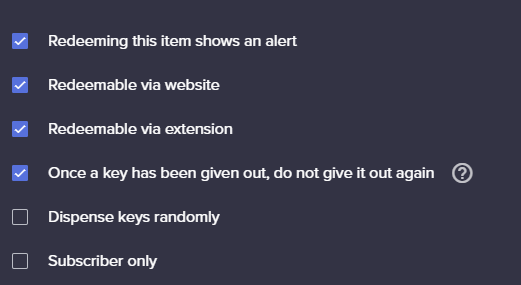 slender yoke
@normal igloo and @scarlet tiger I'd be happy to give you enough points to attempt to redeem via website to test it.
Just let me know if you are up to it please
scarlet tiger
Previously imho it was possible to redeem codes via chat, but not now.
slender yoke
If something has been changed, that's dumb. The entire point of a command based system is to reward viewers without having to open another browser.
Some of SE stuff is great, but some things are just dumb
And please tell me why even redeeming on website is not working
 sweet socket
Doesnt really help by calling it dumb
if you have any remarks about the points, be sure to provide us feedback
slender yoke
You are not helping me
It's not redeeming on website!
or extension
I've been a loyal SE user and even on your BETA trial team
sweet socket
ive asked staff to give it a look
slender yoke
OK thank you
For the sake of argument the system is also not 'supposed to' have timed chat messages trigger commands. But they work for me. I have a timed message that triggers a command to launch a raffle. It does it often during my stream. But I
I've been told it's impossible.
OK a streamer attempted via website and it worked. So for some reason redemption for chat has been removed. I disagree with that decision, but that must be the change. I Don't remember seeing any notification sent out that the process was changing.
lament blade
hello, now for an item, how do i display the "!redeem {item}" in the streamelements extension as shown below:
scarlet tiger
@lament blade There will always be the exact command
lament blade
yes, but is there a way to display that like in that img on top?
meaning- Is there a way to display "!redeem question"? cuz this ain't my channel
scarlet tiger
@lament blade I do not understand your question.
lament blade
ok see in the image below, it does not display "!redeem question" whereas in the img on top, it Does Display "!redeem question". Is there a way to make the command to redeem the item in chat, Display in the extension?
lament blade
yea, is there a way to display it in the extension? like in img 1?
scarlet tiger
@neat moss dont ping everyone
lament blade
k thx
normal igloo
 lament blade
Lol

 neat moss
off this did not see that smh
 lilac vessel
@lament blade looks like they just put the !redeem question in the description of the item
slender yoke
So I want to apologize for saying something was 'dumb' earlier
It is frustrating to have something suddenly not work the way it had worked before now
As a streamer, and an SE user, I follow with notifications the updates and announcements channels, along with social media
If something is new, or changes, I want to informed and prepared
In this case, I spent half my stream attempting to help a viewer redeem a steam code using loyalty points
I was just frustrated for having to work it out on stream
And for that, I let my emotions out here in chat. I apologize for that.
wary halo

normal igloo
 /)
/)
lament blade
@normal igloo well, it dosen't look like that, why? cuz there is the chat icon next to the !redeem question
Anyways, thx
Hello, about the loyalty system, why can't the broadcaster of a twitch channel earn loyalty points?
wary halo
because you would always be at the top of your own leaderboard
and i'm pretty shure you can btw
you are just on the ignore list but can remove yourself from it
lament blade
but still we as broadcasters can't earn loyalty points anyways, right?
lament blade
How can we do that? 👀
wary halo
look in your commands list
jade remnant
then you earn points when you stream
wary halo
nothing
lament blade
Then how do we give points to ourself? (Sry if in case i spammed the question)
wary halo
look in your commands list
lament blade
Yes.. for the !givepoints cmd?.. or
jade remnant
or
go here https://streamelements.com/dashboard/leaderboard/current
and give yourself point
lament blade
You guys are indeed the best! thx a lot!
normal igloo

 crisp bramble
hey guys, i dont understand why this hype cup wont move to the corner in obs after i save it in my overlay manager. i have refreshed the cache of the overlay in obs
 pearl flint
did you set the size of the browser source to the size that you made the overlay in SE @crisp bramble
crisp bramble
you mean this?
wary halo
it's a know issue, no ETA on a fix
crisp bramble
no known findangling to get to work ✅
is it also the case that the undo button isnt working as well? im haveing no luck with it
nvm it started working after i deleted the santa widget
pearl flint
@wary halo what an odd bug
wary halo
yup
 barren lantern
Hey, I wanted to ask for some help about a bug which occurred during my stream today. For some reason my alerts just won't play their audio for me, even though my stream can hear them just fine. They also appear without problems and when I test them they work as well. I also didn't change anything since the last time I streamed and there it was still working. Appreciate any ideas on how to fix it.
 tepid wadi
Hello, I have a problem with the animations regards to the loyalty system!
I set it up weeks ago but all it would show would be "redeemed" in the middle of my stream and it wouldn't go away.
I've disabled it since then and I was hoping someone would be willing to help out
wary halo
the redeem bug still exists, no fix yet
you can reload your overlay to get rid of the redeem message though
tepid wadi
I see
I don't want my viewers redeeming and wasting their coins though
especially if it doesn't work
wary halo
yeah i get that
tepid wadi
yeah :(
 kindred dust
my twitch commands arent working anymore can i have some help
tight harness
@kindred dust Hey, it's because you renamed yesterday, do the following: Click on Part Channel on the dashboard, click on Sign Out, sign back in and then click on Join Channel on the dashboard
wary halo
yes
 untold elk
is it possible to use files bigger then 30 mb for my alerts?
dry hare
no. the upload limit is 30Mb
 unreal plover
just a quick question, can you only be logged in to one twitch account? I have 2 profiles for 2 different streams, do i just have to log out each time i switch profiles?
 tardy mulch
hey guys! quick question? is it normal that the kappagen doesnt show the BetterTTV emotes? i see them on the emotesplosions but not when someone types it
 tidal swallow
Hey! Sorry to ask such a dumb question, but my alerts suddenly weren't working so I went to test them and it says they're muted in my activity feed. I'm not sure where this activity feed is to unmute them.
OOPS! Found it on OBS. Sorry about that
jade remnant
go here https://streamelements.com/dashboard/activity and click the play icon
tidal swallow
Hm, but now they seem to not be playing any sound?
 sharp imp
wary halo
sharp imp
wary halo
#🇪🇸︱español
 lusty sedge
hi all, does someone know how to display a follower goal after someone follows the channel and have it disappear a few seconds afterward?
 surreal parrot
Hi, I have made animated alerts lasting 8 seconds, with a sound file that lasts about 1-2 seconds. But TTS doesn't kick in til the 8 seconds is up. Is there a way to make that happen sooner? feels weird TTS kicking in after the text has disappeared, not sure if im doing it wrong
 thin gorge
quick question. Is the only way to get a custom font to show within the streamelements overlay capturing the browser and color keying or can the custom font be used with the overlay URL in obs?
 woven mulch
Hello, when starting my stream the stream has no video but the audio is working. In OBS everything seems to be working right. This is only for mobile everything seems to be working right on desktop.
dry hare
Check your bitrate
Also check obs settings >> advanced >> disable hardware acceleration
 random turtle
Hey I need help with donations I want to be able to get donation through a different way than PayPal cause I cant get any donations through PayPal for some reason.
twin sentinel
For SE.Pay you need at least 100 Followers on twitch and have a bank account in a supported country.
 green kettle
So I changed my password for my bot's account and now my bot won't work in chat. I've gotten it so that streamelements works now, but not my custom bot
random turtle
Would bank of America work then?
random turtle
Okay then I just gotta get to 100 followers thank you for your time y'alls
twin sentinel
@green kettle Please try to part the bot via the dasboard from your channel, log out of the dashboard, log back in and make the bot join your channel again. Than set it to the custom bot name.
Also are you using OBS.Live to set the custom bot name?
green kettle
I use ground control, if that's what you mean.
twin sentinel
Plase delete the JWT token of the logged in account and log in again into GroundControl and log back in and try to set the custom bot name again.
green kettle
I deleted it and logged in again. Doesn't seemed to have worked
One moment, might've found the issue
Hmm, not sure why it's not working
twin sentinel
From what I see you do not have the option enabled correctly. Please disable the option in GroundControl and ask again for the custom bot name JWT token in ground control.
green kettle
So I disabled that option, then I asked for the JWT token and it took me to the page to authenticate, and I clicked yes. So when I went back, the JWT token was in automatically. Did I do that correctly? I think I'm mistaken 
 analog marsh
hi friends...can i put a cap on the amount of words in text to speech for bits?
twin sentinel
The JWT token should not be entered already from what I know. @green kettle
@analog marsh You can set up a message maximum length in the tipping settings here: https://streamelements.com/dashboard/tipping-settings
green kettle
looks like it's fixed, I did the same thing that you said 6 times and it worked @twin sentinel thank you 
 cold flume
Hey guys back again... still having the same problem of my stream freezing. and don't know why :/
and I got a clip of it literally freezing so idk if streaming in 1080p is impossible or what
ionic kelp
1080p for twitch generally isn't the best for most poeple unless they're guaranteed to have transcoding (That would make it more viewable for viewers).
From a streamers perspective you'd need sufficient upload to deal with the bitrate cap twitch gives along with not having your game look like absolute 💩
 ember kraken
Having trouble uploading a 21.3MB file
Don't know what to say other than it gives me a generic error and doesn't accept the file
cold flume
wait so is a bitrate of 5000 kbps for my regular bitrate and my video bitrate the same too much or little for 1080?
 red bison
Is there a way to change the name of the StreamElements chatbot in my stream? 
round brambleBOT
@red bison Custom bot name requirements
- StreamElements bot modded and in chat
- Active overlay with alerts
- StreamElements tipping page in the panels below the stream (!panels)
- OBS.Live or Ground Control open
- Create a twitch account for the name you want to use or run the bot under your own name
- Custom bot name doesn't work on Mac

 ionic kelp
Must have unfortunately.
cold flume
wait so 8000 and I should be fine
 sleek pendant
I'm having trouble getting stream elements to recognize hosts, it doesn't even show that I've ever been hosted on the dashboard page. what am I doing wrong?
ionic kelp
No. What is your upload?
twin sentinel
@sleek pendant We only track the data from the point you signed up with us.
sleek pendant
right, but I've been hosted since then
ionic kelp
Have they been of at least 1+?
sleek pendant
I've had friends host me as a test after stream elements was set up and it still show that I've been hosted as an alert or in my dashboard
I believe they were hosting me with 1+
round brambleBOT
@sleek pendant Due to changes to Twitch API, we have filtered out hosts and will only show these ones on your activity feed:
- All hosts coming from an online channel with at least 1+ viewer
- Auto host events with at least 1 viewer - only from a channel that just went offline
Note: If you see "X channel has hosted you" with no viewers on the back, that is considered an offline host or a host with 0 viewers, we do not show these.
sleek pendant
I appreciate the detailed response from the Support AI bot, but I know at least one of the hosts had more than 1 viewer
cold flume
So if I have the !songrequest command on will it update naturally on my overlay or how does that work?
twin sentinel
MediaRequest Support article: https://support.streamelements.com/hc/en-us/articles/115000366131-Media-Request
red bison
So I have the requirements now for the custom bot name, but how do I actually change the name?
twin sentinel
Are you using GroundControl or OBS.Live to set the custom bot name?
red bison
OBS.Live
twin sentinel
cold flume
yes but benno does it like automatically show up in the song currently playing in my over lay or how do I do that?
twin sentinel
yes, the song currently playing sould be displayed in the widget if it is setup correctly.
For the audio, refer to the video and set up the media request widget or have the MR page open in the background all the time.
 earnest topaz
Super quick one, in the chat widget why does the text always stay a dark grey color no matter what I set the stroke color to? Am I missing something in my 3am thinking?
red bison
Thanks @twin sentinel
twin sentinel
@earnest topaz Set the font color next to the pick a font field.
earnest topaz
Hmm I dont see somewhere to set the font
twin sentinel
earnest topaz
oh yeah right there... 3am... Slaps self awake, finishes text, goes to bed.
dry hare
For reference regarding what your bitrate and settings should be
This also has info: https://stream.twitch.tv/encoding/
 wise bear
When I check on twitch it shows I am offline but on ODS it says I am streaming.
dry hare
@wise bear can you screenshot OBS Settings > stream?
wise bear
I don't know why it does that.
Every time I go to stream I have to reconnect my twitch account.
wise bear
Hit me.
dry hare
But disconnect twitch in OBS settings, then click streamelements in the menu and log out. Then connect your twitch in obs settings, then log back into streamelements
Lemme know if it still behaves the same
It could be an obs cookie file that’s just being dumb
wise bear
ok i will try it.
dry hare
If that doesn’t work...
round brambleBOT
@wise bear If you are not seeing the OBS Twitch integrations and have OBS.Live installed, please follow these steps:
- Make sure you are on the latest and greatest version of OBS.Live
- exit OBS (make sure OBS is not running)
- delete %appdata%\obs-studio\plugin_config\obs-browser\obs_profile_cookies
- start OBS.Live
- Settings -> Stream -> disconnect -> connect
round brambleBOT
@wise bear Please provide a log from your last stream. To do this, in OBS go to Help > Log Files > Upload Last Log File and paste the link to the log file here.
dry hare
Let’s see what we can see
wise bear
I am going to do what you said to do next ok.
dry hare
One sec
How long are you “going live” for before it “doesn’t work”?
Results of your log
Disable the Xbox crap, make sure your aspect ratio is “right” (ultrawide probably ignore it) and run obs as admin
wise bear
What?
dry hare
Click the link, fix the errors
How long are you “streaming” before you aren’t live?
It takes a minute or two because of the buffer twitch puts on your stream before you’re officially “live”
wise bear
Ok i got it working now.
wise bear
I did what the log said to do.
dry hare
Groovy
 supple ginkgo
Hello o/, i'm trying to connect with twitch but after i press authorize it just sends me to a blank page that says "{"status":401,"message":"invalid csrf token"}"
what should i do?
ionic kelp
supple ginkgo
thx xd
 reef marsh
I need to change my name because my chat stats aren’t being recorded. Please could you help me, thanks😊
scarlet tiger
@reef marsh i asked staff to fix your chatstats after rename
@reef marsh lydwat23 to lydia23?
reef marsh
@scarlet tiger yes please
 ocean needle
Hello team i babe some trouble twitch the bot timer who dont work or 1/3 ? I tried to remove streamelements and install another bot but nothing change. Do you have a explication plz ?
I have *
wary halo
 hot tartan
Hey is kappagen still a thing? if so how do i find it?
wary halo
it's under the widgets tab in your overlay editor
scarlet tiger
@hot tartan
hot tartan
Thank you kindly
hot tartan
ok now i have another problem they are displaying in the preview, I have added it as a browser source etc but its not display in my slobs
round brambleBOT
@hot tartan We're not able to troubleshoot issues with using our overlays in StreamLabs OBS (SLOBS) as we don't have the tools to support their software. We recommend using OBS Studio or OBS Studio with our plugin OBS.Live.
hot tartan
ok got it working again now although the sizes seem to be different even though my scene is 1920*1080 and so is the widget size?
 untold adder
Any updates on the merch feature? Been waiting for a long time for this.
wary halo
still in closed beta
untold adder
Is it coming to open beta this year?
wary halo
this year is only 2 weeks, so i don't know for sure about that
untold adder
Ok
wary halo
but it looks very promising and they keep adding new features, so when it will be, it will be great 😉
they just want to make sure that it's as bug free as possible ofcourse
untold adder
Ok i understand
 finite ridge
My streambot does not work, it has been activated, it just does not react to when someone types !uptime in the chat
round brambleBOT
@finite ridge Please connect your streaming account (Twitch, YouTube, or Facebook) with Discord by going to ⚙ Settings and then Connections here in Discord. https://streamable.com/eg92w
 sweet socket
Is it modded in chat? @finite ridge
finite ridge
no how do i do that?
sweet socket
Can you link your twitch to discord so we can check in your channel?
wary halo
i don't see the bot in your channel at all
sweet socket
Did you let the bot join via the StreamElements website?
wary halo
go to your dashboard and let the bot join your channel
the button is here, but than it would say JOIN for you
 north coral
i'm having a problem with my overlay browser element not displaying properly within OBS. when i load the page via chrome it's perfectly fine, but within OBS, the background video is frozen (but the rest of the animations are working????) help appreciated
wary halo
try turning off hardware acceleration for browser sources
north coral
seems to have worked a charm. CHEERS 😄
 twin ledge
hello can someone give me a hand i have a few widgets on my stream but I cant seem to change the amount of subs i have 9 not 100 https://gyazo.com/335be60747fd14fe2304fa37bbe33370
 twin sentinel
https://streamelements.com/dashboard/session -> goals tab
 faint niche
does anyone know how to unlock 'explore your dashboard' thingy.
twin sentinel
This is not a StreamElements related issue. Best to ask in #general-chat if someone knows.
twin ledge
thanks i didnt even know that was a thing learn something new everyday
i had a little widget on my stream like a slider but can't remember the name of it anyone know https://gyazo.com/f6765706fee85536ba6d20aaf506ee9b
 twin sentinel
EVENTS ROTATOR CREATED BY CO6STUDIO : https://streamelements.com/dashboard/themes > Widgets
 ornate phoenix
Hi
somehow my OBS today switched to black screen (it was working yesterday) capturing my desktop as always
any idea what might happen?
 kind iron
ionic kelp
kind iron
ionic kelp
@ornate phoenix laptop?
ionic kelp
1 sec
ornate phoenix
It's in integrated graphics as well
round brambleBOT
Laptops need extra setup to use Display Capture.
Due to the way laptops are designed, OBS must run on the Integrated GPU to use Display Capture. This process effectively disables Game Capture and Window Capture. If you would still like to use it, please read this guide and follow the directions for Display Capture: https://obsproject.com/wiki/Laptop-Troubleshooting#configure-your-system-for-display-capture
Please note: we recommend using Game Capture and Window Capture wherever possible. These capture methods get better performance in almost all cases.
ionic kelp
That needs updating. 1909 made changes to how that works.
ornate phoenix
Its using integrated graphics already
ionic kelp

GitHub
OBS Studio - Free and open source software for live streaming and screen recording - obsproject/obs-studio
ornate phoenix
Idk for some reason it was working yesterday today it's not
Oh yea I've updated my windows yesterday
I'll try that
Just need to come back home
 wheat vigil
Hey there peeps. So I'm looking around at my options.
I was able to import my donations from Streamlabs (and Alerts, nice touch) and those are now correct. But Bits/Cheers only seems to only go back to November this year so I don't have a correct All Time Top 10 Cheerers sorta thing. Is this something I can fix?
 slender dock
Hi all!
My host and raid alerts aren't showing up in my activity feed therefore not showing up on my stream overlay. Every other alert works which is odd.
Any ideas to troubleshoot/fix?
round brambleBOT
@slender dock Due to changes to Twitch API, we have filtered out hosts and will only show these ones on your activity feed:
- All hosts coming from an online channel with at least 1+ viewer
- Auto host events with at least 1 viewer - only from a channel that just went offline
Note: If you see "X channel has hosted you" with no viewers on the back, that is considered an offline host or a host with 0 viewers, we do not show these.
 exotic vapor
Is there a way to use GIFs uploaded to StreamElements in the custom CSS? I'm not sure what the link would be to the GIF/Image or how to find it
 knotty rain
Can Redeemed items be public for everyone? Like see who bought some item, how many times and etc?
ornate phoenix
@ionic kelp thanks mate! its working
my god i wouldnt be able to change it myself 😄
wary halo
tip for the next time: when you have a problem, give as much information as possible
twin sentinel
@knotty rain Afaik there is no such a summary available.
@exotic vapor You can add the picture to an image widget and right click the preview image after set it in the widget and copy the link to that image.
wise bear
Ah
ember kraken
https://gfycat.com/AcceptableNeighboringAsianpiedstarling
Text fade out isn't working. Follower alert duration set to 3 seconds, all other applicable info should be in the gif

 strong kernel
Set the disappearance offset to 0.5 seconds.
ember kraken
Does that have to be done for every exit animation?
strong kernel
If the main exit animation isn't set, yes.
The main exit animation will also carry the text with it. But if there is none, you use the text exit animation with offset to accomplish that.
ember kraken
Interesting. What happens if the "master" animation setting is set to something, but on individual alerts it's different? Will they clash in any weird way?
strong kernel
Each variation has its own animation settings.
ember kraken
Okay, so individual alert animation settings take priority over the alert box
 mint crane
Hello. I have a problem with alerts that stopped showing up in OBS. I'm using two alert boxes and one of them isn't working rn.
It works fine in the editor but not in obs
wary halo
try turning off hardware acceleration for browser sources
ember kraken
@strong kernel
Setting the exit animation on the alert box with a 0.5 second duration also doesn't work. I cleared the exit animation from the specific follow event, too
tepid wadi
I have a question - when i use countdowns, they lag for a bit, for 2 seconds and it skips 2 seconds later. Any reason why? and can I fix it?
ember kraken
apparently it's a "known" issue. Been happening for a while
wary halo

tepid wadi
that's weird
wary halo
that's why it's called a bug 😉
tepid wadi
I'm aware haha, I was just hoping there was a solution
ember kraken
in the most genuine way though
how has it not been fixed yet
elder sorrel

tepid wadi
yeah
ember kraken
AFAIK it's been this way for a few months
tepid wadi
wtf
strong kernel
@ember kraken Please save the overlay you're currently working on so I can take a look.
wary halo
because the dev team has other priorities 😉
tepid wadi
that sucks :( It's been happening for a month for me lol
wary halo
yeah we just had the mixer launch and there are still some things that needs fixing there, so that is on the top of the list at the moment
tepid wadi
ooh gotcha, let me know when it's been fixed :)
ember kraken
@strong kernel Should have mentioned, this isn't on the twitch channel on my profile. Totally blanked on that, lol. Correct channel is "FUELnetwork"
strong kernel
@ember kraken
ember kraken
I thought you said if the main exit animation was set, I didn't have to do the alert-specific ones?
strong kernel
No, the main one doesn't affect the alerts at all. The alerts themselves have their own animation settings.
ember kraken
Then would you be so kind as to reword
NethyrToday at 3:11 PM
Set the disappearance offset to 0.5 seconds.

Max BoxToday at 3:12 PM
Does that have to be done for every exit animation?

NethyrToday at 3:12 PM
If the main exit animation isn't set, yes.
The main exit animation will also carry the text with it. But if there is none, you use the text exit animation with offset to accomplish that.

Max BoxToday at 3:13 PM
Interesting. What happens if the "master" animation setting is set to something, but on individual alerts it's different? Will they clash in any weird way?

NethyrToday at 3:14 PM
Each variation has its own animation settings.```In this case I was referring to the main alert vs. variations.
ember kraken
Because.. I don't know if I'm being thick, or what, but this doesn't feel remotely intuitive

yeah i defo misinterpreted
strong kernel
This one does nothing and can be ignored as each alert has its own settings.
ember kraken
Okay, so the text disappearance amount always has to be at least what the exit animation length is set to?
strong kernel
If the alert does not have an exit animation, yes. Otherwise, the exit animation will carry the text with it.
ember kraken
I stand by that not being remote intuitive. I would imagine animation is for the picture/video, and text animation is for the text.
Or rather, if I set a text exit animation to be 1 second, it will apply that to end with the alert, and any offset will add additional time on top of that
it's subjective, but that sounds like the UX experience that makes the most sense
 robust gyro
Hi, so I set up my alert but I can't get it to trigger on OBS, it just triggers in the browser?
round brambleBOT
@robust gyro You can test Alerts via the bell on the lower right corner of the Overlay Editor. Simply go to your Dashboard -> My Overlays -> Pencil/edit button on the overlay. Make sure the "Show Emulated events on stream" option is on to see the alert in OBS/Xsplit https://streamable.com/h6qgy
 round brambleBOT
@robust gyro To add your overlays to OBS, add a new browser source in your scene. Paste your overlay URL in the browser source properties, set the dimensions to 1920x1080 (unless you changed them on the website), and ☑ “Shutdown source when not visible” https://youtu.be/KDvLynUqXI4
robust gyro
yup I did that
wary halo
try turning off hardware acceleration for browser sources
robust gyro
nope, I relaunched it after I changed that setting too.
wary halo
right click on the browser source > properties > refresh cache
robust gyro
That's not it unfortunately either
wary halo
😩
robust gyro
would it need a new follower to work?
wary halo
it won't do anything if you don't play a new test
robust gyro
well I click on my recent events refresh button, I mean a brand new follower
it shows up in the browser though
I have the Snowman Alert if that makes any difference
wary halo
no that shouldn't be a problem
@strong kernel when you are not to swamped with tickets, can you take a look?
robust gyro
🤔
thanks 😄 I'm about to go to bed so there's no rush, I don't stream until tomorrow.
robust gyro
Delete the alert and set it up again?
strong kernel
No need to delete the alert.
round brambleBOT
@robust gyro To add your overlays to OBS, add a new browser source in your scene. Paste your overlay URL in the browser source properties, set the dimensions to 1920x1080 (unless you changed them on the website), and ☑ “Shutdown source when not visible” https://youtu.be/KDvLynUqXI4
strong kernel
⤴️
robust gyro
Ok well I deleted it as soon as you replied and I added it in again but it doesn't show up on my OBS but it does in the browser.
strong kernel
Follow the steps to add the overlay to OBS very carefully.
You're likely skipping something.
 lean turret
is there a way to move my streamlabs settings over to stream elements?
strong kernel
Which settings, specifically?
lean turret
scenes
strong kernel
There is an import option in the StreamElements menu at the top of OBS.Live.
robust gyro
can I import commands from the SLOBS chatbot?
lean turret
where would i find my settings from streamlabs to import?
strong kernel
@robust gyro https://support.streamelements.com/hc/en-us/articles/115000405371-Import-other-platforms-into-StreamElements

StreamElements
Importing other tools into your StreamElements account is really quick and simple.
Use this guide to learn how to import: Streamlabs, Nightbot, Ankhbot/Streamlabs Chatbot, CSV files, Deepbot, St...
@lean turret You don't do it from Streamlabs. You do it from OBS.Live.
lean turret
@strong kernel yes but where would i find the file?
strong kernel
It doesn't ask for a file.
lean turret
found it! thanks
 obtuse hearth
Hi can you tell me if there away to see on screen pop up for donations and followers so the stream can see. Thanks
round brambleBOT
@obtuse hearth New to Stream Elements?
Check out our YouTube channel https://www.youtube.com/c/streamelements/videos
with tutorial videos from setting up the basics, to in depth details on how to use our product.
ember kraken
Can you delay animation start points for alerts?
strong kernel
You can only delay text appearance, not the image/video. If you'd like that delayed, it needs to be baked into the gif/video itself.
ember kraken
Gotcha. Going for the overlaying of text on the animation seems somewhat broken.
strong kernel
You may need to play with the margins in Text settings>Advanced.
ember kraken
from -50 to 300, good lord lol
 true sequoia
Hello, I'm wondering why my gifted subs only play an alert for just one? Say I get 5 gifted subs but the sub alert is only played once. I can't figure out how to fix it.
strong kernel
@true sequoia A community gift variation will consolidate a community gift bomb into a single alert. Without that type of variation, each gift will play individually.
true sequoia
Oh okay thank you. Simple
 ivory spear
When I use media request I can hear it two times
round brambleBOT
@ivory spear Make sure to ☑ “Shutdown source when not visible” for all browser sources (all OBS scenes). If using studio mode, uncheck “Swap Preview/Output scenes After Transitioning.” Also keep in mind that sound can play from any overlay loaded in the browser (editor or launched). https://i.imgur.com/FegZJQS.png https://i.imgur.com/yY0wcFl.png






 wanton mango
@bronze stirrup you can create a custom widget with this and customise the CSS to fit your needs 😄 https://github.com/StreamElements/widgets/tree/master/CustomChat

GitHub
Contribute to StreamElements/widgets development by creating an account on GitHub.
 mild ridge
Is there a reason why chat alerts cant change?
strong kernel
What do you mean by "can't change?"
mild ridge
You change it then it saves then it returns to previous state.
Basically elements prevents you from changing the alert message.
strong kernel
What specifically are you changing? Be as specific as possible.
mild ridge
the chat alert messages for events like follows raids
strong kernel
Specific. What are you changing, and what are you changing it to?
mild ridge
changing donate to Giving ARRevolution {amount} {user}. So thoughtful
strong kernel
Isn't it already like that?
Oh, I see, missing the amount.
Seemed to save just fine for me. What browser are you using?
mild ridge
Okay it looks like a delay. Chrome sometimes acts weird.
I have to change it then wait.
to see the change.
Okay I'm dumb it was just small delay.
thanks for help
 naive silo
Hi, I got streamelements for KappaGen, and I dont know if its working proberly or not. Sometimes the emotes wont show up, and the emote explosion doesn't show up at all. May I please get some help?
strong kernel
You have two separate overlays each with a Kappagen widget set up in different ways.
Which one are you working with?
 steady oxide
I need help with the chat stats. its still not working for me
strong kernel
These things happen when you rename your Twitch account every few months. 🙂
Should be fine now.
steady oxide
@strong kernel I know but it still dosent show up for m e
naive silo
@strong kernel I'm not sure what you mean by which one I'm working with
strong kernel
@naive silo
naive silo
I set up the second one for the follow explosion, thinking that I might need to make a separate one for the follow explosion. I'm currently using both of them
strong kernel
No, a single widget can handle both explosions and emotes.
Having two is just putting extra load on your computer.
naive silo
Oh. I'll take the follow explosion down then. But it still doesn't work? Is there anything I can do to fix it?
steady oxide
@strong kernel how do i set up chat stats?
strong kernel
@steady oxide There's nothing to set up.
steady oxide
how do I make it work then 😂
strong kernel
It is working now.
steady oxide
not 4 me
strong kernel
Look again.
steady oxide
OH that is awesome and was fast hahaha thank you so much
sorry for being a pain about it too 3 hours of sleep destroys you
naive silo
I unchecked all of them on purpose, but it didn't work even before that. I rechecked them all and it still doesn't seem to work. I'm really at a lost right now
strong kernel
Looking fine so far.
naive silo
It doesn't show up on Streamlabs when I test my stuff though. I was thinking about adding it to the imported streamlabs alertbox thing? Would that work?
strong kernel
If it works fine in the editor, and works fine when launched on its own tab, but not in Streamlabs OBS, we can't help with that, as we don't have the tools to troubleshoot their software. We recommend using OBS Studio with our plugin, OBS.Live.
naive silo
okay. Thanks for your help anyways! And thanks for being patient!
 stark furnace
Heya 🙂 Is anyone around ? Who do I report a problem with the Fyrewire Queueing system to ?
brazen moon
if someone forgot to turn their stream off, can i do anything as a mod/editor of the channel?
strong kernel
@stark furnace To the creator, thefyrewire.
stark furnace
@strong kernel AH ok- Just found the link to thier Discord - Sorry to bother you
strong kernel
@brazen moon Not an option through StreamElements.
brazen moon
ah
i just seached on google couldt find the answer maybe u guys knew something
Nethyr im editor on twitch not only streamelements, does that make a difference? only thing i can do so far was hosting someone els throug the streamer dashboard.. but he is still live when that host goes offline :S
strong kernel
As far as I am aware there is no option for this.
 coral swan
i'm having an extremely peculiar problem where obs stops streaming and bitrate goes to zero every 30 minutes precisely. I'm using OBS + Stream elements
round brambleBOT
@coral swan Please provide a log from your last stream. To do this, in OBS go to Help > Log Files > Upload Last Log File and paste the link to the log file here.
coral swan
can I upload a log that isn't the most current log? it actually didn't happen during my last attempted stream but it happened several times before.
oh is that mine? thank you
 sand tulip
so i have the OBS and everything downloaded and everything is set but when i select display capture it just shows a black screen how would i be able to make it stream my screen?
zenith widget
Run OBS as admin.
sand tulip
ok just tried that and it still didnt work
zenith widget
What game are you trying to capture?
sand tulip
nothing at the moment trying to set it up so i can stream all sorts of games
zenith widget
Well the black screen will be there until you add actual sources.
And to make game capture work, it needs a running game.
sand tulip
that makes sense yeah i was trying to see if just display capture would work
ionic kelp
@sand tulip you on a laptop?
If it's not even showing display capture and you're on a laptop you'd need some small fiddling to get that working.
lament blade
i need help
 viscid pebbleBOT
Hi @lament blade, Please ask your question(s) or describe the problem you're looking to solve so staff or a support volunteer can assist you as soon as they are available.
lament blade
@zenith widget can we call please i need help
zenith widget
Not available for voice atm.
State your question, as instructed by the bot. Thank you.
zenith widget
@lament blade Please do not tag random staff members. Please state your issue here in text form - if it needs a voice call, we will do it.
lament blade
@zenith widget can we vc please i need some help i am bad at readig
scarlet tiger
@lament blade What is your problem?
lament blade
@scarlet tiger i need to vc because i can not rea that well
scarlet tiger
Write it here
lament blade
i need help setting up my stream
zenith widget
If you are using OBS: https://www.youtube.com/watch?v=Zt_HVScA3Js

YouTube
Need help? Check out our video guides, covering every feature in StreamElements.
Also video guides for our tools and features
zenith widget
The above are video guides that will help you to get to know our tools and features. The 1st video is about using and setting up OBS, the second link is a playlist of video guides.
Everything to get you started is explained.
lament blade
CAn someone help me individually. my Mum doesnt have time and I dont' get some of the steps.
sand tulip
@ionic kelp yes i am on a lap top got game capture to work i think or atleast it seemed as such but thank you guys
ionic kelp
Are you on the 1909 update?
lament blade
so no one will help me
ionic kelp
If so for future references use this to go between display/window/game capture https://github.com/obsproject/obs-studio/wiki/Laptop-GPU-Selection-Windows-10
GitHub
OBS Studio - Free and open source software for live streaming and screen recording - obsproject/obs-studio
lament blade
hello
zenith widget
Out of the ordinary question - how old are you @lament blade ?
lament blade
13
lol
i cant read that well ok aand i cant do stuf like everyone ok i have agsiaty and just wanna stream ok
zenith widget
If you want to get anywhere with streaming, you will have to invest your own time. I've provided you with easy to follow video guides.
lament blade
so your telling you can nt help me in vc because
zenith widget
Then if you just want to stream, you can follow the first video guide only and with time improve with an overlay and alerts.
lament blade
but how
zenith widget
As much as we are with helping people out, handholding is not something we can do everytime, hence why we have video guides that explain each tool and feature we have.
lament blade
why is it so hard to do
tell me that
ok mum is trying to help me and she cant
ok
omg
please can you just help me
zenith widget
I would strongly suggest to take a look at the VIDEO guides - barely any reading is required for those.
And to calm down a bit.
lament blade
ok
can some one just vc with me ok please i ma dum and i do not now how to do all this
zenith widget
https://www.youtube.com/watch?v=Zt_HVScA3Js
https://www.youtube.com/playlist?list=PLCDDKlFdScbEwdx5AntcQIS1InkFJwHtv
UPDATED 2018 version of The Ultimate Guide to Streaming to Twitch with OBS Studio. In this video, we go through how to setup OBS Studio's server, bitrate, resolution and framerate settings to get you started and streaming to Twitch 👇🏻Timestamps & Links👇🏻
📕 Ful...
YouTube
Need help? Check out our video guides, covering every feature in StreamElements.
 kind epoch
Hi, my media request playback is echoing, i have a 2 pc setup and i'm using GC , any advice?
round brambleBOT
@kind epoch Make sure to ☑ “Shutdown source when not visible” for all browser sources (all OBS scenes). If using studio mode, uncheck “Swap Preview/Output scenes After Transitioning.” Also keep in mind that sound can play from any overlay loaded in the browser (editor or launched). https://i.imgur.com/FegZJQS.png https://i.imgur.com/yY0wcFl.png
 buoyant gorge
hello i need help streamelements
zenith widget
What is the issue you are facing?
buoyant gorge
payout confirmation from se pay i got donos worth off 60 euros but its has been pending for the past 1 or 2 weeks even tho it says it should take 2-3 days
zenith widget
If its pending balance - check and see the tips - if they are made via paysafecard, those usually take between 16 to 21 days to settle
buoyant gorge
aha i see and yes they were with paysafecard the once with paypal got send threw almost instant thank you ill probably have to wait a little longer!
zenith widget
Note that SE.Pay doesn't accept paypal tips - those are with direct card.
buoyant gorge
oh yes or with card could be to sorry, thank you for helping me!
zenith widget
Sure
 deep summit
Hi, when i try to remove someone with Full Control from having all that control, nothing happens. Can someone help me with this?
zenith widget
Its a known issue. Can you DM me your username and their username?
 lament pulsar
Hello! Is there a command with streamelements that allow moderators to use commercials?
deep summit
@lament pulsar People who are granted the Editor role on your Twitch can roll ads for you
round brambleBOT
@lament pulsar To have Streamelements run ads for you, make sure:
- Streamelements is added as an Editor to your Twitch Channel here: https://www.twitch.tv/dashboard/roles
2.A) To make a timer, go here: https://streamelements.com/dashboard/bot-timers - add a timer with a response "/commercial" and 5/10/30/60 for the duration of the ad - example:/commercial 30
2.B) To make a command trigger an add go here: https://streamelements.com/dashboard/bot-commands/custom-commands and add a command with response "/commercial" and 5/10/30/60 for the duration of the ad - example:/commercial 30
lament pulsar
I tried personally as the streamer to run /commercial 60 and it does nothing. It says "Failed to start commercial." is that because of Twitch's side or myself? Or you wouldn't know. Also the automatic trigger doesn't work, or am I doing it wrong
zenith widget
If you as a streamer got that message
then something is wrong.
It might be on twitch's side
lament pulsar
One more question. The part where it says. 2.B) To make a command trigger an add go here: https://streamelements.com/dashboard/bot-commands/custom-commands and add a command with response "/commercial" and 5/10/30/60 for the duration of the ad - example: /commercial 30. I've tried doing that and the USER LEVEL as Super moderator/Broadcaster and it doesn't work. What am I doing wrong
StreamElements
The Ultimate All in One Platform for Streamers
zenith widget
The bot needs to be set as an editor to your channel.
lament pulsar
It is
zenith widget
But then again you said this: I tried personally as the streamer to run /commercial 60 and it does nothing. It says "Failed to start commercial."
lament pulsar
It worked for 30 seconds not 60
zenith widget
meaning that if you as a broadcaster can't play an ad
then something is wrong with your twitch account
zenith widget
Since I live in a country where we 99% of the time don't get ads, did the command work just now?
lament pulsar
When I try this command /commercial 30 it says Initiating 30 second commercial break. Please keep in mind that your stream is still live and not everyone will get a commercial!
But when I try to apply it to a command it doesn't work
zenith widget
Im asking the devs if the custom bot name has anything to do with this
lament pulsar
ok
Going to try and change the name to Stream Elements to see if it works
It doesn't
zenith widget
Is there a message in chat
when the bot tries to use the command?>
is there a message in between these lines? @lament pulsar
lament pulsar


 zenith fiber
Eccome bro
zenith widget
@zenith fiber Anything we can help with?
 sullen hamlet
quick question
i have a bit goal and a donation goal however they already have amounts filled in. I would like to reset these amounts to 0 how do i do so
@ me please
round brambleBOT
@sullen hamlet To reset goals:
- from the overlay editor -> data on top -> goal tab -> reset progress of desired goal
- from the dashboard -> activity feed on the left -> widget data on the right -> goals tab -> reset progress of desired goal
Note: Goal widgets(progress) only counts up and doesn't go down automatically, if you loose followers/subs
 ancient agate
is there anyway we can have a diff bet system of loyalty point than fron contest tab
the pool bet isnt that nice
sullen hamlet
What about merging a tip + bit goal into one ? is there a widget for that ?
 kind vector
Is there anyway to reset the Subscriber goal back to 0?
zenith widget
@ancient agate Unfortunately - no.
round brambleBOT
@ancient agate Check out the StreamElements ideas board: https://strms.net/ideas. You'll be able to add ideas, upvote ideas you agree with, and track their progress with email notifications. Adding and upvoting ideas also helps the staff know which ideas should be prioritized so please take some time to upvote.
kind vector
ahh dang it
sullen hamlet
@kind vector from the overlay editor -> data on top -> goal tab -> reset progress of desired goal
round brambleBOT
@kind vector To reset goals:
- from the overlay editor -> data on top -> goal tab -> reset progress of desired goal
- from the dashboard -> activity feed on the left -> widget data on the right -> goals tab -> reset progress of desired goal
Note: Goal widgets(progress) only counts up and doesn't go down automatically, if you loose followers/subs
zenith widget
@sullen hamlet https://discordapp.com/channels/141203863863558144/457957557470887947/639045826815066122 - other then this , but do note that Twitch has a specific Terms of Bits - you cannot put monetary value on bits/cheers.
kind vector
Yes! It worked! Thank you so much!!
 shell vortex
hello! I am still kinda having the emote issue with the PepePls, ricardoFlick and monkaShake not coming up on the overlay but everything still comes up :S
 gleaming cobalt
soooo i am trying to stream cod mw any tips to get it to run smoother ?
round brambleBOT
There are no "best settings".
Please understand that every setup, will be very different.
Any guides or videos that claim otherwise are misinforming. Your best option is to start with a base and adjust as necessary.
Test, test, and test again. We are happy to offer suggestions for any issues you may be having, but not a list of settings.
twin sentinel
@shell vortex I think animated emotes are not shown in the kappagen widget.
robust gyro
@gleaming cobalt you need at least 4k bitrate
and I would google Twitch Bandwidth Test to detect the best server to stream from too
gleaming cobalt
thnx xeira
sweet socket
Also you can check your upload speed with ookla speedtester
that will depend your bitrate
robust gyro
That's what I was gonna suggest next, I knew I forgot something 
I'd also suggest running OBS as an Admin because that then prioritises OBS over your game.
gleaming cobalt
thats what i do standard as i had some problems before with that
robust gyro
right
gleaming cobalt
70 mbps up and down
sweet socket
If its not running smooth, you can always send a test log in and we can check that out
round brambleBOT
- Restart OBS
- Start your stream/recording for about 30 seconds. Make sure you replicate any issues as best you can, which means having any games/apps open and captured, etc.
- Stop your stream/recording.
- Select Help > Log Files > Upload Current Log File. Copy the URL and paste the link here.
(Note: If you do not see an obsproject.com URL, you will need to update OBS Studio to version 22+)
robust gyro
If you find that you can play fine but your stream is lagging then try downscaling your resolution, just bare in mind people also use twitch mobile and having a 4k resolution won't work for your viewers if that's how they're watching
720 is best p
or 1080 at a push
gleaming cobalt
it says stable at 3416 kbs and i have it set to 3500 kbs
i al streaming on 720 already xd
sweet socket
Just be sure to follow the clean log steps
thats the easiest way for us to see what is wrong
otherwise its just a guessing game
robust gyro
ohh yeah I forgot OBS did that
gleaming cobalt
hmmmmm not running as admin hmmmmm lets restart obs
sweet socket
Thanks, ill check it for you
try turning off the Windows 10 game feautures
Also there is some drops from your internet
robust gyro
ooh is that the Xbox thing that keeps coming up whenever I open a game?
yeah the game bar thing!
gleaming cobalt
i think i fixed all current issues that were in that list now thnx ppl
wait i disabled windows gaming features but still gives it as a error
its this part right
robust gyro
yeah it should be?
gleaming cobalt
well its still giving the error xd
robust gyro
I don't see any save option
gleaming cobalt
me neither xd
sweet socket
that is only the game bar i think
gleaming cobalt
i hope xd this thing is like mold it spreads everywhere 😛
thnx alot ppl restarting obs fixed it
robust gyro
nice
sweet socket
That can't be right
sweet socket
I will ask around a bit but thats very odd
gleaming cobalt
It's working fine now i think
shell vortex
@twin sentinel They ain't? but it sometimes show them so wondered like it shows GachiSayain and HyperClap n those work :S
n they were working before but not now :S
twin sentinel
You can try !emotes update in your chat with teh default comamnd !emotes enabled and see if the emotes appear after a reload of the overlay and the editor, if it is open.
 lean dome
Hello
Im having trouble with kappagen
it stopped showing bttv gifs on screen
for me and other guys
shell vortex
@twin sentinel don't see those 3 popping on that don't work
twin sentinel
Have you tried what I suggested above?
shell vortex
@twin sentinel I have 🙂
twin sentinel
Your custom !emotes command is overwriting the default command. When you do the !emotes update, disable the custom command please.
shell vortex
OHHH
twin sentinel
I just got informed, that the animated emotes are not gettign updated at the moment. It is a known issue and devs have a task for it to look into it. No ETA on a fix. @lean dome @shell vortex
shell vortex
ahhh I seee 😄
I just wondered because it was a bit confusing why some worked
thank you for helping though 🙂 @twin sentinel
 barren verge
so how do I get the bit jar etc etc to actually appear on my stream???
twin sentinel
Do you have the overlays with the widgets in your overlay section with StreamElements?
lament blade
Question about the bot
Can I make it so that when it mods something (links or whatever) it mods ONLY that message? It's stupid that it deletes every single message by that viewer before
twin sentinel
No, the bot can only give timeouts, not delete a specific message.
lament blade
Is "delete every single message" part of the time-out?
twin sentinel
A timeout is always a deletion of the messages.
A timeout is like a temporarily ban from the chat room for a specific time.
 modern moth
I've always wanted to have my chat stats shown on my leaderboard but it never works for me, anyone have any suggestions?
top chatters says "no data" and top emotes is just completely blank
twin sentinel
Asked internally to fix your chat stats.
modern moth
thanks 🙂
twin sentinel
Your chat stats have been fixed.
lament blade
Oh. So the time-out is not only "can't participate for X seconds", but also "all activity gets deleted"
And that's how the bot deletes the messages, via time out.
Well, that's silly... -.-'
Okay, thanks ^^
 cedar lynx
that's how Twitch handles timeouts 🙂
the bot is just telling Twitch, as a mod, that a timeout should be performed
since Twitch doesn't offer an alternative at the moment
 left bear
My viewers aren't getting their loyalty reward points when they host. I read in another post here that they might not be meeting the minimum requirement, but the info in the margin says "all hosts will receive..." Any tips for making this work??
cedar lynx
pretty sure "all hosts" refers to all valid hosts which would yes, need to meet the minimum requirement 🙂
left bear
I see. What is that minimum requirement? Thanks!!
round brambleBOT
@left bear Due to changes to Twitch API, we have filtered out hosts and will only show these ones on your activity feed:
- All hosts coming from an online channel with at least 1+ viewer
- Auto host events with at least 1 viewer - only from a channel that just went offline
Note: If you see "X channel has hosted you" with no viewers on the back, that is considered an offline host or a host with 0 viewers, we do not show these.
left bear
Thank you @round bramble and @cedar lynx
 slender lichen
NOt 100% for twitch, but for SE in general...is there a way to sort/organize all the single overlays in the "my overlays" section? Since I´m using different overlays for different occasions / genres that would be very handy but I can´t seem to find anything like that?!
twin sentinel
There is no way tosort/organize overlays at this time.
Consider upvoting this idea here: https://streamelements.helprace.com/i520-overlay-manager-allow-for-custom-overlays-to-be-grouped
slender lichen
great, thanks for hinting that one out Benno!
 gentle imp
upvoted too ^^
 ivory blade
yoyo I'm trying to make a shoutout command
but is there a variable to show the time someone has been on twitch? (created his account)
lament blade
@cedar lynx But there ARE alternatives, no?
I mean, as the broadcaster I can manually delete messages
I'd assume mods can too, and since the bot is a mod... I assumed the bot could delete the message that actually does something wrong, not just impose a timeout and thus delete every single message
ionic kelp
Nope. Twitch is a "nuke their message history this session" only method.
Nothing else at all.
lament blade
Okay. Then when I delete a message manually, which I've done, and now you're telling me can't be done...
Wtf am I doing?
Or what you're saying is that that's a broadcaster-only power, and mods don't have it?
cedar lynx
Deleting single messages manually as a mod is possible now, but not through bots
ionic kelp
wait wat?
cedar lynx
So link censoring through the bot will still cause a timeout though
The single message delete feature from Twitch came out semi-recently 🙂 but they haven’t passed the ability in the API which is why bots can’t access it
lament blade
There we go. That's an answer. So it's doable for people (mods), but not bots
Any idea when they plan to make it available?
Cause it's screwed me up a few times. Like, I'm discussing boss strategy with a viewer, he links a guide and bam, all 100 messages are gone
At this point I might as well just allow links and mod manually if something nasty comes up -.-'
cedar lynx
Unfortunately no idea since that’s Twitch’s feature and not a StreamElements thing
You can also do !permit
lament blade
Sure, sure. Was just asking if someone in the community might know. I mean, someone working with APIs in Twitch would have more knowledge than someone who doesn't work with them, right?
cedar lynx
Just let people know to post links they need to ask in advance so that your mods can permit them to that way
For sure 🙂
lament blade
Oh, wait. I didn't know that. What's the !permit command then?