#helpdesk-twitch
1 messages · Page 533 of 1
 strong kernel
 supple hearth
I'll double check if I did, but I don't believe so
 sturdy bough
Hey guys, did the requirements change for the chatbot name to use my own? It stopped working yesterday and I havent made changes
supple hearth
Hmm.. It seems to be working now. I don't remember doing that but it's also possible I did haha
Thank you very much for the help!

 burnt juniper
the streamelements bot betting (or roulette) isn't true 50/50 each bet is it. It likes going on streaks lol
or it may be and there's just some insane luck involved today but everything else (mass coin flip sights, etc.) seem to consistently have less streaks than that bot today
feel free to @ me
 zenith widget
@burnt juniper can I poke you with a needle? 
Have you checked the winning slider for roulette?
 hoary karma
Can I get banned for streaming on the wrong category?
Was streaming on the wrong category
zenith widget
Thats a question for Twitch it self, not us, but a general thing is, that most of the time, if the twitch admins or global moderators see you in the wrong category, they move you, if they feel like it.
I don't think anyone has been banned for forgetting to change their game category
 untold adder
About 5 months ago my twitch channel got suspended permanently but the streamelements account for that channel is still up and i would like it to be deleted but since i can't access the account i can't delete it myself.
zenith widget
The deletion process requires a JWT token, which is unique for every account. Without being able to login and obtain said token, the deletion process can't be done. Although, I will check with the devs just in case, but I believe its not possible.
untold adder
but can't you like go into my account and check the key or something?
the name is AronXSig
zenith widget
@untold adder Spoke with our devs - the account is deleted
untold adder
Thanks
wait i just went to the profile page streamelements.com/aronxsig but the account is still up?
zenith widget
Asking devs
 lament blade
how do i get twitch settings to have 540p 720p and 1080 p?
zenith widget
Thats up to Twitch and if they have free encoding spots for the quality settings.
Usually those are reserved for Twitch Partners, but affiliates can get them, if there is a free spot on the server you are streaming and if you meat the minimum requirement of it
which i believe was 10 or 15 current viewers
lament blade
so i can onl;y stream in 1080p on twitch?
zenith widget
lament blade
what should i go
zenith widget
Click on Settings on OBS
go to Video and change the OUTPUT option(as shown above in the screenshot) to 1280x720
and you should be fine
lament blade
that good for phone users ?
zenith widget
yes
zenith widget
@woven sigil - watchtime when imported to us, needs to be converted to minutes from hours.
and then the file can be used to import points and watchtime
lament blade
hey guys any reason why spam bot ban sound requests?
zenith widget
you need to whitelist https://youtube.com in the link protection
lament blade
well, if i whitelist youtube, then everybody can link youtube videos
zenith widget
In that case, then instruct people to use the song name instead of the link.
 woven sigil
Oh, thank you KeiZar. Do you have a guide or a quick fix for that? 🙂
zenith widget
!sr daft punk around the world as an example.
@woven sigil reset the loyalty points leaderbaords(current and all time), go into Google Sheets, import the file there, convert the entire watch time row from hours to minutes(there is a formula)
export the file as .csv again from google sheets and then import
lament blade
right, thanks for advices. i think i will just whitelist youtube. could be nice also if bot recognize !sr and don't ban for links there
woven sigil
Thank you so much, will try that 🙂
 ancient saffron
Heya! I have a question - is there a way I can have the streamelements bot subbed to my channel to use emotes for commands? or do i have to manually gift a sub to the bot each month
zenith widget
@ancient saffron You will have to gift it a sub each month, unless you are a partner, then you can perma sub it
 hardy spire
Anyone able to help with Media Request (OBS.Live w/ Stream Elements) -- I managed to skip tutorial, and want to get vid and aud playing on my stream, but now i cannot access it from my sources / scenes
ancient saffron
ooo alrighty thank you!
zenith widget
@hardy spire If this is an issue with OBS.Live, lets move to #helpdesk-selive
hardy spire
sure 🙂
 sleek fox
Good morning! I'm just live streaming right now and my alerts are working....is the system down???? Thanks for help!
zenith widget
Checking
 quiet temple
Need an Alert to Alert you when the Alerts aren't Alerting 
zenith widget
Can you please, go to the dashboard and logout and login again?
Im asking the devs regardless, as alerts do seem to work, but for some reason we are not seeing you as Live currently
sleek fox
@zenith widget can I do that if I'm streaming live???
zenith widget
yes
sleek fox
U mean the stream elements dashboard
zenith widget
I'm trying to speak with the devs, as this is a really strange case atm
sleek fox
Ok thank you:)
 round brambleBOT
Due to changes to Twitch API, we have filtered out hosts and will only show these ones on your activity feed:
- All hosts coming from an online channel with at least 1+ viewer
- Auto host events with at least 1 viewer - only from a channel that just went offline
Note: If you see "X channel has hosted you" with no viewers on the back, that is considered an offline host or a host with 0 viewers, we do not show these.
zenith widget
@wary halo Thats not the issue at the moment.
 wary halo
okay 😉
sleek fox
@zenith widget any update??
zenith widget
Dev is looking into it.
sleek fox
Ok thank you:)
 little oak
i have a question when using SE ground control media request.. when casting to the stream my video was good and it fit my output on my screen but now it wont fit my output nor is it displayed right, its a lil zoomed in and it judt doesnt fit output anymore cant find what is casuing it
 cerulean escarp
canvas problems perhaps? try selecting the source in OBS and press ctrl-r and ctrl-f
little oak
and i need to learn how to spell LUL
its perfect on canvas on the browser overlay on SE site
 twin sentinel
Can you share a screenshot of your OBS window with the media request on the canvas?
little oak
it use too fit now its like this
its like its a diff output now
and its a lil zoomed in too
never was like that before till i lost bot settings
twin sentinel
Disable the studio mode by selecting studio mode on the controls in OBS.
Then select your preview with a right click and make it preview scaling > scale to window
little oak
did all that
twin sentinel
Is the video in full screen on the overlay editor and is the overlay saved?
cerulean escarp
do you by any chance use two monitors with different resolutions?
 jade remnant
are you zoomed out on the overlay editor so you can see the whole page
 wise grail
I am wondeirng with the subscriber goal, is there way to start it from a set date, or does the set date start from when you create the widget? Thank you
twin sentinel
https://streamelements.com/dashboard/session -> goals tab
cerulean escarp
#WhatHeSaid
wise grail
@twin sentinel Does resetting this goal by any chance, only affect the widget, or does it affect everything else on streamelements?
little oak
yeah i use 2 diff size screens but that never effected it before
twin sentinel
It affects your goal status. You can also enter a number there and save it, to set it to a specific value.
@little oak What is your base canvas resolution in OBS and what is your scaled canvas resolution?
little oak
in obs its set to 1600x900
wise grail
@twin sentinel Oh, so it affects goal status only and not anything else on my stream elements?
wary halo
nope
little oak
everything was fine before it fit my 1600x900 but now it dont and its kind cut off
maybe i messed something up ill delete overlay and create a new one
zenith widget
Don't delete
little oak
ok
zenith widget
change the resolution of the overlay back to 1600x900 then
and its should fit preferctly
also i think you CTRL+F'ed the wrong browser source in OBS
zenith widget
little oak
yeah i was messing around changinf it baacc and fourth
wise grail
I don't mean to repeat myself, I am having a bit of difficulty undertstanding, so resetting only affects the goals is that correct?
round brambleBOT
@wise grail To reset goals:
- from the overlay editor -> data on top -> goal tab -> reset progress of desired goal
- from the dashboard -> activity feed on the left -> widget data on the right -> goals tab -> reset progress of desired goal
Note: Goal widgets(progress) only counts up and doesn't go down automatically, if you loose followers/subs
zenith widget
So in short - resetting in the goals tab in the session page
will affect that type of goal widget
little oak
ah i think i see
zenith widget
there is no starting date for the goal widget.
End date doesn't have a particular function
wise grail
Thanks Keizar, I wasn't sure if it would affect any other of my data
That was where my concerned laid 🙂
little oak
its fixed it was my music overlay set to 720\
so it was feeding 1280x720
didnt even think of the other one i had
it's perfect on obs noww, thanks for the replies 
zenith widget
👍
wise grail
Does streamelements have a way to actually play audio from a playlist onto OBS for example? I am wondering how in order to link it to a particular scene, thank you 🙂
zenith widget
Media Request dock
little oak
when you showed that screen shot it made me realize the other one
zenith widget
or have media request open from the dashboard
OBS picks up any sounds and plays them to stream
little oak
yeah it will picc it up even had ppl tell me other stuff is playing LUL
i got a question @zenith widget
zenith widget
i got an answer 
little oak
ok i got a friend who uses SEOBS
zenith widget
OBS.Live*
little oak
well she cant see the obs logo when applying the source code so then she had to turn off the hardware acc after turning it off she can see logo but wont let her connect but when she turns hardware bacc on the logo disappears then she can stream again but no source shows?
on to off
zenith widget
What source code?
zenith widget
and what logo?
little oak
yes but she cant see it
zenith widget
i don't see how this is needed to stream
little oak
till she turns on hardwareacc
no clue
but when she can see it she cant stream
but
when yurning the setting off she can stream but no sorces or overlay can be seen
little oak
true
wise grail
I had a folder on my PC to play music from, not music that my viewers pick
So, yeah, wasn't sure if StreamElements, could do that
zenith widget
I sometimes play music from Spotify - as long as OBS is set to pick up default sound device
wary halo
^^
zenith widget
then its going to pick up spotify and any local file being played
OBS.Live has nothing to do with the audio settings in OBS
wise grail
I was just hoping StreamElements could have made my music into a link so it could have synced with my scenes in OBS if that makes sense
I still haven't found a work around for that yet 🙂
zenith widget
I'm not sure to what link you are referring to.
Showing the name of the locally played file?
wise grail
I was hoping StreamElements could have allowed me to pick a folder that my music is in and then turn that into a link
Or just play music from my folder
Desktop audio is just getting full very quickly
zenith widget
@sleek fox It should be fixed - I refollowed you and I showed up in our activity feed, so an alert should have played. Unfortunately, any missed follows, won't show, unless they unfollow and follow again.
@wise grail OBS is not a music player.
and we don't have a way to play local files
wise grail
Thanks Keizar, I will keep doing my research
little oak
@zenith widget ill have her @ you her name is xKtie
zenith widget
I might not be around in half an hour
little oak
yeah i see your schedule thats why i hopped in and asked about mine real quicc LUL
best time to catch you
all is good we will catch ya
 steady saddle
yeap the new update dont show any of my alarts
wary halo
did you log out and back in again?
wary halo
yeah your name looked familiar 😛
steady saddle
it worked yesterday but i turned my pc on for the day and back to not showing up
wary halo
what did we try yesterday? only the new login?
steady saddle
yes logged in then out
steady saddle
yes
wary halo
do they work when you test them in the overlay editor on the website?
wary halo
🤔
steady saddle

cerulean escarp
could you provide us with a screenshot of your OBS?
round brambleBOT
@steady saddle Right click on the BrowserSource > Properties > Scroll down a bit > Refresh Cache of current page
wary halo
maybe that will help?
steady saddle
cerulean escarp
what happens on OBS when you select "alerts" source?
steady saddle
yeah you can see those
cerulean escarp
yes. but when you select a source you should see the canvas for that source in your preview window
steady saddle
no i dont
cerulean escarp
try selecting the alerts source and unlocking it. press ctrl-r and then ctrl-f
the two other sources above the alerts source. are those fullscreen and cover everyting? try moving your alrets source up
cerulean escarp
ok. so the source should actually be visible and avaliable to OBS.
could you check the properties for the source? is the URL correct?
steady saddle
yes i did all that
cerulean escarp
what happens if you open that URL in a regular web browser and try to test it via the test function on streamelements.com
cerulean escarp
hmm.. ok.. I need an adult person.. @zenith widget U still on mate?
twin sentinel
Try disabling browser hardware acceleration in the advanced settings in OBS.
steady saddle
dont see that in advanced
little oak
scroll all the way down
wise grail
Well, I don't know what happened, I left OBS to sit on my PC for about 10 minutes and pouffe my webcam and elgato are sitting happily togehter without much difficulty :/
steady saddle
ok did that nothing
twin sentinel
Restart OBS after that, too.
wary halo
@wise grail why did you sit on your pc? did it brake?
wise grail
LOL, LOL, they are finally getting along, albeit I posted this in streamelements rahter than OBS discord sorry
Elgato and Logitech had a huge marital argument, both locked OBS to pieces, webcam was flickering hard core in all different colours and well, Elgato wouldn't have a piece of it, simply crashed lol
Best way to describe the issue 😂
steady saddle
@twin sentinel that worked thank you so much
@wary halo @twin sentinel @cerulean escarp thank you all for the help
cerulean escarp
your welcome
wary halo
@wise grail i have to make sure that the logitech software is turned of on my setup or else the cam won't show in OBS
wise grail
Oooo, good tip, never knew that Ruben, well! I came to the right place
Question, how do I turn cam off, just pull it out from USB?
cerulean escarp
the camera is only active with a software pulling info from it
wise grail
I noticed that though, when you start OBS, the cams automatically connect, or that doesn't matter?
wary halo
if you want to turn it off during the stream then you can just simply click the camera source to not be visible 😉
cerulean escarp
but if you want to go all conspiracy/FBI/CIA/hacker you can pull the plug
wise grail
LOL Deni, nicely said 😄
wary halo
hahaha true
wise grail
I'm streaming sword and shield on Friday, so heck a nervous
I'm doing cam for the 1st time after 2 years
I'm totally panicking because Logitech and Elgato weren't agreeing with each other almost an hour ago, so feeling the pressure
wise grail
Thanks for listening to me, despite being in the wrong server, this server is much more helpful then OBS, although I probably shouldn't say such
Good teamwork StreamElements team 🙂 Thank you!!
wary halo
there are probably more people here so the chance of getting help quick is higher
and we use the same stuff
 hidden salmon
Can anyone point me to the thread on how to get the OBS Media request panel to load? I've tried logging out of my twitch in PBS, refreshing the panel....help! Lol
wary halo
you can't see the panel in OBS?
wary halo
try asking in #helpdesk-selive 😉
hidden salmon
Okty
hardy spire
hey team, does SE have a queue like system (outside of song requests) -- looking at joining aetherhub and other MTG sites, where players can queue up to play against me.
twin sentinel
Take a look at this API: https://thefyrewire.com/docs/api/twitch/queue/
 real escarp
^ speed typer
hardy spire
@twin sentinel many thanks!!!! exactly what I am after 🙂
sleek fox
@zenith widget thanks so much for fixing this, really appreciate it!
 earnest lynx
Hey, I'm trying to get a widget for spotify current playing but no luck. I remember there was an option in streamelements too, but its not there anymore
round brambleBOT
@earnest lynx Spotify has kindly asked us to disable our integration with them, so we complied. This means that the Spotify integration has been removed and the "Now Playing" widget no longer has it as an option.
earnest lynx
Oh, so there's no alternative for this ?
twin sentinel
no.
earnest lynx
😦
wise grail
Oof, OBS doesn't want to co-operate with me sadly 😦
wary halo
what's the problem?
ow and this is the Twitch helpdesk, so we could discuss the problem in #helpdesk-selive
😉
 unborn portal
Hello, is this the right place to report an issue with StreamElements Leaderboards extension?
I have a viewer that subscribed 2 months in a row but doesn't appear at all in the top subs category. He also gifted a sub and he does appear in the top gifter category.
 grim kiln
Hey, I used to be able to run ground control and push it to use my stream account with the oauth so that I could have commands incorporate emotes... Recently I've been unable to get it to send messages as anything other than streamelements, is this a change I missed?
 tight harness
@grim kiln Restart Ground Control and it should work as before 😃
grim kiln
Cheers Sean ill give that a go next time
tight harness
@unborn portal If a user doesn't appear as a sub it usually means that they haven't shared their subscription
round brambleBOT
Twitch prime (new and resub) and paid subscriptions (resub only) must be shared in chat manually by the person subscribing in order for the subscription information to be sent to StreamElements. For twitch prime, the user needs to have sharing enabled on https://www.twitch.tv/settings/prime. For paid subs, if the share box doesn't show up immediately it will when they refresh the page. https://i.imgur.com/VNJN0Uv.gif https://i.imgur.com/2297EA7.png

 unborn portal
okay, thanks for the quick answer 👍
 jolly hamlet
hello
 dusty pike
Hello, my overlay url isn't working it'll emulate in the editor but not on the url thus not on obs. No idea what happened.
round brambleBOT
@dusty pike You can test Alerts via the bell on the lower right corner of the Overlay Editor. Simply go to your Dashboard -> My Overlays -> Pencil/edit button on the overlay. Make sure the "Show Emulated events on stream" option is on to see the alert in OBS/Xsplit https://streamable.com/h6qgy
 jolly hamlet
my obs says failed to connect to twitch....and i cant stream atm
twin sentinel

Our website https://t.co/Z9F2dM5HFM will be unavailable in a few minutes for server maintenance. You will be unable to link your Twitch account with OBS during this time.
 Twitter
dusty pike
Twitter
dusty pike
@round bramble That information is not helpful :/
twin sentinel
Make sure the "Show Emulated events on stream" option is on to see the alert in OBS/Xsplit
dusty pike
Thing is it doesn't even emulate on the browser just in editor no where else, and the layer isn't hidden. i have even made a new test overlay with the default alerts and still doesn't show.
 pale arch
is there any of you who knows how to fix the "failed to get token from remote: connection timed out after 5000 miliseconds"?
jolly hamlet
Our website https://t.co/Z9F2dM5HFM will be unavailable in a few minutes for server maintenance. You will be unable to link your Twitch account with OBS during this time.
Twitter
twin sentinel
Have you checked the checkbox next to the emulation bell? @dusty pike
pale arch
ahhh i see
 low iris
Ahh, That explains it.
pale arch
but thats more than 10 hrs ago though
low iris
It's not connecting to my Port. Perhaps it's Down for the Count?
pale arch
yeah i cant connect to any server
jolly hamlet
hehe i cant stream as well..what do i do with my life now? 😉
round brambleBOT
@pale arch For the best OBS support, please join their Official Discord @ discord.gg/obsproject
dusty pike
@twin sentinel Thank you, i'm an idiot.
jolly hamlet
how long are the servers offline?
twin sentinel
Nothing we can do about it at this time. Please be patient and wait for a status upadate from OBS.
 tulip wyvern
hey so i imported date from streamlabs and in trying to reset the import, the data stacked on top of itself and now it seems that instead of my top D having a $900 donation he has a $3600 donation
i want to get on stream today but can't as I'm dealing with this issue and cant find a "reset revenue" button
sry for the inconvenience, i should have been more careful
twin sentinel
Asking internally on your issue.
twin sentinel
Your data have been reset. Try to import again more carefully now. 😄
tulip wyvern
hahah thanks! will do
twin sentinel
@jolly hamlet
new Update on the issue: https://twitter.com/OBSProject/status/1194675096050393088
Unfortunately we've run into an issue preventing the server from coming back online. We're working as fast as we can to fix this. If you're having issues starting your Twitch or Mixer stream, you can unlink your account and use the stream key instead.
Twitter
tulip wyvern
that was a lot easier than i thought it'd be, switching to SE was definitely the right move ❤
jolly hamlet
i dont know how to use my stream key?
round brambleBOT
@jolly hamlet For the best OBS support, please join their Official Discord @ discord.gg/obsproject
jolly hamlet
that doesnt work
twin sentinel
Have you asked the OBS community on your issue?
 oblique steeple
@jolly hamlet please don't ask in multiple discord servers 👀
I'm here for you bud but asking on multiple places at the same time causes more confusion.
jolly hamlet
i was told to ask on the obs discord
oblique steeple
Yes and I'm answering you over there.

 lament blade
How do i edit my follower goal to decrease it by 1?
round brambleBOT
@lament blade To reset goals:
- from the overlay editor -> data on top -> goal tab -> reset progress of desired goal
- from the dashboard -> activity feed on the left -> widget data on the right -> goals tab -> reset progress of desired goal
Note: Goal widgets(progress) only counts up and doesn't go down automatically, if you loose followers/subs
 normal igloo
Goddamn you Benno 
 left nova
hi
normal igloo
hey
left nova
i have a minor issue that perhaps you can help me with if possible please
lament blade
i dont wanna change the goal though
normal igloo
@left nova What's the issue
normal igloo
 👍
👍
left nova
when i go into setting then to stream to connect my twitch i click connect account all i get is a window with a white screen
and then nothing happens
twin sentinel
https://twitter.com/OBSProject/status/1194645703164862465
https://twitter.com/OBSProject/status/1194675096050393088
Our website https://t.co/Z9F2dM5HFM will be unavailable in a few minutes for server maintenance. You will be unable to link your Twitch account with OBS during this time.
Likes
106
Twitter
Unfortunately we've run into an issue preventing the server from coming back online. We're working as fast as we can to fix this. If you're having issues starting your Twitch or Mixer stream, you can unlink your account and use the stream key instead.
Twitter
normal igloo
^^^
left nova
ohhhh so its their side
normal igloo
yep
left nova
ah ok thank you very much for your time
normal igloo
np 👍
left nova
you say i can use my stream key i have tried that and nothing
round brambleBOT
@left nova For the best OBS support, please join their Official Discord @ discord.gg/obsproject
oblique steeple
I can verify that the streamkey works so the problem has to be on your end. Make sure to get the key from your dashboard
 wanton jetty
Anyone else having issues with OBS not authenticating ?
oblique steeple
Scroll up a bit
twin sentinel
https://twitter.com/OBSProject/status/1194645703164862465
https://twitter.com/OBSProject/status/1194675096050393088
Our website https://t.co/Z9F2dM5HFM will be unavailable in a few minutes for server maintenance. You will be unable to link your Twitch account with OBS during this time.
Likes
149
Twitter
Unfortunately we've run into an issue preventing the server from coming back online. We're working as fast as we can to fix this. If you're having issues starting your Twitch or Mixer stream, you can unlink your account and use the stream key instead.
Twitter
left nova
i tried to use my key and still it did not work i even reset my key and still wont connect
 grim wharf
I'm having this same issue now
left nova
my friend runs ptg gaming and he does not have any problems
oblique steeple
@left nova You went to https://www.twitch.tv/broadcast/dashboard/streamkey and copied your key via the button on the right side?
oblique steeple
And you entered it here?
left nova
yes
and when i click connect account it opens a window that is all white and wont do anything else
oblique steeple
No. Do NOT click on "Connect account"
This exact thing is broken right now
Just enter the key and click on "Okay" at the bottom right
left nova
i also clicked apply then tried to start stream and witn wont start my stream
oblique steeple
Show me a screenshot of your settings please (With the stream key hidden)
twin sentinel
@lament blade Unfortunately, due to lack of use, development time to update Ground Control for Mac was diverted to other projects. At this point, as it's not commonly used, we do not have an ETA for when it will return.
 oblique steeple
So you click on "OK" and then "Start Streaming". What happens after? Do you get an error?
left nova
nothing the start streaming button goes gray and nothing else happens
oblique steeple
Okay then go to Help > Log Files > Upload current log and post the link in here
oblique steeple
That is weird 
Please restart OBS and try to connect your account again 😄
 dense cargo
Hello everyone, i have an interesting problem to solve. I followed the guide to make my streamelements chatbot have a custom name. Its already a mod, its there in my channel, i switched the donation thing to go through streamelements and my paypal, its checked and working fine. Everything is set up. I open ground control, go to settings, rename my bot. i generate that oauth token or whatever that is. I hit test bot button - And it does respond in my channel - but with MY name, and not with the given bot name. Anyone have any ideas? I tried everything.
left nova
ok that is working now thank you very much for your help
oblique steeple
o7
twin sentinel
@dense cargo Have you generated the authentication token with your newly created bot account and enterd this in your GroundControl bot field?
dense cargo
i assume i did, but let me re-do it.
yes, just generated a new one, copied, hit test button, still talks in my name.
real escarp
standby
2) type command !sedebug see if custom bot is = true
3) SE dashboard PART and in chat !bot remove (wait till not listed in viewers)
4) SE dashboard JOIN bot
5) obs live switch to no custom bot name
6) obs live turn back on custom bot name send test```i have one more walk through is that doesnt work
 cloud solstice
Hey guys. How to. manually resize widgets? whenever I do them manually, parts of the widget become hidden.
twin sentinel
What widget are you referring to?
 frail wharf
Hey guys, my overlays are really weird right now
I opened obs and saw that all my streamelement overlays are in the top left corner
but when i check streamelements its normal
 cedar lynx
can you share a screenshot?
cedar lynx
ah that might be the fix
frail wharf

no
it doesnt fix it
it re-appears
after switching

the second screen is on streamelements overlay editor
twin sentinel
Can you try to delete and readd the source with the overlay to your OBS please?
dense cargo
thank you guys my problem is solved too. i did not know i need to make a tw account for my bot as well. thanks again and enjoy the rest of your day!
 untold spindle
sorry but how do i make my bot have my twitch name? it seems like the option is gone from 1 day to another for me...
twin sentinel
I will try to get hold of a staff to take a look at this.
untold spindle
thank you! 🙂
feel free to tag me if you find anything about it, i use this feature a lot!
real escarp
@untold spindle close and open GC
untold spindle
oh nice it just reappeared this time i restarted
 lone sky
I'm buffering 24/7
untold spindle
i did restart before but it was just not there anymore, this time it worked! thanks 🙂
twin sentinel
@lone sky Buffering?
lone sky
Yess
twin sentinel
Can you elaborate please?
lone sky
Elaborate?
wary halo
yeah that is twitch problem
normal igloo
^^
wary halo
can't do anything about that
maybe your connection is bad, or the servers are lagging
it's not a streamelements issue
wary halo
so you want to watch a stream on twitch from someone else right?
and it is lagging and probably giving you an error like #2000 or #5000?
round brambleBOT
@daring schooner Please follow our community rules:
- No advertisement or stream promotion
- Respect ALL server members
- No NSFW/NSFL
Thank you
 sinful nexus
I have a store question if someone can help out please.
round brambleBOT
@sinful nexus Welcome to the helpdesk! Please let us know how we can assist you today and a support volunteer or staff member will assist you as soon as they are available. Thank you for your patience.
sinful nexus
i have a store item that is the only item in my store that send someone to log into their stream elements and then buy it. Why is that? every other one just redeemed in the panel store
twin sentinel
As items may cost points or are only made for a specific user level, we need the user to log in to their StreamElements account, to check these abilities.
sinful nexus
why is this item different then others?
twin sentinel
You always have to log in to redeem an item.
real escarp
or grant the panel access so it can see your points
sinful nexus
this is the only item in my store that requires this. only reason im confused
real escarp
which item
all 6 just told me to login

StreamElements
The Ultimate All in One Platform for Streamers
sinful nexus
its just a normal stream perk
from my twitch panels
none has anyone log in but that one
real escarp
which perk
sinful nexus
last night while streaming people using my store in my panels could redeem any of them but that one
the holiday one
sinful nexus
just made it free if you want to try again
sinful nexus
so they have to log in stream elements to input a address?
real escarp
if they !redeem in chat
they dont have to login anywhere
if they redeem in panel or site they must login for us to check for points and username
free or not free, address or no address
sinful nexus
okay so to make things easy they should !holiday to bypass the login
real escarp
are you trying to mail cards
real escarp
they must log in... everything redeemed is tracked with a username in store redemptions
sinful nexus
okay thank you! so for that item ill need them to login. Just the others they wont need too. Every other one works perfectly without a login if they just click redeem in panel store
real escarp
correct
sinful nexus
thanks a ton for clearing that up!
 acoustic turtle
hey everyone! I am having some issues where my widgets for new followers/subs doesn't disappear after I tell it to, or do any of the animations. As well as that, I don't understand how to reset a timer I have for counting down to my stream starting. It just starts at whatever time it wants even when I have set it on a specific time
wary halo
do your widgets work on your dashboard when you test them?
real escarp
countdown timer starts as soon as the scene is loaded | if you have "disable when not visible" it will restart every time that scene becomes active
acoustic turtle
@wary halo they don't. That's brilliant @real escarp
real escarp
you will need to add the alert box widget to your overlay
what is your twitch username just the name
acoustic turtle
Zippignome
I'll go make sure to add the aler box!
alert*
Yeah, realized I didn't. That would have been super helpful. This is my first time using this as I'm sure with this inquiry it was obvious
real escarp
here watch some of these https://www.youtube.com/playlist?list=PLCDDKlFdScbEwdx5AntcQIS1InkFJwHtv

YouTube
Need help? Check out our video guides, covering every feature in StreamElements.
 dense reef
Guys, does SE have Event List feature? A list of my recent followers, subs, donates etc. ?
twin sentinel
Yes. Check in the widgets tab in the overlay editor. It is called Event list
lament blade
Hi, Can someone help explain to me why my Ground Control no longer has Custom Bot Name under settings?
Have changed nothing at all....
twin sentinel
@lament blade I will try to get a staff to look at this.
lament blade
@twin sentinel Thank you. Just random as hell. Was working like 2 days ago. Started streaming this evening and noticed it is gone
twin sentinel
@lament blade Please restart GroundControl and the option sould be back.
lament blade
Dam, it is as well. That was quick. What happened to cause it?
 acoustic turtle
is it possible to list every single follower from a session in individual slots?
Let me explain better than that. I want to be able to show every single follower who was followed me in one stream, but don't want a giant list of names in order, but instead want to be able to put each individual who followed me into their own area on an overlay
real escarp
not possible with widgets provided
acoustic turtle
very well
round brambleBOT
@acoustic turtle Check out the StreamElements ideas board: https://strms.net/ideas. You'll be able to add ideas, upvote ideas you agree with, and track their progress with email notifications. Adding and upvoting ideas also helps the staff know which ideas should be prioritized so please take some time to upvote.
 wanton mango
@acoustic turtle it's technically possible with some local custom CSS in OBS, but it's probably more hassle than it's worth, and it would always show the last X followers, not for each stream
acoustic turtle
@wanton mango as custom CSS it would take a good while to make it possible. There are ways of getting around showing the last followers. I have multiple transition scenes that are nearly identical and all worded specific to their title. One scene identical layout, has far less alert widgets for that exact reason. lets say one stream you get 1 follower, the next you get 10. I only go in even numbers as it would be a lot of work to keep up with 1,2,3 etc. I have a layout for 5,10,20,30,40 and 50. I placed them in a way that makes it really easy to slide between. I also keep my statistics page open and before I end a stream, I refresh it and see how many new followers I gain and choose from the appropriate closest number
for instance if I have 35 new followers, I just use the 30 scene and then shout out the individuals who were not on it
this is spit balling ^ I personally love the feedback I've found here
wanton mango
What I did was make an overlay with just multiple recent follower widgets, disabled the scrolling and then in OBS, applied custom css to target individual widgets and remove every name except the last follower, or the second to last follower, etc, etc. So essentially each widget turned into a 'last follower' slot
acoustic turtle
@wanton mango that's brilliant
wanton mango
Here's the CSS for that:
#widget-1 se-widget-follower-recent span:not(:nth-child(1)) {
  display: none;
}
It's probably important to make a fresh overlay with only recent follower widgets, as other widgets may mess up the numbering
Then just duplicate that snippet as many times as you have widgets, incrementing the number at the start (in the blue) and at the end (in the red/orange)
acoustic turtle
get out of town
 smoky tide
No, stay right here, thefyrewire. 👍
smoky tide
CSS 💪
acoustic turtle
If it wasn't for other people helping me, I believe I would get far, but at some ridiculous costs. Thankfully ya'll never had to worry about me being a cave man, because I wouldn't have invented anything of use
@wanton mango You're a legend
wanton mango

acoustic turtle
alright another question. I am trying to upload an image and I click upload and nothing happens
do I need to refresh the editor>?
twin sentinel
What browser are you using?
acoustic turtle
edge
twin sentinel
Try it on chrome please.
 granite leaf
Hi guys, my option to change custom bot name in groundcontrol has disappeared? Is that something I should be resetting somehow?
 tropic cosmos
Hello
twin sentinel
@granite leaf I will try to get a staff to take a look at it.
normal igloo
@granite leaf restart it
tropic cosmos
I have a problem
tropic cosmos
can anyone help me
round brambleBOT
@tropic cosmos Welcome to the helpdesk! Please let us know how we can assist you today and a support volunteer or staff member will assist you as soon as they are available. Thank you for your patience.
normal igloo
^^^
tropic cosmos
How can I transfer donations from viewers to my paypal?
granite leaf
I've just restarted it and it is still not appearing, I'm on version 1.7.1 is that right?
normal igloo
@tropic cosmos https://www.youtube.com/watch?v=eLzxRkq7tJo
StreamElements tipping system is guaranteed to increase your tips! Watch our guide to learn how to setup your own. ----- Got any questions, or just want to s...
tropic cosmos
thx bro
granite leaf
Thanks, I'll wait for an update
 distant swan
Hello. I am the only one that can enter my !raffle for points nobody else wins. Can you help?
It is like SE is not recognizing my viewers typing !join
twin sentinel
Set the !join command to be used by everyone.
acoustic turtle
@wanton mango how did you get into the custom CSS on obs? Did you implement you're own coding into it? I'm beginner + when it comes to this
twin sentinel
When you add the overlay browser source, there is a CSS option field.
 sullen cobalt
Please Help! Ive had this issue for a while and none of the "fixes" on the internet work. I get alerts for follows and subs ~ but my raid and host alerts don't work. And I set up a point store. But my followers cant redeem it. Even if they go to the store page
distant swan
I do not see an !join command in the commands list! @twin sentinel
twin sentinel
It is in the default commands, most likely set to user level moderator.
round brambleBOT
@sullen cobalt Due to changes to Twitch API, we have filtered out hosts and will only show these ones on your activity feed:
- All hosts coming from an online channel with at least 1+ viewer
- Auto host events with at least 1 viewer - only from a channel that just went offline
Note: If you see "X channel has hosted you" with no viewers on the back, that is considered an offline host or a host with 0 viewers, we do not show these.
twin sentinel
@sullen cobalt Do they get an error message when they try to redeem it?
sullen cobalt
Thanks. That makes sense. But it doesnt work even if there are viewers. And no error message. It "goes through" but it doesn't show up anywhere on my end. Even if I look at reception history. Its worked 1 time and never since then.
twin sentinel
Have you added the store redemptions widget to your active overlay?
Was the host listed in your activity feed? Be aware that we do not show hosts from an offline channel.
 urban valve
Hey im having a issue, i tried streaming on youtube but i want to go back to twitch but when ever i start up my stream with twitch selected it brings up a pop up that says "start streaming to youtube"
twin sentinel
Select StreamElements at the top > Log out and log back in with twitch.
urban valve
o thanks so much i thought you were able to switch back and forth from going to Settings> Stream: and then selecting the given platform! thanks for the help @twin sentinel
 cyan island
I am running into a similar issue where in ground control, it no longer has my custom bot name under settings. this I just noticed today, and my last stream it worked fine. I restarted the app, restarted my computer. I even uninstalled ground control and tried to reinstall it (version 1.7.1) and still not seeing the custom bot name option
normal igloo
@cyan island this is a known issue the team are aware of
cyan island
ok
 halcyon falcon
Ground control change bot name missing???
normal igloo
@halcyon falcon yep this is a known issue the team are aware of
halcyon falcon
ETA??
normal igloo
currently no eta
 ebon charm
@normal igloo I was here for the same reason. Is there a fix we can do so the Bot name appears again?
normal igloo
apart from trying to restart ground control I know as much as you do I'm afraid 😦
ebon charm
I fixed it the other day, but now I can't find where to put the Token info
 strange summit
Was there an intended change in the overlay editor that now requires layers to be unlocked before settings can be viewed...?
 novel granite
I've got a custom alert box ("ticker" style) that shows up correctly in overlay editor and everything works when I send tests in the editor. I've verified its not hidden, but it won't show up on stream. Other layers are appearing from the same overlay and this box doesn't have any layers on top of it. Any thoughts?
 still glacier
Have a question for you guys: I have a custom bot set up through Ground Control, but Ground Control doesn't always load it. Anything to be done? I've included a screenshot:
normal igloo
@still glacier this is a known issue the team are aware of
still glacier
Right-on, thanks @normal igloo !
 granite hinge
Hey so im having an issue where when i switch scenes while live my chat box is moving on the obs scene but im not changing it on the overlay
 twin spoke
Hi guys, I have a base animation. See here ( https://gyazo.com/8f7de1714427b8b1f3137c6e73380b78 ).
Is it possible (through StreamElements), to have the base animation consistently play, and when a certain action (Follower, Subscription, Cheer, Donation) happens, the animation switches to ANOTHER animation that I have?
For example: The base/idle animation is looping. Someone follows the stream, so the Follow Animation plays, then goes back to the base/idle animation afterwards

 unkempt berry
Hey there i was wondering if i could get some help on something with the streamelements bot
 upper steeple
is there a way for someone to tip an amount to have a video play on stream when they tip?
granite hinge
yes its called media request @upper steeple
upper steeple
i know that, i meant how do you set up for the video to show when the tip happens
 stone leaf
 coarse heath
Did a recent update delete my customized bot name?
Plz tag me in reply! Thx!
It was perfect then went back to saying SE which is just impersonal af
halcyon falcon
Still no bot rename fix????
zenith widget
@granite hinge Can you record or show how it moves? You can use Studio mode to show both scenes, but I suspect that most likely the overlay in the other scene is moved a bit.
@twin spoke That would require custom coding unfortunately.
@unkempt berry What exactly do you need help with?
@upper steeple A specific requested video by the user or 1 video set by you for all eternity?
round brambleBOT
@stone leaf Please provide a log from your last stream. To do this, in OBS go to Help > Log Files > Upload Last Log File and paste the link to the log file here.
zenith widget
@halcyon falcon @coarse heath are you both using Ground Control?
upper steeple
@zenith widget a tipped video and is there a way for it to appear after the tip alert happens?
zenith widget
Only via Media Request
coarse heath
Yes @zenith widget ... to be clearer, it was working perfectly then went back to saying SE... I had to have ground co trip to have it work in the first place. I still do have ground control
zenith widget
restart ground control now 🙂
coarse heath
I tried that
zenith widget
try it right now
coarse heath
I will try again tomorrow
zenith widget
👍
coarse heath
I’m no longer at my PC... thanks bunches @zenith widget !
twin sentinel
@granite leaf Please restart GroundControl. The bot name should be able to edit there again.
 deep brook
mine lost its custom name setting too, restarting ground control isnt showing the original auth settings at all
zenith widget
try now
deep brook
well that was quick lol, its there now
zenith widget

wise grail
Is StreamElements compatible with broadcasting software other than OBS?
zenith widget
Any, to a degree - recently found out vMix exists and that it needs a browser source update to V67 to work with our overlays.
wise grail
I'm thinking software like Xsplit etc, OBS has been giving me headaches, so I am considering on exploring software other than OBS
zenith widget
Yes
wise grail
Thank you.
zenith widget
But note that XSplit is paid, so any premium feature you have issues with, we might not be able to help much
But I do know that some browser source version in XSplit has issues with our overlays, but don't remember which version it was
wise grail
Yeah, I just wish OBS wasn't ful of holes
If OBS was willing to explore a paid option to make their software more stable and compatiable then I would pay
zenith widget
OBS stands for Open Broadcast Software - they are open source and basically its a 1 man show with some other developers helping on the side.
wary halo
Maybe it's just something you learn over time, to fill those holes ;)
wise grail
Not with Elgato and Logitech crashes
zenith widget
OBS has came a long way tbh
wise grail
I had to hire a home computer tech today to resolve the issue
wise grail
Logitech and Elgato were having marital issues, so we had to find a loophole, so we systemically rotate the 2 Elgato scenes and when one crashes we input in the other scene
wary halo
Have you tried the Elgato Discord asking for help with their product?
wise grail
Its resolved now with thanks to my computer tech
It was just getting too much with it being so close to my 24 hour stream tomorrow
wise grail
We also didn't know if the issue was with Logitech or with Elgato
So there was no way to know until the tech looked at it
My camera has now been set at frames and resolution that it is happy with 🙂
wary halo
Good to hear it works now!
wise grail
Thank you 🙂
 faint oasis
Not sure if this is the right place....
but I may be missing something or am just dumb... but can anyone tell me how to make the gift-sub alert only read the number of gifted subs rather than each one individually (named) when it's like a 'gift bomb'?
So like instead of it naming each person that was gifted with an individual alert, it's showing only the number of gifts and names the gifter.
zenith widget
Are you using the solo gift variation or the community gift variation for the alert?
faint oasis
I've been using the solo one... I didn't realize there was a community varient
zenith widget
🙂
Community Gift variation has been a thing since the option came out more or less 🙂
faint oasis
alright, thanks. I'm just blind I guess lol! derp
 vocal imp
Hey , i have a hudge problem , obs dont show me my game frome 1 till the other momnent
i deinstalled everything and reinstalled but still the same problem
can u help me+
and apex is open atm normaly i get a preview there
zenith widget
run OBS as admin
vocal imp
i did o_=?
 unkempt knot
Hey. I can't get TTS to work for subscribers. What should I do
zenith widget
did you click "Ok"?
twin sentinel
Have you checked the variations, too?
unkempt knot
no, where is that?
twin sentinel
After selecting the event in the alertbox settings in the lower left there is a card for variations.
unkempt knot
I see
and what does that have to do with anything
im dub
dumb
thank you for help!
i figured it out
vocal imp
why i see the game in the preview but not when iam in the game on normal stream :/
zenith widget
Did you click "Ok" on the game capture settings?
because from last screenshot, it looks like you haven't closed the game capture properties yet
vocal imp
yes sure i did
unkempt knot
how do I make it so that my emulated alerts don't show up on my "Top Tip" etc.
zenith widget
and you are sure you ran OBS as admin?
vocal imp
yes
zenith widget
actually just give me the log file
round brambleBOT
@vocal imp Please provide a log from your last stream. To do this, in OBS go to Help > Log Files > Upload Last Log File and paste the link to the log file here.
zenith widget
not last stream log file - current log file
zenith widget
Click on the source and press Ctrl+R to reset the transformation
 ashen hollow
Hey guys, quick question, how can I merge two channels? I had a twitch channel, set up the overlays and everything, and then I made a YT channel. When I signed onto OBSlive, I entered connect YT channel, which I did, but now OBSlive is treating them as two separate accounts. When I try to connect one to the other, it says that channel is already claimed...
thanks!
twin sentinel
@ashen hollow Can you DM me your twitch and youtube name and the two JWT token of these accounts. I will get a staff to merge these two.
Also name which account you want to be your primary account in the DMs please.
round brambleBOT
@ashen hollow You can find your JWT token on your account channels page ("Show Secrets" to reveal the token): https://streamelements.com/dashboard/account/channels
READ ME:
This is a private security token. Do NOT share this token here or other public places, only with a StreamElements staff member in private.
 terse venture
Hey guys, anyone know how I make it so mediashare only starts playing after the donation alert is over? at the moment the mediashare starts playing right away so the alert/tts just gets messy since they both play at the same time
round brambleBOT
@terse venture Check out the StreamElements ideas board: https://strms.net/ideas. You'll be able to add ideas, upvote ideas you agree with, and track their progress with email notifications. Adding and upvoting ideas also helps the staff know which ideas should be prioritized so please take some time to upvote.
 peak breach
Hey guys, I need some help: My top tipper list doesn't refresh automatically
Anyone?

 kindred oar
greeting, i am currently streaming on twitch and t6he SE dashboard seems to have issues, it says i am still offline, so i get no overlays working/updating
 orchid prairie
hi, last time my streamelements name bot is changed in my ground control, but now my ground control setting doesn't have that setting and gone.. now my bot name back to streamelements
terse venture
I saw that the bot replied to me does that mean there is no solution?
orchid prairie
can someone help me?
zenith widget
 did you guys just talk to each to type here at the same time
zenith widget
@orchid prairie Restart Ground Control
@terse venture There is no solution, but its a good idea to have MR wait for the alert.
oblique steeple
Chances are that KeiZar fixed it while you were taking that screenshot 😏
orchid prairie
yes it very high chance to get fixed 😂
oblique steeple
(It helps when people connect their Twitch account with Discord  )
)
zenith widget
Old or new one - doesn't matter to me i find what i need with just a name
@orchid prairie poking devs
ooh oops wrong ping
@kindred oar poking devs
kindred oar
THX
orchid prairie
I'm not the dev 😂
oblique steeple
Don't let them know! 
peak breach
@zenith widget when someone donates, the list doesn't refresh instantly, I need to open the overlay at the website and save again
zenith widget
You may only need to refresh the browser source only
to let the overlay reload the widget.
 raw mason
Hi, I got an issue with the bot system
I wanted to remove the account of my bot and just use my normal account as bot but it doesn't let me change it and now when i type in a command it doesn't even responds even with streamelements being a moderator
twin sentinel
Are you using GroundControl or OBS.Live for the bot rename?
twin sentinel
For OBS.Live:
1) Right click on your OBS desktop shortcut -> properties - in the "Target" field add this -> --remote-debugging-port=40404
2) Open OBS(or restart if it was open)
3) Open your browser and type in "localhost:40404"
4) Click on "StreamElements - Activity feed"
5) navigate to the Console tab
6) type in the console this: store.customBot.removeCustomBotIntegration() and hit enter
7) Try setting the custom bot name
Make sure to add the bit at the end of 1 at the end of the existing target instead of replacing what's already there
If you want to use GroundControl, let me know, so I can inform a staff to take a look at this issue.
raw mason
i cant find the target that youré speaking of
twin sentinel
When you right click the shortcut on your desktop > properties. Then you get something like this:
raw mason
yes
twin sentinel
then add it at the end of the target field.
twin sentinel
it is on your browser.
 fallen finch
Hello. Since last update my layout from editor is broken each time when I switch scene. OBS standard.
twin sentinel
Can you share a screenshot of your OBS window please?
fallen finch
I've tried to reproduce problem but I can't. Refreshing source solve problem once (until scene is changed)
and it looks like that
(i wanted to describe my problem first before posting img 😛 )
raw mason
ah it worked Benno have a nice day and thanks for helping
twin sentinel
@fallen finch Can you dm me the overlay url please?
fallen finch
yup, sec
round brambleBOT
Right click on the BrowserSource > Properties > Scroll down a bit > Refresh Cache of current page
fallen finch
this is the only way to fix that layout once
twin sentinel
It only resolves it, till you switch to another scene and back?
twin sentinel
Please try to delete the browser source in OBS and readd it please.
Also what is your accountId and what is the overlay name in your overlay overview?
round brambleBOT
Please provide your account ID found at the top of this page: https://streamelements.com/dashboard/account/channels This ID is public info and safe to share here.
fallen finch
5c9697340560a013125bef01
ingame (ingame)
postój (bigger cam / brb)
the problem started appearing since yesterday (after update described on #270206314561404928 channel)
twin sentinel
Has the complete delete and readd of the browser source fixed the issue?
fallen finch
nope, still broken
round brambleBOT
@fallen finch If you are not seeing the OBS Twitch integrations and have OBS.Live installed, please follow these steps:
- Make sure you are on the latest and greatest version of OBS.Live
- exit OBS (make sure OBS is not running)
- delete %appdata%\obs-studio\plugin_config\obs-browser\obs_profile_cookies
- start OBS.Live
- Settings -> Stream -> disconnect -> connect
twin sentinel
Try that please ⤴️
granite hinge
@zenith widget here’s a clip from last might. I noticed to after this. https://clips.twitch.tv/WrongElatedDoveTheRinger

The fix was to literally just save again in SE but it kept breaking again after changing scenes
The chat is way off as you can see
I imagine alerts would have been too if one triggered
zenith widget
@granite hinge This is your overlay right?
@fallen finch Do you have "shutdown when not visible" on the browser source?
@granite hinge same question to you tbh
zenith widget
can you remove the option from the browser source
switch scenes and see if that helps?
 leaden wraith
My overlays broke today, not sure why. I tried everything.. finally deleting browser source and reading it worked. Interesting thing is I have 2 overlays. I only deleted one browser source and readded. Then the other starting working to? Obs live.
granite hinge
i can try however in the past when leaving that on I hear multiple alerts and the usage on CPU goes way up
zenith widget
- for the sake of testing
- you can always have the alert widget on its standalone overlay.
and just copy + paste the browser source as reference in all scenes
eliminates the multiple sounds
granite hinge
okay at work now but will try later tonight. thanks for the suggestion
twin sentinel
@leaden wraith Can you elaborate on how they are broke? Like what was the issue before you readded the source?
leaden wraith
The noise would trigger but no image on stream
It was very odd. It was on top layer
Not hidden etc
twin sentinel
Sorry what noise, the alert noise?
After readding everything is fine now for both overlays?
leaden wraith
Yah. Everything is okay now. I just wanted to feed back
The alert noise played. But nothing displayed
twin sentinel
If that happens again, please let us know and we'll investigate further.
leaden wraith
Mmmmkay
fallen finch
@zenith widget yup, trying to save resources
(replying to msg)
Do you have "shutdown when not visible" on the browser source?
twin sentinel
Can you remove/uncheck that option and see if that eliminates the issue please?
fallen finch
sec
was afk for a while
@twin sentinel @zenith widget unchecking it solved the problem
now only works without closing and/or refreshing source
twin sentinel
So only the shutdown option is allowed to be enabled to get the overlay back working?
fallen finch
both options need to be unchecked
Close source, when not visible
Refresh browser, when scene are activated
Translation from polish ^
cyan island
I saw some posts saying that the Ground Control custom bot name issue was fixed and to restart GC, I did that, and still don't have the custom bot name, restarted computer too, still nothing, any thoughts?
wary halo
@cyan island someone needs to fix something at the back end so i will let staff know and ping you when it's fixed
cyan island
ah ok, thank you
fallen finch
Btw, tkanks Benno & KeiZar
twin sentinel
even after an OBS restart you still have to uncheck the shutdown when not visible to get it working?
fallen finch
Yup
Before update it worked like a charm
Now it works but needs to be unckecked
I must verify if there's no sound duplication when alert will be displayed
twin sentinel
Can you try to enable the option again and clear the cache with the button at the buttom please? A dev just made some changes, to see if it fixes the problem.
Then switch the scenes please and see if the issue still occures.
 molten dagger
changed my name on Twitch and none of the streamlabselements commands are working, can anyone help me?
twin sentinel
Part the bot from your dasboard and make it join your channel again.
What is your old and what is your new name?
real escarp
@cyan island open ground control now
molten dagger
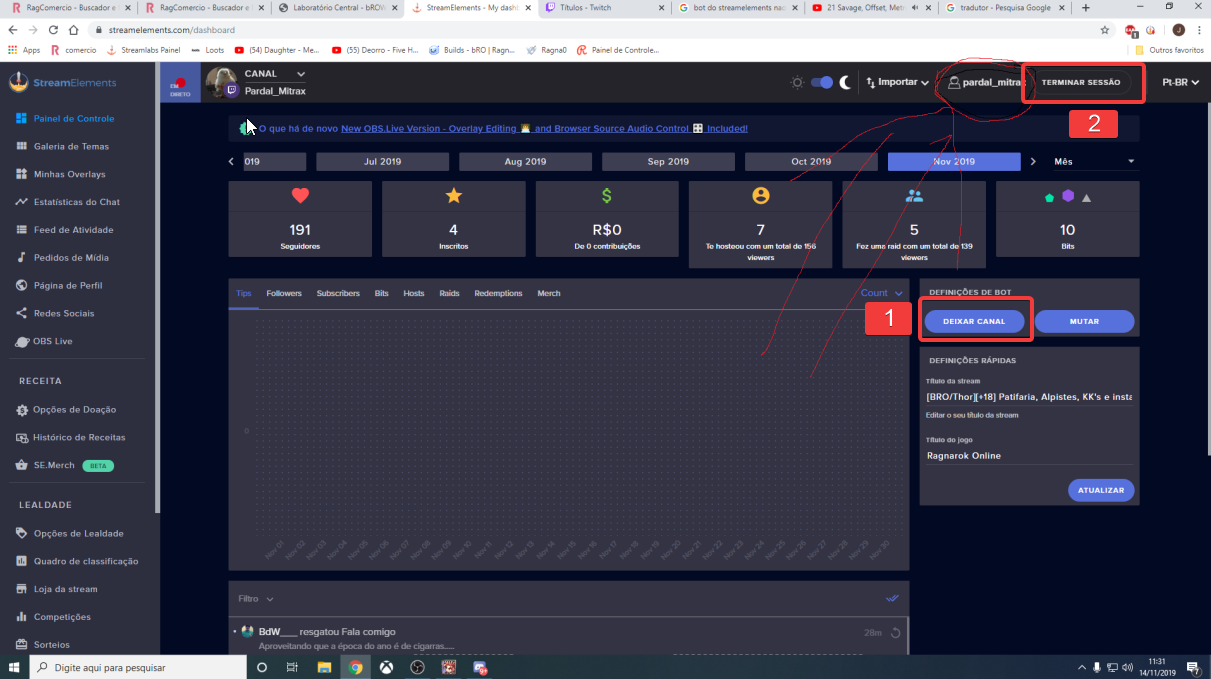
@twin sentinel Former: Pardal_union
New: Pardal_mitrax
twin sentinel
working after the part and join if the bot?
cyan island
@real escarp I see it now! thank you
twin sentinel
Part the bot, log out of the dashboard, log back in and make the bot join again please.
molten dagger
how do i separate?
twin sentinel
separate?
molten dagger
unlink
twin sentinel
 stuck skiff
i don't know if im blind, but is there anyway i can see the top tipper of a certain month? there doesn't seem to be a date range filter under the "Top Tippers" part of Revenue History
molten dagger
@twin sentinel Ty 😄
stuck skiff
@real escarp does that only work for the current month/last 30 day though? is there a way i can find out who my top tipper of march 2019 was?
twin sentinel
With a bit of work you can set the dates and name in the revenue history and add the entries.
stuck skiff
yeah i was trying to avoid doing the math 😦
real escarp
no easy way to do it
but you should suggest filters like that on the dashboard here https://strms.net/ideas
 torpid mulch
How long does it take for streamelements to update my subscriber count/goal? Every time i get a new sub it counts up, but its way off with the actual subcribers count on my twitch dashboard
round brambleBOT
@torpid mulch To reset goals:
- from the overlay editor -> data on top -> goal tab -> reset progress of desired goal
- from the dashboard -> activity feed on the left -> widget data on the right -> goals tab -> reset progress of desired goal
Note: Goal widgets(progress) only counts up and doesn't go down automatically, if you loose followers/subs
 burnt sky
This is about the "Hypecup" - i want the cup to tip over, so i put on the physics - then i see that there is 2 version - v1 and v2 (beta) - now my question what should i use for the best effect ?
twin sentinel
StreamElements at the top in OBS > Log out and log back in.
 magic glacier
Will try that. gimme a min
 upbeat hazel
hi! i've been using streamelements for a while and chat alerts were working. Now when somebody follows, chat alert doesn't work anymore.
new followers aren't showing up on my stream elements dashboard either o_O going to guess that's the problem?
magic glacier
Try the same for starters, I guess.
upbeat hazel
alrighty i will try that, thanks
magic glacier
showing now
upbeat hazel
cool thanks
twin sentinel
@upbeat hazel We have taken a look at your account and the follower alerts should be back up working again.
magic glacier
Any way to add a keybind for creating clips or markers?
real escarp
documentation is there /marker for editors however last person to try it with a command or even making someone editor didnt work in chat
creating clips we have an custom api hold on
magic glacier
I meant just like I do it with the media request pause, volume up, etc
real escarp

 tropic knoll
hi
twin sentinel
@tropic knoll I will try to get a staff to fix your custom bot name in ground control.
 tropic knoll
fixed! Thank you very much!
omg that's literally the fastest fix I've ever gotten
you guys are awesome!
 jolly steppe
then are the merch comming up
twin sentinel
@jolly steppe Merch is in closed beta at this time. We will make sure that you notice when Merch is up. Take an eye on the #announcements and #270206314561404928 channels.
jolly steppe
ok
upbeat hazel
@twin sentinel thank you it worked!
 green kettle
Having similar issues with GC as well. Bot just doesn't show up as of yesterday. Didn't change anything. Restarted multiple times.
twin sentinel
I will try to get a staff to fix your custom bot name in ground control.
green kettle
Thank you 🙂
 terse salmon
Good morning. I also noticed my bot name was missing in Ground Control. I have tried restarting it as above posts have mentioned.
twin sentinel
I will try to get a staff to fix your custom bot name in ground control.
@green kettle @terse salmon Please restart GroundControl. The bot name option should be back up running.
terse salmon
Its there now. Thanks!
green kettle
thank you! I'll restart it
twin sentinel
@burnt sky To your question about the two versions of the physics:
The difference is only the weights of the items has been adjusted a bit. Best to try out what fits you best.
green kettle
Thank you so much  a nice quick fix
twin sentinel
No ETA at this time @slender anvil We will let you know in the #announcements or #270206314561404928 channels.
wary halo
@slender anvil are you in the beta? or are you asking for someone else?
 silk summit
wary halo
silk summit
wary halo
just do it
 vivid wadi
Is there some ongoing issue with botname stuff in GC? I see a few issues with it here and a friend of mine has a problem with her bot right now, I checked mine and also I can't see custom bot name stuff? The option isn't even showing?
wary halo
can she come in here?
vivid wadi
she's streaming at the moment 
wary halo
what is her name?
vivid wadi
welokay
wary halo
let me ask around 😉
vivid wadi
thanks!
 solid wing
Is there a countup variable for SE? so a countdown variable tracks timeuntil, I'd want to track time since a certain point, like someone's birthday for example
wary halo
maybe someone made it in #widget-share or you could ask someone to make one in #dev-chat
because i don't believe there is a default one
solid wing
Ok, thanks 
wary halo
@vivid wadi she can log out and back in to ground control, should be fixed
vivid wadi
Thank
lament blade
Can i have any help with streamelements bot
how can i change the name of the bot on the streamelelments website does any one know?
round brambleBOT
@lament blade Custom bot name requirements
- StreamElements bot modded and in chat
- Active overlay with alerts
- StreamElements tipping page in the panels below the stream (!panels)
- OBS.Live or Ground Control open
- Create a twitch account for the name you want to use or run the bot under your own name
- Custom bot name doesn't work on Mac
lament blade
oh am on mac so it wont work for me?
twin sentinel
Custom bot name doesn't work on Mac
 tropic cosmos
hello I have a question
normal igloo
sup?
lament blade
ok thanks @twin sentinel will it be coming soon?
tropic cosmos
Is it possible for donations via paysafecard from viewers to be instantly transferred to my paypal account?
 dense beacon
Hello, is there anything that you can add to your stream that counts upwards? Like in hours, min and seconds?
lament blade
i have another question
normal igloo
@tropic cosmos If you are using se pay and it's available in your country yes
twin sentinel
@lament blade I am not sure if there is any ETA on the custom bot name on mac.
@lament blade Just shoot it.
normal igloo
@dense beacon like up time?
tropic cosmos
Yes it is available in Poland where I come from and you can explain where I should set it because I have no clue /.
normal igloo
Ruben 
dense beacon
Yeah @normal igloo
normal igloo
thx tho Ruben bro
lament blade
hi guys when i edit a overlay i copy the url of it then paste it in a browser in obs but its cut off most of the overlay why is that?
dense beacon
I want it to be visable all the time @normal igloo
normal igloo
@dense beacon I believe we do have that in #widget-share
twin sentinel
tropic cosmos
on se pay I have written that payment is impossible and hence my question why it is not possible?
 slender anvil
i am in it @wary halo
wary halo
@lament blade it can have multiple causes, is the resolution of the overlay set right?
round brambleBOT
@lament blade To add your overlays to OBS, add a new browser source in your scene. Paste your overlay URL in the browser source properties, set the dimensions to 1920x1080 (unless you changed them on the website), and ☑ “Shutdown source when not visible” https://youtu.be/KDvLynUqXI4
normal igloo
thx Benno
slender anvil
i mean i got messages in twitch so
wary halo
and you don't have the beta tester role as well
lament blade
ok thanks @wary halo
normal igloo
@tropic cosmos do you meet all the requirements for se pay?
lament blade
hwo are you guys mods of the server? hwo do you become staff off streamelements
tropic cosmos
Yes, I meet all requirements
Your account is ready, you can now receive tips via SE.Pay.
wary halo
@lament blade work hard an be nice
lament blade
okay
tropic cosmos
but for several days I have a pending amount but I have no idea what?
The amount available for withdrawal is lower than the minimum withdrawal
wary halo
@lament blade your links in your discord profile don't go to the right page 😉
twin sentinel
Take a look at the settlement time: https://streamelements.com/dashboard/tipping/fees
tropic cosmos
So with paysafecard the waiting time is 16-21 days?
lament blade
what link?
round brambleBOT
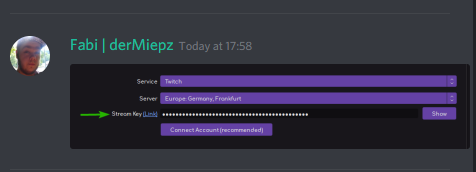
@lament blade Please connect your streaming account (Twitch, YouTube, or Facebook) with Discord by going to ⚙ Settings and then Connections here in Discord. https://streamable.com/eg92w


 wary halo
this ^^
lament blade
ok thanks will do it now
wary halo
there is a twitch link, but it's not right 😉
twin sentinel
@tropic cosmos yes it is 16-21 days.
lament blade
@wary halo done it
 dull glen
why doesnt the twitch chat come up on my stream labs anymore?
round brambleBOT
@dull glen We're not able to troubleshoot issues with using our overlays in StreamLabs OBS (SLOBS) as we don't have the tools to support their software. We recommend using OBS Studio or OBS Studio with our plugin OBS.Live.